#ue4-general
1 messages · Page 268 of 1
 steady owl
steady owl
steady owl
I recommend at least 16
 cerulean nova
😂
 manic pawn
it might work with 8 but not well
steady owl
Work and save up I guess?
cerulean nova
its funny how people want to use powerfull engines on toasters and expect it to run 😄
manic pawn
^
cerulean nova
if i would have the money i would go for a super tasty workstation 😬 but the cpus start at 1000 gpu 1000 ram 500+ dont get me started with m.2 and all that neat stuff 😻
im 24
cerulean nova
u have from expectations of bein adult mate
steady owl
And then save up later
 plush yew
See how my life is bad
plush yew
xD
steady owl
And then got a pc and it's great now
So you can run it on a toaster for a while and it will make you appreciate power later on
cerulean nova
cerulean nova
i come from a realy cancer engine where having 10+ loops the game will have 25fps max and then more players join then less fps u get and at the end u had 15-20 fps wich got better over the last years now it runs with opimized scripts and ~30 people at ~40fps but still its a joke
and stuff like "\part\to\Folder" would not work because it needs to be all lowercase even tho it may is upper case
    while {true} do {
        allMissionObjects "";
    };
};
player addAction ["VM", "vm.sqf"];
player addAction ["nonVM", "nonvm.sqs"];

//vm.sqf
_frameNo = diag_frameNo;
_tickTime = diag_tickTime;
for "_i" from 1 to 100 do {
    allMissionObjects "";
};
hint str [diag_frameNo - _frameNo, diag_tickTime - _tickTime];

//nonvm.sqs
_frameNo = diag_frameNo
_tickTime = diag_tickTime
for "_i" from 1 to 100 do {allMissionObjects ""}
hint str [diag_frameNo - _frameNo, diag_tickTime - _tickTime]
``` Try not to get cancer lollooks similar to the cancer that is skookum script
cerulean nova
that is called "SQF" its a c++ syntax kind of cripple
 frank escarp
@manic pawn i find skokum script super interesting
sadly, it not being on ps4 means i cant use it
but its extremelly interesting for everything that works "over time", due to its async nature
for things like mission design or AI is pretty much unbeatable
also magic powers/arcade guns
manic pawn
it has really cool ideas but the syntax is just 👎
frank escarp

A brief foray into why Tick makes algorithms difficult to understand. Followed by an example-laden introduction to a programming language called SkookumScript whose built-in concurrency primitives radically change how you'll approach writing game logic.
this article shows skokum in practise
manic pawn
read that a while ago
frank escarp
and its fucking awesome
manic pawn
it's nice
frank escarp
btw, if C++ gets async/await, and ue4 every supports it
you will be able to do the stuff that article shows
in C++
manic pawn
wait, is that a thing they're planning to add?
frank escarp
yes
manic pawn
holy shit
frank escarp
its about "repeatable" functions
like
stopping a function mid-way
and continuing later
manic pawn
that'd be really awesome
manic pawn
so it will only take 10 years for it to be usable in unreal
frank escarp
pretty much
manic pawn
:(
or unreal decides to completely disable the feature because they can get 1% more performance by writing it manually
frank escarp
cant write that manually
manic pawn
hm
frank escarp
there are some similar things being made for rust
and what ive seen
is fucking amazing
manic pawn
I mean sure you can
it would just take 100s of lines of boilerplate code for every line or normal usage
frank escarp
becouse you can do that exact kind of thing as in the gamasutra skokum article
where you have 1 function
that runs over time
a guy i know showed me a demo for webgl where you clicked, and a flower grew
a random flower
the code for thte growing was 20 lines
total
becouse it was done with rust async/await stuff
so the code was like
{
    Flower flower(pos);

    for(int i : 1..10)
{
flower.grow();
wait 0.1 seconds
}

vector<petals> petals = new petals[random int]

for(1 .. 10)
{
foreach(petal)
{
grow
}
wait 0.1
}


}
the whole growing sequence was in a function
and thats it
and the flower growed in "realtime", as that function took a couple seconds to run
manic pawn
coroutines are really great
frank escarp
blueprints can also do this stuff by using delay nodes and such
but they arent nearly as good as just text
manic pawn
they also don't have the await thing
or well
I guess they do with the async node base thing
but it's annoying to make
and you can't make it in bp itself
frank escarp
there is also one with with skokum
you can edit stuff live
this, on a console workflow, is a huge boost
becouse you can just edit stuff runtime in the devkit itself
but the free version is for pc not consoles
manic pawn
so like hot reload except it works?
frank escarp
yes
manic pawn
that's nice
frank escarp
they also show compiling the whole sleeping dogs game in 3 seconds
manic pawn
wow that's fast
frank escarp
i would like to use this for the different tasks in a behavior tree
 fossil ore
Hope It saved
frank escarp
or things like multi-stage spells
feels bad man
Contact Us license is basically "too expensive for a random indie"
frank escarp
200 dollar per seat to access a debugger
so probably the full thing is expensive as fuck
manic pawn
oof
fossil ore
Anyone knows why UE4 constantly switches LOD for the model?

When I try to decrease or set specific LOD for the Robots
It doesnt do anything
Note: fixed it by removing some odin files
 chrome ivy
it isn’t a job but I figured that probally someone will help me for money xD
steady owl
What is the issue @chrome ivy
 atomic forge
Is it possible to delete things automatically that aren't referenced to anything in UE4?
chrome ivy
@steady owl Dedicated server not showing up in server browser
Though it shows up in steam Master list
i have a custom appid
I followed this guide: https://wiki.unrealengine.com/Dedicated_Server_Guide_Steam
but first I followed Sebatnik’s video on steam dedicated server
and only when I saw it isn’t working I started following that guide
I am using 4.18.3 source
and I just cannot get it to show up in Steam Server Browser
I get 3 warnings in the dedicated server log
I am using Zap hosting
however from my knowledge those warnings shouldn’t affect anything
and I get no warning in the CLIENT log for when I try to search for servers
only that the Results array length is 0
 small oar
How can I cast in c++? Or get two c++ files to talk to each other
chrome ivy
you get two c++ files to talk to each other by including them using #include
small oar
Yeah but idk how to call the method or variable
Other than ClassName::MethodName which complains about it being static
chrome ivy
to cast:
AFirstPersonCharacter* OtherCharacter = Cast<AFirstPersonCharacter>(OtherActor);
for example
chrome ivy
what do u want the other actor to be?
small oar
It’s a game mode
chrome ivy
well then make a variable called MyGameMode or whatever and set it using
(ASomeGameMode*)GetWorld()->GetAuthGameMode()
small oar
It always returns null
 regal mulch
@small oar It works the same in cpp as in BPs
You need a reference to an instance of the class if you want to call a function
Or declare the func as static if that is something you need
regal mulch
If the whole idea of getting references isnt getting to you yet, check the #blueprint channel
small oar
@chrome ivy that might be it ill check
small oar
@regal mulch im using c++ though
regal mulch
Same thing works in cpp
small oar
oh ok cool
regal mulch
Bp is a child class of cpp
And it is ue4 after all
So tracing, overlaps, etc. Are working in both
You can later still search for how to perform the bp stuff in cpp
chrome ivy
yea just that blueprints don’t have the same accesibility as cpp
regal mulch
And in addition, somr classes have static accessors
small oar
its pretty much just the object i need to pass in like in this example AFirstPersonCharacter* OtherCharacter = Cast<AFirstPersonCharacter>(OtherActor);
ill check my game mode now
regal mulch
Yeah but you need to learn how references or pointers work
And what ue4 offers to get those
And it doesnt matter of you learn that in cpp or bp
small oar
im pretty comfortable with both ref and pointers i think
booting up unreal now ill see if i can send some code
regal mulch
I mean you need to learn what ue4 gives you to access other class instances
chrome ivy
really? and I thought I was comfortable in my chair
regal mulch
Just watch that stream. If you still have questions, come back
small oar
bp communications?
regal mulch
Yes
small oar
awesome, thanks
chrome ivy
there goes my problem at the top of the chat 😂😂😂
Whenever I post something in here nobody helps me 😂😂 it is so frustrating
regal mulch
It depends on how complex you problem is
DedicatedServers not showing up is a pain
People that dealt with it don't want to spend time (on a sunday) on helping
Others might just not know how to solve it
chrome ivy
do you know how to solve it?
regal mulch
Not really. I only did that once.
Like a year ago or so
It's important that your DedicatedServer properly returns the session data
You def want to log verbose Net and Online
To make sure you see enough debug logs
chrome ivy
I have that Core.Log in defaultengine
also when I create the session, on succes I have a print string
and it seems to create the session
and the results array length is 0
when searching for servers
and I use Advanced Session plugin
@regal mulch I heard rumor that you have a wiki on Dedicated Servers but I am having a hard time finding it.
chrome ivy
@steady owl I sent the reply earlier. Please check above these messages.
steady owl
@chrome ivy That is indeed a problem that many people have but there isn't much docs and help on how to solve it
I can't personally help you but good that it's in the discord if anyone can
chrome ivy
don't think anyone will show up. this is the 2nd time I asked
xDD
@steady owl do you have time for 2 questions pls?
I am thinking that this might be the problem
in Project.Target.cs
I didn't add UEBuildConfiguration.bCompileSteamOSS = true;
instead I added bUsesSteam = true;
and I saw this article here
Compiling UE4
If you're compiling UE4 from source, the following steps should be taken:
Open OnlineSubsystemSteamPrivatePCH.h (being located in ....\Plugins\Online\OnlineSubsystemSteam\Source\Private), where you'll find the following line of code, defining the root location of the Steamworks SDK:
#define STEAM_SDK_ROOT_PATH TEXT("Binaries/ThirdParty/Steamworks")
You'll want to modify the line to read:
#define STEAM_SDK_VER TEXT("Steam[Current Version]")
I tried but I get a tone of errors when I do it
in project.build.cs I didn't add this as Allar said cuz the article is pretty old
if ((Target.Platform == UnrealTargetPlatform.Win32) || (Target.Platform == UnrealTargetPlatform.Win64) || (Target.Platform == UnrealTargetPlatform.Linux))
{
if (UEBuildConfiguration.bCompileSteamOSS == true)
{
DynamicallyLoadedModuleNames.Add("OnlineSubsystemSteam");
}
}
steady owl
All I know is that it isn't an easy thing to do and requires additional knowledge
Which very few have
Not me unfortunately sorry
I wish there were proper docs or a guide from epic
chrome ivy
yea well I have a friend who uses same Unreal version and didnt do any additional steps as I had to do and for him it works perfectly. for @zealous sonnet works perfectly too and didnt do any additional steps. what am I cursed or what?? 😂
 zinc bison
I havent gotten to the part where i add steam to my game yet, so Im not any help Im afraid
are you asking in multiplayer channel?
chrome ivy
I already asked in multiplayer no answer though
@regal mulch Though, do you remember any important steps you did to solve the issue? (sorry if I am bothering you, I am just a lil desperate)
regal mulch
I don't have any docs on it
I think we are currently using 4.18, without any changes to the engine in regards to Steam
Servers are showing up, however need a couple of minutes (15 or so)
Iirc we create the session in the GameSession::RegisterServer function
That's all I remember
I can ask again ,cause I haven't touched it recently
 honest rune
anyone have any links to sample projects or examples that show setting up character movement not depending on PlayerController rotation and behaves well with animation states still?
getting tired of fighting with this damn thing.
regal mulch
In what form not depending on PC?
You can toggle if you want to use the Pawns Control Rotation or not
Think that's pretty much all
honest rune
not allowing control rotation to influence movement whatsoever
regal mulch
So, disabling the booleans doesn't help?
honest rune
not at all lol you still have to set up the movement.
I've got what should be working just fine and movement itself is great but the blendspace doesn't like velocity length for input now to determine speed for walk/run/backwards etc
chrome ivy
@regal mulch If I am using the Advanced Sessions plugin do I still have to GameSession::RegisterServer?
cuz I think it does the same thing not sure though
regal mulch
Idk. I can only tell you what I use
I never used that plugin
But I assume as long as you properly create a session for the DedicatedServer, with the right session settings, it should work?
chrome ivy
you assumed right, but it doesnt work 😂
 storm venture
hey so UE4 is taking 44GB in my AppData/Local/ folder, what gives?
It's all just numbered folders, can I just delete them?
small oar
watched the videos and i understand the idea of casting especially in blueprint but in c++ im still lost 😦
after i import the file (which is a user widget) how can i access that class' info?
zinc bison
casting is the same in C++
 sinful narwhal
has anyone...seen incredibles 2?
zinc bison
lets say you have a Character actor. But you use CustomCharacter that you made. You cast the character to a CustomCharacter to get the information that exists on the CustomCharacter class (assuming it is in fact a CustomCharacter)
If its not a custom character the cast will result in a nullptr
aka, its not valid
zinc bison
no, they decided to make video games illegal
sinful narwhal
wait rly?
sinful narwhal
...
w-why?
you guys aren't in some governent CO-OP agency are you?
okay imma just go
 idle stump
I have a particle system where the particles are going up over time with a Velocity by Life module. But I want these to radiate from the center. I tried adding a Initial Rotation module at the top, and they do rotate, but this doesn't affect their velocity. How do i make the velocity relative to rotation?
I tried setting Screen Alignment to Velocity but I see no difference
idle stump
Hmm, using a Sphere location module with Velocity checked seems to kinda get where I want but now I don't have control of the velocity over time. I want it to start out quick and get slower. If I add a Velocity by Life again I get weird results, again because this velocity is not relative to the direction the particle is already moving.
 fiery harbor
did anyone notice this issue with HISMCs in 4.19?
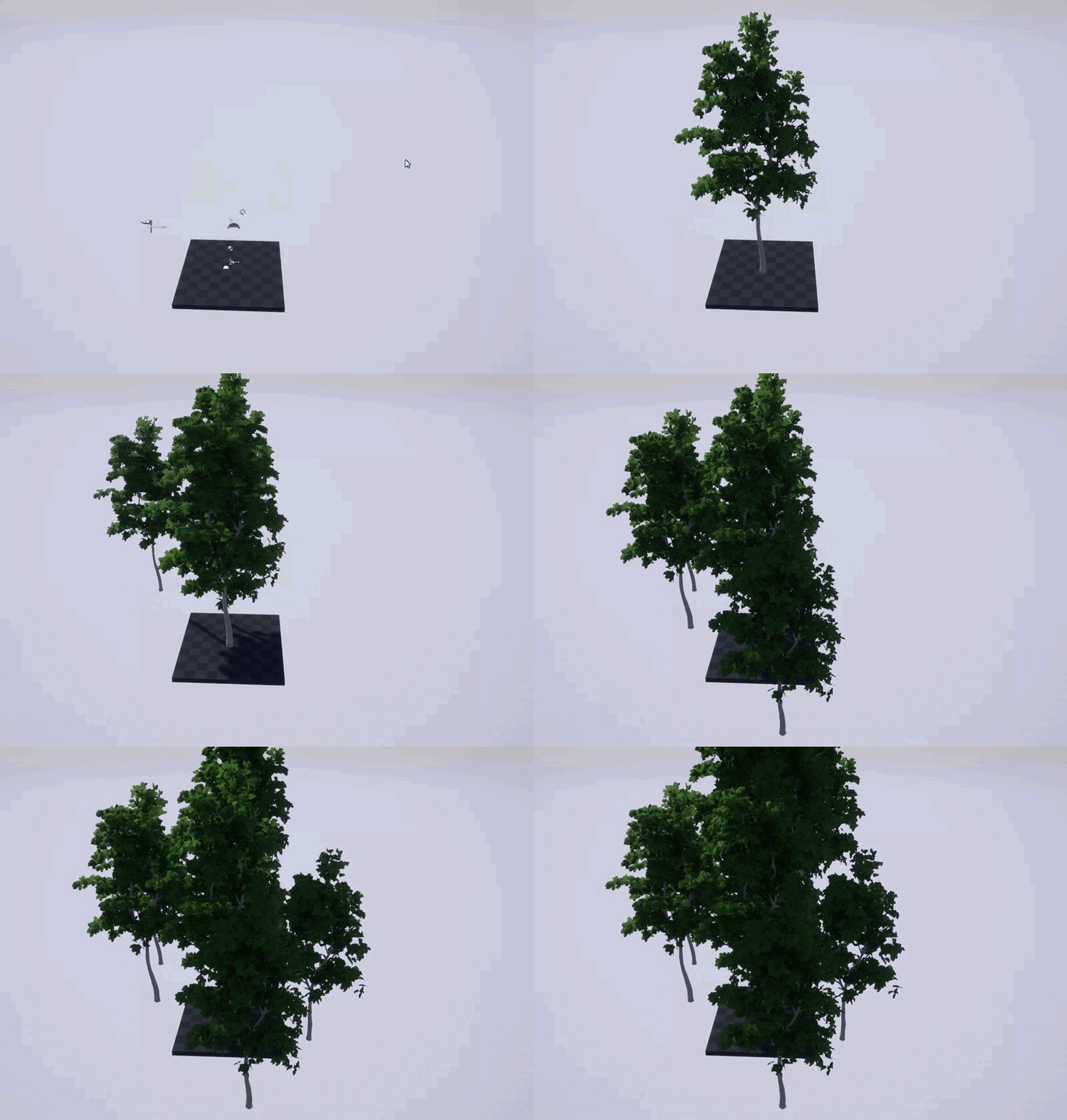
when you add a new instance, the wind on all existing instances gets reset
can't find any reports about that
can only find me reporting that issue for 4.7 more than 3 years ago 🙃
but it was definitely fixed back then
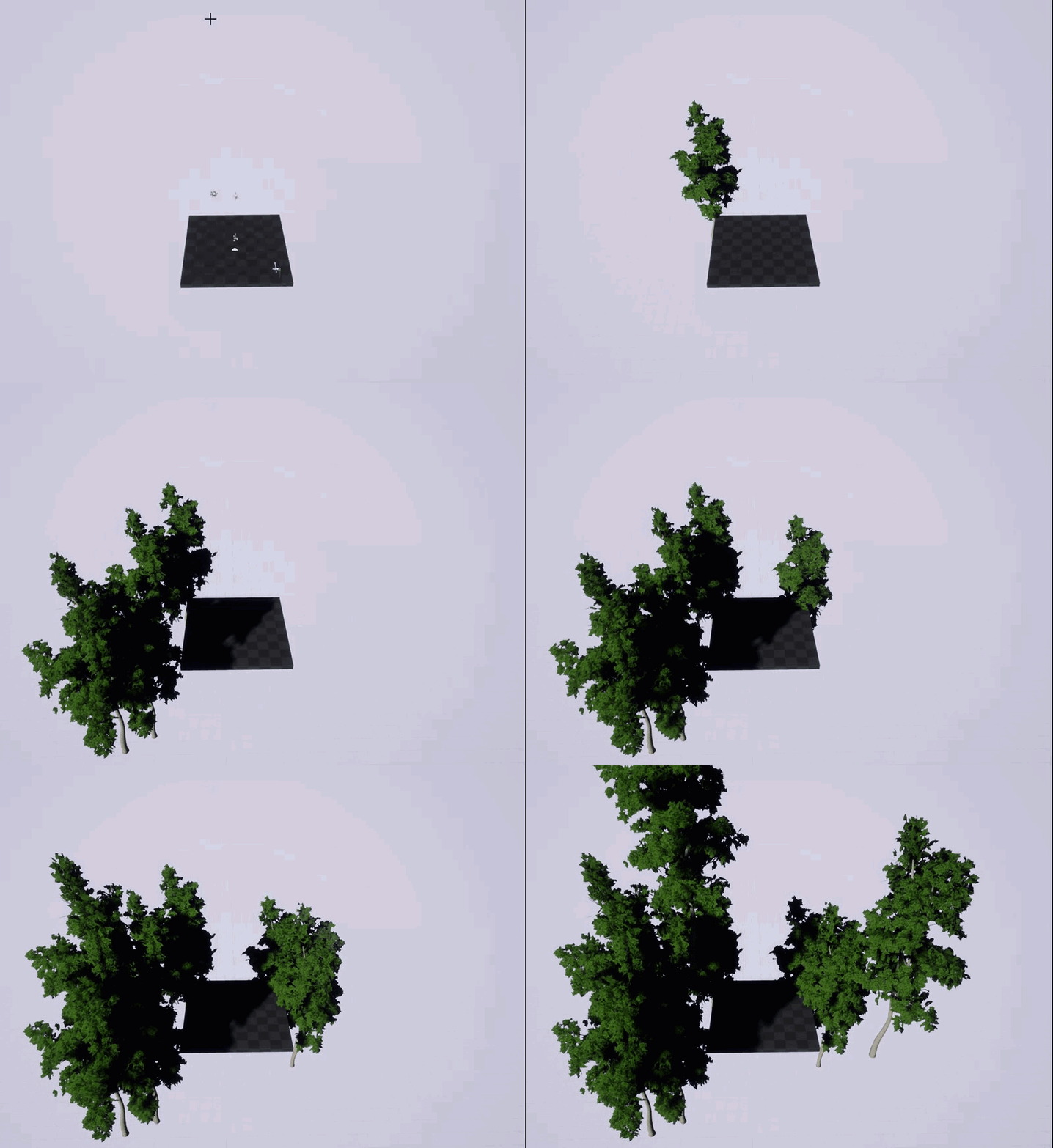
 silver crown
How does the wind work?
plush yew
trees looks so good
fiery harbor
@chrome ivy which old guy? lol
@silver crown what do you mean? just placed a wind directional source in the level, thats all
wind is managed by speedtree stuff
silver crown
Ok, haven't used that yet
fiery harbor
I guess I should test it in 4.20. but I dont have that installed and no disk space for it 😄
silver crown
¯_(ツ)_/¯
idle stump
Is it possible for a particles Initial Color to be somewhere between 2 colors. Like white -> gray. I feel like I've tried every variation of the distributions and can't seem to get the right result.
if i try getting uniform curve, the settings don't make any sense to me. But using v1 and v2, whatever those mean, I can at least actually see a variation of colors. The problem is: I have set it between white and gray and i get a bunch of different colors. I want just a gray scale
 tepid plover
Quick question! I'm looking for a blueprint node to "fade out" textures based on distance. So that you don't see the texture on the mountains but a color. What is it called? Remembered seeing it but I forgot.
 grim sinew
It wouldn't be blueprint, it would be in the mateiral
There's a ton of ways to do it, usually around the pixeldepth node
tepid plover
uhm yea that's what I meant
steady owl
In the game PT where the infinite loop happens with changes in the map, how do you think they dealt with it? level streaming to load in the same segments of the level?
fiery harbor
I just downloaded 4.20 through the launcher, and when starting it for the first time, UE4 just force rebooted my PC without any warning 🤔
manic pawn
it also does that when you run the setup.bat for 4.20 for the first time
the prereq setup is doing it for some reason
tepid plover
Yay it works. Simply used the setup from the PixelDepth Wiki page and customized it a bit 😃
idle stump
@steady owl My guess (and I never played that demo and haven't seen the video in awhile)... is that they use portals. This is not exactly something built-in to Unreal... I've seen people do it but there's some tricks you have to do to get it to be completely seamless.
 sharp crest
 idle stump
@steady owl Might check out this vid, and the top comment: https://www.youtube.com/watch?v=PQy7C1RowB0
In this tutorial we will be looking at how to create the portal effect I used in my previous portal videos. The method, however is different, but the result ...
There's probably other tutorials too, i think this guy doesn't explain it only demonstrates it. I feel like i saw him or someone else doing a really similar project explaining some stuff on the forums, you should track that down
steady owl
Thank you!!
idle stump
The video description on this video seems to have some good resources too: https://www.youtube.com/watch?v=j7rYvPtuEFg

Contact: filmedinsource@gmail.com Files are scattered across an old hard drive but if you request them via email I'll do my best to get them to you. Also che...
cerulean nova
in the Epic Github the "release" == 4.19.2 ?
grim sinew
Just use the 4.19 branch to be safe
The un-versioned branches aren't the most trustworthy all the time
zinc bison
yeah that kinda confused me too at first
grim sinew
Just checked, yeah it is up to date currently, if you want to though.
zinc bison
i would stick with the version branches myself, Ive had problems where release wasnt actually the most up to date
and i was like "wut"
cerulean nova
hmmm 🤔
storm venture
hey does anyone know of a nice way to select long edges like this in maya?
Before triangulation, I would just double click a line for it to extend all the way, or just select one, and then shift+double click another and it would select both + all in between
After triangulation, I have to select each one separately... very tedious
 potent wing
Hi, i need help, if someone available, please Tag me. A voice chanell?
- AI
-Anin Montage
 jaunty briar
hey guys I have trouble understanding how i should use GameState And GameMode exactly.
-
Should I use my GameState to store "economical" values for a strategy game?
-
Should I use my GameMode to manage what the player should currently do?
 digital anchor
On gamemode store stuff that the server will need, as its only accessible for the server, such as rules, when does a match start, when does a match end, which player's turn is it....
on gamestate clients can acess so u can have the players, the teams and everything related to the team, whos winning, the economy of each team, etc
@jaunty briar is it single player or multiplayer game?
jaunty briar
single player
digital anchor
then it gets a little easier, as in multiplayer only the server can see the gamemode
jaunty briar
without map switching (you just create one randomly and play on it)
ah ok
good to know
digital anchor
then try to have on gamemode, whats specific to that gamemode, then in case you decide to create a new gamemode (such as Free for all, Team deathmatch...) you can just swap between them
jaunty briar
but if i got certain quests or something similar, would i manage active quests and so on via the game mode?
digital anchor
humm... yeah i think so
honest rune
Hey, when you configure InputAxis, are they continuously polled with 0.0f as input every single frame?
I was testing something and placed a GEngine->AddOnScreenDebugMessage(-1, 1, FColor::Red, TEXT("MoveX called!")); inside a function that's bound to an input axis A and D keys and it spams every single tick
 worn granite
yup
worn granite
check Val != 0.f
honest rune
yeah I know, I just didn't know that. no biggie.
worn granite
💯
honest rune
You! 😃 Hey sooo wanna help a brother out with something?
I was trying like hell to setup movement input that would be completely independent from PlayerController rotation and was like you know when you see those memes of someone beating their face against a keyboard repeatedly? yeah, that
No matter how low level I went with the moment, it still somehow was effected by rotation from the controller I think'
Character would spawn: I walk forward, all good, I strafe, all good. As soon as I start turning and adding yaw to the rotation things get weird. If the character rotates 180 so hes facing backwards from the start rotation, the blendspace that controls walk/run forward/backward starts treating forward velocity as if its backward velocity and vice versa. If character is turned only 45 degrees, the effect is somewhere between the two rotations if that makes sense.
I supply the movement speed (and direction derived by either negative or positive for forward/backward) by taking taking the vector length of the velocity
 queen arch
Is there a list with all the maps of a project, so I can call the next one?
manic pawn
there is not, you'd have to create it yourself
 modern sinew
Hey everyone
chrome ivy
@queen arch Make an array with names and add as many map names as you want. When you want to change the map, you just GET the next index from the array. Example: First map - GET 0, Next map - GET 1
@green flame hey
 visual hollow
Resizing the assets at once in the level make their position wrong is their anything I can do to resize everything in the level at once without making their location weird
honest rune
If the assets have a bueprint you could adjust position and size in the construction graph maybe, i dunno. Just random idea
Based on scale values i mean
Or you mean at runtime?
visual hollow
The problem is in the editor everything is perfect size ,etc but when I play it in VR all assets everything in the level is much larger than player
honest rune
oh, my knowledge of vr is like, zero lol sorry man
visual hollow
np
potent wing
How do i update Nav Mesh Bound Volume every delta second? the problem is, when i open a door, the AI cant enter the room
idle stump
@potent wing I'm no expert... but maybe try disabling "can ever affect navigation" on the door, but then manually manage a Nav Modifier Volume at the place of the doorway in the door script.
or better yet check this out: https://answers.unrealengine.com/questions/132655/update-navmesh-when-door-opens.html
 wet ingot
I feel like I'm doing something extremely simple very wrong, because I can't find any mentions of an issue like that in Google. 😄
Can someone walk me through correct way to make Unreal recognize new or modified assets in the Content folder? I have a Unity background and I'm learning UE to help with user interfaces on an Unreal project, but I'm getting blocked by a surprisingly trivial thing - none of the texture assets I planned to use for UI exercises (PNG/PSD images) show up in Content Browser.
In Unity, you just drop content in the Assets project folder, and Editor automatically detects new files or changes. When some are found, Unity refreshes in-engine representation of involved files (e.g. every new/changed PNG gets an DXT texture generated for it). You could also force an asset refresh manually, or specifically tell Unity to reimport a folder from Project View.
As far as I understood initially, Unreal is pretty similar - drop files into the folder called Content and get updated in-engine representations - except, in contrast with Unity, in-engine format is stored alongside the original files as .uasset files (instead of being hidden into a separate Library folder). Everything new or changed should appear in the Content Browser.
Except for me, it doesn't seem to work. I drop a folder full of PNG files into Content, and in Unreal, there are no changes in the Content Browser, no .uasset files are being generated. There is also seemingly no "refresh" or "reimport" button to force UE to rescan the Content folder. What am I missing?
idle stump
@wet ingot Right click the asset and hit Reimport. Or most assets also have a button for this when you are viewing it in the appropriate window (like an animation in the animation editor)
wet ingot
There are no assets in Content view, and there is no such option on root folder context menu, as far as I see
Deleting Intermediate/CachedAssetRegistry.bin seemed to help, found an advice to do that on answer hub
Should I do that every time a new folder or file is added to Content?
As in, if no pre-existing asset exists so Reimport context option is not possible
idle stump
Oh wait i see, so you are talking about a whole folder you manually moved into the project folder outside of the editor. I don't think people really do that. You should hit the import button. I think from there you can select multiple assets at once. But it won't automatically do it i don't think
 gloomy helm
Anyone here used instanced meshes much before?
I can see ISM in my viewport but I have to go to game view to see HISM
wet ingot
That's the usual case with version control, though. For instance, I might pull an up-to-date state of the Content folder from a Git repository, which might contain a new folder inside.
fiery harbor
@gloomy helm I've used a lot of HISMCs
idle stump
@wet ingot I don't have experience with it, but I would think if you are updating your source files from version control maybe you should restart the editor
fiery harbor
I think there is some view flag like HideFoliageInEditor, but completely differently called @gloomy helm
idle stump
There is a source control button in the editor. I have never used source control yet tho
For UE anyway
wet ingot
Restarting the editor didn't make it pick up new folder, unfortunately, as far as I see
idle stump
ah
wet ingot
I just tried import button, and it's a bit unclear to me how it handles .uasset file generation - it works for adding assets to the project, but I can't see .uasset elements anywhere, like I did when cache was reset
fiery harbor
@wet ingot if you add a new folder to the content folder and then start the engine, the engine should totally see it
wet ingot
Hmm, interesting
fiery harbor
it only works if the engine version the stuff was imported with is the same as yours of course
wet ingot
Yeah, I'm assuming a very simple case of new project started on one engine version
Could editor running and unchanged folder names affect things? I just did a test: adding a folder A while UE is running seems to make the editor fail to detect the folder content even after restart - as if it was detected as empty immediately, and subsequently ignored on next startups; while adding a folder B while UE wasn't running seemed to make UE import the contents on startup
.uasset location question when using "Import" instead of modifying Content directory directly still stands. Import seems to create a static link to a file anywhere on my PC and creating a hidden .uasset in an unknown location (instead of copying a file to the Content folder and creating .uasset alongside it). The .uasset file being hidden somewhere and lack of original file being present in Content makes source control problematic.
If I'd like to add, say, T_UI_Button_Background.png to Content/UI/Textures/, what's the correct workflow for getting it imported with .uasset (metadata/DXT version for in-engine use) sitting next to it?
 warm mountain
hey guys i've been reading a bit on texture density and have a few questions
I noticed that most asset packs in unreal seem to follow the tex density on the left in which most of the texture packs in turbosquid and so on seem to cater towards the left
but the problem with the lest side is that those smaller circles would need individual UVs to be in sync with larger modular pieces
while on the right it seems more optimal that the texture density and UV's a in synced with all smaller planes sharing the same UV
but because area that is textured also becomes tiled and a lot more repeatable
i'm guessing in that sense although the right reduces the number of meshes needed to keep textures in sync its not practical?
grim sinew
I've read your question 3 times now and still have no idea what you're trying to ask.
Can you give an example with anything except a generic black and white checkerboard?
warm mountain
i guess i'm kinda confused
i just don't get this texture density thing

like am i supposed to map and scale all my texture files by 1 meter?
i noticed almost not a single asset pack in Unreal does this
idle stump
@warm mountain I wouldn't lose sleep over it. I think it's generally a guideline not a hard rule. Yeah it would be great if the texel density of everything was uniform... but in reality you want higher density on things you're going to see up close and/or things that have more detail. Otherwise you want less density for performance. Maybe I'm wrong, but that's my guess.
warm mountain
gotcha
it scared the crap out of me
i'm half way in texturing my assets referencing from asset packs when i saw this haha
i thought i had to conform to a 1x1 meter rule. Right now i'm doing it by 3x3
wet ingot
https://docs.unrealengine.com/en-us/Engine/UMG/HowTo/CreatingWidgets
To follow this example, do I need to do anything else? My UI doesn't show up at all so I might be missing some compile/save action somewhere.
- using the Blank project
- created a UI widget, filled it with some large centered text, clicked Compile, then Save in Graph view
- opened level blueprint for Minimal_Default level in the Blank project
- replicated the blueprint from Unreal documentation above (where Enter creates a linked UI widget), clicked Compile, then Save
- clicked Save Current in main level toolbar
- clicked Play
- clicked in viewport in case it wasn't in focus, pressed Enter and... nothing
huh, wait, Play Standalone works
I guess the problem is with Keyboard inputs when the game plays inside the editor
maybe they are disabled by default? if so, how to I enable keyboard inputs inside editor play mode?
ah, I think I had Simulation mode selected as in-editor default
that explains keyboard inputs not registering
grim sinew
@warm mountain You don't need to make everything 1x1 meter, but you do want to try and have uniform texture quality across a whole scene
That's more what they were getting at
You don't want to have a situation where you have low resolution textures right next to high resolution ones
 ivory veldt
hi all i wish information
will there be a possibility that the laying system will be implemented, ie to create the poses on the 3D scene in real time without going into the animation menu?
 stuck spade
Getting lighting right in Unreal seems to be hardest part of the entire ordeal
having a really hard time getting my night campfire scene to look right
wet ingot
What node can be used to execute something in the level blueprint at the start of the game? Something similar to Start, Awake or OnLevelWasLoaded from Unity. Dragging a line out of left Exec input of a node and searching through node list, I wasn't able to find anything relevant using "start", "begin" and other related names
manic pawn
beginplay
wet ingot
thanks, this works well!
how can I modify the pivot of UI elements like Text? there is a Pivot property under Render Transform section of element inspector, but it seems to affect only things like rotation application - text still grows out of top left corner, like this:
I can move the element using Position properties to get something approximating a centered pivot, like this:
but that is a brittle fix and pivot changes are probably not intended to be done that way, since modifying anything about the content won't update Position accordingly
so, how can you get a Text widget to "grow" out of center, or bottom left corner, or top right corner etc.?
to illustrate, here is what I'm talking about done in Unity
this is different from text justification, which just changes how text inhabits same rectangle with same position origin
 whole quarry
there is an alignment x and y you can set
wet ingot
hell yeah, that was it!
manic pawn
expand the stuff on the anchor and mess with it
manic pawn
isn't it part of it? 🤔
whole quarry
x 0.5 and y 0.5 is center
wet ingot
looks like alignment and anchor are neighbours on same hierarchy level, I think?
yup, value range makes sense
just like pivot value range in Render Transform
whole quarry
you can use the Anchor to fixate the item in the viewport
then the Alignment to center it around the Anchor point
wet ingot
yeah, it's just a different tool in the box, anchor system is definitely super useful
whole quarry
with the XY position you can give it a offset from the Anchor
wet ingot
I was just wondering specifically about this
by the way, is there a way to make children inherit opacity of parents as a base, ala hierarchical blending in PS, or do you need to iterate over each child and override their alpha colors separately to fade out a group of UI elements?
ah, nice, found Render Opacity on Canvas
warm mountain
@grim sinew gotcha!
grim sinew
Generally, you want to avoid scaling the texture up or down more than 30% of your target texel density
warm mountain
alrighty, so far it looks quite clean
at least most of my files work the way it should haha
 thorny cipher
Anyone know why fullscreen mode does this?
whole quarry
fixated on pixels?
thorny cipher
?
whole quarry
i.e. widget build on a fixed 1024*786 so it cant scale to the user screen resolution
thorny cipher
No i mean the window size itself
You can see my desktop bg
This is fullscreen mode
I moved all my config stuff to the 'Game user settings' system build into UE and it does this
When I turn the res down, and put fullscreen
whole quarry
so its in Windowed Fullscreen?
thorny cipher
Is there a way to make the engine ignore the engine.ini file in the user's directory?
Because this works 😄
It's an unfair advantage if players modify this
potent wing
@idle stump this doesnt work...
anyone know how to update a nav mesg whenevr i open/close a door?
thorny cipher
Set your nav mesh to dynamic in project config
potent wing
you mean in the project settings?
whole quarry
Seems like it
thorny cipher
Yes
potent wing
there's no settings regarding that
thorny cipher
No problem
It does add an extra cost, but it's needed if you want dynamically changing nav meshes
potent wing
i had this problem for days and now you fix it in seconds
potent wing
i havr another question. How do i change alot of object into another type of object? for example i have 84 Target point. and i want to change all of this Target point into a Actor blueprint?
whole quarry
my brain just had a fatal error from reading that
potent wing
let me explain it again. I have a Blueprint called "Target_Point_Battery". and i have 84 Target point (not blueprint) and i want to replace them with "Target_Point_Battery"
potent wing
i can find "Replace selected actor with" but i cant find "Target_point_battery".
i can only replace them with Lights and Primitives
 languid shard
you need to select your new object in your content browser
 potent wing
thx all
i almost lost hopes and try to replace them 1 by 1
Holy i glad i join the Community
thorny cipher
This is my issue.. the game is meant to launch into fullscreen but it doesnt
I have to go into windowed fullscreen and then back to fullscreen for it to work
whole quarry
are you applying changes upon launch @thorny cipher ?
thorny cipher
no
whole quarry
is it a packaged build?
thorny cipher
Yes
whole quarry
GetLastConfirmedFullscreenMode == GetFullscreenmode, if false set fullscreenmode to LastConfirmed ?
thorny cipher
It is going to fullscreened but it's not locking correctly
whole quarry
from what i found in the past is that Windowed Fullscreen works better than Fullscreen
languid shard
anyone knows how to read the crash reporter stuff ?
languid shard
trying to pinpoint where things are going wrong
thorny cipher
But using any other res other than current screen res causes it to not full the whole screen
 cloud cobalt
Windowed fullscreen = non-exclusive, Windows-compositor enabled
Fullscreen = game takes exclusive control of the monitor
You can have non-native resolution in fullscreen (which is annoying and usually resizes other windows, reorders desktop icons etc)
thorny cipher
bUseVSync=False
bUseDynamicResolution=False
ResolutionSizeX=1280
ResolutionSizeY=768
LastUserConfirmedResolutionSizeX=1280
LastUserConfirmedResolutionSizeY=768
WindowPosX=-1
WindowPosY=-1
FullscreenMode=0
LastConfirmedFullscreenMode=0
PreferredFullscreenMode=0
Version=5
AudioQualityLevel=0
FrameRateLimit=0.000000
bUseDesiredScreenHeight=False
LastRecommendedScreenWidth=-1.000000
LastRecommendedScreenHeight=-1.000000
LastCPUBenchmarkResult=-1.000000
LastGPUBenchmarkResult=-1.000000
LastGPUBenchmarkMultiplier=1.000000
bUseHDRDisplayOutput=False
HDRDisplayOutputNits=1000
DesiredScreenWidth=1280
DesiredScreenHeight=720
This is my config in gameuser settings
fullscreen is 0, which is the right mode
But when I start the game, it creates a window in the top left of the screen that acts like fullscreen but doesnt actually fill the screen
As you can see here: https://www.youtube.com/watch?v=uFI5dpOl744
grim sinew
We know
thorny cipher
For it to properly lock and fill the screen I have to change to fullscreen windowed then back to fullscreen
grim sinew
Have you tried just having it run on the main menu level's begin play?
thorny cipher
The set res thing?
whole quarry
Game window fullscreen mode 0 = Fullscreen 1 = Windowed fullscreen 2 = Windowed
grim sinew
No, just setting the fullscreen mode
thorny cipher
whole quarry
seems to be the right one
thorny cipher
Like this?
Modes that an FGenericWindow can be in
This is the enum
0 = true fullscreen
whole quarry
tho after setting it and applying it, when relaunching the game you shouldnt need to load it again
thorny cipher
Exactly
whole quarry
since the screen goes full black when you start it, it seems to be starting in Fullscreen but then switch back to windowed or something
 frosty copper
I prefer games with windowed fullscreen. xD makes tabbing to other things much easier. :p
whole quarry
if the game is in fullscreen and you change it to fullscreen, prepare for crash
frosty copper
🤔
thorny cipher
Doesn't work
frosty copper
shouldn't you load first, then get?
thorny cipher
lol
No
This works
Changing it to windowed fullscreen then back to their prefered fixes it
(╯°□°)╯︵ ┻━┻
frosty copper
... 😂
 bitter iris
quick question if someone deletes a project is it recoverable ?
frosty copper
depends on if source control is being used; and to an (expensive) extent, hard drive data recovery.
potent wing
that's why always make a Backup every week
thorny cipher
frosty copper
source control, backups, and not fucking up & deleting your project are your best friend. 😉
thorny cipher
This is my solution for epics janky user settings 😂
frosty copper
🤔 I guess that explains why some games I play seem to change to windowed then whatever i picked~!
whole quarry
@thorny cipher why apply 2 times resolution?
thorny cipher
I have to set it to windowed fullscreen
And then to the desired
for it to not launch in a weird window
ivory veldt
Can I ask you a question?
whole quarry
No. 
thorny cipher
@whole quarry After doing some digging people are reporting issues with fortnites fullscreen mode too
So idk
potent wing
meanie
ivory veldt
how can you create the poses on unreal engine as on unity as long as I put a model and I saw the biped in real time with unreal engine I do not see this thing I can do? to do the poses
potent wing
yep
 wary wave
I have a math question for those that are mathematically inclined
potent wing
oohh fancy
wary wave
short of rejection sampling, can anyone think of how to obtain a random point that is within the intersection of two circles?
it seems like something that should be fairly achieveable
frosty copper
@wary wave https://www.xarg.org/2016/07/calculate-the-intersection-area-of-two-circles/
then use random~?
wary wave
that article gives me the area (as in 'meters squared' or whatever) of the intersection space, which isn't really what I'm looking for
frosty copper
o. I tried. DX
wary wave
you also can't really get a 'random point' in an undefined area, hehe
cloud cobalt
That's a surprisingly involved question
frosty copper
🤔 I s'pose... there's always getting a random between the two intersect points for Y, not sure how you'd manage the curve on the X though
cloud cobalt
I'd probably narrow it down by generating inside the circle defined by the two intersection points, and then do rejection
But you specifically said no rejection sampling
wary wave
that's one way of doing it
I'd like to avoid rejection testing if possible, but if it has to be that way, it has to be that way
I don't like having an indeterminate number of calculations, hehe
cloud cobalt
What @frosty copper said would work if you don't need uniformity across various shapes, but you probably do
wary wave
depends on what you mean by uniformity?
cloud cobalt
Well his suggestion is : first random number along the axis between intersections points, gives you an "X", and then another random on the orthogonal axis, between the two curve segments
If you do that, it works predictably, but a very narrow shape will be much denser on one axis than the other
I mean, technically you'll have infinite density at the intersection points
So that will generate points there more often
frosty copper
plus if need be ,you chould easily check if the point it generates is actually in both circles; and if not, discard and run again~?
https://forum.unity.com/threads/how-could-i-get-the-random-point-in-the-cross-area-between-two-circles.185461/ 🤔 seems these guys also had fun working this out, too~
Unity Forum
I want to get the random position in the cross area between two circles.
I have the middle position and radius of two as the shadow area in the...
wary wave
yeah, I read that thread already, hehe
it does seem like rejection testing the 'intersection-circle' is the easiest approach
frosty copper
xD personally, I'm not mathematically inclined, and would probably get around this by creating a "square" using the intersect points, and then the distance from the center of said points to the furthest point on the intersect circle, then use those values as a random min/max.
wary wave
getting a random point in a circle is pretty easy tbh
vector location + (random unit vector * radius)
so using one circle then testing against another is not so hard
frosty copper
🤔
cloud cobalt
@wary wave thinking back about it, here's another idea. Just use the regular circular random with a twist : pick one circle at random and get a random angle between the two intersection points
You probably should weight the randomness against the circle area
wary wave
that sounds like it would actually work
cloud cobalt
Not sure if great idea or stupid tbh
wary wave
I think it might have problems at the edges of the intersection area?
cloud cobalt
Ah well, it's stupid, you still need to subtract part of the other circle
You can't just take any radius after that
digital anchor
im bit late to the party but have you considered taking a third sphere, that wouldnt be hard
wary wave
@digital anchor - you lose half the area if you do that
just drew the angle idea out on paper, and yeah, for that to work you still end up doing rejection testing anyway xD
cloud cobalt
Yeah, I still can't find any algorithm that yields both uniform random density, reasonable performance and constant time.
My latest take was : random angle between two intersection points, and then a random radius between the circle radius, and (complicated part) the intersection point between the random radius ray & the other circle
This works and should be constant in time
But I suspect, as previously, that this creates density attractors at the intersections
If you're looking for perfect density, I'd go for circle defined by intersection points, random, rejection sampling
frosty copper
still feel like this would be the easiest way of getting around it. 🤔
cloud cobalt
Sure
Still has a uniformity issue though
For each value of Y, you have the same range of X to pick from
manic pawn
wouldn't it be perfectly uniform since you're just generating points in a rectangle?
cloud cobalt
Basically it's not a realistic random distribution
Well no @manic pawn - he wants to generate Y, and then X inside the bounds of the intersection, if I understand well
manic pawn
randomize both, then reject to be inside both circles
cloud cobalt
Well if you do rejection, using a circle is even easier
whole quarry
frosty copper
xD
whole quarry
im just glad I can do 1+1=2
frosty copper
already sent him that, not what he needs.
wary wave
haha
Stranger gets the idea, and I'm sure there's a sound way of doing it, but I'm not mathematically inclined enough to solve it xD
frosty copper
x3 but, yeh. I s'pose if you want to optimize on rejection, if it fails to generate a point in the intersection X amount of times, shrink the bounds~?
whole quarry
I thought you were trying to find the surface area of the intersecting area of the overlapping circles and then find a random location in that surface area
frosty copper
and @cloud cobalt yeah. more or less. Except using UE4's Random(min, max) function. So you get a random point along the Y, and the X; because 2D stuffs~
so the output of the two randoms is the Vector2 of the random point
whole quarry
math is hard when it gets interesting 🤔
wary wave
you can't find a random location 'in a surface area' by only finding the physical area - you basically need to find equations for both X and Y
whole quarry
how do you get the circels? are they already excisting or are you making them?
wary wave
they already exist
but case in example, if I tell you that a triangle has an area of 45cm^2, you can't calculate from that much else 😉
whole quarry
so you have their location and radium?
whole quarry
so you can get vector length?
wary wave
vector length, of what?
whole quarry
the 2 center points of the circels
cloud cobalt
@frosty copper Computing the square box is much harder than computing the circle box
whole quarry
if you know how far they are from each other and what their radius are, you can calculate the largest line of overlapping area
wary wave
I can calculate the intersection points without too much difficulty, so I can get both the height and width of the intersection area
frosty copper
heh, I gathered @cloud cobalt :p from what I can see though; a circle has a lot more room for failed points.
🤔 but then I ain't a math whizz, so knowing my luck it's probably the same. xD
cloud cobalt
Depends on the shape really
If most intersections are barely intersecting then yeah
If most intersections are almost entirely intersecting, then no
frosty copper
point. 🤔 would be good to know the maximum amount of overlap.
I s'pose if you really wanted to optimise, you could do something akin to "if circle overlap is more than X%, use the circle itself, else, use the square".
but shrug am just throwing ideas around. :p
wary wave
I'm going to just do basic rejection testing for now
but if I have time, I'll come back to it
it's an interesting problem for which it seems nobody has really come up with a proper solution
though I'm pretty sure there must be one
frosty copper
well I guess all solutions have their place~
manic pawn
what's a good mod editor to download and get an impression how modding in unreal is meant to work?
I just started loading them from the top, ark requires a fucking nasa computer and ran out of ram on 32GB, bus simulator editor is completely broken
now trying the next one ..
 raw crypt
Hi, I'm kinda new to unreal and I was wondering if it is normal that it needs to compile thousands of shaders every time I make a chance in a material, no matter how small
My project only contains the starter pack and a terrain I added
frank escarp
@manic pawn Robo Recall is fairly decent
but a lot of it is messy blueprint
it has a "core" of good C++, and nearly everything else is blueprints
manic pawn
downloading robo recall next then
this is going to be my single highest bandwidth usage day ever
already 200GB wasted on garbage
warm mountain
@raw crypt i'm having this as well
it seems like everytime i edit a material it compiles all my shaders for some reason they are into the hundreds right now
this might be useful though
i've yet to try it
frank escarp
@manic pawn feels good to have fiber, doesnt it?
when i got my 300 mbps unlimited
i decided to just install every game in my steam account
300 games
downloaded like 1 tb of games in a day
manic pawn
I only have 100 mbps over vdsl actually
but the connection is perfect
never drops and always full bandwidth
cloud cobalt
I have fiber-to-the-curb and coaxial, 100Mbps - honestly not even sure I'd want more
frank escarp
@cloud cobalt there is nothing like Downloading Doom out of nowhere in very little time
60 gb or so
its so fast i dont even have to keep stuff installed
most games download in under 15 minutes
it actually bottlenecks my older hard disc
raw crypt
Thanks @warm mountain, I'll try it out
plush yew
@frank escarp i get 2mbps max download
raw crypt
Yeah I have no idea @cloud cobalt, it somehow kept increasing and at one point it had to compile more than 2000 shaders per change
Which was when I realized something was up
frank escarp
i had 6 mbps 10 years ago
worked fine for me
when i pirated a game, i would just let the download go overnight
frank escarp
i literally have never had less than 6 mbps speed
whole quarry
We were pretty soon on 4mbit after 56k, never been any lower than 4mbit
when you went over 400 kb/s it was like "super speed!"
But then Napster was still a big thing too
cloud cobalt
I live in Paris and the ADSL here is legit 2Mbps tops
Granted, we have gigabit fiber available too now
cloud cobalt
It can, but not when the routing node is 5 miles away on century-old copper lines
whole quarry
then the fiber is useless
thats worse than trying to download with 100 mb/s to a HDD
cloud cobalt
Well everyone just gets fiber here since DSL is so incredibly bad
Just a fun fact about speeds 😃
 dim arch
manic pawn
dim arch
manic pawn
huh, didn't expect robo recall editor to come with the source code
it even supports c++ mods? (yay security)
 velvet ravine
any round here with Steam ID based in UK just a quick question about setting it up
cloud cobalt
Not in UK, but ask away
velvet ravine
just setting mine up saying there gonna pay me In USD just wondered if that was normal or is my breaking stuff superpower is back
cloud cobalt
Yes, Steam will pay you in USD
You'll get some conversion fees at your bank probably
velvet ravine
ok Brilliant thank you, now to break steam
 tame delta


 polar hawk
ahhhh
fiery harbor
this stuff constantly eats performance lol:
looks like Epic forgot to add some if there
wary wave
if you're not using it, you can just disable it
fiery harbor
you mean its a plugin that can be disabled? @wary wave
wary wave
should be
fiery harbor
ah, right
wary wave
I mean, not every one wants to use the Apple AR kit
fiery harbor
no idea why thats enabled by default
wary wave
lots of random stuff is enabled by default!
fiery harbor
feel free to tell me about other things that I didn't know that I should disable 😃
wary wave
just go through the plugin list
there's also some absolutely retarded stuff in the engine content you can fiddle with
for example the depth of field blur kernel texture is something like 32MB by itself
fiery harbor
I dont care about executable size at all
or content size
I care about things that take time every frame
wary wave
it's loaded into memory, and it's an asset, so it's nothing to do with executable size, but it does affect loading time / GPU memory and asset package sizes
 cursive dirge
well, knowing Epic, chances are that you can't disable all plugins you'd never use
wary wave
I think you can get rid of quite a lot of them though
you can get a blank project down to about 20MB with a bit of effort
cursive dirge
we've seen funky things happening with older UE4 versions where things broke on standalone builds if you disabled a) leap motion b) oculus c) TCP/UDP plugin
those three are only ones I've found out myself the hard way
I'm sure there are more 😄
I think the TCP thing is still ongoing issue
 vivid girder
Any ideas why my capsule collider always floats ~2.2cm off the ground?
 gaunt raptor
i never thought to check for myself might be intended
vivid girder
If your capsule colliders are floating?
It's introducing errors to all our interaction animations
Changing the collider half height still gives the same error
cursive dirge
@vivid girder I'd guess Project Settings->Physics->Simulation->Min Contact Offset
it's set to 2cm by default
vivid girder
That to prevent Hits from firing?
cursive dirge
nah
vivid girder
?
cursive dirge
it's not there to prevent hits from firing
vivid girder
I mean...why wouldn't you want the collider on the floor by default?
vivid girder
So that line traces don't go through an object when traveling at high speeds?
cursive dirge
I'm sure UE4 docs explain these, but you can get some tip of what happens from the tooltips when you hover mouse over
at least contact offset multiplier has some explanation
vivid girder
Not sure what the difference is between contact points and Hit results
I'm about to set this min contact offset to .25
cursive dirge
contact points are internal thing on physx, when two physics shapes collide, physx generates 1-4 contact points and uses those to resolve the collision, hit result mainly gives you one generic hit
I actually don't know how it computes that hit result data, never checked
vivid girder
Cause 2.5 cm is HUGE when you're doing multiskeletal interactions
cursive dirge
physics collisions and visuals are almost never in perfect sync
you need to fake things to look good
vivid girder
Really surprised i haven't run into this problem earlier
vivid girder
alright
LOL
@cursive dirge
.0001 min contact offset
In content examples
And still ~3cm high
This is ridiculous
vivid girder
Only 2 have capsule colliders
The rest are just statically placed
Kinda blowing my mind right now
cursive dirge
those animation examples aren't showcasing perfect alignment
most of those are rushed examples on how to use certain feats
vivid girder
This is much better
plush yew
hey guys.. does anyone know why splinemesh does not trigger overlap events? I'm creating it dynamically at runtime with the following code
    USplineMeshComponent* SplineMesh = SurfDataArray[LoopIndex].SplineMesh = NewObject<USplineMeshComponent>(this);

    //SplineMesh->CreationMethod = method;
    SplineMesh->SetupAttachment(RootComponent);
    SplineMesh->SetMobility(EComponentMobility::Stationary);
    SplineMesh->SetStaticMesh(SurfElementMesh);
    SplineMesh->SetCollisionEnabled(ECollisionEnabled::QueryOnly);
    SplineMesh->SetCollisionResponseToAllChannels(ECR_Overlap);
    SplineMesh->SetCollisionResponseToChannel(ECC_Pawn, ECR_Block);
Why would the colliders in Animation.umap be like 4cm off the ground, but the ones in NavMesh be 1?
No change from Min/Max Contact Offset
cursive dirge
it could be just difference in the animation itself
vivid girder
I'm only looking at the capsule colliders
cursive dirge
could be some CMC setting too
vivid girder
<@&213101288538374145> my non-explicit message was blocked as explicit
 snow crown
by discord?
vivid girder
yea
snow crown
that's... odd
vivid girder
snow crown
i have no way to see what it was
 ashen brook
😄
vivid girder
I'll PM it
snow crown
k
vivid girder
Yep, it's definitely the picture
snow crown
can confirm, was definitely not obscene
vivid girder
gonna try something
snow crown
try resizing it or painting on it
it could be some kind of hash mapping to know obscene images
vivid girder
vivid girder
Made him a badass with tattoos
worn granite
Apparently a picture of my kneecap was explicit
worn granite
I just never bothered to complain
vivid girder
He was too pure
snow crown
might be worth reporting that to discord
vivid girder
well...back to the issue
This technically works, but seems more like a hack than anything. Can't think of what issues it might cause down the road though
Mesh is translated 2cm below the collider
 steady hinge
Can anyone point me in the direction of some articles or videos about making an interactive interface in Unreal?
I'm trying to make something along the lines of the dialogue ui in Mass Effect.
I'm trying to improve both with blueprints and C++, but I'm just not really sure where to start my research on interacting with the interface.
 grim ore
well what do you mean by interacting with the interface? it sounds like you want just buttons and stuff that do stuff when you do stuff with them?
if so the UMG system is what you would use to create the widgets you interact with
steady hinge
UMG to create the widget, and then what do I use in blueprint to control said widget?
grim ore
well I would assume you would use a button for interacting with so the button has an OnClicked event you can use to then do something when you click on it.
if you mean populating the widget with data you can look into using a data table to store/retrieve the data and then fill it out
or design some custom systems for dialogue trees and other parts of conversation
googling UE4 Dialogue System pulls up a few example videos and projects that might help to tear apart to learn from
steady hinge
Ok, cool. Time to start my research.
storm venture
Is Maya broken or what? Why can this not be deleted?
Is it not a transformation? I cleared my history and froze all transformations and it wont go away
storm venture
yup, it was, i wish the devs had the common sense to use a different icon for that, oh well, thanks!
 marble spire
any idea why i cant set my post_process material to before translucency?
i cant even change the option
grim sinew
Maya doesn't have real groups, they're just empty transform nodes, so it doesn't actually know the difference
marble spire
do anyone know a video about cell shadding?
im trying to follow a tutorial about a anime style one
but cant do that propher
grim ore
Have you tried turning it off and on again?
marble spire
Guys
while making a animation in Ue4
can i make something happen after some point?
for example, put my hands up, and after that i open my hand
i was only able to do things like, starts already with hands open
regal mulch
You usually don't make animations in UE4
So either you worded that wrong or you are using UE4 for something it wasn't intended for
@marble spire
In case you DID create your Animations matching the Skeleton you are using in your preferred 3D software, you can easily make either one animation where both happens already after each other.
Or you import the arm and hand animation and combine them via blending
 sudden agate
@marble spire you can create AnimNotifies
go into your animation asset, in the bottom portion of the screen is a "Notifies" Section. Right Click there to create new Anim Notifies
they are then available in an AnimBP
wary wave
ergh, sphere mask is broken
hardness parameter is whacked
"0 means the transition is hard, 100 means the transition area is maximal(soft)." - documentation
what you actually get is a perfectly smooth gradient at 0, and anything above 1 is a flat colour
 brittle gulch
hey guys, what happened to Neo Fur?
brittle gulch
No? Never? Wow! That's rude! What good alternative there are? Is GFur cool?
wary wave
I haven't found a suitable alternative unfortunately
whole quarry
make one? 😛
wary wave
sure, I'll just spend a couple of years learn a new discipline to a suitable proficient level first...
brittle gulch
haha! I hope there's someone who is very motivated right now and is working on it 👼
wary wave
the GFur folks did an okay job, but it doesn't seem to be quite up to the level that Neofur was, which is unfortunate
brittle gulch
Yeah it seems so. Maybe their goal is to replace neo fur? A friend of mine is willing to bought the plugin but the lack of documentation makes him hesitate. Still need a lot of job from them to make it comfy to use
wary wave
two bugs in an hour 😦
if you have a mesh that is attached to a mesh in the BP editor default components
wet ingot
how can I anchor a UMG widget like an image to a text?
wary wave
the visibility flags of the attached mesh don't get set correctly when moving the actor
wet ingot
I guess the idea is that anchoring in UMG always flows from parents to children, so to accomplish that I'd need to make a canvas child under text element, to which I'd attach an image child?
manic pawn
just put them in a vertical box
wet ingot
put who?
manic pawn
the text and image
or do you mean "under" as in you want to put the image as a background behind the text?
wet ingot
I'm not trying to make a content box like an illustration embedded in text, which is what I'm assuming hor/vert box is for - I'm trying to make a window which scales based on text content
manic pawn
the boxes basically just arrange elements next to each other based on their desired sizes
 grim juniper
GAH! Why is vertex snapping such a painful experience?
JUST SNAP TO THE VERTEX MY MOUSE IS NEAR
instead it'll just "snap" to some random point in space a mile away... THIS DOESN'T MAKE SENSE
whole quarry
@wet ingot use the panels ?
wet ingot
maybe some context would help, I'm not sure if I'm using right terms
here is what I'm trying to accomplish (example done in Unity UI)
whole quarry
Canvaspanel is always so tedious to work with, especially when the platform has a wide range of resolutions (800x600 to 1920x1200 and up)
wet ingot
here, a holder with header/icons/stats is anchored to top edge of the text, which grows up
background is anchored around text
whole quarry
oh just throw all of that in a Size box?
wet ingot
ah, so there is an element I should check called Size Box?
manic pawn
that's easy, just put all the things in a vertical box, anchor it at the bottom and set it to size to content
it will automatically move the things above the text up as the text gets larger
whole quarry
Size Box is a primative panel iirc
then you can give it a fixed size, i.e. 400 by 500
manic pawn
I don't think you need a size box here
whole quarry
add a Scroll Box as well for the text, incase you get more text than the SizeBox has in size 😛
wet ingot
alright, I see how Vertical Box can help with pushing content above text up
whole quarry
I would use a SizeBox, then in there a Vertical Box, then in there a Horizontal (for that image on the left side and the text on the right side). Then another Horizontal Box (for the buttons)
manic pawn
could use a size box to restrict the width of the whole thing, yeah
wet ingot
thanks a lot, I'll give it a try! 😃
whole quarry
you could do some fancy math of getting the players resolution and resize the SizeBox to it properly, but you could also not give a damn about people with low resolations or high resolutions and just design it for the avarage resolution (1080p)
manic pawn
the ui just scales automatically based on the screen height, so that's usually not a concern
design at 1080p & it works
only thing you need to worry about is different aspect ratios may move things aligned to the edges further apart
wet ingot
yeah that's what I usually did in Unity
typically I just created corner anchors and built content from there
whole quarry
If you think it scales, make a widget, in the Canvas Panel add a image, set it to your screen resolution, start it up, make the screen bigger and poof... ugly borders
wet ingot
so a 1440p display didn't break corner attached design
it just floated to new corner pixels
whole quarry
when size X and Y are used, it wont scale
thorny cipher
Hows 4.20 looking guys?
whole quarry
anchors are perfect to set a object to a fixed position in the viewport
thorny cipher
Anyone had a play yet?
wet ingot
I assumed anchors + pivot shifts (through Alignment property) allow you to create parents with local coordinate spaces attached to screen corners
everything in UMG is using local coordinate space of its parent, right?
whole quarry
parent being the root, then yes
Tho, I always first remove the root CanvasPanel and replace it with a Overlay, much easier to work with imho
wet ingot
so a widget placed at 0,0 would be in the middle of a screen at root and would be at bottom left corner of a screen if it's under an object with 0, 1 Alignment anchored to bottom left
whole quarry
depending on the root, 0.0 is the top left corner
wet ingot
yeah, as far as I see 0,0 is top left with default 0,0 alignment, so changing alignment to 0,1 makes content originate in bottom left
whole quarry
you can see it when u use the anchor, its 0.0 in the top left of the item you're anchoring
0.5 0.5 is center, 1.1 is bottom right
wet ingot
yup
could you recommend an article going over Overlay vs. Canvas use cases?
I see advice recommending one over another often, but in-Editor hints don't really tell much about intended use of the latter:
Canvas: The canvas panel is a designer-friendly panel that allows widgets to be laid out at arbitrary locations, anchored, and z-ordered with other children of the canvas. Note that, although z-order can be altered manually, widgets are rendered in list order, and it is considered preferable to order them correctly in the list rather than to rely on z-ordering. The canvas panel is a great widget for manual layout, but not as useful when you want to generate widgets procedurally and place them in a container (unless you want an absolute layout).Overlay: Allows widgets to be stacked on top of each other and uses a simple flow layout for content on each layer.
Widget Type Reference page just has same hints copied over.