#ue4-general
1 messages · Page 267 of 1
 grim ore
I did run into an issue with the 30 gigabytes of hard drive space but started using Dropbox to make sure we never had too much space being used at one time
 plush yew
you know what i did? lol
i had TWO volumes running at the same time cuz i didnt understand free tier
so i had t2.large
cuz my game was 4.5 gb ram
grim ore
Ah yeah
plush yew
then i learned how to use project launcher, optimized it down to 120 MB
 tulip idol
Hey everyone, some time ago I decided to share some material functions I use in my own projects. You can get them all in this link: https://gumroad.com/l/CwzxH
So far here is the list of functions available, I updated the package today, more detailed description if you enter the link:
- Tint Albedo
- Change normal intensity
- World masking
- Tint Albedo with RGB
- Tri planar projection mapping uvs
- Z up mask

Gumroad
Hey everyone, I'm giving away Material Functions for you to use in your projects in Unreal Engine 4. I'm planning to update these as I add more into my library, I hope you find them useful! List of material functions (Lastest update 1/1/2018): - Tint Albedo: Tints albedo map ...
Hope you find them useful, it would mean a world to me!
 pale wing
#blueprint Please can someone help me, I'm about to cry!
 silver crown
 manic pawn
aw
 keen frigate
Morning everyone 😃 found this on the web. It might interest you.
https://www.packtpub.com/packt/offers/free-learning
Free Learning - Free Programming eBooks | PACKT Books
A new free programming tutorial book every day! Develop new tech skills and knowledge with Packt Publishing’s daily free learning giveaway.
Beginning C++ Game Programming - eBook
Free for another 15 hours
A new free programming tutorial book every day! Develop new tech skills and knowledge with Packt Publishing’s daily free learning giveaway.
 lament kraken
is it true that new version of ue4 will have future to make characters?
 whole quarry
I dont think so. it gets some option to edit meshes tho afaik
 surreal viper
any idea if there is a way to change DecalSize runtime?
nvm, calling PushSelectionToProxy(); after changing the DecalSize variable did the trick
 open isle
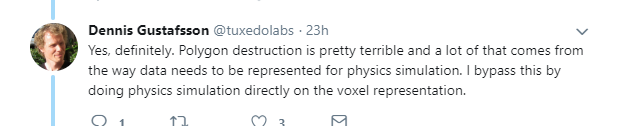
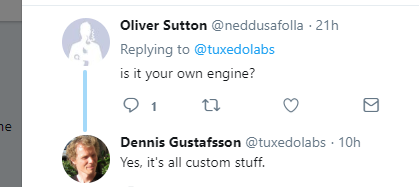
How would I go to import a voxel model and make it destructable? Something like this: https://twitter.com/tuxedolabs/status/1012304251572441090


I've spent the last week building a level editor for the voxel destruction, importing #magicavoxel models and placing regular objects and light sources. Also, early experiments with sound, but still a long way to go. https://t.co/LmpBeS0vVx
Retweets
107
Likes
657
 Twitter
 wary wave
literally like he said - make a voxel model, then make a physx destructible with it
I'd imagine he used one of the Max / Maya plugins to get the break pattern nice
there's documentation for that somewhere
manic pawn
physx destructible won't run anywhere near that well tho
his thing seems to be more involved
whole quarry
@open isle no need to ask it in multiple channels
open isle
sorry
wary wave
just looks like physx destructibles to me
manic pawn
 wary wave
0_o
open isle
what is the magic behind it?
 manic pawn
didn't know collision with voxel data directly is even a thing you can do
open isle
I see! C++ magic! he probably doesn't use .obj export
 cedar snow
plush yew
cedar snow
plush yew
hello guys I want to make register and login pages or widget blueprint in unrealegnine for my game but I don't know how to do that-can you send me tutorial or say me how to begin this??
whole quarry
plush yew
ааа
I must to search for system not only
okay
not this system
I want to make this in unreal engine
whole quarry
there are multiple search results you can use to research how to make what you want to make
there is no out-of-the-box solution or tutorial for your specific needs
plush yew
when the player press "Start Game" to open other widget blueprint where the player if he doesn't register to transfer it to other widget blueprint and yeah
I will find screenshot of some game to show you
grim ore
technically you can buy the MMO Starter kit if you want, it has a login system setup
plush yew
what I want-okay?
grim ore
but if your asking how to do just multiple widgets you do just that. on click -> create widget -> add to viewport.
if your asking for the code behind the widgets for networking, database access, and such then I don't think there is a free solution out there?
whole quarry
VaRest plugin is free iirc
grim ore
yeah you can roll your own but I think he wants a solution or a tutorial
whole quarry
there are also some free to use solutions as long you dont take the project out commercially
grim ore
ah neato that I did not know. I did my own using varest so I know it works
whole quarry
but those are way out of skill level 😛
whole quarry
for now? what do you plan to use in the future?
plush yew
and I match them but I want to make these things that I describe
I use them
and I will continue to use them-i confused
whole quarry
In my honest opinion, I'm thinking it's out of your current skill level, but what I said earlier: You'll need to google it and use several information resources and combine them so you can create what you want
there isn't a tutorial specific for this as it uses multiple 'technologies'
some use dedicated servers, some use php with database, some program the connection to db from client directly
since you'll be collecting user information, you need to work the privacy part out to comply with the AVG as well now
whole quarry
if it works, dont break it ¯_(ツ)_/¯
there should be a warning on UE4 saying "Even tho most games seem to be using multiplayer, its one of the hardest parts to make in your game"
@plush yew try asking around in #multiplayer, those guys should know some about networking and could give some best-practice tips
dont drop the question "how to make login system for my game", try to be specific
'specific' is the key word for today 😄
plush yew
okay
I want to give me navigations or links not the steps-if I have problems I will find you- 😉
I have these for now
 winter wasp
So you're tryin' to make an MMO?
 latent terrace
Hey guys, I've moved my project from 4.17 to 4.19.2 and the editor crashes when I click play, how can I figure out what's going on? 😛
plush yew
maybe but not for now-I want to make the single player for now after some months to make the ultiplayer part of the game @winter wasp
Hello guys
I am here back
again
lol
I want to make other things when I press the button "Start Game" after 5 secunds to load the other level to start the game and while we wait I want to make somethings as background and bar to show that the game loads-how to do this?
 fossil ore
Did anyone managed to extract Robo Recall audio files?
grim ore
@latent terrace go back to the launcher and the installs tab and install the debugging symbols for 4.19.2 and see where it is crashing
latent terrace
thx
 visual hollow
Hey guy is there anyway to scale down all the assets/actor used in my level at once ?
Actually my player is too small and my level is too big in my VR project
😔
 terse skiff
Shouldn't you then just scale up the player?
visual hollow
You can't Scale up player in VR. I already tried it.
 hardy pendant
nope you can't
 delicate needle
Tomatoes?!
 ivory gate
@visual hollow when in the level in the top right u should see a list of everything in level click on top of list then shift click the last one and press r to resize
visual hollow
@ivory gate thanks
 stoic moth
guys once i setup VS Code and in UE4 go to File > Generate Visual Studio Code files, is there a way to stop intellisense dish out false syntax errors ? like described in https://forums.unrealengine.com/community/general-discussion/1410585-vscode-configuration-thread
Unreal Engine Forums
Hey all! Returning from some time away from the Engine, and I thought I'd pop in, and see how things are.
One of the things I really hate in life is using
 zinc bison
uhhh does hiding an actor in game set references to that actor to null?
not that its causing a problem, it seems like it helps me if thats what its doing
i mean things are behaving correct, its just not what i would have expected. i thought id have to do more work
WAIT no nevermind, im dumb.
I forgot disabling the collision is triggering overlap to end, which is updating the reference I was referring to
terse skiff
Using the Event ActorBeginOverlap, how can I test for overlapping a specific Actor type using blueprints?
 astral marsh
hey all i need some help in my pickup and drop system which i made
can any1 please help me?
through screenshare?
plush yew
In the advanced Driving template there is an antenna at the back of the car that moves based on your movment, does anyone know how thats done?
 gleaming latch
can someone quickly describe to me what a static mesh is?
and btw no essays
just quick answers plz
 livid haven
A static mesh is a mesh whose geometry doesn't change.
Static as in unchanging.
By comparison: Skeletal meshes have a skeleton used for animating them, which deforms the geometry.
Caveat: Morph Targets can be used to deform a static mesh, but that's more like blending between similar static meshes. @gleaming latch
 digital anchor
hum... you can have morph targets on static meshes?
 earnest junco
 worn granite
shift ctrl alt?
 rose quartz
is there somebodu that uses Make human? i have a problem with the Cothing Part i press like Demale CasualSuit and labcote but the Cloth is removing @ some parts how is that possible?
livid haven
@digital anchor I think so? I mean, theoretically that should be possible.
digital anchor
i though that geometry info is not available on cpu for static meshes, so u can only move it with WPO
 livid haven
@storm snow Right click an execution pin connected to that node that is properly aligned and select straighten
Not the execution pin on the node.
One of these two
Some nodes just have janky pins. :/
I wish all pins and nodes were forcibly snapped to the grid, but... nein.
 graceful grove
It's the very minute degeneracy of pins that don't align which builds up to cataclysmic blueprint spaghetti. The chaos emperor claims all 
 storm snow
oh that straighten is a thing 😮 that helps little with my perfectionism 😄
livid haven
The few pins that don't align are pretty rare. Blueprint spaghetti is mostly people not giving a shit to organize things as they do it.
Always use reroute nodes to straighten paths and form parallel raceways.
 fiery harbor
when trying to use BP nativization and running the packaged version of my game, I get this:
is that a known problem with BP nativization?
using 4.19
well, related to BP nativization and event driver loader I guess. doesnt happen without BP nativization though
I guess I just have to disable that event driven loader
 livid violet
in which channel should i ask for vector math help?
digital anchor
here or cpp
fiery harbor
disabling event driven loader does fix that crash above
livid violet
so i have a known vector of CxCyCz, I want to split this into vectors A and B of which i know Ax, Az, Bx and By. Ay and Bz are the variables, how do i find them?
livid haven
Is that not just A + B = C?
I mean, you have both Xs, one Y, and one Z
A.X + B.X = C.X
A.Y + B.Y = C.Y
A.Z + B.Z = C.Z
livid haven
So A.Y = C.Y - B.Y and B.Z = C.Z - A.Z
Vector addition is simple per-component addition
Took a second to understand exactly what you were asking, was about to suggest some projections, but no - if it's a simple vector addition, it's that straight forward.
 steady owl
does anyone know the difference between the new rectangular area light in 4.20 and a point light that has a long length?
Or if there are other benefits to using rectangular area lights?
The results I'm getting are very close to a point light
 silk sleet
I'm making a blueprint actor component that stores flipbooks for different movement directions, and changes the animation accordingly
I need it to hold a reference to the actor's existing flipbook component, so that it can make the changes
how would I do that? If I do a normal object reference, the existing flipbook component doesn't show up in the dropdown menu
 tribal relic
Reading this chat...holy fuck I'm such a rank noob.
 tall basin
Hi all! I'm a non-programmer trying to get something working in Unreal for a sound demo. I'm trying to get a value out of the "VectorLength" node, but it is giving me two values? one is correct, one is higher. what's going on here?
 glossy flame
You're going to have to be a bit more specific as to what is giving you two values.
I see two vector length nodes, but those are hooked up to different inputs, so it would make sense that those are spitting out two separate values.
tall basin
ok! i'll try and give whatever info i need to
i'm looking at the value that comes from the very end of this. I'm dividing one vectorlength by the other one and then printing the value i get from that
This blueprint is a walkway you can run down. i'm trying to generate a value based on how far you've moved along. that ~0.48 value is me standing halfway along the walkway, which is what i want
but i'm not sure what i'm doing wrong that's putting this other number (~15.7) in there as well
glossy flame
Keep in mind that that math doesn't really do what you're wanting.
If someone were to be laterally further away from the line between the start and the end, they would technically be further from the start, but might not actually be further down the platform.
tall basin
that's fine, i also made it pretty restrictive, with guardrails on the side
it doesn't need to be perfect, though i'm definitely trying to make the smartest decisions possible
the number also moves around a bit if you're jumping :p
glossy flame
Yeah, that makes sense too.
Under what conditions are you getting that unexpectedly high output?
 next badger

#UE4 #gamedev @UnrealEngine @resharper_cpp I hope @jetbrains will find someone soon.
 Twitter
tall basin
Twitter
tall basin
well, i'm printing the
i'm just printing a string based on that vectorlength/vectorlength value
this is connected to the Tick event, so i'm just seeing these two numbers all the time
glossy flame
Oh, do you have multiple of that actor in the world?
In that case, it could be that the second one is ~15x further away from the player than the distance between the start and the end :p
tall basin
glossy flame
If they're always printing right next to each other at the same time, that definitely sounds like there's multiple in the world.
 rotund scroll
@glossy flame any chance you know about anything about anim notifies not showing up in the drop down in pawn BPs?
fiery harbor
why has epic still not managed to make BP nativization actually work nicely, after such a long time?
manic pawn
it probably works nicely in their projects
fiery harbor
the stuff where it fails is so simple, I find it very hard to imagine that they can use it without issues
 cursive dirge
fiery harbor
cursive dirge
fiery harbor
I did not, I'm just trying to actually get it to work
have used it last more than 2 years ago, where it was hard to get it to work
I was quite sure they improved it during the last 2 years, but its still really hard to get it to work
for example this:
 inner yacht
little help with wheeled vehicle please...What should i tinker with for more speed?
fiery harbor
Intermediate\Plugins\NativizedAssets\Windows\Game\Source\NativizedAssets\Private\FirstPersonCharacterVR__pf205484891.cpp(8034): error C2248: 'UMathBPLibrary::GridVector': cannot access private member declared in class 'UMathBPLibrary'
MathBPLibrary.h(18): note: see declaration of 'UMathBPLibrary::GridVector'
MathBPLibrary.h(13): note: see declaration of 'UMathBPLibrary'
I call that function GridVector in one BP that I selected for nativization
thats really not a complicated function
but it tries to "access private member"?
glossy flame
BP is weird and lets you call private functions with just a warning. When you nativize it, however, it has to adhere to C++'s rules about accessing it, which is why it fails.
That is a private function.
Classes default to private unless marked otherwise.
I would personally like it if BP was more strict about access, but there's nothing that's really wrong about that error.
fiery harbor
I never got any warning anywhere
glossy flame
¯_(ツ)_/¯
I've definitely seen warnings for it in the past...maybe function libraries or static functions in general are an exception.
Dunno.
fiery harbor
well, thanks, I'll make that public and see whats the next thing it fails with
the problem I'm actually debugging is that I had the same function in BP, and nativized it always returned 0
no matter what the input is
so for fixing that, I moved that function (GridVector) to C++
seems to be the only way how I can be quite sure that whatever problem there is with nativization, it will fix it
fiery harbor
moving the function to C++ did fix the problem
for some reason after a few minutes I always get this crash, but no idea if thats related to nativization, probably not
seems to be because of this in the log:
[2018.06.30-02.35.17:964][ 56]LogObj: Warning: Object MediaPlayer /Game/Movies/Tools/ToolVideoPlayer.ToolVideoPlayer (0x0000021b974559c0) from cluster Material /Game/Movies/Tools/VideoMatReg.VideoMatReg (0x0000021b98ad8040 / 0x0000021bcae9a1c0) is referencing 0x0000021b98ce6800 MediaPlaylist /Engine/Transient.MediaPlaylist_8 which is not part of root set or cluster.
but I'm quite sure thats a general 4.19 problem, not related to nativization
though no idea how to fix that
VideoMatReg is a material with a TextureSample set to a MediaTexture inside
 idle stump
After trying to alter the Supported Agents in the Project Settings > Navigation System, my AI does not move at all anymore. I tried resetting them to default and restarting the editor and my AI is still broken
 pine parcel
Uh oh... it's starting. First they get rebellious.
 marble spire
guys
to add like a knife in my game
to my model to be more precise
ive added a socket and all
but how should i add that in my bp?
another static mesh?
pine parcel
Add a static mesh component to your blueprint hierarchy, then select the mesh from the details panel.
marble spire
im a little sad
ive followed a tutorial about how to make a post process to make the anime 3d model a little better in Ue4
but do not make any difference in my game at all
pine parcel
@marble spire is your post processing volume set to apply to the whole map?
marble spire
how can i make
my AI
dont stop following me
when i jump behind him
im using a AI perception with vision
 grim sinew
Cheat. Make it so if the player jumps, until he lands the AI just automatically knows where he is.
If he already knows about the player.
You could also do it with sound, but the AI would look pretty dumb if he waited until after the player landed to continue the chase.
 signal compass
Does anyone know of a way to show/hide the visibility of a vector variable's 3D widget via blueprints? Say, a boolean toggle. I can't find anything on doing that.
 dawn linden
Do you want to fully disable editing it? If so search for an example of EditCondition. That will disable the property, which I would guess would also turn off the widget.
Hmm, sorry that's c++. Not sure if a blueprint equivalent exists.
signal compass
I think I figured out a workaround, I'm setting it up now to see if it works.
 cerulean nova
i have 2 diffrent things that lead to setting the max walk speed to the same number but the speeds are diffrent how is that possible?
signal compass
Welp, looks like my workaround works. It doesn't do what I want, but it works well enough. Thanks again for trying @dawn linden
Since I couldn't toggle the visibility of the 3D widgets globally, I just changed how they were generated so that only the ones I specifically wanted to modify were made.
 regal mulch
 polar hawk
or in Hey Unreal
plush yew
Hello guys
I want to make other things when I press the button "Start Game" after 5 secunds to load the other level to start the game and while we wait I want to make somethings as background and bar to show that the game loads-how to do this?(реда
visual hollow
@plush yew you need to create a loading screen for that. Right click and go to UI and create the widget.
polar hawk
Its voice chat time again
 latent moth
all... is there a way to convert a BP spline to a landscape spline? i'm trying to smooth a river BP
plush yew
Okay but How to create loading bar
And how to add random tips as in the games ClashRoyale or LastDayOnEarth
polar hawk
loading screens are actually hella annoying
 tardy holly
hi
can i find the team here
?
ComunelloGroup
Why you should join ComunelloGroup?
If those who need money we search for any gigs and we work as a team so that way one of our own team members can get paid. We know now days money is what many people need and so by having a team we can establish that. The game which we are developing wont have lots of donate,because we are making games to play,not to spend all money.
Current Project: Existence
Description of Project: A Survival game with the elements of Battle Royal.You must to survive,using any strategy.While you are travelling the map , you can find drones,night vision goggles and many other interesting things.The best will be - the last men standing.
If you are interested in it,contact me please.
Developers needed:
Terrain Developer
Blueprint
Characters and Animation
3d Modeler
VFX Artist
Unreal Engine 4 Coder
Graphic Artist
3d Modeler
Developers already acquired:
UI Designer.
For contacting email danilkoval2004@gmail.com or contact my Discord Testy_keks#6208
 tall pendant
tall pendant
tall pendant
BR's are only nice when they have lootboxes and mtx tho
fossil ore
nvm
 tough barn
im new to UE4 but i have found since I started attempting to make a game i play games far far less lol. Also morning everyone
polar hawk
aye
 dense galleon
the perils of gamedev
astral marsh
hey all i have a problem in my unreal engine 4 so im going to release a prototype of my game to build testers and after packaging the game when i click on the exe all i see is a black screen i can use the ~ key and when i type "open" all i see is " Open Entry" and "Open [someip}"
can anybody help me out fixing this?
i've checked the maps&modes
in package settings
the game default is the map which is for testing the game.
when i try making another project and package it
the game works fine
why not with the project which i have
please help? anyone?
grim ore
thats a hard one so time to debug it. Make a new map in the project, the default one is fine, and make that your default startup map for a packaged project and see if that loads.
grim ore
then you should be able to cross off the map as the issue. I would think. When is the last time you packaged it for testing and it did work? what did you do since then
astral marsh
all i did was package project - windows 64bit - and it worked
it was like 2 weeks ago
mathew if you want i can show you all my settings
through screenshare
so you can see what mistake i've done
im a bit new to ue4
grim ore
well if you havent change any settings since then, just work on your project, that's not really going to help. you did no major changes just content work?
grim ore
i am not able to do that or I would have said I could
astral marsh
oh
grim ore
if a new blank map is not loading up then some setting you might have changed with the base game might be causing a problem
like changing some of the other parts of the game mode or default settings
astral marsh
i can show you the settings of the packaging settings
im sure something's changed in packaging settings
grim ore
did you change any of those in the last 2 weeks?
grim ore
do you happen to be using source control and you can check the change logs?
astral marsh
i dont use source control tho
grim ore
well you can paste screenshots if you want, someone might be able to see something. Else if you know a new project works compare the default settings to your project?
astral marsh
i think
i'll see other projects
game settings
i'll see whats the difference
if thats the thing causing the prob
i'll change
grim ore
about all I can think of is maybe you told it to only package certain items and the maps are not some of those
 atomic forge
Are there any guides that can be recommended to optimize for mobile?
astral marsh
if you look through fortnite news section
you'll see some android guide
for optimizing
 frank escarp
@atomic forge know the hardware
thing #1, pixel rate is low as fuck, so pixel shaders are too expensive
thing #2, due to the tiled renderer, drawcalls are extremelly expensive
atomic forge
@frank escarp I'm trying to optimize for Oculus Go
frank escarp
you need to lower your drawcalls a huge amount
and last, the CPU is low, so make sure to not use any ticking in blueprints, and avoid physics that take too much cpu
@atomic forge Go runs 150-200k polygons and 50-100 drawcalls
atomic forge
OK. Thanks @frank escarp and @astral marsh !
 heavy relic
cursed image
digital anchor
They turn into C++ so its a little faster, turn it on only for BPs that you actually need performance improvements, sometimes it causes problems so dont turn for all
 frosty copper
@heavy relic have these instead: :P
https://cdn.discordapp.com/attachments/221798862938046464/455831544330715136/unknown.png
https://cdn.discordapp.com/attachments/221798862938046464/455834678956392480/unknown.png


 gentle crypt
oh i see. Thanks @digital anchor.
does this happen at the end of the project or does it during development?
digital anchor
On packaging
gentle crypt
oh right. for a moment there i thought it might be permanently turn into C++ can't be edited.
grim sinew
You can't really ever see the C++ results, it's not something meant to be human readable
 velvet ravine
is there anywhere where i can request a feature for the launcher?
 valid flare
Hey guys! New here, just quickly wanna hear opinions on some proper facial mocap methods? Free ones if possible seeing as the budget is quite tight. :/
astral marsh
im currently having few problems with it
can anybody help me fix it
please
i'll screenshare
idle stump
For an input Axis, let's say 'MoveForward', there will be a MoveForward Event and a Get MoveForward Value. So you can just grab the current value from anywhere. I don't see anything like that for an Action input. This seems like a oversight. That would be pretty useful. Currently you have to wire up your own bool variable to the action event to keep track if it's pressed or not... That shouldn't be necessary. Correct me if I'm wrong; is there a way to get the current value (bool pressed) of an action?
zinc bison
any advice on when to submit an application to the dev grant program? I would like to apply at some just not sure when that point is
is art necessary? Because Im not an artist, but looking to get artists on board down the line
velvet ravine
@astral marsh what's the problem?
astral marsh
@velvet ravine
when i click on Q { They key which i set for dropping the object[crowbar] ]
when thecrowbar isnt even picked up
it already drops out a crowbar
i dont understand why that happens
zinc bison
look at your drop object function
velvet ravine
also are you running a server? locally might need a Custom event to Run on the server,
grim ore
@idle stump an axis is a polled event that returns back a value no matter what basically. so it's probably going to be 0 or some other value based on the value of the input. Action inputs are actions, they do something for that one frame/event and that's it. The action event does not fire every frame as compared to an axis event. You would have to track it yourself like you said or you can hard wire a key into the Is Input Key Down node. now with that said you can do some magic with the output of the InputAction key pin and store it later to check for an the input for is input key down node and then you have an automatic bool basically
idle stump
@grim ore Yeah, but at the end of the day an Action input is really just a series of button/key mappings. Rather than manually check "is key down", there could be a "is action down" that checks all those assigned keys for you.
grim ore
well you can make that or you can use the is input key down node which does it for a single key
idle stump
true, i'm just thinking as a quality of life improvement. i don't think that's exactly something i could do without getting into the engine source
of course, it's not necessary. just would be nice
grim ore
yeah I guess. the system has that in place I guess it's just not in one node as it would take 2 to do it
 fair violet
Of course but the fact that this detail isn't visible unless you are viewing at an extremely close angle is unusual
Like the camera has to be a few cm away for it to be visible
And that's on a 4K screen. At normal 1080p with a third person view, it'd likely never ever be seen
Impressive that they still went to the effort of doing it
frank escarp
what game is that pic?
grim sinew
Take a look at the shirt.
fair violet
That's the in game model?
damn
I know Ghost Recon has some pretty detailed microdetails too
It's cool to see considering a big giveaway of realism is very low res normals / detail maps
frank escarp
@fair violet Paragon was created as a ue4 showcase basically
so its overkill in details and material complexity to a huge degree
fair violet
For sure- even zooming out to regular close levels, you can't even make the details out anymore
Goes beyond the mid scale detail mapping that I usually see
plush yew
hey guys trying to export FBX from blender but when i import to unreal it says multiple bones detected im fairly new so i don't really know how to fix this someone help?
 small oar
anyone know why GetMovementComponent()->StopMovementImmediately(); is crashing my game?
or is there some easier way to stop my character from moving
 sharp crest
Hey I'm trying to setup the OnlineSubsystemSteam for my multiplayer Steam game but when I compile I get this error:
OnlineSubsystemSteamPrivate.h(28): fatal error C1189: #error: Steam SDK not located. Expected to be found in Engine/Source/ThirdParty/Steamworks/{SteamVersion}
Thought I do have the folder there... http://prntscr.com/k1bd68
Please @ me if you answer
 small oar
@sharp crest did you change ur defaultengine.ini?
sharp crest
@small oar What do I need to change in it?
bEnabled=true
SteamDevAppId=480
GameServerQueryPort=27015
bRelaunchInSteam=false
GameVersion=1.0.0.0
bVACEnabled=1
bAllowP2PPacketRelay=true
P2PConnectionTimeout=90```Yea last time I was able to open the project it was enabled so should be
And those options are already there :/
 modern sinew
So...I'm trying out UE4 mainly because it uses C++ and that's what my university teaches. What are the- how hard should it be to learn if I already know a years-worth of Java?
grim ore
between not hard and harder than a man giving birth to a cat
modern sinew
Ouch
grim ore
and I say that with all honesty because we don't know what your skill is at learning
modern sinew
¯_(ツ)_/¯
grim ore
on the range of easy to hard for languages however C++ is on the harder end of the scale
add onto that, the C++ implementation that UE4 uses is heavy on macros and templating and has it's own system on top of normal C++ that has to be learned as well
modern sinew
How much can UE4 do without touching any code?
grim ore
make a game
 dark depot
quite a bit
grim ore
well I guess it matters what you mean by code as even using blueprints requires coding knowledge
modern sinew
I know Unity I could....walk around an island
grim ore
but without C++ you can make a feature complete game
grim ore
C++ is 100% different, blueprints are 80% different
modern sinew
ok
dark depot
i think the best way to compare would be to try it
modern sinew
I am
dark depot
👌
grim ore
watch an intro to ue4 and blueprints video from Epic or any other dev and an hour or 2 later you can see how it works 😃
worn granite
Yeah I watched the official blueprints tutorial during download
Was a good introduction to the structure of the engine as well
dark depot
yeah the learn tab has alot of examples for you to look at
grim ore
well there ya go now you know how it works. Now just make a game!
modern sinew
I can try
worn granite
that was quite some time ago the editor looks different if you happen on the same series
modern sinew
How hard would it be to have, like, a terrain map of a snowy mountain, you click a spot, and then ski down from there, with a key to toggle between third and first person. For example
worn granite
Well you could get something like that up and going in a few hours
dark depot
i think the answer to that depends on how much you know
modern sinew
0
worn granite
You can just set the default character to have almost no ground friction
dark depot
yeah you could get the basic setup pretty fast
worn granite
Getting it to feel right will take far longer
modern sinew
How can you make it so that you can drag and drop the character from the mountain view tho
worn granite
Gotta learn way more to do drag and drops
worn granite
tuts time =D
grim ore
I dunno its not that bad. You can just move the actor location to the cursor point. making it not collide and stuff is harder but making it just draggable isnt that bad
worn granite
@grim ore's channel is a good one when you jump in
dark depot
^
worn granite
its the best if you get stuck not knowing how to use a node
grim ore
nah it's just good. It would be best if he would get off his ass and finish the missing nodes
dark depot
haha
worn granite
pffft nobody uses those (they're not sure what they are =D)
modern sinew
Also, hmm, 5% royalty? oof Would be fine if there were some free assets like Unity, but there are none :/
worn granite
You really think you're gonna hit the 3k / quarter floor?
dark depot
there are alot
grim ore
5% of what you make over a certain amount reset each quarter. If you hit that amount you really aren't gonna have a problem with it 😃
dark depot
also like lambda said but i would also add its worth it when you realize the support that is there
there are alot of free assets
and other things
modern sinew
Gamemaker Studio has no royalties, so clearly it's fine to do
worn granite
Not to be a huge downer but I'd say UE is well worth it
grim ore
GMS charges for the engine & each export option
worn granite
Well hey you know, it can be a factor. If its a dealbreaker nobody is forcing you to use UE4.
grim ore
Unity requires pro if you make more than X amount
Lumberyard locks you into the amazon ecosystem
Cryengine takes money and is horrible to use
After that there are a ton of smaller nice to use specific engines for sure that don't have a fee
worn granite
CryEngine: You pay CryTek so they can generate tears in your eyes.
modern sinew
What about JMonkeyEngine3?
heavy relic
i got two gamemaker licences anyway
won one of them
and a gms2 licence
i make 2d games with it
modern sinew
GM2 is absolute garbage tbh
worn granite
UE4 is awesome, but if you're making 2d games just stay away
modern sinew
The UI is so bad
heavy relic
it's... not great to work with
grim ore
eh every engine has plusses and minues. I use Construct for example for my 2D stuff because webgl is fun
heavy relic
write all your scripts in a little box, weird blackbox drawing system
modern sinew
Nah, I'll use Gamemaker Studio 1.4 for my 2D Games, but prob UE4 for 3D if it turns out to be good
how well is support for it?
worn granite
There ya go
What, 2d?
There's an outdated and barely supported plugin/module
Its uh.
its not great.
dark depot
all engines out there have there uses no need to fanboy over it.. Whatever helps you get your game made is the thing you should use
worn granite
Persona has animation notifies - but Paper2D doesn't have that. In fact, it doesn't have any sort of animation tooling besides the fact you can have what's called a flipbook.
The entire AI system is geared around 3D
grim ore
Paper2D works to make 2d stuff on the screen. After that you get to play with extending it to fit your needs 😃
worn granite
And not even a flexible 3D
modern sinew
Gamemaker Studio 1.4 is best for 2D and nobody can arguew
modern sinew
Effectively
grim ore
Unity is pretty sexy for 2D and I dunno if there is any actual argument to that
worn granite
I really could make a good case for not touching either.
But only really for myself.
grim ore
man the new lightweight runtime with Unity and 2D is amazing for mobile
modern sinew
My main problem with Gamemaker is really only the splash screen before each game
that goes "made with Gamemaker"
modern sinew
Does UE4?
worn granite
I mean those kinda tools have always done that
dark depot
i would say there is more issues then that but every engine has its own problems
worn granite
Nah, you'd have to add that if you wanted it
manic pawn
no player has ever given a shit about the splash screen
worn granite
Actually.
ACTUALLY
yer wrong
I've had a critical review entirely centered around a 2s splash screen
manic pawn
wat rly
dark depot
yeah there is always that person
worn granite
ye
And that person isn't worth caring about
those are the people who assume unity is shit just because of all the games that are made with it
modern sinew
If UE4 had a splash screen
just
like we're already paying them
why be an advert too
worn granite
Those people and fellow devs are the only people who will notice.
manic pawn
people add the unreal splash screen on purpose
worn granite
^
modern sinew
but why?
dark depot
it does but they saw how it messed up unitys rep
worn granite
And actually a fellow dev can figure out what you're using by the lighting
dark depot
you have to get approved to use it
worn granite
Or some other giveaway
Like I can spot games sometimes that are using CharacterMovementComponent
manic pawn
or you could just look at the folder and instantly figure it out
worn granite
Oh cmon you're killing the fun
that's the easy path
wym @modern sinew ?
as to why the lighting is a giveaway?
modern sinew
Like demos that you can build off of
modern sinew
free?
worn granite
Explore your launcher.
worn granite
You won't believe what you'll find there next!
3 tricks Game Developers DONT want you to know!
Instructors HATE him
modern sinew
it's only downloaded 10% wtf
dark depot
i tell everyone that wants to use unreal to look at the "content examples" project that is under the learn tab it shows how alot of stuff works
modern sinew
is there good support for UE4 or not really
grim ore
the content examples project is the most fun thing to just screw around in
worn granite
Any basic question you can encounter - anything at all
Let me make you a promise - You can find the answer with 10s of googling.
grim ore
How to makes Battle Royale?
dark depot
yeah between here and answerhub you should be able to get help with anything you need
grim ore
There is also this resource that is in progress that not many know about as well, might find some basics to watch in there as well. https://www.unrealengine.com/en-US/video-tutorials
worn granite
Heck you can even do ue4 tracer dash
modern sinew
One feature that I do actually like from this Ski Resort Tycoon game from like 2000, is to make a ski lift you click for the bottom, and then click for the top, and it automatically builds it to match the terrain- how hard would that be to program? XD
worn granite
thanks to those guys cloning game mechanics
That..... that's more complex =D
Done any programming/scripting before?
grim ore
it might not even be that complex. the road terrain example on the learn tab could be used for that
modern sinew
besides Gamemaker and using Java? nah
modern sinew
I know that's more complex, that's why I asked
worn granite
Well see, now I gotta know more about you and how much you (don't) know.
To give you a hardness rating
But if there's an example that might be adapted its low-medium
grim ore
in the grand scheme of things its not too much more complex. You can use a spline, you can align the points on the spline to the terrain using linetraces, then plop your conforming mesh to the spline
idle stump
@modern sinew "is there good support for UE4" you're actually in the presence of one of the best UE youtube channels: @grim ore https://www.youtube.com/channel/UCOVfF7PfLbRdVEm0hONTrNQ

YouTube
This channel is dedicated to exploring Unreal Engine 4 and the Blueprint programming language that it uses. You can think of it as a companion to the API doc...
XD
idle stump
It completely depends on how interested in it you are + how dedicated you are. Personally for me, it's been pretty easy to learn because it's all I want to do... obviously, it can get really hard if you make it hard for yourself. You have to have small goals when you're starting out
modern sinew
ok
 crisp fable
Anyone know how much coherent ui is these days?
It used to be $20 a month but they don't do that anymore
 inland shell
Yo anyone know what this cursor shader testing thingy is? https://i.imgur.com/ygBSbgp.png
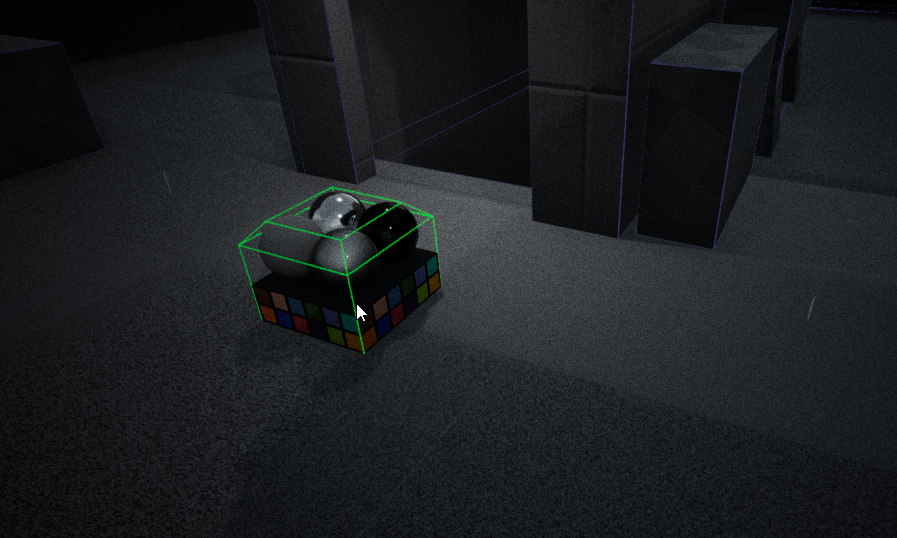


I'm not sure how I enabled it
can't figure out what to call it so I cannot seem to find any google results on how to turn it off
idle stump
@inland shell Never seen that before in UE but those little color squares is a color checker chart, like in photography or film they use it to match exposure and lighting and do color grading
inland shell
Ah color checker chart sounds more accurate, whatever it is, it seems very helpful as it follows my cursor and looks considerably useful
Well ue4 crashed when pressing random shortcuts trying to figure out what I pressed and it's gone, wish I found out the key combo though as it looks handy
grim sinew
it's just a static mesh in the content examples, you can drop it anywhere
inland shell
I wasn't using any content examples and it suddenly started following my cursor though
I couldn't drop it anywhere, it just followed my mouse
idle stump
I'm confused on DamageTypes. They can have their own variables and functions, but when you apply damage you only get to pass a class reference not a DamageType instance, so how can you set a variable on a DamageType. Like, you have PoisonDamageType and it has a Duration. How do you set that before passing it in to TakeDamage?
I guess you just have to roll your own damage functions... I had some wrong assumptions on how damage types work
idle stump
Why is their a damage type for KillZ if it doesn't apply damage but goes straight to destroying the actor?
grim sinew
It's called KillZ, not DamageZ
It's meant to clean up stuff that falls out of the world, like players that glitch or physics objects
idle stump
@grim sinew That was my next thought but if i have a physics object, like a falling crate, fall into the kill z it does not get destroyed
grim sinew
"apply damage" isn't aggressive enough for a last line of defense against memory leaks.
or leaks in general
It's super low for a reason. Just make your own hitbox below the level if you want more control
idle stump
I see. The World's KillZ DOES destroy objects. But if you put a KillZ volume it will kill the player but not other objects
still tho, the kill z volume does not apply damage, it just calls destroy
idle stump
lol no i didn't it's in the Volumes tab of the Modes panel
grim sinew
huh, cool that actually exists
But yeah, it's supposed to destroy things
It's not a damaging box
That's by design
You're looking for the pain causing volume
Just give it more damage than the player has health, like 999999 or something
idle stump
My first question still stands, though. If you look at the World Settings and expand the hidden options under KillZ there is a KillZ Damage Type which you can set to whatever DamageType you want... but where would you ever even get this info because it doesn't apply damage it just Destroys
grim sinew
No idea, but the tooltip specifically says "any actor falling below this level gets destroyed". It can't do damage, since not all actors can -get- damaged.
idle stump
That's not true, though. TakeDamage is a function of AActor
idle stump
True. But I would assume something with a damage type deals damage. Regardless
I can see a use for a DestroyZ... for like you said, destroying things that fell out of the world... but a KillZ would be something else. I know I'm just questioning the design of the engine and there's nothing we can do about it but i just thought either I am missing something or it's funny that KillZ has a damage type when it doesn't deal damage
 solid basin
Can i get an invite link
worn granite
6 hours eh?
OOF
That's enough time for me to have gone to a metal concert and come back.
modern sinew
RIP
Err, @worn granite or anyone else, do you know if it's hard to make a terrain editor like in RTC3, and if so, how hard?>
worn granite
You're gonna have to supply your own terrain solution - you can't use the landscapes as they come with the editor. if you just integrate a plugin it shouldn't be too difficult even though you're having to make the entire interface for shaping the terrain.
If you've gotta implement your own tech from the ground up, I'd ask @silver crown
modern sinew
But you know how it is in RTC3, like a raise terrain button and if you hold down on an area it creates hills, or a smooth button, or a lower button, etc?
worn granite
Not really
modern sinew
RTC3 even lets you pull the grid corners around
worn granite
Iunno what that means
modern sinew
the ground is gridded
worn granite
Any sorta terrain morphing
modern sinew
and you can pull the corners of each box up and down
worn granite
You'll have to do your own tech
The landscape as it ships with the editor can't be used.
modern sinew
Is there any tutorials tho?
worn granite
Probably not
modern sinew
why?
worn granite
Not for UE4 specifically
modern sinew
wouldn't a lot of games do this tho?
worn granite
not really, no
and its not a dead easy mechanic
so that's why there won't be a tutorial on it
worn granite
Its really not too hard, it just seems that way.
You can fiddle with RuntimeMesh - there'll be tuts for that
you won't find a tut to walk you through the entire thing
idle stump
If I have a vector to launch the character, let's say 250 units upward and 500 units forward, and now I want to make that relative to the floor normal, how would I do that? I already have the floor normal. I'm just not sure how to do the correct rotation.
modern sinew
???
worn granite
Its not like its that request - where there;s prolly like 20 tuts on doing that
:P
@idle stump make rot from Z
Use that rotation to RotateVector O, 0, 1 and multiply that by 250, and then use the same rotation to Rotate Vector 1, 0, 0` and multiply that by 500
the Z you supply will be the floor normal
You can also make rot from ZX - supply floor normal and actor forward
idle stump
Thanks, i'll try that
@worn granite Here's what I've got, and it's not quite right:
First problem: it's actually going to the left, not forward
worn granite
wrong
don't use the actor vector
use literal vector 0, 0, 1 and 1, 0, 0
second thing
if you use GetActorForwardVector here, it should be used to MakeRotFromZX
idle stump
@worn granite Yeah I had tried it this way first but it always goes the same direction no matter which way i face:
worn granite
I'd hesitate to say its absolutely garbage.
@idle stump Yeah gotta use MakeRotFromZX, then
idle stump
@worn granite Then what do I do with that rotation? How do i turn it back into the correct vector?
idle stump
ya
worn granite
replace this node with MakeRotFromZX
Now you'll only have one input filled
The second input will be a X vector
This is where you need GetActorFowardVector
idle stump
Yep. Got that. Now the output is a rotator. What do I do with that? Take my old method and then RotateVector?
worn granite
screenshot it again
idle stump
@worn granite
idle stump
I did replace that one node, i just put it next to the old implemtation for reference
because i don't know what to do with that rotator that comes out of ZX
nvm, i think i get what you meant now. gonna try that
@worn granite I think it's working great now, as far as i can tell:
Thanks a million
modern sinew
How do you have like, different scenes
idle stump
@modern sinew Depends on what you mean by scenes. If you mean like a level or map... in Unreal it's called a Map. You can create a new one in the content browser
modern sinew
so say I want to eventully have a ship editor like KSP, but also a world where you can fly that ship around?
worn granite
that goes beyond such a simple question IMO
modern sinew
I'm saying just two scenes
worn granite
If you're not counting all the editor stuff
worn granite
Its dead simple
modern sinew
how
worn granite
Just have two levels/maps
And then you can either stream them both in, or you can travel from one to the other.
modern sinew
can you make it that by flying into something with the flight control demo, you travel to the other?
and how?
worn granite
Just get in UE4 and play with it a bit
modern sinew
is what I described hard tho?
worn granite
That's not what you're looking for, but seriously do it.
no
its not hard
its only a matter of how your specific game might work
there' s 100+ ways to do taht
idle stump
@worn granite Now my frogs don't struggle up slopes and jump extra far down them:
worn granite
being transparent with you, nothing you 've asked about is terribly hard @modern sinew
worn granite
ye
dark depot
^its the same as everyone has been saying its not that its "hard" it more we cant tell you how to do it like you want because that depends on the game
modern sinew
how do youy switch from blueprint to code?
worn granite
Only way you can fix that is just fucking with it
dark depot
^
modern sinew
I'm gonna try adding Q and E roll control to the flying controls. Shouldn't be too hard
worn granite
You don't get to this level by asking me how you do it
So when you ask me how I swap from Bp to C++
I just do
But you're gonna have to internalize the difference.
idle stump
@modern sinew Check out the unreal engine youtube channel, they do a live stream i think every week and they usually cover some topic like "C++" or "AI" and they have tons of other tutorials too. You're not going to get anywhere anytime soon by just asking a bunch of questions that are wayy down the line. Try to follow along with some tutorials first.
worn granite
No
worn granite
sigh
dark depot
right click make new c++ class
worn granite
Wanna hop in voice?
idle stump
@modern sinew Check out a video of how to get started with C++. You have to have Visual Studio set up and there are other things you gotta know too.
modern sinew
I just opened up the flying template
dark depot
it has alot of basics that will teach you this
dark depot
learning what buttons do what is important and can help you discuss this once you learn some of the terms used
modern sinew
RIP
dark depot
and it goes over alot of what we have been discussing
modern sinew
The blueprint scares me tbh
modern sinew
I don't care about the coding language, I can jump into it, any code makes sense to me after a bit
dark depot
make a door
modern sinew
but this blueprint thing scares me
modern sinew
I can't find it
:/
I would
if I could
is that not included in the base install?
modern sinew
yea
worn granite
join the voice chat volkiller
dark depot
i would but im working sorry
modern sinew
No coding in the base install at all?
worn granite
Visual Studio
Download Visual Studio Community, Professional, and Enterprise. Try Visual Studio Code or Team Foundation Server for free today.
modern sinew
I don't know C++, but I bet I can figure it out faster than I could Blueprint
dark depot

idle stump
@modern sinew Well, then you're obviously not good at betting... don't go to Vegas
dark depot
omg kenmore hahaha
modern sinew
I know Java
I can look at the code and at least tell what it's trying to do, even in another language
Blueprints is just
pfft
dark depot
then dont use it
worn granite
modern sinew
yea
Code is more intuitive tbh
ok, VS community just installed
I have 2 current ideas for a game, one seems much harder than the other but idk
How can C++ scare anyone more than blueprints lol
I only know Java, Python, and HTML/CSS tbh
idle stump
It's not really about which one is better. They are both good for different things. I programmed with C# and Javascript before I ever touched UE4 and I was able to start making stuff in Blueprint with very little tutorials. If you know how to program, you know blueprint
modern sinew
My Voice Chat quality is going between green and red, green and red, green and red
Yes but you cut out when it switches to red
Goin to college next year and they give you an ethernet port so IIRC I'll have a better internet connection
Boulder
University of Colorado
lol
moving halfway cross the country, lol
but some friends are going too
did not coordinate
just luck
err
san diego
lol
I have a friend in TN, so that's close
One of my two game ideas is multiplayer
TABg
@idle stump https://encrypted-tbn0.gstatic.com/images?q=tbn:ANd9GcQNgcMRcyoEeWVwV_dsqONhwDfJZ6-o361yPRe8n_bk7MTwlPMt5A
 idle stump
My name is actually Kenmore. I have no idea the origin though. No relation to the company.
modern sinew
huh
My first name is unique in the US and then my middle and last names are generic AF
because my mom's from Europe, so there's that
/shrig
¯_(ツ)_/¯
Either of you guys still reading this chat? @worn granite @idle stump
Ok, so I installed VS
What now
yep
Trying to find Unreal shortcut
Desktop is a mess
because my screen recorder savbes to it
*saves
no
BlueJ
BlueJ for Java
I made a Text Adventure game tho
Pfft
BlueJ is nice
Ehh, tried it I think?
Final project of mine XD
Taught myself save/load functions just for it
not taught in class
UML?
¯_(ツ)_/¯
the map?
oki
It's a bit of a mess but it works lol
Not yet
it was a bit of a WIP
yea
I used a 2D array to make a game map
so you could go from room to toom
but moving up down left right in the array
We didn't have any rules, we just had to make use of our class time
tho he conggradulated me in front of the class for figuring out save/load
plush yew
r u talking to urself??
modern sinew
no
plush yew
oh
idle stump
no he's listening to voice chat
plush yew
lol
modern sinew
VC
worn granite
join us
idle stump
GAHHH
worn granite
im desperate pls
modern sinew
I'm also using this to write a program to learn the language of my mom's old country because nobody teaches it lol
worn granite
pls let me hear u
modern sinew
I would hop on VC using my phone, but then I can't use bluetooth for this computer
Lemon Iced Tea is the best beverage
out of all beverages
ever
no questions
XD
dark depot
no one reply so panda looks even more crazy
dark depot
GD?
modern sinew
Geometry Dash lol
dark depot
ahh ehhh depends
modern sinew
my computer is lagging
ughhh
what about a KSP clone XD
Nope
Spectrum
RIP
they build the internet cables for my entire town tho
Mine used to be TWC
I have a first-gen i3 powering my desktop XD
RIP me
https://youtu.be/K6I-c_yX3uw?t=9s Look at this Game XD

Varthox : https://www.youtube.com/channel/UCosqBuN51H5IBTTiNAQvL2Q Zephirox : https://www.youtube.com/channel/UCqqZxaghVwnlu1lCTA6uzbg Zephirox's discord ser...
hey?
guys?
-_-
Booting up UE4
What now?
@worn granite
I think I found it
but it's making me reinstall VS
??
I hit install on the thing and it's doing something
plush yew
gotta make sure to select that option
modern sinew
Is it working?
Oh, you had to check something?
It never said you had to
brb, getting some ice cream
modern sinew
back
guys I'm back
@worn granite @plush yew
heyy?
If you read this say "RedPandaz" In VC
Guys, still here?
Wanna hear my newest idea for a game?
Wanna give opinions on my newest idea for a game real quick?
I'mma just gonna leave VC if you guys aren't reading this RN
Ok
but you could of said yea or nah
but ok
so like, you create a superhero, with a power, can customize how they look, and you're thrown into random team capture the flag matches?
but there's a bunch of superpowers
and it would be kinda sandboxy?
so you can win in many different ways
does it sound fun tho
It's one of 3 main ideas
Destructable arenas?
My other ideas are a Ski Resort Tycoon game, and a MORPG that you can build your own custom ship too
I know the MORPG is the hardest
by far
I know
The code is hard -_-
you have multiplayer
but you also have custom ships
and walking inside the ships and on planets and stuff
and in Unity, idk if UE4 has this problem, but in Unity, trying to build anythign bigger than a big island, the camera couldn't zoom out far enough to build anythign else
Honestly the hardest part might just be getting the assets tbh
models
idk how to do that
¯_(ツ)_/¯
ok yea
 sinful narwhal
so...
modern sinew
Hey
idle stump
so?
modern sinew
What’s up
 potent wing
I have a question. Do we need to create a license for our game?
tall pendant
License? Can you elaborate?
 chrome ivy
@ebon saffron Greetings,
My name is Michael and I am a game developer trying to achieve a dedicated server for my game. I have some questions about your Wiki post here: https://wiki.unrealengine.com/Dedicated_Server_Guide_Steam
My first question is:
If I use the Advanced Sessions Plugin, do I still have to create the CreateCustomSession.cpp and the other files? On short do I have to create any code file? I have modified the OnlineSubsystemSteam code files as written in the tutorial, but I don’t know if I should also create those C++ files.
Second of all, I cannot get my server to show up in the Server Browser. However, I got it to show in the Steam Master list.
This is how I create the session:
-
MainMenu Level BP - on event begin play, if is dedicated server, then open the ThirdPersonExampleMap level with the parameter “listen”.
-
ThirdPersonExampleMap Level BP - on event begin play, if is dedicated server, then Create Advanced Session with bUsePresence set to false and bAllowJoinViaPresence set to false as well. Maximum players are 100.
I Find Sessions using the Find Advanced Sessions node.
When I open the log, for the client, and I search for a server, it appears that the Results array length is 0.
Note: I open the level first with parameter “listen” and only after this I am creating the actual session because I heard that the session could be lost if switching levels like that without Server Travel.
I truely hope I can get some help from you!
Best regards,
Michael
 vale halo
@plush yew Please don't spam + please DO read the rules. You sent that exact same message in another server too ^^
 warm mountain
@modern sinew i like the ski resort one but i would prefer a modern era zoo tycoon with the essence of the first game and the features of the second haha. The 3rd one is too restrictive. As for superhero arena i once thought about it but when i ran surveys and market data it turns out it was pretty niche and not a lot of people wanted it. Which is why many multiplayer superhero games fail. There just isn't enough players. And if my time in DCUO taught me anything. This community REALLY hates pvp
chrome ivy
@vale halo You mean in another channel?
vale halo
Nah - another server (I just so happened to be in too), but the message appears to be gone
(Oh, and by the way....I wasn't saying that to you Midsoft.....there was a message posted after your message that I'm talking about, but this message has since been removed)
cerulean nova
Whats the best thing to do Clothing with for Bulletproof wests and other Clothing stuff and boots for example?
plush yew
Please
I have choosen third person, but i'm having first person...
Please help me :x
cerulean nova
just set up another project and be sure u select it right this time ?
plush yew
I'm sure to have selected third person.
cerulean nova
if u have done it it would not show first person^^
cerulean nova
i know my brain never forgets anything
i even know that u dont have a gpu and use your Intel Graphics from the cpu
cerulean nova
magic
manic pawn
must have misclicked the first time
plush yew
What ?
cerulean nova
dont forget ram