#ue4-general
1 messages · Page 265 of 1
 manic pawn
 plush yew
Yeah
manic pawn
it should display a callstack
plush yew
A callstatck ? What do u're meanin about it ?
manic pawn
if it doesn't, go to the launcher, options on your engine version, install debug symbols for editor, try again
plush yew
"You do not have any debugging symbols required to display the callstack for this crash."
I have only this message
manic pawn
yeah, then do above, it will be able to display the callstack then
 cloud cobalt
Install the debug symbols from the launcher options of your engine
In the Epic launcher
~15GB download
Then restart the engine from Visual, wait for the crash
Yiou'll have the call stack
cloud cobalt
Small arrows on your engine version in the Epic launcher
 potent wing
wait im gonna ask a really stupid question, i didint install Nvidia Tegra on Android SDK, is this fine? because i didnt add any C++ or stuff
my engine also cannot detect Visual Studio even tho its already installed
guidence?
plush yew
@cloud cobalt Fatal error: [File:D:\Build\++UE4+Release-4.19+Compile\Sync\Engine\Source\Runtime\Windows\D3D11RHI\Private\D3D11Util.cpp] [Line: 182] Unreal Engine is exiting due to D3D device being lost. (Error: 0x887A0006 - 'HUNG')
cloud cobalt
Sounds like a driver issue
plush yew
And how to solve it ?
manic pawn
you don't have to ask every little thing, google exists
cloud cobalt
Whats your hardware
manic pawn
take the error message and search for it
there are lots of results for this specific one
plush yew
I have searched.
My hardware ? Like ?
Or nothingelse, i will switch to another engine.
 frosty bloom
if that's your solution to problems you will run out of Engines
 bitter iris
@plush yew Try doing this
plush yew
I'm trying to verify
bitter iris
Okay
 cerulean nova
@plush yew Whats your OS ?
plush yew
Windows 10, 64 bits.
cerulean nova
whats your GPU ?
u have an SLI setup?
something from GTX series below the 1000er
plush yew
What is SLI ?
plush yew
How can i see my gpu ?
bitter iris
Get HWMonitor
bitter iris
owe
plush yew
It's a 400$ pc xD
cerulean nova
yeah and a modern gpu costs 600+
cerulean nova
there u have your problem
bitter iris
Probs best running unity or something
 frank escarp
i would be surprised if unity runs on that
bitter iris
Might need to upgrade my dude
plush yew
So i can't create my game :c ?
cerulean nova
u could fiddle around with some kind of RPG maker that looks like pokemon 😂
plush yew
:c
 livid haven
Game Maker is still a thing, pretty sure. Or maybe that's RPG Maker? Not sure.
plush yew
I wanna kill myself
bitter iris
@plush yew Please dont
livid haven
Been in the server for just a few minutes today and I think I've already been here too long. X|
plush yew
My life is so bad D:
cerulean nova
my pc is 5 years old and has 8 cores
for the money u payed you should have gotten something like ryzen + cheap 1050
bitter iris
Lost count on how much my pc is
 gleaming latch
my pc is 250$
bitter iris
Mines somewhere over 3,000
cerulean nova
yeah but u have a pc for 400 u sayed
gleaming latch
My parents have a lot of money but they prefer not spending it on gaming too much because they like when I work hard to earn things
bitter iris
#why
frosty bloom
read the banner.
bitter iris
We are discussing his PC not being able to run UE4
cerulean nova
its about a guys pc that is to bad for UE 4
frosty bloom
I see more bragging, pitying and social chatter than anything else.
cerulean nova
if ur not familar with the whole conversation dont read the last line and play Channel police
frosty bloom
Which is more of a social thing i believe.
gleaming latch
btw is it possible to make a model in unity and import it as a landscape in unreal?
plush yew
There are not another engine for create 3d games, except unreal engine ?
cerulean nova
depends on the export format or not ?
bitter iris
unity but like vblanco said surprised if it runs at that spec
plush yew
C++ only.
gleaming latch
ergazia u can use unity, java script and many more
cerulean nova
@plush yew there are quiet a alot but ur computer doesnt have a GPU so you wont get far on any other engine also....
plush yew
yeah but, i'm c++ developper
manic pawn
how did that pc even cost 400
bitter iris
depends what currency
manic pawn
🤔
plush yew
what is currency ? i'm not english, sorry x)
bitter iris
What country you from
plush yew
French
bitter iris
400 euros for that pc?
bitter iris
Take it back
bitter iris
Youve been ripped off dude
manic pawn
^
plush yew
Since 4 years what i'm having it.
gleaming latch
is someone free to help me make a game in unreal please?
I am new to this engine and I am really lost in all of those unclear tutorials
manic pawn
usually people buy new pcs, with modern hardware, more often than every 4 years
gleaming latch
ergazia what is your budget for a new pc?
plush yew
I don't have any money
gleaming latch
and which currency do you use?
plush yew
But what is "currency" ?
gleaming latch
usd, cad , ect
plush yew
Still not understand
plush yew
No, euros.
gleaming latch
I can find u a decent pc build for 300$
plush yew
I'm having 17.55 $ :x
 languid shard

plush yew
Heyyy i'm a poor boi xD
gleaming latch
I am french canadian
 bronze estuary
Probably won't be able to handle big and/or detailed levels/assets
 cinder iron
it wont
 tawdry narwhal
anyone here developing an RTS in UE4?
cinder iron
@tawdry narwhal shoot
tawdry narwhal
wondering what's the best way to implement movement path indicators
i.e. path segments coming from PathFollowingComponent
atm I'm using runtime procedural meshes, not sure if there's a more "standard" approach
I imagine using splines would be another way to go
 queen arch
how do i rotate this in the umg?
(without writing a script)
never mind "angle" under transform
found it
 copper mason
[x-post #umg] Anyone know anything about this?: https://answers.unrealengine.com/questions/501142/how-to-keep-a-collision-from-blocking-a-widget-int.html
 vivid terrace
Hi, so I have had Unreal for about a year now, and have been putting off learning anything since the day I got it. I have no clue where to start, it all seems so overwhelming
What do I learn first?
I have no experience with coding, I am only experienced with Cinema 4d, modeling, and animating
My friends are all coders and I just make concept art for our Terraria mod.
 dull willow
How do i enable the mouse cursor?
vivid terrace
I have Visual Studio and Unreal 4.19 installed.
Where do I go next?
I already have plenty of ideas for the game and some concept art
 fair violet
@vivid terrace start with any of the many docs, YouTube tutorials and launcher example content
You can dive in with some examples and play around or systematically learn each concept you want from the ground up (there is a good beginners tutorial series on the official UE4 YouTube channel)
dull willow
I can't find anything about "Show Cursor" 🤔
vivid terrace
Does that teach C++ as well? Or should I learn it separately first?
fair violet
@dull willow there is a bool you can set. The first google result shows how
dull willow
I can't find that though 😛
fair violet
@vivid terrace for C++, I recommend Ben Tristem courses and the Tom Looman course
Along with referencing ShooterGame
vivid terrace
From Udemy? Im pretty sure I bought that one
fair violet
@vivid terrace yes! Nice get into it!
@dull willow Player controller -> Show Mouse Cursor = true
dull willow
Ahh i had to disable Context Sensitive 😄
copper mason
@vivid terrace I recommend starting on Youtube: https://www.youtube.com/watch?v=w4XlBKeE46E&list=PLZlv_N0_O1gasd4IcOe9Cx9wHoBB7rxFl; then following Tom Looman's tutorials here: http://www.tomlooman.com/

In this video, learn the basics of the user interface in UE4 to help optimize your workflow. (00:04) - Introduction (01:00) - Opening the Editor (01:50) - Th...
Homepage of my portfolio and portal for unreal engine 4 tutorials, guides and development blog for Switch.
 lunar scaffold
Hey Anyone know how to make that wanna a alert goes in a Bank then the cops come too the bank?
I am making a Heist Game Like Payday 2
 grim ore
That is going to be specific to your game as we don;t know how your systems are designed. From a high level perspective you would have whatever can trigger the alert do whatever you need to do to trigger the events for your cops.
 silk sleet
I'm doing procedural voxel terrain right now, everything runs pretty smooth at this scale just using instanced static meshes (1 for each block type).
Seems to get pretty slow when there's a few islands around.
Can someone point me towards a more proper way to do this? Procedural meshes?
I haven't been able to find source for any of the unreal minecraft ports or anything like that
 graceful grove
@silk sleet I've seen an approach using procedural mesh chunks (think 16x16x16 minichunks built from voxel data) that does a greedy optimization pass to optimize out unnecessary verts. How you actually achieve that though, I'd search for tutorials 🤔
silk sleet
I'm sure I could figure it out eventually. Just didn't want to dive into a rough night of procedural meshing if there was a common engine for it or something
@graceful grove thanks!
graceful grove
@silk sleet I'll pass it by the person who's implemented this system and see if they couldn't do a brief explanation
silk sleet
that'd be awesome, thank you
 gleaming lotus
Anybody good at math? Trying to figure out a parabolic math equation for my weapon system.
silk sleet
I could give it the good ol college try for ya mate
 digital anchor
@silk sleet There are plugins, if you dont feel like doing yourself
gleaming lotus
Noice, I'm trying to create a system where you input two constant floats (Range / Damage), and a vector length float, and then output a damage float.
The system would ideally work to make pistols a higher damage at close range than a rifle at close range, and a rifle to have better damage than a pistol at long range, but still lower damage than if either were at close range.
Also that procedural terrain looks dope 😃
 marble spire
Guys, after a disable moviment, how do u i enable again?
silk sleet
@digital anchor any specifics? Honestly I'd rather not implement it myself for the prototype if I don't have to
gleaming lotus
@marble spire Get the player movement component, and set the movement mode again
Disable movement just sets the movement mode to 'NONE'
 worn granite
@gleaming lotus why not just make a curve
range on one axis, damage mod on the other
gleaming lotus
This is what I'm trying to do, but I cant work out the math in my head for it
marble spire
Thanks
gleaming lotus
np
digital anchor
@silk sleet VoxelPlugin from @silver crown https://voxelplugin.com/#ptp-4707
worn granite
@gleaming lotus there's an asset you can create called a CurveFloat or FloatCurve. The actual classname is UCurveFloat
Get a spiffy editor also
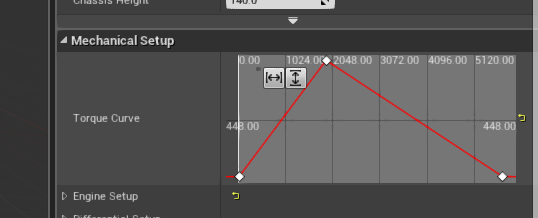
Something like this
worn granite
Like the actual asset or how you would use it?
gleaming lotus
Both?
worn granite
Usage is simple
silk sleet
@gleaming lotus well a very easy way to do this would be linearly after a certain distance
if range < damage_falloff_start, return damage
else, return damage * ((range - damage_falloff_start) * damage_falloff_per_unit)
worn granite
UCurveFloat* MyCurve;
// .. fill the var
MyCurve->GetFloatValue(PositionXFloat);```The way you use the asset is easy - you specify points and the in/out interpolation mode for the points.
You can have linear or easing or some other stuff.
silk sleet
@digital anchor I'll take a look, thank you
worn granite
And the way the asset works is that it takes the points and interp stuff you set via the editor and it will generate a mathematical spline with that setup.
Not sure if it bakes the outputs or not.
gleaming lotus
Thanks for the help guys, I'm just looking up some documentation on Curves..
So essentially I create a Curve for each weapon, and then imput the range on that curve and it works out where its plotted on the curve to return a damage float?
worn granite
Yes, generally.
If you want the actual math because you wanna know how it actually works, lemme know if you find a resource on that
haha
gleaming lotus
This actually makes it easier, I'm more of a visual learner 😃
Thanks though, I'll look into this!
silk sleet
@gleaming lotus sorry I mean
damage - ((range - falloff_start) * falloff_per_unit)
gleaming lotus
Thanks Jason, I think I'm going to look into curves instead. I appreciate the support though! 💪🏽
silk sleet
yeah I didn't even know about that lol
marble spire
To start making a enemy, with IA, for the first time
whats the sequence i should do?
start making a enemy who can die > after that what
grim ore
figure out what you want it to do
marble spire
I want him to walk around(Is a scroller game), and when i come closer, it starts to atack me
grim ore
side scroller?
marble spire
a 2D game
grim ore
and using 2d or using side view 3d
marble spire
view 3D
grim ore
now is it something like mario where the AI is simple, back and forth for the most part, or something more advanced?
marble spire
well, it can be something simple in the start
since ive never used IA
but in my head is something with attacks, animations
grim ore
well you have something like a mario goomba which is not even AI it's just moving from A<->B, or you get something more advanced like enemies in newer games that actually have patterns.
and hunt the player
grim ore
since you are using 3d you might be able to utilize the existing nav mesh system and build and AI using that so it can move towards the player
worn granite
Yeah and you can have them do jumps and stuff
been a while since I looked at nav links but they seemed easy enough
grim ore
here is a video on some simple side scroller AI , https://www.youtube.com/watch?v=n1Rh32FzFpk

In today's episode we go over how we can set up a simple AI bot that will chase the player down and remove the player's health on impact. We go over all the ...
marble spire
oh, gonna see that
i dont know if im retarded or what, but i was only able to find third person AI, and since ive started this week with UE4, i dont know if is the same thing or what
so thanks Mathew
grim ore
depending on how you set it up the 3rd person stuff is pretty much the same if you use it for side view as your just restricting the view with the camera and not actually making it pure 2d
worn granite
It'd be possible to do a navmesh with pure paper2d IIRC, but 3d definitely makes it easer.
marble spire
thats what i heard
ive started using a 2D with sprites
but i found 0 info about it
so im doing with 3D now
grim ore
yeah there is a video on that as well but man using Paper2D itself is already asking for fun out the door
worn granite
Kinda
you need levels to test the gameplay, but you should have gameplay before making the final levels
Doing an art pass is probably the last thing you should do, though
grim ore
make a basic level, implement the features needed to make the level "feature complete". create a real level then figure out what more features you might need. Add those new features to your basic level. repeat till game is done.
that way you have goals to meet like "I need a platform that moves", "I need AI that patrol on platforms", "I need a coin", "I need to keep track of coins", etc.
and the entire time you can be polishing art or making new art/fx to improve as you go along. It seems to be pretty common that the first level in a game is the last one made so it's the most polished in the end. good first impressions and all
plus no point in designing a tutorial if you don't have all the features planned out or in place yet
marble spire
thanks\
worn granite
Also don't be afraid to straight up remove a level if it starts to not fit with all the best ones
grim ore
never be afraid to work 10 years on a game then scrap it because it's junk. Tho you should probably let other people try it first as devving on the same thing for 10 years might make you a little crazy about the project 😛
worn granite
Never be afraid to scrap 40 years of code towards an operating system because the OS is junk. Otherwise you end up with Windows.
Also definitely change careers every time you have a mediocre day
 keen condor
Lambda with that solid advice.
worn granite
Rocket Science just isn't doing it for me anymore. Time to be a Veterinarian
keen condor
Can learn any job on google
 brisk osprey
Whats the right chat to ask about shade complexity ?
gleaming lotus
This is working great @worn granite
Thanks for the help, these Curves are awesome
(shout out to @grim ore for the yt vid) ❤
worn granite
np =D
dull willow
So hi i made it so i only controll the chracter when i hold right click how do i make the mouse NOT move while doing so?
If i hold right click i hide cursor and allows it to move the character but once i release the button it has moved the mouse
Holy shit i suck at explaining
grim ore
Get the mouse location where you hide it then set it back when you unhide it.
dull willow
Is that the best way to do it? 🤔
Is there no such thing as "Disable Cursor Movement" but i guess it wouldnt control the character then
grim ore
Only ones I know for cursor would be hide and show.
 quartz grotto
hi folks. when moving a possessed character around, it seems like unreal's convention is to control the character by setting yaw and pitch on the controller. when set via controller, the movements seem nice and smooth and they also seem to automatically show up on other multiplayer screens.
I had tried making my character ignore controller input, and manually rotate it myself, but the movement is not smooth and it does not appear to automatically show up on other multiplayer screens.
is that accurate that I should control my character via the controller pitch and yaw, as opposed to on the character itself?
my logic was that the player controller receives the inputs but the character performs its own rotations on itself
dull willow
Right now i can't move my mouse outside of the game how do i make it so that i can?
 topaz pine
potent wing
topaz pine
potent wing
@dull willow restart engine?
dull willow
Well i meant while the game it's running 😛
The cursor is stuck at the game window o i need to press my quit button or tab out and close it
potent wing
is your cursor visibile or invisible?
dull willow
visible
potent wing
im not in UE right now, i will be back in 10 min
dull willow
Maybe i suck at explaining 😄
What i mean is i want to be able to move my mouse cursor outside of the game window itself
is there a toggle so that i can do that?
potent wing
ohhh i understand
you mean when you hit play, you want your mouse to go outside the play window?
is that even possible?
potent wing
i would like to know
worn granite
Alright, there should be a setting regarding MouseLock
You can set this to DoNotLock or LockOnCapture
As for controlling mouse capture -
potent wing
which setting? Project or Engine?
worn granite
Dunno offhand
potent wing
think it should be in Engine
worn granite
Easiest way to release capture would be from a UMG event reply
potent wing
anyway thx for the answer, this might help me someday
worn granite
If you're in C++ you've got more options
Doesn't really matter where the setting is - it may even be on the PlayerController
So the controller or ProjectSettings
grim ore
If your in editor Shift-F1 releases the mouse from the play area
queen arch
Is there a way to see which classes listen to an event dispatcher?
A Event Dispatcher call is messing up my whole game and I don't know where the problem starts because I don't know what classes are listening in for it
 wraith lark
@plush yew we cannot hear you. sorry 😦
but anyways. since we are some people here, hi all 😉
 warm river
 primal charm
Does anyone know if the Lenovo Explorer VR setup is compatible with unreal?
 flat scroll
Is there anything similar to quill18creates, but for unreal instead of unity? I actually liked that format. I know about the unreal channel, but I'm always on the lookout for more tutorials and stuff
 visual hollow
Guyz how I can show the pipe effect when I grab it in VR?
Like the water pipe when I grab it, It move like the pipe moves something like flexible
 storm venture
Are these white specks a lightmap resolution issue?
 grim sinew
No, it's not having enough samples.
In order to even have specs that size, your lightmap resolution must be insane
storm venture
@grim sinew How can I increase the number of samples?
grim sinew
Your lightmass settings has a ton of options
storm venture
Awesome, I'll check through there, thanks 😄
grim sinew
The first one, scale or something I think it is, the lower you make it, the more it starts exponentially adding. That and the quality one. If you set it to 0.1 scale and quality of 4, that's pretty much bashing lightmass over the head with all the samples it'll ever need
But your render times will go way up, so use them wisely
storm venture
I've been using the gpu lightmass renderer so times have been very very nice lately
12 hours down to 12 minutes, lmao
more like 20-30 but still incredible
grim sinew
GPU lightmass will ignore all those things I just said since it's third party and not finished
So... nothing you can do. GPU lightmass's settings are hard coded.
You're stuck with it.
You'll just need to live with the tradeoff and hope nobody notices it after you apply textures.
grim sinew
Weird as it may sound, it may be better to lower the resolution of the lightmap so you have more rays hitting each individual pixel
It could cut down on noise, worth a shot
storm venture
Yeah might as well try, thanks 😄
I might split the mesh into a few smaller segments and then reduce the resolution on each of them, hopefully that helps
 vivid girder
Do lightmaps actually benefit from being square powers of 2?
silk sleet
can someone tell me real quick how to get from an FRawPtrProx to a TSharedRef? Do you use MakeShareable and StaticCastSharedRef or is there a non-silly way
 coral pecan
hi
 honest vale
@vivid girder it doesn't matter since they're packed into atlases by the engine
the atlases themselves are power of two though
vivid girder
Wouldn't the packing be more efficient if the maps are power of 2 as well?
honest vale
I think lightmass pads the atlases so that islands aren't touching each other
vivid girder
Weird
Cause i was looking through the Paragon assets and a lot of them are weird resolutions like 400
 dawn linden
@silk sleet By just assigning it?
Why do you even have a raw ptr proxy? It's an internal type.
silk sleet
Turns out it was just their docs being super out of date, was all wrong, old and weird
works now though, thanks

 cedar snow
i guess there's #work-in-progress for that
plush yew
fudge to many channels i cant keep up XD
also how do i post thhins lin looking for talent
cedar snow
there's a pinned message in #looking-for-talent
 low apex
Anyone else struggling with instanced mesh transform percision ? please give this issue report a vote: https://issues.unrealengine.com/issue/UE-61094 ❤
 whole quarry
@plush yew It looks like a tree has a identity crisis
is it a den or a normal tree? why not both 😄
 surreal viper
is there a way to change the thickness/color of visualized collision geometry (capsule collision)?
nvm, there is shape color
increased thickness would help more but whatever
 latent terrace
Hey guys, I'm getting spammed with [2018.06.26-13.10.33:014][656]LogUObjectBase: Warning: NULL object
any idea what's going on? : P
 wary wave
you have an object that is 'null' (a pointer to nothing)
exactly where, I couldn't say
 spare steeple
why does packaging randomly fail sometimes based on savegame being checked/unchecked in savegames?
sometimes it generates an error thats fixed by checking that
sometimes it generates the same error thats fixed by unchecking that
ive experienced it with multiple projects across multiple engine versions
latent terrace
from my experience packaging is worse than satan
 summer saddle
Hey guys, one of my colleagues had an issue, his mouse cursor turned into a macbeth swatches + 4 lighting debug spheres
He had to turn off & on the editor to get rid of it, but I'm wondering how he got it in the first place
dull willow
Sup i have a game where my mouse is always shown
Can i make objects have onMouseHovered?
So that if i have my mouse on the object it does something.
whole quarry
sure you can
dull willow
How would i ho about adding that?
 rocky kayak
@dull willow select almost any component in a blueprint the on the righthand side under Details, scroll all the way down. youll see a bunch of events, you're looking for On Begin Cursor Over.
dull willow
I can't find it on lets say a cube.
rocky kayak
im actually looking at a cube right now, what events do you see for it?
on begin cursor over should be the 6th one from the top of the listed events
dull willow
I don't think i am doing it right 🤔
rocky kayak
screenshot what you see hahah
whole quarry
Else it would just be a static mesh in the level
whole quarry
if you want it to do stuff, better make it an actor
rocky kayak
^ is the general rule of thumb im p sure
dull willow
So basically i want it to have a outline if my mouse is on top of it and have it slightly move up a bit 😄
I'll keep learning more about the engine before i get into stuff like this
rocky kayak
you could, or you could learn this exact step
big engine but 1 step at a time is all you need and this one is fine as a stepping stone
later youll look back and think o so thats what i did
dull willow
Is this the right chat to use for questions and help?
rocky kayak
i usually see questions here and in blueprints
doesnt hurt to post things here, noones gonna yell at ya unless youre waaay off topic lol
dull willow
So i need help and i suck at explaining could i pm you?
It's about another issue i've had
rocky kayak
ask here and if i dunno then someone else will
dull willow
Alright 😄
Well right now i have it so i can only move the camera by holding right click
when i do the game input goes to game only and i hide the mouse and when released it shows the mouse again
But when i keep clicking left mouse button while trying to move around it will mess things up so it doesnt go to game input and i can't move the camera
Also it stops hiding the mouse
it's very weird
Really hard for me to explain
rocky kayak
haha thats the #1 thing you end up learning to do well when programming, explaining the problem exactly. if you dunno how to, you learn it fast
dull willow
to be honest these blueprints are a mess
Well mine are.
I'll move to blueprint chat
cloud cobalt
Make sure to understand in depth and explain
Epxlaining the problem well enough often gives you the solution
latent terrace
any place where I can compare engine versions? Like I got 4.17 and was wondering if I should move to 4.19 (or wait for 4.20?) What are the new features etc? : P
copper mason
@latent terrace Here: 1) https://www.unrealengine.com/en-US/blog/unreal-engine-4-18-released, 2)https://www.unrealengine.com/en-US/blog/unreal-engine-4-19-released, 3) https://forums.unrealengine.com/unreal-engine/announcements-and-releases/1485599-unreal-engine-4-20-preview
Unreal Engine Forums
PREVIEW!
Preview 1 of the upcoming 4.20 release is available now on the Launcher and GitHub. We are making this Preview available so that our developer community
dull willow
”Idle” games are relatively easy to make right?
grim ore
4.20 should be out the 2nd week of July if the cadence continues and we get a new preview this week
Idle games are easy to make, good idle games are hard to make.
 astral marsh
guys
i need help for gameover
widget
please help
please help guys i'll screenshare
copper mason
@latent terrace The source is already available, but I'm not sure when the official release is. Epic has a Road Map somewhere...
@latent terrace 4.20: Q3 2018
Upcoming releases for 2018.
Note: These are estimated time frames and are subject to change.
- 4.19: March 14, 2018
- 4.20: Q3 2018
- 4.21: Q4 2018
 viral oriole
Hi ! Can someone help me with a link about Software Development ? I cant fiind anything .
manic pawn
what
lunar scaffold
@grim ore i dont know how to start design the alarm system i got a button made soo its should be that when a NPC see that a player then it run and click on it then alarm its going off then the cops should come
queen arch
@lunar scaffold Do you know how to make an AI that goes somewhere?
If so, in a behavior tree, make a function that finds the closest alarm to your guard (get all actors of class alarm -> for each compare distance ), move to it, then send a blueprint interface call to it
lunar scaffold
@queen arch nop i dont know how
queen arch
well better learn behavior trees

What are the Simple Move Nodes in Unreal Engine 4 Source Files: https://github.com/MWadstein/wtf-hdi-files
Alternatively, you can do basic AI in blueprints. You still need to learn simple AI, but it is a bit easier. Just find the closest alarm and put a move to node. Then you need to check if you are close enough and if you are, make a blueprint interface call
to call the alarm
 delicate needle
I'm about to start the next part of my apartment project, swapping "props" such as refrigerators models, for example. What would be the best way to go about this, especially memory wise (this project could end up having many model options for appliances and so on.)
plush yew
"Fatal error: [File:D:\Build++UE4+Release-4.19+Compile\Sync\Engine\Source\Runtime\Windows\D3D11RHI\Private\D3D11Util.cpp] [Line: 182] Unreal Engine is exiting due to D3D device being lost. (Error: 0x887A0006 - 'HUNG')" :c
Fatal error: [File:D:\Build\++UE4+Release-4.19+Compile\Sync\Engine\Source\Runtime\RenderCore\Private\RenderingThread.cpp] [Line: 819]
Rendering thread exception:
Fatal error: [File:D:\Build\++UE4+Release-4.19+Compile\Sync\Engine\Source\Runtime\Windows\D3D11RHI\Private\D3D11Util.cpp] [Line: 182]
Unreal Engine is exiting due to D3D device being lost. (Error: 0x887A0006 - 'HUNG')
you already posted it yesterday, it's still because your pc is too bad
dull willow
Hi everyone a stupid question
I am using the starter stuff and have the "ThirdPersonBP" where is the player controller?
Called when the mouse cursor is moved over this actor if mouse over events are enabled in the player controller.
plush yew
I know but
dull willow
Can't seem to find this setting
plush yew
i can run Unity @manic pawn
manic pawn
unity is a lot less demanding
if you can't upgrade the pc and unity works, then use unity 🤷
plush yew
Yeah but C# :c
dull willow
Is there an easy way to outline an object?
 regal mulch
@dull willow Yes, have you searched for this on google already?
There should be tons of tutorials
dull willow
just thought if there was some boolean i could change to add a outline 😛
Since most videos are outdated/old i thought there ight have been some update
regal mulch
No, this is usually done via PostProcess and CustomDepth
 heady bridge
Hey, Anyone know how to set unreal editor as VS Code "program" in the project launch.json?
regal mulch
Before you do that, are you fully aware of how much VS Code supports and if it's fully working with UE4?
Last time I wanted to use it I found out that it's still not fully supported
Despite that there should be tutorials about VS Code and UE4
There should be an Editor or Project Settings that yo ucan change
heady bridge
I saw a video that was to set up VS code with UE4 and they were working fine it in, but they never actually showed how to set up the debug with the editor
In the launch.json "program" is where you put the directory for exe, but only thing that worked so far, was to package the game, and run that, but I would have to pacakge everytime I wanted to debug, so that was crap, it wont let me launch Project.uproject, comes up with an error, so I ran out of ideas
bitter iris
I put a nav mesh volume done the 700k i had to render it in or whatever, but other peoples nav mesh shows green. Any ideas why mine doesnt?
whole quarry
press P
 vast pine
In reference to ue4 is there any benefit to home vs prof?
Guess that goes with vs as well
worn granite
asking about the windows edition?
vast pine
Yeah
Home is 100 vs pro 200 and I’m like eh I’ve only used pro before in 7 etc does it really matter for unreal dev
 mighty helm
when I build the lighting my decal looks a lot more white and transparent
any ideas why
vast pine
Depends on the type of rendering. Stain, deferred, etc
vast pine
I’m not sure translucent is ever fully solid
mighty helm
so you think that is the problem?
vast pine
Hard to saw hafta see what it looks like and the material used setup
vast pine
Unlit?
 winged crypt
Why is Unreal unable to 'save' the project while Matinee is open? 🤔
livid haven
"Save" the project? What do you mean by saving a project?
winged crypt
Whenever you try to save a level, or use the 'save all'
livid haven
Project file is generally not often edited, except for plugins and modules.
Save all saves modified assets.
winged crypt
In editor
livid haven
Save level will try to save the level asset(s?) that's open.
winged crypt
Okay, in any case - when I use the 'Save All' feature to save unsaved assets, it always says it needs to close Matinee to do this. How come?
livid haven
Probably because it's trying to save the level you were modifying, too
winged crypt
Yeah
livid haven
But if it saves it while you're previewing some kind of animation, it would be saving the state of the level during that frame.
winged crypt
Ah that makes sense\
livid haven
That would be my theory, since previewing the matinee is actually moving around the actors in the loaded level.
 tacit chasm
was there an update to 4.20preview today? (what is the latest preview version now?)
grim ore
I see a preview 4 update on the launcher, https://forums.unrealengine.com/unreal-engine/announcements-and-releases/1485599-unreal-engine-4-20-preview?p=1494026#post1494026
Unreal Engine Forums
PREVIEW!
Preview 1 of the upcoming 4.20 release is available now on the Launcher and GitHub. We are making this Preview available so that our developer community
 uneven fractal
grim ore
uneven fractal
grim ore
just don't enable niagara or swap to the mobile or forward shader!
 buoyant compass
is there an easy way to set the location of an object, based on a child object?
I have a root object Room with 4 doors.
I want to be able to more or less set the location of the room so the door is intersecting with the path.
buoyant compass
Even just a point in the right direction would be appreciated
 eternal belfry
Hey guys. I'm designing a hand to hand melee controllerset, and I'm plotting it out in Draw.io so I can budget & direct animations and coding.
Is there anyone in here familiar with controllersets willing to take a look at my plot and see if it makes any sense to someone translating concept to blueprints?
 proper merlin
hmm im only learning UE4 to make the beginning of a prototype and already wondering if i should try another method
i didnt want to enlist volunteer/paid help until i got far into the basics
but i'm curious now how cheap someone with experience could do this work for me
grim sinew
Probably between $25-45 per hour depending on what you mean by "with experience".
proper merlin
vaguely that they can handle any basic request without much hesitation
are you familiar if most who charge hourly assign estimated labor hours to a given job?
i have no good reference of how many hours an experienced person can complete a list of tasks i might have
plush yew
Does UE 4.19 crash randomly for anyone else?
grim sinew
Some may give a flat rate, but if it's anything like freelancing for artwork, paying by the hour is king.
They'll give an estimate but it may go above/below
You would need to make a post in #looking-for-talent to ask around about that sort of thing though
proper merlin
its just so arbitrary until i have an idea of the total hours a job could take
but yeah i'll have to get specific with a request and see what comes back
appreciate the feedback
 tight sun
Hey guys dumb question.. I'm using sequencer to make a movie, and I'm wondering if there is any way to remove the 'smoothing' that it adds by default? Its hard for me too google this as its hard to explain, but say I have a camera and I move it from one point to another on the sequencer, instead of just moving at a constant velocity through the frames, it gradually starts then also slows to a stop at the end location. Is there any easy way to remove this?
 idle stump
Anyone here? Can someone explain to me how AI movement works? I'm super confused by the logic flow when you tell an AI to Move To somewhere it will move by why is it's Movement Input Vector always 0? It seems like it does some manual override of how the movement works but I can't figure out how by looking at the source.
*BUT why
plush yew
Can someone explain me the differenxe between "Default HUD Controller" and a Widget?
 autumn quarry
imagine misclicking this. good lord. so pissed right now
worn granite
haha, you can remove them both from that context menu
plush yew
; - ;
plush yew
hello guys-I make my blueprint in ThirdPersonCharacter BP for crouching but I haven't got the animation for that-what to do and wher I can get it??
whole quarry
you can make it yourself, or find one on mixamo or something
or maybe on the marketplace in a free animations set
plush yew
okay
I can't do this buy myself because I haven't got experience with Blender or with...
whole quarry
you can only obtain experience by starting doing it
trial and error is a difficult teacher, but a fair teacher
cloud cobalt
Also "I can't" is a lie
 peak zephyr
Hello guys! Anyone knows the proper way, or if there is a guide out there on how to properly debug the coredumps?
cloud cobalt
Proper way is to open them in VS, click debug and debug
You'll need to provide the PDB file for your release
Which you hopefully kept
peak zephyr
when we try to debug it says it cant find the eboot.bin file
cloud cobalt
Have a screenshot ?
peak zephyr
yes sure just a second please
 faint cedar
This is lovely
after applying for console access, 2 days later I get an email from Epic confirming that they got my application 😄
 languid mica
Can someone help me with Profiling in Session Frontend
faint cedar
if it takes 2 days to confirm an application I'm sure I'll get access to the engine by next year. Damn you Fortnite!
cloud cobalt
To be clear you're trying to debug a Windows core dump right ?
This looks like a mobile app thing
whole quarry
I got confused by the failed to load symbols 😛
peak zephyr
Its for ps4
cloud cobalt
Okay
For PS4 you'll need to ask the Sony dev support
Since most people here don't know, and the other can't say
peak zephyr
ok thank you very much for the help!
cloud cobalt
Sorry I couldn't actually help you
peak zephyr
no problem! I understand its a very specific platform
whole quarry
We dont know your blueprints ¯_(ツ)_/¯
Did you added a crouch anination? Did you make a animbp state for it?
Are you still here?
plush yew
yes
i am
I can't work with anmations til and animation bp
can you help me with the steps??
I downloaded crocuh animation
visual hollow
Is it possible to show an counter which start when I press a key on an mesh?
Like I want the counter on an box in my level not on my viewport
whole quarry
whole quarry
@visual hollow you're looking for 3D Widget
visual hollow
I have watched an tutorial which use widget but the problem is that I'm seeing the counter everywhere my player move
My project include that I want to show the gas station value when I press an key
whole quarry
you place a 3D Widget in a actor blueprint that you then can place in the level
visual hollow
I see. Let me try thanks for the info.
visual hollow
@whole quarry I created the widget and added it to the blueprint. But now the problem it I want to trigger the set Node in the given BP of the widgetBP by pressing my own event like leftmouse click but no option is coming.
whole quarry
the execution pin is not connected
grim sinew
whole quarry
he's not running Discord on that Dell laptop
already wanted to say to press Alt+PrintScreen to make a screenshot, but then I noticed he has only UE4 open on the taskbar
visual hollow
Yes My net connected on my lappy dont let me open discord.
So have to use on mobile.
@whole quarrythats what is the prob I need an left mouse click event to connect to set execution pin but no option coming for it on search
whole quarry
Because widgets only display information
well, afaik they only should display information and not manipulate it
visual hollow
Ohh so then is it possible to update it then?
whole quarry
Well, from what I understand of your goal, is that you want the widget to display the gas station tanking stuff
like tanked gas amount and its price with it
and that widget should be ofcourse on the gas station tank machine thing
so, in 3D space and not a UI element
idle stump
Is it possible for my Character to Tick BEFORE its movement component? There is an option to make sure it ticks AFTER but I see no way to make sure its before? Or, what I'm really trying to do is intercept the movement input. Because I'm doing a Custom Movement Mode but the input vector is always 0 because it seems the CharacterMovementComponent is consuming it and my Character never gets a chance to override that behavior
all in Blueprint
whole quarry
So, from what I would do is this:
- Create a Widget (call it i.e. W_GasStationPrice)
- In the Widget create 2 variables: fGasPrice, fGasTanked (no need for fGasPriceToPay this is calculated later)
- create a Blueprint Actor (called i.e. BP_GasStationPrice)
- Add a 3D widget component to the Blueprint actor BP_GasStationPrice and set it to use W_GasStationPrice)
- in the Widget create a Function, called UpdateTankPrice
in the Function you calculate the fGasPrice*fGasTanked=Current price to pay
then in the BP_GasStationPrice get the 3D Widget component
from the 3D widget reference you can call the function UpdateTankPrice
so in the sidenote: the BP_GasStationPrice manipulates the data being pushed in to the W_GasStationPrice
the W_GasStationPrice only displays the information it gets, it doesnt do anything else except displaying it
visual hollow
Yes my main goal is to update the amount of gas filled by pressing the left mouse button and keep it increasing till it is released.
Thanks for the answer. I will implement this.
If I get any prob is it ok to ask again?
whole quarry
Then you only need to figure out how you can communicate a trigger or event from the player in to the BP_GasStationPrice
But from these challenges you learn the most 😄
it's ok to always ask, but I'm not always available to awnser 😃
visual hollow
That I think I can do via blueprint communication?
whole quarry
yes, blueprint communication is always the way to go
however, you need to think about: What if I have more gas stations?
Then you cannot hardcode the communication and need to find a way to get the right referenced actor
(TraceLine is the way to go in that case)
visual hollow
I only want to work on one station right now.
whole quarry
imho, its best practice to try to code as abstract as possible, modularity gives more freedom later down the line than hardcoding stuff
regal mulch
Def via LineTrace
Even if you only use one station
The more you hardcode, the uglier the code gets over time
 sudden agate
@whole quarry amen
whole quarry
But, one step at the time, especially as beginner, sometimes you need to experience the "doh, thats what they meant" to learn why some things are better done in different ways 😄
whole quarry
aye!
 jade crystal
hi
regal mulch
I will still tell you how I would do it. You can use it as a guideline to learn a bit from.
One way here would be creating a BP Interface, adding a function for rightclick press and one for release to it. Then adding the interface to the station and implementing the funcitons based on what the gas station should do.
On right click you then trace and blindly call the interface function on the hitactor. Same for releasing the mouse button.
jade crystal
can't play in editor when performing edit rate scale operation
what does that even mean ? XD
regal mulch
With this you can easily apply the i interface to future actors and just say what the actor should do on mouse clicks without having to adjust you click code
whole quarry
is that an error you're getting @jade crystal ?
jade crystal
yes
whole quarry
@jade crystal try to Save all files and try again
jade crystal
ok lemme try
whole quarry
Ctrl-Shift-S is the hotkey iirc
regal mulch
Wrong tag
whole quarry
oops
regal mulch
@visual hollow My long reply was for you. Forgot to Tag you
jade crystal
it only happened after i tried to get the yaw rotation value to feed the locomotion, i guess is messed something up
@whole quarry thanks mate
whole quarry
you got it working now? 😄
jade crystal
yes
idle stump
Is there a way to pay for support? Like be able to ask Epic questions directly?
languid shard
@idle stump closest paid support you'll get will be Unreal Studio sub
on an issue I submitted they got back to me in less than a day
idle stump
Yeah, like i'm just 1 indie dev, not a company. I think if they had a paid support subscription like $5-$20 a month, maybe with other perks... just for regular indie developers, it would be super helpful and might be worth it for them financially
languid shard
you could do a suggestion on the forums 😃
idle stump
Just like a direct chat during normal business hours
languid shard
yeah this would be awesome
grim sinew
Even when the engine itself cost $20 to even use, they didn't have that
languid shard
they were much smaller back then tbh
grim sinew
Actual paid support from Epic is really only an option for AAA studios
idle stump
Yeah it would be up to them to figure out what would make it worth it for them. I just think it's something sorely needed.
 leaden dust
I don't want to bring up this topic
but if I want to start with programming what is the better engine - UE or Unity or something else
whole quarry
awnserhub is a good way to get Epic support too
grim sinew
As a beginner programmer, Unreal's Blueprint holds your hand really nicely and makes an easy transition over to C++ if you ever want to go that route in the future.
whole quarry
not very quick in response time, but if the question is valid and the problem lies in UE4, Epic staff usually respond
tho if the question is similair to "how do i make..", then likely no one will reply 😛
frank escarp
the best engine for begginers
is no engine
@leaden dust
my recomendation to actually git gud is to grab python with pygame or other simple 2d game library
the concepts are very similar
do not even get close to C++
until you get a couple years of programming
specially ue4 c++
frank escarp
day 1 of programming, i made hello world, and i know branching
day 2 of programming, i made a small opengl engine with pbr, but somehow my lighting calculation is low precision 🤔
languid shard
day 3 of programming, i finished my universe rendering engine, time to nap
 lyric owl
but what is actually programming exactly?
like if it's gameplay scripting you only need blueprints or simple c#
cloud cobalt
@frank escarp Well that escalated quickly
whole quarry
day 4 of programming: getting unexpected results. starting to rethink life.
lyric owl
I think it's more useful to set goals and then reach them with any means possible
@leaden dust https://www.codingame.com/start use python
CodinGame
CodinGame is a challenge-based training platform for programmers where you can improve your coding skills with fun exercises (25+ languages supported)
 brittle gulch
Hey guys, how can I make a rectangular UNSELECTION? I can make a rectangular selection with CTRL+ALT+LMB but I can't figure out how to do the same thing but with unselection?
languid shard
@brittle gulch didnt even knew you could do that in 3d view
frank escarp
@lyric owl i used that page to learn haskell
just doing the challenges on fucking haskell
wich aint easy due to their iterative/console driven nature
it is a great website, really like it
and its not any easy, it really makes you think.Its a lot of the typical algorithmyc bullshit that you get on job interviews or similar. Its very nice to learn to solve that stuff
lyric owl
And I think it helps to understand that coding languages or game engines just tools
frank escarp
haskell
really neat lenguage, lovely syntax
then i got tired of dealing with the console input/output, so i went to do problems outside of the page XD
lyric owl
also test-driven development is a nice thing to learn
frank escarp
this is what i went to do
small functions that do fancy stuff
taken from the "99 problems with haskell" thing
wich is no joke, it gets super hard
largest_div x = last [y | y<-[1..(x-1)], x `mod` y == 0 ]
epic one liners
finding the largest divisor of a number
the way that onliner works, is that im generating a list from all numbers beetween 1 and X, and filtering the list by the numbers wich are dividers of X, and then getting the last number on the generated list
frank escarp
that one is a very benign one. The most complex thing is the "array generator"
wich is basically math
[ val to return | val range, filter]
whole quarry
I always felt like that my lack of understanding of the English language is keeping me from effectively learning English
honest vale
so under the hood that applies a filter to that list comprehension and takes the last element of it?
 coarse wigeon

Eurogamer.net
The timer has counted down, the circle has shrunk, and the biggest lawsuit royale of all - PlayerUnknown's Battlegrounds versus Fortnite - has concluded in…
frank escarp
@honest vale yes
its pretty much the exact same thing as the math list
haskell just translated it straight
 paper kernel
orientation ¯_(ツ)_/¯
honest vale
I was bored so here's the rust version of thta haskell function
fn largest_div(i: i32) -> Option<i32> {
    (1i32..i).filter(|n| i % n == 0).last()
}
yea rust is more explicit and structure is different
frank escarp
an important thing with this kind of bullshit with haskell is that haskell is lazy
you can generate a infinite list
and just grab the 3rd item
btw, rust is awesome, love it
did you see my ECS minigame experiment? i used the specs library for ECS, and the ggez library for graphics
honest vale
not sure
frank escarp

GitHub
Rust-boxbattle - Very simple bullet hell experiment for game development with rust.
let me go find the gif
https://www.youtube.com/watch?v=Hv-Av-9-Rpc here it is
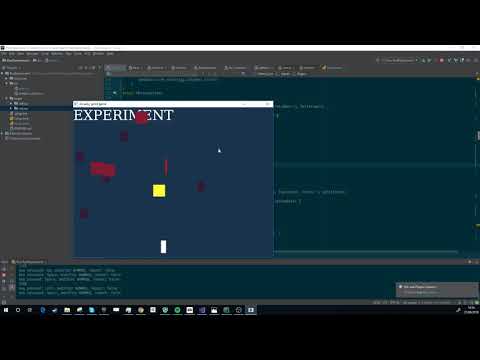
Little box game built with rust. Code in https://github.com/vblanco20-1/Rust-boxbattle
uploaded the gif i had
honest vale
how do I configure the build? Bitching about alsa
frank escarp
@honest vale alsa?
honest vale
error: failed to run custom build command for `alsa-sys v0.1.1` process didn't exit successfully: `/home/joni/repos/Rust-boxbattle/target/release/build/alsa-sys-bbf11a966b308fe1/build-script-build` (exit code: 101) --- stderr thread 'main' panicked at 'called `Result::unwrap()` on an `Err` value: "`\"pkg-config\" \"--libs\" \"--cflags\" \"alsa\"` did not exit successfully: exit code: 1\n--- stderr\nPackage alsa was not found in the pkg-config search path.\nPerhaps you should add the directory containing `alsa.pc\'\nto the PKG_CONFIG_PATH environment variable\nNo package \'alsa\' found\n"', libcore/result.rs:945:5 note: Run with `RUST_BACKTRACE=1` for a backtrace.
frank escarp
honestly i just pasted it straight to github from my local folder
no wonder it doesnt work
whole quarry
is that ue4?
languid shard
@frank escarp can you give me a quick hand with python logic ?
frank escarp
@languid shard i learned programming with python, but have barely touched it since
what are you trying to do
languid shard
just a basic if else T_T
if levelManager.load_level(levelFolder + levelName):
    print "Found level"
    levelManager.load_level(levelFolder + levelName)
else:
    print "Level not found, creating one"
    levelManager.new_level_from_template(levelFolder + levelName, levelFolder + templateLevelName)
    levelManager.save_current_level()
are you using tabs or spaces?
languid shard
tabs
languid shard
yep
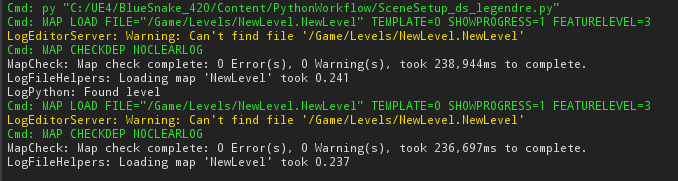
this is the log
basically I'm checking if a level exists
if yes then load it
if false then create a new one based on a template
but somehow even if it doesnt exists (yellow warning says so) it still goes into the true statement of the ifelse ?
and thus tries to load a level that doesnt exist
frank escarp
maybe due to the load level call?
are you sure it actually returns a boolean?
(welcome to dynamic typing lul)
also, WTF EPIC
PYTHON 2????
seriously what the fuck


 frank escarp
Epic devs: "hey, we gonna add python to unreal, should we use the end of line version? or the new one"
end of line
frank escarp
literally the only reason people use 2 is for the legacy
i understand houdini using python 2
or maya
couse they are old
but come the fuck on
blender upgraded to python 3
languid shard
print "stuff" is a bit less to type than print("stuff")
frank escarp
no issues
there are a bunch of other background features @languid shard
for example python 3 is faster
and handles text a LOT better
frank escarp
i guess they saw maya used python 2 and went with it
languid shard
prolly
frank escarp
man, python 2 vs 3 is the biggest disaster to ever happen in computer programming lenguage history
just split the community in 2 completely
this is one of the things python 3 has
you can give types to functions or variables
thus making them safer to use
 hard ice
In my eyes they made it worse with just keeping 2.7 alive for so long
languid shard
gonna rewrite my if statement to ```Python
if assetManager.do_assets_exist(levelFolder + levelName):
yep that fixed it
frank escarp
they should have worked on a compatibility layer, and then actually stop updating python 2
python 2 is the windowsXP of programming lenguages
frank escarp
Python 2.7 will retire in 2020. Learn more and see the countdown here.
and unreal goes to the effort of implementing it instead of the moddern better supported version
languid shard
uh two years left
frank escarp
its still been in "soft death" for like 10 years already
only security updates/minor fixes
python 2 vs 3 has killed the lenguage
languid shard
nvm do_asset_exists doesnt work entirely
ah there we go
had to use
does_asset_exist
frank escarp
welcome to python dynamic typing m8
in C++ or other sane lenguage, doing what you did there would error out in the if
reason number 1 why you should never try to create a big project on python
there is no compiler, so the compiler wont catch errors
languid shard
yeah I start to see the big picture 😅
frank escarp
errors are only caught when that code is run
that means that if you are doing game code
and break a boss
that will run fine
until you reach the boss
languid shard
well at least its a nice language to do small scripting
frank escarp
and then it breaks XD
yeah, thats what its for
also for scripting to do stuff with files or web scraping
languid shard
need to find a way to add these into blueprint nodes or editor buttons now
also wtf with string comparisons
== becomes is ?
:wot:
frank escarp
luckily, we wont need weird ass names
python 3 main rason for existing is that it handles complex text well
hard ice
Wait, how do you do python in UE4?
frank escarp
like emojis lul
hard ice
wat
idle stump
Does anyone have any ideas how to do AI movement for a character that hops (i.e. a frog)? I have the movement working when it's player controlled by just setting the Character's walk speed to 0 but using the MovementInput to instead face and hop (using Launch Character) in that direction (sort of a hack but it works).... but I need the AI to be able to do it and use pathfinding and MoveTo doesn't play nicely. I've been pulling my hair out for 3 days.
I'm thinking maybe if there's a way to allow 'normal' character movement but use animation trickery to have the frog properly hop rather than slide along with the character capsule.... but, not really sure how that would work :/
plush yew
I'm crashing in 4.19.2 whenever I try to drag a variable into a BP
anyone else getting this?
 fluid swallow
Which variable are you dragging?
whole quarry
are you dragging with Ctrl or Alt?
plush yew
I wasn't dragging with either of them held down
whole quarry
@plush yew Is it crashing when dragging with Ctrl or Alt too?
plush yew
Neither
whole quarry
So it doesnt crash when you do use Ctrl or Alt @plush yew ?
plush yew
Haven't tried those
whole quarry
Try it...
 burnt vault
My question is on creating collision. I created a collision mesh in 3ds max and used the UCX prefix but when i use datasmith both object selected come in individually. I i export with FBX it works correctly but i lose my Materials on the object
sorry to jump in between topics
whole quarry
@burnt vault https://docs.unrealengine.com/en-us/Studio/Datasmith I cant help you other then sharing this link
burnt vault
okay
plush yew
how do i make shadows sharper?
faint cedar
Is there anyone here who can confirm / deny that the PS4 digital-store self-publishing revenue split is 70/30?
cloud cobalt
@faint cedar No one can
 tall pendant
It's under NDA.
cloud cobalt
Same goes for Steam and others
cloud cobalt
For a company that's in the US or benefits from double-tax exemption, it's probably that ballpark
But really no one can say this here with any shred of seriousness
It's behind a NDA
faint cedar
Microsoft publicly said that it's 70/30 so I thought that Sony might've done something similar, I just can't find it 😛
faint cedar
fair nuff
 cursive dirge
taxes have nothing to do with the revenue split tho
wonder when these platforms aim for 50/50
it doesn't really look like anyone is going on the other direction
cloud cobalt
@cursive dirge they might have nothing to do with it, but if you have to pay US taxes, you'll still get something much lower
cursive dirge
sure, but it's still not related to the platfrom/your share split
there are hundreds of other factors too that affect how much you get eventually
cloud cobalt
Well it is related. Steam, Sony, etc will give you less money for the same sales.
It is related to where the platform is set up and how
cursive dirge
that money is not going for steam, sony etc tho
so it's not part of the revenue split
cloud cobalt
Still, what I'm saying is that your legal situation might have you get 50% from Sony rather than 70%
That's all i'm saying here
cursive dirge
it's like you'd say if you have put pay VAT in EU, that's somehow part of the revenue split
when it's totally unrelated
cloud cobalt
It's not unrelated at all because Steam does collect VAT in the EU, for example
cursive dirge
but VAT is also on steams share
cloud cobalt
Yes
cursive dirge
same way as platforms need to pay taxes from their own share
how you do your taxes is not relevant on the split itself
cloud cobalt
Like I said already, no it's not the revenue split, yes it has a huge impact on your financials.
cursive dirge
sure, nobody is denying that
I also said there are hundred other factors effecting for what you get too
just trying to not get sidetracked here
cloud cobalt
I doubt platforms will be going for 50/50 anytime soon either
30% is indecently high and nowhere near anything rational right now
It's already enough to have the biggest players do their own thing
AAA types definitely don't pay 30% to be on the PS4 or the XBox, too
frank escarp
@cloud cobalt given how the systems are...
i do think they pay the 30%
in digital
for the physical games, its 20% of price, or 5 dollars i think. Whatever is higher
i dont think anyone but the absolutely biggest AAA companies can haggle that
cloud cobalt
Physical is a very different game and they pay much more than 30% all around
Physical cost is closer to 40% from the editor's point of view
Still, I doubt Activision has to pay 30% to Sony to get Destiny on the PS4.
Well, that game has PS4 exclusive content so they obviously have a sweeter deal - but generally speaking, even Sony still needs to keep the games on their platform
But since no one here will ever know... 🤷
 lilac cobalt
Will unreal allow code with C# in the future?
grim sinew
No.
There's a user made addon on the forums for C#, but that's it. Epic has no reason to consider C#.
languid shard
have you taken your coffee @grim sinew ?
grim sinew
Nope, just giving out my good morning 'no's to questions asked a million times.
languid shard
😄
regal mulch
TODO Let Bot answer questions with 'No' at random times.
frank escarp
@regal mulch what about a bot that answers every message that has "can/has, ue4, c#" with "NO" 🤔
regal mulch
But the fun. Where would it be?
 pulsar harbor
No
 foggy raft
Has anyone run into issues where Unreal goes to 100% CPU usage on startup?
My friend has this issue, he has Kaspersky killing UE4 before error logs can be generated (he just has it set up so that if a program hits 100% usage, it gets killed), and Google doesn't seem to be turning up anything.
plush yew
ohai
regal mulch
On another note: 4.18 Project with Marketplace Meshes should not magically make the meshes unsupported when updating to 4.19 or?
foggy raft
Apparently blank projects can be loaded fine, just mine doesn't work, and this is an issue for him, others have loaded it up fine
regal mulch
Well, what percentage does it hang on?
foggy raft
He gets in editor, it doesn't seem to be the 45% and then dead issue.
foggy raft
Okay, just checked with him, apparently I was wrong, it gets to around 70 and then stops.
He was talking about the recompiling shaders, which threw me off cause I only ever notice that when actually in editor.
frank escarp
@foggy raft tell him to uninstall karspeski
its the antivirus fucking unreal, not the reverse
also, what the fuck kind of antivirus literally nukes a program if it reaches 100 cpu usage
foggy raft
Apparently you can set rules, and so he told it to nuke the program
Obviously game dev is odd and things break for weird reasons, but if Kaspersky was the issue, it seems like it would still kill it even for blank projects, however he can load blank projects fine
Also, super appreciate the help, and anyone taking the time to read this
 bright shoal
can i parent something inside the level to an actors component? If so how?
foggy raft
There are attach to nodes, based on what type of object you're trying to attach
As long as you have the proper reference, you can attach objects at run-time
worn granite
@foggy raft Yeah this sounds like he needs to add an exception to UE4.
Around 70% is when the editor is instancing all the default objects
In a stock project that'll be quick and easy - in a development project it can take some time.
foggy raft
That makes sense, I'll make that suggestion
worn granite
Can't say for sure if I hit 100% but I do have a good dev PC
foggy raft
Its not like his hardware is super current anyways
worn granite
Only alternative would be for you to cut out game classes until it stops