#ue4-general
1 messages · Page 260 of 1
 frank escarp
 plush yew
got this pc yesterday
frank escarp
its really, really, really old
 languid shard
if the pc has this kind of card
plush yew
something under $100
frank escarp
yup, 10 year old
languid shard
I wonder what kind of hardware is attached to it
frank escarp
first gen i7 or a dual core/quad
@plush yew GTX 1050
pretty damn good card at beetween 100-150 i think
there is also an AMD equivalent, but i dont know how it compares
all i know is that the 1050 is actually quite decent
languid shard
$200 right now
plush yew
oof
languid shard
a bit less for the 2gb version
frank escarp
wew lad
plush yew
how do i know if it'll work with my pc
frank escarp
that card costed 900 dollars in its day
frank escarp
languid shard
10 years ago, what kind of geforce gpu did we have ?
frank escarp
yeah
frank escarp
that 9400gt costed me 80 euros
back in the day
probably the 80 euros better spent of my life
showed me what pc master race truly is XD
 kindred viper
I think I smoked the best 80 euros of my life. I can't remember so it must have been good 😉
frank escarp
crysis, oblivion, batman arkam asylum, gothic3. Flashy as hell
the PC had a dual core cpu
plush yew
languid shard
is your PC equipped with a pciexpress 16x slot @plush yew ?
plush yew
i have no clue
languid shard
and does it have a decent power supply
plush yew
where can i find this
languid shard
it is @plush yew , nvm this gen of quadro was pciexpress
so it "should" work
(ie motherboard could not like it, PSU too weak,etc..)
but then a 1050 isnt really a power eater
plush yew
rip cant figure out how to open the pc
languid shard
108W for the old quadro
languid shard
75 for the 1050, so you should be fine
frank escarp
and have some CAD sections alive with spceific drivers to use them
languid shard
yeah
frank escarp
there was a time where you could install a quadro driver on a normal gpu
and it worked and gave the CAD speedup
for current ones i think they laser it off
plush yew
how 2 open pc up?
frank escarp
there was a time on AMD history where you could flash a 6 core cpu into an 8 core by a firmware update
becouse they had the cores disabled, but not lasered off
languid shard
it was on HD6950/6970 cards ? you could put a 6970 bios on a 6950 and unlock cores
frank escarp
so you could do a firmware update and relive them
that too
btw, it might not work well XD
plush yew
theres only one lever thingie
languid shard

TechPowerUp
frank escarp
most of the times they were disabled becouse they were unsable/lower purity
languid shard
aah good ol flash hackeries
frank escarp
but a lot of times they were disable just for market demands
kindred viper
I have a huge fan in my case. I don't know how he got in there but I appreciate his support
languid shard
thats a lot of pciexpress
plush yew
can i have 2 graphics cards in my pc?
frank escarp
@plush yew sadly, those arent any good
the sweet spot is at around 150
thats where the good shit its at
frank escarp
i bought a 1050ti for 130 euros a couple months ago
i can confirm you it runs everything
languid shard
well it depends, where do you buy stuff online usually ?
plush yew
amazon
frank escarp
sadly, the AMD cards of this price are all on the hands of miners
languid shard
country ?
plush yew
us
 grim ore
get a 1030 if you just want it to work, you can find them under 100 if you look. get a 1050 if you can afford it, ti is better. If you can find used find an older 750ti or a 970 on the cheap.
plush yew
i have a load of gift cards
 terse stag
Maybe you could check MSI GeForce GTX 1050 Ti GAMING X 4G
it's around 200 but I think it's good enough
for UE
grim ore
2gb will work, hell 1gb will work. It just will limit what you can do is all.
plush yew
send links
grim ore
making a mobile 2d game? 1gb is fine. making paragon 2.0? might want a bit more 😛
grim ore
there are no links as every store has different versions at different prices. look up those gpu versions in the store you want to buy from
grim ore
based on the pictures the only guarantee is a pcie only powered GPU will work fine. without knowing your PSU theres no real way to know what your max GPU would be. the ones recommended so far should all work on a basic system like that tho, the 1030/1050/1050ti are all lower power draw and good performance cards at a lower price.
frank escarp
xeon is a 4 core 8 thread 2.6 ghz cpu
seems to be like a generation 1 i7?
where did you get that pc @plush yew
its a serious business hardcore workstation from 2009
we talking 3000 USD level workstation
 cinder iron
how is it 1200 EUR (SPA) for a pc rn, no peripherals @frank escarp @teal tulip
grim ore
it should, it only draws from the PCIE slot and yours should work with that.
frank escarp
@cinder iron sadly, mining prices 😦
worse than 2 years ago
also RAM prices
but you can get a very legit PC for that price
and i mean very legit
cinder iron
I plan to update it eventually
 bitter plover
What would i put in a function to make the player sprint? Increasing speed and play the animation
frank escarp
in that case i would recomend a ryzen+ motherboard with a ryzen cpu
dem 8 cores will last a while
and the motherboards arent as expensive as intel ones
for GPU, i would use a placeholder one
in your case, the best is to frankenstein pieces
cinder iron
I need a nvidia one
cinder iron
I have only one DDR4 module 8 gigs
frank escarp
then use that
cinder iron
my current cpu is i5 3570K, bullshit
frank escarp
RAM right now is completely insane
in that case we start with Ryzen + mobo
that is around 500 euros
cinder iron
I was thinking of a posible 2nd handed RAM :/ never bought any component 2nd hand
frank escarp
for a good ryzen with a decent mobo
600 if you go with a stronger mobo and a strong cpu cooler (for some good ol overclocking)
cinder iron
I don't oc
frank escarp
you should
cinder iron
never ever
 teal tulip
@cinder iron a PC for rn ?
frank escarp
at least at a low level
my current pc is a small overclock ryzen
i run the ryzen at 3.8 ghz instead of 3.4
and at less energy usage than default
cinder iron
oof
frank escarp
ryzens are usually overkill in energy by default
you can overclock them a good deal "for free" on the default voltage
plush yew
I’m back
frank escarp
i decided to keep the overclock low, but lower the voltage
cinder iron
mobo, ryzen (low oc),
frank escarp
thats 500-600
frank escarp
you gonna frankenstein case, psu, and HDD?
cinder iron
I have a decent PSU 850 W, not sure if it would power the whole thing
cinder iron
its a bronze one
hummer 850 W
not very good but it's what I have
about the case, I'd have to check if I could reuse it
because I really like it
it has cooling on it
a decent one
what I need is 1000 series GPU if posible 1060 or so... mobo, a cpu and thats all
won't buy a ssd
and ram
frank escarp
not a good idea
cinder iron
I cannot survive with a 8GB
frank escarp
when its like 3 months till nvidia shows new cards
cinder iron
really?
frank escarp
have you seen the prices of RAM?
frank escarp
if you buy a GPU now you get a 2 year old GPU when the new ones are around the corner
frank escarp
they will still cause a massive price drop on the current gen
cinder iron
I don't have a gpu actually
is what I need
Idk if I should ask for one where I work at or what
because I cannot open anything that requieres a bit more of gpu power
amd scammed me
after the rma expired
the middle fan stopped working
and the gpu is as clean as it can be
frank escarp
damn
frank escarp
this is indeed the worst moment ever to buy a pc
cinder iron
because I would love to wait to peak the new generation
maybe I could look for a cheap gpu
or I don't know
I don't want to waste too much money on that gpu
you think would be worth purchasing just a placeholder gpu now
and then go for it?
and idk sell it later on
frank escarp
probably
in that case, same as to the other guy
get a 1050/1050ti
beetween 100 and 150 and they are great gpus
jesus christ the gpu prices
+50€ of what they should cost wtf
Comprar tu Asus GeForce GTX 1050 Ti 4GB GDDR5
al mejor precio nunca había sido tan fácil y barato en una tienda de venta online
con tantas ofertas y descuentos.
i bought this one a few months ago at 130
cinder iron
god
I would look at amazon
but man 200 EUR fml
😭
I'll see what I can do... If I can get one "for free" at work then this bullshit is not necesary and I wait the required time to get it lol
thank you for the advices victor
 uncut hill
where would the best place to ask a profiling related question be?
uncut hill
yeah true
basically in my profiles I'm seeing a lot of stuff categorised under UpdateOverlaps Time, even though all of these things have generate overlaps unticked and no collision

whilst the numbers don't seem large (0.043ms) that is for one ship, and worst case scenario there are 10 around at once
Just wondering if there's anything I can do to nuke that stuff from the profiler, or if it's just a weird case of it being in that category but not actually generating overlaps
uncut hill
It's been very annoying since they don't have generate overlaps at all... or collision of any kind, even tried giving them a custom collision channel that ignores literally everything
no dice
cost doesn't even change
uncut hill
might be, I've tried turning stuff like "can character step up on" and "can ever affect navigation" all to off, haven't tried CanBeDamaged though
I will give that a whirl
changing the above mentioned settings also didn't change the cost at all
 paper kernel
🤔 nothing in the docs either
uncut hill
Yeah that didn't remove it either
I'm already spending 0.193ms on UpdateComponentToWorld, I don't need an additionat 0.1ms on UpdateOverlaps Time 😭
paper kernel
I wonder, is any of the child components doing physics?
plush yew
Hello guys, I have a problem with my space on Disk C- my spase is decreasing but I don't know why- I have a Fortnite and UnrealEngine 4.18.3 version-but also I have a pack but why these packs are download on disk C-I want to move or setting the other directory-how to do that?
 safe rose
plush yew
safe rose
plush yew
7 hours ago I had 40 GB free space now I had 14,5 -what to do guys?
safe rose
Stop typing
safe rose
EditVaultCacheLocation
plush yew
okay it is on Disk C
I will move it to disk F-but I have a question-this cache for what is?
plush yew
okay but my packs are up to 1,9 GB
plush yew
what did you say?
plush yew
I don't download porno- 😂
safe rose
Who knows, nothing we will be able to do about it
safe rose
Just told you
plush yew
change the vault cache location?
safe rose
Yup
plush yew
I did this already
safe rose
k
plush yew
but when I change it can I remove this cache from disk C?
safe rose
They probably don't migrate, I doubt Epic Launcher is that smart
Probably just starts new vault items there
Just find the vault and delete it from C
plush yew
okay
start new what is vault?
I don't want to create from the beginningmy projects
when I move these location for teh cache will I have these packs again ?
these
these
 manic pawn
use windirstat to find out what is wasting all the space
plush yew
anyone know where the vxgi thing for 4.19 is?
 inner cloak
What is the day and time where Epic does its weekly live news / show ?
 grim sinew
plush yew
grim sinew
plush yew
@grim sinew thanks
 harsh tiger
i have created a zombie that runs at the player on being play and the zombies that are placed in the world work fine. but when i try and spawn the same zombie blueprint with blueprints then they just stand there and dont chase the player
inner cloak
Are you assigning them controller or pawn .. something like that ?
well, i think the term is possessing .. but i could be wrong
harsh tiger
@inner cloak i have my first person character and a blueprint thats a zombie. i placed 2 in the world and they chase me. but when i spawn them in by using the level blueprint then the zombies just stand there and dont chase me
blueprint character
inner cloak
Did you check logs for possible errors or warnings?
harsh tiger
yeah, nothing is there
inner cloak
you have a answerhub opened for that ?
inner cloak
try making one and put images of the related blueprints sections ?
grim ore
if you are using AI you need to spawn AI, not spawn actor
if you notice on the item itself it has the option to be auto possessed by AI when placed in the world which is why that is working
harsh tiger
grim ore
yep that is the default
you can change that or just use the spawn AI node instead of the spawn actor
inner cloak
ah, thanks MathewW .. would you look at my issue in #multiplayer ?
harsh tiger
@grim ore your a genius! thank you
grim ore
@inner cloak dont know if I can be much help on that question but is it when you look directly at them or if they are in the view at all?
inner cloak
when it gets in view it start shooting
harsh tiger
@grim ore are you the tomatos guy from youtube haha?
grim ore
@harsh tiger yeppers 😃
harsh tiger
what you said fixed my problem so thanks again
grim ore
@inner cloak super weird. I guess you could try posting your actual BP you are using to find the player in your AI in the AI channel, that might be a start. or in here I dunno. AI shouldnt need to be in view to work unless you have it set up to work like that lol
 strange fog
Hey, I'm using a montage so I can run and punch at the same time, but since its just adjusting spine_01 up, the animation is punching to the right. Do any of you know how I can adjust this so they punch at a rotation from where they're currently punching at?
Would this have to do done in an outside program or can unreal do it?
inner cloak
ok, thanks, will eventually figure it out !
grim ore
you can probably do it in game @strange fog but you might get more help in Animation channel as only us slackers slack off in here. All the smart people hang out in the channels lol.
but I seem to recall bones can be adjusted during runtime in the anim bp so i dont see why not. I know you can adjust targets for sure.
strange fog
Thanks, I'll ask there. I know the bones can be rotated, but not sure how to do it for only 1 animation
grim ore
I know its probably not the right answer but an event in the montage can trigger a variable and then you just check that variable and do your rotation only when its true?
strange fog
Do you know what variable would effect a spine rotation?
or what blueprint
(Im extremely new to unreal but trying really hard 😉 )
grim ore
I don't. I barely understand the animation system 😦
strange fog
Thanks anyway. Hopefully someone will respond in animation. Seems like its far less active
grim ore
yeah. Your still posted in here tho so might have luck somewhere 😃
strange fog
Yeah Im actually nervous about asking too simple questions. Kind of intimidated just being here.
grim ore
at the worst some of the mean people will be mean but just ignore them
strange fog
lol, fair
grim ore
yay 4.20p2 fixes the basic niagara crashing. now to see if the rest of the engine is better 😃
strange fog
I like how active they are at constantly improving.
plush yew
lot of changes came out in 4.20 so yes it's good to see
 cloud cobalt
Probably in a few weeks
grim sinew
Probably July at this rate
 ivory prism
I use blueprints
I do simple actions like create a character BP or add a spring arm and it crashes
grim sinew
What engine version are you on currently
 surreal viper
is there some case where asset asking if you sure you want to remove it because it references itself makes sense?
talking about this thing
im thinking of doing a pull request about this but if they might say it is intended i would rather not cause it takes too much time to get the master from github and etc.
manic pawn
that definitely doesn't make sense lol
making a pr can go a lot faster if you clone the repo a second time, leave that on master, and never run the setup.bat
grim sinew
It would only make sense if you had another asset named that exact same thing somehow
manic pawn
doesn't it prevent you from naming 2 actors the same?
grim sinew
It should
surreal viper
it is the same actor
also if there would be more reference it would be in the list
it's in an array, i would just remove itself from that
edit is about 3 min, testing is like 10, setting everything up is like hours, PR itself might be ignored 😄
ivory prism
4.19.2
cloud cobalt
@ivory prism So what's the crash report like ?
ivory prism
 dull willow
This might be a stupid question but are there any great videos on how to get started with unreal engine? I have a basic understanding of programming. 😄
I know there is a lot of videos but any recommendations?
 regal mulch
@ivory prism You have to make sure that you add the Debug Symbols when you install an engine
You can also do that afterwards by clicking on the engine version and checking the options
grim ore
@dull willow https://www.unrealengine.com/en-US/video-tutorials , https://docs.unrealengine.com/en-US/GettingStarted , https://www.youtube.com/user/UnrealDevelopmentKit/playlists?sort=dd&shelf_id=17&view=50

YouTube
Welcome to the official Unreal Engine channel! Unreal Engine 4 is a complete suite of real-time 3D tools made by developers, for developers. Create and take ...
bitter plover
I impprted some muzzle flashes and the shaders dont compile?
 sonic pagoda
hey can you guys please vote on this, its to add post process effects for splitscreen, right now you have to build a custom build in order for this to work
we are asking that they add it as a button in project or engine settings, so you can opt-in if needed
 brazen bobcat
what is wrong with this i dont understand
 winged crypt
Is the perf cost noticeable at all when a Blueprint carries around blank scene components that are later used as reference points?
@brazen bobcat Add the ; after APlayerController, I believe
 silver crown
C++ ain't so easy
plush yew
is there a way to compile your project with your gpu?
manic pawn
no
plush yew
rip
@brazen bobcat did you follow the class with {}
after AGameModeBase would be {}
then i think you would define public: and all the stuff within the class
 next jewel
Wat even
next jewel
Why would you want to use your GPU to compile?
bitter plover
Anyone know how to manulayy get the shaders to compile?
The effects i imported wont for some reason
brazen bobcat

Stack Overflow
Is there any way or tool to apply GPU acceleration on compiling programs with GCC compiler? Right now I have created a program to compile the given list of programs iteratively. It takes a few minu...
plush yew
thanks ❤
 wild glacier
inner cloak
wild glacier
inner cloak
Isnt there some kind of live UE4 channel happening like every thursday ?
bitter plover
Literally it wont compile thw shaders for some reasob
I just get a black animation playing
 marble spire
Did anyone know how to make a jump button for mobile games
in for almost 2 hours trying without success
marble spire
Yep
I was trying to follow a tutorial, but i cant link the variable from the game blueprint to the hud one
dont know why
if there is a default one, can u maybe say to me where? please @small oar
 small oar
in the hud
marble spire
so i need to create a new widget?
small oar
make sure the parent class is set to whereever ur var is
not a new one
whereever ur button is
small oar
just try to log a message after clicking the button
yeah to the onclicked
actually if ur using blueprint
click on ur button and add an onclick function
manic pawn
you probably need jump on onpressed and stopjumping on onreleased
marble spire
dont either
marble spire
when i comp a button
and i start simulation
and i click it
it should glow the lines of the Button Click
right?
 dusky jolt
Hi everyone!
I got a question. There used to be a setting in Unreal to open new windows as tabs in the main editor. I can't seem to find that setting anywhere in the latest version. Any tips where to find it?
dusky jolt
yup
dusky jolt
oooh... damn, I was constantly looking in poroj settings
small oar
yeah i always make that mistake lol
dusky jolt
haha, missed the editor prefs completely! thanks!
small oar
no worries
@marble spire just print a message to the screen first
if not the blueprint or button is probably messed up
also, how can i get rid of the squiggly lines in visual studio
code works its just giving me that annoying bug
 hoary charm
Should modular walls in ue be built as planes or solids?
 flat oyster
ok Maybe i'm just brain dead but perhaps one of you can tell me where i'm going wrong
I have a skeletal mesh and I need to apply material to its elements but when I double click it I get the persona editor. how do I get to the mesh editor. the mesh button at the top doesnt seem to work
bitter plover
Anyone know how to get an emmiter like a muzzle flash to compile shaders?
It doesnt want to for some reason
 wary wave
if shaders need compiling, it should just do so automatically
morning folks - anyone know why a component's extents may get returned differently sometimes for no apparent reason?
I'm using 'Get Component Bounds', but the values that come out of it are inconsistent, which makes no sense to me since the component isn't being scaled or anything
 leaden onyx
@wary wave extents change due to rotation/scaling, since I believe its based on the bounding box
wary wave
rotation might do it (component isn't scaled), though the rotation should always be the same when doing this
will check
hmm, rotation is what I'd expect, checking scale, not that scale should change :/
Yeah, that isn't it. I'm using it to calculate correct camera distance.
First log:
£Extent: X=5.012 Y=121.128 Z=15.692 / transform: Translation: X=10.000 Y=20.000 Z=-9860.000 Rotation: P=0.000000 Y=89.999992 R=0.000000 Scale X=1.000 Y=1.000 Z=1.000
£ Distance: 1130.137207
Second log:
£Extent: X=10.930 Y=40.826 Z=8.934 / transform: Translation: X=10.001 Y=13.415 Z=-9859.998 Rotation: P=0.000000 Y=89.999992 R=0.000000 Scale X=1.000 Y=1.000 Z=1.000
£ Distance: 380.907654
transforms are more or less the same, but the extents are wildly different which means that the camera distance in the first is totally incorrect
interestingly translation I'd expect would be the same, but it is slightly different
leaden onyx
weird that translation affects it
wary wave
something is altering the component bounding box yeah (the component is just a 'primitive component' since the mesh can be skeletal or static)
gonna change the script to get the bounds earlier using the specific mesh function
hah, okay so! GetComponentBounds is unreliable.
Good news:
Static / Skeletal mesh Get Bounds functions are reliable and return consistent results.
Bad news:
My code no longer works
😂
languid shard
so you'd be better getting your bounds from the asset itself than its instance as a component ?
wary wave
Yeah, I was using PrimitiveComponent's 'GetComponentBounds' which returned inconsistent results, but Static Mesh and Skeletal Mesh assets have 'Get Bounds' (different functions) which is consistent
languid shard
good to know :p only been using asset bounds so far though
wary wave
I'm still using GetComponentBounds to get the correct origin though
ergh, now I'm suddenly getting the incorrect numbers again (consistently incorrect)
wtf
languid shard
:/
wary wave
this is absolutely doing my nut in 😐
wary wave
yeah, there's something broken there
there are a lot of things broken in the forums still though :/
 faint cedar
I've given up on using the dark theme because the damn thing keeps switching back
plush yew
whatdoes tihs mean? https://lh3.googleusercontent.com/-qWqwbdvewVU/WyItSKZQHJI/AAAAAAAADTI/ewTWiI99wXkwn0SnfFFhK-wvHTA4DhfpgCHMYCw/s0/2018-06-14_10-54-30.png o______________________o

 idle sail
It means what it says? cant find the asset?
plush yew
but its right there?
idle sail
Obviously not?
languid shard
fix redirectors ?
idle sail
Yeah its file path might be pointing to the wrong place or might be pointing to something that doesnt exist
or wrong name
plush yew
i once fixed redirectors, but that was a static mesh... witht stataic widget I dont know how
languid shard
its looking for CVMainMenu btw not the mainmenu level
languid shard
well just follow the folder hierarchy and check if the file actually exists
 cloud crow
Hey, i have a question. On laptop i3 2.5ghz and 4gb ram engine is working fine without fps drop. On my PC i5 2.9ghz, 8gb ram i have drop fps every few seconds after create scene etc. Why
How to fix it
 devout rose
Hi everyone, i didnt know the right channel to ask, but here it goes. First i m not very experience with the ue4 engine. The thing is i m using a clutter blueprint from some of the free packs on the marketplace (i m not at my pc atm so cant rimember what pack was it, i can check latter), i was wandering how to use clutter on a mesh, i know about the foliage tool but we need more options to control the clutter so is there a way to make it work on a mesh ?
if someone can point me to the right direction i would appreciate it very much 😃
plush yew
 small oar
@plush yew is cv main menu where ur pointing to?
small oar
seems pretty straightforward
u have a space between main menu in ur create widget blueprint
plush yew
and i dont even remember what should be in the set var
plush yew
between main menu and what else?
no
its just cvmainmenu
the set var is probably the output ref of the widget creation?
99.9% of the time that's where i see it when making my own widgets..
oh hyou mean the left var whihch is unused ... ok xD i put it in..
 remote roost
how hard is it to port C++ code into blueprint
I don't like blueprints but I'm working on a framework and want to leave the option open for people
 gloomy apex
Hey wonderful people, as this isnt something channel specific, does anyone know of a way to disable/enable motion blur on specific actors
remote roost
I don't like blueprint at all
 sudden agate
but porting from C++ to BP is pretty easy. as the functions are called the same, but not necessarily available
remote roost
i'm new to UE4 and it's C++ implementation but could I like lay out C++ stuff inside of a blueprint that would make sense for the average person to understand who wants to make something with my framework
maybe something like the ARK Devs have setup with the dev kit
or can you edit C++ variables inside of blueprint
plush yew
Hello guys
may i know how to make "savegame" of a MP project i made in UE4 with blueprints, be sent from the pc to a remote server so its not stored in the player's pc but be in a remote server
any tutorial coding csharp or etc
remote roost
coding csharp?
you mean UnrealCS?
not gonna be many tutorials on that
I'd probably use an SQL server and use VaRest to send JSON to a webpage
@plush yew https://github.com/ufna/VaRest

GitHub
VaRest - REST API plugin for Unreal Engine 4 - we love restfull backend and JSON communications!
doesn't require C++ but you will need some web development knowledge
cloud cobalt
@remote roost Build base components in C++, and build higher level stuff in Blueprint
You'll never port C++ into BP, that would make little sense and isn't always possible
You can always expose anything from C++ to BP
remote roost
ye, well, i want good performance and wanted an almost fully C++ project with an optional blueprint project for people who don't know C++
i'm coming from unity and don't have any interest in making my framework through visual scripting
lol
paper kernel
why tho
remote roost
because I like writing code?
and i don't like visual scripting because it's hard to read
paper kernel
wat
remote roost
and also hard to maintain
paper kernel
I mean, sure lots of people dont enjoy the visual part of it but still use it because it's so much more faster to iterate with
remote roost
i don't care about fast iteration
paper kernel
it's a tool as any other
paper kernel
babbys first or not, it's just faster for simple stuff
remote roost
and for that you have to constantly maintain and reformat all those nodes
otherwise everything becomes unreadable
paper kernel
aight, suit yourself
remote roost
framework is gonna be free anyways, so i don't mind if people don't use it because it doesn't use BP
lol
small oar
im trying to get the time that has passed since a key has been pressed (not using tick)
is there any function like time.deltatime or somethig using c++
plush yew
@small oar i do that with get game time in seconds
i set it once the key is pressed, and on next keypress, i get game time in seconds and subtract from the previous stored float
i believe there's a cpp equivalent for the get game time in seconds node
small oar
im looking for it now
but its saying it needs a parameter even though the docs dont show one?
 bleak junco
noob question: Can I only paint on my landscape with one material per layer? Do I have to add for each material a new layer to my landscape?
small oar
@plush yew got it thanks so much
 sand stratus
Anyone here that has experience with the built in python scripting plugin for Unreal >= 4.19? Is it possible to spawn an Actor the the level (not in runtime) with python? I've tried and miserably failed so far.
 polar token
My project file disapeared for some reasons, while the rest of the files seems safe. I got to move them into a new project, but the default level is now just a empty one. Is it linked to the project file? I have no way to get it back?
 lament kraken
is there any good tutorial how to make more than one island?
remote roost
@polar token Check recycle bin
@lament kraken what are you referring to? Heightmaps?
 inland epoch
uhm how do i answer to a support ticket? just reply to the email?
remote roost
Should tell you on the support ticket
inland epoch
it doesnt
theres a ticket id but i cant find any page that would allow me to see my support tickets
 inland epoch
i also had to wait a month for a response...
plush yew
anybody know why my characters cape isnt importing aswell
inland epoch
is there even a page to respond to tickets?
 golden lotus
I'm a bit stumped on a problem. When my character transitions from one movement mode to another (swimming to walking), I need to rotate its capsule component back up to a vertical position. Right now, I've been force-setting it upright with a timeline, but it sometimes rotates into rocks or things and gets itself stuck.
Is there any better way to tell UE4 to upright a character's capsule safely?
This is what I currently have:
hoary charm
has anyone used NVIDIA VXGI
languid shard
@grim sinew did
 tall pendant
Yes. Quite a bunch folks here have used it or are still using it.
hoary charm
would it be a workaround for lightmass bake errors since its realtime?
tall pendant
I wouldn't use it as a substitute (its not yet production ready IMHO). But you could use to get the first % of lighting done w/o baking all the time. As for LM errors its better to find out what causes them.
languid shard
most of the time LM errors are bad UVs
@hoary charm what kind of errors do you have with your bakes ?
hoary charm
@languid shard mostly issues like this https://gyazo.com/da4489640244b7f9b2ce5c785715f72c so now I discovered all uvs must be snapped to grid and I am doing that but still running into issues

@tall pendant Thanks for the info. I will continue to try and troubleshoot these errors before I give it a try I guess
languid shard
@hoary charm Are these meshes single sided ?
hoary charm
@languid shard Yes all walls/floors/ceilings are planes essentially
languid shard
lightmass doesnt like that 😄
hoary charm
Ah!

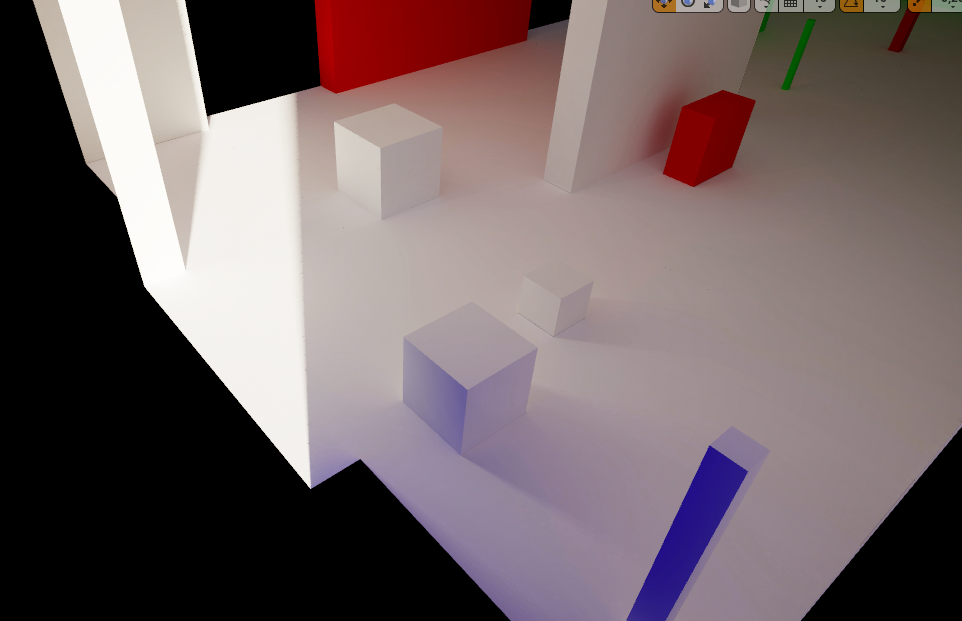 hoary charm
I read somewhere that they shouldn't be solids because of drawcalls..
languid shard
basically you have to do an outside layer
you can still remove it AFTER the bake
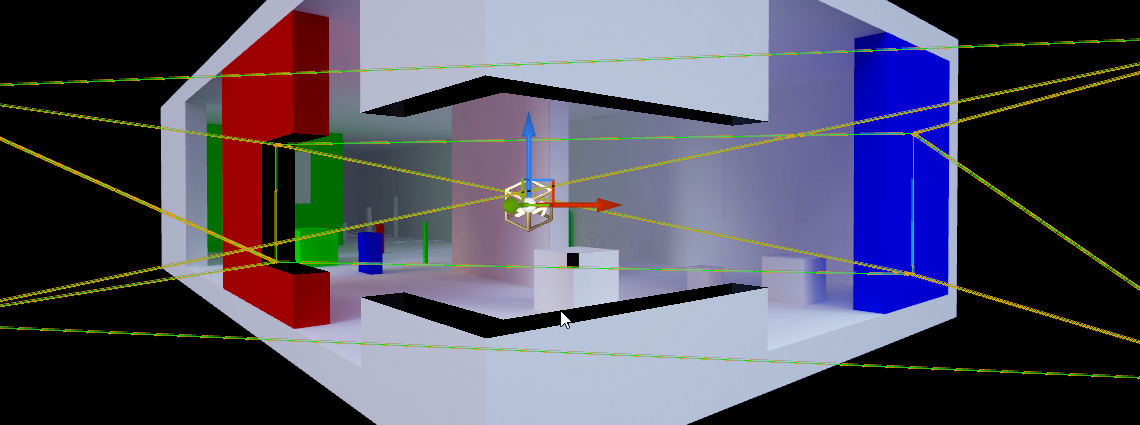
top screenshot has been taken without the outside layer
(twas hidden)
hoary charm
so do you recommend I actually thicken my geometry? or should I just copy and paste my existing plane but rotate it for the exterior?
languid shard
well you can do both
or if you only have an interior, just put a big cube over it
(and open areas where the light must go through)
languid shard
on the second screenshot, I've build the whole room with an outside layer
and used a lower res lightmap on this part
hoary charm
ok
I will let you know in a second how this works...thanks a lot for your help. been trying to troubleshoot this for days now
languid shard
no problem 😃
hoary charm
so I should be able to turn down my lightmass resolution then..I was told to crank it up very high
languid shard
best practice is to split your meshes in smaller parts
plush yew
 languid shard
and use a lot of lower resolution objects instead of one or two big, 2048/4096 objects
plush yew
anyone know why its not importing the cape?
languid shard
@hoary charm that room I posted, every wall or so is its own mesh
that way I can use 512/1024 lightmaps
and avoid very long bake times
while still having good detailing
also be sure to put a lightmass importance volume and lightmass portals on your scene
hoary charm
@languid shard Aye, right now the walls are all modular basically 400x400, and I am using 128 lightmap resolution on them. it's baking now with the outside boxes
I have a lightmass importance volume but no portal
languid shard
volume encapsulates your scene, portals are volumes you have to place on your light entrances with the right shape
that way the lightmass knows where light should come from
 hoary charm
Ahh
Just testing it again. I only covered one wall, was hard to see if it was working or not.
languid shard
what quality settings are you building your lights on ? Can you post a screenshot of it (inyour world settings) ? Also, using preview, medium, high or production ?
 languid shard
ya need more skylight bounces
hoary charm
Ah, so I should have a skylight in my scene?
hoary charm
I had no idea..my mistake
languid shard
hoary charm
Ok I put one in, I will rebake everything and show you screenshots
what bounce do you recommend?
languid shard
for this scene, my quality settings are https://i.imgur.com/ECXDbEO.png
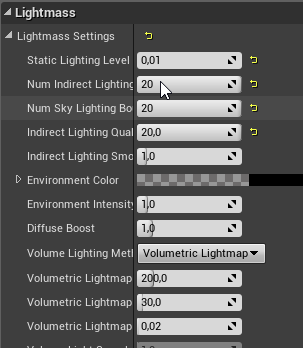
I'm using the GPU lightmapper though, so mileage might vary
hoary charm
that lighting is beautiful
tall pendant
0.01 😄
languid shard
no directional light 😄
takes 8minutes in production with a GTX1080
the power of GPU lightmapping 😄
languid shard
are you using the standard lightmapper ?
hoary charm
I believe so. just what was default.
languid shard
GPU wont really matter if yes
CPU will
this kind of settings with the default lightmass will take at least an hour to bake I think
you can stick to 0.1 scale, 6 bounces on both lights, and something like 4 for the indirect quality
hoary charm
Ah, so should I leave it mostly un altered but perhaps reduce to .01 and say 2 or 3 sky light bounces?
ok
languid shard
I'm not sure that going lower values for lighting smoothing increases quality though
keep in mind for the bounces that the first bounce always takes the most time
then its just like a ball bouncing on the ground, less time each bounce
hoary charm
Ill bake the screenshots for you
languid shard
on the subject of lighting baking, I've already shared it but

this website is awesome to get some skylight HDRIs
lament kraken
@remote roost I just need a video for making more islands on sea
heightmap can help but not useful a lot for that
 frosty bloom
@lament kraken
lament kraken
not helping 😄
hoary charm
@languid shard
Preview
https://gyazo.com/64afc281348a7b80f6ccbe3f55efa306
Medium
https://gyazo.com/57d54c27ee6776ac18ddff4e2436a543
Production
https://gyazo.com/c85c7fd025695667939095005b10689c


 hoary charm
ok
lament kraken
when you can t get answer in biggest ue4 discord
languid shard
is there any good tutorial how to make more than one island?
with a question that vague you bet nobody will answer
too vague
what island, terrain ?
UV ?
lament kraken
but ue4 can t create more than one landscape
frosty bloom
Expand your current landscape & create more bumps/islands?
grim ore
Drop the terrain down below "sea/cloud" level and make islands. If that does not work for you then you need to make static meshes that represent your islands.
lament kraken
thank you

 karmic igloo
@lament kraken Actually you can make more than one terrain by going to the terrain management tab and setting the mode to add another terrain.
 quartz bane
@lament kraken You can use more than one landscape if you enable World Composition
https://docs.unrealengine.com/en-us/Engine/LevelStreaming/WorldBrowser
lament kraken
Thank you!
bitter plover
@wary wave dude the shsders arnt conpiling though i dont know why?
karmic igloo
@bitter plover Sometimes the shaders don't compile because there's something wrong with your material. What is the material used for?
Get a better computer XD
The open world demo has a ridiculous asset size.
It runs kinda slow on my SSD.
What are your computer's specs?
 nimble sun
hey, i want to change the collision on my paper 2d character from a capsule to a box shape, cant get it to work and i have no idea what im doing wrong :/
nimble sun
yes
 pallid compass
Paper char comes from AChar and it enherits the capsule component and you can not change that, due to movement and col and a bunch of other stuff uses it
If you want a different col box you need to set your own base class up
IE, a Pawn with a Collison box & a movement component
nimble sun
how do i add the movement component, cant find it when i search for it
pallid compass
You are unable to add the actual Character Movement component as its for char's only, you can add a Pawn Movement component though
nimble sun
floating pawn movement?
pallid compass
floating pawn movement or Pawn Movement
nimble sun
thanks a bunch
pallid compass
no worries
 tame coral
Another question for you boys and girls if you don't mind. If I have a 2d game, similar perspective to Stardew Valley, how do I get the objects to layer correctly? Do I order them based on their Z value or something?
 leaden garnet
2d games have Z axis? Though 2D was inly x and y axis
 cedar snow
the scene is still 3d
 wraith canyon
Anyone hammering on a simulation game? I'd love some thoughts/advice on how you've approached the architecture. If anyone is aware of a good article (doesn't need to be UE4 specific) throw it my way!
bitter plover
@karmic igloo its usex for a muzzle flash
I have mutliple rffects lile bullet trail but they wont compile
karmic igloo
And you can save and compile them?
marble spire
someone knows why a add force to respulse my character when it takes damage
only works with 5.000000, and is too much distance
but if i put even 4000000 is almost nothing
 ivory gate
anyone know what could be causing a failure to create a session
cinder iron
another one is created
ivory gate
@cinder iron what do u mean
cinder iron
one of the reasons you cannot create a session is because another one is already created in the same instance
cloud cobalt
Or you're not logged into Steam
plush yew
somebody said a .com using the title of your game is enough, somebody said only titles like call of duty spend the money on a trademark. what do you nerds do? 500 bucks to trademark in USA right
cloud cobalt
Call of Duty spends more money in marketing than on the game itself, so that's maybe not your reference
(that's not even an exaggeration)
plush yew
you could replace call of duty with any AAA group, or teams with lots of money.
cloud cobalt
Yeah
I wouldn't say only AAA go for a trademark, but it's definitely not incredibly important
plush yew
yeah i think if you own the .com of the game title it's probably relevant enough
cloud cobalt
For the cost, you'd be better served by some advertising money
Just make sure to check that no one uses your name anywhere, and that you have secured a facebook, twitter, youtube, reddit...
cloud cobalt
Well, marketing is at least as important than the game itself
Social media is a huge part of that now
 fast sigil
Hello guys, I have been downloading some textures from "textures.com" to help me make some materials in UE4, i've just tried importing them but apparently they are .TIFF and the engine cant read them. Anything i can do?
small oar
@fast sigil I think there’s a pretty good free texture pack in marketplace
cloud cobalt
@fast sigil Convert them, with Photoshop or Imagemagick
fast sigil
Ok, thank you
 patent siren
 manic pawn
small oar
manic pawn
small oar
😂😂😂😂😂😂
hoary charm
Anyone have issues viewing your UVS inside unreal where they wont scale in the viewport?
ie scaling issue https://gyazo.com/96eeca9fd103636419e6fd63fee535a6
 grim sinew
DX10 mode was taken out of the editor a year ago.
On the launcher just choose an old version.
plush yew
Hey guys, can I have some help? Im trying to compile my build and im having some issues (FRDEngine is what I put unreal engine into, dont mind that)
ofc
over 2000 characters
hold up
grim sinew
plush yew
PackagingResults: Error: === Critical error: ===
PackagingResults: Error: Fatal error: [File:D:\user\work\FRDEngine 2.1\Engine\Source\Runtime\Engine\Private\ShaderCompiler\ShaderCompiler.cpp] [Line: 4244]
PackagingResults: Error: Failed to compile global shader TParticleSimulationPS<PCM_DepthBuffer>  .  Enable 'r.ShaderDevelopmentMode' in ConsoleVariables.ini for retries.
PackagingResults: Error: [Callstack] 0x00000000AA01A388 KERNELBASE.dll!UnknownFunction []
PackagingResults: Error: [Callstack] 0x00000000855E7884 UE4Editor-ApplicationCore.dll!FWindowsErrorOutputDevice::Serialize() [d:\user\work\frdengine 2.1\engine\source\runtime\applicationcore\private\windows\windowserroroutputdevice.cpp:65]```and
PackagingResults: Error: [Callstack] 0x000000005DD08D59 UE4Editor-Core.dll!FDebug::AssertFailed() [d:\user\work\frdengine 2.1\engine\source\runtime\core\private\misc\assertionmacros.cpp:419]
PackagingResults: Error: [Callstack] 0x0000000054E9D9E8 UE4Editor-Engine.dll!ProcessCompiledJob() [d:\user\work\frdengine 2.1\engine\source\runtime\engine\private\shadercompiler\shadercompiler.cpp:4248]
PackagingResults: Error: [Callstack] 0x0000000054E9CC90 UE4Editor-Engine.dll!ProcessCompiledGlobalShaders() [d:\user\work\frdengine 2.1\engine\source\runtime\engine\private\shadercompiler\shadercompiler.cpp:4265]
PackagingResults: Error: [Callstack] 0x0000000054E9F071 UE4Editor-Engine.dll!FShaderCompilingManager::ProcessCompiledShaderMaps() [d:\user\work\frdengine 2.1\engine\source\runtime\engine\private\shadercompiler\shadercompiler.cpp:2017]
PackagingResults: Error: [Callstack] 0x0000000054E9C846 UE4Editor-Engine.dll!FShaderCompilingManager::ProcessAsyncResults() [d:\user\work\frdengine 2.1\engine\source\runtime\engine\private\shadercompiler\shadercompiler.cpp:2514]
PackagingResults: Error: [Callstack] 0x0000000054EA49F2 UE4Editor-Engine.dll!RecompileShadersForRemote() [d:\user\work\frdengine 2.1\engine\source\runtime\engine\private\shadercompiler\shadercompiler.cpp:4122]
PackagingResults: Error: [Callstack] 0x000000005BD849F1 UE4Editor-UnrealEd.dll!UCookOnTheFlyServer::SaveGlobalShaderMapFiles() [d:\user\work\frdengine 2.1\engine\source\editor\unrealed\private\cookontheflyserver.cpp:5271]
PackagingResults: Error: [Callstack] 0x000000005BD89D61 ```This wont let me compile
Im using engine 4.19.2
manic pawn
Failed to compile global shader TParticleSimulationPS<PCM_DepthBuffer> 🤔
plush yew
I have no clue what that is lmao
Ive been stuck here trying to figure this out for the past couple days
grim sinew
"Enable 'r.ShaderDevelopmentMode' in ConsoleVariables.ini" it literally tells you what to do. This will make it so it tells you what the error is so you can actually fix it
manic pawn
there should definitely not be a compile error in a default shader
grim sinew
It honestly just sounds like you messed with the shaders and broke something
manic pawn
did you forget to compile shader compile worker
plush yew
@grim sinew probably, I was fucking with that a bit earlier
grim sinew
If he didn't compile that, he wouldn't be able to compile anything. So he compiled the worker
plush yew
But nothing that would absolutely break everything
grim sinew
Everyone says that about the changes they make until it absolutely breaks everything
plush yew
Well im installing a normal clean version of 4.19.2
Let me see if it works on that first
One of the main things I added was VXGI
IDK if that has something to do with it breaking
grim sinew
"One of the" See these are the words that concern people when talking about shader changes when simultaneously making massive changes to the way lighting works
 rose bison
not sure where to put it so I'll ask here. We have streaming levels set up (1 persistent level and another one set to AlwaysLoad)
The level that is set to AlwaysLoad misses some objects though


 bitter plover
@karmic igloo can save but there ores no compile button
plush yew
aaaand I cant find it :/
Ill just download the stock 4.19.2 build and the build that only has vxgi
grim sinew
It's a 17th century dress, with the metal wires inside and stuff holding it out
Probably just max distance on the cloth though
plush yew
Hey does anyone have the program that exports Source maps to Unreal?
grim sinew
No
plush yew
I want to extract a certain map and not pay 42 for the program lol
grim sinew
You need to go back to 4.14 at least, probably earlier
I would say check the release notes and try to find when DX10 was removed, then do the version before that
plush yew
yo wtf when is ue4 getting dx12 support
grim sinew
A year ago. It's just terrible and buggy.
plush yew
Theres no option for it
grim sinew
You can use it but it'll crash constantly.
You launch the engine with -d3d12 after the shortcut
plush yew
What if I want to compile the game to use dx12?
grim sinew
Then you're making a mistake
grim sinew
It won't run better and it'll crash more. You would be stupid to do it.
There's no benefit to DX12 or Vulkan right now on desktops
In the UE4
Other platforms, it's just fine. Like DX12 works fine on the Xbox One.
Or Vulkan on mobile
plush yew
Well my game is more CPU based, I was hoping with DX12's CPU utilization it would run better
plush yew
Its the best I can do while using 300 ai lel
grim sinew
Google it, @amber holly
plush yew
grim sinew
Google it harder. It's in the release notes.
We're not going to babysit you
Nobody will remember such an obscure detail off the top of their heads
grim sinew
No idea, it was killed for a reason. Nobody used it.
Maybe he wants it to run on a GPU from 2008
plush yew
dx10 was used in like
1 game
battlefield 3
thats literally the only game i remember that used dx10
the rest used dx9
wait
your gpu doesnt support dx11?
grim sinew
DX11 came out in 2010. Your computer, if it doesn't support DX11, doesn't support Unreal.
plush yew
How do you even find a pc that doesnt support dx11
And honestly most newer PCs can run ue4
even on low settings
yet alone have support for dx11
grim sinew
The only way you shouldn't be able to use DX11 is if your GPU is over 8 years old.
grim sinew
Okay then, exactly. Unreal doesn't support integrated graphics.
There's your problem.
grim sinew
Go buy literally any GPU that hasn't rusted over. It'll be faster.
grim ore
which ue4 game is it that runs on your machine?
grim ore
I believe they said it was a sonic game before
plush yew
I highly doubt it runs, im pretty sure it just starts up
grim sinew
No sonic games use Unreal, would need to be a fan game if so.
All the sonic games on PC use the hedgehog engine
plush yew
kid is probably talking about fortnite running on his pc
grim ore
Ask them what they are using in the engine so then you can adjust the settings on yours?
plush yew
he was prob running like Galaxy in Turmoil or some crap
something that has like barely anything on the screen
what settings?
what frame rate?
grim ore
is it like that one or is it that one?
manic pawn
the editor is way more demanding than the packaged games
games can use dx10, editor can't
grim ore
honestly like has been mentioned before your going to have to upgrade or find another engine.
or I guess rewrite the renderer to support what you need, that is doable
manic pawn
attempting to use the editor on hardware that crappy won't be a fun experience
grim ore
maybe install UE4 4.0 and see if it runs for you on that machine
bitter plover
This is all im getting 🤔
marble spire
hey guys
i have a shoot button in my 2DPlatform game
since its for mobile
but it doesnt shoot when im turned to the left
any ideas?
 graceful grove
Make sure to always turn to the right 
Your projectile may be failing to spawn if it starts inside your character, or some other logic prevents spawning a projectile.
marble spire
im using a arrow to spawn the projectile
did it need a config to turn with me?
im a newbie in UE
graceful grove
Screenshot your setup and it will be easier for other people to help debug it
plush yew
you can make the arrow a child of the main mesh and it will turn with the mesh
marble spire
thats my character setup
graceful grove
🤔
what in tarnation
OK, you need to rotate the arrow to face left when your character faces left
I"m guessing
marble spire
Yes
at least i think
cause if i press the shoot button when turned to the left
and after that i turn to the right
it shoots auto
small oar
anyone know how to get rid of the annoying playerstart colliding issue for multiplayer games where the character doesnt spawn sometimes
plush yew
@marble spire rotate and translate the arrow far enough when your char turns left so the arrow doesnt only rotate and spawn a projectile into your character collision object itself
@small oar that happened to me a few times. you'll need to store an array of all used player starts with ints in the game instance and only pick inactive ones.
plush yew
packaging project forces shader compilation
that or you open each map manually / open each material manually
plush yew
yep ArrowShot
marble spire
what do u mean about translate the arrow
plush yew
change location
and rotation
that's a drawing i did to help lmao. sorry for bad art
i was never good at drawing 😃
marble spire
its goddam helpful
plush yew
lol
marble spire
i think the problem is about tha code now
cause it shoots at left if i turn the arrow
but still not shoots when im turned to the left
plush yew
yes then you gotta catch in the code where your object is facing left
and apply that function at that point
in the exec flow
you can try using print statements to get at when it turns
marble spire
gonna try to find that
thanks gothic
in wich blueprint it says when im turned left?
nvm found it
plush yew
you use
k
split the struct pin on the output to get the Z yaw float
did you do the pixel art for your pawn yourself?
looks coo
marble spire
ive maded it that
but still not working when im looking to left
No
its from a artist
ive asked him to use and he let it
so here i am
plush yew
you gotta set the rotation, and set the position
rotation will make it rotate into the collision object itself.
here can u go to #blueprint with me?
ill msg u there k
marble spire
of course
plush yew
Hello
Can someone give me good advice about random Tiles generation? (On axes X and Y)
Something like that while I walk it autogenerate
 marsh loom
Whats the best way to get started with ue4?
 obsidian nimbus
install it 😃
 vivid girder
How would you set up a npc to open doors on their way to the targetlocation?
obsidian nimbus
make the door their target location
vivid girder
Yea, that's what i'm thinking too, but then each MoveTo event would need to find all doors between x->y and break them down into subtasks again
Seems messy
obsidian nimbus
break it down into rooms
obsidian nimbus
he is in 1 room and there are only a few other rooms he can go to at that t ime
vivid girder
Not sure how that ties in to the door implementation
plush yew
lmao