#ue4-general
1 messages · Page 256 of 1
 digital anchor
 plush yew
xD @pulsar fractal
@digital anchor the static meshes are there when i place the BP in the world
o.o spooky
 plush yew
ok i just crated new bp..
another question: how is it called when the ball still rolls, but it's not moving?
plush yew
what
 pulsar fractal
the answer to ur question
rolls but not moving
if you have no idea what im on about just ignore me
plush yew
i mean the i move the balll and i stop but it still rotates itself
 vast pine
Any tips for ingame repeating vids acting as tutorials. Things to consider?
 fossil ore
Anyone knows how to fix "double clicks" in Windows 10?
I've changed my mouse several times, but It's not mouse fault
fossil ore
not every click is a double click
but when you select something, for example Level Sequencer actor in viewport
It often selects the the billboard rather than actor in general
pulsar fractal
have you tried actual mouse settings?
press windows key - type mouse - going into the settings
check additional properties too
fossil ore
I dont see anything special there
pulsar fractal
double click speed etc
fossil ore
ok
pulsar fractal
can't think of anything else it might be unless there's a specific setting within Unreal
 oblique coyote
Anybody has a idea if i animate a scroll box with sub classses that im not able to interact with the button anymore ?
 grim ore
Maybe you dont have translucency selection and it's going thru the object to the billboard?
oblique coyote
gonna check that
grim ore
well that was more for the other person but maybe it would help with you lol, guess I should have tagged it with a name
oblique coyote
xD
grim ore
can you interact with the scroll box normally?
grim ore
so there is a basic problem then somewhere =/
oblique coyote
and its all on default settings
grim ore
so its a normal scrollbox with some custom widgets in it?
grim ore
have you tried a normal scrollbox with just some buttons or images in it to eliminate the base ui as the problem?
even if you have custom widgets in it, it should still scroll
grim ore
about the only thing I can think of is the hit testing but normally that shouldnt matter
oh. so now what if you add one of your widgets to that scroll box that does work with the buttons
so you have buttons and widgets
oblique coyote
aparently its a widget problem ?
grim ore
well it seems to be but does adding one to an existing scrollbox that does work break it
grim ore
and its not just mouse wheel scrolling but the scroll bar doesnt work either?
grim ore
yeah that could be do to your hit testing on the parent on that object, it might not be letting it drop thru
oblique coyote
but why ?
grim ore
see what your hit testing is on each object and make sure they accept hit testing
which I assume they do as they work outside the scroll box right?
hmm and if the button doesnt take clicks I am assuming the mouse over effect is not working as well?
oblique coyote
yep
grim ore
damn. well I can't see how the widget it set up completely but I guess you would have to debug down to see if part of your widget is causing it =/
I mean personally at this point I would just recreate it step by step and test it each step in the scroll box
oblique coyote
hmm imma check some things
 vague raptor
Hi. Whenever i compile it takes a long time (2mins up). it didnt take this long this morning. idk what might have happened.
grim ore
That's a bummer
vague raptor
i think it has to do with the fact that i added "UMG" to the build.cs file
 silver crown
@vague raptor You're in DebugGame?
vague raptor
i think
vague raptor
its in development
 rocky kayak
I wanted to put a "on death -> cast to level bp -> input into function" on my monsters but casting to levelbp isnt a thing apparently. I wanna put it on a blueprint function library but apparently I can't spawn actors in there! i feel weird putting a blank actor into the level and casting to it for the function but is that the only go-to?
grim ore
what are you trying to do on death?
rocky kayak
on death, spawn the same actor, then give it tags according to the killer's team
grim ore
sounds like a good spot for the game mode to handle the death event
rocky kayak
ooooh
ive yet to dabble with game modes besides selecting default stuff, thanks for the tip!
grim ore
yep. Game Mode is a per level object that is good for stuff like that. The only "downside" is if the game is networked the Game Mode is only valid on the server.
If that won't work for you then the Game State is usable instead
 knotty lagoon
hm, anybody knows what is "profile data visualizer" UE4 window that accepts .profviz files?
i thought its something that would take performance profiling logs and show graphs
but apparently it's not
 paper kernel
manual position set of actor should update actor velocity unless teleport is checked, correct?
 pallid compass
Set pos does not effect velocity
paper kernel
`Final position is as specified by user.
Velocity changes based on the final position.
Colliding objects react to implicit velocity `
from docs
when sweep&teleport are false
pallid compass
Yeah, when i built my Pathfinding system
using SetLocation
instead of add velocity
All my animation state machines based on velocity broke
Setting actor positon does not appear to touch velocity
paper kernel
🤔
bloody hell, how do I get the velocity now
or more like, how to get it to calculate
pallid compass
no idea but it makes sense to me
Why would setting an actor Pos effect velocity
since velocity is additive right?
paper kernel
what does the teleport do then
 last loom
So cool to load up chat and see Matthew wadstein had asked questions in here
pallid compass
Teleport is to do with collison
if it will trigger shit
or not
i think
or is that sweep?
i cant rmemeber
lemi check
paper kernel
sweep does collision check, teleport says it doesn't affect physics states
both still do collide
teleport can appear inside objects tho
pallid compass
oh i see what u mean
hmm
lemi grab the comments out 1 sec
think i crashed my vs trying to go to it
     *                        If equal to ETeleportType::TeleportPhysics, physics velocity for this object is unchanged (so ragdoll parts are not affected by change in location).
     *                        If equal to ETeleportType::None, physics velocity is updated based on the change in position (affecting ragdoll parts).
* If CCD is on and not teleporting, this will affect objects along the entire swept volume.```hmmm
only seams like they are mentioning rag doll effects
not very helpful
pallid compass
its only root
paper kernel
🤔 💥
pallid compass
there was a mention in the comments about it
not touching children
trying to reopen it
oh i think the child thing is only for sweep
But in general
most stuff for velocity does only effect root
 urban meadow

Unreal Engine
In 4.9 we’ve exposed the teleport flag to several blueprint nodes, and this seemed like a good opportunity to give some detail on how it all works. Check it out!
this has good info on what to expect with moving stuff
paper kernel
yes, I just read that
anything attached to physics constraint as child gives out (nearly) expected velocity
and it ignores the teleport flag
I disabled the physics sim on root
and now it reports velocity value
(╯°□°)╯︵ ┻━┻
 cinder iron
┬──┬◡ノ(° -°ノ)
 wintry raptor
has anyone here used Launchpad as a launcher?
or know of another tool to create a launcher?
 cloud cobalt
I've created my own in the dark days before Steam Greenlight
wintry raptor
I'm way too out of my league to figure out how to do it and I'm having hella issues with getting Launchpad to actually work.
cloud cobalt
Why not use Steam directly ?
wintry raptor
steam will patch your game for you?
cloud cobalt
Yeah of course
wintry raptor
ok. wot.
cloud cobalt
Patching is actually super great with Steam
You just run a tool on your packaged directory on your PC
wintry raptor
does it have to be public though?
wintry raptor
and the tool comes from steam as well?
 coarse wigeon
Looks like Unreal Engine 4.20 might have better Vulkan support?
 azure shore
hey guys havent been here in a while but say I made a car and I wanted to make it move at the same angle as the ground it's on, whats that called?
urban meadow
you would sample the normals beneath the car
raycast into the ground and get the impact normal
 tawdry hedge
Hey, guys. Is vertex snapping not working for you correctly in 4.19 as well?
azure shore
no idea where to start with that hahah
urban meadow
look into the line trace node. you can trace a line for a distance and it will tell you anything you hit. from that hit result it will have the normal of the surface that you hit
azure shore
thanks
 storm venture
hey system messages are disabled in a project im working on right now
whats a good way to tell if a part of code is being executed
i usually print a message or play a sound
 upper heart
Does anyone know if there is a way to hide the text that shows when you use the in game debug camera via apostrophe + tab ?
 quartz grotto
Is there a better approach to importing assets and stuff from third party sources - perhaps an approach that doesn't throw all of the imported content into the root of my Content directory?
Is it possible for me to put all third-party stuff under some common directory?
 frosty bloom
@upper heart Disable everything except NavMesh or Perception & the text should be out of the way
Not really a solver but it works
upper heart
Do you know the console commands? I'm talking about a packaged debug build
frosty bloom
Ah not really, I use the regular command keys :p
upper heart
okay
 echo summit
I'm new to unreal engine, can someone maybe suggest me an online tutorial that will teach me the basics
 mossy kettle
Hey there
echo summit
Hi
mossy kettle
The official tutorials are pretty good
echo summit
Where can I find them
plush yew
 echo summit
Thank you
mossy kettle
No problem 😃
echo summit
I'll check it out
mossy kettle
@plush yew cool
mossy kettle
Good for you 😄
I'm just starting out
Since you're a pro and are here I could ask you a question 😃
mossy kettle
Oh, you liar 😁
 wintry compass
Hello there! I just posted the first trailer for the game that a students team is developing in UE4!
It is a racing multiplayer game that is coming out on steam on june 14 in early access, I really hope you like it <3
(If you want to know anything else from the game or its development don't hesitate to contact me 😃 )
https://www.youtube.com/watch?v=fi7YYH8HquQ&feature=youtu.be

Twitter: https://twitter.com/ModularSouls Instagram: https://instagram.com/fuel_renegades This is Fuel Renegades, and we are Modular Souls. Available on Stea...
plush yew
@wintry compass your first game? 😃
wintry compass
Yes!
wintry compass
Oh I know! They are not the final game though...
plush yew
and vehicles are so detailed, and everything else isn't.
 tired island
@wintry compass something i would love to play though
plush yew
@tired island and of course you'd pay for it.
wintry compass
Thanks for the feedback @plush yew 😃
That is lovely @tired island, thanks ❤
No need to pay, it will be free to play haha
plush yew
20 BUCKS!! OK
tired island
Lol
plush yew
not much oö
wintry compass
I'd pay
tired island
Me too
wintry compass
😛
tired island
Anyway i have a question for you
Why every unreal programmer hates Git?
The best source engine is SVN and Perforce thats for sure
But also git is available
 wheat sand
has anyone had a problem where your vault gets emptied? If so what's the fix? All my marketplace assets and such are gone.
pallid compass
Because it runs like shit
tired island
Lol
 manic pawn
git is made for source code, not binary assets, and unreal projects have thousands of binary assets
 stoic sentinel
I'm having a weird issue with things being black in my scene after I rebuild. I think it has something to do with using vertex coloring on my models. Has anyone here come across this problem?
Not sure where the best place to go to ge t help with this is.
 bitter plover
I literally spent an hour making a character pawn from an empty c++ project but when i play the game the player camera component isnt used and i get the scene view camera! Its so annoying! The code is perfect aswell.
pallid compass
Obviously not perfect code :p
stoic sentinel
Ok so I've found out it has to do with using vertex color at all. I've found a lot of people saying that I need a UV for the lightmap and that's why my models are black. How would I add uv to a model with vertex coloring? Baking the vertex color to an image is not using the vertex color in game. I have tried that and it work with smaller models but not bigger ones. : / still stuck scratching my head with this one.
 umbral kraken
From a 3d model file standpoint the models themself should contain UV data (aka texture coordinates). Try accessing the models UV and use those.
 visual hollow
can some check it out and tell me what can I do on it to solve the Enable error coloring to visualize. I tried a lot of the solution on net but nothing worked
plush yew
@everyone CivilContract Offical Trailer Released https://www.youtube.com/watch?v=xIlm1OixCCU&t=1s - COPS - VS ROBBERY RPG GAME

First Close Interaction Trailer With CivilContractRPG. Join us at www.capitalgamingrp.stream PreOrder CivilContract Today: http://www.capitalgamingrp.stream/...
plush yew
@plush yew whhat happened to your materials?
everything looks so dull
plastic o.o
like it's not even PBR or so
looks like matcap XD
i am sorry to say this
visual hollow
guyz When I play the viewport a sphere is coming where my player start is
 wary wave
that's probably the player
visual hollow
before play
after play
How can I remove it? I want to use the third player character
@wary wave
wary wave
set the game mode default pawn class to the character, I think
 ancient thorn
Morning all 👋
plush yew
hello my lovely mirror
 gaunt void
hey guys, i need some help.
one of my triggers stopped working in the packaged version of my game, but all works fine in editor
 rose quartz
Can somebody tell me how its possible that im getting Preview on the texture?
wary wave
unbuilt lighting
rose quartz
oke thx
same thing i did buy a A enviroment but when i use the Mesh on the outside the walls are visible but if im inside the building the walls are gone :S
like this Same building 1 on the outside and same building on the inside
gaunt void
if you are looking onto the backside of a mesh, and the material is not 2 sided you will look through it
rose quartz
oke so i need to export it and Apply the material on it
gaunt void
either model some gemoetry for the backside, or go the quick/dirty way and set the material thats applied to 2 sided (inside the material editor)
rose quartz
oke thx i wil try that
ancient thorn
is it possible that there is a material on the back and its flipped the wrong way? its possibly worth checking?
rose quartz
How can i do that i did buy this Environment
ancient thorn
you would have to export that piece to a package and flip it I think. don't know if Ureal has a means of flipping Normals? perhaps someone can advise?
I would personally send a message to the makers and let them send you a fix
ancient thorn
Then in maya copy that piece of wall, move the copy in place and set x or y scale to -1. or get them to sort their own error out 😛
 wispy comet
@rose quartz make sure all your normals are facing outwards
rose quartz
I did see that they are all planes and not has a back side attach to it so i need to make a plane on the other side and connect it
knotty lagoon
I have question about performance profiler - i want to display graph containing data of "stat unit" console command over time
but idk how are the specific stats named in the list for respectively "frame, game, draw, gpu" in profiler window
ancient thorn
is there a way to tell exactly how far in the distance something is UE4?
knotty lagoon
mmm
what does "Game" thread in Unreal Engine consist of?
i know that it handles script logic
any detailed description?
ancient thorn
yes that is what I mean @gaunt void 👍
plush yew
is #blueprint correct place to ask questions?
ancient thorn
Thanks @gaunt void 👍
 young bane
🏳️🌈🤑
plush yew
https://cdn.discordapp.com/attachments/447108735471583252/451683862162964490/unknown.png https://cdn.discordapp.com/attachments/423343127277993986/451442487282630706/unknown.png


what you thinking about?
 whole quarry
Tim Burton grass
grim ore
It is probably having a bad day so it's feeling sad.
 languid shard
@inland lily bake your lighting
 inland lily
build it?
grim ore
or be super lazy and swap your lighting to movable and never have to build lighting again 😛
languid shard
well thats also an option 😄
plush yew
I am sorry if i am breaking your discussion @languid shard xD why is this saying that i need to intall visual studio altought i have installed it ?
its nvidia Codework
i am trying to install that one for android developing
ok i think i know how i can handle that ... i just need to intall visual studio 2015... going to try that out
 graceful grove
4.20 preview is out in the wild now 👀 https://forums.unrealengine.com/unreal-engine/announcements-and-releases/1485599-unreal-engine-4-20-preview
Unreal Engine Forums
PREVIEW!
Preview 1 of the upcoming 4.20 release is available now on the Launcher and GitHub. We are making this Preview available so that our developer community
cloud cobalt
Reminder not to update right away, use branches in your version control software, etc
grim ore
You can uncheck the Nsight stuff in the android installer, it's not really used
yay 4.20, only 3 weeks late lol
cloud cobalt
"late" lol
grim ore
looks like some neato stuff tho, hopefully p1 is more stable than the 4.20 release branch on github 😃
plush yew
@grim ore how can i remove nsight? xD
grim ore
you should be able to uncheck it when installing
check custom at the top then uncheck it
plush yew
you mean i should change it to no action
grim ore
yeah
plush yew
kkk thx
grim ore
all the android installers just confuse me, I wish they could just make one standard one instead of making it the sdk manager, codeworks, android studio now =/
plush yew
xD
because of those things and of the size (of the apk) i sometimes wish to use unity XD But in my opinion ue4 is better than unity 💪
 mint swan
Hey there. I only just downloaded the latest web installer for the launcher EpicInstaller-7.9.2-unrealengine.msi and tried to install it. However i want to install it to a different drive than the installer seems to desire https://i.imgur.com/Moy50MT.png
The searches i did came up saying that the launcher should indeed offer a way to change the path, which mine obviously doesnt. Does anyone have a clue how to change that?
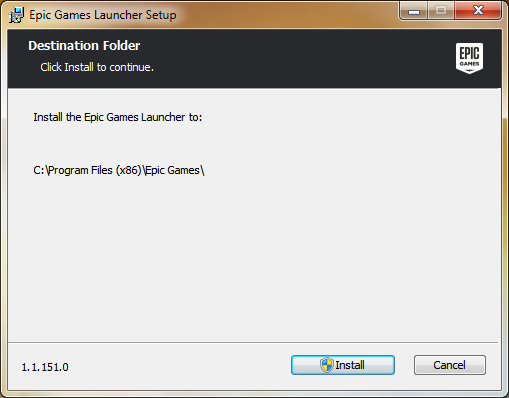
I do not have an old version installed, running windows 7.
grim ore
that is super weird, I installed it recently and it asked where to install
mint swan
Maybe it is some old relic from a previous Unreal Dev Kit from 2014 i had installed.
Some regedit remnant i have to delete.
grim ore
It shouldnt be and that is the latest launcher
mint swan
I found an old regedit entry with the C: path
I will just wipe all the traces for the unreal launcher and see if it is successful or if it messes current games/tools up in the process.
grim ore
I just tried installing it on this clean machine here and it won't let me change it as well lol
mint swan
If not, this installation is a few years old and setting a fresh one up would be fine anyway :-3
grim ore
sooooo.... yay epic
mint swan
Oh that is odd.
grim ore
yeah it's super weird as I installed it not too long ago on another machine and it was fine, I never install to the default
plush yew
@grim ore thank you sir the installation worked very well
frosty bloom
First bug of 4.20 Preview 1, as soon as you start a blank project you have no control over the camera, it goes straight upwards and starts spinning 😂 How fun!
 safe rose
Here's hoping 4.20 goes through 20 previews
frosty bloom
Bug two of 4.20 Preview 1, Do not press the + on Emitter inside Niagara System. It will, 100% of the time (Multiple tries) crash
stoic sentinel
Hello all, I was here yesterday talking about a strange problem I'm having. Has to do with vertex coloring in Unreal. I can apply my vertex coloring very easily but when I build the scene my models go black. I understand that a model need UV for the lighting to be baked in UE4 but my model do not have a UV layer. I have tried baking the vertex colors to images but that only works for smaller models. Is there a way to add UV's without messing up my vertex coloring?
frosty bloom
Cross my previous comment and add in ANY instead of Emitter
 grave nebula
sigh.. 4.20p1 is still leaking memory on newer nvidia drivers.
grave nebula
Anyone knows how to import volume textures in 4.20 btw ?
silver crown
@wicked tiger https://forums.unrealengine.com/unreal-engine/announcements-and-releases/1485599-unreal-engine-4-20-preview
Unreal Engine Forums
PREVIEW!
Preview 1 of the upcoming 4.20 release is available now on the Launcher and GitHub. We are making this Preview available so that our developer community
Wrong links for
mint swan
@grim ore it was indeed some remnants of an old installation in the regedit. I wiped most of it and now got this :D
graceful grove
The bug with Niagara Systems crashing if you try to add an Emitter without any potential Emitters to add was quashed in dev-niagara branch, I guess what got merged into 4.20 preview1 is older
grim ore
@mint swan awesome, weird that it does that but glad to know there is a fix
man releasing 4.20 with a serious niagara crash was no bueno, I figured the delay was them trying to get it usable for p1 lol
graceful grove
Niagara is still taking baby steps
But it's a good thing it's getting more exposure. More bug reports means more bug fixes
grim ore
sure but if you literally cant even start using it, then baby steps or not, it's useless in the preview 😦
 frank escarp
@graceful grove it is time
grim ore
they had an actual feature go broken in 4.19 release so I have no hope for 4.20 at this rate 😦
frank escarp
for ECS Space battle, even more overkill edition
last version was able to run 6000 missiles
lest see if i can push 20.000
graceful grove
@frank escarp I'm looking forward to what's possible
Apparently Niagara should be up to date with commits on the 4th of this month so I'm surprised to see that bug has returned
@frosty bloom If you could replicate the bug and write down the steps to reproduce it, that would be grand. you could post it here or forward it to shaunkime
I'm guessing the bug is a result of some other engine behavior with UI changing after the merge to 4.20 as on latest dev-niagara build all of the "+" parameters options should be grayed out in an empty Niagara System
frosty bloom
1: Create blank project
2: Create Niagara System
3: Press any + on the Parameters
4: Crash
I also tried with several Modules created and sitting in same folder as the Niagara system. Still crashed
graceful grove
Ouch. I'll find some space to download the preview and replicate it. Thanks for reporting that
frosty bloom
No problemos. The modules themself was fine thought. Didn't experience any bugs there.
grim ore
that's the same issue I had on the 4.20 release branch yesterday so it makes sense it's still broked
graceful grove
It used to be that the Niagara System would crash if you tried adding anything through Parameters panel without having tracked an emitter, so you can try pressing "+ Track" in the bottom left and adding an emitter beforehand.
grim ore
well one would assume pushing the + button at any point any where at any time shouldn't crash the system lol. Testing this seems easy enough 😉
graceful grove
Yeah, this bug was fixed in dev-niagara but it seems to have risen from the dead
grim ore
yep the best part of the previews is seeing what bugs got added that are not on the list
graceful grove
In any case there's a bug submission form for anything that doesn't work as intended so make sure to use it https://epicsupport.force.com/unrealengine/s/
frank escarp
@graceful grove niagara + multithreaded ECS that i was able to improve
definiteely should push 20.000 flying missles and 3.000 spaceships
need to make a niagara input module tho
to send all those positions + material color
if i make the spaceships NOT actors and implement my own collisions, could get to 100.000 missiles and 20.000 spaceships i think
but at that point it would be cooler to have more than 1 type of ship, and have a few of them, maybe one just lazors every enemy ship that comes close
graceful grove
@frank escarp I'm not sure about the technical complexity of writing a new dynamic data input but the NiagaraDataInterfaceHoudiniCSV class should be a good stepping stone.
I've done the bare minimum and duplicated the NiagaraDataInterfaceSimpleCounter and changed it count backwards so I can say there's not a ton of interdependencies to worry about.
Actually I'm not sure whether you would really need to write your own data interface in any case, it's dependent on how the ECS system is implemented
 wicked tiger
@silver crown - thanks! They've been updated.
azure shore
Im getting really frustrated
when I use spawn actor from class, the spawned actor in frozen in place and doesnt do any scripts
a little help?
grim ore
is this an AI?
azure shore
no (if you were talking to me)
wicked tiger
@trail plume - Eagle eyes. On it 😃
azure shore
its a car and when I get in it works fine (it deletes the car actor and uses a fake one attached to the player) but if I get out its supposed to spawn the original car actor back, but it floats in the air and it wont delete when I use it like the first
actually, it might, but it spawns two and only deletes one
help me please
grim ore
I dont know how much we can help without any real code. uhm so it does spawn the new one but it's in the air?
azure shore
yeah, and it doesnt seem to follow any of its own scripts
the one to 'get in it' is in the character bp detecting when they touch it
grim ore
so if you put a breakpoint on the new car in the begin play it never fires?
or maybe something is just blocking it like collision
azure shore
I tried on an empty actor making it delete two seconds after spawn (and it had physics enabled) but when I used a key to spawn it its floating and doesnt delete
 maiden swift
Aw yiss. Downloading 4.20 Preview 1. 
Can't wait to dig into the blueprint graph and hunt for interesting new API changes. 👀
azure shore
🤦
maiden swift
Scripted Extensions for Actor and Content Browser Context Menu. The context menus for actors and content browser items can now be extended using Blutilities.
😍
 rustic panther
Niagara?
 karmic igloo
I think that's a new effects system.
karmic igloo
Yeah it is.
maiden swift
Yes it is. I posted a link to the release notes in #unreal-news.
rustic panther
 thanks
 fair violet
Anyone else getting lots of outline distortion / artifacts using the new DOF at resolutions higher than 1080p?
Happens to some extent at 1080p too but at 4K the outlines bounce a good bit away from the source
An example on one of the paragon characters- it's a really noticeable pixelated outline
I'll make a bug report post, if anyone finds a workaround, please @ me!
Seems to have replaced the old CircleDOF so you can't roll back
 sudden agate
pallid compass
sudden agate
pallid compass
i wonder how many people will upgrade to 4.20 and not back there project up
maiden swift
More than I would like to admit.
Which is why I always add a reminder not to do that when announcing preview builds.
Epic goes out of their way to warn you, too, but some people still do it.
Oh well. Best not to dwell on it.
Ohhh. There's a new Lists category of widgets in UMG now.
pallid compass
I just warning my whole ex uni class in our discord not to do it, i put money on it that one of them does it anyway, i wish epic would make that warning and suggestion to backup the project even bigger
like
maiden swift
 pallid compass
"NO BUT SRSLY DUDE U REALLY WANN MAKE A COPY OF THE PROJECT BECAUSE SOMETHING IS GONNA BREAK TRUST US FAM"
lmao
oh that is nice 😮
maiden swift
Lol! I feel ya! I try to drill it into people's minds that preview builds are for previewing, exactly what it says on the tin.
pallid compass
When i was in uni right, u suggested to our tutor to take 4.16.3 because it was stable instead of shifting 4.17 on all the machines right and he did it
maiden swift
Maybe Epic should save a step and somehow disable cloning if you have a preview build installed. 😛
pallid compass
and within 1 weeks, everyone was like "WHY MY PROJECT NO LOAD IN UNI?" they had all installed 4.17 at home, it was a nightmare
same thing with maya as well actually
yeah lmao
maiden swift
Figures. I see a lot of people who are obsessed with having the latest and shiniest, regardless of whether or not they actually have a use for it.
pallid compass
I know it sounds silly to stress the warning but you know, alot of people just assume its gonna be okay, and in general you cant take bp assets back a ver
You know whats just popped in to my head actually which would be an amazing feature
When you go up to a new engine version
the Engine takes the txt version of any blueprint you save to a higher engine version, and stores that in saved
So if u save your Char.bp from 4.16 to 4.17
fair violet
I know some people that work on a single copy of a project with no backups and convert in place
pallid compass
it stores a Char.bp.4.16.backup.txt
fair violet
They will run into so many issues at some point
pallid compass
So that u can kinda rollback
fair violet
Months of work gone
pallid compass
at least roll back the blueprint node stuff lmao
maiden swift
Interesting idea for text backups. Sounds useful.
Would be nice to have some sort of failsafe to protect people like that from themselves, so to speak. lol
fair violet
It's a good general life lesson I think haha
You'll lose work, get burned and then never ever do it again
maiden swift
Omg. Mesh editing features finally on the way soon?
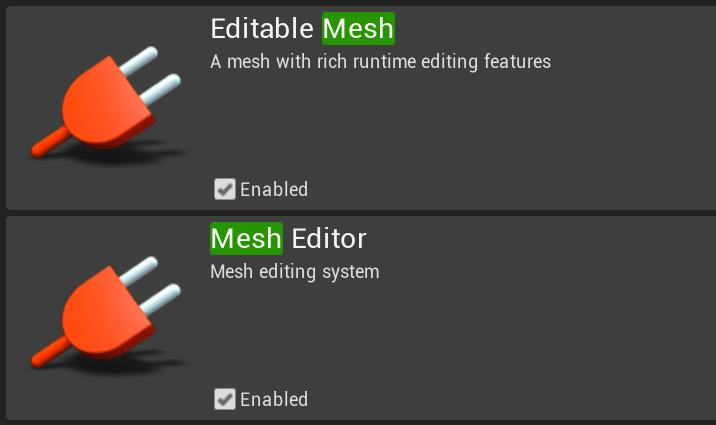
Both enabled by default and marked as version 1.0.
👀
maiden swift
I'm hunting for it!
maiden swift
Not in the Modes panel.
 grim sinew
Yeah I found them a while back and couldn't figure out how to enable it
If you figure it out, @ me 😛
maiden swift
A while back? I didn't see them in previous versions of the engine.
grim sinew
It wasn't showing up in either the modes panel or the VR editor
It was merged into 4.20 like 2 weeks ago
maiden swift
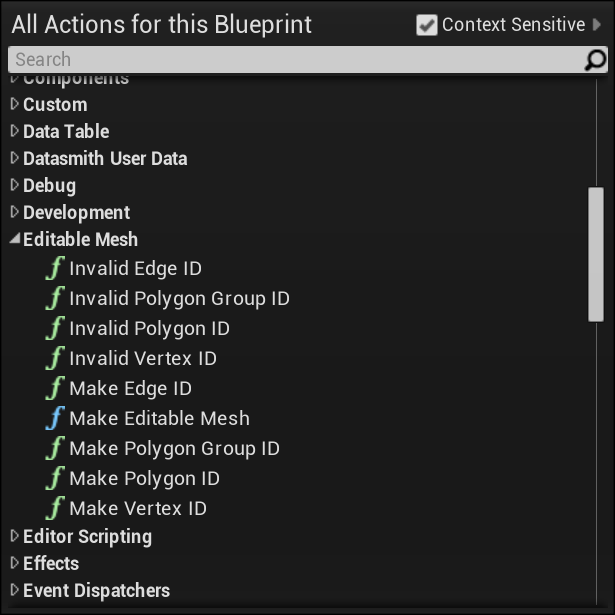
Spotted this in my blueprints. https://i.imgur.com/7YVSNLH.png
 pallid compass
If your familiar with c++ pfist take a dive in the engine, see if u can find how the editor window is enabled
maiden swift
I'm not. I use Blueprint exclusively.
grim sinew
But yeah, the dev-modeling branch is fully integrated into 4.20
maiden swift
That's very exciting.
grim sinew
It is, now if only anyone knew how to use it
 cursive dirge
did they ever improve it from the GDC?
maiden swift
I'm guessing the new mesh format mentioned in the release notes is related.
cursive dirge
or did they just dump it in so they don't need to maintain it separately?
grim sinew
There's been a few commits, but it got largely lost in a swarm of "Let's commit 4632649823423 changes at once"
cursive dirge
heh
grim sinew
Made it impossible to keep track
cursive dirge
lets hope we'll get the rest of the dev streams soon
still missing rendering and physics dev streams
grim sinew
And yeah that's my guess too, that they wanted to support sub-d mesh types
frank escarp
@maiden swift houdini tools in unreal
pallid compass
vblanco u got a copy of 4.20?
pallid compass
can u take a peak and see if u can locate how the Editable Mesh editor window is enabled?
i dont have a copy yet
gonna try and find it in the git tho
grim sinew
It's a plugin, so you can find it in the plugins folder of course
pallid compass
oo
frank escarp
this is a different thing mate
this is to edit meshes through blueprint
think houdini type stuff
pallid compass
oh 😮
maiden swift
EditableMesh data type is expecting a Mesh Ref asset, I don't think can be created yet.
pallid compass
I thought it was like maya sorta thing
grim sinew
frank escarp
this would allow devs to build very basic modelling tools in their games
without too much effort
like, actually INGAME
grim sinew
There is a maya sorta thing with the "Mesh Editor"
That's this.
It's the thing they showed for GDC 2017
The VR/modes panel mesh editor
grim sinew
Editable Mesh may be something else, but Mesh Editor is that.
pallid compass
i found it
grim sinew
WHERE
maiden swift
Right. Mesh Editor is the thing they showed last year, and Editable Mesh is a separate but - I assume - related class that works with the mesh editor.
pallid compass
its polygon modelling
grim sinew
"I found it" helps nobody, tell us where
pallid compass
grim sinew
Where is this magic button
maiden swift
We knew it was polygonal mesh editing.
They're basically building mesh creation tools into the engine.
Create 3D meshes from scratch in Unreal Editor using a new suite of polygon modeling tools. Easily subdivide your model with customized edge crease weighting using technology from Pixar's OpenSubdiv. We plan to release an initial version of this feature with basic functiona...
Labels
Tools
pallid compass
Bare with me
maiden swift
We're adding rich Blueprint and C++ APIs that allow you to construct and modify meshes both at runtime and in the editor. It's easy to perform complex operations on meshes such as splits, extrudes, and insets using new functions. You can control edge hardness and creasing, ...
Labels
Tools
pallid compass
Im trying to track how how to get it on with slate
found the viewport
now how the hell do u get it on
yo
pfist
u got ur engine open
maiden swift
Yep.
pallid compass
Try this
MeshEditor.Enable
in the command line
        bIsEnabled( false ),
        MeshEditorEnable( TEXT( "MeshEditor.Enable" ), TEXT( "Makes MeshEditor mode available" ), FConsoleCommandDelegate::CreateRaw( this, &FMeshEditorModule::Register ) ),
        MeshEditorDisable( TEXT( "MeshEditor.Disable" ), TEXT( "Makes MeshEditor mode unavailable" ), FConsoleCommandDelegate::CreateRaw( this, &FMeshEditorModule::Unregister ) )
    {
    }
THAT WORKED
maiden swift
It came up in autocomplete, even.
pallid compass
print screeeeeen
maiden swift
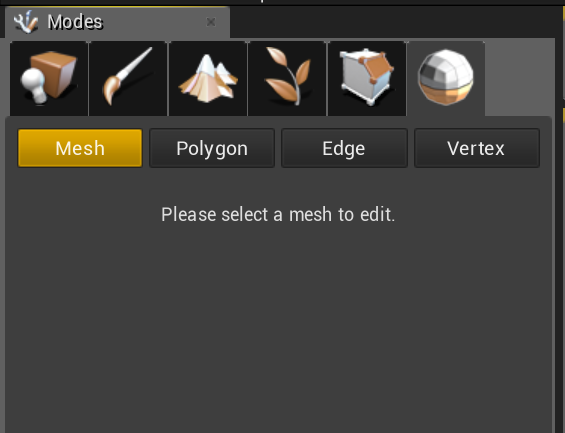 maiden swift
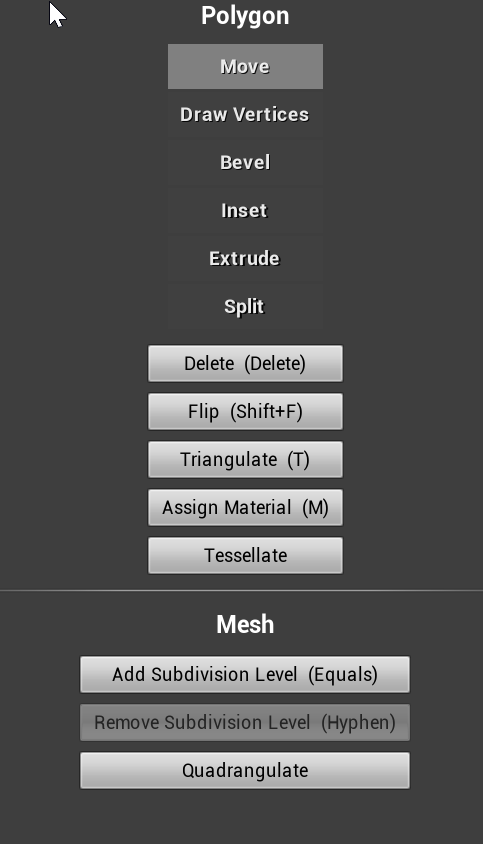
 worn granite
oh yea that thing
pallid compass
@grim sinew @frank escarp
Try this
MeshEditor.Enable```pff, as if that ever stopped me before
pallid compass
@maiden swift do u see a bunch of options at all
like
bSeparateSelectionSetPerMode
bOnlySelectVisibleMeshes
bOnlySelectVisibleElements
maiden swift
Where would those options be?
pallid compass
Yeah thats what im wondering
I think there might be HUD missing
I see these options but i didnt see them in ur HUD
however
UCLASS(config=EditorPerProjectUserSettings)
So try ur project settings
UMeshEditorSettings() maybe
worn granite
that'd be editor pref
pallid compass
Ahh editor pref my bad
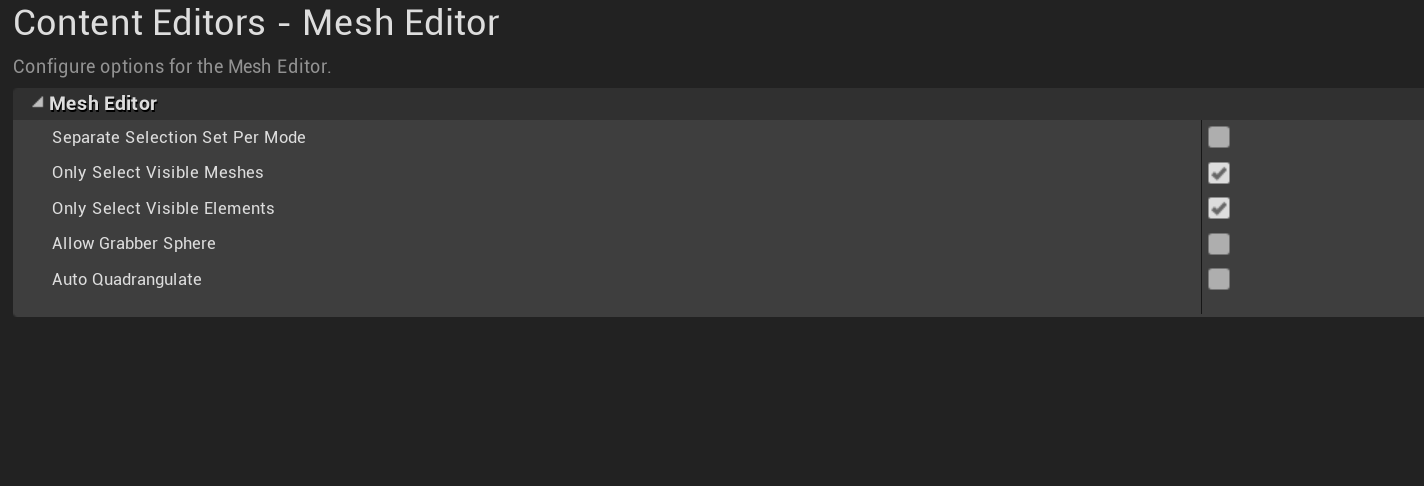 rustic panther
so could editable mesh be used to create editable landscapes?
pallid compass
stop it all being tri's?
rustic panther
like digging
rustic panther
not good for massive surfaces?
pallid compass
Editable landscapes has alot behind it
This system does not
But
in theory
u could prob use the tools to shift a landscape in runtime
with some hacks
rustic panther
if you know the game Wurm Online, that's what I'm thinking of
pallid compass
let me look for export stuff one sec
maiden swift
@pallid compass Yes, Quadrangulate turns all tris into quads it seems.
pallid compass
omg thank god jesus
Modelling in full tri's takes so long
and does not let you keep flow properly
rustic panther
it makes a lot of tools useless
pallid compass
I hope they aim the kit towards quad workflow
maiden swift
Yeah one sec. Hilarious gif incoming.
pallid compass
Beveling,
edit vertex edges, normals,
extend,
extrude,
harden/soften,
insert edge loops,
remove edge, vertex,
split Edge,
split polygon,
tessellate
Not bad for a starter barebone kit
maiden swift
Yeah that's all here I think.
pallid compass
If they get this good it will nock maya right out the god dam world
so no tools hidden at least
grim sinew
@pallid compass Well the solution is just don't model in full tris and triangulate your quads when you're done modeling with quads >.>
pallid compass
Yeah i mean i dont like modelling in tri's
grim sinew
The editor they showed off at GDC 2017 was all sub-d workflow
pallid compass
i hope the kit is built towards quad workflow
grim sinew
That's why I was wondering, hey, can you import them now
pallid compass
maybe tessellate polygon is the subdiv?
lemi check because i dont see any subdiv stuff
/** Tessellates selected polygons into smaller polygons */
ugh maybe?
someone try using tessellate on cube
maiden swift
Sorry, finally got a gif encoded.
pallid compass
np
nvm tessellate appears to have no level's system to it, so its prob not sub div
maiden swift
So about being disabled by default...
I need a new gif pipeline. This 2s gif is huge.
lol
pallid compass
the fuck
worn granite
ah yeah
maiden swift
Yeah. Polygon Move... it moves everything in the world. lmao
worn granite
it edits the mesh itself, meaning any instance of the mesh is also updating
Oh,no wait the walls move
wtf
maiden swift
Actually I think you nailed it @worn granite. The wall is using the same source mesh.
All mesh edits are actually editing the source mesh. Yikes.
pallid compass
wait wth i dont see anything called MoveVertex lmao
worn granite
hahaha, oh man.
pallid compass
maybe its extend vertex
worn granite
I know how you could solve it, but that's definitely a yikes moment there
grim sinew
It's fine that it edits the source mesh, otherwise it would need to make duplicate mesh assets for every single thing you change.
That's not really a problem
pallid compass
was prob just not committed in time
worn granite
@grim sinew aye, but it could have the option to do so
grim sinew
Well just duplicate it in the content browser first.
worn granite
¯_(ツ)_/¯
karmic igloo
Or you could just manually duplicate it.
worn granite
but muh UX
karmic igloo
ctrl+w
Downloading it now, unfortunately won't have time to mess with it until this weekend probably.
pallid compass
I cant even find the move command lmao
 random mulch
Does anyone know where I can find the .ini for the Editor Keyboard Shortcuts? Somehow, even after resetting, the 2nd Curve Editor panel doesn't show up for me.
worn granite
@pallid compass welcome to finding anything at all in slate
worn granite
yeh I know what a maze it can be
maiden swift
It's a UX problem for sure. Typical UE4 semantics dictate that editing assets is only one way. Editing the source asset should update all instances, but editing an instance only changes that particular instance.
 teal tulip
oh no that tool still the same of 1 year ago 🤦🏽 feedback direct to the trash
maiden swift
I'm just glad it's in launcher builds now so we can play with it.
teal tulip
still the same toy for VR users
pallid compass
"U guys stupid it was disabled for a reason"
teal tulip
you can enable or disable per mesh edit nick
so you edit it directly to the mesh
and edit all the replicas
pallid compass
Dam im gonna read all the doc tonight because iv alwaya wanted to make my own modelling kit
also dont forget guys
teal tulip
but there is a checkbox to edit per isntance on the world
maiden swift
There's currently no setting that I can see.
pallid compass
before this comes, it needs UV tools, and there is 0 mention of UV tools in the kit just so u know, so might be awhile off
teal tulip
there should be a checkbox in the same panel of edit Nick
pallid compass
at least in the current 4.20 source
pallid compass
Basic UV toolkit & vertex painting & masking by polygon
would be sooooo nice
dude imagine this
Mask by polygon && the new layer system
AHHHA
it be so good
grim sinew
Right now I just see it as a blockout tool
pallid compass
not as good as substance
maiden swift
I don't know how they'd handle base UVs, but I'd love if lightmap UVs were just automatically generated on the fly.
pallid compass
but imagine for blocking and testing
teal tulip
@maiden swift can you take a screenshot of the panel please ?
grim sinew
Unreal won't ever be useful for anything high poly modeling, so it's not a tool to get production models. It's a great way to block things out with some dynamic lights.
maiden swift
@grim sinew Same. Gotta keep in mind this is replacing the old BSP tools.
@teal tulip https://i.imgur.com/jZ4Q3GW.png
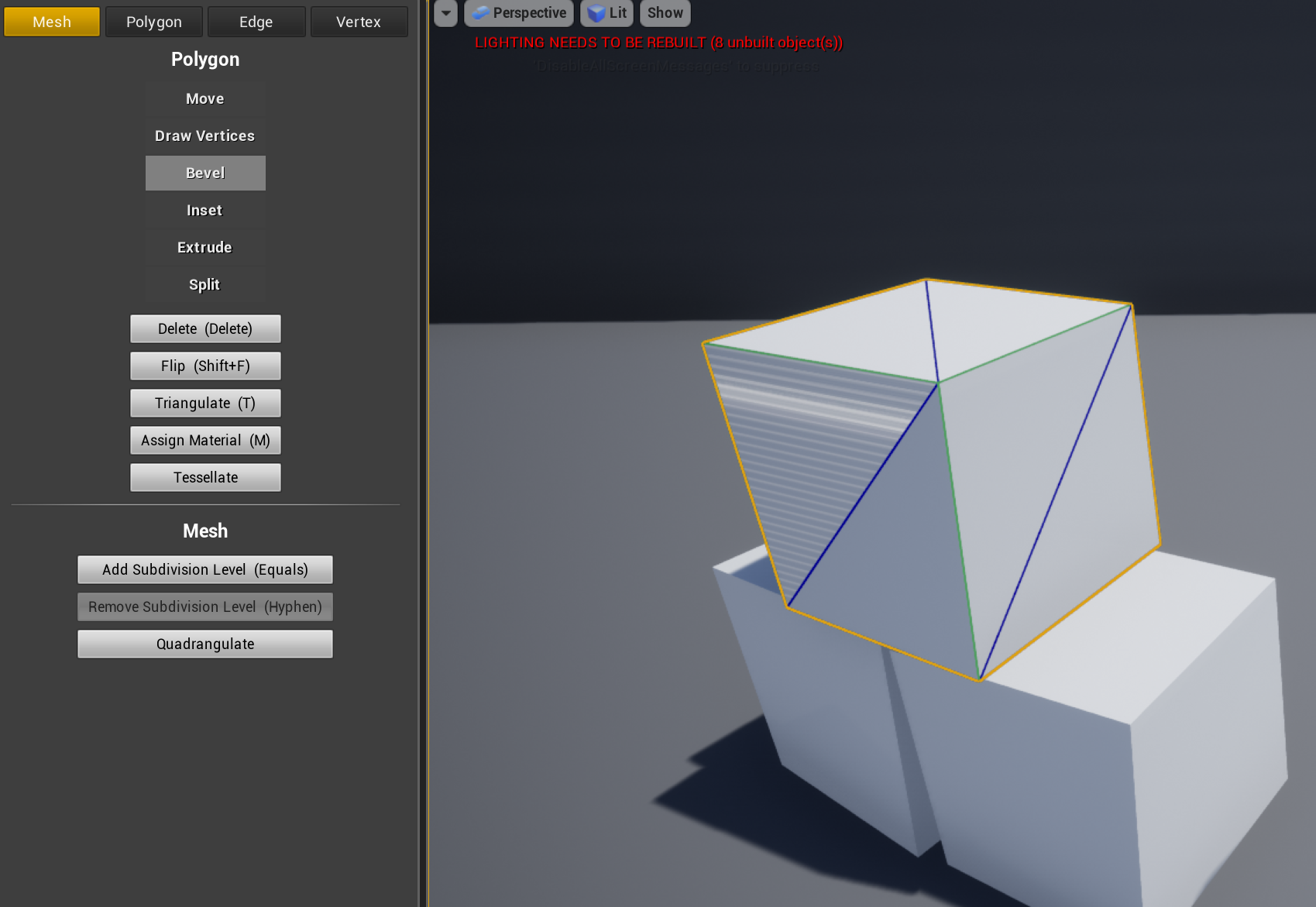 pallid compass
Can u imagine if in 2 years though they had a decent toolkit together
Auto desk would take a massive punch too the face, it would be great
OH
THERE IT IS
ADD SUB DIV LEVELS
grim sinew
This will never replace modeling in autodesk's tools
It can't
It's not meant to either
pallid compass
Companies already start switching to ue4 for renderer and stuff over maya/max
I mean dont get me wrong right now its a piece of trash
maiden swift
Behold! I subdivided the template map. https://i.imgur.com/WY93Hf9.jpg
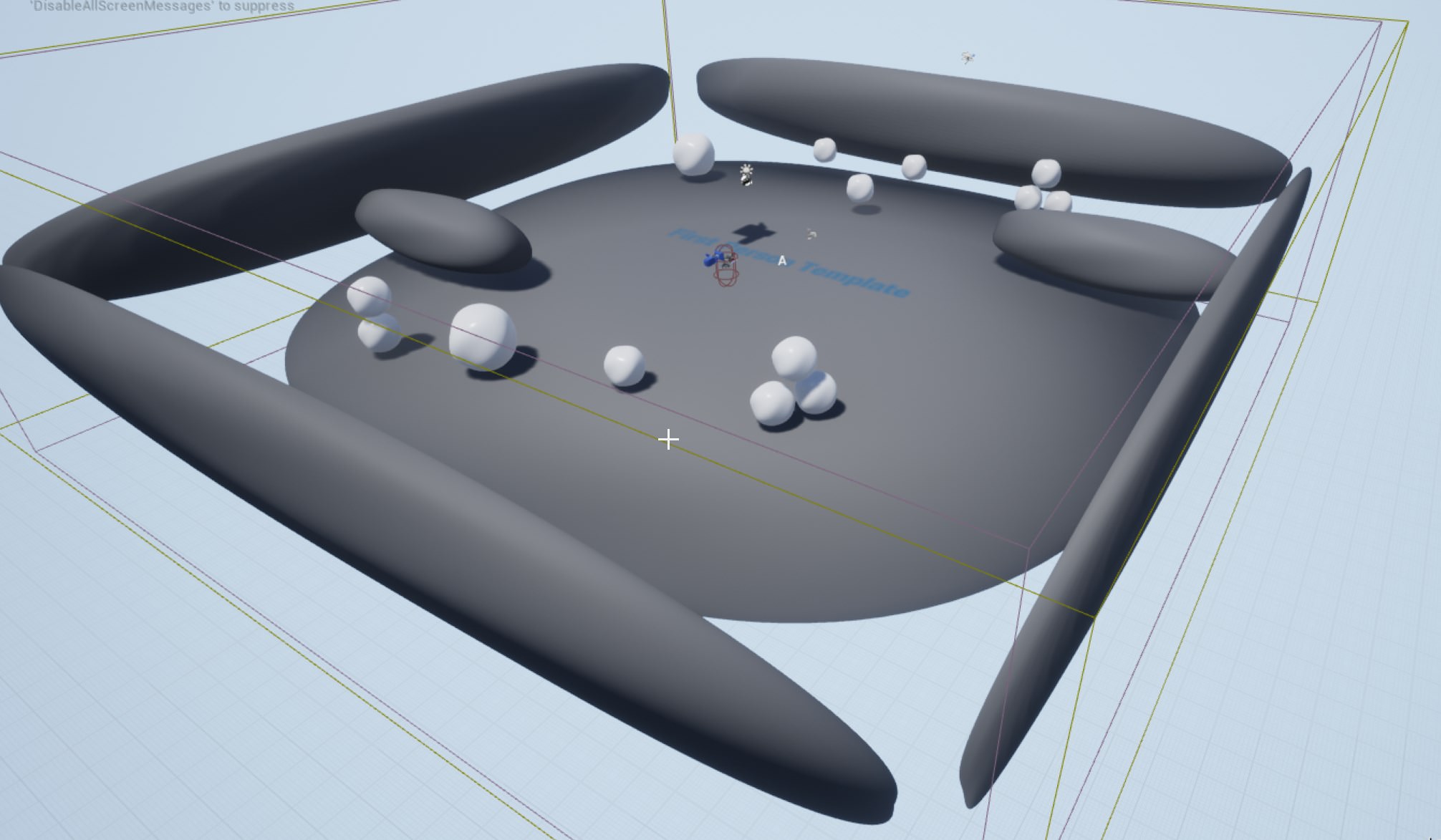 karmic igloo
Wow that's good looking.
karmic igloo
100/10
maiden swift
Ship it.
karmic igloo
(100/10)/10
grim sinew
Maya/Max isn't just a modeling tool, it's a production tool. There are scripts and plugins that every company has that Unreal will never replicate, and Unreal can't handle polygon counts like those two can.
pallid compass
"quick i better go make a support plugin that lets u turn it on and fix's the linked editing and sell it on the market place!!!"
karmic igloo
Other than the lack of a super accurate dynamic shadow system (like HFTS) UE4 is basically comparable to any other renderer.
Like Max/Maya
Except that it can do real-time VR and stuff.
pallid compass
True that zero, but ue4 can handle a good amount and you can render movie level quality stuff in ue4 now
grim sinew
It doesn't matter if you -can- model in Unreal, if it's slower than modeling in something else then it won't matter
pallid compass
I mean u wont get realistic marvel movie char cgi level
But you get good stuff
idk man
karmic igloo
I just really want to see HFTS in UE4.
pallid compass
id rather pay 5% on my modells than £200 a month for maya LT with no plugins
lmao
maiden swift
The modeling tools will be good for someone like me who's games usually have minimal abstract level geometry with hard shapes.
worn granite
yeah I mean just look at how many people dismiss blender, and that's a full fledged software
pallid compass
£200 a year*
grim sinew
At this point you're just making the blender argument. Literally nothing changes
maiden swift
And for quickly blocking out levels with real meshes instead of BSP.
grim sinew
You can use blender and get better modeling tools than this if that's what you want
This is just for blockout
maiden swift
I don't see this ever competing with dedicated DCC apps.
pallid compass
Yeah im aware, but this toolkit will improve
grim sinew
So can every toolkit
pallid compass
Yeah but here is the thing right now, and this problem fits in to unity alot
this is why i love ue4
Its a game engine made by people who make games
maiden swift
It will definitely improve, and for people like me, it will probably be enough most of the time to not need Blender.
Especially for game jams.
grim sinew
Look at Cryengine. They've had this for years, and it's largely worthless for any sort of production. It's a blockout tool.
pallid compass
Sometimes when i use maya or max, it feels like the kit is made by someone who does not model
maiden swift
But I'm the exception, not the rule.
I make tiny games on my own or with one other person and I'm not a great 3D artist.
pallid compass
Im not saying its gonna put autodesk out of business, im saying that if they improve on the toolkit with the input of there modellers, its going to become really god dam good if they decide to take it further
rustic panther
they just need basic marquee vert pushing tools and sculpting 🤷
maiden swift
I agree, and for game jammers or solo indies, this could easily replace Blender etc. for simple projects.
pallid compass
I mean blenders great it only has a few major issues
maiden swift
It's one more tool to make it easier to get into UE4.
pallid compass
FBX support & its axis system is the opposite to ue4
grim sinew
I get it, you have stars in your eyes, and I can't really win an argument against unbridled optimism, but it's just not realistic. I'm going to leave it at that. Think what you want.
rustic panther
the landscape tool is a good start for a full fledged sculpting tool
pallid compass
Its not stars in the eyes, the point i was making is that because the modelling toolkit is free to get in too, with improvement and if they use it internally it could be really fucking good
I mean i cant name one modelling toolkit i actually like
I hate them all to some degree
to me neither, maya, max or blender feels like its been made by someone who model's
Actually blender has the slight acceptation there,
Its mainly maya and max
They feel clunky af
(coming from a major maya user)
But fair enough zero if you want to leave it there
teal tulip
that is rare
grim sinew
I was able to import a mesh and use it with the subdivision levels, but it's not exactly being treated as a sub-d surface. It's baked in polygons to the mesh and I had to quadrangulate it which as everyone knows is a super unreliable process in general. As far as I can tell there's no way to import it as quads.
teal tulip
still looks more like a toy than a proper tool right now
teal tulip
that arrows and all are the ones they made for VR
that are 5x5m arrows
ready for kids in order to don't lost them
no idea why in 1.5 years they didn't had time to change it
cause even the menu is the same
grim sinew
Didn't see it in the import options for a standard static mesh, is it a different menu?
pallid compass
its in the eidtor option's
teal tulip
aren't default meshes ?
pallid compass
not project, editor
grim sinew
Oh, that?
It looks like it's just running the quadrangulate process automatically, not importing it as such
Still, it's a step in the right direction. I hope they work on it more
pallid compass
Yeah thats what i was saying before i hate the idea of working in a tri's by default ugh
grim sinew
They're just doing an unnecessary extra step. There should be an option to mark a mesh as sub-d on import, skipping triangulation for when it renders and store the mesh as quads.
If they work on it at all, it's probably one of the first things they'll fix. There's no question that they have to do it
teal tulip

@joewintergreen @CarlosGameDev @UnrealAlexander @ozmant @TurfsterNTE @UnrealEngine 4.16 Welcome to the future https://t.co/W0Qiq20xKV
 Twitter
that is from more than 1 year ago
@maiden swift that bottom at the top right
allow me to edit per instance or per mesh
teal tulip
back in the time when I used radiant/hammer liked to use it as is faster than a 3D editor with control
Like you can edit from the 2D viewport without actually select the faces
etc
here this tool don't have any of that
upper heart
Has anyone had an issue with uncapped fps in 4.20 causing crashes? (packaged game)
pallid compass
4.20 be shaky af atm, everyone appears to be full of issues
grave nebula
I had 3 random and unrelated crashes plus that memory leak of unknown origin. 4.20 is a no-go for upgrade so far.
 tall pendant
i can't get AL's to work as i want them..
teal tulip
no comments
grim sinew
4.20's material editor doesn't even show instructions, it thinks the window's an invalid object or something. So yeah, this is either going to be the most buggy release of all time, or it's going to have a ton of time sitting in preview
grim ore
shh... buggy releases don't happen....
 obsidian coral
Guys I need some help.
So
What engine should i choose unity ir ue4?
IDK
I made a game on unity but then got stuck and quitted.
Then i decided to try out ue4
But I didn't understand the blueprint system and i was more used to coding
Ao
So
safe rose
Go with RPGMaker
safe rose
I wish you all the best with 4.20 P1
grim ore
there is no right answer as each game and person has different requirements and different engines meet different requirements


 grim ore
Epic's general UE4 priorities have been on the game for sure recently which kinda sucks for the general community
safe rose
I am very curious on how they do their releases though
I mean, can't someone just build ONE project?
 plain flicker
Anyone here using Datasmith on 3ds max 2018?
safe rose
Start to finish, gamejam style
They would be able to see most of these issues right away
obsidian coral
I kinda want to go with unreal but i dont understand it like unity
grim ore
they don't spend the money on that anymore Victor 😦
safe rose
I know 😭
But really, it take maybe one-two days, tops to create a simple project by the QA team
grim ore
Epic pivoted into the Enterprise arena a few years back and we are not seeing the results of that. less community and testing for the general audience
safe rose
Tons of issues averted
plain flicker
Unreal Engine 4 is the move. It is so Epic, developing on it is so fun, anything goes, the sky is the limit, with YouTube and forums, you can learn it all, and nothing is impossible
grim ore
There is no real QA team anymore =/
 final owl
=/
obsidian coral
Hmm..
safe rose
We are the QA team
obsidian coral
Okay
safe rose
Unpaid
grim ore
a QA team would not let a bulletpoint feature ship on a release build 100% broken but they did in 4.19 so shrug
safe rose
Perma-alpha testing
obsidian coral
When my laptop gets fixed im gonna try to learn unreal for a few months
And if I dont like it i gotta return to unity
plain flicker
Both are good! I think Unity is good for lighter applications, like AR, iOS/Android, but Unreal for realism, heavy graphics and VR
but you can really do anything in both, its preference, I try to learn a bit of both. Unreal for 3 years. Unity for 2 months now
obsidian coral
Do you like unity?
frank escarp
unity is horrible for any half serious project
unity does NOT test their features on a real production
safe rose
Hmm
grim ore
At this point UE4 and Unity can do pretty much anything if you spend the time and money
frank escarp
so stuff breaks everywhere
plain flicker
Coming from a 3D graphics background, since I was 14, I am still new to programming, so C# in Unity is a bit hard to me, but Unreal's Blueprint system is wild. I am making a VR social network, with Amazon AWS infrastructure integrated, full databases and more, did it all with Blueprint and never touched code. Unity is cool, I respect those who use it and make experiences with it, but I love Unreal cause I know how to use it, it feels like a tool
obsidian coral
@plain flicker Well i tried out unity first and blueprint is a very new thing to me and I don't understand it lol
safe rose
I need to decide eventually, what provider I'm going to use for my Dedicated Servers
plain flicker
Nope, I started with CodeSpartan's MMO Kit. I compiled source and started with that template, removed all of the RPG aspects and then started fresh
safe rose
If you know C#, stick with Unity
plain flicker
and @obsidian coral yes, if you know C#, Unity is the way
obsidian coral
Idk.. I just got stuck in unity and i felt like.. I couldn't go forward and therenwas way too many things so i don't exactly want to return to unity
There was*
plain flicker
Do you have any ideas of games or experiences you want to make in Unreal yet?
obsidian coral
Not yet.. but in unity i almost made a successful game. Its basically like geometry dash but in 3d and ultra graphics
I had a menu, a few levels and stuff
obsidian coral
But I never finished it.. i lost all my files and i quitted
cursive dirge
I don't think I've reported single bug they haven't reproduced in single working day
or fixed within one month
😄
grave nebula
Can confirm that Unity response to severe issues is much swifter.
cursive dirge
they do have some priorities
so if your issue isn't huge priority, it might get left unfixed for a long time
there are few horror stories on this 😄
it depends on the feature and team too
if it's a new thing, it's more likely to get more attention
grave nebula
On the other hand, I haven't ran into an issue severe enough to report with Unity. But that is a bit biased.
cursive dirge
I've reported 3 this spring alone
they fixed them all
it's funny tho
how biased these servers are
cursive dirge
not surprising tho 😄
obsidian coral
I don't want to return to unity
cursive dirge
people tend to like the engine they work on daily basis more
obsidian coral
I didn't have the best experience
cursive dirge
if you mention unity, vblanco will tell immediately you can't use it for serious projects, if you mention ue4 on unity discord, they will tell you need AAA team to pull a game project off there
grim ore
if you lost all your work then your gonna have a bad experience with UE4. Neither one holds your hand they just enable you to learn and make stuff.
grim ore
UE4 is no more friendly than Unity out of the box to be honest lol
grim ore
And then you learned about source control and it will never happen again right?
cursive dirge
two words: version control 😄
obsidian coral
Source control?
cursive dirge
perforce, git, svn etc
whatever lets you save individual steps into version control
grim ore
"I lost all my work, I hate this engine for it" , move to UE4, "I lost all my work, I hate this engine for it", move back to Unity...
cursive dirge
that way you can always return in time to get last version that still worked
or track your progress
obsidian coral
I dont hate unity...
cursive dirge
or sync your work across other team members if you do such thing
obsidian coral
I have never said jt
grave nebula
When you hate an engine, you gotta remember, that the engine might not like you either.
cursive dirge
😄
obsidian coral
Ugh i guess I need to return to unity..
cursive dirge
because you lost your work?
well, in unreal, there's a painpoint I've had with blueprints
as I've always been really good at corrupting them
you'd definitely want to have backups (use that version control)
obsidian coral
Same
cursive dirge
I actually moved to almost pure c++ on unreal while I still used it
mainly because of this
it kinda sucks as blueprints would be really handy way to setup actors as prefabs
obsidian coral
Like what inspires me to use unreal is i see so many ppl and so many good games made with unreal
And it seems so ez
cursive dirge
it really depends on what you need to do with the engine
some things are really easy
tall pendant
The appearance is deceptive
cursive dirge
others are almost impossible without years of research and development 😄
tall pendant
Its not easy and it probably takes quite a few team members with a strong skillset
cursive dirge
gamedev in general requires some skills that you only acquire after doing this stuff for years
tall pendant
on any engine
frank escarp
whatever engine, whatever project, USE SOURCE CONTROL
and use it well
@cursive dirge 100% right about that
grave nebula
When you dislike something about UE4, or Unity, or whatever, just think for a second, that their editors have a graphical user interface. That alone makes them top notch products lol.
cursive dirge
my eyes still burn in unity editor 😄
frank escarp
@cursive dirge btw, just salty becouse ive had plenty of bugs on late stage unity projects, where they hired me to do stuff, and i eventually spent HOURS against ENGINE bugs that, becouse they are closed source, i cant do shit about
im too spoiled by getting a crash, and just attaching VS debugger to unreal engine to see wtf happens
frank escarp
the fact that build systems are closed source is criminal
the latest bug i had made me waste a day of work, and was a 100% blocker bug
only fixed thanks to arcane knowledge intervention from a dev i knew
i was doing a GearVR build, and there was conflicting with the AndroidManifest.xml merging
something was fucking it up, basically
cursive dirge
I really wouldn't want to do mobile dev at all to be honest
frank escarp
in unreal, on a similar bug, i would just breakpoint that, and see exactly when it fails
cursive dirge
had I full source code or not 😄
obsidian coral
Fuck im gonna return to unity
frank escarp
hoping to find a solution by pure luck
grave nebula
@obsidian coral Hold on a minute. Maybe you will change your mind.
cursive dirge
😄
cursive dirge
sleep over night
cursive dirge
that being said, if you feel less frustrated with other tool, I dunno, just use the one you like
frank escarp
can you render half a million cubes at 60 fps in unreal, NOT REALLY
frank escarp
im joking
cursive dirge
best engine is what you are making progress with
frank escarp
im writing my own engine for some portfolio stuff and "for the hell of it"
the only thing it does is draw cubes
literally the only thing it does
except it does that fast
grave nebula
Name, is what defines the engine. Do you have one for yours? @frank escarp