#ue4-general
1 messages · Page 242 of 1
 drowsy fox
 fathom gale
y are u doing 100/1000
drowsy fox
So that seems like my best bet
fathom gale
its annoying
drowsy fox
Lol idk just to bring golds value up I guess but it would be annoying
I completely agree lol
 grim ore
fuck it make like 4 coins and do it 10/100/1000/1 just to fuck with the player
drowsy fox
I’ll stick with my 100/100/1
fathom gale
ye
drowsy fox
@grim ore ... lll
 south ridge
lol
At this point
Just add proper currency dude 😛
Like
Paper money
1 2 5 10 20 50 100 200 500 lineup of banknotes
drowsy fox
Lol but it’s a half survival style game and medieval-ish
I think that would confuse people
Where do you live where there’s a 200 and 500 bill? Lll
I can’t seem to type lol today...
grim ore
Asherons call used Coins that stacked to like 1k in a stack then you could buy notes in higher denominations like 5k/10k/etc. Buying expensive stuff suuuuuuucked.
south ridge
Well, I used to live in Ukraine and they have bills up to 500
grim ore
but most of the economy was player based so it wasn't too bad
fathom gale
make a special looking coin
drowsy fox
See my economy is player based
south ridge
Make a coin for every possible value
fathom gale
i can make it for ya if u want
drowsy fox
And my coins are also created by mined materials
south ridge
Coins that have 1 value, coins with 2 value, 3... and up to 999999
fathom gale
show me r coins
drowsy fox
My coins? Lol
south ridge
Make it as confusing as possible by having 999999 different coin types with different values
drowsy fox
Yes lol
fathom gale
show
south ridge
Didn't you just say you were doing medieval? Haha
drowsy fox
I have three models for them, that’s just one. (Don’t ask questions, because I don’t have answers)
south ridge
Those coins are very sci-fi
drowsy fox
Psh
fathom gale
xd
drowsy fox
Coding is my strongpoint lmao
fathom gale
here ill make 1 for u
drowsy fox
They only seem sci-fi because it’s shaped like a gear lol
Well..
Not really a gear..
fathom gale
i see the grass
drowsy fox
I guess it doesn’t matter
drowsy fox
My inventory has a blown up image of it anyway lol
drowsy fox
Lol no I cannot do that, but I’ll look at it for design ideas ? Lol
Are you any good at design normal maps from an image? I was thinking of making a normal map of the side of my characters face for the coin haha
And using it in substance painter
But I’m clueless on how to even add more hard surface materials to substance ._.
fathom gale
wait
xd
almost done
@drowsy fox
u can add the textures that u want
ill just add a few details
drowsy fox
The loops and stuff how did you get the writing on there?
drowsy fox
How do you write text.. lol I assume you don’t use blender
drowsy fox
How do you write text?
fathom gale
u create a text
u add in the font that u want
and u extrude
done
now if u want to ingrave
drowsy fox
Also did you use a live Boolean plugin of a sort or manually created the hole on the center? (I’ve yet to use any plugins)
fathom gale
its the same process but u use boolean
yes
i created a cube
and just used boolean
then created another cube for the outline
drowsy fox
How do you use booleans in blender?
fathom gale
simple
there are 3 different types
difference
which is the one i used
union
joins them
and i forgot the other 1
i think its intersect
but i never used it
drowsy fox
What... how do you set these up, as mods?
Modifications * the wrench?
I’m on my phone my pc is off for the night lol
 pine parcel
Is the base representation of a person in a game the PlayerController? What if I don't want him to specifically control a pawn, but rather just control his own camera view for instance.
drowsy fox
And last question, any suggestions on where to get font? Lol
fathom gale
pierce
drowsy fox
The camera view is attached to the pawn
drowsy fox
You don’t need a physical skeletal mesh in your pawn I don’t believe
fathom gale
?
drowsy fox
Haha @fathom gale I’m fairly good at modeling, I’d rather learn to make it
fathom gale
xd
drowsy fox
I’m the type that would rather learn to fish instead of being given a fish
drowsy fox
I’ll add some roughness to it with substance, I try and keep the model as low poly as possible
I believe the coin I showed you was only 120 verts or less
Polys*
pine parcel
@drowsy fox So I'd just have a "CameraPawn" with an invisible mesh.... and it would just represent the player's viewpoint
drowsy fox
I think the basepawn doesn’t have a mesh inherited
pine parcel
When a player enters a game, they automatically get a player controller right? there's no other access to what a player has?
drowsy fox
You can setup a game mode to give them a player controller and an empty pawn
And switch game modes when entering the game to give them a pawn
pine parcel
sorry that was worded strangely, but what I'm trying to say is, is the player component the root handle for a player
pine parcel
player controller*
fathom gale
and just extend it in random shapes
drowsy fox
A player controller owns a pawn yes
fathom gale
and use boolean
drowsy fox
Where is the Boolean though? @fathom gale
fathom gale
modifiers
drowsy fox
Aah
fathom gale
drowsy fox
Alright I’ll give it a go tomorrow, I need rest I have a young son and I have to wake up with him in the morning haha
pine parcel
I know this... but what I'm asking, is whether or not there's a more primitive type of controller that doesn't have to possess a pawn. And if the "controller" is considered the root means of accessing a given player in the game.
fathom gale
makes me kinda happy
drowsy fox
So after you select Boolean I assume there’s options for union or difference ?
drowsy fox
Yes
fathom gale
there is the sphere and u want to engrave it to the coin
u select the coin mesh
then add the boolean
fathom gale
lol
drowsy fox
Your cube for instance
fathom gale
lemme try and record this
drowsy fox
I get what you’re saying I think
I just thought if you had a flat coin, and put a cube in the middle and modified the cube to be a difference bool, it would subtract it from the coin
But you’re saying that you do that, but put the modifier on the coin instead?
fathom gale
wait
@drowsy fox
u must click apply to see the changes
i just realised how simple i make things
i should make videos in the summer
drowsy fox
Oooh I get it now it has a tool to select what’s subtracting
fathom gale
yes
drowsy fox
That’s simple enough, and yes you definitely could 😃
fathom gale
;d
drowsy fox
I was thinking of making some multiplayer tutorials considering none explain things correctly ..
fathom gale
xd
drowsy fox
But I’ve never made a tutorial and I literally have 0 time. With this project, work, and my son
Yea.. lol
drowsy fox
I make enough progress with my game everyday to be content lol. Definitely don’t have time for tutorials :b
drowsy fox
I’m a chef/manager at a nursing home
drowsy fox
Eventually yea lol
drowsy fox
I spent the last couple of years learning a lot of the pipelines and how all the tools work
I learned the majority except audio and particle vertex fields
drowsy fox
Well you’re off to a good start 😃 I’m 26 next month haha
drowsy fox
I’d like to learn more languages as I actually only know java.. lol
My entire plan is to go blueprints only unless it’s deep multiplayer related
I understand the workflow behind text-based coding and it’s standards but I’d have to learn a lot when it comes to references and such
drowsy fox
Not a legit game no, I made private servers for a couple of games for years in the past but it was non-profit as I didn’t have my own assets
 leaden onyx
Feel stuck with a weird behavior, anyone had problem with timer handles? Check for whether is timer active never works in BT service 😦
Should be a simple setup, yet it just wont work
next time I call QueNextStart it ignores that timer was already set because it returns that timer is not active
 kindred mountain
@drowsy fox you can't avoid understanding references by using BP 😉
 weary basalt
Keep with it @granite canopy you will get there eventually.
 granite canopy
Yeah
granite canopy
This probably will help me a lot with my studies too
weary basalt
It will click eventually.
granite canopy
and I'm really committed to this project
I want to get this done
on the summer
I mean it's still trying to make a game in 2-3 months
so I dont believe itll be done before the summer ends
but I'll probably learn a ton
 steady sequoia
What sort of project are you trying to make?
And are you on your own or are people helping you?
granite canopy
I got some people helping me
And I'm trying to do a FPS loot based shooter
I'm not trying to make to too complex
 wary wave
it'd have to be quite simple to get it done in 2-3 months
wary wave
for a duration of that length, I'd be aiming at a basic arcade game, heh
granite canopy
But I'm trying to get a basic gun system going
I have a simple inventory system now
that can actually store data
wary wave
that's something ^^
granite canopy
Yeah
Google helps a lot
What should we use for models?
And animating?
Any tips for that?
wary wave
I'd probably look at the marketplace tbh
granite canopy
I was thinking of using some of the Paragon models at least
wary wave
if you don't already know how to model, rig and animate characters, you're in for a ride with a deadline that short, hehe
wary wave
yeah, but it's a lot of learning
granite canopy
Yeah
wary wave
most people spend a a year or two trying to learn to model and rig characters to a basic acceptable level xD
granite canopy
I'm sure I'll at least get something done :D
 faint cedar
Hey guys, has anyone seen this issue - I export a skeletal mesh fbx from UE4 and open it in Maya, but only the bones are there, the mesh didn't export
 devout gulch
@wary wave some plugins
some youtube tutorials
and I was able to skin and rig character to acceptable level over weekend :d
never done it before
 idle sail
How do you turn on the cloth sim on paragon characters? poor sevarog looks so rigid
idle sail
😅
 silent kraken
Soz, I am very new to UE4.
leaden onyx
I'll answer my own question about why persisting timer didnt work, just in case someone stumbles upon it
so yeah Service resets every timer you set on deactivation
gosh darn
and it happens only for blueprint based services
 whole quarry
"Que" ? :D
leaden onyx
was lazy to type 😄
 sudden agate
 leaden onyx
Thats exactly my reaction when it didnt work, so I guess naming it Que was the way
 obsidian nimbus
@faint cedar is it a paragon model?
faint cedar
nein
obsidian nimbus
does it have apex cloth?
faint cedar
not apex, but UE4 one
faint cedar
(The export actually worked in 4.18 so I got it sorted out)
But thanks for the tip I'll make sure to do that next time
obsidian nimbus
and UE4 is still apex just done in unreal
faint cedar
hm, are you sure? I was under the impression the new cloth tool doesn't use apex under the hood
obsidian nimbus
pretty sure it does
faint cedar
admittedly I didn't really look all too hard just something I've heard
 leaden onyx
maybe weapon collides with the mesh?
idle sail
This is pretty much exactly as they were loaded in?
leaden onyx
ah, have no clue then, but I've seen these happen in other projects where you have 2 bodies collide on start
or physics asset that isnt set right
idle sail
Il try mak another project with the paragon assets and see what happens
silent kraken
I had issues with them in version 4.18
idle sail
Its something to do with the way they had them set up
Need to make a blueprint so the animations can go across all the meshes
devout gulch
@obsidian nimbus NvCloth have nothing to do with apex
obsidian nimbus
it says remove apex file
 languid shard
hey lads, how would you combine three vectors from RotateAboutAxis ?
this is my current implementation https://i.imgur.com/8pYHG0n.png
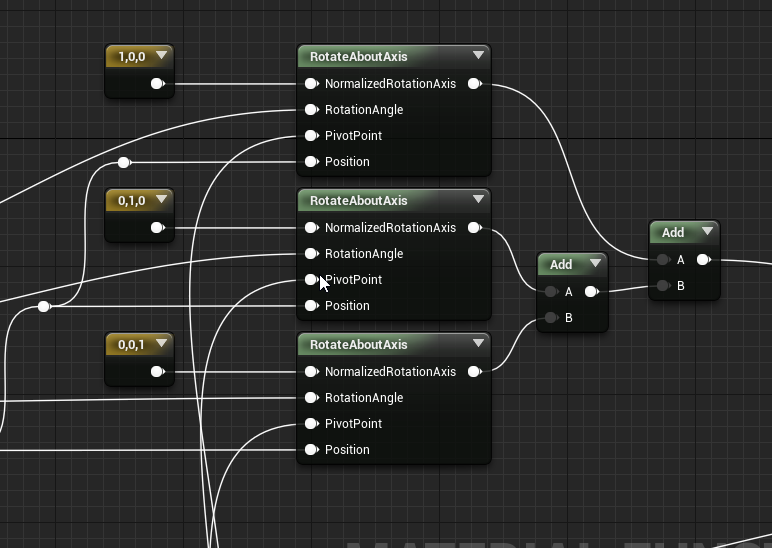
I read something about re offsetting worldspace reference for each add, but I'm not sure how to do this 🤔
 plush yew
What are you trying to accomplish that you can't do with one RotateAboutAxis?
languid shard
can you rotate on three axis with that node ?
plush yew
I think you should use Rotation from Transform structure
languid shard
(this is in a material btw, no transform stuff ! 😉 )
languid shard
:p
plush yew
You can use inverse transform
try matrix
@plush yew material
Or even Transform node
Yes that's all in the material
plush yew
There's also a custom node where you can type in mul() function
get some math info about translation
languid shard
math 😱
plush yew
What's the material for?
but translation only for location, I know. Dunno if it has special rotation matrix
languid shard
doing a section box material function
so far I have scale, location and one axis rotation working well
plush yew
Section box?
languid shard
yep, sec
plush yew
hm, make sense. Rotation with following viewport?

 plush yew
That should be easy enough passing in vectors of box and using inverse transform
hm, too hard for me
I didn't get it. is it because of material or something else?
languid shard
material stuff is a bit different than BP stuff
plush yew
no, I mean second gif
languid shard
oh
fathom gale
yo
languid shard
its a bit of BP and material stuff
plush yew
kinda "sub-brush"
languid shard
the materials are masked accordingly to the section box properties
scale, location, rotation
the BP sends the Section box actor transform properties to a material parameter collection
which gets plugged into a material function that masks the main material accordingly
plush yew
and you can dismiss points based on their locations?
languid shard
points ?
languid shard
hehe no probs
fathom gale
whats this about
languid shard
put simply, see a box with transform properties masking your material in 3d
plush yew
Only box?
languid shard
yeah
plush yew
so, based on position in world space?
plush yew
ha
languid shard
there's a sphere mask function aswell, but the box is a bit better since we use that in CAD
plush yew
Try sphere
sphere should be like in terminator2
and make points at the border emit light
like melted metal
languid shard
yeah this is something I haven't looked at yet
scratched my head a lot with backface coloring too, but the results aren't looking great
 latent moth
All, I have a single mesh of a small house that contains two materials, one being the house's glass. I'd like to apply the destructible mesh only to the glasses, is that doable or do I have to build windows separately, then create a BP that contains both the house mesh without the window and individual windows?
plush yew
 languid shard
@latent moth second solution
latent moth
ok great thanks, just wanted to know if i was missing on existing solutions!
languid shard
@plush yew https://i.imgur.com/zX0iEl3.png

wanted the cap the mesh where it cuts it, but this is only doable with procedural mesh 😦
plush yew
Does material has input for light?
languid shard
too costly since this is going to be used on massive CAD stuff
plush yew
What if you combine two boxes?
languid shard
a section box @fathom gale
fathom gale
what is it
languid shard
fathom gale
why would u want that
languid shard
because we need it ? 🤔
fathom gale
for?
languid shard
this is a standard tool in building construction tools
plush yew
I mean, one box can change material color/light, second can vanish it, so you will have a border with target efffect
fathom gale
ah
languid shard
to isolate parts of a building for example
languid shard
or see what is inside a wall (isolation, electricity, tubing)
fathom gale
ah
languid shard
@plush yew yeah I see what you mean
fathom gale
this is a real house or u making a game
languid shard
haven't tried this solution yet though, and not sure I will be able to make it
plush yew
@fathom gale just example
fathom gale
aight
languid shard
I'm working for a construction engineering company, so no games here 😉
fathom gale
lol
plush yew
working as CAD-programmer or someone else?
languid shard
Virtual Reality Designer is the title
but honestly i do a bit of everything, code, art, hardware, demonstrations
plush yew
I bet you're also porter
languid shard
x)
plush yew
So, if you designer, you already use some soft. What soft?
fathom gale
why dont u use inventor
languid shard
and some other softwares for archviz rendering like the Enscape plugin for revit and Twinmotion for quick and dirty jobs
fathom gale
thats what we use in my school
languid shard
Inventor is a mechanical CAD software
Revit is the equivalent for AEC CAD
so I cant figure out how to use the inverseTransformMatrix node @plush yew , got any pointers ?
BasisX/Y/Z are the rotation axis I guess
plush yew
So you wanna rotate this box?
languid shard
yup
plush yew
is there function to check in-border-out for point?
languid shard
no idea :v
languid shard
can't, objects are static
fathom gale
;-;
languid shard
😅
plush yew
if you attach static object to dynamic, whole object will be static?
languid shard
you can't attach a static object to a dynamic one
plush yew
Hm, you can use equality of plane for making box (6 planes) and then check if point >, = or <
@languid shard Pass in forward, right and up vectors of box as the basis vectors. VectorToTransform is pixel position relative to box position
one plane divides space into 2 half-spaces
Feed in result to A in put of Box Mask and leave B as (0, 0, 0)
And feed in your box extents as well
languid shard
alright lets see

 languid shard
nice this is actually gonna lighten up the function too
works perfectly, thanks a lot @plush yew ! 😃
next step : make it so you can use as much section boxes as you want
this is gonna require some headscratching
 plush yew
NOICE
languid shard
need to make a VR grabbable version too
plush yew
The only thing I can think of for that is to store all parameters of each box into a render target (maybe one row of pixels for each box). Then in material, loop over all boxes to see if pixel is intersecting any
languid shard
hmm could work
I'm not gonna work on that for now though
our engineers use revit, and you can only have one section box anyways
this'll be more than enough for them to cut into the models
for VR a way to change the scale with some kind of handle system would be nice
rotation and translation would update when the user moves his controller
idle sail
Got some simple cloth sim working on sevarog, i should upload this somewhere so other people can use it
Otherwise he just looks stiff as a brick
 topaz quest
in a material is there a way to select a range of colors? I can manually specify the color values or is there a way to specify all colors within two color range values?
whole quarry
Im sure if you google that, you'll find several ways
 obtuse sable
How can i make emissive materal keep the same amount of glow no matter the distance?

This is close

this is far away
 grim sinew
You don't, it's a per pixel effect. You can try to make it brighter as you get further but that's just guesswork and depends entirely on screen resolution.
obtuse sable
well fuck
thats really annoying

i meanl ike this is just ridicoulus
cant even read it
when im this close
plush yew
Decrease emissive then?
grim sinew
Yeah just use distance fade or zdepth or something like that to control the brightness.
So it's a thing that changes on distance
topaz quest
@whole quarry hey ya i have got as far as being able to select several specific colors but not a color range
plush yew
@topaz quest What are you using it for?
topaz quest
i want to select all colors in a range and use it to mask out a texture.
currently i am using a constant 3Vector to specify a color for my mask. what im trying to do is specify two values and every color in between those two values will be my mask
plush yew
Use a lerp and plug in your two colors?
But you'll still need to control the lerp using something
topaz quest
ya thats what i thought
plush yew
Might help to provide an example of what you want
topaz quest
im not really sure how to explain it better 😦
plush yew
Well what determines which color in the range to use?
A pixel can only using one value so something must determine which value it is
topaz quest
ok so currently im picking one color with my constant 3vector and i then subtract that from a texture and outputting the difference.
I can specify several other colors this way and also subtract them to get there combined difference output.
does that make sense?
plush yew
Not really lol
topaz quest
im so bad at explaining stuff 😦
languid shard
got a pic ?
topaz quest
essentially what i want to do is replace the constant 3 vectors with a color range.
plush yew
Yes but you still need something to specify which color to use in that range, right?
topaz quest
sure that makes sense
whole quarry
Lerp lerp lerp lerp, dynamic material instance and go!
topaz quest
lol
topaz quest
will that allow me to select several colors?
plush yew
If you tell us why you need to do it and what you're using it on, that might help
topaz quest
oh crap i thought i already did, sorry 😦
i want to mask out an image of all of the colors i select
plush yew
Needs to be in the range of the two colors
Which sounds a bit strange if I think about it
wary wave
I guess it's possible to have a range between two vectors
but that's a really weird concept
I don't think it'll have the results you think it will either
topaz quest
ya i guess thats exactly what im trying to do
plush yew
The thing is, you can reach a color by approaching it from two directions. You'll need a way to say which direction to approach it from
topaz quest
right
plush yew
E.g. you can approach red coming from the purple side or yellow side
My brain isn't thinking atm so can't come up with anything
how to I invite someone here?
topaz quest
oh thats totally ok, im right there with you 😃
wary wave
I think the problem is the flawed assumption that you can have a useful 'range of colours' in RGB space without doing something weird
what is this for exactly?
topaz quest
I don't have a specific use for it i was just trying to see if i could do it.
plush yew
What are the perks of learning Unreal over Unity and vice versa?
whole quarry
@plush yew google before you spawn an endless discussion :D
plush yew
yikes
whole quarry
Roam around here for a week and im sure you will spot several Unreal VS Unitu talks
plush yew
It's ok I understand . Do you have a Unity discord server invite tho?
whole quarry
With usually the same end result: totally depends on what and how you want
plush yew
And why wont Unreal Slackers let me invite someone? SOmeone from another server wants in
@topaz quest It could possibly work using HSV or something else
whole quarry
@plush yew see #more-resources and be sure to check #old-rules as well :)
whole quarry
Try tio ask that in lounge
topaz quest
@plush yew possibly i will keep trying out some stuff 😃
plush yew
will do
 fierce tulip
@plush yew generally unity vs unreal discussions are rather useless. its like paint, one sticks better on wood, another on rock. it all depends on needs, desires, knowledge, skill, and finances
 rocky kayak
yea but unreal > unity as we all know
fierce tulip
hehe no worries
plush yew
Personally, I have zero programming experience. I'm a 3D artist so I rely mostly on templates to get started.
fierce tulip
then you'll love our material editor hehe
rocky kayak
unreal uses blueprints, which are basically libraries. it's a super simplified form of coding, you just need to know basic coding syntax to understand it. you can legit just hook bp's up together and create a game from that
silent kraken
yeah, Unreal is easier than unity
as Luos said depends on needs, desires, knowledge, etc, etc
granite canopy
I made a health system
and it looks like this:
but there's a compile error
and it actually doesnt get the health value
plush yew
What's the error?
granite canopy
plush yew
Remake the function maybe. Looks correct to me
@granite canopy just try recreate the cast node that normally fixes it for me
granite canopy
Yeah thanks it's working now
silent kraken
@plush yew yep, I got something to work by remaking the code again.
plush yew
oh nvm
granite canopy
I had to redo the functions
silent kraken
XD, you know, UE just needs you to do the work again
granite canopy
Yeah
plush yew
It's making sure you know what you're doing 😉
granite canopy
Yeah :DDD
So apparently if you're making a FPS game you shouldnt use the FPS template :')
silent kraken
Yeah, the templates don't work that well for me
I just think updates have broken them over time
rocky kayak
if youre making something, definitely use a blank slate. templates are for references if you forgot how to do something imo
granite canopy
Since I'm really new to this
silent kraken
Also, the tutorials are being updated
granite canopy
uh I was actually told to use the third person template to make an fps
but they told me how to do some stuff
to actually make it first person
silent kraken
Yeah, I have the template for now but I will just remove it all later
I think I know what tutorial you watched
rocky kayak
i mean you could. there's just a bunch of stuff in there that you probs won't use thatll get packaged and that personally goes against my philosophy
silent kraken
Was the tutorial made by virtus???
granite canopy
Well I've been watching random youtube videos here and there
Now I saw a few Virtus's videos
rocky kayak
yea virtus is pretty big, love their stuff
 fossil ore
Guys.
Is there a way to copy-paste keyframes in sequencer?
silent kraken
Tried there tutorial. It didn't work fully
granite canopy
Well
I'm gonna find out myself how these work then for those parts that dont work
silent kraken
It basically got to a point where I scrapped his tutorials
I just think updates broke some of the things in his examples
fathom gale
any simple models i can do for anyone?
granite canopy
I need to learn modeling stuff
 granite swift
A quick question, sorry to barge in
Is anyone able to access this documentation?
granite canopy
Giving you an error?
granite swift
"You do not have access to view this page within the site."
fathom gale
same
granite canopy
at least
granite swift
It did that for me
fathom gale
seems sketchy
granite swift
I logged in and then got denied
granite canopy
the site is really slow
languid shard
the UE docs website has been slow as fuck since they reworked it
fathom gale
dang
faint cedar
I keep thinking that there isn't really much more that can surprise me
fathom gale
feels bad man
faint cedar
but then I run into threads like this: https://forums.unrealengine.com/community/general-discussion/1475968-is-using-functions-really-necessary
Unreal Engine Forums
Hello, can we just agree to avoid this awful lazy practice of using functions that look good but makes code totally unusable and not understandable? With everything
and I'd dismiss it as a dude doing pathetic trolling, but that post count....
This is probably more suitable for the lounge though :p
 manic pawn
it's probably still a troll
faint cedar
that's some dedication then
fathom gale
anyone need help using blender
manic pawn
crappy new forum software doesn't let you look at old posts but I doubt all 1000 of his posts are trolling lol
fathom gale
im bored
topaz quest
@fathom gale i do have a blender question. do you know how to bake a procedural noise displacement texture?
silent kraken
@granite swift the wiki is being upgraded. Expect it to break, they will probs kill those pages
fathom gale
@topaz quest
Go to the shader tree dropdown
choose 'image'
in the popup select 'new'
change the effect of the new image layer to 'displacment'
make sure the new image is above them in the shader tree and make SURE than the object it is on has a decent UV map and that UV map is selected in the new image's texture locator.
then just right click on the image and select bake to texture
When it's done just turn off the displacement below the baked image
and then go to Geometry->Freeze
silent kraken
@fathom gale I would if I was at home. Idk how to use blender
fathom gale
i can teach u ;d
granite swift
Thanks @silent kraken
fathom gale
@topaz quest did it work
topaz quest
@fathom gale hey trying that out now
fathom gale
aight
topaz quest
is this in cycles ?
fathom gale
yes
topaz quest
where do you get the option to change the effect to displacement?
latent moth
is there anyway to import multiple LODs from blender in a single step?
fathom gale
@topaz quest select the object
and click that triangle thin on the right side
wait let me screenshot
what do u mean lods @latent moth
latent moth
I have a blender model with multiple LODs
when I import the fbx it generates multiple assets, not 1 assets with multiple LODs
 kindred viper
huh? Since when was that a thing?
fathom gale
have u tried it before
kindred viper
no. I always export as fbx
fathom gale
hmmm
im back
my dad arrived sorry for the long wait
@latent moth can u screenshot ur work
 dim arch
hey I found a bug with the documentation just thought it maybe someone would see it here
first link has a bunch of identical links for the array section
granite canopy
What do I add in the beginning of this to make it work
 lost ember
Am I the only one which gets the "Loading Visual Studio..." popup even after VS is loaded?
@granite canopy Tick Event
grim ore
@lost ember I beleive that was a bug in 4.18.. and 4.19... and lol
lost ember
Wasn't it supposed to be fixed :^)
grim ore
well 4.20 is coming out next month so maybe then?
dim arch
yea think you need a specific vs build for it to run smoothly
obsidian nimbus
i wouldnt put that on event tick 😛
grim ore
well I know if you don't use C++ you can get past that error, it's a fix 😉
dim arch
hmm ok
obsidian nimbus
mayB on event get hit or something 😛
dim arch
any word on if they will integrate gameworks into 4.20 btw?
kindred viper
@lost ember it happened to me when I would load a project then call upon Visual Studio to load from within editor. However if you open the solution and run with/without debugging, then it doesn't happen
dim arch
seems like a good time with niagara
dim arch
4.20 the dankest of unreal engines 🔥
kindred viper
its smoking
dim arch
the 4.19 version is a very old branch
kindred viper
yeah figured as much which is why I didnt switch it on :p
dim arch
from what I saw in the gdc video
im hoping they integrate gameworks and you can use some of the fluid sim stuff with niagara, that would be great
fathom gale
xd
dim arch
thing is some of the flow stuff had cascade integration but the parameters were quite limited
I guess they are making it nvidias responsibility to make it functional since they keep changing it
rocky kayak
I'm getting tons of "LogSpawn: Warning: SpawnActor failed because we are in the process of tearing down the world" in my output log when I press Stop in the play in editor, what's the fix?
whole quarry
Not spawning actors when Stopping the game?
rocky kayak
i've got actors that spawn enemies on a timer, i've tried clearing the timer on event end-play but that doesnt do anything if the function's called right before stopping
 verbal thorn
Есть кто?
latent moth
Hello, does anyone know why my Destructible Mesh in a BP just flies out like this? https://gyazo.com/a8905cc1c9131d3286f16849075de8a6
these are the settings https://gyazo.com/29766cdb6fb670b91ab995c7c3e27aa6
 fathom gale
nice gun btw
latent moth
ok, do you have any ideas.
fathom gale
remove the mesh collider i guess
fathom gale
hmm
latent moth
i mean, with or without it it doesnàt change
fathom gale
is the weapon made up of seperate parts
were are u generating this bullet
make sure its in the muzzle
but away from the muzzle
if u know what im saying
 woeful oar
So I get a bunch of red squigglies in Visual Studio, but it compiles. Then I add "Engine/World.h" and there are no red squigglies but it still compiles (and runs the code correctly when in game).
Is this just Unreal being normal or am I completely missing something?
It runs the code correctly in game with or without the header file inclusion.
latent moth
elpupper i know you are trying to help
latent moth
yes but that also generates a lot of noise
if you're just trying it is not helping 😄
fathom gale
i use unity mainly
latent moth
even though i appreciate the effort
fathom gale
since i can barley run ue
latent moth
then don't.
questions then get flooded and the chance that someone knows how to help reduces
😃
fathom gale
dang
what do u do to like release the bullet or ray
do u have like a spawning point for it
 sonic pagoda
 sonic glacier
Can Someone help me out with using the iron belly rig that I have from purchasing a pack of theirs I'm trying to use some of my other weapon meshes so that they can aim down sights just as good as their weapons do can someone help me with doing that?

 lament kraken
ok
 wild glacier
@latent moth Il problema sta nella velocità di rottura dei vetri?
latent moth
yes
the issue is that it just explodes in one direction
trying to understand the best way to mae shattered windows
wild glacier
E l'impatto è di un proiettile/attore?
Nel senso, un attore interagisce con una Destructible Mesh (?)
@latent moth
latent moth
we’re on a public channel you’re probably supposed to use english? 😃
yes, it is a projectile that interacts with a distructable mesh inside of a BP
plush yew
No reason to send this cake.
wild glacier
Vabbè, mi sforzerò di parlare in Inglese
The issue is the velocity of shattered windows or the direction of explosion?
latent moth
both
the direction is always the same and
the velocity does not make sense
it’s there even with everything disabled
it works good IF not inside a BP
plush yew
guys can i ask a little question
 cursive dirge
plush yew
cursive dirge
plush yew
Im new on unreal engine and i have meterials here but i can only paint a only one meterial i want paint more meterials on a one landscape
 vivid oar
Create a material and use layers blend to connect more materials
add texture and normal maps and connect the UVs to a node called Layer Coords
vivid oar
Well this main material i still dont know how to add materials like these together to paint the landscape
i know how to add only texture
and normal
and layers
like this
plush yew
hmm i found a video https://www.youtube.com/watch?v=cpSFeXEfm8Y

This is episode 23 of our series going over how we can create a survival horror game using Unreal Engine 4 from scratch. We'll be going over how to create va...
vivid oar
But i dont know how to add materials made before
you can follow this
but i still dont know how to implement already made materials
this is just for texture and normal
plush yew
This kind of setup is a bit easier to make: https://gyazo.com/1976bd0d66de16c2591a06535dd4d1e6

And you can collapse material attributes into a material function for cleaner graphs
 long mango
Hey guys, i have a question regarding blueprints, so what thread would it be best to ask stuff like that in, since i'm new here?
plush yew
when i add layer blend
grim ore
You can ask anywhere you want, you just might get people being cranky in some channels 😃
long mango
nah, it's ok, there's that channel there for a reason
grim ore
yeah people get cranky when there is no order to the chaos
plush yew
Oh fix it 😄
vivid oar
@plush yew what did you do can i see ?
wild glacier
@latent moth Have you tried to change the Mass of your Window Static Mesh?
latent moth
yes i did
i’m starting to think the issue is that the windows are inside the simplified collision box of the cabin
i have disconnected now, will try asap
wild glacier
Ok
latent moth
grazie 😃
wild glacier
Nulla, fammi sapere se risolvi
latent moth
👍
 vale halo
Anyone else here experiencing issues being logged out immidiately when logging in?
sonic glacier
I need help with making aim down sights for my game I bought a pack from iron belly the hk one and I have some other weapon meshes I want to use but I can't quite get them to work with the rig so that they can seamlessly work in game :/
vale halo
Wanted to download the engine on a new Windows installation, but no matter what I try, it keeps logging me back out after a successful login 😐
Same issue persists when using Chrome's incognito mode, both when using the download and profile-like button on the UE4 homepage
vivid oar
Anyone know any tutorial how to blend already made materials from starter content and kitedemo photoscanned materials, how to use them to blend them together to use them as painting layers for landscape painting.
Its hard to find a good tutorial about that. please help.
 sleek spear
where does compiling of shaders happen? cpu or gpu?
 coarse wigeon
https://twitter.com/JKashaar/status/996849316374425600 Thanks for the heads up @ashen brook

GUYS AND GALS!
IT'S TIME!
#realtimevfx #UE4 #techart #vfx

 Twitter
coarse wigeon
Twitter
coarse wigeon
4.20 is going to be lit
 frosty bloom
Pretty sure 4.19 is the biggest piece of crap because they put all their effort into 4.20 🤖
 ashen brook
pretty sure that's not how that works but ok
frosty bloom
I haven't experienced as many complaints (or experienced bugs) on any version as much as 4.19. Might just be a coincidence
¯_(ツ)_/¯
 grave nebula
absolutely. 4.19 is disasterous
grim ore
@sleek spear shaders compile on the CPU
drowsy fox
@kindred mountain whatdo you mean you can’t avoid references by using BP? I meant understanding how references work in c++ rather than bp
I’m glad I stopped at 4.8 lol
 uneven fractal
I just want to rotate a bone I don't have any animations
drowsy fox
Drag off of it and it’ll give you an option I just can’t remember it’s name
Oh then you’ll need your bone transformation node there
 livid haven
There's probably a node to get the base pose then
grim ore
your generally using something like a state machine as shown here, https://docs.unrealengine.com/en-us/Gameplay/HowTo/CharacterMovement/Blueprints/AnimBlueprint_Walk
drowsy fox
It’ll end up being 3 nodes I believe
uneven fractal
there is no state though it's just not animated at all
drowsy fox
But @grim ore without an animation for locomotion it would remain blank wouldn’t it?
Except I believe it needs a transform bone node
uneven fractal
I just want to alter the rotation of a bone on a none animated skeletal mesh
grim ore
if you are just working with a single item then do you even need an animation bp?
uneven fractal
well can I rotate bones via the regular bp?
drowsy fox
You don’t have a transform setup
It’s set to 0
In your anim graph make a variable that’s set from your pawn
And have that variable effect the transform rotation
grim ore
oh gotcha sorry, I saw non animated and assumed static not skeletal lol. reading ftw.
ashen brook
you also need to set the appropriate transform channel to replace in the node's properties
 coarse cradle
When I try to move around inside a object I made in the viewport play mode it kicks me out of the object/building
uneven fractal
drowsy fox
What is your goal ? @uneven fractal
coarse cradle
the walls and the ceiling are all one mesh
uneven fractal
make wheels spin without an animation
frosty bloom
@coarse cradle It's the collision
drowsy fox
Have it affect the X bone transform rotation
frosty bloom
@coarse cradle for testing purposes you could set it to complex collision inside the mesh editor
drowsy fox
Right click and split it
coarse cradle
is it good for finalized use @frosty bloom ?
drowsy fox
Create a float variable and connect it
uneven fractal
drowsy fox
Then goto the anim graph (event graph) and off anim tick, cast to whatever holds the tire rotation
That’ll just set the tire to 1000 on startup
frosty bloom
@coarse cradle Depends on soo many things. Generally I believe creating your own custom collision for things like buildings is necessary.
uneven fractal
I just wanted to test if this setup worked
drowsy fox
Alright
uneven fractal
exactly that should move the wheel up 10,000
drowsy fox
I can provide an example if you’d like
uneven fractal
4.5 something
drowsy fox
alright one minute
loading up my project
basically you have a pawn with a skeletalmesh of the car right?
and you have a tire attached to a specific bone right?
F_L_WheelJNT?
@uneven fractal
drowsy fox

heres you setup for that location
just do that but make the rotation variable TireRotation
granite swift
Is this suspension stuff?
drowsy fox
simple wheel spinning
granite swift
Do you intend the car to only go in one direction?
drowsy fox
 uneven fractal
yep
granite swift
Also you're re-casting to that BP with every tick
uneven fractal
but why does your transform bone node look different to my?

 uneven fractal
ah I see
drowsy fox
make sure you use a 1.0 alpha aswell
uneven fractal
but if the node itself doesn't work for me in preview how does the event graph stuff help?
uneven fractal
right but if I just set something in that variable
drowsy fox
or even in your event graph in your anim bp do this for testing
uneven fractal
nothing happens
drowsy fox
oof i cant make timelines in an animation BP, okay in your pawn create a timeline
granite swift
Just to confirm, is the wheel named torso?
drowsy fox
that is 5 seconds long and goes from 0-360
and loops
no lol
thats my photo
for a reference for him
i created a quick example
by butchering my old project lol
granite swift
Righto
Well I suppose you could make the timeline in your pawn / vehicle w-e
then cast to anim instance
uneven fractal
no matter what value I set in the variable the rotation of the wheel doesn't change
drowsy fox
is it a changing variable?
uneven fractal
drowsy fox
what does your note say?
uneven fractal
node?
drowsy fox
note
where it says NOTE
in blue
hover over it
whats it say?
notes usually arent crutial
im just curious
granite swift
Note is usually just "you don't need to do this"
frosty bloom
Are you using physics for this vehicle or are you faking susp and all that stuff aswell?
granite swift
I think everything is faked
frosty bloom
in which case I would recommend moving over to your vehicle BP and look up how to fake it.




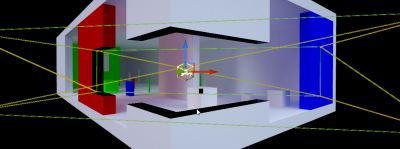


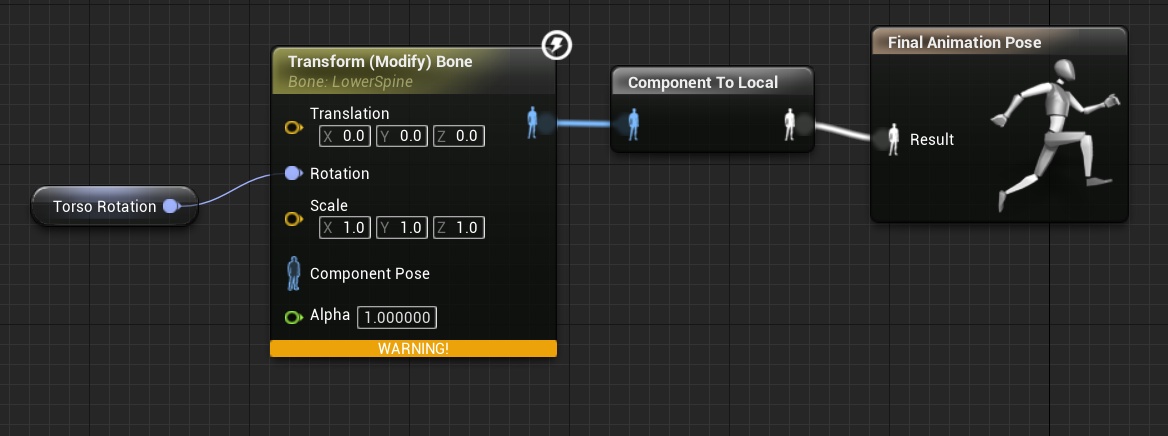 uneven fractal
er doesn't rotation in unreal 4 go from -180 to 180 and not 0 to 360?
not that it matters
drowsy fox
yea youre right lol
either way it would still goto 360 i think
wait no
its still; 360 lol
oh
uneven fractal