#ue4-general
1 messages · Page 228 of 1
 pallid compass
 digital anchor
xd
 cloud cobalt
Yeah, tools aren't everything. I kind of hate Unity, but Subnautica is basically GOTY for me, so what do you know
digital anchor
gotta play that game
cloud cobalt
In any case, I wonder how indie devs went from a supportive community of passionate makers that don't expect much, to people talking about shit games and expecting thousands of sales
That's really mysterious to me
 lethal hull
few big profile successes
lethal hull
"if braid can make millions I can do it"
 west fractal
that on the surface look like low effort trash
pallid compass
hey Cel question
west fractal
and thought that looks shit i can do it too
without understanding what game mechanics are
pallid compass
Iv got experience in high detail and effective hard surface modelling and some kinda advance material exp,
iv been meaning for awhile to brush up my char modelling skills & non pbr stuff
How difficult is it too learn sort make "anime" style char's?
 west fractal
i literally never touched character art before this project
pallid compass
Redeemer is nice af
pallid compass
So nothing too hard then i guess
west fractal
i mean it was hard work
but if you already have a decent modeling skills
it's not out of reach
lethal hull
yeah I'm surprised your previous work is all sci-fi/environment stuff
pallid compass
the last thing i did material wise was creating 2k Mat's that gave 4k resolution in return for tiny bit of extra memory,
soo u know
lethal hull
but obviously a lot of it transfers across disciplines
pallid compass
cel shade cant be that hard right?
west fractal
and i wanted to do this stuff for a while
pallid compass
The material i made
west fractal
but yeah a lot of it transfers over
pallid compass
Takes in 2k textures, Gives out 4k resolution, Tiling under layer with non repeating unique scratch and grime?
west fractal
like
my materials for my game
most of them are literally just solid colour diffuses
with nothing special to them
pallid compass
oh dam really wtf lmao
 west fractal
it's mostly in the lighting
 west fractal
lmao
pallid compass
2k textures give u 4k res
tiling underlayer
all scratch and grime is pre calculated
lethal hull
you using custom normals on that?
west fractal
god dude
pallid compass
I do really crazy stuff with UV space
west fractal
custom normals
lethal hull
oh I meant custom vertex normals
west fractal
are a gift from the gods
pallid compass
oh yeah the edges are face weighted
But the black lines are not that
The black lines are just mesh decal's
lethal hull
nice, I can imagine them being a bit of a pain to do that way on a curved mesh
pallid compass
beauty comes from the scratch and grime retaining such a high res
yes they are LOL
 fossil ore
When I look at Paragon model, I can see a "thin" line
pallid compass
u leave my wing alone okay, its a gud wing
pallid compass
Well it was my first ship actually
could prob do alot better now
But my primary skills are not modelling i guess
west fractal
like if youre making panels
 tired island
Lol
west fractal
you gotta think somewhat logically about them
lethal hull
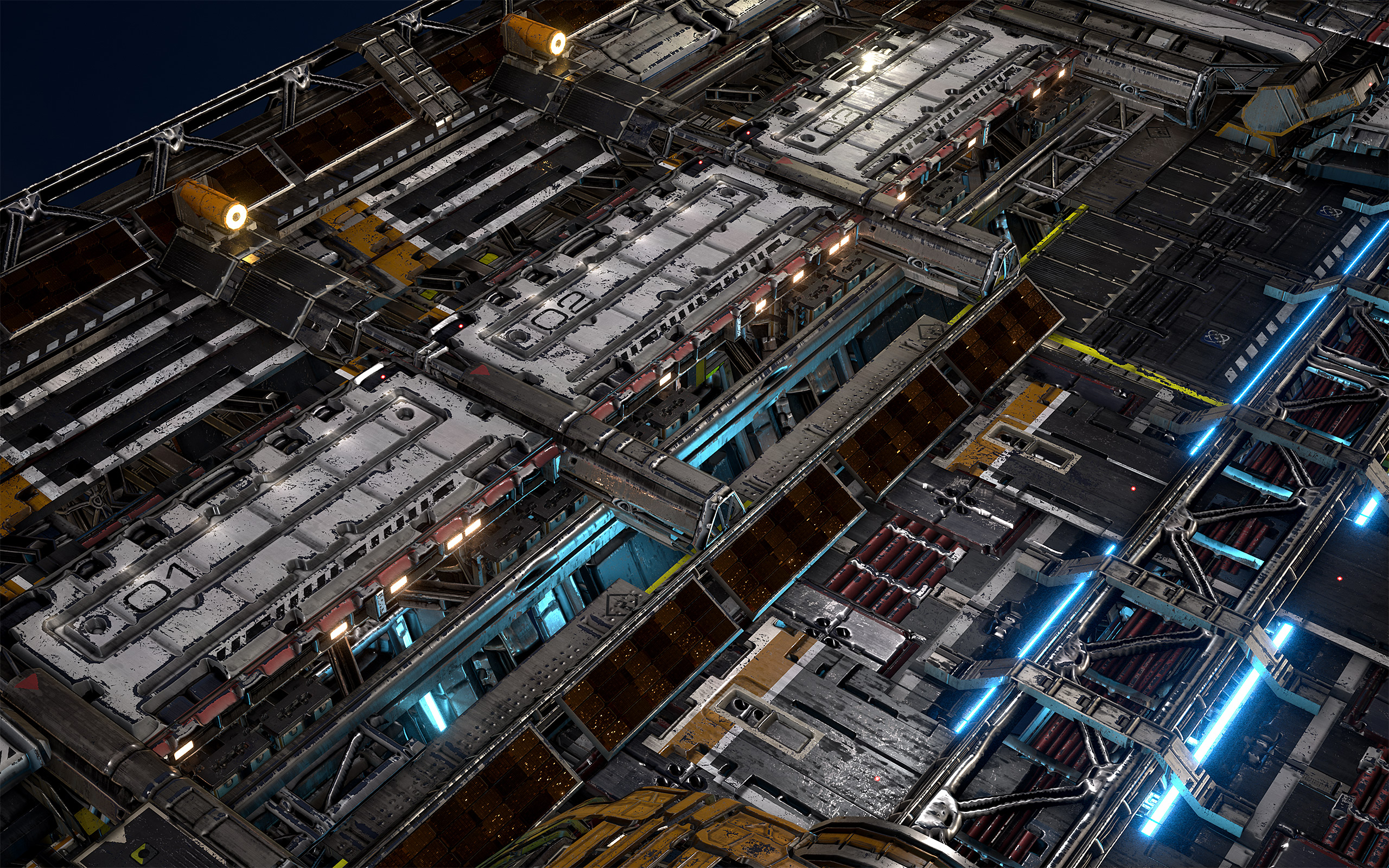
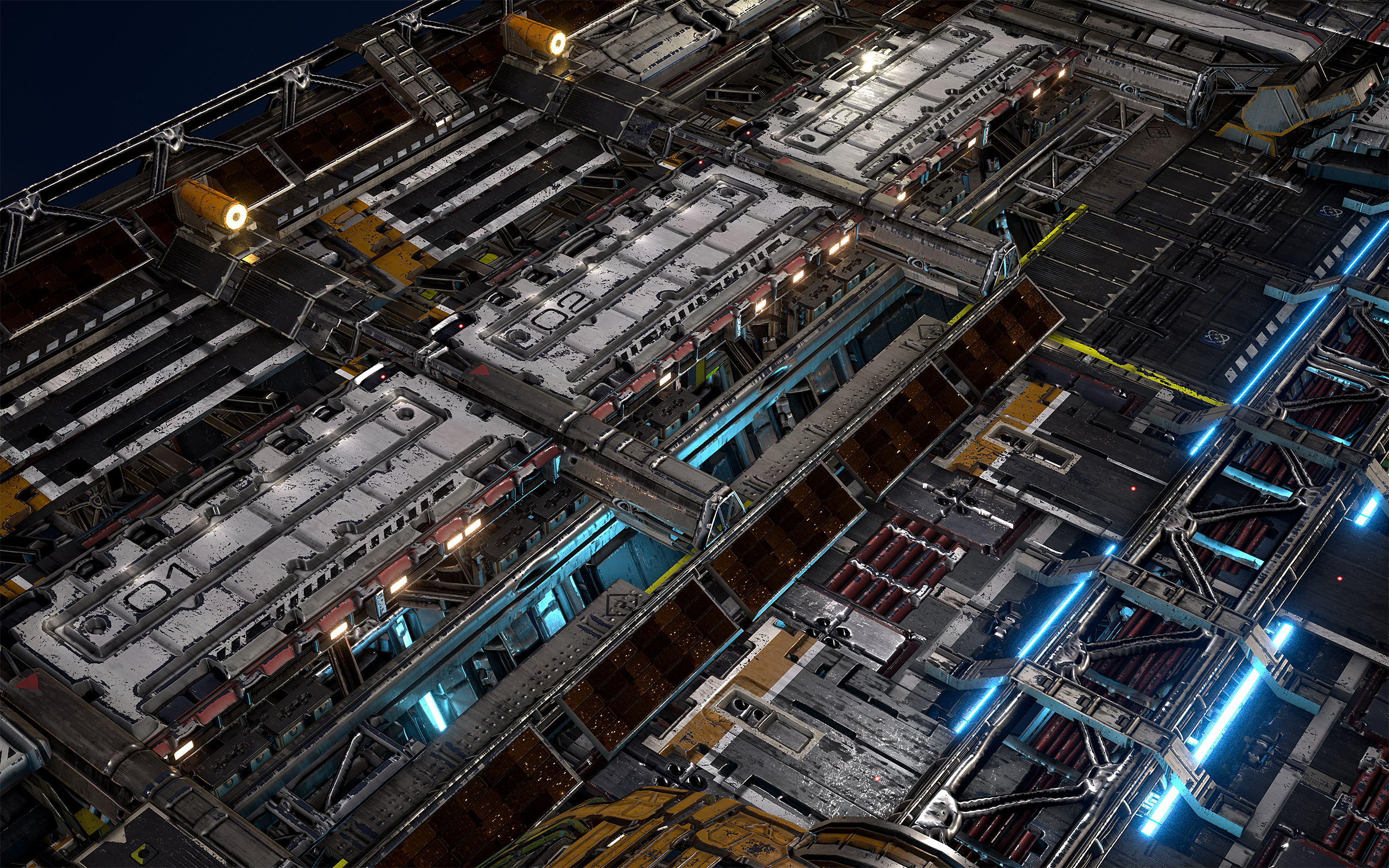
https://u.cubeupload.com/millenia3d/HighresScreenshot003.jpg I was making some better procedural edge wear last night as well
 west fractal
 pallid compass
Yeah thats true, "build your shit like it works irl"
west fractal
like they dont just go all over the place
pallid compass
guess i was just trying too fill the space
digital anchor
hey @lethal hull are those lights baked into the texture?
pallid compass
dam mil, ur stuff always looks good
however i did build mine so u could walk up and it would retain all detail
kinda like star citizen but not 50 material's
lmao
wait u guys wann see the best material ever
tired island
??
lethal hull
the spotlights are textured planes
and the big cyan point lights are in the blueprint as actual lights
though non-shadowcasting etc for performance concerns
pallid compass
SPOOKIE MATERIAL
floating combat text poof
cheap af
2 draw calls, for any set of dmg numbers in 3d space
 uncut surge
I thought they added the new LOD mesh simplification system in 4.19.

I don't seem to have the option.
 crisp fable
maybe its experimental?
 trim trail
wasnt it just a plugin from Ryan?
that you have to download and enable it?

It is finally time to release the first version of the Impostor Baker tool! This is currently uploaded to github since I could not get access to the ue4 community server:
https://github.com/ictusbrucks/ImpostorBaker
Notes:
Currently for UE4.19 ...
lethal hull
What with?
 next dome
my unreal crashes when i want to render
im getting this
i started to get this crash error after adding god rays with exponential fog
and i tried to remove the exponential fog and i got no crash
but i cant render without exponential fog because i want god rays
next dome
im using vxgi 4.17
 pine fjord
i have the 4.18 of that . but never used vxgi
next dome
so you think theres a way to fix that crash?
i really really have to render the scene
with that exponential fog
pine fjord
id have to recompile because i built without it apparently
but its prolly that your gpu cant handle the scene
and the renderer crashes
next dome
does anyone else know how to fix that error?
 graceful grove
You're getting a GPU hang error which means it's getting a task and not responding, e.g. driver crash
pine fjord
could be essetnially what happenes if you take a high ez screenshot with a modifier over 5 or sth and your system cant run it
are you trying to render the video in 4 or 8 k ?
 frosty bloom
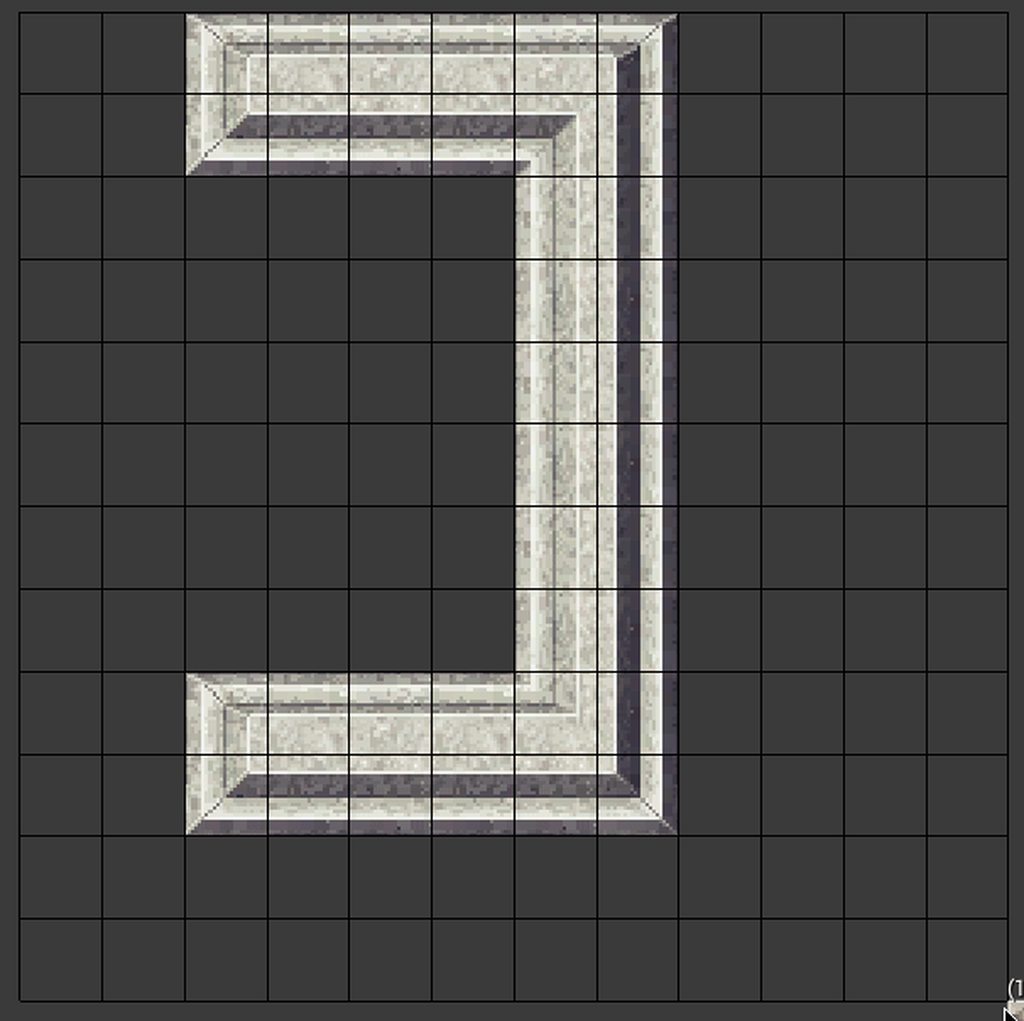
Nicely done! What's the next step? Auto generating?
pallid compass
Special Roll out menu for the TileMapEditor
So u dont have to view this
Like there is more than you need in the panel
You only need to see 4 Tiles of each set, and not all 16
So a special roll out sample sorta thing
You know like a paint pallet?
frosty bloom
Yeah, sounds awesome. You will be creating maps at god speed once your done 😄
pallid compass
But i dont know fuck all about slate, so i need do research
Yeah can u imagine atm with no auto tiling its like
putting in 4 tiles on your own takes (4*4) * 2 clicks
lmao
next dome
over 3000ppl here in discord and only 2 of them answer and tried to help me issue...
K
graceful grove
@next dome Sometimes people don't know the answers. Regarding your issue it's a very general gpu hang error so it's impossible to debug with only that knowledge
frosty bloom
Yeah I hear you @pallid compass , I bought DungeonArchitect to save myself some time on Demo maps. Man it is soo worth it once it's done !
pallid compass
Actually someone recommended that today lmao
im thinking of getting it to learn off
frosty bloom
Oh haha. Yeah the code is clean, can be customized quite nicely and should make for a nice base for a 2D generator
pallid compass
Could it support the API of my auto tiling system?
If the data was say stored in a array
like how does it output its data?
frosty bloom
Hm, I would actually have to open it up to check. Haven't worked with it since like 5 months back
frosty bloom
It is quite handy indeed
 lone swallow
what the unreal documentation really needs is a comment section with upvotes/downvotes, that way if you see a page like this: http://docs-origin.unrealengine.com/latest/INT/BlueprintAPI/Game/Player/GetInputMouseDelta/index.html
you can add a comment that says "oh by the way, this is in pixels, not as a proportion of screen space"
Get Input Mouse Delta
pallid compass
well i dont wann sound rude but ofc it be in pixel's 😂 its not a screen space % return
 livid haven
I'm not even sure that would be in pixels.
I mean, ostensibly that'd make some sense, but ultimately "mouse delta" could be some raw delta, unrelated to any concept of a cursor.
Cursors might move in terms of pixels, but a mouse's axes' deltas? 🤷
pallid compass
wait how do u install plugins to source builds D:
oh yeah i guess thats a good point,
livid haven
Plop 'em in the plugins directory.
pallid compass
cant seam to download or install them due to no engine installed
pallid compass
well let the download begin 😂
@frank escarp i caved and bought it, having to install binary editor to download it tho 😂
 frank escarp
@pallid compass im almost finished with my edited snapmap builder
wich instead of having 1 main path, it has a main path built of different branches, each of them with different settings
pallid compass
scroll up a little too, i finished my auto tiler
 karmic igloo
@pallid compass Are you going to release that on the marketplace?
pallid compass
the fact u cant just download a plugin with out a binary editor is annoying af
I was thinking about it
The problem is its integrated in too the 2d paper plugin so
Idk how that works 😂
karmic igloo
Oh, it's not its own plugin?
pallid compass
no its not, 2dPaper Plugin is still not fully released so alot of the content on the inside is still "iffy" and not very effective to play with
so i had to get kinda deep within it and add some extra stuff
There might be away to make it a support component of it
but the issue is you need to add some extra things to TileMap's, TileSet's etc
@frank escarp do you think il be able to use it for 2d map generation? or will i have to heavily expand on it
then again i might just need translator function's, to turn 3d information to 2d
frank escarp
yeah you will need to be smart with it
but it will do 2d without an issue just fine, if you set it correctly
pallid compass
Should not be too hard then
frank escarp
you can access the emitters when the dungeon is built, and then add tiles in those locations
or similar
pallid compass
oh thats pretty smart
frank escarp
sectioned dungeons
frank escarp
as you can see, there are 4 main sections, very clear ones
frank escarp
@pallid compass
with branching
the main path still keeps its flow, but now it adds random branches
pallid compass
oh dude thats really nice
 copper fable
hey guys i ahve made a model in blender with a rig...when i export it to ue4 i can imprt the skeleton
pallid compass
@frank escarp u basically building ur own builderclass?
frank escarp
@pallid compass yes
pallid compass
Gotcha, just trying to wrap my head around things, i just the city builder template kinda looks like what i need, just trying to figure out where everything goes
 hoary brook
@pallid compass That looks extremely satisfying
 opal ocean
@frank escarp Thats a screenshot from your dungeon generator?
opal ocean
I want that so bad! I've tried making a paper2d -> 3d world generator a few times, in BP
and its so much work
and I cant afford dungeon architect
frank escarp
its using the plugin as a base, and then considerable tweaks
pallid compass
It does not support paper2d interitus
but im about to make it support paper2d LOL
and prob cry trying
opal ocean
Getting told there's an infinite loop asserted during OnRepIsOpen
the area in the white box is in the event graph of my bp_door, close door is being called by an NPC character
not even sure why its being called, as the NPC is still a ways away from the door, supposed to open the door on overlap of a collision box
no idea why, what am I missing?
pallid compass
show me rest of that function
opal ocean
which one? the Onrep? it ends with the play sound nodes
opal ocean
how do you do the quote box here in discord?
    Function /Game/NPCs/NPC_character.NPC_character_C:ExecuteUbergraph_NPC_character
    Function /Game/Blueprints/Interactables/BP_Door1.BP_Door1_C:CloseDoor
    Function /Game/Blueprints/Interactables/BP_Door1.BP_Door1_C:ExecuteUbergraph_BP_Door1
Function /Game/Blueprints/Interactables/BP_Door1.BP_Door1_C:OnRep_IsOpen````
that key
3 times at start, 3 times at the end
I dont think thats an inf loop error?
opal ocean
LogScript: Warning: Infinite script recursion (250 calls) detected - see log for stack trace
PIE: Error: Infinite Loop detected in BP_Door1 , asserted during On Rep Is Open with the following Call Stack
opal ocean
works
opal ocean
that works
opal ocean
K, so its where I think it was. True or false work. But not both
pallid compass
make a another function
put the logic in there
then have the rep call the function
opal ocean
my NPC has a collision on it, so that when it walks into the door, it opens it, and when it ends overlap, it closes. But the crash is happening way before it gets close to the door
opal ocean
I put the branch and the rest into a regular function on the eventgraph and had the repnotify call it, still crash, on the OnRepIsOpen
opal ocean
no crash
door also doesnt open
Wierd. the door is being called to open long before the AI gets near it
I added a print string to the open door, and its printing while the AI is still about 10meters away
 worn granite
do you check to see the other actor overlapping is of the right class?
opal ocean
the overlap is on my NPC
....which is probably a terrible spot and should be on the door
worn granite
that is immaterial to my question
opal ocean
The collision on the pawn is set to overlap all dynamic (which is wrong, whoops), and doesnt do anything unless it can cast to the door
worn granite
Alright, that's a step in the right direction at least
 tawdry narwhal
does anyone know if the unreal fest europe talks will be available later on youtube or elsewhere for attendees and/or the general public?
opal ocean
Changing the overlap to be on the door
pallid compass
did the DO once fix it?
opal ocean
It stopped it from crashing
pallid compass
because it sounds like u might be spamming the fuck out of it
Yeah confirmed
It was getting spammed to fuck prob
opal ocean
but why? and how? My NPC and its collision wasnt anywhere near the door yet
pallid compass
i feel like
u have something else touch it
cut the open and door shiz off
and print every time col happens with it
opal ocean
I'm baffled. I put the collision for opening the door on the door itself, and it all works now
AI opens and closes the door as he investigates the alarm I set off 😄
then goes back to his guard post
Not entirely sure what was going on, but thanks for the help 😄
 iron belfry
hello, i have a question. Is there a way to dynamically adjust the sound attenuation settings? i only find a get attenuation struct in the options, cant set it
 frank holly
Hey guys new to this channel but im looking for people to help bring a project to life but need more people tried the job boards but cant message on there for some reason for the project i cant pay people seeing as how im doing it with my own time while not at work but are there any people wanting to help?
 weary basalt
@frank holly Use the Job Bot to post an job listing please #looking-for-talent
#more-resources has instructions on how to use the Job Bot
Please take your time to read the #old-rules as well.
 muted solstice
Anyone knows how to uncap the FPS in things like NutsNuts?
It's one of those 62-fps-locked demos.
 frosty copper
t.MaxFPS 120 @muted solstice ~?
muted solstice
I didn't know you could open a console while in-game.
How do you open the console to begin with?
nvm
Thanks. It worked.
frosty copper
no worries~ :>
muted solstice
Another question for whoever's here. The r.SetRes doesn't seem to work. I can't turn the demo into 4k.
Nvm, got it.
frosty copper
:p
 glossy beacon
In the docs https://docs.unrealengine.com/en-us/Programming/UnrealArchitecture/StringHandling/FString the example for rendering an FText uses "FCanvasTextItem TextItem( FVector2D::ZeroVector, TestHUDText, BigFont, FLinearColor::Black);" which uses BigFont as a text, but does not show its initialization. Is there some kind of default font so I don't have to import one and reference a directory?
 stiff crow
So, I've decided its time to look into unreal engine for a future project and i'm having alot of problems. How does anyone use this engine. Its very slow and uses alot of space, dragging one of the paragon assets into my scene (one of the rocks) takes 2 minutes to process if the editor doesn't crash while trying. And even then it will crash at random times regardless. Just 10 minutes ago it crashed while quicksaving and now my poor little project won't load back in (stuck at initialization)
Would everything magically get better if I had more than 8 gigs of ram? or is this just how ue4 is supposed to be.
this sums up my day 1 experience pretty well
After deleting the saved and intermediate folders in my project I was able to load it back up
Anyways, what I'm trying to ask is, what are the minimum requirements to work with this engine
Because my desktop that worked fine for everything else I threw at it till now, is really struggleing
 deep spear
Hey boys is thème any french guys ?
glossy beacon
qu'est-ce qui s passe
frosty copper
stiff crow
Yeah, my hardware excedes that
frosty copper
🤔
stiff crow
well, I just found out the drive my project was on ran out of space, so that may be where some of the issues came from
stiff crow
Well, at least I got something
 rustic panther
I disabled a ton of plguins and now the edit -> plugins option is gone
how do I get it back?
Open .uproject in text editor and search for "Name": "PluginBrowser", "Enabled": false change it to true
 grim sinew
That's amazing how the plugin browser itself is a plugin
rustic panther
ya, weird
this plugin I need told me to disable all plugins
didnt realize the plugins browser was one though
and I also need the android media player so I listened to what it said and I think what it says is bs
crisp fable
uh
so i bound an action
and that action is firing twice whenever i press the key
what.
i was binding to it twice like a dummy
 soft garden
HELLO! someone know ho to do an Async HighResShot? when i launch this command while playing the game freeze
copper fable
anyon ehere imported their own assets from blender?
cloud cobalt
Sure
copper fable
is it possible to imnport a new animation
without having to reimport the whole fbx?
digital anchor
export only the skeleton, with the animation selected on the actions
when importing select your old skel
disable "All actions"
or every animation will be exported
copper fable
@digital anchor thank you
so i am using blender
@digital anchor i select only armiture...how do i select the action...as when i import the fbx it says no mesh or animation track detected
digital anchor
 plush yew
would it be hard to setup a system were u can arrest players like handcuff another player and drag him and unhandcufff
digital anchor
hard would be animating =p else would be fine
 copper fable
whats on the main?
digital anchor
copper fable
so u exporet the mesh too?
digital anchor
nope
but i use the same preset for skeletal mesh and for animations
i just dont select it (as i have the Selected Objects only option)
digital anchor
also make sure u in object mode before exporting
 dull wraith
Not sure if this is the right chat for this but I'm making my turn based JRPG and right now I'm just focusing on making the two separate levels (overworld and battle mode). I'm using level streaming to do this and I've learnt how to load and unload levels, but I'm not sure how to make a separate world/plane for the battle mode (want to make just a basic contained field).
dull wraith
Never mind, I duplicated the ThirdPersonExampleMap and named it BattleMode. The only problem now is I want to delete things in the BattleMode map but keep in the original...
 sudden agate
I have a Trace Channel "Grabbable" and I Trace against it via TraceByChannel to find it.
However, I need some more checks like if it's occluded or not (to check if it's actually grabbable). Is there a better way than TraceForObjects additionally?
copper fable
i have this happenign with my behaviour tree... my pawn isnt moving.: https://gyazo.com/8b387d35119082fe7d1fbea73f772050

 pallid compass
then its not grabbing the correct data
also that is not waiting 5 seconds
so ur move too is failing
pallid compass
pawn's do not support MoveTo
pallid compass
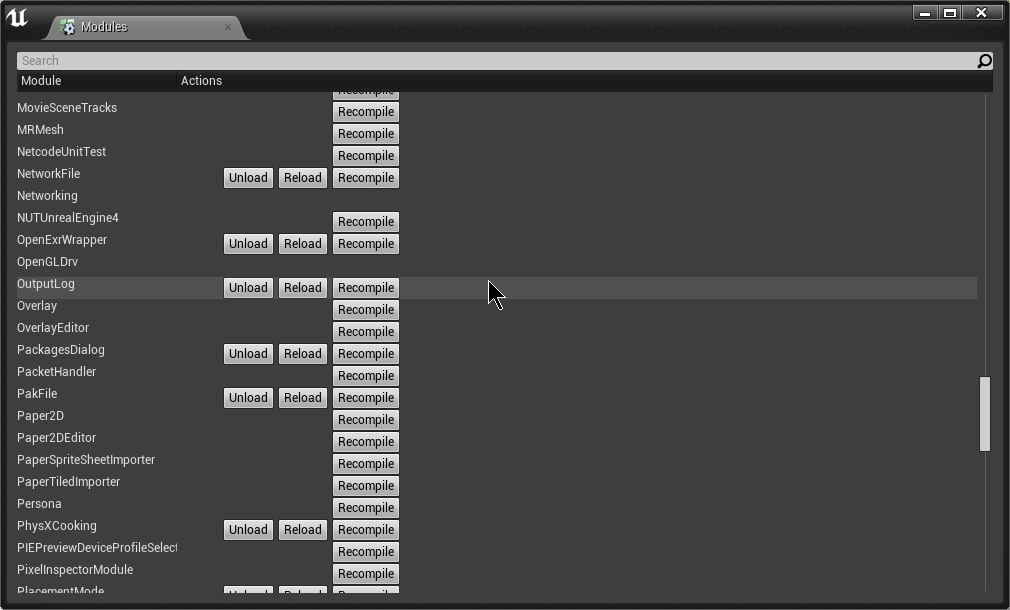
WHAT WHAT
U CAN RECOMPILE PLUGINS IN EDITOR
MY GOD
I COULD SAVED SO MUCH TIME
grim sinew
You can also unload the plugin manager from the plugin manager






 frank escarp
@fierce tulip render to texture
doing a fluid sim
sadly this kind of fx are ridiculously expensive
 fierce tulip
Akihito always does mind blowing vfx
pallid compass
@frank escarp can u give me quick description of what corridor padding is?
wtf lmao
thts gotta be a render target
or something?
dude that looks so good haha
cloud cobalt
That looks fairly derivative from one of the samples.

Announcement Post: https://forums.unrealengine.com/showthread.php?123164 Sam Dieter is on to talk about a powerful new feature from the 4.13 release, Bluepri...
Think there's a water surface you can paint on like that in ContentExamples @fierce tulip
I suspect it works pretty much the same here
plush yew
does anybody understand the logic behind tiled landscapes in world composition i wanna make sure that its not my fault this bp isnt working
pallid compass
What do u mean tiled landscapes?
 mint umbra
What is your bp trying to do?
Tiled landscapes (i.e exported from World Machine)? They're pretty much a set of levels split into pieces from the heightmap
pallid compass
@frank escarp by the power of gray skull if you have two moments i summon you,
 proven tree
Hi, i need help
I'm trying to move a level and it's assets into a new folder
however, i cannot because the level always directs towards those assets
so once i move them, the level is empty
 urban meadow
@proven tree are you moving them in the editor?
proven tree
yes
and then i tried to fix redirections
but the level still loads the old locations
proven tree
i can try
so move the map, fix redirections. Move the assets, then fix the redirections/
urban meadow
move level, open it up to verify, then move assets
urban meadow
then fixup redirs if it's all working at the end
 warm mountain
i'm at crossroads now at the moment
i tried to copy a material piece by piece to try to understand how it works
but when i put everything together on my copy
its full of errors that the original just doesn't seem to have
like it claims I have no normal input
even though I have one
proven tree
same problem here
I'm copying files right now, if i move the map on it's own it works
warm mountain
i just dont get it I clearly have my normals inputted but it keeps asking me
proven tree
but when i move the assets it doesn't seem to work
warm mountain
the only conclusion i can make is
the UE version
is different
but yet when I try to compile the original it works still
 cyan merlin
There is a feature to migrate projects
proven tree
Yes, but you can't change the folders inside
It just copies the strucutre
NOPE
it can't find the meshes now
WTF
fuck
unreal FUCK
cyan merlin
Lol
cyan merlin
If you check the materials blueprints and stuff, all the textures they are referencing are bugged right?
warm mountain
and I need to understand how this material was made so I can fix it to the UV's of my object
pretty much
here's the normal input on the material function
cyan merlin
Yeah I don't know a fix for that other then reassembling all the bps
urban meadow
@proven tree only other thing i can think is try to move files first, fix redirs, then check the map, and move them
warm mountain
not recognizing the normals input in the material function
cyan merlin
Is the normal set as a normal?
warm mountain
eeyups
proven tree
I tried that
doesn't work
as soon as i move the assets
i get blueprint errors
missing blueprints or inputs or whatever
fucking unreal cockball editor
of a shit
urban meadow
what version of unreal are you in?
possibly delete binaries/intermediate folders after and let it recompile? i have issues with file duplication with the content browser, but haven't seen anything as bad as you're experiencing
proven tree
4.18
i think
uhh
it's terrible, when i move the folder, the map is pretymuch empty, the meshes being referred to don't exist, it's like they're not updated
urban meadow
@warm mountain have you reopened the MF and recompiled? do empty inputs have default values?
proven tree
Juan, here's a small example
cloud cobalt
@proven tree Be sure to do that kind of stuff iteratively. Start by moving assets, confirm it works, move on to Blueprints - which are more troublesome because they might be referenced from settings, etc.
proven tree
make a new project, import 1 mesh
cyan merlin
Moving folders around is pretty risky business, I generally would just stick with moving entire projects totally
proven tree
and create a new map
save the map under TestProj/Maps/Mymap
And then move it into OtherFolder/Maps/MyMap
and see how hard it breaks
cloud cobalt
So you're trying to move levels ?
proven tree
yes
cloud cobalt
Still in the Content/Maps folder right ?
warm mountain
@urban meadow default values?
like the sort priority?
i didn't touch that?
does it have significance?
cloud cobalt
@proven tree tried saving a copy ?
cloud cobalt
In like, Content/Maps/
proven tree
no, i tride making the copy in Content/OtherFolder/Maps/mapname
urban meadow
@warm mountain have you opened up the Material Functions and recompiled?
cloud cobalt
Well, try in Content/Maps ? Just to check if there's some assumption that levels should be in maps
urban meadow
it's complaining there's no inputs there
cloud cobalt
I'm fairly sure UE4 default to that, and I'm not even sure "open" autocompletes to levels outside that, for example.
proven tree
@cloud cobalt alright, but i doubt that'll help
Also when i move the files
and try opening the map
it asks me to save the blueprints
why would i want to save
the blueprints
and it's even pointing them out to the moved palce
place*
cloud cobalt
That's actually normal
proven tree
One or more blueprints has an unresolved compiler error, are you sure you want to Play in Editor?
Inventory_BP
MasterItem_BP
ThirdPersonCharacter
InventorySlot
TradingWidget
MainInvertory_WB
Bp_Pickup
LootContainer_BP
fucking shit of an editor
cloud cobalt
Might want to be patient and understand what's happening rather than just having a fit
proven tree
Still works for some reason
I would be if i hadn't spent like 8 hours trying to fix MOVING files
do people at unreal tournament just create new levels when they want to move assets
lol
cloud cobalt
So moving to Content/maps works ?
proven tree
no
urban meadow
i just moved level with a cube in it, seems to work fine here
cloud cobalt
I haven't tried moving a level, but I can definitely confirm moving assets between folder does work all the time
I do that very often
urban meadow
also delete your binaries and intermediate to try to fix those bp errors
urban meadow
ya moving the mesh location still updated fine
proven tree
0o
urban meadow
you got some weird business going on
cloud cobalt
I'd try creating a test project with the level in Content/Maps myself, out of curiosity
proven tree
Alright, i'll try one more time with the deletion of bin/inter and if it doesn't work, i'll share screen later
if you can help
cloud cobalt
Maybe UE4 doesn't update levels outside of the maps folder
proven tree
but it worked for Juan
cloud cobalt
Dunno where Juan put the level
plush yew
is it possible that level streamed landscapes dont recognise being an actual landscape if that makes sense
proven tree
nope what the fuck
now the textts
and the boxes dissapeared
and it literally says "TEXT"
on top of emptyness
but the pawn is there
what the fuck unreal
cloud cobalt
No idea what you're even talking about here, is that a test project or yours ?
proven tree
it's a colab thing
alright, i'll share a screen later if that's alright
but i have to run now 😦
static mesh is "none"
under properties
so
cloud cobalt
Like I said, I'd just try a new project with a new level in the correct folder
Wouldn't be surprised if UE just doesn't update outside that folder
proven tree
I don't follow
this is a colab project
with 20 devs
i can't just start a new project
like unreal tournament guys would
apparently
cloud cobalt
Just to check, obviously.
Once you understand the problem you can start trying to fix it.
cloud cobalt
Trying over and over to move something isn't going to help a lot
warm mountain
ya know
i'm starting to think
this is a version error
I tried putting the material function of the original
into my own
and I get the same errors
i got a feeling why the original works is because somehow that file might still be tied and working on the old rules from the old version of UE
OHHH I FIXED IT!
It was this
i forgot to tick it
so it was searching for a value outside the material function >.>
YESSSS I CAN SLEEP!!!!
pallid compass
screams erik where are youu
frosty bloom
Well what do you know, I found my way out of the shadows and into the chat @pallid compass
😄
pallid compass
I know it was awhile ago, but do u have any idea how i could get the Cell data struct from a generated dungeon to a AActor in the world?
im using ugh
on dungeon layout built
But i cant cast anywhere LOL
and i dont wann fuck with the c++ source because i dont fully understand it yet
frosty bloom
Let me open up my project with the DA in it, easier to remind myself how stuff works that way
pallid compass
yeah im trying to skip the ugh visual generator
and just send the stuff directly to a AActor that will handle placing the info in too a tilemap
frosty bloom
I see, I just opened the project. Give me 1 minute
Okey, soooo... You are trying to skip the part where you specify meshes and stuff?
pallid compass
Yeah i just want the generated data, so i can then plug it in too my own system and have it create 2d tilemap and auto tile it
There is so much stuff in the source, im having trouble tracking it all 😂
I was going to try emitters but
It seams the emitters dont hold the right data? maybe
idk
frosty bloom
Hm.. Have you looked into the BuilderClass?
It's my understanding that's the thing handling layout depending on Arguments/Parameters (I'm not 100%, reading upon it as we speak)
pallid compass
yeah it does
I can get
USTRUCT(Blueprintable)
struct DUNGEONARCHITECTRUNTIME_API FDungeonMarkerInfo {
    GENERATED_USTRUCT_BODY()

    UPROPERTY(EditAnywhere, BlueprintReadWrite, Category=Dungeon)
    FTransform transform;

    UPROPERTY()
    FName NodeId;

    UPROPERTY(EditAnywhere, BlueprintReadWrite, Category = Dungeon)
    TArray<UDungeonSpawnLogic*> SpawnLogics;

    UPROPERTY(EditAnywhere, BlueprintReadWrite, Category = Dungeon)
    UObject* TemplateObject;

    FORCEINLINE bool operator==(const FDungeonMarkerInfo& other) const {
        return other.NodeId == NodeId;
    }
};```This class as emitters out once its done
But like
I cant even track down what the TemplateObject is
pallid compass
I tried following the code trial and man wtf, i got lost fast af it got complex, so then i decided to try access the Cell data instead
I dont need a dungeon theme, im just using the default ugh builder,
for rooms and stuff
Then il take the data and turn it in to tiles my self
maybe i should be using the marker's and not trying the cell data
But i couldnt track down what the templateObject's in them actually where
i assume thats where it says
"Floor"
"Wall" etc
frosty bloom
Yeah I believe the Template is the Theme you specify like a Blueprint, for meshes and stuff. I'm opening the classes rn, going to see if I can find anything helpful 😛
pallid compass
Well if the marker's are what get replaced with the mesh's
then they must hold what they are
then maybe the templateObject holds that?
but if its just like the static mesh data then thats no good to me
I think its the marker pool i want to intercept whats going on
Im assuming the marker pool is a data array or something
ima try find where template gets set
DungeonBuilder.cpp line 291
Appears to be where its set
But i cant read that code
FPropData i think? but idk where its coming from lmao
its so complex
frosty bloom
You know what, I think i've seen this generator do 2D. give me a moment to see if I can find it once more
frosty bloom
It might have been in his personal DiscordChannel but I'm sure I saw a comment section where he talked about 2D
Someone was trying to use it for 2D and he gave some brainstorm ideas.
pallid compass
wait wth
in a very old version
they hav sprite class nodes
like 1.4
its 2.7 now
am i blind af?
"Dungeon Architect Paper2D extension installed"
slaps self
what.jpg
searches
frosty bloom
Lol I knew it had been used for 2D, just couldn't figure it out. Think that will solve your issues?
If not making your own version of marker emitters in 2D space instead of 3D would be plausible
frosty bloom
Open up his forum thread and search "Paper2D"
Paper2D support is provided in a separate plugin (DungeonArchitect2D), which extends the core plugin (DungeonArchitect). If you don't use Paper2D, you can remove Paper2D and DungeonArchitect2D from your build
Should be inside the editor
frosty bloom
Not that I can see. He does though
pallid compass
"Thank you for using DA. 2D is not supported. I did create an experimental Paper2D extension last year. "
god dam
frosty bloom
Lol, back to square one?
pallid compass
unless thats an outdated piece
In 2.7
the latest guide
it does reference it
Then again even if its there
i doubt it supports auto tiling and such
frosty bloom
Shouldn't be to hard finding a way to do it. Might be able to get your hands on the source he used for the experimental period? I wish I could be of more help, been a while since I worked with the his plugin
pallid compass
I appreciate the help man, i dont think i really need the fancy editor interface, i just need to be able to hook the data out i guess
frosty bloom
Seeds and markers might be a good point to start from if nothing else, since those handles the layout
pallid compass
Well if i can figure out how and what data is stored in the template var within the markets then it would be easy
But i can not read that code, i lack the exp
DungeonBuilder.cpp @ line 278 ish
287*
copper fable
when using root motion is it posible not to reset the objercts position after the animation?
 austere yacht
Any advice on how that multiply can be capped? Or have i walked into a deadend by using Event tick?
 austere yacht
http://prntscr.com/j9k3l3 This worked perfectly, thank you
 karmic igloo
np
 spice urchin
oh god what did i do to put these stupid brackets on screen??? https://i.gyazo.com/eb7b1ba2fc5a38830c76db179f364c63.png
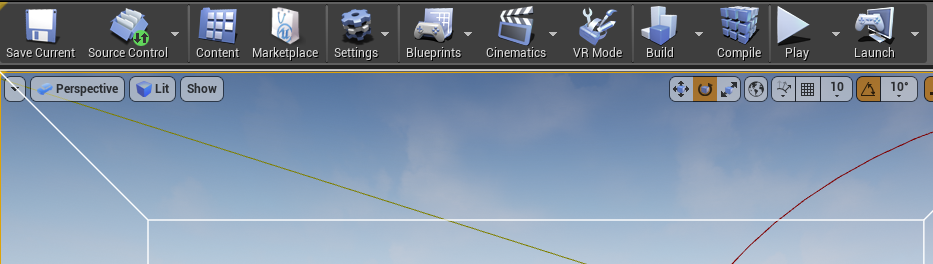

and how do i remove?
fossil ore
How does one uses GITHUB program?
spice urchin
i just hit one key and BOOM viewport ruined
fossil ore
reload viewport
spice urchin
how do i do that?
 wild glacier
Alt+F4
 rocky kayak
^ id also like to know, happened to me once. luckily it was in an animation tab and i could simply just close and re-enter the tab over restarting the engine
spice urchin
huh a troll in slackers weird
wild glacier
Or check under the "View" curtain
rocky kayak
altf4 would actually fix the issue tbh, it'd just be nice to know what button to press to get outta it heh
spice urchin
well i can hit X in upper right just as well
 lyric timber
Hello
spice urchin
i have plenty of options involving shutting down Unreal 4, this is not new information
it's just viewport that's locked
worn granite
Just try to move another tab to dock in/around it
I commonly have slate assume I'm trying to dock when I'm not even dragging a window
And the only good way to fix is to pretend I'm trying to dock
spice urchin
hmmm yeah you're right that works
feels wrong
but no other obvious solutions 😛
thanks
i still wish i knew what horrible button i hit to do that
 shy heath
hello lads
 obsidian coral
Hello
I have a problem
Mu unreal engine 4 keeps on crashing when i try to program
lyric timber
lol
obsidian coral
Literally when i try renaming a node or something everything freezes and crashes
and this happens every 3 mins
Can i get some help?
lyric timber
what version of UE4 are you useing?
obsidian coral
4.19.1 i think
worn granite
how complex is your BP
obsidian coral
is there a way to allocate more ram to UE?
plush yew
Frontier emailed me and asked if I wanted to go down to their studio in Cambridge (United Kingdom) for an interview about graphic design and designing concept art..
I may or may not have said no
obsidian coral
@worn granite It's not complex at all
But my laptop isn't very powerful either.
So im thinking is there any way to put more power into EU?
lyric timber
@obsidian coral I would try different versions and see if the problem persists
obsidian coral
I tried youtube but all this fortnite crap comes up
lyric timber
you have to trouble shoot the issue
plush yew
Youtube isn't always the best source for info'
rocky kayak
have task manager open and the next time it happens, check it to see if its a memory issue
obsidian coral
Well i have 4gb of memory
I even made my laptop use all the 4GB mem
Because on default it was using 2GB
plush yew
@exotic tundra Nice bug hunter badge owo
lyric timber
if you can find a detailed but short way of explaining your problem you can try to ask google. but any trouble shooting should give you more information on what the problem could be
lyric timber
only 4 gig?
obsidian coral
but im kinda new to UE
lyric timber
you just keep trying different things. see if anything changes
obsidian coral
Yup 4 gig
lyric timber
that is kinda low by todays standards
rocky kayak
right now my updated UE is only using 1.4gb, so you should be good
lyric timber
i have 16gig and sometimes i feel like thats low
rocky kayak
if youre on windows, you should check task manager -> performance to see if your disks arent running at maximum capacity, i had that issue once when i had blizzard's launcher running stuff in the background. slowed up my unreal engine so much for some reason
lyric timber
I understand that. You should still be able to do stuff.
obsidian coral
Yip
plush yew
You guys think your PC's aren't good?
obsidian coral
yup*
plush yew
Beat that
plush yew
This is my work laptop so I write stuff up on it my PC isn't this bad XDDD
rocky kayak
why even fill it up that high, remove some junk lol
obsidian coral
I have a 500 gig c drive
lyric timber
HDD or SSD?
lyric timber
lol
plush yew
ew
obsidian coral
Slow as hell
plush yew
linux q-q i think im ok with windows
obsidian coral
UE wont open up
plush yew
obsidian coral
omg
plush yew
Apart from The programs I censored for privacy sake, and Wacom, everythings just windows 10 stuff its annoying af lol
lyric timber
where does it get stuck?
plush yew
wdym?
obsidian coral
You mean UE?
plush yew
Oh me?
I was kinda modelling something and doing some concept art... but I guess I could in a bit 
lyric timber
@plush yew linux is less than a gig
obsidian coral
plush yew
q-q
plush yew
Wanna see some random characters I drew x'd
obsidian coral
Okay
karmic igloo
I need more RAM for my computer but it's so expensive!
obsidian coral
so when UE is wroking
0%- 15% cpu
Memory 77%
disk 0 - 25%
and my graphics card is just on 2%
plush yew
I suck at art thank u very much ❤
obsidian coral
That's rly good tbh
plush yew
pft don lie q-q
obsidian coral
Not lying
plush yew
O
obsidian coral
The only thing i can draw is
plush yew
well thank u vry much 
plush yew
The best way to practice is by doing something in the same style a lot
lyric timber
@karmic igloo ram is like the cheapest component
plush yew
So I go a bit overboard Q_Q
karmic igloo
Not right now it isn't/
obsidian coral
Ok so actually when i click on UE my disk goes to 80%
karmic igloo
With the whole DDR4 shortage and stuff.
 cinder minnow
Hey guys ! Is it me or in the 4.19.1 update the shaders are not realtime anymore ?
 feral echo
4gb of memory is like no go for unreal
plush yew
owo
 regal mulch
4GB is too less for most things nowadays
feral echo
you should use 8 gb at less, I advice go to 16
karmic igloo
I can barely do stuff with 8 GB.
regal mulch
16 is probably the most common to use
 ancient obsidian
@cinder minnow , I don't know what's up with that, but they tend to recompile all the time for me too. Even in standalone.
obsidian coral
All my work i gone
feral echo
sadly, this is unreal 😃
cinder minnow
@quick breach aw shit... I'll try to go back to 4.19.0...
rocky kayak
you should have autosave on like 5 mins or something
karmic igloo
Sorry about that.
obsidian coral
All my work...
rocky kayak
i reflexively ctrl shift s everytime i finish doing a task, get in the habit of doing that
obsidian coral
Yes but if i do that UE crashes
regal mulch
Save often. Use SourceControl
feral echo
there is still autosave files which you can use
rocky kayak
o_o
obsidian coral
Why does it need to crash like that
ancient obsidian
@obsidian coral But you need betters specs for sure. OS and background apps usually use 2GB already.
regal mulch
Usually not because it likes to
regal mulch
You coded 50% of your game since you saved last time?
plush yew
obsidian coral
My parents are divorced and i live with my mom
plush yew
👌
obsidian coral
and we can barely buy food
regal mulch
GameDev is an expensive hobby
plush yew
@regal mulch I wish it wasn't ;'c
regal mulch
@plush yew Can I remind you to not spam unrelated images to this channel?
obsidian coral
Theres gotta be a way
plush yew
Oh- sorry ; - ;
obsidian coral
cmon ;-;
regal mulch
That includes your images from earlier
plush yew
Yeah sorry T ~ T
 cedar snow
if you already own a gaming rig, game dev is for free
regal mulch
@obsidian coral To be fair, you can save up on hardware.
Or search yourself a job.
cedar snow
also the other way around 😃
obsidian coral
@regal mulch I'm 13.
regal mulch
Not everyone owns a Gaming Rig
plush yew
I wish game dev wasn't so expensive, I go to a lot of events like PAX, Twitchcon, Insomnia, E3 and Blizz but still game dev is really expensive
obsidian coral
And i cant get a job at this time
ancient obsidian
@obsidian coral Sad to hear, I was piss poor when I started as well. But yeah, developing games costs money, especially resource-rich, like UE games tend to be. Maybe focus more on C++ side? Coding in the IDE doesn't require much RAM.
obsidian coral
and my mom says that shes gonna start collecting money for my new pc in 2 YEARS
plush yew
@silver crown rood ;c
obsidian coral
because we gonna go travelling
shy heath
i need healp with some one who is rly good with meterials
obsidian coral
God im so fucking depressed now
plush yew
Tex,
obsidian coral
sorry for cursing.
plush yew
Tex. Listen bud,
obsidian coral
Mhm.
plush yew
Do you really want to be a game developer, more than anything?
obsidian coral
YES
regal mulch
@obsidian coral You are depressed with 13, because you can't afford a computer for high quality game engines?
plush yew
like, more than anythin ever?
obsidian coral
Yes coding and programming, youtube is all i love
i have been doing that since i was 9 years old
regal mulch
You can code and program with other Engines too
obsidian coral
i tried Unity
regal mulch
Some of which take less resources
plush yew
You don't need money to make a game, if you ask me, it's best you make a low end game just to get your name out there, and if you get any money from it, use that to get a better PC!
Or, if you're into art like me, do freelance work for small companies, then use that to get a PC
or commissions but their annoying
obsidian coral
I am making a low end game
regal mulch
The idea is pretty easy: Want a better PC? Buy one. Don#t have the money? Earn it.
shy heath
can some one help me with meterials
obsidian coral
but everybutton i press it crashes UE
plush yew
Hey cedric_eXi you're a game dev right?
ancient obsidian
@obsidian coral You can code even without ANY engine. Try building a simple one yourself, from scratch, that's a very valuable experience. And you have everything you need for that - youth, time, brain, computer.
regal mulch
Yes
 tame stag
i know how youre feeling, last year my ssd crashed with all my UE projects and it would cost me about 2800 EUR for a professional recovery.... and that recovery would also have still 20% chance of failing....
tame stag
since then, i make daily backups^^
tame stag
yeah, i do that now^^
obsidian coral
I think im gonna cry
plush yew
@regal mulch As a game developer, how do you specifically like to work, in a studio surrounded by several other experts just like you, as a team. On your own, making games in your spare time and doing other jobs inbetween or with friends and things
obsidian coral
I have family problems too
and programming is like an escape
But i cant DO THAT
regal mulch
@obsidian coral Don't want to sound like an ass here, but this is not the right channel nor platform for this right now
obsidian coral
;-;
plush yew
If I were to answer my own question, I hate being in studio's that force you to do specific stuff at specific deadlines, I love the freedom to do as I wish when I feel like I need to do it
Which is why I said no to Frontier
regal mulch
I can just tell you what I do: I'm freelancing.
regal mulch
That's all there is. Remote contracted work. Coveres all kinds of programming problems. BP, C++, Editor, Plugins, Engine, ThirdParty.
obsidian coral
Any ideas to get money?
plush yew
My old college tutor got a job with Unity so I wonder how he's doing lol
Michael Warburton ;'c
obsidian coral
Remember im 13 years old not 18
plush yew
goodman
@obsidian coral Woa.. you're 13 and you're striving to be game dev? I'm impressed, almost fangirling lol
regal mulch
@obsidian coral Well you could create smaller packs for the Marketplace.
Your mom can be the person to receive the payment
¯_(ツ)_/¯
obsidian coral
@plush yew I started coding python when i was 9