#ue4-general
1 messages · Page 195 of 1
 fading magnet
 burnt drum
hey guys!
I'm having problem taking 4k screenshot using highresscreenshot because it messed with drawings done by HUD
apparently drawing done by HUD doesn't scale up
 wide lark
There's a problem with my lighting. It won't generate my dynamic lighting from a directional light set to stationary. My preview shows a shadow but when going into play, it will not show a shadow. I am set to epic 100% on my settings, I did hit built lighting. I have cast shadow and dynamic lighting showing up. Static shadows will work normally but dynamic (And I believe stationary shadows) arent not showing up in the live play. I checked the settings between the default lighting (Which in a new project DOES generate the shadow) and compared it to my directional light settings... The settings were the same. I feel like there's something stupid I'm missing.
 modern kite
Im still curious about making addons for apps in blueprints that'd be wonderful
 hollow thunder
Looking for an AI mentor.. thank you so much.
 pastel gorge
If anyone is .nl and interested in meeting up irl, I set up a meetup: https://www.meetup.com/meetup-group-kFTPEJuh/

Meetup
Unreal developers, let's join forces! Exchange networks, discuss approaches to common and exotic problems, and meet collaborators. Gaming, serious gaming, sim, desktop applications, it's all welcome.
 fierce tulip
@pastel gorge why wouldnt you contact https://www.meetup.com/Unreal-Engine-User-Group-NL/ ? they do quite a few meetups

Meetup
Are you a game developer using Unreal Engine 4 in the Netherlands? Come meet with other artists, developers, programmers, and enthusiasts. Meetings will be frequent and announced here. Every meetup we
pastel gorge
@fierce tulip Not sure how I missed that 😃 Thanks
fierce tulip
@pastel gorge Marco who runs them is a great guy, who knows, perhaps he could use an additional organizer
 wary wave
bah, just encountered a need for dual inheritance in blueprints for the first time
have interactive actors of specific types (e.g doors, windows), and have upgradeable actors that were previously just meshes
now design wants something that does both, and multiple inheritance would be perfect for the job
 gusty widget
@fierce tulip @pastel gorge Nice to see some other nl ue4 enthusiasts. Will keep an eye on the meetups 👌
wary wave
could retrofit the base upgradeable class with an interface, I guess
but there are something like 30+ subclasses of that now
woe is me
fierce tulip
want me to hug you @wary wave ? Ive been told I give amazing hugs
wary wave
I could do with a magic solution to the problem xD
 devout gulch
why not use Interface ?
or components ?
either way, seems like a time for refactor ;d
wary wave
interface is an option, but like I said, there are now 30+ subclasses I'd have to go through and deal with
at the moment I'm looking at creating a new upgradeable subclass that manages the interactives
seems like a more reasonable solution
one that doesn't involve hours of trawling through and manually checking / updating various inherited BPs
 faint cedar
Anyone here used the Rigidbody Animation node?
More specifically, used it for simulations like these: https://trello-attachments.s3.amazonaws.com/58e2c6aa1c2fe109d46fa9e4/58e2c6aa1c2fe109d46faa3d/400x237/0552ffb9cfc241c55876d1fca0450a16/Minions.gif
 wary wave
never found a use for it personally
faint cedar
Ponytails and such I can set up but not quite sure how to get this to work, or I suppose, go from non-simulated to simulated
fierce tulip
<_< when you need to download your own free content because ue4 decided to mess up the files of the original ones because it has no clue what to do with redirectors occasionally
 paper kernel
is there a reason why redirector fix isn't automatic?
wary wave
two words: version control
paper kernel
mkay
fierce tulip
@wary wave its a one-off project I once made to give away for free.
also version control is useless when you want to migrate it and ue4 has no idea what to do with preview mesh redirectors
which has been a problem ever since ue4 got released
wary wave
I was mostly replying to ctzn
fierce tulip
it messes up your material when migrating
wary wave
redirector fixup isn't automatic because it would screw with version control
paper kernel
so you only do it when doing master merges?
wary wave
you need to commit after the creation of redirectors
the subsequent commit could clear them
otherwise doing it periodically is sufficient
fierce tulip
many of my clients never fix em up
redirectors redirecting redirectors to redirectors redirecting redirectors
 grim sinew
Have you tried opening the map in the first place?
 plush yew
huh?
grim sinew
Open the map. It's not open. You're in the default map, not the one you made.
plush yew
exactly
grim sinew
So open it.
plush yew
so how do I make my one the default though
grim sinew
Project settings will list it under the maps and modes category on the left.
plush yew
this same thing happened before with another project of mine, and when I built it, the game was in the default map
grim sinew
https://www.google.com/search?q=ue4+change+default+map&ie=utf-8&oe=utf-8&client=firefox-b-1 Honestly for some questions, you're better off just checking the first few results of google first
The google search returns a link with the UE4 docs, which has step by step instructions, with pictures. You're going to get better quality, faster answers on simple questions by just googling it.
plush yew
didn't exactly know what to google
I'm pretty bad at expressing myself I guess
how do I fix this though?
there's shadow at where it's not supposed to be
 opal coral
is there a pipeline that allows players to specify their own .fbx (with textures and so on), and then have the game load it and create a valid SkeletalMesh? just wondering before I start delving really deep into something that complex
@plush yew build the lighting (hit the Build button in the top-bar)
gusty widget
Did you try different build settings (Preview, High, production) ?
wide lark
Anyone have an idea about my shadow issue? :(
gusty widget
@plush yew Are the meshes set to static? You can see this when pressing alt+2, blue is static, purple is moveable. Or select the objects and see if they are moveable or static
gusty widget
Because static objects will have shadows baked and moveable objects will use dynamic shadows, and the behaviour of both is different
@wide lark Sorry briefly looked at your question but I am not sure, tbh I am a programmer that does know some lighting stuff but I am not sure what your issue is 🤔
plush yew
so which should I be using?
gusty widget
Basic rule is, if the object moves, set the object to moveable, otherwise to static.
Building lighting has (almost) no effect on movable objects
plush yew
it doesn't move
gusty widget
Btw did you also check if the mesh is correct, could also be a polygon from the back that intersects with the front
And is the object set to static ?
wide lark
@gusty widget That was my fear :(
gusty widget
@wide lark If you are sure though that the settings ae exactly the same I should look into the object that cast the shadow if it does so correctly 🤔
gusty widget
@plush yew Could you share a screenshot of the scene in wireframe? 😃
wide lark
@gusty widget The settings are the same as the default actor settings :(
fierce tulip
when you need to record stuff and you forget that you had the KB shortcuts set to I and O
been typing a lot, so I now have a gazillion useless recordings
gusty widget
Yea the text render looks red, the book seems to be grey though. Not sure what that means
off topic, I would recommend creating the floor with just a plane and a material with a normal map 😃
I think the book is a skeletal mesh?
Does it have any animations or bones in it?
I believe skeletal meshes are always moveable. And they are grey in wireframe mode
wide lark
Is there any way I can help figure out my shadow issue? Is there more information I can provide?
gusty widget
@plush yew The right model is a skeletal mesh and the left is static with baked lighting. Seems like skeletal meshes have an issue with polygons that are back to back and too close to each other that creates this weird shadow, also on this image on the right
plush yew
no animations yet
weird
so how do I deal with it
is it possible to convert it to a normal mesh?
gusty widget
Yes when importing the mesh you can uncheck skeletal mesh, it will import as a static mesh. But this will remove the option to animate it if you need to
gusty widget
another option I can think about is modeling the book differently with one sided faces and use a 2 sided material to make the sheets look solid from both sides
You can copy the transform and paste it on the new mesh, it will be on the exact same position
@wide lark Maybe a screenshot of the scene and of the properties of the meshes lighting settings?
wary wave
okay, I've got a good one.
Construction script for my actor is not running in game (PIE included), it does run in the editor.
Confirmed that:
The level it is in has been streamed.
The actor does exist.
I know it isn't running because the only thing it should be doing is logging to the screen :/
game must erroneously believe it's static / baked into the level
fierce tulip
yes ue4, when im recording is the perfect time to save the entire project.
wary wave
whargarbl, found another actor with the same behaviour
does anyone actually know what causes construction script to be run?
no other actors are affected this way, even ones with the same parent
buggerit, adding logic to begin play because reasons 😐
paper kernel
I wonder does it need call to parent manually for standalone?
 urban gyro
@wary wave I was under the impression that construction script runs only for editor, not for standalone game. However I have used it to initialize things on object creation, so I have no clue why it sometimes runs, why sometimes not. But i do know that it's different from a class constructor.
urban gyro
The docs say that it runs AFTER component list is initialized, does that have anything to do with ur problem?
gusty widget
@wary wave Not sure if you are working in C++ or blueprints but in C++ you have the OnConstruction method which is overridable and similar to the onconstruction from blueprints, and you have the constructor, in which you can create new components.
wary wave
no idea
gusty widget
I first though the constructor was the same as onconstruction in blueprint but it is not
wary wave
I did find reference to a bug that causes certain events (such as print string) to not happen because said construction script is running before the relevant code to do those things has been initialised
it's possible that this may be my problem, but I wouldn't have thought so
in this case it's game mode though, not an actor
urban gyro

this doesnt get executed
actor, or gamemode
so my guess is that its only for initialization and editor only logic
wary wave
which engine versions did you test?
urban gyro
4.18
urban gyro
yeah yeah
4.18.3
latest stable
sec lemme try smthin else
ok...this gets executed

on an actor
character*
 wary wave
cheers
urban gyro
can u post a screen on what ur trying to execute?
cuz this runs both on game mode and char
wary wave
don't have it open any more, but it was doing Print String -> Get All Actors -> Save to Array var
urban gyro
ok

the prints dont work
butt the array is initialized
cuz i did the same print in a begin play without a get all actors and assigning, and it printed everything in the scene
so even if it doesnt print at least it should be working
urban gyro
👍
 latent moth
Good day everyone, I am very inspired by a pack on the UE4 marketplace, however the demo map is small and the quality is ultra-high. When playing it, the FPS are highly impacted and I am afraid that the pack is not built with a game in mind, more scene composition (https://www.unrealengine.com/marketplace/procedural-nature-pack-vol-01)
I have another pack I'm inspired by, which has a demo map of 1.5km x 1.5km and I can confirm that it works well (https://www.unrealengine.com/marketplace/procedural-landscape-ecosystem). However, I'm very inspired by the first pack and don't want to rule it out yet.
Being new to UE4, what can I look for to understand whether I am going to be able to make a 1.5km map with no issues?
urban gyro
I don't think either pack would be aproblem
just adjust quality, unreal is really good with mipmaps and lods
and obviously don't go supper agressive with your shaders
so check ur shader complexity
 dim merlin
hey guys, is there any reason that unreal engine is importing animations wrong? (so not equal to my 3dsmax model)
urban gyro
is Z up in max?
dim merlin
yeah the model is good
only, it seems like the animation does not get updates when i edit it
its changing some parts though
urban gyro
oh its vertex animation is it?
dim merlin
when i save the fbx and reimport i can see a small update, pretty wierd
is it new in unreal 4.18 i cant rotate the leg neigher
:S
latent moth
@urban gyro is a 1.5km map a minimap?
dim merlin
ive posted the images on the forums @urban gyro
urban gyro
well if ur char is running at 10 m/s it would take roughly 2 minutes to cross
dim merlin
urban gyro
so depends
dim merlin
yeah 1.5 is kinda a small map @latent moth
latent moth
pity that there are no demos, so I can't try them, and being new to terrains in UE4 I don't know what I should be looking for (BP? Static Mesh? LODs?)
urban gyro
all of it 😄
dim merlin
@urban gyro it seems i found a bug within ue4
latent moth
ok but in UE4 I'm just not familiar with the implication of each
urban gyro
im not sure mich, not a max guy, but you did move the bones right? Also, are you retargeting in UE4 or Max?
dim merlin
however, i havent updated 4.18 but gonna do right now
latent moth
the scene of the first content is very small
urban gyro
ur supposed to make ur own map from the procedurals scar
latent moth
Yes making a map importing a heightmap from real terrains
I'm familiar with the process in other games, hopefully it's not too painful for UE
urban gyro
then why are you worried bout map size
dim merlin
@urban gyro i can actually see the mesh but it sometimes does not update when i import a new or changed animation
latent moth
because even in the video demo of the first pack, there are FPS issues (lags)
sure, quality is very high
urban gyro
mich u got a clip of animation playing in max and in ue4? also if u create a new max scene and import your animation, does it play right?
@latent moth well it could be post processing, or shader complexity, check both and watch for that. Like grass is taxing when not culled, trees and such drain a lot when not LODed
@latent moth Press Alt+8 in the demo map. If its red. yeah.
urban gyro
i thought u had the demo map?
if you only have an executable see if console is enabled
if it is, press ` and type ShowFlag.ShaderComplexity
i think that will show u what u need
latent moth
oh sorry no
I have a demo GAME for only 1 of the 2

Gumroad
Available on UE4 Marketplace. This ecosystem is based on the “temperate broadleaf forest” biomes. The forest density is made up of pine trees and birch trees.All ecosystem is Real-Time Procedural Placement on landscape. In just 2 minutes, the entire ecosystem is created on 16km2 landscape.
urban gyro
does the game have console enabled
latent moth
I don't know
urban gyro
press `
urban gyro
read what i wrote above
urban gyro
Any Audio guys here? Need a tip on SFX normalization in Audacity
like what's the best db for that
 latent terrace
any reason why something would work in editor but not in standalone game?
 sudden agate
@urban gyro simply use the Tool you usually use to crank up the Volume (dunno what it's called in english)
 restive eagle
Hi, is it possible to exclude specific meshes from box/sphere reflection capture?
sudden agate
@restive eagle go to the MeshComponent and untick "Visible in Reflection Captures"
restive eagle
@sudden agate thanks, internet told me its not possible. currently i have brushes, so will need to convert them into static meshes :<
latent moth
@urban gyro do not compress if you're going for realism
normalize, then set volume with unreal mixers
urban gyro
nah not realizm
latent moth
then pump up DAT BASS
latent moth
you can use OGG
urban gyro
but sfx are only a few kb
latent moth
oh I meant normalize / compress, not file format 😄
urban gyro
ue4 not support ogg afaik
latent moth
you are right re ogg
urban gyro
rly? i still dont see why ud use them tho
wav is raw audio
ue4 will compress it
if u tell it obv
isnt ogg compressed?
latent moth
yes but loseless
latent moth
possible, audio is something I have yet to start
urban gyro
googling for audio brought me to Torque Engine lol 😄
latent moth
lol
wide lark
Anyone know shadows in Unreal well enough to troubleshoot?
 leaden schooner
Did they remove all the old tutorials from the site?
 floral pagoda
Unreal Studio is out in beta
 tall pendant
So whats Unreal Studio about? @floral pagoda
floral pagoda
Looks like it is datasmith
floral pagoda
Unreal Studio for Enterprise
tall pendant
aye
floral pagoda
Sign up for the free beta now.
$49 per month starting in Nov 2018.
100% royalty-free license.
From the unreal studio page
tall pendant
I guess for ArchViz people its pretty awesome.
sudden agate
Preview 6 and I still can't open the Console 🇾 🇪 🇸
paper kernel
👏 single clap
urban gyro
this macro or smthin? 😄 or are you that dedicated
sudden agate
🇹 🇭 🇪 🇷 🇪 🇮 🇸 🇦 🇫 🇺 🇨 🇰 🇮 🇳 🇬 🇬 🇪 🇳 🇪 🇷 🇦 🇹 🇴 🇷 🇫 🇴 🇷 🇹 🇭 🇮 🇸
urban gyro
oic
 worn granite
🇴 🇮 🇨
 shrewd phoenix
Vori, how bored can u get?
floral pagoda

Kongregate has announced it will launch a community-driven downloadable games platform dubbed Kartridge. Kartridge is designed to help game developers of all sizes find success by getting their gam…
fierce tulip
@glass imp please only post streaming content in #share-your-stream
 azure shore
How do I avoid getting sick of the sight of my game character
Or as in the project as a whole
azure shore
Like it's going well but it just makes me wanna start something else, like I feel embarrassed to show these game characters to people
I was thinking if I had human characters, I wouldn't so much
wide lark
Why are you embarrassed?
azure shore
I did consider having a second project
urban gyro
is this your first project
azure shore
Idk, like since it's literally a made up species, it feels weird, idk what people will think of it or how they'll see it
Yeah my first
azure shore
I'm learning basics of unreal engine, half through experimenting half from inking help
*onlins
-_-
*online
urban gyro
this is a learning project then, dont expect to make a game
make something that barely works
but works
nonetheless
aim low at first
simple game
match 3 or whatever
copy something
azure shore
Yeah that's my problem I feel like since it's going well I should quit whilst I'm ahead, so as to not disappoint myself
urban gyro
wanna go the extra mile, grab an old simple game with good mechanics and improve a bit
ur never ahead when making a game
there's always shit that will need fixining/adding
azure shore
I did consider some kind of just a silly game, not serious at all just silly but fun
No I mean like ahead as in, not completely pissed with it
Proud of how it's going
urban gyro
thats how anything you learn goes
i forget the name of the phenomenon
but basically
azure shore
But I can see it will get more and more complicated and stressful so...
urban gyro
your first few steps are very exciting
azure shore
It's so hard to leave it
urban gyro
and ur uplifted
azure shore
Yeah that's just it
urban gyro
then u slam the wall
azure shore
That's what I'm afraid of
urban gyro
and the only way to enjoy it again is to plow the mud
urban gyro
untill u have enough grasp to not run into loads of problems
azure shore
Yeah
urban gyro
that takes time and dedication
if you make a new project now, youll probably still learn something, but chances are ur gonna apply a lot of the old things you learned
azure shore
I was thinking of a silly parody game, but not sure if the creators of the original game would be happy or if it will look good for me as my first game
urban gyro
which may sound fine, but then when u hit the wall again ull get tired of that too
azure shore
Yeah, if I start something new I wot have that attachment
urban gyro
make anything playable, don't even need assets
spawn a ball, make it move, add jumps and a few platforms
but do it urself not from the template, use a second project with template only for refference and example
azure shore
The thing I'm making now I "designed"/came up with it years and years ago, so I would be attached to it and be devastated to see it go to ruins
urban gyro
chances are uve made a lot of mistakes with ur code and would have to refactor 80% of it anyway
azure shore
Have you seen the video of my current progress? I've done a little since but that's most of it
urban gyro
just get it to work and dont worry about if its the right way or the wrong way, cuz usually there isnt one
azure shore
Yeah basically everything I've made feels like I've made it wrong, even if it mostly works
I guess
Like almost everything I've made can be glitched in some way, which I expected, but can be fixed by simply equipping and unequipping the weapon and stuff
Things like that
urban gyro
i think thats ur problem
azure shore
So did you see my project?
urban gyro
no, but i have a feeling ur aiming up at the skies on ur first project
azure shore
Yeah, that's very true
At least I realise it, like in always saying how it's too ambitious for just one young guy, but I just need to actually stop myself before I break it
urban gyro
dude are you reading what im typing. Make a small game first.
anything, flappy bird clone, ballance clone, any game like chess, ping pong, bowling
urban gyro
those are small games but theres a lotta things that need to work if u wanna get them playable
plenty of tutorials out there for pong with multiplayer
azure shore
Yeah and I should set actual goals
urban gyro
take that and you can even improve after you have the basic game
azure shore
Like i don't even have a plan
urban gyro
add some special abilities or smthin
thats why you start with a design document
dont use the waterfall method, have a modular approach
urban gyro
hacknplan is great for that
azure shore
Or just organised at all would be good
urban gyro
its good to know since its the trello for devteams
well, gamedevs use it a lot anyway
tall pendant
I really recommend: http://hacknplan.com/

Unify game design documentation and project management using the definitive tool for game production.
azure shore
I posted a video in #work-in-progress, some more's been done since, for example, shooting, reloading, and jumping, landing and swimming anims
tall pendant
pretty neat project managment tool for game dev
azure shore
Thanks I'll see what I can do
azure shore
I might start with a crappy infinite runner thingey
urban gyro
use it to create blocks of things that need done

for example
or do that
but have at least a direction
doesnt have to be super duper deep, even a piece of paper with works will do
"The game will have a character able to run and jump. There will be randomly spawned platforms with increasing distance between them. The goal is to run as far as possible without falling"
theres pretty much ur MVP
well u need to add a lose condition
since there isnt a winning one
then transfer that to hacknplan
 livid haven
I recommend using some kind of wiki for design purposes.
Linear documents are piss poor for the complicated nature of game design.
Also good for collaborative purposes.
Not a replacement for stuff like hacknplan or jira or trello or any such, but better for a set of living documents that evolve over time.
 strong fossil
hey everyone i was wondering if anyone can help me with designing my game? would be better really hard on my own
fierce tulip
Career advice, interview prep, resume and portfolio critique. For job opportunities/requests, please use #looking-for-work and #looking-for-talent.
 oblique sorrel
So, I have a blueprint with quite a robust graph, and I started noticing that the compilation isn't as instantaneous as it used to be. I'd like to tidy it up, but I have a question about performance.
When it comes to:
a) Compilation time
b) End product optimization
Which is best?
a) Leaving the graph as-is,
b) Collapsing the node groups,
c) Making the node groups into macros,
d) Making the node groups into functions?
Or are the differences simply negligible, and I worry to much about performance?
 sacred dune
hey guys does this method work with vertex color paint ?
https://docs.unrealengine.com/latest/INT/Engine/UI/LevelEditor/Modes/MeshPaintMode/VertexColor/MaterialSetup/4Way/index.html
4-Way Blend Materials
Guide to setting up materials for 4-way (ARGB) texture blending.
the Veight paint is not very effective but i dont see why i cant use it with vertex color paint
but doesnt work 😦
when i do this i cant use my vertex color paint
maybe because of the Alpha channel
?
Guide to setting up materials for 4-way (ARGB) texture blending.
 weak harness
@scarlet echo @floral pagoda @devout gulch https://www.unrealengine.com/en-US/blog/announcing-unreal-studio-now-in-open-beta

Unreal Engine
Bringing data into Unreal Engine for architecture, manufacturing, and product design is about to get a lot faster and easier with Unreal Studio!
 floral lion
Is there a showflag for linetraces or other traces :x ?
floral pagoda
@weak harness Saw it 😃
floral lion
Ok there is TraceTagAll / TraceTag 😐
 opal ocean
Awesome. two years later and the AI perception is still not fully BP implemented.
You cant specify teams without doing c++ code, which makes it almost completely useless, as I now have to add a bunch of extra checks with my own code
livid haven
Can't do it without C++, therefore almost completely useless. 🤔
Almost like Blueprints aren't actually a replacement for C++ and treating it as such is a terrible, terrible idea.
opal ocean
I dont know c++ well enough to develop in it, and so I do purely blueprints
theres only the occasional thing like this that I run into issues
normaly I run into my personal limitations before BP limitations
livid haven
I get it and that's a shame, but... blueprints are a part of the whole package and being limited to only blueprints is kind of like being limited to Gamemaker. Perhaps some of the AI perception stuff could be exposed to BPs, but that may or may not require engine edits.
opal ocean
and I say almost completely useless, because it seems like being able to specify to the AI if a pawn is an enemy or not is a pretty basic function
From what I've read, the controllers already implement the FGenericTeamID, but setting it isnt exposed
plush yew
@livid haven can i ask you a quick question regarding ue4? im having some straaange trouble i've googled the issue and even asked around and nobody has used splines before whenever i ask
opal ocean
Its a real easy fix: https://denisrizov.com/2017/05/08/ai-perception-in-unreal-engine-4-how-to-setup/
For those of you who are wondering what AI Perception is – this is a really nice system in UE4 that provides an easy way for the enemy AI in your game to track hostile/friendly/neutral charac…
livid haven
I haven't used splines either, so I'm not likely to be of much use.
plush yew
ahh damnit
livid haven
I wanted to make a shoot 'em up style game in 3D before, but stopped since sequencer wasn't yet out - so I never got around to messing with splines for more than a day.
And that was years ago.
plush yew
yeah no worries just i contacted the creator of the tool and no response and ive asked for a refund
 grim juniper
I'm confused what exactly Unreal Studio is and if I should sign up for it
grim juniper
No, but isn't this just trying to make it easier to move assets between stuff like CAD tools and Unreal? Isn't that what glTF is trying to do?
livid haven
This seems to be pretty specifically oriented at the kind of workflows that these industries use.
And it's here. Now.
Someone might want to tell Khronos that "JPEG of 3D" is not a good thing to aspire to be...
grim juniper
yeah
livid haven
All of their examples in this image are terrible.
grim juniper
I think the idea is to make it something non-tech savvy people will just know similar to MP3 for music.
livid haven
So it isn't supposed to supercede something like COLLADA?
COLLADA being XML is pretty gross...
Seems like that would make it awful for anything more than being an intermediate file format. :/
glTF makes more sense in the context of being a publishing format, rather than a source format.
 crisp fable
new technologies require adopters
gltf requires DCC app creators as adopters
autodesk own most DCC's
autodesk also own FBX
thus, gltf is a complete waste of time
 honest vale
the shadow map errors on the glass bottles in the intro video look really bad https://www.unrealengine.com/en-US/studio?sessionInvalidated=true

Create stunning real-time visuals for architecture, product design and manufacturing. Unreal Studio drastically reduces iteration time through efficient transfer of CAD and 3ds Max data into Unreal Engine.
in the very first scene
loads of acne
 rustic panther
anyone wanna guess when 4.19 will be released?
floral pagoda
@rustic panther Probably next week or so
rustic panther
👍
honest vale
speedtree blog already teased 4.19
with this post https://store.speedtree.com/speedtree-8-ue4/

SpeedTree 8 is arriving next week for UE4.19 with an open public beta of the SpeedTree 8 for UE4 modeler! All current subscribers will be able to access both the SpeedTree 7 and SpeedTree 8 modelers with full editing capabilities, while anyone with a SpeedTree Store account can try the new export-only mode and sample …
rustic panther
anyone know if 360 4k 60fps+ playback is actually improved?
mostly what Im interested in
they said they worked on the Media Framework for 4.18 but said 360 4k playback will be focused on in a later version
 abstract trail
Hey guys I have a really simple question, is it possible to set a camera view (when you click on it) or a matinee cutscene (legacy) to the entire viewport? Because I can't get it to start properly, etc. Is it possible to just preview it? Because that is all I really need right now. I just need to record the cutscene with my screen recorder.
 raven gust
Anyone else here gearing up their Vault with heaps of stuff from the marketplace from the Spring Sale lol
rustic panther
4.18 doesn't even playback anything 4k+
crisp fable
i dont want to name anyone but ill do it anyway

Urban Interior Props Pack Vol.2 with PBR materials
dude, no one has that tv anymore
rustic panther
I used to play genesis on a tv like that
4.18 can playback 4095x2048 image sequences but not 4096x2050
 floral heart
"and other things that represent USSR time."
The second comment:
"Also, for the purpose of my game, may I know what the bidet is? Is it used to store different items? Or is it, as the internet claims, a toilet?"
rustic panther
bidets are great
floral heart
- As far as I can tell, the pack does not have a bidet.
- You can google "bidet".
- Has already consulted the internet, and is looking for a second opinion. On the UE4 marketplace.
- Is probably a bot getting its minimum pre-spam legitimatacy ship-shape and I'm getting worked up over nothing.
Do you think marketplace said to change the TV slightly so it wouldn't threaten copyright?
floral heart
I remember it being mostly about guns, but technically no reason that TVs would exempted from the same concerns. Maybe defunct Soviet TVs are another matter, but I wonder if the reviewer ever got that far.
rustic panther
you don't have ot make some CRT TV if you're afraid of that, you can just change a real flat screen slightly and be good
 cursive dirge
@honest vale thought that time table was for the speedtree modeler rather
which is already out btw
plush yew
Smash Melee players still play on CRTs!
tall pendant
so do fighting game players or serious retro gamers
 frank escarp
@livid haven i wait eagerly for full glTF support
i already made a article in the forums explaining the state of it in 4.19
i think glTF means the end of FBX as a game engine format
glTF is just much better than FBX for game assets, as it combines mesh, scene, animation, textures, and materials, in one file. And its an open format not bound by autodesk rules
sudden agate
is glTF worth it? I alwas assume that different formats force the original content to lose precision/information
 grave nebula
I'd agree. Relying on a format, totally dictated by monopolist in the industry, is quite fragile thing. I'd welcome global efforts to hop over to glTF asap
tall pendant
shouldn't be an issue with gltf @Raildex#6923
floral heart
So where do you put the cavity maps?
tall pendant
slighty multiply it into the albedo i guess
 keen birch
Cavity maps are generally more or less the same as AO, but a bit more detailed. Cavity is, afaik, supposed to represent where you don't have specular reflections
So you could use it as a lerp between roughness map and roughness 1
(Or spec 0)
Alternatively you can just multiply it with albedo
Also depends on the albedo map and whether that contains small-scale lighting information
If not, you definitely need to multiply it with either AO or cavity
floral heart
I meant in glTF, how it stores materials. It seems there could be an entry for an 'occlusiontexture'. Is there a list of the possible textures glTF supports? What does it take to get an exporter to recognize new texture types?
sacred dune
hey guys, does someone know how i can use the Shader tesselation to work with vertex paint ? if i put a primitive plane from UE he only see the 4 corners even if tesselation in on via the shader. Mabe its impossible and i must import some subdivide mesh but i must be sure it dont work 😃 thks guys
wary wave
I don't think you can
the additional vertices don't exist until you render them, so they're not there to paint in the first place
sacred dune
hum make sense, but that means i have to import heavy subdivides floor meshes or walls in order to paint correctly
keen birch
Yup
sudden agate
thats the limitation of Vertex paint
frank escarp
@sage valveildex#6923 glTF is not lossy
gltf is a format meant to put it straight into a 3d engine
sacred dune
(i cant figure it out how to use vertex paint correctly to paint 3/4/5 texture sets...)
frank escarp
for example, sketchfab has glTF
so you can create your scene in Blender(or others)
texture it
do it
and then export to glTF
and into sketchfab
and everything "just works", by default, with all the textures in the correct material properties and everything
sudden agate
@sacred dune ou can only have 4 different Textures blended with Vertex Paint
unless you know how to quantizise your colours 😉
sacred dune
@sage valveildex#6923 i have mask issues with that, i have to paint the right channel before paint an other channel....
frank escarp
check how the helmet imports, without even showing settings, at the correct scale, with the correct materiall setup
frank escarp
cant do that on fbx or any other format
sudden agate
@frank escarp How does the material look like?
frank escarp
its very simple, mostly texture plugged into material parameter
but you can see there is a texture that is RGBA with packed roughness/metallic
and it gets plugged into the correct places
btw, normals and smooth groups are also perfectly imported
and scale and orientation "just works"
becouse gltf straight up says that units are meters, and only meters, and Y is up and Z forward
so unreal just translates into cms
sudden agate
noice
sacred dune
@frank escarp doest the packed maps (occlusion rough metal) have sRGB uncheckd by defaut with that ?
keen birch
Can you plug the textures into a material instance instead?
I'd prefer for it to do that
frank escarp
no, it just creates the mats every time
keen birch
Figured. I'd rather have it not do that tbh
Slowing UE4 down for no reason because of shader compilation for a material I'm not using
sudden agate
Is there an option to not import Material only the textures (just like regular meshes)?
 weary void
Yo everyone, can someone tell me if coding in C++ is harder than BP ?
frank escarp
seems pretty trivial to me that epic just adds a "import material""importanimation" etc type switches
on the import settings
@weary void you have no idea lmao
weary void
I mean, isn't the logic exactly the same ?
frank escarp
yes, but C++ is a bitch
weary void
Ima working in a studio since yesterday
And the game i'm working on is like
wtf bugged as hell
the tech dev doesn't look stupid
but the plateforms are like
wttf
is making a cube move from point A to B so hard ?
with BP i would do this in like 20 minutes max
 regal mulch
Cube move from A to B
20minutes in BP?
It's just two exposed Vectors, a Timerline and that's it
That takes 5min or so
sudden agate
30 seconds 😃
regal mulch
Yeah if you rush it ugly def only a minute
I get when you do it a bit more dynamic with a Spline or so that it takes a bit longer
regal mulch
Gnah, I never use components. Like the control over my own code
Well
Never use components for such simple things
sudden agate
but muh scalability 
regal mulch
I would probably write my own Component based on the spline one
If I really need a lot of moving actors
sudden agate
I am currently refactoring my large Character Blueprint and split it up into separate Components.
I never felt more organized
 cedar snow
how would you handle position replication in that regard? of something that is no character?
wouldn't a/the movement component help there?
sudden agate
Only the Character Movement has Prediction afaik
cedar snow
i don't need it right now, but was wondering about this some time ago. if i'am not missing something, you're basically on your own if you want to replicate movement of non-character entities. be that (VR-)pawns, platforms et al
here a generic replicated movement component would really help...
sudden agate
there is an option to replicate Movement in the Actor Settings, but it only replicates the newest Location, not Velocity etc.
 cloud cobalt
Yeah, basically actors can have simple location replication, or they can be characters with a specific walking movement setup, or you have to do it yourself
wary wave
the problem is, there's no such thing as a 'generic replicated movement component', since you can't make generic assumptions about how any given object is going to move
cedar snow
but, but ... why? 😛
honest vale
different movement requires different kind of replication
cedar snow
what about pluggable interpolation methods?
honest vale
(though I'd like a generic floating pawn replicator component)
cedar snow
same here
for spectators, VR pawns, etc
i've seen an answer on answerhub which suggests replicating pawn position on every frame which sounds super expensive to me
(https://answers.unrealengine.com/questions/43869/pawn-replication.html)
cedar snow
i mean bandwidth-wise; would that still be ok?
frank escarp
yes
cedar snow
i've also seen somebody basically managing their own network packets in a pawn, but can't seem to find the page for that
naive me would've expected that that's not necessary with ue4...
wary wave
pawns already replicate every frame
the trick is they're also simulated client side and only adjusted when they stray beyond expected params
honest vale
has anyone seen any simple nav mesh walking pawn components?
the floating pawn movement is too simple for my taste 😄
cedar snow
@wary wave sorry if i'am dumb and missing anything here: but why would anybody then ask about replication on answerhub?
wary wave
well, I'm referring specifically to characters, rather than pawns
cedar snow
ah
wary wave
and also people will be asking questions all the time when the character movement doesn't match their requirements
cedar snow
well, specifics are important here 😛
cloud cobalt
The problem is that you might want very different replication strategies depending on the game
Because there isn't one that works everywhere
Replication isn't like any feature, it has ramifications into the gameplay
We talked recently over here about how shooters tend to favor the shooter player vs the targeted player, for example
Interpolation is the easy part 😃
Another issue is how movement can be very different from one game to another, and your method needs to account for that.
 languid shard
Anyone using the substance plugin in 4.19 here ? I've been having a LOT of crashes since this morning
cedar snow
i understand that and if you look at epic's games it also becomes pretty clear why there's such a heavy focus on (bipedal) character moment
is there any open source ue4 project out there which has non-character(!) pawn/spectator replication so i could read up on the code?
cedar snow
chapter 4 of that cource looks especially interesting: "Krazy Karts - State Synchronisation And Interpolation"
thanks
honest vale
I'm watching that actually just now
cloud cobalt
Yeah
At least you get introduced to the concept of sending movement, simulating on server + client, and managing server updates with rollback
The code isn't perfect, it works well for dedicated server setups but listen servers would need additional work (basically server-side prediction)
cedar snow
listen server would actually be my use case: you'd invite another VR player into your game
though is prediction actually needed in a VR pawn that only has tracked movement from HMD + motion controllers and teleporting?
cloud cobalt
The general idea is that everything that goes over a network is going to arrive out of sync, at irregular intervals that might be 30 per seconds, or 10, or one, or stop coming in for 10 seconds and then arriving at once
All visual objects need to account for that and behave naturally even though they represent a player that's cut off from you
They need to do so because that happens literally all the time, even in LAN
weary void
@regal mulch @sudden agate what I mean by 20 minutes
cloud cobalt
In VR you need 90fps, you need to update each object's position smoothly, so one update every frame - but you'll never get one network update every frame
weary void
was a concrete plateforme well made which you can enable/disable from somewhere else etc
wary wave
to be fair you're usually lucky to get one network update per frame at 60fps, let alone 90 :p
cedar snow
errr damn
wary wave
(and even then, there's the fun of latency, and things like updates arriving in the wrong order)
cloud cobalt
So you need to plan accordingly and make sure network events are keyframes
They're bits of truth that are rare and valuable
Your game needs to build smooth guesswork between them
frank escarp
one thing i do in my vr dungeon crawler, is that players hold complete authority over their own vr stuff
cedar snow
how can you "keyframe" something like a VR HMD that's expected to move erratic AF? 😄
frank escarp
so a player vr head and hands are law, and the server just sends it to the other players
but for other stuff, for example actual melee combat
i know that latency is a bitch and 100% breaks it
so i dont do latency
client driven stuff
a player gets damaged only when his own pc recognizes the hit
and if the player blocks/parries the enemy attack (AI), then it sends an event that gets published to the rest
and the enemy does a parried/block animation
now, this kind of thing works on a PvE game
becouse who cares if someone cheats
but its very, very easy to cheat this
the player only needs to have remote control of his hand with the sword and move it to every enemy of the map
or just instantly autoblock everything that gets close
cloud cobalt
MP has two core tenets :
- information will arrive at random unpredictable timings
- your game still needs to be super smooth and clean, like if it was singleplayer
Making it work with both assumptions basically results in interpolation everywhere
frank escarp
and client based logic
my enemies just have an "attack" animation, and when the server (who runs the AI), sends that event, every player gets the enemy locked into the same transform, performing the same attack animation
if someone blocks the attack, thena new event happens, but with a block animation
it can cause things like an enemy appearing to skewer a player, but then he goes into a parried animation
cloud cobalt
I came across a camera remote (for moving the camera) the other day and it was absolutely unusable, because it introduced latency. You'd move, and after like 500ms, the camera would move.
That just breaks the brain
In VR especially, it's crucial that all client actions (movement etc) are instantly displayed
The server might decide you're cheating and tell other players something else
But you have to display what the client did, because you simply can't wait for the server
Same goes for weapons fire
cedar snow
yeah, basically what @frank escarp also said: local HMD is truth, unless server tells otherwise
thanks for the input! food for thought to chew on
languid shard

So, for anyone else not getting their Rift to run right now thanks to their expired DLL (not joking), set your computer date to before 7th, stop and start the OVRService (still not joking), and it should work again.
 Twitter
theheck Oculus
cedar snow
timebombed dll's? lol?
languid shard
rofl
frank escarp
@cloud cobalt not DRM, but signed dll
in case a virus goes and tries to replace the dlls
very common on drivers
 tiny prawn
Anyone have any experties in translation process in UE4? I'm only getting some things to show up translated...
frank escarp
pretty much all of them have it
tiny prawn
lol what room matches my issue they all seem pretty specific... UMG?
cloud cobalt
@tiny prawn For translation there is a specific way to handle it, else it doesn't work
Basically open the translation dashboard (not sure if experimental or not anymore)
Use that, export to something else, use a translation tool like poEdit
And import back
That's the only real way
tiny prawn
these are the steps i took. I saw that using the built in editor is a no go and they dropped the work i=on it
thats what i did
cloud cobalt
Did you look into the PO file to check if the missing texts exist ?
cloud cobalt
And then in UE you only have the english version ?
Is it a code or BP project ?
For code projects you need to use FText everywhere and never use FString
tiny prawn
c++ project
Yep. For the TMap list we use for game terms that all translated.
most of what didnt is the text that was in the UMG manually
outside of buttons
cloud cobalt
So for the text that isn't translated, look really well into how it's handled
cloud cobalt
I'm afraid I'm not familiar with the BP stuff, I only do C++
tiny prawn
would UMG be that different?
in C++ do yuou hav to regenerate project files like when you add new cpp files?
cloud cobalt
It's done automatically when you add it from the editor, if you add it manually yes
tiny prawn
naw i do the editor...
:/ man i even thought it was cashing odd so i deleted all the translations and redid them
it fixed some things but still fails to load the rest
wary wave
why not?
wary wave
seem simple enough
sacred dune
i cant paint 3 differents textures set with vertex paint without having issue with the mask 😦
i have to paint the green to see the blue ect
if i can zoom in there i will be alble to see what he did
i can make 2 textures sets blending via Vertex paint with zero issue
but then....
maybe you can help @wary wave ?
wary wave
I don't understand what the problem is
sacred dune
i tried this
Guide to setting up materials for 3-way (RGB) texture blending.
doesnt work
it work with Weight paint mode and with one channel use the other but in vertex mode it doesnt
sacred dune
its like i have to paint some Red to be able to paint some blue inside
some sphere with many vertex
wary wave
your problem is likely in how you have arranged the alpha
sacred dune
wary wave
in the example you have linked, red has priority over blue which has priority over green
sacred dune
this is the setup i have for 2 and working
ok but that means i have to paint red in order to paint blue ?
languid shard
3 way blending is pretty straightforward
sacred dune
in the exemple he has water for red and moss for green
but i can paint the moss without seeing the water
sry if its a dumb question , maybe i misunderstant something
wary wave
in your material you're only ever using red....
you're not using the green or blue weights
sacred dune
yes its the only blend i can make work for now
i dont get how move forward with the others channels, except doing like the UE doc, with lerp nodes
languid shard
 sacred dune
ok wait i will show you what i have when i try the documentation about 3 way blend
languid shard
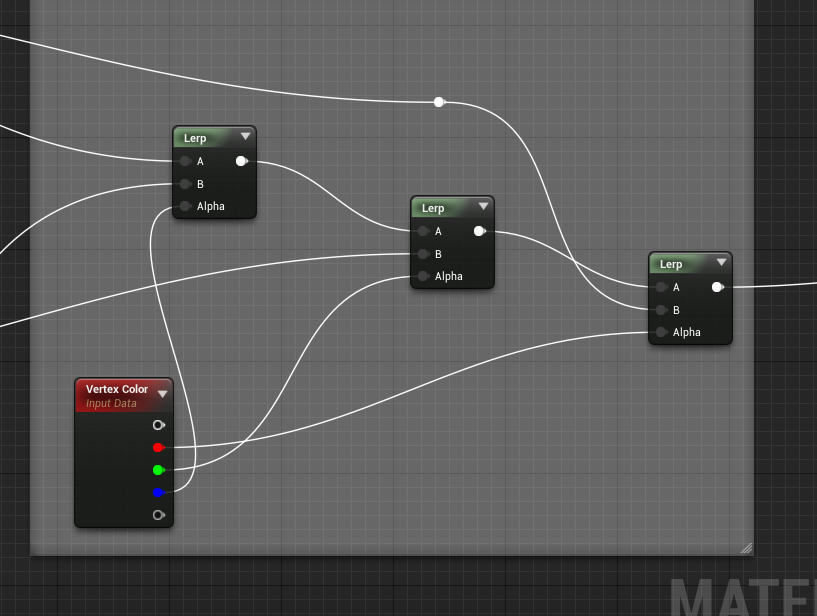
this is how you blend your three layers
(if this is the latest master I have, forgot to pull from our repo)
each color is for a layer
sacred dune
languid shard
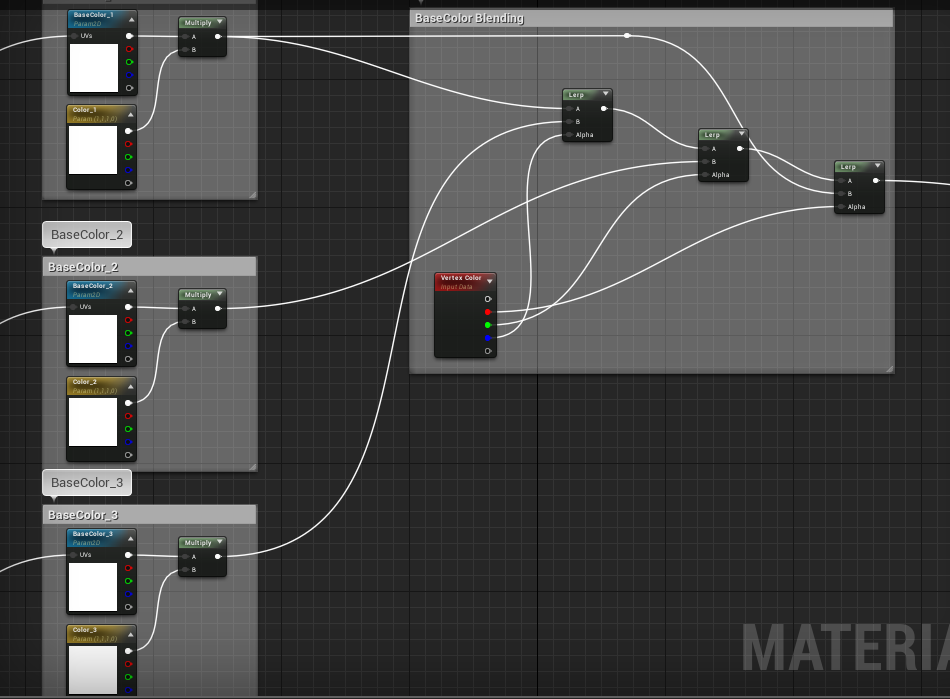 sacred dune
when i paint i get strange things
languid shard
are you painting on the right channels even ?
if you are not sure, just paint on a single channel
 sacred dune
i just check the red or green or blue channel and paint whit in it
i hav eto set the color each time for Red, put some red ?
languid shard
yes, or paint only the red / blue / green with white to black
sacred dune
i dont change the color, never
ok i try
like in the video
when i use th eWhite /balck painting
the red channel is on
if i do Shift Leftclic i have blu
i dont get the order of painting
im testing in the same time sry
languid shard
well
I have the same color
in RGB debug
you are substracting a red color to a white color
that's what it'll give you in the RGB color space
switch to Red only debug
fierce tulip
fooking win10, fooking engine not responding to the "close" button but instead closes the app behind it.
languid shard
if you want to see the result in the RGB debug you need to paint with all channels at once
sacred dune
i painted the right texture with the right color chose from color picker
i think thats it ? right N
languid shard
well this is how it is supposed to look yes
sacred dune
and more vertex i have the more transition quality between i have ?
languid shard
yup
each vertex is actually a weight for your lerps
more vertex = refined transitions
languid shard
bah, trial and error is the best teacher
sacred dune
i was trying so hard with the white and black painting on it, by changing channels
never painted the color i intended
but in every tuts i see the only check the channel box of the vertex paint and stay white, and everything its okay for them , how so ?
languid shard
¯_(ツ)_/¯
sacred dune
if i want to use 4 textures i must use the alpha and i understod there is some tweaks with it ?
languid shard
yeah
but at this point you might want to use layered materials if you want more than 3
languid shard
no problem 😃
 grim ore
watch out for material layers in the preview tho. It's got an unstable nastiness to it especially when using reset or undo lol
so save often, and then save again to be safe 😛
fierce tulip

Note: YT will probably rip out the music for obvious reasons, so in case you want to hear it with a tune check out: Imho I prefer the 2016 reel, but that mig...
 dawn linden
Um, minor sanity check please. I can't seem to see the 'New Post' button on the forum. Nor remember where it usually is or what it looks like... 😉
Have I lost the plot or are the forums being funky
Okay, please ignore me. Solved!
azure shore
lol
So would a simpleish obstacle course game be a good place to start? Sluggerfly, the creators of Ben and Ed, a ue game, Ben and Ed 1 is based around obstacle courses, it would probably be inspired by that
Like I could build from that?
wide lark
Do you have movement in characters yet?
azure shore
Oh yeah, I can make crouching, swimming, sprinting...
In work in progress I posted a video a while ago
It's a little outdated but sure
All it's missing is recent animations and basic gun mechanics that I've added since
So there's some options
Like infinite runner mode, time trial mode
 frank escarp
pretty good question
too bad epic downloader isnt a patcher
just redownloads everything every time

 errant briar
hey!
i'm learning unreal spent hours today and well... all that for it not to work
is this chat for helping?
 queen arch
man, I've been learning unreal for the past 6 months
errant briar
about 3 days 😃
errant briar
maybe ill start with the basic http://prntscr.com/io6vi2

is that the correctly one for jump?
queen arch
Also if anyone can help me? Does anyone knows how can I see the vision cone when using AI Perception?
ok
what are you trying to do?
errant briar
there was gamepad, touch and jump so...
queen arch
yeah, it should work
errant briar
so the hud isnt working. Now i know where to look
queen arch
quick question, have you set your Default energy at Begin play?
errant briar
Yes to 10.0 in the details as a float
queen arch
hmmm, do you know that you are going to have to turn this into a percentage for the hud to work?
errant briar
don't you make the % in the hud menu?
queen arch
you can make it in any bp you want, but you must turn the 0-10 scale you have into a 0-1
50% energy must become 0.5
azure shore
If a game character has a double stripe on his trousers would that be copyright
queen arch
and that end number, feeds the hud
errant briar
mhm your right there is no %

There is a Progress set as a Precent with the My Character.Energy
restive eagle
is there a reason why select node doesnt work in anim graph?
instead have to use blend pose by bool...
queen arch
ok

Announce Post: https://forums.unrealengine.com/showthread.php?101051 This Training Stream takes a look at Blueprint Communication. We find that Unreal Develo...
is a must see tutorial
because it has some of the most essential info
it also has how to do the hud you want
errant briar
im following https://docs.unrealengine.com/latest/INT/Engine/UMG/QuickStart/2/index.html im not used to video tutorials
In this step we will hook up and display the Health, Energy and Ammo of the player on our HUD.
errant briar
Thx will watch that also
queen arch
this guy is a god at explaining
errant briar
Mhmm i just don't like video tutorial as im slow heh
wide lark
I had jump explained really easy to me in like 5 steps
Under Project settings under input, add the Jump input and choose the key (space bar?)
Go under the character blue prints, Space Bar press input>press- Jump, release-stop jumping
Which is what it looks like you did :D
errant briar
i found my mistake
In this step we will hook up and display the Health, Energy and Ammo of the player on our HUD.
bahhh that one
 errant briar
i think i was doing 2 things at the same time
wide lark
Health = Energy?
wide lark
Can you kill yourself by jumping? Lol
So was it an accident to combine those?
Maybe someone can talk me through this to find my derp
Anyone have any tips for making a dash feel more natural when hitting shift+key? I can get shift+key to work but k+shift seems to be fighting me.
The engine wants me to hit shift+key when I want key+shift to work.. as in, being able to dodge while moving in that direction instead of having to stop then dodge.
If I set it up for key+shift then it wont work with shift+key.. but if I set both up, then the dash triggers as soon as I hit either button :/
I want it to be able to do D+Shift or Shift+D naturally.... Basically I want it to dash when the dash button is pressed but I want it to dash the direction I press with it
Like if I'm walking right with D and hit shift, I want it to dash to the right. If I'm standing still and I hit Shift, nothing happens even if I don't release it but as soon as I hit D with it held down, it should dash right. But this needs to work for WASD
Kind of like Dark souls dodging if possible but I can only seem to get plus style dodging to work
All the guides I keep finding are for double tap dashing, not 2 button dodging
errant briar
last question http://prntscr.com/io7nsj

it should show up no?
jump => print var => energy
@queen arch still here?
maybe ill take abreak /
queen arch
tell me
errant briar
I remove all the jump and i can still jump
heh is that normal or.. maybe im editing the wrong file
that image i posted at 20:15
queen arch
that doesn't look right... have you recompiled?
also right click the jump node and select "find reference"
see if there is another jump in your bp
errant briar
only says this http://prntscr.com/io7shl i think the problem is jump the jump
 queen arch
I don't know...
errant briar
i hate it when i do something simple but it fails and take time
fierce tulip
+1
worst one ive had was for littlebigplanet. changed the color of one tag (variable) and due to the post processing it looked identical to another color. took me and my buddy 3 days to find the problem.
 graceful grove
Everything I know about BP I learned from LittleBigPlanet and other true stories 
fierce tulip
lbp logic might differ from blueprints but it can be just as powerful in the right hands
graceful grove
Can't wait to see the madness of what can be done in Dreams
 calm crow
Ok, it was only to notify you
 maiden swift
It’s mentions, not magic. What’s the problem?
I guess it was deleted whatever it is, so I have absolutely no context as to why I was mentioned.
fierce tulip
@calm crow mentioned that our channel is mentioned on another discord channel. told him to dm you about it
he should be able to give you moar details
maiden swift
Ok.
fierce tulip
@glass imp 2nd time, 2nd warning. only post that stuff in #share-your-stream do it again and I wont be so kind.
you know your personal collection project needs a do-over when: https://i.gyazo.com/8348bb1e224b4de50914b185ba91fd62.png
 paper kernel

 cinder iron
Naruto XD
paper kernel
then again, I have similar project laying around too that holds mostly used marketplace assets for migration
because "audio files is not compatible with newer engine version"
queen arch
Guys a little help with AI perception?
queen arch
Ok, I just figured out that AI Perception isn't as god as running a good old capsule trace
 coarse wigeon




 floral heart
Is there an official source of information for AI Perception? Curious, as I couldn't find a doc page on it.
queen arch
There isn't one
 arctic gyro
This chat is unreal
faint cedar
UE4's spline system is driving me insane
All I'm trying to is to create a simple damn road tool this should be simple
frank escarp
you sure thats vertex paint?
sacred dune
yep
frank escarp
then its a reaaaaaally high res mesh
sacred dune
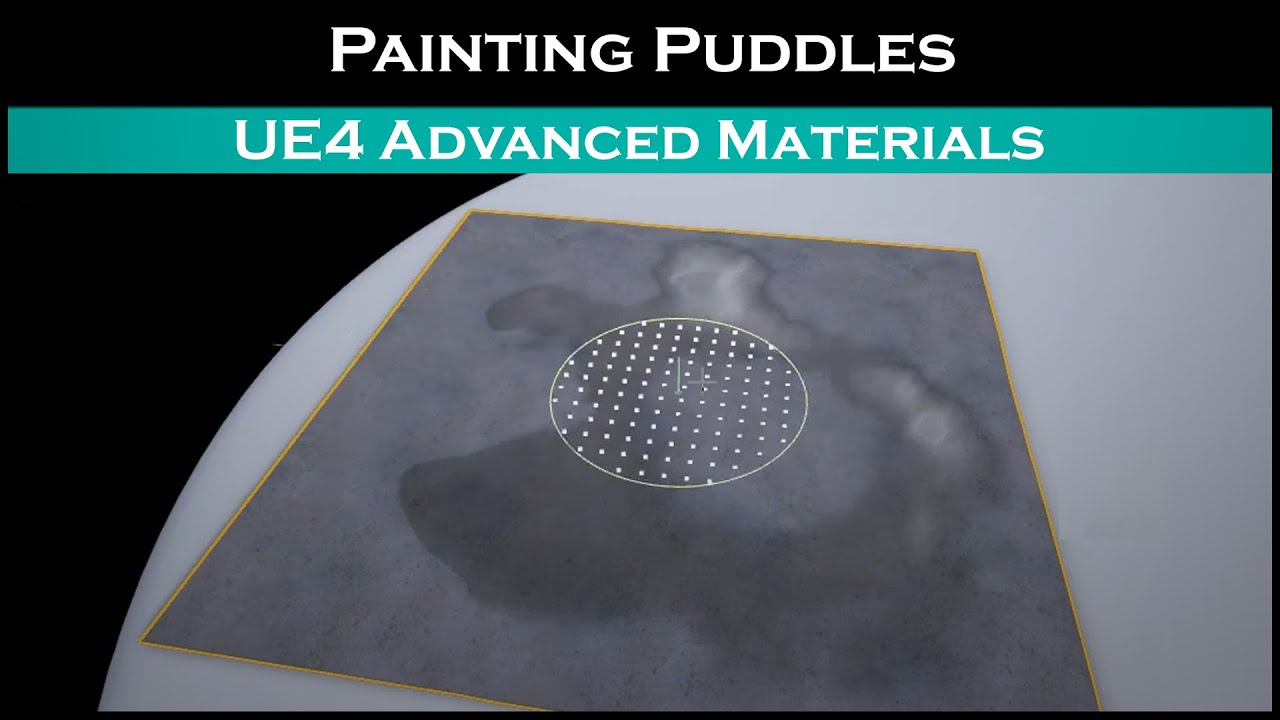
just a nice chill tutorial showing you guys how to paint a puddle on concrete. Hope you enjoy
frank escarp
man
that is ridiculously high res
so high res you are basically painting texture at that point
the idea of vertex paint is to add wear/tear/puddles, that kind of thing
stuff that is not a complete material change
but something "added" to the material
you also often blend it with some kind of noise
sacred dune
yeah its my goal, for now i have just used inputs for testing but i want to add wear /tear and puddles
sacred dune
in the shader?
frank escarp
yes
you normally use the vertex color alongside height blends
like landscape painting
sacred dune
but if you make some corridors how add theses effects? just decals ?
i thought it was simplier with vertex paint 1. clean 2. dirt 3.rust 4.puddle
frank escarp
yeah, thats what they are used for
for example, you have a metal material, and use the vertex color to control the "amount" of rust
more color, and the material gets more rusted and peels off
more dirt, the material increases the rougness and probably blends some grey on top of the base material
sacred dune
but i must have some very high topology