#ue4-general
1 messages · Page 194 of 1
 plush yew
 wraith saddle
Hey all, i was wondering does anyone else have the annoyance of VS opening twice when ever they open a c++ class through unreal ?
wraith saddle
ah ok :p as long as i know it isnt specific to me, i will look into it thanks
 sudden tendon
hey guys i have a question about using unreal engine for rendering things
i've recently saw this one guy who speicifcally used UE4 for rendering out his characters which is very weird.
why would he use ue4 over a traditional rendering software?
are there some advantages i am not aware of?
this is the guy im talking about here

how many polygons can ue 4 take without droppign below 30 fps at highest settings?
cuz im thinking of trying out using ue 4 for small animated scenes for my daz figure renderings
 frank escarp
@sudden tendon if you use sequencer, you can render one frame a png at whatever FPS you want, to then composite
so you can have like 5 fps and just export it as a video secuence at 30 fps
sudden tendon
@frank escarp does taht affect image/render quality
so if I'm getting this right, does that mean you can "increase" quality of the "render" by decreasing fps???
sorry im not too familiar with how real time rendering works here
so if my character model has about a million or so polygons would that probably require something like that?
plush yew
@sudden tendon A million polys is fine it'll run fast
sudden tendon
@plush yew at what point will it drop below 30 fps if im running a 1080 ti sli
im trying to see how high of a poly model i can bring and still animate
plush yew
Depends on many things
 tall pendant
polys are pretty much irrelevant nowadays
plush yew
Your scene complexity, post process FX, animation complexity, light count etc
Also UE4 doesn't support SLI afaik
 urban gyro
UE4 doesnt support SLI
i think the NVIDIA branch does, but don't quote me on that
but then again if u wnana render
you probably wouldnt mind having VXGI
so give it a shot
also make sure to have all ur settings on Cinematic
 obsidian nimbus
if he wants to render it doesnt matter what fps u get and a billion poly is fine
well a billion might be a tad high
urban gyro
LODs will kick in
obsidian nimbus
it will just take longer to render the video, the fps wil be whatever amount u set no matter what hardware u run
urban gyro
1 billion polys and 120 fps , let it render and go to sleep 😄
obsidian nimbus
no idea what time it would take
obsidian nimbus
doubt it would take that long to render infiltrater demo on 120 fps
urban gyro
rig specific so its anyones guess
obsidian nimbus
yea
it renders hella fast compared to blender
I think it wil render it faster than it compiles the shaders
urban gyro
where does it happen?
obsidian nimbus
sequencer
obsidian nimbus
hmm, im not sure, my vid card is underpowered for my rig tho
i think both are a bit of a combo
urban gyro
would be nice to know, but i cant be arsed digging for it
imma go play some mankind divided and suffer the Dawn Engine's atrocious level streaming.
cya
plush yew
4.19!
 bleak elk
Wut is this? https://i.imgur.com/dXmWoTI.png
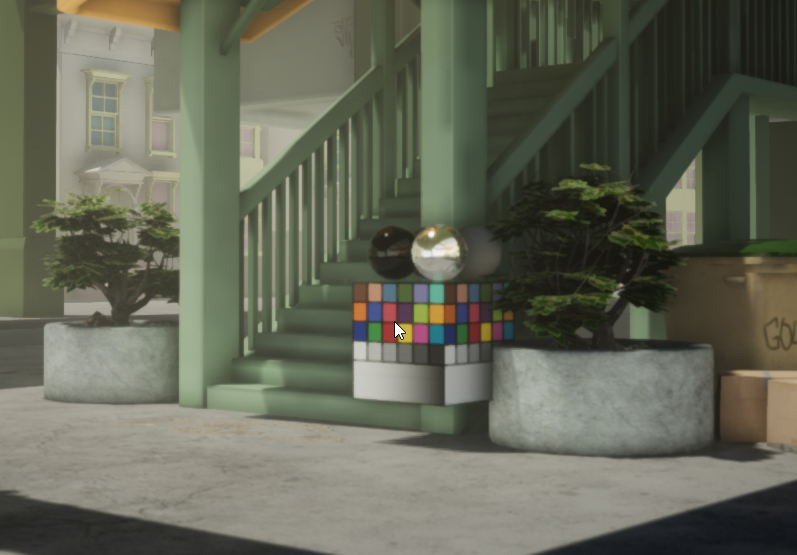
CTRL+ALT+\ makes it show up..
Shocked me.
 grim ore
It's just the \ key, it shows the preview mesh
by default it's the color calibrator thingy
bleak elk
ahh thanks for that
 azure shore
Hi, would anyone know how to have custom body sizes in physics assets?
plush yew
@bleak elk what is this cube?
azure shore
Because I have problems with body parts that won't let me make them smaller than a massive ball
So I'm not able to have a head body or fingers meaning they still animate and don't collide whilst ragdoll
 versed pawn
Hey guys! I've imported a bunch of 4k textures and I try to make a material for them, but it shows blurred for some reason. I'm on 4.18. Any one else encountered this?
I have never encountered such thing before
 oblique sorrel
So, my launcher stopped working
First I had to wait a few minutes to switch tabs
Now all it shows is
azure shore
Could you not try right clicking the icon in the task bar and then clicking unreal engine?
oblique sorrel
Not really, no:
Okay, I restarted it again, and it logged me out. I logged back in, and now the launcher at least shows something.
Still can't open Learn, Community or Marketplace
 spare steeple
is there any reason packaging my project for windows on a source built engine would take literally hours and start taking up significantly more space than the project size?
literally ran out of hard drive space after over an hour packaging a project that usually took 10 minutes
plush yew
how do I get click events working on first person char bp?
grim ore
clicking the mouse on objects? you need to make sure mouse click is allowed on the player controller you are using for that character
plush yew
it is
grim ore
then click events should work and any objects you click on should receive the clicked event.
grim ore
yes on the player controller
plush yew
yeah, so using event begin play and get player controller and a set enable mouse click event should work
grim ore
Player Controller -> Class Defaults -> Mouse Interface -> Enable Click Events
plush yew
but where do I find the player controller with the first person blueprint?
grim ore
I beleive setting it like you are doing as well should work. You would create a new controller and assign it in the game mode
plush yew
I just tested on a new project
same thing, it doesn't work
inside the first person character blueprint,
grim ore
and the object that is receiving the click event?
grim ore
It certainly seems like it. I have never used the node to change it tho, only ever thru the controller
plush yew
then how do I make a controller?
grim ore
I just checked, what you are doing should work.
how are you enabling the mouse cursor?
Are you setting it to UI mode? if so that will not work.
as for creating the controller you would create a new BP and choose player controller
plush yew
no
I am not setting it to UI mode
unless that's the default, I guess
do I have to have a pawn for a player controller to work?
grim ore
then click events wont work
plush yew
what?
grim ore
its mouse clicks or touches from mobile
grim ore
it would have no idea where the mouse cursor is if it's not shown
if you mouse over the On Clicked event it will tell you the requirements
but yes you need the mouse enabled and showing in order for it to detect the click
plush yew
that's.. weird, I got it working before without the mouse being shown
the mouse is not supposed to be shown for this to work
grim ore
are you using the center of the screen as the "mouse point" ?
grim ore
well I mean how do you know you are clicking on the item?
if you have no visual indicator of what is being used to click on it
plush yew
well, I thought that it will work like raycasts work
grim ore
ok, the raycast needs a point to start from. How are you determining that point?
plush yew
the camera
grim ore
what part of the camera?
plush yew
middle of the screen
I'm getting confused
because I got it working without showing the mouse cursor before, this way
I just can't remember how
it was with the first person too
not custom
grim ore
technically you can get it to work without showing the mouse cursor but it uses the cursor, even if hidden, to determine where the click even it firing from
plush yew
so, how do I do that then?
how do I let it know the mouse is in the middle of the screen?
grim ore
what you are doing does that, the problem is the mouse cursor is moving even if it's not being shown
plush yew
I thought the mouse was locked in the middle of the screen
grim ore
it's not
plush yew
can I lock it then?
grim ore
maybe? I really have never tried. You can always set the mouse position on each frame to the center and that would "lock" it
grim ore
you can use the Set Mouse Position node
then set it to the center of the screen every tick
normally tho people would just actually use a raycast event from the center of the viewport when trying something like this. The click event is usually used for the mouse when choosing items visually and such.
grim ore
line trace
grim ore
channel or objects. It just depends on what you want to accomplish.
 long comet
is there a way to know how many units sold a game on consoles like steam spy?
plush yew
well, I want to click a mesh
grim ore
objects if you want to filter by object type, channel if you want something like visibility or a custom channel
plush yew
well, how exactly would I use it for clicking a mesh?
do I even put the linetrace inside of the first person blueprint in the first place?
grim ore
line trace from the center of the viewport, get the item you hit, tell the item you hit it with a custom event. probably the easiest. You can expand this using interfaces to have it only items that you want to be clicked.
you would probably put the line trace wherever you want the input to be as your "fire/click/interact button" event would be what would cause it to happen
here is an answerhub with someones answer to this question , https://answers.unrealengine.com/questions/297279/line-tracing-question.html
 latent moth
Hello everyone of you beautiful unrealers! 😛 Fishing for ideas on how to do an ACOG animation like this one: https://gyazo.com/e3abfa1de4a29e34817120a98295b71e

How would you do it?
I already have recoil on the gun
I was wandering if playing on the field of view would make any sense, but what I've tried is not achieving this at all
plush yew
That is likely an arm / gun rig animated
latent moth
so add the camera on a spring arm?
plush yew
No you animate the weapon and arms in a package like Maya and bring in the animations to UE4 and play them back
latent moth
ah
I have an FPS indeed, but full body render (it's an MP)
I want my character to see their feet, their shadow etc
ok will try to get creative
plush yew

Just a short reel for a college assignment. I did some view-model things, and studied some character animations from various sources such as Halo and Smash B...
Like that
latent moth
yes i know what you mean 😃
plush yew
You can still get them to see their feet etc but you'll still have to animate to get good looking kickback
grim ore
those are the blueprint functions that are above that screenshot in the other screenshots.
latent moth
😄
plush yew
OH
I thought it was referencing it
yeah alright
and what is that hit actor thing? @grim ore
grim ore
The Hit Actor Variable? Just a variable they are setting based on what actor was hit.
plush yew
oh
grim ore
that is mainly just an example of how you would use a line trace from the players camera out and then do something based on what you hit.
plush yew
oh
and what's that pickupobject thing?
also, I don't think I can actually reference an ingame object as a hit actor, can I?
grim ore
that pickup object is just a custom function he is using.
plush yew
could you explain how I'd use the raycast for clicking a mesh?
I know how to send out the cast
but I don't know how to reference what to look for
grim ore
make an event on your blueprint called "WasClicked" or whatever you want to call it and have that do whatever you want.
then you take the actor that was hit, cast it to whatever your blueprint is, and call the "WasClicked" event
if you want to make it generic where multiple blueprints can react then you would look into using interfaces
grim ore
alternately if this is all too much you can just look into doing it like you did before and just make sure the mouse is set to the middle of the viewport every frame so your click event fires from it like before
plush yew
the concept is: 12 notes
all notes clickable
notes draw text on the hud
I want it to detect which note I clicked
grim ore
are your notes not blueprints? you have a click event already that you showed
plush yew
that's not the game
this was just a new project to test click events on
and, no
they are not blueprints
grim ore
they are going to have to be if you want them to do something when you click on them, else you have no where to put the code to do something when you click on them.
plush yew
they're a skeletal mesh (I was trying to actually use an animation to open them up and make the text visible, but abandoned the idea because of the lack of knowledge on the how to)
how do I make them all a separate blueprint?
they're all spawned from one mesh
grim ore
You can make one master blueprint and make the skeletal mesh configurable and any other custom stuff configurable then put one blueprint into the level for each item and set them up in the editor
or you could make one unique blueprint for each item
plush yew
which should I go with?
all that I want it to do when clicked on, is to draw text on the hud
grim ore
generally if things are going to be similar you would use one blueprint and then just customize it. It sounds like you have the same item just 12 items so 1 blueprint that you use 12 times would be better.
plush yew
but all the notes each have different text
grim ore
and that text would be just a variable that you set on each note individually
plush yew
a variable?
grim ore
yes
at this point you might want to go to the learn section and go thru some of the UE4 basics videos. It might help clear up a few of these issues.
plush yew
I know what a variable is
but why use one?
I thought just using a draw text node was enough?
grim ore
yes but then you would be setting the text inside the blueprint which means every copy of that blueprint would have the same text. If you used a variable to set the text instead you can make that variable editable and each copy of the blueprint could have it's own unique text.
grim ore
How do you draw it now? where do you set the text, the actual words being shown, at?
plush yew
Well, on the level blueprint
When the object is clicked, it draws text on the hud
The text is simply written there
grim ore
the text you write tho should be part of the node that has an input
plush yew
The draw text node has an editable section for it
grim ore
which means a variable can be used there
and you can then set the variable to whatever you want
plush yew
Oh so just swap variables based on the object?
But I still don’t really know how it would detect the object that’s being clicked on
grim ore
It's not making much sense right now because you don't have the concept of blueprints understood yet. If you get that down you would see how you can just drop a blueprint into your world, change a few things on it, and it would just work
getting the part where you can detect what is being clicked on is part of that as you would do the line trace, talk to the item you hit, and have it do whatever you want.
plush yew
But that’s not detecting it
And yeah it’s quite weird and doesn’t make much sense
I’d normally see if the object that I hit with the cast is the object I want
Or just some random wall
grim ore
yep you can do that by casting or by using interfaces
based on the line trace and the hit actor
grim ore
Casting is when you ask the item that you hit if it's a specific object. Interfaces are when you ask the item you hit if it can do something specific.
technically your asking for a specific type of object when casting and your asking if something "can" do something specific with an interface but close enough lol 😃
plush yew
So which should I be using there?
Hey guys I got an error that don't know how to fix, this is after downloading and opening my packaged game file
Did anyone get a similar problem?
or has a solution
grim ore
https://www.youtube.com/watch?v=EM_HYqQdToE , start with learning communicating between blueprints which should help you understand the line trace -> do stuff part

Announce Post: https://forums.unrealengine.com/showthread.php?101051 This Training Stream takes a look at Blueprint Communication. We find that Unreal Develo...
plush yew
I know communications
grim ore
as for what you should use both works, you just choose one based on what you want in the end
plush yew
it's just using cast
cast to blabla_blueprint
I'm more interested in the casting, I think
the other seems to be full of useless avoidable shadow work
grim ore
IF you are only ever going to want to talk to 1 or perhaps 2 items on your line trace then casting will be fine. If you want to be able to talk to many many different types is when an interface is useful.
plush yew
also, what do I do about levels being created in projects?
useless levels, I mean
well, again, 12 items
so
grim ore
IF you are using 1 blueprint class for them all then it would be casting against 1 class so cast would be fine. if you end up making 12 blueprint classes then an interface would be easier.
grim ore
you would add a new blueprint
plush yew
well, how do I connect all the items though?
just drag in, that's it?
and what is it supposed to be?
grim ore
Again this is all stuff that is explained in the introductionary documentation and videos. Your trying to jump in without understanding the basics
grim ore
you havent done it by yourself, and reading the documentation or videos IS help of others
plush yew
yeah, but I am asking direct questions right now
grim ore
your focusing narrowly on getting just the 1 thing done and skipping the rest, the how and why, for how it is done.
grim ore
I've explained the how. You would make a new blueprint, you would add in what you want in it (your mesh, your text), you would populate your level with these blueprints and set them up individually. You would then have your character line trace out when you hit your action button, talk to whatever it hit and see if it's the correct items to interact with, then have that item do whatever you want it to do.
the blueprint probably should be an actor if it's going to just sit in the world
plush yew
but before, you said only one blueprint
 south ridge
What's the question?
plush yew
how to use ray tracing, really
ray casting*
line tracing* whatever lol
I have 12 objects in the world (all the same mesh) to be interacted with, line trace should hit one of them, detects which, and acts upon the detected route
south ridge
Just do it
What's the specific question 😛
You just call the line trace function and handle the results
plush yew
well, how to get it to detect what I'm looking at
well, what I'm trying to interact with*
south ridge
It's all in the result of the line trace, in the struct
plush yew
the result of the line trace?
should the line trace even be in the first person blueprint?
and also, I don't think I can reference a mesh for the hit actor
south ridge
You can get the hit actor & component and go from there
plush yew
but, again, I can't just put the mesh inside there and connect it to hit actor
south ridge
Put mesh inside where?
plush yew
the blueprint
south ridge
You can
plush yew
to reference it
south ridge
You can reference pretty much any objects in UE4 from blueprints
plush yew
should I use by channel or object?
plush yew
target goal is just detecting my mesh
 teal tulip
@weak harness @floral pagoda I read you found some Unreal Studio thread ? I think Unreal Studio will be something related with cinematics, some new engine version with plugins and datasmith probably

 teal tulip
@grim sinew as you said that Studio version sounds like that new closed version or something with datasmith and paid plugins or like that
plush yew
I can't add the mesh into the blueprint @south ridge
south ridge
@plush yew you can
south ridge
No, you can
south ridge
Press "add variable" or "add component"
Depending on what exactly you want to accomplish
plush yew
which is?
plush yew
buttons?
plush yew
it's not a UI though?
it's a game object
so why would I be making buttons in the UI?
south ridge
You're not making buttons
You're clicking buttons
In the editor UI
To add a component or a variable to your blueprint lol
south ridge
You check which object you hit and then react based on what object it hit
lol
The object it hit (and the component it hit) are both in the struct returned from line trace
plush yew
well, how do I add the objects into the class?
south ridge
You press the add variable or add component button
Depending on what you want to achieve in the end
plush yew
what can I achieve in the end
south ridge
Anything you want
It's up to you
If you told me what you want to achieve in the end, I could possibly suggest what to do specifically
plush yew
well
alright, I'll explain again
12 notes, aka meshes on the map
the ray cast should look for if it hit a note
and if it did, which one
based on which one, different text gets drawn to the HUD
or if you want to, you can suggest how else I could make text appear
south ridge
Line trace. Take the resulting struct, get actor (or component) out of it. Get mesh of that actor, then show text based on mesh
plush yew
well, all notes are the same mesh
plush yew
hey, finally someone who speaks my language
south ridge
Or you can have all notes be of a same blueprint class and just have a variable that defines what note it is in that class
plush yew
well, I made a class
that's why I asked how to attach the notes to the class
because from the hit actor I would cast to the blueprint
plush yew
well, I don't know what I want
lmao
isn't it the same as what you said last
about the same blueprint class and all
south ridge
There are multiple ways to solve the problem you're having
tall pendant
so Datasmith gets out of beta?
teal tulip
Can be
or can be a suite new pack of UE4
with that plugin and others more
for Cinematics as said before
What I won ?
A banana ?
tall pendant
who knows 😄
frank escarp
@teal tulip you need to have renderdoc installed
and that plugin existed before, but it wasnt included
its a great tool when you want to know wtf unreal is doing rendering your scene
frank escarp
yup, gltf as plugin is how i tested it
what are you using, Master?
its all on the 4.19 preview
teal tulip
You can import dollars aswell
teal tulip
No what i show is the 4.19
plush yew
@south ridge hey
I want it so if I get into a trigger, (actorbeginoverlap), then text shows
the text is hidden by default
I want it to show
teal tulip
There is a new Resonance Audio plugin by Google @tall pendant
plush yew
the text is a component of the note
south ridge
Cool
south ridge
It has a flag called "visible"
plush yew
yes?
south ridge
And functions to show it and hide it
teal tulip
Python thing is here aswell for Editor scripts @frank escarp
plush yew
I can't seem to find it?
how do I even reference the text render component
and after that, how do I set the visibility
south ridge
Dude
Seriously 😛
You just go ahead and set visible to true or false on that text component. That's it
There's nothing to it
There's no special "get reference to it" and set visibility is a simple function
plush yew
oh but
Is there a console command to set the new 3D resolution in 4.19 from 100 to 200 for example?
south ridge
r.ScreenPercentage 200?
plush yew
this happens
south ridge
@plush yew I don't see what happens
teal tulip
@tall pendant @frank escarp baker system for meshes to bake the materials into a single one for lods or something like that
plush yew
"cannot find corresponding variable"
plush yew
but it's in the level blueprint
south ridge
You should be setting it on text render component
plush yew
yeah
so then how do I reference the text render component of note1?
and attach it to the visibility node
south ridge
It will be more useful for you to find that out yourself without anyones help, you know
plush yew
I mean, I thought it'd just work
I guess it just doesn't work and I have to use a text render actor?
south ridge
That's a basic concept and explaining it would be a bigger investment of time on my part than you just doing it
grim ore
None of the notes are blueprints so that's an issue. Second you would need to reference the NoteX objects if you are using the level blueprint then get the component from it. This all goes back to not understanding how the UE4 editor and blueprints work tho =/
south ridge
@plush yew Wrong. You can toggle visibility of the component
teal tulip
Screen Space landscape lods means vertical logic @frank escarp awesome bananas
plush yew
so I get children components of note1?
plush yew
xD
south ridge
Have you tried actually looking on what kinda things are accessible for you from the actor that contains the text rendering component? Though this is probably the wrong way to approach solving this in the first place
If your notes are custom blueprint actors, you should just give them (or their parent class rather) a function that shows or hides the text or something like that
plush yew
what the hell do I do I thought I could just frickin do it xD
they aren't a blueprint actor
they are just meshes
skeletal meshes
south ridge
Cool 😛
south ridge
Specifically the part about blueprints and the basics of blueprints
plush yew
just tell me xD
south ridge
I'm telling you outright - you want part 1 of the tutorials on blueprints
south ridge
Fix it by reading books about UE4 which are not tutorials
And watch videos which are not tutorials but are about blueprints
plush yew
oh my god xD
south ridge
Just look at screenshots for suggestions on how to experiment with blueprints and how to find different stuff in them
south ridge
Like how to find variables inside blueprints and the such
You don't know how to search for variables and functions inside blueprints apparently
south ridge
Well sure. Now find the variable for text component in there
And the function for set visibility
 weak portal
BlackFox you re too nice. @plush yew have the decency to learn the basics through the documentation available before asking questions that shows you re in over your head atm
south ridge
@plush yew No that is not the right place to search for variables and functions
Try again
plush yew
oh my god
it asked for a corresponding variable
I made a variable
tried assigning it
this makes no sense
south ridge
It makes no sense because this isn't what you're supposed to do
You need the variable for the text rendering component and then a function for set visibility
plush yew
then explain what you mean by "search for variables and functions"
I just made the variable
plush yew
and tried assigning it to the text rendering component
south ridge
I did not say
"create a variable or a function"
There is a difference between two
You need the search for variables and functions part right now. We'll get to adding variables later
Adding variables is like, part 2 of blueprint tutorials
plush yew
x.x
grim ore
this is absolutely not the way to do it but I was curious if you skipped the BP route if you could do it and yes you could. Take this for what it is, the completely wrong way of doing it but it works https://i.imgur.com/y6h8pZi.png

 weary basalt
@plush yew You really need to stop, take an step back and go and research (youtube perhaps) how to navigate the editor.
south ridge
@grim ore That's pretty good. That is a conceptually right solution, but will not work as-is. @plush yew should definitely study that picture
plush yew
and I don't get what he means by searching
grim ore
well yeah it won't work for him as he is using SKM not SM but it does function based on what he showed
south ridge
Yep!
grim ore
I just couldnt be assed to find a SKM to used instead of a cube lol
plush yew
he's getting child component
which is totally not what I wanted to do in the first place
grim ore
hey I said this wasn't the right way to do it
south ridge
Yes. That's the part that you need to replace to make it work for your case @plush yew
plush yew
so, replace with what
grim ore
yeah if he just copied it as is in his FP character and replaced the Cast to StaticMeshActor to Cast to SkeletalMeshActor it would atleast function
I've just literally never set up anything in a level before that was not a blueprint lol. well nothing I was going to actually do anything with.
south ridge
@plush yew you replace it with the right blueprint nodes
Specifically...
You search for variables and functions relevant to what you want to do
And then use them
😄
Using the search variables & function bit
of blueprint editor
south ridge
Wrong, try again
plush yew
wtf
south ridge
That lets you manage variables & functions of current class
You want to look for variables and functions of other classes
 frigid pike
In class settings ?
south ridge
A text render component is a class (not a blueprint one, but a C++ one) that can be used within blueprints
south ridge
You know about as much as I do about chances of this working
plush yew
0%
south ridge
It might work, I don't know the exact hierarchy of your note actor
 round quiver
what is a unreal engine "preview"
is it like a beta
mine automatically installed 4.18.3 after a few months of not using unreal
and I'm not sure I want to use an unstable version
plush yew
child index should be the number of the component?
grim ore
4.18.3 is not a preview version, it just might be a bug. try relaunching if it shows preview for that. 4.19 is in preview 5 right now however.
south ridge
Stability decreases from left to right
round quiver
 south ridge
You'll be fine with preview versions
The difference between Preview and Release is in maintanence
grim ore
One thing I realized when I tried testing against a SKM is your going to have to make sure your collision is working for it lol. Stupid gun in the FP Template does not have the physics asset turned on by default
south ridge
You can expect that release version will not get any major updates and only most important fixes
round quiver
anyone here use CLion with Unreal?
plush yew
AHA
round quiver
I dont want to use that plugin to get intellisense working since I dont want to buy it yet
south ridge
@plush yew wow you're getting somewhere, congratulations 😛
grim ore
I don't know of how much more help anyone can be directly @plush yew . I gave an example of a line trace that would toggle the text render on an item in the scene using the same setup you had. beyond that I dunno. I can say using the Level Blueprint to try and manage all of this is going to bite you in the butt if you actually turn this into a full project
south ridge
Now there are just a dozen more questions for you to solve that can be answered faster by any tutorial or any video of people working with blueprints
weary basalt
Or you could have searched Youtube for the exact same thing except in video form....
south ridge
@plush yew I could but that would require me to expend more effort than you
plush yew
I am putting effort into this
south ridge
And with most people who are eager to help you, the only basic condition is that you must be expending more effort than the person helping you
south ridge
You're spending your effort on wrong things
You should look up videos of people working with blueprints
Not tutorials
Just videos of people working in the editor
I'm sure you can learn from their example to see what kinda tools there are
And then come back to us and we'll answer specific questions
plush yew
dude, I'll never get what is "searching for variables and functions"
I just do things
I don't work with words
I work with what I see
plush yew
I don't frickin know what I'm supposed to be looking for
south ridge
Doing a screenshot for you would involve at very least me getting off the couch
And then I'd need to turn on my work computer and stuff
plush yew
facepalm what am I supposed to be looking for
round quiver
plush yew
it doesn't matter if it's a video or a screenshot, I still won't know what I'm supposed to be looking out for
round quiver
`If You're a Help Vampire…
Now you know. Stop. Of course, it's not just that easy, or nobody would ever be a Help Vampire at all.
Before you ask a question in a community, try to find the answer elsewhere. This way you help yourself by stretching your mind and research abilities, and you learn things more thoroughly too. Plus it's good karma.`
plush yew
or looking at
round quiver
Keep troubleshooting. Often we learn that it's easier to give up and ask for help rather than persisting—when we'd get our breakthrough if we'd only delay giving up for another 10 minutes. Respect yourself, go a little further before giving up.
Google, of course. Try at least 3 or 4 searches before you give it up as hopeless.
Mailing lists, forums, and newsgroups. Chances are, you're not the first person on the Earth to have this problem. Luckily we live in an age where we can search the past. Check out these resources next.
Docs. Sometimes they seem impenetrable, but give it a whack. The more you learn, the easier the documentation will be to understand and decipher.
Ask your question—but phrase it differently. Instead of asking your question directly, ask "Has anyone has seen this problem?" or "Can anyone point me in the right direction?" Likely as not, someone will have been there before, and they might know a blog posting or other resource which can help you out. This way, you show you are respectful of their time, and understand your problem is (probably) not unique.```watch some youtube tutorials even if the sound is off just to see what kinda actions people are doing
south ridge
It's something you'll see any blueprint person doing
Because it's what they explain in part 1 of blueprint tutorials
plush yew
see?
weary basalt

In this video, learn the basics of the user interface in UE4 to help optimize your workflow. (00:04) - Introduction (01:00) - Opening the Editor (01:50) - Th...
 worn granite
Yeah its explained countless times, and watching somebody work in BP you can't avoid them searching for variables/funcs
weary basalt
Watch please
worn granite
BUT
weary basalt
For your sake
worn granite
You can also describe this as utilizing the context menu and filtering the valid actions of that graph
You literally cannot use BP without this feature
south ridge
You probably did. It's not just the thing we want you to find, but you need to understand how to use it to find variables and functions so you can start looking for them yourself
You need to understand the principle of looking for functionality in blueprints on your own
worn granite
^
plush yew
but that's not on my own
south ridge
And then once you don't find it, you can ask us about specific actions and we'll tell you what they are called
plush yew
it's seeing someone use it and not even noticing they're using it
because I don't know what I'm supposed to be seeing and looking out for
so I don't know when they use it
round quiver
ok I have a question
weary basalt

This video gives us an overview of the Introduction to Blueprints video series as well as jumps into a high-level overview of the concepts behind Unreal Engi...
worn granite
Yeah but you can work towards being able to know what to look for
weary basalt
Watch both those
round quiver
how do you C++ guys handle it
weary basalt
Series
round quiver
the compile times are pretty slow even on my 6700k
worn granite
you'll never reach a perfect understanding
round quiver
the intellisense is awful
worn granite
But you can have a good starting point
south ridge
@round quiver VAX instead of intellisense
grim ore
Don't use C++ was my solution to intellisense lol
plush yew
okay I give up, I'll just go to sleep xD
south ridge
And SSD speeds up compiling a lot
worn granite
@round quiver I don't compile all the time, and I use VAX
round quiver
yeah I put my project on an m.2 ssd
weary basalt
Disable intellisense, get VAX
round quiver
argh
worn granite
Also I can function without either its just a pain
south ridge
You'll be CPU-bound for actual compiling, but you'll be I/O bound for starting the build process
round quiver
I wish Unreal would just buy VAX out and integrate it
weary basalt
Aye
round quiver
the best thing would be to fully support CLion like Unity does with Rider
worn granite
IDK if you buy like 2/3 AAA games and don't play them more than you develop I'd say there's a strong argument for VAX there
worn granite
Oh fair enough
round quiver
I'm working on a 2D game anyway
which Unreal wouldn't be too good for
I was exploring using 3D voxel environments with pixel art
and I was doing it in Unity
but the map editors are straight cancer in Unity
worn granite
So I'm guessing you use CLion already?
weary basalt
If your new to UE4, get used to the process and how long it takes, its just part of having such an large and complex piece of software completely accessable to you
round quiver
I mean I prefer CLion yeah @worn granite
I'm not much of a C++ guy really
I'm more of a game designer than a programmer
worn granite
I've been kinda curious about it but haven't stepped into it yet
grim ore
pretty much what they said tho. Don't use intellisense, it's garbage in UE4 and will make you want to kick puppies.... sad little puppies...
worn granite
How's debugging with it?
south ridge
Btw
round quiver
I'm not that experienced with C++ though, so I wouldn't know the nuances
south ridge
Shift+Ctrl+F opens up solution search
Which is much more useful than intellisense for UE4
If you don't wanna do VAX, at least use that search thing
round quiver
in every UE project you make
is the engine's source code also a separate project in the solution?
round quiver
I would kill for a basic scripting language in Unreal
south ridge
It will be a separate project, yep
round quiver
hopefully microsoft hits that C# project with more funding
worn granite
round quiver
yeah I know about skookumscript
but it's not really for game logic is it
it's more like basic AI scripting type stuff
worn granite
sure
worn granite
It is?
frank escarp
yes
worn granite
I'm sure you can use it for AI
frank escarp
of course
round quiver
so you can do things like define a player controller system in it?
frank escarp
and its great at it
worn granite
But I'd think its perfect for game logic
frank escarp
its just a in-general thing
weary basalt
@round quiver Blueprint is scripting?
frank escarp
its a replacement to script basically
round quiver
not visual scripting @weary basalt
worn granite
But you gotta open the editor and hope BP hasn't shit itself
round quiver
I'll admit blueprint is very useful though
worn granite
 worn granite
idk
 cinder iron
↪
round quiver
yeah it's dead
arghhhh
3 solutions would be perfect: C++ for the nitty gritty, LUA/C# for the easy scripting, Blueprints for prefabricated objects
south ridge
Lua plz
worn granite
let's be fair to BP: You can do a lot with it, even a good deal of complexity. It might even be stable enough that you can start selling your spaghetti without too much issue.
cinder iron

How to determine whether or not you should be using Blueprints or C++.
this video sumarizes it
XD
the only problem I have with BP's is var reset that hasn't ben completely fixed (but improved) since 4.15
worn granite
LUL
I've had that problem as well, but I tend to find other problems that are a bit more serious as well
cinder iron
ayee I can talk to you long enough about unsolvable BP problems w/o touching the engine
as async loading big 2D textures on BP
XD
cinder iron
yeah, it's now about subobjects not being properly dealt on the engine, target fix would be around 4.20 or so
but yeah, it's funky because several bugs end up with the same result
BP var reset
worn granite
Yeah that'd make sense
I was a bit surprised when I saw a C++ UPROP drop its value tho
cinder iron
at least now Epic is aware of that
I have no clue how would I fix that, at least a friend of mine could reproduce the problem on a 100% bases
and he has the callstack
so that might help a lot
 meager dove
anyone know if the tool to find unused assets had been added yet?
 gloomy pollen
so it turns out scene capture component is fairly performant if you turn off a bunch of the show flags that you dont need 😍
 short dagger
does epic have any sort of support or email i can use? i tried help/accounts@epicgames.com but they say they don't monitor those accounts. someone has been trying to get into my account
 grim juniper
So I built the geometry branch because I'm curious about the Advanced Programmatic Mesh Creation shown on the roadmap and I am excited to try this out. This is only some of the BP nodes...
 dawn linden
Is this related to Geometry 2.0 or whatever they called the proposed CSG update? Seems like a totally nuts thing to expose to blueprint.
grim juniper
I think it is.
Once this is complete and in a stable release it'll be an extremely powerful tool
dawn linden
But those function names seem like things that would just be done through the editor UI. What use case would there be for doing things like bevelling and extruding stuff from Blueprint?
grim juniper
I imagine it like a non-destructive workflow similar to Houdini where you build the mesh using nodes and you can go back and change anything at any time.
So you can build tools to do complex mesh creation automatically without needing to do everything yourself every time
I've been wanting to build an in-depth road tool and recently looked into the Procedural Mesh Component. The problem with PMC is you need to do all the math for entire mesh yourself where as these new mesh tools take care of that for you.
dawn linden
Yep, that all sounds good. I can totally see the benefit of a nice procedural mesh toolkit. Just surprised it would have been exposed to blueprint script is all - my personal limit for complexity before going to C++ is pretty much anything beyond a 'for' loop 😉
grim juniper
lol
 floral heart
I've used a procmesh with a 'for' loop. Or two. Three.
grim juniper
There's a lot more here than I expected tbh. Like this for example
dawn linden
If anyone ever writes a blueprint that genuinely makes use of that node, I want to see it 😃
grim juniper
You never know ¯_(ツ)_/¯
 left steppe
Hi all. Previously I was able to work with datasmith plugin when I was on Windows 7 but now I upgraded my machine to windows 10 and cannot find datasmith for unreal. I searched under library using my login which i used to download. My plugin for 3 ds max is working fine. How can I get the plugin for datasmith installed ?
teal tulip
Don't know if you checked that
But the System is like a time line and there you add the Emitters
Parameters are that list of parameters global or to share between the FX
And the scripts you make an idea as are more or less like the Blueprint ones
Still don't looks complete
frank escarp
@teal tulip they might actually update the niagara code for final 4.19
given they are showing niagara in gdc
and might want to keep the secret
teal tulip
they said will show it this GDC ? @frank escarp
There are some commits from the last weeks
And this still need many changes
as the whole icons missing and the errors at compile
frank escarp
@teal tulip this is about runtime procedural mesh
its kind of an extension to the runtime mesh component and that kind of thing
 paper rampart
Tits
 polar zephyr
Edgy
frank escarp
@devout gulch they are very clearly keeping some features secret
have you seen the fortnite stuff, like the 3d impostor tool
or a fuckton of optimizations on distance fields
 devout gulch
I have seen that they are working on World composition
ie. added third dimension support
devout gulch
or I heard from friend that they started work on collaborative level editing
frank escarp
epic plz
devout gulch
(like Hero Engine)
frank escarp
@devout gulch that sounds awesome but i dont really see it
 sinful umbra
devout gulch
sinful umbra
devout gulch
I don't see it for foreseeable future, but I guess it's something they like for Fortnite
working on map bigger than 2x2 km is pita without it
either way the World Composition is in need of overhaul
that system is uterrly pain to work with
 buoyant pine
Hey hey, if anyone with UE C++ knowledge is available, do check the cpp chat, really need help with this one
frank escarp
@devout gulch true, it would be a big boost in fortnite
to just allow multiple people to work on the same map to tweak/place stuff
but seems a very, very big feature
not something you just add no issue
i see ways of making it easier, but then someone has to push the "final" level into perforce
devout gulch
yeap if fortnite will stay as popular as it is, I expect it on GDC 2019 (;
I'd imagine if you have collab level editing
you also roll your own source controll just for levels
with central server
or
person which started hosting level editor session has right to commit changes
frank escarp
yeah that would make sense
essentially the level is shared as some kind of multiplayer game, and one guy hosts
they do work, and host periodically saves
when its all over, host puts it on perforce and rest of people download it
devout gulch
yeah, and when working over big levels it's not like more than one person would need to do it
I can imagine splitting level designers into groups
with one of them dedicated as host
grim juniper
I'm re-watching the feature highlights stream from last year and Mike Fricker said an early version of the mesh editing tools would be in 4.17. RIP that plan.
 cloud cobalt
Though I think a few plugins are at least in the works on that, or available
grim juniper
I know of a paid mesh editor plugin, but I don't think it's scriptable like the geo 2.0 stuff is
I'm really surprised we haven't seen much progress on this recently.
cloud cobalt
Mostly it's because it doesn't mesh with modern workflows, and it's seen as a legacy feature
The intersection of objects that need more editing than a scaled cube and don't need UVs or baking is small
So mostly people just go up with a full asset in their prefered 3D tool
 grim sinew
If they made the new mesh tools basically zmodeler from zbrush, I think it would do well. Just have it do things like automatically cut holes and make bridges if you extrude negatively so far it penetrates past the backface, stuff like that. All the functionality BSP had, just with meshes.
grim juniper
subdivide all the things!
grim sinew
Oh god why
grim juniper
Super smooth 
just look at how smooth that is
That's just the default cylinder after a few quick tweaks using the mesh editor
After re-watching the stream where they had shown this off, they said they had also built a script for the lighthouse in blueprints using these tools. So that means they do work, at least partially. I just don't know how to get the blueprints to work.
It crashed when I was trying to select multiple edges, and accidentally clicked off of the mesh.
grim juniper
So, what's here works. It's just basic stuff, but if it were to be polished a bit and added maybe as an experimental feature to 4.20 or something I could see people doing interesting stuff with it. Programmatically building meshes can open a new door to level creation in Unreal.
Is there even a forum post for discussing this feature?
devout gulch
in 4.20 there is experimanl option to enable text based assets
 wary wave
'text based assets'?
 sudden agate
text files maybe?
wary wave
no
devout gulch
usefull
when you changed class in C++
and shit has gone to hell
you can at least try to attempt fixing blueprints by hand editing them in text editor
but actually
why blueprint with invalid C++ class just doesn't rever to default UObject
or show dialog to select new parent class ?
spare steeple
has anyone opened a map to find the bsp surface alignment was randomly adjusted without actually touching anything?
actually i think i know what it is...
i built the map with a base 2 grid and the editor reset to 10
opening the map probably messed everything up
wary wave
laughing at this noodley monster:
https://snag.gy/uPcYKx.jpg

had a quick look at it, and it's perfectly decent code for what it does
the doubling-back sections are early exits / break conditions, so it's all perfectly reasonable
but bugger does that look awful in BP
 mighty oak
Has anyone had to deal with this problem? I just opened the editor today to be greeted by this view, when last night it was working just fine....
To be clear the view settings are default and "lit", perspective mode.
The widget icons appear 2D facing up
and most materials are pure white or some sort of see through, like on the mannequin.
Maybe an issue with setting camera near clip plane to 0.0
I changed it back to 1.0 and re-opened my project and it looks fine now.
 silver crown
near clip plane to 0.0
Is that even possible? 🤔
Should have a div by 0?
FMath::Min(Z - FVector2D(X / 5.f, Y / 5.f).Size(), (FVector(X, Y, Z) - FVector(0, 0, 250)).Size() - 200)
Maths are beautiful 😃
wary wave
seems somewhat uneven?
using vertex locations rather than pixel?
(even then it doesn't look right?)
silver crown
Why? 🤔
cloud cobalt
Looks pretty rough
wary wave
well, using the math above you should get a fairly clean line
but in your image I can see islands of orange in the yellow
wary wave
gotcha
silver crown
cloud cobalt
Preview 6
sudden agate
I like the new Tessellation LOD
prior 4.18, I had to put Tessellation Multiplier to >= 8 to reach full tessellation. Now I have to put it between 0 and 1 and it automatically reduces Tessellation after some distance 😮
 turbid sand
maybe this bug has already been reported or resolved, but is there any reason why my imported sockets get altered when importing a new lod for a static mesh?
I've encountered the issue with multiple sockets as well as single-socket meshes
My attempts to search for this bug left pretty bare results
azure shore
can anyone tell me a node which detects if a key is pressed at a time?
like not the normal red one
like a true or false
ah never mind I just made a variable to make things simpler yay
azure shore
ugh I hate this hud thingey
 ruby robin
Hey guys. How to check number of draw calls? Not only mesh drawcalls in SceneRendering, but all current rendering drawcalls
devout gulch
btw, how does sequencer in Niagara works ?
is it editor only (I don't see any reference to Sequencer in runtime)
and sequencer Events/Curve is baked ?
frank escarp
@devout gulch you can use that sequencer to put events and stuff
the exact way how? wel...
the way i see it is that later, you will be able to do effects that have multiple emitters, and control exactly when each emitter fires, for example
but that view is probably as preview or similar for when you are editing a single emitter
devout gulch
before Niagara was moved into plugin
there were references to Sequencer Player in Niagara runtime
now it's all removed only left in editor
I'm curious if the exact timing from sequencer are used at runtime
devout gulch
I would love to implement something similiar in my ability system
frank escarp
thats why its designed like such a thing
with the "stacks" of functions
wich honestly is weird as fuck
so much indirection
devout gulch
Olaf is here he might know ;d
yeah I guess the Sequencer is somehow baked
but idk if to shaders
frank escarp
they probably just bake the parameters
the UI/workflow is just so weird
ridiculously weird
with all the parameters and the function stacks and stuff
have you tried to open one of the functions?
you go to its node graph
(double click)
devout gulch
yeah I will wait for GDC I need some idiot proof exaplanation how to use it
frank escarp
the functions at the right of the emitter/effect ui
devout gulch
It would be easier to actually code
frank escarp
i guess its becouse the shader ends up like: params1 = EmitterLifeCycle(params0)
params2 = NextFunction(params1)
and so on
devout gulch
it's definetly not artist friendly, but then I doubt most FX artists will be creating those functions
frank escarp
they will just use them
then all the parameters can eventually be exposed to blueprints i think
wich is the fun part
but honestly, a node graph would have been better
than that stack weird shit
devout gulch
Yeah you can finaly have only few effects and morph them at runtime
without loosing quality
frank escarp
not a full blueprint node thing,but something more limited to only those nodes and that
devout gulch
if you need big explosion just change some params instead of scaling entire ffect
 dark basalt
are information about OpenVDB coming on 4.19? I found today some libraries but not found nothing about it
plush yew
Hello, is is possible to make a hole into a mesh with a drilling machine? and how? with blueprint?
 rocky portal
For Equipment things that attach to Character...like a backpack
would that be a standard Actor with a Backpack mesh
or something with no direct Mesh that adds a meshcomponent to whatever it's equipped to (some things don't attach)
obsidian nimbus
could switch the entire skel mesh
 weary void
Yo
I do have a strange bugs with foliage
The bricks on the ground are foliage
When I get to close
Pop ! It disappears
Any idea how I could fix this please ?
azure shore
*too
Sorry sorry sorry
 bitter iris
Anyone got any ideas why this just messed up i imported it all right
grim sinew
Either WM or Unreal flipped one of the axis. Should be a checkbox somewhewre on importing about it
 jovial nova
Is anyone here familiar with cry engines alpha test slider? Is there a way to replicate that in a shader?
essentially what it does is shrink the alpha map (for foliage for instance)
 sleek spear
 brave lark
anyone know how to migrate assets without pulling every other asset in the game with it? I want to migrate a UI blueprint, but it's pulling all meshes and stuff too. I don't need that
south ridge
@brave lark migrate to a temp folder and then remove meshes you don't need
This will create errors about missing references you'll have to fix afterwards
 safe rose


 brave lark
the meshes and textures it wants to bring are not used or associated with this asset at all
 honest rune
for a semi-modular character creation mechanism, I'm thinking about just making default character models and designing noses, ears, lips, hair, etc models that get attached to sockets on the default mesh. Any problems with this I'm not seeing? (no plans on facial animation)
figured this way, on the character creation screen, player just cycles through the noses etc and Michael Jacksons it on for a fairly custom look
grim ore
If it's non realistic then that seems doable. A few mmo's do things like that. basically swap in entire faces as well, think like my sims or other cartoony games. If doing a person then morph targets are generally easier and give you more options
honest rune
I'd make swappable heads too if I could but I'm using customized mixamo animations and I wouldnt have the slightest clue how to skin weights on the fly
grim ore
about the only thing I could see being an issue is maybe seams being obvious for each part
honest rune
true. I could just inset them into the head a bit. No need for collision on the mesh itself anyway in my case
 wicked vessel
when making a material, if i preview a node that isn't linked to anything, what exactly am i previewing? does it show what it would look like linked to a specific part of the result node, like the base color?