#ue4-general
1 messages · Page 179 of 1
 pulsar badge
 gleaming shore
You will need to go into the material and add the rotor node, then plug a const1 into an axis with 90 degrees then plug the rotor into the texture UV
pulsar badge
ok
 rocky portal
How do you re-focus to game after a UserWidget is dropped from Viewport?
https://youtu.be/uLPVbCxiHiw

If you notice, I have to left/right click any time I transition out of menu
otherwise I have no mouse control
rocky portal
Opening/Closing a StatusMenu
pulsar badge
@gleaming shore that link u send me how do you know if its for UE4?
gleaming shore
You don't. That's why you check before you download
You will need to convert your .max file into an FBX or OBJ
pulsar badge
ok
 errant briar
imagine...... imgaine if the docs have a easy read option in firefox
 radiant quest
pulsar badge
radiant quest
pulsar badge
@gleaming shore is there away that imaige i showed you will follow the terrian because its going inside the ground
gleaming shore
To be honest. It sounds like you're trying to make something that's way out of your knowledge. I highly advise you watch some basic tutorials on things before you use them, you really will learn a lot
 tropic pilot
Question, im using the "Rolling Template" trying to create alittle game with this and i want to do this (https://youtu.be/9ariPx6M33o?t=9m31s) but it doesn't work 😦 why?

For the full tutorial playlist: https://www.youtube.com/playlist?list=PLZlv_N0_O1gaz6eETtIxcmUDnqu5A-8At In this video, we setup a basic car using all the de...
 celest creek
Hey all, what's the best way to avoid annoying pitfalls with vectors at 180/-180 degrees flipping seemingly at random?
😦
 stark linden
@celest creek would this help you? https://docs.unrealengine.com/latest/INT/BlueprintAPI/Math/Vector/MirrorVectorbyNormal/
Mirror Vector by Normal
looks like you're trying to get a reflection vector
or maybe I misunderstood the question
pulsar badge
How the heck do you place a Splines
I get out of it and i cant see it anymore
ll
lol
celest creek
@stark linden Yeah I guess so...
 lethal star
Hmm, ive never looked into it, but is it possible like in Unity to edit and view actor details during play?, getting a bothered by having to print every detail i wanna see to the screen 😛
 livid haven
If you PIE in the editor viewport, yes.
lethal star
ah thanks, figured it out
 ruby folio
Evening all. Just a quick question. Where do you get your textures from? I was thinking of buying premium on textures.com but I am just wondering if there is a better / cheaper option out there.
Thanks in advance all!
celest creek
@stark linden So I tested that - thanks, didn't know of that function - it does however return a angle in world coords, I need to know the difference between my two vectors (so in that image in the link it's the yellow angle)... and because the normals flip if it's around 180 degrees I get an inconsistent result (better explanation in the link again)
@ruby folio Either that or quixel megascans/substances.. depends on what you're going for.
ruby folio
Well im after photo realism. (As best as I can do)
I was thinking of using textures.com and bitmap2material
The issue is finding good high resolution source images
4k sized
lethal star
@ruby folio I got a substance license, and sofar they have a big library with substance share
another method would be to check out Quixel's library
ruby folio
Was looking at quixel but the cheapest package is 2k max
The megascans bridge app. Can I add my own images into that or just images from megascans?
lethal star
I imagine your own, but i dont have any experience with megascans/quixel
gleaming shore
Anyone have any ideas as to why my line trace wont hit the player (but hits objects?)
lethal star
@gleaming shore your player, or others?
gleaming shore
Every player
Say i have a box (object) the line trace will hit it but my character it just goes right through
 cobalt turret
Can anyone recommend me a book or even online course?
livid haven
I reall like Iain M Banks "Culture" novels. 😃
cobalt turret
haha 😉
livid haven
But no, I got nothing.
cobalt turret
No worries. I am just a bit confused where to start. I really wanna learn.
gleaming shore
Unreal has amazing tutorials and small videos on how to do stuff, 1 second i can get you a link
gleaming shore
Video tutorials demonstrating concepts and techniques in Unreal Engine 4.
cobalt turret
ok thanks
gleaming shore
Their YouTube channel is good as well, the developers go into depth about things
cobalt turret
ok thanks for the info, look forward to learning
 analog cedar
I'm not really tech savvy, what hardware upgrade would speed bake times? CPU?
cobalt turret
Hrm, hard to say.. What is your current setup?
pulsar badge
They good?
pulsar badge
@restive basalt You know any premade houses?
 restive basalt
@pulsar badge There might be some in the unreal learning section, not off the top of my head atm.
pulsar badge
Ok thanks
analog cedar
@cobalt turret i5 7600k, 16 gb ram I think 3000mhz, and a gtx 1080
cobalt turret
@analog cedar overclocking your cpu could help a bit, your gpu a bit.. but not leaps and bounds.. you have a powerful rig
 floral heart
Better Intel CPUs are expensive (7800/7900 series), AMD CPUs come with drawbacks.
But a swarm node...
analog cedar
Hmm ok, I guess baking is as resource intensive as I assumed
floral heart
There's an importing phase and a processing phase. The former might benefit from memory if the scene is large, but I'm not sure. The latter benefits from more CPU cores.
tropic pilot
Question, im using the "Rolling Template" trying to create alittle game with this and i want to do this (https://youtu.be/9ariPx6M33o?t=9m31s) but it doesn't work 😦 why?
For the full tutorial playlist: https://www.youtube.com/playlist?list=PLZlv_N0_O1gaz6eETtIxcmUDnqu5A-8At In this video, we setup a basic car using all the de...
im trying to make the camera rotate with the character (ball) while being behind the character all the time
like you see in the video
but my camera doesn't rotate at all :/
i think i can't do it like in the video i showed, cause my character "a rolling ball" actor dont use movement component, it uses Torque
 umbral tartan
Anyone have any recs for UE4 udemy courses/tutorials? Looks like they're all selling for $15 each.
@tropic pilot I just looked at the ball character in the rolling template. Just change the rotation of the spring arm to relative and you'll get it to spin with the ball. It's frikkin crazy. https://gyazo.com/b4f07a9cd01f24bc7c4db306b5be877b
 umbral tartan
I just launched a fresh template and only changed the spring arm rotation to relative. lol
It rotates with the ball character. Totally different from what was going on with that car tho rofl.
tropic pilot
ye but that's the results i want (like in video) with this ball
umbral tartan
Oh you just want it to rotate when you turn the ball left and right?
tropic pilot
ye
but it seems impossible
@umbral tartan if you can do it, hats of to you! 6 people including me has been brainstorming this and failed....
umbral tartan
does it have to be a pawn?
tropic pilot
i think so
tropic pilot
@umbral tartan anything? :/
 sullen sonnet
hey is this a good place to get some feedback on logo design ?
umbral tartan
@tropic pilot I'm looking into it. I'm thinking your best bet would be to parent a scene component to the ball (place it right in the center of it setting it to use world rotation), and then parent the spring arm to that. Then just rotate the scene component based on velocity. I don't think you want to care at all about the actual rotation of the ball.
umbral tartan
I suck at math, but I'm in the process.
tropic pilot
i suck to 😐
 woven falcon
guise, I need halp. ^^
is there a way to export a texture from unreal4 after I've edited it in the material editor?
like, could I export the Base Color after multiplying it with the factor 3?
I've made a wall material, and now I wanna make an Atlas material for a couple of miniassets that I'm gonna put on the wall (vents - lights - knobs) - but I still need the wall material so they fit in.
So I thought I'd take the textures out of unreal, make a new material out of that, and add the unique AOs and details onto that...
woven falcon
nvm, found out it's super complicated with render-to-texture blueprints... I'll just copypaste the whole tree into my new material 😄
 vale osprey
@tropic pilot you need something that could define “behind” for an object that is rolling ball
One way is to take two component, some small primitive that will be a root and your ball mesh which will be child
 fierce tulip
lol "super complicated render to texture blueprint"
5 minutes of work even for a bp newb like myself.
vale osprey
Disable all collisions on root and and attach child using physics constraint with free rotation and locked location
Enable physics simulation on both component, now the trick is to disable all rotations on root primitive, by enabling constraint in its physics properties
This way, child can rotate freely but parent will always stay oriented in one way
Then you can attach camera to root and calculate rotation of the boom from the velocity of your actor, or make a free orbiting camera, whatever works better
It you can ignore all that and calculate rotation of the camera from velocity and position of the actor, then you don’t need two components
 weary void
Hey, is there any way to use a mesh height in a material ?
I'm looking for a way to make the top of my trees move
And to make the bottom part of my pumpkin "biggers"
fierce tulip

 honest vale
it's an input
fierce tulip
i set it up to be a material function.
honest vale
😉
fierce tulip
can be replaced with a regular scalar input
fierce tulip
it allows for offsetting the gradient. play around with it.
if you want a more visual example try plugging in a "debug time sine" which will loop between 0-1 constantly
weary void
Ah that's cool
Ok, used a sine to preview it
Tho i'm trying to plug this in a lerp alpha
Your function returns a float 3 right ?
fierce tulip
V2
it planar projects a texture, but if you component mask the G channel you get a black/white scale value
fierce tulip
yuz. can use that for vertex stuff
weary void
Can't make it to work yet
So basically, if I use a simple grass wind
And lerp it with the alpha you helped me to make
I should have a top-only moving grass, right ?
fierce tulip
show the material
 plush yew
@weary void This might be a bit easier for your purpose: https://gyazo.com/d6342d516aefe299335f39584a9f9a1b
 fierce tulip
hehe same setup
weary void
Oh man
plush yew
Very similar
fierce tulip
i forgot about that node
weary void
The @fierce tulip allows more parameters tho
plush yew
Ah yeah. Whichever one works is good 🙂
weary void
Ok i got another kind of problem 🤔 i'm really bad with maths stuff
So my aim is to have a trunk with the upper part moving only
What I'm currently having is nice, the bottom part isn't moving, and the upper one is moving
But I want it to move from the middle
So adding 0.5 would be the solution, right ?
However, I end up having a mirror-like effect
Any reason why ? i must have failed something
plush yew
Try using multiply instead of add
weary void
I would just lower the effect
plush yew
Multiply is the correct way to change the brightness (intensity) of the gradient. Use Power or CheapContrast to control the smoothness of the gradient
 steel rock
Hello peeps I come with a very noob question and I will not apologize 😛
So what is a Transform in a component? I understand "a transform" as a term that basically means that the component is usable in a 3d space. I have read what I could find on it but it might be the language barrier or I'm just missing something and in any case I don't feel comfortable with my understanding of it. So if some laiman term explanation or any insight comes my way I'd be very grateful. thanks for the time!
plush yew
A Transform consists of a Location, Rotation and Scale
So a transform describes where something is, which direction it is facing and how big it is
 trim trail
uhm, im having issues with drag n drop
often content browser wont take file from explorer
i know i have to wait a little until proper cursor icon appears, but it still doesnt always pop importing
i havent had such issues few versions back
anyone have something similiar like that?
steel rock
@plush yew Thanks! That makes it so much clearer just having someone say it outright 😄 Thank you a bunch
tropic pilot
im seriously fucked 😦
no one can figure my problem out :/
im in the "Rolling" template and i want the camera following the ball so if i turn left then the cameras rotation will follow :/
vale osprey
rotate camera by velocity vector
plush yew
Is 16gb of ram good to use this engine?
vale osprey
@tropic pilot if you take just XY components of velocity vector and invert it, you will have a vector pointing in the dirrection where ball is rolling parallel to the ground. Just do get RotatorFromX on it and you get a wold space rotation for you camera
it will look bad if you use it directly, so ideall you would add one of the Interp functions to smooth out the movement
tropic pilot
can you plz show me an example? i have a sick headache :/
vale osprey
no
plush yew
@vale osprey is 16 gb of ram good for run theengine?
vale osprey
@plush yew
depends on what you do with it, recomended by Epic is at least 8 GB
trim trail
how much memory is needed is up to you
if you overdo with number of meshes/textures, it will hog memory badly
 fast nest
I just downloaded UE4 and haven't used it yet. Any tips?
 paper kernel
hm, how do I calculate parallel directional vector from a slope
if I know the slope surface normal and 0 angle normal
vale osprey
0 angle normal?
paper kernel
floor
vale osprey
so you need a tangent vector
the trouble is that if you have only normal than any vector on the plane is tangent to it, you need some other extra vector
like you characters right vector
then you can do a cross product between normal and "right" vector to get tangent
it will be vector perpendicular to "right" vector on the plane of the normal
or project on plane defined by normal and then normalize, forward vector of the character standing on the slope
paper kernel
mkay. do you know any more reasonable ways to calculate the friction force for resting object?
I know how much, Just need to know the direction
paper kernel
oh man, I was never good at this in school either
but I need to determine the direction of the slope, so I can apply force to both directions to cause the resting state
so I can add to it later and make sliding happen
vale osprey
I think I remember now, for normals pointing up, project normals' XY vector on the plane defined by this normal, there is a function for that ProjectVectorOnPlane
you might want to multiply it by some large number before projection os it doesn't glitch at very small slopes
this will be a vector that points down the slope
not normal itself but X,Y,0 vector from normal
Normalize( ProjectVectorOnPlane(Vector(Normal.X, Normal.Y, 0.0) * 500.0f, Normal) )
mkay lemme try it
yup, floor normal projected to slope normal seems to do the trick
thanks 👍
paper kernel
I don't think it does
or at least, the function doesn't do it
yup, 500f* does indeed return 500 long vector
vale osprey
you need to normalize the result
this is in case you have normal which is almost parallel to 0,0,1
paper kernel
yea I need to add sample history to this, very jittery because trace results are garbage
 cursive dirge
@vale osprey oh I just meant that multiplication by 500 is unneeded in that case
as you normalize anyway
vale osprey
it's needed for very small slopes as projection can hit float limit
I would go with something even higher, that 500 was a bit random
cursive dirge
but does it really make a difference?
on the result
curious about the difference on result with that multiplication and without
 pseudo parrot
hey, i'm not sure which chat this should go in really so i'll put it here.
I'm workign on upgrading from 4.14 to 4.18 however whenever i load or package the project the BlueprintCompiler is trying to compile (on load) 480-something data only blueprints that should never be set to compile on load, but because they're data only there are no class defaults and the bool isn't accessible as part of UObject so we can't change it in code. So how am I supposed to stop 480-something data only blueprints from attempting to compile on load?
 keen birch
That'd depend on the game, really
Like I said, that'd depend on the game 😛
Some games have larger levels with panning, some games have separate levels that are smoothly switched
pseudo parrot
you have two options, one, have one really big level that the camera just pans across,
2, load/unload levels as you need them for transitioning
plush yew
Any tips on improving Unreal game performance if you're on Intel HD graphics? I'm making a game and my friend has Intel HD and I want him to be able to play with me.
I accept even 1 millisecond tweaks
paper kernel
render scale perhaps
 grim ore
https://www.unrealengine.com/en-US/blog/how-disc-jam-reached-60-fps-on-intel-processor-graphics-using-unreal-engine-4 this was about the only article I have seen about it and its mainly changing to use the lighter renderer.
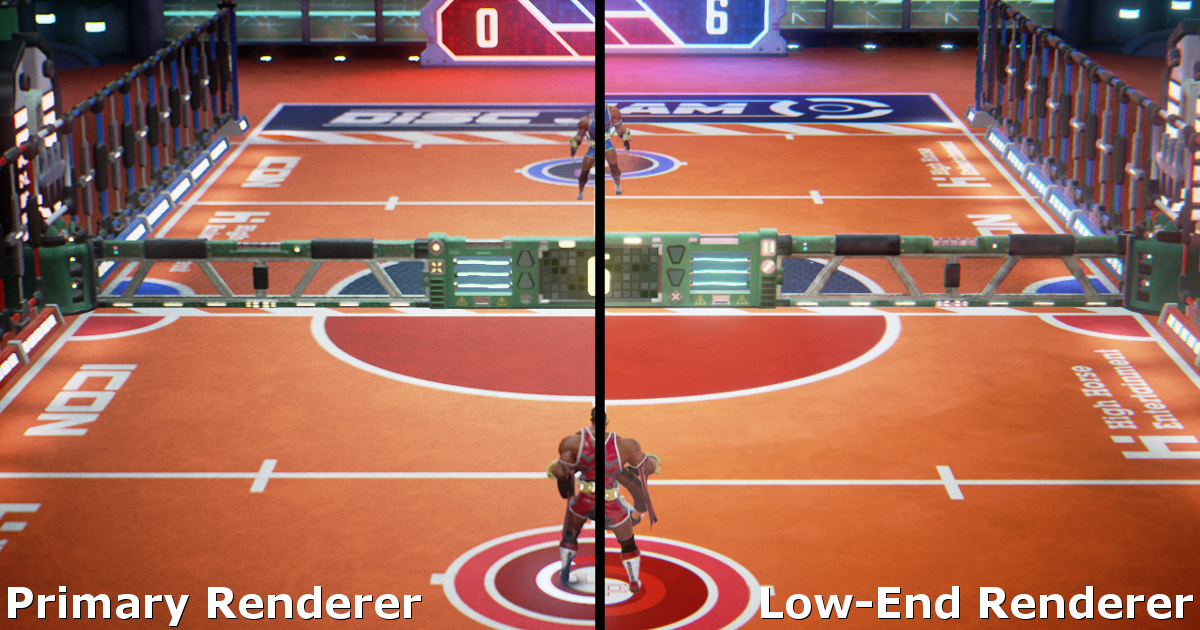
Unreal Engine
Hi everyone! I’m Jay from High Horse Entertainment, a two-man team based out of Los Angeles. Our first project, Disc Jam, is an arcade action sport in which timing and reflexes are critical to succes, so maintaining a high frame rate is largely important for the game experience. Here's how we hit 60 FPS on Intel Process Graphics with Unreal Engine 4.
errant briar
Im having trouble to learn from key functions (c++) provided by unreal is there a list of often used ones?
 latent moth
Very n00b question: when spawning multiple projectiles I use an Audio component on my projectile actor to play a sound. However, after a few of those have been spawned (10?) the sound stops from playing for a while and then starts back up again. What is the proper way to do that?
gleaming shore
Ive retargeted a skeleton does anyone know why it keeps messing the arms up? https://i.gyazo.com/431ea2ec42bfaf48d5103608f082a88d.gif
 gleaming shore
I might know why but im pretty sure its out my knowledge to do it. I bought a mocap animations pack for ue4 however it doesnt come with an animation blueprint so im unsure as to what to do
That was the exact video I was just watching 15 minutes ago, he uses a animation blueprint, I dont have one just 50 files of animations
What file do I retarget then? the skeleton file?
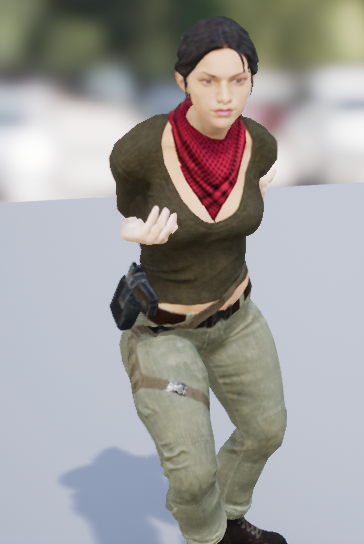
https://i.gyazo.com/3ee9f33b40a110ac57b875def8983f05.png Following what he did, Its still messed up, her arms are behind her back
 obsidian nimbus
@plush yew u might wunna try forward renderer
intel graphics aint even that bad, was able to run gtaV on mine
you can see a big reduction in quality in that disc jam screenshot
plush yew
oh dog no... thanks for suggestion but i wont go for forward 😛
obsidian nimbus
what kind of game is it?
lighting/shaddows textures/materials with alpha prolly where u can gain most
gleaming shore
Is it possible to put 1 meshs skeleton onto another (instead of retargeting animation, retarget the skeleton maybe?)
A skeleton im using has 4 extra bones in the arm which is causing major problems when i retarget
obsidian nimbus
you get a screen where u can retarget bones by name
make sure the bones are retargeted correctly
 glossy flame
It doesn't come with a collision out of the box; you need to add one.
cursive dirge
@plush yew use unreals forward renderer, it's pretty fast
especially if you don't use msaa
on low end that is
that disc jam article was written before unreal had desktop forward renderer
unreal forward was twice faster on weak hw than the default deferred one on some of my tests
at least if you have limited amount of dynamic light sources
if you can bake all lighting, even better
downside of all this is, that you can't mix unreals desktop forward and deferred in same project
it kinda sucks
technically it's possible if you mod the engine but it's not as straight forward as that disc jam hack (no idea if it still works)
main issue is that forward and deferred need to compile their own set of shaders, and Epic is so worried about shader compile times, they don't allow people to compile both at once, even if they'd want to
and another issue about making them both happen at the same time is that unreals forward renderer is kinda mixed in with the deferred code, so you can't easily just set them up as separate things
obsidian nimbus
he didnt want to use the forward
cursive dirge
I have no idea why they messed it up like that
well, the disc jam approach probably uses forward renderer too
 frank escarp
@cursive dirge the forward renderer they used in the article was mobile forward
cursive dirge
exactly
frank escarp
wich doesnt do doble pass or fancy light stuff
man i wish i could make that work for vr
but couldnt
cursive dirge
oh
frank escarp
DWVR is a literally perfect case for it
cursive dirge
oh, bummer
frank escarp
well im not sure, sorry
cursive dirge
I was actually wondering about that
frank escarp
my game has no shadows
i think it can have shadows
but its limited at N lights per object
depending on config
cursive dirge
because I'd want some example where you get shadows in forward, done in forward
main issue with unreals forward atm is that since shadows are done in deferred, MSAA has lots of artifacts
there are some techniques to fix that but it's beyond what I want to learn myself
but forcing the renderer to render shadows in forward if there is an example elsewhere could be someting I could manage
frank escarp
im interested on creating a few extra shading models for my next game
as the graphics will be simple, so there are a lot of features that wont be needed/used
cursive dirge
I wonder if that oculus forward renderer in UE4.11 did this
frank escarp
i might copypaste some of the lower overhead mobile shader stuff into said shading model
i think they use cheaper approximations for light
cursive dirge
I'd also want proper AA for deferred
as we all know, TAA is pretty crappy in motion
frank escarp
that aint gonna happen, deferred cant AA basically by definition
but SMAA would be cool
cursive dirge
I've been working on the SMAA jitter issue again
but ue4 compile times are pita
so I kinda got sidetracked
and now been trying to get FASTBuild working with UE4 for two days
I kinda got it compile most of the engine yesterday, until it errored on some ue4 macro, and then it couldn't find any compiler again D:
did a new setup now, have it running on two computers, will try to figure out the buildscript issues next
if I get faster iteration times with the engine code, it would make everything with ue4 engine codebase easier for me
now single line change and wait for 30-60 minutes isn't exactly what I'd call efficient
I actually tried that UE4 SMAA on the vanishing of ethan carter
it works ok'ish
there's some aliasing still that it can't fix, which TAA can
but it's still ok compromize I think
when combined with slight supersampling, it's pretty good already
I kinda wish I could do selective AA algos
like, I could set a mask for objects that would use TAA and rest would fall back to some other AA algo that doesn't ghost
or fallback to other AA setup in case motion vectors detect too quick movement
I mean, for those pixels only
it would sound super logical in my mind, but there has to be some reason why this hasn't been done yet?
I mean, I can't be the only person to think of that, considering that TAA issues around
frank escarp
due to how gpus branch
you could use the stencil buffer to do the masking you talk of
you can create an edge detect shader that writes into stencil buffer, and then you do the postprocess pass of TAA on only the edges, while then you do the SMAA on the rest
but im not sure it would work that well
due to how gpus branch
keen birch
Sharpen is applied after AA, correct?
cursive dirge
yeah, I thought about stencil buffer for the first case
but basically you'd probably end up doing TAA and like FXAA pass both
and then just mix the results
based on either stencil buffer or just direction on motion vector values per pixel
you could do some soft blend when it's near the threshold
on motion vector route at least
plush yew
Olento I use movable light for day night cycle, and a few (like 8 spot lights that are movable)
cursive dirge
not sure if that's really issue on forward yet
usually when people go nuts on lights with deferred, they can have like tens or even hundreds of light sources on the level
I'd at least test it first
before making any assumptions
plush yew
Is there a way to change that at runtime? Like a setting with Differed/Forward
cursive dirge
nah
plush yew
Aww
cursive dirge
you can only setup either
obsidian nimbus
needs to recompile shaders
cursive dirge
like I mentioned, epic is too worried about compiling the shaders twice
so they don't allow that
I asked them about changing this on some stream
and they pretty much noped out
you game will be rendered in 3D regardless how you do it with ue4
plush yew
I'm not sure that I want to use forward renderer
obsidian nimbus
yes
cursive dirge
@plush yew it does have it's limitations but like mentioned, it's way faster on those old intels and weak gpus
plush yew
[SystemSettings]
r.TranslucentLightingVolume=0
r.FinishCurrentFrame=0
r.CustomDepth=0
r.HZBOcclusion=0
r.LightShaftDownSampleFactor=4
r.OcclusionQueryLocation=1

[/Script/Engine.RendererSettings]
r.DefaultFeature.AmbientOcclusion=False
r.DefaultFeature.AmbientOcclusionStaticFraction=False
r.EarlyZPass=1
r.EarlyZPassMovable=True
r.BasePassOutputsVelocity=False
I found this
It added some frames
cursive dirge
@plush yew https://docs.unrealengine.com/latest/INT/Engine/Performance/Scalability/ScalabilityReference/
Scalability options, properties, and console variables.
obsidian nimbus

Announce Post: https://forums.unrealengine.com/showthread.php?141558 Robo Recall is Epic Games' hot new VR title, but how did it get to be so fast and fun? V...
cursive dirge
do mind that robo recall is in forward renderer too
obsidian nimbus
yea, but it shows stuff that goes for all renderers
plush yew
I do try to optimize the materials too, so they are greener on material complexity
obsidian nimbus
shader complexity in vieuwport
plush yew
I used DitherTemporalAA instead of translucency
Because I think it's better for performance
obsidian nimbus
perhaps use capsule shadows
more LODs and see if enviroment is instanced correctly
plush yew
Ok
Oh and it's a top down game btw
So there shouldn't be lods in my mind because the distance to meshes is same
obsidian nimbus
unless u can zoom in
plush yew
The zoom there is maximum from 90° to 80/85°
obsidian nimbus
i thinks that happens automatically
 inland crystal
I hope everyone here is having a good day
pulsar badge
Is it possilbe to highlight a building you made and move it someplace else
pulsar badge
Im just making cubes and making a building
true lol
Ok thanks lol
also how is he doing that clear door thing

This UE4 Tutorial Will Show You How To Make An Automatic Door Written guide here http://onlinedesignteacher.blogspot.ie/2015/03/how-to-makea-door-open-and-cl...
trying to make it so you can walk through
Im trying to get it clear
so someone can walk in....
go to 50 seconds on that video
he changed it to subtactive
grim ore
I am guessing you have collision around the door, maybe the frame?
pulsar badge
but i dont see the that option
54 seconds
he has the wall
but he is making it invsiable
invisable
so someone can walk into it
Yeah i dont the brush menu
for my cube lol
what did he made it out of then
ohhh
But i dont see no BSB
lol
option like he does
i dont see that option
tho
grim ore
the geometry brushes are in the top left modes panel
grim ore
the default meshes with the starter packs are not set up properly with collision, it's weird lol
go into the mesh itself, double click it. then you can add collision to it
collision menu at the top. You can try different ones but the auto convex is probably the easiest
yes the box collision is literally a box around the entire thing
including the hole
remove the collision and use the Auto Convex option instead of box
pulsar badge
its only 5:01...
gleaming shore
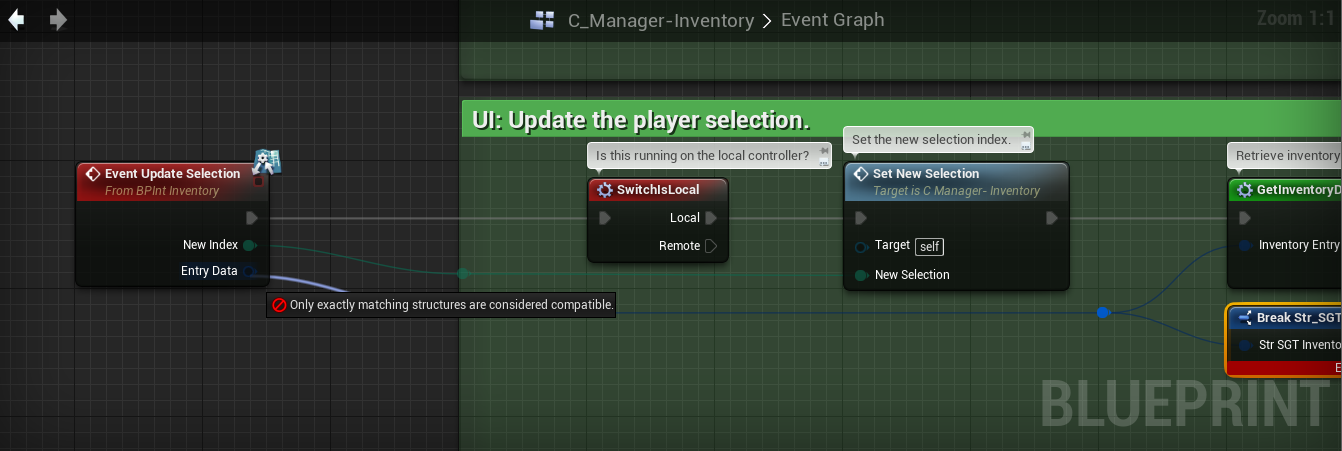
https://i.gyazo.com/d809d04344ee29e7e8a47e2acc7e4cb4.png Anyone have any ideas on this? I'm at a dead end atm
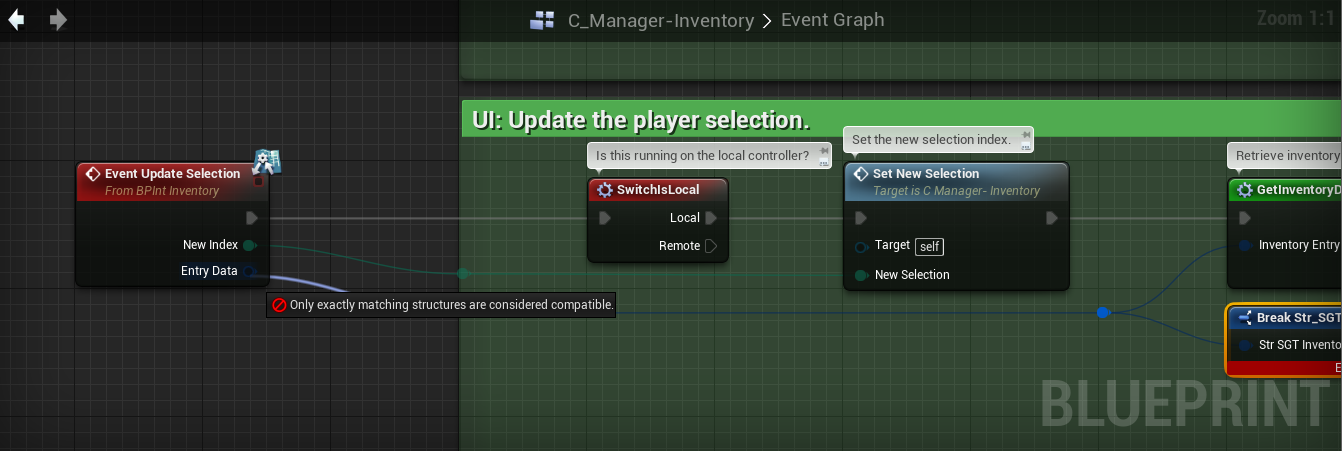
It used to work, then all of a sudden didnt
livid haven
Hover over each, check their types.
 sturdy walrus
Hello trying to learn unreal engine 4 need to ask... are these playlists in order ?https://www.youtube.com/user/UnrealDevelopmentKit/playlists?sort=dd&view=50&shelf_id=17

YouTube
Welcome to the official Unreal Engine channel! Unreal Engine 4 is a complete suite of real-time 3D tools made by developers, for developers. Create and take ...
livid haven
Doesn't look like it
A) Some are unrelated
B) Some that introduce a concept are after videos where its used
obsidian nimbus
they are multipart vids covering multiple subjects
gleaming shore
It's a fallback struct structure
livid haven
I mean, don't tell me, just look at them - it's telling you they're not the same type. So they probably aren't.
sturdy walrus
so what steps should i take to be able to learn in order
livid haven
Unless you've confirmed that the tooltip literally says the same name in both, you should assume it's correct.
@sturdy walrus I'd probably start with introduction to the editor, then introduction to blueprints.
sturdy walrus
ok almost done intro to editor
livid haven
Blueprint essentials sounds... essential.
gleaming shore
Ones a fallback structure, ones an entry structure. Not a clue how to fix that
sturdy walrus
editor seems a bit boring to me when i got to see the videos
since i found it similar to autocad is some way
obsidian nimbus
pick something u need or find interesting an go from there 😛
livid haven
@gleaming shore How would we know? They're your types, not ours.
sturdy walrus
@obsidian nimbus tbh i dont anything about unreal engine 4 so i dont have a starter ground for now
so it a bit difficult for me to start and learn what i need
livid haven
@sturdy walrus Blueprints then. Probably.
obsidian nimbus
there are a few demo games in the learn
content examples is good too, lot of documentation on it
 oblique trench
do you wanna be blueprint scripter? vfx artist? terrain artist? AI programmer? Level Designer? ör something what @sturdy walrus
sturdy walrus
atm i am opening the door to all of them dont have a certain thing i really want to do
and i am saying this because i still dont know what each one of them do
oblique trench
Okay. Then you have to try.
livid haven
For what it's worth, there's not really any such role as "blueprint scripter"
You're an engineer/"programmer" or you're not.
Designers of any sort are more likely to end up doing some blueprint.
And engineers are very likely to deal with making blueprints, even if only setting it up so designers can use their code via blueprints.
You won't get a job at a studio on the basis of being a "blueprint scripter".
sturdy walrus
i am and Engineer so i think i am eligible for everything thing is i kinda have a passion for designing as well
which makes me at lost atm
oblique trench
In generally I mentioned that. But on theory you are scripting with blueprints. Not programming. Whatever...
livid haven
Ideally, no one is just writing blueprints. 😉
sturdy walrus

Michael Andrews showed how he uses a modular approach to create a stunning part of a fictional city. Lovely work with the lighting and architecture.
what is this considered from " vfx artist? terrain artist? AI programmer? Level Designer? ör something"
i want to be able to design such things on later stages
Texture and environmentartist i suppose
livid haven
First paragraph
majoring in Game Art and Animation.
Specifically, I specialize in hard surface prop modeling, texturing, and environment art.
Not any kind of design role.
Environment artist.
If they actually designed a whole playable level so that it's fun and works for a set of game mechanics, then it could be level design, too.
But as is, it's just environment art, not level design.
 worn granite
You can totally find paid work doing BP only, but it'll be very much small time and you don't really positition yourself to move up out of that.
Not even like "Game Designer w/ BP"
livid haven
What, as a "contractor" with some randos who probably won't actually end up paying you?
I have a hard time believing any studio would pay someone who only knows how to work with BP to do work on a product that's actually going to ship.
Not that no studios would, but they'd be super small time places putting out some questionable quality stuff, I'd think.
worn granite
I'd agree.
If you find a studio who wants to keep things BP to the point of having a dedicated role for it, its likely to be subpar.
sturdy walrus
is it that bad to be BP only i am asking because i dont know the quality of work in being BP is yet
livid haven
If you're a designer, knowing some blueprint is important.
worn granite
But you'd be surprised Sion. They tend to pay up, I can really only point to a couple of times where they didn't. And funnily enough one of them was ex AAA
You don't see me landing a job at Epic with my work history though.
livid haven
If you're an engineer, you're not going to be working solely in blueprints - you should mostly be working in C++ and exposing things to blueprints, but I won't throw you in the deep end with that.
worn granite
(you also don't see me applying)
Anyway I've been using the intended workflow for a while now and its definitely much better.
Just saying if the goal is to spin your wheels and get pocket change, you can do it.
sturdy walrus
i will finished up introduction to blueprint playlist then i will get more details on the subjects
livid haven
I'd say it's important to learn blueprints, for sure.
But don't expect to make a career out of just writing blueprints.
Which jives with what Placeholder said.
errant briar
do i really need to compile UE to make a dedicated server?
livid haven
For a dedicated server. Yes. I don't remember why.
worn granite
I've been debating on when/if I should apply for larger studios, considering that I'm working with a smaller studio and will have shipped a UE4 C++ using game.
errant briar
well mhmm the sign update doesnt work anymore so getting the source isnt a little annoying
livid haven
"sign update doesn't work"???
errant briar
To access our repositories, sign up for a free account at UnrealEngine.com and register your GitHub ID using these instructions.=> there isnt a GitHub ID
livid haven
@worn granite I'd say you're okay to leave a Full Time position after about a year to 2 years without worrying about the length of employment looking sketchy/questionable/bad.
errant briar
and i have both accounts since ages
worn granite
I didn't say I was employed, I'm an actual contractor. When the term is up, its up.
livid haven
That, literally, sounds like a personal problem you need to resolve by finding your account credentials, @errant briar.
worn granite
unless they extend.
I think the larger studio experience would be valueable to have, just thinking about the best time to try to make that jump.
livid haven
@worn granite I'd say go ahead and apply then - what's the worst that could happen?
I mean, you can't reasonably apply to place immediately after being rejected and expect anything different to happen, but that's only likely to change over the course of like a year or two anyways - you won't magically be past the threshold of being rejected/declined over the course of days or weeks.
errant briar
@livid haven i have all the account and logined it i guess the changed it after i registered
worn granite
Yeah
livid haven
They don't change anything - it's your Github account, associated with your Epic account.
worn granite
No, I haven't been rejected AFAIK.
Really its just about when does my body of work and demonstrated skill get my foot in the door without a degree.
errant briar
my github account is over 10 yrs old... still think they didnt change it?
livid haven
@worn granite I just mean there's no real cost to applying, besides time and a "cooldown period" before you can expect them to reconsider hiring you if they recently rejected you.
@errant briar Who is they?
worn granite
Is this like a lost password thing?
livid haven
It sure sounds like it
worn granite
Cause if not, I don't see why they'd unlink your accounts.
livid haven
 errant briar
who forgot a password?
worn granite
I barely have to craft a password.
livid haven
@errant briar There are a few possibilities, but you're not really being specific. You don't know your GitHub account, which is a personal problem... or you have logged in and you're getting a 404 error because you don't have permission, which means the last thing I mentioned (linking your Epic and GitHub accounts) is what you need to do to get access.
grim ore
Take Github account name -> insert into web site at https://www.unrealengine.com/dashboard/connected -> Save Changes -> Download Source?
errant briar
So "they" want me to change my github username to reflect my epic username?
livid haven
No
 vivid girder
Anyone ever have issues with editor dropdown lists when using dual monitors?
Can't select anything in the bottom half of my screen
 weary basalt
Yes
vivid girder
Been like this 5+ months
weary basalt
My dropdowns flicker like crazy. Luckily i always know what i want and just type it out
 oak tulip
What is in the swag packs?
vivid girder
Can't really type it out when trying to attach actors in the world outliner...
 kindred viper
I can't select half the stuff from dropdowns when its bones or sockets that fill the list.
weary basalt
I found putting the editor in windowed mode fixes it
kindred viper
cool
vivid girder
Yea? Lemme try
kindred viper
I thought it was being in 4K that was the issue, as I've had issues with it since like 4.4 when I went 4k
 stable orbit
Is there a way of having both 4.18 and 4.18.1 for example installed at the same time?
I have a project in 4.18 but don't want to update yet, but I want to try 4.18.1
vivid girder
We meet again Rick C-132
kindred viper
@stable orbit short of copying the source folder and having two, or using source control to revert when you need, no
weary basalt
Haha
fierce tulip
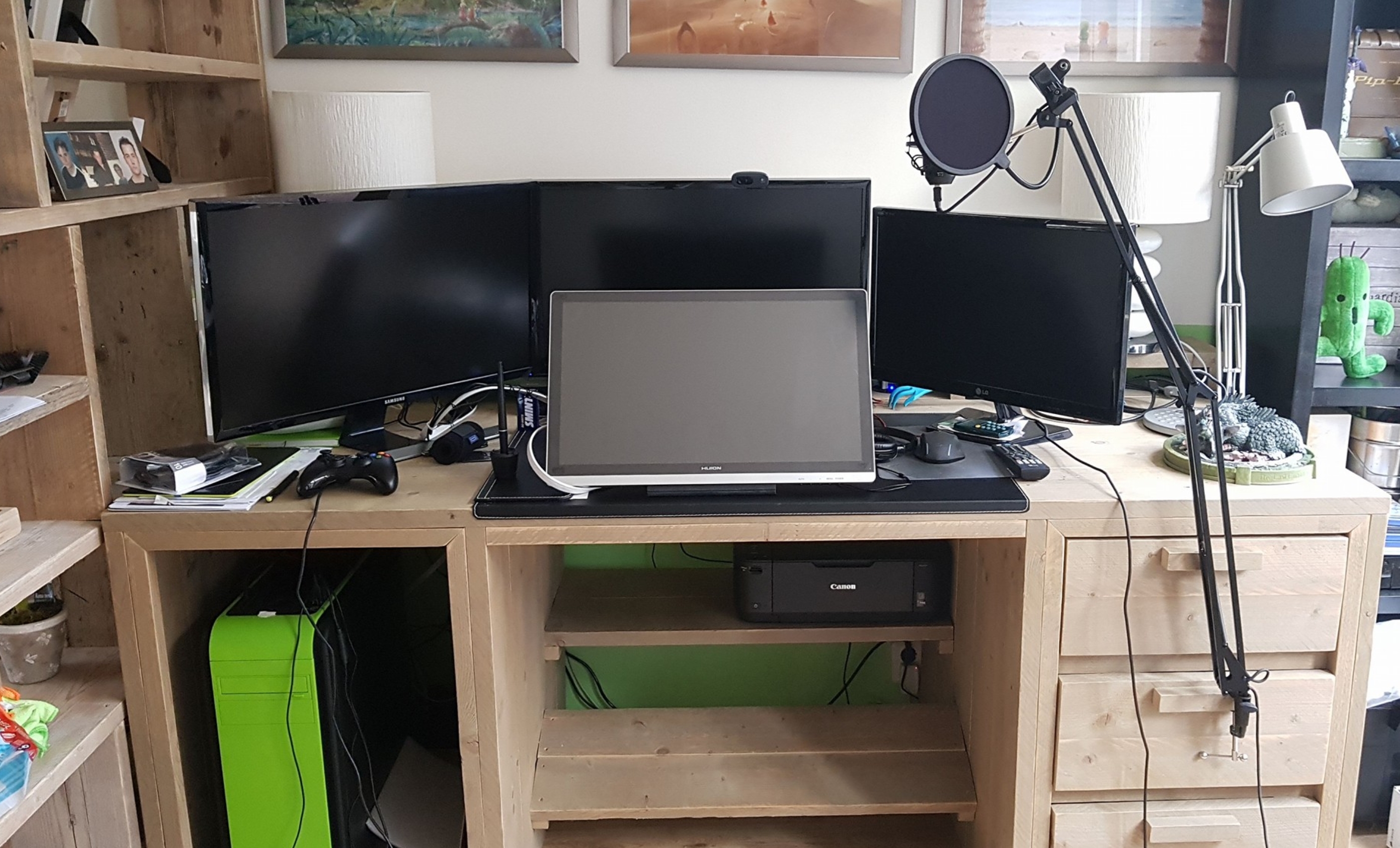
i have issues with tabs moving out of my window with 4 monitors. (2x 4k, 2k, HD)
kindred viper
thats what you get for having 4 monitors. what are you a spider?
plush yew
I have that issue and I'm using one monitor
weary basalt
Luos likes to see ALL the particles
fierce tulip
one for chats, one for ue4 menu's, one for ue4, and one for photoshop.
kindred viper
hah to be fair, I have two monitors so I cant complain especially since 1 is 16:10 to check for weird UMG scaling issues
fierce tulip
unless im referencing or whatever, but it moves a lot
weary basalt
I get by with my 2 ROG Swifts
Recently got an bigger desk so im considering getting an 3rd since i can fit it now lol
livid haven
Been working with 2 here for a few years. Works well for me. 16:9.
weary basalt
Yeah 2 feels good to me.
But i was limited by desk space so now im not i might give 3 a go
If i hate it ill just resell it or something lol
But i doubt i will
livid haven
Want to take photo, but then I'll scare people away with the actual dust and cruft sitting on my desk...
weary basalt
I hate an dirty desk. Clean freak here
fierce tulip
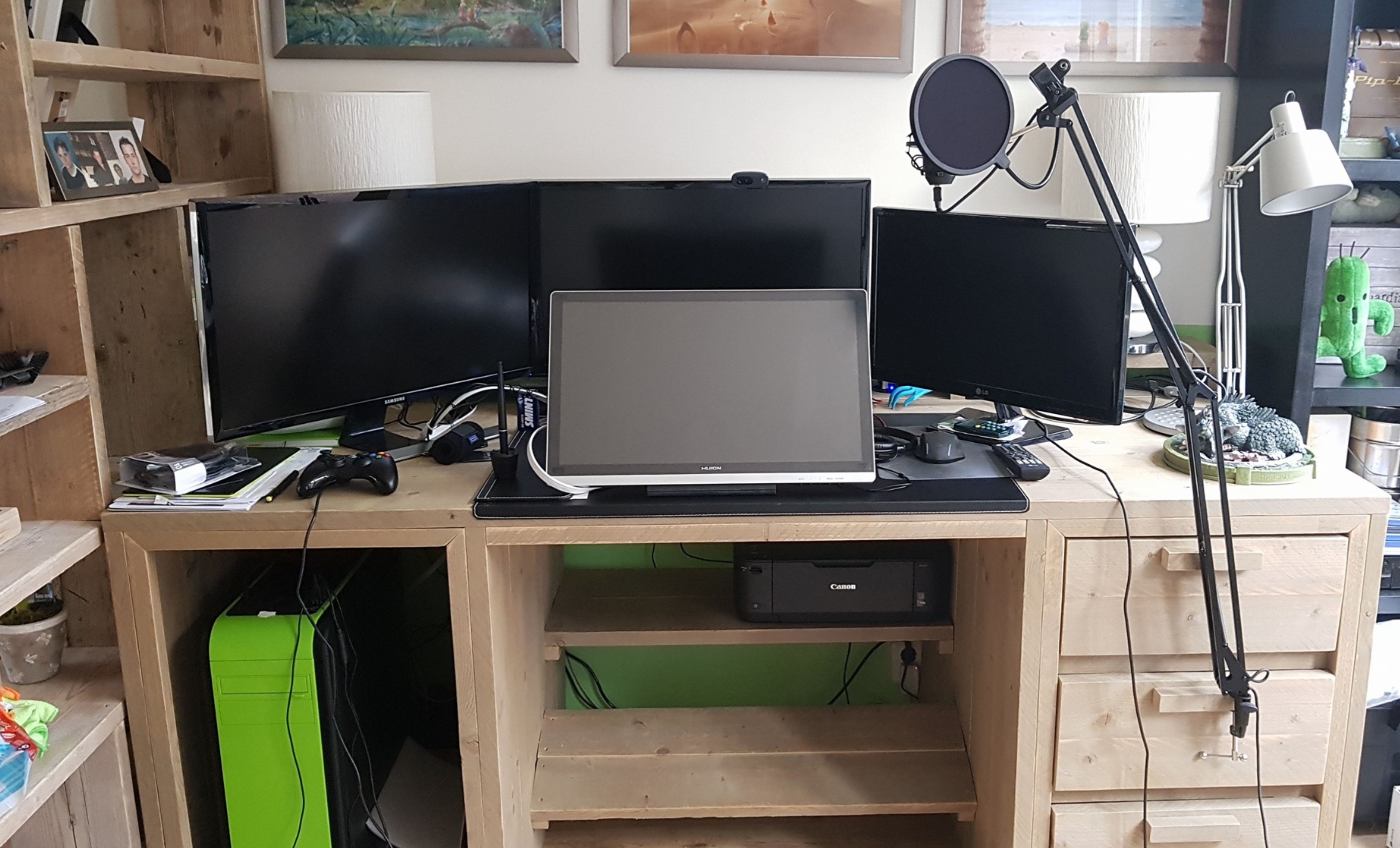
still need to get a more current photo but meh
https://i.gyazo.com/8c8d0b164f1cfa4f66a5f064193a1b9b.jpg
 weary basalt
Id take one of mine but im out at the moment lol
vivid girder
Having a hard time figuring out how to put the editor into windowed mode
Is it a UE4 setting, or a OS thing?
weary basalt
The actual program window
livid haven
Like, having the level editor viewport take fullscreen, maybe? That seems rare?
vivid girder
Press Shift+F11
livid haven
Oh, like, do the opposite of maximize?
weary basalt
Yes
 cinder iron
😄
fierce tulip

https://www.facebook.com/artbyrens https://www.twitter.com/artbyrens https://www.artbyrens.com My latest work, rendered in Unreal Engine. A big thank you to ...
livid haven
Not got the editor open.
If you're just maximized, you should totally be able to just click the maximize button again.
Or just start dragging from the title bar, which normally un-maximizes stuff.
weary basalt
^^^^
vivid girder
@weary basalt
weary basalt
?
vivid girder
Oh, that's what you meant. Nah, doesn't change anything for me 🤔
floral heart
"Real-time rendering" Everything is photogrammetry.
weary basalt
Oh ok. Well it fixes it for me haha
trim trail
rens keep showing really micro frames, i wish he would show something larger
livid haven
Maybe in order to keep practical framerates? :X
trim trail
idk, i feel hes making larger scenes, just not showing for some reason
he wants to keep his tricks up in his sleeve
still, the best realtime stuff ive ever seen, were unity demos
so good
livid haven
More stuff in view, more polygons and pixel overdraw.
fierce tulip
waiting for the uhd version to be up
livid haven
Maybe the framerate stops being so "realtime" if more of the scene is visible?
trim trail
uhd version of what?
trim trail
oh
cinder iron
Usually if you dont need to optimise something to be game ready you wont, thats time at the end of the day
trim trail
it was sharp when i watched
fierce tulip
yea, but thats hd, waiting for 4k version
trim trail
well, i think ive seen larger test scene by rens
cinder iron
"Time is money friend"
trim trail
it cant be hes working only on small scenes..
even if framerate is issue, he can always render offline
its supposed to be ue4 tech demo i think
fierce tulip
prolly for gdc
trim trail
its pretty soon
livid haven
@trim trail I don't see how rendering offline would count as realtime rendering...
trim trail
probably wording is bad, i meant rendering frame by frame, so if you have 5fps demo, you get 60fps video
livid haven
That still destroys the point of calling it realtime rendering.
Granted, it's probably a beast of a machine they're using, but still.
trim trail
realtime is kinda vague term to me
livid haven
It means rendered in realtime. You're seeing it as it hapens
trim trail
yeah, but more specific definitions may vary a little
livid haven
They really don't, though, in this context.
weary basalt
I dont see how realtime rendering can be described any other way lol
livid haven

Real-time computer graphics or real-time rendering is the sub-field of computer graphics focused on producing and analyzing images in real time. The term can refer to anything from rendering an application's graphical user interface (GUI) to real...
fierce tulip
its realtime, and he has a bizarre beast of a computer
trim trail
so 5fps demo would be still called realtime?
livid haven
It'd be piss poor realtime, but yeah.
Obviously it's about intention - if you can offline render a scene in Maya and generate 5 frames in a second, that doesn't make it realtime rendering.
Similarly, if your game is lagging and starts to draw a frame every 2 seconds, that doesn't make it not realtime rendering - the intention was to present them in realtime such that it looks to be continuous.
fierce tulip
imho realtime rendering should be when you cant notice stuttering
floral heart
You can bake all of that to textures and render it with a basic shadow if you like. Albeit, would break badly if the camera moved further.
fierce tulip
but then again, im playing xenoblade 2 and its been stuttering a lot :p
floral heart
And with PBR you're effectively baking the specular lobe...
livid haven
Realtime rendering techniques are techniques that are intended to be able to render a sequence of images such that they appear to be happening in realtime, rather than choppy and slow playback.
Obviously, there's some limit to what anyone would call an acceptable frame rate to be considered realtime - I'm just saying that a game lagging doesn't suddenly make it not realtime rendering.
fierce tulip
true true
floral heart
It's a fuzzy concept that was defined by a difference that no longer applies.
You could define a new concept, but who would use it and how would it catch on?
livid haven
Offline rendering techniques are still pretty far off from realtime rendering techniques though.
What realtime applications have used raytracing?
floral heart
There's been a few Quake sourceports.
livid haven
That seems a bit like cheating. 😛
floral heart
How so? Just because Quake geometry is so low-poly?
livid haven
I'd say so, yes. I could ray trace a single pixel's worth of data in realtime easily, but that's not indicative of how that technique can be practically applied in general circumstances.
Wait, hold on
That Quake one, sounds suspiciously like they're just rendering.

Quake Wars: Ray Traced is a research project from Intel Corporation that applied a ray tracing renderer to the game content of Enemy Territory: Quake Wars. The possibility of using ray tracing for this game in real-time has been demonstrated firs...
Like, all gameplay is removed.
Doesn't make it not realtime, but it'd be a bit disingenuous to imply you could play this raytraced version of a game.
floral heart

Original video capture download here (1.2gb x264): http://amietia.com/Quake 2 GPU Pathtracing (August 2017).mp4 A Windows executable package includ...
livid haven
Ah, hadn't seen that one. Got some serious artifacting though.
Is that an intentional effect?
floral heart
No, it's a consequence of path tracing.
It convolves fairly quickly compared to photon mapping (I don't know what that means) BUT it still takes a long time to average out the noise.
For playable framerates, there isn't enough time.
livid haven
Eugh. I realize it may sound like I'm "moving the goalposts" here, but it's because I figured there was a lot implied about the feasiblity/applicability/modernity/fidelity involved.
Not that realtime rendering needs gameplay, just that, while impressive, taking a game's assets and putting them in a raytracer in realtime can give the wrong impression - much like that crazy group that keeps trying to advertise their "INFINITE DETAIL" system
Euclideon
It's a wonder those guys are still in business.
floral heart
The Mind's Eye all over again.
https://www.youtube.com/watch?v=0t6a2wXFJkE

Demonstration video of the various features of the raytracer. Source code and binaries can be found here: https://github.com/mikoro/raycer Good quality rende...
livid haven
I can't get the video to load for some reason, just me?
There we go
Took a bit
Even this is looking pretty "noisey", fairly choppy, and with far from the resolution or fidelity of anything someone would call modern quality graphics.
floral heart
Merely an offline rendering "technique" in real time.
livid haven
Aye, which is why it's still considered an offline rendering technique.
Definitely realtime rendering, obviously, but using modern technology to get results for stuff that looks like a decade to two obsolete.
Throw enough computing power at any technique OR give it a low enough bar to hit and it'll render fast enough to appear to be in realtime.
Neat, they have a GitHub repo for it

I've been working on my non-euclidean GPU-based ray tracer, and made a lot of progress. I've been adding a multitidue of features and it's now available on g...
This one even does it in 4D, because why not.
floral heart
Supposedly GPUs are bad at branching, so even though they can raster megapixels/frame, they apparently don't do megarays/frame. I don't know how they can do path tracing, but path tracing is fairly slow at solving occlusion. Whereas "real-time" techniques don't even bother solving occlusion. If you cut out the features of path tracing that make it better than rasterizing, I wonder if it would look any different.
livid haven
Well, solve for occlusion via depth buffer, but yeah, it's certainly "hacky" by comparison.
'causes a whole mess for transparency and deferred rendering/shading, for sure.
floral heart
In a sense, real-time rendering gravitates towards the most efficient methods to fake something.
Offline rendering gravitates towards the most correct methods to do something.
Somewhere in between lie the methods that are neither. Like penumbra wedges.
And then there's the few that are both, like textures, that we take for granted.
livid haven
Agreed.
What does and doesn't constitute realtime rendering will change over time, but it seems like, for the most part, we mostly just invent more clever hacks to produce seemingly photorealistic graphics.
 dim quiver
Yo, Unity will get better graphics than Unreal soon :D.
livid haven
Because that's not an antagonistic thing to just show up and spout out of nowhere.
 unique ocean
Is it possible to use root motion with the Z axis?
 glacial pollen
today is the 7th, when are these giveaways happening and how will it work?
floral heart
I'd imagine it starting around business hours for North Carolina.
 loud phoenix
Anyone know why when I make a copy of a project and open it, all of the materials I used in dynamic instances are gone?
floral heart
Dynamic instances?
Material instance dynamics? I thought those only existed at runtime.
loud phoenix
well yes but
in my project I set those up for some fading text
when I make a copy and open the project
those textrenders are black
and the material section
shows blank mats
in the BP itself the construction script blanked out, too
for the entire game, every one I set up
 tacit harbor
So first of all whats swag packs? And how do we get chance to win them?
weary basalt
An swag pack is an bunch of gear compiled together into an pack 😃 You only need to be present during the giveaways to have an chance to win.
 gleaming thistle
Cool! 😄
 grand python
Hmmmm. I'm struggling to get atmospheric fog to have a custom color but that doesn't affect the overall lightning. I just want to change the horizon color.
The thing is. The map is located in orbit above a planet. Said planet has a not earth like color, so white/blue to orange horizon just looks wierd. But when i change it to purple (by adjusting the color in the height fog) then the whole map lightning gets affected and my whole map is purple.
Is there any way to only change the horizon color of the atmospheric fog?
 cloud cobalt
By installing VAX instead
paper kernel
It's really heartwarming to google something and the the user responses to the problems are "its too hard, do it simpler"
 tawdry narwhal
hey everyone. is it possible to disable mouse input on a player controller? I don't just mean hiding the cursor, but disabling it completely so that it stays still
I've tried setting its position on tick, but apparently tick ain't frequent enough
tawdry narwhal
you're probably referring to DisableInput() - I've alraedy tried that, but it only affects actors "below" the player controller, not the controller itself
*already
 quasi lake
Oh
tawdry narwhal
done did my research, unfortunately :)
I've thought about setting up a dummy Pawn & possessing that
but that's more trouble than it's worth
vale osprey
what do you mean by player controller staying still? it's not an actor
tawdry narwhal
mouse, not player controller - I want the mouse to stay still
btw, playercontroller is an actor
class ENGINE_API AController : public AActor, public INavAgentInterface
vale osprey
apprently it is indeed
 wary wave
I have returned from my many adventures 😄
oblique trench
What kind of adventures?
wary wave
I spent a week in Madeira, then went off to the Roller Derby World Cup
 gleaming karma
Is there a way to change the way opaque material checks the depth test?
I know of custom depth, but isn't there a direct way to change the depth comparison?
 short onyx
tropic pilot
short onyx
tropic pilot
https://youtu.be/9ariPx6M33o?t=9m17s how to do this in Third Person Template? -.-
For the full tutorial playlist: https://www.youtube.com/playlist?list=PLZlv_N0_O1gaz6eETtIxcmUDnqu5A-8At In this video, we setup a basic car using all the de...
plush yew
That's a vague question
 split trail
Hey is there a way out of the box to select only the objects that don't have any external references in the content browser?
fierce tulip
nope sadly there isnt
 thorn kayak
Any lightmass expert here?
I need some baking tips
Have a huge problem with one of my test scenes too
honest vale
did you add baking powder?
thorn kayak
Lmao
thorn kayak
No prob lel xD
split trail
been charged with project organization late in dev and we have like 3400 assets in random pack folders on the root of the content browser that are being referenced and want to batch move all of the other junk to like a libraries folder
lol
fun times
thorn kayak
shit lol
split trail
maybe I can write something
@thorn kayak what's ur issue with lightmass
i need some distraction
lol
thorn kayak
yeah im taking screenshots to show the problem clearly
i just dont get smooth lighting like this in my scene for some reason
this is the type of lighting i want :-
this whole scene was lit up by a single skylight (auto exposure off btw)
when i try to replicate something like this my scene still stays darkj
thorn kayak
giving au a screenie of the lm density
honest vale
do you have a lightmass portal over the windows?
thorn kayak
its not that high res
fierce tulip
there are a few good threads on the forums about how to set up lighting for archvis scenes
thorn kayak
yeah i tried that too, wait, ill show u a screenie of my scene soon
baking takes too long in my scene lel
yeah i went through all of em, couldnt find the answer sadly
tropic pilot
so im in the Rolling Template in UE and i want the camera to stay behind the ball and if i go left og right i want the camera to follow along BUT!!
when i set these to to True the problem is that the ball is a physics ball and uses Torque to move... so when these are set to True the camera spins like crazy....
when i move left or righth :/
split trail
yea I don't have a lot of experience with baked lighting sadly
@thorn kayak
most of my lighting experience has been with light propagation volumes and realtime lighting
lol
plush yew
@tropic pilot I don't understand. You just want the camera to stay in one spot behind the ball?
tropic pilot
nono
split trail
why not attach spring arm to capsule not ball @tropic pilot
thorn kayak
@split trail its easy to use lpvs but once u know how to use lightmass u can get absolutely AMAZING results with UE4 like koola and some other archviz artists does
tropic pilot
the camera is behind the ball at all time but when i play and i need to turn left on the road the camera will ALWAYS face 1 direction so when i turn left the camera will not face the road (it then becomes a side camera) so i want the camera to follow the ball
@split trail if i do that the camera doesn't follow the ball 😛
split trail
shouldn't they share a root?
@thorn kayak yea but most of the projects I've been on are procedural workflow
lol
spawn level on eventplay
no time for baking or 10 min level loading screen lol
tropic pilot
apparently not @split trail :p
split trail
hmm
maybe create a dummy object without collision that is set to the transform of the sphere via bp
and parent the spring arm to that
idk just spitballing lol
tropic pilot
at this point i'll try ANYTHING... 8 people have brainstormed this with me and we all failed 😦
split trail
yea dont parent it tho
just have it sit in the bp and set its location and rotation to the sphere's
dont worry about scale
you can either set it to not render
or have it be small inside sphere
plush yew
@tropic pilot Why do you want to do this anyway?
If the ball suddenly changes direction, the camera will flip over suddenly
tropic pilot
cause it's a racing game and when i do a left turn the camera doesn't follow the pawn so the player can't see the road infront of him because the camera is now a "side camera" and not behind the player
split trail
just curious why use physics for movement
seems computationally expensive for something you can just achieve through usual movement conventions
tropic pilot
cause it's a ball racing game 😃 a ball needs to bounce and keep rolling after releasing the W forward key 😃
split trail
in which case the camera wouldn't be an issue with ur current setup
tropic pilot
with a movement component this can't happen
tropic pilot
well that would make it static and predictable :/ that's why i use physics cause everything will be random and more challenging 😃
split trail
multiply curve by random clamped value
ijs lol
nah man I understand the thought value of exploring new frontiers
for sure
plush yew
@tropic pilot This will get you started: https://gyazo.com/b2b291d03e941a1d7fe41e93a064cf72

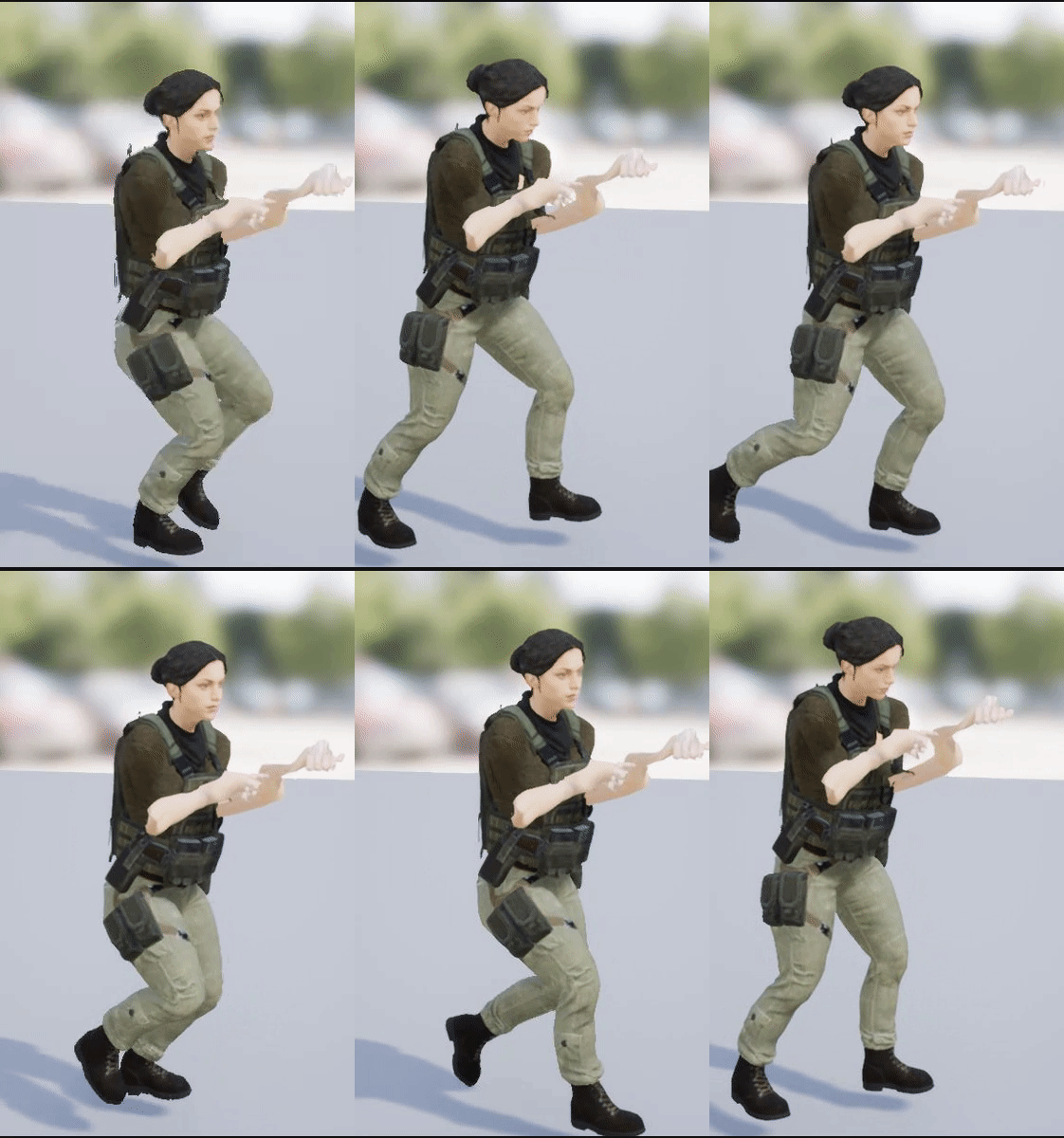
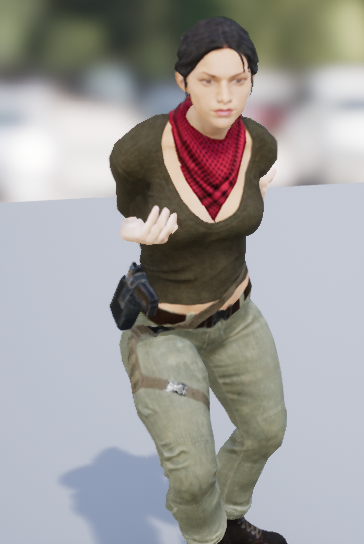
But it's tied to velocity so the camera will flip around if you hit into something (because the velocity will now be going the opposite direction)
split trail
everything has a cost lol
idk as a programmer, unpredictable behavior is not the ideal lol
"where did that bug happen?"
"idk it only happens when I hit something in just the right place only 2 out of 100 play throughs"
split trail
physics on player characters makes me cringe on the inside a little bit lol
tho
anyway i gotta get back to work, tips hat gents
paper kernel
[2018.02.07-11.12.13:141][244]LogWindows: Error: Unhandled Exception: EXCEPTION_ACCESS_VIOLATION reading address 0xffffffff
so, what could cause this
I assume it has something to with the arrays I just created
but I'm not seeing memory leaks
paper kernel
well, I'm appending arrays on timer function, then reading averages on tick and clearing the arrays
so, unless the clearing or appending operation is taking more than 3ms, it should not result null pointers
frank escarp
might be GC doing shit
honest vale
is the appending function atomic?
wary wave
no blueprint operations are atomic
 upper field
I want the swag
 devout gulch
does inactive component have transforms updated ?
I mean If I have bunch of mesh/skeletal mesh components attached, and some of them are just dummies (for example character attachments, weapons, but without any actual mesh yet), can I disable/enable transform update for them and activate it, when there is something to render ?
wary wave
oh yeah, what's happening with the swag giveaway
it was supposed to be 'staggered throughout the day', but I'm already quite a way through my working day?
 stray swift
They didn’t really say how they were being given out, either. Though they made it sound like you had to be here for it, in some unspecified way
celest creek
Hey, am I right in thinking that a pawn will need to have its mesh with collision at the root (and not the scene component) for it to report collisions properly?
 small basin
tbh, when that message was posted it was already the 7th for me, timezones I guess, it's probably throughout the day in some timezone, but for some it'll be late or early
paper kernel
if it's timed, assume US central time
which is like, prime sleeping time for rest of the world
small basin
heh, sleep, I remember that from a long long time ago...
I have a deadline next week, so I guess the not sleeping will finally pay off by being awake for the swag
obsidian nimbus
2600 ppl online, some quick math and the odds are 1 in 260 😛
feeling pretty confident im gunna get my stickers 😛
plush yew
oh forward rendering doesnt look bad
just tried it
now i think i will stick with it with this project
it looks the same! 😄
 hexed escarp
Hi, is there any simple way to make the mobile mannequin animate? If I open the ThirdPerson template and switch the mesh to the mobile manneqin, it remains in T-pose and doesn't move
obsidian nimbus
depends. forward doesnt do refections as well, but you can opt in some features that are used in deferred and only pay what u need
plush yew
i dont need reflections for top down game i guess
obsidian nimbus
for intel integrated forwrd or mobile porlly the best option
plush yew
what would it reflect? ... sky xd
plush yew
the only thing i would need in reflections in this project is sun
 lavish reef
hey guys, can i post question in this chat?
so i have a landscape spline
https://i.gyazo.com/c2275a69941b88906af8358fb6960da8.jpg
i need it to contract inward like this
https://i.gyazo.com/09acff31414050325889786e03923e21.jpg
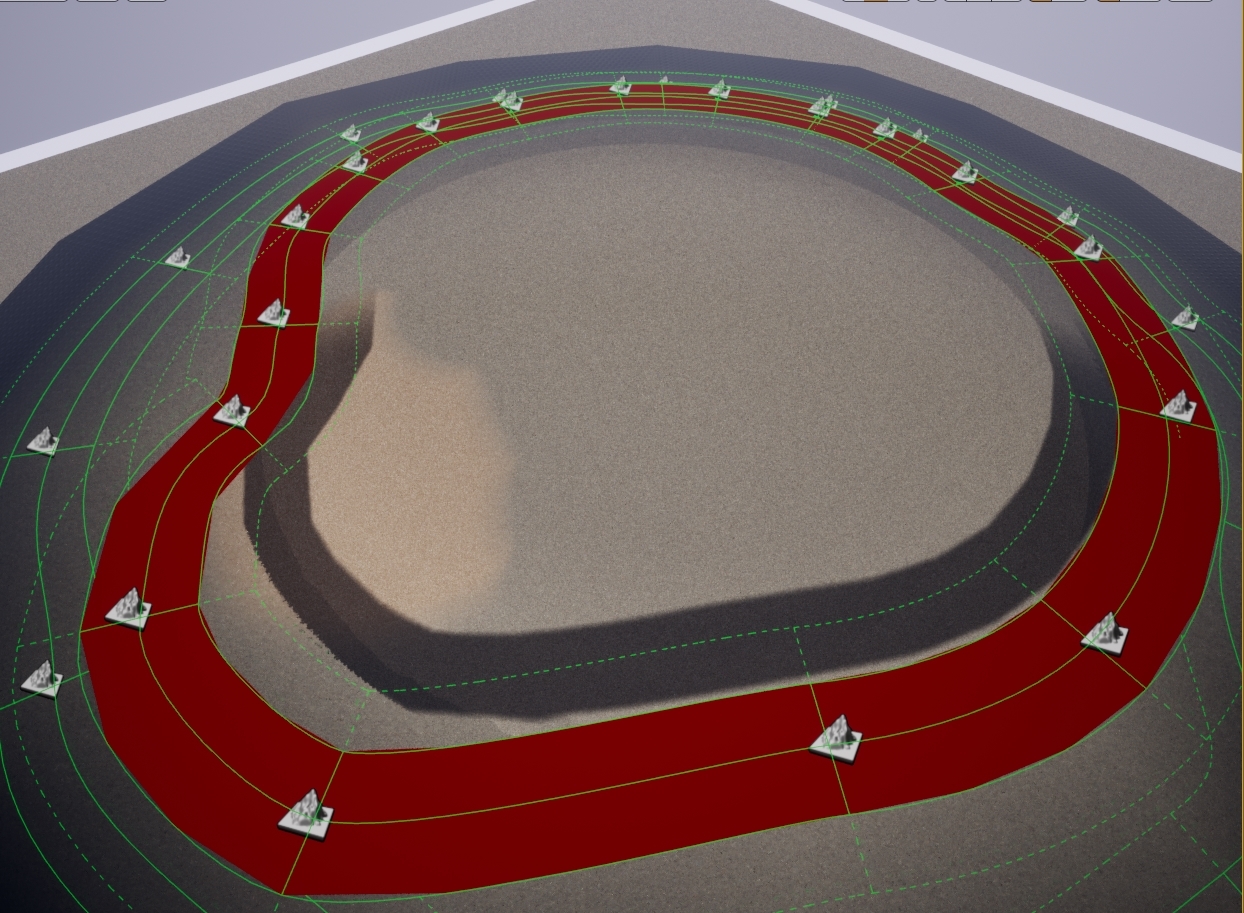
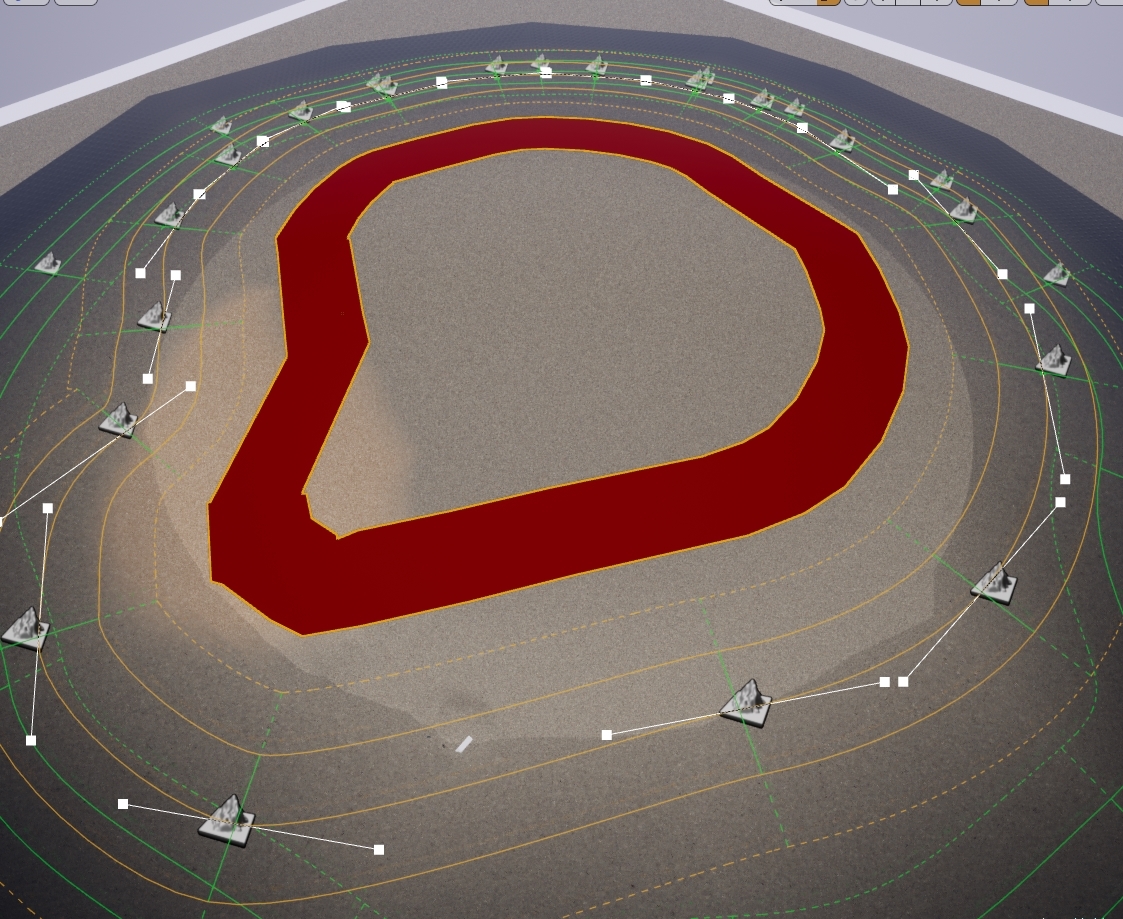
all i got now is this
https://i.gyazo.com/280caafcf28829d2322f150eef451360.mp4
it was done with 'object orientation' node
also transforming vector to local or tangent gives weird results
i need to make it with landscape spline in particular and within material, any ideas guys?


 rose bison
anybody around that knows a thing or two about asset loading and loading times?
ue4 pretty much loads every asset, it doesn't matter what map I load
and it takes waay longer than it should
it's like somebody enabled bLoadEveryAssetInContentBrowser or something
 thorn forge
Hey people, do you know of any fluid simulation solution that will allow pouring liquids from one container to another in a vr game ?
small basin
@thorn forge There's liquids in Nvidia's PhysX, though you could only use it on machines with Nvidia GPUs I think. I used their liquid in a project last year, it worked fairly well. If you go to the "Modding" tab in the launcher and install the VR Funhouse modkit from Nvidia, you can see how they implemented liquids in VR.
thorn forge
Thanks. I'll check it out
 meager dove
When's the giveaways happening?
cursive dirge
@small basin @thorn forge he's talking about nvidia Flex
 wet grotto
I don't know
cursive dirge
flex's practical applications are limited
but if you want to try it: https://github.com/NvPhysX/UnrealEngine/tree/FleX-4.17.1
or I have unofficial 4.18 forks that have it: https://github.com/0lento/UnrealEngine/tree/4.18-GameWorks
https://github.com/0lento/UnrealEngine/tree/4.18-Blast-Flex-Flow
GameWorks one has Blast, Flex, Flow, HBAO+, Volumetric Lighting and VXGI integrated on 4.18.3
I wouldn't use the vr funhouse version of flex for any practical project as it's using old cuda only implementation
those newer flex branches have flex 1.1+ which works out of the box even on AMD GPUs
small basin
Yeah, back when I was doing my VR project the VR Funhouse was the newest version still
keen birch
Yeah, anything about those giveaways? 3:
plush yew
@maiden swift where are the Swag Pack giveaways?
 maiden swift
Will be starting soon. We'll make an announcement before they start, no worries.
maiden swift
Yes.
plush yew
Ok.
sturdy walrus
blueprint seem fun
latent moth
I don't understand where in the animBP state machine you can plug in the transition animations, for instance "from crouch to standup"
that is an animation supposed to play only once and then move over to the standup idle loop, for instance
can someone enlighten my path?
frank escarp
@latent moth intermediate states
latent moth
oh really?
frank escarp
look at ShooterGame
latent moth
what is shootergame
frank escarp
the COD style PvP shooter that acts as the best "full game" example
its on the Learn tab in the launcher
Its a great C++ example project
good enough that Ark was built on top of it lmao
latent moth
lol
not using C++ though
but ok I understand, transition and basically the condition is when the animation is over
thank you
they are 50% the pro ones... the basic animation free pack from EPIC is really awful at certain things... and missing animations (no walking with gun at hip for instance)
quasi lake
Can any great brother explain a little bit about how UE4 network works?
I read the document but I cant find a thing about how to set a server or http request etc.
Totally noobs about network
latent moth
I'm really new here but what do you mean with "network"
multiplayer? JSON rest calls?
quasi lake
I mean ,a server to communicate with client data
latent moth
still don't know what you mean, all client-server relationship transfer "data"
are you talking about in game playing info, or custom HTTP calls, ...?
quasi lake
You need a server to run to get all buddies in right?
quasi lake
Yeah maybe
frank escarp
@quasi lake command line open MapName -listen
thats it
that creates a server
on other guy
latent moth
if so, this is what I found (not used yet) https://forums.unrealengine.com/community/released-projects/6382-json-query?7045-PLUGIN-JSON-Query=&highlight=JSON+QUERY
quasi lake
Eh,I wanna know like more abstract structure about this
obsidian nimbus
content examples
frank escarp
thats pretty much it, really @quasi lake
latent moth
@frank escarp I think he wants to understand how to do a "JOIN GAME" functionality
frank escarp
you can also open a dedicated server, but its slightly tricky
to do a Join Game thing, you need to use matchmaking
latent moth
but it's speculation, hence I was asking what he means
frank escarp
with LAN, its fine
there is afunction like "get sessions" in LAN
but to do that in online, you need to use Steam
in your game, apart from the "openl map -listen", you create a "Session"
the Session is like a game in a server browser. Automatically works on LAN
but it wont work online, you need steam for that
quasi lake
Ok,so join game pattern is something like P2P matchmaking?
obsidian nimbus
Unreal Engine
A previous blog post offered a crash course in blueprint networking, but now we’re back with a thrilling six-part mini-series on creating blueprint content that works in a networked game!
quasi lake
That's totally different from a server-client pattern right?
frank escarp
@quasi lake unreal engine is allways server-client
but one of the players can be a "listen server", wich basically means "host"
quasi lake
Keke ,so one of the players to be the server
frank escarp
yes
quasi lake
So we dont need to run a server to run this multiplayer game?
quasi lake
So how do other player find me
obsidian nimbus
tell them ur IP
frank escarp
it will return an array of session info, and then you can join a session
quasi lake
Oh,like I host a game,then I create a session to the internet
Then others try to join this session
obsidian nimbus
that 6 part video serie is pretty decent
will show u how to host/join from console
quasi lake
Bookmarked
Good to know this,yet actually I'd like to know the traditional way to communicate with a server
You guys mentioned above
obsidian nimbus
i like the VArest plugin better for some reason
cant recall why
but it does the same thing
quasi lake
I have a question about multiplay
Which is
Like when a match finishes
I need to calculate the results ,where do I calculate this?
obsidian nimbus
you can host and join a 3rd person template right out of the box now
quasi lake
At the host player's server?
quasi lake
Wouldnt it be unsafe?
obsidian nimbus
kinda depends on what u wunna show, because player might not have accuracy of other players
well if i cheat myself to get a scrore of over 9000 but other plyers see i have a score of 3 who cares
quasi lake
Is it like a broadcast pattern?
obsidian nimbus
every1 is happy