#ue4-general
1 messages · Page 167 of 1
 nova heath
 worthy steppe
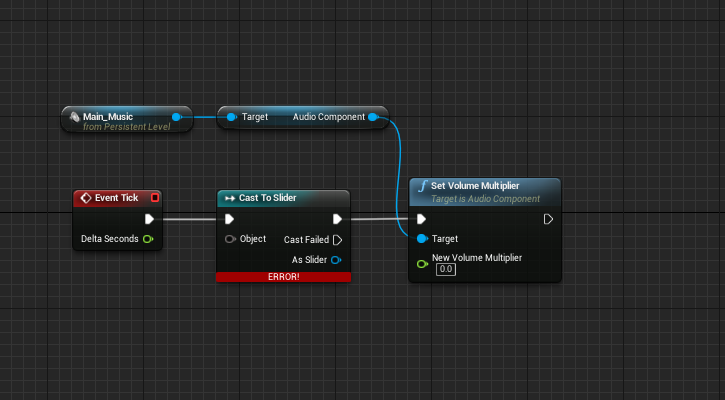
Guys how do you reference from a widget inside the level blueprint...
nova heath
Widget?
worthy steppe
 nova heath
Like UMG?
nova heath
Wouldn't it be easier to dispatch an event on the slider and recieve it on the level BP?
 fair leaf
Hola. Is there any way to select a DataTable for multple selected CSV on import? I don't want to click the DataTable for every file
worthy steppe
@nova heath Could you explain what i need to dispatch and how i get that info
nova heath
Yeah hold a sec and I'll give screen shots
First add a custom event in your Level BP
worthy steppe
cool
nova heath
Something like this: https://blueprintue.com/blueprint/8a_74xfg/
You can make it pass a float
Actually you might need to do this in a Game Instance
I'm not sure if you can access the level BP outside the Level BP
I had this same issue prior and it's why I setup a Game Instance
worthy steppe
Im getting confused XD , Man trying to setup a volume slider is hard XD
I can't seem to find proper information on the internet on it
It seems like a really simple thing but not in unreal XD
 vale halo
😦
 quasi lake
Damn holy junk
nova heath
I got it working
 wary wave
oh man, if sequencer worked as intended, it would be awesome
nova heath
@worthy steppe It's not too bad, you have to use Event Dispatchers though
worthy steppe

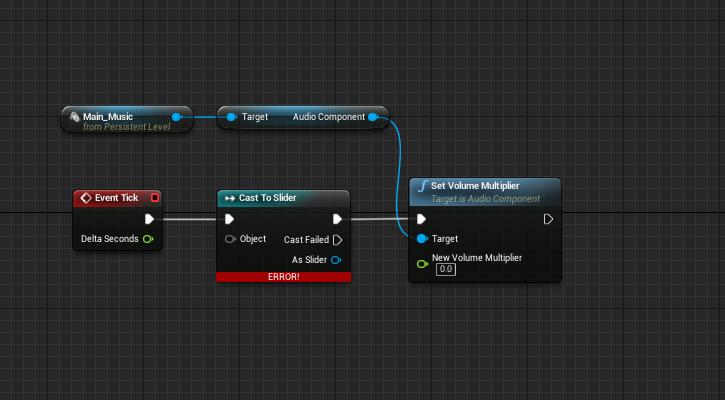
this is the design i wanted
but it just wont work as my referencing is based in the options widget
quasi lake
Well, I'm making some cutscenes which translates into gameplay seamlessly on finish with camera blending.
nova heath
MainHUD is just the name of my HUD class, inside your HUD class you need to add an Event Dispatcher
Then you add a parameter to it, a float for volume should work:
Then in your Sliders OnValueChanged event you call it like this:
@worthy steppe Not too bad right?
As you can see it works:
Ignore the blank buttons on my UI, I disabled their code to make the slider work 😛
As an added bonus you aren't listening on Tick which is a nice performance bonus 😛
 river mirage
Hey guys, why Unreal didn't uses Group hierarchy from the 3D modelling softwares, like Unity and Toolbag 3 for example? is there any plugins for that?
nova heath
I'll be here
 surreal viper
is there any way to stop this magnificent engine from starting a new instance of visual studio if I double click on a c++ function node?
wary wave
unfortunately no, that feature seems to be broken
nova heath
Any idea why my Player Controller isn't recieving mouse click events?
I have Enable Click Events and Enable Mouse Over Events enabled.
The tick event is firing but the Mouse Events are not.
nova heath
Yeah
If I replace InputAction SetDestination (set to Right Mouse in project settings) with the F key event for example it works.
I've tried literally every combination of buttons in Click Event Keys, none have worked.
 tight isle
Don’t you need to connect the key on inputaction setdestinstion to an input?
wary wave
I already told you it's the editor grid
quasi lake
So how to close it
wary wave
show -> untick grid in whatever window
nova heath
@tight isle I don't believe so.
You set the Key inside Project settings.
If I do:
Followed By:
\
Then it works
I.e. Presssing the F key causes the characters to move to the mouse position
quasi lake
It doesnt appear before
 ripe geyser
Guys, I'm using 4.18 and I have a weird bug: the user interface is all scaled up (while up to 4.17 it was normal). I know that they added an option to support DPI scaling, but it doesn't make any difference if I use it or not
ripe geyser
The interface looks like this:
quasi lake
@wary wave
tight isle
@nova heath I’d try to remove that key binding and add a key event to the BP just to see what happens.
When you debug it do you see the click event making it through your BP?
wary wave
you untick it in whatever window you don't want to see it in
 gloomy apex
I converted a BSP into a static mesh, and now whatever I put its collision settings to it alsways ignores the player pawn
nova heath
@tight isle When I remove the InputActions and debug even if I attach Right Mouse Button just to a print string nothing happens. i.e.:
Removing the binding in project setting doesn't seem to have any effect.
tight isle
That’s strange. I’m afraid I don’t know enough to be helpful here. Hopefully someone else can.
nova heath
This used to work, I assume a setting changed or something and broke it
@worthy steppe Any progress?
nova heath
Every other type of event works even Mouse Move.
 oblique fern
Why. TF is it I close a UE project and it doesnt really close?? EVen after 30 minutes
cant open the window, cant close it but it sure pops up on the task bar
 keen birch
Probably crashing on being closed then
 tender dome
hi guys, i want the camera setup as shown. but when i am near any object or wall, the camera goes through it and i can see things that are inside. how can i stop it from doing that?
 restive eagle
attach the camera to a spring arm, that should be already added by default inside the 3rd person template
tender dome
its already done. but still i happens
restive eagle
does it clip like theres no wall or it barely clips
tender dome
like there is no wall
restive eagle
then try oppening that mesh and set collision presets to block all
also when your spring arm is selected make sure there is a thick on "do collision test"
tender dome
where can i find that option of collision?
restive eagle
 tender dome
lemme see!
restive eagle
and make sure that your mesh has some collisions added already
http://prntscr.com/hz3zou
 tender dome
im using defult mesh so there is no option for that!!
restive eagle
then inside your map click on it and look under details panel
which collision is set
it can be default and it would still work, try changing to block all to see if anything changes, if not then do the thing with spring arm i wrote before
if it still doesnt work open your character bp, click on spring arm and send an image of all your screen
tender dome
it keeps opening this tab
tender dome
restive eagle
and show which wall inside your game is not blocking
just the in game image is enough
tender dome
tender dome
even with cube static mesh from modes panel
restive eagle
hmm by default this box is blocking my camera
tender dome
maybe its the placement of camera!!
restive eagle
well if you tested properly then it shouldnt be a problem
if you are getting some kind of block looking in a lot of different directions then probably
ideally you would want to set your spring arm like this
http://prntscr.com/hz47nq

that it would go dirrectly to the character
tender dome
this is whats happening
restive eagle
your camera location should be on 0 0 0, and by setting socket offset for your spring arm you can move it arround
honestly hard to tell whats wrong, if no one else can gie another advice i would recommend oppening a clean 3rd person template and test it there
if it works correctly there try to look what kind of changes you made to cause that kind of problem
tender dome
first lemme check using socket offset
restive eagle
socket offset helps with narrow spaces, encountered that while going through a door
but no matter what, objects were still blocking my view, in your case they dont so its another issue
tender dome
even with cam on 0,0,0 and using socket offset it still happens
restive eagle
ye so open a clean template and test it there
you made smth that is causing that, for anyone else its hard to backtrack unless they encoutered the same issue
restive eagle
um Z shouldnt matter much, depending on your mesh. but if you move from the x,y then maybe you would get some clunky movements. mine is on 0 0 -100
tender dome
im thinking of keeping spring arm and cam at origin and moving mesh
didnt worked! X(
ill use clean temp now!
yup! still happening 😦
restive eagle
hmm very strange
just made a clean template of my own, no some sort of problem so cant help you sorry
nova heath
I've solved my issue but I don't understand why it happens
Other actions were happening on Left\Right Mouse Button Events
Removing those actions caused the movement to function again.
 flat pilot
I'd like to target a 2d render of a 3d actor ingame ( kind of hard to explain so here is a screen ), I just need a function name and I'll start digging on it, can someone help me with that ?
 livid haven
That's not really going to boil down to a single function in any way.
You're going to want to do some fancy depth/stencil work with materials.
I don't off the top of my head have a resource to give you. Tom Looman has something where he touches on depth/stencil writing/reading to make a see-outlines-through-walls effect.
So you can try finding something about "outlines" or "x-ray vision" or "see through walls" in conjunction with "Tom Looman"
flat pilot
I'd think that it's something people need a lot, was looking for an obvious function
livid haven
This is inherently a shaders/materials kind of feature.
You're asking the GPU to track what pixels a particular object or set of objects were drawn to.
Then using that to mask the drawing/rendering of other operations.
It's not really a generic thing - it's a particular usage of low-level mechanisms for stenciling/masking.
flat pilot
the yellow border around the actor could be something to work with ?
since drawing it for the engine is basically having access to what I want ?
livid haven
Not exactly
But they do use some similar low-level operations, depth/stencil reading/writing.
Again, that Tom Looman example will give you some leads - you're not going to be able to copy-paste what he has and just tweak it, it's not what you want, but it touches on the things you'll need to understand and use.
river mirage
Hey guys, what i could do to fix this light leak? my lightmap is at 2048 res
 rocky portal
is there some way to populate a list of ContextActions based on which components are present
catch is there is a set ordering of actions
right now I use a ContextMenuComponent which holds an Enum Context Actor Type and I use this to generate the ContextAction list out of a DataTable
but I end up with ridiculous ContextActorType's like: World_PickupEquipSearch
Inventory_EquipSearchDrop
seems silly to make an Enum and literally list what context actions there are inside it
I could use generic names like World_Backpack (Backpack being an equippable container)
World_Consumable
keen birch
Could just use arrays for that, right?
river mirage
@south ridge yeah, its production, its not two sided because my walls has thickness
 south ridge
Are walls just touching or fully intersecting? How think is the wall?
Can you try, as a test, making the walls intersect and increasing thickness of the wall near the leak to at least 2x the texel size on that wall
In other words, for the test, try to cover up at least 1-2 texels on the wall where leak happens with the thickness of your wall (or some placeholder object)
 plush yew
Which chat channel is best for discussion Unreal file referencing? E.g.: files losing references to each other?
 obtuse ocean
blueprint is what?
tender dome
@restive eagle i found the solution. i added a new spring, rotated it to camera location and it worked but a new problem arose. now i cant rotate my cam when i am not moving!!
nova heath
I have no idea what you're talking about lol
tender dome
i fixed my "camera clipping through objects" probllem
nova heath
Was I a part of this conversation? I think you may have me confused with someone else
south ridge
@plush yew this chat 😛
plush yew
Excellent - quick question hopefully. I renamed a folder within the Unreal editor. Now I've got assets complaining that they're missing references to this folder.
Weird things is - some assets handled me renaming the folder fine. Others did not. I have no idea why.
I'd like to manually repair the missing references - is there a way to do this?
E.g.: a particle system outside the folder was referencing a static mesh within the folder. I know where it needs to point after the rename, but I can't find an option to repair it manually.
(I'm hoping I don't have to open each problematic asset, find the variable/setting causing the problem, and set the value from there.)
keen birch
@plush yew First off, right click your content folder and click "fix up redirectors"
And hope that fixes it
If, like I'm assuming, that doesn't fix it, I'm afraid your refs are actually completely dead, so yeah, you'll have to manually redo them
south ridge
@plush yew Roll back to an earlier version using your version control, MOVE assets to new folder (don't rename folder), then do "fix up redirectors" and move the assets into current version
plush yew
Yeah, I did the Fix Up Redirectors and that didn't do it because there were no redirectors to fix.
Gah. Reverting back and doing it again. Seems like a bit of an oversight to have a error message saying "Reference not found" without a path to resolve the problem easily.
I'll file something to Unreal. Obviously my workflow was broken, but this feels like something that should be recoverable.
Thanks for the tips though!
south ridge
What version?
plush yew
4.17.2
south ridge
Yeah, that's a bug. There were known issues with renaming stuff in pre-4.16
Generally you shouldn't rename folders
Only move files
south ridge
Post-4.16 I had no issues ever with just moving files (but plenty with renaming folders)
In my case, folder renames would usually fail though
Moving folder "Foo" to "Bar" would end up making an empty folder called "FooBar" and files staying in the original "Foo" or other stupid stuff like that
 umbral trout
Anyone else experience system slowdown while using UE4, has been happening since the other day with new Nvidia drivers that have meltdown patch. I'm on 4.17
 silver crown
"Nvidia drivers that have meltdown patch"
Only CPU part is patched not GPU
Shouldn't have an impact
 gleaming shore
Hey guys, was wondering if someone could point me in the right direction. Basically I want to create a super simple game (cube goes forward if it hits anything you die) however I just have no idea where to learn what I need
for example first thing i'd need to do is make this cube go forward on its own, but google hasnt brought anything up that helps
silver crown
Video tutorials demonstrating concepts and techniques in Unreal Engine 4.
The endless runner one
gleaming shore
Ah thank you, that actually helps a lot
south ridge
@silver crown actually the GPU drivers would be highly affected until they are properly updated (if at all)
Any sorta talking to external hardware that has to talk a lot with OS's kernel would be affected
But hopefully GPU drivers will be updated so they will be exempt from the meltdown/etc patches...
 midnight yoke
Guys, is the UE4 blue shield logo still used officially for something?
 weary basalt
How do you mean?
Any Epic/UE branding logos that Epic make would always be official.
 safe rose
So
the Blue Logo IS still allowed to be used
For now anyway
I just talked to legal yesterday about it
You STILL need to submit a Trademark License Agreement Form @midnight yoke
But no
All logos are now the black and white flat one
south ridge
Off-topic, but I still have no idea why would you want to use extra UE4 trademarks when you're not forced to
safe rose
That's their new "official" one
midnight yoke
I think it is still used in the splash animated intro?
safe rose
@south ridge What are the cons in your eyes?
midnight yoke
^
weary basalt
@south ridge Id imagine some devs would like to respresent
safe rose
I see many pros
weary basalt
UE and Epic are amazing brands
midnight yoke
Recognizability is great
safe rose
Basically, if it can wow people and showcase the engine good
It's a nice kickback for everyone imho
south ridge
@safe rose No major cons. Only a single minor con
I think it should be irrelevant to the game what engine it's made on, so the only minor con I see is that some people don't like it
Thing is
safe rose
?
no way
lol
I can't agree with that at all sorry
I don't have much of a comeback though
 fierce tulip
can also be done because of fanboyism. i'd be fairly proud to show that I used ue4 for my game. (but thats just me being a fanboy)
south ridge
For a big project, you're already paying Epic a ton of money compared to other engines. I think that's totally fair, but also it's a good thing that those logos are not mandatory
safe rose
But I think the others are going to be able to handle it just fine 😉
weary basalt
Engine is irrelevant if you look at it like that. But still the minority of people that would hate the engine, only an fraction of that would not play the game because of it.
south ridge
I don't think presence or absence of the logo would be a decisive factor in any way ultimately
safe rose
No, but it helps with promotion
south ridge
It wouldn't affect sales unless your game looks like UE4 shovelware
safe rose
marketing
safe rose
You think you can get on a MadeWithUnity website, with UE4 game?
Or viceversa
Some of these sites are pretty popular
Great exposure
south ridge
But let me say something
In my mind I have a big UE4 project right now. For a smaller UE4 project I totally agree
weary basalt
I would just put it down to personal dev preference really. Like you said its not mandatory so you do have an choice.
south ridge
Putting UE4 logo on a smaller project to aid in promotion on the basis that it's a good example of how UE4 can be used is a fair idea
safe rose
I don't get how size would matter
south ridge
Big - lets say with a budget of over $150k
south ridge
Because at that point you should have a marketing guy or even a team to help market your game
Not just post it on UE4 websites and put an UE4 logo on it
safe rose
I don't disagree, but that has nothing to do with placement or usage of their logo
south ridge
That is marketing, but that doesn't really do anything after a certain threshold
safe rose
If anything, wouldn't it just be icing on the cake to use it?
I don't know...mine's pretty big righ tnow
south ridge
Hey, if you can work the logo tastefully into your promo materials, it's totally fair
We can't find a place to put the logo tastefully so we decided we just won't
south ridge
Outside of credits roll/documentation stuff
safe rose
Black and White custom
south ridge
@safe rose a better idea would be putting it on an advertisement then
safe rose
If I could, I would make a B&W zombie
south ridge
Since we have advert spots in our game due to nature of the metro
safe rose
Ah
south ridge
Not real advert spots haha
safe rose
That makes sense though
south ridge
We're not gonna be putting real ads in there, but we'll comission our designer to advertise some random bullshit there in a serious manner
Fake products etc
south ridge
I prefer the B/W logo stylistically
I think blue logo - and this is not related to our discussion - is ugly
But that's a taste thing, ignore that
rocky portal
That laptop needs IT support
south ridge
Point is, I'm a big fan of not having branding on everything
I asked for no branding on my laptop 😄
So it doesn't have the stupid-ass ugly logo on the front face. Just a clean slick panel
weary basalt
Each to their own
south ridge
Yeah!
 coarse cradle
anyone know why this is happening?
the preview material is correct but for some reason the mesh is differnt
*different
fierce tulip
you dont have a proper uv-map on the mesh
coarse cradle
its just a flat surface
fierce tulip
doesnt matter, you need to unwrap your uv's for shaders to work on em
fierce tulip
good luck!
 frosty copper
@coarse cradle The first few minutes of this aught to suffice, although the full video will be of benifit; https://www.youtube.com/watch?v=KXYqr4w6li4

In this tutorial I show how to uv unwrap Blender primitives: Cube, Sphere and Cylinder. Pleae support me on my patreon: https://patreon.com/jayanam - It's gr...
coarse cradle
well It was the unwrapping thing
it was just a plane so all I did was go back to the model and hit "unwrap"
fierce tulip
yea, that would work haha
coarse cradle
then I just drag and dropped the diffuse and normal onto the imported mesh
fierce tulip
now you can add to your resume "experienced in unwrapping" XD
coarse cradle
works for me
fierce tulip
:p
hey its a start, a plane today, a box tomorrow, a high end super model in a year
frosty copper
.... XD it still helps to grasp and understand what's going on. XD
else the next question will end up being "I unwrapped this cube, but all the faces are the same... why?"
fierce tulip
https://www.youtube.com/watch?v=sR0xV0TDvS8 while I made one mistake in the video, it does explain rather decent what uv's are and how they work.

Attempting to explain UV's and UV-Manipulation/Distortion.
frosty copper
too late, he's already ran awaeh~!
fierce tulip
(╯°□°)╯︵ ┻━┻
coarse cradle
lmao im still here
south ridge
He's completely gone
coarse cradle
but ill take a look at those vids, thanks @fierce tulip and @frosty copper
and now im gone
fierce tulip
waves
safe rose
@rocky portal lol
 queen arch
can someone help me with some vector math?
I want to find a position in front of my character and to the right, but without changing the X and the Z
I have the forward vector, but I don't know what to do with it
Fuck my life, it's working... it's working and i don't know how! It shouldnt work! The rotate to face location nodes aren't even connected!
What is happening?
Is my copy of the engine possesed?
coarse cradle
says in this tut that I gotta set the roughness to 1
im assuming thats something I had to set back in blender when working with the nodes ?
or is there anotehr roughness setting I have to work with in ue4?
 grim sinew
It's in the Unreal material
gleaming shore
Hey guys, i made a very simple runner game however I've no idea how to make a simple points system (for example, for every 1 milisecond you're alive you get 1 point), could someone point me in the right direction?
weary basalt
Create an looping timer.
Simple
If your still alive when the timer ticks over then add 1 point. If not then kill the timer and stop counting points.
gleaming shore
Do you implement that with a hud widget?
weary basalt
The Timer probably shouldnt be inside the HUD, an more appropriate place would be PlayerState or GameMode (depending on SP or MP)
But you would use an Widget or the HUD to show the value of your Points yes.
UI Elements should always grab or be fed information, they shouldnt be responsible for generating it. They are only there to display information, nothing more.
gleaming shore
That's useful information, thank you
coarse cradle
dumb questions but
I dont really understand this
I made the material and Im not sure what this next step means lol
gleaming shore
How can I make my integer "tick up" then display on the hud, im having serious trouble with it.
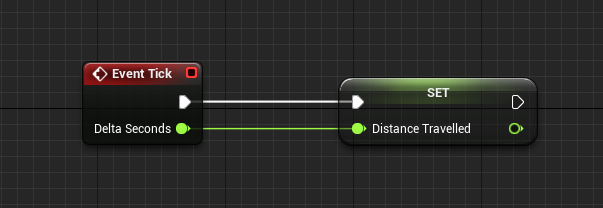
https://i.gyazo.com/09c154ca12f91db804c18ac37a8fe106.png so far this is all i have
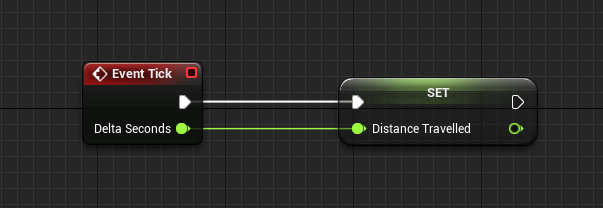
 worn granite
set it equal to itself + Delta Seconds. if you really wanna, you can multiply Delta Seconds by another number (say, 2) to control how far "distance" increases over the course of a second.
gleaming shore
How do I display that information onto my hud or widget? Thanks for the reply btw
Ok i got it to display however the way im getting the info is wrong, im not sure how to make it "go up"
weary basalt
Simple addition.... Just as PlaceholderName explained.
You would benefit from watching some Basic youtube tutorials on Blueprint.
gleaming shore
I followed a tutorial however they did not show how to do the scoring. Ive googled around and most scoring tutorials are shooter based
weary basalt
Your not going to find an tutorial that fits your exact use case, you need to watch tutorials and absorb the information in order to think critically about your problem in order to arrive at an solution with the information you collected earlier.
What parts of that tutorial is similar to your issue and how did they solve it?
How can you adjust their solution to fit your own problem?
These are some simple questions that will help you engage with your problem solving abilities.
plush yew
hi
south ridge
hi
coarse cradle
is there a way to make my normal map stand out a bit more? I have a roughness of 1 set so i can use cel-shading and it makes the bumps in the floor non-noticeable
south ridge
You can boost your normal map
tangent_normal = normalize(lerp(vec3(0,0,1), original_tangent_normal, normal_intensity))
normal_intensity of 0.0 will remove normal map, 1.0 will change nothing. Values over 1.0 will cause normal map to become more intense
coarse cradle
I see whats happening
so youre essentially just multiplying the blue value by whatever you set it as?
because RGB is a vector?
south ridge
No, not exactly
I'm interpolating between no normals (a vector of X = 0, Y = 0, Z = 1.00) and whatever normals are there by default
If I go beyond 0 .. 1 input range, it will start extrapolating normals
And if I go below zero, it will invert the normals
In other words, I can scale the "intensity" of normal map - set scale between no normals (vector of 0,0,1) and full normals, but it can also go beyond 1.0
south ridge
This basically squishes normals to make them less or more pronounced
If you squish your normal vector, the normals will become more intense
Hold on
I'll illustrate
coarse cradle
alright
south ridge
So to scale normals we "squish" normals (or extend them upwards), then normalize to ensure they have unit length
Don't forget to normalize. If you forget to normalize, it will look correct at first, but cause unpredictable issues later
south ridge
lerp is simply a compact way of squishing them in a way that produces easily understandable "intensity" input
Instead of doing a lerp you can do what I've drawn on the picture above
squished.y = normal.y
squished.z = normal.z*scale
final_normal = normalize(squished)```In fact...
Take this: tangent_normal = normalize(lerp(vec3(0,0,1), original_tangent_normal, normal_intensity))
And write it out in full:
tangent_normal.x = 0 * (1 - normal_intensity) + original_tangent_normal.x * normal_intensity
tangent_normal.y = 0 * (1 - normal_intensity) + original_tangent_normal.y * normal_intensity
tangent_normal.z = 1 * (1 - normal_intensity) + original_tangent_normal.z * normal_intensity
tangent_normal = normalize(tangent_normal)
While it doesn't look quite the same, if you look at it, it is proportionally doing the same thing
But instead of simply squishing Z it squishes X and Y while growing or shrinking Z
The net effect is same. Both approaches utilize same number of GPU instructions (lerp is free), in fact lerp one might be a tiny bit faster maybe
coarse cradle
either ways it accomplishes the same task
south ridge
Use the lerp approach, but consider squishing one too for learning purposes
coarse cradle
when else could the squishing approach be used rather than lerp?
south ridge
I need to boot up mathematica, but I believe the lerp method produces (I think!) linear scaling of normals, while the squishing method is a little non-linear
But whatever. They both give same final result 😛
We use lerp in our materials to adjust normal map intensity for some materials
coarse cradle
I understand now
jeez thanks for this long explanation
never would have guessed how to without it
south ridge
You would've invented squishing method eventually after thinking about it
south ridge
It is a natural choice once you think about what tangent space normal is
coarse cradle
thats true
tbh Im still pretty new to this stuff so I'm still trynna learn all these terms lol
coarse cradle
thatd be a great help, that's definitely my weakest area, especially with lighting related topics
thanks again
south ridge
Man
I should post that as a blog post
But people who follow our game get angry if I post anything that's not about our game
Btw
I just checked with Mathematica just to be sure
The squishing and the lerping methods are FULLY equivalent 😄
With one exception - the lerping method properly inverts normal
The X axis is the input factor to squishing/lerping, the Y axis is relative visual intensity of normal map (as measured by how darker/brighter the relevant pixel will be, compared to original value)
gleaming shore
Does unreal not let you use mp3's as sound? My blueprint wont show my mp3 sound file
 vale osprey
@south ridge interesting, are you lerping with a 0,0,1 vector?
south ridge
@vale osprey Yes
And the result is mathematically identical as woflram shows (except for the sign reversal)
lerping properly inverts normals with negative "intensity"
vale osprey
and squishing is lowering Z of normal?
south ridge
Squishing is just scaling Z of the normal and letting normalization fix X/Y afterwards
This is squishing
south ridge
Yeah, it's very useful to invert normals sometimes
Inversion just changes the apparent shape of surface like this
You can invert normals by multiplying the X and Y components by -1 obviously
vale osprey
yes
vale osprey
It’s just nice that with lerp you can expose just one parameter and then both flatten and invert normal map
@south ridge unrelated question but maybe you have insight:
I'm trying to figure out why engineers started to skin fuselage of early ariplanes . There where couple of early airplanes that used open frames, like Wright's flyer, Demoiselle but after them pretty much all fuselage frames where completely or partially wrapped.
some sources say that it's to lower drag but from math point of view I don't see how that is possible
individual struts, wires and frames can have a higher drag coefficient because of their shape, but their area is much smaller than a fabric square attached to the side of frame
environmental factor makes sense for area around pilot seat and maybe some cargo section (which was rare)
maybe it has to do with fabric cover creating lower skin drag when airflow is parallel
hmm, that would make sense actually
south ridge
That is part of the physics reason
Struts, despite having lower frontal area, have higher drag coefficient
Drag force is Fd = <blah> * Cd * A
When going from struts to smooth skin, you increase A by not all that much (remember, plane has an engine and the cabin, frontal area is gonna be mostly the same-ish)
But you drop Cd by so much
In simple words, turbulence = drag
Smooth skin planes create little to no wake turbulence by their fuselage (most of wake is created by wing tips, followed by wings and tail etc)
Struts and random antennas and other junk always create turbulence behind them
Turbulence means inevitable loss of energy, means drag
 floral heart
At higher speeds, would the increase in Cd be worse than an increase in A?
vale osprey

@floral heart the same factor, the are both linear
airdrag force equation is
D = 0.5 * ro * V^2 * A * Cd
only velocity is quadratic
to be precise, Cd depends on speed too
but normally calculated/approximated for a specific flight conditions
and here is Bleriot:
https://bleriotxi.com//wp-content/uploads/1721412_orig.jpg
 south ridge
@floral heart At higher speeds (transonic and supersonic, mach 0.5+) you HAVE to have a very specific smooth skin setup
It's completely utterly different when you get there and the only solution is literally magic
https://en.wikipedia.org/wiki/Area_rule for M0.5+

The Whitcomb area rule, also called the transonic area rule, is a design technique used to reduce an aircraft's drag at transonic and supersonic speeds, particularly between Mach 0.75 and 1.2.
This is one of the most important operating speed ran...
https://en.wikipedia.org/wiki/Anti-shock_body these are mostly magic, though there are reasonable explanations of why this works and why area rule is a thing

An anti-shock body (also known as Whitcomb body or Küchemann carrot) is a pod positioned on the leading edge or trailing edge of an aircraft's aerodynamic surfaces to reduce wave drag at transonic speeds (Mach 0.8–1.0).
The basic principle is that if aircraft follows area rule, the airflow behind the plane ends up less turbulent and once again - less turbulence = less drag = less energy loss
vale osprey
I sort of get it why airplanes like Antoinette:
http://imgproc.airliners.net/photos/airliners/0/5/0/2027050.jpg?v=v40

had fully covered fuselage, I guess it lowers skin drag
but Bleriote was build around the same time and windtunnels where already a thing
yet half of it's body is left as open frames
and I can't think that engineer of Bleriot didn't know what he was doing as airplane has a number of clever ideas, like horizontal surface of the tail is placed such that it doesn't get into the wake of the wing
@floral heart I thought you mean high speeds for early airplanes 😄
south ridge
No skin = cheaper 😛
vale osprey
as Blackfox said, around 0.75 mach speed, things start to change pretty fast
south ridge
Later planes started to rely on aircraft skin to transfer some of the mechanical loads onto the frame itself and so on, so skin became an essential part of them
vale osprey
yes, that part I have sort of covered, just wasn't sure how to "penalize" player by not installing skin
like when you don't have access to load bearing skin yet
floral heart
I was indeed thinking of early planes breaking highway speeds. Got lost reading those links, though.
south ridge
Penalize them by increasing Cd as their speed grows
vale osprey
but now I get it, basically drag coefficient for a frame, doesn't depend much on angle of airflow, like it will be at 0.8-1.0 at any angle, while skinned fuselage will have something around 0.05 as skin drag when air moves in parallel
south ridge
With a quadratic (probably) proportion
floral heart
Any chance the extra turbulence could damage something?
vale osprey
yeah, it creates drag and drag is rather strong force
south ridge
Flutter can be induced by turbulence/wake
vale osprey
"Penalize them by increasing Cd as their speed grows" I like this idea 😄
south ridge
Turbulence has a natural frequency (it's an oscillating process). When this flow interacts with aircraft tail, it may induce heavy oscillations if tails natural frequencies are too close
So this oscillating force (up-down-up-down) hits tail. If any of frequencies in the turbulent spectrum (it's not a single freq) match up with natural frequency of the tail (its bendyness), the tail EXPLODES
That's my favorite thing about flutter. When flutter happens, the relevant aircraft part just EXPLODES

Examples of different flutter tests with aircraft, floppy wings, and even a suspension bridge. Want to learn more about flutter? Visit http://www.wired.com/a...
floral heart
Sounds like it should be your least favorite thing!
vale osprey
@floral heart you have three basic forces in flight, weight, lift and drag. (thrust not relevant specifically in this case) Weight doesn't depend on speed but inertia can be a thing. The other too strongly depend on speed. When pilot of early airplane does a sharp maneuver, increase of angle of attack on the wing, creates more lift and more drag while mass of the airplane wants to move by inertia in old direction. Snapping wings was rather easy in those conditions.
- lift and drag act in different directions
so any bear loading joint, like struts that hold wings, will be under stress at two different vectors, with different vibration and etc
@south ridge that looks brutal 😄
south ridge
Most of those examples are self-induced flutter (turbulence from the wing causes wing to flutter), but some of the tail ones are related to wake turbulence from main win g and fuselage, at least partially
vale osprey
Antoinette took drag seriously for his new airplane:
http://longstreet.typepad.com/.a/6a00d83542d51e69e201901d599c09970b-500wi

but added weight was the issue
ok, this gets me somewhere
thank you guys for brainstorm!
south ridge
Anytime
Poke me if you need more aerodynamics talk
I started an aerospace company! Har har.
(it's currently so small it doesn't count though)
vale osprey
Thank you!
I'm in the process of making prototype for building early aviation - WW1 kind of airplanes from modules
should unload itself
south ridge
There are two types of levels
If you manually loaded level in, chances are, you'll have to manually unload it
That's for "blueprint" streaming levels
For "distance based" streaming, it's only based on distance to player and is fully automatic
And the distance is only measured in XY axis I believe
If your new level is located far away from the main menu level
That's assuming world composition is on
 brittle gulch
Hi guys, I've heard somewhere that C# will be implemented in UE4 in the future, Have I dreamed?
south ridge
@brittle gulch pretty sure C# as a scripting extension was available for a while now?
keen birch
There's some community-sourced stuff happening which is adding in support for C#, F# and some other stuff iirc
 cloud cobalt
It's not coming officially, just through community mods
keen birch
MonoUE
Mono for Unreal Engine is a plugin for Unreal Engine that allows writing gameplay code with C# and F#.
 keen birch
Yeah the last one's dead I think
south ridge
Suddenly flashbacks to when we were fiddling with a DVB radio, turning it into a digital transmitter
keen birch
Think you need tjhe first one
south ridge
We had troubles with the drivers, so we asked manufacturer for support
They just sent us the driver source code and that's it
No more docs, no info nothing
The driver was mostly concentrated in a single 200 kb CPP file
cloud cobalt
I've built from source for some time, never again
south ridge
Why not? It's great
cloud cobalt
We don't ever want to have changes to the engine, so building from source is just a time-consuming hassle
Especially while generating releases of the game - the engine just loves rebuilding half of itself for zero reason at all
We have to do it on Linux, since Epic doesn't provide binaries, it's a fucking pain
brittle gulch
Oh okay, so it won't be inside of the engine itself. And is it viable? To program in C# in UE4?
south ridge
You build debuggame or something for editor, but release is shipping
@brittle gulch just use C++. UE4's C++ is much nicer than your average C++
keen birch
That C# branch seems pretty solid
Can't really tell you more though
I disagree @south ridge That's a personal thing
While I know how C++ works, I absolutely hate programming in it
I prefer C# by a really wide margin
There's a reason I'm building everything in BP at this point in time
cloud cobalt
Personally, I'd rather depend on the least possible amount of plugins that you can
Reasons for that include the ability to upgrade and target new platforms
wary wave
In UE4 I don't see any advantage over C++
your gameplay code is so heavily abstracted it looks borderline identical anyway
keen birch
I dislike pointers pretty badly
wary wave
I don't think the gain in adopting a third party C# plugin is worth the problems it could introduce
you don't really use pointers in UE4 C++ though
wary wave
gameplay code is all memory managed using smart pointers.... like C#
south ridge
And much more like references instead of being actual pointers
keen birch
Well, then either I'm an idiot or I still have to use pointer syntax
wary wave
you just declare vars with a pointer, that's about as far as it goes
cloud cobalt
The problem with a C# plugin is that maybe two years from now, you're going to want to port your successful game to the PS4, and shit - the plugin doesn't work there ! Can't port the game without rewriting it entirely from scratch.
Or you want to upgrade to UE 4.27 that has the new Vulkan 2 API but the C# maintainer has been run over by a bus and the plugin isn't maintained.
Or you want to use some new engine functionality that the plugin doesn't expose well.
Etc
wary wave
yup
wary wave
SOBOL I've got working, but it seems the distribution function is actually pretty shit so don't worry about it
keen birch
Yeah I got it working
wary wave
as far as pseudorandom goes, it's pretty damned predictable
brittle gulch
I was asking because I can't really code (I've justused a tiny bit of javascript for webdev but that's all). I do everything in Blueprints, and sometimes I see their limitation so I want to learn code. And I've heard a lot about the difficulty of C++ over C# so I was wondering if it was better to go with C#. But since the engine has been built for the use of C++, I guess I don't really have the choice. Plus I have being dependant of plugins
wary wave
like I said, the difference between C# and C++ would be negligable
wary wave
UE4 gameplay code is heavily abstracted and macro heavy, it'd look more or less the same
keen birch
Yay for pseudo-randomisation
keen birch
Share pls
❤
Working on a cluster-based foliage generator
Wouldn't mind decent pseudo-randomization
wary wave
we implemented poisson disk distribution here
worth looking into for cluster foliage
small addition, but our foliage tools are already 500% more awesome than the defaults
cloud cobalt
@brittle gulch Blueprints go a long way, still. If you're not a code person, find one - C++ is definitely not beginner-friendly
brittle gulch
@cloud cobalt Yeah blueprints are great! I would continue make games in BP, but complement it with C++ would allow me to access to more functionality I guess. For instance, I always wanted to have access to my collision shapes informations and that's not really possible in BP because they are not exposed. I guess in C++ I'd have access to them right?
vale osprey
wary wave
we don't know because we don't know anything about your landscape - but that link will help ^
keen birch
You literally just got the link explaining that
wary wave
"Landscape is 1 vertex per meter. This is 100 UE4 units per landscape vertex. So a landscape size of 4033 vertices is 4033 meters, or 4.033 km. Pretty basic."
it's right there in the thread
(at default scale)
keen birch
@wary wave Can you say anything about your foliage tools? Kinda curious. Custom engine version I suppose?
wary wave
they're built as a plugin rather than custom engine, but I can't say much about it
keen birch
Figured
wary wave
firstly it's company stuff, rather than mine, and secondly, I wasn't actually the person who wrote them, hehe
keen birch
x3
 primal plover
anyone still up? want to test a MP game with me and my friend?
flat pilot
do you guys also get that annoying "An Internal error has occurred" when clicking a unreal forum link ?
 honest vale
@light lintel 8000x8000 landscape is rather large though
pesonally I'd probably use 4000 or so landscape and scale it up so that the vertices of the landscape are further apart
but your way works too
 tacit harbor
hi all
 tropic pilot
does anyone know of any tutorials (pref youtube) that covers how to make a character jelly like but still moveable like (Gang Beast or Stick Fight: The Game)? ----> like this https://www.youtube.com/watch?v=wsSgZn5yhKA

Welcome everybody to Stick Fight: The Game! Stick Fight is the newest game developed by Landfall Games and it pits you off against up to 3 of your friends fo...
wary wave
I don't think you're going to find tutorials for that
tropic pilot
that sucks :/ realy want to learn this! want to mess arround with the idea and pref make a simple game out of it to just fiddle with
wary wave
'change the colour of 3d objects' - err, what do you mean?
then you want to look at the materials
honest vale
@light lintel have you read the documentation at all?
like, any tutorials?
meshes don't have colours
cloud cobalt
@light lintel Meshes have materials, which control the color.
You need to create a dynamic material that has a color parameter
Set that material to the mesh that needs to change color
And change the color parameter with Blueprint
Take a look here for what materials are : https://docs.unrealengine.com/latest/INT/Engine/Rendering/Materials/IntroductionToMaterials/index.html
An introductory document on UE4 Materials and how they work.
For parameters, look here : https://docs.unrealengine.com/latest/INT/Engine/Rendering/Materials/MaterialInstances/index.html
Hierarchical material relationships that allow modification of properties to alter behavior and appearance of child materials without shader recompilation.
wary wave
not to be rude, but you should probably run through some tutorials before asking really basic questions like these in Discord, since this kind of thing is well documented
 dreamy cypress
Good Watch for any Dev. https://www.youtube.com/watch?v=4A4t2bleTR0

Copyright and trademark laws are often complex and obscure, especially regarding their enforcement in video games. Canon Pence, Epic's General Counsel, will ...
 grim cargo
hi guys question.. i already move this 2 (yellow circle) in different folder.. and i try to delete the old one.. is there any effect of my project if i delete the old one ?
flat pilot
dumb question here, hud works but I can't draw on it, what's wrong ?
keen birch
They kinda botched the volume on that stream, didn't they
 iron belfry
@flat pilot the origin is what? the same as the target of the line? both start and end are set to the mouse. also, the execute line from the origin is not plugged to anything
@grim cargo well, when you right click the folder in the content browser, there is a thing called fix up redirectors
@grim cargo kinda mystical, i dont know exactly how it works, but it removes the ghosts in the physical folders when moving or deleting files the content browser
flat pilot
I'm just starting out with bp's, am I missing something ? why would I plug the execute line on anything ?
iron belfry
@flat pilot if the function is not plugged it wont execute. why dont you try instead to use a function that doesnt have an execute line
flat pilot
iron belfry
Try to hook it up to Tick as I think what it is doing it only draw it for one frame so you might not notice it..
flat pilot
iron belfry
@flat pilot well, i dont know how to use the HUD either
 frosty bloom
I strongly suggest you read some beginner tutorials & Docs
vale osprey
@tropic pilot GangOfBeast have characters with physics locomotion, that's not something you can teach in a tutorial. Google for physics based locomotion, there are plenty of different articles with different ideas.
maybe there is a plugin for Unity that implements some of that, would explain recent surge of those kind of games
tropic pilot
actualy i found a tutorial of this BY Epic Games on youtube 😛 so there is tutorials on it
iron belfry
to stream or not to stream? that is the question?
@flat pilot https://www.youtube.com/watch?v=l0U8ydqMm30

What are the Draw Rect and Line Nodes in the HUD Class in Unreal Engine 4 Source Files: https://github.com/MWadstein/UnrealEngineProjects/tree/WTF-Examples N...
@flat pilot i see the draw line should be called within the hud blueprint
flat pilot
hud blueprint doesn't accept mouse imput
If I understand it well, you can't draw things on the hud after it's been loaded
iron belfry
@flat pilot you could try with UMG
tropic pilot
anyone good with the mixamo character?
well i've imported the "Rasta" character and i fixed the material for his body BUT!!! the eyebrows, eyes and mouth are all in a "FaceAnimMap" and well.. it looks weird :S
he looks kinda fucked up :S
vale osprey
@tropic pilot really? which tutorial?
tropic pilot
@vale osprey https://www.youtube.com/watch?v=N1tDjbFXeOo

Announce Post: https://forums.unrealengine.com/showthread.php?121376 The "Physical Animation Component" is a new feature in UE4 with a lot of applications. I...
vale osprey
well, that's like 10% of it
tropic pilot
@light lintel can you help?
@vale osprey well it's just that 10% i need 😃 the rest i can fiddle with 😃
oh :/
i've never worked with the "FaceAnimMap" :S no one of the other character in mixamo has this :S
 light thunder
Anyone familiar with Unreal Web Server? I could use some help getting it to work
 urban meadow
@tropic pilot you're feeding the full color as opacity, i don't know how that texture is setup, but i assume you just need to feed the alpha channel (the bottom node) into the opacity output
urban meadow
ya then just do what i said, also is your material masked?
tropic pilot
i have tried to switch them but didn't work :S
tropic pilot
dude!! i fucking love you 😛 ;*
 plucky axle
I can disable splash screens on android but not on IOS... is this intentional?
 upper heart
still haven't figured this thing out https://answers.unrealengine.com/questions/745142/defaultencryptionini.html
silver crown
@upper heart Smthg like that: https://nmichaels.org/rsa.py
upper heart
@silver crown none of those look like what shootergame is using. So I'm still not getting it
gleaming shore
Why does a bool I pulled from another blueprint require a target?
Im having trouble stopping my score (my score counts up in seconds multiplied)
upper heart
Yeah that's what I was assuming. I just couldn't find the utility
silver crown
However it seems a bit long just to generate keys
upper heart
is it still running?
upper heart
Just kicked it off here too
silver crown
😐
upper heart
numbers are hard 
gleaming shore
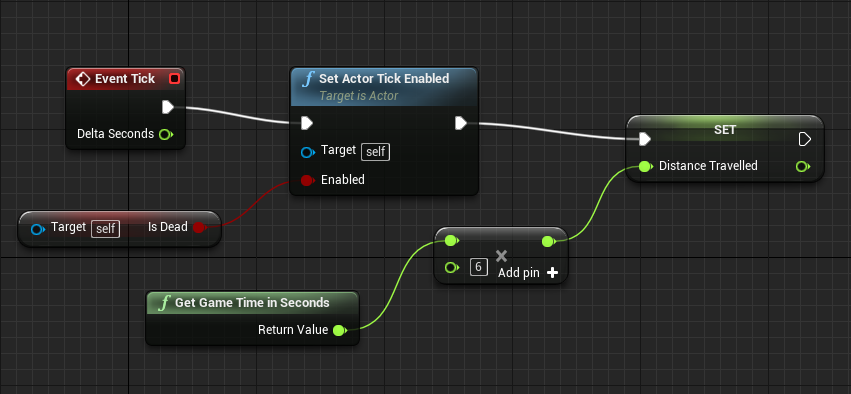
Is there an event tick alternative, i need something that constantly fires but upon death stops
gleaming shore
What would I put as my target for the is dead bool or set actor tick enabled?

im unsure what to put as my target
surreal viper
target self is okay
but now you disable the tick if he is alive
also I would branch
silver crown
@upper heart Did it worked?
surreal viper
and would not call the function no matter what
upper heart
@silver crown no it's still munching on my cpu
silver crown
😐
upper heart
did you kill yours?
upper heart
yeah, dang 🤔
gleaming shore
@surreal viper A target is needed apparantly, it wont compile without one
silver crown
Tried to set the primes manually, still stuck
gleaming shore
This blueprint (self) is not a ThirdPersonCharacter_C, therefore ' Target ' must have a connection.
surreal viper
@gleaming shore what blueprint is it?
gleaming shore
ThirdPersonGameMode
surreal viper
I guess you copy pasted the get IsDead function call
gleaming shore
No i made it, its a public variable from another blueprint
surreal viper
and it doesn't make sense in itself cause IsDead, IsDead, but what? you need to get that value from the actor which holds it
if you want to reach a variable from another blueprint
you need a reference to that BP
 cinder iron
@nova shoal yes you are here
tender dome
hi everyone, i placed new spring arm in deafult 3p character bp and rotated it few degrees and placed the cam there. but when i selected "use pawn control rotation" the cam and arm moves back to origin. how can i rotate arm and still use it for pawn rotation
plush yew
so
if u accidently delete ur axis mappings
theyu are just gone
??
is there any way to restore it
south ridge
Revert to older version using your source control
plush yew
if u accidently clicked the wrong button
epic needs to add
a "Are you sure"
for project settings
cloud cobalt
Just revert to the latest commit
We really don't need more warnings for stuff that's trivial to restore
south ridge
lol
cloud cobalt
Because every UE4 project should always have source control
south ridge
For that exact reason lol
cloud cobalt
Anything that's more than one hour of work should have source control, really
south ridge
No it doesn't
cloud cobalt
It doesn't
plush yew
it does
south ridge
There's an SVN server one-click install solution for every platform
cloud cobalt
I have a commercial shipped project that's got 4 years of source control over the Internet and I did not pay a single cent
south ridge
That's free
 south ridge
Uh
cloud cobalt
Gitlab is free
south ridge
Just tell us if you're serious or no here 😛
So we know if we should spend our time and give you links to any specific software
plush yew
i have never enjoyed
working with source control
its literally
worse than anything
i would rather copy paste shit
to my hard drives
cloud cobalt
You should always use it all the time
plush yew
than use that shitty software
south ridge
You know what happens after your power outage corrupts something (also SVN isn't Microsoft VSS)? You recover from a BACKUP
upper heart
🤦
cloud cobalt
Source control is literally the most important tool for any developer
It should be the essence of your workflow
It's crucially vital
cloud cobalt
There just isn't any real work without it
south ridge
@Bdoom#1259 I'm gonna assume that you're serious here and play along with the joke (because if you're not joking, there's a big issue with how you approach development)
plush yew
like i understand people like it
plush yew
but i just dont like it
south ridge
Nobody "likes" source control
plush yew
exactly my point
south ridge
People don't use it because they like it dude
plush yew
no one likes it
south ridge
People use it because you NEED it
plush yew
because its shit
cloud cobalt
It's VITAL
plush yew
:^)
cloud cobalt
It's incredibly essential
south ridge
You need source control and backups. That's the staple of software development in 2018
upper heart
or 1999
south ridge
Also power outage corruptions are something that Microsoft VSS was prone to back in 90's and early 2000's. Ever since then you don't really care about that
plush yew
You can't say though that source control is fun to work with
cloud cobalt
Anyway, every time someone loses work, that's always the one answer. GET SOURCE CONTROL YESTERDAY.
plush yew
My favorite source control is probably perforce
but i still feel like it has some problems
south ridge
https://www.arqbackup.com/ <-- also get this or a similar app. Heck, you can do similar stuff for free if you don't wanna pay
cloud cobalt
Perforce is free for small teams, keep a local Perforce server and voila
It's still better than nothing
south ridge
Also copying files to a second HDD in your computer DOES NOT COUNT AS PROPER BACKUP
plush yew
bitch yes it does
south ridge
No it doesn't
A proper backup must be to a different computer off-site
You do both local and remote backups. Local for speed, remote because that's the one that actually matters
cloud cobalt
We're not even talking about backups here. Source control is incredibly more than just a backup for every hour of work you've ever done in your life
Which is, kind of cool
you know.
south ridge
Well, he should start with backups at least since he hates source control so much
Your local backup is there simply to recover files faster if local backup didn't get messed up by whatever event that happened
floral heart
He should just stream everything he does on youtube so he can refer to it later.
 mint raptor
So from max to unreal the blueprint asset made has the components all in the wrong place even though the groupings are correct
what can I do to fix this?
cloud cobalt
@plush yew Look, we're not going to force you. But source control for software is like floor plans for buildings. You could technically build a skyscraper without one, but you really don't want any living thing inside it 😃
vale osprey
huh
surreal viper
if you like loosing all your work then your approach is perfect
 frank escarp
well, i even use source control in personal prototypes
surreal viper
life without source control is like playing dark souls with perma death
south ridge
I mean
south ridge
After you lose a considerable proportion of your work and give up on your project, you'll learn why you need those things
vale osprey
yeah I go commit while I eat 😄
cloud cobalt
Just have it on your own computer @plush yew . It won't be a backup, but when you accidentally change something, you'll have the full history for it in excruciating detail.
Free Perforce server, done
And copy the repo to an external drive once a week
south ridge
https://www.visualsvn.com/server/ If you want to use SVN, this one's pretty good
Also btw
A single copy of data isn't a proper backup either, it has to be based on days, weeks etc
Because your corrupted data may accidently propagate into backups
 merry gazelle
Guys I have an animation question, I've asked in the correct topic but I would really appreciate what I assume would be a quick awnser. Basically I have a cine camera in level sequencer and want to capture all anims, light fx, etc as previewed in game/simulation. Currently I can only figure out how to add/configure individual assets one by one
vale osprey
but re-doing months of work makes you code so much cleaner!
south ridge
Few days ago I lost a 10 GB texture source file haha
It was same-day work though, so I re-did it quick
Since it was same-day work, it didn't end up in source control or backups yet
(the reason was a bug in how photoshop saves files, the way it saves them is incorrect)
Photoshop writes new file, waits for write operation to complete, then deletes old one, renames the new file
Which is incorrect because write operation completes sooner than data reaches disk
I had a driver failure in the short 2 minute window while data was still dumping to disk 😄
surreal viper
any idea how could I pass a value to an animation blueprint before any update?
it's in a spawner, but there is just no way I could find to pass the value from spawner to spawned actor before the animation BP gets his first update
even if I pass the parameter to the actor with the spawn node using the metadata specifier expose on spawn it's too late
only way I can see now is to create a child BP which has that value setup properly but that is way too stupid 😦
south ridge
I think you can do a delayed spawn?
You can create actor, but only spawn it in world after you've set all parameters
vale osprey
as long as you get reference to your skeletal mesh you can set value
south ridge
So you set your parameters in actor which get picked up by animation BP etc
Or directly set animation BP before it starts executing
surreal viper
delayed spawn sounds awesome, I'll take a look
south ridge
But point is, you can spawn things with a delay and I'm pretty sure that is exposed to BP
vale osprey
OnBeginPlay of actor with that skeletal mesh should work fine
south ridge
It's same as normal spawn, but you have to call a function to finalize spawn after you set all parameters
vale osprey
well, to be honest, what AnimBP can do that it needs value before OnBeginPlay?
south ridge
I know the kinda issue you're having
I solved it by doing a child BP kinda thing 😄
There is a weird one frame delay in animbp in my experience
I don't know why or how to fix it, but it seemed to me that animBP's always worked with one frame delay
vale osprey
yeah, it's updated after physics or something, one frame constant lag
surreal viper
can't really find this delayed spawn tho
south ridge
It's annoying since I have suspension I'm trying to animate
But it's between two actors
surreal viper
not in bp at least
south ridge
It seems to work OK for suspension in actor A attached to actor A, but not for suspension in actor A attached to actor B (e.g. animating in a way that puts it into a 'slot' in actor B)
It's not a big deal for our game, other than a minor visual weirdness
Where when suspension springs around heavily, you can see the 'plug' part drifting a little out of the 'socket' part
vale osprey
yeah had the same issue with tank
I don't remember if I've fixed that
using local space helped to not have 2 frames lag thoe 😄
south ridge
I also am thinking about adding a little bit of extrapolation
@vale osprey yeah, I can't do that, I have to attach a suspension element to another actor
Since bogey & train are two different actors in our game
For modularity purposes (and because it's the only natural solution :D)
vale osprey
I have it attached to another component
from what I understand, the issue there is what should be updated when?
physics is one frame in front, if I understand correctly
surreal viper
@south ridge any idea how should I search for this delayed spawn? I failed to find any info on it
hmm I have a crazy idea
I could just push the parameter to a stack before spawn, and read that in the anim BP
yeah that's what I'll do
it's an FName, I might as well just store it in a static variable in c++ or something
vale osprey
@south ridge found the fix: one thing is this:
and on top of that this:
wheel physics position is updated forcefully from within sub-step, so it's always correct on Post-Physics
but might not work in your case as it's in different actor
you could call update of suspnesion from Post-Physics of parent actor, but that woudn't be too modular
south ridge
It's not a big issue
vale osprey
I was just curious myself 😄
south ridge
99.99% of the time the suspension is relatively at rest
You have to really fuck up the train to see those suspensions moving
And I'm gonna add a linear limit to the distance joints anyway, because you shouldn't be able to pull off the bogeys too much from the train
vale osprey
doesn't it lag when it just moves fast?
south ridge
Yep
I mean
It's actor-relative animation
So actors velocity doesn't matter
Only relative velocity between two actors
vale osprey
Hmm, we might be talking about different things then
I mean generic transform lag on skeletal mesh. Like if you have a vehicle chassis static mesh component and skeletal mesh wheels
The faster the vehicle moves the larger becomes gap where wheels are and where they should be
If I understand update logic correctly, it happens because skeletal mesh is updated pre-physics and static post-physics
But that doesn’t make too much sense as post-physics is kind of pre-physics for next frame
perhaps it's not the skeletal mesh itself but a root bone issue, not sure
south ridge
It might be the same sorta issue
I just have a different setup so I see it from different kinda point of view
gleaming shore
Is it possible to import a new character model but use the same rigging/movement as the default one?
south ridge
Yes
 cursive dirge
that's pretty much point of retargeting
tropic pilot
why do this happen
south ridge
@tropic pilot happens due to invalid/mismatched rotations of the bones between that skeleton and reference skeleton (or animations)
Rotations/translations
E,g, rest pose bone transforms are not the same as for which the animations were designed
E.g. animations were done for a T-pose, but your characters skeleton rests in a different pose. Retargeting can fix this (requires adjusting transforms to match up the two poses)
 plush yew
Nah
thats not safe
what if my hdd fails
then its pointless
i need something external
south ridge
I mean, you probably should be using backups for that
Source control isn't backups
But at least you're moving in sorta right direction
tropic pilot
@south ridge doesn't look wrong to me!
plush yew
bro i know what it is
lol
i even have stuff on github
i just dont like using it
because its a bitch
to use
south ridge
No, you don't like using it because you don't understand why it exists
I mean
It's a preference thing, nobody likes doing some things, but those things are there because everyone hates losing data more
floral heart
And then there's people like me, who use git and rebase everything.
south ridge
@tropic pilot can you compare it against the skeleton for which animations were made
Have you retargetted those animations onto this skeleton etc?
tropic pilot
i just imported the character and it came with skeleton, physics assets and all
what im trying to achive is to make the arm's (left and right) just flop arround as you run arround with the character
and when i simulate inside the Physics assets the arms are perfect.. but when i test play the arm is fucked up :S
 errant lintel
how can I use the WINDOWED command from : https://docs.unrealengine.com/latest/INT/Programming/Basics/CommandLineArguments/
Collection of arguments that can be passed to the engine's executable to configure options controlling how it runs.
I tried "-game -log WINDOWED" at the end of my command
but my game start in fullscreen mode sadly
I also tried -WINDOWED
errant lintel
ok thanks 😄
I set a resolution to have a border and it's works perfectly:
-ResX=1280 -ResY=960 -WINDOWED
thanks again @silver crown
silver crown
😃
 unique ocean