#ue4-general
1 messages · Page 150 of 1
 tough flint
so the naming is confusing
then I just call it IsInputZ ?
instead of IsPreparingToShoot
 quasi lake
Simple,when you shoot,you should be both inputing Z and direction
Maybe you should create another bool
isInputDirection
tough flint
oh okay
tough flint
oh
okay
well gonna add you for the meantime
have a good lunch and thanks for the help : )
hit me up if you're back and can help me again, please
quasi lake
Emm I want to give some advice
to you
Watch a full blueprint tutorial in youtube
Apparently you are not familiar with the most basic nodes
quasi lake
I recommend one serie for you
"WTF is" serie

YouTube
This channel is dedicated to exploring Unreal Engine 4 and the Blueprint programming language that it uses. You can think of it as a companion to the API doc...
tough flint
this is for a college assignment, and the teach was supposed to teach us this, but some issues happened mid-class and he decided not to teach us BP basics, more like go learn yourself and bring me a well-done videogame by the end of the semester
so now we gotta learn by ourselves
he only taught us matinee basics and idle/run>jump state machines
that's all we got
quasi lake
Well you are only about 20 maybe
tough flint
but the class is UE4 so
quasi lake
Not too bad for this age
Haha
I just switched to UE4 from unity
Most stuff are the same
Gotta go man,I have a mage character ,two more fighters and a dragon to make
🙏
 fleet island
can some of you check out what I posted in the WIP channel? I just need a little feed back
tough flint
can anyone help me out please? trying to set input keys for shooting animations
got some progress thanks to Fish helping me out, just need a bit more help if anyone's available, thanks in advance
: )
 sage stag
Anyone find a fix for this or run into this problem? https://answers.unrealengine.com/questions/698109/getting-relative-rotation-of-camera-boom.html
sage stag
what the heck kind of answer is this?? relative rotation is supposed to stay at 0?? what are we supposed to do to get it now? how strange https://answers.unrealengine.com/questions/725861/cant-get-relative-rotation-of-spring-arm-in-417-an.html
 paper kernel
you could always calculate it
paper kernel
not quite sure what you need @tough flint
tough flint
hello
need to set input key conditions to trigger shooting animations
working on a metroid game and my character must shoot front, up and diagonally by pressing a combination of keys
can you help me out please
@paper kernel
paper kernel
to be fair, d-pad is not a standard anymore so you should probably do it with actual axis input
but for the sake of authenticity you can snap it to every 45 degree angle
if you want
tough flint
well
I have animations for those 3 shooting poses
the idea is to use the Z key to get on a stance pose (which is just 1 frame long), and once Z is pressed you can shoot beams using a combination of X+right, X+up and X+up+right
I got my character to freeze in position when holding Z, now I need to activate the stance pose and then the shooting animation
paper kernel
this is where the input axis would come in
input = 0,0,0 -> play stance
1,0,0 forward
0.5,0.5,0 upright
0,1,0 up
it would select animation based on the value
tough flint
can you guide me through it? I'm quite new to UE4 so I don't know where to start
paper kernel
not saying you can't do it with button combos, it's just 10x more labor and zero future proof
are you doing paper 2D ?
paper kernel
ok, so any aimspace tutorial should probably give you a good direction
or 1D-blendspace
@regal mulch you know any good aimspace tutorials? can't find anything official on youtube
 regal mulch
AimOffset is probably the thing you mean?
paper kernel
yea
Using an Aim Offset, a character aims a weapon in the direction of your mouse or controller.
that's for third person game but should be easily adapted to sidescroller
regal mulch
Yeah, 1 dim less
 chrome ivy
How can I make a running effect like those lines which represent the air blowing in your face while running?
 harsh tiger
has anyone got any suggestions on how I should go about creating a dirt bike using physics (BP)?
 whole sonnet
Hey all
 red zealot
hey if anybody read my introduction, and has suggestions, that would be great! kinda on a time crunch haha
 iron belfry
hello, does anyone have a UE4 c++ book to share?
 kindred viper
@iron belfry there probably are some but a classic c++ book would be just as good or better. Otherwise I can recommend Tom Looman's c++ tutorial series if you need a headstart.
 plush yew
this shit pisses me off lmao
literally copy pasted shit directly from the marketplace
lmao
and modified it a little
 worn granite
?
plush yew
@worn granite some dude on steam
lol
like it pisses me off when someone essentially copy pastes a template from marketplace, does like no modification
and then releases it
and says "oh i made this"
plush yew
4.19 news ?
 gentle ivy
its out when its out
gentle ivy
If the preview isn't out yet it will be a bit
plush yew
am checking the road map now.
gentle ivy
go to github and get the 4.19 current if you really want it now
 hexed lance
I moved a bunch of uasset files to a different folder within the smae project and now i cant get them to show up in eidotr can soeone help?
 frank escarp
i would prefer them doing a damn 18.2 release
 opal ocean
4.19? whats in it?
checking trello now
ok so steam audio beta update, auto convex tool upgrade, and a bunch of stuff I dont understand/care about 😦
 cursive dirge
fortnite multiplayer optimizations
 sinful umbra
 opal ocean
I would like to see some in-editor animation tools... so I can do simple skeletal mesh animations without having to mess around in blender
cursive dirge
can't you do that already in ue4?
frank escarp
i wonder if they will do anything interesting for 4.20
at the very least there are memes for days
opal ocean
better smoke physics
frank escarp
niagara confirmed
hexed lance
I would like to see a refresh button for the content browser and a way to delete C++ classes from the editor
top 2 wishes right there
 full coyote
So, what is the "correct" solution to figure out why an editor is crashing on launch? :| doesn't have any useful information anywhere.
compiled a new version from VS, then editor crashed. :P
obviously I did something wrong, but it's not telling me what.
 glossy flame
What are you seeing on the callstack window that pops up on crash?
If it says you need the debugging symbols, you can download them in the launcher
full coyote
yeah need debugging symbols
 full coyote
got it
Somewhat annoying that the editor crashes instead of isolating the bad code and rejecting it.
glossy flame
Well, that's what working with C++ brings
You need to be a lot more careful with things :p
full coyote
I've had it happen with blueprints too :P
and care doesn't come into the picture when you're trying to figure out how something works XD
glossy flame
That's fair, it just doesn't have a lot of the nice runtime features of other scripting/interpreted languages
It has speeeed though, hehe
full coyote
mhm
I'm hacking apart the procedural mesh stuff, making a heightmap for high detail hex tiles.
its all new, and poorly documented.
New to me I mean.
 ornate girder
what do you guys do after blocking out your level in bsps?
do you convert to static meshes? or do you literally re-design it all over again
i looked at processes of what people do. but it's always a jarring jump from the blocked level, to a developed level with static meshes
 vapid cedar
Blockout is for sizing and testing the general 'feel' of a level, then you start replacing bits and pieces of BSP with things like your own satic mesh walls.
Re-design happens sometimes.. But it's usually just BSP for sizing and general rooms, replace with static over time.
ornate girder
ah ok
so lets take a column for example
you have a bsp rectangle covering that area
then when you want to move forward, you delete that bsp and import a column you made in maya?
vapid cedar
Yeah
ornate girder
haha ok. so this noob made an entire level out of bsps...
rip
it was starting to look like something until i noticed a horrible performance
rip this level
 floral heart
BSP can run on pentium IIIs. I don't know how UE4 makes it slow.
ornate girder
oh
it makes my editor slow
for example, when i want to use alt+drag. it takes forever
floral heart
Ah. You can turn off the rebuild geometry whenever you move a brush thing, which might help. It's also really easy to convert brushes into a static mesh, which would probably be good for things like stairs or those hoops.
 radiant fable
painting foliage on a landscape i just made

i have patches i just cant get the foliage to paint on
anyone know whats up?
hexed lance
so I have a bunch of uasset file that I cant get to display in the editor
all I did was move them in the eidtor to a different folder
and I have now updated the engine version and they still do not apear
they show out of the engine but the content browser does not pick them up. I have tried deleting intermidiate, saved, and build folder to no avail
when I try and delete the folder they are contained in via the editor they show up in the delted items list but thats it
 minor wigeon
would a spline be the best way for me to do a player balancing system... like walking along a plank or on the top of a fense?
hexed lance
dont know what a spline is, but if you take a value called "balance" or something and randomly move it every tick slightly then take player inputs to also change it and add an animation that would be a pretty decent balance system
minor wigeon
to performance heavy calling it on a tick... would rather use a trigger to snap the player to the start/end of the spline then change their animation to a balance set.
then when they hit the trigger again it unsnaps them from the spline letting them move around again
hexed lance
to performance heavy?? thats questionable but ok, only have the animation change if its a big enough change
minor wigeon
im trying to build up a multiplayer RPG so need to consider performance at every step
trying to limit the amount of events on ticks
 ashen frost
hmm ok thnx
minor wigeon
pretty much copy and paste <.<
you could look in to level streaming though
vapid cedar
@ashen frost How do you mean combine?
I think a better question is, what's your use-case?
Do you want them to seamlessly walk from one to another, or do you just want to merge level files?
ashen frost
@vapid cedar like combining those two assets
@vapid cedar yea walk from one place to aother seemlessly
vapid cedar
Asynchronously loading and unloading levels during play to decrease memory usage and create seamless worlds.
ashen frost
so its called level streaming? @vapid cedar
vapid cedar
Yeah, then you'd have a Master Level that determines load for each sub-level depending on location and volumes.
tough flint
hello guys
can someone help me fix an issue in my charging beam please?
I'm new to unreal and got this from a tutorial, but it didn't include something I need on my project and I'm lost
I can shoot a beam and also hold the key so it charges and shoots bigger,
however it shoots automatically right when charging is complete
preferably it would be better if the beam stayed charged until I release the key
thanks in advance
 grim ore
move the code that fires the beam after charging to the released part of your key?
tough flint
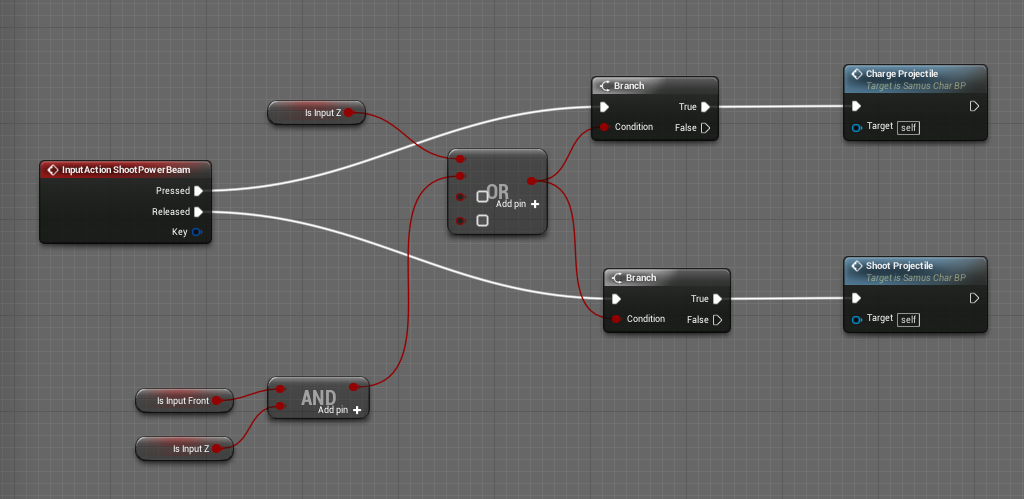
it shoots after releasing, but it also shoots after charge is complete even if you're still holding the key
grim ore
so what does charge projecticle do?
tough flint
got this from a tutorial so literally no idea what each part of the bp does,
lemme show you how it looks
grim ore
well that might be the first big issue, if you don't learn or know what you are doing your going to have this problem all the time.
Since you know it fires after charging look for the firing part of the charge?
tough flint
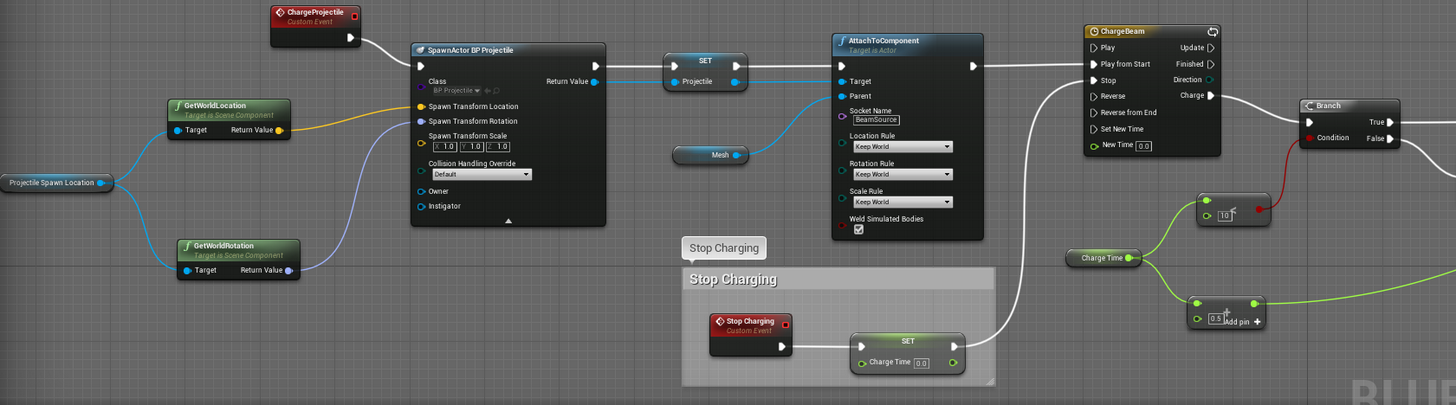
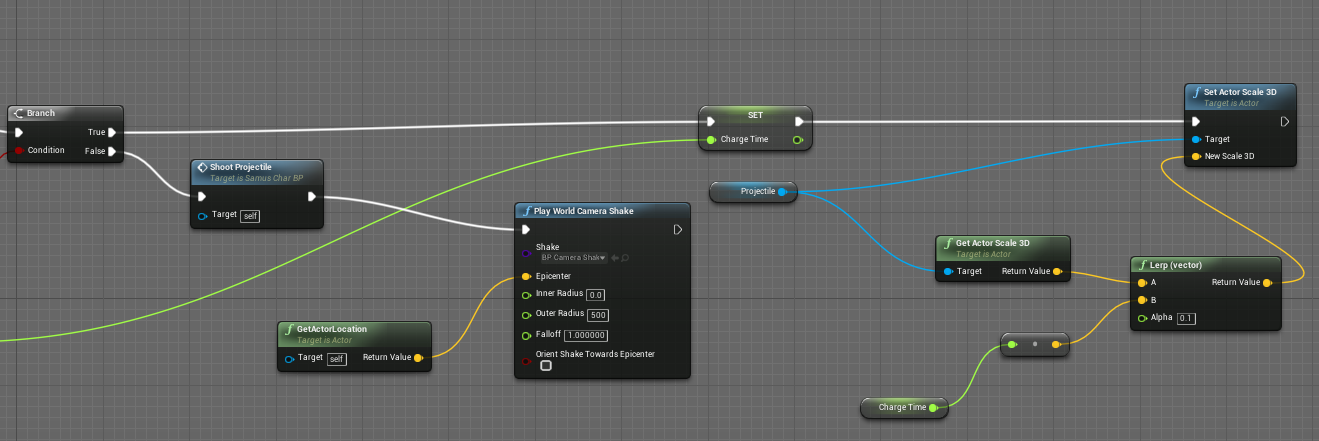
I agree I should have looked on this myself, but to be honest I was time pressured so I just followed tutorials
grim ore
really come on, take a minute or two to read it
you know what happens when you release
look for that same stuff in that code
grim ore
it's literally even named in a helpful manner
 hoary brook
Judging from the blueprints this seems to be some sort of Metroid game.
tough flint
it is actually
took this beam bp from a megaman buster tutorial though
I'm thinking it's the branch conditions?
grim ore
just unconnect the only parts that say shoot and it should stop shooting
tough flint
okay, lemme try it
oh you're right, it works as intented now
thanks a lot, I'm really lost on this
although I have this problem where my beam pushes me backwards as if It's supposed to touch me too
it also goes through walls but sometimes it's deflected back and shot at me for some reason
 carmine wind
guys i creating a crane but idk if i should make it able to move what do you think?
 weary basalt
@carmine wind People like moving things, make it move 😉
carmine wind
okaaay
hexed lance
can someone please help
I moved a folder containing uassets within the editor and they dissapeared
I can see them in the file explorer, but they dont show up in the content browser, I hav tried deleting intermidieate, build, and saved. and restarting pc and even updated to anew engine version all to no avail
 lusty cloak
@hexed lance perhaps you moved it to an engine folder by accident? Try 'show engine content' by clicking the eye icon in your content browser
hexed lance
no it shows to be in the correct spot in my file explorer
lusty cloak
Which version was it created in?
If you fire up an empty project of that version and place the .uasset under the content dir does it show up?
 verbal blaze
I have a strange issue; if I look straight up, my particle effects get really dark/black. If I press F2 to turn off the lighting, the problem goes away
hexed lance
@lusty cloak
 unborn mantle
what is "frame sync time"?
lusty cloak
@hexed lance Anything in the output log when you start up and poke around in the content browser?
hexed lance
lemme check
nothing out of the ordinary
when I try and delete the folder in the eiditor they show up in the deleted items list
lusty cloak
Both message and output log empty huh? Ugh
worn granite
the uassets you see on disk, how large are they?
worn granite
k, those are probably redirectors then
hexed lance
what are rediectors?
worn granite
they're uasset files which only contain the minimal amount of info to point to a new location.
So basically a placeholder (ayy) so that old paths don't break
hexed lance
oh shit I think I deleted the old folder
worn granite
If you deleted it on disk, you basically made things harder for yoursel f
you gotta fix up redirectors first
hexed lance
I deleted it in editor
worn granite
which means that old patsh will be update to new paths and then the redirectors will be removed.
and then you can clear the directories on disk
hexed lance
I have right clicked and "fixed up redirectors"
but it did not wokr
I did that before I switched engine versions as well
well is there anything I can do at this point to get those files tthat were deleted back? does UE4 overwrite them to delete them? or just throw away their path
because it was a lot of files
lusty cloak
Not sure at this point, hopefully you have a backup of the project and can submit your test project to Epic support for further investigation?
hexed lance
well it seems there was nothing wrong with the engine, it performed as expected I guess I didnt think there would be redirectors
I do have a backup unfortunatly I didnt make one recently I usually do it daily, but I dropped the ball this week and slacked, now its going to bite me in the ass
I recovered my "Saved" folder from recycle bin and it has some stuff in it so lets cross our fingers
 slate orbit
just finished adjusting to new monitors, does anyone else have weird setups for coding?
hexed lance
thank god for unreals saved folder
idk I'm a rebel I keep my solution explor on the left. thats it
at this point I'm so used to it I ouldnt handle moving stuff
hoary brook
ugh, why does TinyBuild like to hide their running animations so much.
tough flint
can anyone help me fix my charge beam?
when I press and hold Z, my character enters stance mode and freezes in place to prepare and shoot beams
only in this mode my character is able to charge and shoot, and outside Stance my character cannot
but when I'm in Stance, charge my beam, and release Z before releasing X (the key used to charge and shoot), my character still has the particle system attached and fully charged
can anyone help me find a way to disappear/dissipate my charged beam when I exit Stance?
aka my character is running around with a fully charged beam and unable to shoot it if I didn't shoot at Stance
tough flint
how can I trigger a character animation on keypress?
need to activate a stance pose when pressing Z, do I do this in state machine?
frank escarp
if its a stance, state machine/blend
if its a specific animation to play, then montage
tough flint
I'll rephrase my question then because I don't know which one to use:
when pressing Z, my character stops all movement and enters a stance pose which is only 1 frame long,
then when pressing X and releasing, my character activates a shooting animation
additionally, if you press up, it should activate the aiming up pose, and when shooting X, activate the shooting up animation
basically I have these 6 animations
frank escarp
states
tough flint
the Stances can only be triggered when pressing Z and pressing the corresponding directional keys
Stance Front = only Z or Z+right
Stance Up = Z+up
Stance Diagonal? Z+up+right
then after pressing X, the corresponding shooting animation should play
paper kernel
did you read the aim offset doc I sent you yesterday?
frank escarp
if you mean normal Metroid movement, thats definitely states
you have a normal movement state, and a "aiming" state
the aiming state has an aim offset
tough flint
how can I achieve this with states? the only thing I know about it idle/run>jump animations
frank escarp
and then can play an additive animation or simillar when it shoots
the shooting anim would be a montage
tough flint
and no sorry I forgot to read it, will do right now
tough flint
ah this is not for commercial release, it's a school project and planning to release for free afterwards
so this is aim offset?
frank escarp
releasing for free is already dangerous
tough flint
I'll read the doc ctzn provided
oh, I see
sweats
I'll be careful
@paper kernel I'm looking at it right now, does this only work when aiming using the mouse?
paper kernel
no need to even use additive animations if the character stands still
well yes, but theory is the same
instead of mouse setting the aim angle, you use button inputs
paper kernel
I might add, since you are doing sidescroller, you can use the 1D aim offset
tough flint
blendspace 1D right? sorry I'm really new to this so might not understand some terms
paper kernel
well blendspace can achieve the same result, but aim offset is used if you want to do running animation while aiming
but either one works, just different workflow
tough flint
I see
well this one is supposed to shoot when in stance (frozen in position), and not be able to when outside it (idle/running/jumping)
frank escarp
thats other code
paper kernel
actually, I'd go with blendspace in this occasion
frank escarp
your anim blueprint should ONLY care about animation
paper kernel
since using additive animations can get bit tricky
you probably can't follow the tutorial as such, but you should get the idea how it's suppose to work
tough flint
yeah it got confusing at some point, the idle in the case of the tutorial is an aiming_idle
while my default idle is just an idle
tough flint
basically the tutorial starting pose is already aiming, mine is not supposed to
paper kernel
you would be using your stance as idle
then switch between regular idle and stance idle with Z? button was it
paper kernel
ok so it will work, just needs some tweaking
 north nova
OK so I have gots a question about Xbox one and developing for it. Now what I'm wondering is I am registered as a ID@Xbox love program so do I just contact epic about getting the console code or what's the story there
tough flint
can you help me out on it?
paper kernel
well, I can get you started
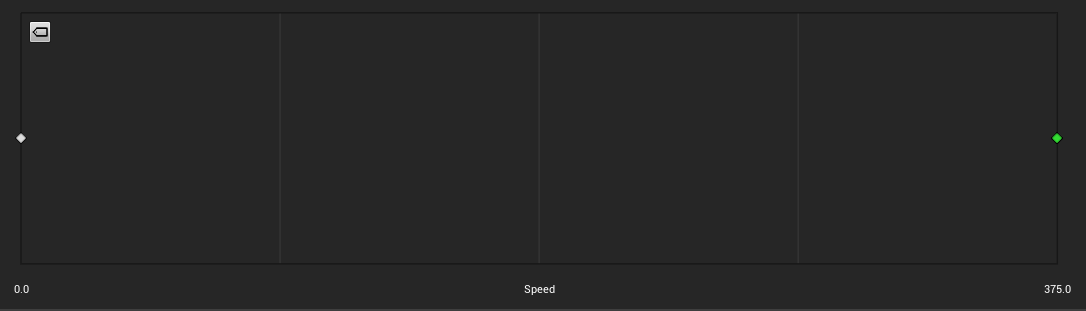
your 1D blendspace should have axis scale from 0 to 90
0 being stance, 90 up
no wait 🤔
 paper kernel
ok so the aim blendspace should be from -1 to 90
-1 is stance, 0 is forward, 45 diagonal and 90 up
tough flint
is that the aim offset or
paper kernel
yea, which ever you want to use
tough flint
oh so I can use the 1D blendspace too
paper kernel
yea, since the character is standing still you dont need to blend animations together
tough flint
alright, how should I start setting it?
paper kernel
sure
tough flint
oh should I make an extra blendspace? I don't think I can do it on my idle>run blendspace?
tough flint
oh I see
ok on it
which one should be the preview base pose?
using Idle blends both idle and stance_front
paper kernel
I think using stance works fine for it
but iirc it's only relevant option when blending animations
tough flint
I set the base pose as stance_front but when I add an animation to the axis it disappears
paper kernel
yup
tough flint
this one is fine right?
paper kernel
yea
tough flint
oh it won't let me set Stance_Diagonal at 45, it resets it to 44.5
paper kernel
right, I was kinda worried about that
tough flint
because of it diving -1 and 90 into 4
 paper kernel
I guess that works too
tough flint
why not 0 to 90 with 3 divisions though?
paper kernel
well you need negative value when not aiming
and 0 is forward, 45 upward, 90 up
and 0-90 division 3 would be every 30 degrees
tough flint
sounds a bit odd considering the first stance mode is always front;
"-1 is stance, 0 is forward, 45 diagonal and 90 up" <--- -1 and 0 are the same stance_front
paper kernel
oh so you will be aiming forward by default
tough flint
yeah
paper kernel
then 0-90 scale div 4 works fine
tough flint
right key should only be used for combining with up for diagonal
paper kernel
I was under assumption you have like separate ready stance - animation
tough flint
ah
https://i.imgur.com/xHaiNW0.png
made it 2 divisions, is this ok or should it be 4?
 paper kernel
nah, the division is just snapping
as long as the values match, it doesn't matter really
 tough flint
oh this one
tough flint
okay, got the node
paper kernel
this is what switches between movement animations and aiming
you can promote the bool pin to variable
and when aiming is false, use the state machine, when true you use the aim blendspace you just made
tough flint
oh makes sense
paper kernel
and now you just make logic to control that boolean
or, make the anim BP look for the aiming boolean in the character
and you would be using the same boolean inside the character to stop it from getting input when aiming is true
and of, anim BP also has to get the aim angle value from the character too
tough flint
something like this?
just need to make a bool then, I have an InputZ bool in my charBP but not sure if I should use that one?
paper kernel
ideally you would want you Z button to control the boolean, and use the arrow keys to set the aim angle while you hold Z down
not sure on what scale your aimZ value is
- you probably need to add logic to switch your character rotation to opposite direction
tough flint
I have this on my charBP and that input is by pressing Z, do I need to call it to my animBP? and if so I don't know how
 paper kernel
hm, do you have cast already done in the animbp?
I mean cast for the character
like this:
tough flint
oh I don't have the cast one
paper kernel
I just assumed you had it, since most tutorials show it
paper kernel
oh, I guess that works if you only need velocity for speed
either way, you need to cast the pawn to your character class
just after the valid pin
or you can replace the valid check with it, serves same purpose
tough flint
so like this?
https://i.imgur.com/VsKhA2H.png
 paper kernel
yup
oh
umm, you need to cast to your own custom character class
I dont know what it's called
in my example, my character is simply called "Move_Character"
tough flint
if it's the charBP then I think I got it
https://i.imgur.com/MIEJ6xA.png
 paper kernel
ok that looks right
so now you can pull pin from that cast As samus char, and "get IsInputZ"
tough flint
need to make it public first right?
paper kernel
it should show in context tho, probably a mistype
but class variables are at the bottom of the list if you need to manually look for them
paper kernel
you need to save that separate variable in the AnimBP event graph
tough flint
 paper kernel
yea, that inputZ, right click and promote to variable
tough flint
can't see the option to do so
https://i.imgur.com/i1S8ib6.png
 paper kernel
oh you need to directly right click on the red circle
tough flint
right
now it's connected to the root too
but do I connect it here as well?
https://i.imgur.com/0pIRPBW.png
 paper kernel
then just connect the exec pins
 paper kernel
yup that too
but I meant in the event graph aswell
so the variable actually gets set
when it runs
tough flint
oh
paper kernel
and that's about it, you should now be able to switch between aim and run animations when pressing z
tough flint
so something like this?
https://i.imgur.com/X96cwRR.png

think I'm missing something still
paper kernel
yup
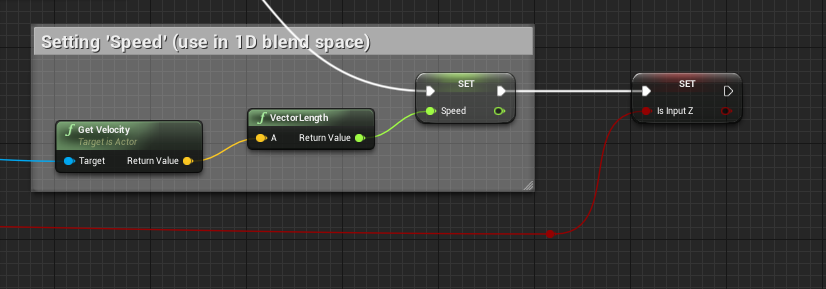 paper kernel
if you hover over it, you it says you can use it as separate get node instead of adding a new get node
so, it's there just to save space
no action required
tough flint
oh alright
ok, it does seem to swittch to my AimBS but it disappears
after pressing Z
it goes back to the SM after releasing
paper kernel
you can quickly check that
tough flint
because I can't use the same animation for both blendspace and base pose
paper kernel
there's a tab "Anim Preview Editor" in animBP
put the checkbox of IsInputZ to true
does the character disappear in the preview window aswell?
tough flint
yup
paper kernel
right, did you change the additive settings on the aim poses?
I know the tutorial tells you to do so
tough flint
I did, lemme recheck quick
paper kernel
you can revert those changes back to default
tough flint
they are all set as the tutorial said to (stance_base is a copy of stance_front)
https://i.imgur.com/VvaUay3.png

should I revert to default then?
paper kernel
yea
tough flint
since I'm no longer using an aimoffset blendspace
paper kernel
yup, that's the major difference between using blendspace and aim offset
aim offset uses additives and can break if you do the settings wrong
tough flint
oh it does seem to blend correctly in the AimBS
lemme test
it does work on gameplay, the only problem is that I can also change to stance when jumping
need to add an extra condition I think
paper kernel
well, most of the conditions you want you have to add in the characters end
but you can repeat the process for the aim angle variable
and I recommend checking pinned messages on #blueprint
that blueprint communication tutorial is really important
tough flint
https://i.imgur.com/nLCblPs.png
I added an extra condition for pressing jump but it can still activate stance when jumping
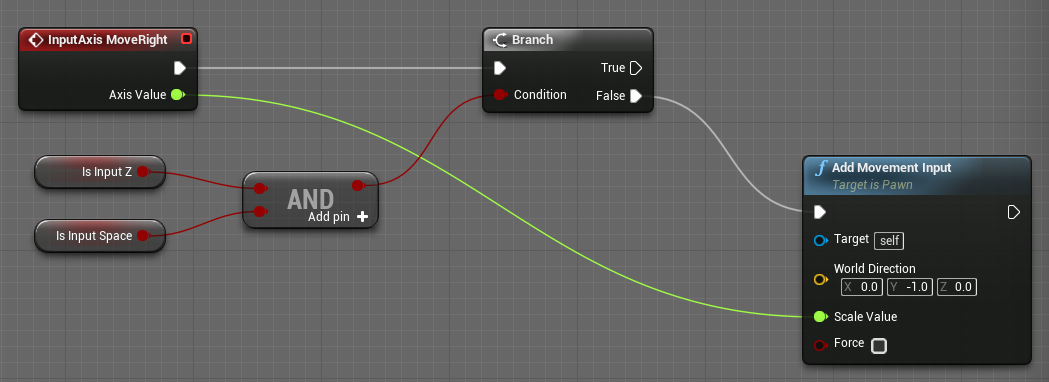
I'm missing something here
oh yeah
paper kernel
if inputZ is false, then proceed
tough flint
this only adds a condition for when space is pressed, but the char is already jumping after releasing space
so it does nothing to it
I think I should add the IsInAir bool somewhere here
paper kernel
well, you could look it this way: if you are in air, don't allow aim stance
tough flint
oh right
lemme try to fix it
I'm thinking I need to add a negative condition for IsInAir here, I should read it as "if it's pressing Z and not IsInAir, then move to AimBS"
https://i.imgur.com/4Doecch.png
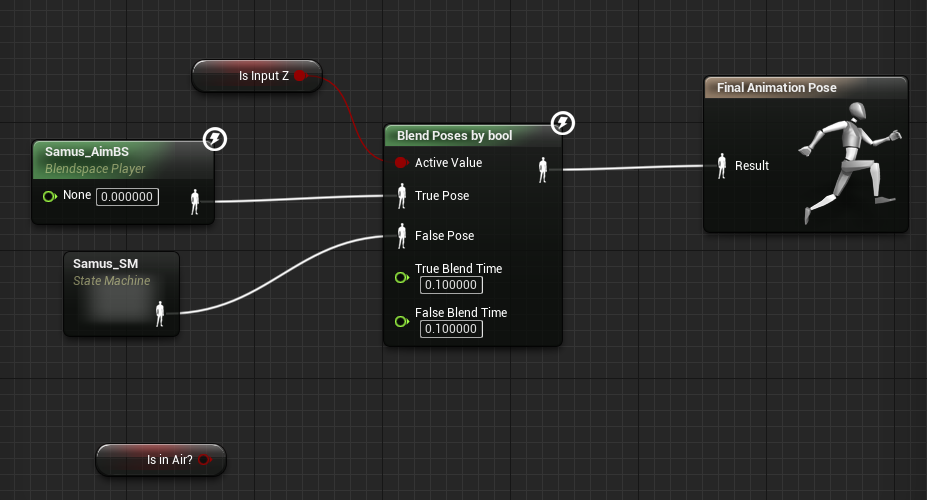
but I don't know if that works and how
 ancient trench
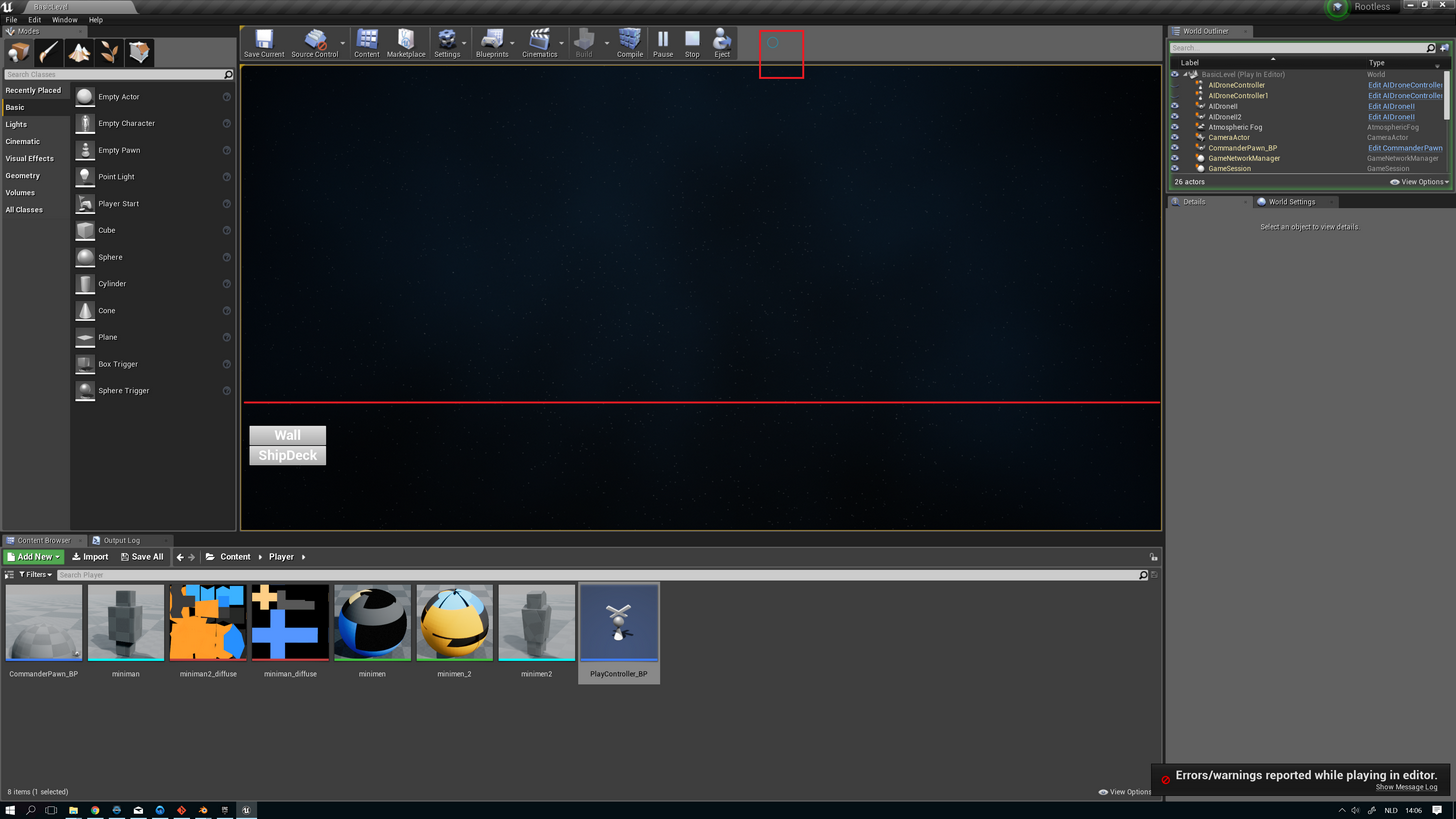
hi, I've just upgraded to 4.18.1 as my instanced meshes were disappearing when running in standalone mode in 4.17.2.... now when I run it in the selected viewport, my cursor can't reach the bottom of the viewport anymore + it overlays the toolbar at the top. Works fine in standalone
paper kernel
You could add the negative condition to the animations, but eventually you will need to add it to the shooting logic as well, so you would be doing redundant checks
so better off handling it in the character BP
tough flint
so it's somewhere in here right?
https://i.imgur.com/nLCblPs.png
paper kernel
well, probably
the check location is totally dependent on how you implement the shooting logic
tough flint
hmm
paper kernel
like if character is in the air, can you shoot? is character in stance, can you shoot?
but can you be in stance if you are in the air?
tough flint
ok I called the isinair bool from the animbp into the charbp, I think that's a start
paper kernel
that's all sorted
 paper kernel
well, that works too
but you need to do the same check in reverse when you want to shoot
in the character that is
tough flint
the one from charbp was only adding a condition for blocking character movement, this one blocks the animation too
yeah
because she can shoot in the air too and that's a problem
I'll sort that out in a while
how do I set animations on key press for up and diagonal?
paper kernel
you need to create aim angle variable to your character, and get it to animbp just like you did with the inputZ
except it's a float now instead of boolean
tough flint
oh
plush yew
Wanted to downgrade to 4.17 after learning about some whacky bugs in 4.18 (Visual Studio related, and wiping of changes in editor on Hot Reload)
What's the most reasonable approach towards this
paper kernel
version management
plush yew
I see 😅
tough flint
aight I got the float AimAngle to my animBP
 pallid compass
Dont open it more than once ?
ancient trench
if you mean VS, that's a bug in 4.18
tough flint
@paper kernel got my float to the animbp : )
https://i.imgur.com/uM1MscE.png

do I need to tweak it somehow in the charbp?
paper kernel
the idea is that when ever you change it inside your character, the animBP updates the animations accordingly
you should watch the Blueprint communication tutorial, it's really important
while it is 2 hours long video, it's something you should memorize
tough flint
yeah I think I'll give it a look once I find some time, I have a lot of issues trying to understand how it works
got some things working by logic alone but still getting stuck many times
ancient trench
https://imgur.com/OOHzMTM anyone knows why I can't move my cursor below the red line (it jumps to the asset browser once I go past it), and the cursor can appear in the toolbar at the top?
 paper kernel
well, that's an odd one
ancient trench
happened after upgrading to 4.18.1 , works fine when I run it in standalone window
dpi doesn't seem off, as the editor itself appears to behave normal
tough flint
watching the video rn
tough flint
@paper kernel hi I got a question
paper kernel
mkay
tough flint
can the state for stance be a state machine?
https://i.imgur.com/XhRYqji.png
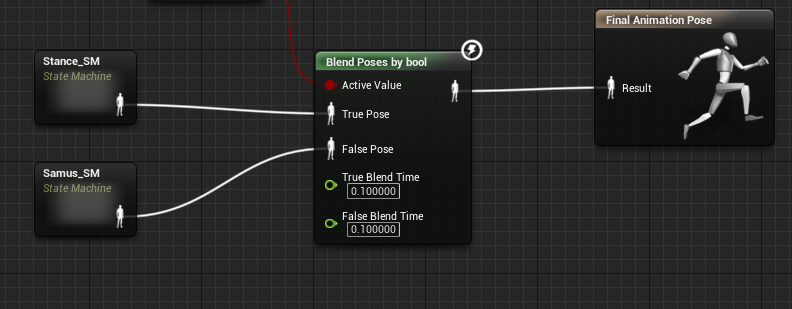
been playing around with bools and I can enter this pose by pressing Z
paper kernel
state machines are usually used when you gotta play certain part of animation for un-defined time
like running
same can be done using montages, but state machine is simpler
however, I would not use it for attack animations
unless we would be talking about combo-based combat system where next animation is determined by complex logic
tough flint
ah
paper kernel
sure you could find uses for state machine in shooter games too, for example you have complex movement system where under certain conditions way the character holds weapon changes
tough flint
well I can enter the state machine but I can't seem to be able to do anything else, tried a test key (C) for blending into aiming_up but it does nothing, however I CAN shoot with X while in front stance
paper kernel
blendspace I showed is just adjusting the animation pose to match the desired direction
if you clamp the directions to every 45 degree angles, you should have the outcome you want for diagonal aiming
there's a neat BP node there called Snap
works with float values
tough flint
ahh
well I'm back to this then
https://i.imgur.com/v3wPmdp.png
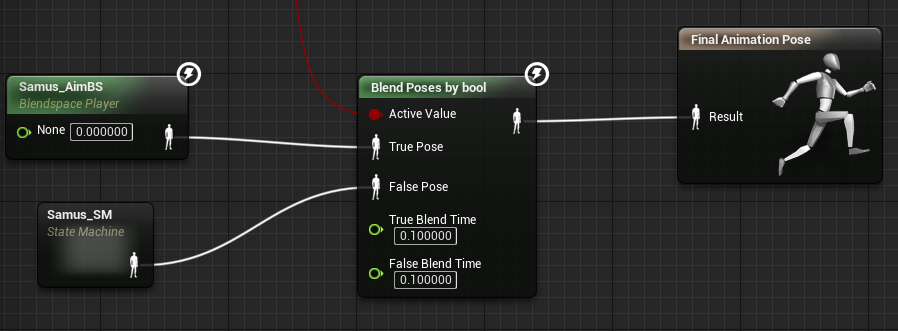
I also have my aimvalue float, but I don't know what to do next
 solar quarry
quick question. I've created a model in maya and uv mapped it. I exported it as an fbx into substance painter. The UV map texture keeps disappearing.
this is what I'm trying to export
this is how it appears
I'm a noob at substance painter
on second thoughts I think I'm going about this the wrong way
 ornate rock
Did you hand paint in maya then import it?
solar quarry
I created a texture in photoshop and added it to the barrel
pallid compass
if u did the texture in photoshop then why u taking it in to substance, substance is a texturing tool
ancient trench
I'd point and laugh but I hand painted a simple character 5 times in blender yesterday & was confused why "baking" would turn the UV map grey... until I realised I should've just saved the UV map as image :-p
solar quarry
yeah lol I sort of realised I was doing it wrong
 vale osprey
sometime graph highlights get stuck
not sure when it happens or how to quick fix it
tough flint
I cannot move pawn sensing down or capsule component up to adjust the sight of my metroid, how should I adjust it?
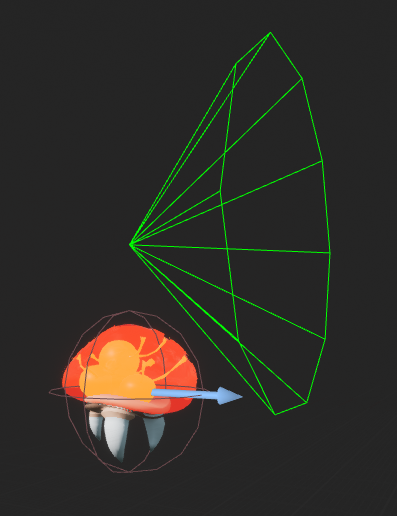 plush yew
Guys DECLARE_LOG_CATEGORY_EXTERN doesn't seem to work, throws an error saying that the base classes used internally are not defined
in 4.17
 torn herald
@tough flint If you really can't edit the location of sensing component in your actor blueprint (including a change of your component heirarchy) , You could consider on begin play setting a relative offset from your metroid capsule? Though I think there is probably a better solution such as why you can't move them around.
plush yew
d_d
Anyone wanna join my game project
I'm legit running out of ideas to do
LOL
And I'm held back due to lack of art.
 weak kayak
Hello I created a class [API] AMyGameStateBase : public AGameStateBase, but I can't select it in the gamemode
 surreal viper
seriously how the hell is it possible to debug blueprints?
It feels so terrible that I feel like I must miss something
is there something like "call stack" somewhere?
torn herald
@weak kayak this might be relevant, in your header declaration have this:
UCLASS( ClassGroup=(THEGROUPNAMEYOUWANT), meta=(BlueprintSpawnableComponent) ) ... actuallly thats probs only needed for components mb
if that doesn't work, try making a blueprint derived one and see if it appears in the menu then
weak kayak
if that doesn't work, try making a blueprint derived one and see if it appears in the menu then, already tried and that's don't appears, i'll try your solution
THEGROUPNAMEYOUWANT, i can named like I want?
torn herald
I think Custom is default, but you can name any you want
I don't think my suggestion will work though
weak kayak
ok i try to compile
torn herald
its for components not game states 😦
torn herald
is that game mode a cpp one?
torn herald
I think it has to be bp to change the properties directly. It's why I always do bp dervied version for my gamemode
weak kayak
ok i'll try
torn herald
I think it is encouraged in most cases to have a bp derived version of most cpp so you can tweak properties with out compiling
torn herald
did you find out why your gamestate was not in the list?
 sturdy kernel
 merry gazelle
Quick question: Some BP's in my scene arn't being captured but animate dynamically during gameplay. What setting should I check in the sequencer?
solar quarry
does anyone know how to stop substance painter from pulling up a help menu every time I press shift?
I understand that it's trying to tell me about all of the different shift shortcuts but it is making it really hard to use the shift click function because I can't see what I'm doing when it pops up.
 uneven fractal
whats a good way to make a thumbnail of a static mesh with a black background?
grim ore
Open up the static mesh, use the new preview scene settings to disable the cube map, the floor and environment, remove the grid at the top, set the environment color to black
print screen and profit?
uhm assuming you don't want any lighting on it then you might need to just do it in your DCC program
sage stag
how can I recreate relative transform of camera boom in 4.18? Opened a project in 4.18 and much of it no longer works, any help would be greatly appreciated
https://answers.unrealengine.com/questions/725861/cant-get-relative-rotation-of-spring-arm-in-417-an.html
north nova
OK so I have gots a question about Xbox one and developing for it. Now what I'm wondering is I am registered as a ID@Xbox love program so do I just contact epic about getting the console code or what's the story there
plush yew
Epic Games
If you would like access to console source code for UE4 please follow the instructions and fill out the form below.
north nova
thanks
merry gazelle
Check out this video lol...
https://www.youtube.com/watch?v=wJE6rgjrhrQ

This is the Basic Template for a Puzzle Videogame using the Unreal Engine 4. © 2004-2014, Epic Games, Inc. All rights reserved. Epic, Epic Games, the Epic Ga...
tough flint
how can I add custom animations for an AI character?
plush yew
is there like a plugin or something for creating terrain like this? http://prntscr.com/hipb8l
 weary basalt
No, this server is not an Marketplace.
 rocky crescent
k
weary basalt
Please read the #more-resources channel.
rocky crescent
nah
weary basalt
Suit yourself.
weary basalt
• Spam, link shorteners and unsolicited advertisements will be deleted.
In other words, No
rocky crescent
oh haha
 meager dove
does unreal occasionally delete derived data cache?
i haven't opened a project in about a month, but been working on other projects
i open it today and its rebuilding/recompiling everything
hoary brook
 weary basalt
@meager dove DDC wont be removed unless you do it manually
If the project was updated to an new engine version it will have to rebuild it again though.
meager dove
the only thing i deleted was autosave, backup, stuff etc. , engine version stayed the same. maybe i deleted some config file that linked the DDC?
weary basalt
The ShaderCache is inside the Saved folder, so if you removed that it would have probably had to rebuild all shaders.
meager dove
that's probably it then
whoops
thanks
hmm, checking disk access shows its definitely rebuilding the DDC.
tough flint
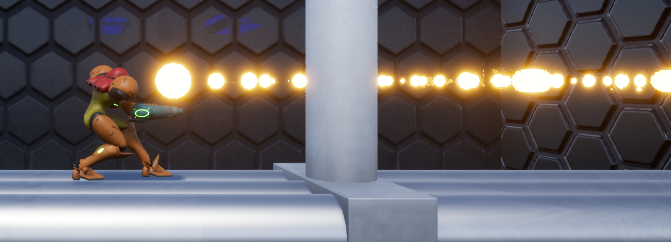
how can I make my power beam to hit walls instead of going through them?
https://i.imgur.com/cs77vlm.png
 weary basalt
@meager dove The DDC contains stored information about assets within the Editor, if you delete the Saved folder it would also then need to rebuild the DDC
Is it an issue?
You should only really have to rebuild the DDC once
meager dove
it's just a time issue
this project is using the open world assets, so it's going to take an hour to build everything again
😃 
weary basalt
😐
You could look into using an Shared DDC
Here read this
Overview of the Derived Data Cache and the storage of assets in formats used by UE4 and its target platforms.
meager dove
yeah its mostly likely because i messed with the save folder, trying to cleanup different projects to get some SSD space back 🤣
thanks!
weary basalt
If i need to cleanup the Saved folder i usually only delete the Autosaves/Backups/StagedBuilds/Crashes folders
As the rest dont really need to be touched.
meager dove
thats what i thought i did but maybe not
weary basalt
AutoSaves and Backups will most likely be the largest folders in there
Cooked is whats causing you issues as you probably removed it and it needed to rebuild everything again.
 magic dock
Hey dudes, im trying to get Game Analytics working but the "Start Session" node keeps outputing "False" when i attach a print string to it and no info seems to be getting through to the site... Any ideas why that would be? im using the plugin from the marketplace btw.
weary basalt
@magic dock If it is an Plugin, try asking the Author.
tough flint
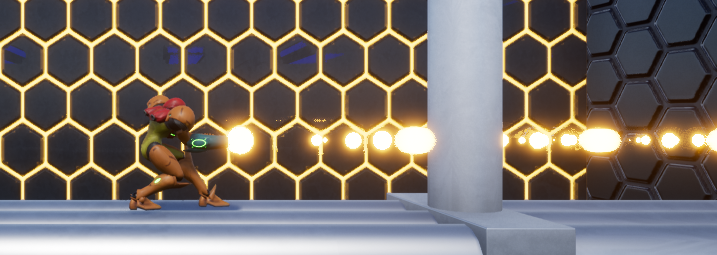
why is my power beam not colliding on objects? https://i.imgur.com/eTk0BGL.png
 weary basalt
Check the collision settings perhaps? @tough flint
tough flint
I don't know how should I set this
plush yew
After hours of UE4 tutorials.
https://i.giphy.com/media/EldfH1VJdbrwY/giphy.webp

 umbral tartan
Am I the only one that didn't know this viewport shortcut ?(didn't see it mentioned in the docs), just ran into it couple days ago... In the viewport you can hold ctrl+MMB and then move the cursor and release to change the view. Right=Right, Left=Left, Down=Bottom, Up=Top, Up-Left=Front, Up-Right=Back, Down-Left/Right=Perspective.
umbral tartan
@tough flint What kind of beam is that? Particle effect beam?
 ashen brook
Good morning, folks
 tepid finch
If anyone has any good resources on creating custom animation notifiers and states that would be amazing. Making an ARPG and want to use them to controller my damage and casting logic. ( I mean the anim notifier actors btw like the particle ones)
 final owl
@plush yew LOL
floral heart
@tough flint They both need to have enabled collision volumes. Apart from that, should work. "Should work." Famous last words. For some reason I have a test that uses physicsactor and blockall presets.
weak kayak
That's really unpleasant, XCode is always "indexing file" and it doesnt auto completing me
whole sonnet
Morning all
 wary wave
anyone know any good techniques for applying objects to a grid based on density?
For example an object with a density of 0.33 would appear on 1 in 3 tiles, but an object with a density of 5 would appear 5 times on each tile?
I could do some manual fudging, but there must be a decent technique for doing this
frank escarp
you can use a noise and then spawn it if noiseval < density
if you want to have it completely coherent, you should look into dithering techniques
like blue noise or poisson disc or just grid
i have something similar for my game, spawn nodes are enabled/disabled randomly depending on how deep they are in the dungeon
deep nodes have a 90% chance but nodes near start are 20%
wary wave
cheers -was hoping for something simple
wary wave
I'm already using cellular automata to determine which cells they can appear on, it's the distribution that's trickier
I've already got noise functions so I can do it that way
I'd use Sobol random distribution but I'm stuck in 4.16 because the Runtime Mesh Component hasn't been updated 😦
just looked up an implementation of Sobol sequences in C to see if it was portable to blueprint


 fiery harbor
I know that to use the UE4 logo you have to fill out that form, but what about other logos? what do I have to do to put a windows logo at the end of my trailer, and what about a steam logo?
fiery harbor
hm? sure?
frank escarp
and you can skip the ue4 logo
the only thing ue4 wants you is to put that the game uses ue4 somewhere
and that ue4 is a protected brand blahblahblah
fiery harbor
I want to use the logos though
frank escarp
do not put them at the start of the video
frank escarp
perfect then
frank escarp
no, i dont mean you cant use them, i just meant that its not needed
and on the ue4 logo at the start, its just a bad practise for indies, normally you want to show gameplay/world asap
fiery harbor
my question was what I have to do to use them
not if I have to use them
for the ue4 logo you have to fill out that form to get the right to show the logo from epic
and I'm wondering what I have to do to get the right to show the windows logo, the steam logo etc
 royal smelt
Anyone around today who can try and help out with a blueprint problem I got?
fiery harbor
royal smelt
Channel is often just so...quiet ._.
Hence why I wanted to ask here.
fiery harbor
blueprint stuff should be done in #blueprint , this channel is for General discussion about Unreal Engine that doesn't fit in other channels
fiery harbor
@frank escarp saw what I wrote?
frank escarp
ah, you mean getting permission for the windows/steam logos? i dont think its needed
fiery harbor
sure?
I would expect any company to want to have control over who uses their logos, just like epic does
because showing a logo from a company can be seen as an endorsement by that company
I'm quite sure its illegal to just use some logo without having written permission by that company?
fiery harbor
game trailer
 cloud cobalt
Steam has some guidelines for their logos, IIRC, you can use them as long as you follow them
Might check if Microsoft has that too
Check that out
fiery harbor
ah, thanks
The Logo must stand alone and may not be combined with any object, including but not limited to other logos
that sounds a bit weird?
I can't use a steam logo next to a ue4 logo?
cloud cobalt
Not immediately next to in a way that would be confusing
Like, space them out a bit.
fiery harbor
well yeah, thats fine
ok, so ue4 and steam is fine
still wondering about vive and oculus
I couldnt find any guidelines from HTC regarding the vive logo
also not from oculus
oculus terms of services says
Oculus, Oculus VR, Rift, and the Oculus logo ("Oculus Marks") are trademarks or registered trademarks of Oculus VR, LLC. The Oculus Marks and those of its affiliates may not be copied, imitated or used, in whole or in part, without prior written permission, including as authorized by any applicable brand guidelines. All other trademarks, service marks, logos, trade names and any other proprietary designations are the trademarks or registered trademarks of their respective owners and may not be used without permission of the applicable trademark holder.
oculus store publish guidelines say
The trademarks of Oculus, including its name, logo, and those of it or its partners' products such as “Rift” or “Gear VR” must not appear anywhere in your app.
never heard of them doing anything about it tho
and pretty much no one asks for the permission, definitely not the mayority of indies
fiery harbor
you mean the majority of indies would just do illegal stuff?
cloud cobalt
It's common sense to not use any third-party logo in the game itself, unless it's required by that third-party. You shouldn't do it.
frank escarp
i guess this is in case you are doing a pron game or similar, and they have an excuse to tell you to remove the rift name from it
fiery harbor
I wouldn't want to use the logo in the game of course, only in the trailer to say "this game has oculus support"
cloud cobalt
Having the logo on boot for example is widely considered to say "this company worked on the game"
As to your trailer, my 2 cents : just say it's a VR game for PC.
Maybe in 6 months you'll add AppleVR and LolVR and you won't want to update the trailer, etc
fiery harbor
well its early access
I will update the trailer anyways
it will be outdated in 2 months
fiery harbor
I wonder if it confuses people if I write "Linux support coming in 2018" without ever mentioning before that it supports windows. I would think its kinda obvious that a game supports windows, so no need to mention it?
I dont want to put a windows logo in there since the windows logos are all different
pallid compass
U could just email oculus rift and ask them
plush yew
ok ill implement the multislot inventory system but let me just add this cool parkour slidey thing
how am i still breathing to this day and age
 rocky portal
Hi guys I'm new here how are you
 fierce tulip
hey man, I am.. old?.. here, doing fine. how are you
rocky portal
Old here as well. Just got discord and I've messed around a lot over the years with Unity and Unreal. This a pretty good place to discuss/ask questions about Unreal def?
fierce tulip
def. though depending on the time and day it might take a bit before you get answers.
def check out
< all those channels for your specific needs
rocky portal
Oh I'm making a component based inventory system with multiple compartments and inventory tetris
using Escape from Tarkov as influence
Finally have something decently working with a functional, though ugly, UI
Designed my project around gameplay modules in C++. Can finally start working on a weapon handler and weapon system. Need to know if it's possible to have an animated skeleton for a weapon without any skeletal mesh so I can fully customize all the parts of the weapon by attaching different things to the animated bones
rocky portal
Yeah I figured I could just add the property for a Skeleton to my Weapon class
but I probably have to code how the anim bp will work with it
since Skeletal Mesh already has that code
I would have to pull those pieces out i guess
What are you making?
fierce tulip
food :p
rocky portal
lol
fierce tulip
you can attach sockets to skelmesh bones, and in blueprint/code you can attach the seperate weapon elements to it
but thats all about i know
rocky portal
yeah that would be somewhat of a workaround
but the Skel mesh has the skeleton and takes the animations
I just want a skeleton I can stick stuff on
rocky portal
cool
 cosmic sage
Hey you all. Does anyone wanna test out my 2d platformer game for feedback?
 frosty bloom
I got an C++ UMG issue posted in #umg , if anyone know something about how to do it I'd appreciate the help tons, been struggling with it for a few days already and can't seem to find anything on the web.
minor wigeon
anyone know any good tutorials on creating an Exp chart for skills?
pallid compass
define exp chart for skills
frank escarp
on Gothic 2 (Wrpg) they just did Last Level XP + 500
level 1 500 xp, level 2 1000 xp, level 3 1500xp and so on
but that game had non respawning enemies, so there was a specific amount of xp you could get in a zone
 obsidian nimbus
over 9000
fierce tulip
thats the part i'd fear the most in an rpg, all the balancing
 honest raven
Guys
Noticed that in UE4.18 you have to used Apex for destructionable meshes
Will apex work for mobiles?
cursive dirge
every ue4 version uses apex for destruction
only thing that has changed is that they've moved apex destruction into plugin in 4.18 (or 4.17)
easiest way to find out if it works or not is to just build some test level and deploy it to your mobile
at least android should be supported by apex, not sure if ios is or if UE4 implements those on any mobile platforms
plush yew
Hey guys, um
how do I get an angle between two vectors?
I just need the angle as the float, that's all
*as a float
frank escarp
@plush yew dot product then acosd
make sure the acos has the d or it willl be the radians version
 safe rose
well if you want to keep getting technical
he'll need to normalize 😉
But I figured he got it
chrome ivy
Hello!
I need to talk urgently to someone that handles epic wikis or to the Epic Staff.
chrome ivy
ok
but maybe I can post my issue here anyway
I made a wiki yesterday
and my IP got blocked by someone
The reason given by Crowl is Autoblocked because your IP address has been recently used by "Pogotechsupport". The reason given for Pogotechsupport's block is "Spamming links to external sites"
fierce tulip
O_o
def. a case for: https://forums.unrealengine.com/unreal-engine/feedback-for-epic
fierce tulip
write it down, and i'll nudge Amanda on twitter for ya
fierce tulip
she is the community person for epic 😃
https://twitter.com/amandambott in case you have twitter

@UnrealEngine Community Manager at @EpicGames. Artist, Game Dev, VR Enthusiast, Foodie, Traveler.
Tweets
701
Followers
1101
 Twitter
fierce tulip
Twitter
fierce tulip
done
chrome ivy
awesom
I messaged her too just in case
but isn't amanda on this server too? @fierce tulip
fierce tulip
she is, but not online
chrome ivy
ok
 wild kestrel
@chrome ivy what did you post on wiki?
 merry otter
Hi I start from scratch is I would like to add a weapon unreal engine plz
chrome ivy
I wanted to make a wiki tutorial
wild kestrel
do you posted any links there?
chrome ivy
yes...
I used the movement animset pro
in the tutorial
and I added a link to it
I also added a link to Kubold's marketplace page
wild kestrel
are you realted to that project?
wild kestrel
is it you plugin? :p
chrome ivy
no
wild kestrel
orwhatever it is
chrome ivy
it is not a plugin
yea
not mine
but
I used it as an example only
i thought that I should credit the author of the anim pack and send a link to the product
seems legit
wild kestrel
ok point that out in post you made, the reasoning of placing links, because you got accused of "spaming external links", also read wiki rules if it what you did is againts them
i dont edit on UE4 wiki so i never readed them myself :p
safe rose
Hmmm
So random question
Everyone knows the performance difference between regular HDD and SSDs. Does anyone have any charts comparing those results for projects?
 livid haven
For what, like, build times?
safe rose
Build Times, Loading
livid haven
I definitely don't have any proper data and benchmarks
But shoving Fortnite on to a dedicated internal SATA SSD has vastly improved my full build times and PIE startup times.
safe rose
I have been using SSDs for awhile now, but now I got my hands on a 960 Pro M.2
livid haven
I would have done an M.2, but the M.2 stick I own likes to go AWOL after some amount of time, until the next reboot.
safe rose
So, basically, trying to figure out, if I should use this as my Main Drive for Windows (c:) or should I put it on my Unreal Engine Version drives (d;)
livid haven
Ooooh, that's a tougher one.
Having the OS and most running programs on an SSD is so nice
safe rose
Yeah, and I obviously don't want to reinstall windows a bunch of time to find out
lol
I was hoping someone had some done something similar before
But, I guess if I have some time, it could be an interesting experiment
fierce tulip
using the m.2 myself for windows, since that benefits everything at least a bit
seperate ssd for apps/ue4 def adds to that
livid haven
I can at least say that the HDD to SSD improvement for a big UE4 project is big.
safe rose
I already have a Samsung 850 Evo for my Main Drive though
livid haven
I don't have numbers. Maybe like 30 - 40% improvement in build times and load times?
safe rose
I just grabbed up a 960 Pro because it was on sale during BD/CyberWeek
plush yew
Anyone around to enlighten me on the way soft object references work?
safe rose
@plush yew hmm
That's a good question
Basically
They are soft
not hard
😉
Let's see, I am trying to describe them in my book later also, so this should be good practice
So, do you know what Async Load is?
plush yew
drawing a blank here
safe rose
Do you know how Streaming Levels work?
Level Streaming
trying to come up with an easy comparison
plush yew
I know what it looks like and what it accomplishes, but not the technicalities
safe rose
So basically
livid haven
Soft object references are like FStringAssetReference, but behave more pointer/reference-y rather than string-like.
safe rose
That's what Soft OBjects are
Instead of levels
they are data types
You would load them into the project when only when you need them (in memory)
and unload them when not
(out of memory)
Instead of them always being in memory
I don't know if that was a good explanation, still thinking about how to break that down
safe rose
Sweet
plush yew
I'm just scrambling around trying to figure out inventory systems