#ue4-general
1 messages · Page 142 of 1
 upper heart
 pallid compass
u got your emitters set to burst mode?
 pearl night
Lemme try, thanks guys 😃
 carmine wind
guys does using media in ue4 counts as graphics or blueprint?
 opal ocean
oh yeah, while I remember. I've got that 101 muzzle flash pack, but they all loop. So I've been Activating, delay for .1, then deactivating. Is there a better way?
 frosty copper
That artifacting always bugged the shit out'f me. Occasionally recalculating normals fixed it
Other times it was lightmap settings, or just light computation quality settings that fixed it
In your case, given it's the mesh preview, I'd be inclined to say Normal Recalc' aught to fix it
pallid compass
Looks fine inside the world
looks fine inside maya
fine in substance
actually
it may be because i have no uv's yet
pallid compass
before you roast me luos
The ships are pretty big
so im swinging them in and out of ue4, so i can check vertex face weighting, bevel's, edges etc
incase they need more resoultion due to the size of the ship being large
and i dont uv till the end so yeah 😂
 fierce tulip
often easier imho to unwrap as you go, often elements are copied around and then you dont need to unwrap em twice
same with stuff thatsgoing to be mirrored
 frank escarp
what about you decrease the size of the mesh
you dont need to keep the 1 meter = 100 units scale
pallid compass
im instancing and transfaring attributes
Im aware, but i want the ships in scale with ue4 mannique thingy ma bob
as id like to be able to walk around them
frank escarp
rip
pallid compass
yeah haha
not like SC walk around
just like, in a hanger walk around
kinda thing
Sometimes i feel like face weighted vertex's and mesh decals are too good to be true
frank escarp
you using those?
pallid compass
yeahh
id rather chop my eyes out then build high to low and bake
its just soo much better
i tried trim sheets but
idk
just not a huge fan of em
If i have so some smaller mesh's attached to a ship, at a distance can i just disable them to remove the draw calls?
pearl night
@fierce tulip thank you man it worked! I thought I did that but I guess I didn't haha. Works perfectly 😃
 hoary sluice
Guys what do you think is UE or CE better?
 tall pendant
depends on your project IMHO
hoary sluice
I was planning to do something like total war (the fight system)
pallid compass
can u even import fbx in to CE yet?
hoary sluice
Not sure I'm a noob at programming games
tall pendant
ofc you can use .fbx in CE
hoary sluice
I'm more into graphical stuff
pallid compass
last time i checked few months ago u still couldnt
tall pendant
they have it at least since CE V. i dunno about earlier versions.
but if your'e more on the art side. an RTS is probably not the best project do tackle 😛
regardless of the engine
hoary sluice
I really want to start learning an engine, but everybody tells me something different
hoary sluice
Someone say CE is the best, somebody else tells me UE is the best, then somebody tells me lumbeyard is the best and at the end some guy on drugs tell me unity is the best engine which exists
tall pendant
for 2d or mobile i'd stay away from UE4 and go for Unity tbh
pallid compass
unless u cant program
tall pendant
for racing games UE4 isnt the best choice either
hoary sluice
I want to do either a RTS game or a FPS, more like learn the basics, because to do a game on your own takes much time
tall pendant
and everything that relys on proper physics..well ue4 is not the engine of choice 😄
for FPS UE4 is quite nice tho.
you get tons of learning resources with ShooterGame alone
hoary sluice
Thanks
 ripe salmon
Is there any animaited character in this sort of Graphic out on UE4 market? Cannot find personally
 grim cargo
Hi is there any way to convert my horror fps game to VR ?
 grim sinew
@ripe salmon The kind of character artwork in a AAA game like Tomb Raider takes more time to produce than a marketplace seller would ever make back on budget. You would need to hire someone to do it custom, and it wouldn't be cheap if you wanted that quality.
ripe salmon
@grim sinew Thanks for the information!
 plush yew
Anyone know if object pooling is relevant for UE4?
Nevermind, seems like it's still relevant according to tests: https://forums.unrealengine.com/unreal-engine/marketplace/104929-plugin-object-pool-component
 sand wedge
Object Pooling's always relevant XD
 light thunder
Can someone advise, I am switching motion controllers as an event, it works fine except I lose the ability to interact with widgets,-- my laser line still has collision but not interaction...I believe this is because it's making a new instance but somehow the code that enables widget interaction on that controller isn't passing to the new instance ....is there a way to destroy any controller (the event is spawn so that new instances will be the same name?
 burnt drum
is anybody hitting some performance issue with 4.18?
i got a 10ms impact when upgrading to 4.18
6ms to 16ms
no code changes
 gentle ivy
 paper kernel
trace, why can't you give me a hit value that makes sense when not blocking
but instead, gives the vector from 0,0,0
 warm mountain
Anyone here has experience with the trademarks issues of car design?
I got a piece of advice from another dev where he said if I want to model a real life car and avoid trademark issues
to just model the car, remove logos and alter the external geometry a bit
any thoughts on this?
 quasi lake
Anyone knows how to set a character pushable?
Like,when I move forward toward a character ,he'll get pushed by my character
paper kernel
probably something with under the physics tab
 vale osprey
@warm mountain GTA typically avoids licensing by using design from 2-4 different cars in one car. This way it's more difficult to make a claim.
But time passes and things change, car IP licensing is a multi billion business for VW now. I would advise to not use any real designs at all.
In past no-one would bother with small devs as it would be just too expensive, nowadays is much easier and cheaper to find content that can be flagged.
Its just a common sense to not take something that is not yours
warm mountain
figures
I didn't feel very right from that advice either
that raise another fear of mine though
so if I custom design a car from my own concept
and it resembles another car that already exist
vale osprey
If you have your concept drawings or screenshots from modelling process then you should be fine. If it looks too similar they can ask you to change design, which is not difficult if you did it yourself
It more difficult if you copied it, just because of the way how shapes align.
and don't use inspirations from some easy to recognise cars, like Mini Cooper, Porshe 911, Lamborghini Gallardo and etc.
look how manufacturer itself does it:

they want them to be recognizible, even between models. but they have to make some differences in the series
warm mountain
gotcha
vale osprey
making headlights, radiator grid and front spoiler of different shape, makes it look like a different car
vale osprey
kind of like Hot Rods?
warm mountain
there's something really plushie and cozy about old cars
vale osprey
yeah 😃
warm mountain
yups
but softer haha
those old cars some of them had really bouncy fluffy seats and soft window frames
I really like it XD
 latent roost
Impractical cars, need ground clearance, those cars will only get damaged on the kind of roads I drive
warm mountain
well those cars in the game I'm working on
are basically abandoned or destroyed
they won't be drivable haha
latent roost
Gimmi a hover roadster or something then
warm mountain
The player char is 10 years old anyways XD
will be in big trouble if a kid is driving a car
latent roost
who said kids cant drive?
vale osprey
This is the first Benz car:
https://www.daimler.com/bilder/konzern/tradition/geschichte/anfaenge-des-automobils/benz-patent-motorwagen-w800xh320-cutout.png
 latent roost
that one is almost something I would like to have after reading some steampunk novels
warm mountain
the media authority of my country will shut it down
latent roost
coal fired landau
warm mountain
even before I get a rating if I do
vale osprey
@warm mountain ahh, you could do how Dreamworks and Pixar do it then - they just use really old designs, generically
warm mountain
eeyups, gonna do that to avoid too many clashes with the architecture law haha
lots of 1940s-1950s buildings
vale osprey
😄
warm mountain
its a comedy game to say XD
 warm mountain
yup thats closer to what I'm aiming for
indeed!
The game is going to be a post apocalpytic comedy
when aliens drop a zombie virus on australia for testing purposes
and now the cast
a self conscious zombie
an underage crimelord
and an autist
latent roost
check out "trabant" while you're at it, plastic car from east germany
warm mountain
must fight their way out of australia
the land where everything wants to kill you... litereally..
Trabant is a nice car
love the cushions of it haha
latent roost
I was some time looking at a 60's Skoda, long before Skoda became mainstream
and my first car (that I actually owned) was a DAF 66
warm mountain
nifty
pallid compass
when u first use zbrush
 cursive dirge
@warm mountain you'll be fine with the recognizable features from individual car models, just don't copy the design on whole
if you couldn't do that, most cars wouldn't look the same nowadays 😄
paper kernel
headlights, dont copy head- or tail lights
those are the most iconic part of each car model
cursive dirge
it would be impossible to manufacture anything
well, if he's doing older cars
they had round lights
they all look the same
probably because most used the same lights
paper kernel
not quite, the bulb might be round
well older cars it was more about the whole grille
see pontial firebird or mustang
cursive dirge
here's a good example of modified car models

these are all the cars in split second except for the gamestop car
there's no licensed cars in that game but most cars borrow features from known models
that game is published by disney so it's no small indie project
IMO that level of plagiarism is fine, even the car manufacturers do that
paper kernel
as you see, model as whole is almost identical but lights look "off place"
cursive dirge
to make a point
here's a blueprint of old aston martin

here's a blueprint of ford mustang (shelby gt500): https://www.the-blueprints.com/blueprints-depot/cars/ford/ford-mustang-shelby-gt500-1967.gif

open those images on browser and toggle tabs
that's just one example
there are tons of others like that
cursive dirge
also every game that does postapocalyptic setting for example doesn't have any licensed car brands but their cars usually are recognizable
look at the mad max game for example
here's fan made list of what the original models were
warm mountain
nya!
cursive dirge
I would put more effort to hide the obvious body origin than what mad max did however
but in their case, as the cars are kinda stripped and modified, they don't fully resemble anything that those car manufacturers have sold or designed
so they are probably safe with it
warm mountain
true
the cars in my game will be already badly damaged
or burnt
so I think it should be fine
cursive dirge
anyway, most importantly, it's eventually your call, where you draw the line and what you think is worth the risk, if it's a serious project, contact IP lawyer of some sorts
(you shouldn't really take legal advice from random people from the internet)
warm mountain
eeyup
pallid compass
i had a dream last night that i fixed the huge cpu cap in ark, im going in to test it now
lmao
 solar quarry
quick question, I'm using substance painter and I got a notification telling me to change my tdr value to 60 seconds. I wanna know if setting my tdr value that high will have any repercussions i.e. when gaming
frosty copper
[14:02] 0lento: if you couldn't do that, most cars wouldn't look the same nowadays :smile:
I kinda wish that was the case. xD most cars nowdays look almost the same anyway. Can only usually tell who makes it by the badge on the front/back.
cursive dirge
yeah, especially if it's a model done with collaboration with other car manufacturers, then they mainly change bumpers/grill and minor interior details
but that's kinda exception here
as there they've already agreed to share the bodywork
in some copyright laws, there's a separation between tradional design and something that makes your product stand out
I don't know if cars would fall under such but it would make sense
like for architecture, you can't copyright generic design but if it's clearly special design, it can be protected by copyright
wish these things would be more clear
frosty copper
aye. tis a messy subject for sure
 keen parcel
Hi, where is ideal place to report bug report related ue4?
keen parcel
Thx.
solar quarry
on second thoughts nvm I got my answer from elsewhere
 verbal laurel
Hey I can't apply my post process shader to the stylized kingdom.
i don't know why but it won't work and it's version 4.18 and everything
Can someone help me?
pallid compass
man im so tired iv been modelling since 8 and idk why but im nearly dead and its not even half 6 here yet
 pastel folio
Any of you know where you can get a height map of for instance the north sea?
verbal laurel
So I see nobody answers questions here.
frosty copper
😐 Dude, you need to learn patience.
If someone doesn't know the answer, they sure as fuck aren't gonna reply, are they?
pastel folio
yep its a free world and you have paid noone to answer have you?
Or you get a massive wall of I dont know...
frosty copper
also, @pastel folio ; http://en-gb.topographic-map.com/places/North-Sea-8080925/ gewgull provided~

topographic-map.com
North Sea map, North Sea topography, North Sea elevation, North Sea relief, natural feature.
pallid compass
tip 1: if the newest version of ue4 dont work, role back
I never use the newest version for these reasons
pastel folio
Thx
it does not seem to have subsea data
That is The kind of data I seek to make a subsea map off
this is Maxsea timezero, and that data has an IP lock and is encrypted
frosty copper
Given that the Oceans are barely documented, you'll have some difficulty finding any maps relating to them.
frosty copper

although most of the ocean as expected is a flat grey
I mean, there's this; https://earthobservatory.nasa.gov/IOTD/view.php?id=87189 not sure how much use it'll be.
pastel folio
Yeh I need really detailed data, of preferably the north sea due to a potential client
 brave lark
Check out this Meetup with Boston Indies http://meetu.ps/e/CqkCX/tjPTN/d
frosty copper
You're gonna have to explain that such data at this point doesn't really exist
 rocky kayak
https://answers.unrealengine.com/questions/34074/does-ue4-have-client-side-prediction-built-in.html whats the answer on this about? it creates a convoluted movement system involving using AI to move a player's character. am I doing something wrong by having the player controller (not ai) for movement controls?
pastel folio
Well it does as I have it in a naval navigation programme
That is the approach to the london thames for instance
frosty copper
Aye, and the further out you get the less data you'll find.

the Guardian
Published today, this is the most detailed map of the ocean floor ever produced, using satellite imagery to show ridges and trenches of the earth’s underwater surface even for areas which have never been surveyed by ship
Besides Seabed 2030, and the first probing years ago with plumbing cables, most maps are gonna be from satelite shenanigans
pastel folio
yeh
I have two shots spare, one is a phone call to my employer, (my work is not related to this) and ask if they have a contact at the hydrography institut, the other is phone maxsea if they allow me to extract the heightdata...
frosty copper
Sounds like barrels of fun. o_o good luck anywhoo~
pastel folio
Thx
 regal mulch
When you create a Tree of possible future "moves" on a chinese checkers board
And you think "Yoah, depth of 5 or so is probably when I will get a lag" and depth of 3 is already a few thousand different outcomes and freeze your game for 3 seconds
.>
Need super computer
43115 moves checked
Guess Imma create a thread for that :D
 uneven fractal
Is there a way to tell the launcher where files are stored?
I had to move my arkdevkit to a new location but the launcher doesn't understand that the kit is on my system stil
 turbid knoll
hey can anyone here advise me on targetting low end systems/old computers?
uneven fractal
use unity?
turbid knoll
heh
i tend to find unity performs poorly framerate wise
is it feasible to build a "simple" game that doesn't need particularly good hardware to run with UE4?
 grim ore
Sure. Disc jam modified some stuff a while ago to run at 60fps on Integrated gpu and since then the forward renderer has been added to help out.
turbid knoll
forward renderer?
cursive dirge
@turbid knoll project settings->rendering->forward shading
some feats will not work it due to it using different rendering path
grim ore

Describes the advantages of using the Forward Shading Renderer for increased VR performance.
cursive dirge
but in general, it's a lot faster on weaker hw, as long as you don't have tons of light sources
turbid knoll
right
cursive dirge
I've tested that mode a lot on really crappy gear and it does a good job
altho, if you truly target integrated, you may still want something even simpler
but I could get regular forward renderer to run 60 fps @720p on relatively simple platformer sample
using old celeron G550 and nvidia GT610 that is
GT610 is pretty much crappiest discrete GPU you can find
turbid knoll
i guess its not just that i want a few tweaks to optimize the engine
but i want to scale everything down as well if that makes sense
cursive dirge
it does
but you can't use that mode along with deferred renderer for high end settings
I've asked about this on their live stream and the reason was that making that happen would double the shader compilation times so they didn't want to do that
epic itself uses "simple forward" for low end gear support
that's additional mode that can work with deferred renderer for the rest options
but it's not documented and barely anyone knows how to use it
I think UT does use it tho
so one could peek into UT codebase for clues I guess
they made it for Paragon
or.. make the disc jam approach
turbid knoll
wait i think you might have the wrong end of the stick here
cursive dirge
?
turbid knoll
when i say scale i dont mean i want the user to be able to set the scale of the rendering settings or whatever
what i mean is i want to deliberately build a simple looking game
i dont want to use the word "retro" exactly but... retro maybe
turbid knoll
yeah ive switched to that
cursive dirge
you lose SSR, SSAO
turbid knoll
but i almost want to scale down the resolution as well, then apply some kind of shader on top
cursive dirge
technically HBAO+ can be made to work with forward shading tho
turbid knoll
when i set forward shader, it had to restart the engine and it took ages to initialize, now its compiling the shaders which is also seemign to go far slower
cursive dirge
it takes a while
as it needs to recompile everything
it's same deal if you toggle on/off the static lighting setting on project settings
turbid knoll
anyway, under settings you have those "engine scalability settings"
but they dont appear to apply on launch
but my basic idea was to have the game run at a lower resolution and the scale up, like you can do with the engine scalability settings + add some kind of post process shader
frank escarp
i tried to use simple forward
the issue is that its too simple
it only allows 1 light
and no normal maps
and everything on fully rough
also it glitched a bit
what i would really like is using mobile forward render for vR
but it glitched
maybe i should try in 4.18
 south ridge
Wait @cursive dirge quick question (or anyone else)
Is forward rendering a runtime switch
Or it has to be packaging time switch (rebuild shaders etc)
Or could you make it a runtime switch
Obviously it has to use different shaders, but it'd be cool if it was something that could be changed as an option (including restart)
 brittle gyro
Hey folks, keywords betray me at this point so I was wondering if someone could answer this off the top of their head. I'm running the latest Visual Studio with the latest UE4 (4.18.1) but my ActorComponent based class shows red squigglies around inherited members such as "Begin Play" with the error "Function does not exist in UObject". Things compile fine and I can see that the object is properly inheriting from UActorComponent but somehow VS is being a jerk with false positives on errors. Is this a known issue?
cursive dirge
@south ridge like mentioned, they don't allow that, you have to either pick deferred or forward. technically you should be able to force it to compile shaders for both paths tho, it's just not something Epic supports atm
I asked about that on live stream and the shader compilation time was the reason for that
I still find that BS reason
as you can already just tick the target renderers
so most would just keep defferred on
and if people want forward only, they'd only keep that on
should be trivial
but simple forward and this hack still works along with deferred: https://software.intel.com/en-us/articles/how-disc-jam-reached-60-fps-on-intel-gpus-using-unreal-engine-4
you could do something similar to regular forward shading but I suspect it's bit more involved as it's currently treated as same bloody renderer internally 😄
exposing the setting for that mobile emulation mode was easier as it was a new rendering mode to begin with
plush yew
Heyo! I am beginning to learn unreal engine. Where are some good resources to read from or watch tutorials of the engines basics?
brittle gyro
if you can wait for the sale, udemy has a great course that I've been using. As a C++ dev it's a bit slow but it's great for beginners...
fierce tulip
udemy is always on sale :p
brittle gyro
I can't stress enough just installing the app and then waiting for the notification for the sale because a $200 course goes for $20
plush yew
Oooo
brittle gyro
@fierce tulip Sorta, I'd say they're regularly running monthly but you gotta catch them sometimes.
fierce tulip
ive never seen i.e. ue4's complete beginners course for anything less than 90% off
ever
frank escarp
can confirm
plush yew
Me likely, does it cover blueprints, and other tools in the program ?
brittle gyro
https://www.udemy.com/unrealcourse/learn/v4/overview is the one I'm doing and it touches on BP but I would highly recommend learning the underlying C++

Udemy
Learn C++ from scratch. How to make your first video game in Unreal engine. Gain confidence in programming.
frank escarp
lol 95% sale
brittle gyro
BP w/o C++ is quite the handycap IMHO
fierce tulip
they even send creators emails with "make big profit, you get X percent!, just write the book in a stupendous short timeframe!"
and then always 90+% discount and creator gets jack
plush yew
Ok if that's what you suggest, I'm also very basic. In my c++ at the moment
frank escarp
they contacted you for a FX course? @fierce tulip
fierce tulip
no, but they contacted some buddies and ive read the email a few times by now
frank escarp
btw remember that c++ course was kickstarted
for like 200k dollars
you can make FX tutorials and put them on gumroad, ive seen paid tutorials on gumroad quite a few times
fierce tulip
yea, andd after they finished the book, ue4 bots would swarm the facebook groups and continuesly spam about it
brittle gyro
@plush yew they do an intro to C++ etc and then walk you through a non-UE4 C++ game framework, pretty comprehesive stuff. If you get it at a pitace (like $20) then it's certainly worth a try
fierce tulip
i rather keep all my tutorials free 😃
plush yew
Ok thanks, I will enroll myself in that course
Btw does my pc need to be very good to run unreal projects?
brittle gyro
@fierce tulip Please post them for @plush yew then, he's already about to spend $$$, save him and educate us all
@plush yew You will be more grateful if you did
fierce tulip
i only have vfx tutorials, better to start with fundamentals & basics
brittle gyro
I g2g but gl @plush yew! Feel free to PM me if you get the course and have any questions. 😃
fierce tulip
Homepage of my portfolio and portal for unreal engine 4 tutorials, guides and development blog for Switch.
brittle gyro
@fierce tulip THX!
fierce tulip

ZEEF
Unreal Engine 4 is a complete suite of game development tools made by game developers, for game developers. From 2D mobile games to console blockbusters, Unreal Engine 4 gives you everything you need to start, ship, grow and stand out from the crowd.
plush yew
Thanks @brittle gyro for the help. Can't wait to start
brittle gyro
@plush yew take note of that one from @fierce tulip as well, there is no single good way to learn and a free resource is always handy (as it doesn't cost you anything to book mark FFR).
plush yew
Sure
brittle gyro
@plush yew Excited for you as well. Good luck and share in the adventure.
plush yew
Thx
fierce tulip
also check the learning tab in the launcher
plush yew
Btw does my pc need to be great?
brittle gyro
@fierce tulip thx for the additional reference! will jump into this one after the udemy one (different approaches touch different aspects of this HUGE engine)
brittle gyro
I know it's apples to oranges but when I originally started with UE4 it was on Linux and the performance was abysmal; getting the engine to perform properly by using Windows was great (and with W10's Bash/Linux on Windows a decent compromise).
@fierce tulip do you happen to use UE4.18.1 w/ VS2017?
fierce tulip
I barely touch VS, i spend most my time in cascade only
 oak linden
How do I get decent-looking contact shadows from lights?
by default they move a lot when the perspective moves
putting them on 1.0 makes them pretty much invisible
and everything below that looks better but dances around constantly
I'm doing a prerendered thing
so I don't care about performance
what do
 coral crane
idk tbh
I have a quick question as well. I have an pawn that moves to me and I want to them to subtract from my maximum when they are close by. Is there a way I can trigger them to do something via distance?
quasi lake
How can I modify the avoid-step-on momentum?
Of this
At the moment,when character avoids stepping on another one,it gets pushed too much
How can I control this?
 hexed lance
so the red cross symbol is unable to be used in video games. does anyone else have a good idea for a symbol to denote medicall supplies?
quasi lake
White cross with red background
 floral pagoda
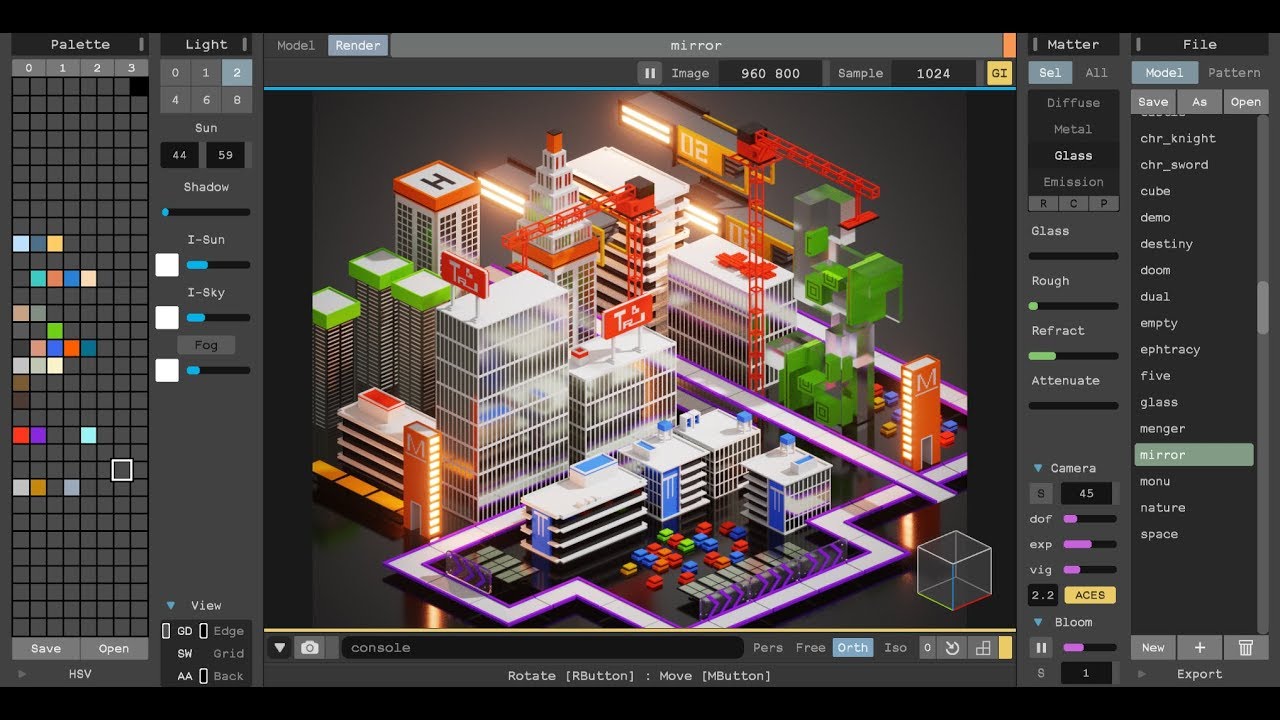
with new World Editor : http://ephtracy.github.io/ BGM : Deacon Blu; Nighttime (Re:plus Remix)
Major useabillity improvements for magica voxel are coming this month
^ Details ^
warm mountain
Save and Load systems seem to be simple enough in those tutorial videos
but when a game is actually ready in terms of all its mechanics, has several different player characters
I'm not sure if those tutorials can really follow through
 timid flame
Has there been any updates on the autolod/simplygon tool crashing when used on meshes with a reasonable polycount? In particular foliage for me at the moment
Speedtree assets at around 10k+ tris are unable to be autolod'd due to a crash involving a quadric function or something
 desert crane
Hello guys, i'm having a problem with my game and i don't know what exactly happen here 😰
it's like suddenly pulled to the left wall when my plane is near the wall but doesnt happen with the right wall
 mint raptor
Anyone know of any games that let you trip over things?
 lean rock
Do I need to talk to anyone to get my Epic accont changed over from Canada to the USA?
I need to buy something from the market place
mint raptor
@lean rock they have two different stores
lean rock
yeah but my account is locked in Canada mode. I cant use my card
mint raptor
Sorry that was meant to be a question lol
I didn't know they had two different stores
Does that mean they sell different assets on both stores?
lean rock
I dont know honestly
 weary basalt
@worn granite I cant believe that guy in the Jobs section on the forum claiming to be an Senior Unreal Developer (with only 4 years experience) is still around lol
Still copy/pasting the same message with Allars GenericShooter video as evidence of experience lol
Wtf
 safe rose
@weary basalt Who you talking about?
safe rose
Aye, looking at that now...
That's pretty sad tbh
I guess I am just lucky, new clients been coming to me lately.
No need for that hard sell
Or a fake one
frosty copper
.... 😏
 fluid stag
I often wondered if I ever made a post looking for people to work on a project, the "we are" or "I am" I see a lot of projects with only one person working on them refer to themselves as "we" foreveralone studios
 fiery harbor
@fluid stag?
do you say that's bad or do you say you wouldn't know how you would do it?
fluid stag
I feel like refer to a 1 man project as "we" seems a bit weird, however, anyone with a good amount of experience might look at a job ad with "I'm making this game" and go nope pretty quickly, which is understandable
fiery harbor
@fluid stag well I'm working alone on my game, but if I would publicly talk about it, I would say "we" of course, anything else is just unprofessional
no one writes a press release with "I did something"
fluid stag
I feel like if I ever shipped, it would be akin to slipping a letter under a door and running away to hide behind a bush and watch
plush yew
umm, anyone know how to fix this.. everytime I message this one guy who I used to game with, discord freezes and I cant click or select anything
if I message ANYONE ELSE
its fine..
 sage wolf
How do I figure out which config category a variable belongs in?
I want to set vr.bEnableStereo=False and vr.bEnableHmd=False, because for some unknown reason Unreal always sets these to true, with no HMD connected
making the packaged build run in stereo simulated mode (I'm not setting the command line argument for that)
I tried [/Script/Engine.RendererSettings], but an assert fails on start, stating that those variables can't be "redefined as a different type" (though they're also bools)
grim cargo
hi guys.. anyone can help me with VR stuff im new in UE 4
 rocky iron
Yo dudes, can you install the UE4 editor on a Windows Server (2012 R2)? I'm having some problems with it
 wary wave
Does it even support DirectX 11? I'm not sure it does?
rocky iron
I was under the impression it did, but I could be wrong
This automated building stuff is doing my head in 😦
wary wave
hmm, apparently it does support Dx11
rocky iron
I'm used to Linux servers usually, but a buddy had the serverspace
paper kernel
well this is rather interesting
I wonder why spheretrace wont return proper impact point when initially overlapping 🤔
that seems like a bug, since it can be calculated
paper kernel
👏
wary wave
grats
paper kernel
my dad is a 3x grandpa and I haven't even hit my 30's yet
plush yew
damn
early birds
I get this news right when I fix my old desktop
its a good 1:00 am
 jade widget
hello guys, i'm currently having a strange error in my game. I really dont have any idea what's happen on this 😅
my character suddenly went to the left if i fly near the left wall ( just left wall, it doesnt happen on the right wall one)
I attached my error video, Your help and solution will be really appreciated
thank you! 😄
rocky iron
So, for automated building. What server do people usually use? I'm using Jenkins, should I use a linux server, or a windows one?
wary wave
Jenkins seems to be the popular choice, as for OS, I guess Windows is easier to set up but ultimately it shouldn't matter too much
 sinful umbra
If you want your CI machine to build for windows and linux choose windows
 lilac geyser
can anyone help me with getting a UWP verison for UE i have an xbox creators account and wondering what i should do?
wary wave
there's a branch on Github somewhere, should be able to find it with a quick google
(it's unofficial however, ergo, unsupported)
lilac geyser
i saw that i downloaded and for some reason it didnt work correctly for me
do i just search up UE4 branch?
i saw one the UE4 website that i need to get in contact with them somehow about it but i dont know the correct way how like ive emailed but havent got a reply for days
quasi lake
Anyone knows how to change the impact which is added to the character to prevent stepping on another character?
The default impact is too much,which looks wierd
But I didnt find anything in the character movement
ok,dig into source code time
 tulip cypress
does anyone have any ideas how I could overcome my thrive for perfection? what I mean is that I feel like I can't make things "hacky" or create systems that "just work" I feel like I have to make everything perfect the first time. This is a problem because I'm still new to UE4 and I don't know what are the best practices, so instead of trying to create something, anything, all I do is look at tutorials and read online what are the best ways of doing things. I feel like I could learn a lot more by creating something that works, no matter how "hacky" it is.
frank escarp
@tulip cypress do a prototype phase and a proper phase
at the start of a project, when you are doing prototypes, hold NO regard for quality whatsoever
when you have the mechanics down, then start the project brand new
and code it properly
tulip cypress
good advice, but how can I "code it properly" when I don't know what the "proper" way is?
how can I know if something is hacky and works or if it's "the right way" and works? (how can I know it, seeing that I'm an idiot) 😄
frank escarp
thats the thing
when you do the stuff, you will know what works/doesnt/is a fucking mess
and then you will be able to do it again but much better
tulip cypress
the problem is also with the fact that I'm still too new, I don't understand the advanced suggestions made by people but I feel like I HAVE to use them regardless... but what then happens is that I just create a "good system" according to someone and I don't know how to use it, because I didn't create it 😄
frank escarp
there is no such thing as Good Code (tm)
tulip cypress
so basically, Just Create Stuff (tm)
thanks @frank escarp you've been a great help, I just have to do things, stuff, hack away
wary wave
I would prefer to write things in a fairly reasonable manner, and replace weaker code afterwards
just hacking away at things usually means you end up with garbage that's a pain to modify later when you need to, and ends up being slower to work with than having done it more sensibly to begin with
this is especially true of multiplayer
frank escarp
@wary wave thats why you nuke it
its just about getting stuff done ASAP, and once you have clear what you want, you create it brand new
wary wave
nuking and starting again is a shit way of iterating rapidly
frank escarp
im going to do that for the next project, to not fall in the issue DWVR had
wary wave
the point is, if you hack everything from the start, you end up slowing yourself down when you need to iterate
frank escarp
there are a lot of things, like proper multiplatform/configuration/data driven enemies, that are a pain to do at the start
wary wave
because you start layering hacks on hacks, and logic becomes entrenched in multiple places, and hard to alter
frank escarp
its not about copying the logic, its about knowing what you want to do
in DWVR, i would have done MUCH better if i nuked the code from orbit
and it wasnt "that" badly coded at the start
its just that scope creep happened, stuff on top of stuff happened, and suddenly its embarrassingly multiplatform with lots of config options and stuff
if at that moment i just nuked the code and started again, this time taking in mind all that multiplatform/configurable design, the end product would be better
thats what im doing on my next project
im just winging it completely, and not adding configuration or anything
once i have a prototype done and know the core mechanics, ill start again
and make sure to have config options, stuff to add analytics, and easy way of creating more content
paper kernel
😠 one vector3, can't figure it out
(how much rejection wall collision should cause)
quasi lake
After I modify the engine code,how to compile it?
I tried build/rebuild in visual studio
But it tells me 1>@rem Nothing to do.
 glossy flame
It's a manually compiled download of the engine you get from GitHub
If you have a launcher build, you can't modify engine code
quasi lake
Eh even if I change the engine code?
glossy flame
Correct
glossy flame
You don't 😃
quasi lake
So just run the source build?
glossy flame
Yep
glossy flame
Hmm? Not quite sure what you mean
You can download the engine source and debug symbols alongside the launcher build, but you can't change anything
glossy flame
I assume that's engine code?
glossy flame
Alright, well you'll either need to manually call your way around that or download a source build of the engine and change it
quasi lake
Yes
BTW do you know anything about how to modify the impact of preventing character stepping on
I dont find anywhere to change the force
There's only a toggle to open or close it
How unreal handles this collision is way too heavy
You can open the 3rd person demo to check it when you step onto another character
 devout relic
I'm making a game with 2d sprites on a 3d landscape, and I can't figure out how to get the player to be lit or cast a shadow, if anybody could help, please. https://gyazo.com/ef8414840ba36580e81c3c7d2798008e
 wary wave
it needs to be planar mesh geometry, needs a standard material (probably want normal maps), and light sources need to be placed very carefully
devout relic
I don't really even know what that is.
@wary wave That was mostly gibberish to me. What is a planar mesh geometry? What do you mean by standard material and normal maps?
@frank escarp What is a masked material and how do I add one?
Hello?
frank escarp
you need to make your sprites use some material
that some material would need to be masked
devout relic
Okay. How do I do that?
quasi lake
Can I change the default capsuleCollision component of the character into another collision component?
devout relic
I'm experimenting by changing the material on the sprite, and the results are questionable at best and horrifying at worst. I still need help.
I tried searching for a masked lit material, but there isn't one.
I don't even know what to google about this.
grim cargo
hi guys.. im planning to create a horror game with Mobile/android (Virtual reality) anyone have idea what should i search in youtube for tutorial ? i see this https://www.youtube.com/watch?v=cuba0H2TYog but i dont have money to buy that fyi im a 2nd year college please help me
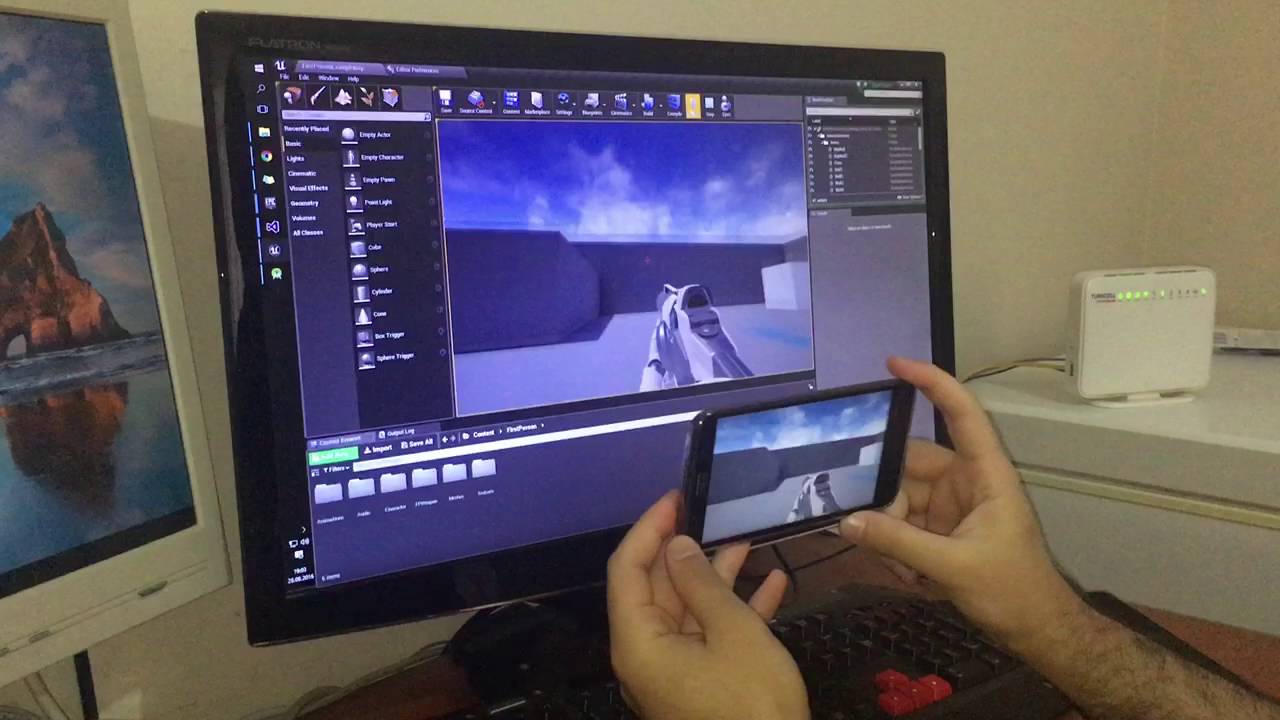
This plugin enables to you quickly test your VR game. - Head Tracking (Orientation) - 3D Stereo View (Tested with VR Box) This feature comes with "Mobile Rem...
devout relic
Still having problems. No idea what to do.
paper kernel
@grim cargo that's just gyro input plugged into SetControlRotation
wary wave
your 'character' needs to be a mesh, and it needs to have a lit, masked material
after that, it's still going to look pretty horrendous until you have your normal maps sorted, and have got a lighting setup that's reasonable
devout relic
How do you make your character a mesh and add a lit, masked material?
What is a 'normal map' and how do I sort them, and set up reasonable lighting?
wary wave
These are all fairly fundamental concepts, and I don't really have time to hold your hand through the whole thing - you should be able to find more or less everything you need to know through google and / or by playing in the editor. Start by making your character a mesh and then solve one problem at a time (probably in the order I described)
devout relic
I asked here because I already tried google and playing around, and they didn't help.
paper kernel
it seems you need a basic tutorial on 3D modelling
which explains what a normal map is
devout relic
I'm not 3d modeling though.
paper kernel
yea if you want to make materials in the engine you kinda have to be
devout relic
Well, okay, the environment is I guess, yeah, but the thing I'm having a problem with is the 2d sprite.
wary wave
for pixel art there are tools that can help your create normals maps from sprites
there's no 3d skills required, however it's probably outside the scope of what people in here will be able to help you with
I believe one such tool is 'Sprite DLight'
'Sprite Lamp' may be a viable alternative
devout relic
So 3d environments are naturally lit within the free game engine, but I have to buy a separate program for 2d sprites to be lit? S:|
wary wave
you can light them all you want in the engine just fine
your problem is the normal maps
fierce tulip

Join Cardboard Sword’s lead designer, Chris Wilson, as he takes you from the Paper 2D starter project towards making your own game. With examples from their ...
devout relic
No, apparently I can't. Or at least nobody will tell me how.
wary wave
without normal maps, a sprite is just flat, so you won't get proper lighting on it
I mean it will be 'lit', but you won't really see any shading
@fierce tulip - Paper 2D doesn't support lighting though, right?
devout relic
It doesn't need to be well-shaded, at least not at the moment. It just needs to get darker when the light gets darker and cast a shadow.
wary wave
then you don't need anything except a mesh with a lit masked material
devout relic
Aaaaaaaaaaaaaaaaaaaaaaaaaand full circle back to my question. How do you add a mesh with a lit masked material?
wary wave
devout relic
 wary wave
huh, apparently Paper2D does support basic lighting - but it cannot cast shadows
 faint cedar
Anyone know if there's a workaround for the "dropdown menus constantly flicker when at the edge of the screen" bug?
devout relic
If that wasn't how to set the material to masked, I have no idea how to do it.
fierce tulip
@faint cedar for me, sometimes fiddeling with developer tools > widget reflector
@devout relic do it inside the material, not the instance. it might not have a mask input set up yet
devout relic
Because what I did seemed to have no effect.
fierce tulip
you should really delve into some "getting started" documents & learning tab content, along with actually just looking at some of the example content thats available there.
devout relic
I'm not sure about the example content, but I have looked at a lot of the getting started documents.
fierce tulip
just like learning to draw, keep repeating untill it becomes natural. is really best to follow some tuts etc first, else you cant see the forest trough the trees
devout relic
I have. I don't understand what I'm not getting about this.
fierce tulip
you need to edit the material, not the instance.
faint cedar
@fierce tulip - Nope, it always happens no matter what. If a drop-down exceeds the edges of the screen it just keeps flickering in an out.
it's beyond annoying
devout relic
How do I access the details for the material? I thought that's what I'd opened, but apparently not.
fierce tulip
really, follow https://docs.unrealengine.com/latest/INT/Engine/Content/QuickStart/index.html and then you'll understand 😃
Learn how to get started with Unreal Engine 4 as a content creator.
devout relic
I frequently can't believe how just one tiny thing apparently needs an entire huge tutorial to explain in this program.
fierce tulip
its not huge, and if you are unfamilliar with everything, then yes it feels like a huge hurdle, but thats with any engine, and any tool you are using for the first few months to years.
devout relic
It feels like if a new artist asked me how to color something red and I told them "Well you need to understand color theory and how the color pallets mix, and how shading and lighting affects them..."
faint cedar
Well the thing is
There are many ways to do thing X in unreal engine
But 99% of those will cause issues in the long term
wary wave
it's more like if a new artist asked you how to colour something red, and you asked them 'what kind of medium and materials are you working with?'
you see, to someone who has never used paint before, the answer to that question will be bewildering
 keen birch
Or: "Can you color this nicely" Well, you'll do a better job if you know color theory and shading
¯_(ツ)_/¯
faint cedar
And many answers, even though they will technically make it red, are very wrong answers.
Such as: Slit your wrists and use your blood.
devout relic
I'm not worried about making it pretty right now, I just want it functional and I'll make it pretty later.
keen birch
It's asking someone to color something red, but them not having the tools to do so
THen don't look into the prettiness stuff
faint cedar
@devout relic - Do you want it to be "let's see something on the screen" functional or "let's do it properly make the code scalable" functional.
devout relic
I'm not looking into the prettiness stuff, I just want to know how to edit the material instead of the instance.
Right now I want it to be 'let's see something on the screen" functionable.
faint cedar
Just open up the material in the editor instead of the material instance. You can mouse-over the asset to see which is which
light thunder
Does world settings differ between maps? How does level streaming work for that, does the persistent just override everything else?
 merry gazelle
I'm trying my hand at writing for my CG Anim / Game Immortal Abyss.
devout relic
Pretty sure world settings do differ by map, but you can set the same gamemode to several.
I could be wrong though, but that's what seemed to happen when I looked at the settings in multiple levels I'm making.
merry gazelle
faint cedar
@light thunder - World settings can differ between maps, but when streaming only the master game mode / levels are applied.
devout relic
Okay I somehow turned him into a black box, but he now has a shadow, so I guess that's progress: https://gyazo.com/be3f93f6ca5c172892123f2401eff0f6

 sacred crater
You know you have to close a few tabs when https://puu.sh/ypYRp/c700d491c9.png
 fierce tulip
been there, quite annoying when you notice you forgot to change something in one menu so all others are identical. (i.e. not having the socket menu open)
light thunder
@faint cedar thanks!
devout relic
Still no luck fixing it.
 north fractal
any of you guys ever written up a bug report for the engine? How long does it usually take to hear back? I got a response from Doug E asking for more steps to reproduce, I provided them, and it's been 10 days since without an answer.
devout relic
I can't figure out how to access the default MaskedUnlitSpriteMaterial, and I can't figure out how to make a new material asset not turn him into a black box.
Oh.
I was about to say "Ha!" but more like "Ehh, kind of?"

He's still unlit, but he does now cast a shadow without turning into a box.
wary wave
@north fractal - a) yes, and b) usually never
north fractal
@wary wave Well that's unfortunate. He responded once asking if it could be reproduced in a brand new project, and I let him know that yes, it could, as well as steps to reproduce. Haven't heard from him since.
safe rose
@north fractal forums seem down
But when they go back up
There's a thread started up by me in Feedback For Epic
north fractal
what's the thread?
 worn granite
@weary basalt haha, yeah, that's pretty great.
my bet? Less than 6mo total exp. and all of that following tuts
safe rose
@north fractal Something about lack of communication
should have like 120+ replies I think on that
north fractal
@safe rose Sure, I'll post in there when I can. It seems like this bug I ran into only affects a subset of a subset of users, but seeing as it affects me, the developer, it's discouraging to keep working on this game when my own machine has such a terrible bug when running the packaged game project.
wary wave
when it comes to niche problems, unfortunately your best bet is to try and resolve it for yourself
wary wave
Epic tend to prioritise issues that affect more users, as you'd probably expect
safe rose
no idea
Well, they are going off "upvotes"
which is sort of silly
Because no one really knows that
Or uses it
north fractal
I wrote up a more detailed explanation here:
But in short, when using multiple monitors in Linux, the right monitor has issues with mouse input.
worn granite
forums down?
worn granite
Scheduled?
north fractal
I would have even appreciated a response to my thread saying, "We were unable to reproduce. Could you run it again and send us some logs?"
safe rose
Wouldn't we all?
You should have bumped it up on Friday Morning (EST) and once again Monday Morning
I just bumped it
worn granite
I think there's a similar issue with windows 10 if you have a taskbar on the left side (not sure if right side) and go fullscreen (maybe borderless?)
safe rose
But, you gotta remember, they have tons of Bug Reports that are coming in, so your visibility may get lost
worn granite
hitboxes seem to be calculated differently than visual location but haven't looked into it at all
north fractal
heh, thanks for the bump @safe rose
 inland epoch
forums are down for anyone else? D:
safe rose
inland epoch
thx!
 arctic ravine
I'd imagine the normals on the faces need to be flipped
 stuck chasm
thanks i will try that and report back
keen birch
Yup, you need to flip normals on the barrel
Or you need to enable backface rendering on the material. Less work, but it ends up rendering at twice the tricount, so that's a waste for something that doesn't need it
stuck chasm
Thanks @arctic ravine
arctic ravine
Anytime problem buddy
tulip cypress
I'm losing my motivation, aaaaaaaaaaa, help! 😦
does discord use my current locale to determine how to show post dates? if something was posted 11/05/2017 is it November or May? my windows is set to dd/mm/year
or is it different on all servers?
worn granite
If you scroll up to a few days ago you can see
tulip cypress
I scrolled for a minute and it said "Last Thursday" and then I got bored 😄 but yeah, guess I'll have to just keep that page up held down
thanks
worn granite
Find a less active channel. Anyway I have a theme, so
tulip cypress
woah that's handy
but yeah, events was a nice choice now I know 😄
the events channel that is
opal ocean
my motivation has been missing for a few weeks now
tulip cypress
it's just hiding under a rock somewhere
opal ocean
I think mine is dead...
opal ocean
its been sick for a long time, I think it may have crawled under a porch somewhere...
and now I just stare at steam and the ue4 launcher blankly
tulip cypress
maybe you should start a collab project with someone!
and then the two of you can create something EPIC
opal ocean
I keep thinking of new projects, instead of solutions to current projects
tulip cypress
that's the way it goes unfortunately 😦
new projects are always more awesomer than current projects 😦
opal ocean
yeah and then I never get past the prototype stage.
I'll get a few of the main mechanics of it working, then lose steam and wander off
tulip cypress
yeah, and usually end up cursing that your drive space is running low "Unreal Projects -> Properties -> 48GB" 😦
but can't delete them because "well, I'll get back to it"
opal ocean
my biggest issue with drive space is that instead of proper source control, I just backup the projects locally. so, 250+gb of backups
tulip cypress
there's that too
mint raptor
Anyone know of any games that let you trip over things?
 honest raven
guys
Can I reset my layout?
If no, how can I put this back
My contect borwser
xd
 livid haven
Should be an option in editor preferences I think? Or maybe under Window?
honest raven
Well tried to look after it
But cant find it xd
(reset default dont do anything)
grim ore
Window -> Reset Layout resets the main ui back to defaults
otherwise you can grab the content browser tab and drag it to the bottom to snap it back to the bottom
honest raven
Tried it no luck
Well the rest layout
Restarted unreal
So maybe will be good
after reset
D:
hopefully 😃
yey its working
@grim ore Thanks pal 😃
 swift spindle
anyone had performance issues with unreal of late ? latest nvidia drivers and whatnot
paper kernel
none that I could notice
I just installed latest drivers yesterday
clean install tho
 alpine root
anyone had success with setting server affinity/priority for speeding up opening/rendering times? i'm going on 10 minutes opening a project (i3 16gb)
(windows)
grim ore
opening it up is probably almost all shader compiling which is 100% cpu... an i3 is gonna have some trouble with that the first time =/
you are probably already maxing out at 100% so affinity won't make much of a difference unless your doing other crap at the same time
grim ore
yeppers just have to live with it. I used to use an older 4th gen i3 and it's a pain but atleast it does work 😃
plush yew
depending on how adventurous you are, look on ebay and alike for a old server
they can be had for like 200 bucks and have fun amounts of ram & raw processing power
then just use that for compiling
alpine root
and the file just opened lol. ha- one of those old xeon processor racks?
plush yew
ye
alpine root
3:30-4:19 = 50 minutes
grim ore
that was to open up a project
alpine root
i've seen those servers super cheap at goodwill. but it didnt seem they'd be worth anything
plush yew
they pretty much arent, unless you do things like compiling/rendering
thats what they're still good for
just let it crunch numbers while your workstation stays spiffy
alpine root
thats a good lead. maybe i'll get one next time i'm at thsi goodwill
grim ore
I wish my goodwill was that awesome, I never see computers there 😦 Lots of older answering machines tho lol
alpine root
in some cities like dallas and austin they have special stores for computer junk
plush yew
anyone know y paragon isnt starting for me?
livid haven
Yes, it's because of <insert equally useless answer lacking any details whatsoever>
plush yew
-_-
livid haven
Context, yo.
grim ore
Paragon needs atleast a 2017 iMac running 10.14. That is probably why 😦
plush yew
Hmm..
livid haven
No one here has any idea what the problem you're experiencing actually is.
 white magnet
Even then you're probably better off in the Paragon forums
livid haven
You can't honestly expect anyone to be able to help someone who simply says "X isn't working"
 tulip vault


 zinc cave
I'm wondering--I typically use UE4, but I got the Unreal Tournament editor as well (huge file), and when I initially loaded it for the first time, it took forever. Then when I finally got it loaded up, there was a test level, and that level began compiling over 30K shaders...this has been slowly 'working' for over an hour now...is this normal? Do I have to wait for all these to compile? Thank you.
grim ore
You don't have to wait, you just won't see the materials till they Are done.
alpine root
sure would be nice if there was a way to tell it not to compile shaders
fluid stag
a few people have some source mods to pause the compiler or control how many cores it uses
alpine root
see thats what i was thining earlier. turn off one of the cores? like via affinity? thought i saw that somewhere
any shader compile pegs my cpu at 995
%
fluid stag
yeah I got 4 cores so it will be 24 for ue4 editor and 24x3 for the compiler workers
aparrently having more cores doesn't help
your pc is still unavailable
 craggy nymph
@alpine root Yeah, you can set the affinity. For me 4 processes spawn. They are called shadercompileworker if I remember correctly. You just need to adjsut the affinity for all of them.
alpine root
done compiling mystery shaders and back to 15% cpu
craggy nymph
Or adjust the affinity of the UE4 process before they spawn. Afaik all spawned child processes have the same affinity as the parent process.
alpine root
@craggy nymph ah cool! but adjust them all every time lol?
i read adjust the ue4 process low and the shaders high
craggy nymph
Well shaders shouldn't compile every time. But yeah, I don't think there's any other option by default.
craggy nymph
Maybe you could write a batch script to do that.
alpine root
batch, powershell, confusing which one to use in windows
the new 2d sidescroller template is cracking me up
livid haven
Yeah... UE4 was not made to run on potatoes.
alpine root
just this one part. after that it's only using 1g of ram and 6% cpu
livid haven
Still, don't expect potato workflow support.
Expect first load of a project to be intensive no matter what and if your hardware is a major bottleneck, may as well leave your desk for at least an hour.
I have a monster and I generally expect to spend about 30 minutes at the start of the work daying just syncing, building, and compiling shaders (because I am remote and don't get the benefit of the shared DDC).
alpine root
changing the affinity to one core drops the cpu substantially. not sure if it will ever load that way though..
livid haven
I wouldn't bother fiddling with affinity and such
It's just going to take some time to get through everything.
You'll just end up gambling with system stability.
alpine root
yeah figure i'll at least see what it does a couple of times.
 dry basalt
did you guys have problems with 4.18 and Lightmass?
4.16 lightmass build was super fast, max 1 hour, but now with 4.18 it takes about 2 months to build the same map (seriously wtf)
I narrowed it down to the trees, now it takes about 10 minutes to build the light for a single tree and because the map has 10K trees it takes about 2 months to finish
also it's the Skylight's fault, all the other PointLights are set to dynamic
grim ore
the skylight did change in 4.18, you can change the default lightmap back to the older system and see if that is causing it.
opal ocean
errors.
opal ocean
😄 I dont know either 😄
light thunder
Level streaming - currently I am teleporting the player around a very large map and I am moving aroudn the "vehicle" that the player is in as well. (technically I am moving the vehicle BP first and then teleporting the player based on a position prop inside the vehicle BP). .....for performance reasons, I am going to do level streaming but I'm not sure how to implement my current system? do I just place the actor BP at the level start so that the player lines up inside it? Is it that simple?
 ebon spade
A piece of foliage isn't showing correctly in level and I'm guessing it's from this bottom one, anyone know how I fix?
 sleek spear
can i disable culling for an actor?
 wild kestrel
@plush yew it makes a lot of sense oyu just need to learn how to read them :p crash happens in light component as you can see it being refrenced in stack, it happens on registration of that component and updating component location. NewTrasform is invalid so you got some null pointer over there. that how much i can read from it, other importent aspect of crashes is when does they happen, which oyu didn't said
wild kestrel
Generly if you blueprint only you should not get those and if you can reproduce this crash you can bug raport
 restive eagle
well i told you the same thing
plush yew
so its in the Light component?
wild kestrel
yes
restive eagle
not that simple
wild kestrel
it happens in light component code
restive eagle
without you being the original dev who made everything, and lacking the experience
i doubt that you will be able to fix everything
plush yew
im gonna go smash his door in
restive eagle
just by removing the problem, might give you more problems
wild kestrel
no ;p if you use C++ this kind of things aren ormal if you use API improbably
if you use blueprint only without clearly messing things out then its a bug
and you should raport
plush yew
any hint on how i can find this light component
wild kestrel
first of all what are you doing that you have this?
restive eagle
try asking the person who made everything to compile it
wild kestrel
which demo
plush yew
@wild kestrel my project im packaging the demo but my team left 5 months ago so im picking up with what i had left
plush yew
wel it started in 14 and i've been updating it each time from then till 18.1 updating the systems
never had any errors with it
wild kestrel
do game works normally in editor?
wild kestrel
can you throw entire log to pastebin and give a link?
plush yew
sure shall i repackage it and then send it
plush yew
ok no worries
faint cedar
Welp, this is fun.
devout relic
Starting to get hesitant to ask here because I tend to get unkind reactions and unhelpful advice, but I can't find a tutorial to do what I want with text. I just want an object, when clicked, to display some text next to it, and then that text disappears when the object is clicked again.
Yes I have already looked for tutorials. I've been trying to figure out this one simple thing for an hour.
devout relic
An actor in the level.
Like when the player clicks on the character's bed, it says "This is your bed."
faint cedar
Well, a couple of things
First of all, there's a text component (not quite sure of the name)
white magnet
Ok well if you want the text to exist in the level and not in the UI, you need a text render component. And then when the actor is clicked, you play Set Text
faint cedar
You can just drag off of that and do SetVisibility
Text render component, that's the one
As for unkind reactions - most people here react badly to (hyperbole) "omg this engine sucks, documentation is bad yada yada" etc. as it's been said a billion times by beginners who just aren't over the initial hill yet.
devout relic
I haven't said that thought.
faint cedar
I know, I'm overemphasizing for effect :p
devout relic
I've just asked basic questions and been greeted with the equivallent of 'git gud.'
white magnet
Are you asking in here or other channels?
devout relic
Here.
white magnet
There are specific channels for these kinds of questions and they're usually more helpful
faint cedar
Eh, that happens I guess, a lot of beginner questions get asked often. Toss me a DM if you want with specific questions I'll toss you help.
white magnet
#blueprint for example is good for something like this
devout relic
Thanks, I think I will DM you. I seem to have a lot of things I want to do that are different than any tutorial I can find, or simpler than any tutorial I can find so I have to wade through a ton of stuff I'll never use to get to the one thing I want to know.
white magnet
Well it's important to remember that just about anything you want, there are several ways to achieve it. Blueprints are powerful, but also complex. The more you know about them, the better
If you're really new to UE4, it's really a good idea to do a lot of tutorials IMO. Event if they're not focused on the specific features you want to develop
More general knowledge will make for stronger development
devout relic
I tend to forget things if I learm then when they don't seem relevant to me though, so that ends up being kind of pointless. I've already tried doing that, and the only things I can remember are those I've actually used.
 celest creek
Hey, I have one button A with an image that is overlapping button B. Now I can't press button B, is there a way to make this button have priority despite the overlap?
fluid stag
make the image hit invisible?
white magnet
I know actors have Input Priority settings, but not sure about Buttons. But something you can see if that's the case
celest creek
oh right, you mean create an invisible button that captures the input with an image underneath that acts as the button image? Yeah maybe... a bit hacky but could work
I was hoping z-orders would do it, but wrapping a canvas around button B and increased its priority didn't work
fluid stag
I don't really have context as to what you are doing, but under visibility on the widget settings you can set it to be hit test invisible if you don't want images capturing clicks
or something like that
celest creek
it's 2 buttons, and the images are in the 'button' type widget and need to have both with hits visible so I can click on them
I think I'll break my big overlapping button out into 2 images, one with the glow (which is the part that is overlapping) and another image that I'll use for the button itself
I'd rather just have a priority function as it's much easier.. thanks all!
light thunder
Can I load a level from an ector blueprint or do I always have to trigger the load from the level blueprint?
Or I mean, I can't be in a function when I do the command?
 tiny prawn
.... is anyone else in a perpetual standstill with the marketplace too?
also anyone else randomly get the dungon architure plugin to just stop being linkable on compile?
 slate orbit
I just released a huge new version of my ue4.17 game The Pillage if anyone is interested in trying it out, its free too. https://gamejolt.com/games/ThePillage/290214

Game Jolt
The Pillage is about an appetite for murder. It's about killing for sport and reaping organs for reward. It drops the player in a city with only three things, a small knife, a large weapon, and a...
 random mulch
Is there any button to see your current panel in fullscreen? Like going into fullscreen for your material or animation viewport?
And if not, why isn't this a thing already? 😐
 dreamy quartz
I've got weird bug with using "Compile" button in editor (4.18.1). It says compilation finished and is happy, but some parts of code changes are not reflected in game preview at all! The workaround I found is to remove .dll files from game directory - then UE4 does full rebuild and everything is working like in code... for example it didn't work for seting actor lifespan to newer value (in his constructor) unless I removed dll files... is there any fix for that?
 idle thunder
hi guys can anyone point me where can i find tutorial how can i export Mannequin from ue4 to use in my scene as scale reference ??
 digital anchor
Just right click > asset actions > export, it will create a FBX
 lusty quartz
hi guys.. any tutorial grass / lawn wih pom material? ( parallax ocl. map.)
idle thunder
@digital anchor cheers 😃
 feral echo
have anyone run into issue with timelines and jitter?
light thunder
unable to convert in place due to its protection level unreal? what is this?
aaaaaand I cannot update to 4.18
tulip cypress
god damn it.... don't create an infinite loop and forget to save and crash your whole editor
light thunder
Could someone tell me how I unbreak months of work?
that's a bit dramatic, I have a backup but what can I do about this error?
 weary hull
you're using c++ ?
light thunder
Nope
weary hull
hmm, no idea then
light thunder
well, maybe it was created from a cpp template a long time ago, now that you mention it
i'm copying over from backup now and I'll see if converting to 4.18 works again
weary hull
if theres any c++ problem it wont load in the editor, you'll need to load it into VS and fix the c++, ive had the issue a few times when I stopped for the night without making sure all the c++ was 100%
light thunder
well shit, I hope it's not a c++ problem
@weary hull I tried to convert in place - Project files could not be generated. Log output:
Running C:/Program Files/Epic Games/UE_4.18/Engine/Binaries/DotNET/UnrealBuildTool.exe -projectfiles -project="C:/Users/blmcc/Dropbox/LIVES/Alpha Version/Current VR Version/CurrentVR.uproject" -game -rocket -progress
Discovering modules, targets and source code for project...
While compiling C:\Users\blmcc\Dropbox\LIVES\Alpha Version\Current VR Version\Intermediate\Build\BuildRules\CurrentVRModuleRules.dll:
ERROR: c:\Users\blmcc\Dropbox\LIVES\Alpha Version\Current VR Version\Source\Alpha_1.Target.cs(19,12) : error CS0122: 'UnrealBuildTool.UEBuildBinaryConfiguration' is inaccessible due to its protection level
ERROR: c:\Users\blmcc\Dropbox\LIVES\Alpha Version\Current VR Version\Source\Alpha_1.Target.cs(17,23) : error CS0051: Inconsistent accessibility: parameter type 'ref System.Collections.Generic.List<UnrealBuildTool.UEBuildBinaryConfiguration>' is less accessible than method 'Alpha_1Target.SetupBinaries(UnrealBuildTool.TargetInfo, ref System.Collections.Generic.List<UnrealBuildTool.UEBuildBinaryConfiguration>, ref System.Collections.Generic.List<string>)'
ERROR: c:\Users\blmcc\Dropbox\LIVES\Alpha Version\Current VR Version\Source\Alpha_1Editor.Target.cs(19,12) : error CS0122: 'UnrealBuildTool.UEBuildBinaryConfiguration' is inaccessible due to its protection level
ERROR: c:\Users\blmcc\Dropbox\LIVES\Alpha Version\Current VR Version\Source\Alpha_1Editor.Target.cs(17,23) : error CS0051: Inconsistent accessibility: parameter type 'ref System.Collections.Generic.List<UnrealBuildTool.UEBuildBinaryConfiguration>' is less accessible than method 'Alpha_1EditorTarget.SetupBinaries(UnrealBuildTool.TargetInfo, ref System.Collections.Generic.List<UnrealBuildTool.UEBuildBinaryConfiguration>, ref System.Collections.Generic.List<string>)'
ERROR: UnrealBuildTool Exception: Unable to compile source files.
This has me dead in the water
Man, this fucks projects completely. I can't open in 4.18 OR 4.17.....like, make a backup INDEED
weary hull
no idea
 devout gulch
does gpuprofile works in cooked game ?
wary wave
no
 silver magnet
hello guys
can anyone tell me how to make the live 3d player the same as PUBG?
I already tried to follow the tutorial of pyro dev, but in all images only the character of the last client appears in all players.
 sharp crest
interested in this too ^^ (please mention me if you are answering him)
frank escarp
its a lot harder than you expect
there are 2 main ways of doing it
the first is by spawning a miniature version of the player, and putting it dead center in the camera
very close
that way it will be visible as part of the hud
of course comes with its problem (can collide with environment)
so there is another way
on the center of the map, you keep a box
with a chroma key texture
and then you just have the 3d model of the character
and use render to texture
to record that 3d mesh into a texture
and then put it on the hud
i think you can actually do render to texture with a single Actor
plush yew
I believe you can get an alpha channel by having the background as empty space
frank escarp
and that way just have proper alpha and cheaper render