#ue4-general
1 messages · Page 136 of 1
 wary wave
I'd hazard a guess said Ps2 game wasn't networked?
wary wave
yeah
 livid haven
Yeah, I think the dropship thing is literally just that a gun won't do any good - those things are paper to the 'nids. They need to get in and out. Gun won't save anyone and it's just dead weight when they need to be nimble.
 safe shoal
The things we could do with deterministic physics sims
livid haven
I wonder.
wary wave
I think the best example of what might be achievable would be Earth Defence Force
livid haven
What about... deterministic AI?
safe shoal
sigh the dreams
livid haven
But AI acts like players - replicates their actions from the server to the client.
wary wave
it's still deterministic
livid haven
Clarification - simulated/predicted client-side AI.
wary wave
the problem is that the client and server simulations are all different
livid haven
That is deterministic, otherwise it'll be pretty out of sync.
wary wave
this is a fundamentally important concept in multiplayer
wary wave
normally no
 faint cedar
So
wary wave
but it's not helpful because it means that a deterministic system run on multiple machines can yield different results
(because the inputs are slightly different)
faint cedar
Has anyone noticed that ever since 4.18, items and properties are shown in the inspector twice or thrice
In various submenus
and everything is expanded by default
wary wave
and from there when one difference causes determinism to fail, shit rapidly spirals out of sync
so you need the server to be authorative, and checking frequently
livid haven
Yeah, but I'm wondering if they're close enough if it's fine for something that's kind of haphazard like this.
wary wave
at which point we're basically networking again
if you did want a large number of entities, you'd probably also want to move away from UE4's networking model and towards lockstep anyway
livid haven
I'm just thinking. I don't think it'll work, but I wonder if there's anything in there worth trying.
wary wave
that's what most RTSs would use, because it ensures you can stay synced without a small difference between machines causing a catastrophic chain reaction
 chilly sun
quickq: in game-design we can poke bot for ideas, can we dump ideas? (intend no spams)
wary wave
both, I guess
poking the bot is rally annoying though
you can just send the bot a PM instead
 south ridge
Make a game where you save the world by really, really loving fish
livid haven
Yeah, may have to see about that. I just don't see quite this niche of game and I don't think it's due to it not being viable on the market.
But there are some serious tech hurdles to do multiplayer with lots and lots of bots, even if they're very, very dumb.
safe shoal
Fortnite's PVE seems to do a LOT somehow
chilly sun
yea Iwas thinking my ideas would totally be better than bots :p buuut if currently it's annoying just bot then bot + ppl might get worse, so mostly no-ish ?
safe shoal
Like with every actor being destroyable etc.
livid haven
Might have to make some friends over at Creative Assembly. 😛
Of course, they're doing very different tech there.
safe shoal
sigh, spot why my client function isn't actually being called on the client...
Client_SetLoadout_Implementation(PlayerLoadout_L, PlayerLoadout_D);```if I had a penny for everytime I've done this...
faint cedar
The _?
faint cedar
oh
Seriously, somebody did a number on the Inspector panel in 4.18
This is horrifying
safe shoal
@faint cedar I've not been able to build 4.18 from sauce yet, is it not too good :/?
Having nightmares merging it
faint cedar
1 minute
These fully expanded redudant ugly properties are EVERYWHERE
Those second 3 are copies of the properties inside the struct
safe shoal
That does look messed up
Almost like ShowOnlyInnerProperties isn't working properly, maybe
faint cedar
no idea, but it throws me off quite a bit at times
safe shoal
definitely seems like a bug maybe
faint cedar
Maybe @blissful reef can come to our rescue? 😛
livid haven
I don't think this would be on him, but he may know what's up.
But not at...
5:36 AM on the US East Coast.
 paper kernel
question: bullet hit decals are not showing up on AI character, but they do bleed to surrounding walls(which is fine)
what am I missing?
everything is set to "can receive decals"
render settings are fine
livid haven
On that note, I think I finally resolved my C++ bullshit obscure behavior woes.
Builds are unbroken. I'm going to sleep. Ciao, peeps.
Good luck with your decal thing.
faint cedar
Damn timezones always messing up my master plans
 sick nova
Hey guys anyone here? Where can i ask packaging/cooking for windows questions? I keep getting ambigous search errors and crashes after upgrading my project to 4.18
 fiery harbor
where do I have to put ini files with console variables that should then be used by the packaged game in shipping config?
it should be appdata/local/game/saved/logs, I've tried creating a ConsoleVariables.ini and put the stuff inside there, I've also tried to create a UserEngine.ini and put it there, but both don't affect the value the console variable then has when I start the game
putting it into the Engine.ini also doesn't work
 tawny brook
Anyone tried the new asset management framework in 4.17/4.18?
 short zephyr
i dunno if im right here but guys.... what the hell does "alt+s" do in the editor? im currently play testing my space ship controller where i can activate a free camera with alt but when pressing s at the same time it jumps out of the game
fiery harbor
well it will still be pretty expensive
a 2d game with a complex (10+ layer) 3d landscape?
 plush yew
I'm doing the C++ tutorials from docs.unrealengine, I've noticed some things are outdated and missing some things. I've fixed some things as I'm going through it. Who can I send the changes too to add it to the docs?
 feral echo
what's the difference between sweep and trace? Or this is same thing?
fiery harbor
plush yew
@fiery harbor Thank you
 pallid compass
Does anyone know of aways to tile the a texture in maya UV editor?
pallid compass
@frank escarp you around?
 frank escarp
yes
pallid compass
So im learning tiling textures and trim sheets
plush yew
C++ Y U take so long to build?!
pallid compass
and for the life of me i cant get maya to display the Textures across multi UV segements, do u have any idea? i know your blender person but im 100% lost rn and no one knows
frank escarp
no clue
pallid compass
im not going mad but im sure u use to be able to do it in most generic modelling software?
nvm i got it
#fuck ye
😄
plush yew
I installed Maya the other day, then uninstalled it after few hours.
I'll stick to Blender.
pallid compass
haha how come?
frank escarp
maya is overkikll
for game modelling
really, really, stupidly overkill
such overkill means the program is a lot slower and ends up clunkier for modelling
 empty adder
Hey. If possible, how would i go about spawning a Pawn?
In game. I am making an RTS kind of game, and need to place/spawn houses
 vale osprey
SpawnActorFromClass
Give it transform of the point where it should spawn and name of the class to spawn from
empty adder
I made it work, thanks!
I also have trouble casting to my Widget
I want access to a boolean, that i made in it
 grim ore
what is the trouble with casting to your widget?
empty adder
It wont cast, the cast fails
I made a variable, Widget Blueprint, and as you can see on the picture, i dit set it to use my Widget
grim ore
well I see the warning, how do you know it fails?
and I have a feeling I know what is happening but just trying to make sure. Do you actually create the Stats Display Widget at any point?
empty adder
just rechecked with Print
Still fails
Yea, i do create and add to the viewport
A button on screen flips a boolean
Which it does, i just need that boolean in other bp
 ionic sedge
That doesn't help though if you didn't assign the created version to the variable, which you didn't because you set it in Default Value. 😛
grim ore
pretty much that, once you create the Stats Display Widget do you store a reference to it anywhere? set a variable for it so something else can get it
grim ore
yeppers 😃
grim ore
hey you got it without much problem so good work to you.
plush yew
Not sure why Blueprints compile instantly, but simple C++ takes 10-20 minutes, even if it's just a Hello World.
grim ore
Aliens
plush yew
I guess it doesn't happen for everyone. Just find it weird.
grim ore
nah it does
maybe your compiling the entire engine at the same time as your project as well by accident?
ionic sedge
It shouldn't take 10-
grim ore
a simple class shouldnt take a horrible amount of time
plush yew
literally 2 scripts.
grim ore
when you compile which project in VS do you compile?
plush yew
VS 2015 Community
grim ore
you should have 2 projects in the solution, one is the engine and the other is the game itself
you might be compiling the engine again
simple or blank projects should take a minute or 2 at most on most machine if its just the game being compiled
plush yew
Yes UE4 and the project
 cinder iron
Did someome have any problem building ue4.17 source Code from github?
plush yew
I'm doing the C++ FPS character tutorial from docs.unrealengine.
 ornate forge
does anyone know how well Unreal performs on low-end machines?
Intel GPUs in particular
is it difficult to ship a game on Unreal that would be playable on the majority of HW configurations in the Steam survey?
plush yew
@ornate forge Not sure about Intel GPU's, but I have a old to test for lower end, it's a Socket 775 with a GT630, UE4 performs alright on it, hardly going below 30 FPS, even when running UT4 on it. I've seen people play Witcher 3 on Intel GPU's above 30 FPS. So shouldn't be an issue, just need to optimize.
grim ore
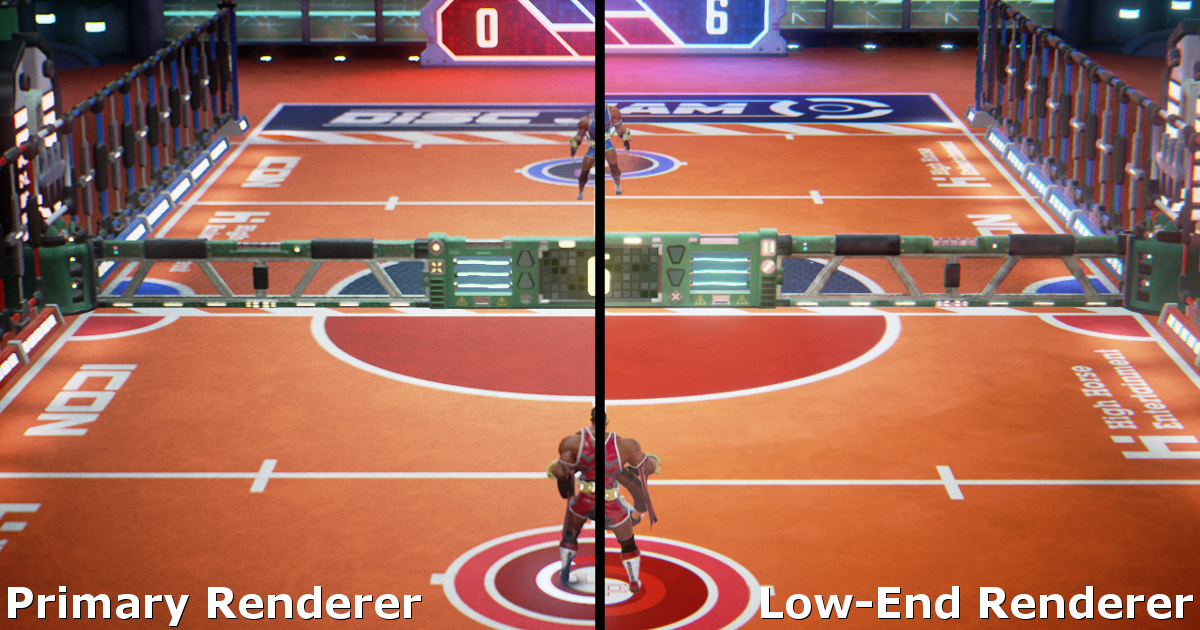
@ornate forge https://www.unrealengine.com/en-US/blog/how-disc-jam-reached-60-fps-on-intel-processor-graphics-using-unreal-engine-4
Unreal Engine
Hi everyone! I’m Jay from High Horse Entertainment, a two-man team based out of Los Angeles. Our first project, Disc Jam, is an arcade action sport in which timing and reflexes are critical to succes, so maintaining a high frame rate is largely important for the game experience. Here's how we hit 60 FPS on Intel Process Graphics with Unreal Engine 4.
 minor thistle
is there a wishlist/favorite/save option to keep track of items in the marketplace?
or... is the cart the only way to really save anything like that
 winter panther
Probably
 icy hearth
Heya everyone! I might be missing it, but is there a channel to discuss weird performance issues with the editor on the server? Thanks! 😃
 cursive dirge
@ornate forge that disc jam example is old btw, there's been since that 1) desktop forward renderer that scales down really well as is 2) simple forward mode that can be used along with deferred rendering (although there really isn't much info on how to use it)
but if you use forward renderer all the way, you can get really nice perf on crappy computers
deferred renderer is fairly heavy on weaker systems
 silver crown
 pastel folio
404
silver crown
NVIDIA Developer
NVIDIA has made it easier than ever for game developers to add leading-edge technologies to their Unreal Engine 4 (UE4) games by providing custom UE4 branches for NVIDIA GameWorks technologies on GitHub. We created GameWorks to advance gaming at a rapid pace by extending the state of the art in graphics technologies. Developers now have access to the cinematic-quality special effects and the tools they need to make their games better with minimal effort.
pastel folio
Ahhh I missed that part
 gray basalt
when i add "PlayerStart" in UE4, where is the code managing camera controls etc ?
gray basalt
i'm just looking for the code
 safe rose
Code for Pawns are in Pawns. Character (which are Pawns + CharacterMovement and Capsule) are in Character class
What code?
Controllers are used for inputs
gray basalt
when i add PlayerStart from UE interface
safe rose
Or possessing pawns
....
So you put a playerstart using Level Editor is my assumption
gray basalt
yes
safe rose
Again, you are not asking the right question
What do you want to know exactly?
Camera is handled primarily from Player Camera Manager, which is usually just used default
But you can customize it
Use AI Controller for AI
Use Player Controller for Player Input
If you have no "mani" in the scene and it's basically like a fps with no gun
You probably are using default pawn
Change GameMode settings
To change whatever you want
gray basalt
and this default pawn handle the camera ?
safe rose
¯_(ツ)_/¯
Introductory information for developers starting out creating games with Unreal Engine.
gray basalt
y i saw
livid haven
🤤 Yeeeees. Finally. On that 4.18 goodness for work.
pallid compass
mfw watch 4 hours of guy trim sheet tutorial
all he has done for 4 hours is modelling
-closes it-
what a joke.
tawny brook
@livid haven Have you worked with the new asset management framework
livid haven
Super minimally interfaced with it.
And it didn't work like I expected to at first but I think was later fixed.
Asset Bundles and all that.
tawny brook
I'm currently on 4.16, might switch to 4.18 to create a weapons system using it
livid haven
Not that you can't use it in a weapon system, but that phrasing is a little odd.
livid haven
Where is this description?
tawny brook
It provides a framework to make it easier to create things like Quests, Weapons, or Heroes and load them on demand
"The Asset Manager - first introduced in 4.16 as an Early Access feature - now has Blueprint access and is ready for use in production! The Asset Manager is a global object that can be used to discover, load, and audit Maps and game-specific asset types in the editor or at runtime. It provides a framework to make it easier to create things like Quests, Weapons, or Heroes and load them on demand, and can also be used to set up cook and chunk rules when packaging and releasing your game. The Asset Manager tab in Project Settings can be used to set up the rules for your game:"
On the 4.17 release notes
livid haven
Ah. I think that particular line is both overly specific and overly ambiguous. ^^()
It won't help you create any of those things, at all.
What it will do is make it easier to manage your memory budget with regards to those kinds of things.
So, for example
All items in Fortnite have a small preview image and a large preview image.
The small preview image is always loaded.
The large preview image is loaded on demand.
There are probably thousands of individual item assets in Fortnite.
Not user-facing necessarily - all the different tiers of a hero are different item assets, for example, so it's 1 "item" to the player but defined as multiple related items.
The newer asset manager stuff makes it easier to tag references to assets in a class as being needed under different circumstances.
tawny brook
well damn
livid haven
It is not a framework for creating quests or weapons or heroes.
I think that example was used because, of course, we used it in Fortnite to help maintain our memory budget for less memory rich environments like console.
And of course Heroes and Weapons, being the main things that have fancy 3D meshes, were some of the biggest savings.
livid haven
Otherwise, simply having an item asset be referenced meant that all asset references in it were also loaded, meaning having a hero or weapon meant that their 3D meshes, all of them, for all the items you have, may have been loaded - that wasn't going to fly on console.
safe rose
I read up on the Asset Framework
And even tried to use it once
But a lot of stuff isn't very well documented sadly
Even the C++ parts were meh
tawny brook
I mean
"Please note that this support should be considered Experimental, and the API and interfaces will change."
tawny brook
Under 4.17's note about the framework said that
safe rose
Ah
I thought it was released
not experimental
even better reason not to use it then
safe rose
Ah, I see now
tawny brook
🤣
safe rose
They put BP hooks in
in 4.17, which is what I was tying to use with the C++ parts
I thought they had "released" it
tawny brook
I think they did
safe rose
But cool, maybe it'll get some more love then later
Because it wasn't all that intuitive to work with
tawny brook
"New: Asset Management Framework Production Ready
The Asset Manager - first introduced in 4.16 as an Early Access feature - now has Blueprint access and is ready for use in production!"
safe rose
right
"For use in production"
I am sure it is, for those who have been using it for 5+ years in let's say Fortnite
😉
tawny brook

safe rose
I'll have to go back and check it out
because I just saw they did add some more documentation for it
Asset Loading and Unloading
But I think this was just a CP from that PDF that head guy gave out
I'll have to check it out later,
livid haven
@safe rose Not making excuses for how difficult it may be to learn, but it's not older than like a year.
It shipped out to you guys not long after it was at least partially purpose made for us.
I don't know which "head guy" you might be referring to. I believe Ben Zeigler took the lead on writing it.
 serene otter
erm, where on this server would be best to ask a question about cameras?
trying to make the camera on my car point in the direction of my velocity. I can code in c++, but wasn't sure if I need to
so not quite sure where to ask
livid haven
His comment was suggesting you don't need to.
That bit of functionality definitely sounds doable entirely in blueprints.
You're just taking a camera component and doing some linear algebra to change its rotation.
livid haven
All of those things are accessible in blueprints.
serene otter
k, this is a good excuse to go learn about blueprints. Thanks both!
tawny brook
you could probably do it in c++ aswell
time to work on my weapons system, so much to do 😭
 sacred sable
Where would I be able to go for questions/support (I don't perfer forums so that's why I am here)
tawny brook
Depends on what you need help with
sacred sable
Well I am getting a cook error, and I wanted to know how (If possible) to edit/make meshes in UE4 I am still working my way around it.
livid haven
That statement doesn't make sense. 😛
There's not really a particular place that would make sense for a cooking error.
Here is fine.
We may be able to point you to somewhere more specific depending on the specifics of the particular cooking error.
sacred sable
Would you be able to take a look at it @tawny brook? If not I don't want to trouble you. I have not edited any blueprints in this particular game. https://paste.md-5.net/lobayesalo.tex
tawny brook
(see C:\Users\User\AppData\Roaming\Unreal Engine\AutomationTool\Logs\C+Program+Files+Epic+Games+UE_4.18\UAT_Log.txt for full exception trace)
sacred sable
Hmm, that is that file.
tawny brook
Yes it is
sacred sable
Copied it straight out of it.
tawny brook
"for full exception trace"
sacred sable
mhm, I opened up that file and that's what I gave you in the haste bin.
sacred sable
mhm, I am 100% it's that file.
tawny brook
Alrighty
livid haven
@tawny brook It references itself because you may be seeing this output in another program/window. 😉
tawny brook
x=h
sacred sable
I read over the error and saw nothing my self. I thought you guys could help.
livid haven
There's two programs involved. UAT "crashed" in that it decided to abort because:
ExceptionUtils.PrintExceptionInfo: CommandletException: Editor terminated with exit code -1073741795 while running Cook for C:\Users\User\Documents\Unreal Projects\ColesGame\ColesGame.uproject; see log C:\Users\User\AppData\Roaming\Unreal Engine\AutomationTool\Logs\C+Program+Files+Epic+Games+UE_4.18\Cook-2017.11.07-16.34.19.txt
Key part being this:
Editor terminated with exit code -1073741795
sacred sable
😮
livid haven
So it's not that UAT crashed because of something in UAT, but that the editor itself crashed.
tawny brook
Editor does crash sometimes
livid haven
So you actually need the log for the editor, not UAT.
sacred sable
And we don't know what program that is?
tawny brook
That's the visual editor
livid haven
It's the UE4 editor itself
sacred sable
Okay where would I be able to find the logs at?
tawny brook
 sacred sable
Okay
livid haven
Try to find one from when you ran this thing
livid haven
If you can't figure out which one it is, then just run the whole thing again and the newest file should be the one for the crashed editor run.
sacred sable
Mhm. Haha
tawny brook
Alright, i got banned back in 2015 but that's offtopic 😄
sacred sable
Haha I always use md_5's haste bin idk why.. any way is this what I am looking for? https://paste.md-5.net/kiyebidudo.rb
tawny brook
That's why I asked if you were, because md_5's paste lol
sacred sable
Yeah haha
tawny brook
"ColesGame"
Unique name
Hmm
[2017.11.03-23.02.10:275][985]Cmd: QUIT_EDITOR
[2017.11.03-23.02.11:282][985]LogWindowsTextInputMethodSystem: Display: IME system now deactivated.
[2017.11.03-23.02.11:372][985]LogExit: Preparing to exit.
[2017.11.03-23.02.12:283][985]LogDirectoryWatcher: A directory notification failed for 'C:/Users/User/Documents/Unreal Projects/ColesGame/Content/', and we were unable to create a new request.
[2017.11.03-23.02.12:452][985]LogExit: Editor shut down
sacred sable
Oh haha, I don't know how UE4 works so I didn't know.
livid haven
Cmd: QUIT_EDITOR = you closed the editor.
As in, the user sent the quit editor command.
sacred sable
How?
livid haven
Notice other log lines like:
[2017.11.03-23.01.37:306][548]PIE: Play in editor start time for /Game/VehicleBP/Maps/UEDPIE_0_VehicleExampleMap 3.779
sacred sable
I've tried it a few times not doing anything.
livid haven
So during this editor session you played that map.
This isn't the right log file, like I said.
This is from a session where you actually used the editor UI and played that map in the editor.
livid haven
Confusing log
This looks like...
... a log from the editor...
... where you tried to cook...
... which started another editor instance to run the cooking logic.
So you've got an editor log file with the UAT log in it with the other editor cooking log inside of that
sacred sable
whaa
livid haven
When you run this thing, from the editor, look in Saved/Logs and look at the newest file.
Look at the created/modified date.
sacred sable
The last one I just sent was the most recent
I'm not doing anything wrong am I?
@livid haven Sorry to ping you just wanted to know if you were still there.
livid haven
Sorry, was in another channel.
sacred sable
Oh that's fine.
livid haven
So, close out all your editor instances.
Delete all of your logs.
Run the editor.
Try to build/cook/package/whatever you're doing.
Then close the editor.
Open Saved/Logs.
Press F5 to refresh it, if you already have the folder open.
And you should have at least 2 log files. The editor session that you had running, and the one that ran and crashed.
sacred sable
Okay one second
faint cedar
evenin'
livid haven
How about C:\Program Files\Epic Games\UE_4.18\Engine\Programs\AutomationTool\Saved\Cook-2017.11.07-17.46.52.txt?
 hot ledge
So I want to use a variable I created in my anim blueprint
sacred sable
Theres nothing there @livid haven
livid haven
I got nothing for that. Should exist.
You could try WindowsKey + R, paste the file path in quotes, press enter, and see if that works.
sacred sable
Nope
livid haven
IE:
sacred sable
I went directly to the folder too
livid haven
livid haven
Uh... I'm about out of ideas.
sacred sable
livid haven
That aren't copy-pasting the commandline args to UE4-CMD or whatever and running it via VS
In a Debug Editor build
From Source
99% of which I'm guessing is completely foreign to you.
sacred sable
@tawny brook Are you able to still help?
sacred sable
😦 Okay
sacred sable
So no ones gonna help me?
 glossy zenith
Not looking to start a flame war, as I'm learning one side and have done parts of courses in the other, but why blueprint or why c++ ? Was having trouble with something last night, a mate ( who doesnt know code ) explained it out through blueprint very easily.
glossy zenith
are you answering me Victor ?
safe rose
Yes
cursive dirge
there's no wrong answer
safe rose
No one please answer

New type of video, discussion / explanation. Want to know why does Unreal Engine 4 offer two ways to code your game and what are the differences? Watch this ...
Waste of time
glossy zenith
oh cool. thanks
faint cedar
There is no such thing as a "pure C++ project".
safe rose

reddit
I want to know which one would be better to learn on where to start making games. I've read Blueprint is easier, but C++ can let you do more and...

In this video I try to showcase a comparison between C++ performance, regular Blueprints and Nativized BPs. Read Description below for more details & Downloa...
faint cedar
A "real" project will use a mixture of both.
cursive dirge
actually, in the end, I used only c++ :p
faint cedar
Well yeah but you have to create BPs to populate your instance properties 😛
glossy zenith
yeah, and in the c++ project they cover that, but have wondered what the point is in using c++ if supposedly everything is in blueprint
safe rose
Let him do his own damn research
faint cedar
Also, widget blueprints
glossy zenith
but will watch that video
cursive dirge
no you don't
safe rose
@maiden swift where's the FAQ please?
cursive dirge
they always broke down
faint cedar
Oh yeah you can drag and drop C++ classes into scenes directly, right?
safe rose
Needs to be
glossy zenith
Maybe chill @safe rose
cursive dirge
yup
safe rose
Basics with unreal engine: for anyone who doesn't really get what C++ is about, or why unreal engine uses C++, this series will be for you. Before viewing I ...
faint cedar
How did you assign meshes and such to your objectts? In the scene?
faint cedar
What?
safe rose
You ask a question that you know would cause discord
Instead of just researching on your own
faint cedar
The hell you talking to / about?
safe rose
When it's 100% subjective anyway
glossy zenith
Not really. this server supports botjh, I'm learning c++, and wanted an opinion from other people in general. didnt need to get triggered over it.
safe rose
@faint cedar You asked how to align meshes right?
faint cedar
nope
safe rose
Oh, I misread
ionic sedge
This is a place for discussing things, might as well discuss stuff. 😛
faint cedar
BP and CPP isn't subjective at all. There are objective arguments for both and it really depends on your team composition. As an example, I work in a 20-ish people team and most of our content creators don't know how to use C++.
safe rose
ggwp
faint cedar
We built our core systems in cpp and we have our content creators subclass those into BPs and place in levels.
cursive dirge
I just got fed up with blueprints getting corrupted every now and then as I refactored the parent classes
safe rose
@faint cedar You said assign. You can do it via LevelBP
cursive dirge
yeah, that's how I did first
it's how it's designed to work
it's just so fragile
cursive dirge
if you write once and never refactor, it's ok
faint cedar
Funny enough I never had trouble with BPs dying on me.
cursive dirge
well, it's not always obvious
faint cedar
But I suppose YMMV
cursive dirge
sometimes the BP seems fine but acts odd
safe rose
The thing is, everytime someone starts this, it goes crazy sideways usually
cursive dirge
and when you recreate it, it's ok again
safe rose
I mean, that's why we have discord search also 😭
cursive dirge
so sometimes it just silently corrupts itself
faint cedar
yeah but Discord ain't a forum, discussion aren't as focused
safe rose
Do you search on the forums?
faint cedar
hm, that reminds me... I had one REALLY freaky bug on the last game jam. Cost us our submission.
safe rose
I guess many people just don't do their own research anyway
They want that quick answer
So I guess you're right
@faint cedar what was the bug?
faint cedar
Essentially, I got 2 enemies firing bullets, passing their bullet instances a pointer to a UCurveFloat that determines the bullet's trajectory.
Well, after about 2 seconds, all bullets start using the same curve pointer.
It was baffling.
faint cedar
I debugged memory, I did everything, the two enemies were 2 separate instances, each pointing to a different UCurveFloat asset
But for some reason, the first one started using the curve of the second one.
or rather, it's worse than that
safe rose
Hmm
faint cedar
The enemies were passing in the correct curve assets, the bullets were using the wrong one.
safe rose
That's pretty interesting
faint cedar
Just randomly.
safe rose
The fact that you had a curve though
you might as well have used a timeline then
at that point
and used the external curve
faint cedar
Not really, it didn't have a set duration, and it was implemented in code
safe rose
@faint cedar https://wiki.unrealengine.com/Timeline_in_c%2B%2B

Here is a tutorial for how to code a timeline in C++ for Unreal Engine 4, since it can be a bit difficult to find out how. #include "Runtime/Engine/Classes/C...
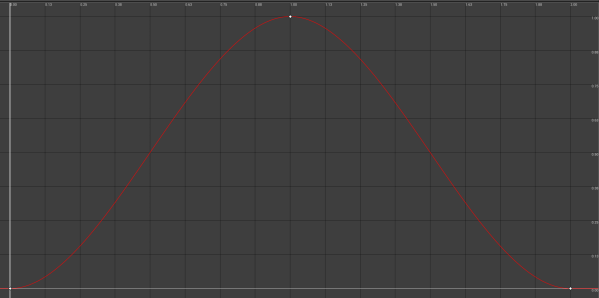
That's what I was talking about
faint cedar
CurrentBulletLocalZOffset = PathCurve .GetFloat(ElapsedLifetime * Frequence) * Amplitude;
Yeah I know they can be done.
safe rose
gotcha
faint cedar
I just hate them and wish they'd burn.
safe rose
I wish there were scaled down version of them
Basically, one for each tracks
Instead of this jumbo function
faint cedar
Plus, even in BP they have one stupid limitation and that is their fixed duration. They need to have some sort of playspeed.
safe rose
hmm
You mean, so you can set playspeed during it?
So, in mid stride, slow it down
or something
It would be nice, if you changed the time, it would scale everything accordingly
faint cedar
I use them to e.g. spawn a shockwave mesh, scale it and set its material transparency all through one timeline.
And I'd wish I could do ShockwaveDuration and just have the actual Timeline have a 1s duration, and set its playspeed to 1 / ShockwaveDuration
safe rose
heh
glossy zenith
maybe theres a greensock like tool for c++ you could use
would solve all your troubles
faint cedar
The hell is greensock?
glossy zenith
lol. past life.
it was a tween controller for flash/flex and then later javascript
cursive dirge
oh and for the record, by direct ref I mean, you get the text format ref by right clicking the asset, you can use that then in code when you run the ctor that creates the component, just assign the mesh/materials directly there
it's not clean as I said before, as it hardcodes the ref
glossy zenith
you could control speed, rewind, all sorts. infact as the timeline has the reverse ability, I'd not be surprised if the component was controllable or extendable to provide an execution speed
i was annoyed last night at not being able to set a variable to control when the timeline finished, or originally i wanted to pull out the last frame value/time from a particular track to use inb bp
cursive dirge
static ConstructorHelpers::FObjectFinder<UStaticMesh> StaticMesh(TEXT("/Game/Models/MyMesh.MyMesh"));
MyMesh->SetStaticMesh(StaticMesh.Object);```etc
 opal ocean
caustics I think
 stray smelt
ahh right... Thanks! :--)
glossy zenith
so. watched the videos, think i'm stil on the right path ( using c++ with bp for linking up stuff in the map editor ) and nativization doesnt look quite like the silver bullet it was first touted as. its impressive tho, however its surprising to me that they didnt always build bp into machine code but ran in some kinda vm
seems very java-ish
livid haven
That's pretty much it and what you'll hear from any one in the know.
C++ for logic. BP for data and light scripting.
That's the ideal flow.
glossy zenith
also assuming that bp networking isnt as good as c++
pastel folio
Made a beginners mistake
Tried to build UE4 on my C drive which is my ssd with 60gb spare
RIP OS
I hope it is done soon as I am running out of space quickly with an ever rising project folder'
10gb spare I need to knock this off
glossy zenith
so new question, again not intending to trigger people. Should I bother getting the engine source from github ? is there a difference to making a c++ project from the launcher ? ( asking because VAX still doesnt behave as I'm expecting and the unrealtool for vs still doesnt have a usable refresh/rebuild project button )
safe rose
@glossy zenith Good question for #engine-source . But basically. If you have no intention of ever fixing any engine bugs you run into or adding/removing things at will.. launcher build is fine for 90% of the folks.
You can always extend the editor via plugins/modules.
livid haven
I don't entirely agree, but that's mostly spot on.
safe rose
Well
livid haven
I never develop without the engine source code also built in a debug config.
livid haven
Being able to actually step in to the engine code vastly improves one's ability to grok the engine and how to use it.
livid haven
Not having reliable access to legit callstacks and values though.
safe rose
But if you mean manipulation, then yeah
livid haven
I mean straight up just stepping through it.
safe rose
Aye
livid haven
And not having execution hop around madly because the source code you're debugging has been optimized.
Or not being able to access half the variables because they don't exist on the stack because of optimizations.
faint cedar
I wonder
south ridge
That's interesting, because I don't have much issue with engine being in optimized
faint cedar
Is all the Epic bashing on the forums due to lack of dev forum involvement getting out of hand or is it justified
south ridge
Though it is better to have engine in debug too, I've mostly gotten OK callstacks, at least when it wasn't an error in the data container
faint cedar
Especially the docs / AH stuff
south ridge
Cause data containers are super optimized and refuse any form of stepping through
faint cedar

SteelSeries' brand new headset the Arctis 3 Bluetooth offers the best features in wired and Bluetooth audio and offers a more fluent gaming experience.
Oh damn this is sweeet
Although I vowed to never buy Steelseries headsets again...
 wary dew
question, does anyone know if cartoon blood is acceptible for the mega game jam?
cursive dirge
@wary dew considering game with detachable limbs won once, I don't think they are super strict on that
if you want to go by the book, look what official rules say
faint cedar
Has anyone here done anything with async sweeps?
I have a situation where I have to do a relatively large number of sweeps every frame for ~0.5 seconds.
It eats away at the performance, thinking I could maybe do it threaded...
cursive dirge
whole point in async is that it doesn't have to finish at that frame
so you probably get one frame lag on those
faint cedar
Not that big a deal
I'm considering either that or maybe even time-slicing
huh
Is it enough to set FCollisionQueryParams::bTraceAsyncScene to true to make trace async?
Here I thought I'd have to screw around with threading and whatnot
wary dew
@cursive dirge thank you for the answer. it isn't too excessive but blood is persistent through multiple deaths which helps as a reminder of where not to go
since it's all cartoony/stylized i hope it's fine, but the official rules do say it's at the discression of the sponsors.
safe rose
@wary dew Only a few things not allowed
Check the rules
don't assume
anyone on here know's what they are talking about 😉
wary dew
yeah i have the rules up i'm looking at them right now
faint cedar
of course, chances are that when I look at my code now it'll turn out that I already use bTraceAsyncScene which would mean I'm royally screwed.
Ayup, I already have bTraceAsyncScene to true.
Why then are my traces hitching the game so
Oh wait, this doesn't make the trace async, does it
livid haven
@faint cedar We talked about the whole thing yesterday at length
livid haven
TL;DR: Epic is busier than usual on internal projects so community involvement has suffered.
cursive dirge
it's just another physics scene
livid haven
The sky is not falling. This is not the end of community support from Epic. Businesses got to business, yo, and helping free users who will probably never ship a damn thing is a silly thing to prioritize when you've got 20 million players playing Battle Royale and China to expand to.
glossy zenith
hey quick question, when people "turn on debug trace" on a linetracebyobject in bp, is that running 2 traces in cpp ? a linetracesinglebyobject and a raycast ?
 mental shale
think anyone can help me out down at # graphics?
faint cedar
@cursive dirge - yeah I realized I was being stupid. Will have to put this in an async thread manually. I am sure it'll be completely safe and bug free.
 tulip vault
Does anyone here have a first-person blueprint that is smoother and better-controlling than the template?
 stuck chasm
Can anyone help me make a color picker?
 midnight mantle
so from what I've read so far, it's pretty near-impossible to convert diffuse textures into albedo?
 lean junco
OMFD Houdini 16.5 just landed in mah face !!!!
south ridge
@midnight mantle It's not impossible
A good texture artist can do it for you
It may involve a lot of work in some cases, but straightforward work
 proven aurora
<@&213101288538374145> Could someone delete the LFT post I just made in #looking-for-talent ? Accidentally only copied half of the "How to apply" part and left out my Discord tag
Sent in a corrected one so now there's two of them. If the first/oldest one could be deleted that would be great, thanks!
 snow crown
the first one?
snow crown
any time
safe rose
facebook money
 kind pumice
lol
seems like the kind of thing that would degrade each server's quality too. don't bring your non dev friends to dev servers, etc.
tulip vault
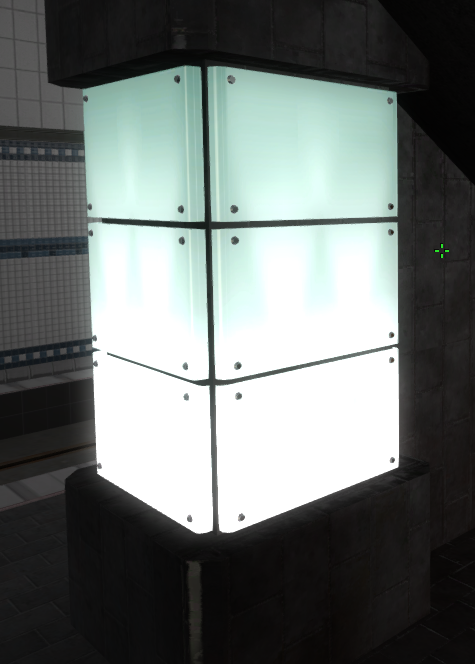
https://i.imgur.com/eg5ROsZ.png i made a thing, hurrah
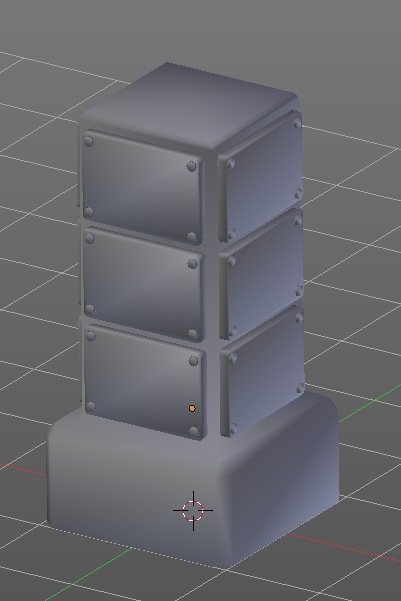
supposed to be a light-piliar
https://imgur.com/etWW5vW kinda like this
 oak tulip
Oh nice
faint cedar
mornin'
 sudden agate
How exactly do Smoothing groups work?
I mean the lighting information is the same, but why do we get edges with different Smoothing groups?
Or are Different Smoothing groups just separate Vertex Normals? (instead of unified normals within the same Smoothing Group)?
faint cedar
I believe it's closer to the latter but I am not honestly sure how it works under the hood. I just know that same smoothing group = smooth, different smoothing groups = hard edge.
vale osprey
@faint cedar I guess you already found that for async traces that bool is not enough. You have to pickup results later. I’ve tried it at some point and haven’t seen much performance improvement, most likely because I had just few hundred traces.
faint cedar
Aye
vale osprey
I can check my notes later, hopefully I have a full code snippet for this.
Otherwise it should be on git in MMT, commented out
frank escarp
@vale osprey i saw a dramatic improvement
but keep in mind i do ps4 wich is shit cpu
my game could do a hundred traces or so per tick, moving it to async traces made it cost basically 0
vale osprey
nice! 😃
vale osprey
in my case bottleneck could have been somewhere else
frank escarp
so use them only when you have 1 place doing a fuck ton of traces
my case was 3d wall avoidance
the flying drones do 40 random traces per tick
in random directions
and use that to get an idea of their surroundings
kind of like a robot
so if you have 3-4 of them (common in higher levels), thats a TON of traces
but thats why i async them
now they are free
i thought of implementing them for bullets
but it isnt worth it
bullets do like 15 traces per tick max
due to 15 bullets flying around
vale osprey
@faint cedar
.h
FTraceDelegate TraceDelegate;
void AsyncTraceDone(const FTraceHandle& TraceHandle, FTraceDatum & TraceData);
.c++
UMMTSuspensionStack::UMMTSuspensionStack()
{
    //Bind async trace delegate
    TraceDelegate.BindUObject(this, &UMMTSuspensionStack::AsyncTraceDone);
}

//wrapper around async
void UMMTSuspensionStack::AsyncLineTraceForContact()
{
    //Transform points into world space using component's transform
    FVector LineTraceStart = ReferenceFrameTransform.TransformPosition(LineTraceOffsetTopLS);
    FVector LineTraceEnd = ReferenceFrameTransform.TransformPosition(LineTraceOffsetBottomLS);

    //Request async trace
    ParentComponentRef->GetWorld()->AsyncLineTraceByChannel(EAsyncTraceType::Single, LineTraceStart, LineTraceEnd, SuspensionSettings.RayCheckTraceChannel,
        LineTraceQueryParameters, LineTraceResponseParameters, &TraceDelegate, 0);
}
i dont use the delegates
faint cedar
Oh shit thanks a ton dude
frank escarp
i just check it on the next tick
every "async hit" i store into a array
and on the next tick, i read from that array and process it
faint cedar
vblanco - what kind of async traces did you do? The AsyncLineTraceByChannel as well?
frank escarp
yes
vale osprey
@frank escarp yeah, you have to measure it individually for each case. I've tried them on tanks - 16 traces per tank x 20 tanks, wasn't worth the trouble
frank escarp
thats a lot of traces mate
faint cedar
I... up until now I had no idea that existed.
frank escarp
maybe your callbacks are being less optimized
or similar
becouse, by number, my traces were similar
faint cedar
I'm gonna go slap myself until I cry now.
vale osprey
maybe, the thing is, there was a bottleneck in another place, so it could have hidden improvement
faint cedar
I do ~50 tracers per frame for ~0.5 seconds.
vale osprey
that's a lot
frank escarp
faint cedar
I know it is
faint cedar
But it's unavoidable for what I'm trying to achieve, at least I can't think of a better method
Got a giant character swinging his hand as a weapon. I need "perfect" collision so I trace all physics shapes on his fingers etc.
frank escarp
i would advise not to use async traces there
you add 1 frame of latency
on my swords i never do async traces
and i calculate like 20 per tick
faint cedar
This guy is so huge that 1 frame will hardly make a difference.
frank escarp
you only need async traces when you know you will have a lot of them
they complicate control flow
and add 1 frame of latency
faint cedar
Yeah I know... but right now non-async traces are causing performance hiccups for us. Come to think of it... it's more traces than that, since I trace ahead to predict hits.
frank escarp
if you are already predicting.. use async
the way async works is that they get offloaded to the physics calculation
wich is actually multithreaded
thats why they are free on ps4
normal tick is singlethread, but physics isnt
faint cedar
The delegate version from BoredEngineer is nice... if I'm not mistaken I should be able to bind UObject delegates with parameters in them, so it'll be neat af.
frank escarp
so by running traces alongside physics, they get offloaded to multiple thread
careful with that mate
what if the object is destroyed
and you get the delegate
wich WILL happen
i had that trouble with lambdas
due to being too smart with them...
i used lambdas to have async control flow
essentially this- > then -> then -> then
in the same function
so i dont have a ton of small functions
this worked well, and was good to write
but it caused so many crashes
i ended up having to remove every single one of those lambdas
they were getting called on destroyed objects
so the pointers were invalid
vale osprey
as I see you don't use delegates
vale osprey
I like your implementation more, so if I understand correctly, you get like an array of results and then you just check if it's empty or not, instead of using delegates
faint cedar
Well... in this case there shouldn't be a way for me to run into that situation. The only thing that I need to pass through to the delegates is the ID of the weapon and such data that it needs to do damage calculation on an eventual hit.
vale osprey
you can run into it with just normal logic, for example when you start to load a different level or you are loading a savegame and etc.
frank escarp
thats where alll my lambdas failed
vale osprey
what I mean is that there are many places where objects will get destroyed not because of the game logic but more regular things, like level offloading, streaming and etc
frank escarp
checking next frame is a good way of keeping it in control
as far as i know async traces are ALLWAYS ready next frame
 jaunty onyx
Is there a way to know (without remembering) what changed in a level so you know what will be changed when you save content?
fiery harbor
@frank escarp your code font looks so horrible
 upper heart
@kindred viper https://discord.gg/unreal-slackers
 kindred viper
thanks I got it from the guide channel 😃
upper heart
np, yep that's where it lives 👍
 lavish creek
hello, im a begginer, im "working" on a game, and i like to ask you guys are they any tools to organize my work (dont like trello), im using hack and plan, but i need something more advanced to organize/plan my code. any essential tools i should be using?
kindred viper
Hack n Plan + DunDoc + Google Drive should be a good start.
draw.io for flowcharts is awesome
lavish creek
dundoc more for making a gdd right?
kindred viper
yeah pretty much. You can do that with HnP too or just write it up into a google drive doc, but I found it useful at one time
lavish creek
ok thank you ill have a look at this
fiery harbor
@lavish creek as a "beginner" you shouldn't care at all about how to organize stuff, just learn ue4 before thinking about any specific game stuff
lavish creek
@fiery harbor been learnirn ue for almsot 2 years now, beginner in the sense i never developed a game, tahts what i ment
lavish creek
thats the thing, there is so much to be done and as 1 man team i rly need some tools to organize things
fiery harbor
though I never did and it didn't hurt me I think. as long as youre working alone, no need for any outside organization. just making sure the code is pretty self explanatory works well for me
I dont have any documents or any other tools that I use for stuff
but its very much about taste I guess
lavish creek
it doesnt work for me i get distracted so easily, i start on implementing things and before i know it im making vfx fot it to look pretty :/
fiery harbor
well doesnt have to be bad, its good if it looks good
 severe glen
Hi there,
In my project I have to get heart beat rate. But it should be sensitive. I achive it with arduino but Its not sensitive. Do you have any suggestion for get heartbeat in Unreal Engine?
lavish creek
id rather have clean and well planned workflow/ than half dinished code and half finished vfx
fiery harbor
well, if its that hard for you to finish the code before starting to work on the vfx, ok 😄
lavish creek
as i said im a beginner
plush yew
Hi everyone, hi John
anyone here know of a way to create a custom coordonate system that will let me create a planet sim game ?
fiery harbor
and why a custom coordinate system?
plush yew
i wanted a seamless planetary to space transition along with a close to a 1:1 planet size and as far as i know UE4 has 32bit cood system
coord*
fiery harbor
well, so you would want to convert everything to double precision
plush yew
either that or something along the lines Elite does it
fiery harbor
replace all float with double and see how well that works haha
plush yew
where they transition to another coord system once in hyoerspace
hyperspace*
i'm not an avid c++ programmer ... getting the source for ue4 and changing floats to doubles will only result in chinese noodles here 😄
plus god knows what i break once i try that only on the coord system
fiery harbor
if you're not an avid c++ programmer, you really shouldn't work on a space sim game
 latent peak
sounds very ambitious if youre not a programmer
fiery harbor
there are games that can be done by "not so much programmers", and there are games that can't
mostly all the stuff thats similar to many existing games, especially those done with ue4, is relatively friendly to non-programmers because ue4 is already doing a lot of it for you
plush yew
i am not trying anything fancy beyond the seamless transitions so the rest i could handle (supposedly)
fiery harbor
stuff thats different to epics own games needs a lot of custom programming often
plush yew
i was thinking of using a spherified cube with a render to texture surface where the texture renders 6 landscape patches
and once close to landing i start to switch
procedural planet generation is another way but waaaay down the programming rabit hole i go
or shell out a ton of $$ for VoxelFarm's plugin 😄
i don't know if UE4 supports landscapes on spheres, that would save my but a bit
fiery harbor
"landcapes" can only be heightfields
plush yew
so the basemesh generated by the landscape system cannot be deformed to fit on a sphere ?
fiery harbor
yes
plush yew
bummer
but i can still do some sort of level streaming between 6 landscape meshes so they feel like a planet... just that the transition to space would make things a bit complicated
fiery harbor
I think using the landscape system for that stuff will not give you great results
silver crown
For the precision issue there's World->SetNewWorldOrigin
fiery harbor
yes, but that only really makes sense in singleplayer
 plush yew
@silver crown are you able to handle variable density octrees on that setup ? meaning once you get far enough from your mesh .. are you decreasing the voxel resolution or something ?
I ask because the planets i plan to make are quite large ... and a 100km sized planet does not look good from outer space 😃
you plugin looks like the best choice i have at the moment 😄
 heavy yew
i have a weird but kinda dumb idea fora game
you know those old, extremely surreal but kinda purposefully bad, half life mods?
imagine making one as a stand alone game
plush yew
@silver crown great then i will try your system at distances <100km in orbit and switch to a static mesh above that. Now to figure out a way to map the the voxel land onto a texture so i can render it from "further out" .. i guess that i will make the same thing Elite Dangerous does 😃 render 2 kind of planets ... the big one for orbitals and your system once someone plans to land
 fierce tulip
<_< I have the silliest of bugs.. or well cascade limitation

i need more than all these curves, but there is no scrollbar
so I cant add any more to this system, and will needto edit em in another system and import em into this one
plush yew
why do you need so many ? 😃
fierce tulip
since its about 8 emitters each with custom over life, by speed, scale curves
plush yew
can't you make separate particle emiters .. one for each of those 8 ans stack them together in editor ?
and *
fierce tulip
i just said that, will need to export some, edit curves seperately and re-import :p
<_< wait there is a scrollbar.. but its on other side of screen
which doesnt scroll the curve window, but the node list
Y U THERE AND NOT OVER HERE
plush yew
😄
i understood what you said .. i just wondered why bother to reimport back and not keep things separate
fierce tulip
because its cheaper to use one system over many
plush yew
buuut ...since you found the scrollbar .. all is good
mm cheaper in what way ?
simulation wise ?
fierce tulip
just less loading whole systems
system > all emitters
over
system > emitter, system > emitter
plush yew
i dunno , i think it's about the same since they all add draw calls the same number of times .. (or i am really mistaken)
fierce tulip
its only a few 0.00x ms's but when you have a lot
plush yew
so it's the same as grouping meshes ? i mean it somehow does process less ?
fierce tulip
less lookups yea
plush yew
heh, good to know
fierce tulip
and if its all for the same effect, its also easier for others to just drag and drop 1 thing
plush yew
that i do understand ... but that's for the content creator not the consumer
fierce tulip
in this case it is for the consumer, marketplace pack and all
plush yew
oh i see
plush yew
👍
i plan on making a space sim game with a really pixelated retro simplistic look ... but not neceserally in terms of 8 polygon meshes ... just linear filtered textures ...128x128 in size ... low rez screen and just add a whole bunch of stuff that we had missing back in the old days
think of this but in 3d: http://oddtales.net/

Feast your eyes on our upcoming action/adventure game set in a lush, vibrant 2.5D cyberpunk world with a completely unique visual style & art direction.
jaunty onyx
Can I quickly move an object in the level to where my viewport is currently located?
just rightclick it in world outliner or details and 'teleport here'
plush yew
can't think of a way to do it that fast, sorry. Perhaps just place a dummy where you want your object to be and then copy it's coordonates to your desired object
jaunty onyx
@plush yew you mean copy each number one by one or is there a copy-all-three function now perhaps?
plush yew
one by one ... i don't know of a function that does that ... allthough i have a plugin for 3dmax that does exactly that to my clipboard
there's a fbx export plugin for 3dmax that sets each object to 0 before exporting so you don't end up with an offset origin point in ue4 but it also copies to clipboard all the coordonates for each mesh so after you import everything in ue4 .. just hit paste and presto ..everything is in it's place
i am guessin that that is something exposed in engine somwhere
 urban sinew
telltale lays off 25% of workforce? I guess they chose...poorly
 fallen raven
Anyone else in 4.18 having multiple windows open in unreal, tanks framerate
from 120 fps to 10fps
Closing the blueprint editor or any others and just having the main viewport brings back the framerate
grim ore
do you have any GPU monitoring/FPS program active like msi afterburner?
the other alternative is when UE4 is in the background it will minimize CPU use, its an option in the preferences, and you might be seeing that.
plush yew
If you have an Nvidia card check for the game streaming setting and turn it off
fallen raven
I did have open hardware monitor to check for GPU temps, maybe giga byte too @grim ore have those been known to tamper with it?
I wouldn't want to turn off texture streaming, it's a good piece of tech
 light thunder
So, I am trying to spawn a character and it doesn't move. My gamemode has the correct FirstPerson BP and I'm using playercontroller in the gamemode as well...what else do I need to check???
plush yew
in the BP did you posses the pawn?
light thunder
Shouldn't it autopossess ?
I never did that before AFAIK
I was using the default FPS template
I messed around with VR / motion controller, perhaps I didn't put something back correctly
plush yew
did you change the controller type ?
plush yew
if you spawn a pawn that is not the one you start the game with ... it will not be autoposessed
when oyu start the game it uses the default pawn class
"first person character"
light thunder
it's not a pawn though, it's a character
it possesses it I just can't move or do anything
like, the model/controllers change
plush yew
pawns can be controlled by both AI and the player and characters only by the player ...
hmm
check if the impus have changed in the progect settings ( perhaps they are no longer there)
inputs*
plush yew
each one of those has a drop down ( the arrow besides them)
do they have anything there ?
light thunder
For some reason, (I've had this problem before) it does NOT let me import input bindings either
plush yew
i think you'll have to re'do them
light thunder
yeah it's all a motion controller
what do I actually do? do I actually have to blueprint these controls?
plush yew
each of these set up a variable that gets the value of your keypress / axis value ... you would have to use them in your player controller
light thunder
BlueprintLog: New page: Compile FirstPersonCharacter
LogBlueprint: Warning: [Compiler FirstPersonCharacter] InputAction Event references unknown Action 'Jump' for InputAction Jump
LogBlueprint: Warning: [Compiler FirstPersonCharacter] Input Axis Event references unknown Axis 'Turn' for InputAxis Turn
LogBlueprint: Warning: [Compiler FirstPersonCharacter] Input Axis Event references unknown Axis 'LookUp' for InputAxis LookUp
LogBlueprint: Warning: [Compiler FirstPersonCharacter] Input Axis Event references unknown Axis 'MoveForward' for InputAxis MoveForward
LogBlueprint: Warning: [Compiler FirstPersonCharacter] Input Axis Event references unknown Axis 'MoveRight' for InputAxis MoveRight
LogBlueprint: Warning: [Compiler FirstPersonCharacter] Input Axis Event references unknown Axis 'LookUpRate' for InputAxis LookUpRate
LogBlueprint: Warning: [Compiler FirstPersonCharacter] Input Axis Event references unknown Axis 'TurnRate' for InputAxis TurnRate
LogBlueprint: Warning: [Compiler FirstPersonCharacter] [1417.33] Compile of FirstPersonCharacter successful, but with 7 Warning(s) [in 2,013 ms] (/Game/FirstPersonBP/Blueprints/FirstPersonCharacter.FirstPersonCharacter)
LogTemp: Repeating last play command: Selected Viewport
so you were right, thanks for reminding me where to look
plush yew
glad i could help ... honestly i've had this problem recently and remembered it 😄
i made a custom camera to act as a sort of CCTV where you have the mous over stuff work and then another actor that gets spawned where you click for you to control after you exit the camera view
light thunder
and the game just remembers your previous character because you didn't destroy the actor, you just unpossessed it
Why is my input action not being saved
I've saved it and it's writable
This has to be a VERY common porlbme @plush yew
plush yew
i managed to fix mine by writing all the input mappings including mouse movement then on posses disabeling the mouse actions for the character
I wish you could have multiple player controllers
grim ore
There is no way of knowing if it will be buggy for your use, thousands of people are using it now with different results
plush yew
basic user* it mean i barely gonna use the new stuff or at least 0.001 percent of ue 4 stuff
i will download it anyways.
 worn granite
If you really feel that way you can pick a older release
You're not really wrong either
plush yew
nah just want to take look at new skylight.
worn granite
Oh, well if you're just curious then it should be fine.
If it couldn't even be used they wouldn't release it
opal ocean
new skylight?
plush yew
yep skylight bounce and maybe gi based on hdr map as far i know.
opal ocean
ahh.. ok I didnt really look very closely at the release notes
too early in my projects to worry about lighting
plush yew
guys does that mean hdr map now can cast shadow ? like in unity latest beta.
vale osprey
They render your scene twice basically
plush yew
@plush yew there was a pinhole demo screenshot setup in the release notes , yes the hdr map can now cast all of it's values on to a surface
you can make a simulated camera with it and see


 dry mesa
plush yew
dry mesa
plush yew
-4
that one is out of bounds 😄
@dry mesa yeap a hds sky image through a small opening ... if you make it smaller you get a dimmer and sharper image
plush yew
don't worry i got my sunscreen 😄 😄 😄
 keen kite
if anyone can spare a few mins to dm me about some particles stuff?
 paper briar
So, problem:
It takes forever to load files in UE4.
The other day I was trying to load in meshes from the Open World Demo pack, took 10-20 minutes to load in one mesh.
My HDD is 5400 rpm, slower than average, but shouldn't make that much of a difference over a 7200 rpm (my previous) which took about 5 seconds max.
The HDD is healthy, only about 1/4 of the way full.
If you have any tests you would like me to do on it, feel free, I do not know if there is a certain setting in UE4 that can help this.
tawny brook
buy an ssd?
paper briar
Well obviously an SSD would provide much faster all around perfomance but degrading from 7200 rpm to 5400 shouldn't add 10-20 minutes...
opal ocean
I couldnt ever do anything in the open world demo pack either, on my 7200rpms. gave up
grim ore
it might if your new drive is dieing, or has less cache, or well is lower quality. run crystal diskmark on both drives to see if its a drive issue or something else
paper briar
Will do!
 faint juniper
Can anyone help me? Following the official blueprint tutorials but mine is acting differently, I think I may have missed something rather than engine changes but not sure what. Mines does not have "Break Hit Result" as you can see here: https://youtu.be/4jZT9ibp_ko?t=362
Any ideas what I am doing wrong?

This video shows how to let the player interact with objects in the scene, using Casting and Blueprint Interfaces. (00:05) - Lights & Inputs (02:40) - Line T...
I see this:
 glossy flame
It looks like you've got an array output; are you using "MultiLineTraceByChannel"?
If not, it could be that the function was split into two, in which case you'll want to look for the line trace with 'single' in the name
faint juniper
@glossy flame Thanks alot, hero!
I was indeed using the wrong thing Multi line instead of LineTrace...
 marsh loom

do i just have to reinstall
its not even like a flash drive or anything
it was working yesterday
lol
it shows that
and 5 minutes later
it works
so nvm
i dont have an E: drive
o nvm
its when i try to OPEN a project
opal ocean
get an E: drive, insert a disk, and the error will go away 😃
marsh loom
lol

on a side note
why is unreal running so slow
its been at 96%
for like
10 minutes
but
grim ore
96% to load a project? its compiling stuff for the DDC probably.
grim ore
is this a small project or some larger one like open world example?
grim ore
ah well yeah it shouldnt be doing that then still, maybe a minute or 2
marsh loom
its been 15...
grim ore
kill it and retry I would say, weird I wonder what broke





 grim ore
oh.. yeah that might be a problem lol
marsh loom
i have a secondary
grim ore
the DDC cache is proably on your main drive in your appdata folder tho
gray basalt
what is the difference between UWdiget and slate ?