#ue4-general
1 messages · Page 81 of 1
 plush yew
 sharp crest
Hey new guy
 final owl
Hey
 cunning umbra
oh no... this is terrible... I took allergy meds and it is making me drowsy. I can't muster the energy to work.
 polar hawk
time for hard drugs
cunning umbra
I don't do drugs...
polar hawk
Apparently you do allergy meds
Allergy meds, speed, no difference
As long as you get it through your doctor
 safe rose
So, I just reinstalled 4.16 to a different drive other than C and I'm good again. F**k Microsoft
 worn granite
Usually things fuck up because they're not on the C drive w/ MS......
safe rose
Heh
I mean, I know the issue. I've even found solutions online. But none of them were working for me.
 safe rose
Yeah
That's what I'll be doing from now on, it WAS working before though
Not sure when it started going to poop
safe rose
lol
sharp crest
@frank escarp Just finished watching the video you sent, very interesting, got some ideas too :P Thanks! <3
 short onyx
Load gonna be too long 😦
worn granite
¯_(ツ)_/¯
short onyx
(╯°□°)╯︵ ┻━┻
worn granite
ue4 can load uasset from disk, but can't recognize it if you try the import path
short onyx
I just gote simple .uasset for some PestProcess effect
sharp crest
Just put it in the actual windows explorer and restart the editor if it doesnt show
¯_(ツ)_/¯
sharp crest
Everyone gets that material from the internet lol
worn granite
yeah lol
short onyx
It's just a simple color for see object through wall
ok i'm done for today, i just gonna sleep, maybe it's gonna work like i want tomorrow x)
plush yew
Please welcome @lilac hill to the community! :beers:
Please welcome @languid raft to the community! :beers:
plush yew
@worn granite sample text>placeholder name
safe rose
Print S is op
plush yew
Hey guys
plush yew
Please welcome @plush yew to the community! :beers:
 muted kraken

It's important that each of us understands what Net Neutrality means to us and why we must protect it at all costs from the new FCC appointed chairman Ajit P...
i know it's not related but it's still important
https://youtu.be/K88BU3kjZ-c (cynical brit)

 worthy ether
@muted kraken have all of my euro strength americans
(is there any actual way us eurotrash can help though?)
muted kraken

Battle For The Net
On July 12th: we’ll stop them. Join the Internet-Wide Day of Action to save net neutrality!
@worthy ether
worthy ether
thanks 😃
polar hawk
 toxic wagon

 kind pumice
nah its perfect. what you have here is a 2 then a .5 then a 2 then .5, etc
😛
looks more like 2,1,2,1 though, whatever
plush yew
Please welcome @modest breach to the community! :beers:
Please welcome @left pivot to the community! :beers:
Please welcome @rose shell to the community! :beers:
Please welcome @quartz flax to the community! :beers:
plush yew
Please welcome @vale tide to the community! :beers:
Please welcome @cursive coyote to the community! :beers:
Please welcome @tight cape to the community! :beers:
plush yew
Please welcome @solemn merlin to the community! :beers:
Please welcome @vague spire to the community! :beers:
plush yew
Please welcome @hearty glade to the community! :beers:
plush yew
what's the material to make floor look like checkers?
 lost ember
Pretty sure no material gives you the default checkers material
 fierce tulip
engine/enginematerials/defaultmaterial is the generic checkers base material
 weary basalt
WorldGridMaterial might be what he is after
plush yew
Please welcome @high oriole to the community! :beers:
 high oriole
Hi everyone.
Anyone know how I could make my grid brighter in UE? The Red and Green part that marks the center points?
Ironic, you'd be talking about grids the moment I come here.
 safe shoal
plush yew
safe shoal
plush yew
Please welcome @simple kelp to the community! :beers:
 coral folio
Heyaa I wanted to try an experiment where I am livestreaming a 360 from youtube straight in unreal, do you know of there is a way to do that yet ?
 next badger
Net Neutrality still in flames? When this hype fall down?
next badger
@toxic wagon should be
 noble ermine
I think technically it is remapped to -1:1 range. Like a normal pointing up is 0,0,1
... I could be wrong 😛
plush yew
Please welcome @viral flint to the community! :beers:
 wary wave
it can't be -1:1 because textures space is from 0-255
128,128,255 does sound about right though
noble ermine
yeah it says its remapped to -1:1 range in UE4
0 = 128, -1 = 0, 1 = 255
at least that is from an epic staff member, not really any docs i could find.
... I got curious enough to look it up 😛
plush yew
Please welcome @fiery moon to the community! :beers:
plush yew
Please welcome @plush yew to the community! :beers:
Please welcome @plush yew to the community! :beers:
Hey I am new to game creation and looking for an experinced game developer to make me under his wing and colaborate on a game with me please message me if interested
 tribal pebble
DOES anybody here do anime style animations??
plush yew
Please welcome @near stream to the community! :beers:
Please welcome @oak schooner to the community! :beers:
 oak schooner
Cool
plush yew
Hi cory and shiro
 near stream
Hello
oak schooner
Hi
plush yew
Do you guys have experince in ue4?
near stream
A few years ago I used it, I'm getting back into it as a programmer
plush yew
Please welcome @crystal oracle to the community! :beers:
 crystal oracle
Hey everyone
 digital anchor
hey
plush yew
hey guys,
anyone have experience with localizations? I could use some help.
sharp crest
@plush yew
Do you guys have experince in ue4?
You are in an Unreal server, ovs people will have experience with it xD
plush yew
Please welcome @tough orbit to the community! :beers:
 vast pine
Not sure if it's just a my computer problem or pie etc. lately when I first hit play whenever a particle effect or umg is loaded for the first time some good frame drop. It's not even that complicated thig loading. Like typical 100 burst of particles at a location
Or small things like that
 regal drum
Does anyone here know of any good tutorials based around a climbing system or cover system?
safe rose
@regal drum I assume you've already done some simple Google searches?
regal drum
Yes
plush yew
Please welcome @stuck skiff to the community! :beers:
 stuck skiff
Hi, I have a very quick question that maybe by any chance someone knows the answer to - I'm trying to gather all the text with the localisation dashboard from my datatables, but no matter what I put in the "extensions" be it .datatable .Udatatable .csv it gathers zero text
anyone has an idea how the extension should look like? I did have it working a year ago but no I cannot seem to make it work
aaaaaaaaand the answer is, simply .uasset -_-
 vague spire
hey maybe you guys know
how would one go about doing scrolling text
like banjo and kazooie and conker, or animal crossing
I'm kind of a newb, sorry in advance
plush yew
Please welcome @glad onyx to the community! :beers:
stuck skiff
you mean like in opening of star wars?
where the letters scroll through the screen ?
or you literally mean text that you can scroll because its longer than the space you have on screen ?
 halcyon marsh
my window disapear when i change resolution setting :/
i maybe (not sure because i cant see the difference) have a solution
by changing it to "1920x1080wf"for windowed fullscreen
what is the difference if someone know ?
 ashen brook
ooh... didn't know that new AMD CPU would come with 16 cores with HT
 cloud cobalt
Comes at a price though
ashen brook
might be worth it
cloud cobalt
Still cheaper than a dual core Intel.
ashen brook
for a workstation I've been planning to build
 maiden swift
That'd be epic.
maiden swift
My workstation is pretty great, but not pro level. I'd love to build a ridiculous pro rig someday.
ashen brook
yeah
 frank escarp
try to buy an intel 16 core last year
ashen brook
I already have two intel desktops
maiden swift
Btw... does anyone know why disabling any default plugins makes my project require Visual Studio to package? 😦
halcyon marsh
btw because you talk about cpu it is interesting to have more core or more hertz for ue4 ?
ashen brook
maybe the built-in projects are compiled into the default game dlls?
frank escarp
more cores
for compiling and lightbaking
but more herzt gets you more FPS in-game
ashen brook
@halcyon marsh more hertz 😄
well
let's put it that way
more cores gets you faster compile times
frank escarp
ue4 does scale cores in some areas. But other areas are lacking on PC
ashen brook
for engine and shaders
maiden swift
@ashen brook I'm hoping it's just an issue with 4.17 preview 1. I only disabled the SteamVR plugin and this wasn't a problem before.
ashen brook
more speed is just a general speed boost
frank escarp
and game thread is single thread
ashen brook
yeah
halcyon marsh
because i bought an amd only for the cores to use it in 3D and ue4 😅
frank escarp
old amd wasnt good
even if more cores
if you mean ryzen, then those are really good for ue4
ashen brook
not sure how well common 3d apps deal with more cores
frank escarp
linearly @ashen brook
ashen brook
if you do any offline rendering you'll see boosts
frank escarp
on raytracing stuff, it scales linearly
ashen brook
houdini sims or vray render stuff
frank escarp
a few of the tools also run multithread. Like some modifiers
ashen brook
but there's a lot of options for using the GPU for that stuff nowadays too, so it's not always a straight upgrade
but more cores are definitely more interesting for dev than they are for gaming
halcyon marsh
btw i bought the ryzen 7 1700
frank escarp
ah, good one
halcyon marsh
i dont have it right now
ashen brook
for a gaming PC I perhaps wouldn't even bother with an i7 and just go for a straight up i5
though the price difference is so marginal nowadays I'd probably get the i7 anyway
frank escarp
the ultimate gaming cpu is the 7700k
well, now 7750k
the 4 fastest cores in the market
halcyon marsh
for me it is more for software but sometimes games and streaming/recording :p
frank escarp
i have a 2600k
overclocked to 4.5
currently no overclock due to summer heat, i would boil myself
well, i still overclock, but its lowered
ashen brook
this laptop I'm on has a 7700HQ
frank escarp
right now its at 4 ghz
ashen brook
can't complain about it
ashen brook
hey I'm just happy I can finally dev on a laptop
my old one had a pre-DX11 onboard gpu
ue4, substance, quixel, etc would all crash the graphics driver on load
halcyon marsh
i am running ue4 in a 400$ laptop x)
but the only problem is that i can't *make a big project
and sculpting in blender (not the best but i only sculpt for fast stuff)
maiden swift
We just recently got a dev-capable laptop.
Alienware 15 with a 7700HQ and a GTX 1060.
It's really nice for doing dev work on the go. Quite capable of handling UE4.
 tall pendant
If someone here is licensee maybe interesting: http://www.gamesindustry.biz/articles/2017-07-14-autodesk-will-no-longer-sell-game-middleware

GamesIndustry.biz
While the company's Stingray engine is unaffected, Scaleform, Navigation, HumanIK, and Beast are all being discontinued
plush yew
Please welcome @velvet wren to the community! :beers:
 unborn matrix
Is there anyway to get the sound from a playback device?
Like how Tilt Brush gets all audio devices and then checks which ones are playing
then uses the audio from that playback device
ashen brook

The more experienced I get, the more overwhelmed I feel by all the stuff I don't know 😓 #gamedev #gameart #indiedev

 Twitter
@unborn matrix yes, via using an ancient technique called programming
😄
unborn matrix
@ashen brook thats a good tweet lol
and yeah I was asking if anyone already had some ideas on it.
ashen brook
not me, sorry
unborn matrix
I've looked into it with a friends game and his blog post here: https://bvisness.me
but he was getting services running and not the playback devices
I want my players to have spatialized VoIP and that was the most straightforward way I could think of
is have something like a cue where its getting live audio from a communication device
plush yew
Please welcome @warm sage to the community! :beers:
Please welcome @nocturne plaza to the community! :beers:
 nocturne plaza
Howdy everyone
 pallid compass
Is there anyway too thicken the boarder widget? even on full margin on border mode its tine
its tiny*
plush yew
Please welcome @hidden dust to the community! :beers:
 clever carbon
Hi everyone we were making a star wars game under UE 4 for now the project is going no where because we need dev to work on it 😃 if you are interested contact me on my facebook page 😃 https://www.facebook.com/raphael.savoie.3 or by email at this adress raphcool12@gmail.com dont be suprise if my post on my facebook are not in english it's because im french Canadien lol 😃
 pine shell
omg who changed my name
my name was Autistic Midget and someone mod changed to Neuroatypical Small Person wtf
plush yew
Please welcome @acoustic turtle to the community! :beers:
Please welcome @plain shore to the community! :beers:
plush yew
Please welcome @amber frigate to the community! :beers:
plush yew
Please welcome @analog wagon to the community! :beers:
 spice urchin
seems like a vast improvement
plush yew
Please welcome @blissful ingot to the community! :beers:
Please welcome @fast ermine to the community! :beers:
 mortal grail
i dont understand, when i launch my game with 2 players to test it, the objects that are moving in the level are completely different from server and client, how's this possible?
 heady bridge
Hey everyone, I'm designing 1700's - 1800's guns, and would it be better to use projectiles opposed to ray tracing? like Flint pistol, musket, etc
 floral heart
It's viable. A Source engine mod did it.
 midnight mantle
oh shit I thought I was in general lol
but yeah the $500 devkit from Nintendo or something
 summer verge
Can someone clarify how instanced static meshes work? Is it only a performance improvement if the meshes are in the same instance component? Or can I have classes that all have their own separate instance components with a single instanced mesh inside them and still receive a performance boost?
tall pendant
the 500$ for the Switch DevKit is just a rumor spread by someone in the Nintendo Forums. Rumor as i can't read the text from the linked sheets. Still doesn't change the fact that you can't buy devkits atm...you need to pitch your project to Nintendo so they can decide if they unlock your account for Switch. @midnight mantle
unborn matrix
This may sound like a dumb question, but are Characters Pawns?
heady bridge
Nintendo announced the price of the dev kits of $500 a few months ago.
@unborn matrix Characters are a specialized version of pawns, a humanoid pawn, but a pawn can still be controlled.
tall pendant
yeah the sheets were from Game Creators Conference 2017. Still you can't buy devkits as of yet 😛
unborn matrix
Ok where I got confused is "Get Controlled Pawn"
If that ends up being a character reference and I possess it that would work fine?
heady bridge
No the Devkits will be accessible to public Nintendo indie devs by Q4 this year or Q1 next year possibly, or so that's how the rumors go
tall pendant
yup. ~March '18 last time i heard something from people.
tall pendant
lets hope they offer shipping from EU this time 😛 cuz all the extra costs from their devkit shippings from the US in the past added sum money to plan with.
*for EU based Devs that is 😛
heady bridge
I hope it won't cost an arm and a leg shipping to Canada
tall pendant
shipping from US to Canada is probably quite easy. at least i think.
idk about the laws tho
heady bridge
I paid more in shipping for an item from US to Canada, than I did from Japan to Canada lol
tall pendant
lol
heady bridge
Bought a $40 game from US market, and paid $80 shipping, from Japan, $2.80 on a $24.99 controller lol
so I don't buy from US anymore
unless I have to
tall pendant
makes sense 😄
heady bridge
I'm off to bed, 5 am and dying, Night @tall pendant
tall pendant
night @heady bridge
 viscid bone
Anyone know how to make the whole shooting system? (I think it called Raycasts in Unity)
plush yew
Please welcome @floral frost to the community! :beers:
viscid bone
Ok thanks
 cursive dirge
I'll make it even easier
A How To Guide for using Raycasts (Tracing) in Blueprints.
plush yew
Please welcome @golden sierra to the community! :beers:
 dapper patio
anyone want to come together and make something i dont mind if it means buying assets to use and create with.
so if your up for it drop me a message @dapper patio
thanks 😃
sharp crest
@dapper patio You mean a small game for learning?
dapper patio
any it doesnt matter
sharp crest
Well you got an idea? And source control setted up?
dapper patio
not just yet thats why im gonna try and get people set up they know what were gonna make and do so people are ready to get working ?
 versed pawn
Hey guys! Did anyone started to work with the Unreal Match 3 template? I'm trying to figure out how to detect the GEM color
plush yew
Please welcome @south bluff to the community! :beers:
 warm mountain
i was watching a stream on science fiction just now
sharp crest
Hmm when I open my project..? http://prntscr.com/fw17fp
If I press no then everything works but it's annoying
 warm mountain
is it true that science fiction related assets are rarely bought because most studios do the designs in-house to avoid association with other franchises?
short onyx
Well... my pc have freez for 30min now... i just have build the light, but my pc wont x)
 buoyant echo
@warm mountain More or less, yes. Although you can always be creative with bought sci-fi assets.
tall pendant
most studios that want a original look and feel dont buy assets from packs anyway. sci-fi or not doesn't matter.
warm mountain
gotcha
most assets these days are sold through packs though?
I do see some individual pieces arpund
around*
i'm looking through assets that exist in a contempoary setting atm seeing if I can sell a few of em
plush yew
Please welcome @tight garden to the community! :beers:
Please welcome @tropic oracle to the community! :beers:
 glossy flame
Well, that's the server you're on 😃
clever carbon
yeah lol 😛
tall pendant
wait.. this is not the gamemaker discord? oh well 
sharp crest
xD
 sacred crater
This is a discord meant for the sole purpose of discussing anything related to coffee.
plush yew
Please welcome @patent plank to the community! :beers:
plush yew
Please welcome @fallen bridge to the community! :beers:
plush yew
Please welcome @plush yew to the community! :beers:
plush yew
Please welcome @plush yew to the community! :beers:
 shy heron
anyone know about graphics cards ?
i want to use 2 different graphics card
one amd 5870
and amd 5850 will this work?
glossy flame
Looks like it http://support.amd.com/PublishingImages/Support/crossfire/5K - 7K Series Crossfire Chart.JPG

If you're asking in the realm of UE4 though, not sure how much performance you'll get :p
shy heron
no just in general @glossy flame 😃
@glossy flame will games run smoother with 2 gpu ?
cause i know nothing about this stuff ,
i just happen to find one on the street ,
do i have to do anything to make it talk to each other when playing games ?
glossy flame
You will probably get better performance, though not all games support multiple GPUs.
There are even some very specific scenarios where having multiple GPUs can diminish your performance.
Looking at the chart, you will need a Crossfire bridge for it to work
frank escarp
its not worth it. Also you cant really buy another amd 5XYZ right now
gpu sli has never really been worth it
right now, VR Stereo (one gpu per eye) might make sli actually useful. But few games support it.
glossy flame
I was under the impression they already have both cards and are just wondering if they'd work together, not sure
If you have both and have the wattage to push them, I don't see why not
Though even if you got a game that worked well with stereo VR, 5000-series AMD cards aren't going to push it unforunately 😄
shy heron
@glossy flame @frank escarp i just happen get another free graphics card , so i was hoping to get my games and render time to dobbel speed
frank escarp
wont double speed
and the mayority of modern games cant sli 😦
the few games that do have sli use alternate frame rendering. This adds a lot of latency
and can cause microstutter
plush yew
Please welcome @sharp shadow to the community! :beers:
plush yew
Please welcome @civic gull to the community! :beers:
Please welcome @tender zinc to the community! :beers:
Please welcome @surreal sinew to the community! :beers:
 surreal sinew
I've got some all-over-the place questions. I haven't really been able to find a great answer yet. I'm wanting to build in a gameplay loop akin to Stardew Valley's. ie: Day starts at X time -> ends at Y time -> Display a Screen -> Repeat.
I'm trying to understand how I should build this out. I'm not looking for a how-to with blueprints, I can figure that out on my own. My questions are on where this logic would go and what UE concepts to utilize ie; Should I use multiple levels or just one and display a UI widget? Should I store things like money, etc. on GameInstance or the player. I'm a little lost on the best practices on where I should build these pieces
glossy flame
Will this be a singleplayer game? If so, you can be a little more lenient in where you put your logic (though that's not a suggestion to completely disregard the standing practices. It's just a little bit easier to "cheat" at things when you don't have to worry about replication)
I would say putting it on something like the player doesn't make sense though. The player is in the world, yes, but it isn't the world.
surreal sinew
Yes to single player... for now... 😁 -- Would it be possible to build it on a multi-player foundation, but not really worry about any of the actual multiplayer stuff?
glossy flame
My suggestion is that if you think you might want to run it as an MP game some time in the future, build it as one.
It'll still work fine in singleplayer, it's just that getting around all the little hacks you can use in SP is such a pain if you have to convert it to MP later
surreal sinew
Well, since its just a little indie hobby project, I think I can say I'll stick with a SP game for now.
glossy flame
Fair enough, sure. Building for MP is a learning curve to say the least, but keep in mind it's a lot easier to learn it in the beginning of a project than in the middle 😄
If SP is fine though, that's cool too
surreal sinew
Welp, I haven't given too much thought to how MP would work. So maybe we just plan on that as a stretch goal. 😆
glossy flame
Yeah, I don't mean to push you too far either way. Building for SP is completely fine, but if you're thinking you might want to put MP into it at some point, I wouldn't wait to implement it in that fashion.
Then again, you can always just go build fast and break things and worry about it later 😄
surreal sinew
I'm gonna go with the build, break and worry later. 😃
glossy flame
Hehe, I can respect that
surreal sinew
So, where would I put some of this logic for that Stardew type of gameloop?
glossy flame
If you have a lot of things tied to this mechanism, it might be worth looking into putting it on its own actor
Doing it in the level BP is "easy" since you can access things in the world directly, but you can't use it in other levels
I say it's "easy" because it is easy at first, until you realize you want to put it on another level or abstract it to be a more generic piece of functionality :p
surreal sinew
Right, that makes sense. So in this instance a level might be Spring/Summer/Fall/Winter - you can change some stuff, and then carry that Mechanism Actor ( for lack of a better term ) between the Levels?
glossy flame
You can have separate levels for it if you want, sure. You could also just change things in the same level, that's up to you
surreal sinew
Okay sweet. That helps too.
halcyon marsh
do anyone here use substance painter :/ ?
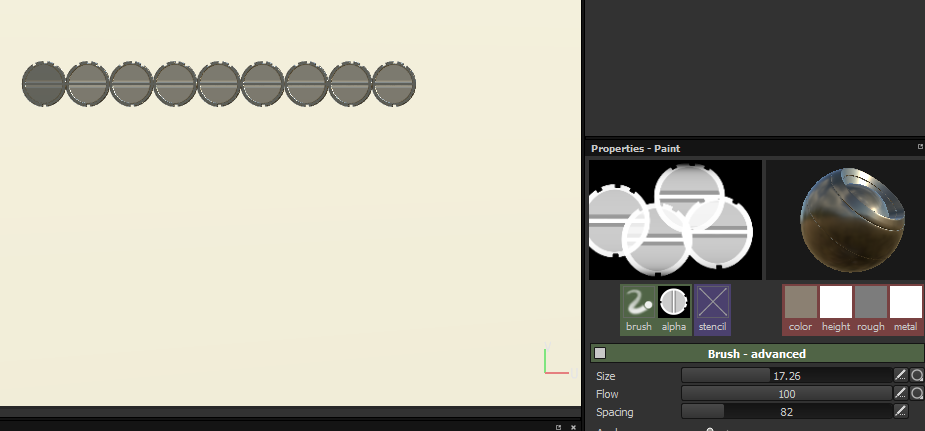
halcyon marsh
i know that but i have a question on it, i just start to use it but i dont find help in google
i wanna do a follow path with my brush alpha with a spacing and 0 without overlapping
i spent hours without seeing how can i do this
 frank void
how does ue4 handle meshes in regard to using them as part of a skeletalmesh?
is the third person view of a mesh the same as a first person one?
if it's just loose on the ground as a regular mesh, is it still a skeletal mesh component?
i'm trying to figure out weapon pickup/drop you see and i'm a little confused what i'd use for it
since the example only deals with first person stuff, to my knowledge
plush yew
Please welcome @old hinge to the community! :beers:
spice urchin
@halcyon marsh change Spacing until it matches up. also Hold Shift if you want it to go in straight line
under Brush settings
halcyon marsh
i found this
 halcyon marsh
to do it automaticly
spice urchin
sure that's another option too. there's a few ways to do it
if you just mess with spacing it'll work, but it'll vary depending on scale of brush
i haven't tried zipper so i don't know if that addresses the scale variance issue
actually nvm spacing is same even with scale difference my bad
halcyon marsh
yes but i use this follow path a lot, if i do it always manually it will take me so much times :/
also the spacing depend on the size
of the brush
plush yew
Please welcome @plush yew to the community! :beers:
Please welcome @plush yew to the community! :beers:
spice urchin
i think there's some really cool tutorials that cover some of this stuff, i'd try some that aren't specific to what you're doing
because they tend to cover a lot of useful topics
like the space crate tutorial
it'll get you much more grounded
halcyon marsh
yes the only problem with this software is the number of people of in the community not that much :/
pallid compass
Say i wanted to adjust the opacity of a texture in a material in a section where there is overlap for it, anyone has any idea how id do that? ie getting ripple on force field at x coords
halcyon marsh
you can find only common problem (not always but ..) x)
spice urchin
this thing is amazing btw https://tutorials.allegorithmic.com/courses/65c7df0c2da0938d0a92654b7b1af4bf/youtube-V24Fe6F_jFA
80% of it will probably seem like "ah maybe i'll use that in future but not now" but a lot of it you'll find immediately useful and unexpected
halcyon marsh
i watched they tutorial on youtube they are amazing, but i am talking for advanced stuffs
like animals
spice urchin
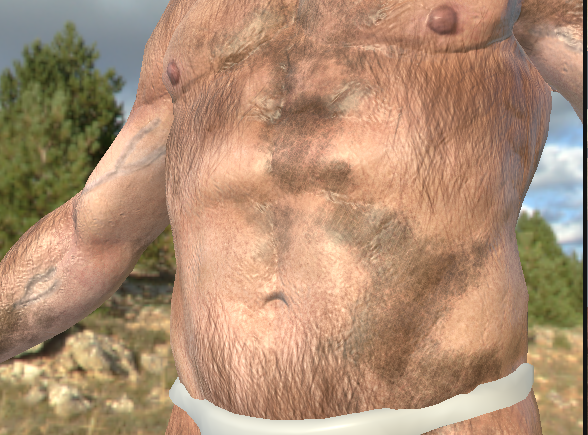
i did crate one then i used a lot of the techniques in it to do advanced gore regions on characters actually
the layer-stuff
being able to really work with layers and layer masks to their maximum potential really helped with that
halcyon marsh
yes this is the power of this software x)
ahhh
i have to do it mannually again x)
spice urchin
whatcha makin?
halcyon marsh
sci-fi corridor
spice urchin
ah classic
spice urchin
you might be able to safe some time and texture space by finding any heavy-repeating objects and only adding it in once on the low poly
like one bolt
then edit the low poly mesh and duplicate that part
kinda situational, but it's something to think about since anything that's 100% identical that you can re-use the UV space for, means more resolution you can get out of your texture map
1000 bolts subtracted down to 1 bolt = 1000x resolution increase
this is one of my favorite things i ever did with SP btw
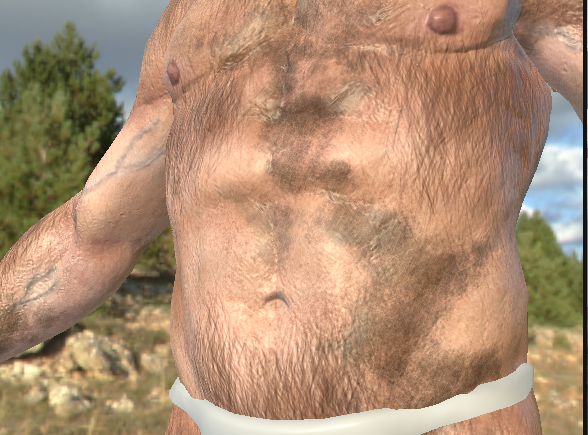
 spice urchin
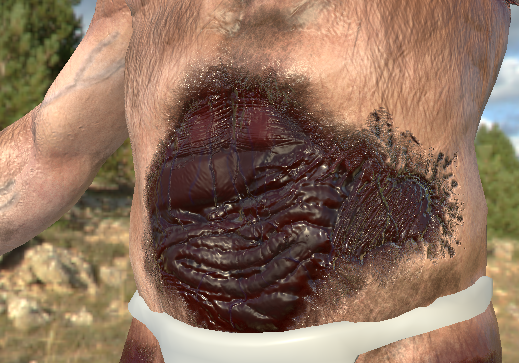
just freehand painting in Substance painter with soft height brush
polar hawk
dafuq is that
spice urchin
lol it gets more gross - in-game this gore stuff gets turned on and actual intestines fly out
then they are physics assets so they flop around a bit and brownish red goo shoots out of both ends
halcyon marsh
btw can you do this dynamically in a game ?
spice urchin
turning on the gore like that - yes
spice urchin
i have 2 sets of textures and i use a mask texture that activates the gore parts in different regions depending on where damage happens
this includes dismemberment
i do VFX but i really love Substance painter for when i need to go above and beyond what the character artists are interested in working on
halcyon marsh
i will try to do it one day
btw i found a video example with gore stuffs
let me find irt

https://www.unrealengine.com/marketplace/generated-gore-dismemberment-kit Music: Joshua Empyre - 'Emotional Orchestra with Piano' https://creativecommons.org...
plush yew
Please welcome @dusk flicker to the community! :beers:
Really basic question that bothers me. I added a C++ component to a mesh in Unreal editor, then VS pops up . What I'm doing is FString ObjectName = GetOwner()->GetName(); The problem is the error that the editor shows me http://prntscr.com/fw6gr6 and because of it, the autocomplete won't work. Anyone knows a solution for this ? PS: the code compiles and works
 weary basalt
Intellisense basically tells lies most of the time when used with the UE4 code base.
If it compiles fine then your all good.
I disable Intellisense completely
Most people use an 3rd party solution
Such as VAX
To replace Intellisense.
VAX has support for UE4 macros and preprocessor usage.
plush yew
sounds good, i'll take a look. Thank you for the prompt response
weary basalt
VAX is not free however. But its an one time payment for an perpetual license
plush yew
it has a 30 days trial, I'll give that a go
plush yew
100$ personal, reasonable
weary basalt
As well as alot of people here use it
 ornate hamlet
there doesnt seem to be an "effects" channel. So where should I ask questions about fx stuff?
ornate hamlet
heh okay
plush yew
@weary basalt VA is working wonders, took a bit to index everything though 😄 any other neat tricks like this ?
weary basalt
Make sure you disable Intellisense.
plush yew
done
weary basalt
Dont use the Error Tab however try and learn to work with the Outout Log instead, it gives you more detailed and accurate information about compile errors.
Output log*
plush yew
Aye, following a tutorial on that now, UE_LOG is the one you mentioned I suppose
weary basalt
No im talking more about the tab in VS called Output
UE_LOG is posted to the Output log when its called
When you compile in VS and it fails with an error. The exact error will be posted to the Output Log tab in VS
plush yew
I see
weary basalt
I change my VS theme to dark, its much easier to work with, especially at night as its not as bright as the default theme. Its an personal preference thing really.
plush yew
flux helps as well
plush yew
Please welcome @pure bronze to the community! :beers:
 pure bronze
Can't snoop around anywhere in peace these days :(
plush yew
Please welcome @spark sandal to the community! :beers:
high oriole
How do I get the Vertex Snapping to snap correct? It's not working..
It always goes past it..
safe rose
So, this should be an interesting discussion...
But... What are the benefits of using Unreal Engine 4 over any other engine?
weary basalt
Open source. Enterprise quality engine. Its free. C++. Amazing scripting engine. Awesome portability. Robust network architecture. Lots more reasons haha
Depends on the engine your comparing to i guess.
An engine is an tool that should be chosen based on the application its being used for.
If i was building an mobile game i might choose Unity over UE4
For example
ashen brook
morning you lot
@safe rose I'd argue that most importantly, it provides a top of the line suite of artist-focused tools
safe rose
@ashen brook Speaking of which...when's the next blog update on your site?
ashen brook
yeeeah
safe rose
And I am pretty sure...
people are still waiting on that math logic
for the rocks
part 3
😃
ashen brook
haha yeah that'll be anticlimactic
"look you just rotate things"
seriously though, I haven't had time for any personal work since uh... January
probably not going to get better when I start a fulltime studio job
we'll see
ashen brook
Hamburg
safe rose
What studio?
ashen brook
Deep Silver Fishlabs
ashen brook
exciting times 😉
 inner mountain
spice urchin
inner mountain
spice urchin
@safe rose if you want a business case for Unreal 4 over Unity - i'd actually focus on the nature of the built in features of Unreal 4 versus the Marketplace assets of Unity, which are similar on the surface, but have one fundamental difference
Unity marketplace assets often break during version updates of Unity
so if you rely on a node-based shader system like Shader Forge in order to utlize Unity, you will face a 1-3 day down time as the one singular developer behind Shader Forge updates the plug in to function with the new Unity version
as these types of features are built into Unreal, they tend to be a bit more stable in new Unreal 4 releases, which means less random downtime
also, the more complex features that one might find in a well developed Unity Plug-in are going to create learning-time downtime for any devs on your team
cloud cobalt
The counter-argument to this is, Unrela tends to have decade-old features that haven't been touched since their creation
spice urchin
so if you get a custom particle system upgrade, people have to first learn it, then learn it's limitations
i think that's an argument against Unreal 4 if you're comparing it to an in-house custom engine
or something else other than Unity perhaps
my last Unity project, we tried to adopt PopcornFX, and it had some really cool things going on, but it took like a month before we realized how many of the actual features were lacking on real substance. like - no GPU particles, no realtime collision with scene objects, no dynamic lighting
it was freakin brutal - had to go back into Shuriken and start over from scratch on a lot of stuff
cloud cobalt
Yeah, but at the same time, dynamic particle lighting in Unreal is something that just doesn't work, even if the feature is there. No lighting channels, catastrophic performance
spice urchin
when you want your lightning in a thunder storm to do something as simple as "light up the trees where the lightning hits" - and you find out that the previews in Popcornfx were just lies that didn't translate to Unity at all 😦
oh no i've found great use for dynamic particle lighting but good god do you have to be careful
cloud cobalt
Spawning a light by yourself separately from the FX yields 10 times less performance impact
spice urchin
like i've put it on little torches and stuff, and it gets a great flickering etc which looks awesome - BUT i set the particle LOD to totally kill that stuff from a very short distance
the trick is to utilize very very very few particles that actually do the lighting
like 1-3 max
cloud cobalt
We had basically ONE light on a FX that was fired pretty often - the FPS drop on a GTX 970 was considerable
With just a few instances, we would spend 10ms in particle lighting
spice urchin
1-3 particles getting lit, and use them just for lighting and nothing else, then LOD the lighting features to turn off completely at real aggressive distances
cloud cobalt
Without shadows
spice urchin
trust me it can be done but it requires caution i know
cloud cobalt
The performance is just completely catastrophically bad
Because it uses an old rendering pipeline
spice urchin
no i know what you mean, i profiled the shit out of it - i had like 40 torches running in realtime full open world, online, with multiple players, all lighting things up at once. i know this very well 😃
cloud cobalt
The only real fix is to spawn it yourself, do the same thing, get 10 times less render time
spice urchin
no read what i said, LOD carefully and 1-3 particles spawn max. i tested this against bundling actual lights in BP
it's comparable
cloud cobalt
They don't, that's what I'm telling you :/
The particle lights, specifically, have terrible performance
Ask @frank escarp
spice urchin
weird, i guess when i put in 12 dynamic lights in a scene and unreal 4 says you've reached max lights and won't let you add more that was me doing something wrong?
the engine caps it, that's how expensive they are
try throwing down a dozen within like 4 feet of one another
engine caps it
frank escarp
that happens if they are Stationary
becouse it needs to encode the shadowmaps
fully static and fully dynamic lights are unlimited
spice urchin
fascinating, i'll have to try that again and see why it happened
plush yew
Please welcome @past bloom to the community! :beers:
spice urchin
i'd love to be wrong on that front
frank escarp
its becouse the lightmap for the Stationary lights isnt really the light data, but the shadow data. Thats why it can change intensity of the light, or turn it on-off
cloud cobalt
The entire reason UE4 moved to a deferred renderer was to allow hundreds of dynamic lights in a scene
5 dynamic lights in a scene is Half-Life 2, 2004, performance
Also UE4 particles, 2017
spice urchin
i'm fairly certain my project has static lighting disabled and that i was only using dynamic lights since they were all casting dynamic shadows, but maybe my memory is incorrect
i'd love to be wrong
oh i don't mean "in a scene" i meant in an enclosed space
in a warehouse, yes you can keep going, but if you try to jam 12 together in a bathroom-sized space - poof
frank escarp
shouldnt be a problem at all
apart from performance fom 12 fullscreen lights
thats just a lot of overdraw
cloud cobalt
Now of course shadows are off here - point light shadows are extremely expensive
But try doing this with particle lights instead - you're going to 30fps
spice urchin
yes i tested similar to this with particle torches
frank escarp
particle lights go into a different pipeline than normal light
cloud cobalt
^
frank escarp
i think they use tiled deferred or similar
if had my game running to shit from ONE particle light
one
but im on vr
spice urchin
i might have to get back to this subject later, unreal updater wants me to restart comp and it's too late for that
cloud cobalt
The point is, dynamic point lights are expensive, but particle point lights are twice as expensive
frank escarp
im currently compiling ue4 as there is a corruption bug on 4.16 forward renderer for ps4
i suspect its precisely due to particle lights
given where it appears
spice urchin
yes they are very expensive, they're still usable in-game IF managed correctly
frank escarp
the thing is that particle lights are meant to be small
and a bunch of them
you arent supposed to use a particle light as a big light
spice urchin
i use them as smaller emitters with 1-3 particles that actually glow up a fairly large region, but LOD down to nothing from about 30 feet
the main emitters have entirely different shapes, the light parts are just tiny glow circles
i would have used lights honestly - but the flickering effect was just too cool
programmer preferred it
again, this is for torches/campfires. in very few situations would i say this is similar
cloud cobalt
Yeah it's much more convenient, and for fires it just looks amazing
spice urchin
i'd never suggest them for anything else really, maybe a welding torch
cloud cobalt
The point I was making is - the fact the feature exists is cool, but it should also be maintained
And it's not
frank escarp
when my game was still Deathwave, i used them a lot of the time, and i was aiming 120 fps
spice urchin
yeah i'd love for it to get some love from Epic to be more optimized
cloud cobalt
Another crippling issue of particle lights is the fact that they ignore channels
(Because, again, old code)
spice urchin
you know Unity only just added on Particle lights like i think 2 or 3 months ago
cloud cobalt
Not everyone needs that, but it just shows how Epic adds features, and doesn't update them after the fact
spice urchin
the way Unity does it is bad ass tho
they make it so it actually utilizes a light
and the light steals the color info from the particle system
frank escarp
unreal has the features they need for their projects
thats the stuff that gets mantained
wich i think is alright. It makes sense they develop features for their professional games
spice urchin
but you could probably mimic the way Unity does it via Blueprints anyway
i haven't tried to modulate lights much that way
cloud cobalt
We still use particle lights, btw - example here https://twitter.com/HeliumRain/status/886505184897228800

Capital ship engagement in #HeliumRain ! #indiegame with @UnrealEngine, soon on #steam ! https://t.co/uE0NzUCMbP
Twitter
frank escarp
looks good, i dig those explosions
spice urchin
yea those some nice image sequences
cloud cobalt
Explosions are from a pack, btw (Explosion builder) with some optimizations
It's one of the two assets pack we used x)
spice urchin
probably worth it, doing explosion simulations is a bit of a specialized pain to mess with
frank escarp
how 3d they are @cloud cobalt
cloud cobalt
Basically we used the pack for giant explosions, and more optimized versions that we did ourselves for the more common effects
frank escarp
i could use some better explosions
but if you say its slow, then i cant use it for ps4 with vr xD
cloud cobalt
They're not that complicated but the guy does use 8k texture maps
For the flipbooks
frank escarp
damn
cloud cobalt
We do use a few 8k textures too, sometimes it's just what you need
But well, on the FX, it's a bit much
We lowered that a bit
spice urchin
yes i think 4k is on the high end for that tbh
at 1k per frame, that still means one single particle would have to stretch to fit entire height of monitor top to bottom to utilize 1080p monitor resolution
i can accept bigger textures when they're being forced to wrap around objects a lot so you only see a tiny parcel of it
spice urchin
ya that's totally cool
we use an 8k for the terrain height map in our game
and that's it
we've got more stuff onscreen at once tho - foliage and so forth, overdraw nightmares
space games are cool as hell
cloud cobalt
Foliage, also known as let me drink your salty tears while I melt the GPU
spice urchin
yup, but survival games just don't give many options unless you go full desert
 past bloom
Someone help me, please, I'm gonna go crazy.
UE4 tells me to download Android stuff to make my game work on android in his shitty "quick guide" https://docs.unrealengine.com/latest/INT/Platforms/Android/GettingStarted/index.html?utm_source=editor&utm_medium=docs&utm_campaign=tutorials
I can't find the setup file, it's nowhere to be found : I can't even find UE4 installation folder, I'm lost, it's driving me nuts, help please @here
Setting up for development for the Android platform.
@wicked tiger Your software is shitty as hell.
 weary hull
right click the ue4 launcher and see where its installed
plush yew
Please welcome @old pollen to the community! :beers:
weary hull
the android codeworks installer is always in the place its meant to be
plush yew
stationary light can be turned off and on at runtime, right?
oh awesome. i hit "build light only". it decided to rebuild navigation as well. it'll take an hour, great. ffs.
why?!
ashen brook
@frank escarp since you mentioned the forward renderer... Have you tried using it with more than one directional light? It seems like only the first one works here.
frank escarp
@ashen brook i dont
becouse the inmense mayority of my light is static
i use one directional with light channels, it only lits the enemies
i use it to make them brighter than the environment around them
ashen brook
Oddly couldn't find any mention of that limit when I looked at the documentation
pallid compass
Does anyone have a clue about effecting the location of a material where an collision event happens?
plush yew
Please welcome @plush yew to the community! :beers:
pallid compass
!gameidea
plush yew
A role-playing game where you lob ghosts on Mars until the end of the world.
pallid compass
!gameidea
plush yew
An action game where you shatter zombies because you were outcast by your family in a lush rainforest but the game won't stop scrolling up.
pallid compass
!gameidea
plush yew
A strategy game where you wave at nature to live forever but you have no legs.
sacred crater
Thank you Engine for randomly disconnecting a wire in a loop I haven't touched in months
pallid compass
That happened to me recently 😂
sacred crater
yeah i thought i was going crazy
 silent chasm
what is the lates stable version of ue4 ? the one where the core functionalities works and the build to platform too
silent chasm
yeah, that was my fealing, because in 4.16 i can't build
pallid compass
i tend not too complain too much as the engine is normally just amazing as it is
tall pendant
still ♥ 4.9.x
tall pendant
yup
pallid compass
may i ask why
silent chasm
i think because ... it works 😄
pallid compass
i would guess some core functionality was built brittle
ahh fair enough
i follow that as well
to some degree
sacred crater
I have been able to update 4.9 to 4.15, but then another project won't go from 4.12 to 4.13 so I tend to not spend time updating unless I really need a feature
pallid compass
so far iv had no major issues, so i guess im lucky everything still compiles lmao
silent chasm
you got lucky 😉
not like me speding 14h tring to compile in last game jam day and fail 😄
silent chasm
then i realize that i can't compile blank projects , that's why i;m asking which version should i get
pallid compass
I feel 4.15.X was rather stable
but when u go to 4.16
alot of stuff changes
however with the new 4.17
Plugin shaders are cominggg
i wonder what version paragon runs on
 buoyant pine
Hey! I got a question about animation, if anyone's available, do check the aniamtion area!
frank escarp
@pallid compass paragon runs on the paragon branch
they develop features FOR paragon, and then they end up in the main branch of ue4
 polar fossil
Hello lads, when I have my wireless controller plugged in and try to run a project based on the Basic Vehicle sample the car accelerates on its own and keeps turning to the left. Did any of you encounter this and found a fix for it?
polar fossil
Is that something I should edit in Windows or something that should be handled and fixed by the game?
pallid compass
Id handle it with the game
You know what deadzones are?
for triggers and stuff
triggers and sticks
I might be wrong but its deffo the first thing that comes to my mind
i guess ud need something like
If input from X is greater or equal to value
polar fossil
If I recall correctly deadzone = part of the movement range that is to be ignored
polar fossil
that's something I haven't heard for a long time
since I played flight sims
back in the late 90s early 2000s
pallid compass
Something like this
would be my guess
not sure what the scale is for controllers tho
Did you fix your issue?
@polar fossil
polar fossil
Sorry, I was AFK @pallid compass I'll try now
viscid bone
Basically
I have a third person blueprint
And I have one camera on the right shoulder and other on the left
pallid compass
Im no expert in cameras but go on
viscid bone
Do you know how, when I press "v" it switches between them
viscid bone
lol
viscid bone
K thx
viscid bone
Hmm
pallid compass
Your new view target is the new camera
so if u wanted to toggle between them
U could use a flipflop
pallid compass
i cant remembr how to use this node off the top of my head
viscid bone
Hmm ok
pallid compass
viscid bone
lol
pallid compass
I think u may have an issue with linking the camera's
as i just tried to link mine up
buoyant echo
Are you guys trying to toggle a flip/flop on cameras with a press?
viscid bone
Ye
buoyant echo
Are you doing it all in level bp?
buoyant echo
You can't do that.
viscid bone
What rly
buoyant echo
You need to reference the cameras in lvl bp
viscid bone
Urgh
pallid compass
Maybe change the translation of his chamera?
buoyant echo
And then through that, make references into gamemode
pallid compass
camera*
buoyant echo
One second
viscid bone
ye
buoyant echo
 viscid bone
Like a side view
pallid compass
u know what u could do
viscid bone
Kinda like in Battlegorunds ya know?
buoyant echo
Only difference is I use buttons
pallid compass
Write down both camera locations
buoyant echo
Here, I'll post some of the bp's
pallid compass
viscid bone
I'm confused
viscid bone
Hmm that could work
pallid compass
then move the camera location.
viscid bone
But wouldn't
buoyant echo
That's another way
pallid compass
U want it too be instant right?
Its nice simple way and softly brings you in too using XYZ
buoyant echo
If you don't want it to be instant you need a timeline lerp
viscid bone
Idk anything lol
pallid compass
Pop from left too right
buoyant echo
Instant means there's no transition.
pallid compass
or the camera to swing over
buoyant echo
Yeah
viscid bone
Oh
pallid compass
iv never played PUBG
viscid bone
Idm
viscid bone
In PUBG I think it just switches immediatly
pallid compass
Yeah so thats what u want then
pallid compass
Go inside your char viewport
buoyant echo
Using the XYZ of your character.
pallid compass
Click your Camera 1
viscid bone
ye
buoyant echo
But @pallid compass why not attach it to a socket on switch?
pallid compass
Trying not to overcomplicate as hes new too ue4
Well we can move the sprint arm then
buoyant echo
😅
pallid compass
Grab the spring arm coords
viscid bone
ye
pallid compass
(easier too do this too get him started than explaining inserting sockets, and parent snapping)
buoyant echo
This is true.
viscid bone
Ok
pallid compass
U would want to swap the camera reference out at the setrelativelocation
For the spring arm
so tldr
viscid bone
.
buoyant echo
Y'all have fun 😅
pallid compass
write both spring arm locations down
delete one spring arm
hook the spring arm up too the Set Relative Location(drag and drop it from your component list in the top left in too the graph)
set the new location values too that of each spring arm location you wrote down
Make sure you are using Relative Location and not World location.
pallid compass
You got this
viscid bone
Wait why do I have to delete a spring arm
pallid compass
I am assuming you have 2 spring arms
1 each with a camera
or do u have 1 spring arm and 2 cameras
pallid compass
We are going to be moving it between the 2 points basically
like a slider
but instantly
viscid bone
ye
pallid compass
This is a reference node
viscid bone
Oh cool
pallid compass
Away to reference the component as a target for other things
pallid compass
You can hook it in too the target of the Set Relative location nodes
Since we wont be moving the camera, we will be moving the spring arm
viscid bone
This?
pallid compass
You have an actor node
viscid bone
Oh yeah
pallid compass
We are wanting to do this for a component
So the best way for you too filter
Would be too drag off the spring arm reference and type in SetRelative
if contex sensativity in the drop down menu is on
viscid bone
This?
viscid bone
k then
pallid compass
Use this ref image from before.
plush yew
Please welcome @cerulean falcon to the community! :beers:
viscid bone
Wait
But if
I set the location surely It will always go to that one spot
@pallid compass heelp
pallid compass
Well you have two different locations dont you.
and the flip flop node goes, A then B then A then B etc
viscid bone
Yeah but say I was at co-ord x60 y 120 z 42 (for example) then pressed v wouldn't it move the camera to where I set the location, which wouldn't be on my shoulder
pallid compass
Why would it do that
You wrote down the spring arm coords
for each shoulder
then you just put the locations in each
pallid compass
well what happens
pallid compass
and show me what u got
viscid bone
HAYYAHY
pallid compass
what animations
viscid bone
Like when I move right the animation shows it going forward
pallid compass
Show what u did in the graph
viscid bone
I think it was what I did earlier
viscid bone
I wanted to make another one where when you press "c" and it goes third to first person vice versa
It works
But makes the anims weird
pallid compass
oh ur trying to swap from first to third
prob cus ur too close or clipping or something
pallid compass
then ur all good
pallid compass
no ide man looks fine too me
pallid compass
iv got no idea man
honestly u need to go do basic ue4 videos
u cant just jump in too it like this
plush yew
Please welcome @icy narwhal to the community! :beers:
viscid bone
Hello
polar fossil
@pallid compass All I managed was to disable input. I clearly wired it wrong. Maybe this wasn't what you meant? Meanwhile I have found that there are dead zone settings available on a per project basis, but setting them for the thumbs and d-pad did not help.
I set the ones in project preferences at 0.25 because the others that were set had this value.
 tropic oracle
then have a seperate arm+gun anim that you toggle visibility on/off and vice-versa for 3rd-person one
oops wrong chat
 jade moon
polar fossil
jade moon
polar fossil
@jade moon Predator Vision, it's a feature not a bug lol
polar fossil
insert clicking noise and then a baaaah
plush yew
Please welcome @plush yew to the community! :beers:
 whole quarry
Does someone know why the particles on the right ship are being visible, but from the players own ship not? (its the same actor.. same setup etc)
fierce tulip
depends on the bounds, but could also be messy code
whole quarry
I've added it as component in the actor
I'm aware of the bounds, to be sure I threw the player actor in the world to see if the particles would spawn or not (and they do), just not when you press play, then you get the result as on the screen shot
Even on the tiny preview window they're being spawned
Nvm, found the problem -.-'
 dim arch
hey I just installed 4.16
do you need to enable LPV/Dynamic GI through the .ini file still?
tall pendant
lpvs are kinda obsolete now since they're not in active development anymore
but they should be still in 4.16. and if yo then yes .ini is the place to go
viscid bone
Same...
dim arch
are there any plans to implement dynamic GI? I guess enlighten has taken over that project?
 placid kraken
anybody here who bought COD Black Ops 1 and wants to do me a small favor? 😅
 round quiver
What's the general way to organize an Unreal project?
tall pendant
we had DFGI but that got delayed. i dunno about new plans for GI.
as for Enlighten good luck getting the $1m production budget 😛 @dim arch
pallid compass
oh wow is there no air trails particle effect tutorials on youtube at all 😮
fierce tulip
what kind of air trails are we talking about
pallid compass
Erm i was looking for the type that come off high speed objects, we could say plane wings and rudders?
Just something simple.
Apologies for the slow reply @fierce tulip
fierce tulip
those are often done with very simple ribbons or animtrails
pallid compass
Iv just been looking in too ribbons, the wiki is pretty dry and so is youtube
I guess its pretty much trail and error
 teal tulip