#ue4-general
1 messages · Page 68 of 1
 cobalt scaffold
 fiery harbor
how do I tell it when to start capturing?
cobalt scaffold
under animation
fiery harbor
the sequence actor in the level has a start time, but that doesn't seem to do anything
cobalt scaffold
when you're in the render movie setting at the bottom thre's an animation section
use custom start time
fiery harbor
ah, the warm up frame count it is
thanks!
so rendering as individual frames is was faster than rendering as a video, but in 4k everything is really slow, like 1 second per frame
fiery harbor
the only thing that's fast is a bmp sequence
cobalt scaffold
yeah big pngs can take some time
fiery harbor
bmp sequence generates something like 1 TB per minute though
I need a bigger SSD for that
cobalt scaffold
you can do a lowres test render and put the 4k to render overnight
fiery harbor
well its not that slow, and I need to render many small few second movies
so its not 1 big task that I could render over night
cobalt scaffold
ah ok.. a bit of a hassle but workable
fiery harbor
yeah, for a few seconds ~100GB free space on my SSD should be enough
SSD surely doesn't like it though to write that much data on it
thats easily 1 TB per hour of added and deleted data, and a SSD only has something like ~150 TBW (terabytes written) lifetime
cobalt scaffold
really? i never looked that up but just assumed it was higher than that
fiery harbor
thats the value for a 500GB samsung 850 evo
"warranty 5 years or TBW (250 GB: 75 TBW; 500 GB/1 TB: 150 TBW, 2/4 TB: 300 TBW), whichever comes first"
cobalt scaffold
it's probably way more, on average, under normal circumstances
fiery harbor
I hope so
cobalt scaffold
still, it's a big drain, you might want to go with slower render of pngs
not all video editors support bmp sequences
fiery harbor
PNG is easily 10 times slower than BMP, UE4 seems to have some horribly slow compression
I use after effects, and that works very well with bmp sequences
cobalt scaffold
ok
fiery harbor
my 500GB SSD currently has 70 TBW
 lament pewter
Is someone on 4.16 Source at the moment and can quickly try some simple thing out for me?
So I build from the 4.16 Branch (last commit 3d44d6c) and asside from a small compiler error that I fixed with this Solution by Hand:
https://answers.unrealengine.com/questions/600362/error-building-416-branch-from-source.html
Everything works like expected but than I run into a Problem Inside the Material Editor. If I add or select a Parameter Node that has a preview window it crashes down. With that Message:
https://gyazo.com/673bac3b472a3ec893077be4d118ca6a
Someone else experience this to or is it on my side only. Sounds to critical to me to not beeing noticed. @safe shoal you seem to have 4.16 source and did the same little fix. If you are around can you give it a Quick try? Would appriciate it =)
fiery harbor
the cinematic camera is awesome
it's so much fun to play around with the focus settings of the camera 😄
 thorny iron
hm hey gang
when trying to specify map in packaging settings
it tells me my file path is too long
oh shucks nevermind.
 tepid steeple
Hey folks.
I'm trying to make a starbox from 6 cubemap face PNG's using the Texassemble tool

Does anyone know a better way to convert 6 cubemap face pngs to a .dds that UE4 will read? I'm not having much luck
thorny iron
anyone know why when I change defaultengine.ini it resets after packaging
doesnt seem to hold my info
 midnight mantle
 modern root
Hey all recently upgraded to 4.16 and I'm getting this error when I try to play in editor with more then 2 people in any scenario (PIE, standalone etc) except when I have use single process ticked.
Fatal error:
World <LevelName> not cleaned up by garbage collection!
   (Object is not currently rooted)
Any body have any idea what would cause it? It happens the moment the second person tries to join (or the first first in dedicated server scenario)
 weary basalt
Maybe TransitionLevel related?
The project settings by default dont actually specify an TransitionLevel, maybe try creating an BlankLevel and actually setting that to be the TransitionLevel see if that does anything?
Otherwise put it up on AH.
modern root
Will do, basically it loads the "default" map which is the main menu while the client is pending join but as soon as it goes to join boom crash. Really odd, if I can't track it down shall definitely be putting it on the AnswerHub
weary basalt
Seems to be alot of newer bugs appearing with 4.16
 gloomy creek
Garbage collection was one of the updates for 16, probably related to whatever it was they changed to make it faster
I don't recall the specifics.
 safe shoal
@lament pewter I havent' been able to build with VS2017 at all yet, so many missing libraries from my install :/
 hazy lynx
hello!
Is there a way to make my character be affected by gravity without it simulating full physics (rolling around and stuff)
I thought turning off pysics interaction would do it but it does not 😦
weary basalt
@hazy lynx You could always simulate gravity yourself manually.
hazy lynx
@safe shoal is there some option that turns that off?
safe shoal
Yeah, set 'GravityScale' to 0
safe shoal
what is the gravity setting of the world?
It uses the gravity of the physics volume / world it's currently in
If you need it to not do that you'll have to create your own sub-class of Character movement Component and override 'GetGravityZ'
modern root
Huh... @weary basalt appears this newly defined delegate in 4.16 is preventing the GC from clearing up the old world...
FCoreUObjectDelegates::PostLoadMapWithWorld
I do the binding like so:
FCoreUObjectDelegates::PostLoadMapWithWorld.AddUObject(this, &UKGameInstance::EndLoadingScreen);
Do you know why a delegate would prevent that?
weary basalt
If the delegate is still bound to an object when unloading the world it maybe causing the GC to skip cleanup of that object. Try unsubscribing from that delegate as soon as your finished with it and see if that helps?
hazy lynx
I think there's the problem. Thanx @safe shoal
modern root
That would make sense, but it is in my Game Instance Class which, as I'm sure you know, is persistent. I am currently using it as a way to remove loading screen widgets.
Oddly enough this delegate
FCoreUObjectDelegates::PreLoadMap
is bound at the same time and does not cause a crash
weary basalt
Oh did they change PostLoadMap?
modern root
yep now passes in a UWorld*
weary basalt
Hmm
modern root
The old one still exists but is marked as deprecated
weary basalt
See thats interesting i wonder if it is an TransitionMap issue then
modern root
yeah :/ either way definitely reporting it!
weary basalt
Yeah id throw that on AH to get Epics attention. See if you can replicate it on an Blank Project just to confirm
modern root
for sure
hazy lynx
@safe shoal
Global gravity is fine. Actor I create with GetWorld()->SpawnActor hangs in the air, is not affected by gravity, while another one that I drag on to the map drops normally.
any ideas?
safe shoal
@hazy lynx does it have a controller?
It won't run physics without a controller / unpossessed
Unless you check the box to make it do that
 fresh thorn
what do you guys use for version control?
perfoce helix no longer free, just cowboying it with local storage atm 😄
hazy lynx
let me check
modern root
Okay @weary basalt just to throw some more confusion into the mix, my original function that was bound was a BlueprintNativeEvent, if I change that too a regular ol function it doesn't cause a crash. Tho PreLoadMap is bound the same way and does not cause a crash either
hazy lynx
it is set up with an AI controller, but it seems that movement component does not affect it at all
(only if spawned in code)
modern root
@fresh thorn, we were on Helix Cloud, then moved too Assembla and have now moved to local hosted (as Assembla jacked their prices up by quite a bit)
fresh thorn
yeah it seems like there's no good free option any more
modern root
Yup 😦
Local Hosted was intially a pain but definitely worth it for the peformance improvements
and free! (For under 5 users)
fresh thorn
just the risk of wipeout
modern root
We have it backed up to azure nightly
weary basalt
Assembla ruined Perforce.
hazy lynx
@safe shoal got it, my ai controller was set not to possess on spawn and that made movement not work
thanx for pointing me in the right direction
safe shoal
np's
weary basalt
@modern root yeah thats weird. Honestly with the changes they have made to the GC its probably an oversight and will most likely be best to bring it to their attention
modern root
Yup, completely agree!
Also glad im not the only one who feels salty about assembla price changes 😛
weary basalt
I knew Assembla would be trouble the moment they announced the partnership.
Looked all nice and dandy at the start but i could see exactly where it was going
modern root
I was soo bloody pissed, already paid them for a year of their service, then they ask for additional payment to use a service they already provide
Look I have no doubt perforce is in the wrong here as well but god damn, it was tripling the cost for us
weary basalt
As long as they keep the free users limit they have ill be happy. I only use an max of about 2-3 for my own work so thats all i need.
 cloud cobalt
@fresh thorn We use Git here. Gitlab has a very nice free offer with 10GB repos
No stupid user limits, free hosting everywhere, great tools
weary basalt
If theres more i just make the users as if they were Departments and each department just creates a single workspace per developer. Gets around the 5 user limit lol
cloud cobalt
At the expense of not being as good with binary assets as Perforce
modern root
We are at the 5 user limit but the thing that's hurting me more is the 20 workspaces limit due to the way we have setup our streams. Will probably be paying for it by the end of the year
weary basalt
Id prefer to have an User limit than an Data limit.
modern root
absolutely!
cloud cobalt
Git doesn't have data limits, free hosting does 😄
I don't believe there is any free Perforce hosting
Microsoft moved their 300GB Windows repository to Git recently, though they needed some work to get that working well
weary basalt
Ive used Perforce for a very long time and im just so used to it.
Ive never paid for hosting for it. I just manage it locally on my own server.
cloud cobalt
Then Git would have zero limitation
weary basalt
The user limitation doesnt bother me at this point.
cloud cobalt
In that case, all is good. Perforce is very good for game dev
 unreal sonnet
I've enjoyed learning and doing things the Perforce way for all of my 5 game jams so far... but I've kind of been tempted to do everything through Github+SourceTree lately because I feel like it's better to have things there on your Github account so you can point to the repo for programming job applications as evidence of experience.
You can't do that with Perforce, sadly.
 tiny pier
I've created a landcape by importing a real world heightmap. It's a lot of jagged sheer cliffs, and pointed mountain tops. The import process has softened a lot of these hard sharp edges, and kind of beveled them. Is there a way to get all of that uncurved, and have cliff edges be at sharp right angles, rather than smoothly curving off?
cloud cobalt
You'll probably need a much higher landscape resolution
Or heightmap resolution
Well, you'd need both
tiny pier
Sure, but this is as high as I can get. What I mean is is there a landscape tool I can run across those edges to pinch them out a little more.
I've tried to use the flatten tool, but that smooths out the top of the plateuas as well which is undesired.
cloud cobalt
I don't believe there is, and that doesn't really fit with how landscapes work
Basically it's a plane with Z offsets on each vertex
You can't pinch because vertices don't move laterally
If you need near-vertical slopes, for example, you'll be better served by meshes
 languid shard
so uuh, anyone knows how to get the static mesh reference from a static mesh component ?
 static viper
what are you tryin todo
static viper
the umg should have a reference to it
from the scene its loaded
call it like you call the camera
languid shard
wot
languid shard
I might have not described it correctly
basically :
Mesh actor gets selected by raycast -> We want to have that mesh reference stored and set the mesh preview (which is in UMG) to the selected mesh
the cube we see here is rendered far from the skybox, and is the mesh we want to replace
static viper
if it is a mesdh actor
and a ray is happening
then cast to actor mesh
or static mesh
i never did this
but it sounds easy.
hit result, actor hit, cast
then get static mesh
static viper
create a ref
i mean
if you have a ray you can just create a reference
you just do it once
languid shard
as in static mesh reference type
static viper
i wish i would have more info
languid shard
I don't see anything to do that with BPs
static viper
it soudns totally bp
languid shard
can't cast my SM component to a SM ref
static viper
or c++
cloud cobalt
@languid shard You have a get static mesh call on the SM comp
In C++ it's GetStaticMesh() so I expect basically the same thing in BP
cloud cobalt
@languid shard There is a recurring pattern of Actor, Component, and object
Actors are what you place in a scene, components implement functionality
And then you have the object itself : Texture2D, StaticMesh, SoundCue...
They all basically work the same
 upper heart
has anyone gotten impulse to affect AI? It doesn't do anything to them for me
static viper
impulse?
static viper
you want to be able to kick ai away physiclly?
upper heart
yes
upper heart
same as I do player controlled characters
static viper
no idea for c++ tho
actually
whats the problem
lets go this way
and impulse is not the right tool
use add force
upper heart
radial impulse works fine for everything except AI. It doesn't move them because it doesn't hit that line above.
When I null out their AI controller class it works tho
static viper
you treat it like ai
but it isnt.
nothing is anything when working with physic
you need to make sure the skeletal mesh or mesh is ready to get physics
so no pawn movement and simulating physics
upper heart
it is, like I said it works when I null out the AI controller class
static viper
and once youre ready
you fill it again
for my one i needed to shut down entirely with bools
or it would run away....
also
the capsule gets nocollide
i let it teleport with the physical object for that time
safe shoal
@upper heart it should work fine providing you're adding the forces / impulses on the Server. Won't work if you're calling it on the client for a remote or AI pawn
upper heart
@safe shoal Yes, I have a radial force component and I am calling FireImpulse on the server
upper heart
yes, it works fine for everything except this AI character
I have tested and found the following tho
2. It works when I set the movement mode to Falling on tick (since it's not hitting that line in the code for some reason)
3. It works when I change my capsules size. I.e. it needs a much taller capsule for some reason```those are all independent of each other
safe shoal
So does it never get to Velocity += PendingImpulseToApply + (PendingForceToApply * DeltaSeconds);
upper heart
It always gets to that, but for some reason it doesn't actually move the character unless it's movement mode is falling
safe shoal
Oh I see
safe shoal
I bet that AI Pathfinding is setting Velocity directly
so it overrides whatever value has been given to it
upper heart
That is possible. But it doesn't even hit that line to set it's movement mode to falling, which isn't good.
safe shoal
Have you checked the values of stuff coming in?
upper heart
When I changed the capsules size it did push the AI away and then it would still be chasing me in the air on it's way back down to the ground
safe shoal
E.g, it only sets it to 'falling' mode if you have some Z values
And if the forces are large enough
if (PendingImpulseToApply.Z != 0.f || PendingForceToApply.Z != 0.f)
upper heart
yeah it always gets past that clause. it's the next that fails
I'm applying a very large impulse
4000000.0
when I was debugging it seemed like in the AI characters case the PendingForceToApply.Z was always a large negative number
but for player controlled characters it was a large positive number
which makes it fail that clause
safe shoal
hmm, AI must be modifying it somewhere then
upper heart
SMALL_NUMBER
I guess I should test with a player controlled character and give it the same size capsule as the AIs
since that seems to have something to do with it too
yeah that still works. I'm going to try detaching all the AI movement stuff and see if it works when it's stationary
yeah it works when that is detached
so you are right
lament pewter
@safe shoal oh I see you got trouble Compiling at all? I did Compile with VS2017 too no problems.
upper heart
I guess I'll have to write my own radial impulse stuff because I don't see any events I can use to turn off AI movement when it's getting hit by it
cloud cobalt
Do people here have experience with non-uniform gravity ? Point gravity for example. I know it's easy to fake it for some objects, but I don't know how good it can be (particle systems, breakable objects, etc)
 spice urchin
@cloud cobalt yes it's a fairly important concept for particle systems to have localized points that either pull OR push
not the most important, but it's a viable type of tool
in particular if you want to have things suck inward like a radial star-ray, a point gravity is one way to do it. more often than not though it's better to simply use a Sphere location and set it to affect velocity and set it to a negative value
 supple widget
Does anyone know why the physics bodies on a skeletal mesh with a physics asset might separate from the actual visible mesh?
Physics collision
"show collision"
First image is with the console command "PXVIS collision". The gun barrel collision shape is not moving with the gun when I set physics blend to zero (or anything other than 1).
 sterile cairn
How can I get a spectator controller to be allowed to fly around, like you'd use in the editor? (Albeit with collision)
I've got a replay spectator player controller up and it sort of works, but does not allow me to move around.
 vale osprey
@supple widget you have to control joint directly as far as I know. Look for angular drive SetTarget
@sterile cairn one of the templates have such controls, not sure which, but that's what I use by default in MMT. I think it's a default pawn, can check a bit later
 dense crest
Anyone here really familiar with unity and unreal engine who can help me decide which one to use?
Iso/topdown rpg with some simple stylized graphics. Unity seems like a better long-term option due to it using c# instead of c++, but Unreal's blueprint system covers a very wide range of what the game needs fairly easily and anything intensive can be done in c++
also it seems that unreal has better support for substance and speedtree, and the foliage in the past few years looks massively improved as far as perfomance goes
vale osprey
why not gamemaker? for 2d it's superior over both of them
dense crest
not 2d
just iso viewpoint
perspective too
is blueprint getting better? I seem to remember it being kind of unusable for anything besides creating some objects with simple behavior
cloud cobalt
Uh, no, it's been mostly as powerful as C++ since engine beta
imho
It's different than writing code and obviously serves different purposes
dense crest
that makes sense then, also I think its more time consuming to do some things than c++ is but i think thats fine
thanks
 honest vale
is the editor supposed to crash if I use AI Move To task on a pawn that uses floating pawn movement component?
with the crowd movement controller that is
 keen birch
@dense crest Having used both pretty extensively, I can honestly say I prefer UE4 by miles
Like, Unity is on one meter, UE4 is on 500m
So to speak
dense crest
ah
keen birch
The learning curve is a lot steeper, though
So if you're just getting into gamedev, Unity is easier to learn
dense crest
ive used unity quite a bit, but ue is a lot more comfortable to me
keen birch
If you are up for the challenge or are looking for the best engine for your new project, I'd say with almost certainty UE4
I've used Unity for 2-3 years
And UE4 for... 5 months
xD
dense crest
ya, everything kinda feels faster to me
keen birch
I was convinced of it being better in the first three weeks
dense crest
idk why
also, i fucking hate how unity locks BASIC REQUIRED features behind pay walls
keen birch
It looks better, it's way more suited for actually working in it
It's easier to get results
(Once you know what you're doing)
dense crest
ya, also it being in c++ is a big boon for the things you'd want to use c++ for, and blueprint can do a lot of the rest if you want
keen birch
Like, in Unity, you figure out how the basics work and you will always sort of stay at that level of getting results, you'll just get a bit quicker
With UE4, it takes a while longer to get the hang of it, and then you just rise up like hell and get way better results
 tall pendant
I thought Unity offers the same features in all versions.
keen birch
I love BP, actually
It's very flexible, it helps me organize stuff mentally and physically in the 'code', unlike raw code
I use BP for, like... Everything, at the moment 😛
dense crest
they kinda do dizco, but the stuff for analyzing the program itself and even the fucking dark UI is behind a pay wall
keen birch
^
dense crest
even tho i used a memory editor to get the dark ui for free
keen birch
Lol
dense crest
hex editor*
keen birch
It's still ridiculous that they even try to restrict that, though
dense crest
ya i was like WHAT THE FUCK
THATS TSUPID
i cant even use it
without it
id rather use flash
keen birch
I always turn down my screen brightness when I need to work in Unity for a couple of days 😛
(I'm still part of a project being made in Unity)
dense crest
you can get the dark ui very easily, i think i might still have the link saved
if you dont already have it
tall pendant
i wouldnt post it here tho
keen birch
PM it
If we're going to continue the convo about Unity, we should prolly move to #lounge
 random shale
How it's possible, my ue doesn't output any errors in my blueprint, another guy on same blueprint output 100 errors? This bp got a bug, so my output log is wrong, how to fix this?
 pallid compass
is it possible to select a cube inside ue4 and create a second element in the array and then assign it to the top face?
 fossil ore
Question about blueprints. Are all blueprints compatiable to VR projects?
 safe rose
@fossil ore ?
If you are asking if you can make a VR game with Blueprints, then the answer is yes.
fossil ore
I'm asking If I start creating some scripts/blueprints in normal non-VR project will It be still compaible in VR project?
safe rose
?
 thorny cipher
Anyone know a way I could smooth the edges of this render?
fossil ore
Like, lets say I create a a double jump.... will it be working in VR?
thorny cipher
safe rose
and of course test in VR
fossil ore
So in theory every blueprint that is avalilble on marketplace is compatible in VR
 finite vault
https://cdn.discordapp.com/attachments/221799337414361089/319227220579057664/unknown.png Any Ideas what to include in this room?
 pallid compass
Anyone got any idea why bone movement would not be imported in to ue4 but rotation is>
 gritty path
I would like to pop in and recommend the use of SVN instead of Git for working with UE4. (if you can't afford perforce ofc). Git, even with the LFS plugin, handles unreal binary asset files horribly.
 main cobalt
Put a wacky inflatable arm flailing tube man in there
spice urchin
@finite vault needs a ton of limestone blocks as filler for one thing. clearly this is in a pyramid or some other egyptian setting
one solid looking block could get you a lot of mileage if repeated a lot and arranged properly
 idle sail
When i duplicate something it moves it one step in the X an Y how do i stop this? annoying as fug?
 languid quarry
Anybody managed to install Simplygon?
In the new version post Microsoft it doesnt seem to install at all
 plush yew
How do I add cinema in between gameplays like story mode in any game using UE4, and add pre-game selections (multiplayer, story mode, login screen, design, etc.)? Not to mention animation and everything else? Is there anyone available?
safe rose
lol
So, how much experience in UE4 do you have @plush yew ?
Sequencer is Unreal Engine 4's multi-track editor, used for creating and previewing cinematic sequences in real-time.

Sequencer is Unreal Engine 4's mult-track editor used for creating and previewing cinematic sequences in real time.
Setting up networked games for multiplayer.

Complete resources for learning to use Unreal Engine 4
Start there ^
There's no real shortcut, so you'll have to do some reading, watch some tutorials
 plush yew
once I have a setup ready, I can sell my own game using Zbrush? man, wish there was more precise source so I can get this task done immediately
safe rose
@plush yew Yes, you can sell you game just by using Zbrush
@plush yew If you want a game done in 24 hours, I know some people
Black Market Devs
Sell you a game in 24 hours or less and all you need to do is slap your name on it and call it yours
🚎 🚎 🚎 🚎 🚎 🚎 🚎 🚎 🚎 🚎 🚎 🚎 🚎 🚎 🚎 🚎 🚎 🚎
plush yew
no. not precise merely Zbrush is impossible, there's another, last step^^ https://answers.unrealengine.com/questions/563643/how-do-i-turn-ue4-game-into-bootable-xbox-cd.html hope this helps
I wish
even if you watch (only) every single tutorial on internet regading ue4, I highly doubt you can sell a game, my experience
blueprints+coding+setup is really hard and everything else is easy @.@@
@safe rose what about login screen could you find anything on that? If you played Halo, there's a login screen, and can't seem to find any thing regarding setting that up. So advice you gave me only gives the gameplay, not the manual? lol
HUD
basically everything that excludes gameplay itself,
?
safe rose

In this video we take a look at the finished project and step through each of the features that will be covered in this series. We show our functional Main M...
plush yew
its like 12 hour long video @.@@ I'd rather just go buy UE4 book on internet and do both? lol
plus it doesn't look cool
gloomy creek
So you want someone here to teach you how to make a game, from the beginning?
lol
Watch the videos buddy.
@plush yew https://www.youtube.com/watch?v=U_DY1lmHbLc

This is episode 51 of my unreal engine 4 beginner tutorial series, in today's episode we look at the first step of creating a main menu for use inside of unr...
that will get you started with widgets
@safe rose I watched your VR game demo vid, very well put together. The voice overs sound good, with good mixing.
fiery harbor
is there any way to get a higher quality focus effect with a cinematic camera for sequencer?

just looks very low quality when the focus difference is large
@cobalt scaffold did you ever see it being that low quality?
 shadow pier
Guys I Need SomeHelp everytime i try to make a C++ project it gives me illegal character in path altough i don't haveanyspecial charatcer or space in my path what should i do?
fiery harbor
@shadow pier what's the path?
shadow pier
it doesn't say when i create the project it just says this no any more details and after that some stack trace information
fiery harbor
just show a screenshot of the error
 shadow pier
from 50 to 100 kb/s
fiery harbor
kb/s or kB/s?
languid shard
eitherway it is super slow indeed
fiery harbor
100 kB/s would still be acceptable, at least for downloading UE4
shadow pier
kb/s
fiery harbor
so only something like 6 to 12 kB/s?
languid shard
wheat
shadow pier
MENT
fiery harbor
well with 100 kB/s downloading 2GB takes something like 6 hours
that's still quite acceptable
so that isn't a reason to stay on 4.12
languid shard
just do it while you sleep ¯_(ツ)_/¯
 leaden onyx
any idea how to RunUAT to build editor from command line?
it seems engine itself uses UBT directly to do it by providing Editor as target
pallid compass
man anyone done animation from maya to ue4? im having an issue with 1 joiny
joint
 rocky dirge
Hi! is it possible to disable saving when launching a standalone game from the editor? I have a large map so saving takes some time. It's annoying 😃 Any hints?
static viper
@pallid compass speak
pallid compass
some reason the bone on the end of my ik spline
is locked in place
and if i move it with the control it works fine
but baking animation
it would not bake translation
only rotation
 cursive dirge
@rocky dirge how could you play in standalone if you don't save first?
you'd be then playing the old version if it didn't allow that
which makes very little sense
rocky dirge
it does also save when i made no changes 😃
@olive wigeonnto i want two test wo applications. I'm working on the second one with but need to test communication with the first one (which is the large one).
 oblique trench
hey, is there anyone knows how to disable movement in fps character, when I turn right my character also returns right, but I don't want it.
static viper
@pallid compass click the bone
and then unlock its transform
then do the ik again new
 digital anchor
guys could anyone here using blender tell me if you can still import animations in 4.16, i cant do it anymore
can i downgrade my project to 4.15?
else i cant work
cloud cobalt
What's wrong in 4.16 ?
Downgrading is usually impossible
Use source control to revert to a working state
digital anchor
cant import animations at all, there is a bug report about it
tall pendant
you could try rightclick on your project file -> switch engine version
digital anchor
oh i made a copy when i switched versions
cloud cobalt
Which usually does't work
tall pendant
yeah only worked once for me. but a try costs nothing hehe
cloud cobalt
This is going to be yet another "use source control" situation. USE IT, seriously :/
digital anchor
😄 ok
anyway, i guess it takes time for them to find and fix this
and i was wishing to use 4.16 features
cloud cobalt
Take a day to learn Git or Perforce or Mercurial or something else and really do use it
This is like 100% mandatory
It's not a silver bullet, but it's like software development 101
safe rose
@gloomy creek Thanks! Hoping this last one will be better. Will post later.
sterile cairn
When recording a replay in single player game that is in first-person, what is the best way to have a representation of their character? (Perferably without needing a complex mesh and animation system)
hazy lynx
hello!
Got a question about nav system. What exactly does ProjectPoint() function do, and how is it different from GetRandomReachablePointInRadius()?
static viper
the last one returns vectors in the world wich are reachable on the navigation grid
hazy lynx
Thanx for answering! I got that part. I'm wondering how is that different from what the first one does
I guess ProjectPoint returns a nearest point, but I'm not really sure
 final stone
got another collision question lol Does anyone know why the material on an object, that's a destructible mesh, darkens whenever you interact with it?
hazy lynx
ok, so I call ProjectPoint() and get a point exactly on the nav mesh. Then I call GetRandomReachablePointInRadius at that point with radius 50 and get no result. What gives?
final stone
DM works fine, just the material get darker for no apparent reason
 night hatch
Hi guys. I have some random framerate issue i cant track down. What the gpu profiler tells me is this..Any idea on what "Other Children" can be?
final stone
doesn't happen all the time, maybe 1/3 chance of coming across it
hmm, might just happen with imported FBX chunks only
safe rose
@final stone don't forget to use answerhub. Might be better. Might be a bug.
spice urchin
@final stone i'd check lighting settings in level. turn on/off dynamic light if that's on and turn on/off static lighting if that's on
and i'd try same asset in another level
as well as trying a different destructible asset created with another mesh
then you can start isolating variables
basically you've got a list of maybe a dozen things that could be causing this, we just have to isolate it down to 1
final stone
Thanks @safe rose I'll most likely do that. @spice urchin thanks, I'll check the lighting settings. I have 3 DMs, imported in different meshes, and 2 of them have the same issue where the material darkens, they're bigger meshes, compared to the 3rd one.
spice urchin
here's possible causes - dynamic lighting, static lighting, material settings (could have reflections enabled), vertex normals wrong, broken geometry on object like doubled up vertices. there's a lot
what we know for certain is that other people using destructible meshes normally don't get this issue, so starting from scratch with another asset created a different way until you manage to make one that doesn't have this issue will definitely give you an answer
following a tutorial on creating a destructible mesh might be the best way to avoid whatever step you normally take that might be causing this
sometimes it's a tiny silly detail
that we never really thought mattered
it's always good to remove human error from the variables
final stone
oh wow, thanks for the advice, I did have static lights by the destructible meshes
changed it to moveable, and the issue doesn't show up anymore
I'll look into it more, but thanks! 😃 This had me wondering
 real bolt
Is it possible to use DFAO with a static skylight/lighting ?
cloud cobalt
The bug reports on AnswerHub look like no one ever reads them
real bolt
Thats true
cloud cobalt
Two bug reports with all possible information to reproduce it, no response after two weeks
cloud cobalt
Well it wasn't always like that, I've got something like 50 questions, all of them resolved and closed
They used to be pretty nice and helpful when you come with a sample project that crashes the engine
It's like they're all on vacation
real bolt
Who knows
 prisma lantern
where/how can you "see" the aiperception sight parameters?
like the radius, peripheral vision, etc?
i don't mean the settings tab. i mean in the viewport
because right now the aiperception sight is only getting triggered when my character is above the enemy and at no other time
keen birch
Show, visualize, Aiperception
Somethinf like that
And then click an actor while in simulation
prisma lantern
Show?
keen birch
Can't, I'm on my phone, sorry
prisma lantern
ok
keen birch
Someone asked more or less the same in #gameplay-ai earlier
That may be useful to you as well
 worldly ginkgo
Anyone here know how to package directly to iOS it keeps saying that the signing and certificate aren't valid even though I made new ones yesterday.
vale osprey
hmmm, something is weird with a Spring Arm - it does the opposite rotation to what parent has
the airplane on the ground is like this:
but from the seat camera it looks like this:
so instead of pitching up to match fuselage it pitches down by the same degree
pallid compass
easy way to check if float is postive or negative?
 old mirage
Is there any to use git with large projects (7gb)?
I keep getting errors when trying to push
oblique trench
I created a FPS template project and i want to switch camera between FPS to TPS. But when I switched to TPS and changing mouse on y-axis character also turns and camera cannot see the character's face
is there any idea?
 craggy nymph
@old mirage, git has some limit of how big a push can be. If it's complaining or simply crashing/quitting, try pushing only part of your project. You might have to push the whole project in 2 or 3 parts. Alternatively, if your first push is so big, you could copy your local repo by other means to wherever you want to push.
pallid compass
Has anyone got any example projects or tutorials on reactive shields?
 sinful cove
@pallid compass Can you elaborate? What do you mean reactive shield? I just finished a prototype of a shield today, it takes projectiles and deflects them, I might be able to help.

 wheat pendant
Your gif is quite laggy
sinful cove
That's the preview in Discord. Click the link (not the image).
Discord has to do that, otherwise they'd be storing gigs upon gigs of previews which are just duplicates anyway. Anything Gyazo must be clicked using the link when posted inside Discord, otherwise all you get is the very low quality Discord preview.
final stone
is it possible...
to crop a decal material, or shift it to the center?
ah nvm, got it
plush yew
anyone know why my mixamo character is coming out all blurry when i import it?
https://cdn.discordapp.com/attachments/304597380060413953/319547225439076352/unknown.png

 floral heart
Is there any reason to consider subclassing BaseGameState instead of GameState?
cursive dirge
@plush yew probably everything you put there will look blurry
it looks like you have DOF enabled from PP
it's focusing to the background
weary basalt
UATHelper: Packaging (Windows (64-bit)): UE4Editor-Cmd: [2017.06.01-06.08.57:961][ 0]LogCook:Display: Forcing save package F:/UnrealEngine/FreeDome/Master Project/Content/Models/FD_AirRaidSiren/FD_AirRaidSiren_Speaker_1001_Normal.uasset because was already requeued once
Anyone ever noticed themselves getting this for like their entire project?
Packaging took like 6 hours for a relatively simple project
This was plastered all over the Output Log for what seemed like every single asset
digital anchor
Doesnt unreal make documentation for new stuff? its been days since 4.16 and i cant find most of the stuff
there are 3 forum posts asking how to use stuff and none of them are answered
seens like noone knows
digital anchor
oki
weary basalt
@floral heart GameStateBase was created a few versions ago as part of an Refactor of the GameState and GameMode classes. This refactor saw the creation of the GameStateBase and GameModeBase classes in relation to seperating purely FPS related code (match state for example) being left in the GameState and GameMode classes whereas GameStateBase and GameModeBase are now used primarily as an barebones framework for those class types.
If you were building an RPG for example, using the GameState and GameMode would probably be somewhat unecessary, GameStateBase and GameModeBase would be more appropriate as they dont include mostly FPS related code like their child classes GameState and GameMode.
If you were building an FPS there are useful functions and accessors on the GameState and GameMode classes for example being able to query the current number of Players as an Variable is an builtin feature of the GameMode class that is not available in the GameModeBase class.
digital anchor
if you guys know it then i will ask again, tried in #legacy-physics but without luck, about the "rigid body" node at the animgraph which for me does nothing, and the "use kinematic bodies with simulated parents" that i cant find anywhere
actually the rigid body does something: the limbs fly away like when you have bad physics asset bodies
floral heart
Thanks @weary basalt
safe shoal
Has anybody ever had luck creating a 3D Texture and reading from it inside a material?
Source code changes obviously required
Just wondering if anyone has done it already?
pallid compass
@sinful cove say something hits the shield, u could have a ripple effect on it etc
 long ice
So when I get an objects world rotation it usually gives me a number from -180-180, but right now I'm only getting -90 to 90, and when you get past 90 it will start counting back down to 0. Anyone know why this is happening?
 brisk plover
@pallid compass I made ripples by sending collision position to the material and using a sphere mask from the collision position to the pixel world position. And animating this with a timeline.
pallid compass
ah dam thats a good idea
Do you know of any example projects or tutorials?
also anyone got any ideas about this? im having issues with the back faces not being hidden
 fierce tulip
https://forums.unrealengine.com/showthread.php?145443-Witcher-3-inspired-portal&p=711935 try that @pallid compass
brisk plover
@pallid compass I can post the material later when I get home from work.
pallid compass
That be fab man
Thanks Yoeri
Anyone had issues with screenalign uv's before?
Its giving me weird af parallex effect
 deft ice
Does anyone know how or where UE4 compares uassets to local files to see if they have been updated? Are md5 hashed for files saved anywhere in UASSETS?
vale osprey
@long ice look at other axis of rotation - you will see they change too when one axis goes out of -90+90 range
long ice
huh, yeah I guess that's an unfortunate property of a 2D sprite object. Guess I have to work around that
 bitter edge
Anyone have any good documentation on what widget focus is and how it's used?
 soft lodge
Hi all, in our game (Fractured Space), the Steam notification in the bottom-right blocks the mini-map. Does anyone know of a way we could set it to default pop up elsewhere? For example, in the top right?
cloud cobalt
Not that I know of
For that matter, you'd have the same issue on console, except in a different corner
soft lodge
I seem to remember reading a while back that it was somehow possible. I also seem to remember my notifications popping up elsewhere in some games, but I'm struggling to remember which :/
digital anchor
i know i played games which changed the default position
cant remember what games tho
sterile cairn
@bitter edge Widget focus is like how Discord will take all of your keyboard inputs when you're in the text box. It checks whether or not the widget has control of the mouse/keyboard.
bitter edge
@sterile cairn I have 6 buttons on screen that hover around a character. I want to be able to select these buttons with my gamepad. I created a system that moves the mouse pointer from button to button by using gampad control. The mouse does jump from button to button as expected but the widget that is being focused on (I asume the dashed line around the butttons are the widget focus?) seems random and not related to where the mouse is...
brisk plover
@pallid compass Here is my shield impact material function
upper heart
do blueprints have overhead? I'm wondering if I should create a blueprint for a torch that doesn't need any code or anything. It's made up of a mesh, particle system, and sound cue. So those would be 3 actors per torch if I place them all in the world without a blueprint. Anyone know which would be more efficient?
 pallid shoal
hey guys .how can i get back to my normal cursor? 😭
pallid compass
@brisk plover ah thanks man!
 tranquil bone
i know this is dumb to ask but can i send someone my ojb file for a character with a skeleton on since i cant figure out how to get the skeleton to animate the actual model
or i dont know if its broken or something
static viper
obj is the worst format for this.
use fbx for characters only
obj is a really simple straightforward format
it cant even read textures
tranquil bone
thennnn...
tranquil bone
its my first time doing stuff
static viper
and in blender oh boy
export as fbx 2014 only
for animations you click the skeleton and export the timeline
static viper
you already made clear youre using blender
tranquil bone
yea
what im meaning is when i move the bones it doesnt do anything to the model
and i am in pose mode when i move the bones
static viper
skin the mesh with the bones?
tranquil bone
what
static viper
i cant make it more clear
maybe you should watch a basic tutorial on blender animation
tranquil bone
how do i do that
tranquil bone
your nice arent you
static viper
you dont even know how to google a tutorial and watch it...
i mean
thats nothing i even care for.
tranquil bone
well your a nice member of this discord chat arent you
static viper
i am not. but i will not get trolled.
static viper
bye
tranquil bone
well you make sense dont you
pallid compass
@tranquil bone I would advise you go watch at least 2 different basic tutorials on skinning and weighting
 violet cove
Uh, is there a way I can disable casting static shadows from foliage thats already been painted on the terrain?
violet cove
Is that just editing the settings on the foliage instance then?
static viper
yes
violet cove
Ah thanks
violet cove
Building lighting on this small level on preview is taking way too long and Im not sure if its the foliage or not
violet cove
Well, Ive already built the lighting, then did some edits, and now the building is pretty much stuck at 0%
static viper
^^
pallid compass
Thoughts on best way to calculate your turning angle per second
 meager bridge
Hello
pallid compass
Anyone got any thoughts on how to translate movement, depending on a veriable
like a ramp of sort sort instead of linier
example
if 0-10 dont move, if 10-20 go slow, 30-50, go fast, 50+ go faster depending on more value
floral heart
Subtract 10, max 0, then multiply by (any value) or power by (any value) to desired effect
pallid compass
ooo good idea il try that!
btw what do u mean by
max 0
can u give me an example of your sum
plush yew
Quick question. How can I drag and select multiple assets at the same time? Ctrl+alt isn't working for me
floral heart
Max node, takes two inputs, returns the larger of the two
Max (num, 0), will return 0 if num is less than 0, otherwise returns num.
pallid compass
Value between
-100
100
-15 to -100 = move up
15 to 100 = move down
i want after -50 and 50 to keep max speed but between 15-50 and i want it too ramp up
Does that make sense?
Trying to explain better what im doing
ah alright il take alook
tranquil bone
@pallid compass I figured it out
tranquil bone
No I didn't look at any all of them confused me
I don't know how they confused me but I think my mesh I messed up since when I move a bone and I have Manually applied weight to it. It goes all over the place
Like the other parts which don't have weight applied to jt
pallid compass
also dementiurge i figured out what i need too do
kinda
@tranquil bone best thing u can do is prob look at digital tutors new site if its confusing you
for the sake of simplfying it
mouse outputs value of 0-100
i want 15-100 to input movement
50-100 will output 0.3 max
i need to figure out away of math to smooth 15-50 from 0.0 to 0.3
0.3 / 15 is 0.02
so for every point between 15 to 50 i should add 0.02 motion of speed
now i need to apply this logic
floral heart
I'm thinking
if (X >= 15) {
  clamp (X, 15, 50)
  subtract 15
  multiply 0.02
}
if (X <= -15) {
  clamp (X, -50, 15)
  add 15
  multiply 0.02
}
else 0```
Heh, markdown really gets confused by >= for some reason.i shall slam it in to a BP and try it, also thank you for your help, it really is APPRECIATEd!
like so right?
floral heart
Looks right for the first part.
 slim mica
I've done an asset pack, no anything to complex, but you might be interested, it's Unreal Engine ready, but every there's a version to import to any engine: https://gumroad.com/l/pOYva
https://image.prntscr.com/image/93694bfc7dfa41ed8822794e7c2fe9c8.png
 plush yew
@slim mica Thanks, you did a great job on this pack.
slim mica
Thanks to you! I'll be making more in the future, more assets and better quality hopefully! ^^
plush yew
That'd be great man.
violet cove
How do you edit a landscape grass type?
Double clicking the asset opens a blank window
Ah figured it out, for some reason the details panel wasnt enabled
 halcyon marsh
Anyone here has this problem with Apex Cloth ? If yes can anyone help me please
halcyon marsh
i saw that it was a bug in the forum AHHH
 trim granite
Hi, hi, guys, where can i ask questions regarding UV mapping and texturing in UE?
static viper
here graphics lounge
 eternal osprey
hey guys I exported a robot model from blender as an fbx and imported into ue4 but it seems that the wheels are over lapping with each other and this is causing them to spin none stop in really erratic way, is there anyway I can disable the wheels of the mesh from colliding with each other?
 lean hamlet
hi is there any good book for 2017
fierce tulip

 buoyant ridge
how to reduce unreal package size? I have already removed all maps that I'm not using but it is still big, I think unreal is using all the assets from my project. How can I control it?
static viper
theres a ressource manager in unreal
actually reference manager
that shows you unused assets.
and yes unreal is using everything
buoyant ridge
is there a way to remove what isn't been used?
static viper
i dont think you understand
unreal assumes that everything you put into it is important
so the only way is: just to put in stuff that i needed and protocol remember in asset table whats unused
buoyant ridge
wow, how complicated. In this matter unity is way way better
buoyant ridge
I searched on the internet and it seems that the best solution is to use the migrate option selecting only the maps that you are going to use. But I've got one problem, it's not that ease to migrate c++ code from one project to another
static viper
migration is a good solution yes... but that in any case gets hard
one error here... and your code or assets get damaged
it stays
work clean and profit
buoyant ridge
Oh, I see. Thanks anyway
 clever solstice
Hey can some1 please explain why is this happening ?
Texture is bleeding out of range (shown with green arrows)
Plane is unwraped in 0 to 1 uv space and tiling is set to 1
texture is rotating and these corners appear once in a whiel
clever solstice
no Ill try now
@floral lion thanks that did it
w8 no
I didnt wait long enough 😄
It seems to be doing the same thing but less often now
clever solstice
No uv's are fine it's just a plane
when I remove the outside line from texture problem disapears
vale osprey
@eternal osprey assign wheels to the same collision object type and set them to ignore the same collision channel
The Collision Presets section in the Collision Property Category has a large number of properties broken out here for clarity.
 floral lion
@clever solstice what outside line?
clever solstice
SOLVED
floral lion
can you show the texture used for your effect?
sterile cairn
Is there a way to get external DLL files to build without being in the Engine folder?
floral lion
@clever solstice how you solved it?
clever solstice
By changing tiling method in texture setting for that texture I used
 vale silo
In 4.16, when push Play button to test my game in PIE, I have mouse cursor that is bound to PIE window. Essentially I can't use mouse for aim all around. That wasn't the case in 4.15. How do I change that behavior in 4.16 to be like in 4.15 ? (unless it's a bug)
ok, I found option in Advanced settings to allow game take over mouse control, but mouse cursor still shows when I play in PIE :/
pallid compass
Does anyone have a network order list in what is created first?
plush yew
Hello
I have a question real quick
so is unreal's blueprint for noobs? like people with no coding background?
plush yew
hm
pallid compass
How can i get ref from my playerstate to the actor if the actor could be different
sterile cairn
@plush yew Its great for prototyping, but for larger projects C++ is the way to go for most things.
@pallid compass Can you do a "Get All Actors of Class"? Then check the array for a valid element and if so you can do whatever. (Just don't call it every frame, it isn't the efficient)
 grave nebula
Guise, what is the average response time on Epic account e-mail change request nowdays?
pallid compass
alright thanks
Just to clarify
Every player has there own playerstate
so if i run say
SET value to random interger on playerstate on server
Every player gets random value?
 unborn urchin
Hey folks, i'm building a fp character from scratch and my characters freaks out when they walk over physics objects. What have I forgotten or what am I missing? Capsule in player blueprint is set to overlap pawn only.
 supple minnow
@unborn urchin how are you moving the player?
If you're simply moving him through space (i.e. changing his coordinates) - the engine may freak out.
Try setting velocity and see if that works
 errant brook
Hey everyone. I'm a Unity converter and I work from both Mac and PC. My Mac is my primary (because it's a laptop) and I was wondering if it is possible to work on both Mac and PC interchangably. I'm primarily worried about my C++ projects since I'm using XCode on Mac and Visual Studio on PC. Any insights?
 brave horizon
@errant brook Yeah I'm doing it right now. It's fine.
Anyone getting issues with their editor crashing after simulating and exiting via the toolbar?
unborn urchin
@supple minnow I'm still using the charactermovement pawn class.
 grim carbon
Hey guys I lurk a lot but I need to ask a question today - is there a channel for particle system queries? Where would that go?
grim carbon
Thanks! :)
 undone harbor
Hi all, I would like to now how you guys handle UE projects that both includes c++ and blueprint systems. How do you figure out whether some code should be developed in C++ while other code is to be developed using blueprints?
 copper knoll
Far as i know, you should develop in C++ if you can, and use Blueprints only for quick testings i guess or small things. Also, C++ seems to be faster than BP.
tall pendant
from my exp. BP's are perfectly fine to use performance wise, unless you have some heavy math lifting to do then C++ is the way to go.
undone harbor
I have heard the same. BP is without a doubt is more performance demanding the C++, but it really isn't that big of a problem unless you are doing something excessively demanding. However, I thought blueprints and C++ often were combined to create a smoother workflow between developers and designer / scripters.
 river idol
Hi guys, ive been researching ADS (aiming down sights) on my guns for over 20 hours and still cant figure out how to do it, could someone please connect with me personally and walk me through it?
pallid compass
oh fuck reaper
i see amazing article on this
not the bping too it but the logic
let me find it for u

so my question is where to draw crosshair? I have some things in my mind like:
1): Draw it on the center of camera(which will stays on the center of screen always), but as my gun is little lower t...
Scross down to first answer
it gives you good idea on the logic
not sure if it help you but its really well written @river idol
river idol
i appreciate the article because im trying to make a simulation game, thank you
but this doesnt actually help
pallid compass
ah the bping your stuck with?
river idol
well it helps with the game, but not specifically with aiming down sights
pallid compass
if i remember correctly, witch im prob fuckng wrong lmao
river idol
what "bping"? blueprinting?
pallid compass
blueprinting
You had to precalculate where you gun has to be for it to be in the right place with the camera
then make the offsets with the animation
But i might be wrong, its been awhile
river idol
i dont know how to do any of that
i was an expert with the Unity engine, i just switched to Unreal
pallid compass
Not sure if im im right but let me try and give you an idea
river idol
i spent 50 hours practicing with unreal though
pallid compass
So you would want to move your gun and ADS in to the actual place first
river idol
i tried to make the gun lerp to my camera, but thats giving me problems, and i feel like i will run into more problems when i try to implement "leaning" as well
yes!!
i cant get the gun to ADS in the first place
pallid compass
so what i mean is you need to move it to the right place inside your char bp and find the transforms for that position
Then you have point A where ever gun is normally
and you know where point B is
Then you would need your ADS animation to make the gun in Point B
move the gun to point B*
this is just an idea in my head
river idol
thank you for that logic, but i need help actually getting it done
pallid compass
but u see where im going right?
Im pretty sure
In stuff like COD
Your aimer isent actually perfect center when you ADS
river idol
well in cod it is if you remove the "weapon sway"
pallid compass
Latest Download(Not Up to date with video): https://mega.nz/#!2VUUULAR!dndOuMLtkr8hekxxYlEFYCkPJqRjFLhmfxAA_VZxbbE I created this video with the YouTube Vide...
have u looked at this?
river idol
and yes i understand what you're saying, thats what i meant my lerping
that video you linked is a very stupid method of doing it
the guy just made a second camera at the gun's sights, and made the game change camera when you press the aim button
river idol
no other game does that, it looks very choppy too
pallid compass
I feel like
the ADS
Would be controlled aimly by animation
mainly
and u would change your firing mode
river idol
yeah but im new to animations
pallid compass
In ADS
U would prob do a umm
Linetrace
or however ur firing
Directly from the sight
river idol
i would need someone to tell me EXACTLY what i need to do to set that up too
my guns already do linetraces when firing from the hip
pallid compass
Where does it linetace from too where?
You know in the market place there is a free animation start pack
So you would need to animation montage to overide all bones from the top of your chest and out
river idol
it linetraces from the center of the camera, not actually from the gun
pallid compass
So the ADS animation overtrides the hands
overides*
but ur legs can keep walking
Let me step this out for this
river idol
i downloaded & imported the animation starter pack
pallid compass
This is what id go figure out first
river idol
someone suggested that i export all of the animations/meshes/skeletons i need from the starter pack, and delete the whole body on everything i need, and only leave the arms
then re-import them, and go from there
pallid compass
Setup Animation montage for the ADS animation from the Animation starter pack
Have it overide all the upper body, this enables animation to ADS and still walk / leg animation
Have it so when ADS bind is held the montage is played
Actually
If u didnt know
U dont need to do that
The UE4 arms sekelton
and UE4 full body skeleton are the same
So u can apply the third person animation to first person
I have an amazing video that will help u with the first part
river idol
ive been doing alot of research on animation blending and animation blueprints and events and stuff
but i still have no idea how to do what you're suggesting
someone said that the arms and body skeletons are different
pallid compass
Let me double check that
and let me find this video as it will put you on the right track for sure
Demonstrates how to blend animations together, in this case, a character that can move and fire a weapon at the same time.
Found it
So follow this tutorial, but do it as if your doing it for the upper part of your body for the ADS animation
Let me check the skeleton one sec
river idol
but i still dont know how to do everything else even after i learn that
pallid compass
i know u dont
But its starting point
I cant spoon feed you it too for 3 reasons
- u wont learn
- i cant be fucked
- i dont actually know lmao
well i dont know for 100%
The skeleton is the same
U can use the third person animation on the first person
river idol
i'll learn because i'll have to re-do the same thing for many different guns lol
ok the skeleton is the same, thanks
pallid compass
so see if u can get the animation on the arms
then run through the layered tutorial
river idol
in the animations pack, i cant even find an idle animation for ADS with a rifle
i might have to take an animation and pause it or something
river idol
ok thanks
ill try to learn everything i can on my own and ill get back to u if i have questions, ill send u a friend request
ill try to learn everyting on my own from what u sent me and stuff ....... and please throw me more information that will help me
pallid compass
sure but just so you know i have no idea the fuq im doin half the time
river idol
LOL
river idol
lol
i will have to learn to make my own animations in the future, i think, anyways for the weapon recoil
should i just skip a few of these steps and go straight to exporting and creating my own anims?
i am actually genuinely interested in what u told me to do so far anyways, so i'll still learn that first
pallid compass
id go learn what i sent u
so u can actually get your animation to play
and blend
river idol
oh idk if i mentioned this to u, and for the people reading this, my game will be a first person shooter
but dont worry, its a multiplayer, and its crucial that the enemies see my animations on the full-body that is visible to the enemies
pallid compass
Why do people not work in Int for things like damage and health, everyone is always in floats?
static viper
i do it
thing is this
it only works for stable values
you cant divide 120 with 75
static viper
and percent damage? you can forget percent damage completly with ints
except... you round stuff
or floor
ints are ok
pallid compass
Thats true, i didnt think about that haha
static viper
but float gives more possibilities
if youre a master in code logic you can do alot with ints too
like
everything
pallid compass
yeah that makes sense
I was just thinking about it, as i was trying to setup some sort of team system
you know for if take should take dmg or not
was tagging teams with Ints but
really not working
violet cove
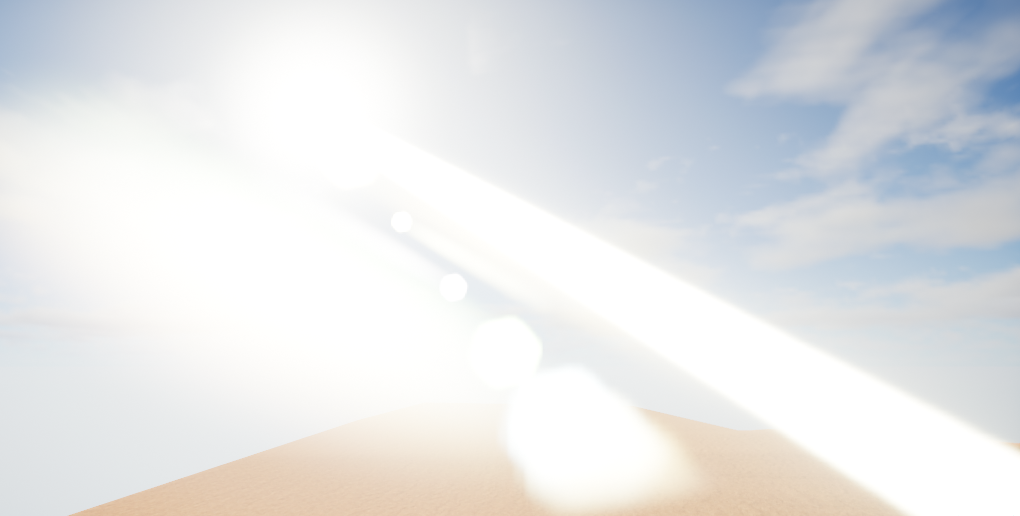
Is this a bug in 4.15.3 with light shafts from the directional light?
settigns are default
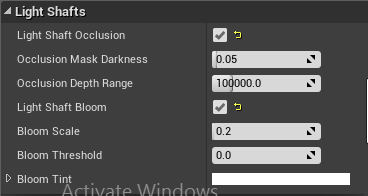


Turning bloom off gets rid of it
But that also gets rid of light shafts
 mint raptor
Can someone help me understand getting my player to rotate or face in the direction of a vector?
violet cove
you can set control rotation to a specific vector
static viper
"look at" is the next node
mint raptor
how so?
I'm using Control rotation to set a rotation
but getting the rotation from a normal?
How so?
static viper
normal?
mint raptor
Normal has the direction I want to face
static viper
ah
mint raptor
I want to rotate my player to that dir
static viper
how is that normal created
mint raptor
from line trace
static viper
get the look at node
and attach start to start
and the end to target
the line trace has your rotation
mint raptor
Ok, on second thought, getting the rotation from there might be the wrong way to go about it. Rather I should get the rotation from the forward vector of the object I spawn from my linetrace . Which brings me back to my original question of getting the proper rotation from a vector (but this time a forward vector instead of a normal)
And my forward vector I get from my camera
mint raptor
I guess make rotation is the only thing to use here?
static viper
i fi could see code
mint raptor
as I've tried using Findlook at
static viper
and knew what you want todo
mint raptor
but It seems to face me at an angle
Vector -> Rotation
If my players rotation is facing me this way <- I want the vector facing this way -> to guide my players rotation to rotate and face this way ->
static viper
if it faces you then invert it
mint raptor
Ok, didn't know there was an invertRotator node
that is good to know
now, it seems to work but it also seems to slant my view a bit
I'll be facing the correct direction but my cam will be tilted a bit
perhaps I need to break it, invert the floats for maybe x and y and leave z intact
Ok ended up solving it w ith Find Look At Rotation
And adding an arrow that is further out to give me a target to look at
pallid compass
I see alot of different stuff on the forums regarding input from mouse presses being held down, what would u say the correct practice is for it?
 regal mulch
The one that works for you.
InputEvent + an upwards counted float variable for example. Or + the playercontroller function that should return how long the mouse button got hold down
pallid compass
Ah gotcha so there isent really a proper practice for it
copper knoll
Hello, not sure where to put this question. I am currently working on a race game in space. To fill the enviroment a bit i use instances of astroids. The Spaceship is driven by thrusters with "Add impulse". Problem is, with this setup my speeds of the spaceship are buggy, it goes much slower, but not everywhere, it seems like wholes between where i get normal speed. it only happens when i use instanced astroids. Now, is there a way to prevent this, or maybe a better soloution for creating a bigger astroidfield? Do the thrusters actually take astroids in the back into account or something when accelerating ?
cobalt scaffold
no, but addimpulse takes into account your frame rate
if your instanced asteroid are causing a fps drop the addimpulses would accumulate less
make sure your speeds are fps independant
copper knoll
so, maybe i shouldnt use addimpulse to drive the thrusters ? Would be "addforce" better ?
copper knoll
factor in frame time ?
copper knoll
oh, so impulses are for onetime movements i guess ?