#ue4-general
1 messages · Page 67 of 1
 humble sun
 cursive saffron
I would like to pass some argument to the unreal's BasePass but I can't find how. do anyone know how unreal pass its value from cpu to gpu ? I can't find any cbuffer
PS: I used to work with glsl so I don't really know if there is more options to pass values in hlsl...
 hazy lynx
hello!
Does anyone know, what does setting movement component to flying actually do?
tried setting one character to flying, seems to behave the same way as before
 vast pine
It's status is flying. Think if it's in the air when you set it you won't be affected by gravity? If your on the ground while it's set I bet walking puts you immediately back to walking
 weary crypt
So here's a question I'm sure has been asked a million times but I can't seem to find the right answer to
I managed to get Unreal installed on my desktop after I installed a Win 8.1 SDK, but my OSX install still yells at me and refuses to compile
It's the initial compile whenever you try to create a C++ project, the blueprint creation works perfectly fine
 sage stag
is anybody around for any generic noob questions that i can't seem to google?
is it normal or appropriate to spawn AI class in level blueprints? i would like to do that, and would like to use the same blueprint changed dynamically to take input from human controller and AI controller
 cloud cobalt
The way things usually work is that you spawn controllers (player / AI), and those request pawns (characters)
In your case the game should probably spawn an AI controller for your pawn
Or just have an AI controller with no pawn, that possess the player pawn when he exits it
You shouldn't have gameplay logic in the level BP because what if you add a new level ?
sage stag
thank you stranger, that helps clarify how to go about this, thank you!
i saw in a video that someone made a bounding box that functions as a spawner, that seems like a more logical approach. i wasn't sure if level BP was used across each individual levels or across all levels, ty!
do you know if it's possible or generally acceptable to use the same BP for both a player controlled player and AI? it seems like i would be rebuilding a lot of functionality and input to make a separate AI character blueprint
 hybrid scroll
@sage stag why not? If they are using the same mechanics it should make things easier.
If you define every possible action and interaction as a seperate function or event, and just call them from player / ai controller
sage stag
hmmmmm interesting, right now it's all just standard input and bp, but i will look into doing that. thank you for the assurance that it's possible! i was wondering the same, why not?? hehe. wasn't sure if there were problems lurking in the shadows. ty allshar
 safe shoal
Added a new engine feature. You can now emit ribbons from particles with an 'Orbit' module :)
https://twitter.com/_TheJamsh/status/866711578326028289

Wanted to do this for ages, added a new engine feature to allow Ribbon Trails to follow particles with an Orbit module! #UE4 @UnrealEngine

 Twitter
@fierce tulip You want?
(Source change, gonna submittttt a PR)
 fierce tulip
thats interesting! @safe shoal
but i gotta say, the more i play with ribbons and animtrail, the more I wish there was more control over how fluid they behave
fricking jagged glitchy mess
hehe
safe shoal
I know right.. I originally just wanted shaped beams, then soon realised that wasn't possible -.-
fierce tulip
ribbins along splines hehe
I currently need em for a very fast chaotic moving object, all I am seeing is pieces of ribbon/trail that are too long and are causing jagged edges.
its so frustrating
 queen canyon
Guys, can someone please help me, I have a widget just with crosshair image, it stuck on any locked target in world so player can see crosshair over locked target, but if player rotate or move camera so that target is not in view, widget isn't more visible on it... I guess it's because variable of target object contains inside widget... How can I fix it? https://streamable.com/jb9s5
 safe shoal
@fierce tulip well in that same PR (https://github.com/EpicGames/UnrealEngine/pull/3603) I also fixed Ribbons so that they stop emitting properly when MaxFrameDistance is reached in SpawnPer Unit modules - not sure if that helps!
I was having issues where I would teleport actors and despite that setting ribbons would still join up
fierce tulip
that be nice yea 😃
fierce tulip
@safe shoal any chance you could maybe update that bit that allows for how much a ribbon tiles? for smoother results?
or am I asking for the sky and the moon? :p
fierce tulip
https://i.gyazo.com/ba9905fa36baa333f680ef9c0b1a69e9.gif BASHES ON KEYBOARD
 vast pine
😦
cloud cobalt
working as intended
vast pine
Lies
 gentle solstice
So, I see the weird cheat assistance hasn't been fixed yet
Like what the hell is going on behind the scenes?
If you speed hack the client to 400%, not only will he be able to run 4 times faster, but the client's animations will also play 4 times faster on the SERVER
I mean, if you simulate a 3 second lag, and there are discrepancies between the client and server, the server side decision goes (teleports the client to where the server decided he should be), but if you speed hack the client, the server also calculates 4 times faster, facilitating the speed hack
 sudden laurel
hey folks, I have a quick beginner's question: I'm currently installing Virtual Studio in order to do the Programming Quickstart tutorials on the UE website, and Virtual Studio is giving me a smörgåsbord of "workloads" and other extra features to choose from in addition to the "basic" Community software. Do I need any of it or can i just go barebones?
sudden laurel
alright, thanks! @keen cradle
 keen cradle
sudden laurel
keen cradle
sudden laurel
installed a whole bunch of them actually, almost doubled the original install size 😄
safe shoal
@gentle solstice are you trying this on two separate machines? Character Movement has speedhack protection
 sinful osprey
Not an engine question, but not sure where else to put this... what do I do if I get a message trying to log in to the forums that says my account is inactive? Where do I go to fix that and why would it be inactive?
fierce tulip
email one of the admins, or request a new password?
 wet spire
email epic support
cursive saffron
Anyone know if it's possible to disable threading in threadable graphics API ? I think I found a crash with DrawMaterialToRenderTarget and it apear only with dx12 and Metal (I can't test with vulkan yet....)
sinful osprey
I found a mail from Epic (I was out of town for a while and didn't see it). Looks like they reset my password for security reasons. I'm all good now. Thanks all.
 final stone
Hey guys, I have an issue that I'm trying to figure out, and I was wondering if you guys know this. It's a Player/Collision/Destruction issue. Do you guys know where I can control the velocity or impact on the Player? As an example, I have a player walking towards a table, and the moment it just touches the table, chunks of it breaks. I'm trying to have it so that when the player touches it, it would just move or shove, and not break. At the same time though, I have it set up so that it can be shot at and break depending on the amount of damage.
it seems pretty delicate when the player touches it, but at the same time, when shooting it, it seems like it's pretty thick
humble sun
What is triggering it's breaking?
Is it applying damage?
Ie is the player applying damage?
final stone
the player is yes, and there's Impact Damage enabled for the object
humble sun
Well. Change the level of impact damage low enough it doesn't break
Or the damage threshold high enough the table only breaks to bulletd
Bullets
final stone
oh ok, I'll test that out soon
 velvet oyster
how can i return a null tarray?
vast pine
Is valid index 0? Not sure if that works on tarray
velvet oyster
that works, but I have a function that returns a TArray, but there's a conditional in it and I need to return from all code paths but one of them wouldn't be able to return anything
vast pine
Is t as in text?
 burnt drum
hey all. just sharing a game my students at Limkokwing University , Malaysia made : https://www.youtube.com/watch?v=2tK1jj1a2NE&feature=youtu.be
which is going on Greenlight soon

Apploid: Ballfare is a casual multiplayer sports game that features the combination of rugby and dodgeball elements with grappling hook mechanic. Music by Te...
 languid shard
hey lads, random thought I had why baking some lightmaps : is there a reason why sometimes a core drops its job and just does nothing after the "collecting photons" phase in the swarm agent ?
To illustrate
gentle solstice
@safe shoal I know it has speedhack prevention now; but it's disabled by default. And it doesn't answer the question as to why clients can speed hack in the first place, when the server performs the same movement on its side and corrects the client if it's wrong (Eg. so big a lag that an obstacle that blocked the client, client side, didn't block the client server-side, which will make the server teleport to client to where he actually ended up on the server). But if you speedhack the client, the server also speeds up its calculations, including the animation speed on that specific client character, which doesn't make a whole lot of sense.
vast pine
@languid shard do you have any static lights outside light importance volume? Or half in
languid shard
@vast pine I may or may have not forgotten to place one in the first place 😬
safe shoal
Seems odd... are you using Root Motion?
hybrid scroll
I working with sequencer. I have a camera that moves around. Is there a way to adjust (move) location keys so that the camera maintains a constant speed? Its very hard to do it by hand since every change requires readjustment.
 merry gazelle
I'm creating an ongoing short film series as I build up the story for my game.
https://youtu.be/s5xRpDsbdAE

Here's a short scene of my upcoming CGI film series (& VR Game) Atoms4D. Subscribe on my website for updates on the film and games future release. http://www...
 pallid compass
Just curious has anyone got there head around the new hair shader?

 winter gale
Does anyone know how Epic did the loading progress for Paragon?
Is it Event Driven Loader...right?
cloud cobalt
What do you mean ?
No one has access to Paragon sources, but plenty of people did loading screens
winter gale
@cloud cobalt What I meant was after the lobby when map is being loaded, you can see a progressbar going from left to right that shows the load process. I'm just wondering is it done by Event Driven Loader or something else.
cloud cobalt
I don't know
Does UT have something like that ? That's a project with open code
For paragon you'd need to ask directly to Epic devs
winter gale
Thanks I'll see if UT does that.
 drifting monolith
pallid compass
drifting monolith
pallid compass
@static viper yeah iv read it all, trying to figure out how they got such nice maps for it
gentle solstice
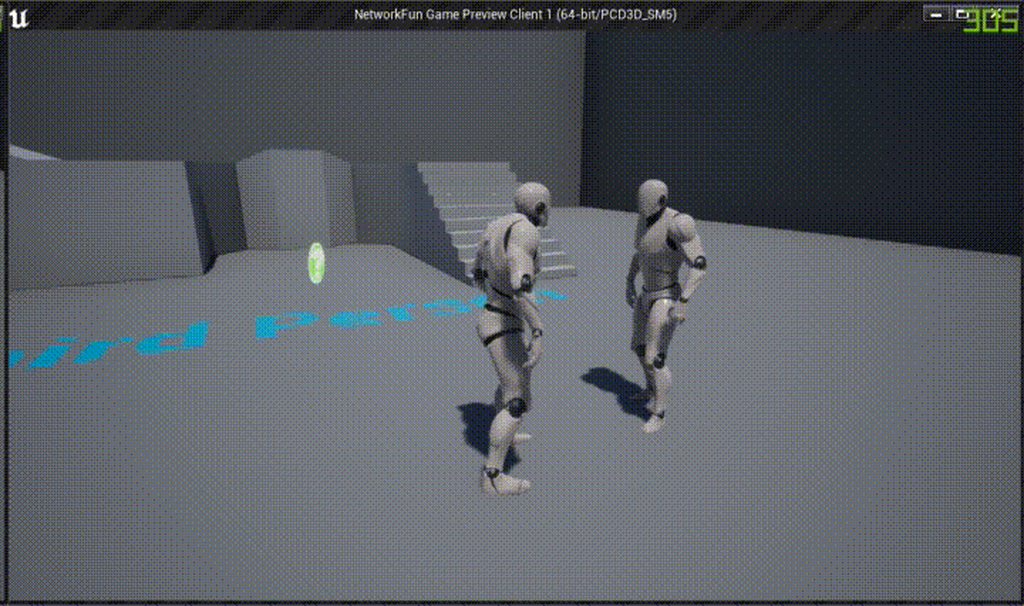
Third person example is broken
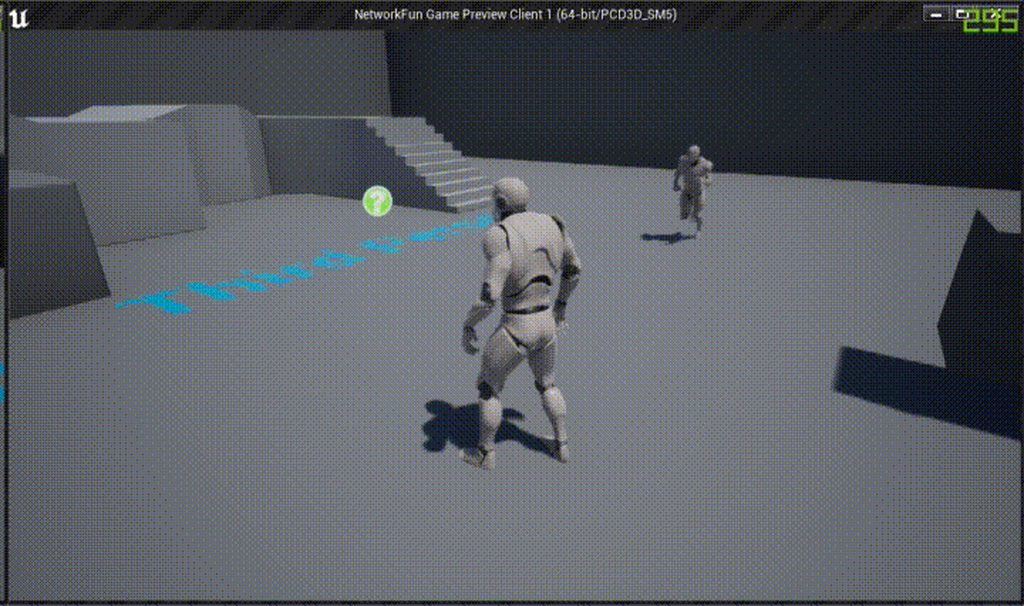
The mesh of the server character gets offset based on his original position
pallid compass
anyone got an a way to render curves in maya thats not arnold
gentle solstice
when a client joins
 zenith night
Hey all,I’ve recently purchased an Evermotion library https://evermotion.org/shop/show_product/archmodels-for-ue-vol-4/13204 - there is a ‘showcase’ map where I have basically grabbed the lighting/processing effects and I am using them now in my own scene. My question is regarding the fact they had no ‘light mass importance’ volume in the scene, so therefore the light isn’t baked. Can someone elaborate on when you would/wouldn’t need to use a light mass importance volume? – is it used only when you want to ‘play’ a level, as in walk around the scene? - is it used less so when the end output is a fly-through render?

Evermotion.org
The collection consists of high quality trees models and a complete Unreal Engine scene.
IMPORTANT: This collection is prepared for Unreal Engine 4.13, so the final results may vary in the different engine versions.
Features:
60 models: 54 trees + stones, bough, trunk and fern models.
All foliage models are animated.
Added 12 animated cameras using new sequence edtior.
Trees have vertex paint for Unreal Engine.
Each model has at least 1k textures for leaves and 2k textures for trunk.
Average polycount: 80k.
Trees included in this collection come from northern hemisphere climat zone. This collection consist of European and North American species.
Grass and grass material are included in the scene.
Project uses Mesh Distance Fields (long computation time ~1,5h).
Archmodels for UE vol. 4 uses the Unreal® Engine. Unreal® is a trademark or registered trademark of Epic Games, Inc. in the United States of America and elsewhere. Unreal® Engine, Copyright 1998 – 2015, Epic Games, Inc. All rights reserved.
 weary hull
isn't lightmass importancevolume to help with indoor lighting
 tidal elbow
has anyone tried building a project with Nvidia's Flex branch (4.15)?
Just wondering if there are any major issues.
vast pine
@weary hull it's for lighting in general there's actual some good explainations of it on YouTube in the wtf is series

What is the Trigger Volume in Unreal Engine 4 . Source Files: https://github.com/MWadstein/wtf-hdi-files
gentle solstice
Replication is completely broken in the C++ third person example http://i.imgur.com/vjyxb4v.gifv
 vast pine
I'm lookin at the man in the mirror!
gentle solstice
They really fucked up replication in 4.16 http://i.imgur.com/YIuhl4F.gifv
 humble sun
wth
 fast kiln
Who's watching the live atm?
 polar hawk
@gentle solstice I was seeing similar things in my projct
Thought it was my own fault
 spark lotus
it's working in 4.15.2 at least
 tepid orchid
I'm having an interesting issue where I play in editor and it immediately crashes with
Assertion failed: IsValid() [File:C:\UnrealEngine\Engine\Source\Runtime\Core\Public\Templates/SharedPointer.h] [Line: 826]
but it runs fine playing in standalone. Any ideas? (running a source-built UE 4.15.1)
gentle solstice
@spark lotus It's only observable if the client is connected after the server character has moved
vast pine
@tepid orchid I heard of nvidia experience causing problems
Are you tryin to go full screen in editor or Windows? I had to change my nvidia experience to record desktop and not ap to stop crashes
spark lotus
@MulleDK19#3770 Just tested it with 4.15.2, no issue
 rare kraken
anyone know why marketplace content wont update in libray ?
 tall sage
internet connexion?
I am kind of new with Unreal. If I would like to make a Car Driving Simulation. That is quite realistic.
Does PhysX is enough? Or I should make my own physic engine for that?
When I see the usage of physX it is only for Debris, fluid animation, cloth, destructible...
Mmmh, I was thinking it was general question but maybe it is more appropriate to ask on #legacy-physics haha
 unreal sonnet
Any tips for identifying and removing unused assets from the Content folder for a large project?
hazy lynx
Good luck with that. Every time I removed, moved or renamed anything in my project everything broke down.
cloud cobalt
@unreal sonnet I don't know of an automated tool to do it, but i'd be interested
@hazy lynx That shouldn't be the case at all if you do it from the content browser
Actually the opposite is a problem (redirector files staying after you're done moving)
@unreal sonnet For what it's worth the cooking process prunes unused assets
unreal sonnet
We all know that UE4, when you try to delete something, is able to check and see if content is being used... so surely there must be some way to verify that things can be deleted, right?
Oh okay cooking does that? Whew
cloud cobalt
YOu can also check with the reference viewer when right clicking on one objet
But I doubt you want to do that for all assets
unreal sonnet
Yeah it's impractical
cloud cobalt
There might be a programmatical way using the Asset registry
Find the code for the reference viewer in the engine, iterate all assets with AR, and print all those that are unused
 tribal kayak
What causes a class to have REINST added to the name
fierce tulip
they where kicked from office, but then reinstated as chief of police
safe shoal
Anyone have a good method for doing a Multi-Line trace and including backfaces?
languid shard
@safe shoal that's something I'd love to know too
safe shoal
Turns out there isn't.
languid shard
shiet
safe shoal
would have to make source code changes but they'd be quite intrusive, so I'm doing two traces then manually sorting the results by distance from the start
languid shard
blargh
safe shoal
Like so:
        TArray<FHitResult> ForwardResults;
        TArray<FHitResult> BackfaceResults;

        bool bFrontFaceHits = MyWorld->LineTraceMultiByChannel(ForwardResults, OrbLocation, TraceEndVector, TraceChannel, FCollisionQueryParams(NAME_FrontFaceTrace, false, OwningOrb));
        bool bBackFaceHits = MyWorld->LineTraceMultiByChannel(BackfaceResults, TraceEndVector, OrbLocation, TraceChannel, FCollisionQueryParams(NAME_BackFaceTrace, false, OwningOrb));

        // Append and Sort Results by Distance From Orb
        ForwardResults.Append(BackfaceResults);
        ForwardResults.Sort([](const FHitResult& FHR, const FHitResult& RHR) { return FVector::DistSquared(FHR.TraceStart, FHR.ImpactPoint) < FVector::DistSquared(FHR.TraceEnd, RHR.ImpactPoint); });

        // Draw Debug Results
        DrawDebugLine(MyWorld, OrbLocation, TraceEndVector, FColor::Red, false, -1.f, 0, 4.f);
        for (int32 Idx = 0; Idx < ForwardResults.Num(); Idx++)
        {
            DrawDebugPoint(MyWorld, ForwardResults[Idx].ImpactPoint, 8.f, FColor::Green);
            DrawDebugString(MyWorld, ForwardResults[Idx].ImpactPoint + FVector(0.f, 8.f, 0.f), FString::FromInt(Idx));
        }
Should be, I think you can sort arrays in BP. Can't imagine it's very fast though
Basically you do a line trace from Start -> End and End -> Start. Append the results to one another, then sort the results by distance from the start location
Hoping that will work
safe shoal
k stand by, that doesn't work quite right yet..
K works now, had to do this:
bool bBackFaceHits = MyWorld->LineTraceMultiByChannel(BackfaceResults, TraceEndVector, OrbLocation, TraceChannel, FCollisionQueryParams(NAME_BackFaceTrace, false, OwningOrb), FCollisionResponseParams(ECR_Overlap));```I forget what folders can i deleted before ziping a project for someone to view. saves/intermediate?
saved rather
 whole quarry
cloud cobalt
whole quarry
cloud cobalt
Keep Sources, Content, Config, and the .uproject file
Plugins if you have plugins
The rest is generated
Also, use source control to keep track of changes and send copies to people
gentle solstice
@spark lotus Did you connect the client after moving the server?
gentle solstice
On the client, the server's character gets offset based on the offset from its original location to where it is when the clioent spawns
spark lotus
lemme try again, just for your sake haha
gentle solstice
probably need a clean copy of the example to get correct results
also, it's only the c++ third person example
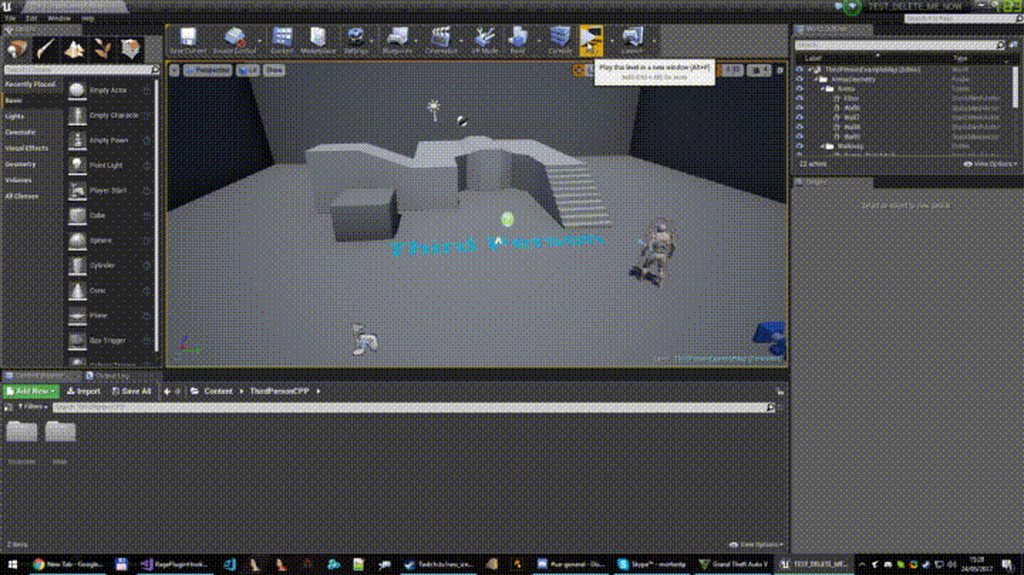
Start the server, move him somewhere else than where he spawned, then connect the client. Now when the server character moves, on the client the mesh will be offset so it flies around
spark lotus
I am using the c++ third person, but again, I'm on .2
gentle solstice
Well, I guess it was introduced in 4.16 then
spark lotus
It looks good on my end yeah. Even though, this might interfere with it
gentle solstice
did you try a new clean example?
spark lotus
I have a roundbased gamemode, so like after the second player spawns, 5 seconds passes, and they get respawned
I can try that now
just because you are danish 😉
gentle solstice
uh?
 digital anchor
could you guys help me with one thing, i found lots of forum posts about this problem but not a solution.... my ue wont delete files, it keeps reappearing when i restart ue
spark lotus
delete them via the file explorer @digital anchor
spark lotus
I can't delete C++ classes via the Editor haha
digital anchor
:v
spark lotus
I can though delete UAssets and such
 woven urchin
hi, how is it posible that there is no good tutorial out there for rendering in UE4
i mean, many those days use marmoset
witch is realy good software
and easy to use
but i like to play with shaders
to make props with tileable details, with edge masks, with ability to change colors...
i cant do that in marmoset
so, if UE is much more poverfull, how did noone make in depth tutorial for making showcase in it
like, look at paragon, how thay show there characters...
cloud cobalt
What kind of tutorials are you looking for ? The sample demos are a good start, the Epic streams on Twitch are pretty good too.
woven urchin
i want to do that, and models that i do look decent, i have 7 year of movie expiriance, and it is so easy to use tricks from movie to play with shaders, i love it, but rendering and post production... i am not good in that, i need some good tutorial
gentle solstice
@spark lotus You can do it in the editor. Select 2 players, and start in separate windows (not standalone).
Then when the two windows pop up. Move the server character away from his spawn point
then in the client window, open the console and type "open 127.0.0.1" to reconnect.
Now the server will appear to be standing where he originally spawned
woven urchin
well, i want to learn more about rendering, seting lights, post proces...
it would be nice if there is some tutorial, where tutor show step by step of make props look good
gentle solstice
but when he moves, he'll fly around, because his mesh has been offset the distance from his actual position to the original spawn position
woven urchin
like modeling artist to show his work in unreal engine instead of marmoset
and to get same or better quality
 cloud loom
So I saw people placing actors while simulating and the editor kept them in , though if I do it it will just forget everyhing I did aka delete all added actors.. now I found the save state option that works on actors that already exist before simulating, but is there a way to add them while simulating as I have seen in one VR video?
cloud cobalt
There are lots of tutorials @woven urchin , hundreds of them really. What topic do you need help on ?
woven urchin
i know there are a lot of tutorials about diferent stuff, i just hope there is some that show all those stuff, instead of learn from bunch of diferent tutorials
spark lotus
@gentle solstice Can't reproduce on clean thirdperson c++
Lemme record you a quick video
gentle solstice
okay, so definetly introduced in 4.16
cloud cobalt
@woven urchin I've been working with Unreal for a decade and quite far away from knowing it all - you can't do a tutorial on a game engine
You need to go step by step
And pick a field of interest
woven urchin
thx, just wierd that there is not some tut done by modeling artist...
like, there is lot of modeling and texturing tutorials for maya... where after 30+ videos covering modeling and texturing par, thay do 1 or 2 of quick render in arnold, or vray...
just as bonus
without explaining in dept rendering
cloud cobalt
Maya is just a modeling software, Unreal is way larger than that
woven urchin
after all, it is modeling and texturing tutorial, and rendering is just there to show it in good light
spark lotus
https://youtu.be/xNLurk9_h_k @gentle solstice
 woven urchin
i like those, becouse thay show only what i need as modeling and texturing artist, without spending 15-20 hours explaining to me what GI is, how diferent shadows to look, what and how to do antialising...
gentle solstice
@spark lotus Yea, not what I get in 4.16 xD
woven urchin
as i say stranger, i need good tutorial about making beauty shoot of model
cloud cobalt
@woven urchin UE4 is a game engine, which means it has much more technical depth than Maya or Marmoset. You will need to learn about GI or skylights or antialiasing or shaders. That's your job when you use a game engine, or more accuraltely that's someone's job. people don't normally make games alone.
gentle solstice
@spark lotus You chose C++ and not BP, right?
spark lotus
Yeah I choose c++
woven urchin
thx for help, look like i will have to continue watching streams... to learn rendering and postproces in deapth, to bad that someone dont make some plugin like marmoset for unreal engine, that would be cool for peoiple like me who just want to do render of one model, with all those complex shader on it 😃
 vale osprey
Why do you need UE4 then?
cloud cobalt
UE4 is not for rendering models :/
woven urchin
yea, people use Ue as game engine, and i want to use it as marmoset
but it can be, right?
cloud cobalt
Just use Marmoset or Substance then
woven urchin
as i say, my shader is complex
and if i want to render in marmose, i have to use just 2k maps...
cloud cobalt
My point is, using UE4 is always going to be much harder than just using Marmoset
It's like comparing a tunnel boring machine and an axe
woven urchin
my character have 4 materials, hands, body, legs and head, legs and body have materials as metal, ruber, leather... combined with edge demage masks...
also he have monitors on weapon that are animated in shader
and on his back, he have few demages on machine, under it it have some animated light movement...
thats why i have to show it in unreal engine, make images, and video as turntable
something like paragon show on there character preview
a year ago
there is a lot of tileable details
like leather details...
i simply cant show that in marmoset
thats why i was hope there is some tutorial about set scene for character rendering, with nice light, and setup for post procesing...
cloud cobalt
Then use UE4, look for the demos in the launcher and learn from that
 sterile cairn
Are there any good resources on how to properly set up a game? (ie. Intro -> Main Menu -> load Level(s) and such)
woven urchin
but look like i will have to go step by step and learn part by part untill i get something nice
cloud cobalt
Yes
vale osprey
@woven urchin I don't know if there are good separate tools for what you want to do. Take into consideration that while UE4 rendering is very powerful, at the same time it's very specific. So very often you won't be able to make things look like you want but what engine allows you to do. This is why other modelling tools like Maya/Max/Houdini are better suited for this job.
like you can use Renderman for all of your shaders and they will do exactly what you want
merry gazelle
Soon I'm going to be working from home full time. I decided to throw together a planning template which I intended to have printed. I've realised I could also make versions specific to indie game devs too
gentle solstice

Unify game design documentation and project management using the definitive tool for game production.
merry gazelle
Basically you can fill in each hour (e.g. concept art, blueprint creation, etc) and also metrics etc. Just though I'de share it 😛
spark lotus
@gentle solstice im downloading 4.16 preview 3 now
gentle solstice
@spark lotus I just recorded this on a new example project I just created: http://i.imgur.com/SsRc4Wb.gifv
 merry gazelle
Looks cool but I created this because I like to draw and write with a pen
spark lotus
hahaha that's fucked
merry gazelle
Otherwise I would have just set of a Google spreadsheet 😛
vale osprey
@woven urchin have you seen this already?
https://www.youtube.com/watch?v=nZ7wj3aoyQs

In this tutorial I'll show you the techniques needed for getting your models to look as good as marmoset in UE4. Osman's Plugin: https://forums.unrealengine....
merry gazelle
@gentle solstice You could make that as a game mechanic
For example a ghost simulator
woven urchin
thx
sterile cairn
Are there any good resources on how to properly set up a game? (ie. Intro -> Main Menu -> load Level(s) and such)
Saw that the ShooterGame project uses game modes, but its hard to find where they changed the modes and how they started the game to begin with.
gentle solstice
@sterile cairn https://docs.unrealengine.com/latest/INT/Videos/PLZlv_N0_O1gYqSlbGQVKsRg6fpxWndZqZ/index.html

Video Tutorial Series
sterile cairn
@gentle solstice Thanks.
 plush yew
Is GT8600 enough to support UE4 workflow? I burned my better GPU
But i have a Xeon CPUs and 8GB ECC RAM to balance
languid shard
hmm that's gonna be a bit too old imo
fierce tulip
yea, it'll work till you get replacement. but set all the things to low
 quartz patrol
4.16 is live oh god
 main cobalt
Is there a way to hide selection outlines & object pivots in a cinematic viewport?
spark lotus
press g for gameview
main cobalt
Yeah i'm still getting boxes around things when theyre selected in another viewport
spark lotus
oh, maybe select each viewport and press g? Idk if that would work
main cobalt
It's weird, it hides all the icons, cameras, grid etc. but still keeps pivot and object outlines in gamemode
fierce tulip
anybody know how to reset ue4 in such a way that all the menu's reopen in center of main monitor?
sometimes they appear so far out of my 3-monitor space I need to disable em all
fierce tulip
(please @ me if you do)
 rugged gorge
yo, how do I work with 9-slice images?
spark lotus
@gentle solstice tell me if you find a fix or anything please
plush yew
im opening my project in 4.16 now.. uuuh this excitement
gentle solstice
@spark lotus I don't even know why it happens yet
SOMETHING is resetting the offset every move
if on the client you reset the mesh offset, it'll show correctly on the client until the server moves again
then it goes back to being (serversPositionWhenClientJoined - originalSpawnPosition)
spark lotus
so wierd
 safe rose
4.16 notes so OP. Everything EA.
This will be the most bugfilled version in years probably
plush yew
well i already found a wired behavior of the GI multiplier in the postprocessor
setting it to 0 (according to notes it should disable GI) just obliterates your screen in a supernova..
im sure thats not how its supposed to work now
 paper glacier
@fierce tulip Did you try setting Asset Editor Open location in General Appearance in Editor preference to 'Main Window'?
fierce tulip
dont think thats a thing in ue4.11
cloud cobalt
@safe rose Yeah, I alreayd have one blocking bug in 4.16
safe rose
Answerhub is going to get busy
cloud cobalt
More ignoring bug reports !
sterile cairn
Why did they push this version so soon if it is going to be so buggy?
Is it to get Nintendo Switch support out there?
cloud cobalt
UE4 games have already been released on Switch, so no
 clever solstice
hey any 1 noticing 4.16 beeing much darker than 4.14 ?
cloud cobalt
At least Snake Pass has been out for a month or so
@clever solstice That's 4.15, not 4.16, and yes, new tonemapper
clever solstice
oh any way to get if back to old 1 ?
clever solstice
cool, thanks
cloud cobalt
That will go away at some point
clever solstice
why ?
cloud cobalt
Because they're dropping the old tonemapper in the future
Probably in like 6 months though, not to worry
fierce tulip
doesnt fix everything, because they also redid the bloom and some other related stuff.
so even with old tonemapper stuff wont look the same.
cloud cobalt
If you're not trying to finish your project it's best to update your content with the new tonemapper
clever solstice
I don't need it all the same just brighter
cloud cobalt
Change your PP settings to compensate
Or just use the setting I gave you
I'm just saying, if you plan on releasing your game next year, might be safer to move to the new tonemapper now
fierce tulip
^
clever solstice
thank you sir
cloud cobalt
You're welcome, this change has been a universal pain in the ass
 severe egret
@cloud cobalt , just read your message about the tonemapper. Were there any major changes to the default cameras in 4.15 as well?
cloud cobalt
You mean the default psot process settings ?
severe egret
I'm not 100% sure what that means, but yes
cloud cobalt
I think it was mostly the tonemapper & bloom handling
severe egret
Ah, okay
severe egret
Actually, do you think you could help me with a problem?
I was following the "Player-Controlled Cameras" tutorial in the unreal docs, and I'm not getting any errors and the build was successful, but the camera shows a black screen upon play
 distant wraith
hey all, what channel would I have the best luck finding help with Swarm networking?
severe egret
@distant wraith that's a lightmapping tool, right? Might go in #graphics (tho I'm new, so I could be wrong)
 tawdry hedge
Hey, everyone. I'm wondering what's the reasoning behind having to compile/run UE4 on a non-root user account on Linux? Could someone educate me? 😄
distant wraith
@severe egret I'll give graphics a shot, thanks. Swam Agent is the utlity that handles the light baking whenever you hit 'Build'. I think I just got it working too though - was trying to get the job distributed to some other machines in our office and finally got it 😄 doesn't give me a huge speed boost overall but frees up CPU on my local machine so I can keep working on other stuff
final stone
thought I'd bring this up again, hit a road block. Has anyone imported FBX chunks when making a destructible mesh? I've gone through and issue where each chunk, even if it was like 30+, has its own material ID, when they're suppose to be just 1
final stone
just wondering if there is a way, maybe in Blueprints, to assign a material to multiple destructible mesh chunks
rugged gorge
Hey, got another quick question for you guys
tawdry hedge
Is 4.16 being released today?
rugged gorge
how do I export content from one UE4 project to another?
cloud cobalt
@tawdry hedge It just was
rugged gorge
I made a few blueprints which will come in handy in another project, with a few models too. I want to export these to a "package" that I can import to any other project
cloud cobalt
Sure
tawdry hedge
Linux question: Do I need to delete 4.15 on Linux before updating to 4.16?
 buoyant ridge
is there a way to export a "unrealpackage" like unity's unitypackage?
I want to move some content from one project to another, but the projects are in different machines, so I can't just use migrate...
gentle solstice
Für Elise in VR https://youtu.be/rG3hLNQWz6k?t=118

Playing the piano with just two fingers is hard on its own, but it's even harder when you have to deal with tracking problems; which made me miss a few nodes...
 stable crest
hey guys anyone else have prolems Compiling 4.16 on VS17 i got this error message .. D3D12StateCachePrivate.h(716): error C4596: 'SetPipelineState': illegal qualified name in member declaration
 radiant fable
is there a toggle in ue4 to rotate an actor without affecting children?
hazy lynx
@radiant fable you mean attached actors?
radiant fable
yeah, no worries, i just temp detached them
main cobalt
Is there a way in unreal to render what is seen in the viewport as a series of frames? like taking a high-res screenshot but for a bunch of frames
Also if I have for example mesh edges enabled in the viewport and create a highres screenshot will It capture the mesh edges effect?
Cheers 😃
(and by " render what is seen in the viewport " I Don't mean standard render I mean capture what is just in the viewport
hybrid scroll
@main cobalt you can use F9 to make a screenshot in the editor - is that what you need?
main cobalt
Sort of but I need to be able to capture a bunch of frames like rendering
Maybe there's a plugin or something out there?
hybrid scroll
You can use a sequence and export a video and split it up.
or maybe there even is a setting for exporting single frames
main cobalt
Yeah I know rendering using sequencer it's just rendering as if it were just capturing the viewport if that makes sense
I can record it using a seperate program but it'd be easier if there's a way to do it in engine
radiant fable
hmm, yeah i was hoping for thise two once i delv into ue4 archviz, would be nice to have supersize frame by frame renders written to img files
and then after that, 360° frame by frame rendering
main cobalt
You can render sequences as image files if that's what you mean 😃
hybrid scroll
Is anyone using the experimental Actor Sequence Component?
radiant fable
ah, so you're only missing the high res capture part?
main cobalt
Yeah basically I want to capture what I am seeing when using the editor rather than rendering what you'd see in game
Because for a breakdown thing I want to show a wireframe pass
radiant fable
ah i see
there must be wireframe materials or functionality you could rig it with for game mode
 main cobalt
hmmm I think instead of just wireframe I need just the front facing if you know what I mean
Basically clay & wire render
Also how does that work with UVs?
radiant fable
i think it ignores them, it's a global switch in the mat properties, just switches it to wire
main cobalt
aah that's a possible option, I want everything wireframe tho so It'll probably look like a huge mess just with the wireframe
radiant fable
i think the default is backfaces won't render
so you'll not have wires on top for wires for shells
main cobalt
oooh okay i'll try it out
 snow fjord
wasn't there a sale for a 200$ udemy course UE4 that's only 10$ atm? I'm having trouble finding it.

Udemy
Learn C++ from scratch. How to make your first video game in Unreal engine. Gain confidence in programming.
nvm found it
 gilded venture
has anyone here used the fixrotateaboutaxisnormals material node? I'm having a heckuva time getting it to behave
unreal sonnet
@snow fjord I did that course and although it's pretty okay for brand new people... as a person who had done a whole bunch of the official Unreal tutorials and livestreams, I only really learned a few really useful bits and pieces during the course. For example, how you can use the Play-In-Editor button and then lick Eject so that you can browse the World Outliner to see explicitly everything that exists in the level. Nobody has ever talked about that and pointed out what the DefaultPawn class is all about before. Stuff like that is good, but the course is more of a marathon than a collection of concise, useful knowledge.
That's my review of the Udemy course, anyway.
I also got it for $10 or whatever, though.
vast pine
Anyone seen any videos of proper implementation of intro movies to menu level and load of ui?
safe shoal
Has anyone had any luck getting custom Post-Process vars to show up in the details panel in 4.16?
 cursive swift
hoy.
 boreal mesa
Guys, have anyone experienced the problem with build x64 of project not running on windows?
I got just several processes running without any response
boreal mesa
So is it necessary for re-set something?
main cobalt
Can anyone suggest a reason why my movable light with keyframed visibility and intensity is showing up in Play mode, but not showing up in renders or standalone mode?
main cobalt
What the hell this light doesn't render anywhere, no keyframes, all settings standard.
It shows up in play but not in standalone or renders
Of course it's a bug or something, copied the light, re-rendered, everything works, lights can be annoyingly unreliable in unreal sometimes
main cobalt
I don't know what it is it's like that one light is cursed
 static viper
so its a special light
probably with actor on it
a child
you made that error on purpose
main cobalt
It's just a standard movable point light casting shadows
static viper
So its not working cause its movable :3
main cobalt
Works 100% fine with the keyframes in play mode but rendering or standalone the game will either totally ignore that it exists or it will keep it visible for the entire animation
static viper
i figured it out
main cobalt
Why does unreal hate movable lights so much, I need the light to cast a moving shadow from a moving object for the shot
gentle solstice
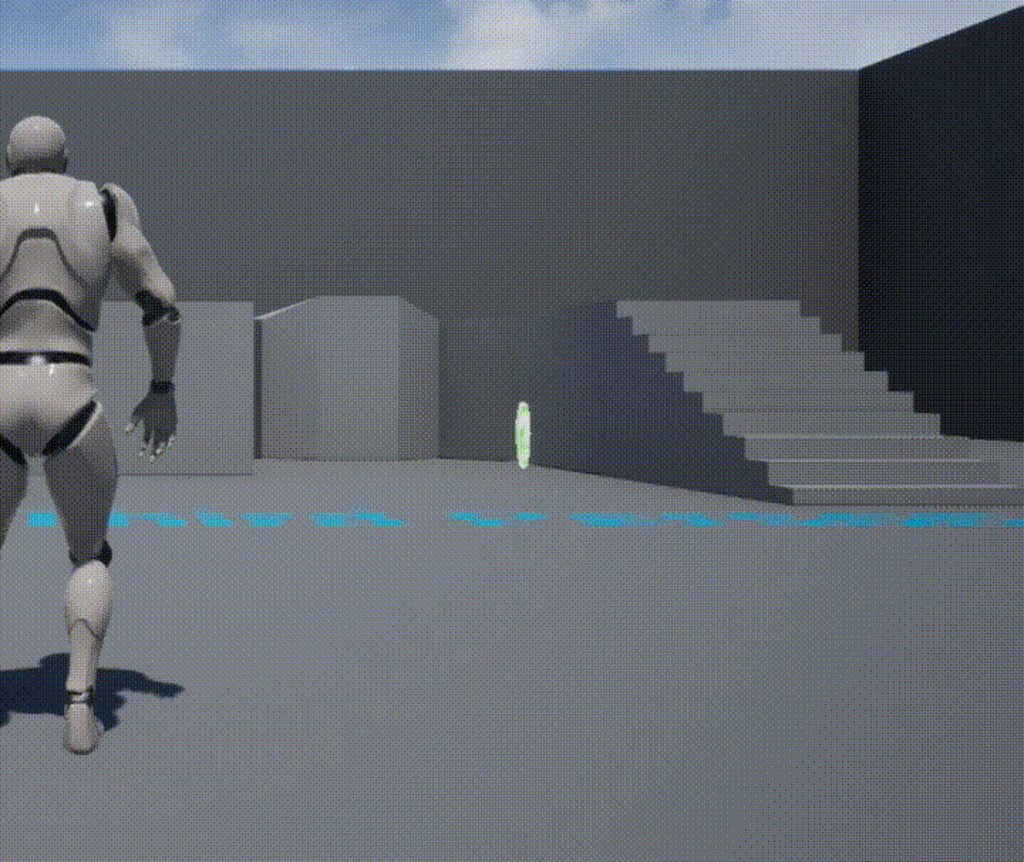
Oh god, what did I do? http://i.imgur.com/B8nV5jr.gifv
 gentle solstice
It's some weird shit
It's when the server is walking
only he sees it right
everyone else sees it like that
like it's passing a lot slower speed to teh anim tree on clients
except I've checked they're both identical on server and client
gotta be my IK code not working right
yup. that's it. weird
oh, I see
MaxWalkSpeed not replicated, which I use for calculation, so the calcs are wrong
yea, now it's working
final stone
gone through another issue, not sure why. I imported a mesh, and custom chunks of it (separated), in UE4. The chunks were imported in a folder, pretty much basing off of the original mesh as far as the UVs, just cut off.
when I drag the separated pieces in the scene (grouped them), when I applied a material to it, it doesn't match the original mesh.
The UV's are the same in Maya, just when I brought it in the engine, it's different, is there something I'm skipping?
radiant fable
hmm, i managed to find a setting that took kb/mouse/gamepad focus instantly when clicking play in editor
anyone know its name?
ah found it, 'game gets mouse control'
gentle solstice
Making a simple game for fun where you fire lasers from your hand. No anims, so I'm generating anims using pure procedural animation http://i.imgur.com/uRFwsPg.gifv
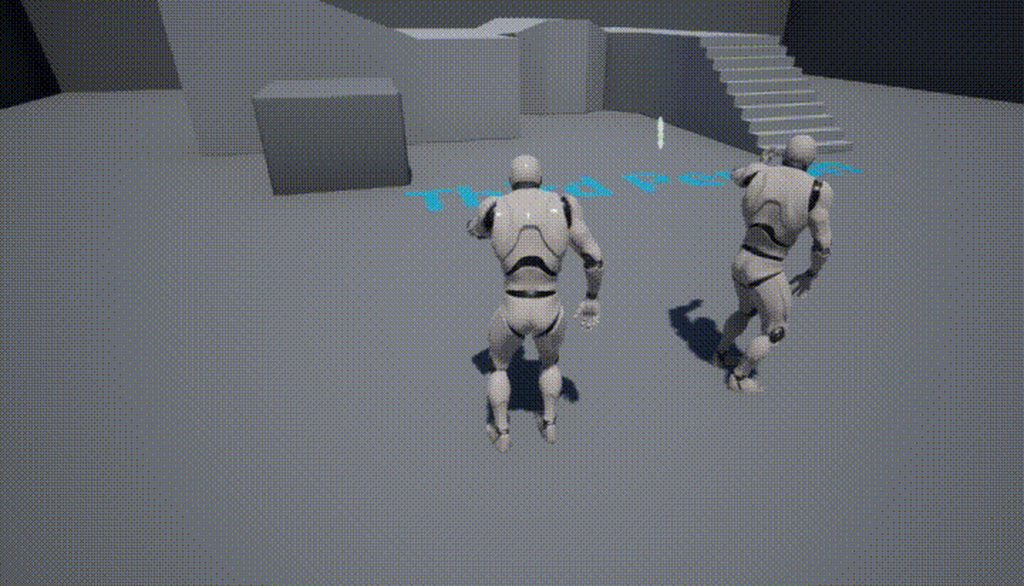 gentle solstice
So far, so good http://i.imgur.com/AknDAff.gifv
 quartz patrol
@gentle solstice Is procedural animations hard to learn?
plush yew
hi
 thorny iron
any of you cool fellas been dicking around with volumetric fog?
I'm wondering if there are ways to make a volumetric fog box - just a contained small fog volume
weary hull
yes, its contained in a box
weary hull
no, I watched a stream on it a week or two back
 floral heart
Not with the exponential height fog, but you can do it with particles. I'm not sure how practical an actual box would be.
thorny iron
found a bit of info on it but it's not too clear
well, I have a transparent cube that should be filled with fog, but limited to the dimensions of the cube
I've achieved this with instanced planes
was just wondering how I might use proper volumetric fog rather than hacking it together 😉
floral heart
Maybe you could just plug a boxmask into a material's opacity (with the 'volume' domain, obv), slap that on a particle and get a box. Or as precise a box as the fog resolution will allow.
 finite prism
does ue4 have problems searching for the windows 8.1 sdk if its on another drive?
radiant fable
haha @gentle solstice
first gif is how i film mcdonalds fights
anyone got perforce p4v experience?
i just got asked
Copy latest version of all mapped files to new root directory?
If your workspace view includes a large number of files, this may require considerable disk space.
randomly while having the app open and having already specified my ue4 project root and a 'workspace'
 viscid geyser
I mistakeanly clicked on x on my toolbar tab, clicking the toolbar button in windows does nothing, how do I get it bacK?
final stone
does anyone know which node in Blueprint I can use to hide an object when it's hit?
like a Set Visibility or Toggle Visibility node?
final stone
no, just as an example, I have a cube mesh as the root in a Blueprint, and chunks of the cube under the root
I have it so that when the player hits it, the chunks will fall apart BUT
viscid geyser
Ah
final stone
the root mesh is still visible for some reason ONLY when the player bumps or moves towards it
viscid geyser
Gotca
You might be good googling "UE4 How to make mesh invisable when triggered" or something
"...in blueprint"
viscid geyser
MOst likely someone already asked this
and it's sitting somewhere on the UE4 forum
final stone
yeah
 patent bane
apart from getting more ram and a better computer at all, what can i do to improve compilation time? (currently got 8gb of ram and around 4gb or more are swapped on disk.... at least windows says so)
 craggy nymph
Getting an SSD helps
patent bane
@craggy nymph lol I already have one
Why does everyone assume I don't.....
Also I don't mean hardware wise, I know what to upgrade there (or what I don't do anyway). I mean, are there any options that influence compilation significantly, eg more/less caching, etc etc etc
 oak saddle
Sup guys. Did Epic change anything with Material world displacement?
Trying to follow this ice tut. https://www.youtube.com/watch?v=sE64iTjnoUM
Me and a couple others are having the same problem.
It only works when you plug the VertexNormalWS and texture param section to World Position Offset.
Even then, it doesn't do as its supposed to(because its not displacement.)

Shameless. Ice! Twitter: https://twitter.com/Play_Ruff Patreon: https://www.patreon.com/deanashford Discord: https://discord.gg/gPnr339 Files: https://drive....
 tiny pier
What's the difference between foliage density and foliage radius?
 jaunty zephyr
Am I cracking up where has plane gone from the basic shapes
 floral lion
@tiny pier density is "how many objects in an area", radius is "how large each entity is"
tiny pier
Isn't "how large each enetity is" the scale parameter?
floral lion
how large it is for the foliage painting tool
tiny pier
I un derstood it to mean "how much space you leave before another one".
floral lion
not in volume
but rather in pigment chunks
mainly: radius is to keep objects correctly seperated
tiny pier
Sure.
tiny pier
The problem I'm having is that I have for example, tree1, and tree2. Tree2s are correctly spaced from one and other, and so are tree1s, but tree1s don't care about being correctly spaced form tree2s.
So there's no tree2s overlaping and no tree1s overlapping, but there are some tree1s overlapping with tree2s.
floral lion
iirc there is a setting to check for that beforehand
floral lion
something with overlap / collision
tiny pier
There's a collision setting, which I have set to blockall, but that seems to be more about the player not beign able to walk through trees, not a foliage painting setting.
floral lion
plus did you draw them simultaneous or single ?
floral lion
by separately i ment Tree1 on -> draw -> Tree1 off -> Tree2 on -> draw ...
would need to look into the engine for my settings to help you further
tiny pier
That's okay, this is enough for me to google around. Thanks.
 stark kestrel
Question about Profiler tool. Whenever I do performance test UE re-wrights log file on a device instead of saving new one which makes impossible to load several sessions to compare. Are there any settings for this tool?
I'm talking about 'stat startfile'
plush yew
Is 330 score in Unigine Valley enough for workmachine for UE4?
Pretty important question as my current machine broke
tiny pier
What's the most convenient way of translating 30 seconds of me running around playing in editor to a video file?
unreal sonnet
I use OBS to record the .flv and then drag&drop onto Youtube
tiny pier
OBS is a feature of UE4, or a standaone program?
unreal sonnet
OBS is a common program that people who stream on sites like Twitch or whatever use to stream their stuff.
It also has a "Record" button so you can record for making videos instead of for streaming.
Open Broadcaster Software, I think, is what the name stands for
tiny pier
I see, thanks
severe egret
@full maple would you mind helping me with a silly problem?
 full maple
i could try. whatsup
severe egret
I made an elastic camera attachment so that it "rubberbands" as the actor moves, but on play, I just get a black screen
The editor before 'play'
The editor during 'play'
safe rose
Step One: Destroy your Mac and convert to PC
vast pine
Hahahahah I was just about to make a Mac comment
safe rose
😉
Step Two: while @full maple and other Epic staff are on here, this is unofficial discord chat, you should ask the community first @severe egret instead of wasting their valuable time. Although since they are awesome they will still try to help out.
But each of them have their own set of skillsets, and not all of them actually work in the engine.
vast pine
So how's the camera attach to this actor?
safe rose
I think this is a tutorial
vast pine
I
safe rose
Probably one of the beginning C++ tutorials on the site
severe egret
Well that's so encouraging, isn't it? 😃
safe rose
@severe egret Just stating facts
Creating a spring arm and a camera.
Is this the tutorial you are doing right now?
...
You know it's the same one right kiddo?
severe egret
Thought you posted the first one
safe rose
And what I said is not an opinion, but truly fact...
severe egret
To destroy my Mac and buy a PC
safe rose
Unless you mean the Mac remark
Yeah, that's borderline fact
But, yeah just an opinion
Anyway
Can you post your snippet?
Doesn't do us any good without it really. Did you just CP it?
safe rose
@severe egret Are you just Copying and Pasting the code snippets?
severe egret
No, Victor, I am not copy and pasting the code snippets. I type them out manually because I'm actually trying to learn.
severe egret
I also did this originally in 4.13 and UE4 crashed upon build. Switched to 4.15 and I get the camera issue.
severe egret
I started the tutorial from the beginning again
safe rose
ok
severe egret
It's short enough that it didn't matter much
safe rose
Can you post your code snippet on here in proper form using x3cpp close it by using x3
crap
So, the tilde key has the other apostrophe looking symbol
use that times three
int poopie = 5;
APawnWithCamera::APawnWithCamera()
{
    // Set this pawn to call Tick() every frame.  You can turn this off to improve performance if you don't need it.
    PrimaryActorTick.bCanEverTick = true;

    //Create components
    RootComponent = CreateDefaultSubobject<USceneComponent>(TEXT("RootComponent"));
    OurCameraSpringArm = CreateDefaultSubobject<USpringArmComponent>(TEXT("CameraSpringArm"));
    OurCameraSpringArm->SetupAttachment(RootComponent);
    OurCameraSpringArm->SetRelativeLocationAndRotation(FVector(0.0f, 0.0f, 50.0f), FRotator(-60.0f, 0.0f, 0.0f));
    OurCameraSpringArm->TargetArmLength = 400.f;
    OurCameraSpringArm->bEnableCameraLag = true;
    OurCameraSpringArm->CameraLagSpeed = 3.0f;
    OurCamera = CreateDefaultSubobject<UCameraComponent>(TEXT("GameCamera"));
    OurCamera->SetupAttachment(OurCameraSpringArm, USpringArmComponent::SocketName);

    //Take control of the default Player
    AutoPossessPlayer = EAutoReceiveInput::Player0;
That came out weird
severe egret
// Sets default values
APawnWithCamera::APawnWithCamera()
{
    // Set this pawn to call Tick() every frame.  You can turn this off to improve performance if you don't need it.
    PrimaryActorTick.bCanEverTick = true;

    //Create components
    RootComponent = CreateDefaultSubobject<USceneComponent>(TEXT("RootComponent"));
    OurCameraSpringArm = CreateDefaultSubobject<USpringArmComponent>(TEXT("CameraSpringArm"));
    OurCameraSpringArm->SetupAttachment(RootComponent);
    OurCameraSpringArm->SetRelativeLocationAndRotation(FVector(0.0f, 0.0f, 50.0f), FRotator(-60.0f, 0.0f, 0.0f));
    OurCameraSpringArm->TargetArmLength = 400.f;
    OurCameraSpringArm->bEnableCameraLag = true;
    OurCameraSpringArm->CameraLagSpeed = 3.0f;
    OurCamera = CreateDefaultSubobject<UCameraComponent>(TEXT("GameCamera"));
    OurCamera->SetupAttachment(OurCameraSpringArm, USpringArmComponent::SocketName);

    //Take control of the default Player
    AutoPossessPlayer = EAutoReceiveInput::Player0;
Better than nothing, Discord doesn't have UE4++ syntax 😉
I made the mistake of downloading the new hotfix for 4.15 one sec
ha
It crashed as soon as I tried making a new pawn class
severe egret
😬
unreal sonnet
@severe egret based on your original screenshots, I think the main reason why it's happening is that you're not possessing the pawn. I noticed that in the second screenshot you had GameModeBase in the World Outliner. Maybe you need to re-compile your GameMode class and/or make sure that it's set to the world default as well as that your pawn is the correct class to spawn or whatever?
It happens to me a lot, too.
severe egret
I'm recompiling now, just in case
safe rose
So, I just did the first part
And it works for me
Autopossessed and shows the camera as intended
But yeah, you should definitely save and recompile after updating something.
unreal sonnet
As an alternative way of doing what you're trying to do, you could delete the pawn that you put into the level and instead of doing that AutoPossessPlayer line in the C++ thing you could just place a PlayerStart actor in the level and make sure your GameMode class/blueprint have that pawn you want assigned properly in the GameMode's class settings or whatever. That way it'll automatically spawn you in the thing and you shouldn't have to manually tell it to auto-possess.
safe rose
HotReload is iffy, but for something this basic, will work as intended
@severe egret When you get more experienced, you can try out newer things
But, for now, just follow along those tutorials
unreal sonnet
Also a good tip for diagnosing this problem in the future: when you do the test-in-editor like you're doing, hit that Shift+F1 thing to reveal the mouse and go up there and click "Eject". You go into a temporary spectator-like mode so you can fly around and check that you're actually possessing the thing you thought you were possessing as well as scroll around through the World Outliner to make sure all the proper class stuff spawned (like how earlier in your screenshot it said GameModeBase when it probably should've had whatever your special GameMode class was).
safe rose
Can you show me your header file?
severe egret
#pragma once

#include "GameFramework/Pawn.h"
#include "PawnWithCamera.generated.h"

UCLASS()
class HOWTO_PLAYERCAMERA_API APawnWithCamera : public APawn
{
    GENERATED_BODY()

public:
    // Sets default values for this pawn's properties
    APawnWithCamera();

protected:
    // Called when the game starts or when spawned
    virtual void BeginPlay() override;

public:
    // Called every frame
    virtual void Tick( float DeltaSeconds ) override;

    // Called to bind functionality to input
    virtual void SetupPlayerInputComponent(class UInputComponent* InputComponent) override;

protected:
    UPROPERTY(EditAnywhere)
    USpringArmComponent* OurCameraSpringArm;
    UCameraComponent* OurCamera;

    //Input variables
    FVector2D MovementInput;
    FVector2D CameraInput;
    float ZoomFactor;
    bool bZoomingIn;

    //Input functions
    void MoveForward(float AxisValue);
    void MoveRight(float AxisValue);
    void PitchCamera(float AxisValue);
    void YawCamera(float AxisValue);
    void ZoomIn();
    void ZoomOut();
};
 unreal sonnet
Yeah you can use Pastebin.com fyi dude
 thorny cipher
or gist
safe rose
Okay, so right after the first step @severe egret , did you make sure everything was working?
? @thorny cipher ?
This is intended behavior on Discord chat for programming snippets
What's the issue exactly?
I don't and no one else has to go to an external link
We can see it right here and now
severe egret
The build succeeded, if that's you mean. I also will CP the tutorial code and undo just to see if there are changes (like, I'll notice if a line looks shorter, it brings my attention to it).
@unreal sonnet yeah I've noticed that GameModeBase file appears only during Play
unreal sonnet
Probably, the issue is just some small dumb thing that normally gets overlooked or taken for granted. I'm sure it's nothing super big or hard to fix. Just an attention-to-detail issue.
Those are the most annoying to help people with sometimes because you gotta help somebody find a needle in the haystack so to speak
severe egret
That's what I was thinking. I could find any syntax errors, and the build didn't fail, it's just not working planned. I can see perfectly find through the camera view window in the editor, just not during play. It's like there's something spawning and blocking the view.
Actually, I have an idea! One moment
thorny cipher
I guess its ok if its small code but there is a 2k limit
severe egret
Never mind. I thought if I went through the World Outliner and set the actors to invisible one by one, I'd find the source of the problem.
severe egret
No, I can try it now
safe rose
Yeah, I don't have mine in that level, I had mine in the first blank level that was created automatically.
severe egret
So I made a new default level and dragged my PawnWithCamera class in, and I'm still getting a black screen on Play.
I think it might be best if I move on and come back to this later.
unreal sonnet
Yeah sorry dude, that really sucks
severe egret
It's fine, really. I might learn something later that will offer some perspective on the problem. Thank you, everyone, for your help.
vast pine
Isn't there a prob with Gamemode not taking effect until you close and reload editor
thorny iron
what would be considered a "crazy" polycount
its 100K too much for a main piece
for 1 mesh
craggy nymph
Not really. Depends on your scene though, and depends on LODs and depends on target hardware.
thorny iron
fairly simple scene. the ground below should be extremely detailed
I realize that gravel texture can mostly be normal info
but still want to see some geometry poking out
vast pine
Like a bump map?
thorny iron
ya i've got a strong normal going on
floral heart
Absolutely depends on target hardware. I wonder if anyone's done some tests. I'd figure pre-2015 mobile, 2015-2017 mobile, tablets, Macintosh pros, laptops, low-end gaming PCs, high-end PCs, would be the strata.
craggy nymph
Just use it as is and if you run into performance problems, optimize later. You're going to have a whole bunch of other areas for optimizations, before poly count is an issue.
floral heart
Oh VR. That drops a tier. Still, I don't think polygons would be too limiting a factor with that hardware. Maybe 1-3 million polygons for the whole scene?
vast pine
I sorta wonder but if this is the floor below you is it a very large mesh?
thorny iron
hehe
 crimson phoenix
If I have 50 guns and each has 5 variables ( rate of fire,barrel size ,no of bullets.....) Which is the most efficient way of implementing it in c++ unreal4
 arctic tree
Is there an easy way to force reset / delete users saved configs?
safe rose
@arctic tree delete saved folder?
arctic tree
thats asking people to delete it
vale osprey
@crimson phoenix make one master BP with those 5 variables and logic. 50 variations with different meshes can be done as child BPs or specific instances with configurable variables including mesh
 regal drum
Ok so this is what I have currently, how could I get the preview mesh viewable in-game?
Nvm I got it
 waxen tiger
how to ignore project version limitation?>
like i know it will work properly why it limits me?
waxen tiger
The asset '/Game/Blueprints/LevelObjects/GarageColumn_Blueprint' (GarageColumn_Blueprint.uasset) failed to save.
Cancel: Stop saving all assets and return to the editor.
Retry: Attempt to save the asset again.
Continue: Skip saving this asset only.
what can be the issue?
patent bane
can anyone point me to the source of the for/while blueprint loops (engine source) or are they layered soo deeply inside that one cant easily write its own custom loop node?
cause i want to write a node which uses the features of a loop but behaves a bit differently, i.e. having multiple output exec nodes and being able to send execution pulses to them (multiple times) from c++
waxen tiger
in short how to use construction blueprint?
i need to set color of the shader of nested object
should i do that in cs bp?
vast pine
What are you trying to do exactly
Construction script could be used to change a shader yes
plush yew
hi
please
I am updating steamworks sdk and I get this error
Steam SDK not located. Expected to be found in Engine/Source/ThirdParty/Steamworks/{SteamVersion}
and I downloaded the latest sdk v 1.40
made a folder named Steamv140
put inside all the files needed and renamed the steamv132 to steamv140 everywhere I guess
and in OnlineSubSystemSteamprivate.h I get this error
and in the beginning of this file I made these changes #define STEAM_SDK_VER TEXT("1.40")
/** Path of the current Steam SDK version in use */
#define STEAM_SDK_VER_PATH TEXT("Steamv140")
regenerated the solution files and I get this error
 waxen vine
Can anyone confirm this bug before I submit it? In blueprints, make a struct and try to add a curve float reference variable. Crashes the engine for me.
main cobalt
Is there any reason why rendering in 4k would make my postprocess depth of field effect stronger?
 rigid mountain
Hey guys, I'm having problems with connecting my Perforce client to my Digital Ocean Ubuntu Server
I keep getting this error: Connect to server failed; check $P4PORT.
TCP connect to failed. connect: WSAECONNREFUSED
This is the full error, where the * refer to the IP
I have run commands to allow port 1666 on the Ubuntu Droplet, but it's still not working.
I followed Allar's tutorial here, and I'm stuck at the 7:00 mark :
Allar's Blog
A common question with Unreal Engine 4 (UE4) is "how do you set up version control?" I think this is a very important question and if you have never used version control for your projects you are crippling yourself from the start. I won't go into details about why you
 fossil socket
not sure i like that tutorial that much from having a glance over it when you mentioned it in the other channel
recommended capitalised surname as username lol
and there's an apt repo for p4d
rigid mountain
I need help with connecting to the DO server from p4v. I don't know what the problem is, as I'm not exactly network admin savvy
'and there's an apt repo for p4d' - is that a bad thing? (I'm a complete and utter noob when it comes to this networking aspect)
fossil socket
sudo apt-get install p4d is easier for installing and upgrading than downloading something for FTP, unpacking it and copying it manually
links to a 2 year old release of P4D too
rigid mountain
Okay, you seem to know what you're talking about. Can you please help me fix it? Or help tutor me on how to to install perforce on hat server so I can create an online repository for my team (of which I have none yet - still working on that..)
*that
fossil socket
https://www.perforce.com/perforce-packages and it's helix-p4d for the p4d package
that'll actually be the latest version too
also for your actual issue, you need to login to the server and actually make sure the service is running
well, the daemon
rigid mountain
Yeah, but how do I install it on the Ubuntu's OS? I don't really have experience using command line interfaces, but hey, I'll do what I have to to make this work
I assume I'd need to run some command to install it. And before that, I'd need to download it to the Ubuntu OS, also via commands?
fossil socket
you probably should read up more on linux/ubuntu commands or find someone who knows how to do this
you can always continue with that old p4d release, not sure if it's vulnerable to anything
but finding out if the daemon is running is probably the first step
rigid mountain
Okay, let's do that. Um..how do I do that?
fossil socket
p4d
rigid mountain
No, that's not in the list
fossil socket
then that's probably why you can't connect
fossil socket
Allar's Blog
A common question with Unreal Engine 4 (UE4) is "how do you set up version control?" I think this is a very important question and if you have never used version control for your projects you are crippling yourself from the start. I won't go into details about why you
did you actually do this part
rigid mountain
Yeah I did everything up to the connection bit
Or which particular part are you referencing?
fossil socket
the part the link goes to
setting it up a a bootup daemon
sudo service p4dservice start
might work
if you've done this step
rigid mountain
I just did it
And it seems to be working!!
I don't know if I really did miss that step, but you're a genius sswires!
And I'm an utter idiot. Thanks again!
main cobalt
Yo is it possible to change specular settings on a decal so that it's shiny & reflective?
I've been trying to change it but not seeing any effect
I'm using translucent
main cobalt
Figured it out, my opacity maps were screwing thingas
polar hawk
@fossil socket you're right about thst tutorisl
When i wrote it, p4d was not a managed package
 sand elm
Silly little scene setup script for UE4 blender, https://forums.unrealengine.com/showthread.php?146045-Blender-UE4-Silly-little-scene-unit-setup-for-Blender&p=715163#post715163
 fossil ore
Is there a way to resize down a model in UE4 and apply the scale?
 vale silo
folks, what's that red line when looking at your level from the side view in the Editor ?
(red horizontal line)
 gentle ivy
that traces to the origin
its in the grid stuff
(at least I assume that's what it is)
it's hard to guess without a picture
if you look from the other side is it green?
vale silo
cuz when player walks down the slope of my terrain and crosses that plane, the game just stops
gentle ivy
that plane would represent the player going under 0 on the z axis I believe.
could you grab a picture of the line?
vale silo
one sec.. still loading UE4
vale silo
o.O
gentle ivy
messaged you on skype too
vale silo

the brighter red one
so if I lift up my entire scene above that line - I got no issues
but if my terrain crosses that plane and player walks down and touches it - everything stops.
At first I thought player gets stuck in the mesh terrain, but apparently it doesn't
gentle ivy
I do believe that is the origin line
but that's only what an artist told me once XD
I don't know of Epic has docs on the red line
vale silo
Ah, I think it's KillZ
vale silo
yep, that's it
vale silo
damn it.. I spend half a day re-exporting mesh and rebuilding level 😦
gentle ivy
damn
vale silo
the line represents it - if I move slider the line moves with it
gentle ivy
ahh cool very good to know.
vale silo
(if I change Kill Z value)
gentle ivy
so one of those is the Z kill line and the other is origin or do they both move?
or is it the line represented in 3D space so it has two edges?
hard to tell from the image
vale silo



 unborn cliff
So my game works fine when I run it in UE4 editor, but on packaging, it's gameplay seems to get glitched/not work at all
Could anyone possibly know why this might happen?
 buoyant mesa
hi does anyone know is there any way to see thumbnails from obj and fbx files in windows explorer? I already found fastpicture viewer to handle png and uncommon picture format thumbnais. Thanks
waxen tiger
@buoyant mesa for 2d files just install SageThumbs, it generates thumbs for most formats
for 3d you can use autodesk FBX viewer
buoyant mesa
well sage thumbs is nice and free but I kinda bought fastpictureviewer long time ago before I knew it and it works great with 2D images. I'll find this autodesk fbx viewer and try it out thanks for the tip 😃
waxen tiger
with sage thumbs you dont have to open files to see them
buoyant mesa
yeah fpw does same and that is what I want for the fbx and obj file as well to see them in folder
waxen tiger
huh didnt know, thanks
about the 3d thumbnails, never ever seen those
ive seen them for 3ds, max, and .ma formats
they are made when you save the scene
buoyant mesa
yeah also .blend files show thumbnails in folders but I have yet to seen anything that could show fbx and obj thumbnails
waxen tiger
btw there was a solution we did for such cases
what is your task with 3d thumbs?
like previewing and operating all assets in project?
buoyant mesa
I would like to see a mini preview of my works inside folder right away without opening them in blender
sometimes naming isnt enough specially if I have multiple versions of same work
waxen tiger
yeah for that i cant realy advice anything
in unity you can easily preview all meshes right in editor
so we never had any issues like thath
buoyant mesa
I suppose there is no way for it currently even internet agrees with me xD
waxen tiger
i guess what you could do tho..
actually i could possibly do such thing
bat macros for explorer context
launches blender or unity, makes a snapshot
puts an image alongside the model
buoyant mesa
hey that actually sounds like a good idea
waxen tiger
i dont know blender tho, but its python should be simple, but it doesnt support everyhting..
oh the complexity..
i cant cant do it now, no i feel the hours poured into it
buoyant mesa
no worries I can live with it I was just wondering nobody has done it yet 😃
waxen tiger
probably due to complexity, and no "clean" solution
complexity from all the formats that needs to be supported and maintained

tool for some weird format
all i found
buoyant mesa
nice its a start, I'm not alone with this haha xD
 tight talon
does the Frame rate go up to 60 or more during a
Normal Gameplay when the software is not on?
tiny pier
Let's say I have a level with a landscape and 100 trees on it. Then I double that to 200. Which resources does this effect, and what kind of performance is effected? Does this make clients fps drop? What if those extra 100 trees are completely out of sight? Does it require a more powerful server?
 eager blade
For an inventory system, is it common practice to store the properties of an item in a struct separately from the world representation (actor) of that item? Or is it better to just load all items in as actors and hide them until they need to be present in the world?
Some of my items will have quite a lot of properties, and will be running a lot of math on them every tick so I was wondering if constantly reading many properties from a struct rather than just having them in the actor could be a problem.
 undone harbor
Are you guys aware of any good "Tip of the day" facebook groups or twitter for UE?
sage stag
Hey folks, is there a surefire way to get values from behavior tree tasks into blueprint/event graph for animation? I want to be able to pass a boolean value from a BT task to blueprint to initiate an "is walking" variable that feeds into animation
 keen birch
@eager blade I don't know, I've wondered the same thing, but so far I've done just fine keeping everything on the actual actor instead of a separate struct
 supple minnow
Hey guys! Could you sell me on unreal engine 4? I have experience with unity, and was thinking about switching. Has anybody worked with both?
 craggy charm
Yes
Start with Blueprints
cause C++ in Unreal is not something you start that easily
Make lots of blueprints, understand what are actor blueprints, animation blueprints, level bluprints, .. etc
Then after try converting your code from blueprint into C++
gentle solstice
ArGh. Screw Nvidia. Why do I have to get some fork of the engine source just to have VRWorks Audio integration, instead of a standalone plugin?......
They even have the nerve to call it a "UE4 game engine plugin"........
supple minnow
@newt#7215 I actually enjoy the structure of c++. I just really hate visual studio. It really is a big dealbreaker for me, as I'm more of a programmer, and I can't wait 3 seconds for auto complete to check the whole engine for changes.
Do you know if there's a solution to that?
 near kayak
does anyone know any good resources for learning c++? right now im using solo learn which is good but it doesn't really explain what are the real world uses for the things you learn
 tame token
Hi all Hey Twige try Udemy Learn C++ making games in Unreal course it might be like $200.00 buck right now because the sale just ended but if you wait for the sale it is like $10.00 buck's
near kayak
thanks, ill look out for the next sale
 cursive dirge
@tame token @near kayak nah, they almost always have some campaign or code around, for example this months coupon is FULLMUDEMAY
it's 15€ here with that code (so probably $15 if bought outside of EU)
 copper rose
I am having issues compiling my project. By the looks of it it might be a perforce issue but I am not sure. I get the following error exited with code 5. Please verify that you have sufficient rights to run this command. for my .uproject file. I actually have it checked out from perforce and I have admin privilages.
 clever basin
hi guis
So, anyone heard of WorldofLevelDesign? I'm using his tutorials as a place to get started
 tall pendant
yeah WoLD is a good starting point
merry gazelle
When I place an actor in landscape/geometry the object seems to rotate along the surface (not vertically straight). Any idea what setting I need change?
plush yew
does anyone know why the menu anchor widget closes itself automatically when the window looses focus?
 gritty path
@near kayak I would honestly suggest that to learn C++ you learn actual C++ first.
Best book for beginners is "Programming: Practice and Principles using C++" by Bjarne Stroustrup (C++'s creator).
Then "Effective C++" and "Modern Effective C++" if you want to go more in depth.
Not all of this applies to UE4 C++ as it is a very weird garbage collected dialect and it has its own standard library, but I feel it's necessary to understand how C++ works to use it properly.
cloud cobalt
@gritty path Also, UE4 uses recent features of the language
gritty path
Does that contrast with what I said?
plush yew
What do you recommend I do for my first project?
cloud cobalt
A simple one ! Are you more of an artist, programmer... ?
plush yew
Neither, but I'm alot more of an artist
tall pendant
What Stranger said. plus it really depends on your current skill level with ue4.
vast pine
Pong is the best first game
tall pendant
so you're very new to ue4?
plush yew
Very new
tall pendant
Or an small 1 Room escape game. To learn about some basic Bp's while using your own art assets.
vast pine
¯_(ツ)_/¯
cloud cobalt
"Walking simulator" type games are also an obvious choice for artists
tall pendant
Yup
cloud cobalt
They're also generally good starting games because you can have something playable quickly and then expand upon it
tall pendant
that's exactly what i had in mind with that 1 room escape thingy. It's something you can get quite quick to a playable state, but also can be extended in the future.
tiny pier
I've got a png heightmap, and I know it represents an area 4km by 4km with an elevation of 400m. When importing using the landscape tool, how can I make sure it conforms to these dimensions?
languid shard
@cloud cobalt I bet it was a joy to work on "The vanishing of ethan carter" as an artist
pretty good "walking simulator"
buoyant ridge
is there a way to use swarm agent for light building without having to install UE on client machines?
 buoyant pine
Hello Everyone! I'm trying to make that camera ignore the player mesh, to just visualize the gun.
Best aproach?
 cobalt scaffold
hide the mesh when you switch to that camera ?
buoyant pine
I want it to be captured by Render Targets
floral heart
First person shooter example accomplishes this, look at how they did it.
cobalt scaffold
unhide the mesh before render target drawing ?
 spice urchin
Izaya maybe use First Person starter project instead of 3rd Person?
i hope that doesn't seem like a jerk thing to say
 zinc crag
Hi there, I'm having a lot of trouble getting unreal engine to work. The launcher opens for me but every time I try to launch the editor, it will attempt to for a few seconds and the launch button will turn grey but then it won't launch anything and turn yellow again, no error message. I tried downloading the newest version of the engine but that one doesn't work either. I've tried googling my issues but the fixes were either not applicable or didn't do anything. Have any of you experienced similar problems before?
spice urchin
yeah i think that's something with the UI there. it basically own't let you launch editor unless there's an existing project
it won't just let you start from zero in an easy way
if you get a project added and then have it open with a specific engine version i think it'll be OK
zinc crag
I have a few projects, how do I launch them separate from the menu in the unreal launcher?
spice urchin
you probably have to hunt down the editor file in the project folder for that specific project
what version of of Unreal are your projects and what version of Unreal does your launcher say you have installed?
zinc crag
I have Unreal 4.13.2 (which most of my projects are) and Unreal 4.14.3. I tried launching both but neither worked. I also tried downloading 4.16.0 which downloaded fine but won't open either
vast pine
Have you loaded them up in visual studio to see what errors you get or strictly launcher stuff?
Need to see what type of errors come up when trying to load
zinc crag
I've just tried to open a project through visual studio and it let me launch the unreal editor but it is stuck at Initializing 0% .
Where exactly could I find these errors?
 honest vale
hah, someone is reselling marketplace assets on forums for 80% cheaper https://forums.unrealengine.com/showthread.php?146226-Landscape-Automaterial
(yes, reported)
oh it was deleted already, that was fast
zinc crag
The problem seems to be that it can't find the file UE4Editor-D3D11RHI.pdb , and then "UE4Editor.exe has triggered a breakpoint"
digital anchor
does someone know how to fix the file manager, im getting super mad at this, if i delete from the editor, it wont delete from explorer, if i try to delete from explorer, it says its still open on editor, everytime i want to delete something i gotta close the editor and delete from the explorer
tbh i didnt update to 4.16 i should try
 fiery harbor
is the right place to ask stuff about sequencer?
there doesn't seem to be a better fitted channel
floral heart
When in doubt, general.
fiery harbor
I haven't used sequencer much, so I'm probably asking simple stuff. I'm just wondering how to capture a video with sequencer without sequencer restarting the game for capturing the video
so currently I have my level with a sequence and a camera setup, then I hit simulate, wait a bit for the level to load everything, then I add keyframes for the camera in the sequence
and then I can play the sequence and see the camera moving correctly
but once I try to render that as a video, the game seems to restart
so I'm no longer in simulate but a new game window opens
and I don't want that, I just want it to play the sequence and render that as a movie
so how do I achieve that?
vast pine
Regenerate project file?
fiery harbor
@vast pine was that an answer to me?
zinc crag
ah thank you, I've been googling with the the error is it gave and am currently trying to uninstall and reinstall everything. That wasn't the only file that was missing. Thank you for your help
vast pine
Coolness
As for the render scene capture that ive got no experience with sorry @fiery harbor
fiery harbor
well I didn't ask how to render a scene capture, I asked about rendering a video with sequencer 😄
sounds similar though
vast pine
Haha yeah. No clue bandaid method would be to use something like obs to just play it out and likely be terrible haha
fiery harbor
yeah that would be terrible
I guess sequencer is still relatively new so not many people have used it?
cobalt scaffold
why is the new window a problem for capturing a video ?
fiery harbor
@cobalt scaffold well the issue isn't a new window, the issue is it restarts the game, so in that new window the game starts from 0 again
fiery harbor
@cobalt scaffold what do you mean with I can specify "where" the rendering starts?
cobalt scaffold
4.16 added new events for actors, before .16 you could only fire level bp events, which you need to run the game for them to have an effect
you can start on frame 100 for example
so you dont need to re-render the whole sequence if you make an edit
fiery harbor
but it would still restart the game for the capture. and that's what I don't want. my level is empty in the editor. everything in the level is procedurally generated, randomly
so I need to simulate, see what's where, then place camera keyframes and then render it
cobalt scaffold
interesting
well if it's random and you can't make it predictable then i guess you could make a spline bp which you can edit at runtime
add camera points and do the animation at runtime
each frame saving a screenshot and later render out a video
or max out the the window and do a screen capture ?
fiery harbor
I want to be able to render it in 4k or even more
so I need the "offline render" capability of sequencer
cobalt scaffold
well, you guys never make it easy on yourselves do you
..how hard would be to seed the generation ?
cobalt scaffold
ok i opened up the sequencer
under general there's a setting "create temporary copies of the level"
this might do the trick, i dunno, worth a try ?
fiery harbor
that will extremely likely try to serialize the level (like if someone would hit "save"), which isn't possible in my case
cobalt scaffold
do a mouseover to get a desc
if that won't work i guess you'd need to make it predictable and make the seed fixed while you do the sequence
maybe someone more knowledgable knows a way
fiery harbor
well it is predictable enough actually
but I would still like to be able to move around in the editor and find where I want to place the camera while I'm in simulate and then directly render it
its really annoying to basically manually copy paste the camera keyframe locations somewhere
I guess sequencer is not designed for runtime generated stuff...
cobalt scaffold
well if you manage to generate the same results twice (when you simulate and when you run the game), i don't see why you couldn't simulate, keyframe, then render out an offline version
keyframes are remembered when you stop simulating, you only need your generation to make same results
fiery harbor
the keyframe locations of the camera seem to be in a different space, its not world space
so if I pilot the camera in simulate, add keyframes, the transform the camera has in sequencer is very different from the real world space coordinates of the camera
the camera transform in sequencer doesn't update at all if I move the camera while I pilot it
while in simulate
it stays at 0/0/0
cobalt scaffold
hm
i'm testing on a blank level while in simulate i place a few keyframes, stop simulating
then render out and it's the same animation
fiery harbor
hm, interesting
so when you simulate, you pilot the camera and then when you move the camera you see the transform update live in sequencer?
fiery harbor
what engine version?
cobalt scaffold
i have the spawned checkbox ticked on camera
fiery harbor
I just tested in a new level and there it seems to update
so I guess I did something wrong when I set it up in the first level
cobalt scaffold
try a fresh sequence see if it's the same
fiery harbor
I think just reloading the level seems to have fixed it
I should have tried that earlier
thanks for testing that, if you wouldn't have told me it should work I would have never tried again and manually copy pasted it forever...
cobalt scaffold
nice