#ue4-general
1 messages · Page 66 of 1
 vale osprey
annoyingly when you move center of the mesh you can't snap to vertices of the same mesh...
 plush yew
when is 4.16 intended release?
 livid lantern
I just uploaded the plugin on Gumroad, Itch and Sellfy (but Sellfy is currently verifying my account because it's new). Here are the links:
https://vladserbanescu.itch.io/uworks
https://gumroad.com/l/Bvwlc
 plush yew
@livid lantern what is this
lol
how is that any diff
from AdvancedSessions lol
which is free
livid lantern
It's not an OnlineSubsystem, it's the entire Steamworks SDK, with 700+ functions in C++ and BP
Basically
plush yew
lol
livid lantern
It's got nothing to do with AdvancedSessions
plush yew
lol
 worn granite
you laugh but have you seen other "BP things" on the marketplace?
Not the biggest stretch I've seen
plush yew
oh ive seen
tons of crap on there
i mean like
i feel like these things could be gotten from some sort of rest api
i feel like steam probably has a REST API
where u can post json requests...etc
 halcyon marsh
hey guys i have a little question how to get the forward vector of a hit location of an line trace by channel please ?
i take the hit location then i add a vector 0,100,0 but it change when i rotate
 cunning stump
Hey guys quick question, does anyone know if it possible to either 1. allow a material to have instances, but a way to not show its implementation, or 2. hide the material to be visible from content browser, however will show when setting material instance parents?
 heavy saffron
What's the console command to change game / simulation speed? Similiar to how you'd do slowmo.
 autumn haven
Does anyone here sell UE4 assets on Gumroad? If so how is it?
 fossil socket
@plush yew what are you talking about, it's a plugin that integrates the actual C++ steamworks SDK
it's not a wrapper for the web API

and it seems that these classes are nearly 1:1 to the steamworks equilvilents, just an unnecessary layer of abstraction
- being able to get steam avatars as UTexture2D
since this doesn't use OSS, it might not be that useful for games targeting non-steam platforms (eg. consoles)
 fierce tulip
@autumn haven sells like shit, even when promoting it.
im making more with my free content, then my other paid packs
vale osprey
@fierce tulip it will get even better when "whishlist" will be added, so people will be buying mostly during sales, like how it is on steam
fierce tulip
hope so
 tranquil bone
Does anyone know how to make an equipment system where you right click an item in your inventory and it will create a widget that has two buttons "equip" and "un-equip" and on the equip button it puts the item that you have righted clicked in to its slot that it is supposed to be in
 vale cloud
@halcyon marsh don't you want the Impact Normal instead? https://docs.unrealengine.com/latest/INT/BlueprintAPI/Collision/BreakHitResult/index.html
 lone fulcrum
FYI: My Linux dedicated server kept crashing yesterday with some weird message (Detected negative delta time) - it does not reproduce on Amazon EC2 Linux instances. It only happened in Azure. I did not test too many different templates/distros/etc.
halcyon marsh
@vale cloud i dont realy understand how it works
vale cloud
@halcyon marsh it gives you the normal of the hit face ( a vector pointing away perpendicular to the surface)
 dull bolt
can someone help me with something
im trying to import an unreal engine level model to blender, but the levels are all split up into a bunch of pieces. is there an easy way to import the level model, without having to manually import each psk file, and then map the textures
halcyon marsh
@vale cloud which one of the two directions will be the normal result for this case ?
vale cloud
first one (I'm not 100% sure if the impact normal really returns the normal of the face that was hit, but if it does, yeah, it's the first one)
 halcyon marsh
@vale cloud ok i see but if i want it like the second image i have to multiply by 0.5 or what x) ?
vale cloud
@halcyon marsh vecctor math is not my strongest thing, sorry 😦
maybe someone more knowledgeable can help?
plush yew
@fossil socket yeah i already figured it out though, thanks though
hey guys how can i set the graphics down?... its laggy now i have fps drops.. i would love only to render it on low specs if its possible
livid lantern
The UWorks plugin is now also available on Sellfy: https://sellfy.com/p/TciQ/
Thanks to everyone who purchased it so far! I hope to hear your feedback soon! I'm extremely curious to hear if there's anything broken, hard to use or whatever justified negative criticism you may have! Enjoy!

- Who is this product intended for?UWorks aims to reduce the workload of any developer who wishes to integrate a part of the Steamworks SDK in their Unreal Engine project. The plugin was designed to simplify the development process, regardless of the your choice of workflow and/or skill level. As l
 main lotus
Just dropping this here. Maybe anyone could use it 😃
 safe shoal
Anyone else locked out of their Epic Account right now?
Can't get into anything, password reset email had expired or didn't work. Now I can't install the frigging engine
 trim trail
What happened? I opened just now and realized grid size is too big. How to revet it back?
hmm changed grid size in right top corner, dunno why it was set to 10k
 burnt drum
I'm getting a super weird problem in rcecent build of my game
i'm hoping someone encountered this before
when i run any kind of 'STAT" command on console.. the entire game halts to about 2-3fps
Stat ui , stat game , stat startfile
anything
this is extremely strange and i'm clueless about what's going on
 torpid hedge
im trying to package a really simple game with just one actor and light to test the packaging. i disable most of the plugins since they wouldnt be needed but im getting errors that files are missing from those plugins when i run the game
why?
im running ue 4.15.2
 cursive dirge
you should be able to disable those if you don't use those feats
I haven't tested on 4.15.2 but pretty sure it worked on 4.15.0
torpid hedge
yeah, packaged game reports those plugins are missing files, like wtf
and i have disabled them, so they shouldnt be included
it's cooking paper2d while it shouldnt
weird
 regal mulch
@safe shoal Yeah, quite a lot of people did
Me too
If the code expired, just go to "Forgot my Password"
and then set it up there
safe shoal
ok cool, thanks man
 undone harbor
Hi people, I were wondering, how often do you find yourself using the built in Game Framework included into Unreal?
Is the Game Framework just a good basis for prototyping which you should stray from when upscaling your game?
 glossy zenith
hey. was trying to get particle effects going in game but they stopped showing up in the runtime viewport. they work in the level designer. anyone got random things to check ?
 spark lotus
 torn garnet
Does anyone know how to get the engine to support a resolution of 3440x1440? When I type r.SetRes 3440х1440f in the console of a packaged game it crashes everytime.
21:9 aspect ratio
 pure gorge
Hey guys,
Do you know why on the Epic ShooterGame example, the Loading Screen is on a separate Module ?
 civic fern
Not sure which channel this should be in, but I have a question regarding animation that's done in the timeline? I believe that's what it is called sorry still new to this
 thorny cipher
safe shoal
thorny cipher
safe shoal
@glossy zenith Is it using GPU particles? There's a major bug with them in UE 4.15 and 4.16 at the moment that renders them basically unuseable
fierce tulip
O_o have zero problems with gpu particles in 4.15 myself
safe shoal
@fierce tulip this is the bug: https://forums.unrealengine.com/showthread.php?144349-Can-no-longer-set-Fixed-Relative-Bounds-for-Particles-in-4-15
Oh that's interesting, there's a response on my answerhub which says it's a cascade tool issue
fierce tulip
odd though, doing loads of gpu shit in 4.15 and havent had any issues with it
safe shoal
Apparnently if you use the drop-down to set fixed bounds, it works fine. But if you use the checkbox in the details panel it breaks
gonna test this now
fierce tulip
i always set the fixed bounds first, because it results in not having to reboot ue4 to make bounds work properly
safe shoal
definitely a shitty workflow issue there
fierce tulip
fuck yes
but well "niagara"
there is also a bug where if you set a checkbox and press spacebar to restart emitter, it unchecks/checks the checkbox each time you press spacebar
 tall pendant
sigh reading that... I still think an "stability/bugfix" release would be more appropriate than new feats and the recent focus on vr ... oh well we can't have everything.
safe shoal
Problem is because Cascade isn't future proof, they're not really fixing it much anymore. So anything that gets modified for niagra ends up fucking up cascade
I like cascade. Was kinda hoping the new Niagara would be it + lots more functionality
torpid hedge
im having a weird problem with 4.11 and 4.12, when i create a new project, i cannot switch if i want to include or exlude the starter content or switch the quality setting
safe shoal
Not seen that before
torpid hedge
and content browser is not working correctly either, i cant right click to bring up the menu or interact with it, both are fresh installs
safe shoal
Did you download the starter content with the engine? It's an extra option now (true by default)
safe shoal
sounds odd, not sure on that one
torpid hedge
would you happen to know why my 4.15 packaged build is crashing due to missing plugin files even when i have disabled them? paper2d and vehicle physx plugins
i wouldnt need them in my game so i disabled them
safe shoal
@torpid hedge what Windows version you using? https://forums.unrealengine.com/showthread.php?142816-Potential-issue-loading-UE4-with-the-new-Windows-10-Creators-update-(build-1703)
fierce tulip
well, im fine with niagara being node based instead of module based, but I hope its viable to use from the getgo, and not have weird stuff missing or bugging out
torpid hedge
i have win 10 build 1703
plush yew
Hey fellas, does anyone know if there is an easy way to get a solid level background color? Like in Unity where you can set the camera to clear the screen with a solid color of your choice.
safe shoal
Nah, you just have to have a flat skydome or something
glossy zenith
@safe shoal yeah both cpu and gpu particles do the same thing. We are running a dedicated server too, but a fresh project doesnt have the same issue, so many tears to be shed.
( re particles not showing up at runtime )
 eternal gate
Might be the wrong place, but quick newbie question: My understanding is each level should be limited to roughly 20km for floating point accuracy, if I wanted to make a 3km mesh for a space asteroids type game would that be possible? Assuming not high poly. Or would it need to use a scale down?
glossy zenith
I'd have assumed you would want to cut that up
the 20k is for positioned elements, not elements that span that size.
also noob so dont quote me on that
eternal gate
Just trying to understand limitations for stuff. Thought was that it could be a large (relative to player) asteroid or such thats dynamic. Might be a bit too large tho lol
 primal edge
 pallid compass
Can you vertex paint landscapes at all?
 coarse loom
I'm having a weird issue where trying to select a material for a static mesh from the dropdown opens the Save As for a new material instance constant instead of giving the material list
Has anyone else encoutered this or know why it's behaving this way?
Hmm, nevermind. It looks like the click press is opening the dropdown, but the release click is hitting create new material instance right away. If I hold the click it avoids clicking the create button
pallid compass
anyone know why this wouldnt render?
 soft garden
Hi guys! i made a full blueprint project and i have to localize my game with the Localization Dashboard. There is a way (mayabe a node) to change Localization at Runtime without C++? Thanks!
 zinc pond
Hello, is there anyway to have a 3d mesh data of the city from other project and make the mechanics in one project and without combining the projects be able to run it as one game exe
 sterile cairn
Anyone have an idea as to why demorec is not saving any replays?
 kindred marlin
😦
 humble sun
@pallid compass have you painted anything?
pallid compass
i fixed it
Does anyone know if you can vertex paint on something you are tesilating?
 long blaze
Where would be a good location of knowledge on how to get a shmup game developed in UE
Example: 1941 arcade game
 ashen brook
check out the twin stick shooter template and the twin stick shooter example game
then cut away functionality you don't need
long blaze
Thank you
 versed pawn
Urgent! I am working on a demo project so I can apply to a game studio in two weeks, so I would need someone who is pretty good at solving lighting problems please. I would be very thankful if someone would offer. Thank you!
fierce tulip
so this would basically be a "show me your nda, and ill show you mine?"
 languid shard
🤔
fierce tulip
if you signed an nda you should have access to a special board
where you can ask all them questions
in general though, the ps4 just runs ue4 and ue4 does instancing
there are a few limitations, but in general if it runs on your pc, itll run on ps4. how well.. that depends on the project hehe
 thorn notch
We currently have a problem with too many draw calls. Currently it seems that instanced objects (grass and trees) are not being culled. Using some 'profiling tools' it seemed all the render calls were just generic draw calls
So that's why I asked
fierce tulip
yea, that sorta stuff is mostly for the nda board things.
fierce tulip
hmm @maiden swift an nda-channel for ps4/xbox/switch perhaps? XD
cursive dirge
that wouldn't work though
fierce tulip
i know
cursive dirge
how could he even verify that?
 maiden swift
@fierce tulip Can't happen. No way to verify and it would essentially be pointless.
fierce tulip
good faith, and wonder how everything gets leaked hehe
cursive dirge
I signed all possible NDA's
fierce tulip
points at the XD
cursive dirge
let me in 😃
fierce tulip
Y U ALL SO SERIOUS
thorn notch
Eitherway, is there a way to do foliage and trees properly? Since culling doesn't really work well on instanced objects
While they're still just 1 draw call, it still impacts performance
fierce tulip
I dont recall having any issues with RR and culling/batching/instancing/drawcallstuff
thorn notch
I just joined this project, doing the optimization
around 1200 draw calls..
Averagely 900
Instanced objects don't get culled, which are around 40-50 pretty high detail trees
a lot of grass
fierce tulip
instance in smaller groups
thorn notch
Will try it out
It seems a lot of time is just spent on GPU queries as well for occlussion culling
no clue how to fix that, even after intensive googling
Obvious result is to reduce draw calls, but if culling doesn't work properly it feels a bit like a circle
fierce tulip
hlod should also help, and sometimes I'd just export a bunch of meshes that are a dozen or more drawcalls and reimport em as one mesh. (though did that back in udk)
cursive dirge
you said pretty high detail trees...
why are they not LOD'd?
I mean, if they are further away, they wouldn't be that high detail anymore, righ?
thorn notch
yeah true, need to check it out
fierce tulip
<_< the rad rodger trees are about 10-25k each, no lods. (since sidescroller) run fine :p
cursive dirge
@fierce tulip yeah, because you always viewed them from same distance :p
points the obvious
fierce tulip
THATS WHY I SAID SINCE SIDESCROLLER! (mandatory no caps to not make nick angry)
cursive dirge
did the trees have backsides?
vale cloud
trees whith backsides? 😮 what has the world come to ...
fierce tulip
:p
 ebon snow
Does anyone know if typically a CharacterMovementComponent is used for most games?
Or is it better to leran how to move things yourself?
For instance, in Unity, I never used their CharacterController, doing Raycasts/detection manually.
safe shoal
If you're making any kind of Biped movement, use it.
Saves you a lot of trouble, and it works
For any online / multiplayer game, it saves you a lot more trouble.
ebon snow
Ah thanks.
How about for, 2D movement, say if someone was making Mario, or Megaman?
Still suitable?
ebon snow
Ah k. Yea, the character movement stuff in Unity actually rages me out.
safe shoal
Character Movement is suitable for 2D Movement (you can constain movement to various planes).
ebon snow
Ah great, thanks.
plush yew
Guys, Udemy (the online university) is selling the UE4 approved-by-Epic course for 10EUR/USD instead of 200EUR/USD --> https://www.udemy.com/unreale4/

Udemy
Epic Games-Approved: learn the Unreal Editor, master the gameplay framework, and use Blueprint to program without coding
fierce tulip
its always 10 euro
its a fucking ripoff thing udemy always does
OMG ONLY A FEW HOURS LEFT MUST BUY
its always discounted
the counter is fake
also, fuck udemy
languid shard
umad ? 😄
fierce tulip
(regardless how well that course is made)
yea, because they fucking hire spambots to spam our ue4 fb groups with that bs dozens of times
OMG ONE DAY LEFT ON DISCOUNT
no you ffin bots, stfu with your lies
languid shard
x)
tall pendant
Yup. udemy courses are at 90% in 9.5/10 cases
fierce tulip
and people keep falling for it and spamming the fb group as well
or.. in this case.. discord
tall pendant
hehe 😛
 low snow
but is it worth to get that one even tho it's always on 90% discount ?
im a beginner, and need somewhere to start with UE4
@fierce tulip
looks pretty good
thorn notch
Is there a way to find out specific labels in the unreal front end tool?
find out about*

I'd like to know what these things -exactly- mean so I can think of some proper strategies instead of shooting a shotgun and hoping I hit
Metaphorically speaking of course
Eventually figured out to go through the engine source code and find responsible functions, see what's exactly happening. Not sure if there's a better way
plush yew
umad @fierce tulip ?
fierce tulip
more sad you fell for it
plush yew
I bought the UE4 thing @low snow, let you know if its any worth. As @fierce tulip says, maybe I got pwnd..
fierce tulip
the course itself is good, its just udemy fucking you with its fake discount
tall pendant
wait.. he didnt said its not worth the money
fierce tulip
^
thorn notch
Udemy always has 100 sales a week
I don't think I see a period in Udemy where they don't have sales
low snow
@fierce tulip thank you. @plush yew thank you
vale osprey
I'm subbed to about 20 courses on Udemy
vale osprey
most of them do have value of more than 10$ but that's what Udemy asks for them
thorn notch
A lot of creators leave, because udemy pretends the courses are worth more than 10 (which they are)
And then they are "Exclusive sale 1000 dollar courses for 10!"
Which is how they got me initially
fierce tulip
^
yea, and they even tell authors they are going to sell it for 100+ or 200+
and then always have it on discount
fucking authors over
thorn notch
Yeah, the platform only works if you sell en masse
Would there be demand for directx12 multithreaded tutorials?
I don't have the time now, but I have been thinking about making some for a while now
vale osprey
mmm, who uses DX12? 😄
low snow
it's sad for the people using a lot of work to make a tutorial and then end up selling it for candies. but it's a good start for people without a lot of money though
languid shard
Vulkan + SteamVR gimme gimme
thorn notch
In general I think there is a lot of lack in the multithreaded rendering market
In regards to content
vale osprey
sheck steam hardware survey, people with dx12 are minority
and it might stay like that till Win11
or what ever it will be called
languid shard
most "mainstream" gpus are DX11 level anyways
tall pendant
We'd need full Vulkan or dx12 support in UE4 first hehe
vale osprey
most of the win10 installs - are not DX12 capable because they are on integrated cards
tall pendant
afaik both are still in development
languid shard
is it fully compliant with DX12 though ?
vale osprey
@thorn notch heavily doubt it, 970 came out last year, it will take another year or two for it to become really common
languid shard
"Direct3D 10.1 introduces "feature levels" 10_0 and 10_1, which allow use of only the hardware features defined in the specified version of Direct3D API. Direct3D 11 adds level 11_0 and "10 Level 9" - a subset of the Direct3D 10 API designed to run on Direct3D 9 hardware, which has three feature levels (9_1, 9_2 and 9_3) grouped by common capabilities of "low", "med" and "high-end" video cards; the runtime directly uses Direct3D 9 DDI provided in all WDDM drivers. Feature level 11_1 has been introduced with Direct3D 11.1." from wikipedia
vale osprey
steam hardware surveyy shows how all the latest or even 1-2 old hardware is just not more than 10% of installs
thorn notch
@vale osprey saw a wrong graph then, my bad
Still, knowing how multithreaded rendering works is very useful as graphics engineer
vale osprey
for sure
vale osprey
what are you splitting in it into threads?
thorn notch
Well, to test the waters I wanted to divide the render passes I had in my framework
So I had a post fx pass and a normal forward/deferred rendering pass(was toggleable)
So in dx12 you have command lists and command allocators
You want to have 1 of each on each thread
Every thread filled in a specific render pass, and I was planning on making an elaborate linking system based on a presentation from the folks at Arkane Studio
Since you don't accidentally want to do post processing whilst nothing has even been rendered
vale osprey
exactly, this is why I'm asking what exactly can you thread there?
you are not going to do your light pass before g-buffer is filled
thorn notch
You thread the command recording
thorn notch
So basically
When you say in dx11
Set this, draw this etc
In the background it fills it in command lists
These command lists are as the name implies. A list of commands
Problem is: your main thread calls these things, and directx11 needs to manage these things in the background
These command lists can be recorded on CPU, and then sent sequentially to the GPU
So you can already set the state of all the passes, then submit them to the GPU when ready
vale osprey
mmm, so what is actually threaded?
thorn notch
Every thread fills in a list of commands
So the commands in essence are threaded
imagine being able to call glEnable(whateverState) on different threads, and be able to have that work
vale osprey
well I don't imagine it because how are you going to have a proper sequence of your stages?
thorn notch
You have a linker which does this work
vale osprey
or you are threading something like calls for a depth pass
thorn notch
Let's set up an imaginary pipeline here
vale osprey
so some object are in one thread and other objects are in another?
thorn notch
Our pipeline will have to do these things in this order
- Draw depth textures for shadows
- Draw objects as regular
- Perform post fx
So we have 3 pipeline stages that need to be sequentially done on the GPU
you follow that?
vale osprey
yeah, I have idea how rendering pipeline works
thorn notch
Yeah but just making sure we are on the same line 🙂
Oldschool API's were always direct
So if you said
do x command
It would perform this command
Then newer rendering API's thought
Why not just batch a bunch of commands and send them to the GPU in one go?
Which is what is happening in the background with Directx11 and OpenGL
Then DirectX12 and Vulkan came up with:
Why not give the freedom to create these command batches yourself? and multithread it yourself
vale osprey
have an example?
thorn notch
We have those 3 render passes
vale osprey
cause this is very vague and generic
thorn notch
Draw depth textures
Draw objects as regular
And perform post fx
Yes, we need to perform these actions sequentially
But do the command batches for these passes need to be created sequentially? no
Since we can fill them in randomly on the CPU
and make sure to send it as a sequence to the GPU
vale osprey
ok I see
thorn notch
Main thread fires 3 threads
All these threads handle 1 pass
If one pass is done and is not relying on the other passes, fire it off
But if post fx is done earlier, we need to wait
vale osprey
this is basically for cases when CPU driver is your bottleneck
thorn notch
Yes
In directX11 you just tell the API, these are my commands, figure it out yourself
DirectX 12 says: You manage it yourself
So what is the ideal balance for rendering passes? You are able to profile and optimize these passes to your hearts content
So in short and a bit easier to understand
Modern api's are all about keeping the GPU busy
And this balance on how to keep it busy is the hard part
CPU needs to keep feeding the GPU data, and balancing that is the core
vale osprey
well, depends on where is your bottleneck 😄
thorn notch
Yeah, you're right
But the good part about this, directx11 is not just making threads and managing things
When using directx12
When I started doing directx11, it suddenly fired up a few threads whenever the API instance got created
It just uses threading time without your consent pretty much
As far as I know, this command buffer strategy has been used on older consoles as well
But Directx12 needs to provide some abstraction because everyone has different gpu's
And you can't just give raw GPU access if you need to code for a generic case
vale osprey
I can see how some games can benefit from this
but imho it's more of a selling point for Win10
vale osprey
@thorn notch I think this is something that Epic would provide out of the box in UE4 when Vulcan implementation is done
I don't know if they want to support DX12 at all
thorn notch
They're both very similar, so it doesn't matter THAT much which you support I believe
But what would they provide?
Im pretty sure they would provide a toggle for the modern rendering API's @vale osprey
The problem I foresee with Unreal(not to fire shots at Epic Games), is the way the current rendering code could handle this system
But a lot of smart folks work at Epic so Im sure they'll find the most optimal implementation for the engine
 thorn topaz
Anyone good with reading crash logs could check this out? I was working implementing some new stuff into our gui system and when I restarted the engine, it now crashes at 93%.
safe shoal
Stole Paragons aiming for a twin-stick...
https://www.youtube.com/watch?v=NiZrMYyHEBs

More about this game: http://stormtide.co.uk/eclipse/ Implemented smoothing so that sensitive analog sticks / mice don't introduce jitter.
 cobalt owl
Is it possible to make a window with view on another level? I need to do teleporter gate that shows what is exacly on the other side.
In UT99 there was some special zone to do that but i can't remamber what was the name of it
safe shoal
Nope, you use Render Targets now
fierce tulip
I remember we wanted to make a gun out of that in ut99
few years later que portals
I even bumped the thread when that happened hehe
 long ice
anyone have suggestions for where I should start if I want to bisect a simple 3d object in game based on where the player cuts it?
 violet cove
Does anyone know why I cant edit my landscape grass type?
 velvet oyster
how do i get the first letter of an fstring?
 obsidian nimbus
get character array from string?
and GET 0
@velvet oyster something like that? 😃
 spice urchin
@Shirk#7842 could you specify where and how the grass type is denying edits? In material node, content browser not allowing you to open it with double click?
 burnt parrot
I just recieved some C++ Classes via Git but they dont show up in the editor. How do I add them?
 cursive saffron
@burnt parrot AFAIK they don't show up in the editor as long as you didn't compile
burnt parrot
@cursive saffron thanks that solved it
safe shoal
Anybody know the best way to force-tick a particle system with a large delta?
Need to make it 'catch up' when a server var is recieved
fk it. hax PortalParticle->TickComponent(Delta, LEVELTICK_All, nullptr);
versed pawn
I am trying to change a variable inside an actor through Sequencer. I have the Expost to cinematics checked, and in Simulate, if I just change the variable, it works. But When I add a keyframe for that specific actor and change the value, the value DOES change(because if I eject from the player, I can see it's "True" instead of "False"), but it's thing does not get triggered. Why is that?
 brittle gulch
Hi everyone, Unreal engine Usually runs at 120 fps. And now even with a blank project I can't have more than 60 fps. This seemed to have happened since I set OVR service to launch manually instead of automatic. Do you know any way to get 120fps again? thanks
fierce tulip
if you dont like your computer hot, or spend more time on not rendering the viewport, it isnt bad to set it to 30fps or so max
brittle gulch
@languid shard Ah thank you, But for some reason it doesn't seem to fix the problem, unless I check "Use fixed frame rate" and then set the fixed frame rate to 120, I still have 60 fps with the Max value set to 120 :/ But I guess It's okay...
@fierce tulip yes you right, I noticed that my computer gets hot sometimes, probably because of these 120. For the moment I could set it to 30 fps since I'm working on a camera system. But I'm worried about this half cut of my FPS rate
languid shard
weird
brittle gulch
@languid shard Actually I had to uncheck "smooth frame rate" and then check it again to make it work! 😄
Now I'm running at 120! cool! Many thanks!
languid shard
aaah nice 😃
fierce tulip
sets fps to 500
languid shard
burns GPU
versed pawn
Hey guys! I am trying to change a variable inside an actor through Sequencer. I have the Expost to cinematics checked, and in Simulate, if I just change the variable, it works. But When I add a keyframe for that specific actor and change the value, the value DOES change(because if I eject from the player, I can see it's "True" instead of "False"), but it's thing does not get triggered. Why is that?
sterile cairn
Anyone know why demorec is not saving replays?
 zenith night
Hi all,
I have set up a camera path using the 'cine camera actor' I have it keyed in the sequencer, I simply want to render it out as a movie/image sequence, when I do go to 'render this movie' it renders a stationery view from the scene, it doesn't render my camera, is there a box that needs ticking?
Thanks,
Martin
versed pawn
@zenith night I'll check this too since I am currently working on a presentation video
zenith night
great, thank you @versed pawn
trim trail
anyone has bug in 4.15.2 where if you go to paint mode (shift+2) and use bracket keys to adjust brush size, it adjusts grid size in scene as well?
zenith night
I thought it was ticking 'auto play' in the sequence file, no different though
versed pawn
I cannot render it out too @zenith night . When I press Render inside Sequencer, It starts rendering, then the editor crashes. Anyone with a decent PC, could help me render out this?
zenith night
..this is fackin infuriating, some months ago I was trying out UE4, loved so much of what it can do, had a similar issue with rendering, surely this should be simple, I have a camera set up in the sequencer, there is an option to render it as a movie, render it then!!!!
zenith night
..it seems to be working, I followed this - https://docs.unrealengine.com/latest/INT/Engine/Sequencer/HowTo/CineCameraActors/index.html
Illustrates how you can create cinematic looking shots with the Cine Camera Actor.
zenith night
though I may also have clicked a few other boxes along the way, if I had to do it again I imagine it would screw up
versed pawn

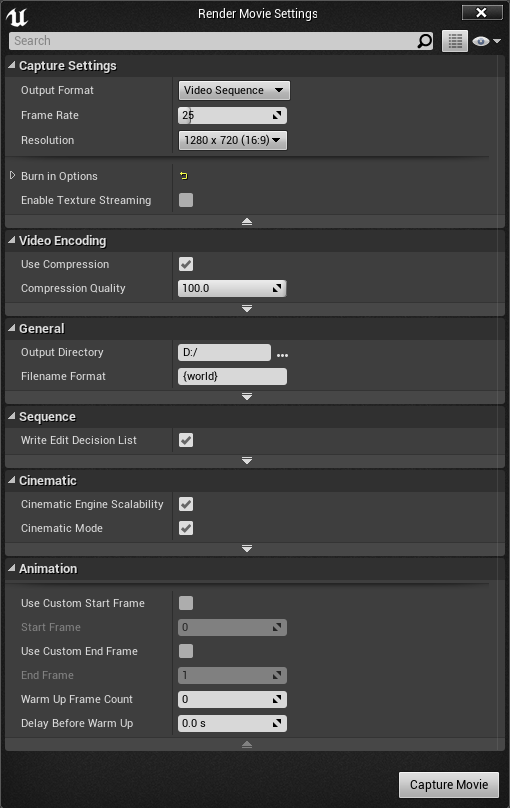
These are my settings
I have set it to root Hard Disk (D:/) and it worked
befire it did not for some reason.
zenith night
With mine it was nothing to do with the render settings, I needed to put my cinecamera under a camera cut in the sequencer, not sure why seeing as it's a sole camera, I have cut anything together
 main pewter
hello there. how can i flip my material horizontally which has a rendertarget2d texture in it? things like worldCoordinate masked and multiplied 1,-1 just gives me crap. I don't want to change the UV ov my model if possible 😃
sterile cairn
@main pewter Try in #graphics, they might know more about it. Sorry that I can't help you myself.
main pewter
ok thank you - good tip anyways 😉
 heavy flicker
Anyone have any idea why when i try the stero panoramic movie capture and set the folder direction and input SP.PanoramicScreenshot nothing happens?
 willow jolt
So I am trying to show a splash and improve my startup. The splash in the project settings isn't solving my issue though. I have maybe 3 seconds of black screen after it goes away that I want to show an image during. Does anyone know what causes it or how to access it? I think it is just general engine loading? My level does not have any assets by default, they are all pulled in dynamically. Not sure what I am doing here.
willow jolt
If I set a startup movie, it is shown instead. Any way to use a static image?
versed pawn
I am finally finished with my demo project! I would like to get honest opinions on it, because this is the video (apart from a bunch of meshes, texture and stuff), that I'm going to apply for a job in the gaming industry(Sorry for video low quality. I had to render it in 720p because 1080p crashes the editor for some reason...). Sadly I do not have time to make huge changes to it, but I would like honest opinions about it. Here it is: https://www.youtube.com/watch?v=SYxaCO8uFqc

EDIT: There are 3 textures that for some reason, are blurred in the render, but totally fine in game (Gate opening animation, Anubis statue, Hatshepsut statu...
fierce tulip
"Guys i wanna master Blueprints but would it be this ugly later?"
https://i.giphy.com/FP6NavXtvj20.gif
 worn granite
@karmic moat do you really think a "master" of BP would make either of those? To be fair there's a limit to cleanliness : complexity with Anim State Machines, but a "master " of BP wouldn't do either of those, IMO. And readability shouldn't IMO be your phobia. Readability is rather trivial compared to what you'll be running into as a "master" of BP. If you push BP, sometimes it stabs back. I'd sooner focus your attention to C++; not only is it objectively more readable - being text and all- but you won't run into the same issues that you would if you were pushing BP to its limits.
You could argue that "mastering" BP involves learning the pitfalls and how to avoid them- but I don't consider the benefits of BP to be worth it at that level. If you're going to be making things that complex, you don't lose anything by writing the core in C++ and then using BP for smaller things.
 karmic moat
@worn granite but c++ way harder than visual scripting, especially that I'm a graphics artist without background in programming
 sick raft
@karmic moat There are ways to mitigate the clusterf***ness that Blueprints can generate by wrapping things into functions and macros. It's not perfect but some planning goes a long way.
 final stone
Hey guys, quick question. For a mesh that's destructible, is there a way for it to have some sort of health bar, before it gets destroyed? Like 2 hits, and the 3rd one will break it?
 pallid talon
@final stone Sounds like a simple branch statement before you enabled the destruction. For example. If "HitCount" > 2 Enable object's physics. Or something.
This was, hit 3 or greater will make the destructiable actions happen.
*This way,
final stone
thanks! @pallid talon I'll check that out
final stone
just making sure, did you mean the Branch node in BluePrints? I'm trying to find a good example, and couldn't find one
The one I followed along, on YouTube, didn't seem to work right
burnt drum
hey does anyone know if simplygon works with skeletal mesh
the number of LOD field seems to be greyed out in skeletal mesh
low snow
Hi guys, since @burnt drum wrote a question about LOD i searched up what LOD meant level of details. and in this webpage https://en.wikipedia.org/wiki/Level_of_detail . They say maximum 5.5k vertices. is that for objects only or ?
In computer graphics, accounting for Level of detail involves decreasing the complexity of a 3D model representation as it moves away from the viewer or according to other metrics such as object importance, viewpoint-relative speed or position. Le...
burnt drum
?
LOD mesh is basically a mesh that the engine will replace when the object is of certain distance ( actually calculated by the object's bounds size in proportion to the screen )
the maximum on wikipedia wouldn't be applicable to UE i believe
okay i juist look it up. it's just an example
How To Create and Use LODs.
this will be much more useful
low snow
@burnt drum thanks mate, is it rather easy to set up LOD ? 😃
languid shard
anyone knows how to rescale a 3ds max project from inches to cm ?
bloody max converted the project to inches on its own and now every model is completely offscale T_T
crisis averted, found a way to rescale the whole scene 😅
 heady obsidian
does UE use cm as a standard?
fierce tulip
yup
 mossy harbor
How shooting was done in shadow complex? hits enemy in depth
heady obsidian
are there any completed games out there released as a UE4 project for ppl to study and learn from etc?
zenith night
Hey all, I rendered a movie last night from a 'cinecamera' on standard settings, came in this morning and it was missing 980 frames - any ideas why?
 grand python
Hey there. i'm really struggleing with BSP brushes that are on a 45° Angle. My faces detach in a wierd way when i'm trying to use the Brush Clip tool.
http://i.imgur.com/zvER0Eq.png
http://i.imgur.com/Z3Tbrlj.png
http://i.imgur.com/r0equay.png
This happens. and it only seems to happen on those brushes. the other half of the roof is alright. it even happens when i'm moving the brushes out so it stands alone without intersecting with another brush
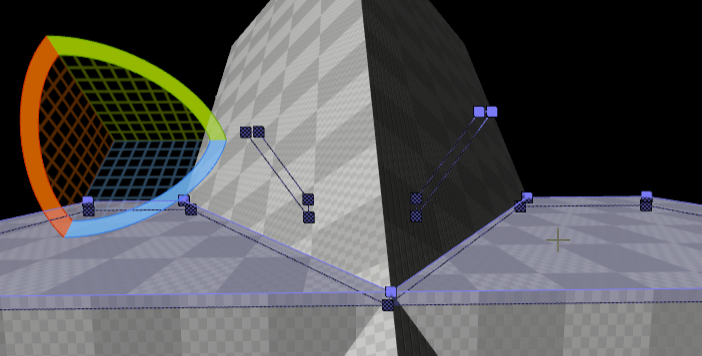
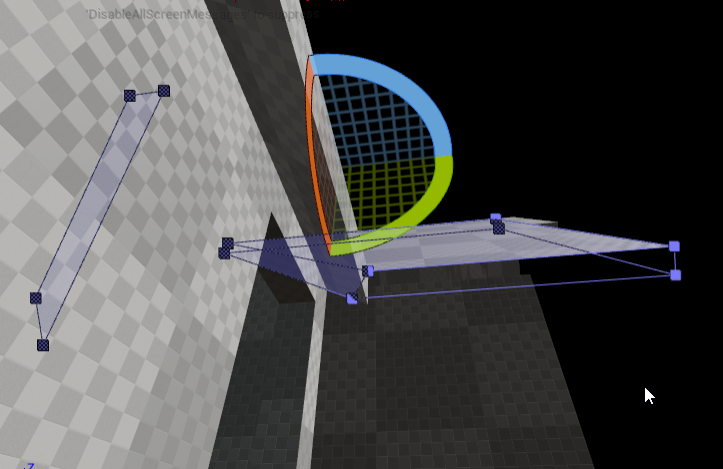
(its a Roof for a Prototype)
Well i could not care about this since its only BSP and i'm gonna replace it with a mesh later. but this is really annoying..
Those are already individual pieces since i had this bug when i was just intersecting the 2 roof pieces
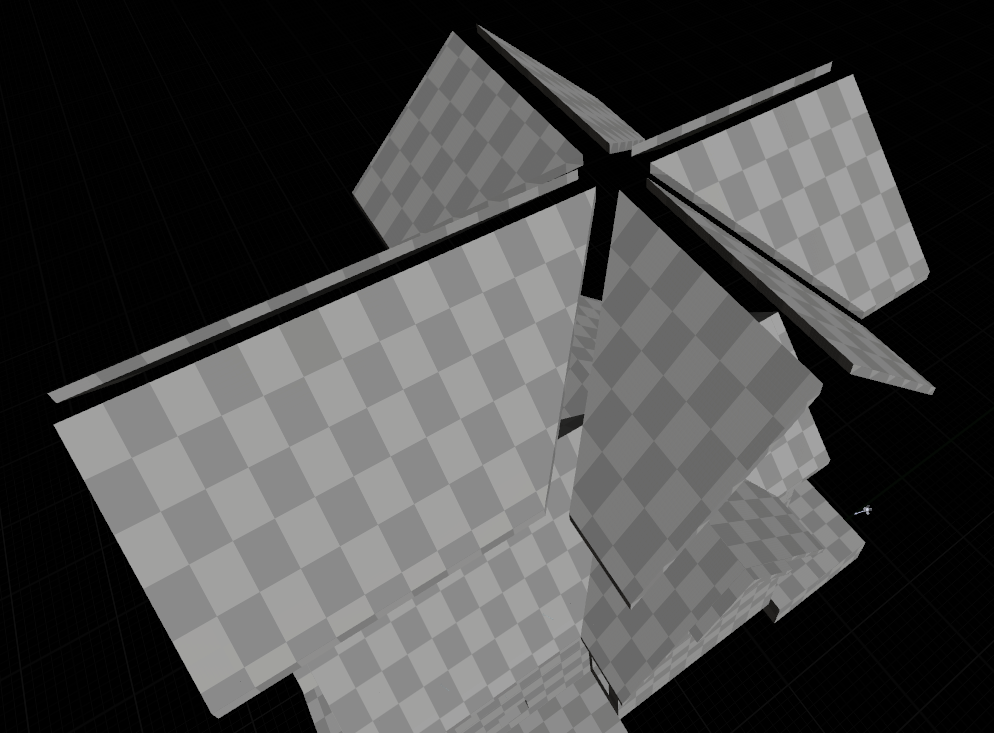
(UE4.15.2)
Well. I guess the Clipping tool in UE4 is the equivalent to the " Carve " Tool in Hammer Editor 😅
fierce tulip
you shouldnt model in ue4 though
(this bring back (ptsd) memories of UT99 map making :p)
grand python
haha. Yea and i get Hammer offgrid brushes flashbacks
Btw Luos. I used your Free Cave Assets on one of my Pavlov maps
but i had to redo the UV since you're working with Wold aligned textures... and the UVs on your models where.... well not good for texturing ^^
fierce tulip
they are, just need to assign the right uv-channel
firsto ne looks messed up af due to ue4's tangents and normals being taken from first uv-map
the uv's afterwards work fine
and you could have done all that without having to change the uv's even hehe
unless thats not an ue4 game
oh tis
then you wasted a lot of time I think
regardless, nice work 😃
fierce tulip
each mesh had 4 or 5 uv-maps.
tangent space, red channel, green channel, lightmap, and sometimes one more for opacity stuff
the cost of making em seamless hehe
grand python
Didn't noticed that. But cool. now i can use more of your models with my own textures i guess 😅
The cave in this Level is made from one mesh. and it actually uses cylindrical projection. so no seams, but some texture streching. But the Ice material hides that pretty good
fierce tulip
gamedev in a nutshell. hide stuff behind other stuff
grand python
thats why there are so many Rocks and spikes there. to hide the transition of the Snow to the ice
the snow is actually world aligned. and vertex painted
fierce tulip
yea hehe, you could have done most of that in the material as-is
waiting for the LOD versions of my pack, gonna push a more features-more optional shader version
grand python
i've created auto LODs with the UE4 intern tool. worked pretty good
grand python
Yea i see.
 snow fjord
Could someone help me understand delegates and signatures?
I want to have my logic in the PlayerController wait for a click on an actor and get a reference to that actor as a result of the click. I want to perform different actions on the actor depending on where in the logic the click occurs. What's the best way to accomplish that?
I read this but I'm having trouble
burnt drum
hey question.s. has anyone used GameSparks with Unreal before?
would like to hear some comments on the usability
sterile cairn
Are there any good tutorials on how to use/implement the demonetdrivers to create a replay system? I'm able to have it record, stop, and load them but not sure where to go from here. There isn't a lot of documentation out there regarding the system or how to use it.


 hybrid scroll
Hmm.. I have a problem. I have an asset file that just doesn't want to load. It doesn't show any errors, I still have the file in a normal location, but it doesn't appear in the content browser in the editor. It worked before.
Anyone had a similar problem?
 craggy nymph
@hybrid scroll , that probably means the asset was saved with a newer version of the editor. Saved assets are often not backwards compatible.
hybrid scroll
@craggy nymph - That can't be the case. It was working OK yesterday, and there were no updates since then 😃
hmm...
When I tried importing it into ue4 it tells me its an object redirect... but where did the orginal file go? -.-
well.. to the backup I go
 viscid geyser
@karmic moat No dude, it's the new game by Nexon
I got beta keys
LawBReakers
Made with UE4
tall pendant
everyone has a bunch of them hehe 😛
 grizzled mountain
Oh wow, I totally missed that Nexon grabbed Bosskey
 keen cradle
just a heads up https://www.twitch.tv/unrealengine

 jagged mauve
hey! i need know how to comment assets for expecify it use in a project, i need put a coment in a SM class
karmic moat
Hi i have a question in texturing characters
Why does a texture has both sides of symmetric stuff.. Why isn't it just one side and mirrored in the uvmap editing
Like why not just half of his face? To reduce image size
vale osprey
because it's not 1998 anymore and symetrical characters look really bad
even if you go for cartoony/stylized look it will feel weird - human brain doesn't expect perfect symetry
on top of this, when you add normal map for example, you will have hell of a problem to getting it work correctly
karmic moat
If it's not systemic character that's another case but my question is why even symmetric stuff waste texture space
Or am i wrong
 floral heart
Symettry is a myth, and also an ugly trap for detail textures. And I really like that point about normal maps too.
viscid geyser
@tall pendant I didn't buy them
tall pendant
huh? i meant they just send them out in bulk hehe. no offense.
 vast pine
That gun would have a shell discharge on both sides?
Crazy gun!
And you can overlap I maps for objects just not a lightmap of course
vale osprey
@karmic moat I've never seen a symetrical gun
on the left side of that Browning you woudn't have cutout for casing/round disposal and would have safety trigger

in a typical game, sides would be flipped of course, so you can see empty casing flying in front of your eyes
so that specific gun just doesn't even need a texture on other side, if gun is never rotated in such a way to camera
karmic moat
@vale osprey which engineering major?
vale osprey
software 😄
overal, savings on potential symetry are outweight by just using lower resolution texture. Like 1024x1024 is 4 times smaller than 2048x2048.
On top of that you can go with a completely different approach and use layered materials

allegorithmic
A first look at Dynamic Material Layering in Substance Painter.
 idle sail
Ugh this is really doing my head in, when i import a mesh ive got generate collision on but its still no collision?
vale osprey
you can generate it again if you open imported mesh in assets browser
karmic moat
@vale osprey software engineer is programming expert right
idle sail
its ok got it workin
vale osprey
it says how many collision elements you have on left side of the screen, does it say 0 there?
karmic moat
?
idle sail
it just wasnt auto creating one so i wnet in an made one in the edit window
vale osprey
@karmic moat software engineering is all kinds of things, not always programming
karmic moat
@vale osprey i study architectural engineering, but I'd love such major
Like it's seems more futuristic your major
vale osprey
quite often is rather boring stuff, depends on where you work of course
but the same with Architecture 😄
karmic moat
But like i think you can create a robot, electronics and stuff
vale osprey
well, you can create anything if you spend enough time on learning how to do it
karmic moat
I have a question
Can a game developer that is able to program a smart AI, program a robot the same way
vale osprey
some people do get basic courses in robotics and electronics, but it's nothing that you can't just read about somewhere. real stuff takes a lot of effort
karmic moat
Isn't it the exact same
vale osprey
in gamedev you have infitinte amount of them, with infinite resolution, vitrually no noise and instant response time
in RL sensors vary a lot by manufacturer and specific type, they all have some response time, some noise in their measurements and if you are lucky they will have a modern API to work with
they have a lot of limitations you have to deal with
karmic moat
U studied robotics in your major?
vale osprey
no, but worked with some hardware
vale osprey
friend of mine was making his own quadrocopter, it was quite a challenge, despite him working with hardware/software layer for the last 15 years
karmic moat
15!
Then what about creating this
Wait u didn't mean that he worked 15 years on a quadrocopter right
vale osprey
this takes hundreads of engineers and scientist working for years:
https://www.youtube.com/watch?v=M8YjvHYbZ9w

Spot is a four-legged robot designed for indoor and outdoor operation. It is electrically powered and hydraulically actuated. Spot has a sensor head that hel...
no no, I mean he worked with hardware on low level for 15 years
karmic moat
Oh got it
Yeah, the world will be filled with these things in the future
That's why ur major value might increase more in the future
Would u replace ur major with architectural engineering
vale osprey
I would replace it with physics or applied math
karmic moat
Oh
We take physics, physics itsself is amazing, like the heart of all sciences... But not when u study it quiet boring educational courses
snow fjord
@vale osprey I'm pretty sure there are some symmetrical revolvers.
floral heart
Does the cylinder open both ways? That would be neat.
plush yew
Anyone here willing to help me out with a problem?
I am trying to make a rolling Robot but the problem is the body rolls with the ball
I want it to just roll without the body having to roll along with the ball
low snow
im no pro what so ever xD but im pretty sure the body shouldn't be attached to the ball. but maybe float with or some sort. i will try to help research KOS
What if you do the same thing as the camera ?
What i mean is, there is a Unity tutorial called roll a ball, maybe you can take a look at the camera aspect
plush yew
what do you mean?
why would the camera help?
is there a way i can make it just float on top
and not move?
 umbral temple
My guess is that the robot mesh is attached to the ball mesh in some way. Just make sure the Robot mesh isn't attached or dependent on the ball mesh at all in your character/pawn blueprint - That way you can let the ball roll freely and then simply update the robot mesh independently
plush yew
How do i do that though, i have done it like this
I am aware
but the question is
how
i have added a component to the character and put the bot on top, i don't know how to separate it though
umbral temple
I personally would have created a blank character BP, added the ball and robot as seperate meshes independent of each other and continued from that. It looks like the parent BP is the ball itself. Which means when that rotates, everything is. That said, i'm not amazing with UE4. My best bet would be make a fresh BP, add Ball component and Body seperately.
plush yew
Would you mind directing me on how to do that?
umbral temple
1 Sec, lemme boot up UE lol 😃
umbral temple
nah no stress, ill use sample ones
umbral temple
Super quick way ->
New Blueprint Class -> Character
(Top Left) Add Component
Add both the ball and robot
umbral temple
Static Would do for the exmaple
Static Mesh*
for the ball, you can add a Sphere component
Static Mesh for the robot
doesn't matter which order you add them in
send me a screen once you've done that lol
plush yew
plush yew
So add spring arm and camera separately
umbral temple
If you want the camera to follow the Robot Mesh, add it to the mesh
so add Spring Arm to Mesh, then Camera to the Spring Arm
that way the camera will follow spring arm, which follows robo
plush yew
umbral temple
close
drag the camera onto the spring arm in the hierarchy menu
then the spring arm onto the robot mesh in the hierarchy menu
you should get a small stack starting with the robot mesh
plush yew
plush yew
umbral temple
lol close
plush yew
Sorry ahhaha
umbral temple
that made me lol
plush yew
plush yew
okokokokok
plush yew
done
umbral temple
That should be a simple way to avoid the issues you've been facing hopefully
plush yew
I am still not the character lmao
plush yew
when i press play i am separate from the character
umbral temple
Yep, to do that
Go to World Settings
on the right hand side
and under Game Mode
expand Selected Game Mode
and you can set your default Pawn class
Set that to your robo
plush yew
grayed out
umbral temple
but my best guess is that you wont have input setup if you made this guy fresh
Change the override to something else
If I were you, it would be a good idea to make your way through this if you havent already: https://docs.unrealengine.com/latest/INT/Gameplay/Framework/QuickReference/index.html
Short overview of classes for game rules, characters, controllers, user interfaces, etc., that make up the framework for the game.
 whole quarry
A How To Guide for Setting Up a Game Mode in Blueprints.
plush yew
only thing that works is the rendertotexture_gamemode
umbral temple
go through both the references Amsanity and I gave you
It'll help setup a game mode and get you going
TLDR; you still have a little bit of work to go before you're controlling the cobot
robot*
plush yew
i am aware, i have to add blueprints to do that
umbral temple
Yep
umbral temple
you'll need both
Best to start with the docs
A How To Guide for Setting Up Inputs in Blueprints.
They'll give you a really good starting point
Make your way through this list:
https://docs.unrealengine.com/latest/INT/Gameplay/HowTo/SettingUpAGameMode/Blueprints/index.html
https://docs.unrealengine.com/latest/INT/Gameplay/HowTo/SetUpInput/Blueprints/index.html
https://docs.unrealengine.com/latest/INT/Gameplay/HowTo/ActorInput/Blueprints/index.html
https://docs.unrealengine.com/latest/INT/Gameplay/HowTo/CharacterMovement/Blueprints/index.html
A How To Guide for Setting Up Inputs in Blueprints.
A How To Guide for Setting Up a Game Mode in Blueprints.
A How To Guide for setting up input on an Actor in Blueprints.
A How To Guide for Setting Up Character Movement in Blueprints.
umbral temple
LOL, they do a really good job at helping you get started
If you're a visual learner, you go always follow one of the tutorials on the Unreal Engine YouTube channel

In this series of videos, Wes Bunn will walk you through the steps to create a third person game. (00:05) - Intro and Play in UE4 (02:17) - Importing FBX ass...
they are a little dated
but still good
plush yew
Thing is, wouldn't it very different if i am using a ball not legs
since it'll be rolling
be*
umbral temple
movement wise - no
lol
you'll still need to add inputs & a controller to actually take in when someone is pressing something
Think of inputs as the 'controls' menu you see in games -> the 'Controller' is just a blueprint that helps take the inputs and actually do things with them
Without those you wont move anything lol
umbral temple
Follow this guide for a quick setup

In this Beginners Guide for Unreal Engine 4, we start with a blank project and then add the ability to move/look around from scratch and we will be doing thi...
I usually like Tesla Dev's work
plush yew
Sure, ill try to make it now, thanks for the help
umbral temple
All good, good luck 😉
low snow
@plush yew What i mean is, in the unity3d tutorial roll a ball. they attach the camera a way so the camera follows the ball, but doesn't follow the balls axis. so maybe that would have helped to give an idea on how to make that robot do the same in Unreal engine 4
whole quarry
Maybe it would be easier just to animate the ball and blend the animations depending on the direction or something
mossy harbor
Guys, how shooting was done in shadow complex? it can hit enemies in depth
whole quarry
Tried googling it?
plush yew
Who me?
I don't imagine it should be this hard to just use the ball template and put something on top separate from the ball and have it float and then enable rotating camera
then just add animations to the body and leave the ball as normal
wouldn't that be possible?
mossy harbor
Didnt find, may be miss smth
 orchid sable
does anyone know if there is a way to clip or hide any particles or meshes that get within a certain distance to a camera? to keep the users view from getting too blocked by particles and such?
low snow
@plush yew im pretty sure it is possible, but how i do not know. im a beginner
as i udnerstand, you want the ball to be controlled by the player, and have the robot look like he is the one controlling the ball with some nice animations right ? ^^
low snow
i know 😃 just trying to get an understand myself
but that doesn't change the fact i can't help to research for you
plush yew
Well, i just want a robot on top of a ball, so i can use that as a character instead of using a lot of my time animating legs
low snow
and that robot is not being controlled right ? you will still control the ball right ?
plush yew
Yes
like
there are videos on youtube of people making bb8 prototypes https://www.youtube.com/watch?v=pNCcYi5bFsY

I don't own the rights to bb8 or star wars :)
i am curious to how they did it
because it's the same thing i am trying to do
just different robot
whole quarry
Its just animated and using blend space
plush yew
blendspace?
whole quarry
Yes, likely Blend 1D space
plush yew
Don't know what that is
low snow
@plush yew maybe something like this will help. i am at work, so i didn't watch the video
but the title sounds like it might help
https://yt.eltuboadventista.com/watch?v=AjdsMSlyuUY

In this tutorial I show you how to make a spawner that follows a player.
just copy the last part, i have to use a unblocker to watch youtube xD
low snow
Yeah, but isn't it some sort the same? (haven't watched the video mate)
they are following an object, which is the player right ? 😃 isn't that what you want for the robot ? 😛

Thnak You for watching Support Me On Patreon: http://adf.ly/1lRTNq
whole quarry
Just animate the ball to make a full rotation forward, backward, left and right
Then use blend space to use the animation and call that blend space in the animation blueprint
plush yew
I can already move the ball fine
except with the robot body on top, it rotates with the ball
i don't want it to do that
i just want it to float on top
plush yew
Your advice didn't provide much
whole quarry
Yes it did
low snow
just search for blend space i assume
plush yew
If i did that, how would i know how to separate the ball and the robot body?
low snow
Blend Spaces are assets that allow any number of animations to be blended between based on the values of multiple inputs.
whole quarry
The ball and the top robot mesh are seperate or aninate it all together, its not much different than animating any character
whole quarry
I understand, we were all beginners at the start
I can do it for you or give a copy-paste awnser but then you wont learn a thing
whole quarry
Watch tutorials, read documentation, do the learning projects
So many resources are available
low snow
@whole quarry i would love a picture on how to do it. cause i might use it in the future, and a visual on how it looks might help me a lot
plush yew
So many resources and none of them mention this particular thing
whole quarry
You will never get a straight answer, game development is too various for that
plush yew
I didn't expect one thats why i came here for advice on the specific thing i am trying to do
low snow
@whole quarry would you as you offered before, create a video or a picture on how it is done ? 😃
whole quarry
I could but it wouldnt be before monday
low snow
that is totally fine with me 😃 won't have time this weekend anyways ^^ LAN party tonight - BBQ party tomorrow :P
I am one of the only one in Gdansk from my work that have a garden that is huge :p hard to get a garden in a big city
so better use the garden for some fun while the sun is here 😛
whole quarry
I would start with a sphere, add a bone in it, make 5 animations (idle, forward rotation (359 degrees), backward rotation, left rotation and right rotation), then import it all to UE4, then make a Blend space (not 1D), then fix up the AnimBP (like it is done in the Animation tutorial series by Zak from Epic) and its already done
Then just put the robot static mesh on top of it, even better would be to animate that as well so that it can lean towards the direction the robot is moving towards
low snow
thank you @whole quarry
vale osprey
@snow fjord that is possible, if cylinder can be flipped to either side and a lever to unlock cylinder is not on one side only
snow fjord
I'm not sure I understand
if it's not on one side only
how is that not symmetrical?
vale osprey
the lever to unlock cylinder?
it's mechanically simpler to not make a symetrical gun, for example here:
http://www.americaremembers.com/wp-content/uploads/2013/07/RELee-revolver-full-leftside_FPO.jpg

that notch under CSA is what opens cylinder
on some older revolvers you would take whole cylinder out when reloading
Nothing stops you from having it symetrical if notch is made as a mesh and you don't have anything written on the gun
snow fjord
I didn't mean to imply they are common by any means
vale osprey
imho you could save texture space if you know that gun will be viewed from one side only, but I think nowadays it's just easier/better to model it on both sides as then it can be used in any necessary way
snow fjord
guns tend to be viewed closely so I agree
vale osprey
I think it was "Full Caliber" strategy/tactical game where every pistol had animated safety trigger, because in original design you could switch to first person camera view on specific soldier 😄
 snow fjord
that's interesting
 potent lark
Kinda basic thing here, but have not figured it out. The level designer made this big hunk of asteroid composed of 100+ pieces, and the pieces all have the same transformation despite clearly being in different locations. I guess because it has been imported from the 3d software that way? Now I am trying to make the darn thing explode, but having trouble getting their real world locations
whole quarry
Do you have a screenshot or something @potent lark
vale osprey
most likely all pivots are in the center of the world instead of center of each chunk
potent lark
I get back to it in a moment, but yeah I guess I should see if I can scare up the pivot points
So, any way to get the mesh centers or something intelligent to work with, or is it back to the level designer, reimport the meshes a bit differently?
low snow
what do you mean ? 😃
potent lark
Well, since all the object have the same transform, I am finding it difficult to send them for example flying off in different directions from a certain point
whole quarry
Looks like its a actor on its own
You could always just make a big mesh and make it a destructable
potent lark
It's just a big group of 100 + StaticMeshActors. I can get them into an array, and start giving them rotations and movements but they behave as if it was all one object because of them all having the exact same trasformation
vale osprey
you could set them up as static mesh components inside of single actor, but imho it would be easier to import it as skeletal mesh
artist will have to set their pivots correctly
if he is using Max, then it's as simple as adding some dummy root bone and linking all chunks to it
each piece will have it's own bone automatically
potent lark
I will send it back to the artist : ) Thanks for feedback
 solid gazelle
Sorry to spam a couple channels, anyone going to be at E3 or live in the LA area?
low snow
Wish :p but it's in USA 😛
 cloud cobalt
I need to see you guys if you come to Paris sometime
solid gazelle
@cloud cobalt Would love to make he trip sometime
languid shard
@cloud cobalt oh you're a fellow frenchie !
cloud cobalt
Yes, I am a croissant baguette too ! 😄
languid shard
🥖 !
 wet spire
Maybe someone can point me in the right direction. I am trying figure ALL of the places I need to make changes to the way UE4 handles player gravity. From what I found through the forums, it has been hard coded you cannot have a player controller invert their gravity without rotating the world. My team managed to this off, without altering the code, but it has created some side effects we had to design around. Players traveling up/down ramps while inverted stuck in a "Jump" state, unitl reaching a flat surface.
final stone
has anyone ever had an issue where a prop, with collision, sinks on the floor? or a platform it's on?
I have props on a shelf, and whenever I play the scene, I noticed the props slowly sink down, and fall pass through the shelf
 arctic tree
is there a good .pak unpacker? needing to see if a font is being packaged with the shipping as we are getting log spams of LastResort.ttf not being found. I have tried the ones on google search but it says it cannot unpack.
 static viper
we sadly cannot and are not allowed to help with that at all.
community restrictions.
@arctic tree
arctic tree
yea it seems none of the unpackers will work for us since they only go up to 4.14 and we use 4.15 😦
we really need to find the cause of this LastResort spam as it is quickly filling up hard drives
ok, i was able to find one that worked. it seems that UE is not paking the Fallback fonts
any ideas why? this works in our dev builds when we don't use paking but once we use paking this happens
 tame token
Hi all if i wanted to make a game like starcraft? I have looked for RTS not really finding the info on how to make somthing like that. I am trying to figure out how to make like minion soldiers you can send to differents area and gather resources and destroy enemy and such
 safe rose
@tame token Think about each element that makes up an RTS and build it, little by little, and then mash it all together and hope it works 😉
I mean, just making minions is pretty simple
you just spawn them
tame token
is there soomthing a little more specific
safe rose
I won't be doing that, sorry.
tame token
like how to control and send them to pillage
safe rose
You can definitely hire someone to help you if you need help.
Otherwise, it's going to be trial and error.
Start off small, think about what you need to do.
You'll probably going to want to do some pathfinding research
RTS' are a complex beast, there are too many different systems working together, but really, they are pretty small.
tame token
I have already looked at nav mesh
safe rose
It's just the amount of systems that are working together is the issue.
tame token
the max amount is like 10 to 15 minion
safe rose
But, supposedly someone made an RTS in one week
For last year's MegaJam
You could bug him about it. Look him up.
Maybe it was Dec jam, cant' remember
tame token
what would that be
 safe rose
lol
worn granite
See? Easy
worn granite
anytime
safe rose
@ashen brook Didn't you make an RTS selector one time? Where is that at? Or was that @winged hearth ? I wouldn't mind seeing how that was done either.







 ashen brook
@safe rose I did make one for VR
safe rose
@ashen brook Oh yup, what happened to it?
worn granite
I threw together about half of the very basics of an RTS some time ago
ashen brook
lots of experimenting
safe rose
Would be a nice little blog entry
safe rose
Do it!
ashen brook
but I don't even have time for my gf right now
ashen brook
more like a quarter year
ashen brook
too much client work, not enough time to work on my own stuff
safe rose
And then it's expected
ashen brook
eeeeh no, no marriage for me, tyvm
tame token
As fun as this hass been got an RTS to go build LOL Later
safe rose
lol
safe rose

Link to download the video so you don't have to load: https://drive.google.com/file/d/0B45Kp15-PhyONXhQQ2hwX3BHdFU/view?usp=sharing My Icons download link : ...
tame token
yeah i am on part 4 but thanks man
safe rose
Welcome back! This is an introduction video to my new series focusing on the Unreal Engine 4 - How to make a Custom RTS Video Game! In the video I discuss wh...
Jeez, never knew that existed. Google OP
 winged hearth
@safe rose ??
violet cove
Anyone know why when I export a mesh from UE4 that has LODS that only the LODs get exported and not LOD0?
arctic tree
how do you rename chunk paks to something with words instead of chunk0-9?
 glossy hemlock
Hey. I have made a non-humanoid mesh in blender with a skeleton. I exported it into .obj format and imported it into ue4, check-marking import as skeletal. When it imports it is really small, rotated the wrong way, and it does not use the skeleton from blender. In the skeleton, physics asset, and skeletal mesh files the mesh is just one piece without any bones. How can I make it so it uses the bones from blender and imports with the correct rotation and size?
tall pendant
export skel mesh as fbx instead of obj
craggy nymph
Yeah, use fbx, check your scale and rotation in blender, check the scale and axis settings of the export script.
vast pine
I'd like to make a stadium crowd . Like rocket league. Thus far I've found using instanced static mesh works wonders just setting them up in a map in the right areas is either time consuming or requires multiple actors to spawn them. On top of that changing the colors of them for variation means a separate actor for each color. I know there's got to be a better way. My last test was this https://youtu.be/vl2nyFRfB0c

This time randomly generated planes with a texture. Still runs cheaply only low spec PC - 3,500 "fans"
Tough part has been the up and down bobbing since by color it's a separate actor and the entire actor is going up and down the variation can be noticable
karmic moat
Hi, how do i make the destructible mesh work inside a sequencer (animation cutscene) ?
arctic tree
so it looks like you can change the pak chunk names in pakchunklist.txt but not sure the format it looks for in there. Anyone have ideas?
autumn haven
I'm (C-Media) helping sponsor the summer gamejam with with some of my asset packs, check it out! Who here is entering the gamejam?
https://forums.unrealengine.com/showthread.php?145075-Summer-UE4jam!-June-29th-July-4th
 hazy lynx
Hello!
I have noticed when I package my project without using a .pak file, unreal automatically copies all my settings and save files from the project folder to the new folder. If I distributed that folder as is, users would get two copies of some settings files, one in the instalation directory and the other in the appdata
can anyone tell me how exactly does unreal handle such situations? Would one file be ignored (which one) or what would happen?
vale osprey
@Inphidel 🐯#1172 there is PerInstanceRandom node in materials that allows to get some random variation on instances of ISM or HISM
vast pine
@vale osprey I'll give that a go. The animation part is a main concern almost wondering if it's just as cheap to use skeletal mesh with low poly mesh with variant animations for the up and down doesn't unreal already instance skeletal if they're the same
vale osprey
you can move individual instances using UpdateInstanceTransform
vast pine
wouldn't that cause some heavy use if you have say 20k instanced objects getting its transform updated?
vale osprey
@vast pine no, just make sure you set "Mark Dirty" ones per frame and not on each instance update
vast pine
ah ok
vale osprey
"Mark Dirty" sends updated transforms to GPU
plush yew
Hello!
Repeating my question.
I'm atempting to package a game without using .pak file (steam updater works much better with separate files). My issue is, it copies a lot of ini files from my project folder and that messes users settings. I'm trying to figure out how exactly do I deal with that. Should I just erase the "config", "intermediate" and "saved" folders in my packaged version, or would that mess things up further.
Thanx in advance 😃
vale osprey
@vast pine otherwise you will have performance impact only if you do some heavy math for each instance. If you remove collision from them - not necessary in this case, it should be fine, otherwise engine will try to update collision mesh too
 main cobalt
Is there a way to set LOD based on distance rather than screenspace using blueprints?
vale osprey
@main cobalt I don't think so, this is one of the often requested features and I think TheJamsh was making a PR to add it. Check on forums, there is a whole thread about it in Feedback section
main cobalt
Really? damn was hoping there would be a way, screenspace is so limited
grand python
Hey there. Anyone knows how much of an impact tonemapping via a CC Volumes thats set to unbound causes. Performance wise
Someone told me that tonemapping and CC will take about 3-5ms
( for VR with foward shading )
karmic moat
Guys do u know how do i get the destructible mesh to work inside a sequencer shot?
 cobalt scaffold
@vast pine if you base your crowd on a grid you can use a texture lookup to get the color.. you can still offset them in the material to get less grid like apperance
vast pine
Hmm interesting thought
wet spire
Is there some issue with importing .csv from excel 2016? The file fails to import everytime.
torpid hedge
Has the issue been fixed in 4.16 when modifying existing custom struct making the blueprints broke up?
 keen birch
Say, guys, do you think it'd be possible to have Total War amounts of AI running in UE4 with decent performance?
 knotty lagoon
Hi, i started playing with unreal engine and I wonder what options for changing target device and scalability really do... i found this link and maybe somebody knows answer to question there? https://answers.unrealengine.com/questions/480851/changing-target-hardware.html?sort=oldest
cobalt owl
Is it possible to duplicate level during runtime?
winged hearth
You can load a streaming level with a transform
It's a comlon way for procedural levels
eternal gate
probably really stupid, so sorry, but my character pawn isn't moving at all when I start the sim. I'm using BP's right now, have it set properly in the BP_gamemode class to BP_Playercontroller and BP_PlayerCharacter as the default playercontroller and default pawn, and have my input axis set in project settings. Not finding anything online; any ideas?
just using a simple input axis to add movement node on the player character right now
 granite axle
Has anyone here experiencing frequent crashing when saving a sequencer? UE 4.15.2
safe shoal
Sup peeps. What y'all working on this fine day?
glossy hemlock
I have been trying to make a skeletal mesh in blender. I got it done and exported it as obj. I imported it into unreal and the bones didn't work. It just gave the mesh one big bone covering its whole body. When I asked about it here I was told to export it as fbx. I tried that but my blender lags my entire laptop and freezes when I export as fbx. Does anyone know how to make it not freeze?
 warm delta
Hello!
All the tutorials (video mostly) showing basic stuff, how can I learn advanced topics then?
 golden island
Well u can try to make ur simple game. Then when u stumble upon a problem or u are wondering how to do something, u jut Google it.
Just*
@warm delta
warm delta
but why there is no advanced tutorials? all the tutorials I watched stop explaining exactly before the real important and hard stuff begins?
 unreal sonnet
Also @warm delta I personally went through like 20 of those live stream tutorials and a lot of them do get really advanced near the end.
For example: that "Game Ready AI" thing was broken into 9 livestreams and it gets super advanced
For materials and whatnot, I actually made a Youtube playlist of a guy who made a bunch of advanced graphics tutorials. It's one of the pinned messages for the #graphics channel.
And of course there is also cedric_exi's Multiplayer tutorial. It's in the pinned messages for the #multiplayer channel called "Network Compendium". That thing gets really advanced.
Basically just look at the pinned messages for each of the different channels and you'll probably find some advanced content in there.
warm delta
OK Thank you!
one more question, is it true that the player character in UE4 stays in place while the level is moving?
unreal sonnet
Another good tip is to lurk in the different channels of this Discord server. Often, people will post very advanced tutorials because somebody else asked specifically for a tutorial about ____. Usually the stuff people recommend around here is very good quality.
Also I have no idea about that question. I'd imagine no?
halcyon marsh
Hey guys i was working for about 6 hours to have an correct root motion and now when i imported to ue4 to make an anim montage it works great BUT the blend time and root motion are not compatible
 trim silo
Guys can someone help me with something in regards of creating a small game and releasing it for iOs? what do i need to do and also will university project count as released or something if i make a game for a client ?
i need the advice on how it works
I'm making a simple game for a local tourist attraction as part of my university project. After i'm done, they are going to put the game out on the display for visitors to play etc. Do i need to tell epic about that or something? Can i get in trouble or what?
fossil socket
in general, when it comes to games, you are due to pay a 5% royalty on gross revenue, you can also negoitate custom terms with epic
 dense escarp
Hi guys! Simple question here. How long does it take on average for a preview version of Unreal to go official? Reason is I've been working in 4.14 until now and would like to upgrade to 4.16 while skipping 4.15. 😃
humble sun
Not too long