#ue4-general
1 messages · Page 59 of 1
 cursive dirge
 sinful juniper
tnx
 light thunder
When I am deleting assets like blueprinjts I just made to play around with, nearly everytime, the app hangs "checking for root assets" is there a way to avoid this freeze/crash?
 leaden perch
Particles from my particle effects appear to "jump" to their correct position when they move onscreen because the Actor that owns them is being updated offscreen
is there a way to eliminate this jumping issue?
 spice urchin
@leaden perch yeah probably need to make the particles "Local"
leaden perch
Can you be more specific please? The particles are in a ParticleSystem ActorComponent
I am setting them a fixed distance from the center of the Actor and set the Actor to rotate using a RotateActorComponent
Marking the emiiter as "Use Local Space" removes the trailing effect I want to achieve
 errant basin
evening guys, anyone know how I can get unreal engine to run on my macbook pro? I upgraded to sierra and now it refuses to start due to me not having the latest and greatest macbook, it worked on an previous OS
leaden perch
What year is your MacBook Pro from?
If you are trying to launch 4.15, your Mac must support Metal
errant basin
late 2011, yeah 4.15, does this mean I'm stuck with 4.14? :/
leaden perch
Yes. As am I
I'm waiting for the new lineup of Macs this year. But I'm expecting to be very disappointed. So I'm a bit torn
 kindred viper
Macs are for web developers! /runs away
errant basin
I cant afford a newer mac. seems like a bad business model if they're eliminating people with older macs
leaden perch
To be fair: I'm sure Mac developers are a pretty small chunk of Epic's user base.
And they want to move forward with their rendering technology. I don't understand why that means dropping OpenGL support, but whatever
errant basin
It's kind of annoying considering the feature set of 4.15 is quite good. Although, there may be a way around it, surely its just a console variable the engine checks on start up?
leaden perch
No idea. They probably check for the Metal dylib on startup
You could clone 4.15 from GitHub and check out the changes to see if you can hack around the limitation (PROCEED AT YOUR OWN RISK, of course)
errant basin
last time I tried to build from source it took hours and I had a silly error I couldn't get around -_-
leaden perch
Well, then you are like me: Massively SOL
errant basin
well i either suck it up or build in unity, shame really.
leaden perch
When the new Macs are announced, I will either buy a new one (if they are worth it [probably not]) or buy a 2015|2016 model on Craigslist
 timber relic
they're probably not.
spice urchin
mac makes ok hardware if you want a notebook
otherwise....yeesh, way to pay twice the price for an ornamental computer
if they'd ease up on greed and let people build them by hand it wouldn't be such a big deal. only computer builder i trust is ME
leaden perch
I'm not much of a hardware person, so I'm totally OK with a "works out of the box" solution that Apple provides. But with hardware improvements becoming less and less impressive thanks to physical limits of fab technology putting an end to Moore's law, the Apple tax is now pretty hefty. I agree that I wish macOS was available on non-Mac hardware
Might try for a Hackintosh if the new Mac line is not up to my expectations
But I don't really want a Linux experience....
 fallen schooner
Does Unreal have an entity messaging system?
 versed pawn
Why does the lightsource pop-in/pop-out happens when outside of the screen? For example: There is a light source and it's rendered on screen. When the player looks away, it's not rendered obviously, but also it's light doesn't affect the scene anymore. I have to mention that I tested this only in PIE. Take a look at this GIF:
 south ridge
That's a stargate!
versed pawn
Sure it is
Currently working on an FPS Logical Puzzle game, starring Dr. Daniel Jackson with a really twisted story. The game will be somewhat like Portal/The Talos Principle with new features like reading Goa'uld text and translating it, traveling to other worlds etc etc. Already got the rights from MGM, just need to finish it
Anyone can help with the above question please? ^
 green carbon
Anyone here knows what Fix Commit means on a ticket like this: https://issues.unrealengine.com/issue/UE-32568
It says unresolved so I assume this is not fixed? But in that case, what is Fix Commit?
 sinful pier
well, probably someone did a commit on the unreal engine source on github
and the problem was resolved with this commit
but 4.16 is not out yet
green carbon
Hm, I cant find it on master at github either so maybe it's still internal testing or something? I would love to get my hands on that fix because I cant use my editor as it just crashes.
 grim cargo
anyone can help me with my animation
south ridge
Anyone with perforce experience here? How does perforce handle merging branches etc for people who work remotely
Lets say I have a huge branch A and a huge branch B, they are only slightly different. I wanna merge B into A and I'm located in middle of Africa with slow internet
kindred viper
it doesnt really work in branches does it? Is it not streams?
south ridge
Yeah, streams
We're using SVN right now and to do a merge SVN has to download a ton of stuff
 heavy flicker
Guys probably a silly question but does the blue channel in a normal map play any major role?
 fierce tulip
in theory yes, in practice.. not so much
 grim sinew
I thought in BC5 it was stripped out entirely and reconstructed from the other two?
fierce tulip
yea it removes blue and basically just adds a standard "1" to it
heavy flicker
Hey @fierce tulip what about if I add another image in the alpha of the normal? Does that affect it in any way?
 toxic wagon
is there a flow control node for executables rather than variables?
like if both executables are pressed then do X
 dim hemlock
@toxic wagon If you mean like an exec-only AND, I'm not sure that could work, blueprint only has one thread, it could never have both execs fired at once
 daring elbow
Hey guys, I'm trying to slow down an object by multiplying its velocity by a percentage every tick (0.995). Of course, at 144fps it'll slow down much faster than 60fps.
@144fps = .995^144 = ~0.48
@60fps = .995^60 = ~0.74
I was trying to use Lerp but it's not working
What should I do if I want to slow down an actor by the same amount for any framerate
 brave horizon
Try a timeline/
 floral heart
You can modify the multiplication factor by the delta time.
brave horizon
^ or that.
floral heart
So if it's 0.995 per second, then make it (1 - 0.005*deltatime) or somesuch.
daring elbow
ok, thank you guys. I'll try that
Sadly, it's not that simple. Ive used this math before to make things such as adding a force to an object
In this case, as I'm slowing the object related to it's speed, so that wont work
The only thing that this math will do, is multiply the object speed by the same amount independently of the fps
at the end, it'll still be the same as this:
@144fps = .995^144 = ~0.48
@60fps = .995^60 = ~0.74
floral heart
The delta time is the frame time. If you add up delta time over a second, it will total roughly 1.0 (+/- 0.00001) no matter what the framerate.
The blueprint node is 'Get World Delta Seconds'
daring elbow
I think this is exactly what you were telling me to do. But I get a completely different spin at 144hz and 60hz
this method is called every game tick
maybe there's something else interfering
 oblique fern
upgraded my project to 4.15.1, no point or spot lights are working. what do i need to enable or disable?
 lusty spire
new ryzen 8 core cpu better when i7 fow UE4 workstation?
 leaden linden
probably
 vale osprey
@daring elbow you need to use physics sub-stepping and do your math on sub-steps instead of ticks
Since 4.15 it can be done in BP without custom c++
south ridge
@daring elbow velocity -= velocity*factor*delta_time is what you're looking for. You can recompute "factor" from 0.995 thing easily, but you can also just pick one yourself
x = x - xfactordelta_time is a time-independant way to express x = x*other_factor
fierce tulip
@heavy flicker ofcourse, because red channel gets stored in RGB, and green channel gets stored in the Alpha (or other way around) and blue one gets regenerated in the pixel shader.
so unless you forego DC-compression (and use regular non-normal map focussed compression) you cant really use any of the other channels.
this is as far as my understanding of DC compression goes, and might be a tad off.. but I think i got the gist of it
heavy flicker
Ahh ok thanks for the info
fierce tulip
heavy flicker
Is there a way you can blend a mesh with the texture on top? so for example is i have some rocks that are slightly under the ground they can take texture properties from the material on the landscape without me having to switch between which texture it is.
 tame marsh
south ridge
tame marsh
south ridge
Which reddit comment?
 sharp summit

reddit
Unreal isn't strong with multi-threading.
😛 Didn't know there were so many people so defensive about Unreal's multithreading performance.
I mean, I'm just repeating the shit I've gleaned from you guys!
 cloud cobalt
I'm guessing the guy asks as a developer so most of the MT complaints are kinda not relevant, but still
sharp summit
Yeah, fair enough 😃
cloud cobalt
inb4 the "but you can run async tasks !!!1" folks
sharp summit
Oh well. I'll take the lumps if it means I learn something from it.
And yeah, I kinda did forget about multi-threading for build and lighting stuff.
Cheers @cloud cobalt
south ridge
Isn't UE4 basically suited to two cores
"you can run async tasks" doesn't mean you are running them
cloud cobalt
Yes @twilit gale that's basisally it, though animation, audio, also AI do use other threads
south ridge
Our game is specifically better with more cores since the main gameplay logic is running outside of UE4 and distributes itself on as many cores as you want
cloud cobalt
If you want to actually use 4 cores or more, UE4 isn't capable of it out of the box
south ridge
Plus I wanna make physics multi-core by some engine changes
(multi-world, parallel-calculated, since we have a lot of objects sparely spread out across the big world, they can just run in separate PhysX worlds)
cursive dirge
just... look at this
that's the levels tick function
it seems to explain most of the ue4's game loop
cursive dirge
well tick() kinda belongs on the game thread
south ridge
It's the lack of multithreading high-level ticking interface of some sort that's the issue
cursive dirge
but issue is that those other game systems run on it too
south ridge
You can't easily define certain things to tick automagically on another thread
cloud cobalt
It doesn't, @cursive dirge .
At some point you just need more than one CPU core for game logic
south ridge
Two actors not sharing a data dependency can tick at the same time on two different threads
cloud cobalt
The details of the implementation can vary, it can be a new TickAsync() method that isn't thread safe
The point is, nothing in the game framework does multithreading
south ridge
The engine data could be made completely safe to use in async tick
Only actors depending on other actor data is a real big issue
The main game thread can be simply halted (or something something else that doesn't modify game data like particle systems) so all async ticks read game data with no locking required
 burnt drum
has anyone faced issues where mipmaps don't load the highest
it's like the engine doesn't recognize the priority
i have a gun that spawns with player.. it's loading the lowest mip map...
until destroy and re-create actor
 tawdry quail
is there any .ini input file for vive already setup that I can import so I don't have to configure every single input?
 plush yew
Hey guys
south ridge
hi
vale osprey
@south ridge vehicle component is processed by workers, would be nice if this would a generic implementation so any custom vehicle or whatever could be done in similar way
But they use a "manager" object for this which is afaik is not the "right" way to use engine
plush yew
hey guys!
Can anyone help me with AIController::MoveToActor function? I set it to move to actor with a decent acceptanceRadius, but it returns result failed as long as that move to actor has a stacic mesh with collisions on, even though there is plenty of room for the moving actor to get within the acceptance radius.
oblique fern
is this just an older version, when i do this using multiply, i dont see a color box under the multiply.. it just shows multiply with A and B connectors.
 vale osprey
Class "item" has errors?
 oblique fern
my spotlight isn't working on the 4.15 version, am i missing something?
dont know if it's related, https://answers.unrealengine.com/questions/571163/child-blueprints-not-lighting-correctly-in-415.html
 main cobalt
Can a light with an animated light function material be static or does it have to be stationary?
oblique fern
i think static means moving with a mesh.. you should be able to vary the 'glow' factor and it be stationary i would believe, but never tested
static means mobility not 'gamma'
 daring saffron
got to the root of the problem but why is this an error ???? https://lh3.googleusercontent.com/-hesx4PF25Ms/WNk4c8YiSSI/AAAAAAAAC7g/OkkAIR18Smc/s0/devenv_2017-03-27_17-06-10.png having the player character included throws errors and cant build
 oblique fern
maybe good to post the errors too
plush yew
@daring saffron use pastebin to give us a bit more code
and paste errors as skulltip says
cursive dirge
@daring saffron paste output log when you build that
oh snap
yet another one who crossposts..
apparently he solved this in #cpp already
I always wonder people who do this, like, do they think their issue is so important that they need have different people solving their issues simultaneously on separate channels?
instead one could just ask people to take a look at their issue on the channel where they originally posted and discussion would stay in same place
main cobalt
Sometimes I do, my reason is that I generally keep the lounge or general channel open most of the time, I doubt many people check every new message in every channel, it's just faster to get help posting in multiple places. If I do end up solving it in a different channel tho i'll reply to my message in the other channel or just delete it
I don't think it's too unreasonable especially for an urgent issue or something you've got no idea where to even start with
cursive dirge
yeah but the point is, splitting the discussion will not solve the issue faster
usually the issue solves faster when everyone who try to help are talking in the same space
like @daring saffron here pretty much ignored us on this channel even people tried to help him here as he was busy talking in #cpp / got it solved there
that's just rude IMO, ask for help, bother lots of people and then not to even respond back
sorry if I sound harsh but I see people doing this all the time here and that just wastes resources from everyone and makes people not want to help the guy next time he has issues
 worn granite
Clearly communicating that you're asking in multiple channels and directing the main conversation to one channel fixes this issue IMO
If you aren't acknowledging people while you're asking lots of people for help that's pretty rude
main cobalt
True true, ignoring people trying to help is a dick move, at least let ppl know you've found the solution / help elsewhere
 dark musk
anyone have experience with vehicle physics changes from 4.14 and moving on from the deprecated spring offset mode?
can't seem to get my vehicle to turn without rolling over if I start using the new system
 wicked forum
anyone got any tutorials on texturing rust? i got some feedback on a model that i need to place rusted areas more realistically but i've been having a hard time finding resources that aren't about the game rust >.>
fierce tulip
look into this as well, its an additional nice feature
https://docs.unrealengine.com/latest/INT/Engine/Rendering/Materials/ExpressionReference/Constant/#precomputedaomask
Expressions where the values of the outputs generally do not change once set in the editor or when play begins.
light thunder
What do you guys think of this?
https://www.udemy.com/make-3d-animation-games-vfx-making-sense-of-maya/ what do you guys think of this? it's 4 years old but I can't find a course that is newer with as much content
Udemy
Maya Tutorial - 3D Training: Make 3D Animation, Games, VFX - Ude...
From kids to industry pros, learn Maya skills to make your own 3D Animations and 3D Game assets from start to finish.

Udemy
From kids to industry pros, learn Maya skills to make your own 3D Animations and 3D Game assets from start to finish.
What do you guys think of this?
https://www.udemy.com/make-3d-animation-games-vfx-making-sense-of-maya/ what do you guys think of this? it's 4 years old but I can't find a course that is newer with as much content
Udemy
Maya Tutorial - 3D Training: Make 3D Animation, Games, VFX - Ude...
From kids to industry pros, learn Maya skills to make your own 3D Animations and 3D Game assets from start to finish.
Udemy
From kids to industry pros, learn Maya skills to make your own 3D Animations and 3D Game assets from start to finish.
 ashen brook
bleh... upgraded a project from 4.12 to 4.15 and now all maps cause tons of "externally referenced" errors. Y u do dis?
anyone know how to fix it this time around?
oh hey here we go
finally someone figured out a proper way
 oblique sorrel
I made the capsule collision component of the default first person character thinner. Now the gun is clipping through walls.
What can I do to make that not happen? Add a collision to the gun and do something with it? Make a custom, more complex collision component than a capsule?
 versed rampart
Newbie here...looking for some tips for integrating sockets with existing blueprints.
Existing blueprints that can be picked up and moved to various static mesh socket locations to anther socket location on the same mesh...phew.
 tender violet
anyone encountered this when launching a shipping build?
LowLevelFatalError [File:D:\Build++UE4+Release-4.15+Compile\Sync\Engine\Source\Runtime\CoreUObject\Private\Serialization\AsyncLoading.cpp] [Line: 1019]
No outstanding IO, no nodes in the queue, yet we still have 'PackagesWithNodes' in the graph.
 dawn linden
@tender violet Sounds rather like an engine bug to me, maybe try posting as such on AH.
@oblique sorrel Basically you just can't really do that.
oblique sorrel
Oh.
dawn linden
Anyway you can't really change your characters collision shape to solve it.
You could add a separate collider to the weapon, but you'd have to seriously modify the character movement component to prevent rotation based on custom collision tests. Huge job.
oblique sorrel
Well, guess I'm just gonna add waist-high fences to every wall, so that player can't get close enough for the gun to clip.
dawn linden
Better solution, if you really need it, would be to detect and then have the character actually pull back the weapon when there's a wall in front.
But also not trivial, so yeah level design hacks are the easy option.
oblique sorrel
I needed to decrease the capsule size for a damage-related purpose. Player was getting damaged by environmental hazards when standing far away from them.
If I could make OnDamageTaken run from a custom collider, instead of the basic capsule, I could have a large collision capsule and a small damage-collision capsule
But you're probably right, pulling back the gun does seem like a better solution.
dawn linden
I haven't used the damage system. But can't you just shrink all your damage volumes a little instead?
oblique sorrel
That's the thing, OnDamageTaken runs from actor, not component.
plush yew
Anyone interested in making some systems looking to spend around 300
heavy flicker
Anyone have any idea why my lighting always comes out darker after the bake? Once i make any tiny changes the lights instantly brighten up the level.
 deep gust
As you guys can see, i changed the tree diffuse color to orane, so now when i import the tree in UE4 , the tree looks green, though i changed that to Orange, why ? Speed Tree for UE4 Subsciprtion
 echo hill
Anyone know much about UE4's support of the new Switch console?
fierce tulip
thats all hidden behind nda
echo hill
as in Nintendo's NDA?
fierce tulip
yea, though that also goes with some parts of engine itself.
 foggy patrol
I don't really expect that unknown indie designers like us will get our hands on it? Or is Nintendo willing to help supporting it?
echo hill
Well, I have a Nintendo dev account but it's not been updated for the Switch, and my contact there can't give any info to me on the Switch for indies
(I think I'm okay to say that much without breaking NDA :P)
foggy patrol
Wait you can have a Dev account for Nintendo? That's cool o:
echo hill
of course! http://developer.nintendo.com/
 eager sparrow
nice!
foggy patrol
That's nice but yeh no thanks. Not going to sign up for now.
eager sparrow
might look into it javawag 😃
fierce tulip
hmm, only thing I can think of is to contact the right nintendo people and hope they decide your email is worth it?
eager sparrow
cus i have a reallly cool idea for a game but I can't make it myself though
fierce tulip
maybe try a title like "ZELDA CLONE FOUND!!!11!!!one!"
to get their attention hehe
eager sparrow
hehehe nuuu, or i could try ubisoft i've not known many equine games made by nintendo lol
foggy patrol
One of the reasons why I personally would avoid Nintendo for such things is because of how Nintendo handles copyright.
echo hill
oh really? how so?
fierce tulip
their lawyers, and they are legally bound to handle it like that.
regardless on how any nintendo employee or ceo thinks of a fan-game
echo hill
oh sure - for clones of their IP that makes sense, sorry i thought we meant games in general 😛
foggy patrol
Well not just a fan-game.
It's also the promoting of their OWN games on YouTube that they shut down etc.
eager sparrow
yeah that's true but when you think about it the marvel agents of shield logo is the same as you get on the zelda note books
cloud cobalt
Nintendo is quite protective of its own IP, but I don't believe they will be annoying with indies
The feedback on that has been good
eager sparrow
mwaahhaha see there i said it XD
cloud cobalt
(Disclaimer, works at Ninty)
foggy patrol
I'd hope so D:
eager sparrow
but i may pitch my idea to nintendo though java i can pm you intel if you want?
echo hill
aahh, no its okay - i'm halfway through my own game so i haven't got any time for other stuff unfortunately D:
there'll be someone on here who'll want to help though for sure
foggy patrol
I actually had a question, not sure where to post it. How do I adjust the camera? The standard camera in a new project is verryy.. erhm. How to call it. It has this weird blur on items whenever you move the camera? It feels a bit jaggy.
eager sparrow
it's more to ping ideas etc XD I work in sales so I know how to pitch etc its making sure it makes sense XD
echo hill
@foggy patrol sounds like you mean Motion Blur
foggy patrol
It honestly might be motion blur. Does the new project automatically have it?
eager sparrow
officially dislike UE The text is too hard too read 😛
echo hill
i think if you set the project up as "max settings", then yes
cloud cobalt
Look for motion blur
echo hill
yarp, or if you don't have a postprocess volume in your level, check the project settings - search for Motion Blur and uncheck
foggy patrol
thumbs up Thanks, you are a hero. I figured that the motion blur in a hack&slash rpg is going to be sickening.
eager sparrow
hehehe, eh I'm just happy not to have a backwards typing pc 😛
cloud cobalt
Some level of motion blur can be welcome, but the default settings are hardcore
eager sparrow
I keep thinking it would make a good drinking game lol
I should not be in here on a major sugar crash XD
foggy patrol
OH yeh I imagine that a very soft motion blur will be soothing to the eyes, but the default is.. indeed.. egh. Uncomfortable to say it kindly 😄
cloud cobalt
Basically the project defaults enable all effects and stuff
echo hill
yeah, unless you choose the "scalable 2d/3d" option when you create the project
in which case it goes the other way entirely 😛
foggy patrol
Interesting o:
cloud cobalt
Yeah, though I work for PC so I don't use that 😃
foggy patrol
Yeh my project will also be for PC
cloud cobalt
Basically the "scalable" thing really means "mobile"
Where the rendering pipeline is much less modern
foggy patrol
Mmmhm
echo hill
true true 😃
cloud cobalt
If you're on PC you should probably keep the current setting, design your game the way you want players to see it
Then once the game works you can focus on scalability
eager sparrow
yeah, I just haven't got time for game design right now sadly too busy with new work 😦
eager sparrow
oh?
foggy patrol
That's actually great to know, thank you!
echo hill
yeah, so my PC is really high-spec and my game runs buttery smooth on it - but on my laptop, not so much
but if i dial down the scalability setting to low or medium, its all good 😃
eager sparrow
mine just about runs skyrim it's a lenovo ideapad 😃
echo hill
so definitely good idea to build it as Stranger says, to how you want people to see it 😃
haha nothing wrong with that 😄
eager sparrow
thouuhg is there still a market for equine based games?
foggy patrol
😂 Yeh no erhm. I'm going to have issues with that one day. I'm atm working on a potato laptop that already crashed when my sculpt reached 2 mil tris (which is of course high, but for a good detailed sculpt you need 'em poly for that juicy bake) so I'm curious how my laptop is going to handle Unreal engine when I have more than hair in it. My only luck is that my partner is doing most of the coding/blueprints etc.
eager sparrow
try malwaarebytes and Ccleaner both good for helping cleaar up temp files
foggy patrol
Not needed, it's just an old and cheap laptop. I need something new.
eager sparrow
ahhh okay i do recommend lenovo I love the brand
foggy patrol
I'm more of an HP fan, but thanks!
echo hill
personally i'd recommend anything not a laptop 😛 but depends on your circumstances
eager sparrow
I have the desktop too but thats dead atm untill i can figure out why the hell it blinks lol
I've fixed my laptop 😛 though hehe
cloud cobalt
If you're serious about creating games, a powerful desktop is really a must. You're always going to need more processing power than the people playing your game, and when the time comes to record gameplay videos for example, no amount of performance is going to be too much
foggy patrol
WELL 😂 Basically, I'm going to need a laptop and a desktop. The only place in this house that I can place a desktop is in my work office. I of course can't stay in the work office the entire day, I don't have any privacy AND my mother is not a fan of me being away from the living room a lot. So for that I'd need a laptop.
Aye
cloud cobalt
(Obviously that costs money etc)
foggy patrol
A good desktop is cheaper than a good laptop though.
foggy patrol
LEMME TELL YOU A STORY
I had my laptop on my lap (duh) the first night I used UE4. I was working on the hair issue I had.
I ended up waisting the entire night with a smoking hot laptop on my lap so I rage quit and took some icecream 😂
echo hill
haha, well there's your answer 😆
foggy patrol
Yuupss
echo hill
but also the work office etc. thing, so it's still tricky haha
unless you can have like a really powerful PC in the office and remote desktop in with a laptop, but thats getting technical and probably won't work v. well
foggy patrol
Noop. I also need to be able to have it downstairs.
Anyhow I'm looking for a desktop around 1k euro, that should be strong enough for a few years. I can always upgrade it to something higher, but it's a good start I guess.
cloud cobalt
It's quite a good time for that, now that hardware performance has drastically slowed down compared to the previous years
Desktops used to be obsolete in three years
echo hill
yeah, i mean i bought a new PC a year and a half ago, must have been about £800 (not sure what that is in euro, probably not much different :P)
and it'll still run anything i throw at it
foggy patrol
Yeh I heard about that as well! Then again, we've hit the point where we can render photo-realism. So I'm not sure how much higher we can go?
cloud cobalt
I built a machine 3 years ago or someting and the CPU is still very much relevant, with equivalent models costing about the same
The only thing I really need to upgrade are the screens
foggy patrol
This is basically what I have atm. It's in Dutch, but I'd guess that you can figure out what what is.
echo hill
nice... tbh screens these days are not as expensive as they used to be
hmm, okay - not awful but only 4GB ram so might struggle a bit there
i don't know anything about AMD graphics cards so don't know if that one is good or bad 😛
foggy patrol
It's really weak 😂
echo hill
fair play - i only know nvidia 😛 haha
foggy patrol
Okay I think that I know how to do it. Get a desk in my room, buy a desktop myself from around 1000 euro. Then get a work laptop for just my art for the work office and so I can walk around in the house. Nods.
echo hill
sounds like a pretty solid plan to me 😃
foggy patrol
\ o/
 shell jetty
tweakers of Golden PC Desk
 scarlet kelp
Tweakers builds have been going downhill imo
cursive dirge
@foggy patrol get on with more ram
fierce tulip
true, but its still a decent guideline
cursive dirge
I'm surprized you can even use the editor with that comp
fierce tulip
too many dutch people here, I need a new discord channel :p
fierce tulip
I just use it to check up on price-changes
tawdry quail
posting here since there is no sequencer section. I am moving a camera with a track and everything is working, even did some captures this morning. Now when I capture the camera in the camera in sequencer turns red with the Object bound to this track is missing error. If I get out of capture everything is white and works as intended >.<
foggy patrol
@cursive dirge Dw, when I get a 1000 computer it'll be fine.
Just gotta save up for it
oblique fern
where is my find??? i hit ctrl-F in my blueprint, a find results tab pops up but it sayd unrecognized tab
nm i closed and reopened the blueprint
 tidal elbow
@tawdry quail Perhaps the object needed is in a different level than the one that the sequencer is in?
I have a question about implementing a specific 'custom' node in a material. Since there isn't a materials-specific channel, I guess I'll post here...
I'm trying to implement Inigo Quillez's volume colorizers the custom code for which can be found here: https://www.oculus.com/story-studio/blog/colorizing-spaces-working-with-color-in-story-studios-henry/
I know nothing about custom shader code (hlsl?) When I place this code into a custom node I get the following errors:
Error [SM5] Material.usf(1285,17): error X3000: syntax error: unexpected token '('
Error [SM5] Material.usf(1291,3-6): error X3000: unrecognized identifier 'vec3'
Error [SM5] Material.usf(1291,8-9): error X3000: unrecognized identifier 'rc'
I've tried creating a bunch of inputs for ro, rd, sc, sr, but have not found the right way to get this running. It's a bit of a long-shot, but anyone have a moment to see what this idiot cannot?

This post is targeted towards technical artists, with an understanding of visual effects, computer graphics, and programming. Making Henry was a massive...
tidal elbow
Here's a snapshot of my setup so far.
cursive dirge
@tidal elbow #graphics covers materials
it's literally first thing listed on the channel topic
@tidal elbow all in all, ditch the function, change vec3 to float3
  float ndbuffer = dbuffer / sr;
  float3 rc = (ro - sc)/sr;

  // find intersection with sphere
  float b = dot(rd,rc);
  float c = dot(rc,rc) - 1.0f;
  float h = b*b - c;

  // not intersecting
  if( h<0.0f ) return 0.0f;

  h = sqrt( h );
  float t1 = -b - h;
  float t2 = -b + h;

  // not visible (behind camera or behind ndbuffer)
  if( t2<0.0f || t1>ndbuffer ) return 0.0f;

  // clip integration segment from camera to ndbuffer
  t1 = max( t1, 0.0f );
  t2 = min( t2, ndbuffer );

  // analytical integration of an inverse squared density
  float i1 = -(c*t1 + b*t1*t1 + t1*t1*t1/3.0f);
  float i2 = -(c*t2 + b*t2*t2 + t2*t2*t2/3.0f);
return (i2-i1)*(3.0f/4.0f);```like, put that in the custom node
you also left first node blank and you miss dbuffer input
tawdry quail
@tidal elbow thanks for the quote man, that was the case.
 shadow edge
Hi, im new kinda new to UE4, i was wondering if there was anyone i could talk to and ask a few dumb questions about things i cant figure out on my own
cursive dirge
if you've tried to solve the things on your own first, you can ask here pretty much anything
but regular searches will usually give you answers too
as basic things get asked a lot in answerhub etc
tidal elbow
@cursive dirge Thanks Dude! That was the general direction I was going, but reformatting to float3 wasn't an obvious thing for me. The rough outline is working, now I just need to figure out how to control all the inputs! Thanks!
shadow edge
Can somone clarify how useing 3rd party content works, i have a few files full of stuff and every time i move them to my content folder they dont show up
tidal elbow
@tawdry quail Glad I could help... and that it wasn't anything too broken;)
cursive dirge
@shadow edge use import
or if you have them in some other ue4 project, use editors migrate tool
technically, just dropping content in content folder should trigger editors import though
like, it should ask if you want to import them
if they are supported type that is
shadow edge
when i do that i get hella errors
heavy flicker
Anyone have any idea why my fps still stays at 30 when i hide everything in my level?
 median pumice
Can anyone tell me how to switch the actor who triggers the level streaming volumes? Normally the camera triggers the volumes, but i need my character model to do it
 plush yew
@heavy flicker your hardware is low specs?
heavy flicker
Nope, all cinematic
plush yew
joke. but maybe you are doing too much in the Tick event
hiding actors mainly lessens the stress on the GPU
btw, whats your FPS before you hide the actors?
you might have a fps cap as well, though that is at 60fps by default (I think)
heavy flicker
if i hide everything so its pitch black it only goes back to like 90
plush yew
then you have no cap
so whats your fps when you dont hide anything?
you could use the profiler tools
How to identify performance problems and fix them.
heavy flicker
between 20-50, im gonna try and watch a epic video about that but unless there some commands that can enable a view
Ive read the docs and they dont really have a friendly version or unless im stupid and missing something
plush yew
did you check the tick events?
heavy flicker
no dont think I have
plush yew
the fastest way to see if you are doing too much on the tick events is to increase the tick interval
and look how the performance changes
heavy flicker
Ok cool il give the docs another read and check it out
tidal elbow
Anyone know how I might use a physical sphere in the editor to drive a postProcess blendable material? Basically I would like the sphere's location and radius/scale to feed into a custom node that is doing local color changes.
 patent wren
ok dumb questuon regarding sequencer.. I set up a few clips to play under one Master Sequence, no problem. how do I get it to preview in the viewport? I had it all working the other day when I originally created the sequences and now I can't remember how I did it
patent wren
nope .. that doesnt do it..
shadow edge
then you dont have anything changed
patent wren
i see the timeline in the viewport displaying the name, seq 1, 2, 3 etc as it goes through them .. but the 'video' just doesnt show in the viewport.. i can click placed cameras one by one and view each sequence playing separately
shadow edge
send a screenshot of your sequencer
patent wren
ok one sec
in the viewport i have Cinematic Viewport and Cinematic Preview Enabled
shadow edge
ohh your using it for that
 rotund summit
If it doesn't have a NavMesh
patent wren
tearsofdeath - any idea?
dim hemlock
@halcyon marsh there is no 'normal' with ai, it has to be coded for the situation, so by the sound of it you arent instigating its behaviour properly. Or like Snake says, it is not in a navigable area
 glossy zenith
i think to get it to show in the viewport, you need to click the camera icon on the right of the left hand column of tracks
@patent wren
patent wren
rbnzdave.. ah that was it! thx
glossy zenith
np. so amazed something i said was useful 😃
i found the sequencer to be a pain in the ass first time i played with it. going to relearn the section of the course again after finishing it.
patent wren
yeah its actually really cool... i took notes on it as I watched the videos ,, but im finding a i missed writing down a few things
glossy zenith
yeah i'm currently trying to adopt the habit of watching the video first, then re-watching while doing. Main issues so far are quick changes they make while i'm looking at my editor. Missing default meshes, missded execution pins, dragging out nodes before setting a type on something expecting a class, so the context is messed up...
classic last night (using bp) was i added in a set node for a var after an add static mesh, but there were 2 add mesh n odes in a row, the first was the one i wanted, the second was an irrelevent one i picked. then got all confused when the vector dist between the 2 was 0, which was of course because the second mesh was stretched between the base and second elements.
patent wren
Honestly it's a just a lot to try and remember ... i use some many different programs and features in each and sometimes its months til I use it again
i make takes notes and screen caps of everything
glossy zenith
yeah i've stopped trying to learn all the softwares and am now just going with unreal. if i need to make assets it'd be either modo or blender, but yeah, leaving unity, godot and gm to rot in their respective corners.
 safe rose
@ashen brook You are lucky. At least you got your project to update. I haven't been able to get one of my projects to update to 4.15 from 4.14
Strange message, I even made sure my files/folders were all writeable
UnrealBuildTool Exception: ERROR: Unable to create directory 'C:\Program Files\Epic Games\UE_4.15\Engine\Intermediate\Build\BuildRules\UE4Rules.dll' for intermediate assemblies (Exception: Access to the path 'C:\Program Files\Epic Games\UE_4.15\Engine\Intermediate\Build\BuildRules' is denied.)
 gentle ivy
Did you delete your engine intermediates?
gentle ivy
Do that and regen project files
safe rose
You mean the engine build and not the project build?
gentle ivy
well both actually
usually when I see something like this I assume that the intermediates cached something bad
pun intended btw
safe rose
I looked online, definitely seems to be a trend of unhappy devs trying to update anything to 4.15 though
Causes are all over the place though
gentle ivy
4.14 wasn't any nicer either 😦
safe rose
Well, I was going to reinstall 4.15 if it happened on a blank project
gentle ivy
but the improvements can't be argued with.
safe rose
It was interesting to see it going to a new directory
usually it would go under the x86 folder
safe rose
nah
gentle ivy
win32 editor builds 😄
do you have a binary distribution or the source distribution of the engine?
safe rose
both, but this one is launcher build
(school project)
hmm, wonder if this is a VS problem
But yeah, deleting Intermediate in build/project did nothing, going to try blank project real quick
gentle ivy
yeah blank project should work or even a template of anything
if those don't compile then you know something is messed up with your environment/hard drives/etc
safe rose
originally thought it was a perforce issue
gentle ivy
yeah I see that a lot with perforce locking files
but you said you set them to not readonly
safe rose
ya, but I ended up checking everything out
gentle ivy
and the fact you just deleted that entire folder...
cant be readonly unless you got latest again
safe rose
yeah and I am on my admin account on my pc
so, there's only so many things it could be
gentle ivy
you don't check in that folder at all right?
safe rose
man
gentle ivy
you usually shouldn't have an intermediates folder in source control. So it shouldn't even be touched in perforce.
safe rose
the blank project updated like nothing
gentle ivy
have you tried compiling in a vm?
make sure its not the project
kind of a pain to do if you aren't setup for it.
safe rose
Right, not really set up for that. I do need to start figuring that stuff out though. I am a bit behind when it comes to automation stuff
gentle ivy
I'd check and see that if it's easy some how. Just a different environment might tell you a lot.
gentle ivy
Docker?
ashen brook
@safe rose check that your project files aren't set to read-only
safe rose
I know I need to for swarm
ashen brook
first go-to when access denied errors come up
gentle ivy
did you actually go to the file system?
ashen brook
perforce?
safe rose
yeah
ashen brook
allwrite flag on the workspace!
do the occasional reconcile offline work to make sure nothing got missed
safe rose
ah true
gentle ivy
that's the only way to check in source isn't it? reconciling...
ashen brook
nope
gentle ivy
oh does VS have a plugin?
ashen brook
yep!
gentle ivy
hard pass
ashen brook
p4vs
gentle ivy
runs from it.
ashen brook
you can also do it manually if you prefer
check out source folder before work, do work, revert unchanged files, submit
gentle ivy
I might check it out.
ashen brook
or if you collaborate, only check out the files you work with obviously 😉
safe rose
hmm
gentle ivy
Ah with source its easy to merge so I do work, check out > submit/resolve/etc.
and to check out I also reconcile offline work on the source folder.
gentle ivy
ahh yeah that is 100% needed with the UE4 editor.
I always hook up perforce to the editor but never to VS
I feel it gives a nice balance but I will poke the VS plugin and see what its about
overall the perforce locks on source should be ignored though so it might just be annoying.
(unless you don't wanna merge)
dawn linden
I very quickly dumped Perforce VS extension. Buggy as hell, kept locking up VS.
gentle ivy
ooph that's not good.
grim cargo
guys why my ue4 cant import video..
safe rose
@XeltranSundo#7678 wrong file extension?
gentle ivy
whats the error?
 hollow crescent
Hi I've dragged content (a sprite) onto the viewport. How do I duplicate an instance of the sprite in the viewport without having to drag another one into it?
Without having to drag one onto it from the content browser
 latent shadow
so, with the patching system in unreal, you have to add an extra pak file for each change etc. this can really fill the harddisk space very fast, isn't there a way to just change the existing files or something smilar or merge the extra patch pak file with the original one?
dawn linden
Anyone know how I can generate a smoothly varying 1D noise signal? Basically I just want to perturb some value a little from it's default over time, but the perturbation should change gradually.
dawn linden
Thanks, was just reading a bit about simplex noise.
Is that classed as coherent? It kinda looks like it would probably do what I want.
cloud cobalt
Not sure, but if it works, it works
dawn linden
Yeah I think it will. Pity UE4 only has this built into the material system and not blueprints.
Found a plugin for it, but just gonna go with the sine wave idea for now. Just testing at this point anyway.
heavy flicker
Ive noticed that my directional light causes a lot of huge shadow depth posibly giving me low fps. Is there a way to clear them? or how exactly do i optimize
 cyan iron
Do you guys know if it is possible to scale a landscape so that the foliage is moving with the surface? 🤔
 wise bone
I doubt that will work @cyan iron . It is better to be pleased with the landscape (including its scale) first before putting any object (including folliage).
cyan iron
Yeah. I guess so. Gotta replant quite alot of trees 😄 Thanks for the respond though.
wise bone
You are welcome and good luck
 balmy flint
anybody else here having issues with editor stability on macos? does the windows version crash often as well?
 granite belfry
Hey anyone know how I can go about getting access to the materials in the engine-folder?
fierce tulip
"show engine content" in the content browser
hollow crescent
Hi I've dragged content (a sprite) onto the viewport. How do I duplicate an instance of the sprite in the viewport without having to drag another one into it?
Without having to drag one onto it from the content browser
 shy wharf
Anyone knows how to setup a 2 wheeled vehicle in Unreal? Tried with invisible front and rear wheels but the vwhicle just rolls entirely. Thanks in advance
 ruby cairn
anyone around to help with a issue im having with lighting..
 empty belfry
Where can i try or whom can i ask if i can't find anyhelp with navigation issues?
 gentle solstice
Major bug in Robo Recall: Modded player pawns do not receive damage from bullets.
gentle solstice
 ruby cairn
xD
plush yew
what channel for Window Settings in your game?
 unborn matrix
How could I have a blueprint cast to all types of blueprints?
For example: if I have a bad guy shoot out a bunch of goo, it should slow down all enemies within the goo.
The way I'm doing it now seems.... incorrect even if it works.
what I'm doing is having a bunch of IF statements checking what type of character my player is using, then casting to them.
 weary basalt
@unborn matrix Sounds like an great candidate for an Interface
unborn matrix
I was about to sleep, but you just pulled me back in
Blueprint Interfaces allow Blueprints to call functions in different types of targets, if they also implement the interface.
thats really easy to use and I would have NEVER had found it if you didnt tell me about it
@weary basalt +1 to reputation!
weary basalt
lol thanks, no rep here though mate 😛
unborn matrix
+100000000 to rep then!
Welcome to Unreal Discord, where everythings a checkbox and the points dont matter!
 shy zodiac
How do I get ahold of UE4 4.16 preview? I have access to the github source code but cant find any branch that is called 4.16 or is it the master branch I should check out?
cloud cobalt
Probably the master rbanch at this point, yes
Names branches occur once releases are in progress
There is no 4.16 preview yet, so what you really want is the current WIP of the engine, some of which will become 4.16
shy zodiac
Ok. Thanks @cloud cobalt. Only used the launcher before but wanted to test some things.
cloud cobalt
Yeah I do hope you're not actively using it for development 😃
There is also the "promoted" branch which is supposed to be used internally at Epic
Less hardcore than master
shy zodiac
No no. For my "real" work I use 4.15 but needed a break from everyday work and wanted to play around a little.
cursive dirge
it's master only atm
cloud cobalt
I have tried working with previews once, will never do it again
We have a good process for updating the game now
(work on master, prepare migration on a branch, merge when version is released and no blocking bugs)
 worn merlin
Does anyone know if there's a padding thing in a UMG Widget
Ive got a white square on the top right
UMG size is 1920 x 1080 too
In game it's shifted over to the left?
kindred viper
where is your anchor set to?
kindred viper
it looks approximately half the width across to the left.
it may be the DPI scaling or the viewport size not actually being 1080 but the fact it looks half the width across makes me think its just an anchor issue. Have you tried other anchors? Like top right or center?
oh sorry u said you did
kindred viper
could be. it should be 1.0 at 1080p usually
if you check the DPI curve to make sure though, as it could be that too
kindred viper
yeah it looks default
worn merlin
wonder why its showing DPI Scale 2.0 when it says there Resolution: 1080 Scale 1:0
kindred viper
that means if you put your UMG setting to 1080, it should say DPI Scale 1.0
worn merlin
Still shifted over to the left 😦
intestesting
I think its just PIE that it's fucked up
yes it is
omg
kindred viper
honestly with my recent experiences, I think a lot of stuff is messed up with DPI scaling
kindred viper
no worries
 ember siren
Hey guys, what's the biggest number landscape tiles you have used before?
heavy flicker
Any idea why my DFAO doesnt update when i change the settings from skylight? Got it enabled and my settings are all epic
 slim quest
Has anyone thought about adding Beam Support to their UE4 game?
floral heart
The microsoft streaming thing?
 worn river
would anyone happen to know what could be causing low fps in the editor? I'm getting around 45fps in the scene from the first person template - on a gtx 1060. it started after formatting my computer a while ago
reaching the limit (120fps) when I'm in immersive mode
south ridge
Do you have any sorta complicated actors etc which might force slate to render a lot of list items etc and be slow
worn river
No, all I've got is one actor with which just picks a random material, and the content examples from the launcher
 brittle gulch
Hi everyone, simple first question :
I have a 4 floor buidling, I can teleport my player into each floor through a teleporter. Should I create a new level (map) for each floor, or should I create these floors in the same map? knowing that each floor has stuff in it, like furnitures, but nothing in movement, everything is static
 rapid flare
Anyone ever have the Windows SDK v8.1 error crop up on them with builds?
safe rose
Anyone ever get this? This only started happening in 4.15. Blank project, happens when I create a new C++ class. This is the actual error, which comes up when I try to rebuild or regenerate project:
Running C:/Program Files/Epic Games/UE_4.15/Engine/Binaries/DotNET/UnrealBuildTool.exe  -projectfiles -project="H:/Hello/Test/Test.uproject" -game -rocket -progress
Discovering modules, targets and source code for project...
ERROR: System.UnauthorizedAccessException: Access to the path 'C:\Program Files\Epic Games\UE_4.15\Engine\Intermediate\ProjectFiles\Timestamp' is denied.
   at System.IO.__Error.WinIOError(Int32 errorCode, String maybeFullPath)
   at System.IO.FileStream.Init(String path, FileMode mode, FileAccess access, Int32 rights, Boolean useRights, FileShare share, Int32 bufferSize, FileOptions options, SECURITY_ATTRIBUTES secAttrs, String msgPath, Boolean bFromProxy, Boolean useLongPath, Boolean checkHost)
   at System.IO.FileStream..ctor(String path, FileMode mode, FileAccess access, FileShare share, Int32 bufferSize)
   at System.IO.File.Create(String path)
   at UnrealBuildTool.UnrealBuildTool.RunUBT(String[] Arguments, FileReference ProjectFile)
I have made sure that I am admin, with full control, so it's strange, but this only happens in 4.15
 raven cedar
not sure why, but sometimes I literally have to open the top level folder for the project and make sure read-only is unchecked. That same thing happens when I do new projs in 4.15.x and any win 7/10 machine
raven cedar
:\
safe rose
It says it does it
raven cedar
I guess it is now a feature
safe rose
but when I check again, it's back to read-only
raven cedar
lol, yeah, good times
safe rose
I just don't get why only in 4.15
If this were a windows issue, it would have been a problem before
glossy zenith
anyone able to point me in the direction of the best colloboration/team stuff for unreal ?
(perforce wants to kill me so running)
grim sinew
I've been using VSTS, it's cheap and has no cap on storage for private repos, but all depends if you want to use Git. Until LFS 2.0 is supported by more things, file locking from perforce seems rather attractive.
 unreal sonnet
The InterpToMovement component doesn't seem to change its speed when I change its Duration variable. I'm probably doing this the wrong way. Does anyone know the right way to do it?
I ask because I don't see this anywhere in the AnswerHub or the Docs. Probably because I'm not searching for the right vocab words.
brittle gulch
Hi everyone,
I have a 4 floor buidling, I can teleport my player into each floor through a teleporter. Should I create a new level (map) for each floor, or should I create these floors in the same map? knowing that each floor has stuff in it, like furnitures, but nothing in movement, everything is static
weary basalt
@brittle gulch How big are the "floors"?
Im assuming your concerned about performance?
brittle gulch
yes I'm talking about perf. The floors are about 600m², they are splitted in a few appartment but only one per floor is really detailled with furniture and stuff. The other one are empty
weary basalt
If your worried about performance then Stream them in as sublevels when you need them.
brittle gulch
I don't really know about this technique but I'll get a look at it. Thank you!
 grim juniper
So I'm trying to make a spline road tool, but for some reason raycasts ignore it even though I have set the collision in the blueprint to "Collision Enabled (Query and Physics)" Am I missing something?
As an example I've used a basic cube as the mesh. It shows up when viewing player collision but not visibility collision.
I've been trying to figure out why. Anybody have any clues?
It says here raycasts should work with it.
 whole quarry
@grim juniper Have you tried to set the collision channel of the cube mesh to "Complex to Simple"?
 spare topaz
how do I fix "tried to create property" error? trying to create a custom event but the engine started to disagree with me
grim juniper
I'll try that tomorrow since I'm going to bed now.
plush yew
Hey everyone! How's 4.15 working for you who have updated? I read about some problems with materials and tone mapper
cloud cobalt
It's working fine, and it changed some stuff for materials and tone mapper
And Blueprints
There was basically a lot of hate because Epic didn't keep rendering the same
fierce tulip
it could use some finetuning, and perhaps some additional material options, but its fine imho.
plush yew
thanx guys
Our game is about 2 months from release, so I'm most worried about stuff that would need a lot of adjusting
like going through all teh materials or something
spare topaz
so, how does replication work? I'm trying to replicate a simple character components rotation. Only thing is that no matter how I try to replicate its rotation only listen server client's rotation is visible to anyone
fierce tulip
you can reset the tonemapper to the old one, but you might need to tweak some bloom etc as well.
cloud cobalt
Also the old one is going away
@plush yew Simply put, don't update if you're close to release
plush yew
good advice
but I'm on the edge
if I update now, we still got time
if I don't, I certainly won't update before release
and if a problem arises, Epic won't provide much support for an outdated version
cloud cobalt
They won't provide much support for any version to be honest
New versions have bugs too, and 4.15 isn't fully stabilized yet
If you haven't any known bug in 4.14 i'd stay there
fierce tulip
15.2 is coming out soon, and it does come with some performance tweaks
(.15 compared to .14)
 halcyon marsh
hello everyone i need infromation about collision if anyone can help me please
the OnComponentHit Event works only if the component is hitting by something or also when it's hit something
plush yew
both
shell jetty
17 would be pure awesome
plush yew
ant the other object does?
halcyon marsh
collision mesh
it's work fine with overlap event but not with hit event
it is attach to my player i do animation attack to test the collision to a wall
plush yew
I think you shouldnt use both overlap and hit events
plush yew
but what is this sword hitting?
halcyon marsh
a box
plush yew
does that box have block set to sword collision?
plush yew
double check
halcyon marsh
yes ^^
halcyon marsh
not all
because it will block the player x)
oh wait
i will see if it's collide with the player
plush yew
😃
halcyon marsh
it works with the player
halcyon marsh
the box is blocking all
plush yew
perhaps wrong object type
or bad collision
are you hiting the mesh
or a box collision?
halcyon marsh
and also the sword is blocking all (EXCEPT sword and pawn)
mesh
a Cube from the Modes "Base"
but overlap with a sword is good
because hit will generate permanently the event
i just wanted to know why this not work ^^
vale osprey
well, collision enabled is set to Query Only...
halcyon marsh
what does mean ?
vale osprey
Queries are traces, not collisions, change it to query and collision
vale osprey
on your screenshot it is set to Query Only
halcyon marsh
i changed by the time
vale osprey
there are several things which need to happen to start receiving collision events:
- Collision mesh on both bodies that collide
- Collision Enabled: Query and Physics on both bodies
- Both bodies need to block the each other's channels -> sword should block box channel and box should block sword channel. "BlockAllDynamic" doesn't always work especially when you have custom channels
- Generate Collision Events should be On on receiving body
- Receving of event needs some very simple debugging like print string
halcyon marsh
yes by like i said the overlap works find ^^
i have a question @vale osprey
i want to spawn particle at impact location
i use this
but i dont know if it is the right way
vale osprey
Overlap is not a collision its irrelevant if it works or not
ther eis no Impact Point in overlap event, that values is zero
vale osprey
at which location?
vale osprey
you need Collision event for this
halcyon marsh
overlap doesnt work ?
vale osprey
overlap just says if two volumes intersect, it doesn't say where they intersect
halcyon marsh
oh man ...
i stay all night learning on this
for nothing
What is the goal of the Sweap Result ?
vale osprey
you can do a Sweep Test when you move an object, to check if something will be in its way
halcyon marsh
now the hit event doesnt work
and it is the only one
that can give me the hit location
vale osprey
have you changed settings on the box?
halcyon marsh
it's working fine with the character
when he run
i did both @vale osprey
the sword is a child actor of my character BP
i attach it to a socket
vale osprey
no idea how it is suppose to work in such configuration
 grave grove
Anybody know why Decals won't show up at all in my game? I've set up a decal material and applied it to a decal actor, It won't show up anywhere in my level, even with a simple 3 constant color as a material, its driving me nuts
 eternal osprey
It's been a few years since I worked on UE4 so I may be missing something obvious but if I want to import a 3D model and then control that 3D model with some other program that's linked with Unreal, do I still need to import the model via FBX?
 fallow cliff
@eternal osprey you'll have to save the model each time you change it in the other program. UE4 has an option to detect those changes and auto-reimport the file for you, but in general, yes, you have to reimport the model
we're currently working on integrating certain modelling programs more tightly, so that updates to a model in the program will be reflected in UE4 in real-time
but that's still some ways out
fierce tulip
i think he means make it animate alongside mocap, or hand gestures, tracking, etc
fallow cliff
ah, maybe i misunderstood then
fierce tulip
maybe i did :p
eternal osprey
actually to be specific, I want to import a URDF file which is a format used by robotic simulators and then control that imported robot with a linked library
so the issue is I'm not sure if I should be importing as fbx
I will be making a program that will parse the URDF file but then I'm not sure if I should be converting to an fbx since it can't simply be a static mesh, I will need to be able to control the joints and stuff via the linked library
I think for importing a 3D model into unreal, fbx is the only option isn't it?
vale osprey
@eternal osprey correct. You could make a custom importer that will create both static meshes and wire some logic described in URDF, but this is not a one day task
The easier option is to import your robot either as a skeletal mesh with all parts in one rig or as separate meshes for separate parts
cloud cobalt
@fallow cliff Is Blender one of those ? 😃
vale osprey
Then build a set of components or actors that can communicate with external device and update position of static meshes or bones in skeletal mesh
slim quest
@floral heart It is a thing MS purchased
fallow cliff
@cloud cobalt not at this time, no, but i'm sure someone in the community will add support for Blender at some point. first we gotta get the basics in place on the Editor side
 fiery harbor
is there a way to generate collision for many static meshes at once with the same settings?
so I want to select 100 static meshes, set the accuracy and max hull verts and let it generate collision for those 100 static meshes
gentle solstice
He walked into that one (literally) http://i.imgur.com/uejhXn1.gifv

 unreal ridge
hi, if I have a .pak file can I convert it to .exe? how? specifically I am talking about BarcelonaPavilion-WindowsNoEditor.pak
also I am looking for some executables with realistic rendering
can you please share link with me that are made with ue4?
fallow cliff
a pak file is really just a zipped version of a game's /Content directory
and possibly also Config and a few other things
you'll need the game's executable and binary files to use it
if the pak was created with just plain Unreal Editor, you could possibly just drop it into a project directory
i think the -pak command line parameter specifies which pak file to use. i don't recall the syntax and any other parameters that may be required off the top of my head
grim juniper
@whole quarry Setting the cube to Complex as Simple didn't fix it
I don't know if setting the collision on the mesh that I'm using even changes anything since I have to use a Set Collision Enabled node in the spline blueprint
light thunder
Why is my texture resolution so low when I start the game compared to when I am in the editor...where do I change this setting?
 tribal pebble
anybody can help me with the model viewer in unreal engine :C
it is to showcase some 3D scenes (no playerbp's involved just many cameras and a 3Dscene with baked textures)
light thunder
Anyone know a good example of someone who made a working gauge in Unreal?
plush yew
When should I build UAT and when should I not? I wasn't able to find any information on it
https://gyazo.com/ffd1d551b648ea8314ebf6c8ccad33c8


 unreal sonnet
Does anyone know if it's possible to change the default black void of empty space to a different color? Maybe via the SkyLight or a PostProcessVolume setting that I don't know about yet?
weary basalt
@unreal sonnet Add an Skybox??
 wary ivy
Anyone know why on iOS, i can play my develop game, but shipping one is not working?
unreal sonnet
@weary basalt Yeah I was secretly hoping that there was an easier way without having to go through a tutorial or two of learning how to make skyboxes.
weary basalt
There is an basic one that comes with the engine mate.
 languid sage
: Just installed Visual Studio 2017, how do I make it work with UE4?
unreal sonnet
@weary basalt I tried using some of the engine ones (Daylight, DaylightAmbientCubeMap, and DefaultCubemap) but they all tint everything either blue or orange. Was hoping to find a basic white light one. Maybe I should keep looking through them all.
weary basalt
Search for the SkySphere blueprint actor.
Either that or just simply add an Atmosphereic Fog actor to your level.
From the Modes tab
weary basalt
The FSM demo i did wasnt using behavior trees unfortunately lol
Just regular BP code
 wild cloud
Can you help me with BP instead BT
BT is complex I find it to be not a user friendly.
weary basalt
Its a much better system to use than regular BP code for AI. It can be a little confusing at first.
I would help you but im in bed at the moment on my phone lol
Maybe tomorrow if your still around
wild cloud
Can you send me pic of your sample BP? If you have some screen shots?
weary basalt
Plenty of others here that maybe able to help you
wild cloud
They are not responding for my help.
weary basalt
I could send you the project later if you like
wild cloud
Ok thanks. @weary basalt 🤗
weary basalt
No worries. Im off to sleep now. Cya later
unreal sonnet
Protip for everyone: use "show collision" in the console when you're pulling your hair out over a bug. It saved me a huge headache just now.
unreal sonnet
While trying to minimize my package for the game jam, I unchecked the plugin browser. Is there any way to re-enable it? Because one of the plugins I disabled apparently was necessary x_x
fierce tulip
i think.. think you can open the uproject in notepad and reenable it there. but im not 100% sure.
unreal sonnet
@fierce tulip You were right, thank god.
 safe shoal
Any PS4 Developers here? Need to DM someone
safe shoal
pls
 pallid compass
Anyone got a clue why i would not be able to set key frames on biped in max? i click set keyframe and nothing happens
 round bloom
I ASBOLUETLY KNOW THE ANSWER @pallid compass
light thunder
Here's a random question - anyone know a way to record player spoken audio in Unreal?
spice urchin
@jfaw skyboxes aren't really all that high tech, they're just spheres with inverted faces. If you're feeling really lazy and you just want a white skybox. go to Basic>Sphere drag that into scene
then create a new material
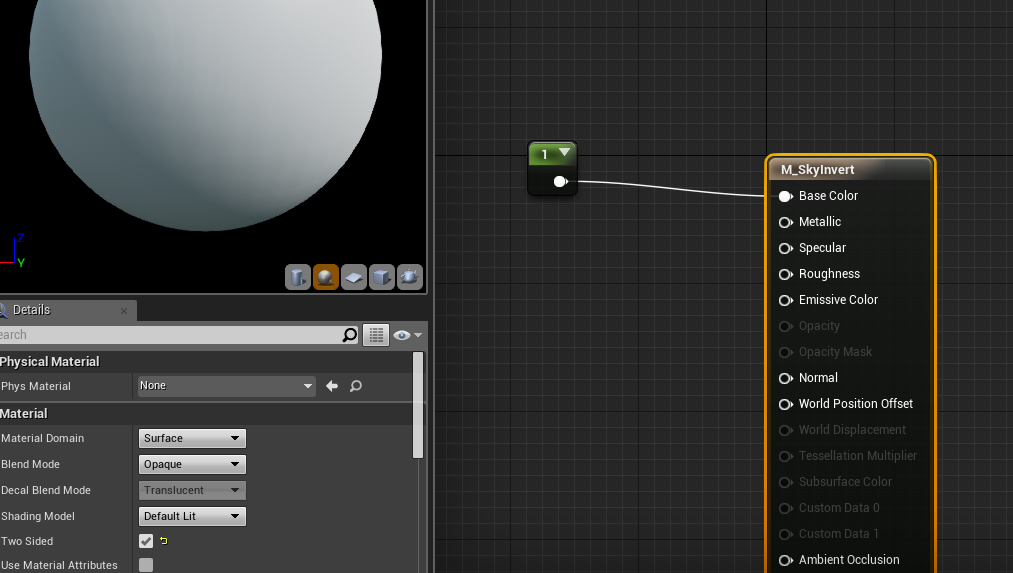
give it those settings - two sided
and base color of 1
scale up sphere to 9000, 9000, 9000
done
unreal sonnet
Protip: go to Edit > Editor Preferences > General > Keyboard Shortcuts > Blueprint Editor. Also the Graph Editor section. I wish I had reviewed or assigned these things earlier!
Binding a button to "collapse to function" as well as for "go to definition" is beyond useful!
plush yew
you mean a key shortcut?
unreal sonnet
Yeah
 tired oracle
I just wanna say that Battlegrounds is one of the best games I've ever played. If the devs hang here, damn good job. UE4 is the future
unreal sonnet
@tired oracle The guy who made it is a big Arma mod guy.
tired oracle
i know, he also helped make h1z1. But Battlegrounds takes everything to the next level
its seriously amazing
most fun gaming ive had in years
 storm dragon
Do you move the NavMeshBounds with the character or do you have multiple and toggle them on/off depending on how far away they are?
 prisma dagger
hi guys
I have a small archviz level which I wish to play it in my android phone , but it took forever to package the file with no success , so is there any technic I should use to publish my game in android mode?!
spare topaz
so, how does unreals enum bitmask stuff work? from the name one would think the enum would give 1,2,4,8 instead of 0,1,2,3
spare topaz
wouldn't combining 2nd and 3rd value end up same as 4th value with how unreals bp enum bitmask stuff gives the values?
I'd rather not start writing c++ just because blueprints lack bitwise shifting operators
so I'm trying to figure out if I understand everything wrong or is Unreals bitmask enums just fucked up when looping through
spare topaz
first error there is "ERROR: No 32-bit compiler toolchain found in"
halcyon marsh
x)
spare topaz
np
ashen brook
anyone know if there's a way to pass parameters into a child actor to be used in the construction script?
at runtime that would be like Expose on Spawn
basically I'm trying to add static components, which only seems to work during construction, but I need to adjust the parameters of the blueprint instance before the construction script runs
oh, cool
works via construct object I think
prisma dagger
I wish android packaging has a percentage counter so we can know where we are ...
 acoustic pollen
@fierce tulip here?
 lime cobalt
Would anyone know how to have the groups of the world outliner being folded by default ?
When I edit a scene, I have to scroll trough dozens of opened folders and objects before finding what i'm searching for ( and yes I'm aware of the search textbox )
ashen brook
fyi, construct object doesn't work with actor classes
sigh
I wish there was a way to preinitialize child actor instances
lime cobalt
@ashen brook Yes you gotta use spawn actor
and It's not possible to create actors using construction script which is Imo, sad
floral heart
Then the editor would have to keep track of actors spawned and remove them on update.
lime cobalt
TArray<AActor*> LeActors; // le keep track
hashtag technology, computer entertainment etc
floral heart
It does allow you to draw debug shapes. Which is hilarious because it doesn't keep track of them. Duration 0 == debug lines forever.
Actually, I don't think it uses the duration either.
So no matter the duration, debug lines until you restart.
lime cobalt
Too bad because construction script could be a powerful thing
hopes the capabilities of construction script would be extended
ashen brook
you can flush debug lines
which I pretty much default to doing in anything I use them in
unreal sonnet
@halcyon marsh I had that error as well with my game jam submission yesterday. Turns out it was because I deleted the Binaries folder on accident and/or because I disabled too many plugins. To get the Binaries folder back you need to build the project in VisualStudio or whatever, and to get the plugins re-enabled you need to go into the plugins folder of your project and re-enable all the things that are listed in there.
halcyon marsh
@unreal sonnet the problem was solved thank you anyway I just had to install c++ in visual studio
 upper yew
fallen schooner
upper yew
fallen schooner
I have a question about Unreal's cinematics
Can you cause the sequence to wait until a button press happens?
wild cloud
Hey Guys!
I have problem with my changin level and reusing BP on different level. How can I reuse blueprints on different level?
sinful juniper
hey. anyone can help me why my UE doesn't launch? splash screen counts to 72% and then disappears. anyway to find out why?
 visual spear
whipped up a multiplayer proto game https://twitter.com/joewintergreen/status/848811855648768000

I will now dispense video footage of the first playtest of the prototype I started yesterday, Last Round. RT me maybe! #gamedev #ue4 https://t.co/imzmwm1cWF
more vidz in repliez
fierce tulip
If i remember right some of you where going trough 4.16 files and found info about volumetric fog or at least something new that was fog related, someone remember what that was?
 still lake
Change 3333869 on 2017/03/06 by Daniel.Wright
[Copy] Volumetric Fog using a volume texture mapped to the camera frustum
* Volumetric fog can be enabled on an Exponential Height Fog component with additional controls
* Lights have a VolumetricScatteringIntensity
* New cvars r.VolumetricFog, r.VolumetricFog.GridPixelSize, r.VolumetricFog.GridSizeZ, r.VolumetricFog.DepthDistributionScale
* Lighting features supported:
* Directional light with CSM and a light function
* Point / spot lights without shadows / light functions / IES profiles
* Skylight with occlusion from distance fields
* Analytical height fog covers the view range past where the volumetric fog ends
* Temporal reprojection is used on the volumetric fog scattering and extinction to achieve stability
* Translucency integrates properly into volumetric fog
* Height fog StartDistance is not supported by volumetric fog and should be set to 0.
@fierce tulip
fierce tulip
that was fast, and exactly the info i was looking for!
thanks @still lake
still lake
yeah, I was just reading about that yesterday 😃
visual spear
sounds awesome
 glacial belfry
Hey everyone. Does anyone know if its possible to make external content libraries for UE4? We are slowly accumulating lots of custom made materials that we use across different projects, and its very hard to keep them updated. is it possible to make a "library" project that my other projects can refer to
cursive dirge
That sounds risky
@Zpanzer all your projects would need to use the same engine version...
I just keep separate asset projects for sound and other assets, and just migrate from them on demand
glacial belfry
Well, its a pretty standard way of doing stuff in the rest of the DCC atmosphere 😛 Its just not a very good pipeline to have to manual copy stuff between lots of projects
fierce tulip
easiest i found so far is actually store those inside the engine content folder instead of project content folder.
that way you only need to copy/paste once
 slender oyster
https://gyazo.com/853e545ea9ceaa84ce18f64767d84b86 henlo i have a problem, i want these 3 custom npcs to go in that 1 target, but it obviously doesn't happen, i know its because it is two different types but thats about ti, new to unreal ty
 hybrid scroll
Currently number one on the list of my most hated bugs.. I have a character BP, with a skeletal mesh. And a child of that character BP, that uses the same mesh and doesnt change it in any way... And each time I open the editor, the mesh of the child gets cleared to nothing. I set it back, save, restart, same thing.
Anyone else had that problem?
or similar
this is not about settings per instance (another huge pain). its about default properites of a class
 heady root
hey what do you suggest to use to store different languages in game? data tables? or something in C++?
 livid haven
store different languages
?
We talking localization/internationalization? You should definitely be using FText and the sort for that
heady root
I want create system to change language in game and Im not sure what is the best way to store data
livid haven
You shouldn't - it's already been done. 😃
An overview of the elements involved in localizing your project.
Probably horribly out of date documentation, but the concepts are still relevant
heady root
localization dashboard you ment?
livid haven
The localization dashboard is just a graphical interface to handling the localization data pipeline.
You should be using FText, be it in blueprints, in code, or using, I think, the new text table feature (not too familiar with that).
heady root
ok i didnt know something like this exist..thanks 😛
livid haven
I don't know that you can do that out of the box. I never added such functionality, but I wouldn't be surprised if it was added later.
heady root
livid haven
That looks sane enough to me.
fallen schooner
Can you cause Matinee to wait until a button is pressed?
plush yew
Hey 😃 Any reaon imported FBX Meshes with good UV-Mapping on channels 0 and 1 still get interpreted as overlapping lightmap UVs? They look fine in the UV View of the asset editor. Both channels...
fierce tulip
means that they arent as good as you think they are.
they cannot overlap, need to be inside 0-1 space, and cannot be mirrored
(only for ulightmap uv)
plush yew
The source of the UVs are CAD datasets which have then be packed to 0-1 using 3ds max. They are nearly stretch free, meaningful seams etc. They may not be optimal regarding distribution and use of UF space but they are 100% definitely not overlapping and have pretty large distance to eachother so no bleeding happens.
fierce tulip
screenshot of uv1 (or whichever uv-map you are using for the lightmap)
plush yew
hold on a sec, engine hangs 😛
fierce tulip
on a non-related note
anybody knows if its possible to use two camera's for one scene.
i.e. keep the playarea on a static camera(1) while another camera(2) is moving about a scene to create the backdrop for camera(1)
safe shoal
If anyone has any knowledge about this, pls respond.
https://forums.unrealengine.com/showthread.php?141463-Seriously-how-long-does-it-take-to-get-setup-once-approved-by-Sony-for-PS4&p=690391#post690391
fierce tulip
@plush yew no, i want to use one camera for an animated moving backdrop, and another for the playfield.
plush yew
would you just do the same thing as a camera in the content examples?
safe shoal
If you mean rendering to the GBuffer from two cameras - nooop
Not easily anyway
Trying to do almost exactly that atm
fierce tulip
there needs to be a proper way though, render to texture crap and that stuff is crap, outdated, and inefficient
@safe shoal wouldnt you be able to just call the regular sony department and either get a phone number or them forwarding you?
safe shoal
I can't even find a phone number to start, that's the trouble
fierce tulip
i recently contacted regular sony office in my country, and the conversation was so funny I got him to offer doing my groceries.
which country? uk right?
fierce tulip
difference prolly being I needed help with my sony tv &ps4 pro, yours is dev. more convoluted.
0203 538 2665 should be their regular uk office number though, perhaps ask them for a phone number/email? i mean, you can prove you are a developer.. so if they are in a good mood or get the right person on the other side of the line..
miiiiight work?
safe shoal
I'll give it a go for shits and giggles... never know!
fierce tulip
in meantime I'll try and ask a buddy if he wants to help out (also uk-based)
safe shoal
I've e-mailed every bloody sony support forum I cna find
I agree on the render target issue too. It's a bit limiting now
fierce tulip
hmm if i had the money I'd pool it to that.
Would save such a shitload of location updates, not to mention a much smoother developing situation
@safe shoal also asked on my fb-feed, as I have a dozen uk-based devs on my list.
safe shoal
Cheers 😃
fierce tulip
now make me a 2 camera 1 scene render system!
GO
you have three help-lines
a) call Allar
b) remove one invalid approach
c) 1 additional hour after deadline has ended
fierce tulip
sure thing, if you want you can dm/hangout if it saves time/doesnt disclose personal advantages or whatever :p