#ue4-general
1 messages · Page 55 of 1
 upper heart
 vale osprey
so it follows some curve in tonemapper then
upper heart
so is it the bloom color or the bloom intensity that is different now?
 fierce tulip
their games are using the new table with full strenght actually
the bloom behaves more realistic is the only proper way to put it i guess
vale osprey
bloom is not using tonemapper's color correction I guess
welp, looks like Nativization somehow influence variable/properties
Fokker can't foking fly anymore
 cursive dirge
@vale osprey does anything from MMT work properly with nativization?
vale osprey
well, previously it woudn't compile at all
so there is that
😄
things work weird, not as usuall
cursive dirge
maybe they just supress all the error conditions now
vale osprey
hmm, the thing is, suspension on that tank is c++ component
ehhh, now executable just crashes
it could be beacuase project started so long ago
there are like 4.8 version even
upper heart
effing tonemapper
 floral heart
Is there even evidence that it works correctly on HDR displays?
vale osprey
@cursive dirge but you might be right - some of the safety checks might be off, so divizion by 0 or etc leads to weirdness
I wasn't aware that HDR displays are even sold to public 😄
floral heart
There are HDR TVs.
vale osprey
"Get your tech news from UE4 release notes!"
cursive dirge
if the tonemapper and HDR support work together
I dunno
it's such a niche target audience
at least we have @fierce tulip here who actually likes the new thing
people will adapt for sure
fierce tulip
im loving it
floral heart
It'd be fine if they only enabled the tonemapper when it detects an HDR display.
cursive dirge
but they'd need some docs for it
fierce tulip
fire looks fucking so much better now
upper heart
yeah my emissive doesn't even look emissive anymore
cursive dirge
like how to achieve the old effects with the new way
vale osprey
@fierce tulip do you know how to enable it by default?
cursive dirge
I don't judge the new system yet but I'd love to know how we do bloom properly now
fierce tulip
the old or new tonemapper?
vale osprey
new
fierce tulip
its enabled by default
vale osprey
basically I would just need to tune sun/sky color
cursive dirge
do you have adaptive brightness thing enabled?
vale osprey
nope
cursive dirge
but yeah, you should be able to match the old looks by tweaking settings
I'm not fan of the oversaturated look though
vale osprey
might leave it like, this contrast is good for color blind people
fierce tulip
hmm subsurface seems to behave weird though
upper heart
how do I get actual emissive now? all of my emissive is just gone...do I have to mess with the bloom in the post process?
fierce tulip
stay in 4.14 :p
cursive dirge
@vale osprey lol, I read your comment too quickly, "might leave it like, this is good for blind people"
floral heart
Said that bloom was toned down for the filmic tonemapper. Just turn it up again.
upper heart
💩
vale osprey
😄
upper heart
@floral heart in the postprocess settings?
floral heart
Sure. (And when you get an HDR display and you've got this shiny bright spot on your screen, well, I guess we'll deal with that when we get to it...)
 hearty island
Start up time is worse?!
upper heart
for me at least
cursive dirge
could be just first runs?
upper heart
nah I've ran like 20 times by now. I'm talking debugging from visual studio. I haven't ran the editor by itself, but I never do that anyways
cursive dirge
@fierce tulip how do I make a glowing red light with the new system without lightsource looking just white/light pink?
like, if I want to make bloom effect on cars tail lights
if it looks white in the middle, it's not really more realistic
fierce tulip
currently building light :p
upper heart
turning up bloom intensity and doing r.TonemapperFilm 0 doesn't fix it. Makes me feel like a ton of stage lights are being pointed at my face even tho the bloom isn't as intense as it seems to be. It's blurring everything..wtf
cursive dirge
so.. we can't use emissive anymore?
 cloud cobalt
Of course we can
fierce tulip
<_< this is why you should read changelog instead of just moving to 4.15
cloud cobalt
The behaviour of color for large glow values has changed, that's it
upper heart
I'm just experimenting with my project in 4.15. I've been stuck on 4.12.5 for a long time and I need to eventually upgrade...
cloud cobalt
@cursive dirge Use small emissive values (like < 10), make bloom higher (around 0.5 ?)
Works fine for me
Obviously the new tonemapper tweaks the color in possibly unintended ways
But emissive still works
fierce tulip
its actually fine that it becomes slightly white @cursive dirge its just not what you expect
but irl it becomes slightly white/pinkish as well
cursive dirge
yeah, if it's bright
floral heart
I'm staring at a blue light. If I defocus, it just becomes a blurry blue.
That might be more of a DoF thing, though.
cloud cobalt
@cursive dirge I had values in the 500 range for emissive, previously - and a 0.01 glow
I changed to 10 and 0.75 on 4.15
fierce tulip
https://i.gyazo.com/cf8a2e0516c104270f48ff55da390681.png im really liking it :p
 floral heart
We know.
upper heart
lol
fierce tulip
if you want the old glow back, you might want to fake it with an opacity mask
 upper heart
glad we have a new tonemapper instead of fixing steam 👍 anyways I guess I'll stay at 4.12.5 until I can devote a bunch of time to fixing blooms, since my map has a ton of emissive on it.
thanks for the help guys
cloud cobalt
This is my game - bloom works
 slim mica
@cloud cobalt maybe too strong shadows??
cloud cobalt
Floodlights have a low emissive and stay yellow, engines have high emissive and move to white
fierce tulip
an additional input for bloom falloff might be nice though
floral heart
In space, those shadows are too weak.
cloud cobalt
@slim mica It's by design, we want the shadows really dark. Planets are invisible at night, too
slim mica
I see :p
 tall pendant
honestly i have no problems with bloom here
cursive dirge
everything seems to look overvibrant
with the new tonemapper
I guess they are after that kind of look
floral heart
Unlikely, if you think the effect on SDR monitors is intended.
tall pendant
ACES is known for oversaturate stuff. Thats why i hoped for something like Hable^
its a cinematic tonemapper afterall (ACES)
cursive dirge
tuning the contrast down helps a bit
upper heart
so what is the default tonemapper? is it custom?
the old tonemapper I mean
pre 4.15
cloud cobalt
Yeah
fierce tulip
checking the particle a day pack thing, that might be horrible hehe
upper heart
lol
floral heart
floral heart
Diagonal is 17 inches, how it's usually measured. Not sure why they insist on mentioning 13.
upper heart
ahh
floral heart
They don't pull the same silliness with their other monitors. Are they trying to mislead you into thinking you're buying a smaller monitor?
upper heart
haha
floral heart
Or maybe the "diagonal" size is in error and it really is 13 inches.
Buy it, claim you expected it to be 17 inches diagonal and want a refund. Amazon will mail you a bitch slap, COD.
Edit: Redundant.
upper heart
was this tonemapper exprimental? makes zero sense to all of a sudden make this the default and force it on you with changed bloom settings
cloud cobalt
It's been here for some time
floral heart
It says experimental in the changelog.
cloud cobalt
It's from 4.8
"added a new Tone Mapper to achieve more filmic look"
^enabled with the cvar we now set as 0 to get the old look
I'm sure they tweaked it in 4.15 but it's not experimental
floral heart
I'm not seeing it in the 4.8 notes
cloud cobalt
"Post Processing Enhancements and Tools"
"added a new Tone Mapper to achieve more filmic look"
"Open the console and enter: r.ToneMapperFilm 1"
floral heart
Oh there it is. Edge took forever to load the page. 😄 (I'd change the default browser, but discord's the only thing dumb enough to use it anyway.)
cloud cobalt
If you want to go deeper in this thing the best is to get a 4.14, enable the thing and try
floral heart
You point that out just as I finally installed 4.15.
 upper heart
yeah I got that too
when I built lighting
it's new
and pretty big
to help baloon my git repo
fierce tulip
maybe its a combined lightmap file?
upper heart
i haven't done a full build yet. so not sure what else is in it besides lighting
cloud cobalt
Distance fields, precomputed visibility, lighting
upper heart
ah okay
cloud cobalt
I guess ?
That stuff used to be in the level asset
It's better for Git to have it in a separate file
Then you can track real changes, if all build stuff goes there
upper heart
ah okay so the umap should be a bit smaller than hopefully
The new tonemapper made things look quite a bit darker for me
4.12.5
4.15
floral heart
Good excuse to master the autoexposure.
cloud cobalt
^ this is what I have too
fierce tulip
@cursive dirge maybe use an old trick we did in udk for sunglow. we emitted one spherical gradient particle near the sun (permanently) that would result in a nice glow. perhaps if you keep the glow of the red lights low, and spawn a particle close by, it might portrait more like how you want it.
cursive dirge
Yeah, the tail lights were bit bad example as cameras tend to see them as white, I dont think they look like that in real life though
fierce tulip
and just to say it out loud, I can fully understand peoples frustration when something like this comes along and changes your visuals.
upper heart
yeah it's just hard because we have been developing a certain way for so long and now I try and upgrade and I don't recognize my level anymore
I haven't even tested out my particle systems, I'm scurred
fierce tulip
if its anything like my particles, the amount of change needed is rather limited.
then again, I rarely use full color. its always a little on the white side.
and yea, an additional material input that add glow regardless of emissive str might be a really nice addition.
though not sure how'd that work under the hood
cloud cobalt
It's not like you have to update always
upper heart
right, I'm still on 4.12.5 tho
I need to eventually get off it
each time I go to upgrade I hit a showstopper and stay lol
cloud cobalt
It's okay to freeze the engine version at some point
fierce tulip
Adam Davis just passed this on: http://www.oscars.org/science-technology/sci-tech-projects/aces might be interesting.

Oscars.org | Academy of Motion Picture Arts and Sciences
NEWS: check out ACEScentral.com the filmmakers portal to all things aces!
 vagrant vine
@opal ridge what do you need help with?
fierce tulip
--
hmm, Im getting loads of warnings about collision enabled, but not having collision on meshes inside blueprints, that make no sense.
fierce tulip
https://i.gyazo.com/0e2ca623ae9353899459764ba652a6ec.jpg gee i wonder if my emissive values are off
 fierce tulip
yea hehe
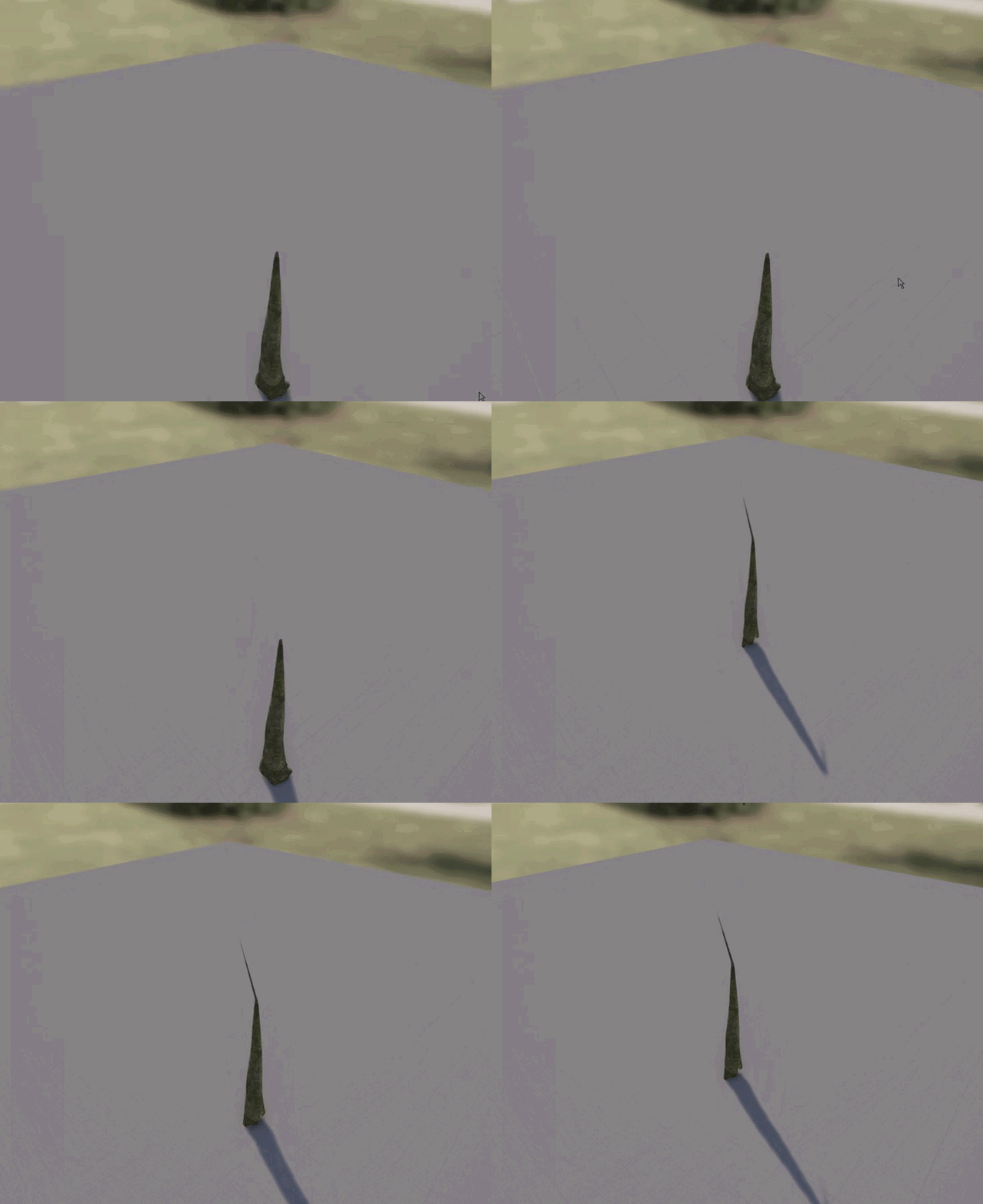
additionally, something seems to mess up LOD's in 4.15
https://i.gyazo.com/2c318364de7d503fff28cb69c0e0a66f.gif
 upper heart
yeah my cave map probably looks similar. haven't opened it up yet
 main cobalt
That light bloom looks straight out of ark lol
everything in that game is the surface of the sun
 neat galleon
floral heart
neat galleon
floral heart
If you want blue in ACES, apparently you need to use a hue between 200 and 225.
fierce tulip
yea they been complaining since first preview
floral heart
0,0,1 is a hue of 240. 0,0.25,1 is a hue of 225, and even then there's a marginal pinkishness to it when it overbrights.
upper heart
🌈
 grim juniper
Is there a way to prevent steam vr from launching every time I launch the editor?
 craggy nymph
Disable all VR plugins for that project. Other than that, I don't think so.
 unreal sonnet
I recently heard from a tutorial guide sort of thing that lighting, art, and shaders very often makes the difference between a AAA game and something you pooped out on the weekends. Does anyone have any recommended guides for any of those three things? I checked out the Unreal Engine Lighting guides video stream recording but it wasn't very helpful for this sort of thing, I felt. I've also gone through the BlenderGuru tutorials and videos discussing lighting, color, and composition and thought those were good but I was hoping for something more applicable or relevant to Unreal.
 spice urchin
jfaw the fastest way to make a scene look good is FILL IT
empty scenes look ugly and noobish
the more shapes are in your scene, the more the light and shadow works for you to create visual interest. it's a lot easier to make a forest look good than a desert
if your scene is indoors, exact same premise applies. an empty room will look bad even if it has great textures. the more you fill it with objects until it feels like you're in Sherlock Holmes personal den of curiosities, the better scene will look. Emptiness and austerity are the enemies of visual interest with art, that's why most VR games look so terrible, they're often made by architectural 3d artists that don't really like to do "props", just walls and doors
 raven cedar
indeed. clutter. then grime, dirty textures. Nothing is perfect. Make meshes with flaws. Then yes, lighting and composition will sell the entire thing. You dont need 100k polygon assets and 2k textures i..e to your point yes, movies have been using light and shadow 100+ years, its all you really need to "trick" people.
 distant lion
anyone could provide me with the ue4 mannequin so i can import it into maya to use it as scale?
 tiny ivy
I've been trying to get the Steam overlay working in 4.13-4.15 for three weeks now and I'm going insane. Is anyone able to help me debug the issue? I've tried using v132 of steam, also have updated to v139. I've reinstalled all the engines and steam multiple times. The DefautEngine.ini is configured correctly, and steam is running with me logged in, but I never get any overlay running in Standalone and steam doesn't say I'm playing Spacewar
cursive dirge
@distant lion just make a new project for example from thirdperson template, find the skeletal mesh for the mannequin there from content browser, right click, there should be a submenu for mesh actions (cant remember exact naming) and select export
 eternal dagger
Hi what's the best way of showing a text file in the content browser? I need to include the CC license text file alongside the thridparty art I'm distributing with the sample
 past pilot
so for some reason i cant use 4.15, thought it was just foliage but even being in an editor window is lagged to hell and stuttering badly on a i7 6700k 64gb ram raid 0 ssd setup. The only thing is the R9 290 and it didnt have these issues 😦
 gritty vale
Hi everyone
Is there any way i can use the source control plugin (Inside UE4) to set up a local repository for a very large project? (34gb) I've been trying this for like a week. Tried setting up an online repo with git LFS but that failed because some files were way too large
 floral pagoda
:\
@gritty vale How big are the files and what service are you using (Github? GitLab? etc)
gritty vale
I already tried with github
but wanted a private repo so using Bitbucket now
and I'm handling everything via source tree
gritty vale
what's the max limit?
my content folder is approx 2.5gb
and can I hook up gitlab with the in editor source control plugin?
And can I just sync the content folder and the source ? Sorry I'm new to this
floral pagoda
No worries
I was just busy
You can hook it up to gitlab I Would assume
Just enter the details in the source control plugin
cloud cobalt
Gitlab works fine for up to 10GB
34GB is too big for any hosted service, you'll need your own server
But 34GB is yuge
You should definitely never version the Intermediate, Build, Binaries or Saved folders
Version Sources, Content, Config, PLugins if any ; + .uproject
gritty vale
oh okay. Gitlab doesn't seem to have a setup for windows though
cloud cobalt
Use Sourcetree
gritty vale
thank you so much kind stranger 😄
 winter niche
Is it possible to add a pack I downloaded as a zip file to the Vault in Epic Launcher?
Some folder I have to drag it to maybe?
 weary basalt
Packs are only added to the Vault if you actually purchased it through the Marketplace.
winter niche
It's free.
weary basalt
Is it on the Marketplace?
weary basalt
If its not on the Marketplace it wont appear in your Vault, there is no way to get an external pack onto your Vault
winter niche
So not possible to put it in vault, I have to add it manually to projects?
weary basalt
Yes
winter niche
Okay, thanks.
cursive dirge
@gritty vale besides the mentioned folders to ignore, you should never put content in version control "just in case". I have separate asset placeholder projects and I only migrate assets that I actually use/need in the main project
Even if you use some marketplace assets, they often come with additional content like demo maps etc. You wouldnt want to put things like that in your version control.
gritty vale
I was thinking about that since I don't require all of the assets in the content folder, thank you 😃
cursive dirge
If you have the assets on git repo already and have made commits for them, it's in the version history already
So just deleting those afterwards will not make the repo size smaller anymore
If it is a relatively new project, it's easier to just slim down the project and create a new repo.
gritty vale
The project is on my hard - drive. I'm setting up a git repo for it the first time
 regal spire
is there a way to cook used assets only when packaging for an ios binary?
winter niche
I'm trying to paint trees on to a terrain, and I want the size of the trees to vary (but constrain proportions). The scale x setting seems to have no effect. The trees stay the same size no matter what. Any reason this could happen?
vale osprey
digging through GDC playlist, this was quite entertaining:
https://www.youtube.com/watch?v=pLbmZT70rtA&spfreload=1

@winter niche
are you refereing to "Paint Settings"?
https://docs.unrealengine.com/latest/INT/Engine/Foliage/
System for rendering instanced meshes on the surfaces of other geometry for use as foliage or other ground cover effects.
 fervent tree
Hi everyone, does anyone know if it would be possible to have realtime data, like heartbeat/stress/... streamed into unreal?
 kindred mountain
possible....yes
cursive dirge
you could run a separate thread that handles the outside data and sync that for ue4's gamethread whenever you need it
fervent tree
Alright thank you, I will start looking into that then!
main cobalt
@vale osprey Saved for watching later!
 opal spindle
Anyone know if UAT is standalone?
Ala can you run it without needing to install the engine?
winter niche
@vale osprey I copied a tutorial here: https://youtu.be/so4Ru1Dvugs?t=4m58s, and that works, but when I change Scale X like in the video on some other trees I have, it doesn't effect the sizing. The other trees come from the Squad SDK; could it be that they're some how locked to their size?

Oops, didn't mean to make a big video in the chat.
 south ridge
Btw
To add to questions earlier about storage
Anyone know any nice online/offsite backup solutions to back up about 500-1000 gigs of data?
opal spindle
git
south ridge
"git"?
I'm gonna set something up with my own hardware, but it's not a completely nice solution
 idle cobalt
@south ridge FexNet - unlimited size, nice 1 GBit channel, 7 days free access, and cheap premium
south ridge
So for the solution to qualify it has to be less than $30-40/month
It's a super strict limit, but I can set up my own backup thing for that much per month
vale osprey
@winter niche hmm, no idea, could check on Squad forums, maybe they use some custom variation of the static mesh for them
winter niche
Okay, thanks.
vale osprey
I had bug with foliage painter when you try to paint over other static meshes which are scaled
kindred mountain
amazon glacier?
south ridge
I've considered amazon, but it seems too expensive
 south ridge
Is it really? For 1000 GB?
kindred mountain
I have 300GB of stuff on there, my last line of defence photo backups
like 1$ a month or something
winter niche
You get charged for your data pulls, that's where they make their money.
kindred mountain
very cheap for storage, and you pay for retrieval
yep, but a good value last line backup
winter niche
Sure.
kindred mountain
if I ever need to use it then my apartment has burned down so a few quid for the download is the last of my worries
south ridge
Do you not pay for putting data into it?
Trying to understand what "requests" is too hmm
Should I count that one file is a request, or should I pack the backup into big chunks etc
south ridge
Hmm
I will try it
Btw
Unreal engine question: can I assign tags/info to assets?
I wanna assign some text comments to my asset
Editor-only, just to give people an idea on what the asset does or smth
slim mica
I have to get quite close to my dynamics lights to see the shadows, how can I fix it?
 pallid compass
Oh man, in BP interface, if im sending a command to player BP from the world bp, howd do i set the target for the interface message
 fast oak
hi guys, i intalled ue4 yesterday, and,, after a first look to the 3d creation tools, i went into the programming part... well... i see that basically there are 2 different way: c++ scripts, and blueprints... but, which are pros and cons of each one ?
( i'm pretty new to this )
 hasty night
hi, folks, any partical reason to use private/public for c++ code? I know the idea behind them but in practice does it have any values for, say, modding?
south ridge
If your team is small and communicates well, then it's mostly just for modding
Usually you put things under private if using them blindly may cause issues the other programmers might not realize, as a way to limit that kinda stuff away via an API which doesn't require intricate knowledge to use it
 dreamy path
Has anyone ran into issues getting spotlights to work? I have an empty medium sized room made out of StaticMeshes, no skybox and no atmospheric fog and I cant get any light to come out of a spotlight I spawn
point lights work fine, but nothing for the spotlights, on static, stationary, and movable
cursive dirge
oh
they brought back in "Features Toure 2014" into launchers learn tab
they had that removed for a long time
it's not updated for latest engines though
regal spire
is there a way to cook used assets only when packaging for an ios binary?
south ridge
by default only referenced assets are cooked
 loud vapor
How do I send a compiled plugin to someone without sharing source?
past pilot
4.15.0 seems just as full of bugs as 4.14.3 was... new bugs... frustrating bugs... lol
winter niche
Noob question: I've created a new level in First Person Shooter template, with the floor and lighting already there. The floor StaticMesh, has scale 1.0 1.0 1.0 by defautl over in the details panel under transform, but it's much thiner than it is wide or long, yet it's 1x1x1. What are those units, and why do they imply a cube when the floor mesh is shorter than it is long/wide?
past pilot
foliage wont cull, have to shut it off, Now my skylight stopped lighting my scene... If i add a new skylight it turns on the one that isnt working and bleeches everything out, delete the new skylight back to no skylight....
regal spire
@south ridge where can I modify this setting? I probably messed something up before
 plush yew
what bugs @past pilot
winter niche
How can I make my foliage always be perpendicular to the horizontal plane, rather than perpendicular to the ground?
Put another way, my trees are going in at a right angle to the ground, rather than just facing vertically up, to sky.
So on a 45 degree, they're sloped out.
45 degree hill*
vale osprey
@loud vapor you need to send them content of your Plugin folder, without source folder. Just don't forget to compile it. Compiled version will be in Binaries folder
loud vapor
Its allgood, i worked out the publish plugin feature :)
 heavy flicker
So does anyone know how to add extra node points in a material in the 4.15 feature? I forgot whats it called
vale osprey
Re-route nodes?
cursive dirge
double click on wire?
BP's work like that as well
I haven't actually tested the reroute nodes in mat editor
fierce tulip
yea doubs click
cursive dirge
oh right, I forgot I was supposed to check it myself too
 viral mantle
Looking for a mentor
cursive dirge
you are doing that udemy course arent you? 😃
I'd disagree with the need for specific mentor, while it could be helpful, single person never knows as much as a big community like this for example
@heavy flicker just checked, reroute nodes work just the same way as in blueprints so either double click on wire or search for reroute node
viral mantle
I'm not doing the udemy course I just have some questions sometimes that seem very basic and don't want to ask them publicly to avoid embarrassment I have ideas about things but I don't understand the steps I need to take to do them maybe someone to help break down a process into single elements to learn and teach myself
cursive dirge
well, usually if you wonder about something, you are not the only one, in fact, most of the answerhub questions are really basic
so you'd probably find most of your answers just using unrealengine search
viral mantle
I'll have another look
craggy nymph
The strange thing is, you can kind of only expect to get help with problems of simple to medium complexity. Sometimes you work on something really complicated and pull your hair out for days, but you also know, asking for help won't work, because someone else would have to spend a few hours to go over the code you've done, to get up to speed and understand what you're doing. Only then could that other person figure out a solution. At least that's my feeling.
vale osprey
it still helps as describing your problem helps with understanding it better
 ember siren
Hey guys, I'm kinda in a pickle here. Is there any way to change the far clipping plane? I can only find near clipping plane.
spice urchin
@winter niche turn off "align to normal" checkbox in foliage painter for any asset you want to stop aligning to terrain
winter niche
Yeah, thanks @spice urchin.
 uncut musk
hi
 drowsy carbon
not sure which section to post this in so im just posting it in here. I am trying to make jumping, crouching and maybe double jumping the only movements the character can do i setup the input actions already but when i turn off walking as the default movement in the blueprint he doesnt jump or do anything when i press the buttons for the other movemnts, is there a way to make this work?
 sharp crest
Ok thanks :P
 ember jasper
 spare topaz
what could cause Unreal engine to fail finding the SteamSDK dlls even if they are present?
 kindred viper
@spare topaz : updating the engine to include the steam SDK changes and still using the old method to load it.?
spare topaz
yeah, I changed every reference of v1.32 and tried to use it like I would do with the binary version of unreal engine
activated the plugin, added the configuration to defaultengine and modified the project.build.cs
 restive forge
Hi guys I'm new to this discord server and wanted to say sup. Is there a place to find a detailed rundown of how each software operates in the development lifecycle and which ones are absolutely necessary to creating a 3D video game (loosely defined) - > IE UE4, Maya, Zbrush, Substance Painter, Substance Designer, etc.
 halcyon marlin
not that I've found, mostly because it depends on the studio
workflow can change and no program is absolutely necessary
others can be found or you can create your own
restive forge
@halcyon marlin ok thank you
viral mantle
@vale osprey I don't have any problems with my code I want to be able to ask a question it might just be I want to know how to explode something by having my character walk over it and someone could just say ah that's an overlap event or an on collision event and then be able to look into it when I search it gets kinda fuzzy if I don't know what I'm looking for
vale osprey
many different ways how you can do it
I would monitor for collision or overlap event on the thingy that you want to explode
let's say you want to make an anti-tank mine. In this case it's easiest to place all logic inside of the mine. Like wait for something to get into trigger volume, then check if that's a tank and not a person, or check mass of the object and etc. and trigger
but if you want to make a minefield then this approach is kind of sucks as you will have a lot of "heavy" objects in the level
in case of minefield, you could make a component, which is added to a vehicle/person when they enter "volume" of the minefield and from this component calculate chances of triggering mine
^just an illustration that it all depends on context
 sudden sphinx
Hey guys, sorry to interrupt, but I have a quick question.
I want to prebake an animation in C4D and then import an FBX of it into unreal. I dont care about the skeleton since its just an asset, not a character. How should I do this? Make a single joint and bind to it?
I know that importing FBX wants a skeleton..
halcyon marlin
yeah, i'd just bind a base bone, like, for placement
a bRoot or something
most meshes want that anyway if you're going to end up moving them around/controlling them
vale osprey
if you want it only as a guide object, you could export it with some primitive mesh and then manually "follow" the bone
sudden sphinx
you mean a guide object in terms of my mesh or the bone?
vale osprey
I don't think you can export animation with just a bone
I mean - only bone, without any triangles associated with it
so purpose of primitive is to just export and import animation
sudden sphinx
oh wait, i think i get what you mean
2 files, one for the skeleton, one for the mesh, right?
viral mantle
i want to do combat for my game ranged/magic/melee im just struggling to find where i should start
i was having a play around with custom projectiles last night with no mesh and a particle effect for magic but got stuck on the damaging of the box
I realise there's a free melee template but I feel in order to understand somthing I need to go through it
vale osprey
@sudden sphinx yes, if you want to keep your mesh disassociated from animation
like if it's just a camera path
sudden sphinx
Well okay so I'm actually having a lot of trouble with this. What I'm trying to do is use deformers in C4D to animate something. I want to bring that baked animation into UE4. I got it working with the 4.13 alembic stuff, BUT, every time I close the project, the materials tab on my meshes goes away and I cannot put a mesh on it
very weird
any ideas on how to set the material on an alembic? If I could do it through code that would work as well
sudden sphinx
yeah im trying. but its weird getting PLA (point level animation / vertext animation) out of c4d. works great for alembic, but UE4 ate my materials, so...
 tepid hound
Does anyone know by any chance those who work in the AAA industry know what's the standard tool you use for terrain generation editor? (World Machine, Vue, Terragen etc.)
kindred viper
I wouldn't think there is one tool they all use. There are different requirements for different terrain setups so I would presume they would filter through anything that was tailored to their specific needs.
tepid hound
Yea makes sense
vale osprey
half of the job is finding what works
tepid hound
I'm not sure if some of you heard of World Creator 2 but its out for beta now, looks great, and simple. Nice to see a new competitor. https://www.youtube.com/watch?v=OekL3YFl4Wk
 vale osprey
There is thread on forum regarding UE4 integration
Ohh, standalone, nice
what worries me with World Creator 2 is that you are limited to a patch of world, compared to how World Machine approached this
tepid hound
Feature on website quote "World Creator has no limits in terrain size nor terrain resolution. The only limit is your HDD / SSD. Create ultra large and vast terrains with a precision of 1 m per pixel.
It is not required to create power-of-two terrain sizes anymore – create whatever size you want - truly powerful, truly unlimited detail."
south ridge
can I create a 2 x 2 m ultra-detailed terrain
vale osprey
just in this video you can see that edge is processes as "end" of the world
with no respect as to if you want to use it as a tile
but it's beta, so...
tepid hound
Yea I haven't seen anything about tileable yet, just terrain size. Something we could suggest they could add
Though I do like that they have a nice editor of selecting a piticular area, and optimize it for like a game area. It has a pretty good brush tool
plush yew
kindred viper
logging in to vote that. Nice one @plush yew
plush yew
thanks, I hope this will be a thing, I spent 3 hours on that post >_>
kindred viper
thank you
plush yew
but I didnt want to finish my plugin because as I said in the post, it doesnt make sense as a plugin but should rather be integrated into the engine
kindred viper
yeah UMG is a fickle mistress and core changes require some thought from the slate side which Epic are obviously the masters of. Oh and Nintendo coders if the hype is to be believed :p
plush yew
lol? nintendo coders love slate?
kindred viper
they recently states their developers have mastered unreal 4 engine. I presume that includes UMG/Slate 😃
*stated
plush yew
lol
@tepid hound good news 😃 pre-ordered it but have been trying to pretend it doesn't exist until it hit beta or later
the pictures were broken apparently, reuploaded: https://forums.unrealengine.com/showthread.php?137206-UMG-Themes-Ability-to-set-up-themes-and-apply-them-to-any-Widget-from-the-UMG-editor
 wispy vale
What sources do you guys use to find cheap non-Western 2D artists?
wispy vale
Where do you go about finding the aforementioned Russian groups?
south ridge
I just googled for them
craggy nymph
When creating a material function, is there a way to see the instruction count of that function without placing it in a material, noting the instruction count, hooking it up and check how much the count increased?
vale osprey
I don't think this is possible as instruction count depends on a lot of things
Like the same function willbhave different effect if material is translucent or not
Maybe there is a way to see generated hlsl code, that could give a better impression
craggy nymph
How does the hlsl code help with quickly checking how much the function approximately costs?
south ridge
Er
You can see generated HLSL code already (for the entire material)
And you can compile that HLSL manually if you wanna
vale osprey
You could plug it into shader toy and compile
@south ridge ohh, that's cool, how do you do that?
craggy nymph
Shader toy is GLSL though, isn't it? So, that shouldn't work.
Anyway, that would probably take longer than placing the node in a material 😃
I just thought it would be neat to at least get some number in the material function graph, even it might be higher if hooked up to certain material inputs.
vale osprey
Well it would take 5 minutes to convert
So why not just add it and compile in materials?
vale osprey
The same function can be hooked to vertex or pixel shader
Instruction count would be different too
Anyway, would be nice to have some easy way to see code
craggy nymph
Oh, btw, to see the hlsl code in the material editor: Window-> HLSL Code
vale osprey
Super! Thanks
south ridge
I was about to say, why is it hard xD
vale osprey
Honestly had impression that ShaderToy supports hlsl 😃
plush yew
Has anyone had any luck converting their project from 4.14->4.15? My build is successful but during startup it triggers breakpoints in AnimBlueprintGenerated.cpp
 topaz rapids
is the microphone and refresh icon part of the engine? and can i turn them off?
weary basalt
Thats NVIDIA ShadowPlay
topaz rapids
ah
south ridge
Hm
General question
How can I ensure that certain assets do get cooked even if there are no explicit references to them
 heady bridge
Is there a way to get the Substance Plugin to work with 4.15?
cursive dirge
@south ridge I thought it cooked everything from content folder by design, whether you wanted or not
unless you specifically ignore maps etc (I could be mistaken though)
@heady bridge yes, download the plugin from their site or update the 4.14 manually
but their new plugin supports new SD6 features so I'd recommend using it instead
it should be in the marketplace when Epic finds time to update it there :p

Allegorithmic is the developer of Substance, the killer app when it comes to texturing the next wave of 3D.
heady bridge
Thanks @cursive dirge
 signal shore
is the accepted answer here really correct? https://answers.unrealengine.com/questions/342361/c-equivalent-of-getrotationxvector.html
it seems like the suggested answer converts the whole rotation to a vector, not just the x-axis like the blueprint node does
or am i misunderstanding something fundamentally here?
the way i understand it the blueprint node GetRotationXVector would create a vector (x, 0, 0)?
cursive dirge
@Soleone it would NOT create x,0,0
signal shore
so the answer there is correct?
cursive dirge
I'll check the answer, brb
signal shore
what i'm confused by is why its called XVector as opposed to just saying e.g. GetRotationAsVector
Is there a YVector and ZVector variant as well then?
i probably don't really understand the difference between a Rotator and a Vector
cursive dirge
I'd use the last answer, although I didnt check the source implementation for the node to be 100% the same thing
There are no y or z variants
signal shore
does a Rotator have "more" information than a Vector? Or does it hold the same info just in a different format?
cursive dirge
Rotator uses quaternions internally
So it has better internal data that doesnt for example get gimbal locked like euler angles could (which we use in editor)
signal shore
but a rotator is just 3 values for each axis between 0 and 360 or?
and vector is also 3 values for each axis but with different values (i guess also having lengths)?
cursive dirge
@signal shore rotator is 4 floats internally, it just gives out the values in angles for the blueprints as we can't deal directly angles with quaternions
it's a usability thing
oh wow. I just checked, it is three floats
wait one sec
signal shore
ok thx for trying to help, but i don't think i'm getting he basics here really. still dont understand why its called XVector. think i'll read this http://www.oldunreal.com/wiki/index.php?title=Mechanics_of_Vectors_%26_Rotators
cursive dirge
yeah, I kinda messed up on the rotator as I really thought it was using quaternions 😄
I know for certain that unreals transforms DO use quaternions to store the rotation, so I remembered that rotators did that too but apparently that's not the case
signal shore
unfortunately no idea either yet what a quaternion is and how it relates to vector/rotator
cursive dirge
don't mix those X, Y, Z (+W) into regular euler angles for X, Y, Z axes
they are not the same thing
Y, Z and W contain imaginary number part
if you want to melt your brains with these, you can take a look at https://en.wikipedia.org/wiki/Quaternion

In mathematics, the quaternions are a number system that extends the complex numbers. They were first described by Irish mathematician William Rowan Hamilton in 1843 and applied to mechanics in three-dimensional space. A feature of quaternions is that multiplication of two quaternions is noncommutative. Hamilton defined a quaternion as the quotient of two directed lines in a three-dimensional space or equivalently as the quotient of two vectors.
Quaternions are generally represented in the form:
a + bi + cj...
signal shore
oh boy, hello rabbit hole
cursive dirge
but in the nutshell, you can just think of it as system that can hold the rotation better than euler angles but you can't directly modify it without doing conversions with math
in general, you don't need to understand quaterinions math itself, but you do need to understand why it's there and why euler angles are sometimes problematic
for example, in unreal, if you go past 180 or 360 (depending on the thing you rotate), values flip into -180 or 0
if you then want to use absolute world rotation, you can imagine how things will get confusing when you'd want to move the thing past those points
signal shore
if you go past 360 you dont end back at 0 or 1?
like i have an angle at 270 and i add 95, i dont end up with 5?
signal shore
i have a lot of theory to catch up with
cursive dirge
if you look at the actors transform, you can see it lets you input only values from 0 to 360 using the sliders, but you can also input manually negative values there
I also realise I struggle to explain this as I've had to deal with so many different euler angle issues in past that I mix more special cases into the basics now
but anyway
the values flip when they go over
I see the editor using 0-360 range but you somewhere see -180 to 180
signal shore
just watching a video, seems like the big advantage to quaternion representation is that you can interpolate cleaner between two rotations
cursive dirge
it's less error prone in probably all ways

Gimbal lock is the loss of one degree of freedom in a three-dimensional, three-gimbal mechanism that occurs when the axes of two of the three gimbals are driven into a parallel configuration, "locking" the system into rotation in a degenerate two-dimensional space.
The word lock is misleading: no gimbal is restrained. All three gimbals can still rotate freely about their respective axes of suspension. Nevertheless, because of the parallel orientation of two of the gimbals' axes there is no gimbal available ...
that's what you can get with traditional euler angles
heavy flicker
So is 4.15 a stable release?
south ridge
@cursive dirge all things were cooked in earlier versions I believe, but I've just done testing
What I did was select only some maps for cooking
Then create a patch with OTHER maps selected
The end result is that patch was 400 mb - it included a lot of assets previously unused on the initial map
pallid compass
So i have an animated box, and i imported it as skeleton mesh, its in 3 parts, it animates fine, except there is only 1 material slot on it even tho its 3 items?
I made new material slots, but its not going in the right place, anyone know where iv fucked up my pipeline?
 full atlas
is there a way to make actors allow overlapping while in-game?
cursive dirge
don't make them block collisions
full atlas
enable-disable overlapping basically
cursive dirge
or, just don't put physics colliders to actor
or, just move the actor without physics sim
or.. whatever applies to your situation
full atlas
so there isn't
cursive dirge
...
sure, lets agree on that then 😄
all things I mentioned would allow it but if you don't want to
spice urchin
@pallid compass you need to go back to Max or Maya and assign different materials to the different parts, that will create separate material IDs
if it's in Maya just select the mesh faces and assign different materials
in Max you could select by Element (5 key) and do the same
 heady ruin
I don't understand how to get to the blueprint for the FPS template...all i've been able to find is a C++ header file? It seems to me the FirstPersonCharacter graph is the blueprint representation but I keep getting errors for various things that says it's not. I want to get the mouse to release from the FPS module so i can click a UI I made but whenever I try to do stuff like that, I always run into a problem with the blueprint not being the PlayerController. For now I've been scripting most of my stuff in the level blueprint I think..
 terse marsh
Is there any way to set flags (like SaveGame) in the properties (fields) of a structure done in the editor?
 copper wedge
dont know where to put this so here goes: right so im trying to move my characters spring arm that is attatched to it in the viewport, but it wont move
 still bough
I'm looking for a way to flag assets as placeholders, so an artist can then filter by "placeholder" and start working up update and replacing those assets. Anyone have any suggestions on a good way to do that? It looks like the asset manager has the ability to tag stuff like this, but there's no UI or workflow for it in the editor
kindred viper
I would use Collections.
This document covers the use of Collections within the Content Browser.
@still bough
 worn merlin
Anyone ever had a problem using Sequencer? When I go from 1 level sequencer to another there's a split second where the camera changes to some random position in the game -- No camera exists where it's even looking so it makes no sense why it's doing this
I dont properly know how to use Sequencer I should add. I'm up against time so I had to change cameras by creating multiple level sequences and at the end of the timeline, trigger an event which sets the player controllers camera view target to be the next camera
weary basalt
Do anyone know of an MemLeak when attempting to select an docked tab and it thinks it needs to move that tab as if it was in Docking mode?
Editor hangs and Memory consumption goes crazy
 tender violet
is there an easy way to figure out where a ubergraph/pin entry points is in a blueprint? I'm getting output log spam on a tick event but its just listing this:
Function /Game/Cycling/BMX/Blueprint/BMX_Bike.BMX_Bike_C:ExecuteUbergraph_BMX_Bike:0B4E
but it not clear where in the BP that is 😛
 errant lintel
I can't remember where I can set default player name :c
I find it ! inside GameMode
 quartz ether
If you agree, please bump.
https://forums.unrealengine.com/showthread.php?137330-Landscape-performance-issue
cursive dirge
@quartz ether Ark devs don't agree, they stuff in 40+ layers
quartz ether
@cursive dirge Sure has the worst performance of the year.
copper wedge
how do i change the lenght of a spring arm though blueprints
weary basalt
There is a Set node for that.
distant lion
anyone know where i can find the "made with ue4" video to put in the trailer of a game made with ue4?
weary basalt
Epic has an Press Kit on their website that has content like that.
distant lion
oh ok thx
plush yew
Okay, so...
http://streamable.com/video/dcj2c
The spring arm just doesn't seem to work properly!
I cannot even begin to think of what could be causing it, posting it here hoping you have an idea
weary basalt
What is the desired behavior your looking for @plush yew ?
plush yew
Oh hey
yeah, it's meant to collide with walls and objects, effectively creating camera "target" on the surface
I use it to point the character's eyeballs where the camera is looking
Except for whatever reason it clips through walls and seems to collide with a wall that isn't there
@weary basalt so thats that
weary basalt
The Springarm uses a channel to determine if it needs to collide with something or not. Objects you want it to collide with need to Block that channel. Check what channel the Springarm is using and make sure that your objects are Blocking that channel.
You will find those channels in the objects collision profile settings.
plush yew
I assume if I want visible objects to block the springarm I'd want to pick Visibility, right?
yeah it's still not colliding unfortunately 😦
weary basalt
Yep Visibility would be a good one to use. Try attaching a larger test object to the end of it. Its difficult to tell if its actually colliding correctly or not due too the small size of the sphere you have attached.
Also ejecting from your character and looking at it in the editor from a different angle might give you a better perspective on it.
Use the Visualization Buffers to check the different channels in the editor window. Visualizing collision channel might help you understand whats happening.
plush yew
Thank you!
hm
its almost as though it checks collision in the wrong direction
and then uses that as though it checked on the left
weird
weary basalt
I cant think of anything else that would be the cause. Im not infront of an Editor right now so i cant help you further im afraid.
plush yew
I'll post another video in just a moment to give you a better idea, just in case
Otherwise I'm in complete despair
weary basalt
Thats very odd.
plush yew
@weary basalt I'm honestly starting to lose my mind over this
I've looked everywhere
why? how?
weary basalt
There is an option on the Springarm called dohittest or something. Make sure that its on.
 plain gazelle
Should all the input be in the Character/Pawn or should some be put into the Player Controller?
plush yew
Yeah, Devils that's on
weary basalt
@plain gazelle depends on your needs. Anything that moves a Character i put inside the CharacterBP, some people like to use the Controller.
 tribal silo
Hi guys need your guidance with some lighting knowledge!
Our student project have a very stylistic style and I got a pretty good blend going between our landscape material and the grass in a well lit area, the problem however is when the grass is in shade, the colors amlifies as hell with the AO and the blend between the material and grass is waay off.
should I just keep tweaking the directional light / sky light until it matches or do you have any tricks up your sleeves regarding this?
On a second note i get these black spots sometimes, should I just increase the light map resolution or is there something else? Cheers mates!


 ornate girder
anyone have a translucent water texture i can download
fierce tulip
O_o
floral heart
makes a 1x1 pixel image, blue, with 10% alpha
south ridge
65,164,223 this is my original water, donut steel
 upper yew
Can anybody tell me what has changed in regards to lighting from 4.12 to 4.15?
In my 4.12 levels the lighting can build in just a minute. In 4.15, it literally takes 10ish
Both scenes have so few assets in them. It stinks so badly :(
Have any default settings changed?
loud vapor
@upper yew it really depends on the scenario
upper yew
Oh wait i just realized i think my 4.12 landscapes are a lot smaller than my 4.15 projects lol
What do you mean by it depends on the scenario though?
loud vapor
Well are they the exact same?
 frigid kernel
is there a easy way to set editor viewport to desired size?
upper yew
Oh. I'll look at that in a few minutes. Ill get back to you
spare topaz
Is updating SteamSDK to 1.39 an impossibility currently? yup, stuck with 1.32
upper yew
@Kanga yep. It took the 4.12 one about 30 seconds to finish from 0-100%. It would take minutes in 4.15 for it to finish 0-100%. There is definitely something not right.
And its so painful to wait like that xd
 thorn forum
Heya! Has anyone tried Fortnite yet? I am excited to play on the alpha. Difficult without an invitation
spice urchin
@tribal silo try using vertex normal cloning from a flat plane to your grass so it accepts light and shadow the same. Also tinker with mesh distance field settings in static mesh viewer, set to 0 on resolution to disable. Also if your lighting is static, perhaps try unlit for grass and use color variations of grass for shadow regions
 rare jungle
In 4.15 Unreal supports Alternate Frame Rendering with SLI. I'm wondering if anything needs to be enabled to activate AFR SLI support? I didn't noticed any performance boost after the engine update.
cloud cobalt
Don't you need to contact nVidia and ask them for something ?
rare jungle
for real?
cloud cobalt
I don't believe AFR works out of the box
SLI is shit technology, to be honest. It's always better to have a bigger, single GPU, unless there is no better GPU
Maybe confirm that with Epic though
cursive dirge
doesn't matter what some people think about SLI, people still have the gear and we should support that
rare jungle
I think i will call nvidea and epic.
cursive dirge
I'm not a fan of the tech either
rare jungle
to this point i'm using two GPUs for Octane. I just want to give SLI a try. But if it is so complex and I need a special profile from nvidea I'll stick to one GPU. 😉
cursive dirge
if your game will become popular and it really needs a separate sli profile, then I'm sure it's easy to arrange
you can also use other games sli profiles on your own game afaik, so for example if some bigger UE4 game enables AFR SLI, like Ark, Squad, Conan, Paragon, UT etc, you could try using your game with their sli profile
cloud cobalt
Though it probably requires same UE version, same rendering pipeline
rare jungle
I'll give that a try
 echo marlin
So with Unreal is it best to develop with Multiplayer in mind from the start or is adding it in later not very difficult? I've noticed that a lot of the networking is built right in. I just started porting a project over from Unity and want to know what's best before I write/port a bunch of stuff
I know with Unity if you didn't start with networking you'd want to throw your PC out the window when you tried to convert things
south ridge
You should develop with consideration of multiplayer
echo marlin
Alright well I just finished porting the basic physics for the player so I suppose I better read the networking docs.
 bitter iris
 south ridge
You can change pivot in your 3D editor you made the asset with
cursive dirge
@echo marlin do note that unless you use unreals character movement component, you'll not get Unreals network prediction
ue4's characters have netcode built-in
anything else and you only get like variable and function replication
well, you can replicate other things too but in general, you'd end up writing all clientside predicition, server authorization etc code yourself then
 bright arrow
@upper yew - We are seeing a LOT of performance issues with 4.15 going from 4.13. Level loading right now is taking exponentially longer than before, frame rate has also dropped by 300% .. I'm curious to hear what other changes happened in the engine that could be causing this
upper yew
@bright arrow Yeah I have also noticed a HUGE loading time increase as well. I'm glad to know I'm not the only one. Thanks a lot :)
vale osprey
@bright arrow have you done complete cleanup of temporary files?
bright arrow
Saved and int. folders were wiped, is that what you mean?
Before we would be sittin at 11ms for all 4 threads, and now Frame, Game and GPU sits around 50 and draw around 5
vale osprey
Shader cache?
Cause I got just the opposite from switching to 4.15 and after cleaning all temporary files
bright arrow
Hmm, maybe.., What we did is a totally fresh compile of the engine, then the project to the new engine.. Pretty sure we rebuilt all of the shadres but I'll check the cache.
I don't know if this is a gpu think, there's my profile gpu results: http://i.imgur.com/S8h9uV8.jpg

my draw thread is 5ms
but how do I clean the shader cache?
Strangely enough though these performance issues are only happening on certain maps
full atlas
@regal mulch shouldn't there be a Report Bugs tab at the end?
 regal mulch
What?
bright arrow
Anyone else seeing an Assertion Failed creash in the editor related to Engine\Source\Runtime\Engine\Private\Streaming\TextureStreamingBuild.cpp line 371 ? Which is check(BoundState.Texture == nullptr || BoundState.Texture == Texture2D);
Crash log: https://hastebin.com/oguseqipon.md
 inland granite
What do you guys thing, would be the best way to create a highlighted lines in a skill-tree system like this? Like, when player selects some skill, the line starts slowly highlight and go from one skill to another, until the icon is highlighted too?
 vale osprey
@bright arrow DerivedDataCache folder is usually in the temp folder of the engine, not the project itself. On windows its in one of thise AppData folders
fierce tulip
C:\Users\NAME\AppData\Local\UnrealEngine
vale osprey
how do I disable this relative new and very very usefull feature of showing render mesh wireframe in cyan color when I want to see only collision:
in old versions of UE4 you would see only dark blue mesh of the collision primitives
can I set that back somehow?
bright arrow
@fierce tulip - We've found an issue with your pack and 4.15
How much QA work did you do with the rock pack and 4.15 ?
wondering if you already know about this and updated
it has to do with the way 4.15 handles collisions
and for some reason it's only an issue with your modular cave pack
vale osprey
tell us! we are all curious, not only Luos 😄
bright arrow
Not saying it's a problem with the pack persae just a problem with the way 4.15 interacts with this pack
Because what I'm seeing here isn't making a lot of sense.
These settings results in 12-13ms on all cpu threads
These settings result in 30ms on all cpu threads
Even though I manually set all responses to ignore, my threads go through the roof when collissions are enabled
everything else is turned off in both instances, CCD. Can affect nav, etc etc, all off
and just to make things that much more confusing, the performance issues only kick in when our cave level(built with the luos modular cave set) is a streaming level inside of our main persistent level.. loading it on it's own is fine
vale osprey
synchonization of physics bodies to unreal bodies would be a difference
how many objects are involved?
bright arrow
thousands
vale osprey
are you using async physics scene for something?
vale osprey
can you set them as Static objects?
bright arrow
they are already set as static objects
vale osprey
so in theory, it shoudn't try to sync them
could be new bug
but is there any interaction with those objects? like you are running raytraces or something like this
bright arrow
not that I know of, there shouldn't be any interaction with these objects.
vale osprey
cause you know, you are adding more collision bodies into the scene which have to be taken into account
and WorldStatic are copied by default into async scene as far as I remember
fierce tulip
@bright arrow I just do the regular walktrough I normally do.
what is exactly the problem?
sounds more like a 4.15 problem in general than my cave pack
bright arrow
Not saying it's a problem with the pack persae just a problem with the way 4.15 interacts with this pack
fierce tulip
can you show me a few screenshots of the scene with "show collision" enabled?
additionally, what was the original version of the pack you are using?
bright arrow
lemme check that
Last Update I pushed to the project for this particular pack was 8/6/2016
have you pushed any updates to the marketplace since then?
plush yew
Hi guys. This is the project, I am making and I am from Slovakia... So I can not start a kickstarter from here... I would like to make a partnership with someone, WHO can start a kickstarter for a share.. https://steamcommunity.com/sharedfiles/filedetails/?id=815057054 this is the project, send me a message, if you are interested
 meager breach
Hi everyone, I need a bit of help; it's probably really simple, but I am like 2 days new to UE4 and I have been watching tutorials and stuff. Can someone look at this pic and please tell me how I can make the sphere more round, currently it's kinda jagged.
wrong link

Imgur: The most awesome images on the Internet.
 rancid tinsel
@meager breach Tesselation 😃
@meager breach https://docs.unrealengine.com/latest/INT/Resources/ContentExamples/MaterialProperties/1_8/
An overview of the Material Instances example level, example 1.8: Tessellation
meager breach
❤
 grim sinew
@meager breach Or just use a sphere with more polygons and use LODs over distance
meager breach
I haven't got a clue how to do that, I've only been reading and watching tutorials 😛
fierce tulip
@bright arrow I havent really kept dates, but that date is afaik past me optimizing collision.
I cant really find any issues that should/could cause this :/
rancid tinsel
@grim sinew Or that, but I was under the assumption he's just using the default sphere model in UE.
meager breach
i am
rancid tinsel
So use the material tesselation. Be aware cards that dont support DX11 wont work.
You'd be better of learning to use LODs
meager breach
SkyboxBP_1204 Large actor receives a pre-shadow and will cause an extreme performance hit unless bCastDynamicShadow is set to false. Anyone know where I can find this variable?
rancid tinsel
In the mesh.
 storm venture
is it normal for an fps weapon linetrace to come from the camera?
or should i switch it to come out of the gun
i feel like having it come from the camera is just more solid
meager breach
ty @rancid tinsel I've also figured out LOD 😃
weary basalt
Depends on the gameplay you want. Games like CoD linetrace from the camera.
storm venture
Is it normally considered a flaw if someone can peak their head above a wall and still get to shoot?
I feel like thats okay
weary basalt
This allows your player to seemingly shoot over walls when their gun maybe completely obscured from view.
storm venture
Right
rancid tinsel
@storm venture we do it from the gun and then offset from the view to put it to the center of the camera focal point.
weary basalt
Alot of modern shooters do it that way nowadays
rancid tinsel
It prevents wall cheating.
storm venture
I don't follow, so where is the line trace coming from?
rancid tinsel
The line trace STARTS at the gun muzzle.
And a line trace from the camera, gets the centre focal point.
You then use that for the end 😃
weary basalt
Hes saying the end of the linetrace is where your crosshairs is pointing in worldspace
rancid tinsel
^ sorry I dont explain things too well
weary basalt
😃
rancid tinsel
Funny enough - That actually works in third person too!
floral heart
You almost have to do it that way in third person.
rancid tinsel
Almost? You definitely have to.
weary basalt
Lol
rancid tinsel
Otherwise you end up with bad aiming controls , and frustrated players. Trust me ... I know from experience haha
floral heart
You could do it parallel to the camera trace.
rancid tinsel
That's true
weary basalt
If you trace from the camera in TP whats to stop you from shooting a wall behind the player lol
rancid tinsel
You don't trace from the camera for the shot itself.
Images courtesy of an answerhub user:

That's normal tracing.

That's what you want to be doing.
weary basalt
Hey quick question guys and gals, what would you call the mechanic where by say your in an FPS game and you walk upto a wall and the weapon comes close to your body due to your character being to close to the wall it would overlap?
Does that actually have a name. Im drawing a blank.
It wouldnt be holstering or stowing
craggy nymph
lowering your weapon?
weary basalt
Yeah i thought of that but it just doesnt seem 'right'
lol
Wondered if anyone else had a better way to describe it
craggy nymph
I'm pretty sure that's the "correct" name for that.
 burnt drum
Hello everyone ..we will be hosting a multiplayer livestream for 'Eximius' : An FPS/RTS Hybrid game at about 8 hours from now. follow us and watch for some intense multiplayer match




 glacial belfry
If anybody here knows a bit about error logs, I would for you to take a look on a problem I have with the engine randomly corrupting maps
https://answers.unrealengine.com/questions/566030/project-crashes-on-startup-corrupted-map.html
 heady root
hi anyone know how to integrate project with the steamwodks account?
 hollow creek
@glacial belfry I checked the error log you posted, but I can't see any errors... From the log it looks like everything is fine. Anyone else get back to you yet?
@glacial belfry The one thing I saw is that it looks like it's loading the map from a directory which doesn't match up with your content directory. (But that may be an engine quirk that I'm not aware of)
fierce tulip
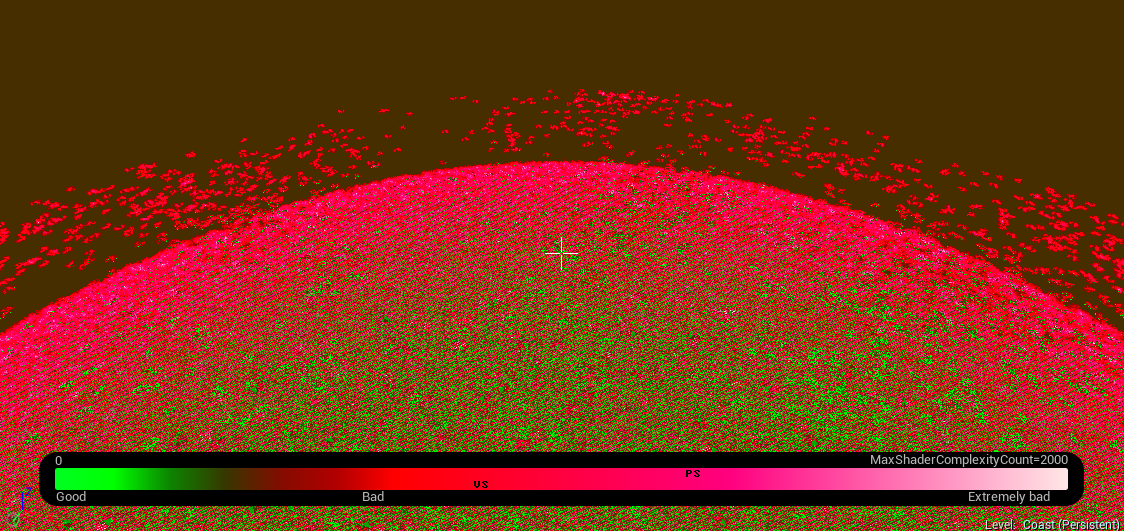
@gloomy helm actually the complexity viewer is broken, not the landscape demo grass
 gloomy helm
Hmm, im still getting a massive performance decrease with the grass, might be something else though
glacial belfry
@hollow creek so.. I was doing some backtraking and for some reasons, its no the map it self, but some blueprints contained inside it
For some reason, som of my blueprints get corrupted and they crash the engine on open
hollow creek
@glacial belfry That's very stange man. Glad you found the cause. Weird that it doesn't show in the error log. (Or did I completely miss it?)
glacial belfry
@hollow creek nop, there is nothing that indicates this.
and it is VERY worysome, because it fucks up everything
hollow creek
Damn... Best of luck man! Hope you get it sorted!
glacial belfry
Had to roll back 2-3 hours of work through different commits until I found a "pure" version of the BP
luckily, I could copy that up to another commit and save some of the work
hollow creek
Thank heaven for source control 😃
 green spear
Is there any hotkey to move an actor to the cursor in Editor?
 deep gust
how can i add this 2 blend poses by bool to the final anim pose ? the upper one is the layer that throws grenade while crouched and the lower one is not a layer but a condition based blend pose by bool,, now how to add both of them to the final anim pose ? so that when the condition is true for the individual anims , then they will fire off based on the condition
green spear
I would try in ue-animation Channel
green spear
You get a greater chance on getting answers if you post the question in the "right" channel.
deep gust
ok
echo marlin
Would implementing believable hover physics using the Character Movement Component be crazy? Seems that's the only component with built in networking with prediction and all that.
vale osprey
you would need to manually integrate something like velocity based spring to escape from fps dependency
cursive dirge
@echo marlin ask @safe shoal about the fun in that
full atlas
if i have bugs to report, or ideas/suggestions about ue4, where could i possibly have anything todo with ue4 devs?
being unable to do anything about so many things is killing me
fierce tulip
bugs > answerhub
suggestions > feedback for epic on forums
full atlas
yea sure, only i only have the Supporter role.. so my posts will never be viewed by anyone.. like ever..
vale osprey
I got replies on all of my Bug Reports
full atlas
then lol, im marked by a stuff member there for calling him something bad for a really stupid reason
:p
i guess im gonna have to create a new acc
i have been needing an ew username anyway 😄
heavy flicker
Is there any difference between graphical setting Epic and Cinematic?
 fossil ore
What is this error doing on my pc ?
fossil ore
Ummmm, no. I do not have a mounted USB drive.
This happen today, after I plugged a new WiFi Adapter to my USB HUB.
tender violet
is the only solution for this to crank up lightmap density? its already at 512...
fossil ore
Clicking Continue proceeds further tho.
tender violet
no, that's a prod build of the lighting
plush yew
hmm
cloud cobalt
512 isn't much
plush yew
so when you launch the game it looks like that?
cloud cobalt
What does the UV look like for the ground mesh ?
tender violet
its a single poly plane
cloud cobalt
How large is it ?
tender violet
prety large, I cranked up the lightmap density to 2048, it improved a little, but not that much
trying 6k now
but that sure seems unnecessarily large
cloud cobalt
Lightmaps are just like regular textures, so if shadow details are 1px wide, and your mesh is 5 meters wide, you need at least 1024
Baked lighting is expensive on space
tender violet
ya, need the gpu space tho, game isn't big so I have room to spare
cloud cobalt
Consider other approaches, such as making the shadows more blurred
tender violet
what's the best way to blur a static shadow?
cloud cobalt
I think you have some options on the light like the area radius ?
I haven't worked a lot with static lighting on UE4 :/
tender violet
this is a directional light
cloud cobalt
No idea then, sorry 😦
tender violet
np, thx tho
tender violet
looking better
increased shadow exponent on dir light lightmass settings, helped fill in some of the jagged edges
spice urchin
@tender violet static shadows = baked. Baked shadows = textures that Unreal 4 has created to emulate shadows
tender violet
yes I know 😃
spice urchin
so you will always be limited by resolution on that front
what's the platform exactly?
tender violet
ps4
spice urchin
i mean you could turn off static and just go full Dynamic
tender violet
not good for vr
spice urchin
oh right, yeah you're duplicating all your everything...
 icy sparrow
May I ask a question about exporting?
spice urchin
permission granted
icy sparrow
😛
Soo, I'm trying to export my map so another game can catch it and use it in the game, But. The file format is APK which doesn't exist anymore because udk is now ue4?
UPK*
spice urchin
well sounds like you really just want to export the layout and everything as FBX. it's not very hard to export a terrain as FBX, but there's usually a lot of instanced assets that will be replicated inefficiently if you do that
if you managed to export all the laid out assets anyway
are you exporting over to another engine or what?
spice urchin
correct
yeah i have assets from UE3 and i'm not sure there's any way to move them back and forth other than to go back to the core art assets and reconstruct things
like materials etc
maybe i'm wrong, but my experience with this has been pretty bad - like Unity to Unreal type difference
sorry man
icy sparrow
so there is no way to make upk files anymore?
spice urchin
not that i can find, keep asking though, maybe someone in Programmer chat might know
i think it's unlikely
cloud cobalt
UE3 and UE4 are completely different on many aspects
You're not going to have any kind of portability
icy sparrow
Hm
Well the game is Rocket League, from what I've seen they have upk as map format.. I don't think theres another way to load the map ingame if it's another file format
cloud cobalt
Well yeah, RL is UE3
You need UE3 tools to work with that
UE4 is a different generation
cloud cobalt
You can still download UDK
icy sparrow
where?
cloud cobalt

reddit
#Everything You Need To Know About Rocket League Mods Updated 12/11/16 Edit: I've become pretty busy lately so (most likely) everything...
Download link included
There are plenty of mirrors on the net
cloud cobalt
Cool 😃
icy sparrow
probably wont be as easy as ue4 because ue4 has this perfect reflection tool
cloud cobalt
Well UE3 is a decade old
icy sparrow
That's gonna be pretty hard I guess
echo marlin
Anyone know how to get Visual Studio to stop complaining about this:
It compiles fine but it annoys me xD
cursive dirge
intellisense is picky
if you do more things with c++, you may want to use visual assist and disable intellisense
not sure if VS2017 has improvements to those things
echo marlin
Strangely it only started having a problem after I imported the KismetMathLibrary header
 brave mason
anybody here using plastic scm?
 keen kiln
If I have a this material setup with switches for near+far tiling, detail, uv tiling etc, and i want another mesh to just use the most basic options (no tiling, uvs etc) would i be better off making a new material or just unchecking the boxes and disabling the more complex options and makjing a MI(edited)
 alpine sorrel
Any of you ever have a booth at GDC? Trying to figure out how many promo cards I should order.
 swift spindle
for every bug I squish... 3 more apper!
upper yew
As Ive watched some speed level design videos, Ive noticed people sometimes work in the "unlit" view mode. Is there a reason for this?
 slim raven
Hey, I'm having a problem with duplicating components I'm stumped on, anyone think they can help?
swift spindle
@upper yew Performance reasons.. also helps you view things differently... shadows can make you miss things or place things incorrectally
 sturdy ruin
Total noob here - working with blends and need some help - can have stream up to show - pm me if you can help 😃
swift spindle
blend shapes ? or materials
swift spindle
where you stuck ?
sturdy ruin
do you mind if i pm you with my twitch so you can easily see?
swift spindle
if your stuck once your in engine.. that's beyond me.. I just know maya to ue4 pipeline 😛
 lyric canopy
Git source control
I have a code project that an artist pulls from git. He is on a mac. A specific plugin will not let the project open on Mac. In the .uproject we just need to set this plugin to false for the project to be able to open (he won't be opening any assets that use the plugin code, only adding his art).
How can I set up a local repo gitignore (.git/info/exclude) to ignore pulling or pushing the .uproject file as well as anything under Source/
loud vapor
@keen kiln create a material instance
In the original materal add a lerp with the alpha as a parameter and have the distance blended material on the b of the lerp and the standard on the a
That way you can control it however you need
keen kiln
@loud vapor thanks. I after the best performance option
i have it set up
i can switch between all my options but idk if it'd be better to just use a simple material instead of using a a material will 100+shaders
but instanced
and the big one is alkready being used all over the level anyway
loud vapor
Performance wise, go for a seperate material
sturdy ruin
how does one match an animations 'speed' to unreals so it dosen't moon walk? I have done it manually to a degree, but wondering if there is a more precise way. I noticed that the blendspaces editor has grids only, so can I even set manual values anyway?
loud vapor
@sturdy ruin there's something that got added for weighted animations that you can use to accurately match foosteps to speed
sturdy ruin
oh ok - ill have a look - thanks
craggy nymph
I faintly remember recently seeing/reading about blending between two material instances. So you set up two instances with several parameters and then you can blend between the instances, interpolating all the parameters at the same time. Can that be done or did I just dream this exists?
Or was that blending post processing settings/volumes?
cursive dirge
@keen kiln for the perf thing, you can use static switches on your master material, that way you can opt out shader code that is not used by the instance
 snow spindle
guy, do you know when version 4.16 will be launched? (more or less...)
cursive dirge
expect it to be out in the summer and you'll not be dissappointed
if one had to guess, I'd say May earliest
sometimes they do roll new version really quickly but that's more of an exception then
kindred viper
cough 4.13 cough :p
cursive dirge
@snow spindle past release dates (taken from github releases so dates could be +- 3 days off) 4.5 17 Nov 2014 4.6 3 Dec 2014 4.7 24 Feb 2015 4.8 10 Jun 2015 4.9 29 Aug 2015 4.10 11 Nov 2015 4.11 31 Mar 2016 4.12 1 Jun 2016 4.13 1 Sep 2016 4.14 15 Nov 2016 4.15 15 Feb 2017
kindred viper
lol that 4.13 turnaround
snow spindle
ufff ok
cursive dirge
but yeah, May/Jun probably
snow spindle
I need 4.16 cause in this version epic resolves a issue with 3D widgets
cursive dirge
then just build from the master?
or cherry pick the fix for 4.15 and build that one
weary basalt
Id say hes not useing source
kindred viper
I remember hearing about 4.13 and being delighted as we are making a VR game and forward renderer was experimental in it (iirc). When we switched out project, it literally died a death. Half the stuff just wasn't working anymore. We persisted with it for a while but after about 4 weeks, we gave up the ghost and reverted. bear in mind, no source control. So it was reverted by hand and rebuilt.
kindred viper
I have preached it for the past two years, but I cannot convince the boss to use it
kindred viper
ikr
I've literally taken to keeping my own source control copy and just merging stuff but I still have to get 60gb files and go through the process everytime I want to update. I'm used to it now but damn, I could have saved a good thousand hours over the time we have been working on it
weary basalt
Seriously your boss is an moron lol
I guess the main reason being he doesnt want to pay for it?
kindred viper
no he doesn't understand it properly. He's not a coder, he's an artist. So I understand his natural aversion to it, but 1. he does code logic in blueprints and 2. there is a team working on it, all taking fresh copies, and copy/pasting updates all over. Most times I do everything twice or three times. He is very capable of learning it but he is so busy with doing literally everything, he has no time to learn it and doesn't care to.
weary basalt
Its so simple to learn though, especially for an artist, you would only need to touch the in editor SourceControl stuff
CheckOut -> Edit -> CheckIn
Simple
kindred viper
yeah it's literally a case of check out, edit, check in
I would even manage the server and do any rollbacks. I did start him learning how to use Git, which he understood, but the visual studio side confused him a bit. He can build source now though.
weary basalt
Why is he learning code stuff when hes an artist, thats what you hire programmers for lol
Get an Perforce server and just let him play with SC in editor only
lol
kindred viper
because he's a one man show. He outsources some stuff but he's literally running a company by himself, organising it all by himself. He's on his 3rd released title now so persistence is working.
weary basalt
Ah ok
cursive dirge
one man show doesn't mean you shouldn't use version control though 😄
kindred viper
indeed. I use it for my one man stuff
weary basalt
Exactly, im surprised he managed well enough to go without it
cursive dirge
it's just so risky
kindred viper
thats what I respect about him a lot. He gets it done, even if it's not the right way
cursive dirge
something corrupts and you may need to make a lot of work again
I hope he does at least backups on regular basis
kindred viper
yeah there is always a backup somewhere
one time though, his kid smashed his backup drive :p
weary basalt
....
cursive dirge
seems well organized 😄
kindred viper
I think it was 3 months work lost that time