#ue4-general
1 messages · Page 48 of 1
 fiery harbor
 brave mason
@fiery harbor you seem to be correct about the child actors. How did you work around that bug?
that's the line in question
fiery harbor
that's too deep, go a bit higher in the crash hierarchy
brave mason
ah, my brogrammer found that
I don't have debug symbols enabled on my compy
@fiery harbor Have you pinged epic about the bug / fix?
fiery harbor
no, I guess they will be able to find it themselve at some time
they probably have fixed it already
brave mason
they're doing a stream about it tomorrow at 2pm est
 elder bridge
I am the brogrammer in question
should I be looking at the LinkedLoader stuff?
I've got the whole callstack here
fiery harbor
maybe just paste the callstack
 safe rose
brogrammers op
elder bridge
 fiery harbor
child actor component CPP line 90, fix it there
safe rose
@weary basalt no renaming of structs, no moving of structs that I can remember. Only thing that may have happened and caused issues, were when I connected new values to the structs
fiery harbor
funny that you get the same crash
safe rose
But that's only mybae 10% of the crash
well maybe 50% of the causes
the other 50% I don't know
elder bridge
@fiery harbor I don't understand the loading process enough to understand why this is a problem
safe rose
I just can't wait for 4.15
elder bridge
what's actually going on here?
fiery harbor
no need to understand what's going on there
show me the code in line 90 and around there
elder bridge
fiery harbor
yeah
brave mason
that sounds scary
elder bridge
these comments are incomprehensible too
"Since we sometimes serialize properties in instead of using duplication if we are a template and are not pointing at a component we own we'll need to fix that"
fiery harbor
I guess you can't use that new template functionality then, but I didn't use it anyways
elder bridge
I don't really like that solution, but if it works, it works
I'm gonna poke around and see if I can better understand what this code is doing
brave mason
I'll download it and give it a try
elder bridge
I think we do in fact use child actor template stuff
brave mason
hmm yeah
elder bridge
yeah, @brave mason, let me know how that goes
brave mason
well, maybe you can get that fancy contributer badge!
elder bridge
wouldn't that be nice
fiery harbor
that's a new feature, you sure you already started using it?
elder bridge
very possibly
I've been editing template settings on child actors
kinda didn't realize that was new
but I was like, hey, I thought I had to set all this through blueprint before
huh
brave mason
that was a .14 release
fiery harbor
well new features are risky to use
especially blueprint stuff like this
blueprint always causes crashes
brave mason
it's the first issue I've had on 6 projects
brave mason
4 somethin'
fiery harbor
lol
 weary basalt
...
fiery harbor
you mean 4.something or 4.4.something?
brave mason
I think the first one I got was when they release it for free
brave mason
4.06 maybe
weary basalt
4.10 was well after they went free
fiery harbor
ah right it went free with kite, set it free 😀
the update with all the kite foliage features was 4.7
4.7 was super buggy
it started getting better with 4.9
fiery harbor
it doesn't have to get better
brave mason
see, the project was working for a few iterations in 4.14 and then suddenly stopped dead
weary basalt
4.14 is the worst release for bugs ive seen in a while
fiery harbor
worse for bugs means good for us lol
weary basalt
If you like fixing bugs instead of making games lol
fiery harbor
4.14 was stable here but I actually didn't use it much apart from a small test project
I directly switched from 4.12 to 4.15
brave mason
is 4.15 out?
elder bridge
certainly not for release
fiery harbor
previews usually start short after the previous version was made stable
4.14.2 comes soon too
brave mason
The pawn in question does not have child actor components
elder bridge
Good news, the master branch already has updates to the file giving us trouble
elder bridge
doesn't mean something else wouldn't serialize badly under some weird conditions
fiery harbor
that code only relates to child actor component templates
I haven't updated master in a while so wasn't able to test if it's already fixed, my master is like 2 weeks old now
though I would love to test material reroute nodes 😀
safe rose
Only exactly matching structures are considered compatible, most op error ever
Google failing hard
Alright I give, why can't I use a struct from within a data table and pass that break into a function
 scarlet echo
new builds released which add support for 4.13 and 4.14 among other features
brave mason
MachineId:5175CF86496484F2B8382BA2270C07E3
EpicAccountId:8dba8d2163e045f1aea52cdbf442eba2
You do not have any debugging symbols required to display the callstack for this crash.
This is my exact crash report and I do not know how to open my project file whatsoever. Every time I try to open it the same crash report comes up at 93% loading of the project.
Bit of background on what I've been working on:
I was implimenting an inventory system for a FP-Survival-Horror when all of a sudden
I've found that loooking for 93%
 fiery harbor
@safe rose that's REINST
soo old problem
search for ue4 REINST variables on Google you will find sooo much stuff
safe rose
k
I did Struct REINST
and found nada
but yeah that worked thanks
hmm
but this wouldn't cause a circular dependency
https://gyazo.com/d63e043f6e5c912ae492a6dd17f79ca3 those numbers op tho
 fiery harbor
that bug with structs is super old
fiery harbor
I think I even wrote bug reports about that
safe rose
It's just sad
fiery harbor
you just have to use cpp structs
only solution to these BP problems is cpp
that's why epic doesn't fix it, they just use cpp
safe rose
yeah this is stupid
I can split the break
and it works
but I can't use the whole struct lol
and pass it into the function
But, for now, it works just fine for what I need, albeit a little messier than I wanted
fiery harbor
what do you mean? show me how you did it now
 fiery harbor
I don't think that works... does it?
fiery harbor
these REINST variables should all be something like null or other default values
safe rose
they might be
fiery harbor
ah
safe rose
That one
fiery harbor
ah REINST too
safe rose
Oh wells, I wanted it nice and clean
fiery harbor
crazy that still exists in 4 14
safe rose
But, I guess I'll just do it the old way I had it
weary basalt
Structs have been problematic for as long as i can remember
safe rose
Yeah
fiery harbor
BP structs
weary basalt
Yeh
fiery harbor
cpp structs work always I think
safe rose
especially with a Data-Driven game
weary basalt
cpp structs are fine
fiery harbor
yeah
fiery harbor
make them ustructs and use those
I know for my blueprint voxel thing I had to remove all structs to make it package, the blueprints looked so much worse after that 😁
safe rose
ew
Luckily I've been test packaging this
and it's all good
even with all the crazy crashes
lol
had to rollback
fiery harbor
to?
weary basalt
Does anyone know what the state of support for C# in UE4 is?
fiery harbor
it isn't supported? 😛
 tall pendant
yeah. the current state of c# is: unsupported @weary basalt
weary basalt
I more meant what the progress of possible support for it was 😛
I was under the impression there was talks about it being worked on
tall pendant
IIRC there were community efforts made in regard of C# but nothing official, i dunno if those are still going on
 kindred mountain
Anyone know of a generic character suitable for an open source project?
like the mannequin but with a license that's usable on a community project
fiery harbor
@weary basalt theres no reason to do anything like c# support. would be a waste of resources
c# would combine the disadvantages of c++ with those of blueprint.
could only be used by programmers that know how to code but at the same time would be limited to the blueprint api and you couldn't edit any engine stuff with it
weary basalt
Im not asking because i want it to happen, a mate of mine who has worked with C# for years but doesnt want to learn C++ was wondering if UE4 supported it
fiery harbor
if he worked with c# for years then it should be super simple for him to switch to ue4 c++
fiery harbor
that's his own problem then 😁
weary basalt
I know but it made me curious as i do like C# as a language in of itself
I think C++ and BP is all you need.
Adding C# support would just help with poaching more Unity devs lol
fiery harbor
we don't need more unity devs, if all would move over to ue4 then Unity would die and that would probably be bad because it removes competition
kindred mountain
you really don't need to learn a lot of C++ to use C++ in Unreal
any competent programmer should be up and running in a few days
weary basalt
Hes stuborn like i said haha
kindred mountain
and the majority of that would be learning the exact same syntax that they'd have to learn if it was C#
weary basalt
I agree though, its more learning UE CPP than CPP lol
kindred mountain
yes it's just learning the UE API, exactly the same as you'd have to learn if it was C#
and if pointers scare you then you aren't a competent programmer
fiery harbor
I didnt want to move to C++ for a long time too
stayed BP-only very long
and BP works very well, its just way too buggy sometimes, and its slow
so once I really needed the performance of C++ I moved to C++
 pliant python
Hello, I am facing a problem where UE crashes when I try opening my project file which has an alembic geometry cache reference in the level, Could some one help me out with the same?
fiery harbor
and you think it crashes because of that alembic geometry cache reference thing?
 tawdry quail
halp I am being invaded by externally referenced errors I have everything in my content folder I tried fixing up redirectors, resaving epic pls
fiery harbor
errors or warnings?
fiery harbor
you can ignore those I think
pliant python
@fiery harbor yes, because I can have the project up and running if I rename the level to avoid UE trying to auto load it and manually open a previous version of the level which doesnt have that alembic asset it in.
fiery harbor
ok, but I dont even know what alembic is 😄
pliant python
oh okay
 thin haven
@pliant python: is alembic a plugin or something? might be it wasn't updated to the UE version you're using
pliant python
its actually a feature which was introduced in 4.13
 cursive dirge
yeah, but many features are done with engine plugins and many are not enabled by default
I think alembic is though
but for example midi plugin in 4.14 is disabled by default
pliant python
Hmm. Yes, but in this case the alembic file import fine, and I can see it running in the viewport. But when I save the level and try to restart the engine, it crashes.
 bleak schooner
what does, lets say, scale +1 equal to on an axis
or, what distance 'value' would that scale change equal to
pliant python
Are you trying to scale in just one axis?
bleak schooner
I am trying to scale a capsule mesh on the Z axis to keep the distance between this mesh and another placed on top
so that when the other one is moved down or up, scale changes to keep same distance between both meshes
by distance I mean the gap that is left in between both
pliant python
This can be done using the distance between two vector nodes I think and careful positioning of the pivots on the two meshes
Have you tried using that node in blueprints?
pliant python
I'm don't remember the exact name of the node..,you are trying to achieve this using blueprints, yes?
pliant python
bleak schooner
what do you do with the length there
length / x, can't really tell what x is there 😛
pliant python
Btw the above setup assumes that u are going to move the second object along the z axis alone..
bleak schooner
guess imma leave that for now, don't really need that right now
thanks a lot anyway 😄
 unreal sonnet
Packt is selling everything for $5 each fyi guys
 fierce tulip
finally makes most of the content on Packt sort of worth it
most of it is crap
:p
unreal sonnet
i for one really like Packt
 pallid root
Any books for Unreal you recommend?
 worn granite
I wouldn't get a book for Unreal unless you were going to work in the version the book was written for.
Just MO.
pallid root
Looking through the summaries of the books they do have I didn't see anything that looked worth while for me. I'm pretty new to the engine but a lot looked like just general / basic advice
C++ one sounded kinda interesting though since I am just using blueprint but would like to switch to C++ eventually
worn granite
IMO that's the better route
Plenty of good stuff there, and then you can really dive into UE4.
unreal sonnet
@pallid root I bought their "Mastering Unreal 4.x" book that focuses on the C++ way of doing things. It does a lot of "type this and congrats you win!" in the first half of the book or whatever, I think. Personally, I recommend buying the $5 videos because the lectures are a lot easier to work through for me.
pallid root
So far anything I have needed to do I have found a youtube video explaining how to do it. So many good tutorials.
unreal sonnet
^ yeah exactly. I feel like the basic level stuff is best done on Youtube. That's how I got started, anyway. Then buy the intermediate and advanced level stuff for books and videos. At least that's my approach, anyway.
 plush yew
if you want to learn some c++ get the SDL Game Development or the SFML ones
unreal sonnet
@plush yew Can I ask you some questions about the SFML books? Because I bought them a while back and had some issues that never got resolved. Can I PM you about it?
plush yew
Unreal there is no other way, you have to learn the API and then its Unreal C++
pallid root
Yeah, I feel like if I learn the API with blueprint while prototyping it will be easier to transition to C++.
unreal sonnet
^ that's how I feel too
plush yew
@unreal sonnet I still do not have a good grasp of c++ i think i wouldn't be able to help you
actually all the more "advanced" stuff like delegates, events and such are confusing and unknown to me
templates and etc
worn granite
It is a good idea to have a solid grasp on C++ before jumping into UE4 C++, but you can do it the other way around.
pallid root
Are delegates in Unreal similiar to Objective-C for anyone that has done that?
unreal sonnet
Delegates are really easy to understand: it's like when an event waits for another event to fire before it does its thing iirc. I could be full of shit though
pallid root
In Objective-C they are like a 1;1 message
plush yew
I have the stroustrup book but its heavy reading and slow
1 thousand pages worth of c++
any of you guys know a better source to learn c++? i know stroustrup teaches correct c++11/14
but its kinda boring
unreal sonnet
Sure I've been doing that stuff for a long time
@plush yew do you want websites? videos? book recommendations?
plush yew
@unreal sonnet I have no prefernce, the ones which you find good you can send me
unreal sonnet
Alrighty
plush yew
could be a PM or if more people is interested you can say here too
 rough fiber
Hey guys! I'm having massive netlag on the client side when I play in editor. I'm using New Editor Window and 2 players. So one is server and one client.
But the client is more or less unplayable. Launch game works just fine though. Anyone else having this issue?
If I launch the game from two different computer that is*
unreal sonnet
@rough fiber I think you should ask that in the multiplayer section of the discord here -- idk unfortunately how to help
Also has anyone here gone through the "Unreal Engine Physics Essentials" book on Packt? I remember seeing an advertisement a while back for somebody who knew how to do Unreal Physics stuff and I wasn't good enough to help, so I was thinking maybe if I read this book I could do it
rough fiber
You're right, I'll do that. Thanks!
unreal sonnet
Also re: packt $5 sale --- this seems to be their newest Unreal thing, for those who care: https://www.packtpub.com/game-development/unreal-engine-4x-projects-video
Explore the world of professional game development with Unreal Engine 4 in this project-based video
 shrewd lodge
I've only been using unreal for a few weeks, just blueprint so far, but really feels like I'm leaning c++ by stealth
My main comparison is Houdini with vops, which does a lot of high level wrappers so it's largely straightforward procedural programming; blueprint doesn't hide much of the internals, so I'm learning about classes vs instances, delegates, events, casting etc despite myself
 tame token
Hi all I am learning UE4. I have gone through a few series on YouTube MindlessPursuits, VirtusLearning, Unreal 4 docs page. Even though these seem to be very good sources. They are outdated a little. A lot the video seem to be very good but use an older verrsion 4.7 of UE4 will that matter. Also I am looking at signing up for a couple of courses on Udemy has any used these and found the to be any good.
unreal sonnet
@tame token I haven't used the same exact resources that you have, but there's a book publisher called Packt that is doing a "everything is $5" sale right now... so I mean that's pretty good.
tame token
When you buy books there can you download it for offline viewing
unreal sonnet
Yeah and also it's on their website
The actual scripting parts of the books, I think, are best viewed on the website because the ebook reader things don't really sshow them well due to the margins or whatever... but everything else I personally like to read via their site thing
tame token
Yeah can't even get the books to load sites lagging I guess
unreal sonnet
Yeah it's pretty slow for me but I think the sale started so maybe it's getting ddos'd or whatever from all the attention?
tame token
Yeah I will keep checking back hopefully the one book will have a good information on making a build system inventory and crafting
unreal sonnet
I can show you a Youtube tutorial for an inventory thing if you like. I don't know about a tutorial for crafting stuff but I'm sure there are things like that, too...
tame token
Yeah any help would be great
 steady quiver
Is there a way to set a preference to not reset my editor's camera to the player camera after stopping test play?
tame token
I want to make it so there are random food, ammo, guns, clothes, whatever what would i need to read up on to start figuring this out
scarlet echo
OMG THIS IS WICKED! https://twitter.com/mike_fricker/status/809221803931484161

Working on a street map plugin for #UE4. :) Import and render huge @OpenStreetMap cities! #EpicFriday https://t.co/PZ5iSVGokR
 gaunt raptor
i'm trying to find a better program to model with, blender's ui and control scheme is a bit difficult to work with
 floral pagoda
@scarlet echo - I know right
thin haven
@gaunt raptor depends if you have the $$$ and/or are a student
gaunt raptor
@thin haven i actually just found one after digging around for the tenth time lemme get the link http://www.daz3d.com/home
Daz 3D, 3D Models, 3D Animation, 3D Software
thin haven
it's paid, though, and the requirements are very high
I've been eyeing maya since it comes free if you register with a university mail and miracles! my university mail is still active
gaunt raptor
no it isn't
it's free
IT SAID IT WAS FREE!!!
"DAZ Studio, both 32-bit and 64-bit, are free. There is no longer a "professional version" that cost extra"
"DAZ is just setting up an account so you have it if you choose to buy additional content later. I've had D/S 4.5 for months, and have never been charged for it."
phew, almost freaked me out @thin haven u should try out daz i guess, im going to as well now that it's free. no royalty cut either
thin haven
O_o I didn't know, thanks for letting me know
seems like lots of stuff went free recently
actually checked the sysstem requirements and they're lower than I thought: DAZ Studio
Windows®
• 32 bit
• Intel Dual Core (or equivalent) or greater
• 1.6 GHz (2 GHz dual core or faster recommended)
• Windows 10, 8, 7, Vista, or XP (Windows 8 or 7 is recommended)
• 1 GB RAM min (2GB+ recommended)
• 1GB free hard drive space for installation
• OpenGL 1.6 compatible graphics card with at least 128 MB RAM (Hardware accelerated OpenGL 2.2, or higher, compatible recommended with 512MB RAM)
• DirectX 9 (used for audio processing only)
Maya's requirements: 64-bit Intel® or AMD® multi-core processor
Graphics Hardware Refer to the Maya Certified Hardware page for a detailed list of recommended systems and graphics cards
RAM 4 GB of RAM (8 GB recommended)
Disk Space 4 GB of free disk space for install
Pointing Device Three-button mouse
and my graphic card is not on the certified list for Maya 😦
gaunt raptor
it isn't a modelling program though it's only for animations i guess??
thin haven
er, what is only for animations?
 pseudo parrot
does anyone know why when playing in standalone from editor, the config files from Project/Saved/Config/ don't get loaded in? it appears to just use random default values instead of any saved in any of those configs
 dense ravine
is there a way to move a popup window message in the unreal editor which seems to be out of my desktop range. I can alt+tab to the window but it is not visible on both of my monitors :/
resetting the layout doesnt help either
fierce tulip
might need to flip left monitor to the right in the monitor options in windows.
ive had that
also
if you hold down windows key and press left/right on keybad
you can move a tab
so you can make it move back to your monitor
*keypad
dense ravine
thanks, switching the monitors helped
now unreal crashed at startup 😫
at least the crashes weren't connected
plush yew
@scarlet echo omg, and since this is from the staff, can we consider this to be available for free sometime in the future? 😮
thin haven
@plush yew the author said he'll put it up on GitHub
plush yew
gg
😄
Can anyone help me with the logic a bit 😛
I made a bp quickly to switch out all the meshes in a scene with instanced meshes, works great, but saving the meshes into an array and loading them i.e switching back to static meshes doesn't work, it loads a null object
plush yew
that is probably because you destroy them when you switch to instanced meshes?
you need to save the static mesh actor and its states/variables somehow if you want to restore it, idk how much of this information you will be able to retrieve from the instances
I am saving that into an array, but I have figured out the issue I think
It seems that a new savegame object is creatin each time, so it reads form a new one and no the old one
So I am setting up some rules to not create more then one savegame object
 fallow tusk
anyone familiar with destructible meshes? I'm trying to get adjacent destroyed meshes to damage one another a bit using the world support option, and I'm not sure if this works if I'm spawning the meshes at runtime. I'm getting inconsistent results and I think I'm missing something about how the "world support" and "form extended structures" options work.
 stuck depot
unreal sonnet
stuck depot
unreal sonnet
quick, delete it before he finds out!
 tropic pilot
tryed to packaged my game but got an "unknown error"... http://pastebin.com/tWwiwYjj <--- log... can anyone tell me why?
 safe shoal
Just posting here in case y'all miss it, we just released our Unreal powered game. Check it out and all your money belong to us. Love y'all
http://store.steampowered.com/app/514670/
Just posting here in case y'all miss it, we just released our Unreal powered game. Check it out and all your money belong to us. Love y'all
http://store.steampowered.com/app/514670/
tropic pilot
anyone?
plush yew
@tropic pilot this line seems to stand out a bit
"UATHelper: Packaging (Windows (64-bit)): UnrealBuildTool: ERROR: Windows SDK v8.1 must be installed in order to build this target."
tropic pilot
thank you so much Alice 😃
wtf
it say's on google that "Windows SDK v8.1" is for windows 8.1
shouldn't i install "Windows 10 SDK" as im on Win10?
plush yew
might still need it for something, I think you might need to install
https://developer.microsoft.com/en-us/windows/downloads/windows-8-1-sdk
and then restart your pc
Download Windows Software Development kit (SDK) for Windows 8.1. Get tools, libraries and headers to create Windows apps.
I've never had that error, but it does seem to be the solution based on this answerhub post
https://answers.unrealengine.com/questions/12867/generateprojectfilesbat-fails-due-to-needing-windo.html
tropic pilot
@plush yew UATHelper: Packaging (Windows (64-bit)): UnrealBuildTool: ERROR: No 32-bit compiler toolchain found in C:\Program Files (x86)\Microsoft Visual Studio 14.0\VC\bin\cl.exe
wtf?
plush yew
I think something weird must be going on, what version of unreal and what version of visual studio are you using? because some visual studio versions work only with certain editor versions
plush yew
neat, when you drop a pin onto a return node, it will automatically be appended as a return argument to the return node
no more tedious "return node configuration" steps
fiery harbor
yeah, they added that in something like 4.8 or 4.9 @plush yew
not completely sure, but it's in ue4 for more than a year I think
 tidal lichen
how can i change the color of a beam through blueprint?
tidal lichen
yeah, a beam particle system. It probably has to do with Particle Parameters. How can I expose it and use it in blueprint properly? The property is initial color
 errant nacelle
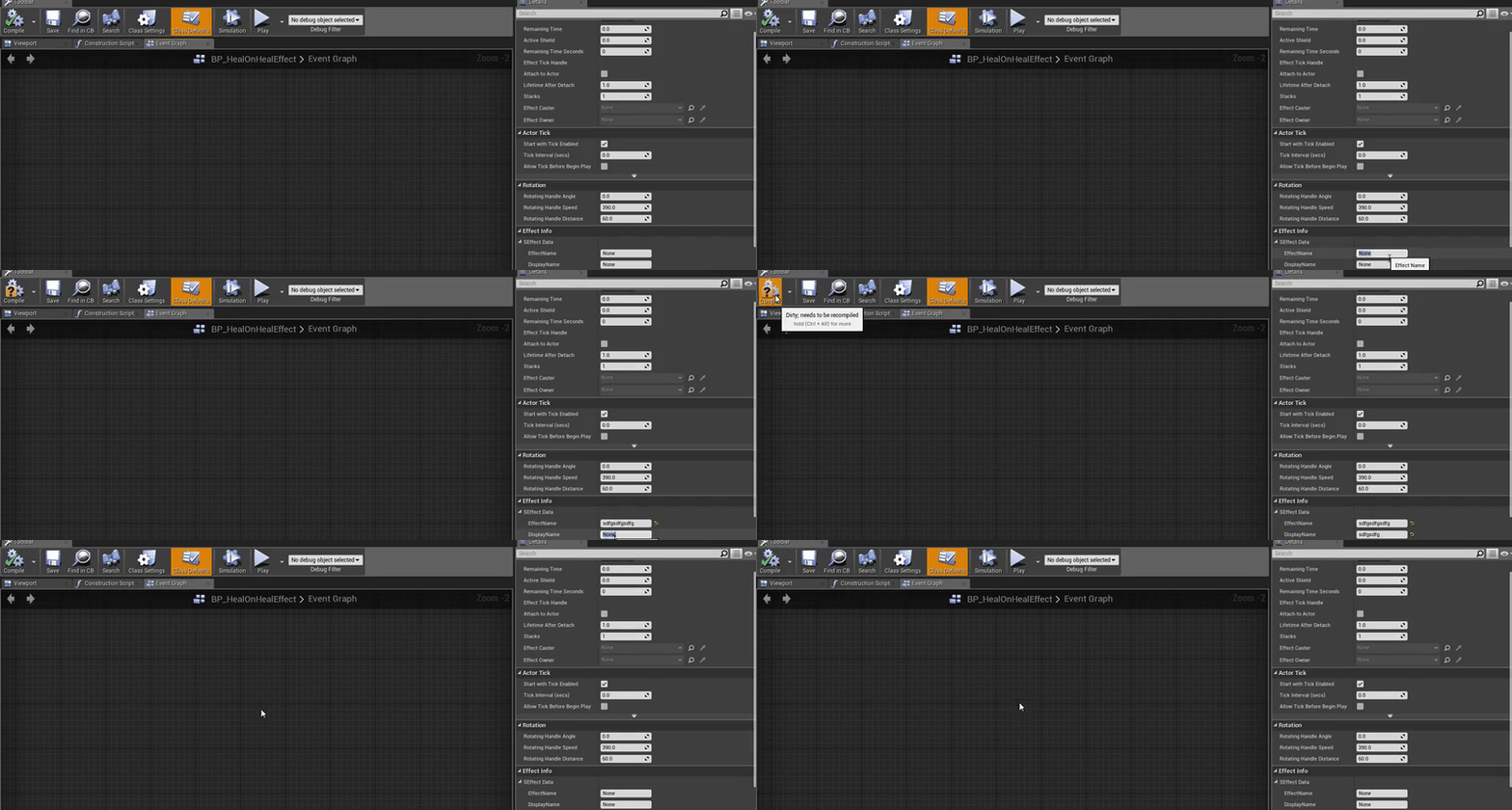
I have this VERY annoying bug that on some of my blueprints, the defaults reset on compile. Like this: https://i.gyazo.com/58c6b6f96653d36a1f1ff07de938b6f7.gif

Anyone have any idea what could cause this? It does't matter what I do. Save & close first etc. It's still happening.
Alright. Renaming the variable of "SEffectData" fixed the issue. ...
plush yew
@fiery harbor but I found out just recently 😢
I wish there was some kinde list of quirks
fiery harbor
@plush yew quite sure it was mentioned in the release notes back then
I think even with a gif
plush yew
I am only with UE since 4.10 xD
fiery harbor
ah
plush yew
oh well, w/e
@errant nacelle couldnt it be that something set the variable inside the construction script?
errant nacelle
So it's a child blueprint of another one. I currently have like 10 children of the same base class
This issue was with 2 of them, all the other ones worked
Renaming the variable fixed the issue. I'm getting strong vibes that the struct-related blueprint code is just buggy as hell. Had similar issues before when renaming variables of structs etc.
 proper quiver
yeah. I don't get this...
for some reason the render target is seeing a different point of view from the camera
 cinder locust
evening gents, having an issue where all phsyics objects no longer show up when i hit preview. they show up fine in the editor but as soon as i press preview/ play they all dissappear. it worked one minute and didnt the other. not sure what changed...
any ideas?
plush yew
are they still at the same location as they are supposed to be?
or are they instantly and rapidly moving away when you hit play @cinder locust
(thats where I would start debugging)
proper quiver
son of a bitch I've been at this an entire day lmao
I'm able to get a render target going, and have a blendable rendering that, on top of itself
for some reason, even if I specify exact resolution, the render target is slightly smaller than the real resolution
in any case I'm having trouble getting the ground (colored part) to ONLY RENDER in a separate pass, so that I can blend on top of the buildings
got a stencil buffer but that's not really what I want...
does anyone know if I can selectively render one actor in a render target?
 blissful kestrel
Hey guys, would love to get some opinions on this :)
https://www.reddit.com/r/unrealengine/comments/5iu492/brainstorming_creating_a_lowpoly_stylized/

reddit
Hello everybody! I am working on a mod in which i take the gameplay elements of Squad, and mix them with the artstyle of games like The Witness,...
proper quiver
@blissful kestrel that looks so good
really professional looking
reminds me of The Witness
but more... wild
blissful kestrel
Lol, those pics are from the witness 😂
@proper quiver i added those to show my target art style
thin haven
@proper quiver: how did you do it? I was thinking of making a grid visualizer for my game...
 livid lantern
Could anyone please offer a brief explanation of what's lacking in UE4, regarding vehicle physics, from a mechanical engineering point of view?
cinder locust
@plush yew they dont appear at all when i press play. I turned "simulate physics" off on one of them and it showed up no problem, but obv no physics.
 brittle stream
@proper quiver your games looks amazing!
plush yew
@cinder locust did you check their actor location? in general, the only thing that changes when physics are on is the fact that it reacts to forces (and might therefore move) and it collides ofc
cinder locust
Got it solved. The level was inside a shipping container. The containers collision reset somehow which turned it into a simple box. I was unable to enter it due to that. The physics actors collided with it and shot into space faster than i could see.
Reconfigured the collision and it works again
plush yew
thats what I figured 😛 I hope my hint was of help
proper quiver
@brittle stream man.. thank you, it's all place holder now it'll get way better
@thin haven I can walk you through it if you need to do this
the grid part is easy, it's all in a material
you first create a canvas2d blueprint that takes a float array parameter (your data for the grid)
and then have a material look that up and draw it out as a grid
the part I got done yesterday was created a stencil layer for just the ground, then rendered the grid system into a blendable using the stencil as a mask
this is then added on top of the existing render pass to make it look like that
 wide jolt
Is it possible to have custom starter content for UE4 projects? Basically have my own assets I want to automatically load into any new project, if that can be done.
 ornate atlas
Hello, i'm doing tests with LPV + DFAO, what you guys think about it?
 fallen schooner
Good evening. I have a question about Serilization
I have an actor class "Spell" and another class "TargetFinder"
the targetFinder contains several colliders that are meant to retrieve characters within them to see if the spell hits.
However, every spell is going to have different sizes and positions for their target Finders, but I'd like to not need dozens of subclasses for TargetFinder
So instead I'd like to make a factory that spawns and sets up a TargetFinder with the desired positioning.
The most I can think of is an array of structs, each struct representing a shape, position, rotation, and size for a component.
Then the factory instantiates colliders with those values.
Is this wise? Is there a smarter way?
fug
fiery harbor
@ornate atlas its slow
 sour shard
anyone know a good source for Creative Commons or royalty free models?
 tawny fossil
@sour shard you can try http://www.turbosquid.com/
Find 3D models for your project in our vast online catalog of cars, people, textures, architectural models and more.
Free 3D Models, we offer thousands of 3d models, in various formats, that you can download absolutely for free.
tropic pilot
wtf? 😢
tropic pilot
can't open my project anymore 😦
@regal mulch i created a C++ class inside my blueprint project and then reopened the project and now i get this 😦
 regal mulch
Did you compile your C++ code?
tropic pilot
@frosty sphinx told me to make a C++ class inside my project, that would fix my problem he said :/ after i made it, closed UE and reopened the project i get asked everytime do i want to compile i click yes and then this error show's up :/ now i can't open my project at all
regal mulch
You need to compile your project with Visual Studio after you added the C++ file
If you don#t plan to actually add more C++ code to it, it's a one time thing
I don't see how this would solve the issue though
tropic pilot
he said that the Advanced Session plugin required a C++ source file inside the project so i only needed to create a C++ class file
regal mulch
Adding a C++ file to it makes it use the C++ compiled binaries
So open your sln file
and compile your project
tropic pilot
you have to bare with me here, never used nor touched C++ or compiling
regal mulch
We've all been there. You can find tutorials about that on mass
tropic pilot
what and where is this SLN file?
regal mulch
In the same folder as your uproject file*
tropic pilot
i dont see it :/
regal mulch
Then rightclick the uproject file
and click
Generate bla bla bla
don't know the exact name
Generate visual project files
or something like that
tropic pilot
Running I:/Epic Games/4.14/Engine/Binaries/DotNET/UnrealBuildTool.exe -projectfiles -project="C:/Users/Movie/Documents/Unreal Projects/GetFucked/GetFucked.uproject" -game -rocket -progress
Discovering modules, targets and source code for project...
Messages while compiling C:\Users\Movie\Documents\Unreal Projects\GetFucked\Intermediate\Build\BuildRules\GetFuckedModuleRules.dll:
c:\Users\Movie\Documents\Unreal Projects\GetFucked\Intermediate\Source\GetFucked.Target.cs(6,14) : error CS0101: The namespace '<global namespace>' already contains a definition for 'GetFuckedTarget'
UnrealBuildTool Exception: ERROR: UnrealBuildTool encountered an error while compiling source files
regal mulch
uff..
tropic pilot
dont tell me my project is fucked now 😦
regal mulch
No, it's not, but I don't really have time to debug that
Why would you blindly add C++ code to your project if you have no idea what you are doing
tropic pilot
the dude was trying to help me fix my annoying problem
and he stopped answering me now -.-
regal mulch
Do you have a Binaries and Intermediate folder?
tropic pilot
ye
tropic pilot
it worked 😐 ❤ ❤ ❤ ❤ so now i run the Visual Studio file to compile it?
regal mulch
Open the SLN file
After that opened (might lag a bit)
on the right side
you see the Solution Browser
There should be a Project with your name
Right click it
And hit build
If that completes, close VS
and you should be able to start your project again
If it fails, show me the error
(error might show up at the bottom)
make sure you don't rightclick the UE4 solution to hit build
tropic pilot
Parsin files in solution, should i let it do it or just exit? the compiling is complete
regal mulch
Just exit
And start the uproject file again
I'm still kinda sure this won't fix your problem
but let's see
tropic pilot
ok so my project opens just fine once again ❤ let me test the multiplayer thing
oh fuck me... now i suddenly get that 10FPS shait message again and the editor UI is slow as fuck -.- wth... i just fixed that problem
didn't fix my problem at all -.-
regal mulch
This only might fix an error with packaging your game
Where packaging looks at the build.cs file and tries to include the Session Plugin
But withotu defining it, it won't add it
but if you use the project unpackaged in LaunchGame thingy
then it's not important at all
And a lot of people told me that the build.cs in a BP project should still include the plugin
tropic pilot
i made a complete new project and did the steps by adding a C++ class, building it in VS and just copied the code from the old project and NOW it finaly fucking works!
but now the slow UI bug shait is back 😢
regal mulch
I don't even know what slow UI bug is
tropic pilot
the editor play window is fin, but the UI/GUI of the editor like all the buttons and menu's respond slow... like lagg...
the same when i move a blueprint node the editor starts to lagg...
whyyyyy 😢 it was working so fine untill i started installing that extra crap i needed for VS
wide jolt
Is it possible to have custom starter content for UE4 projects? Basically have my own assets I want to automatically load into any new project, if that can be done.
errant nacelle
Did anyone in here ever get chunks to work with packaging? It'd be really useful for me, but results in a pacakaging error
 fading rune
So I have a question and I'm not sure which channel this should go in, so I'm going here.
I know UE has a limit of 4 dynamic lights overlapping for logical reasons
But I want to have it so players can build lights like in Minecraft and such, which obviously becomes a problem if you've got that limit
Any advice on this issue?
thin haven
use static lights?
fading rune
You can spawn static lights at runtime?
thin haven
I never tried, but I assume so
fading rune
I don't see how that'd work considering the reason static lights don't have the overlapping problem is because the engine can calculate stuff for them when building lighting and such, which'd be too expensive to do at runtime, no?
thin haven
ah right, good point. I do things dynamic only, either way
sour shard
have you loaded a video at runtime yet?
fading rune
@sour shard uh?
sour shard
huh?
 sour shard
is that hard to understand?
fading rune
Well, was that a question to me or?
sour shard
oh, no i was asking zireael but its open to anyone
fading rune
ah
sour shard
ill be working on that next
plush yew
Anyone who uses maya around atm?
wide jolt
When I press \ in the UE4 editor, some weird cube thing with spheres on top of it shows up in the viewport. Anyone have any idea what this does?
 frosty bloom
Anyone know of a good "Energy Burst projectile" tutorial? I'm not completely clueless on the subject but always nice to get it done and tweek it to your own liking afterwards! 😃
 paper comet
Anyone have recommendations for good tutorials or courses that are suited for people who are new to Unreal but not new to programming or C++? Most of what I've found is fairly basic and meant for people who are new to programming.
 brave horizon
Any good tuts on Git for Unreal?
paper comet
Thanks Ereliath I'll check it out.
 random mulch

You are the last hope of a ruined world, capable of restoring the severed Ley Lines. Throughout the ruined temple of Miria's Heart, attune to and master five unique powers, allowing you to alter gravity, slow time, shift space, and much more.
Smells like an Unreal Engine Game, but I can't see any other information about it
random mulch
Just read their comments and the devs actually say it's made in Unreal 4.10
@arctic flicker Spotlight please for the FREE Unreal Engine 4.10 game mentioned above! ❤
 jovial nova
Hey all! Is there a levels node thing in ue4?
oh I found a 'raiseblacklevelsbyintensity' node 😉
*percentage
 hybrid scroll
So.. I'm trying to tweak my character movement... I want the player to be able to jump 1m up, but with default settings that also means player can jump 2m forward - and it seems like a lot. What would be a good way of limiting horizontal jump distance without limiting vertical? something like changing the angle of a jump.
kindred mountain
well the distance the character jumps forward is going to depend on how long they're in the air, and how far they're travelling
*fast
hybrid scroll
yea. I know that 😛
I was thinking in terms of drag
I can ofc make it in BP to add drag with different values for XY and for Z, but I'm curious if there is something in settings for that
plush yew
what does this matinee is now a legacy tool mean?
it wants to convert it too a level sequence asset?
been trying to just sync up a simple 2 char animation for an entirety of a day now almost. ranting
Is there any way to distribute plugins for your team to use? Or each workstation needs to buy the plugin?
kindred mountain
it's an organisational license so you can use it within your organisation AFAIK
can copy the plugin across manually
 leaden onyx
quick question, is there a way to add text to a level sequencer without creating a textrender actor?
 coral folio
Hey guysssss I basically finished my project and wanted to record a gameplay of the game, but I can't seem to figure out how work it since I'm streaming levels... When I go to sequence recorder I can only pick as Actor the elements from the level I'm currently streaming whereas instead I need to render the whole sequence, all the levels at one ... Anyone knows how :O ?
 covert pebble
so.. Where do i show my work so i can get feed back???
plush yew
here or #work-in-progress are fine
covert pebble
ty! 😄
fierce tulip
ebay knows a lot about packaging
tall pendant
amazon as well
 pure gorge
Hey UE Slackers. I need suggestions. I'm making a Third Person Shooter atm.
I have a game designer and I need to make him a tool to configure the cameras for the different player states ( sprint, walk, crouch.. ). I would like to create a tool where he can place cameras, configure transitions, and can adjust it in "realtime", seeing his changes. Have you already done something similar ? Any tips ?
plush yew
why make a tool for this?
you will probably want to use curves if you want to handle continous transitions @pure gorge
pure gorge
tool is a big word, but somewhere where he can configure all this and have visual feedbacks
plush yew
but I dont think it wont be worth your time to make something as rigorous as a tool
hmm
not sure about the real time adjustments...
pure gorge
I can make him boxes for him to implement in a blueprint, but it's a bit annoying for him to hit play, test, stop, make changes, play, text, stop, change things......
plush yew
nevertheless, I doubt it will be worth the time...
you can create a HUD to display some parameters and then apply them on your character every time they change
but that is only easy if you can feed your data as string
you can use parameter binding
that would be the easiest way
e.g. you create a new widget, in its construct event you get the player character/controller and save it as a variable and then bind to the corresponding camara parameters of the variable and call "update camera" each time a value changes (if necessary)
 burnt drum
is anyone aware of any ssettings for Unreal Engine 4 that specifically deals with Nvidia Surround?

UI's / FOV seems to be messed up. of course we can manually adjust. but just wondering
 green spear
Anyone using Blender for character rigging and animation?
 stable crest
I would say Blender is broken For Animations and Ue4
 floral heart
The object for a blender armature is mistaken by UE4 as a root bone.
stable crest
not only that ... all bones in blneder is like 2 bones in UE4
its all messed up in last few updates
floral heart
Actually the object as a root bone thing isn't unique to UE4, so that's funny.
 tepid bobcat
he, could anyone tell me how I could fix the wireframe, so it is even thick on all the edges? I used Show> advanced>Mesh edges
 whole quarry
Arent they equallity thick?
brave horizon
Guys if I wanted to bend a static mesh based off player impact (think a cannon ball landing on a thin metallic surface) - should I look into Materials, destructive meshes or something else?
kindred mountain
if it's just cosmetic, then materials
 tame marsh
stupid question, how do I get rid of all stats in PIE? I did 'stat Engine' and repeating that gets rid of all stuff except for certain counters
 errant lintel
Anyone here successed to use GameplayCue I'm really curious about this feature
 unborn temple
hi
green spear
Does mesh LOD work for instances?
 jolly orchid
Hey guys! Has somebody experienced an editor crashes because of memory leaking? I created an empty project and just spamming Play(Selected Viewport) & Stop.
thin haven
@jolly orchid: what engine version are you on? do you have NVidia experience on?
jolly orchid
4.14.1 , amd gpu
thin haven
then I don't know. I know there were similar crashes in 4.14. and/or with NVidia experience s*** being on
jolly orchid
@thin haven thanks
plush yew
Anyone here?
Need to know if it's possible to save or export a fractured mesh after physx destruction?
 inland crypt
Is there any exit prompt Blueprint Node
errant lintel
Quit Game
frosty bloom
I'm trying to make a line trace weapon system with a PS in the form of a beam, I got a source point and a Target point but when the turrets shoots at me and aim at me the beam effect aint following. It goes in another direction. Anyone know how to solve the problem? it ain't following the X-Axis in Cascade or BP viewport if that has anything to do with it.
plush yew
@frosty bloom have you made sure it isn't following x-axis of the world/level?
frosty bloom
Well, when I look at where the beam is going its going to 0,0,0 of the world. All beams meet echother on that one point
Can't figure out why it's going there though. No memory of giving it that information
(Kul att se en aktiv svensk här i UE Discord! 😄 ) Sorry for my use of another language.
cursive dirge
So now we have 2 swedes here
plush yew
well we are actually a couple more I think 😛
 potent lark
Trying to toggle r.vsync 0 / r.vsync 1 via console command in blueprint, but not seeing any change happening in PIE - any tips?
ok adding maxfps seems to do the trick
thin haven
what do you mean adding maxfps?
potent lark
I set t.MaxFPS 350 for example, and the vsync command didnt seem to do anything...
good to check some performance issues
jolly orchid
Hello everyone. What do you use for merging blueprints?
inland crypt
Hello guys, Restart Game in UE4 is reloading all the assets. Is there any node that lets the player to replay the game with out reloading the assets again
I solved this problem with resetlevel but the default pawn is not showing up when the level is reset
potent lark
@jolly orchid merging blueprints seems to be very painful unless the changes are very small, as the files are barely humanreadable... I haven't done much group work with UE4 yet, but I assume avoiding the whole problem in the first place as much as possible is the best way to go, second best is opening up the old and the new side by side and updating by hand with both people looking at it : p
Integrated version control locks files which seems like a smart way to make sure things dont get messy
tame token
Hi all does anyone know anything about importing mixamo characters?? Sorry if this is the wrong area but i didn't see a model section
potent lark
My students did that last week, I think they just imported the models and linked up the animations and that was that
tame token
well when i import the texture/material is distorted
all of the mixamo characters do it
pallid root
I've had similiar issues with some of the character models from the marketplace. I have to switch from animation to skeleton recursively from the wrist down to kinda fix the issue. Sometimes I can do it with just the fingers though.
thin haven
I heard daz models do that thing because of some different skinning or something
 tender violet
any idea what would cause this cook error in a source build of 4.14, dont get it in launcher version:
LogWindows:Error: A dependency 'ArrowComponent....' of 'WidgetInteractionComponent.....' was not actually in the linker tables and so will be ignored.
tame token
thanks for looking at it anyways everyone, Have a Merry Christmas
frosty bloom
I just wanted to point out that anyone with a AI laserbeam turret problem can come to me, after testing and trying every single particle system function and a lot of Cascade digging I found the problem 😄
I'm not a tutorial kind of guy but I now know for sure how to fix it ^^
 balmy cypress
Professional level blueprint formatting
 gaunt abyss
@balmy cypress Well then 🙄
balmy cypress
It's actually a bug, causes the ED super graph to be visible. 2nd time I've had it happen, always makes some interesting looking results
frosty bloom
I looked at the picture and almost fell of the chair before you said it was a bug!
fierce tulip
I'd tell that bug to be like a @balmy cypress and leaf :p
 somber condor
guys any1 knows if its possible to get Microphone's voice in unreal realtime ?!
plush yew
@balmy cypress I think you could sell that as modern art
@tame token still here?
Your issue is looking liek a corrupt fbx export or incorrect skinning of the character in mixamos autorigger
proper quiver
@balmy cypress you need help
hybrid scroll
Is there a known bug in 4.14 that for whatever reason resets variables of actors placed in a level on load or something?
For a third time I think, a large portion of actors on my level got reset to defaults -.-
balmy cypress
I had issues where if i copied actors within the viewport and pasted them that they would all point to the first instances variables
hybrid scroll
not that. I just opened a level and a lot of stuff has variables set to default and not to whatever it was before. And yes I saved everything, I was working on that map for months 😉
 buoyant echo
Hey guys, I'm having a small issue.. The mesh is disappearing in simulation, but it's clearly there.. Does anyone know how to help? (The mesh is the sphere inside the camera)
plush yew
the sphere?
buoyant echo
Yes, as I mentioned. 😃 @plush yew
plush yew
one thing I would check is that it is an actual sphere mesh and not the default sphere empty mesh placeholder
buoyant echo
Yeah, I checked that out. I swear I checked up and down, Including the visible in game, but I think it played tricks on me, it was invisible in-game.
fiery harbor
it looks like the placeholder sphere
fallen schooner
Any idea why my character controller doesn't face the correct direction?
In the blueprint editor the arrow points towards +x
Oh wait, X is forward in this crazy engine?
thin haven
yes, it is
 sterile grove
Question all - why wont assetts from a more current project - migrate to an older version ? They migrate fine... they wont show up in the project however. i've checked windows explorer and the .uasset files are there.....
thin haven
because uassets contain somewhere the version they were made with
yet more reason why it's bad for them to be binary and unmergeable and unreadable
but the end of the story is, you can't migrate to an older version
 vale halo
If it's BP's you could try copying over some nodes, tho that may not (allways) work. But yeah generally once you upgrade there aint no goin back
sterile grove
no worries - i was just looking for a short get-around to migrating from 4.14 down to 4.13 workable version (have a big bug in 4.14 with 0 resolve atm)
thanks for the info!
i just manually re-imported the source files
 upbeat valve
anyone got any idea how to spawn an item on a floor and i whant them to spawn on diffrent levels on the same map or will i need to place my spawn volumes manualy
 unborn matrix
That face when after working for 8 hours
vale halo
@upbeat valve You could try getting linetracing down sothat you can find the floor, and then offsetting sothat it doesn't spawn into the floor 😃
Atleast that's how I do things here 😃
upbeat valve
ok thanks i found a way to do it i mjust made the spawn volume very thin so itonly spawns low down
thanks @vale halo
vale halo
Oooh your fix is nice too, I'll take a look at that and np and thanks @upbeat valve LMAO that made no sense 😛
upbeat valve
lol ok @vale halo
tropic pilot
Merry Christmas to one and all 😃
thin haven
thanks @tropic pilot
 warm lotus
@unborn matrix looks like my characters hands after I made my first retarget.
unborn matrix
@warm lotus Haha xD
 lost orchid
🎄 Merry Christmas ! everyone
 crude perch
You too
 vale osprey
is there are a way to visualize spline component in real-time?
just as you can see it in editor
this is just for debugging, to see if I'm getting a proper shape
 wheat vapor
thin haven
wheat vapor
thin haven
debug shapes might work, but I think I came across a better solution: https://answers.unrealengine.com/questions/136507/getting-a-beam-particle-to-follow-a-spline.html
vale osprey
well, I already have a mesh on that spline
I mean more like this:
it's just weird that you can enable it in editor but can't have it in real time
 versed pawn
Hey guys. I have a really weird problem. I have 3 identical actors(they're just ALT-dragged) with a collision component. When the player overlaps the lastly created actor, the overlap event fires off, but when the player overlaps the other two, it does not, even though if I print string the booleans which are there to check if the player is overlapping, they are TRUE. I've never encountered such problem yet
plush yew
Anyone know if 4.14.1 fixed the ever-lasting bug where default values in child blueprints reset themselves sometimes?
 earnest burrow
Has anyone had trouble importing mixamo characters into unreal where the face looks all messed up? It looks like its only a problem when one of the characters includes facial animations
I googled and saw that you need to change a blend mode to opaque
which i did
but it still did not fix the issue
Anyone have suggestions to try and fix it?
fiery harbor
@plush yew no, that's not fixed yet
plush yew
Thanks
versed pawn
Hey guys. I have a really weird problem. I have 3 identical actors(they're just ALT-dragged) with a collision component. When the player overlaps the lastly created actor, the overlap event fires off, but when the player overlaps the other two, it does not, even though if I print string the booleans which are there to check if the player is overlapping, they are TRUE. I've never encountered such problem yet

 static viper
.
pls send that into bleuprints channel
the gif doedsnt makes sence to me
go to #blueprint
versed pawn
@static viper Already solved it. Thank you very much anyway!
static viper
❤
versed pawn
If you're interested, check the blueprints channel
 thorn forge
Is there a reason why I can't make a Vector4 variable ?
static viper
i never heard of a vector 4
there is vec4 in materials
but as variable? XD
really pls tell me what you are trying
thorn forge
I have a tile mapped game and I want to save some preset roads with the format of: xCoord,yCoord,RoadType,Rotation(to rotate a turn road so I dont need to have 4 different versions of it)
thin haven
use a struct
static viper
use a struct
static viper
its clear to me
thorn forge
Thanks 😃 I never used before, will look up in the wiki.
static viper
nonono
lemme me quickly tell you what todo XD
its sooo simple
just right click and under blueprints create an asset called structure
open that
and create 2 vector
one string or integer for type
and a rotation vector
name them
save that
then you can call the struct like any variable
DONE
thorn forge
Thanks ! 😃
thorn forge
@static viper I wanted to thank you again, my game can now generate the map from the array http://puu.sh/t2EhG/ab796eb430.jpg

 arctic ravine
I'm not exactly sure which section to post this in... In essence its modular character creation. Trying to grasp. Which chat should I post in?
 orchid sable
Hey guys, has anyone had any experience editing the Kit & Lightning Stereo Panoramic Movie Capture plugin in the engine source? I followed the directions to export the stereoscopic stuff, but with their edits my engine wont build successfully
 leaden perch
The Editor has been crashing a ton lately
Has anyone else noticed this? Am I doing something wrong?
Every 10 minutes or so
Save? Crash. Compile? Crash. Open some Blueprint? Crash. Crash? CRASH
I should put in a feature request for an auto-save feature: every time the user adds a node to a blueprint, changes a value, moves an asset, or otherwise dirties the editor state, just save. Because any of those actions can cause a crash at any time and work will be lost...
fiery harbor
@leaden perch what version? is it the same crash every time?
it's unusual for it to crash to often
leaden perch
14.4.1, no not even close. But the stack traces are normal C++ indecipherable gibberish so it's hard to tell
 wet berry
Do you guys use any software for planning branching stories or dialogue trees? Or do you do it old school (db/excel/etc)?
I'm looking at building a branching narrative based game and I'm having troubles staying organized.
leaden perch
@wet berry I used MindNode (https://mindnode.com/support/screencasts) to plan a text adventure some time ago
It worked out OK, but I was the sole developer, so I'm not sure how well it scales for collaboration (and I didn't use it with Unreal either)
On second thought, that was a long time ago and doesn't seem like an appropriate tool anymore
At least not for narrative structures...
leaden perch
@fiery harbor Editor crashed on save command. Can you help, please?
SEGV_NOOP at 0x0

gleCmdProcessor Address = 0x13d371eb0 (filename not found) [in GLEngine]
_dispatch_client_callout Address = 0x7fffa00ee0b8 (filename not found) [in libdispatch.dylib]
_dispatch_queue_serial_drain Address = 0x7fffa0104ae5 (filename not found) [in libdispatch.dylib]
_dispatch_queue_invoke Address = 0x7fffa00f6cd9 (filename not found) [in libdispatch.dylib]
_dispatch_root_queue_drain Address = 0x7fffa00efe70 (filename not found) [in libdispatch.dylib]
_dispatch_worker_thread3 Address = 0x7fffa00efc47 (filename not found) [in libdispatch.dylib]
_pthread_wqthread Address = 0x7fffa033b712 (filename not found) [in libsystem_pthread.dylib]
start_wqthread Address = 0x7fffa033b1ed (filename not found) [in libsystem_pthread.dylib
@leaden perch what is that?
leaden perch
That's a stack trace from my UE4 Editor crashing when I try to save a Blueprint I was working on
fiery harbor
no, a ue4 call stack looks way different
leaden perch
it crashed. Again. Am I doing something wrong? ¯_(ツ)_/¯
fiery harbor
well show me the real call stack
leaden perch
That's what was in the "Report this crash to Epic" dialog
fiery harbor
then look at the log
fiery harbor
saved/logs
pallid root
@leaden perch you want to look at CrashContext.runtime.xml. That usually has some good hints as to what is wrong. It will be in the XML in this tag.
<ErrorMessage>Ensure condition failed: false [File:D:\Build\++UE4+Release-4.14+Compile\Sync\Engine\Source\Runtime\Engine\Private\World.cpp] [Line: 1492] &nl;Could not remove actor /Engine/Transient.World_22:PersistentLevel.REINST_BP_NPC_Soldier_C_4 from world (check level is /Engine/Transient.World_22:PersistentLevel)&nl;</ErrorMessage>
C:\Users\Matt\Documents\Unreal Projects\ProjectName\Saved\Logs\UE4CC-Windows-FE37400A4D08E50CE811EEB8123A3C30_0000\CrashContext.runtime-xml
leaden perch
Hmm. Well, I found the crash log for that time
But it has the same information in the paste
And no XML
fiery harbor
@leaden perch show the end of the log
leaden perch
[2016.12.28-05.24.30:714][963]LogCrashTracker:


[2016.12.28-05.24.30:717][963]LogMac: === Critical error: ===
SIGSEGV: invalid attempt to access memory at address 0x0

[2016.12.28-05.24.30:717][963]LogMac: gleCmdProcessor() Address = 0x3d371eb0 (filename not found) [in GLEngine]
_dispatch_client_callout() Address = 0xa00ee0b8 (filename not found) [in libdispatch.dylib]
_dispatch_queue_serial_drain() Address = 0xa0104ae5 (filename not found) [in libdispatch.dylib]
_dispatch_queue_invoke() Address = 0xa00f6cd9 (filename not found) [in libdispatch.dylib]
_dispatch_root_queue_drain() Address = 0xa00efe70 (filename not found) [in libdispatch.dylib]
_dispatch_worker_thread3() Address = 0xa00efc47 (filename not found) [in libdispatch.dylib]
_pthread_wqthread() Address = 0xa033b712 (filename not found) [in libsystem_pthread.dylib]
start_wqthread() Address = 0xa033b1ed (filename not found) [in libsystem_pthread.dylib]
show a bit more of the log before and after that
leaden perch
100 lines:
Or not
can't paste that much
[2016.12.28-05.24.09:946][655]LogMac:Warning: Unsupported type of menu widget in FSlateMacMenu::UpdateCachedState(): SBlueprintRevisionMenu
[2016.12.28-05.24.10:013][659]LogMac:Warning: Unsupported type of menu widget in FSlateMacMenu::UpdateCachedState(): SBlueprintRevisionMenu
[2016.12.28-05.24.10:886][729]LogMac:Warning: Unsupported type of menu widget in FSlateMacMenu::UpdateCachedState(): SBlueprintRevisionMenu
[2016.12.28-05.24.11:357][742]LogSavePackage: Save=76.13ms
[2016.12.28-05.24.11:357][742]LogSavePackage: Moving '../../../../../../../Volumes/<REDACTED PROJECT FOLDER>/<REDACTED PROJECT NAME>/Saved/ModuleC6C8F192024D827B6FD989AB4E2C3867.tmp' to '../../../../../../../Volumes/<REDACTED PROJECT FOLDER>/<REDACTED PROJECT NAME>/Content/Data/Modules/Module.uasset'
[2016.12.28-05.24.11:359][742]LogSavePackage:Display: Finished SavePackage ../../../../../../../Volumes/<REDACTED PROJECT FOLDER>/<REDACTED PROJECT NAME>/Content/Data/Modules/Module.uasset
[2016.12.28-05.24.11:382][743]LogMac:Warning: Unsupported type of menu widget in FSlateMacMenu::UpdateCachedState(): SBlueprintRevisionMenu
[2016.12.28-05.24.11:784][788]LogMac:Warning: Unsupported type of menu widget in FSlateMacMenu::UpdateCachedState(): SBlueprintRevisionMenu
[2016.12.28-05.24.14:266][997]LogMac:Warning: Unsupported type of menu widget in FSlateMacMenu::UpdateCachedState(): SBlueprintRevisionMenu
[2016.12.28-05.24.14:891][ 32]LogMac:Warning: Unsupported type of menu widget in FSlateMacMenu::UpdateCachedState(): SBlueprintRevisionMenu
[2016.12.28-05.24.18:997][283]LogMac:Warning: Unsupported type of menu widget in FSlateMacMenu::UpdateCachedState(): SBlueprintRevisionMenu
[2016.12.28-05.24.30:714][963]LogCrashTracker:
you use a mac?
leaden perch
Yes
fiery harbor
then that's probably part of the problem
leaden perch
Well, that's not helpful
fiery harbor
its some gl problem, and on windows you wouldn't use gl
so the solution might be to switch to Windows 😁
leaden perch
That's definitely not a solution
That's not the only crash, too
I will just be more diligent about posting crash reports on AnswerHub
Thanks anyway
fiery harbor
can't you use metal on Mac?
leaden perch
Is the editor set to use Metal?
fiery harbor
I don't know mac stuff
leaden perch
That would certainly be preferred
But I don't see any settings for Metal in the Editor
fiery harbor
then it's probably only for packaged game
leaden perch
Even then, I had to enable OGL 3+ for my last build
Looks like Metal is still in the works for UE4
versed pawn
Hey guys! Good morning to everyone!
I would like to create a Sliding Blocks puzzle, where you have to move the blocks in a way to make room for the big red block to the exit
http://flashfabrica.com/f_learning/sliding/img/e_b30.jpg

My question is, how would you guys approach this? I have a click and drag feature already implemented, but I have no idea how to make the blocks block eachothers way without using physics
fiery harbor
lol physics? you just have a two dimensional array (in this case 4x5) and do the calculations manually
proper quiver
@versed pawn so you have a grid, and your movement block is at x1y1,x2y2
and your obstacle exists in ox1oy1,ox2oy2 etc
all you have to do is check to see if where you're about to move to is going to overlap the obstacle
you'll need to check for all obstacles if you have more than one, every time you move the green block
checking is really easy, you just compare the green block's positions to all of the red block's positions
floral heart
When a player clicks on a block, check the valid moves for that block. If there are, define thresholds for each valid move, if the player drags across, initiate a move where the block's position lerps between its origin and its destination. When the player lets go, if the block hasn't moved far, cancel the move and reset its position. If the block has moved close enough to a destination, move it there, declare the cell occupied, declare the previously occupied cell as clear.
versed pawn
@proper quiver @floral heart Thanks guys! I'll try it. Have a wonderful day!
versed pawn
Has anyone worked with Spline components yet?
thin haven
@versed pawn: I did (with some assistance from @cursive dirge), what is your problem?
versed pawn
I would like to move a mesh along a spline in a given amount of time.
cursive dirge
I got summoned 😄
versed pawn
Yea XD
cursive dirge
so, what's your issue with that?
versed pawn
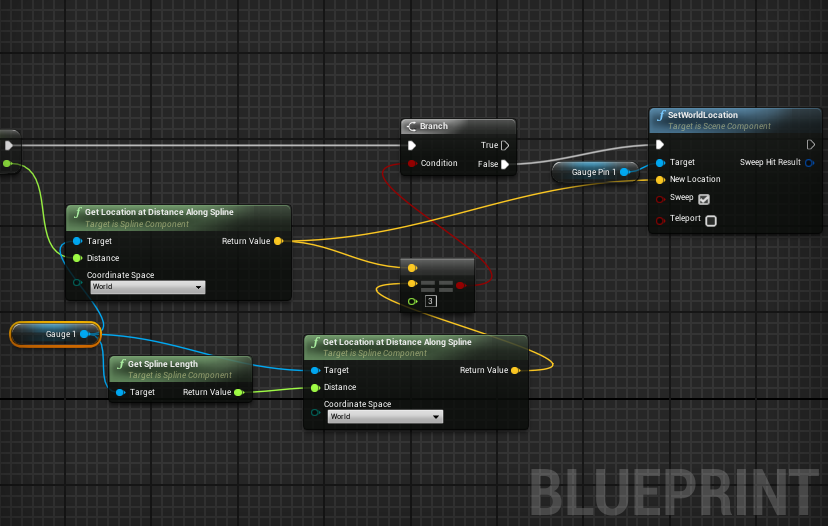
so I get the length of the spline, and then I "get location at distance along spline" and feed the length to the distance input. But that's not good, since it only teleports my mesh to the end point of the spline
cursive dirge
sounds like your math doesn't add up
can you show your code/bp?
I mean, it sounds like you are trying to do the right thing but there's some logic issue
you do that by adding distance on each tick (taking deltatime into account) and then just poll the location at distance over spline like you do
and put the mesh where it says it should be at that spline distance
thin haven
the length of the spline is the total length, @versed pawn. you're probably looking for get location at spline point
versed pawn
Oh, Okay
cursive dirge
@thin haven I thought he already used "get location at distance along spline" ?
you don't need to use spline points
thin haven
"get location at distance along spline" and feed the length to the distance input
thin haven
so he's getting the location at a distance of length 😄
cursive dirge
yeah, that's what he needs 😃
he wants to move a mesh along spline, so he needs to know the location at specific distance along spline
@versed pawn my first guess would be that issue is related on how the actual distance gets calculated here
versed pawn
Okay, I'll be right back. I'll try the things you guys just said
cursive dirge
@versed pawn
that's the simplest form you can put it
I think the getter clamps it when the distance goes over spline length but it would be nice to not move it anymore when it reaches the destination etc but that's up to you to implement
CurrentDistance is just distance along spline there
well, you could use FInterpToConstant too to increment the CurrentDistance, it does the same thing
I'm just used to doing it manually
versed pawn
Thanks @cursive dirge It works! And for the stopping at the end of the spline, this is my solution: https://i.gyazo.com/22166713f9e31d26eac7e10f13ab1ec4.png

Thank you both of you guys @thin haven and @cursive dirge



 latent shadow
@primal edge preaching for unreal
prepare for the endless questions of UE4 vs Unity
even though you put that disclamir in the video
 upper heart
has anyone had any luck with the viewmode console command in pie?
random mulch
^it works 😄
upper heart
hm isn't found for me
actually it doesn't work in the editor before playing either for me
random mulch
you mean you can't even switch with alt+number?
upper heart
oh no that works fine
but the console command viewmode doesn't
and I want to change in PIE with it
random mulch
I thought you were using the console command somewhere in code
upper heart
no
random mulch
but I assume you trying to enter in the Output Log
random mulch
but can you just type it?
upper heart
what?
random mulch
they should work, even though it wont show up
upper heart
yeah I already did that
it doesn't work
I also tried executing a BP node with it and that doesn't work either
random mulch
what viewmode are you trying to use?
upper heart
yep
upper heart
nope, didn't help
random mulch
and did f2-f8 work?
upper heart
in the editor yeah, but not in game
random mulch
I didn't hear of any settings that could turn this off
except you are building for a shipping game
upper heart
no this isn't packaged
random mulch
but even then it should work ^^
random mulch
I put it in the level blueprint and it works fine there
upper heart
yeah I tried that
random mulch
not sure if it works on mobile though
upper heart
this isn't mobile
digging through source to see if I can find where the console commands are called
random mulch
c++?
upper heart
yeah
upper heart
still digging
random mulch
going for the unlit 400fps, so your game can work on a toaster? 😄
upper heart
lol I'm trying to debug something at a high frame rate
 primal edge
@latent shadow haha, I'm ready, all for the love of Unreal 😍
upper heart
I figured it out
viewmode unlit doesn't work if Run Dedicated Server is checked, for whatever reason
at least not in 4.12.5
fiery harbor
why are you still on such an old engine version?
master is 4.16 and you still use 4.12, of course that's buggy like hell
upper heart
lol master is on 4.16 but only 4.14 has been released
4.12 is not very old..
and because epic sucks at steam, and I get stuck on versions until I fix all the shit they won't
it's normal to be a couple versions back when you are working on a production level game
fiery harbor
if you work on a big game yeah, but not if you work on a small one
upper heart
right
fiery harbor
and you work on a small one I would guess
fiery harbor
because anything that isn't done by at least 20 people is relatively small
is your team bigger?
fiery harbor
well you don't work on it for like 10 years
not even 1 I think...
and unfortunately the amount a person can do in a limited time is limited 😃
upper heart
almost 700 commits now so yeah it's been a while
yeah time is limited, so i'm getting back to it
fiery harbor
I guess you're just doing many commits 😁
if you commit every typo fix then 700 is not taking long
fiery harbor
rounding 1.69 to 1, great 😛
 cunning hatch
So I see now that xbox has a developer mode; does this open any doors for us to test our projects on he xbox without going through the xbox developer process? I assume we still need the xbox sdks from epic to package?
tall pendant
yup
you still have to go through id (if youre indie) and get auth. from MS and Epic to get your hands on the Console source.
orchid sable
Does anyone have any idea why my camera (which is facing up in the viewport) always points forward when I switch to it? I even tried auto setting on a loop the rotation y to 90 but it seems to only want to look straight
static viper
Set control rotation on controller or camera
brave horizon
er dumb question
Static vs dynamic items: that generally means anything that's set to moveable = dynamic?
and static = static?
weary basalt
Dynamic is often in relation to being moveable yes. Static being nonmoveable.
brave horizon
Is it uncommon for a mesh to have a collider for static and a box collider component to cover the dynamic?
leaden perch
Just discovered Timelines in Blueprints! They are pretty incredible!
fiery harbor
@leaden perch just don't use them too much, they're quite expensive
arctic ravine
Hey lads, quick question. I'm creating modular characters. I understand the in engine stuff. But I'm sort of confused on how to split it as I see two ways to go about this
- Halo 5 system: Base mesh (undersuit) and the armor layers on top and changes.
- Destiny system: If you have different legs, torsos, arms, and heads. There is no need for a base suit but rather split each segment into separate assets.
- KOTOR system: Undersuit/base mesh then layer armor on top. Both can change.
So would it be right to assume I need to make a base mesh for each main undersuit (different style clothing) while still creating the layering of armor on top? I am lost. I don't need a long response just a simple sentence in the right direction.
weary basalt
You could make a simple character mesh with sockets for each additional item for armor or whatever in the correct places. Then make those pieces seperately.
When you add armor just attach it to the sockets. This gives you the flexibility to mix and match very easily.
 dense iris
Hello, We wanted to have Fog effects in our Mobile Game
The current Fog we used is quite heavy, how can we make it optimised for mobile
We want to have layer of ground fog too
thin haven
if you mean post process fog effect, it is quite heavy
If I were you, I'd get steam particle from starter content (the one you can get when creating a project) and use it to fake both kinds of fog
 robust owl
is it a bad idea to set certain components to "movable" and some to "static" for the same blueprint?
fiery harbor
@robust owl no, everything that only needs to be static should be set to static for best performance
robust owl
I see
so hypothetical here
lets say that I have a blueprint that consists of a static mesh
that doesn't move at all, it's completely stationary
but then I add another static mesh component and it constantly moves
is it safe to set that second static mesh to movable, or should I set the entire blueprint to movable?
or rather - the scene component to movable
fiery harbor
you should only set the second mesh to movable
robust owl
ah okay
fiery harbor
if that works
robust owl
I noticed that instanced mesh components behave very weird when you try to change their mobility
fiery harbor
ue4 might say it doesn't work
robust owl
and I started getting massive numbers of errors
fiery harbor
what kind of errors?
robust owl
I wasn't sure if it was related to something else, or if it was just related to instanced mesh components only
hmm I can't remember. it was in reference to mobility / performance
fiery harbor
ismcs are in general not really movable, or did they fix the collision thing?
robust owl
I haven't had any issues with movable instanced mesh components
fiery harbor
the problem was if you had a ismc with collision and you move it it will freeze your game for a second
robust owl
are you thinking about splines?
fiery harbor
because after moving it has to recalculate the whole collision
fiery harbor
no, I never used splines
robust owl
they added collision calculation for splines and enabled it by default
fiery harbor
I'm talking about ISMC