#ue4-general
1 messages · Page 47 of 1
 worn granite
 frank escarp
you do the half-red, red, half-green,green, half-blue,blue masks
 velvet estuary
how do I allocate more RAM to unreal
worn granite
Is it not using your full amount of memory?
velvet estuary
Not sure but I would assume so
 versed pawn
Thanks!

 still bough
@rotund harness Unless you have taken steps to make UE run in 32 bit, there's no way or need to "give it more memory"
@rotund harness what issue are you having that you think more memory will solve?
ah damnit
worn granite
Getting an out of memory error on load
I've suggested loading into a different map and reducing costs
velvet estuary
Ill see what happens if I try making a new map and teleporting into the map I want to play
still bough
that's going to be some other problem
18446744070340949812 is not a correct amount of bytes to want to allocate
worn granite
I missed that, I guess 😉
still bough
there's data somewhere that's telling UE how big something is, and therefore how much memory it needs to allocate, and that data is corrupted
it's probably data corruption in the level asset itself, but it could be memory errors elsewhere stomping on that bit
velvet estuary
its weird because this map seems to only work on on computer
Uh, however you spell Wierd.
velvet estuary
Wait Unreal is running in 64 bit, is that a problem?
still bough
no
well
probably no
if it works when running in 32 bit mode then its a bug in unreals asset loading code
but it's probably not a bug in the code, it's probably corruption in the file
velvet estuary
but the file cant be corrupted it works fine on my college computer!
still bough
mmm try deleting your derived data cache
velvet estuary
but uh, just for refference wheres the derived data cache?
 thin haven
project name/intermediate, I guess
still bough
you should delete that too, but there's a global one stored in your user profile
velvet estuary
I dont see a derived data cache in here
there are cache's but none of them are derived
still bough
c:\users<username>\appdata\local\unrealengine\common
(probably)
also c:\users<username>\appdata\local\unrealengine<engine version>
thin haven
try copying the project afresh from your college computer? the file might have gotten corrupted on the computer where it doesn't want to run. sounds like RAM/HDD problem on your other computer then
velvet estuary
its all saved onto a USB
still bough
usb drives are notoriously unreliable and will corrupt your stuffs
don't keep stuff you can't replace on them
velvet estuary
but heres what i dont understand
Works fine on my college computer, but every other computer craps out
And all of it is kept on this USB
So
Im just dumbfounded
thin haven
you launching from the same usb on the college computer?
velvet estuary
yep
thin haven
really weird, I would say the usb is corrupted judging from the error you showed, but it's not if your college computer can read it ¯_(ツ)_/¯
either way, I'd copy the stuff elsewhere in case the usb drive fails
velvet estuary
is this Schrodingers USB?
Or is Schrodinger the wrong analogy?
Screw it im making a new map.
The old one is dead to me.
Lets make a game in a week! Fml.
worn granite
❤
 pallid root
MSAA + Forward Rendering RIP Editor
Anyone else run into this issue? I tried switching from TemporalAA to MSAA and now no matter what setting I put the editor to the meshes don't have their materials on them.
I'm using the Forward Rendering option, even when I unchecked and went back to deferred the level is all messed up even after restarting it.
velvet estuary
It probably doesnt help that I dont eject my USB's safely
pallid root
I fixed the issue, I had to paste an old backup of the project file over my current one and it fixed the issue. 🤷
 warm lotus
@velvet estuary its more of a check to see that nothing is happening with the drive before you rip it out right? Lol dont rip it out while files are copying
 weary basalt
@buoyant echo hey mate i tried to see if i could find any info on the problem or try and reproduce it again myself but no luck
@buoyant echo if you still have it maybe calling perforce support is the way to go?
 buoyant echo
@weary basalt yeah still no luck. Might just call them.
velvet estuary
Does anyone know how to make a Sims style building thingy majig?
 safe rose
Anyone ever have a problem with migrating levels from one project to another, or maybe anything else, and the static meshes become null?
 prisma spindle
Anyone know if Zak from Epic Games uses this discord channel?
safe rose
As far as I know, no. He would never be left alone @prisma spindle
prisma spindle
xD yea I could only imagine
 sour shard
is zak the head honcho?

 hard sage
hey gang, is there a way to simply lock a camera's rotation/translation?
safe rose
@worn granite op, just going through this
so many assets
@hard sage elaborate?
And this is more annoying: https://gyazo.com/c1bf26c19295c0646e1e6e483dd78f14
 worn granite
What's more annoying is perforce not validating files in place before transferring them.
And then having to upload them all again.
And even more so when I haven't deleted files.
hard sage
@safe rose I'm just trying to lock off a camera so I don't accidentally move it/lose the composition
I know we can lock off scale, and I bounce from shot-cam to perspective cam to work, but I still accidentally move forward or up or down or rotate with the shot-cam frequently enough that its a problem :/
safe rose
So you're talking about sequencer stuff?
Or you just want a vector saved?
Runtime or editor?
hard sage
editor, not in a sequence or anything
it is a cinematic camera though
not blueprinting
 cunning hatch
Is there a way to manage blueprint hotkeys?
 ashen brook
Yep, editor prefs
 plush yew
I have a teriible problem with unreal 4.12, i'm creating interactable folliage with distance fields (shader), somehow i'm not able to select anything, folliage paint does not work, no gizmo shows up when i try to click on an object?
never mind, fixed it
plush yew
anyone know anything about this wolf platform?
it appears on project settings and some source files
ah, its the codename for switch, nvm
versed pawn
Anyone knows how to make a material emit it's own light? I know this was added in 4.13 or 4.14, not sure, but it's a rather new feature.
 cursive dirge
dynamic light?
emissive materials have contributed to baked lighting for a some time already
haven't heard you could do that dynamically
apparently LPV could support that at runtime
neither of those is exactly new thing though
I think they've been in the engine for like 2 years
still bough
@velvet estuary it's possible that a mesh referenced in the file is corrupted, but your college computer has a good version of that mesh in it's DDC, other machines don't hence they're crashing when loading. The stack trace you showed is it loading the mesh in preparation for storing it in the DDC.
 agile sluice
hey all, I have a problem with sprinting. Only the server can sprint, clients can not. Any ideas?
 tawdry quail
so at every first time I open a project there is this blueprint with a compiler error, and I just need to open it and click compile to fix it. Every single time. Is this a known issue on 4.11?
 upper heart
yeah I remember that one
plush yew
is it possible to use 1 scene capture to somehow get an image of the scene with and without a blendable pp material at the same time?
 main cobalt
Yo if I have 2 totally identical levels, build the lighting into one of them why does unreal think the other is totally unbuilt?
I have one version of a level that plays seguencer and one that is interactive
thin haven
because they are different levels, duh
 cloud cobalt
@main cobalt Are those like, different level files ?
In that case yeah I can't see what you were expecting
main cobalt
Well when I build both I get the same issue
whichever wasn't built last is unbuilt in final packaging
They are practically identical levels
basically 100%
main cobalt
Basically I made the entire level
and then CtrlC ctrlV
one level always thinks its unbuilt
main cobalt
I've figured out a workaround for now, just getting the event player to execute console command to hide lighting build error
 humble crow
The easiest solution for building an unreal game, is just call your game "Windows No Editor"
 kindred marlin
Not sure if this should go in #blueprint or #cpp, but I have a UserWidget derived C++ class and when I go to create a child BP from it, the BP does not have the slate editor. Does anyone know of a fix?
 surreal charm
Hi guys. I'm looking for some volunteers to test my game with me. Is anyone interested? Small, simple multiplayer game, it should take around 30 minutes after you've downloaded
worn granite
Eh, sure. I've got the time.
Not like I'm getting a workspace setup or anything.
glares at email, still nothing.
surreal charm
Awesome, PM sent
anyone else?
EU only btw, we need to find eachother over steam, and that is a regional thing
surreal charm
arh man, sorry... thanks though
 upbeat valve
Dose anyone have a download for a inventory system for ue4 as it is really bugging me and delaying progress
 old bone
Inventory system in the market is shareware, so you must buy it to use
safe rose
lol
upbeat valve
well i was not asking for an illegal download just seeing if there where any free ones
safe rose
@upbeat valve just follow the multitude of tutorials out there for free?
Just because you download one...if you have no idea how to use it and expand on it
old bone
You can google for lessons where they create their systems
safe rose
It's useless
You're just asking for more trouble and questions when trying to implement one
upbeat valve
i guese
old bone
@upbeat valve https://www.youtube.com/watch?v=RQm6cm05SLc&index=145&list=PLZlv_N0_O1gaCL2XjKluO7N2Pmmw9pvhE for example
 old bone
Though it is not fully functional on the latest version of engine
kindred marlin
@upbeat valve If you want a slot based inventory, you might want to look at this: https://www.youtube.com/watch?v=seXX_iWM4Fw

Really long, but good inventory tutorial.
old bone
BP meh
kindred marlin
There is very little out there for UI stuff in C++.
upbeat valve
i use bp anyway
kindred marlin
I'm running into that issue myself.
I've got delegates working, but I want to display text on the screen when it is called, but I'm running into timing issues. 😦
It might not even be working anyways. 😐
old bone
@safe rose I am gonna take part in the upcomming jam, but i can't send PM's, because noone is approving my posts 😂
safe rose
Anyway'
if you want a C++ inventory tutorial

In this post, we're going to implement a basic Inventory System in C++. Create a First Person C++ Project Template and make sure to have a cup of coffee nearby
He does a lot of awesome C++ tuts
kindred marlin
Yeah, his site is great.
I'm following his UMG in C++ but I'm running into issues when I try to make the call work through delegates.
safe rose
Yeah, I don't understand the need for UMG in C++
Other than maybe variables
But, really, there's no need for it
kindred marlin
Its mainly just variables and editng them in C++.
safe rose
Well... what do you mean by editing?
I haven't followed his UMG tut yet
To me, it has no real value
Add a layer of complexity that imho UMG was supposed to take away 😉
kindred marlin
Define FString as UPROPERTY(BlueprintReadOnly) but set the text in C++ and display it through BP.
kindred marlin
Yeah and calling the widget to be created through C++.
kindred marlin
In the PlayerController.
safe rose
With all of two nodes
kindred marlin
Well, I'm trying to make it work with delegates and right now it isn't working.
😦
safe rose
heh
kindred marlin
It's a timing issue. The UI is being constructed before the engine can see the actor that holds the delegates. 😦
 zinc bison
uh has anyone ever migrated something and had it NOT show up even though it was successful
the files are there but my project only sees the texture its weird. like i look in windows explorer, uasset files are there
just doesnt show up in editor
ue4 stop annoying me..
plush yew
I think I had that the other day, not sure how it got fixed though
I think it was a texture ported but the sprite it was connected to didn't
so I just recreated the sprite
velvet estuary
How do I make my pillars go up and down? Ive got the sequnce down but im struggling with the blueprint
plush yew
timeline blueprint
will make them smoothly go up and down
plug one of these into it's location
https://docs.unrealengine.com/latest/INT/Engine/Blueprints/UserGuide/Timelines/
This document contains an overview of Timelines in Unreal Engine 4 Blueprints.
 tidal shore
Does anyone know what the process or feature is called where basically a texture dynamically changes on a creature or whatnot. I remember the original UE4 teaser had an example of this.
velvet estuary
Thanks
plush yew
@tidal shore materials can be changed at runtime so that you can swap behaviors of your texture dynamically
velvet estuary
Hm, Is there any way to convert my sequence to the timeline? Would hate to have to do all that again
tidal shore
so is it just a simple shader effect then? I can't find the original "UE4 Trailer" where a guy is in a city and I believe his arm texture basically dynamically transforms into another, with things like bubble effects and whatnot. How is this achieved?
plush yew
if you did it in sequencer I have never messed with that part of the editor yet
velvet estuary
Ah, hm...
plush yew
it should be pretty fast to re-create as a timeline though
velvet estuary
Something that always bothred me was the lack of an ability to create more than one Event Begin Play
Custom Events used to work
Oh well
got my sequence to work
plush yew
is anyone able to compile the promoted branch? im trying to do with the -2017 tag but im getting some errors, just want to know if it isn't compiling or its something here.
The element 'UEBuildConfiguration' in namespace 'https://www.unrealengine.com/BuildConfiguration' has invalid child element 'bCompilePhysXVehicle' in namespace 'https://www.unrealengine.com/BuildConfiguration'. List of possible elements expected: 'bForceEnableRTTI, bAllowHotReloadFromIDE, bWithPerfCounters, bEditorDependsOnShaderCompileWorker, bFormalBuild, bLoggingToMemoryEnabled, bForceCompilePerformanceAutomationTests, bForceCompileDevelopmentAutomationTests, UEThirdPartyDirectory, bCompileFreeType, bCompileForSize, bCompileCEF3, bEventDrivenLoader' in namespace 'https://www.unrealengine.com/BuildConfiguration'.
safe rose
What happens if I delete that _builtdata?
Will it rebuild if I rebuild level?
plush yew
almost certainly, as its not in your project at all until you hit build for the first time
 hazy lynx
hello!
Does anyone know do datatables load from disk every time, or are they loaded to RAM?
 south ridge
They are loaded in memory and stay there until GC picks them up for some reason afaik
hazy lynx
Thanx!
 tranquil cliff
Yeah, and the entire data table and any hard references in them are loaded.
old bone
Guys, I need your help, what is suitable licence for UE4 project, which allows copying and using it for non-comercial use?
thin haven
MIT
sour shard
have you ever tried doing java style interfaces with the ue4 api?
i found it very clever how they did it
 wet berry
If I wanted a 10x10x10 3d grid of bools (or bits, really...anything I can evaluate to true/false), and each point in my grid oculd be read up to four times, is there anything I should think about on how to optimize it?
safe rose
@wet berry may I ask what this would be used for?
wet berry
I guess it doesn't have to be a 3d grid
Just 1000 bools that I can flip
It will be driving logic on how to draw a procedural mesh
Doesn't need to be 1000, may be less, but the idea is evaluting/altering a very large bool set
wet berry
Yeah, I may just stuff them in a 3darray
safe rose
Still don't really understand how the flipping is happening
wet berry
and see how it goes v0v
safe rose
Well, that's what gets done with all these voxel builders anyway
wet berry
Vectors are being used, but I can't quite figure out how to define the over/under on being drawn
so I have an array of structs defining vector locations + the draw/not draw value at each location, and logic drawing polygons according to that array of structs
but I'm kinda stuck on how to make them relate to one another for easy editing
As I've built each cube independently of every other cube
So I'd have duplicate vertices
And if I wanted to edit one vertex to allow the four cubes surrounding it to draw correctly to exclude that vertex, I'd need to walk the whole array
I was hoping to have a single array that I could maybe refer to by reference that would accurately populate the voxel array
When I instructed it to redraw
The alternatives are walking the array and searching for specific vertices
Or restructing the voxels to be aware of other voxels sharing a particular vertex
(the second one I don't want to do)
safe rose
Um
I don't know, I don't do minecraft stuff
I just know it gets done alot
There are some tutorials, free and paid for ue4 voxel stuff
 fiery harbor
@wet berry just be sure to use the RMC and not the PMC 😄
wet berry
I'll swap it over once I work out the kinks
velvet estuary
Hey how do I alpha map in unreal
Wanna put a chain texture onto some cable
the tutorial isnt exactly helping
namely because I believe they have removed MaskChannel
safe rose
Guide for using Texture Masking in your Materials.
 mighty vessel
I remember seeing I think on one of the UE4 streams someone opening the console up in the editor directly without PIE? was I imagining things?
 keen ridge
Hello, im not sure whether this needs to be in programming or here, but while my c++ classes are in the folder and explorer, it doesnt show up in my editor and it's causing issues, I am using 4.14, any idea what is going on?
mighty vessel
You mean show up in the content browser?
pallid root
@keen ridge I had that same issue. The only way I could get C++ classes to show up in the Unreal Editor was by creating a new C++ project and migrating all the content over to it. It was less painful than I thought it would be to do the migration.
You can export your input controls from one project to XML and then reimport them into the new one
mighty vessel
wait does this mean he hasn't compiled the classes with the editor?
pallid root
I think he is talking about where it says C++ classes at the very bottom of the content browser
mighty vessel
there might be an easier solution, that is adding a class using File -> New C++ Class
that should set it up for use
pallid root
Maybe, I had an issue when trying to integrate C++ with the edtior where I made new actors in C++ but they didn't show up in the editor until I made the new project with the C++ template.
That's what you are supposed to do but it didn't work for me
I thought it might have been because I migrated from v4.11 and worked my way up through v4.14
keen ridge
i think i'll just stick to 4.13 then : /
actually.... looks like theres somehow a compile error in the project
pallid root
@keen ridge when I had that issue, I was not able to make any successful builds either. It kept complaining about missing namespaces in the default files that the editor had created.
keen ridge
fixed it, it appeared to be a build issue for some odd reason
wet berry
finally got it. 3d bool field driving my (finally perfected) procedural cube mesh, allowing for lots and lots and lots of user driven permutations. Now to add randomized seeds, player controls, and validation
and boom, 3d mesh crafting.
whatup
pallid root
Has anyone here had luck using the SwarmAgent on Linux with Wine?
 echo mantle
@pallid root wow, your a glutton for punishment aren't you! chuckles
pallid root
yes, I have it running but not sure its actually working
I also don't see it showing up in the swarm so guessing it isn't working
echo mantle
Wne is, well Wine is just what it is
are you able to open up the panel
to see the state of swarm
pallid root
I was mostly curiuos if anyone had any luck with it. I was able to open the coordinator but not the swarm
echo mantle
it should be able to show the state of it
pallid root
the UI area was empty but i saw some warnings in the console so i don't think it loaded properly
I think I'll probably just use QEMU and install Windows to save myself from headache
I have a spare i3 Xeon that could help with light mass so I think it might be worth the trouble
plush yew
is the target point screen size only increasing with negative values a known issue?
 earnest burrow
I am running into a problem problem I am hoping someone can give me an idea how to fix. I have quite a few large spritesheets for my flipbook animations. It's a 2D game and it's all one level. I am not displaying all of the flipbooks at the same time.
Is there a way to unload these spritesheets on the fly?
And load them back in when I need them?
It's a mobile game
 burnt drum
@unborn rock hi... i saw your pull request back in 2014. i'm wondering have they been accepted? RVO doesn't seems to do anything for vehicle. The char don't seem to avoid them with it turned out.
 midnight yoke
Guys, question on migrating a folder from 4.14 to 4.12:
when I migrate this folder to a blank 4.12 project, the files are actually copied correctly, but when I open the project there are only empty folders. Does anyone know why? This does not happen with 4.14 > 4.13 for example.
weary basalt
Backwards compatiability is not supported
midnight yoke
even if it's just meshes?
weary basalt
Yes, if they are just meshes, reimport them
midnight yoke
damn ok thanks @weary basalt
plush yew
Hi guys, i'm having an extremely anoying problem, i recently replaced my level with a backup, now i can't seem to save it annymore because it can't find a texture 2d object anymore. how do i fix this?
plush yew
well no its an offline one drive folder so its basically local
 static viper
try right click the content folder in CB
and fix up redirections
maybe its a simple bug
plush yew
that didn't solve it :/
static viper
mh
you can try this
save the map under a new name
manually in ue4 options
where you normally save as
there is save level
plush yew
that's a nope, i'm thinking to export my map as fbx, and just recreate it in a new project
plush yew
found a backup somewhere in the depths of my folder structure, thanks anyway @static viper
static viper
cool
plush yew
heyho
is there a way to update a streaming level's position
runtime?
Level->ApplyWorldOffset(WorldOffset, bActorsOnly);
if (!bActorsOnly)
{
    UWorld *World = WorldContextObject->GetWorld();
    World->UpdateLevelStreaming();
}
great 😄 thanks
 cursive dirge
@silk comet could be just your gamepad
for some reason I still can't understand, ue4 editor reacts to gamepad
so if you have like old slightly worn x360 controller with large deadzone, that happens a lot
 silk comet
oh sht im stupid, i put my controller away to make some room on the table but my controller was still plugged in
thanks bro, now I can rename my stuff again lol
cursive dirge
I wish they disabled gamepad when in the editor though
it's annoying
as there's no reason for it to work there
I wonder if there's a setting for it somewhere
silk comet
yeah, i was freaking out lol, thought I had to reinstall the engine for some reason lol
cursive dirge
heh
plush yew
btw anyone is using the vr editor?
to me it looks like such an useless feature :/
and for some reason its enabled by default and pops up everytime i make a new project
pallid root
I used it a little bit to box out a level to get an idea of the scale. It's hard to use unless you have good snap modes set though.
fiery harbor
@plush yew where is it enabled by default?
plush yew
editor settings
fiery harbor
I never saw it popping up anywhere
plush yew
i tried it out once
then it was set to be the default setting
and can't get rid of this since then :/
plush yew
too lazy, i rather press esc everytime 😄
kindred marlin
Anyone know where we can go to suibmit a bug? I'm using 4.13.1, but it seems as though the entire engine freezes if something takes exclusive control of the sound board. 😐
No idea if that has been fixed in 4.14.1.
safe rose
@kindred marlin https://answers.unrealengine.com/index.html
Enterprise solution for all your Social Q&A needs.
kindred marlin
Thanks!
 robust owl
I'm having a problem launching my project
I keep getitng this error:
LogPlayLevel: BUILD FAILED
PackagingResults:Error: Error Launch failed! Unknown Error
pastebin: http://pastebin.com/raw/DLArXbeP
Can anybody help?
safe rose
@robust owl disable all plugins you are not using
if using c++
rebuild inside vs2015
robust owl
Hmm
robust owl
I believe I'm only using 1 plugin and it's a renamer tool
safe rose
You should disable that and build to see if that's the cause
robust owl
sounds good. :)... now to figure out how to do that
@safe rose it was a blutility. attempting to launch again
(disabled it)
still fail 😦
plush yew
i don't know if here is the right placebut here it goes : What solution do you guys have for source control considering the big binary files(like models, textures,audio and etc )? I was wondering about SVN but there are no free online repositories like git has. Any of you guys have an alternative?
robust owl
@safe rose , disabled cooking and that seems to have worked
but it still pesters me about a missing plugin for some reason
pallid root
@plush yew zip files 😊 Usually I use git for stuff but it doesn't seem to play too well with the large files.
robust owl
I just use Easeus TODO Free... supports incremental backups. works fine. tho it doesn't in any way address what @plush yew was asking
anybody know how to remove the "plugin missing" error that appears every time I attempt to run my project?
I think I got it, I just manually edited the uproject with notepad++ and removed the plugins entry
 winged spire
I was wondering if anyone could shed some light on some source control woes we're having.
Currently when attempting to sync a folder inside of unreal nothing happens, even tho i know there's modified / new files that have been pushed.
So i have to shut down the editor every time i need to get a change, even something as little as a single texture change.
Is this a user error, or to be expected? I can share more information if needed but any help would be appreciated.
safe rose
User Error op
@winged spire usually, when you want to get latest, you have to close editor
easier that way
Especially in perforce, complain much less
especially renames
Throwing this out here just in case someone has some smarts as to why Compiling structs inside a BP (any BP) is causing random crashes to desktop.
 winged spire
A bit unfortunate, but i guess if that's the way it has to be. Cheers dude.
plush yew
I've been kind of lost since I started learning UE4 a few days ago. I see a lot of possibilities and great uses for my future 2D game projects, however, the studying material I've found is rather shallow in programming terms. Most deal with Blueprint stuff and those who actually deal with C++ programming and program design are 3D related, which are not quite what I want.
I would really appreciate some light shed in how and where I could learn UE4 2D game development and design patterns.
velvet estuary
Can i make 2D games in unreal?
 gilded cliff
yes
winged spire
Is there a way to set default static mesh options such as Light Map resolution or the default behavior for vertex colors?
I'm processing a lot of meshes with vertex colors from Maya and by default the option is set to ignore vertex color changes, but i'd like it to just replace the previous with the new changes.
gilded cliff
@Andrey https://docs.unrealengine.com/latest/INT/Videos/PLZlv_N0_O1ga0aV9jVqJgog0VWz1cLL5f/NyXq0Hy9xQs/ been meaning to follow this tutorial myself sometime
 plush yew
Very nice, thank you!
gilded cliff
is that being imported as fbx
Ill just leave that question for an artist that knows what they're doing ;) lol
winged spire
Yeah standard FBX workflow, just the default settings for a new asset is not desirable for the current project.
Well apparently if you set it once when you have the import dialogue it will do it for every other FBX
plush yew
There is a nice 2D game being made in Unreal if someone doubts the capabilities

The Siege and The Sandfox
sour shard
anyone know how to get the editor not to minimize when the vr preview is launched?
pallid root
I saw a discussion about that the other day. Apparently there is a large performance impact which is why it is auto minimized.
I think I also saw that there was a setting to disable it but I don't remember where it was. I was wondering that same thing though since I wanted to be able to see logs easily.
sour shard
yeah well its a pain to debug with the log being minimized every restart
if it could leave up the log i wouldnt care if it minimized it
pallid root
Yeah, or I'd like to even see the blueprint graphs for certain stuff. I ended up adding a 3rd person character for testing things that are not VR specific.
pallid root
I have my game setup so when I shoot at enemies I do a line trace by channel and at the impact point on the mesh it plays a sprite and deals damage. I'd like to be able to do things like extra damage for a head shot. Do I have to do a second line trace that ignores the mesh and only sees the bone that is hit? Right now the single trace doesn't report back any bones being hit if I have it set to block all.
pallid root
This works how I have it now. I guess my concern is that I have to do two line traces for each shot fired. Is there some way to get all the items a intercepts with in a single pass?
 proper quiver
how do I check mouse over for a widget?
I tried event on mouse over but that seems to be the whole screen, or perhaps because the HUD is full screen
I just want an event for the child widget
huh I guess I can use Tooltip Widget but I can't find out where to actually make one
proper quiver

this explains how to set it up but doesn't explain how to actually create the tooltip widget
when attempting to create or set the tooltip widget, nothing in the list shows up
ahhh one has to use create widget node 😐
duh 😃
plush yew
Do you guys think its possible to port a Unreal game made to specs to the Nintendo 3ds ? Or i'll have a better time with unity?
cursive dirge
specs?
ah had to read again
there's no rule for that
you can even make pong in ue4
 tall pendant
for 3ds go with Unity. It already runs on 3ds and you have a full solution avail. for download on nintendos devnet
cursive dirge
actually not really sure what the original question meant
tall pendant
@plush yew
cursive dirge
like porting unreal game to 3ds
or if you can make a game made for 3ds with unreal (without being made for 3ds
plush yew
Lets rephrase better heh
If i make a game that can run on the 3ds given the specs of the console like materials, textures ,models, memory etc , would be any way to get this game on 3ds/
cursive dirge
no
tall pendant
UE4 doesnt support the 3ds
cursive dirge
^
plush yew
well, they said the it doesnt support wii u and there is a game coming out to it
tall pendant
Go with Unity. They have a complete Suite on the Nintendo DevNet
cursive dirge

We announced our intention to support Nintendo's recently released New Nintendo 3DS platform at Unite Tokyo and we’ve been very busy in the meantime gettin...
yeah, go with unity
plush yew
its kinda relative i think, because unity is not running on c++ and runs on nintendo 3ds ( actually only on new nintendo 3ds )
and c++ is way faster
cursive dirge
unity is c/c++
only scripting is C# etc
and scripting isn't the part that's heavy on your game, the game engine tech handles all the heavy lifting
tall pendant
plus it doesnt matter if its c++ or whatever. If the underlaying Tech doesnt support a platform you dont have a lot of options.
plush yew
yeah, you're right
thanks guys, i'll do a little more research on the topic ask on the dev forums too
maybe i'll just drop the 3ds idea
cursive dirge
4.14.1 is out: https://forums.unrealengine.com/showthread.php?128759-4-14-Released!&p=634991&viewfull=1#post634991
What’s New
Unreal Engine 4.14 introduces a new forward shading renderer optimized for VR, enabling crisp multi-sampled anti-aliasing in your games. The new Contact Shadows feature renders beautifully detailed shadows for intricate objects. We've also introduced a new automatic LOD generation feature for static meshes that does not require a third-party library.
We’ve streamlined the animation tools to help you be more productive, and added many new features to Sequencer (UE4’s non-linear
 inland crypt
Hey guys, Set Brake Input isn't showing up in Blueprints for wheeled Vehicle Movement n how can I get access to that method n in the ue4 documentation it shows the method is available.
 granite mountain
Hey guys. I have a question. So I noticed Unreal version 4.14.1 came out. What is the .1? Is that a patch? I can't seem to find any info on it on the web.
safe rose
.1 fixes some bugs
granite mountain
Oh I see. Where can we get info on patches?
safe rose
makes new ones
granite mountain
hahahahaha
safe rose
you can google them
or go ont he forums 😉
or blogs
blogs will have tha major release notes
forums for minors
granite mountain
I guess what im saying is if you google 4.14.1 you don't get any results
safe rose
Go look around and see what other wonderful stuff you can find on there!
granite mountain
so I'm wondering if there's a specific place you'd go to to find patch notes
plush yew
@granite mountain here ya go :)
https://forums.unrealengine.com/showthread.php?128759-4-14-Released!&p=634991&viewfull=1#post634991
What’s New
Unreal Engine 4.14 introduces a new forward shading renderer optimized for VR, enabling crisp multi-sampled anti-aliasing in your games. The new Contact Shadows feature renders beautifully detailed shadows for intricate objects. We've also introduced a new automatic LOD generation feature for static meshes that does not require a third-party library.
We’ve streamlined the animation tools to help you be more productive, and added many new features to Sequencer (UE4’s non-linear
safe rose
t want to tell you
That's kind of lame
Since you'll never learn to figure it out on your own 😦
¯_(ツ)_/¯
plush yew
very true, googling is a great skill to develop in all parts of development now
safe rose
Man this new keyboard is hard to get used to
safe rose
You are missing out
granite mountain
Good to kno
 frosty bloom
Anyone know where I can find answers for these questions: Why does UE4 create another one of my blueprint car in my camera view instead of on the pawn class i selected? Why can't i make my vehicle move even after phAT and animation and the wheeledvehicle blueprint has been correctly (i believe) set up after both youtube guide and "Vehicle user guide" on ue4 page? Sorry for just jumping right in with a question like this.. Grateful for all answers and help I may get. Note: I've looked at world settings and project settings but can't find a problem there.
 grizzled hill
So I created 2 images in my hud and I am constantly drawing a SceneCaptureComponent2D to it, the camera works fine but I have to manually select the render target. Is there any way that I can for example pick up a new drone from the ground and that it automatically chooses a rendering target for it?
 noble tulip
hi guys, i was wondering if anybody knows of a good resource to figure out how to automate server and client builds?
grizzled hill
 north sphinx
Hola, a little doubt comes in my mind: in a front endless scroller game, what's the pros and cons on each side between Scroll the world toward the character and let the character actually move?
the main one, i had way to see that if the character move too far from the center, when big numbers start to jump into calculations and functions, things and procedural spawns starts to get unprecise
velvet estuary
Whats the plausibility of having a 2D sprite with a skeleton
Or rather, can it be done
safe rose
Spline
 pearl night
Haven't used Unreal Engine in ages.. can't seem to find help online. When I add my post process volume into the scene for some reason I don't see Film, scene color, DOF, ect... Any reason I'm not seeing these options? Thanks for any help in advance! 😃
fiery harbor
@pearl night screenshot?
pearl night
I figured it out. I'm a dingus.
fiery harbor
makes sense
pearl night
😃
 buoyant mesa
hi anyone has knowledge why apex cloth cape stops in "invisible wall" when I add more turbulence? It seems like there is somekind of boundary box out of my character that restrict apex cloth movement
Nevermind guys, it was max distance value that I had to increase from default 😃
 autumn haven
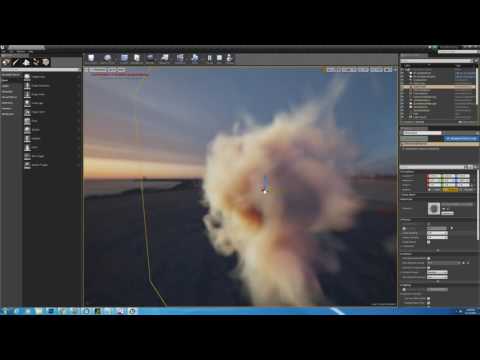
Anyone here created a Ray Marched Volumetric shader setup like this? https://www.youtube.com/watch?v=hWNX9jGEt8k
 burnt drum
i'm starting a thread on some general guide of getting the most out of LPV
Hi All,
I decided to write a little guide about getting the mode out of LPV as a Dynamic GI solution. I believe we have achieve a very solid use-case with Dynamic GI and have gained some insight into the usage. With this we would like to give back to the community, there were very little guide on using LPV properly in Unreal Engine 4. I hope this would help someone along the way. Note that this is something I continue expand on as I learn more about LPV , so right now it might be a very long
if you have anyu insights to share.. go ahead and add to it
 floral pagoda
@burnt drum Thanks for that thread reading through it now 😃
proper quiver
@burnt drum I've used it before... isn't it stopped being supported because Lionhead Studios shut down?
I had trouble getting LPV working for large scale scenes, it seems like I couldn't increase the scale of the volume so distant objects kept becoming unlit from LPV
burnt drum
@proper quiver you can. you can increase the 'size' but I woudln't recommend spamming it as it increases performance cost
proper quiver
it's hard to describe, I'm making a sim-city like game and wanted the LPV to cover the whole viewable region
proper quiver
however, the LPV works when I'm hovering just over the city
when I'm zoomed out it doesn't work at all
burnt drum
right i see what u mean
proper quiver
I had to "cheat" it by using FOV zoom
burnt drum
we have that issue as well.. since we are doing FPS / RTS
in our RTS view the LPV just gets disabled
burnt drum
perhaps if you can find a quality scale.. perhaps you can increase the size dramatically but reduce the accuracy
that could work
LPV seems to be a bit of an old tech, but I still find it very relevant and hassle free. i do hope Epic continues to maintain it as a dynamic GI alternative
proper quiver
it's weird, I tried increasing the scale but it seems to max out after a certain point
like, the volume just would not grow bigger
the scale seemd absolute, too
proper quiver
right, I meant size, it's been a while
proper quiver
yeah I hope they keep working on it because I really like what it brings for real time lights
burnt drum
i think in your case it would require some engine modification
yeah.. i do hope they push it further
perhaps if more ppl use it.. they might
proper quiver
without LPV
with LPV
the additive blending on the traffic streak dies for some reason
ultimately I don't think I'll end up using it, I found I couldn't control the bleeding, but I'm reading your documentation now 😃
really comprehensive, so thank you
burnt drum
the bleeding ; have you tried adjusting light injection bias?
proper quiver
I tweaked a lot of it without knowing what I was doing, so probably ;D
I might take another look, thanks to your post
burnt drum
im' only covering 2 values. plannign to add more later the more I learn
i also need to look deeper into what it actually does
proper quiver
it might be worth mentioning how to debug LPV by enabling that volume visualization
burnt drum
oh that's a good point
though i actually didn't find any usefulneess on the LPV debugging YET
partially becuase I don't know what it represents
burnt drum
Haha..
burnt drum
there's very little documentation on it.. ( considering Dynamic GI is a major feature ) .
noble tulip
hi guys, i was wondering if anybody knows of a good resource to figure out how to automate server and client builds?
proper quiver
jenkins?
 atomic spoke
can gift hub for for working on the same ue4 project at the same time with 1 person for free?
 toxic lintel
is there a channel for people looking to collaborate?
proper quiver
@toxic lintel I'm in voice channel if you wanna chat about projects
 supple lake
so im not really sure if this is correct channel to ask but i made a custom skybox and it came in nice and all but i want a certain part to be visable at a certain point(if you understand what im saying
plush yew
might be as simple as rotating your skybox
sour shard
has anyone ever seen a way of developing on one computer and testing on a second with UE4 studio?
 split trail
Has anyone used 14.1 yet? Does it still have a bunch of bugs?
sour shard
i dunno its been fine for me so far
 urban salmon
i had a bitch of a time integrating the release into my codebase
urban salmon
but i think that's because my source was kind of in disarray
sour shard
a lot o fchanges from 14.0?
split trail
I haven't had a chance to read the changelog.
urban salmon
not a ton
split trail
Just saw it had dropped
urban salmon
some substantial ones for child actors, which is helpful to me
 next kite
I am trying to switch between cursor icons by creating a widget with my cursor texture and selecting that as my default cursor icon in the editor preferences, then in game I cast to that widget to switch my cursor icon to say a hand icon, it works except when I click it goes back to being the default widget again. Anyone know why it does this?
I use this to set it - https://gyazo.com/89823781f2c584ea1d188e96366e9488
 split trail
Err you could also try setting it to trigger in the cursor settings
next kite
Sorry, not sure where you are referring to.
My cursors are textures, not OS based cursor
split trail
Ur still creating a UMG widget for it no?
next kite
Indeed and I selected that widget as the cursor in the editor preferences
split trail
Because when I replace my cursor, I go to the User Interface section of the project settings and under the Cursor settings there are two classes that I had to replace with my cursor widget to get my cursor to stick.
One was the general and the other was called something-trigger iirc
next kite
Let me check that again, I know I had to set more than one to get it to show when it held the click
Out of curiosity I set them all to use the same widget and it still goes back to default one after right or left mouse click
default texture that is
next kite
Close enough LOL it was the default cursor setting in the controller. I hadn't changed it before and i guess when it doesnt match what is in the project settings it overrides the brush texture i set when I click. All I know is that it works now. Cheers!
split trail
Glad to help!
 leaden onyx
is it just me or UE4 is too quiet audio wise?
I cranked up to almost maximum volume to hear shit
versed pawn
Hey guys! I have an issue since I updated to 4.14.1
I have an actor which when I use, I switch from the firstperson view to show the mouse cursor. But when I hide mouse cursor, It does not give back mouse control to the first person character. It did work before in 4.14.
In other words: I need to click again to give back mouse control to the editor viewport
This wasn;t necesarry in 4.14
 scarlet echo
NEAT! Discord Game Dev SDK 😁 https://discordapp.com/gamebridge

Discord
Step up your game with a modern voice & text chat app. Crystal clear voice, multiple server and channel support, mobile apps, and more. Get your free server now!
 thorn forge
Oh, that is really neat 😃
frosty bloom
I have a very straight forward question for anyone that knows how to rig a car before using it in UE4. (im using maya) it's 1-3 fairly easy questions for someone who've done it before
If possible I would take it in a privat chat as well, to avoid spam on one of these open channels
thin haven
@frosty bloom: shoot, if they're easy I might be able to answer
frosty bloom
@thin haven Thanks for your time, I appreciate it! 😃
 weary hull
this is abysmal
I have 1 blueprint that reads a tag value and turns a mesh on or off, and I cant find where its doing it
tv time
 tidal lichen
hello. How can I send a key other than the mouse button to a widget component? I want the widget to react to when the user puts the widget interaction component over it and presses a certain key like "E" on their keyboard
sour shard
@frigid kernel i got it to work wtih your hints, thanks
 sudden canyon
Hey, I'm working on a little particle system with some sprites, is there a way to get the sprite to flip based on it's current direction of movement? OR am I trying to do something far too complicated?
 obsidian quiver
Quick question, I reinstalled windows on an SSD, is there a way for me to set paths so that unreal finds my former project?
also the engine itself, the launcher can't find the engine installation
gilded cliff

When moving to a new Windows system, either after getting a new computer or reinstalling Windows, you may be tempted to copy a program’s folder to your new system just like you’d copy your files. But this normally won’t work.
obsidian quiver
well that's not very helpful
I have a former Unreal Engine installation
but it doesn't find anything
 errant lintel
I would like to install Unreal Engine on an another computer, I installed the Epic Launcher and move the 4.14 folder inside the installation
but the launcher find any version, and if I run UE4Editor.exe inside Binaries, if I create a project the Engine Association inside the created .uproject is an UUID instead of an release ID
Someone know how to link Engine version to Launcher or I need to re-download the engine with this computer
thanks in advance
 trail saddle
I'm getting this error, anyone know how to fix it? http://i.imgur.com/pYGnJpR.png
 trail saddle
anyone?
 distant geode
@arctiq That module might depend on other dlls that it can't find.
 primal edge
What a commit for the UMG on Unreal's github repo 😂
safe rose
Streaming ALL #ue4jam entries https://www.twitch.tv/victorburgos_

Twitch
#ue4jam playthru! #ue4 #unrealengine #indie #game #gamedev #indiegame #videogames
buoyant mesa
hi guys I have odd problem occuring with apex cloth and ue4, my cloth material keeps flickering other side of the cape and I can't locate reason for it, (remove douples done, tangent space calculated in apex cloth etc)
 buoyant mesa
also it only flickers when I mouse over that screen in ue, but when I take my cursor away it works normally...very odd
plush yew
Hey!
How you automate import of assets into UE4? In Unity there is AssetPostprocessor class. Is there something similar in UE4?
Or do you do all this always by hand?
buoyant mesa
Propably there is, but so far I have imported thm by drag and drop
plush yew
Half of the problem would be if by reloading asset it would reload it from the same path it was imported, but instead it seems it just resets all metadata that was set on import and still uses uasset data, just this time with new metadata settings.
buoyant mesa
it is only viewport problem it seems in game it doesn't happen until you mouse over viewport, we came in conclusion it gotta be old gpu drivers or something like that. Gonna try another pc tomorrow thanks for the help 😃
 rough fiber
Anyone have experience working with SourceTree and Bitbucket? I've uploaded 500MB that we modify, and the rest is on the ignorelist. The problem is that the repository keeps getting larger and larger eventhough we just modify files. The repo is now 1.5GB and we're getting close to the hard limit. Anyone had the same problem?
thin haven
this is not a problem with SourceTree or Bitbucket, it's just the way git works
if you modify a binary file which is 50 MB, every modification to it will add 50 MB to your repo
 mint raptor
Is a ray trace as good idea for a knife weapon?
rough fiber
@thin haven Interesting. Is there anyway work around it?
thin haven
nope, not for now at least. Epic have a note in their trello to make blueprints mergeable in perforce, I assume this will apply to git too, but no one knows when it happens
rough fiber
Ok, thanks!
thin haven
there is nothing you can do for map files and/or models and graphics
but you could move from blueprints to c++, source code is perfectly mergeable meaning if you change one line, git saves only that one line change instead of the whole file
safe rose
Playing through the rest of the #ue4jam games https://www.twitch.tv/victorburgos_
Twitch
#ue4jam playthru! #ue4 #unrealengine #indie #game #gamedev #indiegame #videogames
 willow lance
Hi! I'm looking for experience reports in form of devblogs, presentations or papers about collaborative workflows in ue4 from teams. Having a hard time finding sources for a paper I have to write.
 fallow tusk
Anyone gotten this message when trying to make a destructible mesh? Cooking::cookConvexMesh: user-provided convex mesh descriptor is invalid!
tidal lichen
How can I spawn an actor in front of the player?
trail saddle
@tidal lichen with blueprint?
tidal lichen
@boreal orchid yes
trail saddle
get a reference to the player's location and add the vectors
so something like
playerloc --- add(thisloc,playerloc) --- setnewlocation
I hope that makes sense?
tidal lichen
yeah, i'm on vr and the actor spawns in a weird place. Must have something to do with where the location of the player is being counted as
tidal lichen
nah, it is its own template. I'm starting to figure it out though. Just have to figure out rotation now
trail saddle
hmm, I'm not sure if this happens for everything, but in the first-person template in VR, your player shrinks
tidal lichen
@trail saddle do you know how to make the object face the player?
trail saddle
hmm, let me think.
try setting the rotation of the player to the object and setting the Y value to negative
If you want the object to always face the player, put it in the tick.
scarlet echo
is there any documentation anywhere relating to UE4 Content Borwser > Advanced Asset > Miscellaneous > Blueprint Tutorials?
I partly ask to due getting to the stage on a UE4 MP project where I wish to provide in-engine step-by-steps
and partly because I might consider writing up some documentation on the subject matter on the UE4 Wiki if none exists?
(also asked under #blueprints channel)
 upper stag
is there any way to stop the assertions in UE4 even temporarily ?
I know there is a define named DO_CHECK in engine core class. but my question is that if I can undefine it in my class so I don't get assertion failure in UObjects
plush yew
Hello!
I'm dropping some items with physics. It looks good while in the air, but when the items drop hit the ground they start rolling around, indefinately sometimes. Is there a way to make them stop upon hitting the ground?
scarlet echo
@plush yew you could increase gravity once the object hits a flat surface such as the ground (dertermined by racetracing downwards)
than after say 1sec or less you turn physics off on the object making it static until player or AI interaction is executed on the object once again
also helps with performance by doing that
 viscid dirge
Anyone else is getting stupdly dark viewport on blueprint editor viewport?
humble crow
if I'm getting ready to release a game on steam, what steps to I need to do with epic?
I just keep finding pay after $3000 5%
but there has to be something I need to do, like tell them hey I'm releasing a game
plush yew
maybe you should contact the team itself through the contact page
thats what I would do
tall pendant
@humble crow https://www.unrealengine.com/release
Unreal Engine 4 Commercial Game Deployment Guidlines
 bitter edge
Anyone familar with seqencer?
humble crow
@tall pendant thanks!
tall pendant
np
bitter edge
Anyone familar with creating smooth camera animations within seqencer?
 spice scarab
Anyone got an idea how to lerp two Red channels (two roughness channels) and an alpha? I'm getting an error. They are both world aligned textures so that might be the case? Or maybe I should somehow append both of those red channels to RGB before the lerp?
@bitter edge This might help: https://www.youtube.com/watch?v=O3zeklh9mSg
 bitter edge
@spice scarab Sorry I meant character animations not camera. I've gone through the basic tutorials for sequencer and I can easily animate characters, but, smooth transition between aniamtions is aluding me. I keep looking at the documentation and googling...I must be missing something.
spice scarab
@bitter edge Oh.. I thought this link had camera plus two animations. But I'm not sure if they are "smooth enough" for what you are looking for? I kinda thought the smoothness of animations and how they transition from one to the other comes from how the animations were made and not from the sequencer. But I might as well have misunderstood the question! : )
bitter edge
@spice scarab The two animations have no blending between them so they "pop" from one to the other.
I know I can smoothly blend animations in blueprints, but I was woundering if sequencer had a way of handling it.
@spice scarab and if seuencer dosnt handle blending then will it understand and use blends I create in the animation BP
@spice scarab I'm sure other people have had this issue before I just cant seem to find any info on it.
spice scarab
@bitter edge Ok now I understand but I havent tried animation blends with sequencer. I've only been using camera myself. But they should work I guess? Otherwise it would be pretty hard to make a cinematic within the game where a character would run from point A to point B while shooting and dodging bullets or something. Because that would require blends, right?
bitter edge
@spice scarab I'm sure theres a proper way to do it.
spice scarab
Maybe the "Sequencer" pack from the Learn tab would have the required knowledge inside. Maybe you would just have to reverse-engineer the scene.
I'm not sure because I haven't tried it yet.
bitter edge
@spice scarab Thats a solid idea
spice scarab
@bitter edge Yea it might help! And please tell if it does. 😃
bitter edge
@spice scarab Sure thing 😃 l. I'm downloading the example right now
spice scarab
@bitter edge Nice!
plush yew
@scarlet echo Thanx for answering! I was thinking about something like that but wasn't sure if there was another way i wasnt aware of. Cheers!
btw. guys, I see the environment query system is experimental
has anyone used it? Is it useable in its current state?
bitter edge
@spice scarab So, I've been digging through shot after shot within the content example for sequencer, and epic isnt using mulitple animations per shot. They are are doing 1 animation per shot, per character...
spice scarab
@bitter edge Damn. :E
bitter edge
@spice scarab My thoughts exactly
spice scarab
@plush yew Yea I think I made an AI that used it and it worked fine. But it was just a deer that was searching for places to hide and run behind if it saw me. But I'm not a pro so don't take my word for it. Also I had a facepalm-moment when I updated the patch and I forgot to re-tick that experimental box and I was wondering why my AI wasn't working.
viscid dirge
Guys, where can i ask an specific copyrigth movie music adaptation for my game?
question*
xd
spice scarab
@viscid dirge I don't know. : ) But I guess the easiest way would be to ask copyrights from individual artists etc. You might save some pennies. At least if a band makes a cover of a song for an album the easiest way for them to ask if it's ok is to contact the person who made the song.
I told two seperate things like they were one but yea...
viscid dirge
But for example, could i include a parody version of star wars intro? Or that is considered copyrigth infringing ?
Copyrigth is so messy in some cases 😦
spice scarab
I think the movie critics of the whole damn internet have been fighting over those things because I think it says in law that you can have 17 seconds of uninterrupted "copying" if it's not total copy but a part of some other material which is made by you. For example critic talking on top of a scene or showing a clip of a scene to make a point about something. Or some guys watching TV and something that has copyrights is playing on their TV... 17 second rule should apply. But I'm not sure.
viscid dirge
17 seconds sounds fine 😄
spice scarab
Basically best way is to make everything you can by yourself or get connected with the people who know more about the things you don't. Or just ask the particular person/company involved.
spice scarab
But the first way (making everything by yourself and asking help of others) is best because then you can be sure you aren't steppin' on anyones toes.
But yea... Star Wars theme.. I think it's ok if you have your own content on top of the music and the music aint too long.
viscid dirge
Its just the intro of the game 😃
I always try to add my own content, but star wars intro is too strong 😄
bitter edge
@spice scarab I can always create smooth blends in the animation BP for a charater and then just call specific animations within sequencer, but its a pain. O well.
spice scarab
But I think you should ask some composer to maybe make a parody version of it (that has some variance in the melody) or ask for a license. I just read this. :E
@bitter edge Lets hope there's a different way (and that our discussion brought some attention to it) but yea.. I wish you good luck! : )
plush yew
I asked about this couple days ago, didn't get any answer beside probably. Maybe today some good soul that knows the answer for it will be passing here.
How you automate import of assets into UE4?
In Unity I would use AssetPostprocessor => https://docs.unity3d.com/ScriptReference/AssetPostprocessor.html <=, is there equivalent in UE4 for it?
Or do you always import everything by hand?
Unity Technologies
Unity is the ultimate game development platform. Use Unity to build high-quality 3D and 2D games, deploy them across mobile, desktop, VR/AR, consoles or the Web, and connect with loyal and enthusiastic players and customers.
trail saddle
Is VS 2015 broken in 14.1? I think it causes the editor to crash every time you open the project
 leaden perch
Hello all. After selecting Package Project > Mac, packaging succeeds and I double-click my game, I get an error dialog that says a global GLSL 3 cache file could not be found and that my project is configured to use cooked content but no cooked content was found. This was after selecting Full Rebuild and manually running a cook. How can I fix this?
 visual parrot
Anyone know why the capsule collides further out than it's actual radius?
You can see it hovering above the ground by a few units
leaden perch
What is the size of that capsule?
That may be floating point precision issues. But that's just a guess
weary basalt
The charactermovementcomponent capsule sits 15 units from the ground. Is that a character?
Cant remember why they did it. Probably to do with collision detection or something.
visual parrot
@leaden perch Nothing special in terms of shape.
leaden perch
Anyone able to help with cooking/packaging my game?
weary basalt
What are you having trouble with?
leaden perch
Hello all. After selecting Package Project > Mac, packaging succeeds and I double-click my game, I get an error dialog that says a global GLSL 3 cache file could not be found and that my project is configured to use cooked content but no cooked content was found. This was after selecting Full Rebuild and manually running a cook. How can I fix this?
 tropic pilot
so with the new 4.14.1 update they fixed the annoying standalone quit crash bug BUT now i have insane GUI lagg -.- like seriously lagg.... the "play editor" window is fine but the gui is lagging like fuck.... anybody else have this on 4.14.1 - win10?
tropic pilot
i had that to but 4.14.1 fixed it but now i have freaking UI lagg -.-
uhm... ok
i updated the graphics driver.... that fixed it :S
 uncut marten
Hi guys, I have a query if anyone can help me. I am new to Unreal , I have a Model that I have to use in Unreal Engine. The model when I imported to Engine, is in modular form having separate mesh for different parts of model. SO can we integrate them inside Unreal Engine or do we have to get the full model exported from 3D art softwares like Maya?
 stable crest
hey guys anyonw knows what does t.OverrideFPS does ? and How to turn it Off if i entered some value.
tropic pilot
FUCK ME -.-
i still have the standalone (quit) editor (not responding) -.-
fuck me
fixed it!!!
thin haven
👍 how did you fix it?
tropic pilot
stupid Nvidia Experience shait -.-
it has that "Share" option where you can stream directly ingame to youtube, twitch and shit.... by turning that off the problem is no more
tall pendant
yup had also problems with "share"
thorn forge
How does the editor creation shortcuts work ?For example in the wiki it says b+left click creates a branch but I can't get it to work 😄
 tender violet
has anyone run into an occurance where steam stats/achievemnts suddenly stopped working?
inland crypt
Hello all I am working on Mobile VR Game but when I packaged it everything seems to be jagged in Gear VR
I turned on AA to FXAA
But this doesn't solve my issue even the text render part is jagged
thin haven
I think some kinds of AA don't work in VR
burnt drum
just curious .. why don't AA work in VR? @thin haven
performance thing or isit like the Particle issue where it doesn't make sense for HMD
thin haven
@burnt drum I wouldn't know, I just heard
cursive dirge
@burnt drum pretty sure he means what Epic said about TAA
artifacts ruin the image
but I'd go as far as saying TAA doesn't even work properly on desktop :p
it's totally unusable for me
 supple dawn
When I have all four viewports open and play the game, is it possible to make all the viewports update in realtime? For now it's only the active viewport that's being updated.
burnt drum
what the hell is TAA?
oh my all the acronyms
FXAA , Temporal AA , MSAA
now we have TAA?
humble crow
Wouldn't that be temporal aa?
burnt drum
anyway TAA has alawys been ruined for me for some reason . endless ghosting
oh TAA = Temporal ?
right
i get it
humble crow
Or the Trade Adjustment Assistance according to google
cursive dirge
yeah, temporal AA
I don't really get Epic stance on Temporal AA
they clearly know it's bad in regads of the ghosting
on forward rendering stream Daniel said it's not as bad on desktop but his example scenario why it's not as bad didn't make any sense
I think he said something about being able to render high frame rates on desktop so temporal sampling between two frames is fast or something like that
but you render 90 fps on VR...
thing is, the faster things move, the worse ue4's TAA becomes
it just can't keep up
 bleak schooner
any idea on why both the launcher and the engine itself might take so long to load?
thin haven
@bleak schooner: rubbish on your hdd? hdd going bad? ram going bad?
bleak schooner
I mean, it prolly is cause my HDD isn't the best one on the market but maybe you guys know any way to improve dis
yea well kinda full of random stuff
 gusty summit
why does unreal crash so hard I cant even open it back up without uninstalling/reinstalling
this has happened twice now
worn granite
- What OS?
- What are you trying to do?
gusty summit
windows 10 pro
It just crashes randomly and I can never reopen that project. Everytime I try it just crashes and the reporter pops up
I was wrong this time I can load a new project but still, I lost a lot of work
worn granite
BP?
gusty summit
c++
worn granite
Does it log anything? Might have to check the files.
gusty summit
nope says something like I dont have the debug something to view the crash
gusty summit
k
worn granite
Also, you should probably get the symbols. if you're really re-installing so often include them in your next DL.
gusty summit
LogWindows:Error: Assertion failed: InPos <= Size [File:D:\Build++UE4+Release-4.14+Compile\Sync\Engine\Source\Runtime\Core\Private\HAL\FileManagerGeneric.cpp] [Line: 619]
oh wait
one of my models got corrupted
but I removed it and that did the trick, thanks for the log info @worn granite
worn granite
Yeah, it's always eaiser to dig through and find what's wrong than to reinstall and hope for the best.
Another thing, if you build your game's editor and you have the symbols installed you can debug it rather than launch it normally. That way when bad things happen you can see the call stack and such.
Just right click the project in the solution explorer and you can debug it.
zinc bison
has anyone ever done input stuff in C++, and also BP? it seems like the C++ overwrites the BP input event
I cant find anything on google about how to do it
 zealous cloak
@burnt drum @cursive dirge There is a flag AA_DYNAMIC_ANTIGHOST here https://github.com/EpicGames/UnrealEngine/blob/55c9f3ba0010e2e483d49a4cd378f36a46601fad/Engine/Shaders/PostProcessTemporalAA.usf#L372
if you set that to 1. Most of the ghosting disappears. At least it was that way for our project. And as far as I know this should be improved even further in 4.15. But it worked great for us even in 4.14.
cursive dirge
I know the flag
it doesn't cure the whole problem
you can get rid of the bright part on the ghosting with that
but you fast moving object will still have dark allaround mess following it around
I guess some people might not notice it if the background isn't that different from the moving object though
it also still blurs everything 😄
@zealous cloak ^
I haven't tested that on 4.14 but I think I did a lot of testing on 4.13
zealous cloak
oh yeah, the mess is stil there.. but you don't get frame by frame ghosts of the object.
cursive dirge
I also tested that SMAA fork someone did
zealous cloak
it looks more like a blur in this case.
zealous cloak
how is that SMAA fork ? it is in my todo list to merge those changes into our engine version.
cursive dirge
it didn't work for my use case at all
plus it looked crappier than FXAA on my extreme test
TAA looks amazing on the distance, it's just he nearby things that get wonky as pixels move too much between frames
zealous cloak
oh ouch.. I was quite hopeful about that fork..
what I hate about TAA is that.. when you do some animation in material. TAA blurs that like crazy since there is no motion vectors for that.
cursive dirge
I hope they'll make forward + msaa usable for desktop
that's all I want really
but they seem to want to keep it VR focused
@zealous cloak https://www.youtube.com/watch?v=-TpBF0iTwsY
that doesn't have that dynamic flag set for TAA
I only learned about it after I had made that vid
I also put the worst case scenario for TAA there (huge contrast for the moving object)
I actually have that kind of situation on my real project too as chrome bumpers ghost really badly
but that dynamic flag would help a bit there
zealous cloak
oh yeah TAA looks very bad in that case.. we also have driving on asphalt scenerio in our game. TAA fails very bad for that.
cursive dirge
yeah, anything where you get big contrast between moving object and camera followed object will fail
besides, I want to have VR support
so I really need that forward support to work
I asked on the rendering stream if you can mix VR forward and deferred but answer was no (like to be able to change that within the same executable)
reason was that it would double shader compilation time (which I would have been ok with)
so, at this movment, if you need AA, VR and desktop modes all on your game, going all forward seems to be the only solution
it's just really bare bones atm
you can't even get shadows for anything but stationary lights and need to have static light building enabled on your project for that
zealous cloak
oh, i understand. I never tried the forward renderer before.
@cursive dirge Did you see this commit ? I wonder if anti ghosting is much better in 4.15.
cursive dirge
oh
sounds nice at least
doesn't help with the VR issue though
(you can't ship with forward + deferred both on same project)
too bad epic doesn't do game that have optional VR mode :p
they would solve that if they needed it
zealous cloak
heheh 😄 yeah.. kind of sucks that epic does whatever they need first 😄
cursive dirge
it makes sense from their viewpoint of course
zealous cloak
well, still much better than Unity. who does features that are always half complete, or only enough for their demos.
cursive dirge
but it seems like they haven't even thought about people who do games that have VR as optional mode
zealous cloak
about compiling shaders for forward and deferred. I can kind of understand them being afraid to introduce that change.
I mean, compiling shaders takes a loong time usually.
I wish shader compilation would be faster.. so that they could add forrward+Deferred support, and also more than just the simple Material Quality Switch node into materials. But like static defines per material. It would be awesome.
cursive dirge
yeah, that's what Daniel said on stream (that it takes forever already and they don't want to double the time)
@fiery harbor have you tried TAA improvements on 4.15?
you were using master, right?
fiery harbor
yeah, but haven't updated master to after that merge happened
so couldnt test it yet
I can only say that TAA looks horrible in VR
fiery harbor
once SSAO is supported in the forward render I won't need to care about TAA any more 😄
cursive dirge
shadows are done in deferred, they make artifacts on msaa edges and you only get dynamic shadows on forward if you have stationary lights
you also have to have static lighting enabled on your project for that
fiery harbor
no they added support for dynamic movable shadows now
cursive dirge
on 4.15?
cursive dirge
oh
that's cool
when he was on the stream, he said he couldn't tell when that'll happen
fiery harbor
 cursive dirge
I haven't actually seen then but Daniel showed them on the stream, I don't work with forward shading atm
I've only tested forward on 4.13 and 4.14 previews
fiery harbor
ok
cursive dirge
@fiery harbor https://www.youtube.com/watch?v=F4Z1V9Qe7F4&t=1384
oh well, discord just doesn't want to embed that
link should still work
fiery harbor
well he said its the biggest problem with forward
then I wonder why he first added support for movable shadows is that was less of a problem 😄
maybe they fixed the shadowing stuff already before without me noticing
cursive dirge
wonder when we'll get 4.15 previews
they targeted it till end of this year but I doubt it'll happen anymore
or they'd need to rush it already
fiery harbor
probably next week
 unreal sonnet
Can anyone recommend a "let's make a guy in blender, rig him to a skeleton, and give him a simple animBP" tutorial?
plush yew
that sounds like you might be better off with three seperate tutorials
unreal sonnet
I feel like there's a bit of a disconnect in the tutorials I've gone through, though, for that stuff. I've either found tutorials where you just make the guy and import him to the editor and I've done tutorials where you retarget the skeleton... but I haven't seen anything that shows the in-between stuff (e.g. "here's how you connect the model to the skeleton so that you can actually do the retargeting part")
idk though, I am stupid
plush yew
nah, its not stupid to still be learning stuff, we all have to go through it 😄
if you want to see how to make a skeleton, then use this


This one right there, Basics of Character Rigging is where I learned how to make skeletons for models
Once you're far enough along that you can make your own skeletons and animations for models, you shouldn't have too much difficulting exporting the Epic Mannequin skeleton and rigging that to your models so you can share animations
 brave mason
Houston, we have a problem!!
We've got the engine crashing on project load (4.14.1) when it hits 93% any time we make changes to a few assets
we can perforce back to a working copy, but then if we modify assets in that game it crashes on load again
safe rose
@brave mason I have had the same issues since 14.0
brave mason
oh noes!!!
safe rose
Compiling, Saving
usually when there are structs involved
in that bluepritn
blueprint
But yeah, please report on Answerhub
brave mason
we have
brave mason
I can't even work on my project atm
safe rose
just keep posting until something happens
brave mason
we've got areply from epic
safe rose
it's pretty rediculous
brave mason
I might e-mail a contact at epic
are you having problems with your project loading at all?
safe rose
But today, surprisingly, I didn't get a single crash
but over the past wek
week
I had roughly 30 crashes PER DAY
I am not even joking
brave mason
I can't even get my engine to load
safe rose
It's stupid because
As soon as I load it back up
I do the exact same thing and it compiles/saves just fine
that's when I submit my commit obviously
It seemed like a 30% chance to get rekt
@brave mason you delete intermediate?
build
brave mason
yes
safe rose
and any other junks folders
brave mason
I even zipped up the project
moved it
unzipped
edited the player pawn
saved
crash on load
safe rose
Sounds worse than me
And I thought I had it bad
It made what could have taken a few days, over a week
brave mason
I got it working, felt positive, made a bunch of updates, and then it wouldn't load again
can you replicate the crashing?