#ue4-general
1 messages · Page 46 of 1
 south ridge
 green spear
Anyone who is using AutoHotKey and UE4? I am trying to make a script work only for UE but I cannot seems to find the right name for "#IfWinActive"
south ridge
For example, two objects with different seeds should have different bolt arrangements
 buoyant echo
So I posted this before, but I was told to clarify what I meant;
"Hey all, quick question. If I'm trying to set up Perforce, what's the best way to do it? I followed their 5minute tutorial, and I tried port forwarding my router, but no dice. 😦
It reads it internally but not externally."
 safe rose
@buoyant echo check out assembla ;)
 burnt drum
hi does anyone know if hidden mesh gets transform updated?
e.g does a 1P Arms in FPS Games gets processed if you don't see them ( AI having them ) .. or should they be destroyed.
buoyant echo
The one you were sponsoring, @safe rose ? I will. I was going to contact you about having one but I'm not entering game jam just yet haha
 bleak schooner
has this been shared before https://forums.unrealengine.com/showthread.php?130046
119382
SequencerPro
SequencerPro is an Unreal Engine 4® Plugin designed to extend the use of Sequencer within the engine. This plugin is not ready, but I have developed many of the features which confirms this can be done. I want to confirm the interest for this type of plugin, as I've gotten a lot of request recently for this type of control over Sequencer.
Imagine Sequencer being akin to After Affects.
In Production: Unconfirmed
just noticed I got an email from that earlier today, you guys might find it interesting
 dark musk
wow
so I got a few asset packs from cyber monday, imported into project, found out there's a ton of folders they spilled out into my project root content folder, so I decided to move them
why on earth does the editor need to re-import every single asset to relocate ?
 agile wadi
What would be the best way to temporarily make an actor transparent? Through material parameters so you don't need to switch in materials?
dark musk
UE4's file management is probably the worst I've ever dealt with in -any- application
my project won't even open without crashing UE4 now
great.
 velvet fern
i wouldn't call it the worst but yeah, it's not pleasant to deal with
dark musk
after re-importing the assets and trying to move around specific ones I needed, the content browser decided to delete them from the hard drive from a Move
I just wasted an hour over nothing because it's broken.
AWESOME
 dawn crescent
hi guys, i have a real quick question regarding nave mesh, how can i extend it so it goes through the door way?
 fiery harbor
the height is too much there?
dawn crescent
nope.
fiery harbor
you mean the thing on the left or the other?
dawn crescent
both doors
fiery harbor
the collision of the door is probably too inaccurate
or the navmesh resolution too low
safe rose
@dawn crescent is your collision block a solid box around the door?
fiery harbor
or the pawn radius too high
dawn crescent
what do you mean by navmesh resolution? i apologize if this is a dumb question
there is no collision block on the door
safe rose
You should probably watch some tutorials
Would you if I linked you some?
sigh, I swear there was a stream recently
On nav mesh proxies and such
Why can't I find it
dawn crescent
I would definitely watch it. I know it's a simple fix which is why it's so frustrating
fiery harbor
the navmesh has a cell size that you can reduce, then it has a higher resolution
 fiery harbor
the door definitely has some collision, otherwise the navmesh wouldn't stop there
fiery harbor
I'm looking at the door on the left now
safe rose
same thing
so, yeah, it either has a blocking collision
or not collision at all
no*
fiery harbor
is has no stairs, so not same thing
safe rose
ah
but look
I don't know, too hard to debug with that screenshot
@dawn crescent show us the door static mesh editor
 primal edge
some one is jalous of the Unreal's sexy selection orange outlines 😂
buoyant echo
does anyone here work with perforce? I'm having some issues with the permissions tab, it's not letting me access it
 weary basalt
Reload your connection to p4a
buoyant echo
I've restarted my pc, and all, and the perforce server is on my comp.
I've tried looking it up on google, but couldn't find anything.
weary basalt
Do you have a depot selected?
buoyant echo
Yessir @weary basalt
weary basalt
Thats odd. Are you logged in as a superuser?
buoyant echo
Yeppers.
buoyant echo
I have my ports open now, but yeah, I'm logged in through local port.
I cannot find anything related to this issue.
weary basalt
Ive had it before but a relog usually fixed it
buoyant echo
Everytime I open admin panel, the permissions tab is lit up for a split second, then disappears.
@weary basalt I just tried disconnecting the connection, and reconnecting.
Still nothing.
Is it due to a license file?
buoyant echo
Only the two.
weary basalt
Hmm
buoyant echo
Wouldn't make sense to prohibit a SU from accessing permissions even if that was the case.
I'm honestly a little stumped 😅
buoyant echo
I even tried opening with Admin
buoyant echo
Just this
weary basalt
So doesnt even have a disk usage request?
buoyant echo
nope. Also, I can even "view permissions" on a user, but I can't interact with anything on the page.
weary basalt
Make another superuser account and login with that maybe?
buoyant echo
How would I go about doing that
It's set up that only that one account has SU, and since I can't really modify any permissions, I can't really do much about that.
I feel like it could do with this, @weary basalt?
 cursive dirge
@primal edge that kinda reminds me of this 😄
I actually ported those assets for ue4 on some uni game project (as there's no restriction on unity asset store eula for them)
also had to make "unity master material" in unreal for this
as I was too lazy to convert all the textures manually
primal edge
😄 as part of respecting Unity's EULA, and for the love of Unreal..I have those lessons in progress for a while now
😂
cursive dirge
early ue4 samples didn't hold a note that you couldn't use epics samples for non ue projects
but they added those notes pretty quickly
primal edge
well, enough that epic put the full sourcecode 😄
buoyant echo
@weary basalt It says it can be either service, operator, or standard, so I think standard is the right one.
cursive dirge
I did one unity school project with ue4 content too :p
but then had to swap the content when they just popped in the restrictions in the middle of the project 😄
weary basalt
Id check my configuration but im not at home haha
Im out of ideas @buoyant echo short of deleting the depot 😛
primal edge
hahah, Unreal 🤓
buoyant echo
Don't go saying that, I have my partner working on it! Lmao 😢
weary basalt
If you dont fix it in a few hours when i get home ill see what i can find out.
buoyant echo
please do
dawn crescent
@safe rose good news I was able to get fix it after changing some of the Collison options for the static mesh
safe rose
@dawn crescent who knew
buoyant echo
@safe rose I don't think Assembla is too good of an option, as I can't really afford it, nor do I believe I'll get the hang of it in 7 days 😛 Thank you for suggesting it though
safe rose
@buoyant echo Assembla is easy mode
...
Like, all you have to do is, create workspace, add a p4 server
Go to command prompt, enter all info
bam done deal
buoyant echo
Fair enough! Maybe one day. I'll try it once I'm more familiar with SCM's and working on projects. I'm still very novice. 😃
 pallid root
What is the best way to handle weapon rotations. Say I attach 2 different weapons from 2 different sources to a model and one has an x forward vector and the other has y. How do people typically handle this? Do they edit the original asset to fix the forward vector, add a checkbox to rotate on begin play if the model requires rotation (what im currently doing) or is there some other trick?
 tawdry quail
is there any big difference between x32 and x64 packages ?
 patent siren
@pallid root if the guns are like that i give them their own sockets
buoyant echo
@weary basalt any fixes?
tawdry quail
thank you, that is valuable information
safe rose
No problem
The more I think about it
I do not think there is any particular advantage or reason to package 64 in a BP only project
32 shipping saves quite a bit of size and it works as intended and for everyone. we cannot access 64 bit variables in bp.
Unless that has changed without me realizing it.
tawdry quail
wow, so it turns out I have been using bigger files for nothing all this time
good to know!
also x32 is compatible with, duh, x32
fiery harbor
@safe rose lol this is not about 64 bit variables you would access or not access from BP
you should always package 64 bit if the platform supports that
 cloud cobalt
x64 has better performance and enables more memory
fiery harbor
if you package 32 bit then your game can only use way less memory than it might need
limiting any desktop ue4 game to ~ 3GB ram is super stupid
so @tawdry quail, always package 64 bit
tawdry quail
neat-o!
 obsidian nimbus
hmm i have 16 gig ram but it hardly ever go over 8, i put my virtal mem pretty high
safe rose
TBH, it depends entirely on the game @fiery harbor
cloud cobalt
32bits is basically legacy software, it's interesting if you target very low-end machines or Windows XP systems
safe rose
Some games barely even use more than 2GB of RAM
cloud cobalt
UE4 didn't even support x86 (32) when it came out, for good reason
fiery harbor
@safe rose then thats not ue4 games
safe rose
Sure it is
Anyway
Shipping to 32 and 64 is the way to go
If your game can support 32
fiery harbor
and even if you dont need the ram, 64 bit allows you to do nice stuff like AVX-256 that can double performance for some calculations
safe rose
You will be able to cater to everyone
Even if 64 is more prevalent in OSes nowadays
Some people have not upgraded
Again @fiery harbor NOT related to all games
Or rather relevant
 tall pendant
please let 32bit die already 😛
fiery harbor
yeah 32 bit basically has died already
safe rose
I mean, I agree 32 is old school
But, you should not discount it, just because you like 64 bit better
that's just stupid
If you are going to sell a game, you are going to want to cater to as much of an audience as you can
32 has not died
fiery harbor
therer is no 32 bit audience
safe rose
There are still millions of players running on 32bit OSes
obsidian nimbus
ill never serve those 32bit sobs 😛
cloud cobalt
As a matter of fact, 9% of Steam users use 32b (including a lot of Windows 7)
safe rose
Exactly
fiery harbor
not players that could run any ue4 game
tall pendant
how big is the install base of 32bit OS's?
safe rose
Sigh
 thin haven
definitely not died. I made a mistake of downloading a game in x64 version and finding out my older comp is still x32
cloud cobalt
Arguably, 32b OS are installed over shitty hardware
safe rose
I don't think people actually do much research
cloud cobalt
No one has 4GB RAM and a 32b OS (no one with half a brain anyway)
thin haven
yeah, but said shitty hardware is still in circulation
safe rose
Anyway, I stated my case
If you choose to completely neglect a shitload of players, that's on you
thin haven
with those criteria, my old desktop, my Dad's old laptop and his current desktop all qualify as shitty
and they are all still working
tall pendant
define shitload of players @safe rose
cloud cobalt
To be honest we're talking about people with 2GB RAM.
More is usually 4GB, which requires 64b
So 2, or the rare 3GB
fiery harbor
those people are irrelevant for ue4 games
unless you do some super stripped down 2d stuff
my game needs at least 16GB ram
cloud cobalt
(3GB memory is basically what happened when OEMs couldn't be assed to support 64b)
(Hey, let's do the top we can !)
obsidian nimbus
homebrew wii games 😛
thin haven
@fiery harbor maybe not ue4 games indeed, but there's a ton of games that can still run on those. so when releasing, best to have both versions
fiery harbor
whats the result of FMath::Pow(-0.3f, 0.9f)?
 cloud cobalt
Already sait it 😃
cloud cobalt
But like I also said it overlaps with the 15% or so with 2 or 3GB RAM
fiery harbor
ue4 games only run on the top ~25% of steam users anyways
obsidian nimbus
it might be kinda dated
cloud cobalt
@safe rose Most of those won't run UE4 anyway
obsidian nimbus
ppl with those pcs use steam for CS 1.6
thin haven
@fiery harbor nice to know that my crappy laptop counts as top 25% of anything lol
obsidian nimbus
and CS 1.6 only
safe rose
Anywayyyyyyyyyyy
Like I was saying, do what you will
But don't say that there isn't a market in the 32bit relam
cloud cobalt
8% of Steam users have 2GB or less memory, so no UE4 for them
safe rose
realm*
cloud cobalt
So it's probably fair to say 32b UE4 isn't a market
 fierce tulip
you dont want to know @wild kestrel his pc then, theoretically it shouldnt be able to run ue4 at all hehe
cloud cobalt
Think of the GPU that goes with those 2GB
fiery harbor
can ue4 even run on a gpu with less than 2GB VRAM?
cloud cobalt
Sure
fierce tulip
yes it can
fiery harbor
you probably dont want to use 4k textures then
cloud cobalt
It can handle 512MB VRAM
tall pendant
how many out of those ~9% using HW that can actually run a UE4 based game? it narrows down those number even more. Ofc if you want to maintain and ship 2 build depots for it. Go ahead.
thin haven
@fiery harbor yes it can, my gpu has 1 gb vram and as you can see from me posting basically every day, I can dev fine
as long as I don't aim to have SUUUPAAAA graphics lol
cloud cobalt
Anyway, I think the idea is that high-end games can ship with just x64, and games that target anyone should release as 32b as well
cloud cobalt
My own game has a hard time running on an older i7 CPU, so I'm not looking into 32b
😄
obsidian nimbus
my core 2 due couldnt do crap with ue4, even if it was 64 bit
20 min to change a material ,. wouldnt even build a blank project
patent siren
Because its a core 2 duo lol
Most computers now are 64 bit so why not just use 64 bit
Ue4 is more GPU intensive than anything
So if you have integrated intel graphics good luck
fiery harbor
@cloud cobalt haven't tested my game on any other CPU than mine but I think it would be horrible on older CPUs too
I usually fill all my 12 threads with AVX-256 stuff so any older CPU would die...
patent siren
Ive used a quad core i5
It was all good
Now i use a 6700k and its great
But its all about that gpu
obsidian nimbus
well, ue4 actually didnt run that bad on a core 2 duo, there just was stuff u couldnt do
could still get 60 fps on projects with stuff goin on
fiery harbor
most projects arent CPU intensive
obsidian nimbus
you can make BPs and test em no problem
obsidian nimbus
yea
patent siren
Might not though
obsidian nimbus
it does
patent siren
My game has like 50k shaders lmao
fiery harbor
well thats editor time, so only you have to have a good cpu and not the end user
patent siren
Yeah
obsidian nimbus
if u do a lot of shader compiling and cpu render/ physics sim get a decent cpu and it will save on ur power bill 😛
fiery harbor
DDR4 is not more expensive @patent siren
fiery harbor
well I'm fine with 2400
patent siren
I like to go overkill
fiery harbor
compare a single DIMM 16GB DDR3 with DDR4
patent siren
Like getting a 1080
fiery harbor
I use 2x 16GB and 2x 8GB DDR4 currently
patent siren
Thats a lot of ram bud
obsidian nimbus
i dont think 3k$ pcs are worth it, better buy a 1.5k$ pc double as often
fiery harbor
RAM is cheap, a 1080 is not cheap
obsidian nimbus
kindaz depends on what u do with it offc
fiery harbor
its good to care about it now that everyone is focused on it
fierce tulip
owninator - Today at 4:25 PM
i dont think 3k$ pcs are worth it, better buy a 1.5k$ pc double as often
or assemble your own
unless that was meant hehe
patent siren
Who focuses on it?
obsidian nimbus
well, build ur own pc doesnt save as much as it used too
obsidian nimbus
u shouldnt order from dell or alienware if u want cheap good pc
patent siren
Yeah but the consumer doesnt rn
fierce tulip
@obsidian nimbus true, though my current pc was 50% refurbished hardware, so saved at least a few 100 bucks on that
patent siren
If you live in us its cheap to build a pc
obsidian nimbus
i bought mine from marktplaats
patent siren
In some places its easier to buy a pre built
fierce tulip
hehe marktplaats, where dreams come together
patent siren
Lmao
obsidian nimbus
his power supp cost 180 euro new and mobo 200, cpu 330 had more stuff in it and got it for 500
otherwize i would have gotten parts and put it in my old desktop, this was way and way better tho
only his vid card wasnt that good, 660 gtx, the rest was good brands high end stuff
he posted pics of his speccy... i look at it... yea he fucked his bios, wnet there too see if it was fixable and it was
usually its just bad pc deals on there tho, ppl think they can still sell the pc they bought for 2k$ for 1.5k after 2 years
but sometimes ppl get mallware on their pc and think its time for a new1 😄
i wouldnt want to try save 10% by getting used products, but when u get 50% off and it all still has 5 years factory warranty..
 tropic pilot
any 3D moddler / animator interessted in working on a little project im currently working on, it's very small and in no need for anything fancy or hard moddels / animation 😃 plz pm
cloud cobalt
tropic pilot
no answer what so ever
cursive dirge
@tropic pilot then probably need to provide more details
usually people are not lining up to do your job
cloud cobalt
@tropic pilot You should probably include much more detail about your project
Some screenshots / gameplay video go a long way
 humble crow
also there are better places to look for modeling talent than the unreal discord/slack channel like maybe polycount?
weary basalt
@buoyant echo sorry mate i didnt get time to have a look. I will now though and ill get back to you with what i find.
buoyant echo
Thank you @weary basalt
dark musk
why does UE4 cook -all- content in \Content\ even when the flag for Cook All Content isn't checked in the packaging settings?
fiery harbor
what else should it cook if not all content?
 hazy lynx
does anyone know the URL of unreal PS4 forum?
tall pendant
you should have access to it, if you have confirmed your dev status with epic
hazy lynx
yep
south ridge
You're not davor from FP, are you
south ridge
Yeah, probably not. Just a same nickname
hazy lynx
what's FP
south ridge
Facepunch
hazy lynx
ah 😃
Nope, not me 😃
 dense ravine
has someone any ideas why my axis mapping for mouseY and Controller Thumbstick Y isnt working in the build but works perfectly in the editor? UE4.13.2
It's a firstperson character if it helps
 versed pawn
When I launch my game I got a steady 60 FPS but it drops constantly until it's not playable anymore. No errors or warnings after stop playing. Is there any way to find out which Blueprint is causing this?
dense ravine
you can use the CPU debugger for this. It shows every single BP and the time it took
should be easy enough to find the culprit
@versed pawn
versed pawn
where do I find this CPU debugger?
dense ravine
Under windows/devtools/session frontend
in the profiler tab
cant explain in more detail right now, I am in a hurry
but should be enough info to get you started
versed pawn
Thank you very much @dense ravine
 void shuttle
Hello! I am curious about a workflow on working on one project/scene with two pcs. The scenario is that I want to work on blueprints and stuffs on one pc meanwhile the other pc is baking light on the same project. I am losing too much time over waiting for the baking to be finished.... Is source control going to work, so that I want to test stuffs and work on programming and when ready to just merge the updated blueprints and stuffs?
Any advice is appreciated. The amount of work that I could have done meanwhile waiting is huge. 😄
 dim geyser
I can't get Ansel working in any of my projects, I even tried the 3rd person template and Alt+F2 does nothing at all.
I've enabled it through plugins window btw
void shuttle
Anyone?
cursive dirge
@void shuttle use version control like it's supposed to be used
if you make changes on one computer, push them to the remote repository when you are done and only then change the computer
if you want to bake the lighting, do that as a separate task and don't touch level itself on the other computer
also, you don't really need to use level blueprints
they are bad design anyway
also
do take a look at swarm
void shuttle
"if you want to bake the lighting, do that as a separate task and don't touch level itself on the other computer" this is the problem for me, that I need to wait for the building of lightmaps to be ready and not work on teleport blueprints for example on the same level. Its not about adding and changing content.
Thats why I am curious for some kind of solution to that.
cursive dirge
you can have sublevels
void shuttle
streaming levels you mean?
cursive dirge
and now with 4.14, you can have lighting on it's own sublevel altogether
you can stream them in, but they can also always exist on the map
for example, take a look at shootergame sample
they have 2 sublevels on it and they are always loaded
void shuttle
Ignore my question for the streaming, I misunderstood you.
cursive dirge
you can split different items to sublevels and still keep editing them simulaneously
void shuttle
mhm
cursive dirge
but all in all
4.14 lighting scenarios should work really well for your thing
https://docs.unrealengine.com/latest/INT/Engine/Levels/CollaborateWithSublevels/index.html (that's not about the lighting scenarios but about sublevels in general)
You can use sublevels to collaborate with other designers working in the same space.
void shuttle
yes, it comes to 4.14 at last as solution, gotta wait a bit more for hotfixes etc
Thank you for the suggestions!
cursive dirge
np
basically you could use sublevels already on older versions
like put gameplay as a sublevel
and keep lighthing and map itself on base level
but 4.14 lighthing scenario thing will allow you to keep lighting itself as completely separate thing so that should be handy for light bakes
void shuttle
and the blueprints on another sublevel? is it going to work ?
cursive dirge
yes, it works
void shuttle
I am asking because every time I try to work on blueprints meanwhile I am baking, the lightmaps are broken when finished
cursive dirge
oh
void shuttle
but never tried to put the blueprints on sublevel
cursive dirge
you edit a blueprint in the world, that has static meshes etc?
cursive dirge
it shouldn't affect lighting a one bit
cursive dirge
character is dynamic thing anyway
void shuttle
yes
I dont touch anything on the scene as content
just the nodes inside the blueprints
humble crow
the unreal editor update everone wants, but no one is talking about...
Bigger noodle drag/connect boxes for blueprints
just selection areas, not visual size
everyone who works with bp mis-drags a noodle or selects a node when you wanted to drag off a noodle
thin haven
👍
 humble crow
altho I think thats a bigger request than make the selection boxes larger on bp noodle i/o
but voted for b/c yeah!
 plush yew
Nice, 4.15 the great material cleanup begins
 kindred marlin
Reroute nodes are great for making the wires easier to see and understand where and what they do.
Surprised that isn't in the material editor already.
buoyant echo
in case someone hasn't noticed:
dim geyser
Has anyone successfully enabled Ansel in his project?
fiery harbor
@fierce tulip lol thanks for sharing
didn't think they would ever do that in the near future
 raven cedar
well, be fair John, it only took 3 years
my favorite part is the ticket creation date, when noodle routing was the first thing I saw being asked for when UE4 dropped. That date is still 8 months past the first time I saw it asked for. lel
 knotty brook
Anyone use linux as a lightmass build box OS? Windows Server is $$$$
Bonus points for a headless server
 upbeat valve
Hey all i am quite new to ue4 any project ideas ?
tall pendant
depends on your current skill level
upbeat valve
i have dib and drabs is the issue
what where you going to suggest
@vale halo any ideas
 vale halo
Ummm
@knotty brook Swarm is a thing, so I guess it shouldnt be too hard, not tried myself tho I fear, not powerfull enough server hardware
Do you want to do more art, BP or c++ @upbeat valve? 😄
upbeat valve
BP
vale halo
I personally started off with an economy system I think
Tho that is UMG (widget) specific
upbeat valve
ok
 hushed sand
Hi I'm new to UE4 !
I'm using a comboBox in UMG and I can set a variable based on the string output.
But I want my variable to be something other than what's in the ComboBox.
How can I do something like this V but without using hundreds of "branch"
IF option1 > SET variable to "1"
IF option2 > SET variable to "2"
IF option3 > SET variable to "3"
etc
Maybe I'll try something with array and whileloop
But if there is something better than this, you can say it
thin haven
try select node?
hushed sand
Select node ?
hushed sand
Yep, just tried to find doc azbout it but nothing.
It seems to be the good things to use, I just have to try it a little bit.
Thanks
thin haven
np 😃
versed pawn
Is anyone somewhat familiar with 3dsmax? I would like to have a question.
 zinc bison
has anyone had issues with Draw Material to Render Target? if so I have some issues in ue-graphics channel
its annoying me. render target textures have artifacts and its frustrating
plush yew
Hello guys, do anyone know a good article on how to design your game inside unreal with some good practices? Something like this https://unity3d.com/learn/tutorials/modules/intermediate/scripting/coding-practices or this http://devmag.org.za/2012/07/12/50-tips-for-working-with-unity-best-practices/ . And something to when to use blueprints instead of c++ or c++ instead of blueprints. Sorry if its asked a lot here but i couldn't find anything. The official documentation doesn't have something like that as far as i know too. Thank you

Unity
Unity is the ultimate game development platform. Use Unity to build high-quality 3D and 2D games, deploy them across mobile, desktop, VR/AR, consoles or the Web, and connect with loyal and enthusiastic players and customers.

Dev.Mag
This article gives a list of best practices for working with unity: it covers the process, working with art and prefabs, class design, project structure, and many others.
 woeful wedge
@plush yew if you are planning to code I would start here https://docs.unrealengine.com/latest/INT/Programming/Development/CodingStandard/
Standards and conventions used by Epic Games in the Unreal Engine 4 codebase.

GitHub
ue4-style-guide - An attempt to make Unreal Engine 4 projects more consistent
 polar hawk
woeful wedge
polar hawk
woeful wedge
Good job then, thanks. We used that as a base for our project and worked well.
but... no fancy glasses not your face
plush yew
very nice resources
i have to find something about project structure yet, on base classes and etc , but i think maybe most of this comes from experience
woeful wedge
True that, poject structure will come from experience, but on the other hand you can just use whaterver you used before. In Unreal it is not that different. In short either you structurize by resource components or the feature. Then you can add aditional layers above and keep structurizing small items same way but inside those layers.
 worn granite
@plush yew It'll come from experience, but a good start would be the gameplay framework. https://docs.unrealengine.com/latest/INT/Gameplay/Framework/ https://docs.unrealengine.com/latest/INT/Gameplay/Framework/QuickReference/
Core systems, such as game rules, player input and controls, cameras, and user interfaces.
Short overview of classes for game rules, characters, controllers, user interfaces, etc., that make up the framework for the game.
plush yew
thank you very much @worn granite !
worn granite
And C++ should be used for the "heavy lifting"
That seems to be the general rule of thumb
plush yew
Can you give examples of "heavy lifting"?
worn granite
sure

(bad code, but if your BPs look like that, its heavy lifting)
Another

Because generally speaking the larger your BP the more error prone it tends to be. Large BP are harder to debug. Etc, etc.
Complex or large? C++.
Simple? BP. Not because you can't make stuff in BP. But because if you hit a BP bug in a complex BP, you will want to pull out hair.
The only exception might be marketplace packs- if you don't want to jump through extra hoops to get a plugin approved.
plush yew
Thank you very much @worn granite , this will be extremely useful for me
 plush yew
wow
 worn granite
I'd call them all bad.
cursive dirge
you can make messy c++ too
worn granite
The last two actually do something worth their complexity.
cursive dirge
like totally unreadable mess
south ridge
Hold on, I'm gonna show my material BP
worn granite
Point wasn't that BP is messier than C++
cursive dirge
oh no
 worn granite
This one was long enough ago I can't figure out what it does.
Actually it was some type of level scripting.
Not really the object's core functionality. But I just can't remember what this was meant to do.
south ridge
OH, one sec
worn granite
Anyway, these aren't the best examples. I'm showing bad design to also show the visual complexity. If your BP are that visually complex, move to C++.
south ridge
I have something on-topic my friend sent me from his UE4 work
I wonder if I can drop an mp4 here...
worn granite
You can, but it won't embed
worn granite
Best to youtube it
plush yew
does gfycat accepts mp4s?
south ridge
One sec

Does this embed
gfycat had to cut this to 15 seconds
safe rose
um
I am no Animation Expert...especially in regards to MP...but...something doesn't seem right about that
fiery harbor
http://puu.sh/sCkKX/08c13ad01e.png
wondering if theres anything to improve that?
34ms is a lot and since this is VR it totally doesn't work like this, performance needs to be way better
 plush yew
anyone know what the postprocess material to output scenedepth like this is? https://dl.dropboxusercontent.com/u/3405058/UDN/PPRendTarg01.png
 south ridge
Just... put a pixel depth node in your postprocess and that's it?
safe rose
@fiery harbor you read this yet? https://www.unrealengine.com/blog/how-to-improve-game-thread-cpu-performance
plush yew
nah i figured it out i needed a scenetexture scenedepth node
safe rose
It had everything to do with it btw
fiery harbor
no, that blog post is about how to find slow stuff. my question is about how to fix slow navigation
safe rose
@fiery harbor how much AI do you have?
Nav Tick Time is the Navigation System, so I am assuming this is navmesh related
Are you generated it on runtime?
Probably since you're doing voxels
fiery harbor
thats a better question, in that case it was 500 AIs. not doing any navigation though, just standing without moving
fiery harbor
navmesh is generated, but not used since the AIs don't move currently
safe rose
What happens if you take it out?
Like, does the number drop
See if this is NavMesh or AI BT problem
fiery harbor
there are no BT
safe rose
Okay, so take out the NavMesh then
and then profile it again
If it's the navmesh, then you'll just need to start playing around with all those wonderful settings
fiery harbor
of course it is a navmesh problem, I don't need to profile that, its named "nav tick time", if I remove the navmesh that will of course disappear

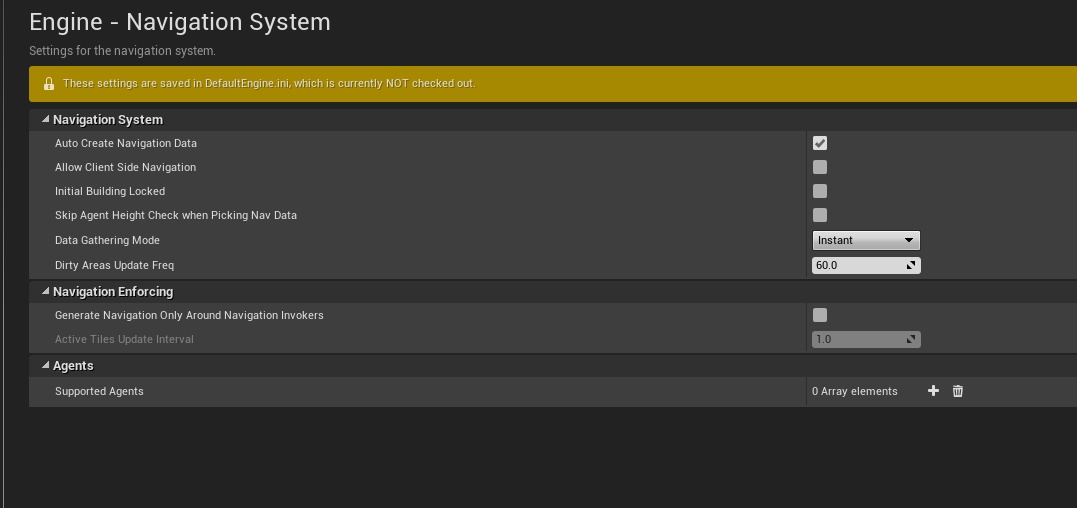 fiery harbor
I'll first check the async nav updates
safe rose
If you want more info, there was a stream about these settings a long time ago @fiery harbor
fiery harbor
the async nav generation seems to mostly fix it 😃
safe rose
Well that's good
But yeah Mieszko did a stream once
And he went over most of the settings
safe rose
Yeah, he needs to do another one
fiery harbor
I'm on master so I always hope stuff is better now than back then
 sour shard
hi victor im checking out your tutorial on 4.13 widget interaction component, i was getting it working in september but was having a hell of a time
probably because i was using blueprint tutorials and converting them to c++ by hand
@safe rose have you seen aynone do widget interaction component with c++ yet?
sour shard
actualy now that i see the video it is one i was using in september, awesome
safe rose
What problems are you having?
sour shard
i have to load up my project to give you more detail, i just finished my fall quarter and will have time to work on my project again now after finals 😄
sour shard
awesome, i go to UCSD
safe rose
F you
sour shard
where are you attending?
safe rose
That's an awesome school
SCAD
If I didn't have my house, I would have probably went west coast.
sour shard
ahh cool, yeah i got into the MATH/CS program here, so more math oriented
safe rose
Ah
sour shard
but i finally got enrolled in a Graphics programming course for winter
safe rose
You don't plan on doing Game Dev full time?
sour shard
so ill get some good OGL experience under my belt
actualy im interested in developing VR applications
more than games
sour shard
so the UMG menu system for unreal is of high interest to me
yeah why not use UE for applications?
safe rose
But, I guess it depends on your curriculum
Right, they don't use UE4?
I thought they did
sour shard
oh at my school?
safe rose
Yea
sour shard
no the class im taking is pure OGL i think, ive never seen UE4 folks on our campus
i know unity has done several workshops
they're all over
safe rose
Ah, then, that's their platform
Interesting.
Actually that makes more sense now
Since I read that Unity book from the professor at UCSD
sour shard
the guy that ill be taking the class from is a srs graphics researcher though,, so i'm excited to learn from ;him, maybe i could get some sort of job at his lab
sour shard
sour shard
thats the guy
safe rose
But VR is everywhere now
sour shard
yeah vr is a budding field, very cool
safe rose
He seems legit
sour shard
what i'd like to do is start my own company after school
sour shard
yeah
safe rose
not UCSD
sour shard
close 😛
sour shard
oh nice
safe rose
I was stationed at Miramar
sour shard
yeah ive lived here about 14 years now
safe rose
Yeah, I'm pretty jelly
sour shard
ahh cool, yeah i used to work on miramar road
safe rose
So yeah, USC is the one with the Game Dev program
sour shard
yes and UCSC
sour shard
the apps i think are were you can have some real killer applications in vr, not just the games, but games are good too
pallid root
That looks sweet. I wish my school had a game dev program. Most we did was XNA apps with C#
safe rose
He was Lead on Crysis
safe rose
Yeah, I've gotten a lot of his classes
Even though he teaches AAA style shit
And I want to go Indie
sour shard
yeah same
safe rose
He's the best since he's the hardest
sour shard
basicaly indie but for apps
safe rose
Everyone wants to avoid him
pallid root
THose are the best teachers to take classes from
safe rose
I agree
sour shard
yeah i like profs like that, but this quarter i had 100% theory and math
safe rose
Everyone else is taking the easy path
sour shard
probabilities, group theory, theory of computation
ill be glad to get back to programing classes
pallid root
Discrete Mathmatics?
pallid root
that class is brutal
safe rose
Mostly discrete shit
sour shard
ahh cool, yeah these are math department math classes,
safe rose
I was like is this
sour shard
upper division math courses are a pain
safe rose
I was hoping to learn some gamedev math
but nah, totally not what I was expecting
I thought I was going to fail that class
sour shard
ill definitely be using linear algebra in my graphics course
safe rose
But I pulled an A somehow out of my ass
sour shard
nice
pallid root
That's how I felt when I took computer graphics. Was heavy heavy math, like writing equations to do curves and such
sour shard
i dont have a problem doing that per sey, though i heard the math problems on the exams are a pain
safe rose
I would have loved to have learned proper math for game dev before actually working in engine
But that's not how stuff went
sour shard
this is the class that i could take once i finish the intro grahphics course though
that one looks like the shit
sour shard
nice
safe rose
And pretty much we take various hardware, program some stuff on it, make some cool out of it
sour shard
yeah also want to do a HID class too if i can
ive always wanted to get my hands on a kinect
sour shard
havent bothered though since i mmade an investment in my vr kit
safe rose
I am only two quarters away from graduation
sour shard
nice, yeah i have this year and next to finish
seems like you have plenty of example works online
wish 4.14 was done dling so i could actualy look at my project again 😛
this is the first time ive been on discord, im usually on the #unrealengine on freenode
ahh atleast i can still load it in 4.13
safe rose
never even heard of freenode
pallid root
😄
safe rose
I'm pretty old
sour shard
actualy freenode has quite a few people on it
safe rose
I might not look like it
pallid root
I can never get into IRC I only go on it when desperate
sour shard
freenode is the largest irc network now
sour shard
yes i still use mirc 😛
safe rose
good old days
sour shard
yeah unreal engine channel on freenode has almost 200 people and a few knoweledgable folks like daekesh
that help out
this community on discord though seems a lot larger
yeah i think the main issue i was having was not being able to actualy click the UMG button
ill have to dig into the code a bit to see where its failing
safe rose
Yeah, if you follow along from the first video, you shouldn't have any issues
sour shard
yeah i guess thats the problem im not using bp so its going to be a little different then on the video, i might just try a new project on 4.14 and see if i can get it to work from scratch
safe rose
Ah that's right
If I get a chance this weekend I'll do a c++ version
Finals set me back almost two weeks from work
sour shard
yeah, finals do that for sure
i got one on monday and two on wednesday
your video is self contained right, you didnt post a github of the code or aynthing?
safe rose
nah
sour shard
oh right
ok so i remember now, basicaly your video puts stuff in the world using the editor
and i spawn everythign in my app dynamicaly via c++
safe rose
so?
sour shard
and i saw some post from a UE4 guy about how widget interaction component has a bug
safe rose
all it is are actors
sour shard
where it wont work if its spawned dynamicaly vs placed in the editor
safe rose
hm
sour shard
which was supposedly fixed in 4.14
safe rose
Never knew that bug, I never ran into it
sour shard
have you ever tried to spawn all the actors during runtime?
yeah cuz i remmeber, i did get it working for the placed widget
so ill just try it again in 4.14 and see if it affects anything
south ridge
I spawn thousands of lights and don't get lag for some reason btw
Well, I guess hundreds
sour shard
@safe rose oh yeah, i found that bit about the widget interaction bug on this post: https://forums.unrealengine.com/showthread.php?120846-4-13-Widget-Interaction-Component-Tutorial
No frills tutorial on how to get the Widget Interaction Component up and running in 4.13. There's a lot of stuff that I need to explore more on and figure out, but this will get you to a good place really quickly.
the post from nick darnell
Looks like in 4.13 it defaults to auto-activate false (I've fixed this for 4.14 - to be true). So if you spawn it dynamically, make sure to call Activate on it.
though i thought i did activate it, ill have to check my code
sour shard
yeah i havent seen anything since around september so i probably missed that
sour shard
@safe rose yeah heres my code to create it in my player pawn: http://pastebin.com/MMj7zfRV

i dont see anything where it would be activating so maybe i have to make that api call
that could be it right htere
safe rose
activate is a component thing @sour shard
base component thing
so it's probably overwritten
ya
bAutoActivate
people should learn to mention on the forums
I didn't even realize people posted on my threads
sour shard
well good tutorials will always get responses
i also remember seeing your procedural mesh slicing demo which was awesome
im making a little procedural mesh library for myself
safe rose
I wish I was that talented
I mean, I suppose if I really applied myself...
But, I barely have enough time to learn Multiplayer on my own 😦
sour shard
well we'll see how it ends up 😛
id love to make it general purpous enough to release to the community though
right now it basicaly just creates picture frames for loading content into and you can dynamically resize them
sour shard
alright i actualy got the interactions to work
had to send a press and release then i got the clicked even
sour shard
anyone pre order touch?
i should be getting mine on the 8th
im curious what the ue4 suppport for them is at the moment
versed pawn
Is there any way to see which BP causing the game's FPS to drop dramatically? I know this kind of stuff can be done in the session frontend, but I don't know how to use it.
thin haven
a most probable culprit is a BP which is doing stuff on tick
versed pawn
I have quite a few BPs doing stuff on tick
thin haven
try unlinking the stuff they do on tick and seeing if performance improves
as for session frontend, to use it you need to launch editor, press tilde, type stat startfile
it will start recording data to a file on disk
start PIE, once you have had enough of the recording (see the stutter, whatever) you press tilde and type stat stopfile
you might need to type it several times for it to catch
then you open session frontend -> profiler tab -> load -> navigate to projectname/saved/profiling folder/UnrealStats
you should see a folder with the name of your map and system time at which you did the session recording
you open that and look at the profiler results
versed pawn
@thin haven Thank you very much!
thin haven
np
but try the naive method of unlinking first
profiler graph is nice for seeing when exactly the stutter happens, but really difficult to read
as it includes all the engine functions too, such as all the PhysX... start physics, prephysics, end physics...
versed pawn
Oh, I see. Yeah I'm doing the unlinking right now.
thin haven
a second thought is, if the stutter happens on game load, it's probably the physics
you can also try pressing tilde while in PIE and typing stat unitgraph to see if it's the code causing the stutter (game) or the graphics (GPU, draw)
in my case, I forwent the optimizations as I'm ultimately limited by the GPU
upbeat valve
Anyone here got any good ideas for beginer projects
thin haven
@upbeat valve: depends on what you want to make. since it's ue4, I'm guessing you want a 3d game, but still there's a ton of genres. do you want shooter? rpg? racing? something else?
upbeat valve
i would quite like a survival game (i know cliche or what ) @thin haven
thin haven
well, for a beginner I recommend looking at umg inventory in learn tab in launcher. also content examples are invaluable
also this tutorial: https://wiki.unrealengine.com/Survival_sample_game
the tutorial is for c++ and I assume you'll be doing it in bp since you're a beginner, but the concepts are the same
versed pawn
@thin haven This is really weird. In editor it says it's 60 fps. When I play in the editor, it starts from 60 and starts to go down gradually. Even on an EMPTY MAP.
@thin haven Okay so when I change the game mode to anything else, it's okay. But when I change the gamemode back to the firstperson one, the fps drops constantly
@thin haven alright, so I figured out that the FPS drop comes from the game mode itself, not the pawn or controller. The weird thing is I don't have ANY logic inside the game mode.
@thin haven Okay, so the problem was in the HUD. I wasn't cautious with the Even Recieve Draw Hud. Looks like that also ticks every frame, so after I drew the crosshair, I created a UI widget(it seems like every frame), that is why it was stuttering.
tropic pilot
seriously this is killing me.......
as stated befor, when i launch my game in standalone and then quit to editor the editor becomes (Not Responding) and i have to kill it via Task Manager -.-
anybody else had/have this problem
 still bough
so for modal input, think it's better to set flags corresponding to the mode and check them in the action handler, or re-do input bindings when the mode changes?
burnt drum
@vale osprey hi i saw your post on the forum
I have an armored vehicle whose mass is set to 45,000Kg. A player character whose mass is less than 100Kg can bump into it and send it flying. That's not exactly realistic. Is there a way to fix this?
it seems that charcter movement component has options to change how it interacts with physics object
but changing that doesn't do anything .. do you know why
burnt drum
perhaps some settings change
do you know of any method to make player not push certain physics objects like it's a beach ball?
mass actually means nothing
burnt drum
i find it baffling that the entire section of optiosn do absolutely nothing
this whole section
 vale osprey
maybe you need to enable physics on capsule?
burnt drum
if you enable physics you can't move
vale osprey
just guessing I haven't touched this
burnt drum
unless u apply physics on it
then it would be using actualy physics simulation
i assume this section is for the kinematic simulation to 'fake' the physics simulation
vale osprey
should be
burnt drum
if (bEnablePhysicsInteraction)
{
SCOPE_CYCLE_COUNTER(STAT_CharPhysicsInteraction);
ApplyDownwardForce(DeltaTime);
ApplyRepulsionForce(DeltaTime);
}
this runs on Tick
which means it shoudl work
maybe somewhere else is pushign it
vale osprey
ApplyDownwardForce - is it like a gravity?
vale osprey
ahh
burnt drum
i suppose that's what it's for...
yet regardless of unchecking this... it still applies
still bough
hmm
it does something
with it turned on, I can easily roll around a physics-enabled sphere and without it the sphere just barely wiggles away from me
I think it wiggling away is the sphere itself responding to the collision
still bough
what shape is your mesh
with it off, a sphere will move slightly away from the character, less so if I turn up angular dampening. A cube doesn't budge, even with default angular dampening
so I think it's probably related to the physics object itself and it's friction settings
turn it on, and the cube tumbles as you'd expect and the sphere moves smoothly
burnt drum
eveyrthing seems to be consistently being pushed very easily
but the idea is that if you off this. it shoudlnt' be able to push at all .. no?
the physic object is set at 30,000kg at the moment
i'm avoiding touching damping settings coz it sems to make it feel floaty ( like plastic bag )
still bough
I think the sphere isn't moving because it's being "pushed" but because a sphere has an infinitely small contact point with the ground and is therefore unstable
burnt drum
but does it go the direction where u move?
still bough
it moves away from collision
burnt drum
wait so you're saying it doesn't push at all for u if u off?
still bough
which I think is just it responding to overlap
if I have a cube it doesn't budge when I push it
with it off, yes
if I turn off physics collision in the character I can't push physics object al all
which makes sense and supports my theory
burnt drum
lemme try on a new blank project
i hope at least it works then i can filter whhat went wrong
@still bough thanks for the tip
it seems to work as you said in a blank project
which means something is wrong with my code
burnt drum
@next talon why not just state your question here
 next talon
I am gonna ask it but I wanted to know if anyone might be able to help me
It has to do with Mario models and animations in UE4
I want to try a personal project with it but when I import the model fully rigged it doesnt play animations
tall pendant
If you don't drop the actual Question, how would one know if she/he can help you? Just droping the Question here is always better...
burnt drum
did you ask it to play the animations in the first place?
next talon
I set it to play animation asset and selected thirdperson_run
But then it swapped to blueprint \
My model just stays like that
Im running it off the blueprint the same one as the default thirdperson actor
plush yew
default third person bp uses an anim bp, if you want it to still just use the animation asset you'll need to set that
next talon
I set it to everything the default actor used and it still does that I want it to pretty much act like the default actor but with the mario model
plush yew
Does using a post process blendable on a scenecapture change the FOV?
burnt drum
@still bough been spending the whole night on this.. i can't seems to figure out what's causing my char to push physics objects around regardless of EnablePhysicsInteraction being on
any clue?
plush yew
ah wait, maybe I misunderstood your question. you want it to act just like the default character and just swap out the model
vale halo
@next talon Umm you will probably have to retopo (or w/e that is called) your character to the epic skelleton if not already done and transfer the anims or something
next talon
Yes
vale halo
I think I may know a vid on that
next talon
Alice That is correct
@vale halo I dont know how to do that. Really this is my first time trying to swap models
plush yew
the thing is
vale halo
There are probably other videos that teach you this better, but this video covers the basics on what you need (I think) https://docs.unrealengine.com/latest/INT/Videos/PLZlv_N0_O1gYqSlbGQVKsRg6fpxWndZqZ/_XyjMeAb3fw/index.html

In this video, we create our project and go through the process of importing the characters that we will be using for the series. We set up our folder structure and create some of assets that we will be working with throughout the series. We also do a little bit of animation retargeting for the characters that we will be using in an attempt to get most of the prep work out of the way.
plush yew
your mario model doesn't have the same skeleton and animations
vale halo
^ that
plush yew
so that is why you can't just drop in and be done
vale halo
But it may still be ab le to be done using the methodused in that vid
next talon
I set it to skellatal mesh and selected the default actor as its base skeleton
vale halo
Aye this is what you want I think: https://www.youtube.com/watch?v=IdPGolf1DgI 😃 Hope it helps, but gotta go now 😦
 worn granite
You have some object with a large collision shape.
See if you can figure out what you're standing on and reduce its collision size.
@velvet estuary Hey. If you're going to ask for some help make sure to describe your problem in greater detail.
You said you can't open your map right?
 velvet estuary
Yep, crashes upon opening
shall I send the crashlog?
I have it copied to the clipboard
Also Jacob, I had a similar porobem but im not sure if its the same issue. Are you sure the collison on the map is correct?
versed pawn
How can I mask out parts of a texture from within a material? What I would like to do is to light up only the pressed buttons on the Stargate dialer, not all of them:
https://gyazo.com/7e99a02a99885e502c7cb5bbed832b0f

I did not want to export every single button separately, that is why I ask this texture masking
worn granite
@versed pawn Make a new texture for the object, and paint the areas white that you want to use. Everything else is black. Take your "pressed" effect and multiply it by your button mask, then add that to your base color/emissive/etc.
That's not the most efficient way- you could pack that better, along with using some trickery to have the masks be much smaller textures.
velvet estuary
Heres my crash log, put it in a .TXT because, well you know, crash logs are long.
velvet estuary
I have 12 gigs
thin haven
O_o and you get a ran out of memory crash....
 frank escarp
@versed pawn Use a texture
versed pawn
@velvet estuary After I updated to 4.14, I get this running out of memory stuff too. I also have 12 GB... In 4.13, never had any problem
velvet estuary
It works fine on my computer at college
frank escarp
have a map that is greyscale, for example
worn granite
So if you've got another map you can use a launch param to open a different map.
frank escarp
in perfect 10 intervals
so 0.1 grey, 0.2 grey. etc
you can also use multiple masks
worn granite
You just need to take things out, reduce overall memory usage.
frank escarp
then, just mask it
velvet estuary
Unless I use another computer at college....
frank escarp
there is a material node called "distance"
velvet estuary
It really only works on one computer
frank escarp
it gets you the absolute of the distance beetween the value you set and other value
so if you want to only shine the "0.4" key, then you do a Distance node with a parameter that is also 0.4 and do a One Minus on it, then multply it
the idea is to end up with a mask that is only the 0.4 grey texture as white, and all the others are black. Then you plug that into the Emmisive
worn granite
Much better solution ^
next talon
@velvet estuary Yeah the map imported with no errors at all
frank escarp
i do something very similar for a "dissolve" effect on my VR guns
velvet estuary
It also doesnt work if I open earlier versions
versed pawn
@frank escarp hmmm. Not a bad idea. I never used the Distance node yet. I'll try
frank escarp
i have kickass videos of that, but they are toob ig
worn granite
UE4Editor.exe MyGame.uproject /Game/Maps/MyMap?game=MyGameInfo -game
Something like that should let you specify your map and reduce the size of your assets before opening.
frank escarp

i show it a few times in the begging of this video
but its quite fast
basically, i dissolve with a greyscale
worn granite
Woah, nice
frank escarp
the cool part is that you can abuse it to make thing dissolve with shapes
its with a greymap
so black = gets transparent first, white = gets transparentt last
if you make it have fancy shapes, you end up with exactly the shape you gave it
let me take a pic of the node graph
worn granite
I'm going to play with it
versed pawn
Alright
frank escarp
i got the idea from a unity video



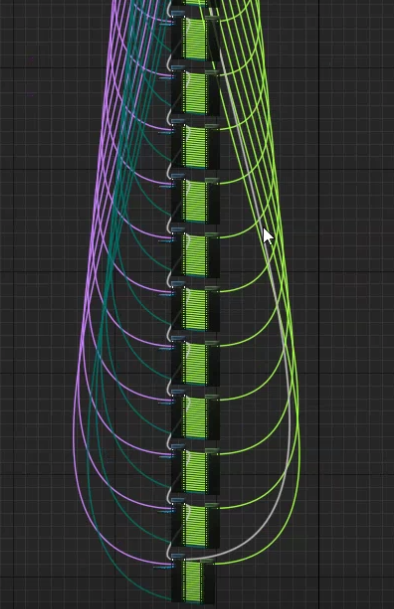


he does black white effect, but you can send that into Alpha in a masked material
worn granite
I think I'm going to try making something that ends up using that at some point in it.
velvet estuary
Eh crap im still lost on trying to open this
 old bone
@velvet estuary Not sure it will fix the problem, but I was getting such error with the memory leak loop when i changed version of my UE, so please check for such loops in your code
versed pawn
@frank escarp Not a bad idea but I still don't understnad how I'm going to mask out only the parts of the pressed buttons. I mean, If I mask out one button for example, I cannot mask out another one, because it will overwrite the one before, right?
velvet estuary
Node loops into itself?
frank escarp
this is the graph
this case uses a world aligned noise instead of using a texture
but it is the exact same idea
velvet estuary
Cant wait to get to the stage where my materials are a clusterfuck
frank escarp
you would plug the greymap texture into the bottom part
kind of messy tho
materials get messy FAST
velvet estuary
Maybe Im not allocating enough RAM to Unreal
frank escarp
too bad im not very sure about the custom hlsl code node
becouse this stuff is absolutely trivial math
couple lines or so
versed pawn
yeah, well I'm gonna try this, and report back tomorrow if I managed to pull this off or not. Thank you so far!
worn granite
It's apparently worse than using the graph
frank escarp
you can also do masks