#ue4-general
1 messages · Page 41 of 1
 worn merlin
The coursework is to create a game in C++ but just quickly make a level in BSP to give it life
 plush yew
Ok well remeber to convert the BSPs to meshes if you want to save on performance costs later
worn merlin
Yeah will do
just using them for now so I can do rooms easily
subtract boxes inside boxes etc.
Do you know how to make the bsp brushes update in realtime?
actually
nevermind
BSP brushes don't update my NavMesh
Back to static meshes
plush yew
what kind of static meshes do you need?
worn merlin
Just basic buildings that I can walk in, some with upstairs
Can be any static mesh really, to populate an outdoor scene
plush yew
You could use hammer level editor and import it into unreal
or you could use the "Architecture" meshes in the contentbrowser and build a scene, wall after wall/floortile after floortile
worn merlin
Where about are the Architecture meshes
worn merlin
Oh I didnt include starter content
plush yew
As you can see, it's quite versatile, and you can merge a set of meshes together to become a single mesh using teh merge mesh tool also
worn merlin
Oh sweet
I've never used starter content before, always used plain C++ no starter
I can just create a new blank BP project and migrate the architechture folder over, right?
plush yew
It's easier then that even
Click teh add new button then click "add new feature or content pack"
then you choose starter content from content pack
plush yew
np 😃
 pallid flint
What would you classify a Bot as if it Replicates GitPushes, Trello Board Changes, :X to Twitter Posts, Discord Notifications, Slack Notifications, IRC Notices <.<
 marble lynx
Skynet.
 keen pine
@marble lynx hahahaha
keen pine
When my character lands in a jump at a low pitch it will begin to slide
@plush yew @polar hawk @foggy valley would of of you heroes know?
 foggy valley
better shoes
keen pine
@foggy valley 😢 Q_Q
plush yew
Hi everyone. I get confused with the following listing of components. I have BPs which contain other BPs and Components. Sometimes this appears. Why? https://gyazo.com/8f91775bedf4cf2adf475b743fe0c2d1
 keen pine
: Does anyone know why when I'm adding force to my character, if the pitch is low when you land it'll slide and not register that falling has stopped? this is killing me
plush yew
@keen pine I would check if your surface is horizontal. Maybe it isn't and the engine thinks therefore that the falling doesn't have to stop yet?
keen pine
@plush yew I'm currently using AddImpulse for the jump/lunge, maybe this is the cause
Gah, it isn't that either
 white drift
Is there a way to create a project such that the base C++ project classes are named, say, Base, but the rest of the project shows up with the proper name?
If I name it what I want to name it, I end up with really long class names and this annoys me.
 shell nimbus
i have a problem. can you check my post?
https://answers.unrealengine.com/questions/502988/mesh-snap-problem.html
 warm lotus
 zinc bison
Im creating a component during runtime using NewObject, but when i register it crashes because the owner is null? I didnt think you had to set the owner anymore
anyone have any ideas what could be going wrong
nevermind! I got it
 half basalt
Hi guys, hows it going?
I need a bit of help. Ive googled and it seems people have probably asked this question a bunch but a lot of the topics were from a year ago or more. Hoping somethings been done and im just stupid.
So, Unity has a function in the camera to allow you to set the viewport rect. Basically to allow you to choose where the game renders within the relative window, what aspect ratio etc. It also now allows you to pick which display each camera renders to.
In Unity, this allows me to create 4 cameras, set them all to display one and set each cameras position and size.
The reason I need this is because the project im working on is outputting one image and then using a video mixer of sorts, taking parts of the image and outputting it to different monitors or projectors. It's not a full game we are doing, just something small, and as such we are actually outputting one 3840 x 2160 image, and dividing the image into 4 parts.
One is 3840 x 1180, the rest are other sizes. In total it basically uses the entire 4K image and outputs each bit to the desired screen.
Is there any way to do this right now? The closest i could get, but it seems REALLY heavy and like a shitty workaround is to make a widget blueprint, set the screen size to 3840 x 2160, place a bunch of images, do targer renders, convert to a material and place the material on the images inside the widget.
So ill have 1 scene, 4 characters, one background and the characters move around on this stage. 4 target render cameras each with the image resolution set correctly
(rebuilt the engine to allow for larger resolution render targets)
Be really good if there was a way or an engine mod that allowed me to do this.
keen pine
@ashen brook Cook all the things
 ashen brook
yeah but... the log looks a bit off
 vale silo
Can someone please guide me with this issue https://forums.unrealengine.com/showthread.php?125210-Reducing-loading-times-what-tricks-available ?
Watched Carmack's OC3 closing keynote and he asserted that long loading times is a very bad thing for Gear VR apps (long loading time can be a big turn off for users and I bet Oculus can even not let the app on the store due to loading times).
UE4 is notoriously slow when it comes to loading on Gear VR (development builds for sure) :(
What tricks are available to ensure shorter loading times? (project settings, etc.)
Thanks
 feral dirge
@half basalt Yes
Look for FNAF camera system from KITATUS, has the basic ideas behind it
I'll try and make a tutorial if I get a chance. Been so busy looking after the little one
half basalt
oh awesome! Thank you!
So making something similar to that should work! Excellent, ill take a look. Would love to see a tutorial whenever you get a chance.
feral dirge
For now, look up render targets and render textures. Then create a UMG grid and put them up as a UMG
half basalt
Yeah thats what I've done!
so far
4 render targets with 4 render textures
and set up a UMG grid
each render texture is set to its resolution (for example 3840 x 1180), put in the correct position. Seems to work but wasnt sure how heavy it is
ill take a screenshot...
Idea of what im doing right now
@feral dirge is that what you meant? 😃
feral dirge
3840 x 4 is mental lol
half basalt
its not 3840x4 😛
its one 3840 image
Top part with the 4 girls is 3840 x 1152
left vertical is 1150 x 567 (blond girl)
right vertical is 1150 x 567 (other girl)
bottom right is 2540 x 1008 (shadows)
total amount of pixels will fit within a 3840 x 2160 image
Only going to be having a maximum of 4-6 characters on stage, with a medium density performance stage
Anyway, how performance intensive is going this way? Going through unity I can get about 100 fps with the same setup... Toon shader, 4 lights, same resolution
maybe 160 but our setup isnt fixed yet
Planning to add an outline post processing effect, hope that will be possible
feral dirge
Yes, it's performance intensive, no idea how intensive, that are various things you can do obviously to aleviate some of the issues
half basalt
quite new to this so if you have any advice please let me know 😃 Would like to get it a stable 60. Not sure what im getting just yet as its a WIP
 polar hawk
unity cameras are much better than ue4
unity doesn't have to go through render targets as much
ue4 does
best bet: rewrite ue4 renderer
For best performance
(At least the part that writes the final buffer)
half basalt
okay, and i dont suppose theres any projects that have already rewritten it, right?
 slim quest
I need some help re parenting a child class
 fallen schooner
Anyone on tonight?
 vale osprey
@half basalt 4 separate render targets and composition into single image using post-process would be the easiest
basically what you do already
but I think some post-processes didn't work on render-targets and you can sample only non HDR
at least it worked only with LDR for me in 4.12
half basalt
In doing that though, am I rendering the same scene 5 times?
also yeah, we need outlines too for the anime look
vale osprey
you would do that anyway with multiple cameras
half basalt
Well obviously if i had 4 cameras i would be rendering it 4 times i thought, not 5 times
vale osprey
ahh, you mean last time for composition?
half basalt
yeah
vale osprey
good point, not sure
fallen schooner
I feel like I'm missing something core about the Unreal Engine
vale osprey
if you place a box in front of camera and place camera somewhere out of bounds of the level it should be fine
fallen schooner
I tried using C++ for efficiency purposes and because I already know code
but it feels incredibly inconvenient compared to blueprint.
half basalt
To be honest, we are outsourcing this project to a different company, theyre a bit slow so i used my limited experience to see what I could do on my own
ah, cool. Good idea
fallen schooner
With all the lack of documentation and the constant recompiling
half basalt
If i were to ask them to rewrite the source code as suggested before, is there anything i can point them to?
vale osprey
@half basalt the best would be to actually change rendering pipeline and render all separate cameras into the same main g-buffer
yeah, RHI - rendering hardware interface
it's a part of the engine where you can define pipeline yourselve, but I don't think it's easy to do, plus most likely there is a ton of optimization in regards to specifi camera bounds. Like where the light are and etc
half basalt
cool! Thank you! any idea how long it would take a small team of programmers (3 or 4 people) to go in and make these sorts of adjustments?
vale osprey
no idea, I haven't touched RHI, just read about it and talked to a guy who was doing some chnages there
half basalt
I see! Awesome, thank you! we are relatively early into the project...
vale osprey
it might be helpfull to look into one project Toon Shading tutorial I think
half basalt
maybe Ill just get them to switch to Unity..
vale osprey
it's more or less around building custom pipeline
vale osprey
custom shader: https://forums.unrealengine.com/showthread.php?70150-Toon-shading-model&highlight=toon+shading+tutorial
EDIT: now released and available on github, see page two for details :)
39605
Although UE4 is great in many ways I feel like it is lacking for stylized/non-photo real rendering. To remedy this (and to better learn how UE4's deferred shading system works internally) I have been working on a toon shading model that should allow for a greater range of visual styles while seamlessly integrating with the rest of the rendering system.
Here's a screenshot of some of the features that work
half basalt
haha yup! Thats the exact build I downloaded for 4.13!
lol
But he didnt seem to post much info on how he did it..
but ill take a look! 😃
vale osprey
hmm, I'm not sure it's what I thought
I think it was Philippe's project: https://forums.unrealengine.com/showthread.php?106655-Is-Epic-doing-anything-to-address-UE4-s-crippling-shader-problem
(Sorry for exaggerated thread title. You're doing a good job Epic :cool:)
Ever since UE4 was released over two years ago, people have been complaining about the shader extensibility problem. The material editor is very limited and should never have completely replaced HLSL shader coding like it does now. There are too many things it can't do:
It can't do new shading models that react to UE4's lights
It can't do geometry shaders
It can't do multi-pass shaders
It can't do compute shaders
 proven tulip
anyone mess around with a hitscan shotgun before?
bit of an interesting issue I noticed with it
polar hawk
Insert dramatic music
proven tulip
Normally you do a raytrace from the muzzle to the crosshairs but with a shotgun you add some arbitrary spread to the trace. The problem is that spread is the same at all distances.
lol
 weary basalt
Dun dun DUNNNN!
proven tulip
Im probably just not thinking about it the right way
polar hawk
Spread is the same at all distances?
proven tulip
At point blank I'm getting the same spread as far away so its like opposite of a shotgun
polar hawk
Say the same thing with different words
weary basalt
^
vale osprey
spread is based on angle or starting location of ray?
polar hawk
Theres your problem
What you want is get your forward/crosshair vector
Then add a random unit vector in cone
Voila
weary basalt
^
proven tulip
Don't you need the end location for a trace though?
polar hawk
Start +modified forward × range
polar hawk
Remember, directions should be normalized
proven tulip
I'm using the precomputed crosshair end point
I just need to adjust the crosshair end point pre computation
polar hawk
Normalize aim direction, scale by range
That = direction at range
Random unit vector in cone takes a cone vector
That should be crosshair vecto I believe
proven tulip
Thanks guys. I knew what my problem was, just wasn't sure how to modify my stuff to solve it.
Oh ok
Thats super useful
Wow. You weren't kidding/
weary basalt
Thats unusualfor @polar hawk
 weary basalt
Only kids with the Peole
polar hawk
Now that you know how to do cone vectors, all I ask is any time you hear Remember The Name by Fort Minor, you remember my name
#yolo
half basalt
@vale osprey Thanks man, will check it out!
proven tulip
@polar hawk Is it normal that I would have to multiply the unit vector by ~100 or so to get a visible result
Or am I missing something else
proven tulip
Right
vale osprey
100 is like a meter
polar hawk
A unit vector * weapon range = a vector with the range of the weapon
If you want to blow your mind with usefulness, read up on the Unit Circle
proven tulip
I did take vector calculus
I just havent used it in years
I'm obviously still missing something, I'll let you know if I figure it out
proven tulip
Fixed it. Thanks again
zinc bison
has anyone else had problems with timers? mine seems slow
you know, its actually probably because Im calling it way too fast
nvm I need to figure out something different I guess
actually no maybe not, Im so confused lol. maybe 40 times a second is too fast
and thats why its screwing up the timing
vale osprey
😃 for how long you are setting it?
zinc bison
timeline?
yeah i probably need to use tick
Im setting the timer in tick... but there must be something causing it to not get called fast enough
polar hawk
Setting timer in tick?
Dawg
....dawg
- Don't do that
- You're probably resetting the timer every tick
Will trust channel to explain tick, atm, g2g
zinc bison
Its not resetting, Im checking if timer is active before setting it
I'll use delta time or something and add it up
 winter hemlock
Where should i post for help with an UE4 issue?
winter hemlock
Thanks 😃
I'm currently having an issue with foliage where it is being culled out after a set distance from me in any direction. I have my cull distances all set to zero. it's strange because the grass instance does not vanish at all. but the flowers seem to disappear
here's an image showing the effect from above
and another
my scalability settings are all on epic too
 torpid ingot
Min Max. What does it actually do to a vector?
Does it construct a vector with the max of each band?
winter hemlock
I have no idea what that means aha
I managed to solve the issue by exporting out the asset, rescaling it and reimporting it back in
strange!
shell nimbus
i have material element problem.

 fresh merlin
Hi y'all: Quick question about moving shadows with animated trees: I have a scene with a directional light (for the sun), a static building and animated trees. When I bake the lighting, the shadows from the moving trees are also baked. What should I change so that the tree shadows are always animated? (light is set to 'Stationary' atm)
 sleek leaf
Hey @fresh merlin
iirc, UE blends between static and dynamic shadows in this cases depending on distance from the camera
Cascade distance rings a bell
will have a look in a mo (currently building lighting, so my machine is a brick)
fresh merlin
ok - thanks for that. I am sure this has worked for me in the past, but baking my lighting just now seemed to burn in the shadows of the trees. Maybe when I play back the package it will work?
sleek leaf
doubt it mate, what you see in editor SHOULD be the same as the package
i'm at 92% on my lighting, i'll check in a sec 😄
we've done that kind of stuff in house before
my artist got super anal about the whole thing
shell nimbus
any idea about this material element problem.
fresh merlin
haha - I'm getting that way. In architectural visualisation, something as simple as moving tree shadows can be quite important (as nothing else tends to move)
@shell nimbus - are the imported materials correct? Try creating new materials for each colour with a different Constant3 for each colour
sleek leaf
@fresh merlin https://docs.unrealengine.com/latest/INT/Resources/ContentExamples/DynamicSceneShadows/
An overview of the Dynamic Scene Shadows Content Example map.
Up the distance betwen your precomputed and cascaded shadows mate 😄
fresh merlin
@sleek leaf - thanks fella. Will take a look
sleek leaf
currently doing ArchVis stuff too.....kind of
clients wanna see how their new products will look in supermarket, without having to pay a supermarket to do a test run
fresh merlin
I'm experienced with ArchViz - just not at all with UE, let alone VR!
shell nimbus
@fresh merlin dude elements should be exact same as 3ds max
but it doesnt work on this mesh
fresh merlin
@shell nimbus - send me the max file if you like and I'll take a look here
shell nimbus
ok
sleek leaf
out of curiosity, is your MultiSub applied to the whole mesh?
you've not accidentally applied the mulitsub to SOME of it, and the individual materials to the rest, have you?
shell nimbus
no material created yet. max 2016
unhide all to see all scene. only curved glass ( on video ) mesh has this problem
i created everything from scratch
0 plugin used
shell nimbus
yes
sleek leaf
its all using MatID 1 on my end
shell nimbus
i create them for each try
so its raw version
1- just give material id 2 - 3 for some polygons.
2- assign multy sub with some colors like in video
3- import to ue4 ( tested 4.12 and 4.13 = same bug )
shell nimbus
if it works for you i will break my pc
sleek leaf
see if @fresh merlin comes back with the same issue, all your polys came out as MatID 1 to me matey
sorry 😦
nah its broke here too
sleek leaf
i've had worse issues with work, once spent 3 hours fixing bugs in a java code (we wernt allowed to use an IDE at the time, all notepad)
shell nimbus
all colors goes top little polygons
sleek leaf
turns out something i thought was a bit of fluff on my screen was actually a comma
oh i know man, was looking at your vid as i looked at your file
shell nimbus
i used reset xfrom
any other tool for reset ?
and answerhub killing me. i already posted 2 bugs and some other posts but no one cares about them
its silly slow
have to wait a year to get 1 answer
fresh merlin
ok - you are using Corona. I need to convert to a vray scene first
vale osprey
@shell nimbus how did you mapped it in max?
shell nimbus
111x111x111 uvw mapping for all arcviz meshes
i think its not related with material id ( elemets )
vale osprey
ok, and then you assigned materials by IDs?
maybe you get a double polyogon there during import
shell nimbus
hmm.. interesting ideas
vale osprey
sometime mapping didn't worked for me until I collapse stack and turn in into editable poly or editable mesh
can you count triangles in editor in UE4?
just to be sure
shell nimbus
on it
fresh merlin
When I open your scene in Max, there isn't a material assigned to the geometry. It could be because I don't use Corona (only VRay), but I would have expected to see different IDs to the different colours you want.
shell nimbus
152 polygons on max and 204 tris on ue4
dude its raw format
0 material on scene
create a multy sub
vale osprey
mmm, convert it to editable mesh, they should match then
fresh merlin
'raw format'?
fresh merlin
I figured you were going to send me the geometry with the material applied so I could test it out for you
shell nimbus
prapering new one
vale osprey
could try standard material too
shell nimbus
test ready version
fresh merlin
Yes - I'm seeing the same as in your videop
fresh merlin
Who uses editable mesh these days???
fresh merlin
I just converted to mesh then back to poly and it works just fine. How did you create the geometry? Was it imported from somewhere?
fresh merlin
@shell nimbus where did you create the 3d model in the first place?
shell nimbus
convert to edit mesh and convert back to edit poly and everything is ok
extrude the spline
and some edit poly tools
fresh merlin
yes - that's what I just said. Anything 3rd party?
fresh merlin
Oh well, useful to know for the future.
(I just created a multi-sub chair and it came in fine)
vale osprey
I get a lot of warning about degenerate tangents but in 99,9% cases everything works fine
it just doesn't like Cap operation on outlines
but sometime, it inverts polygons
 cursive dirge
@BoredEngineer#0100 I think you get that warning sometimes when your uv's are messed up or missing too
@BoredEngineer#0100
@leaden harness do you know what's up with the tagging?
it breaks really often
and when it breaks, it just breaks for specific users
I haven't figured out what's the core issue
like for example, @vale osprey seem to be offline atm, but can't tell anything else that would be out of ordinary
and...
it works now again
doesn't matter if I use "Mention" or just type @ and use autocomplete
 leaden harness
@cursive dirge nope, not sure what might be wrong
Maybe typing it like @cursive dirge is broken?
nope
I dunno ¯_(ツ)_/¯
Works on my machine :-p
cursive dirge
yeah, it seems to work now again
but it's occasionally just totally broken for some users
it then starts working again a while later
leaden harness
Maybe something is broken with mentioning offline users
cursive dirge
@vale osprey just testing, sorry about this ;D
well
boredengineer is still offline
so I dunno
I literally did the tagging same way and different way and it just didn't work initially
you can see the test I wrote there
there's nothing wrong with the text form
it just fails to capture the user sometimes
it can also break on desktop client and mobile client so it's not client specific thing
vale osprey
@cursive dirge no worries 😃
cursive dirge
since you are here though, does the tagging ever break for you?
vale osprey
You are right, I don't think I've even mapped most of those meshes
Seen it ones I think
cursive dirge
it happens like once a week for me
and it keeps missing the tags for the same user
if I tag some other user it still works
 bleak copper
Hmm... so is there a way to allow PlayerStarts to overlap with collidable objects, to spawn pawns (ie: free-floating cameras) that themselves have no collision?
Like, a flag that says "don't check collision, I guarantee that I'll only be spawning noclip pawns".
If no-one knows off-hand, I could check the source later.
keen pine
@bleak copper just make a blueprint and make yur own spawner that has colliders etc
if I read what you're asking correctly
 hard compass
does anyone know how to make exponential height fog get darker the deeper you go?
bleak copper
Don't think you can vary the color of Exponential Height Fog
Could it be done in a postprocess material by using the scene depth buffer?
fresh merlin
Good morning all. I just watched a UE training video on material instancing where the presenter showed how instances of materials are essentially 'free' when it comes to compiling. He ended up using a metallic material as the parent, but creating 2 completely different instance materials from this: one was brick and one was copper.
If you can create such different instanced mats from a parent, why isn't EVERY material an instance regardless if they are 'free'?
 frank escarp
the node graph has to be compiled
while the instance variables are just variables that are tweaked
the graph is like a program
while the instance variables are just the default properties of that program
and they are not free lol
fresh merlin
But he seemed to suggest that you get far more interactivity with the viewport if you tweek instances rather than main materials all the time
frank escarp
the main purpose its to have "supershaders"
yes, that is true
the system is made so you can have your tech artist do shaders with cool FX and stuff
and then the artist just has to come, plug the texture maps, and tweak one or 2 variables
 cloud cobalt
At some point the graph needs to be compiled as a binary program that runs on the GPU
That takes a few seconds / minuteq
Then, every program can have parameters
Material instances are just a set of presets to this program
Setting a variable is obviously pretty much free
To answer the question : you can definitely do one material for your entire game and just use material instances
fresh merlin
I see...I think.
frank escarp
materials with static switches do have to be recompiled in instances
fresh merlin
Thanks guys
cloud cobalt
It's just not usually worth it
If you're going to have 50 rock meshes, one master rock material makes a lot of sense
frank escarp
learning a bit about opengl/directX shaders goes a really long way to understand how the engine works
fresh merlin
I'm very familiar with creating materials in 3dsmax/vray. UE4 is quite different. I could do with a basic library to look at/study/use/copy ideally.
(just architectural type stuff really)
frank escarp
becouse 3dsmax is using "prebuilt" materials
just edits some variables
they also have a nodal system now, no?
main difference is that those run on CPU, while ue4 ones are GPU
fresh merlin
Yes, they do. I'm pretty old skool, but the slate editer is node based.
cloud cobalt
Rendering in classic 3D vs real-time is usually quite different
frank escarp
classic 3d uses "true" PBR
as its a pathtracer and things like that
ue4 is an aproximation of that
a pathtracer works on a BRDF, wich, simplified, its a probability function for where is the ray going to bounce
cloud cobalt
Yes, but more than that, classic 3D usually uses "automatic" materials
fresh merlin
Its pretty amazing and I'm enjoying the learning. Quite a lot to take in!
cloud cobalt
Real-time relies on custom textures for each object
frank escarp
classic 3d also depends
on Cycles, blender, you have a nodal editor that works directly on the brdf
you merge different shaders, like a gloss shader with a diffuse shader, or with a fresnel
fresh merlin
Here's a very basic question: in order to use a StarterContent material in my own project, do I first need to create a new project with the starter content included in order to migrate particular mats that I like, or can I 'import' materials directly into my own project by navigating to somewhere specific?
frank escarp
you can migrate
go to another project wich has the pack
click the assets you want
select "asset actions -> Migrate"
careful, that uses the dependencies
so it can bring a ton of stuff
fresh merlin
So I do need to create a project with the pack first? It seems a bit weird/wasteful.
(a separate project I mean: one purely for 'harvesting' assets)
bleak copper
But yeah
fresh merlin
Scenario: say I've found a nice cobble material in the StarterContent, and I want to use it in my own scene on a large floor surface. If I apply this material to my large floor surface, the scaling of the texture is wrong - each of the cobbles is enormous!
In 3dsmax, I would edit the UVW Map on the geometry.
What is the best procedure in UE4?
bleak copper
I mean, you can have every PBR shader be an ubershader with dynamic nodes.
But that is inefficient for several reasons lol
Well, as long as it uses the same shading model.
fresh merlin
(would I just but a 'master' TexCoord on all the various texture nodes?
bleak copper
Sorry, thought you were responding to me. If the material seamlessly tiles, and your model doesn't have any weird UV mapping things, then you would need to modify the material to make it tile.
fresh merlin
So a master texoord would be the way to go?
bleak copper
I can't remember if I duplicated the material then made a static instance of that duplicate per tile or not...
It's actually been since 4.9 that I needed to do that specific thing.
Since then I've always used solid shading, or custom UVs in Blender... just happened to work out that way.
fresh merlin
ok - thanks
bleak copper
On the TexCoord nodes, click them, then adjust the UTiling and VTiling
Higher number means more tiles.
I should not be doing this at 4:30 am lol
fresh merlin
haha
 dense ravine
Can someone tell me which one of them is more efficient? A and B are doing the same. Increasing NM strength.
cloud cobalt
B is what I would write in shader code
You should try both and see the instruction count in the stats pane
To be honest, you're never going to measure a real difference in actual use
Unreal does billions of operations at every frame, you can get pretty wild with materials before it goes out of hand
dense ravine
i am encountering problems with the instruction count atm. values not displaying correctly. Need to close the window and reopen it again to get the real values >.< UE3.11 github version
dense ravine
was meant to say 4.13 dunno why I worte 4.11 >.<
foggy valley
both of those are one instruction count each I think
so incredibly negligible
it'll use code folding to reduce them to that single instruction
dense ravine
thanks for the answers 😃
vale osprey
@cloud cobalt you might go further than that, like single master material for all non-metals without masks or translucency
@dense ravine Append should be free, as it just constructs a vector or does swizzling operation
cursive dirge
@dense ravine sorry, I just woke up when I wrote that (and you wrote you use 3.11)
cloud cobalt
@vale osprey I did, actually. My game has around a dozen materials for the entire thing
Just pointing out the basic concept
vale osprey
then apologies for pointing obvious 😃
cloud cobalt
I think we've already talked about material instances extensively, back when we trolled about whether LOD materials should have options to automatically remove SSS, etc
😄
vale osprey
yeeee, now I remember 😄
sleek leaf
just noticed, was Translucency fixed in 4.13?
cloud cobalt
What kind of fixing did it need ?
sleek leaf
i could be mistaken, but in 4.12, it didnt render in the correct order
so translucent surfaces FAR BEHIND the closest one would get rendered first
just made a set of sliding doors and the rendering seems to be working as you'd expect 😄
dense ravine
An other question^^
Which one of them is more efficient. B is saving on texture samplers but is there a cost to using the same texture several times with different UV scales?
dense ravine
yeah that is what I figured but I am more interested in some possible costs that maybe arent obvious
cloud cobalt
Like I said earlier, simple materials like that are never going to be really expensive
You should go for the easiest workflow rather than trying to optimize it
I mean, the most minute lighting change will have more impact on performance than this
(Still happy to answer, just saying, don't focus too much on it)
dense ravine
thank you. Was checking some materials and looking for optimizations. So will just pack the mask textures into one and call it a day since there is nothing else to do.
cloud cobalt
Did you try the gpu profiler,?
It gives great insights into what is actually slow in your scene
Run your game in the editor and type "profilegpu" in the console
I was super surprised by the results, like SSR and AA costing 2-3ms each
dense ravine
its all turned off already^^ most of the game is running smoothly at 60 fps on console have just some places still causing troubles
vale osprey
@dense ravine one texture sample takes something similar to 16 instructions, so if you can pack as much as possible into a single texture the better. Even better is to calculate what you read from texture when possible
so A and B will be more or less equal in performance
it's still 3 samplers and that matters more than what ever you sample 4 channels or 3 channels
dense ravine
so reusing the same texture still adds to texture sampler count?
vale osprey
you still read 3 textures in B right?
dense ravine
because in B its the same texture but i use different scaling and the according R,G,B channels only. Sorry that wasnt explained properly
vale osprey
so B is the same texture sampled 3 times?
dense ravine
yes i think so, but i dont know what counts as sampled or not^^
vale osprey
it will be faster than sampling 3 other textures, but it still very slow operation comparing to doing math
dense ravine
I see
vale osprey
but it will be faster only if you sampling is cache coherent
like all 3 samples taken from 32x32 square of texels
not from opposite parts of the texture
@dense ravine by "sampled" I mean shader instruction which reads from texture
dense ravine
is UV scaling happening before or after sampling? From my naive understanding i think its before
so if I use the same texture with 3 different UV scales, are they cache coherent or not?
vale osprey
it's happening before, they will be cache coherent only if texels that you sample are close to each other
even that doesn't guarantee it 😄
dense ravine
thanks, so the only real saving you get is the reduced memory footprint by packing. You can't really count on the other things being faster?
plush yew
This might be a dumb question, but is there a way to get textures back out of Unreal? e.g. you lose the original PNG and want to export a texture asset to get the PNG.
I've tried exporting, but it seems to give me an alpha-less TGA, which isn't much use.
vale osprey
@dense ravine well even that is questionable, there are different storage formats. Like only 3 channel or 4 channels, or 3 channels + alpha, or normal map
UE4 uses BC5 format for normal maps, for the rest I don't know
dense ravine
maybe it converted the transparency to an alpha channel? have you checked it @plush yew
vale osprey
but if you have 1 texture for alpha or metallness it obviously makes sense to pack it into 4 channel texture
plush yew
Whoops, OK I checked with Pupp. Alpha is exported correctly, it's just Photoshop is stupid when reading TGAs
Yeah it's a 4-channel texture, it was a UI texture
dense ravine
is there a difference between 4 channels and 3 channels+alpha in ue4. I know that 3 channels + alpha is the same size as two 3channel textures of the same size.
@vale osprey
vale osprey
depends on used format, some of them have compression
let me check if I find link
OpenGL formats:
https://www.opengl.org/wiki/Image_Format
DirectX formats:
https://msdn.microsoft.com/en-us/library/windows/desktop/bb153349(v=vs.85).aspx
but these are not all, I don't see BC5
vale osprey
found it, it's in a separate category, compressed surfaces
https://msdn.microsoft.com/en-us/library/windows/desktop/hh308955(v=vs.85).aspx
anyway, this is just for reference, I don't know which of them UE4 uses besides BC5 for normal maps
dense ravine
will check them out👍
plush yew
@dense ravine That's surprising to me, is there a way I can tell which of those two my texture is? 4-channel vs 3-ch+A ?
dense ravine
Ahh, sorry for the confusion. I was talking about 3 channel vs 4 channel texture.
But you should be able to test it yourself inside of unreal since the size is dispayed besides the used compression in UE @plush yew
 patent ibex
did someone already try 4.14 preview (promoted branch)?
 kindred viper
a few people have I guess. I hear better things than 4.13 so i'm optimistic 😃
patent ibex
for some reason it keep crashing for me (and whole team) when i try to load map. fatal crash with no information at all
log's call stack blames MapBuildDataRegistry asset i suppose
[2016.10.11-15.32.10:601][361]LogWindows:Error: UE4Editor-Engine.dll!AActor::GetComponents<TInlineAllocator<24,FDefaultAllocator> >() [d:\development\unrealengine\engine\source\runtime\engine\classes\gameframework\actor.h:2730]
[2016.10.11-15.32.10:601][361]LogWindows:Error: UE4Editor-Engine.dll!ULevel::HandleLegacyMapBuildData() [d:\development\unrealengine\engine\source\runtime\engine\private\mapbuilddata.cpp:102]
[2016.10.11-15.32.10:601][361]LogWindows:Error: UE4Editor-UnrealEd.dll!UEditorEngine::Map_Load() [d:\development\unrealengine\engine\source\editor\unrealed\private\editorserver.cpp:2469]
anybody got the same problem with their maps?
cursive dirge
I've tried 4.14 promoted on 3 different builds
no map loading issues
but then again, it's not mean to be stable
so things could just break on individual builds
kinda curious though when they'll branch of the 4.14
would see what feats get locked there
 craggy nymph
I'm working in BP and I've set a break point. When I play and hit the breakpoint, the game pauses. I would like to check the world outliner and see if certain actors are attached to another actor, or not. How can I check that? The outliner is greyed out and paused as well. Anybody got an idea?
 kindred viper
are you creating multiple spline instances rather than using a single spline?
@keen pine
keen pine
I was under the impression that it was all one spline, i just started clicking with ctrl + left mouse
kindred viper
it looks like the two spline points in the foreground are showing it as two splines
keen pine
do you name sockets in spline segments ?
kindred viper
ive never done that
keen pine
I'm going to end up failing the gamejam if i cant get this done :/ lol
kindred viper
you cant fail a gamejam but have hope. 😃
keen pine
haha
@kindred viper any advice on spline setups?


I get a lot of issues like this
kindred viper
See landscape splines are slightly different than what I use. I build with regular splines and apply them to the landscape later. Just because I learned to do that before I learned landscape's had splines :p
keen pine
there is a better way to use splines to make roads?
kindred viper
I really cant say about landscape splines for sure. I have had no real issues with regular splines for roads though.
keen pine
May, I ask one more question mate and thank you for the help, where do you find splines to do that since i've got no experience
ah wait, actors
kindred viper
its an actor component
keen pine
i see it now, thanks
kindred viper
there is a function for apply spline to landscape that you can use. It essentially digs itself into the landscape as you would expect.
keen pine
any special manner to connect them to each other ?
kindred viper
Well with multiple splines you wouldn't connect them. You would either use a single spline and adjust the spline meshes along the way to suit, or if you did have multiple, you would just get the world location of the last spline point and set the new spline's location to that one. Maybe a slight adjust if the mesh overlap causes any z-fighting
keen pine
I see it now, thanks, I'll try and learn it fast so thank you
kindred viper
I can highly recommend the tutorial that zak parrish did on the UE Road Tool. It got me off to a flying start and I even got it done in C++ from that video when I had no c++ experience
keen pine
thanks man
keen pine
@kindred viper do you have any idea why the spline ends up going like this?

doesnt matter, it's local/world rotation setting
vale osprey
You've rotated node
vale osprey
I had bug like this but it was rotating 90 degrees and I couldn't rotate it back. Had to redo it, this is since 4.12
So unless you've rotated it yourself you might have caught it
keen pine
@vale osprey such a pain 😛
cursive dirge
I just did height blending manually when I was still working on this jam
basically I had to as I wanted to use splatmap driven from materials instead of the built-in layering system
I could have just imported the masks for layers though but would have lost some of the control there
also
to the spline thing
landscape splines tend to deform way better than spline meshes
also, Zak totally redid just this tutorial https://www.youtube.com/playlist?list=PLHadbgEqCTxDgj-RwPQGkaUypb05NJYN6 with small additions like banking etc

I had done those mods myself to the original tutorial months before that ue4 stream came out, there's nothing special on that, but after 4.9.2 spline component changes, I don't even recommend anyone to do the ue4 training stream approach
you can now control the banking from spline data directly
 storm venture
zinc bison
storm venture
zinc bison
anyone ever played with haptic feedback effect before? for some reason the frequency doesnt seem to do anything
I have it go from like 0 to 1... 0 to 100... 0 to 1000... over like a second, and its all the same
fresh merlin
Anybody able to migrate assets to network locations (mapped drives)?
keen pine
will an event tick occur only after the construction/begin event ?
keen pine
@cloud cobalt thank you stranger danger
fresh merlin
Should an unwrap UV modifier be created for every single piece of 3dsmax geometry, even for objects that will only have 'colour' materials on them (i.e. no bitmaps), or do I just need to create this map channel if I want to apply textures?
(having said that, I think I need a UVW-unwrap just for the lightmass, right?)
keen pine
Does anyone know how prevent floaty falling? I've tried enhancing gravity but it doesn't help
vale osprey
@keen pine on a character?
@keen pine have you checked this?
https://answers.unrealengine.com/questions/53136/how-set-max-velocity-in-a-pawn.html
keen pine
@vale osprey I responded to the dam wrong question, sorry man haha
it's on a character yes matey, my game is good but it's so dam floaty, ill check this out thank you
@vale osprey hmm still floaty, ill have to work out what the issue is
 upper heart
anyone know if there is a console command that does what eject does in the editor?
foggy valley
you'd have to make a custom pawn for that I suspect
shouldn't be hard though
I doubt a console command exists, it'd be too easy to use it to cheat
@fresh merlin: if you're doing flat colour you can ignore the UVs - UNLESS you want them to receive static lighting. In which case you need to unwrap just to get the polygons in the index.
good unwrapping always pays off down the road
upper heart
aren't console commands blocked in real games anyways?
I mean there are a lot of them that would make cheating easy
foggy valley
not sure
vale osprey
@upper heart console works in non shipping builds if you need this for test
Maybe even for shipping you can enable it with a set of allowed command
Did you find "eject" in console?
upper heart
yeah that's what I figured
@vale osprey no I can't find an eject in the console
or anything like it
vale osprey
probably just an editor thing
you can make pawn like that as antidamage suggested
I think default pawn can just fly around
upper heart
yeah ik. I will go ahead and do that. I was just hoping for a shortcut
 pure niche
hello, friends. ive been self studying unreal for quite some time now and i think i've gotten a grasp on things. can anyone recommend a tutorial for making a proper overarching game flow? like with how to setup loading screens, main menu, the game itself, and other sub menus and UI? i cant seem to find anything well rounded on the topic
like im well aware that this is basically a coverage for a multitude of features within unreal, and as far as i've gotten w/ reading and tutorials i can set them all up separately, but to link them and have them execute properly is what i'm having difficulty with. any help would be appreciated.
 teal tulip
@pure niche there is not a complete package of tutorials for that
you have ShooterGame by Epic you can check all in one
about load screens is something you will need to use C++ or hack something with load maps in BP
not supported at 100%
there is a web callec shootergame or shootertutorial
pure niche
can you provide a link please? @teal tulip
teal tulip
that have example of a lot of things
the ShooterGame is in the launcher
you have to download in in the learn tab
about settings menus etc
you will have to buy marketplace content
pure niche
o shit, there's a learn tab. man i only just noticed this haha
pure niche
@teal tulip twin stick shooter on their youtube channel?
teal tulip
what ?
you have different tutorials there
and @grim ore is like an interactive wiki https://www.youtube.com/channel/UCOVfF7PfLbRdVEm0hONTrNQ

YouTube
This channel is dedicated to exploring Unreal Engine 4 and the Blueprint programming language that it uses. You can think of it as a companion to the API doc...
plush yew
I found the visual logger and I think I'm in love https://docs.unrealengine.com/latest/INT/Gameplay/Tools/VisualLogger/
Tool that captures state from actors and then displays it visually in game or editor.
 floral pagoda
yay
feral dirge
@pure niche You want a flow tutorial?
It's in progress but it's £0.00 https://sellfy.com/p/j9Ak/

LIMITED OFFER! PAY OVER £5 AND GET A CREDIT IN THE BOOK! THE BEST WAY TO THANK-YOU ALL FOR BEING AWESOME!----------------------------------THIS IS A PRE-ORDER THAT NETS YOU THE CURRENT VERSION OF THE BOOK (NOT FINISHED) AND ALL FUTURE VERSIONS.You've all spoken loud enough and you will shall be done
When it's finished, it'll cover the "flow" of three different types of game
There's three game projects that we cover within the book, how to recreate LSD: Dream Emulator in Unreal Engine 4, how to recreate a PS1-style turn-based RPG and a secret, awesome project for you to create all within the walls of this book!
And yes, I can self-promote all I fucking want because the product is fucking free 😛
polar hawk
TIL free = always self promote
zinc bison
if no ones busy can someone look at my question in physics channel? i keep getting warning spam about simulated skeletal mesh moving
i mean everything seems to function right, i just want to understand wtf is causing it
feral dirge
@polar hawk Hell yeah
keen pine
@feral dirge ill throw some beer money to buy that tomorrow. Looks relevant to my interests
feral dirge
You don't have to, but it's very much appreciated 👍
feral dirge
❤
 hearty island
I have a question about replication. If you set a variable to replicate in blueprint, and the variable changes only once, does it add lag to the game?
Just realized this is not multiplayer or blueprint. Wrong section I guess 😛 Ignore me!
pure niche
@feral dirge thank you, ill give it a look now
 lusty zenith
Is there any date tied to 4.14 preview or release yet that anyone knows?
cloud cobalt
Not that I know of
kindred viper
@lusty zenith there is a branch on the github atm so I am guessings its broken far enough away from the master build to be usable.
lusty zenith
Yeah we prefer a stable release before we integrate things though =p Cheers
Heard some rumors of it being ready soon, but normally that'd be a preview first, release later
cloud cobalt
Previews usually last for a month, so it's safe to say 4.14 won't release anytime soon
plush yew
I have a pretty specific question: I'm using the Visual Logger, but as I scrub through the timeline, the main viewport that shows the logger widgets doesn't update. It only updates when I click on it. Is there a way to stop the main viewport from going "idle" like this and force it to update every frame?
This is inside the editor itself
Oh, setting it to realtime fixed the problem
duh
cursive dirge
I vote 4.14 for xmas
It will not be a fast release like 4.13
They upgraded the whole physx and apex
So things need more testing
I hope at least, because who needs broken releases
cloud cobalt
I saw somewhere that 4.14 would have MSAA in forward
That would make a christmas release very appropriate
 swift yarrow
i hope we get a few more 4.13 point releases tho
 sand spear
Hello guys I'm trying to package a game based on UE4 source code from NVidia VR FunHouse , but i have this error in a blueprint project : Error Could not find file for staging also the source code built in shipping and win64
if add a empty C++ class to that project I get another error Missing UE4Game Binary
I tried build source with Development - Development Editor and Shipping ! Win64
 safe rose

Fell asleep. My B. Watch #ue4jam playthroughs. #ue4 #videogames #indiegames https://t.co/WnejLa8vqN
 crystal ledge
sup everyone
a quick question: is anyone having the UE4 charshing hard randomly on the shader compiling today?
never had it this bad and for the number of different test projects
 remote ermine
not doing that for me
crystal ledge
😦
remote ermine
tried cleaning cache and letting it recomplie everything?
crystal ledge
Actually, thanks for the idea, i should try that
feral dirge
Anyone have any decent documentation on drag and drop?
Didn't realize it's so complicated to pull off, damn it
plush yew
What's the best way to get a minimal install of Unreal? I don't have a lot of HDD space... is there a way to get it without all the default content?
 pallid talon
Question. When I create a Build, I get several warnings identical to this - "LogLinker:Warning: Can't find file '/Game/Materials/M_MasterWood'"
This was a material I had deleted a long time ago and I thought I had replaced all the surfaced with a new material. How do check what objects or code is referencing a Material that is deleted?
swift yarrow
@barf the new launcher lets you opt out of things like example content etc
 main falcon
you guys stink
 red field
@foggy valley you suck
main falcon
get unity
foggy valley
^
 fleet kayak
unity> unreal?
floral pagoda
@main falcon - Why? Unity is currently buggy and UE4 is allot better tool wise and rendering wise. The only thing going for Unity at the moment is C#. That avantage will go away very soon due to the fact that Xamerian is putting C# into UE4.
main falcon
sorry not thinking
@floral pagoda UE4 is much better, i just got mad since developing for mobile SUCKS with UE4
floral pagoda
@main falcon - Fair enough. I can see why you would say that. I think that epic is looking into a 2.0 version Unreal Frontend which should improve that. But not sure
foggy valley
the way UE uses C++ it's basically just like C#
 versed pawn
Is there anyone who would be willing to build my game project for iOS and MAC? Don't have a Mac so can't do it by myself...
cursive dirge
@foggy valley I dunno about you but I still need to do the header nonsence
Which is my biggest annoyance on ue4 c++ vs c#
Also having coded unmanaged c++, lots of c# and now c++ with ue4, I still think c# is miles faster to code with
 timber relic
Anyone here got experience with morph targets and transforms?
I'm trying to figure out a way to transfer morph targets off my character and onto a shirt.
without an artist revolt
cursive dirge
@timber relic you might want to tell what modeling too you are using as well
I dunno if there's any direct transfer thing for such case, shirts shape doesn't even match bodys shape 1:1
but for example, in Modo, you could probably first store initial morph position for shirt, then use background constraints on body and adjust the morph value on body to max, turn off background constraint, fix the issues on shirt and then store the new morph value on shirts max, repeat for other morphs if there are any
the logic there is that background constraint would force the shirt to grow size too as background (body) kept pushing the shirt outwards while it grew in size
timber relic
Modo. Hm.
Hey! @cursive dirge Good to see you!
Modo is a thought. A painful one, but a thought.
cursive dirge
well
if you use zbrush
you could just use lower subdivision level there and it's projection tool
with the same idea I just described
zbrush has layer system that allows you to store morphs
cursive dirge
but for that to work properly, you'd need to have lower level subdivision mesh of the same mesh there
as if you project higher poly, it tends to just snap the verts to the body verts
timber relic
I was actually wondering about transform(bone) or other variants for simpler objects. Like... okay, I'm working with superheroes, right?
Now, superheros wear the fancy gloves with cuffs and bat-spikes and that stuff.
cursive dirge
anyway, I'm not any expert on modeling tools though, it's possible that there's some better way of solving that
that's just the only thing I could initially think of
timber relic
Most of the glove, I can just do with texture, then stick the spikes on the side - the trick is, a morph target may make the arm bulkier. I'm trying to find some way to increase the diameter of a band or the distance from center of a attached mesh.
nods.
It doesn't have to track one-to-one, just close to it, if that makes sense - I haven't messed with transforms much but I was thinking about dynamic scaling as being an option
cursive dirge
I think usually people would just skin the cloths with the char and that would solve the problem automatically
timber relic
Swappable clothes
cursive dirge
unless you need to do like ton of them, but if you look at games that do that, most of the outfits are usually some sort of hardsurface armors that don't need to use any skinning
timber relic
Superheroes. Pain in the neckl.
Hm. Good thing is Modo is british. Price keeps going down
cursive dirge
well, you can do similar things surely on max too
if it doesn't have constraint thing built in, I'm pretty sure there's some 3rd party script for it
also
it's more like "wrap this mesh on top of other mesh" kinda thing, so it'll not give you perfect results
zbrush'es projection tool can do similar things, it just does it in single step so you might need to do few steps for each morph value to make it deform nicely
but now that I think about it
artist would probably just fix the cloth morphs manually :p
like use inflate, move etc brushes on zbrush to make the cloth match body shape on different morphs
shouldn't take that long and will give better results
timber relic
Yeah, artist is saying 'no, 10 morph targets are too many, find a way to automate'. He's got a point.
cursive dirge
heh
does there even need to be mesh inside the cloth? is the cloth transparent/masked so you can see the arms etc under cloth?
it seems like lots of work for something that doesn't even need to happen
like if you want to morph the hand, but underneath the cloth, why?
oh right, it's probably more about using the body to make the morph and then plan is to just mirror it into all cloths?
you'd think someone would have created some scripts for that
timber relic
eah
Yeah
Surprisingly, can't find a darn thing that isn't a corporate proprietary tool that is rumored but not done.
Tried Creative Crash... not sure where to look.
... but I didn't search blendspaces on CC
Nothin
feral dirge
I wake up to read "Modo is a painful thought" - God damn it man, MODO is THR BEST thought
Modo is love, Modo is life
Also to the guy bitching about 10 morphs targets for the cloth...
Batman arkham asylum had approx 100 bones in the cape with 700 animations
So you can tell him from me that it's more than doable :P
Also have you looked at marvellous designer? It's marvellous for clothing
For game reference MGSV is the most recent one of note to use it
timber relic
It is. There's some weird stuff with the licensing and textures - apparently you can't repoly the mesh and use it.
timber relic
Yes, but then you can't use the generated textures according to their license.
Makes no sense to me.
feral dirge
That is strange but wouldn't be hard to work around surely
timber relic
Modo is a painful thought just because 'aw damn it another piece of software'
And 'moneys'
It is, however, something I had heard good things about. Modo can do this, you think?
Does Modo call it morph targets or blendspaces?
Transfer Vertex Map Command information.
Hm. Is this it?
(cure thunder, lighting, mad scientist)
plush yew
anyone had any luck with modding support? Seems a bit... raw?
plush yew
I'm trying to install VS2015 with the minimum amount of stuff for UE4, can someone confirm which of these I need? Common Tools, Microsoft Foundation Classes, Windows XP support ?
plush yew
watashi-san your name is kinda freaky
worn merlin
Quick question, will it help my game in terms of frame rate to use Stationary or Static lights where I can rather than Movable? For some reason when I build lights using Stationary or Static, the lights disappear and the room is unlit but when they're Movable they're fine
 tropic pilot

why does it say that Visual Studio 2015 isnt installed
when i just reinstalled everything
and yes i have checked "Common Tools" in the VS setup
found the problem
feral dirge
@tropic pilot Didn't select C++? 😛
Also
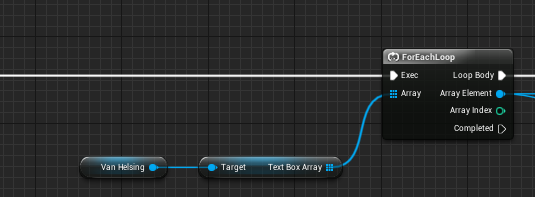
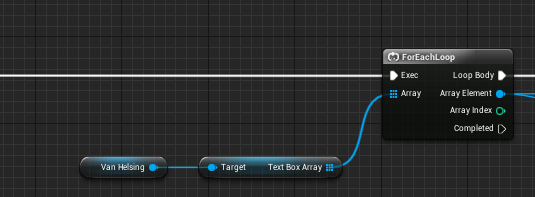
Works but says "HEY, VAN HELSING ACCESSED NONE"
Alright, I'll put an invalid check
"Now I'm not going to work at all!"
Fucking logic, lol
tropic pilot
@feral dirge yea
 rapid pawn
How fast is Blueprint compared to c++?
cursive dirge
"depends"
also, speed is irrelevant for most gameplay code
unless you do something silly and do all the work on ticks
but you shouldn't do that on c++ either unless it's a thing that has to be done on tick
rapid pawn
I did something similar to test this: a ineffective bullet drop mechanic on tick
after some "shots" on blueprints: stuttering
in c++ though: stuttering(bad cpu) but less
I also try to avoid using tick
vale osprey
@rapid pawn so far I haven't see more than 2-3 performance boost from@moving code to c++
To get more you need to optimize engine code
Assuming your stuff is already optimized
rapid pawn
Right now nothing is really optimized here, i'm porting a source engine game that i made 2 years ago
i spend most of my time trying to understand the code that i wrote back then
keen pine
Will I have to take into consideration the angle of the camera when I use DeprojectMousePositionToWorld()
Just that it seems to be slightly off on the yaw when aimed towards a southern angle, since the camera is slightly back, raised high and angled towards the players I though that maybe the mouse position/direction would translate a little off
keen pine
A reference image for what is occuring
Red dot = mouse location
ACP_PlayerController* playerController = dynamic_cast<ACP_PlayerController *>(GetController());
if (playerController != nullptr)
{
FVector mouseWorldLocation, mouseWorldDirection;
playerController->DeprojectMousePositionToWorld(mouseWorldLocation, mouseWorldDirection);
SetActorRotation(FRotator::FRotator(GetActorRotation().Pitch, mouseWorldDirection.Rotation().Yaw, GetActorRotation().Yaw));
DrawDebugPoint(
GetWorld(),
mouseWorldLocation,
20,
FColor(255, 0, 0),
false,
0.03
);
}``` torpid charm
what is the best way to store level parts?
So I want to have a randomly generated level, and I want some parts to be composed out of different static meshes
Simply have an actor for each precomposed part?
safe rose
@torpid charm watch endless runner tutorial by epic
 grave bough
Anyone know how to get rid of this glare when I switch to top down in my viewport?
grave bough
whatever that giant reflective thing is in the top right
I feel like the skyshere is causing it but even if I hide it in the scene it shows 😦
grave bough
lol, top left sorry
grave bough
ya
safe rose
this is ortho top?
grave bough
yeah
when i switch to unlit top down it disappears but then i also lose the shaded relief which I need
grave bough
no
grave bough
will check now, thx
grave bough
I figured out a workaround. I disabled the directional light from the SHOW > LIGHT TYPES > DIRECTIONAL LIGHTS
safe rose
strange that your directional light caused that
you kind of need it
but maybe you happened to be on a spot that just so happened to intersect it
I tried to find that spot
Couldn't repro
grave bough
it looks ok in perspective. I just need to take some screenshot of the map overview and it was getting in the way. I'll dig into it later and try to find the root of the issue but for now this works
hard compass
can you show a realtime gpu profile?
grave bough
gpuprofiler
hard compass
but that's just a single frame
grave bough
My player camera is not orthoview so I don't know how to kick out a realtime profile.outside the editor.
foggy valley
just roll with it and put a quest there
rapid pawn
google always helping me, search for "#ffffff"
 eager blade
@grave bough I think it's caused by the the engine not being too happy with orthographic rendering. I got a similar effect by doing this in the material editor.

 waxen vine
@grave bough try setting the material's metallic and specular to 0
eager blade
@waxen vine That's a lot of work if there's a lot of objects with different materials in the world. Especially if it's just to grab a top-down perspective of the world for a screenshot or map :/
waxen vine
@eager blade it's what I did for my last orthographic project not sure if there is a better fix.
but yes definitely dont do this for a map
 cerulean sequoia
hooray.... unknown cook failure.... just what I needed
 patent ibex
Any reason why my BuildConfiguration.xml is ignored while building engine?
 warm sail
hello everyone anyone know how to interact with object like INSIDE the game , like push object or anything like that
 sharp summit
Does anyone know if it's possible for one project to refer to data from another project... if it's there?
Not just a save file, but stuff like level data
rapid pawn
anyone here works with source engine?
 ruby aspen
If I print a string in event tick in a blueprint (player controller), it outputs to the log constantly even when the game isn't running. Is this normal?
keen pine
On trace channels, what does ignore, overlap and block do? I know the deal with physical volumes but not trace channels
keen pine
Will they all return the object in the hit or is that only block and overlap
 upbeat fern
-----------------------------------------------------------^
 sleek forge
Hi guys ! I don't know if this is the right place to post stuff, but.. I've just finished working on a quick UE4 environment. I made the full thing in 5 days, including models, shaders and substances.

ArtStation
Full environment made in 5 days with UE4. All assets, shaders and textures (except for tree textures) made by me. Check out the materials here : https://www.artstation.com/artwork/y6xv8
I am also giving away all the substances I've made for free so people can learn from them 😃
https://www.artstation.com/artwork/y6xv8

ArtStation
Hello ! I am giving away the materials of the snowy road. Here's the link to each Substance ! feel free to break them down and use to your convenience ! Environment Screenshots : https://www.artstation.com/artwork/y6xWR Roof Slabs : https://share.allegorithmic.com/libraries/2367 Small Rocks: https://share.allegorithmic.com/libraries/2366 Snow: https://share.allegorithmic.com/libraries/2368 Wood Rough: https://share.allegorithmic.com/libraries/2369 FAILSAFE LINK : https://drive.google.com/file/d/0B6XncoKHLHp...
upbeat fern
@sleek forge hey mate, nice scene you have there, I'm not so sure about the long distance trees though
they seem to be very .. hard edged ?
upbeat fern
ah yup, might be worth looking how to blend the edges a bit more
just to make them look a bit more natural
sleek forge
yeha, thank you for feedback man 😃
sleek forge
yep exactly aha h
upbeat fern
so it's not a model .. ?
sleek forge
well it's just a curved plane
upbeat fern
no shit, looks real nice
sleek forge
Thanks man 😃
upbeat fern
@sleek forge also wondering what's up with the greens/purples in the branches
unless jpg artifacts.
sleek forge
it's artifacts I guess
timber relic

Giveaway of the Day
iClone5 is real-time 3D animator for digital actors, environments and visual effects with drag&drop editing, powerful physics and Microsoft Kinect-ready motion capture,...
People might like this
floral pagoda
@upbeat fern Why?
upbeat fern
mainly thier character creator. it's not a pain in the arse, but also produces models you can just tell that have been made in iclone.
moreso a prefab complaint.
grave bough
Thanks @ReiMari and @waxen vine, definitely something with the specular as once I disabled it it went away. I just wanted to grab some screenshots of the overview for some offline art and planning so it doesn't have to be perfect. Some weird things happening in ortho mode though...
 junior oar
Whats the error with error [SM5] and is ETC2 texture format causing it? (Found it here http://rag3dviz.com/tutorial/hdri-lighting-in-unreal-engine/2/ )
I will be taking 3ds Max and Vray lighting workflow as a reference to recreate the same in Unreal Engine 4. Main focus will be on Unreal Engine, just giving
 toxic falcon


 cursive dirge
@sleek forge you removed all materials from share?
sleek forge
@cursive dirge Hi 0lento ! No, they're still waiting for approval, they asked me to fix the metal value ^^ They should be available in a few hours. If you want to download them, there's a failsafe link on the Artstation page
keen pine
This engine is killing me, it always feels like the engine is fighting back and some work that feels like it should be easy ends up being a pain in the arse
safe rose
lol
I can't even counter that
Well, this is the standard response to any issue really: Currently our resources are dedicated elsewhere and UE-***** is not a priority item for us to work on.
keen pine
I managed to do the same in Unity in a small fraction of time but UE4 is a more complete engine but its demotivating to get stuck on basic stuff
safe rose
Problems arise when you can't work with source build for whatever technical reason.
Hmm. not sure what you are getting stuck on.
Most of my "basic" needs are met
A lot of workarounds can be done
Should we have to resort to workarounds 90% of the time...probably not
keen pine
@safe rose thanks for the advice
safe rose
Eh, I didn't give any advice, I was bitching just as much as you
😉
Oh, @polar hawk is awake
plush yew
hello boys and girls
I wanted to check before I do something stupid, when I load a new level, gameMode remains as it was, right?
I mean, it's not destroyed and recreated?
 static coyote
I'm hardly an expert, but afaik Game Mode and Game State are the same in that they both exist only on the server, and therefore should be persistant while the program is running.
plush yew
Thanx, I hope you are right
static coyote
Me too! 😃
plush yew
there is a comment saying
" * A GameMode actor is instantiated when the level is initialized for gameplay in
- C++ UGameEngine::LoadMap(). "
that made me wonder
static coyote
Can you link that documentation?
plush yew
its on gamemode.h
static coyote
Oh I see, an actual code comment.
Anyway, I'm mostly certain that it persists. Based on the wording of that comment, I would say that it is instantiated the first time LoadMap() is called, and whenever that function is called again the new instance deletes itself (singleton pattern). I haven't actually looked at it though, so this is conjecture based on a common programming pettern.
static coyote
Really? That's interesting. I suppose logically that does make sense, the game state is changing when the level is changing. Maybe what you're trying to have persist doesn't actually belong in game state?
 knotty brook
GameInstance is persistance GameMode is not
if you want something to cross levels or from menu to levels, etc, use a GameInstance
slim quest
Thank you to everyone that gave us feedback and votes!
plush yew
How can you prevent Unreal from putting Data on your C Drive if you installed it on another drive? Wanted to package a project and UE4 just busted my SSDs Capacity with its "DerivedDataCache" Folder
And no I don't want to use my 128GB SSD for that....
And can I delete this "DerivedDataCache" without worries?
 sand escarp
@plush yew in BaseEngine.ini you need to change the Paths in [DerivedDataBackendGraph] and [InstalledDerivedDataBackendGraph]
deleting the folder is abolutely save, once you fire up the engine again they will be regenerated though
plush yew
But if I do this correct then UE4 should put it back into my SSD, right?
sand escarp
if you change the variables in BaseEngine first it will be generated in the new directory, yes
and you can then get rid of the folder on C:
plush yew
There are also other folders like "4.10" to "4.14" can I delete them as well?
sand escarp
those would be the derived data caches for these engine versions. the change I suggested is per engine version (and it will be ovveridden by any engine update btw)
plush yew
Changed it and will test it out now. Keeping an eye on my poor little SSD ^^
thank you for the advice
sand escarp
you're welcome!
plush yew
Since I already asked here I assume that I may ask a question about packaging. How can you package custom functions if UE4 tells you this: "Unable to find package for cooking"
foggy valley
@slim quest congrats 😄
 frozen geyser
Good evening all, I'm looking to build my personal sandbox environment, but I've got a series of questions, i appreciate your the help as I go through my list of milestones
frozen geyser
Hmm new snap-on wood tiling and blue walls
Oh and a big whiteboard on the wall
For pictionary purposes only
=p
plush yew
Nobody is familiar with my issue mentioned above? Custom functions in packaging can't be cooked because "some" package" is missing.
frozen geyser
So first question, is cloning a ue fork off github acceptable or should I use strictly perforce mercurial?
I want to save all my assets also
Like the project files for art and models
Unless I can use a gimp project file directly in UE material, would need to access each channel, last save is what would update in UE