#ue4-general
1 messages · Page 39 of 1
 cursive dirge
Also, filtering out points seen only by 2 cameras is super handy
As it gets rid of areas that would "float" on top of the surfaces otherwise
Sometimes those 2 cam only points go to completely wrong directions even
 foggy valley
makes sense
cursive dirge
one thing I wish it had though, would be option to recalculate all points based on found camera alignment
I guess you could work around that by letting it calculate unlimited points in the initial run
but that's pretty time consuming
basically when you filter out sparse cloud data to get the camera alignment, you always just remove bad data, there will not be any extra points after you readjust for that purpose
foggy valley
DEAR UNREAL EDITOR
IF YOU FAIL TO MOVE A MAP FOR ANY REASON PLEASE JUST ROLL BACK. DON'T CONTINUE AND MOVE JUST PARTS OF IT THAT THEN CAN'T BE SAVED DUE TO INTERNAL DATA STRUCTURE ERRORS. THE OPERATION WAS TO MOVE A MAP, NOT FUCK EVERYTHING OVER YOLO STYLES.
LOVE
EVERYONE
 urban salmon
^
 alpine sorrel
Are there any profiling tools available for optimization of game and map loading times?
 safe shoal
alpine sorrel
safe shoal
alpine sorrel
Thanks. Looks like what I was really looking for was mem report. Just read great dev blog from Fated team on topic.
 north lantern
hey guys, why i cannot view my project's private folder of source folder in the content browser ?
is this normal ?
i can see the public folder but private folder is hidden for some reason
 cerulean sequoia
yeah, you can only make engine content, plugin content and dev folders visible in the content browser https://a.rokket.space/uwqyrm.png ... while the source folder defaults to public
 north lantern
thats fun, because even if you make a c++ class public it still puts the cpp in the private folder
however i can see the class in the class viewer
 sweet crane
Does anyone know how to control the index of my material IDs or the element ID? When I import the FBX it just orders them some way I can't seemingly control. (For example, we want the yellow texture to be Element 0)
cerulean sequoia
that's a good question
sweet crane
Yeah so far It's just been a trial and error thing. Import into 3ds, mess around with the materials, maybe if I get lucky on the next import it gets it right, but most of the time it's not
cerulean sequoia
I usually don't have problems with that, but I use cinema4d and can just drag the materials around anyway.
sweet crane
Yeah even if I go into 3ds max and swap the materials around like black to yellow and yellow to black. I'll import back into UE and it will still have swapped the element indexes
rage inducing haha
sweet crane
Ok I think I figured it out it's something you can do in 3ds max if you select your editable mesh in polygon mode and you can select/set material IDs and here you can reorder them
 viral nexus
so, I deleted the folder ThirdPersonExample from my project cause i didn't need anything from it, now when I cook my project it is saying it can't find ThirdPersonGameMode even though I don't use it anywhere in my project
how do i get it to stop trying to cook something that is not there
 vapid wren
sounds like the game mode is still referenced in a map you're cooking, or in DefaultEngine.ini
just a guess
foggy valley
@north lantern the purpose of private and public classes in C++ is to determine what can see the header outside of the module. It never needs the CPP so that goes in the private directory no matter what
once your module is compiled if the header is public then other modules can make calls to it or use its types
so you keep all of your internal types and classes private and make the useful ones public
foggy valley
yeah a module can compile to a dll
or a library on macos, etc
if you have a DLL with no external headers but you know what memory space to use and how to cast things, you can actually make calls to it
but without the header file it's VERY hard to do
game modders do it all the time, using a game's DLLs to do stuff without headers
north lantern
thanks was looking for way to produce dlls so i can speed up C++ compiling
foggy valley
that's what the PCH is for
pre-compiled header
it's virtually the same but more flexible
 kindred viper
I thought it was Poorly Coded Header .... at least that's what the compiler told me 😦
foggy valley
loading DLLs in UE is a pain too
and you need to handle each platofmr separately
custom build scripts, compiler directives, etc
do the PCH
haha
north lantern
but does that cover cpp files because a DLL is not just headers its cpp file as well
i dont see how a pre compiled header will be the same
foggy valley
a DLL isn't a cpp file
a DLL is a dll file, and you can include headers during distribution if you wish
what you're saying is you want to pre-compile something so it cant'; be invalidated
but what if you WANT to invalidate it?
that's a lot of work to remake the dll
whereas a pre-compiled header file is a header file for all of the pre-compiled code that you won't need to compile when you only change one small thing
so it's basically a dll, but it's not.
get my drift?
when you compile some of it is already completed, it just assembles the dll from there
north lantern
what i am saying is that i dont want to compile the entire project just for a few lines of code, so far the only solution i found that drastically reduces compile time is dlls
obviously if the dll changes it will need to be recompiled but i rarely will need to do that
since i will put in dll code that already works as intended
but I am new to C++ maybe there is a better way of doing this
foggy valley
I just told you a better way
north lantern
pre compiled headers roger
foggy valley
they're automatic. just add all of your header files to the PCH
you might have to create it for a project, but plugins have them set up already
north lantern
ok thanks but isnt this just for the headers ? we go back to my initial assumption that it does not deal with the cpp files
foggy valley
no
a pre-compiled header file is a map to all of the code that's already been built
so if you change a cpp file it rebuilds it on next compile, but not all of the other cpp files it already built
a header file is a map
north lantern
by header we mean .h files here right ?
foggy valley
the way a compiler works is it gets all the CPP files and then looks at what header files they include
yes
north lantern
PCH it is then
foggy valley
when a compiler builds an executable or a DLL it grabs the CPP file, looks for the header file and uses both of them to create assembly
there's no concept of "header" or "cpp" in the final result
north lantern
obviously
foggy valley
it just happens that you can also include a header with a DLL as a map to how to use it
north lantern
there is not even a concept of cpp, its just machine code
north lantern
because headers only contain definitions not declarations
however the scenario it shows there it only went from 36 minutes to 23 minutes, its still extremely slow
i still think DLL would be far faster, since you avoid both compiling and linking
unless a pre compiled header also does not need linking which i find hard to believe
i am talking here compile times of 2-5 seconds max
this is what inspired me into using DLL

he basically implements a instantenous auto compile feature with live coding capabilities
like hot reloading of unreal but far faster
anyway i will take a deep look into this and see what we will see
foggy valley
well, good luck 😉
north lantern
Thank you for the help
foggy valley
anyone know when the 4.14 preview is due?
 sacred crater
4.14? 4.13 just released? :o
foggy valley
4.13 was like christmas, but I want some of dem 4.14 goodies
it's like how you get christmas then new years
 feral dirge
@bleak schooner Davis is streaming now: https://www.twitch.tv/zalieth
Twitch
Streaming levels - 1....level....at a time....CLEVER TITLE #gamedev #unrealengine
 mint yoke
i think that for chiristmas comes the 4.15
foggy valley
what's in 4.15?
cursive dirge
I kinda doubt that
there's not even 4.14 branch on git yet
so 4.14 will probably be out november earliest, or later in december
usually branch has existed for a good while before previews too
so wouldn't expect 4.14 previews for next few weeks
feral dirge
No
 knotty brook
So should i compress cooked packages or not? do they take longer to load because they are compressed?
foggy valley
there are decent compression schemes that will uncompress as fast as not being compressed
LZA is the shittiest of them
and it's still good
or LZH
I can't remember the name
just the first two letters 😄
knotty brook
yah, steam already compresses the download really well
so i wonder if i should or shouldn't compress on disk
cursive dirge
ue4 just gives you the option to either compress packages or not
knotty brook
right, im figuring out whether i want it on or not
knotty brook
Our whole app is like 1GB
cursive dirge
could also be little more taxing on level streaming
if you do that
in theory that is
knotty brook
we have a single level, that force loads all sublevels
cursive dirge
yeah, then it's probably just the initial loading time
knotty brook
yeah, i'll see how big a difference it makes
just trying to get redist install right via steam anyway, so its a good build to test
Looks like tomorrows the day 😰
cursive dirge
good luck
have fun 😄
if you get some benchmarks on with and without compression, would love to hear about them
cursive dirge
I haven't seen any practical difference with or without but my projects been pretty minimal in content, I guess one could just test some bigger more content heavy things
knotty brook
I doubt for our project its going to make a huge difference
cursive dirge
well, file sizes are drastically smaller of course
but I mean perf now
or loading actually
 mint raptor
Hey Guys
foggy valley
sup
mint raptor
I've imported a model and placed it into my scene
When I build lighting however it becomes black.
I realize this has something to do with the UV's but I didn't make the model
Is there a way to correct this?

 foggy valley
nah show the UVs
it's a button on the top
just looking at that, the normals look fucked too

 foggy valley
yeah unreal needs an intial UV map to work with
mint raptor
Is it normal to share assets with no UV's?
foggy valley
do two UV sets - one that matches your texture placement, a second one that's everything unwrapped evenly
UE will use the second one to make lightmap UVs
yes it is when it comes to amateurs
get used to it 😉
mint raptor
So in order to fix this I need Maya or can I do this in Uneral?
Auto Generate UVs maybe?
foggy valley
maya
c4d
blender
anything that can unwrap
3d coat
headus
basically whatever you have except UE 😄
cerulean sequoia
If you don't want to do that, use world aligned textures for example, but that is ill advised
cerulean sequoia
You can have a texture in your material aligned along xyz and tiles in a triplanar fashion
It's useful for landscapes for example, adding details to cliffs.
But it doesn't outweigh a proper UV
mint raptor
So whats is interesting is I took the Wood Log From here

Quixel Megascans
Megascans is the world’s largest online scan resource, containing thousands of standardised and physically based surface scans, vegetation scans and 3d scans.
It didn't strike me that they would leave out UVs...
 brisk path
wow thats weird.... it should have a UV lol
mint raptor
If anyone wants to try out the Wood Log and let me know if I'm doing something wrong?
I find it really odd it doesn't
Plus its a complicated model
probably hard to UV map?
cerulean sequoia
Photoscanned stuff has weird uvs
brisk path
I'll check it out nonlin
brisk path
I'm downloading a 256 tri one though
cerulean sequoia
Uv isnt hard... it's just boring
brisk path
Which one did you download?
cerulean sequoia
Imagine a box of cornflakes, you try to unwrap this box into a sheet
brisk path
Okay I'll do that
cerulean sequoia
Takes time, isn't exiting....
mint raptor
I see
brisk path
Gonna open it up in blender first to see if they have a UV
mint raptor
ok
 dire creek
i downloaded a rock from there and it was fine
brisk path
the LOD1 i'm still downloading
mint raptor
So I have the wrong LOD?
brisk path
No, that shoudnt' matter
mint raptor
ok
cerulean sequoia
Discord, would you kindly sync messages....
brisk path
Hmm interesting
mint raptor
What did you discover RBD2?
brisk path
It has a UV but the UV isn't getting put into UE for some reason
dire creek
have you set your import to generate lightmap UVs?
mint raptor
But that doesn't even look as it should
I think that is on by Default
Should it be off?
foggy valley
@cerulean sequoia his lightmap bake is failing due to no UVs
so it's still a problem even with WPO textures
dire creek
disable it it since it has them already
mint raptor
I see
foggy valley
so it HAS uvs but UE abandoned them?
cerulean sequoia
oh wait
brisk path
Well
cerulean sequoia
is it an obj
brisk path
Not abandoned
cerulean sequoia
or an fbx
cerulean sequoia
try on 4.12
brisk path
but it can't show it
foggy valley
is the UV map way off the normal 0-1 range?
cerulean sequoia
numerous people reported that on 4.13 there are uv issues
foggy valley
interesting
brisk path
Yeah i tested it on 4.13. my main project is on 4.12 but i'll check it out now
dire creek
you imported and applied the material too?
brisk path
Yeah
mint raptor
Yea it provides mat and textures
So I get only one UV Channel without the Generate UVs
And that is empty
4.13 bug?
brisk path
Importing it to 4.12 now
mint raptor
cool
brisk path
Yeah and when I click show UV its just blank
dire creek
hm
brisk path
its supposed to show the UVs
So its a UE issue
because i imported it into blender and the tex applied normally
mint raptor
Maybe the model is too complicated for it to show?
cerulean sequoia
nope, I imported really high detail meshes before, no issues
dire creek
would be surprised if the engine has a problem figuring out UV mapping. that's like the most essential feature of any engine
😛
foggy valley
if it thinks there's no UV data it won't build any though
mint raptor
Well you are more then welcome to download the asset and check it out
foggy valley
that's how it works
brisk path
cerulean sequoia
there is a bug in the recent ue4 version, but the engine handles uv like any other program
foggy valley
sexy
mint raptor
https://megascans.se/assets/qdtdP Th Wood log
Quixel Megascans
Megascans is the world’s largest online scan resource, containing thousands of standardised and physically based surface scans, vegetation scans and 3d scans.
Is that 4.12?
It works in 4.12?
brisk path
Yeah 4.12
dire creek
¯_(ツ)_/¯
cerulean sequoia
as I said, 4.13 bug
foggy valley
import in 4.12, migrate to 4.13 project
brisk path
Most beaufiul piece of dead log i've seen
mint raptor
LAME SAUCE
cerulean sequoia
ay, maybe RBD2 is kind enough to send you his .uasset
dire creek
actually yeah i guess my testing was done in 4.12 too :/
mint raptor
Is it a commonly occuring issue though?
brisk path
I'll export you the mesh only yeah? because i doubt the texture will be any different
mint raptor
Yea

What are the odds that I Learn about Megascans and its with 4.13 when UVs break
Wanted to try my hands at making some photo real scenes
brisk path
@mint raptor
knotty brook
I can't for the life of me get my game to start windowed
brisk path
Lemme know if it works
cerulean sequoia
try the command "fullscreen"@knotty brook toggles between windowed and fullscreen
 weary basalt
@knotty brook Do you have a default config that is overriding?
Check that there are no saved configs that are overriding your fullscreen...ness 😛
foggy valley
haha
brisk path
you could just do at game start r.SetRes 1280x720w
or something
Making all these micro assets seems awesome. Too bad my game is too large scaled to do detail props haha 😛
cerulean sequoia
well a game doesn't has to be large scale... stuff like P.T. has a tiny playable area
brisk path
Well yeah but I mean my game takes place in the sky 😛
cerulean sequoia
oh well
 brisk path
no worries 👍🏻
mint raptor
Anyone know of a place that has lots of free scanned photo real assets?
Megascans has just a few
brisk path
like photogrammetry stuff?
mint raptor
I suppose so. Are they the same thing?
dire creek
i think megascans is the first real big one, but of course you need to pay for the library
mint raptor
Is making good photo scans hard, expensive or both?
brisk path
Quite hard. depending on what you're trying to do that is
cerulean sequoia
ay, for now a lot of people do their own photogrammetry, it's fairly new that it became viable for game development
dire creek
well they use their own hardware to get the scans
brisk path
If you're just trying to get Textures it's quite simple
cerulean sequoia
you need a camera, and a lot of time.... 0lento and BlackFox did some photoscan stuff recently
brisk path
but photoscanned models are a different thing
cerulean sequoia
I wanted to dabble into that territory too, but I have to get my camera cleaned first
mint raptor
So it doesn't take any special hardware then?
brisk path
Not really. but special software is needed from what I've heard from my friends that do photoscanning
mint raptor
Hard to find good guides on it
brisk path
try the word photogrammetry instead
cerulean sequoia
ay textures are fairly easy "grab a camera, a macbeth, make a few decent photos and remove light data to make it an albedo, then generate roughness metal and normal from that" and by fairly easy I mean it's still hard if you have no idea what you're doing
foggy valley
macbeth?
brisk path
Yeah textures are easy. but once you try to do models it gets a bit harder
cerulean sequoia
a color checker
This is a discussion of the Macbeth color checker, which
is a test chart used in video and film production. The Macbeth Color Checker is a tool
for serious photographers and film developers. It provides a set of known reference colors
which can be used as a setup and adjustment standard in film and video production. The
Color Checker is used for precise color balance when shooting color film.
foggy valley
aah cool
cerulean sequoia
a macbeth has 24 colors that are used for color correction / proofing
dire creek
pr0tip: you can hold the backslash button down in UE4 to bring up something similar
in perspective viewport
knotty brook
sorry i got distracted,
This is my DefaultGameUserSettings.ini file
i tried executing that console command, but it seems to still bump me to fullscreen, if i pull down the console in the packaged dev build i can do r.setres 1280x720w fine
but calling from gamemode beginplay doesn't work
cerulean sequoia
@dire creek what does backslash do, doesn't do anything for me
cerulean sequoia
guess that doesn't work on non-english keyboards
dire creek
ah
 cloud cobalt
Daily spam about modding : https://forums.unrealengine.com/showthread.php?123419-How-can-I-release-a-modding-SDK-for-my-game
Hello,
My game is nearing completion, and we've started taking a closer look at modding. Our title supports it on the technical side - we can detect and use mod content, assets can be replaced, etc. The game-specific part is all but done. I still have questions about the releasing and process, though. After much discussion on UnrealSlackers and this forum, some questions are still up in the air. Let's get to it :)
My game has a C++ source, uses the vanilla Unreal Editor without plugins,
It looks more and more like no game dev has done it before, except by Epic's grace on their launcher
cursive dirge
talking of macbeth
I use x-rite colorchecker passport
it's really expensive for what it is
but it's super handy
as it goes into your pocket and you can practically carry it with you
and the included color profile software generates profiles that are compatible with RawTherapee (free lightroom alternative)
@mint raptor I didn't read everything, but if you are after photoscanned models, megascan ones are not the greatest ones
their surface materials look good though
I looked at some of their free stuff and there were all kinds of errors all around
but I guess different people have different standards, like what they think is good enough
photogrammetry isn't super hard when you know all the basics, but even when you do know them, it's really time consuming and it involves with lots of manual work
I've seen on unreal slackers that some members think that photogrammetry is some press a button and get automatic model solution but it's really far from that
cerulean sequoia
it isn't? but my "make game" button still works right?
cursive dirge
you can automate some stages though, and it appears quixel guys do that too (their models don't even have proper unwrapping)
heh
it seems that quixels meshes are more ment for film and offline renders, as there you don't need to be as efficient with geometry and uv's
 feral echo
can someone help me with advice on how to create dynamic rope object? By dynamic I mean that player could grab and pull rope at any point?
I took a look at the UCable, but it looks like an static object..\
 opal spindle
For modding you could have them just DL the stock engine you use assuming it's a binary build
Then release a custom project
With custom build settings
Add some documentation and potential verification when sending in the mod and you should be set
cerulean sequoia
that isn't really helping since we don't even know half of the stuff
 frank escarp
i think the modsdks in epic launcher is the normal engine
with a normal project
just with the c++ code in the dll
i think you need to recompile the engine in a certain way, and build your game in a certain way
but i have no clue
cerulean sequoia
stranger is trying to figure out exactly how modding works... I'm interested in that too, but it's not a priority right now
cloud cobalt
@opal spindle It's much more complicated than that.
Basically nobody knows anything
The only official resource has a major workflow issue (the tutorial has the game developer building the mod, basically)
There are major legal issues (can't redistribute UE4 Editor)
If you're doing a C++ project, you can't have modding outside of Epic Launcher (requires selection by Epic, and probably a business deal)
And some other facts are not known (compatibility of mods with game versions, release process, etc)
opal spindle
Welp
cloud cobalt
On top of it, I can't get the tutorial to work on 4.13
So it's really a bunch of different issues, and Epic appears unwilling to commit to anything
cursive dirge
what tutorial?
feral echo
@cloud cobalt I think they just dont have enough time to provide updated workflow
cloud cobalt
cursive dirge
btw, the cable plugin in unreal is not static, it's simulated (I've used it) but it doesn't have collisions
ah, thought you were talking about the rope thing 😄
cloud cobalt
If the modding tutorial on the wiki worked, provided the workflow is just for the tutorial's sake and not representativ of actual use, we could have modding support overnight, but that's just because oru game is open-source
cursive dirge
@cloud cobalt you probably know loomans tutorial?
cloud cobalt
That's the one
cursive dirge
ah ok
cloud cobalt
Can't get it to work and the workflow makes no sense
The workflow part is hopefully miscommunication
(The tutorial has the game author generate releases with the mod already in the game)
(Hopefully that's just because it's easier to explain that way, but I can't get answers on that either)
See feedback on the tutorial here : https://answers.unrealengine.com/questions/495635/mod-plugin-doesnt-load.html
cloud cobalt
Matthew Clark doesn't seem to sure about building mods based on previous releases, which is the entire point of it
The sample project brings a packaged version that does work, but I can't reproduce it based on the tutorial steps
(using the source sample project)
I believe the entire thing works and suits our needs, it's just been two weeks of trial and error and answers come slowly if at all
cursive dirge
what you mean by previous releases?
surely the editor itself has to be identical for both games and mods
for example, I think Ark has been based of the same ue4 engine version ever since they released into early access. Even they've updated it internally, the core engine is most likely still pretty much unchanged
feral echo
@cursive dirge well, cable and rope are almost same thing.
cloud cobalt
I'm talking about game releases, not engine releases.
cursive dirge
ah, ok
cloud cobalt
basically the asset registry for cooked assets
cursive dirge
@hushed rose sure the simulation works the same, but you can't use the built-in component with any interaction as it's been designed as purely cosmetic thing
cloud cobalt
You should technically be able to provide a subset of your game to modders, plus the assetvr egistry for the latest release
cursive dirge
there are third party plugins that do rope sims though
cloud cobalt
It's enough to build a mod against that release, supposedly
But good luck getting anyone at Epic to care and explain if it is
cursive dirge
hmmm
well
that side is pretty much undocumented
even the DLC part is barely mentioned at the docs if I remember right
cloud cobalt
Yeah, it is
But then you see tweets from Tim Sweeney in 2014 who's like "yeah, we love modding so much"
cursive dirge
heh
I wonder if they'll accept like any project into launchers modding page
that's not directly relevant to your current issues
but just wondering how they've planned that out
because engine distribution to modders is not straight forward atm due to licensing issues
at least, if you've modded the engine
which I'd expect most bigger titles having to do
opal spindle
They should really be more transparent with this stuff
cerulean sequoia
How many AAA games are out that use UE4?
cursive dirge
you could probably count them by your ten fingers, at least the released ones
https://wiki.unrealengine.com/Category:Games (that doesn't list everyone)
even Ark isn't listed there
Tappy Chicken is though
feral echo
because, they are not AAA
cursive dirge
that's not AAA game list
just list of UE4 games
and people like to define AAA in so many ways
in past it used to indicate multimillion dollar budget behind the title
4 studios work on ARK and pretty sure they spend ton of money still on it's development
so if only budget and people counts would matter, it would fit into AAA definition
some expect AAA to mark certain quality bar on assets / high production values
whole definition is so vague it's something that people often debate about
like what is qualified as AAA
we have even "AAA" quality assets on marketplace
which I personally find ridiculous
especially since they usually are not top notch even
feral echo
early access - AAA : this is three words that we should NOT use together
cursive dirge
I wonder where codemasters would fit
it's not a huge studio
but they pretty much nailed Dirt Rally Early Access
cerulean sequoia
AAa?
cursive dirge
heh
I personally dislike the whole term
because it mean so different things to different people
In the video game industry, AAA (pronounced "triple A") or Triple-A is a classification term used for games with the highest development budgets and levels of promotion. A title considered to be AAA is therefore expected to be a high quality game or to be among the year's bestsellers.
feral echo
well, in ideal world high development budget should lead to high quality game
cerulean sequoia
Like Alone in the Dark?
cursive dirge
pc ports are often not so well made 😄
cerulean sequoia
High quality games with high budgets.....
cursive dirge
@cerulean sequoia I'll pretend you mean the original game and say it was awesome
feral echo
well, now where are talking about technical part of game
feral echo
and dont forget, I told "in ideal world" ;d
cursive dirge
since the whole definition is super vague
cerulean sequoia
Duke would be AAAA by money/time definition
cursive dirge
In the late 90s, during gaming conventions in the US (CES, CGDC, E3 and private ones), some development companies started using the expression AAA[9] among themselves, based on the Academic grading in the United States (A being the highest and F, denoting failure, the lowest).
As the years progressed and during the new millennium, many publishers started to consider their games to be AAA even before their release, and justified this decision through huge development and marketing budgets.
that's from the wiki article, sure it's written by some random people
but it describes the thing pretty well
cerulean sequoia
Ay
cursive dirge
it's just a term that publishers came up with to assure consumers their games are better
cerulean sequoia
However, I'm off to bed now. Cheers
opal spindle
Indie games are better than AAA nowadays
urban salmon
that sure is a generalization.
foggy valley
I did a quick scientific study of a group that includes all indie games and all AAA titles that have ever existed or will ever exist and NMS pulled the curve down
cursive dirge
NMS was a indie game though
cloud cobalt
NMS is an indie game that got AAA coverage and pricing
urban salmon
NMS was technically indie and had indie funding for the most part (outside plentiful marketing via sony)
but they created a game that got pretty close to AAA standards.
urban salmon
I have a very strong opinion on that game that is more rooted in facts
At the end of the day, people got molyneux'd to some extent, but that's what happens when the audience demands more information during mid-developmet
The game itself is really good for what it aims to do
cloud cobalt
Yeah
Which is not AAA by any mean
The game does what reasonable people expected
But it's a far cry from AAA in terms of content, gameplay polish, and overall quality
Not when you can buy Witcher 3 for the same price
Sorry, that as quite off topic
frank escarp
its not AAA but it got AAA level marketing by playstation hype
 whole trellis
Hey guys, I've been having this problem for quite a while, didn't really find anything on how to fix it. http://prntscr.com/cnrdon Any ideas? (Yeah i did go through quite a bit of posts about this and it was just people saying that they had the problem but no actual fixes. Or at least i wasn't able to find any.)
 knotty brook
Whats the problem? you need to recompile?
whole trellis
Alright so i created a third-person c++ project in ue
and it told me to go and compile it in visual studio
and i get that window when i do so.
knotty brook
what version did you compile in visual studio. You should do development editor / win64
or you should just click yes on that button and it will do the right thing
whole trellis
I tried clicking the yes button and then another window showed up saying that it couldn't compile it and ill need to do it manually
Also http://prntscr.com/cnrgdl i can't tell if its development editor or just development

Looks like it doesn't matter, it gave me the same thing http://prntscr.com/cnrgsd

^ after i clicked "Yes".
knotty brook
looks like something is wrong with your code
whole trellis
Hm.. On a freshly created project?
knotty brook
does visual studio compile successfully? Right click your uproject and regenerate visual studio files
ya, thats strange
whole trellis
How can i regenerate the files?
Hm, i re-created the project on a different drive and it seems like it fixed it..
cursive dirge
nah
you just need to open the project in VS
compile there
the automatic recompile when you just open uproject directly fails like 50% of the time
if it still doesn't compile from VS, then you can just regenerate the project files, I usually wipe ue4 generated stuff too if there's some oddities (intermediate + saved folders) before regenerating project files
if you did a new project with same engine version, then it'll most likely just open up
you only need to recompile c++ code that was from previous engine version
making new projects is not the real solution when you actually have some work done though :p
cursive dirge
4.13.1 release notes: https://forums.unrealengine.com/showthread.php?121670-4-13-Released!&p=601810#post601810
Unreal Engine 4.13 Release Notes
This release brings hundreds of updates for Unreal Engine 4, including 145 improvements submitted by the community of Unreal Engine developers on GitHub! Thanks to all of these contributors to Unreal Engine 4.13:
0lento, alk3ovation, Allegorithmic (Allegorithmic), Alwin Tom (alwintom), Andreas Axelsson (judgeaxl), Andrew Scheidecker (AndrewScheidecker), Andrian Nord (NightNord), ArnoB (ABeekhub), Artem (umerov1999), Artem V. Navrotskiy (bozaro), Błażej
 ashen brook
thanks! Was just looking for those
 upper heart
yay I was just checking earlier this morning wondering when 4.13.1 was coming out 😃
 faint horizon
urban salmon
faint horizon
urban salmon
anyone used speedtree modeler?
cursive dirge
I've used it, but am not a pro user
cursive dirge
ah I haven't use that myself, but it didn't look too complicated to use
most of the speedtree modeler things are pretty self-explanotary onece you just check what the different sliders do
cursive dirge
 urban salmon
all they do is recommend opening one.
found that too
still not sure how to access that screen.
cursive dirge
do you have leaves added in the generation tree
not sure if the leaves section needs to be selected for that to work or something like that
urban salmon
hrm, okay
urban salmon
i can understand the entire rendering pipeline, shaders, materials, C++, blueprint, graphcis APIs, etc.
but i can't make grass.
my ancestors are so disappoint.
cursive dirge
1. Isolate the main level branch that you want to turn into a Leaf Map Maker by clicking 'Target' in the tool bar and selecting the branch.
cursive dirge
np
I probably have some speedtree tutorials somewhere too but I've never actually needed to watch them for things I've done
urban salmon
i hate video tutorials so much.
cursive dirge
they usually go off topic and do silly things all around
love precise and quick feature overview on video-form though
they are great, like where they show just individual feats one by one
one guy did those for each modo feat
and zclassroom has similar ones for zbrush
btw
just saying this in case you have interest in it / have missed the option
you can bring custom trunk meshes to speedtree, and create procedural branches etc on it
that imported obj etc trunk will then work just like any speedtree trunk, react to wind etc
urban salmon
yea
cursive dirge
that can be handy if you need to do some really custom thing but don't bother doing the branches manually
urban salmon
i just gathered that, actually.
cursive dirge
it should do it all automatically?
urban salmon
interesting.
cursive dirge
oh
you mean your own photo
hmmm, not sure if works like that
I always thought you should bring in individual leaves for that leaf map generator
it'll generate the texture and uv's
but...
if you really want to, you can make leaf mesh and uv's on external tool
and bring that into speedtree
you can also do stuff like snow chunks on top of branches etc with that
cursive dirge
leaf maps are more efficient, but they'll not look as good close up
unless you can put some bigger resolution to them of course
but you get the point
if you really wanted some great looking stuff done in speedtree, I'm fairly certain you'd need to do the custom leaf branch meshes with custom uv's
that way you could have bunch of different leaves at higher resolution and same time reuse same leaves around the mesh with some smart uv-mapping
I think epic did that on kite demo
(it had speedtrees)
if you look at the tree that shows up in the final video a lot, it has like 4 leaves right next to eachothers or something, so it's definitely not using the stock speedtree generators for it
 karmic thistle
how can i export smooth asset from maya to unreal in low poly?
I could in Unity, but in UE4 all my assets are ugly without smooth
and if i press "Smooth" in Maya, it isnt low poly
 karmic thistle
look at this
I have this Low Poly Mesh
If i press 3, it will be a preview smooth
The same Low Poly mesh smoothed
if i export it on fbx, UE4 import the ugly Low Poly
if i want to import a smooth mesh i have to "smooth" it first in Maya
But.. It wont be Low Poly, look:
its a simple sphere, imagine a large mesh smoothed
cursive dirge
you don't need to preview the smoothing
it's not the same thing
you need to set the normals smoothing groups
karmic thistle
How can i have the "Smooth quality" in UE4 without a HighPoly?
cursive dirge
if you watch that video, they do sphere in the end
yes
unreal prefers models with smoothing groups
if you don't have them, it even throws a warning about it when importing a new mesh
karmic thistle
if i go to normal and do "Soften Edges" i have a better smooth with the same Low Poly, but it isnt smooth enought
Yeah i set Smooth groups
cursive dirge
then you need more polygons, if you are talking about the edges
polygons itself shouldn't have any visible edges anymore
if you've properly set the smoothing
it's same in unity though, you can't make the mesh look smoother for the overal shape without adding more polygons
karmic thistle
i will see the video and test in a large mesh, in Unity it was instantanely, export LowPoly and appear HighPoly
Im new with Ue :/
cursive dirge
well, it really doesn't work like that in unity
if you import low poly, it'll be low poly
it might calculate smoothing automatically
but it doesn't alter your polygons
karmic thistle
i thought UE has something to "smooth" Low Poly static mesh or something
ok ty Olento!! ❤ I will see the video
cloud cobalt
You have to use normal mapping
Bake a normal map from the high poly and the low poly, export the low poly, apply normal map
Or just use more polygons
karmic thistle
i will try, ill post it here for results
 karmic sparrow
You could tesselate your geometry which also would result in a higher polycount, but in this case going with the highpoly sphere in the first place would be much smarter as tesselation is a quite GPU expensive 😄
karmic thistle
Solved!! Thanks you guys! @0lento#8809 @cloud cobalt @karmic sparrow
Finally I add some Bevels from Maya to the mesh for Smooth" the border edges, and the rest are fine with a normal map
My problem was the borders, if you look at the middle the normal map do a great job, but when you walk around the mesh and look the border edges its ugly
So I added some bevels (Edges in the borders to smooth) and the assets have more polygons.. but its worth
cerulean sequoia
unless you're going ham with the polycount, UE4 doesn't care anyway.... I can look at scenes with a million polys and 4k textures no problem. You have an option in UE4 during model import to calculate normals and all that fun atuff, if smoothing group info is provided it makes your model use these
karmic thistle
It was annoying, but i think i discover things that will make sense in future modelling/personal assets
cerulean sequoia
please don't tell me you actually want the full phong unity shit effect that just looks bad
karmic thistle
Hahahaha Unreal can be weird at the beggining, but when you know how to work with him, its love ❤
I have to work hard in the first scenes
cerulean sequoia
 cloud cobalt
One million triangles is not even UE4 realm, UE3 could do it
Crysis 3 pushed much more than that on PC
(CE)
cerulean sequoia
ay, but I was just giving an example
karmic thistle
im scared to do a high poly and exploit PC`s or Xboxs
Low Poly is a Must for me, and try to optimize all
karmic thistle
sometimes I try to do incorrect thing because of it
cerulean sequoia
ha, don't worry, unless you're trying to run UE4 on a toaster nothing will explode
cloud cobalt
"Low poly" in UE4 usually means thousands, tens of thousands of triangles
Depending on object
karmic thistle
i had an idea 1 week ago
in Maya we can work with scripts, that are Box in the viewport, but when you render you can see a large mesh
with mental ray
UE4 have something similar?
cerulean sequoia
that's relying on scripts in maya? jesus it's just a viewport flag
frank escarp
in desktop, you can go to 2-4 million polygons easily
i found drawcalls be more annoying
but im on VR so 90 fps and drawcalls AND polygons are doubled
foggy valley
are there any patch notes for 4.13.1?
urban salmon
yeah, in the forums.
The 4.13.1 Hotfix is now live! This hotfix resolves over 70 important issues for the 4.13 release.
Feel free to discuss this release on the 4.13 Forum thread.
If you experience a bug with the 4.13.1 Hotfix, please remember to log a bug report for the issue on the UE4 AnswerHub to the Bug Reports section.
Fixed in 4.13.1
Fixed! UE-35735 Crash Occurs While Running EQS Using Add Generated Vector Node
Fixed! UE-35852 AI Move To Location zeros velocity each call, causing the AI Pawn
kindred viper
accidentally ended up on 4.13.2 . fingers crossed :p
 plush yew
Just released a new free plugin to extract text from over a thousand file formats: https://forums.unrealengine.com/showthread.php?124437-Plugin-Example-Java-in-UE4-Text-extraction-via-Tika
It also shows an example of how to integrate Java libraries in UE4, might be useful to the community.
Java in UE4 - Text Extractor Plugin
Unreal Engine 4 integraton of Apache Tika™, a Java based library to detect and extract metadata and text from over a thousand different file types (such as PPT, XLS, and PDF).
Github: https://github.com/Deams51/TextExtractor-UE4
This was originally part of a paid job, but since I couldn't find a proper example of Java integration in UE4, here it is.
Feedback is more than welcome on the implementation!
Usage
Add the plugin to your plugin folder.
foggy valley
yay
urban salmon
I really wish there was a well-done lua plugin.
opal spindle
Anyone ever succeeded in packaging in chunks?
Can't find much about separating and splitting pak files
 gaunt raptor
does anyone know how to get the vector location of a bone in the animation editor
urban salmon
count the pixels and do a mental conversion in your head to world units
i'm helpful.
gaunt raptor
i dont wanna do that in 3 dimensiosnsdaoinfasdflknadfgad
urban salmon
what is the default location of the UE4 packaged build's ddc?
i already overwrote the file wiht my custom location ;_;
or i could just google it and find it in the first result.
karmic thistle
Yeah, I´m sure my problem (2 hours ago) is solved 💪 Low Poly in High Quality without smoothing
 real hinge
Just found this - beta release of crash bandicoot fan game. https://forums.unrealengine.com/showthread.php?124116-Crash-Bandicoot-Timetwister-Beta-Download
Crash Bandicoot: Timetwister is a fan created version of Crash Bandicoot 3: Warped on Unreal Engine 4. Every piece of asset is recreated with keeping nostalgia of them.
For more information & testing the beta, visit: https://cbtimetwister.com
 floral pagoda
😮
 polar hawk
Yeah, I have had the long term goal of recreating Crash Bandicoot as well
I'll do it... some day
cerulean sequoia
generic platformer?
polar hawk
Yeah
I was just going to remake Crash Bandicoot
Then take out all the Crash Bandicoot specific things
Sell base as platformer, get views with remake
Had this goal since like ue2 but
Ya know, life
and copyright laws
urban salmon
this is a dubious business model.
cerulean sequoia
@native tangle https://www.thefoundry.co.uk/products/modo/trial/
Trial MODO for FREE today with a 30 day trial. Find out more about what MODO can do and what it's been used for on our website today.
cerulean sequoia
fellow teammember uses modo, I prefer to stick to c4d, but I use some of their other software for motiondesign :)
cursive dirge
I use modo indie
it's awesome in my opinion
but you need to be aware of the limitations on indie version
also, if planning to get indie, you may as well wait for some steam sale
for example, modo indie 10 was -40% on last steam summer sale
 native tangle
im not going to buy it till i know how to use it. by then i can setup payment options to my payee. my issue was i couldnt find a trial
cursive dirge
ah
well
if you get the trial
I can link you to some tutorials that'll get you going faster
native tangle
just got it. imma start learning it
cursive dirge
ah
native tangle
ooo thankyou. that will help alot.
cursive dirge
well, I'll check if I find that stuff, modo has lots of user made things but most are not that good or doesn't explain things from the beginning for new users
@native tangle if you don't mind super duper dandy from 0 tutorials, these are great starting points:
https://www.youtube.com/playlist?list=PLE7EC667FBBD922FC
https://www.youtube.com/playlist?list=PL42746C52FC0AD02D


also check the UV mapping one from here https://www.youtube.com/user/patcran/playlists
well, they all are on those playlists
native tangle
thankyou. i'm going to start now. i got 15 hours sleep after 5 days with none so im fired up ready to go
cursive dirge
this is my go-to place if I want to learn what some individual modo feat does or how it is supposed to be used: https://www.youtube.com/user/dominiekdr/playlists
that's probably the best resource for individual tool usage you can find
also, this is old but still relevant for most parts: http://www.solidsmack.com/wp-content/uploads/2011/02/modo-501-shortcuts.jpg

and once you get bit further, grasp the basics, you may start looking at this: https://flippednormals.com/tutorial/faster-modeling-in-modo/ but do try to figure the basic usage first
In this tutorial we're going to explore how you can customize modo for your needs, and how this can help you achieve faster modeling in modo.
cursive dirge
np
just drop me a note if you have something that bugs you on modo
I'm not super advanced user myself, I mainly use the modeling and uv tools there
oh
one more thing
if you hate the trackball navigation preset (like most people do), you can turn it of from modo's preferences for global setting, or from individual modes viewports
what I mean by trackball navigation, is that it rotates freely on sides, when you actually have modo open, you'll understand what I mean
native tangle
it seems to not do that.
my version looks alot different than the videos
it gave me v10
cursive dirge
yeah, it's slightly different but not much
there are some additional tabs on top bar
same basics still apply
native tangle
yea 😃
cursive dirge
also
if you plan to get indie at some point
don't learn how to do things with external scripts
as indie doesn't support them
that's sad but it's mainly that way so people couldn't script around the other limitations
@foggy valley I dunno what's the correct term, but it's so that when you rotate around the model, the plane itself doesn't rotate clockwise or counterclockwise
you can still orbit around the object
there's also another option for orbiting too which can be handy
then your model stays in the middle and you can literally orbit around it
hmmm.. not sure if it's actually enabled by default nowadays
there's also one more default setting that bugged me personally
and it's not being able to "select through" more verts, edges, polygons while you have some of the transform gizmos active
by default, you have to drop the tool to adjust the selection
but that can be changed to work more like in maya etc
by transform I mean, move, rotate, scale
@native tangle oh, forgot to mention, digital tutors (now pluralsight) intro tutorials for modo are fairly good. I don't like their advanced stuff as they make some really weird workflows on them but basic ones are pretty good
you can get 3 month free sub to pluralsight if you join https://www.visualstudio.com/dev-essentials/

Visual Studio
Visual Studio Dev Essentials: Everything you need, all in one place: Developer tools, cloud services, software, training, support. Free developer program.
that doesn't cost a thing
native tangle
anyone know how to uninstall an addon that is broken?
foggy valley
edit your project file directly if it's a plugin
delete the asset from content if it's in there
better to have a broken ref then a bad crash
native tangle
its an engine addon
foggy valley
just delete it then, most parts of the framework handle stuff disappearing fine
native tangle
its installed to the engine not my project
foggy valley
you can still delete it
native tangle
its called skookum
native tangle
i removed it from there but its still spaming me saying this project requires skookumscript. i can't open myt project now.
cerulean sequoia
open your .uproject file in notepad and carefully remove the entry for skookum there (please for the love of god make a backup first)
foggy valley
don't do backups, edit the file directly yolo
impending marriage has made you cautious
cerulean sequoia
yeah just snip that entire plugin thing, and wonder why your project breaks :P
foggy valley
no need to wonder, it's the man fighting back. delete more stuff!
native tangle
i just set it to enabled=false like the chinese writing guy said
its working now thankyou!
knotty brook
hmmm if i try and open my 4.13 project in 4.14 (promoted) it says all my files were made with a new version of the engine...that didn't happen before
native tangle
how did you get 4.14?
knotty brook
from github
native tangle
development build?
knotty brook
promoted (i.e. super fucking early, but one step behind the live code pushes from the developers)
native tangle
I'd wait for an official release. you never know what kinda issues it can cause.
cerulean sequoia
That's St. Taiku .... or in his current name... "I want to die" because edgy
feral dirge
😉
cursive dirge
@native tangle the message that prompted up for plugin not being there, didn't it ask if you want to remove it?
I think it should
if you answer no, then it of course couldn't load the project
or if it was "do you want to keep this plugin" then the opposite, but pretty sure it should have prompted about the missing plugin like that
cursive dirge
yeah since you literally told the ue4 not to remove the ref
you should have clicked yes and you wouldn't have needed to manually edit anything 😃
it would have done the same
just saying that just in case you have something similar in the future
cursive dirge
you said it crashed when you clicked no
it crashed on both options?
that's weird
native tangle
it crashed 15 times till i did as he told me to edit the uproject
foggy valley
Click yes or no to crash? yes/no
native tangle
both
foggy valley
Thank you, crashing.
cursive dirge
yeah, that is odd
basically the other option should have disabled the plugin properly
I get those all the time if I've had some plugins installed to ue4 and removed them
I personally dislike ue4 way of enabling installed engine plugins on every project
native tangle
same
cursive dirge
it pollutes all projects with stuff they don't even use
if I happen to open them which installed plugins available
I had truesky installed for a while, now every project I've opened have references to it
native tangle
i think that is why you can set it to true or fulse in the project file
cursive dirge
truesky is even worse than other plugins
as it adds content to your projects
you can't set it to false before you open the project though
native tangle
yea i don't like truesky. i use the default sky bp
cursive dirge
if it doesn't exist in uproject file, it puts it in it on first launch
well, first launch after plugin has been installed
basically now if you don't want that to happen, you'd need to use it on one project to get the uproject text
then change it to false, go copy/paste the lines into each projects uprojects manually
that's just silly
and really bad design IMO
I get why it is like that
it so people who are new to the engine don't go flooding answerhub "I enabled plugin, it's broken"
native tangle
yea. they should make it ask you if you want to enable the plugins on project first load maybe?
native tangle
i'll make a post about it later. I'm busy setting up my trip to ohio lol
just got a plane ticket to go back to visit
native tangle
I submitted a post about it @cursive dirge hope they add support to disable plugins PER project via a popup on creation/first load etc
cursive dirge
have you link?
native tangle
Me and someone on discord was talking about plugins and we came up with an idea.
when you install a plugin to the engine it adds it to EVERY project even if your project don't need it
this is adding more than needed code to a project that is not using it.
We was thinking that maybe if every time you create a new project/open it for the first time etc
that unreal engine should show a list of installed plugins and give you the option to disable
said plugins per project. that way if your
kindred viper
yeah that would be nice. No reason not to. It would be better if it pointed out the plugins that are not being utilised though. I guess that is dependent on the plugin though, being an engine plugin.
native tangle
If we get enough replies on the suggestion maybe they will add it 😄
tell us your thoughts @kindred viper ❤ hehe
cursive dirge
yeah
native tangle
yes mark you are right.
cursive dirge
it wouldn't even need to be a list tbh
just bunch of pop ups for items that your project doesn't use yet
I'll reply to the post
kindred viper
Its a tough one to decipher though. I mean what if the engine plugin is a full lighting plugin. You would have no real control over that. Something like a modification to the save system or totally independent code that needs to be explicitly activated would work though.
cursive dirge
answered
native tangle
I agree with you @kindred viper Me myself have 2 plugins and they are substance and that skookum one.
urban salmon
y4?
cursive dirge
which actually add more content into each project once you open them
native tangle
^^
cursive dirge
there's truesky folder sitting now on each of me projects content folder
urban salmon
why isn't in the engine?
native tangle
because truesky was made for unity and they ported it to unreal.
urban salmon
no, but you're supposed to be installing it to the base engine folder.
native tangle
i had it when i used unity. i hated it lol
urban salmon
the truesky unity version is garbage.
cursive dirge
I don't think you understood the issue here
urban salmon
right, it's the engine plugin being installed to the base engine dir?
native tangle
that and content folders
cursive dirge
we don't install anything from truesky into projects ourself
but if truesky plugin is installed
it pollutes each project we open with same engine folder
urban salmon
well the DeployToContent folder is expected to be copied into a project content folder.
cursive dirge
plugin literally copies bunch of files into each projects content folder
urban salmon
manually.
cursive dirge
and to disable the plugin, you need to open the project first
native tangle
yes but to be able to disable plugins per project would help
cursive dirge
so it pollutes it before you get to even disable it
native tangle
^^
urban salmon
you can disable the plugin by opening your uproject file in a text editor.
cursive dirge
sure
if you know the description
but that's tedious as hell
and bad design
@urban salmon https://forums.unrealengine.com/showthread.php?124514-disable-plugin-per-project-popup
Me and someone on discord was talking about plugins and we came up with an idea.
when you install a plugin to the engine it adds it to EVERY project even if your project don't need it
this is adding more than needed code to a project that is not using it.
We was thinking that maybe if every time you create a new project/open it for the first time etc
that unreal engine should show a list of installed plugins and give you the option to disable
said plugins per project. that way if your
urban salmon
ah, sorry, I misread the thread.
native tangle
what about noobs to the engine like me... i threw away 2 projects because issues like this that i didn't know to edit the projectfile.
cursive dirge
well, you can't foolproof everything from noobs ;D
I mean, if it didn't enable plugins by default
kindred viper
yes you can. Look at the US Elections
cursive dirge
then people would be confused why the plugins didn't work
native tangle
now im sad. if i knew i could edit the project file like that i would still have all the code i did with an inventory system. but when i updated substance didn't and i got mad so i deleted the project to start over
cursive dirge
yeah, you need to know that stuff
sometimes you'll be in situation where some plugin just crashes the editor on load
you need to know where to disable them manually
been there
native tangle
yes like i found out today with the plugin i had lol
kindred viper
We have a good dozen or so plugins in our project that are just sitting there doing nothing. I keep meaning to go through them all with the boss and tidy up a bit because when we migrated to 4.13 I had to update all those plugins too. It was a ballache for sure.
native tangle
i lost 2 weeks of making an inventory system/tems/drops/npcs with ai. all because it crashed because i didn't know you can disable them in the projectfile. im sad i lost all that work /cry
so Personally i think it would be amazing to be able to do this so new people know. I started out adding every engine plugin there was when i first downloaded unreal. if i knew this i could have saved myself from the head ache of deleting projects lol
kindred viper
I would like to see a more base option for the engine in general. By default it comes with some bloat that you can immediately get rid of.
they dont get packaged or anything so it's not a critical requirement but still... I have always disliked bloat in code.
native tangle
same. this is not winblows bloatware is dead lol
cursive dirge
@native tangle @foggy valley this I meant by trackball rotation earlier: https://youtu.be/c-OYY6Pk0NI?t=52


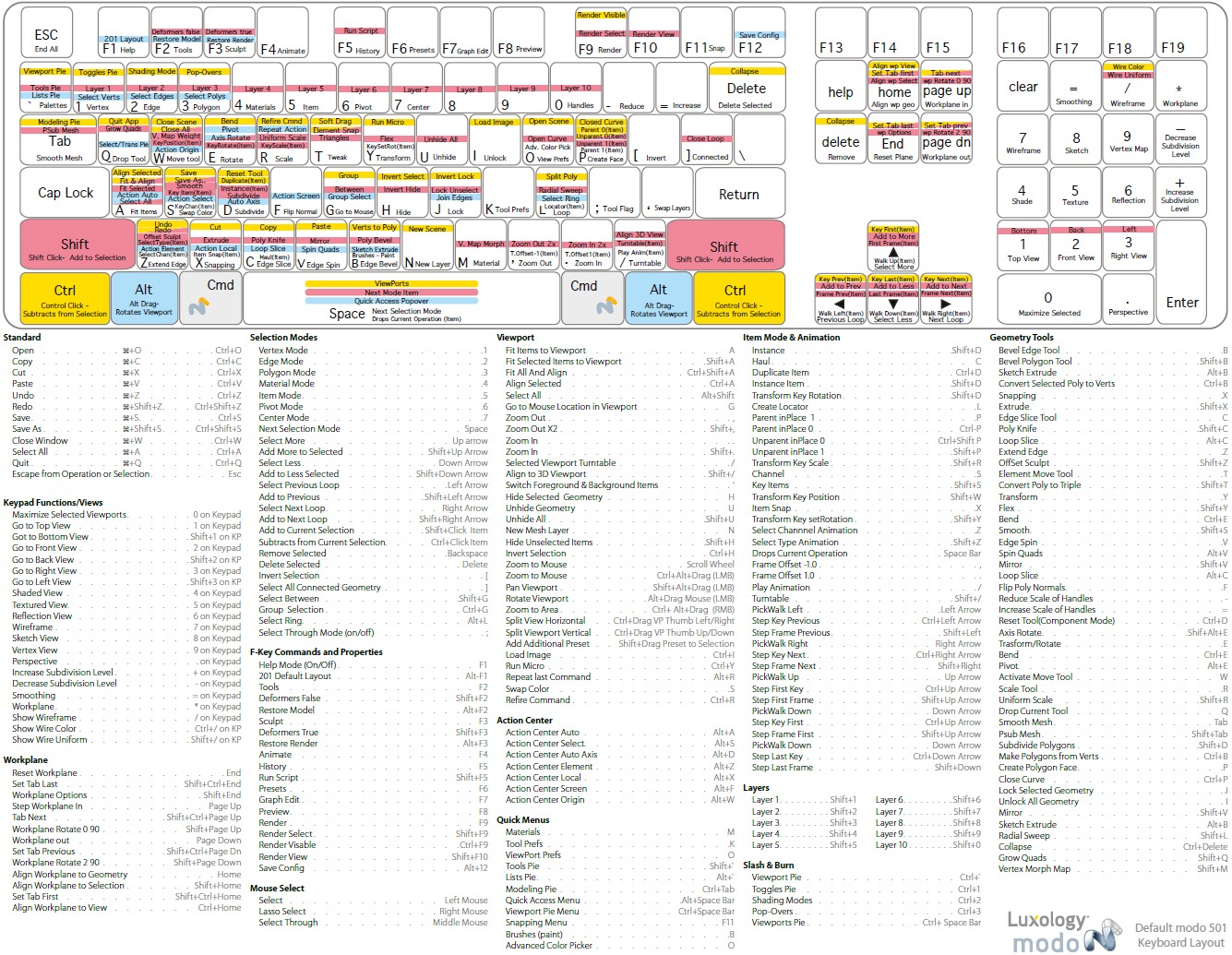
@native tangle oh right, I should have linked Warrens youtube too earlier, really great stuff there for both Modo and UE4
native tangle
yea i have not had time to do anything. was setting up a trip back to ohio. but now im back to working. im watching now THANKYOU ❤
ooo that has the trackball setting. now i see what you mean. that mode really is bad @cursive dirge thankyou ❤
cursive dirge
yeah
I really can't believe they still default it on
I only know one person that likes it
everyone else finds it annoying
other thing that annoyed me hugely at first was the "flick" thing
like when you spin object, it keeps spinning
I dunno if it's related to trackball thing, for some reason I haven't had issues with it anymore
pretty sure some of the intro tutorials described it though
native tangle
yea mine went nuts and spun for 3 mins haha
i want to get rid of the white workplane. i don't like that. i just need a floor only
cursive dirge
you can hide it
but it can be super handy still
when you need to model things in angles
that vid I linked actually showed how to use it
foggy valley
@cursive dirge aha!
native tangle
yea but I don't