#virtual-reality
1 messages · Page 223 of 1
 last knot
 ornate sun
Hi there,
I can't get the Widget Interaction component to interact with a Web Browser widget, this error only happens when running the project on a physical device (Oculus Quest), on the editor everything works as expected.
I have set up my widget interaction and it works well with all widgets types both in the editor and physical device, only the Web Browser widget doesn't seem to react to interactions when running on the device.
Any idea how can I debug this?
 mighty carbon
@last knot I had similar issue with v15.. I connected to the HMD with my phone, disabled and re-enabled developer's mode and it started working again.
last knot
@mighty carbon thanks, will try that. also oddity: under the screen to change the Virtual Environment, it keeps saying "No internet connection" and not listing the environments. Yet I can use the browser and the internet connection works fine...
 languid night
Is there like a built in function that get's players height as specified when they were setting up the VR headset?
Like Oculus asks you to set up your height. Is it possible to get that value somehow?
last knot
@mighty carbon welp, it was the cable. would have checked that first, but I had to actually FIND another USB-A to USB-C cable. Or an adapter, which I didn't have because I always had the amazon cable I ordered for Link. Tip for those who find themselves in the same predicament: if you have a Nintendo Switch and the Pro Controller, you have a USB-A to USB-C cable! A very, very short cable.
 real needle
Okay guys I'm losing my git here
I'm on oculus branch 4.24 and there's no oculus performance section in the project settings
plugin is enabled
checked the source code, checked the upstream of my repo, it's undoubtedly the correct branch
even pulled latest commits and rebuit today
 rotund jewel
Is steam input working with 4.24? For me their sample is constantly crashing . Want to add grab pose for pick up. Any alternative ?
 sonic lake
@real needle which performance section are you looking for exactly?
 tulip breach
anyone know why in ue4.24 my Vive controllers arent tracking or getting input
saw they derpricated some old input already setup my action mapping to the new Vive (R) Trigger etc
last knot
@mighty carbon Remember the issue with the USB cable? It got even weirder when I got my replacement cable. Found out there's nothing wrong with the original cable. It's the port (on the back of the computer). If I plug a USB 2 cable into that USB 3 port, it works fine (though Dash says it's connected with a non-USB 3 cable). If I plug either of the USB 3 cables into a USB 2 port, it says it's connected but not USB 2. If I plug either USB 3 cable into either of the USB 3 ports on the front of my computer (which are conveniently NOT blue and only have the "SS" markings, so I'd missed that they were USB 3), it works fine and Dash says it's connected via USB 3. Same thing if I plug it into the other USB 3 port on the back of my computer (which was currently used by my KVM switch). So it's that specific port that after months of totally normal use went bad, and only if you try to connect a USB 3 cable to it.
mighty carbon
damn
 obtuse spruce
If I run a project through SteamVR, an event whose delegate is fed to a looping timer never gets called (print right at the start of the event doesn't print). It works just fine through Oculus -- the print shows up, plus the rest of the event does its thing.
How could this happen? Anyone seen anything like that?
This issue of timer-driven events not firing if run through SteamVR happens in another BP too. Very confusing.
Running 4.24.3 on that project btw
 slate relic
Hey I'm making a VR game and I'm getting a high draw thread in a blank level with no lighting an mesh's do you guys have any idea what's happening?
 daring shale
Hey guys, why is Beat Saber the #1 VR game and it only has an average play time of 1.5 hours? What are they doing so right? Is it viral marketing? Tik Tok?
I'm also wondering what kind of work is involved in adapting existing games for VR. For example if Modern Warfare wanted to make a VR version of their game would they be sht out of luck, possible but very difficult, or pretty easy with mostly moderate tweaks?
 cosmic shoal
@daring shale Beat Saber has very good press, every channel and web page that talks about VR rated it hightly. The consensus is that it's a lot of fun. I don't know if 1.5 hours is low, My games library is so swollen I think that's above average for me. As far as adapting a game for VR, doing it right is hard, you have to basically rethink your game completely in terms of mechanics, interface, interactions, controllers, etc. It has been done, there is Skyrim VR, Serious Sam VR, Thalos principle VR, Fallout 4 VR, etc.
daring shale
I wonder how much Linus Tech Tips has a hand in it because they seem to make Beat Saber their benchmark game. I want to reach benchmark status like that with my game. To reiterate on my question how difficult do you think it would be to make Modern Warfare a stereo game with all the same keyboard/mouse or controller mechanics but with a stereo 6DOF view? Has this been done before with lackluster results because of some unintuitive user experience conflicts?
cosmic shoal
There is a tool that will let you play a ton of games in VR called VorpX when I tried it, it only had 3 DOF and that's sucky. Dunno if they have continued to improve it.
I guess they did add positional tracking, might have to give it another shot
It was interesting enough that I played about two hours of Bioshock infinite with VorpX
daring shale
Ah I was about to watch a video on that, I will check it out. I guess it must be a huge step in complexity to make a 3DOF hack like that into a full 6DOF?
cosmic shoal
I read that it is full 6DOF now
It had config files for each game, you could also calibrate stuff in it (Field of view, rotation speed, controller bindings etc)
the thing is, rotating the camera with the mouse is not a good feeling in VR. Another alternative is to play the game in 3d inside Bigscreen. (or vorpx cinema mode)
that feels like playing the game in a 3d monitor.
not as immersive, but less nauseating.
daring shale
I pulled up a youtube video, gonna spend some time watching. I watched some Ocarina of Time VR conversion videos and that seemed jenky but still fun, mainly because of emotional equity. Is it known that people don't get used to rotating the camera with mouse? Bigscreen/Cinema mode are like a VR version of that multi-layer glasses-free 3D display?
I'm looking at the website SteamSpy that shows data on Steam game sales, concurrent users, etc. Their data looks dirty, I'm not sure how they get their data, lots of NAN's. For the data they do have it shows that for a lot of popular games on average only about 20% of people ever launch the game. Peak concurrent users for Beat Saber yesterday was 2,600. That's about 0.01% of purchases. If this data is correct it makes me think game developers artificially inflate their own numbers kind of like how some book authors buy their own book and give it away to rise through the ranks. Is there some truth to this?
cosmic shoal
I spent a few hours playing rotating the view in VR with the mouse and the experience is a mixed bag, the game felt very intense, also very scary, in a good way. But feeling a bit sick left a bad taste in my mouth and I never went back to VorpX after that. It could have been the lack of positional tracking at the time or most likely rotating with the mouse. I spent way more time that than on a proper implementation of VR of Minecraft that came out about 2 years ago (fan made mod). I have no idea about Steam stats or marketing strategies.
daring shale
I see, I haven't tried VR yet but I've been lurking the development hard for years. My regular old 60hz TN panel makes me a little sick as it is with 0DOF, but I think I'm really sensitive to frame rate.
For my game I want head tracking to control camera view and eye tracking to control crosshair. Is this standard for eye tracking headsets? Are there other controls that can be assigned to eye tracking like wink gestures or eyelid squints or eyebrow movement?
cosmic shoal
Eye tracking is very rare
it's basically in experimental phase still
The only use I can think of for face gestures as controller is to help paraplegics do stuff on a computer, for gaming you hands are way better at imput.
daring shale
I see, I'm planning my game for around 2030 so I'm making the assumption that by then about 100MM people will have an endgame setup, haptic suit, full body gesture tracking, 21 axis hand controller/gloves etc. I was thinking facial gestures could be interesting for controlling zoom or environmental effects since my game will be psychedelic in nature.
 daring shale
That just gave me an idea for a solenoid that delivers different kinds of gun kickback.
cosmic shoal
this one has that
cosmic shoal
all right.
 faint quiver
Huh... TIL that Robo Recall was made with just BP
 covert ferry
Hi guys, I would really like to get/make something like this for my project.
But I can't find the actual tutorial anywhere, not even on hes patreon page.
Would be grateful for any suggestions!

:D waves
Patreon: https://www.patreon.com/deanashford
Discord: https://discord.gg/ttqYq3r
Twitter: https://twitter.com/Play_Ruff
__
Huge thanks to my Patrons:
Assassinator Entertainment
Bradd
Caleb Moore
Dhiego Lúcio
Guillaume Guérillot
Isabelle Britton
Kamaal Manboard
M...
 tribal spear
Does anyone know what to do about this?
The selection in vr mode is way off in the left eye.
it is in 4.24 and 4.25 preview 7
with the oculus rift cv1
 noble radish
Hey doing University work need some help using a VR template and i believe that the widget interaction component is stopping the teleporting any ideas on how to fix this ?
noble radish
 quiet vector
I swear this engine hates me
I find a tutorial that I think does what I want, but of course it's BP, and it you can only follow it if you already know what you are doing (and if I knew that I wouldn't be trying to follow a tutorial)
is there any actual c++ tutorial for vr that explains why you are doing things and how that achieves the goal, that doesn't require pre-existing knowledge of the engine, and isn't 100% blueprint, and actually works?
I have yet to find one, everything is either broken in some way, basically shows you to copy and paste but doesn't explain anything about why/how you are doing these things, or it glosses over all the stuff it assumes you already know
this really shouldn't be so impossible 😦
 quiet vector
I'm trying to make an echo clone, it's damn impossible in ue4
 jagged vale
Quick question. Do you guys use your VR headset for development in non-VR games?
 tired tree
It's not all that hard @quiet vector it really comes down to you trying to rush into it instead of fully learn the engine.
quiet vector
yeah but this is like hello world stuff that should be supported out of the box and it seems like I have to jump through tons of hoops just to get a hello world working
like right now I have to read about animation retargeting, for a hello world, for a project that doesnt have any predefined animations, why?
tired tree
You really don't though.... Body ik isn't hello world
quiet vector
for vr... it kinda is
tired tree
No it's not
quiet vector
even just arms
tired tree
It's one of the harder problems to solve on a clean way
You can do some really rough mock up with a fabrik setup in 30 mins, but echo style ik is hard
Well less hard than walking
quiet vector
but I can't set up fabrik because I need to use this animation retargeting thing, apparently
tired tree
Are you using a custom skeleton? Because then yes you would, and again not hello world because you are using a custom skeleton
quiet vector
the mobile mannequin from epic
tired tree
Where are your animations from then? It should be fine
quiet vector
there are no animations on it, from what I can tell, and apparently to set up fabrik I need an animation, or so this tutorial is basing from
tired tree
No?
quiet vector
like literally it's step 7 "Head into the Anim Graph and create a new PlayThirdPersonIdle node."
tired tree
Ik is driving bone chains
You don't need to do anything
They are adding a base idle animation is all
quiet vector
yeah but HOW lol
tired tree
Don't even do it
You don't want an idle animation for an ik body
Unsure why they even go there
Let it stay at base pose and just drive it with ik
You can blend in animations later
quiet vector
that was my original intention yes, because this would be fully IK and procedural
tired tree
That book is also nearly 3 years old now, it's pretty dated
Mitch was doing vr work early on in ue4s vr lifespan
Though most of that ik section should still "work"
And bp examples wouldn't be too different
jagged vale
How on earth do you correlate making echo in UE4 to a hello world
There is no reason that should be that basic
tired tree
Is still not hello world
Unless you use a plugin that does it for you
"good" ik is hard
That book example is not in any way good ik
quiet vector
it doesnt have to be good, I can make it good if I can make anything work
like if I can get the head moving and see how the different parts make it move, I can make it do wahtever I want
I'm just trying to get to the point where the head moves, or the arm moves, ro something
 daring pasture
Today I learned IK and Hello World are basically the same
quiet vector
I mean seeing your arms with VR isn't an uncommon feature, not too dissimilar from 1st vs 3rd person camera support
quiet vector
if this tutorial is a few years old though, please point to a new one
 arctic path
Hey guys - I'm trying to use the physical movement of a VR plugin for mobile but without the stereo rendering. When I turn stereo off the camera stops moving as well and it ignores phone movements. Any ideas?
quiet vector
I'm too new to know, but the problem and potential concepts of what you're doing sounds really interesting
quiet vector
Finally some good news! I got HMD-location head IK mostly working, able to lean torso etc. Camera values were null, so I switched to GetOrientationAndPosition for HMD and that caused the IK to start responding as the HMD moved. Oddly though, the rotation of the device seems null even though location is working. Not sure how that is a thing.
 hexed tartan
hey there, I'm beginning with VR in UE4. Do you know of a way to know if there is a VR headset connected on the PC when the gamemode starts to create the player controllers? This would be for a multiplayer game, and I'd like to spawn different sets of character / player controller for each client, depending on whether or not a HMD is there or not
 hushed nova
Hey guys is it possible to change what blocks the UWidgetInteractionComponent? I want it to go through basically everything (meshes, etc) except the widgets
tired tree
@hushed nova you can run your own traces and pass them in as a custom hit result to widget interactors
hushed nova
Yeh I figured it out, made a custom game trace channel and set its default to ignore everything except on the UI
obtuse spruce
Anyone know why running my project through SteamVR causes my looping timer-fed events to never fire? Works just fine if run through Oculus.
Would really appreciate a lead here!
edit: Had a script that set global time dilation to 0.0 if app doesn't have VR focus, but I think GetVRFocusState always returns False for the Vive. That was the problem!
@covert ferry You could make that with Render Targets. This tutorial is a good start, but you'll have to replace painting by traces out of the camera w/ painting by traces out of the tip of the pen.

raywenderlich.com
In this Unreal Engine 4 tutorial, you will learn how to paint various textures onto meshes using materials and render targets.
covert ferry
Thank you @obtuse spruce I will look at that!
 chilly pasture
Hey guys, I want to, create something like a story, in which one character is doing something, i want to see the whole story through the character prespective. but does not want to use tracking.
Can some give me an hint , how should i approach this.
quiet vector
does the story involve getting viewers sick?
 sage gulch
anyone noticed the current version of UE sometimes sending the headset audio to external speakers mid game? I have music playing at my title screen, and it was fine in 4.22.. but after loading the same thing in 4.24, it will sometimes switch output devices. Always at the same point in the title screen, and it doesn't always do it, there is no apparent reason why, but if it happens it is always at the same point
real needle
Can someone help me do what's in this video? I'll give them 15$ for 10 minutes of their time.

In this video we unbox and setup an HTC Vive Pro Virtual Reality system. We then use the Vive Controller in Unreal Engine 4 to create a basic virtual camera. Finally I implement a prototype virtual camera system in Cine Tracer using the Rokoko animation from the previous vlo...
It's just a virtual camera in ue4, where you have the camera virtual camera tracked where the vr controller is.
that's all.
I just need help setting up the blueprint at 4:04
Just message me or ping me here if you can provide assistance.
 fair hearth
It’s one blueprint node, what are you having trouble with?
chilly pasture
@quiet vector may be if viewers have a weak stomach.
arctic path
Any idea how to use the Google VR plugin only for the tracking and movement and remove the stereo rendering? I've tried 'stereo off' but it shuts off tracking as well. I'm looking for a magic window type effect. Thanks!
obtuse spruce
How do I check if the SteamVR menu is up while my app is running? GetVRFocusState doesn't seem to work for the Vive, but properly returns False if Oculus Dash is up.
quiet vector
@chilly pasture I don't have any on-hand right now but there are some tutorials for using 3rd person template to add a "vr body" and they cut out the idle animation. If I get on later I'll try to find the link. Otherwise, I'd recommend an experiment. Have somebody not used to VR put on the headset and not move, and have somebody else (you) use the controllers or keyboard to move them around.
I have a similar need to restrict the camera movement, so if I figure anything out I'll let you know, it would do what you need
real needle
@fair hearth hey if you can do it, I'll give you 15$
I'm just a film enthusiast, not a blueprint user.
better yet I'll give you 20$ to teach the process to me.
quiet vector
Anyone familiar with AnimGraph and IK blending the ROTATION of the headset or motion controllers? I'm able to get the hmd and controllers and IK via the location pretty easily, but rotation doesn't appear to work for any of them.
I suspect I'm missing a setting somewhere since the location part works
aha I needed "Copy Target Rotation" on the FABRIK thingy, they are reversed but no big deal can flip that around
 nimble edge
@real needle it's literally in the video you linked. Make an actor. Add a camera component. On tick set the relative transform, and get the data from whatever tracked device (by ID) you want.
I personally have some controls in mine for stabilization, but the core of it is what's in the video.
real needle
I did that and it didn't work
I think it may have something to do with vr for unreal
@nimble edge
I tried it with both my quest and wmr, just to make sure
I know I'm doing something wrong, but I don't quite know where it is.
nimble edge
I'll send you a project, give me a minute
real needle
Thank you
chilly pasture
@quiet vector thanks Brock for the clarification.
 thin solstice
@real needle Are you trying to use those controllers on the Quest or on wmr without the headset on? That seems to be the advantage here (maybe that's not what you are trying to achieve) but I don't think that will work with those headsets as there's no way to track the controllers. For that, you would need a Vive or Valve index or something with external tracking.
real needle
With the headset.
quiet vector
is there any way to 'step through' an animgraph, or better visualize what happens at each node? I'm trying to get my hmd head rotation to correctly effect my pawn head rotation via fabrik, but the head is always twisted in both orientation and rotates on different axes from my real head. I suspect it's because both the skeletalmesh of a pawn is rotated -90 yaw to be straight, and the neck/head bone is vertical, but even walking through this in my mind it doesnt quite add up right in the game.
 hallow knoll
@quiet vector I go over how to convert rotations from HMD to Skeleton on this livestream: https://youtu.be/ehK6j6Es-ck

Creating natural-looking animations can be challenging, but with UE4 and a VR headset, you can create an entry-level motion capture setup without breaking the bank. On this week’s livestream, Victor and Alexander will walk you through how to achieve this with Animation Bluepri...
quiet vector
awesome thanks, will check it out
I got it down to pitch and yaw being reversed (ie pitch real head yaws game head and vice versa)
but I have the same problem wiht hands too
this should help
 magic bridge
Is there a noticeable cost to having my NavMeshBounds Volume much, much, larger than my actual play area? This would be for mobile AR with dynamic navmesh enabled
 inner tartan
Anyone else having troubles with getting Oculus VR Controllers to work on ue 4.24?
The template VR level half works, the headset and general motion for the hands work, but none of the button inputs fire.
inner tartan
Nevermind, apparently with the new XR inputs you need to actually enable the XR plugin for them to work.
quiet vector
@hallow knoll You are awesome thanks for that video! It's the first video or tutorial I've seen where the person explains why you do certain things and why the apparently-obvious might not work. Thanks to that I was able to follow you and get the head and hands IK working. I was trying to do the right thing, I had the logic correct including the rotator combines and everything but I was pulling all the data directly from within AnimGraph so I was using pawn + various VR sources. The GetDeviceWorldPose in EventGraph seems to be key!
Now to figure out why it's jerky as hell, but at least it's in the right spot!
 oak ridge
hi, I am trying to get image recognition working with 4.24.3 (ARKit) but it doesnt seem to be working, it works in ARCore with the same code
 cerulean mortar
Hi all, currently profiling a VR project and noticing we're getting (predictable) spikes in frame time due to Oculus stat "FinishRendering"
Any way I can get more information about why those frames are taking a much longer time than others? Thanks
@manic ledge
Hi, did you find a solution?
 manic ledge
Hey Charles!
Great question - Not a clue to be honest, not sure what project or hitching that was relating to! You must have pulled this one out the archives! I've not worked with VR for at least 6 months 😂
I hope you find your solution soon.
cerulean mortar
okay, thank you anyway, I'll continue to look into it ! 😄
manic ledge
I'm trying to cast my mind back now I've looked at the timestamp of my original message. It might have been on a project where we had a very bespoke setup with a plugin that could have been hogging CPU on those frames, and as a result was giving the impression Oculus "Finish Rendering" was taking longer than expected.
That plugin isn't available for public use (only a select few companies are partners on it) so likely not your issue (if it was the issue when I was asking - not 100% of when that was!)
cerulean mortar
ok, from what we found, it might have to do with vsync or something like that on Oculus Quest
 hard relic
hi, how can i fix the direction of my map at the startup, based of my Quest Guardian? (Actually it is aligned with my helmet direction at startup). I want the North to be at the North everytime. It must be a well know subject, can you point me in the right direction?
quiet vector
I can't help but wonder if that pun was intentional or not
hard relic
^^
quiet vector
I think we would need more info about your character or map.
tired tree
@hard relic remove the reorientation from the spawn logic
you have full control over it
currently I rotate to face the player spawn
remove that part
hard relic
really? i tought it was a common settings that occurs in classic VR too...
tired tree
just make sure that the character has zero rotation
and your play space forward will be map forward
you can adjust from there
 ruby notch
THIS IS HUUUUGE 😄 https://youtu.be/LzLht9m51XQ Although looks a bit strange and can see it breaking easily, its a step in the right direction!
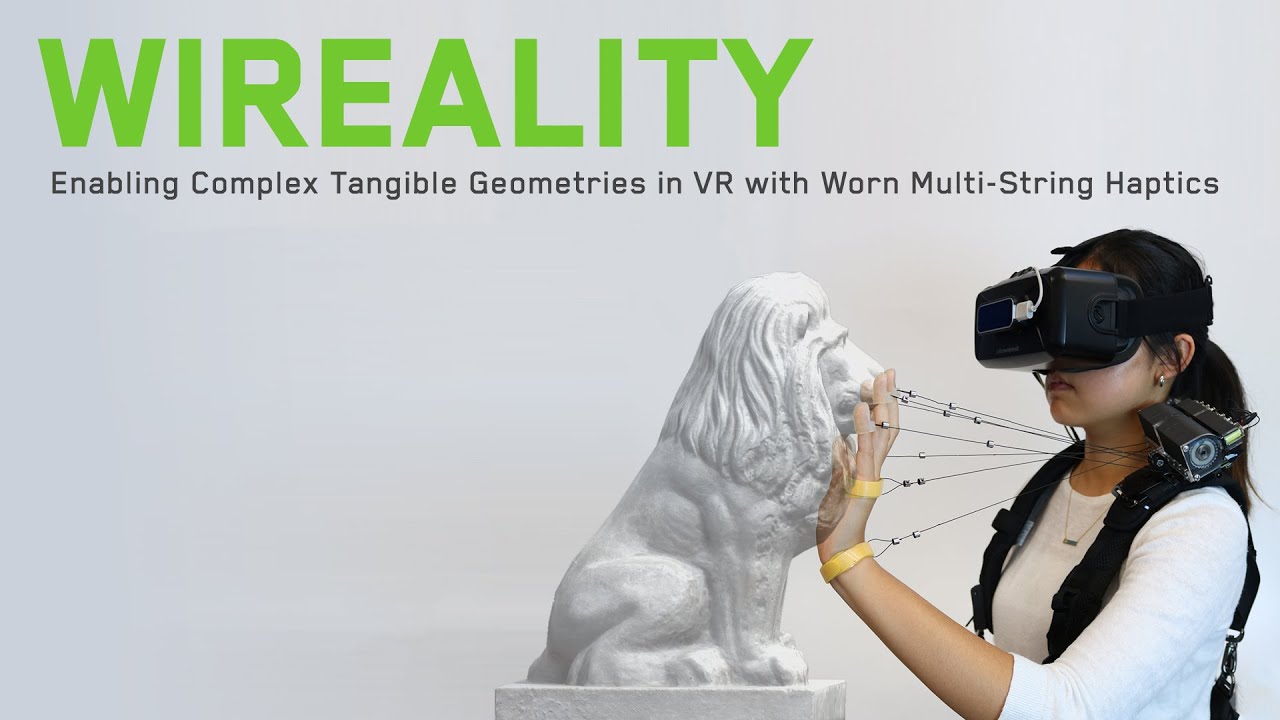
Wireality is a worn VR haptic system that allows for individual joints on the hands to be accurately arrested in 3D space through the use of retractable wires that can be locked. This allows for convincing tangible interactions with large and complex geometries, such as walls,...
tired tree
its really not
tired tree
its a really neat concept at least
quiet vector
yeah
hard relic
it need to be electrical stimulation in the arms to paralyze nerves. ^^
quiet vector
really one of the big things is going to be better out-of-the-box support for common VR patterns (meaning various body representation, movement forms, network support, etc)
it's really easy to make crappy local shooting gallery games, but it's kinda like Nintendo Wii in that once you try it and the initial coolness factor wears off it's all the same
as things like OpenXR take more hold, and there are better plugins or engine support for things like replicated upper body IK, it will be easier to get good content going
 hybrid plume
hi guys
can anyone shed some light on input bindings for the Vive Cosmos? In 4.24.3 I don't see cosmos inputs anywhere although I have the SteamVR plugin enabled
hard relic
not sure to have been clear when explaining last time: maybe better with a draw.
do i have to create an offset based on the center of my guardian, with a substract rotation blahblahblah or there is integrated functions do to that? Or somebody have already done that elsewhere?
hard relic
when i move my character, the Guardian isn't be well placed anymore. it's a bit hard to explain. I will do some more tests.
tired tree
your character IS your guardian is what I was saying
if you move your character, you move your guardian in game
character position would be dead center of tracked space
hard relic
Ah. I have to precise that i'm drawing a hard version of my guardian.
inner tartan
can anyone shed some light on input bindings for the Vive Cosmos? In 4.24.3 I don't see cosmos inputs anywhere although I have the SteamVR plugin enabled
@hybrid plume try enabling the OpenXR plugin, I had to do that to get button inputs to work on my Rift.
hybrid plume
@inner tartan thanks I’ll try that
inner tartan
Also I think the cosmos bindings are the same as the normal vive bindings, I could be wrong though, I don't have a Vive on me.
hybrid plume
no unfortunately they aren't, I've got it working on my Vive but client needs it working universally even on Cosmos
Has anyone been able to see these Cosmos inputs? For the life of me I can't seem to find them at all!
 limber flame
Hey everyone! I am looking to slow down the tracking and create some inertia to the handmovement, does anybody have any resources that can point me in the right direction to achieve this? I
I am currently working on the default Locomotion VR pawn
 gusty kettle
helloo. im using the AR Template. But im really lost on how to start. im a 3d modeler. what do i need to test it? i have a xiaomi year 2019ish. do i need my phone plugged? it shows this error
i appreciate help 🙂
 steady sparrow
Hello, i don't know if i ask this in the right section or in right time since i am new ... 🙂
I can't figure out how i can make wok properly my oculus rift with UE4 for steam packaging.
Should i activate Oculus VR Plugin or Steam VR Plugin or Both ? I have different performance or issue with controller. We are working for long time with both plugin enabled but now when i look deeply performance wise, i see a problem ...
 woven roost
Hey all, I'm trying to do some VP work and I have an CV1 Oculus Rift (with Touch Controllers). I'm trying to set the position/rotation of a camera actor according to the position/rotation of a touch controller. I know a lot of people are using Vive Trackers for this but in the interest of using what I have, how can I get the position/rotation of my Touch controllers. Can somebody point me to the location in the docs? For some reason I can only find how to get the HMD p/l.
hybrid plume
@gusty kettle please follow these instructions https://docs.unrealengine.com/en-US/Platforms/AR/HandheldAR/ARQuickStart/index.html
Getting up and running with the basics of Augmented Reality.
@steady sparrow yes both plugins should be enabled, what problems are you having?
hybrid plume
@woven roost call GetWorldLocation on the Motion Controller component part of your VR Pawn
Anyone been able to deploy to HTC cosmos? I need help with the input mappings
steady sparrow
@hybrid plume It's mainly performance issues, with steam VR or Oculus I'm well below 11ms (90fps) but when I have both enabled, GPU graphics spikes at 13ms. (No display in steam vr, everything goes through oculus but SteamVR is open and the VR display is probably consuming resources for nothing ...)
I also learned that it was possible to compile the project for SteamVR & Oculus natively by leaving the choice to the user on steam.
How can i do this ?
For the moment I have only activated Oculus to be able to continue developing.
Thanks a lot!
 spice helm
what do you say, we got 2 ways, one way is matrix way, filled with food and own filth hooked up to vr headset, other is merge dimensions of reality and cyberspace
whats ur view
steady sparrow
Personally, I'm ok with the idea of a cyberpunkified world where different gadgets become extensions of the human body. Then it's just a matter of keeping it reasonable
the reality will remain the reality, but you have to spice it up a little.
spice helm
i think vr is entertaining, but f it, ar mixes it, proper ar games of futer will entertain on another level
i can see it
i mean i think vr can reduce human evolution, the way i see it, you put a sack on your head, and go, might as well visualise things, more use
u are right, path is path, but there are choices that shape future, but no replau on that b
hybrid plume
@split steeple I saw your post: https://github.com/ValveSoftware/steamvr_unreal_plugin/issues/99 can you please help me I can't seem to find the Cosmos input bindings you discussed

GitHub
Until its released on marketplace could we dn it from github?
 civic pelican
Hello I have a question regarding a use-case and if this would be possible to realize using unreal Engine 4. My company would like to have an app where they can track specific information like Maintenance dates for Lamps/fire detectors/ etc using AR. So that for example the caretaker can run around with the app, hover over the Lamp for example and see some facts about it.
My first question is related how the position of AR objects is stored in general. So how does the app know that it should render the information at the exact location every time it looks at that specific location inside the real world building?
I hope my question is not to confusing :S
steady sparrow
@hybrid plume his post is related to this link i think (see description)
https://www.unrealengine.com/marketplace/en-US/product/steamvr-input-for-unreal

Integrates Valve's SteamVR Input features in an intuitive and easy to use way for Unreal developers.
maybe this can help, idk if your issue is with steam vr binding

Medium
SteamVR’s new Input System offers developers the ability to abstract key mechanics or “actions” of a VR Experience/Game and map them to…
@civic pelican +1 i'd like to knw how it works too
hybrid plume
Thanks @steady sparrow I've seen these, still no clue where the Cosmos inputs show up.
hybrid plume
@civic pelican you would use image recognition for the lamp, rather than the specific location it is in to retrieve information about it
quiet vector
IMO, and I know nothing about AR so this is from a general programming perspective, I'd imagine that image recognition of lots of the same lamps would be near impossible. I'd consider exploring options related to wifi signal strength triangulation, phone gps, etc.
or, if possible, print out large-ish QR code stickers that you put next to the objects
something that is easier to do image recognition on
damnit this sounds like fun, now I want to buy an AR headset and do something like this
hybrid plume
correct QR codes is the way to tag specific lamps
 split steeple
@split steeple I saw your post: https://github.com/ValveSoftware/steamvr_unreal_plugin/issues/99 can you please help me I can't seem to find the Cosmos input bindings you discussed
@hybrid plume is the steamvr plugin active? it's easy to check with the marketplace version and in the integrated engine version in 4.24 -- there should be a steamvr logo/button in the main toolbar
GitHub
Until its released on marketplace could we dn it from github?
hybrid plume
Thanks for getting back to me @split steeple yes the integrated SteamVR plugins always been active. I've actually JUST resolved the issue, although in a wayward manner: I edited the vive_cosmos_controller.json and DefaultInput.ini files manually. Interestingly though, as soon as one Cosmos binding was entered, the ability to enter the rest of them directly from UE Editor appeared. Cosmos just wasn't showing up as an option out-of-the-box in PROJECT SETTINGS>INPUT before I manually entered it in the DefaultInput.ini
Also thanks for putting up the SteamVRInputPlugin_UEIntegrated project, I used it to guide me manually editing the vive_cosmos_controller.json and DefaultInput.ini files
split steeple
ah... glad you got it sorted. just tried replicating from a 4.25 preview build:
thought that might be an issue as an older build I was testing with this morning does seem to have the cosmos keys disappearing
latest public builds seem to be ok though.
lemme know if you encounter any more issues with it
hybrid plume
cool so its resolved in latest 4.25 that's wonderful 👍 do kinda miss the old universal SteamVR bindings, but understand the move still
 chilly ocean
Has anyone done UMG work with VR input? Specifically, what I want to do is use the scroll input on the Valve Index touch controllers to scroll, but I don't know how to enable scrolling on a UMG widget in world space
 sturdy coral
@chilly ocean let me look, I set that up recently
UWidgetInteraction has a scroll method you can call:
bool WidgetInteractionComponent::ScrollWheel(float ScrollDelta)```I think it may not have that bool return value by default, I added that in or something similar to make it tell whether it consumed the scroll event or not
 exotic cosmos
has anyone worked with AR image tracking? I have that working decently but I want to make an actor DESPAWN once tracking is lost on the image i'm looking at. I can't find a way to actually tell if nothing is being tracked :/
I have this blueprint that casts AR geometries to an AR TRacked Image. if I put a string debug on "cast failed" or the next branch's failure, it will debug constantly until I match the candidate image.
What I expect is that after I am not looking at the candidate image, the "get all AR geometries" will begin to "cast failed" again. However, it doesn't
after it's caught an image, it looks like it stops getting AR geometries altogether
exotic cosmos
the "not getting AR geometries" was an actor tick issue. But if anyone knows a blueprint solution to tell when a tracked image is NOT on camera, that would be much appreciated
edit: when it has left camera. see image -> spawn actor -> close image -> actor despawn is the flow
obtuse spruce
Anyone on 4.24 notice actions mapped to the Vive's Grip firing twice when the button is pressed once?
tired tree
@obtuse spruce do you have multiple actions bound to the same button? Doesn't have to be the grip itself
Inputs can fire other actions withbcross binding in the new setup
It's an issue with how it's currently implemented
obtuse spruce
I do have multiple actions bound to the same button
What do you mean by "cross binding"?
tired tree
I mean binding the same button across multiple actions, it can trigger random inputs with how they have it Implemented
obtuse spruce
Well that's no good. Thanks for letting me know!
 sonic tide
getting some nice openxr errors on oculus
Error: Ensure condition failed: ((Result) >= 0) [File:D:/Build/++UE4/Sync/Engine/Plugins/Runtime/OpenXR/Source/OpenXRHMD/Private/OpenXRHMD.cpp] [Line: 1366]
 rich canopy
For 4.24, do you see the steamvr input icon on the toolbar? I can't find it.
sturdy coral
@rich canopy which headset are you using?
with oculus and wmr it will prioritize a different plugin over steamvr
rich canopy
Yea i was using the quest link
 molten fulcrum
Hey, I am kind of a beginner with ue4 steamvr input plugin , I have been trying to use custom hand mesh for the steamvr input motioncontrollerpawn that support the UE4 Hand skeleton, I only have a mesh for the right hand so when I tried to create a animation blueprint for these custom hand meshes similar to the way the steamvr gloves animation blueprint are written for the input plugin are written the right hand works just fine but when I tried doing the same thing with the left hand the thumb just twists like this. I really have no idea what to do.
When I do play the game, the hand is getting information from the controller it's just all twisted like this
languid night
Hello VR Gods! How do I package to oculus quest? I've configured the APK Packaging area as below, but I keep getting this error DistributionSigning settings are not all set. Check the DistributionSettings section in the Android tab of Project Settings
Does anyone know how to fix it?
languid night
So nobody encountered this error at all?
languid night
Ok you need to untick "For Distribution"
 edgy pelican
I remember having to setup via adb and going through Oculus to receive a distribution key. Otherwise, doing what you did seems to work until you decide to publish.
Oh, right @languid night
 balmy edge
with unreal tech, when using a relatively simple scene (a few hundred polys, no complex shaders) what's the minimum delay one can get between movement of head and display update on a vr headset? movement is registered by an IMU.
sturdy coral
@balmy edge all VR runtimes will reproject it to more recent or predicted pose data anyway, at least for rotations
balmy edge
i'm asking about real data not reprojection
sturdy coral
If you need absolutely minimum latency you can tell the render thread to run after game thread tick instead of async with it
balmy edge
interesting, is this a terrible hack or something that's supported?
sturdy coral
There is a console command for it
It means you can't do render work while the game is ticking, so you will have less available gpu time overall
Wouldn't recommend it
balmy edge
right
sturdy coral
Better to just get an index and run in 120 or 144hz mode if you want the most minimal latency
Sending the data over hdmi takes up about half or a third of the normal latency
balmy edge
yeah but even at 120 hz the delay is sometimes noticeable
tired tree
? Shouldn't be too noticable at all
I would argue you would be noticing reprojection or something instead
sturdy coral
If it is noticeable in the hands that is different I guess, mordentral has found several issues with late updated motion controller components over time. May depend on which version you are on
balmy edge
there are degrees of noticeability
like, if the headset moves in relation to your eyes, then that's more easily noticeable than when it moves rigidly with your head
sturdy coral
That might just be distortion from the lenses not lag
If you move them relative to your eyes it distorts a bit different
balmy edge
it's definitely a real effect
with some mounts it's enough to have a heavy pulse and the headset view will start jiggling with your heartbeat
and because of the delay it creates a kind of feedback loop and just starts oscillating
because your limbic system tries to correct for the perceived motion so it moves the head up and down
it's like you're in an earthquake
haha
i've noticed that happens a bunch with unity games
tired tree
The natural tracking imprecision would be higher variation than that I would assume
Sounds like a false equivilancy to me
What tracking system have you noticed being the worst
The effect that is
balmy edge
my only experience is with the IMU on the PSVR on pc
100% certain it's picking up my pulse
tired tree
Oh jeez, that is the literal worst tracker
balmy edge
haha why
tired tree
There is a reason those things are stabilized by outside in or camera recognition
balmy edge
you think?
balmy edge
we're not talking about precision or drift. that's a red herring here
sturdy coral
Even bigger issue is running through some community driver stack it might be getting prediction wrong
balmy edge
that also isn't it
balmy edge
why would i do that?
sturdy coral
For better tracking
tired tree
Are you running corrections at all? Or only imu input
balmy edge
90 hz? no thank you
tired tree
90htz wmr is going to likely perform a lot better than 120 psvr
sturdy coral
I have both and the tracking and density is worth it over 120hz
balmy edge
@tired tree i'm not trying to debug the psvr. we can stop trying to guess what's wrong with the psvr. nothing is wrong with it
sturdy coral
Index is better than either, but odyssey+ has good blacks too
balmy edge
🙂
tired tree
Well you'd be wrong there, but regardless, no, that compound ing effect isn't anything that I or anyone I know has noticed in other headsets.
balmy edge
so... what sort of delay are we talking about at the least, input-to-render?
tired tree
Motion to photon? Depends on the hardware
sturdy coral
Psvr has really bad variable lens distortion even as you move your eyes, so I'd say that probably has the bigger effect if hmd shifting relative to your eyes from being loose
tired tree
It's not all engine, it's display and software stack too
balmy edge
well, let's take the psvr as an example
120hz screen, 2000hz imu
the imu comes in over usb2
sturdy coral
USB usually won't even run at 2000hz and gets stuck at 1000, but maybe that's only with polling
It has some kind of 1ms time slice
balmy edge
2000 hz is the sampling frequency - the data is 1000 hz. each packet has two samples
as far as i understand
sturdy coral
Try turning off r.OneFrameThreadLag
I think that might be the variable that controls the game thread/render thread sync
But I really doubt this will help unless the psvr driver isn't doing reprojection
tired tree
Ue4 specifically has a 1 frame delay from game to render thread, which is why there is a reprojection just prior to rendering, it resamples. Game thread shouldn't effect there too much as long as it is late correcting.
In vr at least, 2d can get up to 2 frames offset
balmy edge
i'm not currently working on an unreal code base, i'm just trying to figure out what the engine provides above other engines for vr. i'm thinking of building a vr based app, and i don't know which engine to choose.
sturdy coral
@balmy edge are you using 6dof?
balmy edge
3dof
sturdy coral
I wouldn't base engine choice on psvr performance on PC as something like less than 1% use it
tired tree
That is generally going to come down to your ability to optimize.
More than just specific engine
sturdy coral
And no matter the engine you are going to want to run at as high a res as possible and not trade off for latency
balmy edge
we're talking about rendering a single polygon right now
tired tree
Don't know the exact motion to photon latency of ue4 to psvr with no scene, you'd have to measure, it's not something taken into consideration generally as it's not related to performance generally.
sturdy coral
Dumb to focus on that unless that is your target, deferred pays more up front but pays off in more complex scenes, and forward has overhead too of the frustum grid based lighting etc. that is there for scalability to complex scenes
balmy edge
well, my target is projecting a video decoder onto a relatively low poly mesh (100s) with no lighting or shaders. so it's not far from the real use case.
sturdy coral
Your headset isn't in 6 dof so it should get late reprojected almost exactly the same anyway
Only slight parallax difference from head and neck model
balmy edge
yes, i know about reprojection, but i'm not asking about reprojection though
i'm asking about the perf of the engine 🙂 that's what i'm trying to differentiate based on right now
tired tree
Its important though for the motion performance that you are asking about
We are talking about engine side reprojection
sturdy coral
Video on surface is out of parallax range for any latency difference
balmy edge
yes and when buying a car it's important if you're driving on snow or in mud and if your tires are slit but right now i'm asking about the mileage so let's focus on the question and not the separate issues downstream
sturdy coral
If it isn't a real-time video program like with passthrough or something, I wouldn't worry about latency too much
balmy edge
look
tired tree
You can hit 120 on any decent engine to psvr, at that point more performance isn't going to get you better latency as it's the refresh rate. There is no comparison to give you here.
sturdy coral
Is psvr global update?
balmy edge
it's ok if you don't think you can or don't want to answer the question. it's not bad. but then just say that 😅
sturdy coral
Or scanned out
balmy edge
@tired tree that's not true. depending on the way the input and render code is set up the latency can be lower than a single frame, or multiple frames due to e.g. buffering.
tired tree
That is why there is a late resample / reprojection prior to rendering....
balmy edge
which, again, is not what i'm asking about
i'm not asking about what happens if the frame is late.
i'm asking about what can be achieved without reprojection
it's been 2 hours since i asked the original question. thanks for the chat. have a nice day 🙂
tired tree
1 frame late, but engine always does it
sturdy coral
If psvr is scanned out and not global update, your eye wobble from heartbeat thing is more likely an issue with compositor not being scan-out aware
Or doing it in the wrong way
quiet vector
In BP I used this GetActiveTrackingSystemName and then EnumerateTrackedDevices to get the HMD and motion controllers for anim IK purposes. I'm porting this to c++ now. Are those lib methods still recommended, or should I just use the UMotionControllerComponent that I already have setup?
 graceful tiger
How does a person determine if the player is using Vive Wands or Valve Index Controllers or any other vr motion controller?
 radiant karma
Does anyone know why this is happening? It seems to only happen in the vr type of game, i tried a blank one and it didn't do that
sturdy coral
@graceful tiger the newer steamvr input plugin has something you can query on actions, but it is unreliable when the first action will be processed even if it is an axis
I just added some thing to query it manually, adding a blueprint function
sturdy coral
ah nice, I'll look out for that
tired tree
same as my function does afaik
 brazen burrow
If you use oculus platform p2p to handle networking, then can you make your game interact with people on vive headsets? and if so, without having them make oculus accounts?
sturdy coral
@brazen burrow I believe it is possible to load multiple net drivers, they couldn't interact directly p2p though but a dedicated server could service both
brazen burrow
thanks @sturdy coral all this cross-platform stuff is frustrating...
quiet vector
speaking of frustrating, it seems like default player forward is X axis, but the default mesh is forward on Y axis, so to make a pawn with correct mesh rotation you have to rotate the mesh 90, but then anything you do with bones or anything you must also rotate by 90 EVERY SINGLE TIME FOREVER
or am I missing something?
graceful tiger
@sturdy coral Thanks! i started messing with that but I figured that there surely had to be a better way. @sturdy coral Where do I find that in 4.25. Since I'm 1 hour into my proj, i might just use the 4.25 prev.
 gaunt pumice
hey folks. i am having issues with the "open level" function. works fine in "standalone" but the games crahes in VR preview. what am I doing wrong? 🙂
 little scaffold
@gaunt pumice any log would be welcome
molten fulcrum
Hey, anyone has any tips on how can I make my vr hands not go through walls and other static objects? so the hands just touch the wall like in boneworks.
tired tree
@molten fulcrum looking for full arm (boneworks) or just hands (alyx)? very different implementations depending on that
quiet vector
I'm working on something similar right now myself, in C++ but I suppose the logic would also work in BP if you're using that. My general idea, which may or may not work, is that I'm putting 1 "layer" between the tracking data and the character data. I will treat the tracking data as the 'desired' transform but then perform collision or other restrictions on it to calculate the 'character' transform data.
daring pasture
Or just use a constraint
quiet vector
how would that work?
daring pasture
Adding a physics constraint to the motion controller and enabling collision on the hand if just using hands
Mordentral has an example in his template for doing something similar. He uses a custom physics constraint , not sure how difficult it would be to port over (if not using vre)haven't looked at it
daring pasture
They should work over multiplayer
quiet vector
hmm I will have to look at that then as well
I still need my layer for other reasons but that would help wiht the collision aspects
or is there maybe another way to limit HMD movement to within certain bounds?
for example if my in-game head can move 3ft, but a player in real life moves 6ft, I want the HMD camera to stop at 3ft
to prevent real-life movement from taking the camera outside the character limitations
daring pasture
You're going to have alot of angry players doing that
Unless its for blocking a wall, etc..
quiet vector
players will be angry without it due to wall cheating, I have other ways to make it feel ok for the user
daring pasture
Yeah I figured thats what you meant was regarding walls
quiet vector
also peeking around corners
so while the restriction may feel unnatural, the thing you're doing to get into a restricting scenario is also unnatural
and for corner peeking which isn't unnatural, there are some other mechanisms to make you not feel broken
but first I need to get tracking working in c++ and not in my animIK eventgraph BP
tired tree
you can avoid wall cheating and the like without that restriction
your original statement was that you wanted to avoid real world locomotion in a no gravity enviroment
gaunt pumice
@little scaffold the log said "LogHMD: Error: Splash ovrp_WaitToBeginFrame 361 failed (-1000)"
i found out that there is an issue with the splash screen, tried a few times - now everything is back to default and it works. dont know why 🙂
little scaffold
hmm good to know it works now 🙂
gaunt pumice
yes. another thing.. is there a way to improve the quality of widget components in VR? 2d widgets render perfectly like vector graphics, but 3d looks like a texture with bad resolution
 tired tree
@gaunt pumice you can also scale the widget canvas much larger and shrink it down
which helps a lot
 violet musk
Using the latest RenderDoc version with the Quest I always get an empty capture. Even tho the screen is turned on. Soemobdy experience with that?
UE 4.24.1
And haven't used RenderDoc before, followed the Oculus Doc about it https://developer.oculus.com/blog/how-to-optimize-your-oculus-quest-app-w-renderdoc-getting-started-frame-capture/
If I copy them over and import them, the same happens.
Huh
I guess, for some reason, it always simply showed the backbuffer first.
Once I dig deep enough, the capture is there. So yeah, **solved **:P
molten fulcrum
@tired tree I am trying to make it more alyx style
I want my floating hands not to go through stuff I tried doing it with constraints connecting the hand mesh to the motioncontroller but I couldn't get it right
gaunt pumice
thx @little scaffold and @tired tree
tired tree
@molten fulcrum I have a full demo of that then
granted I do have two custom c++ classes involved to clean up some problem areas with the engine, but you can work around it without them
molten fulcrum
is it like a plugin?
tired tree
well to get perfect Alyx like hands, I implemented a c++ class that drives welded collision bodies for the fingers
if you don't care about that, or want to use the physical animation component instead
it can all be as is in BP
molten fulcrum
is the plugin free?
tired tree
yes, i'll PM you with the reference repo
quiet vector
With C++ what's the correct way to identify and get tracking info for HMD and controllers? I originally used UMotionControllerComponent in C++ but wasn't actually using those components for anything. The IK I have set up was from a BP tutorial and I converted that code to C++ which looks like...
TrackingSystemName = UHeadMountedDisplayFunctionLibrary::GetHMDDeviceName();
DeviceIds = UHeadMountedDisplayFunctionLibrary::EnumerateTrackedDevices(TrackingSystemName, EXRTrackedDeviceType::Controller);
What's the difference though? Is one better/newer than the other? Using this code is there even a need for UMotionControllerComponent, or if I use the component what's the point of the UHeadMountedDisplayFunctionLibrary methods?
tired tree
If you are going to directly track full body mesh hands and attach to them there isn't much need for a motion controller.
For just about every other use they are good to have
quiet vector
that's what I'm thinking, I put them in because of the tutorials and examples I found and then I never actually used them for anything
the only nice thing so far is easily identifying left and right hand, since the UHeadMountedDisplayFunctionLibrary doesn't appear to have any way to do that
guessing that 0=left seems wrong though
tired tree
You can directly query the controllers, rip the code out of the motion controller getcurrentpose function fornit
Can pass in a motion source target
quiet vector
hmm, not even sure how to open the cpp files for that, the headers dont have any info
it just passes in the deviceid but that doesnt tell me anything really
molten fulcrum
Hey just wanted to ask I got this motioncontroller bp from the default ue4 vr template, I tried doing this constraint thing so the hands don't go through walls and it doesn't really work (the hand mesh doesn't show at all), probably something in the constraint's settings that I don't understand. Here is what I have done
molten fulcrum
I even tried putting the constraint and the hand mesh under the motion controller, it didn't work
 brisk spade
how could i realize sth like a waving flag?
 twin surge
Before UE 4.25 I used "return EdEngine->bUseVRPreviewForPlayWorld;" to detect if I run project in VR preview mode. In 4.25 it not works and I see this message when compiling the project: "Use FRequestPlaySessionParams::SessionPreviewTypeOverride on the queued/current session instead."
I tried to do something like "return EdEngine->GetPlaySessionRequest()->SessionPreviewTypeOverride == EPlaySessionPreviewType::VRPreview;" but it not works.
Does anybody know how to use the new "SessionPreviewTypeOverride" properly?
brisk spade
can i ceck the time between two points?
sonic lake
@brisk spade either wit cloth simulation or, less expensive, with morphs. On cloth simulation there are tutorials on YouTube.
brisk spade
morphs never heard that term
i do have another problem, when opening a level my base floor is aabove my level plane, after first teleporting it is correct
sonic lake
@brisk spade probably you accidentally moved the floor or, more likely, your starting position is not leveled with the floor
morphs aka morph targets. Are pre-built animations.
brisk spade
atm my VR space isnt set up right due to limited space
if VR is set up right i should not encounter weird heights?
 cyan kayak
Hello any one had any issues with AR on iOS ?
More specifically, when im using GetBoundaryPolygonInLocalSpace inside UARPlaneGeometry it always returns 0 on iOS but works correctly on Android
sonic lake
@brisk spade it could be that your space is not calibrated correctly
brisk spade
yep will ignore it for now, but will check it with a fixed playspace
 halcyon island
mighty carbon
halcyon island
mighty carbon
finally, 4.25 is out
sturdy coral
@brisk spade there is a vertex streaming thing for alembic files too where you could bake one from a cloth sim in blender
There is also a really simple waving flag in content examples, I think just using sin waves and vertex position offset
brisk spade
Thank you I will try to find a tutorial
sturdy coral
And there may be some in the desert race learning example
brisk spade
perfect
 upbeat eagle
What's up everyone. I'm sure this may have been asked here before, but if someone could point me in the proper direction. What is proper way/ best practice to test multiplayer in VR? It does not seem the editor supports it. Unless I'm missing something.
hallow knoll
@upbeat eagle I check "dedicated server" when I need to test VR specific things as the client, but most of the logic I just test with a "Flat"-pawn that inherits from the VR pawn. Attach MotionControllers to the Camera on Begin Play with a relative offset and hardcode WASD+whichever inputs you need
upbeat eagle
@hallow knoll Thanks for the info. Maybe i was doing something wrong. I tried something similar but it was like the hmd was trying to take controll of both clients.
hallow knoll
Yes you can only play as one client with VR Preview
upbeat eagle
Ah OK i see
hallow knoll
That's why the flat-pawn method is preferred when you're testing several pawns
upbeat eagle
OK ill try it out. Thanks for the help my friend. GGs
sturdy coral
@sturdy canyon "Improvement: Scene capture and reflection capture in VR Mode use Grow rather than Resize in select cases to improve performance."
Did that fix it by default now in 4.25?
RIP "Removed: Leap Motion plugin removed from engine as it is no longer supported."
 candid viper
Using Rift CV1 with Touch controllers under SteamVR (to allow use of Liv), but Unreal seems to get the wrong tracked locations/orientations for the controllers. If I open the SteamVR menu, it shows the Touch controller models in the right location, but Unreal returns a different location/orientation. Looks like maybe SteamVR is trying to emulate an original Vive controller result, or something similar. Does anyone have any experience with getting SteamVR in Unreal to return the true tracked location/orientation for Touch controllers?
 sturdy canyon
Yeah seems like it made the cut
Also the rhi thread is on by default on android now
That helps maintain framerate on Quest, but at the cost of an extra frame of latency
mighty carbon
@sturdy canyon so, rhi should be turned off on Quest ?
quiet vector
Anyone have recommendations for how to handle a punching collision type of check? Currently I have a collision capsule and hand tracking info, not directly coupled, and was thinking that I could do a move/sweep on the collision capsule from current location to tracking location, and if no hit then complete the move in air, if valid hit then I can position my character hand and such at the correct location (again not directly coupled to tracking). I was wondering if this is a decent plan though, and even if it is, is it the best approach when the full body skeletal mesh also has collision volumes in it. Maybe there is a way to try to move the IK and have the mesh return hits?
or in general how would you handle a body where there is a capsule at the root level to act as the body collision, but then you have head and hand collisions which of course dont sweep with the root
I figure move and sweep the root, then do it for each appendage separately, and if they hit then I can position them within constraints as best as possible, but it creates some odd situations like what happens if you fly past a wall with your arm sticking out. Your hand cant go through the wall but you can't just leave the tracked hand way back there, you'd maybe have to pull it back towards the center somehow
 shy merlin
Is there a way to tell when a person does the Oculus button hold to reset guardian orientation?
 scarlet jacinth
Just out of curiosity has anyone gotten UE4 to call the front facing camera's on a headset?
i've been trying some stuff out and i can't seem to access it as a webcam like what most people suggest. i'm not sure if i need a specific plugin or something
tired tree
yeah the steam sdk has functions for it if using index or vive
 tough silo
Is there a good guide to supporting Oculus and SteamVR simultaneously? Things like the Rift on SteamVR stands normally, but Rift and Quest on Oculus Plugin appear through the floor, etc.
tired tree
but you can also access them like a camera
scarlet jacinth
so all that stuff is installed on the engine already? when i was looking around on google some people were suggesting outdated custom plugins and using the media player to access the vives webcam but it just gives me a black screen when i access it
tired tree
to BP? no
scarlet jacinth
not to a BP. i want to take the vives camera feed and apply it to a texture
or widget. i haven't figured out exactly what i want to do with it yet. until i get the cam feed i cant get a feel for what i want to do
chilly pasture
Hi Guys, what are the best practices for Creating UI for VR, My UI flickers alot after a certain distance.
 sturdy timber
Hi everyone, did someone manage to build for the Quest on 4.25? I'm having an error related to Google billing API, seemingly called by epic own Java code...
sturdy timber
so, if someone struggle on this like I did for a few hours: android builds won't compile if OnlineSubsystemGooglePlay plugin is disabled (I'm really talking about OnlineSubsystemGooglePlay and not OnlineSubsystemGoogle which can be left disabled). Seems to be a bug on 4.25.0 related to how they handle the new Google billing API dependency.
chilly pasture
Guys, Oculus quest should Use Forward Renderer ?
sturdy timber
I don't think so, Forward Renderer on mobile is experimental since 4.25 or 4.24. But I may be wrong.
 obtuse condor
Anyone used Panoramic Capture Plugin to render a stereoscopic 360 video?
hallow knoll
@obtuse condor I haven't myself but there's a good tech blog from Ninja Theory in case you're looking for more information: https://www.unrealengine.com/en-US/tech-blog/capturing-stereoscopic-360-screenshots-videos-movies-unreal-engine-4

Unreal Engine
Here I'll walk you through Ninja Theory's particular settings and workflow for capturing 360 stereoscopic movies like the one we just launched today for Hellblade: Senua's Sacrifice. Read on to learn more about using the "Stereo Panoramic Movie Capture" feature which works out...
mighty carbon
I bet you need beefy PC to render out high quality 360 stereo video
obtuse condor
My issue is that the plugin is not capturing Post Process effects like Exposure and GI
@hallow knoll
The doc says that the plugin has been updated for UE 4.23
@mighty carbon
Ya, no doubt. The PC I use is good enough.
fair hearth
@sturdy coral spoke with leap, they’re working on updating the plugin
 alpine kiln
Question for folks. I have Camera Fade working fine for PC, but it doesn't seem to function on Quest. Has anyone had any luck with this, and if so, what did you need to do?
mighty carbon
@alpine kiln are you saying this doesn't work https://developer.oculus.com/documentation/unreal/unreal-color-functions/ ?!
Describes color characteristics of Unreal apps.
quiet vector
is there a way to show axis for things in vr during vr preview gameplay?
quiet vector
or is there some kind of delay between compiling and the project using that new code?
I have the strangest stuff happen. I put on my headset and everything tracks ok. Take it off and default code takes over to use a default location and rotation offset. If I recompile and then play again, it doesn't seem to matter what values I've compiled for the offsets, it seems to do the same thing. If I shut down everything and restart everything, now the offsets take effect... until I restart everything again, regardless of what I compile while things are going.
alpine kiln
@mighty carbon , no. It's this function that is not working on Quest. https://docs.unrealengine.com/en-US/BlueprintAPI/CameraFades/StartCameraFade/index.html
Start Camera Fade
alpine kiln
No. We are using the regular build of UE4, as the project is for multiple platforms.
mighty carbon
well, then you are out of luck
alpine kiln
@mighty carbon , those functions you posted above are in the UE4 binary, so I will dig in and see if I can get it working in that release. Thank you for pointing it out to me.
 lean basalt
Question for folks. I have Camera Fade working fine for PC, but it doesn't seem to function on Quest. Has anyone had any luck with this, and if so, what did you need to do?
Hey @alpine kiln Camera Fade will not work on Oculus Quest because it needs the HDR function. In the official Quest documentation it explains that you have to use Color Scaling. Hence to animate a fade you use the Timeline node, I hope I helped you! https://developer.oculus.com/documentation/unreal/unreal-color-functions/
Describes color characteristics of Unreal apps.
sturdy timber
Hi everyone, do you know if 4.25 builds are supposed to work on Quest? Currently for me it crashes instantly
 dim iron
@sturdy timber Yeah works for me
sturdy timber
cool good to know! thanks for your feedback now I'm sure it's a problem with my project 🙂
sturdy timber
it's failing because of a library not found... E/AndroidRuntime(6416): java.lang.UnsatisfiedLinkError: dlopen failed: cannot locate symbol "bsd_signal" referenced by "/data/app/projectname/lib/arm/libUE4.so"... does that ring a bell to anyone? 🙂
sturdy timber
ah maybe it's because I set NDK api version to "latest" instead of "android-19", trying to package again
ok that was it
 grand pier
Anyone not having any controllers track on 4.25? Even on a completely blank project with just the VR Template loaded up they're not tracking, yet they are fine in steamvr
Never mind, I seem to be fine after a PC restart. The classic fix 😄
 eternal inlet
a few days ago, my steamvr decided to mess up with the floor level, which meant my controllers were offset about half a meter into the ground, so after doing a recalibrate of my roomsetup, now suddenly the game im working on, is suddenly not starting with facing the computer monitors anymore. As part of the steamvr roomsetup there's this step, where you point at your screen, which i did. And still, the room is rotated 180 deg or so for some reason. Anyone seen this behavior too, and is there a way to reset the world to point forward towards the "calibrated" forward in ue4?
hope that made sense
quiet vector
it makes sense and while I havent run into that specifically I feel your pain
eternal inlet
hehe thanks, i'll see if i can figure it out
quiet vector
I just spent 3 days dealing with tracking offsets and rotations to match the character rotation
eternal inlet
ouch, that sounds bad too, and actually related
quiet vector
you could try, um let me find it...
eternal inlet
much appreciated
quiet vector
UHeadMountedDisplayFunctionLibrary::ResetOrientationAndPosition();
quiet vector
what if you call it after spawning or moving?
eternal inlet
then i end up into the ground
quiet vector
oh yeah so the tracking really is off then
eternal inlet
and my controllers in the other side of the room
damn
will try reset again or something
quiet vector
Anyone know a good way to check if a location/sphere is inside a world mesh? I was thinking UKismetSystemLibrary::SphereOverlapActors might do it, but it's unclear what to use for TArray<TEnumAsByte<EObjectTypeQuery>> ObjectTypes to collide with WorldDynamic or other level geometry in general.
tired tree
@eternal inlet it points you away from the monitors
that step isn't to face them, its the opposite
so you don't hit them
eternal inlet
@tired tree that's just odd that i never had this behavior before
i just tried recalibrating my room 90 deg (pointing the controllers 90deg to the side, relative to the direction where the monitors really are
in steamvr, the backwall with the games on, are still in the same physical direction
this wall
grand pier
I do have an issue I am hoping someone can shed some light on though, it's been like this for a while. Everything is fine in editor, but when I launch the game from outside the editor my hand animations disappear and I'm left with this
 dawn vector
Is exiting VR mode broken?
I tried Alt-V, LMB-Alt-V, can't exit VR mode without quitting the app
sturdy coral
@grand pier there is a bug in unreal with anim graphs when running in -game mode
I have a fix I'll try and put on github
it's only anim graphs from plugins that break
it should still work once packaged
@dawn vector as a workaround in SteamVR.uplugin you can change:
        {
            "Name": "SteamVREditor",
            "Type": "Editor",
            "LoadingPhase": "PostEngineInit",
            "WhitelistPlatforms": [
                "Win64",
                "Win32",
                "Linux",
                "Mac"
            ]
        }
to
        {
            "Name": "SteamVREditor",
            "Type": "Developer",
            "LoadingPhase": "PostEngineInit",
            "WhitelistPlatforms": [
                "Win64",
                "Win32",
                "Linux",
                "Mac"
            ]
        }
but it will break packaged development builds (packaged shipping will still work)
grand pier
Thank you @sturdy coral where would I find this?
sturdy coral
in engine/plugins/runtime/steam/steamvr
grand pier
Wait was that workaround meant for me?
upbeat eagle
I finally figured out a way to test VR on same machine with a first person pawn in two seperate windows. That stuff was killing me for a while lol.
tired tree
@grand pier make sure that your manifest is loading and that your steamvr bindi gs overlay shows that the left and right hand skeleton are bound
dawn vector
Thx mane
quiet vector
Anyone ever experiment with or implement a way to restrict the VRCamera movement to certain limitations, evne if it means it no longer tracks the players real head 1:1?
My initial attempt to simply do VRCamera->SetWorldLocation() crashes pretty hard, so I was thinking of my fallback idea which is to offset the VROrigin and controller tracking values by the opposite amount,
graceful tiger
You could just make them the child of a scene and set the world position of that scene based on the relative position of the HMD.
quiet vector
yeah that's what I was thinking, with a hierarcy of PawnRoot->VRCameraRoot->VRCamera, I'm thinking to offset the VRCameraRoot by the appropriate amount to keep the HMD tracking within the characters limitations (also applying the same offset to the controllers, as those are already constrained by similar mechanisms)
was hoping there was a better way
quiet vector
damn can you not set VRCamera->SetWorldLocation? crashes editor, have to end-task the editor, oculus, and rider or it wont launch the editor again
tired tree
@quiet vector I have a camera subclass where I override GetCameraView() to modify the tracked values that it gets, you could do that as well if you wanted direct control.
setting the camera world location isn't going to do anything, it will move itself later on in updates than you would generally be doing that when LockToHMD is enabled
quiet vector
hmm, GetCameraView() lets you pick the camera or view vector?
I'm trying to disable bLockToHMD now, it partially works, but I might be losing tracking info with it
quiet vector
might work, but all the rotations and stuff are all wrong again thanks to the mannequin being rotated different from pawns
the idea is... I'm retrieving the world tracking info and moving my character based on that, so in theory all I really should need to do is set the HMD to be attached to the players head bone with an offset for eye position
If you move your real HMD it moves the mathmatical tracking position and with IK it also moves the character head and thus also your camera view. If you start walking around in real life, your character IK will only let the head move so far before it stops, and at that point you break 1:1 view to HMD tracking, but at all other teams it basically remains 1:1 tracking.
hard relic
Hello guys, sorry to disturb with a question. How can i do a boolean that inform me if my helmet is moving to the right or to the left? (I'm using a regular VR here)
tired tree
@hard relic depends on what you mean by right or left, whether it is in world, tracked space or relative the hmd facing. Regardless generally it is to get the current frame - last frame location to get velocity frame to frame then get your target right vector and use https://docs.unrealengine.com/en-US/API/Runtime/Core/Math/FVector/ProjectOnToNormal/index.html. Or the project vector version, to get if it is positive or negative on that right vector.
hard relic
I think it in relative hmd facing: I'm looking forward and want to get a boolean when i'm translating my head to the right or left.
dawn vector
Set a variable as your forward direction and use that
Look at the Z axis for rotation pos/neg
Less than 0 is right, greater than 0 is left or w/e
Unless there's a function for that
hard relic
if i'm moving my head 1 meter to the right then 1 cm to the left, the value will still be negative, this way, no?
I think too that i need to compare a before location to a new location to get an update direction value.
But i'm afraid that will be expensive in fps. And was hoping to a integrated function for that.
dawn vector
Seems like there would be something that would return your rotation so you could do a compare.
hard relic
i have done this by a compare with new and previous location frame by frame. Seems not very fps consuming.
tired tree
It's not, and you can get right vector from the hmd rotation
@dawn vector he specified translating, not rotating
quiet vector
yeah, you could use offset from vr origin or offset since last tick, depending which you want, and do a dot product against the right orientation, then check result for positive or negative
not expensive at all
tired tree
Yeah dot product would work too if you don't require the magnitude in that vector
quiet vector
hey MordenTral do you understand how bLockToHMD effects VRCamera positioning relative to VRCameraRoot or something else?
like if you have VRCameraRoot->VRCamera hierarchy and use bLockToHmd it will automatically attach the VRCamera object to the hmd, and it will treat VRCameraRoot position as the in-game tracking origin
but if you turn bLockToHmd off it seems to use something else in-game as tracking origin
 charred portal
Buddy of mine just updated a VR project from 4.23 to 4.24.3 and is only getting shadows from 1 eye
I’ve looked at his scalability and ini settings and can’t figure out what may be causing it
quiet vector
I haven't run into an issue like that but honestly it terrifies me
quiet vector
!bLockToHmd doesnt seem to restrict camera to bone either, think I'm going to try offseting vrorigin again tonight
violet musk
Does somebody know why I'm getting draw calls for not visible actors on the Quest ES 3.1? (All MASTER_Lit material instances)
 sly elk
We want to implement extra camera captures in Wrench for VR promo trailer recording. In the past I have used scene render targets and I might go that route again. Is there a more efficient way to get a second camera at higher than 1080p out of unreal during VR play? There are a few mixed reality capture tools, including the built in UE4 system.
upbeat eagle
Anyone know the trick to getting teleportation to work using multiplayer/ dedicated server? No matter what i do i cant get it to work. Its almost like the navmesh isnt there but it is. Anyone who has made this to work, please let me know what you did to get it working. Thanks
tired tree
@upbeat eagle client side nav mesh is disabled by default in engine
have to enable it in project settings
so yes, you would be right, its "like its not there" ;p
upbeat eagle
ah ok thanks man
@tired tree its always the simple things that keep me ripping my hair out for days lol. Thanks agin. Working now.
last knot
any tips/resources for increasing frame rate in vr, specifically the quest? imported an FBX model (as static meshes) and struggling to get past 30fps sometimes. There's like a million buttons in this damn cockpit. I'm already using all static objects (except the virtual reality template's hand meshes) and one single static point light. there's nothing else going on in the level other than their code for handling teleporting (ripped all the objects out of the VR template's level), just the mesh and me floating in the black void
quiet vector
Anyone have suggestions for my adventure with trying to attach (perhaps with a small buffer) the HMD camera to my characters IK head? With bLockToHmd=true the camera is attached to real life tracking and so far any attempts to set or restrict the location crash the game. With bLockToHmd=false, attaching the camera to the head bone of a skeleton, if I move in real life too far away the camera will STILL follow the real life movement, leaving the bone position. It seems like this shouldn't happen but attempting to set camera position manually also crashes the engine. So... tried going back to origin bLockToHmd=true and detecting when the camera leaves the bone, then offsetting the vr origin by the opposite amount so that your hmd stays at the bone. This works to some degree, but then there is the problem of un-offsetting the hmd when you go back the other way, since there doesn't appear to be a good way to do a fabrik ik calculation in c++ tick, it doesn't know how far you can go back in the other (or any direction really) and still be within the constraints of the head ik, so you're stuck limited head speed and tick delay which causes some other issues.
Ultimate goal being to prevent players from sticking their head in a wall to see through geometry, or peek around a corner without exposing their character.
I know where I want the camera, just not sure how to actually get it to that position in a way that doesn't crash the game.
tired tree
@quiet vector the view transform is re-sampled just prior to rendering
ie in steamvr in: OnBeginRendering_RenderThread
quiet vector
and no way to override that?
in normal engine code at least, obviously you can modify engine to do whatever
tired tree
mmmm, no don't think so
quiet vector
damn that really sucks
vr origin offset is not ideal
I might be able to do it without IK or bone checks though, by simplifying the offset check
actually, does this sound reasonable? Start tick, reset vr tracking origin to no offset (upright head position of character), retrieve tracking info which could be way way off, do all the movement/physics/collisions, calculate bounded head position, offset vr tracking origin so hmd is in the right spot in-game, then end tick. So I never actually deal with offset tracking in my own tick or logic, I just offset it 'between' ticks for when the engine does stuff.
and since the head position of the character, realistically, is a sphere around the spine/neck bone with a radius of the neck and other bone lengths added, figuring out if the tracking is 'too far' for the character to IK match isn't difficult
tired tree
@quiet vector how do you expect to be able to get the actual position to run the IK off of when you are applying the offset?.....
you would have to inverse the offset to work off of, or directly sample the api
believe that their utility nodes still return the adjusted transform
quiet vector
I would remove the offset, pull tracking info, do all my tick stuff, then apply a new offset at end of tick
so if their hmd was 5 feet to the left, I would pull tracking info with their hmd 5 feet to the left, calculate the radius-based limit from the character and perform head collision to figure out where -I- want the head to be, then calculate and apply the offset based on real hmd position to my calculated head position, and end tick
then next frame, do it again, reset offset to nothing, figure out their head is 4 feet to the left, do all the calculations etc, apply a new offset
tired tree
still think you are going about this backwards, but it would "work"
quiet vector
one important thing, I have a layer of abstraction between my tracking info and character IK info
2 actually
I retrieve world-based tracking transforms, use those transforms plus logic and other checks to calculate character transforms, take the character transforms and apply bone offset transforms to get the ik bone transforms, then in the animgraph use those bone ik transforms as the fabrik input
if you put your real hand into a wall then the tracking transform is also inside the wall, but when calculating the character hand transform I detect the collision and place the character hand transform appropriately
I think, I hope, maybe, this will also help with replication, since I don't need to replicate or remember the actual tracking info. I only need to upload and broadcast the character transforms
that's the idea anyways
 urban forge
This has almost assuredly been answered before but I couldn't find anything pinned about it so I apologize: I've been stuck for the past few days on translating the player to their original roomscale position after snap-rotating their view in VR (aiming for Compound-like locomotion). Rotation's working fine and the physics capsule is moving appropriately, but the carousel effect of rotating around the origin remains and is quite nauseating. I feel as though this should be relatively simple but I'm totally stumped at this point. Any and all help would be greatly appreciated!
urban forge
I know I need to 1) offset the root's location to the last place the camera was when the rotation is triggered, and then 2) offset the camera by the same distance as the root but in the opposite direction. For some reason I'm unable to activate the translation of the actor in any way that I can think of.
quiet vector
1st or 3rd person?
urban forge
1st? If I'm understanding your question correctly
I'm not trying anything fancy with character visualization yet, just trying to get the scene around the player to pivot based off of where they're standing in roomscale. Right now it's using the origin of the whole actor to pivot from, which isn't really what I want.
quiet vector
yeah
It makes sense, I'm sure some more experienced people here know the answer right away. I'm pretty new and doing rather custom stuff so my solutions don't apply to as many other people.
I think it might help to see the hierarchy of your pawn, the root and mesh and vr stuff of it
urban forge
That's all I've got set up there, just building off the template pawn
tired tree
@urban forge rotating the pawn will move the HMD as it is offset in relative space from 0,0,0
you can rotate around the pivot instead to account for it
that or finish your rotation and then set the location back to what it was if that is easier for you
urban forge
Thanks for your quick responses guys! When you say rotate around the pivot, is there a way to determine which pivot is driving the rotation?
 quiet badger
I noticed an error on 4.24.3
If you set shadow amount to less than 1 in VR the shadows only render in one eye. This is a pain since now I'm forced to blow my skylight out in order to compensate for dark shadows.
quiet vector
man this makes no sense, with PawnRoot->VRCameraRoot->VRCamera, even offsetting VRCameraRoot doesn't prevent the camera from going out of the character
quiet vector
With this pawn component hierarchy, shouldn't VRCamera maintain it's tracking relative to VRCameraRoot, so that if in tick I move VRCameraRoot the VRCamera will follow it accordingly?
Instead what happens, shown there, is that if I walk off in my place space say 1ft "too far" to the left, and I try to offset VRCameraRoot 1ft to the right in order to get VRCamera back at the head, the VRCameraRoot is offset as expected but the VRCamera just stays there.
quiet vector
Ok update for future refence of anyone who finds this via search. Unreal doesn't like you positioning VRCameraRoot to get rid of the offset, getting world tracking info, and then re-positioning VRCameraRoot back where you wanted it with an offset. Although mathmatically it works in tick, the render thread gets messed up bigtime.
It appears what you CAN do however, still tweaking it to get it right, is leave the VRCameraRoot at the offset, get world tracking info, offset your world tracking info back by the VRCameraRoot offset, and then at the end of the tick set VRCameraRoot offset once.
If you do this, you only apply the offset vector to the HMD world location NOT the controller tracking positions. Those take care of themselves automatically.
quiet vector
yeah, the thing it didn't like above in that picture was me quickly removing the offset, getting world tracking info, then re-applying the offset
tired tree
Positioning the root isn't going to change the hmd love..
If you aren't querying the camera
Loc
quiet vector
I was un-offsetting the VRCameraRoot, calling UHeadMountedDisplayFunctionLibrary::GetDeviceWorldPose(this, DeviceId, bIsTracked, WorldOrientation, bHasPositionalTracking, WorldPosition);, then re-applying the VRCameraRoot offset.
shy merlin
Guys im wondering about best practices for Vr characters. I am making a Character right now that has a full body and ik. Im finding it very hard to have the mesh follow the camera when walking around guardian space, in that the character actor inherets a mesh and that mesh cannot be put under the camera
tired tree
I have two example characters for that
quiet vector
yeah for walking around stuff like that Mordens stuff is great
tired tree
One retains the relative offset, the other locks the camera and moves the character instead
shy merlin
Moving the character actor to compensate for distance from VR cam to its root moves the camera as well, but this could be fixed with simple inheretence change
tired tree
@shy merlin c++ or bp
shy merlin
BP
I wasnt sure if I should make a character controller, have it inheret the character
tired tree
Ah, well you can get it quite as clean self implementing in no, but it's fully possible
I'll pm you with some options, self done,and premade
urban forge
Is a manually pumped shotgun something that's difficult to achieve? I'm scouring what documentation/tutorials I can but they all seem to leave off before getting to that point of complexity. Is there any sort of built in "slider" functionality or is it something I'd have to try and cobble together? Thanks in advance!
sturdy coral
@urban forge I think mordentral's plugin's grip system has lots of slide stuff including one that can go over arbitrary splines
rich canopy
Anyone gets stuck opening the empty vr template for 4.24.3 ?
 restive horizon
@last knot This is a really good video on how to optimise for Quest if you don't have it already.
https://www.youtube.com/watch?v=o-6EMTjzvns&list=PLx6c5ShE3HzAYUK5mheT2A5Q2YhPLY-Jh&index=11&t=0s

In this presentation by Drifter's Matt Tonks and Ray Davis, the duo reveal how their small team tackled the challenge of porting Epic's robust Robo Recall to Oculus Quest without suffering and loss in gameplay. Topics covered include profiling performance budgets, game-thread ...
 keen prawn
prolly start the ep where epic optimized it for pc 😛
 idle osprey
@tired tree Do you know if VRExtension will work on a Mac? I'm doing Quest development and use both a Mac and PC. I thought I would ask before I tried installing something known not to work on a Mac ...I've done that a few times now. 😦
tired tree
@idle osprey yes it should, however I cannot precompile it for one so you would have to build the source.
idle osprey
That's fine. I just wanted to know if it was a non-starter. 🙂
steady sparrow
Hello guys ! @tired tree didn't expect to see you in this discord, thank you for your great plugin 🙂 i am using it for 2 y now on my project
I'd like to ask you, I've noticed a problem recently (or maybe it's always been there but I didn't notice it).
it's a 1vs1 listen-server / client game
When I have pinged and I'm on the server I see the client's movements very jerky and a whole bunch of positions are missing, especially if I start moving my head and both hands at the same time.
If I disable the "movement replication" I feel that everything is better, even with 500 ms. However the box is checked by default in VRCharacter. What is the good practice?
thin solstice
@tired tree I've started working with your awesome plugin. It certainly solves a lot of problems, so thank you for your work. I was wondering if you have a way to handle custom grips (per object)? Currently, I've made a "pointer finger" when near buttons and controls, but the way I did it feels hack-ish. Is there a way to have an actor and as the user grips the actor, the actor itself informs the hand which position and custom grip animation to do to hold it properly? (hopefully that makes sense).
tired tree
@thin solstice add an interface of your own to handle it that you can query, OnGrip then you just ask the generic object reference if it has a hand pose or animation that it requires.
Or you could do it in reverse and have it set it itself in its own OnGrip
@steady sparrow that sounds like network saturation generally, which you shouldn't ever be getting in 1v1 so you need to do some profiling. That being said, removing movement replication shouldn't effect anything to the server either on the character, they override it. A little confused by how you wrote that as to which end you were viewing from and which end was apparently stuttering. You can direct message me about it, because yes you have something wrong with your project.
thin solstice
I'll give that a shot, thanks!
steady sparrow
Thanks, I just sent you an mp. If I find the solution to this problem I'll come and describe it here if other people are interested in the future.
 dusky moon
Damn! UE fucking 5 ?! I mean It's always been an april 1st joke now it's real pffff
little scaffold
The features are unbelivable
dusky moon
tbh I feel a bit betrayed lol. all those time spent on mesh retopo, LODs and stuff .... gone
little scaffold
well not for another year
tired tree
expecting a lot expecting all of that to work in VR on launch or ever
cosmic shoal
It should trickle down eventually
little scaffold
I wish it will work in VR
mighty carbon
none of that will work in VR
dusky moon
It should I mean it seems like a whole new paradigm in Unreal's render thread
dusky moon
I doubt it tho at least for PC-VR
mighty carbon

CNET
Epic's Tim Sweeney hints at what's to come in 2021 for new consoles, Fortnite and more.
That same downscaling will also apply to mobile VR, which uses phone-level chipsets. "What it means for mobile VR running on a mobile chipset, that's going to be the same sort of answer ... as getting Nanite content to work on a phone," Epic's CTO, Kim Libreri, confirmed in a Zoom chat.
I believe it when I try it..
also the storage ... those tens of millions tris models take up a lot of space and SSD are still expensive when it comes to 1Tb+ storage (SSDs with good TBW that is)
sly elk
if new games end up knee capped by storage limits, that's a preferrable bottleneck.
At least from an artist perspective. crunching detail for render performance is a lot more work than just doing it for file size
thin solstice
Why do you think it wouldn't it work on tethered VR? It seems to me that it should. I could more understand mobile, but we can always hope that they will apply this black magic to mobile as well
dusky moon
One other thing that I feel good about this rendering method is that it seems it could give you a very persistent framerate and less hiccups as it maintains/caps the level of detail of the scene per pixels. just speculating
dusky moon
 hazy walrus

Unreal Engine 5 empowers artists to achieve unprecedented levels of detail and interactivity, and brings these capabilities within practical reach of teams of all sizes through highly productive tools and content libraries.
Join Technical Director of Graphics Brian Karis and...
the method they are using is not just crazy good for visuals, but it looks like it will curb the GAP between VR rendering and normal games
if they are calculating PER tri to match per pixle it no longer matters to rnder x2 for VR
we could close the gap for graphics in VR vs pancakes
THOUGHS GUYS?
SPEAK !
faint quiver
Stupid question, but what does UE5 mean for VR games in the future?
Like will there be better optimization
dusky moon
I think it would change the whole optimization workflow for good. when draw calls and poly count and texture sizes is not a barrier anymore. what is left to optimize ? mechanics, codes, shaders and animations would still require optimization. but a huge work load can be gone wow. don't want to get too hyped but let's see
 idle storm
How do you keep the game from pausing when you take the Oculus Rift HMD off?
I would like the desktop screen to keep rendering the VR camera. Thank you ahead of time
 latent robin
Does anyone know how to use Windows MR in my 3rd Person game?
My game is originally in 3rd Person but I have a level that I want to be VR
 fathom temple
Can someone point me to some documentation on installing Android in 4.25?
sturdy coral
@idle storm oculus turns off tracking etc. when the headset is off the head (determined by proximity sensor)
but you can prevent pausing with a source modification
if you just want it for testing, the oculus debug tool can disable the proximity sensor
 floral otter
Like will there be better optimization
@faint quiver this is what I'd like to know but think we can only tell when it comes out or when PS5 does a VR tech demo for its new psvr 2.
rich canopy
@fathom temple https://www.unrealengine.com/en-US/tech-blog/updates-to-required-setup-for-android-ndk-21-in-unreal-engine-4-25

Unreal Engine
We are updating Unreal Engine 4.25 to use Android NDK r21. In this post, we will walk you through the new setup process that Android developers will need to take advantage of the update.
fathom temple
Cool, thanks.
shy merlin
Anyone have any viable methods for cleanly recentering a capsule collider on a character if the person walks around their guardian space?
I've tried all sorts of math for adding to the actor location and trying to at the same time resolve the hmd proportionally back to its relative XY 0
Simplest baseline ive gotten to now is a time checking every now and then if you are too far just running the reset orientation and position
bu it causes a snap especially while moving
lean basalt
@last knot This is a really good video on how to optimise for Quest if you don't have it already.
https://www.youtube.com/watch?v=o-6EMTjzvns&list=PLx6c5ShE3HzAYUK5mheT2A5Q2YhPLY-Jh&index=11&t=0s
@restive horizon Man I wish I had this video before I started developing for Quest! Thanks for sharing ✌️
In this presentation by Drifter's Matt Tonks and Ray Davis, the duo reveal how their small team tackled the challenge of porting Epic's robust Robo Recall to Oculus Quest without suffering and loss in gameplay. Topics covered include profiling performance budgets, game-thread ...
 swift forge
Hi there! I hope you're all doing well. I have some problem with my Oculus Go project. For some reason there is a strange bug with draw an image at very beginning of the game. It happens once or twice until I finish head rotation. You can notice it between 25-30 seconds of this screen cast. https://drive.google.com/file/d/1r7tTC8R-kRaGVXLxwjPT-RaY1HugbrX1/view?usp=sharing
Please help to find what can cause this. Thanks.

Google Drive
 dreamy storm
Can someone link a documentation for setting the SteamVR input with Unreal? The bindings are set, and we want to change the settings from legacy to steamvr input.
The thumbstick turn, and the knuckles skeletal input are working but none of the other input action. 🤯
tired tree
is those are working then its already not on legacy
 frigid kite
the method they are using is not just crazy good for visuals, but it looks like it will curb the GAP between VR rendering and normal games
@hazy walrus Also very interested in this, since it's entirely draw call independent (at least for static geometry? in the triangle color mode at 2:18 the character is not rendered) there's no reason why this wouldn't also be a big win for stereo rendering
 timber glacier
hello Im new to Unreal AR is there any link where i can learn about building the AR project
 elfin edge
There's a load of docs here @timber glacier https://docs.unrealengine.com/en-US/Platforms/AR/index.html
Augmented Reality Development
 modest cliff
Has anyone of you guys any information about the update path of AR Core within Unreal? The SDK hasn't been touched since 15 months now.
I've also created a forum post here https://forums.unrealengine.com/development-discussion/vr-ar-development/1760931-ar-core-update-path and I hope to get at least some reaction.
If you're in the same boat I would appreciate some comments or likes on the post so we can hopefully draw some attention on the matter.
Unreal Engine Forums
Hi all,
I really hope someone at Epic has the chance to see this.
Can you please let us know more about the exact update path for AR Core in Unreal? The SDK provided literally hasn't been touched since 15 months and there have been some really important updates which would b...
@hallow knoll Do you maybe have any information on that matter which you are allowed to share?
sturdy coral
@shy merlin you may want to just try something like mordentral's plugin
quiet vector
@shy merlin it also depends on exactly how you want your game to work. If you want the character to move around in-game based on the player walking around in real life, or if you wanted something else instead. And in any case, how you want collisions to work for the character and the player hmd.
The plugin is a good idea, it probably does what you want, but other solutions are possible if that doesn't suit your needs.
shy merlin
Yeah so i need the movement components, from controller input thats how you get around 95% of the time
but if there is an ik body, its going to have a bad time if they walk around guardian space
and i want the ability to be able to walk around guardian space
 sullen vortex
Has anyone succesfully implemented a voip system like vivox for crossplatform? I would like to add voip to my current project
sturdy canyon
You can get OSS Null voip to work with dedicated servers, but it's pretty bad
it's meant for LAN and doesn't seem to optimize well enough to work online most of the time
Other than that, I have completely failed to find a good solution
Epic left it out of their Online Services release yesterday but listed it as coming soon
sullen vortex
Im using aws for hosting the server, and using their session system
so i don´t think null voip is an option. have been reading a lot about vivox and tried to get the sdk, but a colleague also recommended not to even try vivox since its a headache to make it work
sturdy canyon
vivox rejected me when I applied in 2018
quiet vector
@shy merlin This is probably overkill, I really suspect one of the plugins handles what you want, but I put a layer of abstraction between my tracking info and my character IK
so the IK isnt directly connected to the tracking
sturdy coral
@sullen vortex as long as they give source for their online stuff it shouldn't be too hard to integrate
the steam one uses the same as the null subsystem now, just a very minor subclass
sullen vortex
ill give it a try with null voip, only tested on local lan and already had lag on the audio
hallow knoll
Null VOIP takes a toll when the network is saturated with RPC's etc - I had to profile to make sure I was below a certain threshold for null VOIP to be stable, but it works well (on PC) once below that threshold.
 junior grove
What's everyone using for recording VR out of the editor? Can't get OBS to capture the preview window
dusky moon
The Official NVIDIA Blog
The NVIDIA CloudXR 1.0 SDK brings major advancements to streaming augmented, mixed and virtual reality content over high-performance networks.
 bright drift
@junior grove I dunno what HMD you have, but for steamVR there's an OBS plugin that captures whatever the player is seeing, including eye selection
junior grove
I'm using a Vive, so thanks will check that out
bright drift
Just make sure you line stuff up when cropping so it isn't offset
junior grove


That was just recording the whole window and cropping out the rest in blender, which is a bit tedious
hard relic
Hi, i have falling physics cube colliding good with the floor when i simulate on my PC but crossing the floor in Oculus Quest real game... Any idea?
hard relic
it seems that i need to tick a small direction (local X offset 0.01) to have this physics working well on Oculus Quest. without that, it go trough the floor. When it works well when simulating on my PC btw.
tired tree
are you not hitting perf?
dreamy storm
Same issue as earlier but more specific:
We have upgraded our projects engine version from 4.20 to 4.24.3, and as the input action mappings are changed, we updated the DefaultInput.ini, but the shipping packaged version does not update the %appdata%/*/ Input.ini file. -> None of the mappings are working.
If i delete the (input.ini -s)content manually, every input works well. But if i delete the content at runtime, the game writes back the original wrong action mappings from the previous 4.20 version. The currently released version has legacy input settings in steamworks.
Any idea?
hard relic
are you not hitting perf?
@tired tree hmm. i do not think so (my game have fps 70+)
 south trench
4.23 oculus game looking for someone to debug properly on index wmr and vive, trying to port game and dont have hardware but game is crashing with nothing in log on other hmds - would appreciate if someone could direct me to someone - dont have muuch experience with ue perf or debug. i think the game has potential but needs additional headset support asap thanks
my regular dev helper can only do functions cuz his box is so low spec, so he cant test for vive and dont want negative reviews for unsupported hardware even though big warning on store and forum ppl are not listening
can throw together budget for a few hours but if anyone has experience with that I'd appreciate it, updating from legacy inputs to steam vr ones now, but vive, index, and wmr time out using Open Level using LSS plugin but I can load a level direct via console
anyways holler if, thanks
sturdy coral
@hallow knoll @sullen vortex I think default bandwidth limits are a bit too low for default voip, which may explain it causing issues even over LAN
can't remember all the details, but you have to change it in ~4 different places [/Script/Engine.GameNetworkManager] [/Script/Engine.Player] [/Script/OnlineSubsystemUtils.IpNetDriver] and [/Script/OnlineSubsystemSteam.SteamNetDriver]
[/Script/Engine.GameNetworkManager]
TotalNetBandwidth
MaxDynamicBandwidth
MinDynamicBandwidth

[/Script/Engine.Player]
ConfiguredInternetSpeed
ConfiguredLanSpeed

[/Script/OnlineSubsystemUtils.IpNetDriver]
MaxClientRate
MaxInternetClientRate


[/Script/OnlineSubsystemSteam.SteamNetDriver]
MaxClientRate
MaxInternetClientRate
 lofty oar
Hey I have trees in the distance which are just billboards, however in vr i can see them rotate to the orientation of my hmd, is there a way to have them simply point to the position of the hud?
 lost kraken
How difficult would it be to create a barrel changing mechanic for a general purpose machine gun
- press the latch on the side with the left hand
- use the right to rotate the barrel 90 degrees counter-clockwise and pull forward
- insert the new barrel and rotate 90 degrees clockwise
- release the latch
 pearl tangle
@lost kraken not that hard
timber glacier
thus andriod studio 3.6.3 support unreal engine 4.24.3 version for ar built
 vast rover
anyone here?
i am using the VR template, and have made my own scene with some CSG brush based level design
copying the VRPawn actor from the sample scene into my scene, i am unable to move around
anyone know why?
I have tried building
 ornate raptor
@vast rover I haven't looked at that sample in a long time, so I might be totally wrong. But try adding a nav mesh.
gusty kettle
Hello, does anyone have an AR Preset?
Would like to showcase my models on real life
 placid spear
@lofty oar I believe billboards always rotate to face hmd by default. Try using a static mesh instead of a billboard
sonic lake
@vast rover very likely you didn't add a Nav Mesh.
hallow knoll
@sturdy coral You're right I completely forgot about that, I was messing with those .ini values for quite some time
 supple lotus
Hi peeps!
Ran into a weird issue. Hope someone can help a bit. Trying a build on an Oculus Rift S. The game is simple, like 500k poly, 200 drawcall, nothing fancy, full basic materials etc. Still the Rift S gets like 60 FPS at most. The profiler says that the
GameThread -> Frame Time -> GameEngine Tick -> World Tick Time -> Self is at 23ms
Anyone seen that stat jump so high and knows anything about it? The regular Tick Time is 0.677ms while the world tick time is in the sky.
 novel forge
I'm launching VR example project on my oculus go but controls/head track is not working. Game is running for sure because clouds are moving in the background but i cant do anything in it, its like watching a video. When i mode my head screen is moving too. And i cant close the app so i need to restart go to close it. Do need something extra on vr example project?
 undone grail
has anyone successfully changed the world scale in an AR project to be able to project a world ontop of a table?
World to meter scale does not work for AR apprently. Im trying to go for the camera scaling approch but im not sure how to access the raw tracking transfrom before its applied to the camera..
dusky moon
I just migrated to 4.25 from 4.24 and it was smooth. Though I realized everything is brighter (at least with Oculus Rift S) is there something changed regarding that ?
quiet vector
I was just reading this, because I can't figure out how to turn this crap off! https://www.unrealengine.com/en-US/tech-blog/how-epic-games-is-handling-auto-exposure-in-4-25

Even with it off in the menu it still does stuff, level is super dark or super bright
but that's probably related to your brightness increase
dusky moon
I was just reading this, because I can't figure out how to turn this crap off! https://www.unrealengine.com/en-US/tech-blog/how-epic-games-is-handling-auto-exposure-in-4-25
@quiet vector uff this sounds like a headache. guess then I need to fiddle around with lots of parameters to get things right again
quiet vector
Does anyone know what might cause movement to be very choppy and skipping in packaged version of game, but it's butter smooth in editor? I found a lot of posts regarding reduced performance in packaged version but I'm not sure this is the same. If I stay still and look around it seems to be fine. It's when I start moving that it's skipping like network rubberbanding almost.
violet musk
Somebody know how I hide a Stereo Layer component again?
violet musk
Also Stereo Layers cutting off the edges of widgets slightly
south trench
Does anyone know what might cause movement to be very choppy and skipping in packaged version of game, but it's butter smooth in editor? I found a lot of posts regarding reduced performance in packaged version but I'm not sure this is the same. If I stay still and look around it seems to be fine. It's when I start moving that it's skipping like network rubberbanding almost.
@quiet vector would also like to know this
chilly pasture
Hi there, Is anyone have experience with Oculus Quest hands.
I need to know if we can use one Hand From Hand Tracking and another from Controller is it possible.
Or Choose to use Hand Tracking or MotionController on Click .
Are these things possible, where can i get more information on this.
 carmine yoke
@chilly pasture Other people here will know better, but as far as I know you either use hand tracking, or controllers. You can switch between them at any time, but you can't use them simutaneously
chilly pasture
How would i switch on Event, I dont want to switch them automatically @carmine yoke
carmine yoke
@chilly pasture I'm not sure, sorry. I've not bothered to use it
chilly pasture
okay. I am looking into the plugin
gaunt pumice
i am trying to identify multiple oculus devices on a local the network.
is it possible read the oculus quest device id in unreal or is there any other persistent/unique info a i can get?
little scaffold
@gaunt pumice if you associate each quest with a player controller and spawn it from the game mode you can retrieve this info there
as a multiplayer game would do
gaunt pumice
thx @little scaffold - we have eachphysical device labeled and i would like to check for connectivity etc of each device
just found "get device id" - which hopefully will be persistent through all UE apps
 thin tiger
does anyone know what would be the approach to make in VR a bottle that you can open and close ?
modest cliff
@thin tiger You can have a look at the example project in the "VR Expansion Plugin" by mordentral
link to the plugin: https://forums.unrealengine.com/development-discussion/vr-ar-development/89050-vr-expansion-plugin
link to example project: https://bitbucket.org/mordentral/vrexppluginexample/src/default/
thin tiger
@modest cliff yeah I saw that, I opened it to learn how he did it, but found out it was implemented with his own system in C++
modest cliff
@thin tiger I can quickly check in one of my projects because I did it too
thin tiger
I was asking more an approach of something based on blueprint
thanks, that would be nice to hear how you approached it 🙂
modest cliff
If I remember it correctly I was using manual attachments on sockets which were triggered by collision overlaps
It will take a second to open that project ^^
thin tiger
yeah np. My issue here is that I put in the same actor BP the bottle and its stopper. And the thing is that I don't know how to attach the stopper to the hand and make the stopper out of the bottle BP, if you understand what i mean
modest cliff
Ah I've used the system provided by the plugin. But It was indeed all in one BP.
Maybe this still helps you
Component Setup in BP Actor
Attach To Component Node
DetachFromComponent Node
The OverlapCollision component detects if the overlapping VR controller is empty and therefore detaches the component and vice versa
thin tiger
Yeah that is basically what i'm using... I will try to study more his system
modest cliff
In that case you want to look at "DropAndSocketObject" especially
Sorry that I couldn't bring more onto the table. But best of luck 👍
thin tiger
Okey, I will take a look at that 🙂 Thanks anyway for helping me 🙂
tired tree
doesn't need drop and socket
in that case the stoppers pivot point lines up with the bottle because of how it was exported
normally you would want to store an "owning class" or bottle type for it and have it search for and attach to either a set transform or a socket like he said
basing off of epics template
you will likely want the stopper to be an actor
otherwise you will have to modify their setup to attach seperate components as well
@thin tiger
violet musk
Stereo Layers are showing up as world grid material in a shipping game (4.24.1 Quest), anybody know a fix? They are extremely useful for interfaces, there must be something.
Also, the only way for me to "hide" them was to scale the stereo layer to 0,001 and then stop the live texture.
junior grove
Any obvious reason why my left trigger isn't working?
Right is fine, but left doesn't do anything, the player is the default template motioncontroller stuff
Right hand is consuming the inputs from the left hand it seems
Right hand knows what left trigger is but left hand has no idea
junior grove
Yep, was just "Consume Input"
 obsidian nacelle
Hello, all! New here, with a VR related question. This is not intended for a game, and I know it goes against general guidelines for what you're supposed to do in VR. Potential health/science/research project.
Is it possible (without mucking about in the engine source) to do stuff to the VR eyes/cameras individually? Things like changing the rotation and/or position of them runtime, with the "individually" part being crucial. I'm comfortable in C++, even though I haven't looked at Unreal in a year or two. What I'd like to do is grab a reference to each camera, and dynamically adjust them as I see fit.
dreamy storm
Same issue as earlier but more specific:
We have upgraded our projects engine version from 4.20 to 4.24.3, and as the input action mappings are changed, we updated the DefaultInput.ini, but the shipping packaged version does not update the %appdata%/*/ Input.ini file. -> None of the mappings are working.
If i delete the (input.ini -s)content manually, every input works well. But if i delete the content at runtime, the game writes back the original wrong action mappings from the previous 4.20 version. The currently released version has legacy input settings in steamworks.
Any idea?
Pls?
mighty carbon
@hallow knoll do you happen to know if 4.26 will get alpha to coverage for ES3.1 / mobile Vulkan ?
quiet vector
@obsidian nacelle I'm pretty new so I could be wrong, but having been doing custom VR stuff in C++ I haven't seen anything that would allow for that so far.
Even just positioning the combined camera is fairly restrictive
obsidian nacelle
@quiet vector 😦
quiet vector
totally with you on trying something out of the box though
previously in Unity I was working on a concept for a game where half of the challenge was not getting sick
as in, the game intentionally did uncomfortable things as part of the challenge
obsidian nacelle
Annoyingly a version of Unity with very early VR support would have allowed me to do what I want -- enabling VR just plonked 2 cameras in the scene and had basically everything exposed. This was ages ago, though, and lots of stuff wasn't working right. As they updated things, they made the camera/VR setup more "proper", which took away the very thing I needed
I've asked both Unity and Unreal tech evangelists I've met, and they've all said "Hmm, that's interesting, let me check with some people and get back to you", and then they never do 😛
tired tree
You can edit views with per eye post processes without changing any engine source.
If just shifting things around
Editing source though you can flip the views or change the view matrix at will
obsidian nacelle
Edit views how?
Given I want to e.g. rotate the eye camera, I don't see how that can be done in a post process manner? Which would leave me with editing the engine source code which is probably a bit more than I'm wanting to undertake right now
junior grove

Some more progress on the guns, this is the beefier version of the pistol chambered in .50AE.
Screen Saver by Kevin MacLeod
Link: https://incompetech.filmmusic.io/song/5715-screen-saver
License: http://creativecommons.org/licenses/by/4.0/
Spent what feels like all day getting that little pin working
 hollow heron
What's the vr editor mode like these days? Is it a neglected feature or still actively maintained?
I used it back when it first came out and it felt really unproductive
quiet vector
Small bump as I've been unable to solve this so far: Does anyone know what might cause movement to be very choppy and skipping in packaged version of game but it's butter smooth in editor? I found a lot of posts regarding reduced performance in packaged version but I'm not sure this is the same. If I stay still and look around it seems to be fine. When I start moving it starts skipping and jittering almost like network rubberbanding. This sounds more like this ASW stuff but I'm not sure how to see/enable/disable that in ue4 if it's even possible.
 glass lantern
This might be a very dumb question. But if I import a camera through datasmith into Unreal that is keyframed, can that camera be changed into a VR camera? Very new to this workflow so any advice would be awesome.
sturdy coral
@quiet vector are you using scene captures, or do you have movable shadow casting lights attached to the character?
You can disable asw through steamvr settings again I think, if not, it is was only possible to turn it off through a hot key in the mirror window for a while
If you are using oculus you can turn theirs off through their debug tool
tired tree
yeah that does sound like unmodified scene captures since its only happening in packaged
quiet vector
there is one mirror, no lights or anything attached to pawn
tired tree
@quiet vector yeah....and how did you implement the mirror
quiet vector
checking, it's been there the whole time
There is a SceneCapture2D which goes to a MirrorMaterial render target thing
quiet vector
but why would it work fine in editor?
tired tree
its an engine bug that started around 4.22
quiet vector
oh
tired tree
can work around it with a console command
was supposed to be fixed in 4.25
forget to check if release did fix it or not
quiet vector
I'm on 4.25 now so presumably not, if this is the issue and not something else
is there a way to auto-run the console command or reduce the quality so it doesnt impact performance?
tired tree
r.SceneRenderTargetResizeMethod 2
its not the capture quality that is killing things
its the buffer for it
re-allocating
quiet vector
oh, hmm
tired tree
though normally you would notice right off the bat, not only during movement
quiet vector
ok going to try this thanks
have had this build almost a week to show a few people but performance is so bad it's effectively unplayable
ugh just need fusion 360 to export all my damn materials
quiet vector
damn still stutters like hell, must be something else, or setting console command via c++ didnt take effect
sturdy coral
@quiet vector there is a second command you have to do
let me look it up
r.SceneRenderTargetResizeMethodForceOverride 1
carmine yoke
Are we expecting an Oculus Branch of 4.25? They don't even seem to have a 4.25 branch on their repo 😦
mighty carbon
yeah, next week most likely @carmine yoke
carmine yoke
Noice
quiet vector
what is the oculus branch, as opposed to normal branch?
ornate raptor
quiet vector
404
Also even with this in my pawn BeginPlay it still stutters when packaged, it must be something else, trying to figure out how to open the console or something to do it directly or show fps or something
GetWorld()->Exec(GetWorld(), TEXT("r.SceneRenderTargetResizeMethod 2")); GetWorld()->Exec(GetWorld(), TEXT("r.SceneRenderTargetResizeMethodForceOverride 1"));
ornate raptor
You need to be signed into GitHub and have registered for access to the Epic repo
mighty carbon
you have to be UE4 licensee and have to be logged into GitHub to be able to access that link @quiet vector
ornate raptor
Mostly it just has more recent integrations of the Oculus stuff
mighty carbon
it makes a VR game in one click!
quiet vector
hmm, maybe that's why my performance is unplayable in a packaged build
sturdy coral
@quiet vector search in here, I think it may have to be set differently through config or something
We talked about it several months ago and he fix eventually worked
Search "force override" in the chat, I'm on a tablet and it won't let me scroll around where that was mentioned to find final answer but I see it in search
quiet vector
ok will do thanks
quiet vector
Success! Nathan posted this which I put into <myProject>/Config/Windows/WindowsEngine.ini file:
;This is a workaround fix for https://issues.unrealengine.com/issue/UE-86191
r.SceneRenderTargetResizeMethod=2
r.SceneRenderTargetResizeMethodForceOverride=True```The console commands didn't work but with that the packaged build performs similar to the editor.
thanks muchcharles and MordenTral, I would not have found that without you
quiet vector
^ For future searches, this fixes the issue of packaged builds being significantly slower and more choppy than editor play when there is a SceneCapture making a mirror via TextureTarget
tired tree
until they actually fix the bug, it was listed as fixed in 4.25
 worthy vapor
Having trouble with this texture on Oculus Quest. On the Editor it looks nice and clean. On Quest, however, it looks pixelated. I'm using it on a bunch of big walls on my project. ¿Any idea on how to make it look better?
eternal inlet
anyone has experience with Index HMD? i just got mine today, and noticed that my game surpass 11ms on the index, while it doesn't on the Vive
i've checked that the index runs 90fps (because i couldn't hit 120fps)
sturdy coral
@eternal inlet higher FOV can mean more draw calls and more geometry burden, even if resolution ends up the same
and the views are a bit less overlapping, so instanced stereo does some extra wasted geometry work on each eye
also they make a little better use of the screen so the visible/hidden area mask doesn't block out as many pixels (so increased shading cost at same resolution)
eternal inlet
humh ok... damn, so i have a bunch of optimizing to do, it would seem. I was pretty safe with 7.5ms most of the time with Vive, with Index, it's 11-12ms
sturdy coral
@eternal inlet hmm, not sure it should be that big of a difference, unless you are running index at higher resolution
eternal inlet
I checked in settings and it was set to 106% or something
But that was what showed when i took it off auto. I’ll profile some tomorrow. Do u recall what stat command that show the rendered textures dimensions? It seem to recall seeing the hmd render resolutions there
sturdy coral
@eternal inlet when you take it off auto it may remember your previous manual setting, I can't remember
but it has a little slot in the slider that tells you what auto resolution would have picked
sturdy coral
yeah it seems to remember previous manual setting when I checked just now
eternal inlet
Cool