#virtual-reality
1 messages · Page 217 of 1
 daring pasture
Mind sharing? I'd like to check it out as well
 sonic lake
@daring pasture Sure, I am uploading to GitHub. Will share the link shortly.
 compact kettle
Does anyone of you guys also have issues with this new SteamVR input system? We can't seem to get the trackpad to work anymore..
 sturdy coral
@compact kettle make sure your axis binding name ends in an '_X' or '_Y'
compact kettle
can you expand on that a bit?
So we have our new axis event, let's say "Motion Controller (R) Trackpad X", which we add "Vive (R) Trackpad X" to. That would not work?
so it would need to be called "Motion Controller (R) Trackpad_X"?
doesn't change anything @sturdy coral :/
sturdy coral
@compact kettle the axis action that you bind to needs to be named with _X
and _Y
so like Vive (R) Trackpad X bound to "Move_X" in your input settings (I think it must be the Vive binding, not the generic motion controller one)
 void raptor
https://imgur.com/a/rq8lTj4 i cant for the life of me make this work, i have motioncontroller which is where my mcs are, and a hand mesh under it, i want to attach the handmesh to the motioncontroller with a physicshandle so i pulled handmesh out of the motioncontroller so it doesnt get the location from that anymore (1st picture) i have grabbed the hand mesh on beginplay with my physics handle (2nd picture) and im keeping the physics handle location at my motioncontroller transform (3rd picture) but the hands are stuck on the ground behind me all the time like (4th picture) sorry for the wall of text
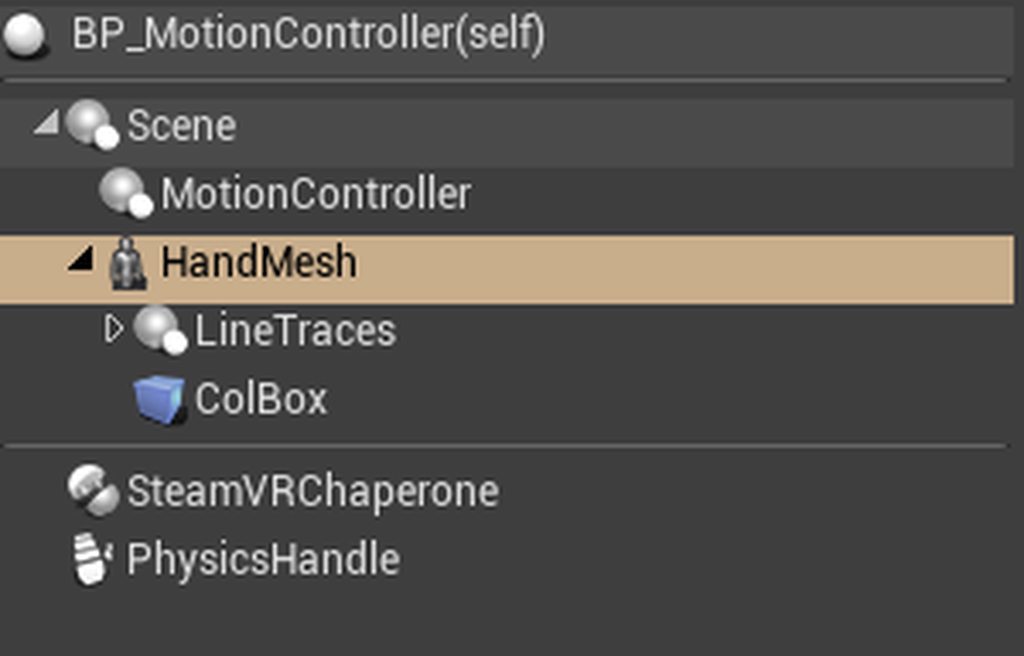
if i just put the handmesh under motioncontroller it tracks fine
void raptor
@compact kettle for my oculus touch in 4.24 i called my thumbstick axis X "motioncontroller stick left axis X" works fine, not sure about trackpad? though (for oculus)
sturdy coral
ignore the -1 scale, that was just needed for something else that was flipping by -1 elsewhere
I'll test with vive wands in a bit, I haven't tried them since upgrading to 4.24
for the vive_controller.json the above generated:
                {
                    "mode": "trackpad",
                    "path": "/user/hand/left/input/trackpad",
                    "inputs":
                    {
                        "position":
                        {
                            "output": "/actions/main/in/MotionControllerMove_X,MotionControllerMove_Y X Y_axis2d"
                        }
                    }
},```Hey! Thanks a lot, we tried a bit around ourselves as well, and got at least a hint, but it results in the same as your solution does - The events now actually return values, however they don't seem to be mapped between 0 and 1, but rather arbitrarily between 0-X. And X may be anything from 2 to 60, seems kind of random with a weird pattern behind it
void raptor
try clamping it maybe
compact kettle
That doesn't work in that case, as 1 may be anywhere on the trackpad, making the rest unresponsive
void raptor
hmm
 nimble edge
Are you updating the target location and rotation on the physics handle?
void raptor
yes on tick
but no matter how i move my motioncontrollers, the hands dont move at all, except stay behind me when i walk around
compact kettle
@sturdy coral got it. Actually was an engine editor bug
sturdy coral
@compact kettle ah ok, what was the bug?
compact kettle
In editor it just duplicates what they call an action set, each time you change the input manifest or reload it, which then essentially sends all the events times the amount of action sets it now contains. i.e. they don't flush the action sets upon regeneration
better expressed, it's an array onto which they just keep appending the same actionSet over and over again
void FSteamVRInputDevice::RegenerateActionManifest()
{
    //Adding this line does the trick
        this->SteamVRInputActionSets.Empty();
    this->GenerateActionManifest(true, false, true, true);
}
Thanks again for your help though, with this _X and _Y thing
 spare yew
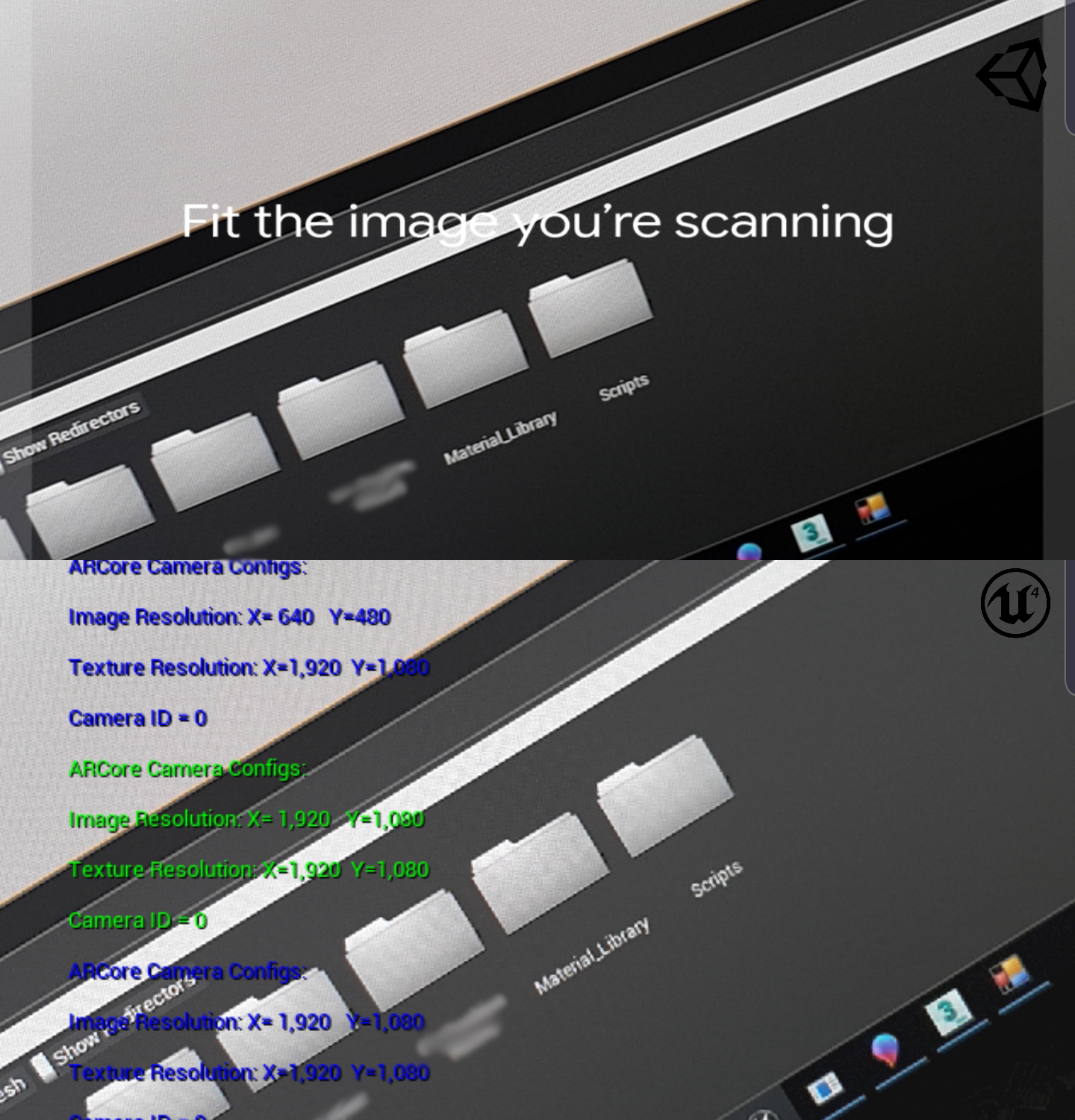
Does anyone know how to fix the terrible aliasing on the AR camera?
 languid night
How do I get the player's VR calibrated height?
sonic lake
@eternal inlet @daring pasture here is the RTIK plugin modified to compile on 4.23.1 and to package properly: https://drive.google.com/open?id=14mqAIi2KPb-AWi6kc8idl5Bs5_JybuFI
languid night
Also for whatever reason the "Set tracking origin" blueprint node doesn't seem to work for me.
daring pasture
Sweet thanks @sonic lake !
languid night
Instead of matching my Oculus height, it puts my camera around half of my height
 tired tree
@languid night set tracking level to floor instead of eye
oculus starts at eye level tracking for some reason still
 eternal inlet
@sonic lake oh damn my man! wish i knew how to code cpp too... awsome!
 pearl tangle
managed to get the v12 update on quest. Hand tracking is fairly decent quality. Although feels a bit laggier than leap motion. Still will be quite handy, shame they are working on the Unreal version for a while
 cosmic shoal
The tracking is very good but the blind spot in the middle is annoying and the lag is almost unbearable.
Carmack did say "it will get better" but I've heard that before.
sonic lake
@eternal inlet you are welcome. Now it is also on my GitHub: https://github.com/vr-marco/rtik

C++ you can always learn. 😉 There are some good courses on Udemy.
 willow trail
RuneBerg just posted a sample project for the integrated plugin in 4.24 (which is great because I suck at understanding how the engine sorts it's files in projects), but the teleportation arc now start as soon as there's the smallest amount of force of the trackpad (instead of having to give it some force like before). Do you guys know if this is just the plugin choosing to handle that action differently?
eternal inlet
@sonic lake specifically for ue4 right? Anyone you can recommend? And how did you get into it?
sonic lake
@eternal inlet Sorry, I posted it twice but I was getting the wrong link from Udemy. This one: Unreal Engine C++ Developer: Learn C++ and Make Video Games
Has very good ratings and starts pretty much from scratch. I have that one, the Multiplayer course from the same author Ben Tristem and the other one by Tom Looman.
What do you mean with your last question? Into C++ you mean?
eternal inlet
@sonic lake thanks i may look at it. Its always a challenge to keep focus on my gameprogression it seems heheh.
What i meant, was: how did you start with cpp? Ive tried starting up with it a few times and kept getting stuck, mainly because i didnt have a clear goal of what to use it for, but also because i kept thinking it was much easier for me to do with bp
sonic lake
If you are a visual person, as the majority of people, BP's are great and work just fine. On the other hand sometimes you need to use C++ for performance reasons or to expose functionalities which are not available through BP's. I have been working with C++ long time before UE4, so I just happen to know it already. I also do most of my stuff with BP's, but have few low level plugins and some support code built with C++. @eternal inlet
From a motivational standpoint it is easier to learn if you have a specific project to work on.
eternal inlet
Sounds like a good idea to do a specific project yes, and maybe learn the syntax and such independentæy of ue4
 pallid pewter
building a game in unreal, and noticed that the height in engine doesnt match the height set upon occulus setup, any idea why this could be
nvm, apparently it was because i had the sensors above the monitor ??
sonic lake
@pallid pewter The only reason you enter a height during the Oculus calibration is because that is the way the system can determine where the floor is. Once the calibration is done, the elevation of the HMD respect to the floor should always be correct, unless the VR Origin is moved specifically.
Make sure 1. your system is properly calibrated (e.g. shifting the sensors up and down shifts also the floor level, unless you recalibrate), 2. that you are using floor level as your tracking origin and 3. that you issue a Reset Orientation and Position on begin play
pallid pewter
encountered another issue, when i use the default teleport feature of the vr template, the player height is changed after the teleport
sonic lake
@pallid pewter very strange indeed. With the original unmodified template? And a fully calibrated Oculus?
pallid pewter
just redid the setup and still does it, the only modification i have made was rewriting the hand pickup code so it could pick up individual components (using to pick up a procedural mesh)
sonic lake
@pallid pewter Can you try with a fresh VR template, with no modifications at all
willow trail
Added some C++ class to my project, when I try to compile in the editor, it tells me that the global namespace already contains a reference to SteamVREditor. Moved the plugin from engine's folder to game's /plugins folder, but getting the exact same issue; Any idea?
 flat shoal
Great, 4.24 changed how WMR headsets report their positions, it seems... and nobody at Epic has a WMR headset to test that with 😦
 woeful sundial
@spare yew if you mean AR on mobile, there are several options to reduce aliasing, depending whether you find it in the camera footage, UI or renderings.
- Editing "+CVars=r.MobileContentScaleFactor" (set it to 2) in the DefaultDeviceProfiles.ini. App will use a higher resolution.
- enabling Mobile HDR and set Mobile MSAA
- setting a desired camera resolution in the AR config. Can be done at runtime, check "get supported AR video formats" and choose a higher resolution.
tired tree
@sonic lake I remember looking at that frabrik with limits implementation and not being happy with it a year or so ago, didn't feel like it was worth improving at the time. Don't exactly remember why though.
A good medium though would be an initial fabrik run as it unrolls nicely to set points, then layer a second run of something else on top of it to get to the final location. Lots of robot arm users are doing that
or of course something purely logical like the Berger paper
as it allows for direct fine tuning
sonic lake
@tired tree in the meantime I have updated it anyway to 4.23.1 and it can package properly as a plugin now. Maybe it is useful to someone else. Indeed the implementation doesn't seem to be very efficient. It works but it has a couple of quirks and the tracking has a bit of lag.
I wonder if it is worth spending some time to fix it/modify it.
tired tree
tracking lag may be down to sample order
if I remember correctly the actual limits implementation was really naive and would be prone to singularities
although, looking at the source right now, it doesn't look too bad
and has agnostic planer constraints, which is really nice
willow trail
Fully exhausted any meaningful google result on this, if anyone has ever had the issue with global namespace already containg the definition for SteamVREditor (even though I made sure they're not duplicate of the plugin anywhere), hit me up!
compact kettle
@flat shoal What you mean?
seem's like Epic's Q&A was asleep for the VR aspects of 4.24..
flat shoal
they've been asleep since 4.23, at least on the WMR side
tired tree
they have been rolling WMR into openXR
compact kettle
We're trying to push an update and decided last minute to check out 4.24 because of some nice new features. Baaaad idea
tired tree
so yeah. for the past two versions not much else has been iterated on
compact kettle
@flat shoal For WMR they haven't been there in the first place
absolute joke how sloppy the WMR implementation is. As if WMR itself isn't a fragile piece of porcelain
flat shoal
mm... I got a Microsoft developer to submit some Unreal Engine patches... I think that's the only WMR love that Unreal ever gets
compact kettle
Finally WMR got the ability to change the spectator screen mode.. But ofc I had to fix that *** too, to actually show anything under the "Texture" mode
and now we can't get the vive trackpad to work anymore. Fixed some aspect of it yesterday, but this new SteamVR input thing is a hot mess. The one thing that wasn't a problem got a solution
which fucked everything up
flat shoal
if you're serious about VR, you really should be using Unity...
that shooter thing that Epic did and sold to Facebook was just that... a sale
they didn't care about VR before and haven't cared after, it seems
I'm putting together a package now for a bug report of a serious performance regression in 4.24
don't know for how long we're staying in 4.22 (4.23 is equally broken)
anyway, venting over 😛
tired tree
i mean...they literally just rebuilt the entire input system to support OpenXR
thats pretty much not true
spare yew
@woeful sundial It's simply the camera passthrough I'm having issues with. "Get supported AR video formats" returns 0 when using ARCore - using an ARCore Session and setting to max resolution doesn't fix it either.
(Canted angle to highlight aliasing issues)
 flat shoal
@tired tree well, they don't even have WMR as a listed platform in the bug submission form, so....
woeful sundial
@spare yew I see, i only have ios devices here. Mobile MSAA and MobileContentScaleFactor worked great. If you set the Mobile Content Scale Factor for Android to 0, it would set the app to the native resolution of the device. Worth a try? Good luck (how to: r.MobileContentScaleFactor=0 in the DefaultDeviceProfiles.ini in your project's config folder. more info here https://docs.unrealengine.com/en-US/Platforms/Mobile/Performance/index.html )
Optimizing content and features for mobile games.
spare yew
@woeful sundial I'll give that a try seen as MSAA made no difference, thanks
 mighty carbon

reddit
Posted in r/OculusQuest by u/LovingVirtualReality • 10 points and 4 comments
interesting data
sturdy coral
MS claiming to have patented VRS: “Additionally, our patented Variable Rate Shading (VRS) technology will allow developers to get even more out of the Xbox Series X GPU “
 regal cape
Ahoy, I am looking for someone to help implant UE4/ Oculus controller (captive touch) integration & animations. (This would be paid work) please get in touch.
sonic lake
@regal cape Where do you need to implant those controllers? 😉 #looking-for-talent
mighty carbon
@sturdy coral I wonder what NVidia has to say about that
sturdy coral
@regal cape you know about oculus hand sample right?
(must have git account linked to epic for that to show up)
 lean basalt
@regal cape This sample has already saved my life! I would like to discover this before finishing a project. Thanks for sharing @sturdy coral
 sly elk
Does anyone know of a company you can hire to run VR tradeshows?
 granite jacinth
@sly elk You just want them to run your stand at a convention?
Or something else?
sly elk
Yeah, run a stand
granite jacinth
@sly elk Which conventions?
sly elk
Bunch of autmotive conventions
granite jacinth
You paying for travel?
sly elk
basically one of our partners wants to run a demo but the lost development time for us is too large
They would, yeah
lean basalt
Guys, who was having trouble building a UE version 4.24 build for Oculus Quest might be more successful if oculus is up to date with the latest version. At least that was my experience! My previous problem was that the three loading balls were infinitely loading. After the Oculus Quest update everything will be back to the way it was before! 😃
 real needle
hello, i have been usin vrexpansion trying to get a simple vr multiplayer game to work. i have had many issues but the most important one is not being able to differentiate between the server and client in the games( ie. passing values, steam names, etc.). the main thing i want to know is how to get the text above the pawn to show the server and the clint names. the server sees their name and the client's name, but the client only sees text above both pawns.
i am also having trouble with actor replication. i have set all my actors to replicate, however only the server is able to interact(pick them up) with them properly but the client cant
tired tree
@real needle sounds like you need to start at step 1 and do some multiplayer basics tutorials and read Exi's networking overview
 split steeple
For those using 4.24 and the integrated SteamVR Input module - we've released a version of the Sample Project (same sample content from the marketplace plugin) with updated assets, key mappings and can be downloaded here:
https://github.com/ValveSoftware/steamvr_unreal_plugin/wiki/sample/SteamVRInputPlugin_UEIntegrated.7z
real needle
@tired tree is it possible to point us at the right direction and help us out a bit? our project is due within the coming week and we really need to solve these issues in order to finish the project in time, if not then its absolutely fine
do we have to design the project differently including the logic in order to allow the players to interact with one another? cause after reading the guide i am starting to think that maybe the issue is that we tried to make the game as a single player game without any of the multiplayer issues
tired tree
@real needle you have to take multiplayer into consideration from the very start generally
luckily for you, regarding the gripping part its not a totally hard conversion with my plugin to change to multiplayer
but you'll have to go over your non plugin stuff and make sure they all replicate correctly, like the names and things
you can PM me with questions regarding the plugin side of things to move to multiplayer, regarding the general networking you need to familiarize yourself with it in engine in general before anything is going to be of much use
real needle
i mean the issue is that we have set our objects to replicate and ticked everything yet still there are issues in this regard
at times we had an issue where the client sees everything
tired tree
well yeah, you aren't gripping them in a replicated manner
as as far as text goes, text doesn't replicate
you have to send what you want it to display
things don't just magically work with replication unless specifically designed too, like positions
real needle
@tired tree so in this case, our cards are easily usable by the server yet the client is not able to see the full card and only a blanked out card and the images themselves are separate. our cards consists of different parts and all of those parts are set to replicate too yet the issue is still there. when you talk about replication is it more than just ticking those boxes in the object setting? is it something we have to implement logic wise? my guess is that all of the issues we are facing boils down to replication and the fact that one player acts as the server and the other as the client. so does that mean that we need to include different logics, one for client and the other for server?
thank you so much for putting the time to help us out
tired tree
not sure what you mean by cards, but if you are setting something like an image, and doing it live then yes it will not replicate just because the object does
and yes, it is much more than ticking boxes, you have to set vars to replicate, they don't by default, and handle replicated events
i'll start a PM though, this isn't VR related
lean basalt
Guys I just created this topic in the Oculus forum: https://forums.oculusvr.com/developer/discussion/83443/bug-enable-supports-depth-on-stereo-layer-create-a-default-solid-plane-on-oculus-quest-build-ue4-24#latest Do you think it would be good for me to recreate it in the Unreal forum? Thks!
Oculus
Join the Official Oculus Discussion Forums and talk about Oculus Rift, Oculus Touch, Samsung Gear VR, and virtual reality.
 hallow knoll
@lean basalt You can submit a bug report here: https://www.unrealengine.com/en-US/support/report-a-bug
Thanks for reporting a bug with the Unreal Engine 4. Here you will find information on how to submit a report and what you can expect afterwards.
void raptor
anyone else having random crashes after playing in editor with VR ? ue just freezes forever after a session, seems random
 weak harbor
@split steeple Good morning! We are having tons of problems upgrading from 4.23 to 4.24, most likely due to SteamVR Input. I have moved all content from the plugin to the project, so that we don't get broken references. When I turn off the plugin in 4.23 the editor starts up but give me some errors (as expected) due to the missing plugin.
But when I switch to 4.24 the editor crashes at launch and gives me this error:
(with plugin off)
split steeple
Hi @weak harbor the keys have been renamed to Harmonise them with new engine specs. Normally they should be fine unless you do a VR preview/run.
Issues could also arise if you are using key events and not actions exclusively.
Try (backing up) and removing your defaultinput.Ini . You will need to reassign new keys and actions though.
weak harbor
@split steeple Thank you for the info! Will give it a try
split steeple
Cool np. Let me know how you go.
weak harbor
Do I need to remove the SteamVRBindings-folder as well?
split steeple
It should be regenerated automatically, but yeah deleting them would be good.
If you haven't made changes via the steamvr input dashboard
weak harbor
I have made some changes, but it's easy to rebuild
split steeple
Oh OK. You can back them up just to be sure. As long as you name your actions the same, you should be able to reuse everything except steamvr_manifest. Json
weak harbor
It's no longer crashing 🙂
weak harbor
OK, this is weird. Even though I removed the DefaultInput.ini I still see all the actions. Is there a secret cache somewhere?
compact kettle
just fyi, if someone intends to use the spectator screen with WMR, and use the "Texture" mode, you'll have to replace
void FWindowsMixedRealityHMD::OnBeginRendering_GameThread()
{
#if WITH_WINDOWS_MIXED_REALITY
#endif
 }
with
void FWindowsMixedRealityHMD::OnBeginRendering_GameThread()
{
#if WITH_WINDOWS_MIXED_REALITY
        if (SpectatorScreenController)
        {
            SpectatorScreenController->BeginRenderViewFamily();
        }
#endif
 }
in WindowsMixedRealityHMD.cpp
split steeple
@weak harbor steamvr_manifest in the steamvr bindings folder holds the actions that the plugin uses to send to the steamvr runtime.
Also, SteamVR.VRmanifest in programfiles/steam/config
 forest plover
Not from Epic...
sonic lake
@eternal inlet @tired tree have been experimenting a bit with the rtik plugin in VR. Here some impressions:

 queen schooner
Can someone help me get started in vr (oculus sdk or steam vr) using c ++, please
sonic lake
@queen schooner Some time ago someone ported the standard VR template to C++ and shared it.

GitHub
Unreal Engine 4 VR Template Porting Full C++ Project. - Sombusta/UE4_VRTemplate_Cpp
queen schooner
Tried to launch, but it doesnt seem to work on 4.24 ;/
sonic lake
What are the errors?
queen schooner
give me a sec,ill launch it again
sonic lake
Does it compile?
queen schooner
@sonic lake "First recreate the project files" how to do it?
sonic lake
@queen schooner Right click on the uproject file, there is an option in the context menu
queen schooner
"Generate visual studio project files"?
queen schooner
Severity Code Description Project File Line Suppression State
Error Could not find definition for module 'SteamVRController', (referenced via Target -> SomTemplate_VR.Build.cs) SomTemplate_VR
sonic lake
Start by deleting the Binaries folder
queen schooner
nothing changed
sonic lake
I don't use SteamVR so I am not really familiar with the related errors
queen schooner
what do you use?
sonic lake
Oculus Plugin
queen schooner
Could you guide me how to set up oculus plugin or show me tutorial, please?
I would be very grateful
queen schooner
im a programmer not a visual artist
I know c ++ to some extent and bp not anymore
sonic lake
Blueprints are for programmers as well
There are tons of people developing serious projects with BP
queen schooner
I just don't like it in the EU, lots of tutorials for bp and very little for c ++ ;/
queen schooner
i see
eternal inlet
@sonic lake looks pretty good actually.. definetely ok for my use
sonic lake
@eternal inlet let me push the VR example to GitHub
eternal inlet
That would be awsome. Thanx @sonic lake 🤗 im out of the house right now, but will have a go at it as soon as im home
sonic lake
@queen schooner the template works fine in 4.23.1
I don't know what would be wrong for 4.24. Probably due to some changes.
queen schooner
Do I need to downgrade my ue?
sonic lake
You can install multiple versions in parallel
So if you want to play with it, get 4.23.1
sonic lake
@queen schooner UE4 uses an abstraction layer on top of both, so you don't really need to learn them
There are also specific functions if you need a bit more low level, but very likely you don't need to deal with the respective SDK's
queen schooner
so eu will provide me with functions responsible for giving accelerometer value, position of sensor etc?
queen schooner
yep
sonic lake
There you go
 night linden
anyone here had experience with locomotion controls in VR? I have a strange issue when I have something grabbed if it touches the player it effects the control. while moving with the thumbstick the pawn gets pushed in a different direction. I am holding a gun, if I hold a box, and place it near left shoulder samething happens. Very odd!
controls work fine, guns work fine, until the player puts them close to body on left and gets pushed in a different direction
sonic lake
@night linden sounds like you have some collisions going on.
night linden
@sonic lake Yes I was looking at that, and made me try something. I just been trying, and it looks like when the hand is in the first position, moving that to the player pawn is causing it
thanks
first = fist
anyone seen this before?
sonic lake
@night linden you are very likely using the standard VR template. When the hand is in fist position, its collisions / physics are active. That's why you get an interaction which you don't get when the hand is open.
night linden
thank you
sonic lake
np
 blissful bear
@sonic lake The rtik IK demo you did shows it works well enough, for me at least. Am interested in this solution for use with Mordentral's plugin. I'd be grateful if you'd shared the demo project too. Many thanks, great work.
sonic lake
@blissful bear sure, it is here: https://github.com/vr-marco/rtik
compact kettle
Anyone tried loading levels with WMR in packaged, in 4.24?
Getting this crash "WinRT originate error - 0x8000FFFF : 'You may not call WaitForNextFrameReady again until you present your oldest out-standing frame.'"
what it sounds like, OnBeginRendering_RenderThread is being called twice, without a Present() call in between
tired tree
@sonic lake might be worth working with that and Parger in combination
sonic lake
@tired tree Read the paper this morning. Parger is a direct implementation, no solver. I was looking at the Unity code in GitHub but it is a bit convoluted. We may be better off implementing it straight from the paper.
tired tree
the unity code actually has some errors in it as well
I had to fix some of it
but its fairly straight forward
it offers far better shoulder facing baseline
and you can run ik off of it then to meet the defined elbow / wrist locations
i have it half implemented sitting around somewhere...
sonic lake
ok so you are already ahead with that
tired tree
yeah was playing with the leaning accuracy
it needs full quaternion conversion though
haven't had the time to get back to it, was thinking about during these two weeks off I have coming up
sonic lake
XMas IK
👍
Leaning is pretty good in rtik, that part I like. Elbow becomes imprecise in some situations.
tired tree
yeah i was fixing tha tspecifically with parger
and some singularity issues with turning around while bent with arms behind the back
rtik is naive unrolling for things
parger as a baseline to get more logical joint poses then the limited ik should be great
sonic lake
I will keep looking into rtik over XMas
Maybe there is the way to solve some of the singularities
But I don't have a lot of time for it
sturdy coral
I have some of the paper implemented, but it was unclear on a lot of stuff
I never got the wrist constraints done
 placid spear
@eternal inlet I own both options 1 and 2 that you listed. Option 1 has the benefits of several features implemented out of the box on the demo map, such as player set up, calibration logic including option to save that calibration data, and object grabbing. The drawback is that the elbows sometimes suddenly pop or snap straight just before you have fully extended your arm. Sometimes, the popping happens when you’re viewing the palms of your hands while your elbows are tucked in to your sides and one of the hands will do a very very small jump. The author included an elbow smoothing algorithm to allow for adjustments, so perhaps this could be worked out. Option 2 offers movement as smooth as Ikinema in my humble opinion, but it was a little harder to make sense of how things were set up. The demos for both don’t make them look promising, but they get better after making many adjustments. Hope this helps 😉
night linden
Hi, With Oculus and handling the Input Focus Handling ( https://developer.oculus.com/documentation/unreal/latest/concepts/unreal-dash/ ) - how have people implemented this ? I have tried using the Get VR Focus state on event tick within the level blueprint. If "has focus" True Set Game unpaused, if False set game paused, and then hide the controllers, but even if I am wearing the headset it still being paused. Allow tick before being play I have ticked, but still the same. Any suggestions on where to look? Thanks
Overview of the Unreal focus states.
compact kettle
Does anyone know how to turn off this annoying SteamVRInput log?
/user/hand/right/input/trigger/value -- ReadScalarValue returned 0, time=2723901801707, origin=/user/hand/right/input/trigger/value
Mon Dec 16 2019 00:01:30.380 - /user/hand/right/input/trackpad/y -- ReadScalarValue returned 0, time=2723983542759, origin=/user/hand/right/input/trackpad/y
Mon Dec 16 2019 00:01:30.380 - /filters/scale_sao_trackpady_actions_main_16_user_hand_right_input_trackpad/result -- WriteScalarValue - 0, time= 2723983542759, origin=/user/hand/right/input/trackpad/y
Mon Dec 16 2019 00:01:30.380 - /filters/click_button_actions_main_6_user_hand_right_input_trigger/result -- ReadBooleanValue returned FALSE, time=2723901620979, origin=/user/hand/right/input/trigger/value
Mon Dec 16 2019 00:01:30.381 - /user/hand/right/input/grip/click -- Action /actions/main/in/Motion Controller (R) Grip1 reading FALSE time 2711223839848
Mon Dec 16 2019 00:01:30.381 - /user/hand/right/input/application_menu/click -- Action /actions/main/in/Motion Controller (R) Menu Button 1 reading FALSE time 2714378984596
Mon Dec 16 2019 00:01:30.381 - /filters/click_button_actions_main_6_user_hand_right_input_trigger/result -- Action /actions/main/in/Motion Controller (R) Trigger reading FALSE time 2723901620979
it's even in shipping...
completely bombards our logs
sturdy coral
@compact kettle I think through k_pch_SteamVR_LogLevel_Int32
compact kettle
Thanks for the hint! Will look where I find that var
welp
can you tell me where I would set that?
found it's declaration within openvr_capi.h @sturdy coral , but there it's just set to "loglevel".. Don't find any helpful documentation for it
sturdy coral
Yeah I haven’t found any docs on it, try raising or lowering it though
compact kettle
it's a string
I know, it says "_int32", but it's assigned to the value "loglevel", which is kind of confusing me
oh, hm, I now also found it in OpenXr, and I think you are supposed to set it via VRSettings()->SetInt32, somehow.. Will post progress
ohhhh.... k_pch_SteamVR_LogLevel_Int32 is the key 😅
I am stupid, sorry
eternal inlet
@placid spear thanks for your writeup. Sounds quite like i suspected. If i pick one of them it will most probably be opt 2
In the meantime ill keep trying the Parger implementation with rtik on top
 keen prawn
any1 know why monoscopic farfield got removed?
mighty carbon
No one ever used it?
mighty carbon
wow, 4.24.2 has 3 pages of unresolved bugs (most moved from 4.24.1)
queen schooner
Anyone know how to bind oculus touch inputs? Inputs in my pawn class dont work.
placid spear
@eternal inlet no problem. Be sure to check out the free demos for each option on their marketplace pages
placid spear
For option 2 demo, you’ll need to run the bat file to play it and be sure to have your headset on when click the file because the calibration happens on begin play right away, so if your headset is on the floor, the avatar gets all screwed up lol
 little scaffold
@queen schooner use the inputs list in the projects settings->Input
queen schooner
i did
thats how i binded input to method
@little scaffold
or rather should i use raw inputs?
mighty carbon
so apparently there is no social app to connect Quest and Go users (to be in private space, up to 4 people) to watch movies via Oculus browser and maybe play some mini games :/
could be a good business opportunity
queen schooner
Visual studuo #include "IOculusInputModule.h", no idea why
;/
I have the OculusVr plugin installed
queen schooner
cant find this header file*
mighty carbon

HoloLens creator Alex Kipman tried Valve’s upcoming VR title Half-Life: Alyx and shared some choice words about his experience. Microsoft and Valve have long had close ties, both geographically and historically. Valve was co-founded after two Microsoft employees, Gabe Newel...
^^ overhype ?
 pastel fern
Anyone else getting a huge log spam in VisualStudio from VR-System queries?
Mon Dec 16 2019 23:50:51.949 - /user/hand/right/input/trackpad/click -- Action /actions/legacy/in/right_axis0_press reading FALSE time 341475906546
Mon Dec 16 2019 23:50:51.949 - /user/hand/right/input/trackpad/touch -- Action /actions/legacy/in/right_axis0_touch reading FALSE time 341477103165
Mon Dec 16 2019 23:50:51.949 - /filters/click_button_actions_legacy_12_user_hand_right_input_trigger/result -- Action /actions/legacy/in/right_axis1_press reading FALSE time 346656483950
Mon Dec 16 2019 23:50:51.950 - /filters/touch_trigger_actions_legacy_10_user_hand_right_input_trigger/result -- Action /actions/legacy/in/right_axis1_touch reading FALSE time 346656480053
Mon Dec 16 2019 23:50:52.281 - /user/hand/left/input/trigger/value -- ReadScalarValue returned 0, time=346918372944, origin=/user/hand/left/input/trigger/value
Mon Dec 16 2019 23:50:52.281 - /user/hand/right/input/trigger/value -- ReadScalarValue returned 0, time=346918612323, origin=/user/hand/right/input/trigger/value
Mon Dec 16 2019 23:50:52.281 - /user/hand/left/input/trigger/value -- ReadScalarValue returned 0, time=346918372944, origin=/user/hand/left/input/trigger/value
Mon Dec 16 2019 23:50:52.281 - /user/hand/right/input/trigger/value -- ReadScalarValue returned 0, time=346918612323, origin=/user/hand/right/input/trigger/value
Mon Dec 16 2019 23:50:52.281 - /user/head/proximity -- Action /actions/legacy/in/head_proximity reading TRUE  time 340849463330
Mon Dec 16 2019 23:50:52.281 - /user/hand/left/input/system/click -- Action /actions/legacy/in/left_system_press reading boolean failed
Mon Dec 16 2019 23:50:52.281 - /user/hand/left/input/application_menu/click -- Action /actions/legacy/in/left_applicationmenu_press reading FALSE time 62387208699
get that spam for every button every tick. But the controllers work just fine...
tired tree
@pastel fern yeah it's their default debug level, I'm on my phone so don't have the li is handy but @sturdy coral has what settings have to be changed. It's a really unfortunate choice on valves part...
split steeple
@pastel fern you can lower verbosity as described here :
https://github.com/ValveSoftware/steamvr_unreal_plugin/issues/91#issuecomment-552698607

GitHub
I'm seeing a lot of logging during play with the new integration of the plugin that is included in 4.24: Sat Nov 09 2019 17:04:35.123 - /filters/thumbstick_settings__actions_main_7_user_han...
pastel fern
sight
@tired tree @split steeple worship
 cyan kayak
For any one woundering how to check if its a vive or Steam Index controller plugged in.... After a lot of searching I found a solution, well one of my co-workers did. Hopefully this will be useful for every one, and im also hopping an admin pins this. The question has came up time and time again on here and forums
So here is the solution:
https://blueprintue.com/blueprint/3z2_o59o/
BlueprintUE
Its not pretty but it works
@compact kettle ^^
 ember forum
i have this VR pawn that can possess other vr pawns, but a problem i have sometimes is that when possessing the other pawn, the camera (your head) will often times be a bit offset on the z axis, and then unpossessing, repossing the other pawn sometimes fixes that (or multiple times doing it eventually you get it centered)
is there some command i can call to bind the hmd z axis to the newly possessed actors z axis?
tried using reset orientation and position, but it doesnt seem to "obey" the actors z axis
hallow knoll
@ember forum That sounds like a bug, can you repro in a fresh project?
ember forum
ill give it a shot Victor
tired tree
@ember forum talking about orientation off, or positionally off
orientation would be expected
ember forum
i seem to have fixed it temporarily, if i set both the pawn to be possessed, and the one doing the possesssing (that sounds confusing) to 0 world z rotation (at spawn) it possessess perfectly (also had to get pose-device rotation z, and apply that as the possessed actor's rotation)
the problem was having both pawns at different rotations at spawn (so i just have to find a way to fix that in the world tho, because they obviously cant stay in that rotation forever)
@tired tree yeah orientation is wrong, but noticeably only on z axis, how would you account for that?
im going to try, getting the hmd rotation before possession, and then sending that to the new pawn, that could be it
tired tree
@ember forum the orientation is based on the actors rotation and then your roomscale rotation
are you trying to do eye level or floor level tracking
ember forum
floor
pc vr, basically a walking pawn, possess a hoverbike pawn..
so if i use the old pawn's hmd rotation, and use that to set actor rotation on the new actor, it works, problem is, if im looking sideways before possessing than thats the new rotation of the camera, so when i turn to face forward again it is completely off...
tired tree
you aren't thinking of it correctly
Actor X+ is your roomscale forward direction
rotating the actor rotates your roomscale in the virtual world
if you want to align your current hmd facing with the actors current forward, you would want to negate the rotation difference and set the actor to that
if you intend to preserve roomscale to actor 1:1
ember forum
so get the delta rotation of the previous hmd rotation and the new actor, and subtract the actor's Z by that to set the new world rotation, that would be what you said right, negating the rotation difference
didnt work for me
@tired tree its funny, im always like slightly offset by a couple units to the right
mighty carbon
tired tree
@ember forum you can't just do that, you would need a leveled yaw on the hmd
otherwise yeah you will get some minor offset from tilting the head
ember forum
ohh, i think im starting to understand
tired tree
what exactly are you trying to match? the current hmd rotation exactly?
or the actor when you possess
tired tree
yeah unsure what you mean centered
as on on a body mesh or something?
the current forward facing of some component on the pawn?
ember forum
yes the x axis
tired tree
because you realize that it will change
when they go to walk around in roomscale then
ember forum
i mea the x axis
of the pawn
just want the camera to face forward as it does on my walking pawn when i spawn it... i have the roomscale figured there maybe i need to analyze that some more...
ember forum
@mighty carbon that looks really cool, so pretty much, a magic button that improves performance, if you are using vulkan on quest?
mighty carbon
I haven't tried it yet
 past tiger
I would like to dock items on the L and R hips and over L and R shoulders in a way that is visible to players/spectators. Items will also (of course) need to be held in each hand and possibly docked on a rack on the wall.
This will require a lot of setting transforms for each item, for each socket, so that they have nice orientations.
I am thinking of creating a tool for speeding up this process. Does anyone know of tools that already exist that could help or have any other recommendations for doing this?
 elfin flax
Hello all, I'm new to AR in unreal and I have some questions that I hope you guys can help me out with. My first question is, is there a way to limit the amount of bp_placeable actor being spawned so that when a user hits a tracked area more than once it only spawns one instance of the bp_placeable? I know the "Collision Handle Override" in Spawn Actor won't let you place another instance on top of it but if someone moves out of that area they will be able to spawn another instance of the same thing so I'm trying to limit the amount to just one instance of bp_placeable being able to spawn. My other question is, is there a way to maybe limit the trackable area where a user can place a bp_placeable actor?
compact kettle
@cyan kayak Oh nice, thanks. That's a start. Will look into streamlining this into a proper function and share it back if theres interest
One thing VR / UE4 desperately needs - more than controller info - is HMD info.
cyan kayak
Yeah its terrble but its down to steam to add
also you can streamline it just by getting any axis
you dont have to loop through all actions
compact kettle
i.e. what Headset is actually being used. Oculus and SteamVR have somewhat working APIs for that, but we had to write our own wrapper around it.. And all WMR headsets always just say "WMR"
funny, as some manufacturers want license fee based on how many of our customers are using their hardware, yet there isn't a native way to tell..
ah okay
will take a peek
Currently we have to force the vive wands for SteamVR, but actually on our next patch todo was integrating new controller meshes, so thanks for that
tired tree
@compact kettle you can directly query the device propeties for manufacturer / hmd information
compact kettle
how would you do that?
I have wrote a wrapper for each VRSystem, called GetProductName, which for Oculus calls ovrp_GetSystemProductName2, and GetFStringTrackedDeviceProperty(VRSystem, vr::k_unTrackedDeviceIndex_Hmd, vr::Prop_ModelNumber_String); for SteamVR
however, oculus always returns an error
and SteamVR returns "Vive Pro MV" for both the Vive Pro and Vive Pro Eye
etc
tired tree
those are their identifiers for those headsets, you'd have to query feature sets on the vive pro
if you are using wmr over steamvr you can drill it down
the wmr specific plugin likely doesn't have anything for that currently
compact kettle
Yeah, we cannot force our customers to use SteamVR though, unfortunately. Really hoped OpenXR would bring an API for that
Wonder why this isn't a fundamental feature, or no one is missing it
tired tree
well they want it headset agnostic, you "shouldn't need to know"
but i haven't specifically checked to see if openXR has something for it anyway currently
since its wmr and oculus only atm
compact kettle
for WMR we call HMD->GetDisplayName(), but it most of the time it returns just "WindowsMixedRealityHMD"
It's kind of inconsistent, it seems very Beta. Also veries between packaged and editor, it sometimes seems like
who's "they"?
One manufacturer specificaly plans on charging us based on the amount of customers using their hardware
so it kinda is a big deal to know the correct numbers
tired tree
well even the steamVR name check is differently formatted
you will get Vive Controller MV, Vive. Controller MV, Vive Controller . MV., ect
no consistancy
the origin name should be somewhat constant now at least
compact kettle
Yeah it's a mess.. Controllers should be even more important, and that really is something everyone should know in their game, if they want to show virtual controllers
Wonder what API SteamVR itself uses
under Settings -> Video it has a more accurate and consistent name
tired tree
well there is mesh loading which is intended to auto generate controller models for you
but yeah, there are plenty of reasons to want to know an exact model
specifically currently there is no offsets that you can apply in steamVR from different controllers, so its useful to know the model to adjust snapped grips
compact kettle
what's that mesh loading you are talking about? Sorry, but yeah we are currently working on allowing users to select controller overrides to make up for the inability to determine the correct ones by ourselves, so if there's any other way, that'd be sweet
tired tree
@compact kettle well for one you can manually load the mesh yourself, i have samples for that
but for two in engine you can tick a boolean on the motion controller now and it will auto generate the mesh
should work on oculus / steam platforms
unsure on openXR
yeah not implemented on wmr specific plugin or openxr currently, checke
compact kettle
If you mean just importing custom meshes and offseting them to match the real controllers, with "manually load the mesh yourself", then yeah that's what we are doing already. Issue was just determining which ones it actually were. Will look at this boolean you mentioned
tired tree
no its an asset manager for the vr systems in engine
all of the ones that implement it will auto generate the mesh for you
compact kettle
with animation?
tired tree
manual loading was doing it yourself instead, but the automatic one is working since 4.23
compact kettle
i.e. capacitive touch, thumbstick movement
tired tree
in the steam one it will load sub components for each part
and you can animate those, but no
not automatically animated
compact kettle
I think currently we only use static meshes anyway, but we do the touch-coloring. Interesting though.
ember forum
@hallow knoll definitely not a ue4 bug, just something i have wrong with my vehicle pawn setup (i just tried possessing the same walking pawn and the camera is fine)
ember forum
@tired tree okay, now i really fixed it
the whole issue was having the center of the vr root
offset
on the x axis, it was offset like 20 units
so i could be closer to the handle bars
of the bike
even having 1 unit
off
results in the z rotation producing weird results... so.. yeah just had to work around that by bring the mesh back instead of the vr root forward
tired tree
you can rotate around the offset as a pivot too
ember forum
i dare not touch it anymore lmao, but how so(just out of curiosity) is there a calibration node for that or something?
tired tree
no, just rotating around a pivot in local space
actually think there is a somewhat helper node for BP, forget its name though
 honest imp
Is anyone else running into problems with SteamVR 1.9.13 causing a crash due to initialization being run twice at different phases of editor startup?
honest imp
...Root cause seems to be that if your motion controllers are off, every tick the engine tries to reinitialize them before polling them for positional input, which causes a crash due to the system already having been initialized.
split steeple
UE 4.24.1 Hotfix should have this resolved (my understanding is possibly going to release this week, the source PR is here):
https://github.com/EpicGames/UnrealEngine/pull/6428
 lethal delta
anyone know if Render Targets work on Quest at runtime?
 marble frost
Does anyone know how to check which controller is the user using? i.e. Vive controller, Index controller, Oculus touch etc
 proud spire
Unreal Engine 4.24 - the reflection probes reflection are only visible on one eye. Can someone confirm that too ? How could i resolve this issue ? Instance Stereo is checked and i tried to uncheck it. Lighting is build.
proud spire
Its SSGI - not Suitable for VR ( perhaps obvious because its Screen Space but it was worth a try )
sly elk
Im seeing a very annoying bug with level streaming- Movable actors that were already placed in the level aren't getting an indirect lighting or reflections, the only light they recieve is from direct sources. Has anyone else seen this?
any new actor that gets spawned has the expected lighting
mighty carbon
😅 4.24.1 has been released
 rich canopy
Hahahha is it me or is the engine development cycle been much faster than it used to be
Maybe thats why oculus cant update the oculus branch fast enough
sturdy coral
@pastel fern I think 4.24.1 may fix the log spam issue and it wasn't just a verbosity setting
haven't finished compiling yet to see
but it turns off some developer mode initialization stuff or something
mighty carbon
@rich canopy I think they are just shorthanded when it comes to UE4.. In fact, Unity is treated as first class citizen at Oculus.
tired tree
@mighty carbon ....yet oculus uses UE4 internally
think you are reading more into it
it takes a lot more effort to port to new ue4 versions than unity ones
sturdy coral
ah nope finished compiling, it still happens
I'm not sure what that developer mode and debug input stuff that was removed was doing
mighty carbon
@tired tree indeed, but that's what I gather from "inside informers", so to speak
but yeah, I'd imagine with renderer constantly evolving it's not a simple upgrade from release to release
sturdy coral
hmm oculus home itself is written in ue4 though, but I guess not on quest?
mighty carbon
🤷
sturdy coral
I wonder what Horizon is built in
mighty carbon
Oculus used to be a lot more open with devs (Ue4 devs in particular) about updates and whatnot.. Now it's all hush-hush
sturdy coral
oh unity: "importing them directly from Unity with a Horizon SDK."
how long before facebook buys unity
mighty carbon
we need lovecraftian VR world ! 😛
split steeple
@honest imp - 4.24.1 out now should resolve your assert issues, but let me know if you're still seeing it after the upgrade.
@sturdy coral - the settings being turned on in the Input module that was moved to module startup in 4.24.1 enables the debugging options in the input binding interface.
sturdy coral
ah ok that makes sense
@split steeple what's the difference between debugInput and debugInputBinding?
honest imp
@split steeple I updated to 4.21 and it seems to be okay. Haven't integrated my engine changes into it yet but none of them should affect vr device stuff. Thanks.
@split steeple Er, 4.24.1 rather
split steeple
@sturdy coral k_pch_SteamVR_DebugInput will show full controller input, this should only be in Editor mode
sturdy coral
ah, show where?
split steeple
but Im getting, this maybe less useful for gamedevs in general and at this iteration of the input system?
honest imp
@split steeple Unrelated to VR, but it seems that the datamith stuff that relies on APIs that aren't distributed with the engine code is still in there in 4.24.1, though.
sturdy coral
within the debugger?
sturdy coral
ah hmm yeah maybe that is it
split steeple
you can set it to false if you dont need it even in editor mode
it can be helpful when troubleshooting input issues, but yeah we can remove that one if devs feel its too much.
@honest imp - not too sure about that, I think thats more an Epic question, but if you are getting Datasmith errors, I find adding Enterprise: "false" in the uproject helps sometimes.
I havent seen that issue for a while though, so could just be your build?
sturdy coral
yeah it is a bit much when debugging other stuff. I didn't realize it was editor only but even there something every tick like that would normally go behind VeryVerbose and be turned off by default if it was in the normal log system
may be able to look at verbosity of the other stuff and turn it off unless that is set to veryverbose, or since it isn't really part of the normal logging system wrap it in a cvar or remove
split steeple
yeah, maybe we'll just comment it out. possibly not too useful for majority of devs.
tired tree
there was someone complaining about it being in packaged as well
split steeple
hmm.. thats odd
honest imp
@split steeple Issue was new in 4.24 when they added the Datasmith stuff to the core engine. There are some missing header files which will prevent you form compiling the engine that you can only get from Autodesk, and you can only get it from Autodesk if you're subscribing to 3DSMax to the tune of $400/month or whatever it is. If you strip Datasmith out of your solution it's okay. Just seems like if they're going to have some stuff in there that will prevent the engine from compiling unless you pay a lot for outside software they really ought to wrap it in some IFDEF by default or something to not be a nasty surprise for people just getting into the engine.
split steeple
this is only in 4.24 btw, it wasnt activated in the Marketplace version
sturdy coral
hmm yeah I tried commenting it out and it is still hitting the stderr or out
maybe with less stuff but still every tick or so
split steeple
ah ok, then yeah, your steamvr runtime loglevel may be set to 3, try setting it to 2 or 1
@honest imp - yeah, not really too sure about that... havent used Datasmith personally, and not gotten any build issues so far either.
@hallow knoll might know better, but I guess this is outside #virtual-reality
hallow knoll
@honest imp Could you write that up on the forums and link it to me? I'd like to follow up but don't have time right now
honest imp
@hallow knoll Sure, this is a "watch the engine compile" day for me anyway.
 shadow radish
my guess is behind the scenes there are business discussions going on
fb was rumored to acquire unity at one point right?
shadow radish
I submitted my game to steam and their review came back saying it worked fine on index/vive but crashed for them on opening with Oculus
in my engine config, I have it set to prioritize opening with Oculus when possible
[HMDPluginPriority]
; Since SteamVR also works with the Oculus Rift, give priority to the native Oculus plugin before trying SteamVR
; Since OSVR also works with either Oculus Rift or SteamVR, give priority to either before OSVR
OculusHMD=20
SteamVR=15
OSVR=5
when I test at home and launch my game through steam, it opens and runs just fine, so I am not sure how to reproduce what they are finding with steam submissions
anyone ever run into an issue like this?
Failure:
Your build has failed our review because the store page lists support for VR Headsets but this feature does not appear to currently be supported.
Headset Support is selected for:
- Oculus Rift
After launching on the Oculus Rift the game shuts down after a few seconds. No error messages or crash dumps could be found.
Using Process Monitor revealed several issues including the following:
"RamboSlice-Win64-Shipping.exe -- C:\Users\gamestester\AppData\Local\BearHammer\Saved\Logs\CrashVideo.avi -- NAME NOT FOUND
RamboSlice-Win64-Shipping.exe -- C:\Program Files (x86)\Steam\steamapps\common\BearHammer\Engine\Config\NoRedist -- NAME NOT FOUND
RamboSlice-Win64-Shipping.exe -- C:\Program Files (x86)\Steam\steamapps\common\BearHammer\Engine\Config\Windows\BaseWindowsEngine.ini -- PATH NOT FOUND
RamboSlice-Win64-Shipping.exe -- C:\Program Files
just for a bit more context, I'm really not sure what it can be, when I open with oculus connected it's always ran for me even opening from Steam
sturdy coral
@shadow radish are you using any special launch options?
shadow radish
I’ll double check but I don’t think so
I’m in bed now but I’ll check that tomorrow
sturdy coral
I think it probably would have left them with a crash dump if so
 ornate raptor
@shadow radish If you're using the Oculus plugin, did you by any chance leave in the entitlement check with an exit game condition?
If so, you will be able to launch from Steam just fine. But other people will not, unless they have entitlement from the Oculus store
shadow radish
Good idea let me check that


logged out of oculus and sure enough it crashes on opening
ornate raptor
Great! Glad that helped

 signal pike
Anyone any problems with major lag after the special Oculus update?
compact kettle
@signal pike Haven't updated yet, will let you know
signal pike
@compact kettle Alright! Restarting the software/PC and doing a re-setup of the Rift itself doesn't seem to have any effect. It seems to happen when a controller starts to track.
pastel fern
@sturdy coral "I think 4.24.1 may fix the log spam issue and it wasn't just a verbosity setting"
If updating would be that easy
sturdy coral
@pastel fern they are going to fix it in steamvr itself now
You can comment out the set DebugInput line in code and remove DebugInput=true from steamvr.vrsettings if you need it fixed before then, it gets persistently set into your settings when you launch the editor
tired tree
@pastel fern @sturdy coral also likely needs to delete that log file as its likely tens of gigs now for him: vrclient_Steam.txt
mighty carbon
Oculus Link cable is finally here https://www.oculus.com/quest/accessories/

Shop Oculus Quest accessories and replacement parts for all your Oculus Quest needs. Find travel cases, headphones, controllers, the facial interface & more.
pastel fern
@sturdy coral @tired tree Getting there. Thanks for the infos.
Already noticed slowdowns in VR apps long ago after playing for a while. Gues that was the issue.
granite jacinth
@sly elk damn wtf
It's already been a year?
@sly elk Where's your post-mortem at?
sly elk
Haven't done one 🙂 maybe after we finish early access
still learning a lot of about indie development.. though I wish I knew then what I know now
game dev on this scale is so different than what I was used to with big teams/projects. A lot more rewarding but also managing user, building a following, etc is so much work
mighty carbon
4.24.1 + 1.44 Integrations just showed up \o/
honest imp
I'll celebrate 4.24.1 the second I figure out how to get all of my scenedepth dependent post process materials to work in the left eye again.
split steeple
@pastel fern @sturdy coral @tired tree Added this to public PRs for 4.24.2 (6459, 6428) as well, but likely the steamvr runtime update will come way before then.
https://github.com/EpicGames/UnrealEngine/pull/6459
.. and oh - thanks heaps folks esp Charles for reporting and providing detailed background info on that, much appreciated! 😄
 dusky elm
Hi, I have a question. I'm currently working with the vive on a VR project. I'm trying to play the game to test it out, but when I hit the play button, nothing shows up on my headset. The VR preview mode isn't exactly what I want to do either because I don't want to be modifying the level when I'm just trying to test it out. I feel like I'm missing something here - does anyone know what I should be trying to do instead?
sturdy coral
@dusky elm the vr preview in the play dropdown is what you want, it is for playing in VR and not modifying things; the 'VR Mode' button elsewhere is where you go if you want to edit in VR or simulate in VR without playing
there is a bStartInVR setting inside project settings if you want your game to launch in VR when playing packaged builds and editor builds outside the editor (with -game)
dusky elm
Is there a reason the controllers aren't showing up when I try to do the vr preview?
sturdy coral
@dusky elm which version? some stuff with 4.24 can end up causing that
you may need to clean out your steamvr config folders in case they have an old app association for the engine or something like that, can't remember the exact details but controllers weren't showing up for me either a while back
lean basalt
@hallow knoll I didn't have time to repost this problem on the Unreal site as you recommended me, because I wanted to record a video showing step by step and send a demo scene to the development guys! But I had posted on Oculus-VR / UnrealEngine's GitHub!
And this guy @niedabylskim answered me with a solution:
I already figured it out. You have to open project settings then go into project -> packaging section and under "Additional Assets Directories to Cook" add /OculusVR.  😍 🥳 🤩
😍 🥳 🤩
@carmine yoke Dude, problem solved! Look what I posted above! 🙌 👌
 carmine yoke
@lean basalt whaaaaaAT you're messing with me?😍
Thanks so much for tagging me!! I'll try it out tomo
lean basalt
@carmine yoke No, man! I just tested build in UE4.24.1 in Development mode. Oculus Quest running on version 12 https://youtu.be/5-0IRVU45MI

@carmine yoke Dude I'm so glad I can't explain it to you! But if you had not posted before, I would have gone crazy deleting every object in the project thinking that the problem was with me...
carmine yoke
Nice man! I'm defo gonna check this out tomo! If it's true I'm genuinely so hyped
 sonic lake
@mighty carbon you may need to edit that Build.cs file to update how the references are set
mighty carbon
I have no idea what path it should be ? Same goes for OVRLipSyncShim
sonic lake
@mighty carbon looks like it is trying to link in the lib file. Where is it located?
Apparently it is in a separated plugin. Is this the one you are trying to build? https://developer.oculus.com/downloads/package/oculus-lipsync-unreal/
mighty carbon
I don't build LipSync and Avatars.. yet. So the build process went well without them. I was just wondering about these warnings and how to resolve them, since I've never seen those in the past.
(it looks like LipSync plugin offered separately, in the link you posted, hasn't been updated yet)
sturdy coral
I started getting similar warnings on 4.24 with a different plugin
mighty carbon
hmm
honest imp
Has anyone else had any issues where the left eye scene depth is always just 0 in 4.24? Right eye is fine.
mighty carbon
honest imp
I don't think that's what I'm seeing. I'm using SteamVR, and this isn't related to reprojection, it's just the z-buffer for one eye being blank. (Or at least inaccessible.)
honest imp
Yep, that's it. Apparently having any post process just makes UE4 not render to the left eye
Wow.
 nova thorn
Hell-o all. I am looking for some advice/direction for multiplayer VR motion controllers (Blue Print / UE4 4.23). So far from what I have googled and read up on, the motion controller components do not work properly in VR multiplayer. Also, all examples about how to get around this seem to use GetHandPositionAndOrientation, which appears to be depreciated as of ~4.18.
My question is, what would be the proper way currently in UE4 to tackle motion controllers in multiplayer VR? Are the motion controller components working properly now, or is there a new work-around? I am not looking for a tutorial here, just for someone with more experience to kindly point me in the right direction. Thank you.
pearl tangle
@nova thorn what do you mean by multiplayer? In a multiplayer setup everything should work as normal, it entirely depends on how you have setup networking. Are you talking about trying to do on the same machine or something?
tired tree
@nova thorn they fixed the ownership issue that the controllers had originally, you just need to send out the transforms from the owning client and rep them back out from the server. Preferably with some smoothing incorporated. You can directly sample the controllers location and rotation in relative space instead of getting the API values as well.
nova thorn
@pearl tangle Thank you for your reply. For multiplayer, I am trying to make the game playable for both host/listen and dedicated server. My thought there is that if the netcode can do both that it would be fairly robust and allow more flexibility for the host. Right now I am able to get replication working for only one server type at a time by making blue print tweaks. i.e. when I fix one, something breaks in the other.
For testing I have just one machine though, and I am trying to verify everything I possibly can myself.
@tired tree Thank you. I was pretty sure that my issue was due to a problem with my replication code, but finding out about issues with motion controller components gave me reason to pause. If motion controller components are working now, this helps me to confirm that if the problem is most likely with my code/understanding of networking. I know where to best focus now.
 static mountain
hello
i get a oculus rift-S
i test it with Unreal
but i have a little problem
i cant use thumbstick
i use the VR template
but stick seems dont work
i use this
and i m on 4.23.1
so if i want move like robot recall and other game like this
i must push button, and, after this the blue circle appears, and with other hand i must move stick for orientation
mighty carbon
Played Quake2Quest finally. Even after I reduced movement speed significantly, I still got sick after playing through 1 and a half levels in the game (and they added vignette to help with comfort too! ).
For short bursts (sneaking up on something or approaching something with positional precision) linear locomotion is fine though.
Also tried hand tracking.. Felt really raw 😦
 old olive
I can't find any documentation or instructions for using the OpenXR plugin 1.0 (Beta) in 4.24. Anyone know what to do with it that can point me in the right direction?
 fair hearth
The only openXR runtime currently is a windows mixed reality runtime, and Monado (Linux only)
Unless you have a custom runtime environment it won’t do anything for you at the moment
old olive
oh ok, thanks for the info!
night linden
hi all, my latest alpha build of my vr game when published to oculus store is running like a dog (fps has dropped when it runs in the oculus store version), but is running fine in ue4 engine 4.23.1? All my previous builds have been running fine/working the same both in oculus store and ue4 engine "vr preview".
 frozen cypress
What to use now that MotionController(L/R)Trigger has been deprecated? Not able to find it
 minor hawk
Thanks @honest imp that left eye black after upgrading was driving me mad. I'll just live without while in development.
marble frost
I am having an issue with 4.24 where the Index controllers always crash the engine. If steamVR is open and Index controller is switched on, opening UE 4.24.1 will result in direct crash. If I switch on the Index controller after opening Unreal (and steamVR with it), it crashes after the controller switches on. Does anyone have the same issue? Any solution?
marble frost
Found the issue, SteamVR input plugin was causing issues. Deleted the SteamVRBindings folder and steamvr_ue_editor_app.json from the project config folder and reopened the project. Working fine now.
 hybrid plume
jeez 4.24 really buggy huh
 upper lily
Hello, anyone know a workaround for the camera screen tearing that is occurring on ARKit using Unreal 4.24.1?? A bug report is open already: https://issues.unrealengine.com/issue/UE-81611. The fix was planned for 4.24.1, but it is still happening 😦
I had to rollback my Xcode to 10.x and Unreal 4.22.3 to have a working version =/
minor hawk
@hybrid plume it's driving me nuts
 sullen vortex
Does anyome knows when are we getting hand tracking for Quest on UE4?
mighty carbon
yesterday
@sullen vortex ^^
since update v12 actually, which I got a few days ago
make sure you don't have Quest plugged into PC, otherwise you won't see the hand tracking option
and SDK is coming in 2020
(no love for UE4 anywhere :/ )
sullen vortex
So our Unity friends are gonna be getting advantage for the next semester i guess. Still dont understand this kind of things. Why would you publish such an important sdk just for one game engine?
mighty carbon
well, no, Unity friends already got SDK
a lot of emerging tech provide SDKs for Unity and most of them never even bother with UE4.. I don't know why (it can't be purely business decision, cuz adding another decent pool of devs to the project would be a good thing)
I've heard that UE4 codes such a spaghetti mess, with a lot of depreciated code still lingering and new code being totally different than previous iteration (and undocumented) that a lot of companies just don't have time/resources to deal with it
I am pretty sure UE4 devs here would probably disagree 😉
(I don't C++, so I couldn't tell if it's true or not)
sullen vortex
Hopefully we can get our hands free asap. Been working on a lot of small projects for training lately and would be sweet getting hand tracking
forest plover
At this point should epic just make their own VR headset? Just a thought...
 sturdy canyon
So they can lose money with everyone else?
 dusky moon
Jeeez Is this left Eye post process bug in 4.24 only for Quest ?! like wtf why should the target fix of such important issue be 4.25 already !
mighty carbon
You shouldn't use post process in mobile VR
pearl tangle
the difference with unity is that the individual developers maintain their plugin themselves, compared with UE4 where the SDK is integrated directly into the engine, so that unfortunately gives some delays so that Epic can also go through the code and make sure it integrates with everything else appropriately
 lone trout
Hello, where is the best place to upload a wip for oculus go and Windows?
I'm currently using gdrive lol
honest imp
@dusky moon It's SteamVR, as well. I think it's all stereoscopic rendering.
real needle
heey guys 🙂 i am looking to develop vr for hobby in unreal engine but there dont seem to be ANY up to date tutorials for this on youtube, so where do you gusy recommend me to start? 🙂 I have a oculus rift S btw 😉
fair hearth
Start with the VR template, it has controllers and hmd already setup
real needle
@fair hearth yeai have tried that it works perfectly but i am hungry to learn more honestly 😛
fair hearth
Have you tried unreal academy? It’s free
blissful bear
@real needle Have a look at the VRExpansionPlugin https://vreue4.com/
I've used it for years and it's excellent and free! Not for absolute beginners but it's straightforward to learn from the example template provided. Good luck!
real needle
thank you i will try that @blissful bear 🙂
 little blaze
Trying to get a panorama picture into VR, I created a sphere and added image as two-sided material
Then put a pawn at the center
Things have been working quite ok so far but now I see the panorama image concave
Perhaps I changed some setting but can't find it
Any tips?
Oh and I'm using HTC Vive
Also any ideas overall on how to better use 360 picture? I suppose there's a more convenient way than putting image on sphere
And it's creating other problems - like scale, I've tried various sizes from 1 to 50 but VR view is still disproportionate compared to what I see on screen/other 360 image viewers
 tribal coral
I use a capsule created in 3d software
 broken moat
hi can someone help me with a problem?
I made a new map and everytime I try to load it, it wont load
just gives me a black horizon then loads the wrong map
when i hit vr preview
real needle
can anyone lead me in the right direction for hand grab poses for each item?

I've developed a fully functional hand posing system for VR in Unity. This system allows more complex hand behaviour on a smaller time budget, and lets you author poses quickly and easily right in the editor. It is now integrated right into the SteamVR Unity plugin, but can a...
like this
broken moat
https://answers.unrealengine.com/questions/940859/vr-preview-on-map-goes-black-and-loads-wrong-map.html
anyone able to help me with this issue
sturdy canyon
It appears that 4.24 fixed the vulkan texture corruption issue on Quest
Or at least I haven't seen it in a while
sturdy coral
@real needle maybe this? not sure what all you already know about https://docs.unrealengine.com/en-US/Engine/Animation/AnimPose/index.html
Describes the Animation Pose Asset which can be used to drive animation through weighted curve data.
@broken moat what happens when you hit play in viewport (non-vr)
tired tree
@real needle there is also a plugin for vr finger posing on the marketplace
sturdy coral
@broken moat and what is in the output log
real needle
thank you
 faint quiver
Quick question, how hard would it be to add Index finger tracking into a existing game?
 odd garnet
void raptor
odd garnet
void raptor
I mean, its "just" bending bones when touching the trigger on oculus controllers, for valve index i suppose the inputs have axis values?
sullen vortex
@little blaze i recommend you to check the hdri backdrop blueprint, you should be able to do something similar...
little blaze
@sullen vortex I will, thanks for the tip
sturdy coral
@broken moat window: developer tools menu
broken moat
@sturdy coral thanks, I ts my motion controller pawn thats causing the issue, dont know exactly what just yet, will have to look over the blueprint code to figure out whats causing it
 hazy walrus
hay guys hows it going.
My mate is a programmer , im just a artist and game designer but he only konws C# so wants to develop on Unity , ive worked with vr on unity befor but i been focusing on UE4 for my art ,
was wondering has anyone had experience using the plugins to use C# in UE4? Any tips or advice welcome
broken moat
@sturdy coral also the map seems to be spawning the assets from another map on top of it which might be causing the issue, I dont know what to do to change it, there is nothing in the levels window other then persistent level, I dont know how to fix it.
sturdy coral
@broken moat paste output log around where it loads
Try adding breakpoints to figure out if it loads it before begin play etc
Search all blueprints for level load, seamless travel, etc.
broken moat
LogLoad: Took 0.143722 seconds to LoadMap(/Game/VirtualRealityBP/Maps/Startupmap)
LogBlueprintUserMessages: Early EndPlayMap Detection: Level '/Game/VirtualRealityBP/Maps/map1.map1:PersistentLevel' has LevelScriptBlueprint '/Game/VirtualRealityBP/Maps/map1.map1:PersistentLevel.map1' with GeneratedClass '/Game/VirtualRealityBP/Maps/map1.map1_C' with ClassGeneratedBy '/Game/VirtualRealityBP/Maps/map1.map1:PersistentLevel.map1'
LogSlate: Updating window title bar state: overlay mode, drag disabled, window buttons hidden, title bar hidden
LogPlayLevel: Display: Shutting down PIE online subsystems
LogBlueprintUserMessages: Late EndPlayMap Detection: Level '/Game/VirtualRealityBP/Maps/map1.map1:PersistentLevel' has LevelScriptBlueprint '/Game/VirtualRealityBP/Maps/map1.map1:PersistentLevel.map1' with GeneratedClass '/Game/VirtualRealityBP/Maps/map1.map1_C' with ClassGeneratedBy '/Game/VirtualRealityBP/Maps/map1.map1:PersistentLevel.map1'
LogSlate: Updating window title bar state: overlay mode, drag disabled, window buttons hidden, title bar hidden
LogUObjectHash: Compacting FUObjectHashTables data took 1.67ms
LogPlayLevel: Display: Destroying online subsystem :Context_1
its loading both the startupmap and map1 at the same time
every time I try to do simulate or preview
how do I make it stop loading startupmap
@sturdy coral
sturdy coral
@broken moat I thought you said it didn’t do it with simulate
broken moat
my bad it does it with simulate, as well, I think the problem is that both maps are loading on top of each other and its making two motion controller pawns, which is stuffing it all up
i dont get why the startupmap is loading on top of map1
and I dont know how to make it stop
@sturdy coral
sturdy coral
All you can really do is search for the place that is doing it, and try seeing if you can add a breakpoint before it happens then step through until it does
broken moat
ok so I unhooked the event destroy on the motioncontrollerpawn and hit simulate
it didnt go to the white screen this time
but hitting vr preview still came up with this
sturdy coral
@broken moat How long has it been doing this? Maybe just rollback to prev version where it worked or start over
broken moat
i cant do that, I'll lose days of work
sturdy coral
@broken moat you can also try removing the unwanted map temporarily to see if it tells you where it fails to load it
Did you bring in code from somewhere that you yourself didn’t write?
broken moat
the other maps work as they are supposed to, its just this map that isnt working for some odd reason
sturdy coral
I’m saying remove the map you don’t want to load, so that when it tries to load it it fails
And hopefully tells you where
broken moat
oh ok, but how do I get the map back after i remove it, do i need to make a backup of the whole project?
sturdy coral
Yes
You should use source control anyway
Then you could have jumped back and figured out exactly which commit broke things
broken moat
it was always broken
this map has never worked for vr
i might just start again
fk it
sturdy coral
Make a backup, but you can probably just remove the map and add it back later
Revert to backup if that doesn’t work but it should
 strong harbor
HI folks, I am trying to install the magic leap version of UE4 but I get an Error Code IS-PL01 code saying the maximum path lengt exceeded. I am installing it through the epic launcher
any help on mitigating this, is appreciated.
real needle
@strong harbor Assuming you're installing on Windows, there are some legacy issues with paths longer than 256 characters
but it's unlikely you should run into this problem
but for now can you confirm that your installation path is less than 256 characters, including drive letter and all the subsequent folders and subfolders
example good: d:\Program Files\Epic Games\UE_4.24\
Example bad: d:\Program Files\Epic Games\UE_4.24\Program Files\Epic Games\UE_4.24\Program Files\Epic Games\UE_4.24\Program Files\Epic Games\UE_4.24\Program Files\Epic Games\UE_4.24\Program Files\Epic Games\UE_4.24\Program Files\Epic Games\UE_4.24\Program Files\Epic Games\UE_4.24\
strong harbor
yes
@real needle thank you for the reply. Yes the installation path was d:\Program Files\Epic Games\UE_4.24\MagicLeapUE4Editor
@real needle c:\Program Files\Epic Games\UE_4.24\MagicLeapUE4Editor
@real needle I endedup installing it in C:\Program Files\MagicLeapUE4Editor
and that worked
but still should work from the get go no?
real needle
Yes, unless magic leap for some reason expected a hardcoded C: instead of your custom install path on D drive @strong harbor
But I'm glad you sorted out 🙂
night linden
Can anyone please give some advice on how to limit the fps for a VR spectator camera? as all the guides I have seen do not cover this. Thanks
real needle
Has anyone gotten distance field AO to work in VR?
With the increase in popularity of physics based projects, static lighting is nearly impossible to use on those props.
I have 2 dynamic lights, but without AO the scene looks terrible.
mighty carbon
Use Unity then
Or rewrite ue4 shaders
(And dynamic lights/shadows rendering too)
sturdy coral
Does unity have dfao?
mighty carbon
Not sure.. I heard it performs in VR with dynamic lights and shadows better than UE4
real needle
There's a multitude of reasons I'd prefer to stay in UE4.
DFAO isn't something big enough to switch entire engines
@real needle There is a blog article in the epic launcher which refers to a dev studio using VR and solving some of the dynamic shadows with blueprints. Maybe this helps with inspiration how to solve the problem.

Unreal Engine
How Survios developed Westworld Awakening using Unreal Engine.
I'll take a look
Thanks stonert!
 rigid bear
we are currently running into a problem where a scenecapturecomponent2d projected onto a plane as a mirror works fine in editor but completely breaks the performance when launching the game in standalone mode. anybody else having similar issues?
granite jacinth

Set during the events of Westworld Season 2, “Westworld Awakening” is a narrative-driven experience played from the perspective of Kate – a host within the Mesa facility who has attained self-awareness. To survive a dangerous underworld where no one and nothing is what ...
Price
$9.89
Strange...by reviews alone, it doesn't seem to have done so well
(review numbers)
Deep discount now
minor hawk
Kind of curious, any of you guys and gals using Bloom (r.BloomQuality=1) in your VR projects? Seems to run ok in my small scenes. I am using a RTX 2070 though...
sturdy coral
@minor hawk 1 has pretty low perf impact
you can also now adjust the bloom kernels in the post process volume and if you set some of them to 0 that will lower the impact (I think some may already get overridden to zeroed out at quality 1 though)
minor hawk
Thanks @sturdy coral 👍
mighty carbon
Does anyone know if this still stands for mobile Vulkan https://docs.unrealengine.com/en-US/Engine/Rendering/Materials/CustomizedUVs/index.html ?
Feature that allows running calculations in the vertex shader to increase performance over running them per-pixel.
On mobile, any texture sample that manipulates the texture coordinates in any way takes a slow path. These are called dependent texture fetches. By using the customized UV inputs, you can still implement tiling or world space texture mapping while keeping all the texture fetches independent, which is the fast path.
sturdy coral
for anyone wondering (told in PM), it is hardware dependent, and some oculus doc says dependent texture fetches aren't a big issue on quest
sturdy coral
https://developer.oculus.com/documentation/quest/latest/concepts/quest-draw-call-analysis/?locale=en_US
Dependent Vs. Independent Texture Reads
Texture reads are thought to be expensive and should be avoided. However, a dependent texture read on Oculus Quest is only a little more expensive than an independent one. So consider sampling a look-up-table (LUT) instead of more expensive shader operations.
sounds like it may not be an issue there
night linden
My fps reported in OculusDebugTool.exe is 60fps and failing, in UE Editor it runs at ~110fps, in the built version (have put on show fps) published to my alpha channel when running is hitting ~95fps. Anyone else experienced this? Is there an option I need to put in the OculusDebugTool to pass this step?
@rigid bear are you limiting the frames? example here how to do it: https://answers.unrealengine.com/questions/861177/view.html
 grand pier
Does anyone have any idea on how I would go about dynamically changing the player character? Basically I would like to have a menu with two buttons, one to 'Play in VR' and one to 'Play in 3rd Person' and assign the character accordingly without having 2 separate levels with different gamemodes
night linden
set a baloen for when the player selects vr, and use this for as a condition for a branch and set each one accordingly
*boolean
rigid bear
@night linden i want it to update every frame as I am using it for a scope. It seems to be a bug that started in 2.24. In 2.23 the capture works with no issues at all
Already opened a ticket for it
sly elk
Anyone here getting reports of new AMD drivers crashing unreal games in VR?
I have multiple users reporting that now
mighty carbon
good ol' AMD
 sweet oracle
I m attaching in game menu to my character on spawn but sometimes when i respawn the positioning is a little off... is there anything i m doing wrong with this?
sturdy coral
@sweet oracle how much is a little off? You may want to add a delay 0 to make sure camera position ticks after the spawn, I can't remember if that is an issue or not
(delay 0 waits until next frame)
sweet oracle
Let me try that
@sturdy coral nope didnt help
the issue is the whole rotation is 90 degrees off
sturdy coral
@@sweet oracle Rotator stuff like that usually isn't good practice because if there is any roll the components can get all mangled, it works for fps because they usually only use pitch and roll and not full compound rotations
Better to take forward vector directly and use project against plane node to project it on the floor
And as the player looks down lerp to up vector projected on floor plane, as player looks up lerp to down vector projected on floor plane
tired tree
@sweet oracle use the expansion plugin libraries GetLeveledYaw function
or just get the vrrotation
sweet oracle
Yea adding rotation fixed my issue
 fossil anvil
Hi guys can someone please tell me , which engine version is compatiable with oculus quest
I am not able to use both hands at the same time
 wet igloo
Is it possible to create VR games without a HMD?
real needle
@wet igloo
Definately
Most vr games just move the capsule with the head, so you can just use your keyboard to move your capsule component
And you can have your hands stick out infront of your camera so you see what you're holding or interacting with
It'll be harder to test and troubleshoot, but it's for sure possible
fossil anvil
I do it every day.
Create Vr applications without Vr , you just need to replicate Vr movements with Mouse and keyboard
real needle
Does anyone know if there's any specific reason DFAO doesn't work in VR?
The distance fields are still calculated and work in materials. But the AO doesn't show in VR
 livid stream
Hello guys, is it possible to enable actor's icons in vr editor mode? Currently it's seems like game mode, so I can't select lights or another invisible objects properly.
fossil anvil
@carmine yoke okay , i had this issue yesterday with Quest , where only one controller worked at a single time.
sturdy coral
@real needle I don’t think there is any good reason, in the past they just said the perf was too bad for VR and they didn’t bother
sly elk
I wish they would not do things like that. They don't know what kind of content people have in their games and what tradeoffs they might want to make
I ran distance field shadows in VR as a test, it was fine but there were too many artifact with my content (thin, small, and odd shaped car parts)
 sharp swan
anyone find debugging in Visual Studio with SteamVR enabled project causes a crash when you have breakpoints?
 sharp shell
Anyone have the VRExpansion Plugin working on 4.24?
sharp swan
I saw a vid mord put out showing it working so I guess so. Not tried myself yet
mighty carbon
can anyone tell me how to put equirec on mesh cube and have it look like sky sphere, please ? (kinda like what Quake 2, etc. skyboxes used to look like)
tired tree
@sharp shell it works fine, but you want the actual 4.24 master branch for it
sharp shell
The 4.24 binary works for the VRExpansion, but not the OpenVRExpansion. Very odd
@tired tree
tired tree
the precompiled?
sharp shell
yep
tired tree
mm
sharp shell
If I remove the OpenVRExpansion folder it loads in
tired tree
i need to recompile the openvr module then for 4.24.1
sharp shell
with the OpenVRExpansion folder I'm getting a "missing or built in different version" error
and won't recompile
tired tree
or you could just load the repo soruce
sharp shell
yep working on that now
broken moat
hay vr wizards
need a hand with something
i got the japan mt fuji map on the marketplace
and every time i try to put a motion controller pawn into the map and load vr preview, it loads a different map instead
anyone able to give me a hand with it?
I've tried copying the landscape into a new map and starting fresh but the same thing happened
eternal inlet
anyone know if there's a way to tell a scenecapturecomponent2d not to "render" postprocess effects like outliner effects?
real needle
Anyone know of any course or book about AR?
I would like to start a project with AR. I come from Unity and would need some help
mighty carbon
what device ?
real needle
iOS
mighty carbon
@real needle https://lmgtfy.com/?q=ue4+arkit+tutorial
For all those people who find it more convenient to bother you with their question rather than search it for themselves.
broken moat
every time I try to load vr preview it goes to the edge of the map instead of possessing the pawn
where i'm supposed to spawn
what happens
can anyone let me know whats happening
broken moat
for future reference for anyone else, you need to enable world composition and origin rebasing in world settings
rigid bear
does anybody know how the hands and head from an animBP can be set to late update their positions and rotations? as soon as the frametime goes up the hands start to lag behind the controllers a lot. is it possible in blueprints?
we are using the VR expansion plugin
tired tree
@rigid bear set your skeletal mesh to tick preres the controllers, or change it to tick in during physics or post physics. That sounds like your tick ordering is wrong
Also you shouldn't have late updates on
rigid bear
@tired tree like this?
tired tree
That should work, setting a tick preres would be better as it keeps the body a tick earlier on the physics thread though.
rigid bear
so it should be "during physics"?
what i am mainly worried about is that the grabsphere looks like its moving a lot faster than the hands as soon as the frametime goes to 8ms... is the grabsphere movement predictive?
okay so if the mirror is on(to increase frametime to 8ms) the hand lags behind on every tick group.
its fine if the mirror isnt on
tired tree
Then you have late updates turned on
It will always lag behind with late updates on
That or you are sampling the position outside of theanim graph
Then changing tick order won't matter as you already have stale positions
rigid bear
the late update is always the most accurate controller location isnt it? i would really like to use that for the hand and head positions
tired tree
You can't match the body to them
Ik won't run during the render thread
Also as of 4.23 where they fixed the controller lag on steamvr, the difference isn't too bad anymore.
In fact, in 4.24 currently late updates aren't even working on steamvr currently due to a bug. It's hard to notice.
rigid bear
well we are using 4.24 and as soon as a frame takes longer than 8 milliseconds the lag between hand and controller starts... so late updating is working, right?🤔
tired tree
Then you are sampling wrong
Where do you pull the controller positions from
And have you changed any tick ordering from default
rigid bear
getting the controller transforms inside the animbp event graph on animation update
havent changed any tick ordering besides the try with the body mesh
tired tree
Also you aren't on index at 120 htz are you?
tired tree
8 Ms shouldn't be slowing the game down thwm
rigid bear
thats whats boggling my mind
tired tree
This in editor or packaged?
rigid bear
in editor
tired tree
Oh, actually turning on scene catures used to kill late updates
Dunno if it still does,but shouldn't cause iklag
rigid bear
okay so full story: we are using a scene component on the controller components to position the hands correctly.
inside the bp update animation event we are casting to the vivepawn and getting that scene component. then we set a transform to use(in the 2 bone ik) based on the transform of the scene component transform
tired tree
Yeah as long as your skeletal mesh itself is set to a later tick order or prereq tick then it should be functional then.
rigid bear
okay my best guess is that its the capture component
but we really want to do scopes and we need the capture component for that so... is there a workaround?
tired tree
Well it shouldn't be doing that period
rigid bear
okay can 100% confirm now that the capture component is at fault
tried it with 0.3 vr pixel density, had a frame time of 1-2ms and it lagged behind as soon as i enabled a 2dcapture component
so not only did they break the vr performance for the 2dcapturecomponent(unless you use r.SceneRenderTargetResizeMethod 2) it also breaks late updating like you said before
im suprised not more people have complained about this yet. it completely breaks VR shooters that use scopes essentially
okay ive disabled low latency update on the controllers now. the grab spheres are fine again and dont feel floaty at all. when low latency updates was turned on and a scene capture component 2d was activated it looked like the controller was faster than my actual controller IRL
if anybody has an explanation for that enlighten me since i am massively confused about that. i didnt know that low latency updates were using predictions. until then i believe that epic/mordentral found a way to time travel.
 quaint blade
i've been trying to get a small oculus Go test going in 4.24 launcher version but the motion controller motion source seems off.
cant select left or right or any but a ton of magic leap options seem to pop out.
I also tried to compile the latest Oculus Branch (oculus-4.24.1-release-1.44.0-v12.0) but kept getting as error.
Cannot open include file: 'spatialaudioclient.h': No such file or directory
¯_(ツ)_/¯
tired tree
@rigid bear well i did tell you that late updates were broken in 4.24 currently...
rigid bear
@tired tree is there a good explanation somewhere online how the engine handles low latency updates? it looked like it worked fine until the broken capture component was introduced into the mix
tired tree
It just reprojects the render data on the render thread based on a stored last position of the motion controllers and a new sampled one. And no, they don't describe how it works anywhere, you just have to read the source. It's pretty basic though, just applies that offset to all child primitives.
livid stream
Virtual scouting is awesome. Is it possible to select multiple objects such as whole drawn annotation?
 long comet
hello, any help to start making a simple service to keep my controllers vibrating every sec while in game (to prevent rift s controllers from going to sleep while not moving them)
the word service in google regarding to ue4 is not what i thougt
real needle
hiii 🙂 anyone knows how to make the loadingscreen/splashscreen in between levels fade in slowly?
real needle
aand another question.. anyone happen ti know how i canmake the controllers invisible in one lvl?
mighty carbon
SetVisibility to False ?
 balmy wasp
Is there any recommended TUTORIAL MOVIE or DOC about making XR contents?(like InteractiveArt, VJ, GenerativeArt, Math(Physics)Experiments)
night linden
Describes how leaderboards work and how to integrate them in your Oculus apps.
With the read leaderboard interger, how do I get the whole leaderboard scores? as if I link to get player controler, I am only getting the highscore for that user. It mentions in the documentation to send an empty array to get it all, but that doesnt seem to work for me ?
has anyone else used this? thanks
real needle
@mighty carbon ah good idea.. so id do that in the lvl bp?
mighty carbon
No, level BP should really only be used for logic that only happens on that level
real needle
but how would i implement that the controllers are invisible in only one of the three lvls i have
mighty carbon
get name on the level that you are on and set them to be invisible?
mighty carbon
there are many ways of doing this and it's just general Blueprint programming stuff
the way I'd do it is hide them before teleporting player to the level where controllers should be invisible and have logic for hiding them to be event based (not on tick), in player's BP or in controller's BP (if your controller is a standalone actor and not part of the player's BP)
real needle
ok ill try that 🙂 thank u
do you happen to know how i can make a lvl fade out slowly in vr?
mighty carbon
Camera Fades
I don't know if it works in VR or not
and if you are making stuff for Oculus, they have a function in their integration https://developer.oculus.com/documentation/unreal/latest/concepts/unreal-color-functions/
Describes color characteristics of Unreal apps.
(I've never tried that)
 brittle salmon
regular camera fades work for that
mighty carbon
@brittle salmon do you know if that works on mobile VR too, with HDR disabled ?
 topaz plank
it doesn't
use these with e.g. a timeline driving the color scale parameter
as motorsep mentioned
 mild moon
hey everyone, has anyone noticed rendering issues in VR (oculus rift) with 4.24? It seems to only render one eye when we make a build.
In 4.23 it works fine but the framerate seems to cap at 75 instead of the usual 90fps
Anyone noticed anything similar? Is there some kind of known issue going on?
for anyone with the same issue, known 4,24 bug
https://issues.unrealengine.com/issue/UE-85935
mild moon
i still cant find any info about the low fps cap in 4,23 though, super weird. It caps correctly at 90fps in 4.22 and 4.24 but around 70fps with 4.23
ornate raptor
@mild moon there was a driver bug that was causing some issues. Try switching to the Public Test Channel and see if you're still having that issue
mild moon
what do you mean by public test channel?
ornate raptor
Open your Oculus app. On the left, click on 'Settings'. Then go to the 'Beta' tab. You'll see it there
 quiet swan
is anyyone else using vre plugin and vr? How do you update your projects? do you just put the vive pawn and steam vr files from your old project into t he new or do you add everything manually?
I think 4.24 was a big update Im just curious on everyones update methods when updating from each engine
 iron zodiac
@quiet swan in 4.24, they changed the way controls were handled, motion controller inputs aren't there anymore, the steam vr input plugin is now integrated into the steam vr plugin, and there are now inputs for the vive, oculus touch, that other oculus controller, and the valve index
So you'll need to account for that
 mild trail
Got this problem. I upload my package to my Oculus Quest and some of the textures is super sharp and some is blurry as hell. Any image recommendations (resolution, kb size, format, power of 2) or has it to do with something else??
 brisk spade
is there a way to get stereoscopic 3d in unreal?
on window per eye?
topaz plank
I'm not getting widget components to show up in the level viewport anymore since upgrading to 4.24. They do show up fine in BP viewport. Anyone else having this problem?
topaz plank
nevermind, not 4.24 related. Funnily, fix was to enable "show realtime" flag in the viewport. If anyone has a clue as to why that fixed it, I'd be curious to know 😄
real needle
hii, i have some trouble with my packaged game.. it seems like the resolution might be wrong whenever I play it goes foll screen on my monitor and takes up half of the second monitor.. anyone had this problem before or knows how to fix it?
real needle
oh interesting..thanks for letting me know!
whenever i update to 4.24 i get an error with the motion controller..how can i fix this issue?
tired tree
well that kind of depends on the error? if it is regarding input buttons then it is because they deprecated all of the motioncontroller keys in 4.24. You are supposed to use the per controller inputs now and reference input actions. @real needle
real needle
@tired tree its this one...seems like u were right:) how can i reference the input actions?
tired tree
go to project settings and input and assign per controller keys to action events. then use action events in your graph instead of directly reading controller buttons.
real needle
thank u so much
sturdy coral
@brisk spade are you talking about stereoscopic tv or stereo texture in vr?
brisk spade
@sturdy coral i allready asked it in december. Basically we have some unity project in which we can output each eye on a secondary screen n via a projector to create stereoscopic 3d. I just wanna know how I should achieve a similar thing in unreal
sturdy coral
You can get 3DTV support with -emulatestereo on the command line, but you have to fix some things about its projection matrix to make it work ok. There is also the nDisplay plugin, not sure if it can set up 3D on just one monitor.
real needle
i noticed smth else..the light of my scene seems to br fairly different..it seems much brighter.. do u know if they changed anything in the project settings or smth?
sturdy coral
To take the vr eyes I’m not sure, you’d need a custom mirror mode
brisk spade
Two monitors each projector is one eye
mighty carbon
o.O
brisk spade
So there is no default solution in unreal for my problem, gotcha
brisk spade
But I need to have a second pc to run n display?
sturdy coral
Maybe a second client on same pc, I’m not sure
brisk spade
There is only less documentation about ndisplays :/ :)
sturdy coral
A custom mirror mode is probably what you want, it is just finding the right uvs to crop it
Then make the mirror span both monitors
brisk spade
Mirror mode means what exactly mirroring my camera view and only showing one eye?
So expanding the windowsize ?
Too bad it has to be two separated windows :/ because it should be like in unity
sturdy coral
With a custom mirror mode you can show both eyes, there is already one that does but you will need more control over the crop and spacing
If your 3D tv is interlaced you could do it in one window
iron zodiac
you could render it to a render target (https://docs.unrealengine.com/en-US/Platforms/VR/DevelopVR/VRSpectatorScreen/index.html)
then crop the uv to get each eye
brisk spade
We don't have a 3d monitor only 2 projectors
sturdy coral
It would still be one window with mirror mode, just spanning two desktops
brisk spade
One window and overlaying it with two projectors .
Sweet spot is to crop the windows correctly
Have to dig deeper into cropping and mirroring the view
sturdy coral
you basically want to calculate the fov you want on the projector, and calculate how to make make the centers of each eye mirror spaced 50mm apart or so so they recede into the screen (you want to choose a spacing on the minimum IPD of someone that will be viewing)
your crop will need to be a little off center as a result, but not by much on a projector since 50mm or so is really small compared to overall size
 silk nebula
Hello everyone. I'm working with Oculus Rift and i'm trying to implement a web browser in the project. This project you can play in VR and First Person, in this two modes you have two hands with one widget interaction each and in First Person you can use the browser without problems, but in VR can only click in certain things like Google Virtual Keyboard or search button, but other things like the links from the Google search I can only click if the two Widgets Interactions are hover the widget. Someone can help me?
brisk spade
@sturdy coral i Will discuss it with some colleagues tomorrow. I have to understand the concept before I can transfer it into Unreal :)
I'm not that great with instantly understanding things
mild trail
Hey I am using real world mapping in my projekts in 3ds max and that carries over to UE4 just fine. But when I put it on my oculus Quest it goes all blurry. Wonder why that is.
sturdy coral
@mild trail I think during cook it may be compressing it for mobile with a different method than desktop
or depending on how blurry, the mip streaming heuristic isn't working well and you are blowing all of your memory on quest
mild trail
The textures works fine if I dont use real world mapping. I just really really want to use real world mapping because it is a huge part of our usual workflow.
granite jacinth
https://wccftech.com/pimax-announces-new-high-end-vr-headsets-including-one-with-180hz-refresh-rate/

Pimax has announced new VR headsets at CES 2020, such as the top of the line 8K X and the 5K SUPER whose refresh rate can go up to 180/160Hz.
Well damn. Pimax definitely trying to upstage everyone
Tldr, some new 8k version...
A 180hz 5k (5k Super)
An entry level 1440p, called Artisan at $450
mighty carbon
didn't they have delays for original Pimax and not everyone got their HMD yet?
sturdy coral
@mighty carbon 8K X mentioned there is the one that has been delayed heavily
the others only came after a delay too, same as rift kickstarter
the main thing is they seem to be reneging on some of the stretch goals and stuff, like eye tracking
mighty carbon
I see
flat shoal
This used to work up until recently... anyone know if WMR or perhaps 4.24 changed anything?
(It doesn't throw any error, but it no longer properly offsets the teleport location.)
Maybe this changed?
 marsh hull
Hey,
I have packaged an Oculus Quest app which worked perfectly fine when I packaged it last time before Christmas. Now every time I try to open it the app closes straight to Oculus Home after loading for a second.
I have looked through the logs with Logcat, but there are no traces of an error or anything, except that the entitlement check failed. That error has always been there though, and it worked perfectly fine last time.
Anyone else had this problem?
carmine yoke
@marsh hull that's happened to me before when there's an error in the game. Do you have a null ptr or something?
marsh hull
@carmine yoke No, I shouldn't have. It works fine on PCVR btw.
carmine yoke
When you say pcvr you mean a package or in editor?
carmine yoke
Hmm
Well yeah every time that's happened to me on quest it's been a null ptr, but I've not been checking it on pcvr so I can't confirm that
Sorry I can't be more help
marsh hull
Thanks for the help. I'll write if I find a solution 🙂
 mellow stone

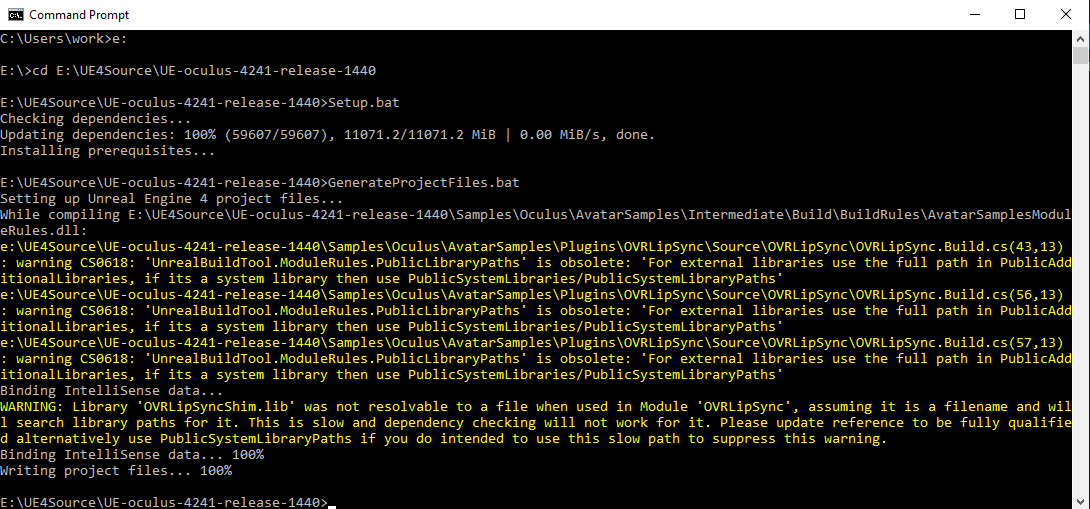 marsh hull
@carmine yoke I got my issue fixed by removing maps from packaging and adding them again.
carmine yoke
Hmm, that's odd, thanks for letting me know though!
brisk spade
can someone explain me how i can set up a loading level splash screen?
the splash screen is called before the level is opened
i have no idea what type of texture i have to use
brisk spade
forgot to use another compression mode
 vagrant drift
For a VR device its best to have a map with a object that renders a widget. You can also have this follow the HMD to keep it visible during its duration no matter where they are looking.
tired tree
its best to have it as a stereo layer typically
pastel fern
Are you guys able to work with HapticFeedbackEffect_... assets? The asset editor is empty for me
brisk spade
@sturdy coral hey i tried to get the stereoscopic thing to work.
SceneCaptureComponent2D is what i have in my Motion Controller pawn that renders to a textureRender2D
the res
thats my result
tired tree
you dont' want to use a scene capture
you likely want the double eye texture buffer and split it
like the both eyes mirror mode
brisk spade
double eye texture how to set it up or where can i get it from?
can i get it from my hmd?
tired tree
FDefaultSpectatorScreenController
virtual UTexture* GetSpectatorScreenTexture() const override;
virtual void RenderSpectatorModeUndistorted(FRHICommandListImmediate& RHICmdList, FTexture2DRHIRef TargetTexture, FTexture2DRHIRef EyeTexture, FTexture2DRHIRef OtherTexture, FVector2D WindowSize);
virtual void RenderSpectatorModeDistorted(FRHICommandListImmediate& RHICmdList, FTexture2DRHIRef TargetTexture, FTexture2DRHIRef EyeTexture, FTexture2DRHIRef OtherTexture, FVector2D WindowSize);
undistorted and distorted eye functions both display both eyes
brisk spade
how ould i do it with blueprint only?
tired tree
you can't
brisk spade
there isnt a solution with bp . hm ok