#virtual-reality
1 messages · Page 216 of 1
 granite jacinth
But if you meant the VR Template in Unreal. Then sure.
You can do whatever you want
There are many options. Many plugins and templates available to you
 unkempt dagger
Oh I wrote unity. Yikes 😂
I of course meant the Unreal template haha
My question was more if its a good starting point or if people recommend trying to build my own to understand it on a deeper lvl. Or if just looking through the blueprints would be fine
Gonna leave my typo for comedic effect 
 spiral marsh
is there a way to get which direction the player moved their motion controller. Say I wanted to call an event whenever someone moved their controllers to the right at a certain velocity. Is something like that possible? I am using an Oculus Rift S
 sturdy coral
@lean basalt set supports depth true on the stereo layer component
Only 4.24 supports it with steamvr though
 lean basalt
@sturdy coral Dude that makes a lot of sense! I will download version 4.24 to test, about SteamVR can you tell me the direction I should study? Again thank you very much for clarifying 🙌
 tribal coral
@spiral marsh Try Gesture Tracker VR
spiral marsh
that looks like what I want thank you @tribal coral
 pine nimbus
When I let UE4 auto choose the Steam models for motioncontroller components, in a packaged build there's no material applied, and switching to knuckles doesn't change the Vive wands to Knuckles models, what am I missing?
 tired tree
@pine nimbus got a patch pushed in that fixed that in a recent engine version. Can't remember off the top of my head if it was 4.22 or 4.23 though.
At least the textures, love switching isn't going to reload it
Live
pine nimbus
@tired tree ah as expected of such a hero
 crystal oak
Anyone got any tips for aligning up a index controller with a hand mesh?
lean basalt
@sturdy coral It really is a bug in the UE4.23 version! 🤦♂️ I tested it on version 4.24 and it worked. 😌 Just noticed that in the case of the hand the material of the knuckles becomes transparent. Thanks for the quick and accurate help.
tired tree
@lean basalt not a bug, they just didn't support depth submission in pre 4.24, it was Oculus only
lean basalt
@tired tree Uhumm now I understand! Unfortunately in my internet searches I did not find this information!
@tired tree Do you know any way to load an image sequence into the oculus quest? I already tried by conventional methods but it gets a black screen. 🤔
 sturdy canyon

Nathan Rowe, creator of @SculptrVR, shares his unique solution to efficient lighting on the Oculus Quest. #UE4
 Twitter
I’m famous now!
 wicked oak
Destiny and warframe both do that, kinda
essentially its COOP but world is shared and matchmakes randomly
@sturdy canyon great work
its like what Red Matter does, those guys alsoi went with unlit + custom shader entirely
 placid spear
Does anyone have suggestions on how to implement a FOV limiter?
sturdy canyon
Mine is way way simpler, though! Thanks @wicked oak
 eternal inlet
@sturdy canyon nice job. The voxel manipulation, is that done via cpp or are there some BP alternative?
sturdy canyon
Naw it’s all cpp
 pine nimbus
@crystal oak VR Expansion has all the grip stuff you'll ever need probably, and includes a demo project to tinker with
crystal oak
Where about is the demo project? just looking to read over the basics
crystal oak
oh u gotta take it all for the example project, gotcha
Oh btw, where can i find out on index controls action mapping names?
Like what buttons are called what in ue4
pine nimbus
oh u gotta take it all for the example project, gotcha
There's separate downloads for the actual plugin
crystal oak
Thanks
i can not for the light of me find info on index controller input bindings
oh what the fricc theres a plugin for it by valve lmao
 odd garnet
@crystal oak Steam VR Input Plugin
or the OpenInput Plugin by the same guy as the VR Expansion Plugin (not inputs but skeletal tracking)
crystal oak
Thanks
Anyone got any tips for when your doing Movement input, not too sure where the best place to get my forward and right vector from is
odd garnet
controller
then project to a plane
so you're not getting the up / down pointing on the controller
 brisk spade
does some have some ideas of interactions form in a Cottage factory?
it should be focused on the steam engine that powers all spindles
tired tree
@crystal oak in 4.24 that valve plugin is part of the engine. And binding in general moves to the openxr paradigm where you define "actions" separate from the keys that call them and then each controller can have different mappings to the actions.
Also vre is my plugin and you were already in its support discord from the ik talk 😂
crystal oak
Ah gotcha, and yeah im aware
 merry raven
is there an easy way to print a string in vr?
ive tried the one with 35 newlines in front but I cannot read it, its too small for my terribly eyesight x)
 past tiger
I'm also curious if somebody has a nice way to view debug statements in game
 carmine yoke
I mostly just use the console, and peak at it when I need to
Otherwise I have in the past made a dedicated UMG widget for it which I either just place in world or Attatch to HMD depending how I'm feeling. That was only because I was debugging points or something - I forget
But generally console works for me
tired tree
there are a couple of debug plugins for VR in the marketplace now
I use a custom console with keyboard thta I made that reads the output log and console outputs
 alpine oyster
quick question, i have a punch gesture implemented using a gesture tracker, but taller people finish the gesture quicker and it messes with the immersion
also the directional attack of the punch gesture comes out of different ends
how can i calculate velocity and a vector so that the punch creates a fireball that only spawns when the punch is completed (ie velocity is 0) and so the fireball spawns in the direction of punch?
tired tree
you keep a buffer of inputs over a set amount of frames
average their direction, maybe weighting heavier on the final ones
throwing out ones that are below a set threshold (fist stops moving)
alpine oyster
how can I go about doing that?
 cosmic shoal
@past tiger I just used a simple print screen, but made the font huge
alpine oyster
also, what is the best way for the fireball to spawn? should I create a socket on the mesh? or should i just have a scene component in the hand?
tired tree
doesn't matter either way
as for the other one, either an array or running average of current position - last on the hand
alpine oyster
do i have to do that on tick?
alpine oyster
hmm okay i will try to figure it out
alpine oyster
okay im just having a bit of trouble getting the velocities, or at least, optimizing it
i have a gesture tracker component that definitely works based on some kind of frame update, just not sure how to get the forward vector
should i just do on tick?
 hybrid plume
@alpine oyster Tried tracking collision spaces for this?
alpine oyster
you mean like collision spheres on the motion controllers? wouldnt that need on tick as well?
hybrid plume
Yes, delta the time between a sequence of collision spaces, that if fires correctly spawns the fireball
alpine oyster
makes sense, could i just use a timer to avoid tick? or could i have an event that only fires when the velcoity is zero?
hybrid plume
Timers probably work, velocities are one way, or tags
alpine oyster
okay cool, will test it out thanks!
alpine oyster
okay it works on tick, but is there a way where i can achieve this using event dispatchers and custom events?
tired tree
you can make them and throw it
alpine oyster
can you explain?
sturdy coral
@alpine oyster you most likely don't need to avoid a tick if it is only for the player
merry raven
Has anyone tried using the Sequence Recorder with VR?
I set it up to record my MotionControllerPawn and all Actors I interact with, but (some of) the actors are just kinda glitching all over the place?
Anyone have an idea what I could be doing wrong? https://youtu.be/AH1KY6UdsH8
 crystal oak
Decent way to check if your in VR mode?
 fleet plume
@crystal oak i'm using these two
    bool DisplayConnected = UHeadMountedDisplayFunctionLibrary::IsHeadMountedDisplayConnected();
    bool DisplayEnabled = UHeadMountedDisplayFunctionLibrary::IsHeadMountedDisplayEnabled();
Okay does that work if its on and enabled say from steam vr or?
Im trying to be able to enter game in non vr mode for prototyping and checking
but i cant really figure out how to check so i can do control switches
fleet plume
yeah that should work for that
crystal oak
ty ❤️
crystal oak
Btw what sort of tweaks would i need to make too the basic replicated vr character to be able to use typical controller input like the third person for debugging reasons
use controller rotation & unlock HMD seams to not do it
sturdy coral
@crystal oak basic VR template uses a pawn which has no character movement
 cold siren
@high trench I have heard good things about using world machine with ue4. However, I am a landscape architect and i use a lot of GIS data and I have had great success (with some trial and error of course) by importing GIS derived heightmaps directly in to unreal with doing a little bit of math to get the scales to fit. This is has been great for me importing real world terrain in unreal. This also tiles the landscapes and you can even get them to be streaming levels if desired.
tired tree
@crystal oak in my template I keep a subclass of the main character that is an FPS test character. It just locks the hands in place and uses movement bindings and then calls the same grip functions as the master class
I switch between it with a node that checks if in VR Preview or not so can be used back and forth
just that kind of setup would work
 sage gulch
is there an issue with PickupActorInterface and c++ projects? I'm not much of a coder, but I duplicated the interface and my copy fails building due to "Error: Class 'UPickupActorInterface' must inherit UObject or a UObject-derived class" ... but the files are the same aside from names; afaict the class definitions are the same, and they both work in testing...
merry raven
Has anyone tried using the Sequence Recorder with VR?
I set it up to record my MotionControllerPawn and all Actors I interact with, but (some of) the actors are just kinda glitching all over the place?
Anyone have an idea what I could be doing wrong? https://youtu.be/AH1KY6UdsH8
Enjoy the videos and music you love, upload original content, and share it all with friends, family, and the world on YouTube.
 hallow knoll
@merry raven The actors that are "glitching" are still simulating physics during your sequence. What is your logic set up to do once you grab them? You need to make sure they stop simulating physics and attach to the motioncontrollers. I've had to do some specific things to make my gameplay logic play properly once recorded in a sequence (like replacing the physics actors with dummies specifically for recording etc).
Sequencer won't record the exact logic that's executing in your gameplay code, it'll only record things like "spawn actor/particle", "attach" etc. Any logic that references a player controller etc won't work when you're playing it back in editor
@crystal oak I inherit from the VR pawn and do a bunch of hacks to it (attach MC's to camera, lock camera, add specific keyboard input to that pawn only etc). When my "spawn pawn" logic executes, I check to see if VR is connected/enabled, and spawn the "FlatPawn" if it isn't
merry raven
@hallow knoll This is all it does when I grab it: https://i.imgur.com/co5OG3n.png
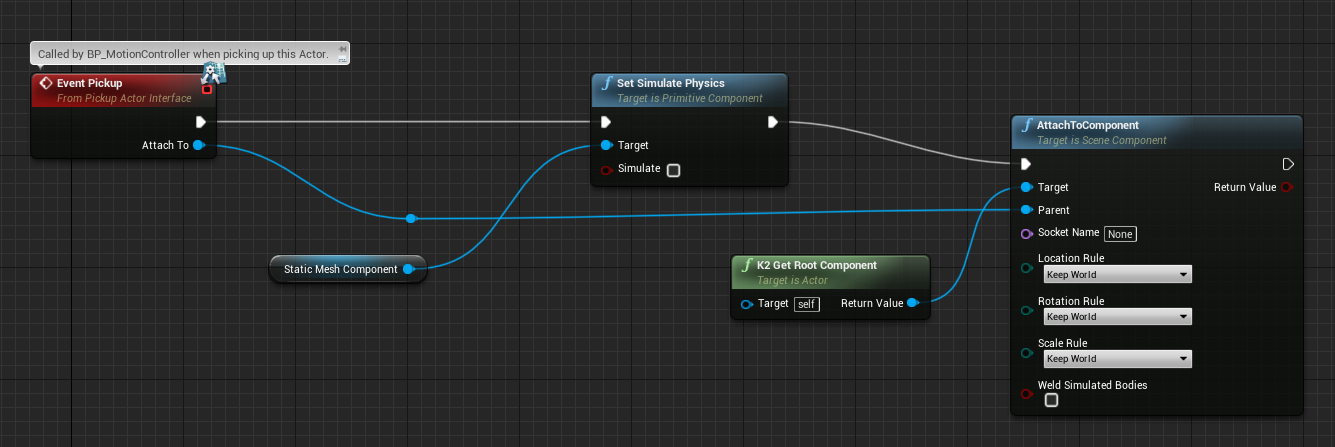
Besides that I really only set Transforms
hallow knoll
Yeah that simulate physics isn't being called in Sequencer. I don't have an immediate fix but doing physics in general as part of a sequence will give you different results every time and should be avoided
If you want something to look like it's simulating physics in a sequence, then I would record the transforms of the object and play it back as an animation
merry raven
@hallow knoll Thanks, ill look into that
Maybe Sequencer isn't the right tool for what I want, I basically want to record this and play it back to another player (so they can see whats happening in VR):
https://youtu.be/sPPWZ62sFFw
Would Matinee be better for this?
sturdy coral
@merry raven matinee doesn't have any of the recording features, only other option is network demo replay if your game is fully networked
merry raven
its not unfortunately :/
 void raptor
Is anyone here interested in playtesting a game with me? I think i got the multiplayer part down, i just only have 1 hmd and no friends with vr so i cant really test it
merry raven
@hallow knoll I'm quite new to UE, how would I do this? "I would record the transforms of the object and play it back as an animation"
cosmic shoal
@void raptor I can give you a hand
void raptor
@cosmic shoal cool! ill hit you up in dms
 lapis yoke
Anyone know how to detect the Headset and Controller type in blueprints? I want to switch my in game controller models automatically based on what you're using. I can detect if it's Steam, or Oculus, but that doesn't help me identify if you're using vive wands, oculus controllers, or index controllers on steam.
odd garnet
something something SteamVR something something
type SteamVR and theres a node for device ID or something
 weak harbor
I am looking for the same, and figured out this solution:
You have to run it after the controllers are on
Not sure what all the results are. Index return "SteamVR"
Looks like SteamVR represents both vive and index :/
eternal inlet
i was trying to find a download for "Silent Hill pt" for VR, anyone happen to have a link or can upload somewhere?
 cyan kayak
Any one know how to detect if the Vive index or normal vive is connected ?
and the question above mine is exactly that guess no one know
or there is no way
sage gulch
is there a way to turn off oculus timewarp/spacewarp? it produces too much distortion when the scene contrast is high
or when emissive values are high
 frigid kite
Improve the performance of your application
 fading shore
Hi, test anyone RTX in VR ? In desktop all is right, but in VR editor stucks.
no crashes, no messages, just stuck foreveк
sturdy coral
@fading shore it is not supported in 4.23in vr, I’m not sure about 4.24. Which are you testing on?
 little scaffold
Anyone know if there is a way to fade in the Splash screen of Oculus instead of popping it?
 normal wadi
Hey guys does settrackingsource still work on 4.22 ? Because I tried to setup a basic hmd + 2 controlers for my rift and wasn't able to get tracking for my controlers
sage gulch
performance will certainly effect timewarp/spacewarp, obviously.. but you can see it induce very obvious tearing even in published applications that are using minimal system resources, like a loading menu made of black bg and white text in deoVR will tear just from looking at it
 daring mural
I can hear audio properly in editor VR preview but in a packaged build, the audio outputs through my speakers instead of the HMD, anyone know why?
fading shore
@sturdy coral where can I read about it? I am testing at 4.23.1.
sturdy coral
@fading shore there is some mention of it in 4.24 changelog
@sage gulch it shouldn't kick in at all unless the app is missing frames
unless you have it set to forced always-on maybe
a loading menu is not necessarily using minimal resources, many many apps drop frames during load
daring mural
@ember forum I thought that too but, shouldn't it automatically play in the rift? I can hear everything else in the rift fine, like when I close out of VR preview I can hear the Oculus Home music play etc.
 ember forum
its a windows thing
daring mural
Running games from the Oculus Store also plays through the HMD fine. Maybe because this is an executable I'm running locally I have to set the sound output in Windows
?
sturdy coral
@daring mural @ember forum when running with oculus it is supposed to ignore system default device and use the one provided by the oculus runtime
ember forum
"supposed to"
 stark wyvern
Hello, I'm having issues with testing out my AR app in iOS. Previously, I was able to test out by launching the project to my iPad and everything worked fine. But recently, it would either:
- Be stuck at the UE4 splash screen
- Or turn into a black screen after 1 second of the UE4 splash screen.
So far I've tried the following.
- Deleting Saved, Intermediate and Build folder.
- Updating the iPad.
- Deleting the DefaultConfig.ini and redoing it.
The strangest part is that even though I open an empty AR project (from Unreal Engine) and launch it on my iPad, the same things happen. So I thought the iPad itself would be the problem. I tried it on my phone but it does the same thing as well. Has anyone experienced this problem before? Help would be much appreciated!
Edit: Amateur mistake. I just had to update the engine...
 balmy lion
Anyone got experience with Weapon Master VR/VR Gun Tool Kit + Advanced VR Framework 2.0 or VRE?
 daring pasture
Yes
balmy lion
Would it be okay if I asked you a few questions?
daring pasture
Sure just dm me
 solar surge
anyone here use vrep/vr expansion and doesn't mind me asking them a few questions? 🙂
capsule isn't following HMD at all, and I am using the proper class (vrcharacter)
normal wadi
Hey guys about 6 months ago I made a little demo using my rift on UE4 and I was trying to change it but hand are no longer tracked, it's kinda like MotionController->SetTrackingSource(Hand); this doesn't work anymore
anyone have an idea why ?
 willow trail
Hello, does the engine (4.23) struggle with stencil meshes/tests, and VR?
Whenever I enable custom stencil tests my left eye goes completely black
normal wadi
Hand is a EControllerHand in that code
 rare sand
Can someone help me out with a ar where u track a image and an object spawns on the tracked image and once the tracked image goes out of frame the object despawns
I m new to ar
Help will be much appreciated
Also it's for a phone if that helps narrow down
 alpine ore
Hi all, sorry for asking if this has already been asked, but when the Quest is connected to the PC via a link compatible cable should you be able to use the VR preview feature in the editor through it?
alpine ore
Just answering my own question. The answer is yes. After restarting unreal and the headset it seemed to work
rare sand
When i package the project for android it seemed to create a new local drive on it's own is that suppose to happen and what if i want to delete that drive
lean basalt
Does anyone know of any way to improve AA quality in oculus quest?
 mighty carbon
?? Isn't MSAA x4 enough ?
lean basalt
@mighty carbon Unfortunately not! You can't read the texts clearly
mighty carbon
is it a render text? Or is it an image with text?
if it's a render text (masked font), you are not in luck because UE4 doesn't support alpha to coverage on mobile and thus those things won't get AA'ed by MSAA
if it's an image/widget with text, then you need to use stereo layers
mighty carbon
not sure if it's for all Oculus products, but https://developer.oculus.com/blog/updates-to-the-oculus-leaderboards-feature-destinations-social-stories-notifications/
ember forum
@hallow knoll are there any plans to support using the Oculus Link(with the Quest) in the Unreal Editor as a Rift?
hallow knoll
@ember forum There's nothing that needs to be done in the editor, it works "as is"
ember forum
oh wow, nice
so tired of all this cable management
sorry for the question, i just saw someone asked the exact same thing, but also, thanks
 native cedar
Sup guys, I am trying to deploy on oculus Quest (launch level) with UE. I tried 2 versions, 4.22 and oculus custom engine 4.23 and they both yield the same result: either level is black or the quest keeps loading it without ever displaying anything. Is there something I am missing?
From a second Google search, sounds like a manifest related issue
 tame thistle
Double check mobile HDR is off if multi-view is turned on (I think those were the options that gave me that issue)
@native cedar
tame thistle
UE4.24, does the Vive need additional setup other than plugin enabled to work? I've migrated an archvis to 4.24, slapped the VR template pawn in with all the default settings (except Start in VR enabled), but in a packaged build the hands don't track and no inputs work. Head does track.
I usually work with Rift/Quest, this is first time trying to package for SteamVR.
tired tree
4.24 moves to the new steamVR input system
you likely need to regenerate your manifest for it
first launch of several projects on it had issues due to stale files
tame thistle
Through here I'm guessing?
Was gonna claim it wasn't there earlier, then I remembered I only installed the SteamVR Input plugin 10 minutes ago.
Thanks, that seems to have fixed it.
tired tree
@tame thistle thought you loaded up 4.24? its embedded in 4.24
tame thistle
Yeah, 4.24. You're probably right and I just had a moment of blindness.
willow trail
Hey, maybe I should try here... I'm trying to have a visual origin marker in VR with a post process effect that fades everything else out EXCEPT for the marker. The only solution I found was to make the marker translucent and ignore depth test, write the marker to stencil and then do a stencil test on the post process fade out effect.
But whenever I do that it breaks rendering for some reason and the left eye go black. The engine doesn't seem to like that combination... Any idea?
fading shore
Hi! instanced stereo completely brakes my niagara! I 100 % need instanced stereo. Any suggestions?
frigid kite
@willow trail Are you using instanced stereo?
@fading shore Yes, Niagara has not supported instanced stereo since its inception and it still doesn't, Epic seems to have very low priority for VR
little scaffold
@willow trail I am using custom stencil and it works fine on the Rift S, what headset are you using?
willow trail
@frigid kite Sorry had to leave, I tried with and without instanced stereo
@little scaffold Valve Index
frigid kite
Doubt is has anything to do with headset, it's all DX11
Unless for whatever reason the Oculus plugin does support stencilling while SteamVR doesn't
When exactly does the left eye go black?
Just when rendering anything to the stencil buffer?
willow trail
I think just enabling the custom stencil in the project settings and setting a post process material that uses a stencil test blackens the left eye
Disabling fully the PP material or disabling writing custom stencil removed the problem
Right eye otherwise functions flawlessly and does what I want 🤷♂️ (has the post process effect only affect that value in the custom stencil buffer)
frigid kite
There's definitely something funky going on, maybe submit a bug report?
frigid kite
Hmm then we'll think up an alternative
I could tell you how to whip up a custom render pass after all effects in Unity in a few lines of code, sadly I lack the working knowledge for Unreal
willow trail
If it helps, basically when I teleport my users around I fade in and out (lot of them will be first time users, like 95% of them)
But I also fade out manually, and I just want a small puck to be seen through the black veil to tell them to "go to it" to recenter them in the space
frigid kite
Have you tried using a black mesh instead of a PP materal with the stencil?
willow trail
Yeah I could use a black mesh I suppose, but I'd like hands to render over the top of it aswell, since hiding one's hands
for other reasons
since hiding one's hands can be disturbing*
frigid kite
The hands would also just be writing to the stencil
You'd also have to do that for the PP approach anyway
willow trail
I guess the hands are already rendered to the stencil or something
because I can already see them through
frigid kite
Hmm I think that's possible because you have the late update for the hands turned on
by default, motion controllers are rendered separately to the rest of the world for lower latency
it's a checkbox
willow trail
That makes sense, but why do I see the slight aliasing behind the hands if it's a totally seperate render pass?
I'd send a screenshot but the left eye (the mirrored one) that's black
frigid kite
hmm, can't Unreal pick which eye it mirrors? 😦
willow trail
Oh or are you seeing it's not rendered seperateing for me?
frigid kite
Well it appears that it does because you see it through PP
willow trail
I'll check
frigid kite
It's just a guess with the late update
willow trail
@frigid kite Yeah that aliasing around makes me think it's rendered in the same pass, but I'm not sure 🤷♂️
frigid kite
I do believe it's a separate render command for the motion controller model IIRC, I looked at the code some time ago
Have you tried turning off the checkbox for late updates in the motion controller component?
willow trail
The MCs components are spawned by the Pawn actor, but I can't find that option in the pawn or as a blueprint editable parameter in the spawned ones
frigid kite
DisableLowLatencyUpdate?
willow trail
Oh yes I did find it hold on
https://i.imgur.com/DwIEpmc.png Tried with and without and couldn't see much difference to be honest aliasing wise
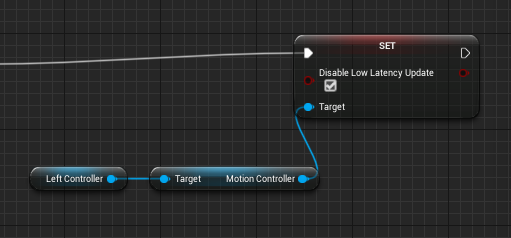
But I'll definitely keep that parameter in mind for later though
Also i did find the node changing the stencil depth value, it is set to 200
tired tree
the hands aren't a seperate render....
they are just resampled just prior to rendering the scene and their scene proxies and moved
willow trail
Well they're not, they do have a custom stencil value
Yeah my stencil test is just != 0
frigid kite
Yeah, just saw that
willow trail
So I either need to find a way to use a black mesh and show the hands overtop of them without using the stencil buffer, or somehow find a way to fix that weird bug
frigid kite
Does the eye go black without using the PP material?
willow trail
If I disable it there's no issue
frigid kite
So just render the black mesh with a stencil test?
frigid kite
or actually, it'll just work if your hands and the marker mesh ignore Z testing
but then your hands will render through geometry
which you might not want
since it would be disorienting to users
willow trail
Yeah users use their hands and see how much it clips through to get a grasp of scale (which is the main use of what I'm doing) :/
tired tree
@willow trail are you using MSAA?
willow trail
Yes
tired tree
and trying to clip things via depth?
yeah...the depth buffer with MSAA is very imprecise, I assume from the scaling it does
willow trail
Oh right
tired tree
you won't get a hard edge on depth buffer operations with it
willow trail
Well I'm not to bothered about that to be fair, the fade to black is temporary, users won't notice it much
Stencil test is only available for post process materials
Looks like
I mean it makes sense considering they're not ordered
frigid kite
That doesn't really make sense, it is perfectly possible to test the buffer in any shader
You would indeed need to be able to fudge the render order of the black mesh to be later than the stencil writers
willow trail
Yes but they're all rasterized and write to the stencil buffer sequentially right? who's to say my origin puck or the hands have been drawn already
yeah
frigid kite
Again I can only tell you how to do it in Unity though >_>
But surely Unreal exposes something like that somewhere
willow trail
Pretty sure I can straight up write GLSL or something equivalent in a material node
Haven't done it before though
frigid kite
That won't change the render order though, that's up to Unreal's renderer
willow trail
Not sure I can write glsl without depending on the material parameters though
yeah
Hmmm
frigid kite
Can't you use the translucency render order?
willow trail
I can try
@frigid kite Hmm I'm not sure, I'm out of ideas :/
This sucks because I made a nice roll in fade in post process anyway (nothing too fancy but tuned right for my scene) so that objects disappear as the black veil gets closer
little scaffold
I bet there is something different in the Oculus plugin because I have no problem in using custom stencil with the same type of PPM
willow trail
@little scaffold Very possible 🤷♀️ Don't have my Oculus here to test it on the same project though
little scaffold
and I don't have my vive either..
willow trail
This is on 4.23.1 aswell?
frigid kite
As a workaround @willow trail, you can have all your scene materials inherit from a material which fades to unlit black based on scene depth, so you can fade out that way 👼
willow trail
@frigid kite Oh no 😦
But something could still be in front of the origin circle
and be rendered black
Well that's not really an issue, granted
Like, it's the same issue with PPM and the like
little scaffold
@willow trail 4.23.1 with oculus works fine on my end so it should be about the valve index or steam
Just to be sure, in project settings->Rendering->PostProcessing->Custom Depth stencil is set to "Enabled with Stencil" right?
 little scaffold
No problem! I would go deeper in seeing what would be the difference between the oculus and the valve index at this point
tired tree
just an outline setup should work fine in steamVR
never had an issue with that
also shouldn't be a difference realistically
willow trail
@tired tree What do you mean with an outline setup?
rare sand
I need some help with optimization of ar application for android
willow trail
(Also posted a bug reports https://answers.unrealengine.com/questions/937922/left-eye-goes-black-when-using-custom-stencil-buff.html)
Humm
Chaning the blendable Location fixed it
Just randomly changed it to "Before Tonemapping"
little scaffold
@willow trail glad to know that changed something I'll remember that
willow trail
Yup, and I can't even reproduce the bug anymore, even though I tried a bunch of things, restarted the editor and such 🤷♂️
Favorite kind of bug...
tired tree
i meant what qdefouge was trying to move across to steamvr
but nice that you "fixed" it ;p
guess it was besides the issue though
tired tree
you aren't running with multiple clients PIE VR are you?
willow trail
Don't think so, no
Only have one editor opened anyway, everything else looks nominal
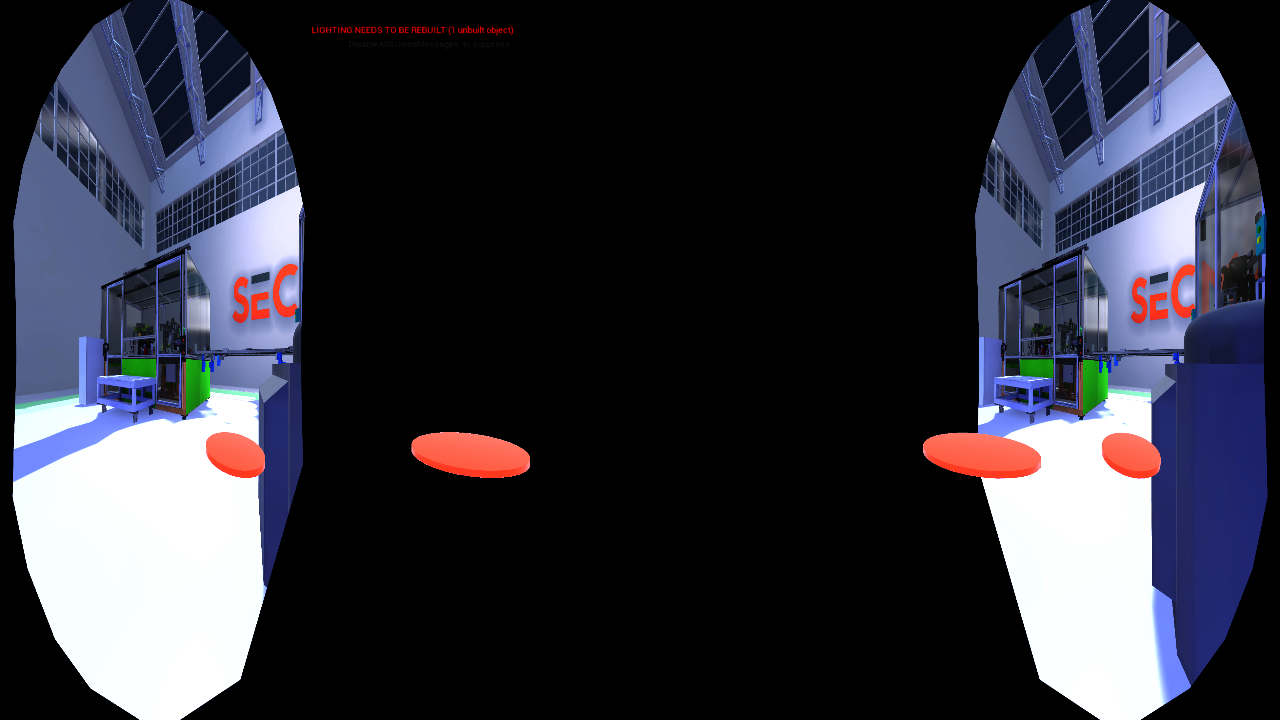
I'm gonna make some coffee and reboot... https://i.imgur.com/JxrdMni.png
 willow trail
Definitely can't seem to shake that problem now
No idea what's going on, it happens if my post process material is enabled (even when I change it to literally do nothing and just output PostProcessInput0)
Once again fixed it by doing god knows what, but I guess in the end "After tonemapping" is problematic, but "Before Tonemapping" works
(I certainly don't do any tonemapping myself)
 sly sigil
Have been trying to get SteamVR controller bindings to work with my Vive, I can acess the bindings of the UE4 editor but not sure how to access the bindings of my UE4 project as its not being listed under the controller bindings, have I missed a step?
The list is longer but does not include the project
sturdy coral
@sly sigil what version are you on?
sly sigil
4.23
sturdy coral
you may want to wait on 4.24, everything is changing
sly sigil
Alright will look into it. Got a link to a changelist?
sturdy coral
Unreal Engine Forums
PREVIEW!
Preview 4 of the upcoming 4.24 release is available now on the Launcher and GitHub. We are making this Preview available so that our developer community can try our new features and help us catch issues before the final release. As fixes are implemented, we will rel...
sly sigil
Seems they have fixed the issue with the A and B buttons on the index then?
UE-83223 SteamVR Vive/VivePro Motion Controllers no longer register inputs
granite jacinth
Where you at bro?!
tired tree
well it will be in 4.24 ;p
if its been fixed yet or not
actually that specific one has been fixed, saw your forum post
mighty carbon
weren't past few releases broken in one way or another ?
tired tree
"all"
there is always issues
name of the game
engine doesn't stay on one version long enough to totally patch it up of eveything that gets introduced normally
granite jacinth
They were supposed to do it every 5 releases
tired tree
weren't solved until 4.12
granite jacinth
Could be, I'm sure there's always things
BUt I mean, for the most stable version
4.10 was it, because they made it a point
I wish they have kept with the every 5 versions a stability release.
 sly elk
I have a knuckles user complaining about haptic strength and their hands hurting after playing wrench
does knuckles have way more powerful haptics?
carmine yoke
Is there any reason why my draw thread might be really high? (Oculus quest) I've only got 20 draw calls in this scene, 57k Prims, which is much less than other scenes which run fine.
I'm getting draw thread bound somehow
sturdy coral
@sly elk#79 many have said these help with comfort: https://www.reddit.com/r/ValveIndex/comments/c8oghr/big_hands_problem_solved_valve_has_a_3d_printable/

reddit
Posted in r/ValveIndex by u/mikeski21 • 567 points and 200 comments
did they actually say they hurt due to haptics? maybe it was two separate issues
tired tree
I have a pair of those adapters ony knuckles, helps a ton
 pallid pewter
Just a quick VR question, any way to completly lock off oculus home? Or atleast limit its abilities? Need to completly lock off access to the desktop for a project for a client
sturdy coral
@pallid pewter I think you have to pay for a pro
for "kiosk mode"
that may only apply to quest though
err not pro, I think it is called business edition
sly elk
@sturdy coral yeah they said the haptics were making their hands hurt or something
i was thinking of having an FFB strength option but honestly it seems kind of unnecessary
we fire a lot of haptic events when using tools, but thats because I really like haptics and think they add a lot
each ratchet click, there is an effect for power tools when you pull the trigger, etc
sturdy coral
yeah I don't think they are particularly strong on index vs normal vive wands
 polar hazel
any idea how to remove frame rate limit to see what performance impact stuff has?
I am stuck at my hmd refresh rate
I am guessing it's running vsync
tame thistle
UE4.24, has anyone had problems with a packaged project not exporting the SteamVR Input config?
Even after regenerating, it's not included in the packaged project so ofc nothing works.
It's only happening to one of the six projects I've migrated to 4.24 so far :/
 feral bloom
Anyone deployed the FaceARSample without a mac?
brisk spade
are there any established menu concepts when the user only has one button to interact with the environment? when to fade the menu in and out. User looks on the ground for some time?
little scaffold
@polar hazel you can use t.maxfps but not sure if that works correctly in VR
little scaffold
then I'm afraid I can't help you more sorry..
willow trail
Hello, I got a big VR demo to do tomorrow morning, and all of a sudden all my Index controls stopped working. The controllers are there but none of my inputs do anything
I've did the whole regenerate manifest thing...etc, but I can't access to the SteamVR bindings though

Any idea?
feral bloom
in editor or in build?
willow trail
In editor
feral bloom
Hmm, you opened up that remapping page through steam vr?
willow trail
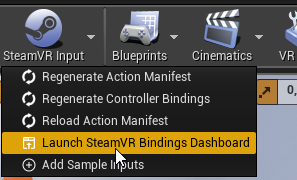
Through UE directly https://i.imgur.com/bVJLB35.png
 feral bloom
And when you say cant access the bindings, they dont appear?
feral bloom
Hmm thats weird. Try open through steam vr and see if it does the same
willow trail
In my case it opens localhost:8998/dashboard/controllerbinding.html?app=application.generated.ue.itb_hager.ue4editor.exe, and firefox just says it can't access it
feral bloom
Ah right
willow trail
Through steamVR (not the web dashboard) it works, it does open the panel, but the application (current project PIE) doesn't show
feral bloom
Sorry I dont have any ideas apart from rebooting the project, removing the plugin and reenabling and rebooting pc.
I have had similar stuff happen before but one of the above usually fixes it
willow trail
I'll try that, thanks
Couldn't make it work
Tried disabling/reenabling the plugin, restarting steam, rebooting
 mild trail
So I have installed Airserver on my PC in order to try and cast from my Oculus Quest to my PC. In my phone app I choose cast from: Quest. Cast to: PCname but then after a few seconds it comes up with an error - something with "unknown error, make sure your casting receiver is on and ready to connect and then try again, restart the reciever if it doesent help" Any ideas?
willow trail
2 hours and not a single bit of progress 😦 If anyone has any sort of clue why controls just suddenly stop working I'd be very thankful, I'm all out of ideas
And posting an issue on the SteamVR Plugin now is too late, there's still work to be done and 12 clients coming tomorrow early morning...
tired tree
the generated manifest id is different from the editor launch to a packaged one
though it should preserve the input bindings from the json files
you have to make sure that the packaged one is using defaults and not some override in your profile
willow trail
I'm not even packaging the game
It stopped working in editor altogether
I've had some serious issues trying to package (some of which you helped me with), but for now since it's constantly in development and I'm changing assets on the fly on an hourly basis between demos I do all of them in editor
tired tree
on the same computer? yeah it shouldn't have issues then between demos
and you said you could get the bindings interface up in steam and everything was fine in there?
willow trail
Yes it shows up in steam
But not with the UE4 demo
It just shows generic "Editor" and not any of my custom bindings I set in editor
willow trail
I fixed my issue with input not working, some other actor was auto receiving input, and "any key" if set to consume also consume every other non-key input
Dashboard still doesn't work though 🤷♂️
 tawdry dragon
Hey guys. I have an issue. I have an ARKit app that gets rejected from AppStore because it has the TrueDepth APIs integrated, but I'm not using it anywhere.. Can you disable the TrueDepth without disabling the ARKit plugin it self?
 blissful bear
Fixed in 4.24
https://issues.unrealengine.com/issue/UE-83416
mighty carbon
I wonder when they are going to release 4.24
tired tree
the answer is "too soon"
blissful bear
@tired tree Hi. I just pulled VRExpPluginExample 4.24work branch and now get a 'Steam is disabled. Some features may not be available' overlay when I run VR preview. It says 'Failed to load input bindings for Virtual Reality BP Game Template-10387632 [UE Editor]. Please select another binding option.'
Things we working fine until all this Steam input malarky. I have an original Vive and motion controllers.
I ran the steam client and let it update. Trying VR Preview then worked and works even without the steam client running. I wonder if it needed a one-time connection to it...
ember forum
@brisk spade on rec room
you have a watch
that you look at to show the menu
and when you look away it goes away
or rather, move your watch out of focus with your watch hand/wrist
its a very specific motion, of twisting your wrist that way, so its hard to trigger that accidentally
 faint quiver
Howdy all, just a quick question. I'm wanting to test projects for VR and was curious what videos you would suggest watching to help me?
tired tree
@blissful bear yeah....it has to use the packaged profiles now
had to add them to the template
its going to be annoying changing any keys in that though
it will re-write the bindings every time you change one and its not auto mapping correctly to the thumbstick
blissful bear
I'll be on the look out for the extra complications. Thanks.
 nimble edge
@ember forum & @brisk spade And that interaction in rec room is a nightmare for little bodies. My daughter's arms can't go out far enough to make the menu work properly. It's an exercise in frustration every time she tries.
nimble edge
Does anyone know why I'm getting about 72fps on the blank startup map in VR (plane, sky-sphere, directional light)? It's definitely not a hardware problem.
mighty carbon
what HMD ?
nimble edge
Index
mighty carbon
🤷
nimble edge
If I create a VR template project and then recreate the same thing as the blank map I'm at a solid 144
I have a level I've built from the "blank" template. 72fps. Migrate it to a different project that was created as a VR template. Same Level: 144hz
ember forum
thats a question that could have a million answers but the right answer is to measure performance, use stats to see the differences, but my guess is dynamic lighting on your directional lightsource...
nimble edge
If I migrate the level to a project based off the Blank template: 72hz. Migrate to a VR template project 144hz. There's something Engine side...
Every single thing is the same, except the starter template/project.
daring pasture
Forward rendering?
ember forum
forward rendering is enabled on the project itself
you wouldnt have deffered in 1 map, and forward in another(as far as i know)
sturdy coral
@ember forum the vr template sets scalability settings
look at the scalability .inis
ember forum
he doesnt even mean vr template
he means the vr template map
when you create a new level
ember forum
actually now that oyu mention it, im not sure as well (if he means map or project) lol.. but now he has all these comments
sturdy coral
look at the scalability.ini between the different projects, it turns off all kinds of stuff
nimble edge
Thanks, I'll go check the scalability inis. Probably not the best use of my time.
But I can't help myself
sturdy coral
I think stuff like ambient occlusion may be disabled through that instead of through the post process volume in the vr template
turning off ssao, ssr, fringe, and several other things can save you more than 2x on a simple scene I think
there may be other stuff changed through defaultengine.ini as well with the vr template, can't remember
nimble edge
Bingo, thanks.
DefaultScalability.ini is all the difference.
[AntiAliasingQuality@0]
r.PostProcessAAQuality=0

[AntiAliasingQuality@1]
r.PostProcessAAQuality=2

[AntiAliasingQuality@2]
r.PostProcessAAQuality=3

[AntiAliasingQuality@3]
r.PostProcessAAQuality=3

;-----------------------------------------------------------------------------------------------------------------

[PostProcessQuality@0]
r.MotionBlurQuality=0
r.AmbientOcclusionLevels=0
r.LensFlareQuality=0
r.SceneColorFringeQuality=0
r.DepthOfFieldQuality=0
r.BloomQuality=1
r.FastBlurThreshold=0

[PostProcessQuality@1]
r.MotionBlurQuality=0
r.AmbientOcclusionLevels=0
r.LensFlareQuality=0
r.SceneColorFringeQuality=0
r.DepthOfFieldQuality=0
r.BloomQuality=1
r.FastBlurThreshold=0

[PostProcessQuality@2]
r.MotionBlurQuality=0
r.AmbientOcclusionLevels=0
r.LensFlareQuality=0
r.SceneColorFringeQuality=0
r.DepthOfFieldQuality=0
r.BloomQuality=1
r.FastBlurThreshold=0

[PostProcessQuality@3]
r.MotionBlurQuality=0
r.AmbientOcclusionLevels=0
r.LensFlareQuality=0
r.SceneColorFringeQuality=0
r.DepthOfFieldQuality=0
r.BloomQuality=1
r.FastBlurThreshold=0

;-----------------------------------------------------------------------------------------------------------------

[TextureQuality@0]
r.MaxAnisotropy=0

[TextureQuality@1]
r.MaxAnisotropy=2

[TextureQuality@2]
r.MaxAnisotropy=4

[TextureQuality@3]
r.MaxAnisotropy=8

;-----------------------------------------------------------------------------------------------------------------

[EffectsQuality@0]
r.TranslucencyVolumeBlur=0
r.TranslucencyLightingVolumeDim=4
r.SceneColorFormat=2
r.SSR.Quality=0

[EffectsQuality@1]
r.TranslucencyVolumeBlur=0
r.TranslucencyLightingVolumeDim=4
r.SceneColorFormat=2
r.SSR.Quality=0

[EffectsQuality@2]
r.TranslucencyVolumeBlur=0
r.TranslucencyLightingVolumeDim=4
r.SceneColorFormat=2
r.SSR.Quality=0

[EffectsQuality@3]
r.TranslucencyVolumeBlur=0
r.TranslucencyLightingVolumeDim=4
r.SceneColorFormat=2
r.SSR.Quality=0```Oh, crud, sorry, I thought that would be collapsed.
brisk spade
@ember forum so a working example would me move the control in front of the hmd to make menu visible
nimble edge
Here's one similar concept I mocked up awhile ago, @brisk spade :
https://twitter.com/rileyflorence0/status/1035356063959277568?s=20


 brisk spade
I think looking at a watch is too complicated for my users
They want it as simple and straightforward as possible
The don't know where the shoulder button on the controller is
Wow that looks fantastic :)
nimble edge
The target demographic and use case totally makes a difference. For the enterprise stuff I build I have to keep things suuuuper simple, and lots of redundancy.
brisk spade
How do you make sure it doesn't open accidentally
nimble edge
This one I didn't worry about it. It was just a mock-up. But I'd probably put a little timer on it
brisk spade
So maybe holding the hands flat open handed for some seconds and then the menu is visible. If I wanna make it super robust
nimble edge
Yep
brisk spade
It's a super slow application teleport to a spot do sth teleport to the next spot do sth and so on. Mainly listening and solving a simple task
crystal oak
Do we have away to make UMGComponents draw on both sides?
nimble edge
If you turn on Two-Sided in the BP it will have a black back. You can edit the material and make it kind of anything you want.
mighty carbon
it's interesting how UI/UX hasn't evolved, even in VR
ember forum
if the material is 2 sided tho, it might be flipped(if its like text) if its on the opposite side, you can make it rotate towards the camera in the material itself tho.. that way no matter how ever many players look at it, it always faces them on their end.. https://www.youtube.com/watch?v=wCE-7Y8WfX8 @crystal oak

Material Network to connect to WORLD POSITION OFFSET: http://pastebin.com/hkqkkJ9j
crystal oak
Yeah double sided does not work for UMG rendering and face the cam is not what im after, i want to flip it
crystal oak
Like i said, does not work.
nimble edge
The second one is done by tweaking the material thats used to render the UMG widget.
It's an Engine Content material, so make a copy before you change it.
@crystal oak You have these controls by default on a UMG widget.
tired tree
@crystal oak it's on a standard widget comp and not a stereo one right?
crystal oak
Yeah
ember forum
anyone having issues using quest link, being too high🤪 and then having to unplug replug cable to reset height
its happening like every other time i launch in vr preview
 tribal totem
hello every one ,i have an issue reagarding the apk . i installed the apk which i deployed by unreal engine in quest using sidequest ,it installed in unknown source but not working
so any one who try this type of issue plzz help
it is a app which we own created in unreal engine and followed all build process as per oculus guidelines
my app is running in quest when i deploying it through unreal engine
carmine yoke
I've not used side quest, but in the package from ue4, theres an install batch file, if you install it that way does it still not run? @tribal totem and you say it runs when launching from the engine?
tribal totem
yes it runs
when i lunch it into quest
butwhen i add .apkfile into quest it daoesnt work
pallid pewter
Im using the VR Template and have made a knife to cut up a procedual mesh, (making a cooking game) how would i make each of the sliced parts of the mesh have the ability to be picked up seperatly??
currently i can only pick up the most recently made mesh, even though im comparing the components position to the grab sphere and setting it to only attach the closest component to the hand..
 rugged yacht
Hello all! quick question; Is there a way to test the node "Set Color Scale and Offset" which targets Oculus function library from another headset, lets say an HTC Vive?
mighty carbon
unlikely
sturdy coral
@rugged yacht probably can using revive
 dark light
Hey guys! Not sure if this is the right place for it, but since AR/VR are close to Virtual Production... maybe someone can help? Basically I'm having trouble getting live inputs (a simple webcam) to work in Unreal Engine via media player (with a mediatexture assigned). Does anyone here have any experience with it?
it looks like I need to initialize the camera device or something but I'm not sure how to do that.
sturdy coral
@sturdy canyon seeing any uptick after sale of Medium to Adobe?
sturdy canyon
I had one rando join my discord and ask if SculptrVR is a good replacement
My most recent review on Quest from 15 hours ago (12 hours before the medium announcement) was 5 stars and the text: “Oculus please bring medium to the quest”
sturdy coral
Hah, well I picked it up, didn’t realize you had multiplayer
 dusky moon
the only exciting thing with adobe buying medium for me is possibility of combining it with substance painter
dusky moon
any1 used hair rendering in 4.24 in VR ? wondering how expensive it is
granite jacinth
Actually still surprised about this
Interested in this bit, anyone know anything about it?
 short aspen
Does any one know of any vr inventory system tutorials or assets? I have a normal inventory but i am trying to implement vr so i would like the player to be able to open the inventory and be able to reach and grab the item that they want out of the inventory. I see plenty of examples for unity but nothing for unreal
something as simple as linked would work for me if some one would be so kind as to point me in the right direction to get started

if you're interested in my upcoming VR room escape check out my patreon https://www.patreon.com/user?u=11404561
mighty carbon
@granite jacinth part of it is just probably typical behavior of modern days entitled gamers
odd garnet
yeah imo tbh play the game for yourself
its a bit janky but does great stuff
and is fun
Ignore anything else other than your own opinion of the game
granite jacinth
Well, you saying it's a bit janky is putting me off already
This is a team that had some serious financial and marketing backing from a decent sized publisher
 devout bison
hi. would anyone have spare time and be interested in testing my game. i need som feedback
granite jacinth
Said publisher also said they helped with various technical aspects of the game
So, I wonder if publisher had put any (or too much) pressure on the team and this was the result
Basically most VR games are self-published, very few have ever been published by big guns (like this one) other than Oculus right AFAIK
And IIRC Oculus doesn't really do much other than fund you.
But whatever Oculus is doing, they are doing it right because their published games all turn out pretty damn good
It's just one of those...damn I want to see a post-mortem... how was it working with a publisher for a VR game. Was it worth it or not in the end.
@devout bison post in #looking-for-talent for a free tester
odd garnet
So don't play it Victor lol
If you think me saying its jank is saying "don't play it" then don't play it
Yeah they had a lot of publishing help but obviously that doesn't always mean your publisher is good or good at their job
The game is FARRR more complex than almost any other VR game
and if you're going to pre judge them without even playing the game then like thats your own issue
I really enjoyed the parts of the game I enjoyed
I added voice detection myself because of how awesome it felt
Looks at Oculus's published games that have near the bottom player counts
Whatever Oculus is doing, they're doing it wrong lol
70% of the VR Audience wont play Asgard's Wrath because of OC
__
as for espire you KNOW they use VRE, and that pretty much at anytime you can join their discord / PM/DM them
ANYWAY, look I made a holoception ability
past tiger
@odd garnet What is OC?
odd garnet
Oculus
cosmic shoal
Asgard's Wrath works fine on revive (WMR) I understand people hesitating to buy games at their store without an oculus since revive could stop working at any time. That is why I haven't bought anything, I had a promo code for this game.
odd garnet
not to mention revive eats 5-10% perf
cosmic shoal
I have a 980ti and it played great.
odd garnet
(still eats 5-10% perforamnce)
cosmic shoal
mixed reality portal + Oculus + SteamVR 🤦♂️
odd garnet
- revive lol
cosmic shoal
yeah
mighty carbon
I have no issues buying on Oculus Store
I bet if that day ever comes (Oculus closing doors) the hardware will become open platform
fading shore
does Volumetric Fog and lights works in 4.23 in VR ?
any suggestions, pros and cons to use such things in VR
feral bloom
Think they work but you dont want to use them. Performance cost is huge.
fading shore
alternatives?
feral bloom
Cheat methods will get you 80% of the look
Like a cone with a fog looking shader on it
feral bloom
No worries, I haven't tried anything for up close VR stuff but maybe this would work

 old olive
uargh folks.... I need help. Using SteamVR Input Plugin with 4.23 ... all my Input Action Mappings work correctly but I can't get Input Axis Mappings to work?? I did the "Add Sample Inputs" for the Vector2 input as described in the GitHub instructions, but a Print String on the Input Event just prints out 0
must be an update issue with the plugin
sweet! that was it! I can't believe Rebuilding the plugins after just straight up deleting the folder then adding the new one worked without changing anything else 😂
Thanks, @old olive ! lol jk
mighty carbon

Jim Kroovy writes: Hello, i want to thank everyone for the amazing feedback over the past couple of months! Mr Mannequins Tools (Gumroad, $0+) now comes with a female UE4 mannequin! As well as more support for custom characters and big plans for the future. Check out the vide...
nice
and 4.24 is out too
old olive
release? I still only see preview 4
mighty carbon
Release notes for Unreal Engine 4.24
Unreal Engine Forums
4.24 now available to download
As you may have heard, with this release, we’re retiring Unreal Studio and folding all of its features into Unreal Engine—for free. Unreal Engine is now your one-stop solution, whether you’re working in game development, architecture, fi...
I am guessing VTs are not yet supported on Android ?
old olive
uuunnnnghhhhh so many new features
mighty carbon
not whole a lot for VR
tired tree
well considering they redid the entire input side of VR in this one
and openXR is live in it
pretty significant release for VR actually
frigid kite
And raytracing support?
nimble edge
I'm trying to build my own grab system for a project. I don't need a lot of what VRExpansion provides. I just want a grab system with "fixed grabs" and "relative grabs" as well as world collisions for held objects. I'm using a physics constraint and everything is almost working, however, I'm getting some major Physics Explosion issues if my motion controller goes into the colliding objects. Any ideas how to mitigate this?
frigid kite
The problem is that grabbing is inherently complicated - personally I would just opt to use VRE instead
tired tree
your constraint is reprojecting from initial grab position
you need to make sure it is a soft constraint and play with the stiffness and damping
nimble edge
Thanks, I'll play with Stiffness and Damping some more.
Another project I'm working on is using VRE. My grabs are all set up as "keep relative offset" type grabs. If I want the object's origin to snap to the origin of the motion controller when picked up, how would I go about doing that?
tired tree
pass in an empty transform
with IsAlreadyRelative ticked
the transform is the relative transform of the object to the controller, an identity transform will be origin to origin
its a transform specifically because it lets the user do whatever they want regarding position
nimble edge
Ah, perfect.
I had to maintain the scale, otherwise it went wacky shack
But that is just what I needed, thanks.
dusky moon
4.24 out! time to wait forever for Substance plugin to come out for it 💀
mighty carbon
Time to wait for Oculus integration 😛
 wild seal
Speaking of 4.24, is anyone else having issues with steam vr crashing?
tired tree
@wild seal with MSAA enabled?
wild seal
Using default aa. It's related to the input bindings. I'm working with windows mixed reality and it seems that they changed the generic motion controller inputs to per device inputs.
tired tree
yeah, it shouldn't be causing actual crashes though
wild seal
Assertion failed: Key.IsValid() [File:D:/Build/++UE4/Sync/Engine/Source/Runtime/Slate/Private/Framework/Application/SlateApplication.cpp] [Line: 5543]
UE4Editor.exe has triggered a breakpoint.
dusky moon
One thing I read about 4.24 seems like you should disable steamvr input plugin as its built in now. not sure if thats the case
wild seal
That'll disable get bounds from the steam vr chaperone in BP_KMotionController. Still crashes anyways. I'll try a clean project and see if that helps.
No luck. Crashing on an empty VR project.
mighty carbon

From gesturing and communicating with others to picking up and manipulating objects, our hands play an important role in how we interact with the world—and they’re key to unlocking the feeling of true presence in a virtual space. We first brought your hands into VR with O...
hand tracking on Quest is available NOW!
tired tree
@dusky moon yeah its built in
@wild seal yeah the one device I didn't test 4.24 on in preview was WMR
there were original issues with other steam vr headsets in the previews
nimble edge
Anyone have hands on experience with the Rift S?
sturdy coral
@wild seal it crashes for me on latest steamvr beta, rolling back to steamvr stable fixed it
that was on last preview though, haven't retested final release
the depth submission stuff crashed for me some too, not sure if that was ever fixed. there is a cvar to turn it off but I still got a crash with that and had to add:
diff --git a/Engine/Plugins/Runtime/Steam/SteamVR/Source/SteamVR/Private/SteamVRRender.cpp b/Engine/Plugins/Runtime/Steam/SteamVR/Source/SteamVR/Private/SteamVRRender.cpp
index ff548bf377c..f5ccca81691 100644
--- a/Engine/Plugins/Runtime/Steam/SteamVR/Source/SteamVR/Private/SteamVRRender.cpp
+++ b/Engine/Plugins/Runtime/Steam/SteamVR/Source/SteamVR/Private/SteamVRRender.cpp
@@ -151,7 +151,12 @@ bool FSteamVRHMD::BridgeBaseImpl::Present(int& SyncInterval)


        // Increment swap chain index post-swap.
        SwapChain->IncrementSwapChainIndex_RHIThread();
-       DepthSwapChain->IncrementSwapChainIndex_RHIThread();
+       // TODO vulkan should always be false!
+       bool bSubmitDepth = CVarEnableDepthSubmission->GetInt() > 0;
+       if (bSubmitDepth)
+       {
+               DepthSwapChain->IncrementSwapChainIndex_RHIThread();
+       }

        return true;
 }```

(not sure if needed in final yet)guys, any of you strong with transforms and spaces in BP, that can show me how to take a transform in one bonespace and convert into a transform in another bonespace?
specifically i have a yaw value from a headbone that i wish to apply to a spine_03 bone's yaw
wild seal
@sturdy coral I'm having crashes with steam vr 1.8.21. Which version are you running?
sturdy coral
1.9.7, I didn't have crashes on stable
wild seal
I tried with 1.9.7, still crashing. Submitted a bug report.
 tired jolt
what are peoples thoughts when it comes to raytracing and VR?
mighty carbon
no bueno
sturdy coral
it will solve all the screenspace issues with disparity on AO, and be a big improvement on SSR, but I don't know if the perf is there
RTAO also doesn't work in VR yet
wicked oak
@sturdy coral it does
or so they say on 4.24 patch notes
gotta try it
they specifically say that rays now work on multiview and vr
and RTAO should run on vr alright
mighty carbon
2080 Ti min probably, on low quality
cosmic shoal
Steam November hardware usage NVIDIA GeForce RTX 2080 0.07%, NVIDIA GeForce RTX 2080 Ti 0.06% 💩
sturdy coral
@wicked oak they've got this in there still:
const bool bApplyRTAO = ShouldRenderRayTracingAmbientOcclusion(View) && Views.Num() == 1; //#dxr_todo: enable RTAO in multiview mode```god dammit
 spare yew
Ah great, basic functionality for AR getting backlogged... I guess Epic don't care much for AR anymore
brisk spade
any reason why motion controller just simply wont be visible in a project?
i have 5 builts all identical except the maps 2 work 2 dont
spare yew
@mighty carbon I know Google isn't keeping the plugin up to date but this is a recent bug that's occurred in 4.23/4.24, I submitted it only a week or two ago and it's already backlogged.
mighty carbon
🤷
feral bloom
How is it legal to sell a perpetual (defined as never ending/changing) license and then revoke them?
mighty carbon
power of Apple
pine nimbus
Only got rendering in right eye after 4.24 update, any tips? (Vive)
willow trail
Also getting the StreamVRInput crash, anyone found a fix?
pine nimbus
@feral bloom The hell, yeah that doesn't sound right so you bought a license and then it was revoked? There's gotta be more to the story
willow trail
@pine nimbus Gotta head out, but you're not using custom stencil shader are you?
pine nimbus
Nah I'm not
willow trail
No idea then sorry 🤷♂️ Had that issue the other day, but was very specific
pine nimbus
And you have one black eye in VR?
I'm using custom depth in the post process material
I'll turn it off and see
willow trail
Yeah
Only the right one
And also using transparent material with stencil tests
or something
pine nimbus
Duude. That was indeed it
willow trail
Yeah really gotta go but if that solves it, my only solution was to play around with some random setting until it works
I made a bug report somewhere
Defo not a solid solution out there that I saw, don't remember which setting either
pine nimbus
Alright, I'm not even doing anything complex with it, hmm. Thanks that's saved me a bunch of time, I can live without it for now
If you link to your bug report I can upvote it
willow trail
Mate no worries, lost an afternoon to it
pine nimbus
Well I hope it's something easy for Epic to fix
sly elk
anyone try GTAO in vr yet?
mighty carbon
isn't it for consoles only @sly elk ?
sly elk
says consoles and windows on the trello notes
mighty carbon
right, but it's only in the console's release notes, not in publicly published release notes
Unreal Engine Forums
4.24 now available to download
As you may have heard, with this release, we’re retiring Unreal Studio and folding all of its features into Unreal Engine—for free. Unreal Engine is now your one-stop solution, whether you’re working in game development, architecture, fi...
sly elk
thanks for the info 😦
we are trying to switch from taa to fxaa and jim was going to dig into making the dither stop happening with unreals ssao, i was hoping this would be a low effort solution
granite jacinth
https://store.steampowered.com/app/823500/BONEWORKS/ not doing so well

BONEWORKS Is a narrative VR action adventure using advanced experimental physics mechanics. Dynamically navigate through environments, engage in physics heavy combat, and creatively approach puzzles with physics. Advanced Physics: Designed entirely for consistent universal r...
Price
$29.99
nice numbers though
cosmic shoal
"Dynamically navigate through environments" from the video many of the mechanics would not work well with Teleport, it looks like it needs strong stomach.
looks fun tho
sly elk
They do a lot of stuff that looks hard on the stomach. Swinging from crowbars etc
Also when we were setting up physics/collisions in wrench we tried a hand method similar to theirs but I personally find the VR hands decoupling from my real hand placement super off putting. It was especially bad when trying to pick up something super heavy when the object doesn't lift quickly.
which is why we added ghost hands
cosmic shoal
Things I can't stomach: smooth rotation. (like rotating with a button or joystick instead of my head) and sudden elevation changes.
sly elk
What about snap turn?
wicked oak
it just looks as a crazy overhyped tech demo
granite jacinth
I am surprised they didn't cater to a wider market
They sure as hell had enough time and money
and also, how are you going to have these random day one issues with hardware
If they didn't test it (for xyz reasons) then don't just randomly add "WMR"
Some of these devs...killing me man
Have all this funding, PR/Marketing...
Yet they do the dumbest things
If I can, as a solo-dev target and test the various HMDs...those guys should have had it done 10x easier
 sudden fiber
did you buy or borrow to test?
sudden fiber
oh dang
granite jacinth
As a VR dev you should also
Get it for free or buy it if needed
But, I do admit, I get quite a bit for free
sudden fiber
free is always preferable haha
mighty carbon
@granite jacinth that's where all the money went https://www.reddit.com/r/oculus/comments/e8w094/in_boneworks_if_you_get_close_enough_to_the_crt/

reddit
Posted in r/oculus by u/Lysergiix • 28 points and 3 comments
sturdy canyon
lol that’s awesome
 sonic tide
so they deprecated all the current motion controller events?
Okay so whenever I use a motion controller event, this happens:
and this is the warning
daring pasture
I believe you are required to make action mappings now, rather than calling a key directly
sonic tide
but aren't they already there?
why else would they come up
if not, does anyone know how to do that? i haven't done anything with action mappings
nvm found it
frigid kite
To any EU person here with the Index, is it possible to avoid/reclaim VAT when buying as a company on Steam? I can't find any clear info on google
 white fern
So my understanding is that you cannot use Unreal to make landscape (persistent world-space) apps for Magic Leap. Is this correct? Has anyone found a way to leverage UE4 for Landscape apps?
feral bloom
@pine nimbus Yeah. Seems Ikinema was bought by Apple and have revoked all indie licences. They aren't telling anyone why
tribal coral
What do you mean by Landscape Apps?
nimble edge
@white fern Are you talking about persistence like this?
https://developer.magicleap.com/learn/guides/persistence-snippet-unreal-engine
white fern
@nimble edge That's exactly what I was looking for. Thanks! I got confused because of this page, which shows Unity and Unreal only doing immersive apps https://developer.magicleap.com/learn/guides/develop-choose-platform
willow trail
Trying to move my project to 4.24 (hoping to see if Datasmith has been improved), but it crashes about 1 second after loading :
Assertion failed: Key.IsValid() [File:D:/Build/++UE4/Sync/Engine/Source/Runtime/Slate/Private/Framework/Application/SlateApplication.cpp] [Line: 5536]
...
UE4Editor_SteamVRInputDevice!FSteamVRInputDevice::ProcessActionEvents() [d:\build\++ue4\sync\engine\plugins\runtime\steam\steamvr\source\steamvrinputdevice\private\steamvrinputdevice.cpp:3636]
UE4Editor_SteamVRInputDevice!FSteamVRInputDevice::SendControllerEvents() [d:\build\++ue4\sync\engine\plugins\runtime\steam\steamvr\source\steamvrinputdevice\private\steamvrinputdevice.cpp:390]
UE4Editor_ApplicationCore!FWindowsApplication::PollGameDeviceState()
...
(https://pastebin.com/z4WaRRif)
Has anyone had that bug before?
(Also @pine nimbus the bug report about the left eye going black https://answers.unrealengine.com/questions/937922/view.html, playing around with the blendable location is what fixed it for me. Sometimes I randomly need to change it again to another value for it to work again 🤷♂️ )
willow trail
Interestingly enough, I also get that bug if I tell it to load without the SteamVR plugin (which I hear is now built-in anyway?) and to disable it
willow trail
The crash log already points towards it, but it's definitelyeh controller handling that fails. Turning my controllers off bypasses the problem. As soon as I turn one one, the editor crashed
frigid kite
How did the presentation go last week, @willow trail ?
willow trail
@frigid kite Haha, went flawlessly thank you
11 first time users if I recall correctly
frigid kite
nice work 👌
willow trail
😉 👍
frigid kite
So, can anyone shed some light on this?
To any EU person here with the Index, is it possible to avoid/reclaim VAT when buying as a company on Steam? I can't find any clear info on google
willow trail
@frigid kite Can't help, no idea personally. We bought an Index through our company but didn't try to reclaim VAT sorry I can't help
Have you tried contacting Valve directly?
frigid kite
I haven't, but from what I read on the Steam forums it takes quite long for support to respond and I don't have that much time
willow trail
@frigid kite Took a couple days for me last time I had to do it (regarding the Index)
Otherwise all I can do is point you to ressources you've probably found, and mention the sort of administrative protocols I generally try to avoid 🤷♂️ https://ec.europa.eu/taxation_customs/business/vat/eu-vat-rules-topic/vat-refunds_en#section_2

Taxation and Customs Union - European Commission
VAT refunds
frigid kite
Hmm alright :/ still hoping someone here happens to have done it
dusky moon
@frigid kite You mean you want an invoice from them which is VAT included to claim later ?!
I also need it for my business as their receipt doesnt mention VAT. but yeah seems like you need to ask support
fleet plume
@tired tree i'am using your VivePawn (yes you warned ;)) and get the right thumbstick axis events mirrored to the left thumbstick axis binding i did in c++
is there anything you do in some nested BP in that pawn? i can't find anything ...
the values are different between both thumbsticks, as if some scaling is applied
tired tree
@fleet plume check the input bindings, but what engine version are you doing this in? You'll have to drop that entire setup in 4.24
fleet plume
using 4.23.1
tired tree
i wouldn't bother if you plan to move to 4.24 ever
fleet plume
i checked the input binding, but can't find anything
tired tree
which you should, 4.23 was pretty bad
but no there is no scaling, read that wrong, thought you meant it was inverted
fleet plume
and what do you mean with entire setup?
not inverted, values when using physical right thumb are larger
tired tree
you won't be able to live change any motion controller bindings in 4.24 unless you call into the respective interfaces to regenerate action manifests
that would be on the API/controller side then
what controller you on
fleet plume
quest + link
or do you mean the player controller?
[/Script/Engine.InputSettings]
+AxisConfig=(AxisKeyName="MotionController_Left_Thumbstick_X",AxisProperties=(DeadZone=0.000000,Sensitivity=1.000000,Exponent=1.000000,bInvert=False))
+AxisConfig=(AxisKeyName="MotionController_Left_Thumbstick_Y",AxisProperties=(DeadZone=0.000000,Sensitivity=1.000000,Exponent=1.000000,bInvert=False))
+AxisConfig=(AxisKeyName="MotionController_Right_Thumbstick_X",AxisProperties=(DeadZone=0.000000,Sensitivity=1.000000,Exponent=1.000000,bInvert=False))
+AxisConfig=(AxisKeyName="MotionController_Right_Thumbstick_Y",AxisProperties=(DeadZone=0.000000,Sensitivity=1.000000,Exponent=1.000000,bInvert=False))

+AxisMappings=(AxisName="MotionControllerThumbLeft_Y",Scale=-1.000000,Key=MotionController_Left_Thumbstick_Y)
+AxisMappings=(AxisName="MotionControllerThumbLeft_X",Scale=1.000000,Key=MotionController_Left_Thumbstick_X)
+AxisMappings=(AxisName="MotionControllerThumbRight_Y",Scale=-1.000000,Key=MotionController_Right_Thumbstick_Y)
+AxisMappings=(AxisName="MotionControllerThumbRight_X",Scale=1.000000,Key=MotionController_Right_Thumbstick_X)
PlayerInputComponent->BindAxis("MotionControllerThumbLeft_X", this, &ABuilderVRCharacter::LeftThumbstickX);
PlayerInputComponent->BindAxis("MotionControllerThumbLeft_Y", this, &ABuilderVRCharacter::LeftThumbstickY);
there's not much that one can do wrong here
fleet plume
never touched any settings there besides enabling dev mode
tired tree
@fleet plume bind a new action to the same key and test values on that
granite jacinth
ddamn
they turned that around
Assuming the 10%ish rule. That's 20k+ sales in less than 24 hours
mighty carbon
how long that's going to last? A lot of people will get sick from the game, I am certain of it
tired tree
well thye also have a large warning to not buy or play if you can't handle motion sickness
wicked oak
20k sales for something as hyped as that? thats peanuts
probably more than 20k tho
tends to be more of a 2-3% review ratio
sturdy canyon
Early on the reviews are many. People like to review new releases
But yeah probably 60k sales
mighty carbon
I wonder what the budget was (development and PR)
sturdy coral
I think way more than 20K sales, they had 7K+ people online playing
(yesterday) and there were still around 5K playing at one point today
granite jacinth
@mighty carbon you don't know anything about them huh?
Before they did gamedev they were a bunch of famous YTers
Still are
tired tree
PR was pretty free for them lol
granite jacinth
They don't need a budget
tired tree
actually made them money
granite jacinth
They have their freakishly rabid following
granite jacinth
Meh
Obviously it caters to some. A lot of people
So their budget....
They probably make more money via YT honestly
But no clue how to quantify that as they probably won't ever release numbers on either side
Their first game was a "commerical flop" according to them
But I think it's because they make so much on YT and back then they had no clue
mighty carbon
I see
 pearl tangle
anybody manage to get the hand tracking on quest yet to test out?
mighty carbon
nah
people say it's good, but UX is shit
(because Oculus UI wasn't designed for hands and it's awkward to interact with it without controllers )
pearl tangle
yeah more just curious to test out what quality is like. Only needs very basic interaction capabilities for navigating most stuff anyway. Better than using controllers for events
lapis yoke
Anyone here ship a VR game on Oculus with UE4? I'm need to pass their VRCs but can't get the pause game/unpause game stuff working when taking off the headset/bringing up the dash.
I can get it to pause the game, but since the game is paused, there's nothing running to unpause it when the user puts their headset back on/closes the dash.
pearl tangle
@lapis yoke Why not just pull up a pause screen for them and then let them unpause it? You can disable certain things from gettig paused
lapis yoke
I have to hide/disable controllers when the game is paused too so there would be nothing for them to use to unpause it with a menu
frigid kite
people say it's good, but UX is shit
Yeah, you should just be able to touch the UI directly, instead of having to use the worst possible VR UI interaction, the laser pointer
willow trail
So Runeberg's SteamVR plugin is now integrated in the engine in 4.24? How do I access the content the plugin had (default pawn BP, hands and stuff)?
I tried just moving the plugin over from 4.23, but the editor crashes as soon as I turn a controller on
frigid kite
I believe I read a few days ago in here that someone removed and readded the plugin in 4.24 and everything returned to a working state
though I'm not 100% that it was the same scenario
willow trail
@frigid kite Honestly I think I just don't know where to look
I used to see a couple folders for the plugin content in the content browser, but they're gone 🤷♂️
 flat shoal
I'm dipping my toes in the baking lights for the first time ever
we have a room with many spotlights in very close proximity, enough to go over the real-time overlap limit
can we make those static, and then put, say, 1 point light that's movable on top of it and have that light up the player?
or will that mess up the lighting in some way I don't know about yet?
frigid kite
The player will be lit by the volumetric light map @flat shoal
If you keep them as stationary, they can also still cast dynamic shadows, if you like
flat shoal
I can't leave them as stationary since it's more than 4 and they all overlap
but ok, I need to investigate volumetric light map... I hadn't added that to the scene last time I tried and the player was completely dark
(except for the stationary skylight)
flat shoal
man, the light system in Unity is a whole lot more flexible than Unreal 😖
willow trail
@flat shoal It's up to you to "fake" it. Put some of them as static or just make the source emmisive and keep the dynamic ones to a minimum
pine nimbus


After 4.24, none of my trackpad inputs work for Vive or Index, and the Steam Controller bindings doesn't seem to represent what I've set up in UE4 and there are things missing
Is there any way to just drop using the binding system altogether, it's causing me so many problems
Can I force UE4 to look for the motion controller inputs like hardware inputs for gamepad / mouse rather than going through Steam's bindings wrapper thing or however it works behind the scenes?
For example, only the action mappings seem to be in the Bindings
But none of the Axis mappings
So I can't move in-game but I can interact with objects
I have things missing and can't assign everything I'd need even if I could edit the bindings manually
For example, Move Forward is missing
tired tree
@willow trail its integrated, but there are some key bind crashes happening in engine because of it currently
willow trail
@tired tree Hmm okay
Do you know where I can find the content that was part of the plugin?
All the template MC stuff
@pine nimbus God damn, this also sounds familiar
willow trail
Well perhaps not that problem exactly, I assume you're sure you've still set on the default bindings and have gone through all the plugin steps (regenerate manifest...etc)
tired tree
don't need to set default bindings
willow trail
@tired tree Hmm alright, I can't make the plugin work with 4.24 though
tired tree
those just spam up your actions list with ones that you may/may not need
willow trail
Also it's probably colliding with some of the integrated stuff
willow trail
@tired tree I wanna ask if there is any "clean" way for me to port a project that makes use of that content, I assume I just need to port the map properly and it might still reference the assets/blueprints relative to it properly, but then I get confused again about the fact that there seem to be multiple maps in my level at the same time
Some objects in the scene are on a different "map" (whatever that means) that some of the others
Those are probably key, foundational concepts of UE, but I've been using it for a while and could never find a decent answer online
tired tree
yeah its normal for that, although likely not intended that a demo level is setup like that?
don't know too much about their project though, don't use it
 wraith sky
Is that me? or preview of 4.24 had option to disable VR, and 4.24 has no...
on project creation stage
sturdy coral
I had the same problems with MoveForward, you have to make the bindings end in _X and _Y I think
 compact kettle
@pine nimbus Hey. DId you figure the Vive / Index issues out?
We are having the same issue
mighty carbon
has anyone tried having Landscape on Quest ? (Es3.1 or Vulkan)
brisk spade
has someone worked with ndisplay`? to create sth like a cave experience?
mighty carbon
not unless you have access to those kind of displays, for testing
 glass ginkgo
is it possible to load external video from sd card in android with just blueprints? this is to make something like cinema room VR
 woeful sundial
Hi, about ARKit on iOS: nasty Screen Tearing bug since 4.23. Unusable for production. Did anyone get around this issue? (https://issues.unrealengine.com/issue/UE-81611) V-sync does not help
eternal inlet
im looking at options to replace my current ikinema solution. As far as i can tell, there are only few realistic options. I need advice.

VR IK Body Plugin is designed to evaluate body position from VR input.

AnimIK Plugin implements human full body IK for VR games in Unreal 4, with the functionality to work together with keyframed animations by blending data
- making a custom solution (but in BP, since i can't do cpp)
nimble edge
@eternal inlet You may want to look at this one: https://www.coopinnovations.co.uk/licensing/ikabod-2/
A procedural, runtime animation tool that takes FABRIK & extends into a powerful Unreal Engine plugin. Full body Inverse Kinematics solved convincingly.
Havent' used it, but it looks interesting
eternal inlet
@nimble edge yeah i talked to them about it, but then after an initial quote, i didn't hear back from them
nimble edge
Bummer
eternal inlet
also the price is sorta steep for my budget... it was several times more expensive than the two other options
yeah
daring pasture
I have used both and prefer yuri's plugin over animik. It's more of a pain to set up, but to me it feels more accurate
daring pasture
No problem
tired tree
the Ikabod also lists their VR solution as FABRIK, which normally doesn't have joint limits unless its extended
there are some extended FABRIK solutions with limits but they are less common
eternal inlet
right... good point @tired tree
i would optimally prefer to code it myself actually, but ran into issues as soon as i started to work with different spaces... my head basically can't comprehend the math behind transforms in different spaces
as a simple example: my head effector (the hmd) is passing componentspace transforms to the animBP
the headbone gets that transform just fine np
so the neck is also pretty straight forward
tired tree
@eternal inlet there is a great whitepaper on upper body IK with examples
actually i linked that before didn't i
eternal inlet
but then the damn spine_03 seem to be rotated 90 deg and then i ran into issues with gimbal lock i think
@tired tree yeah, that's what im working on atm
implementing that excact algorithm, but it's just the math im struggeling with
tired tree
i solved for the shoulders when i did some testing to work out some leaning stuff
I still keep the paper around to spend time on eventually, just haven't had the time
the problem is that it needs modifications for issues it has
and also to be converted to quats optimally
eternal inlet
Right i was affraid i had to use quats too
eternal inlet
In that case i may have a sorta trivial problem to get sorted first
Will write later when im home
mighty carbon
have you looked into Advanced Locomotion System v3 @eternal inlet ? I think it has full body IK
tired tree
that is entirely not the same @mighty carbon
mighty carbon
I see
 sullen bramble
Does anyone know what it takes to get a dev version of the ps4?
Also has anyone worked with the psvr aim controller?
mighty carbon
I am sure you need to have a solid project to pitch to Sony. Check this out https://www.playstation.com/en-us/develop/.1/ @sullen bramble

PlayStation
Find out all the steps to self-publish your games and become registered developer on PlayStation Network across all the platforms PS3, PS4, PSN, PS Vita & PS TV. Know more about becoming registered developer and requirements in detail.
that's for Americas
EU has different site
sullen bramble
that is kind of intimidating
 sonic lake
@eternal inlet this is from some time ago and open source. Note sure whether it could be a fit for Tall Order. https://youtu.be/Cm-hjahqLh8

Demo of RTIK, an inverse kinematics system for Unreal Engine 4. For source code, project description, and install instructions see: https://github.com/hacoo/...
It supports joint constraints to a certain extent.
mighty carbon
@sullen bramble then perhaps you are not ready for console development 🙂
note that you are going to have to do a lot of CPP coding and most likely some shader work too (not materials in the Editor, but actual low level shaders)
tired tree
thats not really true...
mighty carbon
well, I have XBO dev kits, so I know I need to get a few things done in CPP in order to even launch on XBO, not to mention to pass TRC
and I recall vblanco had to f#ck with shaders in order to get stable performance on PSVR
sullen bramble
@mighty carbon you might be right there not really wanting to stray from stock shader support
eternal inlet
@sonic lake looks pretty cool actually. I noticed he's using a custom node he made, which had the name "rangelimited fabrik"... hard to tell if it's angle-limited or how it really works...
either way, thanks for the link... i'll investigate
sonic lake
@eternal inlet The paper he mentions is the one about FABRIK with constraints, but then he also says he made variations to it.
eternal inlet
oh and about Tall Order, i've limited the scope of the game quite a lot, since i realized i would otherwise never finish it... so if all goes well, i'll be done in January with a version that has some simple fun levels, along with some assymetric pvp gameplay
in any way... i'll clone it and see if i can figure out how to get it running and do some tests. Thanks again @sonic lake
sonic lake
@eternal inlet Sounds cool Jonas, looking forward to it! 👍
I will also take a look at the plugin, I want to experiment with it.
eternal inlet
great... just watched the video again... even though it's hard to tell, because he has location snapping on, it looks kinda like the reaching for effectors are quite slow
i mean... like it's taking a few frames to actually reach the effector
sonic lake
@eternal inlet yeah, it's not the fastest. The good news is that it compiles under 4.23
eternal inlet
ah you're already at it?
he mentioned that it had issues with packaging if it was used as a plugin
sonic lake
yep, just cloned it and gave it a try
eternal inlet
did you also try that?
eternal inlet
🤔
sonic lake
@eternal inlet it's more messed up than I expected, it will require some work to fix the packaging
eternal inlet
Shit ok.. do u know how to do it? Or have an idea what is wrong?