#virtual-reality
1 messages · Page 209 of 1
 fading shore
@silver brook Thanks, I'll try it now.
 silver brook
np!
 quiet badger
hey guys, trying to decide how to approach launching in VR mode vs non VR mode for a game I have
would be ideal to be presented with a launcher that lets you choose instead of having to select at steam how to start the game
is there a decent way to switch IN THE GAME if you are in VR or not?
fading shore
@quiet badger Hi. Can you download this free example and check it ? its very easy to understand how what you need from here! https://forums.unrealengine.com/development-discussion/vr-ar-development/89050-vr-expansion-plugin
in Steam_VR_Player_Controller is a Event ReturnHMDStatus - its your solution
Unreal Engine Forums
VR Expansion Plugin
Updated: 06/13/2019
Playable Template Demo
Template Packaged Download (https://drive.google.com/file/d/0B5cM3oP2O4-UOS1jY1hFY3FJMEU/view?usp
@quiet badger https://i.imgur.com/xb9OX3w.png
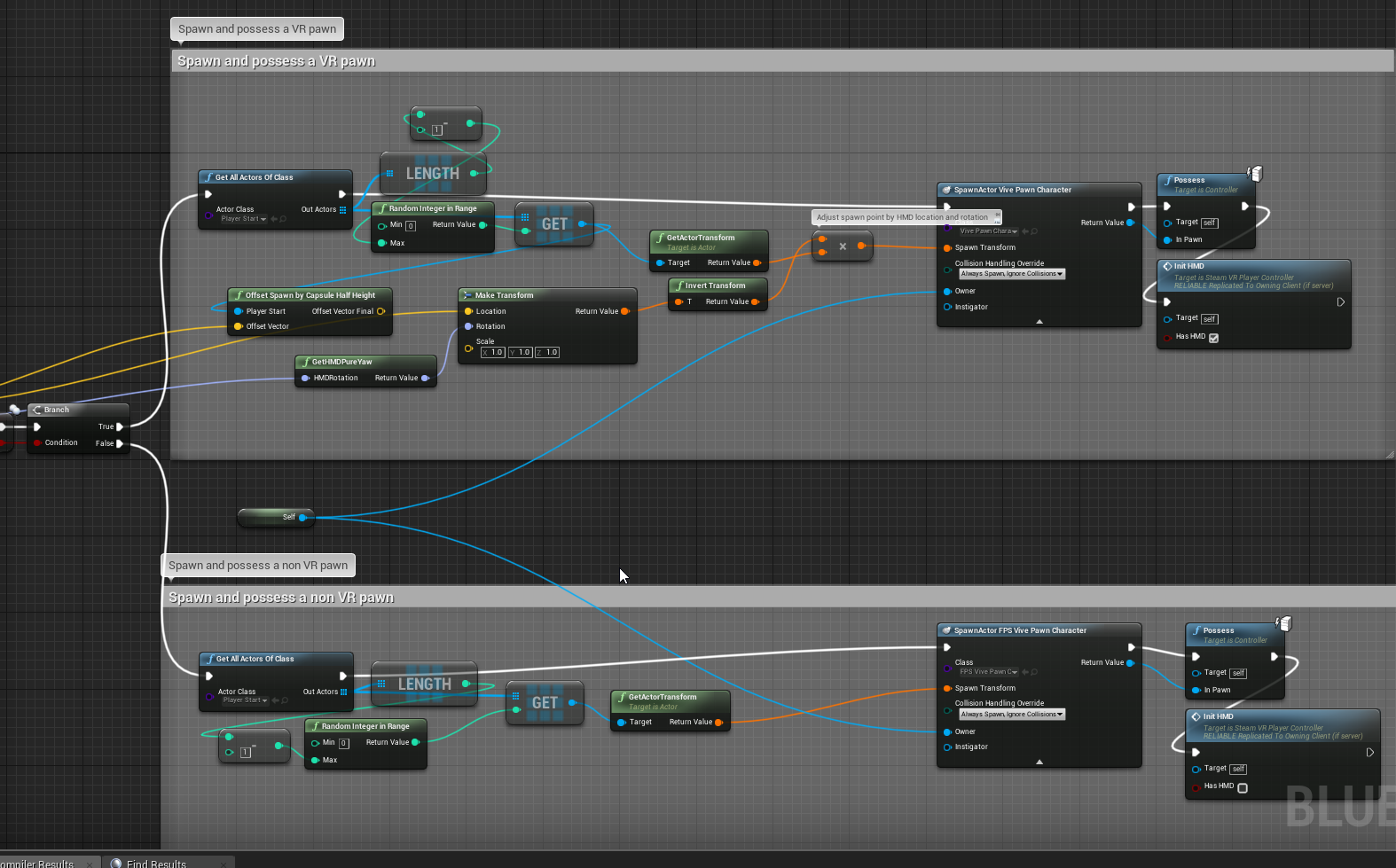
@silver brook can you check my solution to calculate headset speed in VR ?
https://i.imgur.com/y7HobOG.png
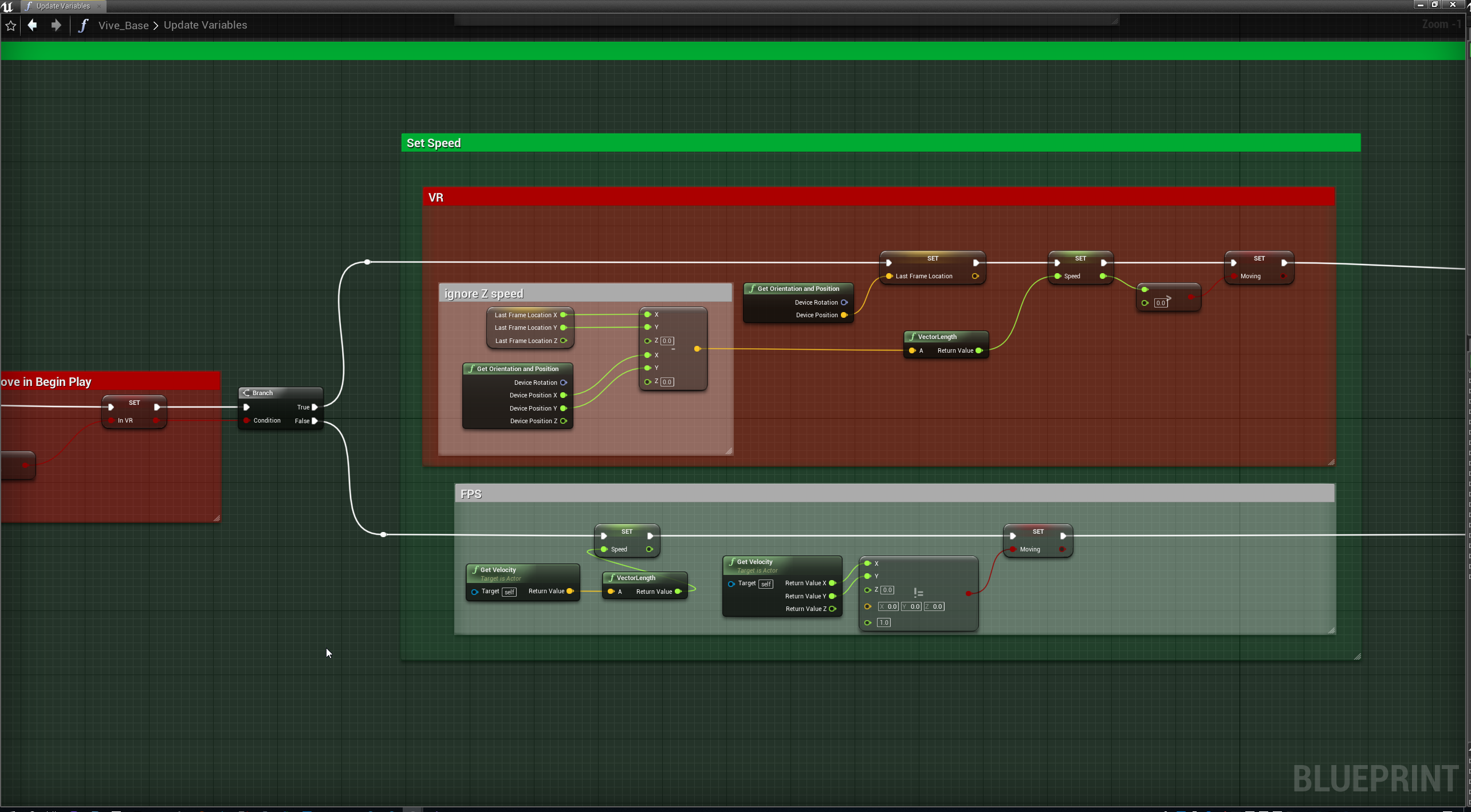
@silver brook I cache a device location in LastFrameLocation (Vector) , next I substract in next frame from LastFrameLocation Current device location and calculate this frame speed. Is it right?
quiet badger
@fading shore i already use this. the problem with that set up is that if it detects vr plugged in at all it defaults to VR mode. I want to be able to select from a main screen if the game operates in VR via like some sort of bool in game mode or game instance perhaps
also ue4 automatically starts up steam vr by default and I'd like to choose if it does so or not
i'd rather not have to boot up the game with -noHMD or -VR

this is my current main menu set up and one of the two options above the tiles is how I'd like to choose how the game starts
fading shore
quiet badger
@fading shore it is meant to be the same level because it is VR and NON VR crossplay in multiplayer online
silver brook
@fading shore V = d/t so you get the distance changed in a tick so that seems right
fading shore
@silver brook I am answer you after testing this
silver brook
oh wait
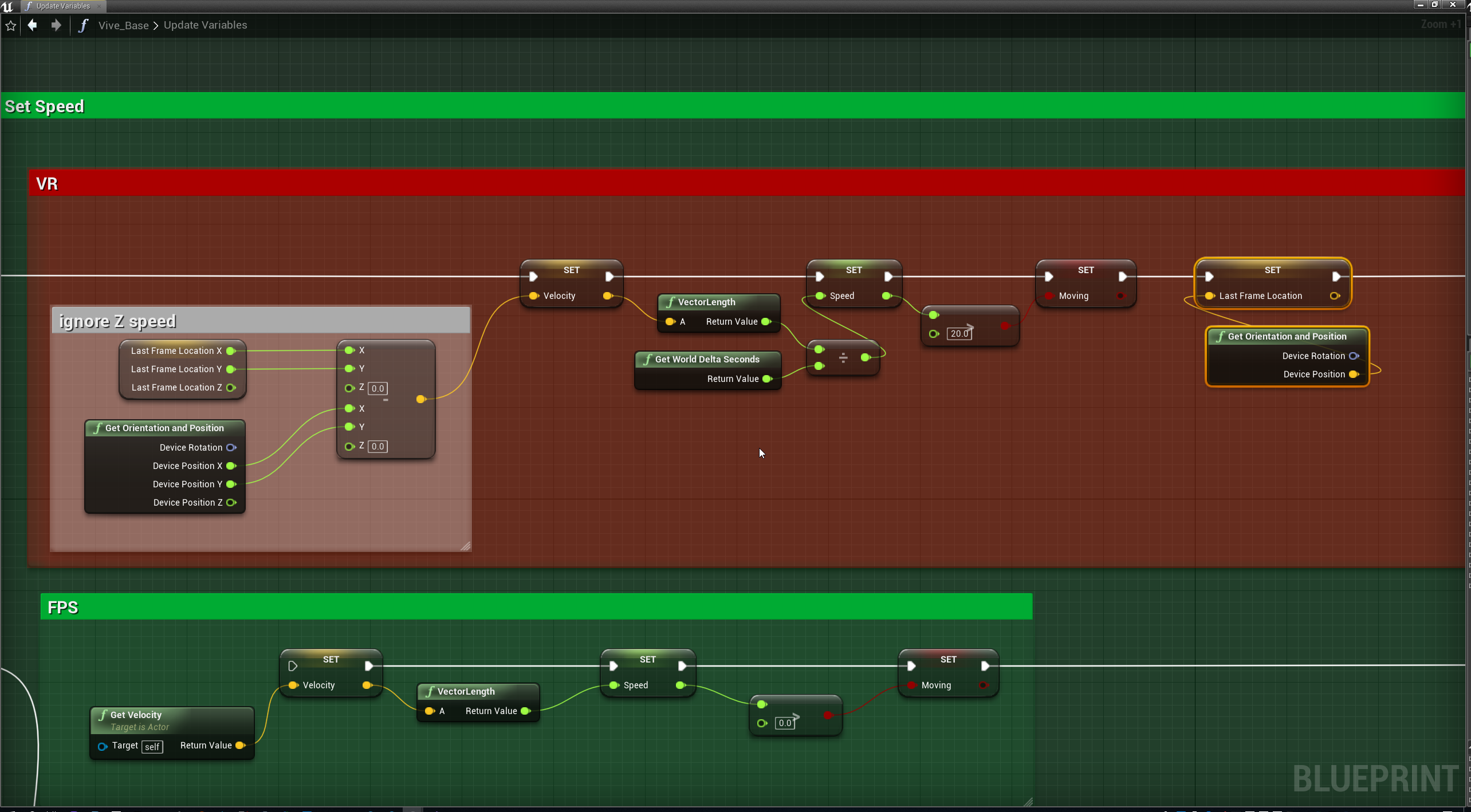
I did (Current - Previous) * World Delta Seconds
for velocity @fading shore Oh but I did Multiply for another reason, you would want divide
had to dig through old code
 sturdy coral
@quiet badger my stuff switches dynamically between 2d and vr when you put on the headset
I'm not sure if there is a way to have it not launch steamvr though without changing code
what I do is separate steam launch option for 2d only, otherwise it launches into 2d if the headset isn't on, but steamvr still runs
and if you put on the headset, it goes into vr
@quiet badger there are also problems shutting down and restarting steamvr during the same ue4 session, so if you are planning to launch it and potentially shut it down between level loads it could have problems (it has gotten better, but I think it still crashes on controller render model stuff when you do that)
fading shore
@silver brook
https://i.imgur.com/OWX3nyP.png
this work just fine
 silver brook
@fading shore yup
 eager olive
anybody had any luck running the arcoreimg command to score their tracking images? I keep getting "unsupported format" but the images are both jpg and png, and they actually work in the test project
 spare yew
@eager olive I'd recommend using the one from the ARCore SDK on github - assuming you're using the one bundled with the engine plugin
 feral bloom
Anyone using Orion for mocap? Trying to capture hand movement too from the knuckles but cant figure it out
eager olive
@spare yew thanks. I'll have a look for it.
@spare yew Ah, seems I was trying to put the full image path after --input_image_path= when I should have just put the image name and filetype, seems I have to run the arcoreimg from the same folder as the images.
silver brook
What are the rules for VR Pawn and stairs? Is there a way to get the pawn to climb stairs? Is that bad?
 tired tree
@silver brook yeah sure, if you are a base pawn then you will have to do the logic yourself, if you are based off of a character then it will handle stairs normally. Generally its probably better to run stairs with ramped collision though instead of staggered.
silver brook
So the default Template VR Pawn uses the base pawn
Should I go ahead and port to a character pawn?
silver brook
Well I have to move the char in the right direction based on HMD Vel?
Keep the HMD attached to Capsule
and then If Capsule moves up as it hits stairs so will HMD?
 toxic oracle
Yep that works, also to allow for the player to walk around their play space and moving the capsule with that look at the displacement of the camera every frame and apply that as a world offset to the pawn, then apply the opposite of that to the camera
 silver brook
@toxic oracle Is that because the HMD movement will no longer match the correct orientation? What does that solve exactly?
tired tree
note that the above will work, but not in multiplayer
it also won't work correctly with character period
but if you are using a pawn then yeah
silver brook
His solution or using a Char Pawn?
toxic oracle
That’s setup for using a character pawn
And the issue it solves isn’t the HMD movement not matching the orientation but the HMD being able to move without the capsule following
toxic oracle
In a character class the root component is the capsule
silver brook
Well right now I set the Max Walk Speed to HMD speed and Add Movement Input to the direction of the HMD
this makes for like double the movement
I guess more like a stacking effect
HMD moves causing Char to move causing hmd to move...
I cover distances much quicker
Unrealistic
tired tree
@toxic oracle the issue wit hthat being for a character, is that its not following in the movement components tick
it will cause massive sync issues in multiplayer, and can also cause clipping issues
silver brook
I'm still not sure how I move the char without influencing the hmd
Maybe I'll try unlocking the camera from the hmd but then manually locking the char to the hmd orientation and position
silver brook
well that doesn't work
silver brook
Trying to do it with a line trace now
auto adjust height based on virtual floor
Adding Local Offset + or - as needed to the Z
silver brook
Actually got that working
I can go up stairs now
and down
With two line traces
and with my walk about the player can walk freely
neato!
still some quality of life things to do though
Also this free house asset is doing something odd with the stairs collision my line trace seems to hit only half way up the stairs
and then goes through it
despite collisions looking ok
 pulsar dome
Okay so I'm designing a game for VR and I'm optimizing everywhere I can so that I can keep my game at 60 FPS per eye which normally would be around 120 FPS. So of course it's expected to have an FPS drop around particle systems but I'm using the P_Fire particle from the starter content but brought down to only have the two fire systems minus the smoke and sparks and stuff but am still dropping to around 35-40 fps per eye. My question is how do I optimize particle systems (for VR) and or what are my alternatives?
 pearl tangle
@pulsar dome what sort of hardware are you working with?
pulsar dome
Let me put together my specs one moment
16 GB DDR3 RAM
i5-4960 3.5 GHz Intel Core
Geforce 1050 Ti
 sturdy canyon
Did you say DDR2?! Is it under 1ghz?
sturdy coral
@pulsar dome don't have it in front of me, but if the fire particle system makes lights that can be really expensive
pearl tangle
yeah pretty sure the default 1 has a light in there
 gilded crow
hello, do you know any template for oculus VR with multiplayer?
 mystic tinsel
What Scalability settings can be set in VR, and can they be done the regular way?
I set up 6 visual settings in a menu same as I would for a flat game but on hitting apply settings it's totally locked up
mystic tinsel
I'm setting Texture, Shadow, View Distance, Visual Effects, Post processing, anti aliasing. I tried clicking anti aliasing and applying and it was fine, but when I do all 6, it crashes, one of these must be causing a crash.
fading shore
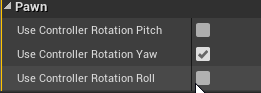
In which cases I can obtain strange world displacement when I did one step forward/backward in VR ? In this video(1st video) I did one forward/backward (several times). In second video I have normal behavior in VR Expansion Plugin.
fading shore
sorry for spam. It was UsePawnControlRotation flag in Camera
tired tree
@fading shore in the first one was that also my character?
control rotation is intended to be turned on
as it replicates without additional work
fading shore
"in the first one was that also my character?" Yes, its child.
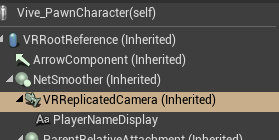
"control rotation is intended to be turned on" - in VRReplicatedCamera in Vive_PawnCharacter in pure your project its disabled.
 tired tree
@fading shore oh, meant on the character
yeah you don't want it on the camera
ever in VR actually
 tired tree
yes
fading shore
same as yours
quiet badger
@sturdy coral well maybe I'll leave steam VR connected then, but I am going to switch which characters are possessed, toggle certain features in game, switch resolution, and change up whats happening on screen.
vr mode should happen all in VR with the option to toggle off the view on the desktop and some additional options for streamers
non VR mode should play like your standard FPS set up, but I want to make sure that nothing in the game world thinks it should be using the HMD or motion controllers as well as not spend any rendering power on the HMD
Theres a weird problem toggling back and forth with VR though. sometimes it doesn't hook
starting to think making my own launcher would be best
 real needle
is there a way to get each eye location/rotation in BP? I found c++ "CalculateStereoViewOffset" mehtod, is there something in BP for that?
sturdy coral
@quiet badger an additional problem is WMR will idle out of the headset isn't worn, shutting down VR and thenn potentially crashing things when it starts back up
They've gotten better about not crashing in 4.22 but I've still had it happen when using render models
Native wmr support instead of wmr through SteamVR may not have the same issue, I'm not sure
 faint solar
@real needle If you grabbed the HMD location you can hard code an offset for each eye. It looks like they have a magic leap eye tracking class that gets the position, but that's it.
pulsar dome
@sturdy coral Thank you
pulsar dome
So I'm having issues with VR tracking, I'm using a character BP derived from the pawn the VR template gives you, the issue is that when I move in real life the HMD's movement doesn't translate to the character's movement in game, so my question is how could I implement that?
pulsar dome
Solved.
silver brook
So I'm working in Unreal and I'm noticing some odd jitter on certain objects in the distance. Is this an Unreal editor thing only? I'm using an Index
pulsar dome
@silver brook Can we have a video? I haven't experienced this before
 flat shoal
@silver brook objects or edges? we got an HP Reverb and MSAA is very jittery, we've found
 jaunty shell
Bloody hell finally
Seems like a great quality product
Nice cloth inside, with compartments for the controllers and cables, exterior is a semi hard shell
quiet badger
@sturdy coral I mean this is selection for an entire session. It's not switching in and out for changing gameplay style or for some sequence of the game that needs it. if you go into vr and decide to switch to first person mode it's straight up just because you're tired. If you play first person initially then you probably don't have vr anyway, but for the convenience of having it all be in one place I'd rather just leave it somewhere you don't have to shut the game down and open a new instance to switch ya feel?
flat shoal
other than cranking msaa to 8x and then waiting for Nvidia's next generation Titan to be release, no... 😃
(I haven't had time to look into it)
fading shore
Hi. Now I have a decent (for my purposes) solution for VR character locomotion and hands IK (Headset and two controllers). Now I want to restrain hands IK with normal humans joints capabilities especially for shoulders, elbows and wrists. Any solutions ?
https://www.youtube.com/watch?v=TmYmap2XroA&feature=youtu.be
 real needle
Hi guys, just quick noob's question: how do post process materials work with VR?
I have a postprocess material that I need to port in VR and it has to be slightly different for each eye
it's a portal-like effect, so it has be in stereo too.
How do I do that?
 little scaffold
@real needle is that for outline? If yes I would love to know the answer too
real needle
not really, but I suppose it's similar. It's a portal like effect, you capture an image somewhere else and project it to screen via postprocess
I actually found something already, I'm trying this custom node now: https://answers.unrealengine.com/storage/attachments/131022-stereoindex.jpg

@little scaffold
little scaffold
Ho cool this one seems like a good fit but I bet there is a setting somewhere, did you try setting InstanceStereo to true in ProjectSettings-> Engine->Rendering->VR ?
@real needle
real needle
Yes, I have this set to on. @little scaffold
little scaffold
ok and using this custom node works?
real needle
yes, it seems to work
it's very easy to test, just plug it into emissive of the postprocess mat
you should have one eye fully white and thee other fully black (left black, right white for me)
i mean, plug the output of the custom node
little scaffold
ok I'll test that later I don't have My VR set up right know but thanks for the tip
real needle
i test it without vr btw
little scaffold
using spectator screen and seperate the eyes?
real needle
i just put -emulatestereo in additional launch parameters and play as standalone game
little scaffold
nice didn't know that one
real needle
Btw, that custom shader node, it seems to work. I don't know if it's the best way to do it, but it seems to work for me.
Another question, is there a way to do a stereo capture 2d ? I'm doing 2 captures right now, is there some optimized way to do it with one capture component only?
silver brook
@flat shoal How are you liking the reverb btw? I've heard quite a few start flickering? How old is yours giving any issues?
flat shoal
Yes, I've had the flicker once, but I haven't had time to test it that much. HP is apparently "investigating".
 violet musk
Anybody know how to get rid of flickering in text on the Go / Quest? The text in the Oculus dashboard is perfectly readable.
sturdy coral
@violet musk slate stuff won't have mip levels, so you have to be very careful about choosing the resolution to not be too high or it will undersample/alias
violet musk
@sturdy coral Thanks for the info! The resolution of the text? I'll need to use perfect font sizes?
sturdy coral
@violet musk no, the resolution of the slate render target (UWidgetComponent draw size)
within slate itself whatever target it draws to should choose appropriate font sizes and stuff and not introduce aliasing (though maybe on certain brushes without mips?)
you want to make sure your uwidgetcomponent size isn't larger than the final output, though some of that may be unavoidable when looking at certain angles and when using the fixed foveated stuff aggressively
you may also want to look into using stereo overlays, oculus renders them outside of the game and I think in some cases uses some kind of special sampling to draw them post-lens warp at higher quality
 mighty carbon
violet musk
mighty carbon
violet musk
Alright, thanks, will look into that :)
silver brook
Can I get a widget to take up the whole Viewport of an HMD?
silver brook
Doing it with a 3D widget is tricky too.
How can I blank out the users screen but provide a message? Sort of like an intro screen you get when a VR game starts? How are they doing that? a 360 Sphere?
sturdy coral
mordentral's plugin lets you set the 360 sphere with steamvr
you can add an additional message with a steamvr overlay, maybe through the vr splashscreen or stereo layers API
@silver brook ^
sturdy coral
the stereo layers etc. should keep showing up
but I don't think you can set the 360 background through unreal directly
you can pull just that function out of mordentral's plugin
I think it is using pretty standard texture arguments
silver brook
Maybe a post process effect?
sturdy coral
the 360 background is better because you game can be stuttering etc.
and it will stay smooth because it is shown through the compositor
silver brook
but that is via Steam VR?
silver brook
I've never messed with any of that
is there a tutorial online?
Do i have to pull their source?
Or work from Engine Source?
sturdy coral
you can just pull mordentral's function for it
silver brook
Hmm you'd think if you can fade HMD to a color you can fade it to a texture.
sturdy coral
@silver brook not sure if you've looked at it, but also mordentral's plugin is split in two. You can get just his openvr extension stuff for things like that without all pulling in all his other stuff
it is much more limited in scope, supports the steamvr keyboard and some other stuff but doesn't have all his grip system and movement stuff
it is mostly just exposing some extra openvr stuff to blueprint
@silver brook you can basically drop that folder in your project plugins thing and get a bunch of new openvr stuff exposed to blueprint, without buying into any framework for how to do things or anything
silver brook
thanks well noted @sturdy coral
 manic ledge
Any engine developers here who'd potentially be interested in making a change to the engine source to assist some OpenVR developers?
Several months ago, I managed to gather several developers in the Treadmill/Chair input space of VR, and with a lot of complaining to Valve/Open VR team we managed to get Treadmill/Chair support added to Open VR (Link: https://github.com/ValveSoftware/openvr/issues/937)
Unfortunately, UE4 does not currently distinguish between the two controllers (left and right hand) and then any additional controllers.
As such, a lot of driver developers are finding that UE4 games are particularly difficult to support without tricky get arounds, some of which we cannot expect a consumer to follow the steps of.
Therefore, it would be fantastic if the appropriate functionality was added at engine level to line up more appropriately with Open VR's addition (back in November 2018).
Thread on developers having issues with UE4 games such as Pavlov: https://github.com/ValveSoftware/openvr/issues/1077
If you could get involved in the two threads it would be fantastic. I also run a Discord server for developers using Open VR to create device drivers if you want a direct tap into your developer crowd.
Thanks!

GitHub
OpenVR SDK. Contribute to ValveSoftware/openvr development by creating an account on GitHub.
GitHub
Hello, I am working on a custom driver for a treadmill device and my driver is working fine for a bunch of games. In PavlovVR I have a problem though. In my opinion the game assigns the first two d...
tired tree
@manic ledge they are overhauling the steamvr implementation anyway currently, would be a really bad time to try and pull request against the old input code
mighty carbon
is this something new https://next.reality.news/news/nvidia-uncovers-breakthroughs-with-dynamic-focus-prescription-lenses-for-augmented-reality-displays-0201326/ ?

Next Reality
The research team from Nvidia is returning to SIGGRAPH, an annual hotbed of innovation, with two new advancements in augmented reality displays. The first breakthrough, Foveated AR, is a prototype head-mounted display that uses an eye tracking method for dynamic focus while d...
 wicked oak
yes
sturdy coral
not sure anyone is using steam audio, but they are merging anisotropic's pull request for 4.24:
it updates it to a newer version with multithreading and embree support
sturdy canyon
Like 20% of the Quest launch titles were UE4
mighty carbon
well, none of them used Steam Audio I bet @sturdy canyon 😉
sturdy canyon
I don't think steam audio comes with Android libraries, but I could be wrong
flat shoal
When is OpenXR going to replace SteamVR/WMR/Oculus specific plugins?
 balmy surge
Trying to use a spline to create a laser pointer in VR anyone done this or have any ideas on how to do this
little scaffold
@balmy surge if you just want to draw a simple straight line then just spawn a spline, set the spline location and rotation to your start, set the location of the spline point number 1 to the end of the laser pointer and then spawn a SpliineMesh component, use SetStartEndLocationAndTangent to set it up to the good points on the Spline and your good to go
as a mesh you can use the one used for the teleportation Ray on the VR template
mighty carbon
Is there any other way of doing teleport locomotion and not using navmesh (and ProjectPointToNavigation) ?
tired tree
don't use navigation? You don't have to use nav mesh, it is just a built in method of verifying a valid landing spot.
mighty carbon
well, it suppose to be the simplest way of getting landing spot.. It just stopped working for me completely after I rotated navmesh bounds volume in one of the sublevels
(or maybe it was never working after I upgraded to 4.22)
 rich canopy
@mighty carbon I'm devving on Quest haha. How can we not, its gonna have so many users on it 😛
mighty carbon
well, one thing to dev for Quest, another thing to be approved for release on it by Oculus 😉
also, if there were as many UE4 devs as Unity devs making things for Go/Quest, Oculus to have UE4 with current integrations and a way less bugs (or probably would fix them in a timely manner). Currently their in-house engine of choice is Unity for mobile and UE4 for desktop.
wicked oak
@sturdy canyon i know a team who is porting their PSVR game to Quest
the results are beyond spectacular
thats why its taking them quite a while
but its likely to be, by far, the best showcase of Quest graphics
overall
over all engines and all games
mighty carbon
@wicked oak but, do they use Steam Audio on Quest ?
wicked oak
dont think so
i do know that the optimization effort they are doing is by far the most impressive thing i have ever seen
it will look very similar beetween PSVR and quest
hell, it might actually look better on quest due to higher resolution
sturdy canyon
The Quest is actually pretty powerful
mighty carbon
are you talking about that Falcon game @wicked oak ?
sturdy canyon
I get about 1/3 the PSVR draw call budget. But maybe only 1/10 the GPU budget
wicked oak
@mighty carbon nope
@sturdy canyon yeah, but this guys are baking absolutely everything with non-unreal lightmaps, shader trickery for days, impostors, every trick in the book
even going so far as to create a low poly mesh of each level so software culling works best
sturdy canyon
Probably Red Matter. They're in Spain as well
Norman keeps talking about how much help the software culling has been
wicked oak
nah
but yeah, softwar culling when you abuse it like this works incredible
honestly i have to try it on DWVR
mighty carbon
do they use HLODs too @wicked oak ?
sturdy canyon
There are so many fewer tricks I can try for dynamic stuff
But baking the AO was a crucial upgrade for me
pearl tangle
@sturdy canyon You can fake dynamic lights with material functions as well that can save a tonne
similar for shadows as well
mighty carbon
@pearl tangle how?
pearl tangle
@mighty carbon Should be a bunch of tutorials around on Youtube for faking dynamic lights with materials by now im sure. From memory @full junco did a really good implementation with his minecraft style game. Trying to remember what it was called
https://store.steampowered.com/app/619500/cyubeVR/ he had nice flickering candles etc that are all done through materials without any dynamic lights

cyubeVR (pronounced Cube VR) is a virtual reality voxel game fully designed for roomscale VR.The world in cyubeVR is entirely procedurally generated. Enter a seed or let the game generate one for you, and explore a unique and detailed infinite world that no one ever saw befor...
Price
$19.99
Recommendations
127

This is a short video introducing the Simulated Dynamic Lighting Tutorial Series. In this series I will show you how to fake dynamic lighting in Unreal Engin...
mighty carbon
thanks @pearl tangle , I'll check out that tutorial
sturdy canyon
Yeah I already do my own dynamic lighting
I'm doing Phong lighting, but with with an analytical skybox reflection added in
There are no lights in the mobile version of SculptrVR :-)
 weary oracle
Any Valve Index user here?

Should this be Kickstarted? Answer below.
This is a prototype of a cooling system for the @Valve Index. Will have x2, 30x30x10mm fans with a knob to regulate speed, attached with magnets + additional grip.
#Valve #Index #ValveIndex #VirtualReality #VR @RtoVR @ValveTime @ve...

 Twitter
pearl tangle
Twitter
pearl tangle
@weary oracle What are the fans in there? Must be fairly noisy to get any decent RPM on them?
I take it the index gets quite sweaty considering there are a lot of these fan setups going on already?
weary oracle
Yes, the heat especially in summer (like right now) is very annoying. It makes you stop playing VR games. Those are 2 30x30x10mm fans and will have a knob to regulate speed.
Also I've asked Noctua if they have small fans like that. Because Noctua fans are usually quiet
@pearl tangle I'm also pretty sure the Index gets hotter as you set it to 120 or 144 Hz
pearl tangle
yeah the noctua small fans are ok, but they still are definitely quite noisy once you have them at high RPM. The trick would be to get some decent airflow going at the low RPM's. The noctua fans usually have the rubber mounts and then you put them on the vibration legs as well, not sure how those would go on the headset though
weary oracle
I am building a prototype and will have to use other fans since I couldn't find noctua fans that are 30x30x10mm
 sly elk
I haven't messed with distance field lighting much in Unreal. Wrench on highest settings uses SSAO that works pretty well but has limitations. I'm in the process of testing the distance field indirect shadows (still using a single large CSM for direct + baked lighting). Any thoughts on if this is feasible in VR? Not having an expensive screen space effect in VR seems like a potential win. I like the things that the DF indirect shadows can do
mighty carbon
I thought distance fields don't work in VR
 hallow knoll
@mighty carbon Distance Field Ray Traced shadows works great in VR
sturdy coral
I think DFAO doesn't work though
most other DF stuff, even other stuff using the global distance field, does though
wicked oak
i need to test if 4.23 preview 2 fixes the instacrash on vr
i wanted to try RTX on vr
mighty carbon
@hallow knoll so PC VR games now can have great realtime shadows and still perform well (assuming they run on RTX 2060 min) ?
sturdy coral
@mighty carbon the distance field ray traced shadows have always worked, and don't use the RTX hardware specifically
I think rtx can only trace against triangles and not distance fields
mighty carbon
Oh, i saw "raytraced" and assumed it was RTX related 😅
sly elk
So these shadows almost work great in Wrench except that distance field indirect shadows do not work on surfaces with metalness
and like 90% of my content has metalness
 topaz plank
Did anyone here get an Unreal app running properly on the Vive Focus Plus already?
wicked oak
@sturdy coral RTX can raytrace against distance fields
you can setup the accelration structure so it just calls your distance field shader when it hits the bounding box
wicked oak
no
RTX works by building a top-level accel structure, that holds multiple bottom-level acceleration structures
bottom-level ones are your individual objects
you can setup a bottom-level structure with a triangle soup
or you can set it up with just a custom hit shader and no triangles
RTX runtime will call your hit shader once the ray hits the bounding box
sturdy coral
@wicked oak ah cool, that makes sense. if your bottom level soup is still triangles rtx is still used for that part though right?
wicked oak
yes
 woeful sundial
@mint knot nowhere. it is in the defaultengine.ini
 mint knot
how to i set it up then? in the docs it says "and in Project Settings set Supports AR to On."
woeful sundial
@mint knot sorry, it's DefaultGame.ini
[/Script/EngineSettings.GeneralProjectSettings]
ProjectID=D4CD.......
bStartInAR=True
bSupportAR=True
only for android in the project settings, most down below setting
woeful sundial
@mint knot oh unreal's "documentation".... when will it ever be up to date and complete? i gave up hope already... 😕
mint knot
@woeful sundial haha i have no choice its a pretty new topic so i gotta stick to it. and im to dumb and to nooby to figure it out myself
woeful sundial
@mint knot it's normal. the lack of documentation is often painful. if you work with ar, make sure you follow joe graf on medium: https://medium.com/@joe.j.graf

Medium
Read writing from Joe Graf on Medium. Every day, Joe Graf and thousands of other voices read, write, and share important stories on Medium.
mint knot
@woeful sundial dude thank you very much. as i opend the website the first post that i see is about the same topic i am working on. hahah again thank you a trillion times
woeful sundial
@mint knot cool! keep it up! 👏 sometimes i feel like the only one working with ARKit. I worry often if Epic even cares about ARKit 3 and iOS Multiplayer...
mint knot
@woeful sundial yeah same here
 split steeple
Hi folks - have heard reports that enabling the Valve SteamVR Input plugin on a project sometimes causes the MotionSources to somehow disappear. If you encounter the issue and are happy for me to do a screenshare session to troubleshoot, feel free to DM me or send an email my way via runeb@valvesoftware.com thanks!
 odd garnet
basically full finger tracking mocap
I can do feet and waist too lol
time to export a TON of animations to the marketplace 😄
and to add better tutorials for my players lol
 lofty nacelle
odd garnet
lofty nacelle
odd garnet
It would be cooler if I had eye tracking and foot trackers
mighty carbon

At World Haptics Conference 2019 Facebook showed a prototype wrist-worn VR/AR device which frees up your hands while still providing haptic feedback.
 brittle ether
Idk if this is the right channel since I am new but has anyone ran into a problem where the editor crashes every time I do a VR Preview of my game. Running 4.22 and the problem randomly start and only effects one of my projects that is hooked up to a perforce server.
odd garnet
@mighty carbon Myo Armband? 🤔
mighty carbon
🤔
odd garnet

Nov. 11 (Bloomberg) -- Thalmic Labs' Myo armband turns electrical impulses in your muscles into commands for your electronics. Switch songs on Sonos or chang...
mighty carbon
I wonder if Fb acquired Thalmic Labs
 dusky moon
guys I'm so frustrated by Rift S. I'm using it in my VR installations and it's so inconsistent with keeping the tracking area (guardian setup). after a few runs it will forget (play area not found) not sure what to do rly
cuz In exhibitions staff who demo VR usually are not experts in these stuff to set play area if its lost
mighty carbon
well, they are working on improving software
sturdy canyon
What is your environment like @dusky moon ?
The tracking does best with a fairly low textured ceiling
Metallic stuff is kinda hard to track. And too much uniformity is hard to track
rich canopy
That's the drawback of inside out tracking I feel, its great as a portable setup but if its a permanent installation, tracking area should still be best with a basestation setup;
Unless Oculus held something back to tempt you to buy a enterprise solution
mighty carbon
meh, I don't like base stations at all - too many wires, strict requirements for USB ports and fiddly setup
just clutter your room and put stickers on the walls/ceiling 😃
 rain pasture
@topaz plank i am working on focus i can help
 abstract forum

#OpenXR for #MixedReality is now available on the Microsoft Store [)-) https://t.co/kK9MhrzrTD
Twitter
@odd garnet You made my day with that
odd garnet
lol you're welcome
mighty carbon

1/3: Go emulation is coming to Quest later this year, by way of a compatibility layer that makes Quest report as a Go and emulate the Go controller for old apps.
Likes
150
Twitter
cool 😃
flat shoal
Does Unreal have an OpenXR plugin one can use instead of the individual WindowsMR/SteamVR/Oculus plugins?
 dim imp
How would you go about doing a lever that should be pulled in order to open a door?
little scaffold
@dim imp I believe it is similar to the door opening in the VRExpansion plugin demo, check it out but I think it uses physics constraint
dim imp
I played with VRExpansion a little but it's far too complex for me
at the moment
Maybe there's a simpler approach?
little scaffold
A simpler approach would be to play an animation and don't have it follow your hand
dim imp

GitHub
Unreal Engine 4 community VR content examples. Contribute to mitchemmc/VRContentExamples development by creating an account on GitHub.
found this. far simpler and awesome to use
tired tree
@flat shoal there in one WIP
doubt it is stable yet as they haven't announced anything about it and its getting iterated over alot
@dim imp yeah VRE is too complex for someone starting out and need something like a one off door, its more of a full framework. I normally do not suggest that beginners try to take it up for their first projects.
dim imp
Oh It's you.
Awesome work though man. I couldn't figure out how to use any of it in my own project but once I go more advanced I'll definitely look into your stuff more.
@tired tree
pulsar dome
Hey so me and my team retargeted the VR template's default grab and open animations but the issue is is that the new hand's skeleton is offset from the original's so when opening the motion controller's BP it is ofset as shown below. Even centering it in BP doesn't work, any help?
sturdy coral
@dull mason probably need a lot more details of what you are going for, just changing FOV can be very nauseating
there was an oculus gamepad game t hat pulled it off I think with a lot of different techniques
trying to remember what it was called, it had robots that you could possess, you were like a disembodied computer virus or something
@mighty carbon may remember which one I'm thinking of
it was before touch launched
damaged core
I think they blur the periphery of a normal FOV view, and then have an inset zoomed region
I think it would require custom renderer changes to do without scene capture, may want to wait on render graph which is maturing a lot in 4.23
not sure it will fully enable stuff like that though
dusky moon
@mighty carbon @sturdy canyon yeah the installation's floor is plain glossy black. and theres not much details/textures on ceiling either.
I added two vive base stations to the installation area (as it was a bit dark and lit with some uv lights) its now a bit better but still not consistent.
what kind of stickers should we use ? I need to find a way that doesn't compromise the look of our installation.
mighty carbon
@dusky moon well, glossy is no bueno... Even Carmack said that. You want to have contrast shapes, if ceiling is black, you might want to cut 1/4" thick off-white foam shapes (strips of various width/length) and stick it to the ceiling/walls using double-sided adhesive tape (or removable glue).
I am speculating at this point based on what I read so far about tracking from Carmack on Twitter
btw, by "glossy" to you mean non-reflective matte surface or shiny reflective surface ? (cuz in non-computer world people use "glossy" differently and it varies from person to person)
also, Quest doesn't like bright spot lights.. It needs ambient lighting
(Quest and Rift S rather)
dusky moon
@mighty carbon hmmm good points. yeah by glossy I mean reflective (which is sad) but not too intense.
the problem I face is also very much software thing I believe. cuz once I put the headset on the tracking is fine
its just that sometimes randomly it looses the guardian setup
mighty carbon
btw, I just noticed that Samsung doesn't offer Gear VR through their official site any longer
rip Gear VR ?
jaunty shell
its uuh pretty much out of date with the quest now anyways
I wonder how long the Go will stick around
 silver robin
hopefully not very. 3dof tracking = bad
hallow knoll
@flat shoal We shipped the new OpenXR plugin in 4.22. I haven't worked with it myself yet.
mighty carbon
hopefully Go will be always around, since Quest has strict requirements for devs to pass to be in the Store.
While 6DoF is awesome, 3DoF isn't all too bad for gaming.
mighty carbon
Has anyone tried this system with Oculus Go https://twitter.com/antilatency ?

Alt : Anti-latency tracker.
6-DOF positional tracking for VR, AR, and MoCap. #VR #AR #MoCap
Tweets
440
Followers
1089
Twitter
mighty carbon
it's about time https://uploadvr.com/amazon-prime-quest-go/

Amazon Prime's video service is now available on Oculus Quest, Oculus Go and even Gear VR.
 ruby palm
my car interior in UE4
dusky moon
guys, Is it a compromise to use valve index with basestations 1.0 ?! I wonder if I should just not order the new ones as its kinda expensive
 burnt cave
it will work fine @dusky moon
 elfin venture
hi guys I'm with a little situation the sensor of vr why if hmd moves the camera moves his location a little bit the game is with out movement
rain pasture
@elfin venture which device you use as a hmd ?
elfin venture
HTC Vive
Its kind of weird because i rotate my neck and and its like im moving in the scene
real needle
Hi any dev on PS4 here? I have a question when I call the function PS4Misc::MessageBox sometimes the dialog is displayed in fullscreen, sometimes in VR mode (half size with blurred corner), I tested with a VR sample (blueprint) and code in C++
Do you know why lol ?
real needle
yes but why sometimes the size is different with the same .pkg
elfin venture
I recommend you type your messege in a widget blueprint then make a actor with that widget and spawn that actor when you want but the size x y z (<0.1)
Then you can put a button to destroy or distroy with delay @real needle
 bold locust
Anyone developing for Quest in here? I just tried the 4.23 preview and in game it's just complete darkness, everything is black. In 4.22 everything was working fine until 15h ago when I got the latest system update for the Quest, after that update the controller input wasn't working any longer and I switched to 4.23
elfin venture
are u sure u do not overrated your grapgh limits?
bold locust
Yes I am, it's a very simple scene
elfin venture
i think you need to downgrade of unreal
mighty carbon
sturdy coral
@mighty carbon there is also a tool somewhere to record asset load order, and order the pak file in the same way, didn't see it mentioned by them
it is supposed to really help hdd, but I think it helps less with solid state storage which is maybe why they didn't bother
mighty carbon
ah, I see
bold locust
In case somebody runs into controller issues on quest after latest firmware update
reddit
85 votes and 74 comments so far on Reddit
 tired jolt
We ran into this issue this morning. Solution is here:
https://www.reddit.com/r/OculusQuest/comments/chjpu5/fix_for_sideloadedhomebrew_apps_and_games_with/
reddit
243 votes and 90 comments so far on Reddit
 sullen vortex
Thanks for posting this @tired jolt
rich canopy
Thanks @tired jolt Haven't seen the issue yet, but I'm glad there is a fix already!
 obtuse condor
Hello,
Im facing an issue with older iOS devices
I have an ARKit app, which runs perfectly fine on iPhoneX and iPad.
But crashes on splash screen on iPhone7 and iPad (6th Gen)
Please help
 mellow flint
Hello everyone, anybody know how make a this hands effect, I need for mesh hand did not pass through the walls https://youtu.be/okWQNOQoOEw

This is just a short demo of what i mean by the item collision that i've also worked on. I will hopefully be able to finish this soon and show how i did it. ...
 uncut silo
Guys
What is the best practice of creating a shared space(one room) VR multiplayer? Any advice on how to sync their transforms?
obtuse condor
@uncut silo
Are all the players share physical room?
uncut silo
yes
obtuse condor
@uncut silo
You can mark actors or pawn as replicated.
All the players should have the same room setup
If you are using Vive, one player can do room setup and others can copy the same file and they will share the same room setup
uncut silo
What do you mean by room setup? what is this file?
obtuse condor
More about multiplayer
https://docs.unrealengine.com/en-US/Gameplay/Networking/Blueprints/index.html
https://docs.unrealengine.com/en-US/Gameplay/HowTo/Networking/TestMultiplayer/index.html
The various aspects of multiplayer applied to Blueprints.
Demonstrates how you can set up the Unreal Editor for testing multiplayer games.
If you are using Vive, when you setup the Vive to your Desktop, it asks you to do a Room setup. Where you mark the physical boundary of the tracking space
uncut silo
Yeah. What do should I do with it? @obtuse condor
obtuse condor
https://forum.vive.com/forums/topic/2073-importexport-room-scale-setup/
https://www.reddit.com/r/Vive/comments/4d3c6h/i_made_some_small_batch_files_for_switching/
All the VR players should have the same file on their PCs.
That way, the physical distance between the players will be same as in VR world. They wont bump into each other

reddit
29 votes and 4 comments so far on Reddit
uncut silo
Can I just pass this chaperone through the network?
I saw some GET functions related to it, as far as I remember
obtuse condor
If they are in different Physical (Real World) room, no need to have same room setup.
uncut silo
@obtuse condor nope, they are in the same room
obtuse condor
Then copy and paste the file on all PCs
uncut silo
Can this help somehow?
obtuse condor
@uncut silo As far as I can tell, it just gets the bounds your play space. But it will be different for all the players. (Because their setup will be different)
It is not really necessary for all players to have same Room Setup. Its just something good to have, so when all players are wearing HMD, they wont bump into each other
uncut silo
@obtuse condor Got it, thanks a lot!
flat shoal
hmm... I'm getting just a plain blue sky gradient and white floor when I try WMR just now
Anyone know why that may be?
god damnit, it works in the other project... if it has to do with me renaming blueprints and the folders they're in after migrating them I'm going to flip a table...
hmm... the player pawn actually works, which is what was migrated... it's the world that doesn't show up...
what!? I needed a post process volume to see things (including the clouds in the default skybox)? yet now objects are placed and scaled wrong compared to the editor... what is going on?
flat shoal
turns out, .OBJ files imported from Rhino is really glitchy... 😑
woeful sundial
@obtuse condor could you figure out the reason for the crash on some devices? (device profiles maybe?)
flat shoal
seriously
breakpoints doesn't work in VR preview?
seriously
Epic you're killing me here.
obtuse condor
@woeful sundial
I was not able to figure out the reason
I checked the Console of iPhone7 with Xcode and in the end of the log, it displays the memory usage
Its a UE4 Message
EngineMemoryWarningHandler
It displays that the system had 400 odd MB more of free space
hallow knoll
@flat shoal Breakpoints works in VR, which node are you trying to break on?
mighty carbon
has anyone tried latest 4.22.3 + 1.39 from Oculus github with updated Go/Quest ? (I got OS and software updates on Go last night and both ES3.1 and Vulkan crash on Go)
sturdy coral
@mighty carbon did you guys already see this? https://developer.oculus.com/downloads/package/unreal-engine-4-integration/
vulkan support on android
ah I guess that is 1.39
mighty carbon
@sturdy coral crashes on Go
this is interesting though https://developer.oculus.com/downloads/package/oculus-platform-sdk/ << Cloud Storage 2
 rustic cargo
re: 7.0 update breaks motion controllers on Quest - in 4.23 builds motion controllers work normally
tired jolt
We ran into this issue this morning. Solution is here:
https://www.reddit.com/r/OculusQuest/comments/chjpu5/fix_for_sideloadedhomebrew_apps_and_games_with/
reddit
265 votes and 115 comments so far on Reddit
sturdy canyon
I flipped Vulkan on in my Quest build and it just worked.
Boom 15% CPU draw call savings
Now FFR and multiview both work as well on Quest
hallow knoll
@sturdy canyon Thanks for sharing that
I'll be converting shortly
I just got Index to run at 144 on a 980ti, and I notice my logic that's frame dependent hehe
In editor btw
sturdy canyon
Quest Vulkan is only working on the Oculus branch of 4.22 for now
Maybe it'll work in vanilla 4.23
mighty carbon
Somehow, while saying Go supports Vulkan, UE4 crashes on Go. Here is my logcat: https://drive.google.com/open?id=1rS-TTgFYLY7Dcj8hbRQ0ui5BF5ySQoQq
first time i ran my game, it insta crashed.. Second consecutive run got me passed initial splash screen and almost to the level - crashed right after level was done streaming and before making it visible
mighty carbon
@hallow knoll ^^ have you, by chance, tested UE 4.22.3 with Vulkan on Go?
hallow knoll
@mighty carbon Nope
mighty carbon
so, tested Vulkan with simple blank project on Go
It works with multiview, but FFR isn't supported for some reason :/ (and I need it)
GPU particle crash project though
at this point I guess I'll stick with ES3.1 😦
here is the logcat from Vulkan project running on Go https://drive.google.com/open?id=1aeDWesHZhY1nveQPeUNAEup5rMrThDWF if you are interested to check what's supported and what's not
sturdy canyon
You sure FFR isn't working? It's much more subtle in Vulkan
I think they break it up into significantly finer bins or something
mighty carbon
here is my bug report https://developer.oculus.com/bugs/bug/352218849045408/
yeah, @sturdy canyon , logcat says "FFR is not supported"
sturdy canyon
:-(
mighty carbon
maybe Oculus can fix it.. Unless it's in the Qualcomm driver
dim imp
Help: I have a pickable object that disrupts the navigation arc when held. so I can't teleport around while holding it if it is orientated in a way that it blocks the teleport arc. what can I do about it?
mighty carbon
Can anyone with Quest please test my repro case for GPU particles and Vulkan?
 hexed kite
is there an equivalent to the vive input utility for ue4? https://github.com/ViveSoftware/ViveInputUtility-Unity

GitHub
A toolkit that helps developing/prototyping VR apps. - ViveSoftware/ViveInputUtility-Unity
im trying to figure out how to handle a bunch of trackers but they keep changing device ids every time i run steam vr
are there unique ID's i can find for my controllers?
 plucky phoenix
Hi, can anyone please explain what this is all about and how to solve it? 😃 I was following this tutorial on youtube, but im keep getting this error. https://www.youtube.com/watch?v=jlcj4HB9LX8 Cheers

Oculus Quest Basic Performance Profiling and Frame Rate Analysis: https://youtu.be/N7UfYFq2Xq4 In this video tutorial, I show you how to build the default Un...
obtuse condor
@plucky phoenix
Go to Project Setting -> Plugins Section -> Oculus VR
Under General Settings, click the button "Launch Oculus Utilities Window"
In the pop-up window, select the Platform and apply all the recommended setting
And also check if you have correct android sdks
dim imp
How to make my pickable object stop simulate physics and rest in place in a collision box when you put it there?
And then be able to pick it up again.
Currently my object won't be pickable anymore once disabled its physics
plucky phoenix
@obtuse condor thanks. Ill try. I have downloaded Android studio, so i guess its the latest sdk. 😃
obtuse condor
@plucky phoenix
It also says that you have not accepted the license agreements for some sdk
Open Project Setting -> Platform Section-> Android
Under APK Packaging, make sure that you have Accepted SDK License
little scaffold
@dim imp check the pickup function in blueprint if it checks whether the actor you want to grab simulates physics. In the VR sart up project by unreal you can not pick up object if they don't simulate physics
dim imp
@little scaffold neither in mine
It must simulate physics
which is what I want, until it gets attached to that collision box I mentioned.
I probably need to enable physics again when grabbed upon, but im not sure how.
little scaffold
can you send a creenshot of the grab function that is call in your motion controller when you want to grab?
plucky phoenix
@obtuse condor hmm. strange. i did accept it though.. I can try again then i guess
dim imp
little scaffold
how do you select hovered actor?
dim imp
im using this btw https://github.com/mitchemmc/VRContentExamples
GitHub
Unreal Engine 4 community VR content examples. Contribute to mitchemmc/VRContentExamples development by creating an account on GitHub.
little scaffold
ok I never went into this but you need to know how it is selected because my guess is that in the function that determines what is the hovered actor it is also checking if it is simulating physics and if it is not then it doesn't set hovered actor
dim imp
hovered actor is actor that implements this bp interface
little scaffold
That is the only thing you are testing on it?
dim imp
it is also checking for simulating phys
no, I am using it on my new project
but right now I really need that functionality and idk how to do it
little scaffold
yes that is why you can't grab it after
little scaffold
remove it or replace it by "Is Implementing Interface" node
dim imp
I just tried to remove it and still the same
obtuse condor
@dim imp
Also, you are setting the Boolean isPickedUp to true even before it is picked up. You may run into issues with this later on
little scaffold
try to put a breakpoint in this function but my guess is that it is not called
you need to find the function called before that in your motion controller to determine which actor will be grabbed
because this graph is in the object you want to grab right?
@dim imp
dim imp
yes
but it handles quite a lot in terms of bp communication and goes deeper than I manage to grasp.
It'd be great if you download the example files and help dig in it if you wish
little scaffold
I'll let you know if I do but this is where the problem is so if you want to solve it you will need to get your hands dirty at some point
little scaffold
ok no problem but it will take me a lot of time since I've necer played with it before...
little scaffold
@dim imp why don't you ask Mitch directly by the way?
dim imp
they work..
tired tree
never said they didn't
just some of the things are accumulating issues as base engine features change
dim imp
Yeah well, I don't think my issue was not there in the first place
A second issue with his stuff also is that I can't pick up a pick-able object and teleport around while holding it cause it blocks my teleport arc
not sure how to fix that
tired tree
Make your teleport trace channel set to only hit static channel
mystic tinsel
So I was looking at the settings for "from other Suns" a VR game getting an idea for what visual settings i should include in my VR. Shadow and Anti-aliasing are obvious, any one have any idea what "render quality" might be? This is an Unreal game, but when I pull off game settings I don't see anything specifically called "render quality" I'm currently setting: Texture, Shadow, View distance, visual effects, Post processing and anti aliasing. Also if I change all of them at once, it does cause the game to crash, so apparently one of those shouldn't be set in VR.
 granite jacinth
@mystic tinsel they probably just lumped a few settings together
mystic tinsel
do you know if changing any of those visual settings at runtime would cause VR to crash?
granite jacinth
View Distance, Textures, Effects, Foliage
I've changed pretty much all those settings and don't remember ever having a crash occur
next time post log/message
mystic tinsel
hmm okay if I change anti-aliasing it's fine, but if i change all it crashes. I'm going to go through 1 by 1 and see what happens.
mystic tinsel
@granite jacinth Weird. I had tested this several times before. Changing visual options lead to a crash. Just did it now 1 by 1 and then all together.. no crashes.
I did change the render method at one point
on someone's recommendation
that might be why
I changed from Forward to Deferred in an attempt to see if it made any difference on performance.
dim imp
I still can't teleport while holding object. it blocks my arc
mystic tinsel
check your collisions? The object must be blocking what you use for path trace
dim imp
im not sure which collisions to check
whether it's the instance static mesh added on the parabola, and in what interface
and ive tried to ignore physics objects it didnt help
mystic tinsel
your path to trace what channel is it tracing on?
flat shoal
@hallow knoll you are correct, breakpoints do work in VR... I don't know why they didn't work for me last friday...
I have an i7-4790K, 32gb ram, Nvidia Geforce GTX 1080, dual 1440p displays, Windows 10 Pro 1903, and I'm having trouble hitting 90 fps in a near-empty scene using a HP Reverb in forward rendering with MSAA...
is that normal?
is it possible to access draw call and polygon count numbers in blueprints?
because I can't read the stat values in VR
I have 200k polygons atm with 80 draw calls and I see the Reverb switching to 45fps frequently
little scaffold
@flat shoal maybe you can see the stat values on your computer while moving the headset around with your hand?
flat shoal
no, it's too tiny to read
eh... unless I maximize the window... which apparently works in WMR 😛 (I don't think that worked in SteamVR before.)
but woooooow that tanked performance even further... ouch!
flat shoal
well, when I press ctrl + shift + comma and start clicking around in the gpu profiler graphs, unreal crashes...
little scaffold
only type stat unit and show me what it says
flat shoal
hmm... stat unit doesn't show up in the vr preview, but the others do...
made my own fps widget... wonder if I can create a cpu and gpu load widget?
little scaffold
maybe it is related to Windows MR, I know it HTC vive I can see stat unit in VR well
How many polys is your floor? It seems that it is drawing to many polys, your scene only have the floor right?
flat shoal
that's the default unreal engine scene floor with just a different texture on 😄
uncut silo
Hey there!!
What is the best full-body (HMD, 2 MCs, 3 Vive trackers) IK solver now? With replication support and is not iKinema Orion
little scaffold
haha, I didn't know the floor was 111000 polys
flat shoal
@little scaffold what? no the floor is 96 polygons... where did you get the 111k from?
the entire scene is currently only 200k polygons, which shouldn't be any problem at all
dim imp
@little scaffold Hey, did you get to play with Mitch's content?
little scaffold
@flat shoal in your first photo, second group, I am not an expert on this but it says triangles drawn 111K
you are right 200K shouldn't be a problem, so I don't know what the problem is...
@dim imp no I couldn't I need to get some work done sorry
dim imp
ah okay man
Anyway, I'm still stuck with a teleporter that gets blocked when I pick up objects. which means I cannot hold an object and move around with the same hand at the same time.
Tested all sorts of collision settings. nothing
little scaffold
I think for that you need to know on which channel the teleport way is testing, and disable this collision channel for the objects (I would guess visible or camera if it doesn't have a special teleport channel)
 cold siren
New Oculus update making my motion controllers lose tracking at certain threshold of speeds. If I move the controller too quick, it loses positional tracking for a second but maintains rotational tracking. This happened before the update as well, but the threshold was much higher before. Now a normal swing also makes it lose tracking. This is devastating for my game :(
Any one has any ideas? I cant roll back oculus version either can I?
dim imp
@little scaffold I don't quite understand
little scaffold
@dim imp every object has collision paramters like this
when you click teleport it will trace by channel to see if the path is clear and what does it hit, so what you need to know is what channel is it tracing on (Visibility, camera, etc...)
you can found that somewhere in the blueprint or click on custom presets on one large object in the scene, try some configurations (block some channels, ignore some others) and see chat channel is blocking the teleportation
brittle ether
@dim imp it is more than likely the collision preset like @little scaffold . I had the same problem a few weeks ago when setting up interactions with items starting from the vr starter content and read this doc page to help learn about it https://docs.unrealengine.com/en-US/Engine/Physics/Collision/Overview/index.html
An overview of how Collision and Collision Responses operate in Unreal Engine 4.
dim imp
The thing is, Im not sure on what I need to check the collision
there are so many possible ways
on the mesh itself that the arc is made of? on the node that instances it, etc
little scaffold
most likely, vehicle, pawn, or visibility if you don;t have a teleport channel
change on the mesh that is blocking
dim imp
that didn't work
little scaffold
well search a bit we can not do everything for you
dim imp
this is the blocking mesh
I tried these options as the interactor is worldDynamic
what else would you try?
tired tree
go find your trace function for the teleport
and check what channel it is using
I don't know if mitch's examples use a different trace method or what epics example used to use back in the day
dim imp
can it be this one?
tired tree
yes and that traces against all visible
dim imp
you see, there are many similar functions all around the place and I am lost
cold siren
@dim imp just make your teleport trace ignore physics actor?
dim imp
yes
tired tree
interesting that he was using a series of line traces instead of the projectile trace node though
cold siren
@dim imp save your picked up item as a actor variable. And in the teleport function, pull out a wire from actors to ignore and make array and add the saved variable to the array
tired tree
you can also add a new trace channel "TeleportTrace" and have only things that you want to collide with it collide
cold siren
and from the trace function pull out a wire and click on make array
tired tree
he is passing in an array, its fine if it is populated correctly
cold siren
from actors to ignore in the trace function*
yeah to make the array he needs to store the picked up object as a variable
and then add that to the array. the array will only have 1 item which is counter intuitive to an array but this does the job
cold siren
can you screen shot the BP setup for picking up an actor?
tired tree
that isn't where it is "gripping" the actor, that is where it is detecting it
looks like it was a seperate actor/component for some reason
cold siren
@dim imp just type in "attach to" in the search
im sure its getting attached somewhere, and we can save a reference there
dim imp
Nothing there
cold siren
you see the binoculars on the right of the search bar?
click that bad boy
it will show you results from all your Blueprints
cold siren
so mitchs stuff is not using any of the template stuff? the pawn and controller BP are also not used?
dim imp
correct
cold siren
lol this is wierd
dim imp
UE4's vr template has it working properly. ill try to dig into that and compare stuff
cold siren
link me to the mitch projet?
dim imp
Unreal Engine Forums
All things Virtual and Augmented reality. Development resources, news, tutorials, and discussion inside.
if you can sort this out yourself, you're my hero
brb
cold siren
have you made any major changes to this?
dim imp
no
tired tree
again you could also create a new trace channel specifically for teleport
would likely be more simple in the end
and controllable
dim imp
how is that done?
cold siren
ok so ive opened up the content exaples
examples
there are 2 types of teleports, line trace and parabola
it defaults to parabola if motion controllers are detected
dim imp
okay im with parabola
dim imp
BP_WorldInteractionPawn
dim imp
did u get it to work?
cold siren
well no, i havent tried it
dim imp
ok go on
dim imp
umm in my cast there's input exec pin
ok pure cast
Does the Grabbed Item need to just be Actor or the specific pickable actor BP I got?
Also you don't set grabbed item anywhere?
 warm lion
Anyone know a good way to detect if the player has actually put the headset on? GEngine->XRSystem->IsTracking just returns true if it's powered on not if they are in it
warm lion
DoesAppHaveVRFocus works for telling if user is in VR headset or not but does anyone know if there is an event I can pull off of?
little scaffold
@warm lion did you try using GetHMDWornState node?
mighty carbon

Computer graphics conference SIGGRAPH is coming up at the end of this month in Los Angeles and we’re starting to get a sense of some of the interesting VR and AR-related projects premiering at the event. The long-running conference serves as a yearly showcase of research, t...
video from the SIGGRAPH floor https://www.youtube.com/watch?v=U3O_vhYLnO0
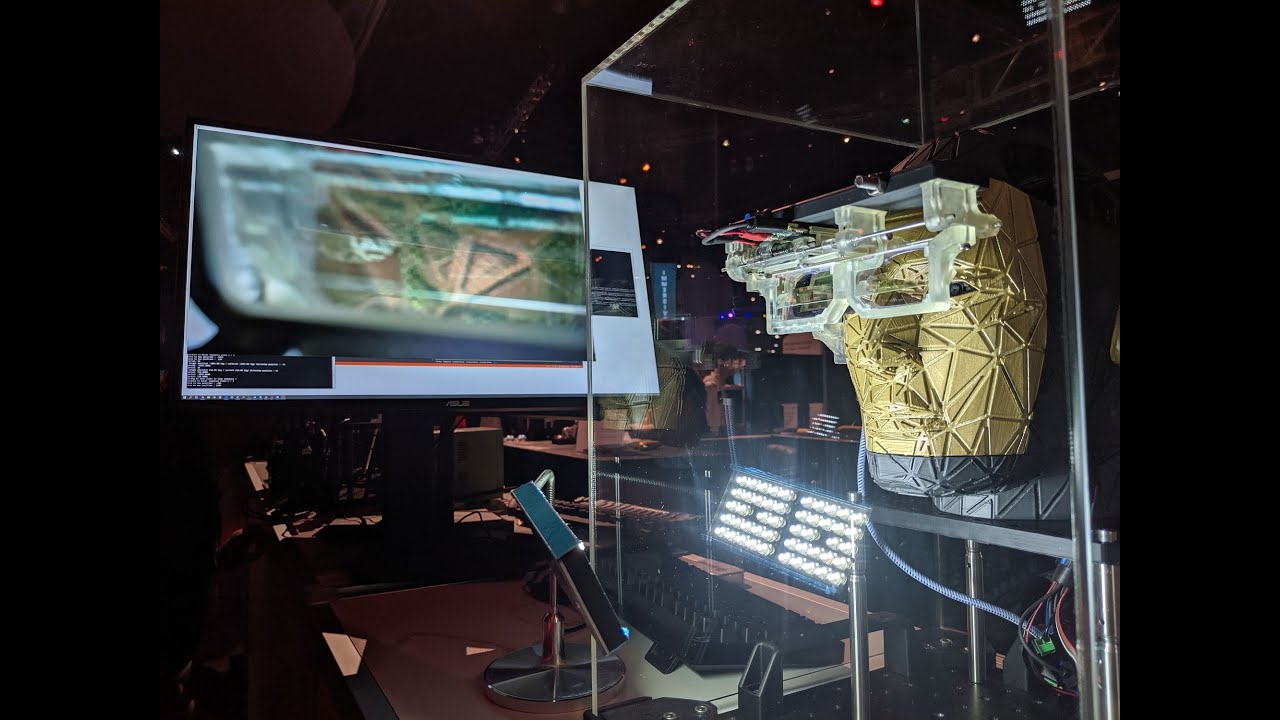
More info: https://uploadvr.com/siggraph-2019-foveated-ar-tail/ Foveated augmented reality research from NVIDIA shown at SIGGRAPH 2019. Loud sound in the bac...
mighty carbon

Addressing shareholders during Facebook’s Q2 2019 earnings call last week, CEO Mark Zuckerberg said that unit sales of Oculus Quest are exceeding the available supply of the headset. Facebook and Oculus have always been mum about sales figures for their VR headsets, but Zuc...
warm lion
@little scaffold I ended up doing this ``` //HMD Management
if (VrHMD)
{
if (VrHMD->DoesAppHaveVRFocus())
IsHMDOn = true;
else
{
IsHMDOn = false;
DidAutoOrient = false;
}
    if (IsHMDOn && !DidAutoOrient)
    {
        DidAutoOrient = true;
        GEngine->XRSystem->ResetOrientationAndPosition();
    }
}```
Whew....that 4.23 p4 fix for steamVR controller pose retrieval is great
mystic tinsel
has anyone dealt with non-standard sized VR avatars?
tired tree
cut about in half the delay on game thread controller positions
sturdy coral
@tired tree did it fix the TAA stuff too?
tired tree
haven't tested that specifically, it claimed to have, but JAlch says that it didn't
not entirely sure why it would fix that tbh
sturdy coral
ah ok yeah he had looked at one, I thought this was another fix for that
I'll try and test it out
tired tree
@sturdy coral considering that this particular section hasn't changed until now for many many engine versions
don't think it is likely related to the TAA?
nvm what the fix title says
sturdy coral
yeah doesn't look like it is
 grand zephyr
How can I achieve two handed weapon holding in vr?
 daring mural
@grand zephyr Check out the VRExpansion plugin (it's free)
It comes with a VR gripping system that also allows two-handing weapons
dim imp
@cold siren That didn't work unfortunately
dusky moon
Overall hows 4.23 compared to 4.22 for VR ?! anything exciting ?
flat shoal
so WMR is really crash happy 😦
sturdy coral
@dusky moon there is supposed to be some raytracing support now for vr
virtual texturing is the main big new thing, could help for photogrammetry scenes and stuff
And big landscapes where it can now bake decals for roads and stuff at runtime including gpu texture compression, but neither of those are too VR specific
the render graph stuff is maturing a lot in 4.23 too
cold siren
@dim imp where did it fail? Were you able to successfully set grabbed item?
flat shoal
crash crash crash
WindowsMR plugin is super unstable compared to SteamVR 😦
ok wait, now I get constant crashes
wtf
dim imp
@cold siren Yes, but it still isn't ignored and blocks my arc
dim imp
nope
flat shoal
huh... Unreal doesn't crash unless I actually put on the HP Reverb headset
THEN it crashes
dim imp
@cold siren
flat shoal
at least it doesn't crash when built... so I can still present the project (fingers crossed)
cold siren
@dim imp ok try this instead, go to project settings, go to collision, add a new trace channel and call it "teleport"set it to ignore by default. Now go to your floor or any surface you want to teleport to and check the teleport collision channel in the collision settings of the static meshes. Now lastly, change the trace channel in your BP "line trace by channel"
flat shoal
if Epic sees 10 crashes from the same ID all mentioning WMR, do they care, I wonder? 😃
dim imp
@cold siren In what BP?
cold siren
Wherever the teleport trace was happening
dim imp
Now I can't move around at all
on the floor, teleport needs to be Ignore / Overlap / Block?
Cause any one of them doesn't work
cold siren
Block
fading shore
Hi, how to optimize VR rendering performance if I have a lot of video on the walls in my game ?
mighty carbon
by not having a lot of videos on the walls? 😃
sturdy canyon
Bake them into one medium resolution video and just sample UVs
fading shore
@sturdy canyon thanks, I'll try it and write a result.
mighty carbon
@hallow knoll by chance, have you tried using Cascade particles with GPU emitter type on Quest (with Vulkan) ? I am getting a crash on Go, even though Vulkan is supported (at least it works with multiview/direct on, without GPU particles in the scene of course). I have a test case if you want to give it a spin.
hallow knoll
@mighty carbon I haven't gotten to VFX yet, got some other things to tackle first 😃
mighty carbon
Ah, ok
 wraith sky

5 Technical Papers covering various aspects of VR and AR will be discussed during this session.
mighty carbon
so, this is what I've been working on for Oculus Go (never mind music, it's just to make video less boring 😛 ): https://www.youtube.com/watch?v=W0v0-fgIIAo

Finally got gameplay framework foundation for the game down and working. Next step is to build a section of the dungeon to show basic enemy AI in action :)
mystic tinsel
@granite jacinth Now I'm back to the crash again. Was working fine the other day, didn't touch anything, and this time I fired up the menu, pressed "apply" without changing anything and bam..crash
granite jacinth
that sucks
mystic tinsel
More of a lock up actually. PC is barely responding. Always good fun
pearl tangle
hah so it seems 1 of my marketplace assets i am attempting to use, the developer has tried to do an update and actually replaced the entire project files with another of his marketplace assets..
 open pebble
Hello I cant find a video on how to make it to where I can holster my guns can someone help me out and tell me if there is a video on VR gun holstering?
pearl tangle
@open pebble I would say there should be plenty. You can just put a collision around your waist and then attach it there once you let go of the trigger if it's overlapping
pearl tangle
thats not quite anything vr specific. Just use a collision box and set a boolean on overlap. Then when you let go of the trigger, if the overlap is true then attach it
you could also just open up the robo recall modkit and see what they do as well depending on what you are trying to implement
dim imp
Mitch's content examples uses spheres instead of hands. How can I add the VR template's robot hands to the Pawn?
little scaffold
@dim imp find the motion controller component then attach to it a skeletal mesh, then set the mesh to what you want (look at VR template motion controller actor for details)
and if you want the animation of the hand the skeletal mesh you added must have an animation blueprint, you can choose the same as in VR template, then for the animation to work with your inputs, you need to change the grab state of the animation blueprint to grab when you grab, to want to grab when your a overlapping with an object etc... (same advice follow the VR template for setting that up)
dim imp
thanks!
pearl tangle
whats everybody been doing for hands for the quest actually?
little scaffold
Did anybody noticed different behavior for custom render depth for outline on Vive and Oculus?
On the vive the outline is working great but on the Oculus the outline is different on the right and the left eye
On UE4.22
mystic tinsel
anyone have any luck with onhover events for 3D widgets?
in a multiplayer scenario
 valid estuary
Hey all, I was wondering if you could help me with a build error I'm getting.
I have somewhat an idea how to solve it...but not 100% sure where, or how to go about it.
Here it is in text......
LogPlayLevel: Warning: WARNING: The specified Android SDK Build Tools version (26.0.1) is ignored, as it is below the minimum supported version (26.0.2) for Android Gradle Plugin 3.0.1.
LogPlayLevel: Android SDK Build Tools 26.0.2 will be used.
LogPlayLevel: To suppress this warning, remove "buildToolsVersion '26.0.1'" from your build.gradle file, as each version of the Android Gradle Plugin now has a default version of the build tools.
LogPlayLevel: Checking the license for package Android SDK Build-Tools 26.0.2 in C:\NVPACK\android-sdk-windows\licenses
LogPlayLevel: Warning: Warning: License for package Android SDK Build-Tools 26.0.2 not accepted.
LogPlayLevel: FAILURE: Build failed with an exception.
LogPlayLevel: * What went wrong:
LogPlayLevel: A problem occurred configuring project ':app'.
LogPlayLevel: > You have not accepted the license agreements of the following SDK components:
LogPlayLevel: [Android SDK Build-Tools 26.0.2].
LogPlayLevel: Before building your project, you need to accept the license agreements and complete the installation of the missing components using the Android Studio SDK Manager.
LogPlayLevel: Alternatively, to learn how to transfer the license agreements from one workstation to another, go to http://d.android.com/r/studio-ui/export-licenses.html
LogPlayLevel: * Try:
LogPlayLevel: Run with --stacktrace option to get the stack trace. Run with --info or --debug option to get more log output.
LogPlayLevel: * Get more help at https://help.gradle.org
LogPlayLevel: BUILD FAILED in 29s
LogPlayLevel: Error: ERROR: cmd.exe failed with args /c "A:\ProjectMeteor_Source\ProjectMeteor\Intermediate/Android/APK\gradle\rungradle.bat" :app:assembleDebug
brittle ether
@valid estuary Looks like you need to accept the android SDK in the project settings. Try going to Edit > Project Settings > Android (Platforms) and there should be an Accept SDK License button in the first panel
valid estuary
Thanks for the reply Daniel. I tried something like that already, but maybe I missed something...let me give it another try.
brittle ether
@valid estuary this button?
valid estuary
Yup, I clicked that button.
@brittle ether seems like I just needed to install 26.0.2
It runs now
I really appreciate you help!
valid estuary
Do you know how to sideload manually?
I have to do that in order to run the build.
brittle ether
@valid estuary yea what platform
@valid estuary Im getting off for the day but this is a good guide if you are looking to push to Oculus Go/Quest from a windows computer https://uploadvr.com/how-to-sideload-apps-oculus-go/

Want to sideload games & apps from outside the Oculus Store on your Oculus Go or Oculus Quest? This guide tells you exactly how.
valid estuary
@brittle ether I'm working with the Quest. And no worries, hopefully we can chat another time, or someone else can help pick up where we left off.
valid estuary
Hey all, I was just wondering if any of you might know why my lighting is drastically different in my Oculus Quest? The intensity in the editor is at 40, but appears to be at 10 when in the headset.
pearl tangle
@valid estuary are you previewing in mobile mode in the editor?
valid estuary
Oooooooohhh, you know what. That's probably what it is. I totally forgot about that setting. I just launched a build, give me a sec to investigate.
@pearl tangle Hmmm. It worked, but now it seems like whenever I select an object in my scene, the editor immediately crashes.
pearl tangle
what version are you on? I do remember having problems with that sometimes before too. Make sure you ahve changed to es3.1 instead of 2 in your project settings and use that for the editor view
valid estuary
I'm working in 4.21.2. Just opening the project settings crashed it lol. Let me reset the preview settings.
Is that where I disable it?
Sorry for the noob questions. I'm not used to developing in vr and mobile.
pearl tangle
nah just inside the main android bit, check the ES3.1 and uncheck ES2
valid estuary
@pearl tangle Ah okay, I see it
@pearl tangle it crashed by switching it to high-end mobile and android ES3.1.
pearl tangle
yeah give it a bit of time to get things done. Mine is currently doing the same thing but sits there for a very long time, just leave it for 10 minutes and come back
valid estuary
Ah, okay. Does either one matter? Android GLES3.1 or High-end mobile?
I'm developing on the Quest.
pearl tangle
yep me too. 3.1 will give you a lot more than es2
valid estuary
@pearl tangle Okay duly noted. It just crashed by the way, but upon reopening the editor the settings were retained, so I'm just going to leave it for a bit like you said, and hopefully it'll stabilize itself :p
I really appreciate the help by the way.
pearl tangle
yeah i have found it rather fiddly with the mobile preview stuff in general so see how it goes
 fleet plume
the rumor mills are spinning about valve's cosmos

reddit
43 votes and 36 comments so far on Reddit
seems like they're going right in the middle between rift s and index pricewise
mighty carbon
@pearl tangle why aren't you using Vulkan on Quest?
 flat beacon
I'm making a VR Air Hockey game. I want the VR hands to not go through the air hockey table. How can I achieve this?
Please ping me
little scaffold
@flat beacon Do Not make the VR Hands not go through the table, make them invisible and just on tick set the loaction of the hand which will be location of the motion controller projected to the Table
flat beacon
Hm?
little scaffold
and if you need it to follow frame per frame accurately just make sure your tick is running in pre-physics
wicked oak

https://uploadvr.com/red-matter-oculus-quest/ ------ 🎦Twitch: https://twitch.tv/UploadVR ⌨️ Discord: https://discord.gg/VNA7fWd 📘 Facebook: https://www.faceb...
unreal engine
mint knot
I have an issue, the debug mesh is not working. It’s not displaying the mesh. I have looked it up in the bp but it seems all good. I got a few problems with my character as well. His eyes won’t move and also the head rotation won’t work.
mighty carbon
@wicked oak with a lot of custom rendering stuff (custom shaders for sure)
tired tree
@little scaffold that won't force it to be perfect just in pre-physics, the motion controller component also ticks pre-physics
would need to tick preres it
granite jacinth
@wicked oak it's impressive for sure.
wicked oak
best graphics of any quest game
granite jacinth
Not sure about that
But, yeah, it's definitely up there
It'd be nice if they PR'd some of those if possible
tired tree
doubt they could for most of it
wicked oak
they are mostly custom shaders for the specific game effect
the multiple pointlights works by storing the pointlight location in vertex colors
and has 1 light per triangle
little scaffold
@tired tree ok thanks thank I thought it would be enough but honestly I haven’t tried it
sturdy canyon
But you said Red Matter is not the crazy team you know making amazing strides in Quest graphics @wicked oak ?
Can't wait to see the other ones you were talking about because REd Matter is 🔥
wicked oak
@sturdy canyon it was red matter, but didnt want to comment it was them
its absolutely insane the level of trickery
sturdy canyon
fair
It didn't know any specifics or else I'd probably have been tight lipped as well
sturdy canyon
That seems to imply the Vulkan stuff should work on Go
But my build definitely crashes, so I've stuck to ES3.1 there
I can ask.. I'll let you know if I hear anything
valid estuary
@mighty carbon Does vulkan work better on the quest? I'm still getting instability with GLE3.1
sturdy canyon
I'm running Vulkan on Quest now. It is good.
I have one weird bug where sometimes one of my textures seems to get overwritten partially
but my draw time is reduced by 15-20% with otherwise no negative repercussions.
what instability are you getting on 3.1?
are you on the oculus branch?
valid estuary
@sturdy canyon whenever I click on an object via the viewport UE instantly crashes. Also when opening a menu or changing settings.
sturdy canyon
I haven't had that issue. But I use way simpler shaders on mobile and don't have matching lighting at all
valid estuary
I was having problems with the lighting being darker in the headset, when I make a build, using the default shader model 5. I was told that lighting will be 1:1 if I use ES3.1 in the editor.
It does match 1:1 now, but I'm having the crash issues.
We're porting a Rift project to Quest, so I'm tasked with optimizations.
sturdy canyon
fun
I completely ripped out UE4 lighting and have exclusively emissive materials with faked lighting
but I'm trying to push 400k triangles to the screen, so it was necessary
valid estuary
Ahh, I see.
sturdy canyon
(it's a voxel sculpting app, so lots of tris)
valid estuary
Yeah the baked lighting is okay, and the port is working, it's just the damn crashing in the editor. Last night I found a "work around". I would do my lighting in the default shader model 5, bake, then quickly switch back to ES3.1 to see how it would look like in the headset. Not efficient, but it worked lol.
Nice, any public stuff for it? Sounds like a cool app.
@sturdy canyon lol I switched to Vulkan, and it worked...for a few seconds haha. I got a crash.
sturdy canyon
SculptrVR is out on Go/Rift/Steam/PSVR. I can't show any Quest stuff until it's fully ready to go
crash on device or on PC?
sturdy canyon
PC vulkan is not very stable for me
valid estuary
What are you using on the PC end that's stable?
Ohhh, you developed SculptVR and porting to Quest?
mighty carbon
@valid estuary I don't have Quest. Working with Go.
sturdy canyon
On PC I'm using SM5 DX11&12
I can run the ES3.1 emulator fine without crashing, though
valid estuary
@mighty carbon ahh okay
@sturdy canyon yeah SM5 works just fine. You're right about Vulkan, I seen some shader bugs go away after making a build with it.
burnt cave
Hey guys, I reported about my issue with game crashing when using directX 12 and steamVR to epic. But they could not reproduce this issue, and the only difference I could find is we have different GPU's, they are using 980, while all the tests I did and people I have asked to test were on 1070, 1080, and 2080. They told me to post it on answerhub to collect more information about what hardware is used. If any of you have some spare time could you test this for me and comment on the answerhub post?
https://answers.unrealengine.com/questions/913349/directx-12-game-crash-with-steamvr-ue-422.html
valid estuary
@burnt cave Thanks for the post. That's interesting because I'm on a 980ti
burnt cave
Does it crash for you? @valid estuary
valid estuary
Yeah, I've been having crashes.
Although the issue isn't 100% the same, I'm getting similar results with Oculus Quest.
Still, it might be worth keeping an eye on this.
valid estuary
Not sure about directx 12, but it does run OpenGL and Vulkan
valid estuary
Ohhhh, Okay I misread what I was looking at last night (2am isn't the best time for researching :p)
burnt cave
@mighty carbon GLES3.1 is OpenGL...
valid estuary
@burnt cave ah, okay so I wasn't tripping balls last night.
Thanks for clarifying!
That being said... anyone know how to mess around with the "Fixed Foveated Rendering" settings
valid estuary
Is there a way to change the preview shading preview in a .ini file or something?
Switching to Vulkan I can't open the damn project. Every time I open the editor, it instantly crashes. I can't get a chance to switch back to the default SM5
mighty carbon
GLES is a subset of OpenGL
When people say OpenGL, they by default refer to desktop OpenGL
sly elk
Neat wrench feature: You can suck up small parts and they arrange themselves on the back of your hand:
Also the trash can now does this:
fleet plume
ah nice
 chilly ocean
I am having an issue where using the mouse in VR and a double monitor setup could cause the cursor to off to the second monitor if I move the mouse far enough and it is really bad during testing since my mouse always goes off and I stop moving. Has this happened to anybody else? I tried using LockMouseToViewport, but nothing seems to happen.
hallow knoll
@chilly ocean Is this in editor or in a build?
And, is there a difference between the two?
chilly ocean
@hallow knoll Happens in a packaged development build.
The editor VR preview seems to be working properly, not the build
hallow knoll
@chilly ocean Is the cursor visible for you when playing or are you simply using the mouse to move the camera around?
Try full screen and not fullscreen windowed. If you explain what you're doing I might have an idea or two. Mouse and VR is not common or frequently tested, but I've used it without issues in the past
 soft beacon
Does anyone here produce on the OculusGo/Quest
Anyone experiencing Event Tick not working? I am moving an object using a timeline and it moves on PC/Rift but not on Quest/Go same exact code, no different. Also displaying a text based on changing a UMG slider, doesnt appear to work on Go/Quest
sly elk
Yeah, it's 2d or vr
soft beacon
VR on Oculus Quest/Go
silver robin
what’s the easiest way to get a pair of finger-tracked hands using the Index controllers into my project? the built-in motion controller components only support static meshes, yeah?
sturdy canyon
There is an official Valve index plugin on the marketplace
You can also get the code on GitHub
The plugin comes with rigged hands
silver robin
nice, thanks
valid estuary
Anyone know what this means? The build completes successfully, but crashes in the headset.
Ah, seems like I just needed to disable the Datasmith plugins.
People here seem to have better knowledge of Vr development here, but I just posted the screenshot, in case anyone else is having the same issue.
dim imp
How can I force the VRPawn camera to look at a specific axis on entering a collision box in VR?
silver robin
taking control of the player camera is a really bad idea in VR, it makes people sick
what are you trying to do?
 trail shale
UPdating from 4.19 to 4.22 seemed to break my motion controller tracking (Steam VR)...can anyone advise?
Note my input buttons all work, the motion controls just don't track, even though motion source and hand enum's are correct
Ah, this was the problem - scared me for a second - need to set the player's controller as the owner for the actors spawned as the motion controller meshes


 earnest root
is it okay to leave the headset plugged in? not sure if it's best to unplug it when not in use
 dim iron
@earnest root Mines been plugged in since the day I bought it. A good few years! It’s personal preference, there’s no issues leaving it plugged in.
mighty carbon
sad news - Vulkan FFR will not be supported on Go due to 821 SoC limitations
earnest root
@dim iron cool thanks
mighty carbon
what kind of assets for VR (non-BP / non-C++) would you folks like to see on the Marketplace ?
trail shale
Is there any native specataor menu screen in Unreal, like there has been in unity for years? I've made a hacky one using a 2d render target on a 3d widget, interpolate the mouse position to draw a cursor, but it's really hacky...something like this
tired tree
no
trail shale
STILL??
tired tree
answer has been no since the first time you asked blake ;p
trail shale
I know there's a plugin on MP but it's not much better than what I cobbled together
tired tree
the comment talking about fixing it is still in the preview window code
trail shale
How would I make another window to control it with?
tired tree
easiest way would be the plugin you were talking about
trail shale
ah
trail shale
Thanks, I suspected this would be the case, just didn't want to go another route if Epic had patched something in that I missed in the changelog
chilly ocean
@hallow knoll - responding to your earlier message. Sorry for the late response, was not available earlier. I can give you more information now that could give hopefully give you insight in my 'mouse control in VR' issue.
hallow knoll
@chilly ocean Mind writing up a post on the forums about it? Easier for me to get back to.
chilly ocean
@hallow knoll Sure can do!
chilly ocean
Posted 😃
trail shale
building HLOD's wiould help with performance so much but they always crash the editor, I run out of video memory....any trick to get around this? the system doesn't let me build in sublevels alone anyhmore (and even then it crashed alot)
I have 32 gb ram and increased the paging file to 64gb, incase unreal runs away with memory
mighty carbon
gotta have 128Gb of RAM
(just speculating)
@wicked oak how much RAM did you have when you were baking HLODs for your game ?
wicked oak
32
but i did them little by little because it was like 5 hours to complete
and it could fail
so after it failed twice, i started only baking a part of the scene at a time
mighty carbon
makes sense, thanks
trail shale
@wicked oak can you give me any advice on how to estimate how long they should take, and the various batches? I have about 2300 generate
I increased my page file but I doubt that does anything....I just wish I understood what UE was doing, it seems like it just runs away and there's no way to constrain it to keep it stable...I'd be fine if it worked at half speed, even if I had to leave the computer on for several days, as long as it worked
 naive fern
Hey guys!
Anyone else having problem with the hands in the VR template on Quest after they released the two last updates?
My app was working perfectly fine last monday, but had problems with the right controller from wed or thur last week, where I had to press the trigger button on the right controller to make the right hand change to correct position. But it only moved in that one frame, so it got stuck in the new spot after that.
Now with the latest update, a similar thing happen, but now i can choose which hands get stuck and which one is working based on the controller I pressed the trigger button on last.