#virtual-reality
1 messages · Page 208 of 1
 sturdy coral
 mighty carbon
hmm
 flat shoal
@sturdy coral do you know if there has been any recent movement regarding StarVR support?
 granite jacinth
@mighty carbon you DL it safely?
mighty carbon
I haven't - at work right now
plus I'll have to wait for Oculus to push release with integrations to their github
 ember forum
oculus memory leak is a very broad phrase, i wish they'd say what device it was
 timber frigate
Has anyone been able to use their VR headset to record as the camera in Sequencer? I am having trouble getting any data to record
sturdy coral
@flat shoal not sure, Pimax works decently though so I think starve should
The main issue is shadow transitions go along the plane of the screen so are different per eye (for fading between can and baked stationary)
flat shoal
Does Unreal go beyond 180fov by default? (I haven't tried it, but I know Unity stops at 180... but then again, I also know that StarVR has supported Unreal for a very long time.)
sturdy coral
@flat shoal ah I didn't know starvr went beyond 180, pimax does 170
each view of the starvr should be less than 180 so be ok if you turn off instanced stereo, if instanced stereo is on it might break some stuff like culling if it makes assumptions on culling frustums being <180 and stuff, I'm not sure
 feral bloom
@tired tree I'm getting build errors relating to "GetInteractionSettings.ReturnValue'. Unknown structure." I see Interactible Settings was removed from plugin in 4.20 but can't figure out where to find the references to it or what to do with it to fix the issue. Could you point me in the right direction?
 neon sundial
Android improved virtual keyboard not working with vr plugin enabled
 umbral hatch
When running my game with a VR headset plugged in but running the game in non-vr mode (normal desktop game mode) HZB is really really high. Why is this? The headset isn't rendering anything. It's just connected to the computer.
 tired tree
@feral bloom the door and the cubes in the template have custom implementations of the gripping interface, you likely need to delete their function overrides.
 little scaffold
Hi, does anyone know if the widget interaction is still not working correctly with the web browser widget? I am having issues clicking on any part of the web browser but hover works
what do you mean losing a collision channel? for teleporting?
ember forum
you could fake the click quentin
by checking what button is currently hovered
like the link you commented on mentioned...
but i'd suggest submitting a bug report
another way (that he didnt mention) was that on hovered (you could set that as the current "active button" as a variable, and then just have your input event get the current active button and fire an event from that
@little scaffold
little scaffold
Ok never experienced that mobile vr hit problem
Thanks @ember forum I saw that but just looking for the simplest solution before going in
ember forum
was able to fix my collision issues, strange it worked in editor and not on mobile, but i found some workarounds... if anyone gets into any issues dm me
 uncut silo
4.22.3, VR is not working for 2 players in PIE. It doesn't read the HMD transform, while everything works fine in VR PIE for 1 player. Why?
Is it normal? How I suppose to test VR multiplayer then?
 pearl tangle
@uncut silo are you attempting to run 2 headsets on 1 machine? That doesn't work on any version
uncut silo
@pearl tangle kind of, just 2 VR players, only 1 headset is connected to the PC obviously
in 4.18 and 4.19 it worked: 2 viewports opened and both of them were getting the transform from the headset
and it was fine
How can I do smth like this in 4.22?
pearl tangle
ah so a spectator sort of player. You could just attach an object to the camera and get it's transform instead probably
uncut silo
@pearl tangle no, not a spectator. I set 2 players and hit Play in VR in the editor and it opened 2 viewports and both of them were getting the transform from the headset. Like I move the headset and the cameras of those 2 viewports moved. It was in 4.18 and 4.19. How can I do smth like this in 4.22?
In 4.22 if do the same the cameras doesn't respond to the HMD movement
pearl tangle
yeah does doing what I just suggested work?
flat shoal
holy shit, just got the HP Reverb at work
I think I made a mistake ordering the Valve Index...
 severe tide
:0 really? I've read some good things about it
flat shoal
Just the fact that you plug two cables into the PC and then put on the headset and you're fucking done was worth the price of admission.
The Index better be three kinds of amazing in order for me to keep it.
Windows 10 updating now... apparently need 1809 to get WMR working in Unreal.
Finally be able to ditch god damn Steam at the office... (but still have to suffer through the Epic Games Launcher and have coworkers laugh at you for "playing games" during work)
severe tide
Very interesting. We need to sit down and have a conversation at work about which PC headset to focus on going forward. Right now my bosses are just focused on the Quest though
 sullen vortex
Anybody had issues with fmod on Quest? Everytime itry to launch my apk that was built with fmod plugin enabled just crashes
flat shoal
I work at an industrial design firm, though... so my case might be a bit different
we wouldn't touch anything Facebook with a 10 foot pole
severe tide
That's fair haha
 dim iron
Hi guys, how would i go about dragging a body after its died, ie grabbing his hands or feet and dragging him a long. wouldnt you need simulate physics turned on while doing this? the VR template turns off physics when holding an object.
umbral hatch
How would one setup "touch" interactions in UMG for VR?
For example, making a normal widget component like a virtual touchscreen.
 tacit quest
@umbral hatch widget interaction component would be a starting point
@dim iron implement the pickup interface into your skeletal actor and don't turn off simulate physics. you will also have to use something like physics handles to pickup ragdolls, that's how i did my fuel hose simulation
dim iron
@tacit quest cheers dude, was thinking along those lines. Will have a play when I’m back in front of pc 👍🏼
ember forum
Oculus
Join the Official Oculus Discussion Forums and talk about Oculus Rift, Oculus Touch, Samsung Gear VR, and virtual reality.

 fading shore
best way to do physics rope in ue4? max quality for VR. Simple constraint with cable component or skeletal mesh with many bones? Task is to look entirely realistic at physics simulation
 undone ruin
Hey, im just learning how to make vr games and am a bit stuck on how i should go about aligning the characters mesh/hitbox with the hmd
I got the movement and whatnot to work (mostly) with the character, but walking in real life moves the camera away from the capsule collision/mesh
 toxic oracle
@undone ruin this'll do it https://media.discordapp.net/attachments/221799478364078081/580635328440827904/unknown.png?width=1290&height=360

essentially you look every frame at how much the players head has moved, then apply that as a vector onto the location of the actor, then move the head back by that amount so you don't move forever
undone ruin
Thanks for your help :), I ended up making this based off of your setup
toxic oracle
Noice, one thing to keep in mind is I don’t exactly remember if it handles changes on the Z axis
For that though I’d make it so the capsule component goes down in size as the player crouches, then goes up to a certain size as they stand up
undone ruin
Yeah i broke the vectors and excluded the z axis to make sure the character didnt float or sink into the ground or anything
 odd garnet
 regal cape
Ahoy, i am looking for information about how to make the Oculus Touch controllers function in UE4 like the do in the Oculus Home......? SO full finger movement on the Capacity Button aspects to move fingers individually! I would have thought this is native by now in UE4
sullen vortex
@fading shore go with skeletal if you want full interaction, also use @tired tree tools that are great for advanced interaction. Hope it helps!
 runic cedar
hello, how in default VR project i can grab not static mesh actors ?
Like i want to add collision box and with box grab the only actor.
 frosty geode
Hey guys, I’m working on a mocap VR experience using Shadow Mocap and have what I’m hoping is a simple problem. We have a retargeted model posing correctly in the editor and the motion is really smooth through Shadow (kudos) but Shadow doesn’t provide room position, only relativistic head/body part positions/poses.
In the demo you wear a VR headset and the mocap suit, so we can use the HMD head position to correctly place the mocaped Skeletal Mesh. We’re having trouble figuring out exactly how to setup the Pawn so that the HMD position is included correctly. Right now we’re sending the X and Y of the HMD to the Pawn so it can reposition the mesh to the head location correctly, and body movements are synced up through Shadow-but if you lean your head forward, the whole skeletal mesh moves forward since we are just doing that simple X Y offset applied to the whole skeletal mesh. My buddy and I working on this are still pretty fresh to Anim BPs but have a client really looking forward to this demo we’re building. Could anyone recommend a decent body VR Ik guide? I’ve watched a couple that were more suited to specific plugins, still don’t completely have my mind wrapped around the Anim BP system to fully come up with a solution on my own. Any help would really help us out! And thank you for reading ^^
 tame thistle
Anyone know if you can point the default subtitle system at a 3D widget for subtitles in VR?
mighty carbon

VRScout
Record yourself in the virtual world with Oculus’ official MRC kit. UPDATE [6.22.2019] The GIF featured below is an example of LIV MR technology. Yesterday, Oculus launched its official set of Mixed Reality Capture Tools for the Oculus Quest, allowing users to record high...
sweet!!
fading shore
what Reflection Probes and Screen Space Reflections are? What the difference in performance to use each one in VR?
 mental lichen
Hey, facing some problem with Oculus Quest builds from Unreal, i was using a pair of hands for all my Rift/Vive projects, the same skeletal mesh does not show up on Quest, anyone facing a similar problem ?
 solemn beacon
I am facing a problem in VR (using Oculus Quest) it shows the left hand as right hand and doesn't show the left hand I am using the blueprint template of the VR and I think the problem is in these nodes
feral bloom
Thanks @tired tree Removing overrides and resaving all those assets worked and my builds are now finishing
In my built game the controller components don't seem to be receiving transforms. They are at 0,0,0 local below the feet. Works perfectly in editor. Anyone had this before?
Using knuckles if that makes a difference
@solemn beacon From memory the template is setup using the same hand for both (just flipped for the left which is what those nodes do). If you are using your own custom hand meshes and have a proper left hand you can remove those nodes.
@fading shore Reflection probes capture a 360 image and use that to simulate reflections. Screen Space Reflections uses what is on screen to simulate reflections. Probes are much cheaper performance wise but most people use both
solemn beacon
@feral bloom I don't use custom hand meshes I didn't edit anything in the blueprints
feral bloom
@solemn beacon Can you reexplain the issue? Are you saying only one hand comes up and it is the wrong hand?
solemn beacon
@feral bloom yes I use my left controller and move the right hand with it (right hand in in the scene)
feral bloom
Is the position centred on your left controller?
solemn beacon
No
feral bloom
I'd guess the VR template hasn't been tested for Quest and there is some issue in there with identifying the correct controller
The nodes you posted aren't it though. They only change the appearance of the hand mesh
solemn beacon
Is the position centred on your left controller?
there is distance between them
I'd guess the VR template hasn't been tested for Quest and there is some issue in there with identifying the correct controller
I think that's right
The nodes you posted aren't it though. They only change the appearance of the hand mesh
What I understood that this mirrors the right hand to make the left hand
feral bloom
It mirrors the mesh so that the thumb points right instead of left. Doesnt have anything to do with its position. To test it out change that -1 to a 1 on the last node
solemn beacon
@feral bloom thanks I'll test that (I know that you are referring to the Set World Scale 3D )
tired tree
@feral bloom using the valve plugin?
it can break if you use an older version of my open input plugin, or even if you cross compile the openVR version
feral bloom
@tired tree I am. Think I downloaded your plugin the day before the valve one got posted on the marketplace
Should I remove the valve plugin?
tired tree
no
update mine fully to the latest
and disable the override controller when using theirs
its in the new setup instuctions
feral bloom
Alright will do. To update yours I just redo the install instructions right?
tired tree
eventually when the base engine is fixed my override controller will go away anyway, its only there for when people aren't using valves controller
yeah, the instructions are a bit different / easier now too
feral bloom
Alright great, thanks for the help!
solemn beacon
Anybody knows a good plugin for the IK
sturdy coral
in case anyone's using steam audio in VR, @kindred wraith has updated the Steam Audio plugin to a newer version with embree ray tracing and multithreading:
https://github.com/EpicGames/UnrealEngine/pull/5940
and he fixed the multiple levels issue:
https://github.com/EpicGames/UnrealEngine/pull/5979
Unreal Engine Forums
Hey folks,
Feel free to post any Steam Audio related questions or experiments you do here, so we can keep things consolidated and make it easier for people to get
 kindred wraith
Thanks for sharing it also there, I didn't realize VR people were also utilizing Steam Audio in their projects 😃
odd garnet
Hmm ray traced sounds you say?
kindred wraith
it's mainly for occlusion
flat shoal
anyone in here use a WMR headset and have updated to 1903? I don't think I have the blur issue... but I guess I would know for certain if I had it?
fading shore
Oculus Rift S and Vive Pro have different FPS at the same scene. What's wrong? at some scenes of the same project some times oculus has better fps, but some times Vive Pro.
tired tree
well they have entirely different backends.....and screens...and performance enhancements to handle frame drop...
not entirely sure why you would expect them to ever be at the same FPS everywhere
sturdy coral
@fading shore yeah make sure you run them at the same overall render target dimensions (and even then there are other differences like mordentral mentioned)
fading shore
@sturdy coral but they have different resolution, I ran them with default settings
sturdy coral
@fading shore you can make your game render to the same overall size render target, and the compositor of the vr runtime (either oculus or steamvr) will up or downscale it for the display
if you try it using steamvr for both you can look in the steamvr resolution settings and make sure they are the same total pixel count (they may be different aspect ratios so you need to look at pixel count):
fading shore
@sturdy coral can you provide me some references to read about it?
@sturdy coral yes, they are different by default
and I want to use all capacity of each
sturdy coral
note that running oculus through steamvr adds a small amount of other overhead due to chaperone bounds being rendered by both and stuff (they may have changed that recently, I've seen notes about chaperone bounds in the changelogs)
fading shore
not to cap vive with oculus ceil
sturdy coral
you want to use the highest for each that your GPU can support
which means roughly the same pixel count
you can also use the oculus debug tool to set its supersampling amount
@fading shore you aren't in danger of hitting any ceiling unless you get to 500%
fading shore
thanks, I'll try to do in practice soon
sturdy coral
beyond extreme amounts you can also run into undersampling of the supersampled buffer, but if you check 'enable advanced supersampling filtering' under developer settings it shouldn't
fading shore
Well, @tired tree , I did some test and I expect linear progression/regression in FPS. But I have strange results in my opinion, sometimes vive was better , sometimes oculus. Is this NORMAL ? thanks for all , you are a legend man.
tired tree
yes its normal, the backends handle frame drops differently and may scale/downrate depending on the scene and their own parameters.
sturdy coral
does oculus turn on dynres in ue4 by default?
tired tree
i was going to mention it
but didn't
because it doesn't
at least it doesnt' for quest on the default engine
it may on the oculus branch
sturdy coral
@fading shore you can disable all reprojection in the oculus tool, and disable it in steamvr by hitting a special key command on the mirror window
it is usually best to do that before looking at stat unit
fading shore
thanks, guys. I'll learn about it more.
feral bloom
@tired tree I installed your latest knuckles branch and disabled the controller plugin as per instructions but i'm still have the issue of the controllers being at 0,0,0 on the pawn after building. Everything works fine in editor but in the built version only the headset location is coming through it seems.
tired tree
@feral bloom make sure you regenerate bindings in their plugin as well
it doesn't auto regen them if they already exist
mighty carbon

SVG.com
Could Microsoft finally be ready to bring VR gaming to Xbox? That's the rumor, according to virtual reality podcast Coffee & VR, which made mention of a potential partnership on its latest episode.
would be really nice
dim iron
wondered when that would happen!
ember forum
Microsoft has to up their vr game to compete with sony so the rumor makes sense..
 old olive
Hiya folks! I'm gonna be new to VR development in UE4 this week, was wondering if anybody has any good videos for learning, best practices, guides or tutorials? Besides the obvious like UE4 livestreams and such 😄
 broken gorge
Hello , does anyone here know what FIOSDeviceHelper or FAndroidDeviceDetectionRunnable are used for ? Im developing an Android VR game and these 2 process are creating massive lag spikes every few seconds....https://answers.unrealengine.com/questions/356443/view.html?sort=oldest
Seeing some people have issues with this as well , but noone had any answers yet
feral bloom
@old olive Not technically a learning tool but check out the VR Expansion plugin. Has been a life saver for me. Even if you do just want to use it to learn from it's well worth checking out
Unreal Engine Forums
VR Expansion Plugin
Updated: 06/13/2019
Playable Template Demo
Template Packaged Download (https://drive.google.com/file/d/0B5cM3oP2O4-UOS1jY1hFY3FJMEU/view?usp
old olive
Nice! Thanks for the link @feral bloom
feral bloom
@tired tree Regenerated bindings using the steam vr dropdown. Controllers are still not responding in built game
tired tree
@feral bloom pm me your bindings files
i want to see if they are generating correctly
tired tree
there have been some bad interactions with the valve plugin and others
want to make sure its not that before pointing you to them to debug
sturdy coral
also check Saved/Config/Windows for out of date Input.ini that overrides Config/DefaultInput.ini, the valve plugin seems to be generating stuff in Saved/Config/Windows/Input.ini that hides newly added actions in Config/DefaultInput.ini
feral bloom
@sturdy coral What should I check for? They do look quite different
The saved/config/windows is more recently updated but has a lot less in it
tired tree
the thing is, while that is an issue, it shouldn't cause the movements not to fire
as they are hard coded
 mystic tinsel
So if I preview VR with 2 clients in the editor, is there anyway to actually get my headset to properly attach to one of them? I mean I can move the view in both by moving my HMD around, and the controllers both track, but I can't see anything in either window, nor actually get the controls to work in one of them.
dim iron
@mystic tinsel have you changed auto posses player to player 0 on one of those pawns
mystic tinsel
Ah okay, thanks i'll try that. I just need someway to test replication and stuff.
 paper coral
Hey guys. Has anyone come across the need to have a spectator for a Quest Application that can be run on the PC?
So having a PC build in spectator mode and quest running my app?
 viral pasture
Seeing if anyone can help shed light on how to achieve this. I'm trying to use Simon's PickupFromDistance tutorial / blueprint, but I'm mixing it with UVRF instead.
https://www.youtube.com/watch?v=Qd3QCM7mNxk
The issue is, the default template has an Event Pickup that also has an AttachTo, while UVRF doesn't. How could I go about getting this exact same technique working with UVRF Grabable function?

How do you get started in implementing a pickup object from distance system? This video may help you with that. It's a simple system resembling the RecRoom p...
and UVRF for reference: https://forums.unrealengine.com/development-discussion/vr-ar-development/1381972-uvrf-handpresence-template-for-rift-vive-update-1-9-github-release
Unreal Engine Forums
UVRF is ‘hand presence’ cross platform template including hands that are properly placed in space (per platform), properly animated, allows interaction with
thanks in advance to anyone who reads this
TL;DR: Basically I want Rec Room style pickup with UVRF hands
mighty carbon

VESA - Interface Standards for The Display Industry
DisplayPort 2.0 enables up to 3X increase in video bandwidth performance (max payload of 77.37 Gbps); new built-in features enable improved user experience, greater flexibility and improved power efficiency SAN JOSE, Calif. – June 26, 2019 – The Video Electronics Standar...
 sonic tide
@undone ruin your HMD-Hitbox alignment thing has worked great for me, it's just the rotation thing that's messing me up.
Since the camera is a comp inside the actor, the rotation is just weird
tame thistle
Trying to port a desktop build to Oculus Quest, only issue so far is decals don't work. Seems to be because they don't work on mobile hardware without Mobile HDR enabled (which has a hefty performance hit). Does anyone know of any workarounds?
mighty carbon
workaround is not to have decals 😃
tame thistle
Yeah that's the path I'm headed down now
Would material blending be a good day to do something like a coffee spill?
Or hell, I'll just do a plane with transparency for now >.>
mighty carbon
yes, but you'll find out that even planes with "masked" decals will eat performance away rather quickly :/
 cold siren
@paper coral you probably have to build out to windows and have an Instance running on there with replication, which would act as your spectator screen
undone ruin
@sonic tide yeah, when you turn around your controls become inverted. I ended up just getting something called the VRExpansionPlugin
Handles hmdtracking and helps with gripping and climbing too
 hallow knoll
@mystic tinsel For most of my replication testing I have a pawn that inherits from my VRPawn that can be controlled using mouse+kb. It's too tedious and slow to test w two PCs/HMDs
mystic tinsel
Okay thanks, I'll try that too.
hallow knoll
You can use this helper function if you're using VRExpansionPlugin
I use that bool later in the game mode to determine which pawn to spawn
But, that switch allows me to click "PIE" and get the flat pawn, or "Play in VR" and get the VR pawn
So no manual step required once setup to test either
tame thistle
tfw Oculus Touch control bindings behave differently between Rift and Quest
hallow knoll
@tame thistle Rift S and Quest? I haven't noticed that. I don't remember noticing that on original touch/quest before I got the S either...
tame thistle
Rift and Quest
On Quest that's the thumbstick click, on Rift it's just if the Y-Axis has any non-zero value I think.
Either way my teleporting is broken on Quest because of it.
Ah I've confused myself I think, on Quest it's just nothing.
 clever stone
Hey all, got some queries about AR and level streaming in UE4. Appreciate if someone can give me some insight.
- What does the Get Extent BP node return when it comes to AR plane geo?
- How do we remove a streamed Instance level (spawned with Load level instance by name) from memory after loading?
- Is it possible to scale streamed instanced levels during spawn?
@pearl tangle Your input is highly valued 😃
tame thistle
Fixed that by checking the axis on tick... Oh well.
Next issue, there's no camera fade functions without Mobile HDR on the Quest? Any nicer ways to deal with that than slapping a widget with variable transparency over the player's face?
pearl tangle
@clever stone
- Dunno haven't tried it, but you can just get the AR plane size directly from memory. It's not generating a mesh it's just 4 points so the extent probably doesn't do it unless you add an actual plane to it stretched between the points or a dynamic generated mesh maybe.
- I can't remember on this 1 either but I don't think it was actually possible without reloading the level, seems likely there should be some way though.
- Yes, but you need to hide it first and then scale it and then show it again. There was some other plugin up on the marketplace to let you move and scale the spawned levels at runtime while on screen, also can't remember what it's called but search streaming or something and it might show up. He had a video of the old mobile demo scene flying around the landscape demo scene
 dim imp
Hey Ya'll!! Im having trouble setting up my main menu widget for VR. Currently got buttons and widget. also widget interaction on the BP_MotionController . Buttons just won't get pressed..
It's like the widget interaction line is completely ignoring the buttons.
dim iron
@dim imp do you see the buttons highlight a little when you point at them? have you added the widget to a blueprint?
dim imp
@dim iron I got it to work. Must have been my other widget that's always in front of the pawn but visible blocking it
I now have another problem to solve. Need the widge interaction component to only show in the main menu level
and not always be there
so once I click Start I open the play level and want the widget interaction lasers to be gone.
dim iron
are they the debug lines? as they wont show in build. you need to create your own
dim imp
oh
what do you mean create my own?
and I package in development mode so they probably will show
a bigger problem is that right now when I load the new level it doesn't build navigation. and I need to make the debug lines disappear.
dim iron
You could create a separate pawn for when using UI widgets. Or from your casto you pawn get widget interaction and set show debug.
 smoky gazelle
how to set rotation of hmd
 woeful sundial
@smoky gazelle by turning your head 🤔
smoky gazelle
@woeful sundial i know that but when new user interact with system it should teleport at default rotation will share a video soon of the issue
woeful sundial
@smoky gazelle ok, more info would be good, thanks
 wind yacht
I'm trying to create a knob object that rotates when you grab onto it with the motion controller. Right now when I grab it, it snaps immediately to the rotation of the motion controller, though I want the object to keep its current rotation and only rotate when the player rotates their grabbing hand
mighty carbon
@wicked oak Sairento made it to Quest
toxic oracle
@wind yacht to do that you want to track the change in rotation of the hand and then add that to the rotation rather than setting it
wind yacht
@toxic oracle should I be adding relative or world rotation?
toxic oracle
Experiment and find out
toxic oracle
@wind yacht you may need to take the absolute value of the rotation since UE4 goes 0-180 then -180 to 0
tacit quest
is the stencil buffer in es3.1 broken in 4.22? looks like there was regression for broken stencil buffer from 4.20->4.21, fixed in 4.21 then regression again in 4.22. is this the case?
 rare ether
Someone really ought make a VR version of Deus Ex 1 because I would play the heck out of it. I love that game. I've got over 300 hours played in it.
like what skyrim VR is to skyrim
mystic tinsel
What's the best way to handle the height of the physical player vs the height of the character in a multiplayer game. I'm using the VR Expansion plugin, and I'm looking at a couple scenarios that I want to handle. Because it's multiplayer everyone is using full body avatars, hence the importance of this.
1 - I have a character in game that is taller than a normal 2 m tall character. For sake of example, let's say it's 3m tall. Is there someway to make sure the camera is 3 meters up in the air? and then should i some how translate the distance it bends over (to say reach the floor to pick up something)
2 - If someone who is mobility impaired, say a player in a wheelchair. Is there someway to translate his sitting head position to being set at the appropriate height of what the character should be? if i test in engine while sitting down, my character crouches (I do have crouch IK setup already based on HMD Z height)
tame thistle
- I did some dodgy accessibility stuff by adding a local offset to the HMD I believe, but I just made it a +/- button and told them to adjust to a comfortable height
mystic tinsel
how do you actually move the camera though? It seems that everything is set up to follow the camera and it's height. I realize I could make the character in the game in the game's head be the right height by adding to it in the animbp where i set the skeletal mesh to follow, but then the camera wouldn't line up with the head of the character. Is the height of the camera in the game related to what they have set up as their "height" in their VR software? like oculus or vive?
so if I changed my height in the oculus software to my sitting height and joined the game, would it have me standing up fully in game while I was sitting down in the real world?
tame thistle
Ah no idea sorry, I've only done single player stuff, and only hands for the player.
mystic tinsel
Well I can say that changing your height in the oculus software does in fact not change anything in unreal, at least not with the stock VR Expansion setup. I just tried setting it to my sitting head height, but the character was still crouched in game
hallow knoll
@mystic tinsel If you're using VRCharacter from VRExpansionPlugin as the pawn, you can adjust the VRCapsule Offset to adjust the players height:
mystic tinsel
My character is a child of VRCharacter
But I don't see that in the editor. Where is that?
hallow knoll
Select VRRootReference (capsule component), and search in the Details panel
mystic tinsel
Ah okay I see it now, i was looking in the class itself.
Moving this up and down will move the VR camera in the game up and down?
hallow knoll
Ultimately yes
mystic tinsel
Okay let me test this. For some reason my Z level is set at just 2, not -50 like yours. I'm giong to set it to 102 and see if I'm a giant or not.
hallow knoll
I changed it to -50 to test the theory, it's not -50 by default. You'd want negative values for someone who's seated.
mystic tinsel
yeah setting it to 100 put me in the floor
Setting it to -100 was interesting. I was definitely taller, but looked like it moved the whole character up (maybe because my anim IK has stuff based on the HMD position?). I don't have the taller character model yet. When I get it, I'll test it and see what behaviour I get.
It does leave the VRRootreference on the ground though. I will have to resize the capsule based on the character's height, but that looks like a great solution. Thanks!
tired tree
@mystic tinsel that setting offsets the capsule relative to the HMD, it will not sync height to the floor if that is what you are looking for. Syncing height would require you to scale the character itself, which opens up some issues with perceived world scale.
Offsetting the capsule doesn't change roomscale floor position after all
mystic tinsel
@tired tree So then what's the best way to handle characters that are bigger and smaller than the standard 200 units? I'm definitely having one character that is going to be larger with a higher head height than standard, and there may be characters which are intended to be shorter and smaller.
tired tree
scaling them I guess
as long as the size difference isn't "too" great then it won't be an issue
it really only becomes an issue when the size difference gets so great that its noticable that your perceived world scales don't match up
mystic tinsel
Yeah. i'm not sure exactly how tall the taller character will be. I'm expecting at least 250 units, but probably not more than 300.
The shorter ones... I'm expecting no shorter than 150 units.
tired tree
if you were to make ant man, you would really have to use a different world to meters or scale ipd somehow
otherwise it would just feel like you were sunken into the floor
mystic tinsel
I just want to make sure the head height is right so that a player in the short character will actually be shorter than everyone and a player in the big one is going to be looking down at the others.
mystic tinsel
Yes, I think you have origintracking set at floor level right? Should I get the players height and offset by the difference from 200 on that?
if I simply scale it though, will the tall player still be able to bend over and reach the floor?
tired tree
@mystic tinsel yes, because the tracking space stays the same in relative space
the only real caveat is if you are holding something when you scale the pawn, the held object will scale too since its based off of relative transform, but doing it on initial pawn spawn should just work
mystic tinsel
Yeah they'll only change size when their avatar is applied at the beginning of the game
before they pick up anything
tired tree
you will have to keep in mind that real world walking will cover more ground at larger scales, since the tracked space is effectively larger then
but that only makes sense
changing world to meters would do thesame thing
mystic tinsel
Okay, I'll definitely keep that in mind. We're doing smooth locomotion, so I'm not sure how much room space moving they will be doing that it would matter. The only other movement type I'm thinking of implementing is that out of body example you gave.
Since it's a multiplayer game, it's the only other kind that will really be fair for this style of game
tired tree
well you can walk during smooth loco
i just wouldn't play with scale "too" much if you intend on balanced gameplay
small characters would have a hard time dodging side to side from anything that isn't hitscan
though its also harder to hit them..so, may even out
mystic tinsel
Yeah, no real guns in this game, so I'm not worried about that kind of thing too much. is there anyway to scale the movement in roomspace? My small characters may get a faster movement speed.
I can't recall right off, but did you have smooth turn implemented at all? if not, I may have to look at building that into the accessibility options.
tired tree
you don't really want to scale the roomspace itself
otherwise its not 1:1
you could scale influence on motion with the simple character though
since that one direct drives from HMD instead of factoring offsets in
mystic tinsel
My character is pretty well built up and customized off VRcharacter and implementing some of the stuff you had on the vive pawn. I don't want to remake that part now 😉 but i'll keep it in mind if I run into issues
I think i finally got vivox implemented properly tonight. I just need to build and get a test in to see if it's working.
tired tree
@mystic tinsel as for smooth/snap turn
PerformMoveAction_SnapTurn
either a hard value or a delta
well, a delta or a delta*deltatime I mean
its part of the character movement component so it replicates correctly, all of the MoveAction's are
mystic tinsel
I'll probably do delta. I want to keep this accessible if someone has to sit down or they can't stand up. Someone in a wheel chair might find snap to 90 degrees not precise enough.
tired tree
mmm
some people can't handle smooth turn
should make it an option between smooth / 45/90 snap
mystic tinsel
True.. I might put an option then.
tired tree
or even custom snap values
its client driven, the server validates the movement not the amount
mystic tinsel
I might be able to let them adjust to their own comfort level. Give them a little demo room.
tired tree
so can be local config
mystic tinsel
Which is one of my next challenges. If vivox is working right, next is ikinema for the avatar and then my multiplayer setup. I get how you host and how people join you, but i need to read up on how to make it so that the player connects but they're not in a lobby, like overwatch or something where they can set up their avatar, maybe do a tutorial room, etc. alone. Something I haven't done yet.
Then I need to start doing replication testing on all the stuff I've added.
 sly elk
So that rumor about the new Xbox and rift S working together. anyone heard anything more than that about it? seems like that could be huge
I have been assuming Rift S is priced at $350, same as the quest, because they are making fewer of them than quest. If the console thing happens, the volume could go way up and I assume the headset price could go down a bunch.
sturdy coral
I saw that. The thing that makes me a little skeptical is Lenovo licensed a patent for the strap design from Sony so that would be surprising if Sony didn't have some kind of console use restriction on the license they gave
sly elk
ugh, patenting a strap..
sly elk
I have a user on steam who just keeps posting garbage on the steam community hub...
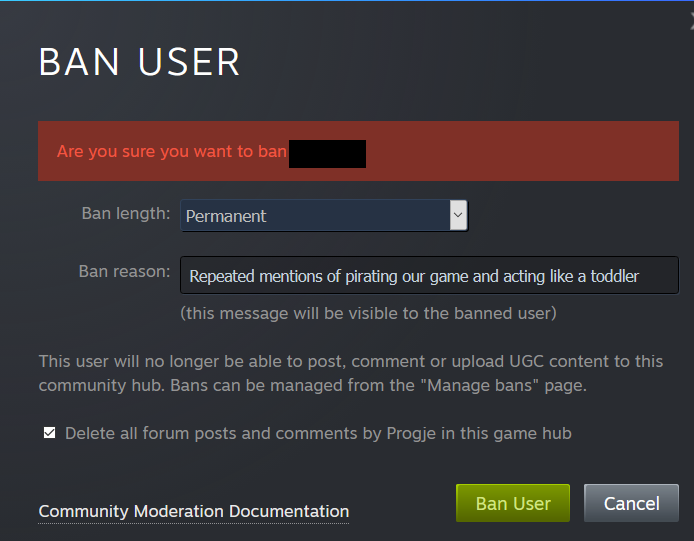
I want an index but im so sick of setting up new and different VR headsets
 wicked oak
@granite jacinth keep us posted about the quality
i want to know how it compares with the oculus. Im not fully convinced by the controllers, but i only tried them a while ago
granite jacinth
I've been using the controllers for months now, I like them. They aren't perfect, but they get the job done
I was saying this on another channel, but being a VR Dev is hard
Every 6 months or so, new tech. New expectations from users.
Actually in this year alone, what... 3, going to be 4 HMDs launched
wicked oak
and for a very small market
who is 100% not worth it at all on PC
all the effort porting something to index, and if you do, barely a dozen people play it, being generous
if you are one of the top 10 games, maybe a couple houndred
sly elk
Yeah, thats the thing with the new input stuff. Not sure how many people will end up using it
a pinch based grab system is not a small task
wicked oak
the Index is 100% not selling more than a few thousands
sly elk
and im not sure its actually a good thing when you want to be productive
At least for wrench, I think it would just make things more clumsy
wicked oak
you can just port the oculus touch gameplay to the knucles
sly elk
Yeah. I do like that it has button parity with oculus now
wicked oak
just a bit more advanced on the hand animation for the finger stuff
tired tree
quite a bit
if you fully utilize it
also the controllers are available seperately to vive users
those will sell significantly higher quantities than the headset itself
sly elk
I really like my Rift S because setup took like 5 minutes... I wish it was better build quality though
sturdy coral
@sly elk yeah I think they patented the mechanism where it will slide in and out for glasses
sly elk
Is that what the button on thebottom is for?
Oh wow, I had that out and its way better fully in
the sweet spot feels bigger with it in
sturdy coral
ah cool, I have a psvr but not rift s
should get index soon and will compare it to pimax
apparently almost all the FOV increase on it is from eye relief and I wear glasses =/
so I think I will likely end up sticking with pimax unless the 120hz/144hz is amazing
wicked oak
i do 120 on psvr
its good, but not that much of a huge improvement
and good luck doing 120 fps on the games
sturdy coral
yeah I'm only on a 980ti
wicked oak
in psvr most of the improvements comes from smoother tracking at higher FPS
and less latency
sturdy coral
I'm interested in playing with the temporal aa current frame weight stuff with 144 or 120hz
it should be updating fast enough that you could do the temporal jitter even with 100% frame weight and it would be like a 2x msaa
because you can't see changes at 60-72hz except in the far periphery as slight flicker for 60 (I think not at all for 72)
so black to white transition at 144hz should just mostly look like grey
wicked oak
taa does indeed look better at 120
but on DWVR ps4pro, its too expensive to use at 120
damn thing takes like 1.5-2 ms i think, and i have a budget of 8 ms
sturdy coral
yeah, I think will just need the jitter from it and not the expensive reconstruction and velocity stuff
could run with 2x MSAA and add a subpixel jitter and at 144hz it should be equiv to 4x MSAA at least when camera is stationary
- less shader aliasing
mighty carbon
I hope new XB + Rift S rumors are true.
sly elk
I havent paid any attention to new unreal stuff for the last 3 months.. Anything coming for VR devs?
sturdy coral
4.23 will add a new RHI thread thing
that they used on android for fortnite opengl
should help rendering perf but actual draw calls still go out single threaded
maybe some more openxr stuff
@sly elk which version is wrench on now?
wicked oak
wrench on 4.22 new renderer should get some huge improvements
granite jacinth
@sturdy coral def interested in your comparison of Index vs Pimax 5k
sturdy coral
it just arrived 😃
sly elk
4.21 custom build still
plan to move to 4.22 soon for the batching
Yeah, we saw like 30ish% drawcall reduction for no work
It would be more but we already had some fancy custom batching for small parts
we are going to be steadily increasing the part count on the car so that will be more important over the next few months
odd garnet
https://store.steampowered.com/app/995140/Hand_to_Hand_Combat
We launched today! if you have the new controllers and $5 to spare come check a look

Point your fingers, launch your attacks, and survive in Hand to Hand Combat!Hand to Hand Combat is a Virtual Reality Action game made for the Valve Index Controllers! Use your fists, finger guns, feet, and magic to survive and explore.Features:Slow MotionPhysicsFinger GunsPro...
Price
$4.49
mighty carbon

PCGamesN
He also calls Valve Index VR a “critical milestone” on par with Half-Life and Source
ember forum
what does this return on htc headsets?
i found this on the forusm
but have no clue which one htc would display(i dont have a vive so i cant find out, but i need to know)
visual studio also gives me nothing
tacit quest
Steam VR
ember forum
thank you
tame thistle
Does anyone know if any of the Epic example content has a radial menu? I'm sure I saw one I meant to use as a reference but silly me didn't bookmark it.
 fair hearth
@tame thistle the vr editor has one, it’s under engine content inside the editor
tame thistle
Thanks. I think it was Robo Recall I was thinking of but after a quick look it seems a little complex and over-engineered for my needs 😛
 silver brook
Anyone having crashes in 4.22 like this? Assertion failed: !AllocationFlags[Index] [File:d:\build\++ue4\sync\engine\source\runtime\core\public\Containers/SparseArray.h] [Line: 87]
ember forum
@silver brook no, but have you looked in the .h file on line 87.. you'll have a better clue of what it is that is crashing
mighty carbon
my gosh, UE4 pisses me off
why on earth my game on Go keeps asking for media/photos/files permission on startup when I don't even use any functionality that requires access to those
does anyone know how to make UE4 not to ask for this permission ?
mighty carbon
I tried, but can't get it
basically a screen that says "App requires permissions to access your media/photo and files" Decline / Accept. I click on Accept and it continues. I'd rather not have this screen at all.
@sturdy coral https://www.youtube.com/watch?v=OLDUVfybG40

I see this in the manifest <uses-permission android:name="android.permission.WRITE_EXTERNAL_STORAGE" /> and that option is unchecked in the Project settings. I think that's what sets this permissions thingie off
 sturdy canyon
Maybe UE4 needs it for log files or something
mighty carbon
not really because external storage is on microSD / USB and Go/Quest doesn't support that
sturdy coral
@mighty carbon did your app on gear do the same?
mighty carbon
nope
but my Gear VR app was built with 4.16
4.22.2 is what I use now, but I had this issue with 4.19 too
or 4.20, don't recall now
I guess the only way to confirm is to get this https://ibotpeaches.github.io/Apktool/build/ , decompile apk, edit manifest file, rebuild apk
Apktool - Build Guide
sturdy canyon
That will work. Or you can edit the unreal source that adds permissions to the manifest
mighty carbon
I think it would take longer to recompile UE4 vs rebuilding apk 😛
 broken moat
@silver brook I have been having this same crash constantly, I'm glad I'm not the only one, are you using vive wireless by any chance?
can someone tell me how to differentiate between vive wands and index controllers in blueprint please?
they are interfering with each other and throwing off my locomotion options
I would like to find out how to reference the vive wands only so I can set a boolean to it
silver brook
@broken moat there is a market place plugin from steam bit haven't tried it and unreal natively should have something I'll look into it later.
You wouldnt happen to have two or more VR pawns in your scene would you?
broken moat
Just one motion controller with booleans for different controllers
 tired tree
? what do you mean?
he is saying price value
and he is right, index is a luxury item at this point.
tired tree
to run at full
mighty carbon
I'd have to upgrade GPU and they get Index 😦 So it'd be ~$1500 for me (Index + RTX 2070)
cheaper to get Rift S + Quest
tired tree
i'm running it fine on 1070
sturdy canyon
You can run at 90fps with Vive resolution and still get better clarity and comfort
And field of view
tired tree
it is verrrry comfy
mighty carbon
I think I'll wait for OC6 first.. At this point I think the best bet is to get Quest and wait for Nvidia to release their "super" GPUs and see what Oculus is up to
pearl tangle
I cant imagine the GPU price coming down for quite a while. They will likely keep the current gen at this price point and their next release is going to be a titan series 1, so around $1500-$2k mark
quest is a good little headset if you are looking for something else to play games on @mighty carbon , but based on their store policy it seems like a bad choice to a 1 person indy dev to bother with though unfortunately. Best bet from a business perspective at this point I think would be to develop mobile compatible VR but target PC as the main release candidate. Just have things already optimized for mobile from the start. Gets you onto the most hardware at least, just needs more thinking about how to structure and optimize everything from the start rather than the end
mighty carbon
@pearl tangle well, one only needs to show promising concept to be accepted on Quest store.
PCVR gamers are a way too picky IMO
and with AAA VR titles coming out soon (and some AAA-indie titles), it's kinda hard to please PC VR gamers
sturdy coral
yeah if you send the same render target to index as you are sending to CV1 now, you will get a much better picture, no need to update GPU but it definitely can push things way beyond to do so
seems rift s has fixed most of the up close tracking issues now though, so may be a good option for the price, especially if you don't have lighthouse already
the audio on index is really amazing though
pearl tangle
@mighty carbon Tough business model there. Put all your time and money into something that they are highly likely to say no to
mighty carbon
I don't get where this misinformation is coming from
there is no money and minimum time requires to create a pitch
that's the whole point of the submission process - to get yay or nay early on, before you put all of your time and money into Quest project
pearl tangle
why do you think they are going to give you a yes from a 1 page presentation? I think it's much safer to assume you are getting a no already when much more developed projects are getting a no
mighty carbon
we shall see..
sturdy coral
if you present them with a really good concept they are more likely to fund a team to clone it than to fund you IMO. unless you have tons of management experience and a track record running large teams and a history of games that brought in huge numbers and they feel like working with you is an easier path
or if you already just have a proven and popular vr game
there is at least some chance they will get less selective over time though
pearl tangle
yeah a pitch takes a decent amount of time and money to make convincing. The average cost of a pitch here for business from agencies is $90k, and then you normally have a 1/5 chance or so of getting the business
 real needle
Any idea how to put this into unreal . so I can use the data to trigger specific events. Like when smile sth will be spawned.
pearl tangle
@real needle what do you mean, it's already in there?
real needle
Y. I deployed teh Face AR sample map to my IphoneX. When I open the app, there is one option i can check. This will show me all debug values. But I dont know how to get this information inside Unreal. I can see those changing values only on the Iphone.
My plan was to use those values in the Level blueprint to trigger additional events
pearl tangle
yep just read back those values directly the same way that it's displaying them on the phone
real needle
Y I tried that. Like Reverse Engineering. but no success. I will sent you some pictures
pearl tangle
should do. Worked fine when I did the same thing a few months back
real needle
Its this place right?
I used get BlendshapesValues and as the target ARFaceGeometry
I used print string to output the return value of the LeftBlinkEye. But it will output only zero
Event tick as trigger
While Blinking with my left eye. Numbers wouldnt change
So I am thinkig this should be actually simple. But I am too stupid
this is what i basically did . then Alt+P,starting session while using the iphoneX
So I am thinking maybe the target needs to be a different one?
pearl tangle
This is what I did
real needle
Ok i will try it
wow nice its working. I got too focused on the get blendshape value node. Finally Thank You so much @pearl tangle !🌎 🌎 🌎
Its giving me the values now
pearl tangle
no worries. i did the exact same setup a while back
mighty carbon
has anyone tried using this in VR https://shaderbits.com/blog/octahedral-impostors/ ?
It is finally time to release the first version of the Impostor Baker tool! This is currently uploaded to github since I could not get access to the ue4 community server:
https://github.com/ictusbrucks/ImpostorBaker
Notes:
Currently for UE4.19 only. I have a 4.18 version th...
dim imp
How to cast to BP_motioncontroller? what do I need to pkug in Object ?
dim imp
somehow? XD
 polar valve
In my example above you can get the player pawn first and then get the right or left controller
Just depends on what you're trying to do
dim imp
@polar valve ok this almost got me there
look I'll try to explain what I wanna do
I have made a Widget Interaction component inside BP_MotionController, child of HandMesh
Now, I have a menu level with a 3d widget with buttons. I want to click Start to open desired level. which works. but I'm then stuck with the laser beam thing out of my hand (the widget interaction)
I want the Widget interaction to go away when my level is loaded. I ONLY want it to appear in the main menu level, to interact with my buttons.
@polar valve Now, how do I make it go away?
dim imp
@polar valve It's not working. Widget Interaction component returns when new lvl is opened
polar valve
Oh right, your pawn will reload when you load a new level
polar valve
I would just do the opposite
add that to your level blueprint in the menu level
so you turn it on in the menu
dim imp
but I need to make it off by default now ?
polar valve
Yeah
dim imp
And how is that done?
dim imp
That works. but it messed up my grabbing functionality of the hand
polar valve
Not sure why that would be
dim imp
ok thank you!!
polar valve
Np 😀
dim imp
Help! When I open a level the navigation doesn't get built. EDIT: must be a bug. restarting engine fixed it.
 frozen cypress
I have a weird issue here, guys. Play-In-Editor runs way smoother than a packaged game in my VR project. Even after dumping all quality settings to minimum (making it look much worse than for PIE) the framerate is substantially lower than for PIE. Does anyone know what I might be missing here?
frozen cypress
There are several other such issues reported on the AnswerHub, but they mostly seem to stem from people not realizing you need to adjust quality settings manually in a built project. No idea what is going on in my case.
 sonic lake
@frozen cypress Are you aware that the quality settings in the editor are not automatically applied to the packaged build? You need to apply them specifically.
frozen cypress
@sonic lake: thanks, but yeah I am aware. Even after reducing everything in the config files so that it looks way worse than in PIE it still performs considerably worse. I might be missing some essential setting, though. I'm basically changing everything in ScalabilityGroups
sonic lake
@frozen cypress you have already optimized settings in the VR standard template. You can copy them over. I would also have a look at the HMD performance HUD in both cases to check for discrepancies.
frozen cypress
thanks, those are good suggestions
solemn beacon
how to position the player in the scene ?
we're making the scene a replica of a real world place
where the player's real world position is the player's position in the scene
solemn beacon
second question
how to access the compass that controls the rotation of the vr headset
in oculus quest btw
sly elk
are you starting with a template?
ember forum
is there aynthing worse than testing VR multiplayer with 1 headset
mighty carbon
yes - making VR game while not having HMD 😛
ember forum
hehe true
 tawdry dragon
anyone here got the Oculus quest to connect to a session hosted by a PC?
tired tree
@tawdry dragon @hallow knoll is doing that right now
hallow knoll
@tawdry dragon Yeah I have Quest/Go/PC/Android phones all in the same session
I'm using OSS=Null, so I'm currently creating LAN Sessions. However, you can still connect using directIP
tawdry dragon
had to untick "Use Lan" though
and Android will still report a found session even if no one is running. But as soon as I run it on the PC first and create a session, everything works!
hallow knoll
@tawdry dragon You mean Android as in Quest right?
I wasn't able to find sessions when using an Android phone, works on Quest though
tawdry dragon
yeah
just have a switch on platform name
windows = create and host session on start up
android = look for sessions, if none found just open a level
(this is just a enterprise prototype)
hallow knoll
The reason why you're still finding a session might be because you're not destroying the previous one. Each client has to do that when "leaving"
hallow knoll
Either
tawdry dragon
hmm, interesting.
hallow knoll
They need to be destroyed explicitly
If say, your Quest app crashes, you'll have to check and see if there's a session already when the app starts, and if so, destroy it
tawdry dragon
Arhh okay, makes sense!
does UE4 have any BP exposed events for handling the app shutting down?
so far I've been closing it by calling out the oculus menu and quitting the app
hallow knoll
I usually do that in my StartGameMap that's loaded on startup. But rift is being super wonky with that and giving me the same issue I have when checking dedicated server in PIE (black frozen screen for ~30s)
tawdry dragon
hmm, can you offload it to another thread?
I had similiar issues when importing textures from the harddrive runtime, had to push that to another thread for it to work and not fuck up the VR experience
hallow knoll
Possibly? I was able to work around it, and startup is a tad faster without the first map anyway, so might be a workflow I prefer
tawdry dragon
arhh cool. I'm by no means an expert on these things. 😛 Making stuff up as I go
sometimes with unforseen consequences.
Next up is trying to figure out how to do shared sessions with multiple quests in the same physical space.. gonna be a tough one 😄
https://vrscout.com/news/shared-space-mp-vr-oculus-quest/ these guys got it working, now I just need to figure out how 😄

VRScout
Developers use Oculus Quest to create a location-based VR game inside their office. When Oculus presented attendees at OC5 with an arena-scale multiplayer demonstration of Dead and Buried 2 powered by the Oculus Quest, we knew the Quest was something special. And although Ocu...
"This is using our own calibration tech. Our tech is super simple to do, takes about 30 seconds per device and only needs to be done once as long as the headset remembers your room. (Basically until you leave.)"

reddit
174 votes and 47 comments so far on Reddit
hallow knoll
@tawdry dragon Yeah I'm doing that
You can use one controller from each player to get enough data to calibrate automatically (everyone puts their controller in the same spot (a 3d printed dock would be awesome). Or just start the game in the same physical location and you get pretty close 😃
pearl tangle
its a shame google moved away from doing the VR bits since their VPS system is pretty much perfected now for shared space multiplayer like that. Maybe quest will get a similar system soon to bypass the calibration step
tawdry dragon
@hallow knoll Thats pretty much how i thought about it too(the controller calibration), but how do you go about syncing the calibrated offsets/positions when replicating?
hallow knoll
Set new loc and rot on owning client, pass the data from the client to server and set loc/rot. The other clients will get the updated pawn loc/rot as per MovementRep, so no need to replicate the offsets.
That's assuming you're using ACharacter, or are already replicating Pawn movement somehow
If not, you can do a repnotify variable where its function will set the new transform
tawdry dragon
Hmm okay. So anything that replicates needs to implement that “system” right?
Like If i grab a box or something
hallow knoll
No, once calibrated nothing else is required. My tests have shown that the tracking doesn't drift, as long as the Quest doesn't loose tracking entirely and tells you to redo Guardian. At that point you have to recalibrate, same if the worn sensor registers that it's not worn. Should be possible to recalibrate using the old data once worn though...
tawdry dragon
interesting. So if I understand you correctly, this is pretty much your flow:
- Open up app in quest after guardian has been set up and connect to session
- Place controller on fixed point in physical space
- Store the controllers transform(loc, rot) offset from world origin
- Send that to server which stores that per player
- The server then adds that offset to the player(not on owning client) which results in all other connected players get the servers calibrated positions
flat shoal
Anyone developing with an HP Reverb in here?
And if so, do you find that deferred with TAA is actually more pleasant than forward with MSAA? (Ie. the opposite to what you want with the Vive...)
wind yacht
Are there any articles on setting up the auto- mapping process of larger spaces using the quest like the video above? I'm hoping to integrate something with my current setup.
just found this... has some input on the Thrust Vector tech in the thread https://www.reddit.com/r/OculusQuest/comments/br5lhu/oculus_quest_shared_space_demo_2_players_in_the/eobns35/
reddit
174 votes and 47 comments so far on Reddit
cold siren
@frozen cypress are you using a spectator screen?
 mellow flint
Hello everyone, there are those who have worked with VR, I can’t do it in any way so that my hands do not pass from the wall, I can only: put a collision sphere in my hands to make hands not visible when this sphere overlap, and in that place spawn fake hands, but in my opinion it is a crutch, is there a correct way to do this?
frozen cypress
@cold siren afraid not. Is that known to cause issues?
cold siren
@frozen cypress yeah it caused this same specific problem of maintaining frame rate in play in editor session and dropping huge amounts of frames in packaged game
sturdy canyon
ok I'm going crazy over
Does anyone have experience with Oculus Sessions and Oculus Voip?
I am correctly registering remote talkers and getting voice data. But I hear no sound
I'm losing my mind
Oculus hasn't implemented the UVoipTalker component stuff. They still do it the old way with an unspatialized audio component
Maybe that's no longer working on 4.22?
I'm tempted to just rip apart OnlineVoiceOculus.cpp and replace it with the VoiceSynth stuff from Steam voice
then it will use the new audio engine and voip talkers
frozen cypress
@cold siren: Since that is what I'm seeing that was a reasonable guess. Seems it has to be something different in my case. I've spent the last days trying to attack this issue from many different angles, but still my packaged project is way slower than PIE. It is a large, open map with level streaming, so perhaps that contributes, but I have no idea. Thanks again for the input.
cold siren
@frozen cypress what does your profiling say?
mighty carbon
@sturdy canyon Today I heard that 4.21 has broken Oculus audio spatializer
cold siren
@frozen cypress are you using any SceneCaptureComponents with a RenderTarget?
mighty carbon
so I am sure if that's not a rumor, then 4.22 has borked audio too
sturdy canyon
The voip implementation doesn't implement spatialization
It just registers an unbounded audio component
 rustic cargo

reddit
0 votes and 0 comments so far on Reddit
 short aspen
probably a stupid question but is there a way for a multiplayer vr game in ue4 to do the following. from the perspective of a character witch is floating hands when they look at another player instead of seeing floating hands sees a full character?
hallow knoll
@short aspen Yes, you can have a full avatar mesh on each Pawn, and set "Owner No See" to true. That way, the VR player won't see his own mesh, but other players will
short aspen
@hallow knoll Thank you! told you it was a stupid question!
hallow knoll
There are no stupid questions, you don't know what you don't know 😃
There are poorly worded questions.. but that's different
short aspen
Yes sir, agreed brain is barley working today best i could word it. lol thanks for your help!
 thick plaza
im having a weird issue right now with oculus
so when you use an oculus rift everything works fine but the camera is stuck in the floor, and this doesnt happen when using an htc vive/wmr
i tried changing the tracking origin from floor to eye and that still didnt work
this is what i have rn
ember forum
@thick plaza thats because there is no hmd device with that name
you can get device name
hmd device name will return OculusHMD
thick plaza
oh
ember forum
if its a rift/oculus/rift s
thick plaza
yea
thick plaza
ok
well i just set it to floor all across the board and that seemed to fix it
like a minute ago
sturdy coral
@sturdy canyon you should be able to do that without too much trouble (engine VoIP in Oculus subsystem), I did it for steam before before they moved steam over to use the engine's voip
Engine VoIP is extremely buggy though on the new audio engine
sturdy canyon
VoIP in general has been a dumpster fire in UE4
Epic themselves used a third party solution for Fortnite at first (that company was bought by Unity)
But yeah it doesn't look like too much work to port over the new voice stuff. Maybe that will fix it..
I wish I know why the current solution isn't working, though.
mystic tinsel
I've been working on various avatar and ability related things on a test map. I noticed that I'm getting a little... odd graphical issues in some places. Like..some waviness? I'm on an oculus rift. I haven't seen any issues until about the last week or so. What's the best way to track down what might be causing that? My test map is fairly small, and doesn't have much on it.
 zealous agate
Wonder if anyone else is having this problem on building for oculus quest.My project works fine and I can teleport no problem on the vive but when I build for the oculus quest the teleport sticks me in the floor at eye level. - Ive tried changing a number of things but I just cant fix this problem.
Anyone have a solution / workaround?
zealous agate
Ive also noticed that my project settings package options for quest/go are missing ....not sure if that is the reason why
sturdy coral
@zealous agate set tracking origin to floor
For some reason engine defaults to floor for Vive head for rift
zealous agate
@sturdy coral thanks for the quick reply. Ive tried that doesnt make a difference whether I use floor or eye.-
its a wierd bug
sturdy coral
@zealous agate it does make a difference on Vive though right?
zealous agate
yes but Im building for the quest .Its bascially a project that was running on the vive that Im building for the quest.
sturdy coral
Yeah, just checking that node isn't least workingnon vive
zealous agate
Ive tried a hack by adding an offset atthe end fo the teleport function but that causes the app to crash.
thick plaza
@zealous agate see above messages if you havent already
u have a screenshot of the blueprint for your player
zealous agate
I have it working but crashes app when I teleport. I'm gonna try bringing another motion controller pawn in from another project ans see if that fixed it. I saw your message above but the name is correct in the app so not sure what's causing it. I think it's cos it's an older project that's been upgraded
zealous agate
OK got it working... Was a buggy scene. Thanks for the help
short aspen
So i am completely new to VR development i am trying to figure out a way to add items to my inventory other than a conventional button press. is there a simple way to lets say if i pick up an item to move the item behind my back and drop and it will add to my inventory... i also imagine if i would want to pick up some food and eat by bringing it upto my mouth it would be the same concept?
hallow knoll
@short aspen You can use collision volume(s) as your "backpack" to determine when another collision volume (hand/item) overlaps it
short aspen
@hallow knoll ill give it a shot thanks man!
mystic tinsel
How do I test steam stuff in VR? Do I have to build the game every single time?
in a non-vr game you can just run a "standalone", but you can't do that with VR because standalone doesn't support VR.
but VR Preview is considered in editor and doesn't support steam stuff
hallow knoll
@mystic tinsel Right click the .uproject file and choose "Launch Game"
mystic tinsel
Ah, I have to use launch to get both steam support and VR together? Okay I'll try that.
hallow knoll
I also suggest you can at least play basic features of the game with mouse+keyboard, it will greatly improve iteration time
mystic tinsel
Yes, the VR expansion provides a basic FPS character but I need to test the VR menus and stuff like that.
Do you know anyway to attach a debugger to the standalone/Launch version of the game? I have to debug my vivox setup, but running in debug from VS gives me nothing on either of those modes.
mystic tinsel
So after all that, launch game didn't seem to detect my HMD and threw me into a FPS character I think.
sturdy coral
@mystic tinsel under debug --> attach to process, then type 'ue4editor' into filter
someone has also made a vs plugin with a button you can click to quick attach
not sure where it is, think it was one of the kite and lightning devs
mystic tinsel
is there time to do that? I'm getting a crash on initialize since there is an issue with my vivox code on initialize.
sturdy coral
to debug on initialize there are several methods, popping up a modal, adding in a sleep
and I think the google chrome devs have a plugin for automatically attaching to spawned processes.. you shouldn't need that though just launch through vs @mystic tinsel
right click project, properties, debugging, to process parameters add -game
for saving lots of different launch options for switching between game and editor, vr, non vr, sound, no sound, etc. while debugging, install https://docs.unrealengine.com/en-US/Programming/Development/VisualStudioSetup/UnrealVS/index.html
Guide for installing, setting up, and using the UnrealVS extension for Visual Studio.
it puts a toolbar thing that lets you quickly add launch parameters to a debug session
mystic tinsel
okay thanks for that, I'll try it and see if I can track down what's causing the exception. I think the accountID isn't being generated properly.
 orchid schooner
it is possible, but not easy to run standalone with VR off, and then turn VR on
mystic tinsel
@sturdy coral Thanks for the help earlier. I finally got a chance to run it with the -game and was able to find out where the error was. It's not exactly the error I expected which has left me more mystified.
ember forum
just heads up to all, after struggeling a lot wiht it, this is the setup i use to test multiplayer with PC vr, so that i can still have a client / or listen server in another window looking at the vr pawn i want to debug and properly use the headset without any issues (all other settings just did not work for VR/headset would be black or on the wrong window)
just switch between client/listen server to have your vr headset / pawn be client or server
toxic oracle
I’m personally a fan of the method of duel wielding rifts and motion controllers with my fingers held over the forehead sensor rapidly waving my arms
Thanks for the tip, one more thing to add on is when playing under “run dedicated server” if you get super long loading times or black screening try disabling the oculus splash screen, fixed the issue for me
hallow knoll
@toxic oracle I can't test that right now but jeez yes I have the 30s freeze when launching on rift with dedicated checked. Will def have to try that
toxic oracle
Time to add it to the list of obscure VR Multiplayer bugs

 languid night
When programming hands for Ue4 is better to make them from Actors or scene components?
sly elk
If we enable vsync for out desktop mode do we need to do anything for vr?
*does turning on vsync affect vr play?
toxic oracle
@languid night I believe both methods are fine but personally I prefer having the hands in a different blueprint so the player pawn doesn’t become a crazy big class
hallow knoll
@toxic oracle Splash screen seems to have been my previous nemesis, thank you for noting that
toxic oracle
Good to hear that fixed it
mighty carbon
@hallow knoll by chance, any news on mobile Vulkan (with FFR and mutiview support working for Go/Quest) making it into 4.23 ?
sturdy canyon
I think that's already in 4.22. we're waiting on an Oculus OS updates, not an unreal update
mighty carbon
ooh, I see
 icy berry
Guys, I need some general information regarding VR development with unreal engine.
How different is dev for HTC vice vs Occulus, what things would I have to to/handle differently
And does UE4 support vives lighthouse sensors for tracking detection?
Would appreciate any experience
sturdy canyon
The only change you have to make is button bindings. Everything else happens automatically. If your game only uses triggers and positions, the exact same build will run perfectly on either headset without even testing
If you use more buttons, you'll have to make different bindings for each platform but it's super easy
sturdy coral
only other thing is make sure to call the set tracking origin node, Oculus and Vive default differently (head-based vs floor based, but both can use either)
mystic tinsel
So first time packaging a VR build and as expected, it's a mess 😉 Well actually my menu level is almost working as expected. oddly my steam integration isn't working. Yet, it works in PIE when I use "standalone". I'm confused as to what is going on with that.
Secondly when I choose my avatar for my test map and move to that map, the avatar there just isn't working a tall. I don't seem to inherit my character at all.
tired tree
@mystic tinsel if you are packaging for shipped then you need to include an appid.txt file for steam in versions older than 4.22
4.22+ you can add app id defines to your project.cs
mystic tinsel
Yea, I decided to package for development instead.
that allows steam to work for now
I just need to sort out what it god's name is going on with my avatar on the second map.
mystic tinsel
So... I set up a widget in the packaged build to confirm that my avatar class is correct. And it is. If I look down, I can see an inventory ball that should be attached to the waist of the skeleton, but I have no mesh for some reason. Not just an absence of a mesh, but the skeleton seems to be compacted into the floor. My motion controllers do seem to be working though, if I reach down and my motion controller overlaps that ball it changes size as it should when a hand overlaps it. I can also move around using the motion controller smooth locomotion.
in pie I'm getting this lovely robot avatar as I should.
languid night
How do you set which hand the motion controller component is tracking to?
mystic tinsel
You need to use your anim BP
languid night
Through SetTrackingSource or SetMotionSource?
mystic tinsel
or you need to spawn and attach the controllers to specific hands.
languid night
Yeah, but the Hand Enum is deprecatted.
mystic tinsel
languid night
Oh
My MotionControllerComponents are being spawned in on beginplay, so I have to program the motionsource
mystic tinsel
if you want to do it all in C++ I believe VR Expansion sets that bit up in C++ so you can check it out.
let me check. Initially I had a small set up myself before VRE and I set that stuff up myself
but I may have tossed that small project after switching to VRE.
Are you using VR Expansion plugin?
mystic tinsel
It gives you a great foundation. If you're making a VR project that involves an avatar then you should check it out.
After you spawn a controller you can set it like this in VRE
Sadly I tossed that other C++ project I had. I recall setting my tracking in them, but it was like 2 months ago so I've forgotten exactly what I did.
languid night
I see, so VRE functions/features can be used in both C++ and blueprints?
mystic tinsel
Yes, VRE is base C++, and then there is some blueprint stuff on top of it for the "final" class. But you can replace those as needed and start from a bare plugin if you want.
His template is good if you don't have the time/skill to redo all that complicated grip logic and things like that that he's already set up.
mystic tinsel
Yeah it's really great. Lets you get more into working on your actual game than fiddling with basic avatar stuff.
but I'm still fiddling with avatar stuff because i must have messed up something somewhere 😉
icy berry
Thanks for the elaboration guys. I can't find references/documentation for sing lighthouse data tho. Do we get input from them and just use them with axis mapping?
 left coral
Would there be anyproblems making imposters with VR?
 ruby palm
How can I attach an object to the VR player camera?
orchid schooner
same as any other camera - make it child component in the actor blueprint or class
for attaching actors you could use child actor component
frozen cypress
@cold siren : Thanks for more input. I followed up on your leads and did a lot of testing and finally found out this issue was caused by having the PixelStreaming plugin enabled, which I had added for a non-VR version of my project. Disabling this plugin fixed my issue, and the packaged project is now as fast or faster than PIE
cold siren
@frozen cypress glad to hear you got it sorted it out!
zealous agate
hi . Still having random crashes on teleport on the oculus quest. Sometimes it works fine but most times it crashes as if it is colliding with something.Are there some settings that anyone knows of in the recastnavmesh that I can tweak to make it less twitchy
?
dim iron
@zealous agate i had this with the VRE template, if you disable the rumble functions then it wont crash. if its that template.
tired tree
@dim iron rumble functions shouldn't be crashing, its the built in engines rumble
if that is crashing quest for you thats a big bug report that needs sent out to them
orchid schooner
question -
UE4 example hands have only one right hand.
Occulus example hands have both hands, but right hand have mirrored by inside out rotation of root bone.
is anywhere a good mirrored both hands? true both meshes and skeletons?
zealous agate
@dim iron thanks for the tip dude
mellow flint
Hello everyone, can anyone know how to make sure that the stick in my hand does not pass through other objects
toxic oracle
@mellow flint whole bunch of ways, physics handle, setting the actor location to your hand every frame with a collision sweep
 eager olive
any opinions on price/performance for an android device to use for AR development? I have an iPad Pro 10" (2018 was it? not the new ones) but the apple license and all sorts makes it a real pain to use and ARCore looks more impressive than ARKit
mighty carbon
how does ARCore look more impressive than ARKit @eager olive ?
eager olive
I've not read much about them recently but I saw the image recognition and real world lighting stuff in ARCore more prominently
mighty carbon
ARKit 3.0 does people occlusions and 3D objects tracking, neither of which ARCore can do
eager olive
that and in the end testing on iOS is a pain, license fees and so forth
mighty carbon
I agree that Apple is junk when it comes to developing for it, but at this point ARKit is a way more useful when it comes to industrial AR stuff.
eager olive
I'll have to read up on 3.0 then, but the constant fucking about with apple licenses and whatever, remote building on a mac and so forth.
though I presume testing with Android and ARCore is faster and if need be the move to ARKit isn't so different if the company puts money into it.
mighty carbon
btw, I wouldn't be surprised if Google dropped the ball on ARCore in the nearest future
eager olive
oh yes? why so? all I need is to be FUBAR on software
mighty carbon
cuz Google is known for killing off products left and right 😃
also, current ARCore is 1.10.0, but UE4 integration is still 1.7.0 :/
eager olive
tbh I'm not looking for turbo fancy stuff, just to test at home.
mighty carbon
if you are to make $$ from AR, might as well just get Mac-mini
eager olive
image recognition and tracking, that kinda jazz
https://developers.google.com/ar/develop/java/augmented-images/ this basically. all the extras in ARKit sound smart but maybe beyond my needs

Google Developers
 dense lance
If I have a material that uses "Screen Aligned UVs" (or screenposition) in VR, I get double vision on that material
Adding a small offset to the UVs for each eye seems to fix it, but feels like it may not be the right solution - anyone know a better way?
silver brook
Is there a way to detect when a player has reached a chaperone bound wall?
dense lance
@silver brook had a quick google, looks like there is a chaperone component
silver brook
I guess using that I can show the bounds in game or at least detect the the player is hitting the bounds ?
I'll have to mess with it
eager olive
@mighty carbon sorry I forgot to say, I'm sure there'll be money in it from my works perspective and if that becomes a thing then they'll have to supply a Mac and costs for iOS development, this primarily is for me at home and then to bring things in for show.
pearl tangle
@mighty carbon I can pretty much 100% guarantee that Google is not going to be killing off ARcore
mighty carbon
ah, good to know 😃
pearl tangle
arcore as well is much more useful for development when you are needing to do specific things that unreal doesn't have a wrapper for like using the camera image to map for occlusion since arcore runs on all devices. but really depends what you are trying to do. Tying the newer iOS devices face tracking camera in can definitely do some impressive face mapping stuff
the pixel 4 will also have some interesting extra additions to AR capability that should find it's way into other android devices by early next year too
they are finally getting back to doing some dedicated enterprise stuff with it like Tango initially started out doing
also fyi @eager olive if you are trying to release on the play store as well these days you need to do all of the certificates and licensing and all that bollocks with iOS too. It's only easier if you are planning not to do play store release
mighty carbon
@pearl tangle so there is no ARCore 1.10.0 integration for UE4 available yet?
pearl tangle
not sure which version is coming into 4.23
mighty carbon
also wondering if there is 3D object tracking in works for ARCore
pearl tangle
yeah thats been in there for ages
pearl tangle
its the same way for both arCore and arkit actually. you have to have a scan phase so you scan the object, save it and then read against it
yeah i saw that, but it was done back in may that card
which was before 1.9 came out so makes sense
mighty carbon
4.21.2 + 1.7 is the latest :/
UNity on the other hand is 1.10
UE4 is always behind on anything AR/VR
pearl tangle
yeah thats because Unity doesn't do anything with it in between. Although unity was doing their middleware stuff for AR and VR now too i think so not sure if that situation changes
pro's and cons with both setups. You could normally just grab their git to get the most recent version, but they haven't done that with 1.9 or 1.10 which leads me to think they are working with epic to integrate it into UE4 better.
mighty carbon
I see
pearl tangle
also 1 thing to note, their entire development team across tango, arcore and daydream are all unity developers. Their UE4 capabilities are stretched pretty thin so takes a bit more time. Most likely stems from the demand for it. Tango stuff kicked in back before UE4 was a more popular choice for enterprise, so everything was done with unity
very interested to see how things start changing with the Pixel 4 though
ah i see there a bunch more leaks about it recently as well over the past 48 hours
pearl tangle
not really hah. I can say that majority of the renders are a long way off though
cant imagine that vuzix supports ue4. it's just a basic hud im pretty sure so not much point
mighty carbon
oh, leaks about Pixel 4... I thought leaks about ARCore and UE4
pearl tangle
well it would be tied to ARcore anyway
mighty carbon
I'd probably use Samsung Galaxy Tab S5e for AR (for training and work aid at a workplace)
pearl tangle
wait until you see what comes out with pixel 4. Some interesting stuff if it made it through their initial hardware prototypes. I haven't seen the newer versions
mighty carbon
well, at work it's more about screen size. No one want to deal with small screen. Plus tablet is $399 vs (rumored) $1000 for Pixel 4. It adds up when we are talking about buying 10 units, for example
pearl tangle
yeah ipad pro's are still the best for AR stuff in my experience
mighty carbon
I am sure for R&D with AR Pixel 4 is a way better than Samsung tablet.
pearl tangle
nah it's a completely different reason that im saying the hardware will be interesting for AR
mighty carbon
any idea when all this info will be publicly available ?
(roughly, in the form of a rumor 😃 )
pearl tangle
as in something specific about the Pixel that will make it better at AR than any other device on the market.
probably when they actually announce the hardware itself, september october is their normal timeframe i think
mighty carbon
almost around the corner
btw, rumor has it that next get of VR from Oculus will have eye tracking.. Maybe we'll see something about that at OC6
wider FOV, varifocal 8k displays, dynamic foveated rendering and wider tracking for controllers would be pretty nice to have.. I don't think that Oculus will introduce wireless VR at OC6
pearl tangle
maybe, if their next gen headset comes out in another 3-4 years i guess
 open pebble
Hello I wanted to know if there is a video out there that can show me to add a head in vr
eager olive
stereolayers
I forget the setup but yes Stereolayers are needed for widgets and the sort in VR.
 rich canopy
What if its not a widget but just a text render?
 eager sage
Hello! Does anyboby know the maximum height for vive lighthouses/base stations? We have a over 4m height ceiling. I can't find any information about it ( just that the height should be > 2m)
orchid schooner
text could be shimmered if you use HUD attached to your camera
rich canopy
Not using a HUD, It only happens when the text are further away.
eager olive
sorry I am at work so I miss things, could be an AA thing, if it's just shimmery then it might not be stereolayers as you'd only see it in one eye then.
rich canopy
Using MSAA, but shimmery text seems to be a common but not fixed issue when I google it.
eager olive
always common and not fixed issues.
pearl tangle
@eager sage They have a max 5m range. I have had decent quality tracking with 2 sensors on the same wall, 3-4m apart and 4m high before
eager sage
@pearl tangle thank you for the answer! I thought that 5m range is just for the sync between bases and not for the controller recognition. (now i think it's not the smartest assumption 😃 )
pearl tangle
you can just run the cable between them to get around that issue anyway
eager sage
5 m between is not a problem in my case
4m height is, i think
i guess all i can do is try )
pearl tangle
the usual way to figure vr stuff out
eager sage
)
 manic ledge
Hey all, really weird question, but I've used the widget interaction component with widgets (3d in world blueprint) several times over the last few years. However this morning I went to implement one in 4.21 and for some bizarre reason it's not hitting anything. I've got the debug draw turned on, and there is no "collision square" , the line just extends to the end of it's range (quite long whilst trying to debug this!)
Any known issues with them in 4.21? I've used them in 4.22 and 4.20 and many other past versions
manic ledge
Hmm seems fine in another 4.21 project
Any ideas why it might not be working with an identical setup in this project?
 frigid kite
Is the widget identical to your other project? Maybe it's just not set to block anything
mighty carbon
4.23p1 is out
Ray Tracing Improvements. We have a number of new improvements to highlight - some are: * Multi-view support for VR
RTX in VR ?
other than that, nothing special for VR / mobile VR / Vulkan :/
hallow knoll
@mighty carbon I'm following up on your question
hallow knoll
@mighty carbon Multi-view currently (Preview 1) has limited denoising support, notably for ray traced shadows, but we're working on addressing them before full release
mighty carbon
cool
btw, any news on multi-view / FFR support for Vulkan on Go/Quest in 4.23 @hallow knoll ?
 raven thorn
@mighty carbon doesn't seem like it according to https://forums.unrealengine.com/unreal-engine/announcements-and-releases/1640558-unreal-engine-4-23-preview
Unreal Engine Forums
PREVIEW!
Preview 1 of the upcoming 4.23 release is available now on the Launcher and GitHub. We are making this Preview available so that our developer community
mighty carbon
@raven thorn well, for once Epic doesn't put all the details into preview announcements.. Gotta wait for release with full release notes
so, no saying whether the support is in or not based on preview notes
raven thorn
I understand. Makes sense!
mighty carbon
that's why I am wondering if @hallow knoll can dig up some info about that 😉
mighty carbon

A new report states that Splinter Cell and Assassin's Creed VR Oculus exclusive games are on the way as Facebook doubles down on VR content.
 elfin venture
hi guys i have a vr game with out movement but when i play with oculus but with the sensor
moves a litle bit but i need stay in his position
hallow knoll
@mighty carbon Multi-view and MSAA support for Vulkan is coming in 4.23, FFR is still unclear
But it's currently being worked on 😃
mighty carbon
sounds good 😃 Thanks
silver brook
I know this sounds silly but anyway to lock HMD movement so that no matter how the player turns in the real world they don't turn in the virtual world?
I'm doing it a bit hacky at the moment using the Rotation Component to try and counter the players rotation but it isn't working as well as I'd like
Might be because the rate I set isn't quite the right rate to counter the rotation rate of the HMD
Oh I'll try unlocking the camera to HMD now that I think about it
mighty carbon
why would you do that @silver brook ?!
sturdy coral
@pearl tangle saw in the 4.23 changelog: nDisplay: Warp and Blend for Curved Surfaces. You can now use nDisplay to project your Unreal Engine content on to a wider variety of physical installations, including curved and spherical screens, and scenarios that involve complex blending between overlapping projections.
silver brook
@mighty carbon I'm attempting to do the WalkAbout Locomotion
mighty carbon
not sure what that locomotion is, but locking view to HMD sounds as sickening as it can get
silver brook
that is why you blank the screen out, just like with teleportation
tired tree
walk about always seemed like a gimmick more than a usable locomotion method, the whole point of it is to increase the feeling of being there but it breaks your immersion to force hitting the tracking boundries and rotating the game world back and forth.
walk in place, armswing, and scaled steps handle that concept better
mighty carbon
@hallow knoll do you happen to know if there are some AI goodies in 4.23 ? It feels like AI is the most stagnant part of UE4 :/
silver brook
@tired tree I'm attempting to do it automatically, so player just has to turn and not do anything else like pushing a button
and the immersion break will only take as long as it takes the player to turn. Just testing it out
but it is being a hassle to do in Unreal since what I'm trying to do epic didn't really provide easy access/controls to
Like freezing HMD in Virtual World
Because hey.. who in their right mind would do that.
Even having two cameras seems like only one of them can follow the HMD not two
even if both are set to lock to HMD and both are active
 pearl tangle
@sturdy coral yeah they did pretty much a full rebuild of the nDisplay stuff for the childish Gambino projection thing at the start of this year so that's all finally getting merged in
mystic tinsel
Anyone else have issues with motion controller tracking after seamless travel? In the lobby my motion controllers track fine, when the host clicks start to seamless travel to the level, the client's hands get all messed up. They're locked relative to the player's body. They still move, in that if I rotate the controllers the hands will rotate in that location, but the location no longer follows the motion controllers.
silver brook
So tired to copy the code from GetCameraView that locks the HMD so I can have more control and it just isn't as fluid doing in on tick in BP
the camera transform lags behind the HMD's
dim iron


how would you go about doing that fade in affect, for like a blink when moving in and out of positions.
little scaffold
@dim iron you mean the camera fade in and out?
silver brook
Why does resetting the orientation only reset my position in the world as well?
If anyone else can try just doing Reset Orientation and Position and see if setting the enum to just Orientation does also change Position for x and y but not z.
sturdy coral
@dim iron looks like a camera fade + a temporary boost in bloom (you can control bloom amount in post processing parameters)
dim iron
dont think you can do camera fade on mobile can you (quest) ?
little scaffold
did you try from "get player camera manager" ?
sturdy coral
@dim iron the oculus compositor runtime should let you if you call from c++; not sure they expose it because they wrap the whole oculus SDK in weird way that doesn't expose everything
(I'm assuming it has something like openvr's FadeToColor)
dim iron
Cheers @sturdy coral will look into it.
ember forum
im having trouble getting the hmd to be attached to the right place on a htc vive, on an oculus headset it stays attached to the head bone on the mesh as intended, but on the htc vive it depends on the user's height(its attached but the height is offset by the tracking height)
how would you fix that on the vive?
could i just set the htc vive to eye level and it will work? without needinig to use the offset?
silver brook
So I'm trying to mimic the Teleport Function from the VR template so that I can orient the player differently but I can't seem to get it right even if I replace the references from the teleporting to Arc Circle to my custom location.
ember forum
@dim iron i remember watching the O5 how to develop for quest video near the end they say how you can fade in and out... its a function node that i cant recall now
Or you can go on the oculus developer section on the oculus website and they have all the nodes for ue4
@silver brook what cant you get right? The direction?
silver brook
Both direction and position
ember forum
But it does teleport? I copied the templates teleportation method , worked on mine, but due to inputs being reversed on my project i had to switch x and y on the pure function that takes those inputs from the controller...
silver brook
Perhaps I need to better understand what the rotation looks like that is taken from the controllers @ember forum
Is it just Yaw changing?
with pitch and roll at zero?
eager olive
hey again all, does one know if there's an AR Image tracking sample project out there
silver brook
I'm having to replace the rotation and the location with my own
not taken from the controllers or Arc Trace/LineTrace
ember forum
@silver brook ill dm you in afew when i get to my pc
silver brook
ok
tired tree
@ember forum you likely shouldn't be defaulting to eye level on oculus anyway unless you specifically are working with non 6DOF headsets on oculus
ember forum
@tired tree the default ue4 template has always left me on the floor with the setup to floor level, ive always had to modify it to eye level... should i instead be adding an offset from the floor?
tired tree
eye level re-zeros tracking to the hmd
if you want true roomscale you want floor level
when the camera moves it should life up from the floor, if you follow their setup instructions it will also need its root scene component moved half the capsule height down
ember forum
ah i see, ill give that a shot... still weird to get different results between rift/vive
ember forum
i have a feeling like this is going to mess up the mesh behaviour somehow... because i need the camera to be "in" the head, and if the tracking up from the floor is getting changed depending on the player's height, it might make them clip the floor or hover?
wont know if i dont try i guessss
tired tree
that would be why you run a spine / head solver
....
like everyone
your intended behavior is for the head to be locked in place?
ember forum
to be locked at a height (the height of the mesh's head)
tired tree
well it won't be locked anyway with 6DOF, even if zero'd
curious why you would want that though
ember forum
yeah i forced that part, for it to stay level
its just for arch viz
and its multiplayer
they need to see each other
pointing to stuff
and interacting like humans
tired tree
so its for archviz...and interacting... but you don't let them look around naturally?
ember forum
no they can look around naturally, i guess im not describing this right
tired tree
you can use eye level on steamVR if you want, it works the same with zeroing.
as for trying to force 3DOF, sure, its possible, its just generally really disliked on platforms that aren't limited to that already
ember forum
no its not 3dof
tired tree
you aren't really limited to keeping the head at a mesh location in multiplayer
ember forum
im just taking it step by step (i do want to make the spine/head solver) but im not getting paid for that yet 🤓 so im trying to fix what i can / doing what they asked for (hands/arms ik) and teleporting all replicated.. but yeah, setting it floor level on the rift like you said just made it exactly how it was at eye level but somehow now i feel like its the correct setup for Vive
tired tree
you'd likely be better off solving arms and hands and decoupling the head then for now
unless they specifically already want a full body
elfin venture
guys at unreal we can ship a game vr to ios ?
elfin venture
any idea for dot position of vive ?
pearl tangle
@elfin venture yes you can
@eager olive yes there is. Grab it from Googles arcore examples if you need help on it, that pretty much uses the proper unreal way of doing things now
mighty carbon

SIGGRAPH 2019 Foveated AR video Nvidia Research Jonghyun Kim, Youngmo Jeong, Michael Stengel, Kaan Akşit, Rachel Albert, Ben Boudaoud, Trey Greer, Joohwan Ki...
mighty carbon
when I am teleporting player, I'd like to set camera yaw based on the destination point yaw. How do I do that?
sturdy coral
@mighty carbon to do it right, first you need to get camera forward vector, dot against world up/down vector and use the strength of that to lerp to camera up vector vector when looking down, down vector when looking up (so top of head counts as forward when looking down, chin counts as forward when looking up, eyes count as forward when looking straight)
then you can zero out z component to get a 2d vector along the ground
mighty carbon
well, it needs to be instantaneous
sturdy coral
this is all instantaneous
then find the angle between the one on the ground and the one at destination point, and apply that to yaw
mighty carbon
player steps into teleport facing north for example, screen fades out, player gets teleported to a destination which facing west, screen fades in and player is facing west
sturdy coral
yep, you need to do the first part in order to determine where they are facing. it all is calculated instantaneously
if you don't do it, you will get poling when they are looking up or looking at the ground
mighty carbon
hmm... I am surprised there is no built-in functionality to reset view to specific yaw angle 😦
sturdy coral
there is, but you will get poling if you do it the normal way
in a 2d shooter it isn't an issue because they have a max vertical angle somewhere in the player controller
so it will never pole
mighty carbon
I mean, even in PIE I can't simply set rotation on the camera - it just doesn't work
sturdy coral
by poling I mean, you are looking down, and if you look down slightly past vertical (like looking slighting behind your feet), you will be treated as facing backwards from what you would really want
@mighty carbon never set rotation on camera with VR, instead set it on the root component it is attached to
mighty carbon
same thing - doesn't work
after teleporting I am facing exactly where I was facing when teleported
sturdy coral
@mighty carbon add a print of the world rotation of the vr root component that camera is attached to before teleporting and after
and see if it shows a rotation
@mighty carbon is your VR root the root of the pawn itself instead of a scene component attached to it?
mighty carbon
@sturdy coral I am using FPS Template and modified FirstPersonCharacter actor. So my root is CapsuleComponent. So hierarchy looks like this: CapsuleComponent < scene component (camera root) < camera
mighty carbon
meh, screw it.. I'll rotate sub-levels so that when player is teleported to destination, it faces more or less sane direction
sturdy coral
@mighty carbon did you try a print statement to print camera root's world rotation before and after?
there are a lot of settings you have to be careful of with characters, like follow controller rotation and controller rotation coming from camera itself
mighty carbon
well, what I am saying is that if I SetWorldRotation on the cam or cam's anchor or actor - nothing happens
if I use SetRelativeRotation on either cam or cam's anchor - it goes out of whack even in PIE
I haven't even bothered testing on Go since it doesn't work in PIE
sturdy coral
@mighty carbon nothing happens, but you need to debug why. see if the camera's root changes world rotation when you set it. if not, add another scene component and see if it works on that.
since it happens in PIE that is good, it will be much easier to figure out
eager olive
@pearl tangle Hey thanks man. I persevered a little and found the example you mentioned and a youtube video also that I'll go through, Spent all of the night updating my NDK
pearl tangle
hah yep that happens
silver brook
Is XR unreals way of making universal VR methods work in any device?
tired tree
XR is everyones way of that
ue4's XR implementation is them implementing the standard
eager sage
Hello everyone! first day of experiments with ar. Does anybody know why recognised image position always shows as 0,0,0?
Get local to tracking transform shows 0.0.0 as well
silver brook
what is base orientation?
 brazen flax
anyone know how to make zerogravity movement in vr?
like say grabbing a handle and pushing my self
 hasty elbow
Hi, I'm having sooooooo much trouble trying to make OpenCV work for Android in UE4...
All the tutos I found are old, poorly documented and are not working in the end. Did anyone do that, and can someone help me ?
(it works for Win64)
But then I have that everytime I try to package an Android game :


I tried several ways to do the Build.cs, and I tried to write a APL.xml file but neither of that worked. Included files are not copied to the Intermediate folder
silver brook
Shouldn't the chaperone bounds update if you reset orientation?
silver brook
nvm finally managed to implement walk about was a learning experince
hallow knoll
@silver brook How did you go about forcing camera rotation?
sonic lake
Unreal Engine Forums
This is my attempt at recreating a similar Zero-G VR locomotion system to the one found in the Lone Echo/Echo VR games.
It allows you to grab onto walls, and push
silver brook
@hallow knoll disabling camera lock, resetting orientation with yaw and teleporting the VR pawn. I'm wondering if I can simplify it more but this works.
fading shore
Hi! Does anyone try to use standard TPS locomotion system in VR? Now I am trying to apply this locomotion to my VR pawn and have some problems unresolved such as at FPS/TPS mode to calculate the speed for locomotion is easy - just get the vector length of Pawn's velocity. How can I get speed to VR pawn ? How can I calculate the speed of headset ?
silver brook
@fading shore Get Orientation and Position