#virtual-reality
1 messages · Page 206 of 1
 granite jacinth
 limber tusk
why is it considered mobile if it is targeting its own hardware tho...
sorry if thats a dumb q
granite jacinth
They really all suffer from the same thing vs PCVR
Quest/Focus just have a little bit more power
But it's not that much tbh
 golden snow
Its specs are on par/slight above say, the Go.
But, then back on tracking -- it can track like a Rift/Vive(ish)
granite jacinth
Oculus has a 3-prong strategy
Low End Standalone, High End Standalone, High End Tether
Go, Quest, Rift
Well, I suppose "High End" Tether is debatable
golden snow
Vive Eye?
golden snow
Ooooh
granite jacinth
Obviously we have even more "high end" high end HMDs
golden snow
the Pro w/ Eye tracking.
granite jacinth
$5k+
 mighty carbon
Quest is new mobile standard
mobile with solidly good 6DoF tracking
that should be minimum requirement for mobile VR
 sturdy canyon
I think it will be going forward
I'm excited about the possibility of a Sony VitaVR
Even though absolutely nothing has been said about it
I think it's a cool possibility and maybe a good idea
limber tusk
how about, in terms of as a learning platform for VR development. do we think quest will be more accessible because of price and built in tracking, bringing in new devs? or do the limitations make it more challenging as weell
golden snow
I'm still using my Go for out-door field VR stuff with a tool I'm developing, but I'm on Quest here out.
Unless quest works at night in the middle of a field with nothing to track besides the ground.
mighty carbon

Engadget
At $3,300 it's probably out of reach for most tech fans.
 ember forum
developing for quest you have to learn about mobile lighting and rendering
golden snow
Quest is, almost unanimously from devs I chat with, the go-to entry way for VR now.
ember forum
thats an art in itself
limber tusk
what do you mean reinaldo? how to optimize those for mobile?
ember forum
but once you do learn that, life will become easier, because you'll have passed the hardest part, and be able to scale up
you have to worry about things you wouldnt have to on rift for example, lighting has to be mostly static, materials need to be cheap to render, low poly... kinda stuff you dont need to worry about AS MUCH on pc vr
so not only is it challenging if you are learning to develop games, and learning the programming part, you will also have to master the art part fairly early on if you plan on getting something running at 60/72fps on the quest
im still kinda hoping vulkan is fully supported sooner rather than later so we can push the graphics a bit further and let the cpu breathe a bit more... because with es3.1 you are really limited
but then again, robo recall looks great lol... but thats a whole team working on a title, for us single indie devs.. its tough learning to optimize and dev at the same time... its doable, certainly, but more difficult than most other platforms
ember forum
sure thing!, i do think quest is the way to go with VR, wireless, so if a person has the patience and willpower to learn how to develop on it, go for it
golden snow
That all being said -- there was a blog on the Robo Recall Optimization 😃 https://www.unrealengine.com/en-US/developer-interviews/learn-how-drifter-entertainment-leveraged-elegant-optimizations-to-bring-robo-recall-to-the-oculus-quest

Unreal Engine
How Robo Recall was ported to the Oculus Quest.
granite jacinth
limber tusk
do you guys think it will be possible to do some amount of mocap with quest?
 tawdry dragon
3 points of tracking aint much with mocap
you basically only have your head and 2 hands
no elbows, torso, knees etc.
mighty carbon
supposedly Quest is sold out everywhere (except probably Oculus themselves)
granite jacinth
doesn't say much. don't know how many were out in the wild ¯_(ツ)_/¯
 tacit quest
anyone getting maps crashing the editor after deploying to quest? i have a persitent level with sublevels
 zealous cobalt
yes
 languid night
In a VR character, do you NEED to have a VR origin to set the camera up?
limber tusk
@tawdry dragon will it be possible to add like additional trackers to quest potentially?
@mighty carbon google express has some where i live
wow nvm it is sold out 😦
mighty carbon
lol, some one these articles praising Index...
 pearl tangle
@mighty carbon why wouldn't they be? Seems like a very impressive headset
mighty carbon
because A. it's expensive B. there are no exclusive content (matching quality of the HMD) what would make people think of shelling out $1000
and I mean Polygon's review in particular
pearl tangle
A. Cost doesn't always matter. People don't buy a Ferrari because it's cheap
B. It makes any content you already have better and there will be lots more content that does match it because of it's controllers which are a mile better than the original vive or vive pro, both of which were expensive and have both sold quite a few headsets
 toxic oracle
For me personally I don't think I can go back to a wired HMD after using the quest
I don't really care about graphics though
pearl tangle
yeah i think the quest will be great for a lot of use cases. Not something that's going to be used in enterprise side of things though unfortunately except for the most basic of stuff
being able to read text easily in VR is a big deal for lots of things and being able to wear it comfortably for hours at a time as well. I struggle with the quest for more than 10 minutes, need to keep shifting it around
ember forum
yeah comfort on the quest is trivial
sturdy canyon
The index is the first headset since Vive that I will purchase for myself
Quest I didn't have to purchase or I would have
Quest and Index are the first headsets that improved on anything I care about
Rift S I might buy if I'm going to be traveling and need a dev headset that's easy
Luckily I only need to buy the index headset, not the full package
ember forum
there you go... the oculus index
pearl tangle
i would buy 1 if i could. And I already have 2 samsung odysseys sitting around doing nothing, a rift which I have given to a friend for a few months after taking it out of the box once when i first got it, and a vive with a TP cast that I haven't bothered to plug in in over a year after moving house twice
ember forum
my process with the rift is like this... omg im gonna play skyrim.. lets organize the space, untangle the cables, alright steam vr wont run it, lets restart steam now that ive pluggin in the cables again... alright lets goo... okay, wow im so tired (15 minutes later)
pearl tangle
yeah rift S is definitely the right move for facebooks goals of mass. Cameras and lighthouses are a bitch, but lighthouse and knuckles are by a mile the best input and tracking system
quest just makes it so much better to just pick up and play something for half an hour, which you hardly ever do with complicated desktop 1s because of the fucking around
mighty carbon
@pearl tangle Rift has sweet exclusives + everything else.. Vive/Index has only everything else (which isn't really great compare to Rift exclusives)
ember forum
it is https://www.mamutvr.com/products/mamut-touch-grip .. iu thought it wasw a joke but its not

Mamut VR
Free shipping on orders over 25 USD (Australia excluded). Touch controller way to small for your hands? Are they slipping away from your sweaty hands? Do they make you press random buttons, because you just haven't got a good grip? Introducing a Knuckles type add on for ...
and its sold out
mighty carbon
heh, sold out too :/
pearl tangle
@mighty carbon why do exclusives matter when you can play those "exclusives" on the index anyway?
 tired tree
@mighty carbon headset to headset index looks to be far better than oculus current generation, for its features. Oculus is just betting on cost to quality ratios. Exclusives are just exclusives, they shouldn't reduce or increase praise on the hardware itself......
you don't have to blindly follow a single company you know, the entire ecosystem provides utility....
mighty carbon
I know hardware is great.. I was saying about they way they write about it.. Polygon in particular
tired tree
it looks amazing
why would they not praise it highlyu
as much as I wanted quest for the convenience, I am salivating over Index.
pearl tangle
its a massive step up over oculus hardware, nobody can deny that
it would be great if it was cheaper, but thats the unfortunate price you pay to try and get the best quality of stuff
 sturdy coral
Price is definitely an issue, especially if you aren't upgrading from Vive so have to buy the basestations
I'm almost most excited about the audio.. VR needs better bass
 odd garnet
mighty carbon
odd garnet
mighty carbon
I wonder if Oculus will release something like Deluxe Audio strap for Quest
pearl tangle
@sturdy coral I think knuckles are the biggest deal to me with it. Vive wands are shit compared to touch controllers. I wish they had put eye tracking in there though as well, need to start seeing that in a wider range of headsets
sturdy coral
Oh yeah, those for sure wasn't thinking of the controllers
odd garnet
the controllers are 💣
mighty carbon
ember forum
@mighty carbon i dont know if you seen rush on the go/quest but they have this aggressive lod system that i wish i knew how they made it... you see the mountains that are actual 3d meshes popping in as the player goes forward https://youtu.be/4MyWPMnQnS4?t=194

Are you ready for the ultimate thrill ride? Take a dive into the adrenaline-pumping world of wingsuit flying with RUSH! Soar down mountainsides at breakneck ...
mighty carbon
it's not the same as PVS culling
sturdy canyon
I asked Valve why they didn't do eye tracking
They said no eye tracking tech is good enough yet
Vive pro eye has 1° noise error which is pretty big, but it also has latency and systematic error and needs recalibration regularly
But yeah I'm really excited for when it's good enough
pearl tangle
depends what you are trying to do with the eye tracking i guess @sturdy canyon . For foveated rendering and dynamic focus it works fairly well
convergence stuff as well thats doing shifting lenses it also works fairly well with
sturdy canyon
You have one already?
When I tried it at CES it was not useful for anything except maybe social presence
pearl tangle
I have a fove lying around somewhere, but have also played around with some different stuff from Tobii and sensics before
there are some guys out here as well that have been doing the moving lense stuff as well from a few different eye tracking setups and it works quite well
sturdy canyon
I haven't tried all the things, but I was unimpressed by the tobii/vive stuff
Combining it with moving lenses to get variable focus might be cool, but a 1° error means you better not have small objects behind foreground stuff
Also if you do anything active in the headset and it shifts on your head, you have to recalibrate
pearl tangle
yeah definitely not perfect yet but thats something that a software fix can probably solve rather than hardware
pearl tangle
wow that was weird. Just turned on my quest and the right eye didn't come on right, was just blue... Let the screen switch off and back on and it sorted itself thankfully
mighty carbon
Hopefully new Quests will have all the small issues ironed out in the future production batches
that's one of the reasons I am not buying one just yet 😉

Lights out mode. You will have the option to use 3dof tracking in dark rooms, mostly for media applications.
Likes
218
 Twitter
pearl tangle
Twitter
pearl tangle
hah not a huge issue to just switch on the lights but interesting none the less. WMR can work ok in dark room, the thing it struggles with is changing light conditions
 jaunty shell
@tired tree compiling VRExp on the quest...
jaunty shell
holy damn
I'm impressed
it works
it just works™
the quest really doesnt like physics though
 honest mango
Anyone here messed around with the Robo Recall mod kit?
golden snow
@pearl tangle -- dark also works for outdoors at night, which is a use case i need
Cant tutn on lights outside at night
jaunty shell
@golden snow infrared lights are your savior
golden snow
Doesnt really track well in the middle of the field tho :P
jaunty shell
hmm, infrared floodlight then ? 😄
golden snow
No.
jaunty shell
I'm impressed
I hacked up a simple scene with the MultistoryDungeons asset pack this morning
and it runs perfectly on the go
looks decent too, thats a great pack
pearl tangle
they can work ok outside, but the thing they like is some features around. So some nice right angle corners definitely help for image tracking stuff
golden snow
Yea, they can work outside, if it's not too bright and not in the middle of an open flat field of grass with nothing around to track 😛
has tested this
mighty carbon
@jaunty shell did you highlight me and then later changed your mind?! 😅
jaunty shell
I wanted to highlight Mordetral and noticed I highlighted you instead @mighty carbon , sorry 😅
mighty carbon
Ahh, I see
jaunty shell
prolly typed at mo and called it a day 😄
mighty carbon
So with all that geometry and materials performance is rock solid on Quest?
jaunty shell
yeah
getting less than 50drawcalls at all time
fixed foveated helps a lot too
since the scene is quite dark I'm using the higher reduction
 mystic tinsel
anyone familiar with this collision method from this youtube tutorial? https://www.youtube.com/watch?v=XeRv8sb1sdM it's done in blueprint, but I'm trying to recreate it in C++. As far as I can tell, I've recreated the calculations he does in blueprint, but for some reason my capsule is still offset from my HMD and VRRoot. The hierarchy is slightly different there is a scenecomponent as root, then the VRRoot and Capsule are attached to the root separately. I've got this C++ Code:
        FVector DevicePosition;
        GEngine->XRSystem->GetCurrentPose(IXRTrackingSystem::HMDDeviceId, DeviceRotation, DevicePosition);
        DevicePosition.Z = 0;
        FVector NewCameraOffset = DevicePosition - LastCameraPosition;
        GetCapsuleComponent()->AddWorldOffset(NewCameraOffset);
        LastCameraPosition = DevicePosition;
        GetCapsuleComponent()->SetWorldRotation(FRotator(0.f, 0.f, 0.f));
        DevicePosition.Z = GetCapsuleComponent()->GetScaledCapsuleHalfHeight();
        CharacterRoot->SetWorldLocation(GetCapsuleComponent()->GetComponentLocation() - DevicePosition);```

Which seems to match the calculations in the video
NOTE: THIS DOES NOT HANDLE THE SAME MOVEMENT AS THE CHARACTER COMPONENT, I WILL TRY POST A FOLLOW UP VIDEO ON THAT. In this video i make the very implementat...
These are screenshots of the two calculations I'm recreating.
but I'm ending up in game with the capsule off-set like this. In the video example, the capsule is right on top of the HMD.
tired tree
@jaunty shell yeah I think the physics settings just need some tweaks is all, its not the most stable with defaults.
but in general, everything works fine
jaunty shell
can you remember me how I can disable the body pushing away from static meshes ?
tired tree
change collision settings
or turn on WalkingOverride
and have seperate collisions in walking vs locomotion
all of the collision obeys normal engine channels
jaunty shell
hmm
cant find walking override
is that in the collision settings of the body component ?
tired tree
its in the root component
jaunty shell
right got it 👌
 solar loom
Anyone using the Vive Focus+ and having trouble with the floor calibration? I set the eye height to 180 ( as in the documentation ), but when in my app I can touch the ceiling... Anyone had this experience or know how to fix it? I can't find anything on re-calibration ( should do it automatically )
 quaint frost
Hi, just a quick question. If I was to use dual Graphics cards.. Could I use one for the HMD while the other rendered the view onto another screen? or does the single card render both HMD & Screen view?
ATM I only have one card but if I could improve the performance of rendering to both HMD and external screen with two cards that would be cool.
tired tree
@quaint frost the preview? or a second player at the PC? because the preview isn't "rendered", its blted from the VR buffer
quaint frost
ah... so if I was to use a screen to demonstrate the view of the user in VR.. it still uses the same graphics card... sorry about this, still trying to understand if rendering to both HMD screens together with an external screen will impact the VR performance.. I was hoping the second graphics card could deal with the external screen.. freeing up the first card for the two HMD screens... or something like that..
tired tree
it doesn't render the preview
its a section of what is rendered for the headset just displayed
unless you specifically show a custom capture
quaint frost
so it doesn't impact performance?
quaint frost
thanks @tired tree
mighty carbon
A VR stylus for enterprise. Simple to use, it offers control and precision, unleashing your creativity in VR, on 2D physical surfaces or in a 3D room-scale space.
pretty cool stuff, at first glance anyway
mighty carbon
@jaunty shell I wonder why Journey of Gods looks like it looks, when your test shows scenes can be quite complex on Quest
tired tree
there is a difference between a game and a test scene....
jaunty shell
absolutely
seems like they use dynamic lighting too
mine's baked
- they have a special art style
mighty carbon
ooh, dynamic lighting.. I didn't think Quest would be able to handle that
jaunty shell
superhot uses dynamic lighting too
or some trickery
uploading a recording
seems like you cant access your recorded videos directly to transfer to a pc
needs to be processed by the quest before

hmm I'm not sure if the quest visuals are as good as my screenshots now
@mighty carbon @tired tree
mighty carbon
well, once you record it to the device, how do you get it to PC / youtube ?
jaunty shell
usb cable 😉
mighty carbon
on Go I have to use adb pull cmd
 tired tree
@jaunty shell need to switch that sword to a force grip ;p

I default physics grips to acceleration based constraints as for most basic uses they are fine, perform well and require a lot less tweaking. However when go...
jaunty shell
haha yeah, indeed
mighty carbon
same on Go, but if I copy it as if I'd normally do, video appears of 0 size on PC's HDD... With adb pull video downloads correctly. It's good that they fixed this issue on Quest.
jaunty shell
well
its weird
because I have some files at 0
but the recording I uploaded changed to its normal size after switching back to not dev
and dev
¯_(ツ)_/¯
mighty carbon
looking cool @tired tree I assume that kind of physics will be choppy on Quest ?
jaunty shell
shame there's no "send to X" option yet
tired tree
@mighty carbon should be able to stabalize it, need to test, not entirely sure why the physics seemed off on my first initial tests, I had to get other things done and dropped it for a bit
mighty carbon
just noticed they added Quest section to dev portal https://developer.oculus.com/documentation/quest/latest/concepts/unreal-engine/
tired tree
@jaunty shell you'll have to use custom angular values as well
tired tree
and very large ones at that, the unit is like newtons per radi squared or some shit
forget the actual unit of measurement for angular force
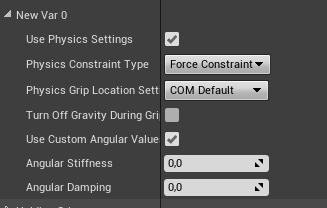 tired tree
mmmmm no
never seen that
oh, did you make your own settings?
@jaunty shell oh, oops, I left a test variable in the cube in the template
the cube manually implements the interface, would have to pass that struct out
most objects are usually the pre-fabs
jaunty shell
😄
 edgy pelican
@mighty carbon I've been developing for Go since the headset came out, you can drag-and-drop files to the headset. I transfer video and screenshots with Explorer all the time.
Of course, you need adb set up to have the headset detected first.
mighty carbon
@edgy pelican same here.. but I guess you never saw this one coming https://forums.oculusvr.com/developer/discussion/comment/664301
Oculus
Join the Official Oculus Discussion Forums and talk about Oculus Rift, Oculus Touch, Samsung Gear VR, and virtual reality.
ember forum
@mighty carbon my files show up as 0:00 as well, but draggin onto desktop and playing them works
Mine is same as lifeforlife's , quest shows up in explorer, same with go
mighty carbon
🤷
maybe they fixed it in recent update
I still use adb pull, since I am using cmd for deployment to the device anyway
it wasn't working not too long ago, not just for me, as you can gather from the thread I posted
ember forum
Yeah i mean, it still says 0:00 and i cant play it from the quest in explorer, only moving onto the pc works
Why do you use adb to deploy @mighty carbon , why not just from editor?
mighty carbon
because you won't find some bugs running from the Editor
I had an instance where running from Editor worked fine, but running from installed apk crashed the game
reported to Epic and they finally fixed that

UploadVR
Future Oculus Quest software updates will allow the headset to work rotation-only in the dark, allow both controllers to select UI, and add 60 Hz mode.
ember forum
Nice! No wonder that select available frequencies bp doesnt work on the quest
granite jacinth
hm
I wonder if there will be 3-DOF-only products
Or if it would even be allowed
edgy pelican
@mighty carbon Ohhhh. That might explain why I haven't seen the issue. I haven't updated the engine for my project since 4.18. I didn't wanna fix my project with every update, so I forced myself to lock in the engine version to 4.18. Perhaps I chose wisely.
With my luck, I'm most likely handicapping myself from being able to port to Quest easily.
mighty carbon
@edgy pelican that has nothing to do with engine.. It's the update for Oculus Go (Oculus Software/firmware/drivers) that broke video shots (or file system).
and no, you did not chose wisely when it comes to upgrading engine. With UE4 you should really be on current release to take advantage of performance optimizations, SDK updates and bug fixes
when it comes to VR projects at least
edgy pelican
That's weird. The firmware's updated on my Go, and based on what I've researched of game dev projects, there's a time you should really lock down your project's version.
But, I get what ya mean about updating for VR. It's a different monster than a PC or console.
tawdry dragon
Basically you could just try test builds of your projects with each new engine update
thats what I do with our VR projects
edgy pelican
@mighty carbon You've certainly brought up some good questions to answer regarding my project. I'll certainly look into how the updates will affect the overall performance for Go. And if that fails, I'll go with @tawdry dragon 's suggestion and move on up.
tawdry dragon
if you want to go with the Quest or go
you should really be using Oculus branch of UE
Atleast that's what everyone keeps telling me
edgy pelican
I didn't go with the "compile yourself" version. I went with the very basic stock instructions that came with Oculus and went from there. I didn't wanna muck it up.
mighty carbon
the latest Oculus branch 😉
tawdry dragon
Its not that hard Tomio 😃
and you cant really fuck it up that much... As soon as the engine is build you're good to go
edgy pelican
When it comes to grades and school projects, I prefer to be sure.
tawdry dragon
understandable, but you should really try it out 😃 It's a bit scary the first time but after thats its a easy peasy
I have zero or next to no c++ experience and I did my first custom builds of the engine a few weeks in
to fix the SteamVR mirror
edgy pelican
There're people that are out there in the front, experimenting with unstable things to make them stable. I'm not that person.
tawdry dragon
Theres a difference in using unstable builds and building stable releases 😃
edgy pelican
There's a stable release, and there's a release with full documentation, support, and community documentation.
tawdry dragon
Im literally building the Oculus branch on my 30 minute old formated PC as we speak 😛
edgy pelican
I move at that crawl where I have full support.
I'd love to jump out in front and mess around with no help, but I can't afford that atm.
tawdry dragon
You have the people in this channel in case it goes sideways
pretty helpful community here 😃
edgy pelican
Totally. This is actually the most I've said on this channel in 3 years.
Could be 2. I lost count.
tawdry dragon
Anyways, its ofcouse completly up to you. But I urge you to try it out when you have an hour to spare 😃
edgy pelican
I will, when my plan breaks. And if it does, then I'll be right up there with the rest of you folks.
tawdry dragon
Are Oculus actually doing changes to the UE4 source or are they "just" updating their plugins in the branch?
mighty carbon
sometimes they do
sturdy canyon
they had a forward rendering path before it made it into UE4.16 or whatever
mighty carbon
https://forums.oculusvr.com/community/discussion/76325/rift-s-and-rift-1-38-ptc-release-notes#latest
Oculus
Join the Official Oculus Discussion Forums and talk about Oculus Rift, Oculus Touch, Samsung Gear VR, and virtual reality.
 real needle
Again I'm struggling to Retarget my custom VR hands.
Do I need to add start and end keys for the Hands pose Animations, which I'm using in the BS?
Never mind I forgot to set the Grip Name in the Axis Settings in my BS.
mighty carbon
Do you think VTs will be supported on Go/Quest ? (I see support for VTs on Switch was committed to rendering branch)
granite jacinth
No more need for expensive Graphite
mighty carbon
well, on PC/consoles - sure, but on mobile and mobile VR ?!
granite jacinth
OpenXR plugin coming 4.23
Unreal Insights sounds cool
still so much to do, 4 releases later
toxic oracle
Has anyone successfully packaged for the quest with the oculus online subsystem enabled?
https://forums.oculusvr.com/developer/discussion/76152/can-i-use-avatars-without-passing-a-concept-review#latest From what I can tell from this thread, it appears you need to pass a quest review in order to use the platform services, which while it makes sense would have been nice to have explicitly said in the setup for Unreal instructions
Oculus
Join the Official Oculus Discussion Forums and talk about Oculus Rift, Oculus Touch, Samsung Gear VR, and virtual reality.
ember forum
i havent used it, but it is enabled in my project Rhys
toxic oracle
hm
toxic oracle
Yeah it deploys but just doesn't open then spits out an android error message
ember forum
whats it say
toxic oracle
Your project is 100% BP right?
ember forum
yes
toxic oracle
"LogModuleManager: Warning: ModuleManager: Module 'OnlineSubsystemOculus' not found - its StaticallyLinkedModuleInitializers function is null."
That's before I added their C api calls, with the C api calls it doesn't even package, same issue though
I think that my build.cs file must be setup incorrectly to where the oculus module just isn't being included
ember forum
tell you what though, why dont you try adding like the online subsystem steam for example, and try calling it, just package for windows, and see if you get a similar error, than you will know for sure if its your build.cs file
toxic oracle
So I get a successful package on windows with oculus online subsystem enabled
ember forum
with their C api calls the error message is the same? @toxic oracle
toxic oracle
Ok it actually just got part that it was failing on, I can't remember changing anything either
Now it's cooking the content so hey maybe it's fixed
It packaged correctly but I changed default subsystem to null in project settings, gotta change it back now and see if it works with oculus subsystem set
toxic oracle
whoo! friends list pulling info isn't working now but i think i know how to fix that, it's working!
no clue what fixed it but hey it works
pearl tangle
hah new project fun
 shell karma
any tips on tackling aliasing on quest ?
tried putting mobilescalefactor into DefaultDeviceProfiles.ini
still jaggy
mobile msaa off, temopral aa on
tawdry dragon
the joy of opening a fresh engine...
mighty carbon
that's nothing
jaunty shell
wait till you get minus numbers 😄
mighty carbon
One time I had 16k shaders compiling :/
has anyone tried using Niagara on Go/Quest ?
mighty carbon

UploadVR
Superhot VR was one of around 50 titles available when Oculus’ new Quest headset arrived last week. Despite stiff competition, the development team says sales were 300% higher than when it first launched on Rift.
The developer didn’t provide any specifics, as to how long ...
sturdy coral
Nvidia making it easier to implement vrs https://www.reddit.com/r/ValveIndex/comments/bus7be/new_nvidia_vrs_wrapper_nvapis_for_easier_foveated/

reddit
51 votes and 15 comments so far on Reddit
tired tree
where it belongs
with not enough updates and lax amd hardware testing
though those helpers are part of the VRWorks SDK
 wicked oak
vrs has the good thing of being ridiculously trivial to implement
any of us can do it in a few days
i just havent botherered as i dont really care about DWVR PC
but i could have fixed-foveated DWVR in a few days
sturdy coral
intel has a branch with it but I think they are holding it back until their hardware that supports it is out
(maybe it is out now after computex?)
granite jacinth
@sturdy coral you mean for Intel Dedicated GPUs next year?
I just hope that they can unify it in someway
Perhaps under OpenXR
I rather not have to integrate everyone's "VRWorks" SDK to get the benefits
Or even if you have to, at least there's one unified way of doing it within UE4
That's the dream 😃
sturdy coral
@granite jacinth https://devblogs.microsoft.com/directx/variable-rate-shading-a-scalpel-in-a-world-of-sledgehammers/

DirectX Developer Blog
One of the sides in the picture below is 14% faster when rendered on the same hardware, thanks to a new graphics feature available only on DirectX 12. Can you spot a difference in rendering quality?
Neither can we. Which is why we’re very excited to announce that DirectX...
says intel gen 11

HotHardware
Intel labels Ice Lake's graphics subsystem as Gen11, and it is far more advanced and powerful than anything that the company has ever previously put forward.
says first chips with 'gen11' integrated graphics will ship this summer so maybe they will release that branch when it does? I'm not sure if they actually maintain any public branches though
they do at least get commits to main engine merged frequently
granite jacinth
ah, I remember this article
Gen11 is for their OnCPU IceLake stuff though
Integrated

So, we got an opportunity to try out Intel’s upcoming Ice Lake Gen 11 graphics and we noticed a convenient looking menu showing 15W and 25W TDP buttons. As you may know, Ice Lake will be shipping in 25W and 15W variants and here we had the opportunity to try out the effect ...
I mean, it's still cool
If you're targeting cheap laptops
Ain't going to do much for VR though
sturdy coral
Their engine integration supposedly uses the new directx API though so if they release it or get it merged it should hopefully work for Nvidia too
I'm still having problems using dx12 with VR though, it hangs and sometimes crashes
tawdry dragon
Hmm, anyone had issue with the oculus branch(4.22) and VS 2019?
Got some warnings about .Net 4.6 wheres the auto generated projects use .Net 4.5
however I'm not able to downgrade
I got the engine build, but AutomationTool throws errors regarding .Net 4.6.1
mighty carbon
should have stayed with VS2017 😉
granite jacinth
aye, there's absolutely no need for 2019
And even more reasons since it's in preview to not use it
or
I guess it's out of preview now. But too early to tell how support is with UE4, especially custom builds
tacit quest
i have a strange problem if anyone has any ideas...I upgraded a project from 4.18 to 4.22. i am using streaming levels. when i spawn my player actor into any other level my motion controllers work. when i spawn it into a specific level, the button inputs work but th emotion tracking never enabled...can't for the life of me figure out what could be causing it
wicked oak
@granite jacinth the VRS on directx 12 is even hax-ier than the Nvidia extension
the nvidia extension is strictly only screenspace tiles
but the VRS on dx12 has per-drawcall and per-triangle VRS settings
thats what they use in civ
they have the drawcalls for the cities on the high res setting, and the drawcall for the sea on low
zealous cobalt
Could someone please show me a screenshot(s) on how to make the pickup range smaller on the basic VR template?
nevermind
How do I make an interface event?
tacit quest
interface can only do functions
zealous cobalt
So I copied the first screenshot/blueprint into another object (in the second blueprint) but the first event just became a custom event. I am pretty sure that "Pickup" is referring to the third screenshot
How do I make the second screenshot have the same event as the first one? @tacit quest
tacit quest
just double click onthe Custom Event name and rename it to Pickup
oh it's using an interface with a pickup method
the pickup actor interface
just implement the pickup actor interface into your new blueprint
and when you paste it it should work
tacit quest
in your new blueprint go to class settings, under interfaces click add
if the pickup actor interface is in there
then you can right click on the graph and type Pickup and you should see it
tacit quest
hehe
zealous cobalt
Now I can pick up this sonova gun!
toxic oracle
@zealous cobalt give this video a watch if you haven't before, I really recommend it https://www.youtube.com/watch?v=EM_HYqQdToE

Announce Post: https://forums.unrealengine.com/showthread.php?101051 This Training Stream takes a look at Blueprint Communication. We find that Unreal Develo...
Goes over BP communication through interfaces, event dispatchers, casting etc
zealous cobalt
Thanks!
Those Live Training people really manage to barely go over anything in a massive amount of time in most videos.
sturdy coral
I kind of wish they would do a pre-recorded tutorial, then follow it up with live Q&A, with the project open to dive into any questions. but i know nothing about twitch etc. and people may react badly if part is prerecorded
toxic oracle
That would be a really interesting way of doing it, I’d support that
tired tree
@granite jacinth 2019 is waaaaaaaaaaaaaaay better than 2017 performance wise
i am full on 2019
has massive issues on multiple computers with stalling in VS in 2017, been perfect in 19
mighty carbon
community edition or pro @tired tree ?
ember forum
@hallow knoll im really thankful the interview with drifter vr was written
really wish more training stuff had a written version
for us folks that like to read and just blaze thru stuff directly to what they need
 hallow knoll
@ember forum Yeah the livestream I wanted to do with them is not as necessary anymore
sturdy coral
I've moved to 2019 too but I keep getting phantom full recompiles since moving to it
ember forum
but yeah as muchcharles said that would be cool as well
sturdy coral
phantom as in I make no changes and it recompiles everything anyway
mighty carbon
@hallow knoll any plans for any new training VR streams soon ? 😊
hallow knoll
@sturdy coral I've been thinking about doing what you suggested with some of the training tutorials that's being produced. A few weeks after it goes live, I'd like to do a live Q&A for those who's had a chance to go through the tutorial
@mighty carbon Since there's been a lot of good resources for Quest, I'm thinking of doing an Index stream on how to set up the controllers and how to use Steams controller bindings
mighty carbon
oh.. when did Epic have stream for Quest ?
hallow knoll
We haven't done a stream on Quest, but an Oculus rep did a deep dive in one of our UFE videos. That + current docs covers much more than I'd be able to do on a stream
tired tree

This Unreal Fest Europe 2019 presentation by Oclus VR's Software Engineer Loren McQuade shows how to configure, build, deploy, debug, and profile your UE4 pr...
that one
mighty carbon
oh, I see
hallow knoll
There's a lot of good information in that talk
@mighty carbon As much as I love VR, there are more "regular" developers out there. Trying to find a good balance and the right guests so that it caters to everyone.
I'd recommend filling out the survey after you've watched the stream, there's a part of the form where you can request content 😃
ember forum
will the index livestream feature champagne
hallow knoll
Ah, haha
It's steep for sure, hopefully it'll go down at some point
$500 for the HMD is not bad though
(if you have a Vive)
ember forum
oh its 500$... i thought it was like 900$ something ... that must be another one.. too many hmds out there now
which i guess is a good thing for vr devs
oh i see the kit is 999
https://wiki.unrealengine.com/Command-Line_Arguments_on_Mobile in order to profile live using unreal profiler i need to add that commandline.txt to the root folder of my project... and i pass that file via adb is that correct?
seeing as i cant access the folder via explorer... i guess adb must be the only way
granite jacinth
VR Rules
pearl tangle
@hallow knoll The thing I wish you would do with the videos is go back to 24/30 fps. 60fps at 1080 at the 400% speed I watch the training at doesn't work so well, always runs into issues
i have to go down to 720 and 300% speed to get it smooth
mighty carbon
any idea if Niagara will work on Go/Quest in 4.23 ?

The company sought to completely change how we interacted with computers, but now Leap Motion is selling itself off. Apple reportedly tried to get their hands on the hand-tracking tech which Leap Motion rebuffed, but now the hyped nine-year-old consumer startup is being absor...
I almost purchased it when they announced Android support
pearl tangle
@mighty carbon pretty certain it wont. It doesn't run on mobile
mighty carbon
well, they added support for Switch for Niagara and Switch is Android
oh wow, there is a separate branch for Hololens 2
hopefully HL2 will have first class BP support in UE4
 fair hearth
@mighty carbon leap motion isn’t dying, they’re just combining tech and dev efforts with ultra haptics
mighty carbon
no, UltraHaptics acquired Leap Motion and once it's all said and done, the main guy leaves, according to the article
they call it "we combined whatever to make it better", but that's not the case
oh well, time will tell
toxic oracle
So my monitor is fine but I just found myself hitting it with my oculus controller lightly reaching for my steering wheel in my game, it never fails to amaze me just how deeply immersed you can get into the VR world and just forget everything else
tawdry dragon
So went ahead and build the oculus branch with VS 2017, no errors! However when I try to package for Android ATC I just get a "Fatal error" and the engines closes 😛
Back to stock 4.22 for now
 ionic jetty
have you guys noticed that in forward shading the GPU Profiler is a bit broken?
aka it won't give you a breakdown of your base pass anymore
jaunty shell
@tawdry dragon getting a crash post closing UE4.22 oculus branch
I mean its not really a problem, just weird 🤔
tawdry dragon
is your inputs correctly setup?
tawdry dragon
yep
toxic oracle
@zealous cobalt throw in a print string on the trigger pressed event to make sure it’s firing
zealous cobalt
Will do. I hve to do something else for a while though. I'll get back to you
toxic oracle
@zealous cobalt my guess here is that your ray gun is attached to your pawn in some way and not actually what you’re controlling, in your player pawn get a reference to your ray gun and then put the fire events in your pawn
tawdry dragon
might also be the player controller eating the inputs
 errant loom
Random question, does anyone know how to/ if there's a way to enable dfao for vr in engine source?
If this is even the right channel
I know it's not performant, but that's not so important for our project
granite jacinth
errant loom
Cheers dude~
sturdy coral
@errant loom the answer is no, it doesn't work at all in VR and you'd have to modify code to make it work
other distance field stuff like df shadows does though
errant loom
@sturdy coral yeah I've already seen some demos. It's a shame it's locked away but I'm glad I still even have access to df stuff
Super useful for distance to surface
mighty carbon

Nreal is launching its Nreal Light augmented reality smartglasses for $500. It is one of the first lightweight AR glasses with a bright display.
mighty carbon
cuz devs have deep pockets 😛
ember forum
@mighty carbon i googled ue4 niagara vr before starting my project, all i read was complaints about stereo issues
googling niagara vr will get you some nice waterfalls, but no cascade . on a roll with the bad jokes
my experience thus far with cascade on the go/quest... translucent particles nope... additive, just a little bit, masked okay
mighty carbon
AR / VR is the future @wicked oak 😃
sturdy coral
they carefully chose the angle of that photo to make those glasses look semi normal
if you look at other pictures it looks really bug eyed because they have to sit like an inch or more in front of your eyes
zealous cobalt
So when I grab my raygun, it gets attached to the motion controller. How do I make the motion controller make the ray gun fire?
wait I think I have it
toxic oracle
@zealous cobalt how much have you done in unreal before?
zealous cobalt
Pretty much nothing
toxic oracle
While VR is an awesome and fun area I’d really recommend starting in 2D, learning the basics of that then moving to 3D and after you have a bit of experience there then going into VR
zealous cobalt
Yeah, well I have the quest and I am probably going to return that but I want to make a little something first
And isn't UE4's Paper2d thing pretty crappy?
toxic oracle
Not really and for an absolute beginner it’s a great place to not have to worry about assets or lighting and just being able to focus on the programming
With doing VR development as your learning point you’re slowing down the speed at which you can learn and fail at, especially on the quest where deploying to it takes a few minutes
You’ll save yourself a lot of hassle and questions if you explore 2D and flat 3D first to learn the basics then come back to VR
zealous cobalt
Yeah, I noticed that for sure. But like I said I am not going to have vr soon so I want to have a little fun/anger now. Well another noob question how do I make the it check that a ray gun is attatched so the hand does not shoot lazers?
toxic oracle
When you pick up your laser gun save that as a variable then when you take the player input on the pawn, check if the laser gun variable is valid and if it is call a function on it to fire
zealous cobalt
Ok thanks
When I grab my gun, I have a Boolean get set to true. How can I make another blueprint access that boolean?
zealous cobalt
@toxic oracle Sorry to bug you, I know I am out of my league here, but if you help me with this I will stop working on VR stuff. After the ray gun gets picked up, I have a boolean get set to true. After that I have no idea what to do
That is in the BP_RayGun
toxic oracle
To get the Boolean variable you can do some like get player pawn then cast to your pawn and then you can get the variable from there @zealous cobalt
Did you watch that live training I linked on blueprint communication? It should be covered on that
zealous cobalt
I got it. Thanks for the help
tawdry dragon
Anyone had this issue before? clean 4.22 project launched on Quest
works fine when I try the VRExpansion template project 😄
 heavy pine
@mighty carbon @granite jacinth @wicked oak Is the devkit more expensive because they want to charge us for access to the unreal SDK? That would suck if that is their business model. Otherwise I'm pretty excited for these glasses at the price point they are coming in at. I also love the idea of being able to power them from a smartphone.
ember forum
@tawdry dragon but did it launch on the device
i got some errors like that be4 while messing with the project while it was deploying.. but nothing happened to the deployment and it still worked
ember forum
idk... restart your computer and your device.. i hadsome issues that only doing that resolved it
tawdry dragon
Tried that and kept doing it 😃 I just took a copy of the template project and used that
would love to have it be clean, but whatever this is just RnD
tired tree
@tawdry dragon I think my template still has the new audio turned off
and that crash is in the audio mizer
mixer
granite jacinth
@tired tree have you tried the new audio engine with VRE yet actually?
I haven't even bothered with enabling it since AFAIK there's little/shit docs for it
tired tree
no? but not really any reason to bother? my template doesn't have audio
tawdry dragon
Where do you disable “the new audio”?
granite jacinth
disable?
I didn't even know it was enabled by default now
missed that in release notes
tawdry dragon
well, its not enabled in the default vr template
because I can build that no probs
sturdy coral
@tawdry dragon it isn't enabled by default, make sure you aren't launching with '-audiomixer' and also remove any line like
[Audio]
AudioDeviceModuleName=AudioMixerXAudio2
from Config/Windows/WindowsEngine.ini, Config/Android/AndroidEngine.ini, etc.
I reposted your dump in #audio , because I've gotten the same assert several times since upgrading to 4.22.2 from 4.22.1
tawdry dragon
Hmm, thats weird.. All I did was make a blank project, setup for quest and build
but will have a look! Thanks for the headsuæ
headsup*
mighty carbon
eeh, why not to use new audio ?
ember forum
so is there some mystical way to still use dynamic lighting on mobile vr using es3.1, like if for example i just wanted shadows to appear at up to 1000meters, after that completely gone
also, has anyone gotten vulkan working, stop holding out on us and spill the beans
mighty carbon
dynamic lighting kills performance
I tried one directional light fix shadows and fps was crap on a super simple scene
@tawdry dragon you might want to report this crash to both Epic and Oculus.. I fished out a few bugs with 4.20 and they all got fixed by both Epic and Oculus in 4.21
real needle
Anyone know of a working ocean shader for VR? Community ocean project's shader is really nice when it works, but I get weird problems with it. I tried modular cliffs too and it has a similar problem plus others
odd garnet
Still so many things to change
sturdy coral

reddit
21 votes and 35 comments so far on Reddit
 woeful sundial
@odd garnet good enough for Steam. release! 👌
 dim imp
Migrated BP_CommentaryBox into my VR project. it doesn't trigger with my VR pawn. help?
im talking about this
it has proximity range and pops up when pawn overlaps. not triggering with my VRPawn
(I migrated it from the Architecture Vis example project by epic)
woeful sundial
@dim imp check the part where the overlap event fires. does it cast to a ArchVis Character? if so, change the casting to pawn or more specific to your vr pawn. (i'm not familiar with the Architecture Vis example project).
dim imp
@woeful sundial
this is the place. but there's no reference for any character at all, so I think it should work
my vr character is a pawn
woeful sundial
i see... so then i would put a print string after those events to see if they execute. maybe that bool "preview mode" is set to true.
next would be to check the collision settings for the trigger and the vr pawn. make sure they are not set to "ignore" each other.
and also check in the vr pawn "generate overlap events" in the collision settings.
real needle
Hello. How can I get Bloom and color grading to work inside PP without enabling mobile HDR? I'm developing for Quest. The Documentation recommends to disable mobile HDR for better performance though. I would appreciate some advice. Thanks!
woeful sundial
@real needle think about it for a second, if there was a cheaper method for bloom, wouldn't everyone use this on all kinds of hardware for better performance?
if it is important to you, enable it. then you have to cut somewhere else.
(but beware, post processing effects in vr feel different from look at a screen. these are often not recommended not only because of performance, but also they might give a bad experience.)
at least color grading is something you could do to your materials. bake the color changes in to your textures to give it your desired look.
real needle
Thanks for your advice, @woeful sundial !
woeful sundial
@real needle good luck! 👍
real needle
@woeful sundial baking effects into material makes sense to me.
woeful sundial
if you have textures in your material. those are 2d-image files from photoshop or substance painter (psd, png, tiff, jpeg..). change the color grading on those for example in photoshop and save them with these changes applied. so you applied color changes beforehand, so that your game does not have to process color grading during runtime.
real needle
@woeful sundial thank you!
woeful sundial
you're welcome! here is something i also have not tried yet, looks interesting: Baking Materials to Textures | Live Training | https://www.youtube.com/watch?v=WaM_owaUpbE

Announce post: https://forums.unrealengine.com/showthread.php?147444 In this training stream Sam Deiter discusses how create 2D Textures of complex Materials...
real needle
Awesome! I will check it out! 😃
 wraith sky
Have anyone ordered VIVE Pro Eye? I wonder how niche product it is.
mighty carbon
well.... disabling Software Occlusions in 4.22.2 boosted my fps.. While not using them in 4.21.2 had negative impact on performance..
tired tree
@mighty carbon ....but aren;t you on quest now and were on Go before?
mighty carbon
Still on Go
odd garnet
golden snow
That feels like there's more debris in the explosion that there is that actually exploded.
odd garnet
it just kept going and destroying shit lol
 true ledge
What would be the best way to go about getting an event trigger if the player punches with a motion controller in any direction? I can see there are some gesture triggers is there anything else like that anywhere?
pearl tangle
@true ledge you can just get the velocity for it i guess
jaunty shell
@tired tree just a heads up, the teleportation spline is too heavy by default for the quest in your samples 😃
forces the quest to cut framerate in two
shell karma
is spline generation that much expensive @jaunty shell ?
jaunty shell
I'm pushing a build with the lowest spline mesh part possible
it might be the fault of the translucent material
nah it still destroys perf
and now my editor crashes half the time I try to build
great
 elfin edge
Anyone had any issues with 4.22, instanced stereo and cascade particle systems? I'm seeing right and left eye issues with dynamic parameters not being initialised that are fixed by removing instanced stereo.
jaunty shell
yeah its absolutely the translucent material at fault @shell karma @tired tree , switching to opaque fixed perf
true ledge
So, still trying to figure out how I can register a punch in VR, I currently have the force direction, (I think, see BP below.) but I know need to figure out how to check if the player is punching, if they are then set a trigger off. Any ideas from anyone?
wicked oak
@mighty carbon software culling works super well when you do the colliders yourself
a team i know that is ridiculously high end, porting their PSVR game to Quest, is using ti
what they have done is to just build a occluder for the entire level
so they have a very low poly mesh as occluder for every level, and thats it
it gives them super good culling on very low cpu usage, as that occluder is only 1 occluder to render
elfin edge
@true ledge If you are talking about registering a punch vs a move, you have the velocity length in your blueprint already. If velocity greater than punch speed, it's a punch. (Be ready to counter a lot of edge cases - as it's not that simple in general)
true ledge
So I just need to figure out a good speed for a punch that all users can use? Punching isnt actually a mechanic in my game its literally a trigger off another mechanic. So I don't think it should need much tuning@elfin edge
elfin edge
@true ledge Yeah, I'd advise slinging a text renderer on your hand BP and outputting the velocity to that so you can see the values in realtime
mighty carbon
@wicked oak yep, it worked well in 4.21.2, not the case anymore in 4.22.2
jaunty shell
Right so anyone building with the quest (or the Oculus Branch) had problems with the scene being wildly different between the game and editor viewports modes ?

I've got all PP settings disabled, no PP volume active
lights are all static baked
I'm using the ES3.1 preview renderer if it matters
 flat shoal
Anyone using WMR with the actual WMR plugin and not SteamVR in here?
And if so, does it work ok? Any pitfalls?
mighty carbon
@jaunty shell dark in the Editor and bright on Quest ?
or other way around ?
for me (Go) it's dark in the Editor, bright on the device.. r.TonemapperFilm 0 and same for mobile tonemapper (there is cmd in DefaultEngine.ini for your project) make them look almost identical
jaunty shell
tonemapper didnt do shiet sadly
I baked with a higher skylight intensity and it looks alright now
@mighty carbon
also with the mobile preview, it looks like you have to sometimes click on the skylight for it to be applied to your scene ? even if its already baked 🤔
runs at 75fps most of the time
need to reduce the torch particles a bit though, or even remove em
mighty carbon
@jaunty shell how did you do god rays ?
jaunty shell
included in a package I used
its a camera facing plane with an additive animated material, fading away when the camera is close
true ledge
Not really a dev question more of design but lets say the player has an object in their hand that can only go one way. To throw this object the player has to punch their hand forward with the motion controller. What would be the best way to give the player more precision?
jaunty shell
@mighty carbon the "Free Fantasy Weapon Sample Pack" if you wanna check
oldschool but works well for mobile
tired tree
@jaunty shell its more likely the shear number of overlapping spline components that make it so heavy with transparency, you are looking through dozens of mesh components when facing the end of the thing.
jaunty shell
oh good call
 crystal oak
Anyone know what enables your character to move with the HMD in the Default sample project?
its a little unclear in bp
crystal oak
Gotcha ty
 tacit quest
anyone having any troubles with motion tracking after switching stream levels?
tacit quest
it was my end. i was setting the owner of the pawn when i spawned it to the map level bp, and it won't use motion tracking. must have changed beween 4.17 and 4.22 somewhere
tacit quest
anyone get cloth physics to work on quest?
mighty carbon
I don't think cloth works on Android in general @tacit quest
tacit quest
cool, thanks, i had an object with cloth physics that just crashes the app, just wanted to confirm
tacit quest
turns out it wasn't cloth...haptic for some reason crashing it 🤷 feel like i'm guessing at everything lol
woeful sundial
Apple announced ARKit 3. supports AR People Occlusion, Motion Capture, human movement as input to the AR scene! 👏 https://developer.apple.com/augmented-reality/
tawdry dragon
Pretty cool!
Would love for a standalone ARKit plugin thats updated faster than the current engine cycles 😛
woeful sundial
that's what i thought! maybe we need to organize to make ourselves heard 😏
tawdry dragon
Well nothing stops us from doing it ourselves
other than my complete lack of C++ skills
😄
woeful sundial
#metoo 😅
sturdy coral
Nice, any videos showing off how well the body tracking works?
woeful sundial

Apple Newsroom
Apple hat heute innovative Technologien präsentiert, mit denen Entwickler wesentlich schneller und einfacher leistungsstarke neue Apps entwickeln.
sturdy coral
A little jitter, but looks good
woeful sundial
Yeah, bit like xbox kinect. Needs a dancing app, that becomes viral on youtube and ar could get more mass adoption. 🤳🕺
mighty carbon

UploadVR
Apple's ARKit augmented reality platform is getting human occlusion, body tracking, and a new easy to use engine called RealityKit.
I wish ARCore evolved as fast as ARKit (or Apple let devs build and deploy from Windows)
real needle
Oculus Quest Game will only run when Launched from within UE4. Loading it from UNKNOWN SOURCES takes forever to load. Any help would be appreciated!
sturdy canyon
How big is your apk and obb @real needle ?
It might take forever because it's loading it all into memory
real needle
@sturdy canyon Apologies for this, but I’m new to developing on Android. Where can I find the apk and obb files? I have folder on the Quest “UE4Game” where I can find another folder with my game.
the folder size is 48 MB.
My .apk file is 48 MB.
@sturdy canyon what can I do to accelerate the process? Thank you for your help!
 dim iron
Hey all, has anyone tried a render target 2d on the quest? i cant seem to get it to work, just shows a black image. On the Rift it works fine, i can see old posts of a similar issue but no solutions.
wraith sky
@mighty carbon time to grab latest Leap SDK...as it may be the last -_-
true ledge
What would be the best way to get this a more accurate throw? Currenlty I get the force direction and multiply that by 500 to get the velocity. There a better way to do this to be more precise for the user when throwing?
wraith sky
@true ledge the slingshot way
true ledge
?
true ledge
Ah, never thought of allowing the user to do that
Thanks, ill try it out in a couple mins
wraith sky
it's not the "throwing" tho, but very precise
true ledge
They aren't throwing a physics based object its more of a spell that can only go one way so I think that would work in the game.
tacit quest
anyone getting crashes with haptics on quest?
 zenith tulip
Anyone here around for a couple of mins to help with my VR world and collision detection settings? Stuck ad can't for the life of me get this one thing to work
wraith sky
Have you guys heard of Tranzient already?
https://store.steampowered.com/app/903910/Tranzient/

Make beats in VRThis is not a rhythm game!Immerse yourself in live looping and music production in VR. Play alone, collaborate or spectate on social sessions.Features Synced looping with 1.5Gb content library, auto time-stretched and pitch-shifted to fit the song. Set of drum...
Price
$15.99
sturdy coral

reddit
0 votes and 1 comment so far on Reddit
ember forum
it says vulkan is supported on the quest rendering page
i finally got the oculus branch built and compiling shaders now, im gonna try to launch a vulkan build, fingers crossed
1 thing im pretty sure isnt in 4.22 but is in the 4.22 oculus branch is this
nah there are a lot of other things in rendering as well
ember forum
insta-crash
ember forum
i um
think its working
the thing is, i had to turn off FFR and multiview, becaues thats not supported yet
so performance hasnt improved
mighty carbon
@wraith sky Quest is $800 ?! How?!
 mild moon
Anyone here been having trouble with Render Targets/Scene captures not doing anything on Quest?
They just don't do anything (like doesn't capture anything), works fine in editor, pc build, mobile preview
pearl tangle
@mild moon Does it work ok on android in general? Haven't tried it
mild moon
its supposed to, havent tried it on a smartphone yet though.
i just repro'd it in empty project and submitted a bug
ember forum
somehow magically my game appeared on the quest folder in explorer, and now i can access the commandline.txt
sturdy coral
Would suck to develop a full quest port and effectively not be able to sell it: https://www.youtube.com/watch?v=Bb2GxcEcQ4A

Welcome to Gamertag VR the VR gaming channel with almost daily content. Today I met up with Electric Hat Developer Dan Dunham whos been hard at work on the Q...
it would be one thing if you just couldn't get on there store but could sell on others like itch or something.. but they pretty much block all that by requiring the dev sign up for sideload
pearl tangle
well you do run that risk by wanting to sell something on somebody elses platform. Steam was the same not all that long ago and Epic store is like that too. Nothing really stopping these guys from selling on steam instead since it seems like its just been low quality graphics used to make it run on quest
sturdy coral
Yeah, main thing that sucks for them is it seems to have been a shift that happened at the end of their development
They expected it to be more like go, and it sounds like it was planned to be but then changed
pearl tangle
yep definitely bloody annoying with these closed in platforms
 feral bloom
Anyone using ikinema for their VR bodies?
Having so much trouble updating to the new version
 sonic lake
Hi there! Can someone please help me get few facts about the Oculus Quest straight?
- Having more devices in a single room works fine (no cross-tracking occurs).
- There is currently no co-presence support built into the Oculus API's, but they are working on it. Availability date is still unknown though.
- UE4 multi-player (on a LAN) works with the Quest, so this may help to address co-presence until the native API becomes available.
Is this an accurate summary of the current state?
- If Oculus doesn't like your game, it won't be published on their platform (courtesy of @sturdy coral)
pearl tangle
- should be fine
their co-presence probably allows for some shared space understanding for initialization, but you can do that yourself without too much of an issue. Just get people to start in a specific spot in real life and go from there - It's the same as any other 1. Play store, app store, steam, EGS everything except for steam now requires some approval process to be available on their store
sonic lake
@pearl tangle thanks, appreciated! Did you try UE4 multi player with the Quest?
pearl tangle
nope i only have 1 quest, but i have done share space AR stuff before so it's likely going to be using a fairly similar technique to the cloud anchor type stuff in that
sonic lake
@pearl tangle thanks again! It is amazing how little info is available also on the dedicated dev forums.
pearl tangle
well the hardware did only just come out
jaunty shell
@sonic lake multiple users in the same room actually works really well
sonic lake
@jaunty shell great! Did you experience multi player as well as a way to implement co-location?
I have seen a couple of demos on YouTube but they seem WIP's
jaunty shell
we did a game of scramble sports or whatever it is
thats as far we went 😅
havent made anything multiplayer yet on it
sonic lake
We got an RFP for a multi player experience but I think it is a bit too early given the fact the co-location api is not yet released (nor it is clear when it will be)
tired tree
Just manually merge spaces, its not the hardest thing
sonic lake
@tired tree true that, I am trying to figure out how much needs to be done manually and how much is available out of the box. Can you please remind me if your VRE runs on Quest as well?
jaunty shell
@sonic lake if you mean the VR Expansion Plugin, yeah totally, thats what I used for my projects on the Quest
here's yesterday's work using VRExp
tired tree
@sonic lake well none of it is available out of the box for syncing spaces
but as long as you have some sort of position/rotation that you can obtain in each space that is fairly precise, its not that hard to sync
sonic lake
@tired tree indeed, I can map one space to the other based on a initial position/rotation and from there through their respective transformations. I was also thinking to use invisible synch objects in the scene to correct any drift that may occur (sort of triangulation between the players). As out of the box I was referring to the co-location API Oculus is supposedly working on, but I only found it mentioned in an unofficial post.
@jaunty shell looks good! Are you happy with the tracking/responsiveness of the system?
tired tree
how would objects correct for drift? the player is sending their state to the server
without real world syncs that wouldn't do anything
jaunty shell
yeah its quite responsive, very little tracking drift or loss (sometimes for the controllers when they get out of the tracking frustrum obviously)
I've had mild results with guardian recognition from one place to another (worked well with big spaces, in my office I dont need to recalibrate it, build, push, fit the HMD on my head, get up and test)
tired tree
yeah it doesn't always remember spaces
strangely enough my wide open floor basement with good border features is never remembered
while my living room that is constantly different is
sonic lake
@tired tree the idea (to be verified) is that the server keeps a representation of the space with the position of all the players. It also receives from the player their view of the synch objects. Each synch object should be in the same position for all the players. If not, the difference can be used to reposition a player so its space matches with the sever representation and with all the other players.
tired tree
@sonic lake you are talking about in game objects though right?
sonic lake
Yes
tired tree
that wouldn't do anything then...
you would have to set up the forward facing of each space exactly for that to work
sonic lake
They will drift with the player indeed
And a physical object visible with pass through?
tired tree
and even then, that wouldn't make a difference unless you constantly had them hit the same spot
as the player is telling the server their view
I don't think drift is much of an issue tbh
you'd be better off focusing on initial calibration and alignment, and then if drift becomes an issue then you address it
sonic lake
Ok so I can assume that with a good initial calibration the spaces will match from there on
Playtime is supposed to be 30 minutes
tired tree
i would worry about the forward facing being changed by the user more tbh
but they would have to manually do that
tired tree
I'm curious how quest handles forward facing actually
if its initial guardian setup facing
or some other means
sonic lake
I have to admit we are still waiting for ours so I didn't try that
Supposing there is a forward direction during the initial setup what happens if you move to a different space?
sonic lake
Ok so if I have to match a physical space the Forward should be set identically each time
Otherwise people will run into walls
tired tree
not really
you still have guardian
you can likely manually sync things by drawing perfectly
but if you have an offset space, some place to put a controller or something in a set orientation would allow you to rotate the initial position of the player
and move them
to align
sonic lake
Like having a calibration cradle
sonic lake
Where you place all controllers at the start and calibrate them all
tired tree
and then rotate to match yaw and move to offset to position by the controller difference to the expected cradle
sonic lake
That would actually work yes!
sonic lake
Indeed.cAfter which the cradle can be moved away to clear the space
tired tree
doesn't "have" to be a cradle
could just be a marking
if its outlined well enough to fit the same or at least very close to the same
you wouldn't want to use locomotion of any sort obviously, game would have to be static room, like room to room or sliding all players together / teleporting them
sonic lake
But it has to be in proximity of the quests, cannot be too distant
Absolutely. This would all be room scale.
No teleporting/locomotion.
Sort of cooperative arena game.
Major concern is not having players run into each other.
tired tree
if it has any sort of arm swing mechanics
might want to record maximum arm extent
and throw warnings when players are within that
jaunty shell
how about switching to camera view when players are way too close to eachother IRL ? 😄
tired tree
or a heads up display of people behind you
can you even manually switch to camera view?
currently?
jaunty shell
dont think so
tired tree
the camera view stereo offset really messes with my depth perception, they tried to align it, but its far enough off that its very disorienting
jaunty shell
yeah its whack
tired tree
honestly, I like quest alot, but its not a headset I could be in for hours without annoyance, even just in games it has some weird disorientation
jaunty shell
stereo is too short/wide
tired tree
can't imaging rift S being the same and a desktop one, can take it with the quest since its stand alone
i'm glad I set the network quantization for hmds and controllers to something crazy like 419 meters
football field co-op play sounds dreamy
feral bloom
Hey @tired tree getting knuckles tomorrow! Been reading your docs which are great. Trying to wrap my head around how/if to redo gripping with them. Do you recommend leaving it as a binary interaction based on gesture etc? Physics would be preferable but the idea of getting it to a place where picking up an object with just friction seems daunting.
tired tree
if you are trying to pick up just with friction you will need to run simulated bones
and set grip limits
don't think anyone does frication based gripping since its unreliable and prone to issues
you can handle the pinch input and the finger "grip" input for gripping
the grip can be a scaler 0-1 for force and you can manage off of that
i think for things like guns players will still prefer toggle more than a hard hold though
feral bloom
Ah alright, thanks. So boneworks are probably doing what you describe with a gesture grip and a scalar force?
tired tree
@feral bloom boneworks are using forces and snapping the hand mesh to the object
they are most definitely not using actual friction
blade and sorcery does much the same
in fact some of their mechanics look....really?....close to each other, the hand reposition in dual grip mode is nearly exact from preview videos
dunno if they correspond or not
feral bloom
They are both really impressive looking, your explanation makes a lot of sense to me
tired tree
I think they are literally using force based joints in unity
its like a ue4 constraint with the type set to force and not acceleration.
feral bloom
Is that similar then to the force constraints you showed off recently?
feral bloom
Makes me want to make a melee game
I'm going to be trying to implement the knuckles skeletal module into my full body vr ikinema rig. It's mentioned as possible in your notes but has anyone you know of done it?
tired tree
yes
feral bloom
awesome


 feral bloom
Oh very nice
tired tree
I would be curious to see someone actually incorporate the full steamVR skeleton or at least weight the knuckles to the hand mesh properly in a UE4 skeletal mesh
hallow knoll
@tired tree Quest will set your transform to PlayerStart when you launch the game
If you reset it'll move you to player start
hallow knoll
Yes
hallow knoll
Works great for shared space, all you need for a good rough calibration
hallow knoll
I haven't noticed drift between players for 15min play sessions
tired tree
considering that it is taking room features into account
it should be correcting for drift itself
sonic lake
@hallow knoll did you try if with multiplayer the respective spaces stay aligned over time?
Provided they are aligned at the beginning
hallow knoll
@sonic lake Yes that's exactly what my project is 😃
sonic lake
@hallow knoll Great! I am looking at 30 minutes game play, but the stability over 15 minutes should already be a good indication.
hallow knoll
I have no reason to believe it shouldn't stay synced
Main issue I've come across is if you take the headset off, it will recalibrate when you put it back on
sonic lake
We were discussing earlier with @tired tree the initial calibration to align the spaces for the different players.
Ok, so if there is an initial calibration by putting the controllers on a fixed cradle or something and you take the HMD off you will have to go to the cradle, reposition the controller and calibrate again.
Not 100% ideal.
I guess the recalibration is triggered by the Oculus SDK, no way to avoid it.
 stray loom
Hi has anyone tried out the new HoloLens branch? would be nice to have someone to try to problem solve it with. Here is the link of what I'm talking about:
https://www.unrealengine.com/en-US/blog/unreal-engine-4-support-for-hololens-2-released-in-early-access

Unreal Engine
Unreal Engine 4 support for HoloLens 2 is now available in Early Access! Here’s what you need to get started building your augmented reality projects today.
hallow knoll
Yeah, I don't think there's a way to override it. You can probably override the proximity sensor putting the HMD to sleep, which would be ideal for a location based experience.
Or you know, tape it ^_^
sonic lake
@hallow knoll as an Electronics Engineer I cannot tape stuff! 😛
hallow knoll
It works better on rift than doing it in software haha
sonic lake
That fur sure! Speaking out of experience. Bypass proximity sensor in the Debug Tool... nah!
Works 1 time out of 5.
@hallow knoll May I ask what are you using for multiplayer? Are you working on a LAN?
(so latency is not an issue I assume)
hallow knoll
It's quite magical
I ordered a Rift S for the host PC
Hosting on Quest works OK for 2 players, but any more and you'll start seeing some network latency
sonic lake
I also plan to host on a dedicated PC + another client for a spectator screen
hallow knoll
Yeah that's what I'm doing
sonic lake
Ok maybe I can combine server and spectator view
odd garnet
Hello yes it’s me
mild moon
FYI for anyone encountering the issue, on Quest with mobile multi view enabled, render targets do not work
Work around is to disable multi view
real needle
Hi there! How would I install my Game to Oculus Quest? Any help is appreciated!
granite jacinth

In this video, we build the default VR Template blueprint project and deploy it on the Oculus Quest! Create a developer organization on Oculus Dashboard: htt...
 short laurel
real needle
short laurel
real needle
Thank you. But is there any way to install the .apk file directly on the device?
The loading times are very long, If I build from UE4 and then try to launch on Quest.
short laurel
I dont have a quest so I am not sure. On IOS, packaging always takes a long time, and code-signing to deploy manually is a bigger nightmare. Not sure how quest handles that.
I wont waste your time complaining about Xbox or PS4 packaging times....
real needle
Thank you @short laurel It’s frustrating 😟
pearl tangle
thats mobile development. No way to stream onto quest yet
although feel free to modify the hololens remote 1 to make it work for quest and I will pay you at least $3.50 for that
@hallow knoll So you need to have a headset running on the desktop machine to let it act as the host?
hallow knoll
@pearl tangle No, not necessary
I have a flat pawn that I can play with
I can run dedicated as well
pearl tangle
so whats the reason for the rift S to act as the server?
pearl tangle
oh nice
anybody happen to have a simple material that changes colour the further away it is from a set point?
doing some funky stuff with the quest at the moment as well. Visualizing elevator vibrations in VR 😉 a few million data points is actually pretty cool to be able to walk around VR in
at the moment just got them as instanced meshes, plan to change it to a particle system later but this is quicker for me to just work directly with a CSV. Just want to highlight the outliers a bit easier
 glossy agate
Don’t have a material but you could start with this tut and figure out the distance part. https://youtu.be/sf3jT12pN6o

What is the Material: Dot Product Node in Unreal Engine 4 Source Files: https://github.com/MWadstein/wtf-hdi-files
Ah wait I think it’s just for camera
pearl tangle
yeah i need to define a world position for it essentially. Or from 0,0,0 also works
at the moment trying to trim down the number in the instances by removing very similar 1s from rendering
pearl tangle
hah now running into loops that have too many iterations..
10 million iterations in a loop seems to be as high as you can go
toxic oracle
I think there’s a setting to change max loop count
pearl tangle
yep can push it up from 1 mill to 10 mill
toxic oracle
Ah gotcha, there goes my plan to make an asteroid field with 10 million and 1 asteroids
pearl tangle
well you can run a loop and then run another loop
I am trying to step through my 1.6million and remove any duplicates or 1's that are overlapping, which essentially means going through 1.6mill x 1.6mill
even my smallest dataset of 4.5k would need a 20million loop
granite jacinth
TBH, if you reach the default loop iteration max...you're probably doing something wrong
glossy agate
You probably have to normalize it like a dist plot in python. Think you can run python in ue4 or you can set the data up first then send it in once you have a cleaned version
Or may have been histogram you can set segmentation amounts to keep the data manageable. It’s all copy paste script pretty much https://mode.com/python-tutorial/python-histograms-boxplots-and-distributions/
Mode Community
This lesson of the Python Tutorial for Data Analysis covers plotting histograms and box plots with pandas .plot() to visualize the distribution of a dataset.
pearl tangle
@granite jacinth I am plotting data from some accelerometers. capturing about 500k data points per day, so just showing a couple of days from the data table hits the default max
@glossy agate I can definitely do the clean up beforehand, was just trying it from the data table first since it manages to perform quite decently with the dataset somehow which is just a straight export from BigQuery. I am going to try doing similar 1 with realtime stuff out of firebase for different visualizations but I have already modified the IOT sensors to only ping me data when there is a relevant change now instead of constant data
surprising at how easy it was to do some quite useful visualization in unreal though
This is actually super easy to pick out the issues with (I just did some quick scaling to try see the outliers easier). But trying to get some insight like that from a 2D x,Y scatter plot is very tough
glossy agate
Yeah that’s def badass. Tons uses especially with being able to real time it all in 3D
You actually can access the firebase db in real-time through ue4 already? You have a guide for c++ for ue4?
pearl tangle
yeah the crazy part is that I was actually able to build a 3D working duplicate of an elevator that is a digital twin of the real 1s, display it in AR in the hololens faster than I could build a web dashboard to show it these days...
jaunty shell
@granite jacinth that tut', good stuff !
pearl tangle
I use the firebase plugin. @rapid comet has some pretty good plugins, although it doesn't handle firestore yet so I am doing some data duplication into the realtime database (older firebase db) at the moment for the basic info to show there. Which is just the current position of the lift, doors etc, not the more complex telemetry
glossy agate
That’s awesome man. I have only used it for user auth and only with js. havnt looked at the c++ yet cause I’m trash at it and I hadn’t thought of what to do with it
pearl tangle
I run firebase for leaderboards and dashboards etc all the time
and then you also have firebase analytics in there as well now rather than running GA
depending on your project too I also use it quite a lot for live updating variables and changing stuff around on the fly, especially with mobile development
glossy agate
Nice. I saw the unity logo but never even crossed my mind for ue4 😂. I’m the last one to know you could do it I guess.
I’m interested in the data science stuff you can do now
I’ve just been writing finance stuff lately not games. There’s something I could do with this
pearl tangle
yeah they have a direct plugin for unity, unreal you can build yourself with the c++ sdk or just use gamedna's plugin which works fairly well. the ultimate mobile kit plugin as well you can then use for the push notifications and deep linking etc
unreal is a lot more fun for visualizing stuff than excel or matlab, so should work alright with finance stuff too if you feel the need to look at it in an Oculus Quest for whatever reason hah
glossy agate
For market segmentation stuff like on a map looking for opportunity areas for investment/advertising . My other app parses property data and gives deep insights on a house like value rent potential current equity position ect through an api through places like core logic.
Can plot places that appear to have a high opportunity for growth. And places that have a high chance of wanting a refinance after an appreciation spurt with increased equity positions
If you are interested in doing real estate data check out estated. Com. They are way cheaper than any other provider for end points and has decent coverage. You could def come up with something cool
pearl tangle
sounds quite interesting. Might be a task for another day. At the moment I have designed and built a bunch of sensors for smart building stuff, so doing the digital twin part with unreal which is more fun than building the web and mobile versions hah
tired tree
@pearl tangle you can "unwind" the loop and step through multiple at a time instead of 1 per, but sounds like the perfect thing to have a small c++ function to replace the implementation.
 neon sundial
Can someone help with textbox focus not working in vr oculus go?
 rapid comet
@pearl tangle Please note Firebase Realtime Database has also advantages over Firestore cause Realtime Database is for example faster...
mighty carbon

UploadVR
Having arrived in Europe just under a month ago, HTC today launches the Vive Pro Eye in the US. The enterprise-level VR headset costs $1,599.
Vive Pro Eye improves upon the original Vive with an upgraded screen resolution (2880 x 1600 pixels), and also succeeds the first Vive...
wasn't someone asking for this not too long ago?
tacit quest
Hey, what are you guys doing for camera fading on the quest? the built-in camera fade doesn't work without mobile HDR
also i seem to be getting occasional crashes that i'm pretty sure are physics/collision, wondering if anyone else seeing the same thing
wicked oak
@pearl tangle literally a couple days ago i made a C++ "script" to do data analysis
did you know C++17 has filesystem support? you can use that to create a script that grabs all the files in a folder, and if they have a specific file type they do something
for a plot system like that, i would use software rendering (no joke)
grab SDL, make a 2d array of ints as pixel colors, and plot each of the point into a pixel. That pixel gets +N in colors from the point
should be able to make it chug along with tens of millions of points just fine
pearl tangle
yeah i was going to go with point cloud setup for it, I did some stuff with that in unreal before and it handled a several million cloud pretty easily. Just need to convert the data into a texture map
wicked oak
btw im so happy C++ now has parallel STL + filesystem
making stuff that processes files in parallel is super trivial now
only thing it lacks is a proper multithread queue
pearl tangle
@tired tree Definitely blueprint implementation is not the ideal setup for it, but I was still quite impressed what I could get going in a very quick afternoon just after having installed the sensor. Built 30 more sensors now to start getting some interesting data sets
you would think by now they would be doing some more optimization around threading side of things for it
pearl tangle
not blueprint. C++
actually I saw somebody had done a multithreaded implementation of blueprint somewhere too
tired tree
you can call blueprint functions to threads in c++ just fine
you just can't put them into execution chains
has to have a latent return
wraith sky
@mighty carbon yeah, i was looking for eye tracking for my HTC...but it's not like i want to pay 16 hundreds for THAT...
mighty carbon
😂
sonic lake
Trying to get the Quest to join an Oculus online session, but the matchmaking fails miserably...
06-07 00:35:54.731  5512  6309 I OVRPlatform: [HttpRequest] Request `matchmaking_enqueue_party' (id: 5) failed: {"error":{"message":"Invalid OAuth 2.0 Access Token","type":"OCApiException","code":190,"error_data":[],"fbtrace_id":"BxhSBnukgDk"}}
06-07 00:35:54.731  5512  6309 I OVRPlatform: [Matchmaking] failure: {"error":{"message":"Invalid OAuth 2.0 Access Token","type":"OCApiException","code":190,"error_data":[],"fbtrace_id":"BxhSBnukgDk"}}
06-07 00:35:54.737 5512 5527 D UE4 : [2019.06.06-22.35.54:737][793]LogBlueprintUserMessages: [3DMenu_C_0] ### Cannot find any matching session!!!```Anyone knows how to solve this?