#virtual-reality
1 messages · Page 204 of 1
 alpine oyster
 golden snow
It's generally better to record the last few frames location, find the distance of that with the current location and then divide by time.
 glossy agate
You can. I have done that for Melee weapons. But comparing position over like 3-4 frames would be better
for just getting hand velocity
alpine oyster
makes sense, appreciate it!
 high trench
What is the biggest single map anyone has successfully tested for a VR multiplayer in UE4 without it lagging like crap? I'm talking zero level streaming here. 1km by 1km? 0.25km by 0.25km (average WoW zone size)?
 wicked oak
@high trench no such thing as 100 players in ue4
vr level of perf
100 replicated characters are beyond what ue4 can handle at vr level perf
would need some day 1 hardcore optimization on everything
if you have to ask, you dont know how to optimize at that tier, so 4 players and a very small map
wicked oak
just small
high trench
I've seen games like Orbus manage to get a load of vr players in one fairly large plot of map
high trench
Yeah, a lot of this would be terrain
wicked oak
it depends of how detailed stuff is
and no, if you need to ask, you cant make a VR battle royale
high trench
this is exploration
so just people wandering around exploring. But I'm curious as to how big the plots of map can be?
And how big the 'teams' can be?
high trench
ok, so if you have, say, an abandoned town (so fairly dense), how many zones would you have to break it into?
Versus a forrest with a bunch of replicated trees?
Is there any guidance anywhere on this?
wicked oak
no
high trench
hmm...
 sage gulch
so fortnite lags or what
high trench
I'm thinking early WoW lags 'back in the day'! 😄 You landed after a flight and had to wait 5 minutes for the level to build! haha
It's going to take so long to finish building this game that tech advancements will likely have solved the issue by the time it's finished anyway!
Until then I'll just keep it single player but designed specifically for multiplayer later on
alpine oyster
@golden snow Why would a physics collision be worse in my case, wouldn't locating each tick be a bit expensive performance wise?
golden snow
I would think it'd be cheaper than handling physics each frame.
- if you just need Velocity then why calculate other parts of the physics sim when you could just calc the velocity yourself and be done with it?
alpine oyster
okay makes sense, didn't really understand how the physics works
so how does one get the location of the frames from initial position to the last postitoin
 sturdy coral
@mighty carbon u/kixpress is a troll
absolutely hates pimax
pitool manages restarting several executables and stuff so some antivirus heuristic thing just flagged it
sturdy coral
he has run campaigns to try and get people to charge back credit cards on pimax orders and stuff and to try and get them sued by IMAX movie theaters for being too similar.. he is super obsessed with it
 craggy bramble
@dim imp Well I have no idea about your game. But I assume you are looking for an indicator for the player to look somewhere that's not a big sign saying ">>LOOK HERE<<" or neon lights pointing the right direction yeah?
You could implement audio files, maybe text something or clues. Your question really depends on what type of game you are making. Try to find something subtle/natural that fits on the environment. That's all I could suggest without the context of the type of game you are working on😁
 quiet swan
I have an issue where my ai can shoot me only if I look at them. If I look up at the sky the ai can't shoot me unless I look down
Or look at the ai
alpine oyster
got the velocity working, how would I constantly check velocity until it reaches a certain value? Afterwards my "punch" animation will run. There doesnt seem to be much documentation on it
i currently have it loop back using a branch but unreal crashes saying it's an infinite loop, but isnt that what I want
glossy agate
When its at velocity just use a bool to call an event that runs your anim. You could check on tick
alpine oyster
How can I check on tick?
glossy agate
I thought thats what you are doing since you said you got it to work
alpine oyster
The motion controller classes are a little weird, which class should I be checking the tick
glossy agate
how are you checking it currently
alpine oyster
well i ended up just using a collision sphere considering i need collision anyway
basically in my best pseudo blueprint i have (in the MotionControllerPawn)
If(input is pressed) then check velocity using get physics linear velocity of attached collision sphere
then i emit a particle effect that changes scale by the velocity
now i am trying to have the effect not emit unless the velocity is at a certain value
glossy agate
So where you have your input pressed either use tick or set a timer by event from begin play
tick may work better since you probably want it precise
tick>check velocity every frame> if true set the bool on a branch to true and fire all your logic
just turn it back to false when velocity isnt >= anymore
alpine oyster
wouldnt that be effected by the frame rate?
glossy agate
yeah but I think physics velocity is affected by FR anyway
You are gonna want it to be pretty stable lol. Especially in VR
alpine oyster
yeah for sure, hopefully in the future that wont effect any network play
glossy agate
Our melee weapons were all networked. Worked fairly consistent. Just have to make sure FPS is stable
sturdy coral
@quiet swan @glossy agate I bet that is what is happening. are you using a trace from ai's head bone? if you have EVisibilityBasedAnimTickOption::OnlyTickPoseWhenRendered set, the bone of the AI won't update when you are looking away
 daring mural
alpine oyster
daring mural
alpine oyster
quick question, how would one go about creating input based on position of the controllers?
Say I wanted to create a martial arts game, where copying (relative to the height/size of player) the martial art form is input for some effect
golden snow
Gesture recognition?
 mighty carbon
@pearl tangle did you see news about this https://news.epson.com/news/moverio-bt-30c-smart-glasses ?
Epson US
Epson today expanded its award-winning portfolio of Moverio® smart glasses with the Moverio BT-30C, delivering a high quality USB-C tethered augmented reality (AR) viewing experience. The Moverio BT-30C smart glasses...
I wonder if UE4 will support it

ZDNet
The BT-30C comes at a price point that may entice enterprises to dabble more with augmented and mixed reality apps.
 rotund scarab
Just found a bug inside Unreal Engine 4.21. "Reset position and orientation" won't work.
It works in 4.20 or 4.22 but not in 4.21
Instead of a normal reset. it resets also the Z, making the player stick into the ground.
 runic cedar
Epson is so bad..
mighty carbon
why ?
 white fern
Anyone got good references on how to incorporate the LeapMotion C++ API into an unreal code project?
It appears that LeapC is the include I need, and it is shipped with UE4 release 4.22.1, but I can't seem to get access to the C++ classes inside my project code.
white fern
Upon further inspection, LeapC isn't what I want. I'm looking for the actual Leap C++ API referenced here: https://developer-archive.leapmotion.com/documentation/cpp/index.html
runic cedar
@mighty carbon as I remember it's Android 6 with very bad lenses...
mighty carbon
@runic cedar these glasses use your phone.. Say you have S10.. It's Android 9 I believe..
as for lenses, it's AR (more like google glass).. not for games at all.
runic cedar
nope as I remember they are not using a phone, they have weak characteristics
no phone
mighty carbon
@runic cedar dude, just read Epson's press release.... "The Moverio BT-30C smart glasses offer a high-resolution, big-screen experience that is projected into a wearer’s line of sight. Utilizing USB-C connectivity with Android™ phones or Windows® PCs"
runic cedar
ok)
 fair hearth
23 degree fov, it’s more of a heads up display than anything analogous to a magic leap or hololens
 pearl tangle
yeah they are information panels, not augmented reality displays
you use them for factory workers etc to give some basic instructions, or packers to tell them what to go and grab
no spatial awareness or anything like what you get with hololens and magic leap or arcore
mighty carbon
but does it do barcode/QR code recognition or something like that?
I could use it at work for production folks (work instructions, process parameters, etc.)
I am guessing there are no AR glasses with ARCore support
sturdy coral
Windows clients running with D3D11 now support the RHI thread which improves the ability for CPU rendering work to happen in parallel and improves performance consistency in heavier scenes.
Labels
Desktop
That one looks nice, same as the Android rhi thread stuff they did for Fortnite mobile I think
 clever stone
@pearl tangle Hey , Thanks for the streaming node info. It seems to be working fine for me.
Is it possible to rotate or change location of streamed level after its streamed in?
Also, I do have another query if its not too much trouble. For some odd reason, Pin component Node doesnt return any values (null) in ARKit, but works in AR core. Any idea why?
Cheers
pearl tangle
I haven't tried that node before. For the moving it around I saw there is some plugin somewhere that somebody had made which allows you to do it, i think it might be on the marketplace but cant remember. Inbuilt though you can't move it around on the fly when it's visible, but there is a way to set its transform when it is hidden, so you can hide, adjust position and then make it visible again that seems to work
@clever stone it's level transform or some other node that you can use off it
clever stone
Hmm, i had to rely on pins to make sure that the objects are stable when moving around. Unfortunately it looks like it doesnt work in ARKit unless a Scene component is plugged in.
Oh fantastic; Ill check it out. Yeah, toggling visibility sounds fine. Thanks @pearl tangle !
pearl tangle
really. I just spawn them in on the location and it worked fine, didn't have any drifting or anything
clever stone
Hmm, thats interesting. I am testing on a Pixel 2 and using Transform info directly from the detected image plane makes the spawned in asset jump left or right overtime. But if I use the transform of a spawned in Pin, things are a lot more stable. 🤷
pearl tangle
i have never tested that 1 so cant say what sort of difference it makes on my end unfortunately. I was doing testing with my most recent 1 on s9,s8,pixel 1, ipad
 hazy igloo
Hello! Does anyone know a good VR tutorial series? I for the love of god can't figure out how to make stuff like levers, or simply how to pick up objects.
mighty carbon
I'd use one the plugins that has all that implemented already
hazy igloo
I'll try plugins. thank you.
 upper wharf
@mighty carbon which one?
mighty carbon
VRE, for example
 dusky moon
fuck this shit I'm out:
https://uploadvr.com/oculus-rift-s-valve-index-no-hdmi/?fbclid=IwAR1Cs4QdX7KngbmG9XWX1NIKpCKZr-o6RO1x_RgLk6__cKFRjJ_az-_rFZs

UploadVR
Does your laptop only have a HDMI video output? If so, it won't be able to run the upcoming Oculus Rift S and Valve Index VR headets.
luckily I got thunderbolt so I'm not out but some ppl can be
mighty carbon
lol..can't stop progress 😃
dusky moon
yes! Also this week I made this video from my WIP project :
https://www.youtube.com/watch?v=5DIFSxAc0MQ

💾 Memory Fragment - FM080519 💾 📌 False Mirror://Ballard SQ/Escapement
 ember forum
so what i was talking about the other day and everyone said i was crazy is pretty much how the #1 best seller on the oculus go handles rotation in their space shooter "end space"
and i figured it out
you just get the hmd rotation on the level start, and then get the delta X a number (yet to find out) to rotate the player
that way you have minimal head rotation for 360 degree rotation(and so you could play sitting down facing forward without the need of a rotating chair...)
also the game i mentioned for reference was Epic Dragon (which is made in unity lmao)
quiet swan
how come they get to play with all the cool toys https://www.youtube.com/watch?v=VZyhQZSTIGQ
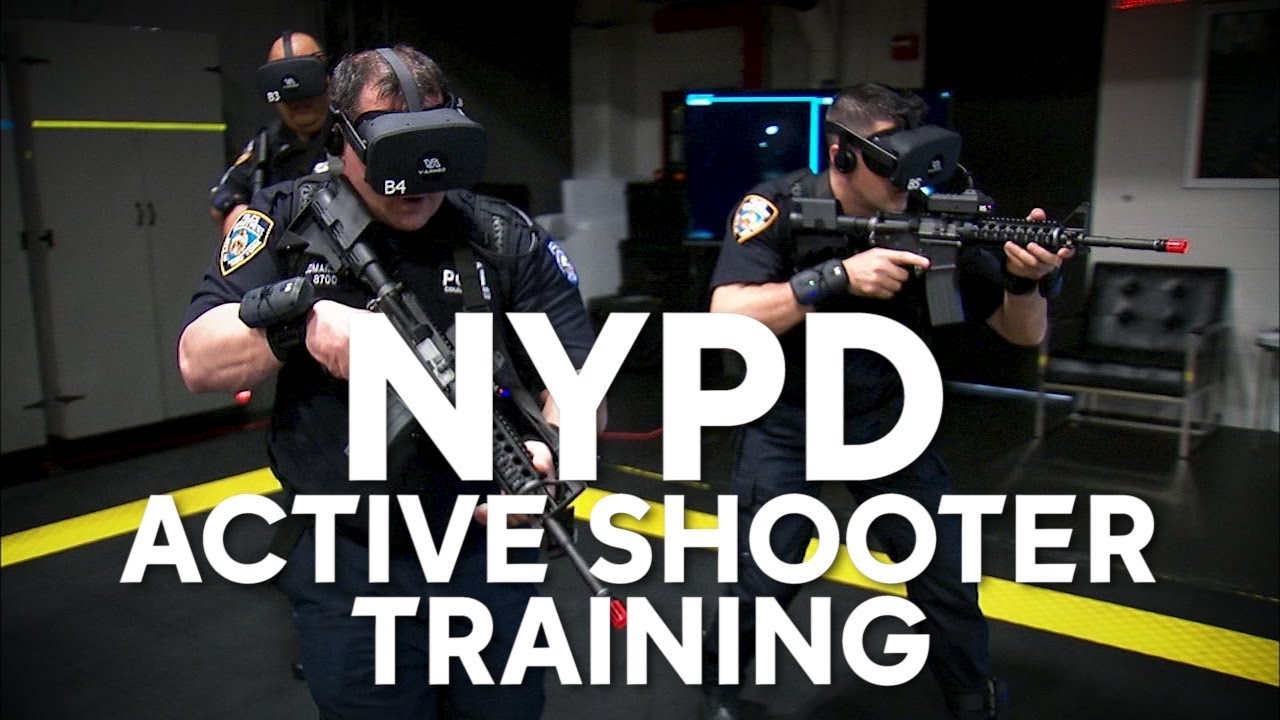
The NYPD is testing virtual reality training drills for real-life scenarios that would be impossible to recreate. Check out more Eyewitness News - http://7ny...
ember forum
@quiet swan is it weird that cops are training to handle situations in classrooms though
should there be like a training to prevent this whole fricking situation from happening in the first place
quiet swan
no I just dont know why we dont have that tech
we get the prosumer versions
those versions they have should be pro sumer
ember forum
they are all wired
to the backpack
i hate how the approach to handle these situations is just reactive instead of preventive
the quest is going to be a game changer though
i was hyped about my rift for like a week, but all those cables are annoying, the oculus go is much more convenient but lacks the depth of 6dof and 2 controllers
the quest is going to be perfect
quiet swan
oh I didnt see that yeah they said 5g will make wireless vr possible
ember forum
was wasting so much time deploying to oculus go everytime instead of just playing on the rift... finally got somethign working in the sense of what i wanted, just using the delta rotation between the actor and the hmd and using that to drive rotation X a smaller number... its a start, now just have to fix other logic like going forward in the correct direction, nothing essential for gameplay
there done
the whole thing is comfort, i like to think, some people will want to play in bed
on a couch
where 360 degrees real world motion is impossible to achieve
probably add some sort of finterp eventually but for now it works! (that last node needs to be local rotation)
pearl tangle
@ember forum I think the training for that is just get rid of everybody's guns hah
ember forum
how do you handle oculus go hand source
ember forum
i see games where they auto detect what hand you are using, but if i try to set motion source as right and in the oculus menu set the hand to left it will not detect motion controller
 granite jacinth
@tired tree ^
Personally no clue. Currently only have used 4.21 and below
But it's on point in 4.21 and below
 wild stratus
hey there o/ Anyone knows if there are any plans for Epic to update the ARCor plugin for UE4?
google just released ARCore v1.9, and it got updated for unity, but UE4 is still using v1.6
also, the links on the Google ARCore SDK for UE4 don't work, the github links are broken
white fern
Anyone in here work with LeapMotion before?
My Device can hardly tell the difference between my Middle and Ring the vast majority of the time, and I'm wondering if it's just me. I'm using the plugin for 4.22.1 and running the Orion Beta
pearl tangle
@wild stratus It will most likely come in 4.23
dusky moon
Guy, do you think with Quest + 5G internet potentially we'd be able to play high-end VR shit through pixel streaming in the future ?!
mighty carbon
No
dusky moon
Ordered my Rift S tho. so sad for loosing money and hyped for saying goodbye to sensors
it says 28th May will be delivered. I've heard some ppl got it sooner than mentioned right ?!
ember forum
So
There is an app for the go already
That lets you play steam vr apps
With a gamepad controller
And im not talking about steamlink, which also exists and is great
But doesnt support vr
Steamlink (Works in big screen/oculus tv mode)
So with the quest its a matter of time
For someone to develop the quest controller support
So you can stream vr from your desktop
Forget about 5g tho
Wifi
Wireless is the future, that rift s is that drake meme where he looks in one way and his hand is like nahh.. use your imagination
quiet swan
I think they will come out with some sort of smart glasses in the future, that will just stream the video in 5g. the smart glasses will replace the cell phone
hey whats everyone setting their texture steaming pool size too?
dusky moon
@quiet swan bump ^ also my question ...
quiet swan
does anyone know what this is ? I think it has to do something with the nav mesh
or this right here its at all my spikes
 vivid skiff
Hey, posted it on other channels as well, still tryna figure it out, Anyone has any about this?
How to save static meshes with baked lighting so they can be replaced at runtime?
Also not sure, How is this going to affect shadows than, will these objects still be able to cast shadows?
quiet swan
dont know I need to know that too
granite jacinth
@quiet swan @vivid skiff Never heard of this before (or maybe I have and forgot), but, I just Googled it and found this: https://www.youtube.com/watch?v=WaM_owaUpbE

Announce post: https://forums.unrealengine.com/showthread.php?147444 In this training stream Sam Deiter discusses how create 2D Textures of complex Materials...
But um
Static Meshes are static
Usually 😉
vivid skiff
Yes I found that, I am gonna see if it can bake lighting info.
granite jacinth
I am not a rendering pro either, but obviously, we have different types of lighting
Static, Dynamic, and the mix one
Stationary I think
Let us know how it works out for you
vivid skiff
I was thinking if it can bake lighting info one can use that with a unlit shader and still be able to case real time shadows.
granite jacinth
And if you see a difference
If it helps performance as well, not sure why, but who knows
Uh
@vivid skiff no
I don't understand what one has to do with the other
But, real-time shadows in VR...
Usually and mostly a no-no
Unless you are doing some really nice fake shadows
That performance drop is usually not worth it
But of course, it all depends on a lot of factors
vivid skiff
Yeah I am gonna see what can be done. If anyone knows anything better let me know.
granite jacinth
You might be able to get away with one dynamic light (flashlight) and some shadows
hm
This thing is just baking out textures
Which is what it states anyway
But that video does seem good
I'll probably watch it later. Anything to lower material costs
(by not having them)
vivid skiff
https://imgur.com/a/0G91V7U I have this running at 90fps with everything static, So it should be ok for a couple of dynamic objects with one movable light.
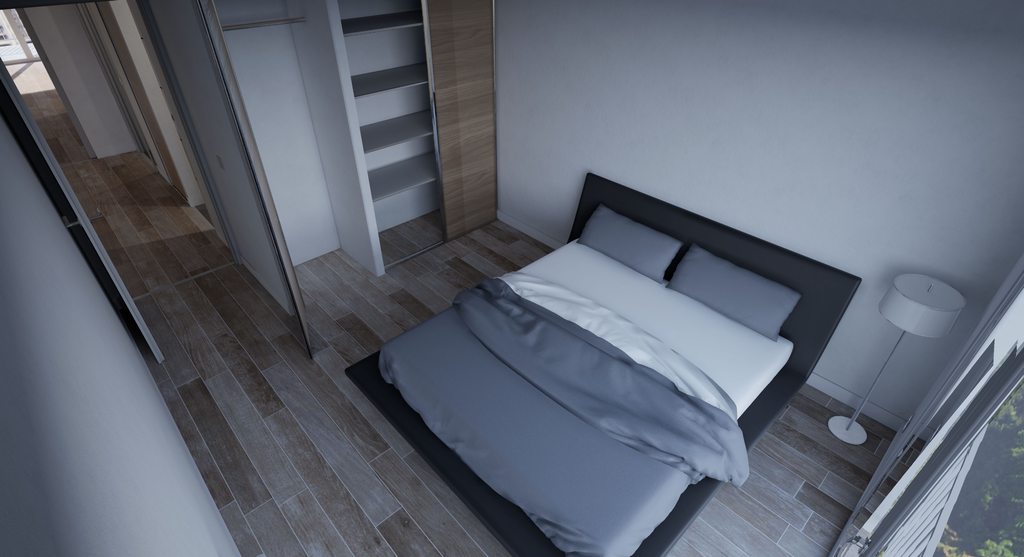 granite jacinth
@vivid skiff hmm maybe
I've done a few arch-vis project before for clients...
and we tried it once
Just one little light...
Wasn't good
But, let us know your results!
quiet swan
I would like to see the profile file of someone who has a game that is shooting AI with the AI shooting back
I dont know if tiny spikes or ok, or what
I really would like to see a good one.
granite jacinth
Pay someone?
quiet swan
no just the stat startfile
like on a good profiled game
does it have spikes? if so I would like to see what
I stipped my game down and I get 90 but I do see spikes on the steam graph
how can I record my VR expirence without an external camera?
or something that has little lag
does this look bad?
ember forum
@mighty carbon i must have passed right by this node a couple of times , never would have imagined this is how you find out what the oculus go hand settings
i guess false would just setup Right (yup, confirmed, does work)
 arctic path
hey guys - is it possible to record exactly what a phone is seeing while running AR functionality and then play it back within the game?
pearl tangle
@arctic path as in you want to record video of the phone screen to play back in the game, or you want to use it as a handheld camera like with the camera tracker mode?
 feral bloom
What's a good way to restrict hmd/camera movement? Need to simulate the players head being trapped in a vice
runic cedar
Maybe someone knows when Epics will add documentation or tutorials about how to develop for Oculus Quest?
I tried to find but now nothing about how to develop on the Oculus Quest
 honest mango
For the inputs, what is Motion Controller Thumbstick Z?
fair hearth
@feral bloom don’t restrict the movement. You can try fading to black outside of a certain area
feral bloom
@fair hearth It's more about the orientation of their head
fair hearth
You really don’t want to change their head orientation, moving the camera in vr is a bad idea
feral bloom
in general yes, plenty of games do it though. Lone echo is a good example. It does some interpretation to stop the player turning gradually so you cant look behind, feels very natural.
When you are on the robot rack that is
 sturdy canyon
@runic cedar follow the instructions for Go/GearVR. It's almost exactly the same
runic cedar
I think not, coz in Quest you can move (location) and different controllers with thumbs
wild stratus
hey there @pearl tangle ! you think so? they don't have anything regarding arcore in the roadmap
 hexed kite
anyone using their vive setup for motion capture?
when i get my knuckles im going to have 4 controllers and the headset to use for motion capture, is there any software that would let me do that?
feral bloom
@hexed kite I use 3 tracking pucks, 2 controllers and the headset with Ikinema Orion for motion capture. It is quite pricey though (400 Euro a year I think). As far as i'm aware you need a tracker on your waist for any setup in Orion. Also Knuckles don't seem to be supported (all the setups mention trackers or controllers) but may very well work. Interested in alternative solutions as my license expires soon
pearl tangle
@wild stratus Not the sort of thing they list up on the roadmap, it's just general housekeeping to keep SDK's up to date
wild stratus
lets hope so ! 😄 it's been lacking updates for a while or so it seems so hopefully they'll do it for the next release
 dim imp
HEY! Got 2 nav meshes in the scene: one for VR player and one for some AI actor. Currently the VR player uses the wrong navigation mesh. how to correct this?
mighty carbon
by 2020 CryEngine 5.7 will support Android and Oculus Quest 🤔
mighty carbon
@pearl tangle I wonder if you already got a dev kit for this https://www.vrfocus.com/2019/05/lenovos-thinkreality-a6-aims-for-slice-of-ar-enterprise-market/ 😃

It'll be a direct competitor to Microsoft HoloLens.
golden snow
I need to get my hands on an AR headset
 tame thistle
Is there a way to suspend VR? We're launching one project from another, but the original still has control of the headset.
pearl tangle
@mighty carbon nup never heard of it
sturdy coral
@mighty carbon "There's also an Intel Movidius chips powering waveguide optics here" what does that mean, isn't movidius for machine vision?
mighty carbon
I have no idea 😃
 sinful bobcat
Hello
I haven't done vr for a while
Anyone know why id be getting 30fps in VR preview and 120fps in non vr?
I even set screen percentage to 200% in desktop to see if it was just the higher resolution demands
 shell karma
has anyone been able to run flipbooks with stereo ?
with instanced stereo works only with left eye
 odd garnet
 fun
fun
 knotty crystal
on ue4.20.3 here and wondering is there a way to get data about how high the headset is from floor level in the engine?
pearl tangle
depends what headset you are using and if you are referring to the real world floor or your virtual floor @knotty crystal
knotty crystal
vive hmd, and virtual world
pretty much i want to adjust parts of the level to be at a usable height for players who may be tall or short
pearl tangle
then you can just do a line trace from the camera down to the floor and get the distance pretty easily
knotty crystal
ah ok, i tried have the location of the camera print for debug and it remained 0,0,0 while in vr preview
pearl tangle
well you dont care about it's location relative to the world, you care about it's location relative to your feet
its the camera manager that you want to look at from memory
 fleet plume
is there a way to not have VR preview in a new window?
and on a slightly different note, have visible STATS while previewing VR?
quiet swan
Arr you profiling?
white fern
So I asked this a few days ago, but I've finished up a prototype which is showing me glaring issues in LeapMotion tracking with regards to my ring and middle fingers. My colleague is seeing the same thing on his Rift (I'm using Vive.) Sometimes the LEAP will report a middle finger down when it is the ring finger that is held down, and vice versa. Anyone have any experience with this problem?
We're on the latest Orion Beta 4.0.0+52173
@fleet plume The preview opens in a separate window, but if you Alt-Tab out while it's running and dock a BP or editor window on a second monitor or so then when you return to the standalone window (resume focus) you can see debug trails and components and stuff while it's running
fleet plume
@quiet swan @white fern i've got a stat group and cycle counters, and when running VR Preview the stats disappear from the editor window and return when stopping VR Preview
with the last values staying there for ~2 seconds
also removing focus from the VR window didn't help 😉
white fern
Sorry @fleet plume, I have never done any serious profiling for VR, so I'm not sure how much help I can be, but I'd love to know what you find out.
I mean, you could always use UEFrontend
fleet plume
does that run parallel to the app/editor or does it need to record a session?
white fern
It allows you to record a session and view all the details inside the profiler
fleet plume
i guess that's what you could call serious profiling 😛
white fern
Haven't done it in VR, only for desktop/mobile games
fleet plume
i've read that mordentral's plugin has an in-vr console and i'am wondering if it also shows stats
same here, but back in unity
fleet plume
thanks i'll give that a try
 hallow knoll
Remember that profiling in editor isn't entirely accurate and can skew your results. Best is to profile in a dev build, second best is to play in Standalone, which you can't do out of editor for VR, but you can right click the .uproject and "Launch Game".
white fern
@fleet plume FYI: Profiling in editor is VERY poor; it will basically only allow you to see glaringly obvious problems while working, but not much other problems. Just keep that in mind.
quiet swan
im so stupid I have been packing my game and just found out that it always packs out on the epic settings, so now they told me to do some ini tweaks, so I want to make sure I do this correct, where do I put the settings in because they have some settings in default scalability and also in game engine ini
 mystic tinsel
Has anyone mapped the oculus rift thumbsticks in the input section of the setup? I had a look at https://developer.oculus.com/documentation/unreal/latest/concepts/unreal-controller-input-mapping-reference/ this reference and it seems like the only thing missing from this is just using the thumbsticks as pure thumbsticks (without pressing them). I tried mapping it as the motion controller left thumbstick, but that seems to be for the press and release events. I also tried mapping it just as a gamepad, but it didn't seem to respond to that.
Never mind, I was completely misreading the input. the (L) referenced the left thumbstick, the left I was choosing was pushing the stick left, I got it sorted.
white fern
Soo... I ran into a runtime issue after packaging and have absolutely no idea what it means. Where can I find logs with more info? Assertion failed: IsValid() [File:d:\sol\unrealengine\engine\source\runtime\core\public\Templates/SharedPointer.h] [Line: 849]
Is this a way of telling me there is a NullRef?
Looks like it:
mighty carbon

Once again I’ve been “asked” to write about upcoming Oculus Quest games for the #QuestCountdown blog post, and it is with mixed emotions that I take up the mantle. On the one hand, I am elated that this is the final #QuestCountdown post, as Quest ships next week, and fr...
Sairento is coming to Quest
wicked oak
impressive
their tech level is about "complete trash"
i wonder how much they remade the levels, Sairento runs at 60 fps on crap graphics on PS4
mighty carbon
is DWVR coming to Quest ?
wicked oak
no
im not important enough for that
would like to port it tho, but it would be a serious project
the levels would need to get remade
mighty carbon
let the mobile VR race begin https://www.anandtech.com/show/14340/arm-announces-mali-d77-display-processor-facilitating-ar-vr

 abstract forum
Cool
wicked oak
@mighty carbon hardware reprojection? yo thats good shit
really good shit in fact
but no one has a chance except oculus
they got carmack
mighty carbon
@wicked oak perhaps Quest 2 can use that chip 😃
wicked oak
yup
sturdy coral
anyone using steam audio with baking?
mighty carbon
wicked oak
@granite jacinth clustered forward is literally the same thing normal unreal forward is
We were able to combat the sorting issue by leveraging Unreal Engine's Custom Depth, providing occlusion similar to that from a Z-Buffer, while achieving correct translucent sorting order. Custom Depth is a feature in Unreal Engine that uses a second depth buffer which can be used for effects like custom culling for translucency. For Avatars, we use Custom Depth for per-pixel depth occlusion.
DWVR actually uses this
granite jacinth
ah
 crude nova
So I tried the VR motion controller tutorial except substituting a skeletal mesh instead of a static mesh (already confirmed the static works fine). I'm guessing you need extra steps to make the skeletal work since it doesn't move on its own
alpine oyster
Hey guys, wondering how I would get disable a particle effect on movement of the motioncontroller
Right now I currently have a gesture set to spawn a particle emitter, but i want it to stay firing as long as the player keeps the position
then as he moves back it ends
pearl tangle
@alpine oyster just get their current location with some buffer and if it doesn't match that anymore destroy the emitter?
pearl tangle
should work fine i would think
alpine oyster
okay i got an even bigger problem
when i do the gesture, the Transformation of the motion controller determines it's rotation and location
but it's rotating with the notion that the tip of the vive wand is the front axis, so i have to bend my hand forward for it to go in the direction i want as intended
how can i change this
sturdy coral
@alpine oyster simplest way is attach a scene component at an offset and use that as your transform instead
Otherwise you can do some transform math (compose transforms), to do the same thing in a more lightweight way
alpine oyster
i attached a mesh and it worked, how would i go about doing it with compose transforms?
 flat shoal
hmm... I can only hit 120fps in Unreal Engine when I look at the skybox... as soon as I look at any geometry, it drops to 90...
doesn't bode well for Index
😓
oh... so you can't even use bump offset materials if you want to get to 120fps in VR
ouch
dusky moon
I'm wondering why Scene Capture 2Ds performance are almost 3 times faster in-editor compared to Packaged builds ?!
mystic tinsel
@dusky moon Did you turn off the default frame limit? If you didn't change, Unreal will lock your frame rate to 60.
smooth frame rate is what you're looking for, make sure that's unchecked.
 ornate raptor
@dusky moon try running the console command "r.SceneRenderTargetResizeMethod 2"
dusky moon
@mystic tinsel tried , didn't help
@ornate raptor tried as well, didn't help.... but actually I'm curious what are those modes though ?!
ornate raptor
I was too. I found this
(This value is only used in game mode and on windowing platforms.)
0: Resize to match requested render size (Default) (Least memory use, can cause stalls when size changes e.g. ScreenPercentage)
1: Fixed to screen resolution.
2: Expands to encompass the largest requested render dimension. (Most memory use, least prone to allocation stalls.)```Unfortunate that it doesn't help. For me, it makes packaged performance identical to editor performance
dusky moon
@ornate raptor Do you fire that command just once at the begin play or on demand ?!
ornate raptor
Just once at begin play
dusky moon
I'm wondering if it's possible to change the Render Target Texture's resolution from BPs ?! As far as I've checked I can only get those values
ornate raptor
Not sure it's the best solution, but I did that by switching and using multiple textures. Each texture is the appropriate size. Then, after a switch, I call "Set Spectator Screen Texture"
dusky moon
Ah yeah right! that seems like a good trick... Thanks 😃
dusky moon
@ornate raptor oh wwwow! I'm so stupid lol got caught by the illusion... you're right that command is the damn FIX !
honest mango
How is character rotation usually handled in VR (other than using controller). There seems to be a pretty standard method most games use to judge when the character should start turning based off the hmd/controllers. Like in Pavlov or Blade and Sorcery for example
sturdy coral
@honest mango there is a breakdown of what lone echo does for player rotation here:
'Lone Echo' is a first person VR game by Ready At Dawn where players use their hands to push, pull, and float through a zero gravity environment. Players can climb over anything they can see, then push off and gently sail in any direction. This...
honest mango
Not sure that's quite what Im looking for
mighty carbon

We published the last post in our #QuestCountdown series yesterday, and we’re back today with some exciting news to share. Google is bringing YouTube VR to Oculus Quest at launch!
sage gulch
ready at dawn made a blog post including a statement suggesting there are some changes to the rev B Touch IMU, any info?
Is network bandwidth the limiting factor for multiplayer VR experiences?
sturdy canyon
I tested the latest 4.22 merged into the latest 4.22-oculus, and I now get comparable performance on Go in 4.21 & 4.22
@sturdy coral wow that's actually exactly what I've been doing for chest orientation except, I don't assume the chest is directly under the head. Instead I go in the camera-down direction for 15cm before dropping down.
I also do something to preserve continuity in the case where the hands move behind your back without turning
mighty carbon
@sturdy canyon anything new about Vulkan support for Go/Quest ? (with multiview/direct)
mighty carbon
😦
alpine oyster

Mochanix (Motion Mechanics) is a motion gesture analysis plugin for Unreal Engine 4 intended to allow reliable input via motion pattern recognition. It is de...
how does one achieve this
mighty carbon
got Oculus Start e-mail - time for freebies is over. Quest will have to be purchased. It's the only way to get it (unless you have something mindboggling in works to entice Oculus).
kinda bummed, but I expected that
dusky moon
@mighty carbon so annoyed! they used to ship Gear VR + Samsung S7 to me even though I didn't ask for it and never developed anything for it. now you have to prove them that you're doing the right shit for quest.
but also Valve hasn't announced any dev support for index (except the knuckles)
It makes sense if Epic now that became super rich, could grant some of the new headsets (like they just did with Magic Leap)
 terse moon
They axing oculus start?
 vast cradle
is there a nice way to check if an object is held by the right motion controller before grabbing it with the left hand? Currently I have a picked up boolean on the object itself and get it this way. But i have too many objects so seems inefficient to change so many blueprints.
Any way to do it in the motioncontroller blueprint itself?
mighty carbon
@terse moon not really.. Just won't give out Quest to every Start member
terse moon
Fair enough
pearl tangle
Epic also gave out hundreds of oculus rift's previously as well, but they were given to them by Oculus, same way that Magic leap are sponsoring the giveaways for that
 jaunty shell

We test and review the HP Reverb, a Windows Mixed Reality headset that has the sharpest display we've seen so far in a consumer virtual reality headset. We c...
mighty carbon
I am guessing next week we'll be getting 4.22.2 hot fix
so what's the consensus about 4.22.x for VR development ? (for Oculus particularly)
wicked oak
@mighty carbon autoinstancing should give good gains if you have environments with modular assets
mighty carbon
@wicked oak not on mobile VR
wicked oak
are you sure autoinstancing doesnt work on mobile vr? they unified the code paths
tho i think it needs GL ES 3.1
mighty carbon
I am 100% sure @wicked oak . I even linked you a tech writeup from Oculus (a while back) where they say do not use new RHI system on mobile.
mighty carbon
hmm.. then I don't know.. @sturdy canyon said performance with 4.22 on Go is comparable to 4.21 (4.22 used to be slower), so I am guessing it doesn't work on mobile anyway.
sturdy canyon
I haven't tested auto instancing
But at least whatever was making standard scenes slower seems to be stomped out
mighty carbon
how do you turn on autoinstancing @wicked oak ?
wicked oak
@mighty carbon automatic
mighty carbon
then I guess it doesn't help or doesn't work :/
 tired tree
and you tested how?
mighty carbon
me? I haven't yet.. Waiting for 4.22.2.. Going by what others say. If 4.22 runs the same scenes as fast as 4.21 (or slower), what makes you think autoinstancing is working @tired tree ?
mighty carbon
well, then when 4.22.2 is out - I'll let ya'll know, since my scenes are quite heavy on static mesh actors
tired tree
perf could be all over the place, they did so much rendering work in 4.22, really have to test specifically for if auto instancing is working or not.
granite jacinth
`We have good news! One of your pre-ordered items is now eligible for release date delivery and has been upgraded at no additional charge. Your new delivery estimate is:
"Oculus Quest All-in-one VR Gaming Headset - 128GB"
Estimated arrival date: May 21, 2019`
Nice
wicked oak
@tired tree should be faster (cpu side) even with autoinstancing off
sturdy canyon
That's the bit that wasn't true on ES3.1 in 4.22.1
CPU render thread time was like 25% slower, but now it seems on par
Although I need to test whether I'm CPU or GPU bound.. I forgot I made some changes in that department that might be messing stuff up
But last time I tested, I was dramatically CPU bound on 4.22 and getting way worse frame rate
tired tree
@wicked oak I know, I was talking about possible bugs causing slowdowns
 tough crow
has anyone used UVRF?
if so, how do you use it???
i can't figure out how to put them in
 distant nest
Hi everyone. I'm trying to package a scene I created for Oculus Rift and Vive but I can't find that option when I try to package. I only see Windows 32 or 64bit
Any idea please ?
distant nest
But ... but.... I thought it should be stand alone 😂 😂 😂
Ok I'm now getting this error when I try to package...
Anyone had this issue ?
distant nest
Managed to package! Yay
I don't have a VR headset and I'm really in need of feedback in terms of visuals and frame rate... Would it be possible for anyone to test the .exe to see if everything is fine ?
sturdy coral
@distant nest you can get the odyssey for $250: https://www.microsoft.com/en-us/p/samsung-hmd-odyssey-windows-mixed-reality-headset-with-motion-controllers/8w91r774pdkk

Microsoft Store
Samsung Odyssey Windows Mixed Reality Headset with Motion Controllers
distant nest
I already preordered the new Oculus rift. I'm taking a task for a VR studio and I have to send the project by tomorrow that's why I was asking if anyone could do a favor but anyway. Thanks.
granite jacinth
jeez, Odyssey dropped so much
well
out of stock
I'm surprised you were tasked without an HMD
sturdy coral
@distant nest you can try the WMR simulator
I think it lets you simulate a headset/motion controllers
distant nest
WMR doesn't let me test builds I made, thanks anyway
sturdy coral
@distant nest you tried the simulator?
distant nest
Yes
sturdy coral
@distant nest any more details on why it didn't work?
distant nest
I really have no idea. I couldn't import any projects or find stuff on my PC, weird.
I found a friend who has an oculus rift. I sent him the .exe file and when he opens it, it opens Steam VR app, but then the screen is black and the .exe name doesn't show. Can someone help on how to fi this ?
fix*
Ok I think I know why, I didn't check the "start in VR" in the project settings menu...
Hope it's just that
 cold siren
@distant nest you can create a shortcut and add -vr into the target if you dont want to re package with start in vr
distant nest
Yup that's what I found out thanks! :D
I have anew build now anyway, ready to be tested. 😃
 shadow radish
hi all, sorry if not a strictly VR related topic, but I wanted to get other VR dev's feedback on what characteristics of particle effects cause framerate slowdown?

reddit
0 votes and 3 comments so far on Reddit
towards the end of this video (it's 30 seconds, not long) I have the dragon throw out some fireballs and whenever I get to 3 or more fireballs out there, framerate starts to tank. With some other particle effects like the torch_mobile one from the infinity blade ice map, it tanks framerate with even less going on. Does anyone have any experience or knowledge they can share on what aspects of particle effects drop performance the most for VR?
 ionic jetty
 tawdry dragon
Patiently awaiting our Oculus Quest! Is there any documents regarding building to it?
or is ist just standard Oculus Go build settings
 broken moat
rift hmd is causing height fog connected to player pawn to freak out, this doesnt happen when I have a vive hmd connected, what causes the rift to freak out with the height fog?
jaunty shell
@tawdry dragon hypetrain arriving tomorrow ! I guess its a mix between Rift (6dof + controllers) and Go (mobile)
tawdry dragon
Yeah, as far as I understand, 4.22s Oculus Plugin supports it right off the bat right?
Or do I need to build the Oculus branch to support it
and since its Android, I guess you still need to sign the apk with OSIGs etc.
hmm, seems like OSIGs are a thing of the past(thank god)
jaunty shell
hah
osig
what a pain it was with the gearvr
I saw there was a way to sideload easily to go/quest now too
tawdry dragon
yeah, hopefully the workflow is similiar
mighty carbon
Tomorrow is the day
 wraith sky
just found out that accessory to mount HTC Wireless to VIVE Pro is $60 (or $75, depends on country)...
dusky moon
any1 who preordered early got their quest/rift s already ?!
tawdry dragon
I've heard rumors that people who ordered on Amazon are starting to recieve theirs
jaunty shell
amazon germany orders are getting theirs today
tawdry dragon
much jealous... We've ordered our Quest and Rift S directly from Oculus EU
jaunty shell
waiting for tomorrow to get the pre order in a brick and mortar shop
tawdry dragon
I fear they will first their orders tomorrow
got this on friday, but no update from them so far
tawdry dragon
I actually dont have the time to play around with the quest, but I just want it ready 😄
dusky moon
damn yes I also ordered from Oculus EU , should ve just ordered from Amazon UK
jaunty shell
rip
dusky moon
but weird that you dont have a post tracking number yet
jaunty shell
I called the store I've ordered it from, and they said they had stocks ready for tomorrow
tawdry dragon
Unfortunately no shops in Denmark seems to have them
jaunty shell
tempted to go get it before work to show it to colleagues (my boss is hyped to try it out aswell 😆 )
dusky moon
well also the case for NL
tawdry dragon
Im lucky enough its my work who's buying it 😃
So also got some development time ready when it arrives
jaunty shell
you'll need to get through the Quest docs for UE :p
tawdry dragon
I call it Research when I play Beat Saber 😛
"Researching effects of extended usesage when playing rhytmic experiences"
We got 2 RnD projects lined up for the Quest, but first we have to get the building process etc. up and running 😃
jaunty shell
be sure to get a small anker battery pack or two 😄
and an angled USB-C cable
for unlimited play time
tawdry dragon
we have two 20.000 mAh banks for our camera equiptment, might be able to use those 😄
jaunty shell
aight good stuff
we've got two 20k mAh packs too for our wireless Vive kit
I think it might be better to have smaller packs tho
so it really fits in the pocket without sticking out
tawdry dragon
go all out and wire them all together with one of these! Just dont show yourself in public...
jaunty shell
😅
going through security at the airport
"yeah I'm bringing my battery packs with me for the flight"
security : uuuuuh can you come with us sir ?
tawdry dragon
We nearly got shot an airport with our camera equipment 😛
Peli case with huge VLOCK batteries that look like bomb parts
jaunty shell
😂
tawdry dragon
and a camera with "WEAPON" written on the side 😛
tawdry dragon
yep... you live you learn 😛
Thank got it's Danish airport security... If it was TSA we would've been shot on sight
jaunty shell
I've got a 26800 mAh anker bank at home, it holds up for at least a week of device charging
heh
golden snow
The one time I traveled with VR equipment was a Vive Pre + tripods and it was through Indianapolis Airport.
It took me like 3 minutes to get everything unpacked to the security guards liking.
BUT, he knew what it was, and what my nintendo switch was, so it was hella smooth sailing.
Newark on my flight out just gave me funny looks.
dusky moon
guys is it possible to disable oculus menu button on touch? asking for a public installation
tawdry dragon
@shadow radish Danish production company called Cadesign Form
 frigid kite
Not even in the enterprise version?
dusky moon
dayumn. probably I might end up taping it ?!
tawdry dragon
or remove it... forcefully..
I was actually considering 3d printing a cover on top that allows you to still touch all the other buttons
since it sits so far down, it should be easy to cover it up
Anyone knows if Oculus has released any official CAD files for new touch controllers?
or accurate 3d models for that matter
mighty carbon
they just might .. eventually
tawdry dragon
Hmm.... Doesnt the Oculus SDK ship with complete 3d models?
btw, for those waiting from Oculus EU. Just got an email with shipping confirmed and tracking codes
for some reason my order with a Quest, Travel case and Rift S in 3 separate shipments...
mighty carbon
why do you need CAD model @tawdry dragon ?
tawdry dragon
Would making designing and printing a cap for the buttons easier 😛
Our clients solutions only use the trigger and some fool always presses the Oculus button
mighty carbon
ah, I see
tawdry dragon
I'll share the stl files when I get to make one. Guess they can help others in need too 😃
if anyone comes by a 3d model of the controllers, please let me know 😃
tawdry dragon
https://www.youtube.com/watch?v=hEtu-ciPc7g in case anyone missed this

This Unreal Fest Europe 2019 presentation by Oclus VR's Software Engineer Loren McQuade shows how to configure, build, deploy, debug, and profile your UE4 pr...
https://youtu.be/hEtu-ciPc7g?t=414 this is specific to Oculus Go/Quest setup
This Unreal Fest Europe 2019 presentation by Oclus VR's Software Engineer Loren McQuade shows how to configure, build, deploy, debug, and profile your UE4 pr...
mighty carbon
good find @tawdry dragon !
heh, this is so cool https://uploadvr.com/apex-construct-quest-tracking/

UploadVR
Want to see what Oculus Quest's tracking is capable of? This guy runs through an entire level of Apex Construct on a football field.
wicked oak
i know that guy
personally
he is Jugon Virtual, the most important spanish vr youtuber
they had to do it at dusk because the sun was too bright
mystic tinsel
has anyone tried to convert the VR blueprint template into C++? The one that epic provides in new projects. I'm trying to do that now and running into a minor issue. In their template the controllers are basically child actors of the pawn. In my case, I'm using a full body avatar, so i need the world transform of the controllers passed into my animBP. I completely recreated the BP_motioncontroller in C++, along with grab functionality. The problem is, when I attach these to my pawn as child actors, and set the hand enum and set the motion source, the controllers don't seem to register at all. if I print their world transform in tick, it's always 0s. if I attach a regular motion controller to my character, it does return a transform for those controllers.
tired tree
finished up steamVR replication of the hand skeleton tonight
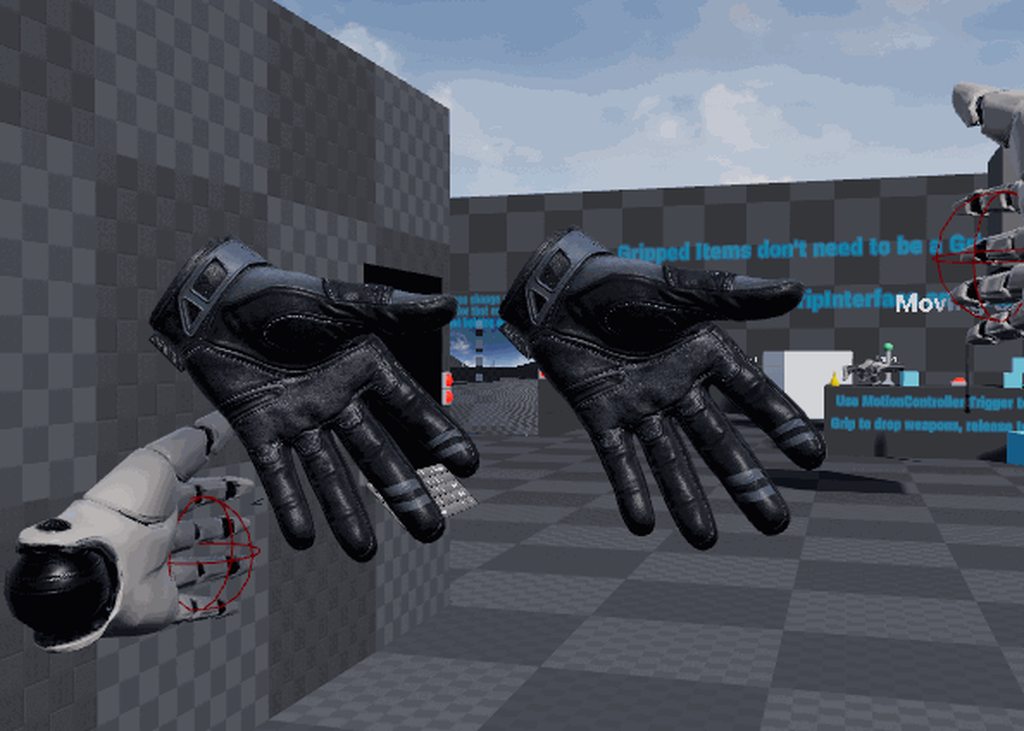
thats at 5htz ;p
right hand is replicated data, not local
mystic tinsel
So this is what I have set up. This motioncontroller actor is a BP based on a c++ Class I made. It just doesn't seem to get any input from the motion controllers.
mystic tinsel
So after a little more testing.. it's refusing to track the controllers when it's part of a child actor component or if it is spawned attached (as it is in Epic's template). I tried making a BP_TestController with a scene root and a motion controller component and spawning that attached. It won't provide tracking data. It does provide input from the thumbstick so it is connected, it just won't track. if I just put a motion controller component on the pawn it tracks
mystic tinsel
I just gave up on that and moved the controllers back to the pawn themselves. As long as they're created inside the pawn class and attached there, I get tracking. No idea what's different between mine and the epic template, but that's fine I guess.
jaunty shell
so today is the day for europeans !
dusky moon
@tawdry dragon I also got my tracking number it should arrive today!
BTW, do you know if the Rift S fits in to the travel case ?!
tawdry dragon
Think its only meant for the Quest
dusky moon
yeah right, but give it a go hands on and see if its doable 😄
its weird I ordered USB-C to Display port adapter and it ships tomorrow so have to wait for that to test : /
jaunty shell
had an email yesterday saying the quest case will arrive tomorrow... and the quest itself on a sunday ?
also, the quest case processing order image is... the quest earbuds

 neon egret
@tired tree The original left hand could also use some interpolation.
Players probably don't notice but the replicated hand looks a lot "nicer/smoother"
jaunty shell
noice, quest landed in the store, gonna grab it at lunch
dim imp
Hey, how can I replace the hand mesh that comes with unreal VR template with the HTC vive model?
frigid kite
@dim imp Delete the static meshes parented to the motion controller components, enable the show model flag on the motion controller components
dim imp
@frigid kite im sorry can you be more specific?
frigid kite
@tame hill Edit the VR player pawn
You'll see skeletal meshes attached to the MotionControllerComponents
Those are the hands
Delete those
Then, select the MotionControllerComponents, and click "Display device model"
frigid kite
Then set it to hidden in game if you're feeling lazy
dim imp
many thanks man
it worked. I thought I had to import some controller models like some tutorials out there suggest.
tired tree
@neon egret its better in an actual game than that (was hold upside down at a desk), but yeah interpolating the local hand (lowering the update rate on it) is part of my plan.
mighty carbon
@jaunty shell plz let me know if getting VRE running on Quest, out of the box, is a smooth experience (using UE 4.22.1+)
jaunty shell
hmm
gonna need some prep work
I dont have anything ready to export to the quest right now
do you know if you need the oculus branch of UE @mighty carbon ?
mighty carbon
I'd use Oculus branch since it's usually current with all of their SDKs and extra features
jaunty shell
aight
tired tree
@mighty carbon you might be surprised but I bought a quest as well ;p
its the first stand alone that I consider not poisoning the well and worth taking around to demo VR to people
 dim iron
Good to see the VR template work well with the Quest.
mighty carbon
@tired tree heh, cool 😃
ember forum
Mine gets here thursday
Everything fine tho on go 4.22.1
Sk mesh reduction in 4.22 can be very handy for vr
mighty carbon
4.22.2 is out..
has a few major fixes for Oculus Mobile
now I just need for Oculus not to drag their feet and update it with integrations 😊
tawdry dragon
Any idea if Oculus has any kind of shared space stuff?
so when 2 people with the quest in the same room, they can somehow align themselves
https://youtu.be/msbTbfep_sY these guys got it working, but I'm not sure if they made their own calibration steps or its something the Oculus SDK provides

This is a demo we built back in early September of 2018 but were not allowed to show it at the time. We wanted to demo our tech for building a "large" world,...
jaunty shell
Anyone with a quest knows if you can plug some bluetooth headphones on it ? Or are the controllers overriding this possibility ?
tired tree
@tawdry dragon pretty sure that is just them manually aligning? Carmack had talked about shared space being something they wanted to do but wouldn't come until later?
tawdry dragon
How did Oculus do it with the arena back when the Quest was announced
tawdry dragon
They had QR code like decals everywhere, so I guess they use them for alignment?
tired tree
they said it wouldn't ship with that
granite jacinth
Nope, and probably won't ever TBH
tawdry dragon
Sure, but it would be awesome if that came standard in the SDK..
tired tree
but that they would work on something like it
granite jacinth
Oh, of course anything is
But, then people will think they'll be able to do Arena like at OC5
And will be disappointed
I know I would
tawdry dragon
Well, it seems like its possible for the guys to share the experience in a complicated office
granite jacinth
Next gen, I would hope to see it out of the box
After they get all the kinks out this gen
tawdry dragon
so I guess its much about having a solid calibration step that aligns the different quests world 0,0,0
tired tree
they were only tracking the pathway there
the "strip"
but yeah, they had to have had a solid world alignment
they could have done that in their program though for all you know
just aligning roughly to spots / standing in them
tawdry dragon
Yeah.. was thinking if you did a 3 point alignment with a controller placed on a stand
so its always in the same direction
thats how I did some basic calibration when I used a vive tracker to realtime track a camera
tired tree
they don't need the same chaperone, only the same relative positions to each other
tawdry dragon
But wouldnt having a shared world transform make everything easier?
so player 1 calibrates his headset and thats now the servers world origin, then the next player calibrates and the p2 pawn transform is then compensated to be correctly placed
tired tree
you can offset the multiplayer location by the difference
you don't need the exact same tracked space boundry
if you align the tracked space then sure, it would be easier
but I would assume that aligning calibrations in quest would be harder than offsetting player positions
tawdry dragon
hmm, but how would you get the location difference if you dont have people standing in the same place?
tired tree
two spots
or points of reference
they can send their relative to it
or calculate it
or w/e
tawdry dragon
so basically have a stand that each player places a controller on a stand and use that as the relative position?
tired tree
as long as the server ends up knowing the offset they can be moved to the correct location
yeah that would work
tawdry dragon
interesting
Have to fire up the oculus branch and your plugin tomorrow when the quest comes 😄
we only have 1 for now, but when we get two, shared space is something to look at
golden snow
\o/
tawdry dragon
UPS says tomorrow EOD :('
granite jacinth
Mine is on its way. the post office has it in their hands, been tracking since this morning while working
I wish I could get live feed of the postal truck
heh
I got curious and went downstairs
golden snow
The opening sequence they play is pretty nice
and it was pretty wild to be adjusting like, IPD then suddenly BOOM, Passthrough cameras of my apartment.
mighty carbon
I'd like to know if Vader Immortal is any good (especially lightsaber combat)
mighty carbon
some reviews of Quest are mind boggling.. Sounds like "let's not evolve beyond smartphones and tablets". One of the most frustrating pieces is "it takes away time from family". But people are not "there" already when they stare into their phone or tablet. So how is it different with VR?! Bunch of BS..
golden snow
Anyone know the fix for the crackly audio?
hallow knoll
tawdry dragon
Sweet!
I am so jealous right now!
And a bit saddened I wont get to play with it tomorrow evening... Curse you boardgame night!
mighty carbon
I am still holding off on getting Quest.. I feel that I will spend more time playing in VR again than devving 😛
hallow knoll
Questjam this weekend coming up
tawdry dragon
something EPIC is doing or?
hallow knoll
Nono, just me and friends 😃
tawdry dragon
haha cool!
I'm the only one at the office that really cares about VR and RnD'ing
so it's gonna be by myself 😄
golden snow
Niiiice @hallow knoll
mighty carbon
@wicked oak are you getting Quest ?
wicked oak
yes
granite jacinth
@hallow knoll you failed us man
You could have submitted a proposal to your bosses about a Quest Jam this weekend 😦
That would be a really cool little stint. Sadly I wouldn't have been able to do it, but meh. Still 😃
hallow knoll
It would have been hard to pull off since we're currently judging the #ue4jam submissions, and preparing to announce the winners
hallow knoll
The XR category is always great. I don't think a Quest specific category is fair, since it's new and would only pertain to people who can afford it atm. I would feel bad as a jammer if there was an XR category but I'm not allowed to participate with my Vive eg.
It might sell out for all we know ^^
tawdry dragon
in the end, I guess its hard to design global experiences with the Quest that isn't limited to square areas like the Vive and Rift
mighty carbon
o.O
you didn't see people walking in a park with Quest ?!
@tawdry dragon https://www.youtube.com/watch?v=Eb_xZYDAfjM
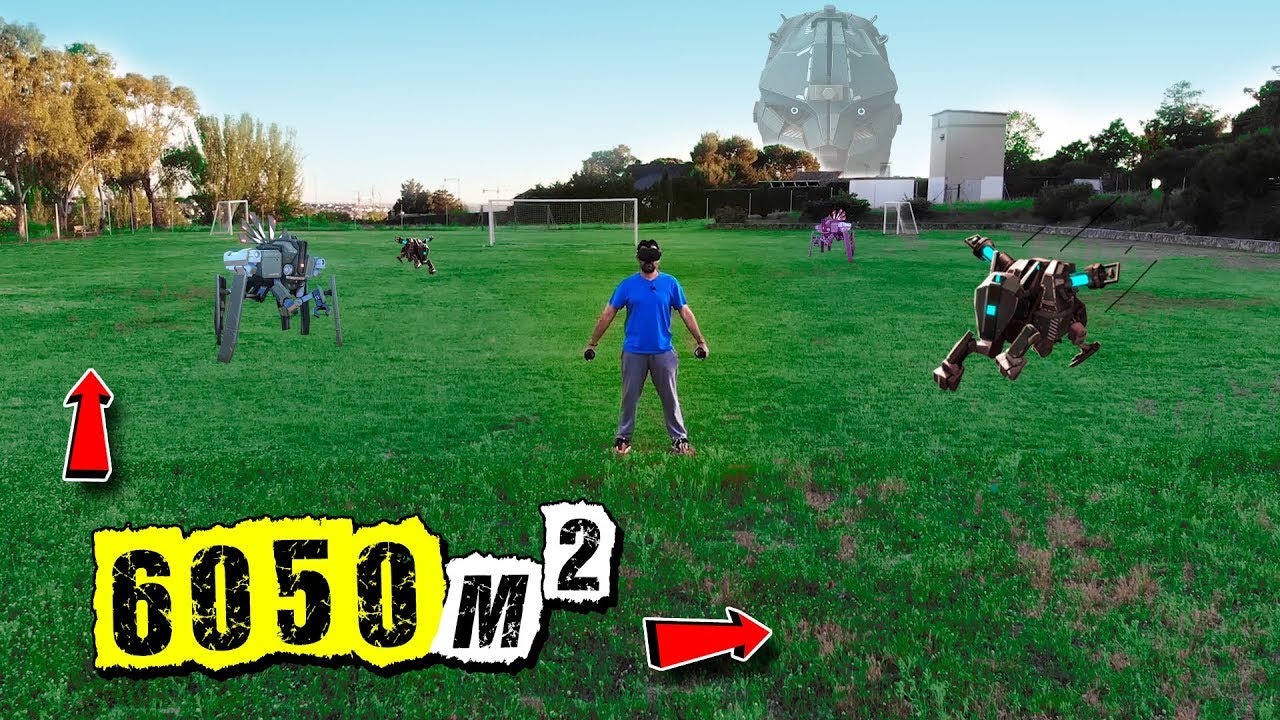
We play in a Football Field the Biggest Adventure Ever told in Virtual Reality. 6050 m2 in a VR Playable Area with Apex Construct and Oculus Quest ▶ Instagra...
tawdry dragon
While thats cool and all, thats not gonna be the main useage of the quest 😄
or atleast, I doubt that 😛
mighty carbon
then I am not sure what you mean
Quest is less restrictive than Vive/Rift when it comes to physical areas

I'm refunding Beat Saber on Quest.
Not sure if it's my saber style or I have a crappy Dev kit, but I lose tracking like every 10 swings.
 Twitter
lol?
tawdry dragon
Yeah I get the untethered nature of the quest and that it supports large areas.I'm just saying that the games/experiences that people are gonna play on it will probably be mostly designed around same sized areas as the vive/rift since thats what 95% people got available 😛
Making it larger would also require your levels to account for peoples houses/rooms being odd shaped
mighty carbon
oh, well.. it is what it is
honest mango
Anyone have any tips on how to get started with punching mechanics? I'd like to do it similar to Knockout League VR (https://www.youtube.com/watch?v=4FiRoqTeCw0) as far as how they react to punches

This is like Punch-out for VR! Quite the workout! http://store.steampowered.com/app/488920/Knockout_League/
tawdry dragon
Seems like you could do it in your anim blueprint, getting the direction of the punch and rotating the bones in that direction
and snapping them back
honest mango
Well I'm not even that far yet, right now I have the 3rd person character dropped in and I want to have him react to my hands, even if not perfectly. Collision is enabled and simulating physics doesnt seem to work (and my hands won't move when sim physics is on on them)
Basically how the punching bag in rec room works is all Im going for to start
 zealous cobalt
Does anyone know if best buy has quest demo stations set up yet?
mighty carbon
call them and ask 😉
 idle osprey
I'm getting my Quest today...and ...aiigh! The UPS truck is just sitting there in front of a restaurant! It's like the driver thinks he can stop for lunch or something!!!
hallow knoll
@honest mango You can use Physical Animations: https://docs.unrealengine.com/en-us/Engine/Physics/PhAT/HowTo/ApplyPhysicalAnimationProfile
For something like a punching bag, a physics constraint should be enough
honest mango
Thanks
wraith sky
@hallow knoll ue4 can build for quest?
sturdy canyon
yes
4.21 and 4.22 both can
4.21 now needs an engine change to get up on the store, though
to force V2 signing
wraith sky
i have no clue what v2 singing is...some oculus store thing?
sturdy canyon
It's an android thing
well kind of a combo
but don't worry about that until waaaay at the end of development
wraith sky
nah, i definitely won't...since buying gear just for sake of build testing for it is not for me
granite jacinth
Definitely agree. But... Sometimes you just gotta do it.
wraith sky
Yeah, maybe in future when i'll be close to release my commercial vr game
 toxic oracle
Wow the quest is amazing
I can't even begin to describe how much I love being untethered it's a total game changer
mighty carbon
Where did you guys order your Quest ? Amazon ?
toxic oracle
@wraith sky for performance UE uploaded a whole bunch of talks from their recent dev thing, https://www.youtube.com/channel/UCBobmJyzsJ6Ll7UbfhI4iwQ

YouTube
Welcome to the official Unreal Engine channel! Unreal Engine 4 is a complete suite of real-time 3D tools made by developers, for developers. Create and take ...
I haven't watched many of them yet but they may be worth checking out
 dreamy kestrel
can someone help me please
I wanna figure out hoiw to put a character in VR in this software
wraith sky
that's not what i'm talking about...Quest is android (i.e. mobile) device...it just can't handle some games
wraith sky
to replace hands in ue4 you have to have fully rigged skeletal meshes with the same skeleton
dreamy kestrel
oh.
wraith sky
if you're not familiar with the task, you have 2 options, learn...or hire someone to do that (it's not a simple task, esp for animated vr hands)
dreamy kestrel
ima be honest with u, I dont care about the animation, i just want to see a moving character in vr
already fully rigged it
the entire odel n stuff
model
wraith sky
if it's the ue4 skeleton it'll be simple, just import the sk mesh, when importing select the existing skeleton
and then in your character bp replace the character mesh to your one
wraith sky
but...i didn't know ue4 has animated vr character
wraith sky
err..that's a complex question...
toxic oracle
Has anyone run into crashing while using the oculus online subsystem while playing in editor?
hallow knoll
@toxic oracle You gotta give us the crashlog, it can be anything ^^
toxic oracle
I also attached the visual studio debugger to it and the issue was being caused at line 282 of SharedPointerInternals "ReferenceController->DestroyObject();" I think it may have something to do with the subsystem in PIE being Oculus instead of Null
When I press escape or quit game in PIE that's when the crash occurs, it wasn't happening when I was using the steam online subsystem since it used NULL instead when PIE
Doesn't happen in a blank project so I assume it's probably an issue on my end which narrows it down a bit for me actually
hallow knoll
I don't see anything that tells me you even had a crash in the log
Yeah that's good
toxic oracle
I should have done the making a new project from the start, pretty much just found my issue I think
toxic oracle
I'd love to see a live training stream on developing for the quest, maybe going over the different types of getting your app onto it, best practices, and some common errors
dreamy kestrel
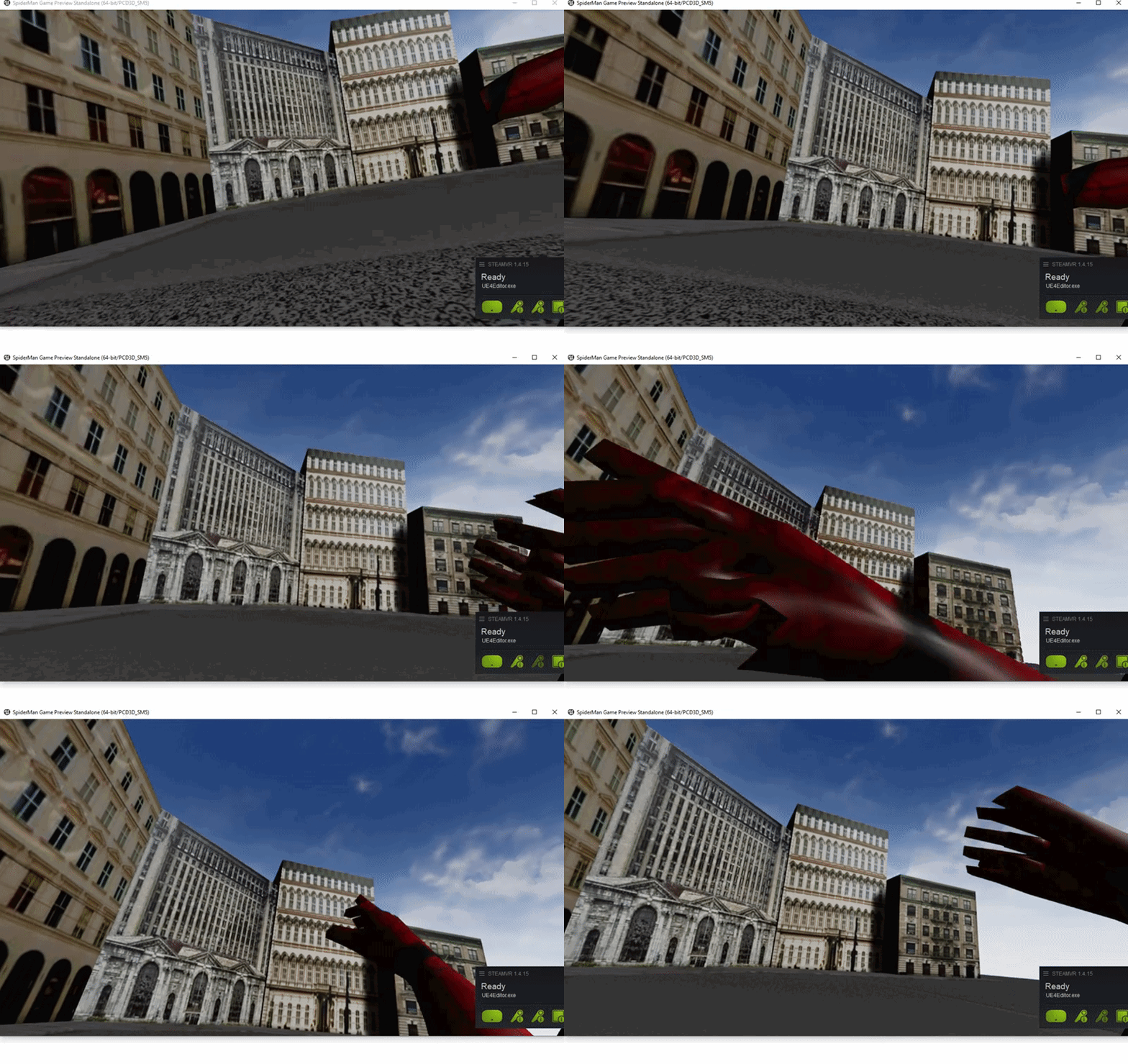 tired tree
what did you do to spider man you mad man
dreamy kestrel
how do I make the wrist bend instead of the whoile arm moving
:/
its my first time
tired tree
just a joke ;p
dreamy kestrel
spare me
i want help
im makiing this for my friends birthday
a spiderman swinging tech demo and an htc vive
tired tree
is it a skeletal mesh?
tired tree
then you either need to animate it, or run IK to the hand from a wrist position to have it move
you can go look up some UE4 basic FABRIK IK to do it quickly and get it done for your friend
tired tree
oh, its full body
well that will take some more work
since you are just learning and trying to do this quickly i would suggest that you just use the hands or hands/arms for now.
dreamy kestrel
actually
for the hands its one rig
Should I make it entire arm?
@tired tree
dreamy kestrel
ok
tired tree
and you have the entire web swing mechanics to make
 tired tree
um
dreamy kestrel
or does that not help
tired tree
that one would make most anyone throw up in VR
dreamy kestrel
shit.
fuck ok
they did something similar for the spiderman vr game
theres one movement of webslinging
anyways
where can i find the animation for moving the wrists
cuz the hands only have the hands
no arms
??\
dreamy kestrel
kek

Hi guys! Today I've got a surprise for you. My last 2 blueprint projects ready to download. They're build in version 4.15 of Unreal Engine 4. I hope you appr...
these are throw upmaterial
@tired tree ?
toxic oracle
I kind of disagree with the whole throwing up in VR thing at least for me personally
I'd say go with a cool concept like web swinging then add some motion sickness fixes like the black ring around the screen
Thats just me tho
idle osprey
Finally got my Quest!
tired tree
@toxic oracle its not that web slinging is an issue, I have a demo like that myself
its directly following a 2d tutorial that includes full barrel rolls at high angular speeds
toxic oracle
Ah I see, my bad
mystic tinsel
Okay. I'll try to explain this again: I'm trying to set up a mechanic where players can hide in/under things. Currently I'm working on a desk they can hide under. They walk up to the desk, push a button on the controller and the blueprint logic is as follows: lock to hmd -> false, set capsule and mesh-> no collision, use a timeline to lerp from their current standing position to the target position under the desk. To this point, it works. From here, I want the player to be able to stay under the desk, and look around, but not really move. So on tick, I have the desk set the location (but not rotation) to the target location. I thought that would allow them to sit under the desk and still look around.
Problem: if I enable lock to HMD after they're under the desk, the camera just pops back out to the location before lerping. if I don't enabled it, the camera can't move under the desk. I did try enabling use pawn camera rotation, which does allow the camera to rotate with the HMD. The problem is, it's fairly sickening, even for someone who doesn't normally get VR sick. The floor almost breathes as you look around, going in and out. So what I'd like to do instead is go back to having the tick set the camera location as follows: X,Y matching the target location under the desk, Z is free, but clamped at the height of the desk so they don't try to stick their head out of the top. The problem is, how can I put allow somewhat free movement of the camera, but also set some location parameters. Also without the "lock to HMD" the motion controllers don't respond properly. The VR avatar in this case is a full body avatar. So I've got the animation blueprint driving the hands based on the motion controller transforms.
What I'd like would be something like this while still allowing free look with the camera.
 simple briar
@mystic tinsel How is your character (hierarchy) set up? Is it custom, VR Expansion, or an Epic VR Template one? If you disable Lock HMD and move stuff (other than the transform of the object the HMD is parented to - I think it's the guardian area - not sure), when Lock to HMD is reenabled, the HMD will pop back to the place it was at when Lock HMD was initially disabled. I might be wrong, but I think you're translating/lerping the wrong parent of the camera. You're moving the VRRoot component along w/ the camera,right?
mystic tinsel
@simple briar It's custom. No templates or anything. Capsule->VRRoot->EyeCamera. You saw the C++ function that moves the capsule based on where the camera is. So when I lerp the camera to the camera target location, the capsule (along with VRRoot) are automatically relocated in line with the camera. I'm heading out, but when I'm back I can post some more screenshots of that
dreamy kestrel
p damn fuckin proud of what i just managed to do considering this is my firs ttime
all thanks to @tired tree for sending me an amazing tutorial
toxic oracle
Give it a watch and get back to us
granite jacinth
nah
dreamy kestrel
its not
its just a stupid vlc bug
@granite jacinth
can someone help me implement a jump animation
im confused
cuz of the is in air
or is falling
toxic oracle
@dreamy kestrel is this your first project?
toxic oracle
Oh man I'm getting a flashback to when I first started learning UE4, I wanted to make a VR game as well and dove straight into that
toxic oracle
How long do you have?
toxic oracle
Ok you've got a pretty decent amount of time, I'll DM you some crash course resources for UE4
dreamy kestrel
I plan on implementing combat, web slinging, and new york city
toxic oracle
I'm on UE 4.22.2 and I don't see this section "Packaging for Oculus Mobile Devices" in the "Android tab" of project settings, does anyone else see it?
 smoky gazelle
how i can void hmd going through mesh .how can i block it
toxic oracle
@smoky gazelle this code should do the job:
What's happening is that you're taking the displacement of the character camera (the HMD) and then applying that to the capsule component, then the camera is being offset back by the displacement in order to not move forward continuously. You can take this approach further and do something like in apex construct where the player is actually teleported back a bit as well to give some breathing room on clipping
Then for reference the player root component is attached as follows:
Capsule Component->PlayerRoot->HMDRoot->Camera
Capsule Component->PlayerRoot->MotionControllers
You're going to run into an issue with crouching not working properly because the collision isn't scaling so the solution to that would be to change the capsule component half height based on the height of the camera
dreamy kestrel
Material Revamp
vast cradle
anyone has tried to render a media texture in front of all other objects in VR? I want to show a video in VR but want it attached to the headset and the video to play in front of all other objects. how to achieve that?
 real needle
Hey all, does anyone know how to get the FOV of the camera in AR?
It seems the properties of the player camera do not change to reflect the actual FOV once in AR.
mystic tinsel
@simple briar Here is the avatar hierarchy.
and this is some output on a log with the camera and capsule locations. In this case, I left "lock to HMD" ticked after moving the camera, and you can see the camera immediately snaps back to the pre-lerp location. The capsule doesn't at this point because that function was disabled after the lerp.
LogBlueprintUserMessages: [BP_VRPlayerAvatar_C_0] Eye Camera: X=181.000 Y=-157.000 Z=85.000 Capsule Component: X=181.000 Y=-157.000 Z=110.150
LogBlueprintUserMessages: [BP_VRPlayerAvatar_C_0] Eye Camera: X=181.000 Y=-157.000 Z=85.000 Capsule Component: X=181.000 Y=-157.000 Z=110.150
LogBlueprintUserMessages: [BP_VRPlayerAvatar_C_0] Eye Camera: X=61.794 Y=-141.849 Z=157.567 Capsule Component: X=181.000 Y=-157.000 Z=110.150
LogBlueprintUserMessages: [BP_VRPlayerAvatar_C_0] Eye Camera: X=61.915 Y=-141.755 Z=157.492 Capsule Component: X=181.000 Y=-157.000 Z=110.150
LogBlueprintUserMessages: [BP_VRPlayerAvatar_C_0] Eye Camera: X=58.218 Y=-101.696 Z=157.350 Capsule Component: X=181.000 Y=-157.000 Z=110.150```Something interesting is that at the beginning of the game, when everything is lined up working fine, the HMD Position is not reported the same as the eye camera one: LogBlueprintUserMessages: [BP_VRPlayerAvatar_C_0] Eye Camera: X=-3.948 Y=60.159 Z=159.962 Capsule Component: X=-3.942 Y=60.202 Z=110.150 HMD Position:X=60.120 Y=3.940 Z=-30.160
x and y are flipped and Z is totally off
but tracking seems fine. My camera is in the head position
I've tried reseting the orientation and position after lerping but it still snaps back when I lock it
simple briar
What did you use to reset orientation and position? I think there are a few ways.
mystic tinsel
There is a blueprint node called reset position and orientation
I can't find anything though that actually let's me work with the HMD position. there is a getter to get it, but nothing to set it or change it in any way.
so I feel like unlocking it and locking it back up means it's always going to snap back to that location.
simple briar
Someone correct me if Im wrong, but I recall that default, UE Reset Position Orientation node not working or being weird sometimes (2 years ago). No idea if it got fixed.
Have you checked out what the template does for teleport? The teleport I'm pretty sure moves the player character/pawn, not the world. Maybe you could snag some bits from it to get your lerping going?
Also, are you adjusting the capsule component half height to get under the desk?
mystic tinsel
capsule is being set no collision
and the capsule isn't moving as you can see from the log.
it's the camera/HMD.
and it only moves when "lock to HMD" is enabled. It's snapping back to the exact position where lock to hmd was disabled.
because I'm not moving.
Here are 3 log points
LogBlueprintUserMessages: [BP_VRPlayerAvatar_C_0] Eye Camera: X=180.234 Y=-157.125 Z=85.428 Capsule Component: X=180.234 Y=-157.125 Z=110.150 HMD Position:X=34.771 Y=-12.409 Z=-35.197
LogBlueprintUserMessages: [BP_VRPlayerAvatar_C_0] Eye Camera: X=55.788 Y=-177.032 Z=154.924 Capsule Component: X=181.000 Y=-157.000 Z=110.150 HMD Position:X=35.048 Y=-12.220 Z=-35.225```First 1 is b efore lerping
2 is while I'm under the desk just before the snap back
3rd is after I'm snap backed
You notice the HMD position basically doesn't change between those except for slight drifting of my head
As far as I can tell "lock to HMD" always brings the camera to the HMD rather than leaving it in place.
hmm okay I thought of an alternative way to do it.
but..it creates its own challenges
if I lerp the whole entire actor, the HMD follows along
but I need to lerp the actor from a standing position into a crouching one.
which I think still requires moving the HMD.
Okay tha tworks.
I lerp the actor and the VRroot height
and I get under the table
but for some reason my hands are still messed up
mystic tinsel
@simple briar Partial success. I'm under the table. my capsule is under the table, but the mesh itself isn't coming under. Not sure why. It explains my weird hand positions.
tawdry dragon
finally got our Quest 😄
jaunty shell
@tawdry dragon enjoy ! 😄
simple briar
@mystic tinsel so u have a diff movement mode where everything moves together relative to the root component? Can u reference the VR template
mystic tinsel
I sorted that too. it was the mesh. if the mesh was set not visible, it wasn't replicating to the slave mesh. i have 2 meshes. 1 without a head and 1 with. This will end up multiplayer and we need a mesh with a head for other players to see
There was an option in the BP that I could set to make sure it updates while invisible
mystic tinsel
@dreamy kestrel Looks good. If you haven't done it already, look up how to use the fabrik node with your animation blueprint. It'll help you to get those arms a little more natural.
I think your camera might be too far forward though.
If you're worried about it clipping into the head, you can look for a node called "hide bone" and hide the head bone.
dreamy kestrel
its not my arms rigging
its my shitty sensor placement
happens in every game i play
dreamy kestrel
@mystic tinsel
mystic tinsel
that might give you a better view. Are you getting any clipping with the head?


 dusky moon
Yo my Rift S is here! but it doesn't work with my Usb-C to display port adapter which I just got : ////
mystic tinsel
the arms will move in an animation, but in order for them to move properly in VR you need to look at those fabrik nodes I mentioned
granite jacinth
surprised people bought Rift S
Well, maybe not surprised.
@dusky moon Did you look at the compatibility guide?
dusky moon
@granite jacinth which guide ?! I looked at Reddit and UploadVR article before which mentioned almost any usb-c to displayport should work (but not the hdmi adpaters)
BTW, I'm very happy with the visuals and things are so much more clearer with Rift S. tracking is dope... only complain is the weak ass headphones (speakers?) almost zero bass and not loud enough at 100%
tawdry dragon
@granite jacinth
Just got the Rift S
and tested it out side by side with our old Rift
would say its an improvement
it sits better on the head and you dont look like a diver after wearing it
and the setup was like 1 minute.. So thats awesome when we travel with our case 😄
granite jacinth
Aye
There are some advantages to the Rift S
But it's not like a step forward for it
Sometimes almost a step backwards
If not, most of the time, step sideways
tawdry dragon
you're thinking regarding the inside out tracking or?
granite jacinth
But it just always depends on use cases
Inside Out is the only advantage but also a disadvantage 😉
The main advantage being, ease of setup
Tracking is alright. Typical of WMR
It's basically a WMR HMD
tawdry dragon
My girlfriend just got out of a 40 minute session of beat saber with it, the tracking seems stable in my small office where WMR couldnt work 😛