#virtual-reality
1 messages · Page 203 of 1
 quiet swan
 granite jacinth
Like what QOL?
quiet swan
so far I have seen crashes, even when profiling in sessions fronted
that happens everytime i open my map
I have to revuild lighting
i hope its fixed in 4.22.1
nope not fixed
same issues remain 😦
lets see if the compiing shaders bug is still there, it compiled my shaders over and over everytime I saved
closed and opened it back up
its suppse to look like this
sad to report the bug is still there after I save close and reopen
if these bugs are still there, what other nightmares bugs are yet to be discovered
what a nightmare I cant even profile in 4.22
every single problem I had that I thought 4.22.1 would fix is STILL THERE
is there anything I can try to fix this?
folders I can delete or something?
 tired tree
strange, haven't had any of that
 sturdy coral
@quiet swan do you get this in a complete clean build from clean checkouts?
quiet swan
Im going to dig deeper. I think, but it just goes to show how upgrading could be a nightmare! I think I have to redo my map anyway, because I made to many HISMs and spread them out all over so I cant cull correctly but I did notice my entire map, which use to be red in shader complexity is now all green so I think somehow it gave me more performance
 pearl tangle
@quiet swan I am having a very similar issue with 1 of my AR projects at the moment. I need to upgrade to 4.22 from 4.21 to get the fix in image detection, but unfortunately whenever I try and build it crashes out with the same core error. Also oddly I can play in editor, but when I finish playing in editor then it crashes hah
quiet swan
yeah my maps are bugged if I opened them they look weird if I close it and open it again it looks normal, over all 4.22 is very scary to work with, if these errors dont get fixed, can you image what nightmares lie deep in the engine @pearl tangle
I am able to package my game fine though
pearl tangle
yeah I haven't had time to debug it properly yet. Was spending last week tidying up my project before I have to publish it all and document next week and gave up on the upgrading since I already knew all the image tracking components worked ok. So now this weekend I need to figure out what the migration issue is and get it all fixed up
sturdy coral
4.22 preview had somewhat similar issues for me, lighting/shading looking corrupted, but was fixed shortly before release
quiet swan
I cant save now
nothing but issues
I cant change my target hardware settings if I make it 2d mobile quality it stays in desktop quality after I open and close
is there some hidden permission system in unreal I cant save, and every time I open my map it compiles shaders everytime
pearl tangle
that error often happens if you have accidentally got 2 copies of the project open at the same time or 1 didn't close down properly
 dusky moon
speaking of 4.22 , I migrated from 4.20 (my Oculus rift project) and realized the text are blurry and barely readable ... didn't change any setting/command in the project.
wondering what changed that caused this
quiet swan
they changed alot of things, my mouse wheel turned into something else that controlled camera movement speed
 red pine
Something somewhere somehow is telling my VROrigin to move up 88 units
and I have no idea where this is happening.
I just know it is
And its getting annoying XD
quiet swan
did this happen with the 4.22 update?
red pine
I am using 4.22.1 as of now and started this way
Also is there a way to make sure the third person manaquins hands are properly aligned with my hands?
Also which motion source is the headset?
quiet swan
you mean like a full body IK?
red pine
I just need to know what source is the headset at the moment
and I am only talking about hands at the moment
red pine
oh nm the headset is the same location as the camera
sturdy coral
@red pine I believe 88 units is around half default capsule height
are you sure you didn't attach to capsule? (It attaches from center)
red pine
Its a character so its def got a capsule
I have to literally speciffy -32 in order for the camera to spawn at head height
tired tree
yeah the center of the capsule is the zero point of a character
sturdy coral
@red pine you should query capsule half height and subtract that, minus another small bit because capsule floats off the floor by a small amount, inch or so
tired tree
2.15UU is the average
its actually between an allowed range, but it re-inforces the median and I haven't ever actually seen it not 2.15 off the floor
aside from right after falling....I had to change the falling movement mode to retain the offset as it hitches otherwise...its like that in every single FPS using the engine.
red pine
in order for the camera to be in the correct spot I need to place it at -120 lol
This feels really weird and I don't remember having this problem outside of VR
tired tree
outside of VR the camera doesn't move.....
so it stays where you place it
IN VR, the camera goes to your actual world height
you are already starting off a bit wrong here using anormal character with a capsule attached body though
as in roomscale that body is going to sit at the room center with the collision unless you start handling things manually
red pine
oh so I should not even be using a different kind of character?
all the examples proper character
with capsule ect
What kind of character should I be using @tired tree ?
quiet swan
castle you need a IK system or...let me get the link

This is the easiest way I found to get yourself a VR body with arm Inverse Kinematic (requires Motion Controllers) and full thumbstick locomotion. This step-...
try that instead
sturdy coral
@red pine mordentral's plugin will handle characters for you too
red pine
did that already and that works fine
I followed that and its good to go
other problems are coming up though
tired tree
marco's tutorial doesn't cover this
the mesh stays at zero point
he actually mentions this in the comments for his video
red pine
I tried switching the character to a pawn and now I dont have a movement component
I have IK working where my hands move with the controllers.
red pine
Wait what problem?
tired tree
you need to have your mesh follow the hmd
and if you are doing locomotion, you need to handle any kind of drop off, elevation change, ect off of the
HMD location
not the actors
red pine
you need both. you have to have movement and allow for full body to move freely
VRChat style control system is the goal
You still need to be able to use the controllers to move around
I dont see how having a center base is a problem.
tired tree
because its offset from your actual location....
you don't want to run logic off of ActorLocation, you want to run logic off of ActorLocation+HMDOffset
red pine
So what do I use then? if character and pawn are not useful
tired tree
they are, nothing else is going to be any different
I was just warning you that running a character and trying to just use movement input won't work as you would expect
red pine
oh I knew that
you confused me
The issue is that I am not sure how to setup the location of the character ect. The center capsule simply wont be used for collision or anything.
sturdy coral
you have to use it for collision for character movement component to work
tired tree
well you would have to re-code the movement component if you want it to use a different component as the location for movement logic. You can run two actors like Charles does though.
sturdy coral
I don't run two actors 😃 I did that before the camera refactor though
red pine
So hold up, is this shit basically unusable in its current state then?
tired tree
did I ever tell you what I switched my movement too @sturdy coral ?
sturdy coral
no @red pine
red pine
I got a character with basic IK
sturdy coral
well yeah by default there isn't an easy way
red pine
but I can walk around and do stuff inside of my play space
sturdy coral
you can use mordentral's plugin though and he has two options in there
@tired tree I don't think so
red pine
I need my character to move with me
tired tree
I'm keeping my root moving seperately, logging the difference, rewinding the position in the CMC and replaying it. It is soooo much cleaner
it just adds the movement to the locomotion steps
sturdy coral
ah cool
red pine
So if I move +100 on the X axis the center base moves with me?
sturdy coral
@red pine what I do is just move vrroot + character when walking artificially with joystick, then keep vrroot the same except for Z when walking in real life, and control character to approach the head with a bunch of thresholds and stuff
red pine
Play space still needs to be a set location
sturdy coral
vr root is basically your playspace origin
red pine
got it
sturdy coral
it is whatever component your camera is attached to
sturdy coral
you can tell it to not inherit rotation from the character
quiet swan
before you start going crazy castle profile your game
red pine
Also the project is literally 2 days old
My goal is a VRChat style system
ok so I use VROrigin as the play space. then I make sure that the character moves with my camera basically
quiet swan
yes but have your profiled your game first castle before you start adding things that might lag
red pine
but why is my camera floating above me if I don't put it through the floor?
sturdy coral
starting camera position doesn't matter
as soon as it gets tracking data it overrides its position
red pine
Photon the game is 2 days old and has nothing in it yet XD
sturdy coral
the location of your VR root controls everything
tired tree
man I should make a mech game this weekend using that flight stick control
I kind of want to play with a project
sturdy coral
@red pine what I do is empty scene component called vr root, set it to capsule bottom - 2.15, every tick I update the z to be at the capsule bottom so you always follow floor location whether you are moving in real life or moving with joystick
but x,y I only set to follow when moving with joystick, otherwise vr root x,y stays steady and the capsule is controlled to move towards the camera
other exception is when falling, treat that like moving artificially so you will keep following x,y of capsule
red pine
ok hmm
sturdy coral
but I always follow z
tired tree
my simple character forces camera to stay still X/Y, and adds the movement it would have had to the movement component
sturdy coral
yeah I think what I'm doing is very similar to your simple character
red pine
- 2.15? why that number?
sturdy coral
@red pine cpp const float UCharacterMovementComponent::MIN_FLOOR_DIST = 1.9f; const float UCharacterMovementComponent::MAX_FLOOR_DIST = 2.4f;
red pine
That method will hurt full body trackers with large play spaces
tired tree
the character capsules don't actually touch the ground, they gover
yeah, thats why my primary character doesn't do that
it moves the capsule to the HMDs location
sturdy coral
@red pine what will hurt with full body trackers?
tired tree
it doesn't actually hurt much
red pine
"my simple character forces camera to stay still X/Y, and adds the movement it would have had to the movement component" from @tired tree
ok following advice now
sturdy coral
I think he means forces vr root to stay still
red pine
ultimately if I can get the players position system down. Then the rest is just getting the sensors to line up and animate the character
sturdy coral
@red pine if you are supporting oculus too make sure you set VR origin to floor at start
steamvr defaults to it but oculus defaults to eye level or at least did in the past, I haven't used the oculus sdk stuff in a while
red pine
I am doing this atm
@sturdy coral How are you going about the rotation of the character model?
quiet swan
hey I am confused I use the option to show gpu display in the headset and it says its using like 3.4 of 11.1 ms what does this mean ???
for steam
it was around 3.4 of 11.1 ms and its green most of the time unless I fire the weapon
red pine
I am considering doing some kind of threshold where it only rotates if I look beyond a certain angle
quiet swan
then it spikes
sturdy coral
@red pine using hands and head to guess rotation, haven't locked feet yet, so they slide
There is a free animation blueprint in the marketplace this month that does in place turning
With feet stepping

An advanced bipedal character locomotion system focusing on high quality character animation with responsive movement. (100% BP)
red pine
ah that seems cool
ill probably just check the rotation in the anim BP or something and use that to do a side step
sturdy coral
There was an animation stream recently on a different method
red pine
Alright I actually have a character that is kinda working now.. How do I get the hands to properly match my controllers though. Its kinda off a bit and uncomfortable
sturdy coral
That samples a stepping animation based in rotation angle
red pine
otherwise my dude is working
quiet swan
can someone tell me what this means
is it only using 2 ms????
I was going crazy profiling my game and they said use steam to profile and it looks good I can see my gun particles cause lag but my question is if I am walking around my map and its saying like 3.4 ms of 11.1 ms does that mean I have good performance?
sturdy coral
@red pine mordentral's plugin has hand offsets for every controller I think
quiet swan
or is this just for my GPU and my CPU can be lagging?
red pine
oh ;X
sturdy coral
You can add a socket on hand and line controller up with that using preview mesh
red pine
So thats the advanced location system?
sturdy coral
His plugin is called VR expansion plugin
Advanced locomotion is free this month in marketplace so you should grab it, but it isn't VR specific
Does do in place turning with foot stepping
red pine
yeah just yoinked it lol
 shrewd beacon
hello sirs, think i found the right room now heh
red pine
@sturdy coral this plugin is freaking awesome XD
quiet swan
hey can someone tell me how my performance looks?
thats from steam I walked around my level and other then some spikes how does it look?
is steam reliable? does it mean my performance is decent?
quiet swan
I am using a particle system and was wondering if we need to change it from 60 fps to 90 fps ?
pearl tangle
@quiet swan This still depends on what hardware you are running. If you are on a low or medium spec machine thats perfectly fine. 1 spike over is not a big deal. But if you are running on a 2080ti or something then you may have issues
 ember forum
i want the player to have to rotate his head as minimally as possible to achieve the full motion that he would rotating his head in 360 degrees, ive tried Get Orientation and Position and scaling the rotator , but the problem im having is the camera still seems like it just ignores that scaler
by setting the scaler to 2, i can see my character rotate as desired, with minimal head turn, but the camera just doesnt follow the scaler(its still at 1:1), ive tried set world rotation for the spring arm as well, but to no avail
i dont know if you guys ever played one of the earliest games for the gear vr, which was a dragon vr game where you could tilt your head minimally and have 360 degrees of motion, im trying to replicate that
ember forum
Or if i could get the hmd rotation as an axis event
quiet swan
That would cause sickness I think the body needs to turn with the head
ember forum
@quiet swan motion sickness/desorientation, yes.. but its an alternate control method for my game and ive tested that game im basing this on on all of my family members including my parents and they were fine
I like the motion sickness
Dont judge me
🤢
Im gonna be a jerk (for a change) and say if you have motion sickness you shouldnt play VR🤷 ... especiallly not a flight sim.. im feeling lots of vr virtual pointers aiming at me right now
But now back to the point: i rather give people options rather than having only 1 control method...
sturdy coral
@ember forum amplifying head movements really will get way more people sick than normal
Fine to add it as an option I guess, but I would really really shy away from defaulting to that
ember forum
yes i would definitely not default to that... but heres my case: its a valley flight thing, you have to dodge obstacles and such, if i can reduce the amount of movement your head needs to do to dodge things it will actually be MORE comfortable than having to snap your neck back and forth, but of course, that will be entirely optional for the player
in any case, ill figure it out
and its an oculus go, so controls are limited, if it was a quest or rift, id make it gamepad/hand input controlled
pearl tangle
interesting concept. playing around with the world scale can yield some interesting results since it makes your reach and steps a lot different, but never tried using that same concept for head movement
kinda agree with the others though, seems like it would be problematic. I guess a very easy way would be to just drop another camera in the scene and then match it's rotation to the HMD but then multiply the yaw on it and see what that does. Maybe try it with a render texture on a UI element first and see if it gives you the desired output before going different routes
red pine
So I see a few different plugins out that setup full body IK and such for characters. I take it that buying one of these plugins is worth it right?
My goal is to make a social VR chat kind of setup. What plugins would make the most sense for me to get things started?
 sharp swan
its worth it to save time usually. But then it's also worth investing the time to learn how to do it if you need to use it. Otherwise any bugs, artifacts or weird interactions might be unsolvable
red pine
Well I feel like I do have a pretty good understanding of it. I just see that getting the IK to work properly as being super complicated to really feel right
The plugins and tools I will need seem to cost a total of 200 USD
Voice communication + Full body IK
sharp swan
nothing is complicated if you break it down its its parts.
red pine
not true. In this case getting the characters bodies requires a ton of trial and error ect.
What would be the best plugins to grab for doing this? Anyone know?
pearl tangle
@red pine I would say leave the IK to later on in the process. Get all of your other components in there working and then add the IK, essentially it's just some added aesthetics most likely so it wont alter your gameplay drastically
red pine
@pearl tangle Good point, but in this case the game is just a social media app so it has no real gameplay
But yeah, I should probably just use what I have right now
And get most other things in place
pearl tangle
yep. If it's just an extra cosmetic thing and wont actually do anything "gameplay" wise then I would suggest go with all the rest of it and see what works before shelling out cash on optional stuff @red pine
red pine
Well as it is now I do have the hands at least doing IK so maybe it is fine as is right now
Now how do I get voice communication working hmm
sharp swan
@red pine you know there is an IK solution built into called Fabrik?
tired tree
@sharp swan FABRIK isn't good enough for robust full body in VR
sharp swan
ahh
tired tree
if you want something more than mediocre it currently requires either a plugin or custom constraint code.
red pine
I am using FAbrik right now and its kinda good enough to get the job done
tired tree
not really
it doesn't have any axis constraints
you can get some "ik" going with it
but you won't achieve the VRChat level that you have been talking about
 ruby turret
Hey guys, I tried using Tom Loomans Post-Process Outline Material with 4.22 and VR and noticed, that it doesnt work anymore.
Is there something wrong with Custom Depth and Instanced Stereo on?
Some others also have this issue: https://answers.unrealengine.com/questions/887311/view.html
Do you know how to fix this, without turning instanced stereo off? It used to work with earlier versions of the engine.
red pine
@tired tree my thinking is that I use it for now then grab one of the plugins that looks best to do it properly.
tired tree
thats fine, just bringing it up
 mighty carbon
Do you guys know by chance if Quest can do mixed reality ?
(Green screen in real life + VR content)
 jaunty shell
if the quest can cast to a TV (I think it can) I guess yess
you'd have to find a way to record/stream the cast though
mighty carbon
I don't mean doing it in real time. I just would need to record session in VR and on cam, and then compose both offline for presentation
 upper wharf
Hi guys, my company is interested in working with AR projects, but more other companies say us that for this field is better working with Unity + Vuforia, what do you think?
 dim imp
Hey. I upgraded to 4.22 my VR project. and 2nd floor Navmesh isn't working. Basically I can no longer walk on the 2nd floor
any Ideas?
mighty carbon
 wicked oak

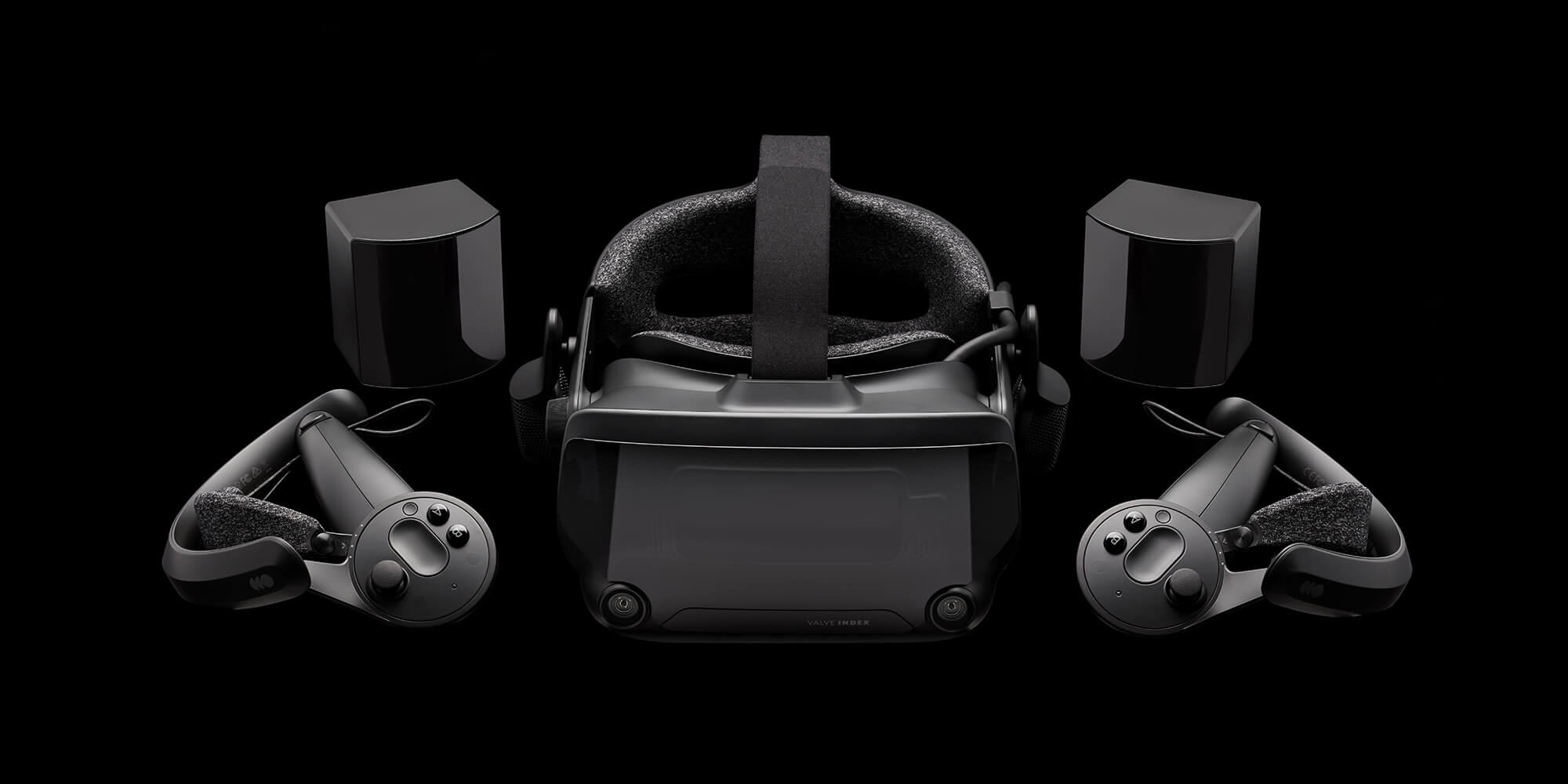
Hello Worlds.Experience high fidelity virtual reality with the Valve Index VR Kit.Learn more.For a full set of product specs and additional information, please visit https://valvesoftware.com/index.
toppest of fucking kekes
tired tree
999
 fleet plume
wtf @ 1080 euros
fleet plume
i don't see how this is a low blow to oculus
the devices are in two completely different leagues price wise
mighty carbon
I had an emoji there, didn't I
F8 starts in 4 min CST https://www.facebook.com/pg/FacebookforDevelopers/videos/

Facebook for Developers. 6.7M likes. Facebook empowers developers and businesses to build for the future. Follow us for updates on Facebook's business tools, AI, AR, VR, and more.
granite jacinth

UploadVR
Hands-on impressions of the Valve Index HMD running at 120 hz and 144 hz in a series of demos including Aperture Hand Labs, No Man's Sky and Boneworks.
@fleet plume you are correct technically
mighty carbon
what GPU does it need?!
granite jacinth
Rift S has inside out, no need for tracking and comes with controllers
fleet plume
@granite jacinth i don't want to be right
granite jacinth
But, it's not as advanced as Index
fleet plume
not this time
granite jacinth
$400
granite jacinth
While Index-HMD-Only is $500
granite jacinth
$750 for HMD and Controllers
I feel...Valve may have missed the mark there
$250 for knuckles...
mighty carbon
aiming at enterprise segment
granite jacinth
Or actually, $280 if bought separately
granite jacinth
well 144hz is experimental
fleet plume
120 regular use
granite jacinth
I don't know. I'm not sure what to think about this
On one hand, it's definitely advancing VR a bit...but on the other hand...who's going to buy it?
fleet plume
2070/80(ti) @mighty carbon
obv depends on content
the f8 stream live?

Hear from Mark and other Facebook leaders about the latest technology from our family of apps and the future we're building together.
yep
 open rapids
Sort of new in this Discord channel, was wondering if I could get some help with VR Player Pawns
- I cant seem to get the collision to match where the player is, it's always at the centre of the PlayerBP.
- Whenever I walk over small objects like these cube, the collision in the PlayerBP freaks out and send me spinning.
Any ideas on how to fox either of these issues? I can post a video for visual reference like

Any ideas how to fix either of these issues? 1. I cant seem to get the collision to match where the player is, it's always at the center of the PlayerBP. 2. ...
 short laurel
why did they reduce the max framerate for Rift S to 80?
and, more importantly, UE4 will support Valve Index right?
fleet plume
guess the quest announcement is going on right now
mighty carbon
ha, everyone at F8 gets free Quest
open rapids
Not sure but I could do with some help getting this fixed
mighty carbon
@fleet plume it was a brief note. Pre-orders open today, deliveries start May 21st
fleet plume
yeah was watching the stream @mighty carbon
mighty carbon
May 21 is far far away
fleet plume
almost another galaxy
 neon egret
I'm not up to date with the Vive stuff. I still go the default vive with the default controllers.
Can I easily upgrade to the new controllers or do I need the new base stations etc. too?
 golden snow
@neon egret Nah, sounds like you can just get the controllers and be ok.
neon egret
Coolio
golden snow
It all seems backward compatible with 1.0 tech
neon egret
What is the headset on that page anyway?
A new one or something to put onto your existing vive?
neon egret
Right, where does one order that in with all the other HMDs?
fleet plume
top tier
neon egret
So Vive = Rift < Vive Pro < Index?
Man, it was all easier when they just had 2 headsets haha
tired tree
Vive pro is kind of a sidegrade in many ways
fleet plume
also ugly AF (sry pro owners 😛 )
i'am honestly wondering what happened to the supposed cheaper prices for the 2.0 base stations
and the controllers
neon egret
Hm, checking the stats atm. 1440x1600 and 80/90/120/144hz
Anyone having the stats of the Vive in their head?
1080x1200 and 90hz
Coolio, well maybe some client offers me one for work haha
Def want the controllers for private usage.
fleet plume
same here
the vive sticks have done their duty
the article on ars technica derails the hype train with almost surgical precision:
The Valve Index does not read your brain waves, does not track your heart rate, and does not track your eyeballs' motion. The Valve Index does not innovate with an "inside-out" tracking system. It does not include an array of secret cameras or sensors and does not bounce sound waves via hidden or embedded speakers. The Valve Index does not employ a shrunken, "infinite pixel" panel or come with a revolutionary new take on foveated rendering. The Valve Index does not include a built-in processing unit. It must be connected to a gaming-caliber PC with a long cord trailing from the back of your head.

Ars Technica
Great screen and a new "frunk," but with no new Valve games yet, will fans be satisfied?
mighty carbon
I see some folks from Vive camp switched to Rift S due to outrageous cost of Index 😛 (on reddit)
granite jacinth
hm
I mean, all-in-ones /inside out are going to be better sales when the cost is lower
Especially from a highly-regarded company
WMR didn't do that well because of all the varied manufacturers, prices, quality, and no marketing
Rift S is basically WMR+
mighty carbon
I guess I'll wait for May 21st.. I don't really want to deal with any gotchas pre-ordering Quest 😃
mighty carbon
supposedly many games still have performance issues on Quest
granite jacinth
personally, I don't care about other games
mighty carbon
and my guess is that Vulkan is still not ready, so they pushed release to May
I am still wondering about using it in large areas and mixed reality capture
 hallow knoll
@golden snow Microsoft store's are already sold out, I got mine from Best Buy which still seems to have them
mighty carbon
@hallow knoll do you have any info about UE4's mixed reality capture and Quest ? How would that work (if at all)?
hallow knoll
The info I have is only what I logically can think about. You need a tracked device for the RL camera, which would have to be one of your controllers which means that you'd only be able to play with one. Further, having a SceneCaptureComponent2d at high res on Quest? Don't think so...
golden snow
🔥
hallow knoll
If you specifically develop your app for that, then yeah maybe, but I don't see the value in it since you'd have to cut down on everything your game is about, and significantly so
mighty carbon
😦
golden snow
Oops. @hallow knoll The 64GB Quest is sold out on Amazon.
hallow knoll
Yeah I figured since it's sold out on Microsoft the others might be running out as well
mighty carbon
damn, that fast?!
granite jacinth
shit
I didn't know it was on Amazon...
I bought it straight from Oculus, dumb of me ;9
mighty carbon

F8 kicked off today, and we can finally share that both Oculus Quest and Rift S will begin shipping on May 21! Our first all-in-one VR gaming system, Quest delivers the freedom of completely untethered movement in VR. For those with a Windows 10 PC and graphics card suited to...
list of all places to pre-order is at the bottom
golden snow
@mighty carbon It's being considered the "Switch of VR" - so yea, it's hella popular.
granite jacinth
yeah who reads that shit
lol
hmm, wonder if I should cancel and buy it on amazon
golden snow
do so now. Only the 128gb is open.
golden snow
I just wanted a 64gb for a couple lil games and dev work.
golden snow
🎊
granite jacinth
Kinda crazy when I think about it though. $8 for next day shipping
Anywhere else you'd pay $50
golden snow
I'm just hoping they don't have any shipping issues like with the Rift.
I also totally want to see Catan VR on Quest
Played that a whoooole lot on Go.
hallow knoll
I just got confirmation that I can publicly talk about Quest now, which means I can let you know that we DO have support for quest in 4.22 @mighty carbon
hallow knoll
In 4.21 as well
granite jacinth
Ok, I was like.
hallow knoll
I remember Motorsep asking about it and I wasn't able to respond
granite jacinth
@hallow knoll Are docs coming up soon then?
granite jacinth
Putting in all the right Android settings are always a pain with these devices
hallow knoll
I'm planning to do a livestream on it once I've gotten my hands on it (again)
golden snow
lol
granite jacinth
@hallow knoll If you do that, you might as well cover optimization techniques as well
hallow knoll
That was my intention
hallow knoll
Hehe, I got some tricks up my sleeve too you know 😄
golden snow
MergeActor tool becomes your friend?
hallow knoll
It has always been my friend ❤
golden snow
😛
sturdy coral
@wicked oak what is your considered opinion on the Index hitting 120-144hz? I know you did a lot of work to hit 120 on PSVR
I know 120 is a huge bump over 60 on psvr, but how about 90?
and the low persistence on this is probably much lower than PSVR even at 120 I guess
mighty carbon
I am all ears @hallow knoll
sturdy coral
but I don't know how big of a deal that really will be
mighty carbon
(I'll be afk due to a meeting here at work, but I'll read when I get out)
tired tree
144 is supposed to be unstable with it
mighty carbon
@hallow knoll so, what's coming for Quest/Go in 4.22 / 4.23 ? Vulkan support? Platform SDk in Blueprints? Expressive Avatars in Blueprints ? 😃
hallow knoll
Uh that's a bit more than I know of atm. Oculus Avatars are already supported in Blueprints afaik
granite jacinth
I'm not show how much fidelity and other things you're doing
sturdy coral
Pimax added a mode where you could drop from 90 to 72 or something and it honestly doesn't have a huge impact, but I wasn't playing it with anything with a lot of motion
granite jacinth
So it's obviously content-dependent
But 90 to 120 seems like a crazy hurdle
With today's specs
Also... dual-core minimum...
970
for Index..
That's going to mislead a lot of people
sturdy coral
I think I'd almost rather the extra render horsepower dropping from 90 to 80 than getting to 144
mighty carbon
@hallow knoll alright, so then what's coming for Quest/Go then? 😄
granite jacinth
Right, it might be nice to go to 80
sturdy coral
120 is no longer huge cpu challenge after 4.22, but seems like it will choke on geometry
granite jacinth
On the other hand... how to tell the difference?
Like, do we devs get "Mode Getters" for Index?
I wouldn't mind doing switches bases on what the consumer is going to be using it for
Can we force 90?
hallow knoll
@mighty carbon It's rare that we announce some of that prior to release due to chances of it not making the release
And I honestly don't know at this point
sturdy coral
hopefully we can hint refresh in some scenarios.. like a 60-30hz video player wouldn't want to run at 144
mighty carbon
hype train has been derailed 😦
sturdy coral
but might be ok with it for 24hz movies
mighty carbon

UploadVR
Do Facebook's latest VR controllers measure up to the brilliance of the originals? Find out in our new Oculus Touch review.
hallow knoll
I like that they're easy to put down on your desk and they don't roll around
Also lighter than touch
golden snow
They occlude less too from what I can tell (in my brief time with them)
sturdy coral
@hallow knoll any insight on valve index's canted screens? I believe UE4 shadow blending is still broken on pimax without parallel projections enabled due to blending based on zbuffer depth aligned with plane of screen
I wonder if they are going to actually expose non-parallel projections to apps or work around it in compositor since it is slight
sturdy coral
thanks
hallow knoll
@sturdy coral They're aware and are looking into it (including pimax)
Possible 4.23 fix
sturdy coral
@hallow knoll nice, thanks
mighty carbon
@wicked oak did you preorder Rift S and/or Quest ?
 mild moon
Anyone here know how to get rid of that hourglass loading indicator on Oculus?
It shows up everytime i do a Open Level, even though i've turned it off in the project settings
 ripe talon
Sorry I am a complete beginner, but I just downloaded the SteamVR Input plugin and having some issues with it.
input commands I have created in the project settings do not populate into the steamVR controller bindings. Does anyone know how to make the inputs show up into the SteamVR Controller bindings page? Thank you.
 subtle raft
anyone know why my Motion Controller components are locking to the Vive base stations instead of my controllers?
on 4.20
hmm maybe its because I have Oculus and SteamVR plugins on
haha duh, that was it
dim imp
What's the best method to prevent players from jumping to 2nd floor by aiming the teleporter up?
simply put, I can aim the controller up and it detects the 2nd floor navmesh, essentially teleporting me through the ceiling
dusky moon
Ah so disappointed by Index for the fact that it's still sticking to Base stations. although it's still great solution for Arcades and more stable but I can't still understand why Valve didn't take a step forward on tracking
Or I mean At least make the base station a bit easier to set up. for a clean setup it's most likely you don't wanna drill them to the walls then it means should buy 2 tripods to hold them.
 frigid kite
I literally have one on my desk and one on the kitchen cupboards behind me
And the tracking works flawlessly with that set up
dusky moon
base station 2 ?
frigid kite
1
dusky moon
strange ... mine are 1 and they steam vr doesn't detect them when I put them on desk
should always be elevated at least one of them in my case
About RIFT S my concern is It's Display port and my laptop has only Thunderbolt / HDMI outputs. would there be a compromise in image quality (compression stuff) if I use Display to HDMI cable for the HMD ?
pearl tangle
if its running thunderbold then it would highly likely support displayport
im pretty sure mini displayport is the same plug as thunderbolt actually
mighty carbon
I think thunderbolt looks like USB-C
hallow knoll
Less than 3 hours to go! And then we wait again!
mighty carbon
@hallow knoll What for?
tired tree
index preorder
@hallow knoll you getting the full set? techically if you have DVs you could just get the hmd
hallow knoll
@mighty carbon Index!
hallow knoll
@tired tree I'm still debating... I really only need the HMD, but I wouldn't mind having another room scale setup that doesn't involve USB extensions all over the room
I like to demo multiplayer VR when I have friends over
tired tree
the cv controllers are supposed to be sturdier
but i have 4 pairs....debating whether i need them :p
hallow knoll
haha 4:1 seems like a decent ratio to live with
tired tree
well...the tracking quality and battery life reduces the farther back in lifecycle
so there is that
hallow knoll
It states on the index page that controllers have 7+ hours of battery life. I've only gotten ~3 out of mine, so that's a good improvement.
tired tree
yeah the version right before DV was significantly worse
frigid kite
Well @tired tree if you don't know what to do with all those knuckles... 👼
golden snow
Lock them away in shadowboxes like a museum piece!
tired tree
I still have my DK1, gotta make a museum at some point
golden snow
I have a VK1, Pre, Rift, Touch Engineering Samples, Daydream, Gear2 and a Go.
VK1 I might hold onto for collection, Pre I'll probably donate to a local school program, Rift and Touch I'll keep for a while.
Quest and then later if I need a PC VR headset, Rift S, will be my main HMD's.
tired tree
I still have hand crafted goggles for viewing stereo video from before DK1 :p
golden snow
I have a google plastic. 😄
tired tree
ew
golden snow

The future is clear. Experience actual reality with Google Cardboard Plastic. Learn more at http://google.com/cardboardplastic
These, specifically.
It's the FOV and resolution that the Index can't beat.
tired tree
i remember that video coming out
some people took it seriously because they didn't watch it
golden snow
You could buy the "headset" itself. It came with a proper cardboard viewer too.
hallow knoll
30 minutes left. I still haven't decided
granite jacinth
lolo
I just want to know
If it will be available anywhere else
Cause I don't want to do the same thing I did yesterday. Buy it on Oculus, cancel and buy on Amazon.
hallow knoll
AFAIK it's only through steam
golden snow
And last I heard it's a limited supply?
granite jacinth
limited supply...
wish I lived closer to west coast now
that few ms difference might be the end of me
 golden snow
I'd laugh if it skips the 3rd minute
granite jacinth
sadfsdhjfsdlajfsdklfjasd
I can't buy it
I am stuck at shipping
omg, so annoying
lol
hallow knoll
"There seems to have been an error initializing or updating your transaction. Please wait a minute and try again or contact support for assistance."
"For the protection of the account holder, this purchase has been declined. Further purchasing will be temporarily limited - please contact Steam Support to resolve this issue."
😦
tired tree
mines ordered ;p
hallow knoll
Well of course Mr. 4x knuckles ;D
granite jacinth
Anyway
I was able to get an HMD
But I had a slight heart attack everytime I got an error message
fleet plume
anybody got the 2.0 base stations here?
was wondering how their noise compares the 1.0 ones
hallow knoll
I'm not able to purchase still, tried restarting, clearing cache etc
hallow knoll
So am I!
"Your order cannot be completed because one or more items in your cart is currently out of stock. Please try again later."
fml
fleet plume
what did you try to order?
hallow knoll
The full kit, it sold out so I ordered the HMD instead
fleet plume
that's unexpected
granite jacinth
nah
I doubt they had many full kits
They probably had a crapton of ala carte items though
I say they had <1000 full kits
But 3-5x ala cartes
5x (knuckles)
fleet plume
that's how you take over markets /s
fleet plume
yeah
fleet plume
and i would've loved for valve to open the eco system
granite jacinth
So, doesn't do much for us VR Dev for sustainability sadly
fleet plume
make it more affordable
granite jacinth
maybe they will in 2.0 version
fleet plume
to raise potential customers
granite jacinth
Or they won't
fleet plume
i thought that it was an open secret by now that oculus gained so much ground because of the lowered prices multiple times
and valve goes in the exact opposite direction 😄
sturdy coral
when I heard they were switching to LCD I definitely thought it would be cheap
 granite jacinth
Got mine for June
 sturdy coral
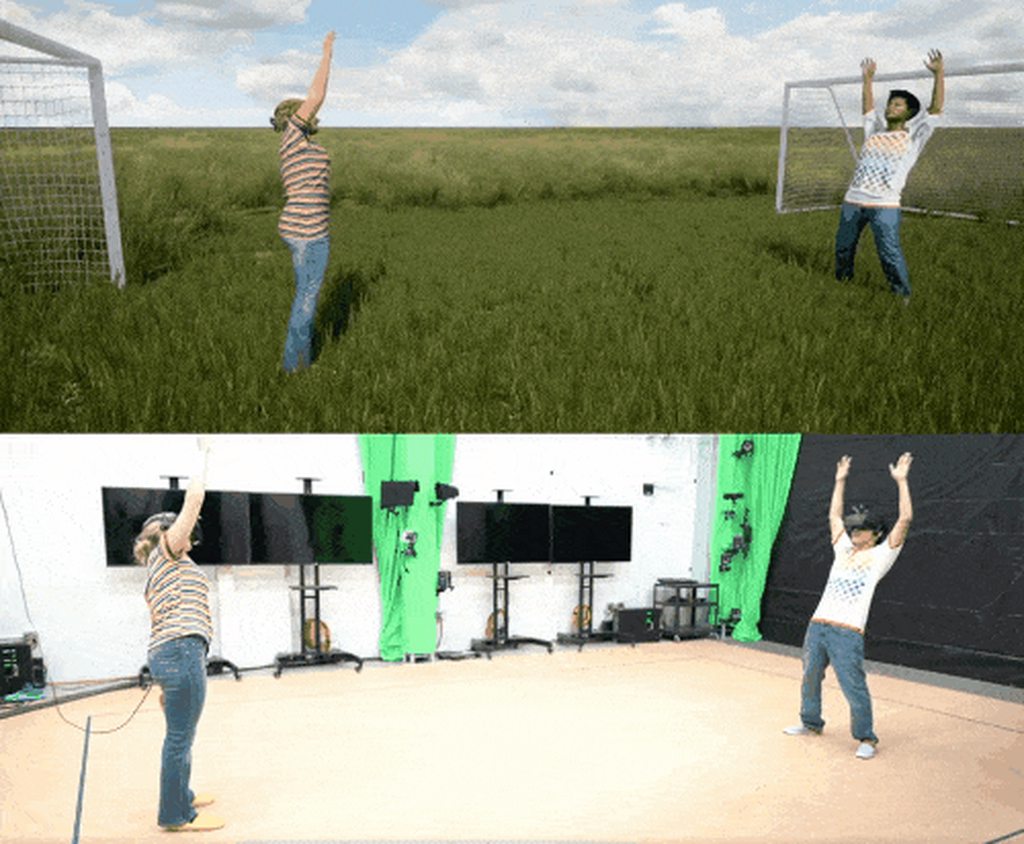
it is markerless though isn't it?
tired tree
yeah except for the HMD
sturdy coral
oh wait yeah I see those markers on hmd
I wonder why they needed that
just to coordinate tracking reference frames I guess
tired tree
likely to keep them from getting sick :p
the body can be aproximated, but don't want to do that to the view
tired tree
they may not be using on board tracking at all there
sturdy coral
they no longer have headphones
I guess it is CV1
that is cool tech, I expect ms to be showing off a lot of similar stuff with azure kinect
in the end it will be a lot cheaper to do it all with cameras and ML like they are doing there though
tired tree
yeah
seems kind of weird to be showing anything like this after removing external tracking though
unless they are thinking of warehouse experiences
tired tree
yeah
sturdy coral
even though I have pimax I figured I would be able to compare them, and I'm not sure pimax will ever get skeletal tracking with knuckles fixed with the way they are doing things
tired tree
price aside, this is pretty much what i wanted out of a next hmd
sturdy coral
yeah, if it comes close to pimax on the low fov setting and has better lenses and stuff I think it will be well worth it
the huge fov is pretty awesome on pimax though, I usually run at medium which is around 150 I think
tired tree
i trust its quality more too
sturdy coral
yeah my pimax has started having the plastic crack
I need to get it replaced because I'll probably end up selling it
tired tree
also direct support at the API level, no hacking around
sturdy coral
and maybe they will have full knuckles support by the time the 8K X finally ships
mighty carbon
did you get Quest @tired tree ?
btw, more details here about that body tracking https://uploadvr.com/facebook-f8-2019-body-tracking/

UploadVR
On Day 2 of F8 2019 today Facebook showed off a research demo of high quality markerless muscle-level body tracking from "a single sensor".
frigid kite
@tired tree "price aside, this is pretty much what i wanted out of a next hmd" > Thoughts on eye tracking and wirelessness?
I was sort of hoping to see eye tracking in there personally, considering Vive is gonna ship with it this year
granite jacinth
heh
You can't just add that shit midway
Index has been in production for at least 1.5-2 years
Since kits were already sent out mid-year last year
Also...
That Vive Pro Eye...
not aimed for consumers
Are there even cost estimates for that?
I would expect somewhere around $1200 easily for just the hmd
Given their price track record
Cosmos is where they might continue mainstream
But they need to price it competitively to Oculus not Valve, but...will they do that?
Also, Index is not Next-Gen imho
Nothing new in there
sturdy coral
things aren't quite at the level where eye tracking will pay off big yet
granite jacinth
Ehh, I don't know about that
With foveated rendering, it will be fantastic
If only used for that reason alone
But there are also gameplay mechanics that can be used with it
sturdy coral
just the cost of eye tracking vs cost of a gpu that can already supersample on the current displays
granite jacinth
Dunno, lots of potential
granite jacinth
I mean, just imagine you on a 970, eye-tracking foveated rendering at 4k
Now, I'm just throwing out random numbers
sturdy coral
yeah but only 2000 series can really do foveated without a big cost
granite jacinth
But, there's a reality there. It would help people jump into VR
sturdy coral
the mrs stuff on 900series has a geo cost
granite jacinth
Well, we'll see. Still lots to do
frigid kite
I was wondering about that actually, is any of the VR works stuff actually integrated somewhere?
sturdy coral
it is abandoned
sturdy coral
no updates in about 17 months
granite jacinth
But, imho, I would rather see Eye-Tracking than Tetherless
As much as I love wireless stuff...too many freaking issues with it
sturdy coral
I would rather major weight reduction than either
sturdy coral
that's what keeps me from playing stuff for many hours
granite jacinth
"UltraHMDs"
frigid kite
I'm personally very curious about tetherless
Have any of you tried the wireless kits?
granite jacinth
I'm not. I've tried it out on Rift and Vive
Both had issues
We need to do something about energy
I mean even the Quest...
batterlife is roughly 3 hours
so basically GO
well Go is like 2 hours
frigid kite
Yeah I even saw 2 hours for quest on road to vr today
granite jacinth
Need to figure out a better energy source
sturdy coral
hip pack
granite jacinth
Same issues with wireless kits
you need batteries
yeah, but man
that's more crap you have to put on
sturdy coral
yeah
granite jacinth
and hope you don't accidently unhook the cable
there's just so many other issues with it right now
sturdy coral
wmr flipup visor is so much nicer for doing stuff back and forth IRL
granite jacinth
that's why I rather them focus on fidelity and stuff that will help with performance
frigid kite
Does it suffer from light leakage @sturdy coral ?
granite jacinth
which, as we keep going in higher and higher resolutions...we need help with
sturdy coral
not for me
I'd like something in lenovo explorer form factor and weight with bigger fov and clearer optics, that + wireless would be really really nice
 flat shoal
so I'm guessing we'll see support for the angled stereo instancing that Index requires in 4.23?
hallow knoll
@flat shoal It should be in by then
flat shoal
curious if adding an angle in addition to the offset will have any inherent theoretical performance impact...
mild moon
Hey have you guys ever encountered issues with Oculus (maybe even other VR systems) when transitioning levels?
I'm seeing an issue Only happening on the headset, when I fade to black (persistent) then stream levels, there's one frame where the black disappears and i see the empty world... but only on headset.
PIE or even the preview window from the play in VR doesn't have the issue, it's only looking in the headset
quiet swan
Hey I noticed that my slate 3d widgets are causing a my game to lag, is there something we need to do so widgets dont lag in VR?
 shadow radish
@photon: I use a lot of slate 3D widgets in my game also--can you detail how you noticed they start lag? how many you used and what textures you have on them?
@quiet swan
mighty carbon
@mild moon use black splash screen called from BP
I am surprised no one reported this before I did
sturdy coral
@mighty carbon got a screenshot of what you are seeing?
mighty carbon
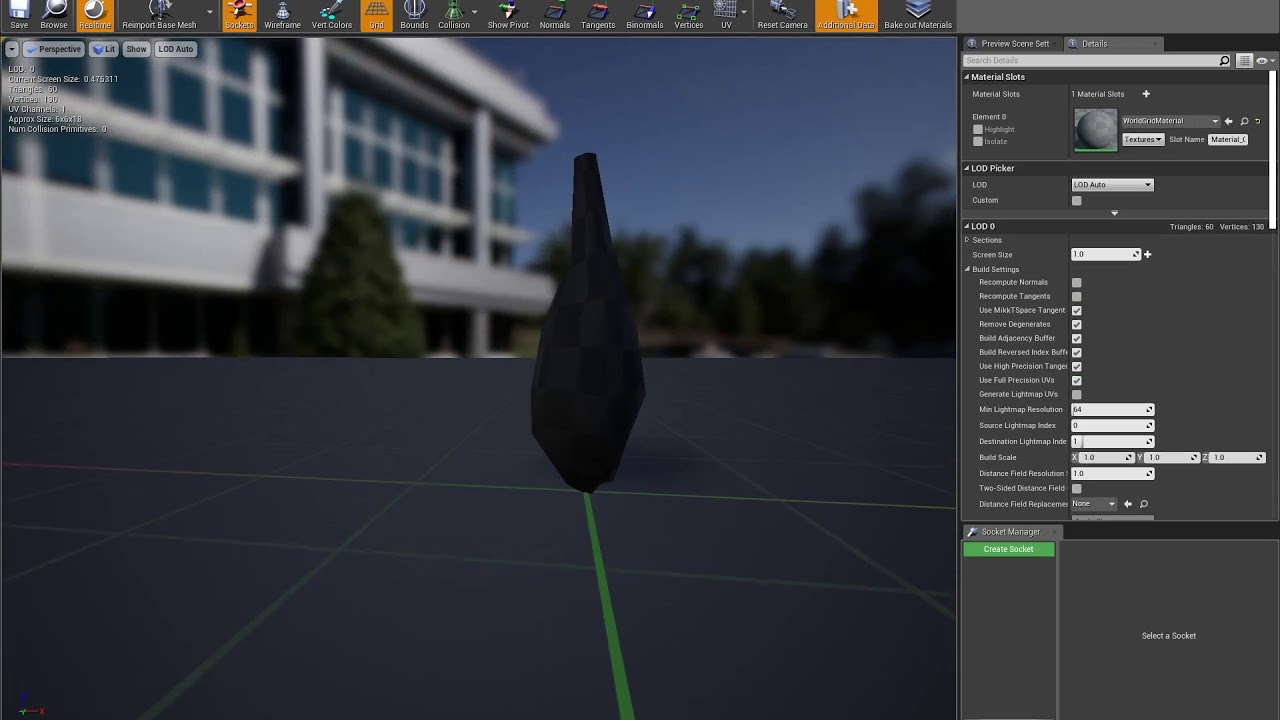
@sturdy coral https://www.youtube.com/watch?v=jhASLPPbue0
 mighty carbon
@sturdy coral I wonder if skeletal LOD tool has the same issue
sturdy coral
@mighty carbon it looks like it has put a seam there, is it visible when not animated?
mighty carbon
no seams
it tears the LOD meshes as if LOD meshes are made of loose triangles
or rather, UE4 generates LODs and doesn't weld vertices
sturdy coral
@mighty carbon for that type of mesh you may want to try blender decimate; ue4 make be making seams assuming most things are going to have textures reprojected on them by the lod generation, and or assuming it needs a lightmass texture
mighty carbon
well, it's a bug that needs fixing.. that's why I reported it 😃
using Blender is too tedious
sturdy coral
yeah, they may be able to expose an option to do no seams or something
mighty carbon
I can't get FBX to export embedded LODs (or UE4 doesn't import them as such for whatever reason) and exporting several meshes (and importing them) is too tedious
UE4's LOD tools shouldn't do any "seams" to begin with
sturdy coral
they reproject normals and stuff and need to uv them
they have to have some kind of seams in there
unless it is just a flat plane or something
mild moon
@mighty carbon Thanks, i was hoping i could do without the splash screen, but it looks like there's no other way.
sturdy coral
I'm not sure if they look at that but maybe they could. they regenerate the mesh by reprojecting it onto a signed distance field version
I think the skeletal one at least preserves sections so maybe has some logic around seams too, not sure
mighty carbon
hmm.. I am not well versed in mesh decimation techniques, but doesn't sounds like 3D apps decimation approach
sturdy coral
with the sdf stuff they are able to fill holes and avoid meshing the interiors of buildings and stuff in some cases (they have some options around that)
there was a good livestream on it
that showed a lot of the internals
@mighty carbon : https://www.youtube.com/watch?v=cIgFJz-OOpw

On this week's Live Training stream Epic Games Principal Mathematician David Hill and Senior Technical Writer Sam Deiter will show you how to setup and use t...
@mighty carbon since one focus is on combining multiple meshes for lod, pure decimation wouldn't work too well
they want the geometry to still line up where things touch etc. even if they are separate pieces
mighty carbon
I don't combine meshes anymore
I only used ISM in the video / test project to show that the issue affects both single mesh and instanced one
Proxy Geometry doesn't work on Android either :/
 white fern
So I'm messing around with LeapMotion and I keep running into a pretty blantant issue tracking specifically my left hand ring finger; it is clearly in view, but whenever I move it it moves the virtual middle finger and gives me middle finger data (left hand.) Anyone ever encounter this before?
sturdy coral
@hallow knoll sounds like they might help out people that got their cards locked and couldn't purchase: https://www.reddit.com/r/ValveIndex/comments/bjoc8z/ahem_there_is_still_some_glint_of_hope/

reddit
195 votes and 60 comments so far on Reddit
granite jacinth
As long as they don't get them for free
upper wharf
Hi guys, my company is interested in working with AR projects, but more other companies say us that for this field is better working with Unity + Vuforia, what do you think?
granite jacinth
@upper wharf loaded question
Just do your own research and choose
(that means, not asking for someone's opinion if you should go to Unity in Unreal server 😉 )
But, personally. It's just whatever your programmer is most comfortable with
 odd garnet
My store page just went live 
https://store.steampowered.com/app/995140

Break down doors, point your fingers, clear the room and survive in Hand to Hand Combat!! Hand to Hand Combat is a Virtual Reality Action game made for the Valve Index Controllers! Use your fists, finger guns, feet, magic, and more to clear each of the floors. Features:Slow M...
Release Date
Valve Index Controller Release
granite jacinth
@odd garnet Hmm
Well, first off, grats.
Second, any reason you missed the second "hand" in the thumbnail?
odd garnet
Fixed it like 20 seconds after I went live
odd garnet
okay rip I went to the store page but it still had the beta mode on (even tho the url was like nah its not beta)
got it lol
 cunning depot
Also @odd garnet isn't a recommended 9900k + 2080 ti a bit much? From what I've seen Recommended just means smooth experience not insane FPS, Idk lol but nice 😃
odd garnet
Aye well I don't really know my max/min specs @cunning depot
The last person who tested it (has to be knuckles tester) was on a 1070 and getting 90
cunning depot
Fair
cunning depot
Nah I have a 2080 ti 😭
odd garnet
Oh okay :)) see you fall into the >insane expereience category
The thing is we have a lot of physics and particle effects
so I dont wanna say 970 and have someone running at 45 fps
even tho I've optimized the physics thread a lot
cunning depot
RIP, I don't think you'd find many people who are into VR but only have a 970
 golden snow
Congratulations on the page launch
 burnt jolt
The vr.oculus.Debug.IPD command says that it can be used to set (virtual) IPD. Entering the command with an argument doesn't seem to have an effect. Has anyone had success using this?
sturdy coral
@burnt jolt no experience with that, but have you tried world to meters? It is the proper way to scale ipd+positional movement scale at the same time
 sullen vortex

 languid night
Does anyone else's Oculus Launcher launch whenver you press the play button in Ue4?
regardless if you're working on a VR game or a normal game?
granite jacinth
disable plugin
for some odd reason, Epic thought it was smart (and still thinks so) to have it enabled by default
quiet swan
hey am wondering whats everyone doing for performance in VR? are you all level streaming? are you culling? if so what kind of culling? anyone in the VR chat room doing world composition? are you doing streaming volumes or blueprint streaming?
quiet swan
I was using HISM on my map I made my map with HISM
but I cant cull and I was thinking of merging the actors
is it true when we merge we get better peformance because we make it 1 material or something like that?
sturdy coral
hism should have 1 material too
you will possibly get slightly better geometry perf with merged actors
 eternal inlet
Is it possible to have two listeners and play input from them both? Ie if doing a split screen game or assymetric gameplay where one plays on vr and one on the pc screen, but on same pc
tired tree
@eternal inlet yes, I have an example class that pushes keyboard /mouse input to the second player ID for instance
 silk lodge
is world scale totally broken with vr
quiet swan
hey is frustum culling on by default in unreal? I did a stat initviews and was surprised I saw frustum in the list
is occlusion culling costing ms in game? should it be on for vr or off for vr
languid night
@granite jacinth Thank You about that
granite jacinth
Not sure what about, but glad I was of help
quiet swan
is anyone here using round robin vr culling?\
eternal inlet
@tired tree aah sry my bad, i meant audio
 river dock
Any fans of star wars out there?
burnt jolt
@sturdy coral Thanks for the suggestion – that's currently what I'm using. However, I'm looking to scale the world dynamically. This also works using world to metres, but unfortunately distorts physics sim in the scaled world. Do you happen to know how to use while preserving the physic's world to metres scale?
sturdy coral
no, strange, I didn't know physics was affected
@tired tree may know on that.. he's looked at almost everything
granite jacinth
@burnt jolt @sturdy coral physics is def affect by World To Meters
@hallow knoll knows about it also from an old prototype
You will have to manually recalculate things @burnt jolt if you are going to change W2M
river dock
is it possible to make a capsule follow the head movement on x/y axis and if we crouch the capsule's height get smaller?
granite jacinth
But it's possible to still use stuff
But you'll just need to create yourself a converter
But it's been done in plenty of VR games, even a few that make you small and then regular size again at will.
burnt jolt
Thanks @granite jacinth . Recalculating the physics sim won't be possible (I'm not developing that part, although I could suggest it). LODs also seem to be effected.
If I've understood everything correctly, the virtual IPD needs to be set (as well as making the player shorter). If it's not set, the perspective transform doesn't do the right thing - you need parallel lines in the world to be appear less parallel to make the world feel larger.
What do you mean by a converter @granite jacinth?
granite jacinth
@burnt jolt Just simple math conversions on things
Since you're scaling things down
(well VR player down)
You'll need to compensate to get it back to "100"
There are a few people on here that may be able to hook you up, but not sure if they are keeping it hush-hush
Regardless, it can be done
That's what I am trying to say
Just takes some work
burnt jolt
@granite jacinth Yup, I think I got that part understood - thanks! As far as actually setting the IPD itself (for the pawn's camera component), you got any ideas?
Can it be down in blueprints?
granite jacinth
Not sure why you would want to do that?
I guess I might have missed that part of the convo
As far as doing it anyway, no clue. I've never intentionally messed with IPD in engine. Seems kinda silly imho
burnt jolt
The two render images (for each eye) won't show the correct perspective distortion if the IPD doesn't increase/decrease with the players view.
granite jacinth
But maybe there's a usecase I haven't considered
Uh
You mean like stereo?
You want a texture to appear "correctly in both eyes"?
burnt jolt
Yeah, exactly. Sorry, not sure I said everything clearly b efore
granite jacinth
There's a few ways to do it
Some logic in material
And I think/pretty sure @tired tree has a node in VRE to do that
Not sure, now that I think about it. Don't think I've ever used it, but I feel like I may have seen it before.
All my UI is in world
Only thing that I have ever tested and worked (before 4.19) was doing comfort blinders dynamically
After 4.19, things changed, and a few things need to be done either in material or other place
tired tree
that is unrelated
tired tree
and you shouldn't be adjusting IPD if you are adjusting world scale
granite jacinth
He said "yeah, exactly"
burnt jolt
Haha, sorry. Maybe I've confused things.
granite jacinth
So I thought I knew what he was talking about
tired tree
IPD effects apparant scale and stereo convergence
but changing world scale does that for you
and without messing things up
burnt jolt
I mean "yeah exactly" in regards to the problem of stereo (distance between each image in a stereo pair of images for VR).
Well, yes.
But world to metres scale also impacts LOD and the metre unit for physics sim
granite jacinth
Unreal Engine Forums
Hi everyone,
We have recently upgraded our project to 4.19, took sometime to fix all of the outdated codes and such. One of the thing that broke was our
This is what I was talking about
tired tree
@burnt jolt so you are trying to scale down without world to meters?
honestly, thats kind of a bad idea
all of the tracking is scaled to world to meters
granite jacinth
I don't know how that's unrelated though 😉
if he says that's what he meant. He's talking about two different things here
IPD and Stereo Image. I was talking about SI
You can now continue on with IPD stuff
😃
tired tree
he is talking about the frame rendering when improperly scaling the view, not presenting a texture
burnt jolt
You can resolve that by setting the tracking yourself (disable "LockToHMD" and then multiply HMD pos by intended scale to get cam pos). The only way to not affect physics is to use IPD, AFAIK.
So, currently it seems if you want to do a dynamic "gaint's view / ant's view" as well as have physics, there's no stable solution without control over IPD.
Did I miss something?
granite jacinth
what
I don't get what IPD has anything to do with that
And like I said before...there are plenty of VR games/prototypes that have done this before
without the need to mess with IPD settings
I've never had to
river dock
do you guys think this is a correct way to do it?
im not quite sure its working correctly
i cant figure out how to see if the capsule is really doing what i want lol
burnt jolt
@river dock At a glance, that all correct in so far as the pos/rot/scale.
burnt jolt
But, that still won't give you the correct perpsective distortion
tired tree
he isn't trying to scale, just change the collision size
burnt jolt
Oh right, sorry, I got the conversations mixed up
river dock
yeah i want the capsule to be the height of the camera so if i crouch it get smaller
lol
tired tree
yeah i have a setup like that in my plugin character
it will work, but don't do it on tick
its actually really expensive to do that, capsules can't just scale because the caps would flatten
so it re-creates the physics body
its probably "tolerable" in single player, but still better to set it to a timer on a lower htz
or rate limit it
river dock
oh
i'll try that
thanks for the advice
for the capsule height, should i make it like when my camera height is lower than X then it will switch to another capsule with smaller height
tired tree
you can
or you can sample or use steps
it won't solve you standing up through things though
there is no upward tracing in flying movement afaik
floating
burnt jolt
@granite jacinth to explain why the IPD is necessary (when avoiding changing world to metres), check out the animated image on the right: https://en.wikipedia.org/wiki/Perspective_distortion_(photography). You won't get that distortion without the IPD.
river dock
lol i just realised, i know about your plugin hehe i didnt really trying it out because im still kinda new to unreal and i figured i should try to make stuff by myself as much as i can even if it takes time, at least i can learn better
burnt jolt
@tired tree - so just to make sure, there's no way to set IPD independent of world-to-metres right?
tired tree
you'd have to change the engine
burnt jolt
(beyond changing the render pass in C++ myself, but have preference not too)
tired tree
there is a set IPD library function
burnt jolt
Hmm, yeah, damn
hallow knoll
The SDKs usually determine what the IPD is afaik
burnt jolt
So, just to make sure - this command doesn't work currently, right? https://github.com/EpicGames/UnrealEngine/blob/70bc980c6361d9a7d23f6d23ffe322a2d6ef16fb/Engine/Plugins/Runtime/Oculus/OculusVR/Source/OculusHMD/Private/OculusHMD.cpp#L3275
tired tree
wait, sorry, its late..that is a cull plane
not a ipd function
that make work
but are you only targeting oculus?
what are the exact issues you are noticing with physics btw?
burnt jolt
No prob. Targeting Vive/Oculus for now - currently testing with Oculus and looking for some place to get starting.
Our plan is to run a cloth sim to give the appearance of a volcanic geyser-like mud pool (ripples, etc). The seems to be distorted when the world-to-metres scale changes.
As far as I can tell with the command linked above, OVR the setter doesn't impact IPD (via the ovrp_SetUserIPD2 command). Maybe IPD set only once by OVR (code that's loaded into unreal as a binary AFAIK, so hard to inspect).
burnt jolt
That's beyond me sorry. We've got an FX artist working on that. It's running via the Houdini plugin (live connection style of thing).
tired tree
cloth sim is going the very round a bout and very much more expensive way
there are even engine plugins that handle dynamic water
river dock
oh i had the wrong rotation axis lol, i added a delay after the tick if thats what you meant @tired tree and the height seems to be working fine as well i think ill just need to make it a little higher than the actual headset tho cause else its a bit smaller than me lol
tired tree
@river dock just put it in a timer that updates 20 times a second or something
burnt jolt
Hmm okay, that's good to know. I can pass that info on and see if we can switch over to the engine plugins.
@tired tree do you happen to know where in the engine I could modify things? I've spent a few hours looking through different things and am thinking to make a change here: https://github.com/EpicGames/UnrealEngine/blob/7d9919ac7bfd80b7483012eab342cb427d60e8c9/Engine/Source/Runtime/Engine/Private/LocalPlayer.cpp#L1087. Do you know if this would work for any stereo device; if not, would you have any other suggestions?
- Sorry for repetitive questioning, first time hacking around in the engine code.
sturdy coral
are you guys sure about this world to meters thing? I don't see any references to it in the physics stuff
maybe just physics of gpu particle stuff?
houdini live connection wouldn't actually be using ue4 physics anyway either
@burnt jolt are you sure you don't mean a baked thing from houdini using alembic or something?
or are your users actually going to have houdini running?
I think you are likely using the geometry cache plugin and it is turning out to not be aware of world to meters or something
burnt jolt
@sturdy coral I'm not sure sorry, I could have misunderstood. Let me spend some time asking questions tomorrow (and try run some tests too) and I'll let you know. Is there a default physics example for testing in Unreal?
sturdy coral
@burnt jolt the VR template has some physics cubes you can throw around
you can use this sample to test if geometry cache gets messed up by world to meters in vr, but probably worth waiting until you hear back on what you are actually using:
https://docs.unrealengine.com/en-US/Engine/Sequencer/HowTo/GeometryCacheTrack
 scenic slate
Anybody know if the requal tooltips are working in VR now? I cannot test it now in VR, but this is my solution that works with reqular 2D.
 cold siren
Any one has the issue of using a vive tracker that if the game is started without the tracker on, or if thr tracker goes off during the game, switching it on mid game, the game doesnt pick it up.
white fern
Anyone know how to setup a UE4 C++ project to link to the LeapMotion API? I'm using Orion and 3.3.1 release and already have the plugin setup to access BP functionality, but there is some other stuff I need to reference that is not exposed and I can't figure out what I need to do to have access to the whole C++ API
 craggy bramble
WoW does a lot of sharding and phasing. For example, when you are a certain distance away it will load the new chunks and unload the chunks from the area you came from. But all players are divided into different shards. I reckon they have a strong server net set up, and divide everything over those servers. So I reckon that can be a possibility for continents etc as well. Obviously they run the game with their own engine, and they have everything optimised.
You're right on that.
@crisp quest Do you think your issue is a display issue, hardware issue or transmission issue?
So UE4 must have issues with transmitting the video correctly to your Oculus Go.
Either that or UE4 can't read the video/edits the video. (Like you said "messing with")
But I am not very experienced with the Oculus Go in particular so take it with a bit of salt. I prefer HTC Vive anyway haha 😛
 high trench
Oh, I haven't played WoW in years so I'm only going by their set up during vanilla (pre-shards). We will never have that many players in one place at one time, since the game has you join a 'class' that is set to a max size. I'm also not sure UE4 easily supports streaming for multiplayer (at least not without a ton of work, which is beyond my expertise - I'm not making a huge game here, just a large map size). Thanks for the info though. I was looking at Orbus VR and they appear to use 1km x 1km map zones divided into shards/servers too, so that seems like the way to go.
craggy bramble
I still play WoW to this day 😉
high trench
I loved WoW until they added LFG and shrunk the map by letting you fly everywhere. Then the pandas and player homes put me off rejoining. When I first played, the world seemed immense as it took forever to get anywhere! 😄
It was actually a challenge back then.
craggy bramble
Haha, Battle For Azeroth has been pretty shit but 8.2 might be the big change needed for this expansion
But yeah, I have been thinking more about your issue. If you are running a big map. I think sharding the zones between a few servers would be your best shot. Based on the information you have given us.
high trench
Yeah, everyone I've spoken to has said split it up by around 1km for VR. Seems sensible.
(1km x 1km of 'dense' playable area - i.e not empty ocean)
craggy bramble
Are you running the aforementioned dungeons in the world itself or do they have their own "instance"?
That may also have a part in your decision.
craggy bramble
Right
 native cedar
does the screen aligned uvs material node work in VR? Does it consider one screen or both screen as a single one?
 clever stone
Hello all,
I am seeking some advice/ assistance with AR in UE4. I havent found much information on the internet or in UE4's official documentation so I thought I'll drop some questions over here. Any information is highly appreciated.
I am trying to create AR experiences (for both ARCore and ARKit) where when an image is detected, I offset the world origin of the world to the detected image location (using Get LocalToWorldTransform) and by setting SetARAlignmentTransform. Unfortunately this does not work always. It sometimes works perfectly and other times breaks completely (GetLocalToWorldTransform returns wrong values).
Has anyone achieved this perfectly? Is there a guide or blog which I can read more about this?
clever stone
It seems to return an incorrect transform based on the debug log.
Not exactly sure why, especially since the debug draw of the image detected looks correct.
pearl tangle
@clever stone What version of unreal are you running that on and what stuff are you trying to offset/why are you trying to put the world origin there instead of just creating your stuff there?
clever stone
I am currently running 4.22.1 release.
I have got levels which I stream in with static lighting at World 0,0,0 which I want to place on Image markers.
pearl tangle
dont place them at 0,0,0 @clever stone Just place them at the image tracker location instead?
clever stone
Do you mean I should Offset the streamed in levels to Image Tracked Location instead of offsetting the world origin?
Hmm, I'll give that a shot.
pearl tangle
you dont have to offset it, you can just load in the level at that specific location and rotation
there is an alternative way to load in a level rather than the way you may be using it. Let me check the node on how I am doing it
pearl tangle
@clever stone yeah it's this 1 that you want. Then you can also play around with the VR "world to meters" to make itinto a little dioramah which is fun too
clever stone
That's awesome, thanks @pearl tangle . Ill let you know if this works for me 😃
pearl tangle
it should do, I am doing that with both arcore and arkit for a current project too @clever stone
dim imp
Hello, to all you VR designers our there.. Any ideas on how to indicate the player where to look next, in a nice, performant way?
dusky moon
@pearl tangle I never knew that node exists actually. Is it like in VR you can actually load the level with the transform that you can set in runtime ?!
mighty carbon
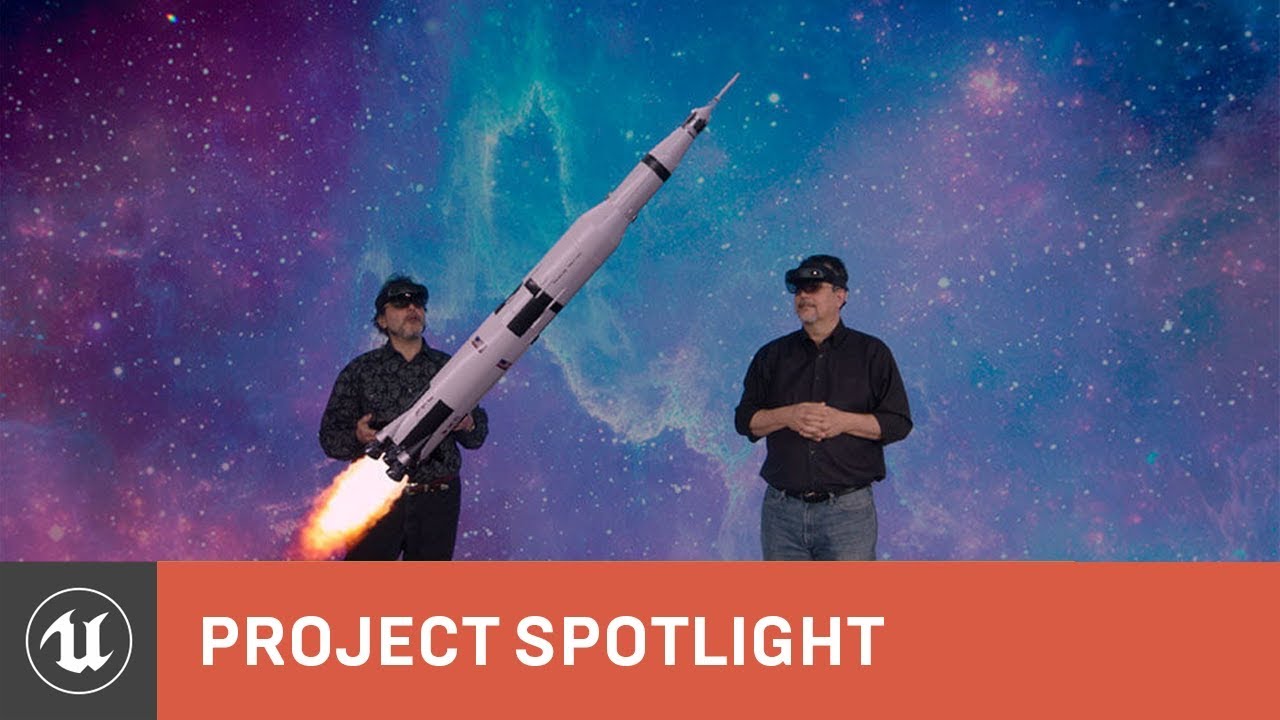
Creative communities across entertainment, visualization, design, manufacturing, and education eagerly anticipate Unreal Engine 4 native support for HoloLens...
I wonder if it renders as nicely through the lenses of Hololens 2
craggy bramble
@dim imp Could you specify what exactly you are looking for? (maybe more context)
mighty carbon
@pearl tangle have you tried Hololens 2 ?
pearl tangle
@mighty carbon nah not yet. I have tried out the streaming stuff with my hololens 1 though, works relatively well. Even puts basic hand tracking in there so that you can use the VR template out of the box
mighty carbon
I see
sturdy coral
Even with the increased fov I think both people would only see a tiny section of that rocket right?
mighty carbon
I just wonder if it looks as "solid" through lenses as it looks externally, so to speak @pearl tangle
I am pretty sure that's the case @sturdy coral
fleet plume
i have an Actor with a StaticMeshComponent set up for generating regular overlap events; the Actor updates it's position every frame
on another actor i have a MotionControllerComponent with a SphereComponent as child, also set up for generating overlap events
and this is the log output when starting an overlap:
[2019.05.07-14.58.49:112][351]LogTemp: Warning: BeginOverlap
[2019.05.07-14.58.49:113][351]LogTemp: Warning: EndOverlap
[2019.05.07-14.58.49:134][352]LogTemp: Warning: BeginOverlap
any ideas why this happens?
sturdy coral
The black parts would not look solid
odd garnet
The Magic Leap One everything looks pretty solid
fleet plume
what's weird is that the first 2 events happen in the same frame
tired tree
@fleet plume are you ignoring actor movement anywhere?
it doesn't clear overlaps correctly when an actor is ignored and starts spamming events
fleet plume
not that i know of
i tried using ETeleportType::TeleportPhysics in case that's the culprit, but no luck
tired tree
print what it is overlapping
fleet plume
the same actor and component
in all cases
[2019.05.07-15.19.38:807][957]LogTemp: Warning: BeginOverlap -- OverlappedComponent ActivateComponent, OtherActor TestVR_PawnBP_C_0, OtherComp TriggerSphere
[2019.05.07-15.19.38:808][957]LogTemp: Warning: EndOverlap -- OverlappedComponent ActivateComponent, OtherActor TestVR_PawnBP_C_0, OtherComp TriggerSphere
[2019.05.07-15.19.38:820][958]LogTemp: Warning: BeginOverlap -- OverlappedComponent ActivateComponent, OtherActor TestVR_PawnBP_C_0, OtherComp TriggerSphere

[2019.05.07-15.19.39:386][  9]LogTemp: Warning: EndOverlap -- OverlappedComponent ActivateComponent, OtherActor TestVR_PawnBP_C_0, OtherComp TriggerSphere
[2019.05.07-15.19.39:386][  9]LogTemp: Warning: BeginOverlap -- OverlappedComponent ActivateComponent, OtherActor TestVR_PawnBP_C_0, OtherComp TriggerSphere
[2019.05.07-15.19.39:397][ 10]LogTemp: Warning: EndOverlap -- OverlappedComponent ActivateComponent, OtherActor TestVR_PawnBP_C_0, OtherComp TriggerSphere

Pimax Forums
Or alternatively… all of us Pimax users have exposed our PCs to hackers who will encrypt all files in our network and hold all our data as ransom for bitcoins.
FYI
tired tree
?
mighty carbon
??
dim imp
@craggy bramble I have a linear visualization with stations around an environment, but I find I can't make a visual connection between the station the player is in and the thing player's supposed to look at
 alpine oyster
have a quick issue, how can i get the velocity of the motion controllers in the vr template
dim imp
I need some indicator that's not dynamic light, to where the player should look
hallow knoll
@alpine oyster Store previous location and compare with current location on tick is one way 😃
alpine oyster
can you explain to me why Get physics Linear Velocity doesn't work?
hallow knoll
Because the motioncontroller component isn't simulating physics