#virtual-reality
1 messages · Page 199 of 1
 tired tree
at least not without introducing a lot of latency
render thread is a frame behind game thread
 dense lance
@tired tree hmm, makes sense,though the thing I want to do is a scenecapture2d (actually 2 of them, to do a stereo scene capture)
I'll try some basic things like loetting it do its own capture instead of manually calling from BP... but I guess I may need to dig into engine code to do what I want, eh?
I guess UE4 designs trying to keep everything running at 90fps with no lag explain a bunch of my difficulties...
tired tree
the engine is multithreaded
you can effect the capture though like the camera is
and that would work for you
dense lance
@tired tree not sure what you mean by "you can effect the capture though like the camera is" - but that sounds interesting, can you explain a little more?
 sturdy coral
@dense lance dethrey mentioned in #graphics the other day that scene capture won't be a frame behind if you set it to always capture every tick, and said if you tick it yourself manually it will be behind
tired tree
ticking it yourself is always bad
its way more taxing anyway
thought that the scene capture was still behind in VR though
unless they fixed that?
@sturdy coral
sturdy coral
I'm not sure, may still not have the late update
if you were attaching it to headset camera or something
dense lance
@sturdy coral @tired tree great news! I don't remember why I changed it to manually capture in BP, but if undoing that will fix it, fantastic 😃 Thanks guys, will report back soon
@sturdy coral @tired tree darn, still seems to be 1 frame behind, will keep on looking into it
sturdy coral
@dense lance look into planar reflection code, that used to be a frame behind too until they fixed it at some point
dense lance
@sturdy coral OK, good tip there., will take a look now. It also occurred to me even if scenecapture2d is ticking at the right point, I am mis-using it and setting position before HMD rotation.
Will do some serious digging before jumping around with more questions 😉
 icy berry
Can anyone help me understand Get Local to Tracking Transform and Get Local to World Transform when referring to ARTracked Geometries
What is the difference between tracking transform and world transform?
I'd love to be pointed to any resource for learning about the two
 charred hinge
@tired tree this is the problem i was describing the other day https://www.youtube.com/watch?v=OzCV8w09aTY&feature=youtu.be

im walking forward in room scale but my camera stays at its start location while the actual character moves
tired tree
@charred hinge no idea what you changed, but default character doesn't even move with the HMDs motion
only the simple one does, and that one you would be traveling with it
you didn't turn off bLockToHMD on the camera did you? though that height offset wouldn't make much sense then
charred hinge
i didnt, but it is off
well maybe i did to try and fix this problem, but starting with the default character and adding a skeletal mesh was like this from the start
so, should i be using the simple character instead then for an fps where you can walk around?
 lucid ivy
Did you auto possess the camera to player 0?
tired tree
@charred hinge no...you should be turning on bLockToHMD
......
the camera won't follow it otherwise
the parent relative is idependant of the camera locally to avoid some delay since the camera updates post physics
so its moving regardless
but your camera isn't set to follow the hmd so it is stationary
you turned off the "vr" mode of the camera
I have AutoSetLockToHMD which is supposed to ensure that it is on for the local character
charred hinge
ok cool that seems to be kind of working now
turning round makes my camera rotate round in a circle
tired tree
surprised it wasn't forcing it unless you turned that off too
tired tree
...
what character did you start with
all of these settings default to the correct ones in the ReplicatedVRCamera
charred hinge
just VRCharacter
maybe i did disable it, just created a new blueprint and it was checked by default
 steep glade
In AR 1 "real world meter" is by default 100 unreal units. That is too small for shadows to work properly for complex models. How do you change the world scale? I've tried changing it in world settings but nothing happens...
Here is the issue in a picture, thin models cast no shadows
But only when iOS preview is on
charred hinge
@tired tree is it normal that try get pawn owner doesnt work in the animation blueprint with your VR Characters?
charred hinge
my body mesh is attached to the parent relative attachment component and i have the animation blueprint set on that mesh
but casting to the character blueprint from try get pawn owner always fails
tired tree
then you aren't using that blueprint
TryGetOwner gets the owning actor of the attachment, which will be the character
charred hinge
TryGetPawnOwner?
tired tree
yeah w/e
it just gets the owning actor and casts to a pawn
its likely returning a valid pawn, but your cast will fail anyway if its not the same type that you are trying to cast too
charred hinge
are you saying im not using the correct blueprint for my default character, because i am
under maps and modes, i have the correct character blueprint, no override in world setting and im casting to that same blueprint type in the animation bp
tired tree
i don't know what you have incorrect
but that node WILL return the owning actor
and if it is attached to the parent relative the owning actor is the character
are you sure your animbp is even updating and assigned? you can print out from its event graph to show what TryGetPawnOwner is returning
charred hinge
yeh it is, the cast is failing and im printing out from the failed connection
tired tree
@charred hinge print out from before the failed cast
and sounds like you are casting to a character that you aren't using
charred hinge
uhm
logging TryGetPawnOwner is logging the animation bp. LogBlueprintUserMessages: [GameCharacterAnimBP_ABP_C_1]
oh and the character is spawning of my body meshes:S
one where it should be and another a bit in the air
wtf
its suddenly started logging the character blueprint now, i have no idea why
nothing is different
and its actually logging it twice now, LogBlueprintUserMessages: [GameCharacterAnimBP_ABP_C_0] VR_Game_Character
LogBlueprintUserMessages: [GameCharacterAnimBP_ABP_C_0] VR_Game_Character1
there is one single vr player start in the level, no characters
im running in vr preview with no server running and 1 player
 mighty carbon
4.22 preview 1 has been released
 weak tide
My packaged builds are running slower than VR Preview. Any initial thoughts as to where to check?
weak tide
like, solid 90 VR in VR preview, dropping to 45 in packaged build
mighty carbon
well, 4.22 officially supports Oculus Quest
 sturdy canyon
It worked fine on Vanilla 4.21, but I wonder what's changed to make support "official"
sturdy canyon
Well last build I did for Quest on 4.22 didn't work.. The right eye was super messed up
I'll try again today
sturdy canyon
Ooh the flipped VR preview in editor was fixed in 4.22 preview 1
That's a good sign for Quest maybe working
Nope Quest is still boned in 4.22 for me
the right eye projection is bananas
This is using ES3.1. Last time Vulkan just crashed, but I can test again
sturdy canyon
Lol and that same build on Go flips color channels and then crashes
at least with a crash I can check the log
mighty carbon
still, it's something that can be reported (and should be!) 😃
sturdy canyon
The PC build is finally pretty good, though
I think the render thread perf might sliiightly outperform 4.21 now
I need to create a better test case
sturdy canyon
How would I test that @wicked oak ?
 wicked oak
make an emtpy map with 2000 cubes
that should be 2000 drawcalls (= tanking perf) in 4.21
if the new mesh renderer works, the drawcalls would be much less
in theory you should get plyable frames
alternatively, can you run a RenderDoc capture or similar on the Quest?
for drawcalls
if every drawcall is DrawInstanced, its the new stuff
 hallow knoll
@sturdy canyon Make sure you submit a bug ASAP if you want it fixed in 4.22: https://epicsupport.force.com/unrealengine/s/
sturdy canyon
Yeah I'll probably get to it soon. As always, I'm juggling a bunch of balls and need to change tasks
 sly elk
I'm considering doing a booth at PAX East. Has anyone brought a VR game and if so, have any thoughts on how practical it was? Booth size to get? Is it just too crowded and noisy?
 granite jacinth
I've done a VR booth once. You definitely will need a nice pair of noise cancellation headphones
As for size, bigger the better. 10x10 min
Bring extras of everything
sturdy coral
looking through 4.22 changelog, I bet we're going to a see a lot of "in engine" promotional footage using this 😇 :
Unbiased, full GI path tracer for making ground truth reference renders inside UE4.
 cold siren
Hey Guys, any one experienced with having their game licensed to a LBE (location based entertainment) company? My VR game is generating a fair amount of interest and I am talking to a couple of companies to license out my game to them. Unfortunately I have no experience in this area, so I was looking for some one with experience in this situation.
 golden snow
@cold siren Are you talking about Arcades?
cold siren
Sort of. These are not arcades as such. But sports bar and cafe type places. Maybe even cineplexes
But looking at gaming arcades as well
Gaming arcades that are not VR specific
But have VR games in them
@golden snow have any experience in this area?
golden snow
@cold siren Yes, actually.The general model most LBVR Arcades use are per-minute-of-play-per-month. So they pay you XX amount for each minute your experience is played. The amount generally varies between like, 3 cents (USD) to 15-20 cents. Your other option, if you are on Steam, is to get your game set up for the Steam Cafe program, and they purchase a recurring monthly license of your game through that. Price per month is generally 1.5-2x the price of your title. So if your game is 10.00, the license fee could be $15 to $20 per month.
I would highly avoid taking life-time licenses - that is, a venue pays you some large, one-time fee to use your game forever. Those types of things are ok if they are on a yearly, or every 2-3 year thing (though, never saw that happen before), but never lifetime.
sturdy canyon
@wicked oak it seems the auto instancing works: https://twitter.com/ShoresUnknown/status/1095601590373777408?s=20

Alright, here goes an @EpicGames @UnrealEngine appreciation thread.
Port City WIP 4.20, super unoptimized, no merging/instancing, just a lot of blueprints... 18k drawcalls.
#gamedev #ue4 #indiedev (noooot quite #lowpoly anymore)

 Twitter
wicked oak
Twitter
wicked oak
should be a similar improvement
of course, the 200 drawacall limit is still there
just now you can use modular meshes more efficiently
and this...
is only stage 1
stage 2 is draw indirect which would make the culling more efficient, and "instant"
sturdy canyon
It might instance my hands for me and a few buttons in SculptrVR
but in total I have about 30 static meshes in game
and hundreds of dynamic ones
nice for most people, though 😃
mighty carbon
Oculus pushed bugfix to their Github UE4 repo for Audio bug I found last week 🤞
I am surprised no one discovered it before me :/ I am guessing most Go/Quest devs are on Unity
 quiet swan
someone said there was a game changing feature coming to 4.22 and one guy said it was going to give us more fps for VR, does anyone know about this? https://www.reddit.com/r/unrealengine/comments/aq4k73/422_runtime_autoinstancing_is_huge_and_we_should/

reddit
116 votes and 50 comments so far on Reddit
 frigid kite
@quiet swan scroll up 👼
quiet swan
oh ok
so is this out yet
im scared to update
I have never updated im still on 4.20 but is it true that if im making a map in 4.20 update to 4.22 then find out something breaks and I need to go back to 4.20, all my work will be lost because I cant go backwards???
wicked oak
DONT
quiet swan
if I keep working in 4.22 for a month then go back to 4.20 I cant right
wicked oak
4.22 is comically unstable
you can try to port just to see if you get some gains
or tinkering
but DO NOT PORT TO IT
at least until its 4.22.3 or similar
quiet swan
but big VR devs are saying they moving their vr projects there
really 4.22 is unstable?
im still on 4.20
wicked oak
unstable level "can instacrash if you have magic leap plugin enabled"
sturdy coral
@quiet swan always upgrade sequentially and fix all warnings and deprecations
never skip a version when you upgrade, go to 4.21 first, then 4.22
But 4.22 isn't truly out so don't go to it at all
Fully test, including testing packaged before going on to the next version, so you can hopefully catch anything that breaks and know which version caused it
lucid ivy
Is there a preference for placing input events (grip button, trigger, etc) in the Motion Controller BP versus the Pawn BP?
mighty carbon

UploadVR
A book out next week tells the story of the founding of Oculus VR based on hundreds of interviews across several years.
I wonder if that's going to be a must-buy like Masters of Doom
 forest plover
Hey this is a sorta design question but how does everybody handle subtitles in VR?
My personal preference is a sorta way where it's in front of you but when your looking at the source for the sound then it moves to be infront of that source and back to infront of you if your looking away
lucid ivy
I would think that when you're looking away, that the subtitles would tend to be on the side of the hide near the source.
You walk into a room and someone starts talking... how do you find that source with ears?
Thinking for the hearing impaired, how does someone who can't hear find that source?
golden snow
Welcome to the difficult challenge I've been trying to figure out for years
Yes, subtitles can be tacked onto the players HMD and follow them around loosely - but that can cause motion sickness or be hard to read, depending on the viewers eyes.
You could put them by their source - but then how does someone hear them? You could add little icons around the edge of the HMD, but that can also cause discomfort and are sometimes hard to see.
sturdy canyon
@quiet swan it's running pretty stable in DX12 for me
but you may run into issues later
ones that I didn't have
I maintain a separate 4.22 branch with just the necessary changes to get my app running, but keep working in 4.21
I'll merge the 4.22 stuff into master only once it's very stable (which is not yet)
@wicked oak I haven't seen noticeable perf gains in 4.22 yet, but I'll watch for it
the auto-instancing would have saved me a ton of work in the old days
And now maybe I won't have to manually instance static meshes in the future 😃
sturdy coral
@sturdy canyon I think main gains (other than auto instancing) are with dx12
maybe only with enough cores, I just say someone's benchmark numbers and it looked like that
sturdy coral
anyone have guesses on what "Partner-vrCluster" is?
"//Tasks/UE4/Partner-vrCluster" in some of the commit messages
ah n/m, it's the nDisplay stuff
sturdy coral
all known "partners":
 -u
//Tasks/UE4/Partner-vrCluster
//UE/Partner-Google-VR
//UE4/Dev-Partner-MagicLeap-4.20
//UE4/Dev-Partner-Simplygon
//UE4/Partner-AMD
//UE4/Partner-Google-VR
//UE4/Partner-Google-VR-Minimal
//UE4/Partner-IDV-SpeedTree
//UE4/Partner-MGPU
//UE4/Partner-Microsoft-DX12
//UE4/Partner-Microsoft-XR
//UE4/Partner-Oculus
//UE4/Partner-Oculus-Staging
//UE4/Partner-Valve
//UE4/Private-Partner-NREAL
Dev-Partner-MagicLeap-4.20
Mustafa.Tungekar_Dev-Partner-Simplygon
Partner-Google-VR
Partner-Google-VR_to_DevVR
Partner-Valve```interesting how VR heavy it is
sturdy canyon
Wait NREAL is a partner while they simultaneously are suing them to change names?
mighty carbon
has anyone experienced this kind of crash with Oculus UE 4.21.2 with 1.34 integration https://drive.google.com/file/d/1t3pYV8Crm9tS9a1I7tu3hhcfuLoIieQE/view
Google Docs
(Oculus Go, 3.57.5.xxx)
@sturdy canyon ^^
sturdy canyon
I haven't tried 4.21 with 1.34
mighty carbon
I see 😦
they did fix Audio bug promptly and I was able to build/package the project, but now it's this damn crash on the device
sturdy canyon
I'm still using Vanilla 4.21 instead of the Oculus Branch
 potent gust
I've found a strange bug. Using Oculus Go, if i load any streaming media source, the game freezes for about 5 seconds until the video loads from the URL.
Any one else get this? 4.21.2 Oculus Source. Nothing special in setup (have tried a fresh project as well)
dense lance
Hey guys, is there some sort of trick needed to scale motion controllers? I change world-to-meters, and scale my actor, which works well, but scaling motion controllers does not seem to work right (scales mesh, but not location)
tried a rescaling half a dozen different components, on example VR pawn and a custom one with no luck, feel like I am missing something simple...
tired tree
changing world to meters scales their movement
dense lance
@tired tree hmm, does not seem to for me, just tried changing in world details (instead of at runtime), with no luck
@tired tree oooh, weird! the mesh (debug or custom) draws in the wrong place, but if I spawn an item at the motion controllers location it is correct
dense lance
right now, the only thing I am changing is the world_to_meters
well, it's good to know it should work OK, still a mystery as to why it is not...
I also get some weird flickering after changing world_to_meters
tired tree
you have late updates enabled?
there was a scaling bug with default controllers and late updates
I haven't used the default engine controllers in so long I don't remember if they ever patched it
I patched it locally in mine
dense lance
late updates will be at its default setting, where can I alter it?
tired tree
its in the controllers settings
try with them off
see if visually everything matches up then
dense lance
@tired tree wow, insta fix!
dense lance
default/debug and custom mesh now lines up, thanks 😃
it may not be a perfect fix, but I can at least now see where my hands are after scaling
@tired tree if I understand correctly, this is a known issue, and will be fixed in future version? (if not already fixed in 4.22)
dense lance
I see...
tired tree
like I said, I fixed it in my plugin and moved on
there are a few things like that now....
mighty carbon

UploadVR
A revealing email from 2015 is said by author Blake Harris to be written by long-time Oculus CTO John Carmack.
A must-read article
dense lance
@tired tree happen to have a list of them somewhere? would be good to know of these pitfalls in advance
tired tree
only in my commits and pull requests, some are old enough that they fell off the bug tracker too
actually though
looking at the source real quick
that should have been fixed
what engine version are you on
mighty carbon
btw, it seems that there is a lot in that article that Carmack retracted from later down the road (especially comfort issues)
mighty carbon
I am getting this crap now:
Fatal error: [File:E:\UE4Source\UE-oculus-4212-release-1340\Engine\Source\Runtime\Core\Private\GenericPlatform\GenericPlatformProcess.cpp] [Line: 45]
FPlatformProcess::GetDllExport not implemented on this platform
Assertion failed: [File:E:\UE4Source\UE-oculus-4212-release-1340\Engine\Source\Runtime\Core\Private\GenericPlatform\GenericPlatformProcess.cpp] [Line: 45]
FPlatformProcess::GetDllExport not implemented on this platform
LogAndroid: Error: === Critical error: ===
any idea what's going on ?
(that a logcat from Go, after my app launches and shuts down instantly)
sturdy canyon
uhhhh seems like it thinks it's a windows computer..
mighty carbon
what could cause it @sturdy canyon ?
sturdy canyon
¯_(ツ)_/¯
sturdy coral
how many race conditions have been fixed in the late update code over time?
https://github.com/EpicGames/UnrealEngine/commit/15adf0776c5c89ba9af3933cf6fef6f4d217b8ba
Fix for Race Condition in LateUpdateManager. Storing another pointer into the same struct does not work if the entire struct has been freed in the meantime.
 hexed kite
can i eject from VR preview?
sturdy canyon
Just hit escape
Or shift+f1 to get your mouse back
Or do you mean convert to non-VR without quitting? Console command "stereo off"
sturdy coral
@hexed kite try ToggleDebugCamera console command, not sure if it works in vr
you should be able to override the debug camera controller class to something that works with VR controls through overriding UCheatManager and setting DebugCameraControllerClass; to your own subclass of ADebugCameraController
steep glade
Hi! I'm working with AR and have a problem I'm been trying to solve for days.
Question (I believe this will solve my problem):
How do I change the "World to Meters" setting so that it affects AR? "Scale of 1 uu to 1m in real world measurements".
Background:
I just opened up the AR template project from unreal and the size of the "BP_Placeable" is really small. This results in problems with the shadows. UE version 4.21.
Problem solved if:
If I scale up the BP_Placeable, the shadows are perfect. But then the houses are almost real life sized and way too big for our client.
Problem occurs when:
When the houses are small, as a real life football in AR. Thats the size our client wants. Thats also the size of BP_Placeable when you just open the AR temp project.
Problem 1:
When I get close to the house with my iPad, and tilt the Ipad, the shadows disappears. In some degrees of tilt, the shadows works, and in some, it doesnt.
Problem Tilt, no shadow on the house
Good Tilt, shadoes are visible on the house
Setting of my directional light
More settings of the directional light, couldnt fit all into one screenshot
Problem solved if: If the houses are in scale 10 the shadows looks great in both the viewport and on the Ipad. But again, way to big for the Ipad experience we are aiming for
steep glade
Here is a video
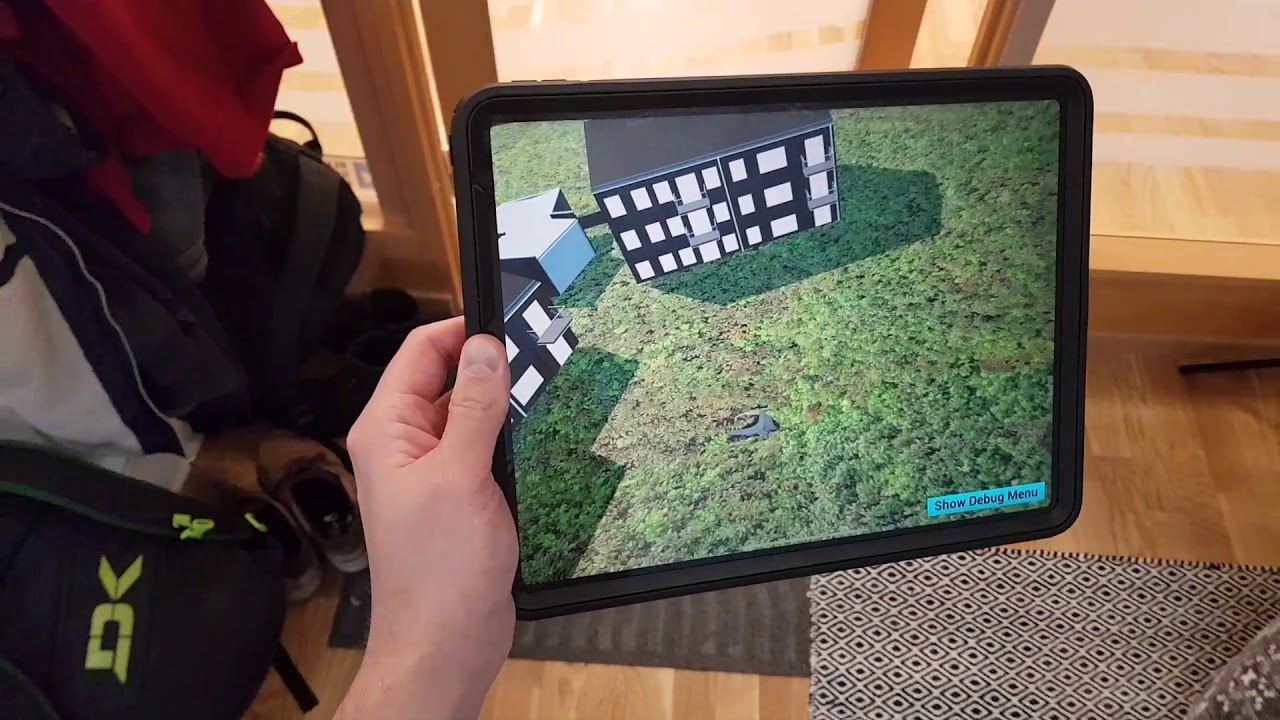
 zinc horizon
Hello everyone, I am trying to setup multiple displays with nDisplay of unreal and I am facing an issue. Anyone here who has experience with nDisplay?
hallow knoll
@steep glade "World to meters" doesn't actually change the scale of anything, and the change can only be perceived when you are viewing the world through two cameras (stereo).
Can you reproduce it with another mesh? Or is it just the houses?
hexed kite
at some point i started getting problems with steamvr, whenever i open steamvr my main monitor goes black for a second, i believe its reconnecting, and sometimes it doesnt close all the way and i have to go into task manager and end like 8 tasks
vr compositor, vr server, steam clients
i tried rolling back my video drivers, didnt work
also when i open unreal, it opens steam vr but its hidden and doesnt close unless i do it in task manager
sturdy coral
World to meters should change the scale of your head/hand other tracked movements as well as ipd.. not sure with AR
 mystic cedar
i had a question about how to throw a reverse in here for the door animation i created with matinee
forest plover
I recommend using a timeline for that.
quiet swan
how is everyone handling their crouching in VR?
are you using a button or some code to crouch?
sly elk
I have 3 different animated flipbooks as inputs for this screen material. What is the best way to switch them from blueprint? https://i.imgur.com/8relp2v.png
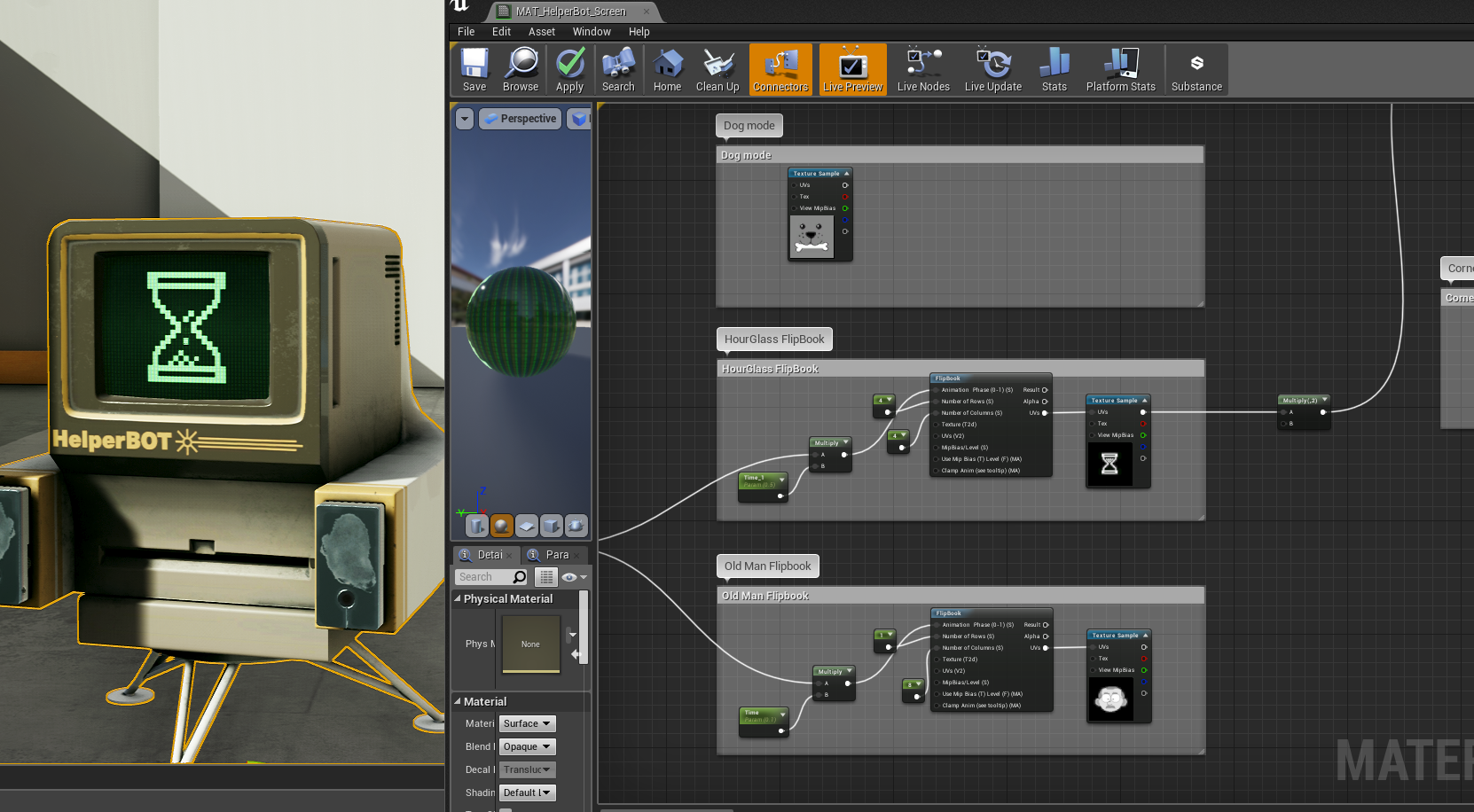
 edgy pelican
@mighty carbon I think I've come across a similar error last month. I believe it has to do with the target platform setting. I remember this issue occurred when I ported a game set for mobile, then switched back to Desktop.
I think the solution I came up with was changing the target platform, then migrating to a new project.
sturdy coral
@quiet swan most just crouch to crouch, but if you support seated usually need a button
mighty carbon
@edgy pelican I only have one platform selected - Android
tired tree
Then you also have to deal with how to handle tracking going below the floor too
edgy pelican
@mighty carbon Perhaps I'm misremembering. What about Scalar 2D/3D and the other setting?
mighty carbon
Scalable 2D/3D is what my proeject was originally created for
edgy pelican
It's possible the error you received stems from a different source, but is a similar error to the one I ran across last month. It looks very familiar.
I certainly remember my solution involved creating a new project and migrating old code over.
The changed I recall making were to the project I was migrating TO.
Er, you get what I mean.
sly elk
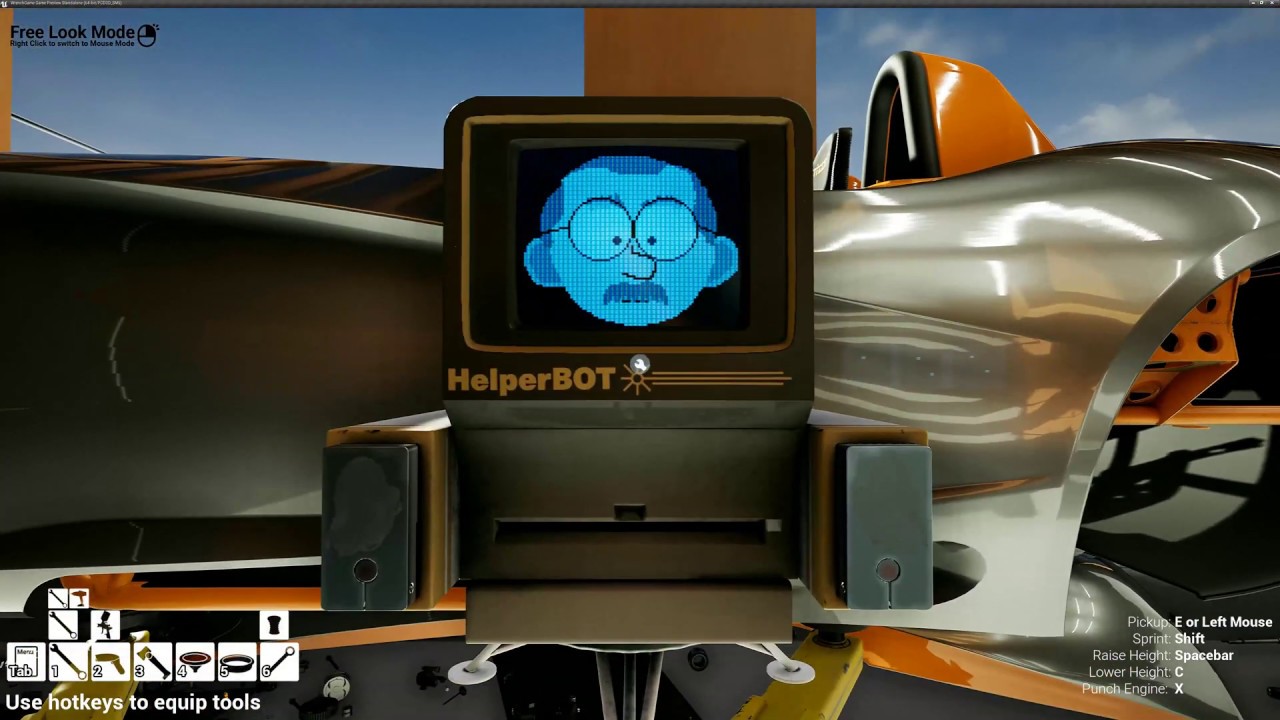 wicked oak
@sly elk those low precision normals in the car
did you try that high precision normal checkbox?
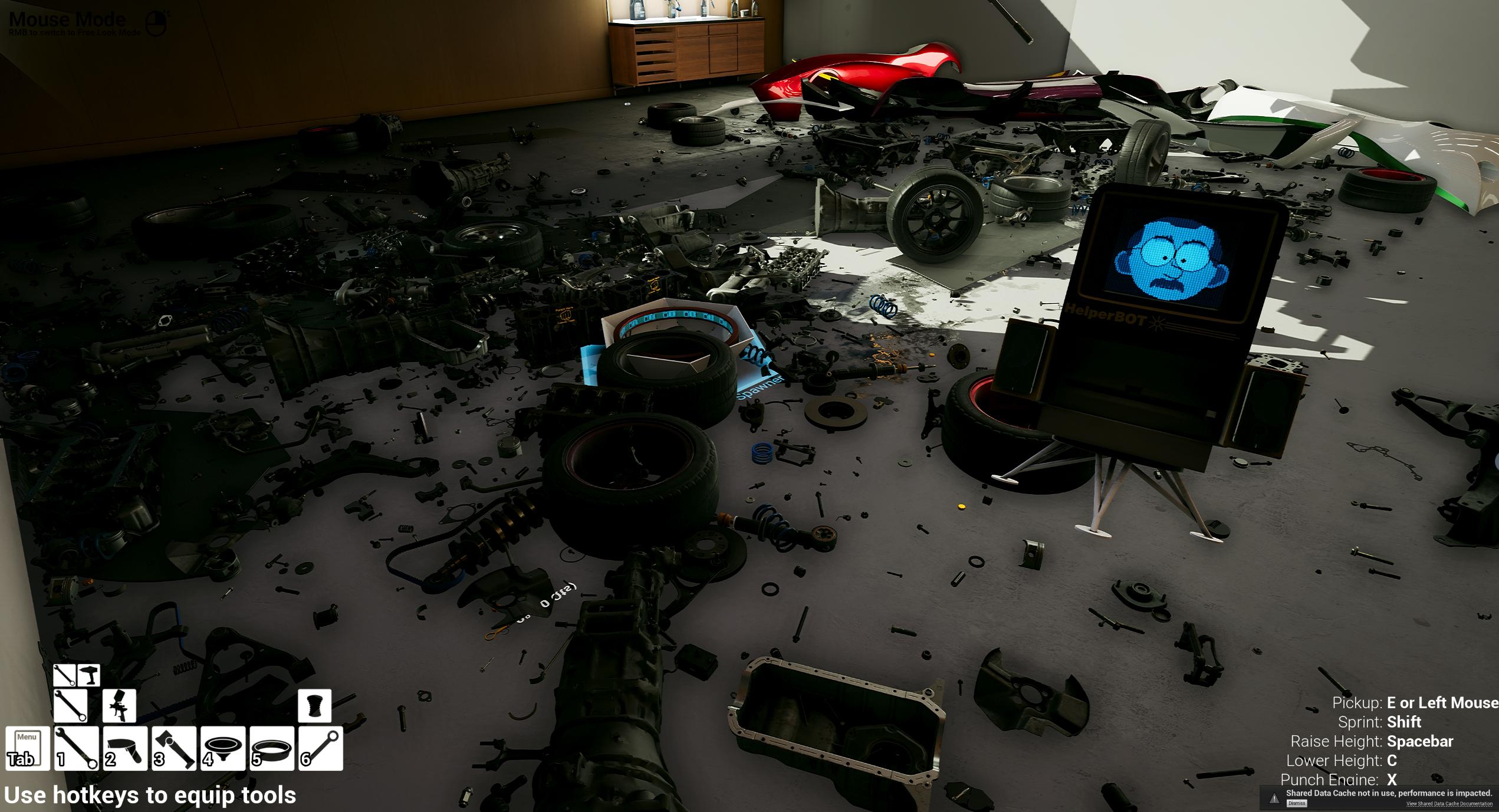
btw, helper bot looks amazing
awesome effect with the screen
sly elk
There isn't a normal map on the car
I think it's just a combination of Geo density and cubemap res causing thsr
wicked oak
@sly elk unreal engine stores vertex normals at 16 bit
it is indeed a precision issue
they have the setting around. Main thing is that it uses more memory for the meshes
https://www.youtube.com/watch?v=bc2r8A7hH64 they comment it here

Announce Post: https://forums.unrealengine.com/showthread.php?112627 Francois, Ryan, Zabir and Jeremy join us to talk about the rendering techniques used in ...
also higher normal precision for the gbuffer
minute 2
sturdy coral
@sly elk this will get much nicer reflection captures without any perf cost of using higher resolution ones:
--- a/Engine/Source/Runtime/Renderer/Private/ReflectionEnvironmentCapture.cpp
+++ b/Engine/Source/Runtime/Renderer/Private/ReflectionEnvironmentCapture.cpp
@@ -40,7 +40,7 @@
 /** Near plane to use when capturing the scene. */
 float GReflectionCaptureNearPlane = 5;

-int32 GSupersampleCaptureFactor = 1;
+int32 GSupersampleCaptureFactor = 2;

 /**
* Mip map used by a Roughness of 0, counting down from the lowest resolution mip (MipCount - 1).```can't raise that var beyond two because it is downsampling in a dumb way
by default it does all the reflection captures with no supersampling, so they are really aliased
I do think that effect you are seeing might be from normals like vblanco mentioned though
sly elk
Thanks
sly elk
wow, sound cues are cool.can't believe I didn't know about these before
tractor beam sounds using exaggerated doppler:
https://www.youtube.com/watch?v=7NJ2U6lndrg&feature=youtu.be
 mystic cedar
Does anyone know if the controls for the first person template vr (vive) you can use the motion pad to virtual walk instead of teleport .. can this be implemented in the actual car template with motion controls ??
Vr* not carp
Car* lol
 warm belfry
Is it possible to teleport onto a landscape object using the template? I can seem to get it to work I have the short stub teleportation issue.
I can teleport in the same scene onto a box brush or a plane ect but not on landscape. My Nav mesh bounds shows that it has detected the landscape just fine. I have also tried exporting the landscape and importing as a mesh object but the Nav Mesh green indication colour never 'hugs' the mesh correctly.
warm belfry
i have a scene which was used for a cinematic and have been asked if I can add VR to it. The scene was built up of various real life design files for example the roads, grassed areas, building site areas ect which are not detected very well by the nav mesh. The green indication has tears in it and it sits way above the actual meshes.
After trying to get the above to work I tried using the landscape which gets a perfect green coverage, I want to try to loosely duplicate my scene topography and make this my collidable ground and use a transparent material.
And also why not, shouldn't we be able to create a VR scene navigable by teleportation using the landscape tool?
 jaunty shell
@sly elk https://i.imgur.com/5zIJdL7.png oh my SSR looks a tad weird here 😄
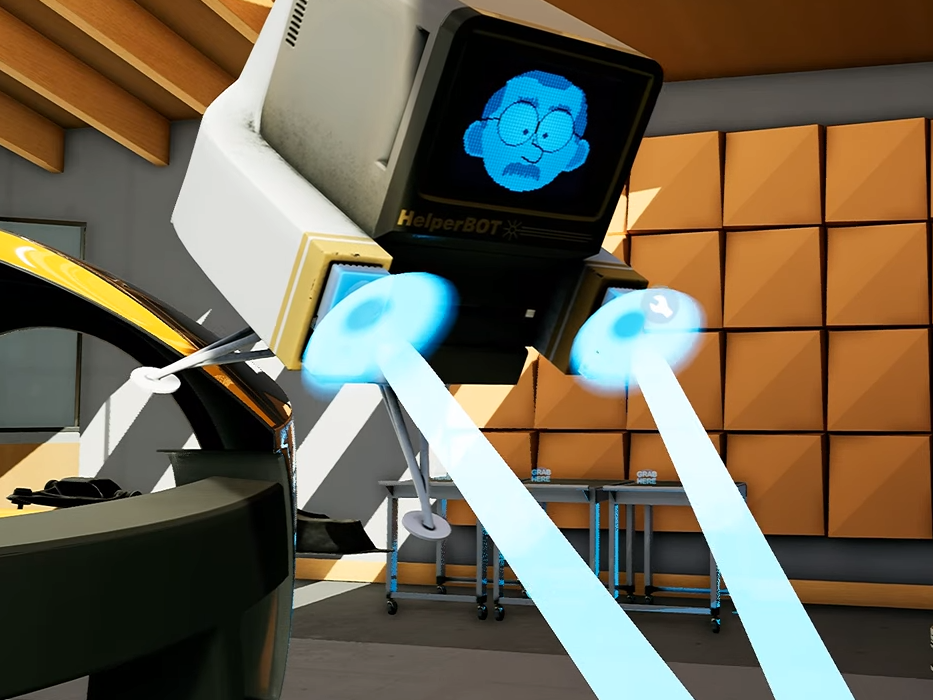
neat doppler sfx though
sly elk
Not much I can do about that. Ssr is an imperfect solution to reflection occlusion
sturdy coral
@jaunty shell you mean the reflections on the table legs in the background?
lucid ivy
would anyone happen to know why my headset will begin tracking while running the packaged product, but not when I play in editor?
or have some suggestions on where to look
sturdy coral
@sly elk @jaunty shell yeah, it wouldn't just be from reflection occlusion. with ssr, translucent stuff is treated as if it were painted on top of whatever scene depth is behind the translucency
so it is as if those beams were painted on the wall back there
but yeah not much you can do about it
jaunty shell
hehe
sturdy coral
you can try dithered opacity with TAA but that may have even more artifacts
mystic cedar
Can anyone point me in the right direction here
I added a health widget to my vr project
First person template hmd btw
Added the widget to the first person np and added it to viewport... comes through when I play the game in first person but not when the game is played through hmd vr display????!
sturdy coral
@mystic cedar you need to add it into a widget component and display in game
normal viewport screenspace stuff doesn't work consistently across HMDs, they have added some support for a debug canvas stereo layer than can do it consistently though
 flat shoal
Hrmm... OO issue... my object that's being held doesn't know if it's in the left or right hand. but the Play Haptic Effect requires that knowledge...
guess I have to supply it at grab time
mystic cedar
Anybody??
sturdy coral
@mystic cedar yes, add the component. you can attach it to camera if you want or do it any other way
 next pebble
with the Vive, is there a way to map action events to the steam button? On the Rift controllers you can map an action event to the left menu button.
Ideally, i want to know if I can do the same for the Vive, and have the left Steam button trigger an in-game menu, and have the right controller steam button trigger steam VR.
sturdy coral
@next pebble nope, all the system buttons are reserved
oculus via steamvr additionally uses the menu button as the steamvr system button and reserves it too
if you are running out of buttons for a menu, look into doing a wrist-watch style one
where you look at a wristwatch and it pulls up a menu, like rec room
next pebble
okay, thanks, I guess we`ll have to go that route
lucid ivy
would anyone have any thoughts on why my left grip input is always less accurate than my right input grip. It doesn't matter which physical controller I have assigned to left, it always misses about 50% of the time when the right controller hits 100% of the time.
sturdy coral
@lucid ivy which system
lucid ivy
Vive
 chrome tinsel
hi all, anyone here tried Virtuix Omni with ue4
mighty carbon
for folks with Vive and eye-tracking https://www.unrealengine.com/marketplace/tobii-eye-tracking-sdk

The Tobii Eye Tracking SDK provides game devs with the tools needed to build interactive eye-gaze enabled games.
mighty carbon
pretty cool ARCore 1.7 stuff https://developers.googleblog.com/2019/02/new-ui-tools-and-richer-creative-canvas.html

Google Developers Blog
ARCore and Sceneform give developers simple yet powerful tools for creating augmented reality (AR) experiences. In our last update (version 1.6) we focused on making virtual objects appear more realistic within a scene. In version 1.7, we’re focusing on creative elements li...
 shadow radish
wow that is neat
wicked oak
@mighty carbon memory optimizations are allways good
mem optimizations = less cache misses = faster
every time
granite jacinth
@chrome tinsel Aye, I have. What's up?
 dim imp
decent glass material setup for VR anyone?
sly elk
Does anyone know if it is possible to re-order compnents in a blueprint? I can't seem to drag them around. https://i.imgur.com/veVaCfU.png
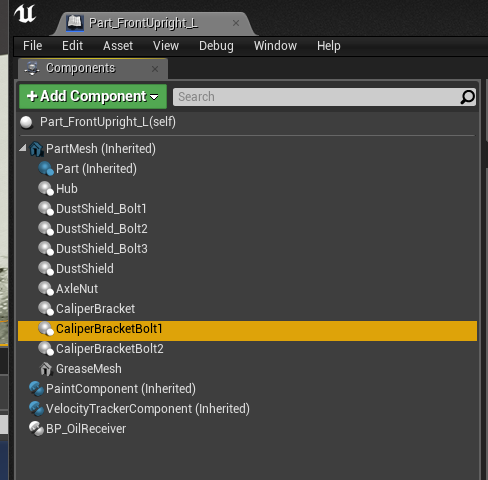
the mechanic assistant works in reverse order (mitigated by all of the install rules) and there are situations where I want to change the install order but not actually create a hard and fast rule
hallow knoll
@sly elk Are you getting children components and want them in a specific order? I wouldn't trust them to be returned "in order" even if they were correct in the component view. In the past I've either sorted them by name (named them "01_ThingComponent") or assign them an "OrderID" int, or use a component tag.
sly elk
These are non critical for order since the game has a whole system for installation and removal rules. Just a minor polish thing to have it do automated assembly in more logical order
so its not worth implementing a whole system to sort by name (hundreds of parts to configure)
wicked oak
@sly elk doing some optimizations for pubg, i found a way to massively increase the performance of component transforms
turns out there is a way to do a "set world matrix" on a component, skipping EVERYTHING
and you can do that from multple threads
sly elk
Cool. We are still all blueprint, though I htink jim is just starting to convert some systems over to C++
Also, our game thread is plenty fast. No slowdown moving lots of parts anymore
Not exactly sure what jim did differently than me when he rebuilt my snapping systems but I can shake the whole car around in VR with no perf hit
wicked oak
thats great stuff
 noble crater
does MSAA work on 4.21 with Quest using OpenGL ES3.1?
mighty carbon
works on GO
noble crater
I read somewhere that on Go it's fixed to 2x and ignores all rendering configs (r.MobileMSAA etc) - that true?
mighty carbon
more like x4 (I don't recall by now), but yes
noble crater
ok, it seems like the same happens on Quest according to engine logs, but aliasing looks so bad in headset I'm finding it hard to believe it's at 4x - but maybe its related to pixel density rather than MSAA
mighty carbon
MSAA only does AA on geometry edges.. It won't do AA on masked textures edges (like render text) or images
sturdy coral
on desktop it works on masked.. I guess not on mobile
mighty carbon
hmm.. I didn't know that. Always seems like it didn't work on masked anywhere (but I didn't spend too much time on desktop so I might just not remember).
wicked oak
@mighty carbon Alpha to Coverage
veeeeeeeeeery expensive
but does indeed do AA on masked, by doing multiple samples on it
mighty carbon
well, I am simply using render text component and that one has masked material afaik
looks all jagged on Go
wicked oak

Medium
Aliasing is the bane of VR. We have several tools we use to try to remove, or at least reduce aliasing in real time graphics today. Tools…
mighty carbon
@wicked oak @sturdy coral there ya go https://i.postimg.cc/2kc2hCFM/com-Supranormal-Albergate-Go-05-20190218-183301.jpg
 sturdy coral
@mighty carbon it has it out of the box on desktop
What are you showing in that image, that it does or doesn't?
Jpeg compression makes it hard to tell
mighty carbon
letters/numbers are clearly not AAed
compare to edges of the geometry
unfortunately there is no way to snap non-JPG image on Go
sturdy coral
Desktop does have it, probably too expensive to default on mobile:
Unreal Engine Forums
All things Virtual and Augmented reality. Development resources, news, tutorials, and discussion inside.
"Yes, any masked materials automatically use OpacityMaskToCoverage. Basically the opacity mask input gets turned into MSAA coverage. You can use it to do dithered transparency with 4 levels for 4x MSAA. It's very useful for foliage. It was cheap enough that we just enabled it by default instead of making it a material option."
That's desktop forward though
mighty carbon
yeah.. I wonder if maybe render text component simply excluded from using OpacityMaskToCoverage
 sturdy coral
@sly elk try with 4.22 :)
sly elk
I haven't paid attention to updates. what happened with 4.22?
oh,, automatic instancing?
yes please
Did the AMD hardware depth buffer bug for oculus users get resolved in 4.22?
sturdy coral
Yeah the instancing
Not sure on that but they just had a depth buffer commit for oculus
sturdy coral
I think for the depth buffer they send to the compositor though
For letting dash overlays integrate with depth
sly elk
is it only for static actors or also movable?
sturdy coral
I think it supposedly ”just works", @wicked oak did a writeup of it on r/gamedev
sly elk
oh cool. I'll look for that
sturdy coral
I think it works on movables but I'm not sure
I know it doesn't help with spline mesh segments
sly elk
why isn't this the bigest feature on the build? This is way cooler than RTX IMO
sturdy coral
Each of those are still a separate draw call
Yeah, seems huge to me too, so much less manual work optimizing things
Here's the post he made, he has a few comments within that outline what is different in the renderer loop https://www.reddit.com/r/gamedev/comments/aq8ocj/the_new_unreal_engine_422_preview_has_automatic/
sly elk
yeah, im reading through it now
what is the HZBO stuff about? is that a new occlusion method?
sturdy coral
Not sure, didn't see that mentioned
You saw that in his Reddit thread or 4.22 release notes?
sly elk
in the twitter posts
we are on a slightly tweaked 4.21 right now- only change is the double depth buffer thing for AMD hardware
will def move to 4.22 soon and post A/B drawcall numbers
sturdy canyon
If you reuse many meshes, it should be 🔥
a bunch of people saw draw calls reduce by 2 thirds
sturdy coral
@sly elk the hzb thing is maybe from hardware occlusion queries (non-hzb) being unable to be auto-instanced. without hzb occlusion queries I think it uses hardware occlusion queries which are apparently one draw call each
hardware occlusion queries sort of pretend-render a rect or simple object on the screen over the object bounds and the GPU reports back whether it would have written any depth pixel if it had really been rendered, if not it is considered occluded
hzb may run each query on the CPU or something or somehow send it as an array that it gets results back on, I'm not sure
mighty carbon
hmm.. apparently stationary point lights are not supported in 4.21.x on Go :/ Unless I am doing something wrong.. Movable - supported (eat performance though, even with shadow casting turned off). Stationary - nope.
dim imp
glass shader for vr anyone?
jaunty shell
@sly elk coming from 4.21 to 4.22, we had a DC reduction of sometimes more than 70%... and we dont really use instancing in our scene since a lot of objects are unique
flat shoal
@dim imp I didn't find any either. I made my own by just plugging a cube map from a scene capture into the fresnel
oh, and I used this, which seems to work (I think): https://community.arm.com/graphics/b/blog/posts/high-quality-reflections-for-mobile-vr-in-unreal-engine
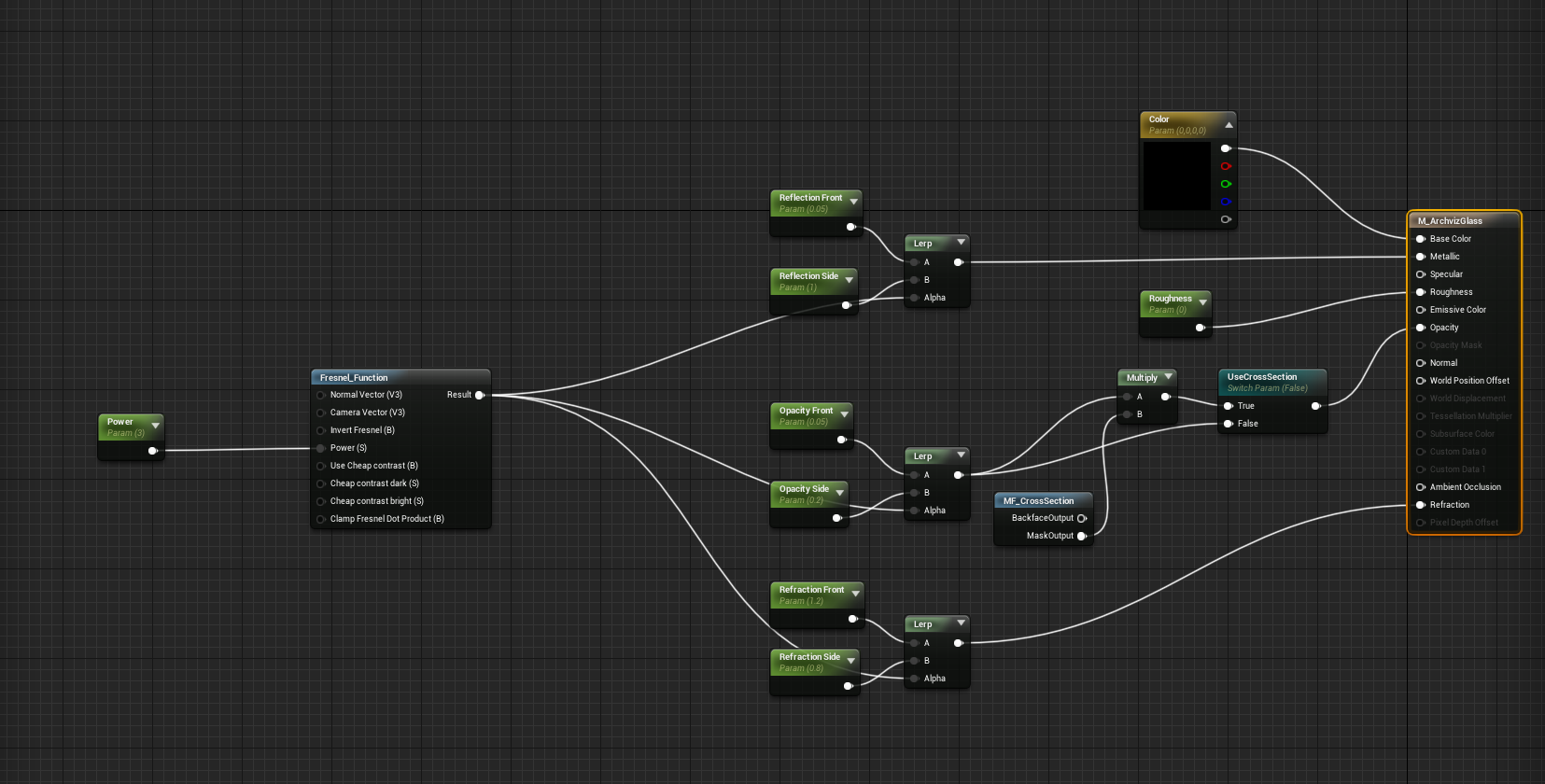
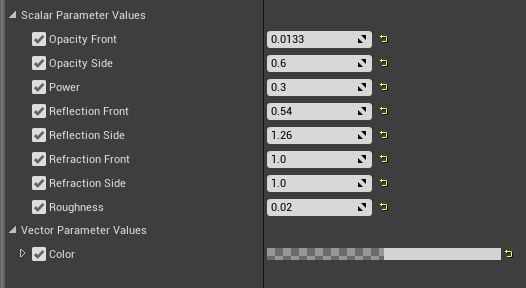 dim imp
thanks ya'll
jaunty shell
these are the values I use for VR
also, not using double sided for VR
since all our windows are basically cubes and not planes
@flat shoal runtime cubemap generation ?
sounds expensive
dim imp
@jaunty shell thanks man I appreciate it
jaunty shell
@flat shoal do you have a video of your results with this article you posted ?
and some performance insights
flat shoal
No, it was a super quick one week project and it looked ok and worked, so I haven't had time to dig into it 😃
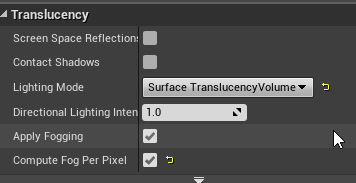
How did you get metallic and roughness AND opacity?
 flat shoal
Oh. Interesting. Why isn't that the default mode? Is it much more expensive?
jaunty shell
surface translucency volume
default is volumetric non directional
performance wise, no clue
maybe a tad more expensive
but it makes glass materials look a loooot better
flat shoal
mmm... here's a comparison between yours and mine I whipped up just quickly
not sure I like the refraction... same issue I had with the "normal" way of doing glass
refraction is just fucking weird in VR
jaunty shell
I said dont mind it :p
its a custom mf
@flat shoal have you used the settings I've posted ?
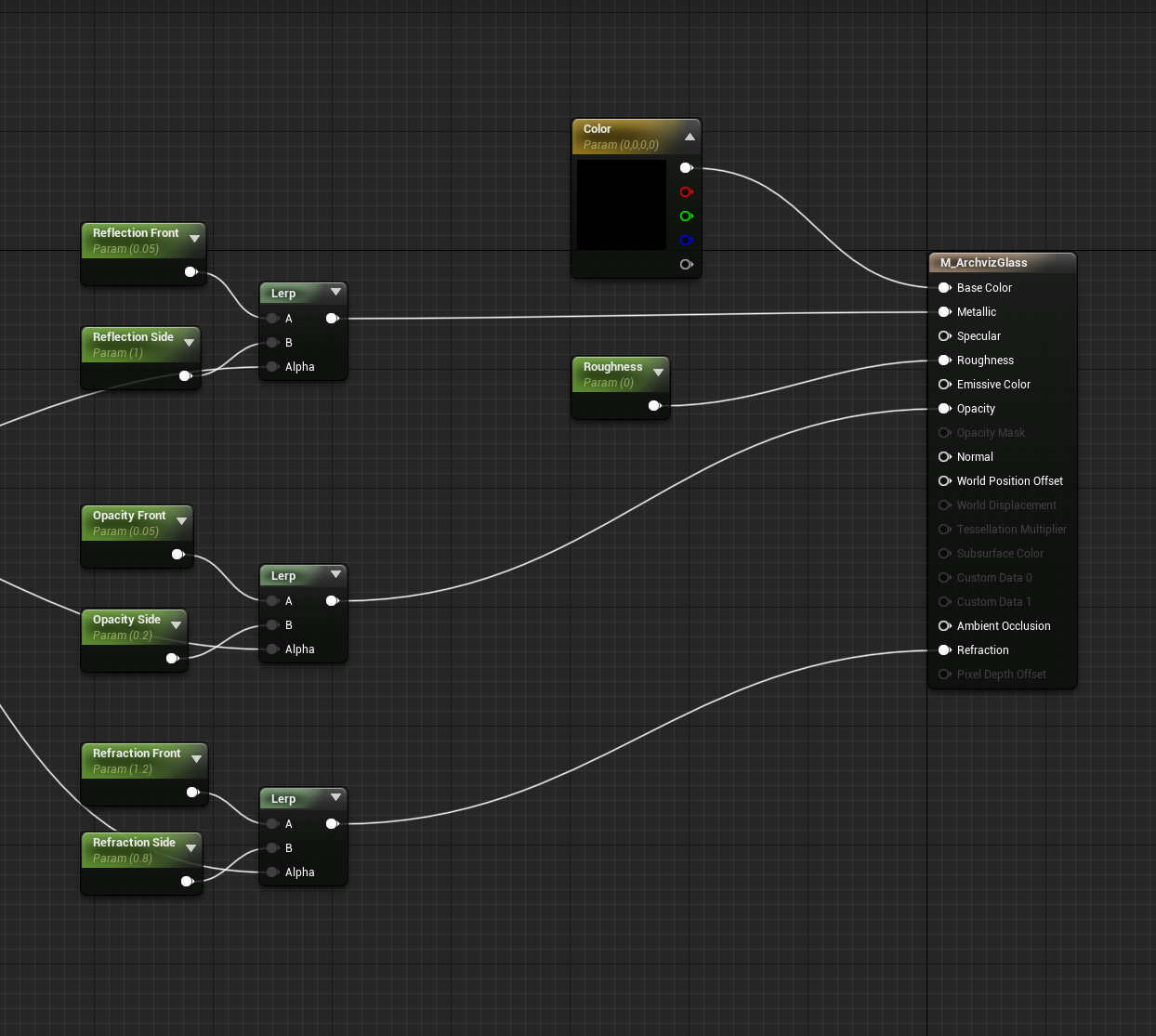
dim imp
then what do I multiply the Lerp with?
flat shoal
oh, missed those
 dim imp
thanks
jaunty shell
the static switch and lerp was for the section stuff
since its not relevant here just plug your opacity lerp to the opacity input
flat shoal
ok, so that's better, a bit strong, but I still like the more accurate reflections of the cube capture
jaunty shell
you can tweak it for less or more reflectivity

this is the exact same setup I used for these shots
flat shoal
yeah... use case and environment matters
my version is less expensive on the "shader complexity" visualisation though. 😉
jaunty shell
:p
 digital musk
Can i use the VRDialComponent to make a dial that I can rotate by just pushing on it...like "spin the wheel" kinda jobby?
tired tree
@digital musk as in not holding? Just touching? Use a physics constraint on a simulating object for that
digital musk
Yes, that's what I want...just push by collision
tired tree
yeah, then a simulating wheel with a single axis physics constraint on it
you "could" run that purely with logic, but that would be both overkill and less accurate
digital musk
This is probably a stupid question....but does the default hand models have collision?
dim imp
Hey guys. I have a problem! VR template->new map -> MotionControllerPawn into the lvl -> not working
digital musk
I'm lost when it comes to skeletal meshes....where would collision be set up?
jaunty shell
the asset with the orangeish line is the physics asset @digital musk
this is where you define your collisions
sly elk
downloading 4.22 now, will post A/B drawcall numbers. We have our own manual instancing system but its set up on specific parts and only active when parts are installed. Basically if there are a bunch of the same bolt in one part, we batch all of the installed ones.
so do I need to do anything to turn on the instancing or will it work automatically?
sly elk
cool. What is that new occlusion option about?
sly elk
ah okay. Also, how does the instancing work with VR? Still two drawcalls per object for each eye?
jaunty shell
there's the new culling solution for VR too
yeah it works with VR @sly elk
I had a huge performance boost from migrating to 4.22
sly elk
wait, so we aren't paying the mesh draw call twice per object for stereo anymore?
dim imp
how to activate it?
jaunty shell
scenes I couldnt use in VR are now easily playable
no clue about the render load
havent benchmarked that deep
its already on @dim imp
dim imp
is it in vr template or what
sly elk
its an engine change sparks
jaunty shell
Round Robin Occlusion
that's what I was referring for the culling stuff
dunno if it improves performance a lot though
tired tree
its defaulted on in 4.22?
pretty sure its still optional
unless they changed something I am unaware of
jaunty shell
the robin stuff is off by default
tired tree
yeah
tired tree
the instancing will help a lot in unoptimized scenes
jaunty shell
indeed
mighty carbon
what do you think of 4.22, stability-wise? Will it be one of those unstable releases ?
jaunty shell
havent had much crashes apart from when using raytracing
sly elk
so this is my 4.21 vs 4.22 A/B testing. our current instancing system is minimizing the difference when the car is assembled. The exploded car change is pretty significant.
https://i.imgur.com/TbjH9sz.png
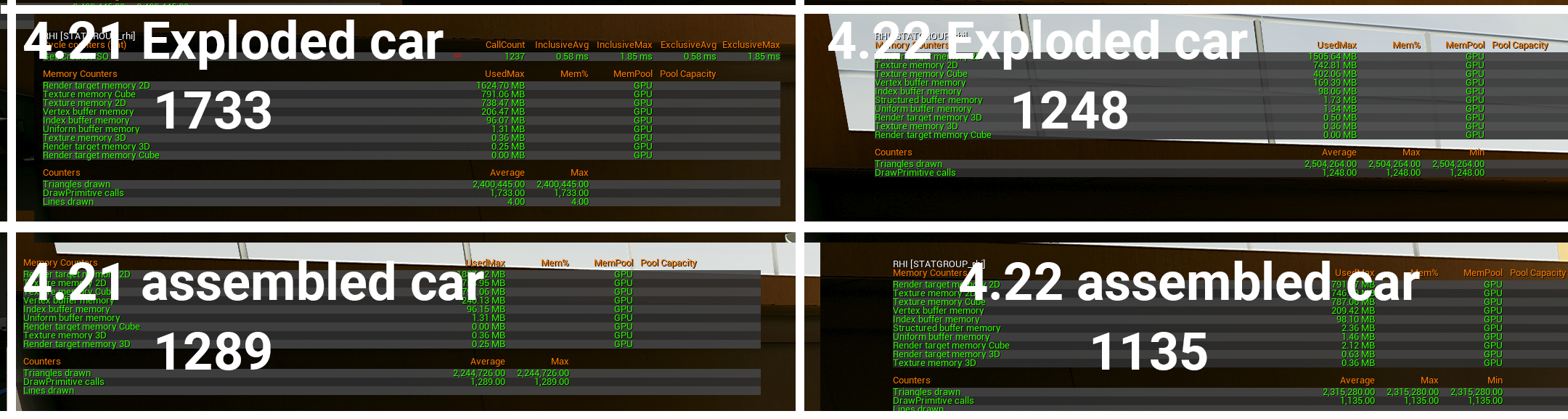
PSVR drawcall targets. 1000 workable? I had thought PSVR would not work for our game but with this engine build we are down to under 1000 with shadows off
jaunty shell
hmm not as much as our tests, but still a good amount of drawcalls less
sly elk
yeah, our content is super different
sly elk
none of our fasteners are generic though, they all match the real parts
so there is limited re-use
and where they are reused we already had our instancing system helping out
even two bolts of the same length and thread pitch might be different in different parts of the car (different head forming, coating, etc)
either way, saving almost 500 drawcalls is a huge win for us since our game is drawcall bound on low spec VR machines and that has been the hardest thing to optimize
jaunty shell
cool 😃
 lusty lark
Hello! Does anybody know how to show FPS in VR? I am trying to use the console command "stat fps" and turned on the "DebugCanvasinLayer" but the fps text is like on the corner of the lense and its impossible to see anything. I am using 4.20.
lusty lark
For me is impossible to understand the numbers.
😦
So no other way of showing fps in vr?
jaunty shell
@lusty lark use the steamvr debug
lusty lark
yes! I totally forgot about this! Thank you for reminding me! 😃
lusty lark
This is new, I will try it now.
jaunty shell
yeah it was on that floating graph before
lusty lark
Ahh, the text is even further in the corner.... Impossible to read.
jaunty shell
I kinda liked it, on the back of your hand
hmm
that steamvr debug should be in the center of the screen
more or less
lusty lark
I will try restart everything, just to be sure.
hmm, nope
Nothing shows up. Is it possible that it doestn work because I am using Vive pro?
lusty lark
I got it working, the compositor wasnt working. 😉
btw what was the math for converting ms to fps?
jaunty shell
Frame rate unit conversion between frames per second and frames per millisecond, frames per millisecond to frames per second conversion in batch, fps Frames per millisecond conversion chart
hmm
 wraith sky
Is Varjo VR-1 - scam?
mighty carbon
only one way to find out - pay $6000 and try it @wraith sky 😛
 wicked oak
@sly elk PSVR crunches drawcalls better than PC
the bottleneck on PSVR is the pixel performance and the game-thread CPU performance
sturdy canyon
My bottleneck on PSVR is definitely draw calls
sly elk
We don't have much expensive pixel fill stuff.. Can turn off SSAO and the other expensive stuff easily
triangles are easy enough to scale with art changes
but drawcalls have been the hard thing to downsize
Its at under 1000 with shadows off in 4.22. The only PS4 game I worked , I think I remember it having a lot fewer than that
like 600
sly elk
what is the player base expecation for PSVR games? is 60fps mode considered junk by the players?
sturdy canyon
players don't seem to even notice the different modes
sly elk
well thats good 😃
sturdy canyon
I have never heard anyone on the PSVR reddit recommending games because of frame rate
sturdy coral
@sly elk some of the instancing may not be able to apply if your parts use different materials for level of wear and tear (think I saw you posting some texture work on stuff like that)
I think it would still apply for the depth render portion though even if there were different materials
sly elk
Yeah. We also just have way less repeat parts than you might think
So im messing with attenuation for an audio component attached to the hand
so far I can't get it to attenuate near and far as I move my hand closer and further?
nevermind, figuredi tout
my audio component was accidentally a child o the motion controller root, not the hand
so it wasn't moving
mighty carbon

Microsoft had a chance to storm the market with Windows Mixed Reality but failed to capitalize on their ownership of the Windows platform by making PC requirements too high, limiting the market to only the shrinking demographic who use desktop PCs or the tiny segment who use ...
interes... oops, so much for making WMR first class citizen in UE4
(maybe it makes sense for enterprise, but then who uses WMR in enterprise sector)
sturdy canyon
But yours doesn't crash or show up with broken color channels?
 shell karma
anyone know of a solution for a outline post process which would work with forward renderer ?
digital musk
I'm missing something obvious......how do I enable VRExpansion plugin, VRCharacter to do roomscale VR...how do I get the capsule to follow the HMD when physically walking around?
 celest basin
Aight... I'm new to VR in UE4... Been playing with the demo project
I'm using WMR headset and got it going in the motion controller map (after a bit of input mapping)
But if I put the VR pawn in an empty level it doesn't work properly and I can't figure out why : /
jaunty shell
@celest basin are you sure you are taking control of your pawn ?
jaunty shell
 celest basin
that'd be an auto posess thingy wouldn't it?
jaunty shell
yup
unless you have a game manager doing that stuff
you'll need to auto posess your pawn
celest basin
but the test map (that works) doesn't have a game mode in it?
game mode is where you autopossess?
damn I'm rusty
celest basin
yeah, I remember that (sort of)
I was just trying to figure out why the test map worked without a game mode
celest basin
I think I found it
sweet ta 😃
I vaguely remember the conversation about that being a bodgy way of doing it but it being ok for quick tests
celest basin
sweet, now I can go and look at all my half arsed test levels in vr 😃
I don't know why, but I like the MS mixed reality headset better than vive
celest basin
less fuss I guess
jaunty shell
controllers are janky
celest basin
that's what the young guy I work with said so I never tried it
jaunty shell
its pretty sub par compared to the vive or vive pro
celest basin
till now
jaunty shell
the screen on the dell WMR is bad
celest basin
k, I got the HP one?
jaunty shell
LED stuff looks washy
celest basin
well, work does
jaunty shell
should be more or less the same
only headset that sets the bar higher is the samsung one
and its revisions
celest basin
hmmm... I've been on it for about a week
jaunty shell
if you can try a vive
celest basin
seems fine
jaunty shell
like test one screen then the other
celest basin
yah we got vive at work too
jaunty shell
you'll see the difference is mindblowing
celest basin
had em both here on the weekend
but didn't do a side by side...
will def do
gave it a burl last year,
(vive)
just so many cables and power supplies...
jaunty shell
I went wireless 😄
celest basin
must be one of those subjective things
jaunty shell
only cable I have is the powerbrick for the headset
celest basin
have you had a chance to get anything decent going on a headset, or just playing like me?
jaunty shell
well I make at least a new project that is VR ready per week soo
and I earn money for it, so I guess its not really called playing with it 😄
celest basin
sweet 😃
jaunty shell
celest basin
I know it's weird that I like this more than the vive
jaunty shell
last one I made
celest basin
great stuff! (updates LifeForLifes user notes)
jaunty shell
xD
celest basin
Procedurally generated?
celest basin
ok, two secs, got some mad shit for you

This video shows an infinite, procedurally generated city made from a set of ~100 blocks using the Wave Function Collapse Algorithm. Download a playable buil...
apologies, it's unity
jaunty shell
oh yeah I member
flat shoal
@mighty carbon Interesting, as I just read that HP is working on a high end WMR headset... wonder how that will go...
celest basin
yah, not sure what to make of that article
lot of commenters not overly agreeish with him
flat shoal
we wanted to get WMR headsets for our sales people, because the Vive is a nightmare to set up
also, the Steam requirement for Vive is ridiculus in an enterprise environment
celest basin
Yah, I'm finding the one hdmi, one usb (3) thing really good
no power packs, no light houses, no steam
and heap cheaper
don't get me wrong I really like the vive
Wonder what the weight diff is?
@jaunty shell deff going to do that side by side now
jaunty shell
wmr's been getting the dust for a while now
we also bought it for "mobile" use
but well
I dont like it
celest basin
It's proll the way forward for me, I can't afford a vive
flat shoal
@jaunty shell the use of Unreal's default Vive meshes hurts my eyes 😛 for the love of god import the ones from the Steam folders by Valve instead! 😄
celest basin
but I'll use the vive from work to make sure anything I make is "cross platform"
cross VR platform
jaunty shell
@flat shoal these ones are fine imo
one day I'll try to reuse my custom animated vive wands
also using defaults means the mesh changes depending on the headset and controllers used
mighty carbon
@sturdy canyon I posted issue on Oculus github, with a screenshot. Lightmaps are broken for me, besides performance being crappy.
chrome tinsel
anyone here worked with Virtuix Omni, Leapmotion and Oculus in 1 project? 😄
Im currently having an issue and would like to discuss 😄
 daring mural
I have an actor (gun). I have another actor (gun sight) that I spawn and attach to the first (gun). The gun sight has a 2d scene capture in it.
For some reason, when I grab the gun while the gripping hand blocks the scene capture, the hand grips the gun and the scene capture stops updating until I release (or grip elsewhere with another hand or anything). How might this scenario cause the scene capture to stop updating? And ONLY if this exact thing happens? If I just grip the gun normally without obstructing its view, it never stops updating once it's gripped and everything works.
sturdy coral
@daring mural if you only update scene capture on move and scene capture is attached to a skeletal mesh that is occluded and has only tick pose when rendered set you won't get further movements
Depends on your detailed setup
lucid ivy
A look at what I'm working on http://gibsonhh.info:8081/revit/video/HomeConfiguratorSC_2.20.19.mp4 Home configurator for models from Revit
Although, I suppose it could work on any imported geometry
oh, here's a fun one. This program would NOT build in 4.21, but when it did it brought up the Product Viewer start screen
now in 4.22 it WILL build but doesn't bring up the start screen and doesn't work as shown when played in editor.
 quaint lintel

Unreal Engine VR issues - hidden video
hey guys, I have an issue where a colliders are activating when not looking at the object. I have made a short vid on the issue, but I have no idea what is happening. When I move the controller across the objects it works fine, but then when I move my head away, you can see that it is being activated.
frigid kite
@quaint lintel Set a breakpoint on the code which activates the object and check what triggered the call, what object entered collision
quaint lintel
Thank you good sir....... it was my widget
daring mural
@sturdy coral I have 'update on move' and 'update every frame' both enabled by default
to clarify, when I grip, the hand that was blocking the view moves out of the view and attaches to the gun
but the camera fails to update from that point on and the hand is seen as if blocking still.
but it's really just a still-frame on the texture
sturdy coral
@daring mural try turning off update on move
sturdy coral
looks like 4.22 preview 2 fixes some instanced stereo issues
Fixed! UE-70123 Multiuser Presence actors are unset by default
Fixed! UE-69757 Multi User crash when painting foliage
anyone know what that is referring to?
ah wow, how did this miss the changelog?!?
    "FileVersion": 3,
    "Version": 1,
    "VersionName": "0.2",
    "FriendlyName": "Multi-User Editing",
"Description": "Allow collaborative multi-users sessions in the Editor",```"ConcertFrontend" plugin
mighty carbon
pretty cool... I wonder if anyone uses this feature
sturdy coral
it does seem to have VR support:
./ConcertSync/ConcertSyncClient/Source/ConcertSyncClient/Private/ConcertClientVRPresenceActor.cpp
jaunty shell
oh
this is what we found a couple weeks ago
so they are going forward with it
GDC announcement maybe ?
mighty carbon
I wonder if 4.22 will have LOD tools for skeletal meshes
jaunty shell

Road to VR
HP is exploring what they’re calling the “VR snacking” concept: a simple way to enhance traditional CAD workflows with the benefits of VR visualization. From phones to tractors to planes and office buildings, pretty much any mass-produced product today begins its life a...
hmm 🤔
tired tree
@sturdy coral ~nvm was looking at an unreplicated section
ah nevermind, only parts of it
mighty carbon
"local only" as on LAN ?
hallow knoll
I'll be demonstrating how to set up a VR Spectator Camera and what you can use it for on today's livestream: https://forums.unrealengine.com/unreal-engine/events/1586143
Unreal Engine Forums
VRTrailerCameraForumHeader.jpg
WHAT
On this week’s livestream, learn how to create a project agnostic, VR spectator camera in your UE4 project. Our team will
It'll be beginner friendly, and from a fresh project
mighty carbon
just camera? no controllers?
hallow knoll
@mighty carbon Controllers hm?
mighty carbon
motion controllers
hallow knoll
I'll show it can be controlled with keyboard+mouse or gamepad
Also grabbed by the VR player etc
You meant the VR player controlling the spectator camera?
 snow trout
anyone know how to add the ability to throw objects
mighty carbon
cool @hallow knoll I'll watch (probably after it's posted on YouTube, since I am at work)
hallow knoll
@snow trout Attach on TriggerPressed, Detach on TriggerRelease and add velocity to the detached object to simulate a good throwing arc <- simple way
Make sure to simulate physics when detached 😃
snow trout
ok another thing when we open a new templet for vr then enable the controllers they work fine but when we enable them in out project they don't work (they do appear and we can see them)
hallow knoll
@snow trout You need to be a bit more specific. How are you going about "enabling" the controllers in your project?
snow trout
through the side panel in game mode override in gamemode settings
hallow knoll
Did you migrate any content from the VR template?
tired tree
@hallow knoll pffft, no swivel preview screen no spec camera ;p
hallow knoll
You can replace the default pawn in game mode with the MotioncontrollerPawn, but you have to make sure that you also migrated the motioncontroller blueprint
@tired tree swivel preview screen? :b
hallow knoll
It's not telling me much unfortunately. Are there any warnings or errors in the log when you play?
snow trout
well my class is almost over so ill be back tomorrow
mighty carbon
@hallow knoll do you mess with Oculus Go by chance ? If so, maybe you guys can make a training stream about setting up Blueprint multiplayer for Oculus Go for 2-4 player "game".
hallow knoll
@mighty carbon I've worked with quest more than I have with Go, so I would probably do a stream on multiplayer for Quest. Which shouldn't be very different from regular Android networking in terms of connectivity etc. I already have a direct IP template project that works on PC and Android. Would you expect a subsystem like steam/oculus or would Default be ok?
mighty carbon
@hallow knoll Preferably with Oculus OSS
hallow knoll
@mighty carbon If some of my ventures working with Quest comes to fruition after it's release, then I'd love to do that
I've shipped a game with Oculus/Steam subsystem support, but never on mobile
mighty carbon
Sounds like a plan, thanks @hallow knoll
sly elk
oculus go/mobile vr hardwre- only works with forward renderer or can you run the deferred path?
jaunty shell
You could use deferred
but performance is much better with Forward I think
@sly elk thinking about doing a mobile version of Wrench ? :p
sly elk
yeah. early z pass is the sticking point
right now the full engine is just under 250 draw calls (4.22 instancing) and 400k triangles
i can drop the triangles easily
sturdy coral
I thought it only worked with mobile forward, at least Go
(more limited than desktop forward)
sly elk
mobile forward still forces early z pass, right?
sturdy coral
not sure, @mighty carbon may know
sly elk
yeah. Because if we have to double the drawcall count and triangles because of early zpass its more or less a non starter
sturdy coral
@sly elk I think with 4.22 vulkan multithreading is improved and may let you push to more draw calls, but I'm not sure if it applies to mobile
but yeah you would still have double the geo cost
sly elk
Is early zoass going to be a ton of work to take out of forward?
I'm an artist so I don't actually understand how this stuff works :)
sturdy coral
@sly elk could you maybe make combined meshes for some of the assembled state, and then not show all the parts at once in the unassembled state
like choose a subset of stuff to work with, phase 1, phase 2, phase 3 etc.
sly elk
Yeah, it would just be a massive pain in the ass
And would be limited to non moving parts
sturdy coral
@sly elk another thing to look into is there is a system for making combined skeletal meshes at runtime
Utility for merging a list of skeletal meshes into a single mesh.
sly elk
We are all syatic meshes.
sturdy coral
yeah it would take reworking
but could allow animation and stuff with less draw calls
though there are other costs to skeletal
mighty carbon
I know nothing about z pass - I just use whatever is default in the Rendering project settings.
sturdy coral
it also requires a shared material
sly elk
This is the downside of building something odd ball. Off the shelf rendering features are not set up for you
mighty carbon
also, mobile Vulkan doesn't quite work with Oculus Go (and I assume Quest) - multiview / multiview direct is borked and without multiview you will not get good performance in mobile VR
sturdy coral
@daring mural did that fix your problem (turning off update on move)?
quiet swan
how can I add an invisible pawn to my Camera? My AI is shooting off to the left of me and the AI dont shoot me unless I go up close
digital musk
How do I get the a reference to the Class of a 3dWidget in blueprint (what widget is displayed in it) I want to cast to it to set parameters in the widget, but need a reference in the 3D actor
mighty carbon
GTX 1660 Ti is out and it's better than 1070.. Should be a new good deal GPU for desktop VR
sturdy coral
They are supposed to be good, they have more cores than the desktop variant so they can run at lower clock freq with similar performance
So, much better than the earlier mobile generations from nvidia
 sonic lake
@quiet swan we develop and demo VR on laptops with 1070 and they work fine.
 lethal lava
Occulus Rift - every time i play the editor AS VR - i have to quit the first time and play 2nd time.... rift shows "LOADING UE4...." in a grey world forever.
Is this a bug, is ther ea patch or something? Oculus software is up to date - no updates available.... 4.21 source build.
hallow knoll
@mighty carbon @sturdy coral Can confirm, new MSI GS65 Stealth is a beast!
And battery life is phenomenal for a gaming laptop
sly elk
i have a 1080 based laptop that runs VR quite well. Its just gigantic and needs to be plugged in a lot.
mighty carbon
@hallow knoll how is cooling? 😃
hallow knoll
At idle you can barely feel it on the chassi
I haven't done any tests, but after a few hours of editor work it's warm but not hot
mighty carbon
nice
btw, Hololens 2 announcement can be watched here https://goo.gl/rzqHKe (Sunday)
Microsoft at MWC19 Barcelona
wicked oak
@sly elk mobile doesnt do prepass
and by the way
i actually removed depth prepass as an experiment
turns out removing it is fairly trivial
you only need a couple lines of code change in DeferredShadingRenderer.cpp
its slow
i did extensive benching for DWVR in ps4
prepass enabled vs disabled
honestly.... i left it enabled
in ps4, the depth prepass renders so fast that it was a net gain
lucid ivy
Does anyone else find that after they run a packaged product with VR, they have to restart the editor to do a VR Preview play from the editor?
lucid ivy
man, finally got it doing what I want it to: http://gibsonhh.info:8081/revit/video/HomeConfiguratorSC_2.22.2019.mp4
 full junco
anyone has any idea when nvidia will finally release an updated VRWorks UE4 integration with VRS?
sturdy coral
@full junco I wonder if they might be waiting on the runtime render graph now
wicked oak
@full junco in theory, adding support for VRS can be done by any of us without much trouble
use rendergraph to launch a compute shader that creates the vrs texture, and then enable it/disable it when rendering geo
full junco
@wicked oak well, you mean by anyone who's using 4.22
wicked oak
or not even rendergraph, i think you can make it work by using render-to-texture from a blueprint
and then implementing the enable function
full junco
but even then, I'd expect it to not be super easy, otherwise nvidia would just quickly create a VRS-only branch of UE4 if it would just be 20 minutes of work for one of their devs, at least then they could claim some VR games make use of it
wicked oak
you can look at vrs in their demo
it really is 3 functions
its so weird they are taking this long to implement it
given that in theory it shouldnt take more than a couple hours to add
its significantly simpler than LMS
maybe its becouse they dont want to implement VR VRS only
and want to add the adaptive quality stuff for flat games too
which is significantly harder
full junco
if you think it's so simple, you should take a few hours and add it in some public branch and let everyone in r/gamedev and r/nvidia know about that you have done it, would be a bunch of good press about you 😛
wicked oak
i have thought about it
full junco
then do a benchmark with some existing UE4 demo and say "look, I just made VR 40% faster in UE4"
wicked oak
but becouse im doing some other things and not doing vr much, i havent done it
i would definitely try to add it to 4.20 for dwvr
full junco
I'm still on 4.19, but what works in 4.20 also works in 4.19 😄
btw, do you know if the Pimax fixed foveated rendering is using VRS? @wicked oak
wicked oak
not likely, but i have no idea
full junco
it only works on RTX cards, and it's doing FFR, so I wonder what else it would be if not VRS
I don't really want to buy a RTX GPU just for being able to try to implement VRS myself
if I had one, I'd try it
wicked oak
the demo they have has "foveated rendering"
except its only where you point the mouse XD
but the same exact logic would work on an eye tracker
full junco
due to dynamic resolution and temporal upscaling with only part of the render target being used during rendering, the VRS texture would need to be updated every frame, right?
wicked oak
no
for fixed foveated, creating it on the place that allocates the gbuffer would work
if you use dynamic res, yeah go use it
but i think it would work better if you implement your own dynamic res with VRS
the demo they have uses a compute shader that takes some parameters like fovea center and angles for resolutions, and writes the texture
for unreal, you would run that when creating the gbuffers, and then enable it when doing base-pass
then disabling when doing postfx
full junco
why disable during postprocessing?
wicked oak
becouse the postfx is a pixel shader, if the pixels in the postfx have different sizes, its likely its going to do weird shit
better keep the postfx at full res
unless its something like tonemapper
i think something like TAA or bloom could artifact pretty heavily on vrs
full junco
ok
but the performance impact of VRS will be limited if all PP stays same costly as before
wicked oak
would need to be checked if it artifacts
the best gain i think would be for the base-pass
in forward
saving all that super-expensive pixel shader invocations would go great
full junco
well, too bad I don't have an expensive base pass 😄
 broken moat
having an issue when slicing a procedural mesh
the vr hmd keeps blacking out when the mesh is meant to slice then coming back shortly after
I need to figure out why its blacking out
anyone seen this type of issue before?
quiet swan
is anyone here using any of the IK marketplace plugins for full body in VR?
Im looking to get a fully body VR IK system that will work in roomscale is this possible>
?
mighty carbon
@full junco how is your project doing on Steam?
full junco
@mighty carbon fine I'd say 😄 I can't live from it yet, but I'll just keep working on it until that's the case, and for now it's most important that there's a community that cares about the game, and that's the case, so I have nothing to complain about
mighty carbon
Cool stuff
wraith sky
Pimax started sending KS rewards:
https://www.youtube.com/watch?v=keENURYhn14
My Pimax 5K Plus finally arrived today! The Pimax 5K Plus is a virtual reality headset with the largest field of view of any VR headset on the consumer marke...
 wheat holly
@full junco What did you made if I may ask?
full junco
will tell you in DM 😄
sturdy coral

The Verge
Designed to get work done.
mighty carbon
Cool stuff.. I am guessing no integration with UE4
sturdy canyon
Tim Sweeney literally got on stage to announce support
sturdy canyon
Magic Leap..
granite jacinth
Interesting stuff for sure. No dev kits though. And supposedly only selling to enterprises for their workers
Maybe false information or just too early. Don't see how they wouldn't want devs to buy so they can support contracts
sly elk
Helper bot is almost ready for first release: https://www.youtube.com/watch?v=8Kc2KAl4Ask

The new helper bot + tractor beam for carrying multiple small parts at once.
dense lance
I get some weird "flickering" when changing worldtometers in ue4 - like occasionally for 1 frame it changes back to 100 - but not really sure... Anyone have any ideas whats up, or know a fix?
sturdy coral
The new kinect supports using multiple sensors at once!
$399 each though
But you will be able to get 360 coverage by using multiple.. it was kind of possible with kinect v2 but you had to use multiple computers and network them, or use the linux drivers
and even then I think the shutters weren't synced and it was possible to get interference
dense lance
@sturdy coral sounds nice for full-body VR detection!
sturdy coral
haven't found all the new specs yet, but I think it was mentioned earlier it would be 1024x1024 depth
v2 is 512x424
here's order page, yeah 1MP depth:

Microsoft Store
Buy the Azure Kinect DK developer kit and PC peripheral that contains a best-in-class 1MP depth camera, 12MP RGB camera, and 360˚ microphone array for building advanced computer vision and speech models.
12MP camera, I think that's about 5K equivalent
$359.10 Special pricing for eligible students, parents, teachers, and military.
discount for parents now? fuck off lol
dense lance
well, parents do have an expensive life...
probably even worse than the world flicking when worldtometers!=100 😄
not finding anyone else with this issue online, I better try in a fresh project and see if it persists
sturdy coral
wow they actually have linux support on the new one too
dense lance
Good! I mostly do my gamedev in windows, but only because it is better supported
sturdy coral
yeah, same here
dense lance
weird, in a new project, changing worldtometers in the world setting, things are fine, but with a tiny bit of BP to change it during runtime, and I have the issue where it flickers back to it starting value
 tiny aspen
same, linux ftw
dense lance
hmm, fixed my flicking issue, new project, restarted, did a little dance and all seems well for now...
don't like not knowing what my issue was caused by, but still happy it is no longer showing its face
 teal gazelle
Anyone know to fix vr in a map that allows everything but vr?
Like teleportation and hand gripping\
teal gazelle
??
sturdy coral

The Verge
Microsoft has made significant commitments to being open for the third era of computing
mighty carbon
I wonder if they change that UWP stuff in their Marketplace too
quiet swan
IS IT BAD TO USE bloom IN vr?
quiet swan
how can I show the fps in the vive headsset? the code im going wont show in the vive only on the PC screen
also should I be worried about this?
it says I cant save my pawn
digital musk
Can anyone give me more info on what Oculus Overlay does in BigScreen?

UploadVR
Bigscreen's 2019 update is here packing a huge number of new features. The developer also confirmed the app is coming to Oculus Quest.
"Another major improvement to BigScreen is, well, the screens. The app now uses real-time raytracing for more realistic lighting effects. Screens will light up rooms in realistic ways, without placing intense demands on the hardware running the app. There’s also improved clarity on virtual displays thanks to Oculus Overlay support."
sturdy coral
@digital musk it enables it to be rendered at native res ideal for the screen (I think overlays are sampled as part of lens warp)
while the app itself can run at a lower res
digital musk
Is that different to this - https://vrfix.fandom.com/wiki/Oculus_Overlay?
I'm just confused as to how something so old now suddenly improves clarity in BigScreen

VR Fix Wikia
Oculus Overlay is a program that can warp in realtime any source content of any size from any desktop window into the Oculus Rift format. It is necessary for getting a lot of things working with...
sturdy coral
@digital musk I think they just mean the oculus go equivalent of steamvr overlays/oculus compositor layers
"timewarp layer" is what they call it on the oculus side, or called it at one point
if you draw to the screen, and then the view gets reprojected with timewarp, it introduces a resampling step which blurs UI
so I think they wait until both timewarp and lens warp were occuring to sample from the layer (which are maybe a combined on gearvr/Go?)
basically, lens warping adds resampling, and timewarp adds resampling, so even if your app is rendering at a 140% render target to be ideal for the screens after warp
digital musk
Is that then similar to Stereo Layers in UE4?
sturdy coral
UI will still be blurrier than it could be by directly sampling the texture at that stage
yeah I think those are implemented with it
I don't know if mobile can integrate with depth the way desktop UE4 can (to allow in-game stuff to overlap the layers, only with stereo layers on oculus, not steamvr yet I think)
digital musk
Thanks.....so do you think the article has the terminology slightly wrong? Should be "OVR Overlay" and not "Oculus Overlay" to make it less confusing, or do I still have the cat by the tail?
sturdy coral
I think so, but I don't know that for sure. I think ovr overlay is the unity terminology
or they said overlay because that's what steamvr calls the equivalent concept
but I'm not sure exactly what oculus calls it, might have had two different names before gearvr sdk was unified with desktop
digital musk
I googled Oculus Overlay and that pervious link to 2013 code was all I could find and that just didn't make sense to me.
Anyway...I'm looking at building a system where I can open documents, pdf etc inside UE4 in VR, so that bit of the article intrigued me
sturdy coral
@digital musk that would be ideal for that kind of use, you should just be able to use stereo layers
but for steamvr they will overlap everything right now
steamvr does have depth support now, but I don't think ue4 has implemented it yet
 pine heart
Hey guys. Is this diagram correct? https://imgur.com/jgdRuzt
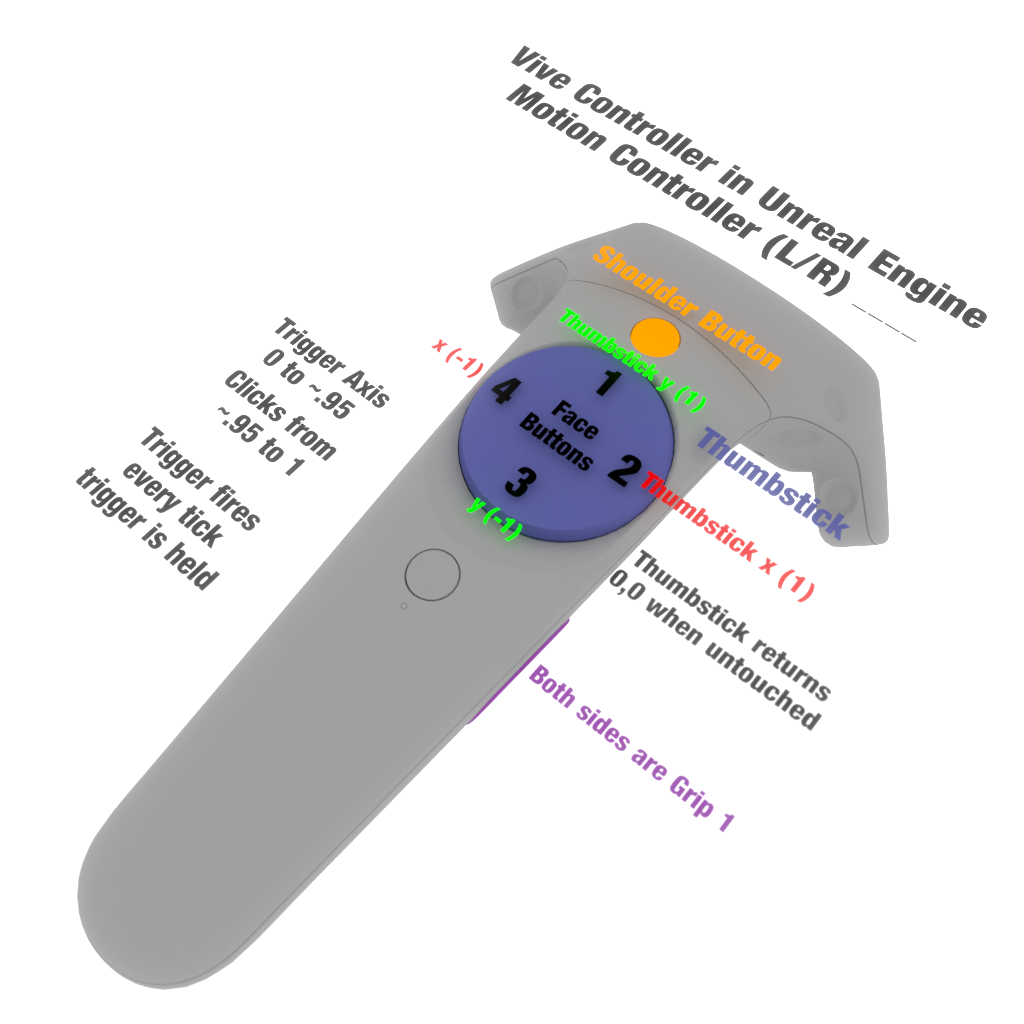


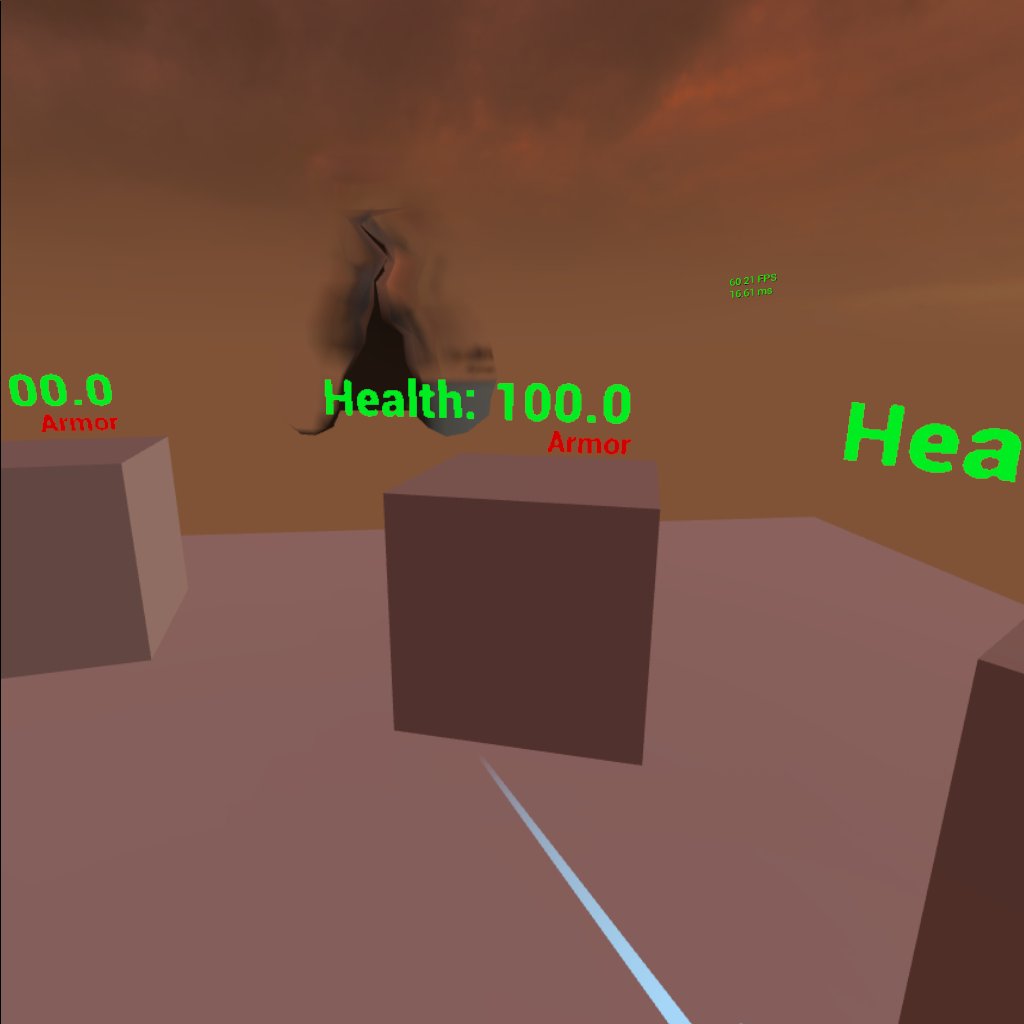


I am unable to to map the face button 1 for both left and right controllers. Also facebutton 2, 3 and 4 work fine
mighty carbon
@hallow knoll by chance, have you used level streaming on mobile VR (or Android) ? I am wondering what are the best settings for streaming levels on Gear VR / Go / Quest (so that there are no hiccups in gameplay while level is streaming on the background) ?
hallow knoll
@mighty carbon I've worked "with it" but I didn't have to manage the settings, so I'm not much of a help
mighty carbon
😦 ok, thanks
 spice mural
anyone had this before?
 real needle
My VR game is pushing a realistic style instead of a cartoony one.
The only reason I've found to use Forward rendering is MSAA and ISR.
The amount of features lost and the material compiling (bugs? intended functionality?) I get when I even just add a float node without connecting it, are making me start to question it. And I haven't seen many updates to it since it was introduced.
Looking for other opinions. Should I suck it up and stick to forward? Should I use deferred?
If there's other things I should consider please tell me
sturdy canyon
@spice mural yeah I had that at one point. What engine version are you on?
Are you using an AMD graphics card?
sturdy canyon
Hmm the AMD bug that looked similar was fixed in 4.21 iirc