#virtual-reality
1 messages · Page 197 of 1
 granite jacinth
then it just means, that they will always get the best of the best every year
think Magic Leap
but 3000 less
(plus phone price I suppose)
but since you'll have dual purpose for phone, maybe not add
 cunning depot
Isn't the processing power of a phone far worse than that of the minimum requirements for an Oculus Rift or a HTC Vive, meaning the games running are either extremely heavily optimised (along with worse textures) or run like shit?
 wicked oak
cunning depot
wicked oak
cunning depot
Nope but I'm curious to
wicked oak
beauty
cunning depot
Interesting kk 😛
cunning depot
Mhm
granite jacinth
I'm generally surprised each time I played on my Go/Focus and what I was able to play on the Quest
granite jacinth
yea
cunning depot
I usually treat my PC as my beast, giving it an 8086K and GTX 1080, so I have an assumption the VR experience on a phone is no where near as good
granite jacinth
That's why I can say that it's surprising what we devs can do on that hardware
cunning depot
But pretty cool 😛
wicked oak
Quest superhot is the real deal
its the full size version
finally
hellomonkey on mesh shaders
using textures for the vertex data
 dusky moon
Is it just me ? every single announcement by HTC vive in the past 2 years after the launch of Vive itself was so underwhelming.
this silly product design (the controllers lmao)
granite jacinth
IMHO, there must be a lot of internal issues at HTC
They are spread too thin
Their big mistake was selling off most of their phone div to Google
which ended up costing them a lot of money in the long term for that initial lump sum of $
HTC's VR division is probably undermanned
And receiving a lot less money for R&D
compared to Oculus
Facebook VR w/e it's called now
Facebook Reality Lab
cunning depot
I'm sure they, at least now, get a lot less money from customers too because of its ridiculous pricing compared to the Rift
 sturdy canyon
I like the controllers design. I don't like the headset design
PSVR is still the only one where people can kinda look cool wearing them
cunning depot
Though when you're playing in VR, does the headset design even matter? 😂 Other than weight and comfortability
granite jacinth
It does to one's mind
sturdy canyon
It does a bit
granite jacinth
Perception is everything
cunning depot
LOoool
granite jacinth
Would you buy a cool-looking HMD versus some ugly thing at first glance without knowing the insides?
cunning depot
Yeah but that's the point, without knowing the insides 😛 If I did know the insides I'd buy the ugly thing
granite jacinth
Your average consumer doesn't know what is inside
cunning depot
True fair point, I keep forgetting about the average consumer
granite jacinth
They only care what games they will be able to play
cunning depot
Mhm
cunning depot
Ye
granite jacinth
Marketing is everything
cunning depot
😭
granite jacinth
Quest Launch...
That trailer
You could smell the hype from everyone in that room
sturdy canyon
Quest is really fucking good and will have a lot of badass content
Cosmos might be good, but almost certainly won't have the content
And will probably cost way more
dusky moon
no but look that design of controllers means they never get big and taken serious! medieval/skyrim aesthetics come on! all the oculus products look just like a serious product that can be mass used... not these silly looks that only satisfies some people's tastes.
granite jacinth
Also, another reason they may have went SteamVR is because their terms/agreement with Valve
Not sure how their partnership was for use of the Lighthouses and how much it cost HTC to use them
(if anything)
But, could be a cost-savings thing they went inside-out as well.
Along with the possibility that their terms did not allow for another HMD with SteamVR unless they paid big money. And/or because Valve really is producing their own HMD and they don't want anyone to have LightHouse3.0 tech.
(all pure speculation)
 granite eagle
Looks like they're going all in on the "eye" marketing
Doesn't give me a lot of confidence unless there's notable improvement to perceivable resolution
 real needle
Since the Quest is essentially the first VR console, should I be targeting "high end mobile" rendering from the start of my new project? The constraints would be beneficial for desktop performance anyway.
 mighty carbon
they might update UE4 with mobile Vulkan when Quest is out (or before it's out)
there are still bunch of bugs in ES3.1 for VR in UE4
but sure, why not - the more people use ES3.1 and report bugs to Oculus and Epic, the more chances for it to be fixed and to become first class citizen
real needle
Thanks. Reading about Vulkan status now. Maybe i'll just work in the low-medium range PC settings! Moderately stylised anyway so shouldn't be too complex for any option.
mighty carbon
Do you have VR hardware ?
(Go in particular, or Gear VR)
if not, you might want to either invest into it (or apply for Oculus Start program) or wait for Quest.
 formal abyss
Is there any solution to switch your HMD between player controllers when testing VR multiplayer?
 sturdy coral
@formal abyss if you just want to do it between pawns you could do it with possess, but I can't think of a way to do it with player controllers
 jaunty shell
With the newly added vr.RoundRobinOcclusion flag enabled, stereoscopic frames will only kick off occlusion queries for one eye with an alternating scheme (ie. odd frames only kick off queries for the left eye; even frames only kick off queries for the right). This cuts the nu...
Labels
VR / AR
yall knew about this ?
mighty carbon
Yep
But I didn't see any performance gains in mobile VR
(Maybe because my level is super simple)
real needle
@mighty carbon I have a Vive, and likely won't target anything newer or hotter during development (2yr schedule). My main goal is to make something that looks good in first-gen consumer vr and state-of-the-art mobile vr (let's say quest /motion controlled WMR when the time comes), with minimal hassle to port.
 daring mural
Anyone else here use BIK?
dusky moon
Hey guys! I just launched my Patreon for my VR project 'False Mirror' ⚡
check it out here @
https://www.patreon.com/alllesss

Patreon
Become a patron of Ali Eslami today:
Read posts by Ali Eslami and get access to exclusive
content and experiences on the world’s largest membership
platform for artists and creators.
 past pier
Alright im just lost, why do i have 4 touch controllers?
its like its duplicated the player controller?
sturdy canyon
Do you have a player in the level and a player spawn point?
I think it defaults to spawning a second player in that case
past pier
When i delete the player from the world, it doesnt spawn one, it just goes to the default VR setup
I also have this issue (hang on)
From my understanding, the center of the VR world / the ground, is the center of the world here, but it seems the height it all messed up when playing and im completely confused as to why
sturdy canyon
you can easily check if there are two players by scrolling through actors in your level after pushing play
past pier
its normal without this setup
 tired tree
The center of the VR tracking is the center of your capsule
capsules are zero'd at center point
sturdy canyon
turn off that capsule's collisions, too
past pier
ah there was two
past pier
its already off
it was the default player controller
alright, so ive figured out i have two players, and does that mean that the capsule is half way into the ground or something?
sturdy canyon
I turn off that capsule. Then player's world location will be the floor center of your VR tracking
the camera will track the head if you click that checkbox, and it will be 1.5m above the player's position
past pier
yeah, that makes sense tbf, doubling the half height fixes my issue, so i can walk around and stuff, but its not perfect, thanks for the help guys!
sturdy canyon
Oh I guess that capsule is part of the Player Character. It also comes with a movement component
I use the Player Pawn as my base rather than Character and so I don't even have a capsule
cunning depot
Just wondering, is this discord able to help people who are completely new to VR development or is it for existing VR developers to discuss 😛
sturdy canyon
if you're completely new, your best bet is to start by reading the getting started documentation and testing out an example project
cunning depot
Alright ty 😃
formal abyss
How are you guys developing VR multiplayer and testing your project? Do you just use 2 HMDs? Or is there another solution?
sturdy coral
@formal abyss add a mode in 2d mode that can do some simple emulation of VR, see robo recall for an example of how they did it
then you can test all on one machine
another good tool is make sure everything works with demo recording and demo replays
then you can do stuff and go back and look at it in editor later with the ability to put in breakpoints etc.
the hardest part is completely separate bugs can show up when you are the host controlling a character, when you are a client controlling a character, when you are a client observing another client controlling a character, when you are a client observing the host controlling a character, and when you are the host observing a client controlling a character
wicked oak
seems facebook is recruiting vr devs
i got contacted by one of their london office recruiters. Personal message, not a classic mass mail
i managed to get proper multidraw on the mesh shader stuff
now with that, i can render AS MANY MESHES AS I WANT in one single drawcall
of any mesh type i want
tons of meshes in one drawcall
and its unlimited
i can just add as many meshes as i want
"culling"
mighty carbon
@wicked oak so, are you quitting PUBG for Facebook VR ?
wicked oak
no
perf numbers of mesh shaders, currently super unoptimized
50 million triangles, 2500 drawcalls. GPU 16 miliseconds (60 fps), CPU time too small to measure
mighty carbon

Welcome to the first platform update of 2019! With the holidays behind us, it’s time to look ahead at the features and enhancements coming soon to Rift. We’ve got plenty to discuss in coming months, but for now we’re going to focus on two exciting new social features: P...
 sullen vortex
guys has anybody used gameworks flex fluids in vr?
mighty carbon
@granite jacinth sounds like one of those naysayers
VR lacks content, that's all
Rift is $349 now, VR PC can be built on a budget. There are no AAA games though.
(and really, a lot of PC gamers have VR ready PCs - they just don't care for VR for that simple reason)
sturdy coral
wmr is like $200 or less a lot of times
and lots of hardware stuff has come down, ram is still a bit inflated
sullen vortex
is any of you using gameworks at all?
sturdy coral
gpus have finally come off the crypto boom, we definitely should have been looking at fairly cheap VR-capable laptops by now but aren't quite there yet
@sullen vortex I used VRWorks for a while but they haven't updated it in over a year
probably not going to go back to it
sullen vortex
have you checked the nvidia announcement on vr works?
sullen vortex
i was asking cause im starting to rough a concept that has fluids and smoke, its for training, and they are a must
its on the nvidia presentation from yesterday
sturdy coral
what did it say?
even if they put out a new VRWorks UE4 release now, they've lost my trust that they will keep it up to date, they are behind by 3, almost 4 engine versions on vrworks
sullen vortex
looking for it
sturdy coral
@sullen vortex have you looked into the vr funhouse example? they have smoke sim on the fire arrows
sullen vortex
tried to compile it but threw a ton of errors of missing data
sturdy coral
have you tried the version from the stores just to see it?
sullen vortex
could succesfully build olento´s branch
yeah, thats a modding tool, cant do so much
here is the announcement, it seems to be related to the new htv vive pro eye and foveated rendering:

Watch a replay of NVIDIA CEO Jensen Huang's press event at CES 2019 in Las Vegas, where he unveiled the GeForce RTX 2060 GPU, more than 40 NVIDIA RTX-powered...
here is the article:
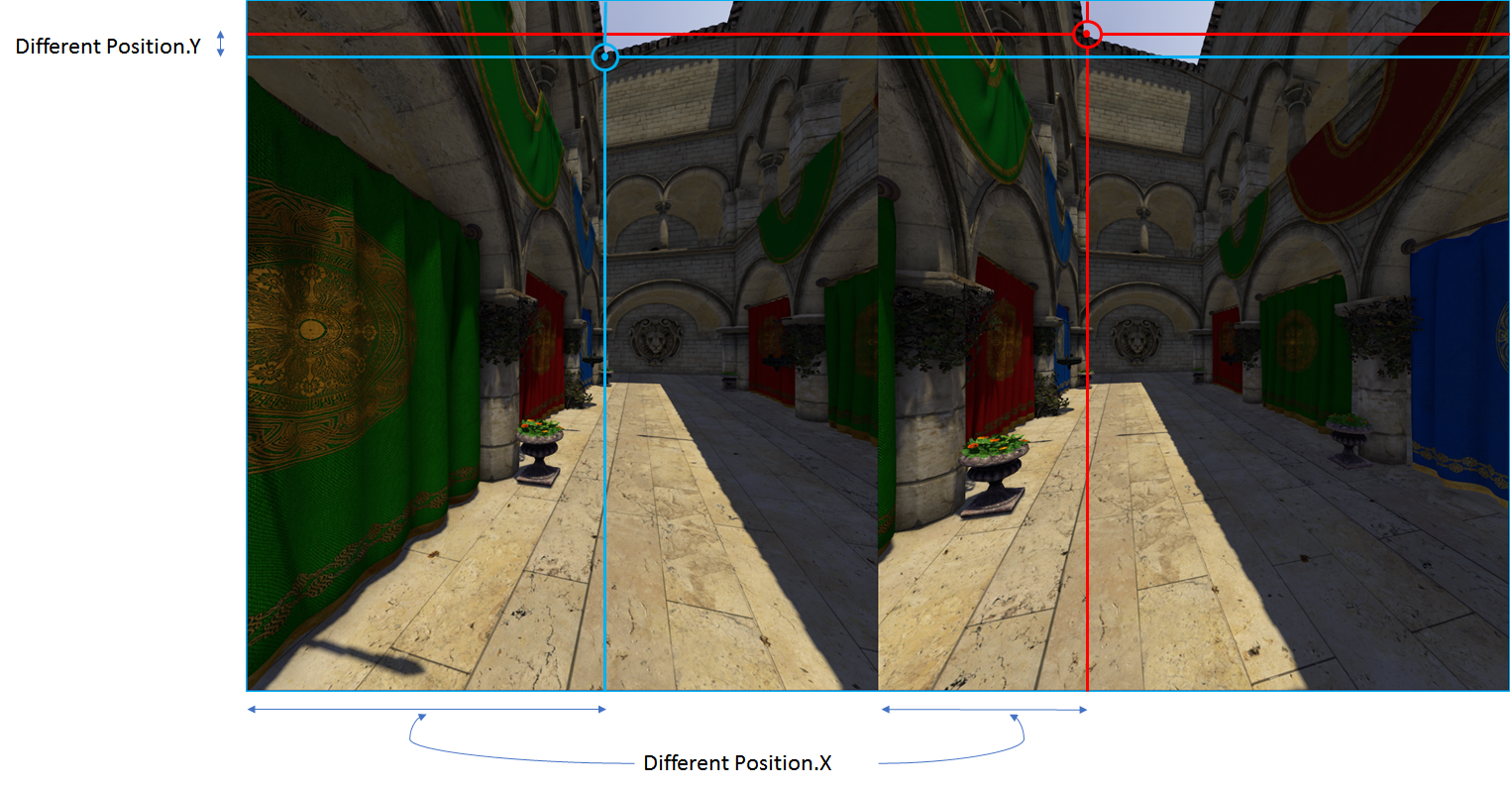
NVIDIA Turing GPUs add new feature, Multi-View Rendering (MVR), expanding upon single pass stereo, boosting projection views for a single pass from 2 to 4
formal abyss
@sturdy coral thanks mate, I might hit you up if I cant find the docs 😃
mighty carbon

Digital Trends
After my demo with the Oculus Quest, I realized why it's taken me so long to buy into VR. Without excessive wires or complicated setup, and a price point that makes sense for tech that just isn't there yet, Oculus' upcoming standalone headset could be the one to make VR hit t...
"The controllers are nearly identical to the Oculus Rift, but wireless ..." << lol, as if Touch controllers are wired
formal abyss
so its like a better google cardboard?
 frigid kite
In the same way that a smartphone is like a better Nokia 3310, yes
 sonic lake
@frigid kite 😂😂😂
 balmy surge
Having an issue at the minute where I need to create a VR game where you can enter a car. The current issue is that the inside of the car is too dark but if i up the brightness the outside looks washed out. any ideas would be really helpful. (also i'm not able to use spotlights)
frigid kite
First off, make sure that the actual colors of your car aren't too dark
Next, use exposure instead of more light to change perceived brightness
balmy surge
we have an expert that does materials so that's not the issue unfortunately
that makes the outside of the car look really washed out
frigid kite
Hmm, maybe play with the skylight intensity to fake GI inside the car?
balmy surge
Again it makes env look really washed out :/
frigid kite
Can you share some screenshots on how it looks, from inside and outside the car?
balmy surge
Sorry man under NDA cheers for help though
frigid kite
Hmm yeah I understand, it's hard to get a grasp of the problem otherwise though
balmy surge
yeah its a pain in the arse
frigid kite
Is it just the shadows of the car itself? How does it look if you turn off shadow casting on the car?
balmy surge
same issue there is just not enough light able to get in the car going to have to fake it while trying to make it as realistic as possible 😂
frigid kite
If the car is not casting shadows, then all light would be going into the car
balmy surge
looks like lego if we do that
frigid kite
Yes, just trying to pinpoint the issue
balmy surge
Cheers man
 abstract panther
Im trying to make a material switch from a 3D menu, might be on the wrong path here, https://gyazo.com/834fb30bd06541c7b3595d78ba57cad8 - https://gyazo.com/7fc4833bb4c7034d310e972781f853ae is there anything I could do ? Cause when pressing nothing happens

 sonic lake
@abstract panther use Print String to check your input events are firing properly. If they are, then the issue may be with the code after them, even though it seems correct to me.
If you are using Oculus, be aware that the input events from the controllers are not firing unless you wear the HMD or bypass the proximity sensor from the Debug Tool (or put a finger on it).
frigid kite
Also, if you have more than one thing hooked up to the right trigger, make sure that "Consume input" is not enabled for the input events
 hallow knoll
@abstract panther By default UMG buttons is looking for "Press" AND "Release" pointer events
So on Motioncontroller (R) Trigger Release, add "Release Pointer Key" - Left Mouse Button
tired tree
Also might want to check if is hovering over an interactible widget
hallow knoll
You can change this to "down" if you don't want to wait for release of the trigger
granite jacinth
@hallow knoll Only one Victor allowed here
@wicked oak we got another one
At least your last name doesn't start with a B
granite jacinth
His?
hallow knoll
Well, hence my aliased last name
wicked oak
ah
granite jacinth
I know yours
hallow knoll
Can't be like you guys
tired tree
I prefer yellow Victor
hallow knoll
🤘
granite jacinth
@hallow knoll So, what do you do for Epic?
hallow knoll
Community manager
granite jacinth
Ah, that's too bad
hallow knoll
Too bad? You just wait Mr.Burgos
granite jacinth
heheh
 daring pasture
Does quest have positional tracking for the headset?
granite jacinth
yes
You can play just like you would in WMR
Except, no tether
Works pretty well for games that actually support it
A few Quest games I tried out barely had anything for roomscale, and only used thumbstick loco
So...those games were meh
daring pasture
How's the hand tracking compared to the wmr?
granite jacinth
felt the same or worse sometimes
But, I think I just had a bad unit, cause a lot of folks didn't get the same issues I had
I think that 75%-90% of the Quest launch titles won't fully utilize its potential though
Since they will just be Rift/Go ports mostly
daring pasture
When I used the WMR i noticed you pretty much have to be looking at your hands to reach down and grab things. Wasn't sure if the quest was the same way
granite jacinth
But you'll get to the play the #1 VR game tetherfree
mighty carbon
oohh, Epic's staff in #vr .. That's interesting
granite jacinth
 daring pasture
Rather kill zombies tether free 😉
granite jacinth
@mighty carbon yeah, and he actually likes VR...so you can spam him all your requests, moans and complaints 😉
@daring pasture My thoughts exactly :0
mighty carbon
as if @hallow knoll going to tell us about the status of mobile Vulkan for Go/Quest in UE4 and what mobile VR goodies are coming into UE4 for Quest 😉
granite jacinth
He probably would know anything Oculus-related actually
But guess that's all I'll say about that, just in case
mighty carbon
hmm... did yellow Victor run away? 😦
 olive zinc
I am having issues detecting X and Y from the HMD touchpad on the Gear VR
both mouse input and the get oculus touchpad axis doest seem to fire
mighty carbon
Gear VR is dead
olive zinc
it only detects a press via Oculus touchpad press
I know, but we have a student project with it 🤷
hallow knoll
@mighty carbon I'm here!
mighty carbon
\o/
@hallow knoll any chance you have some info to share about what I asked earlier ?
hallow knoll
In due time I'm sure
Haven't been here long, but I will make sure to share as much as I can
We're all at the mercy of the engine devs 😉
mighty carbon
ha, indeed
abstract panther
Thanks for the answers @sonic lake and @hallow knoll I been trying both of the answers it, I am using HTC vive, everything is getting triggered, judging by adding print strings, but nothing is happening, I tried adding release pointer key but still nothing happens 😮
Aswell the buttons only get triggered once
sonic lake
@abstract panther How do you select which widget button to click?
sonic lake
How did you configure your Widget Interaction component?
Does it have enough interaction distance?
Did you activate the Show Debug flag so you can monitor it?
If your interaction distance is too short it may look like you are hitting a widget when actually you are not.
abstract panther
Ah yes, it has 1000
sonic lake
@abstract panther So you see the red dot then the ray hits the widget?
abstract panther
Yes
It hovers aswell
and when I click on the button the print string gets triggered
sonic lake
So the Press Pointer Key gets triggered
How about the widget event (Pressed/Clicked)?
abstract panther
Yes it also get triggerd to the print string at the end
sonic lake
Ok I don't see where your Print String are placed
abstract panther
sonic lake
So, to summarize, the widget Pressed/Clicked gets triggered properly. Then the problem is in the rest of the code apparently.
Next I would check that Get All Actors of Class returns something valid
You can simply disconnect the rest of the code and print the size of the returned array
abstract panther
To the for each or to the get all actors ?
sonic lake
Out of Get All Actors of Class
abstract panther
Ah gonna try it
sonic lake
ok
abstract panther
like this right ?
abstract panther
might be really wrong but this ?
sonic lake
It's correct actually
Now when you click the widget you should get the number of actors of that class
abstract panther
Yep
sonic lake
Is it > 0?
abstract panther
Yes
sonic lake
Ok but then the problem is in your Set Material
You can try to use Toggle Visibility in its place
You should be able to hide/show the mesh by clicking on the widget
That confirms that your widget interaction works properly and the problem is actually in setting the material
sonic lake
Ok, then you know where the problem is
You have to figure out why Set Material doesn't work as it is supposed to
abstract panther
Yeah damn, this stuff got confusing hahaha
sonic lake
Is that mesh something you have created?
sonic lake
Did you UV unwrap it?
abstract panther
Yes, but it seemed like it was the material index
0 is underneath the floor
1 is the top which I can see
sonic lake
That explains it
sonic lake
At least you practiced an end-to-end debug workflow 😉
abstract panther
Yes! Thank you so much for the help aswell 😄
sonic lake
Don't feel bad, I am sure none here can say it never happened to them. as well.. 😉
abstract panther
Haha true 😛
sonic lake
Good! You are back in business 👍
abstract panther
Yes haha I was about to lose my head
cunning depot
From the starter pack for VR, what am I able to delete (files-wise) for Oculus Rift-only support
Default stuff
My first VR project and my first real attempt at Unreal Engine 😭 This is not gonna go well for me (though I understand blueprints and C++ code linking, property windows etc.)
sonic lake
@cunning depot Why do you want to delete stuff? There isn't much to delete from the standard VR template.
sonic lake
Ok, what are you trying to achieve? Well, yes, you can delete all the maps if you intend to create your own level.
And the geometry related to them if you are going to use your own assets.
cunning depot
Yeah I'm basically trying to create my own levels for the game I intend on making and I assumed the standard levels/maps they gave were just examples and can be deleted
But ah ok thanks 😃 Yeah I'll be using my own assets and creating my own level
sonic lake
I would go on and create the level, then delete the example maps and geometry. In case anything is referenced in your new level, you will get a warning from the engine. Otherwise it is safe to delete them.
cunning depot
Awesome ty for the suggestion, can't find any help with VR developing online such as Youtube so this helps
sonic lake
Actually there is some useful material on YouTube.
It depends on what you are looking for.
cunning depot
Ok I'll keep searching 😃 I've got solid VR ideas and 8-9 years of programming experience but need the right starting material
cunning depot
Ty
sonic lake
An afternoon with Epic Games' Evangelists Andy Hess, and Luis Cataldi conduct a four-hour lecture/workshop covering Unreal Engine. Stay up-to-date with UI, t...
And you can always get specific help here if you get stuck.
mighty carbon

pcgamer
With some exciting news rolling out of CES, it's a good time to start shopping for the best VR headset
mighty carbon

Next Reality
The last time we heard from Meta, the makers of the Meta 2 augmented reality headset, things looked pretty bleak. Now, as several new facts have come to light, we have confirmation regarding the beleaguered company's fate: Meta is done.
I guess it's a good thing I didn't ask my boss to purchase on of those
sturdy coral
they never got working positional tracking did they?
sturdy canyon
I don't think they ever got good positional tracking, no.
Spent too much on their massive sales team in SF.
 sage gulch
is WMR controller support native yet?
my friggen Rift died.. UE will draw to the headset but it doesn't seem to track the controllers, even if the button mappings are different...
oh ok.. are those default mappings a joke :p
can it not tell if you are holding the trigger? wtf?
 wide flare
The new vive has native support for FOVE interesting
sage gulch
Steam needs to be directing users that go to their Error 108 troubleshooting page that they might need the WMR driver package
 torpid steeple
I recently got my hands on a VR thing for the first time. Has anyone ever done a sort of "Transitioning to VR" video for people who aren't new to Unreal? I feel like the intro materials to VR UE4 stuff are geared toward complete newbies.
Sort of hoping to just learn what differences to be aware of, in terms of UI, inputs, etc. If there isn't anything like that, I'll happily watch the Training Livestreams anyway, though.
 agile stirrup
did someone successfully veriefied ARKit Object detection/tracking in UE?
 mighty carbon
@wicked oak sounds like it's all official business now https://www.reddit.com/r/oculus/comments/aekp70/sony_just_patented_the_new_psvr_controllers/
reddit
1 vote and 0 comments so far on Reddit
now I want to dev for PSVR 😛
finally someone decided to think of Rift https://www.roadtovr.com/displaylink-showing-60ghz-wireless-adapter-for-oculus-rift/

Connectivity company DisplayLink is showing a reference design for a 60GHz Oculus Rift wireless adapter at CES 2019. DisplayLink created the DisplayLink XR wireless adapter reference design that would go on to become the Vive Wireless Adapter. The unit pairs DisplayLink’s c...
wicked oak
@mighty carbon
wicked oak
uhm, thats a new version
that face pad was already in an OOOOOOOOOOOOLD patent
but the grip was different
granite jacinth
This is short of dumb how to get these
It's like Knuckles
Even Pomax doing it
Seems to be a trendsetter
wicked oak
looks better than knucles
granite jacinth
Not sure I like it
granite jacinth
How many buttons do you see?
5?
Assuming PK= button
Plus grip/trigger
Dunno. Need to feel it
wicked oak
nah, i dont think this looks any final
sony has tons of controller patents
of different kinds
even some absolutely wild stuff
mighty carbon
as long as they track well, it will be always better than PS Move
mighty carbon
yeah
tired tree
i'll admit, I actually prefer the wands touchpad over most sticks
but the knuckles touchpad is near useless
so guess any joy stick is better than that
granite jacinth
heh
cunning depot
Hi, does the VR starter pack come with a moveable pawn because I have my Oculus Rift connected along with the sensors and the controllers (on the Oculus app it shows everything's good) but I can only move my head around, the controllers aren't allowing me to move
The level I'm testing is HMDLocomotionMap, which has a HMDLocomotionPawn
sage gulch
try the other map
cunning depot
I did, both don't work 😦
Only thing controllable is the camera rotation via looking around with the headset
The circle thing that shows where I'm looking works too, though weirdly it collides and knocks over static meshes that I simulated physics with
sonic lake
@cunning depot MotionControllerMap
cunning depot
Yeah I tried that, no movement still 😦
Really confused cus the documentation site says the inputs are set up with the starter pack
sonic lake
You should see the VR hands in that one
cunning depot
Let me confirm, brb
No I don't see VR hands o.O
Hm maybe because I connected everything after I loaded up the project, SteamVR might have done something weird let me check
sonic lake
You made a new project based on the VR Template?
cunning depot
Yes, I selected VR and selected With Starter Content
sonic lake
You don’t need steamvr for Oculus
cunning depot
Yeah thought so, initially SteamVR kept popping up when I didn't have Oculus connected but now that I do, it doesn't
Alright after restarting UE4 it still doesn't show my hands/movement doesn't work, only looking around with the headset
The controllers are 100% connected as I have tested the Oculus home place
cunning depot
It could be, feelsbad I play SteamVR games 😭
cunning depot
Ah yes, since the game I want to create only supports Oculus anyway
Let me try that, I'll come back here soon (I don't even know how to do that but I want to learn the UE4 UI etc.)
cunning depot
Ah yes found it 😛 Restarting UE4
sonic lake
👍
cunning depot
Unfortunately didn't work 😦
cunning depot
4.21.1
sonic lake
And you are in the MotionControllerMap?
cunning depot
Yep, I've loaded up the motion controller map then I press "Play in VR" or w/e
I'll give some background of what I've done:
- Got rift a week ago
- Installed Oculus program and played a few Oculus store games
- Installed SteamVR and played a few Steam games
- Installed UE4 and created a VR project from template, then hit play in VR
sonic lake
Correct
cunning depot
Not sure if there's any issues there but it doesn't seem off
sonic lake
Are you wearing the HMD when playing in VR
sonic lake
Then your controllers are not activated
sonic lake
Or keep a finger on the proximity sensor
cunning depot
Still no luck 😦
I must be doing something wrong in UE if the controllers are working fine in the Oculus menu
I find the issue really strange because I can move my head around fine with the HMD but I just can't move the position using controllers/do anything with the controllers
sonic lake
Let me think...
cunning depot
Thanks for your help so far
sonic lake
Did you activate the unknown sources in the Oculus app?
cunning depot
Yes, but wait
It just started working (I see my hands etc.) after I deleted the SteamVR stuff from BP_MotionController
Let me check when I create a new project if this behaviour still occurs
cunning depot
Yeah very weird...
sonic lake
But it works now, right?
cunning depot
Checking rn in my main project, one sec 😛
sonic lake
You see your hands and you can teleport, grab the cubes, etc.
cunning depot
Yep it works perfectly! What's even more strange is that in my main project I didn't have to disable SteamVR plugin nor delete from BP
I don't know what changed lol but it works, thanks so much 😃
sonic lake
You are welcome
sullen vortex
has anyone tried the native mixed reality plugin on UE, thinking in giving it a try instead of using LIV but wanted to check if anybody has already used it succesfully
wide flare
you need specific hardware for theirs, its doable to create your own mixed reality system though just need to create a render target and get the correct focal length for your camera
sullen vortex
My camera fits their spec. Just wanted to know if anyone suceeded using it & review
 trail shale
fuck off Steam VR what's your deal, I'm hitting trigger button,
sullen vortex
thats for capturing hdmi signals
i have a Logitech C920
i use it currently with LIV
 hybrid plume
weather is nice tonight
 eternal inlet
hi guys, any easy way to detect if your player is using normal wands or knuckles (ev3)?
as others has noted before me, the knuckles trackpad is not very usable when moving thumb from side to side, and the logic i use currently, is to read which hmd i have and then map the trackpad-axis values to movement, but since hmd is still vive, but could be knuckles, i need to know if they're connected, and then use the joystick axis values instead
sturdy coral
@eternal inlet they recently updated the legacy binds so I can't say for sure, but on the old ones they didn't even expose the joystick
so you couldn't read joystick axis value
(with th eold input api)
eternal inlet
Ok thx 👍🏼
sturdy coral
you could read it with the new api
sturdy coral
@eternal inlet I think they do have it now actually:
legacy_bindings_knuckles.json
            {
               "inputs" : {
                  "click" : {
                     "output" : "/actions/legacy/in/left_axis0_press"
                  },
                  "position" : {
                     "output" : "/actions/legacy/in/left_axis0_value"
                  },
                  "touch" : {
                     "output" : "/actions/legacy/in/left_axis0_touch"
                  }
               },
               "mode" : "joystick",
               "path" : "/user/hand/left/input/thumbstick"
            },
Thats pulled from src 4.21?
sturdy coral
no from knuckles driver legacy bindings, looking closer, they don't have it
axis0 is the same as the touchpad
eternal inlet
Oh ok
sturdy coral
so you can't distinguish the two
but users can pick either one
I wish they would just bind it to the same axis as WMR so you wouldn't need the new input API
eternal inlet
What about detecting if user has wand or knuckle?
sturdy coral
I'm not sure if you can give your own legacy binding
@eternal inlet there is a tracked device property string that will tell you
eternal inlet
Accessible from bp or i need a bit of cpp?
sturdy coral
it would need cpp, I think it may be exposed in @tired tree 's BP library though
eternal inlet
Yeah i was told he was exposing it, but was just wondering if it was exposed since natively
sturdy coral
@eternal inlet I have:
        // Knuckles doesn't seem to indicate the axis is a joystick when rebinding it!  search for whether we are using knuckles:
        vr::TrackedPropertyError Err = vr::ETrackedPropertyError::TrackedProp_UnknownProperty;
        FString const ModelNumber = FSteamVRHMD::GetFStringTrackedDeviceProperty(VRSystem, DeviceIndex, vr::ETrackedDeviceProperty::Prop_ModelNumber_String, &Err);
        ControllerStates[DeviceIndex].bHasAltstick |=
                (Err == vr::ETrackedPropertyError::TrackedProp_Success && ModelNumber.Contains(TEXT("knuckles"), ESearchCase::IgnoreCase));
// ~~```I think I had to modify GetFStringTrackedDevicePropert to have STEAMVR_API
to make it work in the controller module
bHasAltstick is also my own thing from adding joystick support to WMR
I also rebound joystick to the wmr joystick axis through modifying legacy bindings for that so won't work in shipping game I don't think
determining whether it is knuckles will work, but you are stuck with touchpad and joystick as the same axis
granite jacinth
Hopefully this is all taken care of in 4.22 or with the SteamInoit Plugin
tired tree
@sturdy coral @eternal inlet ue4 doesn't use the legacy joystick binding
in 4.21 with the beta input you can do it though without edits
as for the hardware query, no its not exposed normally
 potent gust
Has anyone got an issue with the oculus go where the controller is not detected after returning to the app from home with the error message APP_CMD_LOST_FOCUS?
cunning depot
Any tutorials out there for VR menus? I've seen some 3D widget stuff on the documentation but I learn far more easily and better with examples rather than just knowledge thrown at me + I don't think the 3D widget page includes finger pointing like with Oculus controllers
 hushed epoch
Hey guys, I am having a major issue in 4.21 following a tutorial video and can't reproduce the intended result
My only thought is that something significant has changed since the tutorial was made, I am working in the latest 4.21 version

This is the easiest way I found to get yourself a VR body with arm Inverse Kinematic (requires Motion Controllers) and full thumbstick locomotion. This step-...
I have triple checked every step, and the result is that both hands/arms use the left motion tracker position, instead of left and right respectively
Here is the modified ThirdPerson_AnimBP
Any help would be greatly appreciated!
The Anim Graph in the tutorial seems very odd, as the components are chained
sturdy coral
looks normal to me, each thing takes a pose in component space and does a modification
hushed epoch
Any idea why both hands would snap to the left motion controller?
sturdy coral
did you pass in different transforms
and do fabrik nodes have the right bone chains
hushed epoch
Yes It is exactly like the tutorial, I have gone over every step three times and verified everything
He's obviously in a much older version is the only difference I can find
sturdy coral
turn off the one they are both set to
and see if it still happens
if they are both on left, disconnect left fabrik node
hushed epoch
Good point thanks
Okay, after disconnecting the left hand nodes, the left hand in fact doesn't track, but the right hand stick tracks the Motion Controller L
tired tree
@hushed epoch you might want to message @sonic lake personally, it is his tutorial
sturdy coral
right click the the MC Transform L and MC Transform R pin and you can tell it to watch them
hushed epoch
Thanks @tired tree
sturdy coral
@hushed epoch make sure you didn't set the Motion Controller R variable to point to Motion Controller L
and make sure you set the hand inside both
hushed epoch
Yeah all that appears to be setup correctly
How can I watch that value during runtime? It doesn't update
Sorry, I am used to C++ development, this Blueprint stuff is totally new to me
sturdy coral
@hushed epoch at the top you have to tell it which instance to watch
instead of the preview instance
sturdy coral
@hushed epoch now add the watch in the earlier part where you are setting them from the blueprint
and keep working backwards until you find why they don't differ
if you can't find it there, try a simpler setup where you try to make cube actors follow each hand without an anim graph etc. Simpler and simpler cases until you find where you are going wrong
hushed epoch
Yeah all the way back to GetWorldTransform (MotionController_R) both right and left read the same values
yeah that's a good idea, reduce the complexity
sturdy coral
can you add a watchpoint on the motion controller objects themselves?
make sure they aren't the same object
sturdy coral
np
sonic lake
@hushed epoch did you find the issue?
@sturdy coral thanks for the help with the troubleshooting. 👍 @hushed epoch I didn't retest the tutorial with 4.21, but I don't see why it shouldn't work also with this version.
sonic lake
@hushed epoch at 3:32 in the tutorial, we duplicate the left motion controller component to create the right motion controller component. Then we change the tracked hand to Right for la latter, so it tracks the right hand instead of the left one. This looks slightly different in 4.21, but it is the exact same principle. Each MC component has to be told which physical controller it is tracking, whether the Left one or the Right one. You may have overlooked this step, so both MC components track the same physical controller, the Left one in this case.
hushed epoch
@sonic lake that was it, thank you very much!
I'll have to figure out how to make an IK chain now so the torso neck and head use the head tracking to prevent the camera clipping through, but this is a great start
sonic lake
@hushed epoch 👍
hushed epoch
Love your tutorials btw, they've been completely invaluable for someone new to blueprints coming from pure C++
sonic lake
The other option to avoid clipping is to have a separate mesh for the head and set it to Owner no see.
Thanks! I am happy to give back to the community. 😊
hushed epoch
Yeah, I may hide the head as well, but in the long run the player has so much freedom of movement that I think there needs to be a considerable amount work in this area for a full body VR character rig
sonic lake
True. If you are familiar with C++ you can also look the Caliko port to UE4. I have added few notes the original post few days ago to make it work with the most recent engine versions.
It is IK with joint constraints, basically an enhanced FABRIK. Very interesting.
hushed epoch
Unreal Engine Forums
This is the place to show, share, and link to your stuff!
Very cool, I may look into this
sonic lake
You can compile it following the original post + my notes at the bottom.
I think it needs some work to expose an IK node to the AnimGraph, didn't get there with my tests.
hushed epoch
That's something I need to figure out anyway 😄
What I am trying to do is do a bit of reverse engineering based on this: https://youtu.be/iYrkXK3V2ik

Many sleepless nights went into our R&D for making great two-handed guns in VR. This is a brief overview of our process and how we ended up doing it. Watch l...
Basically I got another setup working with a shoulder collision constraint so VR FPS weapons have a third point of contact for stabilization, but I am having some major issues with IKs so I am starting from scratch using the 3rd person character based on your tutorial
They show their VR character rig at about 10:30 into the video
sonic lake
Nice project! 👍
torpid steeple
I just got an Oculus Rift a few days ago and I finally spent some time doing the basic stuff. It was pretty inspiring!
I wonder how Rec Room manages its Actor replication, considering how it always needs to replicate not only Actor physics but also the individual hands of each player. Their strategy of using minimal Skeletal Mesh bones works pretty well, but I wonder how bad hand Transform replication is per player.
sturdy coral
@torpid steeple there are quantization functions to make the transforms take a lot less space (with less precision) and then send them as relative offsets instead of world space
You can also do delta compression where you send them as offsets from last acknowledged position/rotation
tired tree
You can also run at lower than the max (90) htz and smooth between updates
depending on smoothing delay it is 1-2 updates behind, but with a decent update speed that isn't noticable
and 30htz is 1/3 the bandwidth cost
I run 1 update behind, meaning that with bad network conditions it is possible that it can have a minor hitch with a delayed packet, but I prefer that over the increased latency of 2 behind like CSGO does
cunning depot
@sonic lake Your youtube videos are amazing, ty 😃
sonic lake
@cunning depot you are welcome! 👍
hushed epoch
Almost got the head -> spine IKs working
Just some very strange stuff happening with the initial head relative offset now which I don't entirely understand 😄
@sonic lake what are you working on these days anyway?
torpid steeple
I really don't like how the Oculus app has to pop itself open and steal focus every time I click the "Play" button in the Editor, even when I'm not working on a VR thing.
hushed epoch
You just change context
torpid steeple
@hushed epoch Do you mean Alt+Tab?
hushed epoch
Do you have your Oculus app open or running?
Mine only pops up when you click Play in the Unreal editor and have VR selected in the drop down
If you aren't working on a VR project it shouldn't be selected and therefore not pop up
torpid steeple
It's closed, but every time I click Play... even though this is not a VR app and VR is not selected for the Preview, it still pops open the Oculus app.
cunning depot
SteamVR pops up everytime I load up UE4 and then again once I open the project, annoying but I deal with it because I don't want to disable the SteamVR plugin 😦
hushed epoch
Yeah SteamVR does, but not the Oculus app
But again that's just the SteamVR Status window, I believe you can actually disable that from popping up
Yeah confirmed I disabled it and it no longer opens
torpid steeple
It seems like the Oculus eyeball resolution is 450x450, according to UMG?
I imagine this is not standard across devices, though, right?
Actually now that I look closer, I can just barely see down below the squares on the edge of my peripheral vision, so maybe 440 width by 490 height seems about right to properly cover the eyes via UMG.
sturdy coral
@cunning depot this will fix that issue:
 glass torrent
Hi everyone!
I'm having a little performance trouble with my map for Pavlov VR (UE 4.15).
Some players are reporting that their machine lags or "hickups" while trying to walk through the forrest area of the map.
Sure enough, the transparent materials on the trees make the Shader Complexity view burn bright-white.
I've changed the materials to use DitherTemporalAA as per the suggestion here -- https://docs.unrealengine.com/en-us/Platforms/VR/ContentSetup
But it's still burning white.
Any tips about:
- how to measure "good enough" in-editor (I don't have any issue while playing, but some players do)
- how to further-optimise these materials?
Thanks in advance!
 candid mountain
Hi! im using the multi user viewer template, but somehow i can no longer teleport 😮 the beam shows, but just a short one in the hands.. possible solutions anyone?😫
jaunty shell
@candid mountain check your colliders in your scene, aswell as your navigation mesh
candid mountain
@jaunty shell Thanks for the reply! 😄 i've been doing that, but now i dont know anywhere else to look 😂
jaunty shell
havent had much chance with this template so far either :/
I'm using the Product Viewer Template, as it uses a raycast solution instead of relying on the navmesh (we dont have time to do proper navmeshes)
cunning depot
@sturdy coral Ty 👌
candid mountain
haha.. i dont have time for this neither 😂
daring pasture
@tired tree where is the logic for where an object attaches to located? I'm assuming a gripped object attaches to the motion controller? Im trying to attach it to sockets on my characters mesh but cant find it.
tired tree
@daring pasture i'll pm you, because no only one grip type actually attaches
daring pasture
Ok thank you
torpid steeple
@glass torrent are all your foreet trees and stuff separate meshes or are they instanced meshes? Instanced meshes are an aeasy way to fix a lot of shader complexity problems
glass torrent
Ooh, good point. They're separate meshes, but that would be a good optimisation!!
 median wedge
Is there a way to specify to launch through Oculus home instead of steam vr through a command line option?
sturdy coral
@median wedge it has a higher priority and will default to it but you can force it with -hmd=Oculus
median wedge
Thank you. So if I add that as a steam launch option, it will use the oculus sdk?
sturdy coral
@median wedge I think it might be 'OculusHMD' instead of 'Oculus'
you can set the priority in your engine ini
BaseEngine.ini has:
[HMDPluginPriority]
; Since SteamVR also works with the Oculus Rift and Windows Mixed Reality, give priority to the native Oculus and Windows Mixed Reality plugins before trying SteamVR
; Since OSVR also works with either Oculus Rift or SteamVR, give priority to either before OSVR
WindowsMixedRealityHMD=40
OculusHMD=20
SteamVR=10
OSVR=5```whatever has a higher number will be preferred over lower numbers, without that -hmd= option
median wedge
Ok. Thank you for all the help
sturdy coral
I would leave your steam option without it
and let the priority thing figure it out
median wedge
Ok, I will add separate launch options as well in case users want manual options.
But I will also do the priority thing
sturdy coral
@median wedge just know if they chose steamvr with oculus, you don't get the same button mappings as oculus via OculusHMD
median wedge
What do you mean?
sturdy coral
the two buttons on touch are mapped differently with the oculus plugin vs oculus running through the steamvr plugin
median wedge
What button?
sturdy coral
a and b
median wedge
Do they switch?
sturdy coral
no, totally different and I think one of hte two isn't even exposed through steamvr by default
and the oculus menu button isn't mapped when using steamvr, because steamvr reserves it as a system button
but also either a or b isn't mapped
median wedge
I can test it all when I get my dev kit, and detect and respond appropriately. Thanks for the info
mighty carbon

UploadVR
Antilatency used Oculus Go, custom flooring and a small add-on to track the headset as well as gloves, a tablet and a controller at CES 2019.
neat
granite jacinth
...
But it costs more than the GO
I agree it's neat. But sorely impractical. When you can just wait for Quest
Although, I do wonder now, how much the total setup was for the OC5 Dead and Buried demo
mighty carbon
oh, $250
yeah, Quest is definitely would be a better investment, especially if average Joe can setup arena for Quest
sturdy canyon
Yeah I've been thinking a lot about Quest as a replacement for laser tag
Did you know that typical laser tag vest/gun setups cost like $5k each
Also they are buggy and bad
mighty carbon
o.O
 compact kettle
Hey everyone! I'd be interested to know if there are any efforts alreay being made to integrate foveated rendering techniques into UE4 and whether there are any Dev-Previews scheduled. We would be very interested in picking up / helping to build this technology for the market launch of the Vive Pro Eye HMD. We were at HTC's CES 2019 booth, though without the fov. rendering, and we think it could immensily increase the immersion of our application, if we are allowed to pump up the quality in the focused areas.
mighty carbon
This is interesting: https://uploadvr.com/ces-2019-i-streamed-pc-vr-games-to-an-oculus-go-with-tpcast-air/

UploadVR
At CES 2019 I streamed a PC VR experience to an Oculus Go using TPCast Air and it totally worked surprisingly well! Consider me impressed.
 harsh cedar
hey there, is anyone else having issues with billboards only rendering on left eye in 4.21?
mighty carbon
RTX 2060 appeared on NewEgg for $349 (sale ends this coming Monday)
sturdy coral
@harsh cedar yeah I think I had that many versions back too
I think only with instanced stereo
hmm actually I think back then it may have only been with vrworks
harsh cedar
@sturdy coral thats it, but we had it working perfectly in 4.20.3 and the upgrade broke it

it actually renders in both, but really oddly
the sprite that appears to pan across both is only on right eye
(this is an ordinary billboard)
wicked oak
@mighty carbon
mighty carbon
what does it mean @wicked oak ?
wicked oak
 void FMobileSceneRenderer::RenderMobileBasePass(FRHICommandListImmediate& RHICmdList, const TArrayView<const FViewInfo*> PassViews)
{
    SCOPED_DRAW_EVENT(RHICmdList, MobileBasePass);
    SCOPE_CYCLE_COUNTER(STAT_BasePassDrawTime);

    for (int32 ViewIndex = 0; ViewIndex < PassViews.Num(); ViewIndex++)
    {
        SCOPED_CONDITIONAL_DRAW_EVENTF(RHICmdList, EventView, Views.Num() > 1, TEXT("View%d"), ViewIndex);
        const FViewInfo& View = *PassViews[ViewIndex];
        if (!View.ShouldRenderView())
        {
            continue;
        }

        if (Scene->UniformBuffers.UpdateViewUniformBuffer(View))
        {
            UpdateOpaqueBasePassUniformBuffer(RHICmdList, View);
            UpdateDirectionalLightUniformBuffers(RHICmdList, View);
        }

        RHICmdList.SetViewport(View.ViewRect.Min.X, View.ViewRect.Min.Y, 0, View.ViewRect.Max.X, View.ViewRect.Max.Y, 1);
        View.ParallelMeshDrawCommandPasses[EMeshPass::BasePass].DispatchDraw(nullptr, RHICmdList);

        // editor primitives
        {
            FDrawingPolicyRenderState DrawRenderState(View, Scene->UniformBuffers.MobileOpaqueBasePassUniformBuffer);
            DrawRenderState.SetBlendState(TStaticBlendStateWriteMask<CW_RGBA>::GetRHI());
            DrawRenderState.SetDepthStencilAccess(GetDefaultBasePassDepthStencilAccess(EShadingPath::Mobile));
            DrawRenderState.SetDepthStencilState(TStaticDepthStencilState<true, CF_DepthNearOrEqual>::GetRHI());
            RenderMobileEditorPrimitives(RHICmdList, View, DrawRenderState);
        }
    }
}```this is the most important chunk
RenderMobileBasePass got completely nuked and replaced with this small one
which uses the ParallelMeshDrawCommand that the desktop renderer uses
i wonder wtf this does
i also havent run it
but that ParallelMeshDraw stuff intriges me
mighty carbon
mobile Vulkan?
mighty carbon
interesting
wicked oak
     * Dispatch visible mesh draw command process task, which prepares this pass for drawing.
     * This includes generation of dynamic mesh draw commands, draw sorting and draw merging.
*/ ```@mighty carbon this is batching
its a refactor of the rendering code, everything is no data oriented, multithreaded, and seems like it does autobatching
also automatic instancing
@mighty carbon ``` /**
- Build mesh draw command primitive Id buffer for instancing.
- TempVisibleMeshDrawCommands must be presized for NewPassVisibleMeshDrawCommands.
*/```
without a doubt, automatic instancing
 static TAutoConsoleVariable<int32> CVarMeshDrawCommandsDynamicInstancing(
    TEXT("r.MeshDrawCommands.DynamicInstancing"),
    1,
    TEXT("Whether to dynamically combine multiple compatible visible Mesh Draw Commands into one instanced draw on vertex factories that support it."),
    ECVF_RenderThreadSafe);
ok
get really fucking hyped
becouse this is indeed indirect drawing
mighty carbon
hype train is real
mighty carbon
do you think it will make it into 4.22 ?
wicked oak
yes
mighty carbon
sweet
mighty carbon
I am guessing they are gearing up for Quest with this
wicked oak
and ps5
i wonder if unreal now crunches drawcalls faster
gonna check the rendering behavior
mighty carbon
nice, please let us know
wicked oak
@mighty carbon it looks (speculation) that its using multithreading to build this batch arrays
and then uploads to gpu
and everything is in super tidy arrays
SoA style, data oriented
which basically translates to "fast"
mighty carbon
I'll keep my fingers crossed
tired tree
physics in 4.21, rendering in 4.22
stable engine - 4.?????
lol, going to be some bugs for a bit
wicked oak
its faster
significantly so
holy shit its fast as hell
depth prepass at 0.6 ms on PC
thousand drawcalls
this used to be slower
mighty carbon
but what about Oculus Go @wicked oak ?
sturdy coral
@wicked oak will these improvements only be vulkan/dx12?
wicked oak
im going to test dx11
well, i instacrash
rip
lets see vulkan
@mighty carbon nothing says that autoinstancing wont work on mobile
vulkan is really broken
mighty carbon
I see

UploadVR
The Oculus Android app just surpassed 1 million downloads. This could be an indication of the success of the Oculus Go headset.
torpid steeple
Is the VR Template's implementation of interaction the "proper" way to do it? Specifically, the VR Template's approach seems to just be to attach a collision sphere to the hand and then call an interaction interface function on whatever applicable actor is closest to the hand.
Sounds simple enough but I wonder if the ray-trace approach is better, a la VRChat and RecRoom.
tired tree
@torpid steeple I use both, tracing will fail if it starts entirely inside of an object so I fall back to overlap when it doesn't find anything on an attempt.
torpid steeple
I'd imagine that making a new Interaction Trace Object Collision channel would be the best way to do implement it?
That way you don't have to worry about your hands getting in the way of the trace or whatever
tired tree
yeah, that is my exact setup I used for my examples, a custom trace channel and dual trace / overlap checks
I also have a interface property that lets an ordering happen
IE: more important components / actors are picked out of a grip attempt over less important ones
like sliders on a gun instead of the body of the gun
anything without the interface defaults to lowest priority
torpid steeple
One thing I'm having trouble wrapping my head around is the use of Child Actors Components w.r.t Interactable Widgets. I know you probably only want this stuff to be Cilentside, but I remember hearing that Child Actors Components in general are a bad practice, which would imply that having interactable buttons attached together as components in some kind of parent actor, as I've seen in Youtube tutorials, is not good™.
sturdy canyon
I'm not convinced that child actors are really bad for MP..
But I only have a few of them around, and I don't attempt to do server/multicast calls directly from them
torpid steeple
What I'm trying to brainstorm is how I'd go about trying to implement the Oculus Home UI: just simple, floating panels in front of you that you interact with, and a panel underneath them with buttons you can push down to do things.
The approach I'm thinking of atm is just a single actor with a bunch of individual UMG components for each panel that somehow react to a raycast on clicking a motion controller button, and then using a mesh for the bottom row that has buttons on it and using collision sphere overlaps for those interactions.
In a MP context I'd imagine you'd have to make everything clientside, even the spawning of the Actor... but iirc in MP remote clients can't spawn Actors...
The logistics of this are a bit confusing
mighty carbon
nice
 feral bloom
Can anyone with forward shading experience help me fix this? I have 2 dynamic lights casting shadows in my scene and a planar reflection. For some reason only one of the lights (and shadows) show up in the reflection. I am pretty sure it is because of the dynamic shadow limit but documentation says I should be able to have 4 dynamic casting lights.
cunning depot
Is it bad practice to make a VR game cap its fps to the refresh rate of the headset + around 20 and is this even possible in ue4?
frigid kite
HMDs are always Vsynced
frigid kite
I believe so yes
cunning depot
Great 👌
 grave shore
mighty carbon
grave shore
mighty carbon

The Verge
Alex Kipman and Satya Nadella will be in Barcelona
that will be interesting
 candid viper
Long shot question here. Has anyone seen tracking problems with EV3 Knuckles? Hit issues on a couple of machines where tracking drops out on the controllers and the headset when using them. All firmware updated etc. Been trying all sorts of things. Just interesting if anyone has any off the wall suggestions to try.
sullen vortex
after 4 hours of dealing with Mixed Reality calibration tool, found a weird bug on the plugin; i have a logitech c920 camera with a vive tracker attached (see picture),and after doing the calibration process, which showed the final preview that everything was working ok, started my project and previewed in vr, after that i realized that live video and cg didnt match in axis, so i had to rotate the tracker in Z 90 degrees, which is a pain in the ass, cause now i need to design and 3d print a new mount because of this...anyways, it would be great to have the chance to edit in plain text the sav file generated by the calibration tool and fix the orientation...if anybody used this tool and has any idea on how to solve this without building a new rig....
tired tree
@sullen vortex there is only one axis that is off
rotate the values you use
but yes, trackers have always been off axis
sullen vortex
Cant rotate the values on the config file the calibration tools generates, its not like the config file in Liv
sullen vortex
Tomorrow im gonna try redoing the calibration and see if the new file fixes or it repeats the bug. Thanks anyways Morden
 green comet
Getting some sort of terrible shadow glitching on the basic VR template, it persists after exiting VR into the viewport. https://i.imgur.com/F1WQZU9.png
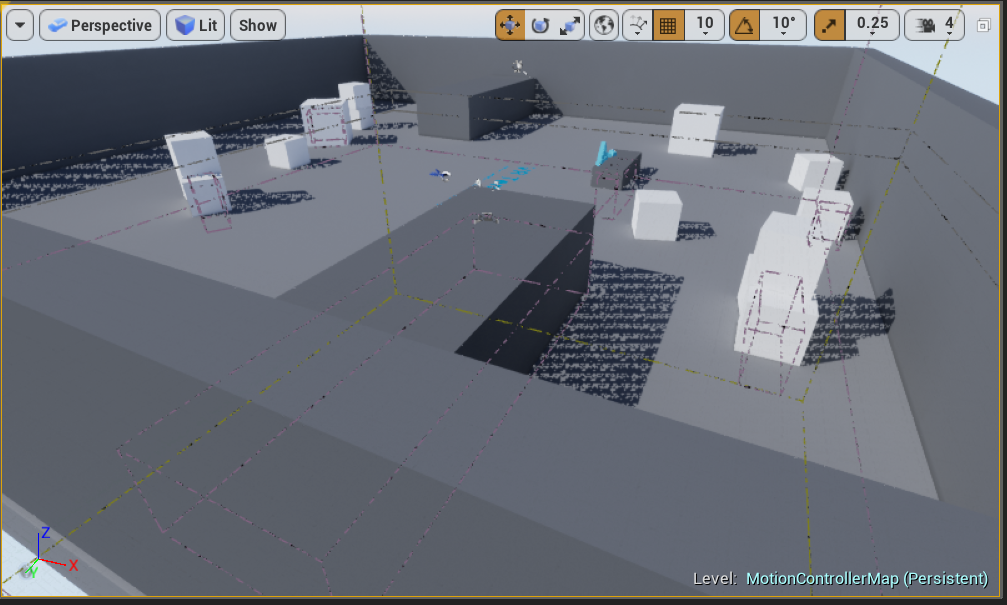
Specifically, if I go to 95% res, its fine. If its 100% res, it dies.
median wedge
does anyone have experience with physics handles? I am trying to make a fixed grip item (pistol, should snap to where the controller is, and face a certain way) but the handle is acting wonkey
feral bloom
Dont think you need a physics handle for that. I'd add a scene component above the pistol and set the transforms correctly on that. Then Attach the scene component to the controller
@median wedge
sage gulch
can anyone summarize the workflow changes inherent in the compiler message "Set Hand is deprecated; Please use the Motion Source property instead of Hand"? thanks
sturdy coral
@sage gulch they switched from an enum to an FName so that non built in plugins could add arbitrary types
sage gulch
thanks
median wedge
@feral bloom you need a physics handle if you want the items to still simulate physics. I did the other way first, but now I want to maintain physics.
sonic lake
@median wedge It is not either/or. You can also attach a skeletal mesh to the hand where the first root bone is kinematic and the rest is simulated. So you still get a physics driven behavior without using a physics handle.
median wedge
How do I specify a bone to be kinematic?
sonic lake
In the PhAT or by code. You can set the whole SM to be kinematic then use Set All Bodies Below Simulate Physics to set the rest of the skeleton to physics simulation.
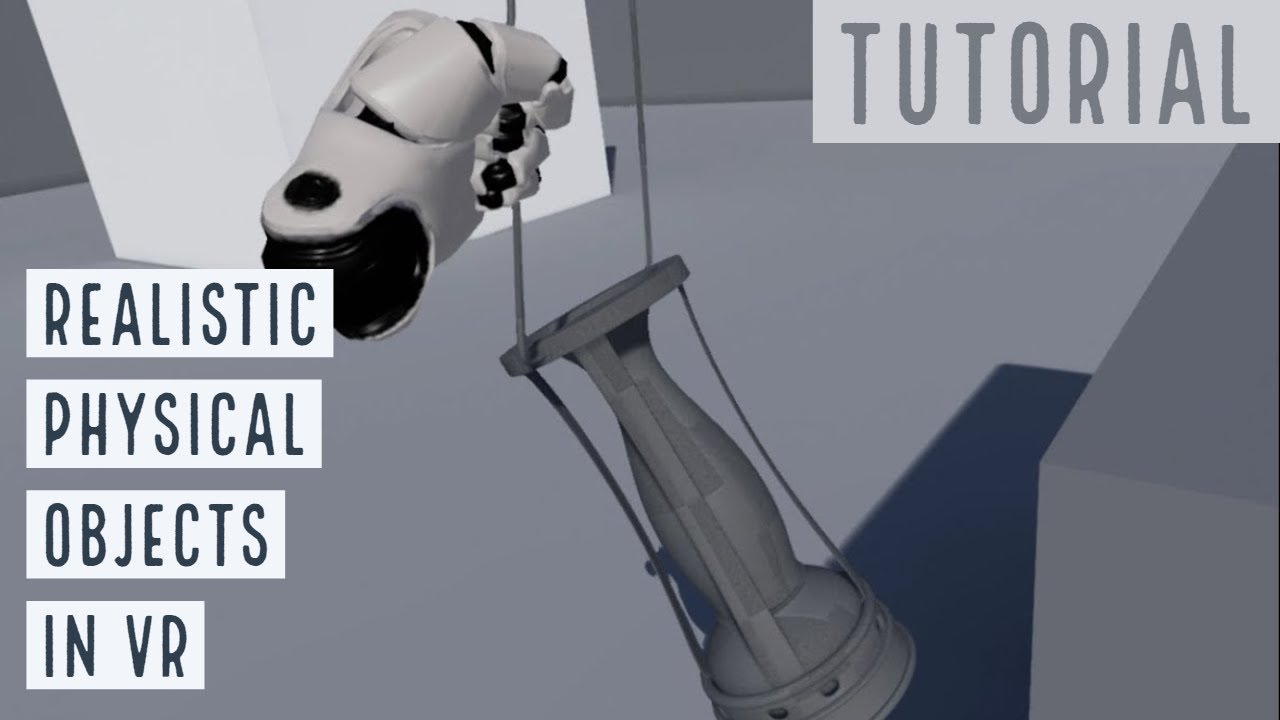
This step-by-step tutorial shows how to rig in Blender and then use in UE4 a realistic physical object like an old lamp. The object can be grabbed and carrie...
median wedge
But this wouldn’t work for static meshes I want to keep simulating physics would it?
sonic lake
What is the Static Mesh that you want to attach to the hand and why does it need to simulate physics?
I am trying to understand your use case.
median wedge
I’m not taking about simulate physics like rag doll, just an object is that simulated, so it can collide and interact with the environment.
 icy berry
Hi, has anyone here worked with Face AR? Just curious if it works fine with newer models?
Zak mentioned they kinda hard-coded live link for iPhone X at this point. Just what to double check if anyone has used newer iPhones/iPad for it
tired tree
@sonic lake @median wedge he is talking about something like this: https://youtu.be/toId0Yhu_U0?t=27

Going over some new changes to the plugin....for some reason the beginning didn't record. I was just talking about the new default of setting the Center of M...
interactible grips that don't push through geometry
and @median wedge how is it acting funky? you didn't specify the symptoms
median wedge
It has a strange offset, and the rotation is always different, and irregular.
I am picking it up the motion controllers location, and the objects rotation
I am setting it’s location and rotation with the motion controllers location and rotation.
I set the location and rotation of the mesh to match the motion controller right before I grab, but that does not work consistently for when I am trying to achieve (attach to motion controller with SnapToTarget)
tired tree
@median wedge is it simulating when you pick it up already? if so then that would be your issue, set location doesn't play nicely with full simulating
sonic lake
@tired tree Yes got it. Is he using your plugin already? Then you are the best person to help on that.
tired tree
you can just grip it with the physics handle at the object with a null transform and then move the physics handle to the motion controller
@sonic lake no he isn't, but the basics are mostly the same
physicshandles are generally good enough, just missing some features
median wedge
So I should supply null for grip location and rotation? And it is simulating, but I tried without simulating and it didn’t help.
sonic lake
@tired tree I didn't play much with physics handles honestly. They are a bit too unpredictable at limit conditions. I prefer more stability over more realism. But for sure they have their application areas.
tired tree
i had to go check the handles again as I haven't used the engines one in a while, they are making the rotation and location that you pass in relative to the component, so passing in the components transform values should have it 1:1
then just setting location to follow the motion controller would be like SnappingTo
@sonic lake interacting with physics constraints is far better for some specific applications besides holding objects. Like applying forces to a constrained / simulating construct like a globe or arm light
median wedge
Ok. I didn’t know what those values did. Thank you so much for all of your help
tired tree
also marco, options never hurt anyone ;p I have 9 grip types in my plugin and have people using all of them afaik, though I don't always agree with how they are used
sonic lake
@tired tree wow 9? That's plenty of options to play with.
And I guess someone would still manage to ask for a 10th.
daring pasture
🤔
sullen vortex
update on mixed reality plugin; did the calibration again, and at the end it shows all stuf correctly aligned, including matching controllers, and after that when i paste the configuration file on the project i get this, wrong axis on the tracker in relation to the camera:
tired tree
Its because they are querying the tracker data with the same function as the controllers use
people outside of UE4 have been using an alternate OpenVR function to query tracker poses
seems like they didn't test with trackers as the camera offset? Might want to directly report it on the bugs
its about time they fixed that offset anyway
people have been just re-mounting for some time now
though that was with a custom solution and not the new official one, its still the same cause
sullen vortex
you are right, im doing a custom mount to fix this issue meanwhile, already posted this on the mxied reality sticky post in the official forum
sullen vortex
now both cameras are aligned, but it seems i will have to rerun the calibration process, getting hmd and hands offset
sullen vortex
update: after redoing the calibration, which at the end always seems to be success, when trying on my project i have offset on my controllers and in the hmd as last intent. Im gonna try doing a project based on vr template and see how it goes
cunning depot
Hi, is there a tutorial out there on a pointing-based VR menu? I've made a 3D widget and also implemented an animation for pointing but I don't know how to link the state of when a player points to displaying where the player is pointing with a laser dot and interacting with the menu like simulating "hovering" and "clicking"
hallow knoll
cunning depot
I see, thanks @hallow knoll!
hallow knoll
Np! It might be worth mentioning that UMG buttons are "Press and release" click method by default, if you have small buttons it's sometimes worth changing it to "Press"
As for the "laser trace" there's a default laser static mesh that's used for the VR Editor that you can use, it's under Engine Content
Data from a separate line trace can be used to scale that mesh
cunning depot
I see, ty again 😄
hallow knoll
Np, now if you could return the favor and help me organize my office, that'd be great
cunning depot
LOL once my game's released I'll use a cut to fly over and get on that asap
hallow knoll
Deal, I'll schedule the makeover for then
sullen vortex
where are you @hallow knoll ? it looks like an expensive cleanup trip
mighty carbon
I am sure he is in VR 😉
hallow knoll
@sullen vortex I moved and my new home office allows for better optimization
 flat shoal
so between yesterday and today I updated SteamVR, and now Unreal Editor VR preview is greyed out... anyone else, or just me?
LogHMD: Failed to initialize OpenVR with code 112
hmm
jaunty shell
@flat shoal hmm you're right, greyed out for me too
havent noticed yesterday since I was building before trying VR


 sullen vortex
nice reading, thanks
real needle
Is there a way to disable the damn oculus app and Steam VR from launching when I open my project 
sonic lake
@real needle Oculus App no, unless you revert to an old 1.0 core which someone has backed up and shared (search on Reddit). Cannot talk for SteamVR since I don't use it.
real needle
What the
sonic lake
Oculus aka Fabeook VR wants you to see their store, no matter what.
sturdy coral
@real needle I have a pull request that can keep SteamVR from coming up
 sly elk
new intro gameplay tutorial
sturdy coral
@real needle https://github.com/EpicGames/UnrealEngine/pull/4950
real needle
404
real needle
Ah ok. I'll look into it, thanks
 rustic cargo
Try disabling the Oculus / Steam VR plugins - (They're on by default)
sonic lake
@rustic cargo my understanding is that he is doing VR development so those plugins are needed. The annoyance is with the Oculus App / SteamVR popping up during test.
rustic cargo
ah
 charred hinge
hey
im working on a vr shooter and im at the point of trying to sync my character mesh to my vr movements. wondered if anyone could give me some tips
what exactly is the vr origin? is it the location of the headset? the location of the ground beneath the headset?
should my mesh be attached to the vr origin?
actually yeh the origin is the headset position, i see now
feral bloom
I'd strongly recommend this plugin https://forums.unrealengine.com/development-discussion/vr-ar-development/89050-vr-expansion-plugin
Unreal Engine Forums
VR Expansion Plugin
Updated: 01/04/2019
10/10/2016 - No longer OpenVR specific, if platform does not support OpenVR the plugin no longer compiles out the
Will make you life a lot easier @charred hinge
charred hinge
id rather do it myself:)
feral bloom
Fair go, well in my game i'm using ikinema for a full body ik rig but the headset position drives the location of the skeletal mesh. Takes a bit of work in anim blueprint to make it feel like a character moving around and not just a levitating mesh attached to your chin
charred hinge
yeah i was thinking of aligning the character mesh below the headset and driving the anim blueprint with the headset height and direction
thing is, i cant find how to get the headset height
feral bloom
Should be the location of the headset minus the location of the pawn right?
That's how it is for Vive anyway
charred hinge
wouldnt that be the half height? at least for a character
feral bloom
I usually set 0,0,0 as the bottom of the character/capsule
charred hinge
oh, i didnt know you could do that with the capsule component
its center is always at 0, 0, 0, and since its the root i cant move it around
is it a specific setting somewhere, i cant seem to find anything
or do you not have it as the root component and manually move it up?
feral bloom
Sorry not entirely sure. I'm using a plugin class where it is defaulted that way, cant find a setting
Is yours a character class?
charred hinge
yeah
feral bloom
Can't find anything helpful. It's possible it's not exposed in blueprints and the VR expansion plugin has sorted it all behind the scenes. Hopefully someone else chimes in
charred hinge
is there no way to access the physical headset height in the real world?
how does that plugin handle leaning btw?
does it allow you lean left and right while somehow keep your characters feet in the correct place?
feral bloom
The plugin is more of a general VR one, it doesn't have a rigged VR body. To get that functionality you'd have to set it up yourself and give some kind of buffer for leaning before moving
The height in unreal should be the same as the real world. So just double your half height and you have it.
tired tree
@charred hinge @feral bloom my plugin character is 0,0,0 centered as it makes the most sense for VR, your virtual offset is your camera position. However with the base ue4 VR setup using a character 0,0,0 is at the half capsule height location.
you'll also run into an issue in that the actual HMD location is offset from the zero point, which is why they have you add a VR root
when you walk around in room scale you are walking around your capsule which stays in place, to really get accurate collisions with the character movement you either need to move the character with the hmd movements, offset the capsule to match it, or run two actors, one for the VR components and one for the character that mirror each other.
and yes, the Camera height == your height unless WorldToMeters != 100.0f or you scaled the pawn base
but you can sample the hmd directly as well with some nodes
also no you can't move the root component around in local space normally (used to be able to back in the very beginning but it got deprecated). I am doing that manually with some overrides in the back end.
dusky moon
Have you guys noticed there's a section in FB dedicated to Oculus ?! (on the left bar ...)
just a bit of motivation that it's still alive hehe
median wedge
does anyone know how to prevent to crash of the game when steamvr exits? I would prefer for my game to exit quietly
charred hinge
@tired tree just got back and saw your messages. Thanks for the info
I was actually thinking of putting the vr components in their own pawn and having another paw/character to represent the player as i need to mix user input with an ai controller too
sly elk
Vive users: How do people generally refer to the 4 buttons mapped to each controller? Up/down/left/right?
 wraith briar
Since UE 4.19 Post Processing Materials are rendered on each eye separately, is there a way to override this in 4.21 to the previous functionality? My post processing material for blinders when moving now render in each eye separately after upgrading versions
feral bloom
@tired tree Thanks for the info and thankyou so much for the plugin. It's helped me so much already.
@sly elk When playing games with mates it's just thumbpad top, bottom, left, right, etc.
 runic phoenix
need vr rendering help... I have some UMG widgets that I render on widget components in 3D space, but the text is really noisy on the Rift - looks like there are no mip maps and no easy way to enable them. Is there a better way to render them for VR?
I saw the reprojection layers thing but that seems to be primarily for head-locked things. These widgets can be occluded
sturdy coral
@runic phoenix they are drawn each drame so no mips, if you are using TAA it can handle mismatched mip levels better.
another way is to manually supersample in the UI shader
sonic lake
@runic phoenix could also be a scalability setting
Had this once in a packaged experience where texture became blurry. Had to force TextureQuality to the max.
runic phoenix
it isn't blurry, it is a sub resolution thing
for example straight lines become dashed lines as the angle rotates vs the main frame buffer
right now the UMG widget has a retainer at the root so it renders the whole thing to a texture (which only re-renders on invalidate) and then that gets rendered onto a world-space quad every frame by way of the widget component
need this to work on Android so I think TAA is out 😦
I wonder if I can get access to the widget component's shader, that is a good idea
sturdy coral
if you need it to work on android it will probably be hard to get it performant
@runic phoenix there is a umg retainer box or something that lets you render a widget to a texture, you could then render that texture to a power of two lower, and repeat, to generate sort of manual mips on GPU (there might already be a function for that somewhere)
no anisotrophic mips with that though
runic phoenix
I was hoping to find a solution that wasn't so manual
but yeah that might be what I need to do
I'm using the retainer already
sturdy coral
there are ways to generate a mip chain on the gpu, hzb uses that, but I don't know if it is anything standardized
and hzb uses a min or max sampling as it downscales instead of an average
icy berry
Hi, has anyone worked with Face AR one new ipad pro?
abstract panther
So if I wanted to get a different menu depending on what you hit how would I do it here ? Like is it possible to connect different arrays ? Or is this something you need to do at the blueprint actor of the object ?
sly elk
does unreal have any built in functionality to do brows the desktop in game?
sturdy coral
@sly elk for file browsing?
there is some open file dialog stuff but it uses the native windows dialog so doesn't work in VR, I need some file stuff for VR too
sly elk
Okay, we have a few users asking for a shop radio that has streaming service integration
wondering what the easiest way to do that would be. Maybe through the web browser?
 quiet swan
hey what can I add to the object of my cast to gun base?
the only thing I know how to cast to is the pawn because I have seen it done many times before
but im lost on what to add to the object of the gunbase
sonic lake
@quiet swan typically you cast the pawn to make it a specific one or an actor/component as result of a collision/overlap to identify what triggered it. In this case what are you trying to achieve?
 ember forum
i saw a lot of talks mentioning that subUV textures not looking good in VR
but ive just been testing my non-optimized games in VR and they look the same
meaning they still look good
like smoke for example
 abstract forum

 frigid kite
I think most of that's already covered by Morden's plugin 🤔
tired tree
VRTK hasn't had a meaningful commit in months
I think they are looking for something to justify the employee base
candid viper
Is there a trick to getting the raw finger values from SteamVR as input? I've been working through the current state, have buttons/thumbstick working fine but I'm not having any luck with the finger inputs. They show up in the Steam VR input debugger - for example /input/finger/index, but everything I've tried shows up in the actions list as unbound.
candid viper
The beta - vr.SteamVR.EnableVRInput=1
tired tree
Then you'll need to add inputs in editor to bind too
that being said, you can also query the finger curl / splay directly and get a list
candid viper
In my knuckles.json, I have things like:
{
"inputs" : {
"position" : {
"output" : "/actions/main/in/leftknucklesjoyxtouchjoyyaxis_axis2d"
}
},
"mode" : "joystick",
"path" : "/user/hand/left/input/thumbstick"
},
That bins fine.
Binds, sorry.
{
"inputs" : {
"position" : {
"output" : "/actions/main/in/leftknucklesindex_axis"
}
},
"mode" : "pull",
"path" : "/user/hand/left/input/finger/index"
},
But anything like that for the fingers I get nothing.
Querying finger curl direct would work though. Thanks
tired tree
I think most of those curl inputs were for the V1 knuckles
they seem to have moved away from it
I know the engine bound to them prior to the new input system with V1
and it wasn't working with later versions
I didn't try and get them working since the curl values exist
candid viper
Okay. Where are the curl values? (Just to save me time looking)
I missed them when looking initially.
tired tree
the skeletal api has it for the pose
the original binding though was:
            indexCurl = Controller.GetAxis(EVRButtonId.k_EButton_Axis3).x;
            middleCurl = Controller.GetAxis(EVRButtonId.k_EButton_Axis3).y;
            ringCurl = Controller.GetAxis(EVRButtonId.k_EButton_Axis4).x;
            pinkyCurl = Controller.GetAxis(EVRButtonId.k_EButton_Axis4).y;
axis 3 and 4
x and y
candid viper
Great, thanks. Since the inputs still show in the SteamVR Input debugger, I wanted to just bind to them
tired tree
const FGamepadKeyNames::Type SteamVR_Knuckles_Left_PinkyGrip("SteamVR_Knuckles_Left_PinkyGrip");
was this the one you were trying to use?
candid viper
Unbound on the left, inputs on the right. May well be they're just not going to keep them exposed
No, I've been trying to fully use the new SteamVR bindings
tired tree
yeah but that is why they are unbound
the editor still writes them out
you can't add input_finger_index ect to them?
candid viper
Ah, I thought they just needed "a" bindUE4 side - I have the index finger bound to MotionControler (R) Trigger as that was a known valid one. I thought that was then ignored
tired tree
You need to set up default bindings
I can't load up the binding ui right now as I am not near my headset, so sorry been trying to work from memory :p
candid viper
This is my current default in UE.
I don't see a binding UE4 side that I can use. Thanks for the help - very much appreciated, working from memory or not.
UE4 has generated the steamvr_actions.json
{
"name": "/actions/main/in/LeftKnucklesIndex_axis",
"type": "vector1",
"requirement": "optional"
},
The bindings I have working I did SteamVR side using the controller binding tool. I tried manual json first, with no luck. Now, they work, but when trying to get the fingers I get the feeling I have something off in the path, or similar but haven't managed to figure out what.
tired tree
its easier to use their tool and then export it
and use that export as the default
if you enable developer mode it lets you save it out