#virtual-reality
1 messages · Page 195 of 1
 granite jacinth
Looking at that video at the bottom. I mean, Just getting a motion controller's transforms should be enough to drive that IK right @tired tree @sturdy coral ?
 tired tree
well, you would have to set limits
granite jacinth
Sure
But, this could be something for quick prototyping, or even implementation for a game
If you don't need anything more advanced
(although it does look like it could get more advanced)
@sturdy coral After you've played with it, can you do a package and see if it works in a build?
 sturdy coral
Ideally epic would include a rig similar to art tools but made in this
I'm sure they have it, but it is on a fortnite skeleton :P
At some point they need to release mannequin 2.0 and just make it use the base fortnite skeleton
sturdy coral
there are a couple ones on their youtube channel from their dev days thing
probably mainly just bone names or number of spine joints, but they may have a different setup for twist correctives and stuff
but I think just have one base male and female skeleton that things are authored to, but they use different proportions and animation retargeting across characters
tired tree
are they x+ forward facing? @sturdy coral that would be the real question :p
granite jacinth
I doubt we'll ever see Epic go x+ for art
even though X+ is forward
Nope, we'll be rotating the damn things 90 degrees everytime
 fleet plume
could control rig be used as a lightweight replacement for ikinema?
tired tree
don't know that it would be more lighteight
since it is a scripting language for it essentially
but it will be really flexible
fleet plume
guess i meant without pulling in an external plugin
though that point is a bit moot as it's a module anyway
 trail shale
Anyone ever play with the Haptx SDK? I'm doing a demo tomorrow in Orlando and would like to know more...
granite jacinth
Get me a pair of HaptX gloves and I'll teach you all there is to know in a day
fleet plume
before i do this myself: anybody know of a reticle impl in one of the vr plugins?
 spare yew
Anyone know how to detect if a Vive is being worn? In the editor "IsHMDWorn" enum always returns "not worn" and in a packaged build, it always returns "Unknown"
 sly elk
I think we use the "isHMDWorn" without issue
spare yew
And you are using a Vive?
tired tree
@spare yew what engine version are you on
also the vive IsWorn is on a delay after setting it down
spare yew
I'm on 4.20.
I figured it was on a dely like it is with the oculus but the issue is it always returns "not worn" in editor and "unknown" when packaged.
trail shale
@clear inlet i just tried them and met with their CRO, I was pretty impressed - they definately need more work with the integration but the hardware is really precise, mainly I think the collision needs to be played with software side - they have their plugins but nothing in blueprint or code I could tweak
Although that might still be proprietary too
I think they are at the equivalent of a DK1 or earlier version of the Oculus and in their development
But I would bet on them for sure, unless someone else can somehow destroy them on cost of hardware to produce Haptic gloves
 clear inlet
Wrong person tagged
 mighty carbon
also, here is a new (?) depth camera https://structure.io/structure-core

With the Structure Sensor, the future is in your hands. Rapid 3D scanning of objects and people, 3D maps of interior spaces, and mixed reality experiences where fantasy becomes impossible to tell from reality.
sturdy coral
@spare yew there is a bug, or was, that the worn state won't get updated at the very start or something like that
I think it may have just been the worn delegate
steamvr doesn't send 'vr::VREvent_TrackedDeviceUserInteractionStarted' if you start the app with the HMD worn
not sure about started not-worn
it may only be an issue if the app doesn't have bStartInVR=true, I can't remember
tired tree
pretty sure that got fixed though
sturdy coral
turns out there used to be a full mannequin control rig included with the control rig plugin, but it was removed in 4.20, and the plugin was reworked so you can't just migrate
 fair hearth
@mighty carbon it’ll be interesting to see how this sensor compares to intel’s new real sense sensor
 granite eagle
I'm using F6 > Execute Console Command "Stat SceneRendering" from my level blueprint. The problem is the stats show top left in the HMD view and so I can't read them. Is there any way to centre the stats or maybe there's a dedicated command for VR optimisation stats?
sturdy coral
@granite eagle which version are you on
granite eagle
4.20 ( HTC Vive Classic )
 sturdy canyon
There a checkbox in rendering settings
VR Canvas or something
Stereo canvas?
@granite eagle ^^
It's still off to the left a bit, but it's better
granite eagle
cool thanks, I found some settings
 ivory flower
Is hardware occlusion working with ES3.1 on Oculus Go? I'm doing some tests and I get the same number of drawcalls and prism when i'm infront of a wall :/
mighty carbon
I think only software occlusion work on Go @ivory flower
Check Oculus forum for details
ivory flower
Thank you, I was looking but I can't find a confirmation. I'm trying with OpenGL 3.1 but it seems there isn't any difference with Occlusion Culling on/off and Software Occlusion on/of. I will try with OpenGL 2 now
ivory flower
Umh I can't notice any difference with Occlusion Culling + Software Occlusion enabled/disabled in any case (testing a scene with almost 600 drawcalls and 300k triangles)
ivory flower
ok, I forgot to change the the LOD for occluder mesh to 0, now Software Occlusion works for 2 and 3.1 but it renders 3 times slower :/ I unchecked software occlusion for 3.1 and it does nothing, I guess there is no hardware occlusion for Oculus Go
mighty carbon
Yeah, that's what I keep saying, but some folks swear by ES3.1
Hopefully when Quest is out, we get Vulkan on Go/Quest
ivory flower
yep, they announced roborecall for quest so I hope we will got a ton of improvements for mobile VR, I'm having problems with some models with ES2 (meshes are not visible on the device) but I can't switch to ES3.1 because then some of my shaders break 😦
sturdy canyon
Vulkan works for me in 4.21, but multiview doesn't and fixed foveated rendering doesn't.
Tested on both the Go and the Quest
Render thread time was about even since you lose multiview. But GPU time worse since you lose Foveated :-(
I believe Epic is waiting until after the render graph refactor to fix multiview in vulkan.
mighty carbon
Vulkan is missing critical extension that Oculus requires to render in VR (that's my recollection of it after reading stuff and listening to Carmack).
And without it there are no performance gains compare to ES2
Mobile VR without multiview and FFR is horrible idea 
 wicked oak
@mighty carbon probably its an extension for the timewarp or similar
the idea of vulkan is that you dont even need multiview
becouse you can just record the command buffers from one side and run them again
mighty carbon
Maybe, I don't really know all the details 😊
Apparently you can connect mouse via OTG and Bluetooth keyboard and work on your PC using Go
Lag free, virtually
mighty carbon
Has anyone tried using Go with Virtual Desktop ?
 dusky moon
guys, I want to release a private early access VR project on Oculus store .. any1 knows if its possible ?!
I mean I'm thinking of preparing it for Patreon and only give the key/access to my patrons ....
sturdy canyon
Yeah you just add emails to a beta branch
Once you have a developer account, you just spawn a new project in the dashboard and invite people with email addresses separated by commas
 ripe lotus
having a lot of issues with the BP_MotionController
for one, GetHand is deprecated apparently but I don't know how to fix this
 unreal robin
Hi, i've accidentally done something very stupid and deleted an important file from the engine which i don't know how to get back. I'm not very experienced with this so help asap would be much appreciated
sorry wrong chat ffs
mighty carbon
reinstall the engine? @unreal robin
sturdy coral
@ripe lotus use 'get motion source' instead; it is an FName instead of an enum and can be things other than left/right (mainly for vive trackers)
you can just convert it back to your own hand enum if you know you don't need to represent things like vive trackers
I think EHand already had some tracker related stuff, but wasn'tt flexible for the future if new devices are made
ripe lotus
can you send me a picture of what that node looks like so I can make sure I'm using the right one and using it correctly?
sturdy coral
@ripe lotus cpp UPROPERTY(EditAnywhere, BlueprintReadWrite, BlueprintSetter = SetTrackingMotionSource, Category = "MotionController") FName MotionSource;
sturdy coral
node might be called tracking source
ripe lotus
what would that look like in the node editor?
 wheat holly
Hi, I've got a question. Let's say I want to learn working with VR. Would it be handy to first work / learn the engine on just a flat screen and later move to VR, or could I start with VR without running in to problems as someone who is really new to this engine and only made a flying cone? 🤔
 jaunty shell
@wheat holly I'd say get to learn the engine first, then move on to VR
VR has a lot of technical subtilities that will need you to know at least the basics of Unreal
wheat holly
Alright, thanks for the answer! Than I'll start working with that 😃
 bitter perch
Yes, I'd spend at least two weeks deep in the engine / VR optimization before touching VR
 warm lion
Is anyone able to add OculusAvatar (and set to true) plugin to their uproject file and build? I get a Unhandled exception at 0x00007FFB17635299 (KernelBase.dll) in UE4Editor-Win64-DebugGame.exe: 0xC06D007E: Module not found (parameters: 0x000000D360ECD690). occurred when I try to build
mighty carbon
interesting.. https://www.kickstarter.com/projects/1681674066/the-vr-animation-spice-and-wolf-vr-production-proj/description

We would like to challenge ourselves to create a Spice and Wolf VR animation.
VR project immediately crowdfunded
mighty carbon
so, is it because it's anime or because it's a known franchise or both ?
mighty carbon
I see
unreal robin
@mighty carbon ye i ended up doing that didn't want to cuz of time but meh its done now thanks tho
sturdy canyon
Generally camera effects are turned off in VR
But that general rule dates back to the same time frame when everyone was certain that artificial locomotion was not okay
So maybe it has its place. But probably it doesn't.
Follow your heart. Test with experienced VR players as well as with newbs.
 frigid kite
I think a strong vote against it is that our eyes don't work that way - when we look at something, it comes into focus. So until we have eye tracking, I would personally steer clear from DoF in VR
 fervent shoal
hey guys, so I'm trying to get the default vr locomotion working in my scene, i got the hmd and hands working but the teleportation isn't working at all. any tips?
granite jacinth
@fervent shoal Nav Mesh
fervent shoal
can you elaborate please
granite jacinth
Nope
No one here knows what you did
My assumption is you don't have Nav Mesh
If you don't know what that is.
Just Google it
fervent shoal
figured it out, thanks @granite jacinth
granite jacinth
@fervent shoal what was it?
fervent shoal
I copy and pasted the navmesh from the motioncontroller map into my scene and then scaled it up to fit
 atomic spire
anyone else having issues enabling mobile multi-view in 4.21?
mighty carbon
not if you are using ES2
 quiet swan
ok I have a question, I am working on a survival horror game and I want to be able to have people to crouch and hide under desks and such, what would be the best approach to this, a button to crouch or an actual crouch in real space?
fleet plume
i'd personally go for real crouching., though i guess you'd have to make sure that the desks aren't too small
would be amazing if players not crouching actually generate noise and attract enemies
quiet swan
but since everyone is a diffrent size will it work?
like a 6 foot 5 guy might not be able to fit into the area?
 dim iron
if its based of the height of the hmd then it wouldnt matter as long as they got there head close to the floor?
 pearl tangle
if the guy is 6 foot 5, then he is not going to be very good at hiding under a desk. Which makes things accurate
same way that if you put a bunch of items on a high shelf then a short person isn't going to be able to reach them
sturdy coral
crouch button can be nice if allowing seated play
skyrim has it
I think they needed it for sneak too, kind of annoying because you wouldn't enter sneak when naturally crouching
granite jacinth
@sturdy coral yeah, but how would you even do it? I guess if you measured constantly if the height of the HMD is below a certain point , they are crouched/stealthed. Maybe it's not that costly as I am envisioning it
get user height in beginning. maybe do 60-70% of height as crouched
sturdy coral
yeah
sturdy coral
calibration step at the beginning would be best probably
but you could also try and work it out over time
granite jacinth
Yeah, I mean, the thing is
People like to dodge
Weave
It may trip that crouch logic
Who knows, never tried it.
mighty carbon
Unreal Engine Forums
ProtoTools is a set of tools to help you quickly prototype your levels
Download (https://github.com/coderespawn/proto-tools-ue4.git)
Github (https://github.com/cod
wicked oak
thats pretty much supergrid
and no, its not very useful
you cant edit verts nor do booleans
so its usability is really low
just think of it, how do you create a window?
mighty carbon
it's initial iteration as I understand
wicked oak
supergrid does it better
i wonder if he is going to implement soemthing
if he adds booleans, now shit gets real
wicked oak
i wonder about integrating a BSP editor like that into unreal
mighty carbon
first issue would be license incompatibility
 tropic zodiac
Hey there, currently working with ARCore, quick question: Is there any good way to scale and position a level ?
I do have a "normal" scaled level and want to spawn it in my AR Map, right now I use "World To Meters" to reduce the size of the whole world, so the spawned level is small
but that will also hurt the accuracy of the ARCorePlane
So I was wondering, if there is a good way (besides designing the map on a smaller scale)
sly elk
question for you all on vive controller mapping. I am planning to bind what were the analog sticks on the rift to the touchpads on the vive- By default when you touch part of the touchpad it reads the location of hte touch, and treats that as an analog input of that direction/scale as if it was a stick in that orientation. My plan is make the touchpad input work like a swipe where it only registers teh relative change in touchpad position (so it subtracts teh starting position). This is so I can use the button inputs on the pad at the same time as the analog inputs
thoughts?
mighty carbon

Engadget
Next year's high-end Android smartphones will use (you guessed it) Qualcomm's new Snapdragon 855 chipset. Qualcomm SVP Alex Katouzian didn't dwell on the chipse...
Quest 2 or Rift 2 ?
btw, only one article about 855 reveal mentioned VR/AR
sturdy coral
@sly elk I think that would work well, but may take some tutorializing or help text
mighty carbon

The current VR market isn't so gloomy after all.
I don't know where they got those numbers
sturdy coral
is that PC VR or everything?
mighty carbon
the article is about everything, with breakdown for each segment
sturdy coral
@mighty carbon more "superdata" data:



says vive outselling Rift 2 to 1 but that doesn't seem plausible
except possibly because Rift doesn't sell in China?
mighty carbon
I wonder if these numbers indicate that PC VR gaming market is indeed doing really bad
and Go breaking 1M units is good news, if that's anywhere near the real number
tired tree
go shipped with some phones didn't it?
that would skew things a lot
also none of these stats are official
mighty carbon
😃
mighty carbon
having weird issue and I don't get what's happening here: https://www.youtube.com/watch?v=JrdgEa2AKT4

basically, damage only happens when actual mesh overlaps player's capsule. I don't get why box collision hull I have in the sword's model is ignored
any ideas?
ivory flower
@mighty carbon have you tried to set the weapon static mesh to simple collision?
mighty carbon
@ivory flower I did, but same issue
ivory flower
umh you can try to create an actor only with the sword mesh as a root and check the collisions, I have found some weird problems with that before, at least you can see if the problem is only with that mesh or with the character
fleet plume
wanted to play a bit with the Oculus Go but get "oculus app update required" when starting my app (or just trying to run YoutubeVR)
the oculus software on the go is on version 3.38 (probably the release version, the newest seems to be 3.45) ... how do i force an update?
seems like after charging >50% and/or a reboot and/or pairing with the oculus app, the 3.42 version appeared 🤷
ivory flower
I think it only updates while charging
mighty carbon
you have to leave it plugged for charging and leave it on. Updates will propagate eventually. 3.47 was the last version I had and that was a few month ago.
fleet plume
thanks guys
in the meantime i noticed that 3.42 is also outdated and won't run with oculus sdk 1.29 😭
after another 15 mins and a reboot i'am on 3.45 now
i'am torn between amusement and irritation 😛
mighty carbon
haha
fleet plume
currently toying around with a unity3d prototype, but will switch to ue4 most certainly
at least the demo/hello world app runs now on my Go
mighty carbon
eww, Unity
 real needle
more simple question: How does one record the inputs of a motion controller
sturdy coral
@real needle there are some guides out there on doing it with sequence recorder
wicked oak
@sturdy coral those numbers are just guesstimates
they arent very well backed at all
Focus selling 100.000? no way in hell
with such a terrible headset
specially not similar numbers as oculus, who is quite popular and got in a lot of sales
mighty carbon
but if it was sold in China @wicked oak ?
wicked oak
it has something about 3 apps
even in china, i doubt the 100.000
unless they have some amazing store there or something?
you cant sell 100.000 units with the store that i tried
it has nothing
mighty carbon
I see
quiet swan
is anyone using an market place inventory system in VR?
im looking for an inventory system that works in VR
or is VR friendly
granite jacinth
@quiet swan what are you looking for exactly?
"vr-friendly inventory" isn't really any different than any inventory system
If you mean socketing, I guess that the only big difference
 surreal hearth
We would like to start a cardboardVR app in 2D mode with "hmd-like" tracking and allow the user to switch to VR mode for cardboard in the app. This seems to be quite an annoying challenge with UE4 though. If we have googlevr support enabled, our display goes to stereo automatically. We've checked off "start in VR", thrown BP nodes like EnableHMD off and Stereo Off, and nothing seems to work. We'd like to harness the hmd for tracking purposes, but toggle stereo display on and off at will. Any thoughts as to how this might be done? The project is built in 4.19, btw.
sturdy coral
@wicked oak yeah, I think superdata's numbers have been way off in the past too
quiet swan
is there a way I can put some kind of static mesh on my VR character and then when I over lap on the static mesh it will put it in my inventory?
mighty carbon
quite interesting https://uploadvr.com/ellen-gave-away-oculus-go-to-audience/

UploadVR
This might just be the largest VR headset giveaway to regular consumers ever done. Regular viewers could also win a Go by entering on Ellen's website.
 abstract forum
@jaunty shell It is a battle royale but IRL
 median dragon
I'm working on an AR app for android that allows a user to view models in both AR, and non-AR modes. Everything works as expected until a user load an AR enabled map, then swtiches to a non AR map. It appears that the world transform of the AR map is preserved when opening a non-AR map. Has anyone experienced this? and does anyone have any ideas on how to fix it?
mighty carbon
interesting development: https://www.reddit.com/r/oculus/comments/a3nue7/could_oculus_quest_use_sd845/
 jaunty shell

Qualcomm
The Snapdragon 855 Mobile Platform ushers the world into a new decade, with leading experiences and apps built-on 5G, AI, and XR technologies.
still better than the 835
mighty carbon
there is no way 855 can be used in Quest CV1
it's coming in May or something like that and it's quite pricey
mighty carbon
CV2 might use hypothetical 865 or 875 😛
jaunty shell
😄
mighty carbon

Bethesda.net
The free multiplayer Typhon Hunter update to Prey: Mooncrash is just around the corner. On December 11, you’ll be able to experience the game in a completely new way – with other people!
finally
Transtar VR
 alpine torrent
the new version of UE4 add cool devices to list
what have being used with SteamVR before in UE4
quiet swan
did they break something @alpine torrent ???
alpine torrent
windows mixed reality headset added
quiet swan
im starting to see alot more vr commericals
hey @alpine torrent are you working on a VR game?
alpine torrent
kinda as working to get indoor bike to vr ready so my parents can use it and keep healthy
sturdy coral

Try on an Oculus Rift or HTC Vive and one of the first things you’ll probably notice looking through the lenses are fine concentric circles, creating something many call ‘God Rays’—especially egregious when viewing high contrast scenes. A new Facebook patent has just ...
mighty carbon
nice find @sturdy coral
alpine torrent
@sturdy coral also facebook is making AR glasses too
not coming out for consumers soon
alpine torrent
it was from Slush18
sly elk
For those that have released on steam. Can someone share information about how the store approval process works? How thorough are they? What are they looking for? is it just making sure the game launches correctly and the features listed on the steam page are in the build?
wicked oak
How thorough are they? "does it open when i click play? if it does its good enough"
sly elk
lol
wicked oak
pretty much
sly elk
okay
wicked oak
also lenguages
thats pretty much all they care about
probably not even that, given the state of steam lately
basically, they will take about 5 minutes to "review" it
tops
sly elk
Our plan right now is just get a store build approved so that we can then update to our release build whenever we want and launch
and not have out launch window hinging on waiting 3-5 days for an approval
sturdy canyon
They actually have someone test the game and make sure your store claims are accurate
I'm sure it's farmed out to china or whatever, but they apparently at least try to verify your store descriptions aren't total horse shit
granite jacinth
@sly elk @wicked oak lies
They were pretty damn thorough for CVR
They check Store Page
You have to make sure what you put on Store Page matches in game
Specifically, if you say you have coop MP, they want to see that option in a menu or something
Other than making sure it "works" and in-game matches Store Page I don't think they do too much more
@sturdy canyon Ah, you pointed out the store page stuff already
sturdy canyon
Apparently if you claim "9 unique boss battles!" They will play your damn game until they get to each one
That was the exact example given in a Valve speech yesterday
granite jacinth
@sly elk Did you all set up different branches for Oculus Store and Steam?
If not, how did you set it up in your project for ease?
sturdy canyon
The only thing you have to do is toggle on Oculus DRM and delete the Steam and OpenVR folders from your build
So if you set up a config var for whether to run the DRM, that's all you need to change between versions
Everything else we do at runtime
You can't do runtime checks for DRM, because some Oculus users might buy your steam version
sturdy coral
@sturdy canyon where is valve giving speeches?
sturdy canyon
This was a local IGDA meeting. Video will be posted soon
He also had a pretty good answer (imho) justifying Valve's 30% cut
And he hinted that there will likely be another Steam Dev Days in 2019
mighty carbon
 mighty carbon

Oculus
The Talos Principle is a virtual reality version of Croteam's critically acclaimed first-person puzzle game in the tradition of philosophical science fiction.
so much trash talk in the past how they hate walled gardens and will never release on Oculus store 🙄
jaunty shell
💵 💵 💵
 north relic
is there anythinig in the engine preventing player rotation?
I tried adding something that rotates the player in bits of 15 degrees when they use the left joystick but it seems to instantly put me back
tired tree
@north relic sounds like you are rotating the camera instead?
north relic
don't think so.. can't check atm my brother is trying out my VR
can't start up unreal now but I did have this screenshot
tired tree
if you are using a character base set to use control rotation then that won't do anything
I don't know what your pawn setup is
north relic
I used the default VR demo
tired tree
@north relic looked fully at that BP graph...you aren't rotating by 15 degrees, you are SETTING rotation to that rotation amount value. You aren't sampling the current starting rotation anywhere.
also in roomscale that won't be the result that you intend, you need to offset by the hmd location as a pivot
north relic
it's relative location, so shouldn't that work anyway? and why would I need to offset the HMD? because the pivot point is not at the centre of your head?
tired tree
@north relic relative location of the actor...is the actors world position, its not relative to anything but the world. Also the actors zero point isn't the same as the HMD location, so rotating the actor with the HMD offset will move the hmd in space around the actor zero point
sturdy coral
@north relic yeah relative means relative to parent
it if was relative to the same component itself it would work as you have it
granite jacinth
GGWP StarVR, cya
We regret to inform you that the StarVR Developer Program has been put on hold until further notice.

We believe it is the most responsible course of action to put the StarVR Developer Program on hold while our key overseas shareholder has filed for reconstructuring, and also while our company is in the process of going private, which may entail some changes to our operations.

Your interest and support for StarVR is greatly appreciated. We understand that many of you were looking forward to purchasing the StarVR One headset, and apologize for any inconvenience this may have caused.

Sincerely yours,

The StarVR Team```Anyone have experience with blurring in VR?
I've put a cilinder around the player's head which is only open on the end and points along the player's velocity, as a comfort measure
I want to try spiral blur on it, but on forward the result is just black
I've never used the node before though, so I'm not sure if it's just not supported without taa/deferred, or if I'm doing it wrong
Ah nevermind, got it working
Ouch, rough on the performance
Hmm but actually really nice even with less samples
fleet plume
@granite jacinth if they're flogging their headsets, i'd buy one
trail shale
Trying to figure out opening a goddamn valve lol....am I supposed to update the location of the motion controller itself (not sure how that would work) or the actual valve (I'm using set attach)
 rigid lodge
Wow. I'm excited. I got a Oculus Rift to work with. What's shown on the different media doesn't do it justice 😀
Anyway, on Oculus GitHub account they have examples that we are free to use. One in particular, the HandSample, seemed like a good starting point for me. I was able to run the project flawlessly using the Oculus branch. After migrating the VRCharacter blueprint and the associated assets to my project. . . I can see the hands but not the animations. I've been looking through their project, which is BP based, but can't figure out how the map the motion events to the animations. Does anyone know how this done?
 thorn cedar
Hey guys,
I built an application with VR and non-VR mode which works as expected when using the VR preview mode. In the packaged version I get a side by side video output in the non-VR mode when the headset isn't connected and works correctly when the headset is connected.
The IsHeadMountDisplayConnected() and IsHeadMountDisplayEnabled() both work fine in the editor/VR preview but always returns true in the packaged version.
Using UE 4.18 and HTC Vive. Any suggestion on how to solve this issue ??
Edit : Resolved ! Disable the SimpleHMD plugin before packaging.
 sage gulch
any metrics on average network bandwidth requirements per vr motion controller player versus 2d joypad players?
sturdy coral
@rigid lodge I haven't looked at it but I bet they are running into the issue of the Hand property on motion controllers being deprecated without the right kind of redirector
sturdy coral
look into it and see if you can change the hand left/right references to motion source (or may be called tracking source in BP)
rigid lodge
Thank you @sturdy coral . I'm looking at it now.
trail shale
Anyone feel like sharing a BP example for constraining movement of an object against an axis while it is being pulled by the VR player (grab a lever and pull down) (actually it's pulling a valve out)
sturdy coral
@trail shale there is that blueprint-only weapons range thing free on the forums
I think their gun has a slide
the 'project vector onto vector' node can be used for the main part of that
trail shale
AH....and you only plug in the axis you want to actually move along...
I'll play with that blueprint that sounds great, I'm hoping they have some tolerance examples as well
rigid lodge
@sturdy coral I'm not certain of what I'm doing. Is this the Motion Source that you are referring too? I tried changing it to LeftHandCenter, tried checking Disable Low Latency, and tried changing the Player Index. Nothing worked. The settings in the image do work as far as rendering the orientation and tracking of the hands. But unfortunately no animations. Am I looking at the right place? Making the right change? Any other suggestions? Shoot what you stated sounded promising 😃
sturdy coral
@rigid lodge yeah, look into the blueprint nodes for references to motion source, tracking source, or hand
I'm not sure that it is what is the issue
find where it queries cap sense values to animate the fingers and add breakpoints etc.
but always google a lot before going that far, to see if anyone else is running into it
sturdy coral
@rigid lodge I might be sending you down the wrong track since they seem to just use a separate left and right class and don't distinguish the hands other than in the motion controller parent of those classes
you'll probably have to break out the debugger
rigid lodge
@sturdy coral I did notice that the Migrate asset left out quite a few animations. Closed my project and copied everything manually. No luck though. Should there be any mappings in Project Settings::Input?
Are you thinking that it may have something to do with the Oculus Plugin code?
sturdy coral
@rigid lodge did you try it as just a template project without migrating?
rigid lodge
@sturdy coral Do you know if creating a VR template from the Oculus branch will include the hands too?
I'm loading the Oculus code via Visual Studio now.
sturdy coral
I think it will
I have it migrated to my stuff but am just using the animated controllers and haven't tested it in a long time over a couple engine upgrades
and I'm feeding in the data to it a little different than it was by default I think
rigid lodge
Got it. Good to know too. In either case, if the hands aren't there it does give me another opportunity to test moving the assets to my just created VR Template using the Oculus branch. It would be reasonable to expect the hands to work using the same baseline (plugin, engine source, etc.)
Btw, I'm using the latest UE4 4.21.1
I need to head out. . .but I'll let you know the results when I can. Thanks for the help 🙂
rigid lodge
@sturdy coral the VR Template generated by the Oculus branch is the one from Epic. It has the UE mannequin hands and animations. The newly generated project did work.
So I decided to try and move the UE4 mannequin, blueprints, animations, and input mappings into my own (existing project). Sadly, the animations still didn't work. As with the Oculus version, I can see the hands and the track properly but the animations aren't there.
There is a BP_MotionController blueprint class in the same folder where the MotionControllerPawn is. What I don't see is where the pawn uses the blueprint. Do you know where that assignment is?
quiet swan
hey everyone im making an inventory and the teacher says do a line trace by channel to pick up the inventory, willl this work with the lazar beam?
sturdy coral
@rigid lodge not vr template, it is called hand template or something and I think it is a separate template you choose
I don't have their branch built right now'
(that's 4.16 but should be there in newer ones)
maybe it doesn't show up as a template in the engine launch, but it has a .uproject
and should have HandSample.umap
I don't have the oculus branch built right now
fleet plume
thanks for posting the link to the OVR examples @sturdy coral
i went on their github page and found it to be empty
though the deeplink works for me (i'am a member of the epic games GH org)
rigid lodge
@sturdy coral yea, that is the one that I started with: HandSample. Now it gets a little more interesting. Neither set of animations are working for me in my own project. I can open and run the Oculus HandSample without issue. I can create a project using the UE4 VR template and it works without issue. The problem I have is after copying/migrating all the assets into my own project, from either version, the animations don't work. The hands are visible. Moving the hands show correctly. But I cannot close the hands, or point, etc.
rigid lodge
.
Making progress now. On a game level I can see the animations of the mannequin hands from the UE4 template. On my menu level though no animations. Getting closer 🙂
quiet swan
ok guys for the first time ever I think I ALMOST figured something out
I have a cube box and its on my VR guy
I have a working code that overlapts and destorys my pickup item after I walk over it
quiet swan
does anyone know how to add a catagory to the collision area? I would like to add my box
 royal finch
Yes, go to: Project Settings -> Collisions.
@quiet swan
quiet swan
yeah but how will the engine know that its my box?
rigid lodge
@sturdy coral It turns out that when I swapped my first Widget Blueprint (containing a simple image) with a more complex Widget Blueprint that included many different UMG controls caused my animations to stop completely. This begs the question, which UMG widgets can be used for 3D widgets (https://docs.unrealengine.com/en-us/Engine/UMG/HowTo/InWorldWidgetInteraction)?
.
My MainMenu screen widget, based off of UUserWidget, does render in the scene. It has a lot of controls: texts, buttons, images, and a widget based off of SCompoundWidget.
.
This was a first stab at seeing if it would work. And as I mentioned it does render but has a side effect of stopping the animations. Have you done any UMG or other UI elements with VR? Did you use the 3D widgets approach as shown in the link? Can compound widgets work in this manner?
sturdy coral
@rigid lodge I don't understand how that could mess with hand animations
I've run into one issue with 3d widgets, they opened a ticket for it here: https://issues.unrealengine.com/issue/UE-62154
the workaround is to disable widget fast path
and I think you have to disable it in code or it will get wiped out in standalone or something, can't remember the exact details
it was only for comboboxes that I ran into it
rigid lodge
@sturdy coral That does give me something to go on. I'm baffled as to why it would interfere with the animations too. As I mentioned, my class structure is based off UUserWidget, and I do have SVerticalBox, SListView, SHeaderRow, etc. contained on one Widget Blueprint. Is it your opinion that this should work?
sturdy coral
Seems like it should, but I haven't done much UI stuff
rigid lodge
I'll keep you updated. Thanks.
mighty carbon
UE4's VR branch seems to be stale as far as any new features and whatnot for desktop/mobile VR..
quiet swan
@mighty carbon so basically what your saying, when it comes to DEVELOPING VR, its not really worth updating to the newest unreal engine with its bells and whistiles because there will be no game changing updates to VR anytime soon?
rigid lodge
Does anyone know if Nick's work is publicly available (https://twitter.com/NickDarnell/status/751498173730914304)? Is it already folded in to the baseline.
granite jacinth
@rigid lodge https://youtu.be/tgWWwiHQmzY

Should still be relevant, nothing's changed since then
rigid lodge
Thank you @granite jacinth
Yes, I've seen the Widget Interaction Component and the 3D widget docs (https://docs.unrealengine.com/en-us/Engine/UMG/HowTo/InWorldWidgetInteraction).
I have a UUserWidget that, when loaded, stops the animation of the hands. I'm trying to figure out what happened. I do have a custom widget based on SCompoundWidget that contains an SVerticalBox, SListView, and others. In my UWidget that contains the SCompoundWidget, the code is pretty light. However, the UUserWidget, which is the outermost class, uses native functions such as NativeConstruct, NativeTick. And my question is. . . could these cause the hand animations for the mannequin to stop.
sturdy coral
@rigid lodge I don't know if this is it, but make sure you are passing FReply::Unhandled on the motion controller key events if you are doing stuff in slate, so you don't consume them before oculus gets them
I think they are polling key status and not using events though
and if it is in a WidgetComponent it shouldn't get them anyway, since that should be through a virtual slate user
just make sure if you added it to the viewport too or something you aren't consuming the motion controller events
does other stuff work, like trigger?
 eager pine
soz im having a huge problem for the AR part
the camera on the android phone wont focus, is this ue4 related?
as for changing distance to object, it keeps 1 focus setting no matter what, always
 gleaming river
Hey is there anyway I can unequally identify Vive tracker pucks?
dusky moon
Heyy... any1 with Asus Zephyrus GX501 here ?! I just ordered the beast and wondering how it handles VR and shit 🤔 🔥
jaunty shell
@dusky moon We run a laptop with similar specs (Alienware 17r4), and it runs almost on par with the desktop equivalent hardware wise.
Ah actually yours is a maxQ GPU, so it should be a little slower
 abstract panther
From the results of VRMark it marks it as vr ready
jaunty shell
the 1080 maxQ is between the full laptop 1080 and the desktop 1070 in terms of performance
soo 1070ti equivalent I guess ?
dusky moon
@jaunty shell ah yeah, the 1080 stuffed alienwares are almost out of stock in Netherlands. also I hear a lot of heating problems with new alienwares
From benchmarks the 1080 Max-Q seems like 15 percent better than desktop 1070
jaunty shell
Havent had any heat problems (yet) with mine
dusky moon
I should have it shipped today ... will share impressions once tested it
jaunty shell
you wouldnt expect these kind of GPUs to run cold though
considering the dumbed down cooling system in a laptop :p
dusky moon
hmmm lets see how it goes. another question .... are you fine with the ports on your alienware ?
enough for 3 oculus sensors for example ?
jaunty shell
nah
we're using the vive
so one USB only
but yeah, two full size USB ports is too short
there's an USB C port and a thunderbolt enabled usb C port in the back though
dusky moon
ok I see ... good for next-gen stuff
jaunty shell
video ports are good (HDMI + miniDP), although the vive wont work with the HDMI
we have to use a miniDP to miniDP to plug the breakerbox
dusky moon
why the vive shouldnt work with the hdmi ?
jaunty shell
no clue
actually
afaik the HDMI is linked to the intel GPU
where the miniDP is directly linked to the Nvidia GPU
VR headsets hate integrated GPU ports
dusky moon
ah that's actually stupid to have it connected to the intel 😐
dusky moon
hah true!
 tropic oracle
Hey, I made a feature request ( normally disable VR plugins ).. would be cool if you'd support it: https://forums.unrealengine.com/unreal-engine/feedback-for-epic/1561459-only-enable-vr-plugins-for-vr-projects-please
Unreal Engine Forums
Good day,
When I create any new non-VR project and open it, UE4 automatically launches Steam VR and Oculus VR.
I need to disable the plugins manually in the
frigid kite
Unreal has the philosophy to be easy to pick up by new developers, which means leaving common features active by default
I don't think they would choose to make vr opt-in
tropic oracle
Yeah.. let us just give up, even before we tried to change anything.. 😄
tired tree
@frigid kite they could generate the template project for VR with VR plugins enabled still
frigid kite
Oh I guess that's fair enough then
granite jacinth
@tropic oracle sounds familiar. Oh wait
Unreal Engine Forums
Now, I am a VR dev, and for the most part, it works just fine for me sometimes. However, I don't always work on VR games. And it's just a little annoying having
That has Epic reply also
jaunty shell
I support this, steamvr starting up all the time is a pita 😢
sturdy coral
@tropic oracle have them merge this instead: https://github.com/EpicGames/UnrealEngine/pull/4950
Probably need something similar for oculus
Well that probably won't fix all your issues
mighty carbon

Game company ZeniMax Media said it is has agreed to settle litigation against Facebook, Oculus and individual executives alleging misappropriation of its virtual-reality technology. Terms of the se…
is the saga really over ?
sturdy coral
the carmack thing was settled, so seems like this is the last part
mighty carbon
probably decided to save money for potential upcoming Fallout 76 lawsuit 😛
I finally built 4.21.1 and I wonder if round robin occlusions work on Oculus Go (and if it helps with performance)
atomic spire
source code doesn't seem to exclude round robin occlusions for Oculus GO. should work
wicked oak
@mighty carbon if render graph is finished for 4.22, then HUGE memory improvements
and the possibility of literlaly turning off render passes at will
mighty carbon
@wicked oak how is it going to affect mobile VR and devs who don't dig rendering code ?
wicked oak
for mobile vr, nearly nothing
mighty carbon
then who cares.. Mobile VR seems to be where you want to be to make money
(besides PSVR of course)
mighty carbon
I thought it was all done at Oculus, since Oculus bought out the IP
(with all the assets and related stuff)
(don't ask me where I got the info - it's 100% accurate, coming from the original source)
rigid lodge
@sturdy coral thank you very much for your help. I do have the animations working. My blueprints were setting the input mode to UI Only, which I removed completely. Sadly the BP OnClicked event isn't firing. The WidgetInteraction is clearly working in my scene using the same control as described in the UE4 docs (https://docs.unrealengine.com/en-us/Engine/UMG/HowTo/InWorldWidgetInteraction). Every time I pull the trigger on the controller the count increases without fail. But an UE4 button contained in a vertical box doesn't trigger the on clicked event when pressed. I know it is pressed because the Pressed Sound is played. And I've looked through my code for the FReply as you mentioned above and made sure to return FReply::Unhandled() to give Oculus an opportunity to respond to the events.
sturdy coral
@rigid lodge you may need handled for it to trigger the on clicked , but only for the mouse events and not others
I'm. It sure, I haven't done user widget stuff, mostly just slate stuff
The widget fast path problem could also be part of your issue, it was something with compound widgets throwing it off
I can't remember all the details
sturdy canyon
Yeah Epic is not doing the Robo Recall mobile port
Also, I think the rendergraph refactor even helps mobile
Epic is waiting to bring Vulkan Multiview to mobile until after the rendergraph refactor, for example
rigid lodge
@sturdy coral Oh, okay. Yes, I can see the connection you're making. I'll give it a try and let you know my results.
granite eagle
Anyone know if it's possible to use UE4 levels / assets for SteamVR home environments? (No special game mechanics)
mighty carbon
I am building for Oculus Go, first time build with 4.21.1 (full rebuild). It's been sitting on:
UATHelper: Packaging (Android (ETC2)): --------------------Project: Env_0---------------------------------------------
UATHelper: Packaging (Android (ETC2)): ** For UnrealPak-Win64-Development
UATHelper: Packaging (Android (ETC2)): PCH.Core.cpp (0:04.43 at +0:00)
UATHelper: Packaging (Android (ETC2)): SharedPCH.Core.cpp (0:01.54 at +0:04)
for like 2 hrs
is this normal ?
I never had this issue with 4.19
mighty carbon
nm, now it continues building
sturdy canyon
Not normal, no..
mighty carbon
soo, it failed due to some navigation system bullshit in the ini
fixed that, tried building again
it went better than before, but failed to build

has anyone had such issue ?
 compact kettle
Hello everyone! By any chance someone here available that worked on the WMR implementation into UE4?
It appears to me there is no way in the Plugin nor the Windows MixedRealityInterop API to fetch the press amount of the select-trigger
Is this correct?
Calling WMR "Experimental" is still exaggerated ..
dim iron
does anyone know of any tutorials/links for hand interaction on objects? so things are held correctly with the fingers?
mighty carbon
There are none
Either preanimate poses or make some crazy elaborate system with IK for each finger
mighty carbon
Is this real https://uploadvr.com/ototech-vibrating-headband-vr-sickness/ ?!

UploadVR
VR training systems company VR Motion Corp and automotive giant Jaguar Land Rover are each trialing a new device called 'OtoTech' which is claimed to solve VR locomotion-induced sickness.
sturdy coral
@dim iron lone echo GDC slides have some stuff for that, it is pretty complicated stuff though
you could just make a few grip poses around different sized cylinders and lerp between them depending on size of object, but that won't work for all objects
mighty carbon

UploadVR
Borderlands 2 VR is out soon on PSVR and we've spent a lot of time with it ahead of release. Check here for our full and final verdict
I really hope it will be whole a lot better on Rift with Touch
 noble crater
is anyone using VR splash to show a progress bar via UMG widgets or anything like that?
rigid lodge
@sturdy coral I have it working now. Thank you again. I need to change my focus for a few weeks and won't be able to return to this until late January. Have a happy holidays.
sturdy coral
@rigid lodge great, glad you got it all resolved
granite jacinth
@real needle #looking-for-talent
dim iron
@sturdy coral thanks for that, interesting read!
sly elk
retroactively added part painting even though the materials weren't built with a mask to support it:
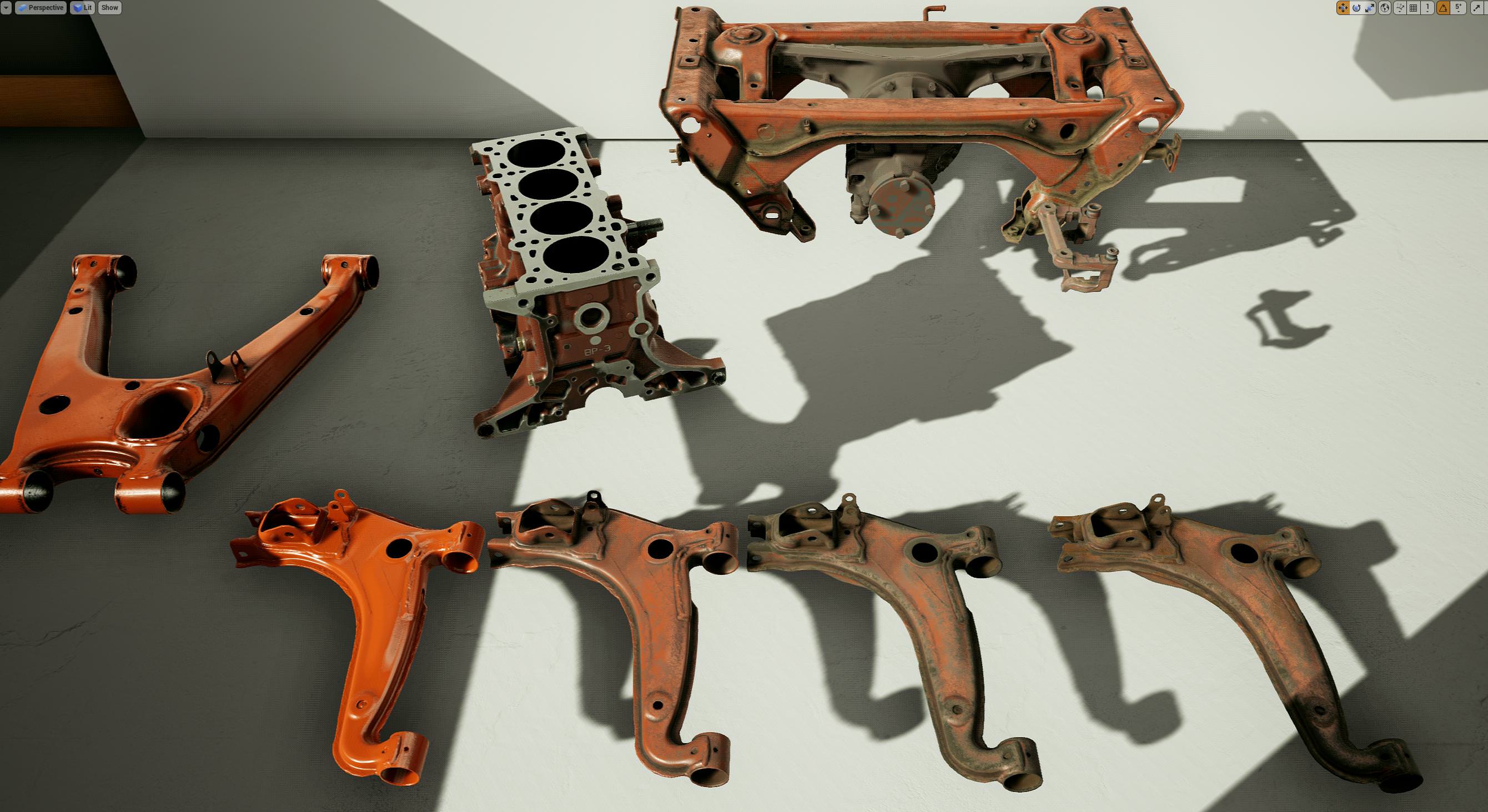
leps in a new albedo using inverse roughness pow2 * inverse metalness. Basically, areas that are shiny and not metallic get paint. Rough areas dont, and machined/metal surfaces don't
frigid kite
Sweet, those parts still look amazing!
sly elk
Thanks. Doing some hacky stuff now to make a few objects get paint that werent. Cast aluminum parts were both too metallic (metalness 1) and too rough to get painted. So the paint component on each object is going to get a switch to deal with the roughness issue and then im hacking the metalness of areas I wanted painted from 255 to 245
mighty carbon

UploadVR
AMD's new software Radeon ReLive for VR will allow owners of their GPUs to stream SteamVR games to a standalone or mobile VR headset.
imagine that
 slow swift
Is there a way to adjust the interpupillary distance of a VR camera in Unreal? To make a particular pawn feel bigger or smaller than the others?
sturdy coral
@slow swift there is a world to meters scale node that does it
it will scale up and down head and hand movements too
slow swift
That does it globally though doesn't it? Won't all the pawns get that?
sturdy coral
you definite want the head movements scaled like it does or it will cause sickness
@slow swift it is global, you'll have to write some management code to switch it on and off when possessing different pawns
loading levels, etc.
if you always use camera components you can probably make a derived camera component that handles it and can be set on placed objects in map etc.
slow swift
Hmmm, bummer it's not camera specific by default. I'll give that a try @sturdy coral , thanks
sturdy coral
@slow swift since it affects hands too the pawn or some other management layer will probably want to be aware, if it is displaying motion controller representations it needs to scale them up etc.
sly elk
Thanks. Hopefully people like it. Its very much going to be early access. Not anywhere near where I want it to go
mighty carbon
right about now I hate UE 4.21
sturdy canyon
It's my favorite of all the updates since like 4.15 (or whichever one added multiview)
mostly because it didn't break anything
but also package times on android are down like 50%
mighty carbon
well, I couldn't build for Go with the same setup I had for 4.19
mighty carbon
finally got that sorted out just to see my app crashing right after launch on Go
sturdy canyon
😦
Let me look back at what changed I had to make
Vulkan does not work with mobile multiview, so if you have vulkan on, you need to turn off multiview or it'll crash
mighty carbon
ES2 armv7 is what I've always built with
here is my logcat with the crash https://pastebin.com/Q484ZLpv
sturdy canyon
I think you're failing entitlement
turn the entitlement check off
or fix up your INI
it's no longer OculusAppId now it's RiftAppId and GearAppId, I think
mighty carbon
why? Gear VR as good as dead
plus, Oculus docs say AppID no longer required for Go
(only when submitting to the store)
sturdy canyon
Then turn off the entitlement check, yeah
Are you running it in a blueprint?
I run it manually in my character blueprint for some reason
mighty carbon
I run it in the level BP and right now it set to keep going whether it fails or passes
I had no issues with 4.19
and I did not change anything in my project
sturdy canyon
ok that might not be it, then
mighty carbon
well, logcat is there.. I can't tell much from it besides it crashes on render thread
sturdy canyon
Hmm yeah from an arrow component I guess?
Those usually package out in a shipping build, I think
mighty carbon
I am packaging dev build
sturdy canyon
Oh my Go build only runs in shipping
actually my Quest build only runs in shipping.. I haven't test Go in a while
sturdy canyon
it hits a check() in initiating the viewport. Apparently width/height 0 are passed in
I haven't tried commenting out that check to see if it can just run a dev build without it
instead I just flipped the bool bUseLoggingInShipping = true;
But you also have to make a change in AndroidMisc.cpp for that bool to do anything
line 106 is:
#if (!UE_BUILD_SHIPPING)
it should be #if (!UE_BUILD_SHIPPING || USE_LOGGING_IN_SHIPPING)
(that took me 6 hours to figure out)
mighty carbon
aye, I don't want to mess with all that
hopefully Oculus will fix dev builds
how did you manage to get Quest btw @sturdy canyon ?
sturdy canyon
I had an app on both Go and Rift and it's unique enough for Oculus to want it as a launch product
mighty carbon
cool
sturdy canyon
Let me know if a shipping build works for you, though. You're hitting a different issue than I did, so I might be sending you on a wild goose chase
mighty carbon
aye, thanks
mighty carbon
so, I upgraded to i7 7700, added more RAM (32Gb now total) and it still takes forever to build for Android 🙄
mighty carbon
hmmm, same crash with ES3.1, but not quite
all the issues with arrow are gone
@sturdy canyon when you build shipping builds (for testing, not for submission to the channels/store), do you check "for distribution" option ?
sturdy canyon
Yeah, but only because I'm too lazy to flip it back and forth
mighty carbon
@sturdy canyon somehow it fails building shipping builds :/ Unknown error
mighty carbon
not sure.. .Disabling signing for Gear VR is what I saw before BUILD FAILED and Unknown Error
I remember I has some issues with Gear VR where I had to generate some key / token as if I was packaging for Google Play
but I didn't think I needed all that got Go
looks like I have to do that for Go too (I am guessing it won't package without keystore)
sturdy canyon
Yeah the Android pipeline needs a keystore if you click "For Distribution"
mighty carbon
lol, wtf.. fails building even with keystore
the step is "performing final APK package opertion"
@sturdy canyon
mighty carbon
@sturdy canyon finally an error manifested itself https://pastebin.com/8MBTkVRh
mighty carbon
so, finally fixed that crap based on this
successfully made shipping build ... and it's still crashing
sturdy canyon
Nooooo
I'll send you my engine ini tomorrow maybe one of your rendering parameters can be flipped
Like do you have mobile HDR off?
mighty carbon
yeah, I have it off
I just noticed I had an experimental feature enabled - something something foveated rendering
maybe that's what crashes it
I'll test tomorrow, gotta hit the sack
mighty carbon
I give up.. Fuck UE4 and Oculus Go
(I'll wait for Oculus to respond to my report, which now maybe a few week after reporting since bunch of people who took care of connecting devs with engineers left Oculus not too long ago)
fleet plume
@mighty carbon are these project specific settings or does an empty project (but with oculus sdk) also not compile/build/run on oculus go?
i'am asking as somebody who wants to port a unity3d/oculus go prototype of mine to ue4 over christmas as a fun project
mighty carbon
why would I care for an empty project?! 😃
everything builds now just fine.. It crashes on render thread immediately after launch on Go
and I did not change a thing (related to rendering) in the project since 4.19
I am gonna try disabling multivew and other features that used to work and then see if that works..
fleet plume
yeah was just wondering whether it was a specific (non-default) setting that crashes the game
sly elk
Release promo video. I think this is the final edit: https://www.youtube.com/watch?v=M8uZMoTHZyc
granite eagle
Anyone know how to disable this piece of crap pop up error?
To be honest I would be happy if I could just disable every popup
@sly elk Damn man, I'm creating a wipeout style racing game and this is exactly what I wanted to do in terms of being able to build / modify spaceships.
mighty carbon
@fleet plume @sturdy canyon what version of JDK and Gradle do you use ?
sturdy canyon
I do my Android and windows Dev at work and my PS4 and Linux Dev at home
So I can't check my jdk/Gradle
(until Monday)
mighty carbon
np
fleet plume
i'am still on unity (with this prototype) so i guess my jdk etc won't help you
mighty carbon
it might
fleet plume
java version "1.8.0_60"
Java(TM) SE Runtime Environment (build 1.8.0_60-b27)
Java HotSpot(TM) 64-Bit Server VM (build 25.60-b23, mixed mode)
pretty old afaik
android studio 3.1.2 with the 7.1 and 8 android sdk's installed
sturdy canyon
Ah I did have to set r.AllowOcclusionQueries=False
That caused a crash in 4.21 on mobile
But I think it was in the preview version. It may have been fixed
mighty carbon
where do I put that @sturdy canyon ?
sturdy canyon
I put it in AndroidEngine.ini
If you don't have one specific to Android, you can put it in default engine
I turn off almost all rendering capabilities. Every one of my shaders is unlit with no shadows, etc
mighty carbon
that's going overboard IMO
sturdy canyon
I just meant, maybe I don't crash because all my shaders are simpler
mighty carbon
I doubt that.. I have my project with default lit materials released on Gear VR using 4.16.x and it even worked on Note 4
sturdy canyon
There's also a suspicious "use legacy shading model" check box
sturdy canyon
My min is 24, Target is 27
mighty carbon
but, since neither Epic doesn't care much about mobile VR nor Oculus care much about UE4 (for mobile VR), docs are always outdated and there have always been issues with deploying /running UE4 apps on Gear VR / Go.. That's why 99% of project there are Unity-based
I am going by the docs - 19 for everything
sturdy canyon
Oculus actually does a ton in UE4 mobile nowadays
mighty carbon
where?!
sturdy canyon
Docs might be out of date, though
mighty carbon
Unity has always been their in-house engine and when I ask Carmack any question about UE4, he doesn't have any answers as he doesn't touch UE4
I'll try 24/27 for the next attempt
sturdy canyon
Oculus has their own branch of UE4. They have teams of Dev rels doing UE4 Dev on mobile
I've been really impressed
mighty carbon
I don't know about that.. I really can't stand working with UE4 and Go
used to be much better (prior to 4.19)
but we are in the different leagues - you are probably on top of their priority list and I at the very bottom
so you might have better dev relations with Oculus than I do
sturdy canyon
A lot of the ue4 talk is in private forums, yeah..
fleet plume
somebody posted a link to their repo some days ago
didn't find that repo just by browsing github
sturdy canyon
The Oculus repo is public, yeah
mighty carbon
I don't even have access to private forums
sturdy canyon
It's usually a couple SDK versions ahead, but doesn't have too much different in my experience
fleet plume
i mean this is empty for me: https://github.com/Oculus-VR?tab=repositories
but this isn't: https://github.com/Oculus-VR/UnrealEngine
 sturdy canyon
I actually don't use their fork
sturdy canyon
It caused issues packaging to PS4
sturdy canyon
But that was in 4.20, so maybe that's no longer an issue
But I'm not using any of those new features anyway ;-)
fleet plume
there's value in not riding the bleeding edge 😄
sturdy canyon
When you're on so many the platforms, it's really hard to make use of any platform features
fleet plume
do you have the same project for psvr and rift/quest?
as you mentioned the ps4 devkit
sly elk
Is there an easy way to force oculus SDK instead of steam VR for steam releases?
mighty carbon
@sturdy canyon trying 24/27 now (failed again with occlusions set to false)
mighty carbon

XTAL is a world’s first VR headset with AutoEye and embedded Leap Motion. It it fully enterprise-ready VR solution, it comes with 5K resolution, patented lenses and 170º field-of-view.
 mortal zodiac
All of a sudden I can't run my vive in unreal anymore, it worked all day and then suddenly not anymore. The screen just instantly blacks out and steam vr says unreal is not responding. The vive works fine with everything else and nothing I am finding on any boards seem to work. Anyone else had this issue?
sturdy coral
@sly elk if you have both included it picks native oculus with a higher priority
There is a command line option to force it too, -hmd=Oculus or something like that I think, that you could put into a steam launch option
sly elk
okay. so if you play on rift through steam it should default to running oculus?
thats good
thanks
sturdy coral
@sly elk yeah, you can override it in your engine ini too, but the engine's BaseEngine.ini should already have it
[HMDPluginPriority]
; Since SteamVR also works with the Oculus Rift and Windows Mixed Reality, give priority to the native Oculus and Windows Mixed Reality plugins before trying SteamVR
; Since OSVR also works with either Oculus Rift or SteamVR, give priority to either before OSVR
WindowsMixedRealityHMD=40
OculusHMD=20
SteamVR=10
OSVR=5
WindowsMixedRealityHMD=3
that's from my BaseEngine.ini, windows mixed reality showing up twice is a bug that they fixed in a later 4.21 revision
congrats on getting everything finalized and getting a release date before christmas!
sly elk
thanks. Finalized is a strong word 😃 Early access, not anywhere near where we want it to be for a full release but its far enough along
trail shale
Can anyone show me a good implementation of attaching the motion controllers to open something while constraining the direction of movement? I tried the VR interaction one that uses a drawer but they use a different method and hide the motion controller I believe
sly elk
oops, I thought this was our PM chain still 😃
trail shale
I've tried SetWorldLocation and only updating the axis I want movement in based on the WorldTransform of the Motion Controller, and then using the fixed axis that is saved to a variable once you grab it
no worries, let the world see, someone else might learn too
I'm trying to 'grab' a valve and pull it out with the motion controller, by constraining two of its axis of it to a previously saved ValvePos variable (once you grab it) and then updating the movement axis from the world position of the motion controller. However, WHICH motion controller element do I use? Do I use the base motion controller, or the hand mesh, or the root, or the collision box? It seems to do...weird things.... not sure which order to attach either, I feel like one way would be hiding the motion controller and spawning a grabbed hand mesh and just taking the position of the now invisible motion controller. But again, some direction would be greatly welcomed
 glossy agate
@trail shale on guns I just snap the hand mesh to a gun socket while it’s gripped then on release it goes back to the original location
If you have a master grippable with the logic all you need to do is update the relative vector and hand anim for each item and that goes pretty quick
trail shale
@glossy agate Thanks - I'm using an interface for grabbing and I have event ticks on each one but I think I could probably keep it on a master grab with the logic, that makes sense. I was getting thrown off by trying to attach the item to the controller or vice versa, using SetAttach, but it seems to be easier and probably more performant, to just hide the motion controller itself and toggle visibility of a hand mesh gripping said object (otherwise the movement of the MC while holding the item was confusing and constraining the motion controller proved difficult)
What is the best practice for clamping the movement based on the scale of the object (so you can't pull a valve further than it's length, and probably a little less) ..... I want it to be relative but the implementation of GetRelativeScale of the static mesh is proving unclear.
Right now, without the clamp, the movement implementation is the single SetWorldLocation pulling 3 inputs from two actor worldloc variables, so it is nice and simple
I'd like to use a constraint for the size that is relative so if I resize the object the logic still works
 sonic lake
@trail shale For VR interactables like drawers, levers etc. I would stay away from the idea of attaching them to the MC and use a MC tracking method instead. That makes it easier to set limits/constraints and respect them because each interactable actor is responsible for its own behavior.
trail shale
@sonic lake Yes that seems to be the best way; ca you tell me what is the best way to get the size of an object so I can clamp the axis so you can't effectively pull a valve out of a socket???
sonic lake
@trail shale You don't need to know the size. You can use something like two arrows inside your interactable actor to set the max and min limit, but that depends on exactly what you want to implement.
I saw a good tutorial some time ago about implementing an interactable button. I think it would fit to what you are trying to achieve, let me look it up.
Ok here it is: https://www.youtube.com/watch?v=o1NiMGeefls
 mighty carbon
Palmer is in town - http://palmerluckey.com/oculus-goblack-how-to-make-your-oculus-go-better/

Oculus Go, like all products, is the result of a series of compromises around cost, schedule, quality, and competence. It is clearly the best standalone VR platform on the market, but anyone …
jaunty shell
thefrick
real needle
What's the best way people have used 2d UIs in vr? My only idea is to spawn it infront of the headset, and attach it to the root component so you can move around it in world space.
Should I be rethinking UIs completely for vr? Instead of doing a flat 2d ui, rendering things in 3d and attaching to world space?
sturdy canyon
Attached to one hand is my favorite
jaunty shell
@real needle diegetic UI is the best for VR
forget about flat screen displays (unless its environmental)
be creative ! 😄
 loud badger
Dont know i this is the right place to ask but her goes 😄 I have been working on a small tutorial for a customer on how to setup the Oculus go and run into a small problem, when i try to screenrecord the wifi setting it shuts down, its a security thing but i wonder if anybody have a workaround to it ?
real needle
@jaunty shell I've never heard that term before. Thank you!
jaunty shell
@real needle diegetic UI is awesome :p
real needle
Holy shit yeah. This is the term I've been looking for all this time
fleet plume

Ich habe in der kostenlosen Demo versucht, einen Motor zusammenzuschrauben und war überrascht, wie viel Spaß das macht.
they really like it and see the future of learning in apps/games like that
sly elk
cool. I have been trying to put together more media this week with ourl aunch but it is a struggle
most gaming sites think its too niche 😦
fleet plume
i wonder whether they said the same thing about the pc rig building simulator
maybe the same outlets reporting about that game would be interested in reporting about yours
granite jacinth
@sly elk your game is very niche
But doesn't mean it's not cool
Marketing is hard. Especially if you're not paying someone else to do it for you.
mighty carbon
@sly elk well, it is
mighty carbon
then what's the problem ?
or do you mean they cover all that, but not your VR game because it's too niche ?
sly elk
yeah
sly elk
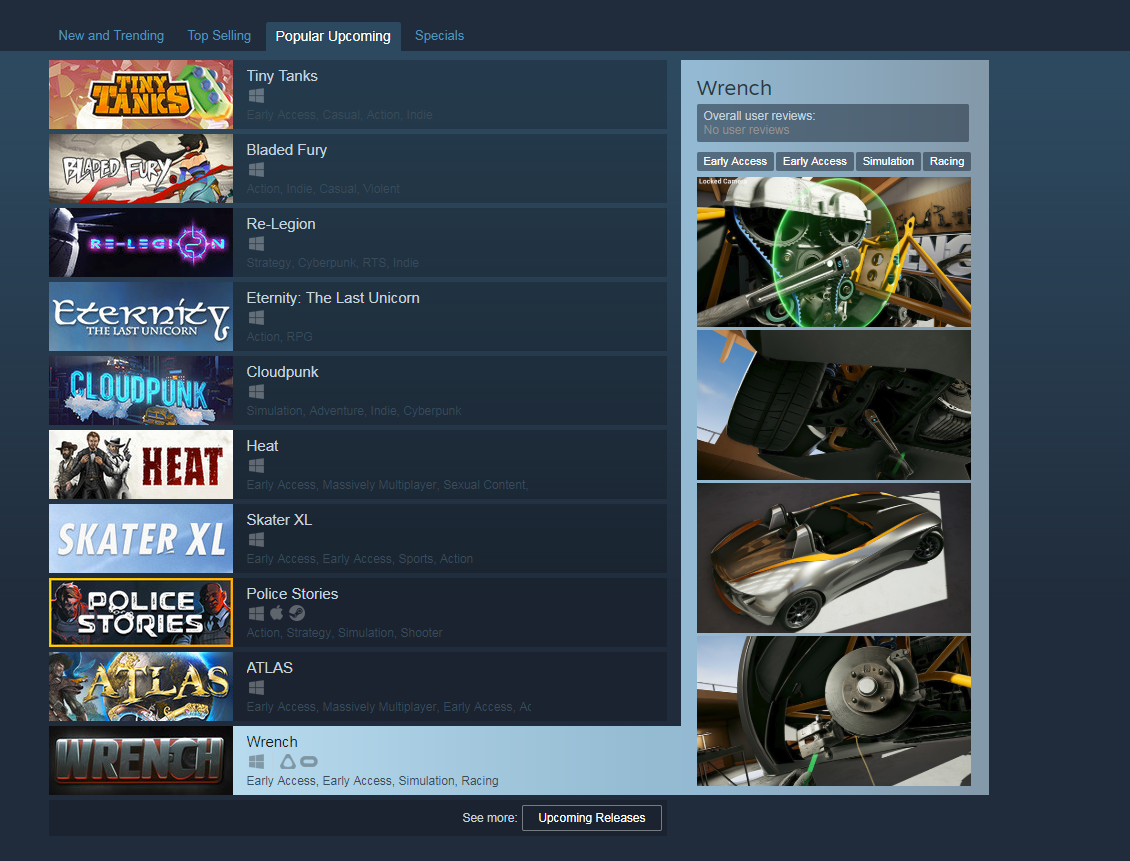
We made it to the popular upcoming shortlist though, I think thats a good sign: https://i.imgur.com/S7bz4e3.png
 mighty carbon
bah https://forums.unrealengine.com/development-discussion/vr-ar-development/1562300-googlevr-crash-with-4-21 I guess I am not the only one with 4.21.1 and mobile VR problems
Unreal Engine Forums
Hi guys,
I have a big problem right now. I try to build a VR app with Unreal 4.21.1 for Samsung S7 with googleVR plugin. Problem is, the app gets build and
sly elk
The nice thing about being a very small team is that our threshold for success is super low
mighty carbon
I feel like someone always sabotaging UE4 on the inside. How else can mobile VR break from release to release?!
@wicked oak any idea how much 4.21.1 is better than 4.20.x for mobile VR ?
wicked oak
zero idea
trail shale
Anyone advise the proper way to convert a motion controller's position to a blueprint's relative position?
sturdy coral
@mighty carbon does it break that often when you stick to the oculus branch?
@trail shale more details
you want what the motion controller's relative position would be, if it were attached to something else?
trail shale
nope,
I was using it before to take it's X location when it is grabbing a valve and use that to set the location of the valve itself...worked great but wasn't a relative solution, so if you rotate the actor, it breaks
So I'm trying to convert the hand's world position to a relative one but am having issues
@mighty carbon
mighty carbon
@sturdy coral apparently it also breaks for stock launcher for folks working with Google VR too (4.21.1 at least)
but yes, every release there is a major issue with mobile VR (but this is first time I think when it outright breaks no matter what options are used in the project settings)
Unity has issues too, but they aren't show stoppers usually
(because Oculus makes sure Unity works)
sturdy coral
@mighty carbon but do the releases on the oculus branch break often too?
couldn't tell if you were covering that, cause you mentioned stock launcher
mighty carbon
pretty much... Since Oculus doesn't fix UE4's bugs, unless it's SDK related stuff..
sturdy coral
ah ok
mighty carbon
like ES3.1 issues were not fixed until Epic fixed them
sturdy coral
@trail shale compose transforms is probably what you want, compose hand's world transform with valve actor's world transform
can't remember the order, but I'm pretty sure the compose transform node's documentation has it backwards
that should give you back a transform relative to the valve, same thing you would get if you attached the motion controller to the valve and told it to keep it's world location instead of snap to location, and then queried relative location.
trail shale
the docs are backwards!?
sturdy coral
@trail shale in here: https://api.unrealengine.com/INT/BlueprintAPI/Math/Transform/ComposeTransforms/index.html
Compose Transforms
I think one of the examples or both had the parameters backwards, can't remember. there is an answerhub thread about it somewhere
tired tree
the docs aren't backwards
the NODE is backwards....
parent transform is actually the child
I remade it for my plugin just so people wouldn't be as annoyed since heavy use of relative transformations is common with VR
mighty carbon

Learn what's new with Knuckles DV...
mighty carbon

With the holidays coming up fast, now’s the perfect time to prepare for year-end festivities, both in and out of VR. We're here to help. New additions to the Rift experience—rolling today—make it easy to get into the spirit of the season. We’ve got a new Dash keyboard...
did you know about this https://rift.uservoice.com/ ?
sly elk
is there a profiling command that shows GPU memory usage?
frigid kite
stat rhi maybe?
 last sky
has anyone tried developing for windows mixed reality and encountered weird visual distortions compared to the Vive or the Rift?
I'm talking stuff like it looking like the camera's pivot is now slightly offset creating inaccurate rotations, and the color being lower in contrast. the first one kind of makes sense since the windows MR headset uses a different form of tracking to the Vive and the Rift, but the color stuff is bizarre
sturdy coral
@last sky most WMR uses LCD so that might be the cause of the contrast thing
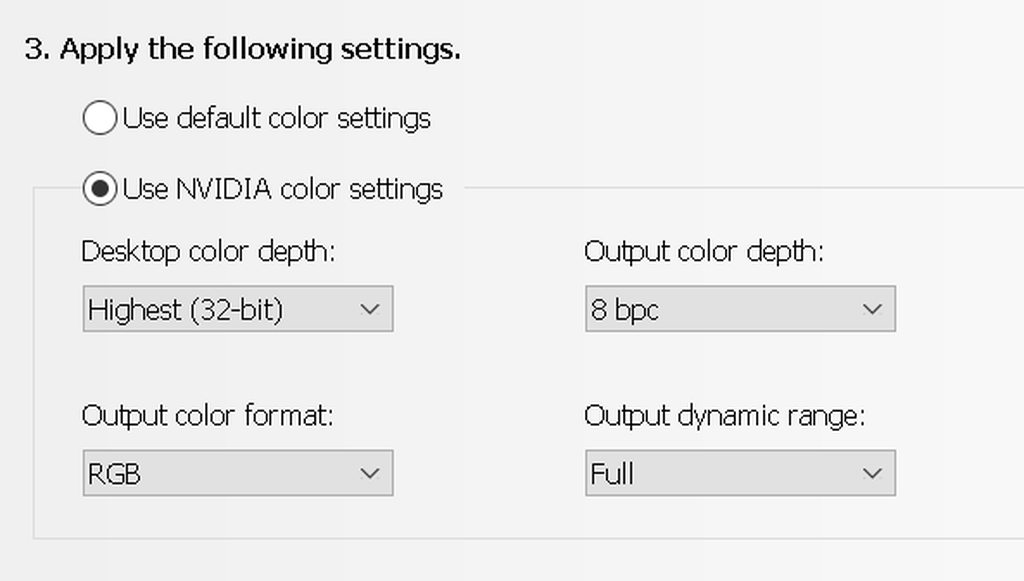
however, after a recent update I started having my main monitor lose range everytime WMR started up
@last sky here was my thread on it with link to a fix if on nvidia, but I don't think the HMD's range was affected
https://www.reddit.com/r/WindowsMR/comments/a4eca2/recent_hdmi_range_issues_each_time_mixed_reality/

reddit
1 vote and 1 comment so far on Reddit
 last sky
ah thank you, so does that mean oculus and rift have LED displays?
sturdy coral
@last sky yeah, OLED on both of those
and on samsung odyssey and odyssey+, which are WMR
you should try with the steamvr plugin and compare with native WMR plugin and see if there are differences in any of the things affecting you too.
last sky
where exactly do I find those settings in the above image? ^
sturdy coral
you can just uncheck the wmr one and it should use steamvr instead
last sky
yeah, unfortunately my project is locked into 4.18 so I don't know if WMR was a thing back then
sturdy coral
@last sky it's in the nvidia control panel, under resolution
last sky
thanks
sturdy coral
if you are on 4.18 you doing it through steamvr
last sky
yeah
we're trying to support oculus rift, vive (the original platform it was developed for), and WMR
sturdy coral
it might have been an earlier release, but I believe 4.18 has a bug for WMR
that messes up the alignment of the views
last sky
oh boy...
that certainly sounds like it
4.18.3 is the version we're on
we also encountered crashing with the steamvr compositor that was fixed in newer versions, but we were able to copy and paste the engine code and manually patch it
if it is indeed an issue with the engine version hopefully a fix like that is feasible
sturdy coral
@last sky I can't remember if they fixed it in a hotfix or not
but I have a pull request here that fixes it:
last sky
I haven't tried using the engine from the repository before, only the native binaries. how exactly do I incorporate the fix into my project?
sturdy coral
@last sky if your repo is hosted on github you may be able to do it all through the web UI, I'm not sure
last sky
yeah it's definitely not
sturdy coral
for mine I add remote repos that have someone's pull request and then do a 'git cherry-pick [commit_hash]'
last sky
that's an excellent idea actually, how do I get the remote info for that particular pull request?
sturdy coral
@last sky https://github.com/muchcharles/UnrealEngine is the remote
or https://github.com/muchcharles/UnrealEngine.git, can't remember which it uses
last sky
@sturdy coral thanks so much for your help! hopefully that fixes the feeling of it being like the camera pivot is off
sturdy coral
np, I'm not sure it will
what it was was viewport misalignment
I think maybe only when changing resolution but I can't remember
last sky
the perspective did seen kind of funky in the headset, so it could be related
sturdy coral
@last sky does the main cliffhouse area seem ok?
last sky
yeah, I'm looking at it now, I doubt that it's the headset itself
sturdy coral
ok yeah, unreal should look pretty close to that
a while back wmr through steamvr was always a little blurrier but they fixed that few months ago
last sky
definitely noticing the more dull colors of the LCD now too, so at least that wasn't just our app
sturdy coral
even if supersampled it always looked a little worse
last sky
yeah, is it a higher or lower native resolution compared to Vive and Oculus?
sturdy coral
they should be higher
last sky
because I was kind of judging it by Vive standards (the regular one)
oh okay, yeah there would definitely be some resolution issues then
sturdy coral
and if it is an LCD one it should be rgb stripe which makes apparent res even a bit higher
last sky
yeah it looks equal to the Vive Pro, if not slightly better
sturdy coral
I should have the pimax headset pretty soon, supposed to be about the same but across a much bigger FOV
I think its colors and contrast will be washed out similarly to WMR LCD stuff though
last sky
oh yeah, more FOV is great
I tried out the Star VR at a VR expo here and that had an insane fov and resolution
pity they're only using it for non-interactive experiences
@sturdy coral I don't seem to actually have Nvidia Control Panel, just GeForce Experience
sturdy coral
@last sky doesn't show up in start menu search for me
I right click this to get to it
last sky
oh wow I'm blind
been using AMD for too long t-t
do I need to restart the WMR app to notice a difference?
sturdy coral
@last sky you may want to do a full reboot
I'm not sure you are seeing the same thing though
last sky
wait hang on, this is just the display settings for my monitors not the headset
sturdy coral
but for me, once I started WMR my main monitor with a black background would flicker and become brighter
yeah I'm not sure if it has any effect on the HMD but it might
last sky
oooh this is a fix for the monitors
last sky
yeah no I haven't encountered that, but I suppose its good to have on as a precaution
I'll try restarting though
sturdy coral
@last sky you'll need some other stuff to gett joysticks working, I think someone has a pull request for it
last sky
yeah I did notice that
@sturdy coral so is the intention of even UE4.18 that you just use SteamVR and then that is supposed to make your app compatable with Oculus, Vive, Windows MR without requiring additional setup?
I just want to make sure that we're not missing something (beyond different controller input ofc)
last sky
@sturdy coral hmm, I tried pulling your fix but that only seemed to make things worse. now when I roll my head it looks like the screen is being stretched out and compressed
this is in VR preview of the editor though
last sky
sorry my bad, it seems like it was doing this before as well so your fix didn't affect the initial issue
sturdy coral
@last sky hmm, not sure why it didn't fix it for you
I do remember that the VR editor (not VR preview) would still have the issue even after my patch and I never bothered figuring out why because 4.19 came out and fixed it all
I had this change too, but I think it maybe only improved things for Oculus and not WMR:
--- a/Engine/Plugins/Runtime/Steam/SteamVR/Source/SteamVR/Private/SteamVRHMD.cpp
+++ b/Engine/Plugins/Runtime/Steam/SteamVR/Source/SteamVR/Private/SteamVRHMD.cpp
@@ -1683,9 +1683,26 @@ bool FSteamVRHMD::Startup()
                FrameSettings.RenderTargetSize.X = RecommendedWidth;
                FrameSettings.RenderTargetSize.Y = RecommendedHeight;

-               int32 ScreenX, ScreenY;
                uint32 ScreenWidth, ScreenHeight;
-               GetWindowBounds(&ScreenX, &ScreenY, &ScreenWidth, &ScreenHeight);
+
+               vr::ETrackedPropertyError WidthError = vr::TrackedProp_Success;
+               ScreenWidth = VRSystem->GetInt32TrackedDeviceProperty(
+                               vr::k_unTrackedDeviceIndex_Hmd,
+                               vr::Prop_DisplayMCImageWidth_Int32,
+                               &WidthError);
+
+               vr::ETrackedPropertyError HeightError = vr::TrackedProp_Success;
+               ScreenHeight = VRSystem->GetInt32TrackedDeviceProperty(
+                       vr::k_unTrackedDeviceIndex_Hmd,
+                       vr::Prop_DisplayMCImageHeight_Int32,
+                       &HeightError);
+               if (! ((WidthError == vr::TrackedProp_Success) && (HeightError == vr::TrackedProp_Success) && ScreenWidth > 0 && ScreenHeight > 0))
+               {
+                       // Fall back to getting the native screen res via the ext display query;
+                       // Windows MR doesn't support Prop_DisplayMCImageWidth_Int32 as of 12/19/2017
+                       int32 ScreenX, ScreenY;
+                       GetWindowBounds(&ScreenX, &ScreenY, &ScreenWidth, &ScreenHeight);
+ }```@sturdy coral all good, I realised that I didn't rebuild my engine properly. thanks for all your help, one of our team members is going to rebuild our source with either your hotfix or one from unreal engine itself
at least now I know that it has nothing to do with our app, because I encountered the same problem with the VR template level on 4.18.3
and on 4.20.3 it was fine
sturdy coral
without that last change I think Oculus will use a vive-like aspect ratio, even though oculus provides a recommended target with a different aspect ratio than screen ratio
(probably the lenses stretch things more in one direction)
last sky
thanks, we'll keep that in mind if we run into any issues with rift
sturdy coral
everything will still look ok though without it, I think just the pixel allocation won't be ideal
last sky
yeah WMR is the only device we've encountered that's been messed up
sly elk
Does "bUseDesktopResolution=true" work in current unreal builds? Is this still the correct way to make sure fullscreen runs native res?
 robust orbit
has anyone else seen assertions in 4.21 for "InOutSizeX != 0 && InOutSizeY != 0" in CalculateRenderTargetSize on Oculus Go?
For some reason, the Oculus SDK is returning a zero eye viewport rectangle size for me.
gleaming river
Hey all, has anyone noticed that with the wireless VR adapter, unreal games will crash after 120 seconds of being still
mighty carbon
@robust orbit I can't even run 4.21.1 project on Go - inta crash
(same project built with 4.19 runs fine)
mighty carbon
@robust orbit https://github.com/Oculus-VR/UnrealEngine/issues/24
I already submitted bug report to Epic and Oculus and heard nothing back..
same as yours ?
fleet plume
which is funny, because they're supposedly working on robo recall for quest
mighty carbon
well, they have some private private branch of UE4 most likely
or maybe they even ported RR to Unity, for better performance
mighty carbon
Carmack loves Unity a way more than UE4, so I wouldn't doubt such turn of events
fleet plume
carmack isn't the epic owner
mighty carbon
he hasn't touched UE4 with a long stick
robust orbit
@mighty carbon you have a number of exceptions in the log, but I don't see a crash callstack. you might have attached the wrong long file.
mighty carbon
Carmack is CTO of Oculus and basically the one who can call shots for mobile VR division
on top of that Oculus bought out everything RR related from Epic
mighty carbon
yep, wrong f'ing log
ah, no, it's the right one
download it and search for "beginning of crash" @robust orbit
Fatal signal 11 (SIGSEGV), code 1, fault addr 0x0 in tid 12045 (RenderThread 1)
backtrace:
12-14 17:53:31.818 12061 12061 F DEBUG : #00 pc 05885f94 /data/app/com.Supranormal.AlbergateGo_03-1/lib/arm/libUE4.so (_ZNK16FArrowSceneProxy22GetDynamicMeshElementsERK6TArrayIPK10FSceneView17FDefaultAllocatorERK16FSceneViewFamilyjR21FMeshElementCollector+700)
12-14 17:53:31.818 12061 12061 F DEBUG : #01 pc 04b935b0 /data/app/com.Supranormal.AlbergateGo_03-1/lib/arm/libUE4.so (_ZN14FSceneRenderer25GatherDynamicMeshElementsER6TArrayI9FViewInfo17FDefaultAllocatorEPK6FSceneRK16FSceneViewFamilyRKS0_Ih18TMemStackAllocatorILj0EEESF_SF_R21FMeshElementCollector+3272)
and there is some more after that
robust orbit
ah, Google Docs preview cut off the file
mighty carbon
yeh, it did
for a moment I thought I submitted a completely useless log to Epic and Oculus 😛
robust orbit
your crash is different
mighty carbon
btw @fleet plume there is a chance that Oculus started working on RR for Quest a way before 4.20 and thus they don't really care at this moment about issues in 4.21
hmm.. Epic just got back with me and said they built my project and had it running on Go without any crash (although they used launcher version and didn't use "adb install"; instead they used Launch on the Device option).
I am gonna have to try that
fleet plume
@mighty carbon that sounds more likely than porting it to unity 😛
tired tree
@fleet plume considering that oculus internally uses UE4...even more so
tired tree
then wouldn't it be in their best interest to port it using UE4 to make sure it is up to snuff with their new hardware? 🙄
mighty carbon
it would be in our best interest 😃
wicked oak
@mighty carbon oculus has implemented a bunch of good shit for mobile vr
they did all the work for monoscoping render and multiview mobile
mighty carbon
yeah yeah.. and a lot of people have a ton of issues with 4.21..
they sure did the work, but to make it work 100% from release to release is whole different story
 flat shoal
does oculus exist anymore? I've seen them being referd to as "facebook vr"
sly elk
I posted this in blueprint chat but someone here might know as well
My package builds are running a fixed resolution in fullscreen mode (that is smaller than native). I gather bUseDesktopResolution=True is what I want but It doesn't do anything when added to my packaged builds. Where do I need to set it?
sly elk
my game is both VR and desktop
this is for the desktop launch mode
game looks like this on 2d mode launch: https://i.imgur.com/hKymZ06.png



on my 4k display
alt enter to get to windows
and the windows up key to make it big, its clearly just resizing the same res
frigid kite
Maybe you can get around bUseDesktopResolution not working by manually setting the resolution to the max allowed resolution of the monitor?
sly elk
yeah, i supposed that is hte best solution
dusky moon
Guys I'm getting this really weird editor crash on 95% when I load my project. It's something with OculusSpatializedAudio and somehow when I enable "Mirror Audio" on my Oculus plugged-in the crash goes away! does it sound familiar to any1 here ?!
sturdy coral
@sly elk GameUserSettings has some stuff around fullscreen/windowed
so when you resize, it is scaling the pixels instead of using more pixels?
sly elk
Thanks. finally fixed it. Jim's computer had some old config files getting used in the build
prevent those settings from working
mighty carbon
I have an interesting development - if I use stock launcher and instead packaging the game and manually installing it using adb, I do Launch on the Device from the Editor - the game runs
I am going to try to do the same with Oculus fork
fleet plume
@mighty carbon does it still not crash when you start the game from within the Go after the first "Launch on device"?
mighty carbon
@fleet plume not when using launcher version of UE4
fleet plume
too many not's
so does it work for you when you launch on device? also on subsequent starts from within Go Home?
mighty carbon
It runs when I use 4.21.1 launcher version and Launch on the Device button
I didn't try launching the game from Home after that
But I tried building as usual and installing manually - crashing
Is that clear enough? 😅
fleet plume
yes
i wonder if the manifest etc is different
afaik at the end of the day in both cases an .apk gets deployed on the device
mighty carbon

Facebook Reality Labs has built DeepFocus, a new AI-powered framework for rendering natural, realistic focus effects in real time.
sly elk
well, my game is now live: https://store.steampowered.com/app/936720/Wrench/

Wrench is a highly detailed race car mechanic simulator that tasks you with maintaining your team's race cars.In this early access release you will:Start as at the bottom as a junior level assistant handling fluid and tire changesEarn XP and gain mechanic levels based on each...
Release Date
12/19
sturdy canyon
Woooh! Congratulations!
sly elk
THanks 😃
sturdy canyon
Are you collecting stats about what portion of your users are VR?
I would be really interested to hear if you get many pancake gamers or not
mighty carbon
has anyone been using UE 4.20 / 4.21.1 with Oculus Go ?
sturdy canyon
✋
sonic lake
@sly elk Congratulations Alec! 👍
sly elk
Thanks. This project seems kind of nuts when I started it taking apart my car. Sticking it out has been worth it
sonic lake
I believe you have been pioneering a VR genre that will steadily gain popularity.
Enjoy the moment and the well deserved holidays!
sly elk
thanks. Also lol holiday. Now there are going to be people asking us to fix and add things
wicked oak
@sly elk i wish you luck, given the state of current indie games in steam 😦
your project is amazing
frigid kite
Congratulations Alec! 🎉