#virtual-reality
1 messages · Page 194 of 1
 chilly ocean
 sturdy canyon
BasePass Geometry should be unchanged
 sturdy coral
geometry render time may even go up since the culling is less precise
sturdy canyon
what should be changed is HZB downsampling on the GPU should be cut in half and and those 16 draw calls should reduce to 8
or whatever
chilly ocean
Gotcha, will look at it when I get in the lab next time. Thanks guys!
sturdy coral
I think it is for hardware occlusion queries (non-hzb), but I'm not sure
or maybe both
sturdy coral
they are a separate thing, older than HZB as a technique
I think it basically draws a bunch of quads based on bounding boxes or bounding spheres and tests them against depth the depth buffer
it disables write to the depth buffer before drawing them, and the gpu reports back if any pixels would have passed the depth reject and been written
sturdy canyon
oooh HZB mips was reduced to only 2 draw calls per eye anyway
sturdy coral
they say HZB can result in less precise culling and result in more draw calls/geo work than regular occlusion culling, but I'm not sure why
I would have thought the two would be equivalent
occlusion queries are just a brute force search, and HZB is sort of a quad tree optimization on it
sturdy canyon
How do I select between the two?
sturdy coral
it is in the renderer settings somewhere
sturdy canyon
I can't find the checkbox 😛
sturdy coral
screenspace reflections and ssao will force it on
at least the HZB generation, maybe not theHZB occlusion testing
because those two use the HZB structure in their ray tracing
sturdy canyon
I'm surprised SSAO uses the same structure.. HZB uses a max filter instead of average
I think it should let in too much light for SSAO
maybe it's good enough and not worth spending time on the extra downsampling, though
sturdy coral
@sturdy canyon I don't see it in renderer settings anymore either, even in 4.20
r.HZBOcclusion is the console variable
they may automatically pick it or something now
sturdy canyon
I'm using SSAO, so it sounds like round robin occlusion won't even help me 😦
will help on PSVR, though
sturdy coral
found the mirror causing fullscreen commit: 44d5101b004e4f24c563010694c6e9b3711b6dff
@@ -1262,17 +1262,6 @@ bool FSteamVRHMD::EnableStereo(bool bStereo)
                TSharedPtr<SWindow> Window = SceneVP->FindWindow();
                if (Window.IsValid() && SceneVP->GetViewportWidget().IsValid())
                {
-                       int32 ResX = 2160;
-                       int32 ResY = 1200;
-
-                       MonitorInfo MonitorDesc;
-                       if (GetHMDMonitorInfo(MonitorDesc))
-                       {
-                               ResX = MonitorDesc.ResolutionX;
-                               ResY = MonitorDesc.ResolutionY;
-                       }
-                       FSystemResolution::RequestResolutionChange(ResX, ResY, EWindowMode::WindowedFullscreen);
-
                        if( bStereo )
                        {
int32 PosX, PosY;```@sturdy canyon if HZB lets more stuff through but doesn't require many draw calls, seems like you could do both techniques, HZB as first pass, then hardware occlusion culling on anything that made it through
anyone messed with this? how do you turn on the debug canvas?
New: Added a composite debug canvas layer to Spectator Screen:
- The debug canvas layer is now copied onto the spectator screen if both of those features are active.
- The layer is mapped onto the spectator screen with letterboxing, so its aspect ratio will be preserved but additional unused screen space may exist (usually on the left and right).
- The layer resolution is unlikely to match screen resolution so the display is expected to be somewhat fuzzier than normal.
- Spectator modes that use API level support for mirroring to monitor rather than the SpectatorScreenController will continue to function as before where they do the monitor mirroring after the debug UI is drawn so it will appear but may be cropped oddly.
 languid night
Would making swipe inputs for Oculus GO be the same as doing it for GearVR?
 granite jacinth
@languid night should be
sturdy canyon
Yeah we don't change our input manager at all for Go and GearVR
languid night
Ah, then that makes sense.
In order for swipe input to work, do I need to have a touch interface setup?
sturdy canyon
I just sample the motion controller x/y axis on tick on my input manager
Swipe detection code had a small trick on it where I only accumulate into the x or y swipe accumulation buffer if the x travel is more than twice as big as the y travel
That way it never accidentally triggers a vertical swipe while horizontal swiping
languid night
I see. Thanks a lot @sturdy canyon
languid night
@sturdy canyon For the swipes, do you use thumbstick input or do you use touch input from the Oculus Go controller?
sturdy canyon
I use the event motion controller L X Axis or maybe right X Axis
I think you have to switch based on handedness?
On one of the platform you have to switch based on handedness
languid night
Yeah, it does depend on handiness for the Go. Anyways, thanks again! I'm on the right track.
 tired tree
@sturdy coral nah, next plans they are selling to HTC ;P
sturdy coral
I think there is a good chance it is a reference design since they had that call for partners and were going to be providing the lens, tracking, and LCD driver technology
and combining lighthouse + insideout would make a lot more sense if knuckles had LEDs on it.. which it doesn't (and seems close to final)
granite jacinth
@tired tree @sturdy coral they won't sell to others
This is going to be their baby if it's true
The issue will be pricing it right for consumers
They have to go on a certain offensive since Discord is taking some of their money and players (just a bit)
If they are going to conquer some market (other than digital store), might as well be the one where they have a good chance to make a difference
Surprised HTC didn't buy out Shadow VR
Shadow Creator, w/e
As for knuckles...
There's a good chance they might be making two versions
One for SteamVR Tracking
And the other for ummm... Valve Lightning Inside-Out Cosmos Tracking
sturdy coral
it is interesting the shadow one has the same speaker grill asthetic
granite jacinth
Well I mean... it all comes from China anyway
Probably the same 2-3 factories
I don't like the sound with the Focus though
sturdy coral
yeah.. just both in the news big the last couple days sort of taking shots at oculus
granite jacinth
The Go audio is better a bit
sturdy coral
and both have speaker grill aesthetic
granite jacinth
Yup, I think this is finally going to be what we've been waiting for
All-hands on deck VR HMD war
sturdy coral
I mean the front face look of it not the actual audio
granite jacinth
Obviously, the big winners will probably still be Standalone side
Which, I don't mind...if that means they push the hell outta the tech
If they could somehow squeeze in PC parts
Mini Laptops on your face
sturdy coral
what was the code name of quest's tracking system again?
sturdy coral
nah that's rift's
sturdy coral
ah it is insight
did they say if it was a hardware solution?
I wonder if they are just rebranding something from the SoC
although I wouldn't think it would be set up for four cameras like they are using
granite jacinth
?
sturdy coral
I think snapdragon has some build in SLAM
granite jacinth
845 only I thought
These are 835

Qualcomm
Snapdragon 845’s new architecture introduces outstanding integrated graphics, video, and display processing technologies for cutting-edge VR/AR performance.
Unless they somehow got some early version of it working on 835, but I doubt it
sturdy coral

Qualcomm
We’re entering an era when entertainment will not only be seen or heard, but experienced. In 2017, we’ll have even higher expectations for our next phone. That’s something Qualcomm Technologies kept in mind when developing our next-generation
granite jacinth
They are definitely pushing for Standalone VR though
sturdy coral
but doesn't sound as advanced
granite jacinth
ah
sturdy coral
'VIO is designed to provide precise on-device motion tracking by fusing information from a camera and motion sensors, and estimating relative position and orientation of a moving device.'
doesn't sound like full SLAM
granite jacinth
hm
but, that's with how many cameras
Nvm
2-4 obviously since eveyone is using it
sturdy coral
'SLAM That Headset
Qualcomm’s former VRDK reference headset featured VIO tracking, which compares sequences of images to estimate your 6-degrees of freedom (6DoF) movement in a 3D space. Qualcomm’s new reference platform replaces VIO tracking with SLAM technology to provide accurate room-scale 6DoF tracking.'
granite jacinth
So, 845 is something to look forward to
sturdy coral
that's a tom's hardware thing comparing 845 and 835
835 just used optical flow or something
granite jacinth
The sad part is
I want them to skip
I don't want an iteration each chip
But, I have this feeling they might just keep going up each year or so, with last year's tech
for cost-savings
Man, I have some lame ass build error
I wanted to be working on my jam game, but nope, gotta fix this or I'll think about it all weekend
sturdy coral
I just spent a full day and a half upgrading to 4.21, everything went well except and I'm getting some weird texture error
granite jacinth
😦
sturdy coral
just spent and hour or so stepping through texture compression and derived data cache stuff
granite jacinth
I had it also a few months back, solved it by finding the corrupted file/name and renaming it
But the POS logs only say the name is "(" , but it's not. It just too dumb to tell me what file it is 😭
sturdy coral
that's bad
granite jacinth
Yeah, it's frustrating.
I am basically reverting all changes from last successful build
then stepping back 50%
and then another and another, building each time, until I can't and find the bad changelist
This issue has happened since 2014
And they don't seem to know what causes it exactly and so I doubt it'll ever get fixed
sturdy coral
@granite jacinth well deleting Saved fixed my error.. g/l with yours 😃
sturdy coral
I've got to do testing to validate everything, but otherwise I think I'm merged
granite jacinth
Validation
That's what I need to learn next
Like actual Asset Validation in Editor
 jaunty shell
That valve hmd leak
Dang
Am I the only one noticing the leap/zedcam mini slot ?
Or is it supposed to be for another piece of kit ?

I guess this confirms it's not a Photoshop job at least
Just noticed the post on pcgaming was from you @sturdy coral :D
 wicked oak
too bad pc vr has no future
as of now
who knows, maybe standalone headsets make people hooked into vr and then they want the high end version
granite jacinth
I don't mind them going to Standalone
As long as they allow tethered for increased gpu
Like those external gpu encolsures
Meh, probably more cpu bound actually
wicked oak
switch style standalone that can be thered is the future, i think
its a goddamn shame that oculus isnt allowing it
we know that they arent allowing it, even if they could, mostly becouse they dont want to leave the PC rift useless
also becouse they are losing money per sale, and need to recoup through their store, if you use it on pc, you might just buy the games on steam
 alpine ore
Anyone know how determine if a spawned AR plane is vertical or horizontal?
alpine ore
Cool, will give that a try, just didnt know if the horizontal./vert property was stored in blueprints when the plane was spawned
alpine ore
Update seem to have got it: Firstly Get Local to world transform of the plane, then its Get Up Vector from this location, this will return x:0, y:0, z:1 for horizontal, so anything else will be 'vertical'
jaunty shell
👌
sturdy coral
@tired tree nice PR! : https://github.com/EpicGames/UnrealEngine/pull/5253
sturdy coral
@mighty carbon fixes steamvr render model textures and makes them work in shipping
 mighty carbon
Ah, I see
tired tree
@sturdy coral been looking back at old bug reports of mine and implementing them for pull requests lately...that particular one I reported during engine preview of the version that they added it in.......
figured about time to just fix it for them...
 median wedge
if i restart steamvr while keeping the editor open is there a way to re-hook into steamvr?
If there isnt already a way in a GUI, I would appreciate a lead in the engine source, that I could add in a plugin
 sly elk
Has anyone set up knuckles for unreal yet?
tired tree
@sly elk yes, but also depends on what part of them you are asking about
 tawdry dragon
Anyone ever played with doing latency calibration with openvr? Issue I'm having is that I'm using a vive tracker to 3d track a real camera while the media bundle plugins feeds in video. However there is a slight delay from camera movement to the video input getting displayed in the engine, so that means the vive trackers transforms are off. I'm wondering how to go about aligning them
sly elk
the individual finger tracking + using that info to do a grab system
also, just from a theoretical standpoint, what is the criteria to define a successful grab? Two points of contact that must be facing each other within a certain tolerance?
tired tree
@sly elk well there are still the finger curl values
you can sample that to get extent of curl, but if you wanted what they showed in their skeletal tracking demo, it takes a bit more effort currently, as the engine is actually broken for supporting it atm
as far as grabbing, you can specify overlap points on the hand yeah and consider it a grip when opposing fingers grasp something, usually thumb + any other digit
sly elk
I don't have super accurate collision volumes on my parts, would have to do complex collision
tired tree
their startup demo just binds to the "grip" action which is all of the primary fingers down and the amount down thye are
for per finger tracking you can manage it with curl values, but the full skeletal API is far more useful, I would imagine even more so for your game, as the gloved hand approach fits it perfectly
sly elk
i haven;t look at knuckles much in depth. If you want to do a simple/dumb grab system with them is there an easy input for that?
like totally ignoring finger tracking?
tired tree
yeah, pinch and grip
they also still have normal buttons
pinch is trigger + thumb down at the same time, grip is the 4 primary fingers curled down
sly elk
cool. Wrench has lots of tiny parts and if they are actually in your hands its easy to have controllers bash together before you get them in position
which is why we don't snap anything to hands
sly elk
?
tired tree
knuckles themselves
sly elk
No. I can get some but we haven't had the bandwith to develop for them yet
so I haven't bothered
tired tree
when you do, load up moondust demo and play with pinch grip
it is very well suited to small parts
sly elk
cool
tired tree
could emulate it with standard wands as well
 smoky comet
someone know a tutorial video for setting up vive trackers in unreal?
 pearl tangle
@smoky comet they are just like a regular controller, you just have the different indexes to reference
 dim iron
Hi all, I'm sure this is a simple thing, I'm new so sorry if it is 😃 I am trying to do a line trace from the motion controller as per below blueprint. when i pull my right trigger i don't see anything if i look to the left its somewhere random and not coming from the end of hand model. which i would assume would still be the X of the controller? as i said I'm new. This is added into the MotionControllerPawn blueprint.
 sonic lake
Into the End pin needs to be a + (vector sum)
Not a x (vector multiplication)
@dim iron
dim iron
@sonic lake, damnit it so close lol. i said it would be something simple. ps you tutorials on YT have been amazing, i really hope you have more planned 😃
sonic lake
@dim iron Thanks! I will definitely do more of them. I am just looking for what people are interested in. If you have ideas I am all ears.
dim iron
@sonic lake that's great news 😃 i will be waiting for YT to send me a notification 😃 for me i would love to see any form of VR interaction with objects touching buttons etc, VR menu's, making the ue4 hands or new ones grasp objects correctly with correct finger placement, one that i would really love to see and that's because i want to use it is liquid in VR. i want to be able to mix 2 pourable liquids and make a different spell/compound from the result of mixing.
 deft moat
@sonic lake What is your YT channel?
 wheat holly
^
sonic lake

YouTube
dim iron
Its the only channel I can watch without sound. I think that says a lot to the excellent content provided. 👌🏽
mighty carbon
I wonder why this is a no-fix https://issues.unrealengine.com/issue/UE-61570 (not that I care for PSVR at this moment)
sturdy canyon
I didn't know you could switch back and forth between VR and pancake..
So it seems pretty unimportant to new
mighty carbon

IGN
A new headset might be the way we get the long-rumoured Half-Life VR.
yet another VR HMD ?!
 wide flare
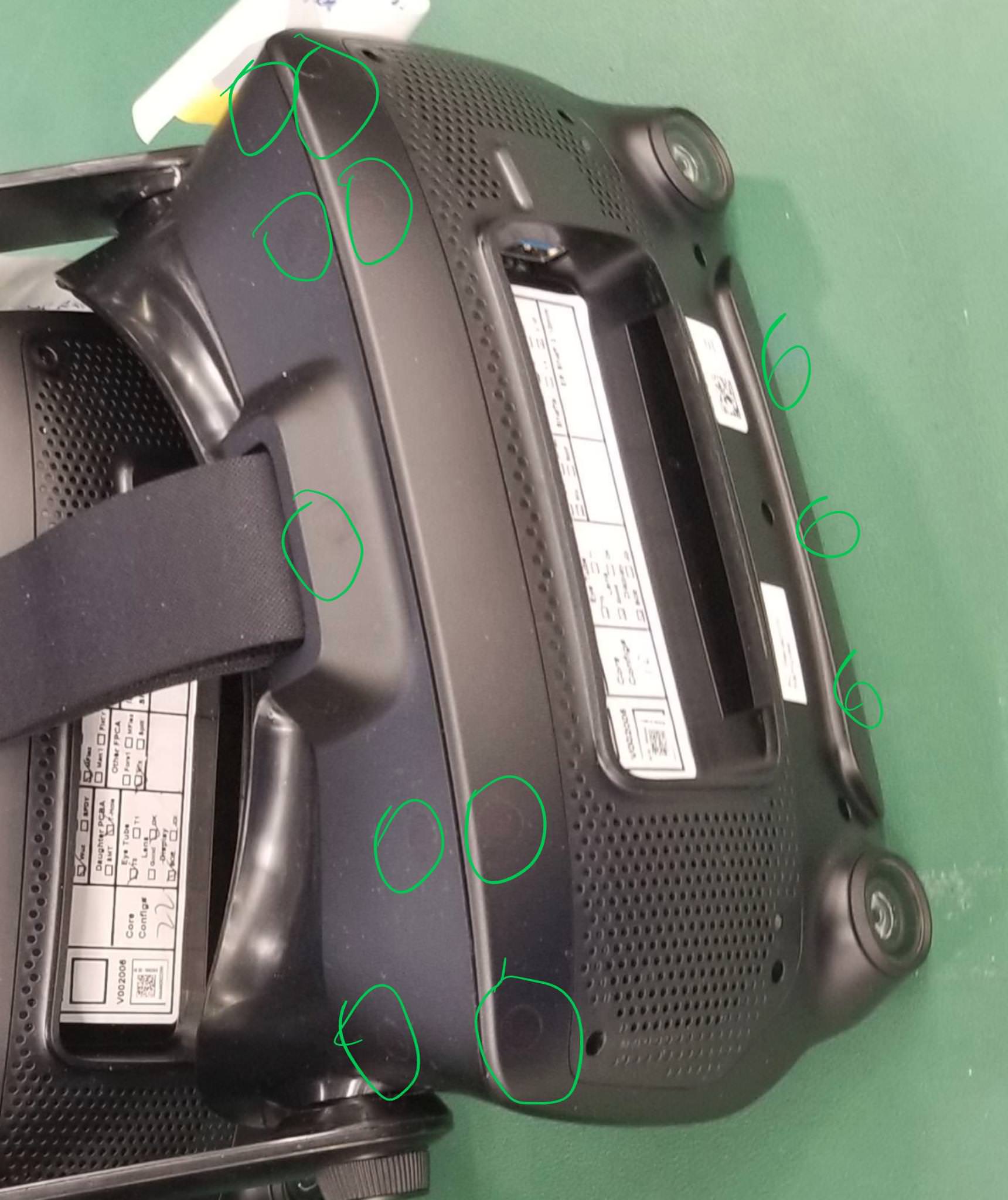
looks like a position based hmd where the hmd tracks your location instead of using external trackers like lighthouses. Looks like a new vive to me though would be interesting if steam left vive behind as they have been working together since the beginning
sturdy coral
it has lighthouse sensors throughout though
@wide flare https://i.imgur.com/NoWU43K.jpg
 wide flare
true true
sturdy coral
I think it may be for development to train the camera vision stuff with lighthouse as a reference
wide flare
va;ve did develop the lighthouse tech afaik so itll be weird
sturdy coral
who knows though
wide flare
also looks like they are trying to integrate some leap motion esq hand tracking
i know vive has been saying they were trying the same
mighty carbon
I sure hope they make it cheaper than Vive/Pro
wide flare
seems like thats the plan these models cut alot of the frills vive uses
wide flare
i love my vive tbh vive pro even crazier
mighty carbon
I read somewhere that besides partial elimination of SDE, OD+ is as bad as any other WMR
wide flare
vive pro is like epitome of luxury vr
wide flare
i do wish i had the knuckles
sturdy coral
I think the lenovo is about the lightest one out there
wide flare
I agree tried lenovo they are pretty good
only possibly lighter one would be the snapdragon based system but its a lil weak imo
granite jacinth
Knuckles aren't all that
Especially without proper game support
Especially with the lack of UE4 support currently
A tad bit depressing imho
 ornate raptor
Valve has said they're working on UE4 support, specifically. No time frame, though
granite jacinth
Aye
ornate raptor
But I'm with you. I want to play with Knuckles with a native solution, instead of custom workarounds
@granite jacinth Have you tried the live link plugin? It'll get you going, at least. But it's pretty limited
ornate raptor
Haha, fair enough
granite jacinth
I won't dev for it until we get full support
ornate raptor
Probably a reasonable use of time
tired tree
full support is still livelink
which isn't suited to your multiplayer @granite jacinth
you could be testing on the module I sent you as you will likely be using it anyway
granite jacinth
Who said it was livelink?
tired tree
they did
granite jacinth
Where?
tired tree
and its also what they did for WMR
in the original thread on the knuckles board
where they were talking about support
sorry not WMR...magic leap
sly elk
We just need Valve to pay Epic to build a short knuckles based platform exclusive so they have an incentive to implement everything in vanilla unreal
tired tree
@sly elk valve is working WITH epic on integrating it
its just harder in ue4 than unity
since everything is more static layout wise
sly elk
oh nice.. When I talked to someone from valve a few weeks ago it sounded like unreal users were going to have to do it from scratch
Is there news on that or an expected timeline?
tired tree
"post 4.21 release in the dev branch"
it likely won't have everything
but just not locking out skeletal actions would be enough to make the rest really easy
can do it currently with some workarounds for testing, but its less than ideal
jaunty shell
just had a Vive Pro (no idea for non pro) firmware update, anyone got some sauce on it ?
jaunty shell
holy damn my wireless adaptateur is going crazy since that firmware update
device getting connected/disconnected in loop
 runic cedar
Hi how can i rotate to up Y+35 in VR character ?
in the world space
coz if i got - position in world space i will down my camera :/
 charred plover
@runic cedar А по-русски?
mighty carbon
net
runic cedar
But in BP to make a smooth twist of the camera, or the actor difficult..
 warm lion
anyone else get this on 4.21 debug GameEditor ERROR: System.IO.DirectoryNotFoundException: Could not find a part of the path 'D:\UE_4.21\Engine\Intermediate\Build\Android\UE4\Debug\Launch\Launch.precompiled'.
This is launching to the oculus go. When I build the project in Development I don't get this
 abstract forum
Having an issue with a Windows MR controllers and UE 4.21. I cannot seem to get the controllers to register with the VR preview. Any ideas?
jaunty shell
welp, sounds like my Vive controllers aren't being registered in UE either since the last steamVR update...
betas are betas I guess
 digital musk
can anyone help me with reading the Oculus Proximity sensor (IsHMDWorn) after I disabled HMD?
Seems like after I use the "Enable HMD" node to DISABLE my HMD I lose the ability to read the proximity sensor
charred plover
@digital musk enable hmd doesn't block reading from sensors - theoretically
at least i was able to receive put on/remove events with hmd initially disabled
on the other hand some states/events might not be available to all hmds
sturdy coral
I think you have to use use GEngine->XRSystem->GetStereoRenderingDevice()->EnableStereo(true/false);; disabling hmd/vr instead might interfere
mighty carbon

@PixelStrikeInc Attachment rate is low on GearVR and Go, so it limits your audience a lot. Quest has dual thumbsticks on the controllers.
 Twitter
😦
 quaint lintel
Hey guys, made a tutorial on how to setup the oculus rift so that when you move the thumb stick left and right in VR, the person will rotate. https://youtu.be/8oeQ-Y2LsYs

We go through the process of setting up the controls for the Oculus rift so that when you move the thumb stick left and right, it will rotate in that directi...
mighty carbon
^^ Although he didn't provide me with dev kit back then, I can't disagree with the guy on the subject
sturdy canyon
The weird feeling of eye discomfort decreased, but artificial motion nausea got worse for me
digital musk
@charred plover @sturdy coral I tried using Stereo On/Off instead of Enable/Disable HMD
Same result (in packaged game, in editor it works fine)
As soon as go out of VR using Stereo Off (or disable HMD) Proximity sensor seems to be stuck on "Not Worn"
sturdy coral
@digital musk I think the console command may have some subtle difference but I can't remember for sure
digital musk
I'm pretty much bound to blueprint though, so don't know how else to do it
 cold siren
any one know how to debug for performance when in a packaged build shadowdepths shows as 8-9 ms and total render time is 11-12ms in statgpu but in the log shadowdepths is only .02ms and overall render time is ~3ms. Cant seem to find what it could be. I only have 12 low poly charectors as moveables in the scene. Scene is pretty small too. (200-300 draw calls)
cold siren
Ok so Ive narrowed it down to the scenecapture2d that I have which i am using as a render eye+texture spectator screen
it seems to be creating the problems
any one with any i deas?
Funnily enough, it all works buttery smooth in VR preview in editor. Shadow depths only takes up 2 ms
 gleaming river
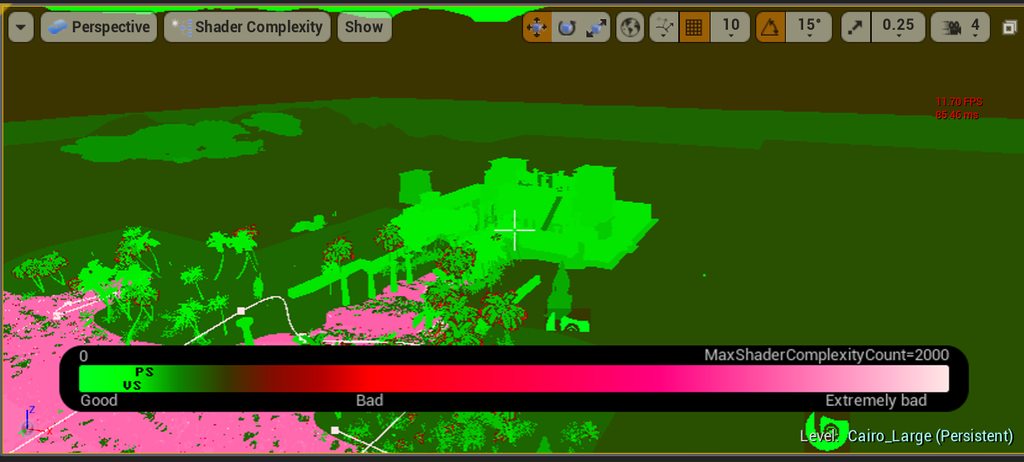
Anyone know why my shader complexity is always green in the editor and when I switch to the HMDLocomotion Pawn during the game all the shader complexity is now pink?
ornate raptor
@cold siren ScreenCapture2D always does that to me as well. Virtually no performance hit in the editor. But completely crippling in packaged builds. I'd love to hear about a solution, if you find one
cold siren
@ornate raptor Oh man! thats sad to hear. I have a full game prototype ready and this is the final hurdle
no1 been able to sort this issue out?
gleaming river
Here's an example of the issue that I'm seeing https://imgur.com/a/fQ9ZMrk
 shadow girder
May be a basic question but can UE4 AR pick up multiple 2d images as triggers? Is there a maximum of independant images that can be on screen at once and trigger their designated models?
cold siren
@gleaming river this looks standard, the pink shader seems to be your water?
 bitter perch
@gleaming river Could it be your problem? https://answers.unrealengine.com/questions/547247/shader-complexity-shows-extremely-bad-result-after.html
 real needle
Has anyone seen a good function for foot placement? Such as walking in room space, and a function calculating whether each foot should take a step and figuring out where that foot should be placed next?
I tried some by ray tracing from the thigh above the foot at an angle relative to the velocity of the player, but I couldn't get anything good
runic cedar
Hi, where in the VR pawn blueprint set actor rotation after the teleport?
After teleport it's sets to pawn rotation, I cannot find it
 elfin notch
Hi there, I want to pack a ue4 project so the client can use it with VR steam, but I don't use VR steam so my question is it possible to pack ue4 project to be used with VR steam without having one and if yes what steps should I follow?
 cosmic shoal
@elfin notch for Vive and Mixed reality you need SteamVR you don't need a Steam account. you can manage the steamVR distribution on machines with no internet with a tool that HTC has on their site.
elfin notch
@cosmic shoal Thx for the reply. The problem is I don't have SteamVR device. Can you please elaborate more on the tool that HTC has that can help me? What tool is that and how can I use it?
elfin notch
@cosmic shoal My first attempt was to pack the project for windows 64 and that I did. I shared with the client but he could't open it at all through the SteamVr. So I'm guessing that I need to do some adjustments on the file before packing so he can open it through Steam VR.
cosmic shoal
What headset?
The tool HTC has is for places that limit internet access so you can deploy steamVR without a network.
https://enterprise.vive.com/us/product/dms/ I just found it through a search, dunno if it cost anything.
Manage multiple VIVE devices simultaneously while online or offline using our Device Management Solution.
did you test it locally? I beleive it depends on your unreal version but for some you have to add -vr to the shortcut launch command of the .exe for it to launch in VR.
elfin notch
@cosmic shoal I can't test i locally as I don't have any VR device/headsets. You mean for exp. namefille-vr.exe?
cosmic shoal
ok.. developing for VR without a vr headset is pretty crazy, but what I meant is to make a shortcut of the exe, then modify the launch command of the exe.. Like in this picture I'm modifying the exe for blender
right click on the shortcut, select properties, then add -vr at the end (a space is required I beleive)
in a pinch you can use steamVR with your phone using iVRy
elfin notch
@cosmic shoal Thank you so much. I will try this. Just one question can I do this and share only the shortcut to the client or this process can be done only on the client pc so it can work.
cosmic shoal
he can do it
the thing with sending him the shortcut is that the path has to be the same
he would have to have the exe in the same file structure as you
 fleet plume
i'am throwing an actor and it should generate an event when hitting the floor. i guess "simulation generate hit events" + OnComponentHit is the proper way for that? (compared to regular overlap events)
i guess i'am just worrying that regular overlap events on floors would become a drag on performance?
sturdy coral
@elfin notch if you go to project settings and do 'start in vr' it should do the same as launching with '-vr', so the client wouldn't have to do it
elfin notch
@sturdy coral If I enable that no shortcut is needed? Only the .exe file?
 soft beacon
Does anyone know why the Oculus Go controller may not work? Swiping actions do but not buttons or presses. I have the center to jump and it used to work but nowit doesnt. I dont know why..
I didnt change anything, perhaps somewhere else I did though
deft moat
Knuckles just came in. Pretty cool. But did anyone else think the fingers were super twitchy? Also, the home button is so hard to hit.
sturdy canyon
Yeah you definitely gotta lerp those fingers or something
I'm trying to do knuckles Dev today in 4.21 and getting them set up is totally undocumented as far as I've found
You have to add vr.SteamVR.EnableInput=True to default engine.ini I think
And then you have to set up Steam input bindings and I don't really know what's going on
Interestingly there's an event knuckles curl for each finger, but they always return zero
And then once you enable steam input, those event nodes become invalid
deft moat
Ugh. Well, let me know if you have any luck.
sturdy canyon
There's a project up on GitHub that connects the animation system up using LiveLink
But all the interesting bits are in a compiled DLL :-/
Still might be worth checking out:
https://forums.unrealengine.com/development-discussion/vr-ar-development/1511122-sunrock-steamvr-knuckles-support-for-ue4
Unreal Engine Forums
LATEST UPDATE : Releasing alpha version of Knuckles Support for UE4
SUN ROCK (early release alpha)
UE4 LIVELINK & INPUT SYSTEM PLUGIN FOR STEAMVR KNUCKLES
Somehow he bypasses SteamVR Input
ornate raptor
@tired tree has a LiveLink plugin, as well
sturdy canyon
Is it also obscured in a dll?
ornate raptor
He sent me a version, but I haven't had time to play with it yet
Just checked. You need to compile the source. So, you'll get to look under the hood a bit more
I was told that method doesn't break UE4 input, like the other one does. Which is pretty awesome. He'll probably chime in eventually and elaborate
sturdy canyon
Yeah I'm not super into the idea of breaking standard input :-/
 glossy agate
Anyone see the magic leap dev program? Anyone doing it?
sturdy coral
mordentral's isn't livelink (which apparently might make it better for multiplayer use later on)
@ornate raptor
tired tree
@sturdy canyon you don't want to enable the new beta input system
if you are trying to use skeletal input
it overwrites the action manifest every time it loads and that is what you have to define the skeletal actions in
ie: the new beta totally breaks the ability to use that part of open input >.<
you can't just inject the actions in non engine source builds either, because then the action handles that run inputs are stale and won't work
I am sideloading them into the legacy mappings for testing until that is fixed so that all of the normal engine workflow works but testing can still be done
also as for the twitchyness, yeah you could lerp them across frames, but you also need to calibrate them a bit by clasping and unclasping your hands a few times when you pick them up
wicked oak
@mighty carbon literally nothing
pc vr is deader than ever
did you know that Red Matter has not even sold a thousand units?
on their steam launch
(they launched on oculus as it was an oculus temporal exclusive)
mighty carbon
No, news to me
wicked oak

Red Matter is a story-driven VR puzzle adventure game set during a dystopian Sci-Fi Cold War. Take on the role of Agent Epsilon, an astronaut of the Atlantic Union dispatched to an abandoned Volgravian base on Rhea, one of Saturn’s moons. Your mission: to investigate a shad...
Price
$22.49
lone echo level quality
sub 1000 sales
totally not dead XD
meanwhile, i can say that i have sold 6500 dollars last month in PSVR
mighty carbon
I guess it all comes down to what a VR game has to offer
mighty carbon
I think it all comes down to content
mighty carbon
There is nothing (to my taste) to play
mighty carbon
I read somewhere PSVR 2 will have proper motion controllers, no breakout box and better tracking
Do you know anything about that @wicked oak ?
wicked oak
all i know is that i know nothing
there is nothing about it on the dev sites
so its secret as fuck
mighty carbon
I see
wicked oak
but the fact that its a secret this well guarded tells me its still a good while until something shows up
they aint going to E3
but i do suspect they will do their own conference or similar showing the PS5
at this moment only tier 1 devs (first parties and multinational AAAs have it)
not a single PS5 devkit in spain
(we have B studios for EA and ubisoft, and mercury steam and tequila games, wich are medium to big studios)
mighty carbon
Hmm
wicked oak
pretty huge changes in the engine source at dev-rendering
they are refactoring the internals
to something about "render passes"
wich i think has to do with the render graph
for example
they are converting everything to render passes
the entire engine
mighty carbon
How is going to affect VR @wicked oak ?
wicked oak
internal code changes for days
will make vrworks and similar branches much much harder to merge
wicked oak
no, its not
in the reverse
render graph technology helps VR more than it does desktop
becouse you can just turn off shit
and the automatic memory management of a render graph means higher resolutions run better
mighty carbon
Interesting
sturdy coral
@wicked oak what do you mean automatic memory management? flexible gbuffer sizing depending on what you are using?
and btw, have you messed with the lightmap virtual texturing any?
tired tree
Yum...turning things off
 digital marlin
I love VR but I haven't played a thing in ages simply because it's a pain in the ass to sort it out.
I'm keen on the stand-alone shit from Occulus et al
wicked oak
@sturdy coral something similar, yes
a gbuffer that allocates itself
and automatic aliasing of the memory
so if you have a pass that renders de SSAO, and then you use the SSAO with the lighting pass, you no longer need that SSAO data
so a further postprocess pass can just reuse that memory you were using for the SSAO to do other thing
it can save a considerable amount of memory in complex projects
wicked oak
in the Frostbite Engine
(mass effect andromeda, Fifa, battlefield, all EA games)
they made a presentation about the tech
they were able to improve memory usage by 40%
40%
thanks to the automated memory management
and it also made the engine far more easy to work with and modify render passes
mighty carbon
I just hope renderpasses will work well on Android
 lime escarp
Guys I need your help i tried to modify AR template from Epic
like you see I added skeletal mesh because in the template it's static mesh
but my skeletal mesh doesn't appear when I try with my phone
glossy agate
@lime escarp try spawning both static and skeletal, that way you can see if its just an SK mesh problem, or a problem somewhere else in your code. SM was working for you before right?
Also print out a message or something on actor spawn to make sure its actually spawning
lime escarp
@glossy agate hey thanks funny you say that because it's the thing I try now
seems to work well with static mesh
not sure about skeletal
lime escarp
@glossy agate With a static mesh this works. On the other hand with a skeletal mesh it doesn't seem to work? in fact I don't know because when I make spawn a skeletal mesh and a static mesh, both work but when I make spawn only a skeletal mesh nothing is displayed.
sturdy canyon
I know skeletal meshes have some limitations on mobile. Bone count, and weights per bone
I don't know what happens if you try to import a skeletal mesh with too much stuff going on..
lime escarp
@sturdy canyon 11k faces is it ok? I can reduce that in blender
but my static mesh is showing and has the same amount of polygon that my skeletal mesh
sturdy canyon
Bones and bone weights was the question in my mind, not faces
But I don't actually know the limits or what happens if you break them
I just know they exist
lime escarp
ok thank you i didn't know about that... AR documentation is very poor 😦
jaunty shell
@lime escarp had no problem importing and using an animated mesh from the cinematic demo (the fighting soldiers in the sub scene)
also did it with the mobile mannequin (for better perf)
dim iron
Anyone aware of any UE4/AR tutorials that are any good?
mighty carbon
Nope
 odd garnet
Made this during a game jam (yuuuge thanks to MordenTral for the help 😃 )
Using Knuckles whatchall think?
 stuck hamlet
does anyone know how to center headset to a certain position
mighty carbon
If someone has $3200 readily available https://www.starvr.com/developer_program/

StarVR Corporation is dedicated to the innovation of professional virtual reality solutions, with a focus on high-end enterprise applications and location-based entertainment. At the core of its commercial solutions sits the StarVR head-mounted-display (HMD). The next-generat...
sturdy coral
made some changes to '-emulatestereo' to work better with 3DTVs (with help from Deathrey)...
running things on a 4K 3DTV really shows how far VR resolution has to go
I'm not even hitting full res because right now I'm sending it side by side and the TV is interleaved passive, so with side by side horiz res is unnecessarily cut in half
 dim iron
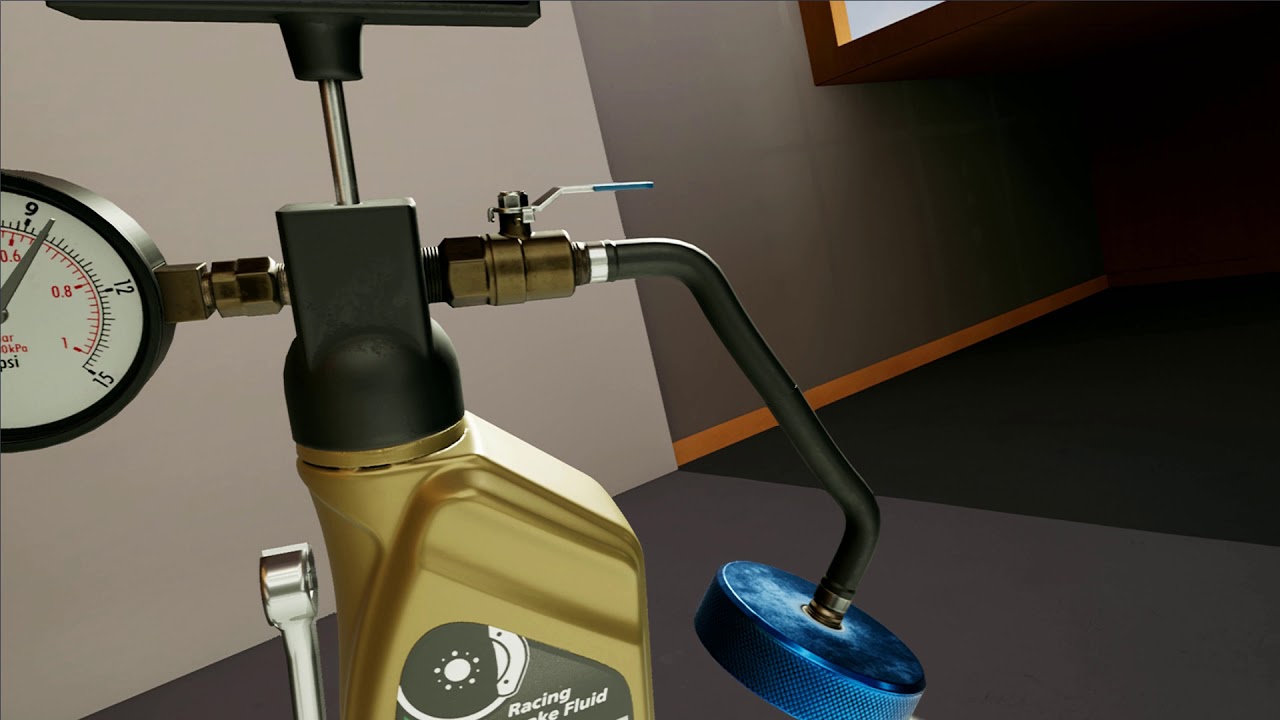
i would love a video tutorial on making liquid for vr.
sly elk
really depends on what the liquid needs to do
the pouring effects are basically a straight line mesh with bones that get animated to make the arc
 quiet swan
can anyone recommend a good quest system set up for VR
sturdy canyon
Follow any Go recommendation you can
A 60hz Go game will hit 72 pretty comfortably on Quest
Someone posted their settings on the private forum somewhere as well
quiet swan
I need some kind of quest system where the player goes around
sturdy canyon
Ohhhhh
quiet swan
and has things to do
sturdy canyon
I thought you meant the Oculus Quest
quiet swan
and onces it is done it opens a door or what ever
but maybe one with vr in mind with a menu syste
median wedge
is there a way to manipulate bones with the motion controllers (ex. gun is skeletal mesh and slide is a bone, and the motion controller can manipulate the slide)?
How would I start doing that?
sonic lake
@median wedge I would add a collision sphere to the gun, close to the slide, then detect the overlap of it with the other hand (the one that is not holding the gun). When the overlap is triggered, you play the reload animation from the skeletal mesh.
median wedge
@sonic lake I am talking about actually changing the position (while constrained) of the slide. Not playing any animation
sonic lake
@median wedge Same concept apply. The hand enters the overlap area of the slide. The slide checks the hand is grabbing. The slide starts tracking the hand. It moves following the hand. Eventually the hand releases it and the slide stops tracking it. And it stays in the last position.
median wedge
Alright, so I just manually adjust the transform when it is tracking the hand or should I use a physics handle?
sonic lake
I would adjust the transform on Tick.
median wedge
Alright. Thank you for your help
quiet swan
i can test it @real needle
is anyone here using any inventory system for their vr game?
sly elk
As part of the EA launch for Wrench I want to have a public roadmap that users can comment and vote on. Anyone have suggestions for options? Looking at trello right now. I don't want to be responsible for managing user accounts or keeping users login data
jaunty shell
@sly elk trello is quite good for that
quiet swan
vr based inventory how ?
sly elk
@quiet swan you have to learn blueprint and build your own
quiet swan
yes
i know
but i need ideas
this is why i am asking if anyone here is using a VR inventory
there seems to be more VR inventories being sold for unity
hardly any for unreal
wheat holly
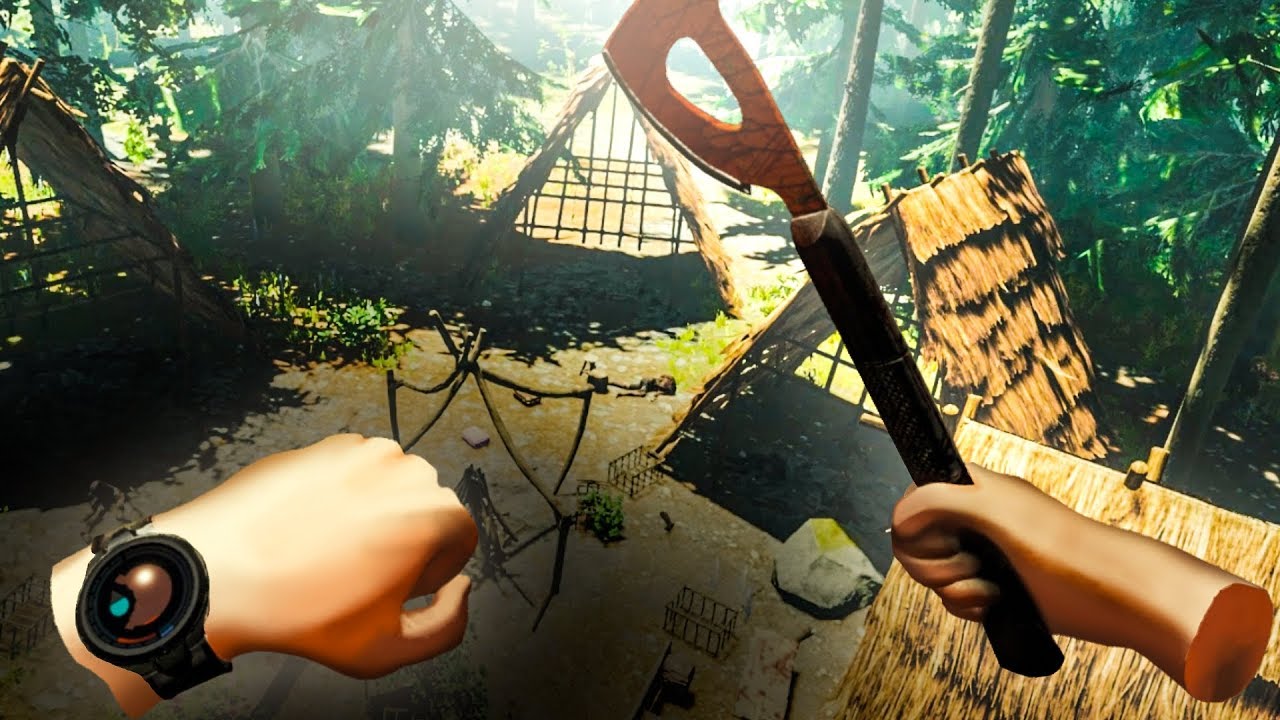
@quiet swan How The Forest does inventories in VR, I've personally played it and like it a lot :D
https://youtu.be/JQ2sWMFx_IY?t=538
★ HTC VIVE GIVEAWAY HERE: https://gleam.io/46NNp/400000-subscriber-melikebigboom-htc-vive-giveaway The Forest recently added virtual reality support for both...
quiet swan
its hard because there are only so many buttons on vive
wheat holly
I've it on the oculus however
But what kind of game are you making?
Something with a lot of items?
Or just a couple
Because if you are making for example a shooter, you could do it like Robo Recall where you have 2 guns on your hips and 2 heavy weapons on your back which you can grab and also respawn. You can modify them after each level, and manually say what goes in what slot, and with which attachments. Or you could remove the respawning part and make it so you can put weapons back on your hips / back.
Or of course some place else, where ever it fits 😄
sly elk
Yeah, the forest inventory is intentionally designed to be hard to use during combat
wheat holly
That's true.
A downside of it however, is when standing in front of for example a tree it glitches inside it.
I guess it's a pretty solid option when you've large amount of items though
If you have not that many items, you perhaps could make some kind of item with the items displayed on that object.
sly elk
Yeah, it really depends on the game
wheat holly
Yep
I don't really think that VR has 1 solid solution for inventory management in every case.
Another solution I saw for a base defend game called Undead Development, was that you as the player could put stuff in your backpack which caused it to spawn the item inside your base when looting outside your base.
So you didn't have to carry it all the way to your base and eat up all your time 😉
Enough idea's @quiet swan ? 😄
runic cedar
How i can block VR camera that would not pass everywhere models ?
block volume and camera block volume not helped. I have collision block all..
 frosty pumice
I am using VR template and draw linetrace for each motion controller object(left and right) by given action mapping. The right hand sucess linetrace but left hand isnt drawing (Note that I setup pointer index for left and right controller blueprint class.) Can somebody help me out?
quiet swan
can we map the systems button to an input action? I want the system button to make my inventory system come up but I cant find it in the list
sturdy coral
@quiet swan nope
I think openvr input emulator can remap it but that's not workable for anything you'd want to ship
 mighty carbon
@sly elk custom socks? 😃
sly elk
Yeah, the company that does the tshirts has all kinds of weird options
men's leggings
womens swimwear
dresses
pillow cases
 loud badger
Hey guys, have a small question 😃 Im trying to visualize the tracked points, instead of showing a plane, i got the GetAllTrackedPoints but im a little lost after that 😃
dim iron
https://www.youtube.com/watch?v=o1NiMGeefls - i was just looking at vr interactable buttons and came across this tutorial on YT. has anyone else done this? I've done it exactly like he does and my hand just goes through the button.

Is this the best way to do it?
jaunty shell
@charred wraith as in like with ArKit ?
 charred wraith
yes
jaunty shell
not sure thats supported with the engine
there may be some libraries somewhere though
charred wraith
I'll have a search. Would be nice to have it for an android system though.
jaunty shell
for sure
charred wraith
thank you
sonic lake
@dim iron It's very good method. Just make sure your button has Generate Overlap Events set, otherwise it will never trigger the overlap with the VR hand.
dim iron
@sonic lake I have on the button itself "Generate Overlap Event" ticked. i created my button in blender and imported in then followed that tutorial. in one of the comments 2 other people have issues. I was wondering if its a version issue?
sonic lake
@dim iron Does your button have a collision volume around it?
dim iron
@sonic lake, yes it has a simple collision round it
sonic lake
@dim iron Ok are you using the standard VR hands or something else?
Hands also need to generate overlap events
dim iron
@sonic lake yeah im using the standard VR template, the hand mesh of BP_MotionController also has generate over lap events turned on.
are you able to make it work by following what he does.?
sonic lake
Can you just create a Begin Overlap event in your button and use a Print String to check that it actually fires when the hand overlaps it
If that doesn't work, it means something is wrong in your collision setup
dim iron
Blueprint Runtime Error: "Accessed None trying to read property OverLappedComponent". Blueprint: BP_Button Function: Execute Ubergraph BP Button Graph: EventGraph Node: Set InitialOverlapLocation
is what is shown in log when i touch the Button with my hand
runic cedar
How i can block VR teleport ? Coz if i put NavModifier i can teleport after NavModifier..
sonic lake
@dim iron Use Other
That is the overlapping actor
@runic cedar You should be able to use a very tall blocking volume. The Teleport arc won't go past it
dim iron
@sonic lake 👌🏽 that did it, i have so much to learn when it comes to ue4! we need more of your awesome videos 😃
sonic lake
@dim iron No problems! Happy to have helped.
runic cedar
@sonic lake Thank you
i just add collision to the nav modifier.
and yes i made it taller) Thanks!
mighty carbon

UploadVR
Facebook's Oculus is discounting the standalone Oculus Go headset around 10 percent at participating retailers for Black Friday, through Nov. 26.
quiet swan
$179 FOR THE RIFT?
gleaming river
Nah thats the go
mighty carbon
Yeah, and you don't need to buy any PC at all ! 😃
quiet swan
really?
but how can it run high end vr when you need a 1080 ti to get good frames and play AAA games?
or is it just for apps
mighty carbon
Is there any app to have Discord-like experience in VR ?
(to set up a private room / scene with invites-only)
sturdy coral
@mighty carbon steamvr home
if you mean in person and not a literal chat room
I guess you can't make a persistent one though that people can drop in/drop out over time
mighty carbon
well, I need it to be for Go
sturdy coral
@mighty carbon I think bigscreen is on go
mighty carbon
don't they have some native Oculus app for this sort of thing? Rooms or something like that
sturdy coral
yeah
mighty carbon
the only thing I guess is I'd have to friend everyone I want in the room.. I don't really want to do that.
not sure how it works in Bigscreen
sturdy coral
I guess try both and see, maybe you can get a room code in one of them or something
mighty carbon
aye, will do
 slim karma
oh looks like the Oculus Rift is currently discounted to 379€ o.o
would you guys recomment it for that price?
wheat holly
I would already recommend it at the full price, but please make sure you’ve enough USB ports, you have a HDMI port and your pc is VR ready 😃
Otherwise you’ll probably have a bad time
And do remember when buying it. And you want to play games, most games don’t have a VR port or a bad one. So you’ll probably have to buy some new ones.
Or try some free games
@slim karma
 frigid kite
Where's that discount, @slim karma ?
slim karma
I'm not completely new to VR so no worries. I just wanted to hear some opinions 😄
but thanks! 😃
slim karma
haha thanks! 😃
mighty carbon
Rift is awesome
dim iron
I would pay full price for my rift again 😃 You usually get a few games free too.
frigid kite
I'd like the ergonomics and financial support of the rift coupled with the tracking of the vive 🤔
wheat holly
Would like a wireless VR headset :3
glossy agate
Thats what I meant. Are you seeing any player counts?
sturdy canyon
No, but this has happened before
The dev is probably on vacation, give it a few days
tawdry dragon
Hey guys, wanted to hear how do you guys go about testing your multi player VR stuff when developing?
Since you usually one sit at 1 computer with 1 HMD
glossy agate
@tawdry dragon I usually have people to test with. Now I have 2 comps and 2 hmds so I just have my wife hop on the other one
tired tree
@tawdry dragon also 2d test pawns that subclass the master VR ones, I iterate mainly in those and then do final tests in VR. I also am like 2 years into a stable networking solution though so its a lot easier at this point to test new things.
quiet swan
can we use a FPS pawn from say a FPS template? Can someone else with a keyboard play with someone else with a VR set up? I played this with payday 2 vr where we could play with keyboard and mouse people
tired tree
yes
jaunty shell
Hey vrdevs !

anyone had this kind of bug with the VR template from Epic ?
navmesh is good, but when I want to TP around I get this weird, very stretched preview of the playspace, without the ability to TP
😐
oh well, one roomscale setup fixed it
tawdry dragon
@tired tree my solution was also to test 2d chars and just use your Expansion plugin to make sure motioncontrollers and hmds are replicated properly
real needle
Can anyone one tell me if GTX 970 is good enough for VR dev in Unreal.
I'm planning on buying some VR assets on sale, but I'm not sure if Unreal demands too much for a GTX 970
For VR I mean.
I know normal Unreal Games run in GTX 970
dim iron
GTX 970 is classed as the standard for VR, its the entry card for it. You could overload a 1080 ti just like you could the 970, all depends on what you are doing.
but yes in general gtx 970 should be ok for VR dev.
real needle
Is Unreal more demanding for VR than Unity.
Meaning I'll have to settle for lower everything including map size and polygons etc?
I'm worried about choosing the wrong engine since I'm on a low end card
frigid kite
You can't really generalize how demanding an engine is
It's always the responsibility of the developer to optimize the game properly
Both engines have plenty of features to support lower end devices
Fortnite is a great example for Unreal
Unity also has plenty of tools though, such as the lightweight render pipeline
sturdy canyon
970 is what I use for SculptrVR
If you want to maximize your market, it's the card I recommend
Actually if you want to maximize your market, don't do VR
wicked oak
PSVR is fairly legit tho
for a VR indie team
but PSVR has less power than a 970
so the 970 still great to optimize stuff
sly elk
I have a demo user who says they fail the oculus entitlement check. A single report out of about 10k users, surely its an oculus server/store issue?
 wicked sundial
Does Occulus / HTC still give out dev-kits if you apply for them?
glossy agate
@wicked sundial I got the oculus start kit like 3 weeks ago and got 2 sets of knuckles I think last week so yeah I think so. I applied late
wicked sundial
@glossy agate oh really? when did you apply?
glossy agate
Couple months ago on oculus. I had to re apply for the knuckles like a week or 2 before I got them
wicked sundial
Awesome, I'll def give it a shot then
sly elk
work in progress short promo video: https://www.youtube.com/watch?v=OHyhL6D89YU&feature=youtu.be

I'm going to try and make sub one minute videos showing gameplay every week leading up to release
slim karma
I really like the overall look of your game o.o
mighty carbon
Skyrim VR is a way more interesting than pancake version.
However, installing mods is a royal pita
sly elk
thanks. If you are bleeding/flushing brakes watching the fluid change color and the bubble stop is the main indicator of when to stop
I wish there was a way to get sharper VR footage
wicked oak
there is a trick, but not easy
you can use sequencer to record the transforms of the head and a few other things, and then play it back
but im not sure if it can work good on a non-mp game
sly elk
yeah. seems like a huge pain in the ass and it would need to be set up to work with all the gameplay systems
sturdy canyon
You can also use the social screen if you have the graphics headroom
Or just run at 45fps during capture
sly elk
running at 45 fps doesn't help. At vr pixel density 2.0 the image is still very soft
oh, you are saying run the render target capture at 45 fps. Yeah, i have done that for set up clips in the past. Dolly shots or third person fixed cameras. Attaching a capture to the player head doesn't go well when rendering video at 2560x1400.
sturdy canyon
In theory is easy to just monitor input every frame including position of head and hands. In practice it doesn't work :-/
Or doesn't seem to
Maybe if you do everything with the input system and record frame exact everything with integer frames instead of timings..
Then you swap out the input system during playback with a playback input faker
But that's basically what Sequencer is supposed to be..
I'm too dumb to figure out sequencer, though
mighty carbon
Do hardware capture
glossy agate
What if you recorded with none or different AA then softened it in post process for a sharper image
sturdy coral
@sly elk another thing you can do is disable the lens mask and then be able to capture a wider fov
I think there might be a console command for it now
mighty carbon

VRScout
OtoTech combats motion-induced nausea without the side effects of drugs. According to research published by ScienceNews, roughly 25% to 45% of users report some form of motion sickness while engaged in a virtual reality experience. While the potential causes of this discomfor...
@sly elk you probably want to invest into something like this https://www.gamesradar.com/whats-the-best-capture-device-ps4-xbox-one/

gamesradar
If you're looking to stream in 4K or capture all those classic gameplay moments... these are the best capture cards for Xbox One, PS4 and PC
wicked oak
@mighty carbon that looks interesting
using verstibular stimulation is already very old
but doing "noise"?
thats new
wicked oak
my initial impression of knuckles...
is bad
lets see how it runs on proper knukles designed demos
the trackpad is horrid, messes with basically all games
thething is not very confortable too, feels akward in the hand
wheat holly
Just imagine using this 😂
https://teslasuit.io/

Teslasuit - full body haptic VR suit
Teslasuit is a full body haptic suit that let you touch and feel virtual reality, has full body motion capture and climate control systems
median wedge
Lots of games have a black screen when your head is in a wall. How do you detect that?
glossy agate
Collision on the camera. If it overlaps just black out the screen
median wedge
Thats what I was guessing, I just wondering if there was built in events. Thanks
 supple lotus
Hi peeps! Quick UMG related question.
I've created a widget, that's used as an in-game menu, and I'd need it to render on top of everything, eg.: no intersection with meshes.
Using a material that disables depth test does the job, but this way the widget loses the ability to interact with. Any thoughts on a solution?
mighty carbon
@sly elk if you get that hardware capture device and manage to capture good quality content, please let me know which capture device you got 😉
sly elk
I'm not going to get the capture device. It won't help with sharpness of the hmd mirror image
@sturdy coral does disabling the lens mask add blKc borders?
I can't find any info on a console command for that.
sturdy coral
@sly elk it should remove the curved borders on the corners and let you do a more full crop for 16:9 with more of the resolution intact
I'll look and see when I am back home if I can find a console command
Otherwise with those masks the crop has to be inset more probably cutting out 20-30 degrees of fov
you can try running through steamvr and disabling the Oculus plugin too
At least at one point oculus via steamvr had no lens mask
@sly elk found it, it is 'vr.hiddenareamask' on the console
sly elk
tahnks
sturdy coral
you will have to change mirror mode to full or something
and crop down in your video software
I think to change UE4's crop you have to edit some source stuff
@sly elk should be a blueprint node for that, 'SetSpectatorScreenMode'
sly elk
yeah, i have that in my begin VR utilities
sturdy coral
you'll need a high enough res monitor for the mirror to show enough res unless you crop in engine
Unless monitor res > single eye render target res
sly elk
Yeah, I'm on a 4k display
It would be cool if there was an alternate vr mode that disabled stereo and used a rectilinear projection just for developers to make game footage. It would be super distorted and nauseating to play but probably workable enough to record footage
sturdy canyon
You can just wear a headset like a hat
And turn stereo off, but have the camera follow the head anyway
I recorded a few sequences of each of our trailers that way
tired tree
if you are networking you can also record a replay and play it back later
sturdy canyon
Is there a built in system to do that?
 solar loom
Yes! Today we published our first Unreal Engine marketplace plugin that allows you to create an extra window next to the Spectator Window, so you can have a control panel for a VR experience. You can find it here: https://unrealengine.com/marketplace/vr-spectator-control-window
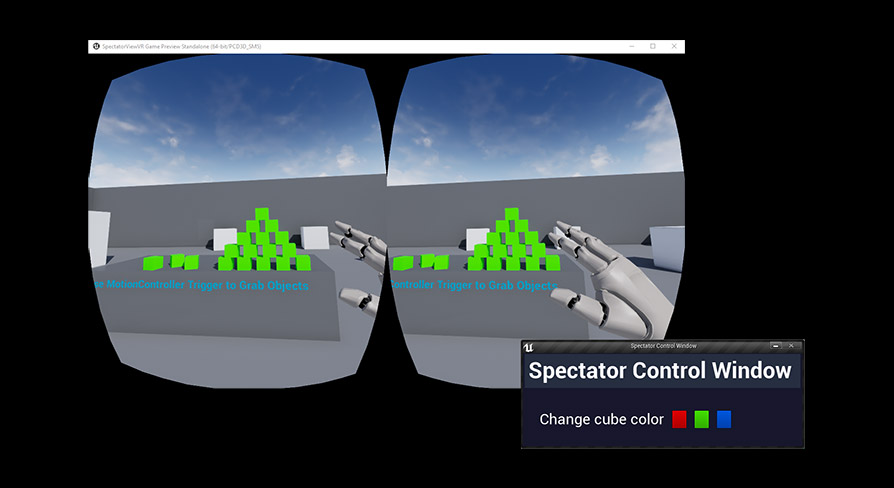
Want to be able to use Unreal Engine UMG together with the spectator view in your VR apps? You can now do so with our Spectator Control Window plugin!
solar loom
Thanks @granite jacinth !
 knotty rain
Hey, I'm having trouble figuring out how to port my finished game to VR, the game is very specific with it's camera and i'm not sure how to handle it, basically in non vr your camera is attached to the inside of a ball, and i cant find how to get a VR camera in unreal
knotty rain
i'm very confused how vr works in unreal engine
knotty rain
thanks
runic cedar
@solar loom Any video ?
solar loom
No, not yet. It's actually a pretty self explaining tool. But I am working on a video where we use it in an ArchViz project.
knotty rain
ok so i don't personally have a vr headset, is there any way for me to know if my game works in vr without having one?
or cheat it by making it think my phone is a VR headset?
solar loom
@knotty rain you can enable the "Simple HMD" plugin to test your VR game
sly elk
@knotty rain you should definitely have a VR headset to test a game with a VR mode
knotty rain
i have a friend with a vr headset but it takes a long time to compile then send then have him test and report if it even works at all
mighty carbon
@sly elk I figured using external device for capturing would allow not dropping any frames
also, if you want to record in 4k, that would be misleading, since that's not what people will see in VR 😉
sly elk
I think if I move to the nvidia branch and run their lens matched shading I will get better capture quality. That soft spot in the middle is really awkward
mighty carbon
don't you drop frames when running VR game with supersampling cranked up and recording video at the same time on the same PC ?
mighty carbon

UploadVR
Virtual Desktop, the app which lets you view your PC’s monitor inside VR, is launching for Oculus Go and Samsung Gear VR this Thursday.
The app will be priced at $9.99 and will also be an Oculus Quest launch title when that headset launches next year.
Virtual Desktop was r...
I wonder if I can play Destiny 2 using Virtual Desktop
 vernal spear
Hullooo everyone,
Asymmetrical VR gameplay is something people ask about on the forums, answers hub, and UDN occasionally. I got it working reasonably well, and I've made a sample project (initially for the purposes of getting help with it) and have made a little tutorial explaining what needs to be done and in some cases why.
Docs are here: https://calben.github.io/UnrealVrSpectatorControl/#/
It should work on mobile too, but some things not as well as I'd like (need to fix that sometimes words are cut off due to being verbatim blocks).
If you have time to give it a skim to see if anything might be unclear, I'd appreciate it! Github "stars" and "hey that's pretty good"s are also 100% welcome. :D
Thanks!
Description
tired tree
@vernal spear I have a gameviewport override that shunts player input to the second player so you can have a full fps pawn / full control on M/K
that kind of thing should work with your UI there just fine
vernal spear
I'd love to see that if you're willing to share.
tired tree
I know that Epic has code comments planning on fully integrating the viewport for secondary players so that widgets can directly be added to it...but sadly that hasn't been touched in months
vernal spear
I spoke about it with them again a couple weeks ago and it looks like it's still not a priority.
tired tree
shunts the input to player 2
or any other player I think
I have it as an enum selection
vernal spear
Cheers! I'll look into how easy it would be to integrate that.
tired tree
its a one header
vernal spear
Just curious, why did you choose to put it up on Bitbucket?
wicked oak
its actually quite old
vernal spear
I do my closed source stuff on Gitlab and open source on Github, but I haven't taken the time to do much with Bitbucket.
vernal spear
ah, gotcha
I also can't imagine why this would conflict. If only I'd known about it 6 months ago when I implemented a similar thing (badly).
Funny enough, the day I decide to document that older project is the day another group releases a VR Spectator Control Window plugin: https://www.unrealengine.com/marketplace/vr-spectator-control-window
Looks like they did a nice job with ease of use.
Want to be able to use Unreal Engine UMG together with the spectator view in your VR apps? You can now do so with our Spectator Control Window plugin!
tired tree
all of my stuff was private originally
i opened it up on what I was already using
that control plugin is a secondary engine window
useful for some things, not so much for actual async gameplay
which is where I was focused
vernal spear
True. How would you keep the VR view rendering at full FPS with another window focused?
Or maybe it's not a problem since that other window would be a child process.
sturdy coral
not sure on either plugin, but it should all be the same process
@sly elk you could manually set the lens mask to completely cover one eye pretty easy, then submit the other eye twice to the compositor to get a monoscopic view
that would be sort of hacky but probably less work than trying to make monoscopic be truely supported (there is some support for monoscopic far field for mobile)
that would give you some pixel shader headroom to increase things
 dusky moon
Guys has any1 tried implementing this solution ?!
https://calben.github.io/UnrealVrSpectatorControl/#/?id=main
Description
I'm always skeptical about using plugins so looking for DIY solutions to make it work
also curious to know how much of an overhead it can have on runtime
cold siren
Hey guys, any one know how I can match the orientation and origin position of Oculus/Vive/windowsMR/PSVR motion controllers? I developed on a Oculus CV1 and yesterday for the first time tested it on a VIVE set up. The orientation of my objects attached to the controllers were totally messed up. I was wondering if any one has any idea as to how each controller is oriented according to the motion controller component in UE4. This is my attempt at finding each ones orientation. But I only own a Oculus and none of the others so I cannot test.
smoky comet
someone knows where i can find animations for oculus touch controllers? for instance if i press a the button should go down based on input and play the animations
slim karma
@cold siren @smoky comet have you guys taken a look at the build in controllers that come with the engine? I'm sure they can help you a bit with your issues
the oculus controller should be a decent basis to do the animations. the buttons even have vertex colors assigned that they use to highlight them. it should be easy to use that as a mask for a world position offset in the shader to simulate the animations
cold siren
@smoky comet yes @slim karma is correct, the oculus mesh in the engine content has vertex colours that you can use
@slim karma i have the oculus with its origin sorted, you can see that in the image. the others are aligned to how i assume would be aligned, need some to either confirm or assist with location and orientation through their experience.. As i mentioned i only have an oculus set so unable to test on any other platform
slim karma
well I only know Oculus and Vive, but in general it should be a good guess to imagine how you'd grip them and then move them accordingly to that position. I don't think you'll need to rotate them as the Vive is also just flat compared to the oculus controller
 inner walrus
How to make main menu in VR to support Samsung gear VR based
Please help me quick
Friends
tired tree
@slim karma not true, you hold the vive controller with a 30 degree or so pitch offset from the oculus one @cold siren I have a bunch of offset values that auto bring every controller type into alignment with the real world hand grip on them, but it likely wouldn't be very useful to you since its for a direct controller offset pathway I added. You kind of really need to actually get the controllers or add manual pitch adjustment and take input from testers.
some of the controllers really need more that rotation as well, WMR controllers have their base point way out in the ring and offset to the side from the grip
cold siren
@tired tree Offsets is what I was looking for. Where can I find info on where the base point lies for each controller?
slim karma
@tired tree that's weird, I've always had the vive controller exactly like it is in the engine and never had to rotate anything and it still felt right.
tired tree
@slim karma if you are picking up relative then it will be, if you are positioning things like laser pointers or snap to hand objects then it will differ between controllers where it sits to your actual hand.
slim karma
maybe we're talking about different things. I'm just saying that if you use the vive controller mesh like it is in unreal, it's already positioned correctly, but I realised that it has a very slight angle by default
tired tree
not talking about meshes, the pivots for those and the procedural ones are already setup to match
talking about a uniform pickup / attachment angle regardless of controller type to the real life hand, IE: so gun angles feel normal
also things like mesh hands
 trail shale
Interesting... I've heard about this but I guess it's live now - how does Unreal play with this? https://steamcommunity.com/games/250820/announcements/detail/1705071932992003492

Today we are introducing a new feature in SteamVR called Motion Smoothing. This feature enables more players on more PCs to play high-fidelity VR games and experiences. How it works If you have a flatscreen TV, you may be familiar with the term Motion Smoothing. TVs apply Mot...
sturdy coral
@dusky moon several people have mentioned it in chat the last couple days, including the creator of it who is around
@smoky comet @slim karma @cold siren the oculus github branch has a template project with animated hands and controllers
@slim karma as a hack I have another component attached to oculus controllers that puts things into the same origin as oculus via steamvr:
MotionControllerLSteamOrigin->SetRelativeTransform(FTransform(FRotator(40.0f, 0.0f, 0.0f), FVector(3.409f, -0.770f, 3.666f)));```when running with the rift plugin I use that to get things back to steam, and when running with steam I just set MotionControllerRSteamOrigin to the motion controller itself instead of attaching another component
then just always use that instead of the motion controller when getting position
not the most efficient way, but it works and for multiplayer I'm doing something different
you still may want different gun angles and stuff though, but that at least gets you a base that is aligned between both plugins
sly elk
@tired tree any rotation offsets you have would be useful. We do a check for steamvr vs oculus right now
 granite eagle
I've noticed running Vive on a relatively large map that my FPS floats around 90fps or 40fps. Without VR the scene is 120+ fps.
I beleive it's related to draw calls as it depends how much is visible in the view. I'm just wondering why the frame rate is fixed to ~40 or ~90. Is the engine artificially controlling / limiting the fps?
sturdy coral
@granite eagle pretty much if reprojection is active its either 90 or 45
you can turn off reprojection and get something inbetween
now that the beta has gone to main I think the only way to do it is a shortcut they added for devs
@granite eagle
shift-A in the mirror: https://steamcommunity.com/app/250820/discussions/0/1732090362043306841/?ctp=2#c1732090362061194325



 granite eagle
@sturdy coral Ok great, thanks for the info. I'll give those commands a try
sturdy canyon
Another possibility for worse framerate is increased pixel count
sturdy coral
more FOV in vr too makes for more draw calls
sturdy canyon
You end up rendering like 2 1080p screens with of pixels on a Vive if you use sampling 1.0
More FoV, and two draw passes
sturdy coral
1.0 pixel density now will choose whatever steamvr auto calculates for your graphics card
which is usually a little bit too high for ue4
sturdy canyon
But instanced stereo helps reduce the doubled draw calls from two perspectives
sturdy coral
on oculus I think it will still be 1x of ideal render resolution, which probably is about 2x 1080p
solar loom
I have some weird issue with my VR preview windowin 4.21. Changing the vr.SpectatorScreenMode has no effect either. Did anyone else come across this?
solar loom
And then I remember this project started out as a Vive project in 4.12 using a older method that set a higher ScreenPercentage... problem solved
dusky moon
@vernal spear Hey I tried to follow your amazing Spectator solution. I got stuck at porting the C++ code functions. Could you share briefly how I can make it work in my own project ?
vernal spear
hey @dusky moon for sure, and thanks for giving it a look! do you mean the base functions for getting absolute position and stuff?
dusky moon
@vernal spear Yes, there seems to be two C++ functions being used by the BP
I'm not sure how to cleanly add them to my project... As Im a total C++ noob 😃
vernal spear
no problem, i'll add a bit to the docs about it.
i've added a bit about adding the C++ code in the docs here: https://calben.github.io/UnrealVrSpectatorControl/#/?id=code-setup
Description
if that isn't clear @dusky moon just let me know and i'll go ahead and implement the code base as a module, which would let you add it to your project by just copy pasting the module into your plugins folder and then adding the module name to your public dependencies list 😃
dusky moon
Ah Amazing! I'll follow up this new doc and let you know if it worked. 😃 Thanks
vernal spear
ooh, i just checked the output and looks like there's a markdown rendering error. will take just a sec to clean that up 😄
dusky moon
hehe I'll wait then
vernal spear
fixed
tired tree
@vernal spear you can avoid that line trace on the interaction widget if you want
since you already are getting the intersection and know the locations
you can provide a custom hit result to the interaction widgets
widget interactors
vernal spear
oooh that'd be great. it may not be a huge efficiency gain, but every little bit counts.
dusky moon
@vernal spear I guess a part of the code in your new doc is not in the <Code> view therefore its a bit hard to copy
vernal spear
@dusky moon try refreshing the page and let me know if it's still an issue
tired tree
Really the real solution would be to use instances of the classes, not spawn anything, and run the widget interactor logic purely manually in code
vernal spear
@tired tree part of the reason i didn't do it that way in the first place is because when working on this part of the reason is for two VR players facing each other to be able to interact with spectator screens on opposite computers 😕
it was easier to let the control of the interaction switch between the networked computer and the player 0 VR widget interaction component
however, i'll definitely take another look at it and consider doing it as instances. if it were done that way, how would a programmer easily change the location of the widget in the 3d world?
tired tree
you wouldn't need too
you can directly work with the widget
like the 3d widget and interactor already do
vernal spear
ah, a method that doesn't have it in the world would be a nice option. most use cases wouldn't need it in the world anyway.
tired tree
regardless this would all be moot if they would actually go in and finish the spectator window and add the ability to display a seperate viewport
dusky moon
@vernal spear fixed! and my last question is ... how can I possibly find the header for a Blueprint function library ? should I open the uasset in visual studio ?
vernal spear
@tired tree wouldn't that be nice! maybe i'll pop in on the UDN and ask them if there's a timeline for that at the moment.
@dusky moon does your project have C++ code and a Visual Studio solution file?
dusky moon
yepp
vernal spear
does your project have a blueprint function library associated with it?
dusky moon
ah no ... I thought I should just make the Blueprint function library inside ue4 as an asset
vernal spear
ah, go to File > New C++ Class
then in that dialogue select "Blueprint Function Library" as the base class, give it a name, and hit "create"
(i think. names of options may not be 100%)
actually, don't worry about it. it'll only take me 10 minutes to get the funtion library set up in its own module as a plugin
i prefer everything to be its own plugin normally, i just didn't do it for this bit of code because it was a bit rushed 😃
dusky moon
Ah I see Thanks ... will do as you said
vernal spear
alrighty @dusky moon the project is set up now so that there is a demo project and a plugin that can be added to your project as a git submodule. a git submodule add command has been added to the documentation. https://calben.github.io/UnrealVrSpectatorControl/#/?id=code-setup
Description
that should make it so that you just need to add the Plugin to your Plugins directory, regenerate visual studio project files, and then add the plugin to your module dependencies
dusky moon
@vernal spear oh sweet! that's great ... can it possibly work with 4.20.3 as well ?!
vernal spear
and then if you look in your plugins in the editor you should be able to see it like so
i didn't specify a targeted engine version since it's a code only plugin. so it should work fine with 4.20.3 out of the box, but let me know if you run into an issue.
also it's entirely possible that the git submodules documentation could use a little more detail. so don't hesitate to say it isn't clear 😄
dusky moon
haha I'm going to just download the repo from git and manually copy/paste the plugin
vernal spear
yarp that'll do it!
dusky moon
@vernal spear Man It works like a charm! Thanks a ton it's been a feature I've been craving for ages 💯 🔥
vernal spear
Awesome!! Glad it worked!
granite jacinth
Hm
Wasn't there someone selling a plugin like this a few days ago?
I'm actually surprised you haven't done something for it in your plugin @tired tree (or have you and I have been missing out!)
vernal spear
The plugin on marketplace creates a child screen. I haven't purchased it to give it a look yet, though.
And I think it would make sense to add this to @tired tree 's plugin for an instanced version. I'll look into it and make a pull request when I have time
(assuming you accept PRs into it @tired tree )
granite jacinth
@vernal spear You going to adjust your code with Mort's suggestion about custom hit result widget interactorst?
Man. Rendertargets can get pretty expensive
vernal spear
@granite jacinth yup, it's going on the to-do list. I think it makes sense both for an in world and an instanced solution.
granite jacinth
Especially if you're on a real budget
vernal spear
Yeah that's the real killer, and there doesn't seem to be a way around it!
Another problem is if you pipe the render target texture directly to the VR spectator there are gamma issues, which I still need to sort out without incurring a performance cost if possible.
granite jacinth
Hm, technically... if you didn't care about spectator, you could use this to say spawn items in the level right?
I mean, since you're just interacting with a widget
vernal spear
Yarp. We use it for a few things where a user needs to be able to control the VR experience
granite jacinth
Hm, and is it just one widget per spectator screen basically?
vernal spear
Yes, there needs to be a master widget to compose multiple widgets
I'm not sure how messy that gets in Blueprints. I still do almost all my UI logic in C++, and even then with a lot of composed widgets it gets a little messy.
granite jacinth
It's not bad during it in UMG
vernal spear
I've been doing it using UUserWidgets and meta=(BindWidget). So it's kind of IMG, but for one of my apps there are a lot of submenus and selectors. I very nearly switched to making a WebView :D
tired tree
@granite jacinth to be honest it isn't currently what I would consider clean enough to add
I was pushing for epic to actually fix the issue instead
you can emulate the same thing entirely in BP, that is what fantisfall was doing
vernal spear
That's true, better for them to finish the spectator viewport mode
tired tree
people have been using pretty much the same thing since spec screen came out
bit wary of "fixing" things with hacks that should be fully fixed in engine...look how long advanced sessions has kept multiplayer BP
s limping along without any epic fixes
tired tree
no they won't
granite jacinth
well, at least the pitchforks will come out
vernal spear
Not needed for Fortnite 🤑
tired tree
its been 3 years, supporting it at least helps the people with no alternatives
I put up a big old warning about the state of sessions on the OP of it at least
and feature locked it except for bug fixes
mighty carbon
interesting:
StarVR Corporation is dedicated to the innovation of professional virtual reality solutions, with a focus on high-end enterprise applications and location-based entertainment. At the core of its commercial solutions sits the StarVR head-mounted-display (HMD). The next-generat...
mighty carbon
would be sad if they shut down StarVR (which rumored to happen soon)
granite jacinth
@sly elk Looks like your demo is rocking it over on Oculus Store, grats!
 hazy aspen
How can I export an exe file of a small scene I created to view it in VR ?
I have a Samsung headset
frigid kite
You'll have to build it as a Gear VR .apk, you can't just straight up run a Windows .exe on an Android phone
frigid kite
Ooh, the odeyssey, my bad
So what kind of .exe are we talking here? Did you build something in Unreal?
hazy aspen
I have a simple scene here with some basic light animations and I want an exe so that I don't have to open ue4 to view it.
frigid kite
Alright, first go into Settings > Proejct settings
search for "vr" at the top, enable Start in VR so the exe will start in vr by default
(otherwise you have to add "-vr" as a command line argument)
Then file > package project > windows > windows 64 bit
hazy aspen
also I unintentionally configured the project for android, will it have any effect now, how can I unconfigure if it will ?
frigid kite
Hmm, I'm not sure what unreal changes when you configure for android
But it should still work just fine on desktop
frigid kite
Maybe it added some c++ code that needs to be compiled after configuring for android
You can just go ahead and install visual studio, you'll likely need it sooner or later anyhow
hazy aspen
yup, ill do that. Thanks
hazy aspen
@frigid kite Hey installed VS 2017 and tried exporting the project and it gave me "common tools for visual c++" not installed.. I then reinstalled with common tools but version 2015 and It asks for 2017 which doesn't have/cant find common tools apparently
frigid kite
You need to run visual studio installer
then click modify on your VS 2017 Community
and at the top you'll need to check C++ development
there's also C++ game development further down which explicitly mentions Unreal, but I don't have that installed myself and it works just fine
hazy aspen
you mean "Desktop devlopment with c++" ?
frigid kite
yes
You could also try the game development with C++, I reckon that should also work
hazy aspen
okay
 tropic oracle
Hi, My Oculus Desktop App is automatically launched when I hit the Play-button in Unreal Editor.. though I am using the First Person Template.
Can I deactivate the auto launch ?
mighty carbon
No, you can't
hazy aspen
Hey I was trying to get some stereo captures using the Stereo Panoramic plugin but when I input the command I do not get any results.
frigid kite
You should read through this: https://www.unrealengine.com/en-US/tech-blog/capturing-stereoscopic-360-screenshots-videos-movies-unreal-engine-4

Unreal Engine
Here I'll walk you through Ninja Theory's particular settings and workflow for capturing 360 stereoscopic movies like the one we just launched today for Hellblade: Senua's Sacrifice. Read on to learn more about using the "Stereo Panoramic Movie Capture" feature which works o...
It gives the full list of commands you need to set up
hazy aspen
I am following this article only but I ain't getting the results.
frigid kite
Then you're not doing something correctly
sturdy coral
@tropic oracle you can remove the oculus plugin from your project
if it is happening due to steamvr you can remove it too or add this patch and it may help:
if VR is disabled in your project that steamvr one shouldn't happen, it is only when bStartInVR is true and you launch with -nohmd
tropic oracle
@sturdy coral Thank you. Disabling the plugin helped.
sturdy coral
hmm, just noticed Control Rig was added as an experimental plugin, seems to have been there a while
mighty carbon
btw, if you disable Oculus plugin, you don't get access to any of Oculus BP nodes.
(at least that's what happened to me once, a few releases back)
sturdy coral
not very intuitive to get started with it:
seems you make your own ControlRig subclass first, but crashed when I tried
ah, here we go:
I'll see if it is usable for any VR IK stuff, it is supposed to have real constraints and stuff
tired tree
it looks amazing tbh