#virtual-reality
1 messages · Page 192 of 1
 ornate raptor
If you want to use SteamVR, then at the moment you can't get thumbstick values from WMR controllers
 wild seal
Motion controller trigger axis doesn't seem to work any more, as well as the desktop viewport when using the vr preview.
 grand chasm
Is anyone able to get input from Vive tracker pogo pins? I don't see events for them unless I set the tracker as a controller and use the motion controller events.
 real needle
@grand chasm I believe that's how most ppl are using them
 fossil sky
Hello, I Have a show room, And I am trying here to open a drawer with motion controllers.
The problem is that each time I compile the drawer behaves in a different way !! without changing any of the initial settings !!
Has anyone experienced something like this ? Am I doing something wrong ?
fossil sky
This is really weird, the same blueprint produces different results each time I compile It !!
 fresh wharf
does anyone know why linetrace from camera suddenly offsets after teleporting?
 tired tree
offsets how?
fresh wharf
@tired tree the linetrace is always in the middle of my vision, but after i teleport straight forward on the x-axis, the linetrace is only in the middle of my vision when i look straight forward or backward, if i move at another yaw axis than 0 or 180 degrees, the linetrace offsets to either the left or right, depending on what side i'm looking towards
i hope that kind of explains it
tired tree
what rotation are you pulling? default teleport has rotation in it in their template
pull the cameras world rot
and loc
fresh wharf
using the default teleportation
tired tree
@sturdy coral that steamVR motion smoothing, willing to bet anything that the depth buffer support they added recently but which isn't really in use yet will be used to bring it up to snuff with ASW 2.0 at some point
 slim karma
https://www.youtube.com/watch?v=Y5yMYK0hRgU&feature=youtu.be&t=943 anyone got an idea on how to make this "head through the wall effect" and maybe some other example of games that do this?

Haven't played a VR Horror game in a while. Let's test our luck with Wilson's Heart for the Oculus Rift VR Horror ► https://www.youtube.com/watch?v=j1Lkbn0k-...
fresh wharf
@sonic lake i feel like your blueprint for stereoscopic pictures doesn't display them properly, do you have any additional settings turned on/off to make them display properly with your bp setup?
grand chasm
@tired tree I am trying to figure out if your plugin adds events in unreal for the tracker pogo pins or if I have to set on as a controller? I would prefer to keep my standard controllers plus use the tracker if posdible. It seems the situation has been evolving lately. Do you have any advice? Thanks!
tired tree
i don't add anything specific for them no, i leave the input binding to Epic
i removed my special tracker class when they merged everything into a tracked device base class
its been awhile since I played with them, very niche uses for something generic like my framework
so no idea on the current input setup with them
 sonic lake
@fresh wharf Define "properly". Take into account that stereo images are taken with a fixed IPD. The Go has its own fixed IPD and so do your eyes. 😉 They may all be slightly different, so having a perfect match is very difficult.
 sturdy coral
@tired tree they don't use it at all for overlapping with overlays?
fresh wharf
@sonic lake true, but when im using a constant of 0.5 instead of the custom node, the picture is waaay sharper, just has a really clear seam
tired tree
@sturdy coral its not currently used in ue4 unless it changes in 4.21 and I missed it
and since its new I doubt the motion smoothing is using it
sturdy coral
right I mean in steamvr though
tired tree
but yeah I would expect it to effect the stereo layers when passed in
sturdy coral
do they make use of it?
ah ok
but yeah they should definitely use that to augment ASW if possible
not sure how well it would work with temporal upsampling, since depth can be a lot lower res than final scene color
 dusky moon
Guys, I have a UMG (smartphone app kinda thing) attached to my VR Hands. that user can interact and use the apps inside it all in UMG. but found out it's so performance heavy. I see this "Slate UI / Slate 3D" in my GPU profiler sometimes hit 5ms ! any tips how to optimize it maybe ?!
real needle
@dusky moon What are you displaying on it?
You can turn down the update rate on the widget component, but animations won't look great if you do
Have you tested in packaged buildm
Because slate can be the editor itself
tired tree
@dusky moon in editor or outside of it? because the entire editor is slate
 pearl tangle
if you are using the default data binding type stuff then it will be updating everything on tick which is what kills things. Use events to push variables instead
dusky moon
@real needle yeah I actually set the update rate to 0.08 and it helped a lot.
my UMG is full of layers and contents. most of them are collapsed and become visible on-demand. but still is heavy.
and yeah I was mainly talking about Slate 3D and it shows in package build too.
@pearl tangle Ah that I didn't try. good tip
 frigid kite
Speaking of UMG, am I correct when I say that the stereo widget on the vive is still rendered on top of everything?
tired tree
currently yes, but they did add depth buffer support recently
frigid kite
Hmm, so how does one even make use of it?
The regular widget component is incredibly blurry
sturdy coral
@frigid kite have you tried forward rendering without TAA?
frigid kite
The project is cross platform to standalone, I gotta keep it in deferred
sturdy coral
@frigid kite standalone?
sturdy coral
ah
frigid kite
and actually, the fps was quite a bit worse in forward
So it's easier to stick to deferred
sturdy coral
you can lower the jitter size for temporal while the UI is up or while it is taking up X amount of screen space and get less texture blur but more aliasing elsewhere
and lower the history contribution
frigid kite
alright, that's a good idea
and hopefully the newly added depth buffer support for the stereo widget will come into play soon
sturdy coral
is it translucent or solid?
frigid kite
solid
sturdy coral
you can also render a translucent quad over it and set responsive AA in the translucent material
that will do the same as lowering history contributions, but just over the UI
but at low resolutions you will see more of the subpixel camera jitter TAA uses in it
frigid kite
alright, good idea - I didn't know about the responsive aa flag
Another question, for a different project: I have a setup where the player's hands are sweeping towards the motion controllers, so they collide with the world
This works fine generally, but when climbing using the vr expansion plugin, the sweeping seems to be ignored and I can just shove my free hand through the wall by moving myself around with the climbing hand
the sweeping is done as a component in the Character, through GetWorld()->SweepSingleByChannel() in the component's tick
so the component does a sweep towards the motion controller's location using a SweepSingleByChannel() check, not by moving an actual collider around, since only the root component of an actor can do sweeping checks
Actually, I just checked and the sweep is also not triggering when walking using the regular motion input, only when moving the controllers around while standing still
Could it be a ticking order issue? Or is it something else entirely?
real needle
I'll try turning the sweeping hands into separate actors tonight, maybe that'll work
 dusty iron
My UI is flickering in VR.. Any SOLUTION.?
tired tree
@frigid kite @real needle you have two accounts with the same name...... Anyway, the climbing is moving the actual character in the movement component, it sounds like your sweeping is tick ordering prior to the movement components actions so they aren't picking up the new offset.
set them to either tick in a later grouping than "Pre_Physics" or set a tick prereq to the character movement component so that they sweep off of the final movement
the motion controllers already tick prereq the movement component so if you tick prereq them they will naturally order correctly (should have been post the controllers in the first place)
if you don't need frame perfect physics collisions of the hands with simulating objects then having them tick During_Physics is likely best
real needle
I've tried moving them to post physics, to no avail
I believe I'm already prereqing the controllers in the sweeping components as well, though it might be a scene component attached to the controllers instead, I'll check it out this evening
tired tree
there isn't a reason it wouldn't work then
unless you are pulling the wrong original location
you have to remember that moving the character also moves the hands
so unless you are going off of your original loc and sweeping and then setting pos it won't have the intended effect
you should be able to set absolute position on them though
 mighty carbon

UploadVR
The Samsung Odyssey+ has just been made official via the company's website, and it costs $500 and comes fitted with an anti-screen door effect display.
real needle
So it should definitely also work as components then, @tired tree ?
tired tree
set loc and rot on your hand meshes to Absolute
that way they don't follow their parent when it moves
you'll need to set initial position once though
at the start / spawn
real needle
Ah interesting, that's a flag I wasn't aware of
I've just sent a client a VR build, tomorrow his company is gonna be at a fair showing off their products with a Vive, and with the VR expansion plugin 😉
real needle
GetHMDWornState does not seem to be very reliable
Are there any caveats to its use? I can't find a lot of info on it
I guess it only sets itself to not worn if the headset has been still for some time
mighty carbon

Brendan Iribe, the co-founder and former CEO of Oculus, announced today that he is leaving Facebook, TechCrunch has learned. Iribe is leaving Facebook following some internal shake-ups at the company’s virtual reality arm last week that saw the cancellation of the company...
@wicked oak is that why you stopped working on PC VR projects ? 😉
 wicked oak
im just not a fucking idiot
and even i can see pc vr is dead
even more with steam being as it is
mighty carbon
what about mobile VR ? (I am not going to ask about PSVR as it's obvious)
@wicked oak ^^
wicked oak
also garbage
but i see future in standalone
if standalone doesnt become more mainstream, then vr as a whole is dead
but if PSVR can sell what it sells, being as bad as it is, i see quest being super popular
just have it with stuff like beat saber and robo recall lite on launch
 forest plover
Has anybody heard anything about that game streaming tech being used with VR?
Just wondering if anybody has tried to do it
sturdy coral
I'll wait on a few more sources than that article, but if they don't come out with a denial pretty quickly, it does seem like their desktop efforts could be over
they've still got decent budget games in the pipeline and stuff though..
an eventual standalone that works with desktop too could happen if they don't gut the whole PC division or anything
mighty carbon

lol
FaceBuilder is a Nuke node for building 3D models of human’s face or head based on a couple of photos
pretty cool for MP VR
 sage gulch
nobody expected rift 2 to release this year.. he might just be tired of the slower pace and not want to work on something for 2020
seems unlikely they'd cancel it entirely, they own 1/3 of the industry or more basically
tired tree
wonder if "didn't want to participate in a race to the bottom" was a direct quote
they did put it as a quote
sage gulch
I just take that to mean keeping Quest as their top priority, e.g. minimal spec for a decent AIO
[standalone]
sage gulch
it would be interesting to know the average software expenditure per headset
I bought some PSVR games but once I moved to a PC for dev I haven't really bought much at all
average app retention rate on smartphones is pretty low
sturdy coral
I think the better headline would be "Iribe's Rift 2 Canceled", until there is more info I'd assume what he was working on won't be Rift 2, but Rift 2 could still eventually come out.. they always had a real weird mobile/PC split though, with Carmack never touching PC despite being CTO
and the divisions seemed to kind of be fighting each other for funding etc.
mighty carbon

I do intend to stay at Facebook past the launch of Oculus Quest. https://t.co/a4T9BLK4A3
 Twitter
Fb already denied they cancelled "Rift 2"
although, I wonder for how long he'll stay
mighty carbon

A lot of questions today about the future of Rift — we're still driving forward on the Rift/PC platform with new hardware, software, and content.
Lots of great stuff in the works. More to share in the months ahead.
Twitter
 sly elk
Hey all, I have been struggling to capture fluid gameplay recordings in VR. anyone have advice? OBS studio and shadowplay give me the best results so far but it isn't ideal
sturdy coral
@quaint reef as in you get hitchiness?
sturdy coral
you can try turning off ASW while recording, as I believe it uses your card's encoder hardware
and may compete against the capture
sly elk
okay, i'll look into that
is there a UE command for that or do I have to mess with oculus settings?
sturdy coral
I think you have to use the oculus debug tool
mine's at: F:\Oculus\Support\oculus-diagnostics
sly elk
okay, thanks
sturdy coral
but it should be in that subfolder where ever it is installed
you can also disable the proximity sensor there which helps for dev sometimes
(may hurt now with home 2.0, haven't used things since that came out of beta)
sly elk
wow, I wish I had known that before
no more holding my finger over it while I look at blueprints
mighty carbon
https://www.pcgamer.com/samsung-upgraded-its-mixed-reality-headset-to-make-you-less-prone-to-barfing

pcgamer
It will be available soon for $499.99.
these headlines .... ugghh
sturdy coral
hah, well there could be some truth to it
screen door can cause false convergence at the wrong depth
mighty carbon
ohh
frigid kite
Definitely very interesting 🤔
dusky moon
I would die for MR headsets only if their controllers were as good as Touch
dusky moon
oh well then that would be rad! I think so but not sure if the tracking system would be compatible tho
 runic cedar
Hi, how I can check FPS in the VR template?
Coz if I try console command with "stat FPS" I cannot see FPS in the headset.
I have 4.20.3 engine version.
frigid kite
Dima, it's best to use the tools from steam / oculus to check HMD performance
they give you an in-hmd overlay
frigid kite
steam vr compositor > settings > developer > check "show gpu performance graph"
you will also have an fps counter in the settings menu, in the bottom left
which will tell you when reprojection kicks in
Ugh, I'm struggling with the simplest thing, I can't get overlap events to fire when my pawn enters a triggerbox
both are set to generate overlap events, the trigger is WorldStatic and ignores everything except Pawn which it overlaps, and the pawn is set to Pawn and ignores everything except WorldStatic, which it blocks
and yet no overlaps are being fired
the pawn is collision enabled, the trigger is query only
runic cedar
@frigid kite Oh thanks i find it and add in the headset, but i cannot see fps i see MS and Hz
runic cedar
If you need collision you maybe need to add static mesh and add colision
in the pawn
frigid kite
yeah the pawn has a capsule collider as root
runic cedar
i added
for overlapping. I remember once doing the following.
Yes 11 ms of less but i think that is fps like in show fps, but it's okay
I did not even know what it was like to check in the steamVR
dusky moon
On your trigger volume, OnEventBeginOverlap you cast to your pawn if it's valid and it should trigger if the collision setup is fine
frigid kite
The problem is that ActorBeginOverlap is not even called
It does work with another pawn though, but I can't see why
runic cedar
Yes i tried also and get the same not overlapping :/
frigid kite
Hmm
The pawn that's not overlapping is the vr exp plugin pawn, but in principle it's also just a regular capsule collider moving around
 main kelp
Hello there !
I'm wondering here about "3D Stereo Spread" value.
If I understand well, it kinda represents the distance between ears.
But the default value, which is in world space, is 200 ! Which is far different from an average human distance ear to ear. Why is that so ? What is this value really meant for ?
frigid kite
Strange, I added the component begin overlap event listener to test this, and suddenly the regular ActorBeginOverlap start working as well
🤔
tired tree
@frigid kite knuckles won't be compatible with WMR unless you also run lighthouses and align the two scenes
frigid kite
Yeah indeed, forgot about that
Anyone else ever have vive controller buttons suddenly stop triggering events?
The left shoulder button has decided to strike :<
 manic ledge
Hey all, getting a strange issue with VR players spectating after travel.
In the main menu, the player can look off in a random direction just before travel (up for example), and then during travel they could end up looking forward, which then post travel, ends up with their camera/pawn tilted the same as pre-travel (absolute) so when they look forward with their HMD, their camera's forward direction it up in the air like it was pre-travel.
This is for players joining a game WaitingToStart
They are supposed to be spawning with a spectator pawn (setup like a standard VR pawn). The host is fine, they have the proper pawn, but the clients either are using the pawn, or more likely are not using the pawn and are in a really weird spectating position...
 gleaming river
Is there a simple way to detect if a HMD is on someones head? as in pause a game when you take the HMD off and restart when you put it back on?
frigid kite
There's a HMDWornState node
however, at least with the vive, it only sets itself to not worn if the hmd has been still for some time
sly elk
similarly we have a toggle in wrench between vr and screen mode. At some point this stopped working well and like 50% of the time whne I launch the game it doesn't find the headset
gleaming river
@frigid kite is that very similar to the GetIsHMDWorn in the VRExpansion functions?
frigid kite
I wasn't aware of that one, I don't know if that one works more reliably
gleaming river
I shall have a play and report back if one works better than the other 😄
they both return the same options so i presume they are very similar if not the same
frigid kite
ishmdworn returns a bool, no?
tired tree
@gleaming river my function is a holdover from before the official one actually worked
the official one was broken / missing for a long time
I actually need to deprecate mine now that things have changed
regardless, on vive it behaves like that because it doesn't have an actual sensor like rift and WMR
so it has to assume on no motion for a period oftime
frigid kite
So what does the little sensor on the vive do?
tired tree
its a proximity sensor
but its returned with motion influence unless you poll it like a button
which ue4 doesn't do
frigid kite
So if unreal polled it differently, it should have the same functionality as the rift
tired tree
not really true "doesn't have one" I should say, as it "behaves differently"
VREvent_TrackedDeviceUserInteractionEnded - The user hasn't triggered the proximity sensor in long enough that the system believes the HMD is no longer being worn. The timeout here is currently 10 seconds, but this could change.
they are working off of that event
 gloomy holly
Hey guys, a question, i know that realtime lighting and shadow casting is expensive in VR.. what's the prefered solution for characters? Do we do shadow blobs and disable their shadow casting?
sturdy coral
@frigid kite I've got proximity sensor working pretty well, there are several things to watch out for
I need to put up a pull request, but the WMR steamvr driver recently broke support
frigid kite
👌
sturdy coral
@frigid kite @dusky moon I'm using knuckles with WMR now btw, it works pretty well
to align the tracking systems you only have to adjust position and yaw
sturdy coral
nah I haven't touched that
they recently put out an update that improved clarity through steamvr a ton
they were sampling the render buffer an extra time before or something and adding blur
I would like to see how perf differs between native and steamvr, I'm not sure their native stuff even has ASW though, I think it is tied to their steamvr driver
@tired tree ^
gloomy holly
i assume that baked and static lights are no problem though
tired tree
@sturdy coral how would it be tied to steamVR? SteamVR specifically disables interleaving since WMR uses its own
sturdy coral
@tired tree I think steamvr's compositor disables interleaving but WMR's steamvr driver implements ASW
wicked oak
@mighty carbon okay what the fuck kind of magic is that
the only way i see it working is through pre-rendered 3d backgrounds/billboards/etc
cryengine is MAD overkill on everything, its renderer is extremelly high cost
mighty carbon
that's why I put "o.O" after my post @wicked oak 😃
sly elk
@gloomy holly My game has a dynamic lighting and shadows and runs without issue. It just depends on your content and how you set things up.
gloomy holly
thanks Alec, i'm hitting a brick here while trying to create a rather big scene (due to client requirements)
sly elk
If its a big world shadows are going to be expensive since you will need more than 1 cascade
gloomy holly
i'm pending HLODs though, so maybe that could fixm y issues
what do you mean by cascade? (sorry for being ignorant on that regard)
sly elk
You could just do 1 cascade and fade out character shadows after like 20 feet
Look up how cascading shadow maps work
Unreal has a bunch of other shadow solutions for characters. I think capsule shadows work in VR
gloomy holly
thanks a lot
that keyword will help me quite a lot
from the top of your head, how would you optimize a big map?
sly elk
indoor or outdoor?
gloomy holly
outdoor
 granite jacinth
Out of curiosity, has anyone messed with the Wave SDK before? (Or currently developing using it)
sturdy coral
@real needle 2d UE gets directly written to the viewport in 2d as a rect, scaled and positioned according to GetOrthoProjection
I think only the Oculus plugin implements GetOrthoProjection correctly
it is better to use in-world UI via UWidgetComponent
or use stereo layers, which lets the compositor construct a plane in 3d for your UI and can have more clarity
but doesn't integrate with scene depth on steamvr right now (I think it does with the oculus plugin)
sturdy coral
@real needle I believe the 2d ortho mode means it will get reprojected by the compositor and move the wrong way in a subtle way, there are ways to do head-locked ui with those stereo layers that will be correct with the compositor
mighty carbon
@pearl tangle have you tried these https://www.vuzix.com/Products/AddToCart/102 ?
Vuzix | View The Future
any good? Ue4 support ?
pearl tangle
nope never heard of them
another similar 1 coming out i heard of that amazon is tied into so it all runs alexa
 scenic slate
Anybody else had problems with ComboBoxes? My Combos are working fine when playing in Editor, but when playing Packaged game, the boxes aren't opening in VR. I can see that it registers the "simulated mouse press"(using widget interactor), but dropdown won't open. I tried hardcode the values and still the same. When playing with MB+K it works
 lament mesa
Anyone knows how can I wrap a 360 image onto a sphere and show in UE ?
 jaunty shell
@mighty carbon https://i.imgur.com/ReWyKD7.png
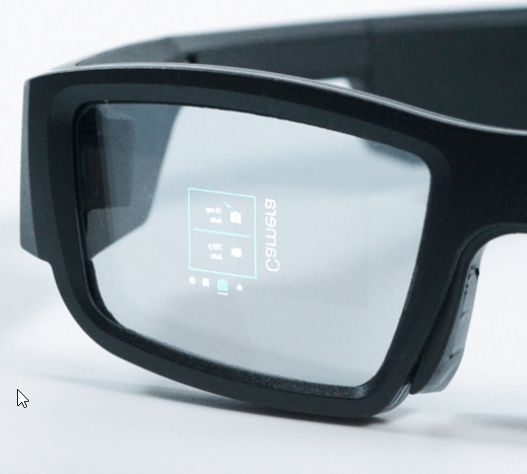
with this kind of illustration I expect it to only run 2D apps made with C#/C++
think google glass
mighty carbon
Looks can be deceiving @jaunty shell 🙂
jaunty shell
been burned too much by the previous AR goggles 😬
but I'm curious about the practical display space
I mean for simple stuff like notifications or guiding I'd get that
 paper coral
Hi, Does anyone know if it's possible to disable positional tracking for VR?
mighty carbon
It's a perfect way to make people sick @paper coral
paper coral
Haha yeah, It's to emulate the GO on our rift without having to recompile all our shaders.
paper coral
We have Go's in the office this is purely for quick testing between the two device without having to recompile shaders when swapping between standard Rift and the go.
mighty carbon
Aye
Unfortunately I don't know how to disable positional tracking
There gotta be a BP node
jaunty shell
@paper coral Are you Alan Yates evil twin brother ? 🤔
mighty carbon
Haha
paper coral
That's what i would have thought but can't find anything obvious
Why do i have to be the evil one 😦
jaunty shell
Cause Yates is a goood :p
 digital vigil
Anyone know of any cool things you can do in vr with blueprints?
tired tree
@digital vigil cool? you can do just about anything you want with enough effort, that is a bit vauge
 tired tree
that picture hasn't aged well.....
paper coral
@mighty carbon Thank you very much!
mighty carbon
you have to use Oculus build though.. Launcher version of UE4 might not have those nodes.
paper coral
Yeah, we've using the Oculus branch anyway for some other things anyway 😄
jaunty shell
so you are the evil twin of Alan Yates in the end
using oculus stuff instead of steamvr :p
 paper coral
Damn, You've figured me out
jaunty shell
LogSteamVRController: Warning: Encountered unsupported device class of 5!
what the frick
console is spamming that warning
sturdy coral
@scenic slate yes, disable fast widget path and it fixes it
sonic lake
@paper coral You could uncheck Lock to HMD for your VR camera, get the rotations from the tracking sensors disregarding the translations, then apply them manually to the camera on tick. You loose Low Latency Updates but for testing purposes shouldn't be a big issue.
Poor man's Oculus Go emulator. 😉
Or Rich man's, depending how you look at it.
mighty carbon

Every month, we introduce new tools, features, and software improvements designed to enhance your experience across Oculus devices. Earlier this month, we offered a closer look at the new core Rift software. Read on to learn about additional changes coming across the platform.
mighty carbon

UploadVR
Pimax today opened up preorders for its upcoming wide field of view PC VR headsets.
I don't get why these vendors insist on making inferior to Touch controllers 😦
Something like Touch combined with Knuckles would be the perfect controller
tired tree
@mighty carbon they aren't? they aren't offering their controllers yet, they plan on knuckles like ones
mighty carbon
well, there are pics of what appears to be their controllers (could be old knuckles ?).
also knuckles have analog stick in a weird location
sage gulch
I really had hoped this latest revision they would put the dang thing in the middl
middle
it doesn't look like a huge offset but FFS, the stick has physical resistance, the trackwell does not..
I guess it's harder to get people to subconsciously make an offset fist when grabbing though
tired tree
its not a huge offset
granted I have larger hands so its prob easier to get to the stick
 stable dove
I found the knuckles a little weird at first but when I started testing them out in our game I completely forgot about the offset. I feel as though I could use the touch pad and the thumb stick interchangeably. My only issue is that my thumb hits the thumbstick while Im using the track pad.
sage gulch
is the track pad just one axis now or still 2?
tired tree
its still two, but its hard to use as two
mighty carbon

Business Insider
Leap Motion's VP of design, Keiichi Matsuda, is leaving. He is most well-known for a video called HYPER-REALITY, which depicts a dystopian version of what daily life could look like if augmented reality technology indulges its worst impulses.
damn 😦
mighty carbon
maybe they wanted to keep it private ? Or no one cared until "Rift 2 is cancelled" article popped up ?
slim karma
I thought the Rift 2 was canceled 2 days ago 🤓
but yeah if the Rift 2 has eye tracking and is wireless it'll probably a day one buy for me
dusky moon
@sturdy coral wow that sounds like my dream vr setup ... Samsung Odyssey + Knuckles !
I should have my knuckles soon ... cant wait
granite jacinth
@mighty carbon For Go Dev, did you have to manually point to Codeworks?
nvm. looks like it should be auto-populating, but others complaining about the same issue.
 deft moat
@dusky moon How did you go about ordering the knuckles?
deft moat
I'm guessing they vet people before they send out a pair.
mighty carbon
wassup ?
granite jacinth
Epic seems to not know how to get Oculus Go packaged in 4.21, hoping you have some insight
I've tried 19-21-26
SDKs
granite jacinth
(26 is what they are telling me to use, but that shit don't work)
Ah, why not?
I'm newb to mobile dev, so it's whatever
mighty carbon
dunno, always used Android Studio
granite jacinth
I use docs to my advantage...
except all docs (both ue4 and oculus ones) are useless
Hm, I have Android Studio as well
Wonder if that's confusing something
@mighty carbon Well, if you ever get the chance to test a package in 4.21 let me know how it goes
Sigh, 4.19 settings definitely work
mighty carbon
oh, wait, 4.21 hasn't even come out yet
also, I use Oculus fork, not launcher version
mighty carbon
@granite jacinth did you file report with Epic? I just saw someone on Oculus forum asking about the same issue with 4.21 previews.
granite jacinth
@mighty carbon Yeah I did. Have had a back and forth with them. But their solutions...well, don't work
mighty carbon
got a link to that back and forth by chance ?
for other folks to chime in into the thread @granite jacinth
granite jacinth
@mighty carbon my email
then it's me basically telling him in like 10 different emails (with 10 different configurations to test) that it doesn't work
21 works in 4.19
doesn't seem to work in 4.21, neither does 26
 glossy agate
@granite jacinth what are you building for Go? Have one coming to my house in a couple hours.
granite jacinth
@glossy agate Nice 😃
A little something something
Also, preparing for Vive Focus
So, more of a means to an end right now
glossy agate
Ah nice! Well lmk if you need someone to do extra testing on it.
wicked oak
@granite jacinth vive focus is kind of absolute dogshit
are you planning to use it as a stepping stone to Quest
?
granite jacinth
@wicked oak yup
wicked oak
it uses its own sdk
wicked oak
perf is lower than actual quest
wicked oak
what about the 6dof hands?
granite jacinth
So I can then transition over to Quest
granite jacinth
So basically..I'm over here... Go, waiting for Focus, just so I am ready for Quest
It's kinda ridiculous but, w/e
glossy agate
I thought for quest they were telling people to build for oculus then it’s easier to downgrade for quest? Think I ready that in the oculus start email yesterday.
granite jacinth
@wicked oak Yeah, I'm getting the 3DOF ones first, and when 6DOF are ready for devs, I'll be getting those as well
"soon"
mighty carbon
Rift is only to test with 6DoF controllers. You should really build for Go.
wicked oak
the 3dof one is 100% worthless
granite jacinth
Well, it's like Go right?
wicked oak
worse
granite jacinth
I don't think Go is worthless
@mighty carbon You are correct
Anyone building for Rift and hoping to downgrade...optimize for Quest...lol
Probably already way over budget and might take another 6-12 months to do
wicked oak
you want to port dem zombies to Quest?
granite jacinth
Nah, you build for mobile first, if you want to hit Quest at a decent time
I don't know. Depends on a few things.
wicked oak
porting zombies to quest will be near-impossible
granite jacinth
If I kept that art style yea
granite jacinth
I wouldn't
wicked oak
biggest issue is drawcall count
ue4 sucks so hard for this
becouse it cant batch
unity can
it merges static meshes that share the same material if it can
tho, you can do it manually
with actor merge tool
mighty carbon
lol, how is this even possible with UE4 not batching ?!
in some regards it feels like stone age - even Quake 1 was batching
wicked oak
lmao what
quake 1 did not batch anything
quake 1 was a SOFTWARE renderer
and when it got gl support, it used glTriangles, and did the triangles individually
wicked oak
it didnt
mighty carbon
btw, if anyone cares here is Quake 1 for Go https://github.com/DrBeef/QuakeGVR/releases (it can even do room scale with Gear VR using ARCore)

GitHub
Updated QuakeGVR with ArCore Positional Tracking and Decoupled 3DOF controller support - DrBeef/QuakeGVR
wicked oak
couse it didnt need to, at all
doom3 had very good culling, so it barely had a few meshes to draw
mighty carbon
lol, Doom 3 did.. I spoke to rendering people who worked on Doom 3
wicked oak
also forward renderer, so it had to render each mesh a bunch of times
the renderer is public...
mighty carbon
so? maybe you aren't reading the code right
wicked oak
what are you calling batching?
mighty carbon
It batched surfaces with the same materials into one surface
wicked oak
unity static batching grabs MULTIPLE different mesh-renderers, and merges them
mighty carbon
yeh, same thing
as long as meshes had the same material in Doom 3, they were batched
I was under impression UE4 does the same thing
tired tree
ue4 solution to it is baked mesh merging
and instanced meshes
for the bandwidth reduction
frigid kite
Unity's batching system is also not perfect
I believe lightmapping breaks it, because it then uses different textures (if the objcets are on different atlases at least)
And for dynamic batching, only very low vertex count meshes are supported
Still, it's very nice if it works, I was so surprised when I learned that Unreal didn't automatically batch static objects using the same mesh and material
And that "instanced materials" are really just a poorly chosen name
Did you see the new FPS demo, and the new GPU particle system video Unity released yesterday?
They're finally catching up, the new stuff looks good
But Unreal's framework and interface just make it so much nicer to work with still
mighty carbon
I wish Niagara already worked on mobile
frigid kite
I think it's because compute shaders aren't available on most mobile devices
mighty carbon
I wonder if 821 and 835 Qualcomm SoC support compute shaders - if they do, that's all Niagara needs to support on mobile 😉
mighty carbon
imagine this in VR https://twitter.com/IGN/status/1055451662532276224


Watch a full day pass in Red Dead Redemption 2 right here! https://t.co/2wtnodJ1HR
Retweets
1409
Likes
6202
Twitter
 tacit shore
How I wish Vive was cheaper
mighty carbon
why? get Rift
tacit shore
Can it integrate easily with Unreal?
Same price, damn

This is the easiest way I found to get yourself a VR body with arm Inverse Kinematic (requires Motion Controllers) and full thumbstick locomotion. This step-...
I know it's not the same thing, but it would be cool to do, specially with controls like move
mighty carbon
@tacit shore how is it the same price ? 399 Rift and 499 Vive (and it doesn't come with headphones)
tacit shore
7k
mighty carbon
and yes, integrated well with UE4
tacit shore
Both of them are 7k BRL here.
mighty carbon
oh well
tacit shore
Yeah, I hate my country
mighty carbon
get Oculus Go maybe ?
tacit shore
I have a VR-like thing here, it's a Shinecon V4
those that require a good phone to use
That's why I wanted to use UE4 with Adreno 505(my phone's GPU)
mighty carbon
Go doesn't need any phone and is like the top mobile VR right now
tacit shore
Same price as PSVR here
mighty carbon
or you could make a cool prototype using UE4, register for Oculus Start program, show it to Oculus and they maybe would send you free Go/Rift
tacit shore
Nice idea
Would love to get a Rift
Even though I would like to use my Shinecon with my phone, if UE4 were compatible with its GPU
This one
It's kinda cool
I hoped the engine would work, but I read somewhere it wasn't compatible with Adreno 505
tacit shore
looked up the Oculus Start, you have to have published a VR project before getting on the program
 cosmic shoal
Funny we just got a mail from oculus that our Rift is on the way (grade B refurbished, what ever that means)
a hoodie, a glass of wiskey and other random stuff
We do have a vr app published on the iphone app store tho.
So we will now have a Vive, 2 WMR headsets and an a Rift.
wicked oak
@cosmic shoal my case is a lot more hilarious
they had a mistake, so when they sent me Touch devkits, they sent me 2 packs
at the time, they were sending 2 oculus +2 sets of touch to people
but due to the mistake, they sent me 4 oculus + touch
cosmic shoal
heh
wicked oak
and now on the oculus start
they did the same
so now i have 3 oculus go, and 6 oculus + touch
and 2 hoodies
cosmic shoal
send us a go, we don't have one 😛
just to complete the collection
are they collecting dust or did you get rid of them?
wicked oak
bunch of em collecting dust becouse i dont have 6 heads
but i did send some to people
i use them for multiplayer testing
cosmic shoal
I wonder if there is any good LAN multiplayer vr game, we could set up a 4 man thing here.
fossil sky
Why both hands look like right hand 🙈, anyone experienced such thing
frigid kite
I'm looking at my hands right now, and now that you mention it, it does look like I have two right hands
I might need to see a doctor about this
fossil sky
Ok come back to me please, I need my left hand
mighty carbon
Maybe you need to multiply scale of left hand mesh on one of the axes by -1 ?
tired tree
waaaay better to have two seperate models
sonic lake
@fossil sky This is what the VR template does anyway. There is only a right hand and the left hand is just a mirrored version of it. When BP_MotionController is spawned, the left instance is mirrored.
tired tree
that -1 axis change screws over bounds calculations on skeletal meshes really badly
it might not matter at first, but have seen a lot of people run into wanting to use the hand mesh for something and the messed up bounds and calculations breaking things
fossil sky
I tried to scale the Z axis to -1 but it did not work
I have a show room, and it does not make sense that the customer will see two right hands hehe, they will run away
and I am using this to trigger a widget, but it is disabling the grab function, When I remove it the grab function works fine
sonic lake
@fossil sky Can you show the hand mesh? Maybe the Z axis is not the right one to mirror.
fossil sky
That's It
mighty carbon
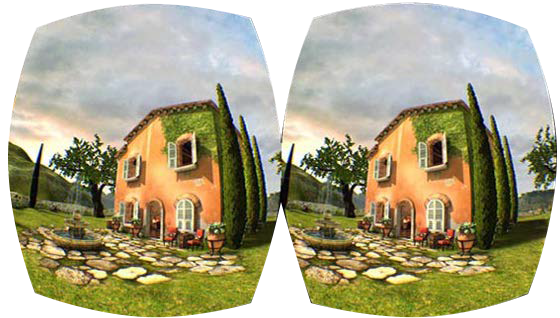
Turing GPUs introduce Texture Space Shading (TSS), where shading values are dynamically computed and stored in a texture as texels in a texture space.
sonic lake
@fossil sky What I meant is that your hand mesh may require mirroring around a different axis than Z, depending on its orientation. Did you try with X and Y as well?
fossil sky
I tried them all, Nothing has happened
tired tree
then it sounds like either that node isn't running or you are looking at the wrong mesh
because something would have happened
fossil sky
I tried to give it a positive value like 2, and this amplified the size of the hand
but I couldn't reverse the direction of the hand
mighty carbon

UploadVR
Fortnite developer and Unreal Engine creator Epic Games just announced that it has raised $1.25 billion in investment via new strategic partnerships.
if only some of it would go into VR
sturdy coral
hmm, maybe they issued non-voting shares?
I think sweeney and rein owned 51% up until now so any new stock would potentially make them lose control otherwise
mighty carbon
but if they hold 51%, not matter what as long as they hold 51% they still going to have control
tacit shore
how lucky you guys are
wicked oak
but why?
arent they making mad amounts of profit through fortnite
why would they sell more of the company?
granite jacinth
@wicked oak Maybe it's not all that they have made it out to be
Also, we don't know exactly the terms of what tencent gets
wicked oak
they might have wanted to do that becouse they only sold like 10% or whatever and got a megafuckton of cash
thanks to all the hype
granite jacinth
So, to "keep Epic Games afloat" they may need to do other things
tired tree
tencent doesn't own enough to float the majority of Epics cash
glossy agate
If you can get more investment money take it. Especially if they are looking to completely dominate the space. Gotta get to the point where nobody else can even enter that market. All that money helps.
Plus it gives you runway to operate at a loss if needed to undercut and put competitors out of business.
glossy agate
I had pretty low expectations for the Go, but that thing is actually really nice! Graphics are way better than I thought. Just gets super super hot.
tacit shore
Damn, guys
wicked oak
@granite jacinth from the 80.lv leaked roadmap
they have 2 planned upgrades to the rendering
the first is to handle gpu drawing better, that is a straight perf upgrade (and allows funky shit like automated instancing)
the second is render graph
render graph would re-structure the rendering of unreal into a series of passes
each pass with input and output targets
the idea is that the graph system makes sure to connect stuff together in an effective way
to use memory really well
for example, no more "gbuffer 1/2/3/4" bullshit
the system deals with that
the programmer just asks for "scene color" texture in their pass
it also allows async compute passes
but, the main thing
it would allow plugin rendering upgrades
imagine VXGI being a plugin, not an engine upgrade
and it simplifies rendering code MASSIVELY
runic cedar

Jaguar F-Pace Car Configurator Solution - AR and 3D modes. Made with UE4. The app has been developed by AVRspot. Like, Share and Subscribe for more! You can ...
New car project
sturdy coral
@mighty carbon not if they raise money in a normal investment round, issuing equity normally dilutes existing investors
but sometimes it can be done as a different class of shares that don't have any voting rights
sage gulch
or something silly like holding shares in a fund, splitting them, and selling a portion
wicked oak
uhm there is very active development about the render graph in github
a lot of the recent dev-renderer comits about that
mighty carbon
I want mobile Vulkan 😆
tacit shore
Adreno 505 does have Vulkan 1 support
mighty carbon
On Go/Quest/Rift
tacit shore
oh
 subtle raft
I'll ask this here too Dumb question, how should I make Stereo Layer UMG templates? Templates I can use to customize text and colors in world without having to make a unique BP for each type of interactable
glossy agate
@subtle raft you can just use ‘set text’ node tied to any text variable.
subtle raft
in the Widget BP right? How would I do that through the Stereo BP though
glossy agate
You have to create a reference for the widget in the the bp so you can pass in the request
subtle raft
@glossy agate Like this?
glossy agate
Yeah that should get you in the right direction. Should be able to call events on the widget through that
subtle raft
I would want to set the class widget right? but I don't think that's possible
glossy agate
Should already be set if you added which one you wanted to that widget component
subtle raft
I'm wanting to be able to use this one BP and swap out the widget class it uses
per world instance
or just set the UMG text per-instance
I was able to set the text, but I think the UMG happens last so it always set it back to whatever the text is set in the UMG Widget
like if I bound an event to the BPs construction script and sent that over to the Widget Blueprint it would change the text but immediately change it back
maybe Im just trying to do something dumb
should I just make different BPs for each UI object
glossy agate
You can just make a bunch of children off the master and just spawn the one you want when it’s needed.
tacit shore
Found a cheaper alternative for VR, Windows Mixed Reality. 60% cheaper than Rift.
tacit shore
There is something wrong with the SteamVR performance
Kept 100 FPS 90% of the time during the test, and the windows says <50% of the time above 90FPS?
Tested side by side on Phase Shift and it didn't even go below 120FPS
 bleak osprey
Hey quick question, I have a game on steam at the moment in VR and every time somebody exits steamvr needs to be restarted in order to reopen the game. Any ideas how to tackle this? My online search has yielded nothing but seeing others with the same problem.
subtle raft
how should I move my stereo widget OnClicked? How should I communicate with the WidgetBlueprint to the StereoWidget Blueprint?
subtle raft
ok... OnClicked(Widget) works now after I enabled Click Events on a custom playercvontroller
sturdy coral
@bleak osprey I don't have a fix, but I've seen it too on my stuff and other ue4 stuff on steam
it doesn't always happen
bleak osprey
Perhaps it’s because my project is mostly blueprints I may convert and see if the result is the same. Thanks for the response 😀
 daring pasture
Anyway to get comboboxes working on 3d Widgets? Editor is fine but standalone they are not working. Tried disabling fast path, but still not working.
mighty carbon

During Melbourne Games Week this week, Valve revealed a fresh set of official figures about it’s user population on Steam. Mashing up the figures with Valve’s monthly Steam Survey data gives us fresh insight into the number of VR headsets currently in use on on the platfo...
sturdy coral
@daring pasture how did you disable widget fast path, paste code
works for me and fixes the combobox problem
I set it in code with PC->ConsoleCommand(TEXT("Slate.EnableFastWidgetPath 0"));, I can't remember but setting it in ini might not be enough
I think it might enable itself again when not GIsEditor
if you don't do it on the command some time after startup, I think I do it on first tick
yeah I mention there ^ it sets itself again if you don't do it after startup
daring pasture
Thanks, I'll try running it in command and see if that works. Was just doing it in ini so that is probably the issue.
daring pasture
Setting it to run on first tick fixed it, thank you!
subtle raft
anyone have any idea why glancing angles with a Widget Interaction isn't activating a widget component's OnClicked?
sturdy coral
@subtle raft are you using cylinder geometry on the component?
subtle raft
no
subtle raft
it's a stereo widget
plane
it works at like 30 degree angles
but any more than that it doesn't click
but it still hovers
sturdy coral
you are using ue4 or a plugin?
subtle raft
ue4
sturdy coral
what is a stereo widget?
sturdy coral
hmm, can't think of anything that would be causing it
sturdy coral
add a breakpoint and then compare all the calls for click at the two different angles
subtle raft
the thing is the character won't be able to hit the button at these angles anyways, I just wanted ot figure it out if I ever did need to know
I've already spent like 4 hours trying to fix it :\
sturdy coral
I would add a breakpoint to UWidgetInteractionComponent::PressPointerKey and see what happens in there
write down the call chain that happens afterwards in notepad and compare between the two angles
subtle raft
how do I do that
sturdy coral
in visual studio you just click in the left margin of the line where you want the breakpoint
sturdy coral
you won't be able to see the internals of what it is doing wrong in BP
KeyNone would be wrong though
turn on debug draw too on the interaction component if you haven't tried that, that may help diagnose a bit
@subtle raft I'm not sure what the "parabola" distortion mentioned here is, and why they only apply it to Y and not X:
void UWidgetComponent::GetLocalHitLocation(FVector WorldHitLocation, FVector2D& OutLocalWidgetHitLocation) const
{
    ensureMsgf(GeometryMode == EWidgetGeometryMode::Plane, TEXT("Method does not support non-planar widgets."));

    // Find the hit location on the component
    FVector ComponentHitLocation = GetComponentTransform().InverseTransformPosition(WorldHitLocation);

    // Convert the 3D position of component space, into the 2D equivalent
    OutLocalWidgetHitLocation = FVector2D(-ComponentHitLocation.Y, -ComponentHitLocation.Z);

    // Offset the position by the pivot to get the position in widget space.
    OutLocalWidgetHitLocation.X += CurrentDrawSize.X * Pivot.X;
    OutLocalWidgetHitLocation.Y += CurrentDrawSize.Y * Pivot.Y;

    // Apply the parabola distortion
    FVector2D NormalizedLocation = OutLocalWidgetHitLocation / CurrentDrawSize;

    OutLocalWidgetHitLocation.Y = CurrentDrawSize.Y * NormalizedLocation.Y;
}```hmm Im trying to add a box collision to just get it working, but Im doing somethign wrong
where do I even put this code
sturdy coral
was added in May:
Author: Nick Darnell <Nick.Darnell@epicgames.com>
Date:   Tue May 26 15:32:32 2015 -0400

    UMG - Adding a parabolic distortion option for widget components.

[CL 2565502 by Nick Darnell in Main branch]```in the WidgetInteractionComponent Class?
does that mean it creates a sphere for the collision?
sturdy coral
ah the parabola distortion seems to be something you apply to the material itself.. then the hit trace ends up reading a value that comes from the material instance... somewhat convoluted
subtle raft
whats a parabola in this instance mean
sturdy coral
seems to be some sort of distortion effect in the shader, probably parallax
seems similar to the cylinder stuff
it actually doesn't read the value from the parameter to use, it reads it to see if it has changed against a uproperty version and needs to set it
it is strange though, in his commit WidgetComponent has a ParabolaDistortion UPROPERTY in the header, but in 4.20 it is gone.
sturdy coral
@eternal nexus ^ seems like the change might not have been fully backed out for UWidgetComponent::ParabolaDistortion?
subtle raft
sturdy coral
I don't know if that is an actual bug though or that normalized thing ends up being right, but looks like some remenants of ParabolaDistortion are there but not everything
subtle raft
so here's what I'm working with
in this Im basically constantly clicking
and when it clicks it should be moving back and coming forward everytime
and as you can see the onhover always works
sturdy coral
is this in vr or with the mouse?
subtle raft
and actually this is an issue because even head on the button sometiems doesnt work
this is FOR VR, but atm I'm jsut using my mouse
I have the stereo layer disabled
sturdy coral
k, I've just noticed it being off one time with the mouse when attaching an interactor to the camera, it was skewed from the crosshair somehow
so you see this regardless of the stereo layer thing you are using
even if you turn off the stereo layer in VR and show the widgetcomponent instead?
subtle raft
I havent tested it with the stereo layer enabled, but the stereolayer has no collision
right now it's bascially just set to display the widget as a widgetcomponent and not projected into the rendertarget
just for testing and so I dont have to use my HMD constantly
but when it's run for real the widget is hidden with a material and sent to the stereolayer but still interactable
but stereolayers only show in the HMD so I set that up
but I'll gut the thing up and just have the elements I need in it
if I just make a version with just the widget component in it it still doesn't click right
sturdy coral
it looks like that parabola stuff is wrong scales both X and Y by currentdrawsize, then divides by it for both components, (removed parabola math not present in 4.20), then multiplies by it again but only for Y instead of for X and Y
subtle raft
should I copy/paste the 4.19 code in
but that would prolly break other stuff
as a cylinder
this is what you were talking about before with the cylinder right
sturdy coral
hmm 4.19 wouldn't be enough, that commit came may 2015
I'm not sure when it was backed out
sturdy coral
I'm trying to remember the exact cylinder problem
subtle raft
Im gonna try this in 4.19
sturdy coral
cylinder is separate from this parabola stuff
looks like what I have in my code for where cylinder goes wrong is this:
            // NOTE: with cylinder widgets, hit.Distance is wrong.  UWidgetComponent adjusts Hit.ImpactPoint
            // after first tracing against the plane but fails to update Hit.Distance, so we recompute from
            // TraceStart and ImpactPoint.

[...]
                        FVector NewWorldScale = MC_##HAND##_Laser->GetComponentScale(); \
                        NewWorldScale.X = FMath::Max(FVector::Dist(Hit.TraceStart, Hit.ImpactPoint), .0001f); \
so I think it still goes to the right place for interacting with the widget, but it returns the wrong distance, which I was using to render a laser pointer
wicked oak
at the end i wont be able to push the DWVR 120 fps update
fukc
damn QA reviews and patching system
gotta have to wait till im setup properly in amsterdam and can bring the devkit there
subtle raft
I think I figured it out
I failed to make notice of the "Press Pointer Key" implementation
and the onclick I did make was set to the widgetcomponent and not for the widgetBP
@sturdy coral thanks for the help though
https://www.brightdevelopers.com/creating-interactive-huds-virtual-reality-unreal-engine-4/ I was following this guide and even had the browser scrolled to the "Press Pointer Key" part this whole time but never read it

sturdy coral
@subtle raft why was it angle dependent?
subtle raft
I have no idea
about that still
but it was just because I was implementing the interaction wrong
you're not meant to click on widgetcomponents to fire an event
and thats why the hover worked but not the click
the hover was firing in the widgetBP and my onclicked was firing and implemented in the widgetcomponent
what a relief though
sturdy coral
@subtle raft not sure what you mean "you're not meant to click on widgetcomponents"?
sturdy coral
oh
subtle raft
it apparently just doesn't work right
at least not with the Widget Interaction component
which is kinda funny since by name you'd think that would work 🤷
tired tree
@sturdy coral just finished the skeletal replication btw, had it on the back burner
around 64 bytes avg a send
so..its not cheap
sturdy coral
@tired tree per hand or for both?
tired tree
@sturdy coral per hand
I likely will end up self compressing it anyway, due to the decompression function not being available on other platforms for cross platform
sturdy coral
@tired tree was that with position too or just the hand animation itself?
tired tree
included mesh deformation
so if they unchecked that option and I am self compressing I could just drop all locations out
the compressed buffer comes with some artifacts too, so i am still on the local end getting the full list and using it locally
which is the reason it was back buffered, first try with the compressed data when i got my EV2's had massive artifacts
they are very small now after a few steamVR updates
mighty carbon
@granite jacinth UE 4.21p3 Oculus integration is up on Oculus github.. I haven't tried it, but let us know if it works for you
sturdy coral
I've been looking at adding a few things to unreal's networking, like peek-ahead for reliable RPCs so you can put redundant data in them and fill in for missed ones until they arrive
@tired tree ^
sturdy coral
not sure, there was an alternative to tcp that did
if it is message based instead of stream based you can get away with a lot more
tired tree
yeah i remember reading about the concept before
sturdy coral
they still target some platforms like web and stuff I guess where it just would never be able to peek ahead because it goes over TCP
unless you send over multiple sockets
tired tree
well the sending cost isn't all "that" high for steams skeletal transforms when you rate limit it and lerp between updates
10 htz is likely fine
sturdy coral
yeah you could also make exceptions for the rate limit for fast changes
tired tree
i have gesture detection
could merge that in
on a new gesture send an instant update
ect
sturdy coral
@tired tree since they derive the pose from curl floats, a few cap sense bools, and some trigger/joystick/touchpad axises, it feels like they should just decimate those and reconstruct pose from them
since it is an opaque compression/decompression thing, they could still do the generic thing for leap motion or whatever
I guess every client would ahve to know about every driver for other drivers to be on a fair playing field
tired tree
yeah
which is the issue i am having with rifts and not running the steamvr runtime
which is why i will have to self compress
subtle raft
I'm getting Stereo Layers stuck in my Vive after I close the VR Preview
stereo layer elements stuck in the SteamVR Home

runic cedar
Hi, I want to create camera animation in the VR like rotate my camera for two seconds for the right side. How can I make that?
Like in the matine
coz if i try move camera in the VR i got lags and it's not great in the VR headset
maybe with matine ?
frigid kite
You really shouldn't do that
Rotating the player's head is very discomforting, prone to cause nausea
runic cedar
but if i rotate actor it's not rotate :/
frigid kite
Just don't smoothly rotate the player's point of view at all
 tawdry dragon
Anyone here had any luck using vive motioncontrollers/trackers without hmd and without running UE4 in VR mode?
I really only want the tracking information from 1 tracker, and have a normal UI thats clickable(which is not possible when running UE4 in VR mode)
tawdry dragon
Hmmm okay, so that would require my own initialization of OpenVR right?
the SDK should be included in stock UE4
(I'm not the best C++ programmer)
 violet musk
Anybody know how to get that new "Manage Trackers" menu to work? I have 11 trackers and just "6,5" fit into the menu... the rest I can't access.
jaunty shell
any devs here used the StereoLabs ZED camera ? For VR/AR or photogrammetry
fossil sky
Hello, I Have a show room and I want the users to switch between a night and day mood, any Idea on how to do this ?
jaunty shell
@fossil sky this is more of a #graphics question
check this out for your question https://docs.unrealengine.com/en-us/Engine/Rendering/LightingAndShadows/PrecomputedLightingScenarios
sturdy coral
@tawdry dragon I think you can leave things as a scene application and just not enable vr/stereo, and still get at the controllers
tawdry dragon
Thanks for the inputs, I’ll have a look
sturdy coral
fast point cloud rendering:
"Description" : "An efficient way to render point cloud data that is generated by AR devices",```not sure if it supports normals like splatting
 split steeple
Heya folks! Cobbled together a demo level with my WIP UE4 Knuckles Livelink & Action Binding support:
Hope it's useful for those with early access to the Knuckles controllers. Full source to come next (coming from a trip and want to refactor)

Download the project at GitHub: https://github.com/1runeberg/SunRock More info & support at: https://bit.ly/2RofZHn Overview of the features of the SteamVR K...
 odd garnet
 split steeple
Shinbi two hand "peace".... rocker#s peace symbol, i guess flipping seems popular too so try throuwing that in there 😃
my personal fave would be Vulcan salute
 elfin yoke
What's the best way to reduce drawcalls for mobile VR? Let's say I have multiple materials on one static mesh. Is there an "easy" way to merge them?
Bake Materials and Merge Actor supposedly are able to do this, but both give horrendous output (especially when materials are different types, i.e. one opaque, one translucent)
Otherwise, is the best (and maybe only) solution to just export all materials and create an Atlas and reimport?
 lost dome
violet musk
lost dome
violet musk
Somebody else having the problem of Vive trackers being 1-2 cm offset?
fossil sky
Hello, How can I create (or enable the red line laser pointer, if it is already built in ), So I can use it instead of the hand itself to trigger/overlap trigger boxes.... etc ?
frigid kite
It's all just regular blueprint work, really
Attach a collider to the motion controller, execute a line trace every tick, place the collider at the trace's hit point
Check if the collider is overlapping anything or listen to its overlap event, and handle your game logic there
The laser is just a cilinder that's stretched to the length of the line trace
frigid kite
You don't actually need the collider component, you could also just do overlap tests directly
jaunty shell
anyone using ARCore around here ?
I've finished setting up the SDK and building the AR template, but when running on my note 8 (android 8) the cam stays black :[
I've authorized the camera in the app config too
mighty carbon




First tests with our new Z-mini and #UnrealEngine. Used some Paragon assets, made freely available by @EpicGames. Looks promising, really good back/front occlusion and a strong feeling of depth with #HTCvive. @ElmwoodTweets @Stereolabs3D https://t.co/mi1SukNFo8
Twitter
cool stuff
jaunty shell
@mighty carbon will report back asap, we ordered a mini and a normal one 😃
mighty carbon
Well, I wish someone made it using Rift and ZED Mini, not Vive 😃

Stereolabs Inc.
In stock. Ships in 2-3 days. The ZED Mini is the new generation of depth and motion sensing camera. Optimized for mixed-reality and robotics, the ZED Mini is small and lightweight, features visual-inertial technology for improved motion tracking, new Ultra depth sensing m...
$500 o.O
mighty carbon
4.21 preview 4 is out
jaunty shell
pff
they did fix the bug I reported with the multi user template for studio
but no Revit plugin yet 😢
"Scene Depth Buffer corruption with VR on AMD GPUs"
thats misc af
runic cedar
And they are not fixed AR rotate bug on android with maps changes
mighty carbon
guess what's coming soon ... https://www.facebook.com/syntystudios/photos/a.1573381119596225/2171731929761138/?type=3&theater

POLYGON - City Zombies has been submitted to Unity!!
Shown here in a scene built using POLYGON City & Battle Royale :D
jaunty shell
@runic cedar oh you've done AR on android ?
tell me, did you get any black camera problem ? 😅
runic cedar
I just remade simple Ar project
jaunty shell
using the AR template ?
jaunty shell
I've switched the cam to be accessible by the app
runic cedar
you cannot launch for all devices
runic cedar
try restart phone
jaunty shell
true, doing it rn
also gonna try on my work phone, a 2017 A5
nope still nothing
"Start AR Session Failed"
jaunty shell
yup
4.21 preview cant build it anyways
no clue why
it might be my project settings
but I have no clue what to change
never done any android stuff on UE before
violet musk
You could try ARCore 1.4 https://developers.google.com/ar/develop/unreal/quickstart that worked for me

Google Developers
gotta build it from source tho
jaunty shell
gotta do some cleanup on the workstation, but I'll give it a go tomorrow, thanks @violet musk 😃
mighty carbon
Thursday stream is shaping up to be interesting
frigid kite
@tired tree Is is possible to use AddForce on the VR movement reference?
Do I need to set something else for it to work?
(bearing in mind that I've never used AddForce on any character movement before)
Nevermind, I guess all I needed was a high enough value
jaunty shell
@violet musk getting an appcrash with that branch 😢
violet musk
@jaunty shell Are you sure your android stuff is setup correctly?
https://developers.google.com/ar/develop/unreal/images/unreal3.png these versions etc?


maybe OpenGL?
You're using the sample project for ARCore 1.4?
If you upload me your old project with the camera problem I can see if I have the same issue
Unsure if I wanna go through the hassle of setting up ARCore 1.4 on this machine tho :9
jaunty shell
@violet musk yeah, everything is setup correctly, and I've had the project setup for 1.4 on the launcher branch, 1.5 with the ARCore Branch
it runs with 1.4, just that... I have no camera output at all
I can send the APK to you if you want
tried to debug with adb, but my console gets cluttered with all the unimportant android stuff and its a pita to read through T_T
do you compile with Gradle or Ant BTW ? I had to use ant since even after accepting the SDK license the editor would fail to build
runic cedar
Hi, how can I smooth rotate my camera actor with lerp?
relative location for camera not working in VR
but camera rotation move on debug
If i try rotate camera in relative location nothing happens
tired tree
@runic cedar you have bLockToHMD as true, so the camera sets its own relative location every tick to the HMDs orientation / position
runic cedar
@tired tree Where is HMD to block ?
in the player vr pawn ?
and where it's set position, and i can block it for a moves
jaunty shell
finally @violet musk , found the solution
I had to force the installation of the Gradle SDK
tired tree
@runic cedar its in c++, the boolean is setting in the properties for the camera, however I really suggest that you NOT turn it off, if you want to force the camera into a different position then move the actor / root it is anchored too instead
jaunty shell
https://cdn.discordapp.com/attachments/337172237817741322/507190339187245056/tmp_1540993767528.jpg god damn, and I find out about this only an hour before leaving work for the weekend T_T

 runic cedar
@tired tree okay i try, yes i can rotate actor
It's hard to smooth rotate camera in VR :/
tired tree
you'll have to offset the rotation using the cameras location as a pivot point
 solar loom
Hi, does anyone know where the VR motioncontroller triggers are handled in the engine code? I'm looking for a way to keep them working, even when the game window is not active. Or would this be more a question for the C++ channel?
runic cedar
@tired tree
i did it but not very accurate but it's okay
i made camera rotation - rotation from lerp to the 0 0 0
tired tree
ummm, that isn't what I meant...if you are in roomscale you need to offset the rotation by using the HMD as a pivot point
runic cedar
@tired tree
yes, but now I'm happy 😃 Thank you so much
tired tree
@solar loom if (FApp::UseVRFocus() && !FApp::HasVRFocus())
{
return; // do not proceed if the app uses VR focus but doesn't have it
}
// Poll game device states and send new events
XInput->SendControllerEvents();
in PollGameDeviceState in the Application sub class
solar loom
@tired tree Super! Thanks! I'll check it out.
tired tree
pretty sure only WMR and Rift uses that setting though
solar loom
So that would mean other HMD's would send controller events?
tired tree
i didn't look too deeply into it, but SteamVR isn't setting that var
runic cedar
@tired tree You are a strong developer)
solar loom
@tired tree and for anyone who wants to know, as far as I can see in the plugins only Oculus is using the FApp::SetUseVRFocus(true) . Unfortunately I don't see a way to override that.
tired tree
in 4.21 WMR native does as well
solar loom
Ah ok, thanks for the heads up. I'm still working with 4.20
mighty carbon
if anyone interested: https://developer.oculus.com/blog/tech-note-animated-loading-screen/
btw, I am wondering if there is still a spinning ring present when loading UE4 app on Go. It was there in 4.16 and it was essential for Gear VR app submission process as UE4 couldn't fulfill 4 sec time frame on initial run.
granite jacinth
?
I'll load one of my prototypes up real quick
oops, guess I left it running for a few days
BTW, there's this new stat UNIT measurements
Given
But it doesn't always happen in 4.21
RHIT
Mem
Draws
Prims
Super useful, need to check if that's in non-mobile vr as well
@mighty carbon No ring, took around 5 Mississippis
(but this is a dev build, so ship build could...should be faster)
mighty carbon
hmm.. I guess Go isn't Gear VR.. I don't remember how long it took for my project to load, but on Gear VR it took 10 sec for the engine itself to load.
violet musk
@jaunty shell Glad you found the solution! :D
 obtuse spruce
To those of you who use the VRExpansionPlugin:
The VRExpansionPlugin wiki says of its VRCharracterActor pawn: "By default it blocks sticking the players heads through solid geometry". Would someone point to where in the source code this functionality is achieved?
granite jacinth

Facebook’s virtual reality arm may soon find itself in the unfamiliar position of playing catch-up with hardware competitors. Last week, TechCrunch reported that Oculus co-founder Brendan Iribe had decided to leave Facebook partially due to his “fundamentally different vi...
sturdy coral
That will be ok if they still support using the cameras at the same time too
though I wish the cameras would be 100% wireless
if not it is just WMR pretty much, with four cameras instead of two so larger volume to track hand in but you'll still get dropouts
sage gulch
does the oculus driver screw up the screenshot framebuffer size for anyone?
sturdy coral
fossil sky
Hello, I used this BP to draw a laser beam coming out of the right hand, And It is working fine, Thing is that I want this laser to overlap the collision boxes and when it is overlapping enable trigger input:(
I have been stuck for a while, and I am totally newbie so please, simplify the answer 🙈
PS: The project is a show room and I am able to overlap the collision boxes and open/close the drawers with the hand itself, But I want the overlap t happen through the laser
deft moat
@sturdy coral Which version did you spring for? I'd love to hear your opinion once you get it (hopefully this year)
deft moat
@fossil sky You don't have anything coming out of Break Hit Result to tell you what you hit with your trace.
sturdy coral
@deft moat I think I'm going 5k+, have 8K X as part of my order too but they haven't mentioned the 8K X in months
tired tree
why exactly
mighty carbon
I expressed my dissatisfaction with their decision to release free assets (the ones that a lot of people already paid for before Epic decided to do free assets releases on monthly basis). Hoped they wouldn't do that again. They said Epic rules. I said money talks. Then said I might have to start making my own models to avoid "asset flip" remarks down the road.
Got booted off their Discord.
and I was quite polite.
granite jacinth
@mighty carbon what's their discord?
sly elk

Oculus
Wrench is a highly detailed race car mechanic simulator. Players work for a race team, starting their career as a mechanics assistant and working their way up to crew chief.
mighty carbon
@granite jacinth I don't know - I forgot how I got there :/
it's one of those cases when you can shit on your customer and get away with murder 😛
I should go into business of making Marketplace assets 😛
sturdy coral
them going free doesn't take anything away from you
marketplace assets have no resale value
sturdy coral
that still won't take anything away from you