#virtual-reality
1 messages · Page 191 of 1
 sturdy coral
 mighty carbon
nah, 7200 rpm HDD
sturdy coral
that should be your next purchase, they help build times a lot though I think 5hrs might have something else wrong
mighty carbon
hmm.. what else could be wrong @sturdy coral ?
sturdy coral
@mighty carbon that was all for development editor, or for building everything, shipping etc.?
 dusky moon
So is everybody ok here with the new oculus update ?! all my projects got a huge performance hit (almost doubled framerate) I think it's because of the dash overlay...
 sonic lake
@dusky moon did you also update the graphic drivers? I am having some regressions with the latest NVidia versions.
dusky moon
@sonic lake first with the older driver (39x or something) it was laggy. then I updated to the latest and its still crap
I sent a support ticket
sonic lake
What if you kill OculusClient.exe completely?
dusky moon
it brings back the home and dash automatically. I tried to set it to run as administrator to avoid it. and then when I hit VR Preview when the OculusClient is closed headset is just black and doesnt load anything
sonic lake
Strange. It should work regardless. Even after a reboot?
sonic lake
Anyway it is just for test purposes because your users will have the Oculus Client running.
dusky moon
Nah no chance after reboot. I bet the rift core is not optimized though and should be fixed from oculus' side
 quiet swan
what are you all using for an inventory system in unreal?
for vr?
did any of you buy a regular invenotry system and tweak it for VR????\
 sage gulch
on my system the driver seems to accumulate an error and after a day or two requires a reset, otherwise the tracking resets itself constantly as if the rift or camera was being unplugged.. did that on 1.5, still does on 2
 wicked oak
lmao i can go to pixel density 5 on DWVR on the new 2080
overkill much
im going to see if i can get it to run on my galaxy 8, as a test for the Quest
at least half-run the chaos benchmark i have
sturdy coral
@wicked oak maybe you can expand FOV way beyond the HMD, and then get SSR without edge artifacts
mighty carbon
so, finally tried new Oculus Home and I really liked it. Literally sat there for some time looking at the opening in my cave to the wonderful wilderness outside.
sage gulch
it's pretty cool
 sly elk
Hey all, im implementing smooth locomotion today. Copying what onward does, is that the gold standard/what users expect?
also, should thumbstick just get input direction or should I scale the movement speed to the amount of thumbstick pull?
 jaunty shell
gold standard is full 1:1 movement 😄
some people prefer smooth, some prefer teleportation
sly elk
yeah, we have teleportation
just adding a smooth locomotion option
i hate smooth locomotion since it makes me sick so I'm not sure what people want
sly elk
wanting multiple speeds?
sly elk
yeah, thats why we are adding it as an option
jaunty shell
accel thing, how is onward working ? There's multiple speeds ?
sly elk
i htink its going to be a toggle on thumbstick click
jaunty shell
I've always found out that some people have difficulties with acceleration in VR
but yeah, stick position to speed sounds decent
better yet
go for an armswing loco 😂
sonic lake
@sly elk It should be immediate acceleration at the final speed, with a settings option to choose your speed of movement. And snap rotation for turning. You can use 45 or 90 degrees as basis and make the angle configurable in settings. This is what is less likely to trigger cyber-sickness in our experience.
jaunty shell
yeah snap turn is important too, some people get sick really fast with smooth rotation
sonic lake
Any type of acceleration, both linear and angular, has to be avoided because VR stimulates only the ocular system, not the vestibular one, so any acceleration creates an oculo-vestibular mismatch which leads to cyber-sickness.
jaunty shell
yup
sly elk
so thats different than onwards implementation (the snap turning) right? In onward the left and right to strafing
*do strading
jaunty shell
had some good laugh during the DK1 era with people trying to compensate for virtual motion with their body
sonic lake
Strafing could be just lateral linear motion.
But you keep facing the same direction.
sly elk
So i guess one other requirement is that all locomotion needs to happen with just a single thumbstick
everything in wrench is fully ambidextrous and the A/B buttons are in use for other stuff
sonic lake
That's tricky because usually one thumbstick is linear motion and the other one is turning.
sly elk
Yeah. We don't need our movement to be as robust as something like a shooter though
nothing is fast paced
never at risk of player death
sonic lake
Yes but if you want a granular coverage of the virtual play space you have to allow for both linear movement and rotation at the same time. Unless rotation is secondary then you can think of switching to it only if needed.
Say that you want to go around the engine while you are assembling it. You will do left, left, forward, forward, 180 rotation, left, left
Or left, left, 90, left left, 90, left left
sly elk
yeah. I guess it will be worth breaking our symmetrical controller input rule for smooth loco
sonic lake
I think so too
Unless you move around things on a predefined path, always facing them. Not sure that works for the dynamic of your game.
sly elk
Nah, it needs free exploration
sonic lake
Then you need 3 DOF, 2 linear and 1 rotational
An alternative way to do rotation could be, for example, pressing both grips at the same time, like to grab an invisible round handle in front of you, and then swinging your hands either to the right or to the left. You let go to end the rotation. Can be tricky if you want to move while carrying something to take it with you.
 tired tree
snap turn makes more sense in Wrench than smooth turn
there isn't much of a reason to care about the intermediate rotations
mighty carbon
snap turning is a good turning - I've tried it several times in various VR projects and it didn't make me sick.
sonic lake
Totally agree, this was the first indication anyway. As long as you let the people configure the snap turn angle. Some may want a more granular turn (say 15 or 30 deg) some others may be ok with just 45 or even 90 deg.
tired tree
just make sure you blink the screen
some people prefer smooth turn because the instant snap disorientates them
but fading/blinking the screen removes that
should be able to get away with just snap then
mighty carbon
Hmm.. Not even Oculus Home 2.0 has blinking screen
(unless I just didn't notice it)
sonic lake
Our tests show that "blinking the screen" is necessary only if the new view has no visual reference whatsoever to the previous one (e.g. snap rotation of 180 degrees or teleportation to a far location). This has the effect to "reset" your sense of presence so that your brain is forced to rebuild it from scratch. Otherwise users are just fine with an immediate transition to the new view. At the end it boils down to personal preferences though, which would call for yet another configurable option.
wicked oak
i reeally like what skyrim or others do
"blink" rotation is actually smooth rotation to a target
but very fast
and optional blurring/blinders
sonic lake
Blurring is interesting because it simulates the momentary shutdown of eye focus and use of peripheral vision only that happens when we turn out head very quickly IRL.
On the other hand I find the "tunnel vision" effect which is, for example, in Google Earth VR very sickening.
tired tree
if its only 45 yeah its fine
mostly
but there are always outliers
and fading / blinking can be near instant
sly elk
so for snap rotatation. Flash white briefly between states?
mighty carbon
black
sly elk
So smooth movement is at 50cm/s with a settings option to multiply that up and down. Thumbstick click toggles between smooth locomotion and teleport.
 daring mural
Does anyone know if MBFR works on console as well?
 trail shale
Is there a debug mode to show headset view frustams? I'm trying to make binoculars and it would be a lot easier to get an idea of what I am looking at
daring mural
@trail shale I think one of the HMD view modes gives you a stereo output that shows both eyes. I'm not sure how to get it working, @charred portal has his projecting like this in his packaged game, I believe
 deft moat
Hey @trail shale, I offered some pretty bad advice the other day, and this might be more of the same, but the packing peanut shape makes sense when you're wanting to give the illusion of binoculars in a non-VR setting. Since binoculars have you looking through two separate lenses, and VR is the same, would it make sense to just have a single circle that each eye looks through?
trail shale
I had some help but figured out that if you spawn a plane with the 2d texture on it, with the right settings it works
you even get the binocular distortion if you spawn it too close
I have an overlay I use but you can't see it, which makes sense, because the HMD itself has a physical "overlay" e.g. the holes you actually look through
quiet swan
I have a strange issue I am using the VRE plugin with 4.20 and notice now if I use the FPS test pawn or simulate my game lags at 4 fps but if I play in VR mode it plays normal
why is my game lagging in only select view port and simulate???
sturdy coral
is the new oculus wrist watch going to interfere with games that use wrist watches? =/
it shows up even when dash isn't open right?
sturdy coral
ah looks like only if the watch is pinned, and only if app is submitting depth to support dash
sage gulch
yeah so what is the deal with that, I have a friend with a custom engine and when you bring up dash it will only show the icon panel.. but if you pull a window out of oculus desktop, it will properly integrate that into z-space even when dash is closed
any pointers on docs?
sturdy coral
not sure, but I think ue4 or at least the oculus branch of it has done an integration
openvr/steamvr has added zbuffer support in recent versions but I don't think it has been integrated yet in ue4
(even if they are on a high enough version of the lib, I don't think they are submitting the buffers)
 slim karma
what would be a good mirror mode to check on screen messages from a print sting node? looks like in the default one it's not on the screen
sonic lake
@slim karma Depending on what your are trying to diagnose, a common technique is to add a debug Text Render Component to your motion controller and set its text value to whatever your want to monitor. Then you can just look at it.
slim karma
well I just wanted to display a few vector coordinates to the screen to check if they're what I'm expecting. But I'll take a look at you suggestion, sounds very helpful indeed! 😄
sonic lake
You can also use DrawDebugLine to visually plot your vector and see it change over time. https://api.unrealengine.com/INT/BlueprintAPI/Rendering/Debug/DrawDebugLine/index.html
Draw Debug Line
jaunty shell
soo it looks like Borderlands is coming to PSVR
mighty carbon
yep
jaunty shell
now the big question is
mighty carbon
booo
tired tree
they ported it? they are a dev studio?
perfectly possible
good game for VR too, the toonish graphics don't look bad scaled back
jaunty shell
I mean that would require a whole custom branch of UE3
tired tree
you really think they are on stock ue3? lol
jaunty shell
nah ofc they arent :p
I'm sold on BL in VR, 1000%
just that, PSVR exclusive, solo only and no DLC included
tired tree
we aren't sure its not as timed exclusive afaik
tired tree
and solo only makes sense, its likely hitting the limit of PSVR as is
jaunty shell
😢
still nothing on BL3
but
if they are doing a VR port of BL2
it could be that they are preparing a VR build of BL3
with gameplay built from the ground up this time
jaunty shell
gday
 placid canopy

Oculus head of hardware product management Sean Liu said the Quest was "indoor-only" at the recent Oculus Connect 5 event.
jaunty shell
aah the sound of deflating hype
wicked oak
becouse ps4 puny cpu cant handle MP
thats 100% a cpu issue
4 players shooting its a lot of FX to do
and one player is the host
placid canopy
gotta have something for people to be excited for on BL3-VR
jaunty shell

Watch the full VoD Here: https://www.twitch.tv/videos/183408275 Video on the mod soon, this mod is buggy and can cause a lot of game breaking bugs and I was ...
this is how I see BL3
hybrid between MMO and the BL2 coop
placid canopy
have you seen much on fallout 76?
jaunty shell
fallout 🤢
placid canopy
ahso...i enjoyed them
placid canopy
when i had time..
its a genre with alot of wiggle room
but, after a while its just blah to the eyes, gotta make it interesting
jaunty shell
yeah
placid canopy
i figure it takes 4ish years to make AAA games....and vive and rift have been in the hands of developers for 3ish years...
theres gotta be some good shit comin
hmm

Wireless VR | Unleash the VR World – TPCast
TPCAST is the world's first commercial tetherless VR solution. TPCAST Wireless VR solution enhances the VR experience and enables free movement.
mighty carbon
current wireless is overrated - can't do with WiFi VR what you can do with Quest and arenas
(visual fidelity aside)
oh, Sony officially confirmed they are working on "new hardware" (whether it's PS5, which is more likely, or PSVR 2 or both)
 daring pasture
After I got the tpcast, I'd never go back to wired.
tired tree
@mighty carbon wifi is far better for high quality experiences
and arenas have backpacks and multilighthouse setups
though Quest would be a far easier method
mighty carbon
but you have to have unobstructed line of sight
tired tree
yeah...but talking about for the home
mighty carbon
aye, no argument there
with Quest one could probably add verticality to arenas (with obligatory warning "play at your own risk - you can fall and break your neck" 😛 )
tired tree
likely not....
mighty carbon
why not ?
tired tree
because I seriously doubt that it could handle it currently
and regardless
bad idea :p
unless walled in ofc
now hallways and the like would be cool with quest
mighty carbon
but imagine Climb where you can physically climb and see the beauty of the world 😃
lol, Google announced a new tablet and not a word about ARCore support on it
those prices....
sturdy coral
@jaunty shell ue3 had VR support, so it wouldn't be doing everything from scratch
@mighty carbon you don't have to have unobstructed line of sight because it can read the signal still after it bounces off walls
And ceiling
At least tpcast
Can't have you hands covering all around it, but can have your hand between it and base station
mighty carbon
oh
jaunty shell
@sturdy coral true, but that was early DK2 era support
tired tree
its really not that difficult from an implementation stand point to add VR support to an engine
its not like you are re-writing the hmds sdk
they also have a full reference implementation in ue4
it may be missing some things that 4 has, like instanced stereo but they also don't have to keep things as generic as the full engine does
depending on how much effort they put into it
jaunty shell
true
 mental hatch
https://venturebeat.com/2018/10/07/oculus-quest-tracking-is-indoor-only/
From what I've read of the article and various others, is that it's not 'meant' for outdoor use, even though they've already added an automatic dimming feature for the cameras. That it's mostly due to the fact that it's easier to track indoors, not to mention lots of legal stuff and the like. Though it will have difficulty tracking in extremely bright or dark areas, so that's a factor to add in.
So I think going to a football stadium and using it is a bit far fetched, but going to your back yard and maybe drawing a few chalk lines might actually be plausible for an extra large play space if it's either slightly cloudy or even an overcast day.
Oculus head of hardware product management Sean Liu said the Quest was "indoor-only" at the recent Oculus Connect 5 event.
sturdy coral
they also don't want people to burn the screens in the sun
mighty carbon
or falling to a manhole, or getting run over by a vehicle
mental hatch
Basically
Pokémon Go'ing themselves
mighty carbon
I hate Pokemon
mental hatch
Alright
Ingress'ing
Or Zombie Go'ing themselves.
Still
Imagine having an entire football field of VR playspace to yourself.
 soft beacon
Has anyone successfully made a pawn jump using VR? My camera doesnt move with the pawn unless I am moving, and if I stop moving mid air the camera stays in midair while the pawn moves back to the floor and from then on the camera and pawn are misaligned. Has this happened to anyone?
 real needle
Can I have 3d images rendered in vr? Left side only visible in left eye, right side in right eye?
mighty carbon
I believe you could @real needle
sonic lake
@soft beacon check the component hierarchy of your pawn. The VR Camera should be parented to a VR Origin Scene Component which typically is parented to the root component. As the pawn moves, the camera moves along because the VR Origin moves with the root.
@real needle you have to create a stereo material for that. That allows you to project a different texture for each eye.
soft beacon
@sonic lake thank you, I realized its a IK plugin I have causing the issue, I messaged the developers. I have the setup you say, and it doesn't work, but if I disable a function of the plugin it ooes. Hopefully the devs can help
slim karma
I don't see why the Oculus Quest being 'inside only' would be any problem at all. Noboy would use it outside anyway.
sorry I'm late to the party, but the fact that people complain about this is just beyond me
soft beacon
I am honestly sure it would work outside, unless it stores relative data, and even then it may just not recognize too large of spaces
but a football field at night would be badass haha
soft beacon
The lenses are a big part though, accidentally wrecked an Oculus Go by having it outside, and legit took 2 seconds to ruin the screen
mental hatch
Yuh
I 3D printed a cover for my Oculus Go specifically to protect it and to hold the remote.
sonic lake
Hi, anyone is experiencing old packaged UE4 VR apps staying black with the new Oculus software release if the Oculus Home is not running? We have had few reports about this.
Reactivating the Oculus Home makes them start properly.
jaunty shell
speaking of oculus


New Asynchronous Spacewarp 2.0 will help VR run better on Rift across all hardware. Using PTW and depth from the app, it addresses the motion estimation artifacts of ASW around rapid brightness changes, rapid head movement with repeating patterns and contradictory movement...
Likes
118
 Twitter
dang when we getting this on steamvr 😦
jaunty shell
😢
slim karma
oh so that's actually a "feature" of the rift. I always hated that everything gets torn to shreds on my screen.
nice to see that it gets fixed
sonic lake
NOTE to anyone running own (unknown sources) applications on the Oculus platform having bypassed Oculus Home, be aware that the latest update, which is being pushed regardless of auto-update being turned OFF, breaks them. You will get a black screen in the Oculus unless you re-enable Oculus Home.
Honestly I am getting pretty angry at Oculus as this is the second time they do something like this. If auto-update is turned off, one should legitimately expect that no software change takes place unexpectedly.
Ok last time they blocked all their systems worldwide, so one my argue that this is a relatively minor screw-up.
mighty carbon
MLO now ships everywhere in continental USA
mighty carbon
has anyone, besides Palmer, tried MLO ?
mighty carbon
what about motion controller lag and head turning lag ?
wicked oak
head turning, not much issue
oculus inside out tracking is better tho
a lot better
motion controller is 6dof
but its laggy
it uses magnetic tracking, and its not fully accurate and it has massive latency
the controller itself is quite good tho, solid, and with a trackpad
mighty carbon
hmm.. and hand tracking / gestures ?
wicked oak
didnt try that
mighty carbon
I wonder if I could make AR for MLO using Blueprints alone, no C++
mighty carbon
trying to pitch boss AR solution for the manufacturing and so far there is no AR glasses I could use (hololens needs C++ and supposedly poorly integrated with UE4; lenovo Mirage Solo doesn't have official support for AR yet and no one knows much about MLO)
well, UE4 is all I know
and this would be a side project at work..
wicked oak
i can tell you magic leap is legit
its still a dev product
but it starts going actually somewhere
 dusky quartz
Hello, I have a scroll box widget, And I want to scroll it down and up using the track-pad instead of motion controller trigger, Is this doable ?
I am using HTC vive
 lament mesa
Hi guys, I'm developing a simulation in Oculus GO. I've followed the standard process of pulling Oculus repository from their github, build the engine and use the samples they have provided. Although what the funny part is when I open there default Input map and run it in Oculus Go. I get this screenshot
Notice the fps coming on the default level
This is crazy, I'm not touching even 40 fps. Is that default with the oculus Go or I have to change few things at my end ? I've just used the default settings of the Project Settings, with Forward Renderring enabled
sturdy coral
4.21 adds a new type of IK that takes into account constraints:

If I'm reading that thread right and it isn't a plugin
mighty carbon
@sturdy coral should be useful for VR arms ?
tired tree
yeah its been on feature list for a bit
trello that is
its what IK in engine has been missing, rotational limits with multi bone chains
mighty carbon
nice
sturdy coral
@tired tree is this gonna impact you a lot again, like the 4.19 physics replication changes?
Physics Interface: We have been reworking the physics interface to support an increased ownership of physics objects at the high level. As a consequence much of the physics related c++ code an API has changed.
tired tree
physics replication changes were aggravating because they were changed to support fortnite and required changes for my use because that caused issues outside of their use case
this api change is good overall, hasn't been that bad to convert to
sturdy coral
seems CCDIK may not be using full physics asset constraints:
     /** symmetry rotation limit per joint. Index 0 matches with root bone and last index matches with tip bone. */
    UPROPERTY(EditAnywhere, EditFixedSize, Category = Solver)
TArray<float> RotationLimitPerJoints;```you can see in the SS on that reddit post
its a manual constraint
that is great though
sturdy coral
yeah but a single float isn't enough for constraining like an elbow right?
needs to know it can only bend in one axis
tired tree
yeah it won't solve it all i assume, unless i am missing something about how it is set up
haven't been able to play yet, still fixing physx :p
sturdy coral
this talk is pretty nuts:

Physical character interaction is hard to fake–whether it’s between two in-world characters, between users and characters, or between a character or avatar a...
they fully simulate a moving human, driving it like a robot, so there should never be foot slipping or center of mass not matching with physical plausibility
mighty carbon
I wonder if Climb will be ported to Quest.. I doubt that because CryEngine doesn't scale to mobile hardware at all. However, maybe Oculus bought it off Crytek and ported it to UE4 ? 😄
deft moat
I always forget how much I hate keynotes until I actually watch them as opposed to the highlights
sturdy coral
yeah I already quit watching it
deft moat
I want to hear about the tech, but 99% is them telling me how they are going to change the world with their tech.
sturdy coral
@tired tree any idea why they are emulating AActor::CalcCamera() here instead of just calling it? Doesn't that mean we can't override CalcCamera?
FTransform FXRTrackingSystemBase::ComputeTrackingToWorldTransform(FWorldContext& WorldContext) const
{
[...]

                const bool bUsesImplicitHMDPositioning = XRCamera.IsValid() ? XRCamera->GetUseImplicitHMDPosition() :
                    PlayerViewTarget && PlayerViewTarget->HasActiveCameraComponent();

                if (bUsesImplicitHMDPositioning)
                {
                    TArray<UCameraComponent*> CameraComponents;
                    PlayerViewTarget->GetComponents<UCameraComponent>(CameraComponents);

                    UCameraComponent* PlayerCamera = nullptr;
                    for (UCameraComponent* Cam : CameraComponents)
                    {
                        // emulates AActor::CalcCamera(); the PlayerCameraManager uses ViewTarget->CalcCamera() for
                        // the HMD view's basis (regardless of whether bLockToHmd is set), CalcCamera() just finds
                        // the first active cam component and chooses that
                        if (Cam->bIsActive)
                        {
                            PlayerCamera = Cam;
                            break;
                        }
                    }
End result I'm going for is having camera components with a "VR" tag get picked automatically in VR and not picked in 2D
ah looks like AActor::CalcCamera returns the view only
where this needs the component in order to get the parent
mighty carbon
Oculus keynotes were fun
deft moat
Yeah, I enjoyed them a little more. I just realize I'm a highlights reel kind of guy. I'd rather watch 3 minutes of excellent shots on goal than sit through a whole game.
tired tree
@sturdy coral you are welcome for the answer :p
sturdy coral
it seems like a bad design=/
guess I'll just modify the engine code though but I hate diverging too much
hmm, and this seems like a bug:
bool AActor::HasActivePawnControlCameraComponent() const
{
    if (bFindCameraComponentWhenViewTarget)
    {
        // Look for the first active camera component and use that for the view
        for (const UActorComponent* Component : OwnedComponents)
        {
            const UCameraComponent* CameraComponent = Cast<const UCameraComponent>(Component);
            if (CameraComponent)
            {
                if (CameraComponent->bIsActive && CameraComponent->bUsePawnControlRotation)
                {
                    return true;
                }
            }
        }
    }
    return false;
}```only used here:
    if (!PlayerCameraManager || !ViewTarget || !ViewTarget->HasActiveCameraComponent() || ViewTarget->HasActivePawnControlCameraComponent())
    {
        if (IsLocalPlayerController() && GEngine->XRSystem.IsValid() && GEngine->XRSystem->IsHeadTrackingAllowed())
        {
            auto XRCamera = GEngine->XRSystem->GetXRCamera();
            if (XRCamera.IsValid())
            {
                XRCamera->ApplyHMDRotation(this, ViewRotation);
            }
        }
}```if there are two active cameras, and the second one has IsHeadTrackingAllowed, it looks like the first camera will end up being treated as if it had IsHeadTrackingAllowed
 swift forge
Hi all. I'm trying to play mp4 video at start of the application on Oculus Go (splash screen) but when app starts video appearing from 1-2 second from it beginning. Some laggish. But in simulation mode it plays smoothly. Cache video checkbox didn't help. Video is media texture in unlit material placed on the plane. 720p 30 FPS
 warm lion
is there a way I can detect when the player puts the head set on? Right now when I launch to the Oculus Go, when I put the headset on I can tell that a timer has already started ticking. I need to delay this for my testing purposes even if it's not for final.
 fair hearth
There should be an isworn? Boolean or something similar to it
I know there’s one for ishmdenabled and ishmdconnected
But those are both pc based
warm lion
getHMDWornState thanks!
Hmm, so that seems like it is still missing some time. The only thing I can figure is that the calibration screen still counts as "worn" but the timer is already starting
The screen you have to do whenever you put the headset on from a inactive state
sturdy coral
@warm lion you may need this patch:
@@ -971,6 +973,11 @@ namespace OculusHMD

        EHMDWornState::Type FOculusHMD::GetHMDWornState()
        {
+               if (!ovrp_GetInitialized())
+               {
+                       InitializeSession();
+               }
+
                ovrpBool userPresent;

if (ovrp_GetInitialized() && OVRP_SUCCESS(ovrp_GetUserPresent2(&userPresent)) && userPresent)```oh, thanks!
sturdy coral
I needed that on desktop, not sure if it is needed for mobile
deft moat
Having a difficult time with my physics handle using motion controllers. I send out a trace using the forward vector of my motion controller, and then determine the distance between my motion controller and impact point on the hit object. On Event Tick, the physics handle location is updated to the motion controller's forward vector multiplied by the offset calculated after the trace is sent out. But for some reason, my held component immediately behaves strangely and veers off to the right. Am I doing something weird here?
sturdy coral
have you set up tick dependencies?
deft moat
Sorry, one picture didn't post... Discord thought I was being explicit? One moment
Clyde's really getting me down here. It doesn't like an image named "blueprint"
Sorry, tick dependencies? No
sturdy coral
I'm not sure it is an issue here, but the motion controller's tracked location isn't updated until it ticks
you can still get partial movements due to relative attachment before it ticks though
if the root is moving, and if the thing moving it ticks first
depending on when you are tracing that might be your issue, the trace could get a little farther away every time
unless you just do a single trace
deft moat
Will it keep cycling through an input action until I release? Or just cycle once until the button is pressed again?
sturdy coral
it should just trigger it once, I think there are some settings around key repeat that could apply but shouldn't by default
deft moat
There we go. That's how I set the offset float. Which doesn't update in my tick function. What's strange is that I'll still be holding the component, it's just that it shoots off toward the right initially. It still responds to movement by the motion controller, just offset by 100 units or so
sturdy coral
@deft moat how does the rotator work on that grab func?
and is the object origin somewhere that if it were rotated it could move by 100 units. or is it centered pretty well
deft moat
The object is just a cube with the origin in the center. But since I'm grabbing the object at the location of impact, it shouldn't move at all, right?
sturdy coral
I don't know, the documentation on that node isn't clear, I'm sure there is a full explanation of it somewhere else though
deft moat
Adjusting the rotator value doesn't do anything. But using the grab component at location only (not rotation) function causes the held component to be able to spin freely around the grabbed location.
My problem seems to be whatever is happening after Event Tick, but I can't wrap my head around why.
Eff. I know my problem. In Event tick, it's updating the physics handle location to my forward vector * my offset float, but from 0,0,0, not my motion controller location
sturdy coral
ah right
quiet swan
What is everyone using for an inventory system in vr?
sage gulch
pockets
deft moat
@sturdy coral How much of what you do just involves fixing dumb errors like that? Cause I'd like to think I'd stop doing things like that before too long.
 glossy agate
@quiet swan Mine pretty much works like every other shooter, but you can place items anywhere in your vest, and they just stick to the right spot.
quiet swan
How did you get that set up @glossy agate
I'm trying to do that
Is there any inventory system in the market place that can be tweaked for vr?
sturdy coral
@deft moat plenty of time, best thing you can do is get good at debugging and inspecting values and verify it does what you think at each step
glossy agate
Im using the VRE plugin, so we have the on grip release command, just checks overlapping comps, and if the vest is overlapping it snaps to and attaches to the socket assigned to the inventory item. Easy squeezy
quiet swan
ok I can see the on grip release
but if I check that I have to make some kind of trigger box on my VR body?
how do I add a socket to a VR character?
do I need to make a static mesh vest to hold stuff?
how did you get your vest to stick on you?
@glossy agate did you follow any tutorials?
glossy agate
Yes to all those questions but I didn’t use a tutorial.
sly elk
I can't get VR preview to work today..
@sonic lake is this related to the update you mentioned?
Oculus says everything is connected but also has a red warning that new drivers are required
i really don't want to update video card drivers as I have had system stability issues with this 1080ti on newer drivers
sonic lake
Yes, this is the update they have forced to everyone without giving a choice.
sly elk
super irritating
so I guess oculus is blocking me from doing anything until I install new video card drivers?
sonic lake
Yes. That's pretty much it. I am making noise on the forums (Oculus / Reddit) to let them understand that this is not how you deal with updates.
Plus had yesterday all our customers that were connected to the internet complain at once that their system was no longer working. No fun.
We use Oculus in a sort of kiosk mode (No home) and the update broke it completely.
sly elk
I didn't even know that was an option
can you operate that way without making oculus accounts?
sonic lake
We run our experiences from a custom launcher.
sly elk
A large trade school I was talking to said they preferred vive to rift just because of managing accounts for hundreds of headsets was impractical
sonic lake
I perfectly understand them.
sly elk
Do you still need an oculus account for rift setup?
sonic lake
Yes you do. Other impractical thing.
But you could block Home from popping up. Now it is no longer possible.
They definitely don't understand the non gaming world.
Period
sly elk
Hopefully they come up with something better for commercial use with quest
because that device is a really good fit for schools
sonic lake
Yes but then they need a kiosk mode.
And non mandatory updates.
Can you imagine hundreds of installation stopping at once? Nightmare.
sly elk
Yeah
sonic lake
This is the second time they do something like this.
So not learning from it.
The first time they blocked all their systems worldwide.
dusky moon
I think Oculus wanted to deliver some of their promises after the OC5 and the update was so rushed and broken
my ticket for the performance hit with UE4 is still open after 3 days of sending logs and stuff
just to note how shit the mandatory home load is... when you put the headset above your forehead to change something in UE, the home loads up.... it almost takes 700 MB of Ram at some points
sonic lake
Exactly. That was the other advantage of being able to disable home. It is super annoying while you are developing.
The music, the image shift, the RAM. Everything
Plus if you bypass the proximity sensor it runs continuously.
dusky moon
Perfect!
sturdy coral

My personal legal disputes are over -- Zenimax has fully satisfied their obligations to me from the purchase of Id Software, and we have released all claims against each other. (The appeal for Oculus still goes forward)
Likes
936
Twitter
real needle
Does Haptic Feedback Effects Buffers work on SteamVR?
Mainly vive, don't have one to test on atm
quiet swan
what engine version is everyone using in VR? Has there been any significant improvements with VR with each update? Im on 4.20 and its ok, I am a little afraid to update
does everyone update as they go on?
sturdy coral
@quiet swan there is nothing beyond 4.20. 4.21 is in preview and you shouldn't update a real project to it unless it is a copy of the project just to experiment with it
quiet swan
yeah I figured that
I mean I plan on staying on 4.20
im almost redy to make a sample trailer for my game
still need an inventory system
not alot of tuts on inventory for VR
if I could just find out how to stick a weapon on me
tired tree
@quiet swan the template you are working off of already has that
I have the gun be able to be dropped on the waist component when you release the grip there
you would just need to filter for your specific spots instead
quiet swan
wwwwhhhhhhhhhhhhhhhhhhaaaaaaaaaaaaaaaaaaaaaaattttttttttttttttttttttttttttttt
interesting
quiet swan
does anyone know the motion control mapping name of when you press down on the movement pads of the controlers?
sage gulch
try using the auto complete / suggestion box
 ornate raptor
@quiet swan MotionController (L/R) Thumbstick
dusky moon
Guys! I'm stuck... I got an error after submitting my build to Oculus :
"VRC.PC.Input.2) Single-player apps must pause while the Universal Menu is open."
I really can't make it work. This is how I did it, I used the event tick in my game mode to check for "Has Input Focus" but it keeps the game paused all the time
Could Easily fix the other error for the HMD On/Off because the Oculus library nicely gives some binding events to pause/resume game with HMD's on/off but for the Oculus Dash menu thing I don't know how to implement
 median wedge
How would I divide the Vive touchpad into separate buttons? I just want to know what fourth of the touchpad is pressed
Would I just compare the x and y values for .5?
sonic lake
@dusky moon Pretty much everything is explained here: https://developer.oculus.com/documentation/unreal/latest/concepts/unreal-dash/
Also I would not use Event Tick for the check, but set a timer on a longer time span than 1 tick
dusky moon
@sonic lake yeah I did try Event by Timer on loops with 1 sec interval ... but still the problem is it pauses the game when I first hit the home button. but then if I hit it again to resume ,it remains paused no matter how much I press it afterwards

 limber rose
hi all, anyone know how to set spectator window for VR to render right eye instead of left?
limber rose
haven't ever really messed with the spectator viewport except for basic "spectatormode" setting
sturdy coral
@dusky moon tick doesn't happen when paused
limber rose
change the UVs on the texture of the renderer?
sturdy coral
you need to do it on an actor with allow tick when paused
@limber rose
void FDefaultSpectatorScreenController::RenderSpectatorModeSingleEye(FRHICommandListImmediate& RHICmdList, FTexture2DRHIRef TargetTexture, FTexture2DRHIRef EyeTexture, FTexture2DRHIRef OtherTexture, FVector2D WindowSize)
{
    const FIntRect SrcRect(0, 0, EyeTexture->GetSizeX() / 2, EyeTexture->GetSizeY());
    const FIntRect DstRect(0, 0, TargetTexture->GetSizeX(), TargetTexture->GetSizeY());

    HMDDevice->CopyTexture_RenderThread(RHICmdList, EyeTexture, SrcRect, TargetTexture, DstRect, false);
}```add .5 to each of the SrcRect x coords
-     const FIntRect SrcRect(0, 0, EyeTexture->GetSizeX() / 2, EyeTexture->GetSizeY());
+     const FIntRect SrcRect(0.5f, 0, 0.5f+(EyeTexture->GetSizeX() )/ 2, EyeTexture->GetSizeY());
ah super helpful, thank you
sturdy coral
@limber rose if you are doing it for scopes you may want to add a new mode that lets your choose right/left
and pick it based on hand the gun is in
but then again I think some people are left eye dominate and right handed and every other permutation
median wedge
Thanks, and does anyone know of a way to render where the finger currently is on the touchpad, I have seen some games do this
dusky moon
@sturdy coral ooo there we go! thanks a lot man phew
sturdy coral
np
@median wedge the steamvr render components /transforms api gives you a little indicator component I think
sage gulch
use the keyword capacitive in the autocomplete/suggestion box in blueprints
sturdy coral
but ue4's render model support isn't animated so it doesn't show up
you could manually read in the transform through the plugin
or just hard code it
median wedge
Ok. Thank you
sonic lake
@dusky moon Sorry, but I saw you got your answer from @sturdy coral in the meantime
One thing to note. If you want to make your application dash aware using the command line parameter -oculus-focus-aware note that it has to be -oculus-focus-aware true.
The official documentation doesn't mention you need to specify true
dusky moon
np, yes I enabled it through Engine.ini though and works. Thank you!
sonic lake
Cool.
warm lion
Anyone had any success with implementing a BT keyboard for debugging purposes? I was able to pair one to the Oculus Go, through the phone app. Only the esc key seems to work. I know it's not officially supported but I've heard that it can be implemented at the app level. Any ideas how one would go about that?
sage gulch
You'd probably need to go lower level than UE I would think,.. UE doesn't really support system level drivers AFAIK
jaunty shell
hey lads, anyone with the VR kit from HTC who had the error 108 all of a sudden ?
It worked perfectly last friday 😐
uh, nvm, quick restart fixed it
 dusty dagger
NOOB question.
I package my project for windows 64 bit, with no errors. But VR not working (Oculus) when executed.
Oculus works perfect inside unreal engine VR preview. What am I missing ?
sonic lake
You need to check the Start in VR flag in the project settings
Or launch the exe with -vr
^^^ @dusty dagger
sonic lake
You are welcome
 fresh wharf
does anyone know how you could launch your project upon booting up the oculus go?
sonic lake
There is no kiosk mode available on the Oculus Go. There have been workarounds, but all the latest updates have broken them.
IMHO, Oculus has no interest in supporting a kiosk mode because their business model is selling the hardware in order to sell the VR experiences through their embedded online store. Kiosk mode means no store.
Unfortunately they seem to be following the same practice with the latest release of the Oculus Rift core, where they took away the possibility to use the HMD with any other VR experience if the Oculus Client (including the online store) is not running.
fresh wharf
@sonic lake unlucky that there is no kiosk mode available, thanks for the info though
im also trying to set up the native mobile sdk so that i can make an app for the oculus go, what ide would be best to use? fairly new to this. I can't use unreal or unity because i want the app to load in pictures and videos from internal storage.
sonic lake
I never looked into it but I believe you can read from the internal storage using UE4
I assume that would be like reading from the file system
fresh wharf
i could get it to read and display it inside the running unreal project
but the problem is that it was too heavy
and unreal would crash
it does run when you open it from gallery though
i have to make it so that people wont have to navigate through the gallery to open a video or picture
but that they can just put the go on and select what picture/video they want to see
sonic lake
I develop for the Go but I never looked into displaying images/videos from the gallery. BTW, where would they come from? The Go doesn't have a camera.
fresh wharf
just 360 degree pictures and videos taken inside a running ue4 project
i could just put them into the pictures folder on the Go
but then it's a hassle for people to open them
sonic lake
and the project runs on the same Go?
fresh wharf
nop
project crashes
cause it's too heavy for the go to handle
i made a video with Nvidia Ansel which i dumped in the internal storage of the Go
sonic lake
Ah ok. But if they are taken elsewhere you could simply embed them in your project before deploying to the Go.
fresh wharf
and that launches fine
sonic lake
ok
fresh wharf
i also tried using the video as texture for a globe
in an ue4 project
and launching that, but would just crash aswell
sonic lake
I have helped someone else on a similar project and everything worked as expected (projecting on a sphere with inverted normals). Did you look at the log files? What makes it crash?
fresh wharf
didn't get any log files cause i didnt launch it on the go connected with my pc
packaged the project first and then tried it
when i launched while connected to my pc it would just work fine
i thought that was cause all the rendering was done on my pc
which is strong enough to handle it all
sonic lake
To test on the Go you need to Launch the project on the device
fresh wharf
yeah it just wouldnt load the picture in
the globe would just be black
but it worked with reaaaally low res videos
so its not that i had it linked falsely or anything
sonic lake
ok so it was probably a memory issue
fresh wharf
yeah its a huuuge high res project
sonic lake
but it is difficult to tell without looking at the log files from the Go
fresh wharf
like 1 plant alrdy was 700k polygons
cause designers made it super good looking
i dont have the logs anymore, i'll try setting it up again and passing you the logs after everything is set up
sonic lake
you can share the error here, you get access to more "brains" able to help you
mighty carbon

World’s first Virtual Reality shoe immersion by natural movement. A real step into endless space.
looks promising
tired tree
lol
that movement is super awkward, it looks strictly worse than directional locomotion....
tired tree
? sure
so would sitting there and doing the same thing
waggling your feet isn't really that different that a arm swing or other types of locomotion
wicked oak
@mighty carbon no
tired tree
its pretty useless...
wicked oak
as mordentral says, its like armswinger or similar
tired tree
and incomingleg cramps
wicked oak
just with your feet
tired tree
its actually one of the silliest products for locomotion i've seen...
mighty carbon
well, you have controllers in your hands - while swinging them you can't do anything else
with legs swinging you get to run'n'gun
but
if it doesn't help with motion sickness it's no use
tired tree
"run" sitting in place
sonic lake
Cyber-sickness is mostly due to oculo-vestibular mismatch. I don't see how that device could solve it per se.
tired tree
running in place in roomscale is strictly better when setup correctly
they literally could have just done that
sonic lake
We have experimented quite a bit with the 3D Rudder, which provides a nice way to steer a VR experience with your feet, but doesn't have any particular effect on limiting cyber-sickness.
Not sure if anyone else has tried it out: https://www.3drudder.com/

3dRudder is a VR, gaming and 3D motion controller. Move intuitively and naturally in virtual reality and 3D games and applications while seated.
mighty carbon
3drudder seems like to good device for mecha sims. I fail to see why would you want to use it for legs-based motion. The whole idea is better immersion. It feels that with player physically moving legs immersion is deeper than with anything else.
I fail to see why would anyone want to not be able to physically relate to what's happening in VR.. That's the whole idea of VR - to be in another world, physically
btw, Synty just released this https://www.youtube.com/watch?v=uey264PD43M

Our latest pack is jam packed with content to create a really cool Western based game. Check it out on the Unity Asset Store! https://www.assetstore.unity3d....
I am surprised no one is working on Westworld-like VR game
sturdy coral
I tried out the wii balance board for locomotion a long time ago on DK1/2, but never got it working well
there was an app that would make it emulate the joystick, I think I tried it with skyrim back then
 meager garnet
Hey so for those who do dev on the ML + Unreal. I've been having problems getting the remote simulator to recognize the mouse even after keymapping the trigger and bumper to the mouse buttons.
Has anyone run into this problem.
lumin OS 0.17 on ue4 version magic leap 0.16 with the 0.16 content examples.
fresh wharf
@sonic lake i tried using a stereo 360 image within a sphere on ue4 again
but its super low quality compared to just dumping the picture in the go and opening it through the gallery
sonic lake
@fresh wharf what are the settings of the texture inside UE4?
fresh wharf
jaunty shell
set mipgen to none :p
fresh wharf
whats mipgen?
jaunty shell
"Level Of Detail" category
Mip Gen Settings
its the mipmap generation
LODs for textures basically
fresh wharf
yeah i found it, just wondering what mipmap's do
jaunty shell
In computer graphics, mipmaps (also MIP maps) or pyramids are pre-calculated, optimized sequences of images, each of which is a progressively lower resolution representation of the same image. The height and width of each image, or level, in the mipmap is a power of two smaller than the previous level.
from wiki
fresh wharf
thxx
jaunty shell
its great for game textures
fresh wharf
do i change smth in my material too?
jaunty shell
but in certain cases like yours with 360 videos or images you don't want it to be applied
nah
fresh wharf
hmm, it's still not at the same level
and for some reason the ue4 one kinda hurts your eyes
sonic lake
too bright or what?
jaunty shell
got a pic ?
fresh wharf
but i can show you my ue4 viewport
not really cause i package and load it into the go
it looks all fine when i just play it on my pc in the normal viewport
jaunty shell
oh
might be something related to go then
like how android handles compression maybe ?
fresh wharf
its like it refreshes every frame
and makes it white or black for a milisecond
and then switches back to the sprite
sonic lake
there is something wrong, it should not flicker
even if it may appear low res, flickering is something else
jaunty shell
how big is your sphere ?
fresh wharf
400 in all axes
jaunty shell
hmm so it isn't a scale issue
fresh wharf
i feel like the go cant really handle the super high res refresh rate
i think i might have to make it so that ue4 plays the video straight from the gallery
but im not sure if that is even possible
jaunty shell
I've played 4k videos and up on the first gen GearVR
surely you can play your content on the GO
fresh wharf
i cant figure out what i'm doing wrong though
sonic lake
maybe you could try with a test image to clearly spot some differences
this was shared on the Oculus forum: https://us.v-cdn.net/6024342/uploads/files/86756_f9b6444e55861e79669cc758d1d0d69f.jpg

4096 x 4096
It's a stereo image though, not sure you are doing stereo
sonic lake
because you need to setup a special material for stereo rendering
jaunty shell
what are your texture sample parameters ?
fresh wharf
jaunty shell
no I meant the node material @fresh wharf 😄
fresh wharf
okay, i tried it with the example and when i load it in from the gallery the edges of the squares on the ground are really sharp
but when i look at it in unreal
it looks the same as when 2 objects are fighting about who can be on the surface
if you know what i mean
jaunty shell
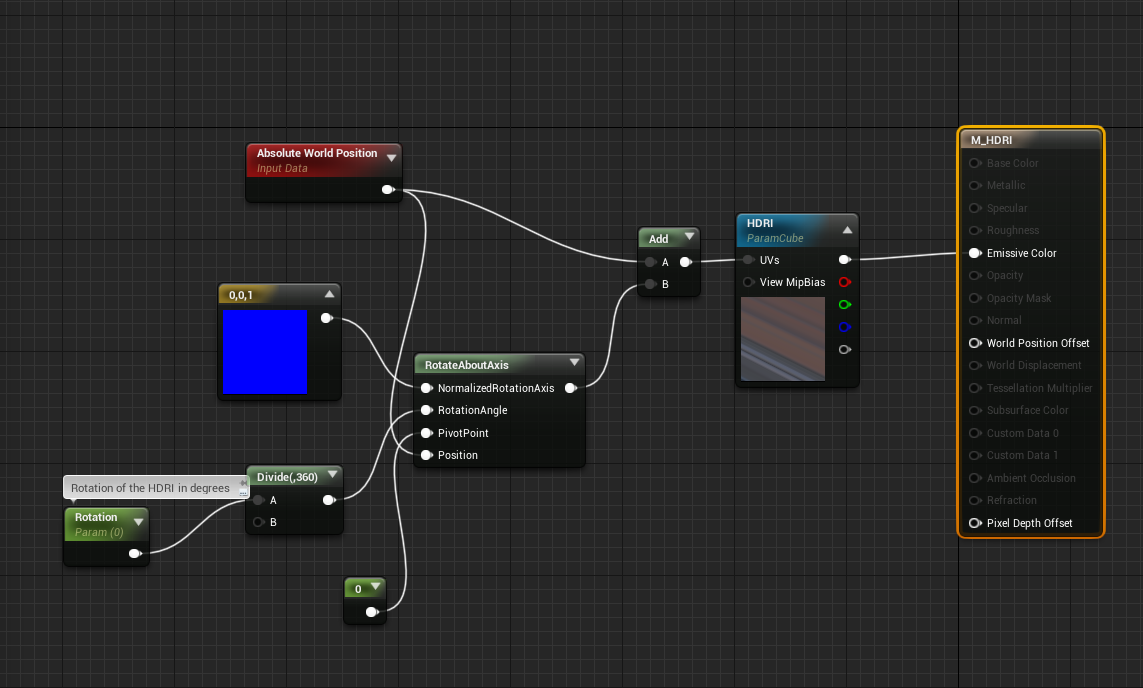 fresh wharf
jaunty shell
fresh wharf
jaunty shell
mine for HDRis
fresh wharf
is that for stereo aswell?
jaunty shell
ah nah that's for mono 😃
should be able to change it for stereo too with an if node
also my method doesn't "stick" to the mesh
its using worldspace instead of UV space
fresh wharf
would it make any difference
 fresh wharf
@sonic lake what's your custom node?
oh damn thats rly good
would there be any benefit for using the worldspace with stereo though?
sonic lake
Custom node is the usual: return ResolvedView.StereoPassIndex;
fresh wharf
why is the base color pin greyed out?
its super distorted when i use your blueprint @sonic lake
sonic lake
The Base Color is grayed out because you are probably using an Unlit material
Shouldn't make any difference in this case
fresh wharf
yeah, just found that out
sonic lake
that distortion is strange
it may be due to the UV mapping of your sphere
mine looks like this
which sphere are you using to project onto?
fresh wharf
just a basic sphere
sonic lake
that explains the distortion
jaunty shell
just remembered a perk of using world position instead of texture UV
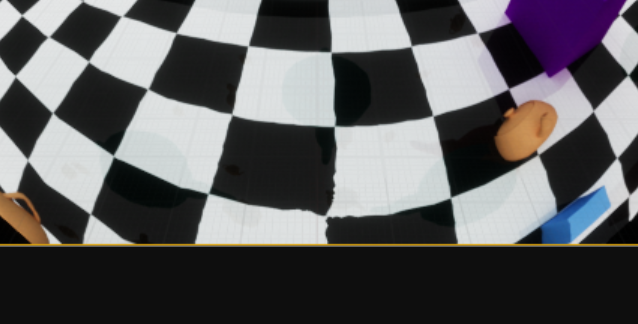
this doesn't happen with world aligned
fresh wharf
tbh i cant see whats wrong with that
jaunty shell
the texture is deformed on the poles of your sphere
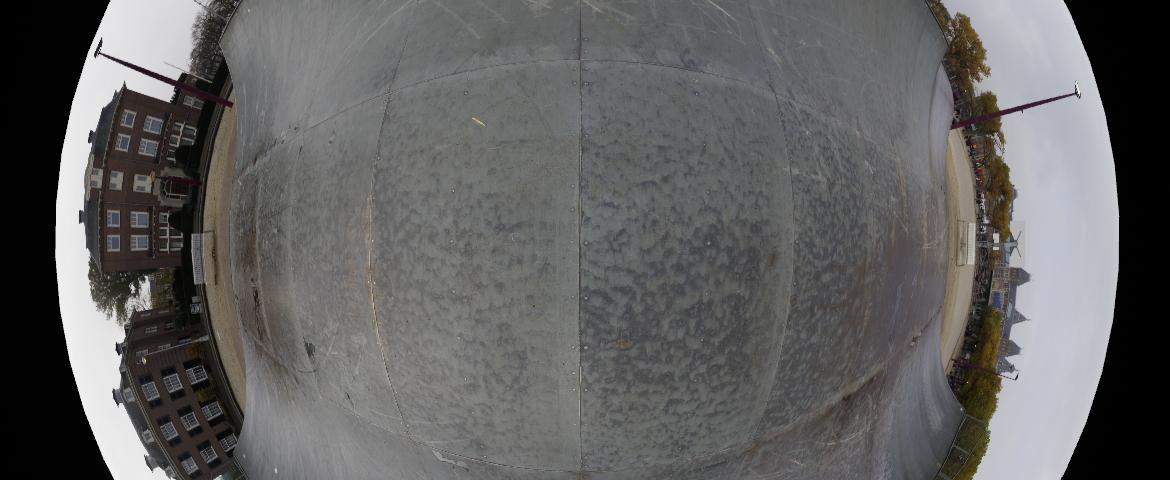
center of this image is the bottom of my sphere
no garbled mapping 😃
jaunty shell
😃
sonic lake
@jaunty shell Looking cool! Do you know how to adjust your method for Stereo?
jaunty shell
:p
fresh wharf
it's still distorted, even when i use a skybox
🤔
time to start from scratch
i mightve fucked up 1 small setting
jaunty shell
hmm
might not be able to do it in the end @sonic lake
I just remembered I use cubemaps (HDRIs)
and you two use textures
mine are 3D textures and yours are mapped in 2D
its a different type of texture sampler :[
sonic lake
@jaunty shell Yes indeed
jaunty shell
cant find stereo HDRIs either
sonic lake
if they exist it must be two different images
jaunty shell
yeah
sonic lake
no they are actually sbs
jaunty shell
you found some ?
sonic lake
sonic lake
or need to use photoshop and split it into two distinct images
jaunty shell
yeah
that said
wouldnt this kind of image import as a Texture2D ?
thus not be considered as a cubemap
ah you need the nvidia texture tool plugin for photoshop
sonic lake
yes, I also believe they need to be converted to cubemaps
 jaunty shell
yeah :/
the whole section is from unreal 4.9 on thewiki
only content that worked perfectly with my material setup were from https://hdrihaven.com/

I have no clue how they setup their cubemaps though
also seeing how that website got more and more success
its awesome to see that you can almost pay a man a whole monthly salary with patreon
 sonic lake
@jaunty shell Found a more recent plugin from Intel: http://gametechdev.github.io/Intel-Texture-Works-Plugin/
I am getting a DDS uses an unsupported format when importing to UE4 😦
@jaunty shell Any hint from the format of your HDR images?
fresh wharf
@sonic lake it the material looks fine in the material editor, but when i add it to the sun, it looks like it uses the mesh 2 times, 1 for top half and flips and uses it for the bottom half aswell
sonic lake
And you are using the same texture I shared above?
sonic lake
Did you change any parameter in TexCoord?
I am going to post the blueprint on PasteBin wait
fresh wharf
it shows the proper textur in the small preview left top of the screen
if i go inside that sphere it shows properly
sonic lake

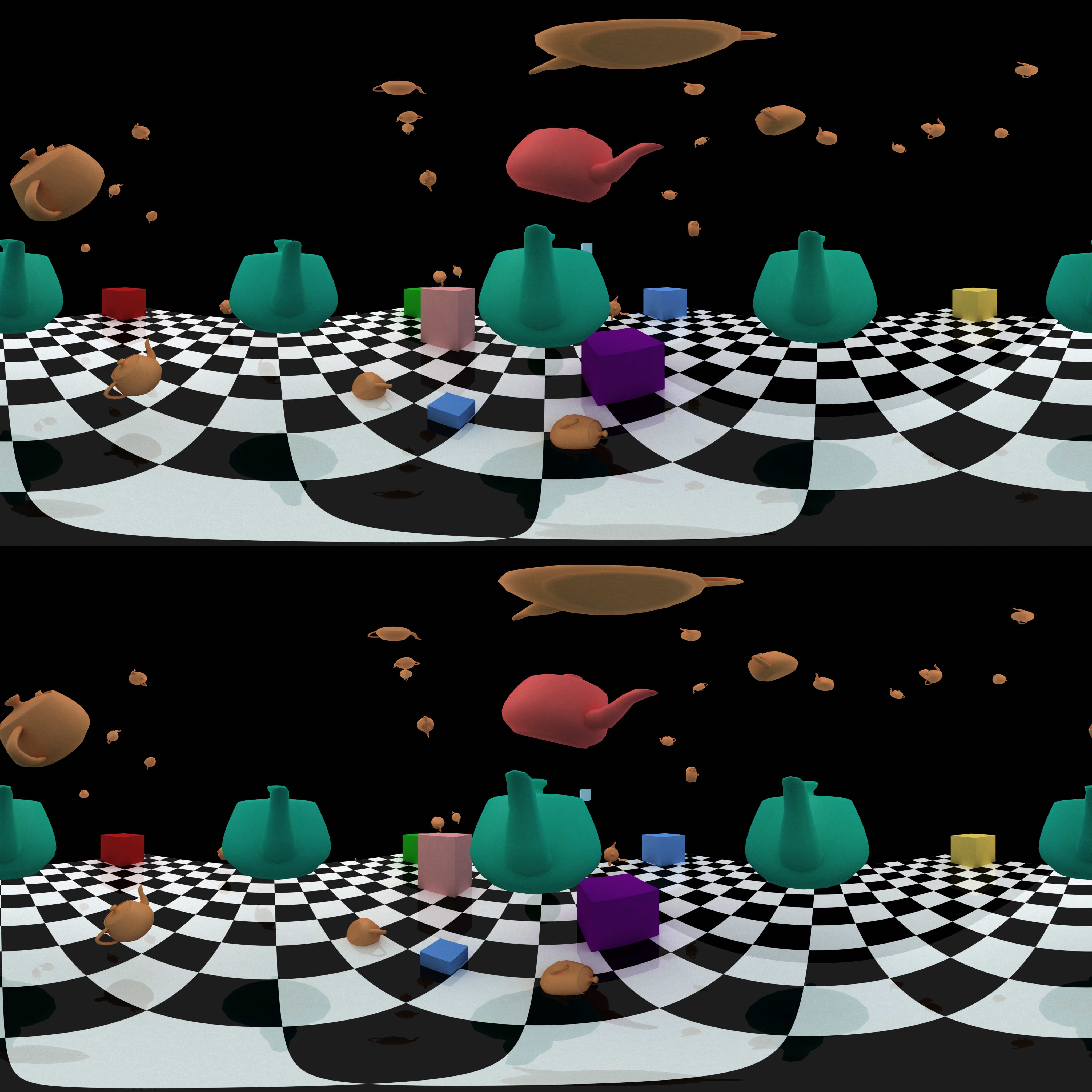


Then it should show correctly also in the sphere in the editor
Which sphere are you using again?
sonic lake
Use my custom made sphere above
And uncheck 2 sided in the material, you don't need it
fresh wharf
thanks for all the help finally got it properly in my editor
gonna check now if the quality is better on my go
sonic lake
what was the issue then?
fresh wharf
when i used your sphere it suddenly worked
you sphere doesnt appear when i launch through go though 
when i launch with a motionControllerPawn inside your sphere with my material on it, it just shows all black with the two hands from the motionControllerPawn
sonic lake
i am trying as well wait
it's compiling the shaders for Android, it is going to take a while...
fresh wharf
Take your time
fresh wharf
@sonic lake fixed it by adding a skylight. but the lines around objects are still not sharp, it looks like they've all been cut by zigzag scissors
sonic lake
what you see is aliasing
fresh wharf
so i should disable aliasing or alia more?
sonic lake
if you disable anti-aliasing it will become even more aliased (aka jittery). you should increase anti-aliasing.
My whole system crashed for some reasons, so I am rebuilding it
fresh wharf
 goodluck
sonic lake
ok I am back
I see the aliasing as well, but take into account this is a bitmap that you are seeing so the antialiasing the engine uses for 3D rendering doesn't apply
fresh wharf
so that means that i cant improve the anti-aliasing anymore?
sonic lake
the aliasing is in the bitmap itself
now that you have it working, try with your images
that test image is pretty harsh on aliasing
there could also be some texture compression still going on into UE4, which causes the aliasing artifacts
fresh wharf
with my own image and forward rendering and max aasing enabled it still looks like the pitcure is moving along the edges
jaunty shell
@fresh wharf have you tried with a higher mesh density sphere ?
the one I have has 3968 tris
sonic lake
mine has 960 tris
but how is the density of the mesh going to affect how the texture is mapped onto the UV map?
the resolution of the UV map may play a role
fresh wharf
so that you have a smoother sphere to map your uv over?
jaunty shell
yeah exactly
say you map your video to a very low resolution sphere
when you look around, you'll see the faces of the sphere
and the video/photo will look weird
fresh wharf
how do i change the tri count of the sphere? cant find a property in the editor
jaunty shell
you have to do it with a 3d modelling software
fresh wharf
 i dont have any, time to go find one that does the trick
jaunty shell
blender ¯_(ツ)_/¯
sonic lake
Get Blender
fresh wharf
but tbh i dont think it'd make any difference if the aliasing thing happens for EVERY line i have
it got doubled again
sonic lake
I have done few tests with a highres sphere on the rift, both look sharp the same to me
But when launched on the Go I still see aliasing no matter what
So there is something in the cooking process that seem to compress the texture
I don't know what though. I have taken all compression options to max and it still does it.
Which is interesting because on paper the Go has a higher resolution than the Rift
fresh wharf
it's probably just that the go can take a lot less workload than the rift can
cause the rift has a pc attached
if i launch it on my htc vive
it runs perfectly smooth
0 weird edges
mighty carbon
well, if you use Forward Shading and MSAA, you won't get any AA on images
only geometric edges get AA'ed
sonic lake
@mighty carbon note that this is a texture mapped onto a sphere
mighty carbon
right and I assume @fresh wharf expects the lines and text on that texture to be AA'ed
sonic lake
I am not aware of the engine being able to anti-alias textures
mighty carbon
and that will not happen
sonic lake
however the exact same image/setup looks very sharp on the Rift and blurry on the Go
We are trying to figure out why that happens and how to fix it
fresh wharf
mighty carbon
lock mip level to the highest one ?
that's what I do on my skyboxes - have no mip levels or have it locked to the highest
then it appears sharp across the board
sonic lake
Mipmaps are disabled. Texture compression set to the minimum (at least in my case).
We tested a higher res sphere but there is no difference.
fresh wharf
do you use the go aswell? @mighty carbon
mighty carbon
yeah
I haven't done too much on Go yet
but I had blurry skybox issue in my Gear VR project
fixed it by setting mip level to the highest
fresh wharf
you set it to sharpen10?
sonic lake
@mighty carbon how did you set your mip level?
mighty carbon
I don't have UE4 with me right now
Mip Gen Setting: None or something like that
I'd have to open my project and see what I used there
sonic lake
we also have it to none
fresh wharf
@mighty carbon could you check your settings w/e you're available?
mighty carbon
well, that will be 8 hrs from now
if you can ping me at 7 pm CST, I'll be sure to check
fresh wharf
cool, thanks a bunch!
i'll probs be asleep by then, but if you post your settings in here i'll be sure to check it when i waske up
sonic lake
@fresh wharf I am seeing a weird thing though. Most of the blurriness seems to come from the LEFT eye. The RIGHT eye is much better. I am puzzled.
Or I have eye problems.
fresh wharf
Hmm, i'll go check if its for me like that aswell after dinner
sonic lake
@fresh wharf @jaunty shell @mighty carbon Mistery solved. Just check Use Full Precision under Mobile in your material and, voilà it is as sharp as a razor.
sonic lake
I kind of read it somewhere but then forgot about it
It triggered me the fact that the left eye was ok while the right eye was slightly offset
And that it worked perfectly in the Rift but not in the Go (Mobile!)
--> Precision issue on mobile
Now I am happy. I get crazy when I cannot understand why something doesn't work as expected.
fresh wharf
I was just like, is this really the best the go can achieve? What kinda horrible meme is this
sonic lake
So can you see it sharp now? 😉
sonic lake
Curious to know your reaction to it
fresh wharf
i dont have a diff between the eyes
sonic lake
ok
sonic lake
but does it look sharper with full precision on?
 alpine ore
Anyone know if the Chromebook Tab 10 plays well with Unreal for ARCore? It is a ARCore supported device now but trying to find out if you can build an unreal project on to it
jaunty shell
Haha sweet @sonic lake :)
mighty carbon
@alpine ore I'd like to know too
alpine ore
@sonic lake Yeap, runs ChromeOS
sonic lake
I am not aware of UE4 being able to build for Chrome OS
alpine ore
That's what I suspected :(, looking for a tablet solution for AR development, but not IOS due to Mac overhead requirements
@mighty carbon @sonic lake Actually just found this https://www.youtube.com/watch?v=yH_eTAxjq9Q so seems that could possibly build the apk of the ARCore and sideload it on to the device

Did you know that you can run Android apps on Chrome OS? Android is no longer the only OS that can run Android apps natively. Here is my overview of what wor...
sonic lake
I wonder if those app will have anyway access to the underlying hardware, such as camera, accelerometers etc.
Plus you have to consider the debug workflow. Will it work?
alpine ore
Yeah, see what you mean, probably have to lose out on the debug side of things as Unreal probably wont detect the Chromebook but I could possibly get access to a Samsung S8 to test/debug on.
sonic lake
That may work.
alpine ore
Cheers for the input, will update here for those interested if I get the Acer
sturdy coral
since VR can't use SSR well you guys may be interested in this:
Unreal Engine Forums
Reflection captures are extremely aliased. I have a scene with a neon sign so it has a thin geometry with an emissive material and easily gets aliased at low
dramatically improves reflection capture quality for me without the runtime memory bandwidth cost of having higher res captures
but only supersamples up to 2x right now..
sturdy coral
this can't be a good idea after that day when all rifts just quit working.. https://uploadvr.com/airplane-oculus-go-pilot-flight/

UploadVR
Co-founders of a Texas-based company called Thrust Vector used Oculus Go while piloting an aircraft and say they have flown "probably 2 dozen full approaches in full VR, all the way down to about 50 feet above the runway."
median wedge
@alpine ore you could put the chromebook on developer mode and install chromebrew/Linux and then run the Linux version of unreal. I haven’t tested it on my chrome books, but it should work in theory if the chromebook is strong enough
 trail grotto
Exploring Unreal Datasmith in VR mode with Oculus, and i'm getting some strange strobing and artefacting, so I built a really simple test scene and still its there everything is normal until I enter VR mode... even when I exit VR mode the artefacts and strobing persist?
I'm on all the latest builds and my drivers are up to date
AMD Ryzen 7 Radeon Pro Duo 3DSMax2019 Unreal 4.20.3
sonic lake
@trail grotto Are you using the Deferred or the Forward Shader?
fresh wharf
@sonic lake got 1 last problem, when i have emissive lighting put on, the edges of my vision "flicker" a little bit, do you have the same on your go?
sonic lake
@fresh wharf I think I am using an emissive material but I don't see such flickering
fresh wharf
do you have any extra lighting added?
cause when i only use base color it appears fully black because there is no lighting
cause when i only use base color it appears fully black because there is no lighting
sonic lake
No, you don't need it. The emissive material provides all the light you need
Plug it into Emissive
fresh wharf
yeah, weird
thats why i was wondering, cause i have nothing special ticked on or anything
removed all lights in my level
and plugged it into emissive
now it flickers a little and causes a headache if you look at it too long
trail grotto
@sonic lake im using the deferred shader at the moment
sonic lake
@trail grotto Can you try to switch to the Forward one, which is what you should be using for VR anyway
fresh wharf
if i divide the emissive by 10, it barely flickers anymore
but when i divide it by 5 it flickers a little
sonic lake
Is this with a texture? You can also tweak the brightness of the texture.
fresh wharf
a material
sonic lake
If it is too bright it may flicker yes
fresh wharf
it would be perfect if i make it emissive but not glowing
cause i feel like the clowing effect makes it flicker
sonic lake
I had cases in which I had to divide the texture output to reduce the emissive brightness, but ideally you should tune your texture for the purpose.
Because if you switch material instance to show a different texture it may require a different divider.
Well you can add the divider as parameter to the material instance actually.
That would work.
fresh wharf
so i should make the texture less bright?
trail grotto
@sonic lake unreal restarted [as expected] viewport has "brick texture" frame around it all scene geometry is grey, and the project is compiling 6000 shaders i'll report back when it finishes
sonic lake
@trail grotto Yes, that is normal when you switch shader
@fresh wharf Or use a parametric divider before the Emissive input
sonic lake
@trail grotto Does it look any different now?
fresh wharf
@sonic lake have you tried using 360 movie materials on the sphere while using the go?
trail grotto
@vr marco unfortunately not
sonic lake
@fresh wharf I think I did some time ago. Why?
@trail grotto So you still got issues? Same look?
fresh wharf
just me being dumb, i'm trying to get it to work, just getting a black screen atm
trail grotto
@sonic lake yes
sonic lake
@trail grotto I would start by deleting some stuff from your level until it looks right. There might be something causing issues, but I have no experience with Unreal Studio so I am not really sure where to look. Thought it was a shader issue, but apparently it is not.
@fresh wharf You need to start the Media Player from a blueprint.
Otherwise no movie will play.
trail grotto
@sonic lake thanks i'll keep digging
sonic lake
Movie is also emissive etc.?
Yes
You can add the movie to a plain material and output it to a mesh to see if it works so
Then you know the movie is working
Then the problem is elsewhere
fresh wharf
it runs if i just run it in play mode
but when i launch it onto my go it's just a black screen
but i can move my hands w/o any lag so it's not like the go cant handle it
sonic lake
When you pack a UE4 project movies stay in the Movie folder. Not sure what happens for the Go. It should be deployed to the device anyway.
Check the log files to make sure it is copied to the SD card.
Also check with adb logcat that there are no errors when playing the movie
fresh wharf
is adb logcat already integrated, or do i have to install it manually?
mighty carbon
adb comes with Android stuff that youhave to have installed for UE4 to be able to deploy to Android
sonic lake
@fresh wharf It's indeed part of the SDK. If you look at your log file in UE4 you will see that it is called multiple times for Launching on the Go.
sonic lake
@fresh wharf BTW, just came to mind, make sure the movie is a format that the Go can decode. Android cannot decode all formats. MP4 works for sure.
 wraith sky

Today we are introducing a new feature in SteamVR called Motion Smoothing. This feature enables more players on more PCs to play high-fidelity VR games and experiences. Motion Smoothing is currently available in SteamVR Beta. To opt in, right-click on SteamVR in ‘Library > ...
SteamVR just got an update
quiet swan
That's beta
sturdy coral
@wraith sky nice, finally!
 errant lynx
Hello. Do any of you have any experience with line tracing in VR from the player's view?
My line trace in VR doesn't seem to be able to hit actors.
jaunty shell
freakkin nice, gotta test that motion smoothing today
we have a bunch of apps that require a lot of processing power, and maintaining 90fps is almost impossible
jaunty shell
sooo, there's two SS sliders in the steamVR parameters now ?
 pearl tangle
@errant lynx that's likely do to collision setup. Visualize your trace so you can understand whats happening
errant lynx
It appears to go straight trough but no collision settings on the trace nor the actor seemed to fix it.
sonic lake
@errant lynx an alternative way to check what is going on is to replace the raycast with a long tiny cylinder parented to the VR Camera and protruding along the X axis. If you get collisions with that one, probably your raycast is setup wrongly.
errant lynx
Figured out all of my issues came from being stuck inside an object. Currently trying to figure out how to detect the user has teleported into a box collider.
fresh wharf
@sonic lake did they remove the https://github.com/OculusVR unreal fork?

GitHub
Immersive virtual reality technology that's wearable and affordable. - Oculus VR, LLC
fresh wharf
why dont they just display the proper link on the official oculus website
mighty carbon
can't have it handed on a silver platter 😉
sonic lake
Maybe for the same reason they push updates to everyone without even notifying you...
😜
fresh wharf
i just hate that they barely have any proper documentation
its like, here you have the goggles, goodluck figuring out w/e you wanna do
sonic lake
Actually they have improved the UE4 documentation quite a bit recently
They just forgot to cover audio spatialization on the Go...
fresh wharf
just casually forget it 
sonic lake
True, at least when it comes to the documentation and the answers you get on the forums
I feel they are under pressure to deliver revenues, hence their selective focus
sturdy coral
@fresh wharf I think it is because of the unreal engine license
people's ue4 branches don't show on their profile I don't think, even if you are logged in and linked to epic
sonic lake
Actually there was a missing "-" in the URL. But I think you are right, branches forked from someone else's repo don't show among your public repos.
sturdy coral
yeah and my forks of other projects show, just not for epic forks
but you can still get to it by url
limber rose
Hi all, anyone have this sort of issue happen to them?
https://cdn.discordapp.com/attachments/291798633680994304/502595812136714260/unknown.png


Oculus Rift / Oculus Home with UE4
some kind of VRAM memory leak
it just keeps going and then crashes multiple times a day
seems to of started with a very recent Oculus Home update
hey error454 😃
 distant nest
Trying to get AR camera passthru frames and I'm looking at OnGetCameraImage. For android devices this just returns hard-coded nullptr...
The UE4 AR lib fusion ends pretty quickly I guess since I now have to do things 1 way for ARCore and another for ARKit.
glossy agate
@limber rose is that in game?
 burnt cave
In editor @glossy agate
glossy agate
Oh damn that sucks. What version of ue4? 4.19 had that issue for a while for some people
burnt cave
Every time I hit Play in VR it ads about 100-200mb version is 4.20.3
And it's not just my project, others do it as well.
sage gulch
what's the behavior when it crashes?
my system seems to exhibit a accumulation or overrun bug in the driver stack, and the headset will still show a display but it resets every 10-15 seconds, lagging fps
but it will usually take a few days to show up and was there in 1.x
i'm on an i7 / 1070
 wild seal
Has anyone been able to get the windows mixed reality analog sticks to work with 4.21?
ornate raptor
Yeah. Make sure you enable the WMR plugin. It's disabled by default
Still kinda buggy. If you have it and the Oculus plugin enabled simultaneously, Oculus users won't be able to use their thumbsticks.
And, with WMR, make sure to clamp your haptic feedback scale to keep it less than 1.0. Otherwise it crashes
burnt cave
It says out of video memory
wild seal
@ornate raptor Which input are you using? I can only seem to find the touchpad.
ornate raptor
It should just be motion controller thumbstick
For the touchpad, you use spatial input touchpad, if I remember correctly
Oh, yeah. Make sure it's using WMR and not defaulting to SteamVR
Open your BaseEngine.ini and search for HMDPluginPriority
Make WindowsMixedRealityHMD=30. I'm pretty sure it's set to like 3 or something by default, which makes SteamVR initialize instead
wild seal
Can I still get room bounds without steam VR?