#virtual-reality
1 messages · Page 186 of 1
 sturdy coral
 full junco
I'm on 4.19 and will stay there for a while
there seem to be quite a lot of conflicts when cherry picking it in 4.19 @sturdy coral
sturdy coral
so far I'd recommend moving to 4.20, performance seems a lot better
but I think a lot of it might be from that thing you already cherry-picked
that nvidia aftermath thing
full junco
ah
sturdy coral
that built fast
full junco
so cherry picking the occlusion stuff definitely doesn't work in 4.19, its easier to manually copy over the code than trying to fix all those merge conflicts, its pretty much every line thats a conflict
sturdy coral
@full junco why did it conflict? different file names?
if it is just indention I think there are some options around that
sturdy coral
that change seems to work and I don't notice any popping, make sure you enable it after you pull because it defaults to off
@full junco the engine still doesn't do joint frustum culling, right?
sturdy coral
I don't see that in 4.20 either
after cherrypicking that change though
it is in Renderer/Private/SceneVisibility.cpp
full junco
ah right, was looking at wrong file 😄
but there is a lot of other stuff thats different in ScenePrivate.h
so I think it makes no sense trying to apply the occlusion stuff in 4.19
code was just changed too much in between
that commit edited the occlusion stuff between 4.19 and 4.20 it seems
@sturdy coral have you looked at performance difference yet?
sturdy coral
no, I don't have a baseline really
full junco
well, the difference is probably "50% cheaper" I assume
sturdy coral
yeah but I don't have profiling data to compare with or anything
full junco
just look if in profilegpu you only see 1 eye doing occlusion stuff
 sly elk
I made the entire car a pickup object and its fun (but totally awkward) to fling it around: https://www.youtube.com/watch?v=4x939tCMxdw&feature=youtu.be

YouTube
The catfish is temporarily a pickup object. The body panel and under tray install interactions are still awkward and need polish.
 proud solar
How would you guys do gun handling animations if you didn't want to use blendspaces. I say that as i really just need to drive the bones manually. Because there very simple animations and i dont want to spend hours repeating them for several gun
sturdy coral
@full junco I see .01ms per eye before, and 0.0 and 0.01 ms after
full junco
ok 😄
sturdy coral
@full junco how high are your numbers usually for that?
@full junco just saw this setting, it might help you if it is in 4.19:
Enables Parallel Occlusion Cull primitive fetch.
r.OcclusionCullParallelPrimFetch = "0" LastSetBy: Constructor```@sturdy coral I think my numbers for occlusion culling are more than 1 ms total
what's that setting doing?
sturdy coral
@proud solar use modify bone node with position and drive it with a variable
full junco
sounds like parallel rendering stuff for consoles
sturdy coral
@full junco ```cpp
Apple/MetalRHI/Private/MetalRHI.cpp
367: GSupportsParallelOcclusionQueries = GRHISupportsRHIThread;
383: GSupportsParallelOcclusionQueries = false;
D3D12RHI/Private/D3D12RHI.cpp
173: GSupportsParallelOcclusionQueries = true;
Renderer/Private/SceneVisibility.cpp
1189: if (GOcclusionCullParallelPrimFetch && GSupportsParallelOcclusionQueries)
RHI/Private/RHI.cpp
495:bool GSupportsParallelOcclusionQueries = false;
RHI/Public/RHI.h
306:extern RHI_API bool GSupportsParallelOcclusionQueries;```
seems to require DX12
or metal
full junco
yeah, makes sense
sturdy coral
@full junco your number sounds too high but maybe my profiler is giving bad numbers
a scene with 4500 drawcalls in 2d is giving me .06ms
at 4K
with a lot of clutter being culled
full junco
that's way faster than it should be I think
sturdy coral
full junco
@sturdy coral show a screenshot of your profile gpu?
full junco
yeah, I don't do a prepass
 pearl tangle
@sly elk what have you been using for your photogrammetry? Or anybody else been doing any photogrammetry lately?
sturdy coral
let me turn that off and see if it changes
full junco
@sturdy coral right, thats a good idea, maybe that changes something
 granite jacinth
How do you disable prepass with forward rendering?
full junco
I use the deferred renderer
granite jacinth
Ah, k. So no way to do it in FR still right?
full junco
yeah, FR forces it
sturdy coral
@full junco prepass forced on by dbuffer decals and I don't want to recompile all shaders
which I think happens if I turn that off
full junco
@sturdy coral ok
I'll compile test config and see what my numbers are so that I can actually give you correct numbers and not stuff I remember 😄
if I try to use my normal view distance in the editor, it crashes with out of memory
so I have to test in a non-editor build
proud solar
@sturdy coral does that work in the actor bp or only in the animation bp.
i tried it in my actor a while back and got nothing
sturdy coral
@proud solar animbp, that's why drive it with a variable
@proud solar that also allows you to skip it for distant actors by setting a LOD level on the animbp node
full junco
and just for fun, I'll try to merge the 4.20 branch into my 4.19 branch and see how many conflicts there are 😄
proud solar
ok. im very unfamiliar with anim bps. is there anything drastically new i need to learn. im very proficient with blueprints, but the anim BPs have looked like several months of learning to me.
sturdy coral
@proud solar it is pretty similar
add an animbp for your gun, read the value from your gun bp and write it to an animbp variable, then in animbp animgraph call that bone pose node
full junco
@sturdy coral ok, I'm only seeing 0.04 ms myself for occlusion stuff at the moment when I judge by stat scenerendering
but I think that number has to be incorrect then
proud solar
alright. ill give it a try tomorrow. thanks
sturdy coral
@full junco 10% of your render time on that seems too large if you were really seeing 1ms before, the GPU profiler used to randomly pick something near the front and inflate it a ton (haven't seen it doing that to the same extremes in a while), so maybe it was that?
full junco
@sturdy coral no, that problem only existed in editor, I always do profiling in packaged
and I've looked at a different project recently where occlusion cost was actually something like 3.5 ms
sturdy coral
looking in the code the queries do get batched and stuff, so there shouldn't be too much draw call overhead
full junco
a project with a lot of draw calls of course
and I think every time I looked at my game with renderdoc, I saw that all occlusion queries are individual draw calls, nothing gets batched there
sturdy coral
4.16 was the last release with a change log mentioning much occlusion query stuff
"Minimisation of render-target changes in some passes, notably Scene Occlusion and DBuffer Decals."
full junco
well, I did most of my games profiling on 4.15 😄
but I also looked a lot at renderdoc after updating to 4.19
@sturdy coral and do you think epic would have spent any time caring about adding Round-robin occlusion stuff in dev-vr when 4500 occlusion draw calls would take 0.06 ms? 😃
it would be completely irrelevant then to improve occlusion performance for vr projects
sturdy coral
well they added some software occlusion stuff to mobile
most of those calls should end up batched I think
 static mountain
I all. I Have the GearVr Motion Controller and it s work ok with UE. But, does it possible to acces to the gyro sensor of this controller ?
for this one :
i would like to use it for pilot a plane and use it as 'joystick'
pearl tangle
@static mountain you should get the orientation data straight out of it with the default VR pawn, although i know they tweaked a bunch in 4.19
 eager pine
hey
anyone know why i loose totally widget focus when animating a timeline on a widget?
cant seem to hit any buttons after move
solved it!
incase anyone else want a neat way to solve it
sly elk
@pearl tangle For software I use reality capture. I don't think agisoft is worth using at this point. It's probably 20 times slower RC and when I process my largest scans i'm already looking at 24 hours in RC. Spending 2 weeks to process a part is a non starter. For the actual photo setup I use monolights (off camera flash lighting) and I treat all of the surfaces with a developer spray. I posted some info here: http://www.digitalmistakegames.com/2017/07/30/280/ The lighting is the key to consistently getting very good scan results
static mountain
@pearl tangle ok but i don t see where (and i m in 4.20)
you means it s default values that i can read ?
eager pine
this weird widget bug happends, i can only trigger clicked event with the left widget interaction, not right widget interaction, and if i hold the left over a button, you can click with the right one
 tired tree
your widget interactors don't have unique ids and index's
granite jacinth
Jeez, rough road to get to this point, but little by little...we're turning the tide. I can't believe we launched at **31%**https://gyazo.com/3c0225a80d23c189165f348832b5e5f0

 wicked oak
congrats mate
eager pine
@tired tree yeah they have
i just forgot to pass inn the right reference to widget interaction xD
static mountain
@pearl tangle i think i remember that i already do what i want by error.... i think i just need this :
eager pine
is it possible to set the actor rotation VR before possesing?
after spawn
or maybe account for hdm rotation before would be better
Got it working, just added a fade inn and rotate the player before they see anything
 manic ledge
Has anyone else had problems with fabriks debug draw? It doesn't seem that the bone in question is in the same place as the debug draw box
 mighty carbon


WOW. @StarvrCorp’s newly announced HMD is 210 degree FOV
Clip shows @Azadux comparing the limits of 110 FOV vs 210 FOV https://t.co/AFjFYsveVB
 Twitter
210 deg. FOV
 robust orbit
verrrry nice... how much? /BoratVoice
granite jacinth
@robust orbit whaaaaaaaaatttt, no longer at Epic? Nooooooooooo
mighty carbon
@robust orbit I don't thing they sell it to general public. They work with IMAX only afaik.
oh, nm.. looks like it's a consumer product https://uploadvr.com/starvr-one-90-fps-steamvr/

UploadVR
StarVR unveiled its long-in-development commercial VR headset at SIGGRAPH today. The StarVR One HMD promises SteamVR 2.0 Tracking with visuals running at 90 frames per second, eye-tracking and a field of view covering “nearly 100 percent of natural human vision.”
robust orbit
@granite jacinth I left a couple months ago. Running my own company now for UE4 consulting 😛
granite jacinth
@robust orbit very nice 😃
sly elk
Hey all, I am frequently explaining that Wrench can be played with or without VR and I'm never quite sure what to call the 2d mode. Desktop mode? 2d mode? Non VR?
screen mode? I guess I'm asking if anyone has a suggestion for a short phrase I can use that is super clear and doesn't require any explanation
sly elk
lol
The VR mode is certainly better because VR is awesome and a natural fit for this, but the reality is sales will be mostly 2d mode
Also being able to switch back and forth with a button press is kind of nice for VR users. Can sit down and take a break whenever
sturdy coral
@sly elk rec room is calling it "screens" which is a little confusing, I thought they were adding shareable desktops or something when I saw their mail
they also call it screen mode in a couple places
sly elk
okay cool. I have been going back and forth on screen mode and desktop mod
sturdy coral
@sly elk if you have a launch option with -nohmd you may want this PR I made: https://github.com/EpicGames/UnrealEngine/pull/4950
keeps steamvr from launching when launched with -nohmd
I'm pretty sure I'm going to go with just two launch options, "normal" (auto toggle VR), and "force 2d" or "force no VR" (launch with -nohmd and prevent steamvr startup)
"force no VR" mainly to keep steamvr/WMR from switching your audio device when all you want is to play in 2d
sly elk
that link didn't work
sturdy coral
@quaint reef ah you have to link a github account to see the engine and pull requests
sly elk
So far we have done all of the switching in game and not as a launch option
though if no HMD is detected you can't try and switch to VR mode
sturdy coral
I can't remember if the old audio engine supports audio device switching (used to have some issues)
but I think the new one handles it pretty well, so they could just switch it in windows
one issue is oculus always routes away the audio device too, but I'm just doing steamvr support for now which works by changing the system device
for people toggling back and forth I'm going to recommend they use audio mirroring, I haven't figured out how to handle toggling mics yet
 daring mural
Is the Vive touchpad a "thumbstick"?
granite jacinth
@sturdy coral @sly elk screenmode makes no sense
😦
I think Desktop or 2D is probably the more easier of terms
But Pancake Mode is definitely the coolest
 north verge
My navmeshbounds is floating above the floor, what could be causing this? I have tried tweaking the collision but it didn't help.
daring mural
@north verge tweaking the collision as in the simple collision on your floor?
north verge
Yes. I don't think its about the collision though because I tried it on different objects and it does the same thing on all of them.
Its weird how it works fine in one project but doesn't work on my new project that I just created.
sturdy coral
@north verge it can have less subdivisions like that
daring mural
Have you tested it to see if it's actually forcing hovering actors? Because the navmesh visualization is generally meant to hover over the objects so it can be seen.
sturdy coral
Which keeps navigation more efficient, it won't do it if the ceiling constrains things
If you are using it for teleport you should capsule trace down
You can also increase subdivision scale of nav mesh in project settings, can't remember the exact name
north verge
I don't have my vive setup right now but last time I had this problem you would basically be teleporting above the floor but I'll test it in a bit before trying anything else, maybe its just the visualization like you said. Thanks for the help.
sly elk
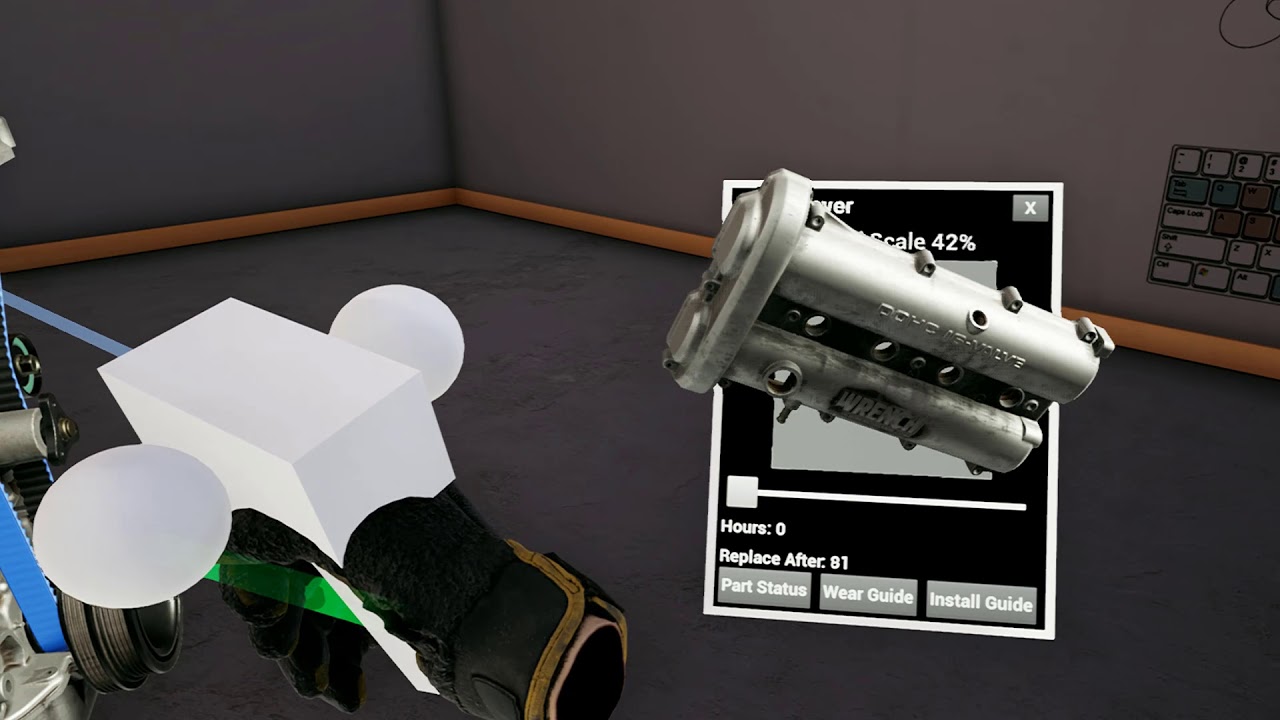
Very early first pass at object inspection. I don't have the art made yet for the part wear levels and I haven't had a chance to type out any of the part details yet but its still super cool: https://www.youtube.com/watch?v=xUOEpOp_zV0&feature=youtu.be
 granite jacinth
@sly elk how many hours per week do you think you work on your project?
sturdy coral
@north verge yeah in with the template teleport you will teleport to the nav mesh and not the floor underneath, I added a trace down
mighty carbon
o.O
sly elk
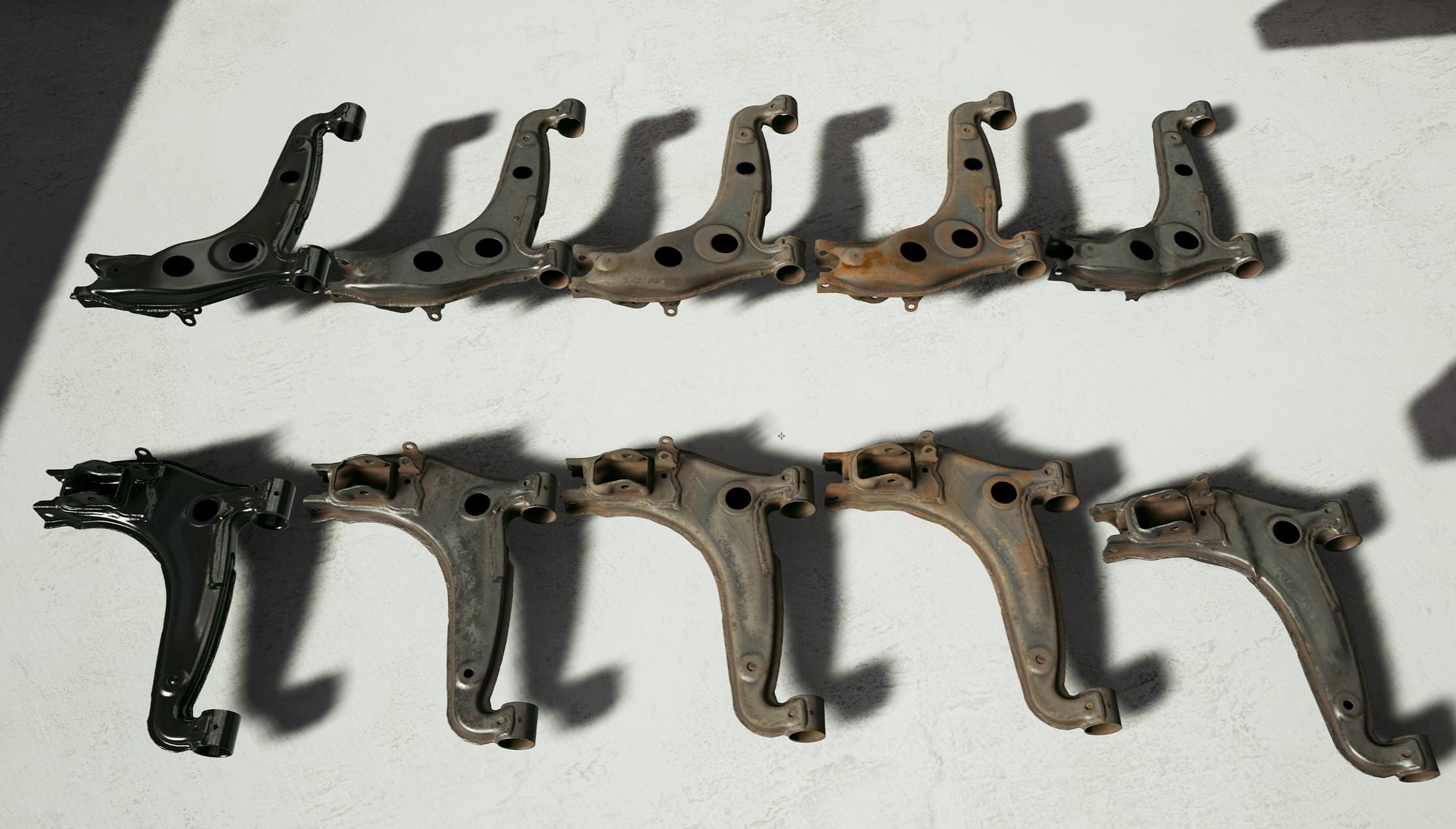
Lifespan of a part: https://i.imgur.com/PQucnfS.jpg
 sly elk
Rift broke.. Is it possible to order just a headset or is it always touch bundled now?
 spark stag
@sly elk That's a bummer
pearl tangle
@sly elk thanks mate. I haven't done any in a while and the software has all changed around. Got autodesk recap photo giving some decent results. Heading down to Autodesk tomorrow to their maker lab to use their laser scanner instead though. I have to scan some tiny toy models that are super detailed so the camera just struggles a bit, although did a surprisingly decent job. They are really fragile hand made 1s as well so hard to mount it on a pole to get the underside so hopefully the laser scanner can take care of it better
 echo folio
hello... I am using oculus and UE4... and i was wondering how to make it so that i can touch a mesh object (like a button or a Icon on a virtual computer screen) with my VR hands and turn off the lights for example. what would be the most efficient way to do that and are there any tutorials i can look at?
pearl tangle
@echo folio there are plenty of tutorials for that. Youtube unreal channel is a pretty good bet and the vr template is also 99% there
echo folio
so what am i looking for...what keywords?
pearl tangle
vr interaction maybe? some packs on the marketplace as well that show more complex interaction and also another free plugin 1 that adds more features
echo folio
i found tutorials for buttons but they refer to flat screen modes
and i am too much of a noob in order to figure it out how to make it work with my touch controlers
interaction in flat screen mode with keyboard and mouse
pearl tangle
yeah look up vr interaction
echo folio
i will, thank you for your guidance.
 digital musk
I've been working on Oculus thus far but I have a WMR headset (samsung Odyssey) on order...are there any tips and tricks to keep in mind when using WMR with UE4?
Are there controller models available for Samsung Odyssey hand controls?
sly elk
You won't have full button access on wmr headsets with a vanilla unreal bulld
 quick siren
Hi!
im working on a project at work and the clients decided he wants a VR export of our editing (we're working on a bicycle tour guide video shot with a 360 cam. we were hoping to go the youtube way but the client decided he wants a phone APP instead. so here i am looking for solutions. ive already fiddled with unreal alot in the past 4 years. mainly doing level design and modeling but i never touched a VR project.
so im looking for help, tutorials that can help me achieve what the client wants (and help me keep my job lol)
so we need an app that let you choose between 10 courses (so ill need to make a menu) when the user chooses one, the 360 VR video starts, ill have an overlay for speed controll / play / stop etc etc obviously laying at the bottom of the video.
so voila, im looking for pointers, tutorials to follow to achieve that, would appreciate if someone could point me to the right direction. every videos ive found were about '' gameplay '' and not that much oriented toward what i need to learn today.
tyvm 😃
digital musk
@sly elk thanks for the reply. Is there a special Unreal build branch that will work better?
sly elk
I haven't messed with it. Someone in the VR discord has. I think it was @glossy agate but I don't remember.
digital musk
@sly elk is there a specific VR Discord channel?
tired tree
You are in it
also they just added WMR integration into the DevVR branch of ue4 last night as coincidental as it is, prior to that it was all OpenVR supported.
@digital musk
Its likely not perfect though
digital musk
@tired tree Thanks, and that sounds great....however I guess I'll stick to Oculus then for the time being until the WMR support is integrated better.
tired tree
WMRs original support was all through SteamVR
and SteamVR lets you assign buttons however you want now
so even if you were missing one its likely you can re-bind it
I didn't have any button issues with mine though, and neither does anyone else I know, not entirely sure what Alec meant
they do use one for the windows MR overlay that would normally be the App menu
but everything else is functional
@rugged geyser
pearl tangle
@quick siren you could do it easily enough with unreal, but if you have no experience with it then maybe you want to go the even simpler route of something like http://www.instavr.co/ that probably will get what you need, albeit a bit more basic

InstaVR
InstaVR has been selected by over 30,000 companies and professionals. No-Coding, Web Browser based, Interactive Authoring Tool allows you to make and publish interactive 360 images/video based VR experience quickly and easily.
sly elk
@tired tree Last time I looked into it there was no way to bind the joystick
It's discussed here: https://forums.unrealengine.com/development-discussion/vr-ar-development/1383868-windows-immersive-headset-controller-mappings
Unreal Engine Forums
I have the Samsung Odyssey headset and controllers working with the engine through the Steam VR Dev Preview, but there doesn't seem to be an input mapping for
tired tree
that is 9 months old
sly elk
Yeah. I haven't messed with it for a few months, I think june? When I asked on here in june that was my understanding of the state it was in
tired tree
it may be unbound, can't remember
but you should be able to re-map in openVR itself
the interesting part of the WMR merge to the VR dev branch though is it is the "Microsoft XR" implementation
meaning Epics issues with the windows platform won't be in the way, which would be why its finally going to be supported
sturdy coral
@sly elk @digital musk there is a pull request that adds joystick on github
I think I put a link a couple weeks ago
@tired tree xr as in openxr?
I heard the April update allowed people to implement native wmr support without uwp somehow
tired tree
yeah
its still off by default though currently
the steamVR plugin takes priority over it
sly elk
So my rift broke into 3 pieces at the pivot. Fortunately I have industrial epoxy on hand it's not stronger than new: https://i.imgur.com/V4fdbYN.png
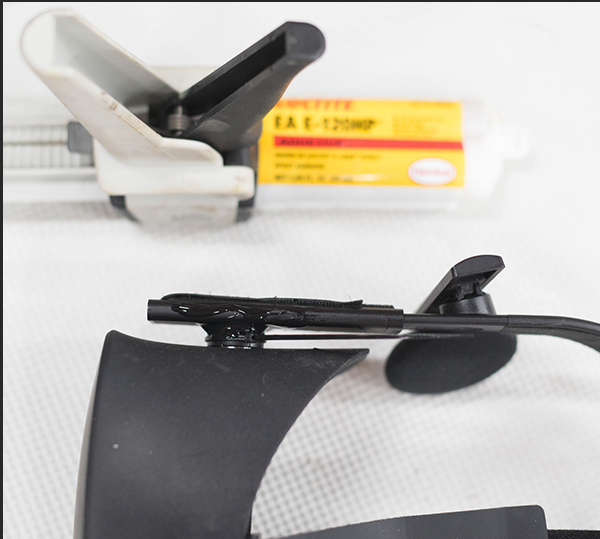
*now stronger
mighty carbon
here is another contender https://uploadvr.com/hands-on-vrgineers-xtal-is-a-5k-170-degree-fov-headset-with-hand-tracking/

UploadVR
Last week I got the chance to go hands-on with the new enterprise-focused 5K VR headset (that’s 2560 x 1440 per eye, or 5120 x 1440 total,) XTAL, from VRgineers, the same company behind the VRHero 5K headset. For all intents and purposes, the XTAL is taking the place of th...
sly elk
i wonder what the ppd is like in the center area
 idle fox
Hi everyone, I am spawning an object from image detection and I cannot get the object to keep from floating while i move closer towards it. I used Joe Graf's article for reference https://medium.com/@joe.j.graf/arkit-1-5-image-detection-in-ue4-4-20-4dcbefb7a178
Medium
ARKit 1.5 added support for detecting images within the AR scene, which can be used to align your content to a specific play area or as…
sly elk
I don't think many of us are doing AR
idle fox
well darn
mighty carbon
I wonder if this stuff even works https://gigazine.net/news/20170808-neurable-bci-headset-htc-vive/

GIGAZINE
脳波を読み取るセンサーを用いることで人間の「心」を読み取る装置を開発するNeurableが、HTC製VRヘッドセット「Vive」向けの開発キットを発表しました。この装置を使えば、まるで映画「スター
manic ledge
Has anyone here done "full body" IK with a character, AKA IK for head and hands?
Getting a weird issue where when I move my character (normal movement component) the IK lags behind and stutters. I can confirm that the motion controllers are fine and updating frequently.
tired tree
Set the tick order so that the skeletal mesh ticks after the movement component @manic ledge
the animBP ticks from the skeletalmesh components tick
manic ledge
Awesome, thought it was the case but set the wrong tick haha, I had set the whole character bp to post-physics, I've just set component to post update and it's worked, still getting a little bit of stuttering (only a little discrepancy between ik calculation between frames I think)
Does anyone have any good solutions for Pelvis IK that isn't using something like iKinema?
We currently don't have any crouching animations, but I've seen people online use Pelvis tasks with iKinema to create dynamic crouching behaviour when the player ducks/crouches
I was thinking of doing something like calculating the length of the backbone (pelvis to head) and then trying to keep the pelvis that rough distance away from the head, which would force the hips downwards, and then perform IK on the feet's canned animations to ensure they stay above the ground
It's always going to be rough with only 3 trackers, but I can't think of a much better solution at the moment
sturdy coral
@wicked oak what's the name of the class that can do some kind of dynamic scalability/lod management stuff? I think remember you mentioning it a while back
I think they mentioned it in the fortnite optimization talks too but said it was mainly for particle system management by default
wicked oak
Significance Manager
sturdy coral
ahh yeah that's it
wicked oak
its just configurable
sturdy coral
thanks
wicked oak
you can do whatever with it
 wraith sky

@mighty carbon WOW, literally WOW...i was waiting for this for a long time...a bit bulky imo, but still great
I like the idea of merging EEG and VR
mighty carbon
:😀
mighty carbon
@wraith sky I wonder if it even works
wraith sky
@mighty carbon yeah, googled for some time and seems it exist a year already but not much info on it
mighty carbon
btw, looks like 6 bugs left to fix for 4.20.2 and there is no 4.20.3 scheduled
hopefully after 4.20.2 Oculus releases their updated fork
mighty carbon
has anyone tried this in VR https://forums.unrealengine.com/unreal-engine/marketplace/1511373-ambient-light-probes ?
Unreal Engine Forums
MarketPlace Link: (https://www.unrealengine.com/marketplace/ambient-light-probes)
Features:
This pack includes a fully functional ambient/bounce lighting system
pearl tangle
@idle fox have you ran your image through the rating system to see how easily it can be tracked? It doesn't look like a very trackable image which is likely your problem. Also the ARkit image tracking stuff is not so great once you get too close or too far from the image, it has some pretty strict requirements. I am using facebook AR for a bunch of image tracking stuff at the moment, so much easier. but the downside is it can only track 1 image in the software for the whole effect, so rather useless when you have a bunch of images you are trying to track
pearl tangle
@sly elk laser scanning rather than the photogrammetry definitely pulls out a lot more detail. 14million triangles at the moment though hah
wicked oak

Over 3 million #PlayStationVR headsets have now been sold around the world. Thank you for being a part of our PS VR community!
 Twitter
mighty carbon
Twitter
mighty carbon
I wonder how many of those use PS Move
And how many of those collect dust
@wicked oak ^^
sly elk
@pearl tangle my photogrammetry setup outperforms every laser scanning system I have seen in terms of detail
Here are a few images of my raw scans. I don't focus as many photos on areas I know will be remodeled so ignore things like noisy bolt threads: https://i.imgur.com/o16okPu.jpg https://i.imgur.com/FzOkvuS.jpg https://i.imgur.com/jhOdCNc.jpg
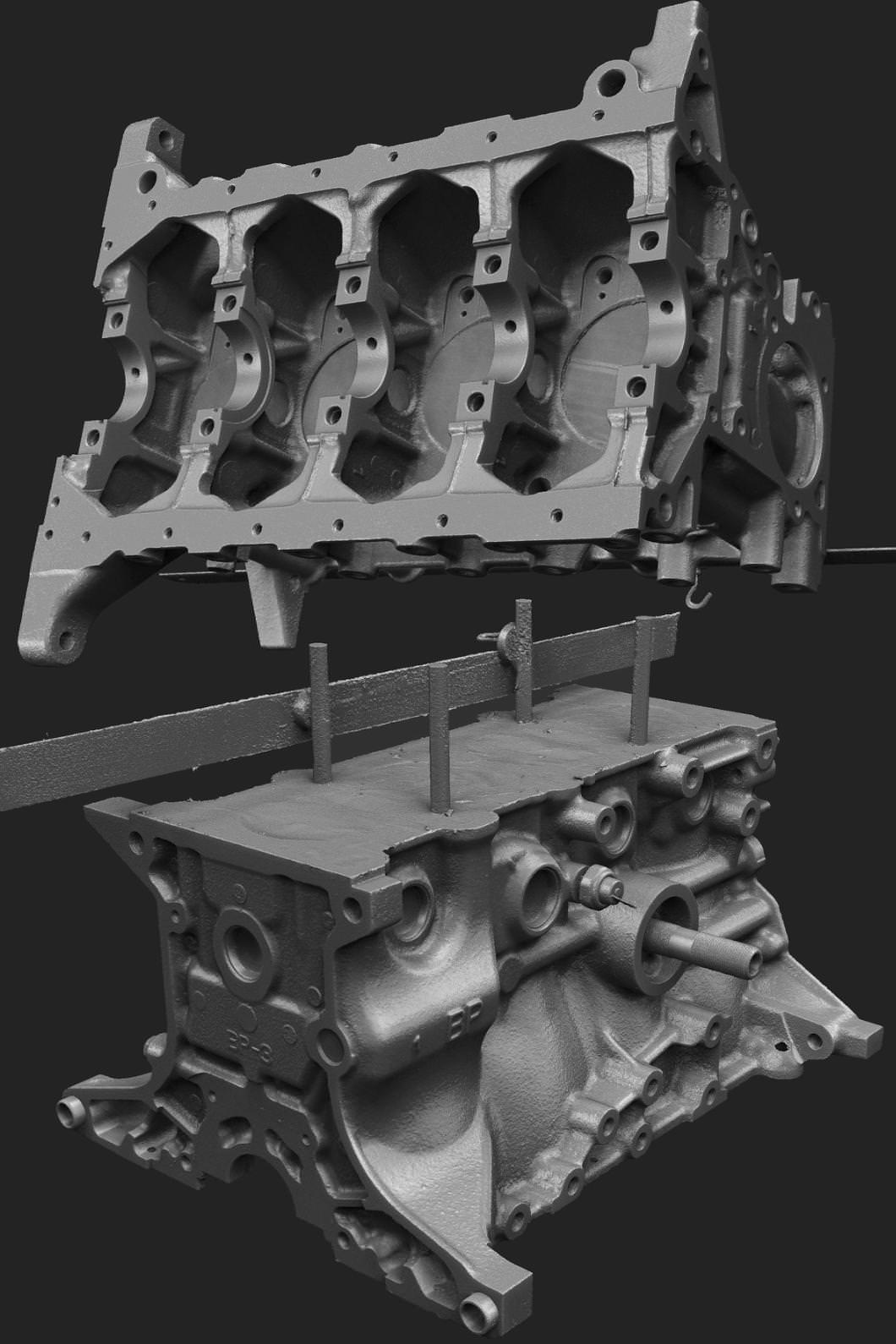
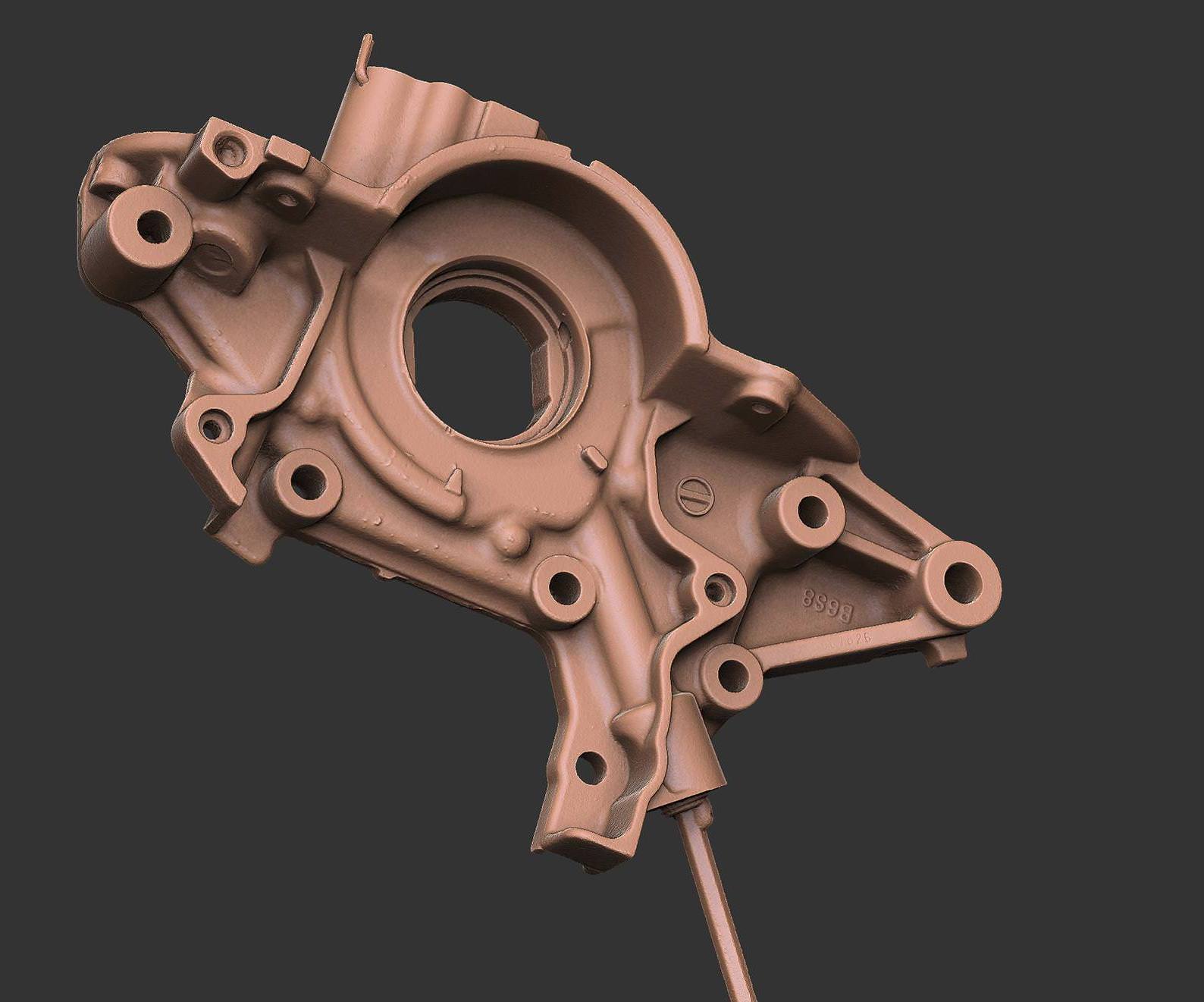
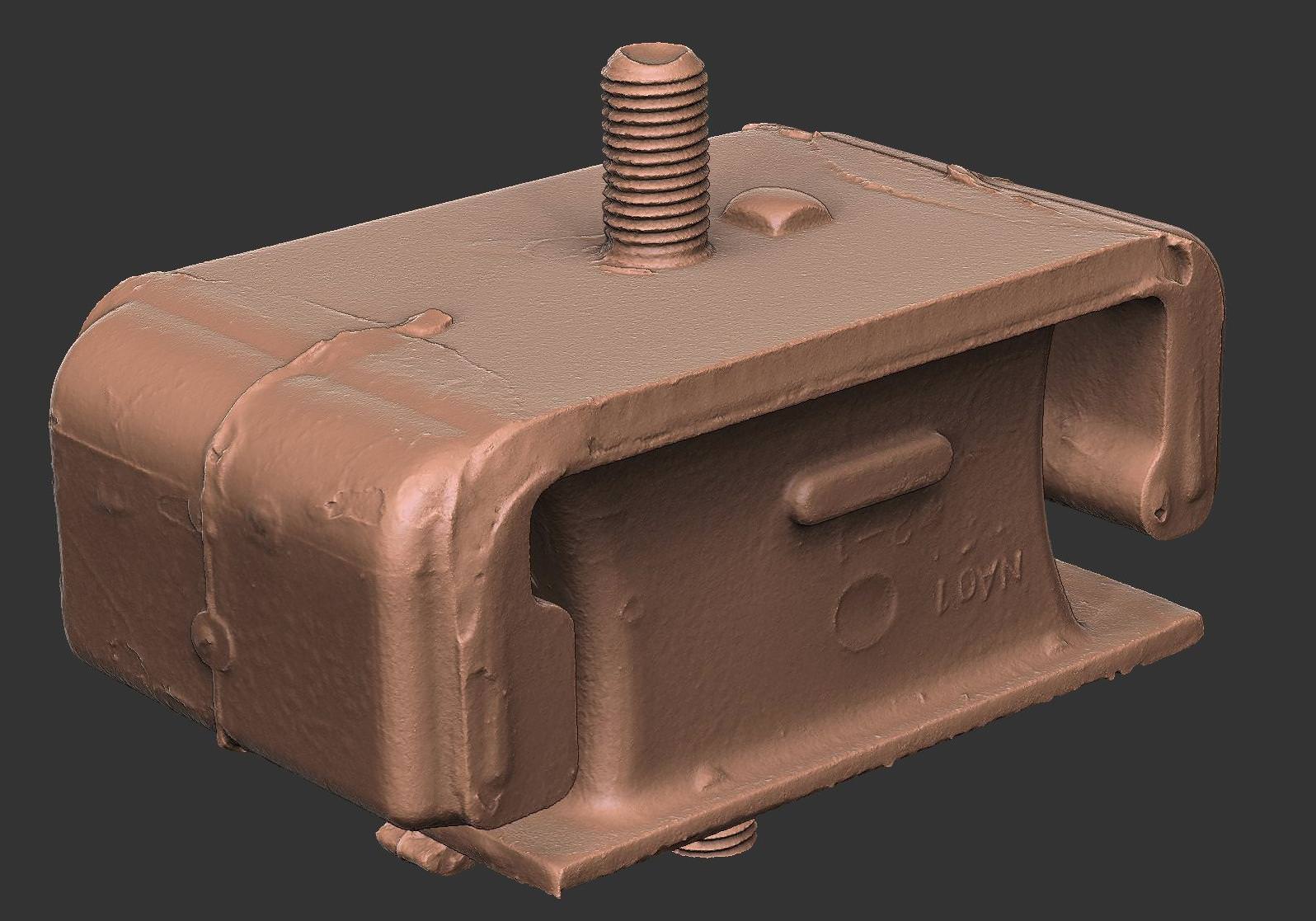 sly elk
The high res models are generated in reality capture. Can't say enough good stuff about that software. The lows are made in a bunch of different ways depending on the model. Often they get remodeled from scratch, retopo, or triangle crunched with critical sections cleanly remodeled. One key to good photogrammetry is not trying to capture any texture information. Surface treat everything with developer spray for ideal scan quality. I'm generally not a fan of the materials that get captured from photogrammetry setups anyway (unless its a dedicated multi camera/ multi light rig).
You also need to clean things so they are totally grease free, or else the surface treatment doesn't give a good result
For people who want similar quality, The biggest things are: Use similar lighting to what I'm using (monolights), surface treat everything, use reality capture, shoot hand held at iso 100 f/11 with a solid SLR and lens combo (im on a d800e and sigma 50mm art)
So for VR. White text on black background is a bad idea right?
tired tree
if you dislike godrays yes
sly elk
Okay cool. Is there anything to be gained using green text? looking at the oled sub pixel arrangement
tired tree
Likely more noticable, why don't you just try a grey though?
 pine nimbus
Has anyone done performance benchmarks between vanilla UE4 and the Nvidia Gameworks UE4?
Anyone have personal experience with it?
mighty carbon

reddit
13 votes and 8 comments so far on Reddit
sturdy coral
@pine nimbus I've seen 20% or so with MRS in the past, haven't ever tested LMS.
They haven't updated VRWorks branch in something like 9 months though.. not worth trusting to be kept up to date at this point
pine nimbus
Yeah I saw the last version was based on 4.18, but if the perf gains are that good then what's the alternative?
sturdy coral
@pine nimbus oculus branch has a lens masking thing that gets ~12% and can be merged to support steamvr too
mighty carbon

Full ambient lighting system offering cheap ambient/bounce lighting
has anyone tried that in VR ?
sturdy coral
but, it only supports forward
wicked oak
@mighty carbon its fake and its slow
its literally just diffuse-only lights as a postprocess shader
should be slower than just using normal lights
 remote spruce
does anybody know why the default UE4 mirror screen tanks performance?
It seems like the engine is rendering the sceene twice ??
I´m using SingleEyeCroppedToFill, has anybody found the same problem?
pine nimbus
Using planar reflections @remote spruce? I had similar problems. Seemed like a bug because the VR performance was much, much worse than out of VR, and had some strange inconsistent behavior, like looking away and then back at the mirror would increase or decrease performance
That was in 4.18 or so and I haven't used it since, sad to see it looks like it's still bad
remote spruce
no planar reflections, using 4.19
remote spruce
and activating it in a lower end rig (1060) makes the game go from butter smooth to unplayable
I´m on a laptop right now, but I have the same issue on my workstation
pine nimbus
Right I thought you were talking about an in-game mirror, my mistake. I've had no issues with the different mirror to desktop modes
remote spruce
but do you notice a performance boost if you deactivate it?
pine nimbus
Yes there is one for sure, you can benchmark it with the profiler and see it
It uses UE4 Slate UI to render it, that's what it shows up as in the profiler IIRC and the cost is not exactly great, but it's significant enough.
pine nimbus
I don't believe so but I've never tried. I have options to disable it in my game but that's pretty much it. I'm not sure if there's a way to decrease the cost though is you still want it
I'd say if it's really bad for you then there's something else going on there
It shouldn't be "tanking" your perf
Seems strange
I'd suggest profiling and see if you notice anything unusual
Just profile 30 seconds or so and turn it on and off a couple times to see where the jumps happen
remote spruce
yes, going to try that and see if I see something
mighty carbon
So, Tencent is in shit storm right now.. I wonder if it's going to affect Epic.
tired tree
yeah, the Preview is pretty much just copying the render targets result to the screen
shouldn't be anywhere near that heavy
sly elk
@mighty carbon Epic is raking in money so if ten cent closes someone will buy epic up
mighty carbon
@pine nimbus the amount of money Tencent lost overnight equals about worth of entire Netflix.
remote spruce
this happens in the packaged game ( debug )
wicked oak
@mighty carbon pretty sure epic can rebuy itself
with the amount of cash they are getting
what you say about tencent?
mighty carbon
but, it's not their cash since Tencent owns Epic
I mean, I don't know their structure and all that, but I am sure Tencent didn't just buy Epic for fun
tired tree
tencent doesn't own Epic
they own a "portion" of Epic
its not like GGG where they have like a 85% stake or w/e
yeah....tencent owns 40%
huge influence, but not "You have no choice in any matter" influence
 fleet plume
also it's pretty hard for stake holders < majority to force payout of profit
mighty carbon
I read somewhere Tencent owned 51% of Epic.. Oh well, just got concerned, that's all
pine nimbus
@sturdy coral Seems like LMS is even more of a perf increase than MRS. Checking out the GDC talk and I have a feeling they do have plans to keep it updated, albeit a couple of versions behind the main build
"4.19 coming soon" is promising

This graph is pretty nice looking, lol. Would be good if they showed some kind of millisecond graph
Interesting, he mentions that they'd be able to keep up with releases faster if they dropped support for the deferred renderer
Is anyone using deferred renderer to dev their VR titles here?
wicked oak
@pine nimbus it is just an improved version of MRS
think of it like MRS 2.0
the point is that its more accurate to the screen, so it has much better pixel density ratios
and its also 4 viewports, not 9, wich might improve perf a bit on the vertex side
pine nimbus
Yeah I just watched the explanation 😻
wicked oak
another cool thing
its easier to "unwarp" into the final lens image
becouse is already on that shape
so you dont need to compact it into lens shape
sly elk
How does single pass stereo work?
*how does single pass stereo affect draw calls and triangles
pine nimbus

GDC 2018 presentation on VRWorks
This is a great explanation
He compares is to standard instanced stereo
wicked oak
@sly elk instanced rendering
for Nvidia instanced stero, its a bit more complicated
like its instanced stereo, but its done at the driver level
they have this "multiview" system
essentially its like sending the same mesh to multiple viewports (that have multiple camera matrices) at once
and its running the vertex shader only once
wich is actually huge
sly elk
gameworks branch is forward only though, right?
sly elk
I need to do some reading on this then. 😃
wicked oak
they have a much more interesting talk
about the "future" of vr
wich is absolutely wild
they show some of their ultra-high-end laboratory things
thats one of the reasons they are pushing raytracing
sly elk
cool, I'll look it up
remote spruce
Ok, so apparently the mirror screen performance problem appears only on the packaged game...
in the editor seems to work fine
mighty carbon
probably worth reporting as bug @remote spruce
mighty carbon

Samsung appears to be developing a followup to its Odyssey VR headset which launched late last year. A ‘Samsung HMD Odyssey+’ sporting a new model number has appeared in FCC documentation, suggesting that the device is nearing a launch-ready state. While Samsung has had a...
sturdy coral
SFS = "screendoor fighting system"?
sly elk
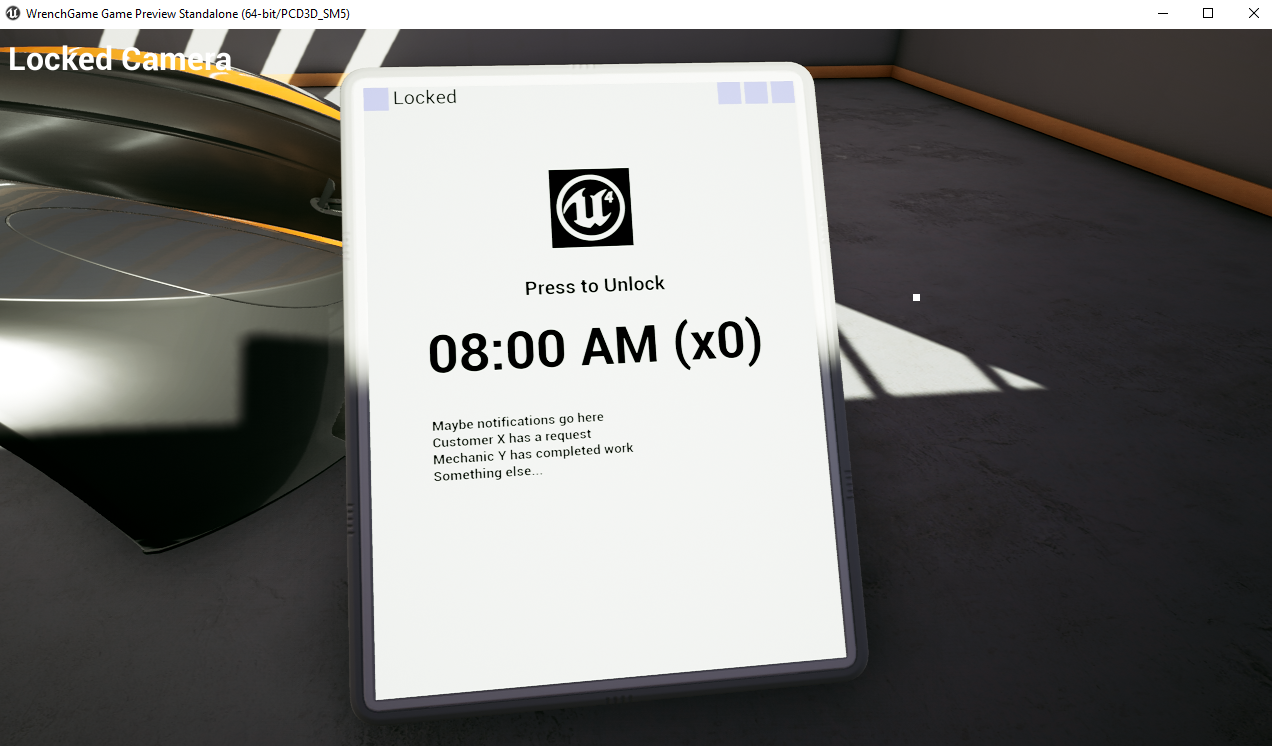
We decided we are integrating all of the UI into this tablet and now Jim is building Wrench OS: https://i.imgur.com/UPbAR45.png
 sly elk

In this video: New tool inventory system Part Inspection tool WrenchOS tablet Long Range Grab Desktop mode polish Tool functionality polish
pearl tangle
love it @sly elk would be great to try and take this to some enterprise customers for a proper training and education tool
wicked oak

A bespoke VR game and installation for Reebok
the music game i made for reebook
 fleet plume
that richard england guy from the ad agency?
wicked oak
yes
 fleet plume
it would be amaze if it wouldn't lag
wicked oak
i didnt make the art
but i did make the funky shaders
not like they are that difficult lol
fleet plume
the grey arrows for direction are mean
because so tiny
does the score widget have some kind of follow/parallax?
fleet plume
yeah hard to judge from 2d video
so now you only need to make a game out of it and start a beat saber clone war
(and become most hated vr indie dev)
the "game over" at the end is weird
it implies that the player has failed
sly elk
Does anyone else have an issue where VR preview doesn't detect the HMD unless you wake it up first?
*with oculus
mighty carbon
has another here worked with ARKit/ARCore ?
got two questions: #1 can I build for ARKit app for iPad using BP-only code and deploy on Windows ? #2 Is there a way to detect and recognize QR code with ARCore / ARKit ? (Basically the idea is to place a card with QR code on the table and ARCore / ARKit would recognize it, and match it with whatever scenario needs to be visualized)
@idle fox @pearl tangle ^^
idle fox
I don't know if you can deploy on windows, but yes you can use only blueprints, I've never worked with QR codes
This is with ARKit, sorry I did not specify
I have not used ARCorer
ARCore*
mighty carbon
aye, thanks
@magic mango @tawny patio could you folks please try getting answers for this question https://forums.unrealengine.com/development-discussion/vr-ar-development/1516731-arcore-arkit-and-qr-codes ? 😊
Unreal Engine Forums
Is there a way to detect and recognize QR code with ARCore / ARKit ?
Basically the idea is to place a card with QR code on the table and ARCore / ARKit would
tired tree
@sturdy coral https://youtu.be/Vrq2akzdFq8?t=2m16s
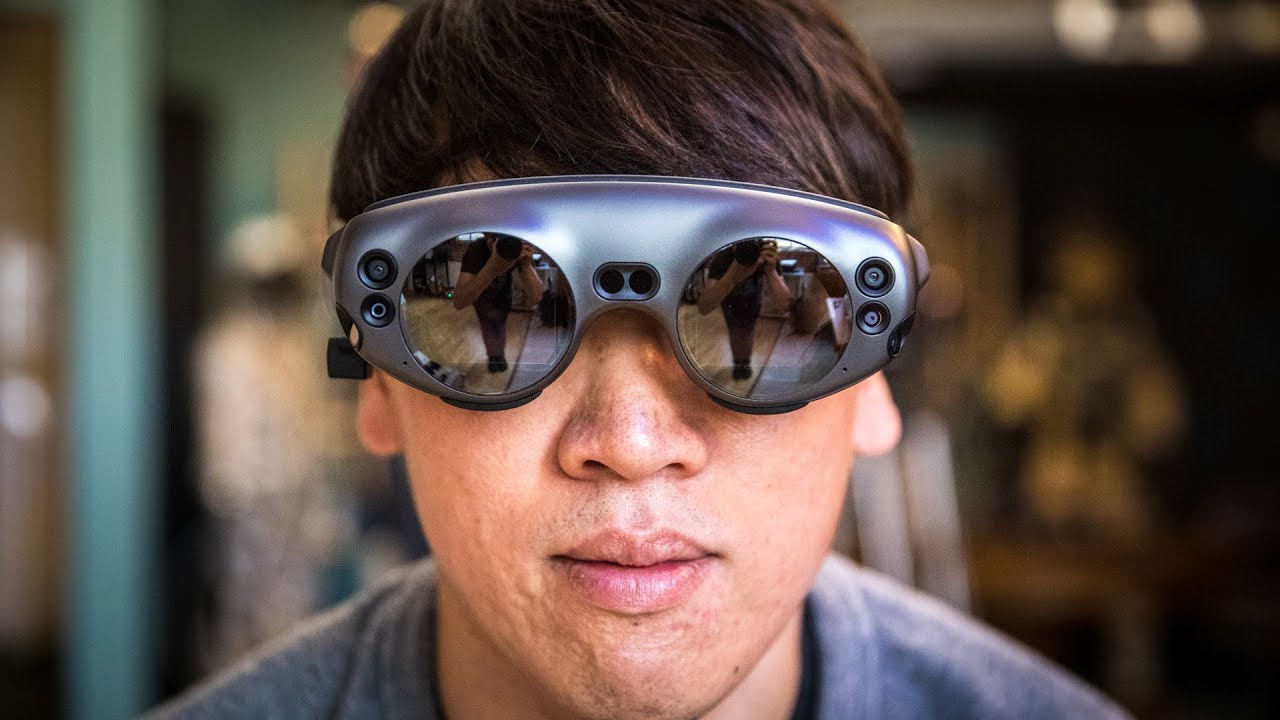
It's finally here! We spend a week testing the Magic Leap One augmented reality headset, the long-awaited developer kit utilizing Magic Leap's secretive disp...
specifically that section i linkd
mighty carbon
looks crappy
 magic mango
@mighty carbon - It is possible to recognize QR codes.
You cannot use the Windoes for iPad though.
Medium
ARKit 1.5 added support for detecting images within the AR scene, which can be used to align your content to a specific play area or as…
fleet plume
hah that image popped up multiple times in twitter today
seems like today is arkit day
mighty carbon
@magic mango I see.. Thanks. Is it ARKit only or also ARCore feature ? (image recognition)
idle fox
@ motorsep https://blog.viromedia.com/image-marker-recognition-arcore-android-augmented-reality-1855981f5165

VR & AR App Development Blog — Viro Media
Viro adds image/marker recognition to Android/ARCore. Build AR apps that interact with markers and signs in the real world.
mighty carbon
eeh, that's a 3rd party app I'd need to make it happen
need a native support in UE4, without any 3rd party plugins
 mighty carbon
how do I work with it in UE 4.20 though ? Same exact way as for ARKit ?
idle fox
no idea, i havent used ARCore just ARKit
 glossy agate
Just released the open beta/demo for my game if any of you wanna check it out. https://store.steampowered.com/app/756290/In_League/
sturdy coral
@sly elk I ran into that and added this as a workaround:
--- a/Engine/Plugins/Runtime/Oculus/OculusVR/Source/OculusHMD/Private/OculusHMD.cpp
+++ b/Engine/Plugins/Runtime/Oculus/OculusVR/Source/OculusHMD/Private/OculusHMD.cpp
@@ -973,6 +973,11 @@ namespace OculusHMD

        EHMDWornState::Type FOculusHMD::GetHMDWornState()
        {
+               if (!ovrp_GetInitialized())
+               {
+                       InitializeSession();
+               }
+
                ovrpBool userPresent;

if (ovrp_GetInitialized() && OVRP_SUCCESS(ovrp_GetUserPresent2(&userPresent)) && userPresent)```they broke it in 4.17
@tired tree what about that section in particular? the FOV?
mighty carbon

NVIDIA
The world's most advanced graphics cards, gaming solutions, and gaming technology - from NVIDIA GeForce. Download drivers, automate your optimal playable settings with GeForce Experience.
something is coming soon
mighty carbon
😃
wicked oak
i have enough money to buy a gpu no issue, in fact im spending the money on testkits right now.. (fucking sony)
ive been waiting for a GPU for a looooooooong time
still on a 970 lol
and this is a 970 i bought at launch
this 970 is the gpu i used to develop even Deathwave
so it has its years
mighty carbon
I hope 1080 drops in price significantly
wicked oak
its already dropping
mighty carbon
still too expensive for me
tired tree
@sturdy coral more representative view of the blending than the video + post previews
wicked oak
@tired tree its a great video
they talk about the focusing
they say the glasses have a bunch of focus depths, and they switch depending on what they see you are looking at
wich is awesome honestly
no other headset does it
tired tree
it only has two levels though @wicked oak
and they said it has a 18" culling plane
that was actually the part they disliked the most currently because it was only two settings, chose the wrong one a lot, and you can't get anything closer than 18" to your face
mighty carbon
so, are you guys fascinated by ML1 ?!
sturdy coral
@tired tree ah yeah, some people tweeted some through lens stuff a while back too
that section is in a dark area though, or at least darkened a lot by the lens
ML was showing stuff like this:
TV directly over a bright window
mighty carbon
that looks nothing like what that GoPro footage shows
sturdy coral
(you can see its a window there)
where for all the initial reviews ML only let the reviewers try it on-campus, probably in controlled areas without lots of bright windows, and with ideal features for room mapping and stuff
tired tree
that isn't through lens, its their overlay on top of video presentation mode @mighty carbon
mighty carbon
personally, I think it's a hype train. Good AR should be done like with ARKit/ARCore - goggles with pass through video, so that integration of GC elements is as tight as possible.. Stuff like ML1 is only good for informational AR IMO
tired tree
the tested video shows scenes like that too
but they were honest and listed it at the bottom of the video
sturdy coral
I do think it is cool and seems like a big bump over hololens
tired tree
its really interesting that is for sure
sturdy coral
if they hadn't overhyped it it would be getting way more hype
tired tree
but worth tinkering with?....meh
all of the basic elements of would make a REALLY good AR system is there, it just needs some evolution
sturdy coral
yeah, it just isn't there yet
mighty carbon
I think we are closer to decent AR with passthrough video rather than overlaying CG on top of real world
wraith sky
Greetings!
sturdy coral
if it is already unwieldly and stuff and I'm getting it as a developer, I'd rather have this:

no focus planes though
wraith sky
How i could get a VR camera vector?
per eye
View.WorldCameraOrigin, View.WorldViewOrigin - are single vectors
sturdy coral
@wraith sky there may be some way. don't try offsetting by querying IPD from the xr interface as I've seen it is just hardcoded to 63.0f or 64.0f for some plugins
@wraith sky cpp /** * Calculates the offset for the camera position, given the specified eye pass, position and rotation. * An XR plugin implementing stereo rendering should forward all calls of CalculateStereoViewOffset to this method. */ virtual void CalculateStereoCameraOffset(const enum EStereoscopicPass StereoPassType, FRotator& ViewRotation, FVector& ViewLocation) = 0;
wraith sky
it should be some variable that are accessible to the shaders, can't believe there are no...
sturdy coral
if you use it, double check it to make sure it actually changes as you change the IPD slider
oh in a shader
sly elk
@sturdy coral Does it only do it in the editor or will builds have the same problem?
sturdy coral
@sly elk I think builds had the same problem
sly elk
okay. thanks
sturdy coral
@sly elk headset worn detection is bugged in many places, I'll try and put a pull request on GitHub at some point
ah I thought you asked about VR editor, not VR preview, not sure that patch will fix your issue
It was fixing the worn state, which can be used in triggering the VR editor too
sly elk
I don't actually care about the headset worn detection. I'm seeing unreal not detect the headset when the rift is in a passive mode
we do the VR to screen mode toggle on a keypress or a menu button
so at least in PIE, starting up VR preview sometimes results in an error that no headset is detected
Maybe that is working as intended though and just isn't how I want it to work?
Basically I want it to force the headset to wake up any time I switch to VR
mighty carbon

Mamut VR
Free shipping on orders over 95 euro (Norway excluded).Touch controller way to small for your hands?
Are they slipping away from your sweaty hands?
Do they m
echo folio
40 euros for a piece of rubber material ....
sturdy coral
@sly elk yeah, I think the issue may still be related and I may have had to put that in there from the same root cause of it not being initialized
Unfortunately they don't use the real oculus SDK and go through this undocumented API wrapper thing and it got too frustrating to deal with, I'm just doing everything SteamVR now
echo folio
what you are saying reminds me of the browser wars 18 years ago.. were one had to do twice the work for building webpages because there were so many browsers around
i hated that
sturdy coral
I wouldn't mind supporting both sdks, problem is they have this intermediary layer on the oculus one that doesn't let you see what API calls it is doing underneath
echo folio
that makes it even worse
sturdy coral
Many are named the same and do what you would think, but then you run into ones that are glossing over several steps
sly elk
Yeah. I think oculus auto rejects builds with steamvr
 stable dove
Anyone have issues with post process effects only effecting 1 eye in VR and not the other? It seems to be happen intermittingly.
pearl tangle
@mighty carbon you can't package for ios when you use plugins, and arkit or arcore is a plugin.
arcore actually works across android and iOS now so personally I would use that since it actually performs quite a bit better and handles lighting updates etc much nicer and the cloud anchors are also better working too.
Having said that though, it still doesn't make a difference for packaging since you need a mac for that as well. You can most likely fire up a osx as a service thing, i forget the website but you could use that as a remote build for it. I am building some facebook AR stuff at the moment for a project and that only runs on Mac so had to go and buy a macbook annoyingly just for that project
as far as the QR code goes. Yes you could use a qr code as the marker, but i would highly advise against it. You are better off using an image of something instead, preferably 1 that has colour in it since all of these 1's seem to function better with colour oddly enough. You wouldn't actually be using the feature of a QR code by using it in there anyway, unless you also wanted people to initially scan the QR code to load the app or something, but doesn't really work so well if you are having to download the app anyway
mighty carbon
thanks @pearl tangle
While ARCore does image recognition, same as ARKit, Epic for whatever reason didn't include it into 4.20 😦
so it's coming in 4.21
pearl tangle
pretty certain its in there
mighty carbon
nope

@motorsep @UnrealEngine I believe ARCore support for detection is coming. I made some changes for 4.21 so the APIs could be unified.
Twitter
I guess I can wait for 4.21
pearl tangle
it's got arcore 1.3 in 4.20. That has the image tracking capabilities in there. You just have to use that directly rather than through a unified UE way of doing things so that it would work across arcore and arkit
you can grab googles arCore build to get the 1.4 version
mighty carbon
but is it exposed to BP ? I wouldn't think so
pearl tangle
just enable the arcore plugin
mighty carbon
I am on 4.19
pearl tangle
yep definitely there
pearl tangle
probably because they haven';t done the unification of the stuff yet
so at the moment you have to build it for arcore and build it differently for arkit
mighty carbon
Well, that's given since ARKit stuff needs to be built on Mac.. Or do you mean BP nodes (and C++ functions) are different for ARCore and ARKit ?
pearl tangle
the later
mighty carbon
do you know anything about this service http://virtualmacosx.com/ ?
We host virtual Mac OS X Servers and Desktops with affordable pricing. Check out our fully managed Xcode Development Desktop for rapid iOS development and hosted Xcode IDE/SDK. Multiple Data Center locations for optimum connection.
I found only 2 services that offer remote Mac access
this one seems to be the cheaper of the two
pearl tangle
yeah thats the 1 i was thinking of. i haven't used it for ue4 stuff but should be achievable
mighty carbon
which plan would I need to go with ?
pearl tangle
no idea haven't used them before
mighty carbon
I wonder if I can just spin up VM and install MacOS
pearl tangle
can try, but depends on your machine if a hackintosh works
mighty carbon
I thought for VM you don't need hackintosh
hackintosh is to install macOS directly, no VM

This video tutorial shows macOS High Sierra 10.13.1 installation and overview on Oracle VirtualBox for Windows PC users step by step. This tutorial is also h...
bam!
😃
I wonder how to connect "remotely" to such VM, even though it would be running locally
pearl tangle
yeah you could just do the entire thing inside there but performance obviously would be pretty bad.
and it's still not a 100% success rate when doing that. I have had very mixed results over the years of running mac in virtualbox
mighty carbon
I see :/
Hopefully that Acer tablet will get ARCore support next month. I'd rather just not mess with Mac at all
or rather Apple
pearl tangle
yep ditto
mighty carbon
looks like only 3 bugs separates us from 4.20.2 release \o/
and there might be 4.20.3 :/
 split steeple
managed to get some headway in retargetting/translating Knuckles skeletal hand animation to UE4's stock hand skeleton via Livelink... should hopefully make supporting current experiences based on the stock hand skeleton a lot easier:
sly elk
Nice. I want to address that in my game at some point. Currently I just use 4 canned hand poses
Improved tablet touch: https://www.youtube.com/watch?v=VpbDMVnSb-M&feature=youtu.be
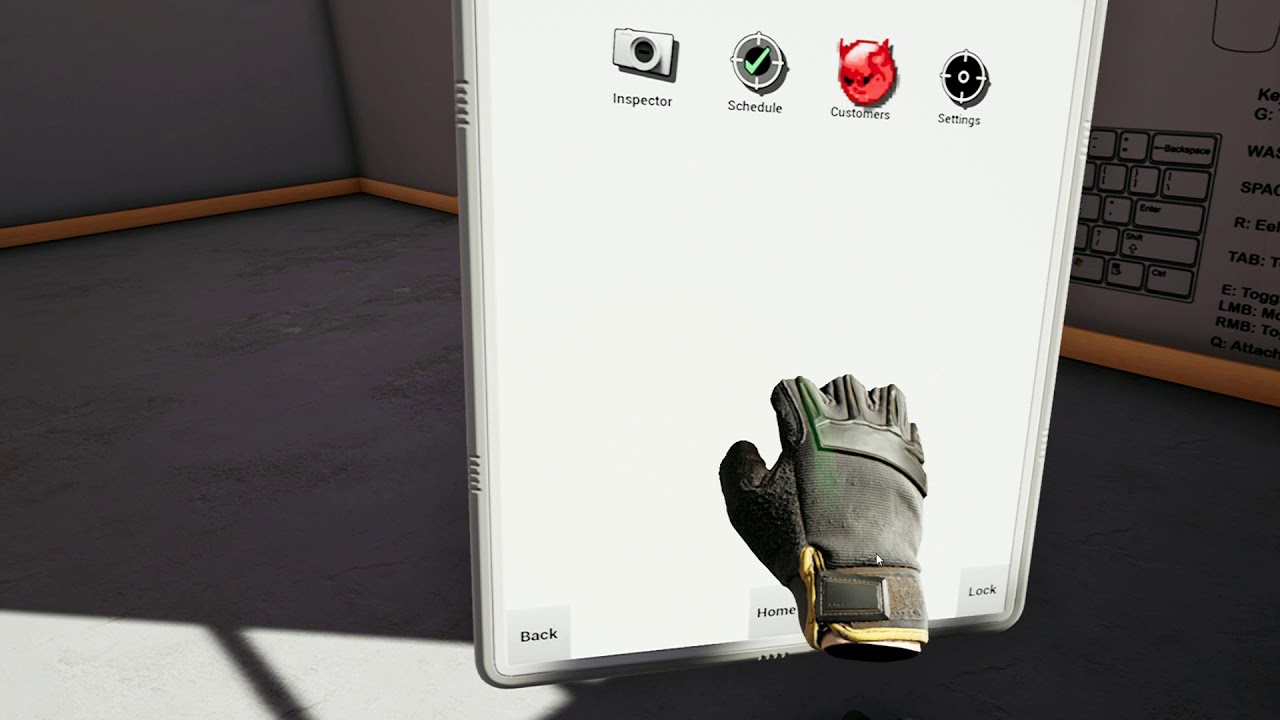
Has a haptic on touch, feels like my smartphone
split steeple
Would feel good I reckon in Wrench during your tool interactions especially. There's also "grip force" that I like, might be an interesting fit for a squeeze mechanic with the haptic.
Is that hand mesh from the Valve input reference?
glossy agate
Pretty sure he made it from photogrammetry
sly elk
Yeah, thats my hand mesh. We do haptics on a ton of stuff
Like ratchet back stroke, every tooth click is a haptic event, the electric nut runner is a haptic event, we fire a pulse on part install, and we also build up haptic intensity with fastener tension
glossy agate
Feeling like Hardcore Henry testing the shotguns. Need more power, or I need better aim https://youtu.be/JgQrEzWV5Vw

First test of shotguns. Need to up the power more. Free demo available now! https://store.steampowered.com/app/756290/In_League/
sly elk
I need to establish the min spec for my game in non VR mode.. Any suggestions on how to do that short of just building some cheap computers?
glossy agate
@sly elk you have testers you have sent it out to? We asked for specs from people requesting keys to get an idea of where it started failing
But your min spec for pancake mode is probably a lot lower than the VR version
sly elk
yeah, its going to be much lower
i should probably get some testers
1080p, no need for 90fps, way fewer draw calls and way fewer triangles with no vr
glossy agate
Hmu when you are ready to test I’ll try it out
glossy agate
Yeah for mine I just put the standard” vr minspec. Seemed to match up right. Just 1060 i5 and 8gb ram
sturdy coral
anyone know of any VR games that do a good job of seamlessly transitioning between gamepad/mouse-keyboard and motion controllers, while in vr the whole time?
echo folio
I am curious....how many triangles do you put into a game level for VR use?
sturdy coral
Ah, I forgot, teleport only and not sure about gamepad
But wmr does the transition well
(cliffhouse)
@echo folio I think around 1 million is a rule of thumb, consider shadows and whether you need an early z pass too
That's in a view, not in a full level
pearl tangle
you can do shitloads more than that if you have unlit materials and no lights
sly elk
or if you aren't doing early z pass
 dusky moon
Yo! I'm trying to find the most optimized settings for OBS to record my VR sessions in a way that it impacts my VR performance the minimum... in this regards ... Is it better if I record with NVENC H.264 or simply x264 ?! it's more like GPU vs CPU and I'm not sure how they impact
stable dove
Anyone know why commands like stat FPF or Stat unit would be off my screen in VR? Its really hard to do base optimization when you cant see the readouts.
sturdy coral
@stable dove it's done through the hmd plugin's GetOrthoProjection method
they have it implemented correctly for Oculus and broken for steamvr
stable dove
@sturdy coral Gotcha, thanks for the info 😃
 sleek venture
I have this blueprint to set up a simple VR controller, and recreated the Motion Controller pawn from the starter content to get a better idea of how it works
however, whenever I spawn the hands through blueprints, they won't receive any input
manic ledge
Hi all, has anyone noticed the Screen Position node working differently that previously in 4.20, particularly within VR? My colleague says a material he created now works differently, thanks!
@sleek venture Have you setup the inputs in Project Settings?
@dusky moon I'm not sure what the answer to your question is, but alternative approach - if you have a Nvidia card, have you tried using Shadowplay to record? That way you can see the constant impact instantly, normally it's only a frame or 2 for me
sleek venture
I had someone else walk me through tge problem, it's good now, thanks.
 nimble junco
hey guys, short question.
is there a skeletal mesh that can be animated (trigger press f.e.) for the vive controller? I can only find the static version
to make it mroe clear, i already have the vive controller mesh, but i want to replace it with a skeletal that can animate the trigger f.e.
no info on that matter?
sly elk
I think it would be easier to just rig up the trigger movement in blueprint instead of using a skeletal mesh.
 dusky moon
Yo haven't been around for some months, here check out the final episode of False Mirror's Dev diary:
http://bit.ly/falsemirror-dev6

In this Final Episode, I explain the last few remaining features that have been added such as the re-designed BodyLab, My User Avatar, Virtual Selfie-cam, an...
 leaden violet
I’m doing some real time vertex painting in VR using the line trace by object, I have this running off event tick. This is causing a slight hiccup in performance, every so often I see the vive lighthouses, ect. and when I add more objects with line tracing, it gets worse. Obviously I want to limit the use of event tick, but I’m unfamiliar with another solution. This only happens after I have had UE4 open for a while, if I close and reopen, everything runs fine.
mighty carbon

Ars Technica
Gamescom announcement spoiled by shop listings going live early.
livestream https://www.nvidia.com/en-us/

NVIDIA
We power the world’s fastest supercomputers and have created the world’s largest gaming platform.
@sturdy coral ^^
sturdy coral
@mighty carbon I think he already said it was going to be 1180
maybe not can't remember 😃
mighty carbon
2080 and 2080 Ti
I can't watch right now, but I'd definitely like to know what's in it for VR
tired tree
he said 1180
he also said that all early leaks are wrong
dunno maybe 1180 was a joke?
mighty carbon
I see.. I wonder if they are going to announce anything today
wicked oak
they are
leaden violet
they did
mighty carbon
seems like Nvidia tech is tightly integrated with UE4
sturdy coral
the infiltrator demo has gotten a lot of mileage
mighty carbon
I guess money is no factor for Epic nowadays and being busy with Fortnite leaves no time for a new shiny demo for Nvidia 😃
amazing

NVIDIA
A revolution in gaming realism and performance. Latest NVIDIA Turing GPU architecture, 11 GB of next-gen, ultra-fast GDDR6 memory. The world’s ultimate gaming graphics card.
tired tree
lol so it is 2080
mighty carbon
have you preordered it already @wicked oak ?
wicked oak
lol man not yet
i will get one around nobember
seeing the dates..
i get the gpu the 20th, but i leave for Connect the 23th
nah, ill just buy one for nobember or so
i dont like preordering in general
mighty carbon
I wonder if they will even mention VR
sturdy coral
@mighty carbon they mentioned the variable rate shading stuff
@mighty carbon 2080 😃
$499
for 2070
tired tree
that is NOT bad
sturdy coral
it is hard to judge these numbers
because they are like a combined score including the low-precision tensor core stuff
and integer ops
mighty carbon
it would be interesting to see real life VR benchmarks
$599 for 2070 on Nvidia's site

NVIDIA
Get up to 3X the performance of previous-generation graphics cards and the power of real-time ray tracing and AI.
20xx have virtual link already.. I wonder if new HMDs will be announced soon too
so, what do you folks think ?
sturdy coral
I just want to know the perf difference without considering the AI/raytracing stuff
tired tree
likely not that great
don't know what the offloading benefit to moving some things to the raytracing handling is though, or if it could even keep up with 90htz
outside of all of that though, its nice to have raytracing in current gen GPUs directly
sturdy coral
might be due to imagination tech's patents expiring a couple years ago
tired tree
should be able to apply it to audio though
no idea what the interface is like to it, but if it is a generic raytracing api to the current scene
@sturdy coral
mighty carbon
I hope prices on current GPUs will fall soon
sturdy coral
I wonder if it is purely optimized on tracing against triangles, or will improve everything (ssr, dfao etc.)
mighty carbon

The specs of the two new NVIDIA GPUs head-to-head - both the Reference Specs and the Founders Editions.
tired tree
its honestly exciting stuff, that a lot of consumers won't care about
mighty carbon
why do you want SS effects when you get all that with raytracing, for real
tired tree
they are going to see it as another "NVIDIA library that games will never use"
sturdy coral
it will be an opportunity to sell skyrim again 😃
mighty carbon
The specs of the two new NVIDIA GPUs head-to-head - both the Reference Specs and the Founders Editions.
tired tree
its literally the specs on nvidias website, copied, with a header text
except he copied the base clock values wrong
mighty carbon
ha
sturdy coral
I don't know if I buy their "saving artist time" stuff. at least any time soon for shipping games.. it just means artists are going to have to design the lighting twice for now
mighty carbon
not necessarily
sturdy coral
looking back through the BF footage, SSR would do a better job in a lot of cases
mighty carbon
you are ruining the moment @sturdy coral 😛
btw, there is a shitstorm on Oculus forums about new GPUs... Too expensive apparently.
sly elk
I was really hoping the 2070 would come in cheaper and really push forward the average VR machine spec
Also have they made any performance claims outside of raytracing performance?
sturdy coral
they can now run integer in parallel with fp at the same rate... seems targeted at cypto
though last earnings call they said crypto was dead as far as having an impact on revenue
sly elk
I know nvidia doesn't have much competition at the high end. But the way they have done the pricing, the performance per dollar jump doesn;t look like it will be that big and this is after an extra long generational refresh
tired tree
@sturdy coral how far was that car away, it almost looks billboarded
sly elk
the forground car isn't in the reflections in front of it?
tired tree
there were a lot of artifacts in that demo too that I noticed in the ground reflections that I didn't see in the other demos
sturdy coral
I'm sure they are using a really limited feature set to make it work on real games
sly elk
It looks super floatuy
sturdy coral
all the other demos were mostly in really simplified scenes
tired tree
yeah
sturdy coral
compared to BF5
mighty carbon
I wonder what they do with it for Doom Eternal.. Tiago from ID already drooling..
wicked oak
i do wonder about the perf
this is DX12
with async shaders
but how async are they?
can stuff be offloaded to the RT cores while other stuff calculates?
oh, btw. RTAO would work fine in unreal engine forward mode
sturdy coral
one thing SSR sucks with is translucency, since it ends up tracing against the wrong depth
wouldn't matter for that one with the explosion pretty far away
but can be pretty bad
@wicked oak for forward rendering RTAO couldn't run in parallel with much right?
wicked oak
the point is that it easily could
UE4 runs SSAO in async in ps4
in theory,you could run RTAO the same way
sturdy coral
I thought just async with the base pass though
wicked oak
you need the base pass first
or then its more rays
becouse the idea is to do depth prepass, and then launch the rays from those world locations
sturdy coral
but then you stall out with forward at that point until it is done right?
wicked oak
why would you stall, you use the AO to darken stuff at the end of the pipeline
so you start with depth prepass
sturdy coral
then emmissive gets darkened
sturdy coral
and directional gets darkened as much as indirect
wicked oak
yeah then you need deferred
there is another thing you could use the rays cores to
to do super resolution
sturdy coral
that stuff seemed really cool
wicked oak
you could launch rays that just execute the normal shader to do super-resolution on the center of the screen
sturdy coral
I wasn't clear on if the enhanced infiltrator thing was using any ray tracing
wicked oak
no
sturdy coral
or was just using it all to run at 4k
wicked oak
it was a DLAA test
sturdy coral
with *a better thing than taa
wicked oak
i think the thing was running at 1440p with DLAA
or 4k without TAA but with DLAA wich might be faster?
we have too low details..
sturdy coral
that was the one thing that could probably have some near-term impact on VR
other than the variable rate shading thing which they had already announced and didn't go into more detail on
wicked oak
variable rate shading is what the ps4 prohas
its essentially multires again
nearly the exact same technique, just a different implememntation of it
dusky moon
So what is VirtualLink VR ?! time to get excited ?
sturdy coral
seems to be based on USB-C
dusky moon
ah no display ports then ?
wicked oak
USB-c can do display port
the trick with virtualink is that it uses some of the free USB connections to add energy + data

here ya go
details
dusky moon
then why is it have VR at the end ? for next gen headsets ?
 warm lion
Anyone have any experience with imposter sprites on mobile (specifically mobile VR). I can see the imposter sprite rotating correctly in the editor but on the Oculus go I only see the card without it's material applied. The material is what causes the card vertices to orient (billboard) towards the camera, it's also what shifts the frame of the texture to be the one for the angle towards the camera. So without this it's not really an imposter sprite
wicked oak
the TLDR is that it uses some of the high energy connections to do usb
and that way its display port + usb on the same connector
it needs a special cable btw
you wont be able to use a "normal" usbC adaptor
while the connector has the shape of a usbc cable, the cable needs to be shielded in a specific way or it will have noise in the signal
dusky moon
oh that's not a good news
Also wondering if SLI support is on the roadmap for VR by any chance ?
I mean at least from epic's side
dusky moon
hmmm ok who doesn't have nvidia these days. except the consoles
but also I think It's kind of suspicious that they don't try hard at all.... in a sense that, VR Sli would be affordable for consumers ... it gives more performance just by adding an extra card... and Nvidia want to always sell their new cards so it contradicts with their marketing somehow
sly elk
suspicious?
tired tree
the entry price point for VR is already high
not many are going to SLI on top of that
 cosmic shoal
SLI is kinda dead now, too many problems with it. but Nivida is not givig up entirely it seems. it is sort of trying to bring it back with a new connector type, for Quadros.
sly elk
Anyone know what happens when you try to set up multiple oculus computers + play spaces next to eachother? Any issue with sensors seeing other headsets and controllers near the edges of view?
Or do you just have to put them far enough apart or include walls so that never happens?
wicked oak
@sly elk tends to work fine
oculus cameras are fairly smart
but vive works much better in such a setup, you use 1 playspace for 2 people
sly elk
I guess the only limit on vive is running into eachother?
since the sensors don't know about the headsets
wicked oak
yes
sturdy coral
@tired tree you may have been right about audio
They are promoting using the ray tracing engine for it:
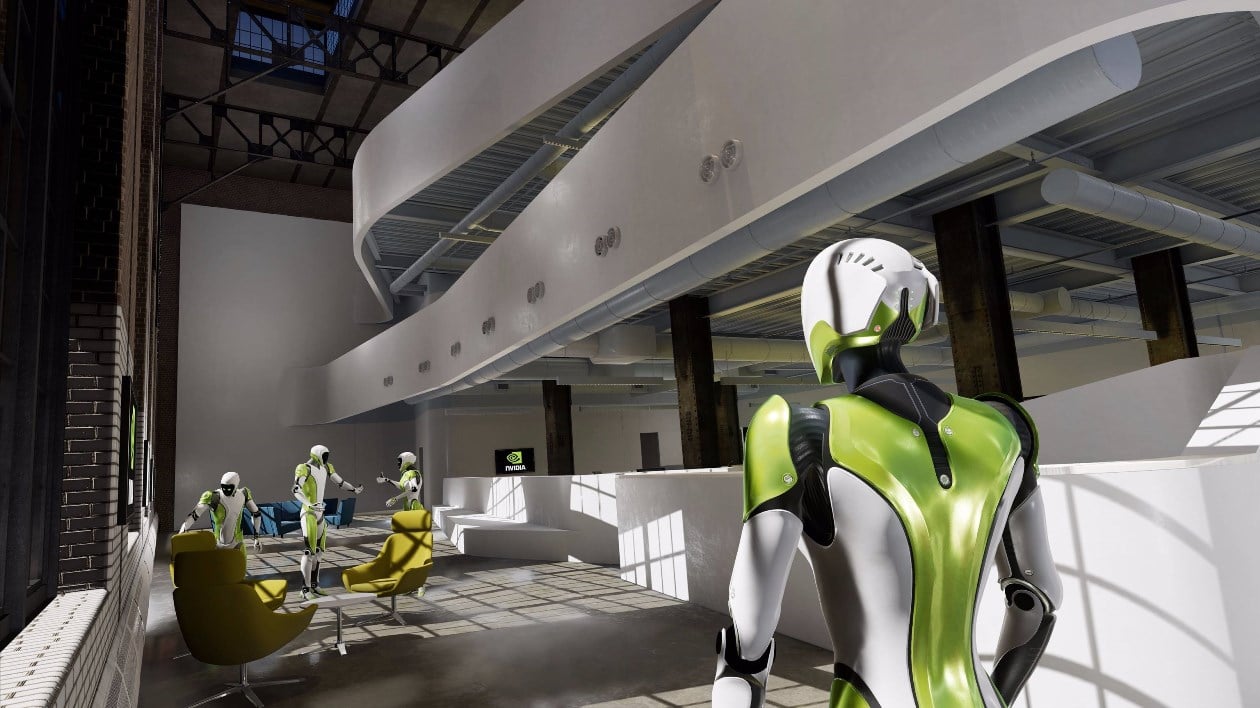
The Official NVIDIA Blog
Over the last few decades, VR experiences have gone from science fiction to research labs to inside homes and offices. But even today’s best VR experiences have yet to achieve full immersion. NVIDIA’s new Turing GPUs are poised to take VR a big step closer to that level. ...
"VRWorks Audio is accelerated by 6x with our RTX platform compared with prior generations. Its ray-traced audio technology creates a physically realistic acoustic image of the virtual environment in real time."
mighty carbon
A comment says updated VRWorks (video + audio) is coming in September
I wonder if it will work with current gen GPUs
sturdy coral

reddit
1 vote and 1 comment so far on Reddit
mighty carbon
what settings on player's movement component do I need to set to make WASD movement as friendly to VR as possible ?
tired tree
@sturdy coral good, now lets see if Valve leverages it for SteamAudio like they did the AMD setup
sturdy coral
there is going to be a lot of demand from people who do renders for a while
even if they normally go quadro a lot won't
mighty carbon
soo, no one knows what needs to be tweaked on player's movement component ? :/
sturdy coral
@mighty carbon mainly lower the max speed
mighty carbon
what about acceleration / deceleration ?
how do I disable that ?
(it doesn't feel there is any when testing in PIE, but in VR I felt like there was acceleration when starting movement)
sturdy coral
@mighty carbon make it a huge value with a low max speed and it will be effectively gone
pearl tangle
the new rtx 8000 will be pretty good for rendering, i would think most guys would go for those rather than the gaming 1s
the gaming doesn't seem to be too much of an upgrade on the 1080ti to warrant an update yet. interesting they released a 2080ti straight off the bat as well
sturdy coral
@mighty carbon you'd have to feather max speed based on the joystick amount to still allow controlling speed with joystick while getting instantaneous acceleration
I haven't bothered trying to get instantaneous like that as I don't think the normal amount of acceleration is an issue
rotation is the killer
mighty carbon
@sturdy coral Go has d-pad, no joystick like on Touch 😦 (although it's a blessing - less tinkering with controls 😛 )
actually, even on Touch I'd only allow for constant speed no matter how hard you push the stick
(unless by "feather max speed" you mean something else)
@pearl tangle sounds like RTX should give massive performance boost in VR
tired tree
@sturdy coral I didn't mind accel either but kept getting complaints from my template users so I removed it awhile back
@mighty carbon ramping speed on user control != accelleration
the point of no accel is so that directional changes are instant, instead of a lurching minor change that ramps up
it makes people feel off balance more
mighty carbon
@tired tree I find it personally too fiddly (as player)
sturdy coral
that makes sense, you've definitely had a lot more feed back than probably anyone here
glossy agate
@mighty carbon If its dpad it should just go instant. Like much said if its huge accel value it will be instant. Don't make the speed too slow though. Thats worse than too fast. People will complain a lot. Like 400 is good, or whatever feels like a brisk walk to you. My walk is at like 400-500 and sprint is 800
mighty carbon
lol, 400 is too much for me
d-pad is for walking relatively slow (I'll have option to walk fast) and teleport if you need to move fast
daring mural
It's weird because the brain should expect deceleration before changing directions
cosmic shoal
When we change from being still to moving and vice versa there is a shift of weight. If it's not felt, while our eyes do see a change , the disconect makes you queasy. If you do it instantly it makes it less realistic, so immersion is broken for a split seccond, thus it makes the change of speed not as unconfortable.
 shell karma
has anyone here been testing out GTX 1080 with high quality models rendered in VR, I'm looking for any info to narrow down how much an artist can go with polycount etc when run on 1080 (VR)
all of the stuff I've done was targeted at 1060 at best
 lethal orchid
No I need vr
fleet plume

UploadVR
Today, HTC announced that the official Vive Wireless Adapter will retail for $300 and is set to launch on September 24th.
Pre-orders for the device will go live on September 5th, for US customers they’ll be available at Amazon, Best Buy, Microsoft, NewEgg, and directly fro...
tired: nvidia rtx
wired: wireless vr
😛
mighty carbon
lol, just wanted to post this link 😄
sly elk

 manic tapir
Omg thats such a good parody
mighty carbon
Goodies from Oculus
"Mobile SDK: The 1.16 release now exposes experimental Vulkan support for the Oculus Go" @wicked oak
sly elk
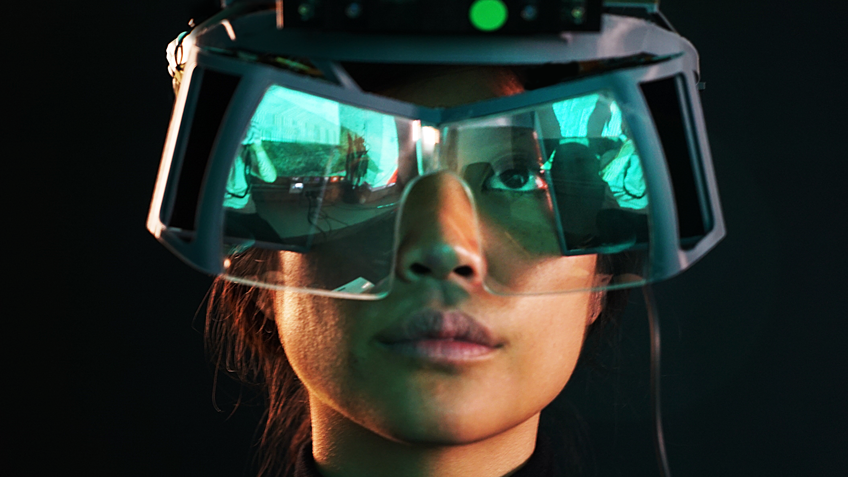
I'm going to use springy just for the starting tutorial
but I think he will be murderable
tired tree
@sly elk needs an easter egg where you can't figure out where springy came from but everything works anyway and it eats at you for eternity
cosmic shoal
he is obviously a suspension spring ;o)
tired tree
true, would fit Screwy better
cosmic shoal
screwy comes out when you mess sometihng up
sly elk
This is fun and not annoying right? Like im not going to make him pop up in your face whiel playing



 cosmic shoal
definitelly fun. It could get annoying if it comes up too often when you don't want help
more fun even if you could smack him or throw stuff at him and he goes away complaining of your temper.
warm lion
Anyone else run into instances of sprites (grouped sprite) not individually lighting? I've been trying all day to find out why my sprite instances all share the exact same lighting on the oculus go. They have normal maps and that part is working, but they all have identical lighting even though some are under lights and some in shadow.
daring mural
any of you guys doing multiplayer?
glossy agate
I am
daring mural
@glossy agate ded servers?
glossy agate
Not yet
daring mural
ah, you using Steam usernames etc for now?
glossy agate
Yeah I’ll always use steam names
daring mural
hmm, do you do any data/variable transfer from a settings menu to in-game in any way?
glossy agate
What do you mean?
daring mural
Using a variable while in a multiplayer session that was set outside of the session (like in a settings menu, for example)
glossy agate
You can just use game instance for that
daring mural
yeah I know GI persists, the only issue I had with that set-up was the variable replicated strangely. I set the username pre-session and on join when referencing the gameinstance, everyone had my username above their head and on their clients, everyone had their username.
can't wrap my head around it, been stuck for a couple days 🤔
mighty carbon
Has anyone tried LPVs in VR with 4.20.x ?
sturdy coral
@daring mural you set the player name on the server or on their client?
glossy agate
Set in on your own pawn then rep that value to everyone I think. VRE has that feature built in doesn’t it?
Sounds like you are sending it out to set to all the pawns in the server
daring mural
yeah but VRE uses the Steam username
I'm setting the username in the offline menu through our own login/db system so the only way to carry it over is the GI
repnotify doesn't work the same in this case for some reason
daring mural
@sturdy coral on event possessed > cast to gameinstance > get username variable
sturdy coral
@daring mural but how are you setting it
daring mural
locally, with repnotify
im not running any special event
im trying to do it via a server rpc now
sturdy coral
@daring mural if I remember, on possessed only runs on server, so you are going to look up the name from the game instance on the server and give everyone the same name
daring mural
so if I get it locally, how do I set it so it shows on everyone else's client and I see their own?
sturdy coral
name should probably go in APlayerState
daring mural
im setting it while offline so playerstate is reset on session load
sturdy coral
only the server replicates variables
you could send as an RPC after connecting, or add it to the login string
@daring mural ^
UniqueId, FString& ErrorMessage)```FString & Options can be anything you pass on the join URL, similar to http
daring mural
BP-only project
I'll try this, correct me if I'm wrong:
locally: get username from game instance
on server: use that username to set it for the player
sturdy coral
@daring mural locally: after joining, send RPC to server with username from game instance
on server, when receiving that RPC, set the replicated username variable on the APlayerState
daring mural
ah set it in playerstate
if I cast to playerstate on server, will it get the correct one for the correct player?
glossy agate
Try "event post login" instead. I think it was in PC
sturdy coral
do the rpc on APlayerController, and is its APlayerState
@daring mural there is already stuff for this
    /**
     * Sets the name for a controller
     * @param Controller    The controller of the player to change the name of
     * @param NewName       The name to set the player to
     * @param bNameChange   Whether the name is changing or if this is the first time it has been set
     */
    UFUNCTION(BlueprintCallable, Category=Game)
    virtual void ChangeName(AController* Controller, const FString& NewName, bool bNameChange);

void AGameModeBase::ChangeName(AController* Other, const FString& S, bool bNameChange)
{
    if (Other && !S.IsEmpty())
    {
        Other->PlayerState->SetPlayerName(S);

        K2_OnChangeName(Other, S, bNameChange);
    }
}```I'll need to carry more variables in this way, not just username. The username is stored on a gamesparks database and retrieved on login (not in a multiplayer session). So I'm storing it in the gameinstance to retrieve it when players join sessions. Will also need to transfer other variables (mainly boolean states) from offline to online in this way
sturdy coral
it uses the url
@daring mural the gamesparks database is on the client?
or on the server
daring mural
Client
well, it's retrieved on the client
Offline: Set username, Set a couple booleans.
Online: Retrieve username & boolean states, use them on each spawn.
sturdy coral
you should use the login string for this
even if it takes a little bit of C++
name is already handled for you with no C++
    // Init player's name
    FString InName = UGameplayStatics::ParseOption(Options, TEXT("Name")).Left(20);
    if (InName.IsEmpty())
    {
        InName = FString::Printf(TEXT("%s%i"), *DefaultPlayerName.ToString(), NewPlayerController->PlayerState->PlayerId);
    }

ChangeName(NewPlayerController, InName, false);```other simple booleans like join as a spectator are handled the same way, you can use that code as a template
    // Set up spectating
    bool bSpectator = FCString::Stricmp(*UGameplayStatics::ParseOption(Options, TEXT("SpectatorOnly")), TEXT("1")) == 0;
    if (bSpectator || MustSpectate(NewPlayerController))
    {
        NewPlayerController->StartSpectatingOnly();
    }
What about the boolean states? My customization menu is offline so chosen weapon load-outs, character selection, skins, controller options etc. will need to travel from offline to server
sturdy coral
do them as parameters when you join, same as that SpecatorOnly option
on your game mode add:
virtual FString InitNewPlayer(APlayerController* NewPlayerController, const FUniqueNetIdRepl& UniqueId, const FString& Options, const FString& Portal = TEXT("")) override;```would have to learn a bit of cpp to pull it off, I can only assume what all this code means and does. is there no way to store custom variables in a class that can be moved between levels & from offline to online sessions?
sturdy coral
@daring mural
FString ASinnGameMode::InitNewPlayer(APlayerController* NewPlayerController, const FUniqueNetIdRepl& UniqueId, const FString& Options, const FString& Portal)
{
auto ErrorMessage = Super::InitNewPlayer(NewPlayerController, UniqueId, Options, Portal);

    // Set up spectating
    bool bSinnBool= FCString::Stricmp(*UGameplayStatics::ParseOption(Options, TEXT("SinnBool")), TEXT("1")) == 0;
    if (bSinnBool)
    {
        NewPlayerController->PlayerState->bSinnBool = bSinnBool;
    }

return ErrorMessage;
}```the only thing for moving stuff like that that I know of is seamless travel
daring mural
if it persists in the game instance, couldn't I get it from there and set it in the playerstate in the multiplayer session, then retrieve it from there on respawns until the game ends?
cause they never travel until the game ends
sturdy coral
from client's game instance, rpc to server, server sets replicated var on APlayerState
every possessed pawn gets a replicated pointer to the owning APlayerState, so all players can get the name at that point
it is already done for name, already exists as a replicated variable
you could set it through the rpc
sturdy coral
@daring mural nope
I think all these can go wrong:
-client might see the character possession before player controller has replicated over
-character's aplayerstate variable might not have replicated over yet, causing cast to fail
daring mural
could use retriggerable delays to check if the playercontroller & playerstates are valid post-cast
and only resume when they are
but assuming they are valid, would the logic work ?
sturdy coral
yeah, but you should also probably send this from player controller, not character
then you should only need to do it once
and the playerstate replication will take care of the rest each time you possess
daring mural
ah good call - ive never worked inside the playercontroller class directly before, if I set it up on BeginPlay inside it, would it trigger at the correct time or do I need to trigger it from my character manually
nvm got it
thanks a lot
tired tree
@daring mural I specifically added a OnPlayerStateReplicated event to the plugin
since there is no normal BP method of detecting that without checking for validity
on a loop
sturdy coral

In 2010, we announced Steam Play: a way for Steam users to access Windows, Mac and Linux versions of Steam games with a single purchase. More than 3000 of the games that have been added to Steam after that point have included Linux support, with more titles being added every ...
@full junco you might need to hurry if you want to use linux support as a selling point still 😃
mighty carbon
so, like built-in WINE in Steam @sturdy coral ?
sturdy coral
looks like it
I guess WINE is LGPL
supported list:
Bejeweled 2 Deluxe
Doki Doki Literature Club!
DOOM
DOOM II: Hell on Earth
DOOM VFR
Fallout Shelter
FATE
FINAL FANTASY VI
Geometry Dash
Google Earth VR
Into The Breach
Magic: The Gathering - Duels of the Planeswalkers 2012
Magic: The Gathering - Duels of the Planeswalkers 2013
Mount & Blade
Mount & Blade: With Fire & Sword
NieR: Automata
PAYDAY: The Heist
QUAKE
S.T.A.L.K.E.R.: Shadow of Chernobyl
Star Wars: Battlefront 2
Tekken 7
The Last Remnant
Tropico 4
Ultimate Doom
Warhammer® 40,000: Dawn of War® - Dark Crusade
Warhammer® 40,000: Dawn of War® - Soulstorm```Tekken 7 is the only UE4 one I spot
mighty carbon
lol, Doom VFR, but not Doom itself (2016)
 chilly thicket
So, I'm not sure how to make this work:
I'm spawning my motion controllers as actors, then I have this event to see when a thing overlaps on it's hitbox.
Which looks like that.
But that event is never triggering in the first place.
No matter what I try to overlap.
daring mural
@chilly thicket A few things there
Mainly, what are your collision settings like on the component you want to detect overlaps?
manic ledge
Anyone having problem launching a standalone instance in VR in 4.20?
Launch in VR is set to true, and it used to work in 4.18 (instead of simulate or play, hitting standalone)
manic ledge
Working with Oculus Rift if that makes any difference
mighty carbon
I hate trade shows since I became a developer - everything literally stops when it's happening. No updates, no activity on the forums/etc., nothing... 😒
manic ledge
Ah yeah of course, loads of people are at Gamescom at the moment haha
I think for now I'll just switch the project over to non-seamlesstravel to try and get the networking working in vr preview
chilly thicket
@daring mural The grabarea hitbox thing is set to OverlapAllDynamic.
I also have it shown in game to make sure it's actually ovelapping my actor cube.
tired tree
bugs related to what exactly
or are you lamenting it in general
because every release has unresolved bugs
mighty carbon
oh, I thought they release only when issue tracker is cleaned out
this one in particular seems to be a bad one https://issues.unrealengine.com/issue/UE-62310
sly elk
Lol. That one is pretty bad
 dreamy orbit
anyone know how to cast shadow on floor?(AR), ARKitCamera Material is not working anymore :(
sly elk
I wonder if having the AR chat separate again would be better now that there are a few more AR developers. @dreamy orbit there is a good chance your question will get buried before anyone else doing AR reads this
mighty carbon
not a lot of people are doing AR here and those who do rarely reply (unless you @ them)
I think @idle fox works with ARKit
@dreamy orbit ^^
idle fox
I think im the only one haha
mighty carbon
😄
dreamy orbit
@idle fox could you help-me on that xD?
dreamy orbit
@idle fox ARKitCameraMaterial is not working anymore :(, its buggy on 4.20
idle fox
ill look into it in a bit, busy at work
dreamy orbit
tytytyty
fleet plume

UploadVR
Oculus is targeting Q1 2019 to launch its upcoming higher-end standalone VR headset, currently known by the code-name Santa Cruz, according to multiple independent sources.
i bet a fiver that OC5 attendants will get a devkit
wicked oak
good shit
becouse im going
btw, the vive focus is total garbage of the highest degree
i dont know if i have it badly setup, but it has the biggest pupil swim of every headset ive tried
when you rotate your head, the fisheye lenses cause global warping on everything but the center
fleet plume
where you drunk when ordering one?
wicked oak
its impossible to use for more than 2 minutes without getting massively sick
nah, i was given one for porting purposes
its trackng works btw
wicked oak
no