#virtual-reality
1 messages · Page 185 of 1
 glossy agate
I need to go vacation there and just go ham like I did in Thailand
In the zip code I live in you gotta be making $80k to be middle class.
 granite jacinth
dude
Thailand is awesome
I was there for 30 days
One of the best deployments I ever had while I was in the Marines
glossy agate
Yeah I lived there for 13 years as a kid. Finally got to take my wife back in December to check out where I used to live. I loved it there. My parents still work there.
I’m going again next year haha. In April this time for the water festival.
We just did whatever we wanted and drank suicidal amounts of alcohol. Only costed like $500 for the whole week not including my plane tickets
 fleet veldt
@potent gust I just used the binary UE4 4.19.2 downloaded from epic. It includes the oculus plugin. but the epic ue4 binaries / source stays a version or so behind the oculus branches.
 potent gust
@fleet veldt Thanks. Ill check it out.
 sturdy coral
@mighty carbon I'd say it isn't just two random guys making a game, they had a former blizzard artist
but those sales seem pretty good to me relative to their level of hype and how much people talked about them on reddit, which was decent but not crazy
I don't know how cheap they went in some of t he steam sales etc. though
^
for those who said it wasn't important that regular users can't really sideload apps on oculus go

The Verge
Epic Games CEO cites "economic efficiency" of bypassing Play Store’s 30 percent cut.
potent gust
@sturdy coral How???
sturdy coral
you can sideload stuff on android, Amazon has their own store on there etc.
potent gust
And they show up in library?
Instead of unknown sources? Talking oculus go
Ahh. never mind.
My head is in VR right now
sturdy coral
on go there is a way, but you have to sign up as a developer to run them
so it isn't something you could ever distribute your game with
potent gust
I hate that i have to tell my client to go into unknown sources, and then scroll through dozens of chromium apps to find the app iv made for them
glossy agate
You can also opt into sharing vr apps from vive port to amazon App Store now, so that may work for Go users
fleet veldt
@sturdy coral but don't they have to go into settings and flip a switch before the can sideload? The amazon store works because they modified the android source on their devices (kindle etc).
sturdy coral
@fleet veldt yes, but on Go you can't just flip a switch, you have to sign up as a dev and stuff
Amazon store can be installed on non fire android devices, but you do have to flip the switch
fleet veldt
@sturdy coral right. It just seems like such an awkward/intimidating ("security" / "unknown sources" ) thing for users to have to do. I have no doubt designed to be awkward by Google intentionally under the guise of malware protection.
sturdy coral
@fleet veldt agreed they probably designed it to be awkward. You an't permanently approve a source so if you still want protection you have to disable unknown sources after install, the reenable every time it updates
Instead of just being able to add a trusted publisher public key or something
 mighty carbon
Well, iOS is locked down tightly and Epic didn't fuss about releasing Fortnite there.
So it's a smart move on Oculus part - people need to get paid.
I do agree that 30% cut is too much considering poor search functionality in the store and no marketing support.
 tired tree
@mighty carbon Epic specifically said that if it was possible on IOS that they would have done it there too when launching Fortnite
mighty carbon
Yep, and Apple are no fools
That's why they became trillion dollar company
Google isn't poor either, but that's a loophole in Android I'd say
mighty carbon
Epic needs to open their own store
sturdy coral
it would be nice, especially if they could take a cut similar to the marketplace (+ the normal 5%)
it would potentially be bad a incentive though, support for other stores might deteriorate
 split steeple
Past weeks been testing engineering prototypes of Knuckles from Valve in UE4. No engine support as of yet so directly hooking up to Steam's api.... here's the latest progress, skeletal bone transforms are fed direct from the C++ api and pumped into a custom animation blueprint. pretty happy with it so far...

Testing Controller context of Skeletal data output from @steam_games #Valve #Knuckles in @UnrealEngine - bone transforms were automatically generated from the C++ api and fed into a custom #UE4 #animation #blueprint.
#LightweaVR #VR #UE4
https://t.co/TMfohl2xZz
 Twitter
 pearl tangle
Just move to singapore and you will pay 0% tax for 3 years, comes in handy for new businesses. Then your personal tax will be around 5%
 dusky moon
Any1 here developed a VR Selfie Cam ?! I made my own all is fine ... just wondering how could I make it capture/save pictures in runtime ?! guess it's not possible to directly save uasset textures as images in runtime right ?!
pearl tangle
sounds like something Rama would have done
dusky moon
Oh nevermind I actually solved it ... now there's a cool built-in node in BP called Export Render Target
works perfectly
saves as PNG even if you set your scene capture as LDR
granite jacinth

Archery game QuiVr recently emerged from Early Access after more than two years of development. During that time, the game sold roughly 35,000 copies on Steam. Sole programmer Jonathan Schenker and…
Did these guys just get the number wrong? Or did I miss something
mighty carbon
Lol, VentureBeat
tired tree
@split steeple I just started in on that too, you using a source build? I added OpenVR .16 as a module and I am sideloading it to get the functionality in any engine version currently.
going to make a custom pose node to directly feed it in to a default ue4 skeleton
split steeple
Hi @tired tree ! No, using stock 4.20... Avoided going in-engine. Waiting for the official input abstraction from Epic to drop to see how much and what I need to expose in my plugin. was supposed to drop this week in dev-vr in github but havent seen it yet.
and oh... yeah also just exposing a single anim node in case Epic doesnt or they use Livelink which could be likely:
https://twitter.com/1runeberg/status/1025936937209618437
@salientjoe @steam_games @UnrealEngine Thanks @salientjoe ! Most of the heavy lifting is in the C++ side as I'm just exposing a custom anim node for my RunebergVR #UE4 Plugin in case @UnrealEngine doesnt or uses #Livelink which is likely :)
 Twitter
 daring mural
How do I prevent my packaged game from going into full-screen on preview?
split steeple
this should help @daring muralhttps://answers.unrealengine.com/questions/670355/packaged-game-starts-fullscreen.html, I believe there's also a bp node for it but the config should be better.
 broken moat
hello fellas, trying to make my smooth locomotion and dash mechanic move up stairs instead of through them
where to start?
 quiet swan
how do I add a VR pawn to my levrel? I tried to copy and paste the pawn into level but it didnt work
quiet swan
I have been struggling for 2 days trying to get a VR pawn to spanw correct like the demo but it doesnt work
 fleet plume
hard to say what's going on in your project @quiet swan
i've used https://www.unrealengine.com/marketplace/vr-pawn-components-plugin to get started with UE4 and VR

BP & C++ VR interaction functions (pre-configured VR Pawn & Grab/Push/Pull, Move, Teleport, Gaze, Gestures recording & recognition component) for your VR projects. Get up & running quickly with your UE-powered VR endeavor w/ this comprehensive plugin.
both plugins come with demo levels that work out of the box
glossy agate
Did a test render of my new trailer last night. Any feedback/suggestions would be appreciated.

 wraith briar
^ I'm having difficulty seeing what is going on with the dirt lense effects and the bright flashing between cuts
glossy agate
Thanks man. I’ll tone those down
quiet swan
ill give someone $10 if they can help me with a simple VR problem no matter what I do, I cant make my VR work in my map I made
I cant even spawn
quiet swan
I got it working using a youtube video but now my vr pawn walks through all the walls
is my vr privew suppose to walk through walls?
glossy agate
You doing free locomotion? Check your capsule collision settings. If you are teleporting through shit you probably are just missing nav mesh modifiers to block the player
quiet swan
yes im doing free locomotion @glossy agate
I dont think I have a capsule on me
how do I put a capsule collision on my VR?
glossy agate
You have a capsule if you are using a pawn
quiet swan
this is what my vrpawn looks like
@glossy agate does it look correct to you or Im I missing something
glossy agate
No that looks wrong. You make that yourself? Add a capsule collision component to the pawn and make it block world static
quiet swan
I added a capsule collision and it still doesnt work I even changed block all dynamic and he still walks through wallk
 lament mesa
guys a out of the box question. I have a client who want to create videos of the game and show it to people in cardboard vr. Is that possible ?
sturdy coral
@lament mesa 4.20 release notes say: New: Added initial support for omni-directional
stereo captures.
there was already some stuff for 360 non-stereo I think
 vernal knoll
Hello guys! Im having problems playing media files on the ps4. Once I hit open, it causes a reprojection (big fps dip). Does anyone know of the most efficient hack to avoid this hickup? Video resolution has already been dropped to its mínimum but no luck. We triend changing the engine to make the set rate function asynchronous, but this stopped working with the new ps4 SDK. Thanks in advance and happy coding!
pearl tangle
@vernal knoll you could try not using the media player and just create it as a flipbook instead potentially?
vernal knoll
Thank you Zoltan Jr!
Its a couple of médium size videos so Im not sure if converting them into flipbooks would perhaps be a bit crazy. But thats actually a great idea! Thank you!
 dreamy orbit
anyone know how to use Pinch(mobile) for re-scale a staticmesh?
 fringe trail
Hey Guys, I am having an issue with my HTC vive which is really frustrating. I have a newly brought HTC vive along with Alienware 17 R5, with i7 8750 and gtx 1070.
Whenever I run any VR application, as the fan speed increases, steamVR shows 'headset is connected but not tracking, make sure it can see a base station'. I have referred to the threads on the internet and tried everything possible. I would be really happy if someone can help me over this. I'm unable to develop any applications because of this issue. Please help! 😞
 warm lion
Anyone have any experience with sprites / flipbook on mobile VR? The in game VR view of the sprites that I'm seeing looks really bad. It seems like more than just a lack of resolution like it's a setting that may be needed for both eyes or something.
pearl tangle
@vernal knoll it will likely blow your filesize up pretty high but it definitely can work. I have done it before back on mobile VR before the media player worked properly on there
@fringe trail that sounds like a power issue oddly enough actually. Keep an eye on the lights on the basestations to see if they change colour as well because it could be unrelated to the fan. But if it only happens when the computer is getting too hot and the fan kicks in maybe there is a short or something
broken moat
https://www.youtube.com/watch?v=fD82IPz8m_M&feature=youtu.be this is what i've been working on

thanks for watching you can help out by joining the indiegogo campaign here: https://www.indiegogo.com/projects/samurai-vr-hack-and-slash-game-computers-soft...
granite jacinth
@broken moat delete before report
Not allowed to link other Discords around these parts.
But you can link website and steam :)
 digital marlin
man isn't setting up MR a ball ache
granite jacinth
@digital marlin heh. Wouldn't know. Haven't tried it. Been meaning to...but never any time.
I am assuming you mean for a game
digital marlin
Nah just in general. The calibration stuff is annoying
 tired tree
@jaunty shell enable physics collisions on the capsule and go surfing
 jaunty shell
it kinda does that by default actually @tired tree 😄
tired tree
no it doesn't, by default all physics collisions are ignored, unless you don't have that set to a phys body
I have specific settings to re-enable them at the users own risk, since you get a lot of capsule jitter at times and its a nono in VR

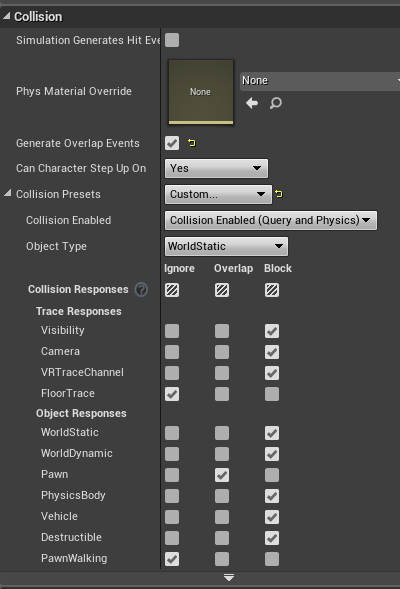 tired tree
its world static
I used to filter by IsSimulating, but that was too expensive so I reduced it to the PhysicsBody collision channel
tired tree
yea
shouldn't really have things you pickup on world static anyway generally
more so because that is the only channel that the pawn capsule collides with by default
without changing settings
jaunty shell
oh 
@tired tree I have a weird behaviour with physics objects and a blueprint I made btw
made a combo so you can grab something then snap to predefined places
with a trigger to determine when to snap the actor
in 2D mode it works perfectly
but while in VR it doesn't let go of the mesh when I snap it (I detached it from the controller actor as soon as it hits the trigger)
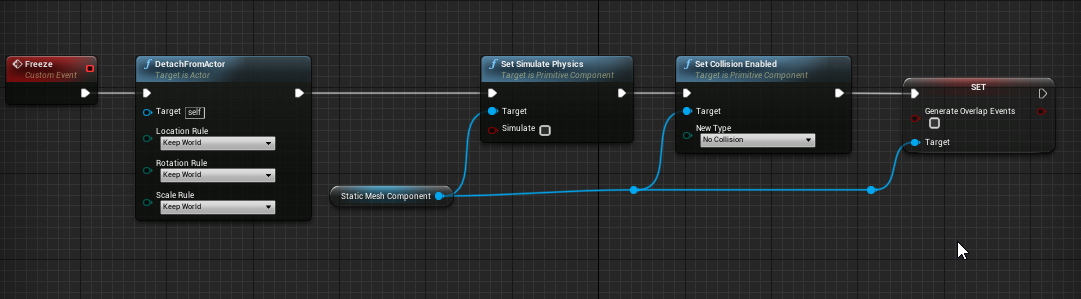
this is how I "freeze" the mesh
it only snaps properly if I released the grippable mesh with the controller (doesnt require it in 2D mode)
 tired tree
@jaunty shell unless you change the grip type none of the default grips are attachment based
so you just detaching does nothing, the controller is still gripping it and applying late updates
you need to drop the grip
jaunty shell
aah
tired tree
its doing the same thing in 2D, there just isn't a late update to make it visible
tired tree
i'll go to PM
jaunty shell
thanks
 runic cedar
Sorry, but can I create an application for daydream and gearVR ? And if its possible create daydream or gearVR level with mobile map, or AR map. From widget switch levels. I hear its impossible to make another levels when i have mobile VR level.
And how can i migrate gearVR pawn to another project ? Because its engine files and i cannot migrate to my new own project
sturdy coral
has anyone noticed the editor starting steamvr even if launched with -nohmd as of 4.20?
mighty carbon
how can I render out stereo equirec from the level and then setup stereo sky sphere using that equirec (probably converted into 2 mono cubemaps) on another level ?
pearl tangle
@mighty carbon there is the inbuild stereo panorama renderer that you can use. Then you just merge the material into a single 1 and you can do some bits in the material itself to alternate what each eye sees. I did some stuff with that before for playing 3D videos but that was a fair while back so dont think i still have it lying around
mighty carbon
is this still valid https://api.unrealengine.com/INT/Platforms/VR/StereoPanoramicCapture/QuickStart/CreatingViewerMaterial/index.html ?
Here we will create and set up a new Material to view our stereo screenshots.
@pearl tangle ^^
pearl tangle
yeah that sounds about right @mighty carbon
 native cedar
sup guys
native cedar
u guys doing anything cool? I am optimizing gpu in a psvr porting and I kinda wanna die
 wicked oak
@native cedar meanwhile im doing 120 fps
im writing a guide for it, maybe it can help you XD
native cedar
omggggggggggggggggggggggggggggggggggggggggggggggggggggggggggggggggg
vblanco u r the best
120 fps on psvr?!?
wicked oak
yes
mighty carbon
Don't you use unlit materials @wicked oak ?
wicked oak
no, its a custom shading model
that keeps lightmaps
i was experimenting with photogrametry for game levels

Cathedral UE4 Simplification - 3D model by vblanco (@vblanco)
this one is rendered with an unlit material
the idea is to use it for the "vistas" in the map
like HLOD more or less

 jaunty shell
:p
wicked oak
pointcloud for the central building
i wanted to mesh it to have it as a LOD
and save a LOT of geometry
had some issues turning it into a mesh
photogrametry doesnt like hollow meshes
in theory, taking this tech to the absolute extreme, i could have DWVR running on Santa Cruz
btw thats 60 million points
this stuff is putting my pc on its knees. 32 gb of ram aint enough
wicked oak
first time im actually chugging on mem
jaunty shell
and TBH 128gigs would be the sweetspot
might sound like a gigantic amount, but damn clouds are memory expensive
VRAM too
wicked oak
Magic Leap opened preorders
USA only
motherfuckers

The Verge
We tried the $2,295 Magic Leap One Creator Edition, the debut product from mixed reality startup Magic Leap — and found an ambitious vision facing serious technological challenges.

 covert moth
I would tell you what it's like, but $2,295 is a little steep for just showing it off in discord and never touching it again 😛
jaunty shell
😂
mighty carbon
Damn, steep price
wicked oak
its hololens 2.0
pearl tangle
yeah thats half the price of what it cost for me to get the hololenses when they came out
jaunty shell
magic leap is a massive scam anyways
I dont understand how they got so much funding
and gave birth to something that is already kinda obsolete
wicked oak
literally hololens 2.0 lol
if microsoft comes and announces the actual hololens 2.0
it would be better or equal to magic leap
just from the "typical" tech improvement year over year
pearl tangle
microsoft hasn't mentioned anything they have been doing on the next updates for hololens oddly enough
granite jacinth
Dude. That's funny. So doubt many of you are in SC. But they might not ship here at all
pearl tangle
they will be using their own delivery guys. They come out there with a large and a small headset, measure you and then give you the correct size
well I am in Singapore. Oculus doesn't even ship here still...
granite jacinth
Lol
jaunty shell
wot
granite jacinth
WTF
jaunty shell
couldn't make a single one with a larger adjustment ?
pearl tangle
i just tried my old office in chicago and it goes there
granite jacinth
This company is really not trying to win any hearts
pearl tangle
this is considered the DK1 of their hardware though to be fair
granite jacinth
No....
Is it considered FULL Commercial Consumer Retail
As they explicitly wrote
wicked oak
paper launch
granite jacinth
Creator's is the same thing consumers will get in the future
wicked oak
being THIS limited is essentialyl a paper launch
given the level of limitations, i gues they have very very few units
barely a few thousands
pearl tangle
"creator edition" because in the paid 1 year membership you get with it, it allows you to publish to their app store
granite jacinth
ROFL. That store is going to be sparse
granite jacinth
A shame they didn't provide Dev kits to devs to at least prime the market
pearl tangle
they did
granite jacinth
Very few
pearl tangle
just not to indies
wicked oak
im in a chat of basically all important VR gamedevs in spain
granite jacinth
Who would have done things with it
wicked oak
some of the people very popular, like one guy is working on the VR department of Firefox
granite jacinth
We will see how much gets done in the next 6 months
wicked oak
or the creator of Dreadhalls
and no one
got a magic leap
and what is more, no one knows anyone who got one
pearl tangle
i know a few people that had them for the last 12 months
granite jacinth
Well. Doesn't matter now. It's out finally. Price is stupid (wasn't really a surprise), units are limited, and they don't ship everywhere in the USA.
granite jacinth
This launch of theirs is poop
wicked oak
Santa Cruz to MR is like a direct step
granite jacinth
Rated: F
pearl tangle
quite doubtful. I think oculus will stay firmly in the VR space for a while. AR tech is stll just too tough to get to a point where its consumer friendly
granite jacinth
AR tech IS going to be huge...and will probably destroy VR
But as the Magic Leap just proved....
wicked oak
AR definitely is the future
granite jacinth
It's going to be a long while
wicked oak
i have 0 doubts about it
the isolation part of VR is a huge issue
for more than "hardcore gaming"
but AR?
you can replace the smartphone
you can replace tablets
you can replace PCs
i have the image of coming to a PC desk, and i have no monitors
i just spawn the screens in the air
and i still have a desktop pc, a keyboard, and a mouse
its just streamed to the glasses
pearl tangle
https://www.youtube.com/watch?v=YJg02ivYzSs all seen this 1 i assume?

Hyper-Reality presents a provocative and kaleidoscopic new vision of the future, where physical and virtual realities have merged, and the city is saturated ...
granite jacinth
TBH. AR is going to be huge because of parties or just being able to interact with the real world while others are still around you
And influence
pearl tangle
well AR is going to be huge for things other than gaming. VR is just touching on that space and it's already way more lucrative than gaming anyways
pearl tangle
VR for enterprise, is more lucractive than VR for gaming
granite jacinth
As in, you make more money in Enterprise
granite jacinth
But I wouldn't say it's more lucrative
wicked oak
some of the best contracts ive got were for marketing purposes
granite jacinth
It's only for developers
In that one case
But developers can make good money in VR games
Depends on what they want to do and if they enjoy it
pearl tangle
yep i was previously in the marketing space and we did over $2.5mill in 2 years worth of marketing work in VR with 6 guys. But that is still dwarfed in comparison to other areas such as military and engineering
wicked oak
military is going to fucking love AR
becouse you can now play battlefield in a field
when in full gear
wicked oak
with AR the military can do drills were they are in a field doing a march and they get attacked by bots or some shit like that
pearl tangle
yeah can't really talk about much at the moment but there is likely going to be a group of military contractors doing stuff with Epic and integrating in dozens of multi million dollar simulators all through unreal
granite jacinth
Since they require a security clearance, which I've had, so easy for me.
pearl tangle
especially in places like singapore where the government has funded for a full 3D scan of the entire country with very high detail
wicked oak
@pearl tangle wow
like google maps 3d mode on crack
im guessing they are using LIDARs?
and point cloud reconstruction
pearl tangle
always a good time to be getting into this sort of technology anyway. Gaming might be the initial use case for stuff, but enterprise will be where the majority of the money sits
pearl tangle
yeah they are doing lots of stuff. Any new construction being done has to provide detailed 3D models to the government
and aside from that they are using the new versions of the google street view stuff to do lidar + image scans of all the streets. and doing hundreds of laps of aerial flyovers
pearl tangle
keep in mind singapore is only about 70km from east to west and 30km north to south so it's a bit easier
wicked oak
like robots that can navigate even the interiors of buildings
pearl tangle
well i was in talks with the power company to then use AR and VR to vizualise in realtime energy usage and substation issues on that
wicked oak
specially dystopian given singapore is a dictatorship
pearl tangle
you can also show in realtime bus, trains, planes. everything else for data viz that requires maps information.
but then also you can train self driving vehicles from the scanned information rather than in the real world. Then since the real world is the same environment they can operate a hell of a lot better faster
wicked oak
nifty
mighty carbon
AR will never destroy VR
AR is never going to be a gaming thing, while VR is the gaming thing.
So when AR is as affordable and easy to use in daily life as smartphone, it will replace smartphones
pearl tangle
the point is that AR will completely replace smart phones
so that $50billion dollar gaming market for smartphones will transition straight over to AR. The people who use computer screens, also gone. Why bother with big monitors that take up space when you can have holographic screens attached to your eyes. the designers that currently use VR for stuff, all move over to AR instead because its more collaborative and efficient
mighty carbon
that's not even close - replacement of the screens
pearl tangle
AR is easily going to eclipse VR for pretty much every market. Maybe hardcore gamers stay with VR but thats going to be about it really
it's not far away at all
mighty carbon
I never really saw VR as anything but gaming
(replacement for PC / console gaming )

We went behind the scenes to try Magic Leap's AR headset.
looks like crap
pearl tangle
have you used a hololens or magicleap before @mighty carbon ?
granite jacinth
I used hololens once at school
It was pretty nice. I mean, I always see things for how they are, especially if you're first to market. I don't focus on the limitations.
But..fuck magicleap
They had so much money
And they produce...that thing
Even after (for sure) digging into hololens and seeing how its works
mighty carbon
@pearl tangle no
pearl tangle
id wait and try it out first. The field of view is the only thing that is disappointing. Initially they were planning 75 degrees
granite jacinth
But this is coming from the guy who hated VR
and all the attention VR was given
(and didn't use one until 2016)
pearl tangle
oh they have improved on hololens in a lot of ways. Just more subtle ways that you would only notice by wearing it for a decent amount of time. Hololens is not great to wear for more than 10 minutes really. and it's hand tracking is average, but moreso intentionally limited by the small field of view meaning that things cant exist within arms reach
mighty carbon
I mean, with the hardware specs under the hood, all those images look like shit.. ARKit and ARCore stuff look a ton better, especially with shadows and incorporating real-life lighting direction into the CG image
granite jacinth
I don't doubt that they haven't improved on it @pearl tangle , that's not my point. It's how much they improved upon it. At least from a developers viewpoint.
I haven't seen one favorable review so far on Magic Leap
pearl tangle
yeah i think they have done a poor job of marketing it unfortunately. I would hand in my hololens for a magic leap today, no questions
granite jacinth
But damn...every freaking review is like 30 pages long today
pearl tangle
but 1 would definitely hope that a next version is not too far off
pearl tangle
once they can get below $1500 and get the FOV up over 90 degrees then i can see things taking off big time
granite jacinth
When's that going to happen?
In another 5 years?
But anyway, if they gave me one for free. I'd make them a few good games to play with 😃
But overall, little PO'd they wouldn't even be able to ship to me even if I wanted to buy one today.
pearl tangle
hopefully. who knows with this tech really, things are definitely advancing big time. I am constantly amazed at the quality with the new single camera AR tech. Got a Facebook AR project at the moment and thats incredibly surprising
hah give it a couple of months and I am sure you can get 1
and if you want to get me 1 in exchange for a hololens I would happily oblige 😉
granite jacinth
Ha.
wicked oak
they have gogle behind
granite jacinth
Oh shit wtf
wicked oak
remember that
granite jacinth
$495 for the "pro dev package" ?
wicked oak
microsoft is microsoft, Apple is working on their own AR device (utmost secrecy), and this is the google branch
pearl tangle
google is also working on their own stuff btw
granite jacinth
Whatever happened to Tango?
pearl tangle
they scrapped tango and shifted everybody to ARcore
granite jacinth
hmm, not a bad choice
wicked oak
ARCore doesnt need special hardware
and works just like tango
Tango was essentially kinect
pearl tangle
which is unfortunate but they wanted to match apple and get the mass market instead of enterprise. Even though their head of AR marketing kept trying to push that route
they even had a "tango on a chip" thing already done and working. Throw a few of those on a drone and you can map a city with a drone swarm in a week. Instead of the $170 million dollars it cost singapore to fly planes back and forth for a year
granite jacinth
TBH, even if ML2 comes out under $1500 and is at 90 FOV, I don't think it'll get traction
Look at the VR market now
And we have $200-400 hmds now
No, if they want to do anything, they need to do like Meta2
Which no clue what happened to them either
mighty carbon
it's the mindset, which is slow to change
granite jacinth
Meta2 was $900
wicked oak
nah its Apple
granite jacinth
And around a Hololens 1.25
pearl tangle
yeah those are useless for enterprise applications. Hololens is already doing quite well in the enterprise space. To huge companies like BMW, Mercedes etc a few hundred bucks difference on a piece of hardware doesn't make a dent. Productivity increases can be in the hundreds of millions if they don't have to build an extra prototype and can progress designs faster and better
wicked oak
the second apple comes with AR, everyone will lose their shit
pearl tangle
yep
granite jacinth
Apple definitely can push some new tech
jaunty shell
cannot wait to see the first reviews of that leapmotion AR headset
this one has some very good potential
pearl tangle
exactly why google was waiting for apple to do their AR stuff. They knew it was coming, they wanted apple to get it to mass market. Since google needs to deal with the fragmentation to get stuff out they couldn't get it mass. But apple can get the attention, then google can capitalize on it
jaunty shell
looks goofy though
granite jacinth
Leapmotion... I need to get on that
jaunty shell
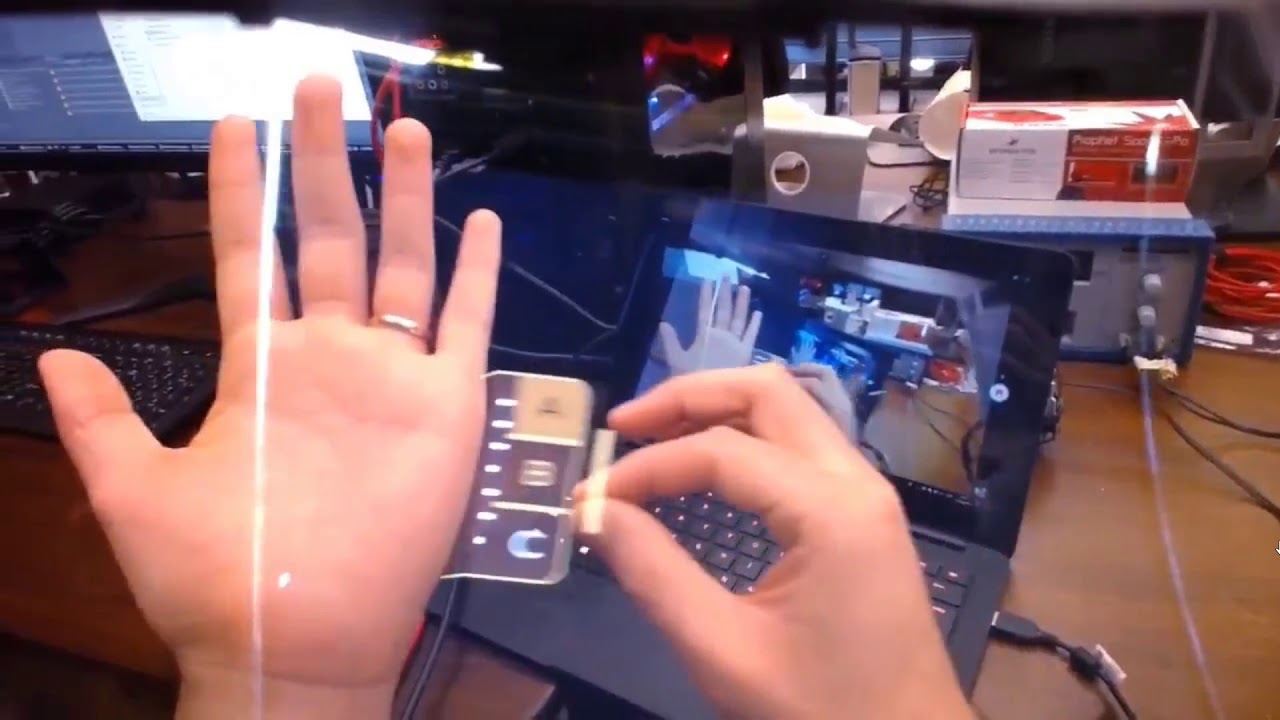
This video was posted on Twitter by @keiichiban who is working at Leap Motion designing UI solutions for augmented reality. He was using Leap Motion's new n...
dat fov 🤤
and its got some goddamn good occlusion
pearl tangle
yeah the whole peppers ghost quality though is not so great. But certainly interesting what they are doing
jaunty shell
yeah projecting the image on glass sure has some color/contrast flaws
pearl tangle
hololens and magic leap can do that tracking technically to that level, the problem is the FOV on the things and the convergence issue. So they actually remove objects from view when they get too close
wicked oak
magic leap is using some kind of weird transparent screen
look at the photos and videos
pearl tangle
yeah its pretty much the same as hololens
which is quite different to what they were originally planning which was more of a fiberoptic projection system. They couldn't scale it down small enough in time. But that's how they got their funding, their visual quality was a mile about what hololens had
pearl tangle
well their original prototype that got the investment was not a headset
 soft beacon
Does anyone know how to make yoru character mesh face the direction you are walking once you move? I have it where whenever I start to move forward, it will go the direction my camera faces, but the mesh always aims the original forward position
mighty carbon

UploadVR
A smattering of news outlets including Wired, CNBC, The Verge, Wall Street Journal and MIT's Technology Review were granted Magic Leap One demos in connection with the availability of pre-orders.
no one got mind-blown with ML1
daring mural
@soft beacon Is your character not rotating with you or is it facing the wrong direction all the time
sturdy coral
fix to prevent steamvr launching when not actually being used:
diff --git a/Engine/Plugins/Runtime/Steam/SteamVR/Source/SteamVR/Private/SteamVRHMD.cpp b/Engine/Plugins/Runtime/Steam/SteamVR/Source/SteamVR/Private/SteamVRHMD.cpp
index fc9869b..ce19f45 100644
--- a/Engine/Plugins/Runtime/Steam/SteamVR/Source/SteamVR/Private/SteamVRHMD.cpp
+++ b/Engine/Plugins/Runtime/Steam/SteamVR/Source/SteamVR/Private/SteamVRHMD.cpp
@@ -267,8 +267,9 @@ public:
                {
                        // HACK:  Temporarily stand up the VRSystem to get a graphics adapter.  We're pretty sure we're going to use SteamVR if we get in here, but not guaranteed
                        vr::EVRInitError VRInitErr = vr::VRInitError_None;
-                       // Attempt to initialize the VRSystem device
-                       vr::IVRSystem* TempVRSystem = vr::VR_Init(&VRInitErr, vr::VRApplication_Scene);
+                       // Attempt to initialize the VRSystem device. Can still query the adapter luid when initialized as VRApplication_Background, and that way
+                       // it won't launch SteamVR until later in FSteamVRHMD::Startup.
+                       vr::IVRSystem* TempVRSystem = vr::VR_Init(&VRInitErr, vr::VRApplication_Background);
                        if ((TempVRSystem == nullptr) || (VRInitErr != vr::VRInitError_None))
                        {
                                UE_LOG(LogHMD, Log, TEXT("Failed to initialize OpenVR with code %d"), (int32)VRInitErr);
and to prevent the steamvr adapter from being chosen when launching with -nohmd:
--- a/Engine/Source/Runtime/Windows/D3D11RHI/Private/Windows/WindowsD3D11Device.cpp
+++ b/Engine/Source/Runtime/Windows/D3D11RHI/Private/Windows/WindowsD3D11Device.cpp
@@ -703,7 +703,11 @@ void FD3D11DynamicRHIModule::FindAdapter()
 #endif

        // Allow HMD to override which graphics adapter is chosen, so we pick the adapter where the HMD is connected
-       uint64 HmdGraphicsAdapterLuid  = IHeadMountedDisplayModule::IsAvailable() ? IHeadMountedDisplayModule::Get().GetGraphicsAdapterLuid() : 0;
+       uint64 HmdGraphicsAdapterLuid = 0;
+       if (!FParse::Param(FCommandLine::Get(), TEXT("nohmd")))
+       {
+               HmdGraphicsAdapterLuid = IHeadMountedDisplayModule::IsAvailable() ? IHeadMountedDisplayModule::Get().GetGraphicsAdapterLuid() : 0;
+       }
        int32 CVarExplicitAdapterValue = HmdGraphicsAdapterLuid == 0 ? CVarGraphicsAdapter.GetValueOnGameThread() : -2;

const bool bFavorNonIntegrated = CVarExplicitAdapterValue == -1;```(roughly the same thing needed in VulkanRHI.cpp, WindowsD3D12Device.cpp, MetalContext.cpp)
wicked oak
prepared to test gameplay on dwvr120 fps on 4.20
turns out ALL navigation meshes are nuked
from the engine
obligatory WHAT THE FUCK
sturdy coral
@wicked oak I think its in a plugin now
sturdy coral
so do magic leap actually have variable focus?
or is it just hololens with a little more FOV?
sturdy coral
ah:
Magic Leap theoretically features multiple focal planes that let your eyes focus more normally than with other mixed reality headsets. But the images weren’t realistic enough for me to judge how well that was working.
from the verge article
wicked oak
tfw shits broken
using gpu replay (like renderdoc) to see wtf is happening
even the unlit hud is broken XD
wicked oak
ill try to repeat it later
its when loading from a real level back into the main menu
i think the IBL lighting of the meshes is just broken
volumetric lightmaps
potent gust
@fleet veldt So i tried the code from epic. The issue is still present.
Has anyone been able to fix this controller jittering issue on the Oculus Go?
fleet veldt
@potent gust hmm you're using 4.19.2 binary? o.O wait a minute are you talking about the thumbpad issue or just the 3dof tracking for controller?
potent gust
Anything else? Like is the headset view backwards or something too?
Lol
Anyway, did you get around it somehow?
I downloaded the source from epics github repo.
4.19
fleet veldt
so the thumbpad one is this.. https://www.youtube.com/watch?v=VhSspoKEmRw&ab_channel=tmektmek

start about a minute in
i'm just making circles around the edge of the trackpad circle with my thumb
but it often loses track of my thumb and jumps to (0,0) and it will do this thing were the whole north quadrant wont' respond at all
potent gust
Oh. so this i think i;'ve got around without even knowing it.
Im lerping the values on its final use param
This of course after having to make custom OnHover/Swipe events
fleet veldt
i mean.. but if you use thumpad to say move your character forward. it will sometimes just never register a touch north/forward. yeah for swipe events it's usually ok but not as a direction controller
i've seen it in unity games too
so it's not even just an unreal issue
potent gust
Yeah, so put in a finterp right after you grab the axis values. It works.
fleet veldt
but anyway yeah i don't really have any 3dof controller jitter on 4.19.2 like i did on 4.20

Added oiled/dry sections to lanes and having the rotation axes of the ball set by turning your wrist during throw. These combined allows for hook shots near ...
potent gust
Damn. It does work.
So im also using @tired tree VRExpansionPlugin. Iv basically taken the VRMotionController component from there. You think that could be the reason why?
fleet veldt
certainly would be worth making a new simple pawn with a camera and a motion controller component and seeing what you get
potent gust
Lol. Was JUST doing that. Suddenly realised im being really silly.
fleet veldt
this is what you're getting when you mean jitter right? where the controller will just randomly jump around like half a foot or so https://www.youtube.com/watch?v=foYXEANDmRg&ab_channel=tmektmek

Getting weird flicker (positional offsets) of the motion controller occasionally in Unreal Engine 4.
potent gust
Yeah. This exactly.
Heres something super strange. Just tried with the standard motion controller. Jitter still exists. However, i put a simple thumbpad tracker on touch as well. It works fine for me.
I think Oculus wants us to put our project files together to be able to properly use our Oculus Go's. Actually a genius business plan if you think about it.
tired tree
@potent gust my custom controller is a subclass of the default one, generally if there where tracking issues it should persist across the engine default one as well since I try to stick to their implementation there. It may be that it is losing tracking and resetting to relative pos 0 when tracking is lost, other engine implementations likely leave it in the last known good position instead when that happens.
I had to specifically go in and alter the camera component to stay in position instead of jumping to 0 when tracking was lost.
potent gust
@tired tree Aah. Ok. Was considering it only since it seems like there is some base class difference between the Motion Controller that @fleet veldt and i have. So you are saying that this is most likely happening because tracking is getting lost along the way?
Like maybe a bluetooth connection issue that may or may not be specific to a oculus go model?
tired tree
not entirely sure how far the pose estimation for the go controller goes tbh
i would assume snapping to 0 wouldn't bring it off frame
never looked into it
tired tree
mm
nope it doesn't set position if it returns no tracked state
no code change there from .19 to .20 that I could see with a glance
potent gust
I dont understand how this is possible. How can the controller work fine everywhere else, and not work only in UE4 (some people only apparently) and sometimes Unity
tired tree
really curious how it is even flickering
that would more likely be a bad position than an empty one
potent gust
Why would that happen though?
tired tree
dunno, lots of causes there, the real question would be: why isn't it handled cleanly
they are doing checks for IsTracking already
mighty carbon
motion controller in Go has some issues in the d-pad and will be fixed via firmware update..
perhaps someone needs to report, with repro case, this issue to Epic/Oculus too..
potent gust
where did you read this?
fleet veldt
here's the ovr dev forums' topic on the touchpad https://forums.oculusvr.com/developer/discussion/66821/oculus-go-controller-touchpad-issues-discussion
Oculus
Join the Official Oculus Discussion Forums and talk about Oculus Rift, Oculus Touch, Samsung Gear VR, and virtual reality.
a non-UE4 game you can see this in in pinball fx2. you can use the touchpad as input for the left flipper and it will often not register events.
potent gust
Ooh. Thanks. Will check this out tomorrow.
fleet veldt
but also google "oculus go touchpad issues" you'll find a lot of people saying the same issue
(I still love my oculus go though!)
you can't beat what they've packed in there for $200
potent gust
Yup. Mordentral here is the creator.
quiet swan
really
have you use it
we are have a hard time
we are trying to load it up but we cant get it open
where is the template
where can we download it?
we have downloaded a couple of them but none of them seem to have this template in it
we downloaded the 4.20.0 - 07/18/2018 - Full Binaries and Source Package
we did the whole c++ thing in visual studio generated the files and build the solution with visual studio
but still our unreal project says the plugins are installed it shows up but they say we need the template so we need to find this template but we none of the downloads we tried make the template show up, is there a way to check if the template is there?
daring mural
Not sure how to approach this
The only way to make this grip accurate would be to rotate the weapon higher but then it wouldn't have the same angle as every other gun with a standard grip/handle
quiet swan
sinn do you use the VRExpPlugin?
daring mural
Yeah
daring mural
1 sec I'll link you it
quiet swan
that has all the blueprints so I can use the features the directions are just for the visual studio and dont give links to the files
daring mural

Hg repository hosted by Bitbucket.
quiet swan
so I download this? https://bitbucket.org/mordentral/vrexppluginexample/downloads/
Download repository 303.9 MB?
quiet swan
but what about my project?
daring mural
Open it up on its own once you have it set up and then migrate the VR folders to your project
daring mural
Yeah there are 3 folders I think you need, anything with 'VirtualReality' or 'VR' in the name, migrate that.
The rest is default engine stuff your project already has
quiet swan
ok im going to try
do I still need to generate the files and build the solution with visual studio, or just migrate?
daring mural
After you add the plugin files (not the sample project), you need to generate project files and build the solution, yes. To be safe, you should generate the project files inside the sample project you downloaded after and then build that solution as well before migrating to yours. Then migrate and open your project up, should be fine.
quiet swan
i downloaded the file on the link, I right click the unreal project file and click generate visual studio project file, I click the sln file I click buld solution
and it doesnt work
it says it was sucessful
but unreal hangs when opening at 45%
it wont open
soft beacon
@daring mural the character as a whole rotates because forward vector moves with wherever I am aiming the HMD, but the character mesh, always faces the direction it spawned in
quiet swan
unreal cant open the files
it hangs
at 45%
and if I try to open the project file without doing the build solution I get this error
@daring mural are you still here?
granite jacinth
@daring mural obviously a design choice here. Either allow the change in rotation based on the gun or just make it so all weapons feel the same
Want it to be super realistic or gameplay easy
Another option is to modify the grip on the weapon itself
Change the angle
Again, won't be realistic based on that related life model but meh
daring mural
Was hoping to maintain realism but also keep the angles on all guns identical for simplicity, it's the most intuitive that way. You know what to expect. I might just twist the hand up but not touch the wrist and see if that works out
sturdy coral
@daring mural many people are going to ask for configurable gun angle
I'd do one configuration for pistols and one for rifles
daring mural
That's what I did
But this rifle + the shotguns
Don't have the same types of grips that ARs and pistols have
All the other rifles, SMGs and pistols share the same grip angle and the positioning works
sturdy coral
I'd probably still do the angle of barrel based on the configuration and adjust the hand
daring mural
Yeah, only choice
Not sure about configurable gun angles though since I also have a body IK system set up
And offsetting the gun angle too much would produce some weird-looking wrists with the IK system
Maybe clamp the config to 20 degrees of freedom
sturdy coral
yeah that may be enough
you can animate a pretty big difference in grip angle just in the fingers
pivot on trigger
jaunty shell
@tired tree hey man, is there a way to use sweep with the standard teleport in your plugin/template ? I can't find a way to do it after a look at the ExecuteTeleportation part of the Vive Pawn
(I need to sweep because the user will go through area triggers pretty often, and I need them sometimes as thin as a door)
tired tree
@jaunty shell that is the standard character teleport, it doesn't sweep, it does support end location blocking checks though. You can implement a dash teleport or a non TeleportTo teleport instead, or manually check collision along the path
jaunty shell
alright thanks !
wicked oak
current level of optimization of DWVR
screenshot of my most complex map corner taken at 4k
base pass running near the same lenght as depth prepass due to very clear drawcall/rasterization bottleneck
SimpleShading shader model down to 110 instructions
mighty carbon
finally, a big screen ARCore device: https://uploadvr.com/acers-chromebook-tab-10-is-the-first-tablet-to-get-arcore-support/

UploadVR
Acer's Chromebook Tab 10 is the first tablet (and Chromebook) to get support for Google's ARCore platform via an update coming soon.
how many drawcalls is each Paragon character ?
wicked oak
@mighty carbon 4-5 i think
nvm its depth prepass, maybe 10 if we count the depth pass
as far as i know i think it was Torso + Legs + Skin/face + Eyes + Hair
mighty carbon
not too bad
oh, I don't mean in your optimized renderer @wicked oak .. I meant in stock UE4
wicked oak
thats exactly what im talking about lol
mighty carbon
oh
wicked oak
Depth prepass exists precisely becouse its used in paragon
they use it becouse the materials are ultracomplex so they dont want to overdraw
tired tree
draw calls aren't the only cost for those chars ^ yeah
mighty carbon
what else? polycount doesn't really matter much on PCVR
(it does, but not as much as drawcalls)
tired tree
instructions != drawcalls
though I don't know what materials they shipped the paragon assets with and you could def rip shit out
tired tree
quite a few likely for some
mighty carbon
what's the recommended budget, like 2000 drawcalls in the view?
tired tree
they targeted 1000 in RR
wicked oak
1000 with stereo render, remember that
mighty carbon
well, if each character on average is 10 drawcalls, then it's pretty safe to have a few of them in the view
I gotta play around with Paragon assets in VR
sturdy coral
@wicked oak @motorsep depth drawcalls for multiple slots are collapsed into one as long as none of the materials are masked
@mighty carbon
So hair and stuff will be separate, but things that need a cloth shading model and a skin one etc. can be combined into one call for depth
warm lion
Anyone else successfully launched a sprite to the oculus go with a normal map lighting correctly? I've set it up to use the "Default Lit Sprite Material" as recommnded. In the viewport in UE4 and in the Flipbook viewport I can see the normals working correctly. I can move a light around and see the effect. But when I launch to the Go it is flat and not reacting to the lights. Only the diffuse it showing.
mighty carbon
interestingly enough Samsung didn't say a word about VR or AR when presenting Note 9 today :/
mighty carbon
@pearl tangle Do you think Gear VR is kinda dying off? (Samsung didn't even mention new Gear VR that can accommodate Note 9)
pearl tangle
@mighty carbon I have been saying for ages that the mobile VR in that space was dead, you didn't believe me hah
mighty carbon
in what space @pearl tangle ?
smartphones based VR ?

The initial lineup includes Dead Cells, Frostpunk, Hollow Knight, The Banner Saga 3 and many other indie titles.
another storefront that aims to dethrone Steam 😉
with horrible business model for us, devs :/
daring mural
I'm trying to switch on name based on weapon pick-ups but 'Get Object Name' returns the name of the actor in the level (with the number added to it)
How do I check object name for native BP name and not an instance of it?
granite jacinth
@daring mural Get Display Name.
granite jacinth
I always get those two confused
Get class yes
But it depends on what you're doing with it
daring mural
Using it in a Switch on Name node to set custom enums (BIK grip states in the AnimBP)
daring mural
You using VRE, yeah?
granite jacinth
Yes
granite jacinth
Nope
daring mural
I see MT using it in his own set-up in the same way without issues
granite jacinth
All works for me
 slow condor
Anyone got a crash with VR splash screen in UE4.20?
wicked oak
im reading investigation papers about TAA for vr, and i find 2 very cool ideas
the first is to modify the blending weight depending on how much the head moves
essentially, turn the TAA strenght way down if the player moves the head
to avoid ghosting and appear sharper under motion
if the player keeps the head very still, put the TAA at "normal" strenght
the other idea was to tweak the TAA filter size to correct the lens distortion
both of those should actually be pretty easy to implement. the first one should even be possible to add in blueprints
digital marlin
Anyone used vive trackers?
sturdy coral

reddit
439 votes and 107 comments so far on Reddit
switch seems way to heavy and low res to be useful for VR
covert moth
Well, that's interesting.
tired tree
@sturdy coral @wicked oak
Round-robin occlusion queries for stereoscopic rendering
With the vr.RoundRobinOcclusion flag turned on, each frame will only render occlusion queries for one eye with an alternating scheme (ie odd frames only left eye, even frames only right eye).
Additionally, the interface for class FPrimitiveOcclusionHistory has been changed along with a slight modification in its implementation. With round-robin occlusion, when extracing history entries we perform a search through the entire history to look for the oldest entry in a primitive's occlusion history.
just pushed to devVR last night
wicked oak
wow thats brilliant
not like queries are really a bottleneck in anyway ive found
in my game i run a shitton of fps and there is really barely any work on the culling even on my worst levels
@tired tree you cant do occlusion queries on both eyes at once
different eye matrices and that
tired tree
they do it on mobile
wicked oak
you CAN do frustrum culling on both eyes at once
wicked oak
becouse they dont do occlusion queries on mobile
tired tree
meant frustrum
wicked oak
yeah, frustrum is easy to do
just have a frustrum that is both eyes
quite trivial to make
tired tree
they had notes about porting that to PC
but never did
it makes sense to do, not sure why they didn't
wicked oak
rip in pieces until oculus bankrolls them again
mighty carbon
maybe they are gearing toward Santa Cruz release with this feature being added ?
wicked oak
very likely
granite jacinth
@wicked oak bankroll?
they don't need that anymore man
they got Fortnite: BR bankrolling them
RR is and probably will be the last VR thing they do
wicked oak
guess ill eventually migrate to unity
once they have ECS + render pipelines i doubt il have issue with it XD
granite jacinth
ohh?
You're throwing in the towel with UE4?
Probably financially makes more sense though
wicked oak
im 100% mercenary man
granite jacinth
Which is why Survios did it
wicked oak
i will use whatever brings me more money
granite jacinth
Yeah man, I know
wicked oak
at the moment i use ue4 becouse its a much better fit
but if unity actually gets it shit together? i wouldnt think it twice
for the dungeon game, unity would be a better fit
im using ue4 becouse multiplayer is FAR superior
like nowhere near close
and gross multiplatform for vr
mighty carbon
so are you saying UE4 gets progressively worse for PC VR with every new release? @wicked oak
wicked oak
no
its just that unity is improving quite a lot of stuff
Render Pipelines are a massive help for what im doing
and i mean massive
and the ECS would be very nice once more polished
at the moment unity still has those 2 features in "alpha", basically
just the fact that i dont have compile times is a huge help
mighty carbon
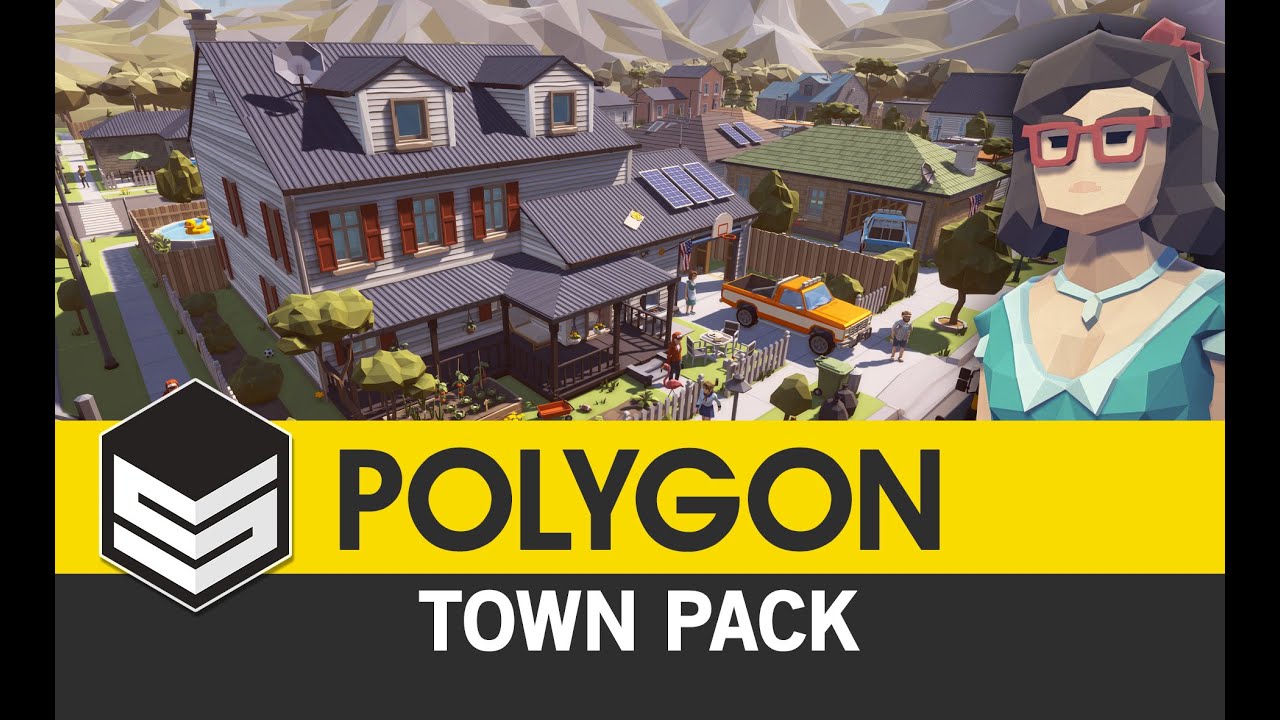
Synty Studios Presents - A low poly asset pack of Buildings, Vehicles, Characters, and Props assets to add to your existing polygonal style game. Include a d...
^^ would be good for a zombie game
oh, apparently Note 9 will get Gear VR too
warm lion
@mighty carbon hey I stumbled across a post of your about gear vr shadows. Did you ever figure out how to get shadows? I've tried static/ stationary/ moveable. I tried toggling CSM shadows. Moveable lights don't appear to work on my oculus Go at all. I just placed one in my scene and it's just completely black on the go.
mighty carbon
right, they just don't work until Oculus/Epic fix the issue
warm lion
oh wow, so no dynamic shadows?
mighty carbon
nope
warm lion
darn.
mighty carbon
Oculus
Join the Official Oculus Discussion Forums and talk about Oculus Rift, Oculus Touch, Samsung Gear VR, and virtual reality.
apparently CSM shadows work if you disablemultiview, but who wants to run without multiview?!
warm lion
Hmm I'll take a look but you're right I don't think I would want to keep that toggled off
wicked oak
wow
unity for psvr is HORRIBLE
what the hell is this, having ot implement tracking code directly with the ps4 apis
btw
no documentation
whatsoever
you have to download a random sample and see how it works
btw i had to nuke the oculus plugin from the unity project
completely
becouse it conflicted with the ps4 apis
10 out of 10
 placid rampart
Welp, that's a nice experience.
wicked oak
i mean, HMDInterface is just beyond unity expertise
fleet plume
that sounds fun
wicked oak
better have each platform have no interface, and you having to interface them yourself
good shit
fleet plume
is psvr just a regular plugin on ue4 side?
fleet plume
sounds reasonable
wicked oak
PSVR is just like the oculus or vive plugins
has a few extra platform specific functions but thats it
sturdy coral
@tired tree that looks nice, is there an equivalent of one (lightweight) draw call per occlusion query normally? Or do the queries and results get issued/returned in batch?
sturdy coral
@full junco might be interested in that feature too
wicked oak
if im not mistaken (might be) its HBZ culling through a compute shader
the trick is that you use a very downsampled and mipmapped version of the depth texture, and then try to "render" the AABB of the objects into it. You just very roughly check them
done in a compute shader for fast
can be implemented on the cpu
you dont run the graphics pipeline, its software rasterization
 full junco
@tired tree @sturdy coral thanks for tagging! that feature sounds quite great 😄 if it halves occlusion query cost, thats very useful, since those are super expensive in my game
probably spend 1.5ms or so just with occlusion queries
or 1 ms
definitely a significant saving to half that
sturdy coral
@full junco do you know the answer on my draw calls question wrt to it?
full junco
not sure if I understand your question
tired tree
wonder how it performs with fast head rotations in the leading eye
full junco
one occlusion query is 1 draw call normally
so you get a lot of draw calls when you have a lot of occluded geometry
they are relatively cheap draw calls, but still draw calls
you see them all individually in renderdoc
one of those draw calls is like 1/3 the cost of a normal base pass draw call I think
or 1/4
was a month ago or so that I last looked at that in renderdoc
sturdy coral
And most gpu cost of them is memory bandwidth right?
They read and accumulate min depth over a rect or something
full junco
I would think the significant cost of those is CPU-side since draw calls just always have overhead on D3D11
wicked oak
unreal can also do HBZ
im not sure if the HBZ is done as a coarse pass or what
its a very nifty trick that lets you cull test thousands of objects in a very short amount of time
warm lion
Okay wtf, vr camera just decided to snap to world center and not respect parent scene component rotation? Any ideas
It was respecting the parent transform and all of a sudden it just decided to ignore it and use its own zeroed out transform
daring mural
@warm lion Depends on your set-up, is this happening when you execute specific logic?
warm lion
No this happens upon launching. I have the vr camera as a child to a scene component named vr root, then that is a child to another scene component. Only this outer most scene component is any transform occurring.
I've simply moved the outer most scene component down 1000 units. It was working fine. Then I rotated the vr camera root for one moment and it broke everything. Now it won't return b to how it was before.
It seems like the whole thing is janky now and I need to remove it because it's corrupt
daring mural
Just to confirm cause this is super weird, your camera is snapping to 0, 0, 0 in the world or relative space?
warm lion
World.
Dead center. I have been using it in this nested scene component setup for several days now
daring mural
Is there any other logic in the pawn
warm lion
There's is I'll take look at the references to those three items
The odd thing though is it happened after I accidently undo several times.
daring mural
Maybe you were setting the location of your actor somewhere and when you ran undo a bunch, you stopped at a point where the location was still being set but the reference to where was gone and it defaults to 0, 0, 0?
warm lion
Man I hope. That's sounds nice
daring mural
Do a search for 'set actor location' if you're using that node and check whatever comes up cause there's no way your HMD is snapping to world center by default
sturdy coral
ah nice, blender 2.79c finally adds alpha support for vertex colors
warm lion
I can't find anything that is setting the location to zero. I've checked all three ( outer most scene comp, middle scene comp (Vr Root), and the actual vr camera). I'm only setting the offset in the blueprint transform section and it is still moving the camera back to zero.
 sly elk
WIP tool selection + some other new polish features like force grabbing: https://www.youtube.com/watch?v=CpwPA0SwhJI&feature=youtu.be

We also added a part removal, part install, and bolt breaking free sound but they are just temp sounds to get the system workign
so the sound is a bit weird in the vid
glossy agate
badass. Crazy all that runs so smooth with all dynamic lighting
At least it looks like all dynamic
sly elk
yeah, its all scalable so min spec players probably need to turn off dynamic shadows
1070+ dynamic shadows should be good
1080+ can run SSAO and supersampling at the same time
glossy agate
Nice. When is it goin to alpha?
sly elk
We aren't really following an alpha/beta dev structure but EA is soonish
glossy agate
right on. Looks great
sly elk
We have an internal milestone and then when we hit that we will discuss if we want to push further before EA
sort of depends on the cash situation
granite jacinth
@sly elk ah the Jedi hands grabbing...need to implement that into Contagion
mighty carbon
When did 2.79c come out @sturdy coral ?
sturdy coral
@mighty carbon it isn't out yet, but the feature is in for it
you can get it here (non 2.8 link) https://builder.blender.org/download
it used to be a pita to export and edit marketplace stuff that had any alpha vertex painting
mighty carbon
I usually wait for official builds
broken moat
so I'm trying to make my vr pawn a character to enable collision on the vr pawn
but the camera wont stay put where I ask it to
it either sits 8 feet above the ground on 4 feet under it
no matter what I tell it to do
anyone had this problem before and want to help a brother out?
sturdy coral
@broken moat never moved the camera, add a component in-between called VRRoot and move that instead
When you move the camera itself, as soon as it ticks it overwrites your movement with the new hmd location
daring mural
Anyone with VR multiplayer experience have any idea why my motion controllers are jittery in an online session? They're smooth for owner but when looking at other players, theirs jitter. Everything else is smooth.
tired tree
@daring mural they wouldn't....because replication of them is manual and its different for everyone
daring mural
@tired tree Is there any way I can achieve smooth movements across all clients assuming there's enough bandwidth? They feel all choked up, would be a shame if UE can't do better
tired tree
I have built in smoothing already
and its functional for everyone else
either you turned it off or you are hitting net saturation
tired tree
i would never run those at 90htz
also it should still be fine for short testing though
is anything else stuttering? may be connection saturation
daring mural
I don't know if it's net saturation, I tried it with 2 clients and with 10 clients without any difference
Everyone sees their own hands move smoothly but sees other clients stutter slightly
daring mural
Was your default 60
tired tree
think so
daring mural
I'm running this on a ded server. Local multiplayer in the editor is smooth
Is anyone else with VRE running ded?
Or Steam
daring mural
Not sure what that is, I'll look into it now
sturdy coral
@daring mural what is your dedicated server tick rate?
wicked oak
@daring mural just smooth them with Lerp
i did that in my multiplayer replication and it works fine
do not use the unreal engine built in actor movement replication for this
better to have the server writing to a replicated variable, and then everyone just interpolates to that variable
clients send their transforms to the server through a rpc
split steeple
Got the knuckles playing nicely with Livelink now 😃
Adding support to upcoming version of RunebergVR Plugin....

#SteamVR's Input Abstraction meets #UE4's Animation Data/Streaming Abstraction.
#Knuckles ❤️ #Livelink https://t.co/iEBjSP7si2
Twitter
 wraith sky
 granite jacinth
Oh..
how come this did NOT make the news today?

Patreon
Official Post from CrossVR: Dear Patrons,Your support for the past year has given me the freedom to work freely on projects that fascinated me. I even went back to University for a little while! I feel privileged that I had that freedom thanks to your patronage.This past year...
tl;dr: Revive dev has been hired by Epic Games to unfuck XR in Unreal Engine 4
tired tree
XR isn't fucked in ue4
its just beginning, and looking promising
though, with him involved, MUCH more promising, that is very good news
tired tree
there isn't an opinionm
granite jacinth
But yeah, he's going to hopefully do some good
tired tree
XR isn't "out" yet
granite jacinth
But VR is 😃
tired tree
yes
tired tree
the sandard hasn't been fully implemented yet,. kind of impossible for it to be "fucked" before it has really started
tired tree
yeah, its best possible news
granite jacinth
So, if he can have the same "freedom"
tired tree
he got a seat on discussion for XR
granite jacinth
And do whatever he needs to do
tired tree
so he knows exactly how it should work
granite jacinth
It's only good news for us
tired tree
tbh XR is going to be in great shape likely, with them implementing OpenVR Input as we speak, the workflow for the action bindings will already exist in engine for reference
and 4. (18?) i think was the merge over to XR as the interior naming convention
maybe it was 19..
@wicked oak may lose his last real reason for sticking to ue4 with XR, it will force Unity to standardize vr platforms in engine to comply
since they can all be umbrellaed under it
quiet swan
can the VR Expansion Plugin use the movement without the teleport and just walk normal?
tired tree
yes
tired tree
press the grip button to switch between example movement methods
dpad press controller oriented is the most common locomotion method
try to not use the HMD forward ones unless there is a real reason too (no controllers, or some other reason)
quiet swan
how come when i ciopied over vrplayer to my level I cant move and the guy has like tiny light sabers in his hands when i press it
he cant move or teleport
wait its working!
well at least the directional one
let me save
granite jacinth
@tired tree you ever think about a "getting started series" ?
quiet swan
yeah it would help
im trying to place a spotlight on the camera of my guy so he will have like a headlight on his head to see in the dark but the VR player start has no camera I can attach the spotlight to
how can we attach a caerma to the vr player spawn?
also if I make my own spawn, will the features transfer over to my spawn like all the grip and move features?
quiet swan
does anyone know how to bring the hands into my VR pawn so I can pick stuff up? right now it just has the controlers and all I can do is switch modes using the grip keys
granite jacinth
@quiet swan You're asking a lot of basic questions.
If you are still using the VRE plugin
Download the template
So you can look over and see how it's being done there
If you're not using VRE anymore, look at the VR Example
(just create a vr template)
quiet swan
I need a video or something like, this is how you bring your hands into the game, this is how you switch modes
as of right now its working but I dont know where to go to change settings how to turn settings on
I thought it was broken until they told me to use the grip button to change transport modes but now im lost on how to pick things up....grip is to pick things up
iim looking though videos and google trying to find something the video on the first page just went over the wsad features
 eager pine
anyone tested a bit with this
having a problem after rotating the widget
to face the player
it rotates the wrong way when tilting head
i fixed it by using the scale instead of rotator, but still its kind of moving out of its way, want it to lock on
wicked oak
@tired tree you know what would be quite neat for MR?
an engine like godot, smaller
more optimized and less overhead experiences, and the shit performance of godot with complex scenes literally doesnt matter when you are rendering 3 meshes total
for MR, i guess literally any engine would work, even something like Filament wich doesnt even have game code or physics
tired tree
@eager pine they don't use one of the rotation axis's on steamVR stereo layers, I don't remember which one off the top of my head
eager pine
@tired tree fixed it by using a widget and stereo layer, and setting texture
tired tree
I don't think that is intended btw, pretty sure it is Epic using the wrong values
eager pine
tired tree
well yeah
the one you linked earlier was supposed to be an InWorld actor
can just use a normal stereo layer for face locked
you'll have a harder time interacting with it like that, but if its just a heads up display then no biggie
 real needle
@tired tree hey there, you're the one who made the great plugin right? 😃
tired tree
i made vrexp if that is what you are asking
real needle
ah ok, i meant the adv sess one
tired tree
yes that one too
real needle
cool. used that in my game. thanks a ton.
didn't know you were doing a vr plugin that's great.
 supple drum
is anybody else experiencing problems with custom depth since 4.19?
I'm trying to implement an outline post process but the custom depth texture has both viewports combined in one
wicked oak
@mighty carbon here
mighty carbon
yeah, thanks.. Damn Discord UI
mighty carbon
I wonder if it will do VR
wraith sky

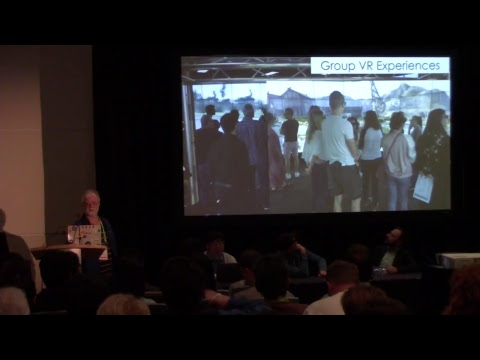
This panel celebrates the first fully functioning 3D AR/VR system: real-time, see-through, stereo, perspective display; and two different head trackers: ultr...
^ authors on the stage
granite jacinth
All you brainiacs out there... is Support global clip plane for planar reflections the only way to "allow us to get the foreground layer with a proper alpha channel - it splits the world using a plane at the HMD position" ??
This is coming from the LIV dev. Trying to see if anyone's thought about Mixed Reality or messed with it yet and if they've run into this issue before and had an alternate solution.


 sturdy coral
@daring mural the oculus debug tool has a flag to treat the proximity sensor as activated
@mighty carbon cool, thanks for the link to that
mighty carbon
lol, people in the comments 🤦
"pimping" UE4 and Epic from the stage 😄
no wonder 4.20.2 is still not out
sturdy coral
no VR Works updates in something like 9 months
mighty carbon
who uses VR Works?! 😃
for "just" 10k you can have the monster 🤑
I am guessing it's not for in-house use
nothing for VR 😦
sturdy coral
yeah, they still have another event coming up
this one was all targeted at the VFX industry I guess
sturdy coral
18.6/754/(11.8/471) = .98
no density improvement, just bigger core size
just process improvements getting better yields I guess
full junco
@sturdy coral @tired tree I wonder if it makes sense to just cherry pick those Round-robin occlusion queries from dev-vr and applying that commit in 4.19 or 4.20...
sturdy coral
I thought about trying that
full junco
its only ~150 lines of code, so almost nothing
can't have too many conflicts in there, should most likely just work..
unless it depends on other commits in some way
but I'd guess its not
sturdy coral
@full junco I'll give it a shot and let you know how it goes
full junco
I'll do too and let you know how it goes, let's see who will first find a problem 😄
sturdy coral
looks like it has a cvar too in case it causes extra popping
full junco
yeah, very easy to add a graphics setting for that that the user can set, like "perfect occlusion" vs "fast occlusion"
sturdy coral
no conflicts picking it