#virtual-reality
1 messages · Page 183 of 1
 sturdy coral
 glossy agate
Oh yeah, since you were doing that hologram stuff, you should try setting up a camera and see if you can use that new Ai stuff from facebook to get real external full body tracking
sturdy coral
I am quantizing it a lot which makes it better
but it can be really noisy especially on dark colors that it doesn't get a good IR bounce from
 tired tree
temporal filtering would make sense, you really want it to be density culled
and that would be a fast method of it
sturdy coral
you can use the IR view to see which areas will likely have the most noise
and temporally filter them stronger than others
tired tree
you can also pick the focal point and trash everything outside of a boundry box
sturdy coral
focal point like the player?
I'm using the body indexing stuff to only send the player
tired tree
ah
 granite jacinth
@sturdy coral if you get it to a good enough state, consider plugin -sell on MP
You'll easily make quite a bit from it
 mighty carbon
I wonder how many UE4 devs dig VR nowadays.. I'd like to try making some assets for MP and see I can get some supplemental revenue to fund my projects.
glossy agate
What kind of assets?
And ditto what victor said. I would like spatial audio on top of team channel so you have to be carful about talking near enemies
sturdy coral
@granite jacinth not sure i could do it all as a pure plugin without copying the existing steam one, but I guess you are allowed to bring in engine code on marketplace stuff as long as it isn't from the editor folders (for a non-editor plugin)
they messed up the implementation a bit where it won't be easy to do both radio and spatial simultaneously
at least as a plugin, that will require some engine changes
glossy agate
Yeah. I guess what I have is fine for now. Same setup as R6S. Just have to listen for footsteps, reloads, slide racks ect for position
 fleet plume
@wicked oak you don't use behaviour tree movement functions, but still use regular character controller for enemy AI's right?
fleet plume
how many can you use at once?
 wicked oak
becouse current implementation is shit
it depends on how complex the skeletons are
now that i have optimized their components, its better
remember moving objects trigger all sorts of physics recalculations
fleet plume
what do you mean with components? regular cmc or something else?
wicked oak
meshes/subactors
fleet plume
damn, need to read up on that
i guess the ue4 mannequin is also a good place to start looking at the setup, right?
mighty carbon
@glossy agate models / anims most likely. Maybe textures. Probably non-PBR style for anything at this point.
sturdy coral
another problem with Oculus via steamvr:
                        // If the touchpad isn't currently pressed or touched, zero put both of the axes
                        if (!CurrentStates[ ESteamVRControllerButton::TouchPadTouch ])
                        {
                             VRControllerState.rAxis[TOUCHPAD_AXIS].y = 0.0f;
                             VRControllerState.rAxis[TOUCHPAD_AXIS].x = 0.0f;
                        }
doesn't work well with touch controllers because you can move the joystick without hitting cap touch pretty easily
changed it to:
// Device has a joystick treated as touchpad, like Oculus Touch
                bool bIsTouchpadReallyAJoystick = VRSystem->GetInt32TrackedDeviceProperty(DeviceIndex, static_cast<vr::ETrackedDeviceProperty>(vr::Prop_Axis0Type_Int32 + TOUCHPAD_AXIS)) == static_cast<int32>(vr::k_eControllerAxis_Joystick);```

```cpp
                        // If the touchpad isn't currently pressed or touched, zero put both of the axes
                        if (!bIsTouchpadReallyAJoystick && !CurrentStates[ ESteamVRControllerButton::TouchPadTouch ])
                        {
                             VRControllerState.rAxis[TOUCHPAD_AXIS].y = 0.0f;
                             VRControllerState.rAxis[TOUCHPAD_AXIS].x = 0.0f;
}```@full junco @tired tree ^
can't remember who else is doing at least some oculus via steamvr stuff, @granite jacinth maybe?
granite jacinth
Aye. Looks nice. Never had that issue before.
sturdy coral
you'll definitely want to set a deadzone if you do that though
but you can do that outside of the plugin on the axis properties
(native rift plugin doesn't check for touch either and also needs a deadzone)
@granite jacinth someone has put up a pull request for WMR joystick support if you need that:
granite jacinth
Ah nice. Yeah. I need to do another pass on WMR
sturdy coral
I think maybe @sly elk was looking for that too
his PR hardcodes it in a way that isn't great, without actually querying the type of the axis
but I think it should be ok for all existing controllers
 broken moat
anyone know how to give the player an item belt in vr?
sturdy coral
@broken moat you can look at robo recall holsters
 alpine aurora
Im curious why there's so few VR apps that let you control a steering wheel with motion controllers
Is it a difficult/tedious interaction to program or something?
tired tree
it doesn't feel that good
there isn't any 1:1 interaction with a two handed wheel
it has to be aproximated
I prefer 1 hand on the wheel and 1 hand doing something else personally
alpine aurora
What if you just didn't parent your grips to the wheel transforn
And used the min of the two rotational deltas?
alpine aurora
also, are there any games with a motion controller -> steering wheel control scheme?
alpine aurora
i know exactly what you meant, I just don't see why it can't be 1:1 if you decouple the grip->wheel transformations
wicked oak
im going to pass the time in a travel with my oculus go, watching sword art online movie
meta
i want to see how the device works when you are in a car
alpine aurora
ie, grip movement along the wheel shouldn't be coupled directly to the steering wheel transform
it should only control the position of the grip rendered onto the wheel
wheel transformation gets applied indirectly, and from the minimum of the two grip rotations
i don't see how that wouldn't be 1:1
mighty carbon
@wicked oak you aren't the driver, are you? 😛
wicked oak
no
alpine aurora
he is
he has a panoramic camera installed on the top of his car fed into his hmd
it's like he's driving his card in third person view
wicked oak
nvidia showed literally that
a vr driver driving a real car
the driver was on the showfloor, and the car drove around the real street with no driver inside
thats going to be a important step for the "ai fleet" cars
you have a bunch of drivers on a call center wich take over the car in the case there is something weird going on
im also putting the extended lord of the rings triology on the Go
pretty sure battery wont last one of the movies
they are like 3 hours 20 minute each
holy shit return of the ring is 4 hours
tired tree
@alpine aurora because your hands aren't actually locked there
unless you literally move them at the same speed around the circumference of the wheel its not 1:1
you can do it
there are games that do
I just don't prefer it
alpine aurora
do you have names of any games with 1:1 steering wheel motion?
tired tree
not off the top of my head, there are more than a few
alpine aurora
damn alright
tired tree
lots of the lesser known games on steam with cars do it
sturdy coral
LA Noire might, not sure. It has a lot of driving.
May need one hand for shooting with it anyway
broken moat
hay everyone
need some help with something
I have a sword attached to my player
but I havnt worked out how to grab it yet
everytime I try to grab it, it just falls to the floor
my usual grab blueprint isnt usable
because its on the character pawn
can someone help a guy out?
broken moat
I cant grab my sword?
can someone help please
I have this sword on my character in VR, but I cant grab it
it just falls to the ground
 merry tusk
try creating a socket in ur bones and attaching it there ?
broken moat
any way to make it a dynamic object so its not stuck to the player?
I have the same sword in the level which I can grab and cut things with
but the one on the player I cant grab
I was hoping to be able to use the motion controllers grab function
this is the code that the sword in the level uses, but this code doesnt work for the vr character pawn
glossy agate
Some of our hostage mode mechanics with the defending team traps https://youtu.be/lURmcpX0duA

Quick look at some of the mechanics we have been working on for hostage mode https://discord.gg/WS2QR7b
 eternal inlet
@glossy agate nice with the traps!
glossy agate
Thanks man!
Running an internal test in a few min to see if its good enough to get out to the testers to start finding bugs.
Am pretty happy with the master trap class. Let’s you make a lot of variations of the traps super quick with just a few check boxes
 warm lion
I'm trying to run through the oculus go setup documentation and I can't get the Oculus Go controller to work. I assign a "motion controller" component and then a static mesh to that for visual verification. But when I launch to the Go Only the Go HMD functions as expected, the controller doesn't move at all when I move it around.
 digital marlin
@glossy agate how is the movement?
glossy agate
What do you mean?
 white sleet
Has anyone managed to launch a Distribution signed .ipa with Google VR plugin? is there any other way to have VR on iOS devices?
Blank Project on Distribution with Google VR enabled, will always crash on devices (Iphone SE , ipad 6th gen)
digital marlin
@glossy agate as in, you seem to be moving using standard movement input - how does it go? Do you feel any motion sickness?
glossy agate
I like it. Just controller oriented. Have to have it for multiplayer shooters
broken moat
anyone willing to help a guy out with some basic stuff
 digital musk
@broken moat I'll help where I can...also learning so....ask at your own risk, hahaha
When I add the Oculus Touch controller meshes into my pawn I'm suddenly unable to save the pawn, anyone able to shed some light on why this happens?
broken moat
as a vive user I cannot
broken moat
is it possible to have a weapon on the player be grabbable?
or does it have to start in the level first to be useable?
 eager pine
@broken moat yes
i guess
never tried it directly, but had a BP as a child actor in there that acted like a gripable mesh
broken moat
so you need to make a child actor to make a skeletal mesh grabbable?
broken moat
nope should I be using it?
 jaunty shell
it adds a lot of nice stuff
tired tree
I wouldn't use child actors if I were you, just spawn a normal actor
child actors are really buggy, even now
broken moat
but I cant grab a skeletal mesh
tired tree
you are trying to attach a skeletal comp
you need to implement the interface of epics on it
their default is to attach a full actor
you can totally attach a component
broken moat
which interface?
tired tree
epics pickup interface?
but from that SS above, it looks like you wanted additional data, like a slicing plane
so yeah, an actor is what you need
broken moat
I already have the pickup interface
it still doesnt allow me to grab the sword
the sword is on the player and attached to a shieth, its all skeletal meshes
eager pine
is there an easy way to see bones ingame?
suspecting one of the bones falling out of place and cant determine unless im in game xD
tired tree
@broken moat are you overlapping? or tracing, to get if you should pickup
jaunty shell
@eager pine showdebug bones
broken moat
I have the event pickup and event drop interface
and the motions controller pickup that came with the vr template
eager pine
@jaunty shell is that a ingame command or what
when typing it before starting it doesnt work
eager pine
ooh okay
seems like they removed the feature
to bad, but doesnt seem like a bone related problem anyway
jaunty shell
what about a.DebugDrawSimpleBones ?
jaunty shell
oh well
eager pine
well, my real issue is this tough maybe i can get some help around it
soz i have a skeletal mesh in my vr character, that has two bones named left_socket and Right_Socket, which i added inn an array
Based on the index passed in it will choose between which to get from the arraya
now, with index 0, it seems fine, everything works, the actor is hanging
thats for the cable end
but, when 1 index is passed inn, the skeletal mesh actors that is constrained is jumping around in an axis at 0,0,0
Now the name is correct, and i dont understand why the first one constrains, but not the second index
broken moat
omg the installation process for the vr extension plugin is a freaking nightmare
mighty carbon
o.O
tired tree
@broken moat lol, no, its standard compilation, there are precompiled binaries as well...but they aren't suggested
also you might want to consider that I don't suggest it for beginning developers
kind of feel that it is "over suggested"
weird...i used Suggest 3 times there
broken moat
too late I'm already half way through the installation lol
tired tree
I need to wake up
mighty carbon
@broken moat saw your post on the forums in the WiP section.. You might want to post screenshots or a video of your progress there.
broken moat
havnt made a lot of progress yet mate, nothing to boast about anyway, just made a dash mechanic and smooth loco and a sword that can slice meshes so far
mighty carbon
oh 😦
broken moat
I'll post up a proof of concept once I get the drawing mechanic done
cause then I'll start doing some level design so I have something nice to show off
all in good time
these things take a while
yeah I tried to install the vr extension plugin but it gave me errors and the engine couldnt even run the project anymore
lucky I keep backups
it also doesnt have a download for 4.19
only 4.18 and 4.20
so I'm scrapping that idea
mighty carbon
I had no issues getting it running by simply following instructions O.o
broken moat
i obviously did something wrong
but I dont see why it couldnt just be on the unreal marketplace like the other plugins
tired tree
the default / master branch is the current engine version
and it is a free open source plugin that gets constant updates
marketplace can't keep up with it
not all plugins are on the marketplace fyi
trying to port back features to old engine versions while maintaining it on the marketplace would be hell
regardless, you are using runebergs plugin
that is a better starting out plugin anyway
 placid rampart
Hey guys, is there a reason why my it looks like i have 30cms of height on the preview?
I'm using a rift
sturdy coral
@placid rampart are you using the standard VR template, or your own setup?
placid rampart
My own
sturdy coral
you have 30cms of extra height
or your view is 30cm above floor
?
@placid rampart
placid rampart
30cm above the floor
sturdy coral
are you attaching to a character capsule component?
placid rampart
i have a scenecomponent that i'm using as VRRoot that is attached to the character capsule
and my camera is attached to the VRRoot
sturdy coral
you have to set the headset in floor origin mode
and put the VR root at the bottom of the capsule
put it at the center then in constructor or at beginplay move it down by subtracting result of scaled capsule half height node
tracking origin is the other node
sturdy coral
oculus and vive have different default origins
as long as you set it to floor both will be the same
vive defaults to floor, oculus defaults to whatever the hmd was calibrated to (like in cockpit games)
placid rampart
Oh ok, i thought i was going to do a hmd check
sturdy coral
but both can be set to floor and then should act the same
placid rampart
Okie, thanks
sturdy coral
then yeah make sure your VRRoot is actually on the floor
you may want to take off an extra inch below the capsule bottom, because character movement component keeps it a bit off the floor
placid rampart
I'm gonna set the VRRoot Z location at the constructor
VRRoot->SetRelativeLocation(FVector(0.f, 0.f, GetCapsuleComponent()->GetScaledCapsuleHalfHeight() * -1));
sturdy coral
yeah maybe take off 2
CMC uses:
const float UCharacterMovementComponent::MIN_FLOOR_DIST = 1.9f;
const float UCharacterMovementComponent::MAX_FLOOR_DIST = 2.4f;
so the capsule hovers 1.9-2.4cm off the floor
sturdy coral
yeah even that small amount can be noticable with picking up objects and stuff
though you should probably always have a little bit of magnetism for that kind of thing to where it wouldn't matter
WindowsMR seems to get the floor wrong and a lot of users of it don't fix it
placid rampart
Well, that's a problem for future Blue 😛
Present blue didn't even knew how to be tall until moments ago
mighty carbon
Sooo, Google added support for second motion controller to Mirage. Oculus meanwhile removed support for side loading from Go.
 undone socket
hi how are u
 wraith sky
Got myself a Vive.
mighty carbon
did you have Rift before @wraith sky ?
wraith sky
@mighty carbon nope
mighty carbon
well, I guess welcome to the club, but IMO you bet on a wrong horse
wraith sky
i still hoping to get a rift from oculus as a dev
mighty carbon
ah, I see.. makes sense
sturdy coral
@mighty carbon where did you see that about sideloading?
 west atlas
Hey, anyone have pointers on getting 3d assets looking good at around the 2000 cm range? Is the mesh resolution the main factor? Not sure what the main cause of this blurriness is.
west atlas
I'll try it. Had it on MSAA and it wasn't any better than default.
mighty carbon
I mean, if you have forward rendering and MSAA, it should be sharper than deferred + TAA.. That's with default screen percentage settings.
also, anything at the distance will look blurrier than up close..
physical screen res isn't that great, plus textures are mipmapped and you have SDE playing tricks too
west atlas
I had forward rendering and msaa ... for some reason my stuff was blurry at a distance but crisp up close
Ugh, lagging from recompiling shaders. Would mipmapping make the entire model look more blurry though?
SDE?
mighty carbon
screen door effect
west atlas
Would a lower resolution model look worse further away than it would up close?
it's pretty low poly
mighty carbon
perhaps you can post comparison screenshots here to show what you mean by "blurry" exactly ?
west atlas
Yeah, might be a few. I have 3000 shaders left to compile. It looks more blurry than your standard SDE I'd say, but I'll try to capture it for ya.
west atlas
I don't know... maybe it is just the screen door effect. I feel like I've seen things look more crisp than this at this distance.
mighty carbon
why don't you put some of them close to the cam and some in between closest and farthest objects. Also place some other model (a few UE4 cubes) next to those far away objects.
you don't have any reference points there, so it's really hard to say why it's blurry
do you have DOF on ?
west atlas
Ok I'll toss in some for reference... this is what they look like up close just fyi. And what is DOF?
west atlas
I know, already had the screen there so figured I'd give you as much information as I can haha.
Oh, new project using the default pawn. Let me check the world outliner.
should I crank up the aperture?
sturdy coral
unchecking it just means that one won't override the base
@west atlas try the VR template and see if things look better from far
you can disable dof through pp settings but it can be a pain
sturdy coral
@west atlas you can try r.DepthOfFieldQuality 0 on the console to see if that is the issue
west atlas
sturdy coral
@west atlas what HMD/GPU are you on?
west atlas
oculus rift, nvidia gtx 1070
sturdy coral
have you tried robo recall and other UE4 forward rendered stuff that uses MSAA?
and does that stuff look blurry to you too?
west atlas
yeah robo recall looks sick
no, not like this
i'm wondering if i just need more vertices in the mesh
sturdy coral
@west atlas I think I see your problem
the pins seem to have geometry for the stripes
are they connected in UV space to the rest of the pin mesh, or are they separate islands?
west atlas
They are separate material layers, but I didn't touch UVs on this. Just doing a quick prototype to figure how to go about models and textures for vr
sturdy coral
if they are separate islands, you aren't going to benefit from mip mapping around them, geometry doesn't downsample in the same way as textures
west atlas
So yeah, separate islands
sturdy coral
you'll end up with just the MSAA samples around the edges of the stripes, 4 samples per pixel
west atlas
Hmm, would disabling mipmapping possibly fix it? I don't think I'll need aggressive mipmapping at least to start.
sturdy coral
no, I think the problem is you aren't getting real mip mapping
so you are essentially relying on tiny geometry features that won't hold up well in the distance
west atlas
let me check the textures that came in from maya
sturdy coral
one thing you can do is just bake a lod with the new mesh simplifier
it will bake it down into a simplified mesh with a generated texture that should mip fine
you can't do subpixel details with geometry very well
west atlas
Oh yeah, I forgot... these are not even using texture samples... Just materials each with a simple red/white base color.
sturdy coral
yeah same issue
if choosing the materials is based islands of geometry
then you aren't going to get good results when it gets down to distances where the features are in the subpixel regime
west atlas
so are you referring to this "Bake out materials" from the sm editor?
sturdy coral
@west atlas no, let me see what it is named
@west atlas but think of it like this: where the red meets the white, without AA you would only get a stair stepped line inbetween. As the red got to the point where it was smaller than a pixel you would just get some random pixels near it
with 4x MSAA it is the same thing, just with the edges sort of supersampled
where red meets white you will either have 1, 2 3 or red subpixels downsampled into 1
so only three levels of gradiation along those edges
west atlas
ah
sturdy coral
whereas with mipmap sampling of the region it is prefiltered
west atlas
Wait so -- I could alleviate this by simply importing proper textures right?
sturdy coral
you could have 256 levels of variation or more depending on textures and bit depth of output
@west atlas yeah, but having the textures laid out in a UV map where the red stripes are adjacent to the white pin
if they are separate islands in the UV map you will get no benefit
I think the auto lod generation might just use your existing textures
west atlas
The cube edges dont look as bad inside the headset, the pins after a certain distance almost look like they switch to a billboard or something
New UVs... Let's give this a try
mighty carbon
I'd make a plain color texture and test with that - I think something is going on with geometry rather than textures
west atlas
Yeah, I noticed my smoothing groups weren't imported with the obj for some reason. I'll double check the import settings.
mighty carbon
that has nothing to do with blurry contours
west atlas
I think the pins look a little better now that I remembered to export with smoothing on. What would cause moving jaggies around the edges of the cubes?
west atlas
yeah pins look like I'd expect now
mighty carbon
I still have a feeling you are running TAA instead of MSAA
(although I haven't worked with Rift for some time and in Go everything looks sharp enough)
west atlas
I'm using MSAA
When I turn my msaa count up i get the jagged edges on the boxes as you can see there. And this one below is with r.MSAACount 0
glossy agate
Is that your uv for the whole pin? That round picture?
sturdy coral
@west atlas MSAACount 0 activates TAA
glossy agate
If it is that is really not how you want to UV an object
sturdy coral
Count 1 is no msaa, and Count 4 I think is the max (beyond that no added effect)
west atlas
@glossy agate Yeah I'm aware those aren't ideal UVs hahaha. It's working ok though since it's basically a solid color with no fine grained detail. I'll have to go back and do it right if I plan on adding scratches, etc.
glossy agate
Ah ok. Was gonna say right where your stripe is supposed to go Its super cramped so that may be part of the issue
west atlas
@glossy agate Do you know how to successfully unwrap a sphere? 😛
(I'm on to the bowling ball part) -- this was a nightmare last time I did a skydome
glossy agate
I use max and there is a sphere unwrapper tool. For stuff like human heads. You can probably just do a left/right unwrap and flatten it out though cause it’s simple
west atlas
Hmm seems splitting the sphere in half and doing a planar projection works as you'd expect
glossy agate
Ah yeah there you go. Easy. Should do the pin the same way
west atlas
Well close, but no cigar
broken moat
just for anyone struggling with grabbing a skeletal mesh, what I decided to do is when the grab is done, I set the visibility of the object to false then got it to spawn a static mesh to replace it
tired tree
that shouldn't be required
broken moat
but it works well and the code is very simple
so I'm keeping it
however
now I need to find a way to make the spawned item go to the motion controllers hand
anyone able to point me in the right direction
?
broken moat
anyone available to help a brother out?
sturdy coral
@broken moat that's not a good reason to keep code
if you don't understand why something wasn't working that should have, you might be missing a big bug in how you are doing things
even if you have a work around
to make it go to the hand as in what? go to a certain location? animate flying to the hand?
broken moat
nah just go to the hand location upon spawning into the world using a button
like I said the code works way better doing it this way anyway
I would have run into problems later on if I was attaching it to the actor
broken moat
not working
can someone tell me what I've done wrong here
this isnt working
tried every different node trying to make it work
and nothing is working
I want to make it so the function only works when the right controller is overlapping the katana
 pearl tangle
@broken moat why don't you just use the "on overlap" event?
broken moat
Because I also need the grip button, I need both
pearl tangle
@broken moat so on the overlap do a check to see if the grip button is also held?
broken moat
yeah something like that
I'm not confident setting up overlaps because I tend to get it wrong 99% of the time
watching a tutorial atm to try to understand it better
but I will still need help getting this to work
digital musk
Hi, can anybody perhaps help with vr experience projected onto a cylinder? At our local university they have a stereo projection cylinder room...they use Unity to build projects for the room but I'd like to try and do something in Unreal
broken moat
I got it to work
I needed to set the vr controllers grabbing cube collision to a pawn
it all works now
next part it to learn how to make the spawned sword spawn where I want it to
broken moat
so I almost have my drawing mechanic done on my game, only problem now is that once the sword is drawn its not lined up correctly with the hand
I have it in the hand but its not lining up where you grab it
ahhh so close yet so far away
broken moat
anyone got any tips for making a spawned item attach to the motion controller at the right angle?
broken moat
I'm using a world transform to get the right location and rotation
but it need to be rotated 180 degrees
from the world transform
what math function do I need to use to do that?
 balmy surge
any one know how to produce something like this? https://www.youtube.com/watch?v=cz7ybx2C_xk

This video shows how to use spline to draw any shapes of items you want,It is useful in VR games
eager pine
Does anyone know why this makes my vr player twitch when grabbing something climbable?
sturdy coral
@eager pine you may need to set up a tick dependency
force motion controllers to tick first or vice versa
eager pine
really
cant use any interp method
like so it smooths into that location without it being a delay later
no that wont work
hmm
sturdy coral
@eager pine does your character/capsule have gravity affecting it?
or did you change the movement mode to something other than falling?
eager pine
climbing mode
@sturdy coral its basically tagging the socket and making the hand mesh a child of that
tired tree
climbing mode doesn't exist on normal character oppne
just mine
and you aren't using the built in node for it
eager pine
then no, im not changing the default movement mode
tired tree
you need to
walking / falling have other forces in play
if you are making a custom climbing mode you are best off using the custom movement mode setting
or even movement mode None
eager pine
yeah, did that doesnt make a real impact, the movement node is changed to custom when climbing mode is activated, and i dont think im using the normal vr character
Well, ill try the tick dependecy maybe 😃 @sturdy coral
tired tree
when climbing mode is activated it turns on the CustomMode(CM_Climbing)
you know that you can reference the sample content right?
eager pine
isnt the sample content the vrbasecharacter?
eager pine
well, i think i moved away from the template a time ago
tired tree
it doesn't matter, if you are using the custom movement mode
you should be using the setup for it
i'll send you some stuff in pm
eager pine
nice thanks
mighty carbon
to some of ya here who are into MP/networking: https://forums.unrealengine.com/unreal-engine/events/1502961-unreal-engine-livestream-networking-in-4-20-the-replication-graph-july-19-live-from-epic-hq
Unreal Engine Forums
ReplicationGraph_TW.jpg
WHAT
Working on a multiplayer game? Are there many players in-game together? On this livestream, our networking team will demonstrate
fleet plume
ah ok
i'am already failing on the basics of figuring out which combination of authority/proxy relates to what when running as listen server + additional client
tired tree
I seriously doubt anyone is currently working on a UE4 VR game with enough scale to require a UReplicationDriver implementation
the core setup was created for fortnite
and the graph is an instance of it
fleet plume
yeah i misunderstood the title/topic
glossy agate
Now we can all pivot to VR BR
fleet plume
like why would a player controller be IsLocalController = false but Role = ROLE_Authority and RemoteRole = ROLE_none ?
i don't get it
tired tree
player controllers are on the server AND on the owning client
remote clients don't get another players controller
so in that case, its a clients controller, on the server
fleet plume
with a listen server and one additional client, which of the clients is it?
fleet plume
i think i've understood the proxy role backwards
or maybe it's just confusing me especially here because the PC has a special ... pardon the pun ... role
thanks 😄
sturdy coral
one thing I've needed that may be handled by the graph is a multicast RPC that skips owner
you can do it for properties with COND_SkipOwner but I don't think there is a good way for RPCs
broken moat
good morning fellow devs
 soft beacon
Does anyone know how to focus the Android camera during AR use? My trackers work on screen, but don't work up close on a card because they are blurry and it cannot detect feature points. I cannot find a way to manually focus or enable autofocus. Thank you ahead of time, this is a big issue for me
 daring mural
does anyone have experience with blending animations on a body IK system in VR?
daring mural
yeah I'm using a state machine with a blendspace
but when I strafe left to right, the blend is instant and looks strange
a bit jittery because it happens so quickly
 real needle
@daring mural you can set the interpolation speed for the blendspace
daring mural
I'll look into that, thanks a lot
digital musk
I downloaded VRExpPluginExample but in the project it seems like the pawn isn't setup....anybody can help me with a quick start guide?
 terse moon
I'm looking to invest into a VR headset for development, which one would you recommend?
jaunty shell
depends, what is your budget, what is your final use, what is your available space ? 🤔 @terse moon
broken moat
get a vive pro
slice
hay fellas trying to get my sword to cut the procedural mesh, can someone tell me what I've done wrong here?
terse moon
@jaunty shell no more than £500 games and possibility of training enviroments - space as in size of room?
jaunty shell
yup
terse moon
2m by 3m is the study but got bigger rooms i could move into
jaunty shell
My rule of thumb is the vive, although at that price in the UK I'm not sure if you can find new ones
the rift is too much of a hassle to setup for roomscale tracking imo
even if its cheaper
if you can import a Samsung Odyssey from the USA that's also a good option
if you want to move your playspace a lot go for Windows Mixed Reality devices
terse moon
The normal vive is on offer in the Uk at the moment
jaunty shell
but honestly after trying out the dell WMR headset, I cant really recommend them unless its the samsung one (which has the same screen as the Vive Pro)
oh well go for the vive then
how much is it in pounds ?
jaunty shell
convenient 😄
terse moon
indeed
jaunty shell
I've had the vive since the pre orders at home, and we have 2 OG vives and 1 Vive Pro at work
its a great piece of kit
terse moon
is the vive easy to set up with unreal?
jaunty shell
yeah its all integrated
terse moon
Iv used rift in the past but that as far as it goes 😅
jaunty shell
havent used a rift since the early CV1/DK2 days
I'm not fond of their software layer tbh
steamVR is a lot more straightforward
terse moon
Bigger market to oculus?
jaunty shell
samey I 'd say
the rift is a lot cheaper and has the support of facebook
so it gets more marketed to the mass
the vive was the first room scale device on the market
and they have the support of Steam and Valve
but the HTC part of the device is possibly one of the worst part 😅
dont buy from HTC, buy from a big retailer instead
jaunty shell
their support is abysmal
from what I've seen/heard
better to deal with a third party seller
in case you have to use warranty
terse moon
ill prob go though amazon
jaunty shell
never had any problem with my day 1 vive though, so probably a vocal minority
terse moon
Only takes that 1% of bad orders to taint a company
jaunty shell
eyup
the worst is when that 1% gets bad feedback from the company
thats where shit hits the fan 😅
terse moon
Yup
terse moon
Awesome! Thanks 😄
jaunty shell
oh no not you :p
right so you had the Vive user pov, now you will have the Rift user pov
that way you can balance your choice
terse moon
Okay I'm waiting to hear the pitch 😃
mighty carbon
I just woke up 😂
jaunty shell
😄
mighty carbon
So, ask questions and I'll try answering
Unless you are dead set against Oculus and Facebook. Then no pitch will change your mind.
terse moon
Iv used oculus in the past at university and i have facebook
I have an open mind, i just wanted to know which was the best for development on unreal
wicked oak
its oculus by a massive difference
much better software, and you dont have to deal with steamvr
plus its a lot easier to put on-off
you also have official ue4 builds by oculus,wich have the absolute latest fancy stuff
jaunty shell
you do have to deal with the oculus software
wicked oak
nowhere even close to as bad as steamvr
steamvr fucking with the audio gets me every time
jaunty shell
I dunno I never really had some issues with steamvr
have you changed that in the audio parameters ?
the output switch
wicked oak
yes
jaunty shell
what bothers me the most with the rift is the multiple camera setup and the fact that facebook owns them
I'm fine with the rest
its a good headset
terse moon
So it boils down to the cameras and practicality for myself as they both have pros and cons
jaunty shell
basically how do you want to setup your VR space and what kind of software experience do you prefer
terse moon
Which is the easiest 😂
mighty carbon
From consumer perspective, with Rift you can play both Steam and Oculus games natively.
Customer service and dev support are better with Oculus
wicked oak
and software is better. ASW and all that stuff
also bit higher resolution on the center (but lower fov)
jaunty shell
yeah pixel density is a tad higher on the rift
wicked oak
i have both, and once i got my rift i never plugged the vive again unless i needed to test if stuff works
mighty carbon
Also Oculus paid for hotel and passes for OC5 for Start members and gave free hardware
Touch controllers are far better than wands
mighty carbon
But they aren't available for most yet
jaunty shell
but yeah the wands are so so
mighty carbon
So it's still wands vs Touch
wicked oak
literally dont have the space for them
jaunty shell
send em to meee @wicked oak
wicked oak
(but in my case they errored, twice)
at first, i asked for 1 oculus with touch, from VRMultigames to port it
then they sent me 2 (becouse its the "default pack")
and they errored
and sent me that thing twice
now, i applied to oculus start, and even told them i already have a go
they still sent me the oculus start pack (oculus rift + oculus go)
and then they errored again, and they have sent me another one
jaunty shell
dafuq
and here they are asking for an executable made for the rift/go when I apply to Start
terse moon
send me one if you like 😅
jaunty shell
which I honestly cant do since... I'm asking for devkits

also we don't "sell" VR stuff, we sell real estate and buildings by showing em in VR (maybe that's why they wont send us anything
but we still do R&D for BIM and AEC CAD
terse moon
is there a link to the starter pack?
jaunty shell

Today, we're launching a developer program called Oculus Start aimed at providing access, support and savings to qualifying VR developers.
you have to create a dev account, fill the form and send your project to them
terse moon
I'll need to make a project first 😅
jaunty shell
yup, so you'll have to get your own headset pretty much :p
mighty carbon
You don't have to have VR project
You can show them PIE gameplay
Or even pitch a concept (but live project you are already working on is a way better)
terse moon
Ill need a headset to make what i want to showcase a demo
jaunty shell
@mighty carbon why did they send me this then ? We have reviewed your application and decided to leave your application open as you need to have a VR build uploaded to your Oculus dashboard before we can proceed.
terse moon
i could pitch the idea but i think it would come across better as a live demo
jaunty shell
I've linked a VR video of our projects
mighty carbon
I didn't have VR project
jaunty shell
they still want me to upload a VR build out of it
mighty carbon
Also, I am a solo indie dev. They maybe figured your company can afford to buy Rift? 😉
jaunty shell
well.. 😬
yeah maybe
but I'm also the only VR dev in a company of 1800 employees
only VR/realtime person even
even if we have budgets for hardware, its not like we can buy every device ever released
I'd rather be indie tbh
terse moon
The information been great, the start up one sounds very interesting
eager pine
Trying to make climbing work by movement
anyone know what im doing wrong here
Hand mesh is attached to the closest socket
This just makes the player stand still, moving hands doesnt affect character
got it working finally 😄
tired tree
@digital musk the character is spawned in the player controller, depending on if you are running VR or not or are in a 2D preview PIE or not
so that 2D testing can be done
digital musk
@tired tree Thanks, I've been able to get going enough to get by. Does your expansion have a good method for doing a laser pointer mechanic...the debug line from widgetinteractioncomponent is quite terrible, making a big blob where it hits
digital musk
@tired tree can you point me to where in your example project this is done..?
tired tree
in the teleport controller
mighty carbon
finally 4.20 has been released
mighty carbon
😦
tired tree
the largest things got fixed at least
oh, they mention the mixed reality capture plugin
it was too alpha before this
mighty carbon
GC performance improved x13 (supposedly)
tired tree
"some operations"
regardless anything is good there
and I would imagine they had massive issues with the fortnite spam building
mighty carbon
not much VR related stuff
tired tree
??
mixed reality alone is good, they added a ton of fixes, they added magic leap support, and now DedicatedServer toggle works in VR PIE....
might want to read down through the VR section at the bottom....
not to mention that the general performance improvements are good for VR too
glossy agate
Yesss. Dedicated server toggle in PIE is gonna be really helpful
mighty carbon
I mean, nothing for mobile VR in particular and nothing for forward rendering.. I don't see anything about that in the notes
tired tree
yet they had a ton of mobile improvements across the board
mighty carbon
right, but is it relevant to mobile VR ?
tired tree
yes?
mighty carbon
I am sure most of those are for ES3.1
tired tree
it is performance improvements
and debugging
and LOD
but no, they probably didn't get to your 1% of the engine that you were looking for
mighty carbon
right, but too many times all the improvements failed to render in VR using multiview.. So it might be fine in single view (non-VR) rendering using ES3.1, but fails miserably (crashes) in ES2 in VR using multiview.
tired tree
not talking about rendering changes
I am curious about the proxy lod in ES2
it "should " work
i'll pm you a list you likely missed, its pretty large
mighty carbon
yeah... I am guessing that anything that isn't related to rendering should work
probably would free up some of the CPU resources
sturdy coral
@mighty carbon oculus start agreement says you have to have a VR app published on a store, you had your gearvr app
@jaunty shell ^
sturdy coral
the nDisplay stuff looks nice, cool, VR CAVE setup: https://dnnrz1gqa.blob.core.windows.net/portals/0/Images/Builds/4_20/nDisplay_01.JPG?sv=2017-04-17&sr=b&si=DNNFileManagerPolicy&sig=ZnFwypFbSJlLpeS7sl4pgIcyXqMcMr0Hc3qmPZvd6ps%3D
 glossy agate
Like that movie "Gamer"
sturdy coral
need to see if there is a way we can tweak this to be lower than 2ms for VR:
Garbage Collection Improvements
The "BeginDestroy" phase (unhashing Objects) now runs across multiple frames, using no more than 2 ms per frame. The cost of unhashing Objects will no longer be included in the same frame as the "Mark" phase and reachability analysis.
jaunty shell
Haha I knew it thanks for the heads up @sturdy coral :)
sturdy coral
I wonder what this is, I don't think I saw it in the main notes:
New: Added new static mesh instancing tool.
would be nice if you can auto-instance some stuff
placid rampart
Hey guys, which axis map should i use for thumbstick locomotion using the touch controllers?
I've tried using Motion Controller Thumbstick Y/X and it doesn't work for me
glossy agate
Converting to instances meshes on the fly will be sweet. Currently I have just been using the foliage tool to place single objects and move them around
sturdy coral
New: Added support for clipping ProxyLOD geometry. Clipping volumes will now be supported by the HLOD generation system allowing the user to specify regions to be clipped from the proxy geometry.
before they had the ability to clip against landscape
no you can clip against any volume which is nice
if you have meshes extending through the floor it can make them use less polys/less screen space in z prepasses
mighty carbon
@sturdy coral how do you clip meshes with landscape or other meshes ?
sturdy coral
@mighty carbon the mesh combiner and hlod proxy generation have support for it
sounds like from the change clipping volumes might have already existed but just weren't supported for hlod
mighty carbon
by "mesh combiner" do you mean thins https://docs.unrealengine.com/en-us/Engine/Actors/Merging ?
sturdy coral
@mighty carbon yeah, at bottom of first screenshot you can see landscape culling section
it will clip any triangles below the landscape
mighty carbon
nice
sturdy coral
New: Included a sample replication graph for ShooterGame.
mighty carbon
it would be even better if UE4 generated material for seamless blending edges of the mesh into landscape 😉
sturdy coral
nice, I always merge in shooter game so that will give a good example of using the rep graph hopefully
placid rampart
Turns out no input from the touch controller work. Any sugestion?
sturdy coral
@placid rampart does other input work, such as mouse and keyboard?
(on the same pawn)
placid rampart
just figured it out. The touch controllers only work when the HMD is active
I was testing stuff without putting it in my head.
sturdy coral
@placid rampart ah, I don't remember how but there is a way to make them work without it
but they don't track, you just get joystick etc.
eager pine
Upgrading big vr project from 4.19 to 4.20 confirmed without problems feeew xD
placid rampart
I'm putting my finger in front of the hmd sensor, lol
eager pine
Proxy LOD Improvements has probably a greater impact on performance for vr positive?
sturdy coral
@placid rampart oculus debug tool has an option for that 😛
eager pine
on a positive side* Memo to self: Learn to write english
placid rampart
Will take a look at that. thanks
sturdy coral
New: View frustum shadow caster culling for Point Lights and Spotlights.
fleet plume
valve's skeletal input is not in this release, right?

reddit
19 votes and 3 comments so far on Reddit
tired tree
think they upgraded openVR to .11
yeah
it was .11
no skeletal
they need to hit .15 for that
eager pine
how did he achieve that?
sturdy coral
@eager pine the newer api gives you a list of skeleton bone transforms
and I think skinned render models
New: Improved SteamVR compositor timing and overall engine performance through more accurate CPU utilization data.
Code scheduling functions? New: Made Oculus code-scheduling functions available for use by other XR Plugins through the "Head Mounted Display" module.
tired tree
the controller one is an estimation on buttons being pressed
you can do that without their API
but the point is that you can use the same API for knuckles and the like, and treat them the same
@fleet plume
and that is where it really shines
with the full finger curl detection
 spare yew
I've not been able to get Google's Augmented Images sample to launch on my Samsung Galaxy S9+ - I've tried with 4.20 and Google's branch of 4.19. It sticks on a black screen for a couple of seconds and then crashes.
soft beacon
I can't get Image Databse to compile on 4.10
4.20*
only on the AR Core 4.19 with ARCore 1.3
 serene rivet
Has anyone managed to get the Handheld AR template project deployed on 4.20?
Mine keeps crashing on device start - no permissions popup
 dusky moon
New 4.20 without Substance Plugin yet equals depression
 uncut silo
hey guyz
Is it me or why the hell input is not working on Vive controllers if SteamVR launched after UE editor was launched?
If SteamVR was launched before UE editor all is great
If after, UE editor don't even see one of the Vive controllers
Did you notice that issue?
jaunty shell
its always been like this afaik @uncut silo
steamvr can only hook to software that are started after it I think ?
uncut silo
@jaunty shell is it a bug or what? spent about 2 hours yesterday figuring out why my input suddenly stopped working
uncut silo
got it, thanks!
 wintry escarp
I didn't think a version went final until it had everything the previous version had
eager pine
Translucency Support for Instanced Stereo Rendering - This is confirmed not to reduce cpu cost at all in our vr project 😦
tired tree
how much translucency do you even have?
eager pine
enough that it should make an impact
tired tree
it would have to be a ton
sturdy coral
translucency usually isn't writing velocity or shadows so may have 1/3rd less draw calls to begin with
(static objects shouldn't be writing to velocity either though)
eager pine
no changes in drawcalls either
mighty carbon
I assume it should be noticeable in scenes with a lot of foliage
eager pine
its a open forest with grass, trees, so it should be, we were at 4500 draw calls before activation of stereo rendering, we were at the exact same after activation, and same cpu and gpu cost
mighty carbon
report it as bug to Epic and see what they have to say about it
sturdy coral
@eager pine ^ surely you use masked for that, not translucent
unless you are on forward maybe.. translucent for that stuff would look bad with TAA
anyone know what the Quail platform is yet? I think we saw some references before, and 4.20 has more references to it in ShooterGame
seems to be vulkan based
so not MS; maybe magicleap?
mighty carbon
yeah, Magic Lead said Vulkan is highly recommended when devving apps for Magic Leap One
so it's gotta be it
Oculus
Join the Official Oculus Discussion Forums and talk about Oculus Rift, Oculus Touch, Samsung Gear VR, and virtual reality.
lol
Oculus is going to be behind everyone when it comes to mobile Vulkan
sad.face
eager pine
yes masked
sturdy coral
@eager pine masked would have already been instanced on prev versions
mighty carbon

Virtual reality headset shipments are up thanks to Oculus Go, but VR fever in general is cooling, according to market intelligence company SuperData. Oculus Go made an estimated 289,000 shipments i…
 chilly ocean
4.20 and 4.19 have severely damage the performance in VR on my end. When things were running about 45-50 frames per second, it now runs around 2 Frames per second and I really can't tell why it's happening when I try to load a new map.
Has anyone had problems with VR and using the new pixel density/screen percentage system?
eager pine
well, for my experience, we accualty bumped up our pixel density to 1.5 without notice of any performance impact
just a slight 1-2 fps drop, other than that the benefits from it was worth it
eager pine
we are at a stabile 45 fps now, it went from 45 to 42 on a increase of 0.5 in pixel density, but this is a higly optimized scene for vr, where everything is taken into consideration and a 1070 gtx as well
eager pine
stable 45 fps, where there are no big drops or anything, consider that we havent optimized the trees yet
we are aiming for atleast 60, we want 90
tired tree
with what platform?
eager pine
htc vive, its recommandation is 90, minimum we experienced is 60, but once the player climbs it hits about 90-120 or something, really the level designers work
eager pine
really
tired tree
regardless, I REALLY wouldn't suggest aiming for 60fps unreprojected with vive
eager pine
All i can say is budget, but would really know more about this reprojection
tired tree
well you can start by not setting 2.25x the perceived resolution as your default
at the very least until you hit 90 constant IN VR
1.5 density is not a 50% increase
eager pine
well, we are currently looking at optimizing the scene, but as for now there are something bottlenecking the performance
sturdy coral
@eager pine you should set your density to around 1.0 because steam vr also applies its own multiplier by benchamarking your GPU by default
if your game is more expensive than the average game, set it below 1, less expensive set it above
also unreal pixel density is measured on a different scale than steamvr (pixel count increase is quadratic with changes to ue4 pixeldensity, linear with changes to steam vr application resolution setting)
eager pine
@sturdy coral So how do you compensate for the terrible pixels that happend when you go under 1? Going under it doesnt increase that much for us
unless we go to around 0.5 or 0.6 its a double fps suddenly
sturdy coral
@eager pine that's because you mostly either hit 90 or you get 45
that's why you see a sudden doubling
turn on async reproject and turn off interleaved and I think you can more smoothly fall between
spare yew
Does anyone know how to work with image tracking in ARcore in 4.20?
Looked at Google's sample and set up the arcore image database but my device just isn't tracking any of the specified images. It doesn't help that autofocus isn't working - on that note, is there any way to set focus and exposure on android with UE4?
chilly ocean
@tired tree I tried setting up the pixel density stuff. This only seems to be a problem when transferring to another map...
If I run VR individually in a map, it is fine - but when a server tries to move to a new map, this problem occurs
tired tree
@chilly ocean you don't have any console nodes firing on level load do oyu?
chilly ocean
No
tired tree
check the state of your console commands after loading
not entering a value will show you what they are
make sure they are the same
40-50 was low to begin with though
chilly ocean
The value for PixelDensity is 1 and ScreenPercentage is 100
Yea, I know it was low to start off with, that I know is a map problem that I am trying to fix from 4.18, but to drop to 2-20 fps is ridiculous and unplayable
Alright this is weird
So this chart : https://www.unrealengine.com/en-US/blog/significant-changes-coming-to-vr-resolution-settings-in-4-19 says the original settings in 4.18 and compared them to 4.20

Unreal Engine
We’re adding a new cvar in 4.19 to control panel resolution for Unreal Engine 4 (UE4) Virtuality Reality (VR) projects and moving away from referencing Screen Percentage. Here’s what you need to know.
I changed the ScreenPercentage value to greater than 150 (I have Oculus) and it works well - is at 90fps
tired tree
mmm
does your log when it is bugging out have "recreating render depth buffer" messages constantly?
chilly ocean
Right now or when it was at the original 100 value?
tired tree
original
chilly ocean
[2018.07.19-23.55.46:426][516]LogHMD: Allocating Oculus 2720 x 1600 depth rendertarget swapchain
[2018.07.19-23.55.46:484][517]LogRenderer: Reallocating scene render targets to support 1024x1024 Format 10 NumSamples 4 (Frame:19).
[2018.07.19-23.55.46:484][517]LogRenderer: Reallocating scene render targets to support 2720x1600 Format 10 NumSamples 4 (Frame:19).
That would be occuring every frame
tired tree
yeah.......
that has been an issue recently with ue4 and oculus
it gets triggered by stereo layers too sometimes
chilly ocean
I don't get this message when I set the window percentage higher, but that will ultimately mean lower performance, right?
tired tree
yes, but doubt you need to set it much higher
it needs to be reported, I don't have easy access to a rift to reproduce for them
mmm, something close with scene captures and non VR has been reported
slated for 4.21?
if someone reported it on oculus with a hard reproduction project i'm sure they would move it up into a hotfix instead.
mighty carbon
you can't repro the issue ?
tired tree
i don't keep a rift at my desk
sturdy coral
Change 3932819 by Daniel.Wright [...] Removed instanced stereo support for the light cull grid - will have to be reimplemented without changing SRV's per draw
trying to see if it was reimplemented later..
^ @wicked oak
commit 25eed01c
mighty carbon
is it a reason for a sad.face ? or nothing special and impactful ?
sturdy coral
I don't know what it falls back to when there is no grid, seems like it would slow everything down since it is used in forward and deferred; it might have just been an intermediate commit where they brought it back later
mighty carbon
btw, if the fix doesn't make it into launcher's version, it will always be in Oculus repo
(4.20.x repo)
dusky moon
So, Any1 knows if DynamicRes is supporting SteamVR now in 4.20 ?!
pearl tangle
@spare yew it just worked straight away when I was using the google example project and the google branch of unreal a couple weeks ago, i assume 4.20 uses the same build as that
ah just realised that was a mile higher up
wicked oak
@sturdy coral if there isno grid, directional lights still work
grid is exclusively for point and spotlights
mighty carbon
so, how is 4.20 so far ?
tired tree
its pretty high performance, they nipped a lot of issues in the bud
mighty carbon
nice
how do you folks handle multiple levels in a single player game ? Is it one persistent level with bunch of sub-levels or bunch of persistent levels (that might include sub levels) ?
If latter, how do you handle player beating level and exiting it and then how do you handle loading next persistent level ?
glossy agate
Mine are multiple levels. When a match ends, I just Travel all the players back to the level and GM select room which is its own level
My load times between levels are only 2-3 seconds
fleet plume
for a second i thought by GM you meant game master
though game mode is not bad either 😄
mighty carbon
@glossy agate so you load default (persistent) level where players dwell until match is selected and then move players to the selected (another persistent) level ?
mighty carbon
hmm.. it seems to be multiplayer thing
glossy agate
For single player you would just use the open level node easy peasy
If it’s just smaller chunks for each arena like mine is it’s easier and clean
And if you needed persistent stats to carry over you could just store them in game instance and they will persist the whole session
mighty carbon
what happens to the the level player was on before opening a new level ?
glossy agate
What do you mean?
glossy agate
@granite jacinth come back kid! Saw you got up to mostly positive. Good job man 👍
granite jacinth
Ho hohohohoh
Lot of freaking work to get it here
I am very happy
@glossy agate thanks 😃
 smoky zenith
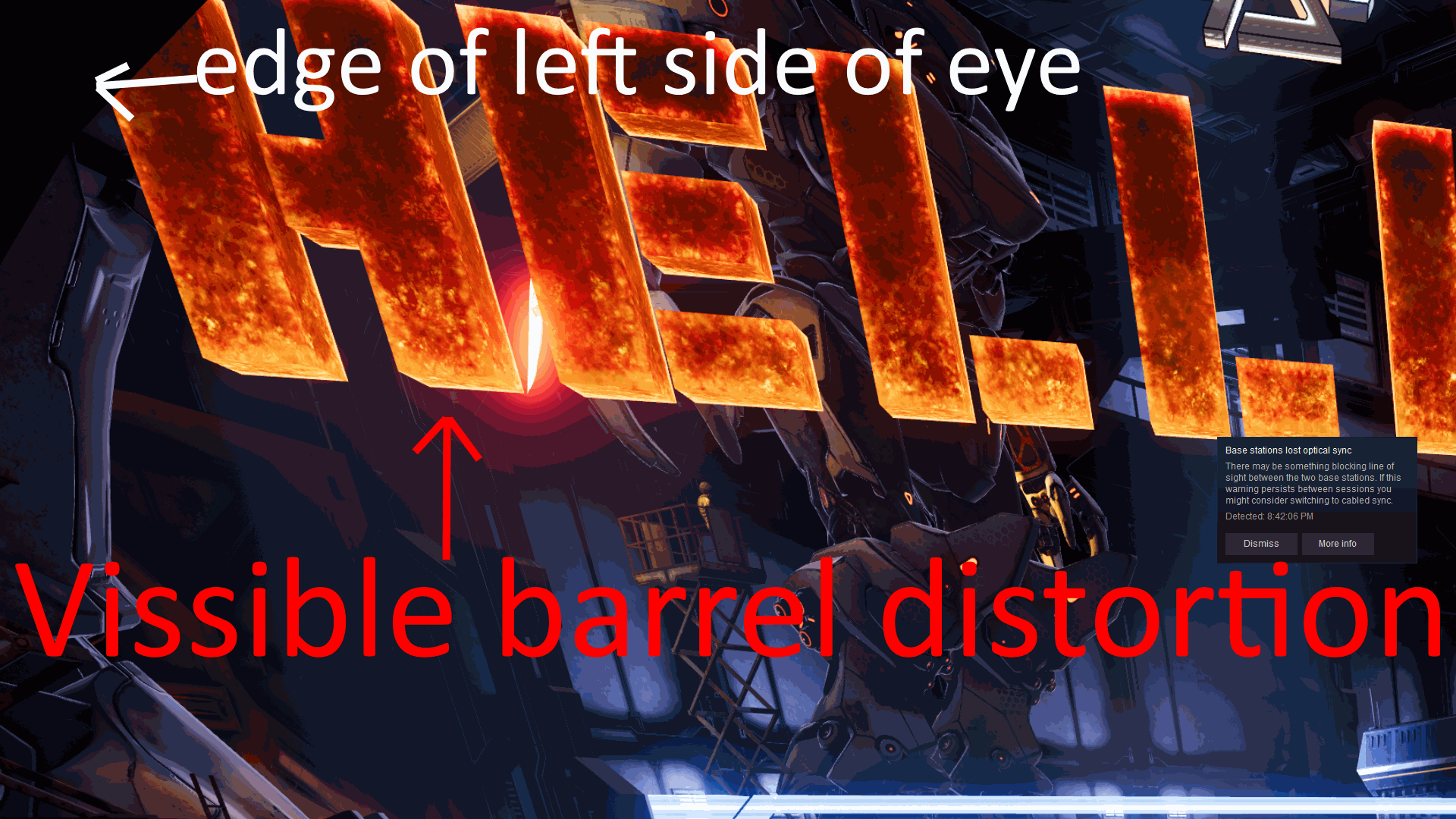
Hello all, im just an end user without dev skills trying to figure out an issue with Archangel: Hellfire, its based in unreal engine and the multiplayer portion is undersampled and does not respond to steamvr supersampling settings, im using a vive by the way and there are other users reporting the same issue.
The only thing that has made any difference this far has been adding changing r.screenpercentage in the engine.ini.
The odd thing is that it changes the rendering but doesnt the scale the output to fit the HMD so the eyes go out of alignment instead of actually supersampling, if screenpercentage is set below 100 the lower right of the panel in the hmd shifts up towards the upper left, if set higher the lower right goes away from the upper left.
Here is a desktop screengrab from when it was set at 200
https://i.imgur.com/jICoX8g.png
Here is the thread if anyone knowledgeable feel like taking a look:
https://steamcommunity.com/app/553880/discussions/0/1711815918576604269/
id like to play at higher resolution this weekend but i expect the devs to not respond before monday :P
Id be thankful for any suggestions 😃


 sturdy coral
@smoky zenith that was a bug on 4.18
tired tree
more like 4.15
smoky zenith
i think the engine version is 4.15, says so in the build.version file
sturdy coral
ah well depends, there was a bug there too
tired tree
4.15 the preview window and VR render buffer were the same size always
sturdy coral
maybe the desktop resolution dependence bug? can't remember how far back that one was fixed
smoky zenith
Ive tried DSR and running my desktop at 4k but that didnt make any difference
tired tree
you need to run the preview at the native hmd res
smoky zenith
you lost me already 😛
smoky zenith
ok, so i make a custom resolution or something?
eternal inlet
guys, i have a strange issue, not something i can't work around, but it bothers me that i don't know why it acts this way. So the problem is that i have an elevator which i move on tick. This elevator consists of an actor with a childactor (carriage) which i move up/down depending on which floor u select. When it moves, i am always one frame behind. So i tried moving the carriage out into the same actor as the elevator itself (so not using childactor), and then it moves 1:1. So i thought maybe i need to add an actor prerequisite between the childactor and the elevator (parent), but that does not seem to have any effect what-so-ever
tired tree
it is def a tick order issue jonas
but if they tick in entirely different groups
it won't work
tired tree
why are you moving them seperarely
sturdy coral
(n/m)
smoky zenith
so i make a custom resolution for my windows desktop and that should fix it? just trying to get it clear for myself, im not experienced in unreal engine and i have nothing more than what isnt locked in games config files
eternal inlet
well, i don't move the elevator
tired tree
you can set game resolution in the ini
eternal inlet
as i said, i know how to work around it, but it bothers me that i don't understand why it's behind one tick
sturdy coral
childactor may be doing some stuff overriding tick dependencies and stuff too
eternal inlet
yes, the char is behind one tick
smoky zenith
gameusersettings.ini?
sturdy coral
I avoid childactor after running into many bugs, and it has huge complexity
smoky zenith
or in engine.ini?
tired tree
child actor is terrible
regardless, you can't assume it would work as not a child actor either
eternal inlet
i can tell, because i the chaperone seem to sink into the ground when it accellerates
tired tree
unless you have the tick preres
you could do it on the character itself though
CMC tick preres to the elevator when it gets inside
eternal inlet
just as a far fetched experiment to figure out if this is another one of those pesky childactor things, i could try move a different actor from the elevator
CMC?
tired tree
char movement comp
eternal inlet
ah
eternal inlet
ah right, lemme try that too
tired tree
actor tick won't do anything for fixing it
eternal inlet
hm i don't see a way to define that elevator actor should tick before CMC
only the other way around
like here: Self = Elevator
fuck it, i'll just move that carriage mesh into the elevator
 rapid cedar
Would it be cheating to put some sockets on the elevator and glue the carriage to it? 🤔
eternal inlet
damn child actors 😐
tired tree
....
eternal inlet
it's fine this way, as long as it works.. just wanted to know why it behaves as it does
sturdy coral
@eternal inlet the movement component should also have that function:
https://api.unrealengine.com/INT/API/Runtime/Engine/Components/UActorComponent/AddTickPrerequisiteComponent/index.html
https://api.unrealengine.com/INT/API/Runtime/Engine/Components/UActorComponent/AddTickPrerequisiteActor/index.html
Make this component tick after PrerequisiteComponent.
Make this component tick after PrerequisiteActor
smoky zenith
Just got a response form the devs, the unreal engine version for the problem game i asked about is 4.18
ive forwarded that there is a bug related to this
Was the solution to r.screenpercentage to run the preview resolution at the native resolution of the hmd on 4.18 as well?
eternal inlet
@sturdy coral yes, but what i need is the opposite, an actor to tick before a component
as i understand, these two nodes, do the opposite
or maybe im missing something super obvious
sturdy coral
@eternal inlet in your screenshot you are calling AddTickPrerequisiteComponent on the elevator with CMC as prereq; instead call AddTickPrerequisiteActor on CMC with elevator as prereq
glossy agate
@eternal inlet why not have the carriage as it’s own actor with the shaft as meshes for it. then put in an array of location transforms per local actor. Would work more easily for different heights ect you can setup quick in the levels
eternal inlet
@sturdy coral but doesnt that take two actors as parameters?
I’ll give it a try later today.. just thought i had tried that
@glossy agate i have all the shaft meshes added as staticmeshcomps to the elevator atm. They get added from an array of bools (hasdoor). That way i control if i want a door+shaft or only shaft
I do have the carriage itself as a seperate actor, but as mentioned, i had troubles forcing the correct tickorder
sturdy coral
@eternal inlet it is a method on actor component
There are two on each
For actor and component
eternal inlet
Ah so its not those generic nodes
sturdy coral
I'm not 100% sure they are all exposed to blueprint
sturdy coral
Linked c++ docs of the one you need above though, it is probably exposed
eternal inlet
@sturdy coral yay, it worked, thanks so much! i somehow managed to misread both yours and Mordentrals directions + the documentation lol
messed up POC, but it works
here, Self is the elevator again
so im basically telling the VRPawn AND the CMC to tick before the Elevator
huh, and i see, the 1st Preq is not needed actually
placid rampart
Are any of you guys using Tick() to trace the teleport parabolic thingy?
I'm not sure if i should be using Tick or a small interval timer
mighty carbon
Is there a built-in splash screen (cubemap?) for Oculus Rift and Go/Gear VR to be shown when loading levels?
glossy agate
I have tried it yet @mighty carbon but let me know if it works so I can bring back the splash for oculus users
mighty carbon
Oh, I see
Thanks
@glossy agate have you tried this https://developer.oculus.com/documentation/unreal/latest/concepts/unreal-loading-screens/ ?
We strongly recommend adding a loading splash screen to your Rift or mobile application.
Loading splash screens are required by the Oculus Store.
glossy agate
Yeah I use that, but just on Vive. It makes oculus crash
mighty carbon
That link is from Oculus docs
The one I posted
I am using Oculus fork of UE4, so if it doesn't crash for me, but still crashes for you, perhaps it would be a good idea to report that issue to Epic
I am afk, so probably won't be able to test until next week
sturdy coral
FYI if you have problems with UWidgetComponents in 4.20, just spent a lot of time debugging an issue with them and found a workaround:

@tired tree ^
glossy agate
@mighty carbon Nevermind. I’m using the regular one just in engine. Looked similar. I think epic knows about the crashing issue
daring mural
Anyone else having issues with the windows key not focusing out of the preview window during play? I have to alt-tab to focus out now for some reason
placid rampart
@daring mural I am. I mean, the preview is on top of my monitor, but the framerates are really choppy. Everything gets fixed after an alt tab
real needle
Has anyone seen literally any info at all about VRWorks updating? Just sitting here twiddling my thumbs.
spare yew
@pearl tangle Yeah it's difficult to keep track of messages in a busy Discord. I've seen a post on the forums about the image database failing to cook causing a crash when the ARSession is started - that's likely to be the issue I'm having
spare yew
Yeah, I am getting the same error, "Image Database failed to build" but if I download Google's branch and run the arcoreimage tool it generates the database fine. Anyway to import this into UE4?
mighty carbon
One person on Oculus forum claims "Instanced Stereo Rendering: Translucency Support" works on Go and boost fps a lot when using foliage in the scene
wicked oak
you still want to avoid transparency in Go
mobile gpus cant deal with overdraw any well, and transparency is overdraw
mighty carbon
it's not all black and white - I've had smoke in my Gear VR project and had no fps drop. Granted it wasn't a lot of transparent particles there, but still..
wicked oak
ive had a single explosion tank the fuck out of my FPS in PSVR
wich has more power than a Go/gear
mighty carbon
then you had too many particles there
mighty carbon
well, all I can say transparency works for me on Gear Vr / Go when used properly and conservatively
mighty carbon
I was pushing it with drawcalls actually
but even with that the project passed tech review on Note 4
did you get your Go by chance @tired tree ?
I can just give you a key to see the project for yourself 😃
 idle heron
Hello. I was wondering what other developers are doing for dynamic shadow casting in AR. I'm currently using modulated shadows (only ones that cast on unlit) and a plane wit a material that projects the video feed onto it. It works but I was wondering if there are other solutions around that don't involve using the video feed.