#virtual-reality
1 messages · Page 179 of 1
 sonic lake
I think you have been able to reach a great balance between visual appearance and performance. 👍
sonic lake
@sly elk Are you going to try to optimize it further or are you happy with how it is now?
 eternal inlet
@candid viper i thought i was ok on gamethread since it was hovering nicely at about 4-7ms? I’ll look into what VTune is. Thx
 sly elk
im pretty happy with how it is now
there is a alot of scalbility in turning off things like dynamic shadows
huge impact on triangles and drawcalls
Also probably give the user some LOD control for people who are triangle bound
I need to build a true min spec machine at some point
sonic lake
You are using the Deferred Renderer right?
sly elk
yeah
sonic lake
Shadows are expensive yes
Of course it depends also from how many lights you have and how they affect movable actors
sly elk
Yeah, everything is moveable, figure 1000 parts in game. Only 2 dynamic lights in the scene (sunlight and flashlight). I
sonic lake
If you would add a third light (or more) you should see the Draw Thread increase significantly, but with 2 you are doing great.
 granite jacinth
Anyone having their Rift turn on/off sporadically ?
Seems like my monitors are spazzing out at the same time this occurs, maybe GPU driver issue
sly elk
I sometimes have that issue but a restart cures it
also I had that issue with a bad extension cable
 mighty carbon

Microsoft's next-gen Hololens is still on-track to be released in Q1 of 2019 and it's codenamed Sydney.
granite jacinth
hmm
 daring mural
@granite jacinth I slept through the delivery again, fuck
I wonder what makes yours heavier, though if we both got 2 HMDs 🤔 the mug, notebook etc.
mighty carbon
Just got my package, but I am out of town, so I don't get to open it yet 😦
eternal inlet
why?
i don't get why my cpu stalls for 17ms on the same frame as renderthread stalls for 11ms?
cpu time is 6.8ms and render drawscenecmd 3.8ms
sonic lake
CPU stalls means the CPU is waiting for something else @eternal inlet
Are you using the Media Framework for anything?
mighty carbon
@granite jacinth does Go come with a wall charger ?
granite jacinth
No clue
Disappointed I only got one though
Can't test MP easily
Guess I will buy another one later
sonic lake
@mighty carbon Nope, only a USB cable. You can plug it into the computer while developing and it will also keep it charged. Or you can use any 5V USB charger.
mighty carbon
I wonder if I can use my Galaxy S6 wall charger
sonic lake
I am using my iPhone/iPad charger with it so I would say yes
mighty carbon
aye, cool
sonic lake
You can also connect it to a powerbank if you need a longer play time but remain untethered
mighty carbon
yeah.. I assume same power brick used on S8/9 can be used on Go ?
sonic lake
Anything that is USB compatible (5V)
mighty carbon
aye, cool
eternal inlet
think i found something interresting
@sonic lake no Media Framework. As can be seen from the screenshots, both cpu and gpu are both in the ok-zone
but from the above screenshot (justnow), i found this strange spike which seem to corollate with the spikes i see in my game. I'ts called "Compress Memory", i swear, i did not have this in 4.18!
what the heck is that?!?
also has this strange correlation with FViewExtensionPreDrawCommand
and something with Wait for write
and Stream file (is this streaming level stuff?)
eternal inlet
oho, might be on to something, but not sure what is the cause still... I found some Hitch warnings in the log, which, when i google it, gives me 4 hits 😦
ofc i accidentially deleted the actual message, but it was saying something with unable to load cached shadow maps or something
im gonna send it again in a bit, assuming i can reproduce it, and maybe someone else has seen it and know what can be done with it
eternal inlet
[2018.06.12-23.54.32:586][644]LogLinker: Warning: Hitch on async loading of StaticMesh /Game/Underground_Bunker/Meshes/Props/Mesh_cementbag_pile_01.Mesh_cementbag_pile_01; this export was not properly precached.
[2018.06.12-23.52.47:806][634]LogLinker: Warning: Hitch on async loading of BodySetup /Game/VirtualRealityStuff/Maps/Hub1_Landscape.Hub1_Landscape:PersistentLevel.Hub1_Landscape_0.SplineMeshComponent_25.BodySetup_123; this export was not properly precached.
[2018.06.12-23.52.47:572][613]LogLinker: Warning: Hitch on async loading of LandscapeMaterialInstanceConstant /Game/VirtualRealityStuff/Maps/Hub1_Landscape.LandscapeMaterialInstanceConstant_129; this export was not properly precached.
....
i get lots of then during gameplay, anyone know what could cause that?
 glossy agate
Did you let all the shaders recompile when you updated engine versions? If it’s on steam though that’s not the issue
Oh there is a 4.19 landscape bug also
 real needle
Has anyone shipped on Oculus Home with achievements? I'm able to write/read to/from the service, but I'm not able to see any achievements or progress values on the APP in the oculus home launcher, and I'm wondering if they only show up there after the game has been released
 sick forum
Hi people! I trying to start VR Preview but I have a problem.
My devices: HTC Vive SteamVR, NoteBook Asus K501U Intel Core i7 6500-U, Intel HD Graphics 520, NVIDIA 960M, Memory 8GB, OS Win10.
HTC Vive is connected as a second monitor. There is displayed secondary desktop. When I launch UE4 SteamVR gives an error and shows a message to expand the application to full screen. I tried to expand, but it didn't work. HTC vive displays wrong. Any idea?
 sturdy coral
@sick forum go into SteamVR settings and disable extended mode
eternal inlet
@glossy agate jup, all shaders was recompiled, but i'll try open materials for each of the meshes that spam errors. They come from both landscape, shadowmaps and meshes and seem to be focused on a particular area actually... I tested again quickly this morning, and not happening in editor actually, but then again, it doesn't always happen in packaged either, just sometimes... it's definetely one of the more pesky ones to debug 😐
eternal inlet
while searching for clues to my hitch bug, i noticed they made several changes to the async loading. I also came accross this funny website.. never knew about that: https://lovinator.space/stuff/ConsoleHelp_4.19.html
 jaunty shell
wah that's a nice site 😐
eternal inlet
indeed 😮
sonic lake
The content of that site is the output you get if you run the dumpconsolecommands on the console.
sonic lake
@eternal inlet Could this also be related to your issue? https://answers.unrealengine.com/questions/772734/419-stutter-and-thread-hitches.html
mighty carbon

UploadVR
At a private invite-only press event for Ubisoft, we got the chance to try out an Assassin's Creed VR experience that had a physical maze to walk around and featured a bow and arrow.
cool
sly elk
Hey all- I have a question about mod support in unreal. Is it possible to give people a locked down version of your game to mod? Like not full access to every blueprint but the ability to open the a limited version of the project in unreal editor?
 fleet veldt
Anyone doing GO or newer GearVR have issues with the motion controller component flickering (seems like the positional offset is not 'stable'). Made a video to show the issue. https://www.youtube.com/watch?v=foYXEANDmRg

Getting weird flicker (positional offsets) of the motion controller occasionally in Unreal Engine 4.
mighty carbon
I happens to me on Gear VR too.. I couldn't capture it on the video though. You might want to report it to Oculus directly.
@fleet veldt ^^
sonic lake
@fleet veldt I just read in the post for the Oculus integration 1.26.0 of a bug on the controller position (fixed). It may be related to your issue.
glossy agate
@sly elk yes. Pavlov has it. Think the mod kit is on github you can download and kinda see how he does it
eternal inlet
@sonic lake aha, didn't know you could dump those explanations, thx for the info... about that other hitching issue, it seemed to be related to using stat commands, but i have it randomly no matter what, also people seem to agree it's working now, so my guess is that it's a different scenario im dealing with
mighty carbon
I am using 4.19.2 + Oculus 1.26.0 integration and it's still buggy
eternal inlet
i actually found these in the 4.19 release notes, which could indicate a connection to that async hitch thing i have:
New: Added Level Streaming CVars to customize streaming for your project. These all default to enabled, but can be disabled to make different trade offs for memory and level loading performance.
"s.ForceGCAfterLevelStreamedOut" - Whether to force a GC after levels are streamed out to instantly reclaim the memory, at the cost of a hitch. Defaults to on.
"s.ContinuouslyIncrementalGCWhileLevelsPendingPurge" - Whether to repeatedly kick off incremental GC when there are levels still waiting to be purged. Defaults to on.
"s.AllowLevelRequestsWhileAsyncLoadingInMatch" - Enables level streaming requests while async loading (of anything) while the match is already in progress and no loading screen is up. Defaults to on.
Added several new stats for potentially slow code.
Added SCOPE_CYCLE_UOBJECT macro, instead of using Scope Cycle Counter UObject directly.
sonic lake
@eternal inlet Did you try to deactivate those functionalities?
eternal inlet
im on it
😉
btw, would you be interrested in testing it for me too?
@sonic lake oh woah, btw... i totally forgot that stat startfile is also a stat command lol 😄
i noticed that when i don't run stat startfile, it runs much better, still some hefty hitches here and there, but like 95% of the time it's fine
with stat startfile running, i get hitching about 100% of the time
running with s.forceGCAfterLevelStreamedOut 0 and s.ContinuouslyIncrementalGCWhileLevelsPendingPurge 0 didn't change the frequency of the hitching
sonic lake
@eternal inlet There are reported issues related to this: https://issues.unrealengine.com/issue/UE-57976
eternal inlet
im sure that's what im experiencing
sonic lake
So this is known already. Plus there must be something with async loading too.
eternal inlet
i added my vote to it, but only 11 votes.... we need mooooore! 😄
aye definetely something with async loading
sonic lake
Got my vote too 😉
eternal inlet
thx ma dude 👍
mighty carbon
voted
 frank island
@fleet veldt Yes I am seeing this on the GO. Its driving me nuts. I am using 4.20.p
fleet veldt
@frank island I'm also using 4.20p. @mighty carbon what version are you using motorsep?
frank island
@sonic lake Do you have a link to the mention of the fix handy? I can't seem to find it.
sonic lake
@frank island Here. Scroll down under Bug Fixes: https://forums.oculusvr.com/developer/discussion/65993/unreal-engine-4-integration-1-26-0-released-may-23rd-2018#latest
Oculus
Join the Official Oculus Discussion Forums and talk about Oculus Rift, Oculus Touch, Samsung Gear VR, and virtual reality.
mighty carbon
@fleet veldt 4.19.2 with 1.26.0 integration built from Oculus branch
Epic's stuff is so far behind on Oculus integrations that I don't use it any longer
frank island
Which integration is in 4.20.p ?
mighty carbon
This section provides compatibility information for Oculus OVRPlugin and UE4 versions.
To access these GitHub repositories, you must be subscribed to the private
EpicGames/UnrealEngine repository. If you are not subscribed and logged into your GitHub
account, you ...
no 4.20 there yet
fleet veldt
@frank island I'm guessing 1.24 based on the plugin version number.
frank island
ah thanks
fleet veldt
but even so @mighty carbon says he's using the latest 1.26 integration branch and he's still seeing the issue. 😦
frank island
That is troubling
mighty carbon
@fleet veldt Oculus OSS is Platform SDK.. Not the same thing as OVRPlugin, which would be responsible, potentially, for rendering controller in VR
fleet veldt
@mighty carbon true, but since the version numbers are so close i wonder if they are kept in sync. (when you open the plugin window on your oculus integration ue4 build what version number is the plugin?)
mighty carbon
Epic's 4.19.2 has 1.21.0 OVRPlugin, while Oculus fork has 1.26.0. I assume 4.20.x will have 1.27 from Oculus and Epic's will be 1.22
@fleet veldt https://developer.oculus.com/documentation/unreal/latest/concepts/unreal-compatibility-matrix/
This section provides compatibility information for Oculus OVRPlugin and UE4 versions.
To access these GitHub repositories, you must be subscribed to the private
EpicGames/UnrealEngine repository. If you are not subscribed and logged into your GitHub
account, you ...
fleet veldt
if i'm reading that table right your plugin version should say 1.26
mighty carbon
if you built from Oculus branch, yes
daring mural
Got the Go and CV1, @granite jacinth what was so much heavier in your kit? 🤔
Came with a shirt, cup and pen
granite jacinth
¯_(ツ)_/¯
fleet veldt
@frank island @mighty carbon I went back and tested with 4.19.2 (Binaries From Epic Launcher) and it doesn't seem to have the motion controller jumping around bug. The sucky thing is 4.20p2 has some handy features for the GO like an updated stat unit and accurate mobile material compilation stats.
mighty carbon
So, Epic's 4.19.2 works fine, Epic's 4.20p2 has issue with controller @fleet veldt ?
fleet veldt
@mighty carbon yup, that's what it seems like to me.
mighty carbon
on Gear VR is have issue with controller in both Epic's and Oculus builds of 4.19.2
fleet veldt
i'm going to keep playing with it and see if i can get it to break on 4.19.2 with GO
also i may just try reading the raw values
mighty carbon
is your project C++ or BP ? (mine is pure BP)
fleet veldt
bp currently.
sonic lake
Oculus has released a brand new development guide for UE4: https://developer.oculus.com/blog/improved-guidance-for-unreal-developers/

We're always working to improve our tools and support of the developer community, and your feedback is an invaluable piece of that. One of the most-requested changes is better guidance for developers using Unreal Engine to create games and apps for Oculus devices. To respond ...
granite jacinth
silly
not sure why they don't just add those functions to BP
since that's all I would be doing myself
 pearl tangle
anybody play around with the updated leap motion plugin yet?
mighty carbon
@granite jacinth Cuz Oculus UE4 integration team is straight out of 90s - they think real game programming is done in C++ and BP is a joke
they still haven't exposed Platform SDK to BP and don't plan to - "nothing stops devs using Platform SDK API without BP" is what I was told
 elfin notch
Hi there, so I want to make a 360 panoramic video of my archviz scene so it will be able to open on YouTube. I did some research and I found that the way to do this is to enable the MovieCapture plugin. Is this the only way to do this, because the documentation is from version 4.13 and it explains about a stereo panoramic capture and not a video, or there is some other way?
 gleaming river
Hey all, Im teleporting to the bounding box of a sphere and trying to offset the destination by the local transformation of the headset. The problem is it doesn't seem to be doing what I expected. When my head is forward it teleport's to the sphere and then when I move my head back I am behind where I expected to be can anyone take a quick look at my logic?
frank island
@fleet veldt @mighty carbon I moved my project to 4.19.2 and it works brilliantly. It even performs better. Thanks for the info! It sucks to miss out on the features in 4.20 but my project is for a game jam so it won't affect me at this time.
sonic lake
@gleaming river If you want your VRCamera to precisely end up at a given location, you need to correct the teleportation destination by the relative offset between the camera and the Pawn Root Component (assuming the VROrigin has no relative offset respect to the Root Component).
For example: if your VR Pawn is at [0,0,0] and your VRCamera is at +[1,0,0] respect to it, say that you want your camera to teleport precisely at [5,0,0], your VR Pawn needs to teleport to [4,0,0].
In this way your VRCamera ends up at [4,0,0]+[1,0,0]=[5,0,0] which is exactly where you want it.
If there are rotations involved then it becomes a bit more complicated.
sonic lake
@elfin notch https://www.youtube.com/watch?v=8NH00PWMjm4

Want a full tutorial? Here you go: https://gumroad.com/products/dAgAT Thanks for everyone who was trying to figure this out over here: https://forums.unreale...
This is super fun! Unity though... https://www.youtube.com/watch?v=9KCA44GZRQg

VR interactions have the potential to be easier and more intuitive than with any other technology. Cat Explorer is a fun demo that points to the transformati...
 tired tree
@mighty carbon did you see their latest blog post about ue4 dev? They specifically reference you (not by name) about IAP and c++ vs BP
mighty carbon
Yep, saw that
tired tree
regardless, they don't have to support every scripting language of an engine
mighty carbon
I don't get why they hate on BP
tired tree
they implement custom functions in it, but its not ideal and harder for them to just merge
most people looking for the advanced features "should" be using c++ to begin with is the likely (and mostly correct) thought process there
mighty carbon
Platform SDK in no way could be considered an advanced feature since it's not rendering or AI or anything CPU/GPU intensive.
I think nowadays any social feature should be standard and fully supported
tired tree
well, its not their engine....they provide full integration, in c++
in unity they provide full integration..in c#
mighty carbon
😒
@fleet veldt have you had a chance to run more tests with 4.19.2 to see if controller rendering borks ? I wonder if it's Gear VR related issue with specific phone or if it affects everything mobile from Oculus.
sonic lake
@mighty carbon @fleet veldt I think it happens for me as well. Have a look here: https://youtu.be/3LdQWtGJGIs

The weapon is a skeletal mesh completely set to kinematic. The bending effect is simulated using a lazy movement technique and real-time bone transformations...
4.19.2 launcher
But I didn't notice it in the HMD, only in the recording.
mighty carbon
probably doesn't really happen then @sonic lake
sonic lake
It may be simply due to the overhead of the recording, i will do more tests this evening
 charred portal

We as testers with developer taking notes for the test of the PVP, Was super fun!
Early Alpha PVP test 1
mighty carbon
has anyone figured out a way to just drop apk on Go and install it from the device, instead of using adb install ?
sonic lake
What's wrong with adb install?
mighty carbon
last time I tried it it took forever
dropping apk on the device and installing it from there takes a way less time
(at least on my S6)
sonic lake
Adb install to the Go is pretty quick in my experience. I don't know with the S6, never worked with it
mighty carbon
Aye, I guess I'll just have to try
sonic lake
Did you get your Go yet?
mighty carbon
I did, but I haven't picked it up yet 😊
(working out of town)

UploadVR
Chipmaker DisplayLink partnered with HTC for quite the demonstration of wireless VR at E3 2018.
granite jacinth
Hmmm, how do you all handle SaveGames in VR? Rather, how do you handle the LoadGame part? Or how would you?
Let's say a player is holding onto a weapon and hits a checkpoint, when they reload, would you
a) load up the game with the weapon attached (potentially dropping or using up ammo as they load in and mess with controllers)
b) just spawn them in the air around them to grab and use whenever they get a chance to load in comfortably
c) something different than a/b
Or actually, how do other VR Games handle it? I can't think of a VR game with save system off the top of my head that handles this type of interaction. Probably for good reason, but maybe I missed a few good ones.
sturdy coral
@granite jacinth maybe start them on toggle grip with their item gripped until first toggle, then go back to their preference of grip style afterwards
not sure if that is the best solution though, might be a little confusing
I need to figure out the same thing for transitioning back and forth between 2d and vr
granite jacinth
Yeah, I mean, if they choose Hold Grip
It would be confusing
Even Toggle Grip would technically mean they would drop
if they clicked by accident
Also, wouldn't solve the UsingUpAmmo part
if they are putting on their controllers, and hit trigger by accident
well, I guess their controllers should have been on by then, but stil
sturdy coral
yeah, accidental presses will be more of an issue with transitioning 2d to vr than save games probably
@granite jacinth maybe when you load in, float whatever was held at save time in front of them and pause the game until grabbed
but that may have issues with someone loading into a tight space where there isn't enough room to float them etc.
granite jacinth
Yup
That was the current solution we came up with
the Creative Lead doesn't like the solution though
¯_(ツ)_/¯
For EA it will be fine, but yeah, other than putting them in lockers
or something, no clue what to do that won't cause confusion or accidents
sturdy coral
maybe load them into an empty or dark area where the only objects are their floating guns
so you can control all the orientations and make sure they have room and stuff
and once grabbed teleport them back to the load location in the map and unpause
budget cuts just released and may have a solution
granite jacinth
Ah, that's not a terrible idea
sturdy coral
they have generally done really good ui and interaction work
sturdy coral
they had a dart gun in the demo but I think it might be gone now
but the gun was sort of inventory based and not grip based
they had that inventory/UI thing where you swap out the top of the controllers with different end effectors
granite jacinth
ah
sturdy coral
@sly elk may have a solution, because he is doing toggle 2d/vr too
granite jacinth
I like the "SafeRoom" load approach, now to sell it to the rest of the team
It's a tough thing to work out
How much immersion is going to be broken through any of these solutions
 fleet plume
Budget Cuts is out
granite jacinth
yeah it is
fleet plume
anybody gonna buy it and post a review? 😄
sturdy coral
the main thing you wouldn't want is load in, immediately drop guns into the world geometry or something
granite jacinth
ya
sturdy coral
you could have them maybe hover towards hands with physics off until grabbed
and after some timeout if not grabbed, drop to the floor
I guess you'd have to have physics on before
but that may clash with the realism of your game
glossy agate
What if you just loaded in a loot box in front of them with the gear they had, that’s not in the backpack. They can just open it and pick up the loot
Right at the last load checkpoint
granite jacinth
Well, I plan on loading all their socketed stuff on them
Becaue if they are decked out, there's too much shit to socket
sturdy coral
@granite jacinth can you save anywhere or is it always checkpoints?
granite jacinth
Right now, just checkpoints
We dont' want to make it too cumbersome
You can Load from anywhere though via menu
glossy agate
Oh yeah just loading it on their body would be easiest. Problem would be if body slots were full AND they were holding additional weapons
sturdy coral
hmm, yeah if it is always checkpoints ryan's thing might work well; have a crate with the previously held weapons in it and a light shining on it or something
maybe some kind of spatial audio cue too
glossy agate
Yeah haha that’s what our boxes have.
 wary dome
Can someone tell me how to install VR Expansion Plugin.
sonic lake
 distant lotus
Hey, I'm building an AR app for iOS. I'm placing an actor in the scene and I want to rotate it using sliders. I have a prototyping level (not AR) where I'm able to rotate and scale the actor with the sliders. However, when I launch the AR level on an iPad the transform do not seem to be updating. To simplify things, I replaced my custom actor with the default BP_Placeable actor that came with the example. When I try to scale it at runtime the actor disappears, so I'm getting inconsistent behavior based on what actor I'm transforming.
The slider blueprint retrieves a reference to the actor from the scene (get all actors with tag), modifies the transform and then sets it again using the same reference. What I don't understand is why this works in the prototyping level but not the AR level. Does ARKit apply a transform to the scene based on camera position?
 eager pine
hey!
currently doing some ar stuff
trying with the sublevel to spawn it at location of touch and make it stay there
but it doesnt really respect any of the transform rules given and it follows the camera player
 proud solar
is anyone here familiar with mordentral"s vr plug in
granite jacinth
@proud solar what you need?
 woven imp
Does anyone have a lightweight blueprint or example project for a Climbing mechanic? I know VRExpansionPlugin has it, but it also has so much stuff I don't need as well
proud solar
ive been screwing with the plug in and i would probably just use it and cut chunks of code out.
so far i cut out his movement systems and reimplemented my own movement and i just use his grip interface and his climbing code. im going to have to rewrite all of it but thats been working great for me for now
woven imp
Cool. I'll likely do the same. I appreciate all the work that goes into the plugins like that, I just wish there was a way to pick and choose what aspects I want to use.
proud solar
yeh realy. its kicking my ass. i cant see what goes on in the c++ side of things so i have trouble with the grip system
daring mural
Anyone know what 'RedrawVieports' is for and why it's causing FPS drops?
distant lotus
@eager pine how are you getting your touch coordinates? I'm using the player blueprint from ARSample as a starting point. I'm trying to understand the AR coordinate system and why I can't apply transforms to spawned actors. The actors are spawning at the right coordinates, and they tend to stay there.
sonic lake
@daring mural do you have the editor open and visible?
daring mural
@sonic lake No, I saw it in a profiling file from someone who was getting low FPS in a development packaged build
sonic lake
@daring mural If there is no Editor UI, then it is basically the Draw thread. You should look into its details.
daring mural
@sonic lake
Nothing that sticks out to me, at least not by my own doing in the level
It references a "HUD" but I'm not using one
Is there a wiki anywhere that has all of the profiling messages with definitions? I find they're sometimes hard to understand, like in this example ^
sonic lake
DrawStatsHUD is the rendering of the statistics on top of the game viewport. Is there any real-time statistics being displayed while profiling? If so, you should turn it off.
I am not aware of any in-depth guide to what each stat means and what to look for if you find the associated value too high. I guess it is a matter of experience and/or looking through the source code. If you want to dive deeper into profiling and performance you can start from here: https://docs.unrealengine.com/en-us/Engine/Performance/Overview
tired tree
@proud solar the template is just a reference, its preferable that you start off without it actually and rip out BP examples. The actual plugin is the c++ part
@woven imp there is a climbing example in BP on the forums
my plugin is more convoluted with that because its also multiplayer
and tied into the character replication
sly elk
@granite jacinth @sturdy coral we don't handle any of that stuff for wrench since nothing is time sensitive and there is no combat. From a gameplay perspective I like the idea of the saferoom, grab what you need then either punch a button or have a short timer before you jump back into comabat.
granite jacinth
Aye

Are y'all trying to kill #VR in #ue4 once and for all (thought it was the future)? https://t.co/8HPQfV1q3h kills Teleportation for Multiplayer games in 4.20/4.21 @amandambott @TimSweeneyEpic @TheEpicStephen @DesignHurley @ShaderBits @MieszkoZ #gamedev #VirtualReality #unr...
 Twitter
proud solar
Twitter
proud solar
@tired tree that what i intend to do for my upcoming final character. Ive been learning for the last 4 months worth of weekends. and i think im to the point where this is all starting to click and i begin writing original code to go with the examples ive learned from. Vr was definitely not new guy freindly. But i was pretty determined. I greatly appreciate the template being available.
tired tree
you can feel free to PM me here
sturdy coral
@granite jacinth I wouldn't @ Ryan Brucks over that... he's tech art.. makes it less likely for him to pay attention to Twitter on something he can actually help on
mighty carbon
@granite jacinth what do you mean it kills teleportation ? So users can't teleport in VR ? o.O
mighty carbon
I see..
tired tree
if they use a nav mesh teleport that is, you can manually check
mighty carbon
I'd be surprised if they want to kill off VR 😃 Sort of abandon active development - I can see that.
tired tree
its just a bug from them refactoring navigation in 4.20
they moved it to a module and out of the engine folder
and appear to be allowing multiple navigation systems now
which should open the way for third party navigation systems
considering they renamed the old one V1, they might also be working on a new default too
mighty carbon
I wonder if 4.20 will be a better release than 4.19 (stability and performance wise)
I see a lot of commits related to Android + Vulkan.. I wonder if we finally see Vulkan to be available for Gear VR and Go
 wicked oak
i have a naaaaasty timeline bug right now
on 4.19 package
only package
i have a timeline attached to a scale logic
testing logging seems like SetRelativeScale isnt working
sonic lake
@wicked oak did you test if SetRelativeScale for that actor works properly if it is not driven by the timeline?
wicked oak
no
anyway, i rolled a custom FX thingy with material
i was using the set relative thing for a lazor
now the lazor is a material with worldoffset
works better
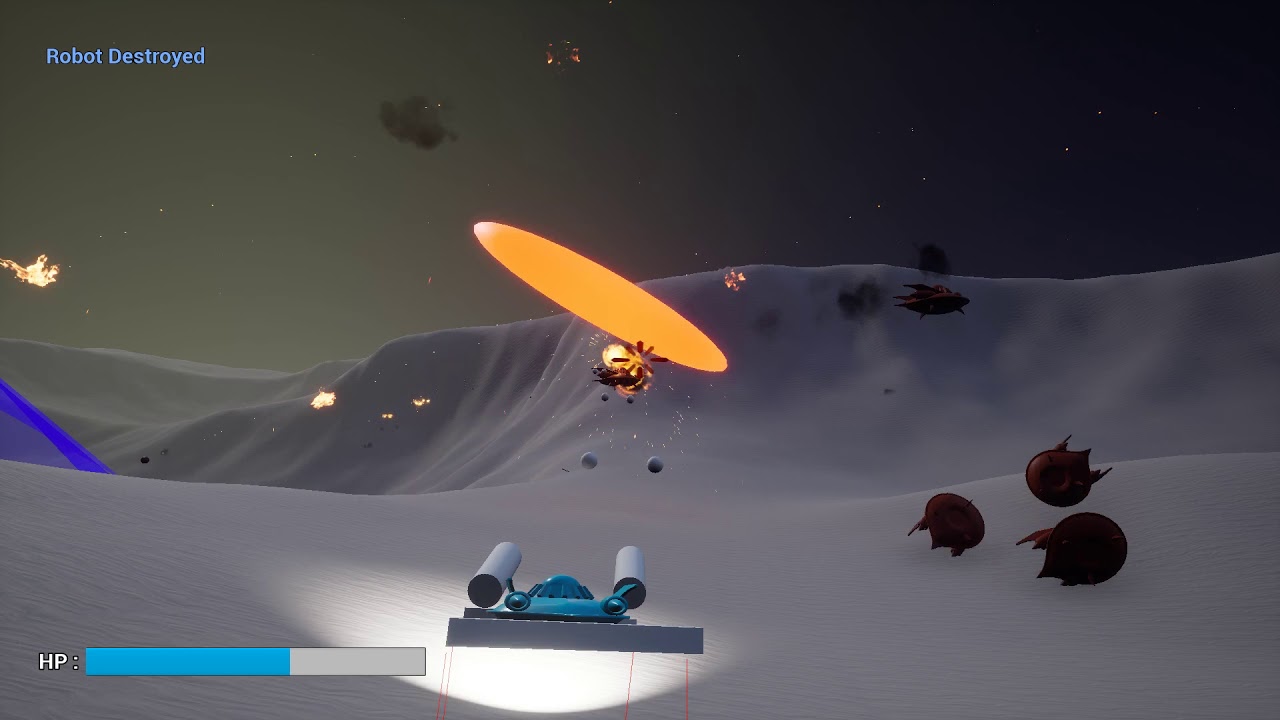
video of the thing
made in 2 days
sonic lake
👍
eternal inlet
looks nice
wicked oak
around 90% blueprints
but everything is based on a C++ framework of classes
and i have a bunch of C++ components i copypasted from other of my projects
for something of this complexity, its the best workflow by far
the hovercraft is all blueprints except the targetting system, wich is C++ (for the cone queries and the like to launch missiles)
mighty carbon
@wicked oak looks like Steel Storm prototype in FPS mode 😛
wicked oak
your game had tighter controls
this one is wobbly as fuck (kind of by design, i wanted to have it fully physically simulated and bouncy)
spent a while coding anti-flip stuff
becouse of course the thing flipped over constantly
glossy agate
Anyone see that Dave and busters commercial where they have like 5 vives in a row on a bench with people playing Jurassic park? They able to run that many with just 2 light houses?
mighty carbon
@wicked oak is it a VR game ?
wicked oak
the job offer will be
i went extremelly overkill on the assignement
it was basically "make some kind of hovercraft, give it targetted missiles, and have a turret or 2"
mighty carbon
heh
wicked oak
things this prototype has:
the damage system from DWVR
a global event manager in the game instance that lets stuff hook to stuff easisily (used to progress the "mission")
targetting + missiles
weapons
the hovercraft
2 enemy types
a turret
an orbital cannon that rains death on you
and menu UI with pause menu and game UI with hitmarkers and event messages
granite jacinth
@wicked oak how are you doing the screenspaced markers?
They are the same scale throughout
granite jacinth
Hmm. Oh. Damn
wicked oak
but on vr you can do it "manuallly"
wicked oak
wich ive done multiple times. Basically you do a look at rotation to the player camera, and for scale you get the distance and divide
granite jacinth
And scaling it based on distance
granite jacinth
Yeah. That's the lame way
wicked oak
there is a magic way, with a shader trick
granite jacinth
I want it easier :) but yeah I might have to do it that way if these billboards get too big
sly elk
So for smooth locomotion in VR, I should look at onward?
granite jacinth
Onward, Pavlov, anyone really
sly elk
Am I right htinking the two main keys to doing it well are no acceleration time, and walk direction is controller relative and not headset relative?
anything else critical to getting it right?
sturdy coral
@sly elk for yours I would also just do a really slow max speed since it is all within a small space
just to make it as comfortable as possible for as many people
you could also have a vignette option to narrow the FOV
I did this video on controller-oriented movement back before vive launched: https://www.youtube.com/watch?v=-T3o1DWa3O4
 sly elk
Thanks
granite jacinth
Anyone ever have any issues with Rift HMD not starting up (the screens) but tracks properly in UE4?
Seems to be a reoccurring issue lately.
 eternal kraken
We have endless oculus problems in UE4. Seems mostly Oculus update related
granite jacinth
:(
glossy agate
@sly elk I can give you a key to my game. Its similar to other shooters, just with more features
for movement reference. Got all the expected interactions
sly elk
Cool. That would be great
sturdy coral
@wanton fog it is built into the stock vr template, unless you are doing multiplayer
 wanton fog
I started from blank project so thats the problem
mighty carbon
So, opened mystery box - got one Go instead of two requested and one Rift (I already have one). L hoodie instead of XL requested. Oh well, better than nothing I guess 😊
pearl tangle
anybody done anything with daydream or gear vr in 4.19? seems the motion controller stuff was all changed around quite drastically, guessing it should be part of the general vr motion controller pawn but doesn't seem to want to show anything
fleet veldt
@mighty carbon have you had any luck with dynamic shadows (on movable objects)? The only way I can seem to get dynamic shadows to show up is if i set my directional (sun) light to movable. if I put it on static or stationary i get no shadows on movable static meshes (physics objects)
 dusky moon
Does any1 know how to fix this ?! > When I try textured mirror window mode using a scene capture (spectator) there seems to be almost no Anti Aliasing applied ?! but the regular VR mirror renders with proper AA ...
mighty carbon
@fleet veldt https://forums.oculusvr.com/developer/discussion/66309/go-gear-vr-modulated-shadows-are-not-supported
Oculus
Join the Official Oculus Discussion Forums and talk about Oculus Rift, Oculus Touch, Samsung Gear VR, and virtual reality.
But dynamic shadows don't work in mobile VR by design
mighty carbon
Does the light turn green after Go is fully charged ?
mighty carbon
Nm, I'll find out (phone app has battery charge indicator for Go)
sturdy coral
@dusky moon temporal aa used to not be available on scene captures, but I think it has been there a while now; you might have to do an extra step to enable it
dusky moon
@sturdy coral yes true , fixed it. I also found out that the scenecapture doesnt handle Refraction on materials and it renders annoying artefacts.
mighty carbon
Alright, Go's light turned green at 97% of battery charge. It's time to dive in :)
Btw, sad fact that Go's Android companion app shows only "thousands" of installs :(
Tiny user base
mighty carbon
That's what I see on my phone @wicked oak - thousands, not hundred thousands
wicked oak
just checked
100k+
maybe region differences?
Oculus app, as is. not gearvr or anything
100k + downloads
mighty carbon
I see, yeah
glossy agate
Anyone watch some of the Onward invitational? Badass how they have the room setup for teams. Finally some legit looking VR esport
mighty carbon
Odd, when I was initially installing it I saw only thousands.
Battery on Go sucks
Already 89% and all I did was browsing store and downloadin/installing few apps. Haven't even dived into actual VR yet.
sturdy coral
sounded like you can't watch a long movie without an external battery pack
mighty carbon
And the manual says not to use Go when connected to battery pack 🤔
Hopefully Santa Cruz will have capacity to use external battery during usage of HMD
sonic lake
@mighty carbon I don't know why the write that. How is that different from using the Go while connected to a PC via USB?
That would mean you can't develop with it. Or you should unplug it each time you want to test an app? Nonsense.
mighty carbon
If you have Go, just read the manual
You technically shouldn't use Go when it's charging
sonic lake
Sounds to me like a lawyer dictated statement. When charging the device can heat up and that would add to the backlighting heat, someone could feel too warm and sue them.
mighty carbon
The manual is mostly for end-users and to minimize legal responsibility if it blows up into your face
sonic lake
Exactly
mighty carbon
But, there is no smoke without fire
There is a chance for a critical failure when using it while charging
sonic lake
Ok, this means every and each time you have to test an app you should first Launch, then unplug from the computer
Because the USB is charging it anyway
I have not experienced any adverse event so far except some heat on the front cover
But of course, stick to the manual 😉
mighty carbon
I am not saying you have to
But I prefer using WiFi connection for debugging and updating my builds
(Which apparently is broken and doesn't work on Go, but works on Gear VR)
sonic lake
I am keeping it connected via USB
wicked oak
the only reason onward is popular is becouse it was first
i think its cheap as fuck and super clunky
pavlov does everything far better, and there are dead multiplayer games that are far superior
glossy agate
pavlov isnt any good for competitive play though. Just wild run and gun on re created CSGO and golden eye maps
Onward just reeeaaally polished what they have and made it really tight for good playability
Cheap is Standout. Really fun but janky as fuck lol
Some guy that was organizing the Dreamhack competition talked to us a bit about making in league and competitive game too while we demoed there. That would be so awesome to have all VR on the main e sport stage.
wicked oak
a guy i know is the dev of Oval
its a tribes/UT style arena shooter for VR
in skates
it is a great game
doesnt have enough players to get a game going
at laest the guy added decent bots
and even a level editor. But no one plays

Oval is a VR-only shooter. It has been designed to give the players the ultimate shooter experience. Play faster than ever in VR with our sickness free locomotion system. Create, share or play awesome community maps using the multiplayer level editor.FeaturesHigh speed, contr...
Price
$24.99
there are tons of great games completely buried
much beter than onward
but onward was the first
glossy agate
Pavlov has more concurrent than onward right now though and that came out way later. Standout also did like 40k units so far. I have seen oval before but I think players want more technical gameplay instead of arcadey shooters. Needs a lot of interaction and familiarity to bring in players.
Just onward is the only one that’s really built to be esport
wicked oak
the issue with all, is that making a multiplayer vr game is 100% a lotery roll
you can make the best game ever, but few people see it, and it dies an instant death becouse no one plays becouse no one plays
glossy agate
Yeah it is haha. For any platform
wicked oak
you can make a mediocre game (onward), but becomes popular and then people go there for the community
glossy agate
Discord became the main marketing tool now for mp shooters. Really have to build community to get it going
wicked oak
yup
glossy agate
If Pavlov would just lower Ttk a little it would actually be a way bigger contender for e sport. But I think he is focused on BR mode now
sturdy coral
I think multiplayer can be done and compete, but you better have good strategy and not just a better game
granite jacinth
Fuck mp-only VR games
Good thing we are doing both
Also, yes to Discord being awesome to build up an Indie Dev/Game's community. Easily over 1200 members on ours. Not super active on a daily basis (because haven't launched yet) but I expect it to pick up here soon.
And what @sturdy coral said pretty much
Like, all I have been seeing over the past year are rehashes or copies of other VR Shooters
Not to say our game is any different. But technically we can say, the non-vr game came out back in 2013 and we are just doing a VR take on it.
Primarily Contagion VR: Outbreak is competing with Arizona Sunshine and to some degree Surv1v3.
wicked oak
the game does look great
i think i already told you i would expect it to go past 100.000k dollars in PSVR in like a week
granite jacinth
Yup. I need to talk to Sony again. I know I am pretty much all set for the demo. But wouldn't mind getting a little free PR from them
wicked oak
the game is one of the ones that can actually get sponsored or put on the "cool guys list"
mine cant 😦
granite jacinth
Do they even do EA?
granite jacinth
K. So have to pretty much wait for that full release.
wicked oak
but remember that its an actual legit release
thats why it took 6 months for me to put DWVR in ps4
i spent a while improving the game
granite jacinth
Yeah. Even getting demo on PSVR is good. Might get people that are impatient to buy rift or wmr for PC
wicked oak
were you able to start the ps4 port? do you have the thing running?
i think you got devkit, no?
granite jacinth
Yeah

 granite jacinth
@wicked oak finally got a chance to setup Go and I have to admit I am impressed
After Gear VR and Daydream
And yeah the audio is crazy good
mighty carbon
Screen and lenses are a way better too
charred portal
☝️
fleet veldt
is there a way to know what device profile is being used? (i'm on oculus go)
mighty carbon
folks, let's boost this on up https://issues.unrealengine.com/issue/UE-60065
pearl tangle
@granite jacinth have you done anything with the controller on it on 4.19? Trying to upgrade a 4.17 daydream project on the lenovo mirage but haven't seen any updated documentation around the new motion controller stuff for 4.19
mighty carbon
Lol, who thumbed down my post?!
granite jacinth
@pearl tangle I haven't, was looking at it from a consumer standpoint first. The detriments are: ridiculous low battery life on BOTH HMD and Controller. I was pretty bummed out of it. But also, gives me idea on how long content snippets should be.
This reference section describes how Oculus controller actions (such as touchpad
presses) map to the corresponding events that can be handled via blueprints.
That should be good
For the Oculus Go
So yeah, I would look directly at Oculus docs first then UE4
I know it's crazy, but they have been updating their docs a lot faster than UE4
proud solar
Hey guys. So say i have an actor that has a couple of import variables. Like a battery having a charge value. And then i put the battery in a item so send the values to the item delete the battery actor, and then use some of the charge. When i take the battery out. And i want to send the updated variable back to the respawned battery. How should i do that
mighty carbon

UploadVR
Oculus recently revealed that a surprising number of Rift players still prefer to experience VR seated, and that the company is working to accommodate that.
lo, but why?! I can't see myself playing VR seated unless it's a game designed for seated experience (vehicle based or something like that)
wicked oak
@mighty carbon i play seated for some games
for example, skyrim vr
why would you play that game standing? you dont have full interaction
play seated (on a swivel chair), and its much more confortable
leave standing for the physically active games, or the ones where you actually move
mighty carbon
well, playing standing feels a way more immersive
I haven't played Skyrim in VR yet, so I can't really comment
but in general, in VR, I prefer to stand, unless I am watching a movie or something
wicked oak
i only play seated when its more chill games, or games without a lot of movement
mighty carbon
also, when you stand, you can crouch and duck.. Can't do than when you are in the chair or on the couch
btw, has anyone successfully paired XB1 controller with Go ?
sturdy coral
Skyrim has a duck button
mighty carbon
can't you duck by physically ducking ?
sturdy coral
Yes, or when seated you can use the duck button
wicked oak
duck button is better
sturdy coral
But if you physically duck I don't think it goes into stealth
mighty carbon
right, so what I am saying is why not to use that capacity to have more immersive experience ?
sturdy coral
It's potentially a 100hr+ game for a lot of people
wicked oak
exactly
sturdy coral
And sometimes you just want to sit
mighty carbon
it's like those people on reddit suggesting that snap turning is better than physically using your head in VR
wicked oak
nor you can dodge/etc
so why stand? game works the exact same
snap turning is best
becouse you get entangled
super fast
sturdy coral
For me VR kills my neck and it can be better when my head is leaned back in a chair most of the time
wicked oak
i will forget about snap turning when i get a wireless headset
mighty carbon
then why on Earth ask for better controllers and wireless VR when one can use gamepad and just sit and play in VR as if it's not a VR but regular screen on the face ?!?!?!
sturdy coral
I don't think people event want to play in VR all the time if the game doesn't demand it, that's why I seamlessly toggle to 2d :P
I think it is good to support as many playsyles and options as you reasonably can
Unless it would take away from the game
mighty carbon
that's why it will take ages to make VR what it suppose to be
wicked oak
@mighty carbon becouse i need the wireless vr to actually turn. And i want the better controllers for better interaction
skyrimvr is 100% a better screen in your face
with better controls
same with falloutvr
i dont play beatsaber seated
mighty carbon
I personally would force VR mechanics and not give users all these options. Eventually the audience would grow and would consist of people who accepts VR as is, without 2D options.
mighty carbon
it's not the most profitable path, but it will ensure bright future of VR
sturdy coral
With a 4K 3DTV Skyrim looks pretty nice too :)
mighty carbon
but, are we gonna contribute to growth of healthy VR even if it's a long term goal, or are we going to think for today only and poison VR well with 2D VR games ?
for my Go project, it doesn't really matter whether you sit or stand, since there is no positional tracking. However for my Rift project I don't want to compromise. I would have 180 deg. turning for front-facing folks, but not snap turning as seen in some games out there. Obviously one could play seated, but one would have to stand up to reach to certain places.
sturdy coral
eww
180 deg turning isn't enough for front facing
that lets you face forward and face backward
but facing to the side means you get occlusion on one hand
mighty carbon
I'd love to see bow shooting done while seated in a chair 😛 It's quite uncomfortable.
sturdy coral
and you can't 180 degree turn yourself out of the situation
180 turning makes more sense for a roomscale setup where you are avoiding/undoing cord twists than for front facing
mighty carbon
I gotta check front-facing RR and see what they did there. I only played it once like that and played 360 deg. tracking after I got my 3rd sensor.
sturdy coral
but best is to make snap turn amount configurable unless you have a gameplay reason
mighty carbon
I want people to embrace VR and stop being lazy 😛
sturdy coral
RR does turn-on-teleport an arbitrary number of degrees
mighty carbon
ah, yeah
sturdy coral
don't complain about bad reviews if you don't cater to a lot of preferences
unless you have a really good gameplay reason
smooth loco or 2d support wouldn't make any sense in budget cuts
mighty carbon
smooth loco is ok I suppose if I have slow movement speed.

UploadVR
Despite hinting at it twice now, Microsoft last week confirmed that it has no plans to bring VR to its Xbox consoles anytime soon.
^^ I guess I am not getting XB1X, unless I decide to port my old game to consoles
glossy agate
I played Skyrim for about 2 hours standing, then got tired and sat on the floor, then moved to a chair. That’s pretty much the only game I played where I went to seated just because of the amount of time you have to be in it.
mighty carbon
get a gel mat for the floor 😉
glossy agate
Gotta do a magic build too because the melee setup is pretty dismal. It’s touch to kill so you end up hitting npc’s when trying to talk to them
sturdy coral
yeah, I wish they put a lot more time into melee
archer or mage is probably the way to go
glossy agate
Wasn’t my feet that were sore. Just overall standing. I played like 14 hours in 2 days
mighty carbon
o.O
mighty carbon
well, it also kinda a good thing - you get tired, you stop playing. Healthy way of playing games no matter which way to look at it.
wicked oak
@mighty carbon at the end, microsoft isnt adding vr to xbox one
maybe on the next gen
what a missed opportunity, given that they control the mixed reality headsets, and xbox one X would be a great vr machine
mighty carbon
yeah

Eurogamer.net
A "gaming disorder" could become a proper medical condition should a draft of the updated International Classification of Diseases manual be approved unamen…
really? :/ Back when I was a kid it was about parenting and limiting kids' exposure to video games..
sturdy coral
that doesn't work if it's the parent that is addicted
mighty carbon
I don't know anyone in their late 30s / early 40 who is addicted to video games :/
so I am guessing it's the young kids who have kids fall under the category of game addicts
 scenic slate
Hello. Is there a way to force the camera to be specific height? Like, if I want to simulate how it seem if I were a child? Now by default, it is always same height as the player is.
 cosmic shoal
Could you parent the rest of the world to an empty actor and scale that? might be a viable alternative depending on what you want to do.
mighty carbon

UploadVR
We spoke to Pete Hines from Bethesda at E3 about how their VR games have sold and he said the company was happy with performance so far.
scenic slate
Thanks for the hints. I try those. WorldToMeters might be best solution here
tired tree
they are the same thing, forgot the correct name for a second
 tacit quest
can also just attach it to a scene component and move that down i believe
tired tree
its not the same thing
you don't perceive the world from a smaller scale when doing that
tacit quest
ya the world scale changes the perception, that's why i was offering the alternative if you didn't want that effect
daring mural
Can I get the velocity of a motion controller without calculating position between frames?
real needle
@daring mural What's wrong doing that?
I'd like to prevent oculus worn state telling the game that it needs less resources when not worn, any way to override that?
daring mural
@real needle That bs got defaulted in recently, we used to have to manually do it in like 4.16 - not sure if you can override it since Oculus store submissions require the feature
Should be able to, ofc
As for the velocity, I can't just 'get component velocity' on the controllers, it always reads 0
tacit quest
the motion controller imparts velocity onto any children. if you put an invisible sphere on it, anything with a physics body, then you can sample that child for the velocity
so if you attach an object, that you are picking up, to the motion controller directly, when you detach, the velocity will be imparted to it. I needed the use the child body hack when i was attaching objects to the hand mesh instead (which isn't a child of my motion controller), and i wanted to throw things after
i don't know if that made sense, but the short of it. attach a dummy component with a physics body to the motion controller and getvelocity from that
sturdy coral
It is better to query velocity directly from controller in some cases, especially for throw releases
Controller updates at 250hz, game tick only 90
tacit quest
then you have to calculate the velocity yourself every frame from the controller
it would be nice if they were to override GetComponentVelocity on the motion controller and return whatever they impart to children
tired tree
component velocity has no rotational component to it
tacit quest
oh true
tired tree
also not sure what the benefit of checking the API directly would be since it still is only updated on tick unless you check outside of game thread....
@sturdy coral
sturdy coral
Outside gamethread on trigger releases
tired tree
input is polled though...
sturdy coral
You'd have to change a good bit of the code
Take throwing something 40mph, 20cm between frames vs 7cm @250hz
Your release could be on a very different part of the arc and have a very different velocity
tired tree
yes and by the time the frame happens it wouldn't even be the same
its never going to be perfect
and moving the input polling out of the same execution as the game tick would be a lot of work
for something that wouldn't be perfect anyway
sturdy coral
The visuals of it being exactly synced to frame don't matter as much as getting it released with the right speed and trajectory
But yeah, it would be a lot of work
woven imp
Have you tried getting the velocity of the collision sphere, not the controller?
sturdy coral
Throwing feels pretty trash in VR a lot of times though and is often faked/assisted where it may ndot really need to be
woven imp
Also make sure you're getting the world velocity, not the relative
tired tree
the entire engine could benifit from threaded input
lots of fighting games use it and deal with multiple frames of lag
sturdy coral
If you could timestamp the input event it would be enough
With a faster poll in another thread
tired tree
yeah
sturdy coral
And maybe recorded velocity history, though interpolating extrapolating may be enough there
tired tree
well you can specifically query it API by API for input on a secondary thread
but...lots of work
would have to be a game that really needed as perfect of release velocity as it could get
and even then, its VR, you still need to fake it since people can stop a throw short and let momentum carry on
sturdy coral
Well ideally the engine people do it and everyone just has it available
tired tree
doubt they have plans for threaded input anytime soon
they lowered latency recently as is
but the frame queue before presentation is already there too
sturdy coral
What was the recent thing? I think it said consoles only
real needle
@sturdy coral I know you've worked around many of these issues, any chance you would know how to override the throttled state the game enters when the rift is "not worn"?
It becomes very problematic when the host takes off his HMD
Don't have this problem on SteamVR
sturdy coral
@@real needle I quit working with native rift sdk after I needed a change and the thing I needed wasn't exposed in the weird undocumented OVRPlugin closed source sdk wrapper thing they use
real needle
@sturdy coral I hear yah. I'll shoot an email to them directly
granite jacinth
@sturdy coral is the UE4 Oculus sdk public on GitHub then?
sturdy coral
Not worried about the source to the SDK, it is that ue4 doesn't use the SDK, it uses OVRPlugin.h instead
A simplified/limited wrapper of the SDK
@granite jacinth this thing: https://github.com/EpicGames/UnrealEngine/tree/release/Engine/Source/ThirdParty/Oculus/OVRPlugin/OVRPlugin/Include
They don't explain why they use it instead of the real SDK.
OVR_Plugin.h: Minimal high-level plugin proxy to LibOVR. Use instead of OVR_CAPI.h.```It has most stuff but not all
"on February 24, 2017, filed an injunction to have the court halt sales of the Oculus Rift and development kits.[22] Oral arguments for these injunctions were held on June 19, 2017. ZeniMax argued that either "
https://en.m.wikipedia.org/wiki/ZeniMax_v._Oculus
Then OVRPlugin added June 27:
https://github.com/EpicGames/UnrealEngine/commits/release/Engine/Source/ThirdParty/Oculus/OVRPlugin/OVRPlugin/Include/OVR_Plugin.h

ZeniMax v. Oculus is a civil lawsuit filed by ZeniMax Media against Oculus VR on charges of theft of intellectual property relating to Oculus' virtual reality device, the Oculus Rift.
I think it was added as a clean room API wrapper to prevent an injunction affecting UE4 games, especially if they weren't primarily Oculus games
@mighty carbon
Maybe that is wrong though, I wasn't ever looking at the oculus plugin code until after they switched to that
mighty carbon
hmm.. I wonder if this battle will ever go away
sturdy coral
Not sure that is the real reason, initial changelog says:
"Oculus Unified Plugin. OculusHMD plugin now supports both the Rift and the GearVR in one plugin. Minor supporting engine modifications included” .. I need to see if they were still using a wrapper before unifying
mighty carbon


Guys from the team @HolodeckVR we are pleased to meet you
#alt #antilatency #CEBIT
#vr #virtualreality #CEBIT2018 #newtech #technology #vrexperience https://t.co/gYi4XegaxR
Twitter
woven imp
Have you guys found that volumetric fog looks really weird in VR? Left/right eye disparities and such?
pearl tangle
@mighty carbon The lenovo mirage actually can handle 6dof controller tracking as well, they just haven't released them yet because they don't have the content to support it. Will be quite interesting when it's on there though
mighty carbon
aye, but from what I gather Lenovo's platform sucks, lenses and screen are inferior to Go
pearl tangle
i haven't really found it an issue
ergonomics wise the design is rather stupid since it's meant to be portable but because of the head strap not being detachable or flexible it's stupid to carry around
but the boundless 6dof walking around is very interesting, with the controllers added on it will work fine.
the only bit that is missing from it right now is the visualization of the boundaries to create more AR type experiences. It's in the tango plugin and the ARcore plugin but not exposed from the daydream side of things annoyingly. Chatting with google to get that exposed so that I can do some big 4D experiences with it
mighty carbon
it's like saying Daydream platform is good 😛
it's as good as dead
also they artificially limit the play area (again, from what I read online)
I think Santa Cruz will blow Mirage out of the water, so I'd rather wait for that one
pearl tangle
no they dont, you can turn that off
it's the same chaperone type system you get with vive and rift
daydream platform seems pretty much the same as gear vr stuff, just some different apps available. Software wise they are pretty much identical though so doesn't make much of a difference
mighty carbon
I mean, in numbers, Daydream is dead. Almost can say it's stillborn.
and $400 vs $199 (and free for devs) ? C'mon
on the software side I keep getting PM's from people and see how they struggle to get 4.19 builds running on Daydream. Usually it's not an issue with Oculus.
I am sure Mirage Solo is better than Go when it comes to enterprise, but for mass market / gaming it's kinda a wrong HMD (even though it's 6DoF)
https://www.roadtovr.com/google-dont-expect-6dof-controllers-lenovo-mirage-solo/ << no 6DoF controller for Lenovo ?

If you’re waiting on positionally-tracked controllers for Google’s latest entry into the Daydream platform, the standalone 6DOF VR headset Lenovo Mirage Solo, you probably won’t ever see it, at least not from Google. Google’s annual I/O dev conference was strangely be...
mighty carbon
oh wow, Go's controller sucks compare to Gear VR :/
drifts more, d-pad is really bad 😦
there goes my control scheme
How can I determine whether it's Gear VR or Go in use, using Blueprints ?
daring mural
@tacit quest just tried getting component velocity from a sphere attached (child) to the motion controller
Still reading 0
Default settings on the sphere
tacit quest
get the physics linear and angular velocity
pearl tangle
@mighty carbon I can definitely tell you that 6dof controllers exist for the mirage solo. Santa Cruz will more likely be $400-$500 or so as well, 6 dof makes a big difference for plenty of stuff. For gaming as well motion controllers make a huge difference so once they figure that out definitely the standalone 6dof headsets + controllers will go much better. Lenovo just needs to fix their shitty ergonomics
will be interesting to see how vive goes as well but their focus is just overpriced and bad ergonomics as well, they all need to take a page from Oculus' books on the design side of things for sure
real needle
hi does anyone know how to use a stereo layer component?
fleet veldt
@daring mural Have you tried reading from the raw motion controller sensor data?
daring mural
@fleet veldt No, I neded up getting linear velocity on a child component and it works fine. I can use these numbers
Just not sure how to use them in my logic.
wicked oak
for velocity i have a componeent that i keep reusing
daring mural
I need to combine the velocity and then check a single, whole number in a branch on trigger
wicked oak
i compare distance beetween frames, and average over a few
you really dont want to use a single frame instant velocity
daring mural
See this img:
That slide handle can be pulled back and locked "up"
I have logic that lets me slap it down physically, and it works
But the rotation of the weapon isn't static
I'll need to combine the linear velocity of the controller and get a single value to check for when the player "slaps" the handle
I haven't done that before
wicked oak
have you thought of a detached physics with visual?
daring mural
I can't do physics, I'm using VRE and had issues with physics & components on weapons. At least in my case since the weapon simulates physics on collisions & sweeps on no-collisions to prevent clipping
It was bug-prone
Can I combine the motion controller velocity into a single value? If yes, that'll do
Not tried before
wicked oak
the idea i talk about is about havinthe stuff separated
the physical sphere for the handle does NOT have full rigid body physics, and does not affect the handle directly
you use it to know when the player is hitting it, and at what velocity
daring mural
here's how I'm handling the slap trigger currently:
that grey box (normally invisible) is a button prototype
it can only be pressed down on the Z axis
but it also means I can trigger it with very slow movements
No clue how the velocity would output if I combine it across all the axes
If that works
Then this + a check on button press would = slap on >=X vel
wicked oak
you can combine it by making it a vector and checking its lenght
daring mural
👌 yeah that's perfect
do I need to be setting this length on tick in my character for both the MCs or can I 'get physics linear velocity > get vector length" only on the frame where the button is pressed
and still have it be accurate
eager pine
havng trouble with the vr interaction for widgets
currently attached widget interaction components on both hands
and it seems like i have to have both pointers at a widget at the same time for it to click
on a button
tired tree
@daring mural that buffer scene component removes that issue btw
hybrid works fine like that
also you can filter velocity across frames easily if you use the RunningAverage node with a count of how many frames you want
daring mural
@eager pine Can you screenshot your logic on button press (inside the widget)
eager pine
@daring mural
not using the one for the right hand yet, just testing with the left one, and to get a event from the click, both points must be on the widget, and click the same time once, then after that you can click as much as you want with the left hand, but the right hand pointer must always be on the widget. Removing the widget interaction component for the right hand solves the problem, but brings up another problem with is no interaction with right hand on widgets
tired tree
They don't have unique ids
all interaction comonents need a unique id, or they override each other
eager pine
omg
yes
this one right?
@tired tree
thanks haha, i guess its that one! 😄
@tired tree Do you have any good tutorials or links to ik arms? I found a few, but they seem just like a temp method or old threads, as for the ik system i guess there are some new features in 18 that helps
eager pine
aww, well, im trying alot of stuff, can show later, currently testing some physics actor stuff as well, hope it works xD I guess i will struggle with some bs for a few hours and then find a setting that makes it works as usual xD
@tired tree doesnt your 4.18 plugin have controller profiles?
tired tree
it does, it just doesn't have them built into the motion controllers, you have to manually use the transforms for them
they got refactored in 4.19
eager pine
aww
tired tree
the 4.18 template uses them
but if you upgraded from prior, you would need to add the nodes
 languid night
Hey, have any of you built a moving platform for VR yet? For the Player to stand on and get moved.
wicked oak
Oculus Start Arrived
7 kilo package, for the ones who were sent one too
contains:
Free oculus rift (desktop one), with touch, in a guetto cardboard box (not in retail box)
Free oculus go, in retail box
free notebook, fancy one
a pen
a glass
couple stickers
and a sweatshirt
black one, seems a nice one
with this
oculus has sent me 5 desktop rifts
FIVE
jesus christ stop, im a solo dev
jaunty shell
spare one rift ? 😂
mighty carbon
and my hoodie was too small for me (seems like their large is mine small)
wicked oak
it comes with a very clear "this is a gift, dont sell it" message
i got the large one, fits me well
mighty carbon
@jaunty shell why don't you sign up for Start and get our free hardware ?
jaunty shell
I'm not sure our use of VR can allow for devkits
we're mostly doing R&D and demos to our clients, not selling anything
wicked oak
that counts
jaunty shell
hmm
might try then, I'd love to get a Start package to try out our stuff on the Go and Rift
mighty carbon
just don't tell them you make VR pr0n 😛
jaunty shell
😂
jaunty shell
@wicked oak hmm they ask for a VR portfolio
All our stuff is kept inside the company, and we can't share much :/
best I can do is send a video of our archviz prototype
wicked oak
for real i cant handle this many headsets
2 Go, 4 rifts (one of them was gifted to my character artist), a vive, a psvr, 2 gearvrs, and 2 cardboard trash lying around
pearl tangle
@wicked oak you are still lagging behind. On top of those I have got 2 of the new lenovo mirage, 2 samsung odysseys, some daydreams and pixels, a hololens and a box of 100 cardboard headsets lying around somewhere. And yet I haven't actually played a VR game in about 12 months
wicked oak
@pearl tangle lol
pearl tangle
oh i also have a Fove headset which is also still just sitting in the box. And a DK2. Think i got rid of all my dk1's though already
jaunty shell
oh man, havent checked on my DK2 for ages
time to start a VR history display I guess
or make a VR headset throne
pearl tangle
hah yeah thats pretty much what im doing with my new office. Setting up a big display area for all my gadgets
 stable dove
Anyone know why HMD fade node would work on the Vive but not the Oculus?
sturdy coral
@stable dove what is the actual node name
stable dove
@sturdy coral Sure, its "Fade HMD To Color"
sturdy coral
@stable dove I don't see it in the source; sure you aren't using the vr expansion plugin?
stable dove
@sturdy coral Hmm, it is part of the VR expansion plugin library.
sturdy coral
probably part of the openvr portion of it
stable dove
*Open VR
sturdy coral
you can run oculus through openvr with -hmd=SteamVR on the command line, or disabling the oculus plugin
stable dove
Would there be a downside to doing that? I guess i could just use standard engine fades.
sturdy coral
you won't be able to sell on oculus store, only steam
stable dove
Ahh, that makes sense.
sturdy coral
only difference with standard fades I think is standard fades won't apply over the steamvr environment that pops up when loading
stable dove
I think I can set a custom "splash screen"
sturdy coral
yeah, and his plugin has a set skybox node to replace the background of it
(the steamvr env)
that won't work with oculus either
but they may have an equivalent in the oculus bp library
languid night
Would there be a reason as to why UE4 isn't responding to my motion controller inputs, using the default motion controller pawn?
languid night
@sturdy coral I'm using the Oculus Rift, it tracks the controllers but doesn't receive button inputs.
mighty carbon

Hold onto your headsets! This month’s platform updates include a host of new features and exciting technologies spanning Oculus Go and Rift.
interesting
more in-depth overview of 5k video stuff https://developer.oculus.com/blog/behind-the-tech-with-john-carmack-5k-immersive-video/?intern_source=blog&intern_content=june-platform-updates-5k-video-embedded-dash-panels-and-more

The following post from John provides more information on this technology and the making of its sample video: a 5k re-release of the award-winning Henry, from Oculus Story Studios for Oculus Go and Gear Vr.
mighty carbon
neat:

UploadVR
Oculus is supporting the glTF 2.0 file format in its Home environment and allowing users to import 3D objects with the latest update.
oh, 4.20p3 is out and I didn't even notice
eternal inlet
how many of you are struggeling with performance and hitches in 4.19?
Unreal Engine Forums
4.19 & 4.20 Editor & Packaged Games Have Hangs/Hiccups Constantly
if you are, and havent yet mentioned, pls go do so on that thread
seems Epic games don't know about this
mighty carbon
@eternal inlet if you really want to make sure Epic knows about it, I see 6 people from Epic on Discord, with 4 being active.. @ them and see if that helps..
eternal inlet
thx will try
@north valley @eternal nexus @tawny patio @gentle grove @magic mango @low temple @tawny patio Hi guys, are you aware that there are a bunch of people struggeling with 4.19 and 4.20 regarding heavy hitching and performance issues? https://forums.unrealengine.com/unreal-engine/feedback-for-epic/1457519-4-19-4-20-editor-packaged-games-have-hangs-hiccups-constantly https://issues.unrealengine.com/issue/UE-60787 https://issues.unrealengine.com/issue/UE-58676 https://issues.unrealengine.com/issue/UE-57976
Unreal Engine Forums
4.19 & 4.20 Editor & Packaged Games Have Hangs/Hiccups Constantly
if there's anything i can do to shed more light on it, feel free to PM me. Also see this Answerhub question i posted: https://answers.unrealengine.com/questions/799368/bug-warning-hitch-on-async-loading-of-texture2d.html
 north valley
@eternal inlet I'm not aware of any general widespread issues that would cause this problem. We package fortnite across several different platforms and if there were packaging specific performance issues I expect they would have been fixed already and would have been included with 4.20. The best chance to get this resolved is to provide a sample project that reproduces the issue consistently that we can debug.
eternal inlet
@north valley if you review the thread that i linked, there are an example project that reproduce atleast one of the issues. If you check those other bug reports, they're all unresolved
people on the forum thread are desperate to get an engine engineer on the case, since we can't currently package with 4.19
im actually in the process of downloading the latest4.20p3 to check if i have the issues there too
will let you know as soon as i've tested
on my particular answerhub question i provided a log file with several async loading issues with textures, i realize this is not much, but unless i get a means to upload my entire game for you guys to try, i can't really reproduce
north valley
https://issues.unrealengine.com/issue/UE-57557 was marked at "Can not reproduce" and looking at the internal notes, we were able to reproduce it in 4.19, but no in 4.20 so maybe it's fixed
eternal inlet
or... i could try isolate it more
north valley
just make sure to back up your project before converting to 4.20 if you're going to test, we're still in preview builds and fixing issues
eternal inlet
aye, i usally migrate to an isolated project when i package
it's almost done downloading the new engine, then i will convert and test
eternal inlet
@north valley where's ShouldBeLoaded gone?
GetStreamingLevel used to have a bool you could set to tell a level to load
in any way, i noticed that 3 of the hitching issues are scheduled for 4.20. So im crossing my fingers they will make it:
sturdy coral
@sly elk with my 2d/vr switching stuff I'm having an issue; if I exit the game while in 2d, steam will leave it as permanently 'running' until steamvr is exited
have you seen the same thing? I think it is because it is launched as a vr app from steam
real needle
Scene Fusion for Unreal will support Unreal's VR system! Sign up to get updates here: https://www.kinematicsoup.com/scene-fusion/unreal-engine-signup Learn m...
pearl tangle
@granite jacinth what's their discor channel?
ah nevermind found it on their website
pearl tangle
yeah. There was another guy who ended up getting a job or an internship at Epic that had been working on a collaborative plugin for unreal previously. THink it was even up on the marketplace but only for earlier versions of unreal
fleet veldt
Can anyone point me to some documentation on how to produce an APK that others can side load on their Oculus GO so they can alpha test my game?
pearl tangle
@fleet veldt unless they have changed stuff compared to the gear vr you can't. You will need the device ID to be added into the build of it. Perhaps they have modified it for the GO but it seems rather unlikely
mighty carbon
Why not to use Release channels @fleet veldt ?
fleet veldt
@mighty carbon I'm really new to mobilevr dev XD where can i read up on that? o.O
mighty carbon
Check Docs in your Oculus dev website
mighty carbon
Release channels let you distribute early versions of your builds to limited audiences
for testing or other purposes. You can invite different groups of people to different channels.
When you are confident your app is ready for release, you can copy your build to the Stor...
sonic lake
@fleet veldt a simple 'adb install <apk>' will work, but they need to have adb and their Go has to be in development mode
fleet veldt
@sonic lake cool thanks! I will give that a try.
sonic lake
It will show up inside Unknown Sources under Navigation, together with a lot of other stuff. They can click and run it from there.
If your testers are non technical and don't have adb, the Release Channel is your best option.
fleet veldt
yeah i'm reading up on the release channel now, that does sound more user friendly for them
sonic lake
If they are non-tech/non-developers yes, that's the way to do it
fleet veldt
so I think i'm close to getting my .apk uploaded to ALPHA channel. But got this message.
is 21 the number I should use or should i use something higher? (I think I've seen someone mention 25?)
wicked oak
it says 21 or greater
if you are using go, use the highest you can
i think if you use higher sdk versions, unreal can build using opengl ES 3
mighty carbon
but, if you are using Go and Gear VR, might stick with the lowest, which would be 21
ES3 is not forward and is not supported by Oculus
(in UE4 that is; Unity's ES3.1 is forward and is supported)
fleet veldt
@mighty carbon @sonic lake I think i'm really close! 😃 I see my game in the Store under "Just For You". However as you can see in this screenshot I have something set wrong because it says "Not supported on your device". I'm using the GO and haven't had any trouble running it before using the "Launch" button in UE4 on this GO.
mighty carbon
what engine version are you using ?
fleet veldt
4.19.2 binary from epic store
mighty carbon
try building Oculus binary from their repo 4.19.2 + 1.26
fleet veldt
@mighty carbon @sonic lake want to thank you both for your help. I think I'm past the worst of it. I finally have my app in the alpha channel and able to install and run it from there.
 radiant river
Hi! Can anyone plz help me out with GoogleVR plugin queston?
Cause i'm stuck quite badly, and the only solution i see now is to roll back to 17.2 version of the engine
When i switch Stereo off my gyro stops working
mighty carbon
well, a good way to resolve it is to get Oculus Go and forget dreadful GoogleVR 😄
radiant river
I actually need a non-vr version of the app
But i can't get the gyro to work the same way as VR does
 tidal canopy
@final haven yes, it support regular editing, VR editing, and the combination of the two.
When you use it, your 'avatar' shows up as a camera in the scene. When you put on a VR headset, it switches to a VR avatar (head, body, controllers)
It has been out for Unity for a while now so we are just bringing those features over.
tired tree
the regular editing is the exciting part tbh
glossy agate
Dope, I’m excited to try it @tidal canopy
tidal canopy
We have a sign-up form at https://www.kinematicsoup.com/scene-fusion/unreal-engine-signup

KinematicSoup Technologies Inc.
We are starting to bring in group to test out the alpha. We are focusing mainly on large established studios at first (we have to be able to sell sometime, after all), then will be going into smaller groups who will probably fit in the free tier.
glossy agate
Yeah I signed up yesterday
sly elk
@sturdy coral I ahven't seen that happen

At Leap Motion, we're always looking to advance our interactions in ways that push our hardware and software. Augmented reality can be a truly compelling pla...
So I guess this is for when two people each have their own actual physical table tennis setups but nobody nearby to play with.
sly elk
so VR.pixeldensity 1.0 on both oculus and vive does some amount of super sampling, right?
how do you all deal with users trying to adjust super sampling in either the oculus tray or steam vr?
sly elk
seems like would be easy to have people accidentally put in huge SS values without realizing it
fleet veldt
the way i find out for sure is with the vis console command
that way you can easily see what your eye buffer is

Unreal Engine
We’re adding a new cvar in 4.19 to control panel resolution for Unreal Engine 4 (UE4) Virtuality Reality (VR) projects and moving away from referencing Screen Percentage. Here’s what you need to know.
sorry i'm sleepy i missed your problem statement before about people using steam or oculus tray.
and yeah that's happened to me when playing skyrimvr. i particularly remember valve making an update to the way steamvr calculated their values one patch and all of a sudden it was using huge render targets.
If i'm already familiar with ue4 multiplayer how hard is it to get voice chat working on Oculus GO?
mighty carbon
I don't think it's available on Android yet
but Platform SDK might have that functionality https://developer.oculus.com/documentation/platform/latest/concepts/dg-cc-voip/ (scroll all the way down to UE4 implementation). On top of that you need Oculus fork build, not Epic's source or launcher's version.
Use the Platform VoIP service to add voice chat to your app.
sturdy coral
@sly elk 1.0 on oculus is ~130 in old screen percentage terms, 1.0 on Vive is 140
But Vive has a bigger hidden area mask I think
 glossy agate
@sly elk a lot of users know how to use it better than most devs. Through advanced settings. If they have ss problems you can always reset default on startup
sturdy coral
pd 1.0 also accounts for user (and SteamVR automatic) supersampling
mighty carbon
https://www.reddit.com/r/Vive/comments/8skaxl/climbey_dev_on_knuckles_ev2_new_hw_revision_i/e10a5co/

reddit
285 votes and 165 so far on reddit
I thought it was too expensive to manufacture
 olive ferry
Nobody got some graphics glitchs using 3d widget on actor ?
 mighty carbon

The official trailer for upcoming VR multiplayer survival game, Seeking Dawn. Available this summer on Steam. Supports crossplay between Oculus Rift and HTC ...
looks interesting
olive ferry
Yes it's stuttering
 lament mesa
Many of us must have faced situations when your htcvive is connected to your pc but you aren't using. And if you open any Unreal Engine project that time, UE4 takes additional time to start steamvr and then start project. Is there is any way we can disable this functionality so that you can start ue project bypassing VR ?
olive ferry
It's doing it when I load l a little amount of 3d widget
tired tree
@olive ferry you on rift right?
mighty carbon
Oculus
Join the Official Oculus Discussion Forums and talk about Oculus Rift, Oculus Touch, Samsung Gear VR, and virtual reality.
olive ferry
@mighty carbon thank you, so get it fixed ill have to pdate something ?
glossy agate
Me getting wrecked at my own game playing quick draw https://youtu.be/dl35XD-okr4

Playing a round of quick draw. I lost. https://store.steampowered.com/app/756290/In_League/
mighty carbon
@olive ferry I never had such issue, so I wouldn't know..
f#cking MS, I knew it was too good to be true https://www.cnet.com/news/the-xbox-one-wont-support-vr-because-microsoft-broke-its-promise/

CNET
A bummer for virtual reality enthusiasts.
mighty carbon

Display Week is the world's largest exhibition for electronic information display technology. Watch Douglas Lanman, Director of Computational Imaging At Ocul...
sturdy coral
@mighty carbon I think MS maybe doesn't want the bad PR of "only works on pro, while PSVR works on normal and pro"
mighty carbon
perhaps.. but why not to have VR on their new new console that will be coming up
sturdy coral
I don't think they've ruled that out
if they only worked on the one x they would have major install base issues
I think it either had to be xbox one + xbox one x or next gen, and regular xbox one was too weak
mighty carbon
hopefully
sturdy coral
sturdy coral

Learn about the changes and new features of Knuckles EV2...
"In addition, the new Track Button is not actually a mechanical button. Instead, beneath its surface, there is a force sensor."
"These sensors are in two places - beneath the Track Button, and in the Grip 'saddle' area." <-- really nice
 wintry escarp
I suspect VR will be on the new xbox only
mighty carbon

Mask-based foveated rendering (MBFR) is a rendering technique that decreases the shading rate of the peripheral region of the eye buffers by dropping some of the pixels, based on a checkboard pattern. It allows you to effectively reduce pixel shading cost from world rendering...
nice
sturdy coral
@granite jacinth force sensing is awesome. I've got the roli seaboard and it is much more expressive than like touchscreen instruments
granite jacinth
Almost feels like those force sensors are going to break things
Roli seaboard? Googling now
they just look like touches now
wicked oak
@mighty carbon thats very similar to what the PS4 does
granite jacinth
Basically, just touches
wicked oak
im not sure about its performance
given the way the gpu branches
oh wait a fukin second, its already released?
gotta have to test it
becouse this is the kind of thing that would work on every platform even ps4
mighty carbon
4.20p3 with 1.27 is already on Oculus github
wicked oak
im reading the merge
for 4.19
im trying to spot the foveated thingy
there are small tweaks to oculus vulkan for oculus go @mighty carbon
they added a bunch of code to the VulkanPresent with
if_android
but seems still incomplete
mighty carbon
that's what Carmack said - they are actively working on Vulkan for Go
I guess it wasn't a lie 😛
wicked oak
a huuuuuuge amount of "mixed reallity" stuff
but thats for the oculus 3rd camera thingy, not for AR
to make videos/trailers
sly elk
Hey, does anyone know if there is a material node that will return the world space normal as a color for my albedo? If not I can append a bunch of vector directions to make it.