#virtual-reality
1 messages · Page 172 of 1
 dusky moon
 rocky nimbus
@dusky moon I am using forward shading. I switched to MSAA because my in-game UI (a sort-of wrist watch display) was very blurry and making this switch cleaned it up. But now my splash screen logos and main menu text (which is further away than the personal UI) is very distorted and weird. I'm not sure how to get sharp results in both cases
I'm going to try TemporalAA with the highest AA quality settings but I doubt that'll do it
(or maybe HQ MSAA)
 wicked oak
@rocky nimbus TAA makes logos worse
get your textures right
and use mipmaps correctly
 quiet badger
the weirdest thing just happened to me
rocky nimbus
@wicked oak Basic textrenders are distorted with MSAA when far away
So it can't be my textures, right
?
quiet badger
i did vr preview and all my head movements apply the inverse to the camera so the camera is moving but keeping what I'm seeing in place
it's flickering in a way that I know movement is happening but keeps my camera pointed at the original location no matter what direction I look with my face
oh and I can see my chaperone moving but not the game
 glossy agate
@rocky nimbus that’s pretty standard snap turn control for rift so you don’t lose strafe if you need snap turns
Snap stays on dominant hand, move is on off hand
 sturdy coral
@rocky nimbus if text is a masked material, it will be worse because msaa only has 4 levels of translucency on the border
For 4x MSAA
rocky nimbus
😩 I refuse to believe UE4 doesn't allow you to switch between AA modes. At least I can't think of any reason why it wouldn't be allowed
 wary onyx
apparently i cannot package my game with a master sequence
Thats what was giving me errors
 full junco
@muchcharles#2724 I forgot, did they put that occlusion mesh CRC fix into the engine?
@sturdy coral
sturdy coral
@full junco yeah, but there are a couple shaders that aren't using it for some reason that seem to work fine if you add it
full junco
interesting, which?
rocky nimbus
@tired tree All I can find online is talk about how this is do-able via a post-process volume but this was removed a while ago. FXAA seems to be a trade-off where my text is sharp but the overall quality is reduced
Even then.. the text isn't optimal
(I'm using forward shading, MSAA is an option but I can only set it for the entire project in project settings; not dynamically in-game)
sturdy coral
@rocky nimbus there are some msaa levels that are coded to go back to temporal, not sure about fxaa
@rocky nimbus if you want good distance field fonts with MSAA you need to move to translucent instead of masked and use an extra antialiasing method in the shader
The engine might already have a material for it, I'm not sure off hand
rocky nimbus
@sturdy coral I think I figured out how to switch between the two AA modes, it would work in this case but I'll take a look at your link for future reference, thank you ❤
sturdy coral
@full junco I got them listed here:
 PostProcessBokehDOFRecombine.cpp
 PostProcessDownsample.cpp
Private/PostProcess/PostProcessTemporalAA.cpp```can't remember which ones I tested, but I think TAA was able to be sped up by adding it
sturdy coral
with the new TAA I don't see the same DrawPostProcess call
no I never made one, someone else made a PR for the mesh before I had a chance to and I wasn't sure about the shaders missing it since it said "disabled for correctness"
but when I tested it seemed to work ok with it
you could probably do it with some of the compute shaders too, like SSAO I think doesn't get a benefit out of it right now
full junco
"new" TAA?
 real needle
What systems do you guys use for an IK body?
I've been working on trying to get Ikinema to work/look good for a year now. It just doesn't make sense to me
sturdy coral
@full junco the TAA with upsample; not sure if that is what changed or if it changed earlier
with SSAO I think I looked into it a bit and it. If I remember right it was a compute shader and it looked possible to add a branch to the beginning to check for really small depths from the hidden area mask (inverse of the visible area mesh) and skip the computation
rocky nimbus
@real needle I think there are 2 plugins that do this on the marketplace, have you tried either?
I was thinking of grabbing one
real needle
@rocky nimbus I've been looking at the plugins. Sadly they don't seem to have as many features or planned future updates as ikinema, for relatively the same price
My problems with ikinema seem to be setup, things not working for absolutely no reason, and hard to understand interface
Especially the VR setup. It seems to just ignore my hand position completely, so I have to use a solver node instead, but since it's not well documented, I don't know if the solver node is missing features the VR node has
rocky nimbus
I'm assuming you got the Indie package, it seems sadly limited (esp support)
Those 2 plugins on the marketplace might be janky so I'm worried
Like if you crouch, whether it knows to go into a crouching animation or if it just bends your legs awkwardly to match your height
Ikinema looks sweet
real needle
I've been working on crouching. The knees work well, but if your head goes forward in the slightest bit, the whole back arches in a weird way. Trying to mess with values to correct this.
Support on their forums is really open and they seem to reply quickly and fix bugs really quickly.
I've never used it, but I've seen Jonas Mølgaard's posts and they fix things really quickly.
Speaking of him, if you get ikinema @eternal inlet has WAY better tutorials than ikinema themselves.
https://www.youtube.com/channel/UCRAf7dZULce8SRLa9TdgjNw/videos

YouTube
My name is Jonas and i live in Copenhagen/Denmark. This channel is dedicated to bringing practical tutorials on various 3d gaming/artist related stuff. I wil...
rocky nimbus
Are you having any issues aside from getting it to track your hands and the crouching?
real needle
Just the small things like "undoing" while simulating crashes the engine.
And getting controllers aligned with the hands is a pain in the ass.
After initial setup though, everything works relatively well.
Wish they added features from other products they have such as collision into this.
But apparently that's planned
rocky nimbus
Does the plugin account for everything or just the IK set-up? Like, footstep sounds, walking animations etc.?
real needle
Just the ik. You'll have to animated the legs yourself if you want movement or roomscale
If you get the trial plugin, it has the same exact features the paid version has, btw.
rocky nimbus
Might check it out. I think the store version(s) automatically animate the entire body
The one by Yuri: https://www.youtube.com/watch?v=B2E0OgYNWoQ

Could work well with some tweaking
This looks promising as well (set-up from scratch with locomotion and room-scale explained in the comments): https://www.youtube.com/watch?v=EKR8ogonD68

This is the easiest way I found to get yourself a VR body with arm Inverse Kinematic (requires Motion Controllers) and full thumbstick locomotion. This step-...
real needle
This is what I threw together in 5 minutes in ikinema. Have to learn how to keep the elbows from going in the body, and keep the back from arching.
Also going to use a capsule for movement and add impulse where the headset is in roomscale location. Then also going to get the headset rotation and only turn when a threshold is met.
Then do crouch and walking animations, etc...
https://www.dropbox.com/s/5mkuxw7st9gkpgi/2018-04-06_03-06-53.mp4?dl=0
 rocky nimbus
Not sure, maybe clamping the rotation of the shoulder joints but I don't know how that'll affect the rest of the movements
real needle
doesn't even know how to clamp 😂
Ahh found it
Shit I'll just copy the settings from my physics asset
rocky nimbus
Might be difficult since the axis you clamp will change in relative space as you move your arms around ;/
real needle
@rocky nimbus What kind of project are you working on?
rocky nimbus
Just started a multiplayer shooter, I want to use and see the entire body for realism, easy attachments etc.
What about you?
(first time doing multiplayer and VR IK)
💩
real needle
Open world scifi apocalypse. Just imagine the division in VR but not a level based rpg
Already coded the robo recall system of interaction in blueprints, but now learning from that I'm coding my own system.
rocky nimbus
BP only or C++ as well? Is this a solo game or mp?
Sounds interesting, something I'd play
real needle
Multiplayer. Mostly BP but I use C++ for some functions and exposing some classes to blueprints.
I've done lots of tests with coding in C++ and converting blueprints to C++ on packaging, and I get about 98% of the performance gains
 jaunty shell
@real needle sounds like a pretty ambitious project, but that's definetly something I'd love to play !
real needle
It's way to much work for just me. I've been working for 4 years. But it's a really fun hobbie and something I want to play myself
rocky nimbus
@real needle Like nativization? I've not tried to package that way yet (99.9% of everything I do is BP-only, would nativization impact my workflow or is it strictly package related?)
real needle
Exactly that. Just make sure it's actually including all of them (didn't find out it wasn't for me for a week 😂) and everything in blueprints works the same.
It just converts them when you package
rocky nimbus
How do you make sure it includes all of them? Haha
rocky nimbus
How big of a performance gain do you get? in FPS
real needle
Especially for loops, you get a TON back.
This video runs some good tests. https://www.youtube.com/watch?v=8gVixDglpQ4

In this video I try to showcase a comparison between C++ performance, regular Blueprints and Nativized BPs. Read Description below for more details & Downloa...
real needle
Yup
rocky nimbus
Is it mostly speeding up CPU or GPU as well?
real needle
With C++ 10,00 actors ticking he had 70 fps. Blueprint took him down to 7. Nativization brought it back up to 70.
Idk if it speeds up anything. Just seems to remove the blueprint overhead of your code. Converts it into a messy unreadable C++ code, but works perfectly well for games.
You never see the code unless you tick that other option, and you'd only do that if debugging was needed (probably won't be)
rocky nimbus
I'm gonna do a quick test with nativization, I had to drop my screenpercenatge on 4.16 to 100 just to hit the minimum 60 FPS
If I can bump it up to 130-140 and reduce bottlenecks with my AIs etc. this would be huge
real needle
90* minimum
rocky nimbus
It's 60 for PSVR
real needle
wtf
rocky nimbus
The standard PS4 without the PSVR processor unit is half as powerful as a GTX 970, the processor just gives it a little boost
real needle
what about the pro
rocky nimbus
Not sure, but I'm using the pro devkit and had to compromise a lot to hit 60 FPS. My stuff runs at a stable 90 FPS on PC. If I load up the same config on PSVR it'll run at like 15-20 FPS, heavy optimization needed every time
real needle
Fuck yeah. Combine actors, reduce draw calls, great LODs, you get to do all the fun stuff! 😄
rocky nimbus
Lmaooo for real.. but when I ported my first project I only had like 150 drawcalls, only 4-5 AIs in the world at any given time and fairly basic levels
15-20 FPS 😑
real needle
While I'm in the VR channel, I hate when people run in VR with their hands in front of them. You think if they don't move their hands, I can move the hands to the side to match the run animation, and just move the arms back when the person moves?
Re-reading that, it's hard to make sense of it 😂
Basically just use the animation if the person isn't moving themselves?
Also going to do a test with headbobbing and see if I get sick. I hate the sliding feeling when running.
I could also show the controllers while the animation is used instead of their own arms
rocky nimbus
You could override their animation for everyone else if it's multiplayer but let the player themselves see the real movements (forcing them could be very disconnecting)
real needle
Good idea
rocky nimbus
I'll bet anything forced head bobbing would be a nightmare
real needle
We had a lot of bets about vr and sickness. Especially with free locomotion.
Worth a try
rocky nimbus
If head bobbing makes you sick, maybe some kind of light ironman-like HUD that would move up and down slightly as you ran to mimic head bobbing without any actual head bobbing 😜
real needle
I'll try a couple things like that
I get motion sick easily, so if I don't get sick I just make it a toggleable option.
I'll never force these things
rocky nimbus
Real bobbing probably won't be common until those VR treadmills are common
I forget what they're called
real needle
Yeah I know what you mean
Oh, and being 100% blueprint does have its downsides... 😂
This is only for aim assist when shooting a bullet.
jaunty shell
that's way too much spagotts 😄
real needle
What's different about the impact enemy codes that you can't use a function and a loop?
rocky nimbus
My not wanting to re-work it now that I can, this is like a year old when I started learning BP
real needle
haha
jaunty shell
yo @rocky nimbus make some comment groups 😂
rocky nimbus
I didn't even know what functions were back then LOL
jaunty shell
hah 😄
rocky nimbus
I looked through it and saw shit like this: Custom event > logic > 0.1 delay > repeat custom event
A bunch of times
btw @real needle
You encounter this with nativization?
 eternal inlet
@real needle @rocky nimbus about nativization and ikinema, it wont work with packaging because it triggers a full recompile which require the ikinema sourcecode which you only will have access to if you pay the huge price (forgot how much), but essentially as a indie, u wont be able to nativize anything that is referencing ikinema.
I tried decoupling it but eventually gave up and now have to live without nativization for this game 😦
rocky nimbus
I can make some adjustments to Yuri's plugin, it's good enough for my case
full junco
@sturdy coral in the 2017 VRWorks talk from nvidia they talked about how they made SSAO and all the other PP shaders not render the hidden areas for their lens matched shading
if I remember correctly
 spring mirage
what are best practices when it comes to weapon angles in a VR shooter? I'm developing on Vive and I basically just lined up all of my gun handles to match the controller like this
but now i'm adding oculus support and I do not have touches on hand. Would it be ideal to just match up the flat part to the gun barrel like this? Or match up the handles like i have for vive?
wicked oak
@spring mirage mordentrals plugin lets you have multiple "profiles", with a configurable offset on each platform
thats what im doing myself, and what i did in DWVR. Every one of the 3 platforms had a different offset for the attaching
for touch, try to line up the handle
sadly you do need to have a touch to see what feels better
spring mirage
oh nice, I'm using that plugin. How do I set these profiles?
 fleet plume
so you're using mordentrals plugin? @wicked oak
spring mirage
yup
fleet plume
maybe i should take a look at that plugin 😃
spring mirage
@fleet plume it's really great. I'd highly recommend it, even just to rip stuff out of. he's covered most of the complicated things you might want
full junco
btw, why are so few people using VRWorks?
fleet plume
somebody mentioned that it supports multiplayer
i'd be especially interested in that topic
full junco
once the 4.19 VRWorks branch is out, I'll merge that stuff into mine
fleet plume
in case it's ambiguous, i meant the mordentral plugin
jaunty shell
@full junco Same, everytime we get a new engine version I move to this one, but the VRWorks performance stuff is awesome and much needed
wicked oak
@full junco it tends to be behind
and people are wary of an nvidia branch
mostly, you normally dont really want to rely on an external non-epic branch
full junco
well, I will be sure to test with an AMD GPU to see if its still working
and "tends to be behind" isn't really a problem if you yourself also always tend to be behind 😄
I mean, I'm still on 4.15
but 4.19 with TAA upscaling + VRWorks will be a great performance and visual update for me
and was anyone at GDC watching the VRworks talk? description says they talked about new features in there
spring mirage
@fleet plume it pretty much supports multiplayer out of the box. the template even has a match finding system
 cold siren
any one used VR works and VR SLI?
fleet plume
cool thanks for answering that
real needle
@eternal inlet Can we nativize files that don't reference Ikinema?
If I have something looping a lot or ticked by many actors, I would use inclusive mode and include it. Not sure if that will work.
sturdy coral
I think vrworks still doesn't support capsule shadows
real needle
Has anyone used the VR Expansion Plugin? Trying to get capsule movement linked to the headset for roomscale walking.
It's on the example character, but I can't find out where.
eternal inlet
Other objects teoretically i think yes, but as mentioned, i couldnt get it to work for me
real needle
Sad to hear
eternal inlet
I tried the same as you mention, but it kept triggering a full recompile
Might just have been my project being messed up or something
real needle
Damn that sucks. I've always had more issues than success when working with ikinema. It's getting really frustrating
I can't count how many hours I've put into your tutorials trying to understand it.
jaunty shell
@cold siren yeah I used it a few engine revs ago, performance improvements were quite noticeable, but some features wouldn't work correctly, like SSR. Maybe it's been fixed now
cold siren
@jaunty shell is the SLI performance boost two fold?
jaunty shell
sadly we only have one GPU so no idea about sli perf 😦
cold siren
aah
jaunty shell
would love to have any feedback on vrsli though, if the performance increase is at least 50% we would go for a sli solution in a jiffy
real needle
It'll never be two fold with current sli technology.
My two 1070s take me from 130 fps to 190 though.
I haven't optimized yet
cold siren
is that in VR?
cold siren
thats not bad
real needle
Working on merging hbao+ with vrworks for a performance test
jaunty shell
think it'll look a lot better ?
real needle
With my scenes, AO would make a huge improvement
AO is what sells most scenes for me in vr
But damn there's a lot of conflicting files
jaunty shell
ayy
was it with you that we talked about merging all the nvworks branches into the VRworks one ?
a few weeks ago
real needle
yupyup
jaunty shell
👌
real needle
Still haven't done that 😂
jaunty shell
neither 😄
real needle
@eternal inlet Have you gotten crouching working Tall Order/anything with ikinema? When I try my spine just breaks in half instead of staying straight and pushing the pelvis down.
eternal inlet
yes i made an example of it in a tutorial
can't recall the settings, but look in one of the ikinema videos i made, i showed the settings i used to get the crouching to work
real needle
Thanks I'll look for it
Just set the position weight on the pelvis? That's what I thought. Weird that mine isn't working
I'm also using a normal solver and not a vr solver because the vr solver wont pick up my hands.
Already verified the transforms are correct
full junco
@sturdy coral well I never used capsule shadows myself, so that's not a big issue...
@real needle I did try out HBAO+ a long time ago in VR, and I really didn't like it too much
didn't really look better than UE4s SSAO but was way, way slower
they just released HBAO+ 4.0 a week ago though and I have not tried that yet
I didn't find a changelog for that though so no idea what changed between 3 and 4
@jaunty shell which features didn't work apart from SSR? I never liked how SSR looks in VR, way too noisy and expensive I think
jaunty shell
hmm distance field shadows were displayed on one eye only afair
full junco
ok, so a year ago... so could definitely be fixed now
jaunty shell
yep
need to recompile 4.18 vrworks and give it a whirl
dunno if I'll be able to do it today though
full junco
I wait for the 4.19 one
real needle
Ugh. 3 hours debugging, restarting pc fixes issue
jaunty shell
well I can't work on 4.18 anymore since studio is on 4.19 only anyways :p
rip @real needle 😄
sometimes the dumbest solutions are the best
real needle
I'd be more mad if I wasn't so happy it's fixed 😂
Damn. I'm 3* years into UE4, and I still feel like a barely know it.
jaunty shell
the woes of gamedev 😄
full junco
I'm 4 years into UE4 and by now I feel like I know it quite well
real needle
I've just been learning everything. Kind of have to as an indie. Wish I could stick to one part and become a professional at it.
full junco
do you mean everything in UE4 or everything in general?
real needle
I guess everything in general. Because Ue4, 3ds, houdini, megascans, quixel, etc...
full junco
well, ok
real needle
Haven't even been able to touch substance yet
real needle
Wish I could do that
full junco
why can't you? 😄
real needle
No one else to do art
full junco
well I also have no one else, but you get enough stuff on various marketplaces etc
I think my game still looks very good even with me just being a programmer
jaunty shell
best thing to do is to specialize into VR and orbit on other stuff
and work as a consultant or a project lead 😄
real needle
Yeah. It's really hard to find quality content that fits my needs in the marketplace
jaunty shell
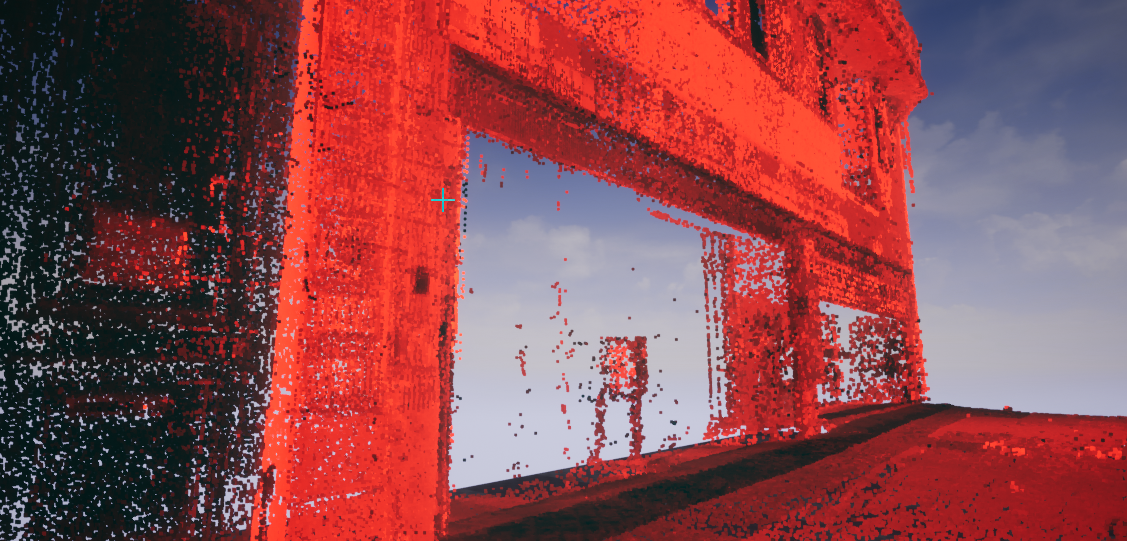
right need to test it out with the vive now
I'm afraid performance will tank since all the points are sprites
real needle
I don't know what that is but it looks cool
jaunty shell
that's a scan of a shop façade I think ?
part of a bigger project involving a whole building renovation into an hotel
real needle
Have you seen the example in niagara that makes meshes out of particles? It looks like it would be sick for that
jaunty shell
nope I've only heard about it on the forums
real needle
I've got a link saved in my ds. One sec
jaunty shell
but yeah, if we could display point clouds with GPU particles it would pretty much solve the problem :p
real needle
Check this out
https://youtu.be/mNPYdfRVPtM?t=43m7s
Join us for a first look at Epic Games' new Unreal Engine VFX editor, Niagara. This new suite of tools is built from the ground up to provide unprecedented p...
jaunty shell
thanks gonna watch now
oh yeah saw that part
that's breaking a mesh into particles though
real needle
I'm going to make something like that for teleporting in vr. So fucking cool
jaunty shell
I want to display point clouds with millions of values 😄
real needle
Yeah. I have no idea what you're going 😂
jaunty shell
the façade in that screenshot is made of 3M points
bah good ol architectural stuff :p
 candid viper
@full junco The GDC 2018 VR Works talk is on the vault, free to view. The TLDR version - they're added some support to make it easier to use MRS/LMS (not relevant to UE4), plus they have Oculus about to take LMS buffers direct to save more time. That is due on github in the next few weeks. That's the plus. The downside - LMS is NVidia Pascal and later only. MRS Maxwell and later (and less performant and varies more by scene whether it helps or not).

Across graphics, audio, video, and physics, the NVIDIA VRWorks suite of technologies helps developers maximize performance and immersion for VR games. NVIDIA will explore the latest features of VRWorks, explain the VR-specific challenges they...
full junco
@candid viper I just watched that, yeah. it wasn't in that list of free stuff a few days ago
and the MRS and LMS stuff is still exactly same like a year ago
real needle
Are sli and sps pretty much the only reason to use vrworks?
jaunty shell
multires, LMS
candid viper
No, if you're happy with NVidia only MRS and LMS.
candid viper
There aren't currently publicly available options for reducing fillrate cost on the outside of the lens that work across GPU vendors.
jaunty shell
it reduces the complexity of your scene shaders on the edges of the lenses
full junco
@candid viper the native warp stuff in the oculus sdk is really great and the only new thing that I really like. I really hope openvr will also support that
jaunty shell
NVIDIA Developer
NVIDIA Developer
Lens Matched Shading uses the new Simultaneous Multi-Projection architecture of NVIDIA Pascal-based GPUs to provide substantial performance improvements in pixel shading. Hardware:
jaunty shell
can't wait for eye tracked HMDs so we can dynamically change resolution or shader complexity
it still renders them @real needle
just at a lower quality
at least that's why my experiments led to
candid viper
@full junco It's a nice little addition. But we took the decision to not use VRWorks as being tied into just NVidia wasn't viable for what we're up to. For PC/Steam, NVidia is something like 90% of the VR GPU market with a lot of that being Pascal... so that is practical if that is your market.
jaunty shell
you could see shadows and materials being much lower quality on the edges in some cases
but unless you stretch your sight all the time to the edges you won't really notice
@candid viper do you have any vrsli experience ?
real needle
I'm targeting medium to high end machines on steam. Sounds like VRWorks is fine to use?
jaunty shell
only if you don't mind having only nvidia users
(which tbh is a good chunk of all the userbase on steam nowadays)
candid viper
@jaunty shell Not that I can discuss publicly, sorry.
jaunty shell
daw :p
real needle
@jaunty shell Debating on buying 11 series or another 1070 for that reason
If I want to support it...probably smart to have sli myself lmfao
full junco
@candid viper VRworks doesn't tie you to Nvidia though?
jaunty shell
I'm just seeking some performance numbers on VRSli and UE4, this shit is so niche there's absolutely no way to know if it works well or not unless you buy a second GPU and test for yourself
jaunty shell
don't want to get a Titan Xp sli for the workstation only to see that vrsli doesn't work that well compared to a bigger gpu like a titan V or something
full junco
the Nvidia stuff still works fine on AMD as far as I know, apart from "bugs" they sometimes miss 😄
so you need to test with an AMD gpu of course
candid viper
@full junco No, but you're performance profile you tune the game for is. MRS/LMS use "fast" geometry shaders - a path that doesn't exist on AMD. You're likely to disable on AMD.
Someone eles's public VR SLI info:

VR SLI GTC slides: see how going from Vive to Vive Pro hurts 2 GPUs VR SLI scaling (PCIe) from 1.72 to 1.49 but on GP100 (NVLINK) scaling is 1.86 (on GV100, here scaling is 1.96 due to 3x faster copy).. more news: some HMD have a cable per eye...

 Twitter
full junco
Twitter
full junco
well yeah, AMD performance is as if you don't use the VRworks stuff
jaunty shell
looks very interesting, gonna have a closer look on these values
real needle
I can use my FE 1070 with a different brand in sli, right? Hate that I thermal throttle instantly with this cooler
full junco
so AMD users use same normal resolution then
candid viper
Yes - just depends if you need the game to work well on AMD as well. If using VRWorks to scale quality up, not a problem. If you become addicted to it and then have to scale back for AMD...
A lot depends on how tunable your title is.
jaunty shell
damn performance on GP100 and GV100 looks great
full junco
LMS and MRS just allow you to use a higher resolution. I wouldn't make my pixels shaders any more expensive
and you can't become addicted to it as a AMD user if you never used it
candid viper
@full junco They both do affect the cost somewhat - LMS more than MRS (but LMS is more efficient and renders less). The viewports each renders to are at different angles so things like texture mip sampling varies. Can be faster per pixel, can be slower. I did have some content that was slower, with MRS especially. Likely to just be a win, but best to test.
jaunty shell
@candid viper can you tell us what kind of hardware setup you are working on ?
full junco
@candid viper when did you last test it?
candid viper
@jaunty shell A wide range. Sorry I can't really help you more. All I would say is that I would not be considering VR-SLI as a dev setup or for making stuff for consumer sale right now.
@full junco December, so about 4 months.
@full junco but keep in mind that content matters a lot - best to test with your own game
full junco
I will definitely test it, once their 4.19 branch is available
jaunty shell
and what about projects that are only meant to run on our machines ?
candid viper
@jaunty shell If you're just making something for the fun of it, I'd suggest one single fast gpu with simpler dev.
jaunty shell
well we're not making things for fun that's for sure 😅
we work with very heavy AEC models
full junco
what I so wonder is if the ue4 implementation will also support Vulkan now that VRworks seems to have full Vulkan support
jaunty shell
so far a single 1080 has not been enough to run these models without a fuckload of optimization on our end
not in VR at least
full junco
or if they did the ue4 implementation only for d3d
jaunty shell
@full junco how about they fix DX12 first hmm ? 😄
jaunty shell
true, not much games running on it
full junco
DX12 is from Microsoft and Microsoft is evil. Vulkan is Vulkan and Vulkan is great.
candid viper
@jaunty shell Afraid legally I really can't comment. We do a mixture of game and enterprise work, so I understand your problem but I can't comment directly. What I would say is that if you use old school approaches to figure out if you're fill rate bound or vertex bound you'll get an idea if VR-SLI could help or not.
jaunty shell
alright I see, no probs 😃
guess when we're gonna order the new setup I'm just gonna go for the most powerful gaming GPU available 😅
candid viper
@jaunty shell Also, worth watching this and following it up profiling how your UE setup is rendering your models.
With the release of Nsight 5.5, a subset of the key GPU hardware metrics we have been using at NVIDIA to come up with driver-side and application-side optimizations are finally available to all DX11 and DX12 developers. nThis talk will start with...
jaunty shell
the problem is, I'm the only one doing VR here (in a construction engineering company), and this is something I don't have the time to do 😦
 alpine torrent
Rayracing in VR
jaunty shell
VR is one of the things I'm assigned to, and my R&D time is quite constrained
alpine torrent
DirectX12 have Rayracing
candid viper
You may find that how/what you're optimising isn't the most efficient for runtime or time efficient in terms of optimising the content. I'd strongly recommend understanding the bottlenecks from the content you have to deal with.
jaunty shell
I'll have a look at your link, thanks 😃
the biggest bottleneck is that we're working with CAD content with a fuckload of entities
its been a year already, I've found some solutions but we want to go bigger and get the best for our clients
full junco
@candid viper should I look at nsight? I only ever worked with ue4 tools and renderdoc.
and I feel like renderdoc tells me all I need
candid viper
@full junco NVidia just improved Nsight a lot. Renderdoc has AMD counters built it, but not NVidia. What you'll get is somewhat limited if you're not going to change UE code. You can learn what is bottlenecking - sometimes changes in your content UE side can help with that. As an example, it varies when 32bit index buffers are used in UE. NVidia hardware fastpaths 16 bit indicies so sometimes 32bit indices can be a bottleneck. (Not always). If it was for you, changing things UE side could improve performance. I'd put it in the useful category, but once you're happy with how your game supplies materials/geometry to UE you rarely need to look at it, if at all. For things like the post process shaders, it's more something to wait for Epic to improve (they have gone backwards a bit recently... but are aware of it). No point duplicating work Epic will be doing.
full junco
@candid viper in what way have they gone "backwards"?
candid viper
@full junco Some of the additions for HDR support slow the post down (and need not) for example.
full junco
ok
candid viper
@full junco Though the new vertex factor stuff in 4.19 (attributes are generally in separate streams now) is likely to give you a performance boost. Though that area may give you fun for merging from 4.15
 tired tree
@real needle in repsonse to not following hmd with the capsule, make sure you are inheriting from the VRcharacter, VRBaseCharacter is common functionality for both other characters, it isn't intended to be used directly.
it just addeds things like the climbing movement and seated mode in a base class so the other characters can use them
tired tree
shouldn't be no
real needle
I reinherited after I made the class. I'll try making a new one
tired tree
should be drag and drop assuming you are actually using the character and not a different one
real needle
Making a new class fixed it
@tired tree Do you know where I'd attach a body mesh? I can't attach it to the capsule, the net smoother stays in the middle, and the parentrelativeattachment moves up and down with my headset location
Should I just manually move it to the capsule location on tick?
tired tree

A plugin for Unreal Engine 4 that adds some additional VR related features / components.
wiki and auto documented stuff
wiki is a bit behind
real needle
Damn you're a life saver
tired tree
auto docs are auto, so not behind
real needle
@eternal inlet Followed your tutorial and this is the crouching I get 😂
eternal inlet
Hehe ok, perhaps something is missing. Havent checked it myself lately
I do recall having to set a task manually actually since their 4.19 update
real needle
I remember it working in previous versions.
Yeah. on the 1.9.2* update currently. I might have to set a task
eternal inlet
For the hips, otherwise i couldnt get my rig to work as it did in 4.18
real needle
You think I could just have a task that's head transform - (hip to head height) as the hip task?
Are you currently able to check what you did?
So I just quickly threw this together as a test. It sets the right position.
When I use it for the hip task nothing happens. When I use it for the left hand task it puts my hand at my hips.
Might just be another ikinema bug. I'll try restarting
Nope. Weird
I had this bug earlier where the hand tasks wouldn't ever move the hands.
Having the same thing for the hip
I also have to find a fix with ik feet. When I stand on a ledge, my character drops below where I am and detaches from me
 mighty carbon
Google is being difficult - they have support for A5 phones in ARCore, but not got Galaxy S6.. That's just dumb 😦
real needle
What are a5 phones @mighty carbon
Was interested in experimenting with that, but I have an s9+
mighty carbon
lol, they don't even support S9 lineup yet... Google is a joke 😦
https://www.phonearena.com/phones/compare/Samsung-Galaxy-A5-2017,Samsung-Galaxy-S6/phones/10297,8997
Phone Arena
Compare Samsung Galaxy A5 (2017) VS Samsung Galaxy S6 full specifications side by side. See the common features and the differences that make them better or worse.
real needle
Never even heard of the a5 phones 😂
mighty carbon
So, S6 is a way more powerful than A5 in any way
and for S6 not to be supported in ARCore, but for A5 to be is incomprehensible
real needle
At least they'll probably support my phone soon 😉 haha
mighty carbon

A.K.A. How to Save 15% or More on Your Engineering Budget
interesting (especially for VR points)
 granite jacinth
dont need that posted in every channel
full junco
@candid viper well the new vertex stuff doesn't really give me much work to update the engine version, I use the RMC and that guy is the one who has to do the work on supporting the new vertex factory stuff
candid viper
@full junco that's good. If you're doing a lot of mesh updates, you might want to look at the MrMesh - that was created for the rapid updates needed for mixed reality (mostly AR world meshes). Might be useful, might not.
candid viper
Mr - Mixed reality. Look in the new AR plugins.
full junco
but I also don't need rapid updates, I like slower updates and faster rendering more
candid viper
Okay. Thought it worth a mention.
full junco
yeah thanks 😄
if you have any more things in mind that might be interesting to me (especially any stuff to optimize performance) please tell me 😄
candid viper
Well, what is limiting your performance?
full junco
CSM
and just general vertex shader and pixel shader cost
though my pixel shaders are very light
so just due to amount of pixels its relevant
but shadows are the most annoying thing, since my lighting is fully dynamic
candid viper
4.19 might help a little with that - the vertex streams might help a bit, though it's usually not the first thing to bottleneck triangle throughput for creating the shadowmaps. It's probably more triangle throughput than fill rate for the shadow maps.
full junco
I do have to use the far shadow cascade for my full view distance
so it renders essentially every existing chunk mesh into those cascade
candid viper
IIRC your game correctly, you're somewhat Minecraft like. If you have a mesh with a quad per "cube" face for materials etc, check if they are merged out where possible for the mesh used for rendering to the shadowmaps. If not, that may be worth doing.
full junco
I do merge all quads together without caring about texture etc for collision mesh and I think also shadow, yeah
candid viper
Epic found with Fortnite that distance field traced was cheaper quickly - IIRC they went as far as one cascade then distance field. Whether that would pan out... quite a bit of effort to find out
full junco
mesh for shadow can share collision mesh
and problem is that distance field with procedural geometry is not really nice
candid viper
Can share collision mesh or is sharing collision mesh? Have you checked
full junco
not sure if it does atm, but it will after I update to 4.19
candid viper
Might be possible to improve the distance field generation quite a lot, or do it over time. Could perhaps do a static test first to see if the rendering would be quicker.
Though thinking about it I'm not sure if distance field shadows work in VR
(I'm not using them)
full junco
I already use distance field shadows for all foliage
far shadow cascade is only for my chunks
but since I'm on 4.15 DF shadows are still quite expensive so I made that a setting that I recommend everyone to disable
they improved perf of those in 4.16 like twice
candid viper
You might be able to do partial updates for the cascades but it gets messy.
full junco
and DF on procedural geometry also has the issue of memory cost, every individual mesh would have its own DF
candid viper
IIRC Insomniac had a decent presentation on scrolling CSM. But... it's a lot of complexity for dynamic
DF they merge the individual meshes into the overall DF that follows the cascades. Merging DF from sections into that may be quicker than CSM rendering. YOu could potentially cache larger intermediate DFs. Without a better feel for what loads your game sees, that is very speculative though
full junco
DF calc is so slow that you need to run that in a compute shader for real runtime usage
candid viper
It's not compute though, it's mostly merging. Depending on how large your max edit per frame is you might be able to manage it, or have shadows update over a few frames
full junco
I mean the calc of the DF for 1 mesh
"partial updates for the cascades" sounds interesting, but probably a lot of work to implement?
candid viper
Yes I know. Depends a lot how big one mesh is for you and how many are changing, plus whether deferring DF updates for a while.
full junco
99% of the hundreds of meshes rendered in the far shadow cascade never change, so if it wouldn't always render ever mesh into the shadow map that would still work great I think
candid viper
full junco
and I only have 1 directional light in my whole game, not any other lightsources
candid viper
You might be able to exploit the shadow map caching Epic have. Something along the lines of having a light follow the CSM light, see some static bits of the world and cache then. Then merge those to update the CSM. Still potentially complex/messy
Imagine that you have the world in chunks. Each chunk gets a light that isn't "used" but has a cached shadowmap. Those chunks are used to generate the CSM shadowmap. The hope being less chunks need to update - that their shadow maps are cached and that the merge is faster. Maybe. Depends on the game again. CSM is simple and fully dynamic - so I'd check the easier things to try eke out any more efficiency within that first - like checking the most efficient mesh is being used for rendering the shadowmaps.
Depending on how much your light moves, you could remove backfaces from the mesh submission for the shadowmaps. If that stays valid for a while, it may help - may not if triangle setup is the bottleneck rather than vertex/frontend.
Could also do that with culling in compute, though caching is simpler
full junco
@candid viper my directional light constantly moves
I do always have a day/night cycle
candid viper
Compute culling maybe then. If you grab with NSight it can generate a C++ version to regenerate the frame for testing. That allows trying modifications - you may be able to test whether pre-culling is a win or not.
full junco
ok, thanks
candid viper
You could also pre-cull with a wider angle tolerance as a cache - so know until the direction light has moved that much that the cache is still valid (but conservative).
full junco
@candid viper I don't quite understand what you mean?
sturdy coral
@full junco I think he means you look at the normal of each triangle and instead of culling just if it is a backface, only cull if it is a backface that faces away by x amount
if you know the path of your directional light you can make it only if it is x amount along the path
then for small light moves your culling can be reused frame to frame
(and you can round-robin your culling along a subset of meshes to keep it up to date without doing too much work in any given frame)
real needle
Hello. I’m new to this channel and new to Unreal. How can I create custom Hands for VR in UE4? 🙂
@real needle You wouldn't make them in Unreal, have a look at Blender, it's free and open source
Hi @real needle Thanks for pointing out.! I’m looking for a source reference mesh. Also, for creating the the Bones. Currently I’m using C4D.
Basically, I would like to know what the basic workflow is for replacing the Hands in the UE4 VR template with my own custom Hands. Thanks!
You have the reference mesh right there in the template
And you can look at the animation blueprint (or if it's just playing animations I'm not sure) and see what values you need to pass and how to use them
Apologies, but this asset in the template is of type .uasset Can I find the FBX source somewhere? 🤔
Thanks!
@real needle You can try exporting it from unreal, right click in content browser->asset actions->export

Move naturally in VR in any game that supports trackpad/stick locomotion. Walk in place to move your body in the virtual world, instead of sliding on your invisible remote-controlled skate.Natural Locomotion is an application that emulates the co...
Release Date
Early April
WOW! I have been using Unity for 3 years and I’m considering switching my Project to UE4. In many ways UE4 seems much more powerful and advanced! Thank you 😊
candid viper
@full junco I mean culling in object space but in a conservative fashion. So say you allowed an additional 15 degrees. Until your sun light has moved 15 degrees you don't need to update the culling so can cache the triangles to submit. I've mentioned a lot of caching options, but I'd recommend trying everything you can that isn't cache based first. Caching approaches are great for average frame rate but tend to suffer spikes - which isn't what you want for VR. On the live culling front, AMD's GeometryFX does work on NVidia and AMD. Confetti integrated it into UE4 on contract for Survios - see http://www.confettispecialfx.com/category/vulkan/ That isn't public, but does show it can be integrated. The library itself is here: https://github.com/GPUOpen-Effects/GeometryFX I would also recommend reading this: https://frostbite-wp-prd.s3.amazonaws.com/wp-content/uploads/2016/03/29204330/GDC_2016_Compute.pdf Now it may be that your meshes are too small for GeometryFX. If that is the case... I would take a good look to see if you can move to larger meshes. But, I'm working with a lot of assumptions and generalisations - I can only suggest a few things to consider, I can't make firm recommendations.

GitHub
GeometryFX - DirectX 11 library that provides convenient access to compute-based triangle filtering (CTF)
 trail shale
I am able to attach objects to my motion controller easily enough following the examples I've found - can anyone recommend one or outline the process for attaching the motion controller TO an object? (like pulling or pushing a valve) Is it as simple as toggling visibility and showing a static version of the MC mesh gripping the object, controlling the logic using a collision box? Or is there a better way?
 sonic lake
@trail shale World interaction in VR has some nuances to it, especially when it comes to handling objects with movement constraints. You can check out Mitch's VR Examples here: https://github.com/mitchemmc/VRContentExamples or Mordentral's VR Expansion plugin here: https://bitbucket.org/mordentral/vrexpansionplugin

GitHub
VRContentExamples - Unreal Engine 4 community VR content examples
A plugin for Unreal Engine 4 that adds some additional VR related features / components.
 tacit quest
^ fantastic starting point for world interactions, i recently made an advanced version of his door interaction
fleet plume
can you actually star repositories on bitbucket?
their UI sometimes feels really awkward compared to github
real needle
Hi there UE4 devs. I have an issue with the VR Template. The hands are not grabbing. Initially I did follow this tutorial - https://www.youtube.com/watch?v=tQZygcnUz3A

This tutorial explains in detail how to use the Hands for VR assets with the Unreal Engine 4 VR Template
Thanks!
Well to be more specific. I do get teleportation and grabbing, but it’s the Animation which is not playing.
 runic phoenix
what's the current status of Windows MR support? assuming no Oculus/SteamVR-specific stuff in my own code, can I expect things to move over smoothly?
sturdy coral
@candid viper @full junco fwiw epic have mentioned on one of the livestreams that they might bring some compute shader culling approaches to the main engine, I can't remember which stream
candid viper
@sturdy coral @full junco I didn't know Epic had said anything publically yet. I think it's still worth considering for him as he would have a known timescale and with the nature of the game it would primarily need adding to one type of mesh and then mostly for shadowmaps.
glossy agate
@trail shale you just detach mesh from parent, then attach to target, then set relative loc/pos with any anim you want. That’s what we do with guns
 fresh quail
Hey guys
 subtle raft
why are my UMG widgets displaying in editor but not on runtime
so I made a new project and did exactly what I was doing in the other and Widgets are working
wtfffff
ugh that's really annoying.... have to migrate everything to a new project for some unknown reason
if anyone has an idea what I did to break my project, I'd be really curious to know so I don't do it again
everything works after migrating everything so it must have been some project setting
 digital musk
Hi, I'm trying to make a UMG widget that rotates with my VR character but I can look at, so it's not headlocked
Similar to this https://youtu.be/jVdFpuicptQ?t=2m11s
....but I have a problem
-If I parent them to the camera there is no way for me to look at different parts of the UMG(they move locked to my head)
- if I don't parent them to the camera I'm able to look at them but when I turn my body either by adding yaw input with controller joystick or by looking in a different direction and then moving I'm able to turn completely away from the UMG elements.
I'd love to have something like a space helmet with hud in that will move with my body but I'm able to look around inside it.
Is there a way to limit the amount that the UMG widget will be rotated in relation to the HMD?

Announce Post: https://forums.unrealengine.com/showthread.php?99586 This week is a grab bag of VR Tips and tricks, with special guest Tom Looman, Epic Games'...
sturdy coral
@candid viper @full junco looks like they also mentioned it here, but said it wasn't getting much traction:
Trade Shows, Livestreams, Dev Tours, Workshops, and Other Official Unreal Engine Events.
it was a response to a question from.. john alcatraz 😃
it says it used to be on the old trello, that might be where I saw it
you could optimize culling for a cube world's shadows even more since terrain faces only face 6 different ways and directional light is orthogonal. instead of having to do dot products for each normal you could do near-equality tests
 sinful vault
Hello guys :D
Can anyone point me somewhere?
How to get the trigger sensivity of Touch controllers, or at least when your finger hovers the button?
The axis value of the trigger doesn't work for me
 sage gulch
cap touch
sinful vault
cap is for the hover, right?
sturdy coral
@sinful vault yes, but in practice you can only really get touching/not-touching
I haven't had any luck with the in-between hover states
sinful vault
@sturdy coral thanks, i’m at work now. I’ll test later, if i come up with something i’ll show you guys
real needle
@subtle raft Next time, try deleting your intermediate folder and restart the project
If that doesn't work, save whatever you need in "Saved" and delete that as well
You should also familiarize yourself with how to rebuild binaries from Visual Studio, it needs to be done occasionally when problems occur
subtle raft
ok thanks
subtle raft
another question, I'm trying to track movement from a media file with objects in a sequencer, is it possible to scrub the sequencer and have it play the media file
real needle
@eternal inlet Did you make any videos on your 4.19 ikinema setup? I can't figure out the pelvis.
eternal inlet
Sry no. Im still on 4.18
mighty carbon
oh wow, Synty studios is prepping Sci-Fi POLYGON series pack.. Crazy stuff..
eternal inlet
anyone know if volumetric lightmaps are working for streaming levels now in 4.19?
i mean, i can't get it to work in 4.18, so assumed it was either a limitation or something that would be looked at in a future release
mighty carbon
Wasn't it introduced in 4.18? Cuz the initial release with volumetric lightmaps did not support streaming
no one knows about 4.19
as if no one uses volumetric lightmaps and streaming 😒 🙄
dusky moon
Well I do. but not sure if it actually works or not. I bake lights in sublevels individually (with volumetric lightmaps) and then all levels stream ok through the persistent. so if that means it silently supports... I guess yes
however epic hasn't announced it yet and I don't think they would forget mentioning new features in changelists.
eternal inlet
ok, coz when i bake light on my persistent map with all streamlevels visible, the various movables in my levels does not get affected by the volumetric lightmap
so maybe i need to bake it seperately for each streamlevel, just not sure that will work with that amount of streamlevels i have (alot)
dusky moon
I would never bake lights on persistent. because usually my scenes are overlapping and each might have different directional lights so It won't work at all to bake all at once. but if you have one large level with one lighting setup but smaller chunks of sublevels then you'd be fine to bake all at once though.
wary onyx
I am in Vr rn why is everything so freaking small
looks like i am at a toy store
everything is smooth
but evrything is so small
sturdy coral
@ACE GOD ァ印ニ#9718 you probably changed WorldToMetersScale
your name is apparently impossible to mention
granite jacinth
@ACE GOD ァ印ニ#9718 sadfasdfad
@ACE GOD ァ印ニ#9718 asdfasdfsdafasdfs
@ACE GOD ァ印ニ#9718
@ACE GOD ァ印ニ#9718
@ACE GOD ァ印ニ#9718 dfg
@wary onyx dsf
i win
while i do hate people with poopie names
I blame discord for not allowing mentions when they are offline though
eternal inlet
yeah, i have lighting setup in the persistent, and other streamlevels are basically content levels + one dedicated for dynamic actors, so problem arise when i bake the light for persistent, coz that somehow does not affect the streaminglevel ones, so im actually quite puzzled how i can then get my light info into the streamlevels
 upper sedge
Hello Guys..
upper sedge
I am trying to set my Camera FOV to 110 degrees but in HTC Vive its Not updating from default value of 90 Degrees.. Can someone help me with this please..
jaunty shell
uh ? Are you using the VR template @upper sedge ?
upper sedge
No.. i am are not using any template
jaunty shell
do have a look at how the VR template is configured then 😃
upper sedge
it seems like what ever FOV we specify Steam is taking input from Headset.. this may be the reason its not working.. any ideas for workaround guys..
?
@jaunty shell Its not working for Vr Template too 😅
jaunty shell
that's weird 😐
I mean I've never touched anything related to FOV, it always worked out of the box
upper sedge
it is working fine for regular Camera.. but not in VR
full junco
@candid viper my meshes are mostly very big, like, super big. so definiteöy not small. thanks for your great suggestions! I wish I could integrate AMDs GeometryFX, but I don't really feel like integrating something like that into UE4 from scratch is something where I'd succeed at. would be great if they would offer a branch with their stuff
@sturdy coral it's funny that you seemed to have found a question from me about it back then 😄 I also quite often find questions or posts from that john alcatraz guy when I google something about UE4 😂
@sturdy coral I don't quite understand what you mean with "instead of having to do dot products for each normal you could do near-equality tests"? Do you mean a custom shading model for my voxel geometry? And in what way is a near-equality test better than a dot product? isn't dot product one cycle?
sonic lake
Question on the 4.19 VR template. Has the inputs mapping changed respect to 4.18.x? I don't have 4.19 installed yet so I am not able to check directly. Thanks!
jaunty shell
@sonic lake don't think so, the naming is still the same
sonic lake
@jaunty shell Thanks! I was wondering because someone posted a comment on my ArchViz locomotion tutorial saying the inputs were not working.
jaunty shell
here's one from 4.19
that's weird @sonic lake
maybe they created a new empty project, THEN added your VR locomotion tutorial stuff ?
sonic lake
Thanks @jaunty shell . Looks indeed the same. They should start from the standard VR template and then build on it. Maybe they didn't.
jaunty shell
yep
rocky nimbus
You guys work with dynamic res in 4.19 yet?
dusky moon
@rocky nimbus I tried enabling it on my Oculus project. works pretty solid. but it's a bit conservative (although I don't know how to properly set it's detailed commands to get the most out of it) for instance in a scene that I get 11ms with SP 140.. using dynamic res cranks it down to around 100
any1 knows how can one possibly see Stat unitgraph and Stat GPU inside HMD ?! It's barely visible
rocky nimbus
Those stats are pretty visible for me (Oculus as well), not sure why you're having problems with it 🙄 As for dynamic res, did you have to do anything for it to work or are you just using the table from the docs (SP 100 = full-res respective of HMD)? Not sure what you meant by it cranking it down to 100 because you were talking about ms (unless you meant 10)
@dusky moon
wicked oak
@rustic jackalllesss#9041 you dont use SP any more
now its all pixel density PD
wich, at 1, goes to something like 3000x1600p on rift
screen percentage 100 in 4.19 is equivalent to sp 140 or so in 4.18
do not touch creen percentage now
dusky moon
@rocky nimbus this is my BP setup for dynamic res. when you start using dynamic res. in stat unit, it shows you two Screen Percentages (Primary + Secondary)
So my point is. at PD 1... with Dynamic res in a specific scene ... I get 80% x 80% (this means It lowers the SP to maintain framerate)
however when I disable dynamic res I can get 11ms framerate (90fps) on the same scene with PD 1.4 and SP 100.
sry if it's confusing but I'm also confused with this 😄
@wicked oak yeah I know that. I just wanted to explain the equivalent in SP to make sense 😄
wicked oak
yoooooooo
you are being unreasonable to a huge degree there
do you know that "max dynamic res" at 200 is beyond absurd
leave the max at 100%
up the pixel density if you want higher averages
dusky moon
oh
wicked oak
you areent running dynamic res at max resolution
dusky moon
🤔
wicked oak
you are running it at twice the resolution of pixel density 1
wich is 5k....
you are running temporal supersampling at 5k
dusky moon
lol
wicked oak
PD1 is already ridiculously high
50% to 100% is alright
up PD to 1.2 or similar if you want bruteforce antialiaas
dusky moon
I'll try it today @wicked oak thanks for the point... I'm just still not getting this primary+secondary percentages and their response to Min/Max that you set in BP
I mean when it says 80% on Max set to 200 SP ... does that mean 80% of 200 or just 80 SP ?!
rocky nimbus
I'm having a hard time understanding this now as well
I assumed dynamic res would change depending on each user's hardware
But why are we setting the PD and SP if that's the case? And why clamp the min/max SP if the game optimizes based on hardware?
Unless I'm wrong about the whole purpose of dynamic res
wicked oak
clamping min SP is done so if you are REALLY lagging you dont go into truly unplayable graphics
clamping max SP is becouse the render texture needs to be created at that max resolution
the system does not reallocate the render texture every frame, its just rendering in a corner of it
alless with 200 sp was running a render texture that was 5k
that is beyond ridiculous
thats why its clamped
leave it at default, people
50% min res and 100% max res. Use the pixel density if you want higher or lower overall
at the moment im ps4 im runing 0.9 pd and 50 to 100% res
btw, temporal supersampling does not work on rift
its broken
on vive, john alcatraz managed to do some edits for it
on PSVR, i did mine
but on oculus, there is code on their closed integration, and i cant do anything
sonic lake
Any expert on VR audio here? It is about audio mirroring with the Oculus. I have a VR experience built with 4.18.3 which plays a video (media framework). The audio of the video is not mirroring for some reasons. It can be heard through the speakers but not through the Oculus headphones. Sound effects etc. all mirror properly. Any idea?
dusky moon
@sonic lake not exactly sure but worths checking:
In project settings > Platforms > Windows > Set Audio Device to Rift Audio
sonic lake
@dusky moon Thanks, I am going to check that. Still strange though that the regular sound effects mirror properly. Seems something linked to the media framework specifically. Maybe that settings will fix it.
 solar loom
Pulling my hair out here... Does anyone know, is the Vive HMD not allowing windowed mode in a packaged game in 4.19?
solar loom
Managed to fix it. the r.setRes at BeginPlay initially started toggling every frame somehow, giving a jittering image. I tried setting a small delay before doing the r.setRes which totally fixed the issue. So I now have a windowed mode Vive setup.
 abstract forum

Leap Motion Blog
The coming of virtual reality has signaled a great moment in the history of our civilization. We have found in ourselves the ability to break down the very substrate of reality and create ones anew, entirely of our own design and of our own imagi...
mighty carbon
tired tree
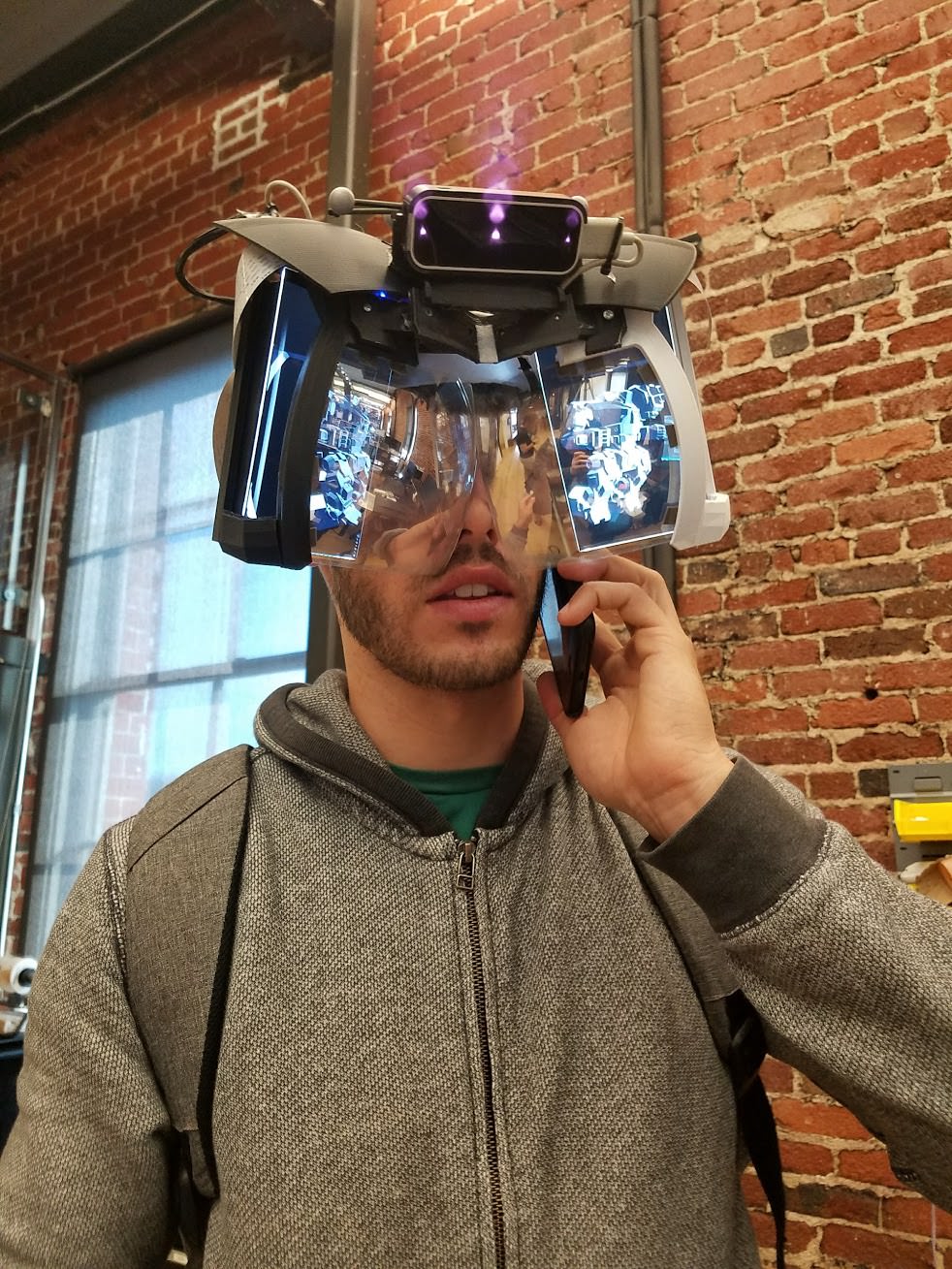
bug eyed? you don't say
curious when they would expect to get from that current version....to the rendered eye candy...
though that was a prototype, don't know that they intend to take it farther than that themselves since they are open sourcing the design
mighty carbon
I don't think it's meant to be worn on the street
however, who cares what it looks like when it comes to on-site training and manufacturing
 tawdry dragon
Anyone know if wall detection is available with ARSession? I know ARKit 1.5 and ARCore can so
Seems to me the 4.19 release doesn't implement the newest versions of the toolkits
fleet plume
bet they'll call them iMantis
jaunty shell
god the vive pro's resolution tanks performance
need to subsample at 58% to have enough frametime 😦
tired tree
@jaunty shell you sure you don't still have steamVR SS enabled at something above 1.0?
jaunty shell
nah checked and it was at 1.0 for the steamVR ss and application ss
video menu, slider is at 58%
app menu, slider at 100%
@tired tree I've overriden the dynamic sampling because its forcing 104% even on our ressource intensive apps
thus terribad performance occurs 😄
tired tree
shouldn't be hit that hard then
mm, well its not actually that far off from a 2x pixel count
but still, you would have had to have been AT 11ms with native res normal vive
@jaunty shell what is your UE4 setting?
just saw you said you were using Steam sampling at 58%, i had assumed you meant in engine
so what are your in engine values
jaunty shell
oh this is actually on tests with a custom engine not UE4
haven't had time to run on UE4 enough yet
tired tree
well ok then, no idea if that custom engine is even using the correct res / masking for vive pro then so no comment :p
jaunty shell
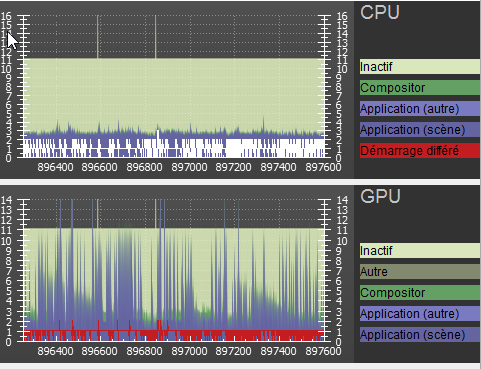
but it seems I'm having some very weird results anyways, with frametimes going from spikey 4/9ms at 82% to 13/14ms at 104%
do you use reprojection btw ?
 jaunty shell
no probs 😄
tired tree
there are many ways to screw up VR rendering in a custom engine :p
jaunty shell
hah yeah for sure
the problem with that engine is that you can't change much the settings
it makes some pretty good offline renders though
overall in this morning's UE4 tests it looked great
on scenes with 4k texture materials it looks sharp af
you can even see the compression on some textures 😄
mighty carbon
@full junco https://forums.unrealengine.com/development-discussion/rendering/85035-vulkan-status?p=1457785#post1457785
For discussions about Materials, Textures, Lighting, Particle Systems, and Post Process Effects.
As I suspected, 4.25 maybe will have fast and production ready Vulkan for non-VR games 🙄
sturdy coral
@full junco you're right, apparently dot product is really fast.
How much memory does your terrain vertex data take up on the GPU?
If it isn't too much, you could generate pre-culled versions of your terrain data for shadows for all permutations of light angles that can make a difference, it would just be removing faces on certain sides globally across all data
Since cubes are convex, you can never see more than 3 faces at once of a given cube, and since directional lights are ortho, not perspective, the three sides are the same across all cubes from the light's pov
wicked oak
As of why UE4 is not way faster in Vulkan, it's a matter of changing how the renderer talks to Vulkan. To do so the best way for Vulkan, D3D12 & Vulkan, we'd have to basically break all the code and rewrite it, which is not feasible as it would break licensees and marketplace. So instead we do small changes/deprecate code paths, and slowly get there. But that's the end goal, to have a fast renderer
4.20 is almost free of validation errors, so it has a *lot* of fixes. ```toppest of keks
forward render vr is the one that benefits the most from vulkan
by far
due to 4 times the normal drawcalls
 solar coral
I would like to start on ar in the 4.19 but i only find stuff from below that version
Any suggestion?
dusky moon
So has any1 tried using Screencapture 2ds ?! It's weird that I get solid 11ms in VR preview (editor) but in packaged build It hits hard to 38ms !! :/
wicked oak
@sturdy coral depth prepass: x2 drawcalls. VR stereo render, another x2 drawcalls
sturdy coral
Instanced stereo works on both I thought though
And with MSAA you don't need velocity on movables so that saves some calls too
wicked oak
velocity is not a drawcall
its just an output on the pixel shader
ive said it many times, DWVR runs well on PS4 precisely due to the multithread renderer
with lower drawcall overhead
i do not run HLODs on PS4, i didnt need them at all
meanwhile PC its at the absolute limit on drawcall budget
sturdy coral
Ah ok, I thought base pass only output velocity on vertex animation
But still, with instanced stereo on forward and deferred I don't see where the 4x total is
wicked oak
velocity gets outputted from object movement and animations, the vertex animation si to allow "World offset" stuff to work
in that case, forward is a x2 drawcalls
from deferred
they are cheap drawcalls
but still
real needle
Hey guys, I’m new to UE4. I’m having trouble setting up the motion controller for a custom Hand. The Problem is, the VR Template hands are not grabbing. Here are a few screenshots. Hopefully someone can point out where I might have gone wrong. Sorry for repeating myself.Thank you!
tacit quest
@real needle what does your animation blueprint look like?
wicked oak
thats trash
real needle
Hi @tacit quest ! This is what my BP_Anim graph and BP_EventGraph look like. Hope these are the right ones you are looking for. Thanks!
tacit quest
well, you don't have any animations in your blendspace
if you're just trying to reproduce the original demo functionality, you'll only need a 1d blendspace
if your bone hierarchy is the same as the mannequin hand you can import your mesh and specify the mannequin hand instead of your custom one, then you can use the existing demo stuff, just an idea, not sure what your end goals are
otherwise you'll have to make some pose animations for your custom skeleton
or alternatively, you could retarget the demo hand pose animations to your skeleton and use those in your blendspace
real needle
OK. Thanks for pointing this out @tacit quest . I created a 1D blendspace. For now, I just want to use the demo Hand and replace that with my own custom Hand. Suppose my skeleton is not quite the same as the demo. But I was using this as a reference.
tacit quest
you should be able to retarget those demo animations easy then, the hierarchy and naming looks the same
when editing your blendspace, in the bottom right there's a tab called "Asset Browser" any animations compatible for your skeleton will show up there
real needle
Thanks for the info! I replaced the mesh and Animation Class. However still no Animation. 😦
tacit quest
do you have animations specified in that blendspace?
glossy agate
@real needle You have no anims set in there. You can just retarget the example to your new hand and just use the existing anim BP and BS though
real needle
Thank you @glossy agate . I will try and do that.
dusky moon
Any1 knows if UE packages Unused assets or not ?! I remember ppl asking for it to be a feature
full junco
@mighty carbon stop being so stupidly pessimistic. 4.20 does have fast and great vulkan, not 4.25
@sturdy coral I use 20 bytes for the vertex without position, and the position-only buffer has 14 bytes per vertex I think
sturdy coral
@dusky moon unused are not packaged, you can manually add assets or folders to package though
mighty carbon
@full junco I gotta be.. Otherwise I'd be too excited for nothing 😛
full junco
@sturdy coral your idea with pre-culled versions of the chunks sounds really good and makes a lot of sense to me, but how would I let the light pick the correct one? do you mean I should, on the CPU, just check every tick where the sun is and if it moved far enough, switch the meshes for the whole terrain (only the meshes for shadow casting, not the "visible" ones)?
sturdy coral
Yeah
full junco
well, whenever that light moved far enough, I would have to update all the meshes within 1 frame though to not see any flickering of shadows, right? updating ~500 meshes or so in 1 frame would surely take a while and not be very smooth, not really something that I want to do in 1 frame
sturdy coral
If face that points downwards is always culled (light never completely below horizon), and top always shown (light only directly overhead never or for 1 frame anyway)
There are only a few variations
You mean updating shadow visibility on ~500 meshes would be slow?
You could add something similar to layers (layers get compiled out in noneditor), or possibly put them in different sublevels and show/hide the whole sublevel
full junco
ah right, you mean I should keep them all on the GPU and only adjust the shadow casting bool?
sturdy coral
right
full junco
what do you mean with "layers"?
sturdy coral
@full junco there is some way of grouping meshes in layers for the editor, it doesn't get used much
There is a layers tab that isn't open by default
full junco
ok
I think just having them and adjusting the bool is simple enough
I never had the idea to remove the downward facing quads for shadow rendering, it makes perfect sense
though that means I can't just share the collision geometry for shadow rendering
sturdy coral
@full junco you could instead remove front faces and flip all backfaces, might be less faces and verts
but wouldn't look right out on the edges of the world or in places where there are unloaded chunks
full junco
not sure what you mean with that?
what benefit do I get from removing all front faces and flip all backfaces?
sturdy coral
any shadow from a cube should be the same volume from its front faces or backfaces, except for the cube interior which can't be seen anyway
full junco
but its mostly not "cubes" that exist in my game
sturdy coral
yeah but it should hold
full junco
its only the visible faces that exist
sturdy coral
I mean visible from the POV of the light
inside a tunnel you would get shadowed from the tunnel ceiling instead of from the ground above
full junco
so you have some mountain with frontfacing faces on one side and backfacing ones on the other side
from the POV of the light
sturdy coral
yeah, only the shadow that is interior to the mountain would be different
sturdy coral
just guessing, because you have more up faces facing straight up than bottom faces facing down
full junco
oh, now I understand
sturdy coral
and if you do generate bottom faces facing downwards at bottom of world you could still cull them both ways
since nothing can be below and shadowed by them anyway
full junco
there are no faces at all at the bottom of the world though?
I mean, only facing up
none facing down
and yes, huge majority of the faces are facing up
sturdy coral
ok, you wouldn't need to add them when switching to flipped backfaces or anything
since nothing can be below there
but yeah I think when you have occasional unloaded chunks it wouldn't look as nice
full junco
why?
sturdy coral
an adjacent cell that normally would get shaded by a mountain would get light if the mountain's backfaces (relative to the light) were part of an unloaded chunk
full junco
but the mountain's frontfaces could also be part of an unloaded chunk
sturdy coral
yeah but if front faces aren't loaded
you don't visually/intuitively expect them to cast a shadow anyway
full junco
ah
sturdy coral
but yeah I don't know, it may not look that bad on average, probably mainly will be if it looked bad out at the edge of your world
full junco
well, ideally no one should ever be at the edge of the world
sturdy coral
true
full junco
@sturdy coral https://puu.sh/zZJGb/3399a427f8.jpg

apart from tunnel stuff, there aren't many faces facing down
sturdy coral
cool and tunnels should have approx as many facing up as down
full junco
yeah
but light leaking due to low res shadow maps would be an issue I think
when its not the ground above thats giving you shadow in tunnels, but the tunnel wall itself, you will see light at the edges in the tunnel I think
sturdy coral
@full junco further down the line, if you render the shadow map of terrain before trees and foliage, it seems like you could use hardware occlusion queries to skip shadow casting of all foliage that is enveloped within the terrain's shadow volumes
it might be on a frame or two delay but wouldn't matter much for a slow moving light
may not play well with HISM depending on how big its groups are, and I think you said you were already using distance field shadows on distant foliage anyway
something like that may already be in the engine too, I'm not sure
full junco
yeah, not sure how expensive the shadow rendering for the foliage is..
they mostly don't cast any shadows at all
my normal CSM shadow distance is only 60 meters or so
all terrain is in a far shadow cascade
foliage is not part of that, foliage can use DF shadows
so most foliage never casts any shadows
sturdy coral
The Witcher 3 has some really cool optimizations for doing far shadows on terrain, only works on height map terrain though and wouldn't work with voxels
full junco
ok
sturdy coral
the clip map can be read as a height map, anything below that height is in shadow
full junco
ok
sturdy coral
@full junco I'm thinking there may be some way you could bake a negative shadow bias into the backface geometry that would be more intelligent than just a bias from the light's point of view
taking into account surrounding geo a bit.. not sure it would be a full solution
granite jacinth
So I made the plunge to 4.19...and I sort of regret it with it's shit performance
S% 100, PD =1, Rift and it's complete poop
Tried to find reports on it on forums, anyone have links?
mighty carbon
so Vulkan might not make it into 4.20 after all
rocky nimbus
@granite jacinth I think that = 140 SP, what SP did you run your stuff at in earlier versions?
Try lowering PD and see if you get similar results to what you had before
tired tree
@rocky nimbus that is native res for the panel, anything under that is undersampling
full junco
@mighty carbon Vulkan is already in 4.15, 4.16, 4.17, 4.18, 4.19 and will also be in 4.20. almost everthing you say about vulkan is just wrong or wrong
mighty carbon
nah, I mean multithreaded rendering @full junco
it was in the reply to you in the forums
full junco
yes, that was great news from rolando
its super awesome that they are close to parallel rendering support with vulkan on PC now
if its 4.20 or 4.21 doesn't matter
sturdy coral
there is already multithreaded rendering with it isn't there, just not optimal?
full junco
Initial parallel support is working, but not yet ready. Still got some weeks before 4.20 cut-off, so hopefully it can make it. Most of the issues are correctness issues (as in following the Vulkan spec re:transitioning resources, which work on some drivers, but there are no warranties on others).
ah, hmm
from the fortnite talks it sounds like they have metal working in parallel pretty well
mighty carbon
so what was that talk about renderer needed to be rewritten ?
full junco
metal is not vulkan 😄
mighty carbon
"As of why UE4 is not way faster in Vulkan, it's a matter of changing how the renderer talks to Vulkan. To do so the best way for Vulkan, D3D12 & Vulkan, we'd have to basically break all the code and rewrite it, which is not feasible as it would break licensees and marketplace. "
^^ that
tired tree
they said it is going to take a re-write
and that they are doing it slowlty
to not break everyone
slow incremental change over to the new rendering setup
sturdy coral
sounds like boiling a frog 😛
everything is going to have to be rewritten by everyone, just over several engine versions instead of one
tired tree
which is the best way of doing it
tired tree
slowly approach parity, lets there be a lot of testing with incremental switchover, as well as not breaking everything utterly
sturdy coral
we probably need UE5 before long
needs threading throughout
core counts stagnated forever, but there are only going to be more and more
mighty carbon
just wondering why it was done that way initially, unlike id Tech 6 (which one had basically rewritten renderer in a short period of time)
granite jacinth
Fornite or Bust
full junco
@sturdy coral well, look at who liked that tweet 😛 https://twitter.com/alcatraz_john/status/864983355682689025

@TimSweeneyEpic You wrote this ~5 hours after @AMD announced a 16c32t CPU. You're saying if that gets popular enough you would freeze UE4 and create UE5?
Twitter
mighty carbon
are you saying id tech 6 has a way smaller and simpler renderer than UE4 ?
tired tree
no
i'm saying id tech doesn't have to worry about all of the licensees
at least no to the extent ue4 does
mighty carbon
I see
sturdy coral
@full junco hah
tired tree
also, yes
id tech likely has a smaller and simpler renderer
ue4 is literally every platform and architecture now almost
sturdy coral
I think they could adapt UE4 like naughty dog was able to do:

This talk is a detailed walkthrough of the game engine modifications needed to make The Last of Us Remastered run at 60 fps on PlayStation 4. Topics covered will include the fiber-based job system Naughty Dog adopted for the game, the overall...
but it would break all third party stuff
full junco
but what rendering third party stuff is there actually? UE4 never nicely supported rendering plugins
sturdy coral
not just rendering, that one is for parallelizing almost everything
if I remember right it added a frame of input latency though
and apparently only the PS4 toolchain had good support for debugging with fibers at the time
mighty carbon
I am guessing Tiago Sousa is #1 nowdays when it comes to real-time rendering in game engine
(for non-VR rendering at least)
rocky nimbus
Any tips on setting up a character BP as a VR pawn?
The collision from this inherited capsule makes me really tall
mighty carbon
why not to use either Epic's example or FPS Template example or one of the 3rd party VR templates ?
granite jacinth
ya
I mean, they have docs and examples
no reason to reinvent the wheel here
except they changed up the docs, so you'll need to actually look
mighty carbon
also, afaik camera needs to be a child of an "anchor" which is in turn a child of the capsule
rocky nimbus
I have all the functionality I'm gonna be using, I just need the movement component in the character. I can't re-size the capsule because it's an inherited root 🙄 And yeah @mighty carbon I'm gonna add a VROrigin SC
 tired tree
still have the offset movement collision issue...
sturdy coral
@rocky nimbus resizing the capsule isn't your problem, you need to move VR root to the bottom of the capsule and set floor origin
and yeah, don't do movement like that without doing what mordentral said, that's what skyrim did and everyone is complaining
rocky nimbus
@sturdy coral Is there a definitive location for the "bottom of the capsule" or is it eyeballed?
granite jacinth
000
Just read the docs
It tells you what to do step by step to create a VR pawn from scracth
scratch
granite jacinth
Didn't he create a new character pawn though?
But yeah in that pic bottom of cap is 0
rocky nimbus
I'll check out the docs right now
sturdy coral
@rocky nimbus you might want a bit below half height, because character movement keeps the bottom of the capsule hovering about an inch or so off the ground
I think mordentral added that to his pretty recently. it could be a good idea to use his stuff since he has already worked out most of the issues. he has a simplified character too that doesn't change as many things
rocky nimbus
I'm just making a quick character for testing purposes right now, I do want to check out Mordentral's plugin (everyone tells me to use it) before I start working on actual character stuff.
But in this case,
The camera is by default at 0, 0, 0
Floor origin
I can't tell if it's accurate right now with the capsule being the smallest it can be but it seemed right at a glance (it's probably not)
sturdy coral
@rocky nimbus 0 when attached to capsule isn't floor origin, it is capsule origin
rocky nimbus
@sturdy coral The capsule is the inherited root component of a basic Character BP, how do I manage the camera independent of the root capsule? Or would you avoid using the default character BP to begin with?
 sturdy coral
@rocky nimbus you add an intermediate empty scene component
Then move it (the empty scene component) down by 1/2 capsule height
rocky nimbus
Anyone know why GC is happening in my level? I'm not spawning or destroying anything and I've never seen this before (using 4.19 now). Getting FPS drops and this only happens in one part of my map (which itself isn't different from the rest of the map)
dusky moon
Question: If I package my Oculus only project with SteamVR plugin enabled... is there chance that ppl might run it with steamVR and things might broke ?!
rocky nimbus
I've not run into that issue, but Oculus won't accept your build if it's enabled (if you're planning on selling it on the Oculus store)
dusky moon
no it's just for play tests
rocky nimbus
Should be fine, how come you've got the SteamVR plugin if you're not using SteamVR or a Vive?
dusky moon
well at some points project was meant to support both... but then I thought it's better to solely focus on Oculus (touch) and port for SteamVR later on
but to stay safe I'd still disable steamvr
wary onyx
Now i have a quick question, how would i be able to use the CinematicCamera for VR?
Is it possible?
dusky moon
@ACE GOD ァ印ニ#9718 why on earth you'd need to do that ?
I mean all the settings that the Cinematic Camera provides won't become useful in VR
ps. your name is so vaporwave dude ))


 granite jacinth
@wicked oak looking good
jaunty shell
Yep, very noticeable in detailed environments @charred portal
Can now read text from afar
 charred portal
Worth it?
 wintry escarp
doesn't play here
 primal sky
I have one of those too. What we don't have is an occulous
wicked oak
im adding about 8 different gfycat links in the PDF document im sending to sony
its definitely guetto as fuck
sad thing that i cant embed a video or gif in a PDF, my art is shit, what its cool is the gameplay clips
jaunty shell
@charred portal yep, this is a device we bought for our company though, budget ain't a problem 😃
charred portal
Cool
fleet plume
@wicked oak what happens after you send it to sony? do they "greenlight" it and you basically produce/finish the game afterwards?
also why can you hit the enemy through the door? 😄
wicked oak
@fleet plume magic
fleet plume
nda?