#virtual-reality
1 messages · Page 170 of 1
 mighty carbon
 wicked oak
no they aint
if its less than 2k dollas im getting one
for science
ive wanted to get a proper AR device for a long, long time
just loking at the SDK, it is MUCH better than hololens
wicked oak

Unreal Engine
Today, Microsoft has announced DirectX Raytracing (DXR), which brings real-time ray tracing to the DirectX 12 API.
mighty carbon
what kind of GPU one needs to run this in VR ?!
wicked oak
lol
mighty carbon

Unreal Engine
Unreal Engine 4 developers can create content for Magic Leap One™ starting now. Find more information and links to developer resources here.
 granite jacinth
Yeah but how much
mighty carbon

Google Developer Day will be full of announcements and best practices to help developers build incredible games. Starting with a keynote, we'll then dive in ...
 glossy agate
Hey, that drone game is actually pretty fun, I tried it out when I got the iphone 8. Actually worked around a lot of my living room if you get up and walk around
mighty carbon
lol, people... Host: "They built AR game in a week!" ... People: "Crickets...."
disconnect between end-users and tech is so vast nowadays.. 😦
 tired tree
how is that a disconnect?
its using a framework
that isn't technically all that impressive
mighty carbon
making a game in a week is impressive
tired tree
the framework itself is sure, the feat of using it quickly isn't
glossy agate
Yeah, I wasnt sure what he meant by that. Short load times is supposed to equal more discovery?makes no sense
mighty carbon
that means even higher burn through rate :/
glossy agate
If you try that game, a 1 week build time isn’t surprising. Really simple wave shooter, but AR so new and fun for like an hour till it becomes Grindy micro transaction hell
granite jacinth
I can make a game in an hour
ggwp
that's solo.
Now get a whole team around me and a week
amazbalels
mighty carbon
good for you 😃
mighty carbon
btw, Google omitted UE4 when mentioning instant games integration. And keep ignoring UE4 as they keep talking about it.
wicked oak
come on i was doing cool vr games the second day i first got VR
mighty carbon
politics
 sly elk
Does anyone know if the oculus store supports generating discount codes you can give out?
mighty carbon
not that I know of
why no to ask Oculus themselves ?

Compatible with Playstation4, Xbox, PC Windows, SmarthPhone, all video games and virtual reality sistems (OculusRift, HTCvive, PSVR...)
^^ cool
rider gotta be under 200 lbs most likely 😦
 real needle

Professional-grade virtual reality for the most demanding experiences. VIVE Pro brings the next generation of room-scale VR.
800$ for HMD only
mighty carbon
Report with user information for oculus users over the last 28 days
 minor hawk
There's a lot of hate for the VivePro. But my friends doing enterprise visualisation love it. The cost isn't an issue for them. Pushes the medium forward which can only be a good thing.
mighty carbon
I wish Oculus would give us actual number of users for gear VR and Rift
sly elk
Yeah, I think they guard that pretty closely
how many rifts does the steam hardware survey find?
 eternal inlet
Anyone know if 4.19 supports volumetric light for streamed levels? I can't seem to get it to work on 4.18, but hoping it is something that was addressed in 4.19?
mighty carbon
@sly elk I don't think they show absolute numbers on Steam either
@eternal inlet the rumor has it that it does, but I couldn't find any docs/notes about that
 steady kindle
Anyone that have played with the AR template yet?
real needle
THEY DID IT! https://www.unrealengine.com/en-US/blog/epic-games-releases-12-million-worth-of-paragon-assets-for-free

Unreal Engine
Developers can access a wealth of richly detailed Paragon characters and environment assets for use in Unreal Engine 4 projects, no strings attached.
granite jacinth
@real needle Yeah, but did they release multiplayer logic?
That's what the real folks want to investigate
real needle
Assets
granite jacinth
ya, meh
real needle
Well, I want the assets :b
granite jacinth
They got that number simply by the number of people working on the game over the years + their salaries
But that's not the actual cost
real needle
They did the same when releasing infinity blade
TBH though it's a good way for random ppl to understand that it's a shitload of work
granite jacinth
And tbh, I don't think it failed as much as they just didn't really do much with it
real needle
Game was great
granite jacinth
Also, Fornite BR just took off
real needle
Yeah it did 😦
granite jacinth
And everyone was "All Hands On Deck" for that
glossy agate
Someone should take these assets and make a Paragon BR from it since it was abandoned in place of Fortnite BR.
glossy agate
Maybe it will come back to life
glossy agate
BR with incredible super powers
glossy agate
Those assets are really great though. Some of the characters have over 100 anims you could retarget to other characters pretty easy. Way bigger than the mixamo selection added up probably.
tired tree
the multiplayer is c++ anyway, and the full source of Unreal Tournament is available. Though the gameplay tag system was made for it so at least that part would be interesting.
 compact kettle
Is there a way to render something soley to the mirror viewport but not to the HMD, in 2D space?
(Oculus and Vive, needs to be supported by both)
We are capturing the mirrored viewport for video capture and need to add some "post processing" to it (a watermark and a fade in), just displaying those on the viewport mirror would be an ideal solution for us
 sturdy coral
@tired tree you can't use the unreal tournament source for anything other than to learn though, it is more like robo recall
modding only
@compact kettle not without modifying the code I don't think
tired tree
learning is the best use of it though
sturdy coral
true
the features in this unity stream remind me of epic's gdc 2014
that's hopefully going to ramp up some good competition
granite jacinth
Definitely
I am kind of over the ForniteBR hype
and hope that kiddy stuff will be over soon
Need more advancement/stabilization/optimization overall
One day maybe Paper2D2.0
mighty carbon
folks, I have an enum with number of entries that will vary during development. On beginPLay I'd like to get number of enum entries and make an int array that has size equal to the number of entries. How can I do that?
sturdy coral
@mighty carbon what's the expected use case?
mighty carbon
weapon selector
basically right now I have 3 test weapon actors (enum has 4 entries starting with NoWeapons)
so I want to make int array with 4 indices. Index 0 would have value 0, and the rest 3 will have value -1.
mighty carbon
nm, solved
sturdy coral
uh oh, I had 5 copies of the editor open each compiling different paragon shaders.. screen blacked out and now my PC won't turn back on lol
glossy agate
Rip. You getting all the characters?
sturdy coral
it finally came back after cooling down
I'm getting a bunch of them just to look through for now
glossy agate
Nice. I want the girl with the wolf thing so I can retexture the dog and have it do something in my game maybe.
sturdy coral
they have a really good variety. modern, futuristic, and fantasy
glossy agate
Yeah I was looking through them all earlier. Even came with all the skins for each char it looks like
sturdy coral
you could possibly the face scan parts and put them on other assets too like from infiltrator etc.
glossy agate
Epic kit bash
sturdy coral
So what's magic leap's field of view? I heard somewhere it was revealed in the SDK stuff
sturdy coral
@glossy agate whoa, shinbi actually has a mostly full animation blueprint
with some of the stuff from those paragon animation slides, I guess they added the leg IK node to 4.19
now I'm going to have to download all of the characters to see if any others have more stuff like that
real needle
@sturdy coral they only mention shinbi(shinobi) in their article
sturdy coral
yeah just saw it was mentioned there
should be able to set up basic movement for all of them from that hopefully
real needle
Good day everyone 😃 I just want to dive into AR development but I'm somewhat unable to find information on how to package the ARTemplate for my S7 oder S8 plus. I'm watching the Live Trainings right now, but it wasn't mentioned yet. Do I package for "Multi" oder "ETC2" or something else?
mighty carbon
ETC2 if you use ES2, ETC2 or ASTC if you use ES3.1
real needle
@mighty carbon so, I appear to be totally new to mobile development. What is ES2 and ES3.1? Where can I look or set this up?
This are quality settings, if I see this correctly? So in general I can use both, right?
mighty carbon
Those are rendering paths
ES2 is default
You can choose them in Android settings of the project
If you are new to mobile dev, I strongly suggest going through Epic docs first
real needle
doing so. Just realized that I need to install CodeWorks for Android 1R6u1 for example and there appear to be missing external dependencies.
So I return to the packaging part later, I guess
 neon egret
Anyone using Oculus, 4.19 and Sessions?
neon egret
Welp, nvm. If anyone runs into the issue that Oculus doesn't want to destroy your session in Standalone, it's broken.
It works in packaged versions though.
And in 4.19 we can finally join sessions properly again
 jaunty shell
right so FYI, the trackers available on HTC's website with the mention (2018) are indeed the new 2.0 tracking revision
 lucid ivy
@jaunty shell may I ask how you got the HTC vive controllers in your unreal project?
The hands are cool, but I feel like it would freak out some people
granite jacinth
garbage
jaunty shell
engine assets
uh wait
actually no
these were from the steamvr sdk
@lucid ivy which wands are you talking about ?
from what video
glossy agate
Im pretty sure engine has one too. The one textured with the blue lines?
jaunty shell
way too pricey anyways
granite jacinth
I only have one (with hyperkin blaster) and it's trash
I can't believe how horribly overpriced these paperweights are
lucid ivy
@jaunty shell the video on the datasmith forum
jaunty shell
that's the default unreal studio model
lucid ivy
The ones with the pointers
really? The default ones for me are the hands with operable fingers. I'll look through the engine content to see if I can find them
jaunty shell
I haven't changed much on this project
check on the pawn BP, there's a variable somewhere you can override to change the model
lucid ivy
sorry, there were also 2 other videos. One was the flat walkthrough
and the other was the phases demonstration
jaunty shell
oh the flat walkthough is a custom model with custom animation
phasing demo aswell
the model is in your steamvr folder
had to redo a full BP for it with all the nice looking stuff
lucid ivy
I thikn I'm missing something here because I don't have a steamvr folder.
Is it under content or under Engine Content?
I see, it's not under the project, it's under the actual steamvr install.
lucid ivy
I see that now. Thanks!
eternal inlet
got a really noob question here, if i spawn an actor via blueprint, isn't begin play fired?!? i never noticed that before
granite jacinth
@eternal inlet Never noticed what?
eternal inlet
that it don't fire
granite jacinth
But yes, Begin Play fires when you spawn it
 velvet mango
begin play on your actor?
granite jacinth
When it starts to exist in the world
velvet mango
tick before eventbeginplay activated? otherwise... black magic
eternal inlet
nothing fancy about this
i just spawn an actor like this, like i've done millions of times before
but when it spawns from that one, the spawned actor does not fire it's begin play event
granite jacinth
But it spawns?
eternal inlet
super weird
granite jacinth
Single Player?
eternal inlet
well, obviously it spawns it
so not sure what to gain from that
i'll do print statements then
maybe something presents itself
hmm, the situation seem to be, that it does actually execute the begin play event, but can't break with F9 there for some reason
that's gotta one of the more weird bugs i've seen
real needle
Hello everyone, i hope i post in the good section. What are the faved VR glasses/pads product today? And should i wait some nearly new and better one? I'm not sure where to find this info, so i ask here.
real needle
@real needle I prefer to work with the vive, but as a consumer the rift is tempting because of it's price point
If you're willing to spend 1k you can wait for the vive pro
mighty carbon
I have a mesh (2 separate surfaces) with 2 materials (one per surface), material A and material B. How can I make part of the mesh with material A to be invisible in-game (not render). Note that I can't have transparency.
mighty carbon
nm, figured it out
mighty carbon
lol, weird BS - started packaging project and UE 4.19 began compiling shaders o.O
real needle
@mighty carbon is it for mobile? Thats normal
mighty carbon
Yeah, but I didn't have this before
 vagrant mantle
Does anyone know how to integrate Nvidia Hairworks with UE4 (Unreal 4.18)
(Note: Please don't provide me the general link for the hairworks, I want to integrate with 4.18 like I said above)
 pearl tangle
@raoul#5339 they have that up on their github branch don't they?
eternal inlet
anyone noticed this in a packaged build? i can't seem to find any info about it, other than some old posts from 4.12, where Epic said it was harmless
im on 4.18.3
and it only happends on a packaged build, so far i haven't been able to pin point what triggers it, but guess it's another one of those black magic things i seem to have fun with recently 😐
i find i hard to believe that it's harmess, especially when it's basically vomitting those messages out within miliseconds
pearl tangle
ah yeah because when you reference stuff in the editor it can do things differently than when it's packaged
it's trying to access a non existent object probably because of how you referenced the object name which comes out differently on a packaged build. Need to get the exact object in it's place instead of trying to do a name compare or something
eternal inlet
Oh thanks for the info @pearl tangle ill dig into where that might be happening, since i didnt quite see any pattern to it yet
The strange thing is that i cant find any errors in the game, like, everything behaves as it should
pearl tangle
yeah its probably when you are trying to destroy something
eternal inlet
i see... only place i can see where i destroy things, are done via a "get all actors of class", and then checking if i have a valid reference, and then destroying it, by direct reference, i do that when switching some levels
not in front of my dev-pc now, but will double check when im home and see if that could be the issue
mighty carbon

UploadVR
HTC plans to start selling the Vive Focus standalone VR system globally “later this year.”
The headset already sells in China for around $635, including local taxes, and offers full freedom of movement for your head paired with a controller t...
 alpine ore
Can the new vr.pixeldensity be changed at runtime?
alpine ore
Or what would be the best way to create a Visual Quality settings feature in the game menu?
sly elk
I'm buying a VR machine for someone I hired. I5/vs I7. In practice, does hyper threading matter for unreal performance?
sly elk
Im only thinking runtime
mighty carbon
still matters
sly elk
more specifically I guess= Hyperthreading affect on draw call performance
okay
long term I don't think my game will be drawcall bound anymore. We are going to do some pretty aggressive actor merging at the expense of memory
mighty carbon
I guess you can see it this way - more powerful machine == less down time == less hours to pay for (unless your Igor is on salary)
sly elk
yeah, he won't be doing any baking. Just coding work
sly elk
I think its going to end up something like most actors are merged into a master actor and interactions occur on invisible collision meshes that dynamically populate with the correct mesh
so 2000 parts can be just a few draw calls
wicked oak
@sly elk what is he
an artist or a programmer
for an artist you can just give him vr minspec
for a programmer you would be good getting him a ryzen for the compile speed
mighty carbon
Intel all the way!
sly elk
I ended up getting him an i7 1070 machine
he is a programmer
I hired my friend away from boss key 😃
mighty carbon
daaamnn, cool
mighty carbon

Road to VR
GDC 2018 is in full swing and we kick of Wednesday with a Live Blog of Oculus’ “Inside Oculus 2018” session, which is set to give developers an insight into the Facebook owned VR company’s hardware and software road map for the year. Pres...
 tacit quest
nm i'm dumb
mighty carbon
@wicked oak Positional TimeWarp - new thing
wicked oak
sweet
sly elk
Is there a live stream so we can hear about positional time warp?
mighty carbon
no live stream, only live blog
sounds like Oculus is more on mobile/standalone side than PC at this point
sly elk
Yeah, I would guess they are going big on santa cruz
mighty carbon
Go will have foveated rendering
(although more like fixed, not eye tracked)
I hope UE4 supports that for Go
1280x1280 vs old 1024x1024
72Hz on Go (optionally)
shaping up to be a pretty impressive piece of VR hardware
mighty carbon
yeh
sly elk
im mostly interested in santa cruz. I hope to do some kind of lower spec version of wrench on santa cruz
like a small $5 game
mighty carbon
but for $199 it's totally awesome.. I am still impressed with Gear VR
they said $5 - $15 games do well on the platform
sly elk
i had an email chain with one of the oculus devs about performance targets on go- Its not a lot to work with but if the adoption rate is high and there is a big enough audience it could justify buildign a one off product for it the new low spec headsets
mighty carbon
good deal - they will make Santa Cruz controllers more like Touch - with sticks and buttons
that's all folks - me gusto!!!
is anyone watching Epic's keynote ?
 full junco
apart from the realtime raytracing its their way too boring usual enterprise motion capture whatever stuff, so quite boring
and the raytracing stuff ran in 4 voltas
mighty carbon
😦
I was hoping to use raytracing on my 1050 2Gb GPU
j/k
😆

UploadVR
Oculus has teased an updated prototype for its controllers for the Santa Cruz standalone headset at this year's Game Developer's Conference
at this point I'd love to know if UE 4.20 (launcher version) will have foveated rendering for Gear VR / Go
 zinc steeple
Would anyone be able to help me? I want to try to make an AR test and run it on my iPhone as a sort of proof of concept. I'm seeing in the AR start documents that I need to get a mobile provision profile certificate as well as an import certificate. Does this mean that I need to pay for the $99 Apple Developer program? Or is there a way I can do this testing without having to do that?
glossy agate
Yeah you have to pay. Maybe if you are developing on mac you don't have to pay? Pretty sure you still do though
zinc steeple
Feels bad that I have to pay to make a test. I wonder if it would be better if I got an android phone.
glossy agate
It lasts for a whole year though for as many apps as you want. If you are going to be publishing stuff it could be worth it.
zinc steeple
I don't even know if I will publish anything. I'm in the early testing phases. Just trying to see if I can even get something running in AR on my phone.
I just stumbled across an article about creating provisioning certs in Xcode 7. I don't know if this works in newer releases, but I'll give it a go and report back with my findings.
glossy agate
Think you need Xcode 10 or something for AR? Whatever the newest is
zinc steeple
Xcode 9 & iOS 11
mighty carbon

Mobile Power Management GDC talk now live

Medium
Micah Blumberg writes for Silicon Valley Global News and is reporting from GDC 2018
eternal inlet
@pearl tangle i tracked down the issue with those warnings none.none, to an issue with SaveGames that has class or actor/object variables set to none. There's no reason as far as i can see, to throw that warning, and since i need these variables to be un-initialized (none), indicating that nothing is set, i can't get rid of them. Only sort of dirty workaround i can think of trying, is to make some dummy actor, but that seems like such a waste of resources
 alpine kiln
I posted a question on the UE4 forums about creating a sitting exp. on Vive. It just went up, so I'm not complaining about no responses, but I'm wondering if anyone here has done this. It keeps trying to default to standing, which puts the camera about 5-6 feet higher then I want it. Is there something I need to add to the blueprint to change this? The Rift uses the location of the camera I setup, so no issues there, as I used a VR Car setting. It just doesn't translate to Vive.
glossy agate
@alpine kiln have you messed with the set tracking origin?
alpine kiln
I haven't. I'll look at that this evening. Thanks for something to look at!
glossy agate
Yeah that should give you a true to life height off the floor
alpine kiln
I'm not trying to get the true to life height off the floor. I am trying to keep them in the vehicle, using the camera that is already located in it. Or is that what you meant, and I'm misunderstanding you?
real needle
@alpine kiln You might want to look at "ResetOrientationAndPosition"
An like ryan said, make sure tracking origin is set to "eye", not floor
alpine kiln
Will do
jaunty shell
@alpine kiln you working on a dark ride simulator ? 😮
glossy agate
@mighty carbon Did you see the fortnite mobile talk? Looks like they faked all dynamic shadows with some kind of texture that had a atlas that changed depending on what time of day it was told to be.
glossy agate
Not sure. Have no idea how to even set something like that up. Looked pretty decent though
mighty carbon
folks, any idea if 4.19.1 coming soon ?
I just saw a commit that looks like 4.19.1 is ready
pearl tangle
hah whats wrong with 4.19?
mighty carbon
not whole a lot except when branching BP spaghetti
full junco

Slides: https://www.khronos.org/developers/library/2018-gdc For the first time, we’ll give an update on the technical details of the of the OpenXR standard f...
Nick Whiting talked about OpenXR
full junco
 sturdy coral
@full junco what timestamp is that from?
sturdy coral
Thx
 rocky nimbus
I can half my drawcalls on a modular town building if I merge most of it together into one asset
What's the catch?
Is the GPU doubling down on anything to process this?
wicked oak
@rocky nimbus watch the fortnite optimization video
tldr, not at all
the catch of HLOD is the increase in memory
due to having to create texture atlas (autogenerated)
rocky nimbus
I know you should merge assets that share the same mats but what if Asset #1 has 2 materials and Asset #2 has 3 materials (sharing only the first 2 with the first asset). Will this extra asset cause a problem?
I'll check that video out, you got a link?
wicked oak

Multistreaming with https://restream.io/ State of Unreal 9:30am - 10:30pm PT Cinematic Lighting in Unreal Engine 11:00am - 12:00pm PT Creating Believable Cha...
its 8 hours couse its the whole stream
but you need to scroll to the "fortnite optimization" talks
mighty carbon
I wonder when Vulkan becomes usable (for both desktop and mobile) in UE4
full junco
on mobile it is very usable already I think
pearl tangle
it's on the backlog @tribal sandtorsep#8292 don't think it's coming for a while
full junco
@pearl tangle what are you talking about?
pearl tangle
vulkan
pearl tangle
cool, got any more information from them about it?
full junco
I'm following all Vulkan progress very closely
and I have talked to some epic employees about it
and Vulkan is absolutely not on the "backlog"
4.20 will be a great release for Vulkan
pearl tangle
awesome
everybody i spoke to said that the team on it was put on other stuff for a fair while, maybe they got to get back onto vulkan now. Did they say anything about it at gdc yet?
although that was a fair while back i suppose, lost track of time
full junco
most of the Vulkan stuff is done by 1 guy at epic, and he and he always mostly is only doing Vulkan
and the Vulkan rendered is "feature complete" for quite a while already
pearl tangle
wonder if they have that up on perforce branch yet
full junco
if you have dev rendering there, yes, they do have a lot of Vulkan improvements in there
pearl tangle
ok yeah in 4.20 they are saying on linux it's going to be the default
full junco
and where did they say that?
pearl tangle
on the UDN
full junco
it makes sense, just didn't hear about that yet
mighty carbon
Well, I am talking about Vulkan for VR, on mobile
full junco
thanks for the link, now I just need your username and password @pearl tangle 😛
pearl tangle
full junco
"hoping" isn't exactly "they are saying it's going to be"
pearl tangle
well its feature complete in 4.19 apparently so it just depends whether it gets into the QA for 4.20 since that's why it's not in 4.19 apparently
full junco
why what's not in 4.19?
Vulkan also works very well in 4.19, but it's still too slow, they are actively working on optimization
so "hoping" means if they get it optimized enough to be happy with using it as default on Linux in 4.20
full junco
yeah everyone talked enough about how unrealistic that still looks
full junco
and its not really VR related
NVIDIA Developer
This is a big year at GDC for NVIDIA. We will be making some exciting announcements about new technologies we are introducing as well as major updates to some of our most popular features. We will be reviewing the latest developments in deep lear...
"Advances in Real-Time Voxel-Based GI" from Nvidia is VR related, because they write
Voxel based lighting has been around for a few years, but very few games have actually used it so far. In this session, we’re going to discuss VXGI, the Nvidia’s voxel based lighting solution, and uncover some recent improvements that aim to make it more practical and useful even for VR games on present day graphics hardware
I'm very interested in that
would never have expected nvidia to call VXGI "useful even for VR games on present day graphics hardware"
but they haven't updated it at all since 2016 I think, so there can surely be significant improvements
mighty carbon
ooohhh
rocky nimbus
is this real-time raytracing reveal available in 4.19?
full junco
@rocky nimbus no, of course not
it ran on 4 voltas
not even titans, but the $150000 Tesla V100
rocky nimbus
useless, they could demo a completely life-like film in real-time on hardware that devs and consumers aren't going to bother with for a decade 😩
mighty carbon
I am not really impressed with raytracing demo. You can fake all that and it will still look as good and run on 1060
full junco
maybe not a 1060, but a 1080 ti probably, apart from the reflections
mighty carbon
fake 'em too
won't be physically accurate, but when I play games, I don't really care as long as it looks good
btw, has anyone tried ARK Park yet on Rift ?
full junco
why do you say "on rift"
mighty carbon
because I have Rift
full junco
still doesnt matter when you ask about if anyone has played a game
it will run/look same on vive/rift
mighty carbon
I think I might be out of luck for that one - reportedly it runs so-so on 1080 and i7 :/
full junco
I did read what reddit wrote and they talk about quite bad performance, and I did actually watch 20 minutes of lets play of it which I never usually do (only did it because one youtuber who played my game played it), and the graphics aren't even that detailed
and some things are just bad programming
like, loading screens that make you think the game crashed
because they just stall the game without displaying any loading screens
mighty carbon
ouch
full junco
and its teleport only
which I would have no problem with, but many other people...
even I, being super stubborn on things usually, added smooth loco a few days before I released my game
tired tree
the raytracing is specifically built for high end cynamatic like previews of content in realtime
it has its place
@full junco I warned you like a year before release to have some sort of locomotion 😦 and that trends were heading that way
but you managed it fine :p
full junco
@tired tree yeah smooth loco was no issue at all
I always knew I could quickly add it when needed
tired tree
You ended up using nav mesh locking like Blanco's right?
full junco
I am using the navmesh for seeing where I can go, but I am not using the navmesh to determine height
so I'm tracing against the ground
the real mesh
so its quite different than the code you sent me @wicked oak
navmesh alone just was too low res
wicked oak
yeah, in your game pure navmesh isnt very good
due to the block slopes
in my game it was, so i left it as pure navmesh
full junco
originally I only had smooth loco using the playspace center
but people then wanted to have head based smooth loco
so that moving your head up a block does move the character up
wicked oak
how are sales going @full junco ?
what is your average play time and concurrent players?
full junco
so I added head based smooth loco as an opion then
@wicked oak haven't looked at those stats for many weeks
wicked oak
my game allways had a dreadfullly low average play time due to its nature 😦
15 minutes
people play one game or 2 and leave
agregated play time around 2-3 hours
eternal inlet
fuck, the new niagra seems crazy powerfull!
full junco
well last time I looked my game was at 20 minutes or so average play time which I have no clue why, you need at least an hour before you understand how everything works
mighty carbon
@full junco did they stream that GDC talk about real-time GI in VR ?
tired tree
it wasn't about real-time GI in VR..it was about GI improvements
they mention VR because its possible that it might perform well enough for some use cases there now
willing to bet those use cases are few and far between still...
mighty carbon
I see
full junco
@mighty carbon they did not stream it anywhere unfortunately
alpine kiln
@jaunty shell Yep. Putting the finishing touches on Adventure Thru Inner Space. Worked on Rift, but Not Vive. Trying to get it out to the public in the next few weeks. This is the last part to complete. I had stepped away from it for a bit to work on a few other things, but the LA Times wrote about it. http://www.latimes.com/entertainment/herocomplex/la-et-hc-0815-theplayer-disneyvr-20150815-story.html

latimes.com
Disneyland's long-lost Adventure Thru Inner Space ride gets new life at D23 Expo, where virtual reality simulations are on tap.
jaunty shell
this is pretty awesome
Amusement park industry is gonna have a big shift when VR gets mainstream for good
we're already seeing a lot of parks using GearVRs and custom HMDs to combo with their coasters and rides
 tropic zodiac
I'm currently trying to control a ship in VR. Therefore I use a control wheel with a phys constraint and handle to update the rotation per tick to the hand.
That works quite well, but if I put my pawn on the ship and try to rotate the ship the rotation spins randomly
Without the ship it works nicely however. I also check and there is no collision between the wheel and the ship
May there be a better way to realize such mechanic ?
sly elk
im having a hard time following your question exactly
is the ship steering not working when the player is standing on the ship? If so, are you getting double rotations because of a world/local rotation mixup? Like as the ship turns, is it effectively turning itself because the pawn is turning with it?
sturdy coral
@wicked oak did you see any differences with average playtime between PS4 and Steam?
wicked oak
not really
granite jacinth
not vr
tired tree
..
you can't assume anything from that... (regarding motorseps deleted post, not muchcharles)
granite jacinth
Can we please try to keep this channel VR-focused
I mean, sometimes you post some good things (every 5 minutes) @mighty carbon
granite jacinth
But, sometimes..it's just silly and not relevant to this channel
mighty carbon
fine, there
tired tree
majority of the enginer devs never worked on VR to begin with
granite jacinth
I like when this channel lights up, I might be able to learn something new.
Or see what other VR devs are pumping out
 fleet plume
if muchcharles and vblanco are talking about their vr games, then i'am very much interested
glossy agate
Anyone try ark park yet? Getting kind of hammered in the reviews. Guess it would be expected with teleport only at this time
Totally stationary wave shooters were ok in 2016 maybe. Not today
mighty carbon
I still prefer teleportation in any kind of VR game

UploadVR
Ark Park, the VR-enabled spin-off of Ark: Survival Evolved, is finally available for all the play, but maybe it's better you let this one pass by.
glossy agate
Yeah but you would expect an option, also snap turns
mighty carbon
I can't run it (based on min specs required), so I can't really test it
granite jacinth
Sounds like something my kid would like though
Especially since he's back on an Ark kick
If it has co-op I'll grab it
(when it goes on sale)
Looks like it does have coop
So yeah, I'll just wait.
It's just a dumbed down version of Ark but made for VR
But who the hell are Snail Games
glossy agate
Yeah its got coop. I was hyped before reading the reviews. In the older vids they made it look like one player would be driving a jeep while another player is on the back with a mounted gun wrecking shit. Nope
upload negatives "Ill-advised, thrill-free wave shooter" haha
granite jacinth
So, the issue here is.
Expectations
I never had any real big expectations of this
Especially since it was Ark afterall
Not even full Ark
glossy agate
Yeah, I mean they had it in a video, just not in game I guess
And compared with other games today its just brookhaven experiment with dinasours it sounds like. So first gen game with no innovation in 2018 for $40
granite jacinth
I'll grab it, because I know my kid will like it. But I'll wait for it when it goes on sale (which hopefully will be soon ) ¯_(ツ)_/¯
Surprised they didn't go the EA route with this
I think they could have avoided a lot of issues if so
Loading screen craze
glossy agate
Yeah. Have you tried island 359?
glossy agate
Kid may like that one, it has actual innovations. Uses the VRexpansion plugin. At least parts of it
Way more innovative just came out of EA
It got foot tracking too if you have the 2 trackers. Kid can kick dinasours around
tropic zodiac
@sly elk steering is working, pawn is right now a child of the ship blueprint, when I rotate the wheel to control the ships rotation it spins a lot. When the pawn isn't a child of the ship, I can rotate the ship just fine, but my pawn and the steering wheel won't rotate (which makes sense since they are unaffected)
real needle
I think we need to have a separate AR channel, because I'm about to write about an AR problem that I believe people will discover, but it will get lost in all the VR talk here 😄
ES 3.1 applies a negative filter to the camera image when running ARCore on android
4.18, and now 4.19 the same
It's easy to reproduce on Pixel 2
sly elk
Yeah, since the pawn is a child of the ship, it is inheriting the ships rotation. It sounds like that rotation is being fed back into the control and creating a loop
tropic zodiac
@sly elk 🤔 I was thinking about having them seperated and rotating/moving the pawn per tick, but wouldnt that also suck ?
glossy agate
Movement is ran on tick anyway isn’t it? Just adding in the rot for this
mighty carbon
https://www.twitch.tv/oculus << Chris Pruett AMA live @ GDC
Twitch
No More Stalled Submissions: Virtual Reality Checks Guidelines And Developer Tools
mighty carbon
hehe, my question is there 😄
lol, "we can't talk about what Santa Cruz will or will not do".. so much of getting answers 😦
one thing for sure - it can track huge area
sly elk
@tropic zodiac there are many easy ways to do this. Post your blueprints so we can see where it is happening.
tropic zodiac
will do once I'm home, thanks 🙏
mighty carbon

This engineering-focused article's goal is to present and explain some of them—Fixed Foveated Rendering, Dynamic Throttling, and 72 Hz Mode—to help you build the best looking, performing, and fun apps out there!
tired tree
Well that XR presentation gives us the reason for the 4.19 vr changes....
At least we know why now
 stable dove
Quick Question. I want a VR pawn that can move up inclines like a character class would and then fall on a decline. How is this done? I cant use the character class because its default root wont work with the VR (from what I understand). I dont want to use a plugin either.
It seems a lot of other people run into the same issue in the VR template.
tired tree
You either manually code it, or you use a proxy character that you match movements too
stable dove
That's kind of rough, but, I might not have any other option. I feel like it shouldn't be this challenging.
Any good links to a pre created vr character or pawn in C++?
tired tree
you said you didn't want a plugin
runeberg has a basic pawn version
and I have a full character version
but both are plugins
the logic is simple though
and easy to code into a pawn, just aproximate gravity and trace downwards
if that is literally the only thing you need, a floor follow
stable dove
(Forgive my ignorance). I cant create a C++ class and use it without having a plugin installed?
@tired tree Am I just misunderstanding how that works?
tired tree
you can, they are both free and I think his is also MIT
you would be better off with runebergs for your use I think
easier to move just a few files over, regardless though, there isn't a difference between compiling a plugin into your project and adding the source to the base
its just another module
I think you might be confused about the openess of code plugins in the engine
stable dove
That's true. Its not an area I spend much time with.

BP & C++ VR interaction functions (pre-configured VR Pawn & Grab/Push/Pull, Move, Teleport, Gaze, Gestures recording & recognition component) for your VR projects. Get up & running quickly with your UE-powered VR endeavor w/ this comprehensive...
This is what you'd recommend?
tired tree
for simple ground following? yes, it is well suited
stable dove
I've already built my setup and I don't want to move everything over. All I need is the ability to move up and down inclines/gravity. You said " just approximate gravity and trace downwards". So I attach a line trace to the bottom of the collision capsule and if it hits something that's more than 0 units away it will get that location and lerp the character to that new location at a set speed?
I'll have to do an up trace as well?
tired tree
Trace from center of capsule (its zero) down
if it is over the capsule halfsize (with cap) then you need to fall
if it is under you need to rise
 wintry escarp
anyone looked at the paragon map?
it works in the viewport but if I run it, it goes black
mighty carbon
gotta build lighting I guess.. and I doubt you can play it in VR
@tired tree I haven't watched that XR talk, but what's the gist of it ?
tired tree
oh, just that hardware ids are going to basically be UE4 FName styled IDs
also controls are going to be platform and hardware agnostic, generally creators would be dealing with "Teleport_Event" instead of "Trigger_Event" kind of things from it
wicked oak
@granite jacinth it looks similar to Steam Controller stuff
you know how Steam Controller lets you configure what each button does in the games?
openXR will do that by default
so you as a dev would define Grab_Object and assign it to the grab button press
but then the runtime (for example steam) will offer players the possibility of remapping that "Grab_Object" event
granite jacinth
@wicked oak Ah..hmmm
I guess that's not too bad then
THen players can get off our cases about rebinds
wicked oak
thats the idea
real needle
@real needle thanks!
tired tree
Yeah, its basically what all of us have had to separately create to merge different mappings, but done for us, above the application level.
with optional overrides and custom events too ofc
it looks like UE4 is getting ready for XR early, even if switching the back end to read XRDevice wasn't enough notice, switching controllers to FName IDs instead of an enum is also
it makes sense, its just reaaaaally unwieldy currently during transition, since the enum is still in use and as a proxy.
sly elk
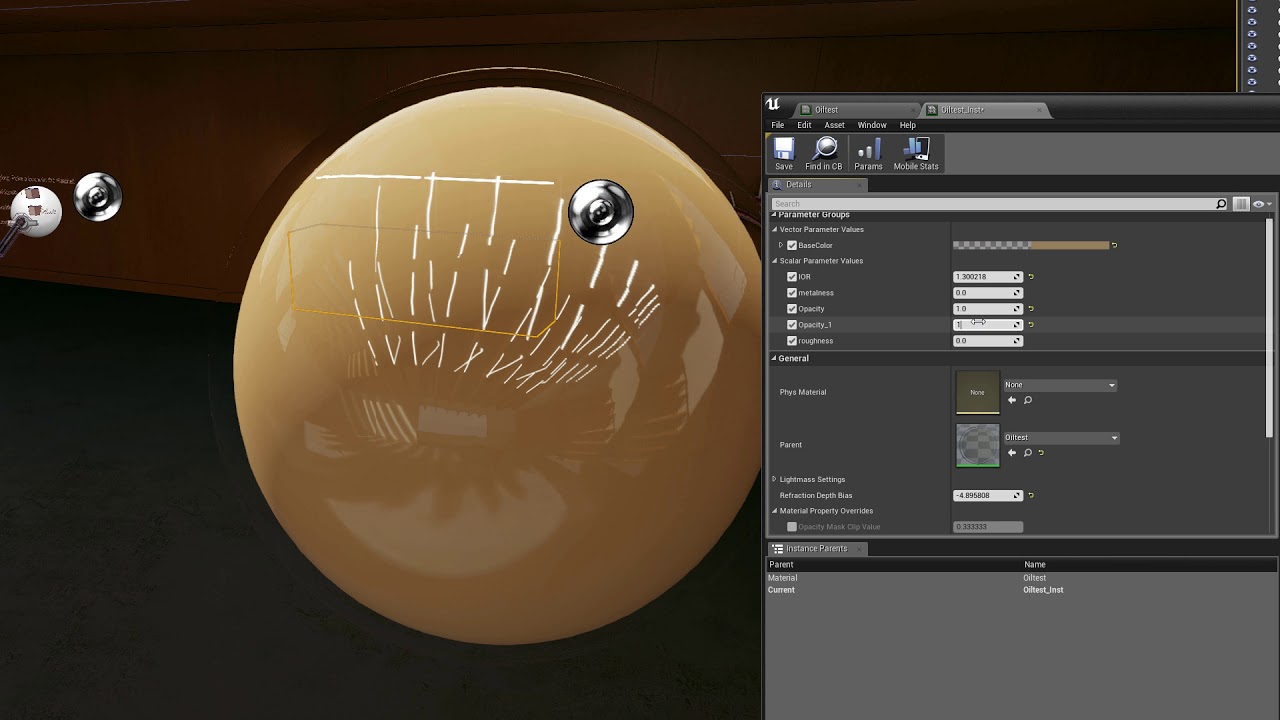
anyone know what is going on here? refraction distorts the objects base color effectively making all objects have a fully transparent edge: https://www.youtube.com/watch?v=y3PfFGLv7n0&feature=youtu.be
 sly elk
yeah. I'm just not seeing this behavior in anyone elses shadres on youtube
real needle
@wintry escarp we had the same results
eternal inlet
So Fixed foveated rendering is oculus GO exclusively? Or is it also being implemented in general, so other platforms can get the benefit of it?
From the sound of it, it seems to require a tiled gpu architecture. But isnt regular nvidia cards that?
mighty carbon
it's in the hardware design, so even when UE4 gets support for it, Daydream won't be able to use it
(maybe not hardware, but in the drivers for sure)
eternal inlet
But what about pc?
mighty carbon
don't know really.. I like I mentioned earlier, Dishonored 2 uses fixed foveated rendering, so I don't see why Rift / Vive / WMR can't use that
wicked oak
@mighty carbon they can, its called MultiRes and its on the nvidia vrworks branch of ue4
what oculus does in Go is a generic, driver level implementation
sturdy coral
@wintry escarp make sure you have clip planes enabled, it uses them for planar reflections
rocky nimbus
Enabling forward shading breaks some of my materials and my landscapes get all messed up
Anyone encounter this before?
sturdy coral
@sly elk I've had that happen but can't remember the exact work around
@sly elk I think separate translucency or lack of it might be the workaround
@rocky nimbus https://docs.unrealengine.com/en-us/Engine/Performance/ForwardRenderer
The Forward Renderer packs all features into one shader so there are fewer texture samplers available for your material.

You can usually solve this by using Shared Samplers.```that's probably the issue if it is affecting landscapes since they use a lot of samplers in blends usually; it should give you a warning that tells you that's the issue though
rocky nimbus
@sturdy coral Yeah, the landscape is set up with multiple that would blend different materials based on height. I did notice a lot of errors in some of the mats saying I was using too many samplers or something
I know nothing about shared samplers, is this difficult to achieve?
Nvm figured it out, thanks
 humble spoke
I'm having an Engine/Game crash when holding a physics object (using a physics handle - setting target location on tick, if grab physics item is valid, to location of mesh attached to motion controller) and losing tracking. Losing tracking without a held object is fine. But with a held object, as soon as I lose tracking for a second, crash engine and game.
Is there any fix for this or does anyone know what I can do?
The specific crash is "Assertion failed: !IsUnreachable() " and then it refers to the motion controller. It's definitely happening when I lose tracking because I can force the crash by losing it.
real needle
@humble spoke I don't have a fix for you, but if you are a little familiar with plugins I would recommend "VRExpansionPlugin" for physics grips
humble spoke
Hmm. I just completed writing my own system that merges a few things, it'd be a big pain to change over. Thanks though.. I might not have a choice if I can't figure out this crash.. I tried checking if the motion controller is tracked or not but that didn't help :/
real needle
It's probably due to the distance between the object and the constraint being too large, you might be able to increase that?
@humble spoke Have you tried it in a packaged build?
sturdy coral
@humble spoke sounds like it might be the threading bug mordentral found
On motion controller updated needs to be wrapped in an is game thread check
humble spoke
That sounds like it could be the case, on reflection this happens even when I don't grab stuff with the physics handle, but physics seems to have a big effect.. IE if I walk into a ragdoll it causes this eventually, losing tracking causes it 100% of the time though.
Is this wrapping something I can do? I only work with blueprints. Or do I need to wait for a fix?
real needle
@wintry escarp I was just interested, wasn't going to use it for anything so after a couple of minutes of trying to fix it I couldn't be bothered
tired tree
@humble spoke no its a code only fix, the event isn't actually in use anywhere and there is no option to not call it
Its reported to epic though
I fixed it locally, but obviously that is out for your use case
humble spoke
Cool, thanks for the info. Suppose I'll live with it until an update, it's not critical to my gameplay luckily
wintry escarp
Fantasifail for some reason the scene lighting doesn't work, add a new light and its visible
 abstract forum
Has anyone here seen this?

Wareable
I've tried so many augmented reality headsets, and they're almost always disappointing. Expectations of this tech are high, but look, AR is hard. Think…
It is a prototype currently
mighty carbon
nope
 elder yew
Windows builds are starting in VR even though Start in VR is unchecked and i'm not passing -vr in the command line
halp
sturdy coral
@elder yew sounds like a bug, you can pass -nohmd as a workaround
or remove the plugins
 wraith sky


Introducing Virtual Wearables https://t.co/LPvknKBlnO
Retweets
6676
Likes
11849
 Twitter
mighty carbon
Twitter
mighty carbon
that's cool, saw it this morning.. They are using Meta 2 + whatever Leap Motion thing (or maybe standard sensor with some new software)
 dusky moon
among all the stuff teased in GDC, I'm super hyped by Niagra ... basically if you know blueprint you can make some rad vfx with the new system
wicked oak
@rustic jackalllesss#9041 the huge thing is reusability
thats what is going to be a deal breaker
cascade reusability is non existant
but now you can do modular effects and combine them
sturdy coral
I hope they take improvements from it into the material editor since it all compiles to hlsl
Main thing needed is real branches
dusky moon
Makes total sense if they would
 charred portal

UNDEAD CITADEL VR - Gameplay New Incredible Like Skyrim VR Game【Vive, Rift】Dark Curry SUBSCRIBE HERE ➜ https://goo.gl/paxilQ DONATE HERE ➜ https://goo.gl/Svf...
dusky moon
@real needle My guess is it's made with ARcore to get camera transform and then sends the data realtime to another machine via OSC or something
but if you have a vive it's way easier to record one of your controllers with sequencer as a camera ... using tablet is I'd say for show off
wicked oak
thats just a mocap thing
you can use whatever, as long as you have a way of sending transform from phone/tablet into the render pc
and then rendering back
dusky moon
@rocky nimbus Maybe try enabling "Shadow two sided" would fix ?
rocky nimbus
@dusky moon Tried it earlier, no luck
I can find things on light leaks which are common but this is strange, it's like a diffused glow through the wall making it look thin and paper-like, almost like a china lamp
mighty carbon
uno#3189 cool, but what kind of beasty PC do I need to have to run that game?
 stiff echo
@real needle They said there would be releasing few things in the next patch such as virtual cameras.
 tardy laurel
I'm trying to use Unreal Studio.. I start with the template, teleport works fine.. I import my building, teleport works fine.. I import the surroundings, teleport works fine.. I edit one or two materials, I can't teleport anymore
I tried with a new project file 5 times so far, always the same result
(vr, htc vive)
charred portal

That lighter is hard in Fake VR lol
mighty carbon
finally implemented my weapon stuff https://www.youtube.com/watch?v=S4vrBHkFaAA

Implemented w-tools inventory, pick-up and switching system for my new UE4 project for Gear VR / Oculus Go.
 final phoenix
@rocky nimbus Its a light bake issue, the lightmap probably has an overlapping bright pixel somewhere on your UV
Try increasing your lightmap resolution or repacking the lightmap itself
full junco
@tired tree what 4.19 changes made sense after you watched the OpenXR talk?
wicked oak
@full junco he is offline , but probably the fact they changed both Hands and Headset enums into strings
full junco
ah
rocky nimbus
Is there a way to optimize overlap detection? If I set up an overlap box along each wall to darken the camera when the player tries to peak through it, all of the overlaps across the map would be a huge bottleneck
tired tree
why would you overlap box around walls?
you can overlap the head itself
to the static geometry
eternal inlet
Also if u move an overlap sphere by teleport i noticed its much faster
rocky nimbus
Interesting.. @tired tree Didn't know you could detect overlaps between a camera and a static mesh, where'd you find the trigger for that?
tired tree
not the camera
use a box around the camera
and overlap check that to whatever you want
 mighty carbon
Has anyone ever experienced this kind of issue: https://www.youtube.com/watch?v=-dFQqk0iJhE

basically if I have collision primitive on my weapon static mesh and spawn/attach it to controller (which is attached to the player) - I can't move using WASD (conventional FPS movement), as if I get stuck in the floor. Having "no collisions" option does nothing. If I remove collision primitive from the static mesh - I can move.
worth to mention that collision primitive of the crossbox ends up inside of the player's collision capsule
and if I make player's capsule shorter, there are no issues with WASD movement
pearl tangle
sounds like you just need to setup the collision channel to not affect your pawn?
mighty carbon
In the project settings?
mighty carbon
@pearl tangle I am not sure what you meant. Even if I set to ignore all channels on the small capsule (crossbow), player still gets stuck.
mighty carbon

UploadVR
Patents for an Oculus glove have surfaced online this month suggesting the company is still working in this potential form of VR input.
quite intriguing
lucid ivy

HaptX Gloves use advanced haptic technology to bring realistic touch, force feedback, and precise motion tracking to virtual reality for business and entertainment.
been tracking them after watching the feature on Smarter Every Day
no pun intended... >_>
rocky nimbus
Should I be using Pawns or Characters for VR where locomotion plays a large role? Ideally, I'd like to also be able to walk up and down stairs (maybe even fall off ledges)
I know pawns don't have the movement component so I don't want to build the game with the wrong BPs
sturdy coral
if you use only pawn stuff you can always reparent it to character later, but character makes the most sense for movement stuff in general
granite jacinth
Well, seeing how all forms of VR Movement is called Locomotion , then yes, Character all the way
Unless you were sitting down
And wanted them to pilot a mech or something
Also, especially so with stairs, as you have step height
lucid ivy
Am i the only one who's too much of a pansy to do VR without teleportation?
rocky nimbus
teleportation is safe, some people get angry when a game is loco-only but it really depends on the game.. in some games, teleportation might be cheating or would defeat the purpose and so it's necessary to leave out
im doing an mp shooter right now; if people could teleport around to avoid motion sickness, the game breaks
abstract forum

Interview with @epicgames' Nick Whiting on @openxr. @thekhronosgroup #GDC18 https://t.co/XGqUYcfcNe
Twitter
abstract forum
It was not doing that for me :\
sturdy coral
@rocky nimbus if you are doing multiplayer you definitely want character, pawn doesn't have much multiplayer support at all
tired tree
depends on the type of multiplayer
if he literally just wants teleport and hand/head replication
character is overkill
rocky nimbus
locomotion for a multiplayer shooter
rocky nimbus
I'm also gonna be using that VR IK plugin for bodies
tired tree
unless you make modifications it suffers rollback issues
as default characters never needed teleport repped
rocky nimbus
no teleportation, only loco
mighty carbon


Here is the same rod without stabilization, for reference: https://t.co/T71yp2g804
Twitter
nice
 amber needle
Hey guys n gals, I'm working in Vancouver and looking for any Oculus contacts over here if anyone knows someone I could get in touch with about porting and Dev kits please let me know :)
mighty carbon
sign up with Oculus on their website and request dev kits
that's the only way it works
mighty carbon
@amber needle ^^
amber needle
ok thanks for the info ^_^ I was hoping there were local vancouver evangelists to meet with cus thatd be a nice bita guidance but im sure there are many people willing to give advice =]
cheers!
mighty carbon
how can I make something like timeline, but using BP? (I need to lerp from one value to another inside of a function)
sturdy coral
@mighty carbon what do you mean? you can use a timeline in BP
pearl tangle
timeline you can't change the values on it procedurally
but what you can do is just do a float track on a timeline and then run a lerp between the 2 values from the output of that
 digital musk
Hi, I'm trying setup my game to check for a HMD at beginplay and spawn either a first person character (setup for VR) or a thirdperson character when no HMD is enabled....I think I've built the check in correctly...but when previewing the game as standalone, it always spawns third person character, never the VR character (first person character)
mighty carbon
@sturdy coral can't use timeline inside function
sturdy coral
@digital musk it won't start enabled unless you launch with -vr
mighty carbon
Also in my particular case UE4 errors out on timeline with infinite loop error. I don't even see how it's possible
sturdy coral
Or set bStartInVR in your config
@mighty carbon add a breakpoint and see if it is looping somewhere by stepping through
mighty carbon
The timeline node is looping
I've never seen this kind of error before
(And the timeline I had didn't even have loop checkbox on)
digital musk
@sturdy coral Thanks for the reply...forgive my noobness....how do I do this?
@sturdy coral okay, I've set StartInVR in project settings...packaging now to see what it does
that works, thank you very much
sly elk
Hey all. im looking into smoothing motion controllers based on pickup object mass. Is there a way to do this with the motion controller components or do I need to come up with a more custom motion controller setup? I'm digging around my project and I can't see how this is possible with blueprint
mighty carbon
@wicked oak https://developer.oculus.com/blog/oculus-sdk-support-for-nvidia-vrworkstm-lens-matched-shading/

With PC SDK 1.19 we introduced native compositor support for NVIDIA VRWorksTM Lens Matched Shading (LMS). The algorithm speeds up ALU hungry applications making VR framerates more attainable.
mighty carbon
hmm.. I guess I can use timer by function instead of timeline, right ?
mighty carbon

IBM Cloud Video
GTC is the largest and most important event of the year for GPU developers.
GTC and the global GTC event series offer valuable training and a showcase of the most vital work in the computing industry today - including artificial intelligence and ...
lucid ivy
@rocky nimbus I get that, I guess I'm just a pansy when it comes to motion sickness. Is it just something you find you get used to?
or do you pop some Dramamine before playing?
 subtle raft
What's the point of Stereo Layers? Why not just use 2D UMG attached to the camera? I can't seem to find exactly what Stereo Layer does
rocky nimbus
@lucid ivy I never got used to any heavy locomotion. I can handle Onward without problems but there was this game (I forget the name) where you could use grappling hooks to swing around floating platforms and it made me sick.
lucid ivy
There is a room in Steam Home with a tank in it. You can use a jetpack to fly around. I nearly fell over the first time I used it.
and it is FAST motion
I can't imagine a FPS while being stationary
we have a VR experience nearby where the users have VR backpacks on and they can literally move around an empty warehouse while shooting a zombie invasion. That makes sense to me. But not seeing movement while not actually moving
tired tree
@subtle raft stereo layers are POST post process and lighting
they are applied in the compositor of the VR SDK
so no warping, no blur, no AA, no lighting and shadows
subtle raft
compositor?
tired tree
much clearer image
subtle raft
I followed a tutorial Mitch made where he combined UMG with stereo layer and it lags behind like a frame
tired tree
the animation? or the location
tired tree
yeah, that tut is outdated
regardless can be tick ordered to be better
run the update in DuringPhysics tick group
Epic has a world locked mode too, that should replace it, just buggy atm
subtle raft
I have it world locked and in the camera pawn
subtle raft
still in 4.19?
tired tree
its not in 4.19, but its offset incorrectly, the fix in coming in
subtle raft
so I should make it targeted like Mitch had to
tired tree
up to you
subtle raft
Ya Ill just try it
tired tree
regardless, have to be careful with the rotations too, epic isn't converting rotations correctly for at least openVR stereo layers, so only pitch/yaw can be applied without issues
subtle raft
so stereo layers are just rendered after Unreal's stack? and that makes them sharper, that's really the only difference?
tired tree
way sharper
tired tree
res scaled? the hmd has a default res, you mean like screen percentage?
then yes
they won't be
subtle raft
ya percentage
tired tree
SP ends up still submitting at the default render size for the HMD, it just renders it lower
the overlay is presented as is
and seperate
subtle raft
alright, thanks
glossy agate
@lucid ivy A tester on my game told me she tried Dramamine yesterday and it worked. Guess you could try that until you get used to it
glossy agate
Could also be placebo effect.
Also heard marijuana works for some people, and ginger works for some people
tired tree
lol, those side effects are not guaranteed....every medication in existance lists effects like that
subtle raft
ginger is prolly the best bet
they make ginger candies that last longer
and are you trying to say VR isn't worth having a heart attack?
those side effects don't seem too bad either, they would all go away after you tried it
tired tree
Ibuprofen has worse side effects listed
mighty carbon
constipation is definitely not something I'd be ok with
subtle raft
constipation probably only happens ot people that are old or susceptible
mighty carbon
also, what kind of fun would it be in VR when you are drowsy and have blurred vision 😛
subtle raft
constipation is a side effect listed on every med tbh
mighty carbon
that's why there is no reason to take any meds unless necessary
tired tree
i'd agree, it should be a last resort
but at the same time, you can't go read WebMD's side effects and take it as a constant
they list all possible side effects
the majority of the time none of them happen
mighty carbon
I managed to play with WASD locomotion without any aid - just had to find the best control scheme and had to have my hand in front of my face for static reference.
I think it comes down to refining gameflow and control scheme to make sure WASD is tolerable
(for people like me)
tired tree
it is pretty much already known
hand relative steering, slower movement, no acell
is the starting stop for slide
mighty carbon
hand relative steering ?
mighty carbon
hmm.. I don't recall right now what felt better moving where I look or having direction of movement independent from HMD aim
tired tree
well its fairly universally agreed on the HMD directed movement is worse for motion sickness, movements in the head can effect it unless you lock to degrees
only time I consider it better is for RIP, as unless you have a waist tracker it just feels more natural jogging
there is also hand+head direction where the head influence is reduced the farther off of center it is
but that is good/bad depending on calibration and use
mighty carbon
Buy professional graphics cards, desktop and mobile workstations, and more in the NVIDIA Quadro Store.
I wonder if it can run VR with raytracing
tired tree
@mighty carbon ....lol no
that demo was running on FOUR of these: https://www.thinkmate.com/product/nvidia/900-2g500-0000-000
mighty carbon
o.O
tired tree
was using this: https://www.nvidia.com/en-us/data-center/dgx-station/
 mighty carbon
heh
glossy agate
Thats min spec for my game
mighty carbon
🤔
glossy agate
Its 25% off if you buy one right now but it has no price. Guessing $25k
tired tree
25k for a comp that has 4 8k gpus in it?
even at 25% off...the CPU in that thing is no joke either
glossy agate
True. probably has markup on any comp not made by them, and are probably charging full retail value for each GPU.
 raven halo
With PC SDK 1.19 we introduced native compositor support for NVIDIA VRWorksTM Lens Matched Shading (LMS). The algorithm speeds up ALU hungry applications making VR framerates more attainable.
sturdy coral
@mighty carbon dramamine is basically the same thing as benadryl. it will definitely make you drowsy but most of the other side effects aren't very common
tacit quest
anyone having problems using restart level vr? i seem to be experiencing this (https://answers.unrealengine.com/questions/737471/camera-below-the-floor-on-level-load-on-oculus-rif.html) issue, but not sure how to work around it.
if i disable vr splash screen it seems to work in editor, but not in package
get black screen in hmd and laggy tracking in the display window
really wish they'd stop trying to automate things under the hood when their implementations are buggy
oh, i'm in 4.18
dusky moon
@tacit quest yes That's what I'm struggling with these months with Oculus. both 4.18 / 4.19 gets rubbish when I use unreal's vr preview like after an hour or two from one point on ... randomly the tracking falls into floor and super laggy. the only way to workaround seems to be Restarting your pc... which I assume this means it kind of relates to Oculus SDK not ue
mighty carbon
@sturdy coral benadryl knocks me right out :/
@raven halo sounds like folks with Nvidia will get the most peformance, that's if UE4 gets that feature in 4.20
tacit quest
@dusky moon that sucks, glad i'm not alone in this boat, haven't had to restart computer, once it happens in editor or package, it consistently happens afterwards and have to restart editor/exe
dusky moon
Yep it sucks. it's like oculus becomes tired after some dev sessions 😄
mighty carbon

That just happened.
During today's Nvidia 2018 GTC Keynote with CEO Jensen Huang, we witnessed one of the employees drive a real world automated vehicle using the
crazy stuff
glossy agate
Need to upgrade those predator drones to use HMD instead of 2D.
How can they have such low latency and such fast servos or whatever to be able to move your head naturally?
 glossy agate
See your enemies destroyed in full Stereo 3D!
You were in the mil though, don't know how they spend so much money, but still have such shitty equipment. At least when I was in
granite jacinth
Maybe I will wait for .2 then
glossy agate
So an oculus tester sent us he log because on oculus game would only open in 2D. Looks like HMD resolution is changing sizes every couple ticks then fails. Anyone see this before?
 sonic lake
@glossy agate I have seen this before in 4.17 when there are multiple monitors attached and somehow the output doesn't go only to the Oculus.
mighty carbon

UploadVR
Sony's PlayStation VR (PSVR) has had an official price drop in both the US and EU with bundles including games like Skyrim and Doom falling in cost.
I wonder if they are preparing for PSVR 2.0
fleet plume
rumors (uploadvr?) where pointing towards autumn
maybe just broaden the player base?
tacit quest
hey guys, i'm still stuck with this broken Open Level in vr. first load is always good, every subsequent load takes 30 seconds to load the level and then places hmd in the floor (using floor height, scene component parent, etc). any ideas?
this is a completely different project that i mentioned yesterday too, both 4.18
glossy agate
@sonic lake you know how to fix it?
tacit quest
where's the best place to log this bug and submit my repro project? answerhub?
sonic lake
@glossy agate would start by updating the video drivers and trying to disconnect any display which is not necessary
Updating to 4.18.x seemed to solve the issue anyway
Formstack Form - Unreal Engine Bug Submission Form
tacit quest
thank you sir
glossy agate
@sonic lake Hmm Im on 4.18. Just got reports from a few testers who sent us logs
dusky moon
so is there a GDC ue4 talk that can be useful in VR dev ?! like any of the fortnite stuff ?!
dusky moon
oh and seems like Eve is on sale... should I get it with the 15$s I got ?!

Experiences | Oculus
EVE: Valkyrie – Warzone is a first-person spaceship shooter that puts you in the cockpit for fast, fun, intense multiplayer space combat. Hailed as the “killer app” for virtual reality, EVE: Valkyrie now brings the thrill and skill of compe...
mighty carbon

Explore planets and more in this upcoming sci-fi adventure FARHOME from DEVCUBE STUDIO. Coming to Early Access in April.
sturdy coral
@tacit quest are you enabling stereo in your level blueprint?
disabling/reenabling stereo loses tracking origin on oculus
(at least it did in the past, not sure if still the case on 4.19)
tacit quest
we disable and enable stereo for our settings menu then reload the level when closed, that's our guaranteed repro in package build. but it just happens sometimes when we just straight OpenLevel from one vr level to another, but it doesn't seem to be consistent
good to know, i didn't know it was the stereo that caused that on the settings menu. it's annoying because after our client changes settings they have to close the game and reopen it
all our projects are currently 4.18, 3 projects all the same behaviour. i submitted a bug with a repro project, but that only repros in editor. so hoping the solve for that is the same solve for whatever our case is in packaged. doubt they'll ever fix it though though, they seem to abandon minor versions pretty quick these days, doubt we'll ever see 4.18.4
it also makes what should be a quick level load take ~30 seconds, there was an answerhub post that points at the oculus splash screen as the culprit, but i don't have time to dig down into the engine
i'm just switching this new project back to streaming levels, which might be the solve if we revisit our other ones
granite jacinth
https://gyazo.com/637819b987539b5a3edb871b03db099d
It's a small world after all..
 glossy agate
hahha awesome
We had a bug like that from our holstering logic, but grenades would turn beach ball size, and sometimes guns would get mini
subtle raft

mighty carbon
heh, someone has been trying to log into my Epic account many times, unsuccessfully and thus it got locked :/
sturdy coral
@tacit quest when setting stereo I just also call set tracking origin again and don't have a problem
tacit quest
i'll have to try that, thanks. we set stereo/restart level, and then set tracking origin and things are messed
 glossy flame
Is it possible to check the license on a Google Poly asset before implementing it? I assume that, if it's a remixable, we can just show the author's name right there local to the object. We wouldn't have to add the author to the credits would we? (Sorry, probably the wrong question for this forum...)
My bad. Sorry. It's in the metadata...
subtle raft
@mighty carbon Im getting that too
I have like 50 emails i nthe last 3 weeks
epic needs to change their login system
I changed my password the first time it happened
mighty carbon
gotta sleep, but if someone listens to this http://voicesofvr.com/635-candid-assessment-of-the-vr-industry-from-a-leading-indie-developer/ I'd like to know your opinion 😃
 rigid orchid
Hey guys,
I am working on a very simple GearVR project. There is not much code and only a couple of 3Dwidgets and basically no lighting just emmisive materials.
The only thing I can think of that might be "difficult" to render is that some of the objects and 3d widgets have translucency.
I have disabled all the code and am testing to delete some objects with translucency and see how it runs without them, but it takes long to build->test->delete stuff->build->test etc.
When running the scene it is lagging a lot, but the weird thing is that the framerate is a steady 60fps 🤔
Weird right? Did anyone have this problem before, could it be the translucency/3d widgets. And why would that lag but not change the framerate 🤔
Testing on a Galaxy S7 . On this device the normal ocolus home app is running fine without lag
Ok so just removed all transparency/3d widgets stuff and replaced them with some static cubes. This runs totally fine, so must be something with transparency or the 3d widgets 🤔
jaunty shell
@rigid orchid go for 3d mesh text 😄
but yeah I made a gearVR (s6) project a while ago on unity, and any material that used translucency was tanking the framerate
mobile GPUs just aren't that good at handling it
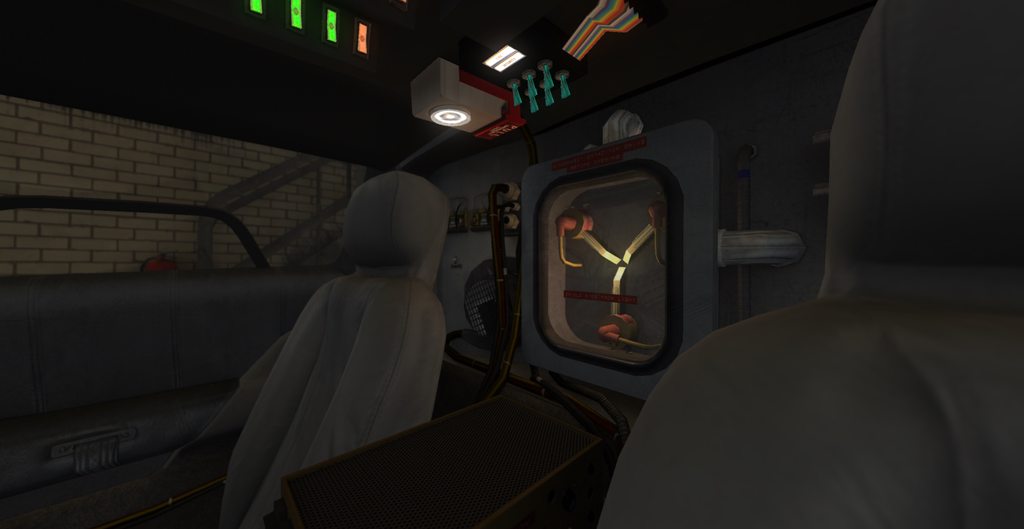
this was running at 60fps on a GearVR S6
rigid orchid
@LifeForLife🤔#1313 Thanks yeah I think that is it, was just hoping if there might be some magic thing to change in project settings that I dont know of that would handle it better or something
Nice yeah thats a lot more complicated than 3 3D widgets and a sphere 😜
Because I dont have much more than that in this project
dusky moon
wow I finally found the reason of my ARcore crashes on Android! It's a bug with Time zones! If your device timezone is anything like (xx:30 for instance Tehran +04:30) your ARcore app will crash on your device.
I reported the bug to epic
here's the issue tracker: https://github.com/google-ar/arcore-unreal-sdk/issues/12

GitHub
Hi,
After the full release of 4.19 I tried to :
1- Created a "Handheld AR" Template
2- Configured Android SDK in project settings (Accepted SDK, Min/Target SDK is 19)
2- Built it for Andr...
jaunty shell
we had a lot of UI and floating controls for the delorean (which had a lot of of stuff interactable, like the time machine setup !)
rigid orchid
@dusky moon That is weird, good find though 😃
jaunty shell
wth for arcore
dusky moon
@rigid orchid yeah I feel good now lol
rigid orchid
Yeah I understand, wouldnt be the first thing I would think about haha
jaunty shell
@rigid orchid have you tried running your shaders in masked instead of translucent ?
or do you absolutely need translucent
rigid orchid
Hmm not sure if it was masked or translucent, was just about to test how it would run with opaque
But yeah I am going to mess around with that see if I can find a good looking solution that works 😄
jaunty shell
translucent is running much slower than masked
rigid orchid
Because it definitely is the 3D widgets and probably their type of material
Yeah thanks for the help 😄
jaunty shell
o7
wicked oak
@rigid orchid for the widgets, make them masked
and probably more important, try to have them not draw every frame. UMG gets rendered into an offscreen target and its a pretty huge hit
rigid orchid
@wicked oak Didn't know that, thanks for that info 😃 Will look into that!
wicked oak
and if you can make them actual 3d meshes
do it
you also get much higher quality
couse antialiasing
and if you want some text, a texture with the text is allways better
becouse the texture gets mipmap-d
and the umg doesnt
and you need mipmaps to have smooth text
i used that on DWVR, the difference beetween having the text in a texture and having it in umg was dramatic
rigid orchid
@wicked oak Yeah thanks, makes sense. I did know it was a lot heavier than using 3d meshes and such, but I didn't expect a couple of widgets to have such an impact already. Thanks for the info! 👌 Will look into optimizing it and seeing if some off it can be changed 😃
Yeah I tried to set the materials to opaque, and it didn't really imrove anything so I will have to look into the redraw and seeing if I can change some stuff into textures or meshes 😃 Thanks guys!
Setting redraw time to 1 second made a big improvement, but this doesnt work offcourse for the interaction so I probably have to use manually redraw and only update the widget when needed. Which will probably fix the problem 😄
mighty carbon
There is a bug in 4.19 when rendering 3d widgets in VR without stereo layers
I don't recall whether it just becomes jittery or also tanks performance
rigid orchid
Thanks for the tip @mighty carbon , working in 4.17 though so I think it is at least not that bug 😃
mighty carbon

UploadVR
It looks like Hello Games' No Man Sky may soon get VR support based off of several teases the developer seems to be giving.
too bad it's PSVR and not PC VR 😦
wicked oak
how the hell
no man sky ran like shit
on both PC and console
if they did vr support, they reallly improved the engine
sly elk
Not sure it would make a great VR game. I mean its literally a game about traversing large distances. Not exactly VRs strong point
mighty carbon
but when you get to a planet, that's where it would shine, right ?
jaunty shell
isnt the teaser teasing multiplayer ?
those 4 dots in the tweet, I'm sure that's 4 player coop
tired tree
lol sure...
mighty carbon
what's "project Orion" ? I see commits on Epic's github referencing to "orion and fortnite"

UploadVR
Duck Season developer Stress Level Zero recently released a video for an amazing new VR shooter tech demo called Boneworks.
crazy stuff
glossy agate
Those are the dudes from Node I think making Boneworks
Anybody try implementing this yet for MR? Im thinking of adding it to my game https://liv.tv/

Put yourself into the VR games that you love and broadcast that experience to the world.
tired tree
@mighty carbon the only thing not fairly standard in the boneworks demo is the gravity gun
not entirely sure why uploadVR was so impressed....
"hough perhaps our favorite touch is the actual physical presence of the gun in the game world; the user is able to knock over boxes using the end of their rifle to create vantage points"
yeah....ok
mighty carbon
well, just looks cool in action with slo-mo and such.. I didn't read the article 😊
tired tree
yeah slo mo always "looks" cool, but its not a novel concept...
their sounds were very nice though
mighty carbon
I just hope it's not a staged video
tired tree
I assume it uses their weapon interaction system with shoulder stabilizing and front hand influence
why would it be staged?
mighty carbon
a lot of games seem to look cool, but don't really feel the same in actual VR
tired tree
its not difficult
like I said, its not really anything new
its all implemented really well though
mighty carbon
aye
glossy agate
Guess I should have knocked around some boxes with a gun in my vid too
The animations in there looked really good, And the one handed recoil. I gotta improve mine
mighty carbon
not VR, but really good documentary https://www.youtube.com/watch?v=G4i3_-AxhkI

Support future docs and Gameumentary content on Patreon: https://www.patreon.com/gameumentary Gameumentary is proud to present our feature length documentary...
full junco
@mighty carbon orion was paragon I think
@sturdy coral that interview works in firefox, in chrome you see those weird jumps
great to hear that Rolando says Vulkan in UE4 is now faster than D3D11 on AMD GPUs
mighty carbon
most people have Nvidia though, so it's kinda no use for majority
full junco
that doesn't matter, if it's faster on AMD its also almost on par on Nvidia and that's what's relevant
the last numbers we had was that vulkan was at like 50% the performance of D3D11
so if its 105% on AMD and 97% on nvidia now (guess), thats super great
mighty carbon
why use Vulkan if it's no better than DX11 on Nvidia ? Or is it's just important milestone rather than usable product at this point ?
full junco
important milestone
mighty carbon
got it
full junco
and even at 97% of D3D11, I would use Vulkan over D3D11
because one is open and the other one is from microsoft
mighty carbon
🙄
tired tree
Also if you are draw call limited it is still likely faster at 97%
@full junco so there is that
full junco
@tired tree yeah, it would be very interesting to know with how many draw calls that stat was measured
 visual horizon
Hey
Can I use the vive controllers tracking as like a control setup
Like if you tilt it to the right it'd be like the A key
or even with float values with differe
or even with float values with strength values so you could go like 2/3 of one way it'd go the same direction
 distant nest

 icy dirge
so... anyone experiencing crashes when calling Set Splash Screen in 4.18?
My engine just freezes for ~30s then crashes, something about some texture RHI
tired tree
yeah....others are getting it, with rift right? It constantly re-defines the render target for rift