#virtual-reality
1 messages · Page 164 of 1
 granite jacinth
No real gains
Disabled mirror. No real gains.
But it could just be in editor engine issue.
I will need to build and test it tomorrow
 sturdy coral
I've been working on some of that body IK stuff, added a bit from the lone echo GDC slides: https://drive.google.com/file/d/1Oup8RS1FfNXMSNBY8-Jhf4z51c4WBQpL/view?usp=sharing

Google Drive
still need to work in shoulder extension and I'm just using a blend between blendspaces for crouching, need to add IK tracing on the feet for that to work properly because at 50% blend the feet will go through the floor
sturdy coral
yeah, it shows your full body in first person at all times too
I don't know if I'm going to go for that or just hands or just arms yet in first person
granite jacinth
Hmm
If you were gonna do it
You should do arms and hands
For that full immersion
Body is sort of easy
Legs..meh
sturdy coral
yeah, just leg desync can feel bad
granite jacinth
I don't know how much I actually look down in VR
granite jacinth
Depends on the type of game I guess
Well...most people don't even use freaking roomscale...pisses me off
Sort of anyway
They have this great tech they cna exploit
But choose to stand up and just do Free Move like any other FPS
And demand snap turning ;)
Which I don't mind. But meh... How is the tech going to really evolve if people are so hesitant.
I just got my bHaptics haptics suit today
sturdy coral
ah cool, I don't think I've seen that one until looking it up just now
I'd like a combo lighthouse mocap/haptics suit
granite jacinth
Oh
It's called Telsasuit
Which...I would love to get..
But who knows... KS price was$1200...so retail might be $2k
sturdy coral
hmm speaking of kickstarter, pimax just sent an update
sounds like they aren't making too many changes vs what they showed at CES =/:
What we improved for V5:

Added LEDs to improve brightness
Lenses changed
Mass production - Production testing software and tools read; New material to cover sensor; Mockup lens - lens tooling v1.0; Headset tooling
Goals for M1:

Fine-tuning
Debugging
Change the medium number of IPD
Optimize ergonomics```M1 is the "close to mass production" build
 wanton spindle
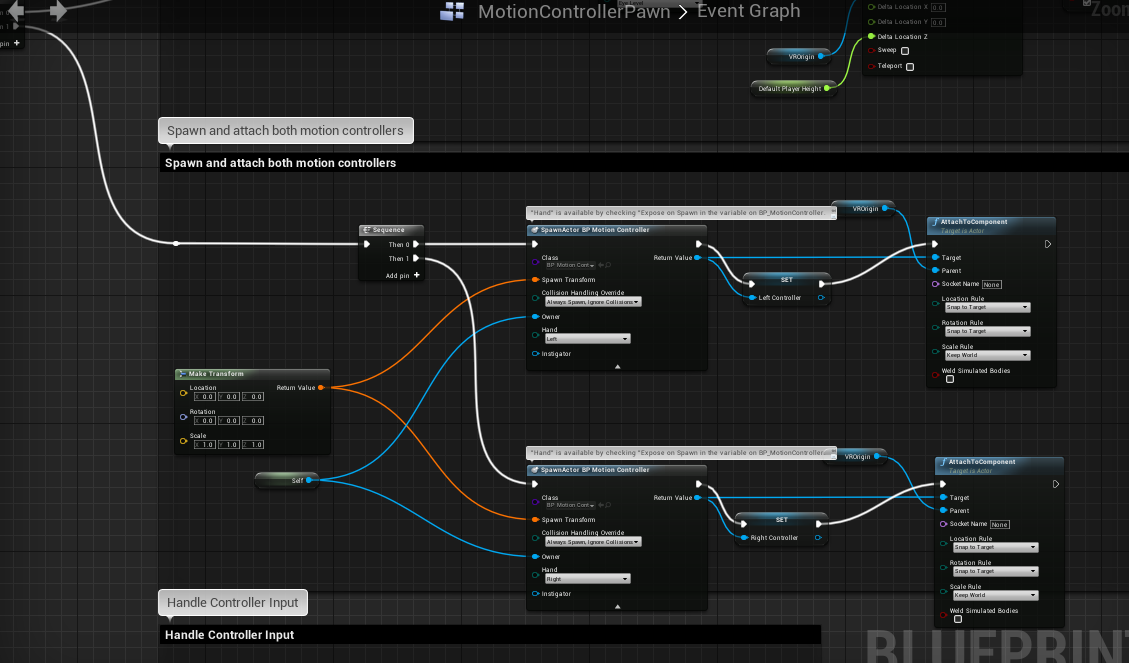
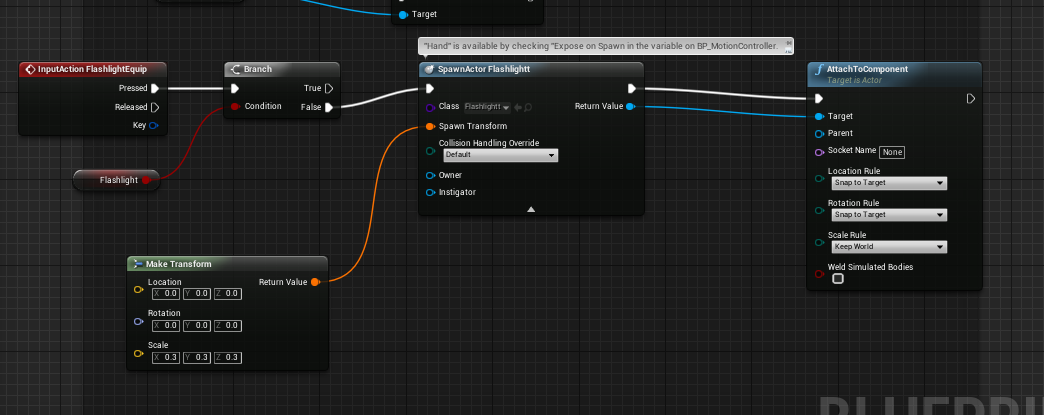
https://i.gyazo.com/ba237149052a57d00a68952a8563aaa7.png I'm trying to do a thing where if the player presses A then the right hand will dissapear and a flashlight will replace it
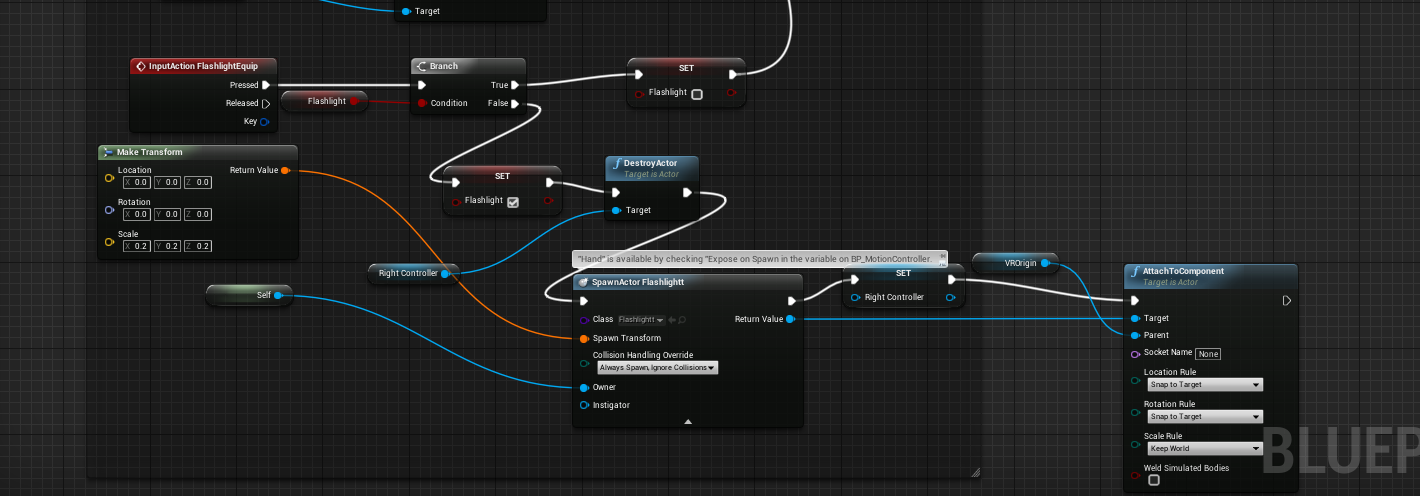
but, while I get the hand to dissaper and come back fine, I can't figure out how to make the flashlight show up in the hand, nothing shows up
 real needle
@wanton spindle You're snapping to the VROrigin
When you should snap to the controller
Why are you destroying the right controller?
I'm assuming that's the MotionController component
Did you start out from the VRTemplate?
real needle
@sturdy coral That looks real nice! Do you mind linking the echo arena slide/talk?
I was playing around with iKinema Orion a week or so ago: https://youtu.be/QzCPzwgx-cw
 sturdy coral
that looks good, that's with foot trackers?

'Lone Echo' is a first person VR game by Ready At Dawn where players use their hands to push, pull, and float through a zero gravity environment. Players can climb over anything they can see, then push off and gently sail in any direction. This...
real needle
yeah I'm using three pucks, 2 controllers and hmd
all of the "glitches" are from light house bleed
there are way too many lighthouses at my office
it works great, but it can't be used for consumers since they need an iKinema Orion license to run the mocap tool
aaaand their iKinema Runtime indie license (which is different from Orion) is hard locked to NOT WORK if you have more than three tracked devices connected 😦
And the price for the full license is many thousands of dollars!
so I'm reverting to either using BIK or writing my own
@sturdy coral thanks for the link
sturdy coral
damn, yeah I kind of want to try BIK, just kind of worried that it doesn't have source
I don't ever want to get stuck without being able to upgrade engine versions etc.
 tired tree
@granite jacinth mirror window should have minimal overhead in std settings, it is just displaying what is already being rendered to the screen
which is exactly why they have to crop around the view masking
not saying its free, its not, but it shouldn't make or break perf
@full junco your game is based around teleport, you are adding smooth as an option for people that want it
I wouldn't worry too much about FOV limiting for the people that turn it on
they won't be the ones getting sick anyway
if anything, they will request that it be off by default
also in my experience a stable visual cue is more effective than fov limiting anyway
 full junco
@tired tree yeah, I decided to not add FOV limiting stuff now, at least not before launch
what do you mean with "stable visual cue"?
tired tree
think holodeck floor during a program
grid lines or some sort of platform or surrounding
FOV option is good to have in the end, but you are on what? one day left?
and the primary users of smooth loco won't use it
full junco
1 day and 8 hours, yeah 😄
 wicked oak
just have smooth loco off by default
most of your players wont use it
you can use the analytics to see if they play on smooth or teleport
you will say not that many play on smooth
tired tree
not so sure about that blanco....
wicked oak
(and im making a game where smooth loco is on by default as its important for gameplay)
tired tree
its not vocal minority anymore
full junco
@wicked oak I have not yet added smooth loco to the analytics stuff... not yet sure how I want to track that? I guess with smooth loco I definitely have to accumulate the units travalled and then send it like once every 10 seconds or so, right?
wicked oak
thats why im making an action game built around movement
@full junco when a player closes the game, send an event of what movement he has selected
or when a player starts the game
wicked oak
oh
in that case, i dont know
you can count teleport distance vs smooth distance
wich would work
full junco
thats what I said, yeah
just that with smooth loco I would need to manually acculuate the distance
with teleport I can just send an event for every teleport
I can't send an event for every smooth loco movement
wicked oak
store teleport distance and smooth distance, and every 10 seconds send a event
full junco
I'm fine with 1 event per teleport, I will keep that
and only do the event for smooth loco every 10 seconds then
ok, added it
 alpine torrent
@sturdy coral what you like the Mixed reality home and have steam vr in it?
granite jacinth
@full junco @wicked oak what are you using for analytics?
full junco
@granite jacinth google
granite jacinth
@full junco custom logic or plugin?
full junco
plugin from marketplace
granite jacinth
Which one?
I was going to just use GameSparks for that. But maybe this one is easier.
full junco

The Google Analytics Provider plugin lets you integrate out-of-the-box Google Analytics into your Unreal Engine project (compatible with all platforms).
 mighty carbon

Trusted Reviews
Another leap towards VR perfection. Vive Pro first look.
mighty carbon
I have gameDNA's analytics, but still not sure how to use it properly
no tutorials, no examples and the author is too busy to explain how to work it
so I only use it as a general tracker (as if it was a website and not a game)
that's one thing about Marketplace - a lot of folks provide sorry ass customer support
good product, but poor support (because support isn't just about fixing bugs and updating to new releases)
granite jacinth
Hmm
I mean... I've never had any issues with asking questions
Specifically to GameDNA
Who is on this server.
full junco
@mighty carbon marketplace guys should not need to offer you such customer support
mighty carbon
eehh?!
granite jacinth
It might take more than 5 minutes to get his attention though...
mighty carbon
it's common sense - good customer service - happy customer
granite jacinth
That's not true sadly
mighty carbon
it's true for any other business.. how is it not true for UE4 Marketplace ?!
granite jacinth
There is a minimum needed though from MP sellers.
full junco
@mighty carbon that google analytics plugin is so extremely simple to use when you only use BP, there are (almost) no good questions you can ask that developer
when used from C++ its a bit more annoying
I did ask them 1 question regarding C++ stuff and they did respond within 10 minutes or so
so their support is good
mighty carbon
Record Google Event node.. How does it even work?! What does it connect to in your Google Analytics account ?
full junco
there is a PDF with 10 pages or so explaining you what to do to set it up
mighty carbon
I am looking at it right now
alpine torrent
in code seems very hard to set up google analytics
mighty carbon
there is not a single word of how BP side works with Google Analytics dashboard
granite jacinth
@full junco is that plugin align with the SDK they provide?
mighty carbon
what parameters I have to create on the GA side and stuff like that
granite jacinth
So if I wanted to dive deeper, it's a 1:1 with it?
full junco
@mighty carbon you dont have to create any special things on the GA side
mighty carbon
so you just plug in values into those nodes and GA automatically figures it out ?
granite jacinth
I really want the firebase one.
full junco
@granite jacinth what sdk?
granite jacinth
But not at $200
full junco
@mighty carbon yes
mighty carbon
o.O
full junco
you put values in there and then you see the values popping up in your GA account
mighty carbon
what about Google Social Interaction node? Not applicable on PC ?
full junco
I have no idea about that
mighty carbon
so what GA BP nodes do you use @full junco ?
mighty carbon
aye, thanks
that's the one thing that needs to be in the docs for GA plugin - no need to mess with GA dashboard besides creating account
wicked oak
@mighty carbon the idea is that you send events to google
events can have a category, a label, and a value (float)
for example, in johns case, lets say he wants to calculate the distance travelled
category = PlayerStats, Action = Teleport, Label = "Distance", Value = (distance travelled)
then from google analytics he sees events and can see the total of all the Teleport events with Distance label
and get the total stat
or the average stat
for example, i have a player killed event
category = PlayerStates, Action = PlayerDead, Label = "enemy who killed me", Value = "damage done"
and if i look at the PlayerDead action, i can see what enemies and what average damage
mighty carbon
my thing was "How do I created those categories and labers in the GA dashboard?!" The author couldn't simply tell me "just send that stuff using BP nodes and GA dashboard will automatically have all that data created and sorted out".
now that I know I don't need to do anything in the dashboard, it makes whole a lot more sense
now I wonder what BP nodes work with PC projects (I assume Social Interactions are for Android games only, but there are other nodes too)
alright, 4.19p2 is out
mighty carbon

UploadVR
Google I/O 2018 has been schelued to take place a few months from now and you can look forward to new developments in VR and AR.
wicked oak
@mighty carbon you just need the "send event" node
the rest is not needed
in the dashboard i think you can setup stuff to have the metrics easy to reach or to customize it
but they just pop out when the event is received
mighty carbon
aye, sweet
tired tree
anyone at their desk with an HMD and want to help me bug confirm with Epic? I'm not with an HMD and I want to ensure they fix that controller late update issue.
mighty carbon

UploadVR
White Lotus Interactive, the developer of Xing: The Land Beyond, has spoken out about poor sales and hopes for the upcoming PSVR launch.
😦
sturdy coral
@tired tree I should be able to test
tired tree
@sturdy coral just need to know if in 4.18.3 the motion controllers are still incorrectly positioned with Late Updates on and WorldToMeters off of default (like 200)
wouldn't mind a 4.19 test either, didn't have time last night to check on latest
sturdy coral
@tired tree do they just kind of jitter as if the late update is at the wrong scale, or does everything go at the wrong scale?
tired tree
they visually appear at the wrong position
because the locaiton returned is still scaled to defualt 100 on the render thread
ie: if you are two times taller due to worldtometers, the controllers are at your knees
game thread works correctly, so with late update off they are correct
sturdy coral
ah ok, does it show up in the vr editor or do they turn off low latency there?
I'm pulling in 4.18.3
tired tree
it shows up in preview yeah\
didn't know if .3 fixed it
didn't want to waste their time
what hardware you testing with btw?
i just realized that worldtometers is sent to each plugin and it may be breaking on a specific one
tired tree
thats still through steam
i was having vive issues
should occur with it too
bet its this though: return TrackingFrame.bPoseIsValid[vr::k_unTrackedDeviceIndex_Hmd] ? TrackingFrame.WorldToMetersScale : 100.0f;
sturdy coral
@tired tree yeah it seems broken in 4.18.3
tired tree
ok, i'll just make a note that it may be OpenVR exclusive if they are on Rift
because they couldn't reproduce
thanks man
sturdy coral
something felt off even with low latency update off on the controllers, like the head movement was scaled wrong
wicked oak
@mighty carbon they aint wrong
PSVR gives many times the sales of PC vr
unless you release a SMASH HIT like raw data or similar stuff
sturdy coral
yeah. with low latency on the controllers they are at a wrong origin, but something seems a bit off overall with the hmd and controllers with it turned off on them
tired tree
strange that they tied WorldToMeters in so much now but still have it hardcoded everywhere
sturdy coral
I wish they just did it by scaling the camera component
and controllers (or just scale the VR root and have them inherit scale). I guess in some cases you don't have an explicit camera component
tired tree
scaling camera doesn't change view matrix
sturdy coral
yeah but it could change ipd and relative position scale
tired tree
yeah
 glossy agate
Can you do that? Is the IPD settings exposed in engine to adjust real time?
sturdy coral
worldtometers scale does it
changes ipd and scales the relative positioning of the hmd etc.
apparently my viewport fix for windows mr on 4.18 doesn't work with the vr editor
it works in vr preview, but when you open the vr editor mode it doesn't for some reason
tired tree
MR is fixed in 4.19 anywa
sturdy coral
yeah, I'm not even going to look into why it isn't working in 4.18 on that
I rarely use the VR editor anyway
mighty carbon

In the VR world, it's all about being creative and that's exactly what Clinton Strawn did to convert the HTC Vive wand motion controller trackpad into an analogue th
cute
sturdy coral
Fixed! UE-53901 Arm Servers fail to build due to GetVulkanInstanceExtensionsRequired override error
hmm I wonder if anyone is running servers on ARM and if that saves lots of money
sturdy coral
@alpine torrent couldn't understand the question completely
sturdy coral
maybe so
mighty carbon
well, if you can run UE4 on linux, you can probably run dedicated server on an ARM Linux machine
wanton spindle
Can someone give me a hand with this? I'm trying to edit this blueprint so I can have a flashlight spawn and attach to the players hand but I can't get it to work
I tried to mimic how it's done with the template like this: https://i.gyazo.com/a92ff4d7a5008c069bc3805f47059ed4.png

https://i.gyazo.com/2dc3d9b0c43708b9342fb3a36e00a78e.png After this point I'm stumped because I don't know how to set the parent that it attaches to
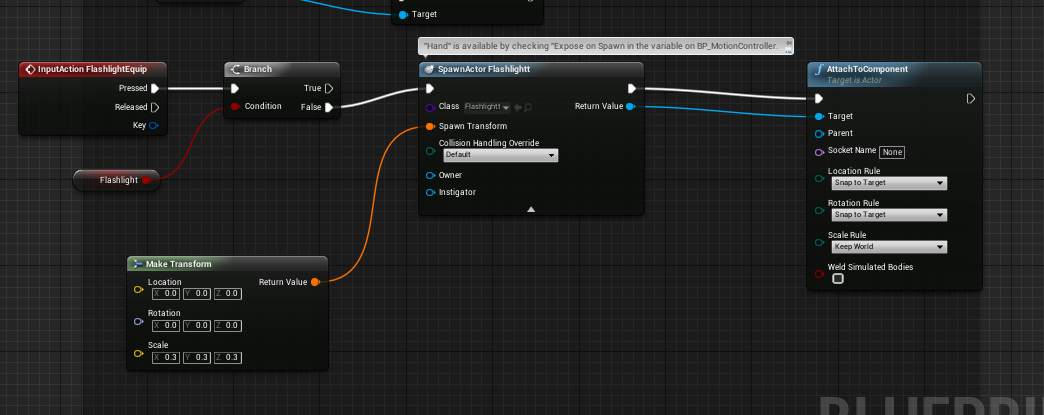
I would set it to the motion controller but I can't reference it because it only spawns in when the level starts.
glossy agate
You are not attaching to any parent. Also if you have the flashlight all game, just put it in there to begin with where you want it, then you can just toggle visibility.
wanton spindle
I don't know what to attach it to.
I can't get a reference for the hands so that's where my issue is
sturdy coral
@wanton spindle store references to the motion controllers after you spawn them, then use the references when it is time to attach the flashlight
oh you already do, left controller and right controller
wanton spindle
yeah
But I try to connect it and it says its not compatible
BP Motion Controller object reference is not compatible with Scene Component Object Reference
sturdy coral
@wanton spindle BP Motion Controller is an actor, you have to get the scene component from it (open BP Motion Controller and look at the different scene component names to chose the right one)
wanton spindle
I got it, thanks a ton for the help @sturdy coral, been stumped on this since yestarday
tired tree
@sturdy coral you use any stereo layers?
last steamvr update nuked them for me
even epics components don't work anymore
got a few complaints about it too
sturdy coral
nope, not using any atm
tired tree
thought it was my stereolayerwidget that broke
but its across 4.17-18-19,. so likely on steamvrs end
glossy agate
@sturdy coral Does your IK solve for all the spine and elbow effectors ect? If you wind up making a game ready product I would be interested.
sturdy coral
@glossy agate not yet, but I'm planning on trying for as much of that as possible. I want to bias the IK joint targets to be within the range of motion of the wrists and stuff and just add more constraints in general
I don't know how I'm going to handle prone and stuff yet, I don't have any animations for it but might make some basic ones
prone will have to be more of a state change it seems like, can't just blend from crouch to prone in any realistic way
glossy agate
I have one. Yeah its all state change. Currently I have HMD height check like 1/10 second to see if its low enough to change state
Goes with the capsule resize
glossy agate
I can send it to you if you want. It’s just a mixamo anim, so you will have to retarget unless you are already using that skeleton
Either way. Super easy to make your own even in engine cause the head and hands don’t need anything done
 rocky nimbus
Is there an easy way to have a line trace hit an object, then hit an object behind that object?
One shot, two kills for example
I can't figure out how to detect the line trace hit whilst allowing it to pass through, I feel like there should be an easy native setting for this kind of behaviour
 trail shale
For the Vive, Is there a trick for calibrating your VR pawn to make the floor just like the floor in real life (similiar to the way the Steam Room Setup has you callibrate the floor) ?
rocky nimbus
@trail shale You mean like this?
If you hit play and your pawn is inside the floor, it's because it doesn't have a tracking origin and you're simply looking through the camera in its default pos/loc at beginplay.
So if that is what you mean, do what I've done above inside your pawn.
trail shale
AH....
rocky nimbus
But, this is in 4.16
trail shale
Here is my issue...I was toggling VR off and on
rocky nimbus
The HMD names are different after 4.16
trail shale
So I am switching OUT of the VR pawn
I'm in 4.18
not just that, I am teleporting the VR pawn
rocky nimbus
The SteamVR one should still be SteamVR (would double check) but Oculus is now OculusHMD
trail shale
so essentially I need to use this floor setting right after I teleport the pawn?
rocky nimbus
No,
trail shale
Reset orientation doesn't seem to do the trick
rocky nimbus
Use this floor setting at beginplay. And then, when you teleport your pawn, make sure that you teleport it to floor level. That way it'll still compensate for your player's height given that we initially set the tracking origin to floor
So if you move your pawn to your teleport destination in-editor, make sure to place it on the floor before grabbing the coordinates
If you notice when you first drop a pawn into the level, half of the camera is inside the floor and the other half above
That is the height it should teleport to
So the BP I showed you would then raise it up to your height
But you only have to run it once (at beginplay)
trail shale
hmmm...here i'll paste a picture
rocky nimbus
Also, resetting the orientation is not always a good idea because it basically shifts your play-space and you'll run into problems later as there is no way to revert it in-game
Sure, show me
trail shale
That is a player start
and I am simply getting the transform from it and teleporting the VR pawn to that transform
trail shale
Probably should have explained use case
This is for children to learn how to survive in a fire
so I start them in the room....you can't see it but there is a collision box right at head height
and that triggers a post-processing material swap to cloud their vision, along with some smoke emitters
However, when I did demos, some kids would end up in the floor,
Others were too high and couldn't pick up objects on the floor because their controller would hit the REAL floor first
Things I tried :
- Making sure they had headset on their height before hitting BeginPlay
rocky nimbus
Is there a specific reason for the elongated collision capsule?
trail shale
- Ending play and Restarting between players
You know now that you mentioned that, I just threw that in there
I should use a target poin shouldn't I
and just teleport to location
rocky nimbus
That capsule could very easily add an offset to a player's height, I've run into that problem before
Here, do this:
Set up your pawn like this
The VROrigin is just a blank scene component, it'll act as the root and a reference for later if needed
Then,
Inside the pawn, on Event BeginPlay
Do that.
And then drag that pawn into your level and leave it inside the floor where it lands
Go into VR Preview and it should, by default always give the player their true height
You won't even need to restart this between children, it'll always be from their height and perspective.
When you add collision capsules inside VR pawns, they can screw up the spawn by adding an offset to the height if callibrated to the floor (on beginplay, the capsule will force the pawn above the floor and THEN it'll callibrate based on that initial offset)
I'm sure there's a way to do this with the capsules as well but I can't recall the exact settings required
trail shale
lol it will be tricky to test this
I'm remoting in so I can't exactly touch the headset
let me pull up my pawn though
rocky nimbus
Sure
This set-up will work in itself unless it somehow conflicts the purpose of your application or some core mechanic you have
If you're teleporting between two locations, the initial pawn location would look like it does on the left
And the teleport destination would look like it is on the right, except what we did earlier would still give you the correct height so long as the pawn's "location" is the floor
If I want to teleport on top of that cube, the teleport destination would still be the floor.
trail shale
rocky nimbus
That looks fine, but move the VROrigin up and make it the root
That makes it a usable variable and point of reference
(If ever needed)
trail shale
Gotta check with the pawn's author
rocky nimbus
Np
Reason I say that is because I don't think the default scene root is usable in BPs (I may be wrong)
Nvm, it is
You can just re-name it to VROrigin and use that instead
I was thinking of inherited variables
trail shale
ah thanks
This is what he is doing in the VR pawn
granted this is an older version I still need to update
Yeah, it is always floor level...I'm even checking the tracking origin enum across various poinst
So I should change that one Capsule as my target and use a target point and just put the target point directly on the floor
mighty carbon
do you guys think Oculus Go will sell better than Gear VR ?
from my personal perspective I can see how it can be an attractive VR platform. For example, I can't buy second VR ready PC (thanks to GPU and RAM prices), I can't really justify buying PS4Pro + PSVR, but I certainly can get Go (or two).
trail shale
Depends on if it releases alongside Ready Player One's overall viewing
That movie is going to kick VR into mainstream, particularly for the mobile VR
mighty carbon
I hope so
trail shale
They already have the phones
They are already used to paying for microtransacations and their stupid Click Games
mighty carbon
well, Gear VR units were mostly collecting dust since many people got them as part of the bundle with S7
on top of that mobile users are fucking greedy with expectations through the roof
trail shale
It didn't help that my gear vr would overheat the phone and quit at 10 minutes
mighty carbon
😦 Mine was ok for almost entire battery run and I was on S6
IMO it was a good intro to VR for me, but it was so inconvenient to use
So I am hoping Go will be better in every way and since it's a standalone device I hope people who are truly interested and invested in VR will buy it
btw, interesting stuff: https://businessdigit.com/whole-body-tracking-research-on-facebook-provides-insights-into-broader-ar-vr-ambitions/

It's no secret that Facebook is big on AR and VR, both for entertainment and communication. And new research suggests that he's working on AR applications that could not just change or replace your face, but your entire body. A blog post is doing today a bit of work from the team of AI cameras, which clearly aims to perform a replacement or follow-up of the whole body in a VR context or AR. 'We have recently developed a new technology that can accurately detect body poses and segment a person in the background, and our model is still in
 dusky moon
Any1 knows what "Resolve Scene Color" is referring to in GPU profile ?! It's taking 1.6 ms in my project ...
 sly elk
I think that is part of deferred shading
sly elk
Diagram to scale so it can be overlaid on receiving part: https://pbs.twimg.com/media/DUeTIq6WAAAVXoc.jpg
 sly elk
lol thanks. I havent done any copy editing yet
 shell karma
sure thing, just cought my eye ;p
sly elk
I need to start a big word doc to write everything in so that I have a better place to do editing. I'm going to end up writing a whole shop manual
shell karma
wise idea
sly elk
so oculus just forced me to update
anyone else have this happen ?
I have use classic home set but this isn't reassuring:https://i.imgur.com/jdfOmkZ.png

anyone know if oculus is planning to force win10?
*dash, not win10
sly elk
I have read a lot of dash win7 issues
there is even a notice that it might not work well without win10
mighty carbon
Dash is made with UE4, so...
get Windows 10 ?
I got Win 10 quite late and I never had any issues with it.. So when people online complain about it, I don't quite get it.. Maybe a few years ago Win 10 wasn't a good OS out of the box, but now it's fine.
sly elk
yeah, I just don't want to deal with wiping my OS drive
sturdy coral
@mighty carbon Dash is made with UE4? are you sure?
that would be way overkill and not a good fit
the home 2.0 environment is, but I don't think Dash is
sturdy coral
@glossy agate from the animation livestream yesterday they mentioned these paragon slides ( https://archives.nucl.ai/secure/yIGh6Z3dB36_58dweq6oTw/1516920152/files/nuclai16/bringing-a-hero-from-paragon-to-life-with-ue4.pdf https://archives.nucl.ai/recording/bringing-a-hero-from-paragon-to-life-with-ue4/) and they mentioned a few times that they would be updating animation stuff soon to bring in some of that
there are a couple custom animation nodes there that aren't in engine that do things like leg IK with more anatomical constraints
could possibly adapt some of that for arms
a lot of the the stuff in those slides/presentation looks very similar to the ubisoft IK rig stuff, at least for the foot matching stuff
glossy agate
Nice. Seems like arms and head were not too hard to figure out but legs, I could never get working myself. You need control through the whole chain to hips. I would get either feet sinking in the floor or head sinking through the body
Could never get knees to adapt
sturdy coral
yeah, with the crouch blend I'm using feet sink through floor and will need an ik fixup, it is because blending the pelvis root is sort of blending as mostly a translation, but the legs are all blending angles. a 50% blend between a straight leg and a bent one won't result in a leg that is exactly 50% of the hip to foot distance, but at 50% blend hips will be exactly 50% lowered
tired tree
@sturdy coral it was announced that dash was ue4 I beleive
sturdy coral
@tired tree damn that seems like overkill; I guess they are using it mainly for slate UI then?
tired tree
i guess......better options for that too
might be because they knew th eengine?
they made a custom forward renderer for it after all
sturdy coral
yeah, and they have a deal with epic that probably included a lot of licensing
that 5% royalty waiver thing for devs
but dash doesn't use almost any actual scene rendering, it's all just stereo layers and stuff so it seems like it would be almost all slate. except maybe for the environment it puts you in if the game doesn't have seamless support
tired tree
i know, but experience with a platform > custom platform in many cases
sturdy coral
carmack has complained about that and how they can do so much of a better job with custom stuff, but he is on the more resource constrained side I guess with mobile.
it really doesn't feel like he is the actual CTO though in a lot of ways
@tired tree hmm some stuff says dash is built in ReactVR
I don't think they would need slate for UI then with that
sturdy coral
yeah, it might have just been conflated because dash is a part of home 2.0 I guess
I'm not sure, I haven't used it in a while, the first time I tried it broke my desktop and I had to reboot
tired tree
yeah maybe they just assumed since home is ue4
wicked oak
@sturdy coral looks like they just let carmack do random tech stuff around there XD
tired tree
he is the main character from this seasons Black Mirror first ep
without the brutal torture ofc
 lime dagger
I don't twitter much or anything but I do dislike carmack's followers. People who simply just think he is the end all be all of video games or shooters and anyone thinking he could never possibly be wrong on anything. Specially complex stuff like vertex arrays.
In fact I am kind of upset that 1 tweet about vertex arrays from carmark prompted opengl to actually write a full benchmark on vertex arrays.
mighty carbon
Carmack is All-powerful Shambler
can he be wrong? I am sure he can.. But can he be fundamentally wrong? 😉
lime dagger
I mean he said story doesn't matter in games.
mighty carbon
he's been saying that since Quake 3, something I strongly disagree with
but, he isn't a game designer.. He doesn't get it
so when it comes to game design, I pretty much ignore him
lime dagger
yeah thats the major issue is that a lot of information people gather from him is outside of his technical programming realm
mighty carbon

After trying the Oculus Go yesterday, I'm more convinced than ever that 2018 is the year of standalone #VR. At $200 its phenomenonally good value. Can't wait for it to launch so I can share it with my patients
 Twitter
glossy agate
Twitter
glossy agate
does go come with 2 controllers?
wicked oak
and also rift seal for the screen, so dust wont get in (like the desktop rift)
glossy agate
ah ok. hopefully santa cruz has 2 controllers then
wicked oak
similar ergonomics to desktop rift too
mighty carbon
Santa Cruz is a way off
we'll be lucky to see dev kits shipping at the end of 2018 and maaaaybe release in 2019
and I doubt it will be cheap
glossy agate
I would be interested in making something for Go, but Im not really interested in making single controller experiences.
mighty carbon
I have an idea I want to test
one controller will be fun
(not as fun as Touch of course)
you can make a mecha game with gamepad controls
glossy agate
oh it has gamepad support instead if you want it?
I guess an RTS game would be pretty fun on it with one controller if it has all the roomscale support ect
mighty carbon
yeah, you can have 3DoF motion controller, standard bluetooth gamepad, or both at the same time (if UE4 supports that)
wicked oak
@glossy agate its 3dof
its basically gear vr
means it does not have positional tracking on the head
sturdy coral
@glossy agate it will support two paired controllers, but almost no users will have it
mighty carbon
the point here is that people most likely to spend $199 to jump start their VR adventure, rather than buying WMR HMD and finding out it doesn't run with their laptop
Carmack said it won't
only one 3DoF controller will be supported
sturdy coral
@mighty carbon https://www.facebook.com/worksalt/videos/1955988251094479/

7:23
whoa epic is closing down paragon.. maybe when that livestream hinted at some advanced animation from it coming to the engine.. maybe they will do something like the infinity blade release and just release everything?
tired tree
@mighty carbon WMR has a decently low HW requirement
tired tree
they are closing down paragon to focus on fortnite...lol
the game that went through like 6 identities
tired tree
weird world
granite jacinth
¯_(ツ)_/¯
tired tree
as an avid dota lover, paragon never did it for me
sturdy coral
and they are going to want to dump resources into it
granite jacinth
It WOULD be nice to see Paragon Assets on MP
tired tree
seems like a great choice
granite jacinth
Especially how they handled Multiplayer
I mean, that's probably going to be something a lot of folks are going to want to get their hands on
sturdy coral
yeah, see a full use of the ability system
sturdy coral
and the optimizations for having lots of pathing grunts and stuff
tired tree
a lot of the engines improvements for multiplayer came from paragon
tired tree
well then, lets convince them that Fortnite needs to use only dynamic lighting
tired tree
they did the distance fields for it
sturdy coral
those are still dynamic though, I think they do a full time of day cycle too
I don't know if any interior or cave areas or something are baked though
tired tree
mmm
glossy agate
Yeah the cycle is dynamic. It doesn’t really have any caves though. Just that one bridge underpass.
sturdy coral
there are some basement areas and stuff I think, but I don't know if they fully punch through the landscape and everything can be fully broken up to lead to the outside from above on those so I don't think there is any baking there
mighty carbon
@tired tree I missed a window of opportunity to buy one at $199 when they were on sale not too long ago, but as I recall it wouldn't work on my wife's laptop with i5 and Intel GPU
glossy agate
Yeah, I’m pretty sure those a punched. You can break the whole house above.
tired tree
@mighty carbon they are still like 230
glossy agate
I must have played 200-300 rounds of that shit and I’ve still only won once haha
mighty carbon
Intel 620 is the GPU my laptop has
sturdy coral
I wonder if at GDC they will announce something about either assets or some code from paragon
mighty carbon
err, no that's not it.. Skylake is 600 I think
tired tree
scroll down
literrally the very baee minimum spec for the HP as listed
intel integrated 620
and an i5
mighty carbon
it's not 620.. 620 is 7th gen.. My laptop has 6th gen CPU
it's 530 or something like that
sturdy coral
ah, well I guess that changed then, he said it was working in that other video but just that he wouldn't recommend it
it would be nice for FPS though, one for wand movement, one for gun aim
mighty carbon
that's what I was thinking
sturdy coral
you'd want a laser sight type thing on the guns
mighty carbon
where does Epic say they are shutting down Paragon ?
sturdy coral

Paragon
Paragon will close down on April 26, 2018. For more information, read this blog.
mighty carbon
I see.. I'd love to play with those assets in VR 😄
damn, I wonder how many people will demand full refund
alpine torrent
early access game what i love to play
wicked oak
a source code release of that would be GLORY
all that lotsa npc goodnes
and multiplayer stuff
and FX
and ability system
wicked oak
r/paragon is so sad
glossy agate
haha yeah it is.
sturdy coral
@full junco it's released now?

cyubeVR (pronounced Cube VR) is a virtual reality voxel game fully designed for roomscale VR.The world in cyubeVR is entirely procedurally generated. Enter a seed or let the game generate one for you, and explore a unique and detailed infinite wo...
Price
$12.99
full junco
YES!
sturdy coral
congrats man
full junco
haha
wicked oak
how is the traffic @full junco
 granite jacinth

Indie DB
Contagion VR: Outbreak is a first-person shooter built from the ground up exclusively for VR. Fully immerse yourself in a world initially familiar to you, and witness it's transformation into something much darker as it rapidly changes right before your...
Love seeing the game in top 30 every day
wicked oak
have you seen r/psvr @granite jacinth ?
you have a serious following
from that demo wich is been a huge success (and Contagion wich has its own fans to spread the word)
granite jacinth
@wicked oak Yeah man, they are blowing it up everyday
It's nice, but...so much work still for PC 😭
I told them that I would get them a demo if Sony okays it.
Which would be good practice anyway on my part
glossy agate
Was a PSVR port planned from the beginning?
wicked oak
@granite jacinth demos can actually cost money
becouse sony makes you pay for the download bandwidth
so yeah, ask them for the details
and you port that demo to PSVR
wich will probably go ballistic
but demos in PSVR aint easy
at all
you still need to pass full review
and even get ESRB (but ESRB is easy, its PEGI what is hard)
glossy agate
When is the full release supposed to happen anyway?
 fresh laurel
@granite jacinth Any plans to support windows MR headsets?
granite jacinth
When 4.19.1 comes out sure
granite jacinth
4.18 has a bug for WMR
granite jacinth
So have to wait for 4.19 release, plus hotfix before I even think about upgrading
¯_(ツ)_/¯
I don't have WMR
granite jacinth
Just know that it's broke with all the bugs reports, and someone linked me the 4.19 fix
wanton spindle
Does anyone have knowledge of the VR Essentials kit and can give me a hand? (again)
trying to figure some stuff out and having some difficulties haha
 ripe vault
has anyone done the udacity training program for unreal vr? Is it worth the $?
mighty carbon
 sturdy coral
@granite jacinth I have a pull request for 4.18 I think I sent you to fix the windows mr bug in 4.18
 primal sky
@fresh laurel I use my wmr headset now in 4.18. what's the issue you get?
sturdy coral
@primal sky which headset? I had issues with lenovo explorer
fresh laurel
@primal sky Was more curious than anything really
mighty carbon
I am wondering how is Gear VR controller is handled in 4.18
I ported my 4.16 project to 4.18, but getting bunch of errors as API changed
ha, to my surprise there are official docs for UE4 about the subject o.O
primal sky
@sturdy coral Oddysey. I had to start up steam once or twice and have steamVR running
and then start editor.. but once I did that it seemed reliable.
i did get one or two crashes a couple weeks ago.. but it restarted fine
sturdy coral
@primal sky I'm not sure, but it might not be an issue with Odyssey
it only happens when the aspect ratio is different from the Vive's
or in the rift's case via steamvr when the recommended render target aspect ratio is different than the native screen resolution
full junco
@mighty carbon yeah someone posted it there
 wraith sky
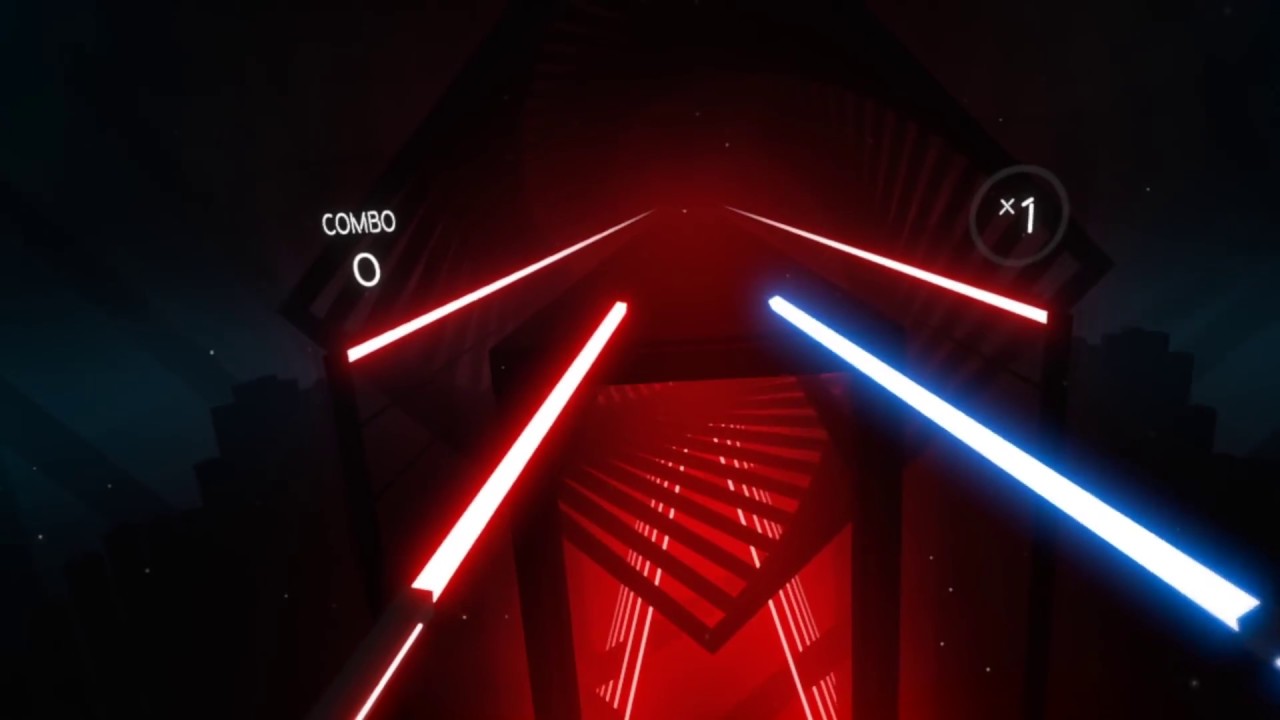
Beat Saber is a unique VR rhythm game, where your goal is to slash the beats (represented by small cubes) as they are coming at you. http://www.beatsaber.com...
wicked oak
i prototyped such a thing
real needle
I've been at it trying to get editor performance back to what it used to. On several machines, I see the same problem: Blueprint graph extremely slow, VR preview on rift never hitting 90 fps. I see the same problems on an i7/1080 and my lower spec machines. I've turned off nvidia overlay, gamebar etc
wicked oak
but mine didnt have the directional hits
only just blowing up balls without direction, so was worse
 fluid chasm
Iam trying to bind same grab button in HTC vive to open doors and grab things...... Is it possible???
When iam opening door with grab key... Iam not able to hold things.. And vice versa
wicked oak
@full junco pretty good reviews in steam
and 17 reviews? thats a good amount of sales day1
very nice start
you were able to push through the ladder into top seller list
top in "new and trending"
thats a good amount better than my DWVR release, congrats
real needle
Hey guys. Is someone here experienced with multiple Vive Trackers and attaching the Player to an other actor to move the Player and the Trackers around
granite jacinth
@wicked oak aye, going to be a great year for UE4 VR games.
wicked oak
@granite jacinth why do you think so?
i see PC vr regressing
mostly due to steam being shit
and unity is gitting gud real fast
the "scriptable render pipelines" and "ECS" features are killer for VR (coming next version)
primal sky
The revenue certainly isn't regressing
So that's #1
If you think the VR market is going to contract you are crazy time
Hehe
mighty carbon
@primal sky what makes you say that revenue isn't regressing ?
unless it's a big hit, devs aren't making money on Steam (or even Oculus Home for that matter)
I just posted a link to an article about Xing devs and poor sales
lemme link it again: https://uploadvr.com/xing-dev-poor-sales-depending-playstation-launch-successful/
UploadVR
White Lotus Interactive, the developer of Xing: The Land Beyond, has spoken out about poor sales and hopes for the upcoming PSVR launch.
wicked oak
@Irontaxi#1648 you sure about that?
all i see is incredible games getting less sales
than near launch
tired tree
@mighty carbon and Xing made one day of PR on release and then fell off the map. It is also a puzzle game, not entirely sure what they expected
mighty carbon
well, I don't know what they expected... Looks like high value production game. I am guessing people don't want to play puzzles in VR 😃
tired tree
straight puzzle games don't sell up to other genre's anyway
and its a 2D / VR puzzle game so the VR specific mechanics aren't crazy
it wasn't built purely around VR, it was converted on top of it
it didn't receive 2D sales really either
mighty carbon
I see
primal sky
Just look at the volumes.
VR is making money. But yes you are right.. the overall potential is lower so a failure is more critical
A game that might "fail" with 500k in reg PC games might only make 50k in VR
And indeed be a failure as that's not sustainable.
But the top VR titles (amongst them some small Indies)
Are doing fine.
You could support a 4-5 man team off the revenue
Not a studio (maybe a few of them)
rocky nimbus
Any reason why my packaged build has no audio on HTC Vive but does on Oculus?
full junco
@wicked oak yeah, the lists there are region based though
in germany I see my game in #1 on new and trending and also #1 on top sellers
germans seem to like it 😄
wicked oak
how are the stats @full junco ?
now that you have analytics, you should see average session, amount of players connected, and all that stuff
mighty carbon
hmm launcher showing me offline.. anyone else having same issue ? (red dot next to the login name instead of usual green)
full junco
@wicked oak yeah its really nice to have google analytics now, 19 people are playing the game
wicked oak
how are the teleport/block stats?
glossy agate
Not VR related but has anyone had trouble trying to migrate assets from a 4.18 project to 4.17? My folders show all the assets but they wont show up in editor. Only a couple show. These are just static meshes ect, real simple stuff.
mighty carbon
hmm.. followed Epic's docs for motion controller for Gear VR and it's not working :/
glossy agate
Isn’t gear broken in 4.18?
mighty carbon
dunno
I managed to deploy, but can't get controller to work
man, if working with Go will be the same kind of fuckery as working with Gear VR, screw Oculus Go... 😦
glossy agate
Is gear using the Oculus plugin too?
mighty carbon
yeah
got it working, but now I have 2 controllers rendering o.O
bizarre
or rather, it's like one but if stereo rendering was off and it would show up as 2 controllers
glossy agate
2 controller support confirmed
sturdy coral

Unreal Engine
Epic Games welcomes Cloudgine, who are bringing cloud computing expertise and online technologies to Unreal Engine games, VR/AR and enterprise applications.
Cloudgine Limited is a British video game developer based in Edinburgh, Scotland. The company was founded in May 2012 by Dave Jones, best known as the co-creator of the Grand Theft Auto and Crackdown video game series, Maurizio Sciglio and Marco ...
I didn't realize Toybox used Cloudgine
 proper osprey
Hey Im building an realistic apartment for a vr application. I want to know if it´s possible to create a collision mesh of the walls just for the nav mesh. My walls are in several pieces so I can light map it. I also built a more simple shapes for the places I want it to block teleportation. Because Im always changing something and exporting it to UE I want to build these collision shapes and not associate it to any mesh (e.g: SM_wall01, SM_wall02... UBX_walls, UBX_floor). Is it possible to just create a separated mesh for the whole wall collision ?
mighty carbon

UploadVR
Tencent Holdings is investing an undisclosed amount in Skydance Media, a Hollywood entertainment studio that makes the Archangel virtual reality game.
mighty carbon
lol, 4.19p2 just froze when building for Gear VR... Maybe it's a sign to stick with Rift? 😛
granite jacinth
Too bad they don't do the same thing for demos
mighty carbon
soo, UE 4.19p2 crashes on Gear VR 😦
mighty carbon
well, it's p2.. I hope it's fixed in the release (I reported it)
4.18.3 has some weird issue with motion controller and 4.19p2 crashes (I wanted to see if it has issue with the controller too) 😦
trail shale
Is there any trick to using a local multiplayer two instance setup for VR that would let you use the 2nd player as a menu/admin interface? every time you click on that screen it grabs focus away from the VR player which starts blocking play
sturdy coral
@trail shale which engine version?
trail shale
4.18.2
err 4.18.3
I'm not sure what makes the VR player block, if it is a Steam VR thing or an Unreal thing
I suspect it is Unreal because there are certain games that don't necessarily have a spectator screen
sturdy coral
did you turn off VR on the second instance?
trail shale
it's not in 3d mode if that i what you are asking
sturdy coral
launch with -nohmd
trail shale
this was an intial test but I start it in VR preview
but disable steroscopic and switch to a non-vr pawn
sturdy coral
I'm not 100% it will work but try that, outside of VR preview
preview instances have some gamepad management and rerouting code that could possibly be interfering
trail shale
ah
this is far too deep of a subject for me to tackle tonight but I will look into that
I need a fast way to check for replication, which I can just use non-vr pawns
but ultimately I will need to control the VR player's experience via an in game menu on the 2nd player
sturdy coral
@trail shale there are some talks on the mcclaren demo epic did at GDC or something a year or two back
they talk about how they made an ipad interface for it for someone out of VR to control it
trail shale
I'm using the Unreal Web Server
sturdy coral
I think the ipad interface was still using slate and UE4
trail shale
oh
right now I use HTML handles to call events
it's handy but very cumbersome to work with
sturdy coral
but it didn't communicate over standard multiplayer, it used a different message bus thing
trail shale
this creates a local web server which you can access from any device on teh same wifi
just connect to the computerls ip/port
then you click on buttons which trigger events in unreal
But the way I'm doing it is very hacky...you either have to manually edit an html file to reference the correct buttons with the right function
or you can make it more modularly by literally creating the html file by saving a series of strings in the proper order...not diffcult just hacky
but it does work
trail shale
but boy, it would really be fucking useful if EPIC would just hardcode a spectator screen widget
(it was pretty awesome to pull out my phone and say, "watch this" on a tech demo"
like, that would take them all but a few hours, if that
sturdy coral
yeah, unity has been a lot more flexible with multiple viewports and UIs in different places
fantastic contraption had a whole UI on the mirror window where you could tweak spectator things etc. back at vive launch
trail shale
literally it is just changing the way mouse focus triggers VR
it's probably a few lines of code
or maybe it's the way windows focuces on windows
real needle
black magic @trail shale @sturdy coral https://docs.unrealengine.com/latest/INT/API/Runtime/Messaging/IMessageBus/
Interface for message buses.
trail shale
Care to elaborate @real needle? this does look a bit like sorcery
wicked oak
testing some blender bakes
(thats unlit texture, just the bake)
texture XD
lightmap uv pack in blender, every triangle separated
becouse unreal engine doesnt let me do the bake there >:/
mighty carbon
eww, bad UV mapping
real needle
@trail shale I haven't done it, just read it and saved it for a sunny day :)
trail shale
I don't even know what it means
sturdy coral
@trail shale it is a network message bus that that mcclaren demo used for iPad control
it is used for a few other things in engine, usually editor stuff that runs over the network like distributed lightmass builds (I think)
real needle
@trail shale look at the McLaren demo stream on twitch they explain it there
mighty carbon
did you folks know about this https://twitter.com/chadowrun/status/957055911683538945 ?


UE4 tip: UE4 textures have a nice compositing feature that let you apply a normal map's "roughness" to a different texture's roughness mask. Super helpful for combating specular aliasing when using MSAA. #UE4 #GameDev #UE4tips
 Twitter
 sharp swan
mind blown Just watching the "Realistic physics objects in VR" tutorial and found out I can drop a reference onto an old reference to replace it. I wonder how many man hours i've lost by dropping the reference next to old one on the graph and rehooking it up to the node. 😮
mighty carbon

UploadVR
The mystery of HTC Vive Pro's dual cameras has been revealed; they're to be used for object detection in the real world and more.
sharp swan
#hyped
I did some work with realsense and leap motion a couple of years ago. It's never made sense to me that they released VR without that capability
 cosmic shoal
I can just dream of a future where we'll have wireless headsets (or onboard processing) with full body tracking (including fingers and eyes) and higher quality optics/displays. My guess 5 years from now, and still, people will use it mostly for trolling others in VRchat or similar.
mighty carbon

This is the first tech update of 2018. We have quite the year ahead and start if off with updates from our Audio, Mobile, Integrations, and Ecosystem teams.
nothing new for UE4
😦
does Steam Audio offer the same goodies for both desktop and mobile platforms ?
mighty carbon

DOOM VFR - Developed by id Software, the studio that pioneered the first-person shooter genre and modern VR, DOOM® VFR brings the fast-paced, brutal gameplay fans of the series love to virtual reality. Immerse yourself in the UAC facility on Mars and the depths of Hell, as your skills are put to the test through intense combat and challenging puzzle-solving. Play as a cybernetic survivor who is activated by the UAC to fight the demon invasion, maintain order, and prevent catastrophic failure at the Mars facility. Lay waste to an army of demonic foes as you explore and interact with the outlandish world of DOOM from an entirely new perspective.STORY: Set shortly after the demonic invasion on the UAC’s Martian research facility, you are the last known human survivor – until your death. Under a top-secret UAC operational contingency protocol, your consciousness is transferred to an artificial brain matrix. Your designated purpose: restore operational stability and use any means necessary to stop the onslaught of demons. KEY FEATURES:Experience DOOM combat and its iconic weapons and demons from an entirely new perspectivePhysically interact with the DOOM universe as you seamlessly traverse across the UAC facility and Hell using teleportation and jet-strafe movementExplore all-new UAC Martian research facility areas and discover the unique abilities of a cybernetic UAC security operative
glossy agate
Oh hey, Doom has smooth loco now. I may check it out. Do you have dual gun support too without the one gun just being stuck to the screen like a 2d game?
granite jacinth
oh...
lol

Thank YOU So mUch For Watching, Please Hit DAT LiiiT Button If The Video Was LiiiiiiiiiT lol & Subscribe :) Subscribe Today! ► https://www.youtube.com/user/P...
this dude, the whole video is funny
sad, because he had trouble with the controls, but funny still
glossy agate
Dudes screams are hilarious
shell karma
leaving this here as I had pleasure working on it,
http://variety.com/2018/digital/news/unabomber-vr-experience-1202679535/

“It was as if we were back in rural Montana.” The first time former F.B.I. special agent Max Noel watched “Unabomber: The Virtual Reality Experience,” which launched on the HTC Vive Monday, he was …
 supple coyote
hey gang
does anyone know how the Get VR Focus State node work?
what does it measure?
i'd like to use it, but would like to know what cues it to see if it'll work with my purposes
mighty carbon
@glossy agate I don't think you can dual wield weapons in Doom VFR, but weapons aren't stuck on the screen.
trail shale
This has stumped me for too long...WHY is this cube not visible on my VR pawn? It's set to Visible and it is NOT hidden in game.... the camera is it's parent
glossy agate
is it owner no see?
trail shale
nope
super weird
any other ideas?
I even set a variable to the location of both the cube and the actor it's attached to and they are more or less the same...off by 100-200 units
sturdy coral
@supple coyote I believe it just tells you if the game is in focus in VR, or if instead the Steam Overlay (or other overlay apps) are
I think the engine will automatically disable motion controller button events when it is out of focus, but you might use it to do your own logic like disabling gesture based controls etc. because controller motions are still processed
tired tree
or running IK off of a specific position instead of the HMD on the floor or desk :p
sturdy coral
for that I'm using proximity sensor and falling back to activity level if there isn't one (windows MR)
that sends some kind of delegate too different from focus
tired tree
windows MR runs the steam VR timeout too correct?
tired tree
or are you testing on the windows branch
sturdy coral
it has a proximity sensor but they haven't exposed it yet
on steamvr
I haven't tried any of the windows branch
glossy agate
Do the WMR controllers have the same pitch ect as one of the other 2 or do you need a third special controller setup now?
tired tree
its kind of between
thankfully, they all use the same controller
what I don't like about them is that in steamVR app menu maps to steam menu on one hand, and app menu on the other
glossy agate
Kinda sucks but it could be worse I guess
tired tree
also it is hilariously easy to hit the windows menu on them
sturdy coral
they haven't shipped a sample model I don't think so it is kind of hard to align them in editor with preview meshes etc.
tired tree
which defocus's steamVR
sturdy coral
you can use mordentral's plugin to see them in vr and compare though
tired tree
steamVR models have the correct pivot
they are stored in the directory too
can export to ue4
sturdy coral
yeah I mean to just align them if there are any changes on hand placement you want for them vs vive
not sure it is really needed
tired tree
I added controller profiles to my plugin yesterday
like inputsettings, but on a per profile basis
figure its going to be needed around knuckles time
include a transform offset for specific controllers too
sturdy coral
oh cool
glossy agate
Yeah, Im wondering if I should just ignore the touch socket settings and just have a default value in the profile for oculus users for the pitch adjustment.
sturdy coral
I have just kind of hacked in for each one in setupinputcomponent and not a real systemic thing
glossy agate
right now we are manually adjusting every weapon
tired tree
figure then the dev can pick whatever they want to base their work on touch/wands, handle the snap points for that, and then provide offsets to match all of the other controllers up to it
sturdy coral
for testing "fake" vr with mouse and keyboard I add to the input stack with a hotkey a bunch of keyboard controls and stuff and then pop it when done
tired tree
then per controller specific axis/action rebindings
sturdy coral
and then compile that out when shipping
glossy agate
I was able to get most of my functionality to work across vive and touch except I need an input for like joystick forward+click on the stick to have it the same as Vive
Plus its for a function that users are used to in other shooters
Dont know how
sturdy coral
yeah just do flicks of the stick if possible
they added that in in 4.18 I think, they were missing the events before
glossy agate
cap touch is always on when going forward though isnt it?
tired tree
yeah when the thumb is down
thats what you wanted right? otherwise they will have to hold down the stick on the clock position
which gets harder the farther from zero it gets
click
glossy agate
So I need like forward for walk forward and then add click to change into sprint. Onward, pavlov, and I think BAM have it so its just what people are used to
sturdy coral
you can probably get by with just MotionController_Right_Thumbstick_Up etc.
glossy agate
also for snap turn vs strafe I need it
sturdy coral
they didn't have those events in the past but they finally added them
sturdy coral
click to toggle sprint is ok
tired tree
toggle yeah, hold? no
sturdy coral
yeah
tired tree
even if others are doing it, its bad form for thumbsticks
sturdy coral
you definitely don't want to click constantly
glossy agate
Yeah toggle would work for it. Snap turn especially cause its just a click
Or it could just be an option, and Ill drop strafing for snap turn users
tired tree
generally people drop strafe for snap turn yeah
they provide - snap turn - strafe - smooth turn options
and the player picks one
granted strafing is probably needed more for someone forced to use snap turn
since they likely don't have a large 360 setup
glossy agate
Yep, thats the plan. Thats why Im real excited about the new mapping feature
Makes it so much easier to setup
tired tree
but you can place the turn on the other hand
it doesn't depend on controller orientation
glossy agate
Yeah but other hand holds make drop, fire mode, slide forward functionality.
sturdy coral
yeah may not be possible with a lot of other controls
tired tree
double clikc is also a potential
would just have to delay a couple of frames on strafe
sturdy coral
all mine are movement focused like jumping and stuff
glossy agate
OH actually I think I have 2 of those items mapped to X,Y so slide forward could be up, then snap turn for dom hand
sturdy coral
and I am going to allow diagonals so you can click turn while still holding jump/jetpack
tired tree
prob don't want side areas control an aspect of movement if they also do interactions
hit it by mistake when fumbling around trying to reload ect
glossy agate
Well I think I have like x drops mag, then when you put in another one you can release slide with off hand, or push stick forward with dom hand to pop slide. you think people would accidentally snap turn doing that?
cosmic shoal
I use snap turning only when I'm doing stuff sitting down. using slide locomotion and snap turning simultanously is very disorienting
glossy agate
@sturdy coral Whats the new game? Jet pack like titanfall? Would be super cool. Especially with wall running or something
But players with 2 sensors dont realy have a choice
sturdy coral
@cosmic shoal the cord is a problem with rift, will probably want snap turning regardless of sitting/standing (plus two-camera front facing people)
sturdy coral
yeah.. I need a good extension for my WMR.. it isn't long enough at all right now
@glossy agate still unannounced 😛
cosmic shoal
it's fine with mine (lenovo) reaches every corner without an extenison, but my play area is not that big. A bit under 2m x 2m
it does get shorter if it's tangled
or twisted
glossy agate
Same with mine. Was hoping to have a trailer by now to announce it but it always takes longer than expected haha
sly elk
rinterpto and vinterpto need to be called on a timer or tick, right? Like if I call it in an execution graph that only fires once I won't get my nice movement over multiple frames.
glossy agate
yep
sturdy coral
right, and you usually need a variable with the prev result
glossy agate
goes to delta time if I remember right
sturdy coral
ah yeah, seems like there is some case where you need it but can't remember
I think it was for IK stuff if the result was used in anim graph and kind of ephemeral
 iron talon
for open vr expansion plugin, is there a tag to make only a specific object climable? if not how would i go about doing it x.X sorry for the noobish question x.X
glossy agate
Ignore the VR trace channel on any SM you dont want to climb
iron talon
would i set that up in an override -> can object be climbed?
going through a video and see hes messing with that section
glossy agate
No just open a mesh, go to collission settings and click ignore VR trace channel
Although a better way is going to project setting, and defaulting that channel to ignore, then you would only blck it for anythingn you want to climb
iron talon
hhm... trying that now, just set vr tracechannel to ignore
tired tree
there is a function
IsObjectClimbable / CanObjectBeClimbed (forget which I named it)
override it and filter it however you want
return true or false
the trace channel also works, but is less overall control depending on what you are doing
also what video? my Q&A?
iron talon
either way its a learning experience so i dont mind
for some reason i understand materials, just not blueprints that well >.<
and thank you both for that tidbit of info lol x.X
that was easier than i thought it would be x.X thanks again
mighty carbon
So, MS is rumored to buy EA and Valve this year
I wonder if it's a good or bad thing for VR and non-VR, and I wonder what Tim Sweeney will do
mighty carbon

Back at CES, Oculus announced that Chinese electronics giant Xiaomi would exclusively bring its own branded version of the standalone Oculus Go headset to China. The headset will support the Oculus Mobile SDK, meaning existing Gear VR and future Oculus Go apps can be packaged up for sale to the Chinese VR market through Xiaomi’s Mi …
 quartz bay
Does anyone have any experience using the windows mixed reality HMD with UE4?
tired tree
@mighty carbon very different things are "attempt to buy" and "buy"
valve is a private company
who has turned down buyouts before (EA)
anything is possible, but its highly unlikely
quartz bay
There's no way Valve would sell out to MS. Gabe Newell was a former microsoft employee and didn't like the way they ran the company, so he started his own.
sturdy coral
@quartz bay I've used it via steamvr, it requires a patch on 4.18
quartz bay
I just downloaded a github repo which looks like its a source build of the engine with UWP support added in. What's the SteamVR patch you're talking about?
sturdy coral
quartz bay
so, if I modify these three source files in the 4.18.2 release, with the selected changes, then WMR should work with SteamVR?
 pearl tangle
the UWP branch has been around for a long time, nobody did much effort to make that work well with hololens or anything though unfortunately. I have tried to use it before to build an application on my surface hub without any success
real needle
Is it possible to render a shadow but no the primitive the shadow is drawn on?
sharp swan
maybe with a custom depth trick. Setting pixel depth on the object might retain the shadow as it's post processed
mighty carbon
does anyone know how to get in touch with Valve ? Most of the contact e-mails I've used not too long ago now bounce
 willow trail
Anyone struggling with performance in VR preview? Shipped version is very smooth, capped at 90fps on my Oculus, but in VR preview I get 45 fps at most, which makes it really hard to test anything. Can't realistically recompile a shipped version everytime I make a minute change, especially at this early stage of development :/
This happens on a mostly empty scene too
sharp swan
do you minimize the editor when playing?
willow trail
makes no difference in my end :/
and I don't minimize the editor when trying launch version either
wicked oak
@willow trail its a common thing
try to lower graphics settings
editor overhead is huge
but more than editor, is development build vs release build
release build has lots of optimziations done in the C++ code
willow trail
the thing that I don't understand is that my GPU's usage sit at a comfortable 30-35% when previewing (GTX 1070), and my CPU usage is at about 70% (unreal using about 25%)
I mean if anything the CPU will bottleneck it, I suppose windows might just not report utilization as accurately as I'd expect
I don't generally touch engine's graphics settings, would that just be the Engine Scalability dropdown menu?
That seems to have no impact either
glossy agate
Try turning off GeForce overlay. Also if it’s a windows update causing it, if you google around there is a patch you can install that will fix it.
Happened to a lot of people recently
wicked oak
thats pretty much it @willow trail
editor costs CPU by the tons
and not being optimized cpu code
GPU perf should be around the same as release
but CPU perf is a difference
willow trail
issue isn't exactly new, but I was doing some pretty heavy CPU maths so I just put it off until I needed to optimize it, turns out this wasn't an issue at all. It didn't happen at the very beginning (I believe, or at least I didn't get the massive interpolation artifacts I get now), disable geforce experience overlay didn't have an effect either
but shouldn't that CPU cost be the same if I launch the shipping version with the editor behind it?
I mean I'm fine putting it down to the preview version not having access to the same optimization, but that really makes it hard to debug stuff
tired tree
shipping removes a ton of stat recordings and checks and ensures
blueprint math if that is what it is is also way more expensive than native if you are making a ton of calls to single nodes
the custom expression node is there specifically for that
willow trail
all the math I'm talking about is done in C++, but it is pretty crazy unoptimized stuff, going multiples times over every vertex of multiple objects on tick, building tetrahedron, doing volumetric calculation and stuff, but I just remove every object instant that would use that code, and the perfs are the same
tired tree
sounds pretty badly thought out if you are iterating verts on tick....
run a profile of the editor preview, its likely the slate graph killing you
willow trail
I'm trying to use low poly models, but I couldn't think of a better way to simulate liquids in a container while remaining volumetrically consistant
tired tree
and also run it from the world view, not from a blueprint graph
ever since 4.17 or so running preview with a blueprintgraph up tanks perf
willow trail
ah, that's good to know
yup, welp running from a BP divides the framerate in 2 yet again
so that'll same me some headaches already thanks
wicked oak
well no shit m8
tired tree
you can run water offsets in the shader and pass in a map
wicked oak
when you are in dev mode, it doesnt turn on the full optimizations
only the basic ones
tired tree
instead of manually moving vertex's....
wicked oak
thats why you see a dramatic difference
in shipping it probably vectorizes stuff, rearranges loops, that kind of thing
tired tree
not really
willow trail
no I'm not moving vertex, I'm simply reading their position and building sorted list to find out where the liquid's surface would be for any given volume and normal
wicked oak
doesnt development build only do minimal optimization?
tired tree
it just removes the fact that every tick and lots of operations are logged and checked
wicked oak
becouse you can still debug it
tired tree
shipping build will be more perf on compiler side anywya, but thats not the big hit
wicked oak
shipping uses -o2
rocky nimbus
Anyone have exp with Steam achievements?
tired tree
yeah, but the difference there isn't going to be half his fps blanco
being cpu limited
@willow trail you are simulating shapes? reading their vert locations? building a sorted list, and doing this on tick? How many objects?
willow trail
Depends, the objects will generally have less than 100 verts (~50 on average), objects sleep when inert, so I wouldn't expect more than a couple objects going through the process on tick at any given time
tired tree
are they spheres?
willow trail
I'm fine with sorting a list or two of less than a hundred vectors on tick, but it's all the mesh slicing that was scaring me
nah, they're basically... insides of bottles
or glasses
that sort of stuff
tired tree
oh, just doing the water level
thought you were trying to do actual sim
there are a bunch of tricks to do that without slicing
willow trail
if you mean vertex displacement in shader, that wouldn't work
I like to think I mostly thought the problem through, every implementation I could see online had the same shortcomings
tired tree
no, i meant volumetric material
willow trail
what is that
I love the sound of it
I couldn't do something like varying opacity depending on the depth of the liquid with that sort of stuff could I?
tired tree
yes
willow trail
well consider my interest critically peaked, couldn't be googling faster
mighty carbon

VR/AR expert Antony Vitillo (aka ‘Skarred Ghost‘) got an opportunity to speak with HTC Vive China President Alvin Wang Graylin recently, and while Graylin predictably couldn’t answer the question on everyone’s mind—”how much is Vive Pro going to cost?”—we learned the headset is definitely targeting a prosumer price range that makes it “more expensive than …
willow trail
@tired tree gotta say I can't find much material on it, before I get too excited, does that work OK with VR?
willow trail
huuuh
is there a default implementation of that thing? is it basically raymarching and voxels?
or like aabb raycasting or smth
as far as the depth and opacity thing, I know I could render the back of the liquid in a custom zdepth buffer and just use that depth to determine opacity, but that would be very problematic when two bottles are one in front of the other, and I don't think I have a custom Z buffer to spare :/
also I'm using a lot of transparency already
tired tree
shouldn't need voxels or raymarching
willow trail
very easy to find myself in a situation where there are 10 or more layers of transparent materials to render. Just a single full bottle has 3 since I need to render the inside of the bottle
tired tree
should be able to test against planes
the raymarching is for simulated 3d Textures
you are likely using colored liquid and shouldn't need that
willow trail
could be cool since this is a game about mixing exotic liquids, turbity and stuff could look amazing, but I'd settle for a nice uniform liquid anyway
you mentioned a plane, not sure I got what you mean, would that work for an arbitrary convex piece of geometry?
tired tree
using a plane for the cutoff point
mighty carbon
what about procedural mesh ?