#virtual-reality
1 messages · Page 163 of 1
 mighty carbon
so it needs to be come official, so that all vendors implement it the same way for all platforms
 wicked oak
the way it goes is vendor extension -> multiple vendor extension -> "experimental" generic extension -> part of official core stuff
mighty carbon
this way we won't have the same situation as on PC, where Nvidia has specific to Nvidia GPUs extensions and AMD doesn't
@wicked oak there, take a read https://forums.oculusvr.com/developer/discussion/41100/gear-vr-vulkan-api-support-soon

Oculus
Join the Official Oculus Discussion Forums and talk about Oculus Rift, Oculus Touch, Samsung Gear VR, and virtual reality.
at this point I don't even care for Gear VR.. I think it will naturally die out in the nearest future. But Go has to have mobile Vulkan.
 tired tree
so......gearvr requires features that aren't specifically part of the vulkan api
and oculus isworking to make an extension for it with them
sounds like what blanco has been saying >.<
mighty carbon
so, if Khronos won't take steps to make it happen, it won't happen
mighty carbon
"to make an extension for it with them" sounds like 2 parties
tired tree
thats like selling a tomato, and someone asked "why doesn't this tomato have a stick stuck into it already, I need that to eat it", "ok, provide the stick and i'll stick it in"
wicked oak
thats the whole point
tired tree
damn, i tried to be too creative with that one..
mighty carbon
🤦
tired tree
working with kronos means that they are helping oculus
oculus knows their specific requirements
and have their hardware
mighty carbon
what vblanco keeps saying that Khronos has nothing to do with it, yet you are saying they are working with Oculus..
mighty carbon
which means Khronos is involved
and thus has everything to do with with those API extensions
wicked oak
oculus/qualcom can just do a vendor extension
with the features they need
and thats it
goddamit Nvidia does it
what do you think multires is?
mighty carbon
but if it was only up to Oculus, Gear VR would have already had mobile Vulkan
wicked oak
multires is a specific set of extensions that allow multiviewport
amd doesnt support them = no multires on amd
tired tree
they are working on it, they specifically stated that
maybe its not as easy as you think
wicked oak
if amd goes and settles on a common "multiview" extension, now both amd and nvidia can do multires
tired tree
oculus staff said "we are working on it, be patient"
mighty carbon
oh, maybe it's not easy.. but the point is it's taking forever.. That's what bothers me with glTF too. Maya/MAX is what devs, who bring Epic money, use. So it's more likely that robust fully featured glTF exporter will appear for those first and Blender will lag behind. The only way to make sure Blender is ahead or on par is for Blender devs to make it happen. Not Khronos, not another 3rd party.
wicked oak
those already support gltf i think
godot supports it, unity supports it, sketchfab supports it
 sturdy coral
multires doesn't use any non-standard extensions
wicked oak
it does
sturdy coral
amd supports the same viewport extensions
sturdy coral
multires does use custom hardware stuff
I don't know in this oculus case, but sometimes when adding an extension I think a vendor will still work with khronos throughout on it to make sure it has a possiblility of eventually becoming standardized
to make sure they don't make any mistakes that are particularly bad for a certain vendors implementation and could have easily been done a better way that would be performant for all
tired tree
gtlf having extensions itself is really damned nice
wicked oak
yup
ue4 can add a "gltf collision" extension, for example
or other fancier stuff
more shader nodes, for example
sturdy coral
@mighty carbon on "And I doubt Epic will give them any money": epic just hired that blender guy from several of the blender streams who was promoting gltf
wicked oak
he might be the guy on the plugin
sturdy coral
yeah, quite possibly, around the same timing
wicked oak
plugin shows promise
the fact i can export stuff from blender, and not have to deal with bullshit scale...
and smooth groups exported well too
im going to use it for all my static meshes
mighty carbon
it would be nice if Epic would offer glTF plugin for Blender
sturdy coral
that would have to be totally separate code from their own importer/exporter due to licensing
they could cross license but as soon as the take contributions on the blender side those couldn't be integrated back in
mighty carbon
any plugin/script for Blender has to be under open source license
sturdy coral
it has to be under GPL specifically, right?
mighty carbon
I am talking about add-on for Blender to export/import from/into Blender.. The code would have nothing to do with UE4 source code and UE4's glTF plugin's code
yeah, GPL2.0
sturdy coral
"nothing to do with UE4 source code and UE4's glTF plugin's code" then it isn't a huge fit for epic to provide really
they could contribute some to the existing plugin maybe, but I don't see why they would make their own
mighty carbon
just to make sure Blender users have no issues sending assets back and forth 😉
wicked oak
@mighty carbon there is already a official glTF exporter in blender man
sturdy coral
@mighty carbon if there is any fundamental reason caused by the standard that GLTF needs a wholly separate "UE4 compatible" GLTF exporter made for blender aside from the normal GLTF exporter, then GLTF would have failed its goals as a format..
mighty carbon
guys, you aren't getting what I am saying.. either you haven't worked with Blender long enough, or you didn't have to deal with exporting and maintenance of add-ons
mighty carbon
I've been using Blender since 2005 and it's a f@cking nightmare when it comes to IO add-ons
they always make small changes to the API and every time new version of Blender was released it broke almost all of the IO add-ons
so the only way to make sure every new release has 100% working add-on is to have BF to include add-on into official add-on and maintain those.
alternative would be for add-on author to have patience and dedication, and fix add-on upon release. Those are the shoes Epic could fill 😃
mighty carbon
the rumor has it that mobile Vulkan for Go will be the thing in the next few month
mighty carbon
Oculus
Join the Official Oculus Discussion Forums and talk about Oculus Rift, Oculus Touch, Samsung Gear VR, and virtual reality.
 sly elk
holy shit GPU prices are awful right now
 full junco
isn't the 1070 ti still available for acceptable prices?
mighty carbon

GitHub
I am wondering if this exporter will support skeletal meshes + animation Actions in the nearest future (for Blender 2.79).
Thanks beforehand
sturdy coral
ue4 doesn't support importing them yet does it?
wicked oak
nope
sturdy coral
this looks interesting, haven't watched it all yet but saw some mention of it in other gdc talks:
https://www.youtube.com/watch?v=KLjTU0yKS00

In this 2016 GDC talk, Ubisoft's Alexander Bereznyak breaks down the basics of IK Rig technology for animators, and explains how it can be used for everythin...
I think it is more for using animations across assets with different setups though
wicked oak
@sturdy coral everyone knows ubisoft is a master at reusing animations 😃
sly elk
Where do I find what the different scalability settings for MSAA do? I can't find it in my engine BaseScalability.ini
sturdy coral
@sly elk which ones, # samples is the only parameter to MSAA, right?
 ripe vault
Is there a good, practical, up-to-date settings/best practices help sheet for Rift for 4.18.2? Other than the info Epic posted?
 granite jacinth
@ripe vault Google
Trial and Error
Sweat and Tears
If you have any specific questions, just ask though.
sturdy coral
@ripe vault the built in vr template is an ok baseline as far as rendering/post processing settings
ripe vault
@sturdy coral thx @granite jacinth yeah, that's exactly what I'm doing. just trying not to reinvent the wheel. I had a lot of problems when making daydream version of my app. I figure that might be more resources for rift.
full junco
I finally made my game public!

cyubeVR (pronounced Cube VR) is a virtual reality voxel game fully designed for roomscale VR.The world in cyubeVR is entirely procedurally generated. Enter a seed or let the game generate one for you, and explore a unique and detailed infinite wo...
Release Date
Jan 26, 2018
trailer on youtube: https://www.youtube.com/watch?v=B6oTga5bWj4

Add to your wishlist now on Steam: http://store.steampowered.com/app/619500/cyubeVR/ Join the community on Discord: https://discord.gg/rwJ6B7d Official Websi...
granite jacinth
@full junco 😻 ㊗ 😻 ㊗ 😻 ㊗ 😻 ㊗ 😻 ㊗ 😻 ㊗ 😻 ㊗ 😻 ㊗ 😻 ㊗ 😻 ㊗ 😻 ㊗ 😻 ㊗ 😻 ㊗ 😻 ㊗ 😻 ㊗ 😻 ㊗ 😻 ㊗ 😻 ㊗ 😻 ㊗ 😻 ㊗ 😻 ㊗ 😻 ㊗ 😻 ㊗ 😻 ㊗ 😻 ㊗
full junco
😄
 glossy agate
looks like its going pretty well on reddit
full junco
not sure if you can say that yet 😄
full junco
r/vive really seems to like it more than r/oculus
glossy agate
That’s the one I was looking at
I’m kinda surprised so many people are having trouble with the name haha. Maybe just because I knew it was voxel ahead of time I got it right away.
full junco
yeah, also surprises me
granite jacinth
well not really
I also don't like the name
#1 I can't ever remember it
#2 No clue how to pronounce it (this whole time until someone asked and you replied...)
#3 it's lowercase start
#4 You put VR at the end
Which is also one of the reasons we are redoing our logos because I was like..."VR" sucks
Just simply Contagion: Outbreak would do it
oohh
That guy gave great advice
full junco
especially the lowercase start is something many people also like
granite jacinth
like?
full junco
@real needle tell him you like it
granite jacinth
lol one person
full junco
you asked "like", not "give me a list of everyone"
 real needle
I like it!
sturdy coral
I also originally read it as cy - yube, like cyber
granite jacinth
Lol
granite jacinth

CNET
If $200 is your sweet spot for a VR headset and controllers, now's your chance.
Hmm... Didn't know this until now..m
Not bad....Never heard back from MSFT anyway
glossy agate
That seems like a really good deal. Super affordable. Are the acer ones pretty good? (Besides being real ugly)
sturdy coral
I think they are all similar, I have the lenovo
@glossy agate main thing to watch out for is if you have a large or small IPD
the lens sweet spot is tiny
if you are 63-65mm or close you are probably ok
maybe a bit more
glossy agate
yeah my head is pretty normal size
sturdy coral
@full junco you are definitely doing really well on reddit, #1 on r/vive and #2 on r/oculus only second to a sort-of-official post that is controversial
full junco
@sturdy coral ok
you guys can also retweet me now: https://twitter.com/stonebrickstud/status/954525577217826817


cyubeVR, a voxel game fully designed for roomscale VR, will be released on Steam Early Access on January 26! Add the game to your wishlist now: https://t.co/xjsAunMTON
@UnrealEngine @htcvive @oculus @nvidia #indiedev #HTCVive #OculusRift https://t.co/6Uj540tb4a
 Twitter
sturdy coral
Twitter
sturdy coral
@full junco "stonebrickstud" sounds like a different kind of twitter account 😃
full junco
well, stonebrickstudios was too long 😛
ripe vault
Has anyone experienced an issue with rift touch controller zeroing out once you extend to the absolute maximum of either axis?
the values, that is. the values appear to be zeroing out.
sturdy coral
@ripe vault can you be a little more descriptive? 😃
which values
what axis
are you talking about rotation
or joystick?
ripe vault
@sturdy coral trying to implement a non-barfing version of some type of thumbstick locomotion using something similar to this tutorial: https://www.youtube.com/watch?v=kGCS4rJYzoM . And my question is very similar to this person's question: https://answers.unrealengine.com/questions/525072/oculus-rift-motion-controller-thumbsticks-report-i.html . When I reach the maximum extension on either the X or Y axis (moving my thumb left/right or up/down) it goes from .99999 or -.9999 right to 0 and then my input stops and my movement stops. I jiggle it a little and then the values return and then I can start moving.

This step-by-step tutorial shows how to implement thumbstick (aka gamepad or joystick) locomotion as an alternative to teleportation in the standard VR templ...
sturdy coral
@ripe vault hmm, I've never seen that happen, but I do have drift on one of mine when not touching and had to adjust the deadzone
sturdy coral
yeah, I would just get a slight value at all times even when not touching
it is in the middle
there is a setting for it in the input component or somewhere similar
ripe vault
Well, that's not my problem. My problem is that when I go furthest away from middle I sometimes go from having a value to zero value
sturdy coral
and one for the outer ring
sturdy coral
where you can make a partial movement report as a full one
but I don't think that would fix things for you
ripe vault
ok. Thanks anyway
sturdy coral
@ripe vault ``` /** What the dead zone of the axis is. For control axes such as analog sticks. */
UPROPERTY(EditAnywhere, Category="Input")
float DeadZone;
/** Scaling factor to multiply raw value by. */
UPROPERTY(EditAnywhere, Category="Input")
float Sensitivity;

/** For applying curves to [0..1] axes, e.g. analog sticks */
UPROPERTY(EditAnywhere, Category="Input")
float Exponent;

/** Inverts reported values for this axis */
UPROPERTY(EditAnywhere, Category="Input")
uint8 bInvert:1;```
that's all you can adjust by default
@ripe vault I looked at the code a bit, I don't see any difference in how the vive axises are handled than the rift ones:
                        {
                            const FGamepadKeyNames::Type AxisButton = (HandToUse == EControllerHand::Left) ? FGamepadKeyNames::MotionController_Left_Thumbstick_X : FGamepadKeyNames::MotionController_Right_Thumbstick_X;
                            MessageHandler->OnControllerAnalog(AxisButton, ControllerIndex, VRControllerState.rAxis[TOUCHPAD_AXIS].x);
                            ControllerState.TouchPadXAnalog = VRControllerState.rAxis[TOUCHPAD_AXIS].x;
}``` {
State.ThumbstickAxes.X = thumbstickValue.x;
MessageHandler->OnControllerAnalog(bIsLeft ? FGamepadKeyNames::MotionController_Left_Thumbstick_X : FGamepadKeyNames::Mot
ionController_Right_Thumbstick_X, ControllerPair.UnrealControllerIndex, State.ThumbstickAxes.X);
}```may be running out of battery on the controller
sturdy coral
@ripe vault I would try running with -hmd=SteamVR and see if you see the same issue
ripe vault
k
sturdy coral
@glossy agate ah yeah good thought
ripe vault
yeah good point
sturdy coral
try other store games too and see if you see it, or just look at the controller animation in the oculus overlay to see if the stick jumps back to zero after a time
glossy agate
anyone get in on the sprint vector beta? Downloading it now to check it out
 fleet veldt
I keep wanting to find a better word/expression for running your game in "not vr" mode. What do you guys use? I've heard people call playing on a monitor vs hmd a "pancake game or pancake mode" just looking for something better. like how do you describe a game that can be played on an hmd or using monitor,keyboard and mouse. but "monitor, keyboard and mouse" seems overly wordy
sturdy coral
mixed reality
glossy agate
Sprint vector was pretty fun. bit of a workout but its like mario kart in VR
fleet veldt
@sturdy coral I think i was poorly describing what i was after. I mean what's a good consice word or phrase for how we used to play computer games that were not VR (like how we played skyrim or the witcher III. games that just use a monitor, keyboard and mouse) most of the things i've heard are too wordy or sound silly. like "pancake game". perhaps "traditional pc game" (again seems overly wordy) maybe standard PC game. i guess non-VR. The specific problem i'm trying to solve is naming functions and properties that support playing my mostly VR game without VR (like how you can play VRChat without VR or motion controllers but using a monitor and mouse). I guess I'll just go with "NonVR" i.e. SetupInputForNonVR(); but was curious if there was already a common term for it other than "pancake" which i don't like.
sturdy coral
hah no, I was being tongue-in-cheek.. mixed reality is used for too many things
fleet veldt
ah hehe gotcha 😃
yeah isn't that the truth lol
I like how UE4 source code calls their stuff "XR"
sturdy coral
I just name stuff with 'VR' or with '2D' to distinguish in code
even though 2D means other things
fleet veldt
yeah.. i guess my game is primarily VR, i'm just including ability to use it without VR as well (mostly for testing/debuggin and not having to put the hmd on and off constantly)
sturdy coral
@fleet veldt I have:
    EVR_VR_VIEW_VR_CONTROL,
    EVR_2D_VIEW_2D_CONTROL,
#if FAKE_VR_ALLOWED
    EVR_2D_VIEW_VR_CONTROL
#endif
};```with FAKE_VR_ALLOWED not turned on in shipping
probably not the best naming though, because I eventually want 2D view with VR controllers in shipping, but 2D view with mouse and keyboard emulating VR controllers turned off in shipping
fleet veldt
Gotcha, so far I just have something similar to what they did in RoboRecall where i position the stationary motion controllers so that I can see them in my camera's view. https://www.youtube.com/watch?v=v5tuQp3JKdY&ab_channel=tmektmek
 sturdy coral
yeah that's what I have when doing EVR_2D_VIEW_VR_CONTROL
EVR_2D_VIEW_2D_CONTROL is more traditional FPS controls and will be in shipping
(with FPS arms etc.)
with seamless switch when taking off or putting on the headset
fleet veldt
Kind of a different topic but I've been wanting to explore having a "body" capsule that is moved both by continuous input (thumbpad/thumbstick) but also moved by where the HMD is within the playspace. However you want to allow the hmd to move somewhat independently from the "body" capsule if it's blocked by a wall. It almost seems like in order to do this you'd need two seperate actors or maybe it could be done by setting the camera's parent scene componet to not have local transform?
sturdy coral
yeah, you can set bAbsoluteRotation and do some other stuff or not fully attach
@fleet veldt mordentral's template has a couple ways of doing it, before the camera refactor I did it with a separate actor: https://www.youtube.com/watch?v=-T3o1DWa3O4

now I do most stuff with the player controller itself but at the moment the camera is on the character
I now have the controllers on the player controller so that you still have them during respawns and they don't mess things up if you were in the middle of using the menus when you were killed, etc.
also UE4 has spectators hardcoded to be pawns with a pretty rigid heirarchy and they can't be characters 😕
fleet veldt
so with your seperate-actor solution when you move the body capsule via input you move the trackingorigin actor in sync with it, but when you move the body capsule via hmd movement you leave trackingorigin actor in place yeah?
sturdy coral
yeah
fleet veldt
that video is really cool, what are you using to capture your real world body?
sturdy coral
kinect v2
fleet veldt
wow surprised at how high the resolution is on it
sturdy coral
yeah I think it might actually be a tiny bit smaller res than v1 but it is much less noisy
and it has less depth shadows than v1
and they totally discontinued it 😦
and discontinued the PC adapter
fleet veldt
yeah i'm guessing the price is blowing up because of that too 😦 it's $500 new on amazon
sturdy coral
yeah.. so my support for that is pretty useless, I need to add support for the iphone depth api, but it is really low resolution
like 128x128 or something, hopefully they can improve it over time. they said it is mostly processing bound
it can take depth pictures are much higher res
fleet veldt
hah that video of you "running" around in your customized shootergame is awesome 😄
real needle
@sturdy coral Having controllers as part of player controller makes plenty sense...
Hm wouldn't work networked though
sturdy coral
yeah, networked I just replicate position and rotation
controllers also have problems by default with visibility, they have a flag that hides them in editor that took a while to figure out: https://answers.unrealengine.com/questions/484698/renderable-components-that-are-attached-to-a-playe.html
and owner-no-see owner-only-see doesn't work right with them, which shooter game uses
sturdy coral
@full junco now you're #1 on r/oculus too, gg
sturdy coral
not sure, it might just be part of the css
granite jacinth
@full junco count?
full junco
what?
full junco
ah! 39
granite jacinth
gj
full junco
very active
 solemn night
hey guys i need some help, i finished making a VR game but i don't know how to export/build for different platforms. my VR setup is a completely different place and i need to expert it in order to actually play it. do you guys know of anything to help with this
sturdy coral
@solemn night just click File -> Package Project
mighty carbon
So, what's new people?
full junco
@mighty carbon my game is announced! that's new!
full junco
Add to your wishlist now on Steam: http://store.steampowered.com/app/619500/cyubeVR/ Join the community on Discord: https://discord.gg/rwJ6B7d Official Websi...
mighty carbon
Pretty .... Minecraft? 😉
full junco
@mighty carbon look at the trees! look at the trees!
mighty carbon
I saw.. Pretty. But what are the min hardware requirements ? I am sure it won't run on i3 and 1060
full junco
look at the store page
min and recommended spec is listed there
cyubeVR (pronounced Cube VR) is a virtual reality voxel game fully designed for roomscale VR.The world in cyubeVR is entirely procedurally generated. Enter a seed or let the game generate one for you, and explore a unique and detailed infinite wo...
Release Date
Jan 26, 2018
1060 is fine, i3 is not
mighty carbon
Damn
wicked oak
the gpu is fine becouse he implmented dynamic scaling
so if you are lagging, it lowers res
and reverse
full junco
the game will use 128 cores if available 😄
mighty carbon
Gotta strike gold with this kind of game - Minecraft is still popular
wicked oak
meanwhile i wrote this ridiculous wall of text

reddit
Im vblanco, from my own company that i labeled "Mad Triangles". Last September i published my new videogame, DWVR...
mighty carbon
Console dev (PS4/PSVR in particular) is royal pita
wicked oak
its $$$ with is all i care about
 dusky moon
@wicked oak how does the scale of VR content buyers from PSVR compare to steam ?!
dusky moon
in what time ?!
wicked oak
3 months psvr vs 1 year pc
dusky moon
holy mother of !
is there already some non gaming VR stuff there as well ?! like story driven stuff ?
wicked oak
yes
dusky moon
ok I'm getting enlightened haha
I'm about to release my documentary vr piece on Steam. checked a similar content to mine in steamspy and it sold only 1000... not sure if steamspy is legit enough but that seems way too low
dusky moon
the only headache would be extra optimization to target PSVR as I optimized it for Vive to run on a 980 GT...
mighty carbon
I'll wait for XB1X VR
glossy agate
Was trying to record a test with some Ai, but Vid is super choppy looking. Ran fine in game, but the recording looks shitty. Anyone have a trick? Im on OBS. May just be taxing on the PC or something. Ai is still too dumb so I need to go back and make the patrol on start. https://youtu.be/YoAHtHw18xM

Im hella mouth breathing in the vid haha
 cosmic shoal
try shadowplay instead of OBS
glossy agate
Yeah Ill try that. It used to not work for VR for some reason, which is the whole reason I got OBS. I see other people using it now though
ripe vault
@glossy agate @sturdy coral for future reference: it was a conflict with google vr plugin. I disabled the plugin and deleted the inputs/events related to it. I don't know if it was the plugin or the input/events, or both. but it's working now. Thank you for your suggestions.
sturdy coral
@ripe vault ah, I'll try and take a look at why it might be doing that
 rocky nimbus
My overlaps aren't firing in a packaged project, but fire when in VR preview in editor
Any idea why this might happen?
It was packaged as a shipping build
granite jacinth
@rocky nimbus a million reasons
Check logs
Try in Development and keep em visible
Actually...I think you can even have em visible in shipping...not sure...I know for sure print strings die.
rocky nimbus
hmm
I only found out once I uploaded it to Steam, tests ran fine in preview
Nothing stands out in the logs
Only some warnings for missing assets (not being used anyways, just cached probably)
I set up a weird system that uses a cylinder "laser-pointer" that basically checks for overlaps with text BPs and sets bools to 'Is Selecting A, B, etc." and then using the trigger will fire off certain events depending on which overlap is active
The text changes colour when the overlap is active but it doesn't happen in the packaged game, clicking during the overlaps does nothing either
Testing in a dev build
sturdy coral
@rocky nimbus are your text BPs pulled from editor content maybe?
rocky nimbus
Not sure what you mean @sturdy coral - I created text renders in my level, created BPs out of them each and then added trigger boxes inside the BPs to act as the overlap detection
Then in my pawn I have the cylinder that detects the overlaps
It all works as intended when I do VR Preview in the editor
sturdy coral
Should be fine then, just editor assets including some fonts I think can get silently dropped in packaged builds
rocky nimbus
Oh
I did use a custom font I downloaded and imported
But it appears in the packaged build fine
I'm just using standard trigger boxes to detect the overlaps to then change the text colour and allow me to click on the BP to navigate the menu in VR
I can't wrap my head around why the overlaps and functions work in the editor but not in a packaged build
I packaged a development build with prints on the overlaps and they don't fire
All of my collision settings are set up properly (hence it works in-editor VR preview)
 stable shadow
Hello Guys, I've a weird problem with my VIVE, after two time of playing game in editor everything goes black and I've to quit my SteamVR application and run it again, sometimes during this close and start process i got error 119 and I've to close and open SteamVR again.
My VGA driver is updated and also SteamVR has latest update. I own GTX 970
I tested with 4.17.2 and 4.18.3 and same result
In older version like 4.13 or even in 4.14 everything was ok
I've tested with a clean VR project template and same result
real needle
@stable shadow Is everthing still ok in the earlier versions?
@rocky nimbus I used to have problems with custom collision channels in packaged builds, and had to use the default presets. But this was a couple of engine versions back
stable shadow
what do you mean by is everything ok in earlier versions ?
rocky nimbus
@real needle What do you mean custom? Cause I just use 'Overlap all Dynamic', the preset
;/
real needle
@rocky nimbus Yeah not the same issue then
full junco
@stable shadow are you on steamvr beta or regular?
real needle
@stable shadow I'm asking if you can still use the earlier versions of unreal without issues
stable shadow
@real needle I don't have the earlier versions anymore to test again, but now after enabling the directmode i could play up two 4 times in editor then i need to restart the engine and steamVR , actually SteamVR restart function not working for me and I've to quit and then start again
stable shadow
Yes i did
real needle
what he said
stable shadow
I've found something new , this is new aftr enabling direct mode, the last time i could use hmd after stop i found this in log :
LogAudio: Warning: Current Audio Device with ID {0.0.0.00000000}.{345c5b87-db3f-4ffc-9641-547958adede1} was removed. Shutting down audio device.
@full junco Same results with beta version
sturdy coral
@stable shadow removing audio device like that crashes the editor for me
It happens with Windows MR anytime the device idles out, crash is a random chance afterwards
I haven't had it with Vive but haven't tried lately
sly elk
Is there easy way to get the transform for the HMD/camera? I want text objects to look at it
sturdy coral
@sly elk the player camera manager class has a get camera proxy component node, and at least in c++ a get location/rotation
The proxy node thing works regardless of if you are using an actual camera component or getting a camera view from elsewhere
dusky moon
Again I got this annoying perfomance hit on Oculus with 4.18.3 ... when I profile it's 12.5 ms ... but in VR with Oculus , STAT unit shows 42 ms ! my Nvidia driver is 388 and I opted into oculus beta while ago
sly elk
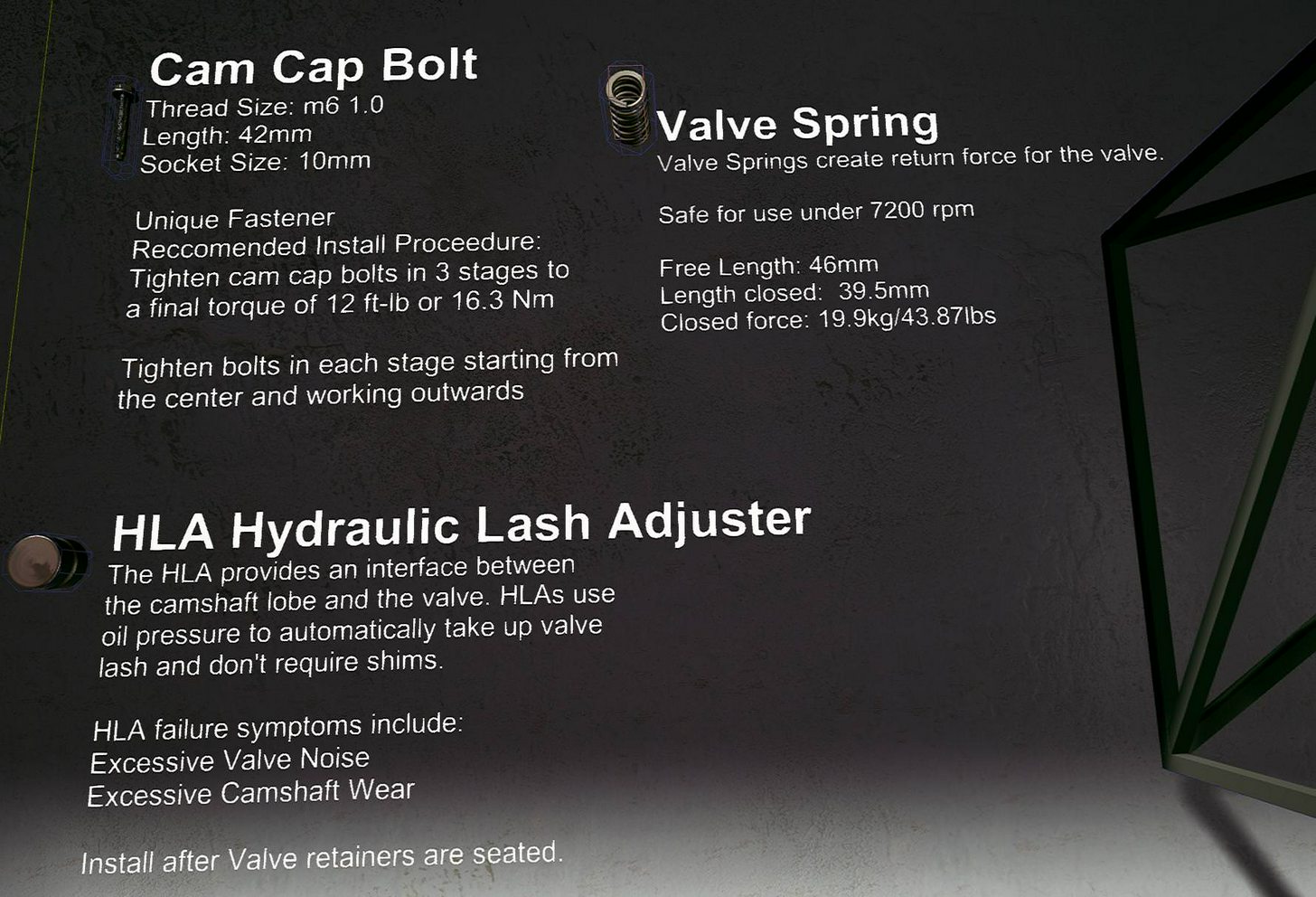
Eventually there will be multiple pages of information for each part- including diagrams, but this is a good start: https://i.imgur.com/gswdbht.jpg
 sly elk
BP_SnapPart class are all static mesh actors. I want to get the static mesh component from them to plug into the set collision node. It seems like I should just be able to drag out from the class cast and get the static mesh component.. why can't I? And how do I accomplish this? https://i.imgur.com/4QUR85s.png
 tired tree
cast to the object, not the class
sly elk
ohh, I see. So just cast to BP_Snap Part and that will work with all the child objects
duh
get all attached actors only returns 1 layer in a hierarchy, right?
ripe vault
@sturdy coral when setting up thumbstick locomotion similar to the video below, if I move using the thumbstick axis events, and press the touch controller trigger at the same time, the trigger seems to conflict with the thumbstick axis events. It will actually change the values when printing the thumbstick axis values, and it will actually slide me across the floor unintentionally. Curious if you've ever experienced anything like this? https://youtu.be/kGCS4rJYzoM
This step-by-step tutorial shows how to implement thumbstick (aka gamepad or joystick) locomotion as an alternative to teleportation in the standard VR templ...
This can be reproduced using the VR template epic provides.
sturdy coral
Nope, haven't run into that one
sly elk
Yep, have to run this loops twice to get actors and then actors attached ot them: https://i.imgur.com/9cWvZJW.png

Now my framerate doesn't take much of a hit when I wave around 200 parts in an assembly
instead of implementing this in the base class im just doing it selectively on root objects that have a lot of parts attach to. This way players can still assemble and disassemble smaller stuff using two hands
ripe vault
@sturdy coral okay, Thank you.
sly elk
vr.oculus.PixelDensity doesn't seem to work in the level blueprint? I added a delay node with a sound so I could see when it was supposed to trigger. I set it to a reallly low value so it would be obvious but it doesn't have an effect: https://i.imgur.com/dzAAoLm.png
 granite jacinth
@sly elk Unless Specific Player defaults to 0, could be that it's returning null
I always do this stuff in Player Controller anyway
But if I do it elsewhere, I get Player Controller
sly elk
makes sense. thanks
glossy agate
Can't you just leave that all in the players control?
glossy agate
First multiplayer test through steam worked! I was in VR and the other person was playing in 2D. Most everything worked like it should.
Was just expecting the worst I guess but everything repped right.
ripe vault
@glossy agate good job!
rocky nimbus
Anyone know why a transparent material might interfere with overlap detection?
I still can't detect overlaps on a packaged project, but can in VR preview in editor
glossy agate
I have the same problem. It’s intermittent though. I may just redo the inventory snapping system.
I don’t think the material has anything to do with it. Seems like overlap events are just not great in VR
rocky nimbus
I just made a new pawn and a new button to overlap and it worked in a packaged build
This is doing my head in haha
The only real difference was one had a dynamic material instance with a transparent and animated opacity and the other had the default texture
Both used nothing but a cylinder and a box trigger to detect the overlap
I added the default mat to my main pawn and the dynamic instance one to the new pawn to see if they switch
If they do, it'd be a strange bug
rocky nimbus
I just figured it out and it's definitely a bug of some kind
When I check for an Overlap with this actor (the box detecting the overlap), it works in the engine but not packaged.
But,
When the Box trigger volume is moved and is a child of the root, it detects the overlaps when packaged and in-editor.
I don't know why this happens, or what happens to the Box on package when it's a child of the SpriteComponent, but that was the default configuration when I turned the TextRender into a blueprint.
Will submit it as a bug
real needle
@glossy agate First, it's really hard to quote you since there's many "ryan" here. But what I wanted to say is that you should let me know when you need help testing
glossy agate
Awesome man! I’ll pm you here soon, fixing the initial issues we saw real quick
rocky nimbus
Anyone else have problems with inputs registering when the HMD is not on your head?
real needle
@rocky nimbus Only with the rift and when trying to simulate mouse clicks on 3dwidgets
rocky nimbus
@real needle Weird, on the rift in-editor and in packaged games I can only see the preview of the game when the HMD detects someone is wearing it, and I can only move the motion controllers + use the inputs when the HMD is being worn, too. I can fake it by holding the rift at the top with my finger in it but I can't use the MCs or the inputs without it
 jade saffron
Has anyone ever recorder hand animations with sequencer in VR? The Level Sequence plays nice and all, but the animation file doesn't have the actual hand movement animation.
wicked oak
@rocky nimbus grats with the release of your new game on steam
mighty carbon

PCMAG
Nvidia asks retailers to only let shoppers buy two graphics cards at once, rather than selling them everything they have (for mining cryptocurrency, of course).
finally, some wisdom
mighty carbon

Dell and AR headset manufacturer Meta announced a new partnership, allowing Dell to be the first third-party seller of the Meta 2 Augmented Reality Development Kit. Dell says that through the partnership, they’ll also be able to provide both the Meta 2 Dev Kit and the tools necessary to create immersive experiences to businesses involved in sectors …
too bad they still don't offer UE4 support 😦
 little nacelle
Hi there, someone can halp me on post process volume, I use a wrap post process material but it doesn't react well in the VIVE :
and it should react like this :
wicked oak
@little nacelle of course it breaks
postprocess need to know about the 2 vr eyes to work on vr
that postprocess uses the coords of the screen to warp it, but turns out vr has special needs
little nacelle
@wicked oak yeah I guess, but how would be the UV screen of the vive? what's the special needs?
tired tree
its split into two sections, one for each eye
tired tree
that too
wicked oak
you are warping the view of the player, wich then is warped by the lens thing
double warp
jesus christ no
in fact, postprocess is camera stuff, eyes aint a camera, nuke all of them
little nacelle
@wicked oak I know, I need to do it for a job though. Testing purposes. So if I just split the UV it should work then?
wicked oak
no
dont do that thing
if you got told, tell the employer/boss that those things will not work in vr
little nacelle
It's not this effect especially, it's a radial blur, but I was testing with this one because I already had it from the Marketplace. We've already discussed about the fact that those effect are not best practices in VR, but the effect has to be tested anyaway. So I have to get something that is visible in vr even though it makes the guy throw up 🤢
mighty carbon

UploadVR
Epic Games today announced that is has acquired cloud computing company Cloudgine for an undisclosed sum to work on Unreal Engine.
glossy agate
That could be really cool! Eventually you can just rent computer power and play any game on the cloud without needing an all new VR rig
wicked oak
@glossy agate its impossible to do
you cant do low latency cloud gaming
becouse there is this thing called "speed of light" lol
the only way it could work (and ive thought really hard about the problem) is if the cloud render "streams" the next few meters of geometry
with the light calculation painted on
so the headset can still perform timewarp and similar things, as the fps from server would be unlocked from the headset fps
the complexity of such a thing is though the roof
 tacit quest
ya i'm not sure why people keep hammering that nail, i thought onlive was the definitive i told you so
glossy agate
Yeah I tried it with AWS before and it didn't work great haha. Was running UE4 editor on the cloud, on one of the better computers but it lagged hard
Low FPS
tacit quest
although the crackdown 3 use of cloud computing is pretty awesome
glossy agate
If they find a way to make it work realy good eventually though you could potentially have cell phones running extremely heavy software, and huge power for stand alone VR HMDs
wicked oak
@tacit quest thats the thing, its literally impossible
speed of light is a thing
unless you have the server like in the same building
and STILL its laggy
look at Steam streaming and the like
and thats inside the same house
and its still laggy
i should try to develop a proof of concept of my streaming mesh approach to vr cloud render
but its so complex it would take me months
i wonder if there are patents for it
glossy agate
Would internet speed be the biggest hinderance for now though?
Seems like if you had super power internet it would be a smoother experience.
wicked oak
no
its speed of light
cloud gaming is doomed by the actual laws of physics
this is how bad it is
the thing i talked about for vr would be mostly useful for static experiences
if you had to grab stuff with the hand it would have an unveliable amount of lag
just think of it
player motion -> player update frame -> message sent to server -> server receives it- > server moves object on the next frame->server renders object on the frame after that -> server sends graphical data back to player -> player pc updates the data->player pc displays the data
100 ms minimum
even if we assume message sent is speed of light
or hell, even in LAN
mighty carbon

A powerful free tool by Evolved Software that is capable of generating customizable trees for real-time work.
glossy agate
I did run a 2D game on this before. latency was actually not bad. Was a simple arch viz project though, and the only interaction was changing the color of stuff. https://www.x.io/
wicked oak
well, for something like that having evne 100 ms ping is not that bad
on vr is horrid
i stream from my PS4 to PC regularly
maybe 50-100 ms ping, becouse LAN (also becouse sony stream being shit)
i do not play action games like that
its nearly unplayable
mighty carbon
Learn the fundamentals of Unreal Engine with our Learn Unreal VR Nanodegree Foundation program. Develop your own virtual reality application using Unreal Engine!
 atomic spire
looks cool
full junco
https://www.vrfocus.com/2018/01/head-into-stonebrick-studios-voxel-based-world-of-cyubevr-this-week/

The title will support both Oculus Rift and HTC Vive.
wicked oak
congrats
full junco
whats WOM?
sturdy coral
@full junco I think word of mouth
wicked oak
i gave john my navmesh snap movement code
10 lines of code or so, to add smooth movement snapped to navmesh
from DWVR
sly elk

If you’ve been eyeing a Windows VR headset, you’ll be interested to see the huge discounts currently available from Amazon US on every Windows VR headset except for the Samsung Odyssey. The Windows “Mixed Reality” VR headsets launched just a few months ago, but you can already pick one up with some steep savings currently …
$220 for a windows headset
wicked oak
still not worth it
full junco
I also got this article, but its chinese and I have no clue what it says: http://www.maidouvr.com/26752.html
based on google translate I would say its positive
granite jacinth
Yeah WOM = Word Of Mouth
glossy agate
@full junco use the translate feature if your on Chrome. It comes out understandable. The comments at the bottom come out funny.
They are comparing to a game called "my world" which I guess is a popular Chinese game?
sly elk
I like the idea of the windows heatset for a demo setup
no need to set up base stations or cameras
full junco
@glossy agate I thought that would be a translation of the chinese word for minecraft? 😄
glossy agate
Yeah that could be haha
sly elk
If I got one I would want the samsung and that one is still super pricey
glossy agate
I heard the MR headsets were better than expected from a few people. I still havn't gotten to try one yet
sly elk
For a lot of games the tracking would be a problem. I do a lot of shooting without looking in robo recall
but for my game no big deal
glossy agate
Even then from what I heard the gyros make up the loss of tracking just enough to work for games like Onward where you have to grab the tablet from behind your head
or center back
@sly elk You Revive RR or do you have oculus too?
sturdy coral
The tracking is a big limitation, I was playing ultrawings with it and any time you look around you lose control of the virtual flight stick and crash
And even looking straight forward while flying it would lose your hands because they were too low
I still like it for dev because it is lightweight (Samsung one isn't supposed to be as light though)
glossy agate
Damn, didn't realize it was that bad right in front of you.
tired tree
the HP headset def has tracking issues when out of eye sight, they are still fairly competant headsets though, and being around 200 now they are in a good place.
sly elk
Do you have one? have you done a/b comparisons with your own content?
im curious now noticeable the resolution jump is
tired tree
yeah
i have one
the resolution suffers from less FOV and the screen format
but its not bad
glossy agate
does it look better but just with smaller FOV?
granite jacinth
Odyssey at $220
tired tree
mmm, considering that the fit is kind of weak..hard to say
when i press it against my face it looks pretty good
you can notice the upgrade in res
but the FOV is so limiting that i don't notice when not looking
but I haven't tested it on my comp, only my wifes, and I don't think it is good enough for the increased FOV setting to trigger
I would assume that the userbase would trend towards worse computers compared to higher end headsets, but their official specs for the cutoff don't seem that bad, so dunno
when I finish with 4.19 and connect it to my comp i'll know for sure i guess, I haven't spent much time with it yet, and i spent all of that time playing with the tracking looking for when it breaks down.
sturdy coral
@@tired tree try higher pixel density with it too, it defaults to 1.2x linear screen res instead of 1.4X like Vive; I'm not sure if that is because the lenses warp things less so it needs a lower optimal multiplier, or if they cheated and made it low because it is hard to drive that res on most existing setups
But yeah, it isn't the biggest jump in the world. for me the biggest visual problem is blur towards the edges of the lenses
tired tree
I am most impressed with the headset tracking
the controllers are fairly bad though unless perfect conditions
when they are decent
i'll check supersampling it too yeah
rocky nimbus
@wicked oak Thank you!
On a side note, does anyone know why launching a packaged game might leave you with just a black screen on the monitor preview?
Most people do not encounter this issue, only a very small minority
I'm guessing a resolution conflict when the game attempts to launch in full-screen?
Here are the commands I run on my very first level (splash screen):
I'm not setting it to full-screen manually, or the resolution of the preview
mighty carbon

Google Docs
sly elk
The average game on steam is garbage though
So many games on there that are just template + $50 spent in an asset store
I don't understand why valve made the bar for entry onto steam soo low
I have been making diagrams that look like shop manual images https://i.imgur.com/yS65B8Y.png
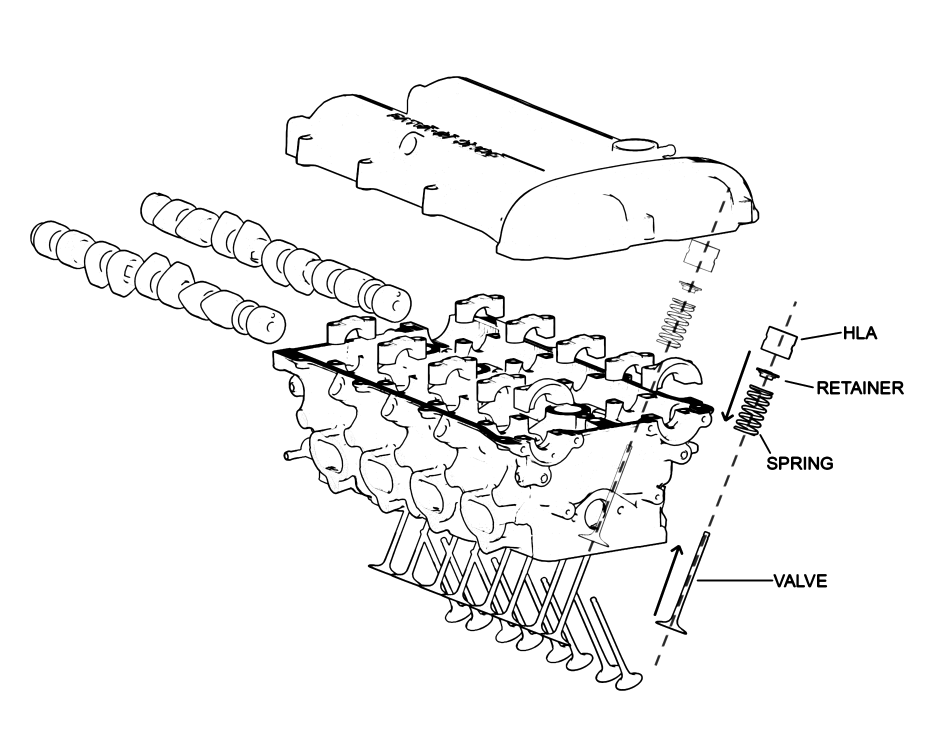
I'm thinking about making them animated. Flip book seems excessively expensive. A few planes and keyframe animations?
wicked oak
@sly elk what about a "3d" version of it?
like, you teleport the player into a white sphere, and have a "cinematic" of the pieces assembling, with a outline filter
sly elk
Yeah maybe. Would need to see if that was too disruptive.
mighty carbon
"Hook up the Rift dynamic res to the new IDynamicResolutionState framework"
does it mean dynamic res scaling will work on Rift out of the box when using 4.19 ?
wicked oak
@mighty carbon it already worked
dynamic res scaling in rift allways worked for a long time
it was part of the oculus plugin
seems they just hooked it to the general dynamic res stuff
wicked oak
its usable
but oculus only
in my game it was kind of useless
im CPU bottlenecked
not gpu
so it wouldnt work well due to all the drawcalls
on more purely pixel compute bound games, it shoulld work better
sly elk
for my own testing, I have just been turning up super sampling until im GPU bound.
tired tree
turning up res in order to let it auto scale it back down?
sounds like a good idea
:p
wicked oak
just leave it as an option
its native in robo recall
but in your game @sly elk , it is useless
you dont have changing lighting scenarios or things like that
and if you are bottlenecked by anything, is by CPU
tired tree
def cpu bottlenecked in the end with his, yea
sly elk
yeah
tired tree
unless you really get merging / instancing working well
sly elk
I have dynamic shadows and im so far I haven't needed to drop down to single sample stationary light shadows
im targeting a 1070 for best experience with being able to scale to run on min spec
single sample shadows will end up being an option people can switch
and and then on the bottom settings turning off dynamic shadows completely
wicked oak
you shouldnt use shadows
shadows need to re-render stuff, wich is drawcalls
so, lol please dont
you are already drawcall bound from the normal view, dont increase your drawcalls even more
sly elk
I'm in deferred, and shadows are a big part of the look. I haven't had framerate issues with a full car worth of parts
tired tree
just turn them off for the very small parts
sly elk
Yeah. Also I have the scene lighting set up so that there is limited area for direct lighting
mighty carbon
mighty carbon
Make stuff and publish in China
wicked oak
for Go
mighty carbon
yep
mighty carbon
doesn't looks like there is a dev kit, besides Go
rocky nimbus
Turns out using HMD mirror modes in 4.16 causes problems for the Vive
Anyone ever get around this in 4.16?
Those commands were meant for the Rift primarily (this was apparently fixed in 4.17 but I can't upgrade my project right now)
tired tree
its the BP node from the oculus function library that causes that, use the console command
and yeah in 4.17 they unified it so all platforms have the same setup for mirroring
mighty carbon

UploadVR
A new patent from Sony published this month suggests the company is working on new PSVR controllers with much-requested analog sticks.
tired tree
how the hell is uploadVR that far behind on news
sturdy coral
@rocky nimbus those mirror modes were broken in really messed up ways for a long time
I can't remember off hand but you may need to query which hmd it is
it is something with "mirror" "mirror mode" or "mirrormode" being broken in one place or the other
and once you use the wrong one with steamvr it will put something in your Saved folder that keeps rerunning it and breaking things
wicked oak
lol thats some slowpoke level shit
rocky nimbus
I managed to get the preview to work on the monitor with a Vive but,
It's not widescreen. It has the thick black bars on each side (video is in portrait mode)
The default stuff.
But right now I'm not using any mirror mode commands for the Vives
mighty carbon
@wicked oak new PSVR controllers ?
wicked oak
its some weird ass sony patent
for some force feedback controllers that shift in thickness
the patent is about the thickness shift part
and its unfeasible, it would be super expensive to build
tired tree
@rocky nimbus yeah the steam console command is like windowmirrormode
hmdmirrormode was the oculus exclusive one
rocky nimbus
@tired tree I keep finding on Google that there's no way to do this for the Vive in 4.16
Are you sure that isn't a command for 4.17-18?
Only solution I found was to rebuild the engine from source, edited
tired tree
of course there was a way
the engine source rebuild was to change the viewport
so that it rendered better
there are still multiple modes available
rocky nimbus
That's a relief, do they output 16:9?
That's my main concern
Single-eye, wide-screen
r.setres 1920x1080f was another suggestion, though I don't know if that would work for the Vive
tired tree
no
tired tree
the viewport fix was specifically to correct for 16:9
and was wrong for that matter....
rocky nimbus
Yeah it's the aspect ratio I need, I did end up fixing the full-screen and display
tired tree
but worked "ok"
rocky nimbus
Is the only real solution for good 16:9 to upgrade to 4.17-8?
I know they made it work by default for the Vive in 4.17 (I believe)
I tried opening up a clone of my project in a 4.18 install but all of my dynamic material instances were deleted in the process, along with the materials themselves. Seems unproductive
sturdy coral
You can put in any uv coords you want in source pretty easily
rocky nimbus
Is there an easy way to migrate the project to a newer version without losing anything?
tired tree
its an all BP project right?
rocky nimbus
Yeah
tired tree
then yes
sturdy coral
I've never seen it delete dynamic mat instances
sturdy coral
What does that even mean?
rocky nimbus
I launched 4.18.3, clicked to open my project, it asked me how I clicked to open a copy and when it opened, all of my dynamic mat instances were gone and the materials they used. For texts I had fade in/out, etc.
tired tree
sounds like he broke references somehow
sturdy coral
You mean non dynamic mat instances?
rocky nimbus
The materials themselves were actually non-existent
tired tree
you aren't using any plugins?
rocky nimbus
Only the necessary VR ones
But the ones I do use are built-in
Was about to have Nathie and CTop make a vid with the game but they couldn't even record (and now it isn't 16:9 so I wouldn't want them to either)
sturdy coral
@rocky nimbus are you directly going from 4.16 to 4.18? You should try doing 4.17 inbetween
sturdy coral
Go to 4.17, test basic stuff in editor, Look for all warnings and check over the logs, test basic packaged build, and only after all that is good try going to 4.18 and do the same
rocky nimbus
The 16:9 should work in 4.17 alone
tired tree
ahhhhhhhhhh, ok, 5 bug reports filed
maybe i can do something else now
4.19 is....rough
sturdy coral
Now you can just wonder if anyone even looks at them, given the new bug reporting system..
tired tree
i got feedback in the same day over e-mail for the first one I reported about 4.19
so i am hopeful
sturdy coral
That's good
tired tree
I have taken to directly linking to related answerhub posts about them when i can find any, so there is more information
mighty carbon
sounds like 4.19 will have 5 previews and then bunch of hot fixes
mighty carbon

Experiences | Oculus
OrbusVR is the first fully-realized MMORPG designed from the ground up for room-scale VR. It features a huge open world with thousands of players, dozens of hours of quests following an intriguing story, interesting lore and characters, five-player group dungeons, world bosses, and more!
interesting
tired tree
you haven't heard of Orbus before?
its been talked about for forever now, long before launch
mighty carbon
nah, haven't
glossy agate
its one of the top played games right now. Seems like it was in development for over 2 years
glossy agate
well still in development for EA, But they were having closed alphas back in 2016 I think. Supposed to be really good
mighty carbon
any idea why UE4 has Python SDK in it ?
wicked oak
lightbaking stuff in blender
that object has 3 different materials and is fully unlit
glossy agate
is it using a baked AO map from blender? Almost looks like you are using LPV or something to get that color bleed
wicked oak
thats the fun part
it is a cycles lightmap
but its a lightmap
look at the texture
there is no pure red or pure green section
the pure red and green are actually separate materials
the lightmap is baked in a way that it blends well with the color of the surface
unlike my last tries at doing bakes, wich baked the surface color too
this bake does not bake the surface color
it only bakes the light
better quality version
the older one had wrong compression settings
the workflow is a fucking pain right now
i use houdini to build the level geometry becouse procedural stuff (+ automatic UVs and all of that)
then to unreal
then to blender
then blender calculates lightmap, then export it to unreal, and then assemble the mat there
 quartz bay
Does anyone know if we can have multiple OBB files for an android APK?
Wow, that orbus game looks...terrible.
tired tree
its not
granite jacinth
Don't worry @mighty carbon
I hadn't heard of Orbus either
Until maybe a few days ago
Or I might have, but dismissed it because it was an MMO
Because I get too addicted to MMOs
mighty carbon
heh
wicked oak
@granite jacinth cries in "just hooked into wow again"
they fixed my biggest feed with the game
its actually fun for me to level now
granite jacinth
Ah, finally some big fish playing the game
Contagion Outbreak is a VR zombie survival game that has been developed exclusively for the HTC Vive and Oculus Touch. This shooting game drops you in the mi...
wicked oak
you linked the wrong video
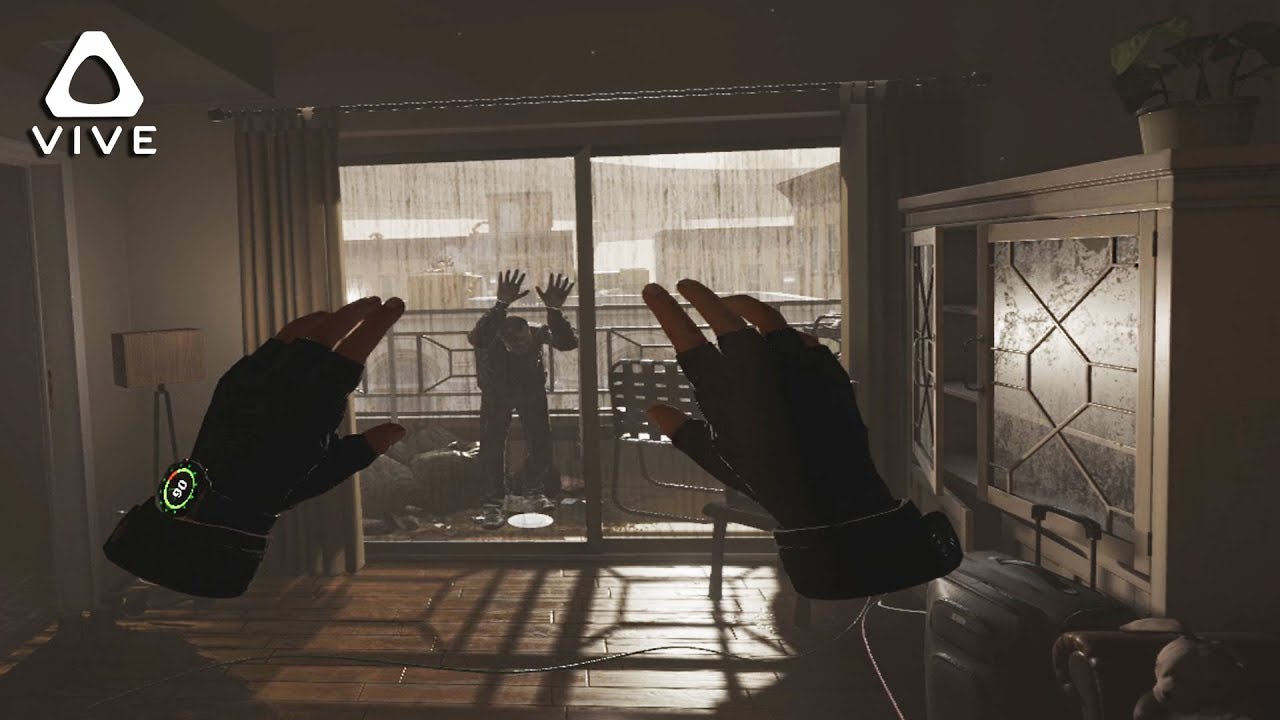
Built exclusively for VR, Contagion VR: Outbreak will immerse you in the middle of a zombie apocalypse! Relive the stories of multiple survivors, team up wit...
this is the big one
glossy agate
Anyone with oculus. Can I use the the Right special (Hamburger) button for anything I want or is it reserved?
glossy agate
ah ok. I'll try the left
I found a forum post on it. You are right, the special button is on the left controller, but they call it "Gamepad Special right" for some reason
Holy shit that MERPTV vid has over 1MM views! COngrats
granite jacinth
@wicked oak Ah, that's just the viral video 😃
But yeah, that's definitely the big one
Over 1 million views, can't beat that
@glossy agate thanks
 trail shale
I'm trying to understand how real player height translates to height in the game (in terms of the player start) How does, sat, a 5 ft person translate to the 64 unit eye height of the VR pawn?
My use case is that I have a free module for kids to escape a fire room but I need to make sure they start with their head in the smoke so they are forced to get low (so I have to input their height and move a smoke collision volume to make sure they are colliding with it at their height)
Just looking for some direction... I've sized it to a general range but I'd like to be more specific
glossy agate
You can probably only do the general height unless you get the standing height at start then spawn smoke particles at that height - some value of z axis
mighty carbon
@granite jacinth any plans for releasing the game on Home ? I'd rather get it there than on Steam
granite jacinth
@mighty carbon Oculus Store?
Hmmm, I don't know, if Oculus gave us some deal maybe
The thing about it is
I have to freaking update everywhere I put this
I don't know why you prefer Oculus Store vs Steam though
Usually it's the other way around
Also, have to deal with PSVR version
But there's some traction coming from that community luckily
tired tree
why the hell would you rather get a multiplayer game on home?
granite jacinth
We have a nice reddit thread going by way of soem random
mighty carbon
oh, it's MP.. I thought it was SP too.
granite jacinth
It's not just MP
It's also SP
but yeah
I don't even want to deal with Oculus MP
I don't even know wtf that entails
mighty carbon
I like Home better than Steam
granite jacinth
I only know (sadly, for better or worse) Steam stuff
mighty carbon

Unreal Engine
Epic Games has today announced the free release of high-quality assets from its Soul demo, making mobile game development with UE4 more accessible to developers.
tired tree
you like home better than steam pretty much just becasue of the review system from what you have said previously
mighty carbon
that's from the dev point of view
Game from Home run smoother for me than from Steam.
Also just aesthetics of Home appeal to me better
if games ran equally fine and smooth, I'd maybe not care as much as I do
tired tree
me thinks you may not be using steamVR correctly
mighty carbon
o.O
is there a special way I should be using it ? I simply run it, pick a game and play it
tired tree
which games
and have you played the same ones on both platforms?
there is def some openVR overhead
but most games correctly use the oculus SDK through openVR now
home does has more stringent vetting
but 90% of your talk about steam has always been that "the review system is too unmoderated so i hate the platform"
mighty carbon
like I said, as a developer
most of my PC games are on Steam
couple are on Origin
tired tree
you didn't answer which games you played on both but they performed better on home
or are you only talking about home approved games that you only played there?
mighty carbon
Not the same games
just feels like Steam VR ones perform worse than Oculus ones
Lone Echo playes a way smoother than Doom VFR
tired tree
....well yeah
thats not exactly going to be the fault of the platform in most cases....
mighty carbon
and it's a more complex game, with higher fidelity visuals
tired tree
and doom was wasn't tested on your hardware
and actually doesn't perform that well in general
tired tree
your opinion is fine, just don't like fluff about "game perf"
mighty carbon
as a matter of fact I'd love to have Crysis 3 on Steam and not on Origin
(since all other Crysis games I have are on Steam)
granite jacinth
Hmm, this IndieDBthing is a mystery

Indie DB
Contagion VR: Outbreak is a first-person shooter built from the ground up exclusively for VR. Fully immerse yourself in a world initially familiar to you, and witness it's transformation into something much darker as it rapidly changes right before your...
But, hope we'll get top 100 soon
Wasn't there a blog from Epic about IndieDB UE4 games?
real needle
@granite jacinth Do you as a dev put up the game there?
granite jacinth
@real needle Yea
It's not going to get added unless someone does
And you should be the one to do it 😃
real needle
Kk, yeah I also discovered The Nest isn't on metacritic either
granite jacinth
hmm well, we definitely aren't, but we're demo
real needle
I'll do it when we do the "real" release
full junco
@granite jacinth cyubeVR is on metacritic already for some reason though
 glossy agate
It auto pulls I think.


 glossy agate
haha. I was just about to pull yours
granite jacinth
@full junco fix up your logo
Looks like it's using the icon from community
man...not sure how I'd be feeling
If that's all the time I had
But good luck!
full junco
@granite jacinth what counter is that?
granite jacinth
@full junco meatcrtiic
full junco
@granite jacinth yeah, I meant which game
 noble crater
anyone know where the motion controller tracking pose corresponds to on the physical vive/rift controllers?
granite jacinth
@full junco yours
full junco
ah 😄
sturdy coral
@real needle turn on editor content when browsing static meshes and you can find meshes for the controllers
Their origin is what it corresponds to, steam vr a bit in front of the trigger, Oculus plugin somewhere around the joystick I think
@mighty carbon @tired tree one part of SteamVR perf issues is you get no hidden/visible area mask for rift via steamvr but you do for rift via ovr. it's an easy fix though
However @mighty carbon it isn't like you can't use the native oculus plugin on steam..
tired tree
thats for ue4 anyway charles
mighty carbon
I wonder when preview 2 is coming
tired tree
preview 2 has a toooooon of AR commits
wicked oak
just benchmarked the "project point to navigation" stuff
turns out 400 project point to navigation takes sub 0.2 ms
this means that my shitty navmesh movement code could work for literally a THOUSAND npcs without even starting to get slow
a bit more than a thousand checks takes beetween 0.5 and 0.8 ms
for the navmesh snap movement code i posted from dwvr
mighty carbon
@tired tree some kind of unification layer between ARKit and ARCore ? Or just updates for those two ?
@wicked oak does it mean that you are smarter than Mieszko? 😛
wicked oak
who is that?
no, it just means i can go wild with my AIs on a custom navmesh snapped movement
mighty carbon
(if native UE4 navigation is that slower than yours, I wonder WTF did they implement it such a poor performing solution)
wicked oak
as i was thinking on using the same "hacky" movement from DWVR (wich slides alongside edges, letting me add dodges and other shit without fear that they will fall off)
its mostly the character movement component
wich does a loot of sweeps and stuff
for my next game i will not use character movement component at all
i will have custom pathfinding
mighty carbon
do these people ever stop bringing VR down http://mashable.com/2018/01/24/virtual-reality-gaming-loser-gdc-2018-survey/#l.0gCR13R5qL ?!

Mashable
This very expensive and still-developing new technology isn't quite ready for the explosive growth that was forecasted.
wicked oak
easy clickbait
tired tree
blanco
go profile sweeps
they aren't slow
that isn't what slows down the character movement component, but you are comparing a single reprojection into a pre calculated boundry to a fully featured dynamic movement system that has substepping and replay. The CMC makes many sweeps a tick often, hell, just the step up check does three on its own.
@mighty carbon he IS using the ue4 navigation setup
wicked oak
@tired tree yeah pretty much
CMC has gotten in the way way too much for my bots in DWVR
for the next ill have custom movement, but my players will have normal character movement
becouse i want that sweet multiplayer stuff
tired tree
not that there isn't a lot that can be thrown out for VR
i'm planning of trashing all of the root motion checks eventually
wicked oak
a big issue im going to have is replication for the bots
im 100% sure if i try to use character movement in the bots, its hardcore complicated replication will be a huge hog
for the bots i think ill use some very simplified replication
like, only sync the pathfinding, and simulate locally
with sync points
tired tree
well you don't need replay with the bots, pretty easy to do server down replication for their movement
there isn't any client input
wicked oak
yup
i can sync pathfinding
like, replicate each of the paths
i would like beetween 10 and 20 combat units concurrently
attacks and bullets will be fully client simulated
i want the game to be llisten server, so having it be low lag is critical
my plan is that bullets will only replicate their creation
and each client just simulates it
its PvE after all
so who cares about client checking
i did taht in DWVR and it scaled to ludicrous amounts of bullets with no issue
if my bots dont even replicate bullets, but only the fact that they are firing (firing logic done in client), even more bullets can happen
just with some serious desync
tired tree
as long as one shot kills can't happen they likely won't notice
wicked oak
but who cares becouse PvE
in my dungeon game, all damage checking was done by the client
a player wouldnt be damaged until he damaged himself
tired tree
ew
wicked oak
this allowed for perfect parrying
with 0 ping
you could directly block attacks and redirect and other fancy shit
hilariously easy to cheat
but, PvE
tired tree
pray you never have leaderboards :p
wicked oak
i probably wont
and ps4 lmao
good luck hackingit
its possible, but its fairly hard
compared to pc where its trivial
tired tree
you still have client to client sync issues then though
wicked oak
if bullets arent fully synced its no issue
tired tree
ie: client self determines that he blocked / damaged a foe
wicked oak
when there are 50 bullets flying around, if they are slightly desynced, no one cares
tired tree
other clients have to klnow this too
wicked oak
Warframe doesnt sync that much
tired tree
or its going to be terrible
wicked oak
players never cared one bit
glossy agate
You try using eqs for the bot movement? I have been messing with an ai pack that uses it. Seems pretty good. Rep was easy and they just attack players with the correct tags. But the features experimental in 4.17 still
wicked oak
@glossy agate no
rep of bots is trivial if you use character movement
they "just work"
the issue is that i want:
1: very direct control with NOTHING getting in the way
2: lots of them
character movement has got in the way haaaard, in DWVR
i wanted to add strafes/dodges/etc and had a lot of trouble
ive also benchmarked that 10-15 bots go past the cpu budget in ps4
and i want more bots + multiplayer
glossy agate
more than 15 bots at 1 time on screen? Yeah thats a lot
wicked oak
not in screen, but "in the general area"
the map will have hundreds in total
but active, actually in combat
around 10-20
keep in mind not all of my enemies would be just humanoid
those are around 6-10, and thats on the higher end. They shoot too much XD
glossy agate
Oh. I did one before where the bots were just counted. Like if the number fell below 10 more would spawn. Less on screen, but it gives the impression that there are a ton
wicked oak
thats how DWVR works
every wave has a max number of enemies (10 max), and when one dies i spawn another
but in the next game, i will have big maps
that need enemies across them
glossy agate
Yeah, and with MP level streaming wont work to nest them in there because it will rep to everyone with one person in that zone
wicked oak
i wont do level streaming
the level is assembled at startup (dynamic navmesh gets generated)
dynamic navmesh takes time, but thats why i will have the "load screen"
ill just calculate how much it takes, and loadscreen it
glossy agate
Why not trace for ai shots then put a little particle effect on it to save space?
unless you have a bullet dodge mechanic
wicked oak
none of my AI will use instahit weapons
ive tested it, feels bad
bullet weapons are much more fun
but i still need to create all the enemies and that stuff
the issue is that you cant really dodge instant hit weapons
and dodging stuff is a lot of fun
and lets you take cover well
 wanton spindle
Does anyone know of a decent tutorial for making physic based doors for VR?
specifically one to push open and closed etc
 pearl tangle
@wanton spindle just use physics constraint is your easiest way. Or you can set it up with an animation and shift it along it's timeline based on the hand location
full junco
whats the correct way to add a vignette (limit the FOV) during smooth locomotion?
adding a vignette directly in PP means the left/right eye sees different stuff, so thats bad
wanton spindle
Does anyone here use the VR Essentials kit that can give me a hand with some stuff?
granite jacinth
Sooo...
Not sure what I may have done wrong...or if my brain isn't working right...
But when I disabled spectator mode....I saw no increase in performance...
If I am no longer rendering to that, shouldn't I be seeing some measurable amount?
(I have an FPS counter in game and can test different setting and their effects)
sturdy coral
@granite jacinth are you hitting 90 both ways?
granite jacinth
@sturdy coral nope. 45
sturdy coral
@granite jacinth hmm, does the GPU in the steamvr frame timing graph show any difference when you switch it on and off?
oh and the spectator scene capture is turned off too? (haven't set up spectator mode )
granite jacinth
I'll check on that tomorrow. In bed now.
But basically it was disabled
The screen "froze" on the last frame
sturdy coral
ah ok yeah, that's strange
granite jacinth
Then when Reenabled, started up again
When it is disabled from the start, it is white
sturdy coral
if it is locked at 45 you may just not see the difference, you can maybe get better timings turning off interleaved reproject if it is on and turning on async reproject, or possibly turning all reproject off
granite jacinth
I don't know, just feels strange that I wouldn't get any gains for having it disabled.
sturdy coral
I haven't measured perf stuff in a while
granite jacinth
Aye. I'll dig more into it
Just trying to see how much I can optimized for some people with min spec
There's only so much we can do really, but I would like to try everything I can for them to have a. Enjoyable experience
sturdy coral
ah, is it the mirror view you are talking about, or third person spectator?
granite jacinth
Mirror
I guess I can also try to give them resolution options.
But I figure if they are doing mirror mode, they will want to record it or show it off
sturdy coral
yeah, I've heard some people say on reddit they get better perf with the mirror shrunk or window minimized but I've never noticed it
I think some unity games were actually rendering a separate view maybe
sturdy coral
and I guess it may have an effect on a high enough res monitor
granite jacinth
Yeah, I had fullscreen enabled always
Some folks had 4k monitors...
And ultrawides
sturdy coral
yeah
granite jacinth
With min spec lol