#virtual-reality
1 messages · Page 158 of 1
 wicked oak
but i can use houdini magic to encode the morph target in the vertex color
and just use the vertex color as an offset
 zinc violet
well, you can, if you use the max thing 😄
zinc violet
but you can't use the morphs stored in fbx
 granite jacinth
If that's what you are talking about
zinc violet
you need to bake the data
granite jacinth
By "static meshes"
zinc violet
you can use alembic if you need something without skeletons
wicked oak
far too overkill
zinc violet
too bad they don't have special compression for vertex caches on UE4
CE has that
they compress it big time
granite jacinth
@wicked oak you loving Houdini now?
wicked oak
hell yes
granite jacinth
After your trial, you going to buy it?
wicked oak
i model fast stuff in Blender and write cool shit in houdini
granite jacinth
or sub, whatever it is
granite jacinth
ah nice
wicked oak
a while ago
granite jacinth
I don't know where I am going to go when I get back into Art
Blender is looking nice
now
wicked oak
Blender is definitely top tier now
granite jacinth
But I might go back to MODO
granite jacinth
I havent' played with that in awhile
wicked oak
for games, its 99% of the way of maya/max features
and better in a good amount of parts, like pure polymodelling
granite jacinth
Almost
I am obviously more comfy in Maya
four years of education in it does that
wicked oak
if you know your 10 hotkeys or so in blender, you can be stupid fast
like, pretty much the fastest polymodeller around. But ive heard good things about modo
definitely a lot faster than maya/max
even if you do use hotkeys in maya/max
granite jacinth
I'm trying to think what I want to do with my Motion Capture stuff
Trying to see if I can do a quick VR game with it
Sort of like Starseed or whatever it's called
wicked oak
and then the AI essentially does a random selection
making the ai itself parry is the hard thing lol
granite jacinth
So would like to get some nice voice acting
wicked oak
i guess you could look where the attack is coming, and then you trigger a parry anim
wicked oak
PC market has slowed down massively
wicked oak
people still want RPGs
granite jacinth
I'd like to have a 3-month cycle
wicked oak
look at Orbus VR getting quite big, while its extremelly bare bones
wicked oak
an RPG would be a good use of that
you use mocap for the NPCs, and face animations/etc for when they give you a quest
granite jacinth
Aye, true
wicked oak
then you go slap 10 goblins or whatever
wicked oak
there is a game i was thinking about the other day. I was thinking on the timeloops in stories
and was thinking on how a timeloop game would work
granite jacinth
I don't know why, but I have been having a blast playing rec room Quest
wicked oak
a timeloop RPG
granite jacinth
and a few other Dungeon Crawler Cooop VR games
wicked oak
like in mayoras mask, you run out of time you die and you reset from day 0
wicked oak
NPCs all have their own schedule you can "crack" to get them to do stuff
granite jacinth
RE:Zero it
wicked oak
pretty much that
sadly the game would be 100% fucking destroyed if you look at any guide
wicked oak
it would be a fucking disaster if i did that
now its 2 high level programmers and still 0 art
granite jacinth
lol
wicked oak
the way i was thinking about the combat in a timeloop rpg
is that enemies have very clearly set patterns
and you combat by countering them
you would have a journal you can write notes in
and you keep it through timeloops
granite jacinth
I don't know. Once this one contract is finished, I'll still have the other long-term one, so I think I'm goign to sub-contract a few things out to get stuff going.
wicked oak
every time in the game you can pause and write something in there
granite jacinth
There's no reason why I shouldn't have had released a game this year.
wicked oak
by finishing a quest or similar, the NPC would give you a piece of information or trinket or whatever that would help you befriend them faster in other timeloops
granite jacinth
Timeloop system would be crazy complicated
wicked oak
something like that would have you essentially befriending half of the fucking town to get stuff done
yes
granite jacinth
You'd have to really plan it out ahead of time
It's not something that can just be TDD'd
granite jacinth
right, but you need something
wicked oak
something like that also needs branching storylines
and be character driven
you cant "level up" at all
so no grinding or anything, essentially just story/mystery/unfolding stuff
and again, everything would be ruined if you get spoiled or watch a guide
becouse it would be far too easy to know that Wolf does "howl -> strong attack -> dodge -> low attack"
technically, is not that hard
but you need to script the personality and states of each NPC through the few days of the story
and of course, all the dependencies
on afternoon of day 2, John Smith dies in the road to his house, becouse he gets mugged by Robert Robber and shanked
so what do you do if you kill Robert Robber, or convince him to do something else that day
now John Smith doesnt die on day 2
keeping this stuff on mind would be a mayor network of nightmare
granite jacinth
heh, you'd have to break it up into different systems
wicked oak
of course, you can keep the storylines disconected
but then its nowhere near as cool
the fun of something like that is to be at day 3, and hear the rumor "hey, did you hear John Smith was shanked yesterday"
and then on the next timeloop you see him being shanked
andthen you try to find a way to avoid it
i dont think a game like this would need graphics, being so story driven. Pixel art RPG maker style would do good
in full 3d it could be something spectacular, but too complex
and then you read a guide and literally metagame the game in around 15 minutes
 mighty carbon
Has anyone played Dishonored 1 and 2 and Deus Ex HR / MD ?
I'd love to see publishers letting indies use those kind of IPs (with assets) for VR games/experiences
(for profit share of course)
granite jacinth
?
No
Wouldn't happen anyway. People like their IPs
And all the money they get from them
Why "profit share" with some lowbie Indie, when they can get 100%
mighty carbon
that makes no sense.. They already have assets that will rot on their HDDs
granite jacinth
¯_(ツ)_/¯
If you don't think that makes sense, there's no point in discussing this
mighty carbon
they won't get anything.. those games are one-shot games.. They don't recycle assets.
 glossy agate
I think its more the characters and the name they don't want an indie to ruin.
You have all the infinity blade assets though if you want to do infinity blade VR haha
 sturdy coral
yep, same reason Disney isn't going to let you make a new mickey mouse story in VR with a profit share
bethesda is coming close to it with their future paid mod stuff though
mighty carbon
well, obviously there is a proof of concept
you guys make it sound they would give access to anyone and allow do anything without any sort of supervision
glossy agate
No not like that. Just harder. The Insidious VR game was a licensed project that an indie company did.
So its possible but bigger IPs probably cost a bunch and have a lot of hoops.
If it wasn't too hard I would be trying to get that sweet sweet Harry Potter license. Would kill it in VR
 slow swift
I'm using a VRStereoWidget from @tired tree 's VRExpansion (4.17) to draw a menu widget (on a Stereo Layer). When I press the menu button, I spawn an actor that has the VRStereoWidget on it. When I exit the menu, I destroy the menu actor. The actor goes away, but the stereo layer stays and follows my pawn around for the rest of the level. Does anyone know how I should be cleaning up the stereo layer?
 real needle
@slow swift Try to set the widget components widget to null?
Stereo layers are good for some things but I ended up with too many issues between rift/vive to bother using them
slow swift
@real needle You mean like this?
That doesn't make it go away
It seems like the stereo layer is getting disassociated from the widget anyway, since the widget gets destroyed when the actor is destroyed
real needle
@slow swift yeah, that's what I meant
I think you're on a version where there's a bool to change it to a regular widget (within the VRStereoWidget). I would just check that and continue, there was always something with stereo layers that was bothersome...
I never had that issue though
slow swift
I don't want to use regular widgets, the sterei widgets look SO much better
sturdy coral
Got my PSVR in today, it is nice
I like the screen/optics better than any other headset so far I think
Don't have move controllers yet
granite jacinth
😭
I actually still have my PSVR packed up
I meant to buy some games
got busy, oh wells
wicked oak
about the IP stuff
depends on the publisher
there are publishers that if you show them a very neat "fangame", they might let you publish it for a revshare
Valve and Sega are examples of that
Square enix also has some kind of indie kickstarter-y thing, so they might be open to that kind of stuff
for something like that, the best thing would be to develop your fangame
create a pitch and a verticalslice/prototype
and contact the publisher
if they like it, sweet, if they dont, you change name of the project and call it "spiritual succesor" or "based on X"
publishers that will not ever accept would be EA and Nintendo
Nintendo will never, ever, recognize a fangame
look at "another metroid 2 remake". It was a GOLD opportunity for nintendo to deal with the dev and release it as an actual game
but niope, better DMCA him
 echo thorn
i think its a virtual point index problem ! i have to click on the text box every time i want to type something . anyone knows how this will work?
Hello everyone , i am having a problem with the widget interaction in vr
mighty carbon
Worth trying with Deus Ex and Darksiders franchises
I wouldn't bother with a fan-game without ability to re-use existing assets
mighty carbon
Is real-time AO available with Forward Rendering ?
sturdy coral
@mighty carbon I don't think so and if so it still needs TAA I'm pretty sure
it needs normals to work off of, I think @full junco talked with someone about making it work on depth alone
gran turismo sport for PSVR looks nice but is super limited, only 1v1 computer races in VR and no multiplayer at all
I understand the limitations of the system and why they probably had to do it, but it is pretty crazy to bundle it with PSVR when its support is so limited
wicked oak
thats becouse the deal was done before the game was done
and then they just rolled with it
sturdy coral
also sucks my g27 doesn't work with ps4 :/
on PC you can probably still use wheels from 20 years ago
mighty carbon
did you get PS4 Pro ?
sturdy coral
nope, still have just the base system
 native cedar
friends
can you find any reason as per why unreal is not using 100% of the gpu in-engine? Empty level at 45fps with gpu load of around 20%
same level, in build, gpu load 40% and 90fps. Increasing screen percentage increases gpu load on build with same fps, while in engine gpu load stays the same, fps just go down
native cedar
oculus
granite jacinth
yeah
native cedar
honestly I think it's due to some of this laptop bullshit
native cedar
yeah, frame skipping
granite jacinth
so it doesn't mean you're actually using 100 gpu
could be cpu side of things
causing the frame drop
native cedar
thing is, performance in build is infinitely higher, talking 10x. Empty level on empty project
native cedar
cpu time is arund 2ms or lower both on game and draw
granite jacinth
show
wicked oak
that "alll opaque" is busted somehow
how in the hell is it going to be 11 ms
i have less and i have full complex levels
native cedar
screen percentage 70,, gpu load super low, still high gpu time
I think it's an oculus problem
or my laptop
I even had to get a freaking powered usb 3.0 hub just to get the sensors working (it was connecting and disconnecting continously)
also I am suffering hdmi signal noise (red lines and dots)
native cedar
best part
bought a mini display port adapter since many had the same issue and solved connecting to an adapted displayport instead of the hdmi
connecting it crashes the entire os
and
 spiral zephyr
crashes os..hahaha 😭 Weird proprietary driver?
native cedar
after an interesting call with customer support they told me they can call the assistance but they will just say everything is working and send it back
it's nvidia's latest drivers
I am running out of options and wasting so much time, sorry for ranting in here
but the strange part is: a build runs perfectly
with some shadowed cubes and atmospheric fog (super expensive in VR) and screen percentage 200 still runs at 90fps (barely)
I just really need to work and don't wanna fly back home for the holidays so I am trying to make this thing go but I won't work if I have to iterate slowly like building everytime
spiral zephyr
engine scalability settings on auto/low?
just came here, sorry if you already covered this further up
oh is in game preview
spiral zephyr
thats mostly for in-editor windows iirc
native cedar
looke here, this is in-build performance
spiral zephyr
light is built etc? stuff is cooked?(cooked might just be for builds idunno)
granite jacinth
@native cedar yo
I think this is an editor bug then
Because I have been having issues
And might just be Rift focused
Or Windows Update
I've been trying to 100% repro this bug
without success
Going to refresh my PC this weekend just in case though
Also bought a few new usb 3.0 PCIe
native cedar
maybe I can setup my workflow with launching -game with uncooked content
spiral zephyr
how is it when simulating?
native cedar
usb hub is a good move
interesting point arthur
I will compare with simulation, no fps smoothing
spiral zephyr
unless you are designing motion controller/vrpawn specific interactions, you can test a lot and iterate with just simulation. I use some custom events/bpstuff that does the things that normally is only triggered in game, that can be turned on/off with a switch. A kind of debug thing.
native cedar
gpu does not seem to misbehave on simulate, screenpercentage 300, no fps cap
yeah problem is I am working exactly with VR interaction gameplay programming, it's literally 100% of the work and it's a ton of work, haha
spiral zephyr
omg oh well
native cedar
am I not the luckiest man on earth
I will make it anyway, I aways do! first it did not even work, now I only have a performance problem in-editor, with calm and perseverance everything is possible
I thank you guys for your support
granite jacinth
@native cedar are you using any plugins?
native cedar
only the default ones
UE 4.18
but this happens all the same in a source installation
well... In the end I think I will do with a .bat that runs the map and be at peace for these days
it works fine
spiral zephyr
good luck ❤
The fact that its an editor issue and not hardware/laptop issue is some kind of positive, right? hehe
(probably) editor issue
native cedar
you haven't seen the REAL issue tho

this is how I will be developing these days - up to 10 hours per day ❤
forgive my shitty pronunciation, I'm kinda smashed and usually I have to warm up my english
spiral zephyr
since i run a vive my role should be to tell you oculus suckz and get a vive
but we are adults so im mostly just sorry i cant help!
your english is pretty stellar
native cedar
bro I used to work with vive
this client has its own custom implementation of unreal and in this project the logic does not work well with vive, the sent me a cv10 and since it's free I am glad to use it
*I was glad to use it
spiral zephyr
logic doent work? they require knuckle controllers or something? oh well, free is free
thought it was all well unified between vr platforms by now
native cedar
I mean, could be easy to make it work on vive too, it's just some basic camera position stuff
like in vive my head is at height 0 when with oculus head is at setup height
spiral zephyr
vive is less portable though, have to mount lighthouses etc
native cedar
however I do not possess a vive
native cedar
oculus is well designed in terms of portability I must say
it'd be cool if it also worked
spiral zephyr
lol
 sage gulch
it would be cool if a friggen windows update didn't alter draw performance and then impact physics calculations as a result...
do you have to specifically map ESC and ` in a shipping game? nyuk nyuk nyuk
glossy agate
Yes you do
A ton of games never actually add it in though so you have to close through the steam popup menu
 tired tree
@slow swift beleive that in the newer versions I destroy the stereo layers earlier in the stack because that can take some time while waiting on the garbage collector
are you on an older version?
also was it never being destroyed? or just waiting to be garbage collected?
slow swift
@native cedar I didn't follow all the details of your framerate discussion, but do you have the editor minimized when you're taking your numbers? If my editor viewports aren't minimized, my headset fps gets throttled
@tired tree I'm on 4.17, but I'm not sure when I downloaded the plug-in. It might have been early in 4.17
How do I check if it's never destroyed vs waiting for garbage collection? As far as I can tell they NEVER go away.
tired tree
I beleive I changed it in 4.18 though
here i'll pm you
I merged the fix back to the 4.17 branch, but will give you a direct link there
sage gulch
your headset gets throttled? what headset do you have ecnassianer
I'm pretty sure that windows update screwed up my draw performance, it impacts my image and physics, and I can't roll back the gpu driver from the windows control panel (only update it further apparently, but to no change)
sturdy coral
@native cedar all you have to do for that head height thing is set the hmd tracking origin node on both to floor. the default is just different between the two for whatever reason
@sage gulch @slow swift "A significant drop in frame rate occurs when UE4 is not in focus in VR preview mode. To avoid this issue, uncheck the Use Less CPU when in Background in Edit > Editor Preferences > General (left sidebar) > Miscellaneous (left sidebar) > Performance."
sage gulch
thanks, I hope that helps this stupid situation
slow swift
@sturdy coral @sage gulch That's not quite what I meant. If the editor isnt minimized, (and the VR preview has focus) I get much lower framerates than if the editor is minimized. I'm pretty sure this is by design, since until recently (and still by default) the editor minimizes itself when you start VR Previews.
sturdy coral
Oh yeah, that's just from draw calls of the edited viewport I think
Editor
Might be better if you turn off real-time view, not sure
Could be slate overhead of the editor ui too
slow swift
@sage gulch Your problem might not be the drivers. When I got Creator's Update it killed perf in all my games. Have your tried disabling Game DVR? That fixed it for me. https://www.drivethelife.com/windows-10/fix-low-fps-after-windows-10-creators-update.html
sturdy coral
The thing that fixed perfbfor most people with recent complaints
Was turning off the Nvidia overlay
slow swift
Eh, I'm fine with it. I get 45 fps with it up, which is enough for testing. I just need to remember to minimize it when I'm looking at perf.
It drove me nuts when unreal would minimize before
I do too much in blueprints to deal with that shit. :D
I just wish the VR preview would release mouse focus when Unreal hits a blueprint break point!
sturdy coral
my problem is now in windows MR it pulls up the virtual keyboard anytime UE4 wants keyboard focus
and keyboard focus is also used for gamepad focus for slate stuff
granite jacinth
Anyone ever have any issues with Touch Controller not wanting to Play Haptics on both controllers? I thought both were working, but maybe I just hadn't hooked it up right.
I noticed @full junco submitted a report to Oculus
Something about OpenVR bug
 full junco
@granite jacinth do you use steamvr or the oculus sdk?
I didn't submit any bug report to oculus, I only entered an issue on the openvr github repo
 stable shadow
Hello Guys, I've weird problem, after two or three times of playing in editor with VR (VIVE) I've to restart my SteamVR app, first time the SteamVR can't find the Headset, Controllers and also base stations so I've to restart the SteamVR application again and run the editor one more time, I've this problem with 4.17.2 and 4.18.2
sage gulch
thanks for the info, yeah I think it was the creators update, to be honest I thought it was installed already but then it did say something about it in edge upon restart just the other day.. what do you guys use to capture footage if not the game dvr? and where do you disable that 'nvidia overlay', I don't see it in the nvidia pref panel.. thank you
vahid I can't tell you if it is related but it seems that sometimes actors in my maps get duplicated and I'm not sure why, because it doesn't happen consistently, but I have to wonder if it is related to a persistant map setting
stable shadow
I don't have any warning in my log files about the actors or even the HMD, but it's a very weird problem, I should try to test some other clean project
granite jacinth
(╯°□°)╯︵ ┻━┻
stable shadow
😀
sturdy coral
@sage gulch it is in GeForce experience in settings somewhere
sage gulch
Ah ok. Haven't been on Windows much for quite a while now, thanks.
hmm, presumably that window should have something in it.. haha
I knew it was the system and not something I did.. hadn't tested on a different box yet, gotta get another DVI cable around here
yeah having a dvr running in geforce and system level at the same time can't help things.. I can bring up the overlay but it won't populate anything into the actual app window, I wonder if that is because I updated the gpu drivers from the device manager after the creators update or point release or whatever it was started this whole issue up
I'm gonna nuke this whole fucking box
native cedar
@slow swift my editor is indeed minimized. There is something off here, I don't know what it is yet, but I will find it. For now I am testing with a .bat since I reallly need to get to work, thanks for the inquiry!
@sturdy coral good to know! I will definitely use it in the future
glossy agate
May be a VR issue maybe not, not sure. Anyway on character death The full body IK is disabled and it just does a sim physics for the body mesh. For some reason the mesh just starts flashing visibility while simulating. Anyone else have this happen?
sturdy coral
@glossy agate you can turn on some stuff to visualize culled objects and see if it is something with that, does your mesh ragdoll have inherit parent bounds on?
glossy agate
I’ll try that. It’s the base actor so no inheritance
But culling bounds seem like it wouldn’t be the issue cause it’s right at my feet when it drops
sturdy coral
yeah I can't think of much that would make it flicker
@glossy agate you might end up needing to set some breakpoints based on ShouldRender() on the mesh component
possibly GetLastRenderTime() on the actor, though that will be a frame behind before it tells you anything important
@glossy agate set Mesh->MeshComponentUpdateFlag = EMeshComponentUpdateFlag::AlwaysTickPoseAndRefreshBones; too and see if it makes any difference
I've had a motion controller stay invisible when that was set to EMeshComponentUpdateFlag::OnlyTickPoseWhenRendered;
glossy agate
Oh awesome thanks! I’ll give that a shot
Probably does need a refresh after detaching from the head and controllers
 rocky nimbus
 zinc rose
anyone know how to test VR properly with a dedicated server in 4.18? doesnt seem to work out of the box
sage gulch
not sure what you mean, doesn't that happen on the client? there's a build setting for VR at any rate..
zinc rose
@sage gulch when i launch the vr preview with dedicated server checked, I get the map loaded but no hmd or controller control.
if I uncheck dedicated server and run, everything works as expected
sage gulch
I guess the server doesn't support VR is my guess, I don't know
dedicated server means no client
the hmd runs on a client right
zinc rose
i seem to get the same behavior is i launch 2 players and no dedicated server.. i used to test this way all the time in 4.17.. but 4.18 doesnt seem to work with that method either
 fleet veldt
Can someone pin this to the channel (and possibly remove the older oculus touch images) https://forums.unrealengine.com/filedata/fetch?id=1120770&d=1483140819

 alpine ore
Hi all, is there a Steam/Vive equivalent to the Oculus 'Has input focus' node or can anyone point me in the direction as to which node will check if the HMD has been removed by the player on a vive
 frosty hull
can someone help me out with widget interaction component or motion controller input?
i have added a widget interaction component to epics motion controller bp and can hover over buttons of my widget actor, but click / press and release do not work
fleet veldt
HI @frosty hull so your'e hearing the sound play? Also is this in multiplayer by chance?
@frosty hull Also create a large button and put it on your bpwidget if you dont' have one already and see if the visual state changes when you "hover" the debug pointer line over it
if you're doing multiplayer make sure you have Virtual User Index and Pointer Index set differently for each client https://answers.unrealengine.com/storage/temp/129316-nobug.png
 alpine ore
Does anyone know how to pause the game if the Vive headset is removed?
Or the Vive menu button pressed
 primal sky
@fleet veldt what's the purpose of the delay node? To stop some weird attachment / spawn issues?
fleet veldt
@primal sky I copied that from answerhub some other guy did it but he does have the comment there heh. Apparently "IsLocallyControlled" won't return the value he's looking for until after the game has started up (perhaps the pawns have been created but haven't had time to be possesed?)
primal sky
Yep
I suspected as much. We ran into a similar issue
This was also our solution. Lol
 thick plaza
i followed all the steps to add motion controller support on the gear vr documentation for ue4 but the motion controller isnt working and only the camera is :/
glossy agate
@zinc rose It wont work in VR. Suprised it worked before for you. You have to package and test for VR. Its kinda annoying, but any MP VR testing in editor wont track. You also need a source engine build for dedicated servers.
zinc rose
@glossy agate i never tried dedicated testing in PIE for VR.. I tested daily forever using 2 players, one as server one as not in 4.17 though. its a pain still. both screens move with hmd and both hands move but only the one in focus takes the actual inputs. so testing replication was possible. 4.18 isn't having it though. might just scrap the 4.18 then. having to rebuild the server on every edit to test is insanity. and yea Im using a source build.
glossy agate
Oh dang. Im on 4.17 but it never worked. Maybe Ill try again here
zinc rose
100% works on 4.17 if you do two players one as server. never tried dedicated. you can move the players so they can see each other. than test your replicated functions by watching the other screen and seeing what happens. kinda crazy how theres no reliable way to test vr though and now that I can't even do THAT ^ method in 4.18... makes me want to give up on VR stuff altogether, at least anything MP.
wicked oak
VR mp is insanity
im doing it for my next game anyway becouse i know how to make it work
its still insanity to test
the only way to do it is to emulate all your vr actions on keybinds, and not use vr at all
then for actual vr you test it with the server on a different pc
i use my laptop for this (main pc has vr, laptop runs server)
over wifi, to make it more interesting
thick plaza
does the gear vr controller setup guide on the ue4 website work for only 4.17 or can it also work for 4.14 because it hasn't worked for me
wicked oak
most of the time i actually run the laptop in listen server. That way i just need a normal package to test and not a full rebuild, wich is faster
zinc rose
@wicked oak unbelievable.... iguess VR isn't considered a priorirty at epic which sucks because its still very untapped. I know its always been crippled... but i could at least test in the editor the way i mentioned above. I donno what they would have changed between 17 and 18 to break that. but its seriosuly an AWFUL let down.
wicked oak
lmao, VR is quite a huge priority
you only need to see all the VR related stuff each version
zinc rose
i have two VR capable PC's and a vive and an oculus... its just insane to have to re package the game every time you want to test
well then correction VR and MP isn't priority
wicked oak
and how do you think their errors can be fixed?
zinc rose
cant possibly say it is at all if theres no way to actually test it while editing
wicked oak
becouse unity cant do VR MP easily in similar ways to UE4
you dont neet to build it, btw
did you know you can launch the game by right clicking the project file?
the launch opens in non-vr mode by default unless you use the "bstartinvr" option
just open it 2 times, listen server in one, and VR client in the other
zinc rose
yes i know. i have a script that launches it in vr for me
i meant if i want to test in dedicated server mode.
that method actually only works for me on oculus
on vive it closes the first one with a hard shut down before launching the second one
wicked oak
what the fuck
zinc rose
i only recently moved the oculus to my main work station and discovered i can launch multiple standalones. def cant with vive so the PIE testing was my only listen server option in 417
wicked oak
vive gets in the way of standalone, now thats weird as fuck
that is definitely a bug
you should report it
zinc rose
no idea why... i thought that was just "VR" until i tried the oculus on this machine.. (very recently) . i dont like oculus much. relies too heavily on USB and my pc doesnt like that. but for testing. i guess its better
wicked oak
4.18 has been... iffy
im using it for my newest project, but that one is not MP (yet)
MP or not MP depends of Sony sponsoring me a bit or not
cant dev MP if i dont have multiple PSVR devkits
zinc rose
ive requested from them. a few times.. they keep saying they don't hand'em out ever.
zinc rose
Canada
wicked oak
then you should be able to get one, easily
im the only guy here that actually bought his devkit
becouse euro
zinc rose
im a registered partner with full corp and all.. i have a dedicated account rep. and he says go fk yourself when i ask so
wicked oak
do you have a cool project/etc?
zinc rose
the last time i asked he said "but the prices are cheaper than they used to be"
its was cool enough at the time was a year ago and playable almost ready to launch.. now its meh since its older and i've moved on. i havent requested anything since a year ago from them. just sorta let that sit til i make money where i can just buy it
wicked oak
a year ago the Pro devkits were recently launched
and they really didnt have devkits to give
and they also couldnt give PSVR headsets for the same reason
zinc rose
they had dev kits for purchase then
there were around 6k if i remember correctly
so they def had them.. just not to "give"
wicked oak
the price you have is wrong by a ridiculous amount
wicked oak
also price is NDA so cant give specific
zinc rose
its like down to a third of that now. but then it was up around there
zinc rose
thats CAD i assume but thats whaat the costs were.. thats why i wasnt geting close to buying it
wicked oak
becouse if you did have a near finised project, you could have published in no time
and PSVR is cash
zinc rose
yeah maybe.. i launched it on steam and that was alright. but i had nothing to test it on for PSVR so I couldn't launch it there and the kit was too much to shell out to hope it would sell more than the cost so meh.
zinc rose

Full-Immersion VR Zombie Game for the HTC Vive and Oculus Touch!DonkeyKwon Games is a one-man indie studio that's creating new features, functionality and the gameplay that players want and need in VR. Here; as my first official game DKG has take...
Price
$13.99
am off to bed. ttyl man
primal sky
looks pretty good but im afraid you are overpriced as people suggested. at most VR games in early access should be pushing the 7.99-8.99 envelope unless you are a fully fully fleshed out title. I really spend a lot of energy analyzing pricing and marketing and come from a business background so feel free to take my opinion with a grain of salt but.. it does come from experience.
technically speaking it looks good.. functional. checks all the boxes
glossy agate
@zinc rose What did you use for the fully body IK solution?
 trail shale
anyone familiar with this error for 4.18.1? - LINK : fatal error LNK1181: cannot open input file 'C:\Program Files\Epic Games\UE_4.18\Engine\Binaries\Win64\UE4-DesktopPlatform.lib'
Happens when I try to package
sturdy coral
@zinc rose there is a pull request on github somewhere that fixes dedicated servers with vr preview
@jaunty geyser there is a HMD worn state delegate you can bind to, and a worn status you can query, but it has several bugs at least on older versions
the main one was if you started in VR it never got the initial change to worn on steamvr
you also need to do some changes to make it use the proximity sensor on Vive to make transitions faster (otherwise it is based on the headset not moving for a while)
 fresh laurel

Kopin have been working on visual, verbal and audio capabilities of wearable computing systems.
granite jacinth
hmm
sturdy coral
has anyone used the SteamVR render model loading stuff built into 4.18?
Source/SteamVR/Private/SteamVRAssetManager.cpp
tired tree
its unfinished in 4.18
its finalized in 4.19
and built into the motion controllers
as of 4.19 if yuo have a bool enabled, they auto spawn a PMC and generate the model of the controllers
sturdy coral
@tired tree ah cool, do they update the transforms of the component pieces yet?
tired tree
per button mappings?
no'
doubt they ever will
the motion controllers don't actually poll input
sturdy coral
yeah and the triggers/joysticks
zinc rose
@sturdy coral any idea how to track that down? cant seem to find any mention of it
sage gulch
my project is into a very sad state
currently reverting back further than I would like, trying to track down this performance/draw problem.. I reverted win10 and it's not quite as bad, but there are some big problems, it's having some issue with Math libs and sending dumps back to Epic about it...
I had added an experimental graphics pack that Epic published, that volumetric shader stuff, ShaderBitsGDC. Awesome looking stuff but I wasn't using anything and it wouldn't build the project, so I removed the folder. It complained about using a Math lib in there, and I left it as the editor suggested, and it would still run. But it still wouldn't build so I deleted it; I was not using anything in that folder! Now the editor is complaining about Math lib problems, it's majorly f-ed up and above my current level =\
Does the editor do something stupid and adopt any library you add into the folder as it's default? w.t.f.
I was confident enough about how things were going that I launched a KS, and apparently it's dead season and an uphill battle on that, but I still wanted to push a demo and this has eaten days of productivity now, any suggestions? The nvidia overlay and xbox win dvr are both off
if I have to undo everything since I added the shader pack, I'm fucked.
ShaderBitsGDC puts itself into Plugins
zinc rose
@sturdy coral i think i found it for 414.. i made the mods in the source files and rebuilt. looks like its actually working. need to manually join the dedicated server after launching but thats fine. cool -thx
frosty hull
@fleet veldt thanks for your answer! i figured it out yesterday. the problem was somehow related to my widget actor who had something like "setinput ui only" in its BP... i removed that and it started to work
@fleet veldt hm... is "virtual user index" the index of the hand / motion controller and "pointer index" the index of the finger that is pointing? what is it needed for? why make a difference?
fleet veldt
@frosty hull the hand is so you can have left right hand for today's vr controllers (touch/vive). The pointer index might be a thing for future vr controllers where your fingers are actually tracked? not sure. or i guess if for some reason you need/want multiple pointers per motion controller.
frosty hull
@fleet veldt that makes sense! thx
I just wonder why epic did not include this in their VR starter template
fleet veldt
Can someone with an oculus rift connected to your system and running UE4.18.2 do a quick test? Create a new blank (blueprint) ue4 project. Set number of players to 3 and press play. On my machine UE4 locks up for 30 seconds or so. I attached the debugger and seems like it's definetly oculus related just wanted someone else to verify if they have same issue. https://i.imgur.com/xLeHhNH.jpg
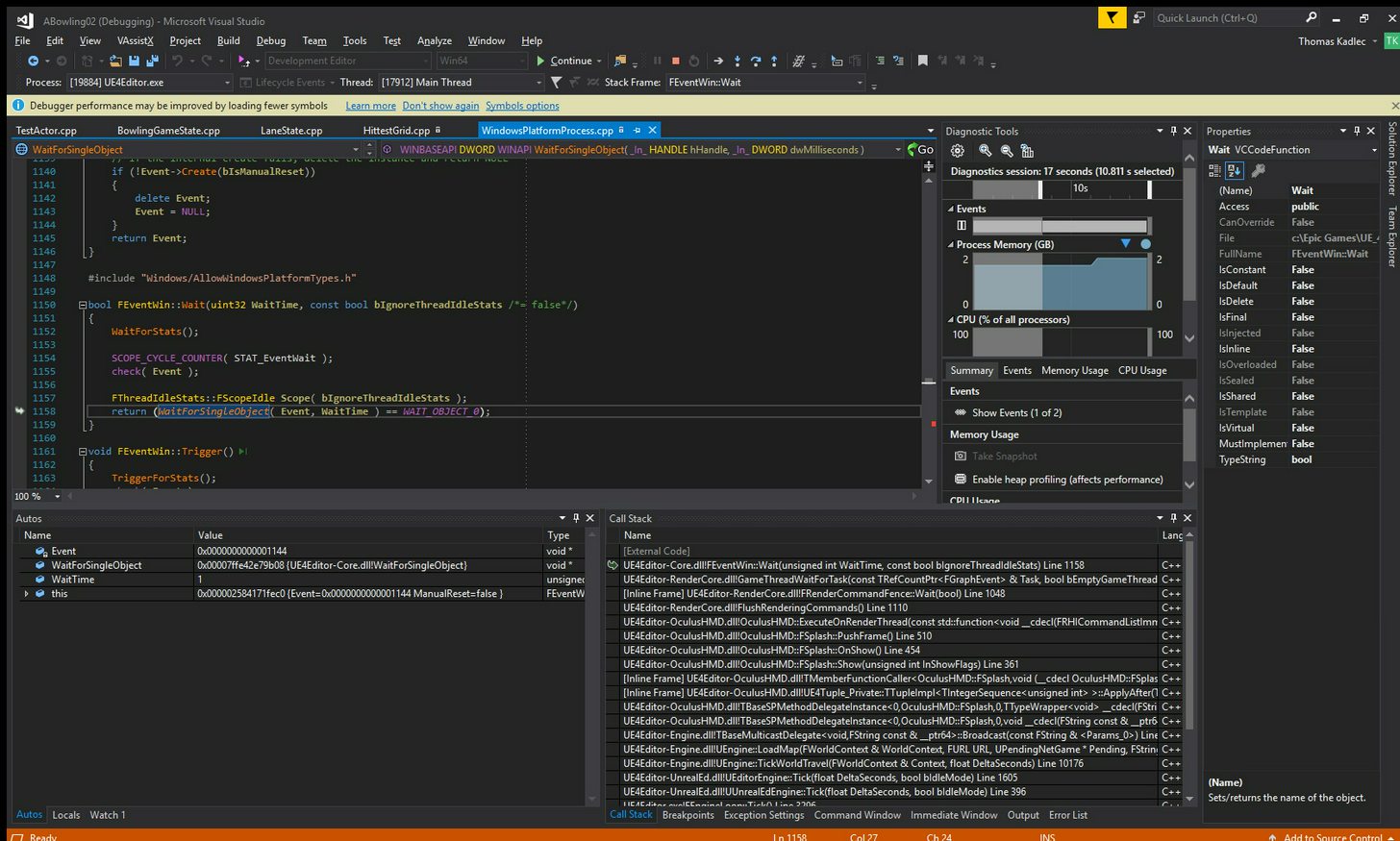 wicked oak
@fleet veldt huge chance its oculus dash messing it up
alpine ore
@sturdy coral Thanks for the response, tried the HMD Worn state but it always seems to return Worn no matter what?? Is there any other mechanism to pause the game if the player presses the Vive controller system button?
sturdy coral
@alpine ore it should return not worn after an idle time out. You have to code in proximity sensor support to make it faster
alpine ore
@sturdy coral Thanks again, will check again. Do you know if it is possible to check if system button has been pressed, can't seem to locate anything for it, Oculus was so much more straightforward!
sturdy coral
@alpine ore there is some around app focus in the steam vr plugin code that I think happens when the system menu is up
alpine ore
Cool, will have a plunder, I take it none of this is exposed to blueprints then
sturdy coral
@alpine ore I think app focus might be but I'm not sure
 eternal inlet
any of you guys that experienced that a game you made runs 11ms on vive, but like 30-40ms on Oculus and after profiling it, found that there was something with preanimation pulling like 9-11ms for each character in the scene?
so on the vive, i don't see those hits at all, only on oculus
real needle
@eternal inlet I had the same framerate problem, but I never tracked it down to preanimation so can't confirm that. I think I disabled/enabled the oculus plugin, something stupid like that
eternal inlet
I actually just found the cause
Very weird... only happends with oculus.. but that fullbody solver i use, ikinema, was spamming warnings in log for no clear reason
So for now, ill just disable when playing on oculus and post a question to ikinema
real needle
How easy is it to convert a Radial Menu System from a third person game to a VR Setup?
fleet veldt
Anyone know a way to get an event when motion controllers first start tracking? For example if they are on my desk and in power save sleep mode they don't show up in their tracked position until you move them a bit. I would like to run some code when they first wake up and start moving. I guess i could constantly monitor their position every tick and as soon as it wasn't (0,0,0) fire a custom event but i figured there was probably a better way.
wicked oak
@eternal inlet there is a cheap ikinema alternative in the marketplace
it doesnt have that many feautres, but its open source
so you can tweak it or change it if needed
ikinema is a black box, nd an expensive one
eternal inlet
there is?
wicked oak
yes
eternal inlet
what's it called?
eternal inlet
yeah
wicked oak
i saw it a while ago but havent bought it, it sounded very interesting
and ill probably try it as i would like fullbody IK on my next game
 static mountain
hello
this sample don t work for me :
Setting up the Gear VR Motion Controller Touchpad buttons
i use gearVr and motioncontroller
It seem that onlu motion controller face buton 1 work (back button)
i try the saqmple projet
and other dont work facebutton 2,3,4 etc
someone know why .?
sturdy coral
@fleet veldt there is a get tracking status call that returns
enum class ETrackingStatus : uint8
{
    NotTracked,
    InertialOnly,
    Tracked
};```on all motion controllers
static mountain
if someone are interesting, it s not motion controller face buton 1 that witch can be use but Thumbstick up down left and right.
Thumbstick only for the center button
glossy agate
Doesn’t even work as an axis mapping?
static mountain
i don t arrive to put on gamesetting> input
alpine ore
Anybody using analytics in a vr game that is on oculus or steam?
granite jacinth
Something I've been working on, I can finally spill the beans
Interesting how Spectator Mode cuts out some things
 warped ice
h0t
granite jacinth

streaming the first part
full junco
@sage gulch did you manage to fix your issue?
sage gulch
not really, it seems like it's not as prevalent in a previous build but there's some draw errors further back than I recalled encountering
it's been frustrating enough I have taken a day or two off of it basically.. not the best for trying to stay on top of it but I guess two areas I was going to look at are fully removing the ShaderBitsGDC stuff as apparently there is some stuff in the plugins directory, and trying to rebuild yet another test map or turn of persistence, I fear that is a source of trouble
full junco
your issue is just the performance?
sage gulch
It's hard for me to tell exactly but there are a lot of errors reported, in particular it seems that somehow the ShaderBitGDC stuff is related
full junco
what do you mean with "errors reported"?
sage gulch
I've ran it with the option to display shader difficulty, but it seems like it's related to certain actors and possible the gpu particles attached to them
full junco
if theres an error in the log it should be easy to fix it?
sage gulch
it has like hex core dumps and stuff that it emails back to epic.. I'm reloading my last backup
well not exactly core dumps, it runs and doesn't exit or anything, but it is taking memory chunks or something and reporting
lemme run it
so when it loads up, I get a lot of complaints in yellow in the Output log, but nothing that appears to be show stopping. A lot of actors with variables not found, base class probably changed.. not sure how that happened but I can check those actors for excess variables, I often duplicate things and build off from there. No red errors reported though..
full junco
yeah thats fine
sage gulch
MotionControllerPawnBombyx_C.ReceiveBeginPlay
LogStats: FPlatformStackWalk::StackWalkAndDump - 0.054 s
LogOutputDevice: Error: === Handled ensure: ===
LogOutputDevice: Error: Ensure condition failed: false [File:D:\Build++UE4+Release-4.17+Compile\Sync\Engine\Source\Runtime\Core\Private\Math\Matrix.cpp] [Line: 8]
LogOutputDevice: Error: FMatrix::InverseFast(), trying to invert a NIL matrix, this results in NaNs! Use Inverse() instead.
LogOutputDevice: Error: Stack:
LogOutputDevice: Error: UE4Editor-Core.dll!0x000000008A263E36
LogOutputDevice: Error: UE4Editor-Core.dll!0x0000000089FEC2D2
and then there is about 50 lines of red errors continuing with UE4Editor-Core.dll!*addresses on and on
LogOutputDevice: Error: KERNEL32.DLL!0x00000000D1252774
LogOutputDevice: Error: ntdll.dll!0x00000000D2650D51
LogStats: SubmitErrorReport - 0.000 s
LogStats: SendNewReport - 0.236 s
LogStats: FDebug::EnsureFailed - 0.303 s
LogUnrealMath: Error: FMatrix::InverseFast(), trying to invert a NIL matrix, this results in NaNs! Use Inverse() instead.
LogUnrealMath: Error: FMatrix::InverseFast(), trying to invert a NIL matrix, this results in NaNs! Use Inverse() instead.
I don't like it. Pretty sure the computer is unhappy too. 😉
full junco
and can't you just look at where that happens and fit it?
sage gulch
the location in memory?
sage gulch
wouldn't really know what to look for, but I didn't edit anything there iirc
the very first error is LogUnrealMath: Error: FMatrix::InverseFast(), trying to invert a NIL matrix, this results in NaNs! Use Inverse() instead.
pretty sure this stuff didn't pop up before I tried deleting that plugin, it doesn't seem like that should be related though
full junco
didn't you write the code or BP in MotionControllerPawnBombyx_C.ReceiveBeginPlay?
sage gulch
nah it's a duplicate of one of the templates from epic
but there are just pages of errors after that, stuff I'm pretty sure was just fine a while back
I am in a bit over my head heh
full junco
you can just run the game from visual studio
then it will show you the callstack and you see where it crashed
sage gulch
it doesn't actually crash though
but I wasn't aware you can run it from there, thanks
sage gulch
hmm I see
 pale burrow
hey, probably a quick answer to this one. Ive packaged my project (dev build) and when i launch the game, i can see the window on my monitor, but in my oculus its just black
sage gulch
build settings check use vr
sturdy coral
@pale burrow try packaging the standard VR template just to see if it is an issue with your system or with your specific project
And yeah try use VR too
pale burrow
will try, thx for speedy reply
use vr ticked
could it be stereo rendering?
i mean instanced stereo
 cold siren
@pale burrow when your game starts is it tracking your headset while the oculus HMD is black?
 plain glade
Hello, Is it possible add some widget to VR Spectator?
pale burrow
@cold siren yes, it is :/
cold siren
try opening console and typing "stereo on"
pale burrow
tried that, no dice
cold siren
there is also a cvar bolean that does the same
boolean
before build your vr preview would work?
pale burrow
yes
works fine in editor
black screen in package, but i can see it on the monitor fine
cold siren
have you tried packagin a blank project with just the VR template?
pale burrow
not yet, keep gettign distracted -_-
same issue in new proj
just packaged the default vr project
sturdy coral
@pale burrow you should probably send it to someone to test on a diff machine
Are you using the Oculus plugin or Oculus via steamvr plugin?
pale burrow
both
pale burrow
i have
 candid viper
@pale burrow Are you using sublevels? There is an issue where Oculus blacks the screen during loading but can fail to restore it - the Oculus side thinks that loading hasn't finished. It might be that: https://answers.unrealengine.com/questions/587192/packaged-build-oculus-rift-sublevel-black-screen.html
frosty hull
I am trying to make the Pickupable Interface work for my actor, but when I try to pick it up, it seems the actor just slips out of my hands...
I can tell the Pickup Event is being fired, but the Actor is not attached to my the Motion Controller. I compared to the Example Cube, but can't figure out where the problem lies.. Maybe it is my Mesh?
pale burrow
@candid viper i am using world comp, do i need to do that for each sublevel? or just for persistent?
@frosty hull check you didnt change the collisions as they may be trying to push apart
frosty hull
collision of motion controller hand mesh and the "rocket"-mesh?
candid viper
@pale burrow as part of the persistent level on begin play, load all the sub levels.
 trim breach
hey guys just a quick question: https://www.amazon.com/Oculus-Touch-Virtual-Reality-System-pc/dp/B073X8N1YW/ref=dp_ob_title_vg?th=1 I just want to get started with vr, and I wonder whether this set can be used for programmers
and is this set OK for osx developers?
Thanks
tired tree
@sage gulch which plugin did you delete? That NIL matrix error is from the HMD Matrix having a bad value, if you deleted the oculus plugin and are trying to use SteamVR without setting up the boundries first then it will be throwing that as it has an invalid room layout (IE: none)
also some times calibration can become corrupt and require re-init to fix that too
frosty hull
@trim breach why not? i've got the same
@trim breach keep in mind that when you go oculus you might need a third sensor and also make sure you have sufficient usb ports
 scenic tundra
@frosty hull On your rocket mesh, do you have physics enabled as default, collision preset set to PhysicsActor and Simulate Generates Hit Events set to true?
@frosty hull Can you add a branch after the Attach To node and print a string if the branch returns true?
@frosty hull In your VR Pawn blueprint, can you add a breakpoint when the Pickup Actor function is called?
mighty carbon

UploadVR
Revealed last week, Pico Neo is a new standalone VR headset with six degrees of freedom (6DOF) positional tracking for $749.
scenic tundra
nice
mighty carbon
I think with a bit of extra money one can build desktop VR with Rift/Touch
makes no sense to have underpowered standalone VR HMD for the price of top notch desktop VR system :/
scenic tundra
@frosty hull Also, a third sensor is only required for 360 degrees turning. If you don’t need to turn 360 degress, I would not recommend throwing a 100 dollars away.
tired tree
quoted wrong person
scenic tundra
Sorry @tired tree
@frosty hull One more thing...Does your rocket mesh have a collision on it? I would recommend auto convex collision.
frosty hull
@scenic tundra I will look into this.. just a moment
@scenic tundra Simulate Physics is activated on my Static Mesh Component...
@scenic tundra
the function is definitely called
@scenic tundra this is what I set up in sm editor
 tired kettle
Pico Neo is a viable solution for a point-of-sale situation. No tether, no clunky desktop PC, no hassle with windows. If you use it to showcase stuff, or present work to clients, it would be an awesome and cheap solution (no pc). I hope tracking is fine.
mighty carbon
Oculus Go would be probably a better choice for that
(depends on what you are selling though)
wicked oak
i highly doubt "pico neo" will be better than oculus go
and oculus go is one third of the price
and that thing has absolutely zero change against santa cruz once that happens
mighty carbon
I wonder if 4.19 previews will start this week
wicked oak
@mighty carbon epic has been on holyday
since the 22 or so
you can look at github, no commits for 2 weeks
mighty carbon
well, in USA today is usually the day when everyone get back to work 😉
tired tree
actually he is back to cleaning up 4.19 now
sturdy coral
@trim breach ( @frosty hull ) no, Oculus doesn't support OS X, but Vive does
this is a nice toon shader, comic book-style harsh lighting: https://www.youtube.com/watch?v=JC1X69dB6Fw
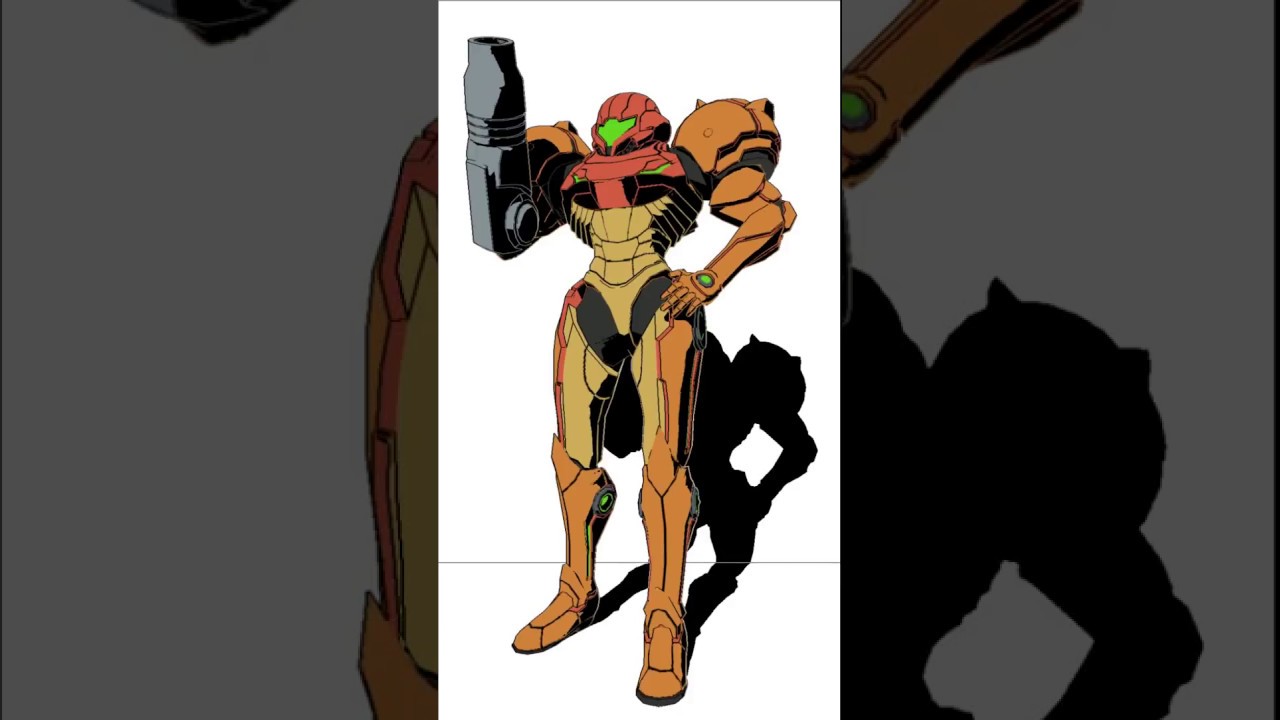
A collection of shaders I have been working on inside Unity for fun.
wicked oak
not too different from mine
sturdy coral
I guess to change outline behavior in the shadows like that would require deferred
wicked oak
main difference is the outlines become colored (neat trick)
sturdy coral
err forward
sturdy coral
I see it receiving shadows between the legs
sturdy coral
yeah, looman's page has some stuff on it
wicked oak
with a "custom" node
i should test that stuff more, my current toon shaders completely bypass lighting
sturdy coral

This weekend I stumbled upon a reddit post about Dr. Facilier’s interesting shadow in The Princess and the Frog and it inspired me to experiment with Forward shading in Unreal Engine 4 to re-create a similar effect in real-time shading. OP pointed out that The Shadow Man’s shadow changes the wallpaper his shadow is cast …
granite jacinth
hmm
What about the shader @upbeat kestrel posted a little while back?
Think it was in #graphics
But yeah, I am glad there are more and more peeps looking into toon-shaders
Definitely need the most optimized and best looking one for VR
wicked oak
mine is alright for its incredible simplicity
 upbeat kestrel
mine is done in deferred
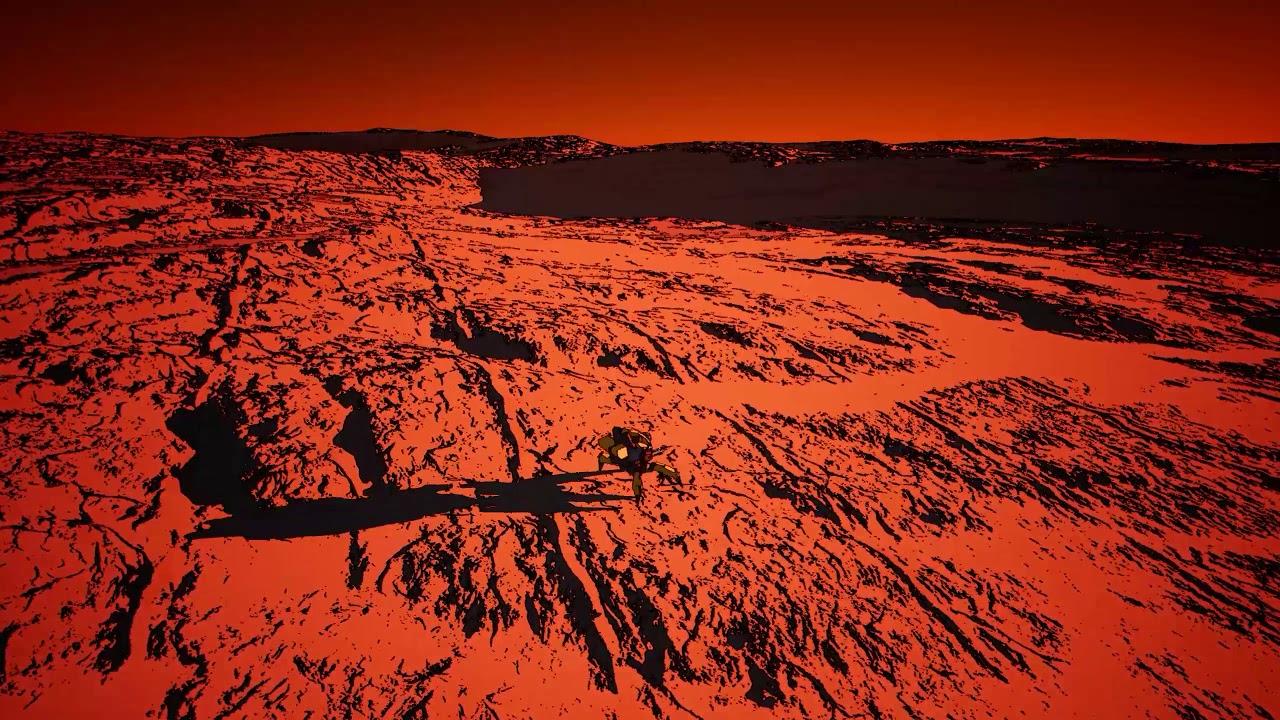


Been spending this christmas digging into Unreal Engine's shader files, and adding a custom shading model using this awesome (but outdated) guide here: https...
in my case it's a custom shading model + outline postprocessing
i.e. engine mod
it's on github if you want to mess with it
not cleaned up or optimized in the slightest yet
or documented
so
buyer beware
wicked oak
thats how mine looks ATM
on a retextured unrealbot
INCREDIBLY simple
wow, yours works with scene lights
thats fancy
how costly is it?
becouse i might try to add that to my game if its cheap
upbeat kestrel
somewhere between default lit and unlit
because I haven't taken out the bits about static lighting yet
wicked oak
your example shows how to add a new lighting model, for the toon shading
thats all i need, niiiice
wicked oak
the outline is a postprocess, no?
wicked oak
ive tried to do the postprocess outlines, but didnt have much luck, really
im using mesh outline for the chars, and the environment doesnt have outlines
upbeat kestrel
I'm removing most gradients, so pre-PP colors are as flat as possible
no reflections, no AO
no light falloff 😉
wicked oak
i couldnt get outlines that worked well in Vr
given the screenspace nature of outlines
upbeat kestrel
then just do a 4 or 8 sample cross in PP and check the difference to the center pixel
yeah... sorry, no idea how one would do this in VR
wicked oak
ill use your branch as starting point
at least for the "add shader model" part
after that i can edit stuff myself (i know how to shader)
upbeat kestrel
one of my youtube videos above has the guide I used linked in its description
but that was outdated af
wicked oak
it would be a FAR superior way of doing it
mighty carbon
the only good way yo have outlines in VR is through shell geometry
upbeat kestrel
I don't know, I hope it can be done as a plugin
wicked oak
thats what im using in the pic above @mighty carbon
upbeat kestrel
but haven't had time to look into it more yet
wicked oak
sadly, i dont know how the fuck do plugin shaders work
if i knew i could port it myself
upbeat kestrel
what with actually trying to find a day or two to relax this holiday 😄
...he says, working on his game
wicked oak
uhm, its on the deferred pipeline
i wonder if it will work for forward
becouse im using forward for the HUGE gains i get
in ps4, we are talking 30-40% improvement on frames
due to PS4 being bandwidth starved
wicked oak
ps4 chews through drawcalls like nothing
upbeat kestrel
wait, actually
wicked oak
postprocess do work on forward
upbeat kestrel
it's just sampling postprocessinput0 so it should
yeah if they don't access the gbuffer
since forward = no gbuffer
wicked oak
you can access depth
upbeat kestrel
aye but who is satisfied with just depth? 😄
wicked oak
i tried to use SimpleForward on ps4 but couldnt 😦
damn, simpleforward is fucking perfect for this game
as it removes all the fancy stuff
upbeat kestrel
(for toon outlines, depth alone doesn't usually suffice for good results, I also sample normals there)
wicked oak
yeah, the toon outline i was coding was based on the Chameleon one
but i started editing it a lot
upbeat kestrel
regular forward renderer works fine on PS4 though
wicked oak
just using it as a starting point
upbeat kestrel
not on XBone however
upbeat kestrel
yeah fw is not supported on XBone afaik, since XB has no VR there was no need I guess?
I'd love it for performance
wicked oak
@alpine torrent no msaa
but massive gains
why do you think DWVR runs at 90 fps on the pro at 150% screen resolution 😃
wicked oak
good chance of MSAA on ps4 for forward on 4.19 tho
or 4.20
last time i looked there were plenty of MSAA references in the commits
and i checked the ps4, and yup, msaa confirmed
but i dunno if its a full implementation
 alpine torrent
as Mixed reality headsets age i guess VR support comes to Xbox too
wicked oak
@upbeat kestrel would it be possible to force multipass on a normal engine shader?
to have mesh outlines
render the thing twice, one with inverted normals + just outline color, and the second with the actual mesh
alpine torrent
if you have seen that vision from years ago when Xbox one was coming in the horizon
mighty carbon
I wonder if it's possible to have g-buffer and forward renderer working together
upbeat kestrel
@wicked oak no idea
I think you have to go pretty deep into the renderer's guts there
or maybe look at how clear coat does it
since that can render normals twice
upbeat kestrel
true
scenic tundra
@frosty hull Sorry for the delay.
upbeat kestrel
but the same might be possible in a vertex shader
wicked oak
thing is that it needs to drawcall twice
first drawcall with the vertex shader that inverts normals and grows,and the pixel shader that is just black
scenic tundra
@frosty hull I cannot really see the problem. Could you share the blueprint code of attachement, please?
wicked oak
and then the actual toon stuff
upbeat kestrel
yeah, my gut says you need to rummage around in the guts of the renderer for that
wicked oak
not worth the effort
oh, your commit is very self contained and small
really, really useful @upbeat kestrel
i guess tomorrow ill show my results with it
and my performance tests
upbeat kestrel
have fun, tag me in your results! I'm curious to see 😃
but also be aware that this is not at all cleaned up or optimized yet
let me send you my notes for usage I made for someone else
- Disable inverse square falloff. Lights have no falloff anyway right now
- Low intensity values are good - 1-50 range makes the tone mapper not go crazy
- Crank shadow sharpen filter up to 1
- Play with shadow bias and sharpen filter if you get jagged shadows.

PostProcess settings:
- disable AO and SSR
- Remove all reflection captures
(Reflections are too noisy to look good with outlines - The outline PP material uses scene color to determine where to put lines, so everything pre-PP should be as flat-colored as possible.)
- PP Material: The bias values let you adjust the treshold, i.e. minimum color difference for there to be an outline. Good to reduce outlines in the skybox for example, or allow for gradients.```disregard the bit about the PP material, that's in my test project that's not on github
scenic tundra
where is the root component reference?
could you take a screenshot where the interface message named Pickup is called?
@frosty hull
frosty hull
the interface is from vr template
scenic tundra
nothing changed?
frosty hull
nope
scenic tundra
could you take a screenshot of the other parts of the rocket bp screenshot?
frosty hull
scenic tundra
oh that would make sense
did you try to set the static mesh as the root component of your bp
?
For now you just have a scene component
scenic tundra
press and hold on the static mesh component
and drag it over the scene component
on the left side where you can see the components
scenic tundra
yes
now
u can delete the shared root component
next thing
would be to show me where you are setting the root component variable. @frosty hull
scenic tundra
oh
well I dont think if it would matter
but could you replace the get root component
with the actual static mesh root
right there on the attach to node
frosty hull
but is it not the root component now?
scenic tundra
yes it is
told u I dont think if it would matter
also I asked
because I was knowing that the get root component is a pure function
anyway
if you referenced the shared root component anywhere in the blueprint
now is the time to replace it
if not, you can test the game
frosty hull
only used "root component" sometimes
scenic tundra
@frosty hull
ok stick with it
it is good
I was just a little confused
can you test the game?
frosty hull
yes, i'll try
scenic tundra
cool let me know if it doesnt work
or if it does
also did you set up the drop event? @frosty hull
frosty hull
@scenic tundra have to look into that. should be able to tell you in a minute or so 😉
scenic tundra
ok
sure
@frosty hull Hit me up when you test the game.
also are you trying to achieve a catchable rocket? @frosty hull
frosty hull
@scenic tundra it works so nice now
scenic tundra
cool
frosty hull
@scenic tundra thanks a bunch! ^^
scenic tundra
glad I could help 😃
frosty hull
@scenic tundra no, at least i did not think about it so far. i just wanted to release a rocket from my hands that gets thrusted up and explodes
and it works now 😃
frosty hull
yup, i really liked that
scenic tundra
oculus first contact or sth like that
yea
Man I hope they will release the source of that game
it d make our job a lot easier
sage gulch
thanks for the suggestion @tired tree , I didn't try to delete any oculus or steam plugins but I might try reinstalling.. is there a direct way to delete or reset the calibration?
tired tree
just recalibrating does it.
 wicked birch
Anyone here happen to know why the VR Expansion Template crashes when I boot it up? I built the SLN for the project successfully and made sure to target my 4.18.2 engine
wicked birch
rebuilding isn't working either, unfortunately.
When I target 4.17 I get a "Cannot target Fname.h"
tired tree
that is the editor crashing.....
you aren't even in the project yet
go to saved / logs and see if it got to logging yet
fleet veldt
probably just my machine but all of a sudden just today i'm getting horrible VR performance. like 25 fps on an empty level.
just curious if anyone else is having issues (windows or oculus update maybe?)
never mind it was geforce overlay had turned back on somehow arg
mighty carbon
GitHub
Unreal-Google-Assistant - A repository allowing the Google Assistant integration with the Unreal Engine.
that's a game changer for VR
if only it was a simple plugin
exposed to BP
wicked oak
compiling toon shading engine edits
on 4.18 branch
ill see what happens and report
more than anything, thanks @upbeat kestrel becouse this is VERY useful as a starting point for all sorts of hacks
knowing how the fuck the shader files and material work means now i can do other custom materials, after all you can add all your want
like create a custom "low quality" lighting shader, that uses simple phong, for example
or a simple model that skips most of unreal bullshit like fog systems or skylight or whatever i want
upbeat kestrel
cool 😃
granite jacinth
@wicked oak you're welcome too wtf
I brought him here ;()
😦 😦 😦 😦 😦 😦 😦 😦 😦 😦 😦 😦 😦 😦 😦 😦 😦 😦 😦 😦 😦 😦 😦 😦 😦 😦 😦 😦 😦 😦 😦 😦 😦 😦 😦 😦 😦 😦
upbeat kestrel
😛
 tulip surge
What would you do for leaning in VR and make it feel and look natural?
mighty carbon
it's obvious @tulip surge , but whether it feels and looks natural is a big question
😉
oh wow, good news https://uploadvr.com/samsungs-affordable-galaxy-a8-first-non-s-note-phone-support-gear-vr/

UploadVR
Samsung's new Galaxy A8 and A8+ smartphones, launching soon, are the first non-S or Note handset to support the Gear VR headset.
tulip surge
yeah kinda obvious but I was wondering what kind of ways people would approach
mighty carbon
I meant pr0n 😉
Personally I don't really see what I can learn through VR.. Maybe fixing some machinery, but that would be something for workplace. Other than that education stuff for kids is where VR excels IMO. History, basic biology, etc.
tired tree
he said leaning...
sturdy coral
@wicked oak "or a simple model that skips most of unreal bullshit like fog systems or skylight" I thought that got compiled out and was part of the reason for hundreds of shader permutations
mighty carbon
@tired tree that would be continuous education 😉
tired tree
LEAN
tired tree
and there is no "look and feel natural" in VR with three tracking points
leaning will be assumptions at that point
sturdy coral
there are a few things you can do
if the user's head is at the calibrated height, they probably aren't leaning
unless they are on their toes and leaning 😛
tired tree
leaning and crouching though
sturdy coral
yeah that's the big one
mighty carbon
leaning as looking around the corner ?
sturdy coral
if their arms are behind their head, and they are lower than calibrated height, they are probably leaning
but not necessarily
mighty carbon
or leaning against something? (which is impossible in VR)
tired tree
you can't really make assumptions on hand positions to the head during leaning vs crouching as you can do it with both
sturdy coral
you can make statistical guesses
tired tree
which fail too often
sturdy coral
well that
that's true of everything though
if you guess they aren't leaning that's an assumption too
but yeah I haven't seen anyone get it well, and I've tried some systems that use machine learning and stuff
tired tree
not sure its worth implementing "leaning" if you can't tell the difference between leaning and walking with your head lowered
ML can't perform magic
even training them fully around three point they will have many fail cases
sturdy coral
if you had a user view the three points with positino and orientation for hands and head
I bet they could label leaning vs. not leaning a lot more accurately than you might think
we are super tuned in to estimating gait and personality and stuff from very limited data
tired tree
only with a central point
we don't have a core location at three points
it isn't, "head forward from core, hands back"
sturdy coral
there are certain constraints like center of gravity
if your arms are way in front of behind of your head you must be counter leaning or balancing with one leg off the ground
tired tree
thats not true
pointing both hands forward is the same pose, but at a different height
crouching with both hands out is the same pose, but at the leaning height
it doesn't indicate leaning
I know the ML guys you are talking about
they contacted me months before going public
I said I felt they were overestimating what they could do
sturdy coral
add in dynamics of walking around in an uncontrived gait and you get a lot better estimates too
Foo Show uses machine learning too supposedly, but still looks like ass overall
tired tree
its a quick way to get passable pose estimation, and its true that using it across transitions should prove more stable
but true "natural" won't hit without at least the 4th tracked point
can infer a ton more with a waist tracker, even upper thigh's basic movements should be telling
glossy agate
You could guess with a threshold maybe. Like lean if offset from last position is <= x unreal units. Enable walk if the offset exceeds that or locomotion is used. You could set it via HMD height offset too where top and bottom have lower thresholds than center.
sturdy coral
I still think machine learning could get a better results than we see now even with just 3; I don't think it would be usable for adding lean controls or anything but more for social
@tired tree watch how much you can infer from sparse data here: https://www.youtube.com/watch?v=1F5ICP9SYLU

This movie was produced in 1971 by James Maas, then at Cornell University, and demonstrates some of the work of the Swedish Psychologist Gunnar Johansson. Pa...
not perfect though cause you can occasionally see the forms more than that experiment wanted through shadows when one leg crosses over the other
but like in one cause in there there is just a single arm and you can put together something pretty plausible in your head
for the whole body
sturdy coral
yeah, but your imagination has a lot of constraints on it from that one arm
tired tree
and if its for a VK body
sturdy coral
that's with no orientations either
sturdy coral
I'd imagine the sinosoidal head up and down motion is a lot different if you are walking with a forward lean vs a more vertical crouch
tired tree
would assume most use cases for leaning involve mostly static positions
around corners, over railings
peering over things
would be a more common case than trying to walk around leaned
sturdy coral
mostly there you just don't want false negatives (on whether leaning or not): walking off a ledge when trying to lean over it
glossy agate
Yeah most use cases are like 8-10 inches for it in shooters, and leaning over tables to grab poorly placed objects without getting pushback
sturdy coral
you can get by pretty well with thresholding, increase the movement threshold when your head is below calibrated height and more when your arms are behind head
that eliminates a lot of false negatives
tired tree
most of them yea
wicked oak
toon shader is interesting
the shader keeps reflectivity if you have low roughness
sturdy coral
that looks cool; you might want to modify the reflection captures to run a posterize filter or something
wicked oak
there are a couple of things i dont really like, but ill start to edit it a bit myself
main thing i dont really like is this effect
see the cutoff?
thats becouse that part of the material is on shadow
i also dont really like how it "falls back" into " normal shader" when its under shadow