#virtual-reality
1 messages · Page 155 of 1
 wicked oak
im looking for it
 raven halo
if so, it's a huge deal indeed
wicked oak
there is now LMS code around the oculus plugin and in "Render Settings"
im trying to find the exact implementation
raven halo
ok ok
wicked oak
there are lots of HDR stuff
with FMASK and some weird things
that are just "there" in the commit
raven halo
I hope that LMS also works on nvidia 970
wicked oak
but they are not in the description
raven halo
so strange
 tired tree
@wicked oak don't think it is cross platform, Oculus specifically said they were using NVIDIA's SDK directly as support in their own api
ie: they implemented it so game engines don't have to
wicked oak
there are indeed some MSAA stuff
if this is PS4 MSAA is a HUGE deal and im porting my game to master ASAP
tired tree
unless they state AMD somewhere later on, likely just the nvidia one for now
raven halo
@wicked oak there is no MSAA on PS4? o_O
tired tree
however, them implementing it themselves means you won't have to deal with NVIDIA's lax hardware testing and can use it with without worry
wicked oak
@raven halo no
they didnt implement becouse it wasnt needed, they use the deferred render wich cant msaa
msaa is for VR forward render
so i think thats why they are adding it right now, to support forward render better in ps4
im going to download the ps4 code and compare it to 4.18 base
wicked oak
forward render itself wasnt supported till a couple versions after pc
it was great once i got it
becouse it was +30% performance for DWVR
the downside of forward render is having to render the scene twice (depth prepass)
this costs x2 drawcalls
on PC i was drawcall bound
but on PS4 you chew through drawcalls like they are free
so the x2 drawcalls is not a big deal
wicked oak
multires on Androidd
the typical multires, the one that is axis aligned (9 sectors)
that was a thing they talked about in connect, multires in android is easy as hell due to the tiled nature of the gpus
ok, seems that the LMS thing is not there at all
only the config options and the like, i guess in preparation
 sly shoal
Hey guys, I'm trying to create a newspaper that you can flip pages with by grabbing the end, in VR.
I am just not sure what the best approach would be to do something like this..
I was thinking just to use a plane and add a bone to it and then possibly use the cloth editor to make it wiggly, but is that just a noob talking or am I on to something here?
Any input would be awesome 😃
 sturdy coral
@wicked oak @raven halo Oculus does have support for lens matched shading/multires shading on desktop, but I think it is just to make compositing/timewarping more efficient by sending the oculus runtime the smaller buffer with the downresed portions and letting it do the expansion
wicked oak
they do talk about having it "abstracted"
probably have the gpu extensions as part of the oculus sdk
sturdy coral
I don't think it can be done with the sdk because it requires lots of shader changes
I think what that other commit refers to is mobile specific, because that can be done purely in the GPU driver
because they use tiled renderering
wicked oak
i did follow that
multires mobile is indeed gpu driver enterely
or seems so
but they have talked about LMS as part of the oculus sdk. I wonder if they will have their own "vrworks" style thing on the oculus sdk that abstracts it
yes, you would need to do the shader changes anyway, but now the driver part is abstracted instead of being done using nvidia or amd specific extensions
sturdy coral
can't find the talk but watched it at connect 4, they came up with an extension that qualcomm implemented
that lets the different tiles run at different resolutions and then merges the results all together at the end
wicked oak
yup
sturdy coral
and they said it would work even with old apps
wicked oak
seems ue4 now has support for that
oh, interesting
but what about postprocess?
i know you normally dont postprocess on mobile, but it would break
you need to fix postprocess on multires, and change shaders a good bit in LMS
PS4 has multires too
it uses similar stuff as the checkerboard rendering
sturdy coral
I'm not sure how post processing is done on mobile but my guess with this is you would take all the tiles and write them to a bigger buffer big enough for the highest res tiles, then upscaling the lower res tiles
then apply post processing on top of that
that would require upscaling all of the gbuffer if it were desktop
or whatever all the post processing stuff uses, maybe only depth
wicked oak
and what do you think of the TAA upscale?
sturdy coral
refraction etc. would need be needed
wicked oak
its becoming a super popular feature on Switch games
you can see it CLEARLY on xenoblade chronicles 2
it renders at variable resolution, but the final buffer is screen size or 1080p, and then TAA runs off that

Xenoblade pushes the Switch's mobile-based Tegra technology hard. It holds up nicely when playing docked, but is this game just too ambitious for portable pl...
keep one thing in mind tho, the undocked version adds a very intense sharpening filter, wich looks like ass
sturdy coral
yeah that should work well, I haven't looked into the details of the new one in UE4
wicked oak
but still far better that it woudl look if it just did bilinear upscaling
lots of changes on the TAA shader
sturdy coral
with john alcatraz's patch we have been doing dynamic res with proper TAA all year
but we at each step we sample the history buffer to the current res, so it doesn't give super resolution
wicked oak
yup, but now its official. I wonder how different it would be
sturdy coral
to keep a big history buffer throughout means you can't accumulate the history inplace and would require extra copying, I'm not sure if they do that but it would potentially be very good
sturdy coral
my idea was to only keep the high res buffer for the green channel to save on bandwidth, since Rift and Vive are downscaling red/blue anyway
PSVR has full RGB though
wicked oak
that wouldnt work well
pretty sure
how do you save the history buffer then?
as 2 textures?
RB and then G
and thne you do 2 samples and 2 framebuffers instead of 1
sturdy coral
RGB, then a smaller inset G that gets feathered in in the center
the edges are downsampled anyway and don't matter
(except they do once you move to MRS/LMS)
wicked oak

Visually, this is a massive upgrade over PlayStation 4 Pro but what about performance? Well, that all seems to depend on which mode you're playing... all the...
most likely, the TAA supersmaple thing is what they use here
for the xbox one x
4k framebuffer but rendering at less
sturdy coral
@wicked oak here's the talk on the mobile MRS: https://www.youtube.com/watch?v=pjg309WSzlM

Join the Oculus Engine Integrations team for an overview of recent work with Unity, Epic, and IHVs that will help you develop visually stunning experiences w...
it is the last part with Remi
AMD had a temporal foveated talk that was cool too: https://www.youtube.com/watch?v=gV42w573jGA
Graphic performance optimizations are important for compelling VR experiences and will be even more important in the future due to expected growth of resolut...
the pro consoles apparently have a cheap tag buffer that lets TAA supersampling techniques work better
wicked oak
not really
i dunno about the xbox, but the ps4pro is essentially a bigger gpu
they literally took the gpu cores and control c->controlv
sturdy coral
@wicked oak this thing: https://forum.beyond3d.com/threads/id-buffer-and-dr-fp16.60209/

Beyond3D Forum
Hi everyone I have a question
as you know the new "xbox one x" is coming and its a very powerful console with 6 TFLOPs in comparison PS4 Pro only have...
id buffer
I'm not sure on the details, you could output your own ids so I'm not sure why it is more efficient for them to do it
someone has a fork in the forums for doing it I think
wicked oak
the ID buffer is a second framebuffer
essentially has a few bits for the triangle index, and a few other bits for the drawcall index
literally nothing preventing you from doing it on PC, its just that its "default" on it
the reason it works well, is becouse you can use it to bias the TAA
sturdy coral
well they say it is extra hardware that ps4 and xbone don't have
but both pro version do
wicked oak
for example only apply TAA if the pixel is from the same object
sturdy coral
I'm just not sure what the extra hardware does
wicked oak
and then you dont have problems with the depth
sturdy coral
I know how they are using it but I'm not sure why it is more efficient over the older consoles
wicked oak
the checkerboarding IS indeed specific hardware
sturdy coral
why they can't do the same
wicked oak
its hardware msaa sampling
i mean, custom sampling
it renders the image at half width, but the pixels have alternate samples
sturdy coral
yeah but you can do that without custom hardware I think
wicked oak
on some frames, the pixel "rasterizes" at the left, and in others, the pixel rasterizes at the right
no, that you cant
i dont know if modern gpus have that feature
i know the ps4pro does, dunno about xbox
the way pc games do checkrboarding is much worse
sturdy coral
@wicked oak the sony talk at vrdc 2016 discussed using msaa sampling to get a radial density mask that worked with pixels instead of quads
without the pro
wicked oak
becouse its blocks of 2x2 pixels instead of single pixels
sturdy coral
but aside from that I still don't get what is different about the id buffer support
wicked oak
that its a hardware driver level feature
fixed pipeline
instead of a separate framebuffer with shaders that write to it
nothing preventing you from implementing it on pc, but it isnt automatic
sturdy coral
it seems like it must be more performant too or they would use the techniques on xbone and ps4 vanilla
I guess if ti is fixed function it can do all the bit packing of the triangle index etc. without taking up any instruction cache and without wasting registers
wicked oak
ima check the id buffer from ps4 docs
ok
it IS a hardware buffer, it is controlled from the drawcalls
and it is higher resolution than the shading resolution
the idea is to have the ID buffer be at "full 4k" or similar
and then use it on your upscaling algorithms/taa/etc
it does indeed use the ID buffer to do the checkerboard render, at least the way the technique is shown in the examples
they use it to not "bleed" or ghost
sturdy coral
yeah, TAA in UE4 uses this adjacent pixel thing, if the pixel has changed and several adjacent pixels haven't, then it weights things lower, assuming it is on an edge between objects or is a specular/material aliasing
but if more than some threshold of surrounding pixels have changed it weights the current data more, assuming it is a completely new object or a different part of scrolling material, translucent material, etc.
wicked oak
reading docs
sturdy coral
but if you could just read directly whether it is a new object (or an edge between objects) that makes it a lot better in a lot of cases
wicked oak
i see stuff regarding to FMASK for the MSAA stuff in ps4
so im sure msaa in ps4 is coming
ill have to see what they do on the next verison
Fixed! UE-51728 4.18 missing Oculus dash support
sturdy coral
no fix for the oculus via steamvr thing :/
 real needle
@sturdy coral damn
 granite jacinth
Not a terrible deal
Essentially $500 and you get the Deluxe Audio Strap
Oh, and it includes Fallout 4 VR
 uneven moon
any of you guys have experience with building the engine from scratch and using it that way?
@granite jacinth if you got yours set up and working let me know
granite jacinth
@uneven moon Hmm?
uneven moon
Underline = problem
Square = Error
Any idea how to change the 'workingdirectory' ?
granite jacinth
Oh PS4 build, still waiting on Sony to approve my Static IP
Luckily, it's a PC first, then PS4 release
uneven moon
Do you know if workingdirectory is related, because blank projects throw the same errors
granite jacinth
It tells you what the problem is
uneven moon
The workingdirectory it shows isn't where my project is
granite jacinth
How are you connecting to them?
uneven moon
I'm not doing anything differently than when it worked, the PC and PS4 are hooked up via LAN + USB, everything checks out there
The game builds, cooks
It even launches it partially on the PS4 (shows the UE4 splash screen)
And then it says can't connect to file server
granite jacinth
@uneven moon You connected the PC to the PS4 Dev Kit via Ethernet?
uneven moon
Yes, through Neighborhood
granite jacinth
link?
granite jacinth
ya, no idea what that is
uneven moon
but once you connect it through neighborhood, UE4 recognizes the devkit
granite jacinth
ah
uneven moon
hmm
granite jacinth
@uneven moon check your virus protection?
¯_(ツ)_/¯
firewalls
windows
disable it all
uneven moon
I'll try, but probably not the issue since I haven't changed or added anything new and it worked for a long time
real needle
@uneven moon I don't think the filepath is the problem, it's not able to connect right? It was a little hard to read the log
uneven moon
wait a minute
you're right
that IP that it's trying to connect to
isn't even 100% correct (as displayed on the devkit)
the last part is wrong for some reason
I'll look into that, thank you
real needle
🤘
 supple coyote
how come since I started using vr.oculus.pixeldensity (instead of hmd sp), now that damn adaptive pixel density is always budding in
I dont want it
tried turning it off in console - no go
this never even happend until I just tried vr.oculus.pixeldensity ___
 full junco
@sturdy coral hm, didn't know about that AMD Temporal Foveated Rendering for VR thing yet! did they release the source somewhere? if they did it in UE4, I don't see why they wouldn't put it on some repo...
supple coyote
what the fuck
anyone familiar with these console commands?
they seem to be different between oculus' documentation page
and Unreal's
of COURSE
uneven moon
Some of them have been changing between versions
Even the name of the HMD as UE4 knows it changed from 4.16 and 4.17/18
I'm not sure where the updates ones are, check the version logs
supple coyote
I just had to set my console command to execute at begin play
cause adaptive kept reverting
every time
 sturdy coral
@full junco I don't think that AMD thing is mature yet, I think a lot of scenes with translucency and stuff might give it issues
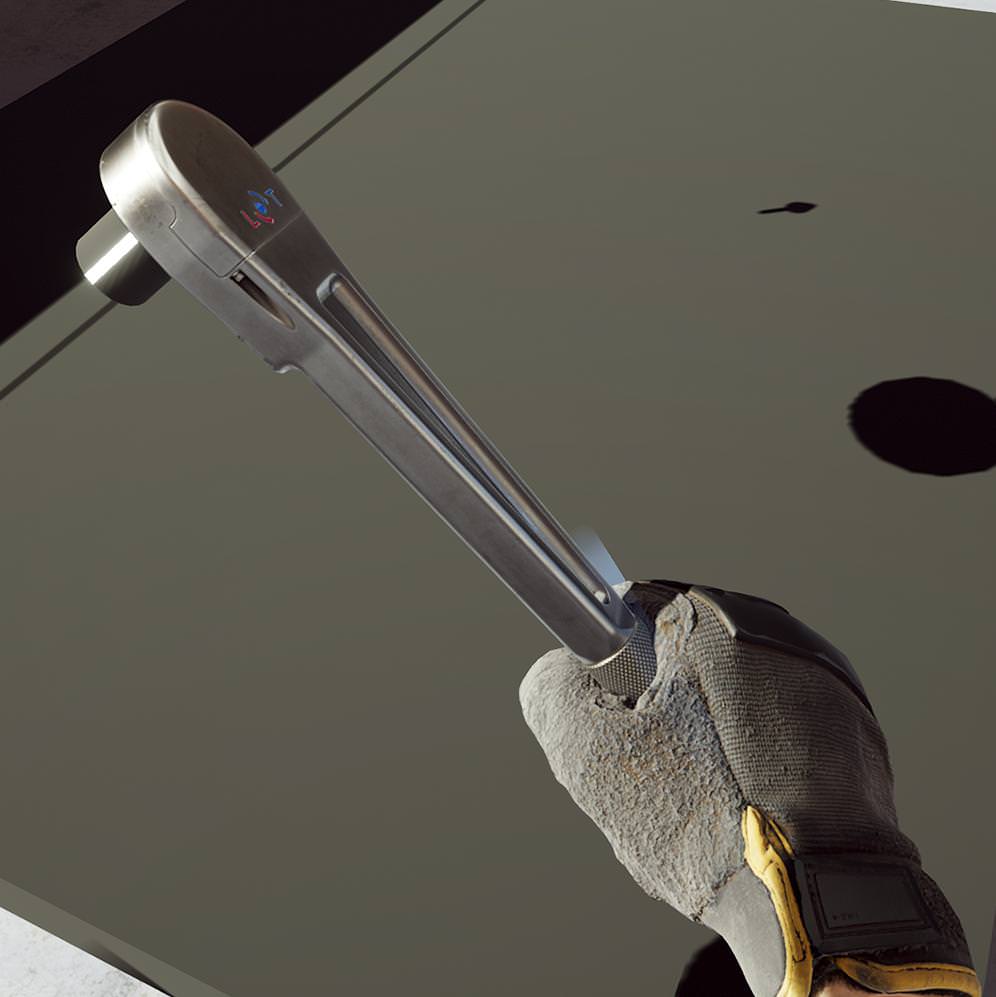
@sly elk how are you doing photogrammetry of metallic stuff?
aren't reflections an issue for it?
supple coyote
is that all geometry? tessellated?
@sly elk You can't just post that and walk away
❤
 west pebble
deconstructing this teleportation tutorial and changing what triggers the teleportation
I know I'm doing something horrible wrong here because nothing happens when I look at stuff
real needle
@west pebble there's an execution line missing
Between trace and bool
There's no execution on the trace either?
 sly elk
The ratchet is just a model
no photogrammetry there
for the things I do scan, I treat all the surfaces with a developer spray. It makes them matte white
also no displacement on the hand
west pebble
it looks absolutely fantastic man
also thanks, @real needle
that was the problem
now I just jave to figure out how to ge tthe timer to reset when you look away
sly elk
last ratchet post for the night. Just took some high res shots from in engine: https://www.artstation.com/artwork/zrG5Z

ArtStation
Screenshot from in game. I designed this after looking at ww2 era cast ratchets. I carried over the bulkier design but with a modern machined look.
Modeled in max+ zbrush. Materials in substance painter.
The gameplay features of the Ratchet:
*The ratchet reads thread pitch and fastener length data from each fastener to correctly control movement and rotation.
*60 tooth ratchet mechanism with simulated backlash. A back stroke on the ratchet generates backlash until you hit the next tooth. Forward rotation takes up that backlash- during which time there socket doesn't rotation and the wrench swings more freely.
*Dynamically adjustable stiffness. I set the stiffness higher on a forward stroke than a back stroke. Once the fastener is finger tight the stiffness increases dramatically.
*Sound and haptics triggered on each ratchet tooth. I also trigger haptics when the fastener first becomes finger tight and when you crash into a tooth after taking up backlash in the mechanism.
real needle
@granite jacinth yeah the hrtf is great
I didn't work much with the occlusion and reverb though, I'm still using UE4 default
tired tree
@sly elk love the knurling on that thing
granite jacinth
@real needle So you would recommend it over Oculus?
I'v eonly used Oculus and it was pretty simple to set up
sly elk
Thanks. I got a little carried away with the knurling and tooling marks. Zbrush makes it so easy to do that kind of stuff
real needle
You just swap the hrtf to steam, nothing else to set up
on your attenuation settings
there are some config options you need to turn on as well
but the docs are clear
well for me the choice is simple since the occlusion and reverb that comes with UE4 is lacking
distance based reverb for example
uneven moon
@real needle the file server needs to be on my PC, which is accurate here
I think the problem is that it says project file not found
If you've worked with the engine compiled from source, any idea why it might not be recognizing the project file?
Because it is there.
supple coyote
yo @sly elk gorgeous work. down to the lovely audio
I'm curious how high poly everything is
sturdy coral
@sly elk looks great. Didn't you say you worked on The Forest? I saw that was just now getting a PS4 release
sly elk
Yeah, I worked on it a few years ago
sturdy coral
@real needle @full junco fix for the Oculus A and X buttons not working via SteamVR:

sets it to MotionController_[Left/Right]_FaceButton5
real needle
@sturdy coral Ouf I didn't know that was a problem as well.. hmm I need to convert to source branch then. I've been able to stay on rocket
sturdy coral
I'm not sure yet if cap sense works, but I don't think so. They have it for knuckles in 4.17, I'll try and get it added for touch too
 sage gulch
is there a prefab for controller relative locomotion? or tutorial, suggested solution , etc
I take it you could grab the transform of the controller to get the orientation of the motion controller, then what? subtract it from a world orientation and multiply the joystick vector by the orientation offset?
Any suggestions are appreciated
you can read teh cap sense on oculus in 4.17
real needle
Get forward vector and add that to "AddMovementInput"
sturdy coral
@sage gulch I mean read the cap sense on oculus through steamvr, not through the oculus plugin
@sage gulch mordentral's plugin has it
(controller relative smooth movement)
sage gulch
I was under the impression that it's being handled by unreal but I have very little experience
thanks for the suggestions 😃
that is quite the socket driver
sage gulch
hmm. my character movement is handled in a customized version of ThirdPersonCharacter, and currently I spawn a nested MotionControllerPawn, and inside that it runs SpawnActor BP Motion Controller.. I have trouble trying to cast to the controllers, I think I saw a tutorial where you start with the pawn and just manually build the controllers in there.. is there a trick to casting down into child actors?
full junco
@sturdy coral I'm not using those buttons, so I actually don't have to care about that issue
a fix from valve regarding the haptics would be nice
 trail shale
https://www.roadtovr.com/google-developing-vr-display-10x-pixels-todays-headsets/ That's a big deal when it happens and they can design around the rendering requirements

Earlier this year, Clay Bavor, VP of VR/AR at Google, revealed a “secret project” to develop a VR-optimised OLED panel capable of 20 megapixels per eye. The project was mentioned during SID Display Week 2017 but has gone largely under the radar as little information has surfaced since. Following a general overview of the limits …
 little nacelle
Hi guys, you who are working in VR, how do you handle Widgets? I suppose you create ators with widget components right? Now when you delete this actor, how do you do to remove the widget reference from the memory?
trail shale
If it is a child of the actor that gets destroyed, it should get destroyed too @little nacelle
little nacelle
@trail shale it's destroyed, even EventDestruct fires well, but it stays in memory.
I've set a SetTimerByFunctionName in loop and it still runs in the background. If I spawn my actor again, I can see the timer running and continuing in addition of the new one that is running. Even if I clear and invalidate the timer on EventDestruct (Or even before) I still have this issue
trail shale
@little nacelle I see.... my first guess is you would need to put an IsValid loop inside of your timer function and use your reference to the component actor
If it is destroyed, the reference won't be valid
but if you have the reference obtained at the beginning of the timer, it will never check again to see if it is valid
I also could be completely offbase, there are many others here who know much more, I'm just trying to help with a few pieces I've picked up, plus I've found that the more you try to articulate your problem sometimes the solutions just appear, so feel free to bounce questions off me
sly elk
im having a bunch of system instability today- Windows program and features menu says my video card drivers were installed on 12/10. Gforce experience is set to not automatically download updates. Anyone know if windows update ever installs video drivers?
Yep, foudn it in windows update history. Thanks microsoft
little nacelle
@trail shale I thought about that as well, It's a good solution, radical! But it has a little weakness, it just prevents the timer run, but it's still in memory, and as I spawn/destroy this widget actor a lot of times, I'm affraid it could run into some errors/low performance at some point (Mostly in the builded game). Maybe it will never happen, but it feels just wrong to accumulate a lot of variables into the memory
trail shale
@little nacelle why not just have a placeholder time variable that is in your gamestate or somewhere persistent and have an event the fires from the actor itself
when that actor spawns, it starts the timer elsewhere
and whereever you destroy the actor, tack on a "stop timer" event that stops the timer on your persistent blueprint
little nacelle
Yeah yeah yeah, that sounds like a good alternative, maybe it will even prevent the widget from being stored in the memory as there isn't any reference to it...? But in any way I think it would work fine!
sturdy coral
@little nacelle you need to figure out why it isn't getting destroyed. have you tried forcing garbage collection?
little nacelle
@sturdy coral I didn't I don't know how to do that
tired tree
it takes awhile to destroy
sturdy coral
GetWorld()->ForceGarbageCollection(true);
little nacelle
ah and in BP? 🙃
tired tree
they batch garbage collection
trail shale
Couldn't he just make a boolean that fires right after the destroyed event happens? then use that to drive his timer?
instead of relying on the engine?
sturdy coral
@little nacelle search blueprint with context sensitive off
tired tree
oh, the main problem is a timer that isn't getting removed? Edit oh you were just testing with that
I wouldn't worry about it, garbage collection takes time for a reason
unless you really need to clear a lot of memory all of the sudden you shouldn't need to force it
uneven moon
Still stuck with this
Does anyone know what the extension after the IP is?
The +127.0.0.1
DNS?
sturdy coral
@uneven moon it is possibly telling which network interface it is exiting from (looks like loopback)
I don't think the + is a standard convention
when binding a socket you can give it an address to bind to to choose between interfaces, and 127.0.0.1 usually would mean you would only get local connections, 0.0.0.0 would mean to bind to all interfaces
outgoing connections usually use the routing table to pick an interface
little nacelle
@tired tree yes the main problem is the timer. Storing it inside of a global class for instance would correct the problem, as @trail shale said. I think it's just this that prevents the widget from being removed completely.
sturdy coral
@uneven moon 192.168.1.128 is a reserved address for a local network, is that the address of your dev kit?
@little nacelle but you said "Even if I clear and invalidate the timer on EventDestruct (Or even before) I still have this issue"
what location were you clearing it before EventDestruct?
uneven moon
@sturdy coral No, it gets a bit confusing. Inside the devkit's network settings, the address ends in 122. On the home page, where it shows the devkit info, it ends in 115. When looking at my DHCP clients, you can see that the one that matches up with the error log is the same as the one being used by my PC. However, the IP address I get pinged back from Google is not any of these as these only show up as DHCP clients.
1st one there shows up on devkit home page, 2nd one shows up in devkit network settings, third one says 'DESKTKOP' so I have to assume my PC is using it.
The reason there are 2 for the devkit is because the devkit has 2 ethernet ports and they're both connected (I forget why, but they needed to be)
tired tree
Yeah I could totally see a timer keeping a reference since you are calling a function with it, it has to have a pointer to that object to call the function on
SetTimerByFunction would have that issue
sturdy coral
@uneven moon 192.168.1.128 and 127.0.0.1 would both be your local machine then, so it sounds like it is trying to connect to a file server that is supposed to be running locally
uneven moon
@sturdy coral Have you ever dealt with something like this? Because when I initially set everything up, I didn't have to manually run a server, it launched fine on its own
It stopped randomly one day and I didn't do anything differently
sturdy coral
nope, I haven't done any ps4 dev
uneven moon
The devkit shows up as a drive under 'My PC'
Is that what it's referring to as a 'server'
In the root is a folder and its name is my IP
(the devkit's IP)
sturdy coral
@uneven moon no clue, none of that stuff is public so can't even look into what it is trying to do
uneven moon
Yeah I can
uneven moon
I think at one point I tried to manually format / delete things in the folder
wicked oak
i do not use the "launch on" stuff
i used it once and it worked
but normally i package a .pkg and install using the dev tools
uneven moon
hmm, you do this just to test during dev?
the game is pretty much done so I don't have much to test but seems a bit lengthy for quick tests
I'll definitely try that then, should have no problem running it thankyou
I'm not sure which tool is used to install the pkgs as I haven't done it yet, you got a name?
sturdy coral
is the ps4 devkit still a dedicated thing, or can they use a regular PS4 once you're in the program, like xbox one?
and if you have to buy a dev kit still, do you have to buy a regular one and a pro?
wicked oak
dedicated thing
and you cant play retail games on the devkit
for the pro version, it has an "emulation" mode
that works fine
sturdy coral
ah ok
wicked oak
there are 2 types of dev mahines
the DEV kit
and the TEST kit
the teskit is essentially a run of the mill ps4
but unencrypted
so it can play your own .pkg games
but not retail
dev kit is the one with all the tools like debugging/profilers/direct connection/etc
ill have to buy a testkit soon
to show my game in showfloors
becouse the devkit is nda-d, but the teskit is just a normal ps4 with a slightly different OS
sturdy coral
ah, so testkit isn't required unless you have a need like that?
wicked oak
when you see ps4s on the showfloors, running "beta" games and demos, those are almost allways test kits
sturdy coral
so I guess that means you can't actually give keys to a friend with a PS4 and that kind of thing to have them test a build?
that could make multiplayer testing hard without a studio
wicked oak
nope
thats why i dont have coop in DWVR
and why i havent done an Onward clone
well, not Onward, but my halo style multiplayer shooter
illl try to get sponsorship or similar for my next game becouse having it coop would make it a lot bigger
uneven moon
@wicked oak If you wanted to test for co-op, I guarantee you they'd send you a 2nd devkit (or testkit) to run the tests at your place
Especially since you already have a title out
wicked oak
i will probably talk that with them
but Playstation europe has been.. nonexistant
playstation america have been much more forward
uneven moon
Oh yeah fair enough
wicked oak
like playstation europe isnt even there
while playstation usa answered questions instantly, and was a lot more helpful
but i will put a request for a testkit
loaned testkit so i dont have to put the 800 dollas
uneven moon
Yeah, I know Sony stopped shipping the original bundles and changed something, put together new packages
A couple months ago it would've been harder due to shortage but they're back up now
sturdy coral
@wicked oak DWVR needs music!
wicked oak
lol, what music
i tried to find some but failed
just couldnt find something i wanted
uneven moon
I can get you some original stuff for free
sturdy coral
yeah I don't know, the style of it in your trailer is pretty good
wicked oak
the problem was the massive discconect
given the type of the game, i needed music that was active while there are enemies, and fades out when there arent
so my active rock music just was super off when you were beetween waves
uneven moon
could get away with something lowkey and suspenseful that would work with and without enemies
wicked oak
and just doing a fade was super artificial
sturdy coral
yeah, you could just fade out some of the tracks, but that means you have to have all the tracks separately
fade out the drums, filter over the guitar to make it a bit more muffled
uneven moon
in a perfect world, when no enemies are around, the soundtrack (a short loop) would queue an end loop after its existing loop
should be possible
(bp)
trail shale
while this is blueprint, I'm sure anyone who has worked with VR for awhile has had this issue ...what am I doing wrong here, it's not destroying the motion controllers or giving me control back when I switch pawns
uneven moon
Got a screenshot?
trail shale
Note, the default pawn ref IS set to a default pawn type variable
oh, shit the headset is still connected
uneven moon
yeah I'm not sure why you have that branch at all if this is gameplay logic and the HMD needs to be on
trail shale
There must be a better solution than changing the default variable of a boolean in my gamestate
uneven moon
So what are you trying to do, leave a pawn and destroy it, spawn a new one and possess it?
trail shale
It's really two functions I should break up
half of this is for me to work in non-vr for building and widgets that the non-vr user makes use of
the other have is for when that 2nd player, who is the instructor and uses various widgets to press buttons/benchmarks to drive the trainee
uneven moon
ah so you have a monitor VS HMD co-op
trail shale
so the game needs to detect the second player and know that they are not a VR player and spawn the correct pawn for them
essentially, yes you could think of that
granite jacinth
hmmm
trail shale
'Although, I could jsut do that with a PostLogin event
since I KNOW they are not going to have an HMD
uneven moon
The 'is HMD connected' node will fuck you up every time because it checks globally
granite jacinth
SOme good info drops @wicked oak
trail shale
ah, exactly
granite jacinth
Finally got my damn devnet access
uneven moon
let me think, we need an alternative way of checking against VR and non VR
wicked oak
you both are murican, no @granite jacinth @uneven moon ?
trail shale
Sinn - the VR player is ALWAYS going to be the Listen Server/Client
wicked oak
you got your devkits for free
uneven moon
@wicked oak Canada
granite jacinth
@wicked oak he's canuck
uneven moon
yeah
wicked oak
lucky bastards
granite jacinth
lol
wicked oak
i had to buy my devkit becouse when i asked they told me they were completely booked
uneven moon
I asked for it and 3 days later it showed up, I was shook
wicked oak
holy fuck
sturdy coral
whoa really? are they still giving them out free?
wicked oak
mostlly in murica
wicked oak
uhm, i could just ask sony USA for the testkits
trail shale
I got an email from logitech inviting me to buy their magic VR keyboard you can see in VR for 129
wicked oak
better than asking sony euro wich barely ever answers
uneven moon
its Sony, should be able to ship internationally with ease unless they tell you to refer to the EU
sturdy coral
@trail shale does it at least include the vive tracker?
trail shale
@sturdy coral lol NOPE
trail shale
I was like, hooray..I've been accepting into this exclusive club of ANYONE WITH 130 bucks
they include a keyboard and something else I believe
sturdy coral
it is a really cool thing, but shouldn't be that much
trail shale
I think the software creates a dynamic mesh that works with the tracker
granite jacinth
Tracker = $99
trail shale
If the resolution on the current headsets were higher I would be all over it
uneven moon
@trail shale What if you create custom bools and in the VR pawn, set it to true, in the PC pawn set it to false and then on beginplay, you check against it and run the VR / non-VR logic that way?
granite jacinth
So, they aren't giving those out
Even IF they had them
I am waiting on mine still
For my pew pew pew
trail shale
apparantely I heard there was some course at UCF where they teach you how to build your own trackers
uneven moon
Did any of u get the knuckle controllers from Steam
uneven moon
fack
trail shale
@uneven moon That's probably right but I literally just got done with reading the Network Compendium and I'm still confused on how to have different player BP's that work with networking...
uneven moon
ah I thought it might be a local experience
trail shale
it is lan
granite jacinth
I don't know of a single small-time indie who got knuckles tbh
trail shale
but it still involves replication
uneven moon
you wanna give two players access to VR and non VR on separate systems?
trail shale
yep
granite jacinth
Only bigger Indie Studios and AAA
uneven moon
if it's over LAN, they must be local, why not use the same system and run monitor/HMD co-op logic like in Diner Duo?
trail shale
i originally was trying to get an interface on the spectator screen but Epic doesn't seem to give a shit about that
granite jacinth
Not that they had a lot to give out anyway
trail shale
@uneven moon I still might but I'm trying to go for performance and my stuff averages 22 m/s so it is unoptmized as it is but granted that's VR preview and not a packaged build
wicked oak
guess it is not enough
uneven moon
Oculus replied about the mobile HMD 'Go' though, apparently we can get some early 2018
wicked oak
also 40k downloads with VRMultigames
but both of those still arent enough to even get an answer from valve
uneven moon
@trail shale depending on its use, is it commercial or consumer?
wicked oak
@uneven moon @granite jacinth sent a testkit request to my USA account manager, a guy called Tom
maybe you have the same guy
uneven moon
tbh I got like 3-4 people because my acc manager went MIA so I can contact any of them but none of them are Tom
wicked oak
loll
trail shale
@uneven moon largely commercial...but it's the fire industry, these guys don't even know what a frame rate is, they aren't stupid they just don't mess with this stuff normally
uneven moon
there's a guy named Shane, when I asked him for the devkit he just said yes and sent it out
trail shale
so their standards are absymally low
wicked oak
toppest of keks
uneven moon
@trail shale guessing you don't want to rely on them getting high-end systems
what's your target FPS if this isn't being regulated by Oculus or Steam?
granite jacinth
@uneven moon When did you get the GO email?
trail shale
lol 90 but I am not hitting it but it seems to not distrup the experience
wicked oak
i didnt get an answer from the Go thing 😦
granite jacinth
I got it at the same time I got my approved Rift one
uneven moon
I failed Oculus like 5 times and one of them was their fault rip, Steam approved it on the first try, they don't give a fuck
granite jacinth
They said sorry, but you suck and are not worth getting Go right now
Wait until 2018
wicked oak
im going to prepare the "pitch" for my next game and try to use it to convince them
granite jacinth
that's bsically what that said
uneven moon
@granite jacinth I didn't get a GO, they said early 2018 e_e
trail shale
And I control the hardware @uneven moon , initially I will just do on-site training with teh simulator for 6 months and then when I have enough money to have enough content, start selling the actul hardware
It's a fire station, they can afford 3-4K for a quality VR rig
uneven moon
Oh man, are you a firefighter developing VR for firefighters?
trail shale
Yeah, you can see when I get despareate I show up and ask a shit ton of questions the week before a conference
wicked oak
use Vive + tracker
uneven moon
You should be able to run 90 FPS (optimized) with a splitscreen set-up on a $2.5-3k PC + Oculus
trail shale
right now I've got about a month so I'm not as rushed
wicked oak
so you can track the firehose and that kind of thing
trail shale
@uneven moon I agree completely..you should
wicked oak
and btw, i do not recomend local coop AT ALL
trail shale
but I didn't know what a Draw call was until two months ago
wicked oak
but you could have the game on multiplayer
like LAN multiplayer
and just have a different PC for the coop guy
uneven moon
it'll almost double the hardware costs though
wicked oak
the second pc can be a cheap pc
wicked oak
this also allows you to use a "backpack" VR PC
uneven moon
@trail shale Are you just running training simulations?
wicked oak
for the vr guy
trail shale
@uneven moon yes

The Unreal Web Server (UWS) plugin allows you to embed a fully functional web server inside your Unreal Engine product.
wicked oak
wich, being a fire stuff, would double as "equipment"
trail shale
Let the fire chief's use their smart phones to control the experience
just have a simple widget like interface of buttons
uneven moon
Why not scrap the monitor lad and just do pre-config sims?
Ah that's a good selling point
They're not actually building sims though, right?
You just have a UI?
trail shale
@uneven moon need to have more flexibility, also, it's not about the hose, it's about critical thinking challenges, like managing a bunch of people or doing a pediatric medical assessment with a mother screwming into your ear to DO SOMETHING
If I had a million dollars, they would be building the sims
eventually I'll put a procedural genereation aspect to it
but that's a year or two away
wicked oak
@trail shale for a sim, i would use this hardware
uneven moon
be hearing about you on the news
wicked oak
Vive for VR
trail shale
and I don't need a backpack...I got the TPCAST
wicked oak
but think about it
trail shale
actually manages to work pretty good but I'm sure it will break the day of the conference
trail shale
screw backpacks
give me the beefiest hardware and stick in the corner of the room
then broadcast wirelessly to TPCAST
uneven moon
@wicked oak I'm packing the game rn, what tool did you use to install it to the devkit and did it come with the SDK or did you get it separately?
wicked oak
very well then. In that case Vive + Trackers + TPCast
wicked oak
@uneven moon right click the ps4 target on neighborhood, you get a fuckton of tools
and btw read the docs
trail shale
actually, what is the range of the sensors/trackers
wicked oak
around 5 by 5 meters
trail shale
because a fire station bay is HUGE
wicked oak
oh
uneven moon
Load Exec
trail shale
and I would have line of sight
wicked oak
@uneven moon install package
uneven moon
got it, thank you ❤
trail shale
in theory I could have a guy walk around a nonexistent building
wicked oak
uhm @trail shale in your case Lighthouse 2,0 would be HUGE
trail shale
I've even played with making the worldscale changed and have them move around that way
wicked oak
becouse you could put trackers all around the place
sadly, Vive is strictly 2 trackers
and bigger than 5 by 5 it starts going to shit
trail shale
You can use more than 2 I've heard , but only one 'master'
wicked oak
no, you cant
with normal Vive
becouse they need to be in sync or they wont work well
with lighthouse 2.0, the laser itself changes "color"
not really color becouse its invisible, but similar
trail shale
interesting, I'll definately need to keep tabs on it
wicked oak
this means that when the headset gets hit by a "light blue" lazer
it klnows its Tracker #1
and when it gets hit by "green" lazer, its Tracker #3
and so on
trail shale
what is the range in the lab?
wicked oak
range in the lab?
holy shit PS4 usa already answered me
told me home country is EU so go ask EU
but they answered in literally 13 minutes
trail shale
quick tell them there's been a mistake and you are located in US
I'll give you my home address and they can ship me it
(I honestly would as I have no need of a PS4 dev kit for my purposes at all)
granite jacinth
hmm
SOooo.. No idea why I haven't tried this before
But, is there no way to do Drag and Drop in UMG for 3d Widgets?
wicked oak
nope
in fact, i just packaged a game without any trouble
i asked the ps4 guy, he told me to ask Ps euro and to give them a pitch or similar
obviously, they give more resources to teams that they findt they got cool shit
so now i have to prepare a "pitch" for my game, alongside porting my current prototype to ps4

This is a VERY early prototype of my next game. All the art is placeholder, and the gameplay might change dramatically for final version. In this game, you p...
this prototype
uneven moon
When I pitched it, I did it in an email and just wrote a paragraph for what I wanted to do, I don't think you need to go all out with a presentation or anything
Lemme check it out
wicked oak
im going to have it at 90 fps
120 if im able to
a fast paced game like this needs to run at high fps
DWVR ran at 90 on ps4pro
but this one has FAR simpler graphics
uneven moon
oh I saw this, that's awesome - did you use any lights at all?
uneven moon
every material is just emmissive?
wicked oak
yes
uneven moon
I might have to do that for PSVR
wicked oak
you shouldnt need to
uneven moon
is this the halo-style shooter you were talking about
uneven moon
Idk, my first project that ran 90 FPS on min-spec PC during testing ran at like 30 FPS on PSVR
I had to remove lights and use expo fog for visibility
wicked oak
 uneven moon
Even then it hangs at 60
wicked oak
this is how that prototype looked
but on 3 players
3 classes i mean
i had the bowman with explosive arrows and only teleport
a riflemap with Onward style rifle and smooth locomotion
uneven moon
ahhh bow mechanics, nightmare
wicked oak
and a ninja with a sword and a pistol
and the ninja could actually block bullets
IN MULTIPLAYER
uneven moon
so slow bullets like in Robo Recall yeah?
that'd be fucking sick
I'd ninja all day
might be a bit OP
if I could sword with one hand and pistol with the other
there was a lightsaber game I played once that was just deflecting some kind of phaser bullets and their speed was pretty good that it was a challenge but possible as well
wicked oak
the bowman could roflstomp the ninja easily
AOE attacks
just expllode the floor lol
uneven moon
gonna be tough balancing, the bowman seems unstoppable
wicked oak
the bowman needed to do the full bow movement
uneven moon
unless the explosive he shoots is a sticky grenade that has a timer that could be defused somehow
uneven moon
Idk I've played the Lab a lot and I can shoot really fast with the bow
wicked oak
as the arrows werent that fast, you could actually dodge them at bigger distance
the rifleman was good all around, given high aim and good rate of fire
the gameplay was hella fun
too bad i dont have a way to make cool levels for it
and well, a PvP game in vr is a lottery ticket
uneven moon
I'd definitely add some solo modes and maybe a free weekend on release to get traction on the servers, multiplayer games need a lot of hype this early on because most of them don't have it and they're empty 100% of the time
granite jacinth
meh
I'm doing a MP game as well
But, I've seen the stats lately on VR MP games
And let's be real, the userbase is terribad on PC
PSVR is a better
Only a few decent VR MP games have decent daily showings
sturdy coral
@real needle I'm most of the way to figuring out the 4.18 oculus via steamvr issue
sly elk
ugh, rotations are such a pain in the ass to do math on. trying to track down a bug that causes fasteners to inherit a rotation when the tool is attached
real needle
@sly elk are you doing an attach?
As in attach to
Check and make sure it's set to "keep world"
sly elk
yeah
sturdy coral
@real needle steamvr gives a recommended pixel density for ovr of 1.33, it is doing something like dividing the 1.33 number by two but then using some hardcoded vive res or something
sturdy coral
@real needle getting closer.. seems SteamVR GetRecommendedRenderTargetSize returns 1344x1600 for rift, which is 1.2444% horizontal but 1.333% vertical
but then UE4 keeps some measure called "IdealScreenPercentage" that is only in one dimension
then it ends up rendering to the left eye based on that and offseting the right eye based ont hat too
so the right eye is off by 1.333%-1.2444%
granite jacinth
poor right eye
sturdy coral
here's where they fuck up: float ScreenPercentage = FMath::Max(WidthPercentage, HeightPercentage); IdealScreenPercentage = ScreenPercentage;
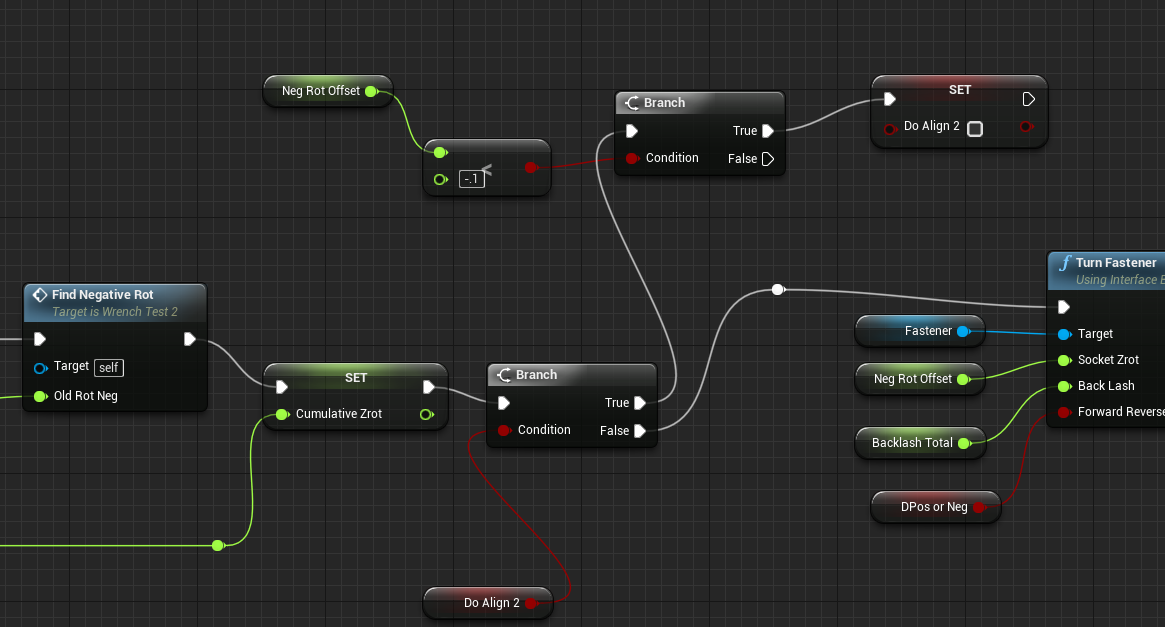
sly elk
finally, i fixed this rotation bug. I ended making a bool on attach then the loop on tick cant continue until that bool hits a low threshold number. Still messy but finally its not doing crazy shit. https://i.imgur.com/4uvYppi.png

oops, i broke it there but you get the idea
like this
 real needle
@sturdy coral we should send your findings to Nick whiting
sturdy coral
@real needle yeah, I'm working on fixing; I want a real fix that removes the Vive hardcoded res
because all games are going to be potentially fucked up on pimax too from this
real needle
Mhm
full junco
@sturdy coral awesome!
sturdy coral
alright it just looked like a vive hardcode, it asks the api for the window bounds as if it were to run in extended mode, and otherwise falls back to something hardcoded
I thought it would always fallback when running in direct mode, but it still seems to work and get the extended mode bounds
(but the main issue is still the max call on pixel density)
and the different aspect between the recommended res and the actual rift resolution
supple coyote
errrr fucking Slate UI again
14ms 😐
anyone know anOTHER reason why SlateUI might be getting in my way
turned off nvidida overlay which fixed it for a while
but now it has returnedddd
even when I Launch Game
srsly getting so annoying
full junco
@supple coyote it's there even in a packaged game? did you package shipping config?
supple coyote
No this is running from in-editor
sturdy coral
@supple coyote you really sure everything else is running in 4ms? 😃
there is a profiler bug that affects all versions
full junco
@supple coyote you should not profile in the editor
sturdy coral
ah, well if it is a really plain scene it might run that fast
supple coyote
when should I profile?
sturdy coral
but it is probably this profiler bug: https://answers.unrealengine.com/questions/431377/gpu-performance-tuning-of-hzb-setupmips-as-seen-in.html
I've seen it show up as slate before too
full junco
@supple coyote in dev config packaged you should profile
or even better in test config
sturdy coral
fixed link
supple coyote
wait so you mean package the game and then ctrl;?
full junco
just type profilegpu in the console
I never use that shortcut so I don't know if it works
supple coyote
in a packaged game correct?
full junco
yes
full junco
in the editor it's absolutely normal to have very high slate ui times
@supple coyote there are different configs you can package in. shipping, development, debug and test
test is only available if you compile yourself I think
supple coyote
also muchcharles - link mostly talked about HZB - which also has affect me here in there
ooo ic
well John - the high slate UI time at 14 is crazy - and also literally just popped up - I changed nothing
full junco
the editor is allowed to do crazy things
supple coyote
lol
so @sturdy coral - read through
im unaware what to think. this still a problem that is unfixed?
sturdy coral
I'm not sure on 4.18, but people say they are still seeing it there
 pale burrow
going to move my question here as some of you may be able to help me
in a blank level, i am getting readings from my gpu around 15-20ms
why is this?
this is not a very good place to start if im trying to hit 11ms in a filled map!!!
trail shale
@pale burrow What does your GPU profile say?
What does stat scenerendering and stat RHI say?
Do the profiler first, it might be something really obvious
Also, change your default character to a default pawn so it is in regular, non-VR mode and see if anything changes
Also, if you are using a Vive, check in Steam VR to make sure you haven't turned Super Sampling High
full junco
@pale burrow most important question, what's your gpu?
pale burrow
gtx 1070
about to check the other things
very new to UE4 so its probably wuite obvious
this is in a empty level
here is the ms reading in my heaviest scene
this is the gpu profile from that scene
full junco
@pale burrow profiling while its compiling shaders is a very stupid idea
pale burrow
sorry, its been doing that
here is the new one, (didnt notice was still doing shaders)
full junco
you should sort by duration, you only have like half of the stuff visible in your screenshot
and as you see, you have a super heavy planar reflection
pale burrow
yes, trying to cut down the scene one before taking away from that
full junco
you'll have to turn that off in VR
full junco
on that profiling screenshot you have the scene stuff not opened
you can't, such a dynamic reflection is too heavy for VR
10 ms is more than your whole budget
full junco
I don't know, thats probably a question for #graphics
but also should also profile your stuff in VR
pale burrow
that is in vr
full junco
on your screenshots VR is not enabled
pale burrow
i have my headset on xD
full junco
oh
yeah, right
looked so much like non-vr
sorry
your regular stuff looks fine, just your reflection is very heavy
is it all dynamic lighting?
pale burrow
1 dynamic light (the ship)
here is with no reflection
theres the profile from that
full junco
collapse the stuff like base pass and lights
so that more fits on your screenshot
5 ms base pass, 2 ms lights and 1.5 ms PP is quite normal on that GPU and dynamic lighting
 fair hearth
@pale burrow you can tell the planar reflection what objects it can and can not reflect, try telling it to only reflect the boat
it's on the settings in the detail panel
I'd also take a look at screen space reflections and polycount,
I believe stat.gpu or stat.engine show polycount I'm don't remember which one at the moment
pale burrow
ok once sec
stat gpu
err with both
ill try doing the reflections as you mentioned, just will be a shame to not see the docks/ players etc in reflection
fair hearth
stat engine, look at static mesh tris, I can't read your screenshot, the resolution is too low res
you can add the docks as well assuming they're not super high poly
generally I've found that anything over 2million polygons starts dropping frames fast depends of course, and that's not a general rule, but more of a "guideline/suggestion"
pale burrow
ew yuck sorry about screenshot... not sure why
could do a lower poly ship to cast reflection maybe
pale burrow
1 290 000 tris
thats bad...?
i would think not.. but well ill dig into disabling the other items
cant seem to select only the ship... i type it and eyedrop it but nothing
that goes for every asset
also, i need to ask... what the heck is wrong with my scene?
all lighting is baked! complex shaders dont cast shadows!
sturdy coral
@real needle I think I've got it 90% fixed, but it has two lines of black pixels at the bottom of the steam mirror view. I think it's due to some bad rounding that may have already been a problem
full junco
@sturdy coral tag me too! 😛
sturdy coral
@full junco you've got a lot of merging ahead of you to get to 4.18 😃
full junco
yeah, it will be horrible, and by the time I do it it will be 4.19 or 4.20 I guess...
@sturdy coral issues at the edge of the view shoudn't matter at all since its not part of the area visible through the lenses
sturdy coral
yeah but it is wrong 😃 it tells the compositor it rendered with one FOV filling the screen
but then doesn't quite fill it
so the compositor will do things a bit wrong
I looked at the messed up view in the HMD so long while working on it that I can no longer tell if there is much distortion
full junco
ah, you mean its offset by 1 line
sturdy coral
I can see some FOV distortion when I move my head, but I think I'm oversensitive to it now and don't know for sure
 warped breach
Nvidia VR works, any opinions?
sturdy coral
@warped breach they are slow to update, but to me it is worth staying behind to stay on their branch
they are usually a month an a half or so after each engine release, but sometimes slower
warped breach
It sounds like its better VR support than default UE4 stuff, but is it?
I definitely dont mind staying behind a version if it is.
sturdy coral
it is worse support (some features are broken) but it is faster
I don't know about that, that might be in a different branch?
ah yeah, the funhouse demo includes a lot of other branches
flex for fluids, some kind of thing for the fire smoke and confetti, and a few others
hairworks for whack a mole
I don't know what branch that is part of, they do have a dynamic fracture thing
for all the breaking plates and stuff
the funhouse branch is unfortunately way out of date
you have to manually merge a bunch of branches to get something similar
warped breach
And might have gotten lucky
Ill know soon
But is most of their stuff closed source?
sturdy coral
no, but it mostly doesn't work on AMD
they announced they were opening flex to work on AMD though, maybe a few others
warped breach
this nvidia stuff definitely seems like it has alot of potential
sturdy coral
@full junco ah that black line was just in the mirror window because I had accidentally stretched the window and it pads with black when then window is stretched different than the aspect ratio
(referring to steam vr mirror view, not ue4 mirror)
sturdy coral
@full junco yeah it's all fixed. they've made the code way too complicated for what it is doing..
I guess cause it has grown piece by piece over time
full junco
awesome! yeah
sturdy coral
I'm sure any time they think about refactoring it they know they are going to be moving to openxr anyway
full junco
hopefully
warped breach
The long compiling journey ☕
And it doesn't launch
😭
2 files failed to compile properly.
sturdy coral
@real needle oh yeah in case you didn't know, oculus via steamvr doesn't set up a hidden area mesh, so you get some perf penalty relative to via the oculus plugin; we need to try and get a fix for that merged too to have steamvr use the same hidden area mesh that Rift uses
@full junco too, but he already knows this
my old idea of hardcoding the same one but falling back to whatever steamvr provides if it ever starts providing one won't work well any more
steamvr provides a dummy one for oculus now, because Doom VFR was crashing if the hidden area mesh was a null pointer
real needle
@sturdy coral I didn't know that, but it can't be that bad can it?
sturdy coral
@real needle maybe around 10-12% perf on shading compute and texture bandwidth
real needle
Hmm, will be interesting to see how that affects perf in the nest...
Considering how they're pushing for native rift support, that should be on their soon to do list
I'm sure we're not the only ones that much rather want to use steamVR only
sturdy coral
steamvr itself should probably provide a similar hidden area mesh to what epic use
but I'm guessing Epic maybe are kind of cheating and maybe cutting out some areas of the screen that you can actually see, cause you can see a lot more of the rift screens than the vive screens
most of the edges but not quite the corners
as you move your eyes you can always see slightly different portions too, less of the edge if you look directly at the edge and more of it if you look away
oculus runs at a lower pixel multiplier by default too though so relative to vive the perf difference from it should be a tad cheaper, it is just relative to oculus via ovr that it is worse
sturdy coral
the medium kit-bash stamps are pretty cool, I needed some temp art for a jetpack:
you can just mash together a bunch of little mechanical parts
 tepid flame
turns out this happens when stereo is on, but when stereo is off i get that black cut off in the background
 mighty carbon

UploadVR
The Microsoft Store has some heavy discounts on the new Windows-based 'Mixed Reality' VR headsets this week starting from $199.
with controllers
tepid flame
solved the problem, someone edit the Saved/Config/Windows/Engine.ini to include ClippingPlanes. -________________-
uneven moon
@wicked oak hey I managed to install the game via neighborhood but it loads up fully black. I can hear audio, though. Weird thing is, when I try to rotate my head, the little icon appears (that tells u how to re-center, as if im still in theatre mode)
sly elk
anyone else feel like there just aren't enough buttons on a motion controller? Im resorting to things like press and hold
sly elk
rift. I suppose it depends on if you want to use teleportation on both thumb sticks or just one
tired tree
start making sub menus
wicked oak
radial menus @sly elk
they work SUPER well with both oculus and vive
given their joysticks
sturdy coral
@sly elk @wicked oak another way to get more actions out of vive is add swipe gestures without clicking, and then clicking underneath
so you can have like the four quadrant buttons and then have swipe left and right
then on oculus you have the two face buttons and then directions with the stick
so ~6 actions with each
wicked oak
just finished porting my prototype game to psvr
120 fps lul
lots of buttons
but no analog
so movement is problematic
sturdy coral
nice, does 120 feel really good? I've never tried anything running at it
haven't even tried PSVR
sturdy coral
@wicked oak might have asked you this before, but is there are special psvr dev kit or can you use any one off the shelf?
sturdy coral
cool, I think I'm going to finally pick one up
wicked oak
what project do you have for it?
and, btw, it aint easy
CPU is garbage, optimizing the game so it works at perfect frames 100% of the time is no joke
sturdy coral
I'm just going to pick it up as a consumer for now
problem is it is going to make me want to buy a PS4 pro
wicked oak
uhm, frame pacing is also complete garbage on 90 fps
might be some stuff on the settings
wicked oak
ok i was being kind of an idiot
seems i will be, in fact, able to push 90 fps on base ps4
sweet
and 120 on pro
wich for a vr shooter in psvr is completely unheard of
i will definitely hold it as a marketing thing
wicked oak
fuking hell 6 ms of CPU time from a few enemies running around
for full game i definitely need to nuke character movement from orbit
real needle
Does anyone have experience installing custom plugins for the mod editors? In this case robo recall
Since engine files are read only, we can't compile our plugin within the custom rocket build that robo recall use
Skokumscript seems to have been able to do this: http://forum.skookumscript.com/t/how-to-set-up-robo-recall-with-skookumscript/1352

SkookumScript Forum
[image] SkookumScript now supports the Robo Recall Mod Kit! Wield the power of SkookumScript to retire your robos yet more creatively! Here is how you install SkookumScript into your Robo Recall mod kit: Open Epic Games Launcher, go to the Modding tab and choose the Robo Recall entry. Install Robo Recall. If you have Robo recall already installed make sure it is updated to its latest version. Ensure you have Git installed and Git Large File Storage (Git LFS) is enabled. (See extra info on...
sturdy coral
@real needle the revive guy was able to add the steamvr plugin (calls it roborevive)
real needle
yeah that too
granite jacinth
@real needle You going to the moon with that rocket?
real needle
hehe, nah just trying to help some hardware dev friends of mine to make robo recall work with their hardware
and their plugin works for 4.15 and up
wicked oak
interesting, i need to nerf the enemies a LOT for the ps4 version
given the worse controls, you cant be as dynamic as in pc, so enemies destroy you even in easy
i need to balance this stuff a bit better
wicked oak
no aim implemented yet
the AIM would be a huge improvement in this game
mostly due to joysticks
sadly, the movement on the moves is a bit clunky
im still shifting the controls around to see how can i improve it
 silk frost
hey guys, can someone explain what I have to do in order to be able to move and rotate the player in the world without having the rotation cause the vr player to rotate around the pivot from where the tracking location starts to his position?
If the user does walk 2m to the front in the local tracking space and I rotate the actor with the camera on it (setup as the unreal engine docs say), It will move the vr player through the pivot caused by the 2m walking.
(I'm letting him drive within a car and each time the car does rotate (which also rotates the player by the same degree), the player does get moved out of the car due to it) 😢
sly elk
anyone ever had blueprints become corrupt for reasons that didn't make sense? I made a duplicate of my ratchet blueprint before implementing thereverseing switch. That blueprint is doing weird stuff. The original still works. If I make a duplicate of the original it is also broken
Seems like if i have a working blueprint, and I make a duplicate, do nothing else, the duplicate should also work
 glossy agate
^Had this happen with some child BP's when I made a small change to the master. Had to just re make them over a gain. My change was just making a variable public.
sly elk
this one doesn't have a parent class blueprint..
making it over again is not really an option... I mean, It would take me a while day. This thing has a ton of nodes
glossy agate
You on source control to revert to when it was working?
sly elk
i have the original that is working still
since i made a duplicate
but any duplicate of that original is broken
It seems like events just don't fire in the duplicates
wicked oak
dude get source control now
glossy agate
Hmm. Maybe due to direct casts calling by specific name? Duplicate will be named different
wicked oak
seriously its living on the fucking limit to do anything on unreall without source control
sly elk
there isn't any direct casting
i do nightly backups but yeah, I should have source control
but would that even help here?
sturdy coral
@sly elk yeah your project is way too big to not be on source control
it might not help too much if this has been an issue that has been there over a lot of commits without surfacing itself but still
sly elk
I'm planning to hire a programmer in january and source control was going to be on them to set up 😛
glossy agate
Try making a child of the wrench and see if that one takes events
sly elk
good idea. thanks
the child works
and so does a duplicate of the child
fun stuff unreal
but the child of the broken copies is still broken
glossy agate
And you are really sure there is no casting? That is a strange problem.
sly elk
actually, there is a single cast
to the motion controller
this is the only cast. Aside form that there are two blueprint interfaces



 glossy agate
Yeah outgoing wouldn’t matter, just incoming due to the name
Or if it’s all. BPI maybe make sure it’s assigned in the copy?
sly elk
I fixed it. This was totally my fault. I added hacky temporary fix into the motion controller that direct cast to the ratchet. I didn;t intend for that to stick around and I completely forgot about it...
my bad 😃 Thanks though
glossy agate
Awesome!