#virtual-reality
1 messages · Page 154 of 1
 warped breach
but i know something about attaching the constraint, breaks it
and the same thing that was happening with the constraint, appears to be happening with the handle
which is why im wondering if i plugged the handle in properly, since im now using blueprints, not C++
but i know i did the constraint properly, cause that worked when it wasnt attached to the character.
warped breach
I messed with collision channels and it didnt seem to fix anything. I'm testing constraint again in physics room
If it doesnt work, then ill try the handle again
 mighty carbon
soo, tried Doom VFR
looking good, runs well, controls are awkward but usable, locomotion is surprisingly well done as far as motion sickness goes
a lot of bugs in general though 😦
warped breach
How did they handle locomotion?
mighty carbon
dash teleport
warped breach
I just have the touchpad behaving like a joystick on my game, and i dont get motion sickness
only thing that bothers me a tiny bit, is rotating too fast using the other remote, instead of rotating my head
but running and walking with a controller, seems cool
and if i do a fake jog while doing it, kinda feels real
what is dash teleport?
oh, i see now
i need to google what motion sickness actually is, because im not sure ive had it xD
okay yeah, what i thought
mighty carbon
lol
that's too bad, because a lot of people have motion sickness induced by WASD-like locomotion in VR
warped breach
im just surprised, because i thought moving via controller would be instant illness, and it isnt lol
really? 😮
i always hear the claim, but never know anyone personally
id like to meet someone, so i can ask them what part
if its all movement, or just rotation
cause spinning around really fast without physically spinning, is kind of icky lol
I got two systems atm.
One uses your HMD like mouse-look, so thats how you rotate.. and the WASD is a joystick on the touchpad, but W is always where you're looking, just like normal
Second is the other remotes touchpad does rotation, but the rotation has to be slow, because fast with that is gross, i dont like it haha
I'm experimenting with it, but I'm doing my best to avoid teleportation, cause it would ruin my game.
teleporting is like hacks xD
Do people still get motion sickness if they play VR while sitting?
or if there is a smaller FOV?
 uneven moon
Anyone good with profiling here? I can't understand what's happening
Apparently the animation being updated is causing the fps drop but when I narrow it down by extending the dropdowns, it boils down to something that makes no difference at all performance-wise
This happens for a bunch of the skeletal meshes in my game that are animated
I start off at optimal FPS and over time drop 20-30 FPS
(wave-shooter, enemies spawn in but it's not a lot of them, there's never like more than 5-8 in the world at any given time and only a few rendered at most up close)
 wicked oak
9 ms on character movement
seems about right
try to disable Overlap events on EVERYTHING
uneven moon
I do need overlap events on one trigger volume in particular
I can disable everything else
wicked oak
disable overlap in every enemy that moves
uneven moon
They have a trigger volume to detect the player, though
wicked oak
if you have the overlap on the character capsule its better
do not have the overlap on the mesh
ever
becouse on each tick, it will check overlap on every capsule of the physics asset
 sturdy coral
@wicked oak you try a sale or something to capitalize on the Doom discontent 😃
wicked oak
lol
nah not gonna happen
but im finishing my Aquila prototype
i dont think ill put it fully public tho
pc sales of DWVR are 100% dead, PSVR is where its at
 noble crater
how am I supposed to read the output of stat scenerendering in VR. the text is tiny
 fleet veldt
have the hmd commands gone away in 4.18? i tried hmdpos reset and it's not workign (or am i remembering it wrong?)
ah found the new ones: https://wiki.unrealengine.com/VR_Console_Commands
noble crater
sorry to ask again - but any tips on how to get a more readable version of stat scenerendering in VR?
 cosmic shoal
On this thread they suggest using "hdm mirror 2" https://forums.unrealengine.com/development-discussion/vr-ar-development/87175-vr-profiling-and-performance-thread
noble crater
@cosmic shoal thanks, will give it a try
@cosmic shoal doesn't seem to do anything. I'm on 4.18
cosmic shoal
I haven't tried it, just searching out of curiosity
 humble spoke
Anyone have an opinions on how to handle Spells (specifically for VR, in Blueprint) I guess I could just have an actor BP_BaseSpell and base everything off that, but I don't know. I also have not used the gameplay abilities system before, is that worth looking at for this?
sturdy coral
@noble crater you can change virtual void GetOrthoProjection in the HMD plugins to move around overlays like that
noble crater
@sturdy coral thanks
 glossy flame
If I place a ThirdPersonCharacter in the map and stand next to him in VR, I should be just a bit shorter than him right? granted I didn't eff with scaling of anything and VR is working properly. (I'm 5'7'')
 plain glade
Hello, Is there anyway to use htc vive front camera as AR ? or is that make sense?
 sly shoal
Hi, I just realised there's a setting called "Viewport Gets HMDControl" inside the Editor Preferences, which is really awesome, but is there a way to allow controller movement in viewport also?
 full junco
@warped breach I'm easily getting motion sickness from any kind of unnatural movement in VR
dash teleport is fine
 nimble junco
hey guys i could use some help
i just updatet my project from to 4.17, i did some custom stuff inside the blueprints for the leapmotion
now everything seems tow ork again, some fixes here and there but unfortunately my leap motion pawn doesnt wokr anymore like id expect it
as soon as my hands are in tracking range they stick to the outer borders of my view in VR (vive) and i cant move them
the functionalitys tho still work (i have some debugging stuff to see that, f.e. hands glow when i grab)
i think that maybe something got updatet inside the leap motion plugin aswell and now my custom blueprints dont work anymore, but i dont have the time to redo all the stuff
so my question probably would be how to quickly bring my changes into the new blueprints OR what to do to my current ones so they work again
wicked oak
data driven RNG mission generation for my prototype yay
i only have easyand hard mission types tho XD
gonna have to add a few more to have variety in that menu
nimble junco
for anybody interested, the problem i described above was appearing because the update reset the assigned skeletons on the hand meshes
reassigning the correct meshes fixed the error
 real needle
I just realized that Fallout4VR is a completely new game, for $60. I wouldn't mind that unless I was stupid enough to believe it would be available for everyone who already purchased the game, since I bought it during a sale ~6months or so ago
mighty carbon
is it just me or Doom VFR's lighting looks flat compare to Doom ?
sturdy coral
@real needle you may be able to refund if you haven't played it, the 2 hour/14day rule is just for automatic refunds
I think they still have a manual process
 amber widget
Hey guys, do you know why vr play in editor is so slow ? I have a 1060 6gb and I7 6700k ...
I try to lower the graphics into the editor, the graphics looks bad but fps drop still happear
appear*
sometimes there is no issue and the second after it's lagging
 granite jacinth
man
Had to grab a 1070TI
Was going to go for a 1080 for VR Recordings, but decided Volta was too close
I'll save now, and spend the saving in a new rig with Super Sexy Classy Magma Lake and Volta next year
@real needle Any good?
I haven't played any AAA VR games yet
I keep seeing meh/bad reviews all over anyway
glossy flame
Robo Recall is AAA imho
granite jacinth
hmmm
I haven't played it
But
Is it worth 10 million?
Let me know
Only thing I've played is BulletTime from Epic
Which...
I guess is never coming out to see all the goodies like they promised
glossy flame
You have a vive?
granite jacinth
I have everything
Except OSVR
😉
But who has one of those anyway?
Wonder if they died out or dropped prices since Rift drops
Yeah, looks like it died
Dont know wtf this is: https://www.vuzix.com/Products/iWear-Video-Headphones
glossy flame
no idea. got RR for free on rift, and messed with the modkit for vive (free too). it was good enough to make me want to start making mods for it if that's indication.
maybe it's like Oculus GO?
scratch that - vuzix is PC bound
glossy flame
nah i was just messing around - hobbyist
granite jacinth
Wish I could have gotten into the mod scene as a kid
Or something, anything.
But meh, not doing too bad now
glossy flame
same here. came in way too late
 chilly thicket
What would be the best way to make a snap to system for placing stuff?
I guess VR might not be the right channel, but it's a VR game, so 😄
real needle
@granite jacinth You mean Fallout4?
@chilly thicket We have a pretty active community here and we usually discuss mechanics that are doable in flat games as well
chilly thicket
Ah, okay.
real needle
So feel free to ask your questions if they are related to a VR project (although some generic things can be kept to the other channels)
I'm not a mod or anything, just giving you my temperature of the discussions here
chilly thicket
Ha ha, thanks.
chilly thicket
So, rephrased question from earlier:
What's the best way to have a snap to world build system?
And, what would be the best way to save all placed stuff and keep it persistant.
glossy flame
anyone here familiar with the vrexpplugin know if it's OK to use Right/LeftControllerRelativeVel to get the speed the player's moving the controller at? Fsr it's returning 0 on me - even though I removed the one and only call that sets it to 0.
Btw, it seems that effin lighthouse issue I was having has been cured by an automatic SteamVR update (yesterday there was a .net redistributable that installed when I opened steamvr. The lighthouses no longer seem to lose tracking ...yet.
 dusky moon
Hey, doesn any1 know if it's still not possible to Stereo Capture post processing effects in 4.18 ?!
I haven't tested it since 4.15
 thorny niche
Has anyone tried to measure performance with Profiler tool on 4.18? Behaves weird to me. With fps drop it increases all the stat numbers like Base pass, that should be constant. So with highest throttling settings at 60 fps Base pass of simple scene takes 5 ms., but with lowest throttling settings at 30 fps same scene takes up to 10 ms. Base pass. When on older versions of the engine numbers like these were constant and the fps drop was logged as Stalls here and there.
 finite haven
how can I detect what's causing "CPU Stall - Wait for Event" for all threads in profiler? everything seems fine, just some occasional drops where all threads are waiting for something
finite haven
if anyone will ever run into my problem and read it: CPU Stall - Wait for Event makes CPU wait for heavy operations that happened on previous frame or two so it's necessary to profile those ones instead of spike
so another question: why FViewExtensionPreDrawCommand takes too much time sometimes and what is it?
 tired tree
@glossy flame rel values are now not calculated unless in a movement mode that uses them to save on processing. You can reverse that and run it every tick if you want the lowpass filtered values back all the time
uneven moon
I'm trying to end an overlap whilst inside a trigger volume
How can I achieve this?
(Without actually ending the overlap, but to trigger an Event Overlap)
I tried to just set all channels inside the BP to 'Ignore'
Does not work
End Overlap doesn't trigger
glossy flame
@tired tree ah shit sorry. Thanks. It's not worth much, but I did look around in the update section (and the whole thread) but couldn't find any hits on "relative". I'm using hmd orient though, and its running after the velocity smoother that uses it I think.
tired tree
Velocity smoothing is only calculated for running in place and armswing
glossy flame
That makes sense. Coulda sworn there were gets on the rels getting passed into the smoother so long as the mode is >= teleport which means all modes I think. Ah, is it in code you check for armswing or RIP? I didn't see that check in bp
tired tree
no, its bp
glossy flame
Dang sorry. Ill check it out again tomorrow. Thanks a lot.
I just checked it. That "calculate relative velocities" function, the first func on tick, is passing in the rels to "get smoothed vel of obj" so long as the mode is >= teleport. My char. Is always in hmd orient, never climbing.
tired tree
pm'd you
 sly elk
I'm working on basic hand tools for my game and have run into a snag. Here is a video showing what it is doing now: https://www.youtube.com/watch?v=sJsHvSa-MsA&feature=youtu.be
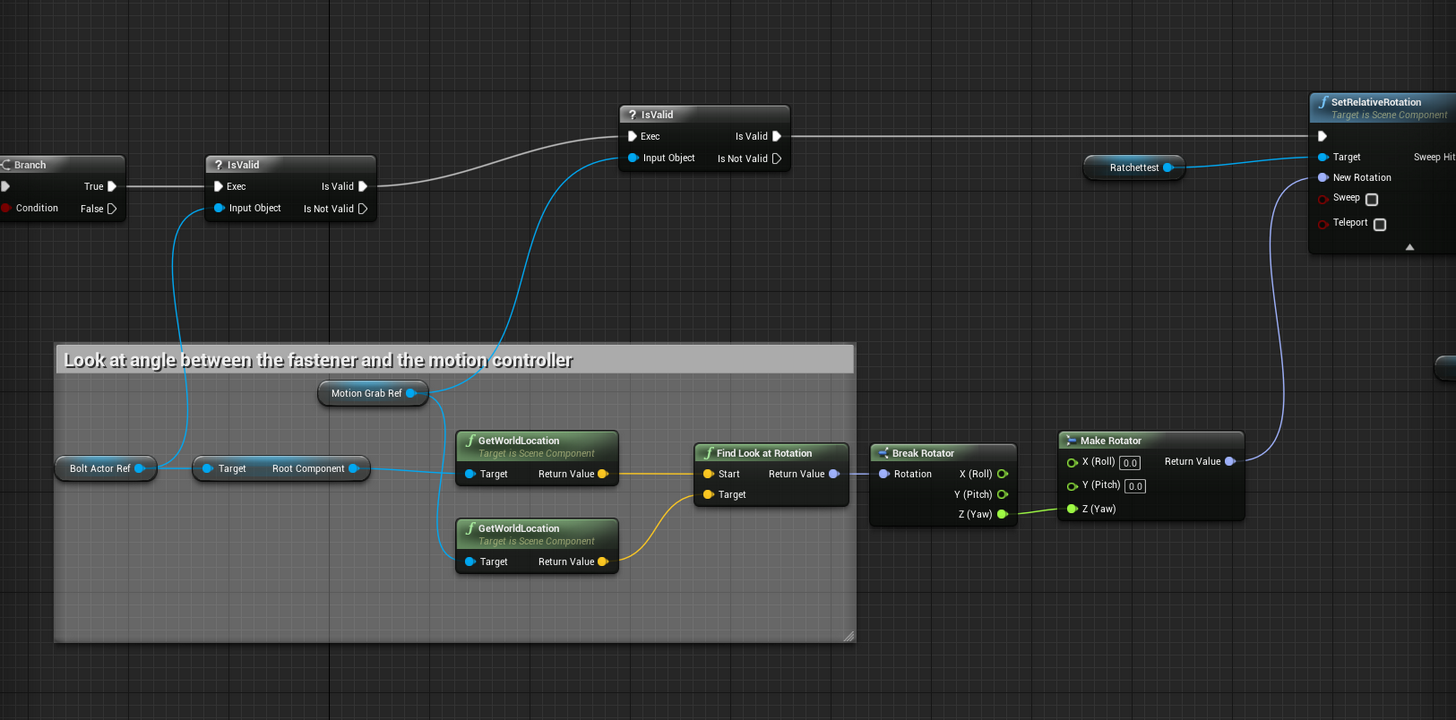
I'm using a look at to turn the wrench based on the hand position (a reference for the bolt gets the look at angle to the hand). Then I break the rot and plug it into Z to constrain it. I think the issue is that I'm getting the look at in world space when I want it in local space . My first attempt to fix that was to get the local rotation and add it to the world rotation but that just made everything go nuts. Pic of the BP: https://i.imgur.com/X7sYURr.png
 sly elk
nevermind, fixed it
lol- struggle with something for an hour, ask for help, then figure it out right after 😛
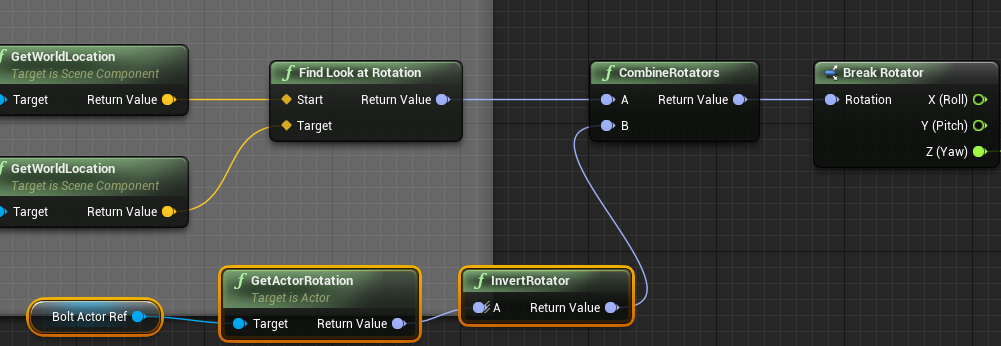
FWIW the problem as that I am attaching the wrench to the bolt which means it was inheriting a rotation from the bolt. I just had to combine the inverse rotation of the bolt to fix it: https://i.imgur.com/9uTxnYN.png
 silk lodge
@chilly thicket snapping would be doing a modula function. look it up! Saving worlds would be creating your own data struct (s) and sticking it all in an external file. You could look at save games as well
real needle
@sly elk I think the universe is like: "oh you're asking for help? let me put the solution in your brain"
Because I do the same thing all the time
sly elk
Yep. Honestly I think after I ask for help sometimes I get self conscious and I start thinking about the problem in new ways
sly elk
i googled it. Thats awesome. I'll just talk to my dog
sly elk
So all the fasteners in my game are modeled with accurate dimensions including thread pitch and I have all of that info in a spreadsheet. I realized I can include thread pitch, major diameter, and bolt length in the fastener object data and then use that to calculate reasonably accurate numbers for clamping load/bolt stretch/bolt torque based on how many degrees past finger tight
 trail shale
Anyone hear if they are doing anything to the spectator screen anytime soon?
trail shale
@granite jacinth I need to be able to record tactical benchmarks and at some point, fire off events, like an Instructor Control Panel. Right now I'm just planning on doing a simple multiplayer lan to get that functionality (as soon as I, um, figure out how to do multiplayer). However, if I could just use a mouse to interact on the spectator screen, I wouldn't need a separate machine...
granite jacinth
@trail shale Well, can you?
trail shale
I tried but I'm probably the wrong guy to ask
As I'm learning Unreal, everyone tells me that if I am having to do too many workarounds and blueprints that look like a pile of schitzophrenic spaghetti, that I'm probalby going about it the wrong way
The temp work around I might try again was to just get the mouse position and then make a bunch of booleans that trigger when the mouse is in a certain 2D vector range (aka, hovering over the button) .... when those are true the click event can be fired....
pretty cumbersome to set up so if you have any suggestions for a better workflow I'm all ears
tired tree
if you set it up correctly its not cumbersome at all
its how game menus were made since the beginning and how slate works at its most basic level
regardless, no new news on the full viewport spectator implementation
trail shale
Oh hey Morden...while I've got you hear, how do you Expose the Steam VR loading screen for level streaming to make a custom one?
uneven moon
If I measure the distance between the Player Camera Manager and a mesh in the world, will it always check the distance between the active HMD and the specified mesh? To then, possess a new pawn and re-calculate the distance between the same two variables, will the cam manager now represent the new active pawn?
real needle
My VR with my Vive works perfectly in Play In VR, but when I click "dedicated server" nothing tracks.
Anyone know how to do this?
wicked oak
@real needle no way around it
editor limitation
gotta test in standalone game without the editor
real needle
Can you launch standalone with dedi, or have to launch both
wicked oak
you launch both
i had a .bat file around, but not anymore
that just launched the project 2 times, one for standalone, and 1 for standalone dedicated server
and then connected the client to the server
real needle
I've got some shortcuts to launch each type. The bat sounds like a good idea
nimble junco
hey guys, does somebody know why my landscape is flickering really hard in VR preview?
uneven moon
@nimble junco Maybe overlapping mesh
Also, I had a similar problem once and I fixed it by re-doing the landscape and the material(s) so I never did find out why it happened
My flicker had my landscape go from like a half-opaque blue to regular colour
Can you show us a screenshot or video of your flickering?
nimble junco
its nothing overlapping at least
i just tried to make a screenshot but then i noticed that its only inside Vive view
not in the preview window
also it looks different now, i disabled tesselation inside the material
so it has something to do with that
sturdy coral
@uneven moon player camera manager has a function to get current camera location and rotation
sly elk
This is the correct way to get a rotation in local space, right? https://i.imgur.com/FsMkBTq.png
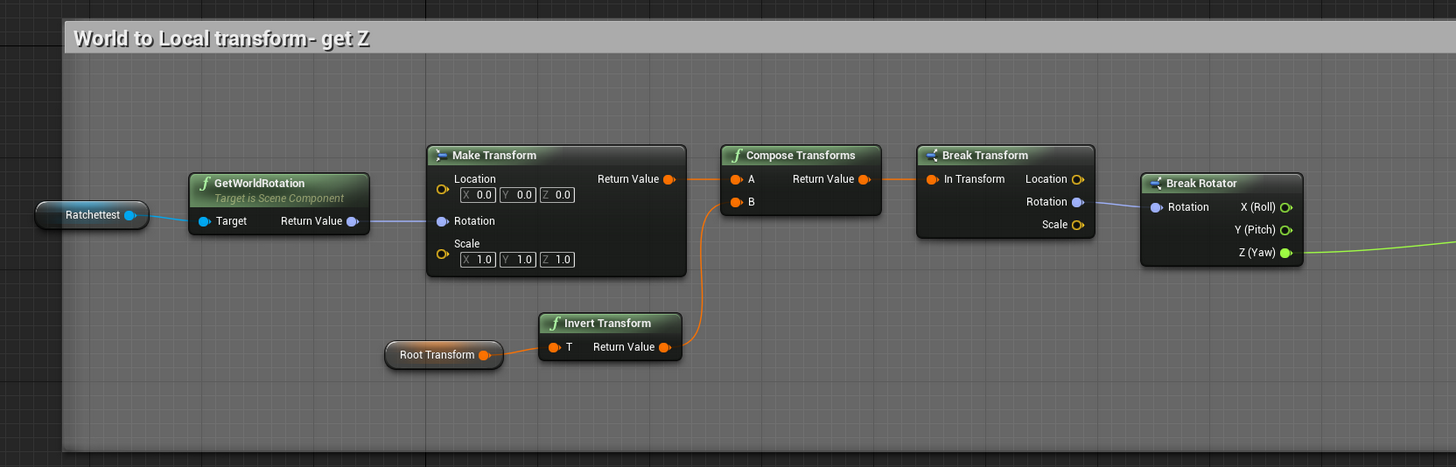
obviously just local Z right there
tired tree
Convert Transform to Relative
the pin names are the reverse of what you would expect though, be careful of that
sly elk
lol, did not know there was a fucntion for that
 west pebble
Hi guys, I'm in a cursed situation. I'm making a vr 360 video tour at work that needs hotspots that actually move along with the video footage. All the video clips are going through intensive post production, so the camera is going to be tracked in syntheyes so that the shots can be stabilized and camera rigs can be painted out and all that. My plan was to apply that tracked motion to a bone that the camera is parented to, while putting the hotspots in-engine right on their real world space (sorting in front of the sphere) so they can be looked at and teleported to (while also playing their appropriate counterpart video clip)
The problem is, I've only ever used UE4 to test materials. I have no idea how to pull this off or where to start.
sly elk
Finally, I am generating the right numbers for the ratchet mechanism. It took me way too long to realize I could just compare my cumulative rotation number between frames... Now i get a total number of degrees rotated (for non ratcheting wrenches) and a total that increments in each direction for a ratchet tightening or loosening
real needle
@full junco @sturdy coral I know that epic is working on the SteamVR/Rift issue. Someone over there knew who I was and we have mutual friends apparently xD
@west pebble Run through the blueprint introduction tutorials, what you want to do is not hard. Line trace from camera -> on trace hit and player input -> teleport and load next scene
But I'd recommend learning the blueprint GUI and workflow
full junco
@real needle ah, great, so you think they'll fix the issue relatively soon?
real needle
@full junco She said she had to stay late to work on it so I hope so ^^
full junco
ha 😄
sturdy coral
nice, now we need to get back on valve to fix that two hand haptics problem
real needle
hmm what's that one about
 cold siren
Any one how to get the oculus remote going?
[OculusRemote.Settings] bRemoteKeysMappedToGamepad=False in defaultengine.ini didnt do it for me 😦
cold siren
Really? Thats the only way?
 barren rose
I hope someone tells me a different way
cold siren
cant have controllers plus remote working together?
barren rose
Because atm, its the only way I've found
barren rose
Aye
I spent hours
HOURS
And then I found some obscure occulus unity forum post
Some fool was like 'just unpair your touch controllers'
...
I believe intention is if you don't have Touch, you use remote
Otherwise you at least use right hand Touch
cold siren
interesting
i was hopoing to give a client the controllers, but keep the remote with me incase they dont get the hang of the controllers if the learning curve is too steep
for the 5 minute demos
so that I can still control the experience
or at minimum switch their location if they are struggling
full junco
@sturdy coral @real needle yeah, if the haptics issue is still not fixed, they really should finally work on that
I havent checked for a few months though
@real needle its this: https://github.com/ValveSoftware/openvr/issues/639

GitHub
Haptics for one controller at a time are working fine with the Oculus Touch controllers, but when trying to trigger haptic pulses on both controllers simultaneously, there are no haptics at all. Wi...
real needle
aaaah that explains a lot
@cold siren I used a wireless numpad 😃
To spawn zombies back in the day depending on how well the player was doing
They're less than 10$ on amazxon
cold siren
could just get one of those mini keyboards
i was just hoping to work with the existing and now useless remote lol
real needle
Yeah that seems odd
full junco
@real needle you mean also also saw that issue just without knowing it exists? 😄
real needle
YES
well
yes
also, I wish the haptic values could be generic
I need different ones for touch/vive
trail shale
Anyone here use a TPcast...I had a question about the router and couldn't find much on google
real needle
@trail shale I wish
trail shale
@real needle Don't wish just yet, this thing is buggy as shit
real needle
Yeah that's why I didn't get one just yet. Figured the tech needs to mature a bit yet
Also, I don't know if having 60ghz straight to my brain every day is a good idea
trail shale
I'm only doing it because my business model calls for roomscale and wireless would be great for that...we'll see how reliable this is
real needle
I've seen good results though
trail shale
right now I'm in this, "This thing is a piece of shit"
Software says everythings connected
I fire up Steam VR
annnd all my monitors go black
wtf
trail shale
annnd it's working now and again I have no idea why
We still need to find the "Steve Jobs of VR" to get this shit to go mainstream
wicked oak
@trail shale have you seen how much Oculus is taking from the Apple book?
The Oculus box is designed in nearly the same way an Apple product box is designed
 fresh laurel

Research Blog
Posted by Behnam Bastani, Software Engineer Manager and Eric Turner, Software Engineer, Daydream Virtual Reality (VR) and Mixed Reality ...
full junco
@fresh laurel nice, but seems to be aimed at mobile vr
sly elk
This is really fun to use now: https://www.youtube.com/watch?v=Rp5XWzTNL1c

haptics and sound next
wicked oak
looks great @sly elk
are you going to make those videos public? can get you a following
people do like to see the dev doing this kind of attention to detail
sly elk
once I finish off the fasteners I will make a public video
wicked oak
also dev blog
sly elk
Yeah. I do more granular stuff on twitter, facebook, and instagram. Then I use my blog for larger posts
I need to work out how to do a dead zone on the direction changes. Basically the socket needs to ignore a small amount of forward rotation based on how far the back stroke on the ratchet was (with a max of 6 degrees for a 60 tooth ratchet). I also need to set the forward stroke stiffness on the rotation to 0 for that dead zone.
Also I explained some blueprint to my dog yesterday and it totally stopped me from posting a question 😃
wicked oak
rubber duck debugging, but with a dog
full junco
@sly elk maybe at some point your dog knows enough to code some blueprints for you
sly elk
I should totally do this with my 3 year old
though im not sure having her home and in my office while im working is worth the trade off
humble spoke
Is there an easy way to take stereo images? not panoramic, my goal is a 2D image that if opened is what you'd see in VR but obviously not moving
I keep googling it and all I find is panoramic
sturdy coral
@humble spoke I think you can disable the VR plugins then use "stereo on" on the command line
and get SBS
sly elk
my real wrenching for the day: https://www.youtube.com/watch?v=nU1TZ8-WHic
 tired tree
@sly elk When does that DLC come out?
sly elk
Lol. Another version of the game where you just fix 30 year beat up trucks
 eternal inlet
hi guys, any of you good with streaming levels? i have a hard time figuring out if there's some builtin mechanism for managing communication between a persistent level and it's streaming levels. as far as i can see, there's no way in bp (maybe in c++?) to get a list of streaming levels in it. And also i don't see a way to call methods on the persistentlevel's blueprint without storing references on ie. gamemode or gameinstance, which also doesn't seem possible
something as simple as getting a streaming level's name, is also something i don't see exposed, neither though DisplayName or ObjectName
closest i've come, is to get the class of the streaming level, then get the name and then remove the _C it adds
doing event dispatchers also doesn't seem to help me, even though i can fire the events, i don't see an easy way of hooking up to those events, when i can't easily get references to the streaming levels
noble crater
is anyone else developing on 4.18 + Rift? if so, how is your PIE performance?
mighty carbon
@noble crater horrible
that's why I test performance by building standalone shipping builds

UploadVR
Snapdragon 845 makes notable improvements across the board, but there's a particular focus on immersive technologies this time around.
Oculus should offer Go with 845 as premium mobile version
sturdy coral
@eternal inlet "And also i don't see a way to call methods on the persistentlevel's blueprint without storing references on ie. gamemode or gameinstance, which also doesn't seem possible" they added the ability for sublevels to implement blueprint interfaces a while back
so you should be able to call methods on it by interface; I don't know the specifics of it though
eternal inlet
right, for sublevels it's fine
i may just avoid storing stuff in the persistent level and just use the gameinstance
a bit more worrying now, is that i had the impression i could serialize an actor in a savegame
sturdy coral
hmm, the persistent level can implement an interface too
eternal inlet
and then restore it again from the serialized data
yes, but if i can't get a reference to the PL, it's not much use
sturdy coral
hmm, yeah I'm not sure how to do it in blueprint by default
you could add a getter on the game instance that gives a reference to the current persistent level
eternal inlet
hehe, i tried something like that
think engine crashed, because it had a variable type in gameinstance it didn't like
noble crater
@mighty carbon do you have the nvidia "in-game overlay" running. disabling it just completely fixed my rift+4.18 in editor perf
mighty carbon
@noble crater I do! o.O Where do I turn that off ?
noble crater
in the geforce experience settings
mighty carbon
aye, thanks
uneven moon
@wicked oak Did you ever run into this problem when trying to launch on the devkit?
It worked fine until yesterday, tried to launch today and I keep getting this
west pebble
I'm working on getting a gaze based teleportation thing going on rn where if you stare at a point long enough you go to it. I've sorta hit a wall. this is my first time using blueprints in my life lads
https://puu.sh/yBBu4/c72de8d998.png
 uneven moon
I'm not sure if you left this out on purpose, but
You'll need to connect these two nodes via execution pins
Right now your teleport node is only gathering location/rotation data, it isn't actually firing
Always make sure that the nodes are connected via their main input and output points
uneven moon
So even when they're connected, no luck?
If you type in 'delay', you can use that node. Unless this is being done inside of a function. Delays aren't allowed inside functions
But, that system wouldn't work
Because once the line trace hits something, it'll trigger a delay and then a teleport
Even if the player looked away
 uneven moon
Here, try Mitch's tut: https://www.youtube.com/watch?v=X-7Hu0HzbDU

Episode 2: An introduction to setting up basic "Gaze Based: interaction with traces in UE4 UE4 Forum Thread : https://forums.unrealengine.com/showthread.php?...
uneven moon
Np

 granite jacinth
@full junco not bad not bad
you notice the trend of less and less VR stuff though?
Other than XR
Almost as if Epic's over it
 tired tree
Finally on that world locked stereo change, it was very broken in SteamVR
sturdy coral
@full junco that multires oculus merge sounds like it's just the mobile thing they talked about at connect 4 (mobile tiled multires)
sly elk
anyone know why we never got foviated rendering on desktop?
sturdy coral
it's there from nvidia, but requires a branch
different shaders
nvidia has said they are working on stuff for the future to make it require less engine changes
granite jacinth
Just noticed I never did this test
I'm about to install this 1070ti, let's see if I am ready yet
glossy flame
is there an "easy" way to rotate a VR player character 90° left/right or 180° over x (~.25s) time? Snapping 90 or 180 works perfect, but gets crazy when I try to lerp it.
nm - looks like set actor rotation VR is what I want.
full junco
@granite jacinth wouldn't have thought it would recommend an upgrade for a 980
granite jacinth
well that was scary
I put in the 1070ti and it wouldn't boot up my other two monitors for a little bit and everything was in like 800x600 on my vertical but sideways.
@full junco ya me neither, I am about to see what it says about the 1070ti
full junco
well that will be very good of course
granite jacinth
I guess a 1070ti meets the requirements @full junco
2x my poor 980
Guess grabbing it at $415 was a good buy
full junco
a 1070 ti is "only" 52% faster than a 980
@granite jacinth why did you buy a 1070 ti and not a 1080?
granite jacinth
@full junco two reasons
one, there were no 1080s around $500 price point
I was not going to pay the freaking mining tax
two, I just needed a quick upgrade before volta
I was doing some recordings in VR/1440p
and OBS was not having it
I mean, it wasn't terrible, but it dropped enough every few seconds a frame or two to be noticeable on replay
So worthless for trailer footage
full junco
@granite jacinth hm, I thought the 1070 ti would be a card specifically for mining essentially
due to it having the slower RAM thats better for mining while the 1080 has the quicker ram thats worse for mining
granite jacinth
You would think
But every 1080 BF deal was already taken, which only took it back down to the "regular" msrp of $500
Every other 1080 during BF/Cyber week was $550+
cheapest 1080ti was like $700
I was going to go all out, but I was like nah, I'll just wait for volta, grab something good in the mean time
And then I was able to snag this for $415 via newegg
full junco
yeah, seems the 1070 ti definitely has more attractive prices, weird
granite jacinth
no contest
warped breach
the 1070 is the better buy
granite jacinth
no
full junco
would have expected miners to make the 1070 ti have higher prices than the 1080
warped breach
if you do the performance to price ratio
granite jacinth
ah
warped breach
i like my 1080 but
i probably would have been fine with a 1070, and could have bought 2 cards instead
full junco
well when I bought my 1080 it was cheaper price/performance than a 1070
because the 1070 is a better mining card
warped breach
or just upgraded sooner
get the next series
yeah, if you get a nice sale
always good to get a really good rewards card or something 😛
combine them with discounts
I really love the new architecture on these cards
Nvidia made alot of stuff run so much better
full junco
"new"?
warped breach
I upgraded from a 580
full junco
its old by now
full junco
yeah, but pascal is already 1.5 years old now
full junco
not really that much, since new DDR generations come way slower than new GPU generations
warped breach
were probably close to the next gen of things
full junco
no
full junco
DDR3 is from 2007, DDR4 from 2014, so DDR5 you can expect in 2021
full junco
the next gen of intel CPUs just came out and is still not really available due to being a paper launch
warped breach
are they still all very hot?
full junco
yeah, the intel ones are really hot
warped breach
ugh
full junco
so the next interesting thing is ryzen 2
warped breach
my E8500 in 2008 was 65w
my current is 88
and when im on newegg, most of the upgrades are 120 or more
warped breach
i like cooler running cpus
full junco
I like faster CPUs 😛
full junco
you probably have AC
warped breach
80 is with my AC on xD
full junco
if you need a cool CPU, buy a ryzen 1700, thats 65W TDP
warped breach
its like 90-100 outside
warped breach
yeah, might have to look into AMD
my friend is convinced on it
im just skeptical
need to do the research
full junco
in the past AMD were the power hungry ones, but ryzen is great
warped breach
I don't really have any bad experiences with AMD
Only had bad experiences with ATI
but they are gone now
full junco
and current ryzen is on a mobile chip optimized process, thats why it has such great TDP but less clock than intel. ryzen 2 will be on a more high performance optimized process, so might get ~1 Ghz more clock
full junco
@granite jacinth well GPU RAM is different. there the really good one is HBM2 anyways, not GDDR6
granite jacinth
Yeah I want to see HBM2 sooner than later
But I doubt we'll see it on consumer level anytime soon
That crap is way too expensive
warped breach
I think for me, the biggest upgrade I felt, going from 2008 sys hardware to 2014, was SSD
granite jacinth
Well mainstream anyway
warped breach
You see those super fast SSDs, that read and write at like 3200 mb/s or mbps, whichever one it is, i always forget xD
full junco
@granite jacinth HMD2 does already ship at "consumer level". vega is consumer level
full junco
well thats below VR spec
full junco
yeah
full junco
its HBM2, thats why vega was so late
full junco
yeah
warped breach
is 1060 the recommended min?
full junco
yeah
granite jacinth
yeah, just put in this:
warped breach
im googling about the next architecture
warped breach
I got that m.2 version that reads and writes at insane speeds
but my motherboard sucks, so i only get 800 mb/s xD
warped breach
yeah i want to see the price on SSD get cheaper
granite jacinth
Ended up getting this and a 1TB 850 Evo
warped breach
i dont want to ever go back to HDD
warped breach
i nearly destroyed my HDD doing video editing for a client
granite jacinth
want to get rid off one of the HHD and put this 1TB Evo in
warped breach
the new nvidia architecture focuses alot on AI
just thought of this =3 https://vignette.wikia.nocookie.net/terminator/images/1/19/Terminator_robot.jpg/revision/latest/scale-to-width-down/300?cb=20090512155233
 full junco
the AI stuff won't be in the gamer cards
warped breach
is there a replacement for PCI-E?
glossy flame
what do y'all think of the intel Optane 900p lol It's shaped like a gpu
sturdy coral
wow the iphone face capture stuff can even get like really rapid lip movements: https://www.youtube.com/watch?v=w047Dbo-fGQ&t=5m

A new test where I record the facial animation data from the iPhone X and import it into maya to animate the same character from our game Bebylon. This is sh...
granite jacinth

NVIDIA
The world’s fastest desktop graphics card built upon the all new NVIDIA Volta architecture. Incredible performance for deep learning, gaming, design, and more. Create and program faster than ever.
sturdy coral
we're going to see decent mocap in so many games
warped breach
@sturdy coral one day, we wont know simulated from real
sturdy coral
yeah, it is pretty easy to write something like he is showing, the api just gives you an array of blend shape weights over time
warped breach
did you ever see that video of simulated Obama speaking?
sturdy coral
yeah, the audio synthesis one?
warped breach

Researchers at the University of Washington designed a program that can take video of someone talking and replace their audio with something else. The result...
sturdy coral
or was it video too?
warped breach
i think this is it
sturdy coral
oh wow, I didn't see that
granite jacinth
Well
That's not very new though
Adobe has this thing
Forgot what it's called
granite jacinth
But basically, after taking a few seconds of your voice
granite jacinth
You can pretty much make it say anything you want with that voice
granite jacinth

#VoCo allows you to change words in a voiceover simply by typing new words. Presented live during the Adobe MAX 2016 Sneak Peeks, co-hosted by Jordan Peele. ...
This is actually a bit different
warped breach
So its like an automated soundboard maker
warped breach
Hollywood will use it to resurrect dead actors/actresses
Had atleast 2 in Rogue One right?
full junco
they don't ship that feature yet though?
granite jacinth
Nah, I am sure there are a lot of legal issues that have to get around
full junco
no, why should there be
granite jacinth
?
full junco
its same like removing or adding something to images
full junco
adobe doesn't have to care about what people do with it
full junco
who complained about that pictures can be edited?
warped breach
once something gets real enough
it takes heavy analysing to detect forgery
and you've seen what happens to some people, when they are framed
even if it doesnt stick as evidence in the legal system, some people cant take it and kill themselves.
the more this stuff improves, the more skeptical people will be of audio and video
but that skepticism though is probably a good thing, because faking stuff is nothing new 😛
but yeah, I don't buy that Adobe is going to be able to do much to protect people from that tech
and honestly, if they dont create it, someone else will
but hey, I see some potential benefits
I could put on my best pirate voice for 20 minutes, and then get several hours of pirate speak
glossy flame
lyrebird I think can get the data within a minute
full junco
lyrebird does not sound very good
warped breach
and actually, if it isnt perfect, slightly robotic, thats kinda cool
glossy flame
yeah, it's a bit rough last I checked
warped breach
cyborg pirate
full junco
full junco
this is funny: https://twitter.com/quasimondo/status/904808255276376064

I deleted my previous voice samples and recorded them again, this time singing them. Oh well.... https://t.co/MV5QLT0Afe
 Twitter
warped breach
Twitter
warped breach
LOL
this would work well for the Gman
cant wait to hear the result of this
xD
if only it didnt require reading sentences they choose
id feed it some Gman 😄
😄
😄

Taumatawhakatangihangakoauauotamateaturipukakapikimaungahoronukupokaiwhenuakitanatahu is a hill near Porangahau, south of Waipukurau in southern Hawke's Bay, New Zealand. The height of the hill is 305 metres (1,001 ft). The hill is notabl...
Made it say that for me
This thing must require a shit ton of voice recordings to become smooth
and I feel like they are gonna steal my voice after haha xD
But, that was fun, thanks for sharing that website.
@full junco 👍 👌
wicked oak
why would i want to have a text to speech with my voice XD
but if you train it with morgan freeman...
tired tree
no, Gordon Freeman
mighty carbon
Is anyone planning on getting Nvidia Titan V ?
wicked oak
you would have to be a fucking idiot to get one
SLI 1080ti is cheaper and much stronger
it barely has more power than a 1080ti for 3 times the price
(for gamedev)
they are only useful if you will want to do AI stuff with it
becouse if you want to do rendering, getting 2 of the older model is a better deal
its essentially a toned down Tesla card.
mighty carbon
It's Volta arch
wicked oak
you will only have use with it if you are going to do half precision, double precision, or AI stuff
its volta for computing, not volta for games
given it specs, it doesnt seem like its going to be much faster than the 1080ti for games
but it would utterly destroy anything else for AI or double float compute
eternal inlet
it will be better for bitcoin mining tho 😛
wicked oak
nope
it will be worse XD
too expensive to turn a profit, and, again, multiple of the cheaper cards is much better value
crypto mining uses integer instructions, this just has lots of floating point stuff
sturdy coral
Sounds like it will be better for realtime replacement voice synthesis
eternal inlet
i see... i actually thought it was worth it for mining
sly elk
I have no interest in $1000+ video cards but all of those cuda cores would speed up scan processing
full junco
the titan V will have at most 28% more TFlops than a 1080 ti
in FP32
so absolutely not worth the price for gaming
wicked oak
not even for normal computing
as you can just grab 2-3 older titans or 1080tis
for the same price
 raven halo
@mighty carbon do you remember how to force anisotropic filtering x2 on gearvr?
mighty carbon
I never knew that :)
raven halo
I can't find anything on the web xD
mighty carbon
AA is x2 by default, that's all I know
tweet at Carmack.. He might know
or is it "twit"? 🤔
wicked oak
looking at the source code will be the fastest
there is probably some place where it sets up the correct anisotropic filtering, so just up that
as far as i know anisotropic is a scalability setting
raven halo
I'm going to check
sly elk
I think this is simple but I just don't know what nodes to use. I want to play a sound/get an execution wire every time a string increments by 6. This will be for firing a sound effect and a haptic event every time the back stroke of the wrench passes a virtual tooth. I already have string that records multi turn rotation and string that add up all the back and forward direction rotation. I basically want to take the back stroke rotation string and every time it increase by six, fire off an execution wire
The only way I can think to do this feels messy- Get the negative rotation delta between frames and add them to a variable each frame. If variable is > 6 make a branch, do the sound, and then set that delta total back to zero. It seems like this would result in a tolerance stack issue where the amount the delta went past 6 could cause issues with fast motion
wicked oak
@sly elk you can just not set the total delta back to zero
but to subtract 6
that way you wont lose precision when it doesnt fall directly
sly elk
thank you
eternal inlet
hi guys, anyone that can do a vr bug test for me?
it's about this one: https://answers.unrealengine.com/questions/726196/bug-vr-pause-menu-3d-widgets.html
which i explain on a video here: https://answers.unrealengine.com/questions/726196/bug-vr-pause-menu-3d-widgets.html
the repro project is here (and is really small): https://www.dropbox.com/s/a89jer4o8u8xrtt/MyProject3.zip?dl=0

Rudy from Epic, can't reproduce it, so im starting to think that it's a local problem, but need to hear from others what they say
sly elk
Has anyone dug into haptics for the rift or vive in detail? Im wondering where the upper and lower limits are for frequency and intensity before it totally loses detail or intensity. Basically, what operating range I have to work with in the feedback curve editor
sly elk
Also, does anyone know how to get VR preveiw mode to play sound through the system and not the HMD?
sturdy coral
@sly elk frequency-wise I've heard something like 5ms for the steamvr api, which would be 200hz
@sly elk for sound you may be able to modify FString FOculusRiftPlugin::GetAudioOutputDevice() with an editor check
for steamvr you'd need to add a virtual GetAudioOutputDevice override (it relies on steamvr setting the system audio device so it just leaves it unimplemented)
sly elk
thanks
sturdy coral
@sly elk on the haptics thing I'm not sure how UE4 implements it though, it might not update it every 5ms
could be tied to tick rate or something
sly elk
I have a pretty decent ratchet haptic event but at some point I want to sit down and just test the min/max bounds of frequency and intensity and take some notes
almost done with this.. I think I just have about half day work left to get the teeth to unload on the back stroke and create a dead zone for both the socket movement and the ratchet stiffness: https://www.youtube.com/watch?v=2l92ICo-fRA&feature=youtu.be

The ratchet now communicates with fastener objects through a blueprint interface. I also implemented sound/haptics around a virtual 60 tooth ratchet mechanism.
I also need to implement forward and reverse switching on the ratchet
eternal inlet
looks very nice
real needle
I've added textures as the brush to some UMG buttons, but whenever I hover over them they flicker and show what looks like a cooldown bar on the right side
Using widgetinteractioncomponent and 3dwidgets
Was just wondering if someone has come across it before, I can't figure out why it's happening
real needle
yeah it does the same thing
so I discovered it's actually triggering "on hovered" every tick
eternal inlet
ah
strange i don't have that issue then
wonder if something you do keep triggering it on and off
eternal inlet
hmm, maybe there's another widget over it?
real needle
same BP with a different WBP works
As intended
So it's something about applying brushes to buttons
real needle
yeah I tried it in a nother level even
eternal inlet
i mean in the UMG
real needle
so it happens when the buttons are set to auto instead of fill
real needle
but with fill they don't get the right scale..
eternal inlet
can't recall if i have any of those, but good to know
 pale burrow
asked in blueprint section, but ill mention here: Having a struggle here... in search of help. please @ me in any relative answers. I am looking to have a character climb a cable component in vr and swing on it..... any ideas?
eternal inlet
i've only personally done a swing using a fixed point (grapplehook)
that approach is easy enough if you have a climbing logic setup already
but for climbing an actual cable i think u would need to traverse the cable particles and generate collision bodies to climb on and update on tick
@pale burrow
eternal inlet
i don't think it would be so hard actually
eternal inlet
eternal inlet
very handy for ie. custom meshes for cables too
not that i've personally tried it, but thought about it
pale burrow
the ropes will be fixed to a pirate ship, and id like to swing from ship to ship.
this seems useful... how would you handle the swing
eternal inlet
use physicsconstraints
ah one sec... it's called something else or i can't recall how i did it
ah no wait it's right
pale burrow
any chance you have a blueprint i can peek at?
pale burrow
im launching my project up now.... all i was able to do is pick up a ball on the end of the rope and throw it (and it went on for ever)
eternal inlet
meh, it's pretty big... too big to show and explain really
but i recall i just did a simple test in a 3rd person template project first with two boxes simulating physics tied togheher with a physics constraint
and then making a cable between them for the visual effect
or rather one box simulating physics ofc
pale burrow
so just attach cable component, and attach physics constraint??
eternal inlet
and the other box = fixed point
pale burrow
thats not so horrible
eternal inlet
attach a sphere simulating physics to a physics constraint at the anchor point
and yes then make sure the cable component is updated to the sphere and the anchor point
then it will look like you're swinging
pale burrow
oh, so cable component is irreverent to this whole setup?
pale burrow
okay. ill give this a go
pale burrow
ill see what can be done.... i havent really done much work with physics constraints yet
eternal inlet
me neither, but a good starting point is to poc in a simple setup first (non-vr)
to see how it behaves easierly
pale burrow
alrighty
eternal inlet
GL mate
pale burrow
ooooooooo i feel so sick
i just did it in vr and it swung around insanely fast
BUT it works
eternal inlet
hehe
pale burrow
any way to like.... dampen the movement?
eternal inlet
i increase it the closer the distance to avoid the worst
yeah, it takes a bit to get right
but once it works, it's damn good fun
eternal inlet
its actually not that bad
im quite prone to motionsickness, and swinging isn't making me sick
but i suppose it's different for everybody
pale burrow
this project is already far from motion friendly.... only for the true vr stomachs
you are on a pirate boat floating around through storms
pale burrow

A new pirate ship set up for sailing through a storm, in VR!
eternal inlet
oh wow, looking really nice with the shadows and all
pale burrow
Sea Sickness in VR
pale burrow
haha, thank you, its a big feature im trying to hold onto for my game. havent gotten forward shading working yet because of my terrain textures, that may prove to help performance lots
thanks alot for the thumbs up, ill be posting videos when possible if youd like to have an eye on the project/ get in on some test versions
eternal inlet
for sure yes
actually because there's the horizon to look at, it might not be so sickness inducing
would have to try it
pale burrow
add me on discord/steam and ill send you some testers when possible....
ill be releasing a comfort mode with a cage as well.... but i find it ruins the immersion
eternal inlet
i should do some dev-videos too on my game
pale burrow
i try and keep up on it alot... even unedited..... ill be starting a kickstarter at the end of the month, so i think it will help people look back on progress made
this project is about 2 months old, with only a month of actual work
eternal inlet
nice progress then for sure
im 2-3 monts into mine, and there's so much work to do
pale burrow
humancatnip on steam, or add me on discord. maybe we can colab on a few things.... im quite good at the art.... not so much game mech
 robust spoke
Well done to you both 😃 Keep going
eternal inlet
im ok on game mech, shitty at art, i buy all the stuff
pale burrow
thank you... i buy some 3d models, but paint them myself, and make simple ones alone
eternal inlet
i could use some tips on painting things myself... i have lots of stuff i need to retexture in a good way
pale burrow
well just message if you want to collab. i dont mind working for free, just for the exchange of tips on engine tech
eternal inlet
just to get them different from the stock marketplace look
robust spoke
I like the colour, the last picture kind of reminds me of an ARK survival style graphic but with your own theme
pale burrow
thank you, the lighting has been a struggle..... same with terrain texture... no forward render
eternal inlet
will do for sure... and i don't mind sharing game mechanic tips, since im doing it on my youtube channel anyway 😃
pale burrow
ill check it out, drop a link. i may have even seen a few vids.. i dont mind texturing a few things for you either.... if its anything big maybe a credit mention, but honestly just looking for help kicking my game forward.... so much to do
robust spoke
The lighting is a big deal for sure man
eternal inlet

YouTube
My name is Jonas and i live in Copenhagen/Denmark. This channel is dedicated to bringing practical tutorials on various 3d gaming/artist related stuff. I wil...
pale burrow
sorting through AI combat rn as well.... ive added "prediction boxes" that the ai sense when your weapon is near, just need a way of moving their arms to the location
running most scenarios at 80-90 fps with world composition and a very very large map (currently 4x4 terrain tiles)
a couple pictures, not to spam chat.
eternal inlet
what do you use for fullbody ik?
pale burrow
eternal inlet
love the two houses 😃
pale burrow
fullbody ik?
eternal inlet
i saw arms on the character
pale burrow
and those are a tavern and a blacksmith
thats my own idea xD just springer arms attached to wrists
kinda stupid but works
eternal inlet
ah, coz i used a fullbody solver myself for my game
pale burrow
id like to see that
eternal inlet
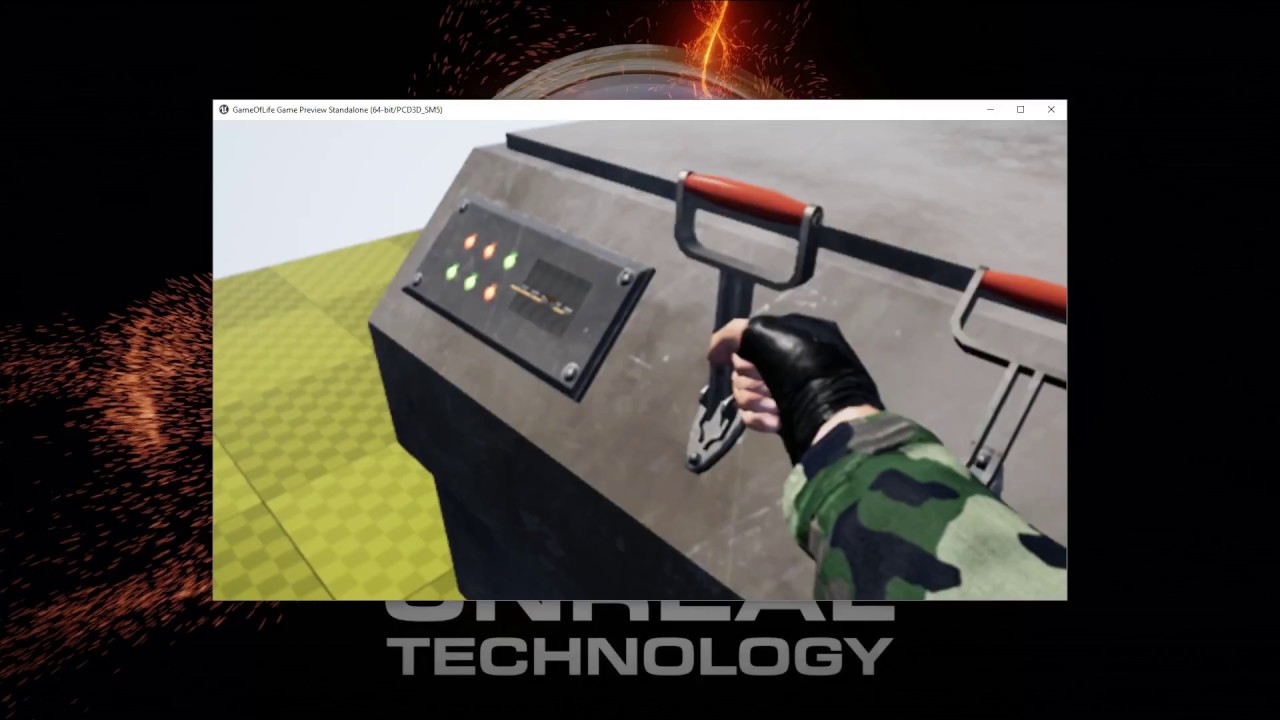
it's a bit of a bitch to work with, but it adds to the immersion i think
eternal inlet
This video is just a little demo of some actor interaction and sound experiments i made for my upcoming game. I'm working on setting up a Patreon page, becau...
pale burrow
i was thinking of adding kicking in vr
eternal inlet
think this video show it
actually it doesnt show so well
will do a short video where it's more visible
eternal inlet
hehe yeah
pale burrow
i love the doors, i have one in my game but sounds are a nice touch.
eternal inlet
thanks
pale burrow
looking good
eternal inlet
took a while to get right too
pale burrow
my doors are a bit buggy, but well im trying to work with climbing and swinging because there will be a stealth aspect in my game for when in military towns (as a pirate) you will have to take rooftops
eternal inlet
i got some stealth mechanic too
pale burrow
trying to not ripoff assassins creed.... but all i hear from everyone is "add wristblades add wristblades"
sp im starting to give in and may put them in for a mission or two
eternal inlet
i will add a knife as a melee weapon, and ofc a crowbar 😛
pale burrow
i have scimitars and rapier (pictureed way above) but havent implemented much for combat against ai yet.
pale burrow
@eternal inlet just add on steam or on discord and send some models you would like textured, and id love to help. ill flip through your videos later today but well ill do whatever i can to help you out

some tweaking MAY be necessary xD
real needle
Hey guys I'm about to upload the first multiplayer patch for The Nest but I could use some ppl to stress test the build (currently vive only...). If you're available during the next hour let me know and I'll hand you the beta password
pale burrow
damn, no oculus support?
real needle
@pale burrow Everything is prepped for it, and it was working fine until 4.18
Then shit hit the virtual fan
pale burrow
damn
real needle
for faen!
pale burrow
i sent you a pm just so i have you in my list.... send me a few models you need tweaked @eternal inlet and ill see if i can do one or 2 tonight
eternal inlet
hva satan? nordmand?
real needle
japp, men jag bor i NA
eternal inlet
aha 😃
real needle
had many tats done in copenhagen
eternal inlet
og NA er?
real needle
north america xD


 eternal inlet
yes! it's lovely right?
pale burrow
very nice.
i like it
if you had a nice map you have a finished demo already
well, with ai combat
send me some models and ill do some for ya, or even map design if needed
eternal inlet
the ai is working, but needs a lot of attention
they see and hear you, but i made myself invisible for this video
pale burrow
love your attention to detail.... bullet holes, body manipulation, glowing interaction items.... i love it
looks very very cool
eternal inlet
thanks 😃
and yes, i wanted to get those small details in
also a lot of work is done on the sound design, but lots of work to do on that still
just did enough to have a good framework to build on
pale burrow
yea, seems very good. i have almost no sounds in my game... should probably revisit that
real needle
@eternal inlet Did you play around with steam audio yet?
I implemented their HRTF but I didn't have time to learn their reverb and occlusion
eternal inlet
current map has about 800.000 polys, can handle up to 10ai with a cpu load on my pc of about 7-8ms in packaged
in idle it's about 2-3ms
no haven't done any steam audio, it's c++ thing right?
i use the builtin audio occlusion stuff and reverb volumes
not on this map though
real needle
@eternal inlet No it's just a different audio solution. The plugin is disabled by default
eternal inlet
Hmm i think i enabled it yes, but not sure i use any of the extra features
Actually i know i did.. but still not sure what is new
sly elk
Okay. last time I will post this ratchet stuff for a while. All done now. The backlash between teeth is accurately simulated and it feels really good. https://www.youtube.com/watch?v=0JnIswHbGoc

This is the feature complete ratchet. The art is still temporary but the mechanics are fully implemented. The combination of haptic feedback with sound tied ...
pale burrow
great tech.... i love those hands
 supple coyote
anyone dealing with insane SlateUI budding in
when I run GPU profiler
4.17
for some reason, all projects in UE are killing my oculus performance
is it the new dash? I reverted. new nvidia driver?
anyone experiencing sudden UE performance issue with oculus?
hell even without oculus when I hover over my outliner it slows down.. really puzzled what the heck is going on
 lime dagger
when you run the gpu profiler?
sturdy coral
@supple coyote someone suggested disabling the nvidia overlay the other day
not sure it was a slate ui thing
supple coyote
oh man
i literally just did that
cause suddenly noticed that was happening when I started UE
i saw improvement without VR
just restarting editor to see
when did that overlay start to happen?
sturdy coral
not sure
@real needle I finally tried out 4.18 to see if I see that same steamvr issue
supple coyote
its unpleasant
sturdy coral
turning on the headset mirror shows something of what is going wrong:
supple coyote
wow
sturdy coral
sturdy coral
the eyes aren't split down the middle
@supple coyote yeah ask @mighty carbon about it I think I saw him mention it here
I think he said there was a fix on the way maybe
supple coyote
❤
 wintry escarp
anyone recommend an amazon dp to hdmi that works with rift?
 fossil stratus
anyhow try out the Facebook SDK to try and get something with the Gear VR?>
full junco
@supple coyote hey data, how did you disable the overlay?
@sturdy coral interesting, weird issue though
if you look at it with renderdoc you could easily see where the issue is introduced
supple coyote
through Geforce experience @full junco
theres a tickbox in there
Pro Tip: using decals to fake dynamic shadows
Hot
full junco
but can I still do stuff like start a recording if the overlay is disabled?
supple coyote
😄
wintry escarp
shame it doesn't come with the power supply, that's strange
sly elk
I need to order a vive soon so I can start looking at button mapping parity
seems pretty close to the touch except the grip button isn't analog.
real needle
@sly elk yeah the touchpad can be used as a d pad
sly elk
Yeah- from looking at it I can use it as 4 buttons and an analog input
sturdy coral
hmm, so in 4.16 oculus get worn state was:
{
    FOvrSessionShared::AutoSession OvrSession(Session);
    // If there is no VR Session, initialize the Oculus HMD
    if (!OvrSession)
    {
        InitDevice();
    }
    if (OvrSession && !pCustomPresent->NeedsToKillHmd())
    {
        ovrSessionStatus sessionStatus;
        ovr_GetSessionStatus(OvrSession, &sessionStatus);

        // Check if the HMD is worn
        if (sessionStatus.HmdMounted )
        {
            return EHMDWornState::Worn; // already created and worn

        }
    }
    return EHMDWornState::NotWorn;
}```

but in 4.17 it is:
EHMDWornState::Type FOculusHMD::GetHMDWornState()
{
    ovrpBool userPresent;

    if (ovrp_GetInitialized() && OVRP_SUCCESS(ovrp_GetUserPresent2(&userPresent)) && userPresent)
    {
        return EHMDWornState::Worn;
    }
    else
    {
        return EHMDWornState::NotWorn;
    }
}
but turning stereo off makes ovrp_GetInitialized return false
so you can't check the worn state if you want to toggle stereo on and off when the user puts on the HMD
I don't fully understand how the VR editor handles that issue, it seems to just check GetHMDWornState without initializing the session
maybe it just never turns stereo off and so the session is initialized
real needle
@sturdy coral hmm that need to be fixed for "social screen" to work
sturdy coral
@real needle this fixed it:
    {
        if (!ovrp_GetInitialized())
        {
            InitializeSession(CustomPresent->GetRenderAPI());
        }

        ovrpBool userPresent;
        if (ovrp_GetInitialized() && OVRP_SUCCESS(ovrp_GetUserPresent2(&userPresent)) && userPresent)
        {
                return EHMDWornState::Worn;
        }
        else
        {
            return EHMDWornState::NotWorn;
        }
}```however in 4.16 it was instant when I put on the headset
now it takes like 3 seconds
well with that I'm finally merged to 4.17, I'll hold off 4.18 until that oculus via steamvr bug is fixed and probably until nvidia merges
sturdy coral
oh nice, with that change as long as you are querying the worn state it will keep things initialized and the Oculus controllers still work outside of VR, they didn't work in 2d in 4.16 even if the session was kept initialized
maybe caused by the ovr sdk bump
sturdy coral
does GEngine->HMDDevice->GetCurrentOrientationAndPosition need a worldtometers conversion? I'm trying to use it for a height calibration thing and want the actual current real world height of the HMD
cold siren
can any one help with quick cpu/gpu profiling? Im having a couple trouble spots, but i dont understand the profiler enough to narrow it down
raven halo
sorry if this has been discussed before
but I just read this in the master branch:


Lens matched shading?
I thought that was exclusive to nvidia 10xx cards
and only available on nvidia's branch of Unreal
wicked oak
oh hell yes
whats the commit for it? i would like to have a look
@raven halo LMS is indeed only on nvidia branch
but that only works on nvidia cards
Oculus has done their own implmentation of LMS that is cross platform, or so it seems
as part of the SDK
AMD cards do have support for LMS style stuff, its just that no one ever uses the VR stuff of AMD, becouse you gotta implement it on engines yourself
if this is a "generic" implementation, then its a huge deal
lol
trademarks on the source comments...
too bad its a huge multi-commit so not going to be easy to find the code
this one is for Pimax
- Blueprint get set nodes for the Hand property will still function but will warn as deprecated, this is achieved via using deprecated BlueprintGetter and BlueprintSetter on the property (plus a change to UHT to allow that to compile)```well, dammit
thats a huge change
changing it to a fname is super easy to get wrong
and they now have left and right oculus touch 3d models in the engine
looking at the code
yup, now MultiRes is official
there is also some ps4 HDR changes in the commit
for some reason
this is how they changed the ControllerHand thing
this is cluttering the commit...